At 09:14 on a Tuesday, a deploy ships a migration with a missing WHERE clause, and UPDATE orders SET status='cancelled' rewrites every row in a 600 GB MySQL 8.0 database before anyone notices. The nightly mysqldump is eleven hours stale, took four hours to restore the last time anyone tried, and restoring it lands you at 22:00 yesterday — not at 09:13:59 today, the second before the bad transaction committed. Every order taken this morning is gone either way. This is the incident that separates teams with backup files from teams with a recovery capability, and the difference is not the backup tool — it is whether you can replay history to an exact transaction.
This guide builds that capability from first principles with two components that fit together like a base and a delta: Percona XtraBackup, which takes hot, physical, non-blocking backups of a running InnoDB server by copying data files while tailing the redo log; and the MySQL binary log (binlog), the server’s transaction journal, streamed off-host continuously so you can roll a restored backup forward transaction by transaction and stop before the one that hurt you. Combined, they give you point-in-time recovery (PITR) with a worst-case data loss measured in seconds and a restore measured in minutes of file copy plus binlog replay — not hours of single-threaded SQL re-execution.
You will go deep on the machinery, because PITR fails at the seams: how XtraBackup’s copy-plus-redo model achieves consistency without locking writes, how LSN-based incrementals chain onto a full, why the --prepare phase has a --apply-log-only rule that silently destroys backup chains when broken, how binlog formats and GTIDs determine whether a replay is deterministic, and how to automate the whole thing with systemd timers, checksums, offsite streaming via xbcloud, and restore drills that prove — not assume — the system works. The centerpiece is a hands-on lab where you break a database on purpose and recover it to the second.
What problem this solves
A MySQL server fails in four distinct ways, and most backup setups only cover two of them. Hardware/volume loss (disk dies, instance terminates) and host-level disaster (rack, AZ, ransomware) are what people design for. But the incidents that actually generate database restores are logical corruption — a bad UPDATE/DELETE/DROP, a broken migration, an application bug writing garbage — and partial damage (one table trashed, the rest fine). Logical corruption replicates instantly to every replica, so “we have replicas” is not a recovery strategy; the bad transaction is faithfully applied everywhere within milliseconds. Only a backup plus the ability to stop replay at a chosen point recovers from it.
The failure without this capability is quantifiable. A nightly mysqldump of a 600 GB dataset gives you an RPO (recovery point objective — maximum acceptable data loss) of up to 24 hours and an RTO (recovery time objective — time until you are back up) of many hours, because a logical restore re-executes every INSERT and rebuilds every index from scratch. Worse, mysqldump at that size holds a long snapshot transaction open for hours, bloating undo history and slowing the server — so teams quietly reduce dump frequency, making RPO worse. Compare what each strategy can actually deliver:
| Strategy | RPO (data loss) | RTO for 600 GB | Recovers to arbitrary second? | Load during backup | Where it breaks |
|---|---|---|---|---|---|
Nightly mysqldump |
Up to 24 h | 6–12 h (SQL replay + index rebuild) | No | Long snapshot txn, hours of reads | Size; restore time; RPO |
Nightly mysqldump + binlogs |
Seconds (if binlogs survive) | 6–14 h (dump restore + replay) | Yes, slowly | Same as above | RTO; dump/binlog coordination |
| Storage/EBS snapshot | Snapshot interval (hours) | Minutes to attach + crash recovery | No | Brief I/O freeze or crash-consistent | No statement-level recovery; platform lock-in |
| XtraBackup weekly full only | Up to 7 days | ~1 h (copy-back + prepare) | No | Read I/O, no write blocking | RPO between fulls |
| XtraBackup full + incrementals + streamed binlogs | Seconds | ~1–3 h (copy + prepare + replay) | Yes — exact GTID/second | Read I/O, brief DDL lock at end | Operational discipline (this article) |
Who hits this: any team running self-managed MySQL — on VMs, bare metal, Kubernetes, or hybrid estates — at a size where mysqldump restores stopped being acceptable (in practice, beyond roughly 50–100 GB or wherever your restore test exceeds your RTO). Managed services (RDS, Azure Database for MySQL, Cloud SQL) bundle an equivalent mechanism (snapshots + binlog retention) behind an API; understanding this article is how you evaluate whether those PITR promises hold, and it is exactly the capability you must rebuild the day you self-host to escape their cost. If your PostgreSQL estate needs the same thing, the companion piece Configure PostgreSQL Continuous Archiving and Point-in-Time Recovery with pgBackRest to S3 builds the same architecture on WAL archiving.
Learning objectives
By the end of this article you can:
- Explain XtraBackup’s copy + redo model — how it produces a consistent backup of a live InnoDB server without blocking writes, and what the brief backup lock at the end actually protects.
- Design an LSN-chained full + incremental schedule, read
xtrabackup_checkpoints, and choose between chained and cumulative incremental schemes. - Run the prepare phase correctly:
--apply-log-onlyon the base and every intermediate incremental, a plain--prepareat the end — and explain what breaks when you get it wrong. - Configure the binary log for trustworthy PITR:
ROWformat,FULLrow image, GTIDs, sane retention (binlog_expire_logs_seconds), and durability (sync_binlog=1). - Stream binlogs off-host continuously with
mysqlbinlog --read-from-remote-server --raw --stop-neverunder systemd, and bound the open-file gap with scheduled rotation. - Execute the full PITR runbook: restore and prepare the chain,
--copy-back, find the bad transaction’s GTID and position, and replay with--start-position/--stop-position/--exclude-gtids. - Ship backups offsite with xbstream/xbcloud to S3-compatible storage with compression, encryption, and object-lock immutability.
- Automate, monitor, and verify the pipeline — systemd timers, checksums, restore drills, and the metrics that page you when the real RPO drifts.
- Do the RPO/RTO math for your dataset and defend the numbers in a DR review.
Prerequisites & where this fits
You need working MySQL 8.0 administration skills: reading my.cnf, using the mysql client, SHOW VARIABLES / SHOW BINARY LOGS, and starting/stopping mysqld under systemd. You should know what InnoDB is (the default transactional storage engine) and have met replication concepts (binlog, replica, GTID) even if you have not operated them. The lab needs only Docker and ~4 GB of free disk — no cloud account required; the S3 section works against any S3-compatible endpoint including MinIO.
This article sits in the self-managed data-protection track. Upstream of it, High Availability vs Disaster Recovery: RTO and RPO Explained defines the objectives this design must hit. Downstream, Ransomware Resilience: Immutable Backups, Recovery Vaults, and Isolated Recovery Environments hardens the storage this pipeline writes to, and Deploy MinIO with Object Locking and Site Replication for Immutable Backup Targets builds a self-hosted target for it. The managed-service mirror of this capability appears in Deploy Azure Database for MySQL Flexible Server: Networking, Backups and First Connection and Amazon RDS & Aurora, In Depth: Engines, Multi-AZ, Read Replicas, Backups & Every Option — read those to see what you are rebuilding by hand, and why.
One scoping note: everything here assumes InnoDB (or Percona XtraDB, its drop-in). XtraBackup copies MyISAM and other non-transactional tables too, but only under a lock and without point-in-time consistency between engines — one more reason such tables should not exist in a production write path.
Core concepts
Four mental models carry the entire article. Get these and every command later is obvious.
Physical vs logical backups are different physics. A logical backup (mysqldump, mydumper) exports rows as SQL text; restore means re-executing every statement and rebuilding every secondary index — CPU-bound work proportional to row count. A physical backup (XtraBackup) copies the data files themselves — 16 KB InnoDB pages, indexes already built — so restore is disk-bound file copy plus a short consistency fix-up. At 600 GB the difference is “hours of SQL” versus “minutes of cp”. The trade: physical backups are version-locked, engine-specific, and copy bloat along with data; logical backups are portable, human-readable, and restore a single table trivially. Production systems above trivial size use physical for recovery and keep occasional logical exports for portability and archival.
| Dimension | Logical (mysqldump / mydumper) |
Physical (XtraBackup) |
|---|---|---|
| What is copied | SQL text of schema + rows | InnoDB pages, undo, redo — the files |
| Backup cost scales with | Row count (server executes SELECTs) | Data size on disk (sequential reads) |
| Restore cost | Re-execute SQL + rebuild every index | File copy + redo apply |
| 600 GB restore order of magnitude | 6–12 h | 30–60 min |
| Blocks writes? | No, but long snapshot txn bloats undo/history list | No; brief instance lock for DDL at the end |
| Cross-version / cross-platform portability | High (any MySQL, any platform) | Version-locked to the same series |
| Single-table restore | Trivial (extract from the dump) | Possible but involved (--export + IMPORT TABLESPACE) |
| Compressed size | Small (text compresses well) | Larger (pages carry free space; still compresses 3–5×) |
| Corruption caught at backup time | No (reads through the buffer pool) | Partially (page checksum errors abort the copy) |
The LSN is InnoDB’s odometer. Every modification InnoDB makes is written to the redo log (write-ahead log) and stamped with a log sequence number (LSN) — a monotonically increasing 64-bit byte offset into the logical redo stream. A page header records the LSN of the last change to that page. This gives XtraBackup two superpowers: it can tell how fresh any page is (compare page LSN to a reference), and it can define a backup’s exact position in history as a single number. Fulls record the LSN range they cover; incrementals copy only pages whose LSN advanced past the previous backup’s end. The whole chain is arithmetic on LSNs.
A hot copy is inconsistent until redo makes it honest. XtraBackup copies data files while they are being written. Page 12,001 might be copied at 01:05 and page 98,552 at 01:40 — thirty-five minutes of drift between them, some pages even torn mid-write. The trick: from the instant the backup starts, XtraBackup also tails the redo log, capturing every change the server makes during the copy window into xtrabackup_logfile. Later, the prepare phase replays that captured redo against the copied files — the same crash-recovery algorithm InnoDB runs after a power cut — rolling every page forward to a single consistent moment. A hot physical backup is, precisely, a deliberately induced crash image plus the redo to repair it.
The binlog is history; the backup is a bookmark. The binary log records every committed transaction (as row images in ROW format), in commit order, tagged — when GTIDs are on — with a globally unique transaction ID server_uuid:sequence. A prepared backup captures the exact binlog coordinates it corresponds to (in xtrabackup_binlog_info). PITR is therefore: open the book at the bookmark, read history forward, stop reading one line before the sentence that ruined everything. The backup bounds your RTO; the binlog stream bounds your RPO; the coordinates file glues them together.
The moving parts, in one table — refer back here whenever a later section names a file or number:
| Part | What it is | Where it lives | Role in PITR |
|---|---|---|---|
InnoDB data files (*.ibd, ibdata1, mysql.ibd, undo tablespaces) |
Tables, indexes, data dictionary, undo | datadir |
What XtraBackup copies |
| Redo log | Write-ahead journal of page changes | #innodb_redo/ dir (8.0.30+; ib_logfile* before) |
Tailed during backup; replayed at prepare |
| LSN | Byte-offset counter of all redo ever written | Page headers + checkpoints | Defines backup positions and incremental deltas |
| Binary log | Journal of committed transactions | log_bin location (binlog.NNNNNN) |
Replayed to roll forward past the backup |
| GTID | server_uuid:seq unique transaction tag |
In binlog events; gtid_executed |
Exact, server-independent stop/skip targets |
xtrabackup_checkpoints |
Backup type + LSN range | Backup directory | Chains incrementals; validates prepare state |
xtrabackup_binlog_info |
Binlog file, position, GTID set at backup end | Backup directory | The replay starting point |
Backup lock (LOCK INSTANCE FOR BACKUP) |
Lightweight lock blocking DDL, not DML | Server, during backup tail-end | Keeps the file set stable while non-InnoDB files copy |
xbstream |
XtraBackup’s tar-like streaming container | Pipe/stdout | Single-stream backups to S3 via xbcloud |
xbcloud |
Chunked uploader/downloader for object storage | Backup host | Offsite without local staging |
How XtraBackup works: the copy + redo model
Percona XtraBackup is a free, GPL, physical backup tool for MySQL and Percona Server. It is the de-facto standard because the only comparable physical tool, MySQL Enterprise Backup, is commercial, and the CLONE plugin (8.0.17+) clones full instances but has no incremental or PITR-coordination story of its own.
A xtrabackup --backup run is a choreography of concurrent activities:
| Phase | What happens | Locks held | What can go wrong here |
|---|---|---|---|
| 1. Start & checkpoint read | Connects to the server, reads the current checkpoint LSN, records it; starts the redo-copy thread | None | Version-mismatch abort; missing privileges |
| 2. Redo tail (continuous) | Copies redo blocks from the checkpoint forward into xtrabackup_logfile, chasing the server’s writes until the backup ends |
None | Server writes redo faster than the copy → needed blocks overwritten → abort |
| 3. Data-file copy | Copies *.ibd, undo tablespaces, ibdata1, mysql.ibd page by page (validating page checksums), in --parallel threads |
None — DML fully concurrent | Page-checksum failure (real corruption) aborts; disk fills |
| 4. Consistency point | Takes LOCK INSTANCE FOR BACKUP; copies non-InnoDB files; reads consistent binlog coordinates from performance_schema.log_status |
Backup lock — blocks DDL only, DML continues | Long-running DDL delays the lock; MyISAM writes make those tables fuzzy |
| 5. Finish | Stops redo copy at the final LSN, releases the lock, writes xtrabackup_checkpoints, xtrabackup_binlog_info, xtrabackup_info; prints completed OK! |
Released | A script that doesn’t check the last line reports success on failure |
Two details in that table decide real-world incidents. First, the redo race (phase 2): the redo log is a fixed-size circular structure (innodb_redo_log_capacity, default 100 MiB on 8.0.30+). If your write rate generates redo faster than XtraBackup copies it out, the server laps the copier, overwrites blocks the backup still needs, and the backup aborts. Fixes: raise innodb_redo_log_capacity (multi-GiB is normal on busy servers), schedule backups off-peak, or on PXB 8.0.30+ pass --register-redo-log-consumer so the server retains redo until the backup has consumed it (trading temporary redo growth for backup safety). Second, the backup lock (phase 4) replaced MySQL 5.7’s brutal FLUSH TABLES WITH READ LOCK — the single biggest operational improvement in the 8.0 line:
| Behaviour | 5.7 era (FLUSH TABLES WITH READ LOCK) |
8.0 (LOCK INSTANCE FOR BACKUP) |
|---|---|---|
| Writes (DML) during lock | Blocked — full write outage | Allowed |
| Reads during lock | Allowed | Allowed |
| DDL during lock | Blocked | Blocked (the point of the lock) |
| Lock wait behind a long query | FTWRL queues behind it and blocks everything behind itself | No table flush; near-instant |
| Typical hold time | Seconds to minutes (dangerous tail) | Sub-second to seconds |
| Privilege required | RELOAD |
BACKUP_ADMIN |
| Binlog coordinates source | SHOW MASTER STATUS under global lock |
performance_schema.log_status (consistent read, no global lock) |
Version locking — the rule that bites first
XtraBackup parses InnoDB’s on-disk and redo formats directly, so it is version-locked: the XtraBackup release must be at least the server’s version, within the same series. It refuses to run against a newer server (Unsupported server version in the error output), because a redo record type it doesn’t understand could silently corrupt the backup. Never “fix” this with --no-server-version-check — that override exists for point-release edge cases, not for skipping a real gap. Pin the pairing in your package manager and upgrade XtraBackup before you upgrade MySQL.
| Server | XtraBackup series to use | Notes |
|---|---|---|
| MySQL / Percona Server 5.7 | XtraBackup 2.4 | 8.0 tooling cannot read 5.7; separate package line |
| MySQL / Percona Server 8.0.x | XtraBackup 8.0.y, y ≥ x | The workhorse pairing this article uses |
| MySQL 8.1–8.3 (innovation) | Matching XtraBackup 8.1–8.3 | Short-lived innovation releases |
| MySQL / Percona Server 8.4 LTS | XtraBackup 8.4 | The next LTS pairing |
| MariaDB (any) | Not supported — use mariabackup |
A fork of XtraBackup 2.x maintained by MariaDB |
Installing, the backup user, and the flags that matter
# Percona repo; 'ps80' selects tooling for the 8.0 series
sudo percona-release setup ps80
sudo apt-get update && sudo apt-get install -y percona-xtrabackup-80 zstd qpress
xtrabackup --version
# xtrabackup version 8.0.35-33 based on MySQL server 8.0.35 Linux (x86_64)
Create the backup user with the exact grant set — never run backups as root:
CREATE USER 'xtrabackup'@'localhost' IDENTIFIED BY '<from-your-secret-store>';
GRANT BACKUP_ADMIN, PROCESS, RELOAD, LOCK TABLES, REPLICATION CLIENT
  ON *.* TO 'xtrabackup'@'localhost';
GRANT SELECT ON performance_schema.log_status TO 'xtrabackup'@'localhost';
GRANT SELECT ON performance_schema.keyring_component_status TO 'xtrabackup'@'localhost';
-- Only if the same account also streams binlogs (see Binlog archiving):
GRANT REPLICATION SLAVE ON *.* TO 'xtrabackup'@'localhost';
-- Only if you use --history to record runs inside the server:
GRANT CREATE, INSERT ON PERCONA_SCHEMA.* TO 'xtrabackup'@'localhost';
| Privilege | Why XtraBackup needs it |
|---|---|
BACKUP_ADMIN |
Issue LOCK INSTANCE FOR BACKUP; query backup-related P_S tables |
PROCESS |
See server threads/state for consistent metadata |
RELOAD |
FLUSH operations at the consistency point |
LOCK TABLES |
Fallback table locks for non-InnoDB tables |
REPLICATION CLIENT |
Read binlog position/status |
SELECT on performance_schema.log_status |
The lock-free consistent snapshot of LSN + binlog coordinates |
REPLICATION SLAVE (streamer only) |
mysqlbinlog --read-from-remote-server speaks the replication protocol |
The --backup flags you will actually set, and what each trades off:
| Flag | What it does | Default | When to change | Gotcha |
|---|---|---|---|---|
--target-dir |
Where the backup lands | — (required) | Always | Must be empty/new for each backup |
--parallel=N |
Concurrent file-copy threads | 1 | 4–8 with many tablespaces | Diminishing returns past disk throughput |
--compress=zstd |
Per-file compression (.zst); legacy quicklz, also lz4 on recent releases |
off | Almost always — 3–5× smaller | Must --decompress before prepare; quicklz needs qpress and is deprecated |
--compress-threads=N |
Parallel compression workers | 1 | Match --parallel |
CPU cost during the window |
--encrypt=AES256 + --encrypt-key-file |
Encrypts backup files (xbcrypt) | off | Offsite/untrusted storage | Lose the key file, lose every backup made with it |
--throttle=N |
Caps I/O to N 10 MB read/write pairs per second | unlimited | Backing up a busy primary | Too low → backup outlasts the redo window |
--slave-info |
Writes replica coordinates to xtrabackup_slave_info |
off | Always, when backing up a replica | Needed to rebuild/repoint replicas |
--safe-slave-backup |
Pauses the replica SQL thread until no temp tables remain, then backs up | off | Replicas with temp-table workloads | Adds replication lag during the backup |
--register-redo-log-consumer |
Server retains redo until XtraBackup consumes it (8.0.30+) | off | High write rate vs slow backup disk | Redo can grow; watch server disk |
--page-tracking |
Uses the component_mysqlbackup changed-page bitmap instead of a full scan (8.0.30+) |
off | Large datasets where incremental scan time hurts | Component must be installed before the base full |
--history=NAME |
Records run metadata in PERCONA_SCHEMA.xtrabackup_history |
off | Fleet-wide audit of runs | Needs the extra grants above |
--databases / --tables / --tables-file |
Partial backup selection | all | Single-table export workflows | Partial backups cannot seed full-instance PITR |
--check-privileges |
Verifies grants before starting | off | First run on a new host | Fails fast instead of at the lock step |
Options can live in my.cnf under an [xtrabackup] group so scheduled command lines stay short and reviewable:
[xtrabackup]
parallel = 4
compress = zstd
compress-threads = 4
slave-info
safe-slave-backup
A first full backup, and the two lines that matter in its output:
xtrabackup --backup --user=xtrabackup --password="$MYSQL_PWD" \
  --target-dir=/backups/full/2026-06-07
# ...pages copied, redo tailed...
# xtrabackup: Transaction log of lsn (26965123456) to (26987654321) was copied.
# ... completed OK!
Treat completed OK! as the only success signal. XtraBackup logs to stderr and exits non-zero on failure, but wrappers that capture output loosely have shipped “successful” empty backups for years. The automation section greps this line and checks the exit code.
What lands in the backup directory
| File | Contents | Consumed by |
|---|---|---|
*.ibd, ibdata1, mysql.ibd, undo_00* |
Copied (fuzzy) tablespace files | --prepare, then the restored server |
xtrabackup_logfile |
The redo captured during the copy window | --prepare (crash-recovery replay) |
xtrabackup_checkpoints |
backup_type, from_lsn, to_lsn, last_lsn |
Incremental chaining; prepare validation |
xtrabackup_binlog_info |
Binlog file + position + GTID set at the consistency point | You, during PITR — the replay start |
xtrabackup_info |
Tool/server versions, timestamps, LSNs, flags used | Audit, tooling, --history |
xtrabackup_slave_info |
CHANGE REPLICATION SOURCE / gtid_purged statement for replica rebuilds |
Rebuilding replication after restore |
backup-my.cnf |
Minimal InnoDB settings the prepare step needs | --prepare |
.sdi / dictionary files |
Serialized dictionary info for non-InnoDB objects | Prepare/copy-back bookkeeping |
Full vs incremental: the LSN chain
A daily full of 600 GB reads 600 GB, writes ~150–200 GB compressed, and occupies disks for the duration — every day, for a dataset where perhaps 2–5% of pages changed. Incremental backups fix the write side: copy only pages whose LSN is newer than the end (to_lsn) of a previous backup. The chain is encoded in xtrabackup_checkpoints:
# Full (Sunday):                        # Incremental Mon (against Sunday):
backup_type = full-backuped             backup_type = incremental
from_lsn    = 0                         from_lsn    = 26987654321
to_lsn      = 26987654321               to_lsn      = 27102938475
last_lsn    = 26987654321               last_lsn    = 27102938475
xtrabackup_checkpoints field |
Meaning | The rule it enforces |
|---|---|---|
backup_type |
full-backuped, incremental, or full-prepared |
Once full-prepared (rollback done), no further incrementals apply |
from_lsn |
LSN this backup’s delta starts at (0 for a full) | Must equal the previous backup’s to_lsn — the chain link |
to_lsn |
Checkpoint LSN when the data-file copy finished | Becomes the next incremental’s from_lsn |
last_lsn |
Final LSN of the copied redo (≥ to_lsn) |
The true consistency point after prepare |
An incremental is taken by pointing at the previous backup (XtraBackup reads its to_lsn automatically) or at an explicit LSN:
# Monday, against Sunday's full
xtrabackup --backup --user=xtrabackup --password="$MYSQL_PWD" \
  --target-dir=/backups/incr/2026-06-08 \
  --incremental-basedir=/backups/full/2026-06-07

# Equivalent, explicit (useful when the previous dir has already shipped offsite)
xtrabackup --backup --target-dir=/backups/incr/2026-06-08 \
  --incremental-lsn=26987654321
The output directory contains *.delta files (the changed pages) and *.meta files (bookkeeping) instead of full tablespaces. Two things people miss about incremental cost: by default XtraBackup still reads every page of every tablespace to find the changed ones — an incremental saves write volume and storage, not read I/O or scan time. On 8.0.30+ you can eliminate the scan with page tracking: install the component once (INSTALL COMPONENT "file://component_mysqlbackup";), take a fresh full with --page-tracking, and subsequent incrementals read the changed-page bitmap instead of the whole dataset.
| Dimension | Full | Incremental (scan) | Incremental (--page-tracking) |
|---|---|---|---|
| Read I/O on the source | Whole dataset | Whole dataset (LSN scan) | Only changed pages + bitmap |
| Write volume / storage | Whole dataset (compressed) | Changed pages only (often 2–8%) | Changed pages only |
| Wall-clock (600 GB, ~3% churn) | ~30–45 min | ~25–40 min (read-bound) | ~5–10 min |
| Restore complexity | Restore one thing | Prepare chain, ordered, error-prone | Same as scan incremental |
| Risk profile | Self-contained | Any broken link strands every later delta | Same, plus a component dependency |
| Sane cadence | Weekly (Sun) | Daily (Mon–Sat) | Daily, or hourly on huge datasets |
How you chain the dailies is a real decision — delta-vs-yesterday minimizes size but maximizes chain length; delta-vs-full (cumulative) keeps restores two-step at the cost of growing dailies:
| Scheme | Each daily’s delta is against | Saturday’s size (3%/day churn) | A Saturday restore needs | Failure blast radius |
|---|---|---|---|---|
Chained (--incremental-basedir = yesterday) |
The previous day | ~18 GB (one day) | Full + 6 incrementals, in order | One bad link strands the rest of the week |
Cumulative (--incremental-lsn = the full’s to_lsn) |
Always the Sunday full | ~90 GB (six days, minus re-dirtied overlap) | Full + Saturday’s incremental only | Each daily independent; any one can fail alone |
| Merge-as-you-go (chained, folded into the base daily) | Yesterday, then merged into base | ~18 GB moved daily | Base is already “as of last night” — final prepare + copy-back | A merge bug corrupts the base; keep the raw weekly full immutable offsite |
For most estates: cumulative dailies against a weekly full, because restore-time simplicity beats storage savings on the night you are shaking. Merge-as-you-go gives the fastest RTO but must be paired with an untouched offsite copy of the raw full, because a bad merge is unrecoverable locally.
The prepare phase: --prepare and the --apply-log-only rule
A raw backup directory is not restorable — its pages are fuzzy and its redo unapplied. --prepare makes it consistent by running InnoDB crash recovery against it, in two sub-phases:
- Redo apply (roll forward): replay
xtrabackup_logfileso every page reaches the backup’s end-LSN, repairing all the drift from the copy window. - Undo apply (rollback): roll back transactions still open at the backup’s end, so the files represent only committed data.
The entire incremental design hangs on one insight: the rollback phase is destructive to the chain. A transaction open during Sunday’s full might have committed on Monday — the commit lives in Monday’s incremental. If Sunday’s prepare rolls it back, Monday’s delta no longer fits, the chain is dead, and backup_type = full-prepared marks the point of no return. Therefore: --apply-log-only (redo only, skip rollback) on the base and every incremental except the last.
| Situation | Command | --apply-log-only? |
|---|---|---|
| Full backup, no incrementals will ever follow | xtrabackup --prepare --target-dir=FULL |
No |
| Base full that incrementals will chain onto | xtrabackup --prepare --apply-log-only --target-dir=FULL |
Yes |
| Each intermediate incremental (1st … n−1th) | xtrabackup --prepare --apply-log-only --target-dir=FULL --incremental-dir=INC_i |
Yes |
| The final incremental | xtrabackup --prepare --target-dir=FULL --incremental-dir=INC_last |
No |
| Final safety pass before copy-back (optional, recommended) | xtrabackup --prepare --target-dir=FULL |
No |
The full Sunday-to-Wednesday sequence, compressed backups included:
BASE=/restore/full-2026-06-07
# 0. Decompress first (zstd/quicklz files -> raw); prepare cannot read .zst/.qp
xtrabackup --decompress --parallel=4 --target-dir="$BASE"
for d in /restore/incr-2026-06-0{8,9,10}; do
  xtrabackup --decompress --parallel=4 --target-dir="$d"
done
# (--decompress keeps the compressed originals; add --remove-original to reclaim space)

# 1. Base: redo only — leave it open for more deltas
xtrabackup --prepare --apply-log-only --use-memory=8G --target-dir="$BASE"

# 2. Intermediates, oldest first, redo only
xtrabackup --prepare --apply-log-only --use-memory=8G \
  --target-dir="$BASE" --incremental-dir=/restore/incr-2026-06-08
xtrabackup --prepare --apply-log-only --use-memory=8G \
  --target-dir="$BASE" --incremental-dir=/restore/incr-2026-06-09

# 3. Last incremental: full prepare (redo + rollback)
xtrabackup --prepare --use-memory=8G \
  --target-dir="$BASE" --incremental-dir=/restore/incr-2026-06-10
# ... completed OK!   <- check after EVERY step, not just the last
Each merge also copies the incremental’s metadata forward — after step 3, $BASE/xtrabackup_binlog_info holds Wednesday’s binlog coordinates, which is exactly where the PITR replay will start. The prepare-side flags:
| Flag | What it does | Default | Notes |
|---|---|---|---|
--use-memory |
Buffer-pool size for the crash-recovery apply | 100 MB | The prepare accelerator: 8–16 GB turns hours into minutes on big backups |
--apply-log-only |
Skip the rollback sub-phase | off | The chain rule above; wrong use = dead chain |
--incremental-dir |
Delta to merge into --target-dir |
— | Order matters; XtraBackup validates LSN continuity |
--export |
Emit per-table .cfg files for IMPORT TABLESPACE |
off | Single-table restore into a running server |
--rollback-prepared-trx |
Also roll back XA-prepared transactions | off | Edge case for XA workloads |
Two operational notes. If you accidentally run a full prepare on the base while incrementals remain, there is no undo — re-pull the base from offsite; this is why automation applies chains on a restore host, never in place on the only copy. Conversely, if you forget the final full prepare and copy back an --apply-log-only image, the server treats it as a crashed instance and performs the rollback itself at startup — it usually works, but your first boot is slow and unaudited; do the explicit final prepare so the state is deterministic and the completed OK! is yours to check.
Binary log fundamentals: formats, GTIDs, retention
The binlog exists for replication, and PITR is technically self-replication from the past: your restored server acts as a replica of its own history. Every property that makes replication trustworthy — deterministic events, unique transaction identity, durable flushing — is exactly what makes PITR trustworthy. In MySQL 8.0 the binlog is on by default (log_bin=ON, files named binlog.000001, binlog.000002, … next to an index file binlog.index), which removes the old excuse but not the configuration work.
Formats: why ROW is non-negotiable
binlog_format controls what gets logged per transaction, and it decides whether replaying history reproduces the same database:
ROW (default in 8.0) |
STATEMENT |
MIXED |
|
|---|---|---|---|
| What is logged | Before/after images of each changed row | The SQL text of the statement | STATEMENT, switching to ROW when unsafe |
| Replay determinism | Exact — the same rows change | Non-deterministic: NOW(), UUID(), RAND(), LIMIT without ORDER BY can produce different rows on replay |
Mostly safe; edge cases remain |
| Binlog volume | Larger (a 1M-row UPDATE logs 1M row images) |
Tiny (one statement) | Between |
| Forensics (who changed what) | Complete row-level audit | Only the statement, not the affected rows | Mixed |
| Safe for PITR | Yes | No — silent divergence | Not worth the ambiguity |
| Status | The default and the standard | Deprecated direction; setting binlog_format at all is deprecated from 8.0.34 |
Legacy compromise |
A STATEMENT-format PITR does not fail loudly — it diverges silently: the replayed database is subtly different from the one you lost, and you discover it weeks later in reconciliation. ROW format plus binlog_row_image=FULL (log complete before/after images, the default) makes replay byte-deterministic and doubles as a forensic record. One companion setting worth its weight in gold: binlog_rows_query_log_events=ON embeds the original SQL text as an informational event alongside the row images — when you are hunting the bad transaction at 09:40, seeing UPDATE orders SET status='cancelled' in mysqlbinlog -vv output beats reverse-engineering row images.
GTIDs: naming every transaction
A GTID (global transaction identifier) is server_uuid:transaction_number, e.g. 3E11FA47-71CA-11E1-9E33-C80AA9429562:23, assigned at commit and written into the binlog ahead of the transaction. Sets are written compactly as ranges: 3E11FA47-…:1-880431. Two server variables track state: gtid_executed (every GTID this server has ever applied) and gtid_purged (GTIDs no longer present in the on-disk binlogs). GTIDs give PITR three properties positions cannot:
- Identity, not offset.
binlog.000412at position193764221names a byte on one machine’s disk;9c4…:880440names the transaction itself, on any server in the topology. - Idempotent replay. A server with GTID mode on silently skips any incoming transaction whose GTID is already in
gtid_executed— a half-completed replay can simply be re-run from the start. - Surgical exclusion.
mysqlbinlog --exclude-gtids='9c4…:880440'replays around one transaction.
Because XtraBackup restores are physical, the restored server’s mysql.gtid_executed table comes back with the data — gtid_executed already equals the backup’s GTID set, matching xtrabackup_binlog_info exactly. (Logical restores make you set gtid_purged by hand; physical restores skip that whole failure mode.)
The server configuration that makes PITR possible
Every one of these belongs in my.cnf on day one — several cannot be changed without planning once the server is live:
[mysqld]
server_id                       = 101          # unique in the estate; required for binlog identity
log_bin                         = /var/lib/mysql-binlog/binlog
binlog_format                   = ROW
binlog_row_image                = FULL
binlog_rows_query_log_events    = ON           # original SQL inside ROW events — forensics gold
gtid_mode                       = ON
enforce_gtid_consistency        = ON
binlog_expire_logs_seconds      = 1209600      # 14 days; must exceed full-backup cadence + margin
max_binlog_size                 = 268435456    # 256 MiB — faster rotation bounds the unarchived tail
sync_binlog                     = 1            # fsync binlog per commit group (default, keep it)
innodb_flush_log_at_trx_commit  = 1            # fsync redo per commit (default, keep it)
log_replica_updates             = ON           # replicas write applied txns to their OWN binlog
innodb_redo_log_capacity        = 8G           # headroom for the XtraBackup redo race
| Variable | Values | Default (8.0) | Why it matters for PITR | Gotcha |
|---|---|---|---|---|
log_bin |
path/basename | ON (binlog) |
No binlog, no PITR | Put it on a different volume than datadir — one dead disk must not take both |
server_id |
1–2³²−1 | 1 | Identity in binlog events | Must be unique across primary, replicas, and your mysqlbinlog streamer’s connection id |
binlog_format |
ROW/STATEMENT/MIXED | ROW | Replay determinism | Deprecated to change; leave ROW |
binlog_row_image |
FULL/MINIMAL/NOBLOB | FULL | FULL = complete images, replay + audit; MINIMAL = smaller but weaker forensics | MINIMAL breaks tools that reconstruct rows |
binlog_rows_query_log_events |
ON/OFF | OFF | Human-readable SQL inside the binlog | Tiny size cost; turn ON |
gtid_mode |
OFF…ON | OFF | Transaction identity, idempotent replay | Rolling enablement: OFF_PERMISSIVE → ON_PERMISSIVE → ON on a live topology |
enforce_gtid_consistency |
ON/OFF | OFF | Blocks GTID-unsafe statements (CREATE TABLE … SELECT inside txn, etc.) |
Must be ON before gtid_mode=ON; may surface app fixes |
binlog_expire_logs_seconds |
0–4294967295 | 2592000 (30 d) | Server auto-purges binlogs after this | Purge before archive = hole in history; see retention |
max_binlog_size |
4 KiB–1 GiB | 1 GiB | Rotation granularity; smaller = tighter RPO for file-based sync | Rotation happens at the next txn boundary after the limit |
sync_binlog |
0/1/N | 1 | 1 = a committed txn survives a crash in the binlog | 0/N is faster and loses the tail of history on crash |
innodb_flush_log_at_trx_commit |
0/1/2 | 1 | 1 = committed txn survives crash in redo | Pairs with sync_binlog=1; see matrix |
log_replica_updates |
ON/OFF | ON | Lets you back up + stream binlogs from a replica | If OFF, a replica’s binlog is missing the replicated writes |
The two durability knobs interact, and backup design assumes they are honest:
sync_binlog |
innodb_flush_log_at_trx_commit |
Crash outcome | Verdict for a PITR source |
|---|---|---|---|
| 1 | 1 | No committed transaction lost anywhere | Required. The only defensible pairing on the primary |
| 1 | 2 | Binlog complete; up to ~1 s of redo lost (InnoDB behind binlog) | Recoverable but inconsistent pair; avoid |
| 0 or N | 1 | InnoDB complete; binlog tail missing — PITR history has a hole at the worst moment | Never on the binlog source |
| 0 | 2 | Both lose tails | Benchmark-only configuration |
Operationally you will also use: SHOW BINARY LOGS (list files + sizes), SHOW MASTER STATUS (current file/position/GTID set — renamed SHOW BINARY LOG STATUS in newer series), FLUSH BINARY LOGS (force rotation), and PURGE BINARY LOGS TO 'binlog.000410' (manual purge — which your automation must only ever run after confirming the archive has those files).
Binlog archiving: streaming with mysqlbinlog
Binlogs on the database host protect you from nothing — the failure modes that need PITR (dead volume, ransomware, rm -rf, corrupted datadir) take the binlogs down with the data. They must leave the host continuously. Four ways to get them off, honestly compared:
| Approach | Mechanism | RPO it delivers | Moving parts | Weakness |
|---|---|---|---|---|
| Cron copy of closed files | rsync/aws s3 sync of binlog.* every N min |
N minutes + open-file tail | Trivial | The current (open) binlog is never captured; RPO = sync interval + up to max_binlog_size of history |
mysqlbinlog --raw --stop-never streaming |
Speaks the replication protocol; writes each event to a local raw copy as it arrives | Seconds | One long-lived process + supervisor | Stream stalls silently if unmonitored; needs REPLICATION SLAVE |
| Real replica as the archive | A replica with log_replica_updates retains its own binlog |
Seconds (replication lag) | A whole MySQL instance | Replica applies the bad transaction too — it is an archive, not a recovery point; costs a server |
| Filesystem/volume snapshots of the binlog volume | Snapshot every N min | N minutes | Platform-dependent | Coarse; restore requires snapshot surgery; cloud lock-in |
The streaming approach is the production answer: mysqlbinlog (the same tool that decodes binlogs) can impersonate a replica, connect to the server, and mirror every binlog byte to another machine as it is written, following rotations forever:
#!/usr/bin/env bash
# /usr/local/bin/binlog-stream.sh — run on the BACKUP host, supervised by systemd
set -euo pipefail
ARCHIVE=/backups/mysql/binlog
cd "$ARCHIVE"

# Resume from the last file we already have; cold-start from the earliest on the server
LAST=$(ls binlog.[0-9]* 2>/dev/null | sort | tail -1 || true)
START=${LAST:-binlog.000001}

exec mysqlbinlog \
  --read-from-remote-server \
  --host=db1.internal --user=binlogstream --password="$MYSQL_PWD" \
  --raw \
  --stop-never \
  --connection-server-id=4294967123 \
  "$START"
| Flag | What it does | Why it matters |
|---|---|---|
--read-from-remote-server |
Fetch via the replication protocol instead of reading local files | The whole point — runs on a different machine |
--raw |
Write events in native binlog format (not decoded SQL text) | Byte-identical archive; replayable and verifiable |
--stop-never |
Stay connected after the last event; follow rotations to new files | Turns a dump tool into a continuous shipper |
--connection-server-id=N |
The server-id this fake replica presents | Must not collide with any real server/replica id |
--result-file=PREFIX |
Output path prefix (default: original names in CWD) | Point at the archive directory (or cd first, as above) |
--to-last-log |
With a start file, continue through all newer files then exit | One-shot catch-up jobs |
--verify-binlog-checksum |
Validate per-event CRC32 checksums while reading | Catches network/disk corruption at archive time |
--compression-algorithms=zstd |
Compress the client-server stream (8.0.18+) | Cheap win over WAN links |
--ssl-mode=REQUIRED |
Refuse plaintext | Binlogs contain every row of your data — always |
Three operational truths about this stream. First, the connecting account needs REPLICATION SLAVE — without it you get ERROR 1227 … REPLICATION SLAVE privilege(s) for this operation; use a dedicated binlogstream user, not your backup user, so each can be revoked independently. Second, the stream stalls silently: a network partition or server restart leaves mysqlbinlog waiting forever or exiting — systemd’s Restart=always handles the exit, but only monitoring (below) catches the hang; alert on archive-lag, not process presence. Third, the file currently being written is only as fresh as the last event received, and the safe unit for downstream sync is a closed file — so bound the tail by forcing rotation on a schedule:
-- On the server, via a MySQL event or cron: close the current binlog every 15 min
CREATE EVENT IF NOT EXISTS rotate_binlog_15m
  ON SCHEDULE EVERY 15 MINUTE
  DO FLUSH BINARY LOGS;
# /etc/systemd/system/binlog-stream.service   (backup host)
[Unit]
Description=Continuous MySQL binlog archiver (mysqlbinlog --stop-never)
After=network-online.target
Wants=network-online.target

[Service]
User=mysqlbackup
EnvironmentFile=/etc/mysql-backup/stream.env    # MYSQL_PWD=... (root:mysqlbackup 0600)
ExecStart=/usr/local/bin/binlog-stream.sh
Restart=always
RestartSec=5
StartLimitIntervalSec=0

[Install]
WantedBy=multi-user.target
A sidecar timer then mirrors closed files to object storage (aws s3 sync --exclude "$(ls -t | head -1)" or rclone copy --min-age 1m), giving you three copies of history: the server’s own binlogs (14 days), the streamed archive on the backup host, and the object-store mirror. The gap between “event committed on the primary” and “event durable offsite” is your real RPO — measure it, chart it, alert on it.
The PITR restore flow, end to end
Everything above converges here. The scenario from the intro: bad transaction committed at 09:14:00; you want the database as of the last good transaction before it. The flow is always the same seven steps:
| # | Step | Command / action | Checkpoint before proceeding |
|---|---|---|---|
| 1 | Fence the patient | Stop writes: read_only, drain the app, or stop mysqld; preserve the broken datadir (mv, don’t rm) |
You can still get back to “broken but current” |
| 2 | Restore the physical chain | Pull full + incrementals; decompress; prepare with the --apply-log-only chain; final full prepare |
completed OK! after every prepare step |
| 3 | Copy back | xtrabackup --copy-back --target-dir=$BASE; chown -R mysql:mysql |
Datadir was empty first; ownership correct |
| 4 | Start & baseline | Start mysqld; confirm gtid_executed == the backup’s xtrabackup_binlog_info GTID set |
Server up, consistent as of the backup |
| 5 | Find the stop target | mysqlbinlog -vv around the incident window on the archived binlogs; identify the bad txn’s GTID and # at position |
You can name the exact transaction |
| 6 | Replay history | Single mysqlbinlog invocation from the backup’s file/position, stopping before the bad txn; pipe to mysql |
Row counts / spot checks at the target point |
| 7 | Validate & promote | App smoke tests, checksums vs known-good, then repoint the application; rebuild replicas from the recovered primary | Only now delete mysql.broken/ |
Steps 2–3 in commands, assuming the prepared base from the prepare section:
systemctl stop mysql
mv /var/lib/mysql /var/lib/mysql.broken.2026-06-10        # evidence + rollback path
mkdir /var/lib/mysql && chown mysql:mysql /var/lib/mysql

xtrabackup --copy-back --target-dir=/restore/full-2026-06-07 \
  --datadir=/var/lib/mysql          # refuses to run into a non-empty datadir
chown -R mysql:mysql /var/lib/mysql
systemctl start mysql

mysql -e "SELECT @@gtid_executed\G"        # must equal the GTID set in xtrabackup_binlog_info
cat /restore/full-2026-06-07/xtrabackup_binlog_info
# binlog.000412	193201544	9c4f7a1e-1c2d-11ee-9c3a-0a58a9feac02:1-880431
--copy-back preserves the backup for reuse; --move-back is faster (rename, no copy) but consumes the backup — use it only when the backup is already a disposable restored copy from offsite.
Finding the stop target
Decode the archived binlog around the incident. With binlog_rows_query_log_events=ON the original statement is right there:
mysqlbinlog --verbose --base64-output=DECODE-ROWS \
  --start-datetime="2026-06-10 09:13:00" --stop-datetime="2026-06-10 09:15:00" \
  /backups/mysql/binlog/binlog.000412 | less
# SET @@SESSION.GTID_NEXT= '9c4f7a1e-...:880440'
# at 193764221
# #260610  9:14:00 server id 101 ... Rows_query
# # UPDATE orders SET status='cancelled'
# ### UPDATE `shop`.`orders` ...
Never pipe DECODE-ROWS output into mysql — it renders row events as comments for humans; executing it applies nothing (the most dangerous “successful” command in this article). It is for finding coordinates only. You now have three ways to define the recovery point:
| Stop target | Flag | Precision | Use when |
|---|---|---|---|
| Timestamp | --stop-datetime="2026-06-10 09:13:59" |
1 second — multiple transactions can share it | No GTIDs, or “roughly before lunch” recoveries |
| File + position | --stop-position=193764221 (applies to the last file listed) |
Exact byte — stops before the event starting there | Position known; single-file tail |
| GTID exclusion | --exclude-gtids='9c4f…:880440' |
Exact transaction — replays everything else | Surgical: keep post-incident traffic, drop the poison |
The replay
Replay everything from the backup’s coordinates up to the stop point, honouring two iron rules — one mysqlbinlog invocation for all files (temporary-table and session context spans files; separate invocations break it), and --start-position pairs with the first file while --stop-position pairs with the last:
mysqlbinlog \
  --start-position=193201544 \
  --stop-position=193764221 \
  /backups/mysql/binlog/binlog.000412 \
  /backups/mysql/binlog/binlog.000413 \
  | mysql -u admin -p
Because the restored server’s gtid_executed already contains everything up to the backup point, replaying with GTIDs intact is idempotent: if the pipe dies halfway, re-run the same command — already-applied transactions auto-skip. This single property is why you enable GTIDs. The surgical variant keeps everything after the bad transaction too:
mysqlbinlog \
  --start-position=193201544 \
  --exclude-gtids='9c4f7a1e-1c2d-11ee-9c3a-0a58a9feac02:880440' \
  /backups/mysql/binlog/binlog.000412 /backups/mysql/binlog/binlog.000413 \
  | mysql -u admin -p
Use exclusion only after confirming later transactions do not depend on the excluded one (an order-cancellation wave usually safe to drop; a schema change never). The remaining replay flags you should know:
| Flag | Effect | Caution |
|---|---|---|
--start-datetime / --stop-datetime |
Time-bounded replay | Second granularity; events carry the statement start time |
--start-position / --stop-position |
Byte-exact bounds (first/last file respectively) | Positions come from # at N lines / xtrabackup_binlog_info |
--include-gtids / --exclude-gtids |
Replay only / all-but these GTID sets | Set arithmetic is on you; verify with gtid_executed after |
--skip-gtids |
Strip GTID statements so events re-execute with new GTIDs | Only for replaying onto a different topology; on the same server it double-applies |
--database=db |
Filter to one schema | ROW format: filters by the row’s schema. Cross-database statements make this treacherous |
--disable-log-bin |
Replayed events skip the new binlog (sql_log_bin=0) |
Faster replay, but the recovery itself isn’t in the new history/audit; usually leave logging on |
--idempotent |
Ignore duplicate-key/missing-row errors during replay | Masks real divergence; last resort only |
Validate before you promote. Row counts at the boundary, application smoke tests, and a checksum against a known-good replica or the broken datadir for untouched tables (CHECKSUM TABLE, or pt-table-checksum when a topology survives). Then repoint the application, rebuild replicas from the recovered primary (their GTID sets now diverge from it), and write the incident record. Keep /var/lib/mysql.broken.* until sign-off — it is both your rollback and your forensic exhibit.
Automation: scripts, timers, and verification
A PITR capability that depends on someone remembering commands is theatre. The automation has four jobs: take backups on schedule, ship them offsite, prove they restore, and page a human when any of that drifts. Everything below runs as an unprivileged mysqlbackup user on the backup host.
The backup driver — one script, full-or-incremental by day, with the three safety behaviours every wrapper needs (single-instance lock, success-marker check, metrics emission):
#!/usr/bin/env bash
# /usr/local/bin/mysql-backup.sh — weekly full (Sun), cumulative incrementals (Mon-Sat)
set -euo pipefail
exec 9>/run/lock/mysql-backup.lock && flock -n 9   # never two backups at once

ROOT=/backups/mysql
WEEK=$(date +%G-W%V)                                # ISO week key, e.g. 2026-W24
FULL_DIR=$ROOT/full/$WEEK
METRICS=/var/lib/node_exporter/textfile/mysql_backup.prom
LOG=$ROOT/log/$(date +%F).log

run_xtrabackup() {
  xtrabackup "$@" 2>>"$LOG"
  grep -q 'completed OK!' <(tail -1 "$LOG") || { echo "backup FAILED" >&2; exit 1; }
}

START=$(date +%s)
if [[ $(date +%u) -eq 7 || ! -f $FULL_DIR/xtrabackup_checkpoints ]]; then
  TYPE=full
  run_xtrabackup --backup --target-dir="$FULL_DIR" \
    --parallel=4 --compress=zstd --compress-threads=4
else
  TYPE=incr
  TO_LSN=$(awk -F' = ' '/^to_lsn/{print $2}' "$FULL_DIR"/xtrabackup_checkpoints)
  run_xtrabackup --backup --target-dir="$ROOT/incr/$(date +%F)" \
    --incremental-lsn="$TO_LSN" \
    --parallel=4 --compress=zstd --compress-threads=4     # cumulative vs the week's full
fi

# Integrity manifest + metrics the alerting layer consumes
find "${FULL_DIR%/*}" -type f -newer /run/lock/mysql-backup.lock \
  -exec sha256sum {} + > "$ROOT/manifests/$(date +%F).sha256" || true
cat > "$METRICS" <<EOF
mysql_backup_last_success_timestamp{type="$TYPE"} $(date +%s)
mysql_backup_duration_seconds{type="$TYPE"} $(( $(date +%s) - START ))
mysql_backup_size_bytes{type="$TYPE"} $(du -sb "$ROOT" | cut -f1)
EOF
Schedule it with systemd timers rather than cron: you get Persistent=true (a missed 01:15 run fires at boot instead of silently skipping), RandomizedDelaySec (fleet jitter), journald capture of every line, dependency ordering, and systemctl list-timers as a fleet-wide audit view — none of which cron gives you without reinvention.
# /etc/systemd/system/mysql-backup.service
[Unit]
Description=XtraBackup full/incremental run
[Service]
Type=oneshot
User=mysqlbackup
EnvironmentFile=/etc/mysql-backup/backup.env
ExecStart=/usr/local/bin/mysql-backup.sh

# /etc/systemd/system/mysql-backup.timer
[Timer]
OnCalendar=*-*-* 01:15:00
RandomizedDelaySec=600
Persistent=true
[Install]
WantedBy=timers.target
sudo systemctl enable --now mysql-backup.timer binlog-stream.service
systemctl list-timers mysql-backup.timer     # NEXT/LAST at a glance
Verification is a ladder — each rung catches what the one below cannot, and only the top rung is proof:
| Layer | What it checks | What it cannot catch | Cadence | Cost |
|---|---|---|---|---|
Exit code + completed OK! |
The tool believes it finished | Corrupt storage after write; logic errors | Every run | Free |
sha256sum manifest re-verify |
Bit-rot / truncation in stored artifacts | A consistent-but-wrong backup | Weekly + before every restore | Minutes |
xtrabackup --prepare on a scratch copy |
The backup is preparable (chain intact, redo applies) | Data-level wrongness; binlog gaps | After each full | CPU + disk on backup host |
| Automated test restore + query assertions | The whole chain: restore, prepare, start, row counts, binlog replay of the last hour | Only what your assertions miss | Nightly (smoke) + quarterly full drill | A scratch VM/container for an hour |
| Timed full drill with the runbook | RTO reality, human steps, doc drift | — | Quarterly, rotated across engineers | An afternoon |
The nightly test restore is the piece most teams skip and most regret skipping. Sketch: a scratch host (or throwaway container) pulls last night’s chain from offsite, prepares it, starts MySQL on it, replays the last hour of archived binlog, then asserts — SELECT COUNT(*) above a floor, max(created_at) within the RPO window, CHECKSUM TABLE on a reference table — and emits mysql_restore_drill_success_timestamp. When that metric goes stale, you have backups in the same sense a lottery ticket is a retirement plan, and the pager should say so.
Offsite to S3: xbstream and xbcloud
Local backups share fate with the host: the rack fire, the ransomware blast radius, the rm -rf all take them together. XtraBackup’s answer is a streaming pipeline that never needs local staging space: --stream=xbstream serializes the whole backup (any --parallel/--compress/--encrypt combination) into xbstream, XtraBackup’s chunked container format, on stdout — and xbcloud chunk-uploads that stream straight to object storage with retries and resume.
# Full backup -> compressed -> encrypted -> S3, no intermediate disk
xtrabackup --backup --stream=xbstream \
  --parallel=4 --compress=zstd --compress-threads=4 \
  --encrypt=AES256 --encrypt-key-file=/etc/mysql-backup/backup.key --encrypt-threads=4 \
  --target-dir=/tmp/xb_tmp \
| xbcloud put \
    --storage=s3 \
    --s3-endpoint=https://s3.ap-south-1.amazonaws.com \
    --s3-bucket=kloudvin-mysql-backups \
    --parallel=8 --md5 \
    "full/$(date +%G-W%V)"

# Restore path: stream down and unpack, then decrypt/decompress/prepare as usual
xbcloud get --storage=s3 --s3-bucket=kloudvin-mysql-backups \
  --parallel=8 "full/2026-W24" \
| xbstream -x -C /restore/full-2026-W24 --parallel=4
xtrabackup --decrypt=AES256 --encrypt-key-file=/etc/mysql-backup/backup.key \
  --target-dir=/restore/full-2026-W24
xtrabackup --decompress --parallel=4 --target-dir=/restore/full-2026-W24
| Tool / flag | What it does | Notes |
|---|---|---|
--stream=xbstream |
Serialize the backup to stdout | Works for fulls and incrementals |
xbstream -x -C DIR |
Unpack a stream into DIR | --parallel speeds extraction |
xbcloud put/get/delete NAME |
Chunked upload / download / removal of a named backup | Interrupted put resumes; failed chunks retry |
--storage=s3|google|azure|swift |
Backend selection | S3 mode covers AWS, MinIO, Ceph RGW, Backblaze B2 |
--s3-endpoint, --s3-region, --s3-bucket |
Target addressing | Credentials via AWS_ACCESS_KEY_ID/AWS_SECRET_ACCESS_KEY env, not CLI flags (visible in ps) |
--s3-bucket-lookup=path |
Path-style addressing | Required by MinIO and most on-prem S3 |
--parallel=N (xbcloud) |
Concurrent chunk transfers | 8–16 saturates most uplinks |
--md5 |
Store per-chunk checksums | Cheap end-to-end integrity |
--max-retries / --max-backoff |
Retry count / max backoff ms per chunk | Defaults are sane; raise for flaky WANs |
--encrypt=AES256 (xtrabackup) |
Client-side encryption via xbcrypt | Generate the key once: openssl rand -base64 24 > backup.key; store copies in two secret stores |
--compress=zstd vs lz4 vs quicklz |
zstd: best ratio, moderate CPU; lz4: fastest, lighter ratio; quicklz: legacy, deprecated | zstd is the default choice; lz4 when backup CPU is contended |
Bucket-side, pair client-side encryption with versioning + Object Lock (compliance mode) so a compromised backup host can add backups but never destroy history — the design covered in depth in Ransomware Resilience: Immutable Backups, Recovery Vaults, and Isolated Recovery Environments. Give the uploader an IAM identity that can PutObject but not DeleteObject, and let lifecycle rules — not credentials on a database-adjacent host — do the expiring.
Monitoring, retention, and the RPO/RTO math
Alert on the absence of success, never on the presence of failure. A crashed backup script logs an error someone might see; a backup script that silently stopped being scheduled logs nothing forever. Every alert below is a staleness or threshold check on a positively-emitted metric:
| Metric | Source | Alert when | Why it pages |
|---|---|---|---|
mysql_backup_last_success_timestamp |
Backup script textfile | Older than 26 h (daily) / 8 d (weekly full) | The schedule silently died — the classic failure |
mysql_backup_duration_seconds |
Backup script | > 80% of the window to the next job | Runs are colliding or data outgrew the window |
binlog_archive_lag_seconds |
time() − mtime of newest archived binlog vs SHOW MASTER STATUS |
> 300 s | This is your live RPO drifting |
binlog_stream_connected |
SHOW PROCESSLIST for the streamer’s Binlog Dump thread |
0 for > 2 min | The firehose is down even if systemd thinks it’s up |
mysql_restore_drill_success_timestamp |
Drill job | Older than 25 h | You no longer know backups restore |
backup_storage_free_bytes |
node_exporter | < 1.5× dataset size | The next full will fail at 90% |
offsite_object_count / bucket size delta |
S3 inventory / MinIO admin | No growth in 24 h | Sync sidecar died; local-only backups |
gtid_executed vs archive tail GTID |
Comparison job | Gap detected | A binlog hole — PITR silently broken mid-history |
Retention is policy, not a disk-space accident. A defensible ladder, tiered by how fast you would ever need each recovery point:
| Recovery point | Keep | Where | Rationale |
|---|---|---|---|
| Streamed binlogs | 14 days | Backup host + object store (IA tier) | Bounded by the oldest full you would replay from |
| Daily incrementals | 14 days | Object store (IA) | Pairs with the two most recent weekly fulls |
| Weekly fulls | 4–6 weeks | Object store (IA), Object Lock 35 d | Operational restores; ransomware floor |
| Monthly full (first of month) | 12 months | Archive tier (Glacier/equivalent) | Compliance/“what did the schema look like in March” |
Server-side binlogs (binlog_expire_logs_seconds) |
14 days | DB host | Second, independent copy of recent history — purged only after archive confirms |
The invariant across every row: binlog retention must exceed the age of the oldest full you would replay from, everywhere the binlogs live. The moment binlog_expire_logs_seconds (or an aggressive PURGE BINARY LOGS) undercuts your archive lag, your PITR has a hole that no amount of backup storage fixes.
Finally, the arithmetic you defend in the DR review — RTO for the 600 GB reference dataset (compressed full ≈ 180 GB, ~20 GB/day binlog, restore hardware with ~500 MB/s effective disk and 10 Gbps network):
| RTO component | Formula | Reference numbers | Time |
|---|---|---|---|
| Pull full + latest incremental from S3 | compressed bytes ÷ effective throughput | 200 GB ÷ ~350 MB/s (xbcloud --parallel=8) |
~10 min |
| Unpack + decrypt + decompress | ~dataset ÷ disk write throughput | 600 GB ÷ 500 MB/s | ~20 min |
| Prepare (base + 1 cumulative incremental) | redo volume; --use-memory=16G |
typical | ~15–25 min |
--copy-back |
dataset ÷ disk throughput (or --move-back ≈ 0) |
600 GB ÷ 500 MB/s | ~20 min (or ~0) |
| Binlog replay | binlog bytes since backup ÷ apply rate (5–15 MB/s, single-threaded) | ≤ 20 GB ÷ 10 MB/s | ~35 min worst case |
| Validation + promotion | fixed human/runbook cost | rehearsed | ~15 min |
| Total RTO | ≈ 1 h 55 m (≈ 1 h 35 m with --move-back) |
And RPO: with the streamer healthy, worst case ≈ event-to-archive lag (single-digit seconds) plus the offsite sync interval for the durability story you count — call it ≤ 5 minutes to offsite, ≤ 15 seconds to the backup host. With only cron-copied closed files every 15 minutes, worst case is 15 minutes plus however long the open binlog had been accumulating — which is why the streaming architecture, not the copy loop, is the production design. Every number in both tables is measurable from your drill runs; when the measured drill exceeds the declared RTO, that is a capacity incident, not a documentation update.
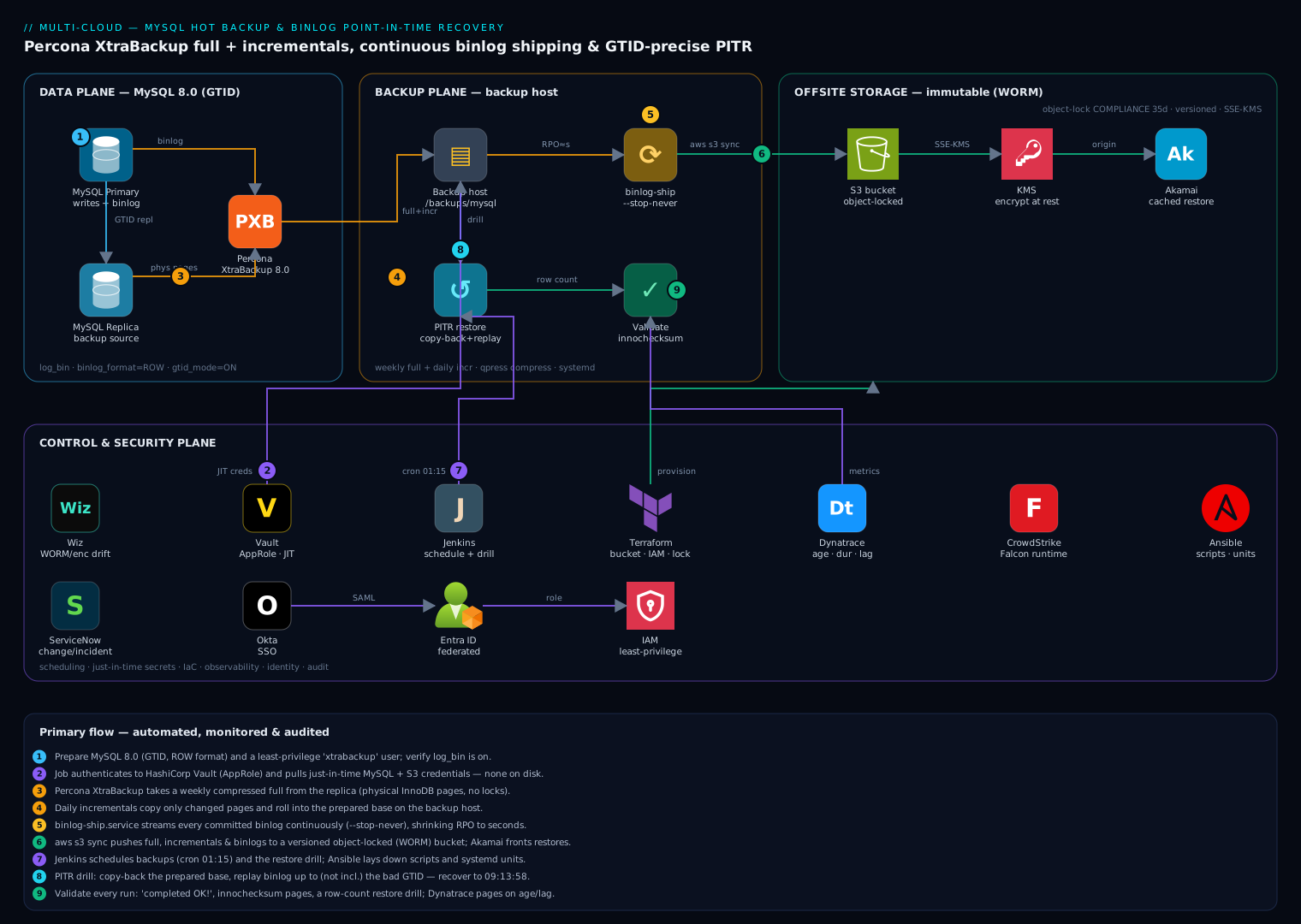
Architecture at a glance
Read the diagram top to bottom as four planes. The data plane is the MySQL 8.0 topology itself — primary and GTID replica, configured with log_bin, binlog_format=ROW, gtid_mode=ON — with Percona XtraBackup attached to the replica, so the weekly full and daily incrementals read physical pages without costing the primary a single IOP; --slave-info --safe-slave-backup keeps the captured coordinates honest. The backup plane is a dedicated host with three long-running responsibilities: the scheduled full + incremental pipeline landing in /backups/mysql (compressed, prepared, checksummed), the binlog-ship service running mysqlbinlog --stop-never so committed transactions land off-host within seconds (the “RPO≈s” arrow), and the restore/validate loop — copy-back rehearsals, innochecksum page verification, and row-count drill assertions — that turns backup files into a proven capability.
From there everything flows into the offsite storage plane: a versioned S3 bucket with Object Lock in COMPLIANCE mode (35 days) and SSE-KMS encryption, synced by the backup host and fronted by a CDN (Akamai in this build) so a restore into a distant region pulls a cached copy instead of dragging 200 GB across an ocean. The control and security plane ties the operation together: Vault issues just-in-time backup and storage credentials via AppRole (nothing long-lived in a unit file), Jenkins owns the 01:15 schedule and the quarterly drill, Terraform and Ansible pin the bucket policy, IAM, and systemd units as reviewed code, Dynatrace watches backup age, duration, and binlog-ship lag, Wiz alerts on WORM/encryption drift, CrowdStrike Falcon covers runtime, ServiceNow records every backup failure and every restore as a change, and Okta federated to Entra ID gates the humans. The lesson the diagram encodes: the arrows that matter most are the two thin ones — binlog shipping and the drill loop — because they are the RPO and the proof, respectively.
Real-world scenario
Averix Commerce, a Bengaluru marketplace, runs an 800 GB Percona Server 8.0 order database on bare metal: one primary, two GTID replicas, ~3,200 writes/second at peak. After a near-miss in 2024 — a mysqldump-era incident that took 9.5 hours to restore and lost six hours of orders — they built exactly the pipeline in this article: Sunday fulls (compressed to ~230 GB) from replica-2, cumulative daily incrementals, mysqlbinlog --stop-never streaming to a backup host, hourly FLUSH BINARY LOGS, offsite to object-locked S3, and a nightly drill that restores the chain to a scratch host and replays the last hour. Their declared objectives: RPO 5 minutes, RTO 3 hours.
On a Wednesday at 11:52 IST, mid-peak, a release engineer ran a data-fix script against production instead of staging. It executed UPDATE orders SET status='cancelled' WHERE created_at < NOW() — the staging-only date guard resolved to everything: 41 million rows flipped in one 96-second transaction. Replication faithfully poisoned both replicas within seconds, which is why nobody even glanced at them. At 11:58 the anomaly alert on cancellation rate fired; at 12:04 the incident commander set super_read_only=ON and put the app in maintenance — fencing first, diagnosis second.
The recovery ran the runbook. The nightly drill host already had last night’s chain restored and prepared — the drill’s side effect is a warm standby of “as of 01:30 today,” which erased the longest RTO component. The team verified gtid_executed against xtrabackup_binlog_info (…:1-2,241,884,102), then hunted the bad transaction in the archived binlogs: with binlog_rows_query_log_events=ON, a grep for SET status='cancelled' in mysqlbinlog -vv output found it in binlog.007412 — GTID …:2,242,067,551, # at 84,113,997. Replay from the backup’s coordinates with --stop-position=84113997 pushed 9.8 GB of binlog through mysql at ~11 MB/s. They chose not to use --exclude-gtids to keep post-incident orders — product accepted losing 42 minutes of orders (11:52–12:34, captured separately from the app’s outbox queue for manual replay) rather than certify that ten thousand later transactions had no logical dependency on order status.
| Time (IST) | Event / action | Detail |
|---|---|---|
| 11:52:14 | Bad transaction commits | 41 M rows, one GTID, replicated everywhere in < 2 s |
| 11:58 | Cancellation-rate anomaly pages | Detection gap: 6 min |
| 12:04 | Fence: super_read_only, app maintenance page |
Stops compounding writes |
| 12:06 | Drill host adopted as restore target | Last night’s chain already prepared — RTO windfall |
| 12:18 | --copy-back complete (NVMe, --move-back variant) |
800 GB in 12 min |
| 12:24 | Server up; gtid_executed matches xtrabackup_binlog_info |
Baseline = 01:30 backup point |
| 12:39 | Bad GTID + position identified in binlog.007412 |
Rows_query event made it a grep, not an autopsy |
| 13:04 | Binlog replay to --stop-position done |
9.8 GB applied; stopped one event before the poison |
| 13:19 | Validation passes | Row counts, checksum vs replica on 3 untouched tables, app smoke |
| 13:34 | ProxySQL repointed; replicas rebuilding from restored primary | Total RTO: 102 min. Data loss: the excluded transaction only |
The two lessons Averix wrote down: the drill host being a warm restore target cut ~40 minutes — schedule drills to leave their output staged; and six minutes of detection delay cost more replay time than any tuning — the anomaly alert, not the backup tool, is where their next rupee goes.
Advantages and disadvantages
| Advantages | Disadvantages |
|---|---|
| Hot and non-blocking: DML never stops; only DDL pauses briefly at the consistency point | Version-locked tooling: XtraBackup must track the server series; upgrades are paired events |
| Physical speed: restore is file copy + redo apply — minutes, not hours of SQL re-execution | InnoDB-only consistency; MyISAM and friends are second-class passengers |
| To-the-second recovery: binlog replay stops at an exact GTID/position/timestamp | Operationally sharp-edged: --apply-log-only misuse or an unarchived binlog silently voids the capability |
| Incrementals make daily (or hourly) protection cheap in storage and write I/O | Default incrementals still read the whole dataset to find changed pages (until --page-tracking) |
| Free and scriptable: GPL tool, plain files, no license, no black-box format | No polished GUI/catalog; scheduling, retention, verification, and monitoring are yours to build |
| GTID idempotence makes interrupted replays safely re-runnable | Replay is single-threaded — a week of binlog is hours; backup cadence bounds it |
| Streams straight to S3-compatible storage with client-side encryption (xbstream/xbcloud) | A restore host with dataset-scale disk must exist (or be provisionable) on demand |
Physical restore carries gtid_executed with it — no gtid_purged surgery |
Backups are full copies of your most sensitive data — the storage inherits database-grade security obligations |
The model wins wherever self-managed MySQL exceeds the size where logical restores meet RTO, and wherever “restore to 09:13:59” is a business requirement. It loses to managed-platform PITR (RDS, Cloud SQL, Azure Flexible Server) when your team cannot fund the operational discipline — the tool is free; the capability costs engineering time, and pretending otherwise is how companies end up with backup files and no recovery.
Hands-on lab
The full loop on your laptop with Docker: build a PITR-ready server, back it up hot (full + incremental), stream binlogs, destroy the data with a bad UPDATE, and recover to the second before it — then surgically recover around it. Roughly 30 minutes and 4 GB of disk; everything is torn down in the last step.
1. Create the sandbox: network and volumes.
docker network create pitr-net
docker volume create mysql-data && docker volume create backups
2. Launch a PITR-ready Percona Server 8.0. Config passed as flags for the lab; in production these live in my.cnf:
docker run -d --name mysql-prod --network pitr-net \
  -v mysql-data:/var/lib/mysql \
  -e MYSQL_ROOT_PASSWORD=Root_2026 -e MYSQL_ROOT_HOST=% \
  percona/percona-server:8.0 \
  --server-id=101 --log-bin=binlog \
  --binlog_format=ROW --binlog_row_image=FULL \
  --binlog_rows_query_log_events=ON \
  --gtid_mode=ON --enforce-gtid-consistency=ON \
  --binlog_expire_logs_seconds=604800

until docker exec mysql-prod mysqladmin ping -uroot -pRoot_2026 --silent 2>/dev/null; do sleep 2; done
docker exec mysql-prod mysql -uroot -pRoot_2026 -e \
  "SHOW VARIABLES WHERE Variable_name IN ('gtid_mode','binlog_format','log_bin');"
# gtid_mode ON · binlog_format ROW · log_bin ON  <- all three, or stop here
3. Create the backup user and seed 50,000 orders.
docker exec -i mysql-prod mysql -uroot -pRoot_2026 <<'SQL'
CREATE USER 'xtrabackup'@'%' IDENTIFIED BY 'Bkp_2026';
GRANT BACKUP_ADMIN, PROCESS, RELOAD, LOCK TABLES,
      REPLICATION CLIENT, REPLICATION SLAVE ON *.* TO 'xtrabackup'@'%';
GRANT SELECT ON performance_schema.log_status TO 'xtrabackup'@'%';

CREATE DATABASE shop;
CREATE TABLE shop.orders (
  id BIGINT AUTO_INCREMENT PRIMARY KEY,
  customer VARCHAR(64) NOT NULL,
  amount DECIMAL(10,2) NOT NULL,
  status VARCHAR(16) NOT NULL DEFAULT 'paid',
  created_at TIMESTAMP(6) DEFAULT CURRENT_TIMESTAMP(6)
) ENGINE=InnoDB;

SET SESSION cte_max_recursion_depth = 50000;
INSERT INTO shop.orders (customer, amount)
WITH RECURSIVE seq AS (SELECT 1 n UNION ALL SELECT n+1 FROM seq WHERE n < 50000)
SELECT CONCAT('cust-', n), ROUND(100 + RAND()*900, 2) FROM seq;
SELECT COUNT(*) FROM shop.orders;   -- 50000
SQL
4. Take the full backup. The XtraBackup container shares the server’s volumes (physical file access) and network (SQL access) — the documented container pattern:
docker run --rm --network pitr-net --volumes-from mysql-prod -v backups:/backups \
  percona/percona-xtrabackup:8.0 \
  xtrabackup --backup --host=mysql-prod --user=xtrabackup --password=Bkp_2026 \
  --target-dir=/backups/full
# last line MUST read: ... completed OK!
5. Read the backup’s coordinates — the LSN anchor and the binlog bookmark:
docker run --rm -v backups:/backups percona/percona-xtrabackup:8.0 \
  bash -c 'cat /backups/full/xtrabackup_checkpoints; echo; cat /backups/full/xtrabackup_binlog_info'
# backup_type = full-backuped / from_lsn = 0 / to_lsn = <L1> / last_lsn = <L1'>
# binlog.000002  <pos>  <uuid>:1-57   (your numbers WILL differ — note them)
6. Simulate a day of traffic, then take a cumulative incremental.
docker exec mysql-prod mysql -uroot -pRoot_2026 -e "
  SET SESSION cte_max_recursion_depth=5000;
  INSERT INTO shop.orders (customer, amount)
  WITH RECURSIVE s AS (SELECT 1 n UNION ALL SELECT n+1 FROM s WHERE n<5000)
  SELECT CONCAT('day2-',n), 199.00 FROM s;"

docker run --rm --network pitr-net --volumes-from mysql-prod -v backups:/backups \
  percona/percona-xtrabackup:8.0 \
  xtrabackup --backup --host=mysql-prod --user=xtrabackup --password=Bkp_2026 \
  --target-dir=/backups/inc1 --incremental-basedir=/backups/full
# check /backups/inc1/xtrabackup_checkpoints: backup_type = incremental,
# from_lsn = <L1>  <- MUST equal the full's to_lsn: the chain link, verified
7. Start the continuous binlog archiver — a second container impersonating a replica:
docker run -d --name binlog-archiver --network pitr-net -v backups:/backups \
  --entrypoint bash percona/percona-server:8.0 -c \
  'mkdir -p /backups/binlog && cd /backups/binlog && exec mysqlbinlog \
     --read-from-remote-server --host=mysql-prod \
     --user=xtrabackup --password=Bkp_2026 \
     --raw --stop-never --connection-server-id=9999 binlog.000001'
sleep 3 && docker exec binlog-archiver ls -la /backups/binlog/
# every binlog.* the server has, mirrored live
8. Good traffic, then the disaster, then more traffic. Three distinct moments — note the marker timestamp:
docker exec mysql-prod mysql -uroot -pRoot_2026 -e "
  SET SESSION cte_max_recursion_depth=5000;
  INSERT INTO shop.orders (customer, amount)
  WITH RECURSIVE s AS (SELECT 1 n UNION ALL SELECT n+1 FROM s WHERE n<5000)
  SELECT CONCAT('good-',n), 149.00 FROM s;
  SELECT NOW(6) AS last_good_moment, COUNT(*) AS rows_now FROM shop.orders;"
# rows_now: 60000  <- the state we want back

docker exec mysql-prod mysql -uroot -pRoot_2026 -e \
  "UPDATE shop.orders SET status='cancelled';"          # 60,000 rows poisoned

docker exec mysql-prod mysql -uroot -pRoot_2026 -e "
  SET SESSION cte_max_recursion_depth=1000;
  INSERT INTO shop.orders (customer, amount)
  WITH RECURSIVE s AS (SELECT 1 n UNION ALL SELECT n+1 FROM s WHERE n<1000)
  SELECT CONCAT('after-',n), 99.00 FROM s;
  FLUSH BINARY LOGS;"                                    # rotate so the archive holds it all
9. Find the poison transaction in the archive. binlog_rows_query_log_events=ON makes this a grep:
docker exec binlog-archiver bash -c \
  "mysqlbinlog -vv --base64-output=DECODE-ROWS /backups/binlog/binlog.00000* \
   | grep -B8 \"UPDATE shop.orders SET status='cancelled'\" | head -20"
# # at 4805213                                        <- STOP position (GTID event of the bad txn)
# SET @@SESSION.GTID_NEXT= '<uuid>:60063'             <- the bad GTID
# ... Rows_query ... # UPDATE shop.orders SET status='cancelled'
Record both: BADPOS (the # at immediately above the bad transaction’s GTID_NEXT line, in which file) and BADGTID. Stopping at the GTID event’s position excludes the whole transaction.
10. Prepare the chain — --apply-log-only on the base, plain prepare on the last incremental:
docker run --rm -v backups:/backups percona/percona-xtrabackup:8.0 \
  xtrabackup --prepare --apply-log-only --target-dir=/backups/full
docker run --rm -v backups:/backups percona/percona-xtrabackup:8.0 \
  xtrabackup --prepare --target-dir=/backups/full --incremental-dir=/backups/inc1
# completed OK! after BOTH; /backups/full/xtrabackup_binlog_info now shows
# the INCREMENTAL's coordinates: <file> <START_POS> <uuid>:1-55xxx   <- replay starts here
11. Restore to a new server — the “hardware” is lost; the volume is new:
docker stop mysql-prod                       # the outage
docker volume create mysql-restored
docker run --rm -v backups:/backups -v mysql-restored:/var/lib/mysql \
  percona/percona-xtrabackup:8.0 bash -c \
  'xtrabackup --copy-back --target-dir=/backups/full --datadir=/var/lib/mysql \
   && chown -R mysql:mysql /var/lib/mysql'

docker run -d --name mysql-restored --network pitr-net \
  -v mysql-restored:/var/lib/mysql \
  percona/percona-server:8.0 \
  --server-id=102 --log-bin=binlog --gtid_mode=ON --enforce-gtid-consistency=ON
until docker exec mysql-restored mysqladmin ping -uroot -pRoot_2026 --silent 2>/dev/null; do sleep 2; done
# No MYSQL_ROOT_PASSWORD env needed: credentials came back WITH the physical data.

docker exec mysql-restored mysql -uroot -pRoot_2026 -e \
  "SELECT COUNT(*) FROM shop.orders; SELECT @@gtid_executed\G"
# COUNT: 55000 (backup point) · gtid_executed == step-10's xtrabackup_binlog_info set
12. Replay history up to — not including — the poison. START_POS from step 10, BADPOS from step 9; list every archived file from the start file onward, one invocation:
docker run --rm --network pitr-net -v backups:/backups \
  --entrypoint bash percona/percona-server:8.0 -c \
  "mysqlbinlog --start-position=START_POS --stop-position=BADPOS \
     /backups/binlog/binlog.000002 /backups/binlog/binlog.000003 \
   | mysql -h mysql-restored -uroot -pRoot_2026"

docker exec mysql-restored mysql -uroot -pRoot_2026 -e "
  SELECT COUNT(*) AS total,
         SUM(status='cancelled') AS cancelled FROM shop.orders;"
# total 60000 · cancelled 0     <- the last good moment, reconstructed
13. (Optional) The surgical variant. Re-run the replay without a stop position but excluding the bad GTID — the 1,000 post-disaster orders return, the poison stays out; GTID auto-skip makes the overlap with step 12 harmless:
docker run --rm --network pitr-net -v backups:/backups \
  --entrypoint bash percona/percona-server:8.0 -c \
  "mysqlbinlog --start-position=START_POS --exclude-gtids='BADGTID' \
     /backups/binlog/binlog.000002 /backups/binlog/binlog.000003 \
   | mysql -h mysql-restored -uroot -pRoot_2026"
docker exec mysql-restored mysql -uroot -pRoot_2026 -e \
  "SELECT COUNT(*) AS total, SUM(status='cancelled') AS cancelled FROM shop.orders;"
# total 61000 · cancelled 0     <- everything except the one bad transaction
14. Teardown.
docker rm -f mysql-prod mysql-restored binlog-archiver
docker volume rm mysql-data mysql-restored backups
docker network rm pitr-net
You have now run every load-bearing command in this article: both prepare modes, the LSN chain check, a live binlog stream, coordinate hunting, a stop-before replay, and a GTID exclusion — the entire runbook, rehearsed where mistakes are free.
Common mistakes & troubleshooting
The playbook — symptom to fix, in the order these actually occur in the field:
| # | Symptom | Root cause | Confirm | Fix |
|---|---|---|---|---|
| 1 | Backup aborts: Unsupported server version |
XtraBackup older than the server / wrong series | xtrabackup --version vs SELECT VERSION(); |
Upgrade XtraBackup first; never bypass with --no-server-version-check |
| 2 | Incremental prepare rejects the delta (LSN mismatch) | Wrong --incremental-basedir / wrong order / base already touched |
from_lsn of the incremental ≠ to_lsn in the base’s xtrabackup_checkpoints |
Rebuild the sequence oldest-first; take a fresh full if any link is missing |
| 3 | Incrementals no longer apply at all | Full prepare (rollback) ran on the base too early | backup_type = full-prepared in the base’s checkpoints |
Unrecoverable locally — re-pull the base from offsite; fix the script’s --apply-log-only logic |
| 4 | Backup aborts mid-run copying redo | Redo wrapped: server generated redo faster than the copy (xtrabackup_copy_logfile() failed) |
Redo capacity vs write rate during the window | Raise innodb_redo_log_capacity; off-peak schedule; --register-redo-log-consumer (8.0.30+) |
| 5 | --prepare crawls for hours |
Default --use-memory=100M on a large backup |
prepare log shows tiny buffer pool | --use-memory=8G+ on the restore host |
| 6 | --copy-back refuses to run |
Target datadir not empty | Original data directory is not empty in output |
Empty it (after preserving the broken copy); don’t reach for --force-non-empty-directories |
| 7 | Restored server won’t start, errno 13 | Forgot chown -R mysql:mysql after copy-back |
journalctl -u mysql shows Permission denied on datadir files |
chown -R mysql:mysql /var/lib/mysql && systemctl start mysql |
| 8 | Replay: ERROR 1236 … Could not find first log file name (from the streamer) |
Requested binlog already purged on the server | SHOW BINARY LOGS vs the file the streamer asked for |
Archive hole — fresh full now; raise binlog_expire_logs_seconds; alert on archive lag |
| 9 | PITR “succeeds” but data at the target is wrong | STATEMENT/MIXED history replayed non-deterministically |
mysqlbinlog output shows statements, not row events |
Nothing to fix retroactively; enforce ROW + FULL and re-drill |
| 10 | Replay applies nothing, no errors | Piped --base64-output=DECODE-ROWS output into mysql |
Replayed “SQL” is all comments | Re-run replay without DECODE-ROWS; that flag is for reading, not applying |
| 11 | Replay errors on temp tables (Table … doesn't exist) |
Multiple mysqlbinlog invocations, one per file |
One invocation per file in the script | Single invocation listing all files (or concatenate first) |
| 12 | Replay silently skips transactions | GTIDs already in gtid_executed (double replay, wrong host) — auto-skip |
Compare gtid_executed with the replay set |
Intended idempotence — verify the target set; use --skip-gtids only cross-topology |
| 13 | ERROR 1782 … GTID_NEXT cannot be set to ANONYMOUS |
Replaying non-GTID (or --skip-gtids-stripped) events into gtid_mode=ON |
Error names GTID_NEXT/ANONYMOUS | Keep GTIDs in the stream; or gtid_mode=ON_PERMISSIVE for the replay window |
| 14 | Streamer exits immediately: ERROR 1227 |
Missing REPLICATION SLAVE on the streaming account |
Error text names the privilege | GRANT REPLICATION SLAVE ON *.* TO 'binlogstream'@'%'; |
| 15 | Prepare fails on encrypted tablespaces | TDE keyring not available to XtraBackup | Encryption can't find master key in prepare output |
Pass the keyring component config / --transition-key; drill TDE restores separately |
| 16 | Backup fails: Too many open files (errno 24) |
Per-table tablespaces exceed the fd limit | ulimit -n vs table count |
Raise LimitNOFILE in the unit / open_files_limit |
| 17 | Scripts report success; backups are garbage | Wrapper never checked exit code or completed OK! |
Last line of the run log | Gate on both; alert on staleness of the success metric, not on errors |
The error-string quick index — exact text to grep for, and what it means:
| Error text (grep for) | Emitted by | Meaning | First move |
|---|---|---|---|
completed OK! |
xtrabackup (last line) | The only success marker | Assert in every wrapper |
Unsupported server version |
xtrabackup --backup | Tool older than server | Upgrade XtraBackup |
Original data directory is not empty |
xtrabackup --copy-back | Refusing to overwrite datadir | Preserve + empty the datadir |
xtrabackup_copy_logfile() failed |
xtrabackup --backup | Redo tail lost the race | Redo capacity / consumer flag / off-peak |
ERROR 1227 … REPLICATION SLAVE privilege |
mysqlbinlog remote | Streamer lacks the grant | Grant REPLICATION SLAVE |
ERROR 1236 … Could not find first log file |
mysqlbinlog remote | Requested binlog purged | Fresh full; fix retention/lag alerting |
ERROR 1782 … ANONYMOUS when @@GLOBAL.GTID_MODE = ON |
mysql (replay) | GTID-less events into GTID server | Keep GTIDs; permissive mode window |
ERROR 1062 … Duplicate entry |
mysql (replay) | Overlapping replay without GTIDs | Recompute start position; prefer GTID mode |
Encryption can't find master key |
xtrabackup --prepare | Keyring absent for TDE tables | Provide keyring/transition key |
Permission denied on datadir at start |
mysqld | Ownership after copy-back | chown -R mysql:mysql |
Best practices
- Back up the replica, restore like it’s the primary.
--slave-info --safe-slave-backupon a dedicated replica keeps backup I/O off the write path; drills must still promote the result as if it were the primary. - One weekly full, cumulative dailies, streamed binlogs. The three-tier cadence that keeps restores two-step and replay windows under 24 hours.
--apply-log-onlyis a code-review item. Any script touching prepare gets a test that assertsbackup_typeafter each step; the chain rule is too silent to trust to memory.- Binlog retention > archive lag, with margin.
binlog_expire_logs_seconds=1209600(14 d) and neverPURGE BINARY LOGSfrom automation that hasn’t confirmed the archive. - Rotate binlogs on a clock. Hourly (or 15-min)
FLUSH BINARY LOGSbounds the unarchived tail and gives file-level sync a real RPO. - Put binlogs on their own volume. A full data disk must not also kill history; a dead data disk must not take the journal with it.
- Separate identities per function.
xtrabackup(backup grants),binlogstream(REPLICATION SLAVEonly), uploader (S3 put-only). Revoke independently, audit independently. - Stream offsite, don’t stage.
--stream=xbstream | xbcloud putremoves the 2× local-disk requirement and shrinks the window where a backup exists in exactly one place. - Verify up the ladder. Exit code → checksum manifest → prepare test → nightly restore drill with query assertions. Only the top rung is proof; alert when the drill’s success metric goes stale.
- Leave the drill restored. A drill that tears down its output wastes its best by-product: a warm restore target that erases half your RTO (ask Averix).
- Time-stamp your runbook. Every drill records per-step durations; the day measured RTO exceeds declared RTO is a capacity incident, not a shrug.
- Keep the broken datadir until sign-off.
mv, neverrm— it is the rollback path and the forensic exhibit.
Security notes
A backup pipeline is a second, quieter copy of your crown jewels, and attackers know it. Encrypt client-side before the bytes leave the host (--encrypt=AES256 with a key from your secret store, or at minimum SSE-KMS on the bucket) and treat the encryption key with backup-grade redundancy — an encrypted backup whose key lived only on the dead host is a self-inflicted ransomware. Make the offsite copy immutable: versioning plus Object Lock in compliance mode, an uploader identity that can PutObject but not delete, and lifecycle rules doing the expiry — so a compromised backup host can add history but never erase it. Move secrets out of process arguments: ps shows --password; use EnvironmentFile (0600), mysql_config_editor login paths, or Vault-issued short-lived credentials as in the architecture diagram. Least-privilege the MySQL side exactly as granted in this article — the backup user cannot read your data via SQL (SELECT on two performance_schema tables is not table access), and the streamer holds only REPLICATION SLAVE; neither needs SUPER. Restrict both accounts to the backup host’s address, and TLS (--ssl-mode=REQUIRED) on every hop — a binlog stream is your entire write traffic in cleartext otherwise. Finally, audit restores like production changes: a PITR can also remove history (--exclude-gtids is a scalpel that cuts both ways), so every replay gets a change record, a second engineer, and a preserved pre-recovery datadir.
Cost & sizing
The pipeline’s bill is storage plus one modest host; both are rounding errors against the incident they prevent. For the 600 GB reference dataset (compressed full ≈ 180 GB, ~18 GB/day cumulative incrementals, ~20 GB/day binlogs, retention ladder from the monitoring section), at typical S3 list prices (₹ at ≈ 88/USD):
| Component | Sizing | Monthly (USD) | Monthly (INR) |
|---|---|---|---|
| Weekly fulls, 5 × 180 GB, IA tier | 900 GB @ $0.0125/GB | ~$11 | ~₹990 |
| Daily incrementals, 14 d retained | ~250 GB @ $0.0125/GB | ~$3 | ~₹275 |
| Binlog archive, 14 d, standard tier | ~280 GB @ $0.023/GB | ~$6.5 | ~₹570 |
| Monthly fulls, 12 × 180 GB, archive tier | 2.16 TB @ $0.004/GB | ~$9 | ~₹790 |
| Requests + monitoring noise | PUT/GET/inventory | ~$2 | ~₹175 |
| Backup host (often a reused replica/VM) | 8 vCPU, 32 GB, 1.5 TB disk | $0–80 | ₹0–7,000 |
| Total | ~$32–112 | ~₹2,800–9,800 |
Right-sizing levers, in order of impact: compression (zstd’s 3–5× is the difference between 600 GB and 180 GB in every row above); cumulative-incremental cadence (dailies at 3% churn cost ~4% of daily-full storage); tiering (operational copies in IA, compliance copies in archive class — never pay STANDARD for a 90-day-old full); and --move-back on drills (halves drill disk). Watch two growth curves monthly: backup size (a runaway table or lapsed lifecycle rule shows up here first) and binlog volume (a new chatty workload quietly doubles your replay-time RTO). The backup host itself is CPU-light outside the compression window — a reused replica or the drill host covers it; teams on tighter budgets than this should start from Disaster Recovery on a Budget: Backup-and-Restore for Small Teams and grow into the full ladder.
Interview & exam questions
Q1. How does XtraBackup take a consistent backup without blocking writes?
It copies InnoDB data files while the server runs — an intentionally fuzzy copy — and simultaneously tails the redo log from the backup’s start LSN. The prepare phase later replays that captured redo (InnoDB crash recovery) to roll every page forward to one consistent point, then rolls back uncommitted transactions. Only DDL is briefly blocked, by LOCK INSTANCE FOR BACKUP near the end.
Q2. What are from_lsn/to_lsn in xtrabackup_checkpoints, and how do incrementals chain?
to_lsn is the checkpoint LSN when a backup’s file copy ended; an incremental copies only pages whose LSN exceeds its from_lsn, which must equal the previous backup’s to_lsn. XtraBackup validates that continuity at prepare time — a mismatch means a missing or reordered link.
Q3. Why does --apply-log-only exist, and what breaks without it?
Prepare has two sub-phases: redo apply and rollback of uncommitted transactions. A transaction open during the base may commit inside a later incremental — if the base’s prepare rolls it back, the incremental no longer applies (the base becomes full-prepared). --apply-log-only skips rollback so the chain stays open; the final prepare alone performs rollback.
Q4. Why is binlog_format=ROW required for trustworthy PITR?
STATEMENT re-executes SQL text, and non-deterministic statements (NOW(), UUID(), LIMIT without ORDER BY) can affect different rows on replay — silent divergence. ROW logs the actual before/after row images, making replay byte-deterministic and doubling as a row-level audit trail.
Q5. How do GTIDs make a PITR replay idempotent?
Each transaction carries a globally unique server_uuid:seq. A GTID-mode server skips any incoming transaction whose GTID is already in gtid_executed. Since a physical restore brings gtid_executed back with the data, an interrupted replay can simply be re-run — applied transactions no-op.
Q6. Walk through recovering from a bad UPDATE committed at a known time.
Fence writes; preserve the datadir. Restore the latest full + incrementals; prepare with --apply-log-only on all but the last; final full prepare; --copy-back; start and verify gtid_executed matches xtrabackup_binlog_info. Locate the bad transaction’s GTID and position via mysqlbinlog -vv on the archived binlogs; replay from the backup’s coordinates in a single mysqlbinlog invocation with --stop-position at the bad GTID event (or --exclude-gtids to keep later traffic); validate; promote.
Q7. What bounds RPO in this design, and what bounds RTO?
RPO = the binlog event-to-archive lag (seconds with --stop-never streaming; plus sync interval for the offsite copy). RTO = offsite pull + decompress + prepare + copy-back + binlog replay + validation — dominated by dataset size over disk/network throughput and by replay volume, which backup cadence bounds.
Q8. Why must multi-file binlog replay use a single mysqlbinlog invocation?
Session context — most visibly temporary tables — spans binlog file boundaries. Separate invocations create separate sessions, so a temp table created in file N is gone when file N+1 replays, and statements against it fail.
Q9. What is the DECODE-ROWS trap?
--base64-output=DECODE-ROWS -vv renders row events as human-readable comments and suppresses the executable BINLOG statements. Piping that output to mysql applies nothing while exiting zero. It is for finding coordinates, never for replay.
Q10. Your incremental prepare fails with an LSN mismatch. Diagnose it.
Compare the incremental’s from_lsn with the base’s current to_lsn. Causes: wrong --incremental-basedir at backup time, applying incrementals out of order, a full prepare having already run on the base (backup_type=full-prepared), or a missing middle incremental. Only the first two are fixable by re-ordering; the others need a re-pull or a fresh full.
Q11. How do you protect this pipeline from ransomware that owns the DB host? The DB host’s credentials can only add: streamer and uploader identities have no delete rights; the bucket enforces versioning + Object Lock (compliance); retention is lifecycle-policy-driven; the backup host is network-isolated and separately credentialed; drills restore into an isolated environment so you detect encrypted-garbage backups early.
Q12. When is --move-back preferable to --copy-back?
--move-back renames instead of copying — near-instant, but it consumes the backup directory. Use it when the source is already a disposable copy (pulled from offsite for this restore, or a drill artifact). Use --copy-back when the local backup must survive the restore.
Quick check
- Which file in a backup directory tells you where binlog replay must start, and what three things does it contain?
- You are preparing a base plus three incrementals. Which prepare commands get
--apply-log-only? --stop-position=Nstops the replay where, relative to the event at N?- In MySQL 8.0, what is the default binlog retention, and which variable controls it?
- Why does backing up from a replica want
--safe-slave-backup?
Answers
xtrabackup_binlog_info— the binlog file name, the position within it, and the GTID set already contained in the backup. After incremental merges, it reflects the last merged incremental’s coordinates.- The base and incrementals 1 and 2. The third (final) incremental’s prepare runs without it, so rollback happens exactly once, at the end.
- Before it — replay applies events up to but not including the event that starts at position N; point it at the bad transaction’s GTID event to exclude the whole transaction.
- 30 days, via
binlog_expire_logs_seconds(default 2592000). It must comfortably exceed your archive lag and full-backup cadence. - It pauses the replica SQL thread (waiting out open temp tables) so the captured replica coordinates in
xtrabackup_slave_infoare consistent — otherwise the backup’s replication position can be mid-transaction-group and unusable for rebuilds.
Glossary
- Percona XtraBackup (PXB): open-source physical hot-backup tool for MySQL/Percona Server; copies data files while tailing redo.
- Physical backup: a copy of the database’s on-disk files (pages, indexes intact), restored by file placement + recovery, not SQL re-execution.
- LSN (log sequence number): monotonically increasing byte-offset counter of all redo ever written; stamps every page and defines backup positions.
- Redo log: InnoDB’s write-ahead journal of page changes; replayed by crash recovery — and by XtraBackup’s prepare.
- Prepare (
--prepare): applying captured redo (and finally rollback) to a raw backup to make it a consistent, startable datadir. --apply-log-only: prepare mode that skips the rollback sub-phase, keeping a backup open for further incremental merges.- Incremental backup: a copy of only the pages whose LSN advanced past a reference backup’s
to_lsn; stored as.deltafiles. - Binary log (binlog): the server’s journal of committed transactions (row images under
ROWformat), the raw material of replication and PITR. - GTID:
server_uuid:sequence— a globally unique transaction identity enabling exact stop targets, surgical exclusion, and idempotent replay. gtid_executed/gtid_purged: the set of transactions a server has applied / the subset no longer present in its on-disk binlogs.- PITR (point-in-time recovery): restore of a base backup plus binlog replay halted at a chosen transaction, position, or second.
- RPO / RTO: maximum tolerable data loss / maximum tolerable downtime — the two numbers this whole architecture is engineered against.
- Backup lock (
LOCK INSTANCE FOR BACKUP): MySQL 8.0’s lightweight lock blocking DDL (not DML) during the backup’s consistency point. - xbstream / xbcloud: XtraBackup’s streaming container format, and the chunked uploader that puts such streams directly into object storage.
- Page tracking: the
component_mysqlbackupchanged-page bitmap that lets incrementals skip the full-dataset scan (PXB 8.0.30+).
Next steps
- Build the same capability for your PostgreSQL estate — Configure PostgreSQL Continuous Archiving and Point-in-Time Recovery with pgBackRest to S3 is this article’s WAL-based twin.
- Harden the target your backups land on with Deploy MinIO with Object Locking and Site Replication for Immutable Backup Targets, then pressure-test the whole design against Ransomware Resilience: Immutable Backups, Recovery Vaults, and Isolated Recovery Environments.
- Turn the shell scripts here into fleet-wide, idempotent roles with Ansible for Databases, In Depth: PostgreSQL, MySQL, MongoDB Lifecycle, Replication, Backups & Schema Management.
- Level up the wrapper engineering — manifests, GFS retention, drill automation — with Shell Backup & Restore: Integrity Manifests, GFS Retention, Immutable Object-Lock Storage & Drill-Tested Recovery.
- See what the managed alternative buys (and hides) in Deploy Azure Database for MySQL Flexible Server: Networking, Backups and First Connection.