A payments-platform team ships forty times a week, but every production deploy still stalls at the same wall: a human opens a ServiceNow change request by hand, pastes a commit URL and a rollback plan into the form, waits for a CAB approver to click Approve, runs the deploy, then comes back hours later to close the record — and half the time forgets, so the change backlog and the actual production state drift apart and the next audit turns into archaeology. The mandate from the CIO is blunt: keep the change-control discipline auditors require, but make it a property of the pipeline, not a chore a tired engineer remembers at 2 a.m. This guide builds exactly that — a deploy workflow that creates a ServiceNow change record from the commit, gates the deploy on the change reaching an approved state, executes, attaches the artefacts and test results as evidence, then auto-closes the record with a truthful outcome — using ServiceNow’s Change Management API (sn_chg_rest), an OAuth-authenticated integration account, and a credential leased from HashiCorp Vault. When you are done, the change request is the deploy, and the two can never disagree.
This is worth building carefully — rather than hacking a curl into a pipeline step — because a change record is a legal and audit artefact, not a status message: it carries the who, the what, the when, the approved-by, the risk assessment, the implementation and backout plans, and the evidence. Get it wrong and you have either control theatre (a change that auto-approves itself, failing a SOC 2 or ITGC audit on separation-of-duties) or a bottleneck (a Normal change gated on a slow CAB queue that blocks every micro-deploy). The craft is in matching which change type fits which deploy risk: the standard-change (pre-approved) fast path for the 90% of low-risk deploys, the Normal (CAB-gated) path for the risky 10%, and the whole thing observable, revocable and honest.
By the end you will stop treating change management as friction bolted onto delivery. You will know the difference between the Change API and the Table API; how the DevOps Change Velocity (formerly DevOps Change Acceleration) app auto-creates and auto-approves changes from pipeline telemetry with zero custom code; how to author a standard change template so a class of deploys is pre-approved; how to build the open → wait-for-approval → deploy → attach → close gate in both GitHub Actions and Azure DevOps; and how to keep the machine account least-privileged so it can progress a change but never approve its own. Every mechanism comes with real API calls, real pipeline YAML, and the exact field it writes.
What problem this solves
In a regulated shop, every production change must be authorised, recorded, and reviewable. ITIL (and the auditors who lean on it) demand that changes are classified by risk, approved by someone other than the person making them, implemented against a documented plan, and closed with an outcome. Done by hand, this is a tax on velocity: the engineer context-switches from the deploy to a ServiceNow form, retypes what the pipeline already knows (commit, PR, build number, test results), waits on a human, then has to remember to come back and close the record with the result. The failure modes are predictable and expensive.
What breaks without automation: drift between the change log and reality (changes left open, or closed as “successful” when the deploy actually rolled back, because closing is a manual afterthought); shadow change (engineers deploy first and back-date a change, or skip it entirely under deadline pressure, so the audit trail is fiction); CAB as a bottleneck (low-risk, reversible deploys queued behind the same weekly CAB meeting as a database migration, so a one-line config change waits three days); and evidence gaps (an auditor asks “prove this deploy was tested and approved” and the change record has a title but no artefacts, no test results, no link back to the pipeline run). Each of these is a finding waiting to happen, and each is solved by making the pipeline the author of the change.
Who hits this: any organisation running ServiceNow ITSM as the system of record while trying to ship continuously — banks, insurers, healthcare, government, and any enterprise with a Change Advisory Board. It bites hardest on platform and SRE teams who own dozens of services and hundreds of deploys a week, where manual change raising is simply not survivable at that cadence. The fix is not “abolish change management” (the auditors win that argument) — it is to automate the honest parts (creation, evidence, closure) and keep the human gate exactly where risk demands it (approval of non-standard changes), so the control stays real and the velocity survives.
To frame the whole field before the deep dive, here is the core decision every team faces — which change type maps to which deploy, and what that costs you in speed and control:
| Deploy risk | Change type | Approval | Typical latency | When it fits | Audit posture |
|---|---|---|---|---|---|
| Low, reversible, routine | Standard (templated) | Pre-approved (no CAB) | Seconds | Config toggles, well-worn app deploys, patches you do weekly | Strongest — the template was approved once by CAB and every instance inherits it |
| Medium, some blast radius | Normal | CAB / peer / automated risk-based | Minutes to days | New service, schema change, infra change | Full risk assessment + human sign-off recorded |
| High, urgent, break-fix | Emergency | Expedited (e-CAB / on-call manager) | Minutes | P1 incident fix, security hotfix | Post-implementation review required |
| Continuous, telemetry-driven | Normal via DevOps Change Velocity | Automated based on pipeline signals | Seconds if policy passes | High-frequency delivery on trusted pipelines | Change auto-created + auto-approved from build/test/security gates |
Learning objectives
By the end of this article you can:
- Explain the three ITIL change types (Standard, Normal, Emergency) and choose the right one for a given deploy’s risk, reversibility and urgency.
- Call the ServiceNow Change Management API (
sn_chg_rest) to create, read, patch, move through the state model, and close a change — and know why every field comes back as{value, display_value}. - Decide correctly between the Change API and the raw Table API (
/api/now/table/change_request), and know what the Change API gives you that the Table API does not. - Author and consume a standard change template so a whole class of deploys is pre-approved and clears the gate in seconds.
- Build the open → await-approval → deploy → attach evidence → close gate pattern end to end in GitHub Actions, and port it to Azure DevOps with an approval-gated stage.
- Authenticate the pipeline as a least-privileged OAuth integration user with short-lived tokens, leasing the client secret from HashiCorp Vault via OIDC, and preserve separation of duties so the machine can never approve its own change.
- Attach build artefacts, test results and scan reports to the change via the Attachment API, and close the record with a truthful
close_codeso the change log never drifts from production. - Understand what DevOps Change Velocity automates out of the box, and when a hand-rolled API integration beats it (and vice versa).
Prerequisites & where this fits
- A ServiceNow instance (Vancouver release or later) with the Change Management plugin active, and either a standard change template you are allowed to consume or the rights to raise Normal changes via the Change API. If you want the zero-code path, the DevOps Change Velocity app (from the ServiceNow Store) installed and its GitHub/Azure DevOps tool connected.
- A ServiceNow integration user (
svc.cicd.github) holding thesn_change_writeanditilroles — and nothing that can approve changes. Plus an OAuth API endpoint (an Application Registry record of type Create an OAuth API endpoint for external clients) for token-based auth. No interactive ServiceNow account is used by the pipeline. - A GitHub repository with GitHub Actions enabled and permission to define environments and environment protection rules — or an Azure DevOps project with the ability to define an environment and its approvals & checks.
- HashiCorp Vault reachable from the runner (we lease the ServiceNow OAuth client secret from a KV v2 mount), with the GitHub OIDC auth method or AppRole configured. If you do not run Vault, GitHub Encrypted Secrets (or an Azure DevOps variable group linked to Key Vault) is the fallback and is called out where it differs.
- Okta or Microsoft Entra ID as the workforce IdP behind ServiceNow SSO, so the human CAB approvers authenticate with corporate identity and MFA — the pipeline never logs in as a person.
curl,jq, and a Bash shell on the runner (the stockubuntu-latestimage has all three).
This sits at the seam between delivery and governance. It assumes you already understand a CI/CD pipeline end to end — if not, read CI/CD Pipeline Explained first — and it pairs tightly with passwordless pipeline auth (GitHub Actions to Azure with OIDC federated credentials) and pipeline secret hygiene (Managing pipeline secrets with Key Vault and managed identity). On the ServiceNow side it complements ServiceNow ITSM for cloud incident response & event management and ServiceNow-gated cloud provisioning for self-service landing zones, which use the same instance as the system of record for a different workflow.
A quick map of who owns which layer, so you route a problem to the right team fast:
| Layer | What lives here | Who owns it | Failure it causes |
|---|---|---|---|
| Pipeline (Actions / ADO) | The deploy jobs, the gate logic, the sys_id handoff |
Platform / SRE | Deploy runs without a change; gate not enforced |
| Auth (OAuth + Vault) | Token minting, secret lease, OIDC role binding | Platform + Security | invalid_client, access_denied, leaked secret |
Change API (sn_chg_rest) |
Create / patch / close / attach the record | ServiceNow platform team | 400 on wrong endpoint; .value parsing bugs |
| State model | The numeric states (-5…4) and transitions |
ServiceNow admin | Hard-coded states break after a custom model change |
| Approval workflow | CAB, standard-template pre-approval, risk assessment | Change manager / CAB | Deploy stalls; or worse, auto-approves (SoD break) |
| Identity (Entra / Okta) | Human approver SSO + MFA | IAM team | Approver can’t sign in; SoD not provable |
Core concepts
Six mental models make every later decision obvious.
The change record is an audit artefact, not a status message. A ServiceNow change_request row carries the who (requested_by, assigned_to), the what (short_description, description, the CI it affects), the classification (type, risk, impact), the plans (implementation_plan, backout_plan, test_plan), the sign-off (approval, the approval records), the schedule (start_date, end_date), and the outcome (close_code, close_notes, plus any attachments). When the pipeline authors it, the pipeline must fill the fields an auditor will read — which is why “just POST a title” is not enough.
Three change types, three risk postures. ITIL splits changes into Standard (pre-approved, low-risk, routine, a template that CAB blessed once and every instance inherits), Normal (needs assessment and approval per instance — CAB, a peer, or an automated risk rule), and Emergency (urgent break-fix, expedited approval, retrospective review). Matching the deploy’s risk to the change type is the single most important design choice: put routine deploys on standard changes (fast path, no CAB) and reserve the human gate for changes that genuinely warrant it.
The Change API is a workflow-aware wrapper over the Table API. ServiceNow exposes raw table CRUD at /api/now/table/change_request (the Table API), and a purpose-built Change Management API at /api/sn_chg_rest/change (the Change API). The Change API runs the change process — it respects the state model, fires the approval workflow, understands standard templates (/change/standard/{sys_id}), and validates transitions — where the Table API is a dumb setter that will happily write an illegal state and skip every business rule. Prefer the Change API precisely because it enforces the process you are trying to automate.
The sys_id is the thread that stitches the pipeline together. When you create a change you get back its immutable sys_id (a 32-char GUID) and its human number (e.g. CHG0031245). Every later step — poll for approval, move to Implement, attach evidence, close — targets that sys_id. In a multi-job pipeline you pass the sys_id between jobs as an output, and it is the one identifier that guarantees every step acts on the same change.
Every field is a {value, display_value} pair. The Change API does not return "state": "-1"; it returns "state": {"value": "-1", "display_value": "Implement"}. This is deliberate — value is the stored/database form your code branches on, display_value is the human label. Read .result.state.value in your jq, never .result.state, or you get an object where you expected a string and every conditional silently misfires. This trips up everyone exactly once.
Approval is a human gate you must not let the machine cross. The whole point of change control is separation of duties: the person (or system) making the change is not the person approving it. The pipeline’s integration user may create and progress a change, but the approval must come from a real CAB member authenticating through corporate SSO with MFA — or from a standard template that was itself approved by a human once. If the integration user can approve its own changes, the control is theatre and the audit fails. Design the roles so this is impossible, not merely discouraged.
The vocabulary in one table
Pin down every moving part before the deep sections; the glossary repeats these for lookup:
| Term | One-line definition | Where it lives | Why it matters |
|---|---|---|---|
Change request (change_request) |
The record representing a planned change | ServiceNow table | The audit artefact the pipeline authors |
| Change type | Standard / Normal / Emergency | type field |
Chooses the approval path and speed |
| Standard change template | A pre-approved, reusable change definition | std_change_producer_version |
Lets a whole class of deploys skip CAB |
Change API (sn_chg_rest) |
Workflow-aware REST API for changes | Scripted REST resource | Enforces the process; prefer over Table API |
Table API (/api/now/table) |
Raw CRUD over any table | Platform REST | Dumb setter; bypasses business rules |
| State model | The -5…4 numeric change states + transitions |
Change Management config | Your state values must match the instance |
sys_id |
Immutable 32-char record GUID | Every record | The thread stitching pipeline jobs together |
approval field |
not requested/requested/approved/rejected |
approval field |
What the gate polls on |
| DevOps Change Velocity | ServiceNow app that auto-creates/approves changes from pipeline telemetry | Store app | The zero-code alternative to hand-rolled API |
| CAB | Change Advisory Board — the human approvers | People + workflow | The gate for Normal/high-risk changes |
| OAuth API endpoint | The Application Registry record for token auth | System OAuth | How the pipeline authenticates as a machine |
| Attachment API | REST API to attach files to a record | /api/now/attachment |
How evidence (test results, artefacts) lands on the change |
Change API vs Table API: pick the right door
Two APIs can touch a change record, and choosing wrong is the most common architectural mistake. The Table API (/api/now/table/change_request) is generic CRUD — it will read, insert, and update any field on any table you have rights to, including change_request. The Change API (/api/sn_chg_rest/change and its sub-resources) is a scripted REST API that understands the change process: it drives the state model, triggers approvals, knows about standard templates, computes risk, and refuses illegal transitions. They overlap in what they can write, but they differ profoundly in what they enforce.
| Capability | Change API (sn_chg_rest) |
Table API (/api/now/table) |
|---|---|---|
| Create a change | Yes — POST /change (Normal), POST /change/standard/{tpl} (Standard), POST /change/emergency |
Yes — POST /table/change_request with type field |
| Respects the state model / valid transitions | Yes — refuses illegal state jumps | No — writes whatever you send, even illegal states |
| Fires the approval workflow on create | Yes — Normal changes enter the approval flow | No — you’d have to trigger approvals manually |
| Understands standard templates | Yes — dedicated endpoint applies the template + pre-approval | No — you’d set fields by hand and lose pre-approval semantics |
| Computes risk / conflict | Yes — risk assessment + conflict detection hooks run | Not automatically |
Returns {value, display_value} |
Yes | Yes (with sysparm_display_value=all) |
| Runs business rules / data policies | Yes (process-aware) | Yes for table-level rules, but not change-process logic |
| Field-level flexibility (write any obscure field) | Slightly narrower (curated fields + ?) |
Total — any column on the table |
| Best for | Driving the change process from a pipeline | Bulk reads, reporting, or writing fields the Change API doesn’t expose |
The rule: use the Change API to run the process, and drop to the Table API only for the gaps — for example, reading a template’s sys_id, listing changes for a dashboard, or writing a custom field the Change API doesn’t surface. A concrete decision guide:
| If you need to… | Use | Endpoint |
|---|---|---|
| Create a Normal change that enters approval | Change API | POST /api/sn_chg_rest/change |
| Create a pre-approved standard change | Change API | POST /api/sn_chg_rest/change/standard/{template_sys_id} |
| Create an emergency change | Change API | POST /api/sn_chg_rest/change/emergency |
Read a change’s state/approval for the gate |
Change API | GET /api/sn_chg_rest/change/{sys_id} |
| Move Implement → Review → Closed | Change API | PATCH /api/sn_chg_rest/change/{sys_id} |
Find a standard template’s sys_id by name |
Table API | GET /api/now/table/std_change_producer_version?... |
| Attach a test-results file | Attachment API | POST /api/now/attachment/file?table_name=change_request&table_sys_id={sys_id} |
| Bulk-export closed changes for audit | Table API | GET /api/now/table/change_request?sysparm_query=... |
| Write a custom column the Change API omits | Table API | PATCH /api/now/table/change_request/{sys_id} |
The Change API also exposes helper sub-resources you will reach for: the change models endpoint, the conflict detection and schedule helpers, and a /change/{sys_id}/task resource for change tasks (the sub-steps of a change). You do not need all of them for a deploy gate, but knowing they exist stops you from re-implementing them over the Table API.
The three change types, end to end
The type you pick determines the approval path, and therefore the speed and the audit posture. Get this mapping right and the rest of the automation is plumbing.
Standard changes — the pre-approved fast path
A standard change is a change that is so routine and low-risk that CAB pre-approves the entire class of it once, as a template, and every instance created from that template is born already approved. This is the workhorse for continuous delivery: a well-worn application deploy, a feature-flag flip, a config rotation — anything reversible and repeatable — should be a standard change, so the gate clears in seconds and no human is in the deploy’s critical path.
You create one against the dedicated endpoint, passing the template’s sys_id:
# Create a STANDARD (pre-approved) change from a template.
curl -s -X POST \
  "https://${SN_INSTANCE}.service-now.com/api/sn_chg_rest/change/standard/${TEMPLATE_SYS_ID}" \
  -H "Authorization: Bearer ${SN_TOKEN}" \
  -H "Content-Type: application/json" \
  -d '{
        "short_description": "Deploy payments-web '"${SHORT_SHA}"'",
        "description": "Automated standard deploy of commit '"${GITHUB_SHA}"' (run '"${GITHUB_RUN_ID}"')."
      }' \
  | jq '.result | {number: .number.value, state: .state.display_value, approval: .approval.value}'
Because the template supplied the type, risk, category, and pre-approval, the returned record comes back with approval = approved almost immediately — your gate job clears on the first poll. You do not send type or risk; the template owns them. The catch: you must have a template, it must be authored and CAB-approved, and you must know its sys_id. Finding it is a Table API read:
# Look up a standard change template's sys_id by its human name.
curl -s -G \
  "https://${SN_INSTANCE}.service-now.com/api/now/table/std_change_producer_version" \
  -H "Authorization: Bearer ${SN_TOKEN}" \
  --data-urlencode "sysparm_query=nameLIKEPayments Web Deploy^active=true" \
  --data-urlencode "sysparm_fields=sys_id,name,short_description" \
  | jq '.result'
What actually makes a change eligible to be standard — the criteria CAB uses to bless a template — and the trade-off of putting a deploy on this path:
| Criterion for “standard” | Why it matters | If it fails |
|---|---|---|
| Low risk, low impact | The whole point — no per-instance review | Should be Normal instead |
| Well-understood, documented procedure | The template is the procedure | Can’t template an ad-hoc change |
| Reversible / has a proven backout | Failure is recoverable without CAB | Keep it Normal so a human weighs the blast radius |
| Repeated frequently | Templating pays off | One-offs aren’t worth a template |
| No config or schema changes with wide blast radius | Blast radius stays contained | Schema/infra changes stay Normal |
| Proven success history | CAB trusts the class | New procedures start Normal, graduate to Standard |
Normal changes — assessed and approved per instance
A Normal change is the default for anything with real blast radius: a new service, a database schema migration, an infrastructure change, anything not (yet) trusted enough to be standard. Each instance is assessed (risk, impact, conflict with other changes, the schedule) and approved individually — by a CAB meeting, a delegated peer approver, or an automated risk rule. This is where the human gate lives.
# Create a NORMAL change that enters the approval workflow.
PREV_SHA=$(git rev-parse HEAD~1)
BODY=$(jq -n \
  --arg short "Deploy payments-platform ${SHORT_SHA}" \
  --arg desc  "Automated deploy of commit ${GITHUB_SHA} (run ${GITHUB_RUN_ID})." \
  --arg impl  "CI/CD run: ${GITHUB_SERVER_URL}/${GITHUB_REPOSITORY}/actions/runs/${GITHUB_RUN_ID}" \
  --arg back  "Re-run pipeline pinned to ${PREV_SHA}; Argo CD rollback to prior sync." \
  --arg test  "CI test suite passed (see attached junit.xml); staging smoke tests green." \
  '{short_description:$short,
    description:$desc,
    implementation_plan:$impl,
    backout_plan:$back,
    test_plan:$test,
    type:"normal",
    risk:"moderate",
    impact:"3",
    category:"Software",
    assignment_group:"DevOps CAB"}')

curl -s -X POST \
  "https://${SN_INSTANCE}.service-now.com/api/sn_chg_rest/change" \
  -H "Authorization: Bearer ${SN_TOKEN}" -H "Content-Type: application/json" \
  -d "$BODY" | jq '.result | {number:.number.value, state:.state.display_value, approval:.approval.value}'
The fields a Normal change should carry from the pipeline — because the pipeline already knows them and an auditor will read them:
| Field | What it holds | Source in the pipeline | Why it matters |
|---|---|---|---|
short_description |
One-line summary | Deploy <app> <shortSHA> |
The record’s headline |
description |
Full context | Commit, run ID, PR link | The “what and why” |
implementation_plan |
How the change is made | Link to the pipeline run | Proves a documented procedure |
backout_plan |
How to reverse it | Prior SHA, rollback command | The single field ops relies on at 2 a.m. |
test_plan |
How it was/will be validated | Test-suite summary | Evidence the change was tested |
type |
normal |
Pipeline logic | Selects the approval path |
risk |
low/moderate/high |
Risk rule or deploy metadata | Drives which approvers are needed |
impact |
1(high)–3(low) |
Service tier | Feeds risk/priority |
assignment_group |
The owning group / CAB | Team config | Routes the approval |
cmdb_ci |
The affected Configuration Item | Service catalog mapping | Links the change to what it touches |
start_date / end_date |
The change window | Deploy schedule | Conflict detection + audit |
Normal changes can be approved three ways, and knowing which your instance uses tells you what the gate is actually waiting on:
| Approval mechanism | Who/what approves | Latency | When it’s used |
|---|---|---|---|
| CAB meeting | The board, on a schedule | Hours–days | High-risk, wide-impact changes |
| Delegated / peer approval | A named approver or group | Minutes–hours | Medium risk on trusted teams |
| Automated risk-based approval | A workflow rule (risk = low → auto) | Seconds | Low-risk Normal changes; DevOps Change Velocity |
| Change model approval policy | The model’s approval definition | Varies | Modern instances using Change Models |
Emergency changes — the expedited break-fix
An emergency change is for urgent, unplanned fixes — a P1 incident remediation, a security hotfix that cannot wait for the next CAB. Approval is expedited (an e-CAB, an on-call manager, or an emergency approval group), often after the fact, and a post-implementation review (PIR) is mandatory. From a pipeline you create it against the emergency endpoint:
curl -s -X POST \
  "https://${SN_INSTANCE}.service-now.com/api/sn_chg_rest/change/emergency" \
  -H "Authorization: Bearer ${SN_TOKEN}" -H "Content-Type: application/json" \
  -d '{"short_description":"EMERGENCY hotfix for INC0042100 — payment auth failure",
       "description":"Deploy '"${SHORT_SHA}"' to restore payment authorization. Linked to INC0042100.",
       "risk":"high","impact":"1"}' \
  | jq '.result | {number:.number.value, state:.state.display_value}'
The three types side by side — this is the table to memorise:
| Dimension | Standard | Normal | Emergency |
|---|---|---|---|
| Risk | Low | Any | Usually high (but urgent) |
| Approval | Pre-approved (template) | Per-instance (CAB/peer/auto) | Expedited (e-CAB/on-call) |
| Speed | Seconds | Minutes–days | Minutes |
| Endpoint | /change/standard/{tpl} |
/change |
/change/emergency |
| Human in the deploy path? | No | Yes (usually) | Yes (expedited) |
| Post-review required? | No | No (assessed up front) | Yes (PIR) |
| Pipeline use case | Routine deploys, config flips | New services, migrations | Incident hotfixes |
| Audit posture | Template approved once, instances inherit | Full per-change assessment | Retrospective justification |
The change state model you must not hard-code blindly
The Change API drives a state model: a change moves through numeric states, and the API enforces which transitions are legal. The default out-of-box model uses these values — but many instances customise them, so the golden rule is: read one record’s state.display_value on your instance and map the numbers before you hard-code them.
The default state values (Vancouver+), with the field name your automation writes:
state.value |
state.display_value |
Meaning | Who moves it there |
|---|---|---|---|
-5 |
New | Just created, not yet assessed | Create |
-4 |
Assess | Being risk-assessed | Assignment / workflow |
-3 |
Authorize | Awaiting approval | Workflow (this is where the gate waits) |
-2 |
Scheduled | Approved, scheduled for its window | After approval |
-1 |
Implement | Being implemented now | The deploy job (pipeline) |
0 |
Review | Implemented, under post-review | The deploy job on completion |
3 |
Closed | Complete, with an outcome | The deploy job on close |
4 |
Cancelled | Abandoned | Manual / on abort |
The approval field is separate from state and is what the gate actually polls, because a change can be in Authorize with approval still requested:
approval.value |
Meaning | Gate action |
|---|---|---|
not requested |
Approval not yet sought | Keep waiting (or the workflow hasn’t fired) |
requested |
Sitting with the approver(s) | Keep polling — this is the normal “waiting on CAB” state |
approved |
Signed off | Proceed to deploy |
rejected |
Declined | Fail the run — do not deploy |
duplicate |
Superseded by another change | Fail / investigate |
Confirm your instance’s mapping before trusting any numbers:
# Read one change and print BOTH the raw value and the human label for state + approval.
curl -s "https://${SN_INSTANCE}.service-now.com/api/sn_chg_rest/change/${SYS_ID}" \
  -H "Authorization: Bearer ${SN_TOKEN}" \
  | jq '.result | {state_value:.state.value, state_label:.state.display_value,
                   approval_value:.approval.value, approval_label:.approval.display_value}'
Why this matters: a shop that renamed or renumbered states via the Change Management — State Model will have your "state":"3" (Closed by default) mean something else, and your close step will either fail the transition or land the change in the wrong state. Read once, map once, then encode your instance’s values.
Authenticating the pipeline: OAuth, not a password in CI
The pipeline must authenticate as a machine, not a person, and the credential must be short-lived and revocable. ServiceNow speaks standard OAuth 2.0, exposing token endpoints at /oauth_token.do. You create an OAuth API endpoint for external clients (System OAuth → Application Registry → Create an OAuth API endpoint for external clients), which yields a Client ID and Client Secret, and you create a dedicated integration user with only the roles it needs.
There are two grant flows that matter here, and choosing the right one is a security decision:
| Grant | How it works | Secret footprint | When to use |
|---|---|---|---|
| Password grant | Client ID + secret and a service-account username/password → token | Client secret and a service password | Simple, widely supported; but you hold a password |
| Client credentials | Client ID + secret only → token bound to a service account | Client secret only (no user password) | Preferred — smaller footprint; requires the OAuth entity mapped to a user |
| JWT bearer | Signed JWT asserts identity → token | A private key | Highest assurance; more setup |
Verify the OAuth client works by minting a token from your laptop (never from the pipeline) using the password grant:
# One-time check from your laptop, NOT the pipeline.
SN_INSTANCE="dev-acme"   # https://dev-acme.service-now.com
curl -s -X POST "https://${SN_INSTANCE}.service-now.com/oauth_token.do" \
  -d "grant_type=password" \
  -d "client_id=${SN_CLIENT_ID}" \
  -d "client_secret=${SN_CLIENT_SECRET}" \
  -d "username=svc.cicd.github" \
  -d "password=${SN_SVC_PASSWORD}" | jq -r '.access_token'
A JWT-looking string means the OAuth app, the integration user, and the roles all line up. The two errors you will hit, and exactly what each means:
| OAuth error | HTTP | Meaning | Fix |
|---|---|---|---|
invalid_client |
401 | Client ID/secret pair is wrong or the OAuth entity is inactive | Re-copy the secret; confirm the Application Registry record is Active |
access_denied / invalid_grant |
401 | Username/password wrong, or the user lacks a required role | Reset the service password; grant sn_change_write + itil |
unauthorized_client |
400 | Grant type not enabled on the OAuth entity | Enable the grant type on the Application Registry record |
server_error |
500 | Instance-side issue (rare) | Check instance logs; retry |
The token’s lifetime is the reason to prefer OAuth over Basic auth, and it drives a critical pipeline design rule:
| Token property | Default | Why it matters |
|---|---|---|
| Access-token lifetime | 30 minutes | A CAB wait longer than 30 min outlives a token minted in job 1 — re-mint per job |
| Refresh-token lifetime | ~100 days (configurable) | Long-lived; keep it out of CI, use the client-credentials/password flow to get a fresh access token instead |
| Revocability | Per OAuth client | A leaked secret is revoked by deactivating one Application Registry record |
Why OAuth and not Basic auth: ServiceNow access tokens are short-lived (30 minutes by default) and revocable per client, so a leaked pipeline credential has a small blast radius — unlike a long-lived password embedded in CI. You never put the user password in GitHub; only the OAuth client secret leaves Vault, and even that is exchanged for a 30-minute token the moment the job starts.
Storing the credential in Vault (and the fallback)
Put the OAuth client secret (and the service-account password, if you use the password grant) behind HashiCorp Vault so it is leased at runtime and never sits in GitHub. Write it to a KV v2 mount:
vault kv put secret/cicd/servicenow \
  client_id="${SN_CLIENT_ID}" \
  client_secret="${SN_CLIENT_SECRET}" \
  svc_username="svc.cicd.github" \
  svc_password="${SN_SVC_PASSWORD}"
Bind a policy that grants read-only access to only that path, and map it to the GitHub OIDC auth role so only workflows from this one repo and branch can read it:
# servicenow-read.hcl
path "secret/data/cicd/servicenow" {
  capabilities = ["read"]
}
vault policy write servicenow-read servicenow-read.hcl

# Allow ONLY this repo's Actions workflows on main to assume the policy via OIDC.
vault write auth/jwt/role/github-acme-deploy \
  role_type="jwt" \
  bound_audiences="https://github.com/acme" \
  bound_claims_type="glob" \
  bound_claims='{"repository":"acme/payments-platform","ref":"refs/heads/main"}' \
  user_claim="repository" \
  policies="servicenow-read" \
  ttl="15m"
If you do not run Vault, store SN_CLIENT_ID / SN_CLIENT_SECRET / SN_SVC_PASSWORD as GitHub Encrypted Secrets scoped to the production environment instead — the workflow reads them the same way, just from secrets.* rather than a Vault step output. The trade-offs between the two secret sources:
| Aspect | Vault (leased via OIDC) | GitHub Encrypted Secrets |
|---|---|---|
| Where the secret lives | Central Vault, leased at job start | GitHub, encrypted at rest |
| Rotation | Rotate once in Vault, all pipelines follow | Rotate in every repo/environment |
| Blast radius of a leak | Bound to repo+branch by OIDC role | Bound to repo/environment scope |
| Audit trail | Vault audit log of every lease | GitHub audit (coarser) |
| Extra infrastructure | Requires Vault | None |
| Best for | Many pipelines, central secret governance | A single repo, no Vault available |
For a deeper treatment of leasing secrets into pipelines, see Managing pipeline secrets with Key Vault and managed identity and the central-broker pattern in HashiCorp Vault as a central secrets broker across clouds.
The gate pattern: open → await → deploy → attach → close
This is the heart of the guide. The pipeline is one deploy split into jobs that share the sys_id, and the shape is always the same regardless of platform:
| Stage | Job | What it does | Change API call |
|---|---|---|---|
| 1. Open | open-change |
Auth, create the change stamped with the commit, emit sys_id + number |
POST /change or /change/standard/{tpl} |
| 2. Await | await-approval |
Poll approval until approved (or fail on rejected/timeout) — the hard gate |
GET /change/{sys_id} |
| 3. Deploy | deploy |
Move to Implement, run the real rollout | PATCH /change/{sys_id} (state -1) |
| 4. Attach | deploy |
Upload test results, artefacts, scan reports as evidence | POST /api/now/attachment/file |
| 5. Close | deploy |
Move to Review → Closed with a truthful close_code |
PATCH /change/{sys_id} (state 3) |
GitHub Actions: the full workflow
Create .github/workflows/deploy.yml. The permissions: id-token: write line is what lets the runner do OIDC to Vault.
name: Deploy with ServiceNow change control
on:
  push:
    branches: [main]

permissions:
  id-token: write      # required for Vault / cloud OIDC
  contents: read

jobs:
  open-change:
    runs-on: ubuntu-latest
    outputs:
      sys_id: ${{ steps.create.outputs.sys_id }}
      number: ${{ steps.create.outputs.number }}
    steps:
      - uses: actions/checkout@v4

      - name: Import ServiceNow secret from Vault
        id: vault
        uses: hashicorp/vault-action@v3
        with:
          url: https://vault.acme.internal:8200
          method: jwt
          role: github-acme-deploy
          secrets: |
            secret/data/cicd/servicenow client_id     | SN_CLIENT_ID ;
            secret/data/cicd/servicenow client_secret | SN_CLIENT_SECRET ;
            secret/data/cicd/servicenow svc_username  | SN_SVC_USER ;
            secret/data/cicd/servicenow svc_password  | SN_SVC_PASS

      - name: Mint ServiceNow OAuth token
        id: token
        env:
          SN_INSTANCE: dev-acme
        run: |
          TOKEN=$(curl -s -X POST \
            "https://${SN_INSTANCE}.service-now.com/oauth_token.do" \
            -d "grant_type=password" \
            -d "client_id=${SN_CLIENT_ID}" \
            -d "client_secret=${SN_CLIENT_SECRET}" \
            -d "username=${SN_SVC_USER}" \
            -d "password=${SN_SVC_PASS}" | jq -r '.access_token')
          if [ -z "$TOKEN" ] || [ "$TOKEN" = "null" ]; then
            echo "::error::Failed to mint ServiceNow OAuth token (check client/creds)."; exit 1
          fi
          echo "::add-mask::$TOKEN"
          echo "token=$TOKEN" >> "$GITHUB_OUTPUT"

      - name: Create change request
        id: create
        env:
          SN_INSTANCE: dev-acme
          SN_TOKEN: ${{ steps.token.outputs.token }}
        run: |
          PREV_SHA=$(git rev-parse HEAD~1)
          BODY=$(jq -n \
            --arg short "Deploy payments-platform ${GITHUB_SHA:0:7}" \
            --arg desc  "Automated deploy of commit ${GITHUB_SHA} (run ${GITHUB_RUN_ID})." \
            --arg impl  "CI/CD run: ${GITHUB_SERVER_URL}/${GITHUB_REPOSITORY}/actions/runs/${GITHUB_RUN_ID}" \
            --arg back  "Re-run pipeline pinned to ${PREV_SHA}; Argo CD rollback to prior sync." \
            --arg test  "CI suite passed; junit.xml attached to this change." \
            '{short_description:$short, description:$desc,
              implementation_plan:$impl, backout_plan:$back, test_plan:$test,
              type:"normal", risk:"moderate", impact:"3",
              category:"Software", assignment_group:"DevOps CAB"}')

          RESP=$(curl -s -X POST \
            "https://${SN_INSTANCE}.service-now.com/api/sn_chg_rest/change" \
            -H "Authorization: Bearer ${SN_TOKEN}" \
            -H "Content-Type: application/json" \
            -d "$BODY")

          echo "$RESP" | jq '.result | {number:.number.value, state:.state.display_value}'
          SYS_ID=$(echo "$RESP" | jq -r '.result.sys_id.value')
          NUMBER=$(echo "$RESP" | jq -r '.result.number.value')
          if [ -z "$SYS_ID" ] || [ "$SYS_ID" = "null" ]; then
            echo "::error::Change creation failed: $(echo "$RESP" | jq -c '.error // .')"; exit 1
          fi
          echo "sys_id=$SYS_ID" >> "$GITHUB_OUTPUT"
          echo "number=$NUMBER" >> "$GITHUB_OUTPUT"
          echo "Created change $NUMBER ($SYS_ID)"
Every jq selector ends in .value because the Change API wraps every field in {value, display_value}. The sys_id emitted here is the thread the rest of the pipeline follows.
For a Standard change, swap the URL for
.../api/sn_chg_rest/change/standard/<template_sys_id>and droptype/risk/impact— the template supplies them, and the record is born pre-approved, so the next job clears on the first poll.
The hard gate: poll until approved
The gate is a separate job that blocks the deploy. Because it re-mints its own token, a long CAB wait never outlives the token from job 1.
  await-approval:
    needs: open-change
    runs-on: ubuntu-latest
    steps:
      - name: Import secret + mint token
        id: token
        uses: ./.github/actions/sn-token   # a small composite action wrapping Vault + oauth_token.do
        with:
          instance: dev-acme
          vault-role: github-acme-deploy

      - name: Poll until approved
        env:
          SN_INSTANCE: dev-acme
          SN_TOKEN: ${{ steps.token.outputs.token }}
          SYS_ID:   ${{ needs.open-change.outputs.sys_id }}
        run: |
          for i in $(seq 1 120); do          # up to ~60 min at 30s cadence
            APPROVAL=$(curl -s \
              "https://${SN_INSTANCE}.service-now.com/api/sn_chg_rest/change/${SYS_ID}" \
              -H "Authorization: Bearer ${SN_TOKEN}" \
              | jq -r '.result.approval.value')
            echo "Attempt $i: approval=${APPROVAL}"
            case "$APPROVAL" in
              approved)  echo "Change approved — proceeding."; exit 0 ;;
              rejected)  echo "::error::Change was REJECTED in ServiceNow."; exit 1 ;;
              duplicate) echo "::error::Change marked DUPLICATE."; exit 1 ;;
              *)         sleep 30 ;;
            esac
          done
          echo "::error::Timed out waiting for CAB approval."; exit 1
Because deploy declares needs: await-approval, GitHub will not start the rollout until this job exits 0. A rejection or timeout fails the run and the deploy never happens — the gate is a hard fence, not a warning. The poll must branch on rejected explicitly, or a naïve “only check for approved” loop spins to timeout on a declined change.
Deploy, attach evidence, close honestly
The final job runs the real deploy, attaches evidence, and drives the change to Closed — as successful or unsuccessful, truthfully.
  deploy:
    needs: [open-change, await-approval]
    runs-on: ubuntu-latest
    environment: production
    steps:
      - uses: actions/checkout@v4
      - name: Import secret + mint token
        id: token
        uses: ./.github/actions/sn-token
        with: { instance: dev-acme, vault-role: github-acme-deploy }

      - name: Move change to Implement
        env: { SN_INSTANCE: dev-acme, SN_TOKEN: "${{ steps.token.outputs.token }}", SYS_ID: "${{ needs.open-change.outputs.sys_id }}" }
        run: |
          curl -s -X PATCH \
            "https://${SN_INSTANCE}.service-now.com/api/sn_chg_rest/change/${SYS_ID}" \
            -H "Authorization: Bearer ${SN_TOKEN}" -H "Content-Type: application/json" \
            -d '{"state":"-1","work_notes":"Deploy started from GitHub Actions run '"${GITHUB_RUN_ID}"'."}' > /dev/null

      - name: Run the actual deploy
        id: rollout
        run: |
          terraform -chdir=infra init -input=false
          terraform -chdir=infra apply -auto-approve -input=false
          # ...or Ansible / Argo CD sync / kubectl rollout, as your stack dictates.

      - name: Attach test results as evidence
        if: always()
        env: { SN_INSTANCE: dev-acme, SN_TOKEN: "${{ steps.token.outputs.token }}", SYS_ID: "${{ needs.open-change.outputs.sys_id }}" }
        run: |
          if [ -f junit.xml ]; then
            curl -s -X POST \
              "https://${SN_INSTANCE}.service-now.com/api/now/attachment/file?table_name=change_request&table_sys_id=${SYS_ID}&file_name=junit.xml" \
              -H "Authorization: Bearer ${SN_TOKEN}" \
              -H "Content-Type: application/xml" \
              --data-binary @junit.xml | jq '.result.sys_id'
          fi

      - name: Close change (success)
        if: success()
        env: { SN_INSTANCE: dev-acme, SN_TOKEN: "${{ steps.token.outputs.token }}", SYS_ID: "${{ needs.open-change.outputs.sys_id }}", NUMBER: "${{ needs.open-change.outputs.number }}" }
        run: |
          curl -s -X PATCH \
            "https://${SN_INSTANCE}.service-now.com/api/sn_chg_rest/change/${SYS_ID}" \
            -H "Authorization: Bearer ${SN_TOKEN}" -H "Content-Type: application/json" \
            -d '{"state":"3","close_code":"successful",
                 "close_notes":"Deploy of '"${GITHUB_SHA:0:7}"' completed via run '"${GITHUB_RUN_ID}"'."}' \
            | jq '.result.state'
          echo "Closed ${NUMBER} as successful."

      - name: Close change (failure)
        if: failure()
        env: { SN_INSTANCE: dev-acme, SN_TOKEN: "${{ steps.token.outputs.token }}", SYS_ID: "${{ needs.open-change.outputs.sys_id }}" }
        run: |
          curl -s -X PATCH \
            "https://${SN_INSTANCE}.service-now.com/api/sn_chg_rest/change/${SYS_ID}" \
            -H "Authorization: Bearer ${SN_TOKEN}" -H "Content-Type: application/json" \
            -d '{"state":"3","close_code":"unsuccessful",
                 "close_notes":"Deploy FAILED — backout executed. See GitHub run for logs."}' > /dev/null
The if: success() / if: failure() pair guarantees the record is always closed with a truthful code, even when the rollout blows up mid-apply — the single behaviour that keeps the change log and production from drifting. The valid close_code values, and when each is honest:
close_code |
Use when | What it signals to audit |
|---|---|---|
successful |
Deploy completed, all validations passed | The change achieved its intent cleanly |
successful_with_issues |
Deployed but with minor deviations | Worked, but note the caveats in close_notes |
unsuccessful |
Deploy failed / rolled back | The change did not achieve its intent |
Attaching artefacts and test results as evidence
A change record without evidence is a title an auditor cannot verify. The Attachment API (/api/now/attachment) uploads files against any record; for a change you target table_name=change_request and the change’s sys_id. Two forms exist:
| Endpoint | Body | Use for |
|---|---|---|
POST /api/now/attachment/file?table_name=…&table_sys_id=…&file_name=… |
Raw file bytes (--data-binary @file) |
A single file (junit.xml, a scan report, a plan.txt) |
POST /api/now/attachment/upload |
multipart/form-data |
Multipart uploads / form-style |
A concrete example attaching several evidence artefacts the pipeline already produced:
# Attach a Terraform plan, the JUnit results, and a Trivy scan report to the change.
for f in tfplan.txt junit.xml trivy-report.json; do
  [ -f "$f" ] || continue
  ctype="text/plain"
  case "$f" in *.xml) ctype="application/xml";; *.json) ctype="application/json";; esac
  curl -s -X POST \
    "https://${SN_INSTANCE}.service-now.com/api/now/attachment/file?table_name=change_request&table_sys_id=${SYS_ID}&file_name=${f}" \
    -H "Authorization: Bearer ${SN_TOKEN}" \
    -H "Content-Type: ${ctype}" \
    --data-binary @"$f" | jq -r '.result.file_name + " -> " + .result.sys_id'
done
What to attach, and why an auditor wants it:
| Artefact | Where it comes from | What it proves |
|---|---|---|
Test results (junit.xml) |
CI test stage | The change was tested and passed |
Terraform plan (tfplan.txt) |
terraform plan |
Exactly what infra changed |
Security scan (trivy-report.json) |
Container/IaC scanning | The artefact met the security bar |
| SBOM / provenance | Supply-chain step | What shipped and how it was built |
| Approval evidence | Change record itself | Who approved and when (already on the record) |
| Deploy log link | Pipeline run URL | The full execution trail |
Note the file-size and count limits: ServiceNow caps attachment size by the com.glide.attachment.max_size property (default 1024 MB, often tuned lower). For large logs, attach a link to the pipeline run rather than the raw multi-gigabyte log, and keep the record light.
DevOps Change Velocity: the zero-code path
If hand-rolling curl and jq feels like a lot, ServiceNow ships an app that does most of this for you: DevOps Change Velocity (the current name; earlier releases called it DevOps Change Acceleration, and its core is what was DevOps Change). It connects to your GitHub Actions, Azure DevOps, Jenkins, or GitLab pipeline, ingests build/test/security telemetry, and automatically creates a change from a pipeline step and auto-approves it when your change policy passes — no bespoke API calls in your YAML.
How it works: you install the app, register your tool (the GitHub/ADO connection), map a pipeline step as the change-control gate, and define a DevOps change policy (the conditions — tests passed, coverage threshold, no critical vulns — under which a change is auto-approved). The pipeline calls a small callback (or the app polls the tool), the app raises a Normal change enriched with the pipeline’s telemetry, evaluates the policy, and either auto-approves (policy met → deploy proceeds) or routes to a human (policy not met → normal approval). It closes the change from the pipeline’s success/failure signal.
When to use the app versus a hand-rolled integration:
| Factor | DevOps Change Velocity (app) | Hand-rolled Change API |
|---|---|---|
| Setup | Install + connect tool + define policy (no code) | Write and maintain YAML + API calls |
| Telemetry enrichment | Rich, automatic (commits, tests, artefacts, pipelines) | You attach what you code |
| Auto-approval policy | Declarative policy engine in ServiceNow | You build the risk logic yourself |
| Licensing | Requires the DevOps Change Velocity subscription | Uses base ITSM you already own |
| Flexibility | Opinionated to its model | Total — any field, any flow |
| Best for | Standardising many pipelines at scale | Bespoke gates, unusual flows, no extra license |
| Maintenance | ServiceNow maintains the app | You maintain the scripts |
The two approaches are not exclusive: teams often start hand-rolled to learn the mechanics (as this guide does), then adopt DevOps Change Velocity to standardise across dozens of pipelines. If you already pay for it, prefer it for the common case and drop to raw API for the exceptions.
Porting the gate to Azure DevOps
The same pattern maps cleanly to Azure DevOps pipelines. The two platform-specific differences are (1) secrets come from a variable group (optionally linked to Azure Key Vault) instead of Vault-via-OIDC, and (2) the human gate can be an Azure DevOps Environment approval in addition to — or the poll can drive — the ServiceNow gate. There is also a ServiceNow Change Management extension in the Azure DevOps Marketplace that provides a native “gate” task, but the raw API port below has no extra dependency.
# azure-pipelines.yml — open → gate → deploy → close against the ServiceNow Change API
trigger:
  branches: { include: [ main ] }

variables:
  - group: servicenow-oauth        # holds SN_CLIENT_ID, SN_CLIENT_SECRET, SN_SVC_USER, SN_SVC_PASS
  - name: SN_INSTANCE
    value: dev-acme

stages:
  - stage: OpenChange
    jobs:
      - job: open
        steps:
          - bash: |
              TOKEN=$(curl -s -X POST "https://$(SN_INSTANCE).service-now.com/oauth_token.do" \
                -d grant_type=password -d client_id=$(SN_CLIENT_ID) -d client_secret=$(SN_CLIENT_SECRET) \
                -d username=$(SN_SVC_USER) -d password=$(SN_SVC_PASS) | jq -r '.access_token')
              echo "##vso[task.setvariable variable=SN_TOKEN;issecret=true]$TOKEN"
            displayName: Mint OAuth token
          - bash: |
              RESP=$(curl -s -X POST "https://$(SN_INSTANCE).service-now.com/api/sn_chg_rest/change" \
                -H "Authorization: Bearer $(SN_TOKEN)" -H "Content-Type: application/json" \
                -d '{"short_description":"Deploy '"$(Build.SourceVersion)"'","type":"normal","risk":"moderate",
                     "description":"ADO run '"$(Build.BuildId)"'","assignment_group":"DevOps CAB"}')
              SYS_ID=$(echo "$RESP" | jq -r '.result.sys_id.value')
              echo "##vso[task.setvariable variable=SYS_ID;isOutput=true]$SYS_ID"
            name: create
            displayName: Create change request

  - stage: Deploy
    dependsOn: OpenChange
    variables:
      SYS_ID: $[ stageDependencies.OpenChange.open.outputs['create.SYS_ID'] ]
    jobs:
      - deployment: deploy
        environment: production        # attach an ADO Environment "approval" here for the human gate
        strategy:
          runOnce:
            deploy:
              steps:
                - bash: |
                    # Re-mint token, poll approval, deploy, then PATCH close — same calls as the Actions version.
                    echo "Deploying against change $(SYS_ID)"
            on:
              failure:
                steps:
                  - bash: echo "Close change $(SYS_ID) as unsuccessful via PATCH"
The GitHub Actions vs Azure DevOps mapping, so you can port either way:
| Concept | GitHub Actions | Azure DevOps |
|---|---|---|
| Secret source | Vault-action (OIDC) / Encrypted Secrets | Variable group / Key Vault-linked group |
| Pass value between jobs | outputs + needs |
isOutput=true + stageDependencies |
| Mask a secret in logs | ::add-mask:: |
##vso[task.setvariable …;issecret=true] |
| Hard gate on a job | needs: await-approval |
dependsOn + deployment environment |
| Native human approval | Environment protection rule (reviewers) | Environment approvals & checks |
| Deploy job type | job in environment |
deployment job with strategy |
| Emit an error | ::error:: |
##vso[task.logissue type=error] |
Architecture at a glance
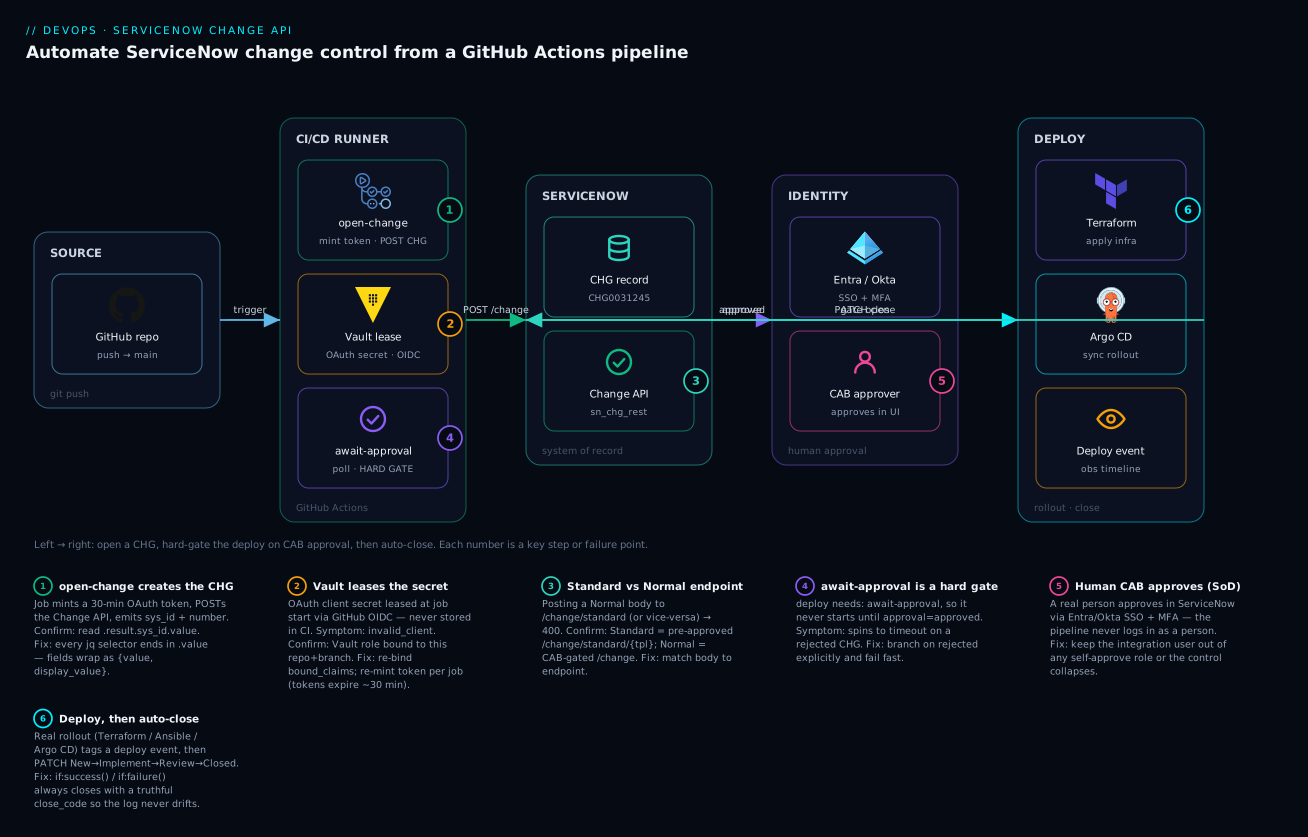
Read the diagram left to right; it is the pipeline you just built, with each numbered badge marking a key step or the failure that bites there. On the far left, a push to main in the GitHub repo kicks the run. The CI/CD runner hosts three jobs: open-change mints a 30-minute OAuth token — the client secret leased from Vault via OIDC, never stored in CI (badge 2, where a wrong secret shows as invalid_client) — and POSTs the Change API to create the CHG record, emitting its sys_id and number (badge 1, and badge 3 warns that a Normal body sent to the /change/standard endpoint returns 400). The await-approval job is the hard gate (badge 4): because deploy declares needs: await-approval, the rollout cannot start until approval = approved.
In the centre sits ServiceNow as the system of record — the CHG0031245 record, driven through the sn_chg_rest Change API. Above it, Entra / Okta provides SSO + MFA so a real CAB approver signs off in the ServiceNow UI (badge 5, the separation-of-duties gate — the pipeline never logs in as a person, and the integration user must be barred from self-approval or the whole control collapses). On the right, the deploy stage runs the real rollout — Terraform apply, an Argo CD sync — tags a deploy event onto the observability timeline, then PATCHes the change New → Implement → Review → Closed (badge 6), where the if:success() / if:failure() pair always closes with a truthful close_code so the log never drifts from production. The arrows narrate the flow: trigger → POST /change → approve → approved → gate open → PATCH close.
Real-world scenario
Meridian Pay runs a card-issuing platform on Kubernetes, deployed via GitHub Actions and Argo CD, with ServiceNow ITSM as the mandated system of record under a PCI-DSS and SOC 2 regime. The platform team is six engineers owning nineteen microservices; before this project they shipped about fifty production deploys a week, and every one required a hand-raised change. The change manager, Priya, spent roughly a day a week reconciling drift: changes left open, changes closed “successful” that had actually rolled back, and — the finding that triggered the whole effort — a SOC 2 audit that flagged 14% of Q1 production changes as having no linked approval record, because engineers under deadline had deployed first and back-dated the change.
The first design decision was the type mapping. The team audited a month of deploys and found that 41 of 50 weekly deploys were routine, reversible application rollouts — perfect standard-change candidates — while the remaining ~9 were schema migrations, new services, or infra changes that genuinely warranted CAB. So they built two paths: routine service deploys create a standard change from a CAB-blessed template (Payments Service Rolling Deploy) and clear the gate in under 8 seconds; anything touching the database or a new CI creates a Normal change routed to a peer approver (not the weekly CAB — a delegated approval that clears in minutes for low-risk Normal changes, escalating to full CAB only for risk = high).
The rollout hit two instructive snags. First, the initial poll loop only checked for approved and, on a test rejection, spun for the full 60-minute timeout before failing — they fixed it by branching on rejected explicitly. Second, a customised state model bit them: the instance had renumbered Closed from 3 to a custom value, so the first week’s close PATCHes silently failed the transition and left changes stuck in Review. Reading one record’s state.display_value mapped it, and they encoded the instance’s real values. They also added the Attachment API step to bolt the junit.xml and the Argo diff onto every change — directly answering the auditor’s “prove it was tested” question.
The result after one quarter: change-log drift fell to zero (every deploy’s change auto-closed with a truthful code), the 14%-no-approval finding was fully remediated (a deploy cannot run without a change reaching approved, standard or Normal), and Priya’s reconciliation day evaporated — she now spends that time on the ~9 weekly Normal changes that actually need judgement. The engineering-time saving was real too: at ~10 minutes of manual change-wrangling per deploy across 50 deploys, the team reclaimed roughly a full engineer-day a week. The lesson on the wall: “Don’t make CAB the gate for everything — make the template the gate for the routine, and the human the gate for the risky.” The incident-and-remediation timeline that convinced leadership:
| Phase | State before | Change made | Outcome |
|---|---|---|---|
| Baseline | 50 manual changes/wk, 14% missing approvals | — | SOC 2 finding |
| Type mapping | Everything → CAB | 41/50 → standard template, ~9 → Normal | Routine deploys clear in <8 s |
| Snag 1 | Poll spun on rejection | Branch on rejected |
Rejections fail fast |
| Snag 2 | Close PATCH silently failed | Map custom state model | Changes close correctly |
| Evidence | Titles without proof | Attachment API for junit + diff | Auditor’s “prove it” answered |
| Steady state | 1 day/wk reconciliation | Auto-open/close + evidence | Drift = 0; finding remediated; ~1 eng-day/wk reclaimed |
Advantages and disadvantages
Making the pipeline the author of the change is powerful, but it moves real governance into your YAML — weigh it honestly:
| Advantages | Disadvantages |
|---|---|
| The change record can never drift from production — it is the deploy, opened and closed by the same run | The pipeline now owns an audit artefact; a bug in the close step can misrecord an outcome |
| Standard-change templates make routine deploys clear the gate in seconds — CAB is off the critical path | Requires a CAB-blessed template and a governance conversation to get one |
| Separation of duties is preserved: machine creates, human (or template) approves | Easy to break SoD by accident — one over-privileged integration user collapses the control |
| Evidence (tests, plans, scans) is attached automatically — audits become a link, not a hunt | Attachment size limits and log volume force discipline about what you attach |
| OAuth short-lived tokens + Vault lease shrink credential blast radius to minutes | More moving parts (OAuth entity, Vault role, OIDC binding) to set up and maintain |
| Works across GitHub Actions, Azure DevOps, Jenkins, GitLab with the same API | Custom state models mean the numeric states aren’t portable without mapping |
| DevOps Change Velocity offers a zero-code path at scale | That path needs an extra ServiceNow subscription |
| Emergency-change endpoint lets hotfixes stay compliant without slowing them | Emergency changes still require a post-implementation review you must not skip |
The model is right for any regulated shop shipping continuously, where the alternative — manual change raising — simply does not scale to dozens of deploys a day and produces exactly the drift and shadow-change that auditors flag. It is less worth the effort for a low-frequency, low-regulation environment where a handful of monthly changes are easily managed by hand. The disadvantages are all manageable, but only if you treat the integration user’s privileges and the state-model mapping as first-class design concerns, not afterthoughts.
Hands-on lab
Build the whole loop against a free ServiceNow Developer instance (from the ServiceNow Developer Program) and drive it with curl/jq from your shell, then wire it into a real GitHub Actions run. No production access is required, and every step tears down cleanly. This lab is the centrepiece — do it end to end before you trust the pattern on a real release.
Step 1 — Get a Developer instance and set variables. Request a Personal Developer Instance at developer.servicenow.com (free), then export its details. Use an admin login only for the one-time setup in steps 2–3.
export SN_INSTANCE="dev12345"     # your PDI subdomain: https://dev12345.service-now.com
export SN_ADMIN="admin"
export SN_ADMIN_PW="<your PDI admin password>"
Step 2 — Create the OAuth endpoint and integration user (one-time, in the UI). In the instance: System OAuth → Application Registry → New → Create an OAuth API endpoint for external clients. Name it cicd-github, save, and copy the generated Client ID and Client Secret. Then User Administration → Users → New: create svc.cicd.github, set a password, and grant it the roles sn_change_write and itil (and nothing that can approve changes). Export what you copied:
export SN_CLIENT_ID="<client id from Application Registry>"
export SN_CLIENT_SECRET="<client secret>"
export SN_SVC_USER="svc.cicd.github"
export SN_SVC_PASS="<the service user's password>"
Step 3 — Mint a token (prove auth works).
export SN_TOKEN=$(curl -s -X POST "https://${SN_INSTANCE}.service-now.com/oauth_token.do" \
  -d grant_type=password -d client_id="${SN_CLIENT_ID}" -d client_secret="${SN_CLIENT_SECRET}" \
  -d username="${SN_SVC_USER}" -d password="${SN_SVC_PASS}" | jq -r '.access_token')
echo "${SN_TOKEN:0:12}..."   # a token prefix means success; empty/null means auth failed
Expected: a non-empty token prefix. If empty, re-check the client secret (invalid_client) or the user’s roles (access_denied).
Step 4 — Create a Normal change and capture its sys_id.
RESP=$(curl -s -X POST "https://${SN_INSTANCE}.service-now.com/api/sn_chg_rest/change" \
  -H "Authorization: Bearer ${SN_TOKEN}" -H "Content-Type: application/json" \
  -d '{"short_description":"LAB deploy demo",
       "description":"Hands-on lab change","type":"normal","risk":"low","impact":"3",
       "implementation_plan":"Lab run","backout_plan":"None — lab only"}')
echo "$RESP" | jq '.result | {number:.number.value, sys_id:.sys_id.value, state:.state.display_value, approval:.approval.value}'
export SYS_ID=$(echo "$RESP" | jq -r '.result.sys_id.value')
export NUMBER=$(echo "$RESP" | jq -r '.result.number.value')
echo "Created $NUMBER ($SYS_ID)"
Expected: a CHG00… number, a sys_id, state = New/Assess, approval = not requested/requested.
Step 5 — Read it back and confirm the state model on YOUR instance.
curl -s "https://${SN_INSTANCE}.service-now.com/api/sn_chg_rest/change/${SYS_ID}" \
  -H "Authorization: Bearer ${SN_TOKEN}" \
  | jq '.result | {state_value:.state.value, state_label:.state.display_value,
                   approval_value:.approval.value, approval_label:.approval.display_value}'
Note the numeric state_value that maps to each label — you will encode these numbers, not the defaults, if your PDI differs.
Step 6 — Approve it as a human (simulate the CAB gate). In the instance UI, open the change (Change → All, find your CHG number), set State to Assess/Authorize if needed so the approval fires, then as an approver (the admin acts as one on a PDI) approve it via the Approvers related list. Now poll from the shell and watch it flip:
for i in $(seq 1 10); do
  A=$(curl -s "https://${SN_INSTANCE}.service-now.com/api/sn_chg_rest/change/${SYS_ID}" \
      -H "Authorization: Bearer ${SN_TOKEN}" | jq -r '.result.approval.value')
  echo "poll $i: approval=$A"
  [ "$A" = "approved" ] && { echo "APPROVED — gate would open"; break; }
  [ "$A" = "rejected" ] && { echo "REJECTED — gate blocks"; break; }
  sleep 5
done
Expected: within a few polls, approval=approved and “gate would open”. This is exactly the gate the pipeline enforces.
Step 7 — Move to Implement, attach evidence, then close successfully.
# Move to Implement
curl -s -X PATCH "https://${SN_INSTANCE}.service-now.com/api/sn_chg_rest/change/${SYS_ID}" \
  -H "Authorization: Bearer ${SN_TOKEN}" -H "Content-Type: application/json" \
  -d '{"state":"-1","work_notes":"Lab deploy starting"}' | jq '.result.state'

# Attach a fake test-results file as evidence
echo '<testsuite tests="12" failures="0"/>' > junit.xml
curl -s -X POST \
  "https://${SN_INSTANCE}.service-now.com/api/now/attachment/file?table_name=change_request&table_sys_id=${SYS_ID}&file_name=junit.xml" \
  -H "Authorization: Bearer ${SN_TOKEN}" -H "Content-Type: application/xml" \
  --data-binary @junit.xml | jq '.result | {file_name, sys_id}'

# Close successfully
curl -s -X PATCH "https://${SN_INSTANCE}.service-now.com/api/sn_chg_rest/change/${SYS_ID}" \
  -H "Authorization: Bearer ${SN_TOKEN}" -H "Content-Type: application/json" \
  -d '{"state":"3","close_code":"successful","close_notes":"Lab deploy complete"}' \
  | jq '.result | {state:.state.display_value, close_code:.close_code.value}'
Expected: state moves to Implement, the attachment returns a sys_id, and the final read shows Closed / successful. Open the change in the UI — the junit.xml is in the Attachments and the close notes are set.
Step 8 — Test the rejection path. Create a second change (repeat step 4), and this time reject it in the UI. The poll from step 6 should print REJECTED — gate blocks and, in a real pipeline, fail the run before any deploy.
Step 9 — Wire it into GitHub Actions (optional, real run). Put SN_CLIENT_ID, SN_CLIENT_SECRET, SN_SVC_USER, SN_SVC_PASS as Encrypted Secrets on a test repo’s production environment, drop in the deploy.yml from earlier (replace the deploy step with echo "would deploy"), and push a no-op commit. The run pauses at await-approval; approve in the PDI; the run turns green and “closes” the change. This is the whole pattern, live.
Step 10 — Teardown. Nothing to delete on the free PDI beyond housekeeping, but clean up to leave it tidy:
# Close/cancel any open lab changes (cancel = state 4)
curl -s -X PATCH "https://${SN_INSTANCE}.service-now.com/api/sn_chg_rest/change/${SYS_ID}" \
  -H "Authorization: Bearer ${SN_TOKEN}" -H "Content-Type: application/json" \
  -d '{"state":"4","close_code":"unsuccessful","close_notes":"Lab teardown"}' > /dev/null

# Deactivate the OAuth client (System OAuth → Application Registry → set Active=false)
# Remove the integration user or clear its roles if this PDI is shared
rm -f junit.xml
echo "Lab torn down."
A PDI hibernates after inactivity and can be reset entirely from the Developer portal if you want a clean slate.
Common mistakes & troubleshooting
The failure modes are specific and repeatable. Match your symptom, confirm it, and apply the fix:
| # | Symptom | Root cause | Confirm | Fix |
|---|---|---|---|---|
| 1 | Conditionals misfire; state/approval look like objects |
Reading .result.state instead of .result.state.value |
curl … | jq '.result.state' prints {value,display_value} |
End every selector in .value |
| 2 | POST to the standard endpoint returns 400 |
Sent a Normal body (type/risk) to /change/standard/{tpl} |
Response .error.message is generic |
Standard = /change/standard/{tpl} (no type/risk); Normal = /change |
| 3 | Token works in job 1, fails later with 401 | Access token expired (~30 min) mid–CAB-wait | 401 on the poll/close after a long approval | Re-mint the token at the start of each job |
| 4 | invalid_client on token mint |
Wrong client ID/secret, or OAuth entity inactive | oauth_token.do returns invalid_client |
Re-copy the secret; set Application Registry record Active |
| 5 | access_denied on token mint |
Service user lacks a role or password wrong | oauth_token.do returns access_denied |
Grant sn_change_write + itil; reset password |
| 6 | Poll spins to timeout on a rejected change | Loop only checks for approved |
Change shows approval=rejected in UI while job still polls |
Branch on rejected (and duplicate) explicitly → fail fast |
| 7 | Close PATCH “succeeds” but change stuck in Review | Custom state model — 3 isn’t Closed on this instance |
state.display_value after PATCH isn’t “Closed” |
Read the instance’s real state values; encode those |
| 8 | Change auto-approves — audit flags SoD break | Integration user has an approver role | Integration user can approve its own changes | Strip any approval role; machine creates only, human/template approves |
| 9 | Deploy runs even though change wasn’t approved | deploy doesn’t need the gate job |
Job graph shows deploy not depending on await-approval |
Add needs: await-approval (Actions) / dependsOn (ADO) |
| 10 | Attachment returns 400/413 | File too large, or wrong table_name/table_sys_id |
.error or a 413 status |
Check com.glide.attachment.max_size; verify params; attach a link for huge logs |
| 11 | Every poll returns not requested forever |
Approval workflow never fired (change not in an approving state) | state stays New/Assess; no approval records |
Ensure the change enters Authorize; check the model’s approval policy |
| 12 | 429 / throttling under many concurrent pipelines | Inbound REST rate limit hit by tight polling | ServiceNow returns 429; detector shows rate-limit | Widen poll cadence (30 s+); prefer webhook callback over busy-poll |
| 13 | Standard change still waits for approval | Template isn’t actually pre-approved, or wrong template sys_id |
Created change shows approval=requested |
Fix the template’s pre-approval; confirm the sys_id via Table API |
| 14 | Token leaks into logs | Forgot to mask the minted token | Token string visible in run logs | ::add-mask:: (Actions) / issecret=true (ADO) on every token |
A decision table for the “is it auth, endpoint, or process?” triage:
| If you see… | It’s probably… | Do this |
|---|---|---|
invalid_client / access_denied at token mint |
Auth (client or user) | Fix the OAuth entity / user roles |
| 400 on create | Endpoint/body mismatch | Match body to Standard vs Normal endpoint |
| 401 mid-pipeline | Expired token | Re-mint per job |
| Gate never opens | Approval workflow / state | Confirm the change reached Authorize; check approval policy |
| Change closes in the wrong state | Custom state model | Map and encode the instance’s real values |
| Deploy ran without approval | Missing job dependency | Add the needs/dependsOn gate |
Best practices
- Map deploy risk to change type deliberately. Routine, reversible deploys → standard change (template, no CAB); real blast radius → Normal; incident hotfix → Emergency. Don’t send everything to CAB — you’ll drown the board and make the control a bottleneck people route around.
- Use the Change API to run the process; drop to the Table API only for gaps. The Change API enforces the state model and approvals; the Table API bypasses them. Reserve the Table API for reads, reporting, template lookups, and custom fields.
- Re-mint the OAuth token at the start of every job. Tokens live ~30 minutes; a CAB wait outlasts them. One token per job, never one token across the graph.
- Read the state model once, then encode your instance’s values. Never hard-code
3=Closed blindly — a customised model will break your close step silently. - Make the gate a hard job dependency.
needs: await-approval(Actions) /dependsOn+environment(ADO). The deploy must be incapable of starting before approval, not merely asked not to. - Branch the poll on
rejectedandduplicate, not justapproved. Fail fast on a decline; don’t spin to timeout. - Preserve separation of duties in the roles, not just the process. The integration user gets
sn_change_write+itiland nothing that approves. Verify it cannot approve its own change. - Always close with a truthful
close_code.if: success()→successful;if: failure()→unsuccessful. An honest close is the whole point. - Attach evidence every run. Test results, the plan/diff, scan reports. An audit becomes a link, not an archaeology dig.
- Prefer a webhook callback over a tight busy-poll for long waits. A ServiceNow Business Rule / outbound webhook that calls GitHub
repository_dispatchon approval turns a paid idle wait into an event and dodges rate limits. - Treat the change body as code. Build it with
jq -n(not string concatenation), review it, and keep the field mapping in version control. - Deactivate the account, retain the history. Never delete change records to “clean up” — they are the audit evidence. Revoke the OAuth client to decommission access.
Security notes
The pipeline authenticates as a dedicated, least-privileged integration user (sn_change_write + itil, nothing more) over OAuth with short-lived tokens, so a leaked credential expires in minutes and is revocable per client. The OAuth client secret is leased from HashiCorp Vault at job start via GitHub OIDC — no static ServiceNow secret is ever stored in GitHub, and the Vault role is bound to this one repo and branch (bound_claims). Every minted token is masked with ::add-mask:: (or issecret=true in ADO) so it never lands in logs. Crucially, human CAB approval flows through Okta/Entra SSO with MFA — the machine account can create and progress a change but the approval gate is a real person authenticating with corporate identity, preserving separation of duties. Keep the integration user out of any role that can approve changes; that single misconfiguration collapses the entire control, and an auditor will find it.
The security posture as a checklist:
| Control | Why | How |
|---|---|---|
| Least-privilege integration user | Limit blast radius; enforce SoD | Only sn_change_write + itil; no approver role |
| OAuth short-lived tokens | Small leak window; revocable | 30-min tokens; deactivate OAuth entity to revoke |
| Secret leased, not stored | No static secret in CI | Vault + OIDC role bound to repo+branch |
| Token masking | Prevent log leakage | ::add-mask:: / issecret=true on every token |
| SoD on approval | Pass audits (SOC 2, ITGC) | Human via SSO+MFA, or a CAB-approved template |
| Attachment scanning | Don’t attach secrets/PII | Scan artefacts; attach links for large/sensitive logs |
| Audit trail retention | Preserve evidence | Never delete changes; deactivate accounts instead |
| IP/scoped access to the instance | Reduce attack surface | Restrict the OAuth entity and instance ACLs where possible |
Let a posture tool (integrating Wiz Code with GitHub Actions for IaC and container gates) flag if a secret ever gets hard-coded into the workflow, and lean on secretless CI patterns (workload identity federation for secretless CI/CD) to keep even the Vault client credential out of the repo where you can.
Cost & sizing
This automation is effectively free of new infrastructure: it reuses your existing ServiceNow instance, GitHub Actions minutes you already pay for, and a Vault path. The real return is engineering time — a team doing fifty deploys a week reclaims the 10–15 minutes per deploy previously spent hand-filling and chasing change records (roughly a full engineer-day per week), while eliminating the audit-prep cost of reconciling drifted change logs. The only metered resource is runner time: the await-approval poll job consumes minutes while it waits, so for Normal changes with long CAB queues you want to avoid a tight busy-poll.
Where the (small) costs actually sit, and how to keep them near zero:
| Cost driver | Magnitude | How to minimise |
|---|---|---|
| Actions runner minutes while polling | Minutes per deploy on the await-approval job |
Widen cadence to 30 s+; switch to a webhook callback for long waits |
| ServiceNow inbound REST calls | Negligible per deploy; matters at fleet scale | Batch reads; avoid sub-10-s polling across many pipelines |
| DevOps Change Velocity subscription | Per the ServiceNow contract | Only if you adopt the app; base ITSM has no extra cost |
| Vault operations | Negligible | Reuse one KV path and one OIDC role |
| Attachment storage | Small; capped by max_size |
Attach links for huge logs; keep artefacts lean |
| Engineering-time saved (the real number) | ~1 engineer-day/week for a 50-deploy team | This is the payback that justifies the build |
Rough figures: for a 50-deploy-a-week team, reclaiming ~10 minutes per deploy is ~8 hours a week — at a blended senior rate that is meaningful money, dwarfing the near-zero runtime cost. The turn-a-paid-wait-into-an-event optimisation (webhook callback via repository_dispatch instead of busy-poll) cuts idle runner minutes to near zero for slow-approval Normal changes.
Interview & exam questions
-
What’s the difference between the ServiceNow Change API and the Table API, and when do you use each? The Change API (
sn_chg_rest) is workflow-aware — it enforces the state model, fires the approval workflow, understands standard templates, and refuses illegal transitions. The Table API is generic CRUD that writes any field without process logic. Use the Change API to run the change process from a pipeline; drop to the Table API only for gaps (template lookups, reporting, custom fields). -
Name the three ITIL change types and when each fits a deploy. Standard (pre-approved template, low-risk routine deploys, clears in seconds), Normal (assessed and approved per instance, for changes with real blast radius), and Emergency (expedited approval for urgent break-fix, with a mandatory post-implementation review).
-
Why does every Change API field come back as
{value, display_value}, and what bug does it cause?valueis the stored/database form your code branches on;display_valueis the human label. Reading.result.stateinstead of.result.state.valueyields an object where you expected a string, so conditionals silently misfire — the number-one first-timer bug. -
How do you preserve separation of duties when a pipeline creates changes? The integration user gets only
sn_change_write+itiland no approver role, so it can create and progress a change but cannot approve one. Approval comes from a human via SSO+MFA or from a template CAB blessed once. If the machine can approve its own change, the control is theatre and the audit fails. -
Why re-mint the OAuth token in every pipeline job? Access tokens live ~30 minutes by default; a CAB approval that takes an hour outlives a token minted in the first job. Re-minting per job (Vault import +
oauth_token.do) avoids a 401 on the poll or close step. -
How does a standard change clear the gate so fast? It’s created from a CAB-approved template against
/change/standard/{template_sys_id}; the template supplies the type, risk, and pre-approval, so the record is bornapprovedand the poll clears on the first attempt — no human in the deploy path. -
How do you make the deploy a hard gate on approval in GitHub Actions? The
deployjob declaresneeds: await-approval, andawait-approvalexits non-zero on rejection or timeout. GitHub won’t startdeployuntil the gate job succeeds, so a rejected or unapproved change means the deploy never runs. -
What’s the risk of hard-coding change state numbers? Instances can customise the state model (rename/renumber states), so a hard-coded
"state":"3"may not mean Closed on that instance — your close PATCH fails the transition silently and the change sticks in the wrong state. Read one record’sstate.display_valueand encode the instance’s real values. -
What is DevOps Change Velocity and when would you use it over a hand-rolled integration? It’s a ServiceNow app (formerly DevOps Change Acceleration) that auto-creates and auto-approves changes from pipeline telemetry against a declarative policy — no bespoke API in your YAML. Use it to standardise many pipelines at scale when you have the subscription; hand-roll for bespoke flows, unusual fields, or when you only own base ITSM.
-
How do you attach test results to a change, and why does it matter?
POST /api/now/attachment/file?table_name=change_request&table_sys_id={sys_id}&file_name=junit.xmlwith the file bytes. It matters because a change without evidence is a title an auditor can’t verify — attaching tests, plans, and scans turns an audit into a link rather than an investigation. -
How do you close a change honestly from a pipeline? PATCH to state
3(Closed) with aclose_codechosen by outcome —if: success()→successful,if: failure()→unsuccessful— so the record always reflects what actually happened, which is what keeps the change log and production from drifting. -
Which certs and frameworks does this map to? ITIL 4 (Change Enablement), SOC 2 / ITGC (change management and separation-of-duties controls), and the ServiceNow Certified Application Developer / CIS-ITSM and DevOps certifications. The pattern also satisfies PCI-DSS and ISO 27001 change-control requirements.
Quick check
- Which API enforces the change state model and approval workflow — the Change API or the Table API?
- You send a body with
type:"normal"andrisk:"moderate"to/change/standard/{tpl}and get a 400. Why? - Your poll loop only checks for
approved. What happens when the change is rejected? - Why must the pipeline re-mint its OAuth token in each job?
- What
close_codeshould the pipeline set when the deploy fails mid-apply?
Answers
- The Change API (
sn_chg_rest) — it’s workflow-aware and refuses illegal transitions; the Table API is dumb CRUD that bypasses the process. - The standard endpoint expects the template to supply
type/risk— sending them (a Normal-change body) to the standard endpoint is a mismatch. Use/changefor Normal,/change/standard/{tpl}for Standard (notype/risk). - It spins until the timeout and then fails, wasting up to the full poll window. Branch on
rejected(andduplicate) explicitly to fail fast. - Access tokens expire in ~30 minutes; a CAB wait longer than that outlives a token minted in job 1, causing a 401 on the poll or close. Re-mint per job.
unsuccessful— via theif: failure()step — so the change record honestly reflects the failed deploy and the log doesn’t drift.
Glossary
- Change request (
change_request) — the ServiceNow record representing a planned change; the audit artefact the pipeline authors. - Standard change — a pre-approved, templated, low-risk change; every instance created from the template inherits CAB’s one-time approval.
- Normal change — a change assessed and approved per instance (CAB, peer, or automated rule); the default for real blast radius.
- Emergency change — an urgent break-fix with expedited approval and a mandatory post-implementation review.
- Change API (
sn_chg_rest) — ServiceNow’s workflow-aware REST API for changes; enforces the state model and approvals. - Table API (
/api/now/table) — generic CRUD over any table; bypasses change-process logic. - State model — the numeric change states (
-5New …3Closed) and the legal transitions between them; customisable per instance. sys_id— the immutable 32-char GUID of a record; the thread stitching pipeline jobs together.approvalfield — the change’s approval status (not requested/requested/approved/rejected/duplicate); what the gate polls.close_code— the outcome recorded at close:successful,successful_with_issues, orunsuccessful.- Standard change template — a reusable, pre-approved change definition (
std_change_producer_version) consumed via/change/standard/{sys_id}. - CAB (Change Advisory Board) — the human body that approves Normal/high-risk changes.
- DevOps Change Velocity — the ServiceNow app (formerly DevOps Change Acceleration) that auto-creates and auto-approves changes from pipeline telemetry.
- Attachment API —
/api/now/attachment; uploads evidence files against a record. - OAuth API endpoint — the Application Registry record enabling token-based machine auth.
- Separation of duties (SoD) — the control that the maker of a change is not its approver; enforced by role design.
Next steps
- CI/CD Pipeline Explained — the delivery fundamentals this gate wraps around.
- GitHub Actions to Azure with OIDC federated credentials — passwordless pipeline auth, the same OIDC principle used to lease the ServiceNow secret.
- Managing pipeline secrets with Key Vault and managed identity — deeper on leasing secrets into pipelines without plaintext.
- ServiceNow-gated cloud provisioning for self-service landing zones — the same instance as system of record for a provisioning workflow.
- ServiceNow ITSM for cloud incident response & event management — the incident side that emergency changes link back to.
- Deployment strategies: blue-green, canary, rolling — the rollout mechanics that live inside the gated deploy job.