The connectivity subscription is the one piece of an enterprise-scale landing zone that, if you get it wrong, every application team inherits the pain. It is the shared blast radius: a single misconfigured route table or a DNS forwarder pointed at the wrong resolver can take down hybrid name resolution for hundreds of workloads at once. In the Cloud Adoption Framework (CAF) enterprise-scale architecture, connectivity lives under the Platform management group alongside Identity and Management, and it is deliberately isolated so the networking team owns it end to end without application teams ever touching the hub.
This article is the build I run when standing up that subscription for a regulated enterprise. It assumes you already have the management group hierarchy and a platform team that owns RBAC. We design the hub, decide between classic hub-spoke and Virtual WAN, wire in resilient hybrid connectivity, force egress through inspection, and make DNS resolve correctly in every direction. The guiding principle throughout: the connectivity subscription is a product consumed by spokes, not a dumping ground for network resources.
1. Role of the connectivity subscription in the platform landing zone
Keep this subscription ruthlessly scoped. It should contain only platform-shared networking: the hub VNet (or Virtual WAN hub), Azure Firewall or a third-party NVA, ExpressRoute and VPN gateways, the private DNS zones and DNS Private Resolver, shared ingress (Application Gateway / Front Door origins), DDoS protection plans, and Bastion. It should not contain a single application resource. That separation is what lets you apply a tight Azure Policy assignment at the management-group scope without fighting workload exceptions.
A standard regional layout:
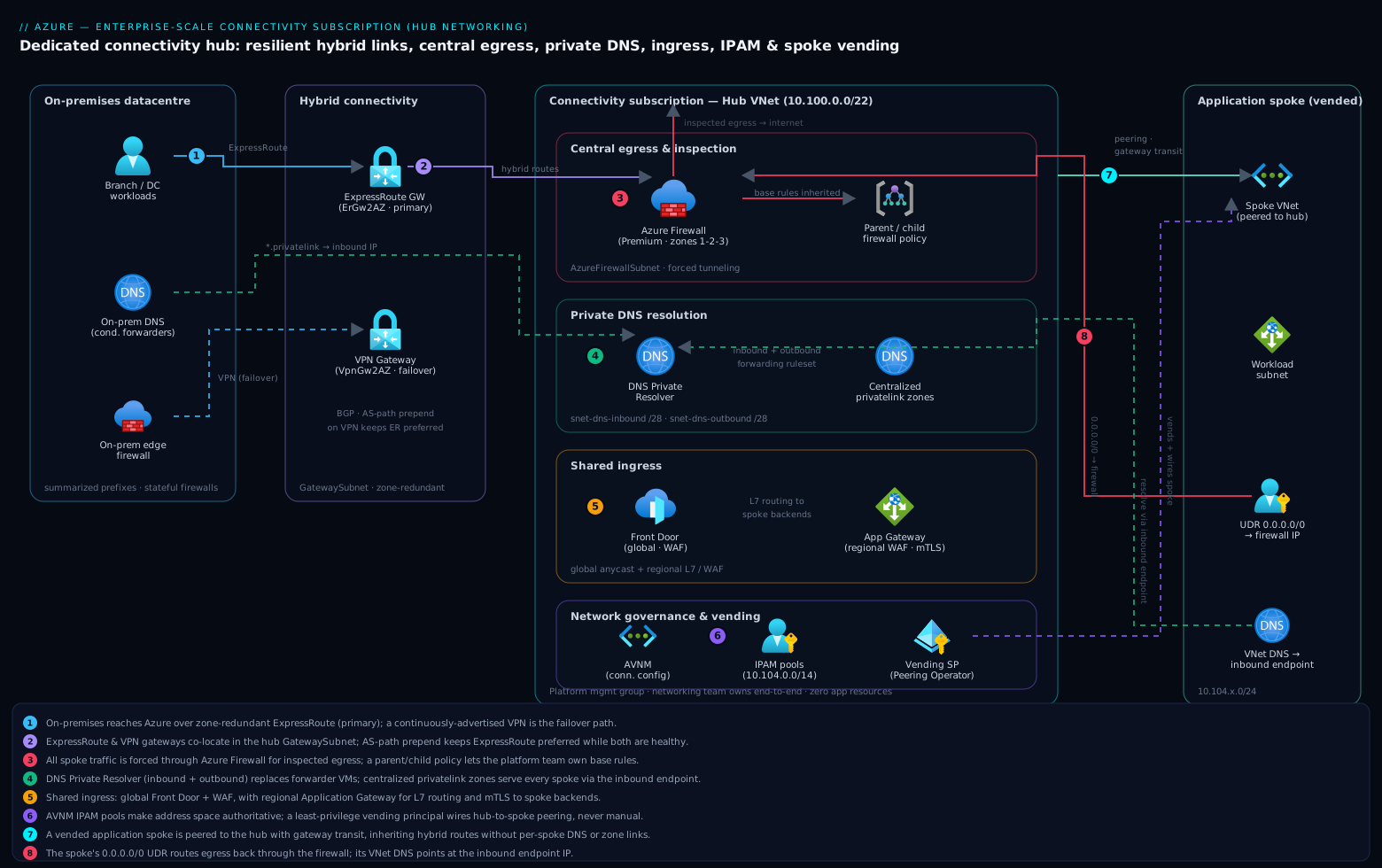
Resource-group boundaries here map to operational ownership and lifecycle: the gateway resources change rarely and have long provisioning times, while firewall policy changes daily. Splitting them keeps a noisy CI/CD pipeline for firewall rules away from the multi-hour ExpressRoute gateway deployments.
2. Choosing the topology: traditional hub-spoke versus Virtual WAN
This is the most consequential early decision. Both are valid; they fail differently.
| Dimension | Traditional hub-spoke | Virtual WAN |
|---|---|---|
| Routing control | Full control via UDRs and BGP; you own every route | Managed by routing intent; less granular, opinionated |
| Transitive routing | Manual (NVA or gateway transit); spoke-to-spoke needs hub UDRs | Built in across hubs |
| Multi-region mesh | You build and maintain hub-to-hub peerings + UDRs | Microsoft-managed any-to-any backbone |
| NVA insertion | Anywhere, any vendor, any design | Integrated NVAs or routing-intent to firewall only |
| Cost model | Pay per gateway + firewall + peering GB | vWAN hub unit + routing infra + processed GB |
| Best fit | < ~30 spokes per region, strict packet-path requirements | Many regions, many branches, mesh-heavy |
The honest rule of thumb: with one or two regions and a network team that wants deterministic control over the packet path (common in finance and healthcare), traditional hub-spoke is simpler to reason about and audit. Global, with dozens of branch sites and a need for any-to-any transit without hand-maintaining a peering mesh, Virtual WAN earns its premium. I default to traditional hub-spoke for a single-region regulated estate and reach for vWAN once the branch or region count makes the peering mesh unmaintainable.
The rest of this article uses traditional hub-spoke as the worked example because it exposes every primitive (UDRs, peering, BGP, forced tunneling) explicitly. The same DNS, egress, and IPAM principles carry over to vWAN with routing intent.
Hub VNet with the canonical subnet set in Bicep:
param location string = 'eastus'
param hubAddressSpace string = '10.100.0.0/22'

resource hubVnet 'Microsoft.Network/virtualNetworks@2023-11-01' = {
  name: 'vnet-hub-${location}'
  location: location
  properties: {
    addressSpace: { addressPrefixes: [ hubAddressSpace ] }
    subnets: [
      { name: 'GatewaySubnet',            properties: { addressPrefix: '10.100.0.0/27' } }
      { name: 'AzureFirewallSubnet',       properties: { addressPrefix: '10.100.1.0/26' } }
      { name: 'AzureFirewallManagementSubnet', properties: { addressPrefix: '10.100.1.64/26' } }
      { name: 'AzureBastionSubnet',        properties: { addressPrefix: '10.100.2.0/26' } }
      { name: 'snet-dns-inbound',          properties: { addressPrefix: '10.100.3.0/28' } }
      { name: 'snet-dns-outbound',         properties: { addressPrefix: '10.100.3.16/28' } }
    ]
  }
}
The subnet names GatewaySubnet, AzureFirewallSubnet, AzureFirewallManagementSubnet, and AzureBastionSubnet are reserved and must be spelled exactly; Azure binds platform services to them by name. AzureFirewallSubnet must be at least /26, and the management subnet (required only for the Basic SKU or forced-tunneling configurations) is also /26. The DNS Private Resolver inbound and outbound endpoints each need a delegated /28 at minimum.
3. Hybrid connectivity design with ExpressRoute and VPN resilience
Hybrid connectivity is where “highly available” stops being a checkbox and starts being a circuit-and-BGP design. The reference pattern for a regulated enterprise is ExpressRoute as the primary path with a site-to-site VPN as the failover, both terminating on zone-redundant gateways.
Two failure domains matter: the circuit and the gateway. ExpressRoute already gives you two physical connections at the peering location (the SLA is built on that), so the gateway and the on-premises edge are the parts you own. Deploy zone-redundant SKUs so a single availability-zone outage does not sever the link:
# Zone-redundant ExpressRoute gateway (ErGw1AZ/2AZ/3AZ are the AZ-aware SKUs)
az network vnet-gateway create \
  --name ergw-hub-eastus \
  --resource-group rg-hub-gateway-eastus \
  --vnet vnet-hub-eastus \
  --gateway-type ExpressRoute \
  --sku ErGw2AZ \
  --location eastus

# Zone-redundant VPN gateway for the failover path
az network vnet-gateway create \
  --name vpngw-hub-eastus \
  --resource-group rg-hub-gateway-eastus \
  --vnet vnet-hub-eastus \
  --gateway-type Vpn --vpn-type RouteBased \
  --sku VpnGw2AZ --location eastus
You can co-locate an ExpressRoute gateway and a VPN gateway in the same hub VNet; they share the GatewaySubnet. The design that bites teams is the failover behaviour. ExpressRoute and VPN advertising the same on-premises prefixes will, by default, see ExpressRoute preferred because of route selection. That is what you want. But if you do nothing, when ExpressRoute fails Azure does not automatically guarantee the VPN takes over for those prefixes unless the VPN session is up and advertising. Keep the VPN tunnel established and advertising the same prefixes continuously so failover is a route-table convergence, not a tunnel-establishment delay.
For deterministic primary/secondary behaviour, set AS-path prepending on the VPN advertisements from on-premises so ExpressRoute always wins while both are healthy, and let BGP withdraw ExpressRoute routes on failure. Verify the gateway is learning routes from both:
az network vnet-gateway list-learned-routes \
  --name vpngw-hub-eastus \
  --resource-group rg-hub-gateway-eastus \
  --query "value[].{prefix:network, nextHop:nextHop, asPath:asPath, source:sourcePeer}" -o table
A subtle and important detail: if you enable “Allow traffic from remote Virtual WAN/VNet over ExpressRoute” style transit, or run both gateways, validate that your on-premises firewalls expect asymmetric paths during failover. Stateful on-prem firewalls dropping return traffic on the failover path is the single most common “the VPN backup did not work” incident.
4. Centralized egress, firewalling, and forced-tunneling routing
Every spoke should reach the internet (and on-premises) through the hub firewall, never directly. This is enforced with user-defined routes, not trust. Deploy Azure Firewall with a parent/child policy so the platform team owns base rules and per-environment children inherit them:
az network firewall policy create \
  --name afwp-hub-base --resource-group rg-hub-secure-eastus \
  --location eastus --sku Premium --threat-intel-mode Deny

az network firewall create \
  --name afw-hub-eastus --resource-group rg-hub-secure-eastus \
  --location eastus --firewall-policy afwp-hub-base \
  --sku AZFW_VNet --tier Premium \
  --zones 1 2 3
The forced-tunnel route table applied to every spoke workload subnet sends the default route to the firewall’s private IP:
FW_IP=$(az network firewall show -n afw-hub-eastus -g rg-hub-secure-eastus \
  --query "ipConfigurations[0].privateIPAddress" -o tsv)

az network route-table create -n rt-spoke-default -g rg-hub-net-eastus -l eastus \
  --disable-bgp-route-propagation false

az network route-table route create \
  -g rg-hub-net-eastus --route-table-name rt-spoke-default \
  -n default-to-firewall --address-prefix 0.0.0.0/0 \
  --next-hop-type VirtualAppliance --next-hop-ip-address "$FW_IP"
Two routing facts that are easy to get wrong:
- Do not put a 0.0.0.0/0 UDR on
AzureFirewallSubnetpointing at itself. That creates a loop and breaks the firewall’s own internet path. Azure Firewall manages its own egress. If you need forced tunneling of the firewall’s traffic to on-premises, that is a separate, explicit configuration using the management subnet and a route table onAzureFirewallSubnetwhose default route points to the VPN/ER gateway, never to the firewall. --disable-bgp-route-propagationon spoke route tables controls whether gateway-learned (on-prem) routes reach the spoke. Leave propagation enabled if spokes must reach on-premises directly through the hub; disable it only when you intend all traffic, including on-prem-bound, to traverse the firewall via the 0.0.0.0/0 route. Be deliberate: disabling propagation plus a default route to the firewall is the standard “inspect everything” posture.
DNAT, network, and application rules live in the policy. A representative application rule collection allowing only sanctioned egress FQDNs:
az network firewall policy rule-collection-group create \
  --name rcg-egress --policy-name afwp-hub-base \
  -g rg-hub-secure-eastus --priority 200

az network firewall policy rule-collection-group collection add-filter-collection \
  --name allow-egress-fqdns --policy-name afwp-hub-base \
  --rule-collection-group-name rcg-egress -g rg-hub-secure-eastus \
  --collection-priority 210 --action Allow --rule-name allow-windows-update \
  --rule-type ApplicationRule --source-addresses '10.0.0.0/8' \
  --protocols Http=80 Https=443 \
  --target-fqdns 'update.microsoft.com' '*.windowsupdate.com'
5. Private DNS architecture and resolution across spokes and on-premises
DNS is the part of the connectivity subscription teams under-design and then debug for weeks. The goal: any resource in any spoke, and any host on-premises, resolves Azure private endpoint records and on-prem records correctly, with no per-spoke DNS sprawl.
The modern pattern uses Azure DNS Private Resolver in the hub instead of building and patching DNS forwarder VMs. It gives you an inbound endpoint (on-prem and spokes send queries to it) and an outbound endpoint with forwarding rulesets (Azure forwards specific domains to on-prem DNS).
az dns-resolver create -n dnspr-hub-eastus -g rg-hub-dns-eastus -l eastus \
  --id "/subscriptions/<sub>/resourceGroups/rg-hub-net-eastus/providers/Microsoft.Network/virtualNetworks/vnet-hub-eastus"

az dns-resolver inbound-endpoint create \
  --dns-resolver-name dnspr-hub-eastus -g rg-hub-dns-eastus -n inbound \
  --ip-configurations '[{"privateIpAllocationMethod":"Dynamic","subnet":{"id":"/subscriptions/<sub>/resourceGroups/rg-hub-net-eastus/providers/Microsoft.Network/virtualNetworks/vnet-hub-eastus/subnets/snet-dns-inbound"}}]'

az dns-resolver outbound-endpoint create \
  --dns-resolver-name dnspr-hub-eastus -g rg-hub-dns-eastus -n outbound \
  --subnet "/subscriptions/<sub>/resourceGroups/rg-hub-net-eastus/providers/Microsoft.Network/virtualNetworks/vnet-hub-eastus/subnets/snet-dns-outbound"
The resolution design has three rules:
- Spokes point their VNet DNS at the inbound endpoint IP, not at 168.63.129.16 directly and not at per-spoke forwarders. Set this once on each spoke VNet via vending automation.
- Private DNS zones for private endpoints are centralized in the hub (
privatelink.blob.core.windows.net,privatelink.database.windows.net, etc.) and linked to the hub VNet. Because spokes resolve through the inbound endpoint, which is in the hub, they get the privatelink answers without needing their own zone links. This is the key simplification over the old “link every privatelink zone to every spoke” model. - On-prem-bound domains use an outbound forwarding ruleset. On-premises DNS, in turn, conditionally forwards
*.privatelink.*and Azure public zones to the inbound endpoint IP so on-prem hosts resolve private endpoints.
A forwarding rule sending corp.contoso.com to on-prem resolvers:
az dns-resolver forwarding-ruleset create -n frs-hub -g rg-hub-dns-eastus -l eastus \
  --outbound-endpoints '[{"id":"<outbound-endpoint-id>"}]'

az dns-resolver forwarding-rule create --ruleset-name frs-hub -g rg-hub-dns-eastus \
  -n onprem-corp --domain-name "corp.contoso.com." \
  --forwarding-rule-state Enabled \
  --target-dns-servers '[{"ip-address":"10.10.0.10","port":53},{"ip-address":"10.10.0.11","port":53}]'
The trailing dot on the domain name is required; the API treats it as a fully qualified domain.
6. Inbound application delivery and shared ingress placement
Egress is centralized in the hub; ingress is a judgement call. There are two viable models:
- Shared ingress in the hub (or a dedicated ingress subscription): one Application Gateway + WAF, or Front Door, fronting many spokes. Lower cost, central WAF policy, but it makes the ingress a shared change-control bottleneck and couples app teams’ release cadence.
- Per-spoke ingress in the application landing zone: each workload owns its Application Gateway. Higher cost and more WAF policies to manage, but full team autonomy and a smaller blast radius.
My default: global HTTP entry via Azure Front Door (it is a global, anycast service and does not belong in a regional hub at all), with regional Application Gateway in the workload spoke for layer-7 routing and mTLS to backends. Reserve hub-resident Application Gateway for the case where you genuinely need a single shared regional WAF and the org accepts the shared-change-control tradeoff.
The non-obvious constraint with hub-shared Application Gateway: it needs its own dedicated subnet, and if it must reach backends in spokes while egress is forced through the firewall, you have to be careful that the gateway’s health probes and return traffic are not black-holed by the 0.0.0.0/0 UDR. Application Gateway requires connectivity to its management endpoints; do not apply a default-route-to-firewall UDR on the Application Gateway subnet without allowing the required gateway management traffic.
7. IP address management, route propagation, and subnet planning
The connectivity subscription is where address-space discipline is won or lost. Allocate a single large supernet to Azure (commonly out of RFC 1918 10.0.0.0/8), then carve regional and per-spoke blocks from it deterministically so every prefix is summarizable on-premises.
A workable allocation scheme:
| Scope | Prefix | Notes |
|---|---|---|
| Azure overall | 10.0.0.0/8 | Summarized to on-prem as one route where possible |
| Region East US | 10.100.0.0/14 | All East US hubs + spokes |
| Hub East US | 10.100.0.0/22 | Hub VNet only |
| Spoke pool East US | 10.104.0.0/14 | Vended /24 or /23 per spoke |
| Region West US | 10.108.0.0/14 | Mirror layout |
Use Azure Virtual Network Manager IPAM pools to make this authoritative instead of a spreadsheet. IPAM pools let the platform team define the supernet, and vending automation allocates the next free block programmatically, eliminating the overlap mistakes that make ExpressRoute advertisements collide.
# Create an IPAM pool in the network manager (AVNM)
az network manager ipam-pool create \
  --name pool-eastus-spokes --network-manager-name avnm-platform \
  -g rg-hub-net-eastus --address-prefixes '10.104.0.0/14' \
  --display-name "East US spoke pool"
For route propagation, the rule across the estate is: on-premises summarizes Azure as a small set of supernets, and Azure advertises only the regional summaries over ExpressRoute, not hundreds of /24s. Over-advertising /24s exhausts the ExpressRoute route limit (the default is 4000 routes for standard, expandable with the premium add-on) and makes on-prem routing tables unmanageable. Configure the ER gateway and on-prem edge to exchange summaries; let intra-Azure routing handle the specifics.
8. Delegating spoke peering through subscription vending automation
The connectivity subscription must never be touched manually to onboard a spoke. The networking team owns the hub; vending automation owns the peering and wiring, granted exactly the permissions it needs and nothing more. (The full vending machine that creates the subscription, applies CAF guardrails, and assigns budgets is its own build; here we focus narrowly on the connectivity hand-off.)
The minimal-privilege model: the vending service principal gets Network Contributor on the hub’s networking resource group (to create the hub-to-spoke peering side) and on the spoke. Better, scope it with a custom role limited to peering and route-table actions so it cannot, for example, delete the firewall.
{
  "Name": "Spoke Peering Operator",
  "IsCustom": true,
  "Description": "Vending automation: create spoke peerings and apply UDRs only",
  "Actions": [
    "Microsoft.Network/virtualNetworks/virtualNetworkPeerings/read",
    "Microsoft.Network/virtualNetworks/virtualNetworkPeerings/write",
    "Microsoft.Network/virtualNetworks/virtualNetworkPeerings/delete",
    "Microsoft.Network/virtualNetworks/peer/action",
    "Microsoft.Network/virtualNetworks/subnets/join/action",
    "Microsoft.Network/routeTables/join/action"
  ],
  "AssignableScopes": [
    "/subscriptions/<connectivity-sub-id>/resourceGroups/rg-hub-net-eastus"
  ]
}
Peering is bidirectional and must be created on both VNets. The spoke side allows forwarded traffic and use of the remote gateway; the hub side allows gateway transit:
# Spoke -> Hub (use remote gateways, allow forwarded traffic from hub/NVA)
az network vnet peering create \
  --name peer-spoke-to-hub --resource-group rg-app-spoke01 \
  --vnet-name vnet-spoke01 \
  --remote-vnet "/subscriptions/<conn-sub>/resourceGroups/rg-hub-net-eastus/providers/Microsoft.Network/virtualNetworks/vnet-hub-eastus" \
  --allow-vnet-access --allow-forwarded-traffic --use-remote-gateways

# Hub -> Spoke (provide gateway transit)
az network vnet peering create \
  --name peer-hub-to-spoke01 --resource-group rg-hub-net-eastus \
  --vnet-name vnet-hub-eastus \
  --remote-vnet "/subscriptions/<app-sub>/resourceGroups/rg-app-spoke01/providers/Microsoft.Network/virtualNetworks/vnet-spoke01" \
  --allow-vnet-access --allow-forwarded-traffic --allow-gateway-transit
The pairing of flags matters: --use-remote-gateways on the spoke only works if the hub side sets --allow-gateway-transit, and only one VNet in the pair can own the gateways. Get this backwards and the spoke silently loses its hybrid route. The cleaner long-term approach is Azure Virtual Network Manager connectivity configurations with a hub-and-spoke topology, which auto-manages peerings for every VNet in a dynamic group, so a newly vended spoke that matches the group policy is wired to the hub with no per-spoke peering code at all.
Enterprise scenario
A European retail bank ran a single-region traditional hub-spoke with Azure Firewall and ExpressRoute. They had centralized every privatelink private DNS zone in the hub and linked all of them to the hub VNet, with spokes pointing their VNet DNS at a pair of DNS forwarder VMs the platform team had built years earlier. The constraint that broke them: a regulator-mandated zone failover test took down one availability zone, and both forwarder VMs happened to be in that zone. DNS resolution for every spoke stopped. Private endpoint lookups failed, applications could not reach their databases over private link, and the “highly available” hub was down for the length of the test because nothing in the estate could resolve a name.
The fix was to retire the forwarder VMs entirely and move to Azure DNS Private Resolver, which is a zone-resilient managed service, then repoint every spoke’s VNet DNS at the inbound endpoint via the vending pipeline. The inbound endpoint became the single resolver IP for the whole region; on-prem conditional forwarders for *.privatelink.* and the Azure public zones were updated to target it too. Crucially, they validated the new design under the same zone-down test before sign-off:
# Confirm the inbound endpoint IP every spoke must point at
az dns-resolver inbound-endpoint show \
  --dns-resolver-name dnspr-hub-eastus -g rg-hub-dns-eastus -n inbound \
  --query "ipConfigurations[0].privateIpAddress" -o tsv

# From a spoke VM, resolve a private endpoint record and assert a private (10.x) answer
nslookup myaccount.blob.core.windows.net
The lesson the platform team carried forward: managed, zone-redundant services beat hand-built VMs for anything on the shared critical path. DNS, firewalls, and gateways in the connectivity subscription are exactly that path, and every one of them now has an explicit availability-zone story that is tested, not assumed.
Verify
Run these after the build and after every change to the hub:
# 1. Effective routes on a spoke NIC must show 0.0.0.0/0 -> VirtualAppliance (firewall)
az network nic show-effective-route-table \
  --name nic-app01 -g rg-app-spoke01 \
  --query "value[?addressPrefix[0]=='0.0.0.0/0'].{prefix:addressPrefix, nextHop:nextHopType, ip:nextHopIpAddress}" -o table

# 2. The gateway is learning on-prem prefixes over BOTH ExpressRoute and VPN
az network vnet-gateway list-learned-routes -n ergw-hub-eastus -g rg-hub-gateway-eastus -o table

# 3. Peering on both sides reports Connected, not Disconnected/Initiated
az network vnet peering show -n peer-spoke-to-hub -g rg-app-spoke01 --vnet-name vnet-spoke01 \
  --query "{state:peeringState, gw:useRemoteGateways}" -o table

# 4. DNS resolves a private endpoint to a private IP from inside a spoke (run on the VM)
nslookup myaccount.blob.core.windows.net
// 5. Azure Firewall is actually seeing and allowing/denying spoke egress (Log Analytics)
AZFWApplicationRule
| where TimeGenerated > ago(1h)
| summarize count() by Action, Fqdn
| order by count_ desc
Healthy output looks like: a single default route to the firewall private IP, on-prem prefixes learned from both gateways, every peering Connected, private-endpoint names resolving to 10.x addresses, and firewall logs showing real allow/deny decisions for spoke traffic.