A mid-size engineering org has three identity islands: corporate staff in Microsoft Entra ID, a recently acquired business unit still on Okta, and a fleet of internal apps — an admin console, a couple of microservices, and a self-hosted Moodle learning platform — each rolling its own login. The mandate from the platform team is to put one OIDC issuer in front of everything: users authenticate against their home IdP, but every application only ever trusts a single token issuer, and a user’s group membership in Entra or Okta deterministically becomes an application role. Keycloak identity brokering is exactly the mechanism for that. Keycloak sits in the middle as a broker: it is an OIDC/SAML client to the upstream IdPs (north) and the OIDC/SAML issuer to your applications (south). A user hits an app, gets redirected to Keycloak, picks their home IdP, authenticates there, returns to Keycloak with an external token, and Keycloak mints its own token — enriched with the roles your apps actually understand.
This guide builds that end to end, and it goes past “click add provider.” You will wire two upstream IdPs; walk the first-login flow and the first-broker-login authentication flow step by step (this is where 80% of brokering pain lives); build every class of identity-provider mapper — attribute importer, hardcoded role, hardcoded/advanced group, and the advanced claim-to-role mapper; model realm roles vs client roles and composite roles; wire group→role indirection so upstream group names never leak into your apps; shape token claims with protocol mappers (roles, group membership, audience); configure account linking, just-in-time (JIT) provisioning, and home-IdP discovery; and drive all of it through kcadm.sh and the Admin REST API rather than click-ops. Every command below is real and runnable against Keycloak 26.x.
By the end you will be able to reason about why a brokered user landed in the wrong group, why an app’s token is missing its roles claim, why a returning user was prompted to “link accounts” instead of signing straight in, and why syncMode decides whether a demoted admin keeps their access. Those four questions are the entire operational surface of a broker, and each one is a specific mapper, flow, or claim you configure deliberately — not a mystery.
What problem this solves
Federation without a broker means every application integrates with every IdP directly: N apps × M identity providers = N×M trust relationships, each with its own redirect URIs, secrets, claim shapes, and rotation schedule. Acquire a company on a different IdP and you re-integrate every app. Add an app and you register it in Entra and Okta and whatever comes next. The claim your app reads for “roles” is groups (object IDs) in Entra but a custom groups (names) in Okta and memberOf in LDAP — so every app grows a per-IdP adapter. It does not scale, and it is impossible to audit: “why does this person have admin?” has N×M possible answers.
A broker collapses that to N + M. Applications trust exactly one issuer (Keycloak) with one token shape. Upstream IdPs each trust exactly one downstream client (Keycloak). The messy, IdP-specific work — reading Entra’s group object IDs, Okta’s group names, SAML assertion attributes — happens once, in Keycloak’s identity-provider mappers, and is normalized into a single internal model of groups and roles. Swap an IdP and the apps never notice; add an app and it inherits the whole identity fabric for free.
Who hits this: any org running more than one IdP (mergers, acquisitions, B2B partners, a CIAM tenant beside a workforce tenant), any platform team consolidating a sprawl of app-specific logins, and anyone who needs a defensible answer to an auditor’s “walk me through how a contractor’s Okta group becomes production-admin in our console.” Without the broker, that answer is a shrug across six codebases. With it, it is a mapper table in version control.
The pain each broker feature removes, framed as the question it answers:
| The question in production | Without a broker | The Keycloak feature that answers it |
|---|---|---|
| “Which IdP does this user belong to?” | App hard-codes IdP choice or shows a picker per app | Home-IdP discovery + realm login page |
| “Why does this person have admin?” | Trace N×M app/IdP integrations | IdP mappers → group → composite role, one table |
| “A user changed teams — did access update?” | Manual per-app cleanup | syncMode=FORCE re-applies mappers each login |
| “Two accounts, same person — now what?” | Duplicate identities everywhere | Account linking in first-broker-login flow |
| “New hire’s first login — do we pre-create them?” | Manual provisioning ticket | JIT provisioning creates the user on first login |
| “The app only wants roles, not everything” | App filters a fat token | Client scopes + protocol mappers shape the token |
| “This API must reject tokens minted for other apps” | App checks issuer only | Audience protocol mapper + verify-aud |
Learning objectives
By the end of this article you can:
- Explain the broker topology precisely — where Keycloak is a relying party and where it is an issuer — and lay out realms, clients, and identity providers to match.
- Register an external OIDC IdP (Entra) and reason about the SAML equivalent, getting the broker redirect/endpoint URIs exactly right so the upstream stops rejecting them.
- Walk the first-login flow and customize the first-broker-login authentication flow — Review Profile, Create User If Unique, Handle Existing Account, and the automatic-link/trusted-email variants.
- Build every identity-provider mapper type — attribute importer, hardcoded attribute/role, hardcoded group, advanced group, username template, and the advanced claim-to-role mapper — and know which one to reach for.
- Model realm roles vs client roles, build composite roles, and implement group→role indirection so upstream group names never appear in application code.
- Shape token claims with client scopes and protocol mappers: emit realm/client roles, group membership, a custom
rolesclaim, and a correct audience (aud) — and choose access-token vs ID-token vs userinfo placement. - Configure account linking, JIT provisioning, and home-IdP discovery, and set
syncModecorrectly so authorization data does not go stale. - Operate the whole realm through
kcadm.shand the Admin REST API, export it as versioned JSON, and validate a brokered login end to end withcurl+jq.
Prerequisites & where this fits
You should be comfortable with OIDC/OAuth2 fundamentals — the authorization-code flow, ID token vs access token, the .well-known/openid-configuration discovery document, JWKS, scopes, and claims. Basic SAML 2.0 literacy (assertions, attributes, entity IDs, ACS URLs) helps for the SAML-broker section. You should be able to run docker/kubectl, read JSON with jq, and have admin access to a Microsoft Entra ID tenant and an Okta org to register Keycloak as a downstream app in each.
Concretely you need:
- A Linux host or Kubernetes cluster for Keycloak 26.x (this guide uses
quay.io/keycloak/keycloak:26.1). For a production HA install with the Operator and external Postgres, see Deploy Keycloak on Kubernetes in HA with the Operator and External PostgreSQL. - An external Postgres 15+ database (never run production Keycloak on the dev H2 store).
- A DNS name with a valid TLS certificate for the Keycloak endpoint, e.g.
https://sso.kloudvin.internal. kcadm.sh(ships inside the Keycloak image),curl, andjqon your workstation.
Where this sits: brokering is the federation hub of an identity platform. Upstream, it consumes the OIDC clients and SAML apps you configure in your IdPs — the Entra side is exactly Building a Secure OIDC Confidential Client in Entra ID and Configuring SAML 2.0 SSO for a Custom Enterprise App in Entra ID with Advanced Claims Mapping; the Okta-for-Kubernetes analogue is Deploy Okta as a SAML/OIDC Identity Provider for Kubernetes kubectl OIDC Login. Downstream, the tokens Keycloak mints feed apps that reason about roles and audience exactly like Mastering Entra ID Tokens: App Roles, Group Claims, and the OAuth2 On-Behalf-Of Flow for APIs. For token-exchange chaining to downstream APIs, the pattern mirrors Integrate PingFederate SSO with SAML and OAuth Token Exchange for Downstream APIs.
The layers and who owns each — call the right person when a brokered login breaks:
| Layer | What lives here | Who owns it | Failure it causes |
|---|---|---|---|
| Upstream IdP (Entra/Okta) | App registration, groups claim, secret | IdP admin team | No claim → no mapping; expired secret → callback 500 |
| Broker config (IdP instance) | Issuer URLs, syncMode, client auth |
Keycloak platform team | Wrong redirect URI → upstream rejects; wrong issuer → discovery fails |
| First-broker-login flow | Review profile, create/link account | Keycloak platform team | Unwanted “link account” prompt; JIT not firing |
| IdP mappers | claim→attribute/role/group | Keycloak platform team | User lands in no group; role never assigned |
| Realm role/group model | roles, composites, group bindings | Keycloak platform team | App gets role name it doesn’t understand |
| Client + client scopes | protocol mappers, audience | App + platform team | Missing roles/aud claim in token |
| Application (RP) | token validation, RBAC | App/dev team | Rejects valid token; over-trusts scope |
Core concepts
Six mental models make every later step obvious.
Keycloak is both a relying party and an issuer — simultaneously. To Entra and Okta, Keycloak is a downstream OIDC client (a relying party) that redirects users up for authentication and receives an external token back. To your admin console, microservices, and Moodle, Keycloak is the OIDC issuer — the single iss value they trust, the single JWKS they validate against. Every piece of config is one of these two roles: an identity provider instance (/broker/<alias>/endpoint) is the RP side; a client is the issuer side. Get this fork right and the redirect-URI confusion that plagues brokering evaporates.
A realm is a hard tenant boundary. A realm owns its own users, roles, groups, clients, identity providers, keys, and login flows. Objects never cross realms. You put applications and brokered users in a dedicated realm (here kloudvin) and never use master for anything but Keycloak administration. The realm’s signing keys mint the tokens; rotating them rotates trust for every downstream at once.
Brokering is a two-token dance. A brokered login produces two tokens. First the external token from the upstream IdP (Entra’s or Okta’s ID token), which Keycloak validates and reads claims from. Then Keycloak’s own token, minted by the realm, which the application receives. The external token never reaches your app — Keycloak translates it. Identity-provider mappers run on the external token (reading its claims into the Keycloak user); protocol mappers run when minting the internal token (writing Keycloak’s user/role/group data into the app’s token). Confusing these two mapper families is the single most common conceptual error.
The first-broker-login flow decides who the user becomes. The very first time someone authenticates through an IdP, Keycloak runs a special first-broker-login authentication flow: does a local user already exist for this identity? If not, create one (JIT). If one exists with a matching email, do we link the two identities or challenge the user? This flow is fully configurable, and its defaults (prompt to link, review profile) are wrong for silent workforce SSO — you almost always tune it.
Group→role indirection is the whole payoff. Applications should be coded against stable role names (platform-admin), never against upstream group names, which differ per IdP and change over time. So you bind each Keycloak group to a role, then map upstream groups → Keycloak groups. A brokered Entra admin lands in /Platform-Admins, which carries platform-admin, and the app — which only ever asked about platform-admin — just works. Swap Entra for a new IdP and only the mapper changes.
Tokens are shaped, not dumped. Keycloak does not blindly stuff everything into every token. Client scopes group protocol mappers; a client only receives the claims from the scopes attached to it. That is how the admin console gets a roles claim, the payments API gets a strict aud, and a marketing app gets neither — same realm, three token shapes. Scoping tokens tightly is both a security control and a correctness one.
The vocabulary in one table
Pin down every moving part before the deep sections. The glossary repeats these for lookup; this is the side-by-side model:
| Concept | One-line definition | Role side | Why it matters to brokering |
|---|---|---|---|
| Realm | Isolated tenant of users/clients/IdPs/keys | Both | Trust and token-signing boundary |
| Identity provider (IdP) instance | An upstream IdP Keycloak brokers to | RP (north) | The broker connection itself |
| Broker endpoint | …/broker/<alias>/endpoint redirect URI |
RP | Must match what the upstream expects |
| Client | A downstream app trusting Keycloak | Issuer (south) | The thing that receives a token |
| First-broker-login flow | Auth flow run on first federated login | RP | Decides create/link/prompt |
| IdP mapper | Reads external-token claim → user data | RP | claim→attribute/role/group |
| Protocol mapper | Writes user data → internal token claim | Issuer | Shapes roles, groups, aud |
| Client scope | Named bundle of protocol mappers | Issuer | Governs which claims a client gets |
| Realm role | Role scoped to the whole realm | Issuer | App-facing permission label |
| Client role | Role scoped to one client | Issuer | Per-app fine-grained permission |
| Composite role | Role that includes other roles | Issuer | Bundles roles into a bundle |
| Group | Container of users, carries roles | Issuer | The syncMode target of IdP mappers |
syncMode |
When mappers re-apply (IMPORT/FORCE/LEGACY) | RP | Whether authz data goes stale |
| JIT provisioning | Create local user on first federated login | RP | No pre-staging of accounts |
| Account linking | Bind a federated identity to a local user | RP | One person, one Keycloak user |
| Home-IdP discovery | Route a user straight to their IdP | RP | Skips the IdP picker |
Realms, clients, and the broker shape
Before any brokering, get the realm and the app-side objects right. Two things must exist before you add an IdP, because the IdP mappers in later steps need concrete targets: the roles your apps consume and the groups brokered users will land in.
Create a dedicated realm — never master for applications:
KC=/opt/keycloak/bin/kcadm.sh

# Authenticate kcadm once; the session is reused by later commands
$KC config credentials --server https://sso.kloudvin.internal \
  --realm master --user admin --password "$KC_BOOTSTRAP_ADMIN"

# A dedicated realm for apps and brokered users
$KC create realms -s realm=kloudvin -s enabled=true \
  -s 'displayName=KloudVin SSO' \
  -s sslRequired=external \
  -s loginWithEmailAllowed=true \
  -s duplicateEmailsAllowed=false \
  -s registrationEmailAsUsername=false
The realm settings that matter for brokering, and why:
| Realm setting | Values | Recommended | Why it matters to brokering |
|---|---|---|---|
sslRequired |
all / external / none |
external |
Force HTTPS for tokens; none only for pure-internal PoC |
loginWithEmailAllowed |
true/false | true | Lets email match a brokered identity to a local user |
duplicateEmailsAllowed |
true/false | false | Two users with one email breaks email-based linking |
registrationEmailAsUsername |
true/false | context | If true, username is the email — affects username mappers |
verifyEmail |
true/false | context | Skip for trusted upstream (email already verified there) |
editUsernameAllowed |
true/false | false | Username stability matters when it seeds from a claim |
| Brute-force detection | on/off + thresholds | on | Local accounts are still password-attackable |
Now the role and group model. Roles are the stable, app-facing labels; groups are the indirection layer that IdP mappers target:
# Application-facing realm roles
for role in platform-admin service-developer learner readonly; do
  $KC create roles -r kloudvin -s name=$role -s "description=App role: $role"
done

# Groups that brokered users will land in
$KC create groups -r kloudvin -s name=Platform-Admins
$KC create groups -r kloudvin -s name=Service-Developers
$KC create groups -r kloudvin -s name=Learners

# Bind each group to a realm role — the deterministic mapping apps rely on
$KC add-roles -r kloudvin --gname Platform-Admins   --rolename platform-admin
$KC add-roles -r kloudvin --gname Service-Developers --rolename service-developer
$KC add-roles -r kloudvin --gname Learners           --rolename learner
The broker URI contract — get these exact or the upstream silently rejects the flow. <alias> is the identity-provider alias you choose (e.g. entra, okta), and it appears verbatim in the URL:
| URI purpose | Exact shape | Registered where |
|---|---|---|
| OIDC broker redirect (endpoint) | https://sso.kloudvin.internal/realms/kloudvin/broker/<alias>/endpoint |
Upstream IdP’s redirect/reply URI |
| SAML broker ACS | https://sso.kloudvin.internal/realms/kloudvin/broker/<alias>/endpoint |
Upstream IdP’s ACS URL |
| SAML broker SP entity ID | https://sso.kloudvin.internal/realms/kloudvin |
Upstream IdP’s audience/SP identifier |
| App (client) redirect | https://<app-host>/* (or exact callback) |
The client’s redirectUris in Keycloak |
| Realm OIDC issuer | https://sso.kloudvin.internal/realms/kloudvin |
The iss your apps validate |
| Discovery document | https://sso.kloudvin.internal/realms/kloudvin/.well-known/openid-configuration |
What apps auto-configure from |
Adding an external IdP: OIDC and SAML brokers
An identity provider instance in Keycloak is the north-side connection. Keycloak ships built-in provider types (oidc, saml, plus social presets like github, google, microsoft). For enterprise brokering you almost always use the generic oidc or saml type against a discovery/metadata URL.
Broker Microsoft Entra ID over OIDC
In Entra, register an App registration for Keycloak: set the redirect URI to https://sso.kloudvin.internal/realms/kloudvin/broker/entra/endpoint, generate a client secret, and add the groups optional claim (or handle group overage via Microsoft Graph for users in >200 groups) so Entra emits group object IDs. Note the Application (client) ID and tenant ID.
ENTRA_TENANT=11111111-2222-3333-4444-555555555555

$KC create identity-provider/instances -r kloudvin \
  -s alias=entra \
  -s providerId=oidc \
  -s enabled=true \
  -s 'displayName=Corporate (Entra ID)' \
  -s 'config.clientId=<entra-application-id>' \
  -s "config.clientSecret=$ENTRA_SECRET" \
  -s "config.issuer=https://login.microsoftonline.com/$ENTRA_TENANT/v2.0" \
  -s "config.authorizationUrl=https://login.microsoftonline.com/$ENTRA_TENANT/oauth2/v2.0/authorize" \
  -s "config.tokenUrl=https://login.microsoftonline.com/$ENTRA_TENANT/oauth2/v2.0/token" \
  -s "config.jwksUrl=https://login.microsoftonline.com/$ENTRA_TENANT/discovery/v2.0/keys" \
  -s 'config.defaultScope=openid profile email' \
  -s 'config.clientAuthMethod=client_secret_post' \
  -s 'config.validateSignature=true' \
  -s 'config.useJwksUrl=true' \
  -s 'config.syncMode=FORCE'
The OIDC IdP config options you actually set, with defaults and gotchas:
| Config key | What it does | Typical value | Gotcha |
|---|---|---|---|
issuer |
Expected iss in the external token |
Entra v2.0 issuer | Entra multi-tenant issuer uses a templated GUID — match exactly |
authorizationUrl / tokenUrl / jwksUrl |
OIDC endpoints | From upstream discovery | Prefer pulling from .well-known to avoid typos |
clientId / clientSecret |
Keycloak’s identity at the upstream | From app registration | Secret expires — a callback 500 is often this |
defaultScope |
Scopes Keycloak requests upstream | openid profile email |
Add groups for Okta; Entra groups ride the ID token via optional claim |
clientAuthMethod |
How Keycloak authenticates to the token endpoint | client_secret_post |
Some IdPs require client_secret_basic or private_key_jwt |
validateSignature / useJwksUrl |
Verify the external token | true / true | Turning off signature validation is a critical footgun |
syncMode |
When mappers re-apply | FORCE |
IMPORT (default) never refreshes group/role on later logins |
guiOrder |
Order on the login page | integer | Controls button order for the IdP picker |
hideOnLoginPage |
Suppress the button | true/false | Use with home-IdP discovery to hide direct buttons |
firstBrokerLoginFlowAlias |
Which first-login flow to run | first broker login |
Point to a custom flow for silent SSO |
postBrokerLoginFlowAlias |
Flow after every brokered login | empty | Use for step-up MFA on brokered users |
linkOnly |
IdP can only link, never create | false | For “add a second login method” scenarios |
storeToken |
Persist the external token | false | Enable only if you need it for token exchange; it is sensitive |
trustEmail |
Treat upstream email as verified | context | Skips email verification; safe for trusted workforce IdPs |
syncMode=FORCE re-applies attribute and group mappers on every login, so a changed Entra group membership updates the Keycloak groups on next sign-in rather than going stale. The three modes:
syncMode |
When mappers run | Effect on a demoted user | Use when |
|---|---|---|---|
IMPORT (default) |
First login only | Keeps old groups/roles until user is deleted | Never, for authorization-bearing mappers |
FORCE |
Every login | Groups/roles refresh each sign-in | Anything that grants access |
LEGACY |
First login (2.x behavior) | Same staleness as IMPORT | Backward-compat only |
Broker Okta over OIDC
In the Okta admin console, create an OIDC Web app, set the sign-in redirect URI to https://sso.kloudvin.internal/realms/kloudvin/broker/okta/endpoint, and add a groups claim to the authorization server’s ID token (filter: matches regex .* or a scoped prefix). Capture the client ID/secret and your Okta domain. Note that Okta emits group names while Entra emits object IDs — this drives different mappers later.
OKTA_DOMAIN=kloudvin.okta.com

$KC create identity-provider/instances -r kloudvin \
  -s alias=okta \
  -s providerId=oidc \
  -s enabled=true \
  -s 'displayName=Acquired BU (Okta)' \
  -s 'config.clientId=<okta-client-id>' \
  -s "config.clientSecret=$OKTA_SECRET" \
  -s "config.issuer=https://$OKTA_DOMAIN/oauth2/default" \
  -s "config.authorizationUrl=https://$OKTA_DOMAIN/oauth2/default/v1/authorize" \
  -s "config.tokenUrl=https://$OKTA_DOMAIN/oauth2/default/v1/token" \
  -s "config.jwksUrl=https://$OKTA_DOMAIN/oauth2/default/v1/keys" \
  -s 'config.defaultScope=openid profile email groups' \
  -s 'config.clientAuthMethod=client_secret_post' \
  -s 'config.syncMode=FORCE'
The SAML broker variant
If an upstream only speaks SAML (older ADFS, some Okta/PingFederate SAML apps), use providerId=saml. The mechanics are the same — Keycloak is the SP, the upstream is the IdP — but the config keys differ. The cleanest path is to import the upstream’s metadata; otherwise set the endpoints by hand:
$KC create identity-provider/instances -r kloudvin \
  -s alias=adfs \
  -s providerId=saml \
  -s enabled=true \
  -s 'displayName=Legacy (ADFS SAML)' \
  -s 'config.singleSignOnServiceUrl=https://adfs.corp.example.com/adfs/ls/' \
  -s 'config.entityId=https://sso.kloudvin.internal/realms/kloudvin' \
  -s 'config.nameIDPolicyFormat=urn:oasis:names:tc:SAML:2.0:nameid-format:persistent' \
  -s 'config.postBindingResponse=true' \
  -s 'config.postBindingAuthnRequest=true' \
  -s 'config.wantAssertionsSigned=true' \
  -s 'config.validateSignature=true' \
  -s 'config.signingCertificate=<base64-idp-cert>' \
  -s 'config.syncMode=FORCE'
OIDC vs SAML broker — the same job, different plumbing:
| Aspect | OIDC broker | SAML broker |
|---|---|---|
| Provider type | providerId=oidc |
providerId=saml |
| Identity carrier | ID token (JWT claims) | SAML assertion (XML attributes) |
| “Groups” source | groups claim |
assertion attribute (e.g. http://.../claims/groups) |
| Signature trust | JWKS URL (useJwksUrl) |
Static signingCertificate |
| User identifier | sub / configured claim |
NameID (persistent/emailAddress/etc.) |
| Redirect/callback | /broker/<alias>/endpoint |
Same URL, POST binding |
| SP identity | clientId at the IdP |
entityId (SP entity ID) |
| Mapper types | oidc-*-idp-mapper |
saml-*-idp-mapper |
| Best for | Modern IdPs, cleanest claims | Legacy IdPs, ADFS, compliance mandates |
The first-login flow and first-broker-login authentication flow
This is where brokering succeeds or frustrates. When a user authenticates through an IdP for the very first time, Keycloak does not just create them and move on. It runs the first-broker-login authentication flow — a configurable sequence of authenticators that decide whether to create a new local user, link to an existing one, or challenge the person. Understanding each step lets you make workforce SSO silent and CIAM sign-up deliberate.
Walking the default flow, step by step
The built-in “first broker login” flow, in order, and what each authenticator does:
| Step | Authenticator | Requirement | What it does | Why you’d change it |
|---|---|---|---|---|
| 1 | Review Profile | Required | Shows an editable profile form pulled from IdP claims | Set to disabled for silent SSO; keep for CIAM sign-up |
| 2 | Create User If Unique | Alternative | If no local user matches, create one (JIT) and end | This is the JIT-provisioning step |
| 3a | Confirm Link Existing Account | Required (in sub-flow) | If a local user with the same email exists, ask the user | Replace with automatic link for trusted email |
| 3b | Verify Existing Account by Email | Alternative | Email the existing user a verification link | Drop it if the upstream email is already trusted |
| 3c | Verify Existing Account by Re-authentication | Alternative | Ask the user to log in to the existing account | Use when you don’t trust the upstream email |
The logic in plain terms: Review Profile first (optionally). Then Create User If Unique tries to make a new user — if the email/username is genuinely new, it succeeds and the flow ends (this is JIT). If a local user already exists with that email, the Handle Existing Account sub-flow runs: by default it prompts the user to confirm linking, then verifies them by email or re-auth before binding the federated identity to the existing local user. That prompt is correct for consumer sign-up (prevents account takeover by someone who controls a matching email) and wrong for workforce SSO (your users own their corporate email; prompting them is friction).
Customizing for silent workforce SSO
For a trusted upstream IdP where the email is authoritative, you want: no profile review, and automatic linking by trusted email. Duplicate the built-in flow and rewire it, then point the IdP at the copy:
# 1. Copy the built-in flow so you never edit the original
$KC create authentication/flows/first%20broker%20login/copy -r kloudvin \
  -s newName='first broker login - silent'

# 2. List executions to get their IDs (Review Profile, etc.)
$KC get authentication/flows/first%20broker%20login%20-%20silent/executions -r kloudvin \
  --fields id,displayName,requirement,alias

# 3. Disable Review Profile (no editable form on first login)
$KC update authentication/flows/first%20broker%20login%20-%20silent/executions -r kloudvin \
  -s id=<review-profile-execution-id> \
  -s requirement=DISABLED

# 4. Point the Entra IdP at the silent flow
$KC update identity-provider/instances/entra -r kloudvin \
  -s 'firstBrokerLoginFlowAlias=first broker login - silent'
The “trusted email” toggle also skips the verify-by-email challenge. The knobs that make linking automatic and safe:
| Goal | Setting / step | Effect |
|---|---|---|
| Skip the profile form | Review Profile → DISABLED |
User is created straight from claims |
| Trust upstream email as verified | IdP trustEmail=true |
No verify-email challenge on link |
| Auto-link by matching email | Replace Handle Existing Account with the Automatic variant | Existing user linked with no prompt |
| Force account-takeover protection | Keep Confirm Link + Verify by re-auth | Consumer-grade safety; more friction |
| Step-up MFA on every brokered login | Set postBrokerLoginFlowAlias |
MFA runs after the IdP returns |
Choosing a first-broker-login posture by scenario:
| Scenario | Review Profile | Existing-account handling | Rationale |
|---|---|---|---|
| Workforce SSO (trusted corp IdP) | Disabled | Automatic link by trusted email | Users own their email; zero friction |
| B2B partner federation | Disabled | Verify by email | Trust the partner but confirm the person |
| Consumer CIAM sign-up | Enabled (collect consent/profile) | Confirm + verify by email | Prevent takeover via matching email |
| High-assurance / regulated | Enabled | Verify by re-authentication | Prove control of the existing account |
| Link-only (add a second login) | n/a | IdP linkOnly=true |
Never creates, only attaches |
Identity-provider mappers: claim → attribute, role, group
Identity-provider mappers run on the external token during a brokered login and write into the Keycloak user. This is the normalization layer — the place where Entra’s object IDs and Okta’s names both become Keycloak groups and roles. There are several mapper types; picking the right one is most of the skill.
The full IdP-mapper catalog for an OIDC broker (SAML has parallel saml-* variants):
Mapper type (identityProviderMapper) |
Reads | Writes | Use it to… |
|---|---|---|---|
oidc-user-attribute-idp-mapper |
A claim | A user attribute | Copy department, employeeId, etc. onto the user |
oidc-username-idp-mapper |
A claim / template | The username | Seed username from preferred_username or email |
hardcoded-attribute-idp-mapper |
(nothing) | A fixed user attribute | Tag every user from this IdP (e.g. source=entra) |
oidc-hardcoded-role-idp-mapper |
(nothing) | A fixed realm/client role | Grant a baseline role to everyone from this IdP |
oidc-hardcoded-group-idp-mapper |
(nothing) | Membership in a fixed group | Put everyone from this IdP into a base group |
oidc-advanced-group-idp-mapper |
Claim value(s) | A group, conditionally | Map a specific group claim → a Keycloak group |
oidc-role-idp-mapper |
A claim = value | A role, conditionally | Simple “if claim X = Y then role Z” |
oidc-advanced-role-idp-mapper |
Multiple claim conditions | A role | The claim-to-role workhorse (regex, multiple claims) |
oidc-user-attribute-idp-mapper (JSON) |
Nested claim path | Attribute | Pull address.country style nested claims |
Attribute importer — copy a claim to a user attribute
The simplest mapper. Copy Entra’s department claim onto the Keycloak user as an attribute you can later put in a token:
$KC create identity-provider/instances/entra/mappers -r kloudvin \
  -s name='entra-department' \
  -s identityProviderAlias=entra \
  -s identityProviderMapper=oidc-user-attribute-idp-mapper \
  -s 'config."claim"=department' \
  -s 'config."user.attribute"=department' \
  -s 'config.syncMode=INHERIT'
Hardcoded role and hardcoded group — a baseline for everyone
Grant every brokered Okta user a baseline readonly role, and drop everyone from Entra into a base group regardless of their claims:
# Everyone from Okta gets the readonly realm role
$KC create identity-provider/instances/okta/mappers -r kloudvin \
  -s name='okta-baseline-readonly' \
  -s identityProviderAlias=okta \
  -s identityProviderMapper=oidc-hardcoded-role-idp-mapper \
  -s 'config.role=readonly' \
  -s 'config.syncMode=INHERIT'

# Everyone from Entra lands in a base group
$KC create identity-provider/instances/entra/mappers -r kloudvin \
  -s name='entra-all-staff' \
  -s identityProviderAlias=entra \
  -s identityProviderMapper=oidc-hardcoded-group-idp-mapper \
  -s 'config.group=/All-Staff' \
  -s 'config.syncMode=INHERIT'
Advanced group mapper — the brokering payoff
The oidc-advanced-group-idp-mapper reads a claim and, when it matches, drops the user into a Keycloak group — which (from the realm setup) carries the application role. Do this per IdP because Entra emits group object IDs while Okta emits group names:
# Entra: a specific group OBJECT ID -> Platform-Admins group
$KC create identity-provider/instances/entra/mappers -r kloudvin \
  -s name='entra-platform-admins' \
  -s identityProviderAlias=entra \
  -s identityProviderMapper=oidc-advanced-group-idp-mapper \
  -s 'config."claims"=[{"key":"groups","value":"a1b2c3d4-0000-0000-0000-aaaaaaaaaaaa"}]' \
  -s 'config."are.claim.values.regex"=false' \
  -s 'config.syncMode=FORCE' \
  -s 'config.group=/Platform-Admins'

# Okta: a group NAME -> Service-Developers group
$KC create identity-provider/instances/okta/mappers -r kloudvin \
  -s name='okta-service-devs' \
  -s identityProviderAlias=okta \
  -s identityProviderMapper=oidc-advanced-group-idp-mapper \
  -s 'config."claims"=[{"key":"groups","value":"service-developers"}]' \
  -s 'config."are.claim.values.regex"=false' \
  -s 'config.syncMode=FORCE' \
  -s 'config.group=/Service-Developers'
Keep a mapper per (IdP, group) pair. Because the Keycloak group is bound to a realm role, a brokered Entra admin automatically receives platform-admin with zero per-app configuration.
Advanced claim-to-role mapper — when you want a role directly
Sometimes you want to skip the group and assign a role straight from a claim — for example, “if the roles claim contains payments-approver, grant the service-developer realm role.” The oidc-advanced-role-idp-mapper supports multiple claim conditions and regex matching:
$KC create identity-provider/instances/okta/mappers -r kloudvin \
  -s name='okta-payments-approver-role' \
  -s identityProviderAlias=okta \
  -s identityProviderMapper=oidc-advanced-role-idp-mapper \
  -s 'config."claims"=[{"key":"roles","value":"payments-approver"}]' \
  -s 'config."are.claim.values.regex"=false' \
  -s 'config.role=service-developer' \
  -s 'config.syncMode=FORCE'
Group mapper vs role mapper — which indirection to choose:
| Choose… | When | Because |
|---|---|---|
| Advanced group mapper | The upstream concept is a team/department | Group→role indirection; apps read stable roles; easy to add roles to a group later |
| Advanced role mapper | The upstream concept is already a permission | Fewer objects; direct claim→role; good for fine-grained per-permission claims |
| Hardcoded group/role | Everyone from an IdP shares a baseline | No claim needed; blanket grant |
| Attribute importer + later logic | The claim is data, not authz (dept, cost center) | Keep it as an attribute; decide authz elsewhere |
A critical syncMode subtlety for mappers: each mapper has its own syncMode that can be INHERIT (use the IdP’s), IMPORT, FORCE, or LEGACY. Authorization-bearing mappers (group/role) must be FORCE or a user who loses an upstream group keeps the Keycloak group forever:
Mapper syncMode |
Behavior | Set it for |
|---|---|---|
INHERIT |
Use the IdP instance’s syncMode |
Convenience — but verify the IdP is FORCE |
FORCE |
Re-evaluate this mapper every login | All group/role mappers (authz) |
IMPORT |
Apply once at account creation | Immutable attributes (e.g. original source IdP) |
LEGACY |
Old first-login-only behavior | Backward-compat only |
Role mapping: realm roles, client roles, composites
Once the user has landed in groups, the roles those groups carry are what your apps read. Keycloak has two role scopes and a composition mechanism.
Realm roles are global to the realm — platform-admin, readonly. Client roles are scoped to a single client — orders-api:refund, admin-console:user-management. Realm roles are the coarse, cross-app labels; client roles are fine-grained, per-app permissions.
Realm vs client roles — when to use which:
| Dimension | Realm role | Client role |
|---|---|---|
| Scope | Whole realm, all clients | One specific client |
| Naming | Flat (platform-admin) |
Namespaced by client |
| Best for | Broad personas across apps | Fine-grained per-app permissions |
| Token placement | realm_access.roles |
resource_access.<client>.roles |
| Group binding | Directly bindable to groups | Bindable to groups too |
| Typical count | Few, stable | Many, app-specific |
| Who defines them | Platform team | App team (per client) |
Composite roles include other roles. A composite platform-admin can include service-developer and a client role orders-api:refund; granting the composite grants everything it contains. This is how you build role hierarchies without assigning ten roles to every admin:
# Create a client role on orders-api
ORDERS_ID=$($KC get clients -r kloudvin -q clientId=orders-api --fields id | jq -r '.[0].id')
$KC create clients/$ORDERS_ID/roles -r kloudvin -s name=refund -s 'description=Issue refunds'

# Make platform-admin a composite that includes service-developer and orders-api:refund
$KC add-roles -r kloudvin --rname platform-admin --rolename service-developer
$KC add-roles -r kloudvin --rname platform-admin --cclientid orders-api --rolename refund
Composite-role mechanics and cautions:
| Aspect | Behavior | Caution |
|---|---|---|
| Grant semantics | Granting a composite grants all included roles (transitively) | Deep nesting is hard to audit |
| Token effect | Included roles appear in the token as if directly assigned | The user won’t see the composite name unless mapped too |
| Nesting | Composites can include composites | Cycles are rejected; keep depth ≤ 2–3 |
| Mixed scope | A realm composite can include client roles | Great for “admin implies these app permissions” |
| Removal | Removing a role from a composite revokes it from all holders | Powerful; test in staging |
Group → role indirection, revisited
The full chain, end to end, is now visible: upstream group claim → IdP mapper → Keycloak group → bound realm/client role(s) → protocol mapper → token claim → app RBAC. The app only ever sees the last step. To add a permission to all platform admins tomorrow, you add a role to the /Platform-Admins group — no IdP change, no app change:
| Chain link | Object | Changes when… | App impact |
|---|---|---|---|
| Upstream group | Entra object ID / Okta name | IdP admin renames/reassigns | None (mapper absorbs it) |
| IdP mapper | oidc-advanced-group-idp-mapper |
You broker a new IdP | None |
| Keycloak group | /Platform-Admins |
You reorganize personas | None |
| Bound role(s) | platform-admin (+composite) |
You add a permission | App gets new role — must handle it |
| Protocol mapper | realm-role → roles claim |
You reshape the token | App reads new claim shape |
| App RBAC | roles contains platform-admin |
Never (stable) | This is all the app knows |
Token claims: protocol mappers, group membership, audience
Now shape the internal token Keycloak mints for each app. Protocol mappers live inside client scopes; a client receives only the claims from the scopes attached to it. This is where roles, groups, and audience become claims.
A reusable client scope that emits roles
Build a client scope that puts realm roles into a flat top-level roles claim, then attach it only to clients that should see roles:
$KC create client-scopes -r kloudvin \
  -s name=app-roles \
  -s protocol=openid-connect \
  -s 'attributes."include.in.token.scope"=true' \
  -s 'attributes."display.on.consent.screen"=false'

SCOPE_ID=$($KC get client-scopes -r kloudvin --fields id,name \
  | jq -r '.[] | select(.name=="app-roles") | .id')

# Realm roles -> a top-level "roles" array in access + ID token
$KC create client-scopes/$SCOPE_ID/protocol-mappers/models -r kloudvin \
  -s name=realm-roles-to-roles-claim \
  -s protocol=openid-connect \
  -s protocolMapper=oidc-usermodel-realm-role-mapper \
  -s 'config."claim.name"=roles' \
  -s 'config."jsonType.label"=String' \
  -s 'config."multivalued"=true' \
  -s 'config."access.token.claim"=true' \
  -s 'config."id.token.claim"=true'
The protocol-mapper types you use most, and what each emits:
Protocol mapper (protocolMapper) |
Emits | Default claim | Notes |
|---|---|---|---|
oidc-usermodel-realm-role-mapper |
Realm roles | realm_access.roles |
Retarget with claim.name (e.g. flat roles) |
oidc-usermodel-client-role-mapper |
Client roles | resource_access.<client>.roles |
Scope to one client via usermodel.clientRoleMapping.clientId |
oidc-group-membership-mapper |
Group paths | groups |
full.path=true gives /Parent/Child |
oidc-audience-mapper |
Audience (aud) |
adds to aud |
Add another client/API as an intended audience |
oidc-audience-resolve-mapper |
Audience from client roles | aud |
Auto-adds aud for clients whose roles the user has |
oidc-usermodel-attribute-mapper |
A user attribute | configurable | Emit department, employeeId, etc. |
oidc-usermodel-property-mapper |
Built-in user property | configurable | email, firstName, etc. |
oidc-hardcoded-claim-mapper |
A fixed value | configurable | Constant flags/tenant IDs |
oidc-sub-mapper / pairwise |
Subject | sub |
Pairwise sub for privacy across clients |
Group membership in the token
If an app wants the raw group paths (not just roles), add a group-membership mapper:
$KC create client-scopes/$SCOPE_ID/protocol-mappers/models -r kloudvin \
  -s name=group-membership \
  -s protocol=openid-connect \
  -s protocolMapper=oidc-group-membership-mapper \
  -s 'config."claim.name"=groups' \
  -s 'config."full.path"=true' \
  -s 'config."access.token.claim"=true' \
  -s 'config."id.token.claim"=true'
Audience — the claim APIs must verify
By default a Keycloak access token’s aud may only contain the issuing client. A resource server (say orders-api) should reject tokens not minted for it, which means the token must carry orders-api in aud and the API must verify it. Add an audience mapper so tokens issued to the admin console are also valid at orders-api:
$KC create client-scopes/$SCOPE_ID/protocol-mappers/models -r kloudvin \
  -s name=orders-api-audience \
  -s protocol=openid-connect \
  -s protocolMapper=oidc-audience-mapper \
  -s 'config."included.client.audience"=orders-api' \
  -s 'config."access.token.claim"=true' \
  -s 'config."id.token.claim"=false'
Where a claim should live — access token vs ID token vs userinfo:
| Claim purpose | Access token | ID token | UserInfo | Rationale |
|---|---|---|---|---|
| Roles for API authorization | Yes | Optional | No | The API validates the access token |
| Roles for UI rendering | No | Yes | Yes | The SPA reads the ID token / userinfo |
Audience (aud) |
Yes | No | No | Only the access token is bearer-presented to APIs |
| Group paths | Depends | Depends | Yes | Put where the consumer actually reads them |
| PII (email, name) | Minimize | Yes | Yes | Keep the access token lean; PII belongs in ID/userinfo |
| Tenant / org context | Yes | Yes | Yes | APIs and UI both often need it |
The three defensive rules that keep tokens correct and safe: put authorization claims (roles, aud) in the access token the API validates; put profile/UI claims (name, email, groups for display) in the ID token/userinfo; and attach role/audience scopes only to clients that legitimately need them — a marketing SPA has no business receiving platform-admin.
Account linking, JIT provisioning, and home-IdP discovery
Three operational behaviors round out a broker.
JIT provisioning
Just-in-time provisioning is simply the Create User If Unique step of the first-broker-login flow succeeding: the first time a brokered user appears, Keycloak creates a local user record for them (seeded from IdP claims via your attribute/username mappers) with no pre-staging. It is on by default. What you control is what the created user looks like: username source, which attributes are copied, and which groups/roles are assigned — all via IdP mappers. There is no separate “enable JIT” switch; there is only “is Create User If Unique in the flow, and does the profile validate.”
JIT provisioning knobs (all indirect, via the flow and mappers):
| Aspect | Controlled by | Effect |
|---|---|---|
| Whether a user is created | Create User If Unique in the flow | Remove it to require pre-existing users only |
| Username of the new user | oidc-username-idp-mapper |
Seed from preferred_username, email, or a template |
| Attributes copied | Attribute-importer mappers | department, employeeId, etc. |
| Groups/roles assigned | Group/role IdP mappers | Immediate authorization on first login |
| Email verification | trustEmail / verifyEmail |
Skip if the upstream already verified |
| Profile completeness | Review Profile + realm user-profile | Force required attributes at sign-up |
Account linking
Account linking binds a federated identity (Entra sub) to a Keycloak user. It happens automatically inside the first-broker-login flow when an existing local user matches, but you can also let an already-logged-in user add a second login method (e.g. a Keycloak-local account links their Okta identity later) via the account console or the account-linking API. The linkOnly=true IdP flag makes an IdP only linkable, never able to create new users — useful when the IdP is a secondary factor, not a source of truth.
Account-linking scenarios:
| Scenario | Mechanism | Result |
|---|---|---|
| First login, matching email | Handle Existing Account sub-flow | Federated identity linked to the local user |
| Logged-in user adds an IdP | Account console → Linked accounts | Second login method attached |
| One person, two IdPs | Both IdPs link to one Keycloak user | Single identity, either login works |
| Secondary IdP only | IdP linkOnly=true |
Can link but never JIT-create |
| Broken/duplicate accounts | Admin merges or re-links | Requires care; audit the sub mappings |
Inspect a user’s identity-provider links to answer “which upstream is this account bound to?”:
UID=$($KC get users -r kloudvin -q username=test.admin --fields id | jq -r '.[0].id')
$KC get users/$UID/federated-identity -r kloudvin
Home-IdP discovery
By default the login page shows a button per IdP and the user picks. That is fine for two IdPs; it is poor UX at ten, and it leaks which orgs you federate. Home-IdP discovery routes a user straight to their IdP based on their email domain — the user types alice@corp.example.com and is sent to Entra without ever seeing a picker. Keycloak supports this via an official extension/authenticator (the Home IdP Discovery authenticator) and via the kc_idp_hint parameter that an app can pass to pre-select an IdP.
The three ways to route a user to the right IdP:
| Method | How it works | Best for |
|---|---|---|
| IdP picker (default) | Buttons on the login page | 2–3 IdPs; simple |
kc_idp_hint=entra |
App appends the param to the authorize URL | App already knows the tenant (deep links, per-tenant subdomains) |
| Home-IdP discovery authenticator | Matches email domain → IdP; hides other buttons | Many IdPs; clean UX; hide the federation list |
| Organizations (Keycloak 26 feature) | Model orgs with domains + members; route by domain | Multi-tenant B2B where you model orgs first-class |
To pre-select an IdP from an application, just add the hint to the authorization request:
https://sso.kloudvin.internal/realms/kloudvin/protocol/openid-connect/auth
  ?client_id=admin-console&response_type=code&scope=openid
  &redirect_uri=https://admin.kloudvin.internal/callback
  &kc_idp_hint=entra
Architecture at a glance
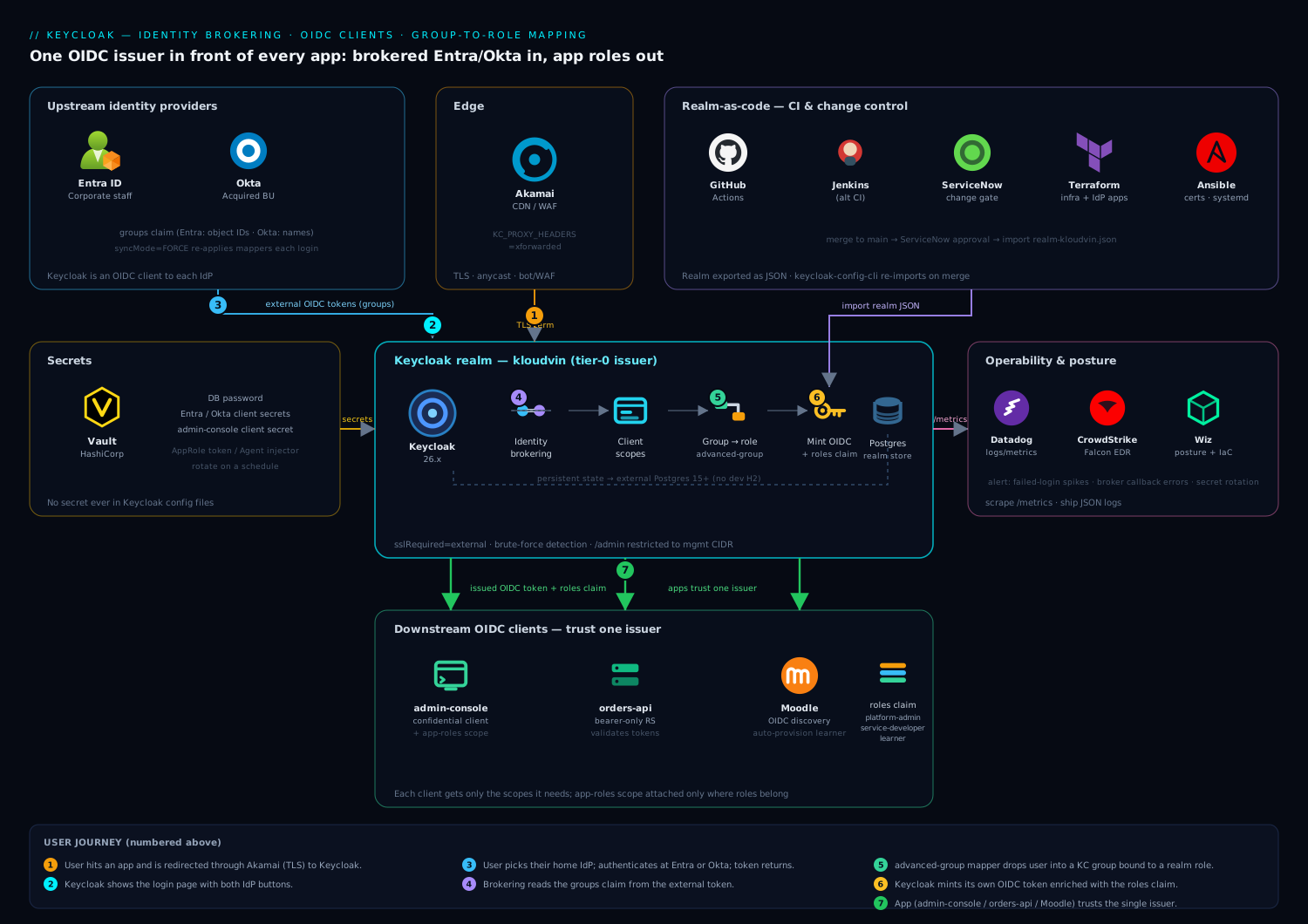
The shape is a hub-and-spoke around one Keycloak realm. Read it north-to-south. Upstream (north): Entra ID and Okta are registered as OIDC identity providers — Keycloak is an OIDC client to each, redirecting users up via /broker/<alias>/endpoint and receiving an external token back. In the middle, the kloudvin realm holds the brokering config, the first-broker-login flow (create-or-link), the IdP mappers that turn Entra object IDs and Okta group names into Keycloak groups, the group→role bindings that make /Platform-Admins carry platform-admin, and the client scopes whose protocol mappers decide which claims each app’s token gets. Downstream (south): the admin console, the orders-api microservice (bearer-only), and self-hosted Moodle are OIDC clients — Keycloak is the single issuer they trust, validating tokens against one JWKS.
Trace a user’s journey along the arrows: they hit an app, get redirected to Keycloak, pick their home IdP (or are routed by home-IdP discovery), authenticate upstream, return to Keycloak with an external token, and Keycloak — after running the IdP mappers and, on first login, the first-broker-login flow — mints its own OIDC token, enriched with the roles and aud claims the app actually understands. The external token dies at the broker; only Keycloak’s token flows south. The diagram marks the two mapper families at the exact hops they run: IdP mappers on the inbound external token, protocol mappers on the outbound internal token.
Real-world scenario
Meridian Freight is a logistics firm that acquired a smaller regional carrier, Coastline Haulage. Meridian’s 1,400 staff live in Microsoft Entra ID; Coastline’s 320 employees are on Okta and will stay there for eighteen months during integration. The combined platform team runs five internal apps: a dispatch console, a rates API, a driver mobile backend, a partner portal, and a self-hosted Moodle for compliance training. Pre-merger, each Meridian app used Entra directly; Coastline’s apps used Okta. Post-merger, drivers from both companies must use the same dispatch console, and a Coastline dispatch supervisor must get the same dispatch-admin permission a Meridian one has — despite living in a different IdP.
The team stood up Keycloak 26.1 in HA (two nodes, external Postgres) behind https://sso.meridian.internal and brokered both IdPs. The role model was four realm roles (dispatch-admin, dispatcher, rates-editor, learner) and four groups bound to them. Meridian’s Entra Dispatch-Supervisors group (object ID 7f3a…) mapped via an oidc-advanced-group-idp-mapper to /Dispatch-Admins; Coastline’s Okta dispatch-supervisors group (a name) mapped to the same Keycloak group. From that moment, a supervisor from either company received dispatch-admin — and the dispatch console, which had been rewritten to trust only Keycloak and read a flat roles claim, treated them identically. Two IdPs, one permission model, zero per-app IdP code.
Two things went wrong in week one, and both were textbook. First, Coastline users were prompted to “link account” on their first login even though nobody had a pre-existing local account — because a stray test user had been created earlier with a colliding email, and the default first-broker-login flow’s Handle Existing Account sub-flow kicked in. The fix: delete the test user, and for the trusted workforce IdPs, disable Review Profile and switch to automatic linking by trusted email (trustEmail=true on both IdPs, Review Profile → DISABLED on a copied flow). Second, a Meridian dispatcher who had been moved out of the Dispatch-Supervisors group in Entra kept dispatch-admin for a full day — because the group mapper had been left at the default IMPORT sync mode. Flipping every authorization mapper (and the IdP instances) to syncMode=FORCE made group membership re-evaluate on each login; the next morning the ex-supervisor logged in as a plain dispatcher.
The measurable payoff, four weeks later: the five apps went from nine IdP integrations (some apps had both) to five Keycloak client registrations plus two upstream brokers — and the Coastline Okta org, which had been slated for a costly separate SSO seat expansion, was retired behind the shared issuer at renewal. When Meridian later acquired a third carrier on Google Workspace, adding it was one oidc identity-provider instance and three group mappers — the five apps changed nothing. The lesson the team wrote down: “The broker is where messy identity becomes clean identity — exactly once. Every app downstream of it gets to be simple.”
The migration as a before/after, because the collapse in trust relationships is the point:
| Dimension | Before (direct federation) | After (Keycloak broker) |
|---|---|---|
| Trust relationships | 9 (apps × IdPs) | 5 clients + 2 brokers |
| “Add an app” cost | Register in Entra and Okta | One Keycloak client |
| “Add an IdP” cost | Re-integrate every app | One IdP instance + mappers |
| Claim handling | Per-app adapter for each IdP shape | One normalization layer in mappers |
| Cross-IdP same-permission | Impossible without duplication | dispatch-admin for both, one group |
| Audit “why admin?” | Trace 9 integrations | One mapper table in git |
| Okta seat cost | Separate SSO expansion | Retired behind shared issuer |
Advantages and disadvantages
Brokering both concentrates enormous value and concentrates risk. Weigh it honestly:
| Advantages (why the broker helps) | Disadvantages (why it bites) |
|---|---|
| N×M trust relationships collapse to N + M; add an app or IdP cheaply | Keycloak becomes a tier-0 single point of failure — it mints every token |
| One token shape for all apps; IdP-specific mess normalized once in mappers | Two mapper families (IdP vs protocol) confuse newcomers; wrong one = silent failure |
| Group→role indirection means upstream renames never touch app code | The indirection chain is long; “why does this person have admin?” spans mapper→group→composite |
syncMode=FORCE keeps authorization fresh across IdP membership changes |
Forgetting FORCE (the default is IMPORT) leaves demoted users over-privileged |
| First-broker-login flow gives fine control over create/link/prompt | Its defaults (prompt to link, review profile) are wrong for silent SSO and surprise you |
| JIT provisioning removes pre-staging tickets entirely | JIT plus a colliding email plus default flow = an account-linking prompt or takeover risk |
| Client scopes let each app get exactly the claims it needs | Mis-scoping leaks roles/PII to apps that shouldn’t see them |
| Realm-as-code (kcadm export) makes identity auditable and versioned | Click-configuring instead drifts; the realm export is only truthful if you actually use it |
The model is right when you run more than one IdP or want to consolidate app-specific logins behind one issuer, and it repays itself the first time you add an app or acquire a company. It bites hardest on teams that treat the broker as click-ops (config drift), that never set syncMode=FORCE (stale authorization), and that don’t understand the two-mapper-family distinction (hours lost chasing a claim that a protocol mapper — not an IdP mapper — was supposed to emit). Every disadvantage is manageable, but only if you know it exists — which is the point of the deep sections above.
Hands-on lab
Stand up a Keycloak broker from scratch, register an external OIDC IdP, build the full group→role→token chain, and validate a token end to end — locally, free, with a self-contained “upstream IdP” so you need no Entra/Okta tenant to complete the mechanics. Then swap in real Entra/Okta at the end. Everything is torn down in the last step.
Step 1 — Run Keycloak in dev mode
For the lab we use the dev H2 store and HTTP (never in production). Production uses Postgres + TLS as shown earlier.
docker run -d --name kc-lab -p 8080:8080 \
  -e KEYCLOAK_ADMIN=admin \
  -e KEYCLOAK_ADMIN_PASSWORD=admin \
  quay.io/keycloak/keycloak:26.1 start-dev
Wait for readiness, then authenticate kcadm inside the container:
until curl -sf http://localhost:8080/health/ready >/dev/null; do sleep 2; done
echo "Keycloak ready"

KC="docker exec kc-lab /opt/keycloak/bin/kcadm.sh"
$KC config credentials --server http://localhost:8080 \
  --realm master --user admin --password admin
Expected: Logging into http://localhost:8080 as user admin ... with no error.
Step 2 — Create the realm, roles, and groups
$KC create realms -s realm=kloudvin -s enabled=true \
  -s loginWithEmailAllowed=true -s duplicateEmailsAllowed=false

for role in platform-admin service-developer learner readonly; do
  $KC create roles -r kloudvin -s name=$role -s "description=App role: $role"
done

$KC create groups -r kloudvin -s name=Platform-Admins
$KC create groups -r kloudvin -s name=Service-Developers
$KC add-roles -r kloudvin --gname Platform-Admins   --rolename platform-admin
$KC add-roles -r kloudvin --gname Service-Developers --rolename service-developer
Validate the group carries its role:
$KC get groups -r kloudvin --fields id,name
GID=$($KC get groups -r kloudvin --fields id,name | \
  docker exec -i kc-lab sh -c 'cat' | grep -B1 Platform-Admins | grep id | head -1 | tr -dc '0-9a-f-')
# Simpler: list role mappings for the group by name via the UI or:
$KC get "groups" -r kloudvin
Expected: Platform-Admins and Service-Developers appear; the first is bound to platform-admin.
Step 3 — Create a second realm to act as the “upstream IdP”
Instead of a real Entra/Okta tenant, we make a second Keycloak realm (upstream) that plays the external IdP. This exercises the exact same OIDC-broker code path.
# The upstream realm and an OIDC client that Keycloak-the-broker will use
$KC create realms -s realm=upstream -s enabled=true

$KC create clients -r upstream \
  -s clientId=kc-broker \
  -s enabled=true -s publicClient=false \
  -s standardFlowEnabled=true \
  -s 'redirectUris=["http://localhost:8080/realms/kloudvin/broker/upstream/endpoint"]'

# Grab the client secret the broker will authenticate with
UP_CID=$($KC get clients -r upstream -q clientId=kc-broker --fields id | tr -dc '{}":a-z0-9-,' )
# Fetch secret cleanly:
UP_CLIENT_ID=$($KC get clients -r upstream -q clientId=kc-broker | grep -o '"id" : "[^"]*"' | head -1 | cut -d'"' -f4)
UP_SECRET=$($KC get clients/$UP_CLIENT_ID/client-secret -r upstream | grep -o '"value" : "[^"]*"' | cut -d'"' -f4)
echo "Upstream client secret: $UP_SECRET"

# A groups claim on the upstream so we can broker group->group mapping
$KC create clients/$UP_CLIENT_ID/protocol-mappers/models -r upstream \
  -s name=groups -s protocol=openid-connect \
  -s protocolMapper=oidc-group-membership-mapper \
  -s 'config."claim.name"=groups' -s 'config."full.path"=false' \
  -s 'config."id.token.claim"=true' -s 'config."access.token.claim"=true'

# A test user in the upstream, in an upstream group "admins"
$KC create groups -r upstream -s name=admins
$KC create users -r upstream -s username=alice -s email=alice@corp.example.com \
  -s enabled=true -s emailVerified=true -s firstName=Alice -s lastName=Ng
ALICE_ID=$($KC get users -r upstream -q username=alice | grep -o '"id" : "[^"]*"' | head -1 | cut -d'"' -f4)
$KC set-password -r upstream --username alice --new-password alicepw
$KC update users/$ALICE_ID/groups/$($KC get groups -r upstream | grep -o '"id" : "[^"]*"' | head -1 | cut -d'"' -f4) -r upstream -s realm=upstream -s userId=$ALICE_ID 2>/dev/null || \
  $KC create users/$ALICE_ID/groups/GID_PLACEHOLDER -r upstream 2>/dev/null || true
# Add alice to the admins group (robust form):
ADMINS_GID=$($KC get groups -r upstream | grep -o '"id" : "[^"]*"' | head -1 | cut -d'"' -f4)
$KC update users/$ALICE_ID/groups/$ADMINS_GID -r upstream -n
Expected: a kc-broker client in the upstream realm, a printed client secret, and user alice in the admins group.
Step 4 — Broker the upstream realm into kloudvin
$KC create identity-provider/instances -r kloudvin \
  -s alias=upstream \
  -s providerId=oidc \
  -s enabled=true \
  -s 'displayName=Upstream Test IdP' \
  -s 'config.clientId=kc-broker' \
  -s "config.clientSecret=$UP_SECRET" \
  -s 'config.issuer=http://localhost:8080/realms/upstream' \
  -s 'config.authorizationUrl=http://localhost:8080/realms/upstream/protocol/openid-connect/auth' \
  -s 'config.tokenUrl=http://localhost:8080/realms/upstream/protocol/openid-connect/token' \
  -s 'config.jwksUrl=http://localhost:8080/realms/upstream/protocol/openid-connect/certs' \
  -s 'config.defaultScope=openid profile email' \
  -s 'config.clientAuthMethod=client_secret_post' \
  -s 'config.syncMode=FORCE'
Add the advanced group mapper: upstream group admins → Keycloak /Platform-Admins:
$KC create identity-provider/instances/upstream/mappers -r kloudvin \
  -s name='upstream-admins-to-platform-admins' \
  -s identityProviderAlias=upstream \
  -s identityProviderMapper=oidc-advanced-group-idp-mapper \
  -s 'config."claims"=[{"key":"groups","value":"admins"}]' \
  -s 'config."are.claim.values.regex"=false' \
  -s 'config.syncMode=FORCE' \
  -s 'config.group=/Platform-Admins'
Verify the IdP and its mapper exist:
$KC get identity-provider/instances -r kloudvin --fields alias,enabled,providerId
$KC get identity-provider/instances/upstream/mappers -r kloudvin --fields name,identityProviderMapper
Expected: one IdP upstream (enabled, oidc) and one mapper of type oidc-advanced-group-idp-mapper.
Step 5 — Register a downstream client and shape its token
# The app-roles client scope with a flat "roles" claim
$KC create client-scopes -r kloudvin -s name=app-roles -s protocol=openid-connect \
  -s 'attributes."include.in.token.scope"=true'
SCOPE_ID=$($KC get client-scopes -r kloudvin | grep -B2 '"name" : "app-roles"' | grep -o '"id" : "[^"]*"' | head -1 | cut -d'"' -f4)

$KC create client-scopes/$SCOPE_ID/protocol-mappers/models -r kloudvin \
  -s name=realm-roles-to-roles -s protocol=openid-connect \
  -s protocolMapper=oidc-usermodel-realm-role-mapper \
  -s 'config."claim.name"=roles' -s 'config."jsonType.label"=String' \
  -s 'config."multivalued"=true' -s 'config."access.token.claim"=true' \
  -s 'config."id.token.claim"=true'

# A confidential client (direct-access enabled so the lab can fetch a token via password grant)
$KC create clients -r kloudvin \
  -s clientId=admin-console -s enabled=true -s publicClient=false \
  -s standardFlowEnabled=true -s directAccessGrantsEnabled=true \
  -s 'redirectUris=["http://localhost:9000/*"]' \
  -s 'defaultClientScopes=["openid","profile","email","app-roles"]'
Expected: the app-roles scope with a realm-role protocol mapper, and an admin-console client with the scope attached.
Step 6 — Complete a brokered login in the browser
Open the account console URL that forces the broker choice:
http://localhost:8080/realms/kloudvin/account
Click the login, choose Upstream Test IdP, sign in as alice / alicepw. The first-broker-login flow runs (Review Profile, then Create User If Unique creates alice locally — this is JIT). You land in the kloudvin account console as Alice.
Verify the brokered user was created and mapped into the group:
$KC get users -r kloudvin -q username=alice --fields id,username,email
UID=$($KC get users -r kloudvin -q username=alice | grep -o '"id" : "[^"]*"' | head -1 | cut -d'"' -f4)
$KC get users/$UID/groups -r kloudvin --fields name          # expect /Platform-Admins
$KC get users/$UID/federated-identity -r kloudvin            # expect the 'upstream' link
Expected: user alice exists in kloudvin, is a member of /Platform-Admins, and has a federated-identity link to upstream.
Step 7 — Prove the role lands in the token
Fetch an access token for Alice via the confidential client (direct-access grant, lab only) and decode it:
TOKEN=$(curl -s -X POST \
  http://localhost:8080/realms/kloudvin/protocol/openid-connect/token \
  -d grant_type=password -d client_id=admin-console \
  -d client_secret="$($KC get clients/$($KC get clients -r kloudvin -q clientId=admin-console | grep -o '"id" : "[^"]*"' | head -1 | cut -d'"' -f4)/client-secret -r kloudvin | grep -o '"value" : "[^"]*"' | cut -d'"' -f4)" \
  -d username=alice -d password=alicepw \
  -d scope='openid app-roles' | jq -r .access_token)

# Decode the JWT payload (base64url) and inspect the roles claim
echo "$TOKEN" | cut -d. -f2 | tr '_-' '/+' | base64 -d 2>/dev/null | jq '{preferred_username, roles, aud, iss}'
Expected output includes "roles": ["platform-admin", ...] — Alice’s upstream admins membership became /Platform-Admins, which carries platform-admin, which the app-roles scope emitted as a flat roles claim. The full chain works.
Step 8 — Prove syncMode=FORCE refreshes authorization
Remove Alice from the upstream admins group, then log her in again and re-check:
$KC delete users/$ALICE_ID/groups/$ADMINS_GID -r upstream
# Log in again in the browser (or re-run the password grant), then:
$KC get users/$UID/groups -r kloudvin --fields name   # /Platform-Admins should be GONE after next login
Expected: after her next brokered login, Alice is no longer in /Platform-Admins and her token no longer contains platform-admin — because the group mapper is FORCE. Had it been IMPORT, she would have kept it.
Step 9 — Export the realm as code
docker exec kc-lab /opt/keycloak/bin/kc.sh export \
  --dir /tmp/export --realm kloudvin --users skip
docker cp kc-lab:/tmp/export ./realm-export
ls -la ./realm-export
Expected: a kloudvin-realm.json you can commit and re-import with keycloak-config-cli for a versioned, auditable realm.
Step 10 — Teardown
docker rm -f kc-lab
rm -rf ./realm-export
Every object lived inside the container, so removing it is a complete teardown. To swap in real Entra/Okta, repeat Step 4 with the production IdP config blocks from earlier (real issuer, real client secret from your IdP, groups optional claim configured upstream) and adjust the group mapper to match Entra object IDs or Okta group names.
kcadm command reference used in the lab
| Task | kcadm.sh command shape |
|---|---|
| Authenticate | config credentials --server <url> --realm master --user <u> --password <p> |
| Create realm | create realms -s realm=<name> -s enabled=true |
| Create role | create roles -r <realm> -s name=<role> |
| Create group | create groups -r <realm> -s name=<group> |
| Bind group→role | add-roles -r <realm> --gname <group> --rolename <role> |
| Create IdP | create identity-provider/instances -r <realm> -s alias=<a> -s providerId=oidc … |
| Create IdP mapper | create identity-provider/instances/<alias>/mappers -r <realm> … |
| Create client | create clients -r <realm> -s clientId=<id> … |
| Create client scope | create client-scopes -r <realm> -s name=<scope> … |
| Create protocol mapper | create client-scopes/<id>/protocol-mappers/models -r <realm> … |
| List a user’s groups | get users/<uid>/groups -r <realm> |
| List federated links | get users/<uid>/federated-identity -r <realm> |
| Export realm | kc.sh export --dir <dir> --realm <realm> |
Common mistakes & troubleshooting
The failure modes that eat the most time, as a symptom → root cause → confirm → fix playbook. This is the table to keep open mid-incident.
| # | Symptom | Root cause | Confirm (exact check) | Fix |
|---|---|---|---|---|
| 1 | Upstream rejects the redirect (redirect_uri error at Entra/Okta) |
Broker endpoint URI mismatch (wrong alias, trailing slash) | Compare the app registration’s redirect URI to …/realms/<realm>/broker/<alias>/endpoint char-for-char |
Register the exact endpoint URI; alias must match |
| 2 | Brokered login loops or builds http://internal-host URLs |
Reverse proxy terminates TLS but Keycloak doesn’t trust forwarded headers | Check redirect URL in the browser; inspect Keycloak startup for KC_PROXY_HEADERS |
Set KC_PROXY_HEADERS=xforwarded and KC_HOSTNAME correctly |
| 3 | User logs in but lands in no group | Upstream isn’t emitting the groups claim | Decode the external token / check IdP; look for a groups claim |
Configure Entra groups optional claim / Okta groups claim; request the scope |
| 4 | Entra user gets no group despite a working Okta mapper | Entra emits group object IDs, mapper matches a name | Inspect the groups claim values (GUIDs vs names) |
Use the group GUID as the mapper’s claim value for Entra |
| 5 | Demoted user keeps their role until deleted | Mapper/IdP at default syncMode=IMPORT |
get identity-provider/instances/<a> shows syncMode: IMPORT |
Set syncMode=FORCE on the IdP and all authz mappers |
| 6 | Returning user is prompted to “link account” | Default first-broker-login flow + a colliding local email | Reproduce; check for an existing local user with that email | Automatic link + trustEmail=true; remove stray duplicates |
| 7 | App token has no roles claim |
app-roles scope not attached, or protocol mapper only on ID token |
Decode the access token; get clients/<id> default scopes |
Attach app-roles as a default scope; set access.token.claim=true |
| 8 | API accepts tokens minted for other clients | No/incorrect aud; API not verifying audience |
Decode token aud; check the API’s verify-aud setting |
Add oidc-audience-mapper for the API; enable verify-aud |
| 9 | Broker callback returns 500 intermittently | Upstream client secret expired/rotated | Keycloak server log shows token-endpoint auth failure | Rotate the secret in the IdP and update the IdP instance |
| 10 | Token has group object IDs, not readable names | oidc-group-membership-mapper emitting internal IDs, or upstream IDs pass through |
Decode token groups; check full.path |
Emit Keycloak group paths (full.path=true); don’t pass upstream IDs through |
| 11 | Composite role’s included roles missing from token | Only the composite is assigned but the mapper emits assigned-only | Decode token; check the role mapper config | Ensure the realm/client role mapper includes composites (default does) |
| 12 | Some brokered users can’t be created (JIT fails) | Missing required user-profile attribute or username collision | Server log shows a profile validation error | Add attribute-importer/username mappers; relax required attributes |
| 13 | SAML broker: assertion rejected | Signing cert mismatch or wantAssertionsSigned disagreement |
Server log SAML validation error | Import correct IdP signing cert; align signing expectations |
| 14 | Home-IdP discovery shows the picker anyway | Discovery authenticator not in the browser flow, or no domain match | Check the browser flow bindings; test with a matching email | Add the Home IdP Discovery authenticator; map email domains |
Two high-value confirmations you’ll run constantly. First, decode any JWT to see exactly what the token carries (the ground truth for “is the claim there?”):
echo "$TOKEN" | cut -d. -f2 | tr '_-' '/+' | base64 -d 2>/dev/null | jq .
Second, inspect an IdP instance’s sync mode and mappers when a user’s authorization looks stale:
$KC get identity-provider/instances/entra -r kloudvin --fields alias,config
$KC get identity-provider/instances/entra/mappers -r kloudvin --fields name,config
The claim-shape gotchas, IdP by IdP, since this is where mapper bugs cluster:
| Upstream | “Groups” claim carries | Where to configure it | Mapper must match |
|---|---|---|---|
| Entra ID | Group object IDs (GUIDs) | App registration → Token config → groups optional claim |
GUID values; handle overage (>200) via Graph |
| Okta | Group names (strings) | Authorization server → Claims → groups (regex filter) | Name strings |
| ADFS (SAML) | Assertion attribute values | Claim rules on the relying-party trust | The SAML attribute name + value |
| Google Workspace | Not emitted by default | Requires Admin SDK / directory sync | Often attribute-import + external logic |
| Generic OIDC | Whatever the IdP puts in groups |
The IdP’s token/claim config | Inspect the real token first |
Best practices
- Never use
masterfor applications. Put every app and brokered user in a dedicated realm;masteris only for administering Keycloak itself. - Set
syncMode=FORCEon every authorization-bearing mapper and IdP. The defaultIMPORTnever refreshes group/role membership, leaving demoted users over-privileged until deleted. - Model group→role indirection, not direct claim→role, for personas. Apps read stable role names; upstream group churn is absorbed by the mapper. Reserve direct claim→role for genuinely per-permission claims.
- Keep a mapper table in version control next to the realm export —
(IdP, claim value) → Keycloak group → role. It is the authoritative answer to “why does this person have access?” - Get the broker endpoint URI exactly right in the upstream:
…/realms/<realm>/broker/<alias>/endpoint, alias included, no trailing slash. A mismatch is a silent upstream rejection. - Tune the first-broker-login flow deliberately. Disable Review Profile and enable automatic-link +
trustEmailfor trusted workforce IdPs; keep confirm/verify for consumer CIAM. - Shape tokens with client scopes; scope tightly. Roles and
audin the access token, PII in ID token/userinfo, and attach role scopes only to clients that need them. - Verify audience on resource servers. Add an
oidc-audience-mapperfor each API and enableverify-audin the adapter so a token minted for another client is rejected. - Run the realm as code. Export with
kc.sh export/kcadm, commit the JSON, and re-apply withkeycloak-config-clion merge — no click-ops drift. - Prefer
private_key_jwtor rotated secrets for the broker’s client credential at the upstream, and store secrets in a vault, never in the realm export or CI variables. - Separate liveness from authorization freshness. Use
FORCEfor correctness, but cache upstream group lookups where the IdP allows, so login latency stays low. - Test IdP changes in a staging realm. Composite-role and mapper edits ripple to every holder; a copied realm catches surprises before production.
Security notes
Keycloak is a token-minting service — treat it as tier-0. If it is compromised, every downstream application is compromised, because they all trust its signature. That reality drives every control here.
- Lock down the admin console and Admin REST API. Keep
/adminoff the public internet (management CIDR only, enforced by a firewall/ingress rule); the public path should only ever reach/realms/<realm>/protocol/...and/realms/<realm>/broker/.... - Hold every secret in a vault. IdP client secrets, the DB password, and app client secrets belong in a secrets manager, not in the realm export or environment files, and rotate them on a schedule. See Zero-Plaintext Secrets in Pipelines with Key Vault and Managed Identity for the CI pattern.
- Enforce TLS end to end.
sslRequired=externalat minimum (allfor internal-only); a brokered token must never traverse plain HTTP. SetKC_PROXY_HEADERS=xforwardedso redirect URIs are built from the public hostname. - Validate upstream signatures. Keep
validateSignature=trueanduseJwksUrl=truefor OIDC IdPs, and pin the correct signing certificate for SAML. Disabling signature validation to “make it work” is a critical vulnerability. - Scope clients tightly and verify audience.
bearerOnlyfor resource servers, PKCE for public SPAs,app-rolesscope only where roles are legitimately needed, andverify-audon APIs so cross-client token replay fails. - Guard account linking against takeover. For any IdP whose email you don’t fully trust, keep verify-by-email or verify-by-re-auth in the first-broker-login flow; automatic linking by email is only safe for authoritative workforce IdPs.
- Enable brute-force detection and audit the event log. Local accounts remain password-attackable; ship Keycloak’s login/admin events to your SIEM so a credential-stuffing burst or an unexpected admin change pages someone.
- Rotate realm signing keys deliberately. Rotating the realm keys rotates trust for every downstream at once; publish new keys via JWKS ahead of retiring old ones so validation never breaks.
- Minimize
storeToken. Only persist the external token when you genuinely need it (e.g. downstream token exchange); a stored upstream token is a high-value secret at rest.
Cost & sizing
Keycloak itself is open-source; the spend is infrastructure and operational discipline. There are no per-user license fees — the cost model is entirely about running the service reliably.
The bill drivers and how to right-size:
| Cost driver | What you pay for | Rough scale | Watch-out |
|---|---|---|---|
| Keycloak compute (HA) | 2+ nodes for failover | 2× small VMs / a few pods | Size by concurrent logins/sec, not user count |
| Database | External Postgres (managed or self-run) | Small managed instance handles tens of thousands of users | H2 is dev-only; never production |
| Reverse proxy / ingress | TLS termination, WAF | Shared with other apps | KC_PROXY_HEADERS must be set behind it |
| Observability | Metrics + log ingestion | Per-GB logs | Alert on failed-login spikes and broker callback errors |
| Operational time | Realm-as-code, secret rotation | A small platform team | The largest real cost; automation reduces it |
Sizing rule: brokered logins are bursty — everyone signs in at shift change or 9am, then traffic falls off. Size for peak concurrent authentications per second, not total registered users. A two-node cluster plus a small managed Postgres comfortably serves tens of thousands of users; the constraint is the login spike, not the row count. The real savings is consolidation: retiring per-app login stacks and — as in the scenario — a redundant commercial SSO seat for an acquired org, collapsing both populations behind one issuer your apps integrate with once. Push every realm change through CI + keycloak-config-cli so the platform is maintained by a small team, which keeps the operational cost — not just compute — low.
A rough monthly picture for a small production broker: 2× small VMs for Keycloak plus a small managed Postgres lands in a modest range for most clouds; the dominant line item over time is engineering hours, which realm-as-code and automated secret rotation drive down. The dollar figure is dwarfed by the value of not re-integrating every app on the next acquisition.
Interview & exam questions
1. In a Keycloak broker, when is Keycloak a relying party and when is it an issuer? Simultaneously both. To the upstream IdPs (Entra/Okta) Keycloak is a downstream OIDC client / relying party — it redirects users up and validates the external token. To your applications Keycloak is the OIDC issuer — the single iss they trust and the JWKS they validate against. Every config object is one of these two roles: an identity-provider instance is the RP side, a client is the issuer side.
2. What is the difference between an identity-provider mapper and a protocol mapper? IdP mappers run on the external token during a brokered login and write into the Keycloak user (claim → attribute/role/group). Protocol mappers run when Keycloak mints its own token and write user/role/group data into the app’s token (roles, groups, audience). Confusing the two is the most common cause of “the claim I configured isn’t in the token.”
3. A demoted user keeps their admin role until they’re deleted. Why, and what’s the fix? The group/role IdP mapper (or the IdP instance) is at the default syncMode=IMPORT, which applies mappers only at account creation and never refreshes. Set syncMode=FORCE so the mapper re-evaluates group membership on every login; the demoted user drops the group — and thus the role — on their next sign-in.
4. Explain group→role indirection and why it matters. Applications are coded against stable role names (platform-admin); Keycloak groups are bound to those roles; IdP mappers map upstream groups (Entra object IDs, Okta names) → Keycloak groups. Upstream renames and IdP swaps only touch the mapper, never the app. To grant all admins a new permission, add a role to the group — no app or IdP change.
5. Why does an Entra user land in no group while the identical Okta mapper works? Entra emits group object IDs (GUIDs) in the groups claim; Okta emits group names. An advanced-group mapper copied from Okta matches a name that never appears in the Entra token, so nothing matches. Fix by using the Entra group’s GUID as the mapper’s claim value, and handle group overage (>200 groups) via Graph.
6. Walk the first-broker-login flow. What are Create User If Unique and Handle Existing Account? On the first federated login, Keycloak runs this flow: optionally Review Profile, then Create User If Unique (JIT-creates the user if the email/username is new and ends the flow), else the Handle Existing Account sub-flow (a local user with that email exists) which prompts to confirm linking and verifies by email or re-auth before binding the identities. Defaults suit consumer sign-up; disable Review Profile and use automatic link + trustEmail for silent workforce SSO.
7. What is JIT provisioning in Keycloak, and how do you enable it? JIT provisioning is simply Create User If Unique succeeding — Keycloak creates a local user on first brokered login, seeded from IdP claims via attribute/username mappers. There is no separate switch: it’s on as long as Create User If Unique is in the first-broker-login flow and the profile validates. You control the created user via IdP mappers (username source, attributes, groups/roles).
8. How do you ensure a resource server rejects tokens minted for other clients? Add an oidc-audience-mapper so the token carries the API’s client ID in its aud claim, and enable verify-aud in the API’s adapter so it rejects tokens whose audience doesn’t include it. Issuer validation alone is insufficient — every client in the realm shares one issuer, so audience is what distinguishes them.
9. Realm role vs client role vs composite role — when do you use each? Realm roles are global, coarse personas across all apps (platform-admin). Client roles are fine-grained permissions scoped to one client (orders-api:refund). Composite roles include other roles so granting one grants many — ideal for “admin implies these app permissions.” Realm roles land in realm_access.roles, client roles in resource_access.<client>.roles.
10. What is home-IdP discovery and why use it over the default picker? The default login page shows a button per IdP; home-IdP discovery routes a user straight to their IdP by email domain (via the Home IdP Discovery authenticator) or by an app passing kc_idp_hint. It improves UX at many IdPs and avoids leaking the list of orgs you federate. Keycloak 26’s Organizations feature can model domains→members for the same routing.
11. You broker an IdP over OIDC and the callback returns 500 intermittently. First thing to check? The upstream client secret has expired or been rotated out from under Keycloak — the token-endpoint authentication fails. The Keycloak server log shows the auth failure at the token endpoint. Rotate the secret in the IdP and update the identity-provider instance’s config.clientSecret; store it in a vault and track its expiry to prevent recurrence.
12. Why is Keycloak considered tier-0, and what are the top three controls? Because it mints every token every app trusts — compromise it and you compromise everything downstream. Top controls: (1) keep the admin console/API off the public internet (management CIDR only); (2) validate upstream signatures (validateSignature/useJwksUrl, pinned SAML certs) and enforce TLS with correct proxy headers; (3) hold all secrets in a vault, rotate them, and audit the event log to a SIEM.
These map cleanly to identity/architecture interview loops and to certs that cover OIDC/SAML federation and RBAC. A compact mapping:
| Question theme | Relevant domain |
|---|---|
| RP vs issuer, two-token dance | OIDC/OAuth2 fundamentals |
| IdP vs protocol mappers, token shaping | OIDC token design |
syncMode, group→role, composites |
Keycloak/IAM architecture |
| First-broker-login, JIT, account linking | Federation & lifecycle |
Audience, verify-aud, tier-0 controls |
Application & platform security |
Quick check
- A claim you configured is missing from the app’s access token. Which mapper family do you inspect — IdP mappers or protocol mappers — and why?
- A user removed from an Entra group this morning still has
platform-adminat noon. What single setting is almost certainly wrong? - Your Okta group mapper works, but the identical mapper for Entra matches nothing. What’s different about Entra’s
groupsclaim? - A returning workforce user is prompted to “link account” on login. Name the flow responsible and one fix.
orders-apiaccepts an access token that was minted for theadmin-consoleclient. What claim and adapter setting fix this?
Answers
- Protocol mappers. IdP mappers write into the Keycloak user from the external token; protocol mappers write into the app’s token when Keycloak mints it. A missing token claim is almost always a protocol-mapper/client-scope issue — check that the scope is attached to the client and that
access.token.claim=true. syncMode— it’s at the defaultIMPORTon the mapper or IdP, so group membership is applied once at creation and never refreshed. Set it toFORCEso the mapper re-evaluates on every login and drops the group (and role) when the upstream membership goes away.- Entra emits group object IDs (GUIDs) in
groups; Okta emits group names. The advanced-group mapper for Entra must match the group’s GUID, not its display name — and you must handle group overage (>200 groups) via Microsoft Graph. - The first-broker-login authentication flow (specifically the Handle Existing Account sub-flow). Fix by disabling Review Profile and switching to automatic linking with
trustEmail=truefor the trusted IdP — and remove any stray local user with a colliding email. - Add an
oidc-audience-mapperso the token’saudclaim includesorders-api, and enableverify-audin the API’s adapter so it rejects tokens whose audience doesn’t list it. Issuer validation alone doesn’t distinguish clients that share one realm issuer.
Glossary
- Identity brokering — Keycloak sitting between upstream IdPs and downstream apps: a relying party to the IdPs, an issuer to the apps, normalizing identity in the middle.
- Realm — an isolated Keycloak tenant owning its own users, roles, groups, clients, identity providers, keys, and login flows; nothing crosses realms.
- Identity provider (IdP) instance — a configured upstream IdP (
oidc/saml) Keycloak brokers to; the north-side connection with its own alias and/broker/<alias>/endpoint. - Broker endpoint — the redirect/callback URI
…/realms/<realm>/broker/<alias>/endpointthat the upstream IdP must trust exactly. - Client — a downstream application that trusts Keycloak as its OIDC/SAML issuer and receives tokens from it.
- First-broker-login flow — the configurable authentication flow run the first time a user authenticates through an IdP; decides create-vs-link-vs-prompt.
- Create User If Unique — the flow step that JIT-creates a local user when no existing account matches.
- Handle Existing Account — the flow sub-flow that runs when a local user with the same email already exists; confirms and verifies before linking.
- Identity-provider mapper — runs on the external token; writes claim data into the Keycloak user (attribute importer, hardcoded role/group, advanced group, advanced claim-to-role).
- Advanced group IdP mapper (
oidc-advanced-group-idp-mapper) — maps a specific group claim value to a Keycloak group, conditionally, with optional regex. - Advanced role IdP mapper (
oidc-advanced-role-idp-mapper) — maps one or more claim conditions directly to a realm/client role. syncMode— when mappers re-apply:IMPORT(first login only),FORCE(every login),LEGACY(2.x behavior);FORCEis required for authorization freshness.- Protocol mapper — runs when Keycloak mints its own token; writes roles, group membership, audience, and attributes into the app’s token.
- Client scope — a named bundle of protocol mappers; a client receives only the claims from the scopes attached to it.
- Realm role — a role scoped to the whole realm; lands in
realm_access.roles. - Client role — a role scoped to a single client; lands in
resource_access.<client>.roles. - Composite role — a role that includes other roles (transitively); granting it grants all included roles.
- Group→role indirection — binding Keycloak groups to roles so apps read stable role names while upstream group churn stays in the mapper.
- Audience (
aud) — the token claim naming intended recipients; resource servers mustverify-audso cross-client tokens are rejected. - JIT provisioning — creating a local Keycloak user on first brokered login, seeded from IdP claims; enabled implicitly by Create User If Unique.
- Account linking — binding a federated identity (upstream
sub) to a Keycloak user, automatically in the flow or manually via the account console. - Home-IdP discovery — routing a user directly to their IdP by email domain (or via
kc_idp_hint) instead of showing an IdP picker. - kcadm.sh — Keycloak’s admin CLI (ships in the image) that drives the Admin REST API for realm-as-code operations.
Next steps
You can now broker external IdPs, normalize their claims into groups and roles, shape tokens deliberately, and operate the realm as code. Build outward:
- Next: Deploy Keycloak on Kubernetes in HA with the Operator and External PostgreSQL — run the broker you just built in production with proper HA and persistence.
- Related: Building a Secure OIDC Confidential Client in Entra ID: App Registrations, Secrets, and Workload Identity Federation — the Entra side of the OIDC broker, done right.
- Related: Configuring SAML 2.0 SSO for a Custom Enterprise App in Entra ID with Advanced Claims Mapping — the SAML-broker upstream, including claim shaping.
- Related: Mastering Entra ID Tokens: App Roles, Group Claims, and the OAuth2 On-Behalf-Of Flow for APIs — how downstream apps reason about the roles and audience your broker mints.
- Related: Deploy Okta as a SAML/OIDC Identity Provider for Kubernetes kubectl OIDC Login — the Okta-as-IdP pattern for a Kubernetes-facing client.
- Related: Integrate PingFederate SSO with SAML and OAuth Token Exchange for Downstream APIs — chaining tokens to downstream APIs once the broker has minted the first one.