Sustainability is the one Well-Architected pillar most teams treat as a poster on the wall. AWS added it as a formal pillar in late 2021, Azure published its own sustainability guidance, and Google has run carbon-aware scheduling internally for years. Yet most architecture reviews skip it because it feels unmeasurable. That framing is wrong: the sustainability pillar is mostly the cost pillar wearing a different hat, since idle compute, oversized storage, and chatty cross-region traffic burn both dollars and carbon. The difference is that sustainability optimizes total resources consumed per unit of useful work, not billed dollars, and it gives you a lever FinOps does not have: when and where the work runs. This is the engineering playbook I use to make that lever real.
1. Sustainability pillar principles and the SCI model
The pillar’s design principles are blunt: understand your impact, maximize utilization, adopt more efficient hardware and software, use managed services, and reduce the downstream impact of your workloads. Every decision below maps back to one of those. But principles do not divide, so you need a metric.
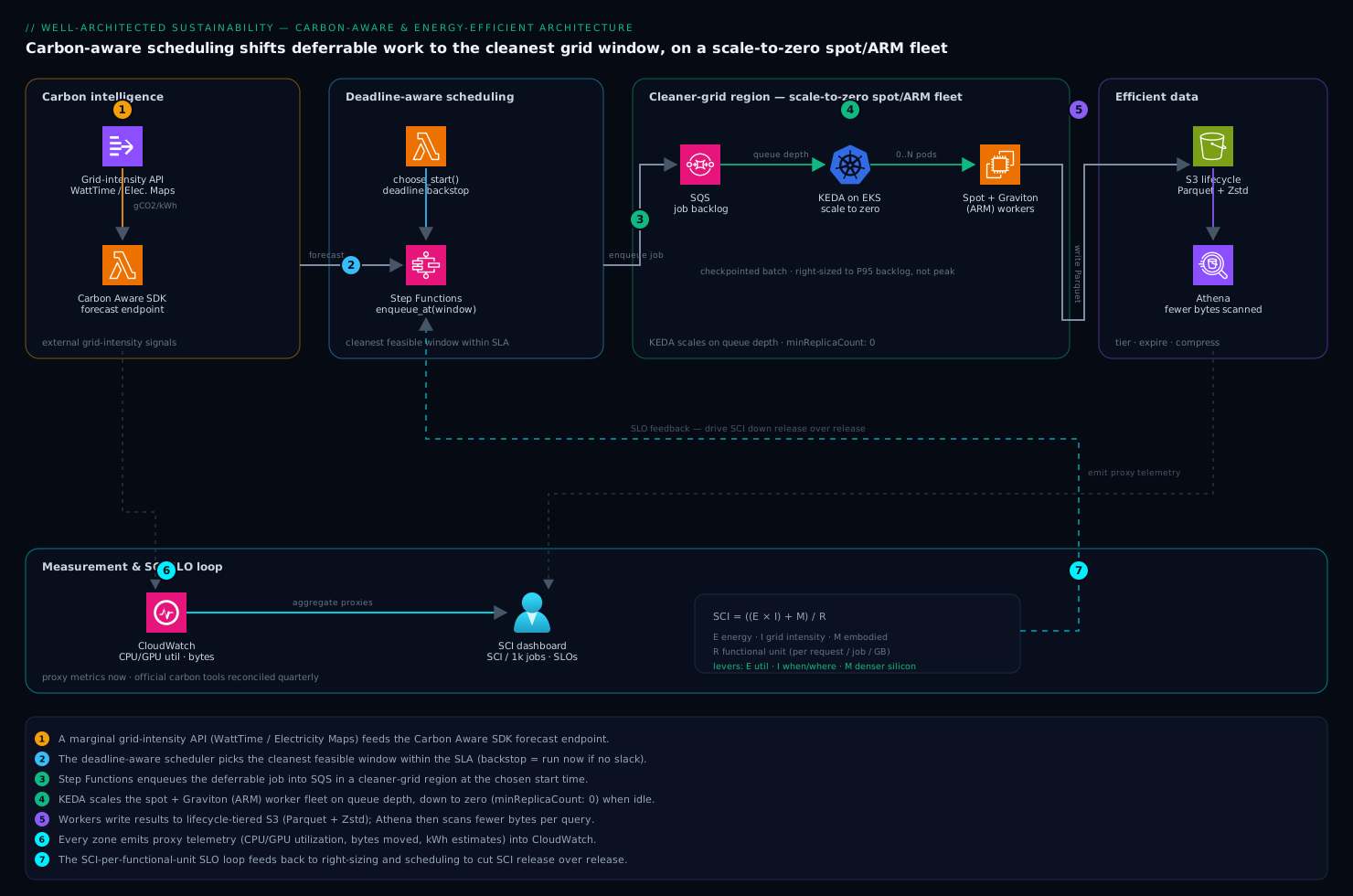
The metric is the Software Carbon Intensity (SCI) specification, now an ISO standard (ISO/IEC 21031:2024) maintained by the Green Software Foundation. SCI is a rate, not a total, which is the entire point:
SCI = ((E * I) + M) / R

E = energy consumed by the software (kWh)
I = carbon intensity of that energy (gCO2eq/kWh, location- or market-based)
M = embodied emissions of the hardware, amortized over its useful life
R = functional unit (per request, per user, per job, per GB processed)
The R denominator is what makes SCI honest. A total-emissions number drops when traffic drops, which tells you nothing about whether your software got more efficient. SCI per request stays flat unless you actually improved the architecture. That is why you set SLOs against SCI, not a monthly carbon bill.
Treat SCI like p99 latency. You do not chase absolute zero; you pick a functional unit, baseline it, and drive a downward trend release over release. A team that cannot name its
Rhas not started.
The three terms you can move: E (use fewer resources, more fully), I (run where and when the grid is cleaner), and M (keep hardware busy and prefer denser silicon so embodied carbon amortizes over more work). The rest of this article is one section per lever.
2. Establish a measurement baseline with proxy metrics
You will not get gCO2eq telemetry per request in real time, and you do not need it to start. Cloud carbon tools report on a lag (the AWS Customer Carbon Footprint Tool and Azure’s emissions data both surface monthly, with a one- to three-month delay) and use methodologies you cannot reproduce. They are good for board-level reporting, useless for deciding between two designs this sprint.
So use proxy metrics for engineering decisions and reconcile against the official tools quarterly. The strongest proxies are the resources that dominate E and M:
- CPU/GPU utilization over time, weighted by allocated capacity (idle allocated cores are the single biggest waste).
- Allocated vs. consumed memory and storage.
- Bytes moved, especially cross-region and cross-AZ egress.
- kWh estimates from an open dataset that maps instance-hours to power.
For the kWh estimate, Cloud Carbon Footprint (the open-source project) and the Boavizta dataset publish per-instance power and embodied-carbon coefficients you can join against your billing export. Pull utilization first; that is where the decisions live:
# AWS: average CPU utilization for an Auto Scaling group over 14 days, hourly.
# Low average utilization on a 24/7 fleet is the clearest carbon waste signal.
aws cloudwatch get-metric-statistics \
  --namespace AWS/EC2 \
  --metric-name CPUUtilization \
  --dimensions Name=AutoScalingGroupName,Value=web-asg-prod \
  --start-time "$(date -u -v-14d +%Y-%m-%dT%H:%M:%SZ)" \
  --end-time   "$(date -u +%Y-%m-%dT%H:%M:%SZ)" \
  --period 3600 \
  --statistics Average \
  --query 'sort_by(Datapoints,&Timestamp)[].[Timestamp,Average]' \
  --output text
On Azure, the same signal comes out of Log Analytics. This KQL gives you the utilization distribution per VM so you can spot the chronically idle ones (the GNU date -v flags above are macOS; on Linux use date -u -d '14 days ago'):
// Azure Monitor: P50/P95 CPU per VM over 14 days. Anything with a low P95 is oversized.
InsightsMetrics
| where TimeGenerated > ago(14d)
| where Namespace == "Processor" and Name == "UtilizationPercentage"
| summarize p50 = percentile(Val, 50),
            p95 = percentile(Val, 95),
            samples = count()
  by Computer
| order by p95 asc
The carbon footprint tools are still worth wiring up for the trend line and audit. On AWS the export is available through the Data Exports path so you can land it in S3 and query it with Athena instead of screenshotting a console. If your proxies trend down but the official number does not, you are missing a source (usually managed-service or networking emissions that never showed up in your instance-hour join).
3. Demand alignment: right-size, scale to zero, use spot
Maximizing utilization is the highest-leverage move, because idle allocated capacity still draws power and amortizes embodied carbon over zero useful work. Three moves, in order of payback.
Right-size against real percentiles, not peak. Use the P95 from the queries above. AWS Compute Optimizer and Azure Advisor both emit rightsizing recommendations from observed utilization; treat them as input, then apply through IaC so the change is reviewable. Moving a fleet from 30% to 60% average utilization roughly halves energy and embodied carbon per request without touching application code.
Scale to zero when there is no demand. A request-driven service holding warm capacity overnight burns carbon to serve nobody. Kubernetes with KEDA can scale a Deployment to zero on a queue-depth or HTTP trigger. The easy-to-miss detail is minReplicaCount: 0:
apiVersion: keda.sh/v1alpha1
kind: ScaledObject
metadata:
  name: image-worker
  namespace: media
spec:
  scaleTargetRef:
    name: image-worker          # the Deployment to scale
  minReplicaCount: 0            # <-- scale to zero when the queue is empty
  maxReplicaCount: 40
  cooldownPeriod: 120          # wait before scaling 1 -> 0
  triggers:
    - type: azure-servicebus
      metadata:
        queueName: image-jobs
        messageCount: "20"      # target backlog per replica
      authenticationRef:
        name: sb-trigger-auth
For bursty or low-traffic HTTP workloads, prefer a platform that scales to zero by default: serverless functions, Cloud Run, Azure Container Apps (KEDA under the hood), or Fargate behind a queue. Scaling to zero is the cleanest SCI improvement because E actually reaches zero between bursts.
Use spot/low-priority capacity for fault-tolerant work. Said precisely: spot does not lower the carbon intensity of a single instance-hour. Its sustainability value is that it lets a provider keep already-built hardware at higher utilization rather than spinning up new capacity, improving fleet-wide M amortization. Route batch, CI, rendering, and stateless workers to spot, keep the savings, and accept interruptions with checkpointing. Do not put it on a latency-critical singleton and call it green.
4. Carbon-aware scheduling: shift jobs by time and region
This is the lever FinOps does not have. Grid carbon intensity (I) swings by a factor of two to five across the day and across regions as wind, solar, and demand change. Any workload that is temporally flexible (must finish by a deadline but does not care exactly when) or spatially flexible (can run in any of several regions) can be shifted toward cleaner electricity for free.
The data source is a marginal carbon-intensity API. WattTime and Electricity Maps are the production-grade ones; the Green Software Foundation’s Carbon Aware SDK wraps them behind one interface and exposes a forecast endpoint returning the optimal execution window. The pattern for a deferrable batch job:
# Carbon Aware SDK: find the lowest-carbon 90-minute window in the next 24h
# for two candidate regions, then schedule the job into it.
curl -s "http://carbon-aware-sdk/emissions/forecasts/current?location=eastus&location=westus&dataStartAt=$(date -u +%Y-%m-%dT%H:%M:%SZ)&dataEndAt=$(date -u -v+24H +%Y-%m-%dT%H:%M:%SZ)&windowSize=90" \
  | jq -r '.[].optimalDataPoints[] | "\(.location) \(.timestamp) rating=\(.value)"'
The discipline that makes this safe: shift only deferrable work, and always keep a deadline backstop so a perpetually dirty grid does not starve the job. A correct scheduler picks the cleanest window within the SLA, not unconditionally:
# Shift a batch job to the cleanest window, but never past its deadline.
from datetime import datetime, timedelta, timezone

def choose_start(forecast, deadline, duration):
    # forecast: list of (start_time, gco2_per_kwh), ascending by carbon
    feasible = [
        (t, c) for (t, c) in forecast
        if t + duration <= deadline          # must finish before SLA
    ]
    if not feasible:
        return datetime.now(timezone.utc)     # no slack left: run now
    return min(feasible, key=lambda x: x[1])[0]  # cleanest feasible window
Spatial shifting compounds this: running a nightly ETL in a hydro- or wind-heavy region (several Nordic or Pacific-Northwest regions) instead of a coal-heavy one can cut I by more than half. Two constraints: data-residency rules may forbid moving data across borders, and cross-region transfer has its own egress carbon and cost. So shift compute toward the data, or only move portable jobs whose inputs are small relative to their compute.
5. Efficient data: tiering, lifecycle, and compression
Storage is the quiet carbon sink. Every replicated, never-read byte sits on a device drawing power and carrying embodied emissions for years. Three policies, all of which also cut your bill.
Tier and expire automatically. Do not let data rot on hot storage. S3 lifecycle rules (or Azure Blob lifecycle management) move objects down the temperature ladder and delete them when past use. Note the asymmetry: transitioning to colder tiers saves standing energy, but retrieval from archive (Glacier Deep Archive, Azure Archive) is slow and costs, so tier by genuine access pattern, not wishfully:
{
  "Rules": [
    {
      "ID": "logs-tier-and-expire",
      "Filter": { "Prefix": "logs/" },
      "Status": "Enabled",
      "Transitions": [
        { "Days": 30,  "StorageClass": "STANDARD_IA" },
        { "Days": 90,  "StorageClass": "GLACIER" }
      ],
      "Expiration": { "Days": 365 },
      "AbortIncompleteMultipartUpload": { "DaysAfterInitiation": 7 }
    }
  ]
}
That AbortIncompleteMultipartUpload line is not decoration: orphaned multipart uploads are invisible dead storage in a huge number of accounts. Cleaning them up is free carbon and free money.
Right-size redundancy and copies. Three geo-replicated copies of data nobody reads after 90 days triples storage carbon for that period. Match the durability class to the data’s actual value, deduplicate backups, and kill stale snapshots and unattached volumes on a schedule.
Compress and pick efficient formats. Compression trades a small one-time CPU cost for a large ongoing reduction in stored and transmitted bytes. For analytical data, columnar formats (Parquet, ORC) with a modern codec like Zstandard cut both storage footprint and bytes scanned per query, a double win because query engines bill and burn per byte scanned:
-- Athena/Trino: write the curated table as Parquet + zstd.
-- Smaller on disk, fewer bytes scanned per query, lower energy per result.
CREATE TABLE curated.events
WITH (
  format = 'PARQUET',
  parquet_compression = 'ZSTD',
  partitioned_by = ARRAY['event_date']
) AS
SELECT * FROM raw.events;
The general rule: the cheapest byte to power and to move is the one you never stored.
6. Choose efficient regions, hardware, and managed services
Region choice is a first-class carbon decision. Providers publish which regions run on low-carbon electricity (Google labels them in its region picker and CFE figures; AWS and Azure publish renewable data per region). For a new latency-tolerant workload, a low-carbon region is the biggest one-time I reduction you will ever make, and it costs nothing. Balance it against latency-to-users, data residency, and price.
Prefer newer, denser silicon. ARM-based instances (AWS Graviton, Azure Cobalt/Ampere, GCP Axion/Tau) deliver materially better performance per watt than comparable x86 for a wide class of workloads, lowering E per request and improving M amortization because each chip does more work. Migrating a stateless service to Graviton is usually a rebuild-and-retest, not a rewrite.
Lean on managed and serverless services. An explicit pillar principle, and the mechanism is real: a provider running a multi-tenant managed database or queue achieves far higher hardware utilization across its customer base than you will on a single-tenant VM kept half-idle “just in case.” Offloading pushes your workload onto better-amortized, better-utilized fleets. Serverless takes it furthest by allocating zero capacity between invocations.
7. Architect for hardware efficiency and reduced data movement
Beyond knobs, two design-level habits move the needle.
Reduce data movement. Every byte crossing an AZ, region, or the public internet costs energy at both ends plus the network between, and on most clouds it costs egress dollars too, so the incentives align. Concrete patterns:
- Put compute next to data; do not stream a terabyte across regions to process elsewhere.
- Cache and use a CDN so popular bytes travel the shortest path and are served once, not recomputed per request.
- Filter and aggregate at the source (predicate pushdown, edge pre-aggregation) so you move results, not raw firehoses.
- Batch chatty calls; one fat request beats a thousand thin ones in connection and protocol overhead.
Use efficient algorithms and async patterns. Caching an expensive computation, choosing O(n log n) over an accidental O(n^2), and replacing busy-wait polling with event-driven triggers all cut CPU-seconds per unit of work, which is E reduction at the source. Polling loops are a stealth carbon cost: a fleet of pods waking every second to ask “anything yet?” burns continuous CPU for mostly-empty answers. Event-driven beats polling on both latency and carbon.
8. Set sustainability SLOs and track improvement over time
Make it a number with an owner, or it will not survive the next deadline. Define sustainability SLOs as targets on your proxy metrics and on SCI, tracked in the same dashboards as latency and cost. Examples that hold up in review:
| SLO | Target | Why it maps to a pillar lever |
|---|---|---|
| Fleet avg CPU utilization | >= 50% | Maximize utilization (E, M) |
| SCI per 1k requests | -10% YoY | Headline rate; forces real efficiency |
| Deferrable jobs run in cleanest 50% of windows | >= 80% | Carbon-aware scheduling (I) |
| Cross-region egress per request | flat or down | Reduce data movement (E) |
| Untiered data older than 90 days | < 5% | Efficient data (M, E) |
Pick a small set, give each an owner, and review release over release. SCI per functional unit is the headline; the proxies are the leading indicators that explain its movement.
Verify
Confirm the levers are actually engaged, not just configured:
# 1. KEDA is genuinely scaling to zero (replicas hit 0 during idle).
kubectl get scaledobject image-worker -n media \
  -o jsonpath='{.status.conditions[?(@.type=="Ready")].status}{"\n"}'
kubectl get deploy image-worker -n media \
  -o jsonpath='ready={.status.readyReplicas}{"\n"}'   # empty/0 when idle = working

# 2. S3 lifecycle rules are attached and enabled.
aws s3api get-bucket-lifecycle-configuration --bucket my-data-lake \
  --query 'Rules[].{id:ID,status:Status}' --output table

# 3. No orphaned multipart uploads silently accruing storage.
aws s3api list-multipart-uploads --bucket my-data-lake \
  --query 'length(Uploads)' --output text   # expect 0 or a small, recent number
// 4. Right-sizing took effect: the fleet's P95 CPU rose after the change.
InsightsMetrics
| where TimeGenerated > ago(7d)
| where Namespace == "Processor" and Name == "UtilizationPercentage"
| summarize p95 = percentile(Val, 95) by bin(TimeGenerated, 1d), Computer
| order by TimeGenerated asc
For carbon-aware scheduling, assert the chosen window’s forecast intensity is at or below the 24h median; if your scheduler keeps landing in the dirtiest windows, either the SLA has no slack (expected) or the integration is silently failing open (a bug).
Enterprise scenario
A media platform team ran a nightly transcoding pipeline: ~12,000 jobs against newly uploaded video on a fleet of x86 GPU instances pinned 24/7 in a single US region because “spinning up takes too long.” One review surfaced three problems. Average GPU utilization was 22% (the fleet was sized for the worst night of the month and idle the rest), the region was relatively high-carbon, and the pipeline had a soft 6 a.m. deadline nobody was exploiting.
The constraint that shaped the fix: source video lived in S3 in that same region and was large, so moving the data to a cleaner region would have created more egress carbon and cost than it saved. They could move when, not where.
The fix combined three levers above. Workers went behind a queue and the GPU fleet scaled to zero between runs with KEDA on queue depth, sized for backlog not peak. The CPU-bound pre/post stages moved to ARM instances and the interruptible transcode workers to spot with per-segment checkpointing. And the trigger was wrapped in the Carbon Aware SDK so the pipeline started in the cleanest forecast window that still finished before 6 a.m., falling back to “run now” when the deadline left no slack:
# Nightly trigger: clean window if there is slack, else run now.
from datetime import datetime, timedelta, timezone

deadline = today_at("06:00", tz="local").astimezone(timezone.utc)
duration = timedelta(hours=2)                 # measured P95 pipeline runtime
forecast = carbon_sdk.forecast(region="source-region", horizon=timedelta(hours=10))

start = choose_start(forecast, deadline, duration)  # from section 4
scheduler.enqueue_at(start, run_transcode_batch)
The outcome over the following quarter: GPU-hours fell sharply because the fleet no longer idled overnight, the spot-plus-Graviton mix cut energy per job, and cleaner windows reduced the grid-intensity term. Their internal SCI-per-1000-jobs proxy dropped just over 40%, and the pipeline’s cloud bill fell in lockstep, which is exactly the point: the sustainability and cost pillars were the same optimization the whole time.