A global front door has two jobs: stay up when an origin or a whole Region goes dark, and absorb hostile traffic before it ever touches compute you pay for. CloudFront (AWS’s content delivery network and edge proxy), Route 53 (its authoritative DNS), and AWS WAF (the layer-7 web application firewall) do both — but only if you wire them together deliberately. The common failure mode is treating CloudFront as a dumb cache in front of one origin, pointing a CNAME at it, and bolting on the AWS-managed WAF rules with a single click. That gives you a CDN, not an edge architecture. It will cache your images and it will fall over the first time us-east-1 has a bad afternoon.
This article walks the layers that actually deliver resilience and protection: Route 53 health-checked failover, CloudFront origin groups, Origin Shield, origin lock-down with OAC and signed headers, AWS WAF with rate limiting and bot control, the ACM/TLS rules that trip everyone, and the observability to prove any of it works. Because this is a reference you will return to mid-incident — at 02:00 when half your traffic is 502-ing and you cannot remember whether origin groups fail over on a 429 — the policies, status codes, limits, settings, and the failure playbook are all laid out as scannable tables. Read the prose once; keep the tables open when it matters.
A note on where each control lives, because the layering is the design. Route 53 decides which hostname resolves to what — it is DNS, it operates before a TCP connection is even opened, and its failover is health-check driven. CloudFront decides which origin a request is served from once the client has already connected to an edge location — its failover is per-request and error-driven. They are complementary, not redundant: Route 53 moves you between front doors (or between CloudFront and a backup stack), CloudFront moves you between origins behind a single front door. Get that distinction wrong and you will build two failover mechanisms that both fail to cover the same outage. By the end you will know exactly which mechanism closes which outage shape, and which gaps neither will ever close for you.
What problem this solves
In production, “the site is down” is rarely the whole site and rarely a clean down. It is a single Region’s origin returning a mix of 200s and 503s under load; it is an attacker discovering your ALB’s public DNS name and hammering it directly, bypassing every edge control you so carefully configured; it is a cache-hit ratio that quietly collapsed after a deploy added a Set-Cookie to the cache key, turning your CDN into an expensive reverse proxy that hammers the origin on every request. None of these page you with a tidy “Region down” alert. They page you with elevated 5xx and a dashboard that looks mostly green.
What breaks without a real edge architecture: a Region-level origin failure takes your whole app down because there is no second origin and no DNS failover; an origin that anyone can reach directly means WAF and CloudFront are decorative, because the attacker just skips them; a single broad managed WAF rule in Block mode false-positives on a legitimate file upload and your customers cannot check out; and a viewer certificate requested in the wrong Region means CloudFront silently refuses to use it and you ship without HTTPS on the custom domain. Each of these is preventable, and each has bitten a real team that thought “CloudFront in front of an ALB” was the finished design.
Who hits this: anyone running a public web app or API at more than toy scale. It bites hardest on multi-Region active-passive setups (where the two failover layers must be composed correctly), e-commerce and media workloads (where origin offload and bot defense are revenue-critical), and anyone who locked nothing down — origins reachable on the open internet, WAF straight to Block, no canary watching from outside. The fix is almost never “add another CDN” — it is “wire the layers you already pay for so each one covers a specific failure, and prove each one independently.”
To frame the whole field before the deep dive, here is every layer this article covers, the outage shape it closes, where it operates, and the single most common way teams get it wrong:
| Layer | Outage / threat it closes | Where it operates | Failover/decision basis | Most common mistake |
|---|---|---|---|---|
| Route 53 failover/latency | Whole-Region or whole-stack failure | DNS, before connection | Health-check state, resolver latency | Using latency routing and expecting it to fail over on app errors |
| CloudFront origin group | Single origin returns 5xx / unreachable | At the edge, per request | HTTP status code or connection error | Behavior targets an origin, not the group ID |
| Origin Shield | Origin overload from many regional caches | Designated regional cache layer | Single shield collapses cache fan-out | Enabling it far from the origin (transcontinental hop) |
| OAC / secret header | Direct-to-origin bypass of edge controls | Origin request signing / ALB rule | SigV4 signature or shared secret | Leaving S3 public, or never rotating the header |
| AWS WAF web ACL | Injection, bots, volumetric L7 abuse | At the edge (CLOUDFRONT scope) |
Rule priority, managed + custom rules | Web ACL not in us-east-1; rules straight to Block |
| ACM / TLS policy | Plaintext, weak ciphers, cert expiry | Viewer ↔ edge, edge ↔ origin | Cert region, SNI, security policy | Viewer cert requested outside us-east-1 |
| Edge functions | Header/URL logic, secret stripping | Viewer/origin request/response | CloudFront Functions vs Lambda@Edge | Reaching for Lambda@Edge where a Function fits |
| Observability | Silent regressions, undetected failover gaps | CloudWatch, real-time logs, Synthetics | Metrics, sampled requests, canaries | Reading AWS/CloudFront metrics outside us-east-1 |
Learning objectives
By the end of this article you can:
- Choose the correct Route 53 routing policy (failover, latency, weighted, geolocation, geoproximity, multi-value) for an edge design, attach health checks to records, and explain why
EvaluateTargetHealthisfalseon CloudFront alias targets. - Split a cache policy from an origin request policy correctly so you maximize cache-hit ratio instead of fragmenting the cache, and pick the right managed policy by its well-known ID.
- Configure a CloudFront origin group for per-request error-based failover, and state precisely which status codes and HTTP methods do — and do not — trigger it.
- Decide when Origin Shield pays for itself, set its Region correctly, and reason about its effect on origin offload.
- Lock origins down with Origin Access Control (and an
AWS:SourceArncondition) for S3, and a rotated secret header enforced at the ALB for custom origins. - Build an AWS WAF web ACL at the edge from managed rule groups plus rate-based and bot-control rules, roll them out in Count mode, and order them by priority.
- Get ACM, SNI, and the TLS security policy right — including the
us-east-1viewer-certificate rule — and design observability (real-time logs,CacheHitRate, WAF metrics, multi-Region canaries) that proves every layer works. - Run a failover game day, map any edge symptom to a root cause with the playbook table, and size the bill.
Prerequisites & where this fits
You should already understand DNS basics (records, TTL, resolvers), HTTP status codes, and TLS at a conceptual level (handshake, SNI, certificates). You should be comfortable running the AWS CLI and reading JSON output, and you should know what an ALB (Application Load Balancer) and an S3 bucket are, since they are the two origin types used throughout. Familiarity with IAM resource policies helps for the OAC section.
This sits in the Networking & Edge track of the AWS Zero-to-Hero program, and it composes several upstream pieces. The DNS mechanics come from AWS Route 53: DNS Records, Routing Policies & Health Checks; the CDN fundamentals (distributions, behaviors, OAC, caching) come from the CloudFront Deep Dive; and the firewall rule model is expanded in AWS WAF for Security. The origins you protect are usually fronted by an Application Load Balancer or backed by S3. Where this whole pattern becomes the front door of a larger system, see Multi-Region Architecture on AWS and AWS DR Strategies.
A quick map of who owns and confirms each layer during an incident, so you page the right person fast:
| Layer | What lives here | Who usually owns it | Failure classes it can cause |
|---|---|---|---|
| Route 53 (DNS) | Records, routing policy, health checks | Network / SRE | Stale answers, no failover, slow flip (TTL) |
| CloudFront distribution | Behaviors, cache keys, origin groups | Platform / edge | Cache misses, no origin failover, stale config |
| Origin Shield | Designated regional cache | Platform / edge | Extra latency hop, marginal offload, added cost |
| Origins (ALB / S3) | Your compute and assets | App / dev team | 5xx, direct-bypass exposure, cert mismatch |
AWS WAF (us-east-1) |
Web ACL, managed + custom rules | Security | 403 false-positives, unblocked abuse, cost |
ACM (us-east-1) |
Viewer certificate, validation | Security / platform | Plaintext, expiry, SNI failures |
| Observability | Logs, metrics, canaries | SRE | Undetected regressions, blind failover gaps |
Core concepts
Five mental models make every later decision obvious.
DNS failover and origin failover solve different outage shapes. Route 53 answers “which front door should this resolver be sent to?” before a connection exists, driven by health checks. A CloudFront origin group answers “this specific request got a 5xx from the primary origin — should I retry it against the secondary?” after the client is already connected to an edge. Route 53 sheds a whole sick Region; origin groups absorb a single origin’s per-request errors behind a healthy front door. You want both, layered — and you must know that origin groups never trigger on a 4xx/429, and Route 53 latency records never fail over on application errors.
The cache key is the single biggest lever on cost and origin load. A cache policy defines the cache key — which headers, cookies, and query strings make two requests “the same object” — plus TTLs. Every field you add fragments the cache: more distinct keys, more misses, more origin hits. An origin request policy controls what is forwarded to the origin without becoming part of the key, for things the origin needs to log or branch on but that must not split the cache. Forward “all headers / all cookies” and you have built a ~0% hit-ratio reverse proxy.
An origin anyone can reach directly defeats every edge control above it. WAF, rate limits, bot control, and even TLS policy all live at the edge. If your ALB or S3 bucket answers the open internet, an attacker simply resolves its address and skips CloudFront entirely. The two lock-down patterns — OAC (SigV4 request signing) for S3 and a rotated secret header enforced at the ALB for custom origins — are not optional hardening; they are what makes the rest of the architecture real.
Region placement is mandatory, not a preference, in three places. The WAF web ACL for a CloudFront distribution must be created with scope CLOUDFRONT in us-east-1, regardless of where your origins live. The viewer-facing ACM certificate must be in us-east-1 for the same reason — CloudFront is global and pulls both from N. Virginia exclusively. And CloudFront metrics publish to the AWS/CloudFront namespace with the Region dimension set to Global, readable from us-east-1. Build any of these in the “wrong” Region and you get a silent failure or an empty dashboard.
Failover has a clock, and the clock has parts. When an origin dies, Route 53 needs FailureThreshold × RequestInterval of probe time to mark it unhealthy, plus the record’s TTL for resolvers to re-query. CloudFront origin-group failover, by contrast, is reactive and near-instant per request — no DNS propagation involved. Knowing which clock applies tells you whether a failover will take ~90 seconds (DNS) or one request (origin group), and that determines which mechanism you put in front of which outage.
The vocabulary in one table
Before the deep sections, pin down every moving part. The glossary repeats these for lookup; this table is the mental model side by side:
| Concept | One-line definition | Where it lives | Why it matters here |
|---|---|---|---|
| Routing policy | How Route 53 chooses an answer | Per record set | Failover vs latency picks the outage shape you cover |
| Health check | A probe Route 53 runs against an endpoint | Route 53, global | Drives failover; bad path → false failover or none |
| Alias record | A Route 53 record pointing at an AWS resource | Hosted zone | How you point a domain at a distribution |
| Distribution | A CloudFront config (a set of behaviors) | CloudFront, global | The front door itself |
| Behavior | Path pattern → origin + policies | In a distribution | Where cache/origin policy and WAF apply |
| Cache policy | Defines the cache key + TTLs | Attached to a behavior | The lever on hit-ratio and origin load |
| Origin request policy | What’s forwarded but not keyed | Attached to a behavior | Lets the origin see data without fragmenting cache |
| Origin group | Primary + secondary with failover criteria | In a distribution | Per-request origin failover |
| Origin Shield | A designated regional cache layer | Per origin | Collapses cache fan-out; raises offload |
| OAC | SigV4 signing so only CloudFront reads S3 | Origin config + bucket policy | Locks down S3 origins |
| Web ACL | A WAF rule set bound to a distribution | WAF, us-east-1 |
Edge L7 protection |
| Rate-based rule | Block an aggregate key over a window | In a web ACL | Volumetric/abuse defense |
| SNI | TLS hostname sent in the handshake | Viewer ↔ edge | sni-only is free and correct |
| Security policy | Min TLS version + cipher suite set | Viewer certificate config | Enforces modern TLS |
1. Route 53 routing policies and health checks
Route 53’s routing policy is chosen per record set, and the policy decides which answer a resolver gets. Six policies exist; for an edge design, four matter most, and the difference between latency and failover is where teams lose hours.
| Policy | Decides answer by | Health-check aware? | Typical edge use | The trap |
|---|---|---|---|---|
| Failover | Primary’s health-check state | Yes (required) | Active-passive DR with a hot/warm standby | Forgetting the secondary needs no health check, only the primary does |
| Latency | Lowest network latency resolver → Region | Optional (attach to fail over) | Multi-Region active-active, each Region its own stack | Latency alone routes by network, not by your app’s health |
| Weighted | Operator-assigned integer weights | Optional | Canary / blue-green / A-B at DNS | Weight 0 removes a record; non-zero never goes fully to zero |
| Geolocation | Resolver’s continent / country / default | Optional | Data residency, localized content, sanctions | No “default” record → some users get no answer |
| Geoproximity | Distance + an adjustable bias | Optional | Shift load toward/away from a Region by bias | Requires Traffic Flow; more moving parts |
| Multi-value | Up to 8 healthy records, randomized | Yes (per record) | Cheap pseudo-load-balancing with health | Not a load balancer; no latency/affinity guarantees |
The mistake people make is conflating latency routing with failover. Latency records route away from a Region only when AWS’s latency data changes, not when your application breaks — a Region with a healthy network path but a 503-ing app still wins the latency race and keeps getting traffic. If you want traffic to leave on application failure, you attach a health check to the record.
Create a calculated structure: a health check that probes a real, cheap endpoint exercising the dependency chain — not GET / returning static HTML, which stays “healthy” while the database behind it is on fire.
# Health check that probes a deep health endpoint over HTTPS with SNI
aws route53 create-health-check \
  --caller-reference "primary-app-$(date +%s)" \
  --health-check-config '{
    "Type": "HTTPS",
    "FullyQualifiedDomainName": "origin-primary.us-east-1.internal.example.com",
    "Port": 443,
    "ResourcePath": "/healthz/deep",
    "RequestInterval": 30,
    "FailureThreshold": 3,
    "MeasureLatency": true,
    "EnableSNI": true
  }'
FailureThreshold: 3 with a 30-second interval means a hard origin failure takes up to ~90 seconds of probe time to flip the record, plus the record’s TTL on the resolver side. Keep failover-record TTLs low (60 seconds is the conventional floor) so resolvers re-query promptly. Drop to RequestInterval: 10 for faster detection if you accept the higher per-check cost.
Health checks come in distinct types — pick by what you can actually probe and how you want them composed:
| Health-check type | What it probes | Cost tier | Best for | Gotcha |
|---|---|---|---|---|
| HTTP / HTTPS | A URL returns 2xx/3xx in time | Standard | Public/origin endpoints | GET / lies; probe a deep path |
| HTTP(S) + string match | Body contains a search string | Standard | Confirming a real payload, not just 200 | Search string must be in first 5,120 bytes |
| TCP | A port accepts a connection | Standard | Non-HTTP services | No app-layer signal; “open” ≠ “healthy” |
| Calculated | Boolean of other health checks (AND/OR/NOT) | Per child | Composite “Region healthy” signals | Counts each child check’s cost |
| CloudWatch alarm | An alarm’s ALARM/OK state | Alarm-based | Private endpoints, custom metrics | Inherits alarm lag + missing-data config |
| Endpoint with calculated parent | Aggregate of child checks | Per child | Multi-dependency Regions | Easy to over-count children |
The settings on a health check that you will actually tune, with defaults and the trade-off of each:
| Setting | What it controls | Default | Range / values | When to change | Trade-off |
|---|---|---|---|---|---|
RequestInterval |
Seconds between probes | 30 | 10 or 30 | 10 for faster failover | Higher per-check cost (fast = priced more) |
FailureThreshold |
Consecutive fails before unhealthy | 3 | 1–10 | Lower for snappier flip | Lower → more flapping on blips |
ResourcePath |
Path probed | / |
any path | Always — use a deep health path | Deeper path can be slower/heavier |
EnableSNI |
Send SNI on HTTPS | false | bool | Always for SNI origins | Off → handshake fails on SNI hosts |
MeasureLatency |
Record probe latency | false | bool | When you want latency graphs | Cannot be changed after creation |
Inverted |
Treat unhealthy as healthy | false | bool | Maintenance / inverse logic | Easy to confuse; document it |
HealthThreshold |
Min healthy children (calculated) | — | 1–N | Composite Region health | Off-by-one takes a Region down |
Regions |
Checker Regions used | 3 default | subset | Reduce noise / cost | Too few → less consensus |
For active-passive, define a primary and secondary record in the same name with Failover set, both referencing the health check on the primary:
aws route53 change-resource-record-sets \
  --hosted-zone-id Z123EXAMPLE \
  --change-batch '{
    "Changes": [
      { "Action": "UPSERT", "ResourceRecordSet": {
          "Name": "app.example.com", "Type": "A",
          "SetIdentifier": "primary", "Failover": "PRIMARY",
          "AliasTarget": { "HostedZoneId": "Z2FDTNDATAQYW2",
            "DNSName": "d111111abcdef8.cloudfront.net", "EvaluateTargetHealth": false },
          "HealthCheckId": "abcd1234-primary-hc" } },
      { "Action": "UPSERT", "ResourceRecordSet": {
          "Name": "app.example.com", "Type": "A",
          "SetIdentifier": "secondary", "Failover": "SECONDARY",
          "AliasTarget": { "HostedZoneId": "Z2FDTNDATAQYW2",
            "DNSName": "d222222ghijkl9.cloudfront.net", "EvaluateTargetHealth": false } } }
    ]
  }'
Z2FDTNDATAQYW2is the fixed hosted-zone ID for all CloudFront alias targets — identical in every account, never changes. Do not invent one. For ALB/NLB aliases the zone ID is Region-specific; look it up rather than hardcoding.
A subtle, important point: EvaluateTargetHealth is false for CloudFront alias targets because CloudFront is a global, always-resolvable service — Route 53 cannot meaningfully health-check the distribution itself, so you drive failover from your own health check on the origin instead. The decision of which EvaluateTargetHealth value to use, by target type:
| Alias target | EvaluateTargetHealth |
Why | Failover driver |
|---|---|---|---|
| CloudFront distribution | false |
Distribution is always “up” globally | Your own origin health check |
| ALB / NLB | true (usually) |
LB reports target-group health | LB target health |
| S3 website endpoint | false |
No meaningful health to evaluate | External health check |
| Another Route 53 alias | true |
Chains the child’s evaluated health | Chained evaluation |
| API Gateway / VPC endpoint | true |
Service health is evaluable | Service health |
2. CloudFront distributions: behaviors, cache and origin request policies
A distribution is a set of behaviors, each a path pattern mapped to an origin plus a cache policy and an origin request policy. The default behavior catches everything not matched by a more specific path pattern; ordered behaviors are evaluated most-specific-first. Get the split between the two policy types right, because it is the single biggest lever on cache-hit ratio and therefore on origin load and bill.
- Cache policy controls the cache key and TTLs — which headers, cookies, and query strings make two requests “the same” object. Every field you add fragments the cache.
- Origin request policy controls what gets forwarded to the origin without becoming part of the cache key — things the origin needs to see (e.g.
User-Agentfor logging,CloudFront-Viewer-Countryfor geo-branching) but that must not split the cache.
Use the AWS-managed policies where they fit; they are maintained by AWS and cover the common cases. The ones worth memorizing:
| Managed policy | ID | What it keys / forwards | Use for |
|---|---|---|---|
CachingOptimized |
658327ea-f89d-4fab-a63d-7e88639e58f6 |
No cookies/headers/QS in key; gzip+brotli | Immutable static assets |
CachingOptimizedForUncompressedObjects |
b2884449-e4de-46a7-ac36-70bc7f1ddd6d |
Like above, no compression | Already-compressed media |
CachingDisabled |
4135ea2d-6df8-44a3-9df3-4b5a84be39ad |
No caching at all | Pure dynamic / API passthrough |
Amplify |
2e54312d-136d-493c-8eb9-b001f22f67d2 |
App-framework defaults | Amplify-hosted apps |
AllViewer (ORP) |
216adef6-5c7f-47e4-b989-5492eb8d9882 |
Forwards all viewer headers/cookies/QS | Fully dynamic origins (not a cache key) |
AllViewerExceptHostHeader (ORP) |
b689b0a8-53d0-40ab-baf2-68738e2966ac |
All viewer values minus Host | Custom origins needing their own Host |
CORS-S3Origin (ORP) |
88a5eaf4-2fd4-4709-b370-b4c650ea3fcf |
Origin, Access-Control-* headers | S3 with CORS |
CORS-CustomOrigin (ORP) |
59781a5b-3903-41f3-afcb-af62929ccde1 |
CORS headers for a custom origin | ALB/EC2 serving CORS |
UserAgentRefererHeaders (ORP) |
acba4595-bd28-49b8-b9fe-13317c0390fa |
User-Agent, Referer | Origins branching on UA/Referer |
# Reference managed policies by their well-known IDs, or define a custom cache key
aws cloudfront create-cache-policy \
  --cache-policy-config '{
    "Name": "api-cache-key",
    "DefaultTTL": 0, "MaxTTL": 31536000, "MinTTL": 0,
    "ParametersInCacheKeyAndForwardedToOrigin": {
      "EnableAcceptEncodingGzip": true, "EnableAcceptEncodingBrotli": true,
      "HeadersConfig": { "HeaderBehavior": "whitelist",
        "Headers": { "Quantity": 1, "Items": ["Authorization"] } },
      "CookiesConfig": { "CookieBehavior": "none" },
      "QueryStringsConfig": { "QueryStringBehavior": "whitelist",
        "QueryStrings": { "Quantity": 2, "Items": ["page", "limit"] } }
    }
  }'
The three cache-key dimensions, what including each costs you, and the safe default:
| Cache-key dimension | Behavior options | Safe default | Effect of “all” | When to include a value |
|---|---|---|---|---|
| Headers | none / whitelist / allViewer | none (static) | Near-100% miss | Authorization for per-user API responses |
| Cookies | none / whitelist / all | none | Fragments per session | A theme/locale cookie that changes output |
| Query strings | none / whitelist / all | whitelist the real ones | Cache-busting per param permutation | page, limit, real pagination/filter params |
| Compression | gzip, brotli toggles | both on | (helps, not fragments) | Always on for text assets |
| TTL (Min/Default/Max) | seconds | Min 0 / Default per content | — | Long Max for immutable, 0 for dynamic |
The defaults to internalize: a path serving immutable static assets wants CachingOptimized and a long MaxTTL. An authenticated API wants Authorization in the key (so user A’s response is never served to user B) and a short or zero default TTL. Never forward all headers or all cookies on a cacheable path — that is a ~0% hit-ratio configuration that turns CloudFront into an expensive reverse proxy. Match the behavior to the content type:
| Content type | Cache policy | Origin request policy | ViewerProtocolPolicy | Typical TTL |
|---|---|---|---|---|
Immutable static (/static/*, hashed) |
CachingOptimized |
none | redirect-to-https |
up to 1 year |
| HTML pages (semi-dynamic) | custom, short TTL | minimal (country only) | redirect-to-https |
0–60 s |
Authenticated API (/api/*) |
CachingDisabled or Authorization-keyed |
AllViewerExceptHostHeader |
https-only |
0 |
Media (/video/*) |
CachingOptimizedForUncompressed |
range-forwarding | redirect-to-https |
hours–days |
S3 with CORS (/assets/*) |
CachingOptimized |
CORS-S3Origin |
redirect-to-https |
up to 1 year |
Search/listing (/s?q=) |
custom, QS-keyed + short TTL | minimal | redirect-to-https |
0–30 s |
Auth callback (/oauth/*) |
CachingDisabled |
AllViewer |
https-only |
0 |
3. Origin groups and error-based failover
Route 53 fails you over between front doors; an origin group fails you over between origins behind one distribution, per request, based on HTTP status or a connection error. This is the layer that survives a single-origin (often single-Region) outage with no DNS-propagation delay at all.
You define two origins, then an origin group listing primary and secondary plus the status codes that trigger failover:
aws cloudfront create-distribution --distribution-config '{
  "CallerReference": "edge-2026-06", "Comment": "Global front door with origin failover", "Enabled": true,
  "Origins": { "Quantity": 2, "Items": [
    { "Id": "origin-primary",  "DomainName": "alb-primary.us-east-1.elb.amazonaws.com",
      "CustomOriginConfig": { "HTTPPort": 80, "HTTPSPort": 443, "OriginProtocolPolicy": "https-only",
        "OriginSslProtocols": { "Quantity": 1, "Items": ["TLSv1.2"] } } },
    { "Id": "origin-secondary","DomainName": "alb-secondary.us-west-2.elb.amazonaws.com",
      "CustomOriginConfig": { "HTTPPort": 80, "HTTPSPort": 443, "OriginProtocolPolicy": "https-only",
        "OriginSslProtocols": { "Quantity": 1, "Items": ["TLSv1.2"] } } } ] },
  "OriginGroups": { "Quantity": 1, "Items": [{
    "Id": "og-app",
    "FailoverCriteria": { "StatusCodes": { "Quantity": 4, "Items": [500, 502, 503, 504] } },
    "Members": { "Quantity": 2, "Items": [ { "OriginId": "origin-primary" }, { "OriginId": "origin-secondary" } ] }
  }]},
  "DefaultCacheBehavior": { "TargetOriginId": "og-app", "ViewerProtocolPolicy": "redirect-to-https",
    "CachePolicyId": "658327ea-f89d-4fab-a63d-7e88639e58f6", "Compress": true },
  "DefaultRootObject": "index.html"
}'
Exactly what does and does not trigger origin-group failover — memorize this row by row, because the gaps are where outages hide:
| Trigger condition | Fails over? | Why | What you should do instead |
|---|---|---|---|
500, 502, 503, 504 (if listed) |
Yes | Configured 5xx in StatusCodes |
List the codes you expect on failure |
| Connection timeout / refused | Yes | Connection-level error always retries | (automatic) |
408 request timeout (if listed) |
Yes | Allowed in failover criteria | Add if your origin emits it on overload |
4xx other than listed (e.g. 403, 404) |
No | Treated as a valid answer | Returned to client; fix at origin/WAF |
429 Too Many Requests |
No | Not eligible as failover criteria | Shed at Route 53 / handle in app |
2xx / 3xx |
No | Success | (nothing) |
POST / PUT / DELETE request |
No | Non-idempotent; never replayed | Correct behavior; handle write retries in app |
GET / HEAD / OPTIONS on listed 5xx |
Yes | Idempotent and eligible | (this is the happy path) |
Two constraints that trip people up, stated plainly:
- The
DefaultCacheBehavior(and any behavior) must target the origin group ID, not an origin ID. Target an origin directly and failover never happens — a silent misconfiguration that passes every test until the day you need it. - Origin-group failover triggers only on the listed status codes or a connection-level error. It does not trigger on
4xx— a403from the primary is a legitimate answer returned to the client, not retried. And onlyGET,HEAD, andOPTIONSfail over; a failedPOSTis not silently replayed against the secondary, which is the correct behavior for non-idempotent writes.
Origin groups and Route 53 failover are complementary, not interchangeable. Here is the side-by-side that settles every “which one do I use?” argument:
| Dimension | CloudFront origin group | Route 53 failover |
|---|---|---|
| Granularity | Per request | Per DNS resolution |
| Trigger | HTTP 5xx / connection error | Health-check state |
| Speed to recover | Immediate (next request) | threshold × interval + TTL (~90 s+) |
| Scope | Origins behind one distribution | Whole front doors / Regions / stacks |
Covers 4xx / 429? |
No | Indirectly (health check can detect) |
Covers writes (POST)? |
No (not replayed) | Yes (routes future requests away) |
| DNS propagation delay | None | Yes (resolver TTL) |
| Best at | Single origin returns 5xx | Whole Region/stack is sick |
4. Origin Shield and cache hit-ratio optimization
CloudFront has two cache layers by default: the 600+ edge locations and a smaller set of regional edge caches. A miss at the edge goes to a regional cache; a miss there goes to the origin. Origin Shield adds a third, designated regional layer that all edge locations route through for a given origin, so the many regional caches collapse into one shield in front of your origin. The effect on a globally distributed workload is fewer distinct cache nodes hitting the origin — higher offload, lower origin load — especially when traffic is spread thin across many Regions and each regional cache would otherwise miss independently and stampede your origin.
# Origin Shield is set per-origin; pick the Region closest to the origin
aws cloudfront update-distribution --id E1EXAMPLE --if-match ETAG --distribution-config '{
  "...": "full config required on update",
  "Origins": { "Quantity": 1, "Items": [{
    "Id": "origin-primary", "DomainName": "alb-primary.us-east-1.elb.amazonaws.com",
    "OriginShield": { "Enabled": true, "OriginShieldRegion": "us-east-1" },
    "CustomOriginConfig": { "HTTPPort": 80, "HTTPSPort": 443, "OriginProtocolPolicy": "https-only",
      "OriginSslProtocols": { "Quantity": 1, "Items": ["TLSv1.2"] } }
  }]}
}'
Set OriginShieldRegion to the Region hosting (or nearest to) that origin — shield traffic should not take a transcontinental hop to reach the origin. The decision of whether Origin Shield earns its cost, by workload shape:
| Workload shape | Origin Shield worth it? | Why |
|---|---|---|
| Global viewers, low-to-moderate hit ratio | Yes | Collapses many regional misses into one shield |
| Expensive origin (DB, dynamic render) | Yes | Each avoided origin hit saves real compute |
| Single-Region origin, already-high static hit | Marginal | Little incremental offload to gain |
| Live streaming / unique-per-request | Usually no | Nothing to collapse; adds a hop |
| Multi-origin failover setup | Per origin | Shield the expensive origin, maybe not both |
The levers that move cache-hit ratio, ranked by impact, and what each one costs you to pull:
| Lever | Effect on hit ratio | Effort | Risk / trade-off |
|---|---|---|---|
| Trim cache key (drop needless headers/cookies/QS) | Large | Low | Must confirm origin doesn’t depend on them |
Long MaxTTL on immutable assets |
Large | Low | Needs content hashing / versioned URLs |
| Origin Shield | Moderate | Low | Per-request shield cost; a latency hop |
| Enable compression (gzip/brotli) | Moderate (smaller, more cacheable) | Trivial | None meaningful |
| Normalize query strings (sort/whitelist) | Moderate | Medium | Edge function logic to maintain |
Versioned URLs instead of ?v= busting |
Moderate | Medium | Build-pipeline change |
| Separate static and dynamic behaviors | Large | Medium | More behaviors to manage |
The metrics that tell you whether the cache is doing its job, and what a bad value means:
Metric (AWS/CloudFront) |
Healthy | What a bad value means | First check |
|---|---|---|---|
CacheHitRate |
High for static (90%+) | A deploy fragmented the key | Diff cache policy vs last good |
OriginLatency |
Low, stable | Origin slow or shield mis-placed | Origin health; shield Region |
4xxErrorRate |
Near 0 | Bad links, WAF blocks, signed-URL expiry | WAF metrics; access logs |
5xxErrorRate |
Near 0 | Origin failing; failover engaged | Origin health; origin-group config |
TotalErrorRate |
Near 0 | Composite of above | Drill into 4xx vs 5xx |
5. Securing origins: OAC, custom headers, edge functions
An origin anyone can reach directly defeats every edge control above — attackers simply bypass CloudFront and WAF and hit the ALB or bucket. Two patterns lock this down, one per origin type.
For S3 origins, use Origin Access Control (OAC). OAC is the SigV4-signing successor to the legacy Origin Access Identity (OAI); it supports SSE-KMS and all Regions, and OAI should not be used for new builds.
{
  "Version": "2012-10-17",
  "Statement": [{
    "Sid": "AllowCloudFrontServicePrincipalReadOnly",
    "Effect": "Allow",
    "Principal": { "Service": "cloudfront.amazonaws.com" },
    "Action": "s3:GetObject",
    "Resource": "arn:aws:s3:::my-edge-bucket/*",
    "Condition": { "StringEquals": { "AWS:SourceArn": "arn:aws:cloudfront::111122223333:distribution/E1EXAMPLE" } }
  }]
}
The AWS:SourceArn condition scopes the grant to your distribution — without it, any CloudFront distribution in any account could read the bucket (a real exfiltration path). Pair this with Block Public Access on, so the bucket is reachable only through the signed CloudFront path. OAC vs the legacy OAI, decided:
| Capability | OAC (use this) | OAI (legacy) |
|---|---|---|
| Signing | SigV4 | Older, weaker |
| SSE-KMS encrypted objects | Yes | No |
| All AWS Regions | Yes | Limited |
Dynamic requests (POST, etc.) |
Yes | No |
Granular AWS:SourceArn scoping |
Yes | Coarser |
| AWS recommendation for new builds | Yes | Deprecated path |
For custom origins (ALB/EC2), inject a shared secret header at CloudFront and require it at the origin. CloudFront adds a custom header to every origin request; an ALB listener rule (or a WAF rule on the ALB) rejects requests lacking it.
aws cloudfront create-distribution --distribution-config '{
  "...": "...",
  "Origins": { "Quantity": 1, "Items": [{
    "Id": "origin-primary", "DomainName": "alb-primary.us-east-1.elb.amazonaws.com",
    "CustomHeaders": { "Quantity": 1, "Items": [
      { "HeaderName": "X-Origin-Verify", "HeaderValue": "REPLACE_WITH_SECRET" } ] },
    "CustomOriginConfig": { "HTTPPort": 80, "HTTPSPort": 443, "OriginProtocolPolicy": "https-only",
      "OriginSslProtocols": { "Quantity": 1, "Items": ["TLSv1.2"] } }
  }]}
}'
Store the value in Secrets Manager, rotate it on a schedule, and have the ALB accept both old and new during the overlap window. The origin lock-down patterns side by side, so you pick the right one per origin:
| Pattern | Origin type | Mechanism | Rotation story | Residual risk |
|---|---|---|---|---|
| OAC + bucket policy | S3 | SigV4 + AWS:SourceArn |
None (identity-based) | Misconfigured Block Public Access |
| Secret header + ALB rule | ALB / EC2 | Shared secret on a header | Rotate via Secrets Manager, dual-accept | Secret leak; header spoof if WAF off |
| WAF on the ALB (regional) | ALB | Edge WAF + second ALB WAF | n/a | Cost of second web ACL |
Managed prefix list (com.amazonaws.global.cloudfront.origin-facing) |
ALB | SG references the CloudFront prefix list | AWS-managed updates | Still pair with a secret header |
| Security group / prefix list | ALB | Restrict to CloudFront IP ranges | Update on AWS IP changes | IP list drift; large ruleset |
| PrivateLink / VPC origin | Internal | No public exposure at all | n/a | More architecture to run |
CloudFront Functions vs Lambda@Edge — pick by the job; do not reach for Lambda@Edge when a CloudFront Function will do, because the cost and latency differ by orders of magnitude:
| Dimension | CloudFront Functions | Lambda@Edge |
|---|---|---|
| Runtime | Lightweight JS, sub-millisecond | Node/Python, up to seconds |
| Triggers | Viewer request / response only | All four (viewer + origin, request + response) |
| Max execution | < 1 ms (CPU-bound budget) | 5 s (viewer) / 30 s (origin) |
| Network / SDK calls | No | Yes |
| Body access | No | Yes (origin events) |
| Scale / cost | Millions/s, very cheap | Higher per-invoke, regional |
| Use for | Header rewrite, redirect, URL rewrite, simple auth | Heavy logic, SDK calls, body manipulation, A/B at origin |
A canonical CloudFront Function — strip a header clients must never set, so they cannot spoof the origin secret:
function handler(event) {
  var request = event.request;
  var headers = request.headers;
  if (headers['x-origin-verify']) {
    delete headers['x-origin-verify']; // clients must never spoof the origin secret
  }
  return request;
}
6. AWS WAF at the edge: managed rules, rate limiting, bot control
WAF attaches to a CloudFront distribution as a web ACL with scope CLOUDFRONT, which means the web ACL must be created in us-east-1 regardless of where your origins live. Build the ACL from AWS managed rule groups plus your own rate-based and custom rules, ordered by priority — lower number evaluates first.
aws wafv2 create-web-acl --name edge-frontdoor-acl --scope CLOUDFRONT --region us-east-1 \
  --default-action '{"Allow":{}}' \
  --visibility-config '{"SampledRequestsEnabled":true,"CloudWatchMetricsEnabled":true,"MetricName":"edgeAcl"}' \
  --rules '[
    { "Name": "AWSCommonRules", "Priority": 1, "OverrideAction": { "None": {} },
      "Statement": { "ManagedRuleGroupStatement": { "VendorName": "AWS", "Name": "AWSManagedRulesCommonRuleSet" } },
      "VisibilityConfig": { "SampledRequestsEnabled": true, "CloudWatchMetricsEnabled": true, "MetricName": "commonRules" } },
    { "Name": "KnownBadInputs", "Priority": 2, "OverrideAction": { "None": {} },
      "Statement": { "ManagedRuleGroupStatement": { "VendorName": "AWS", "Name": "AWSManagedRulesKnownBadInputsRuleSet" } },
      "VisibilityConfig": { "SampledRequestsEnabled": true, "CloudWatchMetricsEnabled": true, "MetricName": "badInputs" } },
    { "Name": "RateLimitPerIP", "Priority": 10, "Action": { "Block": {} },
      "Statement": { "RateBasedStatement": { "Limit": 2000, "AggregateKeyType": "IP" } },
      "VisibilityConfig": { "SampledRequestsEnabled": true, "CloudWatchMetricsEnabled": true, "MetricName": "rateLimit" } }
  ]'
The AWS managed rule groups you will actually choose from, what each defends, and its WCU (Web ACL Capacity Unit) weight — because a web ACL has a 1,500 WCU budget and heavy groups eat it fast:
| Managed rule group | Defends against | Approx WCU | Notes |
|---|---|---|---|
AWSManagedRulesCommonRuleSet |
Broad OWASP-style (XSS, LFI, etc.) | ~700 | The baseline; broad, will false-positive |
AWSManagedRulesKnownBadInputsRuleSet |
Known exploit signatures | ~200 | Cheap, high-value, low false-positive |
AWSManagedRulesSQLiRuleSet |
SQL injection | ~200 | Add for DB-backed apps |
AWSManagedRulesLinuxRuleSet |
Linux/LFI specifics | ~200 | If origins are Linux |
AWSManagedRulesPHPRuleSet |
PHP-specific exploits | ~100 | Only for PHP apps |
AWSManagedRulesWindowsRuleSet |
Windows/PowerShell exploits | ~200 | If origins are Windows |
AWSManagedRulesAmazonIpReputationList |
Known-bad source IPs | ~25 | Cheap reputation block |
AWSManagedRulesAnonymousIpList |
VPN/Tor/hosting-provider IPs | ~50 | Tune carefully; blocks legit VPN users |
AWSManagedRulesBotControlRuleSet |
Automated/bot traffic | ~50 (Common) | Extra cost; scope it; Targeted level inspects more |
AWSManagedRulesATPRuleSet |
Account-takeover (credential stuffing) | ~50 | Scope to login path; extra cost |
AWSManagedRulesACFPRuleSet |
Fake account creation | ~50 | Scope to the signup path; extra cost |
The rule actions and how they compose — the difference between Action and OverrideAction is a top-three WAF gotcha:
| Action | Applies to | Effect | When to use |
|---|---|---|---|
Allow |
Custom/rate rules | Permit and stop evaluating | Explicit allowlists |
Block |
Custom/rate rules | Reject (403 or custom response) | Confirmed-bad traffic |
Count |
Custom/rate rules | Tally only, keep evaluating | Observing a new rule before blocking |
CAPTCHA |
Custom/rate rules | Challenge with a puzzle | Suspected bots on sensitive paths |
Challenge |
Custom/rate rules | Silent browser challenge (token) | Bot mitigation without UX friction |
OverrideAction: None |
Managed rule groups | Use the group’s own actions | Normal managed-group operation |
OverrideAction: Count |
Managed rule groups | Force the whole group to Count | Rolling out a managed group safely |
Rate-based rules have their own knobs; the aggregation key choice is where teams over- or under-block:
| Rate-rule setting | Values | Default | Effect | Caution |
|---|---|---|---|---|
Limit |
100–2,000,000,000 | — | Requests allowed per window | Too low blocks bursts of real users |
| Evaluation window | 60 / 120 / 300 / 600 s | 300 s | Rolling window length | Shorter = snappier, noisier |
AggregateKeyType |
IP |
— | Per source IP | Behind a proxy, all share one IP |
AggregateKeyType |
FORWARDED_IP |
— | Per X-Forwarded-For IP |
Only if you trust that header |
AggregateKeyType |
CUSTOM_KEYS |
— | Per header/cookie/query combo | Most precise; more WCU |
AggregateKeyType |
CONSTANT |
— | One counter for all matched requests | A blanket cap on a path, not per-IP |
| Scope-down statement | any statement | none | Limit only matching requests | Use to rate-limit just /login |
Three things to get right, restated: managed groups use OverrideAction, not Action; rate-based limits evaluate over a rolling window (use FORWARDED_IP only when you trust that header’s provenance); and always roll out new managed groups in Count mode first — the Common Rule Set is broad and will false-positive on legitimate traffic (file uploads, rich JSON bodies, certain query patterns). Watch sampled requests and metrics for a few days, exclude the specific rules that misfire, then flip to Block. The rollout discipline as a table:
| Phase | Action setting | What you watch | Exit criterion |
|---|---|---|---|
| 1. Deploy | OverrideAction: Count |
CountedRequests, sampled requests |
A few days of clean signal |
| 2. Triage | still Count | Which ruleIds hit legit traffic |
List of rules to exclude |
| 3. Exclude | Count + rule exclusions | False-positive rate drops to ~0 | No legit traffic counted |
| 4. Enforce | OverrideAction: None (Block) |
BlockedRequests, support tickets |
Sustained block with no complaints |
| 5. Tune | per-rule overrides | New false positives over time | Steady state |
For Bot Control, add AWSManagedRulesBotControlRuleSet — it labels and can block automated traffic, with a Targeted inspection level that defends against more sophisticated bots. It carries additional cost and inspects more of each request, so scope it to the paths that need it (login, checkout, scraping-sensitive endpoints), not the whole site, and run it in Count mode first to size the impact. Finally, associate the ACL — for CloudFront you set the web ACL ARN on the distribution config (WebACLId), not via associate-web-acl (that call is for regional resources like ALBs).
7. TLS, ACM certificates, and SNI
Three rules cover almost every CloudFront TLS question:
- The viewer-facing certificate must be in
us-east-1. CloudFront is global and pulls its ACM cert from N. Virginia exclusively. Request it there even if everything else lives ineu-west-1. (Origin-facing certs on the ALB live in the origin’s Region — different cert, different Region.) - Use SNI, not a dedicated IP.
SSLSupportMethod: sni-onlyis free and correct for all modern clients. Dedicated-IP SSL exists only for ancient non-SNI clients, bills a significant monthly fee per distribution, and you almost certainly do not need it. - Set a modern security policy so the negotiated minimum TLS version and cipher suite are current.
aws cloudfront update-distribution --id E1EXAMPLE --if-match ETAG --distribution-config '{
  "...": "...",
  "Aliases": { "Quantity": 1, "Items": ["app.example.com"] },
  "ViewerCertificate": {
    "ACMCertificateArn": "arn:aws:acm:us-east-1:111122223333:certificate/abcd-1234",
    "SSLSupportMethod": "sni-only",
    "MinimumProtocolVersion": "TLSv1.2_2021"
  }
}'
The TLS settings that matter, where they live, and the value you almost always want:
| Setting | What it controls | Recommended | Alternatives | Gotcha |
|---|---|---|---|---|
ACMCertificateArn region |
Viewer cert source | us-east-1 |
(none — hard requirement) | Cert elsewhere is silently unusable |
SSLSupportMethod |
How the cert is served | sni-only (free) |
vip (dedicated IP, $$) |
vip bills ~monthly per distribution |
MinimumProtocolVersion |
Floor TLS version + ciphers | TLSv1.2_2021 |
TLSv1.2_2019, TLSv1 (avoid) |
Old policy allows weak ciphers |
OriginProtocolPolicy |
Edge → origin scheme | https-only |
http-only, match-viewer |
match-viewer can downgrade to HTTP |
OriginSslProtocols |
Edge → origin TLS versions | ["TLSv1.2"] |
include TLSv1.1 only if forced |
Origin must support the chosen version |
| Alternate domain names (CNAMEs) | Hostnames the distribution serves | your domain(s) | up to 100 (raisable) | Each must be covered by the cert SAN |
| HTTP/2 + HTTP/3 | Viewer protocol versions | both enabled | HTTP/2 only | HTTP/3 (QUIC) cuts handshake latency |
| ACM validation method | How the cert proves domain | DNS (auto-renew) | Email (manual) | Email certs do not auto-renew |
The edge-to-origin protocol policy decides whether your “encrypted” CDN actually re-encrypts to the origin — get it wrong and you have HTTPS to the edge and plaintext behind it:
OriginProtocolPolicy |
Edge → origin | Use when | Risk |
|---|---|---|---|
https-only |
Always HTTPS | Origin supports TLS (it should) | None — the right default |
http-only |
Always HTTP | S3 website endpoint (HTTP-only) | Plaintext to origin; lock the path down |
match-viewer |
Mirrors the viewer | Mixed legacy | A viewer HTTP request → HTTP to origin |
ACM certificates that CloudFront uses must be validated and renewable; DNS validation in the same Route 53 zone lets ACM auto-renew indefinitely without you ever touching it again. Email-validated certs do not auto-renew and will expire on you at the worst possible time.
Architecture at a glance
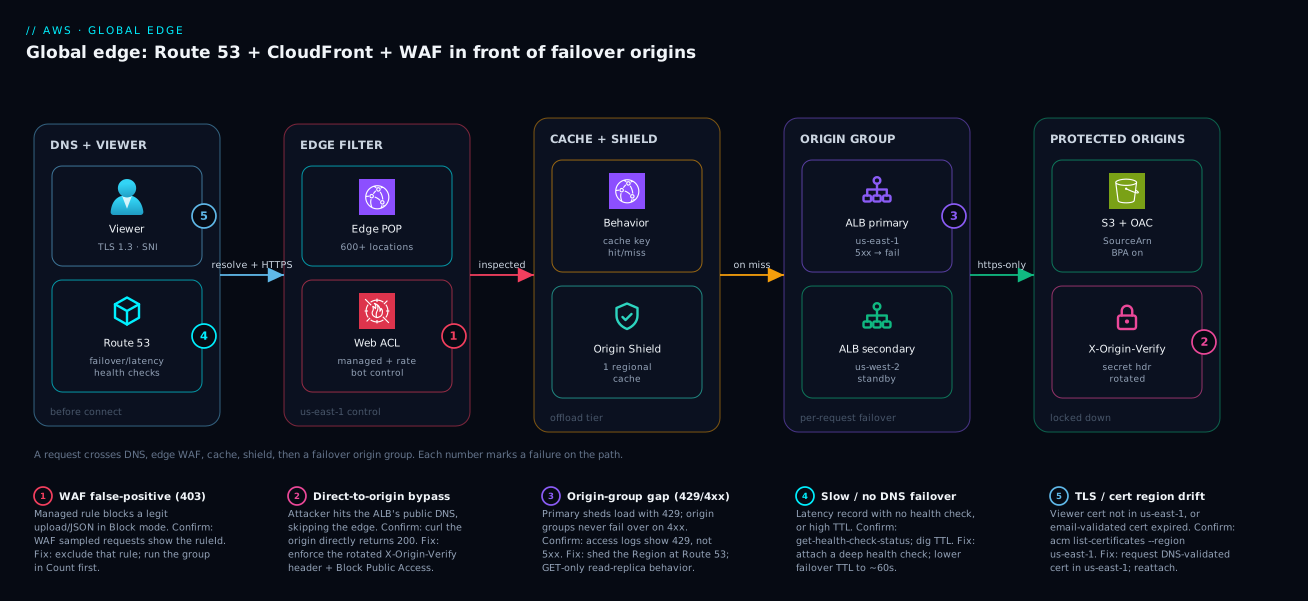
The diagram traces a request through the four tiers that make this an architecture rather than a CDN, then maps each failure class onto the exact hop where it bites. Read it left to right. A viewer opens TLS 1.3 to the nearest CloudFront edge location; Route 53 has already answered the DNS query with a failover or latency record, so the viewer is pointed at the right front door before the connection even exists. At the edge, the AWS WAF web ACL (created in us-east-1, scope CLOUDFRONT) inspects the request against managed rules, a rate-based rule, and bot control; a request that survives proceeds to the distribution’s behavior, where a cache policy decides hit-or-miss. On a miss, CloudFront consults Origin Shield — one designated regional cache that collapses the fan-out of hundreds of edge locations — and only then reaches an origin group. The origin group holds a primary ALB in us-east-1 and a secondary in us-west-2; if the primary returns 500/502/503/504 or refuses the connection, CloudFront retries the same request against the secondary, with no DNS propagation delay. Both ALBs are locked down: S3 origins by OAC with an AWS:SourceArn condition, custom origins by a rotated X-Origin-Verify secret header the ALB enforces.
Notice where each numbered failure sits. A WAF false-positive (1) bites at the edge ACL — a legitimate upload blocked with 403. A direct-to-origin bypass (2) is an attacker skipping the edge entirely and hitting the ALB’s public DNS — closed by the secret header and Block Public Access. An origin-group gap (3) is the 429/4xx that origin groups will never fail over on, sitting on the primary origin. A whole-Region failure (4) is closed not here but upstream at Route 53, which sheds the sick Region at DNS. A TLS/cert drift (5) bites at the viewer certificate — a cert in the wrong Region or an expired email-validated cert. The whole method is in the picture: localize the symptom to a tier, read the cause, run the named confirm, apply the fix.
Real-world scenario
Streamhaul Media runs a video-on-demand and live-events platform on AWS: a primary origin stack (ALB → ECS) in us-east-1, a warm standby in eu-west-1, static assets and HLS segments in S3, all fronted by a single CloudFront distribution with an origin group. They had done the homework most teams skip — health checks, origin-group failover criteria on 500/502/503/504, low TTLs on the failover records, OAC on the S3 buckets. Traffic averages 40,000 requests/second, spiking to 180,000 rps during a marquee live event. The platform team is six engineers; monthly edge spend (CloudFront + WAF + Route 53) runs about ₹9,40,000.
The incident began during a championship final. At 20:03 the dashboards lit up with elevated 502s in Europe — about 9% of viewer requests failing, climbing toward 22% by 20:11. The on-call engineer’s first reflex was to assume the origin group would handle it; their second, when it did not, was to manually fail Route 53 over to eu-west-1. Neither helped much, and European viewers — who should have been served by the nearby standby anyway — kept seeing errors and buffering.
Two root causes, both classic. First, the struggling us-east-1 origin was not cleanly down; under live-event load it was returning a mix of 200s and 429 Too Many Requests as its rate limiter kicked in. Origin groups, by spec, fail over only on the configured 5xx codes or a connection error — a 429 is a valid answer returned straight to the client, never retried against the secondary. So the origin group sat there doing exactly nothing while the primary shed load with 429s. Second, every viewer worldwide was routed to the single distribution’s origin group, whose primary was the overloaded us-east-1 ALB; CloudFront origin failover is per-request and reactive, so European users still hit the failing primary first and only fell through if the response happened to be a configured 5xx. Region selection had never been lifted up to DNS.
The breakthrough came from asking the right first question: was the origin even returning a code the origin group fails over on? The WAF and CloudFront access logs showed a flood of 429s from the primary — not 5xx — which instantly explained why the origin group was inert. A second look showed the CacheHitRate had also quietly dropped from 94% to 71% after a recent deploy added a Set-Cookie to a cacheable path, fragmenting the cache and amplifying origin load right when it could least afford it.
The fix layered the two failover mechanisms correctly and repaired the cache key. That night: revert the cache-key change (hit ratio recovered to 93% within the hour, halving origin load), and add a GET-only behavior for the read path pointing at a read-replica origin group whose criteria included a custom error the app emits on overload. The following week, the real fix: move Region selection up to Route 53 latency records with health checks, so resolvers in Europe were steered to a distribution whose primary origin was eu-west-1, with the origin group remaining as the last line of defense within each Region. They also added a deep health-check path that exercised the rate-limiter state, so a Region shedding 429s under sustained load would mark itself unhealthy and shed traffic at DNS. The next live event ran at 190,000 rps with 502s never exceeding 0.3%, European p95 latency fell from 1,900 ms to 240 ms, and origin cost dropped because the cache was doing its job again. The lesson on the wall: “Origin groups answer ‘this origin returned a 5xx for this request.’ Route 53 answers ‘this whole Region is sick.’ 429 and 4xx are a gap neither closes unless you design for it.”
The incident as a timeline, because the order of moves is the lesson:
| Time | Symptom | Action taken | Effect | What it should have been |
|---|---|---|---|---|
| 20:03 | 502 at 9% in EU, climbing | (alert fires) | — | Ask: what code is the origin returning? |
| 20:06 | 502 at 14% | Assume origin group handles it | No change | Check failover criteria vs actual codes |
| 20:11 | 502 at 22% | Manually fail Route 53 to eu-west-1 | Partial, slow (TTL) | Region selection should already be at DNS |
| 20:25 | Still elevated | Read CloudFront/WAF access logs | Primary returning 429, not 5xx |
This was the breakthrough |
| 20:32 | Root cause found | Spot CacheHitRate 94% → 71% after deploy |
Second coupled bug found | — |
| 20:45 | Mitigated | Revert cache-key change; GET-only read-replica behavior | Hit ratio recovers; origin load halves | Correct night-of fix |
| +1 week | Fixed | Route 53 latency + health checks; deep health path | 502 < 0.3% at 190k rps; p95 240 ms | The actual fix is layering both mechanisms |
Advantages and disadvantages
The “global edge in front of regional origins” model both delivers enormous resilience and hides the failure modes that bite. Weigh it honestly:
| Advantages (why this model helps you) | Disadvantages (why it bites) |
|---|---|
| One front door absorbs global traffic, terminates TLS at the edge, and offloads the origin via caching | Two failover mechanisms (DNS + origin group) cover different outages; misunderstand them and you leave a gap |
| Origin groups give near-instant per-request failover with no DNS propagation delay | Origin groups never fail over on 4xx/429 or on writes — a permanent gap you must design around |
| WAF, rate limiting, and bot control run at the edge before traffic reaches paid compute | Managed WAF rules false-positive in Block mode; a bad rule blocks checkout until you find and exclude it |
| OAC and secret headers make origins unreachable except through the edge | An origin you forget to lock down makes every edge control decorative — attackers just bypass it |
CachingOptimized + long TTLs can push origin offload above 90% on static content |
A single header/cookie added to the cache key silently collapses hit ratio and stampedes the origin |
| Route 53 health checks shed a whole sick Region automatically | Failover has a clock (threshold × interval + TTL); a deep health path that lies delays or prevents the flip |
Real-time logs, CacheHitRate, and WAF metrics make every layer observable |
Metrics live in us-east-1/Global; reading them elsewhere shows “no data” and wastes an afternoon |
The model is right for any public web app or API that needs global reach, origin protection, and resilience to single-Region failure. It bites hardest on teams that deploy with defaults — origins on the open internet, WAF straight to Block, no canary watching from outside, cache keys nobody audits. Every disadvantage above is manageable, but only if you know it exists, which is the entire point of laying them out.
Hands-on lab
Stand up a minimal but real edge: an S3 origin locked down with OAC, a CloudFront distribution, and a WAF web ACL with a rate-based rule in Count mode — then prove origin lock-down and rate limiting actually work. Free-tier-friendly (S3 + a small distribution; WAF has a modest monthly charge — delete at the end). Run in CloudShell.
Step 1 — Variables and an S3 origin bucket.
export AWS_REGION=us-east-1                 # WAF + ACM + CloudFront control plane live here
BUCKET=edge-lab-$(date +%s)
aws s3 mb s3://$BUCKET --region $AWS_REGION
echo '<h1>edge lab origin</h1>' > index.html
aws s3 cp index.html s3://$BUCKET/index.html
aws s3api put-public-access-block --bucket $BUCKET \
  --public-access-block-configuration BlockPublicAcls=true,IgnorePublicAcls=true,BlockPublicPolicy=true,RestrictPublicBuckets=true
Expected: the bucket exists and is fully private (Block Public Access on all four).
Step 2 — Create an Origin Access Control.
OAC_ID=$(aws cloudfront create-origin-access-control \
  --origin-access-control-config '{"Name":"edge-lab-oac","OriginAccessControlOriginType":"s3","SigningBehavior":"always","SigningProtocol":"sigv4"}' \
  --query 'OriginAccessControl.Id' --output text)
echo "OAC_ID=$OAC_ID"
Step 3 — Create the distribution with the S3 origin + OAC. (Abbreviated; supply the full config in practice.)
DIST_ID=$(aws cloudfront create-distribution --distribution-config '{
  "CallerReference":"edge-lab-'$(date +%s)'","Comment":"edge lab","Enabled":true,
  "Origins":{"Quantity":1,"Items":[{"Id":"s3origin","DomainName":"'$BUCKET'.s3.us-east-1.amazonaws.com",
    "OriginAccessControlId":"'$OAC_ID'","S3OriginConfig":{"OriginAccessIdentity":""}}]},
  "DefaultCacheBehavior":{"TargetOriginId":"s3origin","ViewerProtocolPolicy":"redirect-to-https",
    "CachePolicyId":"658327ea-f89d-4fab-a63d-7e88639e58f6"},
  "DefaultRootObject":"index.html"}' --query 'Distribution.Id' --output text)
echo "DIST_ID=$DIST_ID"
Step 4 — Attach the bucket policy that allows only this distribution.
ACCOUNT=$(aws sts get-caller-identity --query Account --output text)
aws s3api put-bucket-policy --bucket $BUCKET --policy '{
  "Version":"2012-10-17","Statement":[{"Sid":"AllowCloudFront","Effect":"Allow",
    "Principal":{"Service":"cloudfront.amazonaws.com"},"Action":"s3:GetObject",
    "Resource":"arn:aws:s3:::'$BUCKET'/*",
    "Condition":{"StringEquals":{"AWS:SourceArn":"arn:aws:cloudfront::'$ACCOUNT':distribution/'$DIST_ID'"}}}]}'
Step 5 — Prove origin lock-down. Hit S3 directly (must fail) and through CloudFront (must succeed once deployed).
curl -sSI https://$BUCKET.s3.us-east-1.amazonaws.com/index.html | head -1   # Expect: 403
DOMAIN=$(aws cloudfront get-distribution --id $DIST_ID --query 'Distribution.DomainName' --output text)
curl -sSI https://$DOMAIN/index.html | head -1                              # Expect: 200 (after deploy)
Step 6 — Create a WAF web ACL with a rate-based rule in Count mode and associate it.
aws wafv2 create-web-acl --name edge-lab-acl --scope CLOUDFRONT --region us-east-1 \
  --default-action '{"Allow":{}}' \
  --visibility-config '{"SampledRequestsEnabled":true,"CloudWatchMetricsEnabled":true,"MetricName":"edgeLabAcl"}' \
  --rules '[{"Name":"rl","Priority":1,"Action":{"Count":{}},
    "Statement":{"RateBasedStatement":{"Limit":100,"AggregateKeyType":"IP"}},
    "VisibilityConfig":{"SampledRequestsEnabled":true,"CloudWatchMetricsEnabled":true,"MetricName":"rl"}}]'
# Take the returned ARN and set it as WebACLId on the distribution config (update-distribution).
Step 7 — Drive traffic past the rate limit and read the Count metric.
for i in $(seq 1 150); do curl -s -o /dev/null https://$DOMAIN/index.html; done
aws cloudwatch get-metric-statistics --namespace AWS/WAFV2 --metric-name CountedRequests \
  --dimensions Name=WebACL,Value=edge-lab-acl Name=Rule,Value=rl Name=Region,Value=CloudFront \
  --start-time $(date -u -d '15 min ago' +%FT%TZ) --end-time $(date -u +%FT%TZ) \
  --period 300 --statistics Sum --region us-east-1
Expect a non-zero CountedRequests once you cross the limit — proof the rule would block in enforce mode. Teardown: disable then delete the distribution (update-distribution with Enabled:false, wait, delete-distribution), delete the web ACL, empty and remove the bucket.
aws wafv2 delete-web-acl --name edge-lab-acl --scope CLOUDFRONT --id <ID> --lock-token <TOKEN> --region us-east-1
aws s3 rb s3://$BUCKET --force
Common mistakes & troubleshooting
This is the differentiator: map an edge symptom to a root cause, the exact command or console path to confirm it, and the fix. Scan the playbook, then read the detail for the row that matches. This is the table to keep open at 02:00.
| # | Symptom | Root cause | Confirm (exact command / path) | Fix |
|---|---|---|---|---|
| 1 | Origin returns 5xx but no failover happens | Behavior targets an origin ID, not the origin group ID | aws cloudfront get-distribution-config → TargetOriginId |
Point TargetOriginId at the origin group ID |
| 2 | 429/4xx from primary, secondary never used |
Origin groups don’t fail over on 4xx/429 |
CloudFront/WAF access logs show 429, not 5xx |
Shed at Route 53; add a GET-only read-replica behavior |
| 3 | CacheHitRate collapsed after a deploy |
A header/cookie/QS was added to the cache key | Diff cache policy vs last good; check CacheHitRate |
Remove the needless key field; move it to the ORP |
| 4 | Attacker hits the ALB directly, bypassing WAF | Origin reachable on the open internet | curl -I https://<alb-dns>/ returns 200 |
Add secret header + ALB rule; or restrict to CF IPs |
| 5 | S3 objects return 403 through CloudFront | OAC/bucket policy missing or wrong AWS:SourceArn |
Bucket policy lacks the distribution ARN condition | Add the OAC bucket-policy statement with AWS:SourceArn |
| 6 | Legit requests blocked with 403 by WAF | A managed rule false-positives in Block mode | WAF sampled requests show the ruleId and request |
Exclude that rule; (re)run the group in Count first |
| 7 | WAF “no data” / web ACL won’t attach to CF | Web ACL created outside us-east-1 or wrong scope |
aws wafv2 list-web-acls --scope CLOUDFRONT --region us-east-1 |
Recreate with scope CLOUDFRONT in us-east-1 |
| 8 | Custom domain serves no HTTPS / cert error | Viewer cert not in us-east-1 |
aws acm list-certificates --region us-east-1 |
Request/import the cert in us-east-1; reattach |
| 9 | Route 53 won’t fail over on app failure | Latency record with no health check, or GET / lies |
aws route53 get-health-check-status |
Attach a health check; probe a deep path |
| 10 | Failover takes minutes, not seconds | High record TTL; resolvers cache the old answer | dig +short app.example.com TTL value |
Lower failover-record TTL to ~60 s |
| 11 | Plaintext to origin despite HTTPS at edge | OriginProtocolPolicy: http-only/match-viewer |
Origin config protocol policy | Set https-only; ensure origin supports TLS 1.2 |
| 12 | CloudWatch alarm shows “no data” | Reading CF metrics outside us-east-1/Global |
Alarm built in wrong Region/dimension | Build in us-east-1, Region=Global |
| 13 | Origin Shield added latency, little offload | Shield Region far from origin, or unique content | OriginLatency rose; hit ratio flat |
Move shield to origin’s Region; or disable it |
| 14 | Signed URLs/cookies return 403 | Expired or wrong key-group / clock skew | Access logs 4xx; signed-URL expiry timestamp |
Re-sign; check key group and time sync |
| 15 | Distribution edits 502 with OriginContactedError |
Origin TLS/version mismatch after a change | OriginSslProtocols vs origin’s supported TLS |
Align OriginSslProtocols; confirm origin cert chain |
| 16 | 403 from S3 only on KMS-encrypted objects |
OAC lacks kms:Decrypt on the key |
KMS key policy missing the distribution principal | Grant the CloudFront principal kms:Decrypt |
| 17 | Stale content served after a deploy | Long TTL with no invalidation/versioning | Age header high; object unchanged at edge |
Versioned URLs, or create-invalidation for the path |
Detail on the highest-frequency rows
Row 1 — failover that never fires. The single most common silent misconfiguration. Everything looks right — two origins, an origin group, sensible failover criteria — but the behavior’s TargetOriginId points at origin-primary instead of og-app. Confirm with aws cloudfront get-distribution-config --id E1EXAMPLE and check DefaultCacheBehavior.TargetOriginId. The fix is one field. Test it in a game day, never in your head.
Row 2 — the 429/4xx gap. Origin groups treat anything outside the configured 5xx (and connection errors) as a valid answer. A primary shedding load with 429 will never trigger failover. Confirm by reading the access logs for the actual status codes from the primary. The fix is architectural: shed the Region at Route 53 with a health check tuned to the real failure signal, and for read paths add a GET-only behavior pointing at a read-replica origin group.
Row 6 — WAF false-positives. The Common Rule Set is broad. A legitimate file upload or rich JSON body trips a rule and the customer gets a 403 they cannot explain. Confirm in the WAF console under Sampled requests (or stream WAF logs) — it names the ruleId and shows the offending request. The fix: exclude that specific rule (rule-action override to Count) rather than disabling the whole group, and never deploy a managed group straight to Block.
Best practices
- Layer the two failover mechanisms on purpose. Route 53 (health-checked) sheds whole sick Regions; origin groups absorb single-origin
5xxper request. Decide explicitly which closes which outage, and document the429/4xxgap neither closes. - Probe a deep health path, never
GET /. The health check must exercise the dependency chain that actually fails, or it will report “healthy” while the app is down. - Keep failover-record TTLs low (~60 s). A flip is only as fast as the slowest resolver’s cached answer plus your probe time.
- Always target the origin group ID in every behavior where failover is required — targeting an origin directly disables failover silently.
- Audit the cache key like code. Every header, cookie, and query string in the key fragments the cache; review changes in PRs and alarm on
CacheHitRate. - Lock every origin down. OAC +
AWS:SourceArn+ Block Public Access for S3; a rotated secret header enforced at the ALB for custom origins. An unlocked origin makes WAF decorative. - Roll out every managed WAF rule group in Count mode first, watch sampled requests, exclude the rules that misfire, then flip to Block.
- Create the web ACL and viewer cert in
us-east-1. Both are hard requirements for CloudFront; building them elsewhere fails silently. - Use
sni-onlyandTLSv1.2_2021. Dedicated-IP SSL is a needless monthly bill; an old security policy allows weak ciphers. - Enforce
https-onlyedge-to-origin. Don’t terminate TLS at the edge and ship plaintext to the origin behind it. - Run a failover game day. Inject failure, watch both layers flip, measure the clock. A failover you have not tested is a hypothesis.
- Alarm from outside with Synthetics canaries across multiple Regions to catch DNS, TLS-expiry, and edge problems that origin-side health checks never see.
Security notes
The edge is your first and largest security boundary; treat it as one. Least privilege on origins: the S3 bucket policy should grant s3:GetObject only to the CloudFront service principal scoped by AWS:SourceArn to your distribution — never a blanket public-read, and never an account-wide CloudFront grant. Keep Block Public Access on all four toggles so the only path to the bucket is the signed edge request. For custom origins, the secret header is a credential: store it in Secrets Manager, rotate it on a schedule with a dual-accept overlap window, and strip any client-supplied copy of it at the edge with a CloudFront Function so it cannot be spoofed.
WAF is defense in depth, not a silver bullet. Run the managed rule groups that match your stack (Common, KnownBadInputs, plus SQLi/Linux/PHP as relevant), add Bot Control and ATP scoped to login/checkout, and keep a rate-based rule as a volumetric backstop. Order rules by priority and keep the highest-value, lowest-false-positive groups (KnownBadInputs, IP reputation) early. Encryption in transit must be end to end: redirect-to-https for viewers, https-only to the origin, TLSv1.2_2021 minimum, and DNS-validated ACM certs that auto-renew so nothing expires under you. Logging is a security control: enable CloudFront standard logs and WAF logging (with sampled requests) so you have a forensic record of who was blocked and why, and stream them to a SIEM. Tie it together with AWS KMS for SSE-KMS on the S3 origin, Secrets Manager for the rotating header, and CloudWatch & CloudTrail for the audit trail of every distribution and web-ACL change.
A compact control-to-threat map for review checklists:
| Threat | Control | Where configured | Verify with |
|---|---|---|---|
| Direct-to-origin bypass | OAC / secret header + Block Public Access | Bucket policy / ALB rule | curl origin directly → must 403 |
| Injection (SQLi/XSS) | Managed rule groups (Common, SQLi, KnownBadInputs) | WAF web ACL | Sampled requests; test payloads in Count |
| Volumetric / abuse | Rate-based rule | WAF web ACL | Drive past limit; check BlockedRequests |
| Credential stuffing | ATP rule scoped to /login |
WAF web ACL | ATP labels; sampled login requests |
| Bots / scraping | Bot Control (Targeted) on sensitive paths | WAF web ACL | Bot labels; Count then enforce |
| Plaintext interception | https-only + TLSv1.2_2021 |
Distribution TLS config | TLS scanner; origin protocol policy |
| Secret leakage | Strip X-Origin-Verify at edge; rotate |
CloudFront Function + Secrets Manager | Inspect forwarded headers |
| Data exfiltration via cross-account CF | AWS:SourceArn condition on bucket policy |
Bucket policy | Attempt read from another distribution |
| Geographic / sanctions exposure | Geo restriction (allow/deny country list) | Distribution restrictions | Request from a blocked country → 403 |
| Stolen signed URL replay | Short expiry + key-group rotation | Signed URLs/cookies config | Replay an expired URL → 403 |
| Config tampering / drift | CloudTrail on CloudFront + WAF APIs | CloudTrail data/management events | Audit UpdateDistribution/UpdateWebACL calls |
Cost & sizing
The edge bill has four meters, and only one of them is the CDN you think you’re paying for. CloudFront charges for data transfer out to viewers (tiered by Region, cheaper at volume and via committed pricing), per-request fees (HTTP vs HTTPS), and add-ons (Origin Shield per request, real-time logs, Lambda@Edge). Route 53 charges per hosted zone per month and per million queries, plus per health check (and more per health check for fast 10-second intervals and for HTTPS/string-match). AWS WAF charges per web ACL per month, per rule per month, per million requests inspected, and extra for Bot Control/ATP and for the requests they inspect. ACM public certificates are free. The lever that dwarfs all of these is cache-hit ratio: every percentage point of offload is origin compute and data transfer you don’t pay for, which is why a fragmented cache key is a cost incident, not just a performance one.
| Cost driver | Meter | Rough scale | How to control |
|---|---|---|---|
| CloudFront data transfer out | Per GB, tiered by Region | Largest line item at scale | Higher cache-hit ratio; commit pricing; compression |
| CloudFront requests | Per 10k (HTTP/HTTPS) | Scales with traffic | Cache more; collapse with Origin Shield |
| Origin Shield | Per request through shield | Adds to request cost | Enable only where offload justifies it |
| Real-time logs | Per log line to Kinesis | Sample-rate dependent | Sample a fraction, not 100% |
| Route 53 hosted zone | Per zone / month | Small fixed | Consolidate zones |
| Route 53 queries | Per million | Traffic-dependent | Alias records (free queries to AWS targets) |
| Route 53 health checks | Per check / month | Per endpoint | 30 s interval unless 10 s is justified |
| WAF web ACL + rules | Per ACL + per rule / month | Fixed-ish | Prune unused rules; mind the 1,500 WCU budget |
| WAF requests | Per million inspected | Traffic-dependent | Scope Bot Control/ATP to needed paths |
| WAF Bot Control / ATP | Per million + add-on fee | Add-on | Scope to login/checkout, not the whole site |
| CloudFront invalidations | First 1,000 paths/mo free, then per path | Usually small | Prefer versioned URLs over mass invalidation |
| Lambda@Edge | Per request + per GB-second | Per-invoke | Use CloudFront Functions where they suffice |
A capacity note: the web ACL has a 1,500 WCU budget. The Common Rule Set alone is ~700 WCU, so you cannot stack every managed group blindly — choose the ones that match your stack (the WCU table in the WAF section above is your budget worksheet). For sizing health checks, default to a 30-second interval and reserve 10-second checks for tier-1 failover where ~60 seconds of faster detection is worth the higher per-check fee. For Origin Shield, model the offload before enabling: it pays off when many regional caches would otherwise miss independently, and it is dead weight on single-Region high-hit static content. Most edge-cost surprises trace to three things — a collapsed cache-hit ratio, Bot Control left scoped to the whole site, and 100% real-time log sampling — all of which are tuning, not architecture.
Interview & exam questions
1. When would you use Route 53 failover routing versus a CloudFront origin group? Route 53 failover sheds a whole sick Region/stack at DNS, driven by a health check, before any connection exists; a CloudFront origin group fails a single request over from a primary to a secondary origin behind one distribution, driven by a 5xx or connection error, with no DNS delay. Use both, layered — Route 53 for Region-level failure, origin groups for per-request origin errors. (SAP-C02, ANS-C01.)
2. Why is EvaluateTargetHealth set to false for a CloudFront alias target? CloudFront is a global, always-resolvable service, so Route 53 cannot meaningfully health-check the distribution itself. You set it false and drive failover from your own health check against the origin instead. (SAP-C02.)
3. What does and does not trigger CloudFront origin-group failover? It triggers on the configured 5xx status codes (and 408 if listed) or a connection-level error, for GET/HEAD/OPTIONS only. It does not trigger on 4xx/429 (treated as valid answers) or on non-idempotent methods like POST. (DOP-C02, SAP-C02.)
4. Why must the WAF web ACL and the viewer ACM certificate be in us-east-1? CloudFront is a global service whose control plane for web ACLs (scope CLOUDFRONT) and viewer certificates lives in N. Virginia. Create them anywhere else and CloudFront cannot attach them — a silent failure. (SCS-C02, SAP-C02.)
5. What is the difference between a cache policy and an origin request policy? A cache policy defines the cache key (which headers/cookies/query strings make requests “the same”) and TTLs; an origin request policy defines what is forwarded to the origin without becoming part of the key. Keep cache-fragmenting data out of the key and in the ORP. (DVA-C02, SAP-C02.)
6. How does Origin Shield improve origin offload? It adds a single designated regional cache that all edge locations route through for an origin, collapsing the fan-out of many regional caches into one and reducing distinct origin hits — most valuable for globally spread, low-to-moderate-hit, or expensive-to-hit origins. (SAP-C02.)
7. How do you lock down an S3 origin so only CloudFront can read it? Use Origin Access Control with a bucket policy that allows s3:GetObject to the cloudfront.amazonaws.com service principal, scoped by an AWS:SourceArn condition to your specific distribution, with Block Public Access on. (SCS-C02, SAP-C02.)
8. Why roll out a managed WAF rule group in Count mode first? The broad managed groups (especially the Common Rule Set) false-positive on legitimate traffic. Count mode lets you observe via sampled requests and metrics, identify and exclude the misfiring rules, then flip to Block without breaking real users. (SCS-C02.)
9. A 502 reaches the client but CloudFront shows the origin returned 200 slowly — where is the 502 from? From an upstream layer timing out the slow response (e.g. an Application Gateway/ALB or a Lambda@Edge), not from the origin. Compare origin response time to the upstream timeout and fix the slow path or raise the timeout. (SAP-C02, DOP-C02.)
10. How do you make Route 53 failover fast? Lower the failover-record TTL (~60 s) so resolvers re-query promptly, use a 10-second health-check interval with a low failure threshold for tier-1 paths, and probe a deep health path that fails fast on real dependency failure. The flip takes threshold × interval of probe time plus the record TTL. (ANS-C01, SAP-C02.)
11. CloudFront Functions vs Lambda@Edge — how do you choose? CloudFront Functions for sub-millisecond, viewer-only header/URL manipulation and simple auth at massive scale and low cost; Lambda@Edge for heavier logic, SDK/network calls, body manipulation, and origin-event triggers. Default to Functions and escalate only when you need what they can’t do. (DVA-C02, SAP-C02.)
12. Why might your CloudFront CloudWatch alarm show “no data”? CloudFront metrics publish to AWS/CloudFront with the Region dimension set to Global and are read from us-east-1. An alarm built in another Region or with a different Region dimension finds nothing. (SOA-C02.)
Quick check
- You want traffic to leave a Region when your app (not the network) is failing. Which Route 53 mechanism makes that happen, and what must you attach?
- Your primary origin is returning
429under load and the secondary is never used. Why, and what’s the fix? - Where must the WAF web ACL and the viewer ACM certificate be created, and why?
- A behavior targets an origin ID directly. What capability have you silently disabled?
CacheHitRatedropped from 92% to 60% right after a deploy. What’s the most likely cause and where do you look?
Answers
- Route 53 failover (or latency) records with a health check attached. Latency/failover routing alone routes by network or primary-health state; only a health check that probes a deep application path sheds traffic on application failure.
- Origin groups never fail over on
4xx/429— a429is a valid answer returned to the client, never retried. Fix it by shedding the Region at Route 53 with a health check tuned to the overload signal, and adding a GET-only read-replica behavior for read paths. - Both in
us-east-1. CloudFront is global and pulls its web ACL (scopeCLOUDFRONT) and viewer certificate from N. Virginia exclusively; created elsewhere they cannot be attached. - Per-request origin-group failover. Behaviors must target the origin group ID; targeting an origin directly disables failover with no error.
- A header, cookie, or query string was added to the cache key, fragmenting the cache into many distinct objects. Diff the cache policy against the last good version and watch
CacheHitRate; move the needed-but-not-keyed value to the origin request policy.
Glossary
- CloudFront distribution — A CloudFront configuration: a set of behaviors mapping path patterns to origins, with cache, security, and TLS settings.
- Behavior — A path pattern within a distribution mapped to an origin (or origin group) plus its cache and origin-request policies; the unit where WAF and caching apply.
- Cache policy — Defines the cache key (which headers/cookies/query strings make two requests identical) and the Min/Default/Max TTLs.
- Origin request policy (ORP) — Defines what CloudFront forwards to the origin without adding it to the cache key.
- Origin group — A primary + secondary origin with failover criteria; CloudFront retries a failed request against the secondary per request.
- Origin Shield — A designated regional cache layer that all edge locations route through for an origin, collapsing cache fan-out and raising offload.
- OAC (Origin Access Control) — The SigV4-signing mechanism that lets only your CloudFront distribution read a private S3 origin; successor to OAI.
- Web ACL — An AWS WAF rule set (managed + custom rules) bound to a distribution; for CloudFront it has scope
CLOUDFRONTand lives inus-east-1. - Rate-based rule — A WAF rule that blocks (or counts) an aggregate key exceeding a request limit over a rolling window.
- Routing policy — How Route 53 chooses an answer for a record set: failover, latency, weighted, geolocation, geoproximity, or multi-value.
- Health check — A Route 53 probe (HTTP/HTTPS/TCP/calculated/alarm-based) whose state drives failover and weighted/latency record selection.
- Alias record — A Route 53 record pointing at an AWS resource (like a distribution) using a fixed hosted-zone ID; queries to AWS targets are free.
- SNI (Server Name Indication) — The TLS extension carrying the hostname in the handshake;
sni-onlyis the free, correct serving mode for modern clients. - Security policy — The minimum TLS version and cipher-suite set CloudFront negotiates with viewers (e.g.
TLSv1.2_2021). - WCU (Web ACL Capacity Unit) — The cost unit for WAF rules; a web ACL has a 1,500-WCU budget that managed groups consume.
Next steps
- AWS Route 53: DNS Records, Routing Policies & Health Checks — go deeper on the DNS layer that fronts this whole design.
- CloudFront Deep Dive: Distributions, Origins, Caching & OAC — the full CDN mechanics behind the edge tier here.
- AWS WAF for Security — expand the firewall layer with deeper rule engineering and tuning.
- Multi-Region Architecture on AWS — compose this front door into a full active-passive or active-active system.
- CloudWatch RUM, Synthetics & Canaries for Frontend SLO Monitoring — build the outside-in monitoring that catches edge regressions internal probes miss.