In a nutshell
Imagine a whiteboard that only ever gets written on — never erased — where every team in the building can walk up, read from wherever they last stopped, and copy down what they need at their own speed. One team reads the top of the board every few seconds; another catches up once an hour; a brand-new team next quarter can start from the very first line because nothing was ever wiped. That whiteboard is a Kafka log, and this lesson is about running one as the central nervous system of a company — the single place every important event lands and everyone reads from without tripping over each other.
The twist is who holds the marker. Running Kafka yourself means owning servers, replication, upgrades, and 3 a.m. pages. Confluent Cloud is Kafka run by someone else: you create the “channels” (topics), decide who may post and who may read, and plug in ready-made pipes that copy events into S3 or Snowflake — while Confluent operates the machinery. This lesson builds that backbone properly on AWS: reachable only over private networking (no public door), every reader tied to an identity, and every message checked against a contract before it is allowed in.
We follow one running example — a parcel carrier that moves nine million packages a day — because a concrete story makes an abstract idea (an “event backbone”) click. But the patterns are general: any business with many producers and many consumers of the same stream of facts faces the exact same design.
Level: Advanced (with a beginner on-ramp) · Time: ~47 min
Before you start, it helps to know: basic AWS VPC networking (subnets, security groups, private DNS) and IAM roles, plus the difference between a queue and a topic. If queues and pub/sub are new, read SNS, SQS & EventBridge messaging fundamentals first — this lesson picks up where that one ends and asks “what if you also need replay, ordering, and high throughput?”
After this lesson you will be able to:
- Explain the Kafka mental model — the log, topics, partitions, offsets, and consumer groups — and why ordering is a per-partition property, not a global one.
- Choose a Confluent Cloud cluster type (Basic, Standard, Enterprise, Dedicated) and size it in the right capacity unit (eCKU vs CKU).
- Pick a private-networking path from your VPCs to Confluent (PrivateLink vs VPC peering vs Transit Gateway) and avoid the DNS trap that silently hangs clients.
- Enforce data contracts with Schema Registry and choose a compatibility mode (BACKWARD, FORWARD, FULL) that matches your upgrade order.
- Reason about delivery guarantees — at-least-once vs exactly-once, idempotent producers, and transactions — and where each one actually holds.
- Decide when Confluent Cloud is the right answer versus Amazon MSK, Kinesis, or plain SQS/SNS.
A national parcel carrier — think the kind that moves nine million packages a day across a hub-and-spoke network of sortation centers, line-haul trucks, and last-mile vans — gets a directive from its COO after a peak-season meltdown: the business cannot see its own packages in real time. A scan in a sortation center took up to forty minutes to surface in the customer tracking page, the fraud team learned about a stolen-load pattern from a spreadsheet the next morning, and the data warehouse that finance runs margin on was a day behind reality. Each of these consumers — tracking, fraud, finance, the route-optimization ML team — had been bolted directly onto the sortation system’s database with its own nightly extract, and the database was buckling under the read load while every team blamed every other team. The ask is deceptively simple: “one place every package event lands, and everyone reads from it without stepping on each other.” The constraint is the usual enterprise reality — this runs on AWS across three accounts and two regions, the security team will not allow a managed data service to talk to anything over the public internet, every consumer must be governed and audited, and a malformed event from one upstream team cannot be allowed to poison every downstream reader. This article is the reference architecture for that event backbone, built on Confluent Cloud so the carrier operates streams instead of operating Kafka.
The pressures stack the way they always do in operations-heavy businesses. Volume is non-negotiable: scan, sort, depart, and deliver events run to tens of thousands per second at peak, with a Black-Friday-to-Christmas surge that triples the floor. Decoupling is the actual problem to solve — the failure was that producers and consumers were welded together through a shared database, so every new consumer added load and every schema change broke something. Freshness means tracking and fraud need events in seconds, not the forty minutes that triggered the directive. And governance means every topic, every producer, and every consumer must map to an identity and a contract the security and data teams can audit. An event-streaming backbone — a durable, replayable log that producers append to and many independent consumers read from at their own pace — satisfies all four at once. The log is the source of truth; producers append, consumers subscribe, and neither knows the other exists.
Why not the obvious shortcuts
The naive fixes each fail predictably, and naming why matters because someone on the project will propose all three.
Point-to-point integration — wiring each new consumer straight to the sortation database or to each producer — is exactly the mess that caused the meltdown. With N producers and M consumers you trend toward N×M brittle connections, every schema change is a coordinated outage, and the database dies under the combined read load. A plain SQS/SNS fan-out decouples senders from receivers but throws away the two properties that matter most here: it is not a replayable log, so a consumer that was down or a new consumer that joins next quarter cannot rewind and reprocess history, and ordering and partitioned high-throughput semantics are weak. Self-managing Apache Kafka on EC2 or MSK gives you the log, but now the carrier’s small platform team owns broker rebalancing, partition reassignment, version upgrades, Schema Registry, connector runtimes, and 3 a.m. ISR-shrinking pages — undifferentiated heavy lifting for a company whose differentiation is moving boxes, not running distributed consensus.
Confluent Cloud threads the needle. It is Kafka — the durable, partitioned, replayable commit log with strong ordering per partition and consumer-group fan-out — delivered as a managed service, so the carrier gets the log semantics without operating the cluster. Around the raw log it adds the parts every enterprise eventually has to build anyway: a Schema Registry to enforce data contracts, fully managed connectors to land data in S3 and Snowflake without standing up Kafka Connect, ksqlDB / Flink for in-stream processing, and RBAC that binds topic access to corporate identity. The platform team operates streams and contracts; Confluent operates the brokers.
Kafka fundamentals: the log, topics, partitions, offsets, and consumer groups
The rest of this article assumes a working picture of what Kafka actually is. If you already operate Kafka, skim to the next section; if not, these are the six ideas that make everything downstream make sense. Every one of them is a property of the log — the single data structure Kafka is built on.
The log is an append-only sequence of facts
A Kafka log is an ordered, append-only file of records. Producers only ever append to the end; records already written are immutable and are never updated in place. Each record gets a monotonically increasing number called an offset — record 0, then 1, then 2, and so on. That is the whole trick, and it is what separates Kafka from a queue: a traditional queue (SQS, RabbitMQ) deletes a message once a consumer takes it, so the message is read once and is then gone. A Kafka log keeps records for a configured retention period regardless of who has read them, so many independent readers can each read the same records, and any of them can rewind to an old offset and read history again. “Replay” — the property the parcel carrier needed and SQS could not give — is simply the ability to reset your read position to an earlier offset.
Think of the difference as a to-do inbox versus a bank statement. A queue is an inbox: you pull a task, work it, and it’s gone. A log is a statement: every transaction stays on the page in order, and anyone can re-read line 40 next month.
Topics name the log; partitions shard it
A topic is a named log — package.scanned, truck.departed, fraud.alert. You publish to a topic and subscribe to a topic. But a single append-only file on a single machine would cap throughput at whatever one disk and one CPU can do, so Kafka splits each topic into partitions: independent sub-logs that can live on different brokers and be read and written in parallel. A topic with 48 partitions is 48 append-only logs wearing one name.
This is the single most important design fact in Kafka, because ordering is guaranteed only within a partition, never across the whole topic. Partition 0 is strictly ordered; partition 1 is strictly ordered; but there is no global order across 0 and 1. Which partition a record lands in is decided by its key: Kafka hashes the key and takes it modulo the partition count (partition = hash(key) % num_partitions), so every record with the same key lands in the same partition and is therefore ordered relative to its siblings. Records with no key are spread round-robin for balance.
That is why the carrier keys every event by tracking number. All events for one package — scanned, sorted, departed, delivered — share a key, so they land in one partition in the order they happened, and a downstream state machine reading that partition sees them in the right sequence. Key by the wrong thing (say, the sortation-center ID) and every package in a hub piles into one partition, ordering between packages becomes meaningless, and one busy hub becomes a hot partition that caps throughput no matter how big the cluster is.
Here is the shape of a three-partition topic, with offsets increasing left to right:
topic: package.scanned   (key = tracking number -> partition)

partition 0 | off:0  off:1  off:2  off:3  off:4     <- producers append here
partition 1 | off:0  off:1  off:2                   <- and here
partition 2 | off:0  off:1  off:2  off:3            <- and here
             \_ each partition independently ordered; NO order across partitions _/
Producers append; consumers track their own offset
A producer appends records to a topic. A consumer reads records and remembers how far it has gotten by committing an offset — “I have processed package.scanned partition 0 up to offset 4.” Crucially, the consumer owns that bookmark; the broker does not decide what a consumer has seen. If a consumer crashes and restarts, it resumes from its last committed offset. If it wants to reprocess a bad hour, it seeks backward to an earlier offset. Nothing about one consumer’s position affects another’s — this is the decoupling the whole architecture is built to buy.
Consumer groups spread the work and give you fan-out
Real consumers scale out, and Kafka coordinates that with consumer groups. A consumer group is a set of consumer instances that share a group.id and split a topic’s partitions among themselves: each partition is read by exactly one consumer in the group at a time. Add consumers to a group and Kafka rebalances, handing each one a slice of the partitions. This is how the tracking service scales: more pods in the same group = more partitions consumed in parallel — up to a hard ceiling of one consumer per partition. A group with more consumers than the topic has partitions leaves the extras idle. Size partitions for the maximum parallelism you will ever want, because you cannot exceed it later without re-partitioning.
The second half of consumer groups is the magic that replaces the carrier’s per-team nightly extracts: different groups read the same topic completely independently. The tracking service (group A), the S3 sink (group B), and the ML feed (group C) each maintain their own offsets over the same package.status.latest topic. Producing once and reading many is exactly this — N independent groups, each at its own position, none adding load to the others or to any database.
| Concept | What it is | Why it matters in this backbone |
|---|---|---|
| Log | Append-only, immutable, ordered record sequence | The source of truth; enables replay a queue can’t |
| Topic | A named log | The event type producers/consumers agree on |
| Partition | A shard of a topic; an independently ordered sub-log | The unit of parallelism and of ordering |
| Offset | A record’s position number within a partition | The consumer’s bookmark; enables rewind/replay |
| Key | Field hashed to choose a partition | Guarantees per-key ordering (per tracking number) |
| Producer | Appends records | Owns batching, retries, idempotence |
| Consumer group | Instances sharing a group.id, splitting partitions |
Horizontal scale, capped at #partitions |
| Consumer lag | Newest offset minus consumer’s committed offset | The #1 health metric; rising lag = falling behind |
Replication keeps the log alive when a broker dies
Each partition is stored on multiple brokers for durability, governed by the replication factor (RF). One replica is the leader (handles reads and writes); the others are followers that copy the leader. The followers that are caught up form the in-sync replica set (ISR). Two settings decide your durability:
ackson the producer:acks=0(fire-and-forget, may lose data),acks=1(leader wrote it — lost if the leader dies before followers copy),acks=all(all in-sync replicas wrote it before the produce is acknowledged).min.insync.replicason the topic: the minimum ISR size that must acknowledge anacks=allwrite, or the producer gets an error instead of silently under-replicating.
The production recipe for a log of record is RF=3, min.insync.replicas=2, acks=all: every write is on at least two brokers before it’s acknowledged, so any single broker can fail with zero data loss and the topic stays writable. Confluent Cloud manages RF and broker placement across AZs for you — you set acks and, on Dedicated, the topic’s min.insync.replicas — but understanding the math is what lets you reason about the durability you’re actually getting.
Retention and compaction: how long the log lives
A topic keeps records for its retention — by time (retention.ms, e.g. 7 days) or size — after which old segments are deleted. That’s a delete policy, right for event streams. The alternative is log compaction (cleanup.policy=compact), which keeps the latest record per key and garbage-collects superseded ones — right for “current state” topics like package.status.latest, where you want the newest status per tracking number to survive but don’t need every historical update. Retention is also where Tiered Storage enters (covered under Going deeper): it lets you keep a very long — even effectively infinite — retention cheaply by offloading old segments to S3 instead of paying for broker disk.
Delivery guarantees, briefly
Three guarantees exist end to end, and knowing which you have prevents both data loss and double-processing:
- At-most-once — commit the offset before processing; a crash loses the in-flight record. Rare by choice.
- At-least-once — process, then commit; a crash reprocesses the last batch. The sane default, and it means consumers must be idempotent (processing the same record twice must be safe).
- Exactly-once — no loss and no duplicates, achieved with idempotent producers and transactions. Real, but with boundaries covered under Going deeper.
A quick, representative tour with the confluent CLI makes the vocabulary concrete (values are illustrative):
# Create a topic with explicit partitions (parallelism) and a 7-day retention
confluent kafka topic create package.scanned \
  --partitions 48 \
  --config retention.ms=604800000

# Produce a couple of keyed records - the key (tracking number) picks the partition
confluent kafka topic produce package.scanned --parse-key --delimiter ":"
1Z999AA10123456784:{"event":"scanned","facility":"MEM-hub","ts":"2026-06-10T14:22:01Z"}
1Z999AA10123456784:{"event":"sorted","facility":"MEM-hub","ts":"2026-06-10T14:24:19Z"}

# Read a consumer group's lag - the metric that predicts every incident
confluent kafka consumer-group lag summarize tracking-service
# representative output
  Consumer Group  | Lag (sum) | Partitions | Members
  tracking-service |      1240 |         48 |       6
That is the whole model: an append-only log, sharded into ordered partitions by key, replicated for durability, read by independent consumer groups that track their own offsets. Everything in the architecture below is an application of these six ideas.
Architecture overview
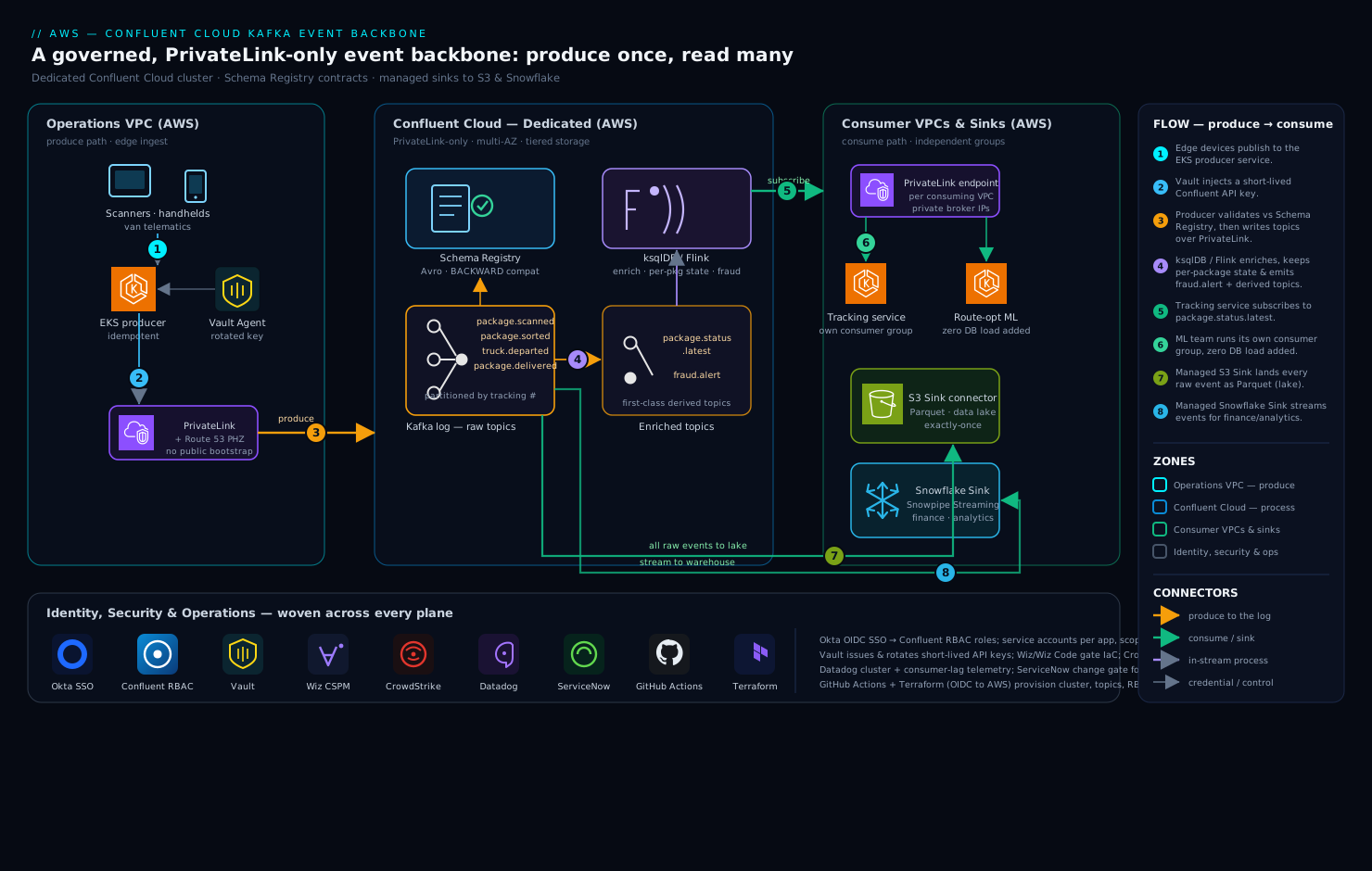
The backbone runs as a logical event bus that physically lives in Confluent’s AWS account and reaches into the carrier’s VPCs over private networking only. Keeping three planes separate in your head is the first step to operating this well: a produce path where operational systems append events, a process path where streams are joined and enriched in flight, and a consume/sink path where downstream systems and analytics platforms read.
The defining property of the entire topology is the one the security team cares about most: every byte between the carrier’s VPCs and Confluent Cloud rides AWS PrivateLink, and there is no public bootstrap endpoint. The Confluent cluster is a Dedicated cluster exposed into each consuming VPC through a PrivateLink endpoint, so brokers resolve to private IPs inside the carrier’s subnets. No package event, no consumer offset commit, and no Schema Registry call ever touches the public internet — which is what makes the security story defensible across the carrier’s multi-account AWS estate.
Produce path, following the data flow:
- Scanners in sortation centers, handheld devices on vans, and the line-haul telematics system publish to a producer-facing service running on EKS in the operations VPC. That service is the only thing the edge devices talk to; it owns batching, retries, and idempotent produce so a flaky cellular link on a delivery van does not create duplicate scans.
- The producer authenticates to Confluent over PrivateLink using a service-account API key whose secret is never baked into the pod. It is issued and rotated by HashiCorp Vault via the Vault Agent sidecar with Kubernetes auth, so the credential is short-lived and never sits in a Kubernetes Secret or environment variable.
- Before a single byte is written, the producer’s serializer checks the event against the Schema Registry. Each topic —
package.scanned,package.sorted,truck.departed,package.delivered— has a registered Avro schema and a compatibility mode. A producer that tries to send a record violating the contract is rejected at serialization time, in its own process, so a bad release from one upstream team cannot poison the log every other team reads. - The event lands in a topic, partitioned by tracking number so that all events for a given package are ordered and land on the same partition — the property that makes per-package state machines correct downstream.
Process path, in-stream and continuous: a ksqlDB application (graduating to Flink for the heavier joins) reads the raw event topics and does the work that used to require a nightly batch. It maintains a per-package state from the ordered event stream, joins package.scanned against a reference facility table to enrich each scan with region and service-level, and detects the stolen-load pattern the fraud team used to find a day late — a high-value package that scans departed from a hub but never scans arrived at the next, within an SLA window — emitting to a fraud.alert topic in seconds. Derived topics like package.status.latest are themselves first-class topics other consumers subscribe to.
Consume / sink path, each reader independent and at its own pace:
- The customer tracking service (its own EKS deployment, its own consumer group) subscribes to
package.status.latestand serves the tracking page from a fast read store. Because it is a Kafka consumer group, it reads at its own pace and a slow tracking deploy never backpressures the sortation producers. - A fully managed S3 Sink connector continuously lands every raw event into the carrier’s data-lake bucket in Parquet, partitioned by date — the durable, replayable archive of record and the cheap tier for the ML team’s training data.
- A fully managed Snowflake Sink connector streams the same events into Snowflake via Snowpipe Streaming, so finance’s margin models and the analytics team run on data that is seconds old instead of a day behind — the exact gap that put this project on the COO’s desk.
- The route-optimization ML team runs its own consumer group off the enriched topics, with no coordination needed and zero load added to any operational database.
Component breakdown
| Component | Service / tool | Role in the backbone | Key configuration choices |
|---|---|---|---|
| Streaming platform | Confluent Cloud (Dedicated) | Managed Kafka log: durable, partitioned, replayable event bus | Dedicated cluster (CKUs sized to throughput); multi-AZ; tiered storage on |
| Private networking | AWS PrivateLink | Private-only reach from each VPC to the cluster | PrivateLink endpoint per consuming VPC; no public bootstrap; Route 53 private hosted zone |
| Data contracts | Schema Registry | Enforce Avro schemas + compatibility per topic | BACKWARD compatibility default; broker-side validation; schema IDs in records |
| Producers | EKS producer services | Idempotent, batched ingest from edge devices | enable.idempotence=true; acks=all; partition by tracking number |
| Stream processing | ksqlDB / Confluent Flink | In-stream enrich, per-package state, fraud detection | Stateful joins; tumbling/hopping windows; derived topics |
| Lake sink | Managed S3 Sink connector | Land all events to the data lake as Parquet | Parquet format; time-based partitioning; exactly-once delivery |
| Warehouse sink | Managed Snowflake Sink connector | Stream events into Snowflake for analytics/finance | Snowpipe Streaming; schema-evolution on; per-topic table mapping |
| Identity / SSO | Okta + Confluent RBAC | Workforce SSO and identity-bound topic authorization | SSO via Okta OIDC; group-to-role mapping; service accounts for apps |
| Secrets | HashiCorp Vault | Issue/rotate Confluent API keys and connector creds | Kubernetes auth; dynamic short-lived keys; Vault Agent sidecar |
| CSPM / data posture | Wiz + Wiz Code | Cloud posture, exposure, IaC scanning of the streaming estate | Agentless scan of VPCs/S3/IAM; Wiz Code gates Terraform PRs |
| Runtime security | CrowdStrike Falcon | Runtime threat detection on EKS nodes and producer/sink compute | Falcon sensor on node groups; detections to the SOC |
| Observability | Datadog | Cluster, consumer-lag, and connector telemetry; tracing | Confluent Cloud integration; lag monitors; APM on EKS consumers |
| ITSM / change | ServiceNow | Topic onboarding approvals, schema-change CRs, incident records | Change gate before a new topic/connector ships; auto-ticket on lag breach |
| CI / IaC | GitHub Actions + Terraform | Provision cluster, topics, RBAC, connectors as code | OIDC to AWS + Confluent provider; eval/lint gate before apply |
A few of these choices deserve the why, because they are the ones teams get wrong.
Why partition by tracking number, not round-robin. Kafka guarantees ordering only within a partition, not across the topic. If package.scanned events were spread round-robin, the per-package state machine in ksqlDB could see “delivered” before “out for delivery” and compute nonsense. Keying every record by tracking number guarantees all events for one package land on one partition in order, which is what makes “current status” correct and the fraud window logic sound. The cost is the standard one — a single mega-customer’s tracking number could create a hot partition — mitigated by the fact that tracking numbers are naturally high-cardinality, so the load spreads evenly.
Why the Schema Registry is the contract, not documentation. The original meltdown’s root cause was implicit contracts: producers and consumers agreed on a shape by convention, and a convention drifts. Registering an Avro schema per topic with a compatibility mode turns the contract into something the platform enforces. With BACKWARD compatibility, a producer may add an optional field but cannot rename or drop one that consumers depend on, and the registry refuses the incompatible schema at registration. The data contract stops being a wiki page someone forgot to update and becomes a gate in the pipeline:
# A producer's serializer validates against the registered subject before producing.
# An incompatible change is rejected here, in CI, not discovered in prod by a broken consumer.
$ curl -s "$SR_URL/compatibility/subjects/package.scanned-value/versions/latest" \
    --data @new-schema.json -H "Content-Type: application/json"
{"is_compatible": false}   # CI fails the PR; the contract holds
Why managed connectors instead of self-run Kafka Connect. Landing to S3 and Snowflake reliably with exactly-once semantics, offset management, and schema evolution is a service in its own right. Running it yourself means a Connect cluster to size, patch, and page on. Confluent’s fully managed S3 and Snowflake Sink connectors make that someone else’s on-call: you declare the connector in Terraform, point it at the topics, and Confluent runs the workers, handles backpressure, and guarantees delivery. The tradeoff is less low-level control and a per-connector cost — worth it for a platform team that should be building data contracts, not operating connector runtimes.
Choosing a Confluent Cloud cluster type, capacity units, and private networking
The architecture above specifies a Dedicated cluster reached over PrivateLink, and those two choices deserve their own reasoning because they are the ones that most shape cost, security, and which features you can use. Confluent Cloud offers four cluster types, and they differ far more than “bigger vs smaller.”
The four cluster types
| Cluster type | Tenancy & capacity unit | Networking | Best for | Notable features/limits |
|---|---|---|---|---|
| Basic | Multi-tenant, serverless (eCKU-metered) | Public internet only | Dev/test, prototypes, low-volume apps | No commitment; fewest features; not for regulated/private workloads |
| Standard | Multi-tenant, serverless (eCKU) | Public internet | Production apps that can use public networking | 99.99% SLA, RBAC, Schema Registry, effectively unlimited storage |
| Enterprise | Multi-tenant, serverless, elastic autoscaling (eCKU) | Private — PrivateLink (also Transit Gateway) | Production needing private networking without provisioning capacity | Autoscales eCKUs up/down; pay for what you use; private by default |
| Dedicated | Single-tenant, provisioned in CKUs | Private — PrivateLink, VPC peering, or Transit Gateway (also public) | High/steady throughput, strict isolation, advanced features | BYOK/self-managed keys, Cluster Linking, highest limits, single-tenant isolation |
Two capacity units run through that table, and mixing them up is a common source of confused cost estimates:
- CKU (Confluent Unit for Kafka) — a unit of provisioned capacity you buy on a Dedicated cluster. Each CKU grants a fixed envelope of ingress, egress, partition count, connection count, and connection-attempt rate; you add CKUs to raise the ceiling and remove them to lower it. You pay per CKU-hour whether or not you use the full envelope, so you size CKUs to your peak and shrink after the surge. The lesson’s
dedicated { cku = 4 }is exactly this. - eCKU (elastic CKU) — the elastic capacity unit that Basic, Standard, and Enterprise clusters scale and bill against. You do not provision eCKUs; the cluster autoscales within its limits and you are metered on the eCKU-equivalent of your actual throughput and partition usage. That makes serverless clusters cheaper for spiky or modest workloads, and Dedicated cheaper (and more predictable) for a high, steady firehose.
A useful way to choose: Dedicated when you need single-tenant isolation, customer-managed encryption keys, Cluster Linking, the very highest throughput, or steady volume that makes provisioned capacity cheaper than metered; Enterprise when you need private networking and production SLAs but want serverless economics and no CKU sizing; Standard for production that can live on public networking; Basic only for dev/test. The carrier lands on Dedicated because it needs single-tenant isolation, BYOK for the regulated bits, Cluster Linking for cross-region DR, and a high steady floor with a triple-at-peak surge — but Enterprise-with-PrivateLink is a legitimate alternative worth pricing, especially before the volume justifies provisioned CKUs.
Private networking: three paths, one DNS trap
“No public bootstrap endpoint” can be satisfied three ways, and the right one depends on how many VPCs and accounts must reach the cluster and who initiates the connection.
| Option | How it works | Directionality & CIDR | Choose it when |
|---|---|---|---|
| AWS PrivateLink | Confluent exposes the cluster as an endpoint service; each consuming VPC creates an interface VPC endpoint into it | One-way (your VPC → Confluent); no CIDR-overlap concerns | Many accounts/VPCs, strict one-directional access, and you dread IP planning — the enterprise default |
| VPC peering | A peering connection between your VPC and Confluent’s | Bidirectional; CIDRs must not overlap | A small number of VPCs and you accept two-way reachability plus IP-range coordination |
| Transit Gateway | Attach your VPCs to a TGW that routes to Confluent | Hub-and-spoke; central routing | Many VPCs already meshed through a TGW; you want one attachment, not one endpoint per VPC |
PrivateLink is the enterprise default (and what this design uses) because it scales to many accounts, needs no CIDR coordination, and is one-directional — your VPCs can reach Confluent but Confluent cannot reach into your VPCs. Whichever you pick, the DNS step is not optional: the bootstrap and per-broker hostnames must resolve to the private endpoint inside every VPC, which means a Route 53 private hosted zone (a wildcard record for the cluster’s domain) associated with each consuming VPC. Skip it in one account and that account’s clients resolve the public name to nothing reachable and hang on connect — the “silent connect hang” the architecture warns about, and the single most common failure teams hit. If the endpoint-service/consumer model is new to you, the dedicated PrivateLink deep dive walks the provider/consumer mechanics end to end.
Basic and Standard are public-only; Enterprise and Dedicated are the private-networking tiers — another reason the cluster-type choice and the networking choice are really one decision.
Implementation guidance
Provision with Terraform, and treat the network as the first deliverable. The deployment order matters because of private DNS — get it wrong and the bootstrap endpoint resolves to nothing and every client hangs on connect.
- The Dedicated Confluent cluster in the carrier’s AWS region, sized in CKUs to peak throughput, multi-AZ, with tiered storage enabled so long retention is cheap.
- A PrivateLink connection from Confluent into each consuming VPC, with a Route 53 private hosted zone so the bootstrap and broker hostnames resolve to the private endpoint inside every account. Forgetting the private hosted zone in one VPC is the single most common failure on this architecture — the cluster is up, but that account’s clients time out.
- Topics with explicit partition counts and retention, and their schemas registered with compatibility modes — both as code, reviewed in pull requests.
- Service accounts and RBAC role bindings per application, scoped to exactly the topics each one needs.
- The managed connectors to S3 and Snowflake, declared and versioned alongside everything else.
A minimal Terraform shape communicates the intent — a dedicated cluster, a contract-bound topic, and least-privilege access:
resource "confluent_kafka_cluster" "backbone" {
  display_name = "parcel-event-backbone-prod"
  availability = "MULTI_ZONE"
  cloud        = "AWS"
  region       = "us-east-1"
  dedicated { cku = 4 }                  # sized to peak; scale CKUs for surge
  environment { id = confluent_environment.prod.id }
}

resource "confluent_kafka_topic" "package_scanned" {
  topic_name       = "package.scanned"
  partitions_count = 48                  # headroom for consumer parallelism
  kafka_cluster { id = confluent_kafka_cluster.backbone.id }
  config = { "retention.ms" = "604800000" }   # 7-day replay window
}

# Tracking service reads only what it needs — least privilege, by identity.
resource "confluent_role_binding" "tracking_reader" {
  principal   = "User:${confluent_service_account.tracking.id}"
  role_name   = "DeveloperRead"
  crn_pattern = "${confluent_kafka_cluster.backbone.rbac_crn}/kafka=${confluent_kafka_cluster.backbone.id}/topic=package.status.latest"
}
The pipeline that applies this runs in GitHub Actions, authenticating to AWS via OIDC federation and to Confluent via a scoped API key from Vault, so there is no long-lived cloud secret stored in the CI system — a hard lesson the platform team intends never to repeat. The same pipeline runs schema-compatibility checks and a Terraform plan review as required gates, with Argo CD reconciling the EKS-side producer and consumer deployments from Git so the application layer is as declarative as the infrastructure.
Identity: bind every topic to an identity. Two distinct flows exist. Human access federates through Okta as the workforce IdP into Confluent via OIDC SSO, and Okta group membership maps to Confluent RBAC roles — a data engineer in the kafka-platform group gets ClusterAdmin on the non-prod environment and read-only on prod, while a fraud analyst gets DeveloperRead on fraud.alert and nothing else. Application access uses service accounts, one per producer or consumer, each with RBAC bindings scoped to precisely the topics it touches — the tracking service can read package.status.latest and write nothing; the sortation producer can write package.scanned and read nothing. The API keys those service accounts authenticate with are issued and rotated by HashiCorp Vault, leased short and injected by the Vault Agent sidecar, so a leaked key is both narrowly scoped and quickly stale.
Schema-change discipline. Treat schemas as the most important code in the repo. Default every subject to BACKWARD compatibility; require additive-only changes; run the registry’s compatibility check in CI so an incompatible change fails the pull request, never a consumer at 2 a.m. When a genuinely breaking change is unavoidable, version the topic (package.scanned.v2) and migrate consumers deliberately rather than mutating a live contract.
Enterprise considerations
Security & Zero Trust. The architecture is Zero Trust by construction: private-only networking with no public broker surface, identity-bound RBAC on every topic, and least-privilege service accounts. Layer on top: (a) Wiz running continuous CSPM across the carrier’s AWS accounts — flagging any S3 sink bucket that drifts to public, any over-broad IAM role, any security-group hole into the streaming subnets — with Wiz Code scanning the Terraform in pull requests so a misconfiguration is caught before it is ever applied; (b) CrowdStrike Falcon sensors on the EKS node groups running producers, consumers, and ksqlDB workloads, feeding runtime detections to the carrier’s SOC; © encryption in transit over PrivateLink/TLS and at rest in the cluster and in S3, with the option of customer-managed keys for the regulated bits; (d) a lag breach or a rejected-schema spike auto-raising a ServiceNow incident so the platform team gets a ticket, not just a Datadog blip. Producers and connectors authenticate as principals, never as a shared cluster-wide key, so a compromised van-device service cannot read the fraud topic.
Cost optimization. Streaming cost is driven by cluster capacity, throughput, storage, and connectors, and it grows with adoption — so engineer for it from day one.
| Lever | Mechanism | Typical effect |
|---|---|---|
| Tiered storage | Offload old segments to object storage; keep brokers lean | Long retention at a fraction of broker-disk cost |
| Right-size CKUs + surge | Run steady-state CKUs; scale up for peak season, back down after | Avoids paying peak capacity year-round |
| Compression | compression.type=zstd on producers |
Cuts throughput-based and storage cost materially |
| Sink to S3 for cold reads | Replay/history from the lake, not from a fat broker retention | Shrinks the expensive in-cluster retention window |
| One backbone, many readers | Reuse topics across consumers instead of per-consumer extracts | Removes the N pipelines the old architecture paid for |
The single biggest saving is structural: the old world ran a separate nightly extract per consumer, each with its own compute and its own copy. One governed backbone with many consumer groups collapses all of that into a single produce-once, read-many log. Meter throughput and storage in Datadog and pipe it to the chargeback dashboard the CFO sees, attributed per topic and per consuming team.
Scalability. Each plane scales independently. Cluster capacity scales by adding CKUs for the peak surge and shrinking after. Per-topic parallelism scales with partition count — size partitions to the maximum consumer parallelism you will ever want, because increasing partitions later changes key-to-partition mapping and disrupts ordering. Consumers scale horizontally by adding instances to a consumer group, up to the partition count. ksqlDB/Flink scales by adding streaming units, and the managed connectors scale their own task count. The natural ceiling to watch is hot partitions: a poor key choice, not raw volume, is what usually caps throughput.
Failure modes, and what each one looks like. Name them before they page you.
- A missing PrivateLink / private hosted zone in one account — the cluster is healthy but that VPC’s clients cannot resolve the bootstrap endpoint and hang on connect. Mitigation: assert the PrivateLink endpoint and Route 53 zone per account in Terraform, plus a post-deploy connectivity smoke test from each VPC.
- A poison message / bad schema — a producer bug emits records a consumer cannot deserialize, stalling that consumer group. Mitigation: Schema Registry rejects most of these at produce time; for the rest, a dead-letter topic on consumers and connectors so one bad record is quarantined, not a stop-the-world block.
- Consumer lag blowout — a downstream reader (or a sink connector) falls behind during the peak surge and the tracking page goes stale. Mitigation: Datadog consumer-lag monitors with paging thresholds, autoscaling on the EKS consumers, and enough partitions to add parallelism.
- Hot partition — a skewed key concentrates load on one broker/partition and throughput plateaus. Mitigation: high-cardinality keys (tracking number), and a documented re-keying playbook.
- Regional outage — see DR below.
Reliability & DR (RTO/RPO). Within a region, the Dedicated cluster is multi-AZ, so a single Availability Zone failure is transparent — replicas in other zones carry the load. For region loss, use Confluent Cluster Linking to mirror critical topics to a second region’s cluster, with consumers able to fail over and resume from mirrored offsets, and S3 (cross-region replication on the lake bucket) as the durable, replayable source of truth that can rebuild a region’s derived state. A pragmatic target for this backbone: RTO 30 minutes, RPO near zero for the core event topics via Cluster Linking, with the full history rebuildable from geo-replicated S3 if a downstream store is lost entirely. Decide these numbers per consumer — tracking needs fast failover; the ML training feed can tolerate a slower rebuild from the lake.
Observability. Instrument the backbone end to end in Datadog via the Confluent Cloud integration: cluster health, throughput, partition and broker metrics, and — the metric that actually predicts incidents — consumer-group lag per consumer and per connector, with paging thresholds. Add APM tracing on the EKS producers and consumers so a slow downstream is traceable to its hop, and emit the business-facing metrics that matter here: scan-to-tracking-page latency, fraud-alert detection latency, end-to-end freshness into Snowflake, and dead-letter rate. New topics and new connectors pass through a ServiceNow change approval before going live, giving the data-governance team a documented gate and an inventory of who produces and consumes what.
Governance. The Schema Registry plus RBAC is the governance layer, but make it explicit: maintain a catalog of every topic, its schema, its owning team, and its consumers — much of it derivable from the Confluent metadata, surfaced for the data office. Pin connector and schema versions in Terraform so nothing drifts; promote schema changes through the CI compatibility gate; tag topics carrying personal data (a recipient’s address rides package.delivered) so retention and a right-to-be-forgotten path are deliberate, since recipient data is personal data under the same regimes the carrier already answers to. Every RBAC binding and every schema change is in Git, reviewable and revertable.
Going deeper
This section is for the reader who will operate the backbone. It goes under the hood of the guarantees the architecture leans on.
Exactly-once semantics: what the flag actually buys you
“Exactly-once” is real in Kafka, but it has edges, and production teams get burned by assuming it covers more than it does. It is built from three mechanisms:
- Idempotent producer (
enable.idempotence=true, the default in modern clients since Kafka 3.0). The producer tags each batch with a producer ID (PID) and a per-partition sequence number; if a network retry causes the same batch to arrive twice, the broker sees the duplicate sequence number and drops it. This eliminates duplicates introduced by producer retries — without it,acks=allplus a retry can write a record twice. It also requiresacks=alland bounded in-flight requests, which the client sets for you. - Transactions (
transactional.idset, theninitTransactions()/beginTransaction()/commitTransaction()). A transaction lets a producer write to multiple partitions and commit its consumer offsets atomically — all of it becomes visible together or not at all. This is what makes a consume-transform-produce loop exactly-once: read from topic A, compute, write to topic B, and commit the input offset, as one atomic unit. - Read-committed consumers (
isolation.level=read_committed). Downstream consumers skip records from aborted or still-open transactions, so they never see a write that later rolled back.
In stream processing you rarely wire this by hand: Kafka Streams exposes processing.guarantee=exactly_once_v2, and Confluent Flink achieves the same with checkpointed two-phase commits — both orchestrate the idempotent producer, transactions, and read-committed reads for you. The crucial caveat: exactly-once is a property of the boundary where Kafka controls both ends. The moment data leaves for an external system — S3, Snowflake, a Lambda, a REST API — end-to-end exactly-once depends on that sink being idempotent or transactional. Confluent’s S3 Sink achieves effective exactly-once by writing deterministic, offset-named files (a replay overwrites the same object rather than appending a duplicate); a naive HTTP sink to a non-idempotent API is at-least-once no matter what the cluster does. Design idempotent consumers and sinks anyway; treat EOS as insurance against Kafka-internal duplicates, not a blanket promise across the whole pipeline.
The durability and latency dial
acks, RF, and min.insync.replicas are one dial with three grips. The safe production setting — RF=3, min.insync.replicas=2, acks=all — survives one broker loss with zero data loss and keeps the topic writable, at the cost of a round-trip to a second replica before each ack (a few milliseconds, usually invisible against network latency). Drop to acks=1 for lower latency and you accept that a leader failure between write and replication silently loses records — acceptable for a metrics firehose, never for the log finance reconciles against. Set min.insync.replicas=3 with RF=3 and you have no headroom: lose one broker and the topic stops accepting writes. Two-of-three is the sweet spot, and it’s why RF=3 is the enterprise norm.
Consumer rebalancing, the quiet source of latency spikes
When a consumer joins or leaves a group, Kafka rebalances partitions across the survivors. The legacy “eager” protocol is stop-the-world: every consumer drops every partition and re-acquires, so the whole group pauses. Modern clients default to cooperative (incremental) rebalancing, which only moves the partitions that actually need to move. Two levers matter at scale: static group membership (group.instance.id) lets a pod restart — a rolling deploy, a node recycle — without triggering a rebalance at all, as long as it returns within the session timeout; and max.poll.interval.ms bounds how long a consumer may take between polls before the group assumes it’s dead and rebalances around it — a slow downstream call inside your poll loop is the classic cause of a surprise rebalance and a lag spike. If consumer lag saws up and down on every deploy, static membership and cooperative rebalancing are usually the fix.
Tiered Storage: retention decoupled from broker disk
Classic Kafka forces a trade-off between retention and cost: longer retention means bigger broker disks, and huge broker disks make rebalancing slow (all that data has to move when a partition is reassigned). Tiered Storage breaks it. Brokers keep only recent, “hot” segments on local disk; once a segment is closed it is rolled to object storage (S3) transparently, and a consumer reading an old offset is served from the object store without knowing the difference. The payoffs are large: retention becomes effectively unbounded at object-storage prices, brokers stay lean so failover and elastic scaling are fast, and the “replay history” story stops being an expensive luxury. In Confluent Cloud it’s a managed default on the tiers that support it; the practical design consequence is that you can set generous retention for replay without pricing yourself out, and lean on the cluster for recent replay while using the S3 data-lake sink for truly cold, analytical history.
Cluster Linking and multi-region
Cluster Linking replicates topics from one Confluent cluster to another, asynchronously, at the byte level, preserving offsets. That last property is what makes it a DR primitive rather than just a copy tool: because a mirrored topic carries the same offsets as its source, a consumer that fails over to the second region resumes at the same logical position instead of guessing or reprocessing from zero. Contrast this with the open-source MirrorMaker 2, which replicates data but not offsets natively (it maintains a separate offset-translation mapping you have to consume correctly). Cluster Linking is async, so the DR math is RPO near-zero, not exactly zero — a handful of in-flight records may not have crossed at the instant of a regional loss — and pairing it with cross-region replication of the S3 lake gives you a rebuildable source of truth for anything a link can’t cover. Beyond DR, the same mechanism serves read-locality (mirror a topic closer to a distant consumer) and live migrations (link old cluster to new, move consumers, cut over).
Integrating with AWS-native compute: Lambda and Connect
Two integration styles show up constantly, and they trade control for simplicity in opposite directions.
Kafka Connect is the framework for moving data in and out of Kafka without writing consumer/producer code — source connectors pull from external systems into topics, sink connectors push topics out to external systems. Confluent’s fully managed connectors (S3 Sink, Snowflake Sink, and dozens more) run the workers, handle offset management and schema evolution, and scale their own task count; you declare them in Terraform and never operate a Connect cluster. The alternative — self-managed Kafka Connect or MSK Connect — gives you low-level control and custom connectors at the price of a runtime to size and page on. For most enterprises the managed path is correct precisely because “reliable S3 delivery with exactly-once and schema evolution” is a service, not a config line.
AWS Lambda consumes from Kafka in two ways. The AWS-native path is an event source mapping (ESM) for a self-managed Apache Kafka source: Lambda runs a fleet of pollers that read from your Confluent topic over PrivateLink, authenticate with SASL/SCRAM or mTLS credentials stored in Secrets Manager, batch records (by size and time window), and invoke your function — scaling pollers up as consumer lag grows and committing offsets on success, with an on-failure destination (an SQS DLQ or SNS topic) for poison batches. Note this path is at-least-once: a retried batch can invoke your function twice, so the function must be idempotent. The Confluent-side path is instead a fully managed sink connector (for example an HTTP sink to API Gateway, or a Lambda sink) that pushes records to the function. Choose the ESM when Lambda owns the consuming and you want AWS to run the plumbing; choose a managed sink when you want the delivery guarantees and observability to live inside Confluent. Either way the function itself is an ordinary Lambda — see the Lambda deep dive for the trigger, batching, and concurrency mechanics.
Confluent vs Amazon MSK vs Kinesis
The comparison every architect eventually faces. All three give you a durable, partitioned, ordered stream; they differ in API, operating model, and ecosystem.
| Dimension | Confluent Cloud | Amazon MSK | Kinesis Data Streams |
|---|---|---|---|
| API / protocol | Apache Kafka (open) | Apache Kafka (open) | AWS-proprietary (KPL/KCL, SDK) |
| Operating model | Fully managed; you operate streams | Managed brokers; you still own topics/partitions/scaling (Provisioned) or use MSK Serverless | Fully managed; shards |
| Unit of scale | eCKU / CKU; partitions | Broker count + partitions | Shards (1 MB/s in, 2 MB/s out each) |
| Schema Registry | Built-in (Avro/Protobuf/JSON) + Stream Governance | Bring your own / AWS Glue Schema Registry | None native (use Glue) |
| Connectors | Large fully-managed catalog | MSK Connect (you configure) | Firehose for a fixed set of sinks |
| Stream processing | ksqlDB + managed Flink | Bring your own (Flink, etc.) | Managed Flink / KCL apps |
| Exactly-once | Yes (EOS v2) | Yes (Kafka EOS) | At-least-once (dedupe on consumer) |
| Cross-region | Cluster Linking (offset-preserving) | MirrorMaker 2 (self-run) | Via app / Firehose |
| Private networking | PrivateLink / peering / TGW | In-VPC by default | Interface VPC endpoints |
| Billing | Confluent (incl. AWS Marketplace PAYG) | AWS bill | AWS bill |
| Pick it when | You want lowest ops + Kafka ecosystem + governance | You want Kafka on your AWS bill and can run Connect/Registry | You’re all-in AWS-native, modest per-shard throughput, tight Lambda/Firehose integration |
The honest summary: Kinesis wins when you’re fully AWS-native, your throughput fits the shard model, and native Lambda/Firehose integration matters more than the Kafka ecosystem; it is not Kafka-API compatible, so you’re committing to AWS SDKs. MSK wins when you want the open Kafka API on your AWS bill and have the team to run Schema Registry, Connect, and cross-region replication yourself — MSK Serverless narrows the ops gap but not the ecosystem gap. Confluent wins when you want the whole platform — Kafka plus Schema Registry, Stream Governance, managed connectors, ksqlDB/Flink, and Cluster Linking — with the least operational toil, which is exactly the carrier’s calculus. (For the AWS-native streaming stack in its own right, see enterprise real-time streaming architecture.)
AWS Marketplace billing
Confluent Cloud is available through AWS Marketplace, and for an AWS-centric enterprise that shifts the economics as much as the technology. Subscribe via Marketplace — pay-as-you-go, or a committed private offer — and Confluent spend is metered onto your consolidated AWS invoice and counts toward an EDP / committed-spend agreement, so there’s one bill and no separate vendor procurement. Metering is per eCKU/CKU-hour, ingress/egress and storage GB, connector tasks, ksqlDB/Flink compute, and Cluster Linking throughput. The practical governance win: the same Datadog-fed chargeback dashboard that attributes AWS cost per team can attribute streaming cost per topic and per connector, because it all lands in one place.
Schema Registry in depth: subjects, formats, and compatibility
The lesson uses Avro with BACKWARD compatibility; the fuller picture matters when contracts get real. A subject is the versioned history of schemas for a scope — by default TopicNameStrategy names it <topic>-value (and <topic>-key), but RecordNameStrategy and TopicRecordNameStrategy let multiple event types share a topic while each keeps its own schema. Three serialization formats are supported — Avro (compact, schema-driven, the Kafka default), Protobuf (great for polyglot / gRPC shops), and JSON Schema (human-readable, easiest migration from ad-hoc JSON) — all carrying a schema ID in the record so consumers fetch the exact writer schema.
Compatibility is the part teams under-think. The mode determines what change is legal and who you must upgrade first:
| Mode | Allowed change | Upgrade order |
|---|---|---|
BACKWARD (default) |
Delete fields; add optional fields | Consumers first |
BACKWARD_TRANSITIVE |
Same, checked against all prior versions | Consumers first |
FORWARD |
Add fields; delete optional fields | Producers first |
FORWARD_TRANSITIVE |
Same, against all prior versions | Producers first |
FULL |
Add/delete optional fields only | Either order |
FULL_TRANSITIVE |
Same, against all prior versions | Either order |
NONE |
Anything (checks off) | You’re on your own |
BACKWARD is the sane default because the common change is “add an optional field,” and upgrading consumers before producers is the natural rollout. Reach for FORWARD when producers must ship first (a new field the writer emits before readers understand it), and FULL when you need both directions safe at once. The _TRANSITIVE variants check against the entire version history rather than just the previous version — stricter, and worth it for long-lived contracts. When a genuinely breaking change is unavoidable, don’t fight the registry: version the topic (package.scanned.v2) and migrate consumers deliberately, exactly as the lesson prescribes. Confluent’s Data Contracts / Stream Governance layer adds tags, metadata, and migration rules on top of this, turning the registry from a compatibility check into a governed catalog.
Explicit tradeoffs
Accept these or do not build it. An event backbone adds real moving parts the point-to-point world did not have — schemas to govern, partitions to size correctly the first time, consumer lag to watch, and a streaming mental model the whole organization has to learn. Ordering is only guaranteed within a partition, so your keying strategy is a correctness decision, not a tuning knob, and getting it wrong is subtle and expensive to unwind. Going managed with Confluent Cloud trades raw control and the lowest-possible infrastructure bill for not operating Kafka — you accept a per-CKU and per-connector cost and a vendor relationship in exchange for handing broker rebalancing, upgrades, and connector runtimes to someone else. The private-networking posture that makes the security team sign costs you setup complexity — a PrivateLink endpoint and a private hosted zone per VPC, no public debugging shortcut — and the price of forgetting one piece is a silent connect hang, not a clear error.
The alternatives, and when they win. If your event volume is modest and you never need replay or strong ordering, SQS/SNS is simpler and cheaper and you should use it. If you have a large, skilled platform team and squeezing the infrastructure bill is worth real operational toil, self-managed Kafka or MSK gives you maximum control — and MSK plus the open-source ecosystem is a reasonable middle ground if you want AWS-native billing and can run Schema Registry and Connect yourself. If your need is a few services emitting occasional domain events rather than a high-throughput operational firehose, EventBridge with its schema registry and AWS-native routing may be the better fit. Confluent Cloud is the destination when the requirement is a governed, high-throughput, replayable backbone with first-class contracts and managed connectors and the team’s time is better spent on data products than on cluster operations.
Practice challenges
Work these top to bottom; they escalate from the mental model to production decisions. Each solution says why, not just what.
- (Beginner) Count the idle consumers. A topic
package.sortedhas 12 partitions. You deploy a consumer group with 18 pods. How many pods actively consume, how many sit idle, and what’s the fix if you need more parallelism?
<details><summary>Show solution</summary>
12 pods consume (one per partition); 6 sit idle. A partition is read by exactly one consumer in a group, so a group cannot exceed the partition count in parallelism. To go past 12 you must increase the topic’s partition count — which you should have sized up front, because raising it later changes hash(key) % partitions and disrupts per-key ordering.
Why: partitions are the unit of both parallelism and ordering; the consumer-per-partition rule is the ceiling. </details>
- (Beginner) Pick the partition key. Fraud logic must see each package’s events in the exact order they happened. Records go to a 48-partition topic. What do you key by, and what breaks if you key by sortation-center ID instead?
<details><summary>Show solution</summary>
Key by tracking number. All events for one package then hash to the same partition and stay ordered. Keying by sortation-center ID collapses every package in a busy hub onto one partition (a hot partition that caps throughput) and interleaves different packages, so per-package order is lost.
Why: ordering is guaranteed only within a partition, and the key chooses the partition — so the key is a correctness decision, not a tuning knob. </details>
- (Intermediate) Choose a compatibility mode. You need to add a new optional field to
package.delivered, and your rollout upgrades consumer services before producers. Which Schema Registry compatibility mode fits, and which record change would it reject?
<details><summary>Show solution</summary>
BACKWARD (the default): it permits adding optional fields and deleting fields, and it matches a consumers-first rollout. It would reject renaming or removing a field consumers still depend on, or adding a required field with no default — the registry fails that at registration, so the incompatible change never reaches production.
Why: BACKWARD means the new schema can read data written by the old one; upgrade consumers first so they understand both shapes.
</details>
- (Intermediate) Least-privilege role binding. Write the Terraform for a service account
billing-readerthat may read only the topicpackage.status.lateston the backbone cluster — no writes, no other topics.
<details><summary>Show solution</summary>
resource "confluent_service_account" "billing_reader" {
  display_name = "billing-reader"
  description  = "Read-only consumer for the billing service"
}

resource "confluent_role_binding" "billing_reader" {
  principal   = "User:${confluent_service_account.billing_reader.id}"
  role_name   = "DeveloperRead"
  crn_pattern = "${confluent_kafka_cluster.backbone.rbac_crn}/kafka=${confluent_kafka_cluster.backbone.id}/topic=package.status.latest"
}
Why: DeveloperRead scoped by crn_pattern to exactly one topic grants read and nothing else — identity-bound least privilege, the same pattern the tracking service uses in the lesson.
</details>
- (Advanced) Configure zero-loss durability. Set the producer and topic configuration so that losing any single broker causes no data loss and the topic stays writable. State every value, and the failure you’d get if you set
min.insync.replicas=3with RF=3 instead.
<details><summary>Show solution</summary>
RF=3, min.insync.replicas=2, producer acks=all (and keep enable.idempotence=true, the default). Every acknowledged write is on at least two brokers, so one broker can die with no loss and the remaining two keep accepting writes. With min.insync.replicas=3 and RF=3 there’s no headroom: lose one broker and the ISR drops to 2, below the minimum, so producers get NotEnoughReplicas and the topic goes read-only until the broker returns.
Why: two-of-three is the durability sweet spot — safe against one failure while staying available. </details>
- (Advanced) Design cross-region DR with seamless failover. Requirement: RPO near-zero for the core event topics, and on failover consumers must resume without reprocessing from the beginning. Sketch the mechanism and name its one honest limitation.
<details><summary>Show solution</summary>
Use Cluster Linking to mirror the critical topics to a second-region Dedicated cluster; because it replicates offsets as well as data, failed-over consumers resume at the same offset instead of from zero. Back it with cross-region replication of the S3 lake bucket as a rebuildable source of truth for derived state. The honest limitation: Cluster Linking is asynchronous, so RPO is near-zero, not exactly zero — a few in-flight records may not have crossed at the instant of the outage.
Why: offset-preserving async replication is what turns a copy into a failover primitive; async is exactly what keeps RPO from being truly zero. </details>
Common beginner mistakes
These are misconceptions, not syntax errors — each one is a wrong mental model that produces a confident-but-broken design.
-
“More partitions are always faster.” Up to a point partitions add parallelism, but each one costs metadata, open file handles, replication traffic, and rebalance time, and too many raise end-to-end latency and slow failover. Right model: size partitions to the maximum consumer parallelism you’ll actually need, with modest headroom — not to the largest number you can imagine.
-
“I’ll just add partitions later if I need them.” Increasing the partition count changes
hash(key) % num_partitions, so existing keys remap to different partitions — breaking per-key ordering and log-compaction semantics from that moment on. Right model: partitions are a first-time sizing decision for keyed topics; plan for peak up front, or version the topic to re-partition deliberately. -
“Kafka keeps everything in global order.” Ordering holds only within a partition. Across a topic there is no total order. Right model: if two events must be ordered, they must share a key so they land in the same partition — ordering is something you design in with keys, not something you get for free.
-
“
acks=1is fine for production.” It acknowledges as soon as the leader writes, so a leader failure before replication silently drops records. Right model: for any log you’d reconcile against, useacks=allwith RF=3 andmin.insync.replicas=2. -
“Adding consumers always adds throughput.” Beyond one consumer per partition, extra consumers in a group sit idle. Right model: consumer-group parallelism is capped by partition count; scale partitions and consumers together.
-
“Exactly-once is one flag and it covers the whole pipeline.” EOS holds where Kafka controls both ends; the moment data lands in S3, Snowflake, or a Lambda, end-to-end correctness depends on that sink being idempotent. Right model: enable EOS and make consumers and sinks idempotent — a Lambda event source mapping is at-least-once regardless.
-
“Schema Registry is optional documentation.” Skipping it recreates the exact implicit-contract drift that caused the original meltdown. Right model: the registry is an enforced contract with a compatibility gate in CI — it’s the governance layer, not a wiki page.
-
“PrivateLink is set up, so DNS just works.” The endpoint can be perfect and clients still hang if the bootstrap/broker names don’t resolve privately in that VPC. Right model: a Route 53 private hosted zone associated with every consuming VPC is a required, per-account deliverable — its absence is a silent connect timeout, not a clear error.
Glossary
- Log — Kafka’s core data structure: an append-only, immutable, ordered sequence of records. The source of truth that makes replay possible.
- Topic — A named log you publish to and subscribe from (e.g.
package.scanned). - Partition — A shard of a topic; an independently ordered sub-log. The unit of both parallelism and ordering.
- Offset — A record’s position number within a partition; a consumer’s bookmark.
- Key — A record field hashed to choose its partition (
hash(key) % partitions), guaranteeing per-key ordering. - Producer — A client that appends records to a topic.
- Consumer — A client that reads records and commits offsets to track its position.
- Consumer group — Consumers sharing a
group.idthat split a topic’s partitions; parallelism is capped at one consumer per partition. Separate groups read the same topic independently. - Consumer lag — Newest offset minus a group’s committed offset; the leading indicator of streaming health.
- Broker — A Kafka server that stores partition replicas and serves reads/writes. Confluent operates these for you.
- Replication factor (RF) — How many brokers hold a copy of each partition (3 in production).
- Leader / follower — The replica that serves a partition’s I/O versus the replicas that copy it.
- ISR (in-sync replicas) — The replicas currently caught up to the leader;
acks=allwaits for these. min.insync.replicas— The minimum ISR that must acknowledge anacks=allwrite, or the write is refused.acks— Producer durability setting:0(fire-and-forget),1(leader only),all(all in-sync replicas).- Retention — How long a topic keeps records before deleting old segments (time- or size-based).
- Log compaction — A cleanup policy that keeps only the latest record per key, for “current state” topics.
- Idempotent producer — A producer that dedupes its own retries via producer ID + sequence numbers (default on).
- Transaction — An atomic multi-partition write plus offset commit; the basis of consume-transform-produce EOS.
- Exactly-once semantics (EOS) — No loss and no duplicates within Kafka’s boundary; needs idempotent sinks to extend end to end.
- Schema Registry — The service that stores and enforces per-topic schemas and their compatibility.
- Subject — The versioned schema history for a scope (by default
<topic>-value/<topic>-key). - Compatibility mode — The rule (
BACKWARD,FORWARD,FULL,NONE, and_TRANSITIVEvariants) governing legal schema changes and upgrade order. - Avro / Protobuf / JSON Schema — The three supported serialization formats; each embeds a schema ID in the record.
- Kafka Connect — The framework for source (in) and sink (out) connectors that move data without custom code.
- Sink / source connector — A connector that writes topics out to (sink) or reads external data into (source) Kafka.
- Fully managed connector — A connector Confluent runs for you (S3 Sink, Snowflake Sink, …); no Connect cluster to operate.
- ksqlDB / Flink — In-stream processing: joins, windows, and stateful transforms over topics, emitting derived topics.
- Tiered Storage — Offloading old log segments to object storage (S3) so retention is cheap and brokers stay lean.
- Cluster Linking — Offset-preserving async replication between Confluent clusters; the multi-region / DR primitive.
- CKU (Confluent Unit for Kafka) — A unit of provisioned capacity on a Dedicated cluster (ingress/egress/partitions/connections).
- eCKU (elastic CKU) — The elastic capacity/billing unit for Basic, Standard, and Enterprise (serverless) clusters.
- Cluster types — Basic (dev, public), Standard (prod, public), Enterprise (prod, private, serverless), Dedicated (prod, private, provisioned, single-tenant).
- PrivateLink — One-directional private connectivity from your VPC to Confluent via an interface VPC endpoint; the enterprise default.
- VPC peering / Transit Gateway — Alternative private paths: bidirectional peering (no CIDR overlap), or hub-and-spoke TGW routing.
- Bootstrap server — The initial endpoint a client connects to before discovering brokers; must resolve privately.
- RBAC — Role-based access control binding topics and actions to identities (Okta groups for people, service accounts for apps).
- API key — The credential a service account authenticates with; issued and rotated short-lived by Vault here.
- SASL / mTLS — Authentication mechanisms (SASL/SCRAM username-secret, or mutual-TLS certificates) for clients to the cluster.
- Dead-letter topic/queue — Where a poison record is quarantined so one bad message doesn’t block a whole consumer group.
- Amazon MSK — AWS’s managed Apache Kafka (Kafka API on your AWS bill; you run Connect/Registry yourself).
- Amazon Kinesis Data Streams — AWS’s proprietary shard-based streaming service; not Kafka-API compatible.
- AWS Marketplace PAYG — Buying Confluent Cloud through AWS Marketplace so spend meters onto the consolidated AWS bill and EDP commit.
The shape of the win
For the carrier, the payoff is not “we run Kafka now.” It is that a scan in a sortation center shows up on the customer’s tracking page in a couple of seconds, the fraud team gets a departed-but-never-arrived alert while the truck is still on the road instead of from a spreadsheet the next morning, finance runs margin on Snowflake data that is seconds old, and the ML team spins up a brand-new consumer next quarter without adding a single byte of load to any operational database or asking another team’s permission. Every team produces once and reads many — the exact inversion of the welded-together database that melted down at peak. Everything upstream — the PrivateLink-only networking, the Okta-federated RBAC, the Vault-issued keys, the Schema Registry contracts, the Wiz posture scanning, the Datadog lag monitors — exists to make the COO, the CISO, and the data office each say yes. The architecture here is the destination; start with the handful of topics that hurt most, but this is where a high-volume, governed “single source of event truth” has to land.