In a nutshell
Imagine a giant warehouse (an S3 bucket) where every delivery drops a loose paper receipt on the floor. After a few months there are tens of millions of tiny receipts, and answering “how many parcels went through Mumbai yesterday?” means a worker walking the whole floor reading every scrap. That is a raw data lake: fast to write, agonising to read, and impossible to safely correct one receipt without disturbing the pile.
Apache Iceberg puts a smart, always-current card catalogue on top of that warehouse. The receipts (your Parquet files) never move, but Iceberg keeps a small tree of index cards — metadata — that records exactly which files hold which data, keeps statistics so a reader can skip whole shelves, remembers every past state of the catalogue (snapshots) so you can rewind time, and lets you add, change, or delete a single receipt as a clean transaction. The warehouse floor is S3. The catalogue is Iceberg’s metadata. And the AWS Glue Data Catalog is the front desk that tells every visitor — Athena, Spark, Trino, Flink — where today’s catalogue card lives, and makes sure two people can’t scribble on it at the same time.
If you know Git, here is the one-line mental model: Iceberg is Git for big tables. Every write is a commit, you get history and rollback for free, and merging two writers is a first-class operation instead of a corrupted file. Compaction is the housekeeping that staples thousands of tiny receipts into a few thick, fast-to-read folders; snapshot expiry is shredding the superseded folders you no longer need to keep, so storage stops growing forever. This lesson wires those pieces together on AWS and then keeps them running on a schedule.
Level: Advanced · Time: ~45 min
What you should know first. You will move faster if you have already met a few building blocks: how S3 stores objects and charges for requests and storage (see S3 storage classes, versioning & lifecycle), the shape of a modern analytics stack (see the AWS lakehouse architecture), and the basics of Spark SQL and Parquet. You do not need to be an Iceberg expert — the Core concepts section below builds the model from scratch before any AWS command runs.
What you’ll be able to do after this lesson:
- Explain, in plain language, what an Iceberg table is — the metadata tree, snapshots, and hidden partitioning — and why a query engine is separate from the table format.
- Stand up a partitioned Iceberg table on S3 registered in the Glue Data Catalog, using Terraform for the durable pieces and EMR Serverless for compute.
- Choose hidden-partition transforms (
days,bucket) that make queries prune correctly and keep a per-customer GDPRDELETEcheap. - Schedule bin-pack compaction and snapshot expiry so the small-file problem can never creep back and storage stops growing without bound.
- Read the same table with Athena and PyIceberg, time-travel to an older snapshot, and roll back a bad write in one command.
- Decide when to hand-roll maintenance on EMR versus letting Glue auto-compaction or Amazon S3 Tables run it for you.
The scenario, and the fix at a glance
A logistics company streams every parcel scan event — pickup, sortation, out-for-delivery, exception — into a raw S3 bucket via Kinesis Firehose, roughly 40 million small JSON-then-Parquet files a day. The analytics team built dashboards on top with Athena, and within three months query latency went from two seconds to ninety, the Glue crawler ran for forty minutes per partition, and a single “delete the parcels for customer X” GDPR request meant rewriting an entire day’s partition by hand. The lake had no transactions, no row-level deletes, and a catastrophic small-file problem. This guide rebuilds that table as an Apache Iceberg table on S3, registered in the AWS Glue Data Catalog, with hidden partitioning, scheduled bin-pack compaction, and snapshot expiry — so the same dataset stays queryable in single-digit seconds, supports MERGE and DELETE, and does not silently grow to petabytes of orphaned data.
Iceberg is a table format, not a query engine: it layers a tree of metadata (a table metadata JSON, manifest lists, and manifests) over your Parquet data files so that any engine — Athena, Spark, Trino, Flink — sees one consistent, transactional, time-travellable table. The Glue Data Catalog is the catalog in Iceberg terms: it holds the pointer to the current table metadata location and serializes commits so two writers cannot corrupt the table. Everything below wires those two together and then keeps the table healthy on a schedule.
Prerequisites
- An AWS account with permission to create S3 buckets, Glue databases/tables, IAM roles, and EMR Serverless applications (or a Glue 4.0/5.0 job).
- The AWS CLI v2 configured, plus Python 3.10+ locally for the PyIceberg verification step.
- Apache Spark 3.5 with the
iceberg-spark-runtime-3.5_2.12:1.6.xandbundle(AWS) jars — provided automatically by EMR Serverless 7.x or Glue 5.0. - A dedicated S3 bucket for the warehouse (this guide uses
s3://kv-lakehouse-prod) with default SSE-KMS encryption and versioning off (Iceberg manages its own versions; bucket versioning just doubles storage cost). - Terraform 1.7+ if you want to provision the buckets, Glue database, and IAM roles as code rather than by hand.
Core concepts: how an Iceberg table is built
Before the first CREATE TABLE, it pays to understand what you are actually creating. Iceberg is not magic and it is not a database — it is a small, precise set of files that describe your data files. Get this model straight and every step below stops being a ritual and starts being obvious.
A table format is not a query engine
A query engine (Athena, Spark, Trino, Flink, Snowflake) is the thing that runs your SQL. A table format is the agreed-upon way those engines find, read, and safely change a table’s files. Before Iceberg, the de-facto format on S3 was Hive: “a table is a directory, and partitions are sub-directories.” That convention has no transactions, no way to delete one row, and it forces every engine to LIST millions of S3 keys to plan a query.
Iceberg replaces the directory convention with an explicit, versioned tree of metadata files. Because the format is engine-neutral, the same table can be written by Spark, compacted by EMR, and queried by Athena at the same time, each seeing one consistent view. You still bring your own engine — Iceberg just guarantees they all agree on what the table contains. Think of it like PDF: Iceberg defines the document, and Athena, Spark, and Trino are different readers that all open it correctly.
The metadata tree: from pointer to Parquet
When you write to an Iceberg table, four layers cooperate. Reading top-down is how every query plans itself:
| Layer | File(s) | What it holds | Why it exists |
|---|---|---|---|
| Catalog pointer | Glue table property metadata_location |
The S3 path of the current table-metadata file | One atomic pointer swap = one committed transaction |
| Table metadata | v<N>.metadata.json |
Schema(s), partition spec(s), sort order(s), snapshot list, current snapshot id | The table’s “table of contents”; a new one is written every commit |
| Manifest list | snap-<id>-*.avro |
One row per manifest, with partition-range summaries | Lets a query skip whole manifests before opening them |
| Manifest | *.avro |
One row per data/delete file, with per-column min/max, null counts, row counts | Column stats here drive file pruning — the real speed win |
| Data / delete files | *.parquet |
Your actual rows; delete files mark removed rows | The bytes Athena finally scans |
The payoff: to answer WHERE event_ts >= DATE '2026-06-09', an engine reads the current metadata.json, opens the snapshot’s manifest list, drops every manifest whose partition summary can’t contain that date, then within the survivors drops every Parquet file whose event_ts max is earlier — all from metadata, before scanning a single row. That is why a well-maintained Iceberg table scans megabytes where the old Hive table scanned terabytes.
Snapshots and time travel
Every successful write — INSERT, MERGE, DELETE, even a compaction — produces a new snapshot: an immutable picture of the whole table at that instant, identified by a snapshot_id. A commit is nothing more than writing a new metadata.json that names the new snapshot as current, then atomically pointing the Glue catalog at it. Nothing is ever edited in place.
That design hands you three things for free:
- Time travel — read the table exactly as it was:
... FOR SYSTEM_VERSION AS OF <snapshot_id>orFOR SYSTEM_TIME AS OF TIMESTAMP '…'in Athena/Spark. Great for reproducible reports and “what did this look like before the bad load?” - Rollback — undo a bad write by making an older snapshot current again (
rollback_to_snapshot), with no restore-from-backup. - Isolation — a long-running read pins the snapshot it started on, so a concurrent write never gives it half-updated data.
The catch, and the reason expiry exists: every retained snapshot pins the files it references, so history is not free — you pay S3 storage for it until you expire it.
Hidden partitioning: the feature that earns its keep
In Hive you add a physical dt column, and every query must remember to filter on it or it scans everything. Iceberg stores partitioning as a transform over a real column in the partition spec, and derives the partition value itself. You declare PARTITIONED BY (days(event_ts)); queries simply filter on event_ts and Iceberg prunes partitions for them. The partition is hidden because it is computed, not a column you maintain or a predicate you can forget.
| Hive-style partitioning | Iceberg hidden partitioning | |
|---|---|---|
| Partition column | Extra physical column (dt=2026-06-09/) |
Derived by a transform (days(event_ts)) — no extra column |
| Query must filter on it? | Yes, or it scans everything | No — filter the source column, Iceberg prunes |
| Discover new partitions | Run a crawler / MSCK REPAIR |
Automatic; catalog already knows |
| Change the scheme later | Rewrite the whole table | Partition evolution — new spec applies to new data only |
| Available transforms | — | identity, year, month, day, hour, bucket(N, col), truncate(W, col) |
Two transforms carry this lesson. days(event_ts) buckets by calendar day for time-range pruning. bucket(16, customer_id) hashes customers into 16 even groups so a per-customer DELETE touches a bounded slice and no single hot customer skews file sizes. Over-partitioning is the classic beginner trap — a bucket transform gives you spread without creating a directory per value.
Schema and partition evolution
Iceberg tracks every column by a stable field ID, not by name or position. That means you can ADD, DROP, RENAME, reorder, or widen a column and old data files still read correctly — the engine maps IDs, filling absent columns with NULL. No table rewrite, no “column added at the end only” limitation.
Partition evolution is the same idea for layout: change the partition spec (say, from days to hours as volume grows) and Iceberg records both specs. Old files keep their old spec; new files use the new one; a single query plans across both. You never rewrite history just to re-partition.
Copy-on-write vs merge-on-read: how deletes actually happen
DELETE, UPDATE, and MERGE are legal on Iceberg (with format-version = 2), but there are two physical strategies, and choosing wrong is the single biggest performance surprise:
| Copy-on-write (COW) | Merge-on-read (MOR) | |
|---|---|---|
| On a delete/update | Rewrites the entire affected data file(s) without the removed rows | Writes a small delete file that masks rows; data files untouched |
| Write cost | High — rewrites megabytes to remove one row | Low — near-instant |
| Read cost | Low — reads only clean data files | Higher — must apply delete files at scan time |
| Best for | Read-heavy tables, infrequent updates | Streaming upserts, frequent deletes, late-arriving data |
| Set with | write.update.mode / write.delete.mode / write.merge.mode = copy-on-write |
= merge-on-read |
The table in this lesson takes continuous streaming corrections, so merge-on-read is the right default — but MOR only stays fast if compaction folds those delete files back into rewritten data files regularly. That is not an optional tidy-up; it is what keeps a merge-on-read table readable. Hold this thought: it is exactly why steps 5 and 6 exist.
The catalog’s job
Iceberg needs a catalog to answer one question atomically: “what is the current metadata file for this table?” The AWS Glue Data Catalog plays that role here. It stores the metadata_location pointer and, on every commit, performs a conditional update — “swap the pointer only if it still equals what I last read.” If two writers race, one wins the swap and the other gets a commit conflict and retries against the new metadata. That conditional swap is the entire transactional guarantee; there is no separate lock server to run. Other valid Iceberg catalogs on AWS include the REST catalog and the newer S3 Tables catalog, covered in Going deeper.
Target topology
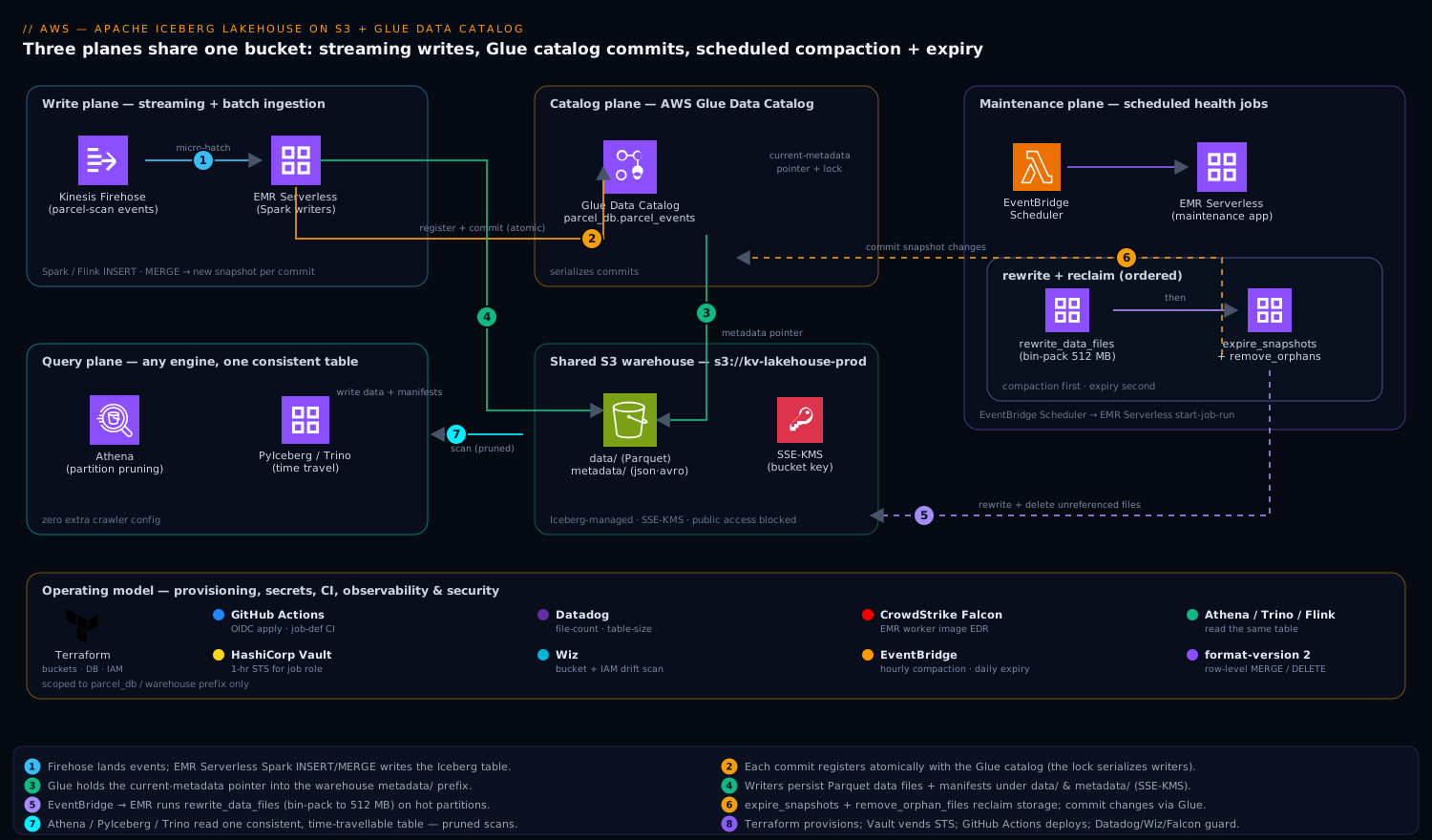
Three planes share one bucket. The write plane is your streaming or batch ingestion — Spark/Flink jobs that INSERT/MERGE into the Iceberg table, each commit creating a new snapshot. The catalog plane is the AWS Glue Data Catalog, which holds the table’s current-metadata pointer and acts as the lock that serializes those commits. The maintenance plane is a pair of scheduled jobs — compaction and expiry — that rewrite many small files into few large ones and then delete the snapshots and orphaned data files nobody references anymore. The supporting cast is the operating model around it: Terraform provisions the buckets, Glue database, and IAM roles; HashiCorp Vault issues the short-lived AWS credentials the maintenance jobs assume so no long-lived keys sit in CI; GitHub Actions runs the table-DDL and job-definition pipeline; Datadog scrapes the per-snapshot file-count and table-size metrics so the small-file problem can never sneak back; Wiz continuously scans the warehouse bucket for public-exposure or over-broad-IAM drift; and CrowdStrike Falcon runs on the EMR Serverless worker images for runtime threat detection. Where each fits is called out in the steps below.
Lay the bucket out so the three planes never collide:
s3://kv-lakehouse-prod/
  warehouse/                # Iceberg-managed: data/ and metadata/ per table
    parcel_db/
      parcel_events/
        data/               # Parquet data files (Iceberg writes these)
        metadata/           # *.metadata.json, snap-*.avro, manifests
  _scratch/                 # Spark/EMR temp + spark-events logs (lifecycle-expired)
1. Provision the bucket, Glue database, and IAM role with Terraform
Provision the durable pieces as code so the warehouse, catalog database, and the role the jobs assume are reviewable and reproducible. Keep this in your infra repo and let GitHub Actions apply it via OIDC — no stored AWS keys.
# iceberg.tf
resource "aws_s3_bucket" "lakehouse" {
  bucket = "kv-lakehouse-prod"
}

resource "aws_s3_bucket_server_side_encryption_configuration" "lakehouse" {
  bucket = aws_s3_bucket.lakehouse.id
  rule {
    apply_server_side_encryption_by_default { sse_algorithm = "aws:kms" }
    bucket_key_enabled = true
  }
}

# Block ALL public access — Wiz alerts if this ever drifts open.
resource "aws_s3_bucket_public_access_block" "lakehouse" {
  bucket                  = aws_s3_bucket.lakehouse.id
  block_public_acls       = true
  block_public_policy     = true
  ignore_public_acls      = true
  restrict_public_buckets = true
}

# Expire only the scratch prefix; never touch warehouse/ (Iceberg owns deletes).
resource "aws_s3_bucket_lifecycle_configuration" "lakehouse" {
  bucket = aws_s3_bucket.lakehouse.id
  rule {
    id     = "expire-scratch"
    status = "Enabled"
    filter { prefix = "_scratch/" }
    expiration { days = 3 }
  }
}

resource "aws_glue_catalog_database" "parcel_db" {
  name        = "parcel_db"
  location_uri = "s3://kv-lakehouse-prod/warehouse/parcel_db"
}
The IAM role the Spark/EMR jobs assume needs S3 access to the warehouse prefix and Glue catalog access scoped to this database only — not glue:* on *:
data "aws_iam_policy_document" "iceberg_rw" {
  statement {
    sid     = "S3Warehouse"
    actions = ["s3:GetObject", "s3:PutObject", "s3:DeleteObject", "s3:ListBucket"]
    resources = [
      aws_s3_bucket.lakehouse.arn,
      "${aws_s3_bucket.lakehouse.arn}/warehouse/*",
      "${aws_s3_bucket.lakehouse.arn}/_scratch/*",
    ]
  }
  statement {
    sid     = "GlueCatalog"
    actions = [
      "glue:GetDatabase", "glue:GetTable", "glue:GetTables",
      "glue:CreateTable", "glue:UpdateTable", "glue:GetPartitions",
    ]
    resources = [
      "arn:aws:glue:ap-south-1:${data.aws_caller_identity.me.account_id}:catalog",
      "arn:aws:glue:ap-south-1:${data.aws_caller_identity.me.account_id}:database/parcel_db",
      "arn:aws:glue:ap-south-1:${data.aws_caller_identity.me.account_id}:table/parcel_db/*",
    ]
  }
}
In production the maintenance jobs do not hold this role’s keys directly; HashiCorp Vault’s AWS secrets engine vends a 1-hour STS credential against this role at job start, so a leaked CI log never exposes a usable key.
2. Create an EMR Serverless application with the Iceberg runtime
EMR Serverless gives you Spark with the Iceberg jars preloaded and no cluster to babysit — ideal for the spiky, scheduled maintenance jobs. Create one application and reuse it for both writes and maintenance.
aws emr-serverless create-application \
  --name iceberg-maintenance \
  --release-label emr-7.5.0 \
  --type SPARK \
  --region ap-south-1 \
  --runtime-configuration '[
    {
      "classification": "spark-defaults",
      "properties": {
        "spark.sql.extensions": "org.apache.iceberg.spark.extensions.IcebergSparkSessionExtensions",
        "spark.sql.catalog.glue": "org.apache.iceberg.spark.SparkCatalog",
        "spark.sql.catalog.glue.catalog-impl": "org.apache.iceberg.aws.glue.GlueCatalog",
        "spark.sql.catalog.glue.warehouse": "s3://kv-lakehouse-prod/warehouse",
        "spark.sql.catalog.glue.io-impl": "org.apache.iceberg.aws.s3.S3FileIO"
      }
    }
  ]'
The four catalog properties are the whole game: they register a Spark catalog named glue backed by Iceberg’s GlueCatalog implementation, point it at the S3 warehouse, and use S3FileIO for fast, dependency-light S3 access. Note the application ID it returns — you will pass it to every start-job-run.
The worker image EMR Serverless runs carries a CrowdStrike Falcon sensor baked in via a custom image, so the compute executing your SQL is under the same runtime EDR as the rest of the fleet; detections flow to the SOC.
3. Create the partitioned Iceberg table
Run this DDL once. Submit it as a SQL file to the EMR Serverless app, or paste it into a Spark SQL shell with the same catalog config. The critical choices are hidden partitioning and the write-distribution properties.
CREATE TABLE glue.parcel_db.parcel_events (
    event_id      STRING,
    parcel_id     STRING,
    customer_id   STRING,
    event_type    STRING,
    facility_code STRING,
    event_ts      TIMESTAMP,
    payload       STRING
)
USING iceberg
PARTITIONED BY (days(event_ts), bucket(16, customer_id))
TBLPROPERTIES (
    'format-version'                      = '2',
    'write.parquet.compression-codec'     = 'zstd',
    'write.target-file-size-bytes'        = '536870912',   -- 512 MB target
    'write.distribution-mode'             = 'hash',
    'write.metadata.delete-after-commit.enabled' = 'true',
    'write.metadata.previous-versions-max'       = '20'
);
What each choice buys you:
days(event_ts)is a hidden partition transform. Queries filter onevent_tsnaturally (WHERE event_ts >= '2026-06-01') and Iceberg prunes partitions automatically — nodt=2026-06-01column to maintain and no chance of a query forgetting the partition predicate. This alone kills the Glue-crawler-per-partition pain from the intro.bucket(16, customer_id)hash-distributes by customer into 16 buckets so a per-customer GDPRDELETEtouches a bounded slice, and writes spread evenly instead of hot-spotting one parcel-heavy customer.format-version = 2enables row-level deletes (merge-on-read), which is what makesDELETE/MERGElegal without rewriting whole files.write.distribution-mode = hashmakes Spark shuffle by partition before writing, producing a few large files per partition instead of one small file per task — the structural fix for the small-file problem, applied at write time so compaction has less to clean up.
Register the table once and the Glue Data Catalog holds the pointer; Athena, Trino, and Flink now all see it with zero extra crawler config.
4. Write data and confirm snapshots accumulate
Point your ingestion at the table. For the streaming case, a Flink or Spark Structured Streaming job appends micro-batches; for backfill, a simple INSERT ... SELECT from the raw landing table works. A representative MERGE that upserts late-arriving corrections:
MERGE INTO glue.parcel_db.parcel_events t
USING raw.parcel_events_staging s
ON t.event_id = s.event_id
WHEN MATCHED THEN UPDATE SET *
WHEN NOT MATCHED THEN INSERT *;
Every commit writes a new snapshot. Inspect the metadata tables Iceberg exposes — this is your window into table health:
-- How many snapshots, and how fast are they piling up?
SELECT committed_at, snapshot_id, operation,
       summary['added-data-files']   AS added,
       summary['total-data-files']   AS total_files
FROM glue.parcel_db.parcel_events.snapshots
ORDER BY committed_at DESC LIMIT 10;

-- Distribution of file sizes — small files are the enemy.
SELECT partition,
       count(*)                       AS file_count,
       round(avg(file_size_in_bytes)/1048576, 1) AS avg_mb
FROM glue.parcel_db.parcel_events.files
GROUP BY partition ORDER BY file_count DESC LIMIT 20;
If avg_mb is in the low single digits and file_count per partition is in the thousands, you have confirmed the problem compaction exists to solve. Push total_files and the partition file-count to Datadog as a gauge from this query so the small-file regression is a monitored metric, not a surprise the next time queries slow down.
5. Schedule compaction (bin-pack rewrite)
Compaction rewrites the many small Parquet files in a partition into few large ones, and folds merge-on-read delete files back into the data. Iceberg ships this as the rewrite_data_files stored procedure. Put it in a SQL file and schedule it.
CALL glue.system.rewrite_data_files(
  table => 'parcel_db.parcel_events',
  strategy => 'binpack',
  options => map(
    'target-file-size-bytes', '536870912',   -- 512 MB, matches the table prop
    'min-input-files',        '5',            -- only rewrite where it pays off
    'max-concurrent-file-group-rewrites', '8',
    'partial-progress.enabled', 'true',       -- commit groups as they finish
    'rewrite-all',            'false'         -- skip already-optimal partitions
  ),
  where => 'event_ts >= current_date - INTERVAL 2 DAYS'   -- only hot partitions
);
Two non-obvious flags carry the load. partial-progress.enabled = true commits each file group as it completes instead of one giant all-or-nothing commit, so a failure midway through a billion-row partition does not lose hours of work. The where predicate scopes the rewrite to recently written partitions — old partitions are already compacted and rewriting them burns money for nothing. Run the hot-partition pass hourly and a full sweep (drop the where) weekly.
Submit it to EMR Serverless on a schedule (EventBridge Scheduler → EMR Serverless start-job-run):
aws emr-serverless start-job-run \
  --application-id "$APP_ID" \
  --execution-role-arn "$JOB_ROLE_ARN" \
  --name "compaction-hourly" \
  --region ap-south-1 \
  --job-driver '{
    "sparkSubmit": {
      "entryPoint": "s3://kv-lakehouse-prod/_scratch/jobs/compaction.sql",
      "sparkSubmitParameters": "--class org.apache.spark.sql.hive.thriftserver.SparkSQLCLIDriver"
    }
  }'
The $JOB_ROLE_ARN is the Vault-vended STS credential from step 1, and the whole job definition is version-controlled and deployed through GitHub Actions, so a change to the compaction cadence goes through review.
6. Schedule snapshot expiry and orphan cleanup
Compaction creates new files but leaves the old small files reachable by historical snapshots — so until you expire those snapshots, compaction makes storage go up, not down. Expiry is the other half of the job and must run after compaction.
-- 1. Expire snapshots older than 7 days, keep at least the last 10.
CALL glue.system.expire_snapshots(
  table => 'parcel_db.parcel_events',
  older_than => TIMESTAMP '2026-06-03 00:00:00',
  retain_last => 10,
  max_concurrent_deletes => 8
);

-- 2. Delete data/metadata files no snapshot references (belt and braces).
CALL glue.system.remove_orphan_files(
  table => 'parcel_db.parcel_events',
  older_than => TIMESTAMP '2026-06-09 00:00:00'   -- only files >1 day old
);
expire_snapshots is the one that actually reclaims storage and collapses your time-travel window to seven days; it physically deletes the data files only the expired snapshots referenced. remove_orphan_files is the safety net for files left behind by failed jobs that never committed — keep its older_than at least a day in the past so it can never race a live write and delete a file a commit-in-flight is about to reference. Run expiry after the daily compaction pass, never before.
Schedule it as a second EventBridge → EMR Serverless job, daily, named expiry-daily. Emit the post-expiry table size and snapshot count to Datadog; a flat or growing line after expiry runs means a misconfiguration (usually retain_last set too high or a downstream reader holding old snapshots open).
Validation
Confirm the deployment is correct and the maintenance loop is actually working — not just running.
# Glue holds the table and points at a real metadata location.
aws glue get-table --database-name parcel_db --name parcel_events \
  --region ap-south-1 \
  --query 'Table.Parameters.metadata_location'
Then prove the table is independently readable with PyIceberg — no Spark, just the catalog — and that file health improved after compaction:
# pip install "pyiceberg[glue,s3fs]"
from pyiceberg.catalog.glue import GlueCatalog

cat = GlueCatalog("glue", **{"warehouse": "s3://kv-lakehouse-prod/warehouse"})
tbl = cat.load_table("parcel_db.parcel_events")

# Current snapshot + total data-file count after compaction.
print("snapshot:", tbl.current_snapshot().snapshot_id)
print("files:", tbl.inspect.files().num_rows)

# Time travel: read the table as of an older snapshot id.
scan = tbl.scan(snapshot_id=<older_snapshot_id>)
print("rows then:", scan.to_arrow().num_rows)
Finally, query through Athena to confirm the partition pruning that justifies the whole exercise:
SELECT count(*) FROM parcel_db.parcel_events
WHERE event_ts >= DATE '2026-06-09';
-- Check "Data scanned" in the Athena result panel: it should be a few
-- hundred MB (one day's partitions), not the whole table.
Pass criteria: Glue returns a metadata_location, PyIceberg reads the table and time-travels, post-compaction avg_mb per partition is near 512 MB with file counts in the tens, and Athena’s bytes-scanned reflects one day, not all history.
Rollback and teardown
Iceberg’s killer rollback feature is built in: a bad write is undone by pointing the table at a previous snapshot, no restore needed.
-- Roll the table back to a known-good snapshot (e.g. before a bad MERGE).
CALL glue.system.rollback_to_snapshot(
  table => 'parcel_db.parcel_events',
  snapshot_id => <good_snapshot_id>
);
Full teardown, in order — drop the table (which also removes the data when PURGE is used), delete the application, then the bucket and Terraform-managed infra:
# Drop the table AND its underlying S3 files.
# In Spark SQL: DROP TABLE glue.parcel_db.parcel_events PURGE;

aws emr-serverless delete-application --application-id "$APP_ID" --region ap-south-1
aws s3 rm s3://kv-lakehouse-prod/warehouse/parcel_db/parcel_events --recursive
# terraform destroy -target=aws_glue_catalog_database.parcel_db ...
If you provisioned with Terraform, prefer terraform destroy over manual deletes so state stays consistent; delete the table with PURGE first, because Terraform destroying the bucket will not remove the Iceberg data Glue does not track per-object.
Common pitfalls
- Compaction without expiry. The number-one surprise: storage and cost climb after you enable compaction because old files are still pinned by snapshots. Expiry is mandatory, not optional, and runs second.
remove_orphan_fileswith a recentolder_than. Set it to “now” and a concurrent write loses a file mid-commit. Always keep it at least 24 hours behind real time.- Manual S3 deletes inside
warehouse/. Deleting a Parquet file directly bypasses Iceberg’s metadata and corrupts the table — every delete must go throughDELETE,expire_snapshots, orremove_orphan_files. The S3 lifecycle rule in step 1 is deliberately scoped to_scratch/only for exactly this reason. - Forgetting
write.distribution-mode = hash. Without it, each Spark task writes its own tiny file and you manufacture the small-file problem on every write, leaving compaction to clean up a mess you could have avoided. - Two writers, no catalog lock illusion. The Glue catalog serializes commits, but a writer using a stale metadata pointer will get a commit conflict and must retry — make sure your job has
commit.retry.num-retriesset (default 4) and does not swallow the exception. MERGEon a v1 table. Row-level operations requireformat-version = 2; on v1 they silently rewrite whole files or fail. Set it at create time.
Security notes
The warehouse bucket is private by construction — the Terraform block_public_access settings in step 1 close all four public vectors, and Wiz continuously scans the bucket and the job IAM role, alerting the moment posture drifts to public exposure or the role’s policy widens beyond the parcel_db scope. Encryption is SSE-KMS with a bucket key to cut KMS request cost. Credentials never live long: HashiCorp Vault’s AWS secrets engine vends 1-hour STS tokens for the job role so CI logs and EventBridge targets hold no usable key, and the EMR Serverless workers run a CrowdStrike Falcon sensor for runtime threat detection on the compute that executes your SQL. Scope the Glue and S3 IAM to this database and prefix only, never glue:*/s3:* on *.
Cost notes
Three levers dominate. Compaction + expiry together are the headline saving — they take a thousands-of-small-files partition down to a handful of 512 MB files, which both shrinks S3 PUT/GET and LIST request charges and slashes Athena’s bytes-scanned (and therefore per-query cost) since pruning works on far fewer files. zstd compression typically beats Snappy by 20-30% on JSON-shaped event payloads, paid once at write/compaction time. EMR Serverless bills only for the vCPU-seconds the scheduled jobs actually run, so the maintenance plane costs cents when idle. Watch the metrics in Datadog — table size after expiry, average file size, and Athena bytes-scanned per dashboard query — because the cost win is only real if expiry is actually reclaiming storage; a growing table size after expiry runs is the signal that your time-travel retention is set too generously and you are paying to keep history nobody queries.
Going deeper
The steps above are a working deployment. This section is for the reader who owns it in production — the internals, the managed alternatives, and the failure modes that only show up at scale.
Inside a commit: optimistic concurrency, not locks
Iceberg on Glue uses optimistic concurrency, not a mutex. A writer reads the current metadata_location, builds a new metadata file, then asks Glue to update the table’s pointer conditionally — succeed only if the pointer still holds the value the writer started from. The first writer wins; a second writer that started from the now-stale pointer gets a conflict, re-reads the winning snapshot, re-applies its changes on top, and retries. This is why modern Iceberg on Glue needs no separate DynamoDB lock table (the old DynamoDbLockManager is legacy) — the atomic conditional update in Glue is the lock.
The knob that matters is retry behaviour. Under high write concurrency, tune:
'commit.retry.num-retries'      = '4'      -- default; raise for many concurrent writers
'commit.retry.min-wait-ms'      = '100'
'commit.retry.max-wait-ms'      = '60000'
Never catch and swallow the commit exception — a “successful” job that silently lost its commit is how you get missing data with no error. Conflicts are normal and expected; retries are the design, not a bug.
Compaction internals and the strategies beyond bin-pack
rewrite_data_files has more range than the bin-pack call in step 5:
strategy => 'sort'rewrites files sorted by one or more columns, so later queries prune on those columns far better. Use it when a dominant filter (sayfacility_code) isn’t the partition key.- Z-order (
sort_order => 'zorder(facility_code, event_type)') interleaves multiple columns so queries filtering on any of them prune well — ideal for multi-dimensional access patterns. rewrite_position_delete_filescompacts the delete files a merge-on-read table accumulates; on a delete-heavy MOR table this matters as much as data-file compaction, because unmerged delete files are read on every scan.rewrite_manifestsrebuilds bloated manifest metadata when a table has accumulated thousands of small manifests (common after many tiny streaming commits) — a query that is slow to plan (not scan) usually needs this.
Two write-time settings decide how much compaction you’ll even need. write.distribution-mode = hash (set in step 3) shuffles rows to the right partition before writing, so each partition gets a few big files instead of one small file per task. When you deliberately don’t set a distribution mode — for lowest write latency — Spark needs fanout writers (spark.sql.iceberg.fanout.enabled = true) to hold many partition writers open at once, at the cost of producing more, smaller files that compaction must later clean up. It is a latency-vs-file-count trade, and compaction is how you buy back the file count.
Managed maintenance: Glue auto-compaction and Amazon S3 Tables
Hand-rolling EMR Serverless jobs (steps 5–6) gives you total control, but AWS now offers two lower-effort paths:
- Glue Data Catalog table optimization runs automatic compaction for Iceberg tables registered in Glue: you enable it on the table, hand it an IAM role, and Glue continuously bin-packs small files with no job to schedule. It has since grown snapshot retention and orphan-file deletion optimizers too — effectively steps 5 and 6 as a managed toggle. It also supports sort and z-order compaction for tables with a defined sort order.
- Amazon S3 Tables is a purpose-built S3 bucket type (a table bucket) that stores Iceberg tables and runs continuous maintenance — compaction, snapshot expiration, and unreferenced-file removal — for you, exposed through the S3 Tables catalog. Table buckets integrate with AWS analytics through catalog federation into the Glue Data Catalog and are governed by Lake Formation. For a greenfield streaming table, S3 Tables can replace this entire maintenance plane; the trade-off is less control over exactly when and how compaction runs, and region availability you should confirm before committing.
Rule of thumb: reach for S3 Tables on new workloads that want maintenance to just happen; use Glue auto-compaction to add managed upkeep to an existing Glue-catalog table; keep the EMR Serverless jobs when you need bespoke scheduling, custom sort orders, or to compact only specific partitions on your own cadence — as this lesson’s where => 'event_ts >= current_date - INTERVAL 2 DAYS' pass does.
Athena and Firehose: SQL-native paths
You don’t need Spark to maintain an Iceberg table. Athena (engine v3) speaks Iceberg DML and maintenance directly:
-- Compaction, the Athena way (bin-pack rewrite).
OPTIMIZE parcel_db.parcel_events REWRITE DATA USING BIN_PACK
WHERE event_ts >= DATE '2026-06-09';

-- Expiry + orphan cleanup, the Athena way. Governed by table properties:
--   vacuum_max_snapshot_age_seconds, vacuum_min_snapshots_to_keep
VACUUM parcel_db.parcel_events;
That makes a serverless, no-Spark maintenance loop possible entirely from scheduled Athena queries — a legitimate alternative to EMR for smaller tables. On the ingestion side, Kinesis Data Firehose can now deliver directly into Apache Iceberg tables, routing records to different tables and doing inserts/updates without a Spark streaming job — worth knowing since the intro’s raw-JSON Firehose hop is exactly the pattern Firehose-to-Iceberg collapses.
Lake Formation: fine-grained access over Iceberg
IAM scopes which prefixes and catalog objects a principal can touch; AWS Lake Formation adds column-, row-, and cell-level control on top. Register the table’s S3 location with Lake Formation, then grant SELECT on specific columns or attach a row filter (e.g. a facility can see only its own rows) — enforced consistently across Athena, EMR, and Redshift Spectrum. For a table holding customer_id and delivery payloads, this is how you let analysts query aggregates while masking PII columns, and it composes with the least-privilege IAM in step 1 rather than replacing it (see IAM least privilege & permission boundaries). S3 Tables are governed through Lake Formation the same way.
Performance, scale, and cost failure modes
- Metadata blow-up. Thousands of snapshots or manifests slow planning even when scans are fast. Expiry (step 6) and
rewrite_manifestskeep the metadata small;write.metadata.previous-versions-max = 20(step 3) caps retainedmetadata.jsonfiles. - The MOR delete-file trap. Frequent small deletes on a merge-on-read table pile up delete files that every reader must apply. If read latency creeps up despite data compaction, you’re missing
rewrite_position_delete_files. - Over-partitioning. A partition per high-cardinality value (raw
customer_id, notbucket(16, …)) manufactures the small-file problem in metadata form. Partition for pruning, bucket for spread. - Orphan accumulation and the safety window. Failed jobs leave uncommitted files.
remove_orphan_filescleans them, but itsolder_thanmust stay ≥24 h behind real time or it can delete a file an in-flight commit is about to reference. - KMS request cost. SSE-KMS charges per request; the bucket key in step 1 collapses many object requests into far fewer KMS calls — essential at millions of files. See KMS envelope encryption for why the bucket key changes the cost curve.
- Retention set too generously. Every extra day of
retain_last/older_thanis S3 storage you pay for to keep history nobody queries — the flat-line-after-expiry signal the Cost notes call out.
Version and API caveats
format-version. v2 is the standard for row-level deletes and what this lesson uses. Spec v3 (deletion vectors, new types) is emerging; engine support is uneven, so confirm every engine that touches the table supports it before settingformat-version = 3.- Runtime jars. Match the Iceberg runtime to Spark:
iceberg-spark-runtime-3.5_2.12for Spark 3.5. EMR 7.x and Glue 5.0 bundle compatible builds; a mismatched jar is the usual cause of “class not found: GlueCatalog.” - Catalog choice.
GlueCatalogis used here; the REST catalog and S3 Tables catalog are alternatives with different lock/federation behaviour. Don’t mix two catalog implementations pointing at one table. - Region availability. Newer managed features (S3 Tables, some Glue optimizers) roll out region by region — verify in your region (
ap-south-1here) before designing around them.
Practice challenges
Work these against a scratch table (glue.parcel_db.parcel_events or a copy). They escalate from reading metadata to running managed maintenance. Commands are representative — adjust ARNs, IDs, and timestamps to your environment.
1. (Beginner) Prove the small-file problem exists. Query the metadata tables to show file counts and average file size per partition, then say which number tells you compaction is needed.
<details> <summary>Solution</summary>
SELECT partition,
       count(*)                                    AS file_count,
       round(avg(file_size_in_bytes)/1048576, 1)   AS avg_mb
FROM glue.parcel_db.parcel_events.files
GROUP BY partition
ORDER BY file_count DESC LIMIT 20;
Thousands of files at low-single-digit avg_mb is the small-file problem: pruning still works, but per-file open/planning overhead and S3 request cost dominate. Why: the .files metadata table exposes exactly what compaction targets, so you measure the problem before spending compute on it.
</details>
2. (Beginner) Evolve the schema without a rewrite. Add a route_code STRING column and confirm that data written before the change still reads (as NULL).
<details> <summary>Solution</summary>
ALTER TABLE glue.parcel_db.parcel_events ADD COLUMN route_code STRING;
SELECT event_id, route_code
FROM glue.parcel_db.parcel_events
WHERE event_ts < current_date LIMIT 5;   -- old rows return route_code = NULL
Why: Iceberg tracks columns by stable field ID, so old data files are read back with the new column filled as NULL — no table rewrite, proving schema evolution is a metadata-only operation.
</details>
3. (Intermediate) Run a bounded per-customer GDPR delete. Delete one customer’s rows and confirm it was a merge-on-read operation (a delete file was written, not a full rewrite).
<details> <summary>Solution</summary>
DELETE FROM glue.parcel_db.parcel_events WHERE customer_id = 'CUST-4817';

-- Inspect delete files created by the operation:
SELECT content, count(*) AS files
FROM glue.parcel_db.parcel_events.all_files
GROUP BY content;   -- content=1 (position) or 2 (equality) => merge-on-read delete files
Why: on a format-version = 2 MOR table the delete writes small delete files instead of rewriting data — cheap now, but it adds read cost until compaction folds them in, which is exactly what step 5 addresses. The bucket(16, customer_id) partitioning keeps the delete bounded to a few buckets.
</details>
4. (Intermediate) Compact only the hot partitions and measure the win. Run compaction over the last two days, then re-run challenge 1 and compare avg_mb.
<details> <summary>Solution</summary>
CALL glue.system.rewrite_data_files(
  table => 'parcel_db.parcel_events',
  strategy => 'binpack',
  options => map('target-file-size-bytes','536870912','min-input-files','5',
                 'partial-progress.enabled','true'),
  where => 'event_ts >= current_date - INTERVAL 2 DAYS'
);
-- Athena equivalent:
-- OPTIMIZE parcel_db.parcel_events REWRITE DATA USING BIN_PACK
--   WHERE event_ts >= current_date - INTERVAL '2' DAY;
Why: scoping with where avoids rewriting already-optimal cold partitions, and re-running the .files query should show avg_mb climbing toward 512 with file counts dropping into the tens — the measurable payoff.
</details>
5. (Advanced) Time-travel, then roll back. Capture the current snapshot id, do a deliberately bad UPDATE, read the table as of the earlier snapshot, then roll the table back and explain what physically moved.
<details> <summary>Solution</summary>
SELECT snapshot_id FROM glue.parcel_db.parcel_events.snapshots
ORDER BY committed_at DESC LIMIT 1;                       -- note <good_id>

UPDATE glue.parcel_db.parcel_events SET facility_code = 'WRONG';  -- oops

SELECT count(*) FROM glue.parcel_db.parcel_events
FOR SYSTEM_VERSION AS OF <good_id>;                      -- reads pre-bad state

CALL glue.system.rollback_to_snapshot(
  table => 'parcel_db.parcel_events', snapshot_id => <good_id>);
Why: rollback only rewrites metadata.json and swaps the Glue metadata_location pointer back to the good snapshot — no data restore. It works only while that snapshot is still retained, which is why expiry retention and your rollback window are the same setting.
</details>
6. (Advanced) Replace the DIY maintenance plane with managed upkeep. Instead of the EMR compaction/expiry jobs, enable Glue automatic compaction on the table (or migrate the workload to an S3 Tables bucket) and state the trade-off you accept.
<details> <summary>Solution</summary>
# Enable Glue Data Catalog automatic compaction for the Iceberg table.
aws glue create-table-optimizer \
  --catalog-id 123456789012 \
  --database-name parcel_db \
  --table-name parcel_events \
  --type compaction \
  --table-optimizer-configuration \
      'roleArn=arn:aws:iam::123456789012:role/GlueTableOptimizerRole,enabled=true' \
  --region ap-south-1
# (Repeat with --type retention and --type orphan_file_deletion for steps 5–6 as managed toggles.)
Why: managed compaction removes the EventBridge + EMR scheduling you built, at the cost of control over when and how it runs; choose it when “maintenance just happens” beats bespoke cadence — and prefer an S3 Tables bucket when the whole table is greenfield. </details>
Common beginner mistakes
These are conceptual traps — wrong mental models, not operational slip-ups (those live in Common pitfalls above). Each is the misconception, why it misleads, and the model to hold instead.
- “Iceberg is a database / query engine.” It is neither. Iceberg is a table format — a spec for the files that describe your data. You still bring Athena, Spark, or Trino to run SQL. Right model: Iceberg is the document format; the engine is the reader.
- “Hidden partitioning means the table isn’t partitioned.” It is fully partitioned — you just don’t add or query a physical
dtcolumn. The transform (days(event_ts)) is recorded in the spec and pruned automatically. Right model: the partition is computed and hidden, not absent. - “Time travel keeps my history safe forever, for free.” Retained snapshots pin their files and cost S3 storage;
expire_snapshotsdeletes the files only-old-snapshots reference and collapses your time-travel window. Right model: history is a paid, bounded retention setting, not a free archive. - “MERGE and DELETE are instant, like in a real database.” On merge-on-read they write delete files that slow every later read until compaction folds them in; on copy-on-write they rewrite whole data files. Right model: row-level changes are cheap to issue and paid for later — compaction is the tax.
- “I still need to run the Glue crawler to pick up new partitions.” No — the Iceberg catalog already tracks schema and partitions; the crawler is for Hive-style tables. Running one against an Iceberg table wastes money and can confuse tooling. Right model: the catalog is the source of truth; no discovery step.
- “More partitions always means faster queries.” Over-partitioning (a partition per high-cardinality value) recreates the small-file problem as thousands of tiny files and bloated metadata. Right model: partition coarsely for pruning (
days), andbucket(N, …)to spread high-cardinality keys.
Glossary
- Apache Iceberg — an open table format: a spec for metadata files that turn a pile of Parquet files on S3 into a transactional, versioned, evolvable table.
- Table format — the agreed way engines find, read, and safely change a table’s files (Iceberg, Delta, Hudi). Distinct from the query engine that runs SQL.
- Query engine — the compute that executes SQL over the table (Athena, EMR Spark, Trino, Flink). Interchangeable; the format stays the same.
- AWS Glue Data Catalog — AWS’s managed metastore; here it is Iceberg’s catalog, holding the current-metadata pointer and serializing commits.
- Catalog (Iceberg sense) — the component that atomically answers “what is the current metadata file for this table?” — Glue, REST, or S3 Tables catalog.
- Metadata file (
*.metadata.json) — the table’s table-of-contents: schemas, partition specs, sort orders, and the snapshot list. A new one is written every commit. - Manifest list (
snap-*.avro) — a snapshot’s index of manifests, with partition-range summaries for fast skipping. - Manifest (
*.avro) — lists data/delete files with per-column min/max, null counts, and row counts; these stats drive file pruning. - Data file (
*.parquet) — the actual rows Iceberg writes and Athena scans. - Delete file — in merge-on-read, a small file marking removed rows (position or equality deletes) without rewriting data.
- Snapshot — an immutable picture of the whole table at one commit, identified by
snapshot_id; the unit of time travel and rollback. - Time travel — reading the table as of an older snapshot id or timestamp.
- Hidden partitioning — partitioning by a transform over a real column (
days(event_ts)); queries filter the source column and Iceberg prunes without a physical partition column. - Partition transform — the function that derives a partition value:
identity,year/month/day/hour,bucket(N, col),truncate(W, col). - Partition spec — the recorded set of transforms defining the table’s current partitioning.
- Schema evolution — safely adding, dropping, renaming, reordering, or widening columns via stable field IDs, with no rewrite.
- Partition evolution — changing the partition spec without rewriting old data; old and new specs coexist and are planned together.
- Copy-on-write (COW) — deletes/updates rewrite whole data files; fast reads, expensive writes.
- Merge-on-read (MOR) — deletes/updates write delete files merged at read time; fast writes, reads that need compaction to stay fast.
- Compaction / bin-pack — rewriting many small files into few large ones (
rewrite_data_files, AthenaOPTIMIZE) to fix the small-file problem. - Sort / z-order compaction — compaction that also orders rows so queries prune better on non-partition columns.
- Snapshot expiry — deleting old snapshots and the files only they referenced (
expire_snapshots, AthenaVACUUM); the step that actually reclaims storage. - Orphan files — data/metadata files no snapshot references (usually from failed jobs); removed by
remove_orphan_fileswith a safety window. - Small-file problem — too many tiny files, inflating planning time and S3 request cost; the core problem compaction solves.
- S3FileIO — Iceberg’s native, dependency-light S3 access layer (
org.apache.iceberg.aws.s3.S3FileIO), faster than Hadoop S3A. - EMR Serverless — on-demand Spark with no cluster to manage; billed per vCPU-second, ideal for scheduled maintenance jobs.
- PyIceberg — a Python client that reads/maintains Iceberg tables via the catalog with no Spark.
format-version— the Iceberg spec version of the table; v2 enables row-level deletes; v3 is emerging.write.distribution-mode— how a writer shuffles rows before writing (none/hash/range);hashgroups by partition to avoid tiny files.- OPTIMIZE / VACUUM (Athena) — SQL-native compaction and expiry+orphan-cleanup for Iceberg tables in Athena engine v3.
- Optimistic concurrency / commit conflict — the conditional-pointer-swap commit model; a losing writer retries against the new snapshot.
- AWS Lake Formation — fine-grained (column/row/cell) access control layered over IAM for cataloged tables, enforced across engines.
- Amazon S3 Tables — purpose-built S3 table buckets for Iceberg with built-in continuous compaction, snapshot management, and unreferenced-file removal, exposed via the S3 Tables catalog.