Relational instincts are the single biggest reason DynamoDB projects go sideways. You normalize entities into tables, then discover the only join DynamoDB offers is the one you pre-compute at write time. Single-table design is the discipline of collapsing many entity types into one physical table so the queries your application runs become single-partition reads. It is not about saving on table count — it is about co-locating related items so a Query returns a parent and its children in one round trip, at single-digit-millisecond latency, regardless of table size.
This is the process I follow on every greenfield DynamoDB design: enumerate access patterns first, design keys to satisfy them, overload indexes, then defend the schema against hot partitions and the 400 KB item ceiling. The order matters. Start from the entities and you will refactor; start from the queries and you will ship. By the end you will be able to take an access-pattern list, derive a key schema and a set of overloaded GSIs that serve every read in one call, and prove the model against real consumed-capacity numbers rather than intuition.
This article is a reference you will return to mid-design and mid-incident, so the moving parts — key components, GSI projection choices, capacity-mode trade-offs, error/limit codes, and a symptom→cause→confirm→fix playbook — are all laid out as scannable tables alongside the prose and the aws/Terraform/Python snippets. Read the prose once to build the mental model, then keep the tables open when you are actually modeling.
What problem this solves
The pain DynamoDB single-table design addresses is specific: a NoSQL store that punishes you for thinking relationally. In a relational database you model the entities, normalize, and let the query planner figure out joins at read time. DynamoDB has no query planner and no server-side join. The only “join” is placement — items you decided at write time to store under the same partition key. If you model entities into separate tables the relational way, every screen that shows a parent and its children becomes two or three round trips, each its own network hop and its own capacity charge, and the “list all X for a Y” screens degrade into Scan operations that read the entire table and throw most of it away.
What breaks without this discipline: latency that climbs with table size instead of staying flat, capacity bills dominated by Scan-and-filter waste, and throttling that looks like insufficient capacity but is actually a hot key. Teams “fix” the throttling by raising provisioned capacity, the bill doubles, and the hot partition still throttles because the ceiling is per-partition, not per-table. Others discover the 400 KB item limit the day a rollup array finally crosses it in production, with a ValidationException and no graceful degradation.
Who hits this: anyone building a serverless or high-scale application on DynamoDB — multi-tenant SaaS, order/inventory systems, event logs, social graphs, session stores. It bites hardest on time-series workloads (the date-as-partition-key trap), mega-aggregate items (an order with thousands of line items, a shipment with thousands of scans), and any service whose access patterns were not written down before the keys were named. The fix is almost never “add capacity” — it is “make the keys do the selection the query needs.”
To frame the whole field before the deep dive, here is every failure class this article covers, the relational instinct that causes it, and the single-table move that prevents it:
| Failure class | The relational instinct behind it | What it costs in production | The single-table move |
|---|---|---|---|
| Multi-round-trip reads | Normalize entities into separate tables | 2–3 network hops + capacity per screen | Co-locate parent + children under one PK (item collection) |
Scan creep |
“Just filter the table” for a new pattern | RCU scales with table size, not result size | Design keys / add an overloaded GSI so KeyConditionExpression selects |
| Hot partition throttling | Key on something low-cardinality (date, status) | ThrottledRequests while table sits at 40% |
Write-shard the PK to fan across physical partitions |
| 400 KB item failure | Append to one growing attribute (array) | ValidationException with no fallback |
Model each increment as its own item (adjacency list) |
| GSI write bottleneck | Treat indexes as free | Under-provisioned GSI throttles the base table | Size the GSI to base write rate; narrow the projection |
| Stale data after a new GSI | Assume an index sees existing rows | Queries silently miss history | Idempotent, throttled backfill before you query |
Learning objectives
By the end of this article you can:
- Produce a complete access-pattern list — every read and write with its filter, sort order, and cardinality — and treat it as the design artifact the key schema is derived from.
- Compose a partition key and sort key with entity overloading and type prefixes so many entity types share one table and a single
Queryreturns an aggregate. - Build Global Secondary Indexes that use index overloading, sparse-index semantics, and the right projection (
KEYS_ONLY/INCLUDE/ALL) for each access shape. - Model one-to-many (adjacency list), hierarchies, and many-to-many relationships by placement and key-flips rather than runtime second reads.
- Diagnose and eliminate hot partitions with write-sharding sized to required throughput, and reason about the per-partition ~1,000 WCU / ~3,000 RCU ceiling versus adaptive capacity.
- Choose between on-demand and provisioned capacity by traffic shape, and pair provisioned with target-tracking auto scaling and a reserved floor.
- Enforce write-time invariants with condition expressions, optimistic concurrency, and
TransactWriteItems, and know what each costs. - Evolve a live schema without downtime using online GSI creation, idempotent throttled backfills, DynamoDB Streams, and export-to-S3 transforms.
Prerequisites & where this fits
You should already understand DynamoDB’s primitives: a table holds items (rows) made of attributes; an item is identified by a primary key that is either a single partition key or a composite partition key (PK) + sort key (SK); read capacity units (RCU) and write capacity units (WCU) meter throughput; and the API verbs are GetItem, PutItem, UpdateItem, DeleteItem, Query, Scan, BatchGetItem, BatchWriteItem, and TransactWriteItems/TransactGetItems. You should be comfortable running the AWS CLI, reading DynamoDB JSON (the {"S": "..."} typed form), and reasoning about eventual versus strong consistency.
This sits in the AWS data-modeling track and is the deep, prescriptive companion to the broader DynamoDB Deep Dive: Tables, Keys, Capacity, GSIs & Streams — that article surveys the service; this one is the schema-design craft. It pairs with DynamoDB Streams: Change Data Capture & Event-Driven Pipelines for the reshaping/reconciliation machinery, and the same partition-design principles transfer to Cosmos DB Partition Key Design & RU Optimization on Azure. Where this fits in the bigger picture: it is upstream of every serverless API you build on DynamoDB, because the key schema decides whether your Lambda handlers run one query or three.
A quick map of who owns which decision in a single-table design, so the right person reviews the right thing:
| Decision layer | What is decided here | Who usually owns it | What goes wrong if skipped |
|---|---|---|---|
| Access-pattern list | Every read/write, filter, sort, cardinality | Product + backend lead | Schema gets refactored after launch |
| Key schema (PK/SK) | Overloading, prefixes, item collections | Data modeler / senior backend | Multi-round-trip reads; Scan creep |
| GSI design | Overloading, sparseness, projection | Data modeler | Wrong access shape; write bottleneck |
| Capacity mode | On-demand vs provisioned + auto scaling | Backend + FinOps | Over-pay or throttle under spike |
| Hot-key defense | Write-sharding, fan-out reads | Senior backend | Per-partition throttling at peak |
| Schema evolution | Online GSI add, backfill, Streams | Platform / data eng | Downtime or stale index data |
Core concepts
Six mental models make every later decision obvious.
The schema is downstream of the queries. In DynamoDB you do not model entities and then query them; you enumerate the queries and then design keys that make each query a single-partition read. The access-pattern list — every read and write with its filter, sort order, and cardinality — is the artifact you review with the team. If you cannot serve an access pattern with one Query or GetItem, the schema is incomplete, not the application.
Filtering is not querying. A KeyConditionExpression selects items by key before reading them; a FilterExpression runs after the key query and before results return. Filtering reduces the payload you receive but never the capacity consumed or the items examined. Any pattern that can only be served by Scan + FilterExpression reads the whole table and pays for it — that is a modeling bug, not a tuning opportunity.
Entity overloading is the core trick. Name the keys generically (PK, SK) and encode the entity type into the value with a prefix (CUST#, ORDER#, ITEM#). Now different entity types coexist in one table, and a single partition can hold a parent row and all its child rows — an item collection — so one Query returns the aggregate. The same idea applied to a secondary index is index overloading: generic GSI1PK/GSI1SK that each entity populates with whatever it needs to be found by.
A GSI is an alternate, asynchronous view. A Global Secondary Index is a second (PK, SK) over the same items, maintained for you on every write with a small propagation delay (eventually consistent only). It has its own throughput and its own projected copy of attributes. Two GSI behaviors are load-bearing: a sparse index contains an item only if the item has both of that index’s key attributes (so you index a working set, not everything), and under provisioned mode an under-provisioned GSI can throttle the base table’s writes.
Partitions are physical and capped. DynamoDB hashes the partition key to choose a physical partition, and a single partition sustains roughly 1,000 WCU and 3,000 RCU. Exceed either on one key and you throttle even when table-level capacity is healthy. Adaptive capacity shifts throughput toward busy partitions and can isolate a single hot item, but it cannot exceed those per-partition limits — a key that needs more than ~1,000 WCU must spread across more than one partition-key value.
Hard limits are absolute. An item — all its attributes including names — cannot exceed 400 KB. A sort key value and a partition key value have their own size caps. A table allows at most 20 GSIs with one create/delete in flight at a time. These are not tunable; you model around them. The append-an-unbounded-array pattern is the classic 400 KB trap.
The vocabulary in one table
Before the deep sections, pin down every moving part. The glossary at the end repeats these for lookup; this table is the model side by side:
| Term | One-line definition | Where it lives | Why it matters to single-table design |
|---|---|---|---|
| Access pattern | One concrete read or write the app needs | Design doc | The thing the schema is derived from |
| Partition key (PK) | Hashed key choosing the physical partition | Item primary key | Decides co-location and hot-key risk |
| Sort key (SK) | Orders items within a partition | Item primary key | Enables range queries and adjacency lists |
| Entity overloading | Generic PK/SK + type prefixes |
Key naming convention | Lets many entities share one table |
| Item collection | All items sharing one PK | One physical partition | One Query returns parent + children |
| GSI | Alternate async (PK, SK) over the items | Table-level index | Serves a different access shape |
| Index overloading | Generic GSIxPK/GSIxSK per entity |
GSI key attributes | One index serves many logical patterns |
| Sparse index | Item indexed only if it has the keys | GSI semantics | Indexes a working set (e.g. open orders) |
| Projection | Which attributes a GSI copies | GSI definition | Drives index storage + write cost |
| Hot partition | One PK taking disproportionate traffic | Physical partition | Throttles at ~1,000 WCU / ~3,000 RCU |
| Write sharding | Suffixing the PK to fan writes | Key value | Spreads a high-write key across partitions |
| Adaptive capacity | Auto-shift of throughput to busy keys | Platform behavior | Smooths skew, can’t beat per-partition cap |
| Condition expression | A write that applies only if a predicate holds | Write request | Enforces invariants atomically |
TransactWriteItems |
All-or-nothing across ≤100 items | Write API | Multi-item invariants; costs 2× WCU |
Limits and quotas you model around
These are the hard numbers single-table design is engineered against — none are tunable, so the schema absorbs them. Keep this open when you size keys, shards, projections, and transactions:
| Limit / quota | Value | What it constrains | The single-table consequence |
|---|---|---|---|
| Item size | 400 KB (names + values) | One item’s total bytes | Append-style data → separate items |
| Per-partition write | ~1,000 WCU | Throughput on one physical partition | High-write keys must be sharded |
| Per-partition read | ~3,000 RCU | Read throughput on one partition | Hot read keys must be sharded/cached |
| Partition key length | up to 2,048 bytes | PK value size | Keep prefixes short |
| Sort key length | up to 1,024 bytes | SK value size | Bounded path depth in hierarchies |
| GSIs per table | 20 | Number of alternate indexes | Overload indexes to stay under it |
| LSIs per table | 5 (create-time only) | Local indexes | Rarely used in single-table design |
| LSI item-collection size | 10 GB per PK | Total of a partition + its LSIs | A reason to prefer GSIs |
TransactWriteItems items |
100 | Items per transaction | Big aggregates split or batch |
BatchWriteItem items |
25 | Items per batch call | Loop/paginate large writes |
Query/Scan page size |
1 MB | Bytes returned per call | Paginate with LastEvaluatedKey |
| Provisioned throughput decrease | limited per day | Scale-down frequency | Plan auto-scaling min carefully |
| Mode switch (on-demand ↔ provisioned) | once / 24h | Capacity-mode changes | Not a runtime knob |
1. Working backward: enumerate access patterns before touching keys
The schema is downstream of the queries. Before naming a single attribute, write the complete list of access patterns the service needs — every read and write, with its filter, its sort, and its cardinality. This is the artifact you review with the team, not the data model.
For a multi-tenant order-management service, the list looks like this:
| # | Access pattern | Type | Frequency | Cardinality concern |
|---|---|---|---|---|
| A1 | Get a customer by ID | Read | High | One item — safe |
| A2 | Get all orders for a customer, newest first | Read | High | Bounded per customer |
| A3 | Get a single order with its line items | Read | High | Bounded per order |
| A4 | List orders in a status (e.g. SHIPPED) for a customer |
Read | Medium | Bounded per customer |
| A5 | Get all open orders across all customers (ops dashboard) | Read | Low | Cross-tenant — hot-key risk |
| A6 | Create order + line items atomically | Write | High | Transaction (≤100 items) |
| A7 | Update order status | Write | High | Single-item update |
The cardinality column is not decoration. A5 — “all open orders across all customers” — will create a hot partition if modeled naively, because every write funnels into one item collection. Flag those now. Each access pattern then maps to a precise key construction, and writing that mapping table before you create the table is what prevents the post-launch refactor:
| # | Pattern | Served by | Key expression | Index |
|---|---|---|---|---|
| A1 | Customer by ID | GetItem |
PK=CUST#<id>, SK=PROFILE |
base |
| A2 | Orders for a customer, newest first | Query |
PK=CUST#<id> AND begins_with(SK,"ORDER#"), ScanIndexForward=false |
base |
| A3 | Order with line items | Query |
PK=ORDER#<id> |
base |
| A4 | Orders in a status for a customer | Query |
GSI1PK=CUST#<id>#<status> |
GSI1 |
| A5 | All open orders | Query |
GSI2PK="OPEN" |
GSI2 (sparse) |
| A6 | Create order + items | TransactWriteItems |
per-item attribute_not_exists(PK) |
base |
| A7 | Update order status | UpdateItem |
PK=CUST#<id>, SK=ORDER#... + REMOVE GSI2* |
base |
Three rules I hold to, and the consequence of breaking each:
| Rule | Why it holds | What breaking it costs |
|---|---|---|
No Scan in the steady state |
Scan reads every item then filters |
RCU scales with table size; latency grows unbounded |
| Filtering is not querying | FilterExpression runs after the key query |
You pay capacity for discarded items |
One Query/GetItem per pattern |
A second call means a missing index/item | Latency doubles; consistency window widens |
- No
Scanin the steady state. If a pattern can only be served by aScanwith aFilterExpression, the model is wrong.Scanreads every item and then filters, so you pay read capacity for data you discard. - Filtering is not querying.
FilterExpressionruns after the key query, before results return. It reduces payload, never capacity consumed or items examined. Design keys so theKeyConditionExpressiondoes the selection. - Every pattern maps to exactly one
Query/GetItemon the base table or a GSI. If a pattern needs two queries, you have a missing index or a missing pre-computed item.
2. Primary key design: partition/sort composition and entity overloading
DynamoDB gives you a composite primary key: a partition key (PK, decides the physical partition via an internal hash) and a sort key (SK, orders items within that partition). The power of single-table design comes from entity overloading — naming the keys generically (PK, SK) so different entity types can share the table, and encoding the type into the value with a prefix.
Here is the item collection that satisfies A1, A2, A3, and A6 — a customer and all of their orders and line items live under one partition key:
PK                  SK                       attributes
------------------- ------------------------ ----------------------------------
CUST#a1b2           PROFILE                  name, email, tier, createdAt
CUST#a1b2           ORDER#2026-06-01#o-9001  status=OPEN, total=149.00
CUST#a1b2           ORDER#2026-06-03#o-9044  status=SHIPPED, total=72.50
ORDER#o-9001        ITEM#001                 sku=ABC, qty=2, price=49.50
ORDER#o-9001        ITEM#002                 sku=XYZ, qty=1, price=50.00
The full key map for this model — every entity type and its base-table and GSI keys — is the single sheet you keep next to the code. This is “enumerate everything”: each row is one entity, and the prefixes are the contract the whole service shares:
| Entity | PK | SK | GSI1PK | GSI1SK | GSI2PK | In sparse GSI2 when |
|---|---|---|---|---|---|---|
| Customer profile | CUST#<id> |
PROFILE |
— | — | — | never |
| Order (by customer) | CUST#<id> |
ORDER#<date>#<oid> |
CUST#<id>#<status> |
<date>#<oid> |
OPEN |
status = OPEN |
| Order metadata (by order) | ORDER#<oid> |
META |
— | — | — | never |
| Line item | ORDER#<oid> |
ITEM#<seq> |
— | — | — | never |
| Payment | ORDER#<oid> |
PAYMENT#<ts> |
— | — | — | never |
| Address | CUST#<id> |
ADDR#<label> |
— | — | — | never |
| Membership (user↔group) | USER#<uid> |
GROUP#<gid> |
GROUP#<gid> |
USER#<uid> |
— | never |
| Category node | CATALOG |
CATEGORY#<path> |
— | — | — | never |
| Inventory level | SKU#<sku> |
STOCK |
— | — | LOW |
qty < threshold |
| Audit event | ORDER#<oid> |
EVENT#<ts> |
— | — | — | never |
| Idempotency token | IDEMP#<key> |
LOCK |
— | — | — | never |
| Session | SESSION#<sid> |
META |
USER#<uid> |
SESSION#<sid> |
— | never |
Two design choices do the heavy lifting:
- Prefixes make sort keys range-queryable by type. A2 (“orders for a customer, newest first”) is
PK = CUST#a1b2 AND begins_with(SK, "ORDER#"), withScanIndexForward = falseto reverse the sort. Because the order date is the first sortable component of the SK (ISO-8601), newest-first falls out for free. - Line items hang off the order, not the customer. A3 (“an order with its items”) is
PK = ORDER#o-9001— one query returns the order metadata row and itsITEM#rows, because they share a partition. This is the adjacency-list pattern.
Writing A6 (order plus line items, atomically) uses TransactWriteItems, covered in Section 7.
# A2: all orders for a customer, newest first (DynamoDB JSON via AWS CLI)
aws dynamodb query \
  --table-name app-main \
  --key-condition-expression "PK = :pk AND begins_with(SK, :prefix)" \
  --expression-attribute-values '{":pk":{"S":"CUST#a1b2"},":prefix":{"S":"ORDER#"}}' \
  --no-scan-index-forward
The key-condition operators you can use on a sort key — and the one you cannot — decide what queries the SK supports, so choose the SK structure against this table:
| SK operator | Example | Use for | Note |
|---|---|---|---|
= |
SK = "PROFILE" |
Exact child row | Single item |
begins_with |
begins_with(SK,"ORDER#") |
All children of a type | The workhorse |
BETWEEN |
SK BETWEEN "ORDER#2026-06-01" AND "ORDER#2026-06-30" |
Date/range slice | Needs coarse-to-fine SK |
<, <=, >, >= |
SK > "ORDER#2026-06-01" |
One-sided range | Pagination boundaries |
| (none on PK) | — | PK is always = |
You cannot range a PK |
The data-type and encoding choices for keys are not cosmetic — they decide whether sorting and ranges behave. Pick deliberately:
| Choice | Options | Pick when | Gotcha |
|---|---|---|---|
| PK/SK type | S (string), N (number), B (binary) |
S for prefixed overloaded keys |
N sorts numerically; S lexicographically |
| Timestamp format | ISO-8601 string vs epoch number | ISO-8601 in an S SK |
Numbers as strings sort wrong ("10" < "9") |
| Delimiter | #, ` |
, ~` |
# (convention) |
| Component order | coarse → fine | Range/sort on the coarse part | Wrong order kills BETWEEN |
| Zero-padding | pad numeric components in S |
Numbers embedded in string SKs | item#7 sorts after item#10 unpadded |
A practical rule for sort-key composition: order the components from coarsest to finest, and only put something in the SK if you will range-query or sort on it. ORDER#<date>#<orderId> lets you filter a date range with BETWEEN; ORDER#<orderId>#<date> does not. The trade-offs across the common key shapes themselves:
| Key shape | Co-location | Range queries | Hot-key risk | Best for |
|---|---|---|---|---|
| PK only (no SK) | None | None | Low (high cardinality) | Pure key/value lookups |
| PK + simple SK | Per-PK collection | Yes (on SK) | Depends on PK cardinality | Most entities |
| Overloaded PK + SK | Multi-entity collection | Yes, by prefix | Manage per entity | Single-table core |
| Low-cardinality PK | Everything in few partitions | Yes | High — throttles | Avoid; shard instead |
3. Global secondary indexes: sparse indexes, index overloading, projections
The base table answers patterns keyed on the customer or the order. A4 and A5 need a different access shape — that is what a Global Secondary Index is for: an alternate (PK, SK) over the same items, maintained asynchronously on every write.
Before the techniques, the index-type decision itself — GSI versus LSI — is one you make once at table-design time and (for LSIs) can never undo:
| Property | Global Secondary Index (GSI) | Local Secondary Index (LSI) |
|---|---|---|
| Partition key | Any attribute (different from base) | Same PK as base table |
| Sort key | Any attribute | Alternate SK, same PK |
| When creatable | Any time (online) | Only at table creation |
| Max per table | 20 | 5 |
| Consistency | Eventual only | Strong or eventual |
| Throughput | Its own (or shared on-demand) | Shares the table’s |
| Item-collection size cap | None | 10 GB per PK |
| Single-table fit | The default choice | Rare; the 10 GB cap bites |
Three GSI techniques carry single-table design:
Index overloading. Add generic attributes GSI1PK / GSI1SK and let each entity type populate them with whatever it needs to be found by. One physical index serves many logical patterns. For A4 (“orders in a status for a customer”), order items set:
GSI1PK = CUST#a1b2#SHIPPED GSI1SK = 2026-06-03#o-9044
A4 becomes Query on GSI1 with GSI1PK = CUST#a1b2#SHIPPED.
Sparse indexes. An item appears in a GSI only if it has both of that index’s key attributes — a feature, not a limitation. For A5 (“all open orders across all customers”), do not index every order, only OPEN ones. Write GSI2PK = "OPEN" only while the order is open, and remove the attribute when it ships. The index then holds exactly the working set of open orders, so the ops query touches a fraction of the data. This is the canonical sparse-index pattern: a queue you Query by presence.
# A7: status -> SHIPPED, which REMOVES the item from the sparse "open orders" GSI
aws dynamodb update-item \
  --table-name app-main \
  --key '{"PK":{"S":"CUST#a1b2"},"SK":{"S":"ORDER#2026-06-01#o-9001"}}' \
  --update-expression "SET #s = :shipped REMOVE GSI2PK, GSI2SK" \
  --expression-attribute-names '{"#s":"status"}' \
  --expression-attribute-values '{":shipped":{"S":"SHIPPED"}}'
Projection choices. A GSI stores a copy of attributes, billed as extra storage and extra write capacity on every base-table write that touches a projected attribute. Choose deliberately:
| Projection | What it stores | Storage / write cost | Use when | One-way? |
|---|---|---|---|---|
KEYS_ONLY |
Index + base keys only | Lowest | You only need the key, then GetItem |
Widen later via new GSI |
INCLUDE |
Keys + a named attribute list | Moderate (the list) | Project exactly what the query reads | Cannot shrink in place |
ALL |
Every attribute | Highest | Query genuinely needs the whole item | Cannot shrink in place |
KEYS_ONLY— index plus base key attributes only. Smallest, cheapest. Use when you only need to find the key, thenGetItemthe full record.INCLUDE— keys plus a named list. The right default: project exactly what the index’s queries read.ALL— every attribute. Most expensive in storage and write cost. Reserve it for indexes whose queries genuinely need the whole item.
Project narrowly and widen later: you can create a new GSI online, but you cannot shrink a projection in place. ALL on a wide, hot item is a line item you will see on the bill. The three GSI techniques mapped to the access patterns they unlock:
| Technique | What it does | Access pattern it serves | Cost lever |
|---|---|---|---|
| Index overloading | Generic GSIxPK/SK per entity |
Many logical patterns on one index | Stays within the 20-GSI cap |
| Sparse index | Index only items that have the keys | Working-set queues (open orders) | Index holds a fraction of items |
| Narrow projection | Copy only needed attributes | The query’s read set | Lower storage + replication WCU |
GSIs have their own provisioned throughput (or share the table’s on-demand capacity). Critically, under provisioned mode, if a GSI is throttled, base-table writes throttle too — an under-provisioned index becomes a write bottleneck for the whole table. The GSI behaviors that surprise people, and how to keep them from biting:
| GSI behavior | The surprise | How to handle it |
|---|---|---|
| Eventually consistent only | No strongly-consistent GSI read exists | GetItem the base item if you need strong consistency |
| Separate throughput | Under-provision → base writes throttle | Size GSI WCU ≥ base write rate touching its keys |
| Projection replication | Every projected-attr write costs index WCU | Project narrowly; avoid ALL on hot items |
| Sparse by key presence | Item silently absent if a key attr is missing | Set/remove the key attribute deliberately |
| Backfill on creation | New GSI ignores existing rows | Backfill before querying (Section 8) |
4. Modeling relationships: adjacency lists, hierarchies, many-to-many
Single-table design models relationships by placement, not by joins. The three relationship cardinalities each have a canonical encoding:
| Relationship | Relational answer | DynamoDB encoding | Read it with |
|---|---|---|---|
| One-to-many | Foreign key + join | Parent + children share a PK (adjacency list) | One Query on the PK |
| Hierarchy / tree | Recursive self-join | Path in the SK (A#B#C) |
begins_with on the path prefix |
| Many-to-many | Join table | Materialize edge + flip with a GSI | Base for one direction, GSI for the other |
One-to-many (adjacency list). Already shown: parent and children share a partition (ORDER#o-9001 owns its ITEM# rows). One Query returns the aggregate.
Hierarchies. Encode the path in the sort key. A category tree — Electronics > Audio > Headphones — stores SK = CATEGORY#Electronics#Audio#Headphones. begins_with(SK, "CATEGORY#Electronics#Audio") returns the whole subtree in one query, because lexicographic ordering on the delimited path mirrors the tree.
Many-to-many. The relational answer is a join table; the DynamoDB answer is to materialize both directions of the edge and flip them with a GSI. For users-in-groups: store a membership item, then use GSI1 to invert PK and SK.
PK              SK              GSI1PK          GSI1SK
--------------- --------------- --------------- ---------------
USER#u1         GROUP#g1        GROUP#g1        USER#u1
USER#u1         GROUP#g2        GROUP#g2        USER#u1
USER#u2         GROUP#g1        GROUP#g1        USER#u2
- “Which groups is user
u1in?” -> base table,PK = USER#u1 AND begins_with(SK, "GROUP#"). - “Which users are in group
g1?” -> GSI1,GSI1PK = GROUP#g1.
One item, two access directions, no second write to keep in sync. When the relationship carries denormalized data (a group name shown on the user’s view), accept the duplication and reconcile it with DynamoDB Streams (Section 8) rather than reading two items per query. Denormalization is a deliberate trade — copy data to save a read, then keep the copies honest:
| Denormalization decision | Read-time benefit | Write-time cost | Reconcile with |
|---|---|---|---|
| Copy group name onto membership item | No second read for the label | Update fan-out on rename | Streams Lambda updates copies |
| Store order total on customer row | Dashboard avoids summing items | Update on every item change | Transaction or Streams |
| Duplicate edge both directions | Both query directions are one call | Two writes (or one + GSI flip) | GSI flip needs no extra write |
| Keep a small “latest” summary item | Cheap dashboard read | One extra write per change | Streams maintains it |
5. Write sharding to avoid hot partitions and throttling
DynamoDB spreads data across partitions by hashing the partition key. Two failure modes follow: a single partition key taking disproportionate traffic (a hot key), and the hard physical ceiling — a single partition sustains roughly 1,000 WCU and 3,000 RCU. Exceed either and you throttle, even if table-level capacity looks healthy.
Adaptive capacity helps but does not excuse key design. DynamoDB shifts capacity toward busy partitions and can isolate a single hot item, but it cannot exceed those per-partition limits. A key that needs more than 1,000 WCU must spread across multiple physical partitions — which means more than one partition-key value.
Time-series keys are the classic trap. A PK of the current date sends every write today to one partition; yesterday’s is cold. If you must key on time, write-shard: append a calculated suffix to fan writes across N logical partitions.
import hashlib

SHARDS = 10  # tune to required WCU / 1000, rounded up

def shard_suffix(item_id: str, shards: int = SHARDS) -> int:
    # Deterministic so the read side can recompute it
    h = hashlib.md5(item_id.encode()).hexdigest()
    return int(h, 16) % shards

# write: PK = "ORDER#2026-06-08#7"  (date + shard)
pk = f"ORDER#2026-06-08#{shard_suffix('o-9001')}"
The tradeoff is explicit: reading all of today’s orders now means N queries (PK = ORDER#2026-06-08#0 … #9) merged client-side. Sharding trades read fan-out for write throughput. Two ways to pick the suffix:
| Suffix strategy | How it is computed | Read side | Best for |
|---|---|---|---|
| Calculated | Hash of a key attribute mod N | Recompute the exact shard for a point read | Read-by-ID workloads |
| Random | random.randint(0, N-1) |
Scatter across all N shards | Write-then-batch-read workloads |
- Calculated suffix (above) — deterministic from a key attribute, so a point read recomputes the exact shard. Best when you read by ID.
- Random suffix —
random.randint(0, N-1). Maximizes spread, but you can only read by scattering across all N shards. Best for pure write-then-batch-read workloads.
Sizing the shard count is arithmetic, not guesswork — pick N from the peak write rate of the hottest key:
| Required WCU on one logical key | Min shards (WCU / 1000, rounded up) | Read fan-out cost | Note |
|---|---|---|---|
| ≤ 1,000 | 1 (no shard) | 1 query | A single partition suffices |
| ~2,500 | 3 | 3 queries merged | Round up, leave headroom |
| ~9,000 | 10 | 10 queries merged | The common default |
| ~25,000 | 25 | 25 queries merged | Reconsider the key entirely |
The hot-partition symptoms and how to read them apart from genuine under-provisioning:
| Signal | Hot partition | Genuinely under-provisioned |
|---|---|---|
ThrottledRequests |
> 0 | > 0 |
ConsumedWriteCapacityUnits vs provisioned |
Well below provisioned | At/above provisioned |
| Contributor Insights top key | One key dominates | Traffic spread evenly |
| Fix that works | Write-shard the key | Raise capacity / on-demand |
Diagnose hot partitions with CloudWatch Contributor Insights for DynamoDB, which surfaces the most-accessed partition keys. ThrottledRequests on a table that is nowhere near its provisioned total is the signature of a hot key, not insufficient capacity.
6. Capacity modes: on-demand vs provisioned with auto scaling
Two billing models, and the choice is about traffic shape, not just volume.
On-demand bills per request, scales instantly, and needs zero capacity planning. It keeps prior peaks warm so it can double instantly from the previous high-water mark, but a genuine cold 10x spike can still throttle for a moment. Use it for new tables (unknown traffic), spiky workloads, and dev/test.
Provisioned reserves RCU/WCU and is materially cheaper per request for steady, predictable load — but you pay for that capacity whether you use it or not. Pair it with Application Auto Scaling, which tracks a target utilization (typically 70%) between a min and max. It reacts on a CloudWatch alarm timescale (a minute or two): good for gentle diurnal curves, poor at absorbing sharp spikes.
| Dimension | On-demand | Provisioned + auto scaling |
|---|---|---|
| Billing | Per request (RRU/WRU) | Per provisioned RCU/WCU-hour |
| Capacity planning | None | Set min/max + target % |
| Spike response | Instant up to ~2× prior peak | Minutes (alarm-driven) |
| Cost at steady high load | Higher per request | Lower (esp. with reserved) |
| Cost at low/idle | Pay only for use | Pay the provisioned floor |
| Best for | New, spiky, dev/test | Predictable, steady, diurnal |
| Switch frequency | — | Once per 24h between modes |
# Provisioned table with target-tracking auto scaling (Terraform)
resource "aws_dynamodb_table" "main" {
  name         = "app-main"
  billing_mode = "PROVISIONED"
  hash_key     = "PK"
  range_key    = "SK"
  read_capacity  = 50
  write_capacity = 50

  attribute { name = "PK" type = "S" }
  attribute { name = "SK" type = "S" }
}

resource "aws_appautoscaling_target" "write" {
  service_namespace  = "dynamodb"
  resource_id        = "table/${aws_dynamodb_table.main.name}"
  scalable_dimension = "dynamodb:table:WriteCapacityUnits"
  min_capacity       = 50
  max_capacity       = 2000
}

resource "aws_appautoscaling_policy" "write" {
  name               = "write-target-70"
  service_namespace  = aws_appautoscaling_target.write.service_namespace
  resource_id        = aws_appautoscaling_target.write.resource_id
  scalable_dimension = aws_appautoscaling_target.write.scalable_dimension
  policy_type        = "TargetTrackingScaling"

  target_tracking_scaling_policy_configuration {
    target_value = 70.0
    predefined_metric_specification {
      predefined_metric_type = "DynamoDBWriteCapacityUtilization"
    }
  }
}
The auto-scaling knobs and sensible starting points, so the table reacts without thrashing:
| Auto-scaling setting | What it controls | Starting point | Trade-off |
|---|---|---|---|
| Target utilization | Headroom above current use | 70% | Lower = more headroom, more cost |
| Min capacity | The floor (buy as reserved) | Your baseline | Too low → throttle on the ramp |
| Max capacity | Hard ceiling | 2–4× baseline | Too low → throttle at peak |
| Scale-out cooldown | Wait before scaling up again | Short (seconds–1 min) | Too long → slow to absorb a ramp |
| Scale-in cooldown | Wait before scaling down | Longer (minutes) | Too short → flap on jitter |
For a stable baseline, reserved capacity discounts that floor in exchange for a one- or three-year commitment — buy it for the min, let auto scaling handle the rest. You can switch a table between on-demand and provisioned only once every 24 hours, so the mode is not a runtime knob. Match the capacity mode to the traffic shape with this decision table:
| If your traffic is… | Then choose… | Because |
|---|---|---|
| Brand new / unknown | On-demand | No data to size provisioned from |
| Spiky / unpredictable | On-demand | Instant scale, no throttle on bursts |
| Steady with a diurnal curve | Provisioned + auto scaling | Cheaper per request, scaling rides the curve |
| Steady with a known floor | Provisioned + reserved for the floor | Reserved discount on guaranteed baseline |
| Flash-sale / sharp 10× spikes | On-demand (or pre-scaled provisioned) | Auto scaling can’t react fast enough |
7. Transactions, condition expressions, and optimistic concurrency
A PutItem is atomic for one item and immediately visible to strongly-consistent reads on the base table. The harder guarantees come from three tools.
Condition expressions make a write conditional and reject it atomically otherwise. The most important one prevents blind overwrites: attribute_not_exists(PK) makes PutItem an insert, failing with ConditionalCheckFailedException if the item already exists. The functions and operators you compose conditions from:
| Condition function / operator | Meaning | Canonical use |
|---|---|---|
attribute_not_exists(PK) |
Item/attr does not exist | Insert-only (no overwrite) |
attribute_exists(PK) |
Item/attr exists | Update-only (must already be there) |
attribute_type(a, :t) |
Attribute is of a type | Defensive schema checks |
begins_with(a, :p) |
String prefix | Guard on a structured value |
<, <=, =, >=, >, <> |
Comparisons | Version / counter guards |
AND, OR, NOT |
Boolean composition | Multi-condition guards |
Optimistic concurrency uses a version attribute so a lost update is rejected rather than silently clobbered:
# Update only if version is unchanged; bump it in the same call
aws dynamodb update-item \
  --table-name app-main \
  --key '{"PK":{"S":"ORDER#o-9001"},"SK":{"S":"META"}}' \
  --update-expression "SET #st = :new, version = :nextv" \
  --condition-expression "version = :curv" \
  --expression-attribute-names '{"#st":"status"}' \
  --expression-attribute-values '{":new":{"S":"PAID"},":curv":{"N":"7"},":nextv":{"N":"8"}}'
If another writer bumped version to 8 first, the condition version = 7 fails; you re-read and retry. No locks, no contention beyond the conflicting writers.
TransactWriteItems gives all-or-nothing across up to 100 items (and multiple tables), each with its own condition. This is how A6 inserts an order and its line items atomically:
{
  "TransactItems": [
    { "Put": {
        "TableName": "app-main",
        "Item": {"PK":{"S":"CUST#a1b2"},"SK":{"S":"ORDER#2026-06-08#o-9100"},"status":{"S":"OPEN"}},
        "ConditionExpression": "attribute_not_exists(PK)"
    }},
    { "Put": {
        "TableName": "app-main",
        "Item": {"PK":{"S":"ORDER#o-9100"},"SK":{"S":"ITEM#001"},"sku":{"S":"ABC"}}
    }}
  ]
}
Two costs to internalize: a transactional write consumes 2x the WCU of the same non-transactional write (prepare plus commit), and a transaction fails entirely if any condition fails or it collides with another transaction on the same item (TransactionCanceledException, with per-item reasons). The four write-consistency tools, side by side, so you reach for the cheapest one that gives the guarantee:
| Tool | Guarantee | Cost | Use when |
|---|---|---|---|
Plain PutItem/UpdateItem |
Single-item atomic | 1× WCU | No cross-item invariant |
| Condition expression | Atomic conditional (insert/guard) | 1× WCU (failed write still charges) | Prevent overwrite / enforce a predicate |
| Optimistic concurrency (version) | No lost update | 1× WCU + retry on conflict | Concurrent updates to one item |
TransactWriteItems |
All-or-nothing across ≤100 items | 2× WCU | Multi-item invariant (order + items) |
Use transactions where you need the invariant; do not wrap every write in one.
8. Migrations and backfills: evolving the schema without downtime
Single-table schemas evolve constantly — a new access pattern means a new GSI or a derived attribute. DynamoDB is schemaless at the item level, so adding attributes needs no migration. The work is in indexes and backfills.
Adding a GSI is an online operation. UpdateTable with a GSI create returns immediately; DynamoDB backfills it in the background while the table stays fully available. The index reports CREATING then ACTIVE — do not query it until ACTIVE, and watch OnlineIndexPercentageProgress. A table allows at most 20 GSIs, with only one create or delete in flight at a time.
aws dynamodb update-table \
  --table-name app-main \
  --attribute-definitions \
      AttributeName=GSI3PK,AttributeType=S AttributeName=GSI3SK,AttributeType=S \
  --global-secondary-index-updates '[{
    "Create": {
      "IndexName": "GSI3",
      "KeySchema": [
        {"AttributeName":"GSI3PK","KeyType":"HASH"},
        {"AttributeName":"GSI3SK","KeyType":"RANGE"}
      ],
      "Projection": {"ProjectionType":"INCLUDE","NonKeyAttributes":["status","total"]}
    }
  }]'
A new GSI only contains items that already carry GSI3PK/GSI3SK. Existing items stay invisible to it until you write those attributes — that is the backfill. The migration techniques, and when each is the right tool:
| Technique | Touches live capacity? | Best for | Watch-out |
|---|---|---|---|
| Add attributes (schemaless) | Minimal | New optional fields | Old items lack the field |
| Online GSI create | Background backfill | New access pattern on new attrs | Query only after ACTIVE |
Parallel Scan + UpdateItem |
Yes — rate-limit it | Backfilling new key attrs | Throttle; make idempotent |
| DynamoDB Streams → Lambda | Incremental, ongoing | Continuous reshaping/denorm | At-least-once; dedupe |
Export to S3 + transform + BatchWriteItem |
No (export is free of RCU) | One-time bulk transform | Re-import path; eventual cutover |
Backfill with a throttled job, not a Scan-and-update loop that melts capacity. Pattern: parallel Scan with Segment/TotalSegments, transform each item, UpdateItem the new attributes, rate-limited against provisioned capacity. AWS Glue, Step Functions, or a Lambda fan-out are the usual harnesses. Make the transform idempotent (a condition like attribute_not_exists(GSI3PK) so re-runs skip done items) and write-shard the target if the new key would be hot.
For continuous reshaping, use DynamoDB Streams. A Lambda reacts to every change to keep a denormalized copy or new index attribute current — the same machinery that reconciles the many-to-many duplication from Section 4. For a one-time bulk transform across a huge table, export to S3 (a point-in-time export that consumes no read capacity), transform with Athena or Glue, and BatchWriteItem the result back, keeping the migration entirely off the live table’s capacity. A backfill is correct only if it is safe to re-run — the idempotency checklist:
| Backfill property | Why it matters | How to ensure it |
|---|---|---|
| Idempotent | Re-runs and overlaps must not double-apply | Condition attribute_not_exists(GSI3PK) |
| Rate-limited | A full-speed Scan melts provisioned capacity |
Cap WCU/RCU; use Limit; back off on throttle |
| Reconcilable | You must prove it finished | --select COUNT old vs new agrees |
| Resumable | Big tables take hours | Segment-based parallel Scan checkpoints |
| Off-path for huge tables | Don’t compete with live traffic | Export to S3, transform, re-import |
Architecture at a glance
The diagram traces a single-table design the way the data and control actually move, left to right, and pins the five classic failure points onto the exact node where each bites. Start at the left: your service code holds the access-pattern list (A1–A7) and issues Query/GetItem (never Scan) against the base table app-main, whose overloaded PK=CUST#/SK=ORDER# keys let a customer, their orders, and the orders’ line items share one item collection so a single query returns the aggregate. Reads that need a different shape hit the secondary indexes — an overloaded GSI1 (CUST#STATUS, INCLUDE projection) and a sparse GSI2 holding only OPEN orders as a working-set queue. Writes flow down the write path: high-volume keys go through a write-shard (#0..#9) to fan across physical partitions, multi-item invariants use TransactWriteItems (≤100 items, 2× WCU), and everything is encrypted at rest with a KMS CMK. Finally, DynamoDB Streams drives a Lambda that reconciles duplicates and backfills new GSI keys, while CloudWatch Contributor Insights watches for hot keys and ThrottledRequests.
Read the numbered badges as the diagnostic map laid over that architecture. Badge 1 sits on the physical partition — the per-partition ~1,000 WCU / ~3,000 RCU ceiling where a hot key throttles while the table looks idle. Badge 2 sits on the sparse GSI, where an under-provisioned index throttles the base table’s writes. Badge 3 sits on the item collection, the 400 KB-per-item limit you hit by appending to an unbounded array. Badge 4 sits on the Streams/ETL node, the backfill gap where a new GSI silently misses historical rows. Badge 5 sits back on the service code, where a new access pattern degrades into a Scan. The legend narrates each as symptom · confirm · fix — the same method as the playbook section below: localize the failure to a node, confirm with the named metric or exception, apply the keys-or-capacity fix.
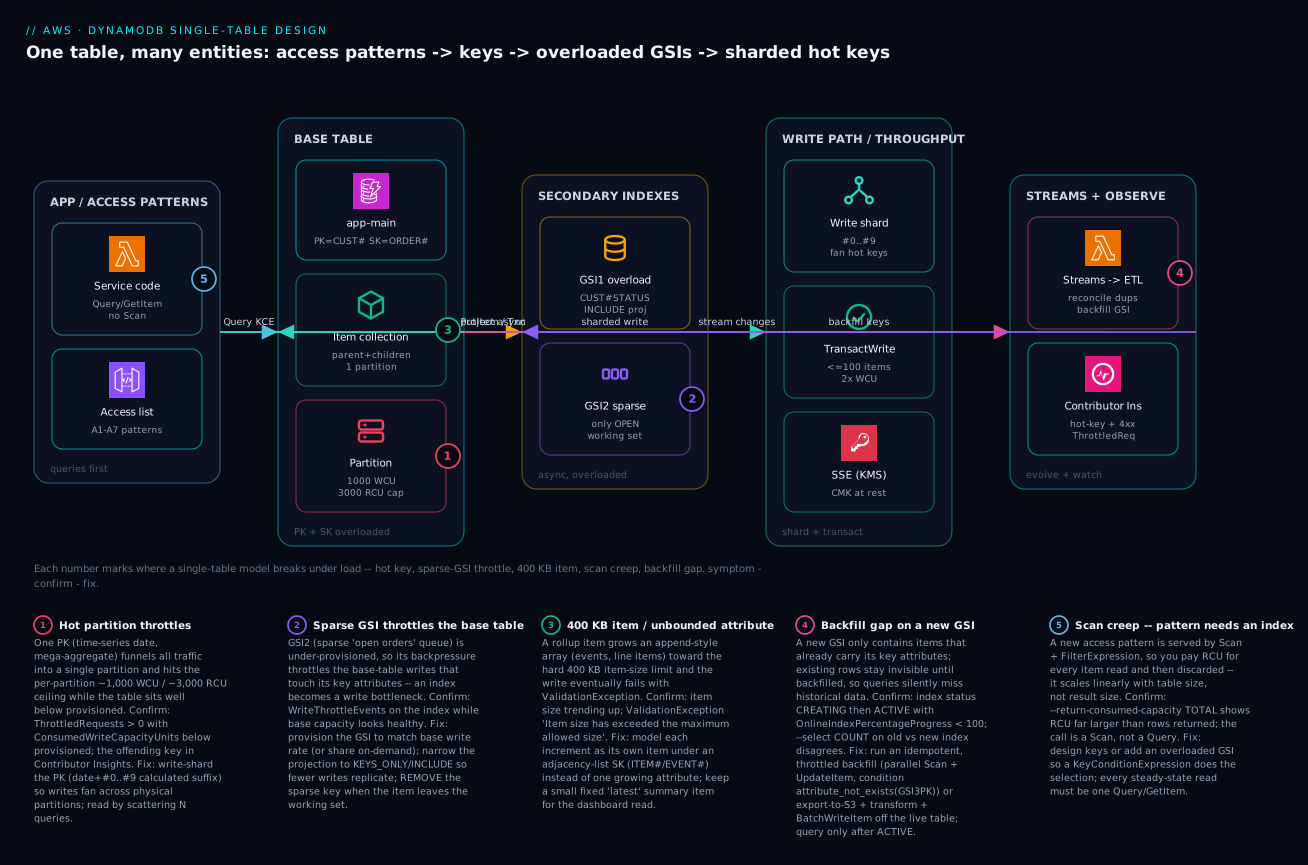
Real-world scenario
Northwind Logistics runs a parcel-tracking platform on a single DynamoDB table tracking-main, keyed PK = SHIPMENT#<id>, SK = EVENT#<timestamp>, with a customer-and-shipments item collection alongside. On-demand capacity, point-in-time recovery on, a sparse GSI for “in-transit shipments,” and a Streams Lambda feeding an OpenSearch index for the support console. Average load is 3,000 writes/second of scan events; the data team is three engineers and the table had run clean for two years.
Peak season broke it on a single Monday. Two failures hit at once. First, a handful of mega-shipments — palletized freight with tens of thousands of scanned parcels — accumulated their events under one PK = SHIPMENT#<id>, and those partitions began throwing ThrottledRequests while the table sat at roughly 40% of its on-demand high-water mark. The on-call engineer’s reflex was to assume under-provisioning and consider raising limits — but the table was nowhere near its ceiling. Contributor Insights told the truth: three shipment IDs dominated the most-throttled-key list. This was the per-partition ~1,000 WCU ceiling on a hot key, not table capacity. Second, a per-shipment rollup item that appended each milestone to a events array started failing writes with ValidationException: Item size has exceeded the maximum allowed size — it had finally crossed 400 KB.
The breakthrough was naming the two failures precisely instead of reaching for the capacity slider. The hot partition was a key-design problem; the 400 KB error was a modeling problem. Neither is fixed by more capacity. The team confirmed the hot key with Contributor Insights and the consumed-vs-provisioned gap, and confirmed the item-size failure by logging item bytes before each rollup write.
The fix landed in two changes, both deployable without downtime. First, write-shard the event partition for high-volume shipments only — PK = SHIPMENT#<id>#<shard> with a calculated suffix from the event ID, fanning hot shipments across 10 partitions while small shipments stayed single-partition so their reads remained one query. Full-history reads for a mega-shipment became 10 parallel queries merged client-side — acceptable because that read was rare and the per-event writes were the hot path.
import hashlib

# Shard only high-volume shipments; keep small ones single-partition
# so their reads stay a single query.
def event_pk(shipment_id: str, event_id: str, high_volume: bool) -> str:
    if not high_volume:
        return f"SHIPMENT#{shipment_id}"
    shard = int(hashlib.md5(event_id.encode()).hexdigest(), 16) % 10
    return f"SHIPMENT#{shipment_id}#{shard}"
Second, they stopped appending to the rollup array. Each milestone became its own item under the adjacency-list SK (SK = MILESTONE#<seq>), sidestepping the 400 KB ceiling entirely, while a Streams Lambda maintained a small fixed-size “latest status” summary item for the dashboard read. The next peak ran at 3,400 writes/second with zero ThrottledRequests and no ValidationException, and because the writes spread evenly the on-demand bill actually dropped slightly versus the throttled-and-retrying weeks before.
The incident as a timeline, because the order of moves is the lesson:
| Time | Symptom | Action taken | Effect | What it should have been |
|---|---|---|---|---|
| Mon 09:00 | ThrottledRequests climbing |
(alert fires) | — | Ask: hot key or under-provisioned? |
| 09:10 | Throttling at 40% of peak | Considered raising limits | Would not have helped | Check consumed vs provisioned first |
| 09:25 | Still throttling | Opened Contributor Insights | 3 shipment IDs dominate | This was the breakthrough |
| 09:40 | Rollup writes failing | Logged item bytes pre-write | Item > 400 KB confirmed | Two distinct root causes named |
| 11:00 | Mitigated | Write-shard high-volume shipments | Hot partitions clear | Correct day-of fix |
| +3 days | Fixed | Milestones as items + Streams summary | 0 throttles, 0 size errors | The actual fix is modeling |
The lesson on the wall: adaptive capacity had silently smoothed the skew for two years, so the team assumed the key design was fine. Hot-partition risk is a function of the busiest key, not the average — and it stays invisible until the day it isn’t.
Advantages and disadvantages
Single-table design both enables DynamoDB’s single-digit-millisecond reads at any scale and demands discipline most relational engineers have to unlearn. Weigh it honestly:
| Advantages (why it wins) | Disadvantages (why it bites) |
|---|---|
One Query returns a parent and all its children — no joins, flat latency at any table size |
The model is rigid: a new access pattern can mean a new GSI or a backfill, not a free ad-hoc query |
| Co-located item collections eliminate multi-round-trip reads | Item collections concentrate writes — co-location is also hot-key risk |
| Overloaded GSIs serve many patterns within the 20-index cap | The keys are opaque (PK/SK with prefixes) — harder to read than named columns |
| Sparse indexes hold only the working set, so ops queries touch a fraction of data | Forgetting to remove a sparse key leaves stale items in the index |
| Capacity is per-request and predictable; you pay for the traffic shape you have | Per-partition ~1,000 WCU / ~3,000 RCU ceiling is invisible until a hot key hits it |
| Transactions and condition expressions give write-time invariants without locks | Transactions cost 2× WCU and fail the whole batch on one conflict |
| Schemaless items make adding attributes free | The 400 KB item limit is absolute — append-style data must be re-modeled |
The model is right for high-scale, well-understood workloads where the access patterns are knowable up front and read latency must stay flat as data grows — SaaS, commerce, event logs, graphs. It is the wrong default for exploratory analytics, ad-hoc reporting, or workloads whose query shapes change weekly; those want a relational store or a lakehouse, and DynamoDB feeds them via Streams or S3 export. The disadvantages are all manageable — but only if you know they exist before you name the first key, which is the entire point of working backward from access patterns.
Hands-on lab
Build the order-management model end to end, prove every access pattern is a single Query/GetItem, watch the sparse GSI hold only the working set, and confirm consumed capacity — all on-demand and free-tier-friendly (delete at the end). Run in any shell with the AWS CLI configured.
Step 1 — Create the table with two overloaded GSIs (on-demand).
aws dynamodb create-table \
  --table-name app-main \
  --attribute-definitions \
    AttributeName=PK,AttributeType=S AttributeName=SK,AttributeType=S \
    AttributeName=GSI1PK,AttributeType=S AttributeName=GSI1SK,AttributeType=S \
    AttributeName=GSI2PK,AttributeType=S AttributeName=GSI2SK,AttributeType=S \
  --key-schema AttributeName=PK,KeyType=HASH AttributeName=SK,KeyType=RANGE \
  --billing-mode PAY_PER_REQUEST \
  --global-secondary-indexes '[
    {"IndexName":"GSI1","KeySchema":[{"AttributeName":"GSI1PK","KeyType":"HASH"},{"AttributeName":"GSI1SK","KeyType":"RANGE"}],"Projection":{"ProjectionType":"INCLUDE","NonKeyAttributes":["status","total"]}},
    {"IndexName":"GSI2","KeySchema":[{"AttributeName":"GSI2PK","KeyType":"HASH"},{"AttributeName":"GSI2SK","KeyType":"RANGE"}],"Projection":{"ProjectionType":"KEYS_ONLY"}}
  ]'
aws dynamodb wait table-exists --table-name app-main
Expected: the command returns table metadata; wait blocks until ACTIVE.
Step 2 — Seed a customer, two orders, and line items (entity overloading).
aws dynamodb put-item --table-name app-main --item '{"PK":{"S":"CUST#a1b2"},"SK":{"S":"PROFILE"},"name":{"S":"Acme Co"},"tier":{"S":"GOLD"}}'
aws dynamodb put-item --table-name app-main --item '{"PK":{"S":"CUST#a1b2"},"SK":{"S":"ORDER#2026-06-01#o-9001"},"status":{"S":"OPEN"},"total":{"N":"149.00"},"GSI1PK":{"S":"CUST#a1b2#OPEN"},"GSI1SK":{"S":"2026-06-01#o-9001"},"GSI2PK":{"S":"OPEN"},"GSI2SK":{"S":"2026-06-01#o-9001"}}'
aws dynamodb put-item --table-name app-main --item '{"PK":{"S":"CUST#a1b2"},"SK":{"S":"ORDER#2026-06-03#o-9044"},"status":{"S":"SHIPPED"},"total":{"N":"72.50"},"GSI1PK":{"S":"CUST#a1b2#SHIPPED"},"GSI1SK":{"S":"2026-06-03#o-9044"}}'
aws dynamodb put-item --table-name app-main --item '{"PK":{"S":"ORDER#o-9001"},"SK":{"S":"ITEM#001"},"sku":{"S":"ABC"},"qty":{"N":"2"}}'
Note the SHIPPED order has no GSI2PK — that is the sparse index doing its job.
Step 3 — A2: all orders for the customer, newest first.
aws dynamodb query --table-name app-main \
  --key-condition-expression "PK = :pk AND begins_with(SK, :p)" \
  --expression-attribute-values '{":pk":{"S":"CUST#a1b2"},":p":{"S":"ORDER#"}}' \
  --no-scan-index-forward --return-consumed-capacity TOTAL
Expected: two order items, the 2026-06-03 one first; ConsumedCapacity a fraction of an RCU.
Step 4 — A3: an order with its line items (adjacency list).
aws dynamodb query --table-name app-main \
  --key-condition-expression "PK = :pk" \
  --expression-attribute-values '{":pk":{"S":"ORDER#o-9001"}}'
Expected: the ITEM#001 row returned by one query keyed on the order.
Step 5 — A5: all OPEN orders via the sparse GSI, COUNT only.
aws dynamodb query --table-name app-main --index-name GSI2 \
  --key-condition-expression "GSI2PK = :open" \
  --expression-attribute-values '{":open":{"S":"OPEN"}}' --select COUNT
Expected: Count = 1 — only the OPEN order is in the index, proving sparseness.
Step 6 — A7: ship the order and watch it leave the sparse GSI.
aws dynamodb update-item --table-name app-main \
  --key '{"PK":{"S":"CUST#a1b2"},"SK":{"S":"ORDER#2026-06-01#o-9001"}}' \
  --update-expression "SET #s = :sh REMOVE GSI2PK, GSI2SK" \
  --expression-attribute-names '{"#s":"status"}' \
  --expression-attribute-values '{":sh":{"S":"SHIPPED"}}'
# Re-run Step 5: Count is now 0 — the item dropped out of the working set.
Validation checklist. You modeled multiple entities in one table, served three different access patterns with single Query calls, saw the sparse GSI hold exactly the open working set, and watched a status update remove an item from that index — all without a Scan. The lab steps mapped to what each proves:
| Step | What you did | What it proves | Real-world analogue |
|---|---|---|---|
| 1 | Create table + 2 overloaded GSIs | One table serves many access shapes | Greenfield schema bring-up |
| 2 | Seed customer/orders/items | Entity overloading co-locates entities | Modeling the domain |
| 3–4 | Query by customer, then by order | Item collections = one-query aggregates | The high-frequency read paths |
| 5 | COUNT on the sparse GSI | Sparse index holds only the working set | The ops dashboard query |
| 6 | Ship order, remove GSI keys | Sparse keys are set/removed deliberately | The status-transition write |
Cleanup (avoid lingering charges).
aws dynamodb delete-table --table-name app-main
Cost note. On-demand bills per request; this lab is a handful of requests — effectively free, and well within the DynamoDB free tier (25 GB storage, 25 provisioned WCU/RCU if you used provisioned instead). Deleting the table stops all storage charges.
Common mistakes & troubleshooting
This is the playbook — the part you bookmark. First as a scannable table you can read mid-incident, then the same entries with the full confirm-command detail underneath.
| # | Symptom | Root cause | Confirm (exact cmd / console path) | Fix |
|---|---|---|---|---|
| 1 | ThrottledRequests while table sits at ~40% of capacity |
Hot partition — one PK over the per-partition ~1,000 WCU / ~3,000 RCU ceiling | Contributor Insights top key; ConsumedWriteCapacityUnits below provisioned |
Write-shard the PK (#0..#9); fan-out reads |
| 2 | ValidationException: Item size has exceeded the maximum allowed size |
An attribute (array) grew the item past 400 KB | Log item bytes before the write; inspect the offending item | Model each increment as its own item (adjacency list) |
| 3 | A query consumes far more RCU than rows returned | It is a Scan + FilterExpression, not a Query |
--return-consumed-capacity TOTAL vs row count; confirm it’s a Scan |
Add an overloaded GSI / redesign keys so KCE selects |
| 4 | Base-table writes throttle even though base capacity is healthy | An under-provisioned GSI throttles back onto the base table | WriteThrottleEvents on the index; per-index ConsumedWCU |
Provision GSI WCU ≥ base write rate; narrow projection |
| 5 | New GSI returns partial/empty results for old data | Backfill gap — index only has items that already carry its keys | Index Backfilling=true / OnlineIndexPercentageProgress < 100 |
Wait for ACTIVE; run an idempotent throttled backfill |
| 6 | ConditionalCheckFailedException on every retry of an update |
Optimistic-concurrency version moved under you | Compare the item’s version to the one you sent |
Re-read, re-apply on the new version, retry |
| 7 | TransactionCanceledException under load |
A condition failed or two transactions hit the same item | Read CancellationReasons[] per item |
Narrow the transaction; add jittered retry; reduce contention |
| 8 | Sparse-GSI “queue” keeps growing, never drains | The sparse key isn’t removed on the state transition | --select COUNT keeps rising; inspect a “done” item still has GSIxPK |
REMOVE GSIxPK, GSIxSK in the transition UpdateItem |
| 9 | Reads sometimes miss a just-written item | Read a GSI (eventually consistent) expecting strong consistency | The item exists on the base table but not yet in the GSI | GetItem the base item, or accept the propagation delay |
| 10 | ProvisionedThroughputExceededException bursts at peak |
Provisioned + auto scaling can’t react fast enough to a spike | Throttling correlates with a sharp ramp; instance count flat | Switch to on-demand for spiky traffic, or pre-scale |
| 11 | Hot key after migrating to a new key — backfill itself throttles | A full-speed Scan-and-update backfill melts capacity |
Throttling spikes only during the backfill job | Rate-limit the job; export-to-S3 + transform off the live table |
| 12 | BETWEEN/range query returns nothing or wrong rows |
SK components ordered fine→coarse, or numbers stored as strings | Inspect the SK structure of returned vs expected items | Reorder SK coarse→fine; zero-pad or use ISO-8601 |
Before the expanded reasoning, the exception/error reference you scan first — the exact strings DynamoDB throws, what each means for a single-table model, and whether it is the client’s fault (retryable in-place) or a design fault:
| Exception / error string | What it means | Retryable? | Likely single-table cause | First fix |
|---|---|---|---|---|
ProvisionedThroughputExceededException |
Request exceeded provisioned (or burst) capacity | Yes (SDK backs off) | Hot key, or under-provisioned | Shard the key; raise capacity / on-demand |
ThrottlingException |
Control-plane / on-demand throttling | Yes | Sharp spike past warmed capacity | Pre-warm; on-demand; jittered retry |
ConditionalCheckFailedException |
A condition expression evaluated false | No (re-read first) | Optimistic-concurrency version moved | Re-read, re-apply, retry |
TransactionCanceledException |
A transaction was canceled | Sometimes | A per-item condition failed / item conflict | Read CancellationReasons[]; narrow txn |
TransactionConflictException |
Another txn touched the same item | Yes (jitter) | Contention on a hot item | Shard contended item; backoff |
ValidationException (item size) |
“Item size has exceeded the maximum allowed size” | No | An attribute grew past 400 KB | Model increments as separate items |
ValidationException (key) |
Key/attribute type or missing key | No | Wrong type (S vs N), absent key attr |
Fix the item shape / key definition |
ItemCollectionSizeLimitExceededException |
An LSI item collection passed 10 GB | No | Too much data under one PK with LSIs | Re-model; prefer GSIs over LSIs |
ResourceInUseException |
Table/index busy (e.g. another GSI op) | Yes (wait) | Two GSI creates/deletes at once | Serialize; one index op in flight |
LimitExceededException |
An account/table limit hit (e.g. 20 GSIs) | No | Too many GSIs / concurrent ops | Overload indexes; request a limit raise |
ProvisionedThroughputExceeded on a GSI |
A GSI hit its own throughput | Yes | Under-provisioned GSI throttling base | Size GSI WCU to base write rate |
The expanded form, with the full reasoning for the entries that bite hardest:
1. ThrottledRequests while the table sits well below provisioned.
Root cause: a hot partition — one partition key over the per-partition ~1,000 WCU / ~3,000 RCU ceiling. Adaptive capacity smooths skew but cannot exceed the per-partition limit.
Confirm: CloudWatch Contributor Insights for DynamoDB surfaces the most-throttled partition key; ConsumedWriteCapacityUnits sits far below provisioned while ThrottledRequests > 0.
Fix: write-shard the key (PK#0..#9 with a calculated suffix sized to required WCU / 1,000) so writes fan across physical partitions; reads scatter across the N shards and merge client-side.
2. ValidationException: Item size has exceeded the maximum allowed size.
Root cause: an attribute — usually an append-style array (events, line items) — grew the whole item past the absolute 400 KB limit.
Confirm: log the serialized item size immediately before the write; the offending item is near or over 400 KB.
Fix: stop appending to one item; model each increment as its own item under an adjacency-list SK (MILESTONE#/ITEM#), and keep a small fixed-size “latest” summary item for cheap dashboard reads.
3. A query consumes far more RCU than the rows it returns.
Root cause: the operation is a Scan + FilterExpression, which reads every item then discards most — capacity scales with table size, not result size.
Confirm: --return-consumed-capacity TOTAL shows RCU vastly larger than the row count; the call is a Scan, not a Query.
Fix: design keys or add an overloaded GSI so a KeyConditionExpression does the selection; every steady-state read must be one Query/GetItem.
4. Base-table writes throttle though base capacity looks healthy.
Root cause: an under-provisioned GSI — under provisioned mode, a throttled index backpressures and throttles the base-table writes that touch its key attributes.
Confirm: WriteThrottleEvents on the index dimension is non-zero while the base table’s consumed WCU is below provisioned.
Fix: raise the GSI’s provisioned WCU to at least the base write rate that touches its keys (or share on-demand), and narrow the projection so fewer writes replicate.
5. A new GSI returns partial or empty results for historical data.
Root cause: the backfill gap — a new GSI only contains items that already carry its key attributes; existing rows stay invisible until backfilled.
Confirm: the index reports Backfilling=true / OnlineIndexPercentageProgress < 100; --select COUNT on old vs new index disagrees.
Fix: do not query until ACTIVE; run an idempotent, throttled backfill (parallel Scan + UpdateItem with attribute_not_exists(GSIxPK)), or export-to-S3 + transform + BatchWriteItem.
6. ConditionalCheckFailedException on every retry of an update.
Root cause: optimistic-concurrency conflict — another writer bumped the version attribute, so your version = :curv condition fails.
Confirm: the item’s current version differs from the one you sent.
Fix: re-read the item, re-apply your change on the new version, and retry; consider jittered backoff if conflicts are frequent.
7. TransactionCanceledException under load.
Root cause: a transactional write failed because a per-item condition failed or two transactions collided on the same item.
Confirm: read CancellationReasons[] in the error — each item reports ConditionalCheckFailed, TransactionConflict, or None.
Fix: narrow the transaction to the items that truly need the invariant, add jittered retry, and reduce contention (shard the contended item or use optimistic concurrency for single-item updates).
8. The sparse-GSI “queue” grows forever and never drains.
Root cause: the sparse key attribute is not removed on the state transition, so “done” items linger in the index.
Confirm: --select COUNT on the index keeps rising; a completed item still carries GSIxPK.
Fix: add REMOVE GSIxPK, GSIxSK to the transition UpdateItem (as in A7), so the item leaves the working set the moment it changes state.
Best practices
- Write the access-pattern list first. Every read and write with its filter, sort, and cardinality, reviewed by the team, before any attribute is named. The schema is derived from it.
- No
Scanin the steady state. Every production access pattern must be oneQueryorGetItem. AScan+FilterExpressionis a modeling bug, not a tuning knob. - Overload keys and indexes. Generic
PK/SKandGSIxPK/GSIxSKwith type prefixes so many entities share the table and one index serves many patterns — and you stay inside the 20-GSI cap. - Order sort-key components coarse-to-fine and use ISO-8601 timestamps so lexicographic ordering gives you
BETWEENranges and newest-first for free. - Make working-set GSIs sparse, and remove the sparse key on the state transition so the index holds exactly the live set (open orders, in-flight jobs) and the ops query touches a fraction of the data.
- Project narrowly.
KEYS_ONLYorINCLUDEby default; reserveALLfor indexes whose queries genuinely need the whole item. You cannot shrink a projection in place. - Materialize many-to-many in both directions via a GSI key-flip, not a runtime second read; reconcile any denormalized copies with Streams.
- Write-shard high-write keys (time-series, mega-aggregates) with a shard count sized to required WCU / 1,000, and accept the read fan-out as the deliberate trade.
- Match capacity mode to traffic shape: on-demand for spiky/unknown; provisioned + auto scaling (+ a reserved floor) for steady, predictable load.
- Enforce invariants at write time:
attribute_not_existsfor insert-only, aversionattribute for optimistic concurrency,TransactWriteItemsfor multi-item atomicity — and remember transactions cost 2× WCU. - Never grow an item toward 400 KB. Append-style data is separate items, not an unbounded attribute.
- Make backfills online, idempotent, throttled, and reconciled with a
COUNTcheck; for huge tables run them off the live capacity via export-to-S3. - Enable Contributor Insights and alarm on the leading indicators — per-partition throttling, not just table-level capacity.
The alerts worth wiring before the next peak — the leading indicators, not the lagging “table throttling”:
| Alert on | Metric | Threshold (starting point) | Why it’s leading |
|---|---|---|---|
| Hot key | Contributor Insights most-throttled key | Any sustained single-key dominance | Names the key before broad throttling |
| Write throttling | WriteThrottleEvents (table + each GSI) |
> 0 sustained 5 min | Catches a GSI bottleneck early |
| Read throttling | ReadThrottleEvents |
> 0 sustained 5 min | Hot read key or under-provisioned read |
| Consumed vs provisioned | ConsumedWCU / provisioned |
< 50% while throttling | The hot-partition signature |
| System errors | SystemErrors (5xx) |
> 0 | Distinguishes platform from your throttling |
| Conditional failures | ConditionalCheckFailedRequests |
Rising trend | Concurrency contention building |
Security notes
- Encrypt with a customer-managed KMS key where compliance requires control over rotation and access. DynamoDB encrypts at rest by default with an AWS-owned key; switch to an AWS KMS CMK for auditable key policies and the ability to revoke access by disabling the key.
- Scope IAM to items and attributes, not the whole table. Use
dynamodb:LeadingKeyscondition keys to restrict a principal to its own partition (multi-tenant isolation), anddynamodb:Attributesto limit which attributes a role can read or write. A tenant’s role should never be able toQueryanother tenant’sPK. - Prefer fine-grained access over a broad
dynamodb:*. Separate read roles (GetItem,Query) from write roles (PutItem,UpdateItem), and gateScan/DeleteTable/UpdateTablebehind admin-only policies. - Reach DynamoDB over a VPC endpoint (Gateway or PrivateLink) so traffic never traverses the public internet, and attach an endpoint policy that further constrains which tables and actions are reachable from the VPC.
- Turn on point-in-time recovery (PITR) for any table holding business data — it gives continuous backups and second-level restore, and the export-to-S3 path you use for migrations depends on it.
- Audit with CloudTrail. DynamoDB control-plane calls are logged; enable data-plane logging selectively for sensitive tables to capture item-level access.
- Keep secrets out of items. Item attributes are not a secret store; reference Secrets Manager / Parameter Store for credentials, and never project a sensitive attribute into a GSI you query broadly.
The security controls that also prevent operational incidents — secure and resilient pull the same direction:
| Control | Mechanism | Secures against | Also prevents |
|---|---|---|---|
| KMS CMK encryption | SSESpecification + key policy |
Plaintext-at-rest exposure | Unauthorized restore from snapshots |
| Tenant isolation | dynamodb:LeadingKeys condition |
Cross-tenant reads | A tenant hot-keying another’s partition |
| Attribute-level scope | dynamodb:Attributes condition |
Over-reading sensitive fields | Accidental wide projections |
| VPC endpoint + policy | Gateway/PrivateLink endpoint | Public-internet exposure | Data exfiltration paths |
| PITR | Continuous backups | Data loss / bad deploy | Migration export depends on it |
| Least-privilege IAM | Split read/write/admin roles | Broad dynamodb:* blast radius |
A bad job running Scan/DeleteTable |
Cost & sizing
The bill drivers and how they interact with the design:
- Capacity is the dominant line. On-demand bills per request unit (write/read request units); provisioned bills per provisioned WCU/RCU-hour whether used or not. For steady load, provisioned + reserved is materially cheaper per request; for spiky or unknown load, on-demand avoids both over-provisioning and throttle-and-retry waste.
- GSIs multiply write cost. Every write that touches a projected attribute costs extra WCU to replicate into each GSI. An
ALLprojection on a wide, hot item can quietly double or triple write spend — this is why you project narrowly. - Transactions cost 2× WCU. A
TransactWriteItemsof two items costs as if you wrote four. Use transactions for invariants, not as a default wrapper. - Storage is cheap but real. You pay per GB-month for the table plus each GSI’s projected copy. Sparse indexes and narrow projections keep this down.
- Streams and PITR add modest charges — Streams per read request unit on the stream, PITR per GB-month — both small relative to capacity, and both worth it.
A rough monthly picture for a small-to-mid production table (~25 GB, ~5M writes/day, ~20M reads/day, two GSIs with INCLUDE):
| Cost driver | What you pay for | Rough INR / month | What drives it up | Lever to pull |
|---|---|---|---|---|
| On-demand writes | Write request units | ~₹3,000–6,000 | Write volume × GSI count | Narrow projections; fewer GSIs |
| On-demand reads | Read request units (eventual = ½) | ~₹1,500–3,000 | Read volume; strong-consistent reads | Use eventual reads where safe |
| Provisioned (alt.) | WCU/RCU-hours + reserved | ~₹2,000–4,000 steady | Over-provisioning headroom | Auto scaling + reserved floor |
| GSI storage | Per-GB projected copies | ~₹500–1,500 | ALL projections; many GSIs |
KEYS_ONLY/INCLUDE; sparse |
| Streams | Stream read request units | ~₹300–800 | Change rate × consumers | Filter at the consumer |
| PITR + backups | Per-GB-month continuous | ~₹400–1,000 | Table size | Keep, it’s cheap insurance |
Free-tier reality: DynamoDB’s perpetual free tier covers 25 GB of storage and 25 provisioned WCU + 25 RCU (enough for ~200M requests/month) on provisioned mode — a real production-grade allowance for small workloads. On-demand has no perpetual free allowance but is pay-per-use, so a low-traffic table costs pennies. The cheapest correct design is almost always “fewer, narrower GSIs + the right capacity mode,” not a bigger anything — the same lesson as the hot-partition fix: model it right and the bill follows.
Interview & exam questions
1. Why design DynamoDB schemas “backward” from access patterns instead of from entities? Because DynamoDB has no server-side join and no query planner — the only way to relate items cheaply is to co-locate them at write time. If you model entities first, you discover the queries your application needs require joins DynamoDB can’t do, and you refactor. Enumerating access patterns first lets you design keys that make each query a single-partition read.
2. What is entity overloading and why does single-table design depend on it? Naming the primary-key attributes generically (PK, SK) and encoding the entity type into the value with a prefix (CUST#, ORDER#, ITEM#), so multiple entity types share one table and one partition can hold a parent plus its children (an item collection). It’s the mechanism that lets a single Query return an aggregate, which is the whole point of single-table design.
3. Explain a sparse GSI and a real use for one. An item appears in a GSI only if it has both of that index’s key attributes — so if you write the GSI key only while an item is in a particular state and remove it on transition, the index holds exactly that working set. The canonical use is an “open orders” queue: index only OPEN orders, remove the key when they ship, and the ops dashboard queries a fraction of the data.
4. What are the per-partition throughput limits and why do they cause throttling at low table utilization? A single physical partition sustains roughly 1,000 WCU and 3,000 RCU. A hot key concentrates traffic on one partition and hits that ceiling even though the table’s total provisioned capacity is barely touched — so you see ThrottledRequests while ConsumedWriteCapacityUnits is at 40% of provisioned. The fix is write-sharding, not more capacity.
5. How does write-sharding work and what does it trade? You append a suffix (#0..#9) to the partition key so writes fan across multiple physical partitions; sized to required WCU / 1,000. A calculated suffix (hash of a key attribute) lets a point read recompute the exact shard; a random suffix maximizes spread but forces reads to scatter across all N shards and merge client-side. The trade is read fan-out for write throughput.
6. When do you choose on-demand vs provisioned capacity? By traffic shape. On-demand for new, spiky, or unpredictable workloads — it scales instantly and needs no planning. Provisioned + auto scaling (with a reserved floor for the baseline) for steady, predictable, diurnal load — it’s materially cheaper per request. You can only switch modes once per 24 hours, so it’s not a runtime knob.
7. What’s the difference between a FilterExpression and a KeyConditionExpression in cost terms? A KeyConditionExpression selects items by key before reading them, so you pay only for what you select. A FilterExpression runs after the key query and reduces the returned payload but not the capacity consumed or items examined. A pattern served only by Scan + FilterExpression reads the whole table and pays for it.
8. How do you model a many-to-many relationship in a single table? Materialize the edge as an item and store both directions by writing generic GSI keys that invert PK and SK. For users-in-groups, the membership item has PK=USER#u1, SK=GROUP#g1 and GSI1PK=GROUP#g1, GSI1SK=USER#u1: the base table answers “groups for a user,” GSI1 answers “users in a group” — one item, two query directions, no second write to keep in sync.
9. What does TransactWriteItems guarantee and what does it cost? All-or-nothing across up to 100 items (and multiple tables), each with its own condition; if any condition fails or it collides with another transaction on the same item, the whole thing is canceled (TransactionCanceledException with per-item reasons). It costs 2× the WCU of the equivalent non-transactional writes (prepare + commit). Use it for genuine multi-item invariants, not as a default.
10. How do you add a GSI to a live, high-traffic table without downtime or stale data? UpdateTable to create the GSI — it’s an online operation that backfills in the background while the table stays available; don’t query the index until it’s ACTIVE (watch OnlineIndexPercentageProgress). A new GSI only contains items that already carry its key attributes, so you run an idempotent, throttled backfill (parallel Scan + conditional UpdateItem), or export to S3, transform, and BatchWriteItem back to keep it off the live capacity.
11. What is the 400 KB limit and how do you design around it? It’s the absolute maximum size of a single item, including all attribute names and values. The classic violation is appending to an unbounded array (events, line items) until the rollup item crosses it and writes fail with ValidationException. Design around it by modeling each increment as its own item under an adjacency-list sort key, and keeping a small fixed-size summary item for cheap reads.
12. Why can an under-provisioned GSI throttle your base table? Under provisioned capacity mode, a GSI has its own throughput; if a write touches a projected attribute and the GSI can’t absorb the replicated write, that backpressure throttles the base-table write too. So an under-provisioned index becomes a write bottleneck for the whole table — size each GSI’s WCU to the base write rate that touches its keys, and project narrowly to reduce replication.
These map to the AWS Certified Developer – Associate (DVA-C02) — develop solutions using DynamoDB, data modeling, GSIs, capacity, transactions — and the AWS Certified Solutions Architect – Associate (SAA-C03) and – Professional (SAP-C02) for the cost/capacity/scaling design trade-offs. The hot-partition and throughput mechanics also surface in the Data Engineer – Associate (DEA-C01). A compact cert-mapping for revision:
| Question theme | Primary cert | Exam objective area |
|---|---|---|
| Access patterns, key/GSI design | DVA-C02 | Develop with DynamoDB; data modeling |
| Sparse indexes, projections | DVA-C02 | Optimize DynamoDB access |
| Hot partitions, write-sharding | DEA-C01 / SAP-C02 | Design for performance at scale |
| On-demand vs provisioned, auto scaling | SAA-C03 | Design cost-optimized, resilient storage |
| Transactions, condition expressions | DVA-C02 | Implement data consistency |
| Online GSI add, backfill, Streams | DEA-C01 | Operationalize data pipelines |
Quick check
- A
Queryreturns 12 items but--return-consumed-capacity TOTALreports an RCU far larger than 12 rows would imply. What is almost certainly happening, and what’s the fix? - You see
ThrottledRequests > 0whileConsumedWriteCapacityUnitssits at 40% of provisioned. Name the root cause and the one design change that fixes it. - True or false: a Global Secondary Index can be read with strong consistency.
- An “open jobs” sparse GSI keeps growing and never shrinks even as jobs complete. What did the code forget to do?
- Your rollup item’s writes start failing with
ValidationException: Item size has exceeded the maximum allowed size. What’s the cause and the re-modeling fix?
Answers
- The operation is really a
Scan+FilterExpression(or a query reading far more than it returns), so you pay capacity for items read and then discarded. The fix is to make the keys do the selection — design the PK/SK or add an overloaded GSI so aKeyConditionExpressionselects, turning it into a true single-partitionQuery. - A hot partition — one partition key is over the per-partition ~1,000 WCU / ~3,000 RCU ceiling while the table’s total is barely used; adaptive capacity can’t exceed the per-partition limit. The fix is to write-shard that key (suffix
#0..#9, sized to required WCU / 1,000) so writes fan across physical partitions. - False. GSIs are eventually consistent only; there is no strongly-consistent GSI read. If you need strong consistency,
GetItemthe base-table item (or use an LSI, which supports strong reads on the same partition). - It forgot to remove the sparse key attributes (
REMOVE GSIxPK, GSIxSK) on the state transition. A sparse index keeps any item that still has both key attributes, so “done” items linger until you strip the keys. - An attribute — typically an append-style array — has grown the whole item past the absolute 400 KB limit. Re-model by storing each increment as its own item under an adjacency-list sort key (
ITEM#/MILESTONE#), and keep a small fixed-size “latest” summary item for the dashboard read.
Glossary
- Single-table design — the practice of storing many entity types in one DynamoDB table so related items co-locate and queries become single-partition reads.
- Access pattern — one concrete read or write the application needs, with its filter, sort order, and cardinality; the artifact the schema is derived from.
- Partition key (PK) — the key DynamoDB hashes to choose a physical partition; decides co-location and hot-key risk.
- Sort key (SK) — orders items within a partition and enables range queries (
begins_with,BETWEEN) and adjacency lists. - Entity overloading — naming keys generically (
PK/SK) and encoding the entity type as a value prefix so multiple entities share the table. - Item collection — all items sharing one partition key; a single
Queryreturns the whole collection (parent + children). - Adjacency list — the one-to-many pattern where children share the parent’s partition (
ORDER#owns itsITEM#rows). - Global Secondary Index (GSI) — an alternate (PK, SK) over the same items, maintained asynchronously (eventually consistent), with its own throughput and projection.
- Index overloading — generic
GSIxPK/GSIxSKattributes each entity populates differently, so one index serves many logical patterns. - Sparse index — a GSI that contains an item only if the item has both of the index’s key attributes; used to index a working set.
- Projection — which attributes a GSI copies:
KEYS_ONLY,INCLUDE(a named list), orALL; drives index storage and write cost. - Hot partition / hot key — a partition key taking disproportionate traffic, hitting the per-partition ~1,000 WCU / ~3,000 RCU ceiling and throttling.
- Adaptive capacity — DynamoDB automatically shifting throughput toward busy partitions and isolating hot items; cannot exceed per-partition limits.
- Write sharding — appending a suffix to a partition key (calculated or random) to fan a high-write key across multiple physical partitions.
- On-demand / provisioned — the two capacity modes: pay-per-request (instant scale) versus reserved RCU/WCU (cheaper at steady load, paired with auto scaling).
- Condition expression — a predicate that makes a write conditional and rejects it atomically (
attribute_not_exists,version = :v) otherwise. - Optimistic concurrency — using a
versionattribute and a condition so a lost update is rejected (ConditionalCheckFailedException) rather than silently overwritten. TransactWriteItems— an all-or-nothing write across up to 100 items (and multiple tables), each with its own condition; costs 2× WCU.- 400 KB item limit — the absolute maximum size of one item; the reason append-style data must be modeled as separate items.
- DynamoDB Streams — an ordered change log of item-level modifications, consumed by Lambda for denormalization, reconciliation, and backfills.
Next steps
You can now take an access-pattern list, derive an overloaded key schema and GSIs that serve every read in one call, and defend it against hot partitions and the 400 KB limit. Build outward:
- Next: DynamoDB Deep Dive: Tables, Keys, Capacity, GSIs & Streams — the full service surface behind the modeling craft in this article.
- Related: DynamoDB Streams: Change Data Capture & Event-Driven Pipelines — the reconciliation and backfill machinery for evolving a single-table schema.
- Related: EventBridge: Event-Driven Architecture with Buses, Schema Registry & Pipes — fan single-table changes out to downstream consumers cleanly.
- Related: Step Functions: Distributed Orchestration & Error-Handling Patterns — orchestrate multi-item, multi-table transactions and backfills with retries.
- Related: Cosmos DB Partition Key Design & RU Optimization — the same partition-design discipline on Azure’s NoSQL store.