Most teams stand up an Auto Scaling group, attach a target-tracking policy, and call it done. That works right up until the moment it doesn’t: a traffic spike outruns a five-minute boot time, a Spot reclaim kills in-flight requests, or an AMI rollout takes down half the fleet because nobody told the load balancer to drain connections first. An EC2 Auto Scaling group (ASG) is not a thermostat — it is a state machine over instance lifecycles, and the interesting engineering lives in the transitions between Pending, InService, Terminating, Warmed:Stopped and the wait states in between.
This guide walks the controls I reach for on every production fleet: launch templates and capacity strategy, warm pools, lifecycle hooks, instance refresh, Spot interruption choreography, and health-check tuning — with the failure modes that justify each one. The difference between an ASG that quietly absorbs a flash sale and one that pages you at 2am is almost never the scaling policy; it is whether the transitions are instrumented. A scale-out is only as fast as your slowest boot. A scale-in is only as safe as your drain. An AMI rollout is only as reversible as your rollback alarm.
Because this is a reference you will return to mid-incident and mid-design, the prose explains the mechanism but the tables enumerate every option, default, limit and failure fingerprint — every allocation strategy, every lifecycle state, every instance-refresh preference, every Spot signal, every termination policy. Read the prose once; keep the tables open when you are tuning warmup, sizing a warm pool, or deciding whether a stuck Terminating:Wait is a hook that never called back or a heartbeat you forgot to extend.
What problem this solves
Reactive scaling has a built-in lie: the metric breaches after demand has already arrived, and the replacement instance then has to boot, pull containers, JIT-warm, prime connection pools, and pass health checks before it serves a single request. If that takes four minutes, a sharp spike is four minutes of degraded service no scaling policy can shorten — the policy fired correctly, the capacity just wasn’t ready. Teams paper over this with a fat On-Demand floor they pay for around the clock, which is expensive, or with aggressive step scaling that overshoots and thrashes.
The second pain is uncontrolled termination. By default the ASG kills an instance the instant it decides to scale in — mid-request, mid-job, mid-flush — and the same brutality applies when a Spot instance is reclaimed or an AMI rollout replaces a node. Without a drain contract, every scale-in event drops connections, every Spot interruption loses in-flight work, and every deploy is a coin-flip. The risk team at any payments or healthcare shop will (correctly) veto Spot entirely until you can prove an infrastructure event never kills a live request.
The third pain is risky rollouts. “Ship a new AMI” should be a routine, reversible, observable operation. Done wrong — bump desired_capacity and pray, or terminate instances by hand — it takes down capacity, offers no canary, and has no automatic revert when the new build is bad. Who hits all three: anyone running a stateful or latency-sensitive tier on EC2 at scale, anyone trying to capture Spot savings without dropping work, and anyone who deploys by replacing instances. The fix is to treat the ASG as the state machine it is and wire the transitions — warm pools for the cold-start gap, lifecycle hooks for the drain/bootstrap windows, instance refresh for controlled rollouts, and capacity rebalancing for graceful Spot exits.
To frame the field before the deep dive, here is every control this article covers, the production pain it removes, and the single setting that anchors it:
| Control | Pain it removes | The state/transition it owns | Anchor setting |
|---|---|---|---|
| Launch template + mixed instances | Single-pool capacity stall; all-or-nothing purchase | What an instance is at launch | spot_allocation_strategy |
| Scaling policies | Over/under-provisioning; thrash | When desired_capacity changes |
EstimatedInstanceWarmup |
| Warm pool | Cold-start gap on scale-out | Warmed:Stopped ↔ InService |
pool-state + min-size |
| Lifecycle hooks | Killed-mid-request; un-bootstrapped nodes | Pending:Wait / Terminating:Wait |
heartbeat-timeout + default-result |
| Instance refresh | Risky AMI rollouts; no canary, no revert | Rolling replacement of the fleet | MinHealthyPercentage / AutoRollback |
| Capacity Rebalancing | Dropped work on Spot reclaim | Proactive replace before the 2-min gun | --capacity-rebalance |
| Health checks + termination policy | Booted-but-broken in rotation; wrong instance dies | Who is healthy / who dies on scale-in | health_check_type / termination-policies |
Learning objectives
By the end of this article you can:
- Author a launch template with IMDSv2 enforced, gp3 volumes and instance tags, and a mixed instances policy that diversifies across instance types, AZs and purchase options with the right allocation strategy.
- Choose between target-tracking, step and predictive scaling, set
EstimatedInstanceWarmup/default_instance_warmupto your real time-to-ready, and run predictive inForecastOnlybefore trusting it. - Size and operate a warm pool (
StoppedvsHibernatedvsRunning), reason about the cost/latency trade, and write bootstrap automation that distinguishesWarmed:PendingfromPending. - Insert lifecycle hooks on launch and terminate transitions, choose
CONTINUEvsABANDONcorrectly, drivecomplete-lifecycle-actionand heartbeats, and drain the load balancer before an instance dies. - Run a zero-downtime instance refresh with surge (
MaxHealthyPercentage> 100), checkpoints as a canary, and CloudWatch-alarm-drivenAutoRollback. - Choreograph Spot interruptions with Capacity Rebalancing, the rebalance recommendation, and the 2-minute interruption notice so reclaims drain like a normal scale-in.
- Tune health checks (
ELBvsEC2, grace period) and termination policies so a booted-but-broken instance is evicted and scale-in sheds the right capacity during a rollout. - Localise an ASG failure — stuck
*:Wait, refresh stalled at a checkpoint, warm pool empty, instances flapping — to a specific transition and run the exactawscommand that confirms it.
Prerequisites & where this fits
You should already understand EC2 fundamentals — instances, AMIs, instance families/sizes, EBS volume types, IMDS (instance metadata) — at the level of the AWS EC2 Deep Dive: Instances, AMIs, EBS, User Data, IMDS, and the Auto Scaling basics (launch templates, a single target-tracking policy, min/max/desired) from the EC2 Auto Scaling: Launch Templates, Policies, Lifecycle. You should be comfortable running aws CLI with named profiles, reading JSON output, and applying Terraform. Familiarity with an Application Load Balancer (ALB) and target groups helps, because the drain contract runs through them — see the Elastic Load Balancing: ALB, NLB, GWLB Deep Dive.
This sits in the Compute / Reliability track. It is downstream of the EC2 and ASG fundamentals and upstream of the Spot-heavy and event-driven scaling patterns: the EC2 Spot + Mixed Instances: Capacity-Optimized ASGs and Interruption Handling goes deeper on the purchase-option blend, and the E-commerce Black Friday: AWS Surge Autoscaling Architecture shows the whole stack under flash-sale load. Observability for all of it lives in CloudWatch & CloudTrail Observability Deep Dive.
A quick map of who owns what during an ASG incident, so you escalate to the right person fast:
| Layer | What lives here | Who usually owns it | Failure classes it can cause |
|---|---|---|---|
| Launch template / AMI | Boot image, user-data, IMDS, EBS | Platform / app team | Bad AMI → refresh fails; slow boot → cold-start gap |
| ASG control plane | desired/min/max, policies, hooks | Platform / SRE | Thrash, stuck *:Wait, refresh stall |
| Warm pool | Pre-initialized reserve | Platform / SRE | Empty pool → slow scale-out; reuse bugs |
| Lifecycle hook handler | Drain/bootstrap automation (SSM/Lambda) | App team | Stuck Terminating:Wait; dropped requests |
| Load balancer / target group | Routing, health, deregistration delay | Network / app team | 5xx on scale-in; flapping registration |
| Spot capacity pools | Reclaim risk per type/AZ | AWS (you choose pools) | Simultaneous interruptions; capacity stall |
| CloudWatch alarms | Scaling triggers + rollback signal | SRE / app team | Mis-scaled fleet; no auto-revert on bad deploy |
Core concepts
Five mental models make every later decision obvious.
An ASG is a state machine, not a counter. The group does not just hold a number; it moves every instance through a defined lifecycle: Pending → (optional Pending:Wait for a launch hook) → Pending:Proceed → InService, and on the way out InService → (optional Terminating:Wait for a terminate hook) → Terminating:Proceed → Terminated. Warm pools add Warmed:* variants. Every control in this article is a hook into, or a policy over, one of these transitions. Diagnosing the ASG always starts with “what state is the instance stuck in?”
Capacity diversity is a reliability primitive, not a cost trick. A single instance type is a single point of failure for capacity — when m6i.large is exhausted in an AZ, scale-out stalls and your spike goes unanswered. A mixed instances policy lets the group draw from a diversified pool of types across multiple AZs and blend On-Demand with Spot. The allocation strategy is the lever that turns that diversity into either resilience (price-capacity-optimized) or raw savings at higher interruption risk (lowest-price).
Cold start is a gap you pre-pay, not a latency you accept. Reactive scaling reacts after the breach, and the new instance still pays the full boot tax: AMI/EBS init, container pull, runtime JIT, DI/connection-pool priming, health-check pass — often minutes. A warm pool is a reserve of instances held past that expensive bootstrap in Stopped/Hibernated/Running state, so scale-out resumes a warm instance in seconds instead of launching cold. You move the cost from “every spike” to “once, in the background.”
Termination is a contract you must sign. By default the ASG terminates instantly. Lifecycle hooks insert a *:Wait state and hand you a window — to drain the load balancer and finish in-flight work before a terminate, or to bootstrap and register before a launch. The same drain path serves normal scale-in, Spot reclaim, and instance refresh. The contract is: the instance does not proceed until you call complete-lifecycle-action or the heartbeat times out.
A rollout is a controlled, reversible, observable replacement. Instance refresh rolls the fleet to the current launch template version in batches, honouring a minimum (and optional maximum) healthy percentage, an instance warmup, optional checkpoints for canary bake time, and an optional alarm-based rollback that auto-reverts on a bad build. “Update the AMI” becomes a normal, abortable operation instead of a manual fire drill.
The lifecycle states in one table
Before the deep sections, pin down every state an instance passes through and what each means operationally. This is the single most useful reference when something is stuck:
| Lifecycle state | What it means | Triggered by | What you do here | Stuck-here symptom |
|---|---|---|---|---|
Pending |
Launching, not yet in service | Scale-out / refresh / replacement | Nothing (transient) | Slow boot if it lingers |
Pending:Wait |
Held by a launch lifecycle hook | Launch hook attached | Run bootstrap, then complete-lifecycle-action |
Hook never called back → ABANDON/timeout |
Pending:Proceed |
Hook done, finishing launch | Hook completed | Nothing (transient) | — |
InService |
Healthy, taking traffic | Passed health checks + grace | Normal operation | Booted-but-broken if health type is EC2 |
Terminating |
Being terminated | Scale-in / refresh / unhealthy | Nothing (transient) | — |
Terminating:Wait |
Held by a terminate lifecycle hook | Terminate hook attached | Drain ELB, finish jobs, complete-lifecycle-action |
Drain never reports → waits out heartbeat |
Terminating:Proceed |
Hook done, finishing termination | Hook completed | Nothing (transient) | — |
Terminated |
Gone | — | — | — |
Warmed:Pending |
Entering the warm pool, bootstrapping | Warm pool + launch hook | Bootstrap for the pool (distinguish from Pending) |
Bootstrap not pool-aware → wrong behaviour |
Warmed:Stopped |
In warm pool, stopped, pre-initialized | Warm pool (Stopped) |
Nothing — reserve waiting to be resumed | Pool empty → no fast scale-out |
Warmed:Hibernated |
In warm pool, hibernated (RAM saved) | Warm pool (Hibernated) |
Nothing | — |
Warmed:Running |
In warm pool, running, billed | Warm pool (Running) |
Nothing — fastest, most expensive | Paying compute for idle reserve |
Standby |
Removed from rotation, still in group | enter-standby (manual) |
Maintenance without termination | Forgot to exit-standby → lost capacity |
The vocabulary side by side
| Concept | One-line definition | Where it lives | Why it matters |
|---|---|---|---|
| Launch template | Versioned blueprint for an instance | EC2 → Launch Templates | The unit instance refresh rolls forward |
| Mixed instances policy | Diversified types + purchase blend | On the ASG | Capacity resilience + Spot savings |
| Allocation strategy | How Spot pools are chosen | instances_distribution |
Resilience vs cheapest |
| Warm pool | Pre-initialized instance reserve | On the ASG | Seconds-not-minutes scale-out |
| Lifecycle hook | Wait state on a transition | On the ASG | Safe drain / bootstrap window |
| Heartbeat | The hook’s countdown clock | Per in-progress hook action | Extend it or the instance proceeds |
| Instance refresh | Rolling replacement to new template | ASG operation | Zero-downtime AMI/template rollout |
| Checkpoint | A pause % during a refresh | Refresh preferences | Canary bake before continuing |
| Capacity Rebalancing | Proactive Spot replacement | ASG flag | Graceful exit before reclaim |
| Rebalance recommendation | Early “elevated risk” signal | EventBridge / metadata | Drain before the 2-min notice |
| Interruption notice | Hard “going away in ~2 min” | Instance metadata / EventBridge | Last-chance drain |
| Default instance warmup | Group-wide time-to-ready | On the ASG | Stops double-scaling on fresh capacity |
| Termination policy | Who dies on scale-in | On the ASG | Sheds the right (oldest/stalest) capacity |
| Scale-in protection | “Don’t kill this instance” flag | Per instance | Protect non-resumable work |
Launch templates, mixed instances, and allocation strategy
Launch configurations are dead; everything below requires a launch template. The template is versioned, supports the full EC2 surface (IMDSv2 enforcement, instance tags, detailed monitoring, instance-store mappings), and is the unit instance refresh rolls forward.
resource "aws_launch_template" "app" {
  name_prefix   = "app-"
  image_id      = var.ami_id
  instance_type = "m6i.large" # overridden by the mixed instances policy below

  metadata_options {
    http_tokens                 = "required" # IMDSv2 only
    http_put_response_hop_limit = 2
    instance_metadata_tags      = "enabled"
  }

  monitoring { enabled = true } # 1-minute metrics, not 5

  block_device_mappings {
    device_name = "/dev/xvda"
    ebs {
      volume_size           = 30
      volume_type           = "gp3"
      throughput            = 250
      delete_on_termination = true
      encrypted             = true
    }
  }

  tag_specifications {
    resource_type = "instance"
    tags          = { Name = "app", Environment = "prod" }
  }
}
The equivalent in CLI, creating a template from a JSON spec:
aws ec2 create-launch-template \
  --launch-template-name app \
  --launch-template-data '{
    "ImageId": "ami-0abc123",
    "InstanceType": "m6i.large",
    "MetadataOptions": {"HttpTokens": "required", "HttpPutResponseHopLimit": 2, "InstanceMetadataTags": "enabled"},
    "Monitoring": {"Enabled": true},
    "BlockDeviceMappings": [{"DeviceName": "/dev/xvda", "Ebs": {"VolumeSize": 30, "VolumeType": "gp3", "Throughput": 250, "Encrypted": true, "DeleteOnTermination": true}}]
  }'
Every launch-template field that matters for an ASG
The template is where most “why is this instance wrong” bugs originate. Enumerate the fields you actually set, the default, and the gotcha:
| Field | What it sets | Default | When to change | Gotcha / limit |
|---|---|---|---|---|
image_id |
The AMI to boot | (none) | Every AMI roll | Stale/bad AMI = refresh fails health check |
instance_type |
Base type | (none) | Rarely (overridden by policy) | Ignored when mixed-instances overrides exist |
metadata_options.http_tokens |
IMDSv1 vs IMDSv2 | optional |
Always set required |
required breaks SDKs that only do IMDSv1 |
http_put_response_hop_limit |
IMDS hop limit | 1 | Set 2 for container workloads | Pods/containers need ≥2 to reach IMDS |
instance_metadata_tags |
Tags via IMDS | disabled |
When app reads its own tags | Off by default; enable explicitly |
monitoring.enabled |
1-min vs 5-min metrics | 5-min | Set true for responsive scaling | Detailed monitoring billed per instance |
block_device_mappings |
EBS volumes | AMI default | gp3 + size + throughput | delete_on_termination defaults vary |
instance_market_options |
Spot at template level | On-Demand | Leave to the ASG policy | Don’t set Spot here AND in the policy |
iam_instance_profile |
Role for the instance | (none) | Always (SSM, app perms) | Missing profile breaks SSM drain hooks |
security_group_ids |
Network exposure | default SG | Always set explicitly | VPC default SG is usually wrong |
user_data |
Boot script | (none) | Bootstrap | Runs on every launch incl. warm pool |
tag_specifications |
Tags on instance/volume | (none) | Always (cost allocation) | Per-resource-type; volumes need their own |
ebs_optimized |
Dedicated EBS bandwidth | per type | Leave default on Nitro | Built-in on modern types |
A single instance type is a single point of failure for capacity. A mixed instances policy lets the group draw from a diversified pool and blend purchase options:
resource "aws_autoscaling_group" "app" {
  name                      = "app"
  min_size                  = 6
  max_size                  = 60
  desired_capacity          = 6
  vpc_zone_identifier       = var.private_subnet_ids
  health_check_type         = "ELB"
  health_check_grace_period = 90

  mixed_instances_policy {
    instances_distribution {
      on_demand_base_capacity                  = 2  # always-on floor
      on_demand_percentage_above_base_capacity = 25 # 25% OD / 75% Spot above the floor
      spot_allocation_strategy                 = "price-capacity-optimized"
    }
    launch_template {
      launch_template_specification {
        launch_template_id = aws_launch_template.app.id
        version            = "$Latest"
      }
      override { instance_type = "m6i.large" }
      override { instance_type = "m6a.large" }
      override { instance_type = "m5.large" }
      override { instance_type = "m5n.large" }
    }
  }
}
Allocation strategy: the lever that matters
The allocation strategy decides how the ASG picks Spot capacity pools (an instance-type × AZ combination). Pick wrong and you either park the whole group in the one pool about to be reclaimed, or pay more than you needed to. Every strategy, side by side:
| Strategy | How it picks Spot pools | Interruption risk | Cost | Use when |
|---|---|---|---|---|
price-capacity-optimized |
Weights pools by spare capacity and price | Low | Low-ish | Default for almost everything |
capacity-optimized |
Deepest-capacity pools only | Lowest | Higher than price-cap-opt | Reclaims are very costly; price secondary |
capacity-optimized-prioritized |
Capacity-optimized, but honour your override order | Low | Varies | You have a real type preference |
lowest-price |
Cheapest N pools | High (shallow pools) | Lowest | Genuinely fault-tolerant batch only |
diversified (legacy) |
Spread evenly across all pools | Medium | Medium | Rarely; superseded by price-cap-opt |
The On-Demand side of the distribution has its own two knobs, and they compose with the Spot strategy:
| Distribution setting | What it does | Default | Typical prod value | Effect |
|---|---|---|---|---|
on_demand_base_capacity |
Absolute floor of On-Demand instances | 0 | 2–4 | Guarantees a minimum always-on capacity |
on_demand_percentage_above_base_capacity |
% OD for capacity above the base | 100 | 20–30 | Lower = more Spot savings, more risk |
spot_allocation_strategy |
How Spot pools are chosen | lowest-price (legacy) |
price-capacity-optimized |
The resilience lever |
spot_instance_pools |
# of pools (only for lowest-price) |
2 | n/a with price-cap-opt | Ignored by capacity strategies |
spot_max_price |
Cap on Spot price | On-Demand price | Leave empty | Setting it too low = no capacity |
The allocation strategy can only work if you give it pools to choose from. Diversify deliberately, but keep the types roughly fungible behind a load balancer — mixing large and 2xlarge skews per-instance load unless you set capacity weights. How to choose your override set:
| Diversification axis | Minimum for resilience | Why | Gotcha if you skip it |
|---|---|---|---|
| Instance types | 4+ | More Spot pools to draw from | One exhausted pool stalls scale-out |
| Instance families | 2+ (m6i,m6a,m5) |
Decorrelate reclaim events | Same family can be reclaimed together |
AZs (vpc_zone_identifier) |
3 | AZ-level capacity isolation | 2 AZs halves your pool diversity |
| Generations | 1–2 | Newer = cheaper/better, older = available | All-newest can be capacity-thin |
| Sizes | Same size, or set weights | Fungible load per instance | Mixed sizes skew LB distribution |
Rule of thumb: diversify across at least four instance types and three AZs before tuning anything else. Capacity-optimized allocation can only work if you give it pools to choose from.
You can also let AWS pick types for you with attribute-based instance selection — specify vCPU/memory ranges and the ASG enumerates matching types:
override {
  instance_requirements {
    vcpu_count   { min = 2, max = 4 }
    memory_mib   { min = 7168, max = 16384 }
    instance_generations = ["current"]
  }
}
| Approach | Pros | Cons | Use when |
|---|---|---|---|
Explicit override list |
Predictable, reviewed | Manual to maintain | You know your fungible set |
instance_requirements (ABS) |
Huge pool, future-proof | Can pull surprising types | You want max Spot capacity breadth |
Scaling policies: target tracking, step, and predictive
Three policy types, and they compose. The right web-tier setup is usually a target-tracking policy on a load-correlated metric, optionally augmented by predictive scaling for cyclical demand, with step scaling reserved for asymmetric responses.
- Target tracking — pick a metric and a target value; the ASG manages the rest like a thermostat.
ASGAverageCPUUtilizationis the lazy choice. For a web tier,ALBRequestCountPerTargettracks load far more honestly than CPU, which lags and conflates GC pauses with real demand. - Step scaling — explicit “if breach is this large, add this many.” Use when you need asymmetric or aggressive response that target tracking won’t express.
- Predictive scaling — ML forecasts on your historical metric and scales ahead of recurring demand. It only earns its keep for cyclical traffic (business-hours, daily batch); for spiky/random load it adds nothing.
aws autoscaling put-scaling-policy \
  --auto-scaling-group-name app \
  --policy-name tt-requests-per-target \
  --policy-type TargetTrackingScaling \
  --target-tracking-configuration '{
    "PredefinedMetricSpecification": {
      "PredefinedMetricType": "ALBRequestCountPerTarget",
      "ResourceLabel": "app/my-alb/50dc6c495c0c9188/targetgroup/app-tg/943f017f100becff"
    },
    "TargetValue": 1000.0,
    "EstimatedInstanceWarmup": 90
  }'
Policy types compared
| Policy type | How it decides | Best metric | Reacts | Use when | Avoid when |
|---|---|---|---|---|---|
| Target tracking | Holds a metric at a target | ALBRequestCountPerTarget |
After breach + warmup | Steady-state web/API tier | You need asymmetric response |
| Step scaling | Add/remove N per breach band | CPU, custom | After breach | Aggressive/asymmetric scaling | Simple steady demand |
| Simple scaling (legacy) | One adjustment + cooldown | any | After breach + cooldown | Never (superseded) | Always — use step instead |
| Predictive | Forecasts ahead of demand | CPU, request count, custom | Before demand | Cyclical/recurring traffic | Spiky/random load |
| Scheduled action | Fixed capacity at a time | n/a (time-based) | At the scheduled time | Known events (sale launch) | Unpredictable demand |
Predefined target-tracking metrics
| Predefined metric type | What it tracks | Good for | Caveat |
|---|---|---|---|
ASGAverageCPUUtilization |
Mean CPU across the group | CPU-bound work | Lags; conflates GC/IO with demand |
ALBRequestCountPerTarget |
Requests per healthy target | Web/API tiers | Needs the ALB ResourceLabel |
ASGAverageNetworkIn |
Bytes in per instance | Ingest-bound | Noisy; rarely the true driver |
ASGAverageNetworkOut |
Bytes out per instance | Egress-bound | Same |
| Custom metric spec | Any CloudWatch metric | Queue depth, p95 latency | You own the math/aggregation |
EstimatedInstanceWarmup (or the group-level default instance warmup) is the single most-overlooked field. It tells the ASG to ignore a freshly launched instance’s metrics until it has warmed up, so you don’t double-scale while new capacity boots. Set it to your real time-to-ready, not zero. The warmup-related settings that interact:
| Setting | Scope | What it does | Default | Set it to |
|---|---|---|---|---|
EstimatedInstanceWarmup |
Per policy | Ignore new-instance metrics this long | (falls back to default) | Real time-to-ready |
default_instance_warmup |
Group | Default warmup for all policies + refresh | 0 (if unset) | Real time-to-ready (set once) |
| Cooldown (simple scaling) | Per policy | Wait after a scaling action | 300 s | Avoid simple scaling |
metrics_granularity |
Group | 1-min vs 5-min group metrics | 1 min | Keep 1 min |
| Health check grace period | Group | Amnesty before health checks count | 0 / 300 | Boot-to-healthy + margin |
Predictive scaling is best run in ForecastOnly mode for a week first, then flipped to ForecastAndScale once you trust the forecast — and paired with a target-tracking policy that handles the unpredicted remainder.
aws autoscaling put-scaling-policy \
  --auto-scaling-group-name app \
  --policy-name predictive-cpu \
  --policy-type PredictiveScaling \
  --predictive-scaling-configuration '{
    "MetricSpecifications": [{
      "TargetValue": 50,
      "PredefinedMetricPairSpecification": {"PredefinedMetricType": "ASGCPUUtilization"}
    }],
    "Mode": "ForecastOnly",
    "SchedulingBufferTime": 300
  }'
| Predictive setting | What it does | Default | Note |
|---|---|---|---|
Mode |
ForecastOnly vs ForecastAndScale |
ForecastOnly |
Always observe first |
SchedulingBufferTime |
Launch this many seconds early | 300 s | Cover boot time before demand |
MaxCapacityBreachBehavior |
Allow exceeding max? | HonorMaxCapacity |
Or IncreaseMaxCapacity |
MaxCapacityBuffer |
Headroom % above forecast | 10 | Only with IncreaseMaxCapacity |
Warm pools: paying down cold-start latency
Target tracking is reactive — it reacts after the metric breaches, and the new instance still has to boot, pull containers, JIT-warm, and pass health checks. If that takes four minutes, a sharp spike is four minutes of degraded service. A warm pool is a pre-initialized reserve of instances held in Stopped (or Hibernated, or Running) state, already past the expensive bootstrap. On scale-out the ASG starts a stopped instance instead of launching from scratch — seconds instead of minutes.
aws autoscaling put-warm-pool \
  --auto-scaling-group-name app \
  --pool-state Stopped \
  --min-size 4 \
  --max-group-prepared-capacity 20 \
  --instance-reuse-policy '{"ReuseOnScaleIn": true}'
resource "aws_autoscaling_group" "app" {
  # ... as above ...
  warm_pool {
    pool_state                  = "Stopped"
    min_size                    = 4
    max_group_prepared_capacity = 20
    instance_reuse_policy { reuse_on_scale_in = true }
  }
}
Pool state: the cost/latency trade
State choice drives the cost/latency trade:
| Pool state | Resume latency | EBS cost | EC2 cost while warm | Use when |
|---|---|---|---|---|
Stopped |
Seconds | Yes (volumes) | None | Default. Bootstrap is expensive, RAM state is not needed |
Hibernated |
Fast, RAM restored | Yes (incl. RAM-to-disk) | None | App has long in-memory warmup (large caches, JIT) |
Running |
Near-instant | Yes | Yes | Latency is critical and you’ll eat the compute cost |
Every warm-pool setting
| Setting | What it does | Default | When to change | Gotcha |
|---|---|---|---|---|
pool_state |
Stopped/Hibernated/Running |
Stopped |
Latency/cost trade | Hibernate needs encrypted root + supported type |
min_size |
Min instances kept warm | 0 | Size to spike-rate gap | Too small = no benefit on a real spike |
max_group_prepared_capacity |
Cap on warm + in-service prepared | max_size | Bound the reserve cost | Counts toward prepared, not desired |
instance_reuse_policy.reuse_on_scale_in |
Return scaled-in instances to pool | false | Cost optimization | App must tolerate stop/resume cleanly |
The two details that bite people
First, the warm-pool transition runs your lifecycle hooks. An instance entering the pool fires autoscaling:EC2_INSTANCE_LAUNCHING, and leaving it (into service) fires its own transition, so your bootstrap automation must know which phase it’s in (LifecycleState is Warmed:Pending vs Pending). Second, ReuseOnScaleIn returns scaled-in instances to the pool instead of terminating them, which is great for cost but means your app must tolerate being stopped and resumed cleanly. Size min-size to cover the gap between your spike rate and your real launch time, not your whole peak.
The phases an instance moves through, and what your bootstrap must do in each:
| Phase / state | Hook fired | What user-data / hook should do | Common mistake |
|---|---|---|---|
| Entering pool | EC2_INSTANCE_LAUNCHING (Warmed:Pending) |
Full expensive bootstrap (pull image, JIT-warm) | Registering with LB here (it’s not in service) |
| In pool | none | Nothing (stopped/hibernated) | Assuming it’s serving traffic |
| Leaving pool → service | EC2_INSTANCE_LAUNCHING (Pending) |
Light re-init only (refresh creds, re-register) | Re-running the full bootstrap (slow) |
| Scaled in (with reuse) | terminate hook then back to pool | Drain, then expect a stop | Treating it as a permanent termination |
Detect the phase on the instance from IMDS-tagged lifecycle state or the hook payload:
# In the launch hook handler: branch on the transition origin
STATE=$(aws autoscaling describe-auto-scaling-instances \
  --instance-ids "$INSTANCE_ID" \
  --query 'AutoScalingInstances[0].LifecycleState' --output text)
# "Warmed:Pending"  -> full bootstrap for the pool
# "Pending"          -> light re-init, this one is going into service
Sizing a warm pool
The right min_size covers the gap between how fast demand arrives and how fast a cold launch can answer it. A worked rule:
| Input | Example value | Role in sizing |
|---|---|---|
| Worst observed surge rate | +30 instances in 2 min | Demand side |
| Cold launch time-to-ready | 3.5 min | Why you can’t launch in time |
| Warm resume time | ~20 s | Why the pool helps |
Warm min_size |
≥ surge over (cold − warm) window | Cover the deficit, not the whole peak |
| Cost of the reserve | EBS for min_size stopped vols |
The bill you pay for the headroom |
Lifecycle hooks: clean drain and safe bootstrap
By default the ASG terminates an instance the instant it decides to scale in — mid-request, mid-job, mid-flush. Lifecycle hooks insert a wait state into the transition and hand you a window to act before the instance proceeds.
There are two hook types:
autoscaling:EC2_INSTANCE_LAUNCHING— instance isPending:Wait; run bootstrap/registration before it goesInService.autoscaling:EC2_INSTANCE_TERMINATING— instance isTerminating:Wait; drain connections, finish jobs, flush state before it dies.
aws autoscaling put-lifecycle-hook \
  --lifecycle-hook-name drain-on-terminate \
  --auto-scaling-group-name app \
  --lifecycle-transition autoscaling:EC2_INSTANCE_TERMINATING \
  --heartbeat-timeout 300 \
  --default-result CONTINUE
resource "aws_autoscaling_lifecycle_hook" "drain" {
  name                   = "drain-on-terminate"
  autoscaling_group_name = aws_autoscaling_group.app.name
  lifecycle_transition   = "autoscaling:EC2_INSTANCE_TERMINATING"
  heartbeat_timeout      = 300
  default_result         = "CONTINUE"
}
Every lifecycle-hook setting
| Setting | What it does | Default | Launch hook | Terminate hook |
|---|---|---|---|---|
lifecycle_transition |
Which transition to intercept | (none) | EC2_INSTANCE_LAUNCHING |
EC2_INSTANCE_TERMINATING |
heartbeat_timeout |
Seconds the instance waits | 3600 | Bootstrap budget | > deregistration delay |
default_result |
What happens if you never call back | ABANDON |
usually ABANDON |
usually CONTINUE |
notification_target_arn |
Where the event is sent (SNS/SQS) | EventBridge default | optional | optional |
role_arn |
Role to publish to the target | (none) | with SNS/SQS target | with SNS/SQS target |
notification_metadata |
Extra payload data | (none) | optional | optional |
default-result: a safety decision, not a formality
--default-result is the behaviour when your automation never reports back. For a terminating hook, CONTINUE means “if my drain logic never reports back, proceed with termination anyway” — correct, because a stuck drain shouldn’t pin a dying instance forever. For a launching hook, ABANDON is usually right: a bootstrap that never signals success should be thrown away, not put into service. The instance stays in the wait state until you call complete-lifecycle-action or the heartbeat times out (extendable with record-lifecycle-action-heartbeat).
| Hook type | default_result |
Meaning if no callback | Why |
|---|---|---|---|
| Terminating | CONTINUE |
Terminate anyway after timeout | A stuck drain must not pin a dying node forever |
| Terminating | ABANDON |
Also terminates (no resume) | Rarely different for terminate |
| Launching | ABANDON |
Throw the instance away | A bootstrap that never succeeds is unfit |
| Launching | CONTINUE |
Put it in service anyway | Dangerous — serves traffic un-bootstrapped |
Wire the hook to an EventBridge rule and a small handler. A drain runbook on the instance via SSM:
# Triggered by the EC2_INSTANCE_TERMINATING event; runs on the instance.
# 1. Deregister from the target group so the ALB stops sending new requests.
aws elbv2 deregister-targets \
  --target-group-arn "$TG_ARN" \
  --targets Id="$INSTANCE_ID"

# 2. Wait out deregistration_delay so in-flight requests finish.
aws elbv2 wait target-deregistered \
  --target-group-arn "$TG_ARN" \
  --targets Id="$INSTANCE_ID"

# 3. Tell the ASG it's safe to terminate now (don't wait for the timeout).
aws autoscaling complete-lifecycle-action \
  --lifecycle-hook-name drain-on-terminate \
  --auto-scaling-group-name app \
  --lifecycle-action-result CONTINUE \
  --instance-id "$INSTANCE_ID"
If a drain legitimately needs longer than the heartbeat (a long job finishing), extend the clock instead of letting it expire:
aws autoscaling record-lifecycle-action-heartbeat \
  --lifecycle-hook-name drain-on-terminate \
  --auto-scaling-group-name app \
  --instance-id "$INSTANCE_ID"
The hook actions you drive
| Action / command | Purpose | When |
|---|---|---|
complete-lifecycle-action |
Release the wait state now | Drain/bootstrap finished |
record-lifecycle-action-heartbeat |
Reset the timeout clock | Work needs more time |
--lifecycle-action-result CONTINUE |
Proceed with the transition | Normal completion |
--lifecycle-action-result ABANDON |
Abandon (terminate the launch) | Bootstrap failed |
--lifecycle-action-token |
Idempotency for the action | Optional dedupe |
Set the hook’s heartbeat-timeout comfortably above the target group’s deregistration_delay.timeout_seconds (default 300s). If the hook times out before drain completes, the instance is killed mid-flight and you’ve gained nothing. The timing relationship that must hold:
| Timer | Default | Relationship | If violated |
|---|---|---|---|
Target group deregistration_delay |
300 s | Baseline drain time | Connections cut mid-flight |
Hook heartbeat_timeout |
3600 s | > deregistration delay | Instance killed before drain done |
| ELB connection idle timeout | 60 s | < deregistration delay | Idle conns closed first (fine) |
| Spot interruption window | ~120 s | Drain must fit or be partial | Reclaim before drain → use rebalance |
Instance refresh: rolling AMI and template updates
You baked a new AMI. The wrong way to ship it is to bump desired_capacity and pray, or to terminate instances by hand. Instance refresh rolls the fleet to the current launch template version in controlled batches, replacing instances while honoring health checks and your minimum healthy percentage.
aws autoscaling start-instance-refresh \
  --auto-scaling-group-name app \
  --strategy Rolling \
  --desired-configuration '{
    "LaunchTemplate": {
      "LaunchTemplateId": "lt-0abc123",
      "Version": "$Latest"
    }
  }' \
  --preferences '{
    "MinHealthyPercentage": 90,
    "MaxHealthyPercentage": 110,
    "InstanceWarmup": 120,
    "ScaleInProtectedInstances": "Wait",
    "StandbyInstances": "Wait",
    "CheckpointPercentages": [25, 50],
    "CheckpointDelay": 600
  }'
Every instance-refresh preference
The preferences are the whole game — enumerate them:
| Preference | What it does | Default | Set it to | Effect / gotcha |
|---|---|---|---|---|
MinHealthyPercentage |
Floor of healthy capacity during refresh | 90 | 90 | Lower = faster, riskier |
MaxHealthyPercentage |
Ceiling that enables surge | 100 | 110+ | >100 launches before terminating (no dip) |
InstanceWarmup |
Healthy-for-this-long before counting | default_instance_warmup | Real time-to-ready | Same value as scaling warmup |
CheckpointPercentages |
Pause points (e.g. [25,50]) |
(none) | Canary thresholds | Each is a bake gate |
CheckpointDelay |
Seconds to pause at each checkpoint | (none) | 600 | Watch dashboards during the pause |
ScaleInProtectedInstances |
Honour scale-in-protected nodes | Ignore |
Wait |
Wait respects protection |
StandbyInstances |
Handle instances in Standby |
Ignore |
Wait |
Wait respects parked nodes |
SkipMatching |
Skip instances already on target | false | true | Avoids replacing already-current nodes |
AutoRollback |
Revert on alarm/failure | false | true | Needs alarms or a stable template |
AlarmSpecification.Alarms |
CloudWatch alarms that trip rollback | (none) | your 5xx/latency alarm | The auto-revert trigger |
MaxHealthyPercentage + warmup |
Surge speed | — | tune together | Too tight = slow, too loose = cost |
The preferences that matter, in prose
MinHealthyPercentage/MaxHealthyPercentage— the band the refresh maintains.MaxHealthyPercentageabove 100 lets it launch replacements before terminating old instances (surge), so capacity never dips — the closest thing to a true rolling deploy. With min 90 / max 110 the group briefly runs hot rather than cold.InstanceWarmup— how long a replacement must be healthy before it counts toward the healthy total. Same time-to-ready value as your scaling warmup.CheckpointPercentages+CheckpointDelay— pause after each threshold (here at 25% and 50% replaced) for a bake period (600s). This is your canary: watch dashboards and alarms during the pause; if the new AMI is bad, cancel before it reaches the rest of the fleet.ScaleInProtectedInstances/StandbyInstances—Waitmakes the refresh respect instances you’ve deliberately protected or parked rather than steamrolling them.
Refresh strategy and the surge math
| Min / Max healthy | Behaviour | Capacity during refresh | Speed | Use when |
|---|---|---|---|---|
| 90 / 100 | Terminate first, then replace | Dips to 90% | Slower | Cost-sensitive, can tolerate a dip |
| 90 / 110 | Surge: launch then terminate | Never below 100% | Faster, briefly hot | Production zero-downtime default |
| 100 / 150 | Aggressive surge | Up to 150% briefly | Fastest | Need speed, tolerate the extra cost |
| 50 / 100 | Replace half at a time | Dips to 50% | Fast | Only for tolerant, stateless tiers |
Better still, attach alarm-based rollback so a CloudWatch alarm trips an automatic revert to the previous configuration:
aws autoscaling start-instance-refresh \
  --auto-scaling-group-name app \
  --preferences '{
    "MinHealthyPercentage": 90,
    "AutoRollback": true,
    "AlarmSpecification": { "Alarms": ["app-5xx-high"] }
  }'
In Terraform, an instance_refresh block on the ASG triggers a refresh automatically whenever the launch template version changes, which makes “update AMI” a normal apply:
resource "aws_autoscaling_group" "app" {
  # ...
  instance_refresh {
    strategy = "Rolling"
    preferences {
      min_healthy_percentage = 90
      max_healthy_percentage = 110
      instance_warmup        = 120
      checkpoint_percentages = [25, 50]
      checkpoint_delay       = 600
      auto_rollback          = true
      alarm_specification { alarms = ["app-5xx-high"] }
    }
    triggers = ["tag"] # also refresh on tag changes, not just LT version
  }
}
Monitoring and aborting a refresh
Monitor and, if needed, abort:
aws autoscaling describe-instance-refreshes --auto-scaling-group-name app \
  --query 'InstanceRefreshes[0].[Status,PercentageComplete,StatusReason]' --output text

aws autoscaling cancel-instance-refresh --auto-scaling-group-name app
Cancellation stops further replacements but does not roll back instances already replaced — AutoRollback does. The refresh statuses you will see and what each means:
| Status | Meaning | Your move |
|---|---|---|
Pending |
Accepted, not started | Wait |
InProgress |
Replacing instances | Watch dashboards |
Successful |
Whole fleet on the new config | Done |
Cancelling / Cancelled |
You aborted | Already-replaced stay new |
RollbackInProgress |
Reverting to previous config | Alarm tripped or you rolled back |
RollbackSuccessful |
Fleet back on old config | Investigate the bad build |
RollbackFailed |
Revert itself failed | Manual intervention needed |
Failed |
Could not maintain healthy % | Check warmup, health, grace period |
Baking |
At a checkpoint, bake delay running | Canary window — watch alarms |
Spot blends, rebalance recommendations, and interruption handling
Running 75% Spot only works if interruptions are choreographed, not endured. Two signals, two-minute warning each:
- EC2 Spot interruption notice — “this instance is going away in ~2 minutes.” Polled from instance metadata at
http://169.254.169.254/latest/meta-data/spot/instance-action, or delivered as an EventBridge event. - EC2 instance rebalance recommendation — an earlier, best-effort heads-up that an instance is at elevated risk of interruption, often well before the hard notice.
The two Spot signals
| Signal | Timing | Certainty | Delivery | What to do |
|---|---|---|---|---|
| Rebalance recommendation | Earlier, best-effort | “Elevated risk” | EventBridge / metadata | Launch replacement, begin drain early |
Interruption notice (instance-action) |
~2 min before | Definite | Metadata / EventBridge | Last-chance drain; finish fast |
| Termination (Spot) | At T-0 | Happening | — | Instance is reclaimed |
Turn on Capacity Rebalancing so the ASG acts on the rebalance recommendation: it launches a replacement proactively and lets you drain the at-risk instance before the two-minute gun even fires.
aws autoscaling update-auto-scaling-group \
  --auto-scaling-group-name app \
  --capacity-rebalance
Pair it with a termination lifecycle hook (above) so the drain on a rebalance/interruption follows the exact same deregister-and-wait path as a normal scale-in. The on-instance agent should watch for both signals:
# Poll the IMDSv2 interruption endpoint from a sidecar/systemd unit.
TOKEN=$(curl -s -X PUT "http://169.254.169.254/latest/api/token" \
  -H "X-aws-ec2-metadata-token-ttl-seconds: 60")
ACTION=$(curl -s -H "X-aws-ec2-metadata-token: $TOKEN" \
  http://169.254.169.254/latest/meta-data/spot/instance-action)
# Non-404 => interruption scheduled; begin connection draining immediately.
Interruption-handling options compared
| Mechanism | What it does | Effort | Best for | Limit |
|---|---|---|---|---|
| Capacity Rebalancing | ASG replaces at-risk instances early | One flag | All ASG Spot fleets | Replacement still needs capacity |
| Terminate lifecycle hook | Drains on reclaim like a scale-in | Hook + handler | Stateful/latency-sensitive | Drain must fit the window |
IMDS instance-action poll |
Per-instance last-chance drain | Sidecar/systemd | Custom drain logic | Only ~2 min |
| AWS Node Termination Handler | Cordon/drain k8s node on both signals | Helm install | Kubernetes on EC2 | k8s-specific |
| EventBridge rule → Lambda | Centralized reaction to signals | Rule + function | Fleet-wide automation | Adds a moving part |
If you run Kubernetes on these nodes, don’t hand-roll this — the AWS Node Termination Handler consumes both signals and cordons/drains the node for you. The principle is identical: convert a hardware-level warning into a graceful application drain.
Health checks, ELB integration, and termination policies
Two independent health verdicts decide whether an instance lives: EC2 status checks (is the VM alive?) and ELB health checks (does the app respond?). Set health_check_type = "ELB" or your ASG will happily keep a booted-but-broken instance in rotation because the hypervisor is fine while your process is crash-looping.
Health check types
| Health check type | Checks | Catches | Misses | Use when |
|---|---|---|---|---|
EC2 (default) |
VM/hypervisor status | Dead instance, failed status checks | App crash-loop, port not bound | Never alone for a served tier |
ELB |
Target group health probe | App not responding, bad port | Nothing the probe doesn’t test | Any LB-fronted tier |
Custom (set-instance-health) |
Your own signal | App-specific health | Whatever you don’t report | Bespoke health logic |
| EBS (attached) | Volume reachability | Impaired EBS | App-level issues | Volume-sensitive workloads |
The health_check_grace_period is the launch-time amnesty: how long after an instance starts before health checks count against it. Too short and the ASG kills instances that simply haven’t finished booting, producing a launch/terminate thrash loop. Set it to your boot-to-healthy time plus margin.
| Grace period vs boot time | Result |
|---|---|
| Grace < boot-to-healthy | Thrash: ASG kills instances mid-boot, relaunches, repeats |
| Grace ≈ boot-to-healthy | Borderline; transient blips can still evict |
| Grace = boot-to-healthy + margin | Correct: real failures caught, boots survive |
| Grace far too long | Slow to evict genuinely broken instances |
For scale-in, termination policies decide who dies. The default is sensible (allocation-strategy alignment, then oldest launch template/config, then closest to the next billing hour, balanced across AZs), but custom policies matter during rollouts.
Termination policies
| Policy | Sheds | Pairs with | Use when |
|---|---|---|---|
Default |
Balanced AZ → oldest LT → near billing hour | General use | Steady-state |
OldestInstance |
The stalest instance | AMI hygiene | Always shed oldest capacity |
NewestInstance |
The most recent instance | Testing/rollback | Undo a bad recent launch |
OldestLaunchTemplate |
Old-template instances first | Rollouts | Converge on the new version on scale-in |
OldestLaunchConfiguration |
Old launch-config first | Legacy (LC) groups | Migrating off launch configs |
ClosestToNextInstanceHour |
Best billing efficiency | Cost focus | Maximize per-hour value (less relevant post per-second billing) |
AllocationStrategy |
Realigns to the Spot strategy | Mixed instances | Keep the fleet optimally distributed |
aws autoscaling update-auto-scaling-group \
  --auto-scaling-group-name app \
  --termination-policies "OldestLaunchTemplate" "Default" \
  --default-instance-warmup 90
default-instance-warmup set here at the group level becomes the default EstimatedInstanceWarmup for every policy and refresh — set it once, correctly, and stop repeating yourself. Use instance scale-in protection for nodes you can’t lose mid-task (a long-running consumer draining a queue), and let the termination policy route around them.
# Protect a node doing non-resumable work from scale-in
aws autoscaling set-instance-protection \
  --auto-scaling-group-name app \
  --instance-ids i-0abc123 \
  --protected-from-scale-in
Architecture at a glance
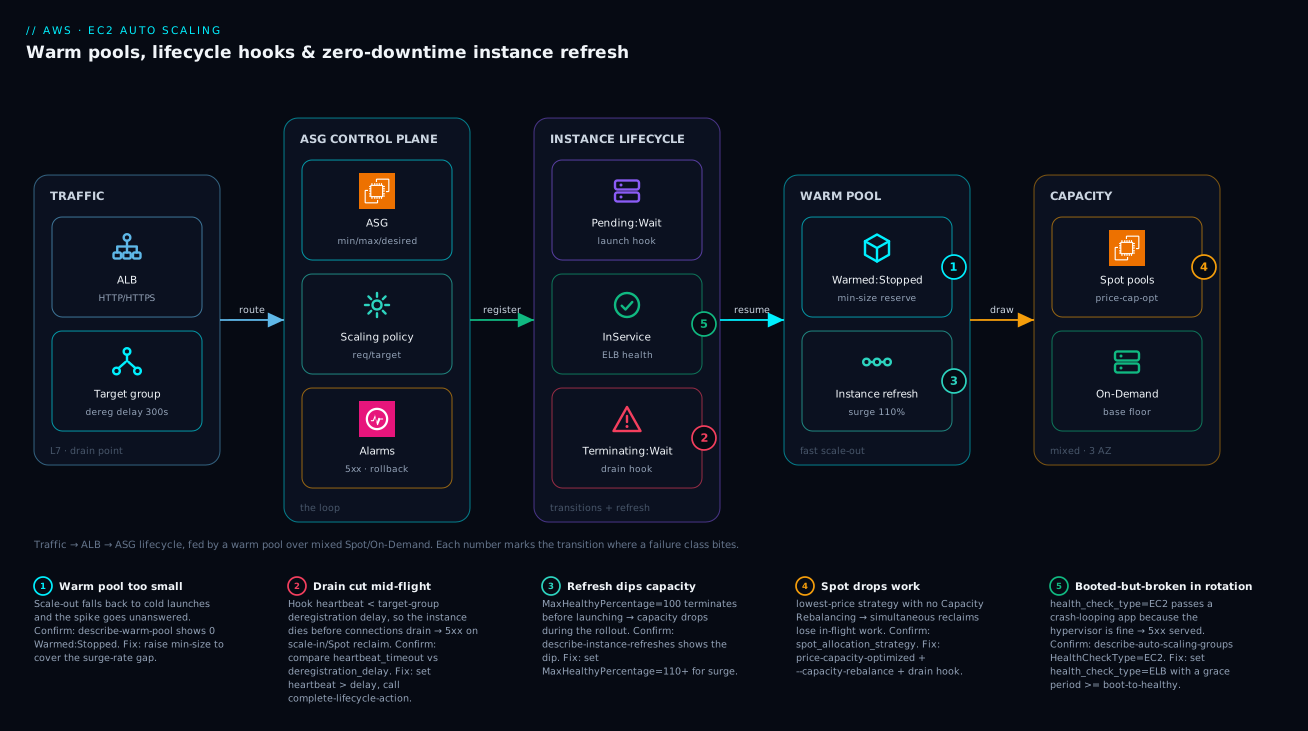
The diagram traces a request and the ASG’s control loop together, left to right, then marks each transition where a failure class bites. Read it as four zones. Traffic enters at an ALB that distributes to a target group of healthy instances — this is where the drain contract lives, because deregistration is how an instance stops taking new requests. The ASG control plane zone holds the group itself plus its scaling policies and CloudWatch alarms; this is the loop that watches the metric, decides desired_capacity, and fires the lifecycle transitions. The lifecycle zone is the heart of the system: a launching instance can sit in Pending:Wait for a bootstrap hook, a terminating one in Terminating:Wait for a drain hook, and instance refresh drives rolling replacement through these same states. Finally the warm pool zone holds the Warmed:Stopped reserve that feeds fast scale-out, drawing instances from mixed Spot/On-Demand capacity across AZs.
Follow the numbered badges to read the failure map. Each one sits on the exact hop where it bites: a warm pool sized too small (1) means scale-out falls back to cold launches and the spike goes unanswered; a terminate hook whose heartbeat is shorter than the target group’s deregistration delay (2) cuts connections mid-flight; an instance refresh with MaxHealthyPercentage = 100 and no surge (3) dips capacity during the rollout; a Spot reclaim without Capacity Rebalancing (4) drops in-flight work; and a health_check_type = EC2 (5) leaves a booted-but-broken instance serving 5xx because the hypervisor is fine. The legend narrates each as symptom · how to confirm · fix. The method is always the same: localise the problem to a transition, read the badge, run the named aws command, apply the fix.
Real-world scenario
Cohort Pay runs its card-authorization API on an ASG behind an ALB: a JVM service (Spring Boot) on m6i.large, target tracking on CPU, 100% On-Demand, in ap-south-1 across three AZs. Steady traffic is ~600 requests/second with a 7pm spike to ~2,200 rps when a partner merchant runs daily promotions. The platform team is five engineers; the monthly EC2 spend is about ₹9.4 lakh. Two problems collided.
First, the JVM service took ~3.5 minutes from launch to warm — config fetch from Parameter Store, connection-pool priming to the HSM and the database, and JIT compilation of the hot authorization path. Every 7pm spike meant minutes of elevated p99 latency and a scatter of 5xx while target tracking spun up cold capacity that wasn’t ready to serve. The on-call reflex — raise the CPU target or add a step policy — only made the ASG launch more cold instances faster, overshooting and then scaling back in, a thrash that never closed the latency gap.
Second, finance wanted the ~58% cost reduction Spot would bring, but the risk team had a hard, audited rule: an authorization request in flight must never be killed by an infrastructure event. Naive Spot was a non-starter — a reclaim mid-auth was exactly the failure they were chartered to prevent. The two requirements looked contradictory: go cheaper with Spot, but never drop a request when Spot (or anything) reclaims a node.
The fix combined four of the controls above. They added a Stopped warm pool with min_size sized to their worst observed surge (about +18 instances over two minutes) so scale-out resumed pre-warmed instances in ~20 seconds instead of cold-launching for 3.5 minutes — the JIT and pool priming happened once, in the background, not on the critical path. They moved to a mixed instances policy at on_demand_base_capacity = 6 with 30% On-Demand above the base and price-capacity-optimized Spot across five m6i/m6a/m5 sizes in three AZs. Crucially, they enforced the no-killed-request rule with Capacity Rebalancing plus a terminating lifecycle hook that deregistered the instance from the ALB target group and waited out the full deregistration_delay before completing the action — so Spot reclaims, rebalance recommendations, and normal scale-in all drained through one identical path.
# The contract that satisfied the risk team: never complete termination
# until the ALB has stopped routing and in-flight auths have finished.
aws autoscaling put-lifecycle-hook \
  --lifecycle-hook-name auth-drain \
  --auto-scaling-group-name payments-authz \
  --lifecycle-transition autoscaling:EC2_INSTANCE_TERMINATING \
  --heartbeat-timeout 330 \
  --default-result CONTINUE   # 330s > the 300s deregistration delay, with margin
AMI patching moved to instance refresh with MaxHealthyPercentage = 110 (surge, so capacity never dipped below 100%), checkpoints at 25% and 50% with a 10-minute bake each, and AutoRollback wired to their 5xx alarm — so a bad build paused at the first checkpoint and reverted itself instead of paging anyone. The timeline of the migration tells the story:
| Phase | Change | Symptom before | Result after |
|---|---|---|---|
| Week 0 | Baseline: CPU target tracking, 100% OD | p99 spikes to seconds on every 7pm surge | — |
| Week 1 | Add Stopped warm pool (min_size 18) |
3.5-min cold launches during spike | Scale-out in ~20 s; p99 flat |
| Week 2 | Mixed instances, 30% OD above base | All-OD cost (₹9.4L/mo) | Spot blend, savings begin |
| Week 3 | Capacity Rebalancing + terminate drain hook | Reclaim could drop an in-flight auth | Every reclaim drains cleanly |
| Week 4 | Instance refresh + checkpoints + AutoRollback | Manual, risky AMI rollouts | Canary + auto-revert on 5xx |
| Steady | — | — | p99 flat, cost −55%, 0 dropped auths in 12 mo |
Net result: p99 latency during surges dropped from seconds to flat, compute cost fell ~55% (to about ₹4.2 lakh/month), and in twelve months of Spot interruptions not one authorization request was dropped. The lesson on the wall: “Scaling policy is the easy 10%. The transitions — warm, drain, refresh, rebalance — are the 90% that actually keeps you up.”
Advantages and disadvantages
The state-machine model of EC2 Auto Scaling is what makes warm pools, clean drains, and reversible rollouts possible — but every one of those controls is a knob you must turn, and the defaults are tuned for simplicity, not for production safety. Weigh it honestly:
| Advantages (why these controls help you) | Disadvantages (why they bite) |
|---|---|
| Warm pools collapse scale-out from minutes to seconds without paying for idle compute (Stopped state) | Warm pools add real complexity: user-data runs in two phases, and bootstrap must be pool-aware |
| Lifecycle hooks give a guaranteed drain/bootstrap window on every transition, Spot reclaim included | A hook with no working callback or too-short heartbeat stalls or cuts — a stuck *:Wait is its own incident |
| Instance refresh makes “ship an AMI” a controlled, abortable, auto-revertible operation | Misconfigured (no surge, bad warmup, wrong health type) it can dip capacity or stall mid-fleet |
Mixed instances + price-capacity-optimized turn Spot into resilient, cheap capacity |
Spot still requires interruption choreography; lowest-price without it drops work in waves |
| Capacity Rebalancing converts reclaims into graceful, pre-warned drains | It launches replacements early, briefly running hot and costing a little more |
| ELB health checks evict booted-but-broken instances automatically | Defaults are unsafe: EC2 health type, 0/300 grace, no warm pool, instant termination |
| Termination policies let you shed the right capacity (oldest/old-template) during rollouts | Wrong policy kills new instances during a deploy, or non-resumable work without protection |
| Predictive scaling pre-empts cyclical demand before it arrives | Useless (or harmful) on spiky/random load; needs weeks of clean history to trust |
The model is right for any EC2 tier that must absorb spikes, capture Spot savings, or roll AMIs without downtime. It bites hardest on teams that adopt one control without its partner — a warm pool with pool-unaware bootstrap, Spot without rebalancing, an instance refresh without surge or rollback. The disadvantages are all manageable, but only if you know the transition each control owns, which is the point of this article.
Hands-on lab
Stand up an ASG behind an ALB, add a warm pool and a terminate drain hook, then run a no-op instance refresh and watch it surge through the lifecycle — all free-tier-friendly (t3.micro; delete at the end). Run with the AWS CLI configured to a sandbox account and a default VPC.
Step 1 — Variables and a security group.
export AWS_DEFAULT_REGION=ap-south-1
VPC=$(aws ec2 describe-vpcs --filters Name=isDefault,Values=true --query 'Vpcs[0].VpcId' --output text)
SUBNETS=$(aws ec2 describe-subnets --filters Name=vpc-id,Values=$VPC \
  --query 'Subnets[].SubnetId' --output text | tr '\t' ',')
SG=$(aws ec2 create-security-group --group-name asg-lab --description "asg lab" \
  --vpc-id $VPC --query GroupId --output text)
aws ec2 authorize-security-group-ingress --group-id $SG --protocol tcp --port 80 --cidr 0.0.0.0/0
AMI=$(aws ssm get-parameters --names \
  /aws/service/ami-amazon-linux-latest/al2023-ami-kernel-default-x86_64 \
  --query 'Parameters[0].Value' --output text)
Expected: a VPC id, a comma-separated subnet list across AZs, a security-group id, and a current Amazon Linux 2023 AMI id.
Step 2 — A launch template with IMDSv2 and a tiny web server in user-data.
USERDATA=$(printf '#!/bin/bash\ndnf -y install httpd\nsystemctl enable --now httpd\necho ok > /var/www/html/health\n' | base64)
LT=$(aws ec2 create-launch-template --launch-template-name asg-lab \
  --launch-template-data "{
    \"ImageId\": \"$AMI\", \"InstanceType\": \"t3.micro\",
    \"SecurityGroupIds\": [\"$SG\"], \"UserData\": \"$USERDATA\",
    \"MetadataOptions\": {\"HttpTokens\": \"required\"}
  }" --query 'LaunchTemplate.LaunchTemplateId' --output text)
Step 3 — An ALB, target group, and listener.
ALB=$(aws elbv2 create-load-balancer --name asg-lab --type application \
  --subnets ${SUBNETS//,/ } --security-groups $SG \
  --query 'LoadBalancers[0].LoadBalancerArn' --output text)
TG=$(aws elbv2 create-target-group --name asg-lab --protocol HTTP --port 80 \
  --vpc-id $VPC --target-type instance --health-check-path /health \
  --query 'TargetGroups[0].TargetGroupArn' --output text)
aws elbv2 create-listener --load-balancer-arn $ALB --protocol HTTP --port 80 \
  --default-actions Type=forward,TargetGroupArn=$TG
Step 4 — Create the ASG with ELB health checks and a sane grace period.
aws autoscaling create-auto-scaling-group --auto-scaling-group-name asg-lab \
  --launch-template "LaunchTemplateId=$LT,Version=\$Latest" \
  --min-size 2 --max-size 6 --desired-capacity 2 \
  --vpc-zone-identifier "$SUBNETS" \
  --target-group-arns $TG \
  --health-check-type ELB --health-check-grace-period 120 \
  --default-instance-warmup 120
Expected: after ~2 minutes, two instances reach InService. Confirm:
aws autoscaling describe-auto-scaling-groups --auto-scaling-group-names asg-lab \
  --query 'AutoScalingGroups[0].Instances[].[InstanceId,LifecycleState,HealthStatus]' --output table
Step 5 — Add a Stopped warm pool and watch it fill.
aws autoscaling put-warm-pool --auto-scaling-group-name asg-lab \
  --pool-state Stopped --min-size 2 --max-group-prepared-capacity 4

aws autoscaling describe-warm-pool --auto-scaling-group-name asg-lab \
  --query '[WarmPoolConfiguration,Instances[].[InstanceId,LifecycleState]]' --output json
# Look for instances in Warmed:Pending -> Warmed:Stopped
Step 6 — Add a terminate drain hook so scale-in waits.
aws autoscaling put-lifecycle-hook --lifecycle-hook-name drain \
  --auto-scaling-group-name asg-lab \
  --lifecycle-transition autoscaling:EC2_INSTANCE_TERMINATING \
  --heartbeat-timeout 120 --default-result CONTINUE
Step 7 — Run a no-op instance refresh with surge and watch the lifecycle.
aws autoscaling start-instance-refresh --auto-scaling-group-name asg-lab \
  --preferences '{"MinHealthyPercentage":90,"MaxHealthyPercentage":110,"InstanceWarmup":120}'

watch -n 10 'aws autoscaling describe-instance-refreshes \
  --auto-scaling-group-name asg-lab \
  --query "InstanceRefreshes[0].[Status,PercentageComplete]" --output text'
# Status walks Pending -> InProgress -> Successful; capacity never dips below 100%
Step 8 — Teardown (delete in order to avoid dependency errors).
aws autoscaling delete-warm-pool --auto-scaling-group-name asg-lab --force-delete
aws autoscaling delete-auto-scaling-group --auto-scaling-group-name asg-lab --force-delete
aws elbv2 delete-listener --listener-arn $(aws elbv2 describe-listeners --load-balancer-arn $ALB --query 'Listeners[0].ListenerArn' --output text)
aws elbv2 delete-load-balancer --load-balancer-arn $ALB
sleep 30
aws elbv2 delete-target-group --target-group-arn $TG
aws ec2 delete-launch-template --launch-template-id $LT
aws ec2 delete-security-group --group-id $SG
Common mistakes & troubleshooting
The ASG fails in transitions, and almost every failure has a precise fingerprint. This is the playbook: match the symptom, run the confirm command, apply the fix.
| # | Symptom | Root cause | Confirm (exact command) | Fix |
|---|---|---|---|---|
| 1 | Instance stuck in Pending:Wait for the full heartbeat |
Launch hook handler never calls complete-lifecycle-action |
describe-auto-scaling-instances ... LifecycleState shows Pending:Wait |
Fix handler to call complete; set sane default_result ABANDON |
| 2 | Instance stuck in Terminating:Wait, capacity not freed |
Drain logic never reports back; heartbeat huge | describe-scaling-activities shows long Terminating:Wait |
Make handler call complete-lifecycle-action; lower heartbeat |
| 3 | 5xx on every scale-in / Spot reclaim | No terminate hook, or heartbeat < deregistration delay | TG deregistration_delay vs hook heartbeat_timeout |
Add hook; set heartbeat > deregistration_delay |
| 4 | Scale-out still slow despite a warm pool | Warm pool min_size too small / pool empty |
describe-warm-pool shows 0 Warmed:Stopped |
Raise min_size to cover the surge-rate gap |
| 5 | Launch/terminate thrash loop right after boot | health_check_grace_period < boot-to-healthy |
describe-scaling-activities shows repeated launch→terminate |
Raise grace to boot-to-healthy + margin |
| 6 | Booted-but-broken instance serving traffic | health_check_type = EC2 (hypervisor OK, app dead) |
describe-auto-scaling-groups ... HealthCheckType = EC2 |
Set health_check_type = ELB |
| 7 | Capacity dips during an AMI rollout | Instance refresh with MaxHealthyPercentage = 100 (no surge) |
describe-instance-refreshes shows dip; preferences max 100 |
Set MaxHealthyPercentage = 110+ |
| 8 | Instance refresh stuck InProgress, never completes |
New AMI fails health within warmup; can’t hold min healthy | describe-instance-refreshes ... StatusReason |
Fix AMI/health path; verify warmup matches boot time |
| 9 | Bad AMI rolled to whole fleet, no revert | AutoRollback not set / no alarm wired |
Refresh Preferences.AutoRollback = false |
Enable AutoRollback + an alarm spec |
| 10 | Spot interruptions drop work in waves | lowest-price strategy, no Capacity Rebalancing |
instances_distribution.spot_allocation_strategy |
Switch to price-capacity-optimized; enable --capacity-rebalance |
| 11 | Scale-out stalls; “no capacity” errors | Too few instance types/AZs for Spot to draw from | describe-scaling-activities shows insufficient-capacity |
Diversify to 4+ types, 3 AZs |
| 12 | New instances never register with the ALB | Wrong/missing IAM profile or SG; SSM hook can’t run | describe-target-health shows no targets |
Fix instance profile + SG; verify hook ran |
| 13 | Warm-pool instances behave as if in service | Bootstrap not distinguishing Warmed:Pending from Pending |
Check user-data branch on LifecycleState |
Branch bootstrap on lifecycle state |
| 14 | Long-running consumer killed on scale-in | No scale-in protection on the busy node | describe-auto-scaling-instances ... ProtectedFromScaleIn |
set-instance-protection --protected-from-scale-in |
| 15 | Double-scaling: ASG over-provisions on a spike | EstimatedInstanceWarmup/default_instance_warmup = 0 |
Policy/group warmup is 0 | Set warmup to real time-to-ready |
Error and limit reference
The control-plane errors and the hard limits you will actually hit:
| Error / condition | Where it surfaces | Likely cause | Fix |
|---|---|---|---|
Failed to launch ... insufficient capacity |
Scaling activities | No Spot/OD capacity in chosen pools | Diversify types/AZs; widen Spot strategy |
Launch template version ... does not exist |
ASG / refresh | Pinned a deleted/non-existent LT version | Use $Latest/$Default or a valid version |
Health check grace period evictions |
Scaling activities | Grace too short | Raise grace period |
Instance failed to pass health checks |
Refresh StatusReason |
Bad AMI / health path | Fix AMI; verify probe path returns 200 |
Could not maintain minimum healthy percentage |
Refresh failed | Warmup too short or capacity tight | Raise warmup; relax min healthy; add capacity |
Lifecycle action ... already completed |
Hook handler | Double complete-lifecycle-action |
Make handler idempotent (use token) |
AccessDenied on elbv2:DeregisterTargets |
Drain handler logs | Instance profile lacks ELB perms | Grant the drain role ELB deregister perms |
| Limit (default, soft unless noted) | Value | Note |
|---|---|---|
| ASGs per region | 500 | Adjustable via quota |
| Launch templates per region | 5,000 | Each with many versions |
| Launch template versions | 10,000 per template | Prune old versions |
| Instances per ASG | (bounded by EC2 limits) | Effectively your account’s instance quotas |
| Lifecycle hooks per ASG | 50 | Per group |
| Scaling policies per ASG | 50 | Step + target + predictive |
| Scheduled actions per ASG | 125 | Time-based capacity changes |
| Warm pool max prepared capacity | ≤ max_size | Cannot exceed group max |
| Spot interruption notice | ~2 minutes | Hard, not adjustable |
| Lifecycle heartbeat timeout | 30 s – 7,200 s (172,800 s max with renewals) | Per action |
Best practices
- Use a launch template, never a launch configuration — versioned, full EC2 surface, and the unit instance refresh rolls forward. Enforce IMDSv2 (
http_tokens = required) and gp3 volumes in it. - Diversify before you tune — at least four instance types across three AZs with
price-capacity-optimized, and anon_demand_base_capacityfloor sized to your minimum tolerable always-on capacity. - Set
default_instance_warmuponce, correctly — to your real boot-to-healthy time at the group level, so every policy and refresh inherits it and you stop repeating yourself. - Scale on load, not CPU —
ALBRequestCountPerTargettracks demand honestly; reserve CPU targets for genuinely CPU-bound tiers. Run predictive inForecastOnlyfor a week beforeForecastAndScale, and only for cyclical traffic. - Size the warm pool to the gap, not the peak —
min_sizecovers the deficit between your surge rate and your cold launch time; default to theStoppedstate and only pay forRunning/Hibernatedwhen latency demands it. - Make bootstrap pool-aware — branch user-data and launch hooks on
Warmed:PendingvsPendingso the expensive work happens once in the pool, not again on the way into service. - Always attach a terminate drain hook — deregister from the target group and wait out
deregistration_delaybeforecomplete-lifecycle-action, withheartbeat_timeoutcomfortably greater than that delay. - Set
health_check_type = ELBwith a grace period ≥ boot-to-healthy, so booted-but-broken instances are evicted and slow boots aren’t. - Roll AMIs with instance refresh, surge, checkpoints, and
AutoRollback—MaxHealthyPercentage > 100so capacity never dips, checkpoints as a canary, and a 5xx/latency alarm wired to auto-revert. - Choreograph Spot — enable Capacity Rebalancing and handle both the rebalance recommendation and the interruption notice through the same drain path as a normal scale-in.
- Favour
OldestLaunchTemplateduring rollouts so scale-in converges the fleet on the new version, and protect non-resumable work with scale-in protection. - Treat the ASG as code — launch template, policies, hooks, refresh preferences all in Terraform, reviewed; a tuned warmup or health type is as load-bearing as application code.
Security notes
The ASG itself is mostly a control-plane resource, but the instances it launches inherit a security posture you set in the launch template — get it wrong and every node in the fleet is wrong.
| Area | Risk | Control |
|---|---|---|
| IMDS | SSRF stealing instance-role credentials via IMDSv1 | http_tokens = required (IMDSv2 only); hop_limit = 1 (or 2 for containers, no more) |
| Instance profile | Over-broad role on every instance | Least-privilege role; the drain hook needs only elbv2:DeregisterTargets + autoscaling:CompleteLifecycleAction |
| EBS encryption | Data at rest unencrypted | encrypted = true in block device mappings; account-default EBS encryption on |
| Security groups | Fleet exposed beyond the ALB | SG allows ingress only from the ALB SG, not 0.0.0.0/0 |
| User-data secrets | Plaintext secrets in user-data (readable via IMDS) | Pull secrets from Secrets Manager/Parameter Store at boot, never bake them in |
| AMI provenance | Unpatched/untrusted AMI rolled fleet-wide | Pin to vetted, scanned AMIs; refresh from a hardened pipeline |
| Hook handler | Lambda/SSM with excess permissions | Scope the handler role to the specific hook actions and target group |
| Cross-AZ traffic | Drain handler reaching ELB API | VPC endpoints for elasticloadbalancing/autoscaling keep API calls private |
The instance profile that the drain hook needs is small — resist the urge to attach a broad role:
{
  "Version": "2012-10-17",
  "Statement": [
    {"Effect": "Allow", "Action": ["autoscaling:CompleteLifecycleAction", "autoscaling:RecordLifecycleActionHeartbeat"], "Resource": "*"},
    {"Effect": "Allow", "Action": ["elasticloadbalancing:DeregisterTargets", "elasticloadbalancing:DescribeTargetHealth"], "Resource": "*"}
  ]
}
For least-privilege IAM patterns beyond this, see IAM Least Privilege & Permission Boundaries.
Cost & sizing
The ASG is free; you pay for the instances, the EBS attached to warm-pool members, the ALB, and any detailed monitoring. The levers that actually move the bill:
| Cost driver | What drives it | Lever | Rough magnitude |
|---|---|---|---|
| On-Demand floor | on_demand_base_capacity × instance price |
Keep the floor minimal | Largest steady cost if over-set |
| Spot vs On-Demand mix | on_demand_percentage_above_base_capacity |
Lower % = more savings | Spot saves ~50–70% vs OD |
| Warm pool (Stopped) | EBS volumes for min_size reserve |
Right-size min_size; Stopped not Running |
EBS-only; no compute |
| Warm pool (Running) | Full instance cost for the reserve | Use only when latency demands | Same as in-service capacity |
| Detailed monitoring | 1-min metrics per instance | On for responsive scaling | Small per-instance charge |
| Instance refresh surge | Extra instances during rollout | Surge briefly, then settle | Transient (rollout duration only) |
| Cross-AZ data | Traffic between AZs | Keep chatty paths in-AZ where possible | Per-GB |
| ALB | LCU-hours + hourly | Right-size; consolidate | Modest baseline |
Sizing guidance
| Decision | Heuristic | Why |
|---|---|---|
min_size (group) |
Survive one AZ loss at steady traffic | Reliability floor |
max_size (group) |
Peak demand + headroom, within quotas | Don’t cap a real spike |
on_demand_base_capacity |
Minimum capacity you’d run all-OD | Floor against Spot reclaim waves |
Warm pool min_size |
Surge over (cold − warm) launch window | Pay for the deficit, not the peak |
| Instance size | Same fungible size across types | Even LB distribution |
InstanceWarmup |
Real p95 boot-to-healthy | Avoid double-scaling and false unhealthy |
A worked figure: a 6-instance m6i.large steady fleet at 30% On-Demand above a base of 2, with a 4-instance Stopped warm pool, in ap-south-1, lands roughly at ₹55,000–75,000/month depending on Spot pricing — versus ~₹1.3 lakh/month for the same fleet all On-Demand with no warm pool but a fatter floor to fake the latency. The warm pool’s only marginal cost is the EBS for four stopped volumes (a few hundred rupees/month), which buys you minutes-to-seconds scale-out — almost always worth it. There is no free tier for sustained ASG capacity; the t3.micro lab above fits within the 750 hours/month free-tier EC2 allowance if you delete promptly.
Interview & exam questions
Q1. Why is a single instance type a reliability risk in an ASG, and how does a mixed instances policy fix it? A single type is a single capacity pool; when it’s exhausted in an AZ, scale-out stalls and the spike goes unanswered. A mixed instances policy draws from multiple types across AZs, so capacity-aware allocation (price-capacity-optimized) can route around a thin pool. (SAA-C03, SAP-C02.)
Q2. What is a warm pool, and when would you choose Hibernated over Stopped? A warm pool is a pre-initialized reserve of instances held past the expensive bootstrap, resumed in seconds on scale-out. Choose Hibernated when the app has a long in-memory warmup (large caches, JIT state) worth preserving across the stop; Stopped (the default) suffices when only the disk-level bootstrap is expensive. (SAP-C02.)
Q3. A lifecycle hook is meant to drain connections on scale-in. What single timing relationship must hold, and what breaks if it doesn’t? The hook’s heartbeat_timeout must exceed the target group’s deregistration_delay; otherwise the heartbeat expires and the instance is terminated mid-drain, cutting in-flight requests — defeating the hook’s purpose. (DVA-C02, SOA-C02.)
Q4. How does MaxHealthyPercentage > 100 change an instance refresh? It enables surge: the refresh launches replacement instances before terminating old ones, so total capacity never dips below 100% during the rollout — the closest thing to a true zero-downtime rolling deploy. (SAP-C02, DOP-C02.)
Q5. What is the difference between the Spot interruption notice and the rebalance recommendation? The interruption notice is a hard “~2 minutes until reclaim”; the rebalance recommendation is an earlier, best-effort “elevated risk of interruption” that often precedes it. Capacity Rebalancing acts on the recommendation to replace and drain before the 2-minute gun fires. (SAP-C02.)
Q6. Why set health_check_type = ELB instead of leaving the default? The default EC2 check only verifies the hypervisor/VM is alive; an app that crash-loops or never binds its port still passes. ELB ties health to the target group’s application probe, so booted-but-broken instances are evicted. (SAA-C03.)
Q7. An ASG launches new capacity on a spike, then immediately scales back in, repeatedly. Name two likely causes. Either EstimatedInstanceWarmup/default_instance_warmup is 0 (so fresh instances’ metrics trigger more scaling before they’re ready — double-scaling), or health_check_grace_period is shorter than boot-to-healthy (so the ASG kills instances mid-boot). (SOA-C02.)
Q8. How do you ship a new AMI to an ASG with a canary and automatic rollback? Run an instance refresh with CheckpointPercentages (e.g. 25%, 50%) and a CheckpointDelay bake period as the canary, plus AutoRollback: true and an AlarmSpecification referencing a 5xx/latency alarm — so a bad build pauses at the first checkpoint and reverts itself. (DOP-C02.)
Q9. Why does running a warm pool require pool-aware bootstrap automation? The launch transition fires for both entering the pool (Warmed:Pending) and entering service (Pending). Bootstrap that doesn’t branch on LifecycleState may register a stopped pool instance with the load balancer, or re-run the full expensive bootstrap on the fast resume path. (SAP-C02.)
Q10. Which termination policy do you favour during a rollout, and why? OldestLaunchTemplate — so that when the ASG scales in during a refresh, it sheds old-template instances first and the fleet converges on the new version rather than killing freshly updated nodes. (DOP-C02.)
Q11. Why is scaling out a band-aid for SNAT/connection or per-instance memory problems, and how does this relate to ASG sizing? Scaling out adds instances but doesn’t fix a per-instance constraint (each new node hits the same ceiling) — the same anti-pattern as masking an OOM by adding capacity. The fix is in the instance (code/RAM), and the ASG should be sized for demand, not to dilute a per-instance bug. (SAP-C02.)
Q12. How does on_demand_base_capacity interact with a Spot reclaim wave? It guarantees an absolute floor of On-Demand instances that Spot interruptions cannot touch, so a correlated reclaim across Spot pools degrades capacity down to — but never below — that floor. (SAP-C02.)
Quick check
- What lifecycle state does an instance enter when a terminating lifecycle hook is attached, and what must you call to release it?
- Your warm pool is configured but scale-out is still slow during a real spike. What is the most likely single cause?
- Which
MaxHealthyPercentagevalue enables surge during an instance refresh, and what does surge prevent? - Name the two Spot signals and which one Capacity Rebalancing acts on.
- Why must
health_check_grace_periodbe at least your boot-to-healthy time?
Answers
Terminating:Wait— release it by callingcomplete-lifecycle-action(withCONTINUEto proceed, orABANDON), or let the heartbeat time out.- The warm pool
min_sizeis too small (or the pool is empty) — it isn’t sized to cover the gap between your surge rate and your cold launch time, so scale-out falls back to cold launches. - Any value above 100 (e.g. 110) enables surge; surge launches replacements before terminating old instances, so capacity never dips below 100% during the rollout.
- The rebalance recommendation (earlier, “elevated risk”) and the interruption notice (~2 minutes, definite). Capacity Rebalancing acts on the rebalance recommendation.
- Because health checks count against an instance after the grace period; if it’s shorter than boot-to-healthy, the ASG marks still-booting instances unhealthy and kills them, producing a launch/terminate thrash loop.
Glossary
- Auto Scaling group (ASG) — a managed set of EC2 instances kept at a desired capacity, moving each instance through a defined lifecycle and applying scaling policies, hooks, and refreshes.
- Launch template — the versioned blueprint (AMI, type, IMDS, EBS, tags, user-data) for instances the ASG launches; the unit instance refresh rolls forward.
- Mixed instances policy — ASG configuration that diversifies across instance types and AZs and blends On-Demand with Spot via an allocation strategy.
- Allocation strategy — how the ASG chooses Spot capacity pools;
price-capacity-optimized(resilient + cheap) is the production default. - Warm pool — a pre-initialized reserve of instances held in
Stopped/Hibernated/Runningstate past the expensive bootstrap, resumed in seconds on scale-out. - Lifecycle hook — a wait state (
Pending:WaitorTerminating:Wait) inserted into a transition, giving you a window to bootstrap or drain before the instance proceeds. - Heartbeat — the countdown for an in-progress hook action;
record-lifecycle-action-heartbeatresets it,complete-lifecycle-actionends it. - Instance refresh — a rolling replacement of the fleet to the current launch template version, honouring a healthy-percentage band, warmup, checkpoints, and optional auto-rollback.
- Checkpoint — a configured pause percentage during a refresh, with a delay, used as a canary bake window.
- Surge — instance-refresh behaviour (
MaxHealthyPercentage > 100) that launches replacements before terminating old instances so capacity never dips. - Capacity Rebalancing — an ASG feature that proactively replaces Spot instances flagged by a rebalance recommendation, before the hard interruption notice.
- Rebalance recommendation — an early, best-effort signal that a Spot instance is at elevated risk of interruption.
- Interruption notice — the hard ~2-minute warning that a Spot instance will be reclaimed, delivered via metadata or EventBridge.
- Default instance warmup — a group-level time-to-ready that becomes the default warmup for all scaling policies and refreshes.
- Termination policy — the rule deciding which instance is terminated on scale-in (e.g.
OldestLaunchTemplate,OldestInstance). - Scale-in protection — a per-instance flag that exempts a node from scale-in termination, for non-resumable work.
- EstimatedInstanceWarmup — a per-policy override of how long a fresh instance’s metrics are ignored, preventing double-scaling.
Next steps
- Go deeper on the purchase-option blend and interruption resilience in EC2 Spot + Mixed Instances: Capacity-Optimized ASGs and Interruption Handling.
- See the whole surge stack under flash-sale load in E-commerce Black Friday: AWS Surge Autoscaling Architecture.
- Wire the drain contract through the load balancer with Elastic Load Balancing: ALB, NLB, GWLB Deep Dive.
- Cut boot time at the source — the AMI and IMDS layer — in AWS EC2 Deep Dive: Instances, AMIs, EBS, User Data, IMDS.
- Alarm on the metrics that drive scaling and rollback in CloudWatch & CloudTrail Observability Deep Dive.