Building a SaaS product is not the same as building a single-customer application and selling it many times. The moment your second customer signs up, you inherit a class of problems that no amount of feature work will solve: how do you keep Tenant A’s data invisible to Tenant B, how do you stop one noisy tenant from starving everyone else, how do you bill each tenant for what they actually consumed, and how do you offer a premium customer a dedicated, compliant environment without forking your codebase? This article is a reference architecture for a multi-tenant SaaS control plane and application plane on AWS that answers those questions deliberately rather than by accident.
In a nutshell
Imagine you run an apartment complex. Most residents live in shared-amenity apartments: one building, one boiler, one cleaning crew, and house rules that keep everyone out of each other’s units. A few VIP residents pay for a detached villa — their own walls, their own locks, their own utility meter — because their lawyers insist on it. Either way, one management company runs leasing, billing, and key-cutting, and every apartment is built from the same set of blueprints. That is multi-tenant SaaS. The shared apartments are the pool model (cheap, isolation enforced in software); the villas are the silo model (expensive, isolation enforced by walls); running both from one office off one blueprint is the bridge model that almost every serious SaaS ends up at.
Two ideas carry the whole lesson. First, who is who has to be un-fakeable. When a resident swipes into the building, their key fob only opens their floor — the building doesn’t ask them “which floor are you?” and take their word for it. In our architecture that key fob is a JWT (a signed login token) carrying a tenantId claim that the server stamps in, so a user physically cannot request another tenant’s data. Second, the office and the apartments are different buildings. The control plane (onboarding, the tenant directory, identity, billing, metering) is the management office; the application plane (your actual product) is where tenants live and work. Keeping them separate is the single most important structural decision in SaaS.
The third idea is the utility meter. Flat rent leaves money on the table and invites abuse, so every unit is metered — API calls, gigabytes stored, documents processed — and each tenant is billed for what they actually used. That meter also quietly tells you which “cheap” tenant is secretly running up your bill.
Level: Advanced · Time: ~55 min
Prerequisites — you’ll get the most from this if you’re comfortable with:
- Core AWS identity: IAM roles, policies, and
sts:AssumeRole— you will assume roles and attach session policies on every request here. - What a JWT is (a signed JSON token with claims) and roughly how OAuth/OIDC sign-in works.
- DynamoDB partition keys and the idea of a relational
WHEREclause (see the DynamoDB deep dive). - The vocabulary of API Gateway, Lambda, and CloudFront — you don’t need to be an expert in any of them.
After this lesson you will be able to:
- Explain the pool / silo / bridge isolation models and pick the right one per service and per tier, not once for the whole system.
- Trace a single request from CloudFront through a tenant-scoped credential to tenant-partitioned data, and say exactly where isolation is enforced.
- Design the control plane vs application plane split, and the tenant/tier catalog that drives it.
- Wire tenant identity into Cognito JWTs and turn a
tenantIdclaim into least-privilege AWS credentials withdynamodb:LeadingKeysand Aurora row-level security. - Build a metering pipeline that attributes usage per tenant and feeds billing — and reason about noisy neighbours, per-tenant cost/margin, and when to graduate a tenant from pool to silo.
The business scenario
You are building a B2B SaaS product — say a document-collaboration platform, a vertical CRM, or an analytics suite. You sell to other businesses (tenants), and each tenant has many users. Your commercial reality looks like this:
- The long tail is small. Most of your tenants are 5-to-50-seat companies on a self-serve Starter or Pro plan. They are price-sensitive, churn easily, and individually contribute little revenue. You cannot afford to run dedicated infrastructure for each of them — the per-tenant fixed cost would destroy your margins.
- The head is large and demanding. A handful of Enterprise tenants each represent 20-40% of your revenue. They have procurement teams that send you 200-line security questionnaires. They demand a signed DPA, data residency in a specific region, a dedicated database, the ability to bring their own KMS key (BYOK), and contractual isolation guarantees. They will pay 50x the Pro price — but only if you can prove their data never shares a table with anyone else’s.
- Billing must reflect consumption. Flat per-seat pricing leaves money on the table and exposes you to abuse. A tenant who runs 4 million API calls and stores 2 TB should pay more than one who barely logs in. You need metered, usage-based billing — API calls, storage, compute-seconds, documents processed — attributed accurately to each tenant.
- You are one engineering team. You ship one codebase. You cannot maintain a per-customer fork. Whatever isolation model you choose, the same deployment artifact has to serve a 10-seat startup and a 5,000-seat bank.
The central architectural tension is pool vs silo. In a pool model, all tenants share the same compute and the same databases, and isolation is enforced in software (every query is scoped by tenant_id, every IAM policy is dynamically scoped to the caller’s tenant). Pooling is cheap and operationally simple — one deployment, one database fleet — but a single bug can leak data across tenants, and a noisy tenant degrades everyone. In a silo model, each tenant gets dedicated resources (its own database, sometimes its own compute, its own KMS key). Silos give you hard, infrastructure-level isolation and clean per-tenant cost attribution and blast-radius containment — but they are expensive and the operational surface grows linearly with tenant count.
The mature answer, codified in the AWS SaaS Lens of the Well-Architected Framework and the SaaS Builder Toolkit, is not to pick one — it is a tiered, bridge model: pool the long tail to protect margins, silo the demanding head to win enterprise deals, and run both from a single control plane and a single codebase. This article shows how to build exactly that on AWS, with Amazon Cognito as the tenant-aware identity provider, JWT-embedded tenant context flowing through every request, dynamically-scoped IAM and PartiQL/leading-key partitioning for data isolation, and an EventBridge + Kinesis metering pipeline that turns raw usage into invoices.
Architecture overview
The platform splits into two cooperating planes, a separation that is the single most important idea in SaaS architecture.
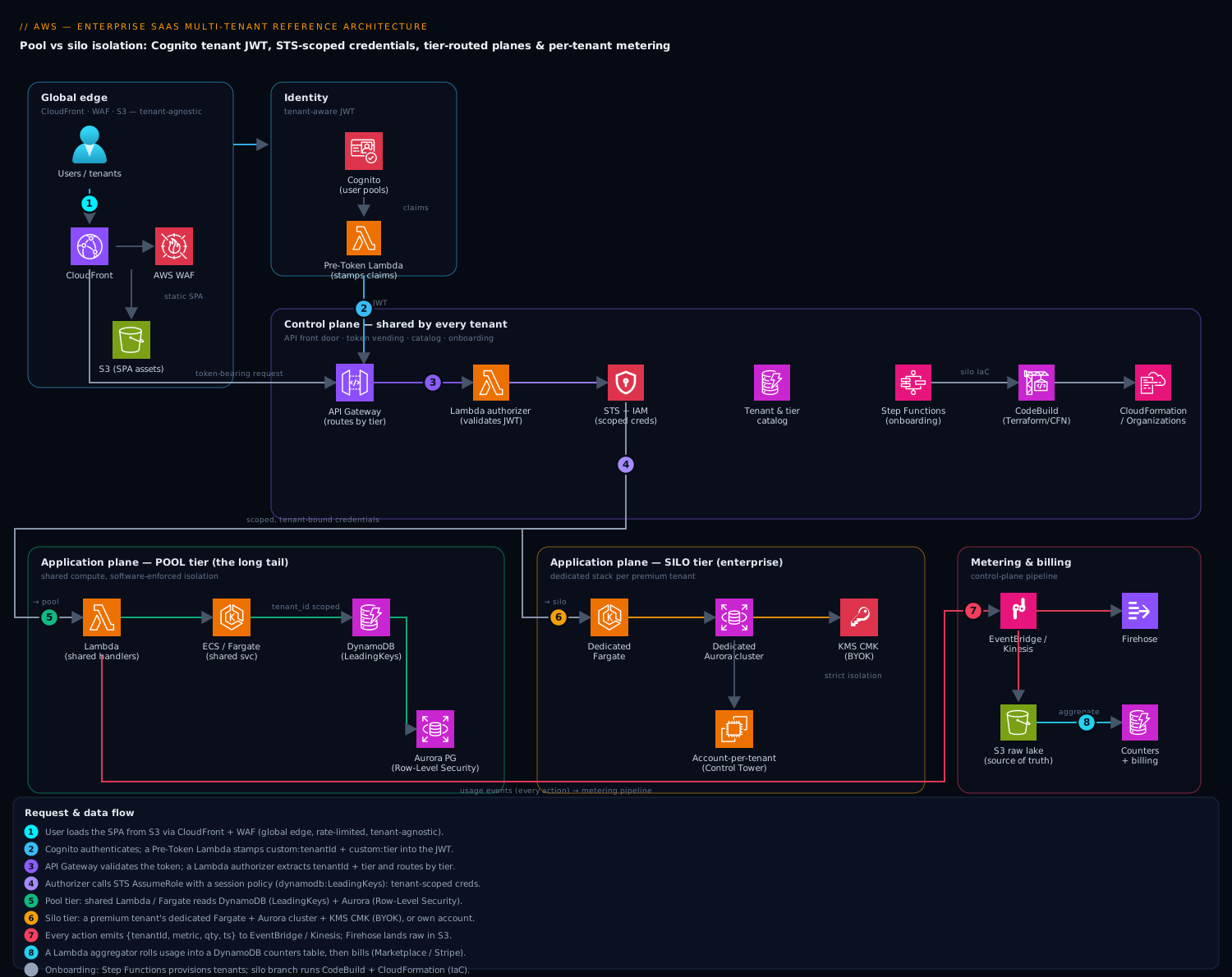
The control plane is shared by every tenant and is where SaaS-specific concerns live: tenant onboarding/provisioning, the tenant and tier catalog, identity, billing, metering aggregation, and operations. It is multi-tenant by definition — a Starter tenant and an Enterprise tenant are both rows in the same control-plane tables. The application plane is where your actual product runs and where tenant workloads are isolated. The application plane is deployed in different isolation shapes depending on the tenant’s tier, but it is always built from the same code.
Follow a single authenticated request end to end:
- A user hits the app. The SPA is served from Amazon S3 behind Amazon CloudFront. Static assets are global and tenant-agnostic.
- The user authenticates against Amazon Cognito. Critically, Cognito is configured so that the issued JWT (ID and access token) carries a custom
custom:tenantIdclaim and acustom:tierclaim (and oftencustom:tenant_tier_configsuch as which silo/pool the tenant maps to). A Pre-Token-Generation Lambda trigger injects/refreshes these claims from the tenant catalog at sign-in. This is the linchpin: tenant identity is bound to the user’s token, not passed as an untrusted request parameter. - The token-bearing request reaches Amazon API Gateway. A Lambda authorizer (or a JWT authorizer for HTTP APIs) validates the signature, extracts
tenantIdandtier, and — this is the key isolation step — constructs a scoped session: it assumes an IAM role and injects a session policy whose conditions are templated with the caller’stenantId. The result is short-lived AWS credentials that are mathematically incapable of touching another tenant’s data, even if downstream code has a bug. - The request is routed by tier. Pool-tier traffic lands on shared compute — AWS Lambda functions or shared Amazon ECS/Fargate services running behind an internal Application Load Balancer. Silo-tier traffic is routed (by an API Gateway stage variable, a header, or a dedicated CloudFront behavior keyed on the tenant) to that tenant’s dedicated compute and data stores.
- Application code reads/writes data. For pooled data in Amazon DynamoDB, the tenant’s credentials carry a
dynamodb:LeadingKeyscondition so the caller can only access items whose partition key begins with theirtenantId. For pooled relational data in Amazon Aurora (PostgreSQL), isolation is enforced by Row-Level Security (RLS) policies keyed on acurrent_tenantsession variable plus a per-tenant database role. For siloed data, the tenant simply has its own DynamoDB table or its own Aurora cluster — isolation is the infrastructure boundary itself. - Every meaningful action emits a usage event. Application code (or API Gateway access logs, or a Lambda extension) publishes a structured event —
{tenantId, metric: "api.call" | "storage.gb" | "doc.processed", quantity, timestamp}— to Amazon EventBridge or directly to Amazon Kinesis Data Streams. A Kinesis Data Firehose lands the raw events in S3 (the durable system of record for billing disputes), while a Lambda or Managed Service for Apache Flink aggregates them per tenant per metric. - Aggregated usage flows to the billing system. AWS Marketplace Metering Service (if you sell through Marketplace) or a third-party billing engine (Stripe Billing, Metronome, m3ter) receives the per-tenant metered quantities and produces invoices. A DynamoDB table holds the running per-tenant usage counters for in-app dashboards and for enforcing plan limits/throttles in real time.
- Onboarding is its own asynchronous flow. When a tenant signs up, an AWS Step Functions state machine orchestrates provisioning: create the Cognito group/app-client mapping, write the tenant record, and — for silo tenants — invoke a provisioning pipeline (CodePipeline + Terraform/CloudFormation) that stands up the dedicated stack. AWS Control Tower / Organizations is used when the silo boundary is a whole AWS account per tenant.
The mental model: CloudFront/S3 (global edge) → Cognito (tenant identity in the JWT) → API Gateway + Lambda authorizer (scoped credential minting) → tier-routed compute (pool Lambda/Fargate or silo dedicated) → tenant-partitioned data (DynamoDB LeadingKeys / Aurora RLS, or siloed stores) → EventBridge/Kinesis metering → billing. Control plane (onboarding, catalog, identity, metering, billing) orchestrates; application plane (the product) executes per-tenant.
Component breakdown
| Component | AWS service | Role in the architecture | Key configuration choices |
|---|---|---|---|
| Edge & static hosting | CloudFront + S3 + WAF | Serve the SPA globally; first line of defence | Origin Access Control to S3; WAF rate-based rules per IP; optional tenant-keyed cache behaviors for vanity domains (acme.app.com) |
| Identity provider | Amazon Cognito User Pools | Authenticates users; mints tenant-scoped JWTs | Custom attributes custom:tenantId, custom:tier; Pre-Token-Generation Lambda to inject claims; one user pool with per-tenant groups, or pool-per-tenant for strict silo identity |
| API front door | API Gateway (HTTP or REST API) | Single entry; validates tokens; routes by tier | Lambda authorizer returns an IAM policy + context (tenantId); usage plans/API keys as a coarse throttle; per-tenant rate limits |
| Tenant-context / token vending | Lambda (authorizer) + STS | Converts tenantId claim into least-privilege, tenant-scoped AWS credentials |
sts:AssumeRole with an inline session policy containing ${aws:PrincipalTag/tenantId} or templated dynamodb:LeadingKeys conditions |
| Pooled compute | Lambda / ECS Fargate | Runs shared business logic for the long tail | Reserved/provisioned concurrency to bound noisy neighbours; tenant-aware structured logging on every invocation |
| Siloed compute | Dedicated Fargate service / Lambda alias / dedicated account | Runs the same code, isolated, for premium tenants | Per-tenant ECS service or account; per-tenant compute budget; identical container image, different deployment target |
| Pooled NoSQL data | Amazon DynamoDB | High-scale pooled storage with cheap isolation | Partition key = TENANT#<id>#...; dynamodb:LeadingKeys IAM condition; on-demand or per-tenant capacity; tenant tag for cost-by-tag |
| Pooled relational data | Aurora PostgreSQL (Serverless v2) | Pooled relational store needing joins/transactions | Row-Level Security policies; SET app.current_tenant; non-superuser per-tenant DB role; FORCE ROW LEVEL SECURITY |
| Siloed data | Dedicated DynamoDB table / dedicated Aurora cluster | Hard, infra-level isolation for compliance tenants | Per-tenant KMS CMK (BYOK); per-tenant backup/PITR policy; data-residency region pinning |
| Provisioning / onboarding | Step Functions + CodePipeline + Terraform/CFN | Orchestrates new-tenant setup, pool or silo | Idempotent state machine; silo branch triggers IaC pipeline; writes tenant record + Cognito mapping |
| Metering ingestion | EventBridge + Kinesis Data Streams | Captures per-tenant usage events at scale | Event schema {tenantId, metric, quantity, ts}; partition by tenantId; Firehose → S3 raw log |
| Metering aggregation | Lambda / Managed Service for Apache Flink | Rolls raw events into per-tenant/per-metric totals | Tumbling windows (hourly/daily); idempotent, exactly-once-ish reconciliation against the S3 raw store |
| Usage + billing | DynamoDB (counters) + Marketplace Metering / Stripe / Metronome | Real-time limits + invoicing | Atomic counter updates; daily BatchMeterUsage to Marketplace; reconcile against raw S3 monthly |
| Tenant & tier catalog | DynamoDB | System of record for who is who and which tier/shape | tenantId → {tier, isolationModel, siloStackArn, kmsKeyArn, status, region} |
| Observability | CloudWatch + X-Ray + OpenSearch | Per-tenant metrics, traces, and logs | tenantId as a structured log field and metric dimension; CloudWatch Embedded Metric Format; per-tenant dashboards & anomaly alarms |
A few of these deserve emphasis because they are where SaaS architectures most often go wrong.
The Pre-Token-Generation Lambda is non-negotiable. A common rookie mistake is to let the client send tenantId in the request body or a header. That is a horizontal-privilege-escalation vulnerability waiting to happen — any user can edit the request and read another tenant’s data. Binding tenantId into the signed JWT, server-side, at token-mint time, means the value is cryptographically attested by Cognito and cannot be forged.
Scoped credentials (the token vending machine) are the difference between “we hope the query is filtered” and “the query physically cannot return other tenants’ rows.” The authorizer (or a dedicated token-vending service) calls sts:AssumeRole and attaches a session policy that templates the tenant id into resource/condition fields. For DynamoDB this means dynamodb:LeadingKeys = ["TENANT#${tenantId}"]; for S3 it means a prefix condition s3:prefix = ["${tenantId}/*"]. Downstream code uses those credentials. This is defence in depth: even a SQL-injection-style bug or a forgotten WHERE clause cannot cross the tenant boundary because the credentials themselves are constrained.
Implementation guidance
Identity wiring (Cognito → JWT → API Gateway)
Choose your Cognito topology by tier:
- Pool & Pro tiers: a single shared user pool, with each tenant represented as a group. Users carry
custom:tenantIdandcustom:tierattributes. This keeps identity management cheap and centralized. - Silo / Enterprise tiers: either a dedicated app client within the shared pool, or — for tenants that demand their own SSO/SAML federation and identity isolation — a dedicated user pool per tenant. The control plane’s tenant catalog stores which pool/client a tenant maps to, and CloudFront/API Gateway routes the login accordingly (often via a vanity subdomain).
The Pre-Token-Generation trigger (Lambda) fires on every token issuance. It looks up the user’s tenant in the catalog and returns claimsToAddOrOverride with tenantId, tier, and any feature flags. Keep this Lambda fast and cache the catalog (DynamoDB DAX or in-memory) — it is on the hot path of every login.
In Terraform, the spine looks like this (illustrative, trimmed):
resource "aws_cognito_user_pool" "main" {
  name = "saas-pool"

  schema {
    name                = "tenantId"
    attribute_data_type = "String"
    mutable             = true
  }
  schema {
    name                = "tier"
    attribute_data_type = "String"
    mutable             = true
  }

  lambda_config {
    pre_token_generation = aws_lambda_function.pre_token.arn
  }
}

# The per-request tenant-scoped role the authorizer assumes.
resource "aws_iam_role" "tenant_scoped" {
  name               = "tenant-runtime"
  assume_role_policy = data.aws_iam_policy_document.trust.json
}

# A *base* policy; the authorizer adds a tighter SESSION policy at assume time.
data "aws_iam_policy_document" "tenant_base" {
  statement {
    actions   = ["dynamodb:GetItem", "dynamodb:Query", "dynamodb:PutItem", "dynamodb:UpdateItem"]
    resources = [aws_dynamodb_table.app.arn]
    condition {
      test     = "ForAllValues:StringLike"
      variable = "dynamodb:LeadingKeys"
      values   = ["TENANT#$${aws:PrincipalTag/tenantId}"]
    }
  }
}
The authorizer Lambda then does, conceptually:
# pseudo-code inside the Lambda authorizer / token-vending function
claims     = verify_jwt(token, cognito_jwks)          # validates signature
tenant_id  = claims["custom:tenantId"]
session    = sts.assume_role(
    RoleArn=TENANT_RUNTIME_ROLE_ARN,
    RoleSessionName=f"t-{tenant_id}",
    Tags=[{"Key": "tenantId", "Value": tenant_id}],   # becomes aws:PrincipalTag
    Policy=scoped_session_policy(tenant_id),           # LeadingKeys / s3 prefix
    DurationSeconds=900,
)
# return APIGW policy + context so the handler receives credentials & tenantId
Use IaC for all of this. Terraform (or CloudFormation/CDK) is mandatory because silo provisioning is an IaC pipeline: the onboarding Step Functions state machine for a silo tenant kicks off a terraform apply (via CodeBuild) parameterized with the new tenantId, standing up that tenant’s table/cluster/KMS key/Fargate service from the same module the pooled stack uses.
A worked example: minting a tenant-scoped session
The two Terraform and pseudo-code snippets above describe the mechanism; let us walk one real login through it so the moving parts click. Suppose tenant acme (tier pro) has a user, alice@acme.com, signing in.
Step 1 — the Pre-Token-Generation trigger stamps the claims. Cognito invokes your Lambda while it is building the token. The event and the response look like this (trimmed to the fields that matter):
// EVENT Cognito hands your Lambda (triggerSource: TokenGeneration_HostedAuth)
{
  "version": "2",
  "userPoolId": "us-east-1_EXAMPLE",
  "request": {
    "userAttributes": {
      "sub": "9a1b...user-uuid",
      "email": "alice@acme.com",
      "custom:tenantId": "acme",
      "custom:tier": "pro"
    },
    "groupConfiguration": { "groupsToOverride": ["tenant-acme"] }
  },
  "response": {}
}
// RESPONSE your Lambda returns (v2_0 trigger — customises BOTH tokens)
{
  "response": {
    "claimsAndScopeOverrideDetails": {
      "idTokenGeneration": {
        "claimsToAddOrOverride": { "tenantId": "acme", "tier": "pro" }
      },
      "accessTokenGeneration": {
        "claimsToAddOrOverride": { "tenantId": "acme", "tier": "pro" }
      }
    }
  }
}
Why both tokens? The ID token describes the user to your front-end; the access token is what your API actually authorizes against. Putting tenantId in the access token is the part that matters for isolation — but note that customising access-token claims requires the version 2 trigger (claimsAndScopeOverrideDetails, not the older claimsOverrideDetails) and is a paid Cognito feature (the Essentials/Plus feature tiers), whereas overriding ID-token claims is free. If your API validates the ID token instead, the v1 trigger and claimsOverrideDetails are enough. Either way, the claim is now inside a signature Cognito computed — the client can read it but cannot change it without invalidating the token.
Step 2 — the authorizer turns the claim into credentials. The Lambda authorizer verifies the token against Cognito’s JWKS, reads tenantId: "acme", and calls sts:AssumeRole with a session tag and (optionally) a tiny inline session policy:
// Effect of the AssumeRole the authorizer performs
AssumeRole(
  RoleArn      = "arn:aws:iam::123456789012:role/tenant-runtime",
  RoleSessionName = "t-acme-alice",
  Tags         = [{ Key: "tenantId", Value: "acme" }],   // -> aws:PrincipalTag/tenantId
  DurationSeconds = 900                                   // 15-minute credentials
)
Because the role’s own policy (the tenant_base document in the Terraform above) says dynamodb:LeadingKeys must equal TENANT#${aws:PrincipalTag/tenantId}, the session tag acme is spliced into the condition at evaluation time. The credentials Alice’s request now runs under can touch only items whose partition key begins TENANT#acme#. This is ABAC (attribute-based access control): one static role policy serves every tenant, and the per-request difference is just the tag value. Contrast it with generating a fresh inline session policy per request — also valid, and more flexible for irregular per-tenant resource ARNs, but it must stay under the 2,048-character session-policy limit and you pay to build and sign it on every call. For pooled data keyed by tenantId, ABAC-by-tag is the cleaner, cheaper default; the session-policy approach earns its keep for silo tenants whose resource ARNs differ. The trade-offs between session policies, session tags, and role trust are exactly the ground covered in cross-account roles & session policies.
One trust-policy detail people miss: to pass session tags, the role’s trust policy must allow sts:TagSession, not just sts:AssumeRole:
{
  "Effect": "Allow",
  "Principal": { "AWS": "arn:aws:iam::123456789012:role/authorizer-lambda-role" },
  "Action": ["sts:AssumeRole", "sts:TagSession"]
}
Forget sts:TagSession and every assume call fails with AccessDenied the moment you add Tags — a five-minute debugging session that has cost many teams an afternoon.
Networking
Pooled compute sits in private subnets behind an internal ALB or is invoked directly (Lambda). Aurora and any siloed databases live in isolated subnets reachable only from the application tier’s security group — no public IPs. Use VPC endpoints (Gateway endpoint for DynamoDB/S3, Interface endpoints for STS, Secrets Manager, KMS) so tenant data traffic never traverses the public internet. For account-per-tenant silos, wire connectivity with AWS RAM-shared subnets or Transit Gateway, and centralize egress through a shared-services account.
Data partitioning patterns
DynamoDB (pooled): make tenantId the leading component of the partition key (TENANT#<id>#ENTITY#<id>). This gives you free isolation via LeadingKeys and natural per-tenant cost visibility. For a noisy tenant, you can later promote them to their own table without changing the key schema.
Aurora PostgreSQL (pooled): enable RLS. Each connection sets SET app.current_tenant = '<tenantId>' (from the JWT claim) at the start of the request; an RLS policy USING (tenant_id = current_setting('app.current_tenant')::uuid) filters every row. Crucially, the application connects as a non-superuser role and you ALTER TABLE ... FORCE ROW LEVEL SECURITY, because table owners and superusers bypass RLS by default — forgetting this is a classic, dangerous mistake.
ALTER TABLE documents ENABLE ROW LEVEL SECURITY;
ALTER TABLE documents FORCE ROW LEVEL SECURITY;
CREATE POLICY tenant_isolation ON documents
  USING (tenant_id = current_setting('app.current_tenant')::uuid);
Isolation in action: what actually gets allowed and denied
The theory is “the credentials cannot cross the tenant boundary.” Here is what that looks like at the keyboard, which is where the idea becomes real.
DynamoDB. Alice’s request runs under credentials tagged tenantId=acme. A normal read pins the partition key and succeeds:
# Allowed: the partition key starts with the caller's own tenant prefix
aws dynamodb query --table-name app \
  --key-condition-expression "pk = :pk" \
  --expression-attribute-values '{":pk":{"S":"TENANT#acme#DOC#42"}}'
# -> returns ACME's document 42
Now watch the two things that cannot happen, no matter what the application code asks for:
# DENIED: asking for another tenant's partition key
aws dynamodb query --table-name app \
  --key-condition-expression "pk = :pk" \
  --expression-attribute-values '{":pk":{"S":"TENANT#globex#DOC#42"}}'
# -> AccessDeniedException: dynamodb:LeadingKeys condition not satisfied

# DENIED: a table-wide Scan (no partition key pinned at all)
aws dynamodb scan --table-name app
# -> AccessDeniedException: a Scan cannot satisfy a LeadingKeys condition
That second denial is the quietly important one. A Scan reads the whole table and specifies no partition key, so it can never satisfy a LeadingKeys condition — which means “give me everything” is structurally impossible for tenant-scoped credentials. The only code that can Scan the pooled table is a control-plane job running under a different, unscoped role. Note the boundary of the guarantee: LeadingKeys constrains the base table’s partition key only. A Global Secondary Index whose own partition key is not the tenant prefix is a leak waiting to happen, so either lead every GSI with tenantId too, or deny the tenant role the Query action on that index. This is the single-table-design discipline from the DynamoDB deep dive applied with an isolation lens.
Aurora PostgreSQL. The relational equivalent is row-level security, and the worked example exposes the trap that catches most teams. The application connects as a non-superuser role and scopes the session before every statement:
-- as role "app_rw" (NOT the table owner, NOT a superuser)
SET LOCAL app.current_tenant = 'acme';         -- from the JWT claim, inside a txn
SELECT title FROM documents;                     -- RLS rewrites this transparently...
-- ...to: SELECT title FROM documents WHERE tenant_id = 'acme'
The policy from the original snippet (USING (tenant_id = current_setting('app.current_tenant')::uuid)) is applied automatically to every query — the developer writing SELECT title FROM documents cannot forget the WHERE, because the database adds it. But two facts make or break this:
- Table owners and superusers bypass RLS by default. If your app happens to connect as the role that owns the table (a very common accident with a single migration user), every policy is silently ignored and you have no isolation.
ALTER TABLE documents FORCE ROW LEVEL SECURITYcloses this — it subjects even the owner to the policy. Run your app as a dedicated least-privilege role andFORCE; belt and braces. - Use
SET LOCAL, notSET. A plainSET app.current_tenantlives for the whole connection. With a connection pool — PgBouncer in transaction mode, or RDS Proxy multiplexing — the next request to borrow that physical connection inherits the previous tenant’s setting, and you get a catastrophic cross-tenant read.SET LOCAL(orset_config('app.current_tenant', $1, true)) scopes the value to the current transaction, so it is gone the instant the transaction ends. This connection-pooling gotcha is covered in depth in RDS Proxy connection pooling — and it is worth knowing that aSET(session-level) statement causes RDS Proxy to pin the connection, quietly destroying the multiplexing you were paying for.
Taming the noisy neighbour: usage plans and throttling
In a pool, one tenant’s traffic spike is everyone’s latency spike. Defence is layered, and no single layer is enough on its own.
| Layer | Mechanism | What it bounds | Limitation |
|---|---|---|---|
| Edge | CloudFront + WAF rate-based rules | Requests per 5-min window per IP | IP-based, not tenant-based; blunt |
| API front door | API Gateway usage plans (rate, burst, quota) | Steady req/s, burst bucket, and a daily/weekly/monthly cap per API key | You must map one API key per tenant |
| Compute | Lambda reserved concurrency per function / alias | Max simultaneous executions a tenant tier can consume | Reserves capacity even when idle |
| Data | Per-tenant request accounting from the metering counters | Application-enforced rate limit / soft ceiling | You build it; DynamoDB has no per-tenant native throttle in a shared table |
The API Gateway usage plan is worth a worked look because its numbers confuse people. A usage plan sets a rate (the steady-state token-bucket refill, in requests/second), a burst (the bucket size — the largest instantaneous spike allowed), and a quota (a hard cap per day/week/month). Give the Pro tier rate = 50, burst = 100, quota = 1,000,000/day. A Pro tenant that suddenly fires 100 requests drains the bucket instantly (allowed — that’s the burst), then is limited to 50/s as the bucket refills; excess requests get 429 Too Many Requests. Cross 1,000,000 in a day and every further call is throttled until midnight UTC. Because usage plans key off API keys, per-tenant throttling means minting an API key per tenant (or per tier) at onboarding and having the authorizer attach it — see the API Gateway deep dive for the authorizer/usage-plan wiring. The subtle failure mode: usage plans are coarse front-door protection. They do nothing about a tenant who stays under the request limit but each request is a 30-second, 2 GB report generation. That is what per-tenant compute budgets (reserved concurrency, a dedicated Fargate quota) and the metering-driven “cost per tenant” dashboard are for.
Tenant onboarding, end to end
Onboarding is a control-plane workflow, and modelling it as a Step Functions state machine — rather than a pile of Lambda calls chained by hope — is what makes it auditable, idempotent, and safe to retry. A pool tenant and a silo tenant run the same machine; they diverge at one Choice state.
[ValidateSignup] ──▶ [WriteTenantRecord] ──▶ [ProvisionIdentity] ──▶ (Choice: tier?)
                          (DynamoDB,              (Cognito group +          │
                        status=PENDING)          app-client / pool)         ├─ pool ─▶ [EnableFeatureFlags] ─▶ [MarkActive] ─▶ [EmitTenantReady]
                                                                            │
                                                                            └─ silo ─▶ [RunIaCPipeline] ─▶ [WaitForStack] ─▶ [SmokeTest] ─▶ [MarkActive] ─▶ [EmitTenantReady]
                                                                                        (CodeBuild:            (poll CFN/TF)     (health probe
                                                                                       terraform apply -var                      against new
                                                                                        tenant_id=...)                          silo endpoint)
Walk the silo branch: RunIaCPipeline starts a CodeBuild job that runs terraform apply against the same module the pool uses, parameterised with the new tenantId, standing up a dedicated Aurora cluster, a per-tenant KMS key, and a Fargate service. WaitForStack polls until the stack is CREATE_COMPLETE. SmokeTest hits the fresh silo’s health endpoint before anyone is allowed in. Only then does MarkActive flip the tenant record to ACTIVE and EmitTenantReady publish an EventBridge event that unblocks the welcome email. Two properties make this production-grade:
- Idempotency. Every state is safe to re-run.
WriteTenantRecorduses a conditional put (attribute_not_exists(tenantId)) so a retried execution does not clobber an existing tenant;terraform applyis idempotent by nature. A user who double-clicks “sign up” gets one tenant, not two. - Compensation on failure. A
Catchon the silo branch routes to a[Deprovision]state that tears down any half-built stack and marks the recordFAILED, so a broken onboarding never leaves an orphaned, unbilled, half-open environment. Deprovisioning is also your GDPR erasure path: for a silo tenant, “delete my data” is literallyterraform destroyplus scheduling the KMS key for deletion — clean and provable. Step Functions’ native error handling —Catch,Retry, and typed error states — makes this the natural home for the logic, which is why onboarding lives here rather than in a monolithic Lambda.
Metering wiring
Emit usage events from the closest reliable point to the action. Three complementary sources:
- API Gateway access logs → Firehose → S3 for raw call counts (cheap, lossy-tolerant).
- Application-emitted EventBridge events for business metrics (
doc.processed,report.generated) where the meaning matters for billing. - Periodic sweeps (a scheduled Lambda) for stock metrics like storage GB, which you sample rather than stream.
A Kinesis stream partitioned by tenantId feeds an aggregator (Lambda for simple sums, Managed Service for Apache Flink for windowed/complex aggregation). The aggregator writes to a DynamoDB counters table for real-time enforcement and dashboards, and a daily job calls the billing API (BatchMeterUsage for AWS Marketplace, or Stripe/Metronome ingest). The S3 raw event lake is the source of truth — always reconcile aggregated numbers against it monthly, because billing disputes are won and lost on auditability.
From usage events to an invoice: a worked calculation
Metering only earns its complexity when you can point at a number on an invoice and trace it back to raw events. Follow one metric for tenant acme on a single day.
Raw events (in the S3 lake). Every doc.analyzed action emitted an event; here are three of the ~9,000 for the day:
{"tenantId":"acme","metric":"doc.analyzed","quantity":1,"ts":"2026-06-09T09:14:02Z","idempotencyKey":"a1f9"}
{"tenantId":"acme","metric":"doc.analyzed","quantity":1,"ts":"2026-06-09T09:14:02Z","idempotencyKey":"a1f9"}
{"tenantId":"acme","metric":"doc.analyzed","quantity":1,"ts":"2026-06-09T11:47:31Z","idempotencyKey":"c3d0"}
Notice the first two are duplicates (same idempotencyKey) — a Lambda retry fired the event twice. This is why the aggregator must dedupe on idempotencyKey, and why the raw lake stores the key: you cannot bill someone for a retry.
Aggregation. The Flink (or Lambda) job groups by tenantId + metric + hour, deduping keys:
| Hour (UTC) | Raw events | After dedupe | Running daily total |
|---|---|---|---|
| 09:00 | 402 | 388 | 388 |
| 10:00 | 511 | 511 | 899 |
| 11:00 | 640 | 631 | 1,530 |
| … | … | … | 8,742 |
The day closes at 8,742 billable doc.analyzed units. That number is written to the DynamoDB counters table (for the in-app “usage this month” widget and for limit enforcement) and queued for the billing system.
Billing. Acme is on Pro: 5,000 documents included, then $0.02 each. The overage is (8,742 − 5,000) × $0.02 = $74.84 for the day. If Acme procures through AWS Marketplace, you report the metered quantity with BatchMeterUsage — and its rules bite here:
- You call it once per hour with the aggregated quantity for a dimension (e.g.
documents), not once per event. Up to 25UsageRecordsper call, up to 24 usage dimensions per product. - Records are idempotent within the hour: the same
{CustomerIdentifier, Dimension, Timestamp-hour}submitted twice is de-duplicated by Marketplace, so a retried billing job does not double-charge. The flip side: a timestamp must fall in the current hour — you cannot backfill yesterday, which is exactly why the S3 lake and a separate monthly reconciliation exist. CustomerIdentifieris not the tenant id; you obtained it once at onboarding by callingResolveCustomerwith the registration token Marketplace handed you.
Reconciliation. Once a month a job replays the entire S3 lake for each tenant, recomputes the totals from scratch, and diffs them against what the counters said and what was billed. When Quillstream’s job (in the reference example below) caught a 0.3% aggregator drift, this is the mechanism that caught it: the immutable raw lake is ground truth, the streaming aggregate is a fast approximation, and the monthly replay keeps them honest. Bill from the approximation for speed; defend the invoice with the lake.
Enterprise considerations
Security & Zero Trust. The whole design is Zero Trust at the tenant boundary: never trust a client-supplied tenant id; bind it to the JWT; mint per-request, least-privilege, tenant-scoped credentials; assume the application code will have a bug and make the data layer enforce isolation regardless. Add per-tenant KMS keys for silo tenants (satisfies BYOK and gives you a cryptographic kill-switch — disable the key to instantly revoke access). Run AWS WAF at the edge, keep all data stores private, use Secrets Manager with rotation for DB creds, and turn on GuardDuty, CloudTrail (org-wide), and Security Hub. For the highest tier, an account-per-tenant model in AWS Organizations gives you the strongest blast-radius and compliance boundary that exists on AWS.
Cost optimization. This is the entire reason for the tiered model. Pooling the long tail amortizes fixed costs across thousands of small tenants — a single Aurora Serverless v2 cluster and a shared Lambda fleet serve them all, scaling to near-zero at night. Silos cost more but only for tenants who pay for them. Attribute cost per tenant using cost-allocation tags (tag every silo resource with tenantId; for pooled DynamoDB/Lambda, derive cost from the metering data) so you know your per-tenant margin and can spot a Pro tenant who is secretly costing you Enterprise money — a signal to either throttle, reprice, or graduate them to a silo. Use Graviton (arm64) for Lambda/Fargate and Savings Plans for the steady pooled baseline.
Scalability. Pooled tiers scale horizontally and automatically (DynamoDB on-demand, Lambda concurrency, Aurora Serverless v2 ACUs, Fargate auto-scaling). The defence against the noisy-neighbour problem is layered: API Gateway usage plans throttle per tenant; reserved/provisioned concurrency caps any one tenant’s compute share; and DynamoDB per-tenant request accounting (via the metering pipeline) lets you detect and rate-limit abusers before they impact others. When a pooled tenant outgrows the pool, the bridge model lets you migrate just them to a silo without touching anyone else.
Reliability & DR (RTO/RPO). Set tier-differentiated targets. Pooled tier: multi-AZ everywhere (DynamoDB and Aurora are multi-AZ natively), automated backups, RPO ≈ 5 min (DynamoDB PITR / Aurora continuous backup), RTO ≈ 1 hr for a regional failover with pre-warmed infra. Enterprise silos can buy a stricter SLA — cross-region replication (DynamoDB Global Tables, Aurora Global Database) for RPO < 1 min, RTO < 15 min, and an active-passive standby in a second region. Because silos are pure IaC, your DR runbook for a silo is “re-run the Terraform module in the DR region and restore the snapshot,” which is testable and fast.
Observability. The golden rule: tenantId is a first-class dimension on every log line, metric, and trace. Use CloudWatch Embedded Metric Format to emit per-tenant latency/error/throttle metrics from application code; propagate tenantId through X-Ray segments; ship structured logs to OpenSearch so support can pull “everything that happened for tenant ACME between 14:00 and 15:00” instantly. Build per-tenant dashboards and anomaly-detection alarms so you can answer “is the platform slow, or just slow for this one tenant?” — the question SaaS on-call gets asked at 2 a.m.
Governance. The control-plane tenant catalog is your governance system of record. Drive provisioning, deprovisioning (GDPR right-to-erasure for a silo = delete the stack + key), and tier changes through Step Functions so every lifecycle action is audited and idempotent. Use AWS Organizations SCPs to enforce guardrails (no public S3, mandatory encryption, region restrictions) across all tenant accounts. Tag everything; reconcile billing monthly against the S3 raw event lake.
Reference enterprise example
Quillstream Inc. is a fictional 60-person startup selling a collaborative document-analysis SaaS to legal and financial firms. They have 1,400 tenants: 1,250 on Starter/Pro (pooled), 138 on Business (pooled, with higher limits and a dedicated DynamoDB table for their hottest collection), and 12 Enterprise tenants (full silo — dedicated Aurora cluster, dedicated Fargate service, per-tenant KMS key, one in eu-central-1 for a German bank with data-residency requirements). Two Enterprise tenants are large enough to warrant a dedicated AWS account each, governed via Control Tower.
Their numbers:
- Identity: one Cognito user pool for the pooled tiers (~48,000 users across 1,388 tenants); two dedicated pools for the SAML-federated Enterprise banks. The Pre-Token-Generation Lambda adds
tenantId/tierclaims; it does ~300k token mints/day in ~12 ms each. - Compute: pooled traffic runs on Lambda (Graviton, provisioned concurrency = 40 to absorb morning spikes) plus a shared Fargate service for long-running parsing jobs. Each Enterprise silo runs an identical container as a 2-task Fargate service.
- Data: one pooled DynamoDB table (
TENANT#...keys, on-demand, ~4,200 RCU/WCU peak) holding 90% of tenants; per-tenant Aurora Serverless v2 clusters (0.5–8 ACU) for the 12 silos. Pooled relational data uses one Aurora cluster with RLS. - Metering: every API call and every
doc.analyzedevent flows through Kinesis (partitioned bytenantId) → Firehose → S3 (the audit lake) and → a Flink aggregator → a DynamoDB counters table. Usage = ~6.5M billable events/day. - Billing: Stripe Billing for self-serve tiers (metered: documents analyzed + storage GB), AWS Marketplace
BatchMeterUsagefor two tenants who procure through Marketplace, and custom contracts for the rest. Monthly reconciliation job replays the S3 lake and has caught a 0.3% aggregator drift twice — paid for itself in dispute avoidance.
A decision they made and why. A Pro tenant, Harbor & Vance LLP, was running 11x the average API volume and 2.1 TB of storage on a flat $290/mo plan — their fully-loaded cost was ~$1,900/mo, a heavily negative margin. The metering data surfaced it on a per-tenant-margin dashboard. Quillstream offered them a Business-tier upsell with a dedicated table and metered overage pricing; the firm, now aware of their own heavy usage, upgraded to $2,400/mo. The metering pipeline didn’t just enable billing — it found a loss-making customer and turned them into a profitable one.
The outcome. When a Fortune-500 prospect’s security team sent the 200-line questionnaire demanding dedicated database, BYOK, EU residency, and proof of tenant isolation, Quillstream answered “yes” to all of it by pointing at the silo model and the scoped-credential design — and closed a $540k/year contract that pooled-only competitors couldn’t service. Meanwhile their blended infra cost stayed at ~11% of revenue because 99% of tenants are pooled. One codebase, one control plane, three isolation shapes.
When to use it
Use this architecture when you are building genuine B2B multi-tenant SaaS with a heterogeneous customer base — a price-sensitive long tail and a compliance-demanding head — and you intend to run a single codebase. The tiered pool/silo bridge is the right default for almost any SaaS that expects to sell up-market over time.
Trade-offs. The flexibility costs you complexity: you now operate two planes, multiple isolation models, a token-vending layer, and a metering pipeline. That is a lot of moving parts for a pre-product-market-fit startup with five tenants. The honest counsel from the AWS SaaS Lens is to start pooled-only (one shared stack, JWT tenant context, DynamoDB LeadingKeys / Aurora RLS, and the metering pipeline from day one) and add the silo machinery only when a real enterprise deal demands it — but design the tenant-context and metering plumbing up front, because retrofitting tenantId into a single-tenant codebase later is agony.
Anti-patterns to avoid:
- Trusting client-supplied tenant id. The number-one SaaS security failure. Always bind it to the JWT.
- “Filter in the WHERE clause and hope.” Application-layer-only isolation with no credential scoping or RLS means one missing predicate leaks every tenant. Enforce isolation at the data/IAM layer too.
- Silo-per-tenant for everyone. Standing up a dedicated stack for every 10-seat Starter tenant will bankrupt you operationally and financially. Silo by exception, not by default.
- No metering from day one. Bolting usage tracking on after launch means you can never bill historically or prove disputes. Emit events from the first commit.
- Skipping the raw event lake. Aggregators drift. Without an immutable S3 record you cannot reconcile or defend an invoice.
Alternatives. If you only ever serve one customer profile, you may not need the bridge: a pure-pool SaaS (everyone shares, isolation in software) is dramatically simpler and right for high-volume, low-touch products. A pure-silo model (a dedicated stack per customer, fully automated by IaC) suits very-high-value, low-count, regulated businesses (think 30 hospital systems) where pooling buys you nothing and isolation is the whole product. And if “multi-tenancy” for you just means logical separation inside one big database with no enterprise/compliance pressure, a single shared cluster with RLS — without Cognito custom claims, scoped credentials, or silos — may be all you need. This reference architecture exists precisely for the common, harder case in between: when you must serve both ends of the market, profitably, from one team and one codebase.
Going deeper
Everything above is the reference design. This section is for the reader who will actually operate it — the internals, quotas, and failure modes that decide whether the isolation holds under load and audit.
How scoped credentials really evaluate
The mental model “the session policy restricts the role” is precise, and the precision matters. When the authorizer assumes tenant-runtime with an inline Policy, the caller’s effective permissions are the intersection of (a) the role’s identity-based policies and (b) the session policy. A session policy can only subtract; it can never grant an action the role lacks. That is why the base role policy in the Terraform grants the DynamoDB actions and the session/ABAC layer merely narrows them to one tenant — get that backwards (a permissive session policy over a narrow role) and you grant nothing.
Two hard limits shape the design. The inline session policy is capped at 2,048 characters of JSON (whitespace included), which is small — a handful of statements. If a silo tenant needs many distinct resource ARNs, you blow that budget fast; the escape hatch is PolicyArns, which lets you reference up to 10 managed policies by ARN as session policies instead of inlining them. Session tags are capped at 50 per session. The practical consequence: prefer ABAC (one static role policy that reads ${aws:PrincipalTag/tenantId}, plus a single session tag) for the pooled majority, and reserve inline/managed session policies for the irregular silo cases. ABAC also has an operational superpower — you can grant access to new tenants without deploying a single policy change, because the policy is written against a tag, not a tenant list.
DynamoDB isolation: the edges
dynamodb:LeadingKeys is enforced per item on GetItem, Query, PutItem, UpdateItem, DeleteItem, and their Batch/Transact cousins — but only against the base table’s partition key. Three edges bite in production:
- GSIs are a separate namespace. A Global Secondary Index is queried by its partition key. If that key is not the tenant prefix,
LeadingKeysdoes nothing for it and a tenant can read across the whole index. Fix: make every GSI’s partition key also lead withtenantId, or deny the tenant roledynamodb:Queryon the index ARN. - Batch operations are all-or-partial. In a
BatchGetItemspanning multiple partition keys, items that violateLeadingKeysare denied while others succeed — your code must handle partial results, not assume atomic failure. - The credentials must actually be used. Scoping only works if the request runs under the tenant-scoped session. A shared Lambda that holds a broad execution role and merely appends
WHERE tenantId=in code has thrown the guarantee away. The whole point is that the credential, not the code, is the boundary.
Aurora RLS at scale
RLS is a query rewrite, so it is only as fast as the predicate it adds. Put tenant_id first in your indexes (CREATE INDEX ON documents (tenant_id, created_at)) or every tenant-scoped query degrades to a scan-then-filter as the table grows. Use WITH CHECK in addition to USING so a tenant cannot write a row stamped with someone else’s tenant_id (the USING clause governs reads; WITH CHECK governs inserts/updates). Beware side channels: a UNIQUE constraint violation error can reveal that a value exists in another tenant’s rows even though RLS hid the row — for high-assurance tenants, prefer per-tenant schemas or silos over shared-table RLS. And revisit the pooling point from earlier with fresh eyes: because RDS Proxy pins a connection the moment it sees session state like SET, heavy RLS-via-SET traffic can collapse your multiplexing ratio; SET LOCAL inside the request transaction both fixes the correctness bug and keeps the connection reusable.
Migrating a tenant from pool to silo
The bridge model is only real if you can actually move a tenant across it. The pattern is a live migration: (1) stand up the silo stack via the onboarding IaC pipeline; (2) dual-write — the app writes new data to both pool and silo for the tenant while a backfill job copies history (a DynamoDB ExportToS3 → import into the new table, or a logical dump for Aurora); (3) verify counts and checksums; (4) flip the tenant’s catalog record isolationModel to silo so the router sends reads to the silo; (5) stop the dual-write and reclaim the pooled rows. Because tenantId was the leading key from day one, the pooled rows are a contiguous key range you can delete cleanly. This is the concrete reason the lesson insists on tenant-context plumbing before you need silos: retrofitting a key prefix into a live single-tenant table is the migration from hell.
Account-per-tenant: where it stops scaling
A dedicated AWS account per tenant is the strongest isolation boundary AWS offers — separate credentials, separate limits, separate blast radius, and SCP-enforced guardrails. But it does not scale to a long tail. AWS Organizations enforces a maximum-accounts quota (low by default, raised via Service Quotas), Control Tower’s Account Factory vends accounts in minutes, not milliseconds, and there are concurrency limits on provisioning. Account-per-tenant is therefore a tool for your dozens of largest, most regulated tenants, never a per-signup path for self-serve customers. Most silos should be a dedicated stack within a shared account (dedicated Aurora cluster, KMS key, Fargate service), reserving whole-account isolation for the handful who contractually require it.
Attributing cost to tenants you cannot tag
Cost-allocation tags attribute dedicated resources cleanly: tag every silo’s Aurora cluster and KMS key with tenantId, activate the tag, and it shows up in the Cost and Usage Report (CUR). Split Cost Allocation Data further apportions shared ECS/EKS compute down to the task/pod. But a shared DynamoDB table or a shared Lambda fleet cannot be split by any AWS tag — the whole pool is one line item. This is the second job of the metering pipeline: per-tenant consumed-capacity and invocation counts are your cost-attribution signal for pooled resources. Blend CUR (for silos and infra) with metering-derived cost (for the pool) to compute true per-tenant margin — the number that tells you when a “cheap” Pro tenant has quietly become an Enterprise-sized cost.
Cognito quotas and gotchas
Design within Cognito’s edges before they surprise you in production. A user pool allows at most 50 custom attributes, and the schema is immutable — you cannot delete or change the type of a custom attribute once created, so add custom:tenantId/custom:tier deliberately and leave headroom. String custom attributes cap at 2,048 characters. Customising access-token claims (as opposed to ID-token claims) requires the v2 pre-token trigger and a paid feature tier (Essentials/Plus), so budget for it if your API authorizes on the access token. Token and sign-in endpoints have per-second request quotas; a stampede of 50,000 users all refreshing at 9:00 a.m. is a real load pattern — cache the tenant catalog in the pre-token Lambda (DAX or in-memory) so you are not hammering DynamoDB on every mint. For tenants demanding their own SSO, a pool-per-tenant buys identity isolation and per-tenant SAML/OIDC federation at the cost of more pools to operate.
Prove isolation, don’t assume it
The most valuable test in a SaaS codebase is the tenant-isolation test, run as a CI gate: authenticate as tenant A, obtain real scoped credentials, then attempt to read tenant B’s DynamoDB items, S3 prefixes, and Aurora rows — and assert every attempt returns AccessDenied or an empty set. Isolation regressions (a new GSI without a tenant-led key, a forgotten FORCE ROW LEVEL SECURITY on a new table, a handler that used the broad execution role instead of the scoped session) are silent until a customer finds them. A red isolation test blocks the deploy; that single gate is worth more than any amount of code review, because it exercises the boundary the same way an attacker would.
Practice challenges
Work these in order — they climb from “understand the boundary” to “operate the platform.” Try each before opening the solution.
1. Beginner — spot the forgeable input. A teammate’s endpoint reads the tenant from request.headers['X-Tenant-Id'] and filters the query by it. Explain the vulnerability in one sentence and name the fix.
<details> <summary>Solution</summary>
Any user can edit the X-Tenant-Id header and read another tenant’s data — this is horizontal privilege escalation. The fix is to take tenantId only from the signed JWT claim (stamped server-side by the Cognito pre-token-generation trigger), never from a client-supplied header or body.
Why: the JWT is signed by Cognito, so its claims are cryptographically attested and cannot be altered by the client; a header is just untrusted text. </details>
2. Beginner — write the pooled key and its guard. For a pooled DynamoDB table, give (a) the partition-key format that makes tenant isolation cheap and (b) the IAM condition that enforces it.
<details> <summary>Solution</summary>
(a) Lead the partition key with the tenant: pk = "TENANT#<tenantId>#ENTITY#<id>".
(b) Attach this condition to the tenant role, resolving the tenant from a session tag:
"Condition": {
  "ForAllValues:StringLike": {
    "dynamodb:LeadingKeys": ["TENANT#${aws:PrincipalTag/tenantId}"]
  }
}
Why: LeadingKeys ties every item access to the caller’s own partition-key prefix, so a query for another tenant’s key — or an unqualified Scan — is denied by IAM, not by hopeful application code.
</details>
3. Intermediate — RLS that leaks. You ran ENABLE ROW LEVEL SECURITY and created a USING (tenant_id = current_setting('app.current_tenant')::uuid) policy, yet a tenant still sees every row. Give the two most likely causes and the fixes.
<details> <summary>Solution</summary>
- The app connects as the table owner (or a superuser). Owners and superusers bypass RLS by default. Fix: connect as a dedicated non-superuser role and run
ALTER TABLE documents FORCE ROW LEVEL SECURITY. app.current_tenantis unset or stale. If the request never set it,current_settingerrors or returns a default; if it usedSET(session-scoped) behind a connection pool, it leaked from a prior borrower. Fix:SET LOCAL app.current_tenant = $1inside the request transaction.
Why: RLS is only active for roles it actually applies to, and it can only filter on a value that is correctly scoped to this request — FORCE plus SET LOCAL guarantees both.
</details>
4. Intermediate — size a usage plan. Give sensible rate/burst/quota for a Pro tier and describe exactly what a client sees when it fires 200 requests in one second, then keeps pushing.
<details> <summary>Solution</summary>
Example: rate = 50 req/s, burst = 100, quota = 1,000,000/day. The first 100 requests drain the burst bucket and succeed instantly; the next requests are admitted at the 50/s refill rate, and everything beyond that in the same instant gets HTTP 429 Too Many Requests. Once the tenant’s daily total crosses 1,000,000, all further calls are throttled until the quota window resets (UTC midnight for a daily quota).
Why: API Gateway usage plans are a token bucket — burst is the bucket size (instantaneous tolerance), rate is the refill (steady state), and quota is a separate hard ceiling over a day/week/month; a tenant maps to a plan via its API key.
</details>
5. Advanced — find and fix a loss-making tenant. A Pro tenant on a flat $290/mo plan feels “heavy.” Describe how you prove they are unprofitable and the three remediation options, using the architecture in this lesson.
<details> <summary>Solution</summary>
Prove it: compute per-tenant cost by blending (a) silo/infra costs from the CUR via tenantId cost-allocation tags and (b) pooled costs derived from the metering pipeline (this tenant’s share of consumed DynamoDB capacity, Lambda invocations, storage GB), since a shared table cannot be tag-split. Put cost next to the $290 revenue on a per-tenant-margin dashboard; a negative margin is now visible. Remediate: (1) throttle — tighten their usage plan / reserved concurrency to cap the bleed; (2) reprice — move them to metered overage so heavy use pays for itself; (3) graduate to a silo — a dedicated table/cluster with its own budget, migrated via dual-write while tenantId-keyed pooled rows are backfilled and then reclaimed.
Why: pooled resources have no per-tenant AWS bill, so metering is your cost-attribution signal; without it you cannot see — let alone fix — a tenant whose fully-loaded cost dwarfs their flat fee. </details>
6. Advanced — write the isolation gate. Outline a CI tenant-isolation test and name three real regressions it must catch.
<details> <summary>Solution</summary>
Test: authenticate as tenant A, obtain real scoped credentials (assume the tenant role with A’s session tag), then attempt to read tenant B’s DynamoDB items, B’s S3 prefix, and B’s Aurora rows; assert every attempt returns AccessDenied or an empty result set. Run it on every pull request as a blocking gate. Three regressions it catches: (1) a new GSI whose partition key does not lead with tenantId, opening a cross-tenant read path; (2) a new table missing FORCE ROW LEVEL SECURITY, so the owner role bypasses RLS; (3) a handler that used the broad execution role instead of the per-request scoped session, throwing the credential boundary away (bonus: a SET instead of SET LOCAL leaking tenant context across pooled connections).
Why: isolation regressions are silent — nothing breaks until a customer sees another customer’s data — so the only safe posture is to exercise the boundary automatically, the same way an attacker would, and fail the build when it holds no longer. </details>
Common beginner mistakes
These are misconceptions, not typos — each one looks reasonable and quietly defeats the whole design.
-
“I’ll just read
tenantIdfrom the request.” The trap: taking the tenant from a header, query string, or request body because it is convenient. Why it is wrong: anything the client sends, the client can change, so this is a one-line horizontal-privilege-escalation bug. The right model: the tenant is an identity fact, established at login and carried in the signed JWT — the server stamps it in (pre-token trigger), the client only reads it. -
“The
WHERE tenant_id = ?clause is my isolation.” The trap: believing a filter in application code is sufficient. Why it is wrong: isolation that lives only in code fails the moment one query forgets the predicate, and someone always eventually forgets. The right model: defence in depth — scoped credentials (LeadingKeys), database RLS, and the app filter, so any single layer failing does not leak data. -
“RLS is on, so we’re isolated.” The trap: enabling row-level security and assuming the job is done. Why it is wrong: table owners and superusers bypass RLS by default, and a connection-pooled
SETleaks tenant context between requests. The right model: non-superuser role +FORCE ROW LEVEL SECURITY+SET LOCALinside the transaction. Enabling RLS is step one of three. -
“Give every customer their own stack — it’s the safest.” The trap: siloing all tenants because isolation sounds strictly better. Why it is wrong: a dedicated Aurora cluster, KMS key, and Fargate service for a 10-seat Starter tenant multiplies your operational surface and cost by your tenant count, and margins collapse. The right model: pool by default, silo by exception — silo only the tenants whose contracts (or cost) justify it.
-
“We’ll add usage metering after launch.” The trap: shipping without a metering pipeline to move faster. Why it is wrong: you can never bill historically, you cannot attribute pooled cost per tenant, and you cannot defend a disputed invoice for the period before metering existed. The right model: emit usage events and land them in the S3 lake from the first commit, even before you can bill against them.
-
“One noisy tenant? We’ll autoscale.” The trap: assuming elastic infrastructure absorbs abuse. Why it is wrong: autoscaling turns a noisy neighbour into a large bill and still lets them starve latency-sensitive tenants during the scale-up lag. The right model: bound each tenant with usage-plan throttles, reserved concurrency, and metering-driven rate limits — cap the blast radius, then scale what remains.
-
“
tenantIdis just another log field.” The trap: logging the tenant inconsistently, or only in some services. Why it is wrong: at 2 a.m. the on-call question is “is the platform slow, or slow for this one tenant?” — and you cannot answer it iftenantIdis not a uniform dimension on every log line, metric, and trace. The right model: treattenantIdas a first-class dimension everywhere, via Embedded Metric Format and propagated trace context.
Glossary
- Multi-tenancy — one running system serving many customers (tenants) from shared or partly-shared infrastructure, with each tenant’s data and workload kept isolated from the others.
- Tenant — one customer organisation (with many of its own users). The unit of isolation, billing, and tiering in SaaS.
- Pool model — all tenants share the same compute and databases; isolation is enforced in software and IAM (scoped credentials,
LeadingKeys, RLS). Cheap and simple; a bug can leak across tenants. - Silo model — each tenant gets dedicated resources (its own database, sometimes its own compute, KMS key, or whole AWS account). Hard, infrastructure-level isolation; more expensive and more to operate.
- Bridge (tiered) model — pool the price-sensitive long tail and silo the demanding head, from one codebase and one control plane. The common mature answer for SaaS that sells up-market.
- Control plane — the shared machinery of the SaaS itself: onboarding, the tenant/tier catalog, identity, metering aggregation, billing, and operations. Multi-tenant by definition.
- Application plane — where your actual product runs and where tenant workloads are isolated; deployed in different isolation shapes per tier but built from the same code.
- Tenant context — the
tenantId(and tier) that identifies whose request this is, established at login and carried through every layer so isolation and metering can be enforced. - JWT (JSON Web Token) — a signed token issued at login carrying claims about the user. Because it is signed, its claims (including
tenantId) cannot be altered by the client. - Claim — a key/value fact inside a JWT (e.g.
tenantId: acme). A custom claim is one you add via a pre-token-generation trigger. - Pre-token-generation trigger — a Cognito Lambda that runs while the token is being built, injecting custom claims (
tenantId,tier) from the tenant catalog. The linchpin that makes tenant identity un-forgeable. - Lambda authorizer — an API Gateway Lambda that validates the token and returns an IAM policy plus context; in this design it also mints tenant-scoped credentials.
- Scoped credentials / token vending — short-lived AWS credentials produced by
sts:AssumeRolewhose permissions are narrowed to one tenant, so downstream code physically cannot touch another tenant’s data even if it has a bug. - Session policy — an inline (≤2,048-char) or managed policy passed at
AssumeRoletime that further restricts the assumed role’s permissions for that session; effective permissions are the intersection of role and session policy. - Session tag — a key/value (e.g.
tenantId=acme) attached atAssumeRole, readable in policies as${aws:PrincipalTag/tenantId}. Requiressts:TagSessionin the trust policy. - ABAC (attribute-based access control) — authorising by attributes/tags rather than by naming resources; here, one static role policy references
${aws:PrincipalTag/tenantId}so it serves every tenant. dynamodb:LeadingKeys— an IAM condition restricting a caller to items whose partition key begins with specified value(s); the standard way to enforce pool isolation on a shared DynamoDB table.- Row-Level Security (RLS) — a PostgreSQL feature that transparently adds a per-row filter (
tenant_id = current_setting('app.current_tenant')) to every query, enforcing pooled relational isolation. FORCE ROW LEVEL SECURITY— makes RLS apply even to the table owner, closing the default bypass that silently disables isolation.- Noisy neighbour — one tenant whose load degrades performance for others in a pool; countered with usage-plan throttles, reserved concurrency, and metering-driven rate limits.
- Usage plan — an API Gateway construct setting per-API-key
rate(steady req/s),burst(token-bucket size), andquota(daily/weekly/monthly cap) to throttle a tenant. - Metering — capturing per-tenant usage events (API calls, GB stored, documents processed) to drive billing, limits, and cost attribution.
- Raw event lake — the immutable S3 store of every usage event; the source of truth for billing disputes and monthly reconciliation against streaming aggregates.
- BYOK (bring your own key) — a tenant supplies/controls its own KMS key; disabling the key instantly and cryptographically revokes access to that tenant’s data.
- AWS Marketplace SaaS metering — reporting metered usage to AWS Marketplace via
BatchMeterUsage(hourly, idempotent within the hour) so customers are billed through their AWS account. - CUR (Cost and Usage Report) — AWS’s line-item billing export; combined with cost-allocation tags it attributes dedicated resources per tenant, while pooled cost is derived from metering.
- Per-tenant margin — a tenant’s revenue minus its fully-loaded cost (CUR for silos + metering-derived cost for pooled use); the signal that flags a loss-making tenant.
- Account-per-tenant — using a dedicated AWS account per tenant (via Organizations/Control Tower) for the strongest isolation and blast-radius boundary; viable only for a small number of large tenants.