In a nutshell
Imagine an apartment building with a single master electricity meter. Every month the utility sends the landlord one big bill, and the landlord has to figure out what each tenant owes. Some apartments have their own sub-meter (easy — read it and bill it). Some usage is shared — the elevator, the hallway lights, the water pump — and has to be split by a rule everyone agreed to. And some apartments never got a sub-meter installed, so their usage hides inside the total. Cloud cost allocation is exactly this problem. The consolidated AWS invoice is the master meter; each team’s tagged resources are the sub-meters; shared services (logging, networking, security tooling) are the elevator; and untagged resources are the apartments nobody metered. This lesson builds the sub-metering system: it reads the most detailed billing data AWS produces, attributes every dollar to an owner, splits the shared parts fairly, and hands each team a statement that adds back up to the master bill to the cent.
Two words you will see constantly. Showback means showing each team what they spent — visibility only, no money actually moves. Chargeback means charging it back — the team’s internal budget (their cost center) is really debited, so the number lands on their P&L. Showback changes behavior through awareness; chargeback changes it through the wallet. Most organizations do showback first, earn trust that the numbers are right, and only then flip on chargeback.
Level: Intermediate · Time: ~40 min
Before this lesson, it helps to know: how AWS Organizations and consolidated billing work (many accounts, one payer — see AWS Organizations, SCPs & delegated admin); the basics of Amazon S3 and object storage (see S3 deep dive); a little SQL (we query billing data with SELECT ... GROUP BY); and the idea that AWS resources carry tags (key–value labels like cost-center=CC-4400).
After this lesson you will be able to:
- Explain the difference between showback and chargeback and know which one your organization is ready for.
- Describe the end-to-end pipeline: Cost and Usage Report (CUR) → S3 → Athena/Glue → QuickSight, and why each piece is there.
- Tell unblended, blended, and amortized cost apart and pick the right one to bill on.
- Design a tag taxonomy and enforce it with Tag Policies, SCPs, and AWS Config.
- Use Cost Categories and their proportional / even / fixed split-charge rules to allocate shared and untagged spend fairly.
- Set up AWS Budgets and Cost Anomaly Detection, and take the first step toward unit economics (cost per claim, per member, per tenant).
A health-insurance group running 40 AWS accounts under Organizations gets a pointed question from its CFO after the quarterly close: the cloud bill crossed $3.1M a month, it is growing 9% a quarter, and not one business unit believes the number is theirs. The claims-processing division swears the analytics team’s machine-learning training is what blew up the December bill; the analytics team says claims’ always-on RDS fleet is the real cost; and finance cannot adjudicate because the only artifact anyone has is a single consolidated invoice with no owner on any line. The mandate that lands on the platform team is specific and unglamorous: “Tell each business unit exactly what they spent, prove it, and bill it back to their cost center every month — automatically.” In a regulated payer where every dollar eventually maps to a medical-loss-ratio calculation a regulator audits, “roughly” is not acceptable. This article is the reference architecture for building that showback-and-chargeback platform on AWS — one a CFO will trust, a business-unit GM cannot dispute, and an auditor can trace end to end.
The pressures here are the ones that make FinOps hard rather than the ones that make it interesting in a slide. Accuracy means every dollar of a $3M bill must land on exactly one owner, including the dollars nobody tagged. Auditability means the chargeback a business unit is billed must be reproducible six months later from immutable source data. Timeliness means the report has to be ready a few days after month-end close, not three weeks later when the next month’s spend has already moved. And fairness means shared costs — the data-transfer backbone, the security tooling, the support plan — have to be split by a rule everyone agreed to in advance, not a number finance invented. The pattern that satisfies all four is tag-based cost allocation driven off the Cost and Usage Report (CUR) — the most granular, line-item-level billing data AWS produces — queried in place and turned into per-unit statements.
Why not the obvious shortcuts
Three cheaper approaches get proposed on every one of these projects, and each fails in a way worth naming before someone burns a sprint on it.
The AWS Cost Explorer console is excellent for a human poking at trends, but it is not a chargeback engine: its data is aggregated and rounded, its API is rate-limited and not built to feed a billing run, and you cannot reproduce an exact historical statement from it months later for an audit. A monthly spreadsheet built by hand from the invoice is what most companies actually do — and it is unauditable, breaks the moment one analyst is on leave, silently drops the untagged spend, and gives every business unit a standing reason to dispute the number. Splitting the bill evenly across business units is the laziest option and the most corrosive: it punishes the frugal team that runs three Lambdas and rewards the one training models on a fleet of GPUs, which destroys the incentive a chargeback model exists to create in the first place.
The CUR-driven approach threads the needle. The CUR is the system of record AWS itself bills from — every line item, every resource, every tag, hourly, delivered to your own S3 bucket. Querying it directly means your chargeback is derived from the same data AWS used to charge you, the allocation logic lives in version-controlled SQL anyone can review, and any statement is reproducible from immutable source files. Tags become the mechanism that maps each line item to an owner; the untagged residue becomes a problem you handle explicitly rather than one you hide.
Showback vs chargeback — and where FinOps fits
Before wiring services together, get the vocabulary exactly right, because the words describe very different levels of organizational commitment.
Showback publishes each team’s cost. Nothing moves in the accounting system; the finance ledger is untouched. Its whole job is to end the “that spend isn’t ours” argument by making consumption visible and owned. Showback is low-risk to turn on — if a number is slightly off, you correct it and no one was mis-billed — which is why it is almost always the first milestone.
Chargeback goes further: the allocated cost is posted as a real internal transaction against the consuming team’s cost center, so it reduces their budget and appears on their profit-and-loss statement exactly as if they had paid an external vendor. The behavioral pull is much stronger — a GM feels a runaway training job the way they feel any other expense — but the accuracy bar is now absolute. A wrong chargeback is a wrong invoice, and someone in finance has to reverse it. That is why the reference architecture in this lesson spends so much effort on reconciliation, immutability, and the explicit handling of untagged spend: those controls are what let you cross from showback to chargeback without the numbers becoming a monthly fight.
A useful middle rung some teams use is informational allocation, sometimes nicknamed “shameback” — the statement is formatted like a real bill and circulated widely, but no money moves yet. It builds the discipline and trains the tag culture before the P&L consequences are switched on.
| Model | Does money move? | Primary lever | Accuracy bar | Typical maturity |
|---|---|---|---|---|
| Showback | No | Awareness / peer visibility | “Directionally right” | First step; safe to start |
| Shameback | No (but published like a bill) | Social pressure + rehearsal | Getting to “right” | Bridge to chargeback |
| Chargeback | Yes — debits the cost center | The team’s own budget | “Right to the cent” | After tags are trustworthy |
The FinOps operating model: Inform, Optimize, Operate
The FinOps Foundation frames cloud financial management as three continuous phases, and it is worth knowing where this platform sits in them because it explains what the platform does and what it deliberately does not.
- Inform — give everyone accurate, timely, allocated cost visibility so decisions are made with the numbers in view. This platform is fundamentally an Inform engine: the CUR pipeline, the per-unit statements, the anomaly alerts, and the unit-cost metrics all exist to make spend visible and owned.
- Optimize — act on that visibility to reduce waste: rightsizing, moving to Graviton or Spot, buying Savings Plans and Reserved Instances, deleting idle resources. The platform enables Optimize (a team that can now see its own $40k/month RDS line finally has a reason to right-size it) but the optimizing itself happens in the workload teams.
- Operate — run the whole thing as an ongoing business discipline: a FinOps council that ratifies allocation rules, a monthly cadence, governance over tags and changes, and accountability that sticks. The monthly batch cadence, the change-approved allocation SQL, and the council in this design are the Operate layer.
The maturity arc runs the same way three times (“crawl, walk, run”): first you can allocate cost to teams (Inform), then teams act on it (Optimize), then it becomes a governed monthly rhythm nobody has to chase (Operate). The single most valuable Inform artifact at the top of the ladder is unit economics — not “what did the analytics team spend” but “what did it cost us to process one claim, or to serve one member this month.” That is the number a CFO can actually manage a business with, and the platform in this lesson is the foundation you extend to produce it (covered later).
Architecture overview
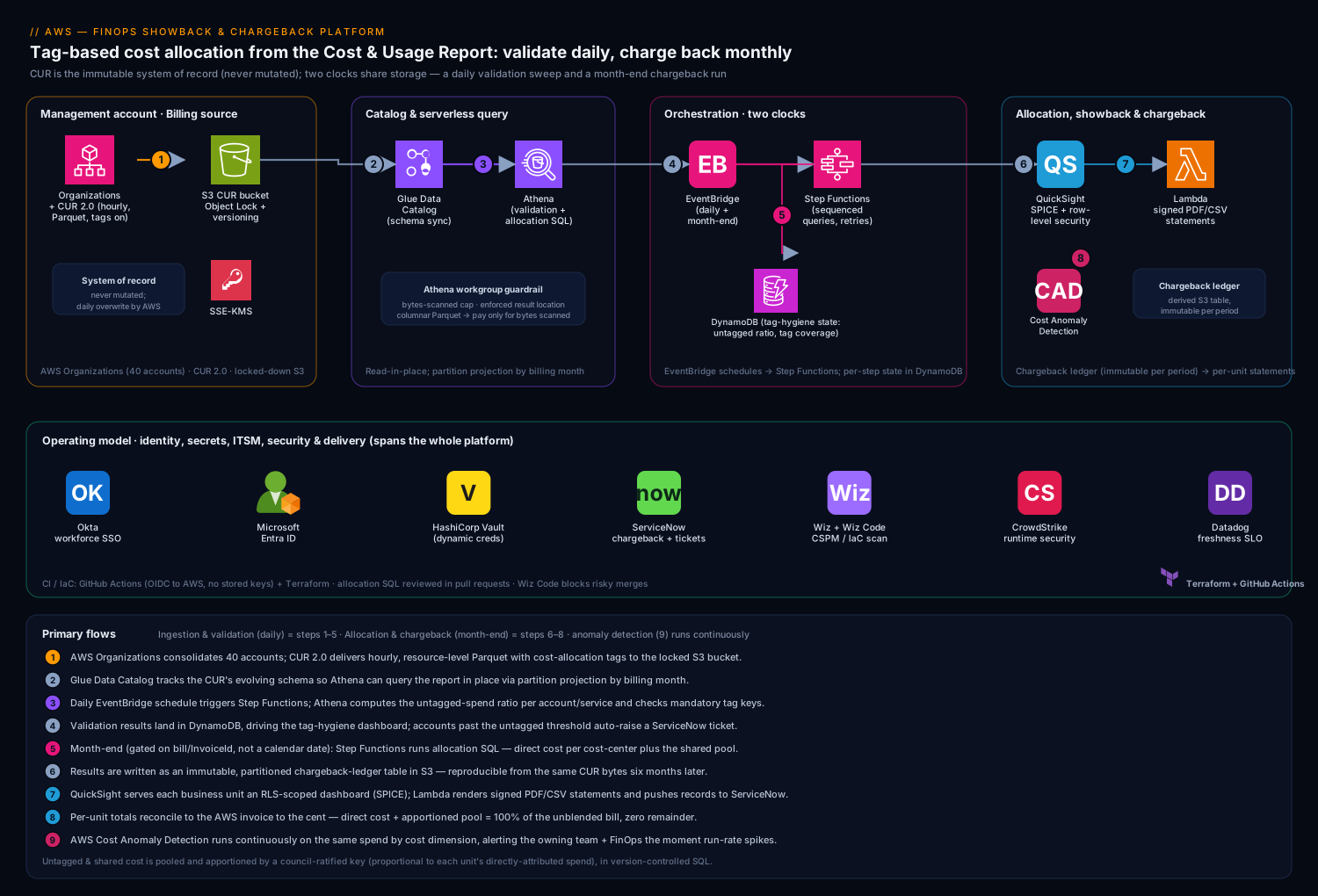
The platform is fundamentally a monthly batch pipeline with a self-service analytics layer on top, not a real-time system — and recognizing that shapes every decision. There are two flows that share storage but run on different clocks: a daily ingestion-and-validation flow that keeps the cost data current and the tag hygiene visible, and a month-end allocation-and-chargeback flow that produces the statements finance actually bills from.
The defining property of the topology is that the CUR is the single source of truth and is never mutated. AWS delivers the report to a locked-down S3 bucket; everything downstream reads from it and writes derived artifacts elsewhere. That immutability is what makes a chargeback defensible six months later in front of an auditor — you can always re-derive the exact statement from the exact bytes AWS delivered.
Ingestion and validation flow, following the data:
- AWS Organizations consolidates billing across all 40 accounts into the management account, and the Cost and Usage Report 2.0 is configured there to deliver hourly, resource-level line items — with cost-allocation tags activated — to a dedicated S3 bucket in Apache Parquet, partitioned by billing period. CUR overwrites the current month’s files daily as charges finalize, which is why downstream reads always re-query rather than cache.
- An AWS Glue crawler (or the CUR’s own Athena integration) keeps a Glue Data Catalog table in sync with the report’s evolving schema, so new services and new columns appear without a manual change.
- A daily EventBridge schedule triggers a Step Functions state machine that runs the validation pass: an Athena query computes the untagged-spend ratio per account and per service, and a second query checks that every active account carries the mandatory tag keys (
cost-center,business-unit,environment,application). The results land in a small DynamoDB table that drives the tag-hygiene dashboard. - Any account drifting past a threshold — say, more than 5% of spend untagged — auto-raises a ServiceNow ticket assigned to that account’s owning team, so tag debt has a name and a due date instead of accumulating silently.
Allocation and chargeback flow, fired by EventBridge a few days after AWS finalizes the prior month (the CUR’s bill/InvoiceId populating is the real “books are closed” signal):
- Step Functions runs the allocation Athena queries in sequence: directly-attributable cost is summed per
cost-centerfrom tags; untagged and shared cost is apportioned by the agreed rule (more on this below); and the results are written as a derived, partitioned “chargeback ledger” table in S3 — itself immutable once written for that period. - Amazon QuickSight reads the chargeback ledger through SPICE, serving each business unit a row-level-security-scoped dashboard so a GM sees their own spend, trend, and top resources — and nobody else’s.
- A Lambda function renders each business unit’s signed monthly statement (PDF + CSV), writes it to a per-unit S3 prefix, and pushes the chargeback record into ServiceNow as a financial transaction against that unit’s cost center — closing the loop from raw billing data to a line on the unit’s internal P&L.
- In parallel, AWS Cost Anomaly Detection runs continuously against the same spend, segmented by the same cost-allocation dimensions, and alerts the owning team plus FinOps the moment a unit’s daily run-rate spikes — so a runaway cost is caught mid-month, not discovered in next month’s statement.
Component breakdown
| Component | Service / tool | Role in the platform | Key configuration choices |
|---|---|---|---|
| Billing source | AWS Organizations + CUR 2.0 | Consolidated, hourly, resource-level line items — the system of record | Management-account delivery; Parquet; cost-allocation tags activated; daily refresh |
| Raw store | Amazon S3 (CUR bucket) | Immutable landing zone for billing data | Versioning + Object Lock; bucket policy locks writes to the billing service; SSE-KMS |
| Schema catalog | AWS Glue Data Catalog | Tracks CUR’s evolving schema for SQL access | Crawler or CUR-native Athena integration; partition projection by month |
| Query engine | Amazon Athena | Serverless SQL for validation + allocation | Workgroup with result location + bytes-scanned guardrail; partitioned, columnar reads |
| Orchestration | Step Functions + EventBridge | Daily validation and month-end chargeback runs | Schedule on CUR finalization; retries; per-step state in DynamoDB |
| Tag-hygiene state | Amazon DynamoDB | Untagged ratios, mandatory-tag coverage per account | On-demand capacity; feeds the hygiene dashboard and ServiceNow tickets |
| Anomaly detection | AWS Cost Anomaly Detection | Continuous spike detection per cost dimension | Monitors by linked account + cost-allocation tag; SNS to owning team |
| BI / showback | Amazon QuickSight | Per-unit dashboards and trend analysis | SPICE; row-level security by business unit; scheduled refresh post-run |
| Statement rendering | AWS Lambda | Signed PDF/CSV statements per unit; pushes to ITSM | Renders from chargeback ledger; signs artifacts; idempotent per period |
| Identity / SSO | Okta + Microsoft Entra ID | Workforce SSO into QuickSight and the FinOps console | OIDC/SAML federation; group claims map to QuickSight RLS groups |
| Secrets | HashiCorp Vault | ServiceNow API creds, signing keys, third-party tokens | Dynamic leases; AWS auth method; no long-lived creds in Lambda env |
| ITSM / chargeback book | ServiceNow | Receives chargeback records; raises tag-debt tickets | Financial-transaction record per unit; auto-ticket on tag drift |
| CSPM / posture | Wiz + Wiz Code | Guards the data store and the IaC that builds it | Alerts on CUR-bucket public exposure; Wiz Code scans Terraform pre-merge |
| Runtime security | CrowdStrike Falcon | Runtime protection on any rendering/ETL compute | Sensor on containers/instances if the render path is not pure Lambda |
| Observability | Datadog | Pipeline health, run duration, freshness SLOs | Step Functions + Lambda metrics; monitor on missed/late chargeback run |
| CI / IaC | GitHub Actions + Terraform | Builds the platform; version-controls allocation SQL | OIDC to AWS (no stored keys); SQL change-reviewed like code |
A few of these choices carry the weight of the design and deserve the why.
Why Athena on the CUR, not a data warehouse. The CUR for a $3M/month estate is large but queried in a bursty, monthly cadence — a few heavy allocation queries plus a daily validation sweep. Standing up Redshift to hold it means paying for a cluster that is idle 95% of the time and an ETL job to load it. Athena queries the Parquet directly in S3, you pay only for bytes scanned, and partition projection by billing month means a single month’s allocation touches only that month’s data. The tradeoff — covered below — is that you must discipline your queries against scanning the whole report.
Why the CUR bucket is the most locked-down resource in the account. This bucket is the system of record for a number a regulator may audit, so it gets S3 Object Lock and versioning (the billing data cannot be altered or deleted, even by an admin), an SSE-KMS key, and a bucket policy that permits writes only from the AWS billing service and reads only from the FinOps roles. Wiz scans it continuously and pages the moment its posture drifts toward public or its policy widens — because a tampered or leaked billing record poisons every downstream statement.
Why row-level security in QuickSight is non-negotiable. Showback only changes behavior if a GM can self-serve their own numbers — but a payer’s business units include lines that must not see each other’s cost (a competitive analytics unit, an M&A-sensitive workload). QuickSight RLS ties a viewer’s Okta-federated group to a permissions dataset so the same dashboard transparently filters to only the rows that viewer’s cost centers own. One dashboard, many tenants, zero cross-unit leakage.
The billing data, decoded: blended, unblended, amortized
Here is a subtlety that sinks more chargeback projects than any tagging problem: the same resource-hour can be priced three different ways in the CUR, and if you bill on the wrong one the allocation is unfair even when every tag is perfect. A beginner should slow down here, because “which cost column do I sum?” is the question the earlier allocation SQL quietly answered by choosing line_item_unblended_cost, and a mature platform revisits that choice deliberately.
The three flavors of cost:
- Unblended cost (
line_item_unblended_cost) is what AWS actually charged that line item, on that account, at that moment. It is the number that sums to your invoice. Its quirk: when you buy a Reserved Instance or an all-upfront Savings Plan, the entire upfront payment lands as one big unblended charge in the purchasing account on the purchase day, and the hours it later covers show as $0. Unblended is therefore lumpy — great for reconciling to the invoice, punishing if you bill a team for a spike that was really a year’s commitment. - Blended cost (
line_item_blended_cost) is a consolidated-billing artifact: AWS averages the rate of your Reserved Instances across the whole organization so every matching usage hour shows the same “blended” rate, whether or not that account bought anything. It was designed to smooth reporting, but it misattributes — an account that bought nothing shows a discounted rate paid for by another account. Modern guidance: do not bill on blended cost. Treat it as legacy. - Amortized (effective) cost spreads each RI/SP upfront purchase evenly across every hour of its commitment term and attributes the effective, discounted rate to whichever account and resource actually consumed the covered usage. This is the fair basis for chargeback: it reflects the effective cost of what each team consumed, without punishing whoever’s account happened to hold the purchase. In the CUR, amortized cost is not one column — it is computed: use
savings_plan_savings_plan_effective_costfor Savings-Plan-covered usage,reservation_effective_costfor RI-covered usage, andline_item_unblended_costfor everything else (on-demand, storage, transfer). AWS’s “Amortized costs” view in Cost Explorer does exactly this stitching for you.
A worked example. A 1-year, all-upfront Compute Savings Plan is purchased in the management account for $87,600 (a round $10/hour of committed compute × 8,760 hours). Two business units consume it: Claims runs 6/hour of covered compute, Analytics runs 4/hour.
| View | Management account (purchaser) | Claims BU | Analytics BU | Sums to invoice? |
|---|---|---|---|---|
| Unblended, purchase month | +$87,600 spike, then $0 for covered hours | $0 for covered hours | $0 for covered hours | Yes (over the whole term) |
| Blended | Averaged RI/SP rate on all matching usage | Discounted rate it didn’t buy | Discounted rate it didn’t buy | Approximately, but misattributed |
| Amortized | ~$0 (the purchase is spread out) | ~$6/hour of effective cost | ~$4/hour of effective cost | Yes, hour by hour |
Bill Claims and Analytics on unblended and the whole $87,600 lands on the management account in one month while the two consumers look almost free — obviously wrong. Bill them on amortized and each carries its true effective run-rate every month, which is the number that changes behavior fairly.
The reconciliation gotcha to internalize: in the purchase month, the sum of amortized cost does not equal the invoice (the invoice includes the whole upfront; amortized has spread it out). Over the life of the commitment they converge to the penny. So a mature platform bills chargeback on amortized/effective cost, but reconciles the platform’s own totals to the invoice on unblended cost, and treats the running difference as the un-amortized portion of open commitments. Pick one basis per purpose, state it in the runbook, and never mix them in the same sum. (The earlier allocation query uses line_item_unblended_cost for clarity; switching the allocation basis to amortized is a concrete maturity step you will practice at the end of this lesson.)
FOCUS 1.0 — the vendor-neutral alternative. The FinOps Open Cost and Usage Specification (FOCUS) is an open, cloud-agnostic schema for billing data, and AWS publishes a FOCUS 1.0 data export alongside CUR 2.0 through AWS Data Exports (the same delivery mechanism, into the same style of S3 bucket). FOCUS collapses the confusion above into a small, standard set of columns — most importantly BilledCost (≈ unblended, what was invoiced) and EffectiveCost (≈ amortized, commitments spread out) — plus ListCost and ContractedCost. If you are single-cloud and need AWS-specific columns, keep CUR 2.0 as your primary source; if you allocate across AWS and another cloud and want one query to work everywhere, add a FOCUS export and build the allocation on EffectiveCost. Many teams now deliver both exports to the same bucket and choose per use case.
Handling untagged and shared cost — the part everyone underestimates
The honest truth of cloud chargeback is that tags are never 100% clean, and how you handle the gap is what makes the model fair or fraudulent. Three categories of cost resist direct attribution: genuinely untagged resources (someone forgot), untaggable charges (some data-transfer, certain support and tax line items, savings-plan amortization that does not carry a resource tag), and deliberately shared infrastructure (the central logging account, the transit gateway, the security tooling every unit benefits from). Hiding these or dropping them silently is how a chargeback loses credibility the first time the numbers do not reconcile to the invoice.
The platform handles each explicitly. Untagged spend is surfaced loudly — the daily validation sweep computes the untagged ratio per account, the hygiene dashboard ranks the worst offenders, and a ServiceNow ticket lands on the owning team with a deadline; the cost of staying untagged is that it gets apportioned back via the shared-cost rule, so there is a financial nudge to fix it. Untaggable and shared costs are pooled and split by a pre-agreed allocation key ratified by the FinOps council — most commonly proportional to each unit’s directly-attributed spend (the unit consuming 30% of the attributable bill absorbs 30% of the shared pool), though some pools split by headcount or by a usage proxy where that is fairer. The rule lives in version-controlled SQL, so it is transparent, reviewable, and identical every month.
-- Apportion the unallocated pool to each cost center,
-- proportional to that center's directly-tagged spend.
WITH attributed AS (
  SELECT  resource_tags['user_cost_center'] AS cost_center,
          SUM(line_item_unblended_cost)      AS direct_cost
  FROM    cur.chargeback
  WHERE   billing_period = DATE '2026-05-01'
    AND   resource_tags['user_cost_center'] <> ''
  GROUP BY 1
),
shared_pool AS (              -- everything with no usable cost center
  SELECT  SUM(line_item_unblended_cost) AS pool
  FROM    cur.chargeback
  WHERE   billing_period = DATE '2026-05-01'
    AND  (resource_tags['user_cost_center'] = '' OR resource_tags['user_cost_center'] IS NULL)
)
SELECT  a.cost_center,
        a.direct_cost,
        ROUND(p.pool * a.direct_cost / SUM(a.direct_cost) OVER (), 2) AS shared_alloc,
        a.direct_cost
          + ROUND(p.pool * a.direct_cost / SUM(a.direct_cost) OVER (), 2) AS total_chargeback
FROM    attributed a CROSS JOIN shared_pool p
ORDER BY total_chargeback DESC;
The property that matters: the per-unit totals reconcile exactly to the AWS invoice. Direct cost plus the apportioned pool sums to 100% of the unblended bill, with zero unallocated remainder — which is the first thing finance checks and the thing a hand-built spreadsheet always gets wrong.
| Cost category | How it’s attributed | Why this rule |
|---|---|---|
| Tagged resources | Direct, by cost-center tag |
Unambiguous ownership; the goal state |
| Untagged but taggable | Apportioned via shared pool; ticketed to owner | Creates a financial nudge to tag, never silently dropped |
| Untaggable (some transfer, tax, support) | Pooled, split proportionally | No resource to tag; fairness by consumption share |
| Deliberately shared (logging, TGW, security) | Pooled, split by agreed key | Everyone benefits; council-ratified rule |
| Savings Plans / RI amortization | Amortized view, allocated to the consuming account | Reflects effective cost, not lumpy upfront purchase |
Tagging strategy, Cost Categories, and tag governance
The untagged-and-shared section above treats the tag gap as a fact of life to apportion around. This section is about shrinking that gap and giving yourself billing-level tools that work even when the raw tags are imperfect. Three ideas do the heavy lifting: a disciplined tag taxonomy, AWS Cost Categories, and real tag governance.
Design the tag taxonomy for allocation, not decoration
The instinct is to invent thirty tags; the discipline is to mandate four or five and enforce them ruthlessly. For chargeback you need, at minimum, a key that answers who pays (cost-center), what team owns it (business-unit), what stage (environment), and what workload (application). Consistency matters more than richness: cost-center=CC-4400 and Cost_Center=cc4400 are two different keys to AWS and will fragment your allocation. Decide casing, an allowed-value list, and a naming convention up front, and make them machine-checkable.
There are two kinds of cost allocation tag, and you activate both in the Billing and Cost Management console → Cost allocation tags:
- User-defined tags — the keys you apply yourself. In the CUR they appear as columns like
resource_tags['user_cost_center'](theuser_prefix is AWS’s, marking a customer tag). - AWS-generated tags — keys AWS creates automatically, prefixed
aws:, such asaws:createdBy,aws:cloudformation:stack-name, oraws:autoscaling:groupName. You do zero tagging work; you just activate them. They are superb fallback attribution — when a resource is otherwise untagged,aws:createdByoften still tells you which principal launched it.
The rule that trips up every first-timer: activating a cost allocation tag is not retroactive. It only allocates cost from the moment of activation forward. Activate your taxonomy on day one, even before the pipeline is built, so history accumulates while you develop.
Cost Categories: rule-based grouping that sits above tags
Tags live on resources; Cost Categories live in the billing layer and group spend by rules. A Cost Category is a named dimension (say, BusinessUnit) whose values (Claims, Analytics, Platform) are assigned by rules that match on account, tag, service, charge type, or a regex over any of those. The category then shows up as a first-class grouping in Cost Explorer, AWS Budgets, and the CUR itself (as cost_category['BusinessUnit']). Why this is powerful:
- Map many things to one owner without re-tagging. Three linked accounts and a tag value all rolling up to
Claimsis one rule set, applied centrally, no resource touched. - Reclassify and fix history going forward when a team reorganizes, without chasing tags on thousands of resources.
- Inherited value rules let a category take its value from a tag or account dimension, so
BusinessUnitcan inherit whateverbusiness-unittag a resource carries and fall back to a rule when the tag is missing.
The feature that matters most for fair allocation is split charge rules inside a Cost Category. This is the native, auditable answer to “how do we divide the shared pool,” and AWS gives you exactly three methods:
| Method | How it divides the source pool | Use it when |
|---|---|---|
| Proportional | In proportion to each target’s own cost | Shared cost should track consumption (the default fair choice) |
| Even | Equal split across all targets | Everyone benefits equally and consumption isn’t a fair proxy (e.g. a flat support tier) |
| Fixed | Predefined percentages you specify | A committee agreed on set shares (e.g. Claims 50 / Analytics 30 / Ops 20) |
Defining a Cost Category with an inherited value and a proportional split charge — the same logic the earlier SQL implements by hand — can be done declaratively so the platform and the console agree:
resource "aws_ce_cost_category" "business_unit" {
  name         = "BusinessUnit"
  rule_version = "CostCategoryExpression.v1"

  # Inherit the value from each resource's business-unit tag.
  rule {
    type           = "INHERITED_VALUE"
    inherited_value { dimension_name = "TAG"; dimension_key = "business-unit" }
  }

  # Anything landing in a "Platform" shared bucket is split across the
  # consuming units in proportion to their own cost.
  split_charge_rule {
    source  = "Platform"
    targets = ["Claims", "Analytics"]
    method  = "PROPORTIONAL"
  }
}
Swap method = "FIXED" and add a parameters { type = "ALLOCATION_PERCENTAGES"; values = ["50", "50"] } block for a committee-agreed split, or method = "EVEN" for an equal division.
Governance: standardize, prevent, detect, remediate
A taxonomy nobody enforces decays in a quarter. Layer four controls, from softest to hardest:
-
Tag Policies (AWS Organizations) — standardize. Declare the allowed keys, allowed values, and casing organization-wide, and get a compliance report showing which resources violate them. Tag Policies can optionally enforce on specific resource types (blocking non-compliant tag values), but their main job is standardization and reporting.
-
Service Control Policies (SCPs) — prevent, partially. An SCP can deny resource creation when a required tag is absent, using the
aws:RequestTag/<key>andaws:TagKeyscondition keys. The important caveat: not every service and API supports tag-on-create condition keys, so SCP enforcement is real but not universal — pair it with detection.{ "Sid": "DenyRunInstancesWithoutCostCenter", "Effect": "Deny", "Action": "ec2:RunInstances", "Resource": "arn:aws:ec2:*:*:instance/*", "Condition": { "Null": { "aws:RequestTag/cost-center": "true" } } } -
AWS Config
required-tagsrule — detect continuously. The managed rule flags any resource missing your mandatory keys, on an ongoing basis, across accounts — catching what SCPs can’t block at create time. -
Remediate — route Config non-compliance to auto-remediation (an SSM Automation document that applies a default tag) or into the platform’s existing ServiceNow tag-debt ticket flow, so drift becomes tracked, owned work with a due date.
This governance stack is why the daily untagged-ratio sweep from the architecture section can actually fall over time instead of forever apportioning a growing shared pool. Tag Policies and SCPs are Organizations features; if consolidated billing, delegated administration, and guardrails are fuzzy, revisit the AWS Organizations, SCPs & delegated-admin lesson.
Implementation guidance
Provision with Terraform, and treat the billing data store as the first deliverable. The order matters: the CUR can take up to 24 hours to begin delivering after you enable it, so stand up the bucket, the report definition, and the Glue catalog on day one and let data accumulate while you build the rest.
- The locked-down CUR S3 bucket — versioning, Object Lock in compliance mode, SSE-KMS, and a bucket policy scoped to the billing service and FinOps roles.
- The CUR 2.0 report definition in the management account: hourly granularity, resource IDs included, Parquet, cost-allocation tags activated, Athena integration enabled.
- The Glue Data Catalog table (CUR-native integration or a crawler) with partition projection on billing period so Athena never has to list partitions.
- The Athena workgroup with an enforced result location and a per-query bytes-scanned cap as a guardrail against an accidental full-report scan.
- Step Functions, EventBridge schedules, Lambda, DynamoDB, QuickSight, and the ServiceNow integration, with the allocation SQL stored as versioned files the pipeline reads at runtime.
Activating cost-allocation tags is the step teams forget, and a tag is not retroactive — it only allocates cost from the moment it is activated forward, which is why this is day-one work:
resource "aws_ce_cost_allocation_tag" "cost_center" {
  tag_key = "cost-center"
  status  = "Active"
}

resource "aws_cur_report_definition" "finops" {
  report_name                = "finops-chargeback-cur2"
  time_unit                  = "HOURLY"
  format                     = "Parquet"
  compression                = "Parquet"
  additional_schema_elements = ["RESOURCES"]
  s3_bucket                  = aws_s3_bucket.cur.id
  s3_region                  = "ap-south-1"
  additional_artifacts       = ["ATHENA"]
  refresh_closed_reports     = true
  report_versioning          = "OVERWRITE_REPORT"
}
The pipeline that applies this runs in GitHub Actions, authenticating to AWS via OIDC federation so there is no stored access key to leak — and the allocation SQL is reviewed in pull requests exactly like application code, because a change to an allocation rule is a change to what each business unit pays. Wiz Code scans the Terraform on the same pull request, blocking a merge that would, say, drop Object Lock or open the bucket policy.
Identity: federate the humans, lease the machine creds. FinOps analysts and business-unit viewers reach QuickSight and the internal FinOps console through Okta as the workforce IdP, federated to Microsoft Entra ID where the corporate identity estate lives, with the resulting group claims mapping straight to QuickSight RLS groups so a viewer’s unit determines the rows they see. The pipeline’s one sensitive dependency — the ServiceNow API credential it uses to post chargeback records and raise tickets, plus the key that signs each statement — lives in HashiCorp Vault, leased dynamically via the AWS auth method and never written into a Lambda environment variable, so a leaked function config exposes nothing.
Enterprise considerations
Security & data integrity. The crown jewel is the billing data itself; compromise it and every statement downstream is wrong. The controls layer accordingly: (a) S3 Object Lock + versioning make the CUR tamper-evident and tamper-resistant; (b) SSE-KMS with a dedicated key and a tight key policy; © Wiz running continuous CSPM so any drift of the CUR bucket toward public exposure or a widened policy pages immediately, with Wiz Code catching the same risk in IaC before it ships; (d) CrowdStrike Falcon sensors on any non-Lambda ETL or rendering compute for runtime threat detection into the SOC; (e) least-privilege IAM throughout — the validation role can read the CUR and nothing else, the render Lambda can read the chargeback ledger but not the raw report. A tag-drift breach raises a ServiceNow ticket so tag debt is tracked work, not a forgotten log line.
Cost optimization (of the FinOps platform itself). A cost-management platform that is itself expensive is a bad look, and the dominant cost here is Athena bytes scanned. Engineer for it.
| Lever | Mechanism | Typical effect |
|---|---|---|
| Partition projection | Query only the relevant billing month’s partition | Cuts a full-report scan to a single month |
| Columnar Parquet | CUR in Parquet; select only needed columns | Athena reads a fraction of the bytes |
| Bytes-scanned guardrail | Workgroup limit aborts a runaway query | Caps the cost of a bad ad-hoc query |
| SPICE in QuickSight | Dashboards read cached SPICE, not live Athena | Viewers never trigger a query per page load |
| Right-sized cadence | Heavy allocation runs monthly, light validation daily | Avoids re-deriving the world every day |
The platform’s own bill should be a rounding error — low hundreds of dollars a month on a $3M estate — and Datadog tracks Athena spend as a first-class metric so the cost-management tool does not quietly become a cost problem.
Scalability. The architecture scales with the number of accounts and the size of the bill almost for free because the heavy lifting is serverless: Athena scales query concurrency on demand, Step Functions and Lambda scale with the run, and S3 has no capacity to manage. The real scaling axis is organizational — more business units means more RLS groups, more allocation rules, and more shared-cost pools to ratify — which is governance work, not infrastructure work. The one genuine ceiling is Athena’s per-query and per-workgroup concurrency limits during a heavy month-end run; sequencing the allocation queries through Step Functions rather than firing them all at once keeps you well under it.
Failure modes, and what each one looks like. Name them before they corrupt a chargeback.
- Running the chargeback before the books close — the CUR overwrites the current month’s data daily as charges finalize, so a statement generated too early is simply wrong. Mitigation: gate the month-end run on the
bill/InvoiceIdfield populating, not a fixed calendar date. - A schema change in the CUR breaks the allocation query — AWS adds columns and services over time. Mitigation: the Glue crawler / CUR-native integration tracks the schema, and the allocation SQL selects named columns defensively rather than
SELECT *. - Tag coverage silently degrades — a new team launches untagged and the shared pool quietly balloons, distorting everyone’s apportioned share. Mitigation: the daily untagged-ratio check, the hygiene dashboard, and the auto-raised ServiceNow ticket make the drift visible the next morning.
- An Athena query scans the whole report — a missing partition predicate turns a cheap query into an expensive one. Mitigation: partition projection plus the workgroup bytes-scanned cap, which aborts it.
- The statement does not reconcile to the invoice — the cardinal sin. Mitigation: an automated reconciliation assertion in the pipeline that the sum of per-unit chargebacks equals the unblended invoice total to the cent, failing the run if it does not.
Reliability & DR (RTO/RPO). This is a batch system, so the SLO is freshness, not uptime — the chargeback must be ready by an agreed day of the month. Because the entire pipeline re-derives its output from the immutable CUR in S3 (which AWS replicates durably and you can additionally cross-region replicate), recovery is “re-run the pipeline against the same source.” A pragmatic posture: RPO is effectively zero (the source of truth is immutable and durable), and RTO is a single pipeline re-run — a few hours — because nothing is lost that cannot be recomputed. Datadog monitors enforce the freshness SLO and page FinOps if a scheduled run is late or fails, which for a batch platform is the failure that actually matters.
Observability. Instrument the pipeline in Datadog as an end-to-end batch SLO: run duration, success/failure of each Step Functions stage, the data-freshness lag (how stale the latest chargeback ledger is), and the reconciliation delta between summed chargebacks and the invoice. Emit the business metrics FinOps lives by — untagged-spend ratio, shared-pool size as a percentage of total, per-unit month-over-month variance, and anomaly-alert count per unit — so a degrading tag culture or a runaway workload surfaces on a dashboard rather than in a quarterly surprise. New allocation rules pass through a ServiceNow change approval before going live, giving finance a documented gate on changes to how units are billed.
Governance. The allocation logic is financial logic, so govern it like financial controls: the FinOps council ratifies the shared-cost key and the mandatory tag taxonomy, the SQL that implements them lives in version control and changes only through reviewed pull requests, and every monthly chargeback ledger is retained immutably for the audit horizon the regulator requires. Pin the report definition and never let allocation rules drift silently; promote changes through the change gate; and keep a documented, reproducible path from any historical statement back to the exact CUR bytes that produced it — which is the artifact that ends a dispute.
Budgets, alerts, and unit economics
The architecture already runs AWS Cost Anomaly Detection as its continuous guardrail. Complete the picture with AWS Budgets on one side and unit economics on the other — the two things that turn a reporting pipeline into a managed cost discipline.
AWS Budgets — the threshold you set on purpose
Cost Anomaly Detection answers “did something change unexpectedly?” using a machine-learned baseline. AWS Budgets answers a different question — “are we on track against the plan we chose?” — using thresholds you define. The two are complementary, not redundant, and a real platform runs both.
Budgets come in four kinds and can be scoped to an account, a tag, a Cost Category, or a service:
- Cost budgets — a dollar ceiling (monthly/quarterly/annual), alerting on actual and, crucially, forecasted spend so you hear about an overrun before month-end.
- Usage budgets — a quantity ceiling (GB-months, running hours) for teams that manage a resource count rather than a dollar figure.
- RI/SP utilization budgets — alert when your commitment utilization drops below a target (you’re paying for coverage you aren’t using).
- RI/SP coverage budgets — alert when too much on-demand is running uncovered (you could commit and save).
The natural design is a per-business-unit cost budget derived from that unit’s chargeback baseline — Claims’ budget is last quarter’s average plus its planned growth — so the same allocation that feeds the statement feeds the budget. Budget Actions can go beyond alerting: on a breach they can automatically apply a restrictive IAM policy or SCP, or stop targeted resources. Treat actions with care in production (an auto-applied deny can page an on-call at 2am), but they are the mechanism for a hard guardrail in a sandbox or a runaway-prevention policy.
| Signal | AWS Budgets | Cost Anomaly Detection |
|---|---|---|
| Question it answers | “Are we over the plan?” | “Did something change?” |
| How the limit is set | You set it (forecast-aware) | ML learns the baseline |
| Catches | Known, planned overruns | Unknown-unknowns, sudden spikes |
| Can auto-act | Yes (Budget Actions) | No (alert only) |
| Best for | Guardrails against the plan | Early detection of surprises |
Unit economics — the number leadership actually manages by
Team-level chargeback answers “what did each team spend.” The maturity step above it answers “what did it cost to produce one unit of the thing the business sells” — cost per claim processed, cost per member per month, cost per tenant, cost per feature, cost per thousand API requests. This is the metric a CFO can steer by, because it stays meaningful as you grow: total cost rising is fine, even good, if cost per claim is falling.
You already have the expensive half — an allocated, immutable chargeback ledger. The other half is an operational metric (claims processed, active members, requests served) per unit per period, which the business already tracks. Join them in Athena:
-- Cost per claim, per business unit, for a billing period.
SELECT  c.cost_center,
        c.total_chargeback,
        m.claims_processed,
        ROUND(c.total_chargeback / NULLIF(m.claims_processed, 0), 4)
          AS cost_per_claim
FROM    finops.chargeback_ledger c
JOIN    ops.business_metrics    m
  ON    c.cost_center   = m.cost_center
 AND    c.billing_period = m.period
WHERE   c.billing_period = DATE '2026-05-01'
ORDER BY cost_per_claim DESC;
For a SaaS estate the same shape yields cost-per-tenant, which quietly surfaces unprofitable customers (a tenant costing more to serve than they pay) and feeds pricing and packaging decisions. Unit economics is the bridge from Inform to Optimize: it tells you not just where the money went, but where efficiency work will move the metric that matters. It is also the natural extension the original design gestures at — the pipeline doesn’t change shape; you add one JOIN to operational data and one derived table.
Explicit tradeoffs
Accept these or do not build it. A CUR-driven chargeback platform is a batch system with a lag — the freshest possible chargeback is still a few days after month-end, because that is when AWS finalizes the bill, and no architecture changes that physics. It lives or dies on tag discipline, which is an organizational problem the platform can surface and nudge but cannot solve by itself; the shared-pool apportionment is a real, defensible answer to imperfect tags, but it is an approximation, and a unit that stays sloppy on tags will rightly feel its apportioned share is fuzzy. The Athena-not-warehouse choice keeps cost near zero but demands query discipline — one un-partitioned ad-hoc query can scan the whole report. And the Okta-to-Entra federation plus QuickSight RLS plus Vault-held creds are all overhead a five-account startup can skip and a 40-account regulated payer absolutely cannot.
The alternatives, and when they win. If you run a handful of accounts and a small bill, AWS Cost Explorer with cost categories and a couple of activated tags is enough showback and you do not need this pipeline at all. If your finance team has standardized on a third-party FinOps platform — CloudHealth, Apptio Cloudability, or similar — those ingest the CUR and do much of this allocation out of the box, and the build-versus-buy decision turns on whether your allocation rules are unusual enough, and your data-residency or customization needs strict enough, to justify owning the code; for a regulated payer with bespoke shared-cost rules and an auditor to satisfy, owning the SQL is often the right call. If you need cost data joined to business metrics — cost per claim processed, cost per member — you extend this exact pipeline by joining the chargeback ledger to operational data in Athena, which is the natural next step once the unit-cost discipline is in place.
The shape of the win
For the payer’s CFO, the payoff is not “a dashboard.” It is that at the next quarterly close, finance hands each business-unit GM a signed statement that reconciles to the AWS invoice to the cent, the claims division can see its own RDS fleet is in fact its largest line, the analytics team can see its training spend with the untagged residue fairly apportioned and nobody else’s costs on its bill — and because every number traces back to immutable CUR data through version-controlled SQL, the dispute that used to eat the first week of every quarter simply does not happen. That last point is what funds the platform: the chargeback is no longer a fight, it is a fact. Everything upstream — the locked-down CUR bucket, the Athena allocation queries, the explicit untagged handling, the QuickSight row-level security, the ServiceNow chargeback push, the Cost Anomaly Detection guardrail, the Datadog freshness SLO — exists so that a CFO, a business-unit GM, and an auditor each look at the same monthly number and agree it is right. Start narrower if your estate is small, but for a regulated organization spending real money across many accounts, this is where accountable cloud cost has to land.
Going deeper
For the reader who will actually operate one of these platforms, the edges are where the interesting failures and the real design decisions live.
CUR 2.0, legacy CUR, and FOCUS all deliver to the same lake. There are now three billing-data shapes. Legacy CUR is a flat file with hundreds of fixed columns; CUR 2.0 (delivered through AWS Data Exports) uses a nested, queryable schema where you select the columns and nested fields you want, which is far friendlier to schema drift; and the FOCUS 1.0 export is the vendor-neutral schema. They are not mutually exclusive — you can run all three exports into the same S3 bucket as separate prefixes and point different consumers at different tables. A common production posture: CUR 2.0 as the primary AWS-native source, plus a FOCUS export if a parent FinOps team aggregates multiple clouds. If you are migrating off legacy CUR, keep both running in parallel for a couple of billing periods and diff the totals before you cut over the allocation SQL.
Amortization across account boundaries is the subtle one. A Savings Plan or Reserved Instance bought in one account can cover usage in another account under consolidated billing. Amortized/effective cost correctly attributes the effective rate to the consuming account — but the unblended upfront hit the purchasing account. If you (wrongly) run per-account chargeback on unblended, the account that centrally bought commitments looks catastrophically expensive while everyone it subsidizes looks cheap. This is the concrete reason mature chargeback uses effective cost. Add regional RI size flexibility (a regional Linux/UnixRI floats its discount across instance sizes in a family) and floating SP coverage, and “which account got the discount this hour” becomes genuinely non-deterministic month to month — another argument for amortized allocation and for never hand-reconstructing it in a spreadsheet.
Materialize the ledger with CTAS; don’t re-scan the raw report. The cheapest and most reproducible pattern is to run the monthly allocation as an Athena CREATE TABLE AS SELECT (CTAS) that writes the period’s chargeback ledger to its own Parquet prefix, immutable once written. Downstream — QuickSight SPICE, the statement Lambda, the unit-economics join — reads that small derived table, never the multi-gigabyte raw CUR. Pair it with partition projection so Athena computes partition locations from a formula instead of listing them or crawling:
-- Table properties that let Athena project monthly partitions with no crawler.
TBLPROPERTIES (
  'projection.enabled'            = 'true',
  'projection.billing_period.type'   = 'date',
  'projection.billing_period.range'  = '2024-01-01,NOW',
  'projection.billing_period.format' = 'yyyy-MM-dd',
  'storage.location.template'
     = 's3://finops-cur/chargeback/billing_period=${billing_period}/'
)
Combined with selecting named columns (never SELECT *) and a workgroup bytes-scanned cap, this keeps the platform’s own Athena bill in the low tens of dollars even on a multi-million-dollar estate, and it defends against the classic accidental full-report scan.
The CUR lives in the management account — keep that account otherwise bare. The Cost and Usage Report is created in the management (payer) account, because that is where consolidated billing aggregates. Best practice is to keep the management account nearly empty of workloads and reach the billing data through least-privilege roles and, where supported, delegated administration for billing so day-to-day FinOps work doesn’t require logging into the payer. Cross-region-replicate the CUR bucket if your DR posture requires the billing system of record to survive a regional event; because everything downstream re-derives from it, that replica plus the versioned, Object-Locked original (see the S3 deep dive and the KMS deep dive for Object Lock and SSE-KMS specifics) is your entire disaster-recovery story.
QuickSight multi-tenancy has two isolation strengths. Row-level security (RLS) filters rows by mapping a viewer’s UserName/GroupName to permitted field values via a rules dataset — one dashboard, many tenants, each seeing only their cost centers. For harder isolation (units that must not even share a QuickSight directory), namespaces give separate user pools. Federate the group claims from your IdP straight to QuickSight groups so the mapping is driven by corporate identity, and refresh SPICE after the ledger CTAS completes so viewers never see a half-written period. The same attribute-based thinking (groups/claims → access) shows up across AWS identity — see IAM Identity Center permission sets & ABAC.
Quotas and timing that bite at month-end. The CUR can take up to 24 hours to begin delivering after you enable it (build the bucket and report on day one), and AWS may refresh the current month’s report up to three times a day — which is exactly why downstream reads re-query rather than cache and why the month-end run gates on bill/InvoiceId populating rather than a calendar date. Athena enforces a per-account concurrent-query quota (adjustable via Service Quotas); sequencing the allocation queries through Step Functions keeps a heavy close well under it. Cost Categories, activated cost allocation tags, and Budgets each carry their own account limits — check Service Quotas before you design a scheme that assumes hundreds of any of them.
Practice challenges
Work these in order — they climb from “activate a tag” to “gate a chargeback run on a reconciliation assertion.” Each solution is one correct approach, not the only one. Account IDs and ARNs are placeholders.
1. (Beginner) Activate a cost allocation tag and prove it isn’t retroactive. Turn on cost-center as a user-defined cost allocation tag, then explain what happens to last month’s spend for that tag.
<details><summary>Solution</summary>
In the Billing and Cost Management console → Cost allocation tags, select the cost-center key and choose Activate (or, as code, aws_ce_cost_allocation_tag { tag_key = "cost-center"; status = "Active" }). Last month’s spend is not allocated by it — activation only takes effect going forward, so historical line items keep an empty resource_tags['user_cost_center'].
Why: cost allocation tags are non-retroactive, which is exactly why activation is day-one work. </details>
2. (Beginner) Compute the untagged-spend ratio. Write an Athena query giving the fraction of a billing period’s unblended cost that has no cost-center tag.
<details><summary>Solution</summary>
SELECT ROUND(
         SUM(CASE WHEN resource_tags['user_cost_center'] = ''
                   OR resource_tags['user_cost_center'] IS NULL
                  THEN line_item_unblended_cost ELSE 0 END)
         / NULLIF(SUM(line_item_unblended_cost), 0), 4) AS untagged_ratio
FROM   cur.chargeback
WHERE  billing_period = DATE '2026-05-01';
Why: this single ratio is the health metric the daily hygiene sweep and the ServiceNow tag-debt tickets are built on. </details>
3. (Intermediate) Group three accounts into one business unit without touching a single tag. Roll linked accounts 111111111111, 222222222222, 333333333333 up to a Claims business unit.
<details><summary>Solution</summary>
Create a Cost Category with a rule matching those linked accounts:
resource "aws_ce_cost_category" "bu" {
  name         = "BusinessUnit"
  rule_version = "CostCategoryExpression.v1"
  rule {
    value = "Claims"
    rule { dimension { key = "LINKED_ACCOUNT"
                       values = ["111111111111","222222222222","333333333333"] } }
    type = "REGULAR"
  }
}
Why: Cost Categories map many accounts/tags to one owner in the billing layer, so re-orgs don’t require re-tagging thousands of resources. </details>
4. (Intermediate) Apportion a shared Platform pool proportionally. Split a shared cost bucket across Claims and Analytics by each unit’s own cost, natively.
<details><summary>Solution</summary>
Add a split charge rule to the Cost Category:
split_charge_rule {
  source  = "Platform"
  targets = ["Claims", "Analytics"]
  method  = "PROPORTIONAL"
}
Switch method to EVEN for an equal split, or FIXED with a parameters { type = "ALLOCATION_PERCENTAGES"; values = ["60","40"] } block for committee-agreed shares.
Why: proportional/even/fixed are the three native split methods, so the shared-cost rule is auditable and consistent instead of hand-rolled. </details>
5. (Advanced) Switch the allocation basis from unblended to amortized. Rewrite the per-line cost so RI/SP commitments are billed at their effective (amortized) rate instead of the lumpy unblended charge.
<details><summary>Solution</summary>
Select the effective-cost column per coverage type, falling back to unblended:
SELECT resource_tags['user_cost_center'] AS cost_center,
       SUM(
         CASE
           WHEN line_item_line_item_type = 'SavingsPlanCoveredUsage'
                THEN savings_plan_savings_plan_effective_cost
           WHEN line_item_line_item_type = 'DiscountedUsage'
                THEN reservation_effective_cost
           ELSE line_item_unblended_cost
         END) AS amortized_cost
FROM   cur.chargeback
WHERE  billing_period = DATE '2026-05-01'
GROUP BY 1;
Why: amortized/effective cost attributes commitment savings to the consuming team and never dumps a year’s upfront on the purchasing account — the fair basis for chargeback. (Reconcile it to the invoice on unblended, and expect amortized ≠ unblended in a purchase month.) </details>
6. (Advanced) Gate the run on a reconciliation assertion. Make the pipeline fail if the summed per-unit chargebacks don’t equal the invoice’s unblended total to the cent.
<details><summary>Solution</summary>
Run a check query and branch on it in Step Functions:
SELECT ABS(
         (SELECT SUM(total_chargeback) FROM finops.chargeback_ledger
           WHERE billing_period = DATE '2026-05-01')
       - (SELECT SUM(line_item_unblended_cost) FROM cur.chargeback
           WHERE billing_period = DATE '2026-05-01'
             AND  line_item_line_item_type = 'Usage')
       ) AS delta;   -- must be < 0.01
A Step Functions Choice state routes delta >= 0.01 to a Fail state that stops the run and pages FinOps.
Why: “every dollar lands on exactly one owner and the parts sum to the whole” is the cardinal control — it’s what lets you cross from showback to real chargeback. </details>
Common beginner mistakes
These are misconceptions, not symptom-to-fix incidents — each one is a wrong mental model and the right one to replace it with.
- “Cost Explorer is good enough to bill teams.” Cost Explorer is a superb exploration tool, but its data is aggregated and rounded and you cannot reproduce an exact historical statement from it. Right model: the CUR (or a FOCUS export) is the line-item system of record you bill from; Cost Explorer is for looking around.
- “I’ll activate tags now and get last quarter allocated.” Cost allocation tags are not retroactive. Right model: activate the full taxonomy on day one, before the pipeline even exists, so history accrues while you build.
- “Just split the bill evenly — it’s simpler.” Even-splitting punishes the frugal team and subsidizes the wasteful one, destroying the incentive chargeback exists to create. Right model: attribute directly by tag, and split only the genuinely shared pool, usually proportionally to consumption.
- “Bill teams on blended cost.” Blended cost is a consolidated-billing smoothing artifact that shows discounted rates to accounts that bought nothing. Right model: reconcile to the invoice on unblended, bill fairly on amortized/effective, and treat blended as legacy.
- “Untagged spend can be left out.” Drop the untagged residue and your statements no longer sum to the invoice — the first thing finance checks. Right model: surface untagged spend loudly and apportion it via the shared-pool rule so nothing is silently lost.
- “
SELECT *on the CUR is fine.” It scans the whole multi-gigabyte report and breaks the moment AWS adds a column. Right model: select named columns with a partition predicate, and cap bytes-scanned at the workgroup. - “Run the chargeback on the 1st of the month.” The CUR is still being refreshed as charges finalize, so an early statement is simply wrong. Right model: gate the run on
bill/InvoiceIdpopulating — the real “books are closed” signal — not a calendar date. - “Showback and chargeback are the same thing.” Showback only shows; chargeback moves money. Right model: earn trust with showback and clean tags first, then flip on chargeback — turning it on over shaky tags manufactures monthly disputes.
Glossary
- FinOps — the operating discipline of managing cloud spend as a shared responsibility of engineering, finance, and business, run in a continuous Inform → Optimize → Operate cycle.
- Showback — reporting each team’s cloud cost for visibility; no money changes hands.
- Chargeback — actually billing each team’s allocated cost against its internal budget/cost center, so it hits their P&L.
- Cost and Usage Report (CUR) — the most granular billing data AWS produces: every line item, resource, and tag, hourly, delivered to your own S3 bucket. CUR 2.0 is the newer nested-schema export delivered via AWS Data Exports.
- AWS Data Exports — the delivery mechanism that produces CUR 2.0 and FOCUS 1.0 table exports into S3.
- FOCUS 1.0 — the FinOps Open Cost and Usage Specification, a vendor-neutral billing schema; its
EffectiveCost≈ amortized andBilledCost≈ unblended. - Cost allocation tag — a key AWS uses to break down cost. User-defined tags are yours (appear as
user_<key>in the CUR); AWS-generated tags are created by AWS (prefixedaws:, e.g.aws:createdBy). Both must be activated and are not retroactive. - Cost Category — a billing-layer grouping that assigns spend to named values by rules (account, tag, service, regex), usable in Cost Explorer, Budgets, and the CUR.
- Split charge rule — a Cost Category rule that divides a shared cost source across targets by one of three methods: Proportional (by cost), Even (equal), or Fixed (set percentages).
- Unblended cost — what AWS actually charged a line item; sums to the invoice; lumpy when commitments are purchased upfront.
- Blended cost — a consolidated-billing average rate across the org; a legacy reporting artifact, not a fair billing basis.
- Amortized / effective cost — RI/SP upfront purchases spread across the commitment term and attributed to the consuming resource; the fair basis for chargeback.
- Reserved Instance (RI) / Savings Plan (SP) — commitment-based discounts (capacity/instance-family for RIs, spend-per-hour for SPs) exchanged for lower rates.
- Consolidated billing — AWS Organizations rolling many accounts’ charges into one payer (management) account, which also aggregates commitment discounts.
- Management (payer) account — the Organizations root billing account where the CUR is created; kept otherwise minimal.
- Amazon Athena — serverless SQL over data in S3; you pay per byte scanned, so partitioning and columnar Parquet matter.
- AWS Glue Data Catalog — the schema/table metadata Athena queries against; a crawler or CUR-native integration keeps it in sync.
- Partition projection — Athena computing partition locations from a formula instead of listing them, so a monthly query touches only that month.
- CTAS —
CREATE TABLE AS SELECT; used to materialize an immutable monthly chargeback ledger as Parquet. - SPICE — QuickSight’s in-memory cache; dashboards read it instead of hitting Athena on every page load.
- Row-level security (RLS) — QuickSight filtering rows per viewer, so each business unit sees only its own cost.
- AWS Cost Anomaly Detection — ML-based monitoring that learns a spend baseline and alerts on deviations.
- AWS Budgets — user-set cost/usage/RI/SP thresholds with forecast-aware alerts and optional Budget Actions that can auto-apply a policy on breach.
- Unit economics — cost per unit of business value (per claim, per member, per tenant, per feature); the metric leadership manages by.
- Tag Policy — an AWS Organizations policy that standardizes allowed tag keys/values/casing and reports non-compliance.
- Service Control Policy (SCP) — an Organizations guardrail; here, used to deny resource creation that lacks a required tag (partial, since not all APIs support tag-on-create conditions).
- AWS Config
required-tags— a managed rule that continuously flags resources missing mandatory tags. - Object Lock — S3 write-once-read-many protection that makes the CUR tamper-evident and tamper-resistant.
- SSE-KMS — S3 server-side encryption using a KMS key with a scoped key policy.
- Inform / Optimize / Operate — the FinOps Foundation’s three phases: gain allocated visibility, act to reduce waste, run it as a governed discipline.