The riskiest maintenance window most platform teams run is a major engine upgrade. An in-place modify-db-instance --engine-version on a production Postgres or MySQL database takes the writer offline for minutes-to-tens-of-minutes, is effectively irreversible once it starts, and gives you no way to test the new engine against real traffic before you commit. RDS Blue/Green Deployments turn that one-way door into a rehearsed cutover: AWS stands up a staging copy of your database (the green environment), keeps it in sync with production (blue) via logical replication, lets you upgrade and validate green at your leisure, and then performs a switchover that typically blocks writes for well under a minute. The whole point is to move the risk out of the cutover window and into a calm validation period where a bad upgrade costs you nothing but a deleted deployment.
This is the full lifecycle the way I run it on production fleets — every option, every guardrail, every cleanup step that catches teams off guard afterward. We treat the deployment not as one button but as a chain of decisions: which changes earn a Blue/Green, what you must enable on blue first, what you may and may not do to green while it stages, the exact lag signals that decide whether a switchover is allowed to proceed, the order of operations inside the switchover window itself, and — the part everyone underestimates — what happens to your read replicas, your CDC pipelines and your old blue the instant the endpoints flip. Because this is a reference you will keep open during a change window, the playbook, the error conditions, the parameters and the engine support matrix are all laid out as scannable tables. Read the prose once; keep the tables open at the cutover.
By the end you will stop treating major upgrades as heroics. You will know whether a switchover will be allowed before you issue it, you will have validated the new engine against real query shapes days in advance, you will have a rollback decision made before you flip rather than discovered after, and you will have re-anchored every downstream consumer cleanly. Knowing which of a dozen failure modes you face — a replication slot retaining unbounded WAL, a table with no primary key that silently won’t replicate, a sequence that didn’t carry across, a CDC connector now reading a frozen -old1 — within minutes is what separates a 20-second customer-visible blip from a multi-hour incident.
What problem this solves
A major engine upgrade is the rare database operation that is simultaneously slow, irreversible and unrehearsable in place. The slowness is the obvious cost: an in-place Postgres 13 → 16 or MySQL 8.0 → 8.4 upgrade rewrites system catalogs and can hold the writer down for many minutes, sometimes tens of minutes on a large instance — a window most production SLAs simply do not have. But the irreversibility is the part that ends careers: once ModifyDBInstance starts the upgrade, there is no “cancel”; if the new engine regresses a critical query plan or breaks an extension, you find out after the outage, on a database you can no longer roll back without a point-in-time restore that loses every write since the upgrade began.
What breaks without Blue/Green: teams either (a) take the long outage and pray, having never run the new engine against production data, or (b) build a hand-rolled logical-replication pipeline — a second instance, a manually managed replication slot, a cutover script — which is exactly what Blue/Green automates, except hand-rolled versions forget the slot-WAL-retention guardrail, mishandle sequences, and have no atomic endpoint swap, so the “cutover” is a frantic DNS change with a multi-minute tail. The hand-rolled path works until the one table without a primary key silently stops replicating and you discover the divergence days later.
Who hits this: anyone running RDS for MySQL/MariaDB/PostgreSQL or Aurora MySQL/PostgreSQL at a scale where downtime is measured against an SLA — fintech ledgers, e-commerce checkout databases, multi-tenant SaaS control planes. It bites hardest on databases with downstream consumers (Debezium/DMS CDC pipelines, cross-region replicas) because Blue/Green does nothing for them automatically — the endpoints flip and the consumer is suddenly reading a frozen old-blue. The fix is almost never “just upgrade in place” — it’s “stage the new engine, validate it against real traffic, gate the switchover on lag, flip in under a minute, then re-anchor everything downstream.”
To frame the whole field before the deep dive, here is every change class this article covers, whether Blue/Green is the right tool, and the one thing that makes it tricky:
| Change class | Worth a Blue/Green? | Why | The catch |
|---|---|---|---|
| Major engine upgrade (PG 13→16, MySQL 8.0→8.4, Aurora MySQL 2→3) | Yes — headline use case | Sub-minute write blip vs long in-place outage; validate new engine first | Plan regressions surface only if you test green against real query shapes |
| Static parameter change needing reboot (block size, charset) | Yes | Avoids a maintenance reboot of the writer | Some params can’t differ between blue and green |
| Instance class / storage migration (r6g→r8g, gp2→gp3) | Yes | Pre-warm and validate the new shape before it takes traffic | Storage type changes have their own conversion mechanics |
| Unsafe-online schema change (large rewrite, index build) | Yes | Build on green while blue serves; switch when ready | Must stay replication-compatible (additive only) |
| Minor version patch (15.4→15.5) | No | A maintenance window or apply-immediately is enough |
Blue/Green is overkill overhead here |
| Dynamic parameter tweak (work_mem) | No | Applies without reboot or downtime | Don’t pay the Blue/Green tax |
Learning objectives
By the end of this article you can:
- Decide whether a given change earns a Blue/Green Deployment, and articulate the cost of doing it in place instead.
- Enable the prerequisites on blue correctly per engine (
rds.logical_replication=1for Postgres,binlog_format=ROW+ backups for MySQL/MariaDB/Aurora MySQL) and confirm the parameter is actuallyin-syncafter the reboot. - Create a deployment that upgrades the engine, swaps the parameter group, and resizes the instance class in one shot — via
awsCLI and Terraform — and read its status correctly. - Validate green against real query shapes and watch replication lag with the exact CloudWatch metric and the Postgres slot query, so you know a switchover will be allowed before you issue it.
- Apply schema changes on green using expand/contract discipline, and explain precisely which DDL is safe and which breaks the replication stream.
- Execute a switchover with a tight timeout, narrate every phase of the write-blocking window, and verify you are running on the new green afterward.
- Plan the rollback decision before you flip (roll-forward vs PITR), and re-anchor CDC consumers and external replicas with a recorded offset/LSN so you neither skip nor double-process events.
- Drive the diagnostic tools —
describe-blue-green-deployments, theReplicaLagmetric,pg_replication_slots,SHOW REPLICA STATUS— and map any failure to a fix.
Prerequisites & where this fits
You should already understand RDS/Aurora basics: an RDS instance or Aurora cluster is the managed database you run; it has endpoints (instance, cluster writer, cluster reader) that applications connect to by name; DB parameter groups (and for Aurora, DB cluster parameter groups) hold engine settings; and automated backups capture point-in-time recovery state. You should know how to run aws rds commands and read JSON output, and understand the difference between a physical read replica (binary-identical, can’t differ in version) and logical replication (row-level, can bridge different engine versions). Familiarity with psql/mysql, primary keys/replica identity, and CloudWatch metrics helps.
This sits in the Databases / Operations track, and it builds directly on the platform mechanics covered elsewhere. The engine fundamentals — Multi-AZ, read replicas, backups, the parameter-group model — come from the RDS and Aurora Deep Dive: Engines, Multi-AZ, Replicas, Backups, which is upstream of everything here. For Aurora specifically, the HA and global-database story in Aurora High Availability and Global Database for Zero-Downtime explains the cluster topology Blue/Green has to preserve. If your applications connect through a pooler — and at switchover scale they should — RDS Proxy: Connection Pooling, Failover and IAM Auth is the layer that makes the endpoint flip nearly invisible to clients. And because half the real engineering in a Blue/Green is the downstream re-anchor, DynamoDB Streams and CDC for Event-Driven Pipelines and the observability foundation in CloudWatch and CloudTrail Observability Deep Dive are close companions.
A quick map of who owns what during a Blue/Green change window, so you pull in the right person fast:
| Layer | What lives here | Who usually owns it | What it can break at switchover |
|---|---|---|---|
| Application / connection pool | Driver, pool, retry policy, DNS caching | App / dev team | Stale pool pinned to renamed old-blue → errors after a clean switchover |
| RDS Proxy (optional) | Pooling, endpoint indirection | Platform team | Must be re-targeted or it keeps routing to old-blue |
| RDS / Aurora control plane | Blue/Green object, replication, rename | AWS (managed) | Refuses switchover on high lag; renames resources |
| Blue (production) | Live writer + readers | DBA / platform | Becomes frozen -old1; replication stops |
| Green (staging) | Upgraded copy, your DDL | DBA / platform | Divergence if you wrote app data on it |
| CDC / external replicas | Debezium, DMS, cross-region replica | Data / streaming team | Left reading frozen old-blue; must re-anchor with offset |
Core concepts
Five mental models make every later decision obvious.
Blue/Green is a managed pair, not a single object. A Blue/Green Deployment creates two environments. Blue is your existing production database, still serving all read and write traffic — nothing about it changes until the switchover instant. Green is a full copy of blue, created from the latest state and then kept current by logical replication flowing blue → green continuously. Green is not a classic read replica: it is a separate instance or cluster with its own DNS endpoints, on which you can make changes that are impossible on a physical replica — a higher engine version, a different parameter group, a larger instance class, schema DDL. Logical replication carries row-level changes, so green can have a different binary on-disk format and still stay in sync.
Replication is one-way, blue → green, and that asymmetry is the whole safety model. Writes you issue directly on green are not sent back to blue. They can collide with replicated changes and break the replication stream, and — far worse — they create divergence that becomes data loss the moment you switch over. Treat green as read-only for application traffic; the only writes you make there are deliberate schema/upgrade operations (DDL), never business rows. This one-way design is also why rollback after switchover is hard: once you flip, old-blue stops receiving the new writes, so there is no symmetric “switch back.”
The switchover is an atomic rename, not a DNS edit you do yourself. At switchover, RDS renames green’s resources to take over blue’s endpoint identifiers, and renames blue’s resources with an -old1 suffix. Applications that connect by the cluster/instance endpoint name keep working with no connection-string change — the name is preserved, the resource behind it changes. This is the magic that makes it near-zero-downtime: you are not re-pointing clients, AWS is re-pointing the name.
The prerequisite is logical replication, and it must be enabled before, not during. The sync uses binlog-based replication for MySQL/MariaDB/Aurora MySQL (binlog_format = ROW, automated backups on) and PostgreSQL logical replication for Postgres/Aurora PostgreSQL (rds.logical_replication = 1). These are static parameters: enabling them requires a parameter-group change and a reboot, and that reboot is pre-work, not part of the cutover. A deployment created against a database that has not actually picked up the parameter will fail to start replication.
Lag is the gate, and the slot is the hidden risk. Replication lag is the single most important pre-switchover signal: a switchover with high lag is either refused by the guardrails or extends the write-blocking window while green drains. On Postgres there is a second, sneakier risk — the replication slot on blue retains WAL until green confirms it has applied it, so if green falls behind, blue’s storage fills with retained WAL. You watch both the lag metric and the slot’s retained-WAL size.
The vocabulary in one table
Before the deep sections, pin down every moving part. The glossary repeats these for lookup; this table is the mental model side by side:
| Concept | One-line definition | Where it lives | Why it matters to the switchover |
|---|---|---|---|
| Blue | Live production DB, serves all traffic | Your account | The source; becomes frozen -old1 at flip |
| Green | Upgraded copy kept in sync from blue | Your account (temp endpoints) | The target; becomes production at flip |
| Logical replication | Row-level change stream blue → green | Engine-internal | Lets green differ in version; can break on bad DDL |
| Replication slot (PG) | Server object tracking green’s apply position | On blue | Retains WAL until green confirms; can fill disk |
| Binlog (MySQL) | Binary log feeding green | On blue | Must be ROW format; backups must be on |
| Replica identity / primary key | How a row is identified for replication | Per table | Missing → table won’t replicate cleanly |
| Switchover | The atomic rename + endpoint takeover | Control plane | The sub-minute write-blocked window |
| Switchover timeout | Max duration the flip may take | --switchover-timeout |
Exceeded → aborts, blue keeps serving |
-old1 |
The renamed, frozen former blue | Your account | Rollback anchor; replication to it has stopped |
| Expand/contract | Additive-then-destructive schema change pattern | Your schema discipline | Keeps both app versions working across the flip |
| CDC re-anchor | Re-pointing a change consumer to green | Your runbook | The real engineering effort; AWS does nothing here |
| Replica lag | How far behind green is from blue | ReplicaLag metric |
The gate that allows/refuses switchover |
How Blue/Green Deployments actually work
A Blue/Green Deployment creates a managed pair, and the asymmetry between the two halves is the entire safety model:
- Blue is your existing production database, still serving all read and write traffic. Nothing about it changes until switchover.
- Green is a full copy of blue, created from the latest state and then kept current by logical replication flowing blue → green continuously.
Green is not a read replica in the classic sense. It is a separate instance or cluster with its own DNS endpoints, on which you can make changes that would be impossible on a physical replica: a higher engine version, a different DB parameter group, a larger instance class, or schema DDL. Logical replication carries row-level changes from blue, so green can have a different binary format and still stay in sync.
The replication direction matters enormously. Replication is one-way, blue → green. Writes you issue directly on green are not sent back to blue, and they can collide with replicated changes and break replication. Treat green as read-only for application traffic; the only writes you make there are deliberate schema/upgrade operations.
| Property | Blue (production) | Green (staging) |
|---|---|---|
| Serves app traffic | Yes, read + write | No (until switchover) |
| Engine version | Current | Can be upgraded |
| Parameter group | Current | Can be changed |
| Cluster parameter group (Aurora) | Current | Can be changed |
| Instance class / storage | Current | Can be resized |
| Replication role | Source | Target (logical) |
| Endpoints | Production endpoints | Separate, temporary endpoints |
| Writable by your app? | Yes | No — DDL only |
| Fate at switchover | Renamed -old1, frozen |
Renamed to production endpoints |
At switchover, RDS does the endpoint swap for you: green is renamed to take over blue’s endpoint names, blue is renamed with an -old1 suffix and kept around (no longer receiving traffic). Applications that connect by the cluster/instance endpoint name keep working without a connection-string change.
The engines and their sync mechanics differ in ways that change what you enable and what can go wrong:
| Engine | Sync mechanism | Enable on blue (static param) | Backups required | Notable constraint |
|---|---|---|---|---|
| RDS for MySQL | Binlog (ROW) | binlog_format = ROW |
Yes (non-zero retention) | Tables need a primary key |
| RDS for MariaDB | Binlog (ROW) | binlog_format = ROW |
Yes | Same PK requirement |
| RDS for PostgreSQL | Logical decoding (slot) | rds.logical_replication = 1 |
Yes | Tables need a replica identity |
| Aurora MySQL | Binlog (ROW), cluster-level | binlog_format = ROW (cluster PG) |
Cluster backups | Enable at the cluster parameter group |
| Aurora PostgreSQL | Logical decoding | rds.logical_replication = 1 |
Cluster backups | Same as RDS PG; slot WAL retention applies |
| All engines | — | Custom (non-default) parameter group | Yes | Static params can’t be set on a default group |
| PG / Aurora PG | Logical decoding | Each table needs a replica identity | Yes | No PK → updates/deletes silently don’t apply |
RDS Blue/Green supports RDS for MySQL, RDS for MariaDB, RDS for PostgreSQL, Aurora MySQL-Compatible, and Aurora PostgreSQL. The underlying sync uses binlog-based replication for MySQL/MariaDB engines and PostgreSQL logical replication for Postgres engines, which is why the relevant parameters (
binlog_format = ROW, orrds.logical_replication = 1) must be enabled on blue before the deployment can be created.
The lifecycle stages and their states
A Blue/Green moves through a sequence of states, and knowing which state permits which action saves you from issuing a switchover that will be refused. The deployment object itself has a Status; each underlying task has its own. Here is the lifecycle as a state table — what each state means and what you may do in it:
| Stage | Deployment Status |
What’s happening | What you can do | What you cannot do |
|---|---|---|---|---|
| Create issued | PROVISIONING |
Cloning volume, provisioning green, starting replication | Wait; watch tasks | Switch over; connect to green |
| Green ready | AVAILABLE |
Replication caught up and flowing | Validate green; apply DDL; watch lag | (nothing blocked) |
| Pre-switchover gate | AVAILABLE |
You run health checks | Run lag/health gate; issue switchover | — |
| Switchover running | SWITCHOVER_IN_PROGRESS |
Write-block → drain → rename | Wait (short) | Issue another switchover |
| Done | SWITCHOVER_COMPLETED |
Green is now production; blue is -old1 |
Verify; re-anchor CDC; clean up | Switch back symmetrically |
| Failed flip | SWITCHOVER_FAILED |
Flip aborted within timeout; blue untouched | Investigate; retry | Assume any change happened |
| Tearing down | DELETING |
Deployment object being removed | Wait | — |
The state-to-action mapping, read as a decision aid during the window:
| If the deployment is… | Then… | Because |
|---|---|---|
PROVISIONING longer than expected |
Check task list for a stuck step | A bad replica identity or unsupported feature surfaces here |
AVAILABLE but lag is high |
Do not switch; investigate green apply | Switchover would be refused or extend the blocking window |
AVAILABLE and lag < threshold |
Run final gate, then switch | The only safe state to flip from |
SWITCHOVER_FAILED |
Read the event log; blue is still live | The flip rolled back; production was never at risk |
SWITCHOVER_COMPLETED |
Verify version, then re-anchor downstream | Replication to old-blue has stopped |
Step 1 — Use cases worth a Blue/Green for
Blue/Green earns its operational overhead for changes that are slow, risky, or irreversible in place:
- Major engine upgrades — Postgres 15 → 16, MySQL 8.0 → 8.4, Aurora MySQL 2 → 3. These are the headline use case: you get to run the new engine against a copy of production data and switch with a sub-minute write interruption instead of a long in-place outage.
- Parameter group changes that require a reboot — switching
block_size, character set defaults, or other static parameters that would otherwise force a maintenance reboot of the writer. - Instance class or storage migrations — moving to Graviton (
db.r6g→db.r8g), or fromgp2/provisioned IOPS togp3, where you want the new shape pre-warmed and validated before it takes traffic. - Schema changes that are unsafe online — large table rewrites, adding columns with defaults on older engines, index builds that would lock or bloat the production writer.
If your change is a trivial dynamic parameter tweak or a minor-version patch within the same major line, Blue/Green is overkill — apply-immediately or a normal maintenance window is fine. Reach for Blue/Green when the cost of a long outage or an un-rehearsed cutover is the thing you are trying to eliminate.
The decision as a table — match your change to the right tool and the reason:
| If your change is… | Use… | Don’t use Blue/Green because… | Typical write impact |
|---|---|---|---|
| Major version upgrade | Blue/Green | — | Sub-minute at switchover |
| Static param needing reboot | Blue/Green (or maintenance window) | — for large fleets, BG avoids the reboot outage | Sub-minute vs reboot |
| Storage type / instance resize | Blue/Green (to pre-warm + validate) | In-place resize blocks/throttles during conversion | Sub-minute vs hours of conversion impact |
| Unsafe-online schema change | Blue/Green + expand/contract | Online DDL tools (gh-ost/pt-osc) also valid for some cases | Sub-minute |
| Minor version patch | Maintenance window / apply-immediately |
Overhead not justified | A brief reboot |
| Dynamic parameter tweak | modify-db-parameter-group (immediate) |
No downtime anyway | None |
| Emergency hotfix to data | Direct write on blue | Green is read-only; BG is for changes to the platform | None |
A blunt cost/benefit read so you don’t over-reach for the tool:
| Factor | In-place upgrade | Blue/Green |
|---|---|---|
| Write downtime | Minutes to tens of minutes | Typically < 1 minute |
| Reversible mid-operation | No | Yes (delete green; blue untouched) before switchover |
| Test new engine on prod data first | No | Yes, for days if you want |
| Extra cost during window | None | You pay for green (a full second copy) |
| Setup complexity | Low | Moderate (prereqs, validation, CDC re-anchor) |
| Downstream consumer handling | N/A | Manual re-anchor required |
Step 2 — Prerequisites on the blue database
Logical replication must be enabled before you create the deployment, and enabling it is usually a static-parameter change requiring a reboot. So this is a pre-work step, not part of the cutover.
For RDS for PostgreSQL, set rds.logical_replication = 1 in a custom DB parameter group and reboot:
resource "aws_db_parameter_group" "pg_blue" {
  name   = "prod-pg16-blue"
  family = "postgres15"

  parameter {
    name         = "rds.logical_replication"
    value        = "1"
    apply_method = "pending-reboot" # static parameter
  }
}
For RDS for MySQL / MariaDB, automated backups must be enabled and binary logging must be in row format:
# MySQL/MariaDB: backups on (binlogs require a non-zero retention),
# and ROW binlog format on the cluster/instance parameter group.
aws rds modify-db-parameter-group \
  --db-parameter-group-name prod-mysql80-blue \
  --parameters "ParameterName=binlog_format,ParameterValue=ROW,ApplyMethod=pending-reboot"
Aurora MySQL requires binlog replication to be enabled at the cluster level (
binlog_format = ROWon the cluster parameter group) so the green cluster can be fed. Aurora PostgreSQL uses the samerds.logical_replicationflag. Confirm the reboot has happened and the parameter isin-syncbefore proceeding — a deployment created against a database that has not actually picked up the parameter will fail to start replication.
The complete prerequisite checklist as a table — every precondition, how to set it, and how to confirm it took:
| Prerequisite | Engines | How to set | How to confirm | Failure if skipped |
|---|---|---|---|---|
| Logical replication on | PG / Aurora PG | rds.logical_replication=1 (static) + reboot |
SHOW rds.logical_replication; → on |
Deployment can’t start replication |
| Row binlog format | MySQL/MariaDB/Aurora MySQL | binlog_format=ROW (static) + reboot |
SHOW VARIABLES LIKE 'binlog_format'; → ROW |
Replication fails to feed green |
| Automated backups enabled | All | --backup-retention-period >= 1 |
describe-db-instances → BackupRetentionPeriod |
Binlogs/PITR unavailable |
| Reboot applied | All | reboot-db-instance after static change |
Parameter group status in-sync (not pending-reboot) |
Param “set” but not active |
| Primary key / replica identity on every table | All | ALTER TABLE … ADD PRIMARY KEY / REPLICA IDENTITY |
Query pg_class/information_schema |
That table won’t replicate |
| Supported source topology | All | Remove unsupported features (some replicas/storage) | Create dry-run; create-time error | Create fails late |
| Custom (not default) parameter group | All | Attach a custom PG/cluster PG | describe-db-instances shows custom PG |
Can’t set static params on default PG |
A reading note that saves a real outage: the parameter being set is not the same as it being active. After a static change the parameter-group status reads pending-reboot; only after the reboot does it read in-sync. Confirm the latter:
# Confirm the parameter group is actually applied, not pending-reboot
aws rds describe-db-instances --db-instance-identifier prod-app \
  --query 'DBInstances[0].DBParameterGroups[].{pg:DBParameterGroupName,status:ParameterApplyStatus}' \
  --output table
The replica-identity / primary-key requirement is the most common silent failure, so enumerate exactly what each engine needs:
| Table situation | Postgres behaviour | MySQL behaviour | Fix before deployment |
|---|---|---|---|
| Has a primary key | Replicates by PK | Replicates by PK | Nothing |
| No PK, has a unique not-null index | Set REPLICA IDENTITY USING INDEX |
Replicates by that key | Set replica identity explicitly |
| No PK, no unique index | REPLICA IDENTITY FULL (whole row) or it can’t apply updates/deletes |
Updates/deletes replicate poorly or not at all | Add a PK (best) or REPLICA IDENTITY FULL |
Has only REPLICA IDENTITY NOTHING |
Inserts only; updates/deletes break | n/a | Change to DEFAULT/FULL |
Step 3 — Create the deployment
The defining choice at creation time is what is different about green. You specify the target engine version, parameter groups, and (for Aurora) cluster parameter group up front; RDS provisions green with those settings already applied.
A major Postgres upgrade with a new parameter group, via CLI:
aws rds create-blue-green-deployment \
  --blue-green-deployment-name prod-pg-16-upgrade \
  --source arn:aws:rds:ap-south-1:111122223333:db:prod-app \
  --target-engine-version 16.4 \
  --target-db-parameter-group-name prod-pg16-green \
  --tags Key=change,Value=CHG-4821 Key=team,Value=platform
For an Aurora cluster, point --source at the cluster ARN and supply cluster-level targets:
aws rds create-blue-green-deployment \
  --blue-green-deployment-name aurora-mysql-3-upgrade \
  --source arn:aws:rds:ap-south-1:111122223333:cluster:prod-aurora \
  --target-engine-version 8.0.mysql_aurora.3.07.1 \
  --target-db-cluster-parameter-group-name prod-aurora-mysql3-green \
  --target-db-instance-class db.r6g.2xlarge
In Terraform, the resource is dedicated and independent of the global-cluster wiring:
resource "aws_rds_blue_green_deployment" "pg_upgrade" {
  # provider: AWS provider >= 5.x exposes this as a managed resource
  name                        = "prod-pg-16-upgrade"
  source                      = aws_db_instance.prod_app.arn
  engine_version              = "16.4"
  parameter_group_name        = aws_db_parameter_group.pg16_green.name

  lifecycle {
    # green endpoints change on switchover; ignore drift you do not own
    ignore_changes = [target]
  }
}
Every create-time option, what it controls, the default, and the trade-off:
| Create option | What it sets on green | Default if omitted | When to set it | Gotcha |
|---|---|---|---|---|
--target-engine-version |
Green’s engine version | Same as blue | Any major upgrade | Must be a valid upgrade path from blue’s version |
--target-db-parameter-group-name |
Green’s instance parameter group | Copy of blue’s | New static params for the new engine | Param group family must match target version |
--target-db-cluster-parameter-group-name |
Green’s cluster parameter group (Aurora) | Copy of blue’s | Aurora cluster-level settings | Aurora only |
--target-db-instance-class |
Green’s instance size | Same as blue | Right-size while you’re here | Larger class = more cost during the window |
--target-allocated-storage / storage type |
Green’s storage shape (RDS) | Same as blue | gp2→gp3, IOPS changes | Conversion happens on green, off the critical path |
--source |
The blue ARN (instance or cluster) | required | Always | Cluster ARN for Aurora, instance ARN for RDS |
--tags |
Tags on the deployment | none | Change tickets, cost allocation | Tags don’t propagate to renamed resources automatically |
Creation takes a while — RDS clones the volume, provisions green, and establishes replication. Watch the status move through PROVISIONING to AVAILABLE:
aws rds describe-blue-green-deployments \
  --blue-green-deployment-identifier bgd-abc123 \
  --query 'BlueGreenDeployments[0].{Status:Status,Tasks:Tasks}'
The provisioning tasks you’ll see, in order, and what a stall on each one means:
| Task | What it does | Typical duration | If it stalls |
|---|---|---|---|
CREATING_READ_REPLICA_OF_SOURCE |
Stands up green from blue | Minutes to hours by size | Source too busy; storage throughput limit |
DB_ENGINE_VERSION_UPGRADE |
Upgrades green to target version | Minutes | Incompatible extension/feature on target |
CONFIGURE_BACKUPS |
Sets backups on green | Short | Backup config conflict |
CREATING_TOPOLOGY_OF_SOURCE |
Recreates replicas/topology on green | Varies | Unsupported replica in source topology |
Until Status is AVAILABLE, switchover is not permitted.
Step 4 — Validate green and watch replication lag
Once green is AVAILABLE, it has its own endpoints (RDS appends a generated suffix to the green identifiers). Connect to green directly and validate everything that matters before you even think about switching:
- The engine version is what you intended (
SELECT version();/SELECT VERSION();). - The new parameter group is applied and nothing rebooted into an unexpected state.
- Your application’s read queries return correct results and plans look sane on the new engine.
- Extensions, stored procedures, and any engine-version-sensitive SQL still behave.
Replication lag is the single most important pre-switchover signal. For Postgres engines, lag shows up as replication slot activity on blue and apply lag on green. The cleanest cross-engine view is CloudWatch:
# Aurora/RDS expose replica lag for the green target during a BG deployment.
aws cloudwatch get-metric-statistics \
  --namespace AWS/RDS \
  --metric-name ReplicaLag \
  --dimensions Name=DBInstanceIdentifier,Value=prod-app-green-xyz \
  --start-time "$(date -u -d '15 minutes ago' +%FT%TZ)" \
  --end-time "$(date -u +%FT%TZ)" \
  --period 60 --statistics Maximum
On Postgres, also confirm the slot is active and not retaining unbounded WAL on blue:
-- run on BLUE
SELECT slot_name, active,
       pg_size_pretty(pg_wal_lsn_diff(pg_current_wal_lsn(), confirmed_flush_lsn)) AS retained
FROM pg_replication_slots;
If retained is growing without bound, green is not keeping up (or is stuck), and you must fix that before switchover — a switchover with high lag will either be refused by the guardrails or will extend the write-blocking window while it drains.
The signals to watch, where they live, what’s healthy, and what each one tells you:
| Signal | Where / how | Healthy value | What a bad value means |
|---|---|---|---|
ReplicaLag (green) |
CloudWatch AWS/RDS |
Single-digit seconds | Green can’t keep up; switchover will block longer or be refused |
Slot retained WAL (PG, on blue) |
pg_replication_slots |
Small, stable | WAL piling up; blue disk fills; green stuck |
Slot active (PG, on blue) |
pg_replication_slots |
t (true) |
f → consumer disconnected; replication stopped |
SHOW REPLICA STATUS Seconds_Behind_Source (MySQL, on green) |
MySQL on green | 0 or low | Apply lag on green |
| Green engine version | SELECT version() on green |
Target version | Wrong target / upgrade didn’t apply |
| Green connection count | DatabaseConnections for green |
~0 (no app traffic) | Something is pointed at green prematurely |
| Free storage on blue (PG) | FreeStorageSpace |
Stable | Falling fast → slot retaining WAL |
| Deployment status | describe-blue-green-deployments Status |
AVAILABLE |
Anything else → don’t attempt switchover |
| Green CPU / write IOPS | CPUUtilization / WriteIOPS (green) |
Headroom (< 85%) | Saturated → green can’t apply; lag climbs |
| Provisioning tasks | describe-blue-green-deployments Tasks |
All complete | A stalled task signals an unsupported feature |
The validation matrix — everything to check on green before you trust it, with the exact check:
| What to validate | Postgres check | MySQL check | Why it matters |
|---|---|---|---|
| Engine version | SELECT version(); |
SELECT VERSION(); |
Confirm the upgrade landed |
| Parameter group applied | SHOW <param>; |
SHOW VARIABLES LIKE '<param>'; |
No surprise reboot into wrong state |
| Query plans on new engine | EXPLAIN (ANALYZE) key queries |
EXPLAIN key queries |
Catch planner regressions before switchover |
| Extensions present | \dx |
SHOW PLUGINS; |
Version-sensitive extensions still load |
| Sequences / auto-increment | SELECT last_value FROM seq; |
SHOW TABLE STATUS Auto_increment |
Avoid post-switchover key collisions |
| Stored procs / triggers | Run representative calls | Run representative calls | Trigger semantics can shift across versions |
| Row counts sane | SELECT count(*) on key tables vs blue |
same | Confirm replication actually populated green |
Step 5 — Apply schema changes and upgrades on green
This is the part that makes Blue/Green more than just an upgrade tool. Because green accepts DDL while blue serves production, you can stage schema migrations that would be painful online:
-- run directly on GREEN (it is the upgrade/staging target)
CREATE INDEX CONCURRENTLY idx_orders_customer ON orders (customer_id);
ALTER TABLE invoices ADD COLUMN settled_at timestamptz; -- cheap on PG 11+
Two hard rules govern green-side changes:
- Never write application data on green. DDL is fine;
INSERT/UPDATE/DELETEof business rows is not. Such writes are not replicated back to blue and create divergence that surfaces as data loss the moment you switch over. - Keep the schema replication-compatible. Logical replication maps changes by table and primary key. Dropping a column that blue still writes to, or removing a table’s primary key, breaks the replication stream. Make additive, backward-compatible changes on green; do destructive changes only after switchover.
This is the expand/contract (a.k.a. parallel-change) pattern, just spread across the blue/green boundary: expand the schema on green in a way both the old and new application versions tolerate, switch over, then contract once the old version is fully gone.
Exactly which DDL is safe on green and which is not — the line that, crossed, breaks replication or causes data loss:
| Operation on green | Safe? | Why | Do this instead (if unsafe) |
|---|---|---|---|
CREATE INDEX CONCURRENTLY |
✅ Safe | Additive; doesn’t touch replicated columns | — |
ADD COLUMN (nullable / with default) |
✅ Safe | Additive; blue’s writes still apply | — |
CREATE TABLE (new) |
✅ Safe | New object; replication unaffected | — |
ALTER COLUMN … TYPE (compatible) |
⚠️ Caution | May rewrite; validate replication still applies | Test on a copy; prefer post-switchover |
DROP COLUMN blue still writes |
❌ Unsafe | Replicated write targets a missing column → break | Drop after switchover (contract phase) |
DROP/change PRIMARY KEY |
❌ Unsafe | Replication identifies rows by PK | Never before switchover |
INSERT/UPDATE/DELETE business rows |
❌ Unsafe | Not replicated to blue → divergence/data loss | Only via the app, on blue |
RENAME a replicated table/column |
❌ Unsafe | Stream maps by name; breaks apply | Post-switchover only |
The expand/contract sequence mapped to the blue/green timeline — the discipline that lets both app versions coexist across the flip:
| Phase | When | On green/production | App version deployed | Goal |
|---|---|---|---|---|
| Expand | Before switchover, on green | Add new column/index (additive) | Old version still on blue | New schema tolerated by both |
| Migrate code | Before switchover | — | Deploy app that writes both old + new | App ready for either schema |
| Switchover | The flip | Green becomes production | App tolerant of both | Cut over with zero schema conflict |
| Contract | After switchover, settled | Drop old column, backfill done | New version only | Remove the now-dead old schema |
Step 6 — Pre-switchover guardrails and health checks
Before issuing the switchover, run a gate. RDS itself enforces several conditions and will refuse a switchover that is unsafe, but I add explicit checks on top because a refused switchover at 2am is a worse outcome than a checklist that caught the problem at 2pm.
RDS-enforced guardrails (it will block switchover if violated):
- Replication between blue and green must be healthy and caught up within the timeout.
- No long-running transactions or DDL in flight that would prevent a clean cutover.
- Green must be
AVAILABLEand the deployment status must beAVAILABLE. - Writes on the green databases are not allowed prior to switchover for the resources being switched.
My added health checks, scripted:
#!/usr/bin/env bash
set -euo pipefail
MAX_LAG_SEC=5

LAG=$(aws cloudwatch get-metric-statistics \
  --namespace AWS/RDS --metric-name ReplicaLag \
  --dimensions Name=DBInstanceIdentifier,Value="$GREEN_ID" \
  --start-time "$(date -u -d '5 minutes ago' +%FT%TZ)" \
  --end-time "$(date -u +%FT%TZ)" \
  --period 60 --statistics Maximum \
  --query 'Datapoints | sort_by(@,&Timestamp)[-1].Maximum' --output text)

echo "current green replica lag: ${LAG}s (threshold ${MAX_LAG_SEC}s)"
awk "BEGIN{exit !(${LAG:-9999} <= ${MAX_LAG_SEC})}" \
  || { echo "ABORT: lag too high, not switching over"; exit 1; }
I also confirm: green’s connection count is near zero (no app accidentally pointed at it), monitoring and alerting are armed for the new endpoints, and the application team has acknowledged the switchover window. An acceptable lag threshold for me is typically a few seconds; anything in the tens of seconds means I wait or investigate rather than switch.
The full pre-switchover gate — RDS-enforced conditions plus my added checks, each with the confirm step and the action if it fails:
| # | Gate item | Enforced by | Confirm with | If it fails |
|---|---|---|---|---|
| 1 | Deployment AVAILABLE |
RDS | describe-blue-green-deployments Status |
Wait for provisioning to finish |
| 2 | Replication caught up within timeout | RDS | ReplicaLag metric |
Raise timeout or wait for drain |
| 3 | No in-flight long transactions/DDL | RDS | pg_stat_activity / SHOW PROCESSLIST |
End/await the long transaction |
| 4 | No app writes on green | RDS | Green DatabaseConnections ≈ 0 |
Find and stop whatever connected |
| 5 | Lag below my threshold (e.g. 5 s) | Me (scripted) | The gate script above | Abort; investigate green apply |
| 6 | Slot not retaining unbounded WAL (PG) | Me | pg_replication_slots retained |
Fix green apply before flipping |
| 7 | Sequences/auto-increment verified on green | Me | last_value / Auto_increment checks |
Reset sequence positions on green |
| 8 | Alerting armed for the flipped endpoints | Me | Alarm config review | Wire alarms before the window |
| 9 | App team acknowledged window | Me | Change ticket / bridge | Don’t flip unacknowledged |
| 10 | CDC re-anchor runbook ready with offset capture | Me | Runbook reviewed | Don’t flip without it |
Step 7 — Execute the switchover
Switchover is a single API call with a timeout. The timeout is the maximum duration RDS will allow the switchover (including write blocking) to take; if it cannot complete cleanly within that bound, it aborts and rolls back, leaving blue serving traffic untouched.
aws rds switchover-blue-green-deployment \
  --blue-green-deployment-identifier bgd-abc123 \
  --switchover-timeout 300
What happens during the switchover window, in order:
- Write blocking — RDS stops accepting new writes on blue so no transactions are lost. In-flight transactions are allowed to drain.
- Drain replication — it waits for green to apply the last replicated changes so green is byte-for-byte caught up with blue.
- Endpoint swap / rename — green’s resources are renamed to take over blue’s endpoint identifiers; blue’s resources are renamed with an
-old1suffix. DNS for the production endpoints now resolves to green. - Resume — green (now production) begins accepting writes under the original endpoint names.
The total write-blocked window for a healthy deployment is typically well under a minute. Applications experience it as a brief period where writes error or block, then succeed again against the new engine. Connection pools should be configured to retry transient errors so this is mostly invisible; long-lived prepared statements and cached connections will need to reconnect.
The switchover phases as a table — what each phase does, how long it takes, and what the client sees:
| Phase | What RDS does | Client experience | Roughly how long | If it can’t complete in --switchover-timeout |
|---|---|---|---|---|
| 1. Write block | Stops new writes on blue; drains in-flight txns | Writes block/error briefly; reads continue | Seconds | Aborts; blue resumes writes untouched |
| 2. Drain replication | Waits for green to apply final changes | Still write-blocked | Seconds (depends on lag) | Aborts if drain exceeds budget |
| 3. Rename / endpoint swap | Green → prod names; blue → -old1 |
Brief connection resets | Seconds | (rare at this point) |
| 4. Resume | Green accepts writes as production | Writes succeed on new engine | Immediate | — |
Choosing the timeout — the trade-off and how to pick:
--switchover-timeout |
Behaviour | Pick this when |
|---|---|---|
| Tight (e.g. 60 s) | Aborts fast if anything’s off; minimal worst-case blip | Lag is pre-checked low; you want a strict SLA |
| Moderate (e.g. 300 s, the default) | Tolerates a slightly longer drain | Normal change windows |
| Loose (e.g. 600 s+) | Allows a long drain rather than aborting | Large/laggy systems where an abort is costlier than a longer blip |
Because the endpoint names are preserved, no connection-string change is required. But DNS TTL and pooled connections mean some clients hold the old IP briefly. Validate that your driver re-resolves DNS on reconnect — a stale pool pointing at the renamed
-old1blue is the most common “we switched over but errors continued” complaint, and it is a client-side caching issue, not a switchover failure.
Step 8 — Rollback, cleanup, and external consumers
Rollback before switchover is trivial: blue never stopped serving traffic, so you simply delete the deployment and keep running on blue. The green resources are torn down.
Rollback after switchover is the part teams underestimate. Once you switch over, blue is renamed to -old1 and replication stops — the old blue does not continue receiving the writes that now land on green. If you discover a problem post-switchover, you cannot simply “switch back” and have a current database, because old-blue is frozen at the switchover moment. Your realistic options are:
- Roll forward (fix on the new green/production).
- Restore to a point in time if you must abandon the new engine, accepting the data written since switchover is lost unless you reconcile it manually.
So the rollback plan must be decided before switchover, and your confidence has to come from validating green thoroughly, not from assuming you can reverse the cutover.
The rollback options laid out honestly — what each costs and when it applies:
| Situation | Option | Data impact | Time to recover | Decide this… |
|---|---|---|---|---|
| Problem found before switchover | Delete deployment, stay on blue | None | Immediate | Anytime; this is the easy case |
| Minor issue after switchover | Roll forward (fix on green/prod) | None | Depends on fix | Pre-window: “we fix forward” |
| Severe regression after switchover | PITR to pre-switchover time | Loses writes since flip (unless reconciled) | Restore duration | Pre-window: accept the loss or reconcile plan |
| Need old engine back after switchover | Promote -old1 (manual, stale) + reconcile |
Manual catch-up of post-flip writes | Significant | Pre-window only; this is hard |
Cleanup deletes the deployment object and, optionally, the now-renamed old-blue resources:
# delete the BG deployment; keep old-blue around as a safety net for a while
aws rds delete-blue-green-deployment \
  --blue-green-deployment-identifier bgd-abc123

# later, once you trust the new production, delete the renamed old-blue
aws rds delete-db-instance \
  --db-instance-identifier prod-app-old1 \
  --skip-final-snapshot # or take one; your call
I keep -old1 for a defined cooling-off period (often 24–72 hours) before deleting, so a “restore the pre-upgrade state” request has a fast answer.
External replicas and CDC consumers are the sharpest edge. Anything attached to blue’s replication stream does not automatically follow to green:
- Cross-region read replicas / external replicas of an RDS instance are not part of the Blue/Green deployment and must be re-created or re-pointed after switchover.
- CDC pipelines (Debezium, DMS, native logical decoding consumers) read from blue’s binlog/replication slot. After switchover those consumers are reading a frozen
-old1. You must re-anchor them to green and resume from a consistent position — this requires coordination so you do not double-process or skip events around the cutover boundary. Plan the CDC re-point as an explicit step in the runbook, with the application’s offset-tracking in mind.
Every downstream consumer, what happens to it at switchover, and the re-anchor action:
| Downstream | What it reads from blue | State after switchover | Re-anchor action | Risk if skipped |
|---|---|---|---|---|
| Debezium connector | Binlog / replication slot | Reading frozen -old1 |
Pause, record offset/LSN, recreate against green, resume snapshot=never |
Skipped or double-processed events |
| AWS DMS task | CDC from source | Source is now old-blue | Stop, repoint endpoint to new prod, resume from checkpoint | Replication gap |
| Native logical consumer | Replication slot | Slot frozen on old-blue | Recreate slot on new prod from recorded LSN | Lost changes |
| Cross-region read replica | Physical replication | Replicates from old-blue | Recreate replica from new production | Stale DR copy |
| Lambda triggers via stream | Change stream | Tied to old-blue | Re-subscribe to new production | Missed triggers |
| Analytics export job | Reads endpoint by name | Follows the renamed name automatically | Verify it’s hitting new prod | Usually fine (name preserved) |
Limitations and gotchas
- One-way replication only. Green is read-only for app traffic. There is no built-in reverse replication to keep old-blue current after switchover.
- Not every feature is supported. Cascading read replicas, certain storage configurations, and some engine features are not supported as Blue/Green sources; check the per-engine support matrix before you commit a change window to it. If your topology is unsupported, you will find out at create time, so dry-run early.
- Triggers and logical-replication semantics. Triggers on the blue source can fire differently relative to replicated changes on green; validate trigger-heavy schemas explicitly. Tables without a primary key (or replica identity, on Postgres) replicate poorly or not at all under logical replication — fix replica identity before creating the deployment.
- Sequences/auto-increment. Logical replication of data does not always carry sequence state cleanly; verify sequence and
AUTO_INCREMENTpositions on green before switchover so you do not get key collisions immediately after cutover. - Coordinate with application deploys. The schema on green must satisfy both the currently deployed app (still hitting blue until the instant of switchover) and the version that runs after. Expand/contract discipline is mandatory: additive changes on green, ship the app that tolerates both schemas, switch over, then deploy the cleanup migration and remove old columns.
The error and limit reference — the conditions that block or break a Blue/Green, what they mean, how to confirm, and the fix:
| Condition / error | What it means | Likely cause | How to confirm | Fix |
|---|---|---|---|---|
| Create fails: replication can’t start | Prereq not actually active | Static param pending-reboot, not in-sync |
describe-db-instances param status |
Reboot blue; confirm in-sync; recreate |
| Create fails: unsupported source | Topology/feature not allowed | Cascading replica, unsupported storage/feature | Create-time error message | Remove the feature or use another upgrade path |
| Table not replicating (updates/deletes missing) | No replica identity | Missing PK / REPLICA IDENTITY NOTHING |
Compare row changes blue vs green | Add PK or set REPLICA IDENTITY FULL |
| Slot retaining unbounded WAL (PG) | Green not applying | Green stuck/overloaded; long txn on green | pg_replication_slots.retained growing |
Fix green apply; check long txns |
| Switchover refused | Guardrail violated | High lag, in-flight long txn, write on green | ReplicaLag; deployment events |
Resolve the specific guardrail, retry |
| Switchover aborts (timeout) | Couldn’t finish in budget | Drain exceeded --switchover-timeout |
SWITCHOVER_FAILED + events |
Lower lag or raise timeout; retry |
| Post-switchover key collisions | Sequence/auto-inc not carried | Sequence state not replicated | Insert hits duplicate key | Reset sequence on new prod above max |
| “Switched over but errors continue” | Stale client pool | Pool pinned to renamed -old1 |
Connections still to old-blue host | Recycle pool; ensure DNS re-resolve |
| CDC double/skip after flip | Consumer not re-anchored | Reading frozen old-blue | Connector source host | Repoint to new prod from recorded offset |
| Disk full on blue during deployment (PG) | WAL retention from a stuck slot | Green far behind | FreeStorageSpace falling |
Restore green apply; or abort deployment |
The unsupported/limited situations to check before you commit a window:
| Topology / feature | Blue/Green support | Workaround |
|---|---|---|
| Cascading read replicas on source | Not supported as-is | Remove/restructure before creating |
| Cross-region read replicas | Not migrated automatically | Recreate after switchover |
| Tables without PK/replica identity | Replicate poorly | Add PK / replica identity first |
| Certain storage configurations | May be unsupported | Check matrix; adjust storage first |
| Writes on green | Forbidden (breaks safety) | DDL only; app data via blue |
| Reverse (green→blue) replication | Not provided | Plan roll-forward / PITR instead |
Architecture at a glance
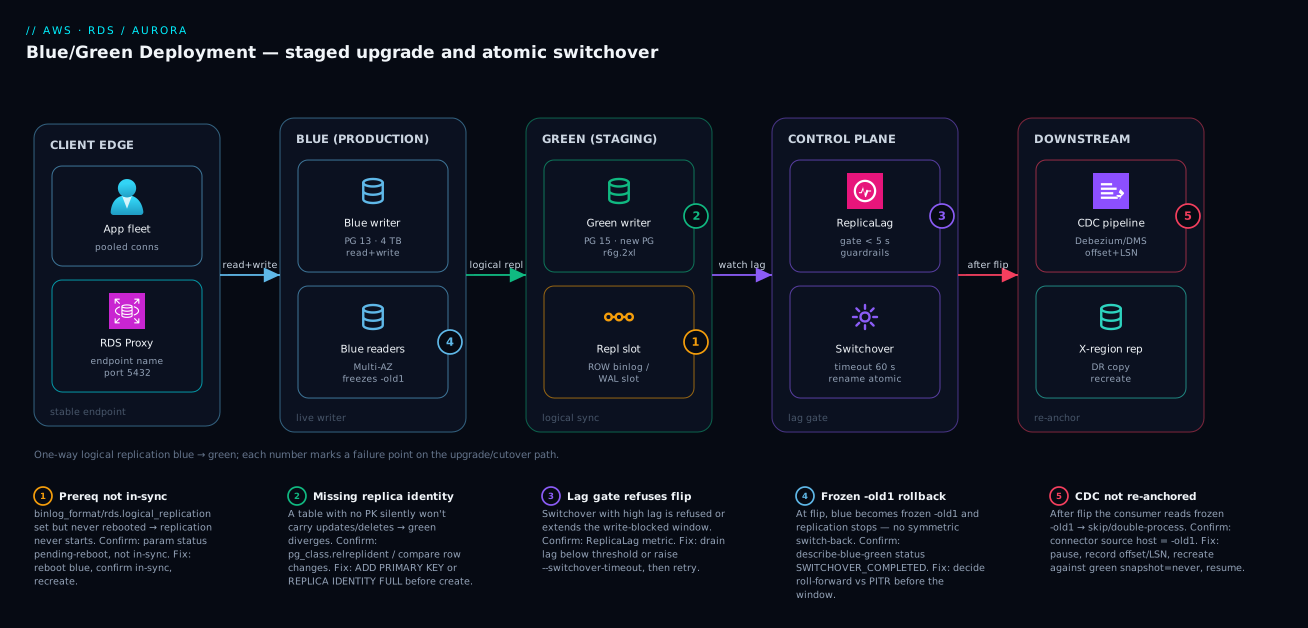
The diagram traces what actually happens during a Blue/Green change, left to right, as the request and replication paths the system runs on. On the left, application traffic enters through a stable endpoint — ideally an RDS Proxy or the cluster endpoint name — so that when the underlying resource is renamed at switchover, clients keep using the same name. That endpoint points at Blue, your live writer (plus any readers), serving every read and write. From Blue, a logical replication stream (a Postgres slot or a MySQL binlog) flows continuously into Green, the upgraded copy: a higher engine version, a new parameter group, possibly a larger instance class, with your additive DDL already staged. The control plane sits above this pair, watching ReplicaLag and enforcing the guardrails that decide whether a switchover is allowed to proceed. On the right sit the downstream consumers — a Debezium/DMS CDC pipeline and any cross-region replicas — reading from Blue’s stream today, and the thing you must re-anchor tomorrow.
Read the numbered badges as the failure map. Badge ① on the replication stream is the prerequisite trap: if binlog_format/rds.logical_replication wasn’t actually in-sync before create, replication never starts. Badge ② on Green is the replica-identity trap: a table with no primary key silently won’t carry updates/deletes, so green diverges in a way you only notice later. Badge ③ on the control plane is the lag gate: a switchover issued with high lag is refused or extends the write-blocking window. Badge ④ on the Blue→-old1 transition is the rollback trap: the instant you flip, old-blue freezes and replication to it stops, so there is no symmetric switch-back. Badge ⑤ on the CDC consumer is the re-anchor trap: after the flip it is reading a frozen old-blue, and unless you paused it, recorded its offset, and resumed it against green, you skip or double-process events. The whole method is in that left-to-right read: enable replication correctly, validate green and gate on lag, flip atomically, then re-anchor everything downstream.
Real-world scenario
A fintech platform team I worked with — call them LedgerLoop — ran a 4 TB RDS for PostgreSQL 13 writer behind RDS Proxy, feeding a Debezium CDC pipeline that drove their ledger-reconciliation service. They needed Postgres 13 → 15 (for declarative partitioning and planner improvements), but their compliance posture allowed a write outage of at most 60 seconds, and the reconciliation pipeline could not lose or double-process a single ledger event across the upgrade. The platform team was five engineers; the monthly RDS spend was around ₹3,10,000 for the writer, two readers and backups.
An in-place upgrade was a non-starter on two counts: the outage alone — estimated at 8–14 minutes for a 4 TB database — exceeded the 60-second budget by an order of magnitude, and there was no way to validate the new planner against production query shapes first. So they used Blue/Green. They enabled rds.logical_replication = 1 in a custom parameter group and rebooted the writer during a low-traffic window a week ahead, confirmed the parameter read in-sync (not pending-reboot), then created the deployment targeting 15.x with a new postgres15 parameter group. Provisioning took about three hours to clone and upgrade green.
Over the next two days they ran their full reconciliation test suite against the green endpoint. They caught one real issue: a hot aggregate query that regressed badly under the PG 15 planner because a partial index it had relied on was being ignored. They fixed it by adding a replacement index CONCURRENTLY on green — an operation that on blue would have meant a long, IO-heavy build on the production writer. They also found a reporting table that had been created years earlier with no primary key; under logical replication its updates weren’t carrying to green. They set REPLICA IDENTITY FULL on it and re-validated row counts matched.
The CDC pipeline was the hard part, and where almost all the engineering effort went. Their runbook drained and paused the Debezium connector immediately before switchover, recorded the exact LSN it had consumed from blue, then ran the switchover. They pre-checked lag at under 3 seconds and used a tight 60-second timeout; the actual write-blocked window measured 19 seconds. After the flip they re-created the connector against the new green/production with a snapshot mode of never and resumed from the recorded position, so it picked up exactly where it left off — no gap, no replay, no double-counted ledger event.
# the cutover itself: tight timeout, lag pre-checked to < 3s
aws rds switchover-blue-green-deployment \
  --blue-green-deployment-identifier "$BGD_ID" \
  --switchover-timeout 60
They kept prod-app-old1 for 72 hours as a rollback anchor, then deleted it after a final snapshot. Total customer-visible write interruption: under 20 seconds, against a budget of 60, with the new planner already validated and one regression already fixed. The lesson the team internalised: Blue/Green made the database cutover easy; the engineering effort was almost entirely in (a) finding the unkeyed table before it bit them and (b) re-anchoring the CDC consumer cleanly, which the runbook had to own explicitly because RDS does nothing for downstream consumers automatically.
The change as a timeline, because the order of moves is the lesson:
| Time | Step | Action | Result | Why it mattered |
|---|---|---|---|---|
| T−7 days | Prereq | Enable rds.logical_replication, reboot, confirm in-sync |
Replication-ready | “Set” ≠ “active”; the reboot is mandatory |
| T−3 days | Create | Create BG targeting PG 15 + new PG | Green provisioning (~3 h) | Off the critical path |
| T−2 days | Validate | Run reconciliation suite on green; EXPLAIN hot queries |
Found planner regression | Caught it before the flip, not after |
| T−2 days | Fix | CREATE INDEX CONCURRENTLY on green |
Regression resolved | Heavy build off the production writer |
| T−1 day | Replica identity | Find unkeyed table; REPLICA IDENTITY FULL |
Updates now replicate | Silent divergence avoided |
| T−5 min | CDC pause | Drain + pause Debezium; record LSN | Offset captured | The re-anchor anchor point |
| T+0 | Switchover | switchover ... --timeout 60; lag < 3 s |
19 s write block | Inside the 60 s budget |
| T+2 min | Re-anchor | Recreate connector on green, snapshot=never, resume from LSN |
No gap/replay | The real engineering effort |
| T+72 h | Cleanup | Snapshot + delete -old1 |
Window closed | Rollback anchor kept then released |
Advantages and disadvantages
The staging-copy-with-logical-replication model both enables near-zero-downtime upgrades and introduces sharp edges you must manage. Weigh it honestly:
| Advantages (why this model helps you) | Disadvantages (why it bites) |
|---|---|
| Validate the new engine against production data for days before committing — catch plan regressions early | You pay for a full second copy (green) for the duration of the window |
| Sub-minute write-blocked switchover vs minutes-to-tens-of-minutes in-place | One-way replication: no symmetric “switch back” after the flip |
| Atomic endpoint rename — no connection-string change, clients keep the same name | Old-blue freezes the instant you flip; rollback means PITR (data loss) or manual reconcile |
| Stage unsafe-online DDL (big index builds) on green, off the production writer | Schema changes must stay additive/replication-compatible or they break the stream |
| Reversible before switchover — delete green, blue never stopped | Tables without a PK / replica identity silently fail to replicate |
| Right-size instance class / storage as part of the same operation | Sequences/auto-increment may not carry cleanly → post-flip key collisions if unchecked |
| RDS enforces lag and in-flight-transaction guardrails so an unsafe flip is refused | Downstream CDC consumers and cross-region replicas are not migrated — manual re-anchor |
The model is right when downtime is measured against an SLA, the change is genuinely slow/irreversible in place, and you want to rehearse the new engine first. It bites hardest on databases with downstream CDC consumers (the re-anchor is real work), schemas with unkeyed tables (silent replication failure), and teams that skip the validation period and treat the switchover as the whole job — it is the easy part. The disadvantages are all manageable, but only if you know they exist before the window, which is the entire point of running this as a runbook rather than a button-press.
Hands-on lab
Stand up a small RDS for PostgreSQL instance, create a Blue/Green deployment that upgrades it a major version, validate green, switch over, and tear everything down. This uses the smallest burstable class and minimal storage; an hour of the lab is a few rupees, and deleting the resources stops all charges. Run in CloudShell or any shell with the AWS CLI configured. (There is no perpetual free tier for a multi-step Blue/Green, so keep it short and delete at the end.)
Step 1 — Variables.
RG_TAG=bg-lab
REGION=ap-south-1
BLUE_ID=bg-lab-blue
PG_BLUE=bg-lab-pg15
SUBNET_GROUP=<your-existing-db-subnet-group>
SG=<your-existing-sg-allowing-5432-from-cloudshell>
Step 2 — Create a custom parameter group with logical replication on, for the source version.
aws rds create-db-parameter-group --db-parameter-group-name $PG_BLUE \
  --db-parameter-group-family postgres15 --description "BG lab blue" --region $REGION
aws rds modify-db-parameter-group --db-parameter-group-name $PG_BLUE \
  --parameters "ParameterName=rds.logical_replication,ParameterValue=1,ApplyMethod=pending-reboot" \
  --region $REGION
Expected: both commands return the parameter-group name; the parameter is now pending-reboot.
Step 3 — Launch a small blue instance with that parameter group and backups on.
aws rds create-db-instance --db-instance-identifier $BLUE_ID \
  --engine postgres --engine-version 15.7 \
  --db-instance-class db.t3.micro --allocated-storage 20 \
  --master-username appadmin --master-user-password 'ChangeMe_Strong#123' \
  --db-parameter-group-name $PG_BLUE \
  --backup-retention-period 1 \
  --db-subnet-group-name $SUBNET_GROUP --vpc-security-group-ids $SG \
  --no-publicly-accessible --tags Key=purpose,Value=$RG_TAG --region $REGION
aws rds wait db-instance-available --db-instance-identifier $BLUE_ID --region $REGION
Step 4 — Confirm logical replication is actually active (not just set).
aws rds describe-db-instances --db-instance-identifier $BLUE_ID --region $REGION \
  --query 'DBInstances[0].DBParameterGroups[0].ParameterApplyStatus'
# If it reads "pending-reboot", reboot and wait:
aws rds reboot-db-instance --db-instance-identifier $BLUE_ID --region $REGION
aws rds wait db-instance-available --db-instance-identifier $BLUE_ID --region $REGION
Expected after reboot: status reads in-sync. This is the single most-skipped step in real upgrades.
Step 5 — Create the Blue/Green deployment targeting a major upgrade (15 → 16).
BLUE_ARN=$(aws rds describe-db-instances --db-instance-identifier $BLUE_ID \
  --region $REGION --query 'DBInstances[0].DBInstanceArn' --output text)
aws rds create-blue-green-deployment \
  --blue-green-deployment-name bg-lab-16-upgrade \
  --source "$BLUE_ARN" --target-engine-version 16.4 --region $REGION
Step 6 — Watch it provision, then confirm it’s AVAILABLE.
BGD=$(aws rds describe-blue-green-deployments --region $REGION \
  --query "BlueGreenDeployments[?BlueGreenDeploymentName=='bg-lab-16-upgrade'].BlueGreenDeploymentIdentifier" \
  --output text)
aws rds describe-blue-green-deployments --blue-green-deployment-identifier $BGD \
  --region $REGION --query 'BlueGreenDeployments[0].{Status:Status,Tasks:Tasks}'
Expected: Status moves PROVISIONING → AVAILABLE. Green’s identifier carries a generated suffix.
Step 7 — (Validate.) Check green’s version on its temporary endpoint, and check lag.
GREEN_ID=$(aws rds describe-blue-green-deployments --blue-green-deployment-identifier $BGD \
  --region $REGION --query 'BlueGreenDeployments[0].Target' --output text | awk -F: '{print $NF}')
aws cloudwatch get-metric-statistics --namespace AWS/RDS --metric-name ReplicaLag \
  --dimensions Name=DBInstanceIdentifier,Value=$GREEN_ID \
  --start-time "$(date -u -d '10 minutes ago' +%FT%TZ)" --end-time "$(date -u +%FT%TZ)" \
  --period 60 --statistics Maximum --region $REGION
Expected: lag is single-digit seconds. (Connect to green with psql and run SELECT version(); if your network path allows — it should report 16.x.)
Step 8 — Switch over with a tight timeout.
aws rds switchover-blue-green-deployment --blue-green-deployment-identifier $BGD \
  --switchover-timeout 120 --region $REGION
aws rds describe-blue-green-deployments --blue-green-deployment-identifier $BGD \
  --region $REGION --query 'BlueGreenDeployments[0].Status'
Expected: status reaches SWITCHOVER_COMPLETED. The instance bg-lab-blue now runs 16.x; the former blue is renamed with an -old1 suffix.
Validation checklist. You enabled logical replication and confirmed it active, created a major-version upgrade as a staged green, validated its version and lag, and flipped with a bounded timeout. The lab steps mapped to what each proves:
| Step | What you did | What it proves | Real-world analogue |
|---|---|---|---|
| 2–4 | Set + reboot + confirm in-sync |
“Set” ≠ “active”; the reboot is mandatory | The #1 cause of “replication won’t start” |
| 5–6 | Create BG, watch PROVISIONING→AVAILABLE |
Green is built and upgraded off the critical path | The calm validation period |
| 7 | Check version + ReplicaLag |
You gate on lag, not hope | The pre-switchover gate |
| 8 | switchover --timeout → SWITCHOVER_COMPLETED |
The flip is atomic and bounded | The sub-minute cutover |
Cleanup (avoid lingering charges).
aws rds delete-blue-green-deployment --blue-green-deployment-identifier $BGD --region $REGION
aws rds delete-db-instance --db-instance-identifier bg-lab-blue --skip-final-snapshot --region $REGION
aws rds delete-db-instance --db-instance-identifier bg-lab-blue-old1 --skip-final-snapshot --region $REGION 2>/dev/null || true
aws rds delete-db-parameter-group --db-parameter-group-name $PG_BLUE --region $REGION
Cost note. A db.t3.micro with 20 GB is a few rupees per hour; running both blue and green for an hour is well under ₹100. Deleting both instances and the deployment stops all charges — don’t leave the -old1 instance running.
Common mistakes & troubleshooting
This is the playbook — the part you keep open during the window. First as a scannable symptom → cause → confirm → fix table, then the entries that bite hardest expanded with the full reasoning.
| # | Symptom | Root cause | Confirm (exact cmd / check) | Fix |
|---|---|---|---|---|
| 1 | Deployment create fails; replication never starts | Static prereq pending-reboot, not active |
describe-db-instances param ParameterApplyStatus ≠ in-sync |
Reboot blue; confirm in-sync; recreate |
| 2 | A table’s updates/deletes missing on green | No primary key / replica identity | Compare row changes; pg_class.relreplident |
ADD PRIMARY KEY or REPLICA IDENTITY FULL |
| 3 | Blue disk filling during deployment (PG) | Slot retaining WAL; green not applying | pg_replication_slots.retained growing; FreeStorageSpace falling |
Restore green apply (check long txns on green) or abort |
| 4 | Switchover refused | A guardrail is violated | describe-blue-green-deployments events; ReplicaLag high |
Resolve the named guardrail; retry |
| 5 | Switchover aborts at timeout | Drain exceeded --switchover-timeout |
SWITCHOVER_FAILED + event log |
Lower lag first, or raise timeout; retry |
| 6 | Duplicate-key errors right after flip | Sequence/auto-increment not carried | Insert hits unique violation | Reset sequence on new prod above current max |
| 7 | “Switched over but errors continued” | Stale client pool on renamed -old1 |
Connections still to old-blue host | Recycle pool; ensure driver re-resolves DNS |
| 8 | CDC double-processing / gap after flip | Consumer not re-anchored | Connector source host = -old1 |
Repoint to new prod from recorded offset/LSN |
| 9 | Create fails: unsupported source | Topology/feature not allowed as BG source | Create-time error string | Remove cascading replica / unsupported storage |
| 10 | App writes appeared “lost” after flip | Someone wrote business data on green | Audit green writes pre-flip | Never write app data on green; reconcile if it happened |
| 11 | Trigger-heavy table misbehaves post-upgrade | Trigger fires differently vs replicated changes | Compare trigger output blue vs green | Validate triggers explicitly on green before flip |
| 12 | Cross-region DR replica is stale after flip | Replica was on old-blue, not migrated | describe-db-instances replica source |
Recreate the replica from new production |
| 13 | Long-running transaction blocks switchover | In-flight txn/DDL prevents clean cutover | pg_stat_activity / SHOW PROCESSLIST |
End/await the transaction; retry the flip |
| 14 | Green has wrong/old engine version | Wrong --target-engine-version or upgrade didn’t apply |
SELECT version() on green |
Delete deployment; recreate with correct target |
The expanded form, with the full reasoning for the entries that bite hardest:
1. Deployment create fails or green never catches up because replication won’t start.
Root cause: The logical-replication prerequisite (rds.logical_replication=1 or binlog_format=ROW) was set but the instance was never rebooted, so it’s pending-reboot, not active.
Confirm: aws rds describe-db-instances --query 'DBInstances[0].DBParameterGroups[].ParameterApplyStatus' returns pending-reboot, or SHOW rds.logical_replication; on blue returns off.
Fix: Reboot blue, wait for available, confirm the status reads in-sync, then recreate the deployment. This is the single most common real-world cause of “Blue/Green won’t work.”
2. One table’s rows on green never reflect updates or deletes from blue.
Root cause: That table has no primary key / replica identity, so logical replication can identify rows for inserts but not for updates/deletes — they silently don’t apply.
Confirm: On Postgres, SELECT relname, relreplident FROM pg_class WHERE relkind='r'; — relreplident = 'n' (nothing) or 'd' (default, but no PK) on a table is the smell. Compare a known updated row on blue vs green.
Fix: Add a primary key (best) or set REPLICA IDENTITY FULL on the table before creating the deployment. Audit every table for this in prereq, not after.
3. Blue’s free storage falls steadily during the deployment (Postgres).
Root cause: The replication slot retains WAL on blue until green confirms it has applied it; if green is stuck or far behind, WAL piles up and can fill blue’s disk — a self-inflicted production incident during what should be a calm window.
Confirm: On blue, pg_replication_slots shows retained growing and active = f or a large lag; FreeStorageSpace in CloudWatch is dropping.
Fix: Find why green isn’t applying — usually a long-running transaction on green blocking apply, or green undersized. Resolve it so the slot advances; if you can’t quickly, abort the deployment to release the slot before blue runs out of disk.
4. The switchover is refused outright.
Root cause: An RDS guardrail is violated — replication lag too high, an in-flight long transaction/DDL, green not AVAILABLE, or a write was made on green.
Confirm: aws rds describe-blue-green-deployments ... event messages name the violated condition; check ReplicaLag and pg_stat_activity/SHOW PROCESSLIST.
Fix: Resolve the specific condition (wait for lag to drain, end the long transaction, ensure no green writes) and retry. A refused switchover left blue untouched — you lost nothing but time.
6. Inserts on the new production throw duplicate-key/unique-violation errors immediately after switchover.
Root cause: The sequence / AUTO_INCREMENT state didn’t carry cleanly across logical replication, so the new production’s next-value is behind the maximum key already present.
Confirm: The error is a unique/PK violation on a serial/identity column; SELECT max(id) FROM t; exceeds the sequence’s last_value.
Fix: Reset the sequence above the current max — SELECT setval('t_id_seq', (SELECT max(id) FROM t)); (PG) or ALTER TABLE t AUTO_INCREMENT = <max+1>; (MySQL). Verify sequence positions on green before switchover as part of the gate.
7. The cutover completed cleanly but applications keep erroring against the database.
Root cause: A stale connection pool is pinned to the renamed -old1 host/IP because the driver cached the resolution and didn’t re-resolve on reconnect — a client-side caching issue, not a switchover failure.
Confirm: Application connections still target the old-blue host; new connections to the production endpoint name succeed.
Fix: Recycle the connection pool, ensure the driver re-resolves DNS on reconnect, and ideally front the database with RDS Proxy so the endpoint indirection absorbs the rename. Configure pools to retry transient errors during the window.
8. The CDC pipeline skips or double-processes events around the cutover.
Root cause: The consumer (Debezium/DMS/native) was not re-anchored — after the flip it’s reading the frozen -old1, or it was recreated without a recorded position so it re-snapshotted or skipped the boundary.
Confirm: The connector’s source endpoint resolves to the -old1 host; offsets show a gap or overlap at the switchover time.
Fix: The runbook must: pause/drain the consumer, record the exact offset/LSN, switch over, recreate the consumer against new production with snapshot=never, and resume from the recorded position. This is the real engineering effort of a Blue/Green — plan it explicitly.
Best practices
- Enable logical replication a week ahead and confirm it’s
in-sync, notpending-reboot. The reboot is mandatory and the most-skipped step; “set” is not “active.” - Audit every table for a primary key / replica identity before you create the deployment. An unkeyed table silently fails to replicate updates and deletes — find it in prereq, not in production.
- Validate green against real query shapes, not smoke tests. Run
EXPLAIN (ANALYZE)on your hot queries and your full integration suite; planner regressions are the whole reason you bought yourself a validation period. - Watch both
ReplicaLagand the slot’s retained WAL. Lag gates the flip; retained WAL can fill blue’s disk during the window. Alarm on both. - Gate the switchover on a hard lag threshold (single-digit seconds). Script the gate so a high-lag flip is refused by you before RDS has to refuse it.
- Use expand/contract discipline rigorously. Additive DDL on green only; ship an app version tolerant of both schemas; switch; then contract. Destructive changes wait until after the flip.
- Never write application data on green — DDL only. Green writes don’t replicate back and become data loss at switchover.
- Front the database with RDS Proxy (or a stable cluster endpoint) and configure pools to retry + re-resolve DNS. This makes the rename nearly invisible and prevents the “errors continued after a clean switchover” class.
- Decide the rollback strategy before the window. Roll-forward vs PITR is a pre-window decision; after the flip there is no symmetric switch-back.
- Own the CDC/external-replica re-anchor as an explicit runbook step with a recorded offset/LSN. RDS does nothing for downstream consumers; this is where the real work is.
- Keep
-old1for a defined cooling-off period (24–72 h), then delete it (deliberately choosing whether to snapshot). It’s your fast rollback anchor — but it’s also a running instance you’re paying for. - Verify sequence / auto-increment positions on green before switching. It prevents immediate post-flip key collisions.
The alarms worth wiring before the window — the leading indicators, not “the cutover failed”:
| Alarm on | Metric / signal | Threshold (starting point) | Why it’s leading |
|---|---|---|---|
| Green replica lag | ReplicaLag (green) |
> 10 s sustained 5 min | Tells you a flip would block/refuse before you try |
| Blue free storage (PG) | FreeStorageSpace (blue) |
Falling, or < 20% | Slot retaining WAL fills blue’s disk |
| Slot inactive (PG) | pg_replication_slots.active |
f for > 1 min |
Replication stopped; green diverging |
| Green CPU/IO saturation | CPUUtilization / WriteIOPS (green) |
> 85% sustained | Green can’t apply fast enough; lag will climb |
| Deployment status drift | describe-blue-green-deployments |
Not AVAILABLE when expected |
Provisioning stuck on a bad prereq |
| Green connection count | DatabaseConnections (green) |
> 0 unexpectedly | Something is writing/reading green prematurely |
Security notes
- Least-privilege IAM for the operation. Restrict who can call
create-blue-green-deploymentandswitchover-blue-green-deployment— these resize, upgrade and rename production. Scope an IAM policy to the specificrds:CreateBlueGreenDeployment,rds:SwitchoverBlueGreenDeployment,rds:DeleteBlueGreenDeploymentactions and the relevant resource ARNs, not a wildcard. - Green inherits blue’s encryption — verify it. A Blue/Green of an encrypted instance produces an encrypted green; confirm the KMS key on green is what you expect, and if you’re changing keys, do it deliberately. Use customer-managed keys per the patterns in the KMS Encryption Deep Dive: Keys, Policies, Envelope Encryption, Rotation.
- Credentials and rotation. Master and application credentials follow the rename, but if you rotate via Secrets Manager, ensure the rotation Lambda targets the endpoint name (which is preserved) rather than a cached host. See Secrets Manager Automatic Rotation for RDS.
- Network isolation is preserved but re-verify. Green sits in the same VPC/subnet group and security groups as blue; confirm green’s security group rules and that no temporary green endpoint was made publicly accessible during validation.
- Audit the change. Every Blue/Green action is a CloudTrail event — capture
CreateBlueGreenDeployment/SwitchoverBlueGreenDeploymentwith the principal and tie them to the change ticket. Tag the deployment with the change ID. - Don’t loosen security to “make validation easier.” Validating green over a temporary public endpoint or an over-broad SG is a classic mistake; use the same private path the application uses.
The security controls mapped to what they protect and what they also prevent:
| Control | Mechanism | Secures against | Also prevents |
|---|---|---|---|
| Scoped IAM for BG actions | IAM policy on rds:*BlueGreenDeployment |
Unauthorised upgrades/flips of prod | Accidental switchover by the wrong principal |
| Encrypted green (KMS) | Inherited / chosen CMK | Plaintext data at rest on green | Surprise unencrypted copy |
| Secrets Manager via endpoint name | Rotation targets preserved name | Stale-host credential failures | Rotation breaking after the rename |
| Private-only green validation | Same VPC/SG/subnet as blue | Data exposure on a public temp endpoint | “Temporary” public-access mistakes |
| CloudTrail on BG actions | Event history + change ticket | Untraceable production changes | Unattributed cutovers |
| Verify green SG rules | describe-db-instances on green |
Over-broad ingress during the window | Drift between blue and green posture |
Cost & sizing
The bill drivers and how they interact with the upgrade:
- You pay for green for the entire window. Green is a full second copy of your database — instance hours plus storage — running from create until you delete the deployment and the renamed old-blue. For a large database validated over several days, that’s a real, if temporary, doubling of database cost. The fix is discipline: keep the validation period as long as you need to be confident and no longer.
- Right-sizing during the migration is free leverage. Because you specify green’s instance class and storage type at create time, a Blue/Green is the ideal moment to move to Graviton (
db.r6g/db.r8g) or gp3 storage — you validate the new shape under real load before it takes traffic, and you only pay the new shape going forward. - Old-blue retention is a metered safety net. Keeping
-old1for 24–72 hours as a rollback anchor means paying for a third copy briefly. Budget for it, and delete it (with or without a final snapshot, deliberately chosen) once you trust the new production. - Switchover itself is free — there’s no per-flip charge; you’re paying for the overlapping resources around it.
- Storage I/O and backups continue on both during the window — green takes backups too. On Aurora, you’re paying for green’s separate cluster volume and its I/O.
A rough monthly picture: if your production database costs ₹X/month, budget roughly 2× for the days green overlaps (blue + green), plus a small tail for old-blue retention. For LedgerLoop’s 4 TB PG at ~₹3,10,000/month, the three-day overlap added on the order of ₹30,000–40,000 — trivial against the cost of a botched in-place upgrade or a missed compliance SLA. The cost drivers and what each buys you:
| Cost driver | What you pay for | Rough relative cost | What it buys | Watch-out |
|---|---|---|---|---|
| Green instance hours | Second full instance during window | ~1× blue’s instance cost, prorated | The validation/staging copy | Keep the window as short as you need |
| Green storage | Second copy of the data | ~1× blue’s storage | Green’s data | Large DBs double storage temporarily |
| Green backups | Backups on green too | Small | PITR safety on green | Often overlooked in estimates |
| Old-blue retention | -old1 kept 24–72 h |
~1× instance for that window | Fast rollback anchor | A running instance you’re paying for |
| Right-sized target | New class/storage going forward | Net savings if downsizing | Graviton/gp3 economics | Validate the smaller shape first |
| Aurora green volume + I/O | Separate cluster volume during window | Per-GB + I/O | Aurora green operation | Aurora I/O can add up on busy DBs |
Sizing the switchover timeout against database size and lag — a practical starting grid:
| Database size / lag profile | Suggested --switchover-timeout |
Rationale |
|---|---|---|
| Small, lag < 2 s | 60 s | Strict SLA; abort fast if anything’s off |
| Medium, lag < 5 s | 120–300 s | Room for a slightly longer drain |
| Large/busy, lag single-digit | 300–600 s | A longer drain beats an abort + re-run |
| Lag in tens of seconds | Don’t switch | Fix lag first; a flip would block or refuse |
Interview & exam questions
1. What does a Blue/Green Deployment give you that an in-place major upgrade doesn’t? A rehearsed cutover: AWS stands up a staging copy (green) kept in sync with production (blue) via logical replication, so you can upgrade and validate green against real query shapes for days, then switch over with a sub-minute write-blocked window instead of a long, irreversible in-place outage. Before switchover it’s fully reversible — delete green and blue never stopped serving.
2. Which direction does replication flow, and why does that matter so much? One-way, blue → green only. Writes on green are not sent back to blue, so any application write on green creates divergence that becomes data loss at switchover — green must be treated as read-only (DDL only). This asymmetry is also why there’s no symmetric “switch back” after the flip: old-blue stops receiving writes the instant you cut over.
3. What must be enabled on the blue database before you create the deployment, and what’s the common mistake? Logical replication: rds.logical_replication=1 (Postgres/Aurora PostgreSQL) or binlog_format=ROW with automated backups on (MySQL/MariaDB/Aurora MySQL). These are static parameters requiring a reboot. The common mistake is setting the parameter but not rebooting, leaving it pending-reboot rather than in-sync, so replication never starts.
4. Why can a table silently fail to replicate, and how do you fix it? Logical replication identifies rows by primary key / replica identity. A table with no PK (and REPLICA IDENTITY DEFAULT/NOTHING) can replicate inserts but not updates or deletes, so green silently diverges. Fix by adding a primary key, or setting REPLICA IDENTITY FULL, before creating the deployment.
5. Walk through what happens during the switchover window. RDS (1) blocks new writes on blue and drains in-flight transactions, (2) waits for green to apply the last replicated changes so it’s fully caught up, (3) renames green’s resources to take over blue’s endpoint identifiers and renames blue with an -old1 suffix, then (4) resumes writes on green as the new production. The endpoint names are preserved, so no connection-string change is needed; the whole write-blocked window is typically under a minute.
6. What is the --switchover-timeout and what happens if it’s exceeded? It’s the maximum duration RDS will allow the switchover (including write blocking) to take. If the cutover can’t complete cleanly within that bound — usually because lag couldn’t drain in time — it aborts and rolls back, leaving blue serving traffic untouched. You lost nothing but time; lower the lag or raise the timeout and retry.
7. Why is rollback after switchover hard, and what are your real options? Because replication is one-way and stops at switchover, old-blue (-old1) is frozen at the cutover moment — it doesn’t receive the writes now landing on green, so you can’t just switch back to a current database. Your real options are roll forward (fix on the new production) or PITR to before the switchover (losing post-flip writes unless you reconcile). The decision must be made before the window.
8. A CDC pipeline (Debezium/DMS) reads from blue. What happens to it at switchover and what must you do? Nothing automatic — it keeps reading the frozen -old1 after the flip. You must re-anchor it: pause/drain the consumer, record its exact offset/LSN, switch over, recreate it against the new production with snapshot=never, and resume from the recorded position so you neither skip nor double-process events around the boundary.
9. You switched over cleanly but applications keep erroring. What’s the most likely cause? A stale connection pool pinned to the renamed -old1 host because the driver cached the DNS resolution and didn’t re-resolve on reconnect — a client-side issue, not a switchover failure. Recycle the pool, ensure the driver re-resolves DNS, and ideally front the database with RDS Proxy so the endpoint indirection absorbs the rename.
10. Why might inserts fail with duplicate-key errors right after a successful switchover? Logical replication doesn’t always carry sequence / AUTO_INCREMENT state cleanly, so the new production’s next-value can be behind the maximum key already present. Reset the sequence above the current max (setval(...) / ALTER TABLE ... AUTO_INCREMENT = ...), and verify sequence positions on green before switching as part of the pre-flip gate.
11. How do you change a schema across a Blue/Green without breaking either app version? Use expand/contract: make only additive, replication-compatible DDL on green (new nullable columns, CREATE INDEX CONCURRENTLY), deploy an app version that tolerates both old and new schemas, switch over, then run the destructive “contract” migration (drop old columns) only after the old app version is gone. Destructive changes before switchover break replication or the still-live blue app.
12. Which engines support Blue/Green, and what’s different about Aurora? RDS for MySQL, MariaDB, PostgreSQL, and Aurora MySQL/PostgreSQL. The sync is binlog-based for MySQL-family and logical-decoding for Postgres-family. For Aurora MySQL you enable binlog_format=ROW at the cluster parameter group, and you specify cluster-level targets (cluster parameter group) at create time; Aurora’s separate cluster volume means green is a second cluster you pay for during the window.
These map to AWS Certified Database – Specialty (now folded into broader data/database coverage) and the database portions of Solutions Architect Professional (SAP-C02) and DevOps Engineer Professional (DOP-C02) — specifically operational excellence and reliability around upgrades, replication and cutover. A compact cert-mapping for revision:
| Question theme | Primary cert | Objective area |
|---|---|---|
| Why Blue/Green vs in-place | SAP-C02 / Database Specialty | Design resilient, low-downtime change |
| Replication direction & prereqs | Database Specialty | Database migration & replication |
| Switchover mechanics & timeout | DOP-C02 | Deployment strategies, automation |
| Rollback & PITR trade-offs | SAP-C02 | Disaster recovery & data durability |
| CDC re-anchor | Database Specialty | Streaming/CDC around migrations |
| Expand/contract schema | DOP-C02 | Safe, automated schema change |
| Cost of overlapping copies | SAP-C02 | Cost-optimised operations |
Quick check
- You set
rds.logical_replication=1but the Blue/Green won’t start replicating. What did you most likely forget, and how do you confirm it? - True or false: after switchover you can simply switch back to old-blue and have a current, up-to-date database.
- Which direction does logical replication flow between blue and green, and what’s the one thing you must never do to green as a result?
- Your
switchover-blue-green-deploymentcall aborted at the timeout. Did your production database change, and what are the two ways to make the retry succeed? - A Debezium connector fed off your old database. After switchover it’s reading a frozen
-old1. What’s the re-anchor sequence?
Answers
- You forgot to reboot blue after setting the static parameter, so it’s
pending-reboot, not active. Confirm withaws rds describe-db-instances --query 'DBInstances[0].DBParameterGroups[].ParameterApplyStatus'(it readspending-reboot) orSHOW rds.logical_replication;on blue (returnsoff). Reboot, wait foravailable, confirmin-sync, then recreate. - False. Replication is one-way and stops at switchover, so old-blue (
-old1) is frozen at the cutover moment and doesn’t receive the writes now landing on green. Rollback means rolling forward or a PITR (losing post-flip writes unless reconciled) — there is no symmetric switch-back, which is why the rollback decision is made before the window. - One-way, blue → green. Because writes on green are not replicated back, you must never write application data on green — only deliberate DDL. App writes on green become divergence and data loss at switchover.
- No — your production database was untouched; an aborted switchover rolls back and leaves blue serving traffic. To make the retry succeed, either (a) lower the replication lag so green drains within the budget, or (b) raise
--switchover-timeoutso a legitimately longer drain is allowed. - Pause/drain the connector, record its exact offset/LSN, run the switchover, recreate the connector against the new production with
snapshot=never, and resume from the recorded position — so you neither skip nor double-process events around the boundary.
Glossary
- Blue/Green Deployment — a managed RDS feature that creates a synced staging copy (green) of your production database (blue) so you can upgrade/validate green and switch over with a sub-minute write interruption.
- Blue — the live production database serving all traffic; becomes the frozen
-old1at switchover. - Green — the upgraded staging copy kept in sync from blue via logical replication; becomes production at switchover.
- Logical replication — row-level change replication (Postgres logical decoding / MySQL
ROWbinlog) that lets green run a different engine version than blue. - Replication slot — a Postgres server object on blue that tracks green’s apply position and retains WAL until green confirms it; can fill blue’s disk if green stalls.
- Binlog — the MySQL/MariaDB binary log that feeds green; must be in
ROWformat with automated backups enabled. - Replica identity / primary key — how a row is identified for replication; a table lacking one won’t replicate updates/deletes cleanly.
rds.logical_replication— the static Postgres/Aurora PostgreSQL parameter (set to1, then reboot) that enables logical replication for Blue/Green.binlog_format = ROW— the static MySQL-family parameter required so the green cluster/instance can be fed.- Switchover — the atomic operation that renames green to take over blue’s endpoint names and renames blue
-old1, with a brief write-blocked window. --switchover-timeout— the maximum duration the switchover may take; if exceeded it aborts and rolls back, leaving blue untouched.-old1— the suffix RDS appends to the former blue after switchover; a frozen rollback anchor that no longer receives writes.- Expand/contract — the parallel-change schema pattern (additive DDL before switchover, destructive after) that keeps both app versions working across the flip.
- CDC re-anchor — the runbook step of repointing a change-data-capture consumer (Debezium/DMS) from old-blue to new production using a recorded offset/LSN.
- Replica lag (
ReplicaLag) — how far behind green is from blue; the gate that allows or refuses a switchover. - PITR (point-in-time recovery) — restoring to a moment before switchover as a post-flip rollback, accepting the loss of writes since the flip unless reconciled.
Next steps
You can now run a major RDS/Aurora upgrade as a rehearsed, gated cutover rather than a heroic outage. Build outward:
- Next: RDS and Aurora Deep Dive: Engines, Multi-AZ, Replicas, Backups — the engine, replica and parameter-group fundamentals every Blue/Green sits on.
- Related: Aurora High Availability and Global Database for Zero-Downtime — the cluster topology and global-failover story Blue/Green has to preserve.
- Related: RDS Proxy: Connection Pooling, Failover and IAM Auth — the layer that makes the endpoint rename nearly invisible to clients.
- Related: DynamoDB Streams and CDC for Event-Driven Pipelines — the change-consumer patterns you must re-anchor around a switchover.
- Related: CloudWatch and CloudTrail Observability Deep Dive — alarm on
ReplicaLagand free storage, and audit every Blue/Green action. - Related: Troubleshooting Complex Incidents: Multi-Service RCA — when a cutover goes sideways and the cause spans database, network and application layers.