DNS is the control plane nobody budgets for until it breaks at 2 a.m. In a single VPC the Route 53 Resolver “just works” and you never think about it. Across forty accounts with on-premises forwarding, split-horizon zones, and a security mandate to block DNS exfiltration, that same resolver becomes the single most load-bearing — and most misunderstood — piece of your network. This guide builds centralized hybrid DNS the way a platform team actually has to: outbound endpoints forwarding to on-prem over Direct Connect, inbound endpoints letting on-prem resolve your private zones, Resolver rules shared to spoke VPCs through AWS RAM, and DNS Firewall enforcing an egress domain policy that fails the way you decided it should — not the way you discovered it does.
Almost every Resolver bug traces back to one of three mistakes: getting the +2 resolver mental model wrong, forgetting TCP/53 on an endpoint security group, or letting an allow-list-first DNS Firewall become a fleet-wide kill switch with no validation in front of it. This article is the reference you keep open while you build and while you debug. The prose explains the why; the tables enumerate every endpoint setting, every rule type, every firewall action and block response, every limit, and a full symptom → root cause → confirm → fix playbook — because at 2 a.m. you want to scan a row, not re-read a paragraph.
By the end you will architect a single well-run pair of endpoints in a networking account, forward and resolve across accounts deliberately (split-horizon included), enforce a DNS-layer egress policy with managed threat lists and your own allow/block lists, choose fail-open vs fail-closed on purpose, and instrument query logging so you can see exfiltration instead of discovering it in an incident report. Every operation gets both an aws CLI snippet and a Terraform snippet, and every decision gets a table.
What problem this solves
In one VPC the Amazon-provided resolver resolves public names, your private hosted zones, and VPC-internal records with zero configuration. The problem starts the moment DNS has to cross a boundary: a workload in AWS needs to resolve corp.example.com that only on-prem AD DNS knows; an on-prem server needs to resolve host.aws.example.com that lives in a Route 53 private hosted zone (PHZ); the security team needs every outbound DNS query inspected and bad domains blocked before resolution completes; and all of this has to work identically across forty accounts without standing up forty pairs of endpoints.
What breaks without this design: teams scatter Resolver endpoints across application accounts (expensive per-ENI-hour, operationally noisy, impossible to govern); they forget that endpoint security groups need port 53 on both TCP and UDP, so resolution works until a response exceeds 512 bytes and the TCP retry is silently dropped; they leave split-horizon names to default precedence and spend an afternoon debugging why AWS returns the on-prem answer (or vice versa); and they deploy an allow-list-first DNS Firewall with no row-count validation, so one truncated S3 file turns the catch-all BLOCK into a fleet-wide NXDOMAIN storm.
Who hits this: every platform/network team running multi-account AWS with on-prem connectivity (Transit Gateway + Direct Connect or VPN), anyone with a compliance requirement to control DNS egress, and anyone migrating where the same hostname must resolve differently inside and outside AWS. To frame the field before the deep dive, here is every capability this article covers, the pain it removes, and the first place you configure it:
| Capability | Pain in production | Where it lives | First thing you configure |
|---|---|---|---|
| Outbound endpoint | AWS can’t resolve on-prem names | Hub VPC, networking account | ENIs in ≥2 AZs + FORWARD rule |
| Inbound endpoint | On-prem can’t resolve your PHZ | Hub VPC, networking account | ENIs + on-prem conditional forwarder |
| Resolver rules | Forwarding logic scattered/duplicated | Networking account | FORWARD / SYSTEM rule by domain |
| AWS RAM sharing | Per-account rules don’t reach spokes | RAM resource share | Share rule → associate to spoke VPC |
| DNS Firewall | No egress domain control / exfil risk | VPC association, central policy | Rule group + domain lists + action |
| Query logging | Can’t see exfiltration you can’t log | CloudWatch / S3 / Firehose | Log config + association |
| Fail mode | Firewall hiccup kills all resolution | Firewall rule-group association | FirewallFailOpen ENABLED/DISABLED |
Learning objectives
By the end of this article you can:
- Explain the +2 resolver (
VPC-CIDR-base + 2, plus link-local169.254.169.253), what it resolves natively, and exactly why inbound and outbound endpoints exist. - Stand up inbound and outbound Resolver endpoints across ≥2 AZs, size them by IP count to a QPS target, and lock their security groups to TCP+UDP port 53 against the right CIDRs.
- Author FORWARD and SYSTEM Resolver rules, reason about most-specific-match-wins precedence, and carve split-horizon exceptions deliberately instead of by accident.
- Share Resolver rules via AWS RAM (including Organizations-wide auto-association) and bind them to spoke VPCs from Terraform so association is a property of the VPC, not a manual step.
- Build DNS Firewall rule groups with managed threat lists and custom allow/block lists, choose the right block response (
NODATA/NXDOMAIN/OVERRIDE), and order rules and groups by priority so security baselines can’t be reordered away. - Choose fail-open vs fail-closed on purpose, set mutation protection, and enable query logging to CloudWatch/S3/Firehose with detection queries for DNS tunneling.
- Map every Resolver/DNS-Firewall failure mode to a symptom, an exact confirming command, and a fix — and size the bill so you centralize before it hurts.
Prerequisites & where this fits
You should already understand VPC fundamentals — CIDRs, subnets, route tables, security groups — at the level of the AWS VPC Deep Dive: Subnets, Routing, IGW, NAT & Endpoints, and how multi-VPC connectivity is built with the AWS Transit Gateway Multi-Account VPC Architecture. Hybrid connectivity (the path your forwarded DNS rides) comes from Direct Connect + Transit Gateway resilient hybrid networking. You should be comfortable with aws CLI, reading JSON output, and the multi-account model from AWS Organizations: SCPs, Guardrails & Delegated Admin.
This sits in the Networking track and is the hybrid-DNS counterpart to public DNS in Route 53: DNS Records, Routing Policies & Health Checks. The egress-control angle pairs with AWS Network Firewall: Egress Filtering & Centralized Inspection — Network Firewall controls L3/L4 and TLS-SNI egress; DNS Firewall controls the name-resolution layer, and mature platforms run both. Logging lands in the observability stack from CloudWatch & CloudTrail Observability Deep Dive. A quick map of who owns which layer, so you call the right team fast during an incident:
| Layer | What lives here | Who usually owns it | Failure classes it can cause |
|---|---|---|---|
| On-prem DNS | AD DNS, conditional forwarders | On-prem / infra team | Outbound forwarding answers wrong/times out |
| Direct Connect / TGW | The transport for forwarded DNS | Network team | Forwarding path down → forwarded domains SERVFAIL |
| Resolver endpoints | Inbound/outbound ENIs, SGs | Platform-network | Port-53 SG gaps, AZ/ENI capacity |
| Resolver rules + RAM | FORWARD/SYSTEM, shares | Platform-network | Wrong precedence, unshared/unassociated rule |
| DNS Firewall | Rule groups, domain lists | Security team | BLOCK false-positive, allow-list truncation |
| PHZ / +2 resolver | Private zones, native resolution | App + platform | PHZ not associated → on-prem can’t resolve |
Core concepts
Six mental models make every later decision obvious.
The +2 resolver answers from inside the VPC only. Every VPC has a built-in Amazon-provided resolver reachable at the VPC CIDR base address plus two (10.0.0.0/16 → 10.0.0.2) and at the link-local 169.254.169.253. It answers queries from instances inside the VPC — public names, PHZs associated with that VPC, and internal records. It is not addressable from outside the VPC, and on its own it cannot forward queries anywhere you tell it to. Resolver endpoints exist precisely to break those two limitations.
Inbound = into AWS; outbound = out of AWS. An inbound endpoint gives the VPC resolver an IP that resources outside the VPC (on-prem DNS) can query — this is how on-prem resolves your PHZs; traffic flows into AWS. An outbound endpoint is the egress path the VPC resolver uses to forward queries to external resolvers according to Resolver rules; traffic flows out of AWS. Get the direction backwards and nothing resolves.
An endpoint is a set of ENIs, and IP count is capacity. Each endpoint is one elastic network interface per subnet/AZ you specify, each with its own IP. You need at least two IPs across two AZs per endpoint — an availability requirement, not optional. Each ENI handles a bounded query rate (budget roughly 10,000 QPS per IP as the ceiling), so the IP count is also your throughput knob. The interfaces consume IPs from your subnets and appear as Route 53 Resolver-owned ENIs in EC2.
Rules are forwarding logic; precedence is most-specific-match-wins. A FORWARD rule says “for this domain, send queries to these target IPs” (your on-prem DNS). A SYSTEM rule says “for this domain, do NOT forward — resolve it normally,” used to carve exceptions out of a broader forward rule. A query for db.internal.corp.example.com matches a internal.corp.example.com SYSTEM rule over a broader corp.example.com FORWARD rule. The reserved . rule means “everything.”
RAM is the multi-account mechanism. A Resolver rule created in the networking account does nothing for spoke VPCs in other accounts until you share it via AWS Resource Access Manager (RAM) and the consuming account associates it with its VPCs. The spoke never owns an endpoint — it borrows the forwarding behavior.
DNS Firewall acts on the queried name before resolution. It inspects outbound queries and applies an action (ALLOW/BLOCK/ALERT) based on the queried domain name, evaluated by rule priority (lowest first, first match wins). It is your DNS-layer egress control. The vocabulary in one table:
| Concept | One-line definition | Where it lives | Why it matters |
|---|---|---|---|
| +2 resolver | VPC’s built-in Amazon DNS at CIDR-base+2 | Every VPC | Answers internal queries; can’t forward alone |
| Inbound endpoint | IP on-prem queries to reach your PHZ | Hub VPC | Traffic flows into AWS |
| Outbound endpoint | Egress path for forwarded queries | Hub VPC | Traffic flows out of AWS |
| Resolver ENI | One IP per AZ backing an endpoint | Subnets you pick | ≥2 AZs; IP count = QPS capacity |
| FORWARD rule | “For this domain, send to these IPs” | Networking account | The core hybrid-forwarding primitive |
| SYSTEM rule | “For this domain, resolve normally” | Networking account | Carves split-horizon exceptions |
| RAM share | Cross-account sharing of a rule | RAM | Lets spokes borrow forwarding |
| Rule association | Binds a (shared) rule to a VPC | Spoke account | Where the rule takes effect |
| DNS Firewall rule group | Ordered set of domain-list rules | Central, RAM-shareable | Egress domain policy |
| Domain list | Set of domains a rule matches | Managed or custom | The match target |
| Block response | NODATA / NXDOMAIN / OVERRIDE | Per BLOCK rule | What the client gets when blocked |
| Fail mode | Behaviour when firewall can’t evaluate | Group association | Fail-open keeps DNS up; fail-closed blocks |
| Query logging | Per-query record of name/type/srcaddr | CW / S3 / Firehose | The only way to see exfiltration |
Resolver endpoints: every setting, end to end
An endpoint has a small set of properties, but each one has a real consequence. Create an outbound endpoint with two ENIs across two AZs in the networking account:
# Outbound endpoint: 2 ENIs across 2 AZs in the networking account
aws route53resolver create-resolver-endpoint \
  --name "egress-fwd-outbound" \
  --direction OUTBOUND \
  --security-group-ids sg-0outboundresolver \
  --ip-addresses \
    SubnetId=subnet-az1,Ip=10.100.0.10 \
    SubnetId=subnet-az2,Ip=10.100.1.10 \
  --tags Key=team,Value=platform-network
# Inbound endpoint: lets on-prem query our private zones
aws route53resolver create-resolver-endpoint \
  --name "ingress-inbound" \
  --direction INBOUND \
  --security-group-ids sg-0inboundresolver \
  --ip-addresses \
    SubnetId=subnet-az1,Ip=10.100.0.20 \
    SubnetId=subnet-az2,Ip=10.100.1.20
resource "aws_route53_resolver_endpoint" "outbound" {
  name      = "egress-fwd-outbound"
  direction = "OUTBOUND"

  security_group_ids = [aws_security_group.resolver_outbound.id]

  dynamic "ip_address" {
    for_each = { az1 = "10.100.0.10", az2 = "10.100.1.10" }
    content {
      subnet_id = var.hub_subnets[ip_address.key]
      ip        = ip_address.value
    }
  }
  tags = { team = "platform-network" }
}
Every endpoint property, what it does, the default, and the gotcha:
| Property | What it controls | Values / default | When to change | Gotcha / limit |
|---|---|---|---|---|
Direction |
Inbound (into AWS) or outbound (out) | INBOUND | OUTBOUND (no default) |
Per role; you usually need both | Immutable after create — pick right |
IpAddresses |
The ENI/IP per AZ | ≥2 entries, ≥2 AZs | Add IPs to scale QPS | Each IP consumes a subnet address |
SecurityGroupIds |
DNS traffic allowed in/out | your SG(s) | Tighten to on-prem CIDRs | Must allow TCP+UDP 53 |
ResolverEndpointType |
IPv4 / IPv6 / dual-stack | IPV4 default |
IPv6-only/dual networks | IP family must match subnet |
Protocols |
Do53 / DoH (where supported) | Do53 typical |
DoH for encrypted on-prem | Verify region/feature support |
Name / Tags |
Identification, governance | free-form | Always tag owner/scope | Tags drive cost allocation |
OutpostArn (Outposts) |
Endpoint on an Outpost | optional | Edge/Outposts DNS | Niche; skip otherwise |
The port-53 security-group rule that bites everyone
Security groups on Resolver endpoints govern DNS traffic on port 53, both TCP and UDP. Inbound endpoints need ingress 53 from your on-prem resolver CIDRs; outbound endpoints need egress 53 to the on-prem resolver IPs. Forgetting TCP/53 is the classic failure — it works until a response exceeds 512 bytes (or EDNS isn’t honored) and the client retries over TCP, which your rule silently drops. The exact rules each direction needs:
| Endpoint | Direction | Protocol | Port | Source / Destination | Why |
|---|---|---|---|---|---|
| Inbound | Ingress | UDP | 53 | On-prem resolver CIDRs | Standard DNS queries |
| Inbound | Ingress | TCP | 53 | On-prem resolver CIDRs | Large responses, zone-ish, EDNS fallback |
| Outbound | Egress | UDP | 53 | On-prem resolver IPs | Forwarded queries |
| Outbound | Egress | TCP | 53 | On-prem resolver IPs | Forwarded large responses |
| Either | (both) | — | other | — | Nothing else needed on the endpoint SG |
# Outbound endpoint SG: egress 53 TCP+UDP to the two on-prem resolver IPs
aws ec2 authorize-security-group-egress --group-id sg-0outboundresolver \
  --ip-permissions \
    IpProtocol=udp,FromPort=53,ToPort=53,IpRanges='[{CidrIp=10.10.0.53/32}]' \
    IpProtocol=tcp,FromPort=53,ToPort=53,IpRanges='[{CidrIp=10.10.0.53/32}]'
An endpoint moves through a small set of states during create/update; knowing them stops you from chasing a “broken” endpoint that is merely still provisioning:
| Endpoint status | Meaning | What to do |
|---|---|---|
CREATING |
ENIs being provisioned | Wait (minutes) |
OPERATIONAL |
Healthy, serving | Normal steady state |
UPDATING |
IPs/SG/config changing | Wait; don’t double-edit |
AUTO_RECOVERING |
Platform replacing an unhealthy ENI | Monitor; capacity briefly reduced |
ACTION_NEEDED |
Misconfig (subnet/IP/SG) blocks recovery | Fix the SG/subnet/IP and retry |
DELETING |
Tear-down in progress | Disassociate rules first |
Sizing by IP count and AZ spread
Capacity is IP count, not endpoint count. Scale by adding IPs (more AZs/ENIs) to an existing endpoint, not by creating parallel endpoints. Watch the OutboundQueryVolume / InboundQueryVolume CloudWatch metrics and EndpointHealthyENICount. The endpoint metrics worth alarming on:
| Metric | Namespace | What it tells you | Alarm when |
|---|---|---|---|
InboundQueryVolume |
AWS/Route53Resolver | Queries hitting the inbound EP | Near per-IP ceiling |
OutboundQueryVolume |
AWS/Route53Resolver | Queries forwarded out | Near per-IP ceiling |
EndpointHealthyENICount |
AWS/Route53Resolver | Healthy ENIs in the endpoint | < expected (AZ/ENI loss) |
The AZ/IP sizing trade-offs:
| IPs / AZs | Approx QPS ceiling | Availability posture | Use when |
|---|---|---|---|
| 2 IPs / 2 AZs | ~20k QPS | Minimum supported; survives 1 AZ | Most workloads; the sane default |
| 3 IPs / 3 AZs | ~30k QPS | Survives 1 AZ with headroom | Production hub, region with 3 AZs |
| 4–6 IPs / 2–3 AZs | ~40–60k QPS | High throughput | Very chatty DNS / large fleets |
| 1 IP / 1 AZ | ~10k QPS | Not allowed / no HA | Never — fails the AZ requirement |
Centralizing in a networking account
Do not scatter endpoints across application accounts. Endpoints are expensive per-ENI-hour and operationally noisy; you want exactly one well-run pair of inbound/outbound endpoints in a central networking account, attached to a hub/inspection VPC that already has connectivity to on-prem (TGW + Direct Connect, or VPN). Every spoke reaches on-prem DNS through this account, and on-prem reaches every private zone through this account. Centralized vs scattered, weighed honestly:
| Dimension | Centralized (one hub pair) | Scattered (per-account endpoints) |
|---|---|---|
| Cost | One pair of ENIs billed hourly | N pairs — multiplies fast |
| Governance | One policy surface, RAM-shared | N surfaces, drift-prone |
| On-prem firewall rules | Allow 2–4 endpoint IPs | Allow dozens of endpoint IPs |
| Blast radius | Hub is a dependency (mitigate w/ AZs) | Localized but unmanageable |
| Operational load | One team runs it | Every team reinvents it |
| When acceptable | The default for multi-account | Only true isolation boundaries |
The forwarding logic lives in Resolver rules:
# Forward corp.example.com to on-prem DNS via the outbound endpoint
aws route53resolver create-resolver-rule \
  --name "fwd-corp-to-onprem" \
  --rule-type FORWARD \
  --domain-name "corp.example.com" \
  --resolver-endpoint-id rslvr-out-0abc123 \
  --target-ips Ip=10.10.0.53,Port=53 Ip=10.10.1.53,Port=53 \
  --tags Key=scope,Value=hybrid
# Carve out an exception: resolve internal.corp.example.com inside AWS,
# even though corp.example.com forwards to on-prem.
aws route53resolver create-resolver-rule \
  --name "system-internal-corp" \
  --rule-type SYSTEM \
  --domain-name "internal.corp.example.com"
resource "aws_route53_resolver_rule" "corp_forward" {
  name                 = "fwd-corp-to-onprem"
  rule_type            = "FORWARD"
  domain_name          = "corp.example.com"
  resolver_endpoint_id = aws_route53_resolver_endpoint.outbound.id

  target_ip { ip = "10.10.0.53" }
  target_ip { ip = "10.10.1.53" }
  tags = { scope = "hybrid" }
}
Rule types and precedence
The three rule types, what each does, and when to reach for it:
| Rule type | Meaning | Needs an outbound endpoint? | Use when | Gotcha |
|---|---|---|---|---|
| FORWARD | Send this domain’s queries to target IPs | Yes | Resolve on-prem/3rd-party names from AWS | Targets must be reachable over TGW/DX |
| SYSTEM | Do NOT forward; resolve normally | No | Exception inside a broader FORWARD | More specific than the parent to win |
RECURSIVE (default .) |
Standard Amazon resolution | No | The implicit baseline for everything | You rarely create it explicitly |
Resolution follows most-specific-match-wins, and you can forward . (everything) to on-prem — rarely what you want, as it puts your entire DNS dependency on the Direct Connect link. Precedence worked through:
| Query | Rules in play | Winner | Result |
|---|---|---|---|
web.corp.example.com |
FORWARD corp.example.com |
FORWARD | Forwarded to on-prem |
db.internal.corp.example.com |
FORWARD corp.example.com + SYSTEM internal.corp.example.com |
SYSTEM (more specific) | Resolved inside AWS (PHZ) |
api.example.com |
(no rule) + PHZ example.com assoc. |
PHZ via +2 resolver | Answered locally |
anything.public.net |
only default . |
RECURSIVE | Normal public resolution |
host.aws.example.com |
FORWARD . to on-prem |
FORWARD . |
Sent on-prem (usually a mistake) |
A given VPC can have at most one association per rule, and rules are evaluated by specificity across all associated rules. Keep the rule set small and intentional; an explosion of overlapping forward rules is how you end up debugging which one won.
Sharing rules across accounts with AWS RAM
A rule created in the networking account is invisible to spoke VPCs until you share it via RAM and the consumer associates it. Create the share:
# In the networking account: create a RAM share with the rule(s)
aws ram create-resource-share \
  --name "resolver-rules-hybrid" \
  --resource-arns \
    arn:aws:route53resolver:eu-west-1:111111111111:resolver-rule/rslvr-rr-0fwdcorp \
  --principals 222222222222 \
  --tags key=team,value=platform-network
If your org has RAM sharing enabled with AWS Organizations (aws ram enable-sharing-with-aws-organization), set --principals to an OU or org ARN and skip per-account invitations — new accounts in that OU pick up the share automatically, and with Organizations sharing on, association needs no accept step. In the spoke account, associate the shared rule with each VPC:
# In account 222222222222: bind the shared rule to a spoke VPC
aws route53resolver associate-resolver-rule \
  --resolver-rule-id rslvr-rr-0fwdcorp \
  --vpc-id vpc-0spokeapp01 \
  --name "corp-fwd-on-spoke-app01"
# Drive associations from Terraform so it's a property of the VPC, not a manual step
resource "aws_route53_resolver_rule_association" "corp_fwd" {
  for_each         = toset(var.spoke_vpc_ids)
  resolver_rule_id = var.shared_corp_rule_id
  vpc_id           = each.value
}
From that moment, an instance in vpc-0spokeapp01 querying corp.example.com has its query handled by the networking account’s outbound endpoint, forwarded to on-prem, and answered — even though that VPC has no endpoint of its own. The RAM sharing model at a glance:
| Step | Account | Action | Mechanism | Note |
|---|---|---|---|---|
| 1 | Networking | Create rule | create-resolver-rule |
Owns the endpoint + rule |
| 2 | Networking | Share rule | RAM resource share | Principal = account/OU/org |
| 3 | Spoke | Accept (if needed) | RAM invitation | Skipped with Org sharing on |
| 4 | Spoke | Associate to VPC | associate-resolver-rule |
Where it takes effect |
| 5 | Spoke | Repeat per VPC | Terraform for_each |
One association per rule per VPC |
The association and share objects move through states too; when an association looks stuck, this is the table you check:
| Object / state | Value | Meaning | Action |
|---|---|---|---|
| Rule association | CREATING |
Binding to the VPC | Wait |
| Rule association | COMPLETE |
Active on the VPC | Normal |
| Rule association | FAILED |
Bind failed (overlap/limit) | Check existing associations |
| RAM share | ASSOCIATING |
Propagating to principal | Wait |
| RAM share | ASSOCIATED |
Available to consumer | Associate in the spoke |
| RAM invitation | PENDING |
Awaiting accept | Accept (or enable Org sharing) |
What is and isn’t RAM-shareable in this stack — knowing this saves a “why can’t I share an endpoint?” detour:
| Resource | RAM-shareable? | Who associates / consumes | Note |
|---|---|---|---|
| Resolver rule | Yes | Spoke associates to its VPCs | The core sharing object |
| Resolver endpoint | No (not shared directly) | N/A | Spokes use the rule, not the endpoint |
| Firewall rule group | Yes | Spoke associates to its VPCs | Security owns it centrally |
| Query-log config | Yes | Spoke associates its VPCs | Centralize the log destination |
| Firewall domain list | No (referenced by group) | N/A | Lists ride inside the group |
On-prem forwarding and split-horizon
The hard cases in hybrid DNS are the ones where the same name must resolve differently depending on who is asking — split-horizon. Two directions, two mechanisms.
AWS resolves a corporate name (outbound). A FORWARD rule on corp.example.com points at on-prem resolver IPs reachable over Direct Connect/VPN. The outbound endpoint ENIs sit in the hub VPC, so the path to 10.10.0.53 rides your existing TGW + DX attachment. No special routing beyond “the hub VPC can reach the on-prem DNS subnet.”
On-prem resolves an AWS private zone (inbound). Configure on-prem DNS with a conditional forwarder: for aws.example.com (your PHZ domain), forward to the inbound endpoint IPs (10.100.0.20, 10.100.1.20). The PHZ must be associated with the VPC that hosts the inbound endpoint, or the resolver has no records.
# On-prem AD DNS: forward the AWS private zone to the inbound endpoint IPs
Add-DnsServerConditionalForwarderZone `
  -Name "aws.example.com" `
  -MasterServers 10.100.0.20, 10.100.1.20 `
  -ReplicationScope "Forest"
The on-prem conditional-forwarder settings that matter, and the value to use:
| Forwarder setting | What it controls | Value to use | Gotcha |
|---|---|---|---|
| Zone name | Which domain forwards | Your PHZ domain (aws.example.com) |
Must match the PHZ exactly |
| Master servers | Where queries go | The inbound endpoint IPs | Both AZ IPs for HA |
| Replication scope (AD) | How the forwarder propagates | Forest (or per design) |
Non-AD-integrated needs per-server config |
| Forward timeout | Wait before failing | Default (3–5 s) | Too low → spurious SERVFAIL |
| Recursion | Whether on-prem recurses | Leave as-is | Don’t disable globally by accident |
The two directions, side by side, so you wire each correctly:
| Direction | Who asks | Mechanism in AWS | Mechanism on-prem | Path requirement |
|---|---|---|---|---|
| AWS → on-prem name | AWS instance | FORWARD rule → outbound endpoint | On-prem DNS authoritative | Hub VPC can reach on-prem DNS subnet |
| On-prem → AWS PHZ | On-prem host | PHZ associated w/ inbound-endpoint VPC | Conditional forwarder → inbound IPs | On-prem can reach inbound endpoint IPs |
Split-horizon trap. Suppose app.example.com exists both on-prem (legacy server) and in a PHZ (an ALB). An AWS instance resolves it via the PHZ by default — unless a more specific forward rule sends example.com/app.example.com to on-prem, in which case AWS gets the on-prem answer. Resolve this deliberately with specificity: forward the parent zone to on-prem, then add a SYSTEM rule for the subdomain you want answered inside AWS. Decide per-name which horizon wins and encode it. The decision table:
| If you need… | It’s resolved by… | Do this |
|---|---|---|
| The name to always resolve inside AWS | PHZ (+2 resolver) | Associate PHZ; add SYSTEM rule if a parent FORWARD exists |
| The name to always resolve on-prem | On-prem DNS | FORWARD rule for that exact name |
| Parent on-prem, one child in AWS | Mixed | FORWARD parent + SYSTEM child (more specific) |
| Parent in AWS, one child on-prem | Mixed | PHZ for parent + FORWARD that child name |
| You’re unsure which wins | Default precedence (risky) | Stop — encode it explicitly, don’t guess |
DNS Firewall: domain policy on the egress path
DNS Firewall inspects outbound queries and acts on the queried domain name before resolution completes. It is your DNS-layer egress control: block known-bad domains, restrict resolution to an allow-list, and detect long high-entropy subdomains that signal tunneling/exfiltration. You build rule groups containing rules; each rule references a domain list and an action, evaluated by priority (lowest first), first match wins — so ordering is policy.
# A managed AWS domain list (threat intel) - reference, don't author these
aws route53resolver list-firewall-domain-lists

# Custom block list for known-bad / disallowed domains
aws route53resolver create-firewall-domain-list --name "corp-blocklist"
aws route53resolver import-firewall-domains \
  --firewall-domain-list-id rslvr-fdl-0blocklist \
  --operation REPLACE \
  --domain-file-url s3://net-dns-policy/blocklist.txt
AWS publishes managed domain lists you reference (and cannot edit). Wire them at the top of the order, custom policy below:
aws route53resolver create-firewall-rule-group --name "egress-dns-policy"

# Priority 10: block AWS-managed malware domains outright
aws route53resolver create-firewall-rule \
  --firewall-rule-group-id rslvr-frg-0egress \
  --firewall-domain-list-id rslvr-fdl-AWSMalware \
  --priority 10 --action BLOCK \
  --block-response-dns-type-of-response NODATA \
  --name "block-managed-malware"

# Priority 20: block our internal blocklist with a sinkhole override
aws route53resolver create-firewall-rule \
  --firewall-rule-group-id rslvr-frg-0egress \
  --firewall-domain-list-id rslvr-fdl-0blocklist \
  --priority 20 --action BLOCK \
  --block-response OVERRIDE \
  --block-override-domain "blocked.corp.example.com" \
  --block-override-dns-type CNAME \
  --block-override-ttl 60 \
  --name "block-corp-list"
resource "aws_route53_resolver_firewall_rule_group" "egress" {
  name = "egress-dns-policy"
}

resource "aws_route53_resolver_firewall_rule" "block_malware" {
  name                    = "block-managed-malware"
  firewall_rule_group_id  = aws_route53_resolver_firewall_rule_group.egress.id
  firewall_domain_list_id = var.aws_managed_malware_list_id
  priority                = 10
  action                  = "BLOCK"
  block_response          = "NODATA"
}
The AWS-managed lists you should know and where each fits:
| Managed list | What it covers | Fed by | Typical priority |
|---|---|---|---|
AWSManagedDomainsMalwareDomainList |
Known malware domains | AWS threat intel | Top (10) |
AWSManagedDomainsBotnetCommandandControl |
C2 / botnet callbacks | AWS threat intel | Top (11) |
AWSManagedDomainsAggregateThreatList |
Broad aggregate of threats | AWS threat intel | Top (12) |
AWSManagedDomainsAmazonGuardDutyThreatList |
GuardDuty-derived threats | GuardDuty | Top (13) |
(custom) corp-blocklist |
Your disallowed domains | You | After managed (20) |
(custom) corp-allowlist |
Sanctioned domains | You | High ALLOW, before catch-all |
DNS Firewall is not the only egress control, and a common interview/design question is how it differs from Network Firewall. They operate at different layers and the mature answer is “both”:
| Aspect | DNS Firewall | Network Firewall |
|---|---|---|
| Layer | DNS name (pre-resolution) | L3/L4 + TLS SNI (in-path) |
| Acts on | Queried domain name | Packets / flows / SNI |
| Bypass risk | IP-literal connections skip it | Catches IP-literal traffic |
| Deploy point | VPC association (no routing) | Inline via route tables |
| Cost shape | Per million queries | Per-hour endpoint + per-GB |
| Best at | Block bad domains, exfil signal | Stateful egress allow-listing |
| Use together | Name-layer control | Flow-layer enforcement |
Rule actions and block responses
The three actions and the three block responses are the heart of policy:
| Action | What happens | Returns to client | Use for |
|---|---|---|---|
ALLOW |
Resolution proceeds normally | The real answer | Sanctioned domains (high priority) |
BLOCK |
Resolution stopped | Per block-response below | Known-bad / disallowed |
ALERT |
Logged, resolution proceeds | The real answer | Monitor-only / pre-enforcement |
| Block response | Client sees | Best for | Trade-off |
|---|---|---|---|
NODATA |
Empty answer (name exists, no record) | Quiet block | Client may retry/confuse |
NXDOMAIN |
“Name does not exist” | Hard, unambiguous block | Looks like a typo to users |
OVERRIDE (CNAME) |
CNAME to your sinkhole | “This was blocked” page + visibility | You run the sinkhole + TTL |
For exfiltration defense, BLOCK lists alone aren’t enough — attackers encode data into subdomains of a domain they own. Use wildcard entries (e.g. *.suspicious-tunnel.example) and pair with query logging + anomaly detection on label length and rate (next section). Lean on the managed DGA-style detection rather than hand-rolled entropy regex. You associate a rule group with VPCs (carrying its own between-group priority), and the association — like everything here — is RAM-shareable so security owns the policy centrally while app accounts inherit it.
Domain-list operations
How the import operations behave — the difference is exactly where the truncation incident lives:
| Operation | Effect on the list | Risk | Safe pattern |
|---|---|---|---|
ADD |
Adds the supplied domains | Low (only grows) | Default for incremental adds |
REMOVE |
Removes the supplied domains | Medium | Validate the remove set |
REPLACE |
Wholesale replace with the file | High — truncation = outage | Validate row count before commit |
Fail-open vs fail-closed, and group ordering
Two ordering decisions decide whether DNS Firewall protects you or pages you.
Fail mode. The rule-group association has a FirewallFailOpen setting. If DNS Firewall cannot evaluate a query (internal failure, capacity exhaustion), fail-open (ENABLED) lets it resolve normally; fail-closed (DISABLED) blocks it. For most enterprises, fail-open is the right default: a DNS Firewall hiccup taking down all name resolution in a production VPC is a worse outage than a brief window where filtering is bypassed. Choose fail-closed only for genuinely high-side workloads where leaking a query is worse than the application failing.
# Fail-open is configured on the firewall rule-group association:
aws route53resolver associate-firewall-rule-group \
  --firewall-rule-group-id rslvr-frg-0egress \
  --vpc-id vpc-0spokeapp01 \
  --priority 101 \
  --mutation-protection ENABLED \
  --name "egress-policy-on-app01" \
  --firewall-fail-open ENABLED
resource "aws_route53_resolver_firewall_rule_group_association" "egress_app01" {
  name                   = "egress-policy-on-app01"
  firewall_rule_group_id = aws_route53_resolver_firewall_rule_group.egress.id
  vpc_id                 = "vpc-0spokeapp01"
  priority               = 101
  mutation_protection    = "ENABLED"
  # fail-open via the VPC firewall config / association attribute
}
The fail-mode decision, made explicit:
| Fail mode | On firewall failure | Right for | Risk you accept |
|---|---|---|---|
Fail-open (ENABLED) |
Query resolves normally | Most production (default) | Brief filtering bypass |
Fail-closed (DISABLED) |
Query is blocked | High-side / regulated | Firewall hiccup = DNS outage |
Group priority. When multiple rule groups attach to one VPC, they evaluate in ascending association priority. Reserve low numbers for the security-team baseline (managed threat lists, org-wide blocks) and higher numbers for app-specific exception groups, so a workload can add exceptions but never reorder itself ahead of mandatory controls. Set --mutation-protection ENABLED so an application account can’t detach the org policy from its own VPC. The priority convention to standardize on:
| Priority band | Owner | Contents | Mutation protection |
|---|---|---|---|
| 100–199 | Security baseline | Managed threat lists, org blocks | ENABLED |
| 200–299 | Security overlays | Region/data-class specific blocks | ENABLED |
| 300+ | App teams | Workload allow/exception groups | Their choice |
| (within group) | — | Rule priority, lowest first | first match wins |
Query logging and DNS-based threat detection
You cannot detect exfiltration you can’t see. Resolver query logging captures every DNS query from a VPC — query name, type, response code, who asked — to CloudWatch Logs, S3, or Kinesis Data Firehose. Pick the destination by purpose:
| Destination | Strength | Cost shape | Use for |
|---|---|---|---|
| CloudWatch Logs | Live alarming, Logs Insights | Per-GB ingest (pricier) | Real-time detection / alarms |
| S3 | Cheap long-term, Athena | Storage + query | Bulk retention, fleet-wide analysis |
| Kinesis Data Firehose | Fan-out to SIEM/stream | Per-GB + downstream | SIEM integration, third-party |
aws route53resolver create-resolver-query-log-config \
  --name "vpc-dns-logs" \
  --destination-arn arn:aws:logs:eu-west-1:111111111111:log-group:/dns/resolver-queries

aws route53resolver associate-resolver-query-log-config \
  --resolver-query-log-config-id rqlc-0dnslogs \
  --resource-id vpc-0spokeapp01
The log-config association is, again, RAM-shareable — centralize logging so every VPC logs to the security account’s destination without per-team effort. The classic exfiltration signal is a burst of unique, long, high-entropy subdomains under one parent. With logs in CloudWatch, alarm on it directly with Logs Insights:
fields @timestamp, query_name, srcaddr
| parse query_name /(?<label>[^.]+)\.(?<parent>.+)/
| filter strlen(label) > 40
| stats count(*) as longLabels, count_distinct(label) as uniqueLabels by parent, srcaddr, bin(5m)
| sort longLabels desc
A source generating hundreds of distinct 40+ character labels under a single parent in five minutes is tunneling, not browsing. Feed that into a CloudWatch alarm, or land logs in S3 and run it from Athena across the fleet. GuardDuty consumes Resolver query logs natively for findings like Backdoor:EC2/DNSDataExfiltration — enabling GuardDuty is the lowest-effort version of this and should be on regardless. The detection signals to wire:
| Signal | What it indicates | Where to detect | Action |
|---|---|---|---|
| Long labels (>40 chars), many unique | DNS tunneling/exfil | Logs Insights / Athena | Alarm + isolate source |
| High query rate to one parent | C2 beacon / tunnel | CloudWatch metric/alarm | Investigate srcaddr |
Spike in BLOCK-action queries |
Policy hit / mis-allowlist | Firewall metrics | Page on-call |
| Queries to DGA-style names | Malware C2 | Managed list / GuardDuty | Auto-block via managed list |
| NXDOMAIN flood | Misconfig or scanning | Response-code stats | Check recent allow-list change |
Architecture at a glance
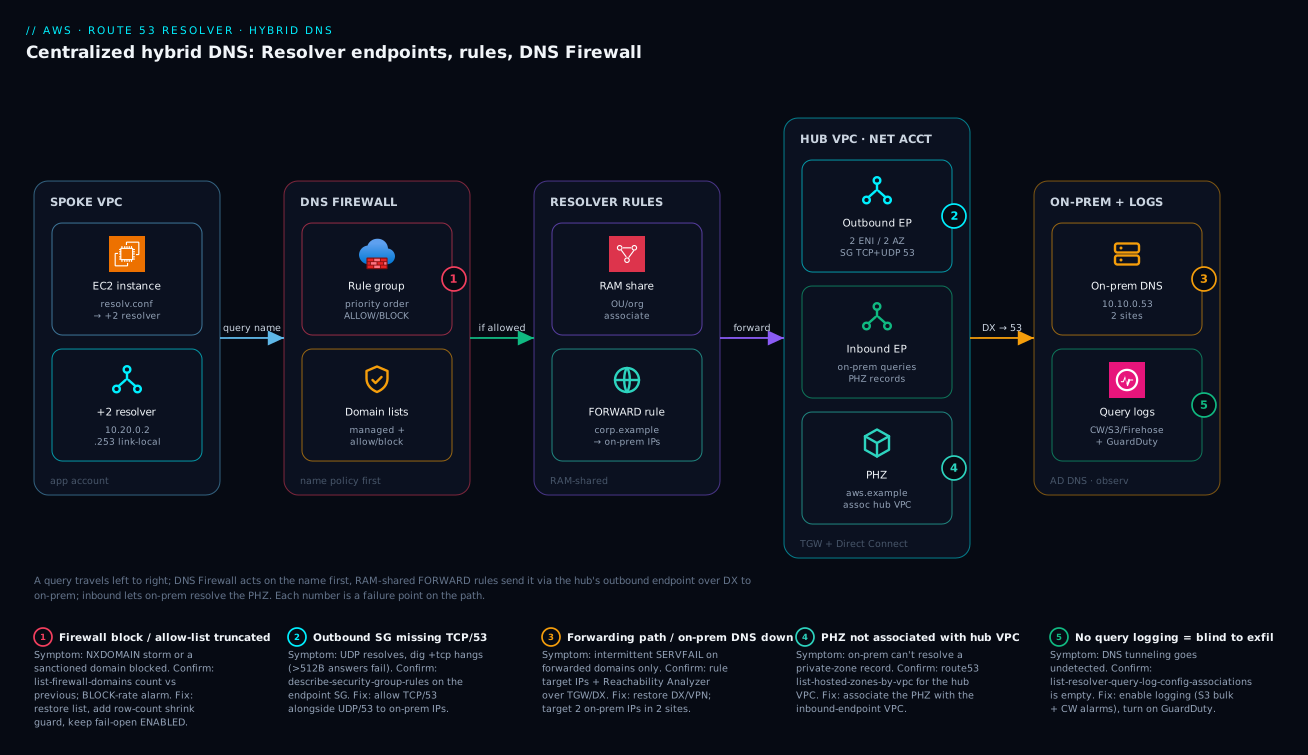
The diagram traces a single request left to right through the whole hybrid-DNS system, and pins each failure class onto the exact hop where it bites. On the far left, a spoke VPC in an application account holds an EC2 instance whose /etc/resolv.conf points at the +2 resolver (10.20.0.2). That spoke owns no endpoint — it borrows behavior through a RAM-associated Resolver rule and an associated DNS Firewall rule group. When the instance asks for a name, DNS Firewall evaluates the queried domain first (badge 1): a managed-list or block-list hit returns NODATA/NXDOMAIN/sinkhole; everything else proceeds. If the name matches a FORWARD rule, the query crosses into the networking account’s hub VPC, where the outbound endpoint (two ENIs across two AZs, SG locked to TCP+UDP 53 — badge 2) forwards it over Transit Gateway + Direct Connect to on-prem AD DNS (badge 3). The answer returns along the same path.
The reverse direction is the inbound endpoint in the same hub: on-prem hosts, via a conditional forwarder, query the inbound ENIs to resolve names in your Route 53 private hosted zone, which must be associated with the inbound-endpoint VPC (badge 4) or the resolver has no records. Underneath it all, query logging tees every query to CloudWatch/S3/Firehose for GuardDuty and Logs Insights to inspect (badge 5). Read the badges as the five places this system fails: a firewall false-positive or truncated allow-list, a missing TCP/53 rule, a down DX/forwarding path, an unassociated PHZ, and the blind spot where logging isn’t enabled. The legend narrates each as symptom · confirm · fix.
Real-world scenario
A payments platform — call it NimbusPay — ran centralized hybrid DNS across roughly 60 spoke VPCs in 40 accounts: one outbound and one inbound endpoint in a networking account, FORWARD rules for three on-prem zones shared via RAM with Organizations auto-association, and a security-owned DNS Firewall rule group attached to every spoke with mutation-protection ENABLED. The firewall’s catch-all was a low-priority BLOCK NXDOMAIN over an allow-list — anything not explicitly sanctioned returned NXDOMAIN. It worked perfectly for months.
Then a routine allow-list update job — a Lambda doing import-firewall-domains with --operation REPLACE — was handed a truncated S3 file after an upstream export failed: the allow-list dropped from ~1,400 domains to 12. Within seconds the catch-all started returning NXDOMAIN for package mirrors, container registries, and three internal SaaS dependencies. CI went red fleet-wide; a customer-facing service couldn’t reach its license server.
Two things bounded the blast radius. First, fail-open was ENABLED on every association — so when query volume spiked and one rule-group association briefly failed evaluation, those queries resolved instead of compounding the outage. Second, the team had a CloudWatch alarm on BLOCK-action query count from the Firewall metrics; it fired in under two minutes, long before the support queue did.
The fix was procedural, not architectural. They moved the allow-list update from a blind REPLACE to a guarded apply that refuses to shrink the list by more than a threshold, validating row count against the previous version before committing:
PREV=$(aws route53resolver list-firewall-domains \
  --firewall-domain-list-id "$LIST_ID" --query 'Domains' --output text | wc -w)
NEW=$(wc -l < ./allowlist.txt)

# Refuse a >20% shrink - almost always a bad/truncated source file
if [ "$NEW" -lt $(( PREV * 80 / 100 )) ]; then
  echo "REFUSING: allow-list would shrink $PREV -> $NEW domains" >&2
  exit 1
fi

aws s3 cp ./allowlist.txt "s3://net-dns-policy/allowlist.txt"
aws route53resolver import-firewall-domains \
  --firewall-domain-list-id "$LIST_ID" \
  --operation REPLACE --domain-file-url "s3://net-dns-policy/allowlist.txt"
The lesson generalizes: an allow-list-first DNS Firewall is a fleet-wide kill switch wearing a security badge. Treat every change to it as a production deploy — validate the input, alarm on the BLOCK rate, and keep fail-open on so a control-plane stumble degrades gracefully instead of taking name resolution with it. What NimbusPay changed, and what each change bought:
| Change | Before | After | Benefit |
|---|---|---|---|
| Allow-list apply | Blind REPLACE |
Guarded shrink check | Truncation can’t deploy |
| Alarm | None on BLOCK rate | CloudWatch on BLOCK count | <2 min detection |
| Fail mode | (already) ENABLED | Kept ENABLED | Spike degraded gracefully |
| Source validation | Trusted export | Row-count vs previous | Bad source rejected at gate |
Advantages and disadvantages
Centralized Resolver + DNS Firewall is the right architecture for multi-account hybrid DNS, but it is a dependency you must run well. The honest trade-off:
| Advantages | Disadvantages |
|---|---|
| One governed pair of endpoints, RAM-shared | Hub endpoints are a blast-radius dependency |
| DNS-layer egress control + exfil detection | Allow-list-first can become a kill switch |
| Spokes need no endpoints (cost + simplicity) | Cross-account RAM adds setup/mental overhead |
| Managed threat lists with zero maintenance | Per-million-query + per-ENI-hour billing adds up |
| Split-horizon resolved deliberately | Precedence mistakes are subtle and time-consuming |
| Native GuardDuty + query-log integration | Logging destinations (CW/S3/Firehose) cost extra |
It matters most when you have on-prem forwarding and a compliance need to control DNS egress across many accounts — there, centralization pays for itself in governance and on-prem firewall simplicity. It matters least for a single-account, no-on-prem workload where the +2 resolver and a PHZ already cover you, and DNS Firewall is the only piece worth adding. The single biggest risk — the hub as a dependency — is mitigated by spreading ENIs across 3 AZs, monitoring EndpointHealthyENICount, and keeping on-prem forwarding targets redundant; note that the +2 resolver in each VPC still answers public and PHZ queries even if the forwarding path to on-prem is down, so only forwarded domains fail, which is the correct, contained failure.
Hands-on lab
This lab stands up a working outbound forwarding path and a DNS Firewall block, then verifies and tears down. It uses one account and one VPC for simplicity; the multi-account RAM step is noted where it would slot in. Endpoint ENI-hours and per-query charges are small but not free-tier — tear down when done.
1. Set variables and confirm the VPC + two subnets in different AZs.
VPC=vpc-0lab; SUBNET_A=subnet-0laba; SUBNET_B=subnet-0labb
aws ec2 describe-subnets --subnet-ids $SUBNET_A $SUBNET_B \
  --query "Subnets[].{id:SubnetId, az:AvailabilityZone, cidr:CidrBlock}" -o table
2. Create a security group for the outbound endpoint and allow egress 53 TCP+UDP.
SG=$(aws ec2 create-security-group --group-name lab-resolver-out \
  --description "lab outbound resolver" --vpc-id $VPC --query GroupId -o tsv)
aws ec2 authorize-security-group-egress --group-id $SG \
  --ip-permissions \
    IpProtocol=udp,FromPort=53,ToPort=53,IpRanges='[{CidrIp=0.0.0.0/0}]' \
    IpProtocol=tcp,FromPort=53,ToPort=53,IpRanges='[{CidrIp=0.0.0.0/0}]'
3. Create the outbound endpoint across both AZs.
EP=$(aws route53resolver create-resolver-endpoint --name lab-outbound \
  --direction OUTBOUND --security-group-ids $SG \
  --ip-addresses SubnetId=$SUBNET_A SubnetId=$SUBNET_B \
  --query ResolverEndpoint.Id -o tsv)
# Wait for it to become OPERATIONAL
aws route53resolver get-resolver-endpoint --resolver-endpoint-id $EP \
  --query ResolverEndpoint.Status -o tsv
Expected: CREATING then OPERATIONAL.
4. Create a FORWARD rule (point at a resolver you control; here a public test target on 53).
RULE=$(aws route53resolver create-resolver-rule --name lab-fwd \
  --rule-type FORWARD --domain-name "lab.internal.example" \
  --resolver-endpoint-id $EP \
  --target-ips Ip=10.10.0.53,Port=53 \
  --query ResolverRule.Id -o tsv)
# Multi-account: here you'd `aws ram create-resource-share` and the spoke would associate.
aws route53resolver associate-resolver-rule --resolver-rule-id $RULE --vpc-id $VPC \
  --name lab-fwd-assoc
5. Create a DNS Firewall rule group, a block list, and a BLOCK rule; associate to the VPC.
RG=$(aws route53resolver create-firewall-rule-group --name lab-rg \
  --query FirewallRuleGroup.Id -o tsv)
DL=$(aws route53resolver create-firewall-domain-list --name lab-block \
  --query FirewallDomainList.Id -o tsv)
aws route53resolver update-firewall-domains --firewall-domain-list-id $DL \
  --operation ADD --domains "blocked.example."
aws route53resolver create-firewall-rule --firewall-rule-group-id $RG \
  --firewall-domain-list-id $DL --priority 10 --action BLOCK \
  --block-response-dns-type-of-response NXDOMAIN --name lab-block-rule
aws route53resolver associate-firewall-rule-group --firewall-rule-group-id $RG \
  --vpc-id $VPC --priority 101 --name lab-rg-assoc --firewall-fail-open ENABLED
6. Verify from an instance in the VPC (SSM in).
dig +short blocked.example      # Expect NXDOMAIN (firewall block)
dig +short amazon.com           # Expect a normal answer (allowed)
7. Tear down (reverse order).
aws route53resolver disassociate-firewall-rule-group --firewall-rule-group-association-id <assoc-id>
aws route53resolver delete-firewall-rule --firewall-rule-group-id $RG --firewall-domain-list-id $DL
aws route53resolver delete-firewall-rule-group --firewall-rule-group-id $RG
aws route53resolver delete-firewall-domain-list --firewall-domain-list-id $DL
aws route53resolver disassociate-resolver-rule --resolver-rule-id $RULE --vpc-id $VPC
aws route53resolver delete-resolver-rule --resolver-rule-id $RULE
aws route53resolver delete-resolver-endpoint --resolver-endpoint-id $EP
aws ec2 delete-security-group --group-id $SG
Lab checkpoints — what you should observe at each stage:
| Step | Command | Expected result |
|---|---|---|
| 3 | get-resolver-endpoint ... Status |
OPERATIONAL after ~minutes |
| 4 | list-resolver-rule-associations |
Rule bound to the VPC |
| 5 | list-firewall-rule-group-associations |
Group bound, COMPLETE |
| 6 | dig blocked.example |
NXDOMAIN |
| 6 | dig amazon.com |
Normal A records |
| 7 | describe-resolver-endpoints |
Endpoint gone |
Common mistakes & troubleshooting
This is the section you keep open during an incident. Each row is a real failure mode with the exact way to confirm it and the fix. Scan the table; the expanded notes follow for the ones that bite hardest.
| # | Symptom | Root cause | Confirm (exact cmd / path) | Fix |
|---|---|---|---|---|
| 1 | dig over UDP works, TCP hangs |
Endpoint SG missing TCP/53 | aws ec2 describe-security-group-rules --filter Name=group-id,Values=$SG |
Add TCP/53 ingress (inbound) / egress (outbound) |
| 2 | Forwarded query returns the PHZ answer, not on-prem | A more-specific SYSTEM rule or PHZ assoc. wins | list-resolver-rules + list-resolver-rule-associations by VPC |
Adjust specificity or remove the SYSTEM/PHZ overlap |
| 3 | Spoke can’t resolve on-prem name | Rule not shared or not associated | ram list-resources + list-resolver-rule-associations |
RAM-share + associate-resolver-rule to the VPC |
| 4 | On-prem can’t resolve a PHZ record | PHZ not associated w/ inbound-endpoint VPC | route53 list-hosted-zones-by-vpc --vpc-id <hub> |
Associate the PHZ with the hub VPC |
| 5 | Intermittent SERVFAIL on forwarded domains | DX/VPN path to on-prem DNS down | route53resolver get-resolver-rule targets + ping/Reachability Analyzer |
Restore DX/TGW path; use 2 on-prem IPs in 2 sites |
| 6 | Fleet-wide NXDOMAIN storm | Allow-list REPLACE truncated |
list-firewall-domains count vs previous |
Restore list; add row-count guard before REPLACE |
| 7 | A sanctioned domain is blocked | Catch-all priority below a stale block, or missing from allow-list | list-firewall-rules priorities; check allow-list membership |
Add to allow-list above catch-all; re-order priority |
| 8 | App account detached the org firewall policy | mutation-protection not set |
list-firewall-rule-group-associations shows DISABLED |
Re-associate with --mutation-protection ENABLED |
| 9 | DNS resolution fully breaks during a firewall blip | Fail mode is DISABLED (fail-closed) | Association FirewallFailOpen = DISABLED |
Set fail-open ENABLED (unless high-side) |
| 10 | Endpoint throttling / dropped queries at peak | Too few IPs vs QPS | CloudWatch OutboundQueryVolume, EndpointHealthyENICount |
Add IPs/AZs to the endpoint |
| 11 | Chatty app hits per-instance DNS limit | ~1024 pps to +2 resolver on the source ENI | App DNS error rate; instance-level | Cache via nscd/systemd-resolved; reduce lookups |
| 12 | No visibility into exfiltration | Query logging not enabled | list-resolver-query-log-config-associations |
Enable + associate; turn on GuardDuty |
| 13 | New account doesn’t get the rules | Org RAM sharing off, or principal is account not OU | ram get-resource-shares; check principals |
enable-sharing-with-aws-organization; share to OU |
| 14 | OVERRIDE block “works” but users confused |
Sinkhole CNAME/TTL misconfigured | get-firewall-rule override fields |
Point override at a real “blocked” page; sane TTL |
1. UDP works, TCP/53 hangs. The single most common endpoint bug. DNS falls back to TCP when a response exceeds 512 bytes or EDNS isn’t honored. If the SG allows only UDP/53, large answers silently fail. Confirm: dig +tcp <name> hangs while plain dig works. Fix: add TCP/53 alongside UDP/53 on the endpoint SG — fix this before chasing anything else.
2. Forwarded query returns the PHZ answer instead of on-prem. Precedence is most-specific-wins. A SYSTEM rule (or a PHZ association) for a more specific name beats your FORWARD rule. Confirm: list rules and associations for the VPC and find the more-specific match. Fix: either remove the overlap or, if it’s intentional split-horizon, document it and add the inverse exception.
3. Spoke can’t resolve an on-prem name at all. The rule exists in the networking account but was never shared or never associated in the spoke. Confirm: list-resolver-rule-associations --filters Name=VPCId,Values=<spoke> returns nothing. Fix: RAM-share the rule and associate it (drive from Terraform for_each so it’s never forgotten).
6. Fleet-wide NXDOMAIN storm after an allow-list update. The NimbusPay incident: REPLACE with a truncated file collapses the allow-list and the catch-all BLOCK NXDOMAIN denies everything. Confirm: list-firewall-domains shows a list far smaller than yesterday; the BLOCK-rate alarm is screaming. Fix: restore the previous list; add a row-count shrink guard before any REPLACE and an alarm on BLOCK count.
9. Total DNS outage during a firewall hiccup. Fail-closed means an internal firewall failure blocks every query. Confirm: the association shows FirewallFailOpen DISABLED. Fix: set fail-open ENABLED unless the workload genuinely justifies fail-closed — a control-plane stumble should degrade filtering, not name resolution.
The dig reading guide — what each result tells you while you triage from a spoke instance:
dig result |
Likely meaning | Next check |
|---|---|---|
Plain works, +tcp hangs |
Endpoint SG missing TCP/53 | Endpoint SG rules |
NXDOMAIN on a known-good name |
Firewall block (NXDOMAIN) or allow-list gap | Firewall rules + allow-list |
NODATA / empty answer |
Firewall block (NODATA response) | Firewall rule action |
| CNAME to your sinkhole | Firewall block (OVERRIDE) | Expected if intended |
SERVFAIL intermittently |
Forwarding path/on-prem DNS issue | DX/TGW + on-prem targets |
| PHZ answer not on-prem answer | More-specific SYSTEM rule / PHZ wins | Rule specificity |
| Slow then fails under load | Endpoint QPS / +2 resolver pps limit | CloudWatch volume metrics |
Best practices
- Centralize to one inbound/outbound pair in a networking account attached to a hub VPC with on-prem connectivity; never scatter endpoints across app accounts.
- Span ≥2 AZs (prefer 3) per endpoint with dedicated ENI IPs; scale capacity by adding IPs, not parallel endpoints, and monitor
EndpointHealthyENICount. - Allow port 53 on both TCP and UDP on every endpoint SG, scoped to on-prem resolver CIDRs — the TCP/53 omission is the classic silent failure.
- Target two on-prem resolver IPs in different sites in every FORWARD rule so a single on-prem DNS box or site loss doesn’t break forwarded resolution.
- Resolve split-horizon deliberately with rule specificity (SYSTEM exceptions under a parent FORWARD); never leave it to default precedence.
- Share rules via RAM with Organizations auto-association and bind them to spokes in Terraform so association is a VPC property, not a manual click.
- Put on-prem conditional forwarders on the inbound endpoint IPs and associate the PHZ with the inbound-endpoint VPC, or on-prem gets no records.
- Reference AWS-managed threat lists at top priority, custom block/allow below; keep the rule and group priority bands documented and stable.
- Set
mutation-protection ENABLEDon baseline associations so app accounts can’t detach the org policy from their own VPC. - Default to fail-open on firewall associations unless a specific high-side workload justifies fail-closed.
- Validate every allow-list change like a deploy — refuse large shrinks, diff row counts against the previous version, never blind-
REPLACE. - Enable query logging fleet-wide (S3 for bulk, CloudWatch for alarms), centralize via RAM, alarm on BLOCK-action rate, and turn on GuardDuty for DNS findings.
The defaults worth standardizing across the org:
| Knob | Recommended default | Why |
|---|---|---|
| Endpoint AZ spread | 3 AZs where available | Survive an AZ with headroom |
| SG port 53 | TCP and UDP | Avoid the TCP-fallback failure |
| FORWARD target IPs | 2, in 2 sites | On-prem DNS redundancy |
| RAM principal | OU / org ARN | New accounts auto-inherit |
| Firewall fail mode | Fail-open ENABLED | Filtering hiccup ≠ DNS outage |
| Mutation protection | ENABLED on baselines | App accounts can’t detach policy |
| Allow-list apply | Guarded (shrink-refused) | Truncation can’t deploy |
| Query log destination | S3 bulk + CW alarms | Cheap retention + live alerting |
Security notes
DNS is both an attack surface (exfiltration over DNS, C2 over DNS) and a control point. Treat it as both.
- Least privilege on who manages Resolver and Firewall. Only the platform-network and security roles should hold
route53resolver:*write actions; app teams get read at most. Govern with SCPs from AWS Organizations: SCPs, Guardrails & Delegated Admin. - Lock endpoint security groups tightly — TCP+UDP 53 to/from only the on-prem resolver CIDRs (inbound) or IPs (outbound); nothing else belongs on an endpoint SG.
- DNS Firewall is your exfiltration control. Managed threat lists + a deny-by-default allow-list (where the environment allows it) stop both known-bad domains and tunneling. Pair with query-log anomaly detection and GuardDuty.
- Use OVERRIDE sinkholes for visibility, not just NXDOMAIN — a CNAME to a “blocked” page tells you who hit a blocked domain, turning a block into a detection.
- Protect the policy source. The S3 bucket holding allow/block lists is now security-critical — enable versioning, MFA-delete or object-lock, and restrict writes; a tampered list is a policy bypass.
- Centralize and protect query logs. Logs reveal hostnames and access patterns — send them to a security-account destination, encrypt with KMS, and restrict read access; they are sensitive.
- Mutation protection + RAM keep the security baseline non-removable by tenants while letting them add scoped exceptions.
The security control matrix for this stack:
| Control | Mechanism | Protects against | Note |
|---|---|---|---|
| Endpoint SG least privilege | TCP+UDP 53 to on-prem only | DNS to/from rogue hosts | Nothing else on the SG |
| Managed threat lists | DNS Firewall BLOCK | Malware/C2/botnet domains | Zero maintenance |
| Allow-list deny-by-default | DNS Firewall catch-all | Unsanctioned egress + exfil | Guard changes like a deploy |
| OVERRIDE sinkhole | BLOCK response CNAME | Silent blocks (no attribution) | Reveals who hit the domain |
| Query logging + GuardDuty | Resolver logs → findings | Undetected DNS exfiltration | Native integration |
| Mutation protection | Association attribute | Tenants removing baseline | ENABLED on org policy |
| KMS + S3 lock on policy source | Encryption + object-lock | Tampered allow/block lists | Versioned, MFA/lock |
Cost & sizing
Three things drive the Resolver/DNS-Firewall bill, and the whole reason to centralize is cost containment:
- Resolver endpoints bill per-ENI-hour plus per million queries. This is exactly why you run one pair of endpoints in a networking account rather than a pair per account — each endpoint ENI is an hourly charge whether or not it’s busy. Two ENIs (one pair) is a steady, predictable line item; sixty pairs is not.
- DNS Firewall bills per million queries inspected. Across 60 chatty VPCs this adds up, but it’s the price of egress control and exfil detection — far cheaper than an incident.
- Query logging itself is free; the destination is not. CloudWatch ingestion is the pricey path; S3 is cheap for bulk; Firehose adds per-GB plus downstream. Long-entropy debug logging across 40 VPCs to CloudWatch is a budget surprise — send bulk to S3, keep CloudWatch for the alarm-worthy slice.
A rough monthly picture for a centralized hub serving ~60 spokes at moderate DNS volume: the two endpoint pairs’ ENI-hours dominate the fixed cost; per-million-query charges scale with traffic; DNS Firewall adds a per-million line; and query logging is mostly S3 storage if you route bulk there. The cost drivers and how to control each:
| Cost driver | What you pay for | Scales with | How to control |
|---|---|---|---|
| Endpoint ENI-hours | Each ENI, hourly | # endpoints × IPs | Centralize to one pair; don’t scatter |
| Resolver queries | Per million forwarded/resolved | DNS volume | Cache at the app; collapse repeats |
| DNS Firewall inspection | Per million queries inspected | DNS volume × VPCs | Inspect where it matters; allow-list early |
| Query-log ingestion (CW) | Per-GB into CloudWatch | Verbose logging | Send bulk to S3 instead |
| Query-log storage (S3) | Storage + Athena scans | Retention + queries | Lifecycle to cheaper tiers |
| Firehose delivery | Per-GB + downstream | SIEM volume | Filter before fan-out |
Sizing the endpoints themselves is about IP count vs QPS (see the endpoint sizing table earlier): two IPs across two AZs (~20k QPS) covers most fleets; add IPs before you approach the per-IP ceiling, watching OutboundQueryVolume. Note the separate per-instance limit: the +2 resolver enforces roughly 1024 packets/second/ENI on the source instance — a chatty app can hit this independent of your endpoints, so cache aggressively with nscd/systemd-resolved. The per-VPC and per-instance limits to keep in mind:
| Limit / quota | Approximate value | Scope | What to do near it |
|---|---|---|---|
| QPS per endpoint IP | ~10,000 QPS | Per ENI | Add IPs/AZs |
| Packets/sec to +2 resolver | ~1,024 pps | Per source ENI | App-side DNS caching |
| Rule associations per VPC | One per rule | Per VPC | Keep rule set small/intentional |
| Domains per firewall list | Large (thousands+) | Per list | Split logically; validate on import |
| Firewall groups per VPC | Several (priority-ordered) | Per VPC | Reserve priority bands by owner |
Interview & exam questions
1. What is the “+2 resolver” and what can’t it do on its own? It’s the VPC’s built-in Amazon-provided resolver at the VPC CIDR base address plus two (e.g. 10.0.0.2) and link-local 169.254.169.253. It resolves public names, associated PHZs, and internal records for instances inside the VPC. It is not addressable from outside the VPC and cannot forward queries elsewhere — which is exactly why inbound and outbound Resolver endpoints exist.
2. Inbound vs outbound Resolver endpoints — which direction does each carry? An inbound endpoint gives the resolver an IP that resources outside the VPC (on-prem DNS) can query to resolve your PHZs — traffic flows into AWS. An outbound endpoint is the path the VPC resolver uses to forward queries to external resolvers per Resolver rules — traffic flows out of AWS. You typically need both for full hybrid resolution.
3. Why does DNS “work until a large response,” then fail on an endpoint? The endpoint security group is missing TCP/53. DNS uses UDP/53 normally but falls back to TCP/53 when a response exceeds 512 bytes or EDNS isn’t honored. If the SG allows only UDP, the TCP retry is silently dropped. Fix: allow both TCP and UDP on port 53.
4. FORWARD vs SYSTEM rules, and how is precedence decided? A FORWARD rule sends a domain’s queries to target IPs (on-prem DNS); a SYSTEM rule says “do not forward, resolve normally” and is used to carve exceptions under a broader FORWARD. Precedence is most-specific-match-wins: db.internal.corp.example.com matches a internal.corp.example.com SYSTEM rule over a corp.example.com FORWARD rule.
5. How does a spoke VPC in another account use a rule it doesn’t own? The networking account shares the rule via AWS RAM, and the spoke account associates the shared rule with its VPCs. The spoke owns no endpoint — it borrows the forwarding behavior. With Organizations sharing enabled, sharing to an OU/org ARN auto-associates new accounts and needs no accept step.
6. How do you let on-prem resolve a Route 53 private hosted zone? Put a conditional forwarder on on-prem DNS pointing at the inbound endpoint IPs, and ensure the PHZ is associated with the VPC that hosts the inbound endpoint (or the resolver has no records). Then on-prem queries for that zone reach the inbound ENIs and get the PHZ answer.
7. What does DNS Firewall act on, and how are rules evaluated? It acts on the queried domain name before resolution completes, applying ALLOW/BLOCK/ALERT. Rules within a group are evaluated by priority (lowest number first), first match wins — so ordering is policy. Groups attached to a VPC also have a between-group priority.
8. Name the three BLOCK responses and when you’d pick each. NODATA (empty answer — quiet block), NXDOMAIN (name does not exist — hard, unambiguous block), and OVERRIDE (CNAME to a sinkhole you control — redirect users to a “blocked” page and gain visibility into who hit it). OVERRIDE is best when you want attribution; NXDOMAIN for a clean hard block.
9. Fail-open vs fail-closed for DNS Firewall — what’s the default and why? FirewallFailOpen controls behavior when the firewall can’t evaluate a query. Fail-open (ENABLED) lets the query resolve (recommended for most production — a firewall hiccup shouldn’t kill all DNS); fail-closed (DISABLED) blocks it (only for high-side workloads where a leaked query is worse than an app failing).
10. How do you detect DNS exfiltration with Resolver? Enable query logging (to CloudWatch/S3/Firehose) and look for bursts of unique, long, high-entropy subdomains under one parent — a Logs Insights or Athena query on label length and rate. Also enable GuardDuty, which consumes Resolver query logs natively for findings like Backdoor:EC2/DNSDataExfiltration.
11. Why centralize endpoints, and what’s the main risk? Endpoints bill per-ENI-hour and are operationally noisy; one governed pair in a networking account is cheaper, simpler to firewall on-prem, and easier to govern via RAM. The main risk is making the hub a dependency — mitigated by spreading ENIs across 3 AZs and keeping on-prem forwarding targets redundant. The +2 resolver still answers public/PHZ queries if forwarding is down.
12. How do you stop an app account from removing the org’s DNS Firewall baseline? Associate the baseline rule group with mutation-protection ENABLED and share/govern via RAM, so tenants can add higher-priority exception groups but cannot detach the mandatory baseline from their own VPC.
These map to AWS Certified Advanced Networking – Specialty (ANS-C01) — hybrid DNS, Resolver endpoints, DNS Firewall, RAM sharing — and touch Security – Specialty (SCS-C02) for the exfiltration-detection and egress-control angle. A compact cert mapping:
| Question theme | Primary cert | Objective area |
|---|---|---|
| +2 resolver, endpoints, rules | ANS-C01 | Hybrid DNS architecture |
| RAM sharing, multi-account | ANS-C01 | Network connectivity at scale |
| DNS Firewall actions/responses | ANS-C01 / SCS-C02 | DNS egress control |
| Exfiltration detection, GuardDuty | SCS-C02 | Threat detection |
| Fail mode, mutation protection | ANS-C01 | Resilient, governed design |
Quick check
- Your spoke instance resolves a forwarded domain over UDP but
dig +tcphangs. What’s the single most likely cause and the fix? - A query for
db.internal.corp.example.comis being answered by AWS even thoughcorp.example.comforwards to on-prem. Why, and is that a bug? - True or false: a spoke VPC in another account needs its own outbound endpoint to forward
corp.example.comto on-prem. - After an allow-list update, the whole fleet starts returning NXDOMAIN for package mirrors. What happened, and what two safeguards would have prevented or contained it?
- You need on-prem servers to resolve records in your Route 53 private hosted zone
aws.example.com. Name the two things you must configure.
Answers
- The endpoint security group is missing TCP/53. DNS falls back to TCP when a response exceeds 512 bytes or EDNS isn’t honored; with only UDP/53 allowed, the TCP retry is silently dropped. Fix: add TCP/53 (alongside UDP/53) to the endpoint SG.
- A more-specific SYSTEM rule (or PHZ association) for
internal.corp.example.combeats the broadercorp.example.comFORWARD rule under most-specific-match-wins. It’s only a bug if it’s unintended — if it’s deliberate split-horizon, it’s correct; document it. - False. The spoke owns no endpoint — the networking account shares the rule via RAM and the spoke associates it with its VPC, borrowing the forwarding behavior through the hub’s outbound endpoint.
- An
import-firewall-domains --operation REPLACEran with a truncated file, collapsing the allow-list so the catch-allBLOCK NXDOMAINdenied everything. Safeguards: (a) a row-count shrink guard that refuses a large shrink before REPLACE, and (b) fail-open ENABLED plus a CloudWatch alarm on BLOCK-action count to contain and detect it fast. - (a) A conditional forwarder on on-prem DNS pointing at the inbound endpoint IPs, and (b) association of the PHZ with the VPC that hosts the inbound endpoint, so the resolver actually has the records.
Glossary
- +2 resolver — the VPC’s built-in Amazon-provided DNS at the CIDR base address plus two (and link-local
169.254.169.253); answers internal queries, can’t forward alone. - Inbound endpoint — Resolver ENIs giving on-prem an IP to query for your PHZs; traffic flows into AWS.
- Outbound endpoint — Resolver ENIs the VPC resolver uses to forward queries to external resolvers per rules; traffic flows out of AWS.
- Resolver ENI — one elastic network interface (one IP) per AZ backing an endpoint; ≥2 across ≥2 AZs; IP count is QPS capacity.
- FORWARD rule — “for this domain, send queries to these target IPs” (on-prem DNS); requires an outbound endpoint.
- SYSTEM rule — “for this domain, resolve normally, do not forward”; carves split-horizon exceptions under a broader FORWARD.
- Most-specific-match-wins — the rule precedence model; the longest matching domain suffix wins across all associated rules.
- AWS RAM — Resource Access Manager; shares Resolver rules (and firewall groups, log configs) across accounts/OUs/the org.
- Rule association — binding a (shared) rule to a specific VPC, where the forwarding behavior actually takes effect.
- Private hosted zone (PHZ) — a Route 53 zone resolvable only within associated VPCs; must be associated with the inbound-endpoint VPC for on-prem to resolve it.
- DNS Firewall rule group — an ordered set of domain-list rules applied to outbound queries; RAM-shareable, priority-ordered.
- Domain list — the set of domains a firewall rule matches; AWS-managed (threat intel) or custom (your allow/block lists).
- Block response — what a BLOCK returns:
NODATA,NXDOMAIN, orOVERRIDE(CNAME to a sinkhole). - Fail mode (
FirewallFailOpen) — behavior when the firewall can’t evaluate a query; fail-open keeps DNS resolving, fail-closed blocks. - Mutation protection — an association attribute preventing tenants from detaching a baseline firewall group from their VPC.
- Query logging — per-query records (name, type, response code, srcaddr) sent to CloudWatch/S3/Firehose; the basis for exfil detection.
- Conditional forwarder — on-prem DNS configuration that forwards a specific zone to chosen servers (here, the inbound endpoint IPs).
- Split-horizon — the same name resolving differently depending on who asks (inside vs outside AWS); resolved deliberately via rule specificity.
Next steps
You can now build and debug centralized hybrid DNS with deliberate split-horizon and a governed egress policy. Build outward:
- Next: Route 53: DNS Records, Routing Policies & Health Checks — the public-DNS half of Route 53 that complements this private/hybrid story.
- Related: AWS Network Firewall: Egress Filtering & Centralized Inspection — control L3/L4 and TLS-SNI egress alongside DNS-layer control.
- Related: AWS Transit Gateway Multi-Account VPC Architecture — the hub that carries forwarded DNS between spokes and on-prem.
- Related: Direct Connect + Transit Gateway resilient hybrid networking — the transport your outbound forwarding rides.
- Related: CloudWatch & CloudTrail Observability Deep Dive — where query logs, alarms, and GuardDuty findings land.