SNS and SQS are the two primitives I reach for before anything fancier, and the failure mode I see most often is teams wiring a producer straight to a single queue, then bolting on a second consumer by having the first one re-publish. That is point-to-point coupling wearing a queue costume. The decoupled version is boring on purpose: a producer publishes a fact to an SNS topic and walks away, and each consumer owns a private SQS queue subscribed to that topic. Add a consumer six months later by creating one queue and one subscription. Nobody redeploys the producer.
That topology is the easy 80%. The hard 20% is what happens when a consumer is slow, a message is malformed, the same event arrives twice, or strict ordering actually matters. This article is the operational playbook for that 20%: SNS-to-SQS fan-out with server-side filtering, the real tradeoffs between standard and FIFO, visibility-timeout and polling tuning, dead-letter queues with redrive, idempotent consumers, and the Lambda/ECS plumbing that makes partial failures survivable.
Because this is a reference you will return to mid-incident, the settings, limits, error conditions and tuning knobs are laid out as scannable tables. Read the prose once for the why, then keep the tables open when a queue is backing up at 02:00 and you need the exact maxReceiveCount, the precise metric to alarm on, or the one CLI flag that stops a double-charge. By the end you will stop guessing about delivery semantics and know exactly which layer — topic, queue, consumer, or state store — owns each guarantee.
What problem this solves
The pain this fixes is coupling that you only discover under load. A producer wired directly to one consumer’s queue cannot grow a second consumer without code changes, and the moment the first consumer slows down, the producer’s writes back up behind it. Worse, the failure modes are invisible in a demo and catastrophic in production: a too-short visibility timeout double-charges a customer, a missing dead-letter queue lets one malformed message loop for fourteen days burning compute, a single bad record in a Lambda batch drives nine good messages to the DLQ, and a cross-account subscription silently drops every message because nobody granted the KMS key.
What breaks without this knowledge is concrete and expensive. Teams ship a single standard queue, set the visibility timeout to a guess, never attach a DLQ, and write consumers that assume exactly-once delivery. Then a downstream slows during a sale, messages reappear mid-flight, a second worker grabs each one, and the same side effect fires twice — a duplicate charge, a duplicate email, a duplicate inventory decrement. The on-call engineer kills the consumers, the queue floods, and the post-mortem concludes “messaging is hard” instead of “the visibility timeout was 30 seconds and processing took 45.”
Who hits this: every team building event-driven or asynchronous systems on AWS — order pipelines, payment processors, notification fan-outs, ETL triggers, microservice choreography. It bites hardest on payments and anything with side effects that cost money, on multi-consumer fan-outs where one slow consumer must not back-pressure the others, on cross-account topologies where the IAM and KMS plumbing is silent when wrong, and on FIFO adopters who assume the five-minute dedup window covers all their retries. The fix is almost never “add a bigger queue” — SQS scales itself. The fix is correct delivery semantics, a tuned redrive policy, and an idempotent consumer.
To frame the whole field before the deep dive, here is every failure class this article covers, the layer that owns it, and the one thing to check first:
| Failure class | What you observe | Layer that owns the fix | First thing to check |
|---|---|---|---|
| Double-processing | Same side effect fires twice | Visibility timeout + idempotent consumer | ApproximateReceiveCount > 1 on processed messages |
| Poison message loop | One message reprocessed for days | Redrive policy → DLQ | maxReceiveCount set? DLQ attached? |
| Silent message loss | Subscriber gets nothing, no error | Queue policy / KMS key policy | sqs:SendMessage allows sns.amazonaws.com? |
| Out-of-order processing | Events applied in wrong sequence | FIFO + MessageGroupId |
Is the queue FIFO? Group ID chosen right? |
| Good messages DLQ’d by a sibling | Whole Lambda batch retried | ReportBatchItemFailures |
Is the function response type set? |
| Consumers can’t keep up | Rising backlog, SLA breach | Consumer scaling on backlog/task | ApproximateAgeOfOldestMessage rising? |
Learning objectives
By the end of this article you can:
- Design an SNS-to-SQS fan-out with one private queue per consumer, server-side filter policies, and
RawMessageDelivery— so a slow consumer never back-pressures the others and unwanted messages are dropped at the topic, never billed. - Choose standard versus FIFO deliberately, articulate the exactly-once-processing guarantee and its five-minute boundary, and pick a
MessageGroupIdthat gives per-entity ordering with cross-entity parallelism. - Tune the visibility timeout to roughly 6× p99 processing time and extend it dynamically with
ChangeMessageVisibilityheartbeats, eliminating the single most common cause of double-processing. - Attach dead-letter queues with a tuned
maxReceiveCount, scope redrive withRedriveAllowPolicy, and replay messages withStartMessageMoveTaskafter a fix — never a hand-rolled re-publish. - Build idempotent consumers keyed on a business idempotency key (not
MessageId) using DynamoDB conditional writes or a dedicated idempotency table, achieving exactly-once effect regardless of delivery duplicates. - Wire Lambda event source mappings with
ReportBatchItemFailuresand a concurrency cap, and scale ECS/EC2 consumers on backlog-per-task rather than CPU. - Secure the path end to end: SSE-KMS, queue resource policies scoped with
aws:SourceArn, and the cross-account topic-and-KMS grants that silently drop messages when missed. - Monitor the right signals —
ApproximateAgeOfOldestMessageas the SLA leading indicator and DLQ-not-empty as a page — and read the limit/quota tables to size correctly.
Prerequisites & where this fits
You should already understand the AWS messaging basics: an SNS topic is a pub/sub fan-out point that pushes a copy of each message to every subscriber, while an SQS queue is a durable pull-based buffer that one or more consumers poll. You should be comfortable with aws CLI, reading JSON, IAM resource policies (the Principal/Action/Resource/Condition shape), and basic Terraform. Familiarity with at-least-once delivery semantics and the idea that distributed systems retry helps a great deal.
This sits in the event-driven / decoupling track. The conceptual ground floor is SNS, SQS and EventBridge Messaging Fundamentals — start there if “fan-out” or “DLQ” is new. This article is the production-grade deep dive above that. It pairs tightly with Lambda Deep Dive: Runtimes, Triggers, Layers and Concurrency for the consumer side, DynamoDB Deep Dive for the idempotency store, and KMS Encryption Deep Dive for the SSE-KMS and cross-account key policy. When choreography outgrows simple fan-out, Step Functions: Distributed Orchestration & Error Handling and EventBridge: Buses, Schema & Pipes are the next layer up.
A quick map of who owns what during an incident, so you reach for the right tool fast:
| Layer | What lives here | Failure classes it can cause | Where you confirm |
|---|---|---|---|
| Producer | Publish call, message attributes, group/dedup IDs | Missing attribute → filtered out; wrong group ID → no ordering | Producer logs; CloudWatch publish metrics |
| SNS topic | Subscriptions, filter policies, topic DLQ | Over-broad delivery; silent drop on delivery failure | SNS delivery-status logs; NumberOfNotificationsFailed |
| Queue policy / KMS | Resource policy, aws:SourceArn, key grants |
Silent message loss (esp. cross-account) | CloudTrail Decrypt denied; SNS failed deliveries |
| SQS queue | Visibility timeout, polling, retention, redrive | Double-process; poison loop; backlog | ApproximateReceiveCount; ApproximateAgeOfOldestMessage |
| Consumer (Lambda/ECS) | Batch handling, partial failures, scaling | Whole-batch retry; backpressure failure | ESM metrics; IteratorAge; task backlog metric |
| State store (DynamoDB) | Idempotency key, conditional write | Duplicate effect when missing | Conditional-check-failed count; dup side effects |
Core concepts
Five mental models make every later decision obvious.
Publish a fact to a topic; let each consumer own a queue. The producer’s job ends when it publishes to the SNS topic. SNS pushes a copy to every subscribed SQS queue, and each consumer polls its own queue. This is the difference between a topic (one-to-many fan-out, push) and a queue (a buffer one consumer group drains, pull). Because each consumer has a private queue, a slow or broken consumer fills its queue only — it cannot back-pressure the producer or the other consumers. Adding a consumer is one queue plus one subscription, never a producer change.
Delivery is at-least-once; ordering is best-effort — unless you opt into FIFO. A standard queue may deliver a message more than once and may deliver out of order. It does this rarely, but “rarely” at scale is “several times a day.” FIFO queues add strict ordering within a message group and exactly-once processing within a five-minute deduplication window. Neither standard nor FIFO gives you exactly-once delivery across all of time — that is a myth in distributed messaging. What you engineer instead is exactly-once effect, and it lives in the consumer.
The visibility timeout is a lease, not a delete. When a consumer receives a message, SQS does not remove it — it hides it for the visibility timeout and expects the consumer to DeleteMessage before the lease expires. Delete in time and the message is gone. Let the lease lapse (crash, slow processing, forgot to delete) and the message reappears for another consumer. A timeout shorter than your processing time is the single most common cause of “my consumer ran twice.”
A dead-letter queue is the escape valve for poison. A poison message is one a consumer can never process — malformed JSON, a reference to a deleted row, a schema your code does not understand. The redrive policy on the source queue sets maxReceiveCount; after that many receives (not failures), SQS moves the message to a DLQ instead of looping it forever. The DLQ is where you triage, and redrive (StartMessageMoveTask) is the first-class feature that moves fixed messages back — you never hand-roll a re-publish Lambda.
Idempotency is the only durable answer to duplicates. Because delivery is at-least-once and FIFO dedup is bounded to five minutes, the consumer must make processing the same message twice produce the same effect as once. Derive a stable idempotency key from the business event, make the side effect conditional on it (a DynamoDB attribute_not_exists write, a dedicated idempotency table), and duplicate deliveries become a non-event. Build it here and every other layer’s “rare” duplicate stops mattering.
The vocabulary in one table
Before the deep sections, pin down every moving part. The glossary at the end repeats these for lookup; this table is the mental model side by side:
| Concept | One-line definition | Where it lives | Why it matters |
|---|---|---|---|
| SNS topic | Pub/sub fan-out point; pushes to every subscriber | Account / region | The single publish target; decouples producer |
| SQS queue | Durable pull-based message buffer | Account / region | One per consumer; absorbs bursts |
| Filter policy | Server-side rule dropping non-matching messages at SNS | On the subscription | Cuts cost and noise; routing without code |
| RawMessageDelivery | Strips the SNS JSON envelope | On the subscription | Consumer reads the publisher’s body directly |
| Visibility timeout | Lease hiding a received message | Queue attribute | Too short → double-process; too long → latency |
| MessageGroupId | FIFO ordering scope | Per message (FIFO) | Order within group; parallelism across groups |
| Deduplication ID | Collapses duplicate sends within 5 min | Per message (FIFO) | Drops retries of the same logical event |
| maxReceiveCount | Receives before redrive to DLQ | Redrive policy | Bounds poison-message retries |
| Dead-letter queue (DLQ) | Sidelines messages that exceed retries | Separate queue | Triage surface; page when non-empty |
| Redrive | Moves DLQ messages back to source | StartMessageMoveTask |
First-class replay after a fix |
| Idempotency key | Stable business key for dedup | DynamoDB / your store | Exactly-once effect in the consumer |
| Event source mapping (ESM) | Lambda’s managed poller | Lambda config | Batches, partial-failure reporting, concurrency |
Fan-out topology: SNS to multiple SQS queues with filter policies
The pattern is one topic, N queues. Each subscriber gets its own queue so a slow or broken consumer cannot back-pressure the others, and each queue gets its own DLQ and its own visibility timeout. Critically, you do not want every consumer to receive every message — most consumers care about a slice. Push that filtering into SNS with a subscription filter policy so unwanted messages are dropped at the topic, never billed as SQS requests, and never even delivered.
resource "aws_sns_topic" "orders" {
  name = "orders-events"
}

resource "aws_sqs_queue" "fraud" {
  name                       = "orders-fraud"
  visibility_timeout_seconds = 120
  redrive_policy = jsonencode({
    deadLetterTargetArn = aws_sqs_queue.fraud_dlq.arn
    maxReceiveCount     = 5
  })
}

resource "aws_sqs_queue" "fraud_dlq" {
  name                      = "orders-fraud-dlq"
  message_retention_seconds = 1209600 # 14 days, the max
}

resource "aws_sns_topic_subscription" "fraud" {
  topic_arn = aws_sns_topic.orders.arn
  protocol  = "sqs"
  endpoint  = aws_sqs_queue.fraud.arn

  # Match on a message attribute, not the body, by default.
  filter_policy = jsonencode({
    eventType = ["OrderPlaced", "OrderUpdated"]
    amount    = [{ numeric = [">=", 500] }]
  })

  # Critical for fan-out: deliver the raw publisher payload, not the
  # SNS envelope, so the SQS consumer sees exactly what was published.
  raw_message_delivery = true
}
Two flags decide whether this works in practice:
raw_message_delivery = truestrips the SNS JSON envelope (the{"Type":"Notification","Message":"..."}wrapper) so your SQS consumer reads the publisher’s body directly. Without it, every consumer parses two layers of JSON and your message attributes are nested underMessageAttributesinside the envelope. Turn it on for SQS fan-out unless you specifically need SNS metadata.- Filter policy scope. By default a filter policy matches on message attributes. If you need to filter on fields inside the body, set the subscription’s
FilterPolicyScopetoMessageBody. That is convenient but couples your routing to your payload schema, so I default to attributes and only reach for body filtering when the producer cannot be changed.
Always attach a redrive policy on the subscription itself so SNS deliveries that fail (for example, the SQS queue policy is misconfigured) land in an SNS-level DLQ instead of vanishing. That is separate from the SQS DLQ covered later.
resource "aws_sns_topic_subscription" "fraud_with_dlq" {
  topic_arn            = aws_sns_topic.orders.arn
  protocol             = "sqs"
  endpoint             = aws_sqs_queue.fraud.arn
  raw_message_delivery = true

  redrive_policy = jsonencode({
    deadLetterTargetArn = aws_sqs_queue.sns_delivery_dlq.arn
  })
}
The fan-out subscription knobs, end to end
Every subscription-level setting that changes delivery behavior, what it defaults to, and the gotcha:
| Setting | Values | Default | When to change | Trade-off / gotcha |
|---|---|---|---|---|
RawMessageDelivery |
true / false | false | Almost always true for SQS fan-out | false nests body+attrs in an envelope; double-parse |
FilterPolicy |
JSON match rules | none (all delivered) | When a consumer wants a slice | Mis-typed attribute name silently delivers nothing |
FilterPolicyScope |
MessageAttributes / MessageBody |
MessageAttributes |
Filtering on body fields you can’t move to attrs | Body scope couples routing to payload schema |
RedrivePolicy (subscription) |
DLQ ARN | none | Always — catch failed SNS→SQS deliveries | Separate from the SQS queue’s own DLQ |
DeliveryPolicy |
retry/backoff JSON | platform default | Rarely; SNS retries SQS aggressively already | Mostly relevant for HTTP/S endpoints |
Subscription Protocol |
sqs / lambda / http(s) / email / sms / firehose | n/a | Per endpoint type | FIFO topics only fan into SQS FIFO |
How filter-policy match operators behave — the ones people get wrong:
| Match type | Example | Matches | Does NOT match |
|---|---|---|---|
| Exact string (array = OR) | {"eventType":["OrderPlaced","OrderUpdated"]} |
OrderPlaced or OrderUpdated |
OrderCancelled |
| Anything-but | {"eventType":[{"anything-but":["Test"]}]} |
any value except Test |
Test |
| Numeric compare | {"amount":[{"numeric":[">=",500]}]} |
500, 1200 | 499 (and missing attribute) |
| Numeric range | {"amount":[{"numeric":[">=",100,"<",500]}]} |
100–499 | 500, 99 |
| Prefix | {"region":[{"prefix":"eu-"}]} |
eu-west-1 |
us-east-1 |
| Exists | {"tier":[{"exists":true}]} |
message has tier attribute |
message without tier |
| Missing attribute (any rule) | any key the message lacks | — | non-match → message dropped |
The cost arithmetic that justifies pushing filters into SNS rather than filtering in the consumer:
| Approach | Where messages are dropped | What you pay for dropped messages | Coupling |
|---|---|---|---|
| SNS filter policy | At the topic, before delivery | Nothing (not delivered, not enqueued) | Routing config, decoupled from code |
| Deliver-all + filter in consumer | In your code, after receive | SQS request + Lambda/ECS compute per message | Routing logic in every consumer |
| Separate topic per event type | At publish time | Nothing, but producer must know routes | Producer coupled to consumer taxonomy |
Standard vs FIFO: ordering, message groups, and deduplication IDs
Pick standard unless you can articulate why you need FIFO, because FIFO buys ordering and dedup at the cost of throughput and operational complexity.
| Property | Standard | FIFO |
|---|---|---|
| Ordering | Best-effort | Strict, per message group |
| Delivery | At-least-once | Exactly-once processing (within the dedup window) |
| Throughput | Nearly unlimited | 300 msg/s, or 3,000 with batching; high-throughput mode raises this substantially |
| Dedup | None | 5-minute dedup interval, by ID or content hash |
| Name suffix | any | must end in .fifo |
| Price per million | Lower (standard tier) | Higher (FIFO tier) |
| Lambda concurrency | Scales freely | One batch in flight per group |
The mental model for FIFO ordering is the message group ID. Order is guaranteed within a group, never across groups. Choose the group ID as the entity whose events must be serialized — orderId, accountId, tenantId — and you get per-entity ordering with parallelism between entities. Use a single constant group ID and you have serialized the entire queue down to one in-flight message at a time, which is almost never what you want.
Deduplication has two modes:
- Content-based dedup (
ContentBasedDeduplication = true): SQS hashes the message body and rejects a duplicate body within a 5-minute window. Good when the body is naturally unique. - Explicit
MessageDeduplicationId: you supply the key, typically a business idempotency key like the event ID. This is the robust choice because identical retries of the same logical event collapse even if the body differs slightly (a re-serialized timestamp, say).
resource "aws_sqs_queue" "payments" {
  name                        = "payments.fifo"
  fifo_queue                  = true
  content_based_deduplication = false # supply our own IDs
  deduplication_scope         = "messageGroup"
  fifo_throughput_limit       = "perMessageGroupId" # high-throughput mode
  visibility_timeout_seconds  = 60
}
aws sqs send-message \
  --queue-url "$PAYMENTS_FIFO_URL" \
  --message-body "$(cat payment.json)" \
  --message-group-id "acct-4471" \
  --message-deduplication-id "evt-7f3a9c-2026-06-08"
The 5-minute dedup window is a fixed property of SQS FIFO and you cannot extend it. If your retries can recur after five minutes, FIFO dedup will not save you — you still need idempotent consumers. FIFO reduces duplicate volume; it does not eliminate the need to handle them.
For SNS fan-out into FIFO queues, the SNS topic must also be FIFO, the publisher supplies MessageGroupId (and a dedup ID or content-based dedup on the topic), and every subscribed queue must be FIFO. You cannot fan a standard topic into a FIFO queue.
The FIFO configuration matrix
Every FIFO-specific attribute and how to set it:
| Attribute | Values | Default | Effect | Gotcha |
|---|---|---|---|---|
FifoQueue |
true | n/a (standard if absent) | Makes the queue FIFO; name must end .fifo |
Immutable after creation |
ContentBasedDeduplication |
true / false | false | Hash body as dedup ID if none supplied | Slightly different body ≠ dedup |
MessageDeduplicationId |
string ≤128 chars | none (required unless content-based) | Explicit dedup key | Reuse within 5 min = silently dropped |
MessageGroupId |
string ≤128 chars | none (required on send) | Ordering + parallelism unit | One constant value = fully serialized |
DeduplicationScope |
queue / messageGroup |
queue |
Scope of the dedup check | messageGroup required for high-throughput |
FifoThroughputLimit |
perQueue / perMessageGroupId |
perQueue |
Enables high-throughput mode | Needs DeduplicationScope=messageGroup |
Choosing a MessageGroupId — the decision that determines your ordering and your parallelism:
| Group ID choice | Ordering you get | Parallelism | Use when |
|---|---|---|---|
Single constant (e.g. "all") |
Total order across everything | None — 1 message in flight | You truly need a global serial log (rare) |
Per-entity (accountId, orderId) |
Order within each entity | Across entities (high) | Per-customer / per-order serialization |
Per-tenant (tenantId) |
Order within a tenant | Across tenants | Multi-tenant SaaS isolation |
| Random / per-message | None (defeats FIFO) | Maximum | You don’t actually need ordering — use standard |
Standard vs FIFO — the decision table:
| If you need… | It’s probably… | Do this |
|---|---|---|
| Maximum throughput, order doesn’t matter | Standard | Plain standard queue + idempotent consumer |
| Per-entity ordering at scale | FIFO + high-throughput | MessageGroupId=entityId, FifoThroughputLimit=perMessageGroupId |
| Strict total order, low volume | FIFO, single group | One MessageGroupId, accept ~300 msg/s |
| Dedup of fast retries only | FIFO content-based or explicit ID | Set a dedup ID; still add idempotency for >5 min |
| Exactly-once effect, any duplicates | Idempotent consumer | DynamoDB conditional write on a business key |
The FIFO throughput numbers you must size against:
| Mode | Throughput (without batching) | With batching (10/call) | Requirement |
|---|---|---|---|
| FIFO, default | 300 messages/s | up to 3,000 messages/s | FifoThroughputLimit=perQueue |
| FIFO, high-throughput | substantially higher per group | scales with group count | perMessageGroupId + DeduplicationScope=messageGroup |
| Standard | nearly unlimited | nearly unlimited | none |
Visibility timeout, long polling, and throughput tuning
When a consumer receives a message, SQS hides it for the visibility timeout rather than deleting it. The consumer must delete it before the timeout expires; otherwise the message reappears and another consumer picks it up. Two failure modes follow directly:
- Timeout too short → the message reappears mid-processing, a second worker grabs it, and you double-process. This is the single most common cause of “my consumer ran twice.”
- Timeout too long → a crashed consumer’s message stays invisible far longer than necessary, inflating latency and the age-of-oldest-message metric.
Set the visibility timeout to roughly 6× your p99 processing time as a starting point, then for long or variable work extend it dynamically with ChangeMessageVisibility (a heartbeat) instead of provisioning a huge static value.
# Heartbeat: extend the lease while a long job is still running.
aws sqs change-message-visibility \
  --queue-url "$QUEUE_URL" \
  --receipt-handle "$RECEIPT_HANDLE" \
  --visibility-timeout 120
Always use long polling. Set ReceiveMessageWaitTimeSeconds = 20 on the queue (or pass --wait-time-seconds 20 per receive). Long polling waits for messages to arrive instead of returning immediately empty, which collapses empty-receive API calls — that is both a cost and a noise reduction. Short polling (the default of 0) is almost always a misconfiguration.
resource "aws_sqs_queue" "fraud" {
  name                          = "orders-fraud"
  receive_wait_time_seconds     = 20    # long polling
  visibility_timeout_seconds    = 120
  message_retention_seconds     = 345600 # 4 days; max is 14 days
}
For throughput, batch aggressively: SendMessageBatch and DeleteMessageBatch move up to 10 messages per call, cutting request count and cost by up to 10×. A standard queue scales horizontally on its own — you scale consumers, not the queue. Tune the maximum messages per ReceiveMessage (up to 10) and run more consumer threads/tasks to raise throughput.
The queue-attribute reference
Every queue attribute you actually set, with defaults, ranges, and the trade-off:
| Attribute | Default | Range | When to change | Trade-off / gotcha |
|---|---|---|---|---|
VisibilityTimeout |
30 s | 0 s – 12 h | ~6× p99 processing time | Too short → double-process; too long → stuck latency |
ReceiveMessageWaitTimeSeconds |
0 (short poll) | 0 – 20 s | Always set to 20 | Short polling = empty receives + cost |
MessageRetentionPeriod |
4 days | 60 s – 14 days | 14 days for DLQs | Past retention, messages are silently deleted |
MaximumMessageSize |
256 KB | 1 KB – 256 KB | Rarely; offload large bodies to S3 | >256 KB needs the extended client (S3 pointer) |
DelaySeconds |
0 | 0 – 900 s | Defer first delivery (debounce) | Per-queue; per-message override via DelaySeconds |
ReceiveMessageWaitTimeSeconds polling |
— | — | — | Per-receive override beats per-queue default |
RedrivePolicy |
none | n/a | Always attach a DLQ + maxReceiveCount |
Without it, poison loops 14 days |
KmsMasterKeyId |
SSE-SQS (managed) | key ID/alias | Audit/rotation/cross-account needs | SSE-KMS adds KMS calls; reuse the data key |
KmsDataKeyReusePeriodSeconds |
300 s | 60 s – 86,400 s | Raise to cut KMS cost under load | Longer reuse = larger blast radius if key leaks |
ContentBasedDeduplication |
false | true/false (FIFO only) | When body is naturally unique | Slightly different body bypasses dedup |
How to derive the visibility timeout from real processing latency:
| Your p99 processing time | Starting visibility timeout | Heartbeat needed? | Notes |
|---|---|---|---|
| < 5 s | 30 s | No | Default is usually fine |
| 5–30 s | 120–180 s | No | ~6× p99, static |
| 30 s – 2 min | 300–600 s | Consider | Static may waste latency on crashes |
| Highly variable / long | Modest base + heartbeat | Yes | ChangeMessageVisibility every ~⅓ of timeout |
| > 12 h work | n/a — wrong tool | — | Use Step Functions, not a single SQS lease |
Short polling vs long polling, the practical difference:
| Aspect | Short polling (0 s) | Long polling (1–20 s) |
|---|---|---|
| Empty receives | Many; returns immediately empty | Few; waits for a message |
| Cost | Higher (billed empty receives) | Lower |
| Latency to first message | Lowest | Up to wait-time (negligible in practice) |
| Coverage of distributed queue | Samples a subset of hosts | Queries all hosts |
| Recommendation | Avoid | Default everywhere |
Dead-letter queues: maxReceiveCount, redrive policy, and replay
A poison message is one a consumer can never process — malformed JSON, a reference to a deleted row, a schema your code does not understand. Without a DLQ it loops forever: received, fails, visibility timeout expires, received again, until it ages out 14 days later, having burned compute the whole time and blocking head-of-line progress on a FIFO queue.
The DLQ is governed by the redrive policy on the source queue: maxReceiveCount is the number of times a message may be received before SQS moves it to the DLQ. “Received” means delivered to a consumer, not “failed” — so a consumer that receives, crashes, and lets the visibility timeout lapse still increments the count. Set maxReceiveCount to give transient errors room to recover (typically 3–5), but not so high that a true poison message wastes dozens of retries.
resource "aws_sqs_queue" "orders" {
  name = "orders-work"
  redrive_policy = jsonencode({
    deadLetterTargetArn = aws_sqs_queue.orders_dlq.arn
    maxReceiveCount     = 5
  })
}

resource "aws_sqs_queue" "orders_dlq" {
  name                      = "orders-work-dlq"
  message_retention_seconds = 1209600 # 14 days — keep DLQ retention long

  # Allow-list which source queues may redrive back out of this DLQ.
  redrive_allow_policy = jsonencode({
    redrivePermission = "byQueue"
    sourceQueueArns   = [aws_sqs_queue.orders.arn]
  })
}
Two rules that save you later: give the DLQ the maximum 14-day retention (a DLQ message you discover on Monday may be 4 days old), and give the DLQ a queue type that matches the source — a FIFO source needs a FIFO DLQ.
Once you have triaged and fixed the root cause, redrive moves messages back to the source queue (or to a custom destination) for reprocessing. This is a first-class feature; do not hand-roll a re-publish Lambda.
# Kick off a redrive from the DLQ back to its source queue.
aws sqs start-message-move-task \
  --source-arn "arn:aws:sqs:us-east-1:111122223333:orders-work-dlq" \
  --max-number-of-messages-per-second 50

# Watch progress.
aws sqs list-message-move-tasks \
  --source-arn "arn:aws:sqs:us-east-1:111122223333:orders-work-dlq"
Rate-limit the move so you do not re-flood a downstream that is still recovering. And never redrive blindly — if the bug is not fixed, the same messages bounce straight back to the DLQ.
The DLQ and redrive settings matrix
Every redrive-related setting, what it controls, and how to size it:
| Setting | Where | Values | Default | When to change |
|---|---|---|---|---|
maxReceiveCount |
Source redrive policy | 1 – 1000 | none (no DLQ) | 3–5 typical; balances retry vs waste |
deadLetterTargetArn |
Source redrive policy | a queue ARN | none | Always point at a matching-type DLQ |
redrivePermission |
DLQ RedriveAllowPolicy |
allowAll / byQueue / denyAll |
allowAll |
Lock down which sources may redrive |
sourceQueueArns |
DLQ RedriveAllowPolicy |
up to 10 ARNs | n/a | With byQueue, the allowed sources |
DLQ MessageRetentionPeriod |
DLQ queue | up to 14 days | 4 days | Always max — you triage late |
| DLQ type | DLQ queue | standard / FIFO | match source | FIFO source needs FIFO DLQ |
--max-number-of-messages-per-second |
StartMessageMoveTask |
1+ | unthrottled | Throttle so you don’t re-flood downstream |
Sizing maxReceiveCount against the kind of failures you expect:
| Failure profile | maxReceiveCount | Reasoning |
|---|---|---|
| Mostly transient (throttles, brief downstream blips) | 5 | Room to recover without burning retries |
| Mix of transient + occasional poison | 3 | Quick to DLQ; triage the poison fast |
| Expensive side effect per attempt | 2 | Minimize wasted work on a true poison |
| Cheap, highly transient | 5–10 | Tolerate flapping downstreams |
| Strict ordering (FIFO, head-of-line blocking) | 3 | Poison blocks the group — evict quickly |
What “received” means for the redrive counter — the subtle part people miss:
| Event | Increments receive count? | Notes |
|---|---|---|
| Consumer receives, processes, deletes | Yes (once), then gone | Normal path |
| Consumer receives, throws, lets lease lapse | Yes | Failure still counts |
| Consumer receives, crashes before delete | Yes | Crash still counts |
| Lambda batch fails, whole batch returns | Yes, for every message in the batch | Why ReportBatchItemFailures matters |
ChangeMessageVisibility heartbeat |
No | Extending the lease is not a receive |
| Message sits unreceived | No | Age grows, count does not |
The DLQ triage runbook — what to do with a message once it lands:
| # | Step | Command / action | Why |
|---|---|---|---|
| 1 | Alarm fires (DLQ not empty) | CloudWatch page on ApproximateNumberOfMessagesVisible > 0 |
DLQ message = system couldn’t handle it |
| 2 | Inspect without consuming | receive-message with short visibility, read body + attributes |
Understand the poison before acting |
| 3 | Classify | Malformed? deleted ref? schema gap? downstream-was-down? | Decides fix vs discard vs redrive |
| 4 | Fix root cause | Deploy code/schema fix or restore the dependency | Redrive without a fix = bounce-back |
| 5 | Redrive, rate-limited | start-message-move-task --max-number-of-messages-per-second 50 |
Replay without re-flooding |
| 6 | Watch the source backlog | list-message-move-tasks; ApproximateAgeOfOldestMessage |
Confirm they clear, not re-DLQ |
| 7 | Purge genuine junk | delete-message on confirmed un-fixable bodies |
Don’t let the DLQ grow unbounded |
Idempotency and exactly-once-effect processing
At-least-once delivery is a guarantee, not an edge case. Standard queues redeliver on their own, visibility-timeout expiry causes redelivery, and even FIFO only dedups within five minutes. The only durable answer is an idempotent consumer: processing the same message twice produces the same effect as processing it once.
Derive a stable idempotency key from the message — a business event ID, or the SQS MessageDeduplicationId, never the MessageId (a redelivery keeps the same MessageId, but a re-publish by the producer gets a new one, so MessageId alone is unreliable across producer retries). Then make the side effect conditional on that key. Two patterns I use:
A. Conditional write on the work itself. If the side effect is a DynamoDB write, use a condition expression so the second attempt is a no-op rather than a separate ledger entry.
import boto3
from botocore.exceptions import ClientError

table = boto3.resource("dynamodb").Table("payments")

def process(event_id: str, amount: int):
    try:
        table.put_item(
            Item={"pk": event_id, "amount": amount, "status": "POSTED"},
            ConditionExpression="attribute_not_exists(pk)",
        )
    except ClientError as e:
        if e.response["Error"]["Code"] == "ConditionalCheckFailedException":
            return  # already processed; safe to ack and delete
        raise
B. A dedicated idempotency table when the side effect is an external call (charge a card, send an email) that you cannot make conditional. Record the key with a TTL before the call, short-circuit if it already exists, and design the external call to be retried safely if you crash mid-flight. The AWS Lambda Powertools idempotency utility implements exactly this with a DynamoDB backing table and is worth adopting rather than reinventing.
Exactly-once delivery is largely a myth in distributed messaging. What you can actually engineer is exactly-once effect, and it lives in the consumer, not the queue. Build it there and duplicate deliveries become a non-event.
Choosing the idempotency key
The key you pick determines whether dedup actually works across all the ways a message can repeat:
| Key candidate | Survives SQS redelivery? | Survives producer re-publish? | Verdict |
|---|---|---|---|
MessageId |
Yes (same on redelivery) | No (new ID on re-publish) | Unreliable — never use alone |
MessageDeduplicationId (FIFO) |
Yes | Yes if producer reuses it | Good when producer is disciplined |
Business event ID (e.g. orderId+version) |
Yes | Yes | Best — stable across all retries |
| Content hash of the body | Yes | Yes if body is byte-identical | Fragile to re-serialization |
| Receipt handle | No (changes every receive) | No | Never — it’s a per-receive token |
Idempotency-pattern selection by side-effect type:
| Side effect | Pattern | Mechanism | Notes |
|---|---|---|---|
| DynamoDB write (the work itself) | Conditional write | ConditionExpression="attribute_not_exists(pk)" |
Cheapest; the write is the dedup |
| External charge / email / API call | Dedicated idempotency table | Record key + TTL before the call | Make the external call retry-safe |
| Counter / aggregate increment | Conditional update | ADD guarded by a seen-set, or transaction |
Avoid double-increment under retry |
| Multi-item transaction | TransactWriteItems with a condition |
Idempotency item + work items in one tx | All-or-nothing; one key guards the set |
| Publish a downstream event | Dedup ID on the downstream publish | FIFO dedup or idempotency record | Propagate the key, don’t mint a new one |
How the idempotency table item is shaped and why each field exists:
| Field | Purpose | Example |
|---|---|---|
pk (idempotency key) |
The dedup identity | order#5521#v3 |
status |
In-progress vs completed | IN_PROGRESS / COMPLETED |
result |
Cached response for a duplicate | serialized prior outcome |
expiry (TTL) |
Auto-cleanup after the dup window | now + 24h epoch seconds |
lockedAt |
Detect crashed in-flight attempts | timestamp |
Lambda and ECS consumers: batching, partial-batch failures, and backpressure
Lambda consumes via an event source mapping (ESM) that long-polls the queue for you and invokes in batches. The trap is the default failure behavior: if your handler throws, the entire batch returns to the queue and every message’s receive count increments — including the ones that already succeeded. They get reprocessed, and good messages can be driven to the DLQ by a single poison sibling.
Fix this with ReportBatchItemFailures. Declare the response type on the ESM and return only the IDs that failed; Lambda deletes the rest.
resource "aws_lambda_event_source_mapping" "orders" {
  event_source_arn                   = aws_sqs_queue.orders.arn
  function_name                      = aws_lambda_function.consumer.arn
  batch_size                         = 10
  maximum_batching_window_in_seconds = 5
  function_response_types            = ["ReportBatchItemFailures"]

  scaling_config {
    maximum_concurrency = 20 # cap concurrent invocations from this queue
  }
}
def handler(event, _ctx):
    failures = []
    for record in event["Records"]:
        try:
            process_record(record)
        except Exception:
            failures.append({"itemIdentifier": record["messageId"]})
    return {"batchItemFailures": failures}
Set maximum_concurrency on the ESM (minimum 2, up to 1000) to bound how hard the queue hammers a fragile downstream — backpressure for free, without throttling the whole function’s reserved concurrency. For FIFO sources, Lambda processes one batch per message group at a time, preserving order, and on failure it pauses that group until the batch clears so ordering holds.
ECS / EC2 consumers poll the queue themselves in a loop. The clean way to scale them is to drive autoscaling off backlog per task, not raw CPU. Compute a target backlog-per-task from your acceptable latency and publish it as a custom metric, or use the standard approach of a target-tracking policy on ApproximateNumberOfMessagesVisible divided by running task count.
# Typical worker loop: long poll, process, delete in a batch.
while True:
    resp = sqs.receive_message(
        QueueUrl=url, MaxNumberOfMessages=10, WaitTimeSeconds=20,
        AttributeNames=["ApproximateReceiveCount"],
    )
    msgs = resp.get("Messages", [])
    entries = []
    for m in msgs:
        if process(m):  # idempotent; returns True on success
            entries.append({"Id": m["MessageId"], "ReceiptHandle": m["ReceiptHandle"]})
    if entries:
        sqs.delete_message_batch(QueueUrl=url, Entries=entries)
Delete only what you successfully processed; let the rest time out and redeliver (and eventually DLQ). Never delete-then-process.
The Lambda event source mapping reference
Every ESM setting that changes consumer behavior:
| Setting | Default | Range | Effect | Gotcha |
|---|---|---|---|---|
batch_size |
10 | 1 – 10,000 (≤10 for standard short window) | Messages per invocation | Larger batch = bigger blast radius on failure |
maximum_batching_window_in_seconds |
0 | 0 – 300 s | Wait to fill a batch | Adds latency; lets batches grow |
function_response_types |
none | ["ReportBatchItemFailures"] |
Partial-batch failure reporting | Without it, one bad record retries all |
scaling_config.maximum_concurrency |
unset | 2 – 1000 | Cap concurrent invocations from this queue | Backpressure without touching reserved concurrency |
maximum_concurrency vs reserved |
— | — | ESM cap is per-queue; reserved is per-function | Use ESM cap to protect a downstream |
| FIFO group handling | n/a | n/a | One batch per group in flight | Failure pauses that group only |
| Filter criteria | none | event filtering JSON | Drop records before invoke | Filtered records are deleted, not retried |
The ReportBatchItemFailures contract — get the return shape exactly right or it silently no-ops:
| Return value | Lambda behavior | Result |
|---|---|---|
{"batchItemFailures": []} |
Deletes the whole batch | All succeeded |
{"batchItemFailures": [{"itemIdentifier": "<msgId>"}]} |
Deletes the rest, retries listed IDs | Correct partial failure |
| Throws / returns nothing useful | Returns the entire batch | Every message retried (the trap) |
| Malformed key (e.g. wrong casing) | Treated as total failure | Whole batch retried |
| Reports an ID not in the batch | Ignored for that ID | No effect |
Lambda vs ECS/EC2 consumers — when to pick which:
| Dimension | Lambda (ESM) | ECS/EC2 poller |
|---|---|---|
| Polling | Managed by AWS | You write the loop |
| Scaling trigger | Automatic on backlog | Backlog-per-task custom metric |
| Concurrency control | maximum_concurrency cap |
Task count / ASG |
| Max processing time | 15 min (function timeout) | Unbounded (long jobs) |
| Cost model | Per-invocation + duration | Per running task/instance |
| Best for | Spiky, short, bursty work | Steady, long, stateful work |
| Partial failure | ReportBatchItemFailures |
Delete only succeeded entries |
How to drive ECS autoscaling off backlog rather than CPU:
| Metric | What it tells you | Scaling rule | Why not CPU |
|---|---|---|---|
ApproximateNumberOfMessagesVisible |
Backlog depth | Target backlog-per-task | CPU lags; a fast consumer with deep backlog reads low CPU |
| Running task count | Current capacity | Denominator for backlog/task | — |
| Backlog ÷ tasks (custom) | Per-task pressure | Target-tracking on this value | The honest “are we keeping up” signal |
ApproximateAgeOfOldestMessage |
Latency / falling behind | Scale-out alarm | The SLA signal, not utilization |
Encryption, access policies, and cross-account sharing
Enable server-side encryption on every queue and topic. SQS-managed keys (SSE-SQS) are free and require zero key management; use a customer-managed KMS key (SSE-KMS) when you need an audit trail, key rotation control, or cross-account key policies.
resource "aws_sqs_queue" "orders" {
  name              = "orders-work"
  kms_master_key_id = aws_kms_key.messaging.id
  # Cache the data key to cut KMS calls (and cost) under load.
  kms_data_key_reuse_period_seconds = 300
}
For SNS-to-SQS to work at all, the queue’s resource policy must allow sns.amazonaws.com to sqs:SendMessage, scoped to the topic ARN with aws:SourceArn. Terraform’s aws_sns_topic_subscription does not write this for you; add it explicitly.
data "aws_iam_policy_document" "allow_sns" {
  statement {
    sid     = "AllowSNSDelivery"
    effect  = "Allow"
    actions = ["sqs:SendMessage"]
    principals {
      type        = "Service"
      identifiers = ["sns.amazonaws.com"]
    }
    resources = [aws_sqs_queue.orders.arn]
    condition {
      test     = "ArnEquals"
      variable = "aws:SourceArn"
      values   = [aws_sns_topic.orders.arn]
    }
  }
}

resource "aws_sqs_queue_policy" "orders" {
  queue_url = aws_sqs_queue.orders.id
  policy    = data.aws_iam_policy_document.allow_sns.json
}
Cross-account fan-out (topic in account A, queue in account B) adds two requirements beyond the above: the topic policy in A must allow B’s queue to subscribe (sns:Subscribe / sns:Receive), and if the topic uses SSE-KMS, the KMS key policy must let sns.amazonaws.com and the subscribing principals use the key — a step that silently drops every cross-account message when missed. Always scope these with aws:SourceArn or aws:SourceAccount; never leave Principal: "*" unconditioned on a topic or queue.
Encryption options compared
The two SSE modes and what each buys you:
| Aspect | SSE-SQS (default-managed) | SSE-KMS (customer-managed) |
|---|---|---|
| Key management | None — AWS owns it | You own the CMK |
| Cost | Free | KMS request + key cost |
| Audit trail (CloudTrail on key use) | No | Yes |
| Rotation control | AWS-managed | You configure |
| Cross-account key policy | Not applicable | Required and explicit |
| Data-key reuse tuning | n/a | KmsDataKeyReusePeriodSeconds 60 s–24 h |
| When to choose | Default for most queues | Compliance, audit, cross-account |
The IAM/policy grants required for SNS→SQS, by topology:
| Topology | Grant needed | Where it lives | Symptom when missing |
|---|---|---|---|
| Same-account SNS→SQS | sqs:SendMessage for sns.amazonaws.com, aws:SourceArn=topic |
Queue resource policy | Subscription confirmed but queue stays empty |
| Cross-account subscribe | sns:Subscribe/sns:Receive for account B |
Topic policy in A | Cannot create the subscription |
| Cross-account delivery (SSE-KMS) | kms:GenerateDataKey/Decrypt for sns.amazonaws.com + subscriber |
KMS key policy | Every cross-account message silently dropped |
| Consumer reads encrypted queue | kms:Decrypt on the CMK |
Consumer IAM role | ReceiveMessage returns access-denied on decrypt |
| FIFO topic → FIFO queue | Same as above + matching FIFO types | Both | Standard topic can’t fan into FIFO queue |
Least-privilege actions for each role in the path:
| Principal | Minimum actions | Scope | Never grant |
|---|---|---|---|
| Producer | sns:Publish |
the topic ARN | sns:* on * |
| SNS service (delivery) | sqs:SendMessage |
the queue, aws:SourceArn=topic |
unconditioned Principal:"*" |
| Consumer | sqs:ReceiveMessage, DeleteMessage, ChangeMessageVisibility, GetQueueAttributes (+ kms:Decrypt) |
the queue + CMK | sqs:* on * |
| Redrive operator | sqs:StartMessageMoveTask, ListMessageMoveTasks |
the DLQ | broad SQS admin in app roles |
Monitoring: queue depth, age of oldest message, and DLQ alarms
The metric that actually tells you whether consumers are keeping up is ApproximateAgeOfOldestMessage, not queue depth. Depth can be high transiently and still healthy; a rising oldest-message age means consumers are falling behind and is your true SLA signal. Alarm on it.
The non-negotiable alarm is any message in a DLQ. A message in the DLQ is, by definition, something your system could not handle — page on it.
resource "aws_cloudwatch_metric_alarm" "dlq_not_empty" {
  alarm_name          = "orders-dlq-not-empty"
  namespace           = "AWS/SQS"
  metric_name         = "ApproximateNumberOfMessagesVisible"
  dimensions          = { QueueName = aws_sqs_queue.orders_dlq.name }
  statistic           = "Maximum"
  period              = 60
  evaluation_periods  = 1
  threshold           = 0
  comparison_operator = "GreaterThanThreshold"
  alarm_actions       = [aws_sns_topic.oncall.arn]
}

resource "aws_cloudwatch_metric_alarm" "backlog_age" {
  alarm_name          = "orders-work-backlog-age"
  namespace           = "AWS/SQS"
  metric_name         = "ApproximateAgeOfOldestMessage"
  dimensions          = { QueueName = aws_sqs_queue.orders.name }
  statistic           = "Maximum"
  period              = 60
  evaluation_periods  = 5
  threshold           = 300 # seconds; tune to your latency SLO
  comparison_operator = "GreaterThanThreshold"
  alarm_actions       = [aws_sns_topic.oncall.arn]
}
Round out the dashboard with NumberOfMessagesSent / NumberOfMessagesReceived (throughput), NumberOfEmptyReceives (long-polling health), and on SNS NumberOfNotificationsFailedToRedriveToDlq (deliveries you are actually losing). For the broader observability picture — dashboards, composite alarms, log insights — see CloudWatch & CloudTrail Observability Deep Dive, and trace a message end-to-end with X-Ray Service Map & Segments.
The metric reference
The SQS and SNS metrics worth a dashboard tile or an alarm:
| Metric | Namespace | What it means | Alarm? | Threshold (starting point) |
|---|---|---|---|---|
ApproximateAgeOfOldestMessage |
AWS/SQS | Oldest un-deleted message age | Yes (SLA) | > your latency SLO (e.g. 300 s) |
ApproximateNumberOfMessagesVisible |
AWS/SQS | Backlog ready to receive | Yes (on DLQ: >0) | DLQ > 0; source depends on load |
ApproximateNumberOfMessagesNotVisible |
AWS/SQS | In-flight (leased) messages | Watch | Near the in-flight cap = trouble |
NumberOfEmptyReceives |
AWS/SQS | Empty poll responses | Watch | High = short polling misconfig |
NumberOfMessagesSent / Received |
AWS/SQS | Throughput in/out | Dashboard | Compare in vs out for drift |
NumberOfMessagesDeleted |
AWS/SQS | Successful completions | Dashboard | Sent − Deleted ≈ backlog growth |
IteratorAge (Lambda ESM) |
AWS/Lambda | How stale the batch being processed is | Yes | Rising = consumer behind |
NumberOfNotificationsFailed |
AWS/SNS | SNS deliveries that failed | Yes | > 0 sustained |
NumberOfNotificationsFailedToRedriveToDlq |
AWS/SNS | Lost deliveries (couldn’t even DLQ) | Yes | > 0 — real loss |
Reading the metrics together — what a combination tells you:
| Pattern | Likely meaning | Action |
|---|---|---|
| Depth high but age flat/low | Healthy burst; consumers draining | None — don’t alarm on depth alone |
| Age rising, depth rising | Consumers can’t keep up | Scale consumers; check downstream |
| In-flight near cap, age rising | Messages stuck in long processing | Visibility timeout too long, or stuck work |
| Empty receives high | Short polling | Set ReceiveMessageWaitTimeSeconds=20 |
| Sent ≫ Deleted | Processing failing or backing up | Check consumer errors + DLQ |
| DLQ count > 0 | Poison / unhandled messages | Page; triage; fix; redrive |
The in-flight and account limits you can actually hit:
| Limit | Standard | FIFO | Notes |
|---|---|---|---|
| In-flight messages (received, not deleted) | 120,000 | 20,000 | Exceeding returns OverLimit on receive |
| Message size | 256 KB | 256 KB | Use S3 extended client beyond this |
| Message retention | up to 14 days | up to 14 days | Default 4 days |
| Batch entries per call | 10 | 10 | Send/Delete/ChangeVisibility batch |
| Delay seconds | up to 900 s | up to 900 s | Per-queue or per-message |
| Throughput | nearly unlimited | 300/s (3,000 batched); higher in HT mode | Hard ceiling on FIFO without HT mode |
Architecture at a glance
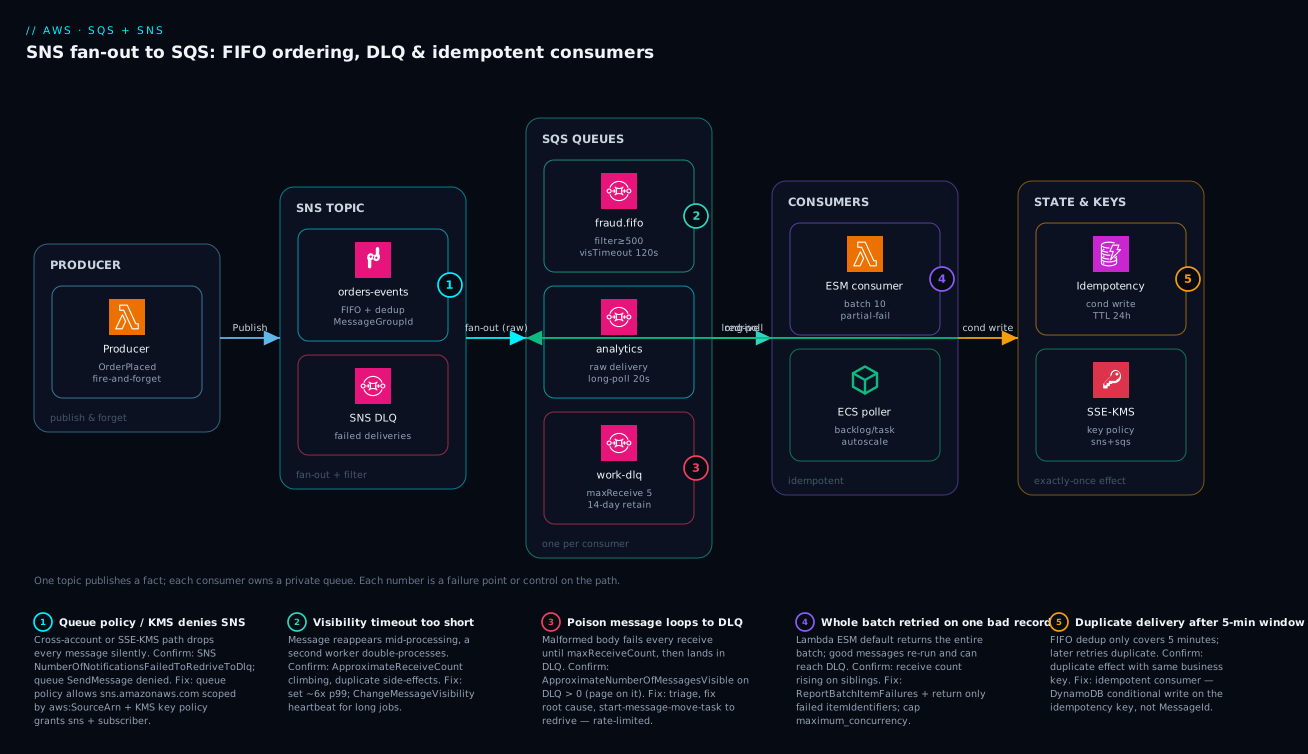
The diagram traces a single order event from the moment a producer publishes it to the moment its effect is durably recorded — and overlays the five places this path breaks. Read it left to right. On the far left, a producer Lambda publishes an OrderPlaced fact to the SNS topic orders-events and returns immediately; it never talks to a queue and never waits for a consumer. The topic fans the message out to one private SQS queue per consumer — a FIFO fraud.fifo queue that filters for amount ≥ 500, a standard analytics queue that takes everything with raw delivery, and so on — each subscription carrying its own filter policy so unwanted messages are dropped at the topic and never billed. Failed deliveries (a bad queue policy, a missing KMS grant) fall into the topic’s own SNS-level DLQ rather than vanishing.
From the queues, consumers pull on a 20-second long poll: a Lambda event source mapping pulling batches of ten with partial-batch-failure reporting, and an ECS poller that autoscales on backlog-per-task. Each consumer is idempotent — before it commits a side effect it does a conditional write to a DynamoDB idempotency table keyed on the business event ID, so a duplicate delivery is a no-op. Messages that exceed maxReceiveCount redrive to the work-dlq, where the DLQ-not-empty alarm pages on-call; once the root cause is fixed, StartMessageMoveTask replays them back to the source queue (the green return arrow). Every hop is encrypted with an SSE-KMS key whose policy must grant both SNS and the subscribers. The five numbered badges mark exactly where this fails in production: the queue/KMS policy that silently drops messages, the too-short visibility timeout that double-processes, the poison message that loops to the DLQ, the Lambda batch that retries good messages because of one bad sibling, and the duplicate that slips past FIFO’s five-minute dedup window — each one mapped in the legend to its symptom, the metric that confirms it, and the fix.
Real-world scenario
A payments platform team — call them Tendwell — ran a single standard SQS queue behind their card-authorization service. Under a Black Friday spike, the downstream processor slowed, processing time crept past their 30-second visibility timeout, and messages began reappearing mid-flight. A second consumer picked up each redelivered message and double-charged a subset of customers — a few hundred duplicate authorizations before they killed the consumers. The incident channel filled with “messaging is unreliable,” which was exactly the wrong lesson: the messaging was behaving precisely as documented, and the configuration was wrong.
The constraint that made the obvious fixes insufficient: they could not simply make the queue FIFO, because per-customer ordering mattered but a single global FIFO group would have collapsed throughput below their peak rate, and the 5-minute dedup window did not cover retries that recurred minutes later under sustained load. They also could not just lengthen the visibility timeout to a huge static value, because a genuinely crashed authorization would then stay invisible for many minutes, breaching their latency SLO and starving capacity during the exact window they needed it most.
The fix was layered, and the lesson was that no single setting would have saved them:
- FIFO with per-account message groups (
MessageGroupId = accountId) gave strict ordering per customer while keeping parallelism across customers, plus high-throughput mode (fifo_throughput_limit = "perMessageGroupId",deduplication_scope = "messageGroup") to clear the peak. - An idempotency table keyed on the gateway request ID made the charge itself a no-op on replay — the real fix, since FIFO dedup alone was insufficient past five minutes.
- Visibility-timeout heartbeats (
ChangeMessageVisibilityevery 20 seconds while a charge was in flight) stopped redelivery during legitimately slow downstream calls. - A DLQ with
maxReceiveCount = 3plus a DLQ-not-empty alarm that had never existed before, so genuinely malformed messages were sidelined and paged instead of looping silently.
# The charge became conditional on a recorded idempotency key.
def authorize(req_id: str, account_id: str, amount: int):
    try:
        ddb.put_item(
            TableName="auth-idempotency",
            Item={"req_id": {"S": req_id}, "ttl": {"N": str(ttl_24h())}},
            ConditionExpression="attribute_not_exists(req_id)",
        )
    except ddb.exceptions.ConditionalCheckFailedException:
        return load_prior_result(req_id)  # already authorized; return same result
    return gateway.charge(account_id, amount)
The numbers tell the story. Here is Tendwell’s before-and-after across the metrics that mattered:
| Metric | Before (incident) | After (next peak) |
|---|---|---|
| Duplicate authorizations | ~280 in 25 min | 0 |
| Visibility timeout | 30 s static | 60 s base + 20 s heartbeats |
| Ordering guarantee | None (standard) | Per-account (FIFO group) |
| Peak throughput | ~limited by single consumer | cleared peak (HT mode) |
| Poison handling | Looped 14 days | DLQ at 3 receives, paged |
| Idempotency | None | DynamoDB conditional write, 24 h TTL |
| MTTR for the duplicate-charge class | hours (manual) | minutes (alarm + idempotent replay) |
Post-change, duplicate authorizations went to zero across the next peak, and the DLQ alarm — which had not existed before — caught two genuinely malformed messages that previously would have looped silently for days. The retro’s one-line conclusion: the queue was never the problem; the consumer’s assumption of exactly-once delivery was.
Advantages and disadvantages
The decoupled SNS-to-SQS fan-out pattern is the right default for asynchronous work, but it is not free — the trade-offs are real and worth naming before you commit.
| Advantages | Disadvantages |
|---|---|
| Producer and consumers fully decoupled — add a consumer with one queue + subscription | Eventual consistency; no synchronous response to the caller |
| One slow/broken consumer can’t back-pressure others | More moving parts (topic, N queues, N DLQs, policies) to manage |
| Built-in durability + retries + DLQ without custom code | At-least-once delivery forces idempotency work on you |
| Scales to high throughput with no capacity planning (standard) | FIFO’s ordering/dedup come at a throughput + complexity cost |
| Server-side filtering cuts cost and consumer noise | Filter/IAM/KMS misconfig fails silently — hard to spot |
| Redrive + replay is first-class, not hand-rolled | Debugging async flows needs tracing you must set up |
| Per-consumer tuning (visibility, polling, retention) | Easy to misconfigure visibility timeout → double-process |
When each side matters: the advantages dominate any workload where the caller does not need an immediate answer — order processing, notifications, ETL triggers, audit pipelines, microservice choreography. The decoupling pays off most the second time you add a consumer without touching the producer. The disadvantages bite hardest when a synchronous contract is actually required (use a direct API call or Step Functions Express for request/response), when strict global ordering is mandatory (FIFO’s throughput ceiling may not fit), or when the team lacks the discipline to build idempotent consumers (in which case duplicates will cause incidents). The silent-failure modes — a typo’d filter attribute, a missing KMS grant — are the single biggest operational tax, which is why the monitoring section is non-negotiable.
Hands-on lab
This walk-through stands up a topic, two fan-out queues with filtering, a DLQ, and proves the failure handling — all within Free Tier (SQS gives one million requests/month free; SNS one million publishes). Use a throwaway region and tear it down at the end. Replace 111122223333 with your account ID.
1. Create the topic and two queues (plus a DLQ).
export AWS_DEFAULT_REGION=us-east-1
TOPIC_ARN=$(aws sns create-topic --name lab-orders --query TopicArn --output text)
FRAUD_URL=$(aws sqs create-queue --queue-name lab-fraud \
  --attributes '{"ReceiveMessageWaitTimeSeconds":"20","VisibilityTimeout":"60"}' \
  --query QueueUrl --output text)
ANALYTICS_URL=$(aws sqs create-queue --queue-name lab-analytics \
  --attributes '{"ReceiveMessageWaitTimeSeconds":"20"}' --query QueueUrl --output text)
DLQ_URL=$(aws sqs create-queue --queue-name lab-fraud-dlq \
  --attributes '{"MessageRetentionPeriod":"1209600"}' --query QueueUrl --output text)
2. Attach the DLQ via a redrive policy on the fraud queue.
DLQ_ARN=$(aws sqs get-queue-attributes --queue-url "$DLQ_URL" \
  --attribute-names QueueArn --query Attributes.QueueArn --output text)
aws sqs set-queue-attributes --queue-url "$FRAUD_URL" --attributes \
  "{\"RedrivePolicy\":\"{\\\"deadLetterTargetArn\\\":\\\"$DLQ_ARN\\\",\\\"maxReceiveCount\\\":\\\"3\\\"}\"}"
3. Grant SNS permission to send to each queue, then subscribe with a filter + raw delivery.
for Q in "$FRAUD_URL" "$ANALYTICS_URL"; do
  ARN=$(aws sqs get-queue-attributes --queue-url "$Q" --attribute-names QueueArn \
        --query Attributes.QueueArn --output text)
  POLICY="{\"Version\":\"2012-10-17\",\"Statement\":[{\"Effect\":\"Allow\",\"Principal\":{\"Service\":\"sns.amazonaws.com\"},\"Action\":\"sqs:SendMessage\",\"Resource\":\"$ARN\",\"Condition\":{\"ArnEquals\":{\"aws:SourceArn\":\"$TOPIC_ARN\"}}}]}"
  aws sqs set-queue-attributes --queue-url "$Q" --attributes "{\"Policy\":$(printf '%s' "$POLICY" | python3 -c 'import json,sys;print(json.dumps(sys.stdin.read()))')}"
done

FRAUD_ARN=$(aws sqs get-queue-attributes --queue-url "$FRAUD_URL" --attribute-names QueueArn --query Attributes.QueueArn --output text)
aws sns subscribe --topic-arn "$TOPIC_ARN" --protocol sqs --notification-endpoint "$FRAUD_ARN" \
  --attributes '{"RawMessageDelivery":"true","FilterPolicy":"{\"amount\":[{\"numeric\":[\">=\",500]}]}"}'
4. Publish a non-matching event — the fraud queue should stay empty.
aws sns publish --topic-arn "$TOPIC_ARN" --message '{"id":"o1"}' \
  --message-attributes '{"amount":{"DataType":"Number","StringValue":"100"}}'
sleep 3
aws sqs get-queue-attributes --queue-url "$FRAUD_URL" \
  --attribute-names ApproximateNumberOfMessages   # expect 0
5. Publish a matching event and confirm raw delivery (no SNS envelope).
aws sns publish --topic-arn "$TOPIC_ARN" --message '{"id":"o2","amount":900}' \
  --message-attributes '{"amount":{"DataType":"Number","StringValue":"900"}}'
aws sqs receive-message --queue-url "$FRAUD_URL" --wait-time-seconds 5 \
  --query 'Messages[0].Body'   # expect {"id":"o2","amount":900}, NOT {"Type":"Notification",...}
6. Force a poison message to the DLQ. Send a message, then receive it three times without deleting (let the short visibility lapse). After the third receive it lands in the DLQ.
aws sqs send-message --queue-url "$FRAUD_URL" --message-body '{"id":"poison"}'
for i in 1 2 3 4; do
  aws sqs receive-message --queue-url "$FRAUD_URL" --visibility-timeout 1 \
    --wait-time-seconds 2 --query 'Messages[0].MessageId' --output text
  sleep 2
done
sleep 3
aws sqs get-queue-attributes --queue-url "$DLQ_URL" \
  --attribute-names ApproximateNumberOfMessages   # expect >= 1
7. Redrive the DLQ back to source after the “fix.”
aws sqs start-message-move-task --source-arn "$DLQ_ARN" \
  --max-number-of-messages-per-second 50
aws sqs list-message-move-tasks --source-arn "$DLQ_ARN"
8. Teardown.
for Q in "$FRAUD_URL" "$ANALYTICS_URL" "$DLQ_URL"; do aws sqs delete-queue --queue-url "$Q"; done
aws sns delete-topic --topic-arn "$TOPIC_ARN"
Expected outcomes at a glance:
| Step | Expected result | If it fails |
|---|---|---|
| 4 (non-match) | Fraud queue depth 0 | Filter attribute name/typo; check FilterPolicy |
| 5 (match, raw) | Body is the raw payload | RawMessageDelivery not true |
| 6 (poison) | DLQ depth ≥ 1 after 3 receives | maxReceiveCount not set / DLQ not attached |
| 7 (redrive) | Move task listed, source repopulates | RedriveAllowPolicy blocks the source |
Common mistakes & troubleshooting
These are the failure modes I see repeatedly, framed as a playbook: symptom → root cause → how to confirm (exact command) → fix. Scan the table for your symptom, then read the detail.
| # | Symptom | Root cause | Confirm (exact command / metric) | Fix |
|---|---|---|---|---|
| 1 | Subscription “succeeded” but the queue stays empty | Queue policy missing sqs:SendMessage for sns.amazonaws.com |
SNS NumberOfNotificationsFailed > 0; aws sqs get-queue-attributes --attribute-names Policy |
Add queue policy allowing sns.amazonaws.com, aws:SourceArn=topic |
| 2 | Cross-account fan-out silently drops every message | SSE-KMS key policy doesn’t grant SNS / subscriber | CloudTrail Decrypt/GenerateDataKey AccessDenied |
Grant sns.amazonaws.com + subscriber on the CMK key policy |
| 3 | Consumer processes the same message twice | Visibility timeout < processing time | ApproximateReceiveCount > 1 on processed msgs |
Raise to ~6× p99; add ChangeMessageVisibility heartbeat |
| 4 | One bad record drives nine good ones to the DLQ | Lambda batch fails whole-batch (no partial reporting) | ESM function_response_types unset |
Add ReportBatchItemFailures; return failed itemIdentifiers |
| 5 | A malformed message loops for days | No DLQ / no maxReceiveCount |
Redrive policy absent on source queue | Attach DLQ with maxReceiveCount 3–5 |
| 6 | Consumer reads garbage, double-parses JSON | RawMessageDelivery not enabled |
Message body starts {"Type":"Notification" |
Set RawMessageDelivery=true on the subscription |
| 7 | FIFO queue serialized to one message at a time | Single constant MessageGroupId |
All messages share one group ID | Use per-entity group ID (accountId/orderId) |
| 8 | Duplicates slip past FIFO dedup | Retries recur after the 5-min window | Same business key processed twice, >5 min apart | Idempotent consumer keyed on business ID |
| 9 | High empty-receive cost / noisy polling | Short polling (wait time 0) | NumberOfEmptyReceives high |
Set ReceiveMessageWaitTimeSeconds=20 |
| 10 | Messages “lost” after a few days | Retention expiry (default 4 days) | MessageRetentionPeriod = 345600 |
Raise retention; on DLQ set 14 days |
| 11 | Backlog grows, consumers look idle | Scaling on CPU, not backlog | CPU low while ApproximateAgeOfOldestMessage rises |
Scale on backlog-per-task / ESM concurrency |
| 12 | OverLimit errors on receive |
In-flight cap hit (120k std / 20k FIFO) | ApproximateNumberOfMessagesNotVisible near cap |
Delete faster; shorten visibility; more consumers |
| 13 | FIFO publish rejected / dropped | Reused MessageDeduplicationId within 5 min |
Dedup ID identical to a recent send | Use a unique-per-logical-event dedup ID |
| 14 | Redriven messages bounce straight back to DLQ | Root cause not fixed before redrive | DLQ refills right after StartMessageMoveTask |
Fix code/schema first, then redrive |
The entries that bite hardest, expanded:
1. Subscription confirmed but the queue never receives anything.
Root cause: The queue resource policy doesn’t allow sns.amazonaws.com to sqs:SendMessage. SNS thinks it delivered; SQS refuses the write. Terraform’s aws_sns_topic_subscription does not write this policy for you.
Confirm: aws sqs get-queue-attributes --queue-url "$Q" --attribute-names Policy shows no SNS statement; SNS NumberOfNotificationsFailed is non-zero.
Fix: Attach a queue policy allowing sns.amazonaws.com with aws:SourceArn scoped to the topic (see the encryption section’s Terraform).
2. Cross-account fan-out silently drops every message.
Root cause: The topic uses SSE-KMS and the key policy doesn’t grant sns.amazonaws.com (and the subscribing account) GenerateDataKey/Decrypt. The message can’t be encrypted/decrypted on the path, so it’s dropped with no error to you.
Confirm: CloudTrail shows AccessDenied on kms:Decrypt or kms:GenerateDataKey for the SNS service principal.
Fix: Add both sns.amazonaws.com and the subscriber principal to the CMK key policy; scope with aws:SourceArn/aws:SourceAccount.
3. The consumer ran twice.
Root cause: The visibility timeout is shorter than processing time, so the message reappears mid-flight and a second worker grabs it.
Confirm: ApproximateReceiveCount on successfully processed messages is > 1; duplicate side effects in your data.
Fix: Set the timeout to ~6× p99 processing time; for long/variable work add a ChangeMessageVisibility heartbeat. And make the consumer idempotent regardless.
4. One poison record drove the whole batch to the DLQ.
Root cause: A Lambda ESM without ReportBatchItemFailures returns the entire batch on any exception, so already-succeeded messages re-run and a single bad sibling pushes the batch to DLQ.
Confirm: The ESM’s function_response_types is unset; good messages show rising receive counts.
Fix: Set function_response_types = ["ReportBatchItemFailures"] and return only the failed itemIdentifiers.
8. Duplicates that FIFO didn’t catch. Root cause: FIFO dedup is bounded to five minutes; a retry that recurs after that window is a fresh message to SQS. Confirm: The same business key is processed twice, more than five minutes apart. Fix: Build an idempotent consumer on a business idempotency key (DynamoDB conditional write); FIFO reduces duplicate volume but never removes the need.
Best practices
- One SQS queue per consumer. Producers publish only to the SNS topic, never to consumer queues directly. Adding a consumer is one queue + one subscription, never a producer change.
RawMessageDelivery = trueon SQS subscriptions. Strip the SNS envelope so consumers read the publisher’s body. Push routing into SNS with filter policies so unwanted messages are dropped at the topic, never billed.- Every source queue has a redrive policy with a tuned
maxReceiveCount(3–5) pointing at a DLQ. Without it, a poison message loops for fourteen days. - DLQs use 14-day retention and a
RedriveAllowPolicyscoping which sources may redrive back. A FIFO source needs a FIFO DLQ. - Standard by default; FIFO only with a deliberate
MessageGroupIdstrategy and explicit dedup IDs. A single constant group ID serializes your whole queue — almost never what you want. - Visibility timeout ~6× p99 processing time, with
ChangeMessageVisibilityheartbeats for long jobs rather than a huge static value. - Long polling everywhere (
ReceiveMessageWaitTimeSeconds = 20). Short polling is a cost and noise misconfiguration. - Consumers are idempotent on a business key, independent of FIFO’s five-minute dedup window. Exactly-once effect lives in the consumer, not the queue.
- Lambda ESMs use
ReportBatchItemFailuresand amaximum_concurrencybackpressure cap so one queue can’t hammer a fragile downstream. - Scale consumers on backlog-per-task, not CPU.
ApproximateNumberOfMessagesVisible ÷ tasksis the honest “keeping up” signal. - SSE on all queues/topics; SNS-to-SQS queue policy scoped with
aws:SourceArn. Cross-account paths grant both topic-policy and KMS-key-policy access. - Alarm on DLQ-not-empty (page) and rising
ApproximateAgeOfOldestMessage(SLA signal) — not on raw queue depth, which is noisy.
Security notes
- Encrypt every queue and topic at rest. SSE-SQS (managed) is free and the right default; use SSE-KMS with a customer-managed key when you need a CloudTrail audit trail of key use, controlled rotation, or cross-account key policies. See KMS Encryption Deep Dive for envelope encryption and key-policy patterns.
- Scope SNS→SQS delivery, never leave it open. The queue policy must allow
sns.amazonaws.comtosqs:SendMessagewith aConditiononaws:SourceArnequal to the topic. An unconditionedPrincipal: "*"lets any topic (or anyone) write to your queue. - Least privilege per role. Producers get
sns:Publishon the topic only; consumers getReceiveMessage/DeleteMessage/ChangeMessageVisibility/GetQueueAttributes(+kms:Decrypt) on the queue only; redrive operators getStartMessageMoveTaskon the DLQ. Neversqs:*/sns:*on*in application roles. - Cross-account is two grants, both explicit. The topic policy must allow the other account to subscribe, and the KMS key policy must grant SNS and the subscriber — the second is the one that silently drops every message when missed.
- Don’t put secrets or PII in message bodies you can’t encrypt and audit. If a payload carries sensitive data, SSE-KMS gives you the audit trail; consider field-level handling for the most sensitive attributes.
- Tighten the data-key reuse window thoughtfully. A longer
KmsDataKeyReusePeriodSecondscuts KMS cost but widens the blast radius if a data key is ever exposed; 300 s is a sane default. - Use VPC endpoints for SQS/SNS where consumers run in private subnets, so queue traffic never traverses the public internet.
The security controls and what each prevents:
| Control | Mechanism | Secures against | Also prevents |
|---|---|---|---|
| SSE-KMS on queue/topic | CMK + key policy | Plaintext data at rest | Untracked secret access |
Queue policy scoped by aws:SourceArn |
Resource policy Condition |
Any topic/principal writing to your queue | Cross-account confused-deputy writes |
| Least-privilege consumer role | IAM policy on the queue ARN | Over-broad sqs:* blast radius |
Accidental purge/delete of queues |
| KMS key policy grant to SNS + subscriber | Key policy statement | Cross-account decrypt failures (silent drop) | Undebuggable message loss |
| VPC endpoint for SQS/SNS | Interface endpoint | Traffic over public internet | Egress-filtering false positives |
RedriveAllowPolicy (byQueue) |
DLQ attribute | Rogue queues redriving out of a shared DLQ | Accidental cross-source replay |
Cost & sizing
What drives the SQS/SNS bill and how to keep it small:
- Requests dominate. SQS bills per request (each
SendMessage,ReceiveMessage,DeleteMessage,ChangeMessageVisibilityis a request); a long poll that returns empty still counts. Batching up to 10 messages per call and long polling are the two biggest levers — batching alone can cut request count ~10×. - Standard vs FIFO pricing. FIFO requests cost more per million than standard. If you don’t need ordering or dedup, standard is both cheaper and higher-throughput.
- SNS publishes + deliveries. SNS bills per publish and per delivery to each endpoint; filter policies that drop messages at the topic mean you pay for neither the SQS request nor the consumer compute on filtered messages — server-side filtering is a cost optimization, not just a routing convenience.
- KMS is the sleeper cost. SSE-KMS adds a KMS request roughly per data-key generation; raising
KmsDataKeyReusePeriodSeconds(default 300 s) amortizes that across more messages. SSE-SQS is free — use it unless you specifically need the CMK. - Free Tier: one million SQS requests/month and one million SNS publishes/month are free — most dev/test and many small prod workloads never leave it.
A rough monthly picture and what each lever changes:
| Cost driver | What you pay for | Rough scale | Lever to reduce | Watch-out |
|---|---|---|---|---|
| SQS standard requests | Per API request (incl. empty receives) | Free to ~₹35–40 per million beyond Free Tier | Batch 10×; long poll | Short polling balloons empty receives |
| SQS FIFO requests | Per request, FIFO tier | Higher per million than standard | Use standard if no ordering needed | FIFO chosen by default unnecessarily |
| SNS publishes + deliveries | Per publish + per delivery | Free to a few ₹ per million | Filter policies drop at topic | Unfiltered fan-out multiplies deliveries |
| KMS (SSE-KMS) | Per data-key request | Small, but per-message if reuse low | Raise data-key reuse period | Forgetting reuse → KMS call per message |
| Lambda consumer | Invocations + duration | Per consumed batch | Larger batches; right-size memory | Tiny batches = many invokes |
| ECS consumer | Running task-hours | Per task continuously | Scale on backlog; scale to zero off-peak | Over-provisioned idle tasks |
Sizing guidance: start standard, single queue per consumer, long polling on, batch sends/deletes at 10. Move to FIFO only when ordering is a real requirement, and to high-throughput FIFO only when a single group’s 300 msg/s ceiling is the bottleneck. Right-size consumers by backlog, not peak — autoscale ECS tasks (or cap Lambda ESM concurrency) to the measured ApproximateAgeOfOldestMessage target rather than provisioning for the worst hour all month.
Interview & exam questions
1. What is the SNS-to-SQS fan-out pattern and why is it preferable to a producer writing to multiple queues? A producer publishes once to an SNS topic; the topic delivers a copy to each subscribed SQS queue, and every consumer drains its own private queue. It’s preferable because the producer stays decoupled — adding a consumer is one queue + one subscription with no producer change — and a slow consumer fills only its own queue, never back-pressuring the producer or other consumers.
2. What does RawMessageDelivery do and why enable it for SQS subscriptions? It strips the SNS JSON envelope ({"Type":"Notification","Message":"..."}) so the SQS consumer reads the publisher’s body directly instead of double-parsing. Without it, message attributes are nested inside the envelope and every consumer carries envelope-parsing code. Enable it for SQS fan-out unless you specifically need SNS metadata.
3. Explain the difference between standard and FIFO queues. Standard queues offer nearly unlimited throughput with at-least-once delivery and best-effort ordering. FIFO queues guarantee strict ordering within a message group and exactly-once processing within a five-minute dedup window, but cap throughput (300 msg/s, 3,000 batched, higher in high-throughput mode) and require .fifo names. Pick standard unless you can articulate why you need ordering or dedup.
4. How does the visibility timeout cause double-processing, and how do you fix it? When a consumer receives a message, SQS hides it for the visibility timeout and expects a delete before it expires. If processing takes longer than the timeout, the message reappears and a second consumer processes it. Fix by setting the timeout to ~6× p99 processing time and extending it dynamically with ChangeMessageVisibility heartbeats for long jobs — and make the consumer idempotent regardless.
5. What is maxReceiveCount and what exactly does “received” mean? It’s the number of times a message may be received before SQS moves it to the DLQ via the redrive policy. “Received” means delivered to a consumer — not “failed” — so a consumer that receives, crashes, and lets the visibility timeout lapse still increments the count. Typical values are 3–5.
6. Why is an idempotent consumer necessary even with FIFO? FIFO’s exactly-once processing only holds within a five-minute deduplication window; a retry that recurs after that window is a fresh message. Standard queues redeliver freely. The only durable guarantee is exactly-once effect in the consumer — derive a stable business idempotency key and make the side effect conditional (e.g. a DynamoDB attribute_not_exists write).
7. Why should you never use MessageId as an idempotency key? A redelivery of the same message keeps its MessageId, but a re-publish by the producer (a producer-side retry) gets a brand-new MessageId, so the same logical event can arrive with different IDs. Use a stable business key (order ID + version, or a propagated MessageDeduplicationId) that survives both redelivery and re-publish.
8. What goes wrong with a Lambda SQS consumer that doesn’t use ReportBatchItemFailures? If the handler throws, the entire batch returns to the queue and every message’s receive count increments — including the ones that already succeeded. Those get reprocessed, and a single poison message can drive the whole batch (good messages included) to the DLQ. Declaring ReportBatchItemFailures and returning only the failed itemIdentifiers deletes the successes and retries only the failures.
9. A cross-account SNS-to-SQS subscription delivers nothing and logs no error. What did you forget? Almost certainly the KMS key policy: if the topic uses SSE-KMS, the key policy must grant sns.amazonaws.com and the subscribing principal GenerateDataKey/Decrypt, or every message is silently dropped. Cross-account also needs the topic policy to allow the other account to subscribe. Confirm via CloudTrail AccessDenied on KMS.
10. Which metric is the true SLA signal for a queue, and why not queue depth? ApproximateAgeOfOldestMessage. Depth can spike transiently and still be healthy (a burst the consumers will drain); a rising oldest-message age means consumers are genuinely falling behind. Alarm on the age, and page on any message in a DLQ.
11. How do you scale ECS consumers correctly? Drive autoscaling off backlog-per-task — ApproximateNumberOfMessagesVisible ÷ running task count against a target — not CPU. CPU lags and a fast consumer with a deep backlog can read low CPU, so CPU-based scaling under-provisions exactly when you need capacity.
12. What is redrive and how do you do it safely? Redrive (StartMessageMoveTask) moves messages from a DLQ back to the source queue for reprocessing — a first-class feature, not a hand-rolled re-publish. Do it safely by fixing the root cause first (or the messages bounce straight back), rate-limiting the move (--max-number-of-messages-per-second) so you don’t re-flood a recovering downstream, and watching the source backlog as they clear.
These map to AWS Certified Developer – Associate (DVA-C02) — develop with SQS/SNS, messaging patterns, idempotency — and Solutions Architect – Associate (SAA-C03) — decoupling, fan-out, DLQs, resilient architectures. The operational depth (redrive, alarms, backpressure) touches DevOps Engineer – Professional (DOP-C02). A compact cert-mapping for revision:
| Question theme | Primary cert | Objective area |
|---|---|---|
| Fan-out, filter policies, raw delivery | SAA-C03 / DVA-C02 | Decoupled, event-driven design |
| Standard vs FIFO, ordering, dedup | DVA-C02 | Messaging semantics |
| Visibility timeout, polling, double-process | DVA-C02 | Develop reliable consumers |
DLQ, maxReceiveCount, redrive |
DVA-C02 / DOP-C02 | Resilience & operations |
| Idempotency, exactly-once effect | DVA-C02 | Application reliability |
| Cross-account IAM/KMS, SSE | SAA-C03 / SCS-C02 | Secure messaging |
| Metrics, alarms, backlog scaling | DOP-C02 | Monitoring & operations |
Quick check
- A producer publishes once and three consumers each need a different slice of the events. What pattern do you use, and where does the per-consumer filtering belong?
- Your consumer processed the same payment twice during a slow downstream. Name the most likely misconfiguration and the metric that confirms it.
- True or false: enabling FIFO removes the need for idempotent consumers.
- A brand-new SNS-to-SQS subscription shows “succeeded” but the queue is always empty. What’s the first thing you check?
- One malformed message in a Lambda batch of ten drove all ten to the DLQ. What single setting fixes this, and what must your handler return?
Answers
- SNS-to-SQS fan-out: one topic, one private SQS queue per consumer. Put the per-consumer filtering in SNS subscription filter policies so non-matching messages are dropped at the topic — never delivered, never billed as an SQS request or consumer invocation.
- The visibility timeout is shorter than the processing time, so the message reappeared mid-flight and a second worker grabbed it. Confirm with
ApproximateReceiveCount> 1 on successfully processed messages. Fix: raise the timeout to ~6× p99 and addChangeMessageVisibilityheartbeats — and make the consumer idempotent. - False. FIFO’s exactly-once processing only holds within a five-minute dedup window; retries that recur later are fresh messages, and standard queues redeliver freely. You still need an idempotent consumer keyed on a business idempotency key.
- The queue resource policy — it must allow
sns.amazonaws.comtosqs:SendMessagewithaws:SourceArnscoped to the topic.aws_sns_topic_subscriptiondoes not write it for you; SNS reports delivery while SQS refuses the write. (NumberOfNotificationsFailedwill be non-zero.) - Set
function_response_types = ["ReportBatchItemFailures"]on the event source mapping, and have the handler return{"batchItemFailures": [{"itemIdentifier": "<messageId>"}]}containing only the failed messages — Lambda deletes the rest.
Glossary
- SNS topic — a publish/subscribe fan-out point; one publish is delivered as a copy to every subscriber (SQS, Lambda, HTTP, etc.).
- SQS queue — a durable, pull-based message buffer that one consumer group drains by polling; absorbs bursts and decouples producer from consumer.
- Fan-out — one SNS topic delivering to N independent SQS queues, one per consumer, so each consumer scales and fails independently.
- Filter policy — a server-side rule on an SNS subscription that drops non-matching messages at the topic (default on message attributes; optionally on the body).
- RawMessageDelivery — a subscription flag that strips the SNS JSON envelope so the SQS consumer reads the publisher’s body directly.
- Standard queue — at-least-once delivery, best-effort ordering, nearly unlimited throughput; the default.
- FIFO queue — strict ordering within a message group and exactly-once processing within a five-minute dedup window; name ends
.fifo; throughput-capped. - MessageGroupId — the FIFO ordering unit; order is guaranteed within a group and parallel across groups; pick the entity to serialize (e.g.
accountId). - MessageDeduplicationId — an explicit dedup key collapsing duplicate sends within five minutes; or
ContentBasedDeduplicationhashes the body. - Visibility timeout — the lease that hides a received message; the consumer must delete it before the lease expires, or it reappears for another consumer.
- ChangeMessageVisibility — extends a message’s lease mid-processing (a heartbeat) for long or variable jobs.
- Long polling —
ReceiveMessageWaitTimeSeconds(up to 20 s) makes a receive wait for a message instead of returning empty, cutting empty-receive cost and noise. - Poison message — a message a consumer can never process (malformed, deleted reference, unknown schema) that would loop forever without a DLQ.
- maxReceiveCount — the number of receives before SQS moves a message to the DLQ, set in the source queue’s redrive policy.
- Dead-letter queue (DLQ) — a separate queue that sidelines messages exceeding
maxReceiveCount; give it 14-day retention and a matching type. - Redrive / StartMessageMoveTask — the first-class feature that moves DLQ messages back to the source queue after a fix; rate-limit it.
- RedriveAllowPolicy — a DLQ attribute (
allowAll/byQueue/denyAll) controlling which source queues may redrive out of it. - Idempotency key — a stable business identifier used to make processing the same event twice a no-op (never
MessageId). - Event source mapping (ESM) — Lambda’s managed poller that long-polls a queue and invokes in batches; carries
ReportBatchItemFailuresand a concurrency cap. - ReportBatchItemFailures — the ESM response type that lets a handler return only the failed message IDs, so successes in a batch aren’t reprocessed.
- SSE-SQS / SSE-KMS — server-side encryption with an AWS-managed key (free) or a customer-managed KMS key (audit, rotation, cross-account control).
Next steps
You can now design a resilient fan-out, choose delivery semantics deliberately, and make consumers survive duplicates and poison. Build outward:
- Foundations: SNS, SQS and EventBridge Messaging Fundamentals — the ground-floor concepts beneath this deep dive.
- Related: EventBridge: Event-Driven Architecture with Buses, Schema & Pipes — when routing outgrows topic filter policies and you need a bus, schema registry, and Pipes.
- Related: Step Functions: Distributed Orchestration & Error-Handling Patterns — when a workflow needs state, retries with backoff, and saga compensation beyond a single queue.
- Related: Lambda Deep Dive: Runtimes, Triggers, Layers & Concurrency — the consumer-side mechanics: ESM, batching, and concurrency.
- Related: DynamoDB Deep Dive: Tables, Keys, Capacity, GSIs & Streams — design the idempotency table and use Streams for change-data-capture fan-out.
- Related: Event-Driven Order Processing with the Saga Pattern — a full worked architecture that combines fan-out, FIFO ordering, and compensation.
- Related: CloudWatch & CloudTrail Observability Deep Dive — dashboards, composite alarms, and the audit trail behind the metrics in this article.