In a nutshell
Picture the notepad next to a busy coffee till. Instead of walking to the stockroom (the database) for every price, the cashier jots the hot answers on the pad and reads them back instantly. That pad is a cache, and Redis is the fastest, most popular one in the industry. Azure Cache for Redis is that pad run for you as a managed service.
Now scale the shop up and the analogy explains this whole article. Clustering is when one pad is not enough, so the answers are split across several clerks by a rule — “names A–M at desk 1, N–Z at desk 2.” Anyone doing a lookup has to know the rule, or they ask the wrong clerk and get waved away (a MOVED reply). Need two names that live on different desks in one step? You can’t — unless you deliberately filed them at the same desk on purpose (a hash tag), otherwise you get a CROSSSLOT refusal. Active geo-replication is when the chain opens a branch in another city and both branches take orders on the same shared ledger; when both edit the same line at the same moment, a pre-agreed merge rule (a CRDT) settles it automatically — no manager phone call, no “which branch wins.” The recurring lesson of the whole guide: the pad almost never fails. The person reading it fails — they memorised one clerk’s spot, or panicked at a “go ask desk 2” note. That person is your client library, and most of this article is about making it calm.
Level: Advanced — but this opener is beginner-safe · Time: ~76 min read
Before you start you only need to know what a cache is for and a handful of everyday Redis commands (GET, SET, INCR, MGET); the deeper prerequisites (VNets, Private DNS, a client library) and the formal learning objectives are spelled out in the two sections right below this one, so skim them if a term here is new.
After this you can, in plain terms: explain why “the cache is down” is usually the client, not the cache; tell the four tiers apart by what they guarantee rather than their size; know when two regions can safely both accept writes (and when a replica is only a read-only spare); and recognise the handful of settings that turn a scary-looking failover into a non-event. The dense sections deliver the how; this one is just the map.
Most “Redis is down” pages I have been dragged into were not Redis failing. They were a client library that opened a single connection to a single node, hardcoded a regional hostname, and treated MOVED as a fatal error instead of a routing hint. Azure Cache for Redis Enterprise – the tier built on the commercial Redis Enterprise runtime rather than OSS Redis – gives you clustering, multi-region active-active replication, durable persistence, and the Redis modules (Search, JSON, TimeSeries, Bloom). But every one of those features changes the contract your client must honor. Cross-slot multi-key commands are no longer free. A node can move under you mid-request. Two regions can both accept a write to the same key and you have to decide who wins. This guide wires up the Enterprise tier correctly and, just as importantly, builds the client-side behavior that survives the day the topology shifts.
Everything here targets the Enterprise and Enterprise Flash tiers, with notes on where Premium diverges. The provider resource is Microsoft.Cache/redisEnterprise, a different ARM resource type from the Microsoft.Cache/redis you use for Basic/Standard/Premium. That distinction trips up Terraform and Bicep modules constantly, and it is the first thing to get right because a module written for one resource type silently does nothing useful against the other.
By the end you will stop treating “the cache is down” as a single event. You will know whether you are looking at a CROSSSLOT error from a keyspace that ignored hash tags, a MOVED that escaped to application code because cluster mode is off, an OOM because NoEviction met an undersized cluster, a connection storm because the client pools per-request instead of multiplexing, or a genuine regional outage that an active-active CRDB should have made a non-event. Knowing which in ninety seconds is what separates a five-minute blip from a two-hour incident.
What problem this solves
A cache that holds session state, idempotency keys, feature flags, rate-limit counters, or a hot read-through layer is on the critical path of every request. When it stalls, the application stalls behind it – or worse, falls back to the database and runs at a fraction of normal throughput until the database itself buckles. The naive answer (“just add a replica”) solves node loss but not the three failure classes that actually page senior engineers: a client that cannot follow a topology change, a single-region cache that cannot accept writes during a regional incident, and a cache used as an LRU eviction store in a geo-replicated topology where evictions silently diverge the regions.
What breaks without the Enterprise patterns: a passive geo-replica that is read-only at exactly the moment you need to write to it (during the primary region’s outage), turning an eleven-minute regional blip into eleven minutes of either blocked writes or duplicate processing. A MULTI/EXEC transaction that worked in dev against a single node and throws CROSSSLOT the first time it runs against a real cluster. A ConnectionMultiplexer created with the default AbortOnConnectFail = true that throws permanently the first time a maintenance window blips the connection and never recovers. A cache sized for the average working set that OOMs the moment a campaign doubles the keyspace, returning OOM command not allowed on every write because the policy is NoEviction.
Who hits this: any team running Redis on the critical path at scale. It bites hardest on multi-region applications (where passive replication is mistaken for an availability tool), on stateful workloads that model everything as opaque strings (and so eat last-write-wins data loss), on teams that adopt clustering without auditing their client library’s cluster support, and on anyone who treats Redis persistence as a backup. The fix is rarely “buy a bigger SKU” – it is “model the data as the right CRDT, pick the clustering policy the client can actually drive, size for the full working set under NoEviction, and make the client survive a node move.”
To frame the field before the deep dive, here is every failure class this article covers, the question it forces, and where to look first:
| Failure class | What it looks like | First question to ask | First place to look | Most common single cause |
|---|---|---|---|---|
| CROSSSLOT error | Multi-key command rejected | Are these keys in one hash slot? | Client exception text | Keyspace ignores hash tags |
| MOVED in app code | App sees a MOVED 1234 ip:port |
Is the client in cluster mode? | Client config / cluster flag | Cluster-unaware client on OSS policy |
| OOM on write | OOM command not allowed |
Memory % vs eviction policy | usedmemorypercentage metric |
NoEviction + undersized cluster |
| Connection storm | Thousands of conns/sec | One multiplexer or pool-per-request? | connectionscreatedpersecond |
New connection per operation |
| Regional write outage | One region can’t write | Passive replica or active-active? | Topology / geoReplication |
Passive geo-replica used for HA |
| Replica divergence | Two regions disagree | Is eviction on in a geo group? | Eviction policy + metrics | LRU eviction on an active-active DB |
Learning objectives
By the end of this article you can:
- Choose between Standard, Premium, Enterprise, and Enterprise Flash from durability and topology requirements rather than raw memory size, and explain why Enterprise is a separate runtime, not the next rung on a ladder.
- Pick the right clustering policy (OSS vs Enterprise/proxy) at creation time, knowing it is permanent, and design a keyspace with hash tags so transactions, Lua, and
MGET/MSETstay single-slot. - Stand up active geo-replication as a conflict-free replicated database (CRDB) across regions, and model write data as the correct CRDT (counter, set, hash) where last-write-wins on strings is unacceptable.
- Configure RDB and AOF persistence with the right durability trade-off, and explain why persistence is not a backup and how it relates to (but differs from) replication.
- Lock the cache into a VNet with a Private Endpoint, Private DNS, TLS-only on port 10000, and Microsoft Entra ID token auth instead of a shared access key.
- Build a resilient client: a singleton multiplexer with
AbortOnConnectFail = false, periodic health checks, and a jittered operation-level retry that survives scaling, patching, and node moves. - Run online scale-up and scale-out operations, validate them with a load test through a live reshard, and alert on the leading indicators (used-memory %, eviction rate, server load, client-side p99) before they become outages.
Prerequisites & where this fits
You should already understand Redis at the data-structure level: strings, hashes, sets, sorted sets, TTL/EXPIRE, and the basic command set (SET, GET, INCR, MGET, MULTI/EXEC). You should know how to run az in Cloud Shell, read JSON output, and reason about a VNet, subnet, NSG, and Private DNS zone. Familiarity with at least one Redis client library (StackExchange.Redis, Lettuce/Jedis, redis-py, go-redis) helps, because half of the resilience story lives in client configuration.
This sits in the Data & Caching track of the Zero-to-Hero program. It assumes the networking fundamentals from Azure Virtual Network Basics: Subnets, NSGs, and Peering and the private-connectivity patterns from Azure Private Endpoints and Private DNS at Scale. The identity and secret-handling side leans on Azure Key Vault: Secret Rotation with Managed Identity. For multi-region thinking beyond the cache, it pairs with Cosmos DB Multi-Region Writes and Conflict Resolution (a useful contrast: Cosmos lets you plug in conflict logic; Redis CRDTs resolve automatically per type) and Azure Multi-Region Active-Active Disaster Recovery. When the cache fronts a relational store, Azure SQL Database: Hyperscale, Elastic Pools, Ledger is the backing tier the cache protects.
A quick map of who owns what during a cache incident, so you call the right person fast:
| Layer | What lives here | Who usually owns it | Failure classes it can cause |
|---|---|---|---|
| Client library | Multiplexer, retries, cluster mode | App / dev team | MOVED leaks, connection storms, no reconnect |
| Keyspace design | Hash tags, TTLs, data types | App / dev team | CROSSSLOT, LWW data loss, divergence |
| Cache database | Eviction, persistence, clustering | Platform / data team | OOM, restart data loss, slot routing |
| Geo-replication mesh | CRDB links, group nickname | Platform / data team | Write outage (if passive), replication lag |
| Network | Private Endpoint, DNS, NSG, TLS | Network team | Public exposure, DNS resolves to public IP |
| Identity | Access key, Entra token, RBAC | Security / platform | Leaked key, token expiry, auth failure |
Core concepts
Six mental models make every later decision obvious.
Enterprise is a different runtime, not a bigger Premium. Basic/Standard/Premium run OSS Redis under Microsoft.Cache/redis. Enterprise and Enterprise Flash run the commercial Redis Enterprise software under Microsoft.Cache/redisEnterprise, with a parent cluster resource and a child database resource. The database is the thing your client connects to. This split is why a Bicep module that creates a Microsoft.Cache/redis resource cannot produce an Enterprise cache, and why the endpoint, port, and capabilities differ.
The clustering policy is a permanent client contract. You choose OSS or Enterprise clustering policy at database creation and you cannot change it without recreating the database. OSS exposes the native Redis Cluster API: the client discovers every shard, computes the CRC16 hash slot (16384 slots) for each key, and connects directly to the owning node – lowest latency, but it requires a cluster-aware client and the client sees every node address. Enterprise policy puts a proxy in front of the shards so the client talks to a single endpoint like a standalone Redis – simplest for clients and networking, at the cost of a proxy hop.
Multi-key commands need one hash slot. In any clustered Redis, a command touching multiple keys requires all of them in the same hash slot. MSET user:1001 a user:1002 b hashes the two keys to different slots and fails with CROSSSLOT under OSS policy. Hash tags – the substring inside the first {} – force co-location: MSET user:{t42}:1001 a user:{t42}:1002 b hashes both on t42. Design the keyspace so everything you co-access (a tenant, an order, a session) shares a hash tag; otherwise transactions, Lua scripts, and MGET/MSET break.
Active-active means no primary and automatic conflict resolution. Enterprise active geo-replication builds an Active-Active CRDB (conflict-free replicated database). Every region accepts reads and writes; changes replicate full-mesh to all peers. A region outage means you keep serving from the survivors with no failover step. Concurrent writes converge deterministically because each data type is reimplemented as a CRDT (conflict-free replicated data type): strings are last-write-wins by timestamp, counters are additive (both increments apply), and sets/hashes/sorted-sets merge per element. You do not write conflict logic; you choose the data type that gives the convergence you need.
Persistence survives restart; replication survives node loss; neither is a backup. RDB snapshots the dataset on an interval; you lose everything since the last snapshot on a hard failure. AOF logs every write, and with fsync every second the worst-case loss is ~1 second. Both protect against a full cluster restart. Replication protects against losing a node or a region. Neither protects against a bad FLUSHALL or a logic bug – that is what an export to a storage account is for.
The client is where outages are made or prevented. A correctly provisioned, multi-region, persistent cluster behind a broken client is still an outage. The client must multiplex (one long-lived connection, not pool-per-request), keep retrying instead of throwing on first-connect failure, follow MOVED/ASK redirects (OSS policy), health-check idle connections, and retry the operation with jittered backoff through a node move. Every one of those is a configuration choice, and the defaults are frequently wrong for Azure.
The vocabulary in one table
Before the deep sections, pin down every moving part. The glossary at the end repeats these for lookup; this table is the mental model side by side:
| Concept | One-line definition | Where it lives | Why it matters |
|---|---|---|---|
| Enterprise cluster | The redisEnterprise parent resource (nodes) |
Subscription / RG | Holds the SKU, zones, capacity |
| Database | The child databases/default Redis endpoint |
On the cluster | The thing the client connects to |
| Clustering policy | OSS (native) vs Enterprise (proxy) routing | Database property (permanent) | Dictates client mode + networking |
| Hash slot | One of 16384 CRC16 buckets for keys | Across shards | Multi-key cmds need one slot |
| Hash tag | {...} substring that is hashed |
In the key name | Forces co-location of keys |
| CRDB | Conflict-free replicated (geo) database | Across regions | Active-active, no primary |
| CRDT | Conflict-free data type (per Redis type) | Per key/value | Deterministic merge of writes |
| RDB / AOF | Snapshot / append-only persistence | Database property | Restart durability (not backup) |
| Eviction policy | What happens at memory limit | Database property | NoEviction → OOM; LRU → loss/divergence |
| Private Endpoint | Private IP projection into a VNet | In your subnet | Removes public exposure |
| Multiplexer | One long-lived client connection object | In the app | Prevents connection storms |
| Server Load | % time the Redis main thread is busy | Azure Monitor metric | Leading CPU-bound indicator |
Tier selection: Standard, Premium, Enterprise, Enterprise Flash
Pick the tier from your durability and topology requirements, not from raw memory size. The tiers are not a linear ladder – Enterprise is a separate runtime, and Flash trades RAM for NVMe to cut cost on large skewed datasets.
| Capability | Standard | Premium | Enterprise | Enterprise Flash |
|---|---|---|---|---|
| Runtime | OSS Redis | OSS Redis | Redis Enterprise | Redis Enterprise |
| ARM resource type | Microsoft.Cache/redis |
Microsoft.Cache/redis |
Microsoft.Cache/redisEnterprise |
Microsoft.Cache/redisEnterprise |
| SLA (single region) | 99.9% | 99.9% (99.99% zone-redundant) | up to 99.999% | up to 99.999% |
| Clustering | no | OSS only | OSS or Enterprise policy | OSS or Enterprise policy |
| Active geo-replication | no | passive (geo-replica link) | active-active (CRDB) | active-active (CRDB) |
| Persistence (RDB + AOF) | no | yes | yes | yes |
| Redis modules (Search/JSON/etc.) | no | no | yes | yes |
| Storage medium | RAM | RAM | RAM | RAM + NVMe tier |
| Zone redundancy | no | yes | yes | yes |
| Default TLS port | 6380 | 6380 | 10000 | 10000 |
The deciding factors, as a decision table:
| If you need… | Then choose… | Because… |
|---|---|---|
| Cheapest possible cache, regenerable data | Standard | No persistence, no clustering, lowest price |
| Single-region HA + persistence, no modules | Premium | OSS clustering + RDB/AOF, 99.99% zone-redundant |
| Multi-region read failover (manual) | Premium + passive geo-replica | One-way link; DR tool, not availability |
| Multi-region write (both regions accept writes) | Enterprise | Active-active CRDB, no failover step |
| RediSearch / RedisJSON / TimeSeries / Bloom | Enterprise | Modules exist only on the Enterprise runtime |
| Large dataset, skewed access, cost-sensitive | Enterprise Flash | Hot keys in RAM, cold values on NVMe |
| Uniformly hot, latency-critical, large | Enterprise (not Flash) | The flash hop adds p99 latency |
| Highest SLA (99.999%) | Enterprise / Flash | Only the Enterprise runtime offers it |
A note on each tier’s sweet spot, because the table compresses real trade-offs:
| Tier | Best for | Avoid when | Key limit / gotcha |
|---|---|---|---|
| Standard | Dev, regenerable read caches | You need persistence or HA | No clustering; single node failure = data loss |
| Premium | Prod single-region with persistence | You need multi-region writes or modules | Passive geo-replica is read-mostly + manual failover |
| Enterprise | Modules, active-active, 99.999% | Tiny caches where cost dominates | Distinct resource type; even-numbered capacity |
| Enterprise Flash | Large session/cache stores, skewed | Uniformly hot or latency-critical | NVMe hop visible at p99 on hot keys |
# Enterprise tier uses a distinct resource: redisenterprise, with a child database.
# --capacity must be EVEN for Enterprise SKUs (nodes deploy in HA pairs).
az redisenterprise create \
  --name kv-redis-prod \
  --resource-group rg-data-prod \
  --location eastus2 \
  --sku Enterprise_E10 \
  --capacity 2 \
  --zones 1 2 3

# The database (the actual Redis endpoint) is a child resource.
az redisenterprise database create \
  --cluster-name kv-redis-prod \
  --resource-group rg-data-prod \
  --client-protocol Encrypted \
  --clustering-policy EnterpriseCluster \
  --eviction-policy NoEviction \
  --persistence aof-enabled=true aof-frequency=1s
The SKU name encodes both the engine (
Enterprise_E10,EnterpriseFlash_F300) and a capacity unit.--capacitymust be an even number for Enterprise SKUs because nodes deploy in pairs for HA. Always pass--zones 1 2 3at create time; you cannot add zone redundancy to an existing cluster in place.
The SKU families and what the suffix encodes:
| SKU family | Example SKUs | Storage | Scales by | Typical use |
|---|---|---|---|---|
Enterprise_E* |
E5, E10, E20, E50, E100 |
All RAM | SKU (up) + capacity (out) | Modules, active-active, latency-critical |
EnterpriseFlash_F* |
F300, F700, F1500 |
RAM + NVMe | SKU (up) + capacity (out) | Large skewed datasets, lower cost/GB |
Clustering policies and key distribution
This is the single most consequential decision and it is permanent for the database’s lifetime: you choose it at creation and it dictates how your client connects and how multi-key operations behave.
OSS clustering policy exposes the native Redis Cluster API. The client discovers all shards, computes the CRC16 hash slot for each key, and connects directly to the owning node. Lowest latency and highest throughput because there is no proxy hop – but it requires a cluster-aware client, and the client sees every node’s address, which complicates private networking (every node IP must be routable).
Enterprise clustering policy puts a proxy in front of the shards. The client connects to a single endpoint as if it were a standalone Redis; the proxy routes commands to the correct shard. Far simpler for clients (any standard client works, no cluster mode) and for networking (one endpoint), at the cost of a proxy hop.
OSS vs Enterprise policy, side by side
| Dimension | OSS clustering policy | Enterprise clustering policy |
|---|---|---|
| Client requirement | Cluster-aware client + cluster mode on | Any standard client; no cluster mode |
| Topology visibility | Client sees every shard/node address | Client sees one proxy endpoint |
| Network complexity | Every node IP must be reachable | One endpoint to route/whitelist |
| Latency | Lowest (direct to shard) | One extra proxy hop |
| Max throughput | Highest | Slightly lower (proxy overhead) |
| Multi-key across slots | Fails CROSSSLOT |
Proxy may fan out simple cmds |
MULTI/EXEC + Lua across slots |
Requires single slot | Still requires single slot |
MOVED/ASK handling |
Client must follow redirects | Absorbed by the proxy |
| Best when | You control the client, want max perf | Simpler networking, non-cluster client |
The multi-key contract
The behavior that surprises people is multi-key commands. A command touching multiple keys requires all those keys to live in the same hash slot:
# This fails across slots -- the keys hash to different slots
MSET user:1001 alice user:1002 bob   # CROSSSLOT error under OSS policy

# Hash tags force keys into the same slot using the {...} substring
MSET user:{tenant42}:1001 alice user:{tenant42}:1002 bob   # both hash on "tenant42"
Only the substring inside the first {} is hashed. Design your keyspace with hash tags around the entity you co-access so transactions and MGET/MSET stay single-slot. Under the Enterprise policy, the proxy makes some cross-slot multi-key commands appear to work by fanning out, but MULTI/EXEC transactions and Lua scripts still require single-slot keys – so the hash-tag discipline is non-negotiable either way.
Which operations are slot-sensitive, and what each policy does:
| Operation | OSS policy | Enterprise policy | Make it safe by… |
|---|---|---|---|
Single-key GET/SET/INCR |
Always fine | Always fine | (nothing) |
MGET/MSET same slot |
Fine | Fine | Hash tag the keys |
MGET/MSET cross slot |
CROSSSLOT |
Proxy fans out | Hash tag the keys |
MULTI/EXEC cross slot |
CROSSSLOT |
CROSSSLOT |
Hash tag every key in the txn |
Lua EVAL with KEYS[] cross slot |
CROSSSLOT |
CROSSSLOT |
All KEYS share a hash tag |
SUNIONSTORE/ZADD across keys |
CROSSSLOT |
CROSSSLOT |
Hash tag source + dest keys |
SCAN |
Per-node (OSS) | Single endpoint | Aggregate across shards (OSS) |
KEYS * |
Per-node, blocking | Per-node, blocking | Avoid in prod entirely |
Hash-tag design patterns that keep co-accessed keys together:
| Access pattern | Key template | Hashed substring | Guarantees |
|---|---|---|---|
| Per-tenant data | t:{tenantId}:orders |
tenantId |
All tenant keys one slot |
| Per-session bundle | sess:{sessionId}:cart |
sessionId |
Cart + session co-located |
| Per-order aggregate | ord:{orderId}:lines |
orderId |
Order + line items together |
| Per-user counters | u:{userId}:counters |
userId |
Atomic multi-counter updates |
| Global singleton set | g:{flags}:enabled |
flags |
All flag keys one slot |
Choose OSS policy when you control the client and want maximum performance, and you are comfortable with cluster-aware libraries (StackExchange.Redis, Lettuce, redis-py with cluster mode, go-redis
ClusterClient). Choose Enterprise policy when you need a single endpoint for private-networking simplicity, or your client cannot do cluster mode. You cannot change it later without recreating the database – so this decision deserves a design review, not a default.
Active geo-replication topologies and conflict handling
Enterprise active geo-replication builds an active-active database (an Active-Active CRDB). Every participating cluster accepts both reads and writes, and changes replicate to all peers. There is no primary. A region outage means you keep serving from the survivors with no failover step.
The mechanism that makes concurrent writes safe is CRDTs. Redis Enterprise reimplements each data type as a CRDT so concurrent writes in different regions converge deterministically. The key insight: you do not get to plug in custom conflict logic the way Cosmos DB does. You pick the data type whose built-in convergence matches your correctness requirement.
CRDT semantics per data type
| Data type | Conflict resolution | Concurrent-write outcome | Use it for | Pitfall |
|---|---|---|---|---|
String (SET) |
Last-write-wins by timestamp | One of two concurrent writes is lost | Single-writer keys, idempotency flags | Silent loss on true concurrent writes |
Counter (INCR/DECRBY) |
Additive merge | Both increments apply (no lost update) | Metrics, rate limits, vote tallies | Cannot set an absolute value safely |
Set (SADD/SREM) |
Observed-remove, element merge | Adds + removes converge per element | Idempotency keys, tags, membership | Concurrent add+remove favors add |
Hash (HSET) |
Per-field LWW merge | Different fields merge; same field LWW | Profiles, multi-field records | Same-field concurrent write loses one |
Sorted set (ZADD) |
Per-element score merge | Members merge; score is LWW | Leaderboards, time-ordered queues | Concurrent score update is LWW |
String as counter (SET n) |
LWW | Lost increments | (anti-pattern) | Use INCR, never SET for counts |
Choosing the data type for the convergence you need
| Requirement | Wrong model (loses data) | Right model | Why |
|---|---|---|---|
| “Count signups across regions” | SET count <n> |
INCR count |
Additive merge, no lost updates |
| “Has this request been seen anywhere?” | SET seen:<id> 1 |
SADD seen <id> |
Observed-remove set converges |
| “User’s last-known cart” | two SET cart |
HSET cart field val |
Per-field merge keeps both fields |
| “Top players this hour” | SET score:<u> <n> |
ZADD board <n> <u> |
Per-member score, members merge |
| “Single-writer config flag” | (fine) SET flag on |
SET flag on |
LWW acceptable; one writer |
# Create an active geo-replication group spanning two regions.
# Each region is its own redisenterprise cluster + database; you link them
# via a shared group nickname and mutual linkedDatabase references.

az redisenterprise database create \
  --cluster-name kv-redis-eastus2 \
  --resource-group rg-data-eastus2 \
  --client-protocol Encrypted \
  --clustering-policy EnterpriseCluster \
  --group-nickname global-sessions \
  --linked-databases id="/subscriptions/<sub>/resourceGroups/rg-data-eastus2/providers/Microsoft.Cache/redisEnterprise/kv-redis-eastus2/databases/default" \
  --linked-databases id="/subscriptions/<sub>/resourceGroups/rg-data-westeurope/providers/Microsoft.Cache/redisEnterprise/kv-redis-westeurope/databases/default"
The --linked-databases list must include this database plus every peer, and the same group nickname must be used on every member. Designing the topology:
- Keep the geo group to regions you can tolerate replicating all writes to – replication is full mesh, so N regions means each write fans out to N-1 peers. Bandwidth and cross-region egress cost scale with the mesh.
- Active-active forces
NoEvictionsemantics conceptually: do not run an active-active cache as an LRU eviction cache, because evictions are local and create divergence. Use it for data you intend to keep (sessions, counters, feature flags), and size for the full working set. - Conflict resolution is per data type and automatic. If LWW on strings is unacceptable for a key, model it as a counter, set, or hash instead.
Topology trade-offs as you add regions:
| Regions in mesh | Write fan-out per write | Cross-region links | When it makes sense | Cost driver |
|---|---|---|---|---|
| 2 (active-active pair) | 1 peer | 1 | Most apps: 1 primary + 1 DR-as-active | Egress between 2 regions |
| 3 (triangle) | 2 peers | 3 | Three-continent latency reduction | 3× cross-region egress |
| 4 | 3 peers | 6 | Rare; global low-latency writes | 6 links, bandwidth + latency |
| 5+ | N-1 peers | N(N-1)/2 | Almost never; reconsider design | Quadratic link growth |
Active geo-replication vs the Premium passive geo-replica:
| Dimension | Premium passive geo-replica | Enterprise active geo-replication |
|---|---|---|
| Direction | One-way (primary → secondary) | Full mesh, bidirectional |
| Secondary writes | Read-mostly; no writes | Full read + write |
| Failover | Manual (DNS / link unlink) | None — survivors keep serving |
| Conflict handling | N/A (single writer) | Automatic CRDT merge |
| RPO on region loss | Replication lag at failover | Near-zero; writes accepted locally |
| Use as | DR tool | Availability tool |
| Tier | Premium | Enterprise / Enterprise Flash |
Data persistence: RDB, AOF, and durability trade-offs
Enterprise supports both persistence mechanisms, and they answer different questions. Persistence is about surviving a full cluster restart; it is orthogonal to replication, which is about surviving node loss, and to backup, which is about surviving a bad command or logic bug.
RDB (snapshot) writes a point-in-time dump on an interval (e.g., every 1h/6h/12h). Cheap, low overhead, but you lose everything since the last snapshot on a hard failure.
AOF (append-only file) logs every write. With fsync every second (aof-frequency=1s), worst-case data loss is ~1 second. The cost is write amplification and larger files. This is the right default for anything you cannot regenerate.
RDB vs AOF, with the numbers
| Dimension | RDB (snapshot) | AOF (append-only) |
|---|---|---|
| What it stores | Point-in-time dataset dump | Every write operation, replayed |
| Worst-case data loss | Since last snapshot (e.g. up to 1h) | ~1 second (aof-frequency=1s) |
| Write overhead | Low (periodic fork) | Higher (continuous append) |
| File size | Compact | Larger (full op log) |
| Restart/restore speed | Fast (load one dump) | Slower (replay the log) |
| CPU/memory spike | Fork at snapshot time | Steady, lower spikes |
| Right for | Regenerable caches, restart speed | Stateful data you cannot recreate |
AOF fsync frequency trade-off
aof-frequency |
Worst-case loss | Write throughput impact | When to use |
|---|---|---|---|
1s |
~1 second | Modest | The resilient default for stateful caches |
always (where supported) |
~0 (per-write fsync) | High (every write blocks on disk) | Only when even 1s loss is unacceptable |
# AOF with per-second fsync -- the resilient default for stateful caches
az redisenterprise database update \
  --cluster-name kv-redis-prod \
  --resource-group rg-data-prod \
  --persistence aof-enabled=true aof-frequency=1s

# RDB hourly -- acceptable only for regenerable caches where restart speed matters
az redisenterprise database update \
  --cluster-name kv-redis-prod \
  --resource-group rg-data-prod \
  --persistence rdb-enabled=true rdb-frequency=1h
The RDB snapshot intervals you can choose, and what each implies:
rdb-frequency |
Worst-case loss on hard failure | Overhead | Use when |
|---|---|---|---|
1h |
Up to 1 hour | Lowest | Regenerable cache; restart speed matters most |
6h |
Up to 6 hours | Lowest | Bulk read cache, easy to rebuild |
12h |
Up to 12 hours | Lowest | Rarely-changing reference data |
Persistence vs replication vs backup – three different jobs:
| Mechanism | Protects against | Does NOT protect against | Where data lives |
|---|---|---|---|
| AOF/RDB persistence | Full cluster restart | Bad FLUSHALL, logic bug, region loss |
Cluster-local managed disks |
| Zone/node replication | Single node or zone loss | Region loss, bad command | Across nodes/zones in-region |
| Active geo-replication | Region loss | Bad command replicated to all peers | Across regions (full mesh) |
| Export to storage | Bad command, point-in-time recovery | Real-time loss (it is periodic) | Your storage account |
Two correctness notes. First, in an active-active geo group you generally rely on the peer regions for recovery and persistence is a secondary safety net – a surviving region rehydrates a recovered one. Second, persistence is not a backup: it protects against process restart, not against a bad
FLUSHALLor a logic bug that corrupts data; a corrupting command replicates to every peer in the mesh. Enterprise persists to the cluster’s local managed disks, not to your storage account, so treat exports separately if you need point-in-time backups.
Private endpoint, VNet injection, and TLS hardening
Never expose a production cache to the public internet. The Enterprise tier supports Private Link, which projects the cache into your VNet via a private endpoint and a private IP – the public FQDN resolves to a private address through Private DNS.
resource cache 'Microsoft.Cache/redisEnterprise@2024-09-01-preview' = {
  name: 'kv-redis-prod'
  location: 'eastus2'
  sku: { name: 'Enterprise_E10', capacity: 2 }
  zones: ['1', '2', '3']
}

resource db 'Microsoft.Cache/redisEnterprise/databases@2024-09-01-preview' = {
  parent: cache
  name: 'default'
  properties: {
    clientProtocol: 'Encrypted'        // TLS-only; rejects plaintext
    clusteringPolicy: 'EnterpriseCluster'
    evictionPolicy: 'NoEviction'
    port: 10000
    persistence: { aofEnabled: true, aofFrequency: '1s' }
  }
}

resource pe 'Microsoft.Network/privateEndpoints@2024-05-01' = {
  name: 'pe-kv-redis-prod'
  location: 'eastus2'
  properties: {
    subnet: { id: dataSubnetId }
    privateLinkServiceConnections: [
      {
        name: 'redis'
        properties: {
          privateLinkServiceId: cache.id
          groupIds: ['redisEnterprise']
        }
      }
    ]
  }
}
Hardening checklist that actually matters:
clientProtocol: 'Encrypted'forces TLS. The Enterprise tier listens on port 10000 (not 6380 like Premium) – a frequent connection-string bug when migrating. Set your client’s TLS port accordingly.- Wire a Private DNS zone (
privatelink.redisenterprise.cache.azure.net) linked to the VNet so the public FQDN resolves privately. Without the zone link, in-VNet clients still resolve the public IP and the private endpoint does nothing for them. - Prefer Microsoft Entra ID (token) authentication over the access key where your client supports it; it removes the long-lived shared secret. The access key still exists as a fallback – rotate it and store it in Key Vault, never in app config.
Networking and TLS settings reference
| Setting | Values | Default | When to change | Limit / gotcha |
|---|---|---|---|---|
clientProtocol |
Encrypted, Plaintext |
Encrypted |
Never use plaintext in prod | Plaintext exposes data + key on the wire |
port |
TLS listen port | 10000 (Enterprise) | Rarely | Premium is 6380; mismatch = connect failure |
| Public network access | Enabled / Disabled | Enabled | Disable once PE is live | Forgetting to disable leaves a public path |
| Private DNS zone | privatelink.redisenterprise.cache.azure.net |
(none) | Always with PE | Unlinked zone → resolves to public IP |
| Min TLS version | 1.2 / 1.3 | 1.2 | Raise to 1.3 if clients support | Old clients may only do 1.2 |
| Access keys | Primary / Secondary | Both active | Rotate regularly | Long-lived secret; prefer Entra token |
| Entra (AAD) auth | Enabled / Disabled | Disabled | Enable where client supports | Removes shared-secret risk |
The port-10000 trap and other connection-string mistakes
| Symptom | Likely cause | How to confirm | Fix |
|---|---|---|---|
| Connect times out from in-VNet client | DNS resolves to public IP | nslookup <fqdn> returns public IP |
Link the Private DNS zone to the VNet |
| Connect refused / handshake error | Wrong port (6380 vs 10000) | Check client port setting | Use 10000 for Enterprise |
| Plaintext “connection reset” | TLS not enabled on client | Client Ssl=false |
Set Ssl=true; server is TLS-only |
| Auth fails after rotation | Stale key in app config | Compare key in Key Vault vs app | Pull key from Key Vault at runtime |
Token auth NOAUTH/expired |
Entra token not refreshed | Token lifetime exceeded | Use SDK that auto-refreshes the token |
| Works locally, fails in Azure | Public access disabled, no PE route | Test from inside the VNet | Reach via the private endpoint only |
Identity and secret-handling options, ranked:
| Auth method | Secret lifetime | Rotation effort | Best for | Trade-off |
|---|---|---|---|---|
| Entra ID token | Short (auto-refreshed) | None (managed identity) | Modern clients on Azure | Client/SDK must support it |
| Access key in Key Vault | Long; rotate on a schedule | Manual rotation + redeploy/refresh | Clients without Entra support | Long-lived secret to guard |
| Access key in app config | Long; often never rotated | (don’t do this) | Nothing in prod | Secret leaks via config/source |
Client resilience: multiplexing, retries, and reconnect
This is where most outages are actually caused or prevented. A correctly provisioned cluster behind a broken client is still an outage.
Multiplex one connection, do not pool-per-request. Redis clients like StackExchange.Redis are built around a single long-lived multiplexer that pipelines all commands over a few connections. Opening a connection per operation exhausts ports and ignores the library’s pipelining. Create the multiplexer once as a singleton:
// Singleton ConnectionMultiplexer -- created once, shared process-wide.
var config = new ConfigurationOptions
{
    EndPoints = { "kv-redis-prod.eastus2.redisenterprise.cache.azure.net:10000" },
    Ssl = true,
    AbortOnConnectFail = false,          // keep retrying instead of throwing at startup
    ConnectRetry = 5,
    ConnectTimeout = 15000,
    KeepAlive = 30,
    ReconnectRetryPolicy = new ExponentialRetry(5000)
};
// Token auth (Entra ID) instead of an access key:
await config.ConfigureForAzureWithTokenCredentialAsync(new DefaultAzureCredential());

var muxer = await ConnectionMultiplexer.ConnectAsync(config);
The non-obvious settings that matter on Azure, enumerated:
| Setting (StackExchange.Redis) | Default | Recommended on Azure | Why it matters |
|---|---|---|---|
AbortOnConnectFail |
true |
false |
true throws permanently if first connect fails (e.g. maintenance) and never recovers |
Ssl |
false |
true |
Server is TLS-only; plaintext is rejected |
ConnectRetry |
3 | 5 | Initial connect attempts before giving up |
ConnectTimeout |
5000 ms | 15000 ms | Cross-region/private-link first connect can be slow |
KeepAlive |
60 s | 30 s | Detects dead sockets sooner (idle LB timeouts) |
ReconnectRetryPolicy |
linear | ExponentialRetry(5000) |
Backoff instead of hammering during an outage |
SyncTimeout |
5000 ms | tune to p99 | Too low → false RedisTimeoutException under load |
AsyncTimeout |
5000 ms | tune to p99 | Same, for async paths |
allowAdmin |
false |
false |
Keep off unless you run admin commands |
The non-obvious behaviors:
AbortOnConnectFail = falseis mandatory. The defaulttruethrows permanently if the first connect fails (e.g., during a maintenance window), and the multiplexer never recovers. Withfalse, it reconnects in the background.- During scaling and patching, Azure issues a brief connection blip per node. Your code must retry the operation, not just rely on the multiplexer reconnecting. Wrap commands in a bounded retry (Polly) that handles
RedisConnectionExceptionandRedisTimeoutExceptionwith jittered backoff. - Under OSS clustering policy, the client must follow
MOVED/ASKredirects automatically – every mainstream cluster client does, but only if you enabled cluster mode. AMOVEDreaching your application code means the client is misconfigured.
# redis-py against the Enterprise (proxy) policy -- a single endpoint, TLS, retry on timeout
from redis import Redis
from redis.retry import Retry
from redis.backoff import ExponentialBackoff
from redis.exceptions import ConnectionError, TimeoutError

r = Redis(
    host="kv-redis-prod.eastus2.redisenterprise.cache.azure.net",
    port=10000, ssl=True,
    socket_timeout=5, socket_connect_timeout=5,
    retry=Retry(ExponentialBackoff(cap=2, base=0.1), retries=3),
    retry_on_error=[ConnectionError, TimeoutError],
    health_check_interval=30,
)
health_check_intervalsends a periodicPINGso idle connections that were silently dropped (by a node move or an Azure load-balancer idle timeout) are detected and rebuilt before a real request hits the dead socket. Without it, the first request after an idle period eats the failure.
Client library cluster support matrix
| Library | Cluster-aware mode (OSS policy) | Follows MOVED/ASK |
Entra token auth | Notes |
|---|---|---|---|---|
| StackExchange.Redis (.NET) | Yes (auto on cluster) | Yes | Yes (ConfigureForAzure…) |
Use a singleton multiplexer |
| Lettuce (Java) | Yes (RedisClusterClient) |
Yes | Via token credential | Reactive + async; topology refresh |
| Jedis (Java) | Yes (JedisCluster) |
Yes | Manual token plumbing | Pool sizing matters |
| redis-py (Python) | Yes (RedisCluster) |
Yes | Via token provider | health_check_interval is key |
| go-redis (Go) | Yes (ClusterClient) |
Yes | Via credential hook | Routing + read-from-replica options |
| node-redis / ioredis | Yes (ioredis cluster) | Yes | Via token | ioredis preferred for cluster |
Retry policy design
| Exception | Retry? | Backoff | Cap | Idempotency concern |
|---|---|---|---|---|
RedisConnectionException |
Yes | Exponential + jitter | 3–5 tries | Reconnect; operation may not have run |
RedisTimeoutException |
Yes (bounded) | Exponential + jitter | 2–3 tries | A timed-out write may have applied |
RedisServerException (OOM) |
No | — | — | Fix capacity/eviction, not retry |
MOVED/ASK |
Client-internal | — | — | Should never reach app code |
CROSSSLOT |
No | — | — | Fix keyspace (hash tags), not retry |
NOAUTH/auth error |
No (refresh token) | — | — | Refresh credential, then reconnect |
Scaling, reshard operations, and zero-downtime maintenance
Enterprise scales two ways: scale up (a bigger SKU – E10 to E20) and scale out (more capacity units, which add shards and rebalance slots). Both are online operations, but “online” assumes a resilient client (previous section).
# Scale up the SKU (more memory/throughput per node)
az redisenterprise update --name kv-redis-prod --resource-group rg-data-prod \
  --sku Enterprise_E20

# Scale out capacity (adds nodes/shards; triggers a reshard/rebalance)
az redisenterprise update --name kv-redis-prod --resource-group rg-data-prod \
  --capacity 4
Scale-up vs scale-out
| Dimension | Scale up (bigger SKU) | Scale out (more capacity) |
|---|---|---|
| What changes | More RAM/CPU per node | More shards; slots rebalance |
| Operation | --sku Enterprise_E20 |
--capacity 4 (even number) |
| Fixes | OOM, CPU on a single shard | Throughput ceiling, larger dataset |
| Client impact | Brief blip per node | Reshard; MOVED/ASK (OSS) or proxy-absorbed |
| Online? | Yes (rolling) | Yes (rolling) |
| Limit | SKU ceiling per family | Capacity must stay even |
What happens during a reshard, and how to survive it:
- Hash slots migrate between shards. Under OSS policy, in-flight keys briefly answer
ASK/MOVEDand the client re-routes – transparent only if the client handles redirects. Under Enterprise policy, the proxy absorbs this and clients see at most brief latency. - A small number of connections drop as nodes are added. This is exactly the blip your retry policy exists for. Validate by running a scale operation in a load test and confirming zero application errors, only a latency bump.
- Maintenance windows. Enterprise patches the OS and Redis software with rolling, one-node-at-a-time updates so the database stays available. Configure a maintenance window aligned to your low-traffic hours, and never assume “no failover during maintenance” – assume a connection reset per node and make the client idempotent.
Idempotency under retried writes
Caches are naturally idempotent for reads; for write paths, a retried operation after a successful-but-unacknowledged write can corrupt data. Map the operation to a safe pattern:
| Write operation | Retry hazard | Safe pattern |
|---|---|---|
INCR counter |
Double-count on retry | Idempotency key, or compute then SET known value |
SET k v |
Safe (same value) | Plain SET is idempotent if value is fixed |
LPUSH queue item |
Duplicate item on retry | Dedup on consume, or SET-based dedup key |
SADD set member |
Safe (set semantics) | SADD is naturally idempotent |
HSET h f v |
Safe (same value) | Idempotent for a fixed field/value |
INCRBY balance n |
Double-apply on retry | Idempotency key per transaction id |
Events that cause a connection blip
| Event | Trigger | Client-visible effect | Mitigation |
|---|---|---|---|
| Scale up (SKU) | --sku change |
Brief reset per node | AbortOnConnectFail=false + op retry |
| Scale out (capacity) | --capacity change |
Reshard; redirects/proxy hop | Op retry; cluster-aware client |
| OS/Redis patch | Maintenance window | One node reset at a time | Low-traffic window; health checks |
| Node failure | Hardware/zone fault | Failover to replica shard | Idempotent writes; retry |
| Geo link change | Add/remove region | Replication catch-up | Tolerate brief replication lag |
Monitoring memory pressure, evictions, and latency percentiles
Redis fails loudly on CPU and silently on memory. Watch both, and alert on the leading indicators rather than the outage.
The metrics that predict incidents (all available in Azure Monitor for the Enterprise resource):
| Metric | What it measures | Leading indicator of | Alert threshold | Why |
|---|---|---|---|---|
| Used Memory Percentage | RAM used vs limit | OOM (NoEviction) or eviction loss | 75% | Above ~80% writes fail or keys evict |
| Evicted Keys | Keys removed at memory limit | Undersized cache / divergence (geo) | > 0 sustained | On active-active this is a correctness bug |
| Expired Keys | Keys removed by TTL | Normal churn (context for evictions) | (baseline) | Distinguishes TTL churn from eviction |
| Server Load | % main thread busy | CPU-bound cluster | 80% | A slow KEYS/big MGET stalls everything |
| Connections Created/sec | New conns per second | Pool-per-request client bug | sustained high | Healthy clients reuse a handful |
| Cache Hit / Miss | Read hit ratio | Cache too small / wrong TTLs | falling hit rate | Misses push load to the backend |
| Total Operations/sec | Throughput | Approaching shard ceiling | near capacity | Scale out before saturation |
| Replication latency (geo) | Cross-region lag | Mesh bandwidth / region issue | rising | Stale reads in the lagging region |
The metrics to alert on, with the action each alert should trigger:
| Alert | Condition | Severity | Immediate action |
|---|---|---|---|
| Memory pressure | usedmemorypercentage > 75% for 5m |
Warning | Scale up RAM or scale out shards |
| OOM imminent | usedmemorypercentage > 90% for 1m |
Critical | Scale now; check for runaway keyspace |
| Eviction (geo) | evictedkeys > 0 on active-active DB |
Critical | Size up; eviction = divergence |
| CPU-bound | serverLoad > 80% for 5m |
Warning | Scale out; hunt slow commands |
| Connection storm | connectionscreatedpersecond high sustained |
Warning | Audit client for pool-per-request |
| Hit ratio drop | hit ratio falls > 20% | Warning | Review TTLs / key sizing |
// Memory pressure trend + eviction correlation over the last 24h
AzureMetrics
| where ResourceProvider == "MICROSOFT.CACHE"
| where ResourceId contains "kv-redis-prod"
| where MetricName in ("usedmemorypercentage", "evictedkeys", "serverLoad")
| summarize avg(Average), max(Maximum) by MetricName, bin(TimeGenerated, 5m)
| order by TimeGenerated desc
For latency, do not trust server-side averages – measure client-side percentiles, because an average of 1ms hides a p99 of 200ms caused by a single hot shard or a GC pause in your own process. Track p50/p99 per operation from the application, and correlate p99 spikes against serverLoad and reshard events. A latency cliff that lines up with a scaling operation is your retry policy working; one that does not is a hot key or a cross-slot fan-out.
What a latency spike is telling you, by what it correlates with:
| p99 spike correlates with… | It’s probably… | Confirm with | Fix |
|---|---|---|---|
| A scale-out / reshard event | Retry policy absorbing a blip | Activity log timing vs spike | Nothing — working as intended |
High serverLoad |
CPU-bound (slow command / hot shard) | serverLoad metric, SLOWLOG |
Scale out; remove KEYS/big MGET |
One cloud_RoleInstance only |
Hot key on one shard | Per-instance client metrics | Re-key to spread; add a local cache |
| Cross-slot fan-out commands | Proxy fanning out (Enterprise policy) | Command audit | Hash-tag keys to single slot |
| GC pauses in the app | Client-side, not Redis | App GC logs vs Redis latency | Tune app GC / allocation |
| Rising replication lag (geo) | Cross-region bandwidth/incident | Geo replication metric | Check region health; reduce mesh |
Going deeper
The sections above are the operating manual for the classic tiers. This one steps back to the parts that decide whether Enterprise is even the right product, what its modules unlock, and the caching patterns the tier is actually bought for — the material an experienced reader wants once the failover story is understood.
Azure Managed Redis: where the product line is heading
The four-tier model (Basic/Standard/Premium on OSS Redis; Enterprise/Enterprise Flash on the Redis Enterprise stack) is no longer the whole story. Azure Managed Redis (AMR) is Microsoft’s newer, go-forward offering, built on the same Redis Enterprise engine but repackaged as a single product with finer-grained SKU families and a much lower entry price than classic Enterprise. The point is to give a small workload the Enterprise capabilities — clustering, active geo-replication, the modules, high availability — without paying the heavyweight Enterprise floor.
You will see AMR sized by workload shape rather than a single “E-number”:
| AMR SKU family | Optimised for | Typical fit |
|---|---|---|
| Balanced (B) | Even memory-to-vCPU ratio | General-purpose caches, the default starting point |
| Memory Optimised (M) | More RAM per vCPU | Large working sets, session stores |
| Compute Optimised (X) | More vCPU per GB | Throughput-heavy, many ops/sec on a smaller dataset |
| Flash Optimised (A) | NVMe-tiered storage | Very large, skewed datasets where cost/GB dominates |
The strategic read: for a new project that wants Enterprise features, price AMR first and treat classic Enterprise as the incumbent for existing deployments. Everything you learned above about clustering policy, CRDTs, NoEviction, persistence, and client resilience carries over unchanged — AMR runs the same engine, so the contracts are identical. What moves quickly is GA status, per-region availability, the exact SKU letters, and the IaC surface, so confirm the current Azure docs before you commit Terraform or Bicep rather than trusting a fixed table. The mental model to keep: AMR is not a fifth tier bolted onto the ladder — it is the ladder being replaced by a dial.
The Enterprise modules: Search, JSON, TimeSeries, Bloom
The single biggest reason to choose the Enterprise runtime over Premium — beyond active-active — is the modules. They are extra engines loaded into Redis that add data types and query capabilities the OSS server does not have, and they exist only on the Enterprise runtime (and AMR), never on Basic/Standard/Premium. You select them at database-creation time.
| Module | What it adds | Example primitive | Buy it for |
|---|---|---|---|
| RediSearch (Redis Query Engine) | Secondary indexes, full-text search, and vector similarity search over your keys | FT.CREATE / FT.SEARCH / KNN |
Faceted search, and embedding/RAG retrieval |
| RedisJSON | Native JSON documents with path queries (no serialise/deserialise dance) | JSON.SET / JSON.GET $.path |
Document-shaped state, partial updates |
| RedisTimeSeries | A time-series type with retention, downsampling, aggregation | TS.ADD / TS.RANGE |
Metrics, IoT telemetry, rate rollups |
| RedisBloom | Probabilistic structures: Bloom/Cuckoo filter, Count-Min Sketch, Top-K | BF.ADD / CF.EXISTS / TOPK.LIST |
“Have I seen this?” at scale with tiny memory |
The vector-search capability inside RediSearch is why Redis shows up in retrieval-augmented generation work: you store embeddings as vectors and run a KNN nearest-neighbour query as a low-latency retrieval layer next to Azure OpenAI (see Enterprise RAG Platform on Azure OpenAI for that pattern end to end). Two correctness notes that trip people up: modules are chosen at creation and not every module is supported in every configuration — some have constraints under active-active geo-replication — so check the current support matrix before you design a geo topology around, say, a search index. And RedisBloom’s filters are probabilistic: a Bloom filter can say “possibly present” (false positives happen) but never “present when absent,” which is exactly right for a stampede-guard or a seen-set, and exactly wrong for anything that must be exact.
Caching patterns the Enterprise tier is actually used for
The lesson so far leaned on the idempotency pattern because it drove the scenario. But a cache on the critical path is usually running one of a small, well-known set of patterns, and each has a different failure and consistency profile:
| Pattern | How it works | Redis primitive | Watch out for |
|---|---|---|---|
| Cache-aside (lazy loading) | App checks cache; on a miss it reads the DB and writes the value back | GET then SET ... EX |
Stampede on a hot-key miss; stale until TTL |
| Read-through | A caching layer loads from the DB on a miss so the app only talks to the cache | app/library-implemented | Hides the DB dependency; same stampede risk |
| Write-through | Write to cache and DB synchronously so the cache is always fresh | SET + DB write in one path |
Higher write latency; DB is on the write path |
| Write-behind (write-back) | Write to cache now, flush to the DB asynchronously | SET + a queue/stream drain |
Data loss window if the cache dies pre-flush |
| Session store | Hold session state in Redis with a TTL so app servers stay stateless | HSET + EXPIRE |
Sticky-session assumptions; size the working set |
| Pub/Sub fan-out | Publish an event; every subscriber receives it | PUBLISH / SUBSCRIBE |
Fire-and-forget (no replay); use Streams if you need durability, and sharded SSUBSCRIBE in cluster mode |
| Rate limiter | Count requests per user/window and reject over the limit | INCR + EXPIRE (in Lua) |
Keep the counter single-slot; hash-tag by user |
| Distributed lock | One worker holds a lock so others skip duplicate work | SET key val NX PX ttl |
Locks are for efficiency, not correctness — see below |
The distributed-lock row deserves a warning because it is the most-misused pattern in the list. A single SET lock NX PX 5000 is a fine efficiency lock: it stops two workers from rebuilding the same cache entry or running the same cron twice. It is not a safe correctness lock for money-moving mutual exclusion. The multi-node RedLock algorithm was designed to strengthen it, but Martin Kleppmann’s well-known critique showed that clock drift, a long GC pause, or a network partition can let two holders believe they own the lock at once, and RedLock provides no fencing token to let the protected resource reject the stale holder. The right mental model: use a Redis lock to reduce duplicate work, and if two holders acting at once would corrupt data, push the mutual-exclusion guarantee down to a store that supports fencing (a monotonic version check in your database, an ETag, a Cosmos DB conditional write). Redis makes the lock fast; it does not make it authoritative.
Cache stampede (the thundering herd) and how to tame it
Here is the failure the cache-aside row hides. A single very hot key — a homepage payload, a feature-flag bundle — expires, and in the same millisecond ten thousand in-flight requests all miss, all fall through to the database, and all try to recompute the same value at once. The database, which was doing almost nothing because the cache was absorbing the load, is suddenly hit with its full unbuffered traffic and buckles. That is a cache stampede, or thundering herd, and it is why a cache can cause an outage the moment it has a gap.
| Mitigation | Mechanism | Cost | Best when |
|---|---|---|---|
| TTL jitter | Add a random spread to each TTL so keys don’t expire in lockstep | ~free | Always — a cheap baseline everywhere |
| Lock / single-flight | One request takes a SET lock NX PX; others wait and read the fresh value |
one extra round-trip | A few very hot keys |
| Probabilistic early recompute (XFetch) | Recompute before expiry with a probability that rises as TTL nears zero | some early recomputes | Expensive-to-build, steadily-read keys |
| Stale-while-revalidate | Serve the old value while one worker refreshes in the background | brief staleness | Reads tolerate slightly stale data |
| Pre-warming | Populate hot keys on deploy/scale before traffic arrives | a warm-up step | Predictable hot set, cold-start spikes |
In practice you combine them: jitter every TTL as a default, and add a single-flight lock or stale-while-revalidate around the handful of keys hot enough to matter. The instinct to “just set a longer TTL” makes the stampede rarer but bigger — a longer-lived hot key floods harder when it finally does expire — so treat the stampede as a design problem, not a TTL knob.
The full eviction-policy menu (maxmemory-policy)
The lesson has leaned on NoEviction (mandatory for geo, because local evictions diverge the mesh) and mentioned LRU. Redis actually offers a full menu via maxmemory-policy, and knowing all of it explains why the default behaves the way it does:
maxmemory-policy |
What it evicts at the limit | Key scope | Use when |
|---|---|---|---|
noeviction |
Nothing — rejects writes with OOM | — | Geo/active-active, or data you cannot lose |
allkeys-lru |
Least-recently-used, any key | All keys | Pure read cache, all keys regenerable |
allkeys-lfu |
Least-frequently-used (approximated) | All keys | Skewed access; a rarely-read key shouldn’t survive on recency alone |
allkeys-random |
A random key | All keys | Uniform access, eviction choice doesn’t matter |
volatile-lru |
LRU among keys that have a TTL | Keys with an expiry | Mixed store: some keys must persist, expendable ones carry a TTL |
volatile-lfu |
LFU among keys with a TTL | Keys with an expiry | As above, frequency-skewed |
volatile-ttl |
The key with the shortest remaining TTL | Keys with an expiry | Shed the soonest-to-die first |
volatile-random |
A random key that has a TTL | Keys with an expiry | Rarely the right answer |
The trap in the volatile-* family: if memory is full and no key has a TTL set, they behave exactly like noeviction and your writes start failing with OOM — a “why is my LRU cache returning OOM?” mystery that is really “nothing was evictable.” LFU (Redis 4+) is usually the better read-cache choice than LRU because it resists a one-off full scan flushing your genuinely-hot keys. And none of this changes the geo rule: in an active-active mesh the only correct policy is noeviction sized for the full working set, because any eviction is local and silently diverges the regions (contrast this with how Cosmos DB handles multi-region convergence in Cosmos DB Multi-Region Writes and Conflict Resolution).
Architecture at a glance
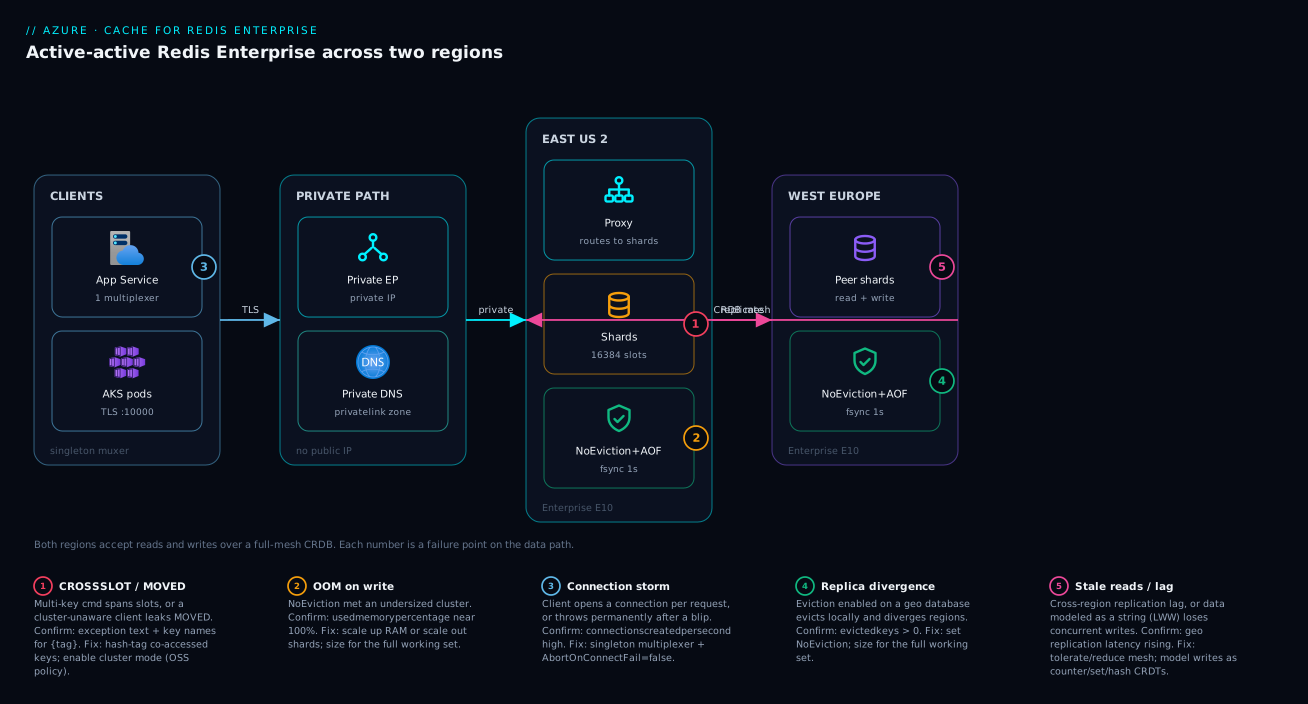
The diagram traces the data and control path of a two-region active-active deployment, left to right, and maps each failure class to the exact hop where it bites. Read it as four zones. On the left, clients (App Service / AKS pods) hold a singleton multiplexer and reach the cache over TLS on port 10000 through a Private Endpoint – never the public internet. The endpoint resolves via a Private DNS zone linked to the VNet, which is the hop where a missing zone link silently sends you to the public IP. In the middle, the East US 2 Enterprise cluster terminates the connection: under Enterprise policy a proxy fronts the shards; under OSS policy the client talks to shards directly and must follow MOVED/ASK. The shards enforce the eviction policy (NoEviction here) and write AOF at one-second fsync to local managed disk.
On the right, the West Europe Enterprise cluster is the active-active peer: a full-mesh CRDB link replicates every write both directions, so both regions accept reads and writes with no primary and no failover step. The numbered badges mark the five places this design fails and how you confirm each: a CROSSSLOT from a keyspace that ignored hash tags, an OOM where NoEviction met an undersized cluster, a connection storm from a pool-per-request client, replica divergence from running eviction on a geo database, and a stale-read window from replication lag. The legend narrates each as symptom, the metric or command that confirms it, and the fix. The whole method: localize the symptom to a hop, read the cause, run the named check, apply the fix.
Real-world scenario
Paywell, a fictional payments platform, ran a global idempotency cache on Premium with a passive geo-replica: EU writes went to West Europe, a one-way replica fed East US for reads, and failover was a manual DNS swap. The cache held one thing that mattered above all – the answer to “have I already processed this request id?” – and the platform’s entire duplicate-protection guarantee rested on it. Average load was 3,000 ops/sec, the monthly cache spend about ₹95,000, and the team was four engineers.
During a West Europe zone incident the replica was read-only, so for eleven minutes every in-flight payment in the US that needed to check idempotency either blocked on the manual failover or fell back to the database and ran at a fraction of normal throughput. Worse, after failover a handful of duplicate captures slipped through because the idempotency keys written in the US during the gap had not replicated back – the one-way link only flowed EU→US, so US writes during the outage were invisible to West Europe when it recovered. Two customers were double-charged. The post-incident review put it bluntly: passive replication is a DR tool, not an availability tool.
The first instinct was to “add another replica” – which would have solved nothing, because the problem was not node loss, it was that the secondary could not accept writes. The breakthrough was reframing the requirement: a system that must never lose a write across regions has to be active-active and conflict-free by construction. They moved to Enterprise active-active geo-replication across West Europe and East US, modeling idempotency state two ways. The “have I seen this request” check became a CRDT set (SADD seen <id>) so adds in either region converge with observed-remove semantics, and the per-request lock used SET payment:idem:<id> processing NX EX 86400 – string LWW plus NX gives “first writer in either region wins,” which is exactly the duplicate-protection semantic they needed.
They kept AOF at 1s as a restart safety net and sized for NoEviction: idempotency keys carry a 24-hour TTL via SET ... EX, never LRU eviction, so divergence is impossible. They moved both databases behind Private Endpoints with a linked Private DNS zone, switched clients to Entra token auth, and rebuilt the .NET client as a singleton multiplexer with AbortOnConnectFail = false and a Polly retry. The one subtlety they hit in testing: an early version used INCR for a per-merchant attempt counter and double-counted on a retried-after-timeout write; they switched the critical counter to an idempotency-keyed SET of a computed value.
# Idempotency check, region-local, on an active-active CRDB.
# SET NX EX is the primitive: succeeds only if the key is new, with a TTL.
# Converges across regions because string LWW + NX gives "first writer in either region wins".
SET payment:idem:7f3c-9a21 processing NX EX 86400
# -> OK    (first time, in either region: proceed)
# -> nil   (already seen anywhere in the mesh: this is a duplicate, reject)
The measurable result: the next regional zone failure was a non-event – no manual step, p99 unchanged at 1.1 ms, zero duplicate captures. Monthly spend rose to about ₹1,40,000 for the two Enterprise clusters, which the team judged trivial against a single double-capture chargeback plus reputational cost. The lesson on the wall: the duplicate-capture class of bug was designed out by construction, not monitored for.
The incident as a timeline, because the order of moves is the lesson:
| Time | Symptom | Action taken | Effect | What it should have been |
|---|---|---|---|---|
| 14:02 | West Europe zone incident | (alert fires) | — | Recognize: secondary is read-only |
| 14:04 | US idempotency checks blocking | Wait on manual DNS failover | Writes stalled in US | Don’t depend on a manual step |
| 14:07 | Throughput fallback to DB | Apps fall back to database | Fraction of normal speed | — |
| 14:13 | Manual failover completes | DNS swapped to US | US can write again | 11 minutes too late |
| +1 day | Two double-charges found | RCA: US writes never replicated back | One-way link gap exposed | Active-active needed |
| +1 week | Redesigned | Enterprise active-active + CRDT set | Region loss = non-event | The actual fix |
| +1 week | Counter double-count in test | INCR retried after timeout |
Caught before prod | Idempotency-keyed SET |
Advantages and disadvantages
The Enterprise active-active model both removes the regional-write failure class and adds operational discipline you must respect. Weigh it honestly:
| Advantages (why Enterprise active-active helps) | Disadvantages (why it costs and constrains) |
|---|---|
| Both regions accept writes; region loss is a non-event with no failover step | Two full clusters running everywhere = roughly double the spend |
| CRDTs resolve conflicts automatically per data type — no custom merge code | You must model data as the right CRDT; opaque strings silently lose writes (LWW) |
| Redis modules (Search, JSON, TimeSeries, Bloom) unlock secondary-index workloads | Modules and active-active are Enterprise-only; you can’t get them on Premium |
| Up to 99.999% SLA on a managed runtime | Higher floor cost than Standard/Premium even for small caches |
| Persistence (AOF 1s) + replication + geo gives layered durability | Persistence is not a backup; a bad command replicates to every peer |
| Enterprise (proxy) policy gives a single endpoint — simple private networking | The proxy adds a hop; OSS policy is faster but needs a cluster-aware client and routable node IPs |
| Online scale-up and scale-out with rolling, one-node maintenance | “Online” assumes a resilient client; a naive client still sees errors on reshard |
NoEviction + sizing for the full working set keeps geo regions convergent |
Eviction in a geo group is a correctness bug (divergence), not just a hit-rate dip |
The model is right when you genuinely need multi-region writes, conflict-free convergence, or Redis modules, and you can size for the full working set under NoEviction. It is the wrong tool for a cheap, regenerable, single-region read cache – that is what Standard or Premium are for. The disadvantages are all manageable, but only if you respect them: model the data type deliberately, size for the working set, lock down the network, and make the client resilient.
Hands-on lab
Stand up an Enterprise cache, prove the clustering and persistence behavior, and watch active-active counter convergence – then tear it down. Enterprise is not free-tier, so this lab uses the smallest Enterprise SKU and deletes everything at the end; budget a small hourly charge while it runs. Run in Cloud Shell (Bash).
Step 1 — Variables and resource group.
RG=rg-redis-lab
LOC=eastus2
CLUSTER=kv-redis-lab-$RANDOM   # cluster name must be unique
az group create -n $RG -l $LOC -o table
Step 2 — Create the smallest Enterprise cluster (zone-redundant).
az redisenterprise create \
  -n $CLUSTER -g $RG -l $LOC \
  --sku Enterprise_E5 --capacity 2 --zones 1 2 3 -o table
Expected: a cluster row with provisioningState: Succeeded (this takes several minutes).
Step 3 — Create the database with Enterprise (proxy) policy, NoEviction, AOF.
az redisenterprise database create \
  --cluster-name $CLUSTER -g $RG \
  --client-protocol Encrypted \
  --clustering-policy EnterpriseCluster \
  --eviction-policy NoEviction \
  --persistence aof-enabled=true aof-frequency=1s -o table
Step 4 — Get the host and access key, then connect with TLS on port 10000.
HOST=$(az redisenterprise show -n $CLUSTER -g $RG --query hostName -o tsv)
KEY=$(az redisenterprise database list-keys --cluster-name $CLUSTER -g $RG \
  --query primaryKey -o tsv)

redis-cli -h $HOST -p 10000 --tls -a "$KEY" PING
# -> PONG
Step 5 — Prove persistence is on and eviction is off.
redis-cli -h $HOST -p 10000 --tls -a "$KEY" CONFIG GET appendonly   # -> appendonly yes
redis-cli -h $HOST -p 10000 --tls -a "$KEY" CONFIG GET maxmemory-policy  # -> noeviction
Step 6 — Prove the slot contract (under Enterprise policy the proxy fans out simple MSET, but transactions still need one slot). Demonstrate hash-tag co-location:
# Co-located keys via hash tag -- guaranteed one slot, safe for MULTI/EXEC and Lua
redis-cli -h $HOST -p 10000 --tls -a "$KEY" MSET 'u:{t1}:a' 1 'u:{t1}:b' 2
redis-cli -h $HOST -p 10000 --tls -a "$KEY" MGET 'u:{t1}:a' 'u:{t1}:b'   # -> 1, 2
Step 7 — Counter additive behavior (single region here; in active-active this is what converges).
redis-cli -h $HOST -p 10000 --tls -a "$KEY" INCR global:signups
redis-cli -h $HOST -p 10000 --tls -a "$KEY" INCR global:signups
redis-cli -h $HOST -p 10000 --tls -a "$KEY" GET  global:signups   # -> 2
Step 8 — Teardown (stop the meter).
az group delete -n $RG --yes --no-wait
What each lab step proves, mapped to a section above:
| Step | Proves | Section it validates |
|---|---|---|
| 2 | Enterprise is a distinct resource; even capacity; zones at create | Tier selection |
| 3 | Policy/eviction/persistence chosen at DB creation | Clustering, Persistence |
| 4 | TLS-only on port 10000 | Networking & TLS |
| 5 | AOF on, NoEviction set | Persistence |
| 6 | Hash tags co-locate keys for multi-key safety | Clustering |
| 7 | Counters are additive (CRDT convergence basis) | Geo-replication |
| 8 | Clean teardown stops the charge | Cost |
To make this a real active-active test, repeat steps 2–4 in a second region with a shared --group-nickname and mutual --linked-databases, then INCR global:signups once in each region and GET from either – the value converges to the sum, not a lost update. That is the closest thing to a real cross-region failover you can run on demand.
Common beginner mistakes
These are belief errors, not symptom lookups — the wrong mental model a newcomer brings, and the corrected one that makes the rest of this lesson click. The operational symptom→cause→fix playbook is the next section; this one is about not needing it.
| The misconception | Why it’s wrong | The right mental model |
|---|---|---|
| “Redis is a database, so my data is safe in it.” | It is memory-first; persistence (AOF/RDB) is restart insurance, not a backup, and a bad FLUSHALL replicates everywhere. |
Treat Redis as a fast, rebuildable copy of the truth. The source of record lives elsewhere; the cache is derived. |
| “Enterprise is just a bigger Premium.” | It is a different runtime under a different ARM resource type (redisEnterprise vs redis), with a different port and different capabilities. |
Pick the tier from what it guarantees (modules, active-active, SLA) — not from the next rung up a memory ladder. |
| “Adding a geo-replica gives me high availability.” | A Premium passive replica is read-only with manual failover — a DR spare, not an availability tool. | If both regions must accept writes, you need Enterprise active-active; a passive replica is a fire extinguisher, not a second engine. |
| “Clustering makes multi-key commands faster and transparent.” | Clustering constrains multi-key ops — they need one slot, or you get CROSSSLOT. |
Clustering spreads keys for scale; you design co-location with hash tags around what you co-access. |
| “A cache hit is always fresh.” | Caches serve possibly-stale data by design; freshness comes from TTLs and invalidation, not from being a cache. | Decide the staleness you can tolerate, then set TTLs/invalidation to match. “Fresh” is a choice you pay for. |
| “More connections mean more throughput.” | A single multiplexer pipelines thousands of commands; a connection per request exhausts ports and lowers throughput. | One long-lived multiplexer, shared process-wide. Connection-per-request is the storm, not the speed-up. |
“NoEviction means my cache never loses data.” |
It means writes are rejected with OOM at the memory limit — the cache stops accepting, it doesn’t magically hold everything. | NoEviction is a promise you must fund: size for the full working set, or writes start failing. |
| “Retrying any failed write is safe.” | A non-idempotent op like INCR double-applies if the first attempt actually succeeded before the timeout. |
Make writes idempotent (idempotency key, or compute-then-SET) before you add a retry policy. |
| “Entra ID auth is optional hardening I’ll add later.” | The access key is a long-lived shared secret and the single biggest leak vector for a cache. | Prefer Entra token auth from day one; if you must use a key, keep it in Key Vault and rotate it — never in app config. |
Two of these hide a subtler trap worth stating outright. First, the string-as-counter mistake: SET count <n> looks identical to INCR count in a single region and behaves identically in a demo — the divergence only appears the first time two regions write concurrently, in production, at 2 a.m. The model to internalise is that in active-active you choose the data type for the convergence you need, and you cannot retrofit it after the data is live. Second, the “cluster hides everything” mistake: the Enterprise proxy policy genuinely does absorb MOVED/ASK and fan out some simple commands, which lulls people into ignoring slots — right up to the first MULTI/EXEC or Lua script, which still demands a single slot on either policy. Hash-tag discipline is not an OSS-only tax; it is the price of transactions on any clustered Redis.
Common mistakes & troubleshooting
Eleven real failure modes, each as symptom → root cause → how to confirm → fix. This is the playbook to keep open at 02:14.
| # | Symptom | Root cause | Confirm (exact cmd / metric) | Fix |
|---|---|---|---|---|
| 1 | CROSSSLOT Keys ... don't hash to the same slot |
Multi-key cmd / txn across slots | Read the exception; check key names for {} |
Hash-tag co-accessed keys: k:{tag}:... |
| 2 | MOVED 1234 10.0.0.5:10000 reaches app code |
Cluster-unaware client on OSS policy | Client config has no cluster mode | Enable cluster mode (RedisCluster/ClusterClient) |
| 3 | OOM command not allowed when used memory > maxmemory |
NoEviction + undersized cluster |
usedmemorypercentage near 100% |
Scale up RAM or scale out shards |
| 4 | Keys vanish unexpectedly in a geo group | LRU eviction on active-active DB | evictedkeys > 0; policy = allkeys-lru |
Set NoEviction; size for full working set |
| 5 | Thousands of connectionscreatedpersecond |
Client opens a connection per request | The metric is high and sustained | Use a singleton multiplexer; reuse it |
| 6 | App throws on startup during maintenance, never recovers | AbortOnConnectFail = true |
Multiplexer config default | Set AbortOnConnectFail = false |
| 7 | Connect times out from in-VNet client | Private DNS zone not linked → public IP | nslookup <fqdn> returns public IP |
Link privatelink.redisenterprise... zone to VNet |
| 8 | Connect refused / TLS handshake error | Wrong port (6380) or Ssl=false |
Client port/SSL settings | Use port 10000, Ssl=true |
| 9 | Concurrent cross-region writes lose data | Modeled as SET string (LWW) |
Two regions, same key, one value survives | Model as counter/set/hash CRDT |
| 10 | Counter over-counts after a timeout | INCR retried after unacked success |
Retry on RedisTimeoutException + INCR |
Idempotency key, or compute then SET |
| 11 | One region serves stale reads | Cross-region replication lag | Geo replication latency metric rising | Check region health; tolerate or reduce mesh |
Decision table: which failure am I looking at?
| If you see… | It’s probably… | Do this first |
|---|---|---|
CROSSSLOT in the exception |
Keyspace ignores hash tags | Add {tag} to co-accessed keys |
MOVED/ASK in app logs |
Client not in cluster mode | Turn on cluster mode |
OOM command not allowed |
Memory full + NoEviction |
Scale up/out; check runaway keyspace |
evictedkeys > 0 on a geo DB |
Eviction enabled in active-active | Switch to NoEviction |
| Conns/sec spiking | Pool-per-request client | Multiplex one connection |
| Permanent failure after a blip | AbortOnConnectFail = true |
Flip it to false |
| In-VNet timeouts | DNS resolves to public IP | Link the Private DNS zone |
| Data loss across regions | Wrong CRDT (string LWW) | Re-model as counter/set/hash |
The error/limit reference
| Error / limit | Meaning | Likely cause | How to confirm | Fix |
|---|---|---|---|---|
CROSSSLOT |
Keys span multiple hash slots | No hash tag on multi-key op | Exception text + key names | Hash-tag the keys |
MOVED <slot> <ip:port> |
Slot owned by another node | Cluster-unaware client (OSS) | Appears in app logs | Enable cluster mode |
ASK <slot> <ip:port> |
Slot mid-migration | Reshard in progress | During scale-out | Client follows redirect (auto) |
OOM command not allowed |
At memory limit, NoEviction |
Undersized cluster | usedmemorypercentage ~100% |
Scale RAM/shards |
NOAUTH / auth required |
Missing/expired credential | Stale key or expired token | Auth response | Refresh token / correct key |
WRONGTYPE |
Op on wrong data type | Key reused as different type | TYPE <key> |
Use the right type / re-key |
READONLY |
Write to a read-only target | Passive replica (Premium) | Topology / replica role | Write to primary; or go active-active |
| Capacity must be even | Enterprise nodes deploy in pairs | Odd --capacity value |
CLI rejects the value | Use an even number |
| Port 6380 vs 10000 | Wrong TLS port | Premium connection string reused | Client port setting | Use 10000 for Enterprise |
| Max 16384 slots | Hard cluster slot count | (design constant) | — | Design keyspace within it |
Practice challenges
Six exercises that climb from “read the error” to “design the mitigation.” Try each before opening the solution; the one-line why under each answer is the part worth remembering. Commands are illustrative — the placeholders (<sub>, hostnames, keys) are yours to fill, and nothing here is run live.
1. (Beginner) Make a multi-key write cluster-safe. This command fails on a clustered cache with CROSSSLOT:
MSET cart:1001 apples cart:1002 pears
Rewrite it so both keys are guaranteed to land in one slot for tenant t7, without changing what the two keys mean.
<details> <summary>Solution</summary>
MSET cart:{t7}:1001 apples cart:{t7}:1002 pears
Only the substring inside the first {} is hashed, so both keys hash on t7 and share a slot.
Why: hash tags are how you choose co-location; the slot is computed from the tag, not the whole key. </details>
2. (Beginner) Pick the tier from the requirement. You need RedisJSON for document-shaped state, one region, persistence on, and you will not accept writes in a second region. Which classic tier, and why not Premium?
<details> <summary>Solution</summary>
Enterprise (single region is fine; you simply don’t enable active geo-replication). Or price Azure Managed Redis (Balanced) first for a new project.
Premium has persistence but no modules — RedisJSON exists only on the Redis Enterprise runtime.
Why: modules, not memory size or geo, force the Enterprise runtime here. </details>
3. (Intermediate) Choose the CRDT. Across two active-active regions you must “count password-reset attempts per user.” A teammate proposes SET u:<id>:resets <n>. What breaks, and what is the right primitive?
<details> <summary>Solution</summary>
# Wrong: string SET is last-write-wins — concurrent increments in two regions lose updates
# Right: an additive counter converges (both increments apply)
INCR u:{<id>}:resets
Why: a counter CRDT merges additively; a string is LWW and silently drops one of two concurrent writes. </details>
4. (Intermediate) Fix the client that never recovers. A .NET service throws RedisConnectionException permanently the first time an Azure maintenance window blips the connection, and only a restart fixes it. The config reads Ssl = true, ConnectRetry = 3. Name the single decisive setting and give the corrected block.
<details> <summary>Solution</summary>
var config = new ConfigurationOptions
{
    EndPoints = { "kv-redis-prod.eastus2.redisenterprise.cache.azure.net:10000" }, // port 10000, not 6380
    Ssl = true,
    AbortOnConnectFail = false            // the fix: reconnect in the background instead of throwing forever
};
Why: the default AbortOnConnectFail = true throws permanently if the first connect fails and never reconnects; false lets the singleton multiplexer heal itself.
</details>
5. (Advanced) Build a cluster-safe rate limiter. Design a fixed-window limiter of 100 requests/minute/user that is atomic and safe under clustering. Give the Redis logic and say why it stays single-slot.
<details> <summary>Solution</summary>
-- KEYS[1] = rl:{user42}:<epoch-minute>   ARGV[1] = 100 (limit)   ARGV[2] = 60 (window secs)
local c = redis.call('INCR', KEYS[1])
if c == 1 then redis.call('EXPIRE', KEYS[1], ARGV[2]) end
if c > tonumber(ARGV[1]) then return 0 else return 1 end   -- 0 = reject, 1 = allow
Run it with EVAL; the whole check-and-increment is atomic. The key is hash-tagged on the user ({user42}), so this user’s buckets share a slot and the script never spans slots.
Why: INCR+EXPIRE in one Lua call is atomic and the KEYS all resolve to one slot — a Lua script that touched keys in different slots would be rejected CROSSSLOT.
</details>
6. (Advanced) Tame a stampede. A single homepage key served at ~10,000 QPS expires and floods the backing database. “Just use a longer TTL” was rejected — correctly. Design a mitigation that keeps the database protected during the refresh.
<details> <summary>Solution</summary>
# Single-flight: the first missing request wins the lock and rebuilds; the rest serve stale, then re-read.
SET lock:{home} 1 NX PX 5000        # only one worker gets OK; others get nil and skip the rebuild
# ... winner recomputes and writes the value with a JITTERED ttl ...
SET home <value> EX 300             # add a random spread, e.g. 300 ± 30s, so keys don't re-expire in lockstep
Combine three things: TTL jitter (no synchronised expiry), a single-flight lock (one rebuild, not ten thousand), and stale-while-revalidate (serve the old value while the winner refreshes). Probabilistic early recompute (XFetch) is the alternative when there is no acceptable stale value.
Why: a longer TTL makes the stampede rarer and bigger; the fix is to guarantee exactly one recompute and never expose the raw miss to the database. </details>
Best practices
Production-grade rules, learned the hard way:
| # | Rule | Why |
|---|---|---|
| 1 | Choose the tier from durability/topology, not memory size | Enterprise is a different runtime, not a bigger Premium |
| 2 | Decide the clustering policy at design time; it is permanent | Changing it later means recreating the database |
| 3 | Hash-tag every set of co-accessed keys | Keeps transactions, Lua, MGET/MSET single-slot |
| 4 | Use active-active (not passive) when both regions must write | Passive is DR; active-active is availability |
| 5 | Model write data as the right CRDT | Strings are LWW and silently lose concurrent writes |
| 6 | Run geo databases as NoEviction, sized for the full working set |
Eviction in a mesh = divergence, a correctness bug |
| 7 | Enable AOF 1s for non-regenerable data |
Caps restart loss at ~1 second |
| 8 | Treat persistence as restart safety, not a backup | A bad command replicates to every peer |
| 9 | Lock the cache behind a Private Endpoint + linked Private DNS | No public exposure; in-VNet resolves privately |
| 10 | Prefer Entra token auth; keep keys in Key Vault, rotated | Removes the long-lived shared secret |
| 11 | Use a singleton multiplexer with AbortOnConnectFail = false |
Prevents connection storms and permanent-failure-after-blip |
| 12 | Retry the operation with jittered backoff, idempotently | Survives reshard/patch blips without corrupting writes |
| 13 | Set a maintenance window in low-traffic hours | Rolling patches reset one node at a time |
| 14 | Alert on used-memory % (75%), eviction, server load (80%), conns/sec | Catch the leading indicator, not the outage |
| 15 | Measure client-side p99, correlate to reshard/server-load | Server averages hide hot keys and GC pauses |
Security notes
The cache often holds the most sensitive transient data you have – session tokens, idempotency keys, PII in flight. Lock it down on every axis:
| Control | Setting / action | Why |
|---|---|---|
| Encryption in transit | clientProtocol: Encrypted, TLS 1.2+ on port 10000 |
No plaintext; reject unencrypted clients |
| Network isolation | Private Endpoint + disable public network access | Cache reachable only from the VNet |
| Private name resolution | Linked privatelink.redisenterprise... zone |
FQDN resolves to the private IP, not public |
| Identity-based auth | Microsoft Entra ID token (managed identity) | No long-lived shared secret in the app |
| Secret handling | Access key in Key Vault, rotated; never in app config | Limits blast radius if a config leaks |
| Least privilege | Scope the managed identity / RBAC to read what it needs | Avoid over-broad data-plane access |
| Data minimization | Short TTLs on sensitive keys (SET ... EX) |
Sensitive data self-expires |
| Audit & logging | Diagnostic settings to a Log Analytics workspace | Trace connections, auth, config changes |
| Defense vs bad commands | Restrict/disable dangerous admin commands | FLUSHALL/KEYS blast radius |
| Geo data residency | Choose peer regions with compliance in mind | Writes replicate to every mesh region |
Least-privilege auth options, ranked from most to least secure:
| Approach | Secret exposure | Rotation | Recommendation |
|---|---|---|---|
| Entra token via managed identity | None (short-lived) | Automatic | Preferred where the client supports it |
| Access key from Key Vault at runtime | Low (never on disk in app) | Scheduled rotation | Acceptable fallback |
| Access key in environment/app settings | Medium (visible in config) | Often forgotten | Avoid in production |
| Access key in source/connection string literal | High (leaks via VCS) | Never | Never |
Cost & sizing
Enterprise costs more than Standard/Premium because you are paying for a commercial runtime, and active-active doubles the footprint because both regions run full clusters. The bill is driven by SKU (RAM/CPU per node), capacity (number of nodes/shards), the number of regions in the mesh, and cross-region egress for replication.
What drives the bill, and how to control each lever:
| Cost driver | Scales with | Control it by | Note |
|---|---|---|---|
| SKU (E5…E100, F300…) | RAM/CPU per node | Right-size to the working set | Bigger SKU = higher hourly rate |
| Capacity (node count) | Shards / throughput | Scale out only when needed | Must be even; each pair adds cost |
| Regions in geo mesh | N clusters running | Keep the mesh to needed regions | Each region is a full cluster |
| Cross-region egress | Write volume × peers | Reduce mesh; batch where possible | Every write fans out to N-1 peers |
| Persistence disk | Dataset size | (managed) | Local managed disk, modest |
| Flash NVMe (Flash SKUs) | Cold-tier size | Use Flash for large skewed data | Cheaper per GB than all-RAM |
Right-sizing approach:
| Question | Method | Action |
|---|---|---|
| How big is the working set? | Sum key sizes × count at peak, + headroom | Pick the SKU whose RAM covers it under NoEviction |
| RAM or Flash? | Is access skewed (hot/cold)? | Skewed + large → Flash; uniform/hot → RAM |
| Up or out? | CPU-bound (serverLoad) vs memory-bound |
High server load → out (shards); OOM → up (RAM) |
| How many regions? | Where must writes happen? | Only regions that must accept writes |
| Headroom target | Alert at 75% used memory | Size so steady state sits below that |
Rough figures (list-price ballpark, varies by region and commitment – always confirm with the pricing calculator):
| Scenario | Approx monthly (USD) | Approx monthly (INR) | Notes |
|---|---|---|---|
Single Enterprise E5, 2 nodes, one region |
~$600–900 | ~₹50,000–75,000 | Smallest prod Enterprise footprint |
Single E10, 2 nodes, one region |
~$1,200–1,800 | ~₹1,00,000–1,50,000 | Common single-region prod size |
Active-active E10 × 2 regions |
~$2,400–3,600 + egress | ~₹2,00,000–3,00,000 + egress | Double clusters + cross-region egress |
Enterprise Flash F300, 2 nodes |
~$900–1,400 | ~₹75,000–1,15,000 | Large dataset, cheaper per GB |
Standard C1 (contrast) |
~$40–60 | ~₹3,500–5,000 | No persistence/clustering/geo |
There is no free tier for Enterprise. For dev and learning, use a Standard
C0/C1(which is cheap) to practice client patterns, and reserve Enterprise spend for the features that require it (modules, active-active). Commit to a reservation once steady-state size is known to cut the hourly rate.
Interview & exam questions
Maps to the AZ-204 (developing solutions), AZ-305 (designing infrastructure), and Redis-specific knowledge expected of senior Azure roles.
1. Why is Azure Cache for Redis Enterprise a different ARM resource type from Premium, and why does it matter?
Enterprise/Enterprise Flash use Microsoft.Cache/redisEnterprise (a parent cluster + child database), running the commercial Redis Enterprise runtime, while Basic/Standard/Premium use Microsoft.Cache/redis running OSS Redis. It matters because IaC modules, endpoints, ports (10000 vs 6380), and capabilities (modules, active-active) differ; a Bicep/Terraform module for one type does nothing for the other.
2. Contrast OSS and Enterprise clustering policies. OSS exposes the native Redis Cluster API – the client discovers shards, computes CRC16 hash slots, and connects directly (lowest latency, needs a cluster-aware client and routable node IPs). Enterprise puts a proxy in front so the client uses one endpoint like a standalone Redis (simplest networking, any client, one extra hop). The policy is chosen at creation and is permanent.
3. What is a CROSSSLOT error and how do you prevent it?
A multi-key command (or MULTI/EXEC/Lua) whose keys hash to different slots. Prevent it by co-locating keys with a hash tag – the {...} substring is what’s hashed – so all co-accessed keys (e.g. t:{tenant}:...) land in one slot. Even the Enterprise proxy requires single-slot keys for transactions and Lua.
4. Difference between Premium passive geo-replica and Enterprise active geo-replication? Passive is a one-way link to a read-mostly secondary with manual failover – a DR tool. Active-active is a full-mesh CRDB where every region accepts reads and writes with automatic CRDT conflict resolution and no failover step – an availability tool. If both regions must accept writes, you need Enterprise active-active.
5. How do CRDTs resolve concurrent writes, and why can’t you use a string counter in active-active?
Each data type is reimplemented as a CRDT: strings are last-write-wins, counters are additive (both increments apply), sets/hashes merge per element/field. A string SET n for a count is LWW, so concurrent increments in two regions lose updates; use INCR (additive) instead.
6. Why model an idempotency check as a CRDT set, and how does SET NX EX behave across regions?
A set’s observed-remove semantics make concurrent adds of the same id converge cleanly. SET key val NX EX succeeds only if the key is new; with string LWW across regions, it gives “first writer in either region wins,” which is exactly the duplicate-protection guarantee for idempotency.
7. RDB vs AOF – when do you choose each, and what’s the data-loss window?
RDB snapshots periodically (loss up to the interval, e.g. 1h) – cheap, fast restart, good for regenerable caches. AOF logs every write; at 1s fsync, worst-case loss is ~1 second – the default for data you can’t recreate. Both protect against restart, not against bad commands.
8. Why is NoEviction mandatory for an active-active geo cache?
Evictions are local to each region, so an LRU eviction in one region but not another silently diverges the dataset – a correctness bug, not just a hit-rate dip. Run geo databases as NoEviction and size for the full working set.
9. Name three client configurations that prevent Redis outages on Azure.
A singleton multiplexer (not pool-per-request) to avoid connection storms; AbortOnConnectFail = false so the client recovers after a maintenance blip instead of throwing permanently; and an operation-level retry with jittered backoff so reshard/patch blips don’t surface as errors. Add periodic health checks to detect dead idle sockets.
10. What happens during a scale-out reshard, and how do you make it invisible?
Hash slots migrate between shards; under OSS policy keys briefly answer ASK/MOVED and a cluster-aware client re-routes, while the Enterprise proxy absorbs it. Make it invisible with a resilient client (redirect-following, AbortOnConnectFail=false, op retries) and validate with a load test through a live scale-out expecting zero errors and only a p99 bump.
11. Why measure client-side latency percentiles instead of server averages?
A server-side average of 1 ms hides a p99 of 200 ms from a hot shard, a cross-slot fan-out, or a client GC pause. Track p50/p99 per operation from the app and correlate spikes with serverLoad and reshard events to tell “retry working” from “real hot key.”
12. How do you secure an Enterprise cache end to end?
TLS-only (clientProtocol: Encrypted) on port 10000; Private Endpoint with public access disabled and a linked Private DNS zone; Entra token auth via managed identity (key in Key Vault, rotated, as fallback); short TTLs on sensitive keys; diagnostic logs to Log Analytics; and compliance-aware region choice since writes replicate to every mesh peer.
Quick check
- Which ARM resource type backs the Enterprise tier, and what is the default TLS port?
- You need both East US and West Europe to accept writes to the same key with no failover step. Which tier and replication mode?
- A
MULTI/EXECtransaction throwsCROSSSLOT. What single keyspace change fixes it? - Your active-active counter is losing increments across regions. What’s the likely modeling mistake?
- Your app throws permanently the first time a maintenance window blips the connection. Which one client setting fixes it?
Answers
Microsoft.Cache/redisEnterprise(a parent cluster + child database), and the default TLS port is 10000 (Premium uses 6380).- Enterprise (or Enterprise Flash) with active-active geo-replication (a CRDB) – both regions accept reads and writes with automatic CRDT conflict resolution and no failover.
- Add a hash tag so every key in the transaction shares the
{...}substring (e.g.k:{order123}:...), forcing them into one hash slot. - The counter is modeled as a string
SET(last-write-wins), so concurrent writes lose updates. UseINCR(additive CRDT) instead. - Set
AbortOnConnectFail = falseso the multiplexer reconnects in the background instead of throwing permanently after the first failed connect.
Glossary
| Term | Definition |
|---|---|
| Enterprise tier | Azure Cache for Redis built on the commercial Redis Enterprise runtime (Microsoft.Cache/redisEnterprise), adding modules, active-active geo-replication, and up to 99.999% SLA. |
| Enterprise Flash | An Enterprise SKU family that keeps hot keys in RAM and tiers colder values to local NVMe for cheaper large-dataset storage. |
| Clustering policy | The permanent choice of OSS (native cluster API, direct-to-shard) or Enterprise (proxy, single endpoint) routing, set at database creation. |
| Hash slot | One of 16384 CRC16 buckets across which keys are distributed in a cluster; multi-key commands require all keys in one slot. |
| Hash tag | The substring inside the first {} in a key name; only it is hashed, so keys sharing a tag co-locate in one slot. |
| CROSSSLOT | The error when a multi-key command, transaction, or Lua script spans more than one hash slot. |
| MOVED / ASK | Cluster redirects telling a client which node owns a slot (MOVED) or that a slot is mid-migration (ASK); a cluster-aware client follows them transparently. |
| CRDB | Conflict-free replicated database – the active-active, full-mesh, multi-write database Enterprise builds across regions. |
| CRDT | Conflict-free replicated data type; each Redis type (string/counter/set/hash/sorted set) merges concurrent writes deterministically. |
| Active-active | A topology where every region accepts reads and writes with no primary; region loss requires no failover. |
| Passive geo-replica | A Premium one-way link to a read-mostly secondary with manual failover – a DR tool, not an availability tool. |
| RDB | Point-in-time snapshot persistence; cheap, but loses everything since the last snapshot on a hard failure. |
| AOF | Append-only-file persistence logging every write; at 1s fsync, worst-case loss is ~1 second. |
| NoEviction | The policy that rejects writes (returns OOM) at the memory limit instead of evicting keys; mandatory for geo caches to avoid divergence. |
| Multiplexer | A single long-lived client connection object (e.g. StackExchange.Redis ConnectionMultiplexer) that pipelines all commands. |
| Server Load | The Azure Monitor metric for the percentage of time the Redis main thread is busy; the leading CPU-bound indicator. |
| Private Endpoint | A private IP projection of the cache into your VNet via Private Link, removing public exposure. |
| Azure Managed Redis (AMR) | Microsoft’s newer, go-forward offering on the Redis Enterprise engine, sold as finer-grained SKU families (Balanced, Memory/Compute/Flash Optimised) at a lower entry price than classic Enterprise. |
| Redis module | An add-on engine loaded into Redis that provides extra data types or query power (Search, JSON, TimeSeries, Bloom); available only on the Enterprise runtime and AMR, chosen at database creation. |
| RediSearch (Redis Query Engine) | The module adding secondary indexes, full-text search, and vector similarity (KNN) search — the basis for using Redis as a retrieval layer for embeddings/RAG. |
| Cache-aside (lazy loading) | The app checks the cache, and on a miss reads the backing store and writes the value back itself; the most common cache pattern. |
| Write-through / write-behind | Write-through updates cache and store synchronously (always fresh, slower writes); write-behind writes the cache now and flushes to the store asynchronously (fast, with a loss window). |
| Thundering herd (cache stampede) | Many requests missing the same hot key at once and all recomputing it, flooding the backing store; mitigated with TTL jitter, single-flight locks, or stale-while-revalidate. |
| RedLock | A multi-node Redis distributed-lock algorithm; safe for efficiency (avoid duplicate work) but not for correctness — it lacks fencing tokens and can be defeated by clock drift or a GC pause. |
| maxmemory-policy | The setting that decides what Redis does at the memory limit: reject writes (noeviction) or evict by recency (lru), frequency (lfu), TTL, or random, across all keys or only keys with a TTL (volatile-*). |
| LFU (Least-Frequently-Used) | An eviction strategy that removes the least-often-accessed keys; usually a better read-cache default than LRU because a one-off full scan won’t flush genuinely hot keys. |
| Shard / reshard | A shard is a partition of the keyspace owning a range of hash slots; a reshard is the slot migration between shards that a scale-out triggers, briefly answering ASK/MOVED under OSS policy. |
| Single-flight (request coalescing) | A stampede guard where the first request to miss rebuilds the value while the rest wait and then read the fresh result, so the backing store sees one recompute, not thousands. |
Next steps
- Azure Private Endpoints and Private DNS at Scale — lock the cache into your VNet correctly so in-VNet clients resolve the private IP.
- Azure Key Vault: Secret Rotation with Managed Identity — store and rotate the access key, or move to managed-identity token auth.
- Cosmos DB Multi-Region Writes and Conflict Resolution — contrast Redis automatic CRDT merge with Cosmos’s pluggable conflict policies.
- Azure Multi-Region Active-Active Disaster Recovery — fit the active-active cache into a full multi-region architecture.
- Azure Monitor Deep Dive: Every Option — build the alerts on used-memory %, eviction, server load, and client-side p99.