In a nutshell
Think of a VM Scale Set (VMSS) agent pool as your own pool of temp workers who clock in inside your locked building. When a build job arrives, one worker walks into a brand-new, freshly-cleaned office - a fresh VM booted from an image you baked - does exactly one job, and is then escorted out and the office is shredded. No worker keeps a desk overnight, none inherits the last person’s sticky notes or leftover keys, and nobody unknown ever gets a badge to the building. When ten jobs land at once, ten temps clock in; when the day goes quiet, they all go home and you stop paying them.
That is the whole idea behind Azure DevOps scale set agents. Microsoft-hosted agents are convenient but live in Microsoft’s building - you get no say over the network they sit on or the tools they carry. Classic self-hosted agents live in your building but never leave: they accumulate junk between jobs, sit billed and idle overnight, and let one poisoned pull request quietly booby-trap the next build. Scale set agents give you the best of both: you own the building (your VNet), the office blueprint (a hardened Packer image), and who holds a badge (a managed identity, no stored password) - while Azure DevOps handles the hiring, firing, and sizing the crew to the queue.
For a beginner, the mental model to hold is this: the image is the only thing that lives; every VM is disposable. You never SSH in to “fix” an agent. If something is wrong or out of date, you rebake the image and let the pool recycle onto it. That single discipline is what makes the fleet reproducible, patchable, and safe against cross-build contamination.
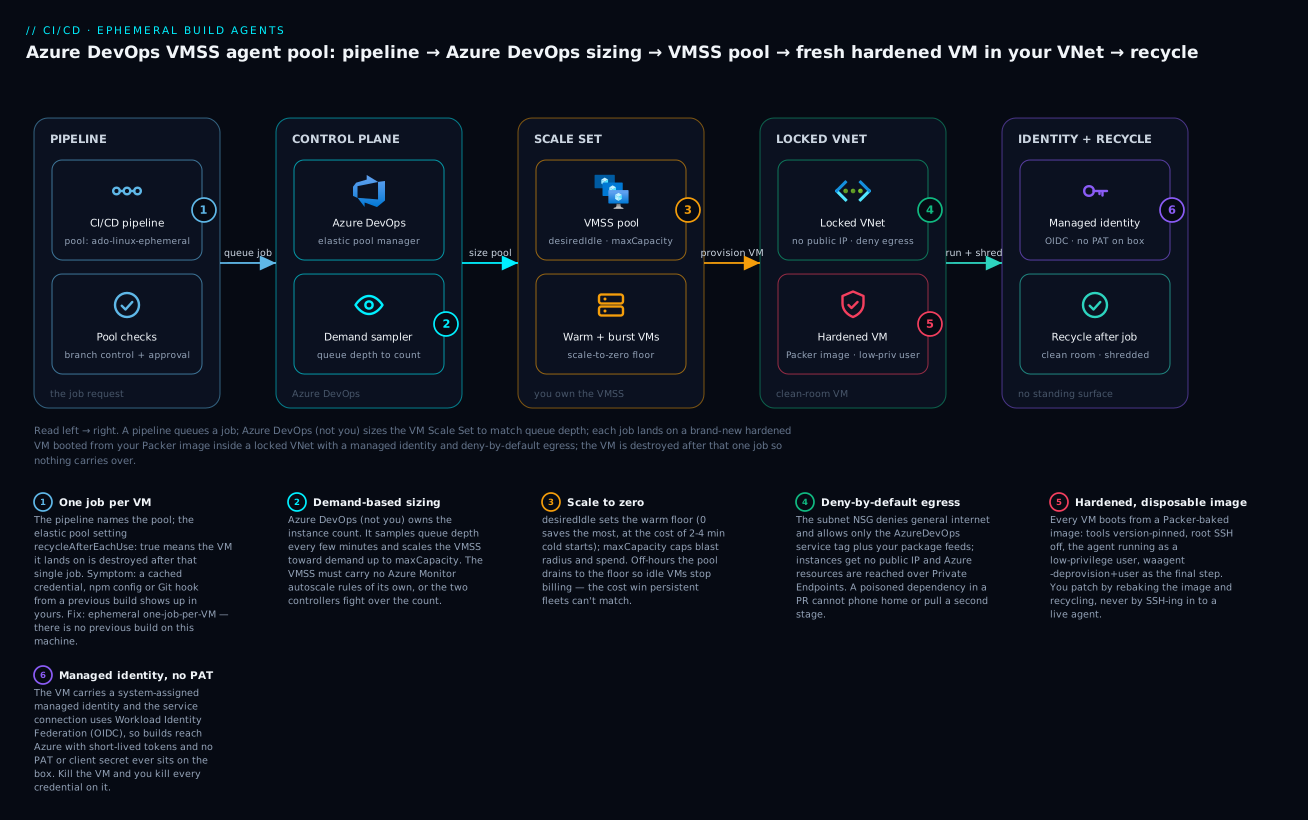
Read it left to right: a pipeline queues a job, Azure DevOps sizes the VMSS pool on demand, each job lands on a fresh hardened VM inside your locked VNet with a managed identity, and the VM is shredded after one job so nothing carries over.
Level: Advanced · Time: ~37 min
Prerequisites - what to know first:
- Comfort with Azure DevOps Pipelines YAML and the difference between Microsoft-hosted and self-hosted agents.
- Basic Azure networking (VNet, subnet, NSG, service tags) and Azure RBAC (role assignments, managed identities).
- Familiarity with the
azCLI and, ideally, a machine-image tool (this guide uses HashiCorp Packer). - A rough idea of how a VM Scale Set differs from a single VM (one resource that manages many identical instances).
After this lesson you will be able to:
- Provision a dedicated VMSS wired correctly for an elastic agent pool - no self-owned autoscale, overprovisioning off, manual upgrade policy, instance count zero.
- Register that VMSS as an Azure DevOps elastic pool and tune
recycleAfterEachUse,desiredIdle,maxCapacity, andtimeToLiveMinutesfor your demand profile. - Bake a hardened, version-pinned agent image with Packer and roll it out by recycling instances rather than patching live.
- Lock subnet egress to deny-by-default with only the
AzureDevOpsservice tag allowed, and reach Azure resources over Private Endpoints. - Gate the pool as a protected resource (branch control, approvals) and scope per-job credentials with a managed identity plus Workload Identity Federation.
A standing pool of Microsoft-hosted or hand-built VM agents is a quiet liability. Hosted agents give you no network control and a fixed toolchain; persistent self-hosted agents accrue state between jobs, sit idle and billed overnight, and let one poisoned pull request contaminate the next build. Azure DevOps scale set agents sit in the middle: you own the VM Scale Set (VMSS) and its image, network, and identity, but Azure DevOps manages the agent lifecycle - provisioning VMs on demand, recycling each one after a job, and scaling the fleet to match queue depth. This guide builds that pool end to end and hardens it against the failure modes that matter at principal scale.
1. Why ephemeral agents beat persistent ones
Three problems with long-lived agents are worth naming precisely, because each maps to a concrete control later in this guide.
- Cross-job contamination. A persistent agent carries dependency caches, cloned repos, leftover credentials, and Docker layers from job to job. A malicious or buggy build can plant a backdoor in
~/.npmrc, a Git hook, or a cached base image that the next job silently inherits. A fresh VM per job is a clean room - Azure DevOps tears the VM down after the job and provisions a new one from the image, so there is no carry-over to poison. - The cost of idle. Persistent fleets are sized for peak and billed 24/7. Most CI fleets run at 15-30% utilization, so two-thirds of the spend buys capacity that does nothing. A scale set pool scales to a configurable floor (often zero) overnight.
- Drift. Hand-patched agents diverge from each other and from “what we think is installed.” When the image is the only durable artifact and VMs are disposable, “what ran my build” is answerable by an image version, not by SSH-ing in to check.
The trade-off is cold-start latency - provisioning a VM and starting the agent takes longer than dispatching to a warm one - and the discipline of baking everything into an image instead of apt install-ing it in the pipeline. Both are solvable, and the rest of this guide does so.
Scale set agents are not the same as running the agent container on AKS. There is no Kubernetes here. Azure DevOps talks directly to the VMSS resource and manages instance count and recycling for you. That makes this the right pattern when builds need a full VM (nested virtualization, Docker-in-Docker, kernel modules) rather than a pod.
2. Provision the VM Scale Set
The VMSS for a scale set agent pool has specific requirements that trip people up:
- No autoscale rules of your own. Azure DevOps owns the instance count. If a VMSS autoscale profile exists, the service fights it. Set
--instance-count 0and do not attach Azure Monitor autoscale. - Overprovisioning off. Overprovisioning causes Azure to create extra VMs and delete the slowest, which breaks the agent’s 1:1 VM-to-agent assumption.
- Manual upgrade policy. The service decides when to cycle instances onto a new image.
Create a resource group, a network, and the scale set. Start from a Microsoft-published Ubuntu image; we replace it with a custom image in step 4.
RG=rg-ado-agents
LOC=eastus2
VMSS=vmss-ado-linux

az group create --name "$RG" --location "$LOC"

# Dedicated VNet/subnet for build traffic (locked down in step 6)
az network vnet create \
 --resource-group "$RG" --name vnet-ado \
 --address-prefix 10.40.0.0/16 \
 --subnet-name snet-agents --subnet-prefix 10.40.1.0/24

az vmss create \
 --resource-group "$RG" --name "$VMSS" \
 --image Ubuntu2204 \
 --vm-sku Standard_D4ds_v5 \
 --storage-sku Premium_LRS \
 --vnet-name vnet-ado --subnet snet-agents \
 --instance-count 0 \
 --upgrade-policy-mode manual \
 --load-balancer '""' \
 --public-ip-address '""' \
 --orchestration-mode Uniform \
 --disable-overprovision \
 --assign-identity '[system]' \
 --admin-username azureuser \
 --generate-ssh-keys
A few choices are deliberate. --disable-overprovision enforces the 1:1 assumption. --public-ip-address '""' gives the instances no public IP - egress is controlled in step 6. --assign-identity '[system]' attaches a system-assigned managed identity so jobs can reach Azure resources without static secrets. Premium_LRS matters: build IO is the common bottleneck, and ephemeral OS disks or premium SSD shave minutes off image-heavy jobs.
Use a dedicated VMSS per pool. Do not point the agent pool at a scale set you also use for other workloads - Azure DevOps will resize and recycle instances out from under anything else running there.
3. Register the scale set as an elastic agent pool
The pool is created against the organization, then shared into projects. You can do this in the portal (Organization settings -> Agent pools -> Add pool -> Azure virtual machine scale set) or via the REST API. The REST shape is the source of truth and worth showing, because it exposes every autoscale knob you will tune in step 4.
First, the service principal or PAT you use needs the Owner or Contributor role on the VMSS so Azure DevOps can manage instances. Then create the elastic pool:
ORG=https://dev.azure.com/contoso
SUB=00000000-0000-0000-0000-000000000000

cat > pool.json <<'JSON'
{
 "serviceEndpointId": "11111111-1111-1111-1111-111111111111",
 "serviceEndpointScope": "22222222-2222-2222-2222-222222222222",
 "azureId": "/subscriptions/SUBID/resourceGroups/rg-ado-agents/providers/Microsoft.Compute/virtualMachineScaleSets/vmss-ado-linux",
 "maxCapacity": 20,
 "desiredIdle": 1,
 "recycleAfterEachUse": true,
 "maxSavedNodeCount": 0,
 "timeToLiveMinutes": 30,
 "agentInteractiveUI": false,
 "sizing": "automatic"
}
JSON

# serviceEndpointId/Scope refer to an ARM service connection in the project.
az devops invoke \
 --area distributedtask --resource elasticpools \
 --http-method POST --api-version 7.1 \
 --route-parameters poolName=ado-linux-ephemeral \
 --in-file pool.json --org "$ORG"
The fields that govern behaviour:
| Field | Meaning | Hardening note |
|---|---|---|
recycleAfterEachUse |
Destroy the VM after one job | Always true for untrusted code. This is what makes the pool ephemeral. |
desiredIdle |
Warm VMs kept ready for the next job | Higher = lower queue time, higher idle cost. |
maxCapacity |
Hard ceiling on instances | Caps blast radius and spend. |
timeToLiveMinutes |
Idle VM lifetime before scale-down | Lower trims cost; too low causes thrash. |
maxSavedNodeCount |
Failed VMs kept for debugging | Keep 0 in prod so nothing lingers with build state. |
recycleAfterEachUse: true plus maxSavedNodeCount: 0 is the core security posture: every job gets a brand-new VM, and nothing survives it.
4. Tune autoscale: sizing, min/max, sampling, scale-down
Azure DevOps samples the pool roughly every few minutes and reconciles instance count toward demand. Your levers are the pool fields above; the art is balancing queue time against idle spend.
desiredIdle(the warm pool). This is the single biggest lever on developer experience.desiredIdle: 0means every job pays full cold-start (provision VM + boot + start agent), often 2-4 minutes. Set it to your typical concurrent-burst floor - for a team that routinely fires 3-4 builds at once on a push,desiredIdle: 3keeps p50 queue time near zero.maxCapacity(the ceiling). Size it from observed peak concurrency plus headroom, not from hope. A ceiling that is too low silently serializes builds during busy hours; too high invites a runaway fan-out (or a fork-bomb pipeline) to spin up dozens of billed VMs.timeToLiveMinutes(scale-down delay). After a burst, idle VMs abovedesiredIdleare torn down once they have been idle this long. Set it longer than your inter-build gap so you do not thrash - provisioning then immediately destroying VMs wastes both time and money. 30 minutes is a sane default for interactive teams; drop to 10-15 for batch-heavy, bursty patterns.
Update an existing pool’s sizing without recreating it:
# Look up the elastic pool id first, then PATCH its sizing.
POOL_ID=$(az devops invoke \
 --area distributedtask --resource elasticpools \
 --http-method GET --api-version 7.1 --org "$ORG" \
 --query "value[?azureId.ends_with(@,'vmss-ado-linux')].poolId | [0]" -o tsv)

cat > resize.json <<'JSON'
{ "maxCapacity": 30, "desiredIdle": 3, "timeToLiveMinutes": 20 }
JSON

az devops invoke \
 --area distributedtask --resource elasticpool \
 --http-method PATCH --api-version 7.1 \
 --route-parameters poolId="$POOL_ID" \
 --in-file resize.json --org "$ORG"
Watch for the provisioning-failure feedback loop. If the image or extension is broken, Azure DevOps provisions a VM, the agent never comes online, the VM is recycled, and it tries again - burning money while every job sits queued. Alert on a non-zero “offline agents” count for the pool (step 8) so a bad image rollout pages you instead of draining the budget overnight.
5. Bake a hardened agent image with Packer
Installing toolchains in the pipeline (apt install, nvm install, …) defeats the purpose: it is slow, non-reproducible, and reaches out to the internet from inside an untrusted job. Bake a custom managed image with everything pre-installed and use it as the VMSS source. Packer’s azure-arm builder produces a managed image (or a Shared Image Gallery version) you can pin by version.
# agent-image.pkr.hcl
packer {
 required_plugins {
 azure = {
 source = "github.com/hashicorp/azure"
 version = ">= 2.0.0"
 }
 }
}

source "azure-arm" "ubuntu_agent" {
 use_azure_cli_auth = true

 managed_image_resource_group_name = "rg-ado-images"
 managed_image_name = "ado-agent-ubuntu2204-{{timestamp}}"

 os_type = "Linux"
 image_publisher = "canonical"
 image_offer = "0001-com-ubuntu-server-jammy"
 image_sku = "22_04-lts-gen2"

 location = "eastus2"
 vm_size = "Standard_D4ds_v5"
}

build {
 sources = ["source.azure-arm.ubuntu_agent"]

 provisioner "shell" {
 inline = [
 "set -euxo pipefail",
 "sudo apt-get update",
 "sudo apt-get install -y --no-install-recommends git curl jq unzip ca-certificates",
 # Pin toolchains to exact versions for reproducibility
 "curl -fsSL https://deb.nodesource.com/setup_20.x | sudo -E bash -",
 "sudo apt-get install -y nodejs=20.*",
 "curl -sSL https://aka.ms/InstallAzureCLIDeb | sudo bash",
 # Trivy for in-image scanning of build outputs
 "curl -sfL https://raw.githubusercontent.com/aquasecurity/trivy/main/contrib/install.sh | sudo sh -s -- -b /usr/local/bin",
 # CIS-style hardening: disable root SSH, remove cloud-init creds at boot
 "sudo sed -i 's/^#\\?PermitRootLogin.*/PermitRootLogin no/' /etc/ssh/sshd_config",
 "sudo apt-get -y autoremove && sudo apt-get -y clean"
 ]
 }

 # MANDATORY final step for Azure managed images: deprovision the agent.
 provisioner "shell" {
 execute_command = "chmod +x {{ .Path }}; {{ .Vars }} sudo -E sh '{{ .Path }}'"
 inline = ["/usr/sbin/waagent -force -deprovision+user && export HISTSIZE=0 && sync"]
 inline_shebang = "/bin/sh -x"
 }
}
The final waagent -force -deprovision+user step is non-negotiable for Azure images - it strips the user, SSH host keys, and machine-specific state so every VMSS instance comes up clean. Skipping it bakes one machine’s identity into every agent.
Point the VMSS at the new image and let Azure DevOps roll it out by recycling instances:
IMG=$(az image show -g rg-ado-images -n ado-agent-ubuntu2204-1717000000 --query id -o tsv)

az vmss update \
 --resource-group "$RG" --name "$VMSS" \
 --set virtualMachineProfile.storageProfile.imageReference.id="$IMG"
Do not pre-install the Azure DevOps agent into the image. The scale set agent feature injects and configures the agent via a VM extension at provision time, so it always matches your organization. Bake the tools, not the agent.
6. Network isolation and egress control
Build traffic is a top exfiltration path: a compromised dependency in a PR can phone home or pull a second-stage payload. Because the VMSS lives in your VNet, you control its egress - something hosted agents cannot offer.
The agent needs outbound HTTPS to Azure DevOps and your package feeds, and nothing else. Lock egress with an NSG that denies general internet and a route table that forces traffic through Azure Firewall (or a NAT gateway with FQDN filtering).
# Deny-by-default egress, then allow only what builds legitimately need.
az network nsg create -g "$RG" -n nsg-agents

az network nsg rule create -g "$RG" --nsg-name nsg-agents \
 --name allow-azure-devops --priority 100 --direction Outbound \
 --access Allow --protocol Tcp --destination-port-ranges 443 \
 --destination-address-prefixes AzureDevOps

az network nsg rule create -g "$RG" --nsg-name nsg-agents \
 --name deny-all-egress --priority 4096 --direction Outbound \
 --access Deny --protocol "*" --destination-port-ranges "*" \
 --destination-address-prefixes Internet

az network vnet subnet update -g "$RG" --vnet-name vnet-ado \
 --name snet-agents --network-security-group nsg-agents
AzureDevOps is a service tag that Microsoft keeps current with the platform’s IP ranges, so you do not hand-maintain a CIDR list. For package registries, prefer Azure Artifacts upstream sources reached over a Private Endpoint, or allow your firewall’s FQDN rules for *.nuget.org / registry.npmjs.org explicitly rather than opening the internet. For Azure resources the build touches (storage, Key Vault, ACR), use Private Endpoints into the same VNet so that traffic never leaves the Microsoft backbone.
If you self-host the agent behind a deny-all egress, allow the service tag, not a static IP list. Azure DevOps rotates ranges; a hardcoded allow-list will eventually black-hole your whole fleet at 2 a.m.
7. Pipeline permissions, approvals, and checks on the pool
An ephemeral pool with open access is still dangerous: any pipeline that can target it can run arbitrary code on a VM with a managed identity inside your VNet. Treat the agent pool as a protected resource and gate it the same way you gate an Environment.
First, turn off open access so a new pipeline cannot silently use the pool. In Project settings -> Agent pools -> {pool} -> Security, remove “Open access” and grant only the specific pipelines that should run here. Then attach checks to the pool itself, so they evaluate before a VM is provisioned:
- Approvals - a human gate before any job runs on the pool. Use this for pools that touch production networks.
- Branch control - restrict the pool to pipelines running from protected branches (e.g.
refs/heads/main), so a fork or feature branch cannot grab a privileged VM. - Business hours / exclusive lock - serialize access so an attacker cannot fan out across the whole fleet at once.
Branch control as a check is the highest-leverage gate, because it stops untrusted PR branches from ever reaching the pool:
# Conceptual: a Branch control check on the agent pool resource,
# configured under pool Security -> Checks (not in pipeline YAML).
allowedBranches: "refs/heads/main,refs/heads/release/*"
ensureProtectionOfBranch: true # require branch protection policies to exist
In the pipeline that consumes the pool, reference it by name and pin the demands so a job lands only on agents that advertise the right capabilities:
pool:
 name: ado-linux-ephemeral
 demands:
 - Agent.OS -equals Linux
 - docker # capability published by the image
Checks on a pool run before the agent is acquired, exactly like checks on an Environment. A blocked approval or a branch that fails branch control costs you zero agent minutes - the VM is never provisioned.
8. Per-job credential scoping and log hygiene
Ephemeral VMs remove cross-job credential carry-over, but a job can still leak a secret into its own logs or pull more privilege than it needs. Close both gaps.
Use Workload Identity Federation, not stored keys. Configure your ARM service connection for OIDC so the pipeline mints a short-lived federated token instead of holding a client secret. Combined with the VMSS managed identity, builds reach Azure with credentials that expire in minutes and never sit on disk.
steps:
 - task: AzureCLI@2
 inputs:
 azureSubscription: sc-workload-identity # OIDC-based service connection
 scriptType: bash
 scriptLocation: inlineScript
 inlineScript: |
 # Token is federated and short-lived; no secret is stored anywhere.
 az storage blob upload --account-name builddrops \
 --container-name artifacts --file ./out/app.zip --auth-mode login
Scope variable groups per stage. Do not pour every secret into one group attached to the whole pipeline. Link a Key Vault-backed variable group only to the stage that needs it, so a build job cannot read deploy-time production secrets.
Mask aggressively and fail on leaks. Secret variables are masked in logs automatically, but values that arrive from a script, a file, or string interpolation are not. Register them explicitly and avoid echoing environment dumps:
steps:
 - script: |
 TOKEN=$(./scripts/mint-token.sh)
 echo "##vso[task.setsecret]$TOKEN" # mask before any later use
 ./deploy --token "$TOKEN"
 displayName: Deploy with masked token
##vso[task.setsecret]masks a value computed at runtime. Reach for it whenever a secret originates inside the job (a generated token, a decrypted file) rather than from a pre-declared secret variable, because only declared secrets are masked for you.
Verify
Confirm the pool is genuinely ephemeral, isolated, and gated before you route real traffic to it.
# 1. Pool is registered and elastic. desiredIdle/maxCapacity should match step 4.
az devops invoke --area distributedtask --resource elasticpools \
 --http-method GET --api-version 7.1 --org "$ORG" \
 --query "value[?azureId.ends_with(@,'vmss-ado-linux')].{idle:desiredIdle,max:maxCapacity,recycle:recycleAfterEachUse}"

# 2. VMSS has no public IPs and no autoscale rules of its own.
az vmss list-instance-public-ips -g "$RG" -n "$VMSS" -o table # expect empty
az monitor autoscale list -g "$RG" -o table # expect empty

# 3. Egress is deny-by-default with only AzureDevOps allowed.
az network nsg rule list -g "$RG" --nsg-name nsg-agents \
 --query "[?direction=='Outbound'].{name:name,access:access,dst:destinationAddressPrefix}" -o table
Then run a canary pipeline and check three behaviours:
- Ephemerality. Run a job that writes a marker file to
$HOME, then run a second job. The marker must be gone - different VM, clean room. - Scale-down. After a burst, watch instance count fall back toward
desiredIdlewithintimeToLiveMinutes:az vmss list-instances -g "$RG" -n "$VMSS" -o table. - Gating. Push the pipeline from a non-allowed branch. The branch-control check must block it before a VM is provisioned (instance count stays flat).
For queue-time and cost monitoring, the pipeline analytics view exposes wait time, and Azure Monitor metrics on the VMSS give you instance-count over time. A KQL query against your cost export surfaces idle spend:
// Daily compute cost attributed to the agent VMSS, last 30 days.
Usage
| where TimeGenerated > ago(30d)
| where ResourceId has "virtualMachineScaleSets/vmss-ado-linux"
| summarize CostUSD = sum(CostInBillingCurrency) by bin(TimeGenerated, 1d)
| order by TimeGenerated asc
Enterprise scenario
A payments platform team ran a 24-agent persistent Linux pool for a monorepo of ~140 services. Two constraints collided. First, PCI segmentation: their auditor flagged that build agents with broad outbound internet access sat one hop from the cardholder-data environment, and any compromised npm or NuGet dependency could exfiltrate or pivot. Second, cost: the pool was sized for the 9-11 a.m. merge storm but billed flat around the clock, running near 22% average utilization.
They moved to a scale set pool with recycleAfterEachUse: true, desiredIdle: 4 (their measured merge-storm floor), and maxCapacity: 40. The VMSS went into a dedicated, internet-egress-denied subnet; the only allowed outbound was the AzureDevOps service tag plus a Private Endpoint to Azure Artifacts upstream feeds, which proxied and cached the public registries. That single change satisfied the segmentation finding - builds could no longer reach the open internet - while the cached feeds actually sped up restores.
The subtle bug they hit: with desiredIdle: 0 (their first attempt at maximum savings), the merge storm produced 3-4 minute queue times because every one of the dozen simultaneous builds cold-started a VM. Worse, a flaky image-extension rollout one night entered a provision-fail-recycle loop and quietly burned a weekend of compute. The fix was twofold - raise desiredIdle to cover the concurrent floor, and alert on offline agents so a bad image pages someone:
// Alert: agents that provisioned but never came online (broken image/extension).
AzureDiagnostics
| where Category == "ScaleSetAgentPool"
| where Status_s == "offline"
| summarize OfflineAgents = dcount(AgentName_s) by bin(TimeGenerated, 5m), PoolName_s
| where OfflineAgents > 2
Net result: a 34% drop in monthly CI compute spend, a clean-room VM per job that closed the cross-build contamination finding, and an egress posture the auditor signed off on - all without changing a line of pipeline YAML beyond the pool: reference.
Going deeper
The eight steps above build a working, hardened pool. This section is for the reader who now wants the why underneath each knob: how Azure DevOps actually sizes the fleet, what “ephemeral” costs and buys, where the security boundaries really sit, and how the same pattern looks on GitHub Actions.
Self-hosted vs Microsoft-hosted: when to reach for this at all
Scale set agents are a self-hosted option, so the first decision is self-hosted versus Microsoft-hosted at all. Reach for self-hosted (of which scale set agents are the managed-lifecycle flavour) when at least one of these is true:
| Need | Microsoft-hosted | Scale set (self-hosted) |
|---|---|---|
| Reach private resources (VNet-only databases, private ACR, on-prem via ExpressRoute) | No - hosted agents are on Microsoft’s network | Yes - the VMSS lives in your VNet, so Private Endpoints and peering just work |
| Control egress for compliance (deny internet, force through a firewall) | No control | Full control via NSG + route table + Azure Firewall |
| Custom / heavy toolchain pre-baked (large SDKs, private tools, specific compiler versions) | Fixed toolset, re-installed per job | Baked into your image once; nothing to install at job time |
| No per-minute cap, long or heavy builds | Billed by the minute against a hosted-agent grant | Self-hosted parallel jobs bill for concurrency, not minutes; the VM runs as long as it needs |
| Full VM semantics (nested virtualization, Docker-in-Docker, kernel modules, big local SSD) | Constrained | Your SKU, your disks (Premium_LRS, ephemeral OS, nested-virt-capable v-series) |
| Zero-maintenance, occasional builds, public projects | Ideal - nothing to own | Overkill - you now own an image and a VMSS |
The honest trade: Microsoft-hosted agents are the right default for most teams because you own nothing. You graduate to scale set agents when network reach, egress compliance, a heavy custom image, or cost at scale forces your hand - not before. If you only need one of these and builds are light, a single self-hosted VM or a container job may be simpler than a whole scale set.
The VMSS elastic pool lifecycle, instance by instance
When you register a VMSS as an elastic pool, Azure DevOps takes ownership of the instance count and drives a control loop that is easy to misread as “autoscale” but is subtly different:
- Sampling. On a periodic evaluation (every few minutes) and in response to queued jobs, the service compares jobs waiting + jobs running against available agents and computes a target instance count, clamped to
maxCapacity. - Warm floor. It always tries to keep
desiredIdleagents idle and ready. Those are the VMs that give near-zero queue time; everything above them is cold-start capacity. - Assignment. A queued job is dispatched to an idle agent. If none is free and the count is below
maxCapacity, the service provisions a new instance from the VMSS image, the VM extension installs and configures the agent, it comes online, and the job runs. - Recycle. With
recycleAfterEachUse: true, the instance is deleted the moment its one job finishes - this is the ephemerality guarantee. With itfalse, the service instead reimages the instance to reset it for reuse: faster, but “reset” is a weaker promise than “destroyed”, so untrusted code should always gettrue. - Scale-down. Idle instances above
desiredIdleare torn down once they have been idle fortimeToLiveMinutes. Set that longer than your inter-build gap or you thrash - provisioning then immediately destroying VMs wastes both time and money.
Two consequences fall out of this loop. First, you must not attach your own Azure Monitor autoscale profile to the VMSS - two controllers writing the same instance count oscillate. Second, overprovisioning must be off: overprovisioning has Azure create extra VMs and delete the slowest starters, which breaks the strict 1:1 VM-to-agent mapping the service relies on. Both are set at create time in step 2 (az monitor autoscale absent, --disable-overprovision).
Orchestration mode matters. Scale set agent pools are built and validated around Uniform orchestration (hence
--orchestration-mode Uniformin step 2). Flexible orchestration is the newer general-purpose VMSS mode, but for elastic agent pools stay on Uniform unless Microsoft’s docs for your region explicitly say otherwise - a mismatch here shows up as instances that provision but never register.
Warm standby vs scale-to-zero: the one dial developers feel
desiredIdle is the single setting your developers experience directly, and it is a pure money-versus-latency dial:
desiredIdle: 0(scale-to-zero). Cheapest. Every job that arrives to an empty pool pays a full cold start - provision the VM, boot the OS, run the extension, start the agent - typically 2-4 minutes. Great for nightly/batch pipelines where nobody is watching a spinner.desiredIdle: N(warm standby). KeepsNVMs idle and billed so the firstNconcurrent jobs start instantly. SizeNto your concurrent-burst floor - the number of builds that routinely fire at the same instant on a busy push - not to peak. For a team that fires 3-4 builds on every merge,desiredIdle: 3keeps p50 queue time near zero while off-hours the pool still drains to those few (or you schedule it lower overnight).
A useful framing: desiredIdle buys latency for the common burst; maxCapacity buys headroom for the rare fan-out; timeToLiveMinutes buys stability against thrash. They are independent, and you tune them from observed queue-time and instance-count metrics, not from guesses.
The custom image: Packer, the Compute Gallery, and the injected agent
The image is the durable artifact, so treat it like production code: version-controlled Packer template, pinned tool versions, built in CI, promoted through environments. Two refinements beyond step 5’s managed image:
- Azure Compute Gallery (formerly Shared Image Gallery) is the production-grade target. Instead of a bare managed image, publish an image version (
1.2.0,1.3.0, …) into a gallery, replicate it to the regions your pools live in, and point the VMSS at the gallery image. You get immutable, numbered versions you can pin and roll back to, plus regional replication for multi-region pools. - Bake the tools, not the agent. The article’s rule is deliberate. Under the hood Azure DevOps installs and configures the cross-platform
azure-pipelines-agent(the same agent you would download from Agent pools -> New agent) through a VM extension at provision time, wiring in your org URL, the pool, and a short-lived credential from the pool’s service connection. That is precisely why there is no PAT baked into the image and why the agent always matches your organization even after you swap the base image underneath it. You may pre-stage the agent tarball on the image to shave a few seconds off cold start, but never pre-configure it.
Rebuilding the image is also your patch mechanism. There is no apt upgrade on a live agent - you rebake with updated packages, publish a new image version, update the VMSS imageReference, and let recycling roll every new VM onto it. “What is the patch level of my fleet?” becomes “what image version is the VMSS pinned to?” - one answer, auditable, with no snowflakes.
Where the security boundaries actually sit
The hardening in steps 6-8 stacks several independent boundaries. It is worth seeing them as distinct layers, because each closes a different attack:
- No standing attack surface (ephemerality).
recycleAfterEachUse: true+maxSavedNodeCount: 0means there is no long-lived machine to compromise and no state to inherit. A backdoor planted in~/.npmrc, a Git hook, or a cached base image dies with the VM. This is the boundary that persistent agents structurally cannot offer. - Identity without secrets. The VMSS has a system-assigned managed identity; the ARM service connection uses Workload Identity Federation (OIDC). Net effect: no PAT and no client secret ever live on the box. Builds mint federated tokens that expire in minutes. Grant the identity the least Azure RBAC it needs (read a specific Key Vault, write one storage container) - a managed identity with
Contributoron the subscription is a self-inflicted wound. - Low-privilege execution. The agent should run as a dedicated non-root/low-privilege user, not as root and not with broad pass-wordless
sudo. Bake that user in the image. If a job needs elevated rights for one step, scope it, don’t hand the whole agent root. - Egress, not ingress. Instances get no public IP and no inbound rules - Azure DevOps polls out to fetch jobs, so nothing needs to reach in. Outbound is deny-by-default with only the
AzureDevOpsservice tag (which Microsoft keeps current, so you never hand-maintain IP ranges) and your package feeds allowed, ideally through Azure Firewall FQDN rules or Private Endpoints. This is the boundary that stops a poisoned dependency from exfiltrating or pulling a second stage. - Runner isolation from cache and artifacts. Because the VM is destroyed, the local dependency cache is gone each job - good. But the remote pipeline cache (
Cache@2) and artifact feeds persist by design. Treat restored caches as untrusted input: cache poisoning (a compromised job writing a bad entry that a later job restores) is a real class of attack that ephemerality alone does not close. Key caches tightly, and never let a low-trust PR pipeline write a cache that a high-trust main pipeline reads.
Together these mean a compromised build gets a clean, isolated, credential-light, network-boxed VM that vanishes in minutes - a dramatically smaller blast radius than “root on a shared agent that has run every build for six months.”
Capacity and cost: two independent meters
Ephemeral pools have two cost meters, and confusing them leads to bad tuning:
- Azure compute - you pay per second for the VM SKU and disks of instances that are actually running (including warm
desiredIdleVMs). Scale-to-zero and a right-sizeddesiredIdleare how you win here; this is the meter that persistent 24/7 fleets bleed on. - Azure DevOps parallel jobs - self-hosted parallel jobs bill for concurrency, not minutes. You buy the number of simultaneous jobs you want to run; each self-hosted parallel job then runs unlimited minutes.
maxCapacityshould line up with the parallelism you have licensed - amaxCapacityfar above your parallel-job count just spins up VMs that sit unused waiting for a free job slot.
The classic saving comes from meter 1: a fleet at 20-30% utilization stops paying for the idle 70-80% once VMs scale to a small floor overnight. Guard the downside with maxCapacity (a runaway fan-out or fork-bomb pipeline can otherwise light up dozens of billed VMs) and with an offline-agent alert so a broken image doesn’t sit in a provision-fail-recycle loop burning compute all weekend.
The GitHub Actions parallel: Actions Runner Controller (ARC)
If you also run GitHub Actions, the same ephemeral-self-hosted pattern exists, but pod-based instead of VM-based. Actions Runner Controller (ARC) runs self-hosted runners as Kubernetes pods on a cluster (typically AKS): the gha-runner-scale-set Helm chart registers a runner scale set with GitHub, and GitHub scales it by demand much as Azure DevOps scales the VMSS. Each runner pod is ephemeral - one job per pod, then the pod is torn down, giving the same clean-room guarantee.
The trade between them:
- VMSS scale set agents give you a full VM per job - nested virtualization, Docker-in-Docker without privileged-pod gymnastics, kernel modules, large local NVMe. The cost is VM cold-start latency and owning an image.
- ARC on Kubernetes gives you fast, dense, pod startup and reuse of your existing cluster autoscaler, but pods are a weaker isolation boundary than VMs and Docker-in-Docker needs privileged or rootless-DinD workarounds. Reach for ARC when your builds are container-shaped and you already run Kubernetes; reach for VMSS when builds need real VM capabilities or you’re standardised on Azure DevOps.
Both share the same north star this lesson is really about: no long-lived, stateful, over-privileged build host - just disposable, hardened, demand-scaled capacity that appears for one job and disappears.
Practice challenges
Work these top to bottom - they escalate from “read the config” to “diagnose a money-burning failure loop.” Every command uses placeholders ($RG, $VMSS, $ORG); never paste a real subscription ID, PAT, or client secret. Try each before opening the solution.
1. (Beginner) Prove a VMSS is wired correctly for an elastic pool. Before Azure DevOps will manage it cleanly, a scale set must have overprovisioning off, a manual upgrade policy, and no public IPs. Write the checks.
<details> <summary>Solution</summary>
az vmss show -g "$RG" -n "$VMSS" \
  --query "{overprovision:overprovision, upgrade:upgradePolicy.mode, orchestration:orchestrationMode}" -o table
# expect: overprovision=false, upgrade=Manual, orchestration=Uniform

az vmss list-instance-public-ips -g "$RG" -n "$VMSS" -o table   # expect empty
az monitor autoscale list -g "$RG" -o table                     # expect empty
Why: these three properties are what let Azure DevOps own the instance count without fighting your config; overprovisioning on or a rogue autoscale rule silently breaks the 1:1 VM-to-agent mapping. </details>
2. (Beginner) Find the one field that makes the pool ephemeral. Given a registered elastic pool, read back its settings and name the field that guarantees a clean VM per job.
<details> <summary>Solution</summary>
az devops invoke --area distributedtask --resource elasticpools \
  --http-method GET --api-version 7.1 --org "$ORG" \
  --query "value[?azureId.ends_with(@,'vmss-ado-linux')].{recycle:recycleAfterEachUse, saved:maxSavedNodeCount, idle:desiredIdle}"
The field is recycleAfterEachUse: true (destroy the VM after one job), reinforced by maxSavedNodeCount: 0 (keep no failed VMs around). Why: together they guarantee no build state - caches, credentials, hooks - ever survives to the next job.
</details>
3. (Intermediate) Tune the pool for a known demand profile.
A team fires ~4 builds on every merge, peaks at ~12 concurrent at 10 a.m., and has ~8-minute gaps between pushes. Pick desiredIdle, maxCapacity, timeToLiveMinutes and apply them.
<details> <summary>Solution</summary>
POOL_ID=$(az devops invoke --area distributedtask --resource elasticpools \
  --http-method GET --api-version 7.1 --org "$ORG" \
  --query "value[?azureId.ends_with(@,'vmss-ado-linux')].poolId | [0]" -o tsv)

cat > resize.json <<'JSON'
{ "desiredIdle": 4, "maxCapacity": 14, "timeToLiveMinutes": 15 }
JSON

az devops invoke --area distributedtask --resource elasticpool \
  --http-method PATCH --api-version 7.1 \
  --route-parameters poolId="$POOL_ID" --in-file resize.json --org "$ORG"
Why: desiredIdle: 4 covers the routine merge burst so p50 queue time stays near zero; maxCapacity: 14 is peak (12) plus a little headroom, capping runaway spend; timeToLiveMinutes: 15 is longer than the 8-minute inter-build gap so idle VMs aren’t thrashed up and down.
</details>
4. (Intermediate) Lock egress to deny-by-default. The build subnet must reach Azure DevOps and nothing else on the open internet. Write the NSG rules and verify them.
<details> <summary>Solution</summary>
az network nsg rule create -g "$RG" --nsg-name nsg-agents \
  --name allow-azure-devops --priority 100 --direction Outbound \
  --access Allow --protocol Tcp --destination-port-ranges 443 \
  --destination-address-prefixes AzureDevOps

az network nsg rule create -g "$RG" --nsg-name nsg-agents \
  --name deny-all-egress --priority 4096 --direction Outbound \
  --access Deny --protocol "*" --destination-port-ranges "*" \
  --destination-address-prefixes Internet

az network nsg rule list -g "$RG" --nsg-name nsg-agents \
  --query "[?direction=='Outbound'].{name:name,access:access,dst:destinationAddressPrefix}" -o table
Why: AzureDevOps is a service tag Microsoft keeps current, so you never hand-maintain IP ranges; a static allow-list eventually black-holes the fleet when ranges rotate. Package feeds go through Azure Firewall FQDN rules or a Private Endpoint, not by opening the internet.
</details>
5. (Advanced) Stop PR branches from grabbing the pool. Add a check so only protected branches can run on the pool, and prove it blocks before a VM is provisioned.
<details> <summary>Solution</summary>
Configure a Branch control check on the pool resource under Agent pools -> {pool} -> Security -> Checks (not in pipeline YAML):
# Branch control check on the agent pool resource
allowedBranches: "refs/heads/main,refs/heads/release/*"
ensureProtectionOfBranch: true
Then push the pipeline from a feature branch and watch the instance count:
az vmss list-instances -g "$RG" -n "$VMSS" -o table # count stays flat when the check blocks
Why: checks on a pool evaluate like checks on an Environment - before the agent is acquired - so a blocked branch costs zero agent minutes; the VM is never created. </details>
6. (Advanced) Catch a provision-fail-recycle loop before it drains the budget. A broken image or extension makes Azure DevOps provision a VM, the agent never registers, the VM is recycled, and it retries forever - burning compute while every job sits queued. Write the alert and state the real fix.
<details> <summary>Solution</summary>
// Alert when agents provision but never come online (broken image/extension).
AzureDiagnostics
| where Category == "ScaleSetAgentPool"
| where Status_s == "offline"
| summarize OfflineAgents = dcount(AgentName_s) by bin(TimeGenerated, 5m), PoolName_s
| where OfflineAgents > 2
Why: raising desiredIdle does not fix this - the image is broken, so warm VMs fail too. The fix is to roll the VMSS back to the last-known-good image version and rebake; the alert exists so a bad rollout pages you in minutes instead of quietly costing a weekend of compute.
</details>
Common beginner mistakes
These are misconceptions, not symptom-fixes (the Verify and Enterprise sections cover those). Each is a wrong mental model that quietly bites.
-
“I’ll just SSH in and update the tools on the agents.” No - that recreates the drift problem ephemeral pools exist to kill, and the fix vanishes the next time the VM recycles. Right model: the image is the only durable thing. Rebake the Packer image, publish a new version, repoint the VMSS, let recycling roll it out. You never touch a live agent.
-
“Set
desiredIdlehigh so builds are always instant.” Every warm VM is billed 24/7, so a high floor throws away the biggest saving of the pattern. Right model: sizedesiredIdleto your concurrent-burst floor (the builds that routinely fire together), letmaxCapacityabsorb rare spikes with cold starts, and drop the floor off-hours. -
“I’ll add an Azure autoscale rule to the VMSS to help it scale.” Two controllers writing the same instance count oscillate, and the service will fight you. Right model: Azure DevOps owns the count. The VMSS carries no
az monitor autoscaleprofile; your only scaling levers are the elastic-pool fields. -
“Reusing VMs (recycle off) is fine and saves cold-start time.” Reuse reintroduces cross-job contamination - a poisoned cache or credential from one job can reach the next. Right model: keep
recycleAfterEachUse: truefor anything running untrusted code, and buy speed withdesiredIdle, not by skipping the clean room. -
“Pre-install the Azure DevOps agent into the image to speed startup.” The image would carry one org’s agent config (and possibly a token), and it drifts from your org. Right model: bake the tools, not the agent. A VM extension injects and configures the agent at provision time so it always matches your organization - no PAT on the image.
-
“Allow-list Azure DevOps IP addresses in the NSG.” Those ranges rotate, and a hardcoded list will black-hole your whole fleet at 2 a.m. Right model: allow the
AzureDevOpsservice tag, which Microsoft keeps current, and reach Azure resources over Private Endpoints. -
“Store a PAT so the agent can talk to Azure DevOps / Azure.” A secret on a build box is exactly what ephemerality is supposed to remove. Right model: the pool’s service connection registers the agent (no PAT on the VM), the VMSS managed identity plus Workload Identity Federation gives builds short-lived tokens, and Key Vault-backed variable groups are scoped per stage.
-
“Point my existing shared VMSS at the pool to save resources.” Azure DevOps will resize and recycle instances out from under whatever else runs there. Right model: a dedicated VMSS per pool - the service assumes it owns every instance.
-
“‘Open access’ on the pool is convenient, leave it on.” Any pipeline in the project could then run arbitrary code on a VNet-joined VM holding a managed identity. Right model: disable Open access, grant only named pipelines, and gate the pool with branch control and approvals as a protected resource.
Glossary
- Scale set agent - an Azure DevOps self-hosted agent whose lifecycle (create, recycle, scale) is managed by Azure DevOps on top of a VM Scale Set you own.
- VM Scale Set (VMSS) - an Azure resource that manages a group of identical VM instances from one image, letting the instance count go up and down.
- Elastic pool - the Azure DevOps object that binds an agent pool to a VMSS and holds the autoscale/recycle settings (
desiredIdle,maxCapacity,recycleAfterEachUse, …). - Ephemeral agent - an agent whose VM is destroyed after a single job, so no state carries over. The opposite of a persistent/long-lived agent.
recycleAfterEachUse- the elastic-pool flag that deletes a VM after its one job.trueis the core security setting for untrusted code.desiredIdle- how many warm VMs to keep idle and ready. Higher = lower queue time, higher idle cost; the one dial developers feel.maxCapacity- the hard ceiling on instances. Caps both blast radius and spend from a runaway fan-out.timeToLiveMinutes- how long an idle VM (abovedesiredIdle) waits before scale-down. Set longer than your inter-build gap to avoid thrash.maxSavedNodeCount- how many failed VMs to keep for debugging.0in production so nothing lingers with build state.- Cold start - the 2-4 minutes to provision a VM, boot it, run the extension, and start the agent when no warm VM is free.
- Warm pool / warm standby - the
desiredIdleVMs kept ready so the first jobs of a burst start instantly. - Overprovisioning - a VMSS feature that creates extra VMs and deletes the slowest starters. Must be off for agent pools (breaks the 1:1 VM-to-agent mapping).
- Upgrade policy (Manual) - the VMSS setting that lets Azure DevOps, not Azure, decide when instances move to a new image.
- Orchestration mode (Uniform / Flexible) - two VMSS management models. Scale set agent pools are built around Uniform.
- Packer - HashiCorp’s tool for baking a machine image from a template; here it produces the hardened agent image.
- Managed image / Azure Compute Gallery - the output of the image build. A Compute Gallery (formerly Shared Image Gallery) gives you numbered, replicated, roll-back-able image versions.
waagent -deprovision+user- the mandatory final image step that strips machine-specific state (user, SSH host keys) so every instance boots clean.- VM extension - the mechanism Azure DevOps uses to install and configure the
azure-pipelines-agentat provision time - which is why you don’t bake the agent in. - Managed identity (system-assigned) - an Azure identity tied to the VMSS lifecycle that builds use to reach Azure resources without any stored secret.
- Workload Identity Federation (OIDC) - configuring a service connection to mint short-lived federated tokens instead of holding a client secret.
- Service connection - the Azure DevOps object that lets pipelines (and the elastic pool) authenticate to Azure; the pool’s connection needs rights on the VMSS to manage instances.
- Service tag (
AzureDevOps) - a named, Microsoft-maintained set of IP ranges you allow in an NSG instead of hand-listing addresses. - Private Endpoint - a private IP in your VNet for an Azure PaaS resource (Key Vault, ACR, storage), so build traffic never leaves the Microsoft backbone.
- NSG (Network Security Group) - the stateful allow/deny rule set applied to the subnet; here it enforces deny-by-default egress.
- Protected resource / checks - treating the pool like an Environment: approvals, branch control, and locks that evaluate before an agent is acquired (zero agent minutes when they block).
- Branch control - a check that restricts the pool to pipelines running from named protected branches, keeping PR/fork branches off privileged VMs.
##vso[task.setsecret]- a pipeline logging command that masks a value computed at runtime (a generated token, a decrypted file) that wouldn’t otherwise be masked.- Cross-job contamination - when leftover state (caches, credentials, hooks, Docker layers) from one job affects the next. The failure mode ephemeral agents eliminate.
- Actions Runner Controller (ARC) - the GitHub Actions equivalent pattern: ephemeral one-job-per-pod self-hosted runners scaled on Kubernetes.