In a nutshell
Imagine your entire Azure estate as one enormous filing cabinet for a company that never stops growing. Management groups are the drawers — a few big categories that set the rules for everything inside them. Subscriptions are the hanging folders in each drawer — the unit you budget, secure, and scale against. Resource groups are the individual files in each folder — things that live and die together. And tags are the coloured sticky labels on everything, the dots that let you pull “every Production, finance-owned resource across the whole cabinet” in one search and put a rupee figure next to it. Resource Organization is the design area where you decide the shape of that cabinet before you start stuffing things into it.
Why care? Because the shape is load-bearing. In Azure, a policy or an access rule placed on a drawer automatically applies to every folder and file inside it — that one mechanic, inheritance, is what lets a small platform team govern thousands of resources without touching each one by hand. Put the drawers, folders, and labels in the right places and Azure Policy, Defender for Cloud, Cost Management, and your deployment pipelines all “just work”. Get the shape wrong and you spend the next three years doing tenant-wide migrations to fix it — because, as you’ll see, many of these names and boundaries are effectively permanent.
This lesson is written to serve two readers at once: a newcomer who has never seen a management group, and an architect who wants the edge cases, quotas, and inheritance mechanics. Read the core sections for the what and why; read Going deeper for the internals, limits, and failure modes; do the Practice challenges to make it stick.
Level: Advanced · Time: ~57 min
Prerequisites
- A working mental model of the Azure resource hierarchy (tenant → subscription → resource group → resource) and what an Azure subscription is.
- Basic familiarity with Azure Policy (assignments, effects like
Deny/Audit) and Azure RBAC (roles, scopes) — you don’t need to be an expert; this lesson explains how they inherit. - Helpful but not required: the earlier design-area lessons in this series (Identity, and Network Topology & Connectivity), since Resource Organization is where those plug in.
After this lesson you’ll be able to
- Design an ALZ-aligned management group hierarchy and explain which guardrail belongs at which altitude.
- Choose a subscription strategy (per-app vs per-environment vs per-BU) and justify it against blast radius, billing, and Azure limits.
- Write an enforceable naming convention and a tagging strategy that survive audits and produce clean showback/chargeback.
- Lay out resource groups by lifecycle, apply resource locks correctly, and know which resources can and can’t be moved.
- Reason about the inheritance mechanics, quotas, and version caveats an experienced platform engineer needs to avoid the expensive mistakes.
Where this fits
The Azure Landing Zone (ALZ) conceptual architecture is split into eight design areas grouped into two themes: Environment design (the platform plumbing — Identity, Network Topology and Connectivity, Resource Organization) and Governance & operations (Security, Management, Governance, Platform Automation and DevOps, and the cross-cutting Azure Billing and Microsoft Entra Tenant decision). Resource Organization is part 3 of this series, and it is deliberately foundational: it decides the shape of your tenant — the management group tree that policy and RBAC hang off, the subscriptions that act as your primary unit of scale and isolation, and the naming and tagging conventions that make everything after it queryable, governable, and billable. Get this wrong and every later design area inherits the debt; get it right and Policy, Defender for Cloud, Cost Management, and your platform pipelines all snap into place.
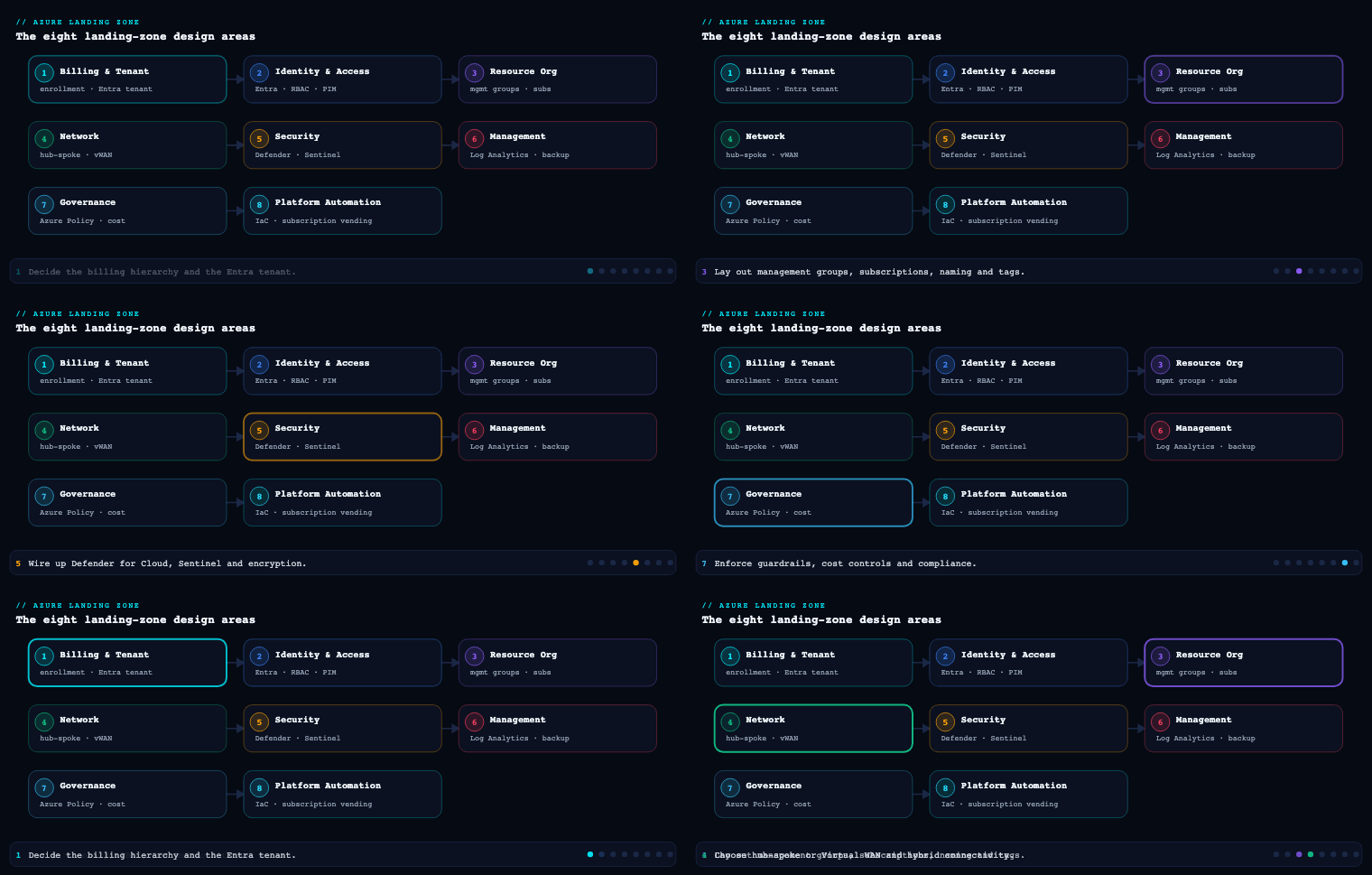
The management group hierarchy
What it is
A management group (MG) is a container above the subscription level that lets you apply Azure Policy assignments, Azure RBAC role assignments, and (in some cases) Cost Management views to many subscriptions at once through inheritance. Every Entra tenant has a single, non-deletable Tenant Root Group whose ID equals the tenant ID. You can nest MGs up to six levels deep below root (excluding the root level and the subscription level), and a single MG can hold up to a large number of children, but depth — not width — is what bites you. A subscription can live in exactly one MG at a time; an MG can contain both child MGs and subscriptions.
The thing that makes MGs the load-bearing wall of the whole landing zone is policy and access inheritance: an assignment at a parent flows down to every descendant subscription and resource, and it cannot be broken by a child (a child can only add more restriction, never remove a parent’s Deny or weaken a parent’s RBAC deny assignment). This is exactly why the ALZ reference hierarchy exists — it is an opinionated tree designed so the right guardrails land at the right altitude.
The ALZ reference hierarchy
The Cloud Adoption Framework ships a canonical hierarchy. Under Tenant Root you create a single top-level MG — conventionally named with your org’s intermediate root prefix, e.g. Contoso or simply alz — and beneath it the archetype branches:
Tenant Root Group
└── Contoso  (intermediate / top-level management group)
    ├── Platform
    │   ├── Identity        (DC/Entra Domain Services, identity VMs)
    │   ├── Management       (Log Analytics, Automation, monitoring)
    │   └── Connectivity     (hub vNet, Azure Firewall, ExpressRoute, DNS)
    ├── Landing Zones
    │   ├── Corp             (internal apps, NO public ingress, hub-routed)
    │   └── Online           (internet-facing apps, public endpoints allowed)
    ├── Sandbox              (loose guardrails, fast experimentation)
    └── Decommissioned       (cancelled subs awaiting deletion, locked down)
Why each branch exists:
| Management group | Purpose | Representative guardrails assigned here |
|---|---|---|
Intermediate root (Contoso) |
The single place to apply org-wide, non-negotiable policy so the Tenant Root Group stays clean and ungoverned-by-default | Allowed locations, required tags, deny classic resources, Defender for Cloud auto-provisioning, diagnostic-to-Log-Analytics |
| Platform | Shared services the whole org consumes; tighter change control | Stronger RBAC, no public IP exceptions, DDoS, key-vault purge protection |
| Platform/Identity | Domain controllers, Entra Domain Services, identity infra | Restrict NSG/UDR changes, deny public network on identity stores |
| Platform/Management | Centralized Log Analytics workspace, Automation, monitoring | Enforce diagnostic settings, retention floors |
| Platform/Connectivity | Hub networking, Azure Firewall, ExpressRoute/VPN, private DNS zones | Deny IP forwarding exceptions, enforce firewall in path |
| Landing Zones | Where application teams’ subscriptions live | Baseline app guardrails: encryption, private endpoints preferred, deny unmanaged disks |
| Landing Zones/Corp | Apps with no public ingress, reachable only via hub | Deny public IP on NICs, force routes through hub |
| Landing Zones/Online | Apps that legitimately expose public endpoints | Allow public IP but mandate WAF/Front Door, TLS minimums |
| Sandbox | Innovation space, isolated from production guardrails | Minimal deny set, budget caps, network isolation from hub |
| Decommissioned | Holding pen for cancelled subscriptions | Read-only/locked, blanket deny on new resource creation |
How to do it well
- Keep the Tenant Root Group empty of assignments. Anything at root is impossible to escape and affects break-glass accounts. Place your “everything” policy at the intermediate root instead.
- Design for inheritance, not for org-chart mirroring. MGs are a governance tree, not an HR tree. Group by guardrail similarity (what policies/RBAC a workload needs) rather than by department. Reorganizing departments shouldn’t force a tenant-wide MG migration.
- Stay shallow. Two to four levels of meaningful depth is plenty for most enterprises. Each extra level multiplies the cognitive load of “which assignment wins” and slows the eventual-consistency propagation of new assignments.
- Protect the hierarchy. Enable the tenant-level setting “require write permissions for creating management groups under root” (RBAC for root) and the default management group setting so new subscriptions land in a governed MG (e.g. a
Landing Zonesor a dedicated quarantine MG) rather than directly under Tenant Root where no policy applies. - Use
Denyand Azure Policy’sDeployIfNotExists/Modifyeffects at MG scope for guardrails, and reserve RBAC deny assignments (via Azure Blueprints-style locks or Privileged Access) for the few cases policy can’t express.
Concrete artifacts, decisions, and tools
- Artifacts: an MG topology diagram; an MG-to-archetype mapping table; a policy-assignment matrix (which initiative/policy is assigned at which MG with which parameters and exclusions); the tenant settings export (default MG, root RBAC requirement).
- Decisions: intermediate root name; whether to split
Corp/Online(almost always yes); whether to add geo or business-unit sub-tiers underLanding Zones; which break-glass accounts are excluded from root-adjacent policy. - Tools/services: Azure Management Groups, Azure Policy (built-in initiatives like Azure Security Benchmark / the ALZ custom initiatives), Azure RBAC with custom roles, and the Azure Landing Zones Terraform module (
Azure/caf-enterprise-scale/ ALZ Terraform accelerator) or the ALZ Bicep modules / Azure portal “Azure landing zone” accelerator, all of which deploy this exact hierarchy as code.
Subscription strategy and democratization
What it is
A subscription is the primary boundary for scale (quota/limits), billing, policy/RBAC inheritance, and blast-radius isolation in Azure. Resource Organization’s job is to define how you carve workloads into subscriptions and — critically — to democratize their creation: instead of a central team being a bottleneck that hand-builds every subscription, the platform team publishes a subscription vending process that hands application teams a fully-governed, network-connected, policy-compliant application landing zone subscription on demand, within guardrails.
Why it matters
Subscriptions are where Azure’s hard and soft limits apply (e.g. role assignments per subscription, resource groups, public IPs, regional vCPU quotas, route tables). Packing everything into one giant subscription means you hit ceilings, you can’t separate prod from non-prod blast radius, your cost reporting is muddy, and a single noisy team’s quota request can stall everyone. Conversely, a thoughtless explosion of subscriptions creates management sprawl. The ALZ answer is a repeatable unit — the application landing zone — plus a vending machine to mint them consistently.
Subscription design patterns
| Pattern | Boundary you get | Best when |
|---|---|---|
| Per workload/application (recommended ALZ default) | Clean cost, RBAC, and quota isolation per app | Most application landing zones; one app’s family of environments |
| Per environment (Prod / Non-Prod separate subs) | Strong prod blast-radius isolation; different policy strictness per stage | Regulated workloads; when prod change control must differ sharply |
| Per business unit / domain | Chargeback alignment, delegated ownership | Decentralized orgs with strong BU autonomy |
| Per geography / data residency | Data-sovereignty and locality enforcement | Multinationals with residency law (EU, India, etc.) |
| Shared platform subscriptions | One each for Connectivity, Management, Identity | Always, for the Platform MG — keep platform out of app subs |
The mainstream ALZ guidance: one subscription per application landing zone, and within it use resource groups or separate subscriptions per environment depending on isolation needs. Treat subscriptions as a unit of management and scale, not as something precious — they’re cheap to create and you should be willing to spin up many.
Democratization via subscription vending
Subscription vending is the productized flow that makes democratization real:
- A team submits a request (ServiceNow ticket, a PR to a repo, or a self-service portal form) with metadata: app name, owner, cost center, environment, required network connectivity, budget.
- An automated pipeline (the subscription vending Terraform/Bicep module, e.g.
Azure/lz-vending) creates the subscription under the correct billing scope, places it in the correct management group (so it inherits guardrails the instant it exists), assigns RBAC (the app team gets Owner/Contributor scoped to their sub, not the platform), wires networking (peers the spoke vNet to the hub, registers DNS), applies budgets and tags, and registers required resource providers. - The team receives a ready-to-use, compliant subscription — typically in minutes — with no standing elevated access to the platform.
This is the heart of democratization: application teams move at their own speed inside guardrails they cannot remove, and the platform team governs by policy-as-code rather than by gatekeeping tickets.
Concrete artifacts, decisions, and tools
- Artifacts: a subscription-naming and metadata standard; the subscription vending module and its pipeline; a request intake form/schema; an RBAC delegation model (what role app owners get and at what scope); per-subscription budget and action group definitions; a Management Group placement rule.
- Decisions: workload-vs-environment subscription granularity; which billing scope (EA enrollment account, MCA billing profile/invoice section, or CSP) subscriptions are minted under; default budget thresholds and who gets alerted; whether app teams get Owner (with policy guardrails) or constrained custom roles.
- Tools/services: Azure subscription vending (
Azure/lz-vendingTerraform module / Bicep equivalent), Microsoft Cost Management + Billing (EA/MCA APIs to programmatically create subscriptions), Azure Policy + default management group (so vended subs are governed at birth), Microsoft Entra ID PIM for any elevated platform access, and Azure Resource Manager templates for the baseline resources seeded into each landing zone.
Naming and tagging standards
What it is
A naming convention is a deterministic, documented scheme for how every Azure resource, resource group, subscription, and management group is named; a tagging strategy is the set of metadata key/value pairs attached to resources, resource groups, and subscriptions to carry information that the name can’t (or shouldn’t) — owner, cost center, environment, data classification, criticality. Together they are what turn a tenant from a pile of GUIDs into a queryable, billable, auditable system.
Why it matters
You cannot manage what you cannot identify. Names are largely immutable for many resource types (you can’t rename a storage account or a VM without recreating it), so the cost of getting naming wrong is rework at scale. Tags drive cost allocation/showback/chargeback in Cost Management, automation targeting (start/stop, backup policy selection), operational routing (who to page), and compliance reporting (which resources hold regulated data). Crucially, tags are not inherited by default — a resource does not automatically get its resource group’s tags — which is precisely why you enforce them with policy.
Designing the naming convention
Microsoft’s CAF recommends a component-based pattern. A practical, hyphen-delimited template:
<resource-type>-<workload/app>-<environment>-<region>-<instance>
| Component | Example token | Notes |
|---|---|---|
| Resource type | vm, st, rg, kv, vnet, pip, nsg, law |
Use the CAF abbreviation list; some types (storage, Key Vault) forbid hyphens and have length limits |
| Workload / app | kvfin, payments |
Short, stable app code |
| Environment | prod, dev, test, uat, sbx |
Pick a fixed, enumerated set |
| Region | eus2, cin (Central India), weu |
Map Azure regions to short codes once, org-wide |
| Instance | 001, 002 |
Zero-padded for sortability |
Worked examples:
| Resource | Name |
|---|---|
| Resource group for the payments app, prod, Central India | rg-payments-prod-cin-001 |
| Storage account (no hyphens, ≤24 chars, globally unique, lowercase) | stpaymentsprodcin001 |
| Key Vault (3–24 chars, globally unique) | kv-payments-prod-cin |
| Virtual network | vnet-payments-prod-cin-001 |
| Log Analytics workspace | law-mgmt-prod-cin-001 |
Naming rules that save pain: respect per-type length and character constraints (the storage and Key Vault cases above), keep globally-unique names collision-resistant by including app+env+region, decide case policy (lowercase everywhere is safest), and avoid encoding things that change often (don’t bake a team’s name into an immutable resource — use a tag instead).
Designing the tagging strategy
Split tags into mandatory (policy-enforced) and optional/recommended:
| Tag key | Example value | Class | Purpose |
|---|---|---|---|
Environment |
Production |
Mandatory | Policy strictness, cost split |
CostCenter |
FIN-4412 |
Mandatory | Chargeback/showback in Cost Management |
Owner |
payments-team@contoso.com |
Mandatory | Operational contact / paging |
Application |
payments-core |
Mandatory | Group all resources of one app across RGs |
DataClassification |
Confidential |
Mandatory | Compliance, access reviews |
Criticality |
Tier1 |
Recommended | SLA, DR prioritization |
ManagedBy |
terraform |
Recommended | Distinguish IaC vs click-ops resources |
ExpiresOn |
2026-12-31 |
Recommended | Sandbox/temp cleanup automation |
How to enforce it — the part that actually matters
A standard nobody enforces is a wish. Use Azure Policy as the enforcement engine:
Require a tag and its value on resources/Require a tag on resource groups—Denyeffect to block non-compliant creation.Inherit a tag from the resource group / subscription—Modifyeffect with aDeployIfNotExists/Modifyremediation so resources automatically pick upCostCenter/Environmentfrom their RG, since tags don’t inherit natively.Add or replace a tag on resources— backfill defaults.- Run remediation tasks to tag the existing estate, not just new resources.
For naming, Azure Policy can’t do arbitrary regex on names natively for every type, so enforce naming through Modify/Deny on name patterns where supported, plus module-level enforcement in IaC (the Terraform/Bicep modules compute names from inputs so humans never type them) and pipeline validation (a CI check, e.g. the Azure naming module Azure/naming/azurerm, that fails the build on a non-conforming name).
Concrete artifacts, decisions, and tools
- Artifacts: the published naming convention doc + region/abbreviation lookup tables; the mandatory-tag list and allowed values; the tagging Azure Policy initiative (assigned at the intermediate root MG); the IaC naming module; a CI naming/tagging linter.
- Decisions: delimiter and component order; environment enumeration; which tags are mandatory vs recommended; allowed value lists (free-text tags are the enemy of clean cost reports); case policy.
- Tools/services: Azure Policy (built-in tag policies + custom), Microsoft Cost Management (tag-based cost views, the place tags pay off), Azure Resource Graph (KQL queries to audit naming/tag compliance across the whole tenant in seconds), the CAF naming/abbreviation guidance, and the
Azure/namingTerraform module.
Resource group structure
What it is
A resource group (RG) is a logical container inside a subscription that holds related resources. Every resource lives in exactly one RG; an RG has its own region (metadata location, independent of where its resources sit), can hold resources from many regions, and is itself a scope for RBAC, Azure Policy, locks, and tags. RGs are the finest grain at which you delegate access and apply guardrails before you reach individual resources.
Why it matters
RG structure determines lifecycle blast radius (deleting an RG deletes everything in it), delegation (you can give a team Contributor on just one RG), policy/lock placement, and how cleanly your cost and resource inventory reads. Two anti-patterns dominate real tenants: the mega-RG (hundreds of unrelated resources in one bucket, impossible to delete or delegate safely) and the RG-per-resource sprawl (no logical grouping, RBAC nightmare). The structuring principle that resolves both: group by shared lifecycle, shared ownership, and shared region. If resources are created, updated, and deleted together by the same team, they belong together.
How to structure them well
- One RG per workload-environment, sometimes per tier. A common pattern inside an application landing zone subscription:
| Resource group | Contents | Rationale |
|---|---|---|
rg-payments-prod-cin-app |
App Service / AKS workload, app config | Deployed and scaled as a unit |
rg-payments-prod-cin-data |
SQL, Cosmos, storage — stateful | Different lifecycle (you rarely tear down data with the app); stricter locks |
rg-payments-prod-cin-net |
vNet, NSGs, private endpoints, UDRs | Networking changes on its own cadence; locked down |
rg-payments-prod-cin-shared |
Key Vault, Log Analytics, managed identities | Shared across tiers, longest lifecycle |
- Match the RG region to where the workload’s control operations run, and remember the RG location is metadata — it matters for where resource group metadata/deployment is stored and is required even for global resources.
- Apply
CanNotDelete/ReadOnlyresource locks on RGs holding stateful or shared resources (data, networking, Key Vault) to stop accidental deletion — and remember locks inherit downward to child resources. - Delegate at the RG, not the subscription, when a team should manage only part of a workload (e.g. give the DBA team Contributor on
*-dataonly). - Keep platform RGs in platform subscriptions with clear names (
rg-hub-connectivity-prod-cin,rg-mgmt-logs-prod-cin), separate from application RGs. - Don’t span a single tightly-coupled deployment across many RGs if it complicates ARM/Bicep/Terraform deployment scoping — align RG boundaries with your deployment stamps.
Concrete artifacts, decisions, and tools
- Artifacts: an RG-layout standard per landing-zone archetype; a lock policy (which RGs get
CanNotDelete); the IaC that provisions the RG skeleton in each vended subscription; RG-level RBAC assignment definitions. - Decisions: group-by-lifecycle vs group-by-tier granularity; whether data/network/shared get their own RGs (recommended for Tier-1 apps); lock strategy; RG region policy.
- Tools/services: Azure Resource Manager (RGs are an ARM construct), Azure Policy and RBAC scoped to RGs, resource locks, Azure Resource Graph for inventory/compliance queries, and Bicep/Terraform to template the RG layout so every landing zone is identical.
Going deeper
This is the section for the reader who already gets the concepts and wants the mechanics, the limits, and the sharp edges. Everything below is additive to the four core sections — think of it as “what the docs make you click through a dozen pages to assemble”.
The hierarchy as one inheritance spine
Line the four containers up and you have a single vertical spine down which two things flow — Azure Policy and Azure RBAC — from the top to every resource at the bottom:
Tenant Root Group             <- one per Entra tenant, its ID == the tenant ID
  └── management groups        <- up to 6 levels deep; policy + RBAC inherit down
        └── subscription        <- unit of scale / billing / blast radius
              └── resource group  <- unit of lifecycle / delegation / locks
                    └── resource     <- the thing that actually costs money
Everything in Resource Organization is really about placing controls at the right point on this spine so inheritance does the work for you.
How inheritance actually resolves
RBAC role assignments are additive and cumulative: a principal’s effective access at any scope is the union of every role assignment at that scope and every ancestor scope. There is no “override” and no “deny by inheritance” in ordinary RBAC — granting Reader at a management group and Contributor at a resource group inside it gives the user Contributor there, not the more restrictive of the two. The only way to subtract access is a deny assignment, a separate object that RBAC evaluates before role assignments and that always wins. You don’t create deny assignments directly from the access-control blade; they’re produced by Azure-managed scenarios — historically Azure Blueprints locks, and today Deployment Stacks “deny settings” (denyDelete / denyWriteAndDelete).
Azure Policy inherits the same way but with the opposite polarity: a Deny (or DeployIfNotExists, Modify, Audit) effect assigned at a parent MG applies to every descendant and cannot be loosened by a child — a child scope can only add more restriction. This asymmetry is the whole reason the ALZ tree exists: you place each guardrail at the highest altitude where it is universally true so it can’t be escaped, and you leave lower scopes free to add specifics.
Two consequences that trip people up:
- Break-glass accounts inherit root policy too. A
Denyat the Tenant Root Group applies to your emergency-access accounts. That’s why ALZ says keep the root empty and assign your “everything” policy one level down at the intermediate root, where you can scope exclusions. - Inheritance is eventually consistent. A new policy assignment doesn’t evaluate instantly — existing resources are re-assessed on a compliance-scan cycle (roughly every 24 hours, or on-demand), and a freshly created resource is evaluated within minutes, not milliseconds. New role assignments propagate in seconds to a few minutes. Never build automation that assumes an assignment is live the instant the API call returns.
Management group settings and limits that actually bite
| Boundary | Current limit / behaviour | Why it matters |
|---|---|---|
| MG hierarchy depth | 6 levels below the root (excludes root and the subscription level) | Depth multiplies “which assignment wins?” reasoning; stay at 2–4 meaningful levels |
| MGs per tenant (directory) | 10,000 | Effectively unlimited for org design; you’ll never hit it |
| Parents per MG or subscription | Exactly one | The tree is strict; a sub can’t sit in two MGs to “share” policy |
| Hierarchies per tenant | One | You get a single governance tree — design it to serve every purpose |
| Role assignments per management group | 500 | Keep RBAC lean at MG scope; assign to groups, not individuals |
Three tenant-level settings are the difference between a governed hierarchy and a leaky one:
- Default management group. By default a brand-new subscription is placed directly under the Tenant Root Group — where, if you kept root clean, no policy applies. That’s a governance hole every unmanaged subscription falls into. Set a default management group (e.g. a
QuarantineorSandboxMG) so ungoverned subscriptions land somewhere with guardrails. Changing it needs write on the hierarchy settings at root. - Require write permissions for creating MGs under root (“hierarchy protection”). By default any Entra principal can create a management group, which pollutes your tree with junk. Turn this on so only holders of Management Group Contributor at root can create MGs.
- Moving a subscription between MGs needs write (Management Group Contributor) on the target MG plus write on the subscription — the moment it lands, it inherits the target’s policy and RBAC. This is precisely the mechanic that lets subscription vending “govern at birth”.
The subscription as a boundary — what “unit of scale” really means
The core lesson calls a subscription the unit of scale, billing, and blast radius. Concretely, that’s because Azure’s limits and quotas apply per subscription (and often per region within it):
| Per-subscription boundary | Representative limit | Cost of packing everything into one sub |
|---|---|---|
| Regional vCPU quota (per VM family) | Quota you request per region + family | One team’s scale-out starves everyone; you queue quota tickets |
| Azure role assignments | 4,000 per subscription | Big shared subs hit the ceiling; you literally cannot grant more access |
| Resource groups | 980 per subscription | Mega-subs run out of RGs |
| Blast radius | a boundary, not a number | A bad deploy, a compromised credential, or a runaway cost stays contained |
Billing scope is the other subscription decision. A vended subscription is minted under a specific billing container — an EA enrollment account, an MCA billing profile / invoice section, or a CSP partner scope. That choice governs which cost rollups and management-group cost views you can build later, so decide it before you vend at scale, not after. Programmatic subscription creation (the engine under vending) goes through the EA or MCA billing APIs.
A representative subscription-vending request — the small file an app team submits, which the pipeline turns into a governed subscription — looks like this (IDs are placeholders):
# landing-zones/payments-prod.yaml — a subscription vending request (representative)
subscription:
  displayName: sub-payments-prod-cin
  managementGroup: Corp-IN-Central        # governed at birth via the target MG
  billingScope: /providers/Microsoft.Billing/billingAccounts/PLACEHOLDER/billingProfiles/PLACEHOLDER/invoiceSections/PLACEHOLDER
  workload: payments
  environment: prod
  tags:
    Environment: Production
    CostCenter: FIN-4412
    Owner: payments-team@contoso.com
    Application: payments-core
    DataClassification: Confidential
networking:
  hubResourceId: /subscriptions/PLACEHOLDER/resourceGroups/rg-hub-connectivity-prod-cin/providers/Microsoft.Network/virtualNetworks/vnet-hub-prod-cin
  spokeAddressSpace: 10.42.0.0/22
  peerToHub: true
budget:
  amount: 500000                          # INR per month
  currency: INR
  alertThresholds: [60, 90, 100]
rbac:
  - principalId: PLACEHOLDER              # payments-team Entra group object id
    roleDefinition: Owner
    scope: subscription                   # scoped to this sub only, never the platform
The point of a schema like this: the app team supplies intent (name, cost center, environment, budget), and the pipeline supplies governance (correct MG placement, hub peering, scoped RBAC) — so the team never touches the platform and never types a subscription ID.
Tagging: three different inheritance mechanisms (know which one you mean)
“Do tags inherit?” has three different answers, and mixing them up is where cost reports go wrong:
- Native Azure — no inheritance. A resource carries exactly the tags you put on it. A resource does not pick up its resource group’s or subscription’s tags. Full stop.
- Azure Policy
Inherit a tag from the resource group/subscription(aModify-effect policy) — this actually writes the tag onto the resource, at create/update time and, via a remediation task, onto the existing estate. Afterwards the resource genuinely carriesCostCenter, visible in Resource Graph, exports, and every downstream tool. - Cost Management “tag inheritance” (a billing-scope setting) — this applies subscription/RG tags to usage records at reporting time only; it does not modify the resource. Turn it on and cost views split by
CostCentereven for resources that never carried the tag; turn it off and the resource is untouched.
Use (2) when downstream systems — automation, Resource Graph queries, exports — must see the tag on the resource. Use (3) when you only need clean cost allocation and don’t want Policy rewriting thousands of resources. They’re frequently used together.
Limits and edges: 50 tags per resource, resource group, and subscription; tag name ≤ 512 characters (128 for storage accounts) and value ≤ 256 characters; not every resource type supports tags, and a handful of resources that don’t emit per-resource usage won’t carry tags into cost at all.
Showback vs chargeback is the reason all this rigour pays off. Showback = you report each business unit’s spend for visibility, but no money moves. Chargeback = you actually bill it back against their budget. Both rest on the same foundation — mandatory, clean CostCenter/Application tags — but chargeback raises the stakes on tag accuracy, which is exactly why chargeback shops enforce tags with a Deny-at-create policy plus remediation rather than trusting good intentions.
Naming: what Policy can and can’t enforce
Azure Policy can evaluate a resource’s name field, but only with pattern operators — like/notLike (wildcards * and ?) and match/matchInsensitive (a positional pattern where # = a digit, ? = a letter, and other characters are literal). That’s enough to enforce a required prefix or a rough shape; it is not arbitrary regular expressions. So real naming enforcement is layered:
- IaC computes names from inputs so humans never type them — the strongest control (
Azure/namingfor Terraform, or a Bicep naming function). - CI linting fails a PR whose plan contains a non-conforming name.
- Policy
Deny/Modifyonnamecatches click-ops resources with the coarse pattern operators above.
And never forget naming’s cruel constraint — immutability. Worth pinning up:
| Resource type | Length | Allowed characters | Uniqueness | Renameable? |
|---|---|---|---|---|
| Storage account | 3–24 | lowercase letters + digits only | global | No — recreate |
| Key Vault | 3–24 | alphanumerics + hyphens, start with a letter | global | No — recreate |
| Resource group | 1–90 | alphanumerics, _, (, ), -, . (not ending in .) |
per subscription | No — recreate |
| Virtual machine | 1–15 (Win) / 1–64 (Linux) | letters, digits, hyphens (Win: not all-numeric) | per resource group | No — recreate |
| Virtual network | 2–64 | alphanumerics, _, -, . |
per resource group | No — recreate |
CAF publishes a recommended-abbreviations table (e.g. rg, vnet, snet, nsg, kv, st, vm, pip) — adopt it verbatim rather than inventing your own so every engineer and every tool reads names the same way. One wrinkle worth flagging: CAF’s own token for a Log Analytics workspace is log, whereas law (used in the naming table above) is a widespread community variant — either is fine, but pick one and be consistent across the org.
Resource locks and moving resources — the operational reality
Two lock types, and they inherit downward:
CanNotDelete— authorized users can read and modify, but not delete. The gentle guard for most stateful RGs.ReadOnly— authorized users can read but not modify or delete; stricter, and it has surprising side effects because some “read” operations are technically writes. The classic trap: aReadOnlylock on a storage account blocks listing its access keys (that call is aPOST), which silently breaks any tool authenticating with keys. ApplyReadOnlydeliberately, not as a “saferCanNotDelete”.
Locks are not RBAC — they apply to everyone regardless of role, and they override the corresponding RBAC action (an Owner cannot delete a CanNotDelete-locked resource without removing the lock first). Setting or removing a lock needs Microsoft.Authorization/locks/*, which Owner and User Access Administrator hold but Contributor does not.
Moving resources is the escape hatch when your grouping turns out wrong:
- You can move most (not all) resources between resource groups and between subscriptions with
az resource moveor the portal “Move” action. During a move, both the source and destination resource groups are locked (no create/update/delete) until it completes. - Not every resource type supports move — check the move-support matrix. Classic resources, some networking and managed-service resources, and things with a global endpoint may be unmovable; moving a VM brings its disks and NICs along.
- A move does not change an immutable name and does not rewrite tags — a moved resource keeps its old tags, so re-run tag remediation after big moves.
- Cross-tenant moves are a different beast: RBAC assignments and system-assigned managed identities are tenant-scoped, so moving a subscription to another Entra tenant drops its role assignments and breaks its managed identities. Plan a full re-grant.
Tooling and version caveats (2026)
- The ALZ IaC is evolving. The long-standing
Azure/caf-enterprise-scale(“Enterprise-Scale”) Terraform module and the ALZ Bicep modules still deploy the canonical hierarchy, but Microsoft is steering new builds toward Azure Verified Modules (AVM) ALZ pattern modules and the ALZ accelerators. Greenfield in 2026? Check AVM first. Already oncaf-enterprise-scale? It’s still supported — just know the direction of travel. - Azure Blueprints is deprecated. The core lesson mentions “Blueprints-style locks”; worth knowing Blueprints never left preview and is being retired. Its two jobs are now split between Template Specs (packaged, versioned templates) and Deployment Stacks (which manage a group of resources as one unit and apply
denyDelete/denyWriteAndDeletedeny settings — the modern replacement for Blueprint locks). - Entra ID naming. “Azure AD” is now Microsoft Entra ID; the Tenant Root Group is an Entra tenant construct. Some APIs and resource fields still read
aad/azureActiveDirectory, but the product is Entra. - Cost Management at MG scope is richest under an Enterprise Agreement; MCA and CSP have some scope and feature differences for management-group-level cost views — confirm your billing model supports the rollups you’re designing for.
Real-world enterprise scenario
Helios Financial Group is a fictional pan-India digital lender with ~1,400 employees, a regulated workload profile (RBI data-localization obligations), and 60+ application teams migrating from a single sprawling “everything” subscription into Azure properly. Their CCoE adopts the ALZ Terraform accelerator and works the Resource Organization design area end to end.
Management group hierarchy. They deploy an intermediate root MG helios under Tenant Root, leaving Tenant Root assignment-free except for break-glass exclusions. Under helios: Platform (with Identity, Management, Connectivity), Landing Zones (with Corp and Online), Sandbox, and Decommissioned. Because RBI residency matters, they add geo sub-tiers under Landing Zones/Corp — Corp-IN-Central and Corp-IN-South — to pin an Allowed locations policy (centralindia, southindia) at exactly the right altitude. They set the default management group to a Quarantine MG so any subscription created outside vending lands locked-down until reviewed. Artifact: a 6-node MG diagram and a policy-assignment matrix showing the Azure Security Benchmark initiative + 11 custom ALZ policies assigned at helios, residency policy at the geo tiers, and Deny public IP at Corp.
Subscription strategy and democratization. Helios chooses one subscription per application landing zone, with separate Prod and Non-Prod subscriptions for any Tier-1 app (blast-radius isolation that RBI auditors like). Platform gets three dedicated subs (Connectivity, Management, Identity). They stand up subscription vending with Azure/lz-vending: a team opens a PR to a landing-zones repo with a small YAML (app name, cost center, environment, criticality, residency, budget). The pipeline mints the subscription under their MCA invoice section, drops it into Corp-IN-Central or Online, peers its spoke vNet to the regional hub (Azure Firewall + ExpressRoute), registers private DNS, assigns the app team Owner scoped to that subscription only (platform access stays behind Entra PIM), and sets a ₹-denominated budget with action-group alerts at 60/90/100%. Outcome: a previously 3-week, ticket-driven subscription request drops to under 20 minutes, fully compliant, with zero standing platform access for app teams.
Naming and tagging standards. They publish <type>-<app>-<env>-<region>-<instance> with cin/sin region codes and a fixed env set (prod/uat/dev/sbx). Examples in their standard: rg-collections-prod-cin-data, stcollectionsprodcin001, kv-collections-prod-cin. Five mandatory tags — Environment, CostCenter, Owner, Application, DataClassification — are enforced by a tagging Azure Policy initiative assigned at helios: Deny on missing tags at create, plus Modify/inherit policies so resources inherit CostCenter and Environment from their RG (since tags don’t inherit natively), backed by remediation tasks that tagged 14,000 pre-existing resources. A CI linter using Azure/naming fails any PR with a non-conforming name. Cost Management is then sliced by CostCenter and Application for monthly showback to each business unit.
Resource group structure. Inside each app subscription the vending baseline seeds four RGs — -app, -data, -net, -shared — with CanNotDelete locks on -data, -net, and -shared. The collections DBA team gets Contributor on *-data only. Platform RGs (rg-hub-connectivity-prod-cin, rg-mgmt-logs-prod-cin) live in the platform subs.
Measurable outcome after one quarter: 47 application landing zones vended (target was 40); 100% mandatory-tag compliance on new resources and 96% across the legacy estate (audited live via Azure Resource Graph KQL); subscription provisioning lead time down ~99% (3 weeks → 20 min); first accurate per-business-unit Azure showback report produced; zero residency-policy violations because Allowed locations is pinned at the geo MG tier and inherited everywhere beneath.
Deliverables & checklist
Common pitfalls
- Mirroring the org chart in the management group tree. Departments reorganize constantly; your governance tree shouldn’t. Group MGs by guardrail similarity (what policy/RBAC a workload needs), not by who reports to whom — otherwise the next reorg triggers a tenant-wide MG migration.
- Assigning policy at the Tenant Root Group. Anything at root is inescapable and hits break-glass accounts; it also makes the root a single point of governance failure. Put org-wide policy at the intermediate root MG and keep Tenant Root clean.
- Centralized subscription creation as a manual bottleneck. Hand-building subscriptions via tickets kills cloud velocity and tempts teams into shadow IT. Productize it with subscription vending so teams self-serve inside guardrails they can’t remove.
- Assuming tags inherit. Resources do not inherit their resource group’s or subscription’s tags by default, so cost reports come out half-empty. Use Azure Policy
Modify/inherit policies plus remediation tasks — and enforce mandatory tags withDenyat create time. - Encoding volatile facts in immutable names. Many resource names can’t be changed without recreating the resource; baking a team name, owner, or cost center into the name guarantees rework. Keep names structural (type/app/env/region) and put changeable metadata in tags.
- Mega-resource-groups or RG-per-resource. Both break delegation and lifecycle management. Structure RGs by shared lifecycle, ownership, and region — separate stateful (
-data), networking (-net), and shared (-shared) resources and lock the ones you can’t afford to lose.
Practice challenges
Work these top-to-bottom; each hides a solution with the why, not just the answer. They escalate from beginner to advanced.
1 — Place the workload (beginner). An internal HR app with no public endpoint, reachable only over the corporate network via the hub, is being onboarded. Which ALZ management group should its subscription land in, and name one guardrail it will inherit there.
<details><summary>Solution</summary>
Landing Zones/Corp. Corp is for apps with no public ingress, routed through the hub, so the subscription inherits a Deny public IP on NICs (or equivalent) guardrail plus the hub-routing/UDR policies. Why: Corp vs Online is the split by public-exposure guardrail, and HR-internal = Corp. Putting it in Online would wrongly permit public endpoints.
</details>
2 — Make the name legal (beginner). A team proposes the storage account name st-Payments-Prod-CIN-001. It’s rejected at deploy. Give a compliant name and say why the original failed.
<details><summary>Solution</summary>
Compliant: stpaymentsprodcin001. Why: storage account names must be 3–24 characters, lowercase letters and digits only, no hyphens, globally unique. The original has hyphens and uppercase (both illegal). Hyphenated names like kv-payments-prod-cin are fine for Key Vaults, but never for storage accounts — the per-type constraint table is not optional.
</details>
3 — Pick the subscription strategy (intermediate). A Tier-1 payments platform must keep production change-control and blast radius sharply separate from dev/test, and auditors want to see that separation. Per-app single subscription, or something else?
<details><summary>Solution</summary>
Use a per-application landing zone but split Prod and Non-Prod into separate subscriptions. Why: a single per-app sub gives clean cost/RBAC but not the hard prod/non-prod blast-radius and policy-strictness boundary a regulated Tier-1 workload needs. Separate subscriptions let you apply stricter policy and change-control to Prod and give auditors a clean isolation story. Lower-tier apps can stay single-sub with per-environment resource groups. </details>
4 — Choose the tag-inheritance mechanism (intermediate). Finance only needs the monthly cost split by CostCenter; they explicitly do not want Azure Policy rewriting tags onto thousands of resources. What do you turn on?
<details><summary>Solution</summary>
Enable Cost Management “tag inheritance” at the billing/subscription scope. Why: it applies the subscription/RG CostCenter tag to usage records at reporting time only, giving clean cost views without modifying any resource — exactly Finance’s ask. If automation or Resource Graph later needed to see the tag on the resource itself, you’d instead use the Azure Policy Inherit a tag from the resource group (Modify) approach.
</details>
5 — Pin residency at the right altitude (advanced). A multinational must guarantee that all Corp workloads for its India entity deploy only to centralindia/southindia. The guarantee must be inescapable for those teams but must not constrain teams in other regions. Where do you assign the Allowed locations policy, and why not higher or lower?
<details><summary>Solution</summary>
Create a geo sub-tier under Corp (e.g. Corp-IN) and assign Allowed locations (centralindia,southindia) at that geo MG. Why: assigning at the intermediate root or Corp would wrongly restrict every region’s teams; assigning at each subscription is unenforceable drift (teams could deviate, and it’s N places to maintain). The geo MG is the highest altitude where the rule is universally true, so every India subscription beneath inherits it and no child can loosen it.
</details>
6 — Debug the lock / RBAC puzzle (advanced). An Owner on rg-payments-prod-cin-data suddenly cannot delete a storage account there, and a separate app can no longer list that account’s keys. Both started right after a “safety” change. What happened, and how do you fix it without weakening safety?
<details><summary>Solution</summary>
Someone applied resource locks. A CanNotDelete lock blocks even an Owner from deleting until the lock is removed (locks override RBAC), and a ReadOnly lock blocks list-keys because that call is a POST/write — breaking key-based auth. Confirm: the RG’s Locks blade / az lock list. Fix without weakening: keep CanNotDelete on the data RG (that’s the intended guard), but replace the ReadOnly lock with CanNotDelete so deletion is still blocked while key-listing and normal operations work — or move the app to managed-identity / RBAC data-plane auth so it never needs account keys at all.
</details>
Common beginner mistakes
These are misconceptions, not error messages — the wrong mental model and the right one. (They’re distinct from the architect-level Common pitfalls above.)
“A management group is just a bigger resource group.” No. A resource group holds resources; a management group holds subscriptions and other management groups — never resources directly. Its entire job is to be a scope you attach Policy and RBAC to so they inherit to everything beneath. Right model: RGs are the bottom of the tree (lifecycle grouping), MGs are the top (governance grouping) — they are not two sizes of the same thing.
“A resource group lives in one region, so everything in it runs there.”
No. An RG’s location is metadata — where the group’s own record and deployment data live. The resources inside can be in any regions; an RG in eastus can happily hold a VM in centralindia. Right model: pick the RG region for the group’s metadata/residency, and set each resource’s region independently.
“If the naming convention changes, I’ll just rename things later.” Usually you can’t. Many resource names are immutable — you can’t rename a storage account, Key Vault, or VM; you delete and recreate (with data migration and downtime). Right model: treat names as write-once, keep only structural, stable facts in them (type/app/env/region), and push anything changeable into tags.
“Deleting a resource group is no big deal — I’ll just recreate it.”
An RG delete is a cascading, irreversible delete of every resource inside it. There is no recycle bin for most resources. Right model: the RG is your lifecycle blast-radius boundary — group things that should die together, and put a CanNotDelete lock on any RG holding data, networking, or shared services.
“More management-group levels means tighter governance.” No — depth mostly adds confusion. Every extra level multiplies the “which assignment wins?” reasoning and slows propagation without making any single guardrail stronger. Right model: 2–4 meaningful levels is plenty; add a level only when a distinct set of guardrails genuinely applies there (like a geo-residency tier).
“A subscription is just how Azure bills me.” Billing is one of four jobs. A subscription is also your primary boundary for scale/quota (limits apply per subscription), RBAC/policy inheritance, and blast radius (isolation of failure, compromise, and cost). Right model: choose subscription boundaries for isolation and scale first — clean billing falls out of the same decision.
Glossary
- Microsoft Entra tenant — the single directory/identity boundary for your organization in the Microsoft cloud (formerly “Azure AD tenant”). Everything in this lesson lives inside one tenant.
- Tenant Root Group — the single, non-deletable management group at the very top of a tenant; its ID equals the tenant ID. Keep it assignment-free.
- Management group (MG) — a container above subscriptions used to apply Azure Policy and RBAC to many subscriptions at once via inheritance. Holds subscriptions and other MGs, never resources.
- Intermediate root MG — the single top-level MG you create under Tenant Root (e.g.
Contoso,alz,helios) where org-wide policy actually lives, so the true root stays clean. - Subscription — the primary boundary for scale/quota, billing, policy/RBAC inheritance, and blast radius; the unit you vend to application teams.
- Resource group (RG) — a logical container inside a subscription for resources with a shared lifecycle; a scope for RBAC, Policy, locks, and tags. Deleting it deletes everything in it.
- Resource — an individual Azure service instance (a VM, a storage account, a Key Vault) — the thing at the bottom of the hierarchy that actually costs money.
- Inheritance — the mechanic by which a Policy or RBAC assignment on a parent scope automatically applies to every descendant. The whole reason the hierarchy matters.
- Azure Policy — the service that evaluates and enforces rules on resources. Effects include
Deny,Audit,Append,Modify,DeployIfNotExists, andAuditIfNotExists. - Policy initiative (set) — a bundle of related policy definitions assigned together (e.g. the Azure Security Benchmark), so you manage many rules as one assignment.
- Azure RBAC / role assignment — grants a principal a role at a scope. Assignments are additive (the union of all inherited assignments); there is no “deny by inheritance”.
- Deny assignment — a separate RBAC object that subtracts access and is evaluated before role assignments; produced by managed scenarios like Deployment Stacks deny settings (formerly Blueprints locks).
- Guardrail — a policy or RBAC control that keeps teams inside safe bounds while letting them self-serve; the opposite of a manual approval gate.
- Landing zone — a pre-governed, network-connected environment ready for workloads. An application landing zone is a vended subscription for one app; a platform landing zone hosts shared services (identity, management, connectivity).
- Archetype (Corp / Online) — the two main application-workload MG branches:
Corp(no public ingress, hub-routed) andOnline(public endpoints allowed, with WAF/TLS mandates). - Subscription vending — the automated, self-service flow (e.g.
Azure/lz-vending) that mints a governed subscription — correct MG, RBAC, networking, budget, tags — on request, with no standing platform access for the requester. - Billing scope — the container a subscription is created under for cost purposes: an EA enrollment account, an MCA billing profile/invoice section, or a CSP scope.
- Naming convention — the deterministic, documented scheme for naming every resource, RG, subscription, and MG (e.g.
<type>-<app>-<env>-<region>-<instance>). - CAF abbreviations — the Cloud Adoption Framework’s recommended short tokens for resource types (
rg,vnet,kv,st, …) — adopt them verbatim. - Tagging strategy — the set of metadata key/value pairs on resources; split into mandatory (policy-enforced) and recommended. Tags do not inherit natively.
- Tag inheritance (two senses) — either an Azure Policy
Modifypolicy that writes an RG/subscription tag onto resources, or the Cost Management setting that applies parent tags to cost records at reporting time without touching the resource. - Showback / chargeback — showback reports each unit’s spend (no money moves); chargeback actually bills it back to their budget. Both need clean
CostCenter/Applicationtags. - Cost Management — the Azure service for budgets, cost analysis, and tag-based cost allocation; where good tagging finally pays off.
- Azure Resource Graph — a fast KQL query service over your whole tenant’s resources, used to audit naming/tag/placement compliance in seconds.
- Resource lock — a
CanNotDeleteorReadOnlylock that applies to everyone regardless of RBAC and inherits downward; overrides the matching RBAC action. - Blast radius — the extent of damage a failure, compromise, or runaway cost can reach before a boundary (subscription, RG) contains it.
- Deployment Stack — an Azure resource that manages a group of resources as one unit and can apply
denyDelete/denyWriteAndDeletedeny settings; the modern successor to Azure Blueprints locks. - Entra PIM (Privileged Identity Management) — just-in-time, approval-gated elevation for privileged roles, so platform access is granted temporarily rather than standing.
- CCoE (Cloud Center of Excellence) — the platform/governance team that owns the landing zone, policies, and vending on behalf of application teams.
What’s next
With the tenant’s shape established, part 4 of the Azure Landing Zone Design Areas turns to Security — the Defender for Cloud, encryption, secrets, and zero-trust controls you assign onto the very management group hierarchy and subscriptions you just built.