In a nutshell
Picture your production database as a busy branch office. Everything runs there — the tellers who serve customers (your queries), the filing cabinets (your tables), the overnight cleaners who reconcile the books (SQL Agent jobs), and the internal phone directory that says who is allowed through the door (logins). Azure SQL Managed Instance is that branch office delivered as a managed service: a near-complete SQL Server, run and patched for you, sitting inside your own private network.
Business continuity is just the question “what happens when the whole building goes dark?” This lesson gives you two ways to answer it. An auto-failover group is a second, identical branch office in another city that quietly receives a live copy of everything, fronted by a receptionist — the listener — who always forwards callers to whichever branch is currently open, so your applications never need a new phone number. The Managed Instance link is a private courier line to your old headquarters (an on-premises or VM-hosted SQL Server), streaming one ledger back and forth in near-real-time for migrations and hybrid disaster recovery.
The one idea that trips up every beginner: copying the databases does not copy the office. The filing cabinets travel; the phone directory, the cleaners’ schedules, and the courier contracts (logins, Agent jobs, linked servers) do not. A failover where every customer row is perfect but nobody can log in is the classic 3 a.m. outage — and the entire back half of this lesson is about making sure that never happens to you.
Level: Advanced · Time: ~60 min
You need first: comfort with SQL Server / T-SQL and SSMS, running az in Cloud Shell, and VNet basics (subnets, NSGs, peering). The Prerequisites & where this fits section just below expands this and links the earlier lessons.
After this you can: map any continuity requirement to the right primitive; provision a failover group with a correctly shared DNS zone; route apps through listeners that survive a role switch; stand up the link for online migration or hybrid DR; choose planned versus forced failover under pressure; and drill a runbook that pre-stages the server-level state replication silently ignores. The Learning objectives list makes each outcome concrete.
Most SQL Managed Instance “HA” incidents I have reviewed were not engine failures. They were the day the primary region went dark and the team discovered their connection strings hard-coded a regional FQDN, the service-account logins did not exist on the secondary, and nobody had ever actually run a failover. The data was intact and perfect; the application was down for three hours because the parts that move databases do not move logins, jobs, or linked servers. Managed Instance gives you two distinct continuity primitives — auto-failover groups for cross-region geo-replication and the Managed Instance link for hybrid replication to and from SQL Server. They solve different problems, they cannot be combined on the same instance, and both are useless until you have rehearsed the runbook.
This article is the build-and-prove guide. We treat business continuity not as a single feature but as a layered design: zone redundancy inside one region, a failover group across two regions, and the link for the hybrid path — each with its own RPO/RTO, its own networking, and its own failure modes. You will learn to wire both primitives correctly, route applications through listeners that survive a failover, pre-stage the server-level state that replication silently ignores, and drill the runbook on a cadence so the first failover you ever run is not at 3 a.m. during a real outage. Because this is a reference you will return to mid-incident, the tiers, the listeners, the ports, the error states, the update-policy matrix, and the failover playbook are all laid out as scannable tables alongside the prose, the az CLI, the T-SQL, and the Bicep.
By the end you will stop guessing. When a region degrades you will know whether to run a planned failover (no data loss, primary reachable) or a forced one (data loss possible, primary gone), what your measured RPO actually is, which listener your reporting traffic should hit, and exactly which pre-staged objects turn a “successful” failover into a working application. Knowing which within minutes is the difference between a controlled relocation and a regulated-downtime breach.
What problem this solves
A Managed Instance running in a single region is exposed to three failure classes the engine’s built-in HA does not cover: a region outage (datacenter or zone-fleet event), a bad change (a deployment or DROP TABLE that replicates instantly to any synchronous replica), and a hybrid migration where you need on-prem SQL Server and Azure to share data with minimal downtime. The local Always On availability group inside a Business Critical instance fails over in seconds — but only within the region. When the region is the thing that failed, local HA has nothing left to fail over to.
What breaks without a cross-region story: the business discovers continuity is a slide, not a control. The connection strings point at mi-prod-eastus2.<dns_zone>.database.windows.net, which no longer resolves to anything healthy. There is no second instance because nobody provisioned one in the partner’s DNS zone (and you cannot retrofit the DNS zone after creation). Even teams that did build a failover group often skip the rehearsal, so the first real failover surfaces the unreplicated server-level state — logins with mismatched SIDs, SQL Agent jobs that simply are not there, linked servers, credentials, msdb operators — and the overnight batch run fails on a database where every customer row is correct.
Who hits this: every team running a production Managed Instance under a continuity or regulatory obligation (RPO/RTO targets, an auditor asking “show me your last DR test”), every migration moving a 2 TB SQL Server database to MI inside a downtime window, and every hybrid estate that wants Azure as a DR target for on-prem SQL Server (or vice versa). The fix is almost never “buy a bigger SKU” — it is “design the layers, route through listeners, pre-stage server state, and drill the runbook until the numbers are measured, not marketing.”
To frame the whole field before the deep dive, here is every continuity layer this article covers, the failure it actually defends against, and where it lives:
| Continuity layer | Defends against | Scope of protection | RPO (typical) | RTO (typical) | Lives where |
|---|---|---|---|---|---|
| Local HA (built-in) | Node / disk failure | Single region | 0 (sync) | Seconds | The instance itself |
| Zone redundancy | Single-zone outage | Single region, multi-AZ | 0 (sync) | Seconds | Instance property |
| Auto-failover group | Region outage, region relocation | Cross-region (MI→MI) | ~5 s (async) | ~1 h end-to-end | Secondary RG, both regions |
| Managed Instance link | Hybrid migration, hybrid DR | SQL Server ↔ MI (one DB/link) | Seconds (async) | Minutes (cutover) | DAG between SQL Server + MI |
| Backups / PITR / LTR | Bad change, deletion, corruption | The thing replication can’t undo | Up to backup interval | Minutes–hours (restore) | Automated, per database |
The single most important sentence in this table: geo-replication is not a backup. A failover group and the link both move a DROP TABLE to the secondary in seconds. Point-in-time restore is the only layer in the list that defends against a bad change — keep it, even with a perfect failover group.
Learning objectives
By the end of this article you can:
- Map any Managed Instance continuity requirement to the right primitive — local HA, zone redundancy, a failover group, the link, or backups — and explain what each does and does not protect against.
- Provision an auto-failover group across two regions correctly: shared DNS zone set at creation, dedicated delegated subnets, cross-region connectivity, and a customer-managed (
Manual) failover policy. - Route applications through the read-write and read-only listeners so a failover never requires a connection-string change, and explain why live TCP connections do not migrate.
- Establish a Managed Instance link (distributed availability group) for online migration or hybrid DR, and choose the correct SQL Server version and MI update policy for one-way versus two-way scenarios.
- Decide planned versus forced failover under pressure, quantify the data-loss window each implies, and execute the exact
azcommand for each. - Pre-stage the server-level state replication ignores — logins with matching SIDs, SQL Agent jobs, linked servers, credentials — as a hard gate in the runbook, not a hopeful afterthought.
- Build, automate, and drill an RPO/RTO-driven failover runbook, and verify with concrete queries that listeners route correctly and replication is healthy.
- Diagnose the common failures — DNS-zone mismatch, subnet sizing, link version/policy traps, stale connections, missing server state — from the exact symptom to the confirming command to the fix.
Prerequisites & where this fits
You should already understand the Managed Instance basics: an MI is a near-100%-compatible SQL Server instance delivered as PaaS, deployed into a delegated subnet inside your VNet, with two service tiers — General Purpose (compute separated from remote storage) and Business Critical (a local Always On availability group on local SSD with a free readable replica). You should know how to run az in Cloud Shell, read JSON/-o table output, and be comfortable with T-SQL and SSMS. Familiarity with Always On availability groups, DNS CNAME resolution, and VNet peering will make every section land faster.
This sits in the Data platform & business continuity track. It assumes the platform fundamentals and the advanced-features layer from Azure SQL Database Advanced Patterns: Hyperscale, Elastic Pools, Ledger, and Always Encrypted with Secure Enclaves, and it pairs with the broader DR strategy in Active-Active Multi-Region on Azure: Building for RTO Near Zero and the IaaS-side runbook discipline in Azure Site Recovery for IaaS: Zone-to-Zone and Region Failover with Recovery Plans. When the symptom is connectivity rather than continuity, Troubleshooting Azure SQL Database: Connectivity, Timeouts, Throttling & Blocking is the companion playbook.
A quick map of who owns which layer during an incident, so you call the right person fast:
| Layer | What lives here | Who usually owns it | Continuity failure it can cause |
|---|---|---|---|
| Application / connection layer | Connection strings, retry logic, ORM | App / dev team | Hard-coded regional FQDN; no reconnect on failover |
| DNS / listener | Failover-group CNAMEs, DNS zone | Platform + DBA | Stale resolution; reads hitting the wrong instance |
| Managed Instance (engine) | Databases, local AG, replicas | DBA / platform | Tier mismatch; missing server-level state |
| Networking (VNet/subnet) | Delegated subnet, NSG, route table, peering | Network team | Provisioning failure; cross-region path down |
| Failover group / link | Geo-replication, DAG, failover policy | DBA / platform | Wrong policy; not synchronized at failover |
| Backups (PITR/LTR) | Automated backups, retention | Platform | The only defense against a replicated bad change |
Core concepts
Five mental models make every later decision obvious.
Continuity is layered, not a single switch. Local HA, zone redundancy, the failover group, the link, and backups are additive — each covers a failure the others do not. You do not pick one; you stack the ones your risk profile requires. A Business Critical instance with zone redundancy, a cross-region failover group, and long-term backup retention is three independent controls against three different failures, and removing any one re-opens a gap.
The two cross-region primitives are mutually exclusive on an instance. A failover group geo-replicates all user databases MI→MI to a partner instance in another region. The Managed Instance link builds a distributed availability group between SQL Server and MI for one database per link. You cannot put both on the same instance — choose the primitive that matches the job (MI-to-MI DR versus hybrid SQL-Server replication/migration).
The listener is the contract; the instance FQDN is not. A failover group publishes two CNAMEs in a shared DNS zone — a read-write listener that always points at the current primary and a read-only listener that points at the current secondary. Applications connect to listeners, never to a regional instance FQDN, so a role switch is invisible to the connection string. On failover the DNS record updates immediately, but existing TCP connections are not migrated — clients must reconnect, which is why aggressive retry-with-reconnect is mandatory in the data layer.
Replication moves databases, nothing else. Both the failover group and the link replicate user databases only. Logins, SQL Agent jobs, linked servers, credentials, server-level permissions, and master/msdb objects are NOT replicated. This is the single most common cause of a post-failover application outage: the data is perfect, but the service-account login is missing or has a mismatched SID, so the app cannot authenticate or the overnight job does not exist to run. Server-level state is your job, pre-staged on the secondary and gated in the runbook.
Geo-replication is asynchronous, so failover has two flavors. Replication across the WAN is async, which means at any instant the secondary is slightly behind. A planned failover synchronizes fully then switches roles (no data loss, requires the primary reachable) — your tool for drills and relocations. A forced failover promotes the secondary immediately without waiting (potential data loss equal to the un-replicated lag) — your only option when the primary region is gone. That lag is your RPO, and the only honest number is the one you measure in a drill.
The vocabulary in one table
Before the deep sections, pin down every moving part. The glossary at the end repeats these for lookup; this table is the mental model side by side:
| Concept | One-line definition | Where it lives | Why it matters to continuity |
|---|---|---|---|
| Managed Instance (MI) | Near-100% SQL Server compatible PaaS in your VNet | Delegated subnet | The unit you replicate and fail over |
| General Purpose | Compute separated from remote storage (3-copy) | Service tier | Recovery is a remount, not an instant handoff |
| Business Critical | Local AG of 4 replicas on local SSD | Service tier | Local failover in seconds; free readable replica |
| Zone redundancy | Spreads replicas/storage across AZs | Instance property | Survives a single-zone outage in-region |
| Failover group (FOG) | Geo-replicates all user DBs MI→MI | Secondary RG | Cross-region DR with a stable listener |
| DNS zone | SAN-cert-scoped zone ID shared by partners | Set at creation | Same cert post-failover → must be shared |
| Read-write listener | CNAME → current primary | Shared DNS zone | App OLTP endpoint that survives failover |
| Read-only listener | CNAME → current secondary | Shared DNS zone | Reporting/read offload endpoint |
| MI link | Distributed AG between SQL Server and MI | DAG | Hybrid migration / DR, one DB per link |
| Update policy | SQL-engine versioning mode of the MI | Set at creation | Gates two-way link failback |
| Planned failover | Sync then switch (no data loss) | set-primary |
Drills, relocations, failback |
| Forced failover | Switch immediately (data loss possible) | --allow-data-loss |
Real region outage only |
| RPO | Data you can lose (the replication lag) | Design target | ~5 s under healthy async |
| RTO | Time to recover (switch + app recovery) | Design target | ~1 h end-to-end, drill it |
| Standby replica | License-free passive secondary | --secondary-type |
Cuts SQL licensing on DR-only vCores |
Service tiers, zone redundancy, and the built-in HA model
Before you reach for cross-region anything, understand what you already get inside one region — because the tier you chose changes both your local recovery behavior and what a geo-secondary costs. Managed Instance has two operational models:
General Purpose separates compute from storage. Your database files live on Azure remote storage (premium/standard managed disks) with built-in 3-copy durability. A node failure means a stateless compute node is reattached to the same storage — fast to provision, but recovery is a remount, not an instant replica handoff. There is no local readable replica.
Business Critical runs an Always On availability group of four replicas locally on local SSD. One replica is a free read-only replica you reach with ApplicationIntent=ReadOnly. Failover between local replicas is seconds, and you get the lowest-latency I/O. It costs more and caps at smaller maximum storage than General Purpose.
The tier comparison that drives both your local-HA expectation and your geo-secondary cost:
| Property | General Purpose | Business Critical | Why it matters |
|---|---|---|---|
| Compute/storage model | Compute separate from remote storage | Compute + local SSD storage | GP recovery is a remount; BC is a replica handoff |
| Local replicas | None (stateless compute) | 4-node Always On AG | BC fails over locally in seconds |
| Local readable replica | No | Yes (free, ApplicationIntent=ReadOnly) |
BC offloads reads in-region for free |
| Local failover time | Remount (longer) | Seconds | BC for the tightest in-region RTO |
| Max storage (approx) | 16 TB | ~5.5 TB (Gen5, scales with vCores) | GP for very large databases |
| I/O latency | Higher (remote) | Lowest (local SSD) | BC for latency-sensitive OLTP |
| Relative cost | Lower | Higher (includes SQL licensing on replicas) | Drives DR-secondary economics |
| Standby (license-free) secondary | Supported in FOG | Supported in FOG | Cut licensing on DR-only vCores |
Zone redundancy is the cheapest resilience upgrade most teams skip. Enabling it spreads the replicas (Business Critical) or the storage (General Purpose, where supported) across availability zones in the region, so a single-zone outage does not take the instance down. It is a property of the instance, not a separate resource:
# Enable zone redundancy on an existing instance (Business Critical)
az sql mi update \
  --resource-group rg-data-eastus2 \
  --name mi-prod-eastus2 \
  --zone-redundant true
resource mi 'Microsoft.Sql/managedInstances@2023-08-01-preview' = {
  name: 'mi-prod-eastus2'
  location: 'eastus2'
  sku: { name: 'GP_Gen5', tier: 'GeneralPurpose', family: 'Gen5', capacity: 8 }
  properties: {
    subnetId: miSubnet.id
    zoneRedundant: true        // spread across AZs; protects a single-zone outage
    storageSizeInGB: 256
    licenseType: 'LicenseIncluded'
  }
}
The built-in HA layers and exactly what each one survives — read this before deciding you “have HA”:
| Built-in mechanism | Tier | Protects against | Does NOT protect against | Recovery behavior |
|---|---|---|---|---|
| 3-copy remote storage | General Purpose | Disk failure | Region outage, zone outage, bad change | Storage-level durability |
| Compute reattach | General Purpose | Compute-node failure | Region/zone outage | Remount to same storage |
| Local 4-node AG | Business Critical | Node/replica failure | Region outage | Local failover in seconds |
| Zone redundancy | Both (where supported) | Single-zone outage | Region outage, bad change | Stays up across AZs |
| Automated backups + PITR | Both | Bad change, deletion, corruption | (this is the one that does) | Restore to a point in time |
Zone redundancy protects against a zone failure. It does not protect against a region failure, a bad deployment, or accidental data deletion. That is the line where failover groups and the link begin. Keep the built-in HA and add cross-region DR and keep backups — they are layers, not alternatives.
Provisioning auto-failover groups across two regions
A failover group geo-replicates all user databases on an instance to a partner instance in a different region, with a managed listener that survives failover. Two hard prerequisites trip people up before they ever run the command:
- The two instances must share a DNS zone. A Managed Instance’s host certificate is a SAN cert scoped to a generated DNS zone ID (e.g.
a1b2c3d4e5f6). For a client to reconnect to the secondary using the same cert after failover, the secondary must be in the same DNS zone. You set this at creation time of the secondary by pointing it at the primary as its DNS zone partner — you cannot retrofit it. - The subnets must have connectivity. Global VNet peering is the recommended path (private, backbone, no gateway). VPN/ExpressRoute also work but are slower for the seeding phase.
The prerequisites as a checklist with the failure you get if you skip each — this is the table that saves a re-provision:
| Prerequisite | Requirement | When set | Failure if wrong |
|---|---|---|---|
| Shared DNS zone | Secondary created in primary’s DNS zone | Creation only | Clients can’t reconnect post-failover; not retrofittable |
| Same hardware family | Both instances same gen (e.g. Gen5) | Provisioning | FOG creation rejected |
| Secondary ≥ primary size | Secondary vCores/storage ≥ primary | Provisioning | Seeding/failover constrained or blocked |
| Same/compatible service tier | GP↔GP or BC↔BC (with caveats) | Provisioning | FOG creation rejected |
| Cross-region connectivity | Global VNet peering (recommended) | Before FOG create | Seeding fails / FOG can’t form |
| Collation match | Server collation identical | Provisioning | FOG creation rejected |
| Empty secondary | No user DBs on the secondary | Before FOG create | FOG create fails (DBs would conflict) |
| Distinct subnets | Each instance in its own delegated subnet | Provisioning | Both → DNS-zone/peering issues |
Create the secondary in the partner’s DNS zone (the --dns-zone-partner takes the primary instance resource ID):
# Secondary instance, placed into the primary's DNS zone
az sql mi create \
  --resource-group rg-data-westus2 \
  --name mi-prod-westus2 \
  --location westus2 \
  --subnet "/subscriptions/<sub>/resourceGroups/rg-net-westus2/providers/Microsoft.Network/virtualNetworks/vnet-westus2/subnets/snet-mi" \
  --capacity 8 --storage 256GB \
  --edition BusinessCritical --family Gen5 \
  --dns-zone-partner "/subscriptions/<sub>/resourceGroups/rg-data-eastus2/providers/Microsoft.Sql/managedInstances/mi-prod-eastus2"
With both instances live and peered, create the failover group on the secondary’s resource group, referencing the primary as --source-mi. Use --failover-policy Manual (customer-managed) so you decide when to fail over — this is the strongly recommended posture:
az sql instance-failover-group create \
  --name fog-prod-sqlmi \
  --resource-group rg-data-westus2 \
  --location westus2 \
  --source-mi mi-prod-eastus2 \
  --partner-mi mi-prod-westus2 \
  --partner-resource-group rg-data-westus2 \
  --failover-policy Manual \
  --grace-period 1
Note the directionality: --source-mi is the current primary (East US 2), --partner-mi is the secondary you just built (West US 2), and --location/--resource-group describe the secondary. Every create-time parameter, its default, and the trade-off — get these right at creation because several are not changeable later:
| Parameter | What it sets | Default / typical | When to change | Gotcha if wrong |
|---|---|---|---|---|
--failover-policy |
Who triggers failover | Manual (recommended) |
Automatic only if you accept MS-timed region failover |
Automatic can fail over on a transient region blip |
--grace-period |
Min hours before MS forces failover (Automatic only) | 1 (floor) | Tune under Automatic | Inert under Manual |
--secondary-type |
Geo vs Standby secondary | Geo |
Standby for DR-only (license-free) |
Reads on a Standby forfeit the license benefit |
--source-mi |
Current primary | (the primary) | — | Reversed → group points the wrong way |
--partner-mi |
The secondary | (the new instance) | — | Must be in the shared DNS zone |
--partner-resource-group |
Secondary’s RG | (secondary RG) | — | Mismatch → create fails |
--location |
Secondary region | (secondary region) | — | Must be the secondary, not primary |
Set --secondary-type Standby instead of the default Geo if the secondary is DR-only and you want the license-free passive replica benefit — you stop paying SQL licensing on its vCores as long as you never run read workloads on it. --grace-period only matters under a Microsoft-managed (Automatic) policy; it is the minimum wait (floor of 1 hour) before Microsoft forces a region-wide failover. Under Manual it is inert.
The failover-policy decision, distilled:
| If you want… | Choose | Because |
|---|---|---|
| Full control over when you fail over | Manual |
You decide; no surprise failover on a transient blip |
| Microsoft to fail over automatically on a sustained outage | Automatic |
Hands-off, but cedes timing and accepts grace-period delay |
| A DR-only secondary with no read workload | Standby secondary |
License-free passive replica saves SQL licensing |
| A secondary you also read from | Geo secondary |
Read offload, but you pay SQL licensing on it |
The same group expressed declaratively, so it is reproducible and reviewable:
resource fog 'Microsoft.Sql/managedInstances/instanceFailoverGroups@2023-08-01-preview' = {
  name: 'fog-prod-sqlmi'
  parent: secondaryMi               // created on the secondary
  properties: {
    readWriteEndpoint: {
      failoverPolicy: 'Manual'      // customer-managed
      failoverWithDataLossGracePeriodMinutes: 60   // honored only under Automatic
    }
    readOnlyEndpoint: { failoverPolicy: 'Enabled' }
    partnerRegions: [ { location: 'eastus2' } ]
    managedInstancePairs: [
      { primaryManagedInstanceId: primaryMi.id, partnerManagedInstanceId: secondaryMi.id }
    ]
    secondaryType: 'Standby'        // license-free DR secondary
  }
}
Read-write and read-only listener endpoints for connection routing
This is the entire payoff. The failover group publishes two CNAMEs in the shared DNS zone, and they do not change when the primary role moves:
| Listener | FQDN format | Points to | Connection string intent | Read/write |
|---|---|---|---|---|
| Read-write | <fog-name>.<zone_id>.database.windows.net |
current primary | default (read-write) | Read-write |
| Read-only | <fog-name>.secondary.<zone_id>.database.windows.net |
current secondary | ApplicationIntent=ReadOnly |
Read-only |
So your applications connect to the listener, never to mi-prod-eastus2... directly:
# Read-write (OLTP) — always lands on whichever instance is primary
Server=tcp:fog-prod-sqlmi.a1b2c3d4e5f6.database.windows.net;Database=orders;Encrypt=True;

# Read-only (reporting) — lands on the geo-secondary
Server=tcp:fog-prod-sqlmi.secondary.a1b2c3d4e5f6.database.windows.net;Database=orders;ApplicationIntent=ReadOnly;Encrypt=True;
There are more endpoints in play than just these two, and confusing them is a classic outage. The complete endpoint reference for a Managed Instance in a failover group:
| Endpoint | Form | Resolves to | Survives failover? | Reachable from |
|---|---|---|---|---|
| FOG read-write listener | <fog>.<zone>.database.windows.net |
Current primary | Yes | VNet-local only |
| FOG read-only listener | <fog>.secondary.<zone>.database.windows.net |
Current secondary | Yes | VNet-local only |
| Instance VNet-local FQDN | <mi>.<zone>.database.windows.net |
That specific instance | No (pins a region) | VNet-local only |
| Instance public endpoint | <mi>.public.<zone>.database.windows.net,3342 |
That instance, port 3342 | No | Internet (if enabled) |
| Link DAG (mirroring) | Private IP/host : 5022 | DAG transport | n/a | VNet-local only |
Two operational truths to internalize, then the connection-string knobs that make the routing actually work:
- On failover, the DNS record updates immediately, but existing TCP connections are not migrated. Clients must reconnect, and they will only pick up the new primary after their DNS cache expires. Build aggressive retry-with-reconnect into your data layer; do not assume a live connection rides through.
- These listeners are not reachable over the public endpoint. They resolve over the VNet-local endpoint only — from inside the VNet or peered/VPN/ExpressRoute networks. Plan your app placement accordingly.
The connection-string parameters that govern failover behavior, and how to set each:
| Parameter | What it does | Recommended for FOG | Why |
|---|---|---|---|
Server |
Target endpoint | The listener, never an instance FQDN | Survives the role switch |
ApplicationIntent |
Read-write vs read-only routing | ReadOnly on the read-only listener |
Routes reporting to the secondary |
Encrypt |
TLS to the instance | True |
MI requires encrypted connections |
MultiSubnetFailover |
Parallel connect across listener IPs | True |
Faster reconnect after failover |
Connection Timeout |
Initial connect timeout | 30 s (raise during failover window) | Avoid premature timeout mid-switch |
| Retry policy (app) | Reconnect on transient/40613/4060 |
Exponential backoff, jitter | Connections don’t migrate; you must reconnect |
The errors your data layer will see during a failover window — treat every one as “reconnect,” not “fail the request”:
| Error | Meaning | Likely cause | Confirm | Correct app behavior |
|---|---|---|---|---|
40613 |
Database not currently available | Role switch in progress | instance-failover-group show state |
Retry with backoff (reconnect) |
4060 / 40615 |
Cannot open database / login blocked | Failover or login not on new primary | Check listener target + login exists | Reconnect; pre-stage login |
40197 / 40501 |
Service busy / throttling | Transient during switch or load | Resource metrics | Backoff and retry |
10928 / 10929 |
Resource limit reached | Connection/worker cap on new primary | DMV sys.dm_exec_requests |
Backoff; right-size secondary |
18456 |
Login failed | Login/SID missing on new primary | sys.server_principals on new primary |
Pre-stage login with matching SID |
| Conn timeout | No response within timeout | DNS cache stale; switch not complete | nslookup listener; FOG state |
Raise timeout; MultiSubnetFailover=True |
The Managed Instance link: near-real-time replication from SQL Server
Failover groups are MI-to-MI. The Managed Instance link is the hybrid story: it builds a distributed availability group between a SQL Server instance (on-prem or on an Azure VM) and a SQL Managed Instance, replicating a single database in near-real-time. Because it is a DAG, the underlying tech is the same Always On machinery your DBAs already know.
Key facts that shape the design:
- One database per link. To replicate ten databases you create ten links. A single MI hosts up to 100 links (500 on the Next-gen General Purpose tier).
- Minimum versions matter. One-way replication (SQL Server → MI) is GA from SQL Server 2016 SP3 / 2017 CU31 / 2019 CU20. Two-way DR with failback requires SQL Server 2022 (16.x) or SQL Server 2025 (17.x).
- Authentication is certificate-based. SQL Server and MI exchange the public keys of their respective certificates. Windows auth cannot establish the link.
- It uses the VNet-local endpoint only — not the public endpoint, not a private endpoint.
- User databases only. Logins, agent jobs, server-level objects, and system databases are not replicated. This is the single most common post-failover outage cause; handle it explicitly (see the runbook).
The link’s hard constraints and limits, enumerated so you design within them from day one:
| Constraint | Value / rule | Implication |
|---|---|---|
| Databases per link | 1 | N databases → N links |
| Links per MI | 100 (500 on Next-gen GP) | Caps the fan-in to one instance |
| Transport port | 5022 (DB mirroring), default instance | NSG + on-prem firewall must allow it |
| Authentication | Certificate-based only | Windows auth cannot form the link |
| Endpoint used | VNet-local only | Not public, not private endpoint |
| Replicated objects | User database(s) only | Server-level state is your job |
| One-way GA versions | SS 2016 SP3 / 2017 CU31 / 2019 CU20 | Older builds can’t link |
| Two-way (failback) versions | SS 2022 (16.x) / 2025 (17.x) | Failback needs modern SQL Server |
| MI update policy for failback | Must match SS 2022/2025 policy | Not supported on “Always-up-to-date” |
| System databases | Not replicated | master/msdb handled manually |
The trust handshake on the SQL Server side, abbreviated:
-- On SQL Server: certificate to authenticate the database mirroring endpoint
USE master;
CREATE CERTIFICATE SqlServerCert
  WITH SUBJECT = 'SQL Server certificate for MI link';

-- Database mirroring endpoint that the DAG rides over (default instance uses 5022)
CREATE ENDPOINT Endpoint_Mirroring
  STATE = STARTED
  AS TCP (LISTENER_PORT = 5022, LISTENER_IP = ALL)
  FOR DATABASE_MIRRORING (
    ROLE = ALL,
    AUTHENTICATION = CERTIFICATE SqlServerCert,
    ENCRYPTION = REQUIRED ALGORITHM AES);
The endpoint options that matter for the link, with their values and what each controls:
| Endpoint option | Values | Use for the link | Why |
|---|---|---|---|
LISTENER_PORT |
TCP port | 5022 (default instance) | DAG transport; only the default instance should use 5022 |
LISTENER_IP |
ALL / specific |
ALL (or scope to the MI subnet) |
Accept the DAG connection |
ROLE |
ALL / PARTNER / WITNESS |
ALL |
Supports both directions |
AUTHENTICATION |
CERTIFICATE / WINDOWS |
CERTIFICATE <cert> |
Windows auth can’t form the link |
ENCRYPTION |
REQUIRED / SUPPORTED / DISABLED |
REQUIRED ALGORITHM AES |
Encrypt the replication stream |
If multiple SQL Server instances share a host, each needs its own mirroring endpoint on a dedicated port. Only the default instance should use 5022. SSMS automates the entire certificate exchange and DAG creation through its “Replicate database to Managed Instance” wizard — use it for the first link, then script the rest with the latest
Az.Sqlmodule or REST.
One-way vs two-way link scenarios for migration and DR
The link is the same feature with two very different operating modes, gated by SQL Server version and the MI update policy:
| Scenario | Versions | Direction | MI update policy | Use it for |
|---|---|---|---|---|
| Online migration / read offload | SQL Server 2016–2019 | SQL Server → MI only | Any | Minimal-downtime migration; offload read/reporting/analytics to Azure |
| Two-way DR with failback | SQL Server 2022 / 2025 | Bidirectional | Must match SS 2022/2025 policy | Hybrid DR where Azure or on-prem can be primary, and you can fail back |
The hard constraint on two-way: replicating from MI back to SQL Server (and failing over in that direction) is not supported on the “Always-up-to-date” update policy. The instance must run the matching SQL Server 2022 or SQL Server 2025 update policy. If you stand up an MI on Always-up-to-date and later need to fail back to on-prem, you are stuck — you can fail over to MI but never back over the link. Decide the update policy when you provision, based on whether failback to SQL Server is a requirement.
The update-policy decision matrix — this is the one that bites a year later if you get it wrong:
| Update policy | Engine versioning | Two-way link failback | Choose when |
|---|---|---|---|
| Always-up-to-date | Latest engine features, continuous | Not supported | MI is the long-term home; no failback to on-prem ever |
| SQL Server 2022 policy | Aligned to SQL Server 2022 | Supported | You may fail back to a SQL Server 2022 estate |
| SQL Server 2025 policy | Aligned to SQL Server 2025 | Supported | You may fail back to a SQL Server 2025 estate |
For migration, the link is the only option that delivers a true online cutover to the Business Critical tier. The pattern: establish the link, let it seed and stay synchronized while production keeps running on SQL Server, then fail over to MI during a short, planned cutover window. For SQL Server 2016–2019 that failover is one-directional and breaks the link — which is exactly what you want for a migration, but means you must be confident before you cut over.
How the link compares with the other ways to get data into MI — pick the row that matches your downtime budget:
| Method | Online? | Min downtime | Target tier | Best for |
|---|---|---|---|---|
| MI link | Yes (continuous DAG) | Minutes (cutover) | GP or BC | Lowest-downtime migration; hybrid DR |
| Log Replay Service (LRS) | Near-online (log shipping) | Final restore window | GP or BC | Migration without 2016 SP3+ link prereqs |
| Native backup/restore (URL) | No | Full restore time | GP or BC | One-off, downtime acceptable |
| DMS (Database Migration Service) | Online mode available | Varies | GP or BC | Guided, assessment-driven migrations |
| Transactional replication | Yes | Cutover | GP or BC | Selective objects, ongoing sync |
Planned vs forced failover and the data-loss tradeoffs
Geo-replication is asynchronous over the WAN. That single fact drives the entire failover-vs-forced-failover decision and your achievable RPO. There are two distinct operations:
Planned (no data loss). set-primary without --allow-data-loss. It fully synchronizes the secondary, then switches roles. It requires the current primary to be reachable. This is your tool for DR drills, region relocations, and failback after an outage clears.
# Planned failover: run AGAINST the secondary you want to promote.
# --location/-g identify the secondary. No data loss.
az sql instance-failover-group set-primary \
  --name fog-prod-sqlmi \
  --resource-group rg-data-westus2 \
  --location westus2
Forced (potential data loss). Same command with --allow-data-loss. It promotes the secondary immediately without waiting for in-flight transactions to replicate. This is your only option when the primary region is gone. Anything not yet replicated is lost — that gap is your RPO.
# Forced failover during a real regional outage. Data loss is possible.
az sql instance-failover-group set-primary \
  --name fog-prod-sqlmi \
  --resource-group rg-data-westus2 \
  --location westus2 \
  --allow-data-loss
The two operations side by side — print this and tape it to the runbook:
| Dimension | Planned failover | Forced failover |
|---|---|---|
| Command | set-primary |
set-primary --allow-data-loss |
| Data loss | None | Possible (= un-replicated lag) |
| Primary must be reachable | Yes | No |
| Use case | Drills, relocation, failback | Real region outage only |
| RPO realized | 0 | Up to your replication lag (~5 s healthy) |
| Sync before switch | Yes (waits) | No (switches immediately) |
| Old primary after | Stays primary until switch completes | Auto-rejoins as new secondary when back |
| Reversible | Yes (planned failback) | Yes (planned failback once healthy) |
The decision in one table — match the situation to the operation:
| If the primary region is… | And you are… | Run | Expect |
|---|---|---|---|
| Healthy and reachable | Drilling / relocating | Planned set-primary |
Zero data loss |
| Healthy and reachable | Failing back after an outage | Planned set-primary |
Zero data loss |
| Down / unreachable | In a real outage | --allow-data-loss |
Possible loss = replication lag |
| Degraded but reachable | Unsure | Try planned first | Falls back to forced only if needed |
The DNS update is immediate either way, but the role switch can take up to ~5 minutes; until it completes some databases on the new primary remain read-only. After a forced failover, when the old primary comes back it automatically rejoins as the new secondary — do not delete it in a panic. Once the region is healthy, use a planned set-primary (no data loss) to fail back.
There is a way to get a data-lossless forced failover for a drill: stop the workload, drain long-running transactions, disconnect all clients, and confirm the failover group status is
Synchronizingon both instances before forcing. But for production failback, always prefer planned over forced. Forced failover has no guardrails against data loss by design.
Networking prerequisites: subnet delegation, NSG, and route tables
Managed Instance is the most networking-opinionated PaaS database Azure ships. Get the subnet wrong and provisioning simply fails. The non-negotiables:
- A dedicated subnet delegated to
Microsoft.Sql/managedInstances. Nothing else lives in it. No other resource types, no other instances from a different DNS zone. - Subnet sizing: a
/27is the documented minimum, but plan/26or larger so you have room to scale vCores (scaling can temporarily need extra addresses). - An NSG and a route table must be associated with the subnet — they are required, not optional. The platform manages a set of mandatory rules/routes; do not strip them.
The networking requirements as a hard checklist with the symptom you get when each is wrong:
| Requirement | Rule | Symptom if violated |
|---|---|---|
| Dedicated subnet | Delegated to Microsoft.Sql/managedInstances, nothing else |
Provisioning fails |
| Subnet size | /27 minimum; plan /26+ |
Scale operations blocked (no free IPs) |
| NSG attached | Required; keep mandatory rules | Provisioning fails / instance unhealthy |
| Route table attached | Required; keep mandatory routes | Provisioning fails / management broken |
| No conflicting delegations | Only the MI delegation | Subnet rejected |
| Cross-region path (FOG) | Global VNet peering (recommended) | Seeding fails; FOG can’t form |
| Link path | Peering (Azure VM) or VPN/ExpressRoute (on-prem) | Link can’t establish over 5022 |
| Mirroring port (link) | 5022 open in NSG + on-prem firewall | DAG transport blocked |
For a failover group, the two instance subnets across regions need connectivity. Global VNet peering is the recommended choice:
# Global VNet peering between the two MI VNets (run both directions).
az network vnet peering create \
  --name peer-eastus2-to-westus2 \
  --resource-group rg-net-eastus2 \
  --vnet-name vnet-eastus2 \
  --remote-vnet "/subscriptions/<sub>/resourceGroups/rg-net-westus2/providers/Microsoft.Network/virtualNetworks/vnet-westus2" \
  --allow-vnet-access true --allow-forwarded-traffic true
# ...then the symmetric peer-westus2-to-eastus2 with the remote-vnet reversed.
The cross-region connectivity options for the FOG seeding/replication path, compared:
| Option | Private? | Throughput | Setup effort | Best for |
|---|---|---|---|---|
| Global VNet peering | Yes (backbone) | High | Low (no gateway) | Recommended for MI↔MI FOG |
| VPN gateway (VNet-to-VNet) | Yes (encrypted tunnel) | Modest | Medium | When peering isn’t available |
| ExpressRoute | Yes (private circuit) | High | High (circuit) | Existing ER estates; hybrid |
Subnet delegation and the required associations, expressed declaratively in Bicep so it is reproducible:
resource miSubnet 'Microsoft.Network/virtualNetworks/subnets@2024-05-01' = {
  parent: vnet
  name: 'snet-mi'
  properties: {
    addressPrefix: '10.20.0.0/26'
    delegations: [
      {
        name: 'miDelegation'
        properties: { serviceName: 'Microsoft.Sql/managedInstances' }
      }
    ]
    networkSecurityGroup: { id: nsgMi.id }
    routeTable: { id: routeMi.id }
  }
}
For the link, connectivity is between SQL Server and the MI subnet: VNet peering if SQL Server is on an Azure VM, or VPN/ExpressRoute from on-prem. The data path uses the database mirroring port (default 5022) plus the AG communication ports; ensure your NSGs and on-prem firewalls allow that traffic over the private link. The link cannot use the public or private endpoint — only the VNet-local endpoint. If you need to deepen the resolution design across the hub, Private Endpoints and Private DNS at Scale: A Hub-and-Spoke Resolution Architecture covers the patterns the listeners depend on.
Building and rehearsing a failover runbook with RPO/RTO targets
A failover capability you have never executed is a liability, not a control. Write the runbook, attach numbers, and drill it on a schedule.
Set the targets first. For Managed Instance geo-failover, design around an RPO of ~5 seconds under healthy async replication (the realistic data-loss window in a forced failover) and an RTO of ~1 hour for the failover operation plus application recovery — the role switch itself is minutes, but end-to-end recovery is gated by your slowest dependency. Document the actual numbers you measure in drills; do not ship the marketing ones.
The RPO/RTO budget broken down so you know which line item to attack when the number is too high:
| Phase | Contributes to | Typical | How to reduce |
|---|---|---|---|
| Un-replicated WAN lag | RPO | ~5 s (healthy async) | Faster link, less write burst, planned over forced |
| Detect + decide | RTO | Minutes (human) | Pre-authorized runbook, clear trigger criteria |
| Role switch (DNS + promote) | RTO | Up to ~5 min | Nothing to tune; platform-bound |
| Client reconnect | RTO | Seconds–minutes | Retry-with-reconnect, low DNS TTL, MultiSubnetFailover |
| App-tier failover | RTO | Minutes | Pre-deploy app in DR region; warm standby |
| Server-state validation | RTO | Minutes | Pre-stage logins/jobs; automate the gate |
The runbook, in order:
-
Pre-stage the secondary. Sync logins with matching SIDs, agent jobs, linked servers, credentials, and any
master/msdbobjects. These are NOT replicated. This is the step that turns a “successful” failover into a broken application.-- On the SECONDARY instance: recreate the login with the SAME SID as primary. CREATE LOGIN app_svc WITH PASSWORD = '<strong-secret>', SID = 0x2A...; -- SID from primary -
Decide planned vs forced based on whether the primary is reachable. Drills and failback use planned (
set-primary). A real region-down event uses forced (--allow-data-loss). -
Verify replication health before any planned operation — status must be
Synchronizingon both instances. -
Execute the appropriate
set-primarycommand from the failover section. -
Fail over the app tier too. Repoint or restart app components in the secondary region so cross-region latency to the database does not silently degrade you. The DB moving alone is half a failover.
-
Validate (next section), then communicate completion.
-
Fail back with a planned failover once the primary region is healthy — never leave production running on a DR-only-sized secondary longer than necessary.
The server-level state that replication ignores — the pre-stage checklist that prevents the “data perfect, app down” outage:
| Object class | Replicated by FOG/link? | Pre-stage how | Symptom if missed |
|---|---|---|---|
| User databases | Yes | (automatic) | — |
| SQL logins | No | CREATE LOGIN … SID = <match> |
18456 login failed |
| Login SID match | No | Copy SID from primary | Orphaned users; auth fails |
| SQL Agent jobs | No | Script + recreate on secondary | Batch/ETL never runs |
| Linked servers | No | Recreate with credentials | Cross-server queries fail |
| Credentials / proxies | No | Recreate | Jobs/operations fail |
| Server-level permissions | No | Re-grant | Authorization gaps |
msdb operators/alerts |
No | Recreate | No alerting post-failover |
| Server-level audit | No | Reconfigure | Compliance gap |
Automate the health check so the drill is repeatable rather than artisanal:
# Pre-flight gate: refuse to proceed unless the group is Synchronizing.
state=$(az sql instance-failover-group show \
  --name fog-prod-sqlmi -g rg-data-westus2 -l westus2 \
  --query "replicationState" -o tsv)
echo "Failover group replication state: $state"
[ "$state" = "CATCH_UP" ] || { echo "Not in sync — aborting drill."; exit 1; }
The drill cadence and what each rehearsal proves:
| Drill | Cadence | Proves | Risk |
|---|---|---|---|
| Planned failover (prod) | Quarterly | Listener routing, server-state gate, app failover | Low (data-lossless, reversible) |
| Planned failback | Same drill, reverse | Failback path and timing | Low |
| Forced-failover tabletop | Quarterly | The team knows the data-loss decision | None (paper exercise) |
| Server-state diff | Monthly | Logins/jobs still in sync | None (read-only check) |
| Connectivity verification | Per release | Listeners resolve from app subnets | None |
Drill cadence: quarterly planned failover in production (it is data-lossless and reversible), plus a tabletop of the forced-failover path. The first time you discover the service account login does not exist on the secondary should be a Tuesday-afternoon drill, not a 3 a.m. region outage. For the IaaS counterpart of this discipline — recovery plans, sequencing, scripts — see Azure Site Recovery for IaaS: Zone-to-Zone and Region Failover with Recovery Plans.
Verifying and monitoring the system
After configuring a failover group or running a drill, confirm the system is actually in the state you think it is — do not trust the portal’s green tick alone:
# 1. Failover group exists, knows both partners, and reports replication role/state.
az sql instance-failover-group show \
  --name fog-prod-sqlmi -g rg-data-westus2 -l westus2 \
  --query "{role:replicationRole, state:replicationState, partner:partnerRegion[0].location, policy:readWriteEndpoint.failoverPolicy}" -o table
# 2. Both listeners resolve and the right instance answers.
#    Read-write must hit the current primary; read-only must hit the secondary.
nslookup fog-prod-sqlmi.a1b2c3d4e5f6.database.windows.net
nslookup fog-prod-sqlmi.secondary.a1b2c3d4e5f6.database.windows.net
-- 3. From inside the VNet, confirm which physical instance you landed on
--    via each listener (run after connecting through the read-write FQDN).
SELECT @@SERVERNAME AS landed_on,
       DATABASEPROPERTYEX(DB_NAME(), 'Updateability') AS rw_or_ro;

-- 4. For the link: confirm the distributed AG is healthy and synchronizing.
SELECT ag.name, drs.synchronization_state_desc, drs.synchronization_health_desc
FROM   sys.dm_hadr_database_replica_states drs
JOIN   sys.availability_groups ag ON ag.group_id = drs.group_id;
Expected: the failover group state is CATCH_UP/Synchronizing, both CNAMEs resolve, the read-write listener lands on a writable primary, the read-only listener lands on a read-only secondary, and the link’s DAG reports SYNCHRONIZED/HEALTHY. The instruments to wire and watch — what each tells you and the healthy reading:
| Check / signal | Tool | Healthy reading | What a bad reading means |
|---|---|---|---|
replicationState |
az ... instance-failover-group show |
CATCH_UP |
Behind → forced failover would lose data |
replicationRole |
az ... instance-failover-group show |
Primary on the live instance |
Role drifted / mid-switch |
| RW listener resolution | nslookup from app subnet |
New primary’s VNet-local IP | Stale DNS / wrong region |
Updateability per DB |
DATABASEPROPERTYEX(...) |
READ_WRITE on primary |
DB still read-only post-switch |
| Local AG health (BC) | sys.dm_hadr_database_replica_states |
HEALTHY / SYNCHRONIZED |
Local replica degraded |
| Link DAG state | sys.dm_hadr_database_replica_states |
SYNCHRONIZED |
Link drifting; cutover unsafe |
| Logins present | sys.server_principals |
Required logins exist + SID match | 18456 waiting to happen |
| Agent jobs present | msdb.dbo.sysjobs |
Expected jobs exist | Batch will silently skip |
| Replication lag | Azure Monitor metric | Low / flat (~seconds) | RPO quietly degrading |
| Failover events | Activity log | Expected, attributable | Unexpected/automatic failover |
Architecture at a glance
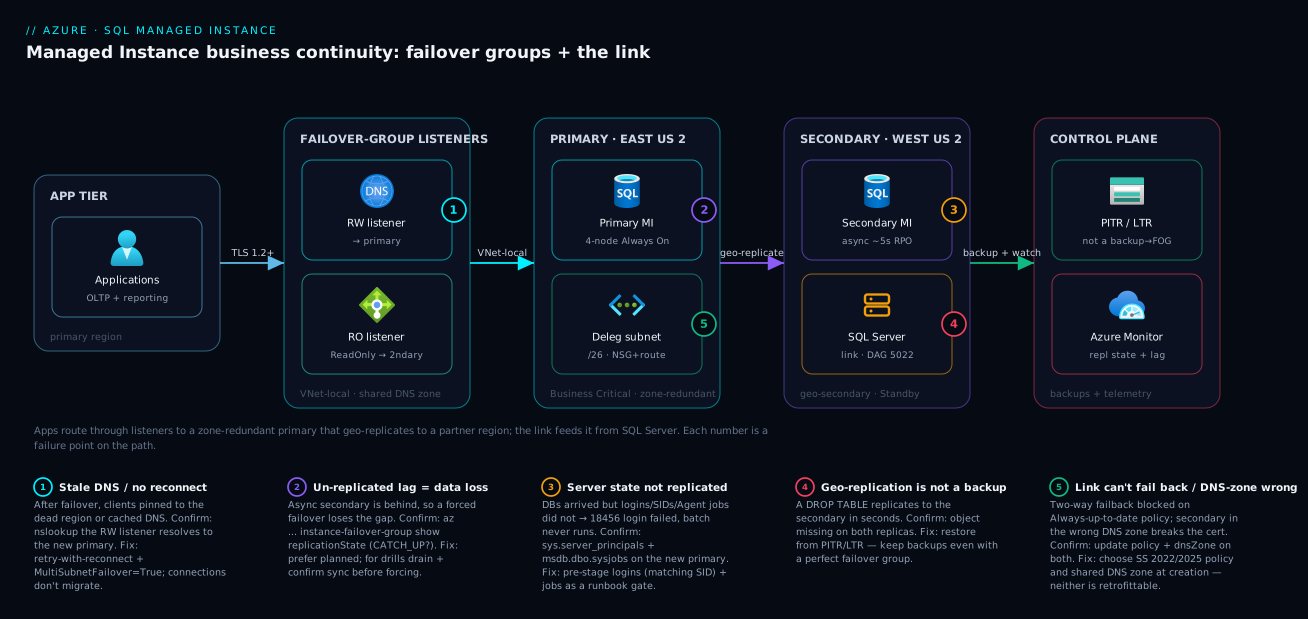
The diagram traces the data and control path of a Managed Instance continuity design, left to right, and maps each failure class onto the exact hop where it bites. Read it as the system actually behaves: applications in the primary region connect through the failover-group listeners (read-write to the primary, read-only to the secondary) — never to a regional instance FQDN — over the VNet-local endpoint. The primary Managed Instance in East US 2 (Business Critical, zone-redundant, a local 4-node Always On AG) holds the live databases. It asynchronously geo-replicates all user databases across global VNet peering to the secondary Managed Instance in West US 2, which is created in the same DNS zone so the listener cert still validates after a switch. On the hybrid side, a SQL Server estate replicates a single database to the primary over a distributed availability group on port 5022, the link path for migration and hybrid DR. Underneath both sits the control plane — automated backups and PITR (the only defense against a replicated bad change) and Azure Monitor watching replication state and lag.
Walk the badges to read the diagnostic map. Badge 1 sits on the listener: a stale DNS cache or a connection that never reconnects keeps clients pinned to the dead region — confirm by resolving the listener, fix with retry-with-reconnect and MultiSubnetFailover. Badge 2 sits on the geo-replication arrow: the secondary is behind, so a forced failover loses the un-replicated lag — confirm the FOG replicationState, decide planned versus forced accordingly. Badge 3 sits on the secondary instance: the databases arrived but the logins, SIDs, and Agent jobs did not — confirm with sys.server_principals, fix by pre-staging server state. Badge 4 sits on the link: the wrong update policy blocks failback to SQL Server — confirm the policy, fix by choosing it at provisioning. Badge 5 sits on the DNS zone itself: a secondary built in the wrong zone can never present a valid cert post-failover — confirm the zone IDs match, fix by re-provisioning into the shared zone. The whole method is in the picture: localize the failure to a hop, read the badge, run the named check, apply the fix.
Real-world scenario
Meridian Pay, a payments platform, ran its core ledger on SQL Server 2019 on-prem and needed to move to Azure SQL Managed Instance with a regulator-mandated cap of 15 minutes of cutover downtime on a database just under 2 TB, plus an ongoing cross-region DR posture once it landed in Azure. The team is six DBAs and platform engineers; the target was a Business Critical instance in East US 2 with a geo-secondary in West US 2.
Their first instinct for the migration was the Log Replay Service, but they could not hit the window during rehearsals — the final log restore plus validation blew past 15 minutes every time, every rehearsal, because the tail-log restore was serialized against a 2 TB database. They switched to the Managed Instance link. Because the link rides a distributed availability group and keeps the MI continuously seeded and synchronized while production stays live on SQL Server, the actual cutover collapsed to: stop the app, confirm the DAG was SYNCHRONIZED, fail over to MI, repoint the app at the failover-group read-write listener. Measured cutover: under 4 minutes — comfortably inside the regulatory cap, with the auditor watching.
The trap they hit — and the reason this is worth writing down — was the post-cutover outage that had nothing to do with data. The link replicates the database, not the instance. Their batch settlement Agent jobs and the service-account logins simply were not on the MI, so the first overnight settlement run failed even though every row of customer data was intact and correct. The on-call DBA spent forty minutes chasing a “data corruption” ghost before realizing the data was fine and the login was missing — the app was getting 18456 Login failed, not a data error. They fixed it by scripting logins with matching SIDs and recreating the Agent jobs as an explicit pre-cutover task — and then encoded it as a gate in the runbook so it could never be skipped again:
-- Pre-cutover gate on the target MI: fail loudly if a required login is missing,
-- BEFORE anyone declares the migration "done".
DECLARE @required TABLE (name sysname);
INSERT INTO @required VALUES (N'app_settlement_svc'), (N'app_ledger_svc');
IF EXISTS (SELECT 1 FROM @required r
           WHERE NOT EXISTS (SELECT 1 FROM sys.server_principals p WHERE p.name = r.name))
  THROW 50001, 'Required login(s) missing on MI — do not cut over.', 1;
Once on Azure, they layered in the cross-region failover group (Standby secondary in West US 2 to keep the DR vCores license-free) and ran their first quarterly planned failover. It surfaced exactly one more gap — a linked server to a pricing service that, like the logins, lived only on the old primary — which they added to the pre-stage list. By the second drill the planned failover was a clean nine-minute end-to-end exercise: switch, app repoint, validate, communicate. Their measured RPO under healthy replication sat at ~3 seconds; their measured planned-failover RTO was ~9 minutes, well under the 1-hour design target. They left forced failover as a tabletop, because the decision — accept the replication lag as lost — is a business call, not a button to practice.
The incident-and-build as a timeline, because the order of moves is the lesson:
| Time / phase | Symptom or step | Action taken | Effect | What it taught |
|---|---|---|---|---|
| Rehearsal | LRS cutover > 15 min | Use Log Replay Service | Missed window every time | Final log restore doesn’t scale to 2 TB |
| Re-plan | Need online cutover | Switch to MI link (DAG) | Continuous sync while live | Link is the only true online path to BC |
| Cutover | 2 TB, 15-min cap | Stop app, confirm sync, fail over, repoint | < 4 min cutover | The cutover collapses when pre-seeded |
| +1 night | Settlement job failed | Chased “corruption” | 40 min lost | Data was fine; the login was missing |
| Fix | 18456 on app |
Script logins (matching SID) + jobs | App recovered | Replication moves DBs, not server state |
| Hardening | Make it un-skippable | Add login gate to runbook | Can’t cut over with missing logins | Encode the lesson as a hard gate |
| DR build | Cross-region posture | FOG with Standby secondary | License-free DR | Standby cuts SQL licensing on DR vCores |
| Drill 1 | First planned failover | Run quarterly drill | Found missing linked server | Drills surface the gaps cheaply |
| Drill 2 | Clean failover | Switch + repoint + validate | RTO ~9 min, RPO ~3 s | Measured numbers, not marketing |
The lesson generalizes to failover groups too: cross-region geo-replication and the link both move user databases and nothing else. Server-level state is your job, and it belongs in the runbook as a hard gate, not a hopeful afterthought.
Advantages and disadvantages
The two-primitive model — failover groups for MI↔MI DR, the link for hybrid — is powerful precisely because each is purpose-built, but that specialization is also where the sharp edges live. Weigh it honestly:
| Advantages (why this model helps you) | Disadvantages (why it bites) |
|---|---|
| Failover-group listeners survive the role switch — no connection-string change on failover | Listeners resolve VNet-local only; public-endpoint clients can’t use them, constraining app placement |
| Standby secondary makes a DR-only replica license-free, cutting the cost of cross-region DR | A Geo secondary you read from forfeits the license benefit — easy to misconfigure and overpay |
| The link delivers a true online migration to Business Critical, cutover in minutes | The link is one database per link; ten databases means ten links to build and operate |
Customer-managed (Manual) policy means no surprise failover on a transient region blip |
You must notice and decide — there’s no automatic safety net unless you opt into Automatic |
| Both primitives reuse familiar Always On machinery your DBAs already know | Async geo-replication means a forced failover can lose data equal to the replication lag |
| Zone redundancy + FOG + backups stack into three independent controls | Geo-replication is not a backup — a DROP TABLE replicates in seconds; you still need PITR |
| The DNS zone is set once and the cert “just works” after failover | The DNS zone is set at creation only — get it wrong and you re-provision the secondary |
| Two-way link enables hybrid DR where Azure or on-prem can be primary | Two-way failback needs SQL Server 2022/2025 and the matching update policy — decided at provisioning |
The model is right for any team that needs both an MI↔MI DR story and a hybrid SQL-Server path, and that is willing to operate listeners, pre-stage server state, and drill. It bites hardest on teams that treat geo-replication as a backup (it is not), that read from a Geo secondary they meant to keep license-free, that try to retrofit the DNS zone or the update policy after creation, or that never rehearse and discover the missing logins during a real outage. Every disadvantage is manageable — but only if you designed for it before provisioning, which is the entire point of this article.
Hands-on lab
Stand up a single Managed Instance, then add a failover group to a second instance, route through the listeners, and run a planned failover — observing each step. This lab provisions real Managed Instances, which are not free and take time to deploy; treat it as a costed exercise (see the cost note) and delete everything at the end. Run in Cloud Shell (Bash).
Reality check: a Managed Instance can take 1.5–4+ hours to provision the first time (the second in a subnet is faster). If you only want to read the flow without the spend, follow the commands and expected outputs without running them — the sequence is the lesson.
Step 1 — Variables and resource groups.
SUB=$(az account show --query id -o tsv)
RG1=rg-mi-eastus2; LOC1=eastus2
RG2=rg-mi-westus2; LOC2=westus2
az group create -n $RG1 -l $LOC1 -o table
az group create -n $RG2 -l $LOC2 -o table
Step 2 — Networking: a delegated subnet, NSG, and route table per region. (Abbreviated; create a VNet in each region with a /26 subnet delegated to Microsoft.Sql/managedInstances, an NSG, and a route table attached — see the Bicep in the networking section.) Then peer the two VNets globally, both directions:
az network vnet peering create -n peer-e2-to-w2 -g $RG1 --vnet-name vnet-eastus2 \
  --remote-vnet "/subscriptions/$SUB/resourceGroups/$RG2/providers/Microsoft.Network/virtualNetworks/vnet-westus2" \
  --allow-vnet-access true --allow-forwarded-traffic true -o table
# ...repeat reversed for peer-w2-to-e2.
Step 3 — Create the primary instance (General Purpose keeps the lab cheaper).
az sql mi create -g $RG1 -n mi-lab-eastus2 -l $LOC1 \
  --subnet "/subscriptions/$SUB/resourceGroups/$RG1/providers/Microsoft.Network/virtualNetworks/vnet-eastus2/subnets/snet-mi" \
  --capacity 4 --storage 32GB --edition GeneralPurpose --family Gen5 \
  --license-type LicenseIncluded -o table
Expected: a long-running deploy; when done, state = Ready.
Step 4 — Create the secondary in the primary’s DNS zone. This is the step you cannot retrofit:
az sql mi create -g $RG2 -n mi-lab-westus2 -l $LOC2 \
  --subnet "/subscriptions/$SUB/resourceGroups/$RG2/providers/Microsoft.Network/virtualNetworks/vnet-westus2/subnets/snet-mi" \
  --capacity 4 --storage 32GB --edition GeneralPurpose --family Gen5 \
  --license-type LicenseIncluded \
  --dns-zone-partner "/subscriptions/$SUB/resourceGroups/$RG1/providers/Microsoft.Sql/managedInstances/mi-lab-eastus2" -o table
Step 5 — Create the failover group (customer-managed) on the secondary’s RG.
az sql instance-failover-group create -n fog-lab -g $RG2 -l $LOC2 \
  --source-mi mi-lab-eastus2 --partner-mi mi-lab-westus2 \
  --partner-resource-group $RG2 --failover-policy Manual --grace-period 1 -o table
Step 6 — Inspect the group and resolve both listeners.
az sql instance-failover-group show -n fog-lab -g $RG2 -l $LOC2 \
  --query "{role:replicationRole, state:replicationState, partner:partnerRegion[0].location}" -o table
# Read-write and read-only CNAMEs live in the shared DNS zone:
nslookup fog-lab.<zone_id>.database.windows.net
nslookup fog-lab.secondary.<zone_id>.database.windows.net
Expected: role: Primary, state: CATCH_UP; both CNAMEs resolve to VNet-local IPs.
Step 7 — Run a planned failover and watch the role move.
az sql instance-failover-group set-primary -n fog-lab -g $RG2 -l $LOC2 -o table
# Re-query: the West US 2 instance should now be Primary.
az sql instance-failover-group show -n fog-lab -g $RG1 -l $LOC1 \
  --query "{role:replicationRole, state:replicationState}" -o table
Expected: after a few minutes the role has switched; the read-write listener now resolves to the West US 2 instance — with no change to the listener FQDN.
Step 8 — Fail back (planned, data-lossless).
az sql instance-failover-group set-primary -n fog-lab -g $RG1 -l $LOC1 -o table
The lab steps mapped to what each proves:
| Step | What you did | What it proves | Real-world analogue |
|---|---|---|---|
| 4 | Secondary in primary’s DNS zone | The zone is a creation-time decision | The #1 re-provision trap |
| 5 | --failover-policy Manual |
Customer-managed timing | Production-recommended posture |
| 6 | Resolve both listeners | The listener contract is real | App connection-string design |
| 7 | Planned set-primary |
Failover is data-lossless and reversible | Quarterly drill |
| 8 | Planned failback | The round trip works | Post-outage recovery |
Cleanup (Managed Instances bill continuously).
az group delete -n $RG1 --yes --no-wait
az group delete -n $RG2 --yes --no-wait
Cost note. Two GP Gen5 4-vCore instances bill on the order of ₹30–60+ per hour combined (plus storage and any egress), and they bill while provisioning — this lab is not free-tier. Keep the window short, or read the flow without provisioning. Deleting both resource groups stops all charges.
Common mistakes & troubleshooting
This is the playbook — the part you bookmark. First as a scannable table you can read mid-incident, then the entries that bite hardest with the full confirm-command detail underneath.
| # | Symptom | Root cause | Confirm (exact cmd / portal path) | Fix |
|---|---|---|---|---|
| 1 | After failover, app still hits the dead region | Stale DNS cache / connection never reconnected | nslookup <fog>.<zone>.database.windows.net; check it resolves to new primary |
Retry-with-reconnect; MultiSubnetFailover=True; lower DNS TTL reliance |
| 2 | App gets 18456 Login failed on the new primary |
Login/SID not pre-staged on secondary | SELECT name,sid FROM sys.server_principals on new primary vs old |
CREATE LOGIN … SID=<match>; add to runbook gate |
| 3 | Overnight batch/ETL didn’t run after failover | SQL Agent jobs not replicated | SELECT name FROM msdb.dbo.sysjobs on new primary |
Script + recreate jobs on secondary as pre-stage |
| 4 | FOG create fails referencing the secondary | DNS zone / family / tier / collation mismatch | az sql mi show --query "{dns:dnsZone,fam:sku.family,tier:sku.tier}" both |
Re-create secondary in shared DNS zone, matching family/tier |
| 5 | Forced failover lost more data than expected | Secondary was behind (un-replicated lag) | FOG replicationState (not CATCH_UP at failover) |
Prefer planned; for drills, drain + confirm sync first |
| 6 | Reporting queries are hitting the primary | App used read-write listener / no ApplicationIntent |
Confirm Server= is the .secondary. FQDN + ApplicationIntent=ReadOnly |
Point reporting at the read-only listener |
| 7 | Can’t fail back over the link to SQL Server | MI on “Always-up-to-date” update policy | az sql mi show --query "servicePrincipal" / portal update policy |
Re-provision MI with SS 2022/2025 policy (creation-time) |
| 8 | Link won’t establish | Port 5022 blocked, or Windows auth attempted | Test 5022 across the path; confirm cert-based auth | Open 5022 in NSG + firewall; use certificate auth |
| 9 | MI provisioning fails immediately | Subnet not delegated / too small / no NSG+route | az network vnet subnet show --query "{deleg:delegations,nsg:networkSecurityGroup}" |
Delegate to Microsoft.Sql/managedInstances; /26+; attach NSG+route |
| 10 | Listeners don’t resolve from the app | App not in VNet/peered network (public-only) | nslookup from the app host fails |
Place app in VNet/peered net; listeners are VNet-local |
| 11 | A DROP TABLE is gone on the secondary too |
Geo-replication replicated the bad change | Compare to PITR; it’s not a backup | Restore from PITR/LTR — keep backups even with FOG |
| 12 | Standby secondary still incurs SQL licensing | Read workload running on a Geo/used Standby |
Check for connections via the read-only listener | Make it truly passive; set --secondary-type Standby |
| 13 | Role switch “stuck”; some DBs read-only | Switch still completing (up to ~5 min) | FOG replicationState; per-DB Updateability |
Wait out the switch; don’t force again mid-switch |
| 14 | After forced failover, old primary “reappeared” | It auto-rejoined as the new secondary | FOG show lists it as secondary |
Leave it; fail back with planned set-primary |
The expanded form, with the full reasoning for the entries that cause the longest outages:
1. After failover, the app keeps hitting the dead region.
Root cause: The client cached the old DNS resolution or never tore down its connection pool, so it keeps trying the failed primary even though the listener CNAME already points elsewhere.
Confirm: nslookup <fog>.<zone>.database.windows.net from the app subnet — it should resolve to the new primary’s VNet-local IP. If the app still fails, it’s the client, not DNS.
Fix: Implement aggressive retry-with-reconnect (rebuild the connection on transient/40613), add MultiSubnetFailover=True, and don’t rely on a long-lived DNS cache. Connections do not migrate on failover — reconnection is mandatory.
2. The app gets 18456 Login failed immediately after failover.
Root cause: The login (or its SID) was never pre-staged on the secondary. Replication moved the database; it did not move the server-level login, so the contained database user is orphaned and authentication fails.
Confirm: On the new primary, SELECT name, sid FROM sys.server_principals WHERE type IN ('S','U','G') and compare to the old primary — a missing name or a different SID is the smoking gun.
Fix: CREATE LOGIN app_svc WITH PASSWORD='…', SID=0x… using the SID copied from the original primary, and encode a login-existence gate in the runbook (see the scenario) so a failover can never complete with missing logins.
3. The overnight batch/ETL silently didn’t run after a failover.
Root cause: SQL Agent jobs are not replicated. The database is on the new primary, but the jobs that operate on it live in msdb, which is server-level state.
Confirm: SELECT name FROM msdb.dbo.sysjobs on the new primary — the expected jobs are absent.
Fix: Script the Agent jobs (and their schedules, credentials, and proxies) and recreate them on the secondary as an explicit pre-stage step; verify them in the runbook.
4. Creating the failover group fails when it references the secondary.
Root cause: The secondary does not satisfy a creation prerequisite — most often a DNS-zone mismatch (it wasn’t created in the primary’s zone), but also hardware-family, service-tier, or collation mismatch, or the secondary already has user databases.
Confirm: az sql mi show -n mi-prod-westus2 -g rg-data-westus2 --query "{dns:dnsZone, family:sku.family, tier:sku.tier, collation:collation}" and compare to the primary.
Fix: The DNS zone and several other properties are creation-time only — re-create the secondary in the shared DNS zone with a matching family/tier/collation and no user databases.
5. A forced failover lost more data than the team expected.
Root cause: The secondary was behind when forced — the un-replicated lag became the data loss. Async replication is always slightly behind; a write burst widens the gap.
Confirm: The FOG replicationState was not CATCH_UP at the moment of failover (or replication lag metrics were elevated).
Fix: Prefer planned failover whenever the primary is reachable. For a data-lossless drill, stop the workload, drain long transactions, and confirm Synchronizing/CATCH_UP on both instances before forcing.
7. You can fail over to MI but cannot fail back to SQL Server over the link. Root cause: The MI runs the “Always-up-to-date” update policy, which does not support two-way (failback) replication over the link. Failback requires the SQL Server 2022 or 2025 update policy, chosen at provisioning. Confirm: Check the instance’s update policy in the portal or via the management API. Fix: The update policy is creation-time — re-provision the MI with the matching SQL Server 2022/2025 policy if hybrid failback is a requirement. Decide this before you build.
9. Managed Instance provisioning fails almost immediately.
Root cause: The subnet is not delegated to Microsoft.Sql/managedInstances, is too small (below /27), or is missing the required NSG/route table association.
Confirm: az network vnet subnet show -g rg-net -n snet-mi --vnet-name vnet --query "{prefix:addressPrefix, deleg:delegations[].serviceName, nsg:networkSecurityGroup.id, route:routeTable.id}".
Fix: Delegate the subnet to Microsoft.Sql/managedInstances, size it /26 or larger, and attach an NSG and a route table (keep the platform’s mandatory rules/routes).
11. A DROP TABLE (or bad deployment) is gone on the secondary too.
Root cause: Geo-replication is not a backup. A destructive change replicates to the secondary in seconds, so failing over does not recover it.
Confirm: The object is missing on both primary and secondary; only PITR/LTR has the pre-change state.
Fix: Restore from point-in-time restore or long-term retention. Keep automated backups and an appropriate retention policy even with a perfect failover group — they are the only defense against a replicated bad change.
Best practices
- Layer the controls; don’t pick one. Zone redundancy and a cross-region failover group and backups — three independent defenses against three different failures. Removing any one re-opens a gap.
- Set the DNS zone at creation. Always create the secondary in the primary’s DNS zone via
--dns-zone-partner. It cannot be retrofitted; getting it wrong means re-provisioning. - Use
--failover-policy Manualin production. Customer-managed timing means no surprise failover on a transient region blip — you decide when continuity events happen. - Connect applications to listeners, never to a regional instance FQDN. The read-write and read-only listeners survive the role switch; an instance FQDN pins you to a region.
- Build retry-with-reconnect into the data layer. Connections do not migrate on failover; aggressive reconnection (and
MultiSubnetFailover=True) is the difference between a blip and an outage. - Pre-stage server-level state as a hard gate. Logins with matching SIDs, Agent jobs, linked servers, credentials,
msdbobjects — replication ignores all of them. Encode an existence check in the runbook so a failover can’t “succeed” with missing logins. - Keep backups even with geo-replication. A failover group replicates a
DROP TABLEin seconds; only PITR/LTR defends against a bad change. Geo-replication is not a backup. - Use a Standby secondary for DR-only.
--secondary-type Standbymakes the passive replica license-free — but only if you never run read workloads on it. - Choose the update policy before provisioning if hybrid failback matters. Two-way link failback requires the SQL Server 2022/2025 policy; “Always-up-to-date” can never fail back over the link.
- Drill quarterly in production. Planned failover is data-lossless and reversible — rehearse it on a schedule, and tabletop the forced-failover decision. The first failover should never be a real outage.
- Measure RPO/RTO; don’t quote marketing numbers. Record the actual lag and the actual end-to-end recovery time from your own drills, and design to those.
- Fail over the app tier too. A database that moves alone leaves the app paying cross-region latency to its now-distant tier. Repoint or warm-start the app in the secondary region.
- Alert on replication state and lag, not just “instance down” — a secondary silently falling behind is your RPO quietly degrading.
Security notes
- Encrypt every connection. Managed Instance requires encrypted connections; keep
Encrypt=True(and a sane minimum TLS version) on every connection string, including the listeners. A failover drill is no excuse to weaken TLS. - Keep the listeners VNet-local. The failover-group listeners resolve only on the VNet-local endpoint — do not expose the database via the public endpoint (port 3342) unless you have a hard requirement, and if you do, restrict it tightly. Private is the default for a reason.
- Use Microsoft Entra authentication where you can. Prefer Entra-based logins and managed identity for applications over SQL logins, so credential rotation and conditional access apply — and so failover doesn’t hinge on a hand-synced SQL login password. Where SQL logins are unavoidable, pre-stage them with matching SIDs and manage the secret in Key Vault.
- Protect the link’s transport. The DAG rides certificate-authenticated, AES-encrypted database mirroring over port 5022 — scope the NSG and on-prem firewall to the exact peers, and rotate the certificates that establish trust.
- Encrypt at rest with customer-managed keys where required. TDE is on by default; if compliance demands CMK, ensure the key is available in both regions so a failover doesn’t strand the secondary without its key — a cross-region key gap turns a failover into an outage.
- Least-privilege the failover operators. The identity that runs
set-primaryand manages the failover group should have exactly the SQL/management roles it needs and no more; audit who can trigger a region failover. - Don’t leak topology in errors. Connection failures during a switch (
40613,18456) should be handled by the app’s retry layer, not surfaced verbatim to end users.
The security controls that also strengthen continuity — secure and resilient pull the same direction here:
| Control | Mechanism | Secures against | Also strengthens continuity |
|---|---|---|---|
| Encrypted connections | Encrypt=True, min TLS |
Eavesdropping / downgrade | — |
| VNet-local listeners | No public endpoint exposure | Internet attack surface | Forces correct (private) app placement |
| Entra auth + managed identity | Token-based logins | Static credential theft | Removes hand-synced login passwords from failover |
| Certificate-auth link (5022) | AES-encrypted DAG | Tampered replication stream | Reliable, authenticated hybrid path |
| CMK present in both regions | Cross-region key availability | Unauthorized key use | Prevents a key gap stranding the secondary |
| Least-privilege failover role | Scoped RBAC | Unauthorized region failover | Controlled, auditable continuity actions |
Cost & sizing
The bill drivers and how they interact with the design:
- You pay for two instances, not one. A cross-region failover group means a second full Managed Instance running in the partner region — the dominant line item. A geo-secondary that mirrors a Business Critical primary is a substantial recurring cost.
- Standby secondary cuts licensing, not compute.
--secondary-type Standbymakes the DR replica’s vCores license-free (you stop paying SQL Server licensing on them) as long as it carries no read workload — a meaningful saving on a DR-only secondary. Run a single reporting query against it and you forfeit the benefit. - Tier multiplies the secondary’s cost. A Business Critical secondary (local SSD, 4 replicas, licensing) costs far more than a General Purpose one. If the secondary is purely DR, weigh whether it must match the primary’s tier.
- Zone redundancy is a modest uplift, not a new resource. Enabling it adds cost on the tiers that support it, but it is the cheapest cross-AZ resilience you can buy and is a property toggle, not a second instance.
- Backups have a free allotment, then bill. PITR storage up to your configured retention has an included allotment tied to your provisioned storage; long-term retention (LTR) is billed separately by volume. Cross-region restore and egress add cost. This is cheap insurance against the bad-change failure geo-replication can’t cover.
- The link itself has no direct charge, but you pay for the MI it lands on, the SQL Server side, and any cross-region/hybrid egress over the path.
A rough monthly picture and what each line buys you (figures are indicative; validate with the pricing calculator for your region and SKU):
| Cost driver | What you pay for | Rough INR / month | What it buys | Watch-out |
|---|---|---|---|---|
| Primary MI (GP Gen5, 8 vCore) | Compute + 256 GB storage | ~₹1.5–2.5 L | The production instance | Right-size vCores to real load |
| Primary MI (BC Gen5, 8 vCore) | Compute + local SSD + licensing | ~₹3–4.5 L | Local HA, free read replica, low latency | Licensing dominates BC cost |
| Geo-secondary (Standby, GP) | Compute, license-free | ~₹1–1.5 L | Cross-region DR, no SQL licensing | Reads on it forfeit the benefit |
| Geo-secondary (Geo, BC) | Full BC + licensing | ~₹3–4.5 L | DR + read offload | Most expensive secondary option |
| Zone redundancy | Cross-AZ uplift | +10–30% of instance | Survive a single-zone outage | Only where the tier supports it |
| PITR (within allotment) | Backup storage | Often included | Bad-change recovery | LTR is billed on top |
| Long-term retention (LTR) | Retained backup volume | Per-GB, varies | Months/years of restore points | Grows with retention + size |
| Cross-region egress | Replication/restore traffic | Per-GB, modest | The DR path itself | Write-heavy workloads cost more |
Sizing rules of thumb: the secondary’s vCores/storage must be ≥ the primary’s, so you cannot save by under-provisioning the secondary; you can save by making a DR-only secondary Standby (license-free) and, where the risk allows, a lower tier than the primary. Measure your replication lag in a drill before assuming Geo reads are “free” capacity — and never delete backups to save money on a system whose only defense against a replicated DROP TABLE is PITR.
Going deeper
The sections above taught the continuity machinery. This one steps back to the platform underneath it — the surface area that makes Managed Instance what it is, the connectivity internals, the placement decision, and the recovery paths that sit alongside the failover group. None of it is optional trivia: each one changes a design decision you make before you provision.
The near-100% SQL Server surface — and why it is your continuity problem
The reason Managed Instance exists at all is compatibility. Azure SQL Database gives you a database; Managed Instance gives you an instance — the near-complete SQL Server surface that a lift-and-shift estate actually depends on. That surface is exactly why teams pick MI over SQL DB, and it is also, precisely, the state that geo-replication and the link do not carry. Internalize the list and the runbook’s “pre-stage server state” gate stops feeling like a checklist and starts feeling inevitable.
| Instance-level capability | Managed Instance | Azure SQL Database | Continuity consequence |
|---|---|---|---|
| SQL Server Agent (jobs, schedules, proxies) | Yes, in msdb |
No (Elastic Jobs is external) | Jobs live in msdb → not replicated; batch/ETL silently stops after failover |
| Cross-database queries (three-/four-part names) | Yes, natively | Limited (elastic query) | A proc spanning DBs breaks if a partner DB or login is missing on the secondary |
| Linked servers / distributed queries | Yes | No | Recreate with credentials on the secondary or cross-server calls fail |
| CLR (SAFE assemblies) | Yes | No | Objects that bind to an assembly need that assembly present on the new primary |
| Service Broker (same instance) | Yes | No | Queues travel with the database; cross-instance routes are server state |
| Database Mail | Yes | No | Post-failover alerting goes quiet unless recreated |
| Distributed transactions (MSDTC / elastic) | Yes | Limited | Cross-instance transaction config is per-instance, not replicated |
| SQL Server Audit (server scope) | Yes | Database scope differs | Reconfigure on the secondary or lose the compliance trail |
tempdb sizing, trace flags, instance config |
Yes | Mostly hidden | Instance-level tuning is per-instance — set it on both |
Read the table top to bottom and the pattern is stark: the whole value proposition of MI is instance-scoped, and instance-scoped state is what replication ignores. The databases move; the instance around them does not. That is the single sentence behind every “data perfect, app down” outage in this article.
Connection type: redirect vs proxy (and the ports your NSG must allow)
Managed Instance, like SQL Database, exposes two connection policies, and the choice is a real latency-and-firewall decision — not a toggle to ignore.
| Property | Redirect | Proxy |
|---|---|---|
| Data path | Client does an initial gateway handshake, then connects straight to the instance node | Every packet flows through the gateway |
| Ports the path needs | 1433 plus 11000–11999 (the node range) | 1433 only (public endpoint uses 3342) |
| Latency | Lowest (no per-packet hop) | Higher (extra gateway hop) |
| Best for | In-VNet application tiers that want throughput | Restricted-egress networks; the public endpoint (always proxy) |
| Set on | The instance’s connection-type property | Same property |
The trap: redirect needs ports 11000–11999 open across the whole app-to-MI path, not just 1433. If your NSG or on-prem firewall allows 1433 but blocks the node range, redirect connections fail or quietly degrade to proxy behavior, and you spend an afternoon blaming DNS. The failover-group listeners are independent of this choice — they resolve VNet-local and always front the current primary regardless of connection type — but whichever policy you pick applies on both instances, so open the node range in both regions.
Where MI sits: SQL Database vs Managed Instance vs SQL Server on a VM
Before you commit to MI’s continuity model, be sure MI is the right home at all. The three-way placement decision, distilled:
| Dimension | Azure SQL Database | Managed Instance | SQL Server on Azure VM |
|---|---|---|---|
| Abstraction | Single DB / elastic pool | Full instance (PaaS) | Full OS + engine (IaaS) |
| Instance surface | Partial | Near-100% | 100% |
| OS / filesystem access | No | No | Yes |
| Who patches | Microsoft | Microsoft (per update policy) | You |
| Native HA/DR primitive | Active geo-replication / FOG | Failover group / link | Always On AG + ASR you build |
| Best for | New cloud-native apps | Lift-and-shift instances needing Agent, cross-DB, CLR, linked servers | OS-level dependencies, specific builds, clustering you control |
The middle column is the sweet spot this whole article serves: an estate that needs the SQL Server surface but wants Microsoft to run the engine. If you need OS access or a specific patched build, you are on a VM and you build Always On yourself; if you are green-field and single-database, SQL Database is simpler and cheaper.
Platform options you will meet: Next-gen GP, instance pools, update policy
Three newer platform choices shape cost and lifecycle:
- Next-gen General Purpose is an updated GP architecture with higher performance ceilings and higher limits than classic GP — including the jump from 100 to 500 Managed Instance links per instance referenced earlier. It keeps the compute-separated-from-storage economics of GP while narrowing the latency gap to Business Critical for many workloads.
- Instance pools pre-deploy a shared virtual cluster and subnet that hosts multiple small instances. Because the cluster already exists, new instances provision in minutes rather than the 1.5–4+ hours a first standalone instance takes, and small workloads share overhead instead of each paying for a full deployment. They are the answer to “I need ten 2-vCore instances, not one big one.”
- Update policy is more than the link-failback gate from earlier. It is a lifecycle choice set at creation: Always-up-to-date rides the latest engine features continuously, while the SQL Server 2022 and SQL Server 2025 policies pin the engine to align with those on-prem releases. Choose it for feature currency and for whether two-way link failback to on-prem will ever be a requirement — you cannot change it later.
Backups, PITR, LTR, geo-restore, and keys — the layer replication can’t be
A failover group is not your only cross-region recovery path, and it is emphatically not your defense against a bad change. Keep these four mechanisms distinct in your head:
| Recovery mechanism | Typical RPO | Typical RTO | Pre-provisioned secondary? | Primarily defends |
|---|---|---|---|---|
| FOG — planned failover | 0 | Minutes | Yes | Region loss (drills, relocation) |
| FOG — forced failover | ~replication lag (~5 s) | Minutes | Yes | Region loss (real outage) |
| Geo-restore (from geo-redundant backups) | Up to ~1 h | Hours (size-bound) | No | Region loss when you have no FOG |
| PITR / LTR restore | Up to backup interval | Minutes–hours | No | Bad change, deletion, corruption |
Geo-restore restores a database from geo-redundant backups into any region with no partner instance standing by — cheaper than a FOG but slower, with a higher RPO, and it is a restore, not a listener-fronted switch. It is the DR floor for instances that do not justify a full geo-secondary. Long-term retention (LTR) keeps full backups for weeks-to-years beyond the PITR window for regulatory recall, billed by retained volume.
Two encryption facts that turn a “successful” failover into an outage if missed. TDE is on by default; if compliance requires a customer-managed key (CMK) in Key Vault, that key must be reachable from the secondary region — a cross-region key gap strands the promoted instance with data it cannot decrypt. And prefer Microsoft Entra authentication (formerly Azure AD) over SQL logins wherever you can, so credential rotation and Conditional Access apply and a failover never hinges on a hand-synced SQL password.
Common beginner mistakes
These are conceptual traps — wrong mental models a beginner brings in — distinct from the symptom-to-fix entries in the troubleshooting playbook above. Fix the model and the symptoms never appear.
-
“My failover group is my backup.” It is not. A failover group (and the link) replicate a
DROP TABLEor a bad deployment to the secondary in seconds. Right model: geo-replication defends against losing the region; only PITR/LTR defends against a bad change. They are different failure classes and you need both. -
“When it fails over, my open connections just carry across.” They do not. The DNS record updates immediately, but existing TCP connections are not migrated — clients must reconnect. Right model: the listener is the durable contract, and aggressive retry-with-reconnect (plus
MultiSubnetFailover=True) is mandatory in the data layer, not optional. -
“Replication copies my instance.” It copies your user databases and nothing else. Right model: logins, SIDs, Agent jobs, linked servers, credentials, Database Mail, and
msdbobjects are server-level state you pre-stage — the instance around the databases is your responsibility on both sides. -
“General Purpose vs Business Critical is just a performance-and-price knob.” It also changes how you recover locally. Right model: GP recovery is a remount of stateless compute to remote storage; BC is a replica handoff across a local Always On AG in seconds — the tier sets your in-region RTO and the cost of every geo-secondary.
-
“I’ll set the DNS zone (or the update policy) later.” You cannot. Both are creation-time only. Right model: the shared DNS zone and the update policy are decisions you make before provisioning — get either wrong and the fix is to re-provision the instance, not to change a setting.
-
“A Standby secondary is free, and I can still read from it for reports.” Pick one. Right model:
--secondary-type Standbymakes the replica license-free only while it carries no read workload; a single reporting query through the read-only listener forfeits the benefit and turns it into aGeo(licensed) secondary. Choose Standby for DR-only,Geofor read offload — never assume both. -
“The listeners work from anywhere, like a public endpoint.” They do not. Failover-group listeners resolve VNet-local only — from inside the VNet or a peered/VPN/ExpressRoute network. Right model: place your app tier inside the network; a public-only client cannot reach the listeners at all.
-
“
Automaticfailover policy is safer because it’s hands-off.” It cedes timing to Microsoft and can flip on a transient region blip. Right model:Manual(customer-managed) is the recommended production posture — you decide when a continuity event happens, backed by a rehearsed runbook, rather than being surprised by one.
Practice challenges
Work these in order — they escalate from a one-line fix to a design decision you must justify. Each solution is hidden; think first, then expand. All IDs are placeholders; nothing here needs a live subscription to reason through.
1. (Beginner) Fix the connection string. An app connects with Server=tcp:mi-prod-eastus2.a1b2c3d4e5f6.database.windows.net;Database=orders;Encrypt=True;. A region failover would break it. Rewrite the read-write (OLTP) endpoint, and add a second string that sends reporting to the secondary.
<details> <summary>Solution</summary>
# Read-write (OLTP) — follows the primary role automatically:
Server=tcp:fog-prod-sqlmi.a1b2c3d4e5f6.database.windows.net;Database=orders;Encrypt=True;

# Read-only (reporting) — lands on the geo-secondary:
Server=tcp:fog-prod-sqlmi.secondary.a1b2c3d4e5f6.database.windows.net;Database=orders;ApplicationIntent=ReadOnly;Encrypt=True;
Why: the failover-group listener CNAME moves with the primary role; a regional instance FQDN pins you to one region and points at a dead instance after a switch. </details>
2. (Beginner) Buy the cheapest resilience upgrade. A single-region Business Critical instance mi-prod-eastus2 has no cross-AZ protection. Add it without creating a new resource, and state exactly which failure this does and does not cover.
<details> <summary>Solution</summary>
az sql mi update \
  --resource-group rg-data-eastus2 \
  --name mi-prod-eastus2 \
  --zone-redundant true
Covers a single-zone outage in-region. Does not cover a region outage, a bad deployment, or a deletion.
Why: zone redundancy is an instance property, not a second instance — the lowest-cost resilience most teams skip — but it stops at the region boundary, which is where failover groups begin. </details>
3. (Intermediate) Stand up the secondary correctly. You have mi-prod-eastus2 in East US 2. Provision the West US 2 secondary so its cert still validates after failover, then create a customer-managed failover group. Name the one parameter that cannot be fixed later.
<details> <summary>Solution</summary>
# Secondary MUST be created in the primary's DNS zone:
az sql mi create -g rg-data-westus2 -n mi-prod-westus2 -l westus2 \
  --subnet "/subscriptions/<sub>/resourceGroups/rg-net-westus2/providers/Microsoft.Network/virtualNetworks/vnet-westus2/subnets/snet-mi" \
  --capacity 8 --storage 256GB --edition BusinessCritical --family Gen5 \
  --dns-zone-partner "/subscriptions/<sub>/resourceGroups/rg-data-eastus2/providers/Microsoft.Sql/managedInstances/mi-prod-eastus2"

az sql instance-failover-group create -n fog-prod-sqlmi -g rg-data-westus2 -l westus2 \
  --source-mi mi-prod-eastus2 --partner-mi mi-prod-westus2 \
  --partner-resource-group rg-data-westus2 --failover-policy Manual --grace-period 1
The un-fixable one is --dns-zone-partner (the shared DNS zone) — set at creation only.
Why: the instance’s SAN host certificate is scoped to its DNS zone ID; without a shared zone the client cannot validate the cert on the secondary after a switch, and you cannot retrofit it — you re-provision. </details>
4. (Intermediate) Pre-stage what replication ignores. After a drill the app fails with 18456 Login failed, though every row is correct. Recreate the login on the new primary so authentication works, and write a gate that refuses a cutover when a required login is missing.
<details> <summary>Solution</summary>
-- Recreate with the SAME SID copied from the original primary:
CREATE LOGIN app_svc WITH PASSWORD = '<strong-secret>', SID = 0x2A...;

-- Hard gate: fail loudly BEFORE anyone calls the failover "done".
DECLARE @required TABLE (name sysname);
INSERT INTO @required VALUES (N'app_svc'), (N'app_settlement_svc');
IF EXISTS (SELECT 1 FROM @required r
           WHERE NOT EXISTS (SELECT 1 FROM sys.server_principals p WHERE p.name = r.name))
  THROW 50001, 'Required login(s) missing — do not cut over.', 1;
Why: geo-replication and the link move user databases only; a login with a mismatched or missing SID orphans the contained user, so the fix is a matching-SID login plus a runbook gate that makes the omission impossible. </details>
5. (Advanced) Decide under pressure. The primary region is completely unreachable during a real outage. Run the correct failover, state the data-loss implication, and describe exactly how you fail back once the region recovers — including what you must not do to the old primary.
<details> <summary>Solution</summary>
# Region gone → forced failover; data loss = the un-replicated async lag.
az sql instance-failover-group set-primary \
  --name fog-prod-sqlmi -g rg-data-westus2 -l westus2 --allow-data-loss
When the old region returns it auto-rejoins as the new secondary — do not delete it. Fail back with a planned set-primary (no --allow-data-loss) once replication is healthy again.
Why: forced failover is your only option when the primary is unreachable and it forfeits the in-flight lag (your RPO); planned failback is data-lossless, so you never trade more data than the outage already cost you. </details>
6. (Advanced) Design for failback to on-prem. A hybrid estate wants Azure as DR for an on-prem SQL Server 2022 instance, and must be able to fail back to on-prem over the link. Which MI update policy do you choose at provisioning, why is Always-up-to-date disqualified, and how many links do you need for eight databases?
<details> <summary>Solution</summary>
Provision the MI on the SQL Server 2022 update policy (or 2025, matched to the on-prem estate). Always-up-to-date cannot do two-way replication, so you could fail over to MI but never back — and the policy is creation-time only. Eight databases need eight links (one database per link).
Why: two-way/failback link replication is gated on the MI running the matching SQL Server 2022/2025 policy; choose it before you build, because retrofitting means re-provisioning the instance. </details>
Interview & exam questions
1. What is the difference between a failover group and the Managed Instance link, and can you use both on one instance? A failover group geo-replicates all user databases MI→MI to a partner instance in another region with a managed listener that survives failover. The Managed Instance link builds a distributed availability group between SQL Server and MI to replicate one database for hybrid migration or DR. They are mutually exclusive on the same instance — you choose the primitive that matches the job (MI↔MI DR versus hybrid SQL-Server replication).
2. Why must the secondary instance be created in the primary’s DNS zone, and can you change it later? A Managed Instance’s host certificate is a SAN cert scoped to its generated DNS zone ID. For a client to reconnect to the secondary using the same listener cert after failover, the secondary must share that DNS zone. It is set at creation time via --dns-zone-partner and cannot be retrofitted — getting it wrong means re-provisioning the secondary.
3. A failover completed and every customer row is correct, but the app is down with login failures. What happened? Replication moves user databases only — logins, SIDs, Agent jobs, linked servers, and msdb objects are not replicated. The database arrived; the service-account login did not (or its SID doesn’t match), so authentication fails (18456) and contained users are orphaned. Pre-stage logins with matching SIDs and recreate jobs on the secondary, gated in the runbook.
4. When do you run a planned failover versus a forced one, and what’s the data-loss implication of each? Planned (set-primary, no flag) fully synchronizes then switches — no data loss, but requires the primary reachable; use it for drills, relocations, and failback. Forced (--allow-data-loss) promotes the secondary immediately without waiting — potential data loss equal to the un-replicated async lag; it’s your only option when the primary region is gone.
5. Your applications connect fine but a region failover would require changing connection strings. What’s wrong and how do you fix it? The apps are connecting to a regional instance FQDN instead of the failover-group listener. Point read-write (OLTP) traffic at <fog>.<zone>.database.windows.net and read-only (reporting) at <fog>.secondary.<zone>.database.windows.net with ApplicationIntent=ReadOnly. The listener CNAME follows the primary role, so no connection-string change is needed on failover.
6. What does --secondary-type Standby do, and what’s the catch? It designates a DR-only, license-free passive replica — you stop paying SQL Server licensing on the secondary’s vCores. The catch: the benefit holds only if you never run read workloads on it. Run a single reporting query through the read-only listener and you forfeit the license-free status (that’s what a Geo secondary is for).
7. You migrated a 2 TB database to MI with the link and need the lowest possible cutover downtime. Why is the link the right tool? The link keeps the MI continuously seeded and synchronized via a distributed availability group while production stays live on SQL Server, so the cutover collapses to: stop the app, confirm the DAG is SYNCHRONIZED, fail over to MI, repoint the app. It’s the only option that delivers a true online cutover to the Business Critical tier, with downtime in minutes rather than a full restore window.
8. A team built an MI on the “Always-up-to-date” update policy and now needs to fail back to on-prem SQL Server over the link. Can they? No. Two-way (failback) replication over the link is not supported on “Always-up-to-date” — it requires the SQL Server 2022 or 2025 update policy, which is a creation-time choice. They can fail over to MI but never back over the link, and the only fix is to re-provision the instance with the matching policy.
9. Why is geo-replication not a substitute for backups? A failover group (and the link) replicate changes — including destructive ones — to the secondary in seconds. A DROP TABLE or a bad deployment is on both replicas almost instantly, so failing over does not recover it. Point-in-time restore / LTR is the only layer that defends against a replicated bad change; keep backups even with a perfect failover group.
10. What are the networking prerequisites for a Managed Instance and a cross-region failover group? A dedicated subnet delegated to Microsoft.Sql/managedInstances (nothing else in it), /27 minimum (plan /26+), with a required NSG and route table attached. For a failover group, the two regional subnets need connectivity — global VNet peering is recommended (private, backbone, no gateway); VPN/ExpressRoute also work but are slower to seed.
11. After a forced failover during an outage, the old primary came back online. What do you do? Leave it. Once the failed region recovers, the old primary automatically rejoins as the new secondary — do not delete it in a panic. When the region is fully healthy, run a planned set-primary (data-lossless) to fail back to the original layout.
12. How do you achieve read scale-out and DR with the same failover group? Use the read-only listener (<fog>.secondary.<zone>.database.windows.net with ApplicationIntent=ReadOnly) to route reporting/analytics to the geo-secondary while OLTP uses the read-write listener. Note this makes the secondary a Geo (read) secondary, so you pay SQL licensing on it — a DR-only secondary that you want license-free must be Standby and unread.
These map to DP-300 (Azure Database Administrator Associate) — plan and implement data platform resources, high availability and disaster recovery for Azure SQL — and the BC/DR design content in AZ-305 (Solutions Architect Expert). The migration angle (link, LRS, DMS) touches DP-203/migration-focused material. A compact cert-mapping for revision:
| Question theme | Primary cert | Exam objective area |
|---|---|---|
| Failover groups, listeners, planned vs forced | DP-300 | Implement HA/DR for Azure SQL |
| MI link, migration cutover, update policy | DP-300 | Migrate; configure MI |
| Layered BC/DR design, RPO/RTO | AZ-305 | Design business continuity solutions |
| Networking (delegated subnet, peering) | AZ-305 / AZ-700 | Design/implement network connectivity |
| Backups vs geo-replication, PITR/LTR | DP-300 | Manage backups and recovery |
| Standby secondary, licensing, cost | DP-300 / AZ-305 | Optimize cost; HA/DR |
Quick check
- You need cross-region DR for a Managed Instance and a hybrid path to replicate one database from on-prem SQL Server. Can a single instance use both a failover group and the link?
- A failover completed, all data is correct, but the app fails with
18456 Login failed. What was not replicated, and how do you prevent it next time? - The primary region is completely down. Which failover command do you run, and what is the data-loss implication?
- Your apps connect to
mi-prod-eastus2.<zone>.database.windows.net. Why is that a problem for failover, and what should they connect to instead? - True or false: because you have a cross-region failover group, you can safely reduce your backup retention to save money.
Answers
- No. A single instance can host either a failover group (MI↔MI geo-replication of all user databases) or the Managed Instance link (a DAG to SQL Server for one database) — they are mutually exclusive on the same instance. Use a separate instance, or choose the primitive that matches the job.
- Server-level state — specifically the login (or its SID) — was not replicated; replication moves user databases only. Pre-stage the login with a matching SID on the secondary (
CREATE LOGIN … SID=0x…) and add a login-existence check as a hard gate in the failover runbook so a failover can’t complete with missing logins. - Run a forced failover:
az sql instance-failover-group set-primary … --allow-data-loss. It promotes the secondary immediately without waiting for in-flight transactions, so you may lose data equal to the un-replicated async lag (~5 s under healthy replication). It’s the only option when the primary is unreachable. - That is a regional instance FQDN, which pins the app to one region and does not move on failover — after a switch it points at a dead/secondary instance. Connect to the failover-group listeners instead: the read-write listener (
<fog>.<zone>.database.windows.net) for OLTP and the read-only listener (<fog>.secondary.<zone>.database.windows.net,ApplicationIntent=ReadOnly) for reporting. They follow the primary role automatically. - False. Geo-replication is not a backup — it replicates a
DROP TABLEor bad deployment to the secondary in seconds, so failing over can’t recover a bad change. PITR/LTR is the only defense against that failure class; keep an appropriate retention policy even with a perfect failover group.
Glossary
- Managed Instance (MI) — a near-100%-compatible SQL Server instance delivered as PaaS, deployed into a delegated subnet in your VNet.
- General Purpose — the tier that separates compute from remote storage (3-copy durable); recovery is a compute remount, with no local readable replica.
- Business Critical — the tier that runs a local 4-node Always On availability group on local SSD with a free read-only replica; local failover in seconds.
- Zone redundancy — an instance property that spreads replicas (BC) or storage (GP, where supported) across availability zones to survive a single-zone outage.
- Auto-failover group (FOG) — a managed construct that geo-replicates all user databases MI→MI to a partner instance in another region, with listeners that survive failover.
- DNS zone — the SAN-cert-scoped zone ID a Managed Instance is created with; the secondary must share it so the listener cert validates after failover (creation-time only).
- Read-write listener — the CNAME (
<fog>.<zone>.database.windows.net) that always resolves to the current primary; the OLTP endpoint. - Read-only listener — the CNAME (
<fog>.secondary.<zone>.database.windows.net) that resolves to the current secondary; the read-offload endpoint, used withApplicationIntent=ReadOnly. - Managed Instance link — a distributed availability group between a SQL Server instance and an MI, replicating one database in near-real-time for hybrid migration or DR.
- Distributed availability group (DAG) — the Always On construct spanning two availability groups that the link rides over, carried on the database mirroring port (5022).
- Update policy — the SQL-engine versioning mode of an MI (Always-up-to-date, or SQL Server 2022/2025 policy); two-way link failback requires the SQL Server 2022/2025 policy, set at creation.
- Planned failover —
set-primarywith no flag: fully synchronizes then switches roles (no data loss; requires the primary reachable). - Forced failover —
set-primary --allow-data-loss: promotes the secondary immediately (possible data loss equal to the un-replicated lag); for a real region outage. - RPO (Recovery Point Objective) — the data you can afford to lose; for MI geo-failover, ~5 s of un-replicated async lag under healthy replication.
- RTO (Recovery Time Objective) — the time to recover; the role switch is minutes, but end-to-end recovery (~1 h target) is gated by app and dependency failover.
- Standby secondary —
--secondary-type Standby: a DR-only, license-free passive replica; the license benefit holds only if no read workload runs on it. - Customer-managed (
Manual) failover policy — the recommended posture where you decide when to fail over, rather than Microsoft triggering it automatically. - Point-in-time restore (PITR) — restoring a database to a moment within the configured retention; the only defense against a replicated bad change (geo-replication is not a backup).
- Redirect connection policy — after an initial gateway handshake the client connects straight to the instance node on ports 11000–11999; the lowest-latency policy for in-VNet clients (the node port range must be open end to end).
- Proxy connection policy — every packet flows through the gateway on 1433 (the public endpoint uses 3342); higher latency but fewer open ports, and the only policy the public endpoint supports.
- Instance pool — a pre-deployed shared virtual cluster/subnet that hosts multiple small managed instances, cutting cost and shrinking provisioning from hours to minutes for smaller workloads.
- Next-gen General Purpose — an updated GP architecture with higher performance ceilings and limits (for example up to 500 Managed Instance links) while keeping GP’s compute-separated-from-storage economics.
- Update policy — the creation-time engine-versioning mode of an MI:
Always-up-to-date(continuous latest features) or theSQL Server 2022/2025policies (pinned to align with those releases); also gates two-way link failback. - Geo-restore — restoring a database from geo-redundant backups into any region with no pre-provisioned secondary; a backup-based DR path with a higher RPO/RTO than a failover group, and the DR floor when no FOG exists.
- Long-term retention (LTR) — a policy that keeps full backups for weeks-to-years beyond the PITR window for regulatory recall, billed by retained volume.
- Transparent Data Encryption (TDE) — at-rest encryption, on by default for MI; with a customer-managed key the key must be reachable from the secondary region or a failover strands the promoted instance.
- Customer-managed key (CMK) — a TDE key you control in Key Vault (bring-your-own-key); its cross-region availability is a hard continuity prerequisite, not a nice-to-have.
- Microsoft Entra authentication — token-based logins (formerly Azure AD) preferred over SQL logins so rotation and Conditional Access apply and a failover never depends on a hand-synced password.
- Log Replay Service (LRS) — a log-shipping migration path (restore a full backup, then a chain of log backups from storage) used when the link’s SQL Server version prerequisites are not met.
Next steps
You can now design, build, route, and drill a Managed Instance business-continuity solution. Build outward:
- Next: Azure SQL Database Advanced Patterns: Hyperscale, Elastic Pools, Ledger, and Always Encrypted with Secure Enclaves — the platform and advanced-features layer beneath these continuity controls.
- Related: Active-Active Multi-Region on Azure: Building for RTO Near Zero — push beyond active-passive to an active-active posture across regions.
- Related: Azure Site Recovery for IaaS: Zone-to-Zone and Region Failover with Recovery Plans — the IaaS-side runbook discipline that mirrors this one for VMs.
- Related: Troubleshooting Azure SQL Database: Connectivity, Timeouts, Throttling & Blocking — when the symptom is connectivity rather than continuity.
- Related: Private Endpoints and Private DNS at Scale: A Hub-and-Spoke Resolution Architecture — the private resolution patterns the VNet-local listeners depend on.
- Related: Eliminating Secrets in Azure: Key Vault, Managed Identity, and Automated Rotation — manage the SQL-login secrets you pre-stage so a failover never hinges on a hand-synced password.