In a nutshell
Imagine a company that builds a serviced office building before any team moves in: the wiring, the security desk and badge readers, the fire alarms, the metered floors, and the mailroom are all installed and inspected first. A new team is handed keys to a floor and starts working the same afternoon — they inherit the building’s safety, the landlord’s house rules, and a per-floor electricity meter automatically. Nobody runs their own extension cords across the corridor or cuts a private hole in the wall for a door. An Azure landing zone is exactly that building, for cloud: networking, identity, policy guardrails, monitoring, and cost meters are wired up before the first application arrives, so every team that “lands” gets security and consistency on day one instead of re-inventing (and mis-implementing) it per project. The name is literal — think of a prepared airfield with runway lights, air-traffic control, and a fire crew already in place before any plane touches down; the pilot just lands and taxis.
This lesson is the capstone: it takes every earlier pillar — subscriptions, the CLI, Entra ID and RBAC, networking, policy, monitoring, cost — and assembles them into one governed foundation for a fictional logistics firm, Northwind Freight. You will not learn each pillar from scratch here (the earlier lessons did that, and this capstone links back to each); instead you learn how a senior architect holds all eight design areas at once, makes each decision defensibly, builds them in the right order, and proves each piece with a single az command.
Level: Advanced — course capstone · Time: ~60 min to read, a weekend to build the free-tier lab
If you are new, read the prose once for the why, then keep the reference tables open while you build — that is how the design is actually held under pressure. If you are experienced, jump to Going deeper for how to defend this design in a review board, the trade-off axes that decide it, the build-order dependency graph, and the current tooling (accelerators, Deployment Stacks) that replaced the deprecated pieces. Everything below is additive to the pillars you already know; nothing here asks you to unlearn an earlier lesson.
This is the capstone of the Azure Zero-to-Hero course. Everything you have learned so far — what a subscription is, how to drive Azure from the CLI, how Microsoft Entra ID and RBAC work — now comes together into one project: designing and building a production-ready Azure landing zone. A landing zone is the pre-built, governed environment that your applications “land” in. Networking, identity, policy guardrails, monitoring, and cost controls are wired up first, so that when an application team shows up, they inherit security and consistency on day one instead of re-inventing it (and getting it wrong) on every project.
We will work the way a real platform team does: start from a business brief, make explicit design decisions, then build in stages — each stage reusing a deeper lesson from the course so you always know where to go for detail. Crucially, this is not a tour of prose. A landing zone is a dense lattice of choices — eight design areas, dozens of policy effects, a handful of CIDRs and SKUs and role IDs that must line up exactly — and the way a senior architect actually holds it is as a set of reference tables they scan under pressure. So this capstone is table-first: every design area carries an option matrix, every failure mode a symptom-cause-confirm-fix row, every tier a side-by-side grid. Read the prose once to understand the why; keep the tables open while you build.
You will end with a small but genuinely real landing zone running in your own free-tier subscription, a set of acceptance criteria to prove it works, and a self-assessment rubric to grade yourself the way an Azure Review Board would. By the end you will be able to walk into a design review, sketch the management-group tree on a whiteboard, justify every subscription boundary, and know — to the exact az command — how to confirm each piece is wired correctly.
What problem this solves
The pain this prevents is the hand-built subscription that nobody can govern. One engineer clicks together a subscription two years ago; resources accrete with no tags, public IPs sprout on NICs, secrets land in plaintext app settings, monitoring is whatever each team remembered to turn on, and the bill is one undifferentiated number Finance cannot attribute to anyone. When the company grows to ten teams, there is no way to apply a security rule everywhere at once, no way to give a new team an isolated environment without a week of ticket-driven networking, and no way to answer “who spent this?” The landing zone is the antidote: governance, connectivity, identity, and observability are provisioned and inherited before the first workload arrives, so consistency is the default and drift is the exception.
What breaks without it: every new project re-implements (and re-mis-implements) networking and security; a misconfiguration in one workload can reach another because there is no blast-radius boundary; a compliance auditor asks “show me that no resource is public” and the only honest answer is “we’d have to check each one by hand.” Who hits it: every organization past its first few subscriptions — startups scaling to a platform team, enterprises consolidating shadow-IT subscriptions, and anyone preparing for AZ-305, where landing-zone design is the spine of the exam.
To frame the whole field before the deep dive, here are the eight Cloud Adoption Framework (CAF) design areas this capstone builds, the question each answers, the primary Azure construct, and the failure you get if you skip it:
| Design area | The question it answers | Primary construct | Failure if skipped |
|---|---|---|---|
| Resource organization | Where does everything live and inherit from? | Management groups + subscriptions | Flat tenant; cannot govern at scale |
| Identity & access | Who can do what, and how is it granted? | Entra ID, RBAC, PIM | Standing admins; per-user sprawl |
| Network topology | How do workloads connect and stay isolated? | Hub-spoke VNets, peering, UDR | Flat network; no security boundary |
| Governance | How are rules enforced, not just audited? | Azure Policy initiatives | Drift; rules nobody applies twice |
| Management / monitoring | Where does telemetry go and how is it queried? | Central Log Analytics, Defender | Blind ops; no cross-estate hunting |
| Security baseline | What is the default posture for every workload? | Defender for Cloud, Zero Trust | Inconsistent, weakest-link security |
| Cost management | How is spend attributed and capped? | Tags, budgets, Cost Management | Mystery bill; no per-team chargeback |
| Platform automation / DevOps | How is all of the above shipped reproducibly? | Bicep/Terraform + CI/CD | Portal drift; not reproducible |
Learning objectives
By the end of this capstone you can:
- Translate a business brief into a concrete Azure landing-zone design across all eight CAF areas — management groups, subscriptions, networking, identity, governance, monitoring, security, and cost.
- Justify the core decisions — why a management-group hierarchy, why platform vs application subscriptions, why hub-spoke — against the trade-off tables a reviewer will expect.
- Build the foundation with Bicep, Terraform, and
az, deploying a management group, resource groups, a hub VNet, a policy assignment, and a Log Analytics workspace. - Apply policy guardrails (required tags, deny public IPs, DeployIfNotExists) and a monitoring + cost baseline so the platform stays compliant on its own.
- Diagnose the classic landing-zone failures — a too-broad deny policy, one-sided peering, egress that bypasses the firewall, DINE that never remediates — with the exact command that confirms each.
- Verify the result against explicit acceptance criteria and grade it with a self-assessment rubric.
- Know exactly which course lesson to open for any single design area when you build the full thing for real.
Prerequisites & where this fits
This is the final, Advanced lesson of the Azure Zero-to-Hero course and it assumes the whole course. You should be comfortable with the account model (tenant → management group → subscription → resource group → resource), driving Azure from Cloud Shell with the az CLI, reading JSON output, and the basics of Microsoft Entra ID and RBAC. If any of those feel shaky, work through the earlier lessons first — this capstone links back to them at each stage rather than re-teaching them. The deeper landing-zone series carries each pillar to full production depth: start from Designing an Azure Landing Zone with the Cloud Adoption Framework for the end-to-end blueprint.
Here is the scope boundary stated plainly — what this capstone builds versus what it defers to the deep-dive lessons, so you know where the edges are:
| Topic | In this capstone | Deferred to | Why |
|---|---|---|---|
| MG hierarchy + sub layout | Yes (design + lab via MG) | Resource organization | Real sub vending needs enrollment |
| RBAC to groups, PIM | Design + reasoning | Identity & access | PIM needs Entra ID P2 |
| Hub-spoke, peering, UDR | Yes (built in lab) | Network topology | Firewall SKU has hourly cost |
| Policy require-tags / deny / DINE | Yes (require-tags in lab) | Governance | DINE remediation needs identity setup |
| Central Log Analytics | Yes (built in lab) | Governance | Ingestion billing at scale |
| Defender for Cloud plans | Design + reasoning | Security baseline | Per-resource pricing |
| Budgets + cost attribution | Design + exercise | FinOps & cost engineering | Chargeback model is org-specific |
| Ship it all as code | Representative IaC | Policy as code | Full pipeline is its own lesson |
Core concepts
Five mental models make every later decision obvious.
Inheritance is the whole point of a hierarchy. A management group (MG) is a container above subscriptions. A policy or RBAC assignment placed on an MG flows down to every subscription beneath it — including subscriptions that do not exist yet. This single property is why you organize at all: assign a guardrail once, and every current and future team is governed automatically. The alternative — configuring each subscription by hand — guarantees drift and toil.
The subscription is the blast-radius and billing boundary. A subscription is the unit of scale, the limit of a misconfiguration’s reach, and the line Finance bills along. You split subscriptions by responsibility, not convenience: shared platform services (connectivity, management, identity) in their own subscriptions owned by the platform team; each application workload-or-environment in its own subscription handed to an app team. One per workload keeps blast radius small and the bill clean.
Connectivity is centralized, workloads are disposable. In hub-spoke, shared network services (firewall, DNS, Bastion, hybrid gateways) live once in a hub VNet; each workload gets a spoke VNet peered to the hub. A route table (UDR) forces spoke egress through the hub firewall so all traffic is inspected and logged in one place. Spokes stay small and replaceable; the security boundary between teams is real.
Governance is preventive, not a quarterly audit. Azure Policy evaluates resources at create/update time and can deny non-compliant ones, audit them, or DeployIfNotExists (DINE) a missing configuration (like Log Analytics onboarding). Assigned at an MG, policy makes compliance a property of the platform rather than something a team must remember. You always dry-run a new policy (DoNotEnforce) and read the compliance results before flipping enforcement on.
Least privilege is granted high, to groups, just-in-time. Entra ID is the control plane. You grant Azure RBAC roles to groups, never individuals, scoped at the MG or subscription level rather than per-resource, so membership — not a hunt through assignments — controls access. Privileged roles (Owner, User Access Administrator) are made eligible, not active, through PIM, so engineers activate them just-in-time with MFA and approval, leaving no standing admin.
The vocabulary in one table
Before the deep sections, pin down every moving part. The glossary at the end repeats these for lookup; this table is the mental model side by side:
| Concept | One-line definition | Where it lives | Why it matters to the landing zone |
|---|---|---|---|
| Management group | Container above subscriptions | Tenant hierarchy | Policy + RBAC inherit down |
| Subscription | Unit of scale / billing / blast radius | Under an MG | The boundary you split on |
| Resource group | Lifecycle container for resources | In a subscription | Deploy/delete as a unit |
| Hub VNet | Shared network services | Connectivity subscription | One place to inspect + connect |
| Spoke VNet | A workload’s network | App subscription | Peered, small, disposable |
| UDR (route table) | Overrides default routing | Attached to a subnet | Forces egress via firewall |
| Azure Policy initiative | Grouped policy definitions | Assigned at a scope | Enforces/audits at scale |
| DINE | Auto-deploys missing config | Policy effect | Onboards monitoring automatically |
| RBAC role assignment | Principal + role + scope | At MG/sub/RG/resource | Who can do what, where |
| PIM | Just-in-time privileged roles | Entra ID P2 | No standing admin |
| Log Analytics workspace | Central telemetry store | Management subscription | Cross-estate queries |
| Budget | Spend cap with alerts | Per subscription/RG | Warns before overrun |
The brief
Our fictional company is Northwind Freight, a mid-size logistics firm moving from a single hand-built subscription (one engineer clicked it together two years ago, nobody remembers what is in it) to a governed Azure foundation. Leadership wants three things, in their words:
- “Stop the wild west.” Every resource must be tagged, owned, and monitored. No more orphaned public IPs and no mystery spend.
- “Let app teams move fast — safely.” A new project team should get a ready-to-use, isolated environment with guardrails already on, without filing a networking ticket.
- “Show me the bill, by team.” Finance needs cost broken down per workload and per environment, with alerts before budgets blow.
Translated into platform language, Northwind needs: a management-group hierarchy for inherited policy and RBAC; separate subscriptions for shared platform services versus application workloads; a hub-spoke network so connectivity is centralized; an identity baseline of least-privilege RBAC granted to groups; policy guardrails that enforce tagging and block risky resources; a monitoring baseline funnelling logs to one place; and cost controls with budgets and alerts. That is exactly an Azure landing zone — and exactly the eight design areas of the Cloud Adoption Framework.
Here is each leadership ask mapped to the design area that satisfies it, the concrete mechanism, and the acceptance signal that proves it is done:
| Leadership ask | CAF area | Mechanism | Acceptance signal |
|---|---|---|---|
| “Stop the wild west” (tags) | Governance + Cost | Require-tags deny policy at MG | Untagged resource is blocked |
| “Stop the wild west” (no public IPs) | Networking + Governance | Deny-public-IP policy on corp branch | Public IP on a corp NIC is denied |
| “Stop the wild west” (monitored) | Monitoring | DINE onboarding to central LAW | New resource auto-sends diagnostics |
| “Move fast, safely” (isolated env) | Resource org + Networking | One sub per workload + peered spoke | New sub inherits guardrails, peers to hub |
| “Move fast, safely” (no tickets) | Platform automation | Spokes shipped via PR into own sub | App team deploys without platform ticket |
| “Show me the bill, by team” (split) | Cost | Subscription = billing boundary | Cost Management groups by subscription |
| “Show me the bill, by team” (attribute) | Cost + Governance | costCenter/env tags enforced | Spend slices by tag |
| “Show me the bill, by team” (warn) | Cost | Budget alerts at 80% / 100% | Owner notified before overrun |
Design decisions
A landing zone is mostly a set of decisions. Implementation is the easy part once the decisions are explicit and defensible. Here are the seven that matter, with the reasoning a reviewer will expect — and the course lesson that owns each in depth. First, the whole decision set as one table you can take into a review:
| # | Decision | Northwind choice | Chief alternative | Why the choice wins |
|---|---|---|---|---|
| 1 | Hierarchy | CAF MG tree | Flat tenant | Inheritance to future subs |
| 2 | Sub split | Platform vs app | One giant sub | Blast radius + clean bill |
| 3 | Network | Hub-spoke | Flat / full-mesh | Central inspection, scales |
| 4 | Identity | Group RBAC + PIM | Per-user Owner | Least privilege, auditable |
| 5 | Governance | Policy at MG scope | Per-sub config | Enforced once, inherits |
| 6 | Monitoring | One central LAW | Per-team workspaces | Cross-estate hunting |
| 7 | Cost | Per-sub budgets + tags | Single bill | Per-team attribution |
1. Management-group hierarchy
Decision: adopt the CAF reference hierarchy rather than a flat tenant. Management groups let you assign policy and RBAC once and inherit everywhere beneath them, including subscriptions that do not exist yet.
Tenant Root Group
└── northwind                    (top-level MG — company guardrails)
    ├── platform                 (shared services)
    │   ├── identity             (Entra Connect, domain services)
    │   ├── management           (Log Analytics, automation, backup)
    │   └── connectivity         (hub VNet, firewall, DNS)
    ├── landingzones             (application workloads)
    │   ├── corp                 (internal — no public ingress)
    │   └── online               (internet-facing)
    ├── sandbox                  (experiments — loose policy)
    └── decommissioned           (quarantine before deletion)
A policy assigned at landingzones (for example, “deny public IP on a NIC”) flows to corp, online, and every future subscription under them. New teams inherit guardrails automatically. Detail: Azure landing zone — resource organization.
Each management group in the reference tree has a job. Here is what lives where, what is assigned at each node, and why it exists as its own scope:
| Management group | Purpose | Typical policy assigned here | Typical RBAC here |
|---|---|---|---|
northwind (top) |
Company-wide guardrails | Require-tags; allowed-locations; audit baseline | Platform team Reader (broad visibility) |
platform |
Shared-service guardrails | Stricter diagnostic + security baseline | Platform team Contributor |
platform/connectivity |
Network services | Deny non-approved network resource types | Network admins Contributor |
platform/management |
Telemetry + automation | DINE Log Analytics onboarding | Ops team Contributor |
platform/identity |
Identity services | Identity-specific compliance | Identity admins Contributor |
landingzones |
App-workload guardrails | Deny-public-IP; enforce HTTPS; DINE Defender | (none broad — set per app sub) |
landingzones/corp |
Internal workloads | Deny all public ingress | App team Contributor on their sub |
landingzones/online |
Internet-facing | Require WAF / Front Door fronting | App team Contributor on their sub |
sandbox |
Experiments | Loose: audit-only, spend cap | Developers Contributor, time-boxed |
decommissioned |
Pre-deletion quarantine | Deny new resource creation | Platform team only |
A subtle but exam-worthy point: the order and scope of assignment matter. The narrower the scope, the more specific the rule should be. Here is how to reason about where to place an assignment:
| Place the assignment at… | When the rule is… | Example | Trade-off |
|---|---|---|---|
| Tenant Root | Truly universal, rarely | (usually left empty) | Hard to change; affects everything |
Top MG (northwind) |
Company-wide intent | Require-tags, allowed-locations | Broad blast radius if wrong |
Mid MG (landingzones) |
Applies to all workloads | Deny-public-IP | Inherits to corp + online |
Leaf MG (corp) |
Branch-specific | Deny all public ingress | Doesn’t affect online |
| Subscription | One team’s exception | A workload-specific waiver | Doesn’t inherit; per-sub toil |
2. Platform vs application subscriptions
Decision: the subscription is the unit of scale and the blast-radius / billing boundary — so split by responsibility, not convenience. Platform subscriptions (connectivity, management, identity) are owned by the platform team and rarely change. Application (landing-zone) subscriptions are handed one-per-workload-or-environment to app teams.
| Subscription | Lives under | Owned by | Purpose |
|---|---|---|---|
sub-connectivity |
platform/connectivity | Platform | Hub VNet, Firewall, DNS, gateways |
sub-management |
platform/management | Platform | Log Analytics, automation, backup vault |
sub-identity |
platform/identity | Platform | Entra Connect, domain services |
sub-corp-prod |
landingzones/corp | App team | Internal production workloads |
sub-online-prod |
landingzones/online | App team | Internet-facing production workloads |
This gives Finance a clean per-team bill (subscription = cost boundary) and limits blast radius: a misconfiguration in one app subscription cannot touch another. Detail: Azure landing zone — resource organization.
Why not just use resource groups to separate teams inside one subscription? Because the subscription is the boundary for several things a resource group is not. The comparison that settles the argument:
| Boundary property | Resource group | Subscription | Implication |
|---|---|---|---|
| Billing / cost rollup | Tag-based only | First-class boundary | Sub = clean per-team bill |
| RBAC inheritance root | Yes (narrow) | Yes (broad) | Sub-level Contributor scopes a team neatly |
| Policy assignment scope | Yes | Yes (+ inherits from MG) | Sub inherits MG guardrails automatically |
| Many Azure quotas/limits | Shared with sub | Per subscription | One team can’t exhaust another’s quota |
| Blast radius of Owner | RG only | Whole subscription | App team Owner can’t reach platform |
| Move between MGs | No | Yes | Reorganize governance without rebuild |
And subscriptions are not free of limits — knowing the real ceilings keeps your design honest. Representative subscription-scope limits to design against (treat as “design well below,” not hard targets to chase):
| Limit | Approximate ceiling | Why it shapes design |
|---|---|---|
| Resource groups per subscription | ~980 | Plenty; not a real constraint |
| Role assignments per subscription | ~2,000 | Favors group-based RBAC over per-user |
| VNets per subscription (default) | ~1,000 (raisable) | Spoke-per-workload scales fine |
| Subscriptions per management group | Large | MG tree, not flat, is the limiter on governance |
| Public IPs per subscription (default) | ~10 standard (raisable) | Deny-public-IP keeps this near zero in corp |
| Azure Policy assignments per scope | ~200 | Group definitions into initiatives |
3. Hub-spoke networking
Decision: centralize shared network services in a hub VNet (firewall, DNS, Bastion, VPN/ExpressRoute gateway) and give each workload a spoke VNet peered to the hub. Force spoke egress through the hub firewall with a route table (UDR). This means one place to inspect and log traffic, one place to attach hybrid connectivity, and spokes that stay small and disposable.
The alternative — a flat VNet shared by everyone, or full-mesh peering between workloads — does not scale and erases the security boundary between teams. Detail: Azure landing zone — network topology. The three topologies compared, so the choice is defensible:
| Topology | How it connects | Pros | Cons | Verdict |
|---|---|---|---|---|
| Flat shared VNet | One VNet, all teams | Simplest | No isolation; noisy-neighbor; doesn’t scale | Avoid past a pilot |
| Full-mesh peering | Every VNet peers every VNet | Direct paths | O(n²) peerings; no central inspection | Unmanageable at scale |
| Hub-spoke | Spokes peer only the hub | Central inspection, hybrid, scales | One extra hop; hub is a focal point | The standard |
| Virtual WAN | Microsoft-managed hub | Managed routing, global | Cost; less control | Large/global estates (Virtual WAN) |
The hub carries a fixed set of shared services, each in a subnet with a mandatory or conventional name. Get these exact, because Azure validates several of them:
| Hub component | Subnet name (exact) | Typical CIDR | Job |
|---|---|---|---|
| Azure Firewall | AzureFirewallSubnet |
10.10.1.0/26 | Inspect + log all egress |
| Firewall mgmt (forced tunnel) | AzureFirewallManagementSubnet |
10.10.2.0/26 | Firewall management plane |
| Bastion | AzureBastionSubnet |
10.10.3.0/26 | Browser RDP/SSH, no public NIC |
| VPN/ER gateway | GatewaySubnet |
10.10.4.0/27 | Hybrid connectivity |
| Private DNS resolver inbound | <custom> (delegated) |
10.10.5.0/28 | Hybrid DNS resolution |
| Shared workload | snet-shared |
10.10.6.0/24 | Jump hosts, shared tooling |
The CIDR plan must not overlap, because peered VNets with overlapping ranges cannot route. A clean, non-overlapping allocation for Northwind:
| Network | CIDR | Subnets | Notes |
|---|---|---|---|
| Hub | 10.10.0.0/16 | firewall, bastion, gateway, dns | Platform-owned |
| Corp spoke | 10.20.0.0/16 | snet-workload, snet-data, snet-pe | No public ingress |
| Online spoke | 10.30.0.0/16 | snet-web, snet-appgw, snet-pe | AppGW + WAF in front |
| Reserved (future) | 10.40.0.0/16 | — | Next workload |
| On-prem (hybrid) | 172.16.0.0/16 | — | Advertised via gateway |
Peering has options that change cost and reachability — set them deliberately, not by accepting defaults:
| Peering setting | Hub→spoke value | Spoke→hub value | Why |
|---|---|---|---|
allowVirtualNetworkAccess |
true | true | Permit traffic across the peering |
allowForwardedTraffic |
true | true | Let firewall-forwarded traffic transit |
allowGatewayTransit |
true | false | Hub shares its gateway |
useRemoteGateways |
false | true | Spoke uses the hub’s gateway |
| Result if mismatched | — | — | Asymmetric/blocked routing; “Initiated” state |
4. Identity baseline
Decision: Microsoft Entra ID is the control plane. Grant Azure RBAC roles to groups, never individuals, and scope them at the management-group or subscription level rather than per-resource. Privileged roles (Owner, User Access Administrator) are made eligible, not active, through Privileged Identity Management (PIM) so engineers activate them just-in-time with MFA and approval.
Least privilege is the rule: app teams get Contributor on their own subscription and nothing above it; the platform pipeline identity gets Owner only at the management group it manages. This builds directly on the Entra ID fundamentals: tenants, users, groups, RBAC lesson and goes deeper in Azure landing zone — identity & access and Entra RBAC governance.
Who gets which role at which scope — the RBAC plan a reviewer will check line by line:
| Principal (group) | Role | Scope | Standing or PIM |
|---|---|---|---|
grp-platform-admins |
Owner | platform MG |
PIM-eligible |
grp-platform-engineers |
Contributor | platform MG |
Standing |
grp-network-admins |
Network Contributor | sub-connectivity |
Standing |
grp-ops |
Log Analytics Contributor | sub-management |
Standing |
grp-corp-app-team |
Contributor | sub-corp-prod |
Standing |
grp-online-app-team |
Contributor | sub-online-prod |
Standing |
grp-security |
Security Reader | northwind MG |
Standing |
grp-billing |
Cost Management Reader | northwind MG |
Standing |
| Any human | Owner / UAA | any | PIM-only, JIT |
The built-in roles you actually use here, what they grant, and the trap each one carries:
| Role | Grants | Use for | Trap |
|---|---|---|---|
| Owner | Full access + manage access | Almost never standing | Can grant itself anything |
| Contributor | Full manage, not RBAC | App teams on their sub | Cannot assign roles (by design) |
| Reader | View only | Auditors, security | Read can still see secrets’ existence |
| User Access Administrator | Manage RBAC only | Break-glass via PIM | Privilege-escalation vector |
| Network Contributor | Manage network resources | Network admins | Scope tightly to connectivity |
| Log Analytics Contributor | Manage workspaces + data | Ops | Can read all ingested logs |
| Key Vault Secrets User | Read secret values | Workload identities | Grant per-vault, not broad |
PIM turns standing privilege into just-in-time. The settings that make it real:
| PIM control | Recommended setting | Why |
|---|---|---|
| Activation requires MFA | On | Proves the human, not a stolen token |
| Activation requires justification | On | Audit trail of why |
| Activation requires approval | On for Owner/UAA | Two-person control on top privilege |
| Maximum activation duration | 1–4 hours | Privilege expires automatically |
| Eligible vs active | Eligible by default | No standing admin |
| Access reviews | Quarterly | Catch stale eligibility |
Deeper still, privileged-role elevation for resources is its own discipline — see PIM for Azure resources: JIT elevation.
5. Policy guardrails
Decision: governance is preventive, not a quarterly audit. Assign Azure Policy initiatives at the management-group scope so they inherit. The three Northwind needs first:
- Require tags (
costCenter,owner,env) — deny resources without them, so Finance gets clean cost attribution. - Deny public IPs on NICs in the
corpbranch — internal workloads stay private by construction. - DeployIfNotExists (DINE) — auto-onboard new resources to Log Analytics and Microsoft Defender for Cloud, so monitoring is never forgotten.
Always dry-run a new initiative in DoNotEnforce mode first, read the compliance results, then flip enforcement on. Detail: Azure landing zone — governance and, for shipping policy through CI/CD, Azure Policy as code and Azure Policy & governance at scale.
The policy effects are the heart of governance. Each behaves differently at evaluation time — know exactly what each does and when to reach for it:
| Effect | What it does | Needs identity? | Blocks deploy? | Use for |
|---|---|---|---|---|
| Deny | Rejects non-compliant create/update | No | Yes | Hard guardrails (no public IP) |
| Audit | Flags non-compliance, allows it | No | No | Visibility before enforcing |
| Append | Adds fields to a resource | No | No | Force a tag value, add a setting |
| Modify | Adds/updates/removes properties | Yes | No | Remediate tags at scale |
| DeployIfNotExists | Deploys a related resource if missing | Yes | No | Onboard LAW/Defender |
| AuditIfNotExists | Audits if a related resource is missing | No | No | “Is diagnostics configured?” |
| Disabled | Turns the policy off | No | No | Temporarily park a rule |
| DenyAction | Blocks a specific action (e.g. delete) | No | Yes (action) | Protect against deletion |
The three Northwind guardrails in detail — definition, scope, parameters, and the failure each prevents:
| Guardrail | Built-in definition (intent) | Scope | Key parameter | Prevents |
|---|---|---|---|---|
| Require costCenter tag | “Require a tag on resources” | northwind MG |
tagName=costCenter |
Untagged, unattributable spend |
| Require owner + env | Same definition, ×2 assignments | northwind MG |
tagName=owner / env |
Orphaned, unenvironment’d resources |
| Deny public IP on NIC | “Network interfaces should not have public IPs” | landingzones/corp |
(none) | Internet-exposed internal VMs |
| Allowed locations | “Allowed locations” | northwind MG |
region allow-list | Data landing in wrong geography |
| DINE Log Analytics | “Configure … to send logs to LAW” | landingzones |
workspace ID | Monitoring drift |
| DINE Defender plans | “Configure Defender plan” | northwind MG |
plan + tier | Security-coverage gaps |
Enforcement mode is the safety valve. The two modes and how to use the rollout:
enforcementMode |
Behavior | When to use |
|---|---|---|
DoNotEnforce (Disabled) |
Evaluates compliance, does not block or remediate | Always first — read what would be denied |
Default (Enabled) |
Fully enforces (deny blocks, DINE remediates) | After you’ve reviewed DoNotEnforce results |
6. Monitoring baseline
Decision: one central Log Analytics workspace in the management subscription. Every subscription’s diagnostic settings, Defender for Cloud, and Activity Logs funnel into it. Centralizing means security can query across the whole estate, and DINE policy can enforce onboarding automatically. Detail: Azure landing zone — governance and the Azure Monitor deep dive.
What flows into the central workspace, from where, and the mechanism that puts it there:
| Telemetry | Source | Mechanism | Why central |
|---|---|---|---|
| Resource diagnostics (metrics/logs) | Every resource | Diagnostic settings (DINE-enforced) | Query all resources together |
| Activity log | Each subscription | Diagnostic setting at sub scope | “Who changed what” across estate |
| Defender for Cloud alerts | All subscriptions | Defender export to LAW | Single security pane |
| Entra sign-in / audit logs | Tenant | Entra diagnostic settings | Correlate identity with resource events |
| VM guest logs/perf | VMs | Azure Monitor Agent + DCR | Host-level visibility |
| Network flow logs | NSGs / firewall | Flow logs → LAW | Traffic forensics |
A workspace is not free or infinitely retained — the knobs that drive both behavior and bill:
| Workspace setting | Default | Options | Drives |
|---|---|---|---|
| Pricing tier | Pay-as-you-go (PerGB2018) | Commitment tiers (100GB/day…) | Per-GB cost at volume |
| Retention | 30 days | 30–730 days (then Archive) | Storage cost + query window |
| Data collection rule (DCR) | none | Scope what each resource sends | Volume + noise |
| Table-level retention | inherits workspace | Per-table override | Keep security logs longer, cheaply |
| Daily cap | none | Cap GB/day | Runaway-ingestion insurance |
| Access mode | resource-context | workspace-context | Who can read which logs |
7. Cost controls
Decision: a budget with alerts per subscription, plus mandatory tags so Cost Management can slice spend by costCenter and env. Alerts fire at 80% and 100% of budget to the subscription owner before the month closes. This answers Northwind’s “show me the bill, by team” directly. For the full discipline, see Azure FinOps & cost engineering and the reservations & savings-plan strategy.
The cost-control mechanisms, what each does, and when it fires:
| Mechanism | What it does | Granularity | Action |
|---|---|---|---|
| Budget (Cost) | Tracks actual spend vs amount | Sub / RG / tag | Alert at thresholds |
| Budget (forecast) | Projects month-end spend | Sub / RG | Alert before overrun |
| Cost allocation tags | Slice spend by team/env | Resource | Reporting, chargeback |
| Cost Management views | Group/filter spend | Any dimension | Analysis, anomaly spotting |
| Action group on budget | Email/webhook/automation | Per budget | Notify owner; trigger runbook |
| Anomaly alerts | Detect unusual spend | Subscription | Catch surprises early |
The tag taxonomy is load-bearing — these are the tags every resource must carry, why, and what enforces them:
| Tag | Example value | Purpose | Enforced by |
|---|---|---|---|
costCenter |
logistics |
Charge spend to a budget | Require-tags deny policy |
owner |
app-team |
Who to call; cleanup target | Require-tags deny policy |
env |
prod / dev |
Separate prod vs non-prod spend | Require-tags deny policy |
workload |
checkout-api |
Per-app rollup | Convention (audit policy) |
dataClass |
confidential |
Drive security/retention | Convention (audit policy) |
expiry |
2026-12-31 |
Auto-cleanup of sandbox | Sandbox automation |
Architecture at a glance
The diagram traces the landing zone as governance and traffic actually flow through it, left to right. Start at the governance plane: the Entra tenant (with PIM-eligible privileged groups) and the management-group hierarchy carry a single policy initiative — require-tags, deny-public-IP, DINE — that inherits downward. That inheritance lands on the subscriptions zone, where the platform subscriptions (connectivity, management, identity) are separated from the application subscriptions (corp-prod, online-prod); the split is the blast-radius and billing boundary. The platform’s connectivity subscription owns the connectivity hub — Azure Firewall enforcing forced-tunnel egress via a 0.0.0.0/0 UDR, Private DNS with linked privatelink zones, and Bastion for public-NIC-free RDP/SSH. Each workload spoke (corp 10.20/16, online 10.30/16 behind App Gateway + WAF) peers to the hub, and the key arrow loops back: spoke egress returns through the firewall before leaving. Finally everything — every spoke’s diagnostics and every subscription’s Activity log — reports into the observe & cost zone: the central Log Analytics workspace, Defender plans onboarded by DINE, and per-subscription budgets keyed on the costCenter tag.
Read the five numbered badges as the control points where this most often goes wrong, and the legend narrates each as symptom · confirm · fix: a deny policy too broad (1) blocking legitimate deploys across every child sub; the wrong subscription split (2) collapsing the blast-radius boundary; egress not forced through the hub (3) when a spoke has no UDR; one-sided peering (4) that never reaches Connected; and monitoring drift (5) when DINE has no remediation. The whole method of operating a landing zone is in that left-to-right path plus those five checks — inheritance flows down, traffic is centralized and inspected, telemetry converges, and each numbered hop is a thing you can confirm with one az command.
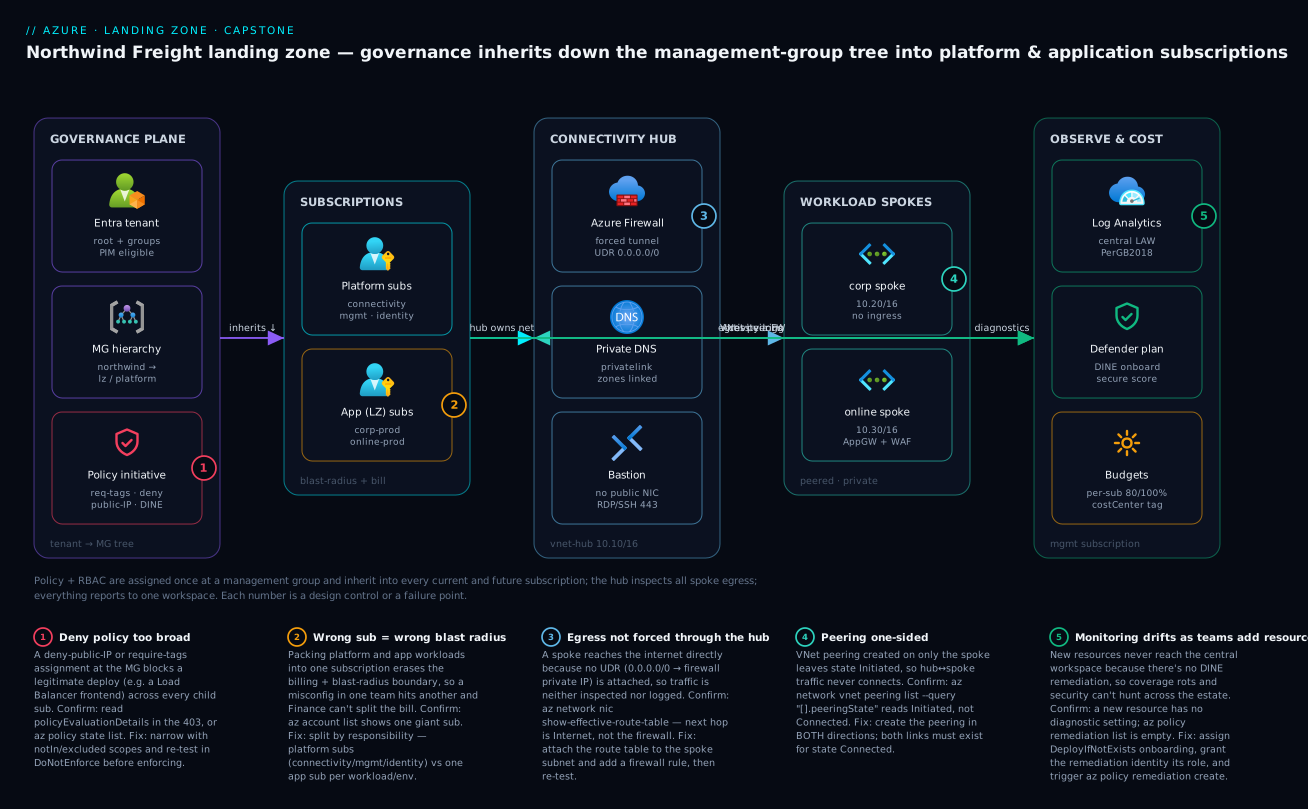
Staged build plan
You do not build a landing zone in one giant deployment — you build it in stages, validating each before the next. Here is the plan; each stage names the deeper lesson to open if you need more than the snippet. The hands-on lab that follows builds a free-tier slice of stages 1, 3, 4, and 5 end to end.
| Stage | What you build | Reuse lesson |
|---|---|---|
| 0. Foundations | Account, Cloud Shell, CLI context | Earlier course lessons + CAF blueprint |
| 1. Resource organization | Management groups + subscription layout | Resource organization |
| 2. Identity | RBAC to groups, PIM for privileged roles | Identity & access |
| 3. Networking | Hub VNet, firewall subnet, spoke peering, UDR | Network topology |
| 4. Governance | Required-tags + deny-public-IP + DINE policy | Governance |
| 5. Monitoring | Central Log Analytics + diagnostic settings | Governance |
| 6. Security | Defender for Cloud plans + Zero Trust posture | Security baseline |
| 7. Cost | Budgets + alerts per subscription | FinOps & cost engineering |
| 8. Automation | Wrap it all in IaC + a pipeline | Policy as code |
Each stage has a definition of done and the one command that proves it — a checklist you can literally tick:
| Stage | Definition of done | Proof command (shape) |
|---|---|---|
| 1 | MG exists; child inherits a parent policy | az account management-group show |
| 2 | RBAC granted to a group at sub scope | az role assignment list --assignee <group> |
| 3 | Hub+spoke peered Connected both ways |
az network vnet peering list --query "[].peeringState" |
| 4 | A deny policy actually blocks a bad resource | attempt create → expect RequestDisallowedByPolicy |
| 5 | Central LAW exists; a resource sends diagnostics | az monitor diagnostic-settings list |
| 6 | Defender plan enabled on the subscription | az security pricing show -n VirtualMachines |
| 7 | Budget with alert configured | az consumption budget list |
| 8 | The above deploys from a pipeline, PR-gated | pipeline run is green |
Representative IaC for the core pieces
You will use a mix in real life: Bicep for Azure-native resources and tenant-scoped objects (management groups, policy), Terraform when you want one tool across clouds, and az for glue and verification. The trade-off, so you pick deliberately:
| Tool | Best at | Scope strength | Weak at | Use in landing zone for |
|---|---|---|---|---|
| Bicep | Azure-native, tenant/MG scope | First-class MG, sub, policy | Multi-cloud | MGs, policy, platform resources |
| Terraform | Multi-cloud, large modules | Mature state, modules | Newest Azure features lag | Cross-cloud orgs; via AVM |
az CLI |
Glue, one-offs, verification | Imperative, scriptable | Not declarative/idempotent | Bootstrap, validation, teardown |
| ARM JSON | Underlying engine | What Bicep compiles to | Verbose by hand | (rarely authored directly now) |
Here are representative snippets for each core piece.
Management group (Bicep, tenant scope):
targetScope = 'tenant'

resource northwind 'Microsoft.Management/managementGroups@2023-04-01' = {
  name: 'northwind'
  properties: { displayName: 'Northwind Freight' }
}

resource landingzones 'Microsoft.Management/managementGroups@2023-04-01' = {
  name: 'landingzones'
  properties: {
    displayName: 'Landing Zones'
    details: { parent: { id: northwind.id } }
  }
}
Hub VNet + firewall subnet (Terraform):
resource "azurerm_virtual_network" "hub" {
  name                = "vnet-hub-eus"
  resource_group_name = azurerm_resource_group.connectivity.name
  location            = "eastus"
  address_space       = ["10.10.0.0/16"]
}

resource "azurerm_subnet" "firewall" {
  name                 = "AzureFirewallSubnet" # exact name is mandatory
  resource_group_name  = azurerm_resource_group.connectivity.name
  virtual_network_name = azurerm_virtual_network.hub.name
  address_prefixes     = ["10.10.1.0/26"]
}
Required-tags policy assignment (Bicep, management-group scope):
targetScope = 'managementGroup'

resource requireCostCenter 'Microsoft.Authorization/policyAssignments@2024-04-01' = {
  name: 'require-tag-costcenter'
  properties: {
    displayName: 'Require costCenter tag on resources'
    // built-in: "Require a tag on resources"
    policyDefinitionId: tenantResourceId(
      'Microsoft.Authorization/policyDefinitions',
      '871b6d14-10aa-478d-b590-94f262ecfa99')
    parameters: { tagName: { value: 'costCenter' } }
    enforcementMode: 'Default'
  }
}
Forced-tunnel route table (Bicep, push spoke egress to the firewall):
resource udr 'Microsoft.Network/routeTables@2023-11-01' = {
  name: 'rt-spoke-forcedtunnel'
  location: location
  properties: {
    routes: [ {
      name: 'default-to-firewall'
      properties: {
        addressPrefix: '0.0.0.0/0'
        nextHopType: 'VirtualAppliance'
        nextHopIpAddress: '10.10.1.4' // Azure Firewall private IP
      }
    } ]
  }
}
Log Analytics workspace (az):
az monitor log-analytics workspace create \
  --resource-group rg-management \
  --workspace-name law-northwind-central \
  --location eastus \
  --sku PerGB2018 \
  --retention-time 30
Real-world scenario
Northwind Freight kicked off the landing-zone build with the four-engineer platform team and a hard deadline: the first application team — the online checkout workload — was promised an isolated, governed subscription in three weeks. The legacy estate was a single subscription, sub-legacy-allinone, holding 140 resources: untagged VMs, three orphaned public IPs, a SQL database reachable from the internet, and a monthly bill of about ₹9.2 lakh that Finance could not split by team. The CTO’s instruction was the brief verbatim: stop the wild west, let app teams move fast safely, and show the bill by team.
Week one was design and the governance plane. The team stood up the MG hierarchy (northwind → platform / landingzones / sandbox / decommissioned) and assigned three policies at northwind in DoNotEnforce first — require costCenter, require owner, allowed-locations (India regions only). The dry run immediately paid off: the compliance view showed 111 of 140 legacy resources non-compliant on tags. Had they enforced deny on day one, the legacy team’s own redeploys would have been blocked mid-flight. Instead they ran a Modify remediation to backfill costCenter from a spreadsheet, re-checked compliance, then flipped require-tags to Default. The deny-public-IP policy went onto the landingzones/corp branch only — deliberately not on online, which legitimately needed a WAF-fronted public entry point.
Week two was connectivity and the first real failure. The team built the hub (10.10.0.0/16) with AzureFirewallSubnet, Bastion, and a gateway subnet, then peered the new corp spoke (10.20.0.0/16). The corp test VM could not reach the internet at all — every outbound call timed out. The reflex was to blame the firewall rules, and an hour vanished there. The actual cause was the badge-3 failure on the diagram: they had attached the UDR forcing 0.0.0.0/0 to the firewall, but had not yet added a firewall network rule allowing the traffic, and a separate test against a second spoke revealed badge-4 — the online spoke’s peering read Initiated, not Connected, because it had been created on only one side. az network vnet peering list --query "[].peeringState" made both obvious in seconds once they stopped guessing and ran the confirm command.
Week three delivered the online team’s subscription. Because the guardrails lived at the MG, the new sub-online-prod inherited require-tags, allowed-locations, and DINE Log Analytics onboarding the moment it was created and moved under landingzones/online — zero extra configuration. The app team got Contributor on their subscription and nothing above it, deployed their spoke and App Gateway via a PR into their own repo, and were serving traffic in two days without filing a single networking ticket. DINE auto-onboarded every resource they created to the central law-northwind-central workspace, so security had estate-wide visibility from minute one. A per-subscription budget of ₹1.5 lakh with alerts at 80% and 100% gave Finance the per-team line they had asked for.
The outcome, after one quarter: 100% tag compliance on all new resources, zero public IPs in the corp branch (the policy blocked three attempts during the migration — each a VM someone tried to give a public IP “just to test”), and a Cost Management view that finally sliced the bill by costCenter. The legacy subscription was drained workload-by-workload into governed app subscriptions and moved to decommissioned. The lesson the team wrote on the wall: “Inheritance and dry-run are the whole game. Assign the guardrail once at the management group, prove it in DoNotEnforce, then enforce — and when the network breaks, run the confirm command before you touch a rule.”
The build as a timeline, because the order of moves is the lesson:
| Week | Goal | Key action | Failure hit | Resolution |
|---|---|---|---|---|
| 1 | Governance plane | Policies at MG in DoNotEnforce |
111/140 legacy untagged | Modify-remediate, then enforce |
| 1 | Tag attribution | Require costCenter/owner | Would have blocked legacy redeploys | Dry-run caught it first |
| 2 | Connectivity | Hub + corp spoke + UDR | Corp VM no internet (badge 3) | Add firewall rule for the route |
| 2 | Peering | Online spoke peering | State Initiated (badge 4) |
Create peering both directions |
| 3 | App onboarding | New sub-online-prod |
(none — inherited cleanly) | Guardrails applied automatically |
| 3 | Cost | Per-sub budget + alerts | — | Finance gets per-team bill |
| +1 qtr | Decommission legacy | Drain to governed subs | — | Move legacy to decommissioned |
Advantages and disadvantages
The governed-landing-zone model both prevents an entire class of production problems and adds real upfront complexity. Weigh it honestly:
| Advantages (why this model helps you) | Disadvantages (why it costs you) |
|---|---|
| Guardrails inherit — assign once at an MG, every current and future sub is governed | Upfront design + IaC effort before the first workload ships any value |
| Subscriptions are clean blast-radius and billing boundaries — a misconfig stays contained | More subscriptions = more boundaries to manage (mitigated by automation) |
| App teams get isolated, pre-governed environments and move fast without tickets | Platform team becomes a dependency; needs to scale with the org |
| Policy makes compliance a property of the platform, not a memory test | A too-broad deny can block legitimate deploys across many subs at once |
| Central monitoring lets security hunt across the whole estate from one workspace | Centralized telemetry can get expensive at volume without DCR scoping |
| Hub-spoke gives one place to inspect, log, and attach hybrid connectivity | The hub is a focal point — an extra hop and a thing that must stay up |
| Everything as code is reproducible, reviewable, and auditable | Steeper skill bar; the team must know Bicep/Terraform and pipelines |
The model is right for any organization past a handful of subscriptions, anyone with compliance obligations, and any platform team that wants to onboard app teams repeatably. It is overkill for a single hobby subscription or a one-week pilot. The disadvantages are all manageable — they are the reason platform automation (subscription vending) and the Well-Architected Framework exist — but only if you know they exist, which is the point of building the design deliberately rather than letting it accrete.
Hands-on lab — build a free-tier landing-zone slice
You will build a real, working slice of the landing zone using the az CLI in Azure Cloud Shell — no installs. We keep it inside a single subscription so it stays free-tier-friendly (a management group, resource groups, two VNets with peering, a tagging policy, and a Log Analytics workspace cost nothing or pennies). Everything goes into resource groups you delete at the end.
Note on scope: creating real platform and application subscriptions needs an enrollment you may not have on a personal account, so the lab models the hierarchy with a management group and models platform-vs-app separation with resource groups + tags. The commands are identical in shape to the real thing.
1. Set context. Open Azure Cloud Shell, pick Bash, and confirm where you are:
az account show --output table
SUB_ID=$(az account show --query id -o tsv)
echo "Working in subscription: $SUB_ID"
2. Create a management group (stage 1). This needs no enrollment and is free:
az account management-group create \
  --name northwind-demo \
  --display-name "Northwind Freight (demo)"
Expected: JSON describing the new group. (It can take a minute to appear in the portal — that is normal.)
3. Create platform and application resource groups (modelling the subscription split), each tagged for cost attribution:
az group create -n rg-connectivity -l eastus \
  --tags costCenter=platform owner=platform-team env=shared

az group create -n rg-management -l eastus \
  --tags costCenter=platform owner=platform-team env=shared

az group create -n rg-corp-prod -l eastus \
  --tags costCenter=logistics owner=app-team env=prod
4. Build the hub VNet and a spoke, then peer them (stage 3):
# Hub network in the connectivity RG
az network vnet create -g rg-connectivity -n vnet-hub \
  --address-prefix 10.10.0.0/16 \
  --subnet-name AzureFirewallSubnet --subnet-prefix 10.10.1.0/26

# Spoke network in the corp app RG
az network vnet create -g rg-corp-prod -n vnet-corp-spoke \
  --address-prefix 10.20.0.0/16 \
  --subnet-name snet-workload --subnet-prefix 10.20.1.0/24

# Get resource IDs for peering
HUB_ID=$(az network vnet show -g rg-connectivity -n vnet-hub --query id -o tsv)
SPOKE_ID=$(az network vnet show -g rg-corp-prod -n vnet-corp-spoke --query id -o tsv)

# Peer both directions
az network vnet peering create -g rg-corp-prod -n spoke-to-hub \
  --vnet-name vnet-corp-spoke --remote-vnet "$HUB_ID" \
  --allow-vnet-access

az network vnet peering create -g rg-connectivity -n hub-to-spoke \
  --vnet-name vnet-hub --remote-vnet "$SPOKE_ID" \
  --allow-vnet-access
5. Assign a tagging guardrail (stage 4). Assign the built-in Require a tag on resources policy, scoped to the corp resource group, requiring costCenter:
az policy assignment create \
  --name require-costcenter \
  --display-name "Require costCenter tag" \
  --scope "/subscriptions/$SUB_ID/resourceGroups/rg-corp-prod" \
  --policy "871b6d14-10aa-478d-b590-94f262ecfa99" \
  --params '{ "tagName": { "value": "costCenter" } }'
6. Create the central Log Analytics workspace (stage 5):
az monitor log-analytics workspace create \
  --resource-group rg-management \
  --workspace-name law-northwind-demo \
  --location eastus \
  --sku PerGB2018 --retention-time 30
7. Validate. Prove the slice exists and is wired correctly:
# Management group present
az account management-group show --name northwind-demo -o table

# Peering shows "Connected" both ways
az network vnet peering list -g rg-corp-prod --vnet-name vnet-corp-spoke \
  --query "[].{name:name, state:peeringState}" -o table

# Policy assignment present at the corp RG
az policy assignment list \
  --scope "/subscriptions/$SUB_ID/resourceGroups/rg-corp-prod" \
  --query "[].displayName" -o table

# Workspace provisioned
az monitor log-analytics workspace show \
  -g rg-management -n law-northwind-demo \
  --query provisioningState -o tsv
Expected: the peering state reads Connected for spoke-to-hub, the policy displayName appears, and the workspace provisioningState is Succeeded. You now have, in miniature, every pillar of the landing zone: hierarchy, platform/app separation, hub-spoke, a guardrail, and central monitoring.
8. Cleanup. Delete the resource groups (this removes the VNets, peering, policy assignment scoped to the RG, and workspace), then the management group:
az group delete -n rg-corp-prod --yes --no-wait
az group delete -n rg-connectivity --yes --no-wait
az group delete -n rg-management --yes --no-wait
az account management-group delete --name northwind-demo
Cost note: Empty VNets, peering, a tagging policy, a management group, and a workspace with no ingested data are free or a few pennies; deleting the resource groups the same day keeps this comfortably in free-tier territory.
The lab steps mapped to what each proves and its real-world analogue:
| Step | What you did | What it proves | Real-world analogue |
|---|---|---|---|
| 2 | Create a management group | Hierarchy is free and enrollment-light | The MG tree that inherits guardrails |
| 3 | Tagged platform/app RGs | Cost attribution starts with tags | Platform-vs-app subscription split |
| 4 | Hub + spoke + bidirectional peering | Peering needs both sides | Hub-spoke connectivity |
| 5 | Require-tags policy at RG scope | Governance is an assignment | Deny guardrails at MG scope |
| 6 | Central Log Analytics workspace | One place for telemetry | The estate-wide monitoring sink |
| 7 | Validate everything | Confirm commands beat guessing | The acceptance test |
| 8 | Delete the resource groups | Clean teardown is part of IaC | Decommission discipline |
Common mistakes & troubleshooting
This is the playbook — the part you bookmark. These are the failures that actually bite a platform team building a landing zone. First as a scannable table you can read mid-incident, then the expanded reasoning for the ones that hurt most.
| # | Symptom | Root cause | Confirm (exact cmd / portal path) | Fix |
|---|---|---|---|---|
| 1 | New MG not visible after create | Propagation delay; or you lack Management Group Contributor at root | az account management-group list -o table; check role at root |
Wait ~1 min; ensure tenant-level MG permission is enabled (first MG op) |
| 2 | A deny policy blocks a resource you expected to succeed | Deny broader than intended (e.g. deny-public-IP catching an LB) | Read policyEvaluationDetails in the 403; az policy state list --filter "complianceState eq 'NonCompliant'" |
Narrow with notIn/excluded scopes; re-test in DoNotEnforce |
| 3 | VNet peering stuck Initiated |
Peering created on only one side | az network vnet peering list --query "[].peeringState" |
Create the peering in both directions |
| 4 | Spoke VM has no internet after adding the firewall | UDR sends 0.0.0.0/0 to firewall, but no firewall rule allows it |
az network nic show-effective-route-table; firewall logs show deny |
Add a firewall network/application rule (or remove UDR while testing) |
| 5 | DINE policy never onboards new resources | No remediation task; remediation identity lacks the role at scope | az policy remediation list; check the assignment’s MI role |
az policy remediation create; grant the MI its role |
| 6 | az policy assignment create fails on --params |
JSON quoting mangled in the shell | Re-run with the JSON in a file | Pass --params @file.json; or use Cloud Shell |
| 7 | New subscription not governed | Sub not moved under the governed MG | az account management-group subscription show |
Move the sub under the correct MG; policy inherits |
| 8 | RBAC change “did nothing” | Granted at the wrong scope, or to a user not the group | az role assignment list --assignee <id> --all |
Grant to the group at MG/sub scope |
| 9 | Resource resolves to public IP despite Private Endpoint | Private DNS zone not linked to the VNet | nslookup <host> returns public IP |
Link privatelink.* zone; register the A record |
| 10 | Allowed-locations policy blocks a global resource | Global resources report location: global |
Policy error names the location | Exclude global resource types / use the built-in’s location list |
| 11 | Budget alert never fires | Threshold/contact misconfigured, or spend genuinely under | az consumption budget show; check action group |
Fix threshold/contact; budgets evaluate on a delay |
| 12 | Can’t assign Owner to the pipeline | Contributor can’t grant RBAC (by design) | Pipeline identity is Contributor, not UAA/Owner | Use a PIM-eligible Owner or a scoped UAA for the bootstrap |
The expanded form, with the full reasoning for the entries that bite hardest:
2. A deny policy blocks a resource you expected to succeed.
Root cause: The deny is broader than intended — deny-public-IP catching a Load Balancer frontend, or allowed-locations catching a global resource — and because it’s assigned at an MG it blocks across every child subscription at once.
Confirm: Read policyEvaluationDetails in the deployment error (it names the assignment and definition); or az policy state list --filter "complianceState eq 'NonCompliant'" to see what’s tripping.
Fix: Decide whether the policy is correct (the resource genuinely violates intent) or too broad. If too broad, narrow it with parameters/exclusions (notIn, excluded scopes) and validate in DoNotEnforce before re-enabling. Avoid blanket exemptions — they erode the guardrail.
3. VNet peering stuck in Initiated.
Root cause: Peering is directional — a link created on the spoke alone leaves the relationship half-built, so traffic never flows.
Confirm: az network vnet peering list -g <rg> --vnet-name <vnet> --query "[].{name:name,state:peeringState}" shows Initiated, not Connected.
Fix: Create the peering in both directions (hub→spoke and spoke→hub). Both links must exist for the state to become Connected.
4. Spoke VM cannot reach the internet after you add the firewall.
Root cause: The UDR default route (0.0.0.0/0 → firewall private IP) is attached and forces all egress to the firewall, but the firewall has no rule allowing that traffic, so it’s dropped — exactly the badge-3 control point.
Confirm: az network nic show-effective-route-table --name <nic> -g <rg> shows next hop = the firewall; the firewall’s logs (in the central LAW) show the connection denied.
Fix: Add an Azure Firewall network or application rule permitting the required egress, or remove the UDR while you isolate connectivity. See Azure Firewall forced tunneling & hub-spoke routing.
5. DINE policy never onboards new resources.
Root cause: A DeployIfNotExists policy needs a managed identity with the right role at the right scope and a remediation task to act on existing resources — miss either and nothing happens.
Confirm: az policy remediation list is empty; the assignment’s managed identity has no role assignment at the target scope.
Fix: Trigger remediation (az policy remediation create) and grant the assignment’s managed identity the role it needs (e.g. Log Analytics Contributor). New resources are remediated automatically; existing ones need the explicit task.
7. A new subscription isn’t governed.
Root cause: Creating a subscription does not place it under a governed MG — until you move it, it inherits nothing.
Confirm: az account management-group subscription show --name <mg> --subscription <sub> doesn’t list it; the sub shows no inherited policy.
Fix: Move the subscription under the correct MG (az account management-group subscription add); inheritance applies immediately. This is what subscription vending automates.
Common beginner mistakes
These are the conceptual traps — the wrong mental model a newcomer brings to landing-zone design — as opposed to the operational symptom→confirm→fix failures in the troubleshooting table above. Fix the model and the failures stop happening in the first place.
| Misconception | Why it’s wrong | The right mental model |
|---|---|---|
| “Management groups are just folders for tidying up subscriptions.” | An MG with no policy or RBAC on it does nothing — it is not a filing cabinet, it is a governance scope. Its only power is inheritance. | An MG earns its place only when a guardrail is assigned on it. If you’re not inheriting policy/RBAC through it, you don’t need it. |
| “More subscriptions means more admin, so cram everything into one big subscription.” | The subscription is the blast-radius, billing, and quota boundary. One giant sub means one team’s misconfig or quota exhaustion hits everyone, and Finance gets one bill it can’t split. | Subscriptions are cheap boundaries. Split by responsibility (platform vs app, one per workload/env); automate the sprawl with subscription vending. |
| “Turn every deny policy on across the tenant on day one — safer that way.” | A too-broad deny at a high scope blocks legitimate deploys across every child sub at once — including your own platform bootstrap. Safety that breaks everything isn’t safety. | Always DoNotEnforce → read compliance → enforce. Scope the rule as narrowly as its intent allows before you flip it on. |
| “Once I peer the spoke to the hub, traffic routes through the firewall automatically.” | Peering grants reachability, not routing. A spoke reaches the hub, not sibling spokes, and egress is not forced through the firewall without a UDR — and the UDR alone drops traffic until a firewall rule allows it. | Peering ≠ routing. Central egress = peering + a 0.0.0.0/0 UDR to the firewall + a matching firewall rule (+ hub routing for spoke-to-spoke). |
| “Give the app team Owner so they’re never blocked.” | Owner lets them grant themselves anything and weaken the platform’s own guardrails. Contributor already builds everything except changing access. | Contributor to the group at their subscription scope; Owner/User Access Administrator only PIM-eligible, never standing. |
| “RBAC assignment didn’t work, so I’ll assign it again to the user directly.” | You almost certainly granted it at the wrong scope, or to a person instead of the group. Adding a second per-user assignment creates the sprawl you’re trying to avoid. | Grant to groups at MG/sub scope; membership controls access. Confirm with az role assignment list --assignee <id> --all before re-granting. |
| “The landing zone is a project we finish and hand off.” | Policies drift, new Azure services need new guardrails, subscriptions get vended continuously, and eligibility goes stale. A finished-and-forgotten platform rots. | It’s a product you operate: IaC in a repo, PR-gated pipelines, quarterly access reviews, and a backlog — platform-as-a-product, not a one-time build. |
| “Azure Blueprints is the Microsoft-blessed way to package all this.” | Azure Blueprints never reached GA and is deprecated. Building new governance on it today is building on sand. | Use the current stack: Azure Policy for governance, Deployment Stacks for lifecycle-managed resource collections, and the ALZ accelerators (Bicep/Terraform/AVM) to bootstrap the whole thing. |
Best practices
- Decide before you deploy. Write the design decisions down (the seven above) and review them with stakeholders. IaC is cheap to change; an undocumented hierarchy is not.
- Inherit, don’t repeat. Assign policy and RBAC at the highest sensible scope (management group) so new subscriptions are governed automatically.
- Subscriptions are cheap; use them as boundaries. One per workload-or-environment beats cramming everything into one giant subscription.
- Dry-run governance. New initiatives go in
DoNotEnforce, you read compliance, then you enforce. Never flip a deny on blind. - Confirm before you fix. When the network breaks, run the confirm command (
peering list,show-effective-route-table) before touching a rule — most landing-zone “firewall bugs” are peering or routing. - Everything is code. The platform team owns the hierarchy/policy/hub in one repo; app teams own their spokes via PR. Deploy through a pipeline, never the portal, for anything that must be reproducible. See Azure Policy as code.
- Grant to groups, scope high, activate JIT. Group-based RBAC at MG/sub scope plus PIM for privileged roles is auditable and leaves no standing admin.
- Tag from day one.
costCenter,owner,envare not optional — they are what makes cost, ownership, and cleanup possible. - Centralize telemetry, scope ingestion. One workspace for cross-estate hunting, but use DCRs to control what each resource sends so the bill stays sane.
- Force egress through the hub. A UDR sending
0.0.0.0/0to the firewall plus a matching firewall rule means all traffic is inspected and logged in one place. - Quarantine before you delete. Move retired subscriptions to a
decommissionedMG with deny-create before deletion, so nothing new lands in them. - Reuse the deep-dive lessons. Each pillar has a production-depth lesson; this capstone is the map, those are the territory.
Security notes
The landing zone is your security baseline, so treat it that way. Grant RBAC to groups, scoped high, least-privilege; make privileged roles eligible via PIM, not standing. Keep corp workloads private by policy (deny public IPs; reach them through Bastion or the firewall, never a public NIC). Force all egress through the hub firewall with a UDR so traffic is inspected and logged in one place. Turn on Microsoft Defender for Cloud and enforce its onboarding with DINE policy so coverage cannot drift. Funnel every diagnostic and Activity Log into the central Log Analytics workspace so security can hunt across the whole estate. And never embed secrets in IaC — use a pipeline identity with workload identity federation rather than a long-lived service-principal secret. This is the Zero Trust multilayer model applied to the platform itself; deepen it with Azure landing zone — security.
The security controls the landing zone bakes in, what each defends against, and the policy/mechanism that enforces it:
| Control | Mechanism | Defends against | Enforced by |
|---|---|---|---|
| No standing admin | PIM-eligible Owner/UAA | Stolen-token lateral movement | PIM + access reviews |
| Group, least-privilege RBAC | Contributor at sub scope | Privilege sprawl/escalation | RBAC plan + audit |
| Private corp workloads | Deny-public-IP policy | Internet-exposed internal VMs | Azure Policy (deny) |
| Inspected, logged egress | Firewall + forced-tunnel UDR | Exfiltration, blind traffic | UDR + firewall rules |
| Secretless config | Managed identity + KV references | Secrets in plaintext/IaC | Key Vault + MI |
| No-drift monitoring | DINE LAW + Defender onboarding | Coverage gaps | Azure Policy (DINE) |
| Data in approved geos | Allowed-locations policy | Sovereignty/compliance breach | Azure Policy (deny) |
| Reproducible, reviewed changes | IaC + PR-gated pipeline | Unaudited portal drift | CI/CD + branch policy |
Cost & sizing
What drives the landing-zone bill is not the governance scaffolding — management groups, policy, peering, and budgets are free. The cost is the shared platform services you run continuously (firewall, gateways, Bastion) plus telemetry ingestion. Right-sizing is mostly about whether you actually need each shared service yet, and scoping what you log. Rough INR figures (production-grade, vary by region and usage):
| Component | What you pay for | Rough INR / month | Free-tier note |
|---|---|---|---|
| Management groups + policy | Nothing | ₹0 | Always free |
| VNet peering | Per-GB transferred (intra-region small) | ₹0–low | Empty peering is free |
| Azure Firewall (Standard) | Hourly + per-GB processed | ~₹35,000–45,000 | No free tier; the big platform cost |
| Azure Bastion (Basic) | Hourly | ~₹12,000–14,000 | No free tier; can deallocate |
| VPN Gateway (VpnGw1) | Hourly | ~₹12,000–15,000 | Only if hybrid is needed |
| Log Analytics ingestion | Per-GB ingested + retention | ~₹20,000/100GB-mo | 5 GB/mo free-ish; scope with DCRs |
| Defender for Cloud | Per-resource per plan | varies by estate | Free CSPM tier; paid plans per resource |
| Budgets / Cost Management | Nothing | ₹0 | Always free |
The right-sizing decisions that actually move the bill:
| Decision | Cheaper choice | When it’s safe | Trade-off |
|---|---|---|---|
| Firewall vs NSG-only egress | NSG + NAT Gateway | Small estate, no L7 inspection need | Lose central app-layer inspection |
| Bastion always-on vs on-demand | Deallocate when idle | Dev/test, rare access | Reconnect delay |
| Per-GB LAW vs commitment tier | Commitment tier | Sustained > 100 GB/day | Pay for committed volume |
| Log everything vs DCR-scoped | DCR-scoped | Always | Less data if you under-scope |
| Standard vs Premium Firewall | Standard | No IDPS/TLS-inspection need | Lose IDPS/TLS inspection |
| Run all platform services now | Add as needed | Always — start minimal | Retro-fit effort later |
For the full discipline — reservations, savings plans, hybrid benefit, anomaly alerts — see Azure FinOps & cost engineering and reservations & savings-plan strategy.
Going deeper
The design above is the what. Senior work is the why it survives scrutiny, in what order it must be built, and which tool you reach for now that some of the classic ones are gone. This section adds the depth a staff-level architect brings to a landing zone — the part that separates “I followed the CAF diagram” from “I can defend every line of it.”
Defending the design in a review board
A design review (an Azure Review Board, an interview whiteboard, or an internal architecture council) does not score whether you memorised the reference hierarchy — it scores whether you understand the forces behind each choice and can name what you traded away. The tell of a junior answer is a bare assertion (“we use hub-spoke”); the tell of a senior answer is a decision with its rejected alternative and the condition that would flip it. Rehearse the difference:
| Prompt a reviewer fires | Junior answer (asserts) | Senior answer (reasons + names the trade + the flip condition) |
|---|---|---|
| “Why a management-group tree?” | “Best practice / CAF says so.” | “Inheritance: one assignment governs every current and future sub, so a new team is compliant on creation. Trade: a wrong assignment high up has a huge blast radius, so top scopes stay minimal and I dry-run first. I’d flatten only for a single-team tenant that will never vend subs.” |
| “Why split subscriptions instead of resource groups?” | “More isolation.” | “The sub is the billing, quota, and Owner blast-radius boundary — an RG is none of those. Trade: more subs to manage, which I pay down with vending automation. I’d keep it one sub only below ~a handful of workloads with no compliance split.” |
| “Why one central Log Analytics workspace?” | “Single pane of glass.” | “Cross-estate hunting and one DINE target. Trade: it’s a concentration of blast radius and cost, and resource-context RBAC is what stops every team reading every log. At extreme scale or hard data-residency splits I’d federate to regional workspaces and query across them.” |
| “Is Azure Firewall worth it here?” | “It’s more secure.” | “Central L7 inspection and one logged egress point. Trade: ~₹35–45k/mo and an extra hop and a thing that must stay up. For a small estate with no L7/inspection need I’d start with NSG + NAT Gateway and add the firewall when a compliance or inspection requirement arrives.” |
The meta-skill: steelman the alternative you rejected before the reviewer does. If you can state the strongest case for a flat tenant, a single subscription, or full-mesh peering — and then the specific condition under which you would choose it — you have shown you chose, rather than copied. Reviewers also probe the seams: “what happens to governance when someone creates a sub outside your process?” (answer: it inherits nothing until moved under the MG — which is exactly why vending exists), and “what’s your blast radius if the policy assignment identity is compromised?” (answer: scope it to the MG it manages, PIM-gate it, and it can deploy but the deny/audit definitions it can’t rewrite live in a PR-gated repo).
The trade-off axes senior architects actually argue
Every landing-zone decision sits on a tension between cost, security, reliability, and agility — you cannot maximise all four, and the Well-Architected Framework exists precisely to make the trade explicit. The recurring arguments, and where each bites:
| Tension | The decision it lands on | Push one way… | …push the other |
|---|---|---|---|
| Security vs agility | Strict deny policies at high scope | More guardrails → fewer foot-guns, uniform posture | Too broad → blocks legitimate deploys, teams file exemptions that erode the rule |
| Cost vs reliability | One hub vs zone-redundant/second-region hub | Single hub is cheapest and simplest | Single hub is a focal point of failure; redundancy costs gateways + firewall again |
| Centralisation vs blast radius | One central LAW + one connectivity hub | Cross-estate hunting, one place to inspect | One workspace/hub compromise or outage is estate-wide; RBAC + DCR scoping are the mitigations |
| Isolation vs overhead | One subscription per workload | Clean bill, small blast radius, per-team quota | More subs to vend, patch, and monitor — only sane if automated |
| Prevention vs friction | Deny vs Audit for a given rule | Deny guarantees compliance | Audit keeps velocity while you learn what would break; promote Audit→Deny once clean |
| Standardisation vs autonomy | Platform owns hub + policy; apps own spokes | Reproducible, governed, uniform | App teams chafe at a platform dependency; the fix is self-service vending, not loosening policy |
A reviewer’s favourite follow-up is “and how do you know which way to push?” The honest answer is evidence, not taste: run the deny in DoNotEnforce and read the compliance count before enforcing; watch the LAW bill and add DCR scoping when ingestion climbs; measure how long app teams wait for a subscription and automate vending when the queue grows. The design is a hypothesis; the telemetry and the bill are how you test it.
Build order and the dependency graph
A landing zone is a directed dependency graph, not a checklist — build it in the wrong order and half of it silently no-ops. The stage table earlier lists what to build; this is what blocks what, and the chicken-and-egg problems that trip first-timers:
| To do this… | You first need… | Because, and the classic no-op if you skip it |
|---|---|---|
| Create the first management group | A human with tenant-root elevation / Management Group Contributor | The very first MG operation is what grants the creator access at the root; without it you get “insufficient privileges” |
| Grant the pipeline identity Owner/UAA | A PIM-activated human Owner (or break-glass) to do the grant | Contributor cannot assign RBAC — a Contributor pipeline silently fails every role assignment (troubleshooting #12) |
| Assign a DINE-to-LAW policy | The central LAW to exist first (you pass its resource ID) | You can’t reference a workspace that isn’t created; the assignment has nothing to onboard to |
| Have DINE actually remediate | The assignment’s managed identity to hold its role at scope and a remediation task | New resources onboard going forward; existing ones stay non-compliant until the task runs — looks like the policy “doesn’t work” |
| Peer a spoke to the hub | Both VNets to exist, and non-overlapping CIDRs | Peering is directional and rejects overlapping ranges; a one-sided create sits at Initiated forever |
| Force egress through the firewall | The firewall (with a private IP) and a UDR and a firewall rule | UDR without a rule = all egress dropped; rule without UDR = traffic never reaches the firewall |
| Have a new sub inherit guardrails | The sub to be moved under the governed MG | A freshly created sub inherits nothing until placed under the MG — this is the whole reason vending exists |
The single most under-appreciated edge is the bootstrap identity problem: the platform that will enforce least privilege has to be created by something highly privileged. Resolve it deliberately — one PIM-eligible human (or a tightly-scoped break-glass account with an alerting rule on its use) performs the first MG creation and the initial grant to the pipeline’s managed identity, records it, and then never uses standing privilege again. From that point the pipeline runs with a scoped Owner at exactly the MG it manages, and everything else is code.
Tooling reality: accelerators, and what replaced Blueprints
You almost never hand-author a full landing zone from blank Bicep or Terraform — Microsoft ships accelerators that deploy the CAF enterprise-scale conceptual architecture (the MG hierarchy, the policy library, a connectivity option) opinionated and ready to customise. Know the current landscape, because two pieces of the classic toolchain have moved:
| Concern | Classic / legacy approach | Current recommended approach (2026) |
|---|---|---|
| Bootstrap the whole ALZ | Hand-built templates, or first-gen scripts | ALZ Accelerator — Bicep (ALZ-Bicep), Terraform, or portal experience |
| Terraform ALZ module | Azure/caf-enterprise-scale (a single mega-module) |
Migrating to Azure Verified Modules (AVM) — supported, composable ALZ pattern modules |
| Package resources + policy + RBAC as a unit | Azure Blueprints (never GA) | Deployment Stacks for the resource lifecycle + Azure Policy for governance |
| Hand a governed sub to a team | Manual sub creation + click-through setup | Subscription vending module/pipeline |
Two correctness points a reviewer will expect you to have straight. First, Azure Blueprints is deprecated — it never reached general availability, and Microsoft’s guidance is to move its two jobs apart: use a Deployment Stack (a GA resource, Microsoft.Resources/deploymentStacks, that manages a set of resources as one unit and can lock them with denySettings such as deny-delete) for the deploy-and-manage-as-a-unit role, and Azure Policy for the governance role. Do not build anything new on Blueprints. Second, the long-standing Azure/caf-enterprise-scale Terraform module is being superseded by Azure Verified Modules — the direction of travel is composable, individually supported AVM pattern modules rather than one monolith, so new Terraform work should target AVM. The AVM/accelerator surface evolves quickly, so treat exact module names as check-the-docs details and pin versions in your IaC — but the shape (accelerator bootstraps → AVM modules → vending for growth, with Deployment Stacks + Policy replacing Blueprints) is stable and is what you defend in the review.
Interview & exam questions
1. Walk me through how you would design an Azure landing zone for a company moving off a single subscription. Start from the business drivers, then the eight CAF design areas. Adopt a management-group hierarchy (platform / landing zones / sandbox / decommissioned) for inherited policy and RBAC; split subscriptions by responsibility (platform vs application) so each workload is its own blast-radius and billing boundary; centralize networking in a hub with peered spokes and forced-tunnel egress; grant least-privilege RBAC to groups with PIM for privileged roles; enforce tagging and deny risky resources via policy at MG scope; funnel all telemetry into one Log Analytics workspace; and add per-subscription budgets. Deliver it all as IaC through a PR-gated pipeline.
2. Why management groups instead of just applying policy per subscription? Inheritance and scale. One assignment at an MG flows to every current and future subscription beneath it, so governance is automatic for new teams and you have a single place to change a guardrail — versus drift and toil when each subscription is configured by hand.
3. A deny policy is blocking a legitimate deployment. How do you debug it? Read policyEvaluationDetails in the error to find which assignment and definition denied it. Decide whether the policy is correct (the resource genuinely violates intent) or too broad. If too broad, narrow it with parameters/exclusions (notIn, excluded scopes) and validate in DoNotEnforce before re-enabling. Avoid blanket exemptions — they erode the guardrail.
4. Platform team owns the hierarchy and hub; app teams own workloads. How do you structure that so app teams move fast without breaking governance? Two ownership layers in IaC: the platform repo owns MGs, policy, and the hub; app teams own their spokes and workloads and ship via PR into their own subscription, where guardrails already inherit. App teams get Contributor on their subscription and no rights above it, so they cannot weaken platform policy. This is “subscription democratization.”
5. How do you keep monitoring from drifting as teams add resources? Enforce it with DeployIfNotExists policy that auto-onboards new resources to the central Log Analytics workspace and Defender for Cloud, with remediation tasks for existing ones. Coverage becomes a property of the platform, not something a team must remember.
6. How does this design answer “show me the bill by team”? Subscriptions are the billing boundary (one per workload/env), and a require-tags policy guarantees every resource carries costCenter/owner/env. Cost Management then slices spend by subscription and tag, and per-subscription budgets with alerts warn owners before they overrun.
7. What forces a spoke’s outbound traffic through the hub firewall, and what’s the classic failure? A route table (UDR) whose default route (0.0.0.0/0) has next hop = the firewall’s private IP, attached to the spoke subnet (“forced tunneling”). The classic failure is attaching the UDR but forgetting a firewall rule to allow the traffic — egress is then dropped, looking like a connectivity bug. Confirm with show-effective-route-table and the firewall logs.
8. Difference between Deny, Audit, and DeployIfNotExists policy effects? Deny rejects a non-compliant create/update at evaluation time (a hard guardrail). Audit flags non-compliance but allows it (visibility without blocking). DeployIfNotExists deploys a related resource when it’s missing (e.g. Log Analytics onboarding) and needs a managed identity plus a remediation task to act on existing resources.
9. Why grant RBAC to groups and scope it high rather than to individuals per-resource? Group-based, high-scope, least-privilege RBAC is auditable and manageable: you add/remove a person from a group instead of hunting per-resource assignments, you avoid privilege creep, and combined with PIM you avoid standing admin rights.
10. What is PIM and which roles do you put behind it? Privileged Identity Management makes roles eligible rather than active, so a human activates them just-in-time with MFA, justification, and (for the top roles) approval, for a bounded duration. Put Owner and User Access Administrator behind it always; consider it for any role that can change access or delete platform resources.
11. Your VNet peering shows Initiated, not Connected. What’s wrong? Peering is directional and was created on only one side. Create the peering in both directions (hub→spoke and spoke→hub); both links must exist before the state becomes Connected.
12. How do you onboard a new application team without a networking ticket? Vend them a subscription already under the governed landingzones MG (so it inherits guardrails), grant their group Contributor on just that subscription, and let them deploy their spoke + workload via a PR into their own repo. Because policy, DINE monitoring, and the peering pattern are platform-owned and inherited, the team is productive in days with no manual networking step.
These map most directly to AZ-305: Designing Microsoft Azure Infrastructure Solutions, with reinforcement of AZ-104 (Administrator). The cert mapping for revision:
| Question theme | Primary cert | Exam objective area |
|---|---|---|
| MG hierarchy, governance strategy | AZ-305 | Design governance & identity |
| Policy effects, require-tags, deny | AZ-305 / AZ-104 | Design/implement governance |
| Hub-spoke, peering, forced tunnel | AZ-305 / AZ-104 | Design/implement networking |
| RBAC strategy, PIM | AZ-305 / AZ-500 | Design identity & access |
| Central monitoring, DINE onboarding | AZ-305 / AZ-104 | Design/implement monitoring |
| Budgets, tags, cost attribution | AZ-305 | Recommend cost solutions |
| IaC, pipelines, reproducibility | AZ-305 / AZ-400 | Design platform automation |
Quick check
- Why assign policy and RBAC at a management group rather than on each subscription?
- What is the difference between a platform subscription and an application (landing-zone) subscription?
- In hub-spoke, what forces a spoke’s outbound traffic through the hub firewall — and what’s the one thing people forget to add alongside it?
- Your new spoke peering reads
Initiated. What did you miss, and what command confirms it? - Why dry-run a new policy initiative in
DoNotEnforcemode before enforcing it?
Answers
- Because management groups inherit — a single assignment flows to every current and future subscription beneath them, so new teams are governed automatically instead of someone remembering to re-apply guardrails each time.
- Platform subscriptions hold shared services (connectivity, management, identity) owned by the platform team and changing rarely; application subscriptions are handed one-per-workload to app teams and are the blast-radius/billing boundary for that workload.
- A route table (UDR) whose default route (
0.0.0.0/0) has next hop = the firewall’s private IP, attached to the spoke subnet (forced tunneling). People forget the matching firewall rule to allow that egress, so traffic is dropped and it looks like a connectivity bug — confirm withaz network nic show-effective-route-table. - You created the peering on only one side; peering is directional. Create it in both directions, and confirm with
az network vnet peering list --query "[].peeringState"— both must readConnected. DoNotEnforceevaluates compliance without blocking anything, so you can read what would be denied and fix scope or exclusions before a too-broad deny breaks legitimate deployments (including your own platform bootstrap).
Exercise
Extend the lab into the cost pillar. Using the rg-corp-prod resource group from the lab (or recreate it), create a budget with an alert so an owner is notified before spend exceeds a threshold:
az consumption budget create \
  --budget-name corp-prod-monthly \
  --amount 10 \
  --category Cost \
  --time-grain Monthly \
  --start-date 2026-06-01 --end-date 2026-12-31 \
  --resource-group rg-corp-prod
Then answer in two or three sentences: how does requiring the costCenter tag (from the lab) combine with this budget to satisfy Northwind’s “show me the bill, by team” requirement? Clean up afterward.
Practice challenges
Six exercises that escalate from reading the hierarchy to defending a build order. They go beyond the hands-on lab (which builds the slice) — here you diagnose, scope, and reason. All IDs are placeholders; commands are illustrative and safe to reason through even where you cannot run them on this host. Try each before opening its solution.
Challenge 1 (Beginner) — Read the inheritance path. You’re handed the northwind tenant. Print the entire management-group subtree beneath it, including child MGs and the subscriptions under each, so you can see what inherits from where.
<details> <summary>Solution</summary>
az account management-group show \
  --name northwind --expand --recurse -o json
--expand includes children; --recurse walks the whole subtree so nested MGs and their subscriptions all appear. Why: before you can reason about any guardrail you must be able to see the exact scope it inherits down — inheritance is invisible until you render the tree.
</details>
Challenge 2 (Beginner→Intermediate) — Prove a guardrail denies, then satisfy it. Assign the built-in Require a tag on resources policy for costCenter at the rg-corp-prod scope, then show it blocks an untagged resource and admits a tagged one.
<details> <summary>Solution</summary>
SCOPE="/subscriptions/$SUB_ID/resourceGroups/rg-corp-prod"
az policy assignment create --name require-cc \
  --scope "$SCOPE" \
  --policy "871b6d14-10aa-478d-b590-94f262ecfa99" \
  --params '{ "tagName": { "value": "costCenter" } }'

# Denied — no costCenter tag:
az network public-ip create -g rg-corp-prod -n pip-test          # -> RequestDisallowedByPolicy
# Admitted — tag present:
az network public-ip create -g rg-corp-prod -n pip-test \
  --tags costCenter=logistics                                     # -> succeeds
Why: a deny policy is only real once you’ve seen it reject and seen the compliant path — this is the muscle memory behind the DoNotEnforce→enforce discipline. (Delete the public IP afterward.) </details>
Challenge 3 (Intermediate) — Localise “no internet” to routing vs firewall rule. A corp VM lost all outbound access the moment you attached the forced-tunnel UDR. Give the two commands, in order, that decide whether the fault is routing or a missing firewall rule — without touching anything yet.
<details> <summary>Solution</summary>
# 1. Is the route correct? Next hop should be the firewall's private IP:
az network nic show-effective-route-table --name <nic> -g rg-corp-prod -o table
# 2. If routing is right, the drop is at the firewall — check its logs in the central LAW
#    (or confirm a matching network/application rule exists on the policy).
If step 1 shows next hop = the firewall IP, routing is fine and the fault is a missing firewall rule (the badge-3 trap); fix by adding the egress rule. Why: confirm before you fix — most “firewall bugs” in a landing zone are actually routing or a missing rule, and guessing costs an hour. </details>
Challenge 4 (Intermediate→Advanced) — Make a DINE policy actually onboard existing resources. You assigned a DeployIfNotExists policy to send diagnostics to the central LAW, but every pre-existing resource still shows non-compliant and nothing is onboarding. Give the two things you must add.
<details> <summary>Solution</summary>
# a) Grant the assignment's managed identity its role at the target scope:
az role assignment create \
  --assignee <policy-assignment-MI-principal-id> \
  --role "Log Analytics Contributor" \
  --scope "/providers/Microsoft.Management/managementGroups/landingzones"
# b) Trigger a remediation task for the resources that already existed:
az policy remediation create --name onboard-existing \
  --policy-assignment <assignment-id> \
  --resource-group rg-corp-prod
Why: DINE only acts at create/update going forward; existing resources need a remediation task, and the assignment’s managed identity needs the role at scope — miss either and it silently no-ops. </details>
Challenge 5 (Advanced) — Scope a deny correctly without weakening a sibling. You must deny public IPs for corp workloads but not for online, which legitimately needs a WAF-fronted public entry point. Where do you assign the deny, and what do you avoid?
<details> <summary>Solution</summary>
Assign the deny-public-IP policy at the landingzones/corp leaf MG, not at landingzones (which would also hit online). If org standards force it to live at landingzones for consistency, add a policy exemption (or excluded scope) for the online subscriptions — but prefer the narrow scope: scoping to the corp leaf needs no exemption to maintain.
Why: scope is the first and cleanest governance control — a narrow assignment beats a broad-assignment-plus-exemptions, which is one audit finding away from a hole. </details>
Challenge 6 (Advanced / Design) — Defend the build order. Write the minimal dependency order to stand up: a central LAW, a DINE-to-LAW policy at landingzones, and a new app subscription that must auto-onboard. Name what blocks what.
<details> <summary>Solution</summary>
- Create
sub-managementand the central LAW (nothing can reference a workspace that doesn’t exist). - Assign the DINE-to-LAW policy at
landingzones, passing the LAW’s resource ID, with a system-assigned managed identity. - Grant that managed identity Log Analytics Contributor at
landingzones(else remediation no-ops). - Create/move the new app sub under
landingzones— only now does it inherit the policy. - Run a remediation task so any resources that already existed in that sub get onboarded.
You cannot do (2) before (1), cannot remediate before (3), and the sub inherits nothing before (4). Why: a landing zone is a DAG, not a to-do list — the right order is the difference between “governed on creation” and “silently ungoverned.” </details>
Capstone deliverables & self-assessment rubric
To call the capstone “done,” produce these deliverables:
- A design document stating the seven decisions and their justification.
- The architecture diagram of your target state (you have a template above).
- IaC (Bicep and/or Terraform) for management group(s), resource groups, hub + spoke networking, at least one policy assignment, and a Log Analytics workspace.
- A short acceptance test (the validation commands) that proves the build and a clean teardown.
Acceptance criteria — the build passes if all are true:
Self-assessment rubric — grade each area 0–3 and aim for 2+ everywhere before you consider yourself “hero” level:
| Area | 0 — Not done | 1 — Started | 2 — Solid | 3 — Production-grade |
|---|---|---|---|---|
| Resource organization | Flat / ad-hoc | MGs exist, no plan | CAF hierarchy, platform/app split | Subscription vending automated |
| Networking | Single flat VNet | Hub + spoke exist | Peered + UDR egress | Firewall rules, DNS, Bastion, hybrid |
| Identity | Per-user Owner | Some groups used | Group RBAC, scoped high | PIM JIT, least privilege everywhere |
| Governance | No policy | A few audits | Required-tags + deny assigned | DINE auto-remediation, shipped as code |
| Monitoring | Nothing central | Workspace exists | Diagnostics flow in | Defender + alerts + workbooks |
| Security | Defaults | Some hardening | Private corp + Defender on | Zero Trust, secretless, reviewed |
| Cost | No tags/budgets | Tags inconsistent | Tags + budgets + alerts | Per-team chargeback, anomaly alerts |
| Automation | Portal-built | Some scripts | Bicep/Terraform for all | Pipeline-deployed, PR-gated |
Glossary
- Landing zone — a pre-provisioned, governed Azure environment (networking, identity, policy, monitoring) that workloads “land” in.
- Cloud Adoption Framework (CAF) — Microsoft’s guidance whose eight design areas structure a landing zone.
- Management group — a container above subscriptions for applying policy and RBAC that inherit downward.
- Platform subscription — a subscription for shared services (connectivity, management, identity) owned by the platform team.
- Application (landing-zone) subscription — a subscription handed to an app team for one workload/environment; the blast-radius and billing boundary.
- Hub-spoke — a network topology with shared services in a central hub VNet and workloads in peered spoke VNets.
- UDR (route table) — a user-defined route that overrides default routing, used to force spoke egress through the hub firewall.
- Forced tunneling — sending a subnet’s
0.0.0.0/0default route to the firewall so all egress is inspected. - VNet peering — a directional link connecting two VNets; both directions must exist for state
Connected. - Azure Policy initiative — a grouped set of policy definitions assigned together at a scope to enforce or audit rules.
- Policy effect — what a policy does at evaluation (Deny, Audit, Append, Modify, DeployIfNotExists, AuditIfNotExists, Disabled, DenyAction).
- DeployIfNotExists (DINE) — a policy effect that auto-deploys a required configuration (e.g. Log Analytics onboarding) when missing.
- enforcementMode — whether a policy assignment actually blocks/remediates (
Default) or only evaluates (DoNotEnforce). - RBAC role assignment — the binding of a principal to a role at a scope (MG, subscription, RG, or resource).
- PIM — Privileged Identity Management; makes privileged roles eligible/just-in-time rather than always-on.
- Log Analytics workspace — the central store telemetry is funnelled into so security can query the whole estate.
- Budget — a Cost Management spend cap with threshold alerts, set per subscription/RG/tag.
- Acceptance criteria — the explicit, testable conditions a build must satisfy to be considered done.
- Platform landing zone — the CAF term for the platform subscriptions (connectivity, management, identity) the platform team owns; the shared foundation everything else inherits from.
- Application landing zone — the CAF term for a per-workload subscription an app team “lands” in, pre-governed and inheriting platform guardrails.
- Subscription vending — the automated, request-driven issuing of a new, already-governed subscription (placed under the right MG, tagged, RBAC-scoped) to an app team without manual platform toil.
- Azure Landing Zone (ALZ) Accelerator — Microsoft’s opinionated deployment of the CAF enterprise-scale architecture, available as Bicep (
ALZ-Bicep), Terraform, and a portal experience. - Azure Verified Modules (AVM) — Microsoft’s standardized, supported library of Bicep and Terraform modules; the direction the older
Azure/caf-enterprise-scaleTerraform module is migrating toward. - Deployment Stack — an Azure resource (
Microsoft.Resources/deploymentStacks) that manages a collection of resources as a single unit with deny-settings (deny-delete / deny-write); the successor to Azure Blueprints’ deployment role. - Azure Blueprints (deprecated) — the former package of ARM templates + policy + RBAC assignments; it never reached GA and is being retired in favour of Deployment Stacks + Azure Policy.
- Remediation task — the Azure Policy job that brings existing (pre-assignment) resources into compliance for
ModifyandDeployIfNotExistseffects, which otherwise only act at create/update time. - Blast radius — the maximum reach of a failure or misconfiguration; in a landing zone the subscription boundary is what bounds it.
- Policy managed identity — the identity a
DeployIfNotExists/Modifyassignment uses to deploy or change resources; it must hold the required role at the target scope or remediation silently no-ops.
Next steps
Congratulations — that is the Azure Zero-to-Hero capstone. The natural next lesson is the course finale on getting hired and certified: Azure Interview & Certification Prep: Scenarios + AZ-104/AZ-305 Roadmap.
To take any single pillar from this capstone to full production depth, build on the KloudVin landing-zone series:
- Designing an Azure Landing Zone with the Cloud Adoption Framework — the end-to-end blueprint and the eight design areas.
- Azure landing zone — resource organization — management groups and subscription strategy in depth.
- Azure landing zone — network topology — hub-spoke, firewall, DNS, and connectivity.
- Azure landing zone — identity & access — RBAC, PIM, and the identity baseline.
- Azure landing zone — governance — policy, monitoring, and compliance.
- Azure landing zone — security — Defender for Cloud and the Zero Trust posture.
- Azure Policy as code — shipping all of the above through a CI/CD pipeline.
- Subscription vending & platform automation — automate handing governed subscriptions to app teams.