In a nutshell
Imagine a single enormous warehouse where every department in your company is allowed to drop off whatever it produces — pallets of neatly boxed goods, loose parts, half-finished assemblies, even raw ore — without anyone forcing it into a fixed shelving system on the way in. Nothing is thrown away, nothing is reshaped at the door. Later, when someone needs a finished product, they wheel in the right power tool — a lathe, a press, a paint booth — and refine exactly what they need, exactly when they need it. That warehouse is a data lake. It stores raw data of any shape (tables, JSON, logs, images, sensor readings) as cheap files, and you bring the compute engine to the data rather than forcing the data into a rigid database first.
This is the difference between schema-on-write and schema-on-read. A traditional data warehouse makes you define the columns and types before you can load a single row (schema-on-write) — tidy, but every new source is a project. A data lake lets you land the data first and decide its structure only when you query it (schema-on-read) — flexible, but easy to turn into a swamp if you skip governance. The reference architecture in this lesson is the disciplined middle path: land everything raw, then refine it through named quality stages so the flexibility never becomes chaos.
The “power tools” you wheel in are the compute engines: Azure Synapse Analytics (SQL and Spark), Azure Databricks (Spark-first lakehouse), or Microsoft Fabric (the newer all-in-one SaaS successor). They all read the same files in Azure Data Lake Storage (ADLS) Gen2, so the storage outlives any one engine — a property that matters enormously as the tooling shifts (and, as you will see, it is shifting toward Fabric).
Level: Advanced · Time: ~57 min
Prerequisites — Comfortable with Azure fundamentals (subscriptions, resource groups, RBAC), storage accounts and blobs, and basic SQL. Helpful: prior exposure to ETL/ELT concepts, Parquet or other columnar formats, and Microsoft Entra ID (formerly Azure AD) identities and managed identities. This is a capstone architecture lesson — it assumes you have met the individual services elsewhere and now want to see them composed into one governed platform.
After this lesson you will be able to:
- Explain what ADLS Gen2 adds on top of Blob storage (hierarchical namespace + POSIX ACLs) and why it matters for a lake.
- Lay out a medallion (Bronze/Silver/Gold) architecture and justify the format choice at each layer.
- Choose between Synapse dedicated SQL, Synapse serverless SQL, Spark, Databricks, and Fabric for a given workload — and say why.
- Compare lakehouse vs. warehouse and place Parquet, Delta, and Iceberg correctly.
- Secure a lake with the right mix of RBAC, ACLs, Private Endpoints, and Purview — and reason about how RBAC and ACLs interact.
- Control cost with tiering, auto-pause, and file-layout discipline.
A data lake is the single architecture that almost every enterprise eventually needs and almost every enterprise gets wrong on the first attempt. The pull is obvious: finance, marketing, operations, and data science all want the same raw transactional and event data, joined and queryable, without each team running its own brittle export jobs against production. The failure mode is just as obvious in hindsight — the lake fills with undocumented Parquet files nobody trusts, costs creep because every query scans terabytes, and the security team discovers six months in that customer PII is sitting in a container with allow blob public access quietly enabled.
This article lays out a reference architecture that avoids those traps. It is built on four Azure services that are designed to work together: Azure Data Lake Storage (ADLS) Gen2 as the storage substrate, Azure Data Factory (ADF) as the ingestion and orchestration plane, Azure Synapse Analytics as the serving and compute layer, and Microsoft Purview as the governance, catalog, and lineage backbone. It scales down to a single business unit ingesting a dozen sources and up to a federated data mesh across an enterprise, and the same control-plane decisions hold at both ends.
The business scenario
Picture a mid-market enterprise — a few thousand employees, a handful of acquired subsidiaries, the usual sprawl of an ERP, a CRM, a clutch of SaaS tools, and a transactional database behind the customer-facing product. The data lives in silos. The finance team reconciles revenue by exporting CSVs from the ERP and the payment processor and stitching them together in spreadsheets. Marketing pulls campaign data from the CRM and the ad platforms into a separate BI tool. The product team has clickstream events landing in a message queue that nobody outside engineering can see. Data scientists who want to build a churn model spend 70% of their time just finding and cleaning data, and every one of those export jobs hits production systems during business hours.
The asks that finally force the issue are concrete. The CFO wants a single revenue number that ties out across every source, refreshed daily, with an audit trail. The CMO wants customer-level attribution that joins ad spend to product usage to subscription revenue. The Chief Risk Officer, after a near-miss audit, wants to know — for any column in any report — where the data came from, who can see it, and whether it contains regulated personal data. And the data science team wants a place to train models on years of history without anyone asking them to “please not run that during the day.”
A data lake and analytics platform solves all four, but only if it is built with governance and cost discipline from day one rather than bolted on later. The remainder of this article is that platform.
Architecture overview
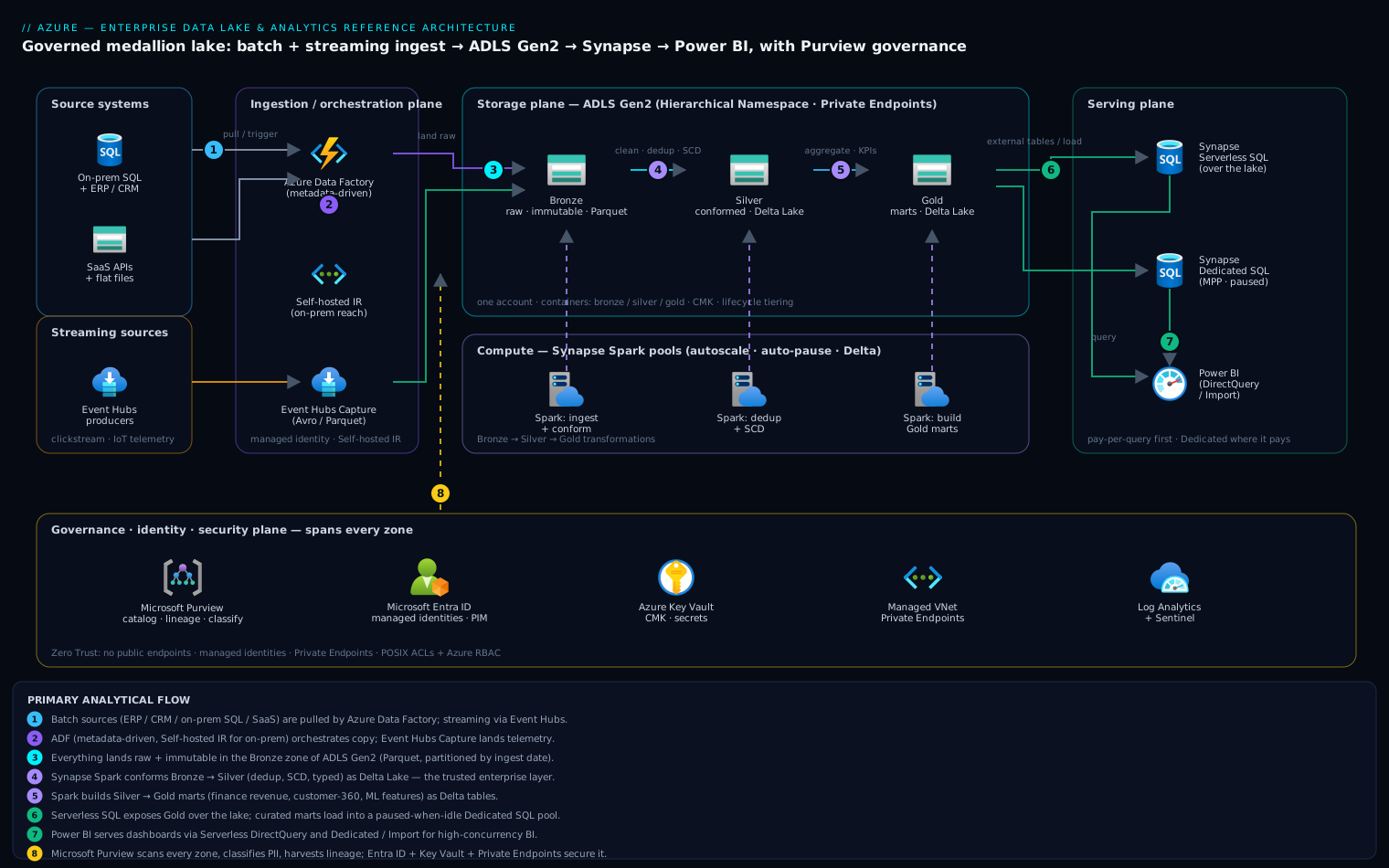
The architecture is organized around the medallion pattern — three logical zones (Bronze, Silver, Gold) that data flows through, each adding structure, quality, and trust — overlaid on a clear separation between a storage plane, an ingestion/orchestration plane, a compute/serving plane, and a governance plane that spans all three.
Data enters from two directions. Batch sources — the ERP, CRM, on-prem SQL databases, SaaS APIs, flat-file drops — are pulled by Azure Data Factory on a schedule or on a trigger. ADF connects through a Self-hosted Integration Runtime for anything behind a corporate firewall and through managed connectors for cloud SaaS. Streaming sources — clickstream, IoT telemetry, application events — flow through Event Hubs and are captured to the lake either by Event Hubs Capture (the cheap, code-free path) or by a Synapse/Spark structured-streaming job when transformation-on-arrival is needed.
Everything lands first in the Bronze zone of ADLS Gen2 as raw, immutable, append-only data — exactly as the source produced it, partitioned by ingest date, in Parquet or the source’s native format. Bronze is the system of record for “what arrived”; you never edit it, and you can always replay from it.
From Bronze, Synapse Spark pools (or Data Flows in ADF, or increasingly Synapse’s integration of Spark) clean, deduplicate, conform schemas, and apply data-quality rules, writing the result to the Silver zone as Delta Lake tables. Silver is the trusted, query-ready, enterprise-conformed layer — one customer table, one product table, deduplicated and typed, slowly-changing-dimension history preserved. Most data engineering effort lives in the Bronze-to-Silver hop.
Business logic — aggregations, joins, KPI definitions, star schemas — runs Silver-to-Gold. Gold tables are purpose-built for consumption: the finance revenue mart, the marketing attribution mart, feature tables for ML. These are served two ways. Synapse Serverless SQL exposes Gold (and Silver) directly over the lake files via external tables and views — pay-per-query, no data movement, ideal for ad-hoc analysis and for Power BI in DirectQuery. For high-concurrency BI and sub-second dashboards, curated Gold marts are loaded into a Synapse Dedicated SQL pool (a provisioned MPP data warehouse) or served through Power BI Import mode.
Wrapping all of this, Microsoft Purview scans every zone on a schedule, builds a searchable data catalog, classifies columns automatically (detecting PII, financial identifiers, etc.), and — critically — captures end-to-end lineage from source through ADF pipelines and Synapse jobs into the Gold marts and out to Power BI. Purview is also where data owners publish glossary terms, certify datasets, and (via the newer Microsoft Purview unified governance and Data Use Management) attach access policies to lake paths.
The request path for a typical analytical query is therefore: a Power BI report issues a query against a Synapse Serverless SQL view → the view resolves to Delta/Parquet files in the Gold zone of ADLS Gen2 → Synapse reads only the partitions and columns needed → results return to Power BI, with Purview having already classified every column the report touches and lineage showing exactly which source rows fed each number.
Identity threads through everything via Microsoft Entra ID. Pipelines and pools authenticate with managed identities, not keys. Storage exposes no public endpoint — all access is over Private Endpoints inside a managed virtual network — and authorization to the lake is governed by a combination of Azure RBAC at the container level and POSIX-style ACLs at the directory level for fine-grained control.
Component breakdown
| Component | Role in the architecture | Why it’s here | Key configuration choices |
|---|---|---|---|
| ADLS Gen2 | Storage substrate for all zones | Hierarchical namespace gives real directories, atomic renames, and POSIX ACLs — none of which flat blob storage offers | Enable Hierarchical Namespace; one storage account, three+ containers (bronze/silver/gold + sandbox); lifecycle policies to tier Bronze to Cool/Cold/Archive; soft delete + versioning on |
| Azure Data Factory | Batch ingestion + orchestration | Managed connectors to 100+ sources, code-free Copy at scale, scheduling, and the Self-hosted IR for on-prem reach | Managed VNet IR for cloud sources; Self-hosted IR for on-prem; parameterized, metadata-driven pipelines; managed identity to storage and Key Vault |
| Event Hubs (+ Capture) | Streaming ingestion | Decouples high-volume producers from the lake; Capture writes Avro/Parquet to Bronze with zero code | Capture enabled to the bronze container; partition count sized to throughput; Schema Registry for event contracts |
| Synapse Spark pools | Heavy transformation (Bronze→Silver→Gold) | Distributed compute for big joins, dedup, SCD, and Delta writes; same engine for batch and structured streaming | Autoscale + auto-pause; Delta Lake as table format; node size matched to workload; small/medium pools per environment |
| Synapse Serverless SQL | Pay-per-query serving over the lake | T-SQL over Parquet/Delta with no infrastructure; perfect for ad-hoc and Power BI DirectQuery | External tables/views over Gold; OPENROWSET for exploration; cost guardrail via the per-query/per-workspace data-processed limits |
| Synapse Dedicated SQL pool | Provisioned MPP warehouse for curated marts | Predictable sub-second performance for high-concurrency BI and complex star-schema queries | Hash-distribute large facts, replicate small dims; columnstore; pause when idle; right-size DWU (start small, scale on demand) |
| Microsoft Purview | Catalog, classification, lineage, policy | Turns an opaque lake into a governed, discoverable, auditable asset; satisfies the Risk Officer’s requirements | Scheduled scans per zone; auto-classification rules + custom classifiers for domain PII; lineage harvested from ADF + Synapse; glossary + certified datasets; Data Use Management for path-level access policy |
| Azure Key Vault | Secret/key management | Centralizes credentials and customer-managed keys; nothing in connection strings | Managed-identity access policies; CMK for storage encryption; secret rotation |
| Microsoft Entra ID | Identity for users and workloads | Single identity plane; managed identities remove standing secrets | Managed identities for ADF/Synapse; Entra security groups mapped to lake RBAC/ACLs; PIM for privileged data roles |
A few of these choices deserve emphasis.
One storage account, multiple containers — not one account per zone. A single ADLS Gen2 account with bronze/silver/gold containers keeps lineage and cross-zone joins simple while still giving you a clean RBAC and ACL boundary per container. You split into multiple accounts only when you hit account-level throughput limits or need hard blast-radius isolation between, say, a regulated and a non-regulated domain.
Delta Lake in Silver and Gold, raw Parquet in Bronze. Bronze is immutable and append-only, so it does not need ACID updates — plain Parquet (or the source’s native format) keeps it cheap and replayable. Silver and Gold need upserts, schema evolution, time travel, and the MERGE semantics that slowly-changing dimensions require, so they use Delta. Synapse Spark reads and writes Delta natively, and Serverless SQL can query Delta directly.
Serverless first, Dedicated only where it pays. Serverless SQL has no idle cost and bills purely on data scanned, which makes it the right default for most Gold consumption. You introduce a Dedicated SQL pool only for the marts that demand consistent sub-second response under heavy concurrent BI load — and even then you pause it outside business hours.
Implementation guidance
Provision with infrastructure-as-code, not the portal. The entire platform should be a Terraform (or Bicep) module so that dev, test, and prod are byte-for-byte identical and every change is reviewed. The dependency order matters: network and DNS first, then identity and Key Vault, then storage, then the data services, then Purview and the policy layer.
A representative Terraform layout:
azurerm_storage_accountwithis_hns_enabled = true,account_tier = "Standard",account_replication_type = "ZRS"(orGZRSfor cross-region durability),public_network_access_enabled = false, blob versioning and soft-delete on, and acustomer_managed_keyblock pointing at Key Vault.azurerm_storage_containerresources forbronze,silver,gold,sandbox.azurerm_storage_management_policyto move Bronze blobs to Cool after 30 days, Cold after 90, Archive after 365.azurerm_data_factorywithidentity { type = "SystemAssigned" }, plusazurerm_data_factory_integration_runtime_azure(managed VNet) and, where on-prem reach is needed, a self-hosted IR registered on a hardened VM.azurerm_synapse_workspace(which creates its own managed identity and a primary ADLS filesystem),azurerm_synapse_spark_poolwithauto_pause { delay_in_minutes = 15 }andauto_scale, andazurerm_synapse_sql_poolonly if a dedicated warehouse is in scope.azurerm_purview_accountplus role assignments granting its managed identity Storage Blob Data Reader on the lake and Reader on the data services so scans and lineage work.azurerm_private_endpointresources for the storage account (one each for thedfsandblobsub-resources), Synapse (Sql,SqlOnDemand,Dev), Key Vault, and Purview, all wired intoazurerm_private_dns_zonerecords.
Networking and identity wiring. The non-negotiables:
- No public endpoints. Set
public_network_access_enabled = falseon storage, Synapse, and Key Vault. All service-to-service and user traffic flows over Private Endpoints in a hub-and-spoke VNet. Synapse runs in a Managed VNet with Managed Private Endpoints out to the lake and Key Vault, so its compute never traverses the public internet. - Managed identities everywhere. ADF’s and Synapse’s system-assigned identities are granted Storage Blob Data Contributor (or finer ACLs) on the specific containers they touch — never account keys, never SAS tokens baked into pipelines. Key Vault references replace any remaining secrets.
- Layered authorization on the lake. Use Azure RBAC for the coarse grant (a data-engineering group gets Contributor on
silver), then directory-level POSIX ACLs for the fine-grained cut (a finance group getsr-xon/gold/financeonly). Map every grant to an Entra security group, never to individual users, so access reviews and joiner/mover/leaver flows stay manageable. - Private DNS must resolve the private endpoints, or clients silently fall back to (now-blocked) public names and fail. This is the single most common deployment bug — get the DNS zones and VNet links right in IaC.
The metadata-driven ingestion pattern. Do not build one ADF pipeline per source — you will end up with hundreds. Build a small set of parameterized, generic pipelines (one for “copy a SQL table to Bronze,” one for “pull a REST API page,” etc.) driven by a control table that lists each source, its watermark column, its target path, and its schedule. A master pipeline reads the control table and fans out. Adding a new source becomes a row insert, not a development cycle. Watermarks stored in the control table give you incremental loads and restartability.
CI/CD. ADF and Synapse both support Git integration with a collaboration branch and a publish branch; wire them to Azure DevOps or GitHub. Promote ARM/JSON artifacts through dev → test → prod with environment-specific parameter files. Notebooks and Spark jobs live in the same repo and are deployed as part of the Synapse workspace artifacts.
Enterprise considerations
Security and Zero Trust. The architecture is built so that no component trusts the network. Identity is the perimeter: every access is an authenticated, authorized Entra principal, every credential is a managed identity or a Key Vault reference, and every data path is a Private Endpoint. Encryption is on at rest (with customer-managed keys in Key Vault for regulated data) and in transit. Double encryption (infrastructure + service) is available for the most sensitive accounts. Purview’s auto-classification is the Zero-Trust feedback loop on data itself — it continuously discovers where PII and financial data actually live, so access policy can follow the sensitivity rather than guesswork. Privileged data roles (who can read /gold/finance, who can administer the warehouse) go through Entra PIM for just-in-time elevation and audit. Diagnostic logs from storage, ADF, Synapse, and Key Vault flow to a central Log Analytics workspace feeding Microsoft Sentinel for threat detection on the data estate.
Cost optimization. A data lake’s cost story is almost entirely about idle compute and wasteful scans:
- Auto-pause and autoscale Spark pools. A pool left running overnight is pure waste;
auto_pauseafter 15 idle minutes and demand-based scaling typically cut Spark spend by more than half versus a fixed cluster. - Pause the Dedicated SQL pool when idle. A provisioned DWU pool bills whether or not it serves a query. Pausing it outside business hours (and using Serverless for off-hours ad-hoc work) is the single biggest warehouse saving.
- Serverless SQL’s per-scan billing rewards good file layout. Partition Gold by the common filter columns, compact small files (Delta
OPTIMIZE), and store as columnar Parquet/Delta so queries read megabytes, not terabytes. Set the Serverless data-processed cost-control limits as a guardrail against a runawaySELECT *. - Storage lifecycle tiering. Bronze is written once and read rarely after its first transformation; tiering it Cool → Cold → Archive over time, while keeping Silver/Gold Hot, can cut storage cost dramatically with zero impact on the active analytics path.
- Reserved capacity for the steady-state Dedicated SQL DWUs and committed storage where usage is predictable.
Scalability. Storage scales effectively without limit; the levers are on compute. Spark pools scale out by node count for bigger transformations; Serverless SQL scales transparently per query; the Dedicated pool scales by DWU and can be resized online. The metadata-driven ingestion framework scales by adding control-table rows, and ADF’s parallel Copy activities and Integration Runtime sizing absorb growth in source count and volume. When a single team’s lake outgrows central ownership, the same per-domain container/ACL/Purview model extends naturally into a data mesh, with each domain owning its Silver/Gold and publishing certified products into a shared Purview catalog.
Reliability and DR (RTO/RPO). Set targets explicitly. For most analytical platforms an RPO of 24 hours and an RTO of a few hours is appropriate — analytics is not a 24/7 transactional system, and Bronze’s replayability is a safety net. To meet it: use GZRS/RA-GZRS replication so lake data survives a region loss with a readable secondary; keep all IaC in Git so the entire platform can be redeployed into the paired region from code; and, because Bronze is immutable and Silver/Gold are deterministically derived from it, you can rebuild Silver and Gold by replaying transformations rather than backing them up separately. For tighter RPO, replicate Gold marts and the Dedicated pool on a schedule. Test the failover — an untested DR plan is a hope, not a control.
Observability. Centralize everything in Log Analytics: storage transaction/throttling metrics, ADF pipeline run status and durations, Synapse Spark application logs and SQL request history, and Key Vault access logs. Build alerts on pipeline failure, on Spark job duration regressions, on Serverless data-scanned anomalies (cost spikes), and on storage throttling. Data-quality observability is distinct from infra observability — bake quality checks (row counts, null-rate thresholds, referential checks) into the Bronze→Silver step and surface failures the same way you surface a pipeline error. Purview’s lineage doubles as operational observability: when a Gold number looks wrong, lineage tells you exactly which upstream job and source to inspect.
Governance. This is where the architecture earns its keep. Purview gives the enterprise a single catalog where any analyst can search for “revenue” and find the certified Gold table, see its owner, its glossary definition, its classification, and its full lineage back to source. Auto-classification flags regulated data wherever it lands. Glossary terms tie business language to physical columns. And Data Use Management lets owners attach access policy to lake paths centrally, so “finance data is restricted to the finance group” is enforced and auditable rather than tribal knowledge. The combination directly answers the Risk Officer’s three questions — where did it come from, who can see it, is it regulated — for every column in every report.
Reference enterprise example
NorthForge Logistics is a fictional freight and supply-chain company: ~4,000 employees, three acquired regional carriers each with its own systems, and a customer-facing shipment-tracking product generating heavy clickstream and IoT telemetry from vehicle sensors. Their data was scattered across an SAP ERP, a Salesforce CRM, three on-prem SQL Server databases (one per acquired carrier), a payments processor, and an Event Hubs stream of tracking events. Finance closed the books with a 9-day manual reconciliation; the data science team’s ETA-prediction model was stalled because nobody could assemble clean historical shipment data; and a customer audit had flagged that NorthForge couldn’t prove where a regulated shipper-identity field flowed.
What they built. A single ADLS Gen2 account (ZRS, HNS on, CMK, private endpoints, public access off) with bronze/silver/gold/sandbox containers. A metadata-driven ADF framework with one self-hosted IR reaching the three on-prem SQL Servers and managed-VNet connectors for SAP, Salesforce, and the payment API — 47 sources driven by a 47-row control table. Event Hubs Capture landed tracking telemetry straight into Bronze. Synapse Spark (small autoscaling pool, auto-pause 15 min) ran Bronze→Silver dedup and conformance into Delta, and Silver→Gold built three marts: a finance revenue mart, a customer-360 mart, and a shipment feature table for ML. Power BI served finance and ops in DirectQuery over Synapse Serverless; one high-concurrency executive dashboard ran on a small Dedicated SQL pool paused nightly. Purview scanned all zones nightly, auto-classified the shipper-identity and payment fields as sensitive, and harvested lineage from ADF and Synapse end to end.
The numbers. Steady-state monthly Azure spend landed around $8,400: roughly $1,100 storage (most of Bronze tiered to Cool/Cold), $2,600 Synapse Spark, $1,900 Serverless SQL, $1,500 for the paused-when-idle Dedicated pool, $600 ADF, $400 Purview, and the remainder networking and Key Vault. The decisions that drove that figure were deliberate: Serverless-first (a fixed Dedicated pool sized for the same workload would have roughly doubled the warehouse line), aggressive auto-pause on Spark, and Bronze lifecycle tiering.
The outcome. Finance close dropped from 9 days to under 1, because the revenue mart tied out across SAP, the three carriers, and the payment processor automatically with a daily audit trail. The data science team shipped the ETA model in a quarter instead of stalling, training on years of clean Silver shipment history. And in the follow-up audit, NorthForge answered the regulator’s lineage question in minutes — Purview showed the shipper-identity field’s path from the SAP source table through the exact ADF pipeline and Synapse job into the customer-360 mart, with its classification and the finance-group-only access policy attached. The platform paid for itself on the close-time reduction alone.
When to use it
Use this architecture when you have multiple data sources that need to be joined and served to more than one consumer (BI, ad-hoc SQL, data science) and where governance — lineage, classification, access control — is a real requirement, not an afterthought. It is the right backbone for enterprise analytics, regulated-data reporting, and ML feature platforms, and it scales cleanly from one business unit to a federated data mesh.
Trade-offs to go in with eyes open. This is a platform, not a weekend project — it carries real operational ownership (pipeline monitoring, data-quality SLAs, catalog curation). The medallion discipline and metadata-driven ingestion are upfront investments that pay off only at a certain scale of sources and consumers.
Anti-patterns to avoid:
- The “data swamp.” Skipping Silver/Gold conformance and letting consumers query raw Bronze directly. It feels faster on day one and is unmaintainable by month three.
- One pipeline per source. Hand-built, non-parameterized pipelines multiply into an unmaintainable thicket. Go metadata-driven from the start.
- Governance later. Standing up the lake and deferring Purview is how you get the audit finding. Classification and lineage are cheapest when they’re there from the first scan.
- Dedicated SQL pool as the default. Provisioning a warehouse you leave running for workloads Serverless would handle is the most common cost mistake in this stack.
- Account keys and public endpoints “just for now.” They never get cleaned up. Start with managed identities and private endpoints.
Alternatives. If your organization is standardizing on a lakehouse-first, notebook-centric data-engineering culture, Azure Databricks over the same ADLS Gen2 lake is a strong alternative to (or complement alongside) Synapse, with the same medallion and Purview governance model. Microsoft Fabric is the newer SaaS-unified option that folds OneLake, Data Factory, Synapse engines, and Power BI into a single capacity-based product — compelling when you want less infrastructure to manage and a tighter Power BI integration, and worth evaluating against this composed-services approach when greenfield. For purely streaming-analytics needs without a broad lake, Azure Stream Analytics or Event Hubs + a real-time warehouse may be lighter-weight. But when the requirement is a governed, multi-consumer enterprise data platform with strong cost control and auditability, the ADLS Gen2 + ADF + Synapse + Purview architecture described here remains the proven, reusable Azure reference.
Going deeper
The reference architecture above tells you what to build. This section explains the why underneath each choice — the internals, the edge cases, and the decisions that separate a lake that lasts from one that rots.
ADLS Gen2 is Blob storage with a hierarchical namespace bolted on
There is no separate “Data Lake” storage service you provision. ADLS Gen2 is an ordinary Azure Storage account with one checkbox flipped: Hierarchical Namespace (HNS) enabled. That single flag changes the storage engine underneath in three consequential ways:
- Real directories, not a flat key space. Plain Blob storage only simulates folders —
finance/2026/q3/data.parquetis one long blob name with slashes in it. With HNS, directories are first-class objects, so arenameor amoveis an atomic metadata operation on the directory, not a copy-then-delete of every blob underneath. For a Spark job that writes to a_temporaryfolder and commits by renaming it into place, that is the difference between an instant commit and a job that recopies terabytes. - POSIX-style ACLs. HNS gives every file and directory an owner, an owning group, and an access-control list — the familiar
r,w,xbits plus named-user and named-group entries. This is the fine-grained authorization layer that flat Blob storage simply does not have. - Atomic, hierarchy-aware operations that the
abfss://(Azure Blob File System) driver in Spark and Synapse relies on for correctness and speed.
The trade-off: HNS must be chosen at account creation and cannot be toggled on an existing account without a migration, and a few Blob features historically lagged on HNS accounts. For an analytics lake you always want it on. You address the lake through the DFS endpoint — https://<account>.dfs.core.windows.net — which is why the storage account needs two private endpoints, one for the blob sub-resource and one for the dfs sub-resource.
The medallion architecture, layer by layer
The Bronze/Silver/Gold pattern is not Azure-specific — it is the industry’s answer to “how do I keep a lake from becoming a swamp.” Each layer has a job, a format, and a different owner:
| Layer | Contains | Format | Mutability | Who owns it |
|---|---|---|---|---|
| Bronze (raw) | Exactly what the source sent, partitioned by ingest date | Source-native or Parquet | Append-only, immutable | Ingestion / platform team |
| Silver (conformed) | Cleaned, deduplicated, typed, one entity per table, history preserved | Delta Lake | Upserts via MERGE |
Data engineering |
| Gold (curated) | Business aggregates, star schemas, KPI marts, ML features | Delta Lake | Rebuilt / merged | Domain / analytics team |
The discipline that matters: Bronze is the system of record for “what arrived.” You never edit it, so you can always replay history if a downstream transformation had a bug. Because Silver and Gold are deterministically derived from Bronze, you can treat them as rebuildable caches — which, as the DR discussion in the reference notes, means you can back up only Bronze and regenerate the rest. Most of the engineering effort lives in the Bronze→Silver hop (cleaning is hard); most of the business value lands in Silver→Gold (that is where the revenue mart is born).
The compute options — and when to reach for each
This is the decision people get wrong most often, because the options overlap. All of them read the same ADLS Gen2 files; they differ in billing model, concurrency, and the kind of workload they shine at.
Synapse serverless SQL pool. T-SQL over lake files with zero provisioned infrastructure. You are billed per terabyte of data scanned (with a workspace-level cost-control cap you should always set). There is no cluster to pause because there is no cluster. It is the correct default for ad-hoc exploration, for exposing Gold to Power BI in DirectQuery, and for anything spiky. Its weakness is that heavy, highly concurrent, sub-second dashboard traffic will scan-bill you into a surprise.
Synapse dedicated SQL pool. A provisioned MPP (massively parallel processing) data warehouse — the service formerly called SQL Data Warehouse. You buy DWUs (Data Warehouse Units) and it bills whether or not a query runs, so you pause it when idle. Reach for it only when you need predictable sub-second response under high BI concurrency against curated star schemas. Distribute large fact tables by hash, replicate small dimensions, and use columnstore. Provisioning one as the default is the most common cost mistake in this whole stack.
Synapse Spark pool. Distributed Apache Spark for the heavy lifting — big joins, deduplication, slowly-changing-dimension logic, Delta writes, and structured streaming. Autoscale and auto-pause (e.g. 15 idle minutes) are non-negotiable; a Spark pool left running overnight is pure waste. This is the engine that does the Bronze→Silver→Gold transformation.
Azure Databricks. A first-party (but independently versioned) Spark-first lakehouse platform over the same ADLS Gen2 lake. It brings a more mature Spark runtime, notebooks, Unity Catalog for governance, and Delta Live Tables for declarative pipelines. Organizations with a strong data-engineering, notebook-centric culture often prefer Databricks to Synapse Spark; the two are genuine alternatives, and many enterprises run Databricks for engineering and Synapse serverless (or Power BI) for serving.
Microsoft Fabric and OneLake — the direction of travel. Fabric is Microsoft’s newer SaaS analytics product (GA since late 2023) that folds Data Factory, the Synapse engines (Data Engineering, Data Warehouse, Data Science, Real-Time Intelligence), and Power BI into one capacity-based offering (F-SKUs). Its foundation is OneLake — a single, tenant-wide logical data lake (“OneDrive for data”) built on ADLS Gen2 under the hood, with Delta-Parquet as the native table format and Shortcuts that reference data in other accounts (or even Amazon S3) without copying it. Power BI can read OneLake tables in Direct Lake mode — warehouse-speed reports directly over Delta files, with no import step and no DirectQuery round-trip.
The honest architectural note in 2026: Microsoft’s forward investment is clearly in Fabric. Azure Synapse Analytics remains generally available and fully supported, and the composed ADLS Gen2 + ADF + Synapse + Purview architecture in this lesson is still a proven, in-production reference — but for a greenfield build you should seriously evaluate Fabric, because the road map, the new features, and the tight Power BI integration are heading there. The saving grace is exactly the property this lesson keeps stressing: because your data lives as open Delta/Parquet files in ADLS Gen2, migrating the compute from Synapse to Fabric later does not mean re-landing the data.
Data Factory: the ingestion and orchestration plane
Azure Data Factory (and its twin inside Synapse Pipelines, and now Fabric Data Factory) is the plumbing that gets data into the lake. Three ideas carry most of the weight:
- Integration Runtimes (IR) are the compute that actually moves data. The Azure IR (optionally in a managed VNet with managed private endpoints) handles cloud-to-cloud; the Self-hosted IR, a small agent you install on a VM inside your network, is what reaches on-prem databases behind a firewall; the Azure-SSIS IR lifts-and-shifts legacy SSIS packages.
- Copy activity is the code-free bulk mover with 100+ connectors; Mapping Data Flows run visual transformations on a managed Spark cluster when you want transformation without writing Spark by hand.
- Metadata-driven ingestion (covered in the reference above) is the pattern that keeps this maintainable: a handful of parameterized generic pipelines driven by a control table, so adding a source is a row insert, not a development cycle.
File formats: Parquet, Delta, Iceberg — and partitioning
Format choice is a correctness and cost decision, not a preference:
- Parquet is the columnar baseline: compressed, splittable, and column-pruned so a query reads only the columns it touches. Perfect for immutable Bronze. What it lacks is transactions — concurrent writers can corrupt a bare Parquet dataset, and there is no atomic update.
- Delta Lake is Parquet plus a transaction log (the
_delta_logfolder of JSON commits and periodic checkpoints). That log is what gives you ACID transactions,MERGE/UPDATE/DELETE, schema evolution, and time travel (query the table as of a version or timestamp). It is the native table format for Synapse Spark, Databricks, and Fabric OneLake — which is why Silver and Gold use it. - Apache Iceberg is the other major open table format, strong in the Snowflake and broader open-source world. Historically the Microsoft stack was Delta-first, but interoperability is arriving: Databricks’ Delta UniForm can expose Delta tables as Iceberg (and Hudi) metadata, and Fabric/OneLake has been adding Iceberg support via metadata virtualization. In 2026 the pragmatic Azure default is still Delta, with Iceberg interop a “know it exists” item rather than a default.
Partitioning is how you avoid scanning the whole table. Writing Gold as …/revenue_mart/year=2026/month=07/… (Hive-style partition directories) lets the engine prune to just the partitions a WHERE year = 2026 query needs. Two failure modes to know: over-partitioning (partitioning by a high-cardinality column like customer_id creates millions of tiny files and slows everything — the “small files problem”), and unclustered layout. Fix both with Delta OPTIMIZE/compaction plus Z-ordering (or liquid clustering) to co-locate related rows. Partition by the columns you filter on, at a granularity that keeps files in the tens-to-hundreds-of-MB range.
A serverless query that reads Gold Delta directly, with no data movement, shows the payoff:
-- Synapse serverless SQL: query a Gold Delta table in place
SELECT customer_id, SUM(revenue) AS lifetime_value
FROM OPENROWSET(
    BULK 'https://<account>.dfs.core.windows.net/gold/finance/revenue_mart/',
    FORMAT = 'DELTA'
) AS gold
WHERE ingest_year = 2026        -- prunes to one partition
GROUP BY customer_id;
Lakehouse vs. warehouse
The terms get thrown around loosely; here is the precise distinction:
- A data warehouse is schema-on-write: structured, ACID, tuned for BI, expensive per TB. In this stack, the Synapse dedicated SQL pool is the warehouse.
- A data lake is schema-on-read: raw files, any shape, cheap, with no transactions of its own. ADLS Gen2 with Parquet is the lake.
- A lakehouse is the synthesis: lake-cheap storage plus warehouse-like ACID tables and SQL performance, delivered by an open table format (Delta/Iceberg) over lake files. Synapse Spark + Delta, Databricks, and Fabric are all lakehouse patterns. The medallion architecture is a lakehouse — Silver and Gold are warehouse-grade tables that happen to live as files in the lake.
The strategic point: a lakehouse lets one copy of the data serve data science (Spark over files) and BI (SQL over the same files) without the old “copy everything into the warehouse first” step.
Security: RBAC, ACLs, Private Endpoints, and Purview
Authorization on ADLS Gen2 has two independent layers that are evaluated together, and understanding their interaction is the single most-tested piece of lake-security knowledge:
- Azure RBAC grants roles (
Storage Blob Data Reader/Contributor/Owner) at the account or container scope. Coarse-grained, managed in Entra ID, great for “the data-engineering group can write to thesilvercontainer.” - POSIX ACLs grant
r/w/xat the directory or file scope. Fine-grained, great for “the finance group can read/gold/financeand nothing else.”
The interaction rule that trips people up: RBAC is evaluated first, and if an RBAC role already grants the requested action, ACLs are never checked. So if you give a principal Storage Blob Data Contributor at the account level, its directory ACLs are irrelevant — it can read everything. The pattern that actually works is RBAC for the coarse container grant, ACLs for the fine-grained cut within it, and — always — mapping every grant to an Entra security group, never an individual user, so joiner/mover/leaver reviews stay sane.
- Private Endpoints remove the public attack surface entirely: the storage account gets a private IP in your VNet (again, one endpoint each for
blobanddfs),public_network_access_enabled = false, and — the classic gotcha — private DNS zones (privatelink.dfs.core.windows.net,privatelink.blob.core.windows.net) must resolve those endpoints, or clients silently fall back to the now-blocked public name and fail. - Microsoft Purview is the governance plane on top: it scans every zone, builds a searchable catalog, auto-classifies columns (detecting PII and financial identifiers), captures end-to-end lineage from source through ADF and Synapse into Gold and Power BI, and — via Data Use Management / data policies — lets owners attach access policy to lake paths centrally. Purview is what turns “where did this number come from, who can see it, is it regulated” from tribal knowledge into an auditable answer.
Cost and tiering
A lake’s bill is dominated by idle compute and wasteful scans, with storage a distant third — but storage tiering is nearly free money:
| Access tier | Best for | Minimum stay | Trade-off |
|---|---|---|---|
| Hot | Silver/Gold, active analytics | none | highest storage $/GB, cheapest reads |
| Cool | Bronze after first transform | 30 days | cheaper storage, higher read cost + early-deletion fee |
| Cold | Rarely-read Bronze history | 90 days | cheaper still, higher retrieval cost |
| Archive | Compliance retention | 180 days | cheapest storage, hours-long rehydrate |
Drive tier moves with a lifecycle management policy (Bronze → Cool at 30 days, Cold at 90, Archive at 365). The compute levers matter more: auto-pause Spark pools, pause the dedicated SQL pool outside business hours, set the serverless data-scanned cap, and buy reserved capacity for steady-state DWUs and committed storage. And remember that good file layout (partitioning + compaction + columnar formats) directly lowers the serverless bill, because you pay for bytes scanned.
Practice challenges
Work these in order; each has a hidden solution with a one-line why. They escalate from beginner to advanced.
1. (Beginner) Spot the difference. A colleague says “ADLS Gen2 is just a storage account, so we can turn on the data-lake features later.” Are they right? Name the one setting that separates a data-lake account from a plain Blob account and explain why an analytics engine cares.
<details> <summary>Show solution</summary>
No — you cannot turn it on later. The distinguishing setting is Hierarchical Namespace (HNS), and it must be enabled at account creation. Engines care because HNS makes directory rename/move an atomic metadata operation (so a Spark commit is instant instead of recopying terabytes) and adds POSIX ACLs for fine-grained security.
Why: HNS is the entire technical basis of “Gen2”; without it you have flat Blob with simulated folders and no ACLs. </details>
2. (Beginner) Place the data. For each item, name the medallion layer and the file format you would store it in: (a) an exactly-as-received CRM export; (b) a deduplicated, typed customer dimension with slowly-changing-dimension history; © the finance revenue mart Power BI reads.
<details> <summary>Show solution</summary>
(a) Bronze, source-native or Parquet, append-only/immutable. (b) Silver, Delta Lake (needs MERGE for SCD). © Gold, Delta Lake, purpose-built for consumption.
Why: Bronze is the immutable system-of-record (no ACID needed); Silver/Gold need upserts, schema evolution, and time travel, which Delta provides and bare Parquet does not. </details>
3. (Intermediate) Pick the engine. Assign Synapse serverless SQL, dedicated SQL pool, or Spark to each workload, with a one-line cost note: (a) a data scientist ad-hoc-exploring three months of Bronze once a week; (b) an executive dashboard with 400 concurrent users needing sub-second response on a star schema; © the nightly Bronze→Silver dedup and conform job.
<details> <summary>Show solution</summary>
(a) Serverless SQL — spiky and infrequent, pay-per-scan, no idle cost. (b) Dedicated SQL pool — provisioned MPP gives predictable sub-second concurrency; pause it outside business hours to control the DWU bill. © Spark pool — distributed transformation and Delta writes; autoscale + auto-pause after ~15 idle minutes.
Why: Match the billing model to the workload shape — serverless for spiky, provisioned-and-paused for steady high-concurrency, Spark for heavy transformation. </details>
4. (Intermediate) The permission puzzle. You grant the data-science Entra group Storage Blob Data Contributor at the storage-account scope, then carefully set a directory ACL to keep them out of /gold/finance. A data scientist reads /gold/finance anyway. Why — and how do you actually restrict them?
<details> <summary>Show solution</summary>
RBAC is evaluated before ACLs, and an account-scope RBAC grant short-circuits the ACL check — so the account-level Contributor role lets them read everything and the directory ACL is never consulted. To restrict them, remove the broad RBAC grant and give container- or directory-scoped access, using ACLs for the fine-grained cut (e.g. grant r-x only on the directories they should see).
Why: ACLs only matter when RBAC has not already authorized the action; coarse RBAC overrides fine ACLs. </details>
5. (Advanced) The runaway scan. A serverless query over gold/events/ costs 20× what you expected and reads 4 TB for a report that needs one month of one region. Inspecting the lake you find one giant Parquet file per day and no partition folders. List three changes that cut the cost, in order of impact.
<details> <summary>Show solution</summary>
- Partition the data by the filter columns —
region=…/year=…/month=…— so the engine prunes to the one month and region instead of scanning all 4 TB. 2. Convert to Delta andOPTIMIZE/compact to right-size files (tens–hundreds of MB) and enable data-skipping / Z-order onregion. 3. Set the serverless data-scanned cost-control cap as a guardrail so a futureSELECT *cannot run away.
Why: Serverless bills per byte scanned; partition pruning + columnar Delta + compaction turn a 4 TB scan into a few GB. </details>
6. (Advanced) Greenfield in 2026. Leadership asks whether to build a new analytics platform on the Synapse architecture in this lesson or on Microsoft Fabric, and how to avoid betting the company on the wrong engine. Give a defensible recommendation and the one architectural decision that de-risks it either way.
<details> <summary>Show solution</summary>
Seriously evaluate Fabric for greenfield — Microsoft’s forward investment, road map, and Power BI (Direct Lake) integration are there, and it removes infrastructure to manage. Synapse remains GA and supported and is a valid choice for teams with existing investment. The de-risking decision: keep the data as open Delta/Parquet files in ADLS Gen2 / OneLake, not locked inside a proprietary engine — then migrating compute from Synapse to Fabric (or to Databricks) never means re-landing the data.
Why: Open storage formats decouple the durable asset (the data) from the swappable one (the compute), which is the whole point of a lakehouse. </details>
Common beginner mistakes
These are misconceptions, not runtime errors — the wrong mental model that leads a beginner astray, and the right model to replace it.
-
“A data lake means we can skip modeling — just dump everything and query it.” The swamp trap. Schema-on-read is freedom at write time, not permission to skip structure forever. Without the Silver and Gold conformance layers, consumers query undocumented Bronze, get different answers, and stop trusting the lake by month three. Right model: land raw, then earn trust through named quality stages.
-
“ADLS Gen2 is a different product from Blob storage.” It is the same storage account with Hierarchical Namespace enabled. Treating them as separate leads to confusion about endpoints, pricing, and why HNS cannot be toggled later. Right model: Gen2 = Blob + HNS + ACLs, chosen at creation.
-
“ACLs will protect
/gold/financeeven though the group has account-level RBAC.” They will not — RBAC is checked first and short-circuits ACLs. A broadStorage Blob Data Contributorgrant silently defeats every directory ACL beneath it. Right model: coarse RBAC plus fine ACLs, and never grant broad data roles at account scope. -
“Just provision a dedicated SQL pool — it’s the ‘real’ warehouse.” A provisioned pool bills 24/7 whether it serves a query or not, and is the most common cost blowout in this stack. Right model: serverless-first; add a dedicated pool only for proven high-concurrency sub-second BI, and pause it when idle.
-
“Partitioning by
customer_idwill make queries fast.” High-cardinality partitioning creates millions of tiny files (the “small files problem”) and makes everything slower. Right model: partition by the low-cardinality columns you filter on (date, region), and compact with DeltaOPTIMIZE. -
“We’ll add Purview and private endpoints once we’re live.” Governance and network isolation deferred is the audit finding waiting to happen; classification and lineage are cheapest from the first scan, and private-DNS mistakes are far harder to retrofit than to get right up front. Right model: governance and Zero-Trust networking from day one.
-
“Delta and Parquet are competing formats — pick one.” Delta is Parquet plus a transaction log. You use plain Parquet for immutable Bronze and Delta (which stores its data as Parquet under the hood) for Silver and Gold. Right model: same columnar bytes, different transactional guarantees.
Glossary
- ADLS Gen2 — Azure Data Lake Storage Gen2: a Blob storage account with Hierarchical Namespace enabled, adding real directories and POSIX ACLs. The storage substrate for the lake.
- Hierarchical Namespace (HNS) — the account setting that turns simulated blob “folders” into first-class directories with atomic rename and ACL support. Chosen at account creation; it cannot be toggled on later.
- Medallion architecture — the Bronze (raw) → Silver (conformed) → Gold (curated) layering that keeps a lake from becoming a swamp.
- Schema-on-read / schema-on-write — deciding structure when you query (lake) vs. before you load (warehouse).
- Parquet — an open columnar file format: compressed, splittable, column-pruned. Has no transactions of its own.
- Delta Lake — Parquet plus a transaction log (
_delta_log) providing ACID,MERGE, schema evolution, and time travel. The native table format for Synapse Spark, Databricks, and Fabric. - Apache Iceberg — an alternative open table format (strong in the Snowflake/open-source ecosystem); interoperable with Delta via UniForm and increasingly readable in Fabric/OneLake.
- Lakehouse — lake-cheap file storage plus warehouse-grade ACID tables and SQL, via an open table format. The pattern the medallion architecture implements.
- Synapse serverless SQL — T-SQL over lake files, billed per TB scanned, with no provisioned cluster. The ad-hoc / DirectQuery default.
- Synapse dedicated SQL pool — a provisioned MPP warehouse billed by DWU; pause it when idle. For high-concurrency sub-second BI.
- Synapse Spark pool — managed Apache Spark for heavy transformation and Delta writes; autoscale + auto-pause.
- Azure Databricks — first-party Spark-first lakehouse platform (Unity Catalog, Delta Live Tables) over the same ADLS Gen2 lake; an alternative to Synapse Spark.
- Microsoft Fabric — Microsoft’s SaaS unified-analytics product (GA late 2023) folding Data Factory, the Synapse engines, and Power BI into one capacity-based offering. The forward direction.
- OneLake — Fabric’s single tenant-wide logical lake over ADLS Gen2, Delta-Parquet native, with Shortcuts to reference external data without copying. Direct Lake lets Power BI read it at warehouse speed.
- Azure Data Factory (ADF) — the ingestion/orchestration service (Copy activity, Mapping Data Flows, Integration Runtimes).
- Integration Runtime (IR) — ADF’s compute for data movement: Azure / managed-VNet (cloud), Self-hosted (on-prem reach), and Azure-SSIS (legacy packages).
- Partition pruning — skipping files/directories a query’s
WHEREclause cannot match, via Hive-stylecol=valuepartition folders. - Azure RBAC (on storage) — coarse role grants (
Storage Blob Data Reader/Contributor/Owner) at account/container scope. Evaluated before ACLs. - POSIX ACLs — fine-grained
r/w/xpermissions at directory/file scope; only consulted when RBAC has not already granted the action. - Private Endpoint — a private IP in your VNet for the storage account (
blobanddfssub-resources), removing public exposure; requires matching private DNS zones. - Microsoft Purview — the governance plane: catalog, auto-classification, end-to-end lineage, glossary, and path-level data policies.
- DWU (Data Warehouse Unit) — the billing and scaling unit of a dedicated SQL pool.
- CMK (customer-managed key) — an encryption key you control in Key Vault, used for regulated data at rest.