In a nutshell
Imagine every server, container and app in your system has a little meter bolted to the wall — like an electricity meter — showing its current numbers: requests handled, errors seen, memory used, response times. Prometheus is the meter reader who walks the same route every few seconds, reads each meter, and writes every reading into a dated ledger (its time-series database). Because Prometheus goes and reads the meters rather than waiting for each app to phone in, it knows the instant a building goes dark — that missed reading is the “this thing is down” signal, for free, with no extra wiring.
Grafana is the wall of live charts built from that ledger — the graphs, gauges and dashboards a human actually looks at. Alertmanager is the dispatcher: when a reading crosses a line (“errors above 5% for ten minutes”), it decides who to wake, bundles related problems into one message instead of two hundred, and stays quiet during planned maintenance. Between them sits PromQL, the small query language you use to ask the ledger questions like “what is the error rate per service right now?”
You care about this because it is the open-source monitoring stack of the cloud-native world. If you run anything on Kubernetes, do SRE, or sit a DevOps interview, you will meet Prometheus and Grafana — and you will be expected to read their configuration, not just click buttons in a UI. This lesson builds the whole stack by hand, one meter, one query and one alert at a time, so that the “magic” Helm chart everyone installs stops being magic.
Level: Intermediate · Time: ~35 min · You’ll need: Docker + docker compose, comfort with YAML and curl, and the metric/SLO concepts from the fundamentals lesson (recapped as we go).
The previous lesson taught observability as a discipline — the three pillars, the golden signals, SLIs and error budgets — deliberately without committing to any one tool. This lesson is the opposite: it is about the tools. Prometheus and Grafana are the de facto open-source monitoring stack of the cloud-native world. Prometheus is a Cloud Native Computing Foundation graduated project (the second after Kubernetes itself) and Grafana is the visualisation layer almost everyone pairs with it. If you operate anything on Kubernetes, or run an SRE function, you will meet this pair, and the Prometheus Certified Associate exam exists precisely because employers want to know you understand it deeply.
We will treat the stack the way you would have to in production: not as a black box you helm install and forget, but option by option. We walk Prometheus’s architecture and pull model, then prometheus.yml — every block of scrape_configs, service discovery, and the relabeling machinery that confuses everyone the first time. We cover the exporters that turn the world into metrics (node, blackbox, cAdvisor), the local TSDB with its retention and compaction, and remote-write for long-term storage. We then instrument a real application: the four metric types, the exposition format on the wire, and a client library. We do PromQL properly — instant vs range vectors, every selector, rate()/increase()/histogram_quantile(), the aggregation operators, and recording rules. We do Alertmanager end to end — the routing tree, grouping, inhibition, silences, and receivers for Slack, PagerDuty and email. We do Grafana — data sources, dashboards and panels, template variables, provisioning-as-code, and Grafana-managed alerting. And we tie it all together in a Docker Compose lab you can run on your laptop in five minutes.
Where the observability-fundamentals lesson owns the theory (why histograms aggregate and summaries do not, how burn-rate alerting works), this lesson owns the mechanics (the exact YAML, the exact PromQL, the exact curl). The two are designed to be read together.
Learning objectives
By the end of this lesson you will be able to:
- Explain the Prometheus architecture — server, retrieval, TSDB, HTTP API — and why the pull model is a design choice, not an accident.
- Write a
prometheus.ymlfrom scratch:global,scrape_configswith every per-job option, service discovery, andrelabel_configs/metric_relabel_configsto shape targets and series. - Deploy and read the standard exporters (node, blackbox, cAdvisor) and the Pushgateway, and know when each is appropriate.
- Reason about the local TSDB — blocks, the WAL, head, compaction, retention by time and size — and configure remote-write for long-term storage and global query.
- Instrument an application correctly: choose counter / gauge / histogram / summary, emit the exposition format, and expose
/metricswith a client library. - Write PromQL confidently — selectors and matchers, instant vs range vectors,
rate()/irate()/increase(),histogram_quantile(), the aggregation operators, binary operators and_over_timefunctions — and factor expensive queries into recording rules. - Configure Alertmanager: alerting rules in Prometheus, the routing tree, grouping, inhibition, silences, and receivers (Slack/PagerDuty/email) with templated notifications.
- Build and provision Grafana as code — data sources, dashboards, folders, template variables, and Grafana-managed alerts — and stand the whole stack up with Docker Compose.
Prerequisites & where this fits
You should be comfortable with Docker and docker compose, reading and writing YAML, basic HTTP (status codes, curl), and the shape of a containerised service. Crucially, you should already understand the concepts this lesson makes concrete: the difference between a counter and a gauge, what cardinality is, why you graph rate() of a counter and never the counter itself, and what an SLO and an error budget are. All of that is covered in Observability Fundamentals for DevOps, which is the prerequisite for this lesson — we will recap the bare minimum and otherwise build straight on it. This lesson sits in the Observability module of the DevOps Zero-to-Hero course, after the fundamentals and the SRE practice lesson. If your target is Kubernetes-native monitoring specifically — the Prometheus Operator, ServiceMonitor/PodMonitor, kube-state-metrics — that has its own dedicated lesson, Kubernetes Monitoring, In Depth; here we deliberately use Docker Compose so you learn the raw configuration the Operator generates for you, which is exactly what an interviewer or the PCA exam expects you to be able to read.
Core concepts: the Prometheus architecture
Prometheus is, at heart, three things bolted together: a scraper that pulls metrics over HTTP, a time-series database (TSDB) that stores them locally on disk, and a query engine (PromQL) that reads them back. Everything else — alerting, federation, remote storage — hangs off those three. It is a single statically-linked Go binary with no external dependencies (no database to run alongside it), which is a large part of why it is so widely adopted: you can run a useful Prometheus from one binary and one config file.
The components, and how data flows:
| Component | Role | Notes |
|---|---|---|
| Retrieval (scraper) | Periodically pulls /metrics from each configured target |
Driven by scrape_configs; discovers targets via service discovery |
| TSDB (storage) | Stores samples on local disk as time-ordered blocks + a write-ahead log | Local by default; --storage.tsdb.path, retention flags |
| PromQL engine | Evaluates queries against the TSDB | Powers the expression browser, Grafana, recording & alerting rules |
| Rule manager | Evaluates recording rules (precompute) and alerting rules on a schedule | rule_files; alerting rules emit alerts |
| HTTP server / API | Serves the web UI and the /api/v1 query API |
Grafana and tooling read through this |
| Service discovery | Finds what to scrape dynamically (Kubernetes, EC2, file, Consul…) | Targets are not static in real systems |
| Alertmanager (separate process) | Receives fired alerts; dedupes, groups, routes, silences, notifies | Not part of the Prometheus binary — runs alongside |
Two boundaries trip people up. First, Alertmanager is a separate process — Prometheus evaluates alerting rules and, when one fires, pushes the alert to Alertmanager over HTTP; Alertmanager owns everything after that (grouping, routing, notifications). Prometheus does not send Slack messages. Second, long-term storage is opt-in — Prometheus stores locally and is not designed to be a durable, clustered datastore; for that you bolt on remote-write to Thanos, Mimir, Cortex, or a vendor backend (covered below).
Why pull, not push?
Prometheus scrapes (pulls): it reaches out to each target’s HTTP endpoint on a schedule and reads the current metric values. Most older systems (StatsD, Graphite) and OpenTelemetry use push: the app sends metrics out. Pull is a deliberate design choice with concrete benefits:
- Liveness for free. If a scrape fails, the target is down — Prometheus records a synthetic
upmetric (1 = scrape succeeded, 0 = failed) for every target, so “is it up?” needs no extra instrumentation. - No credentials sprawl. Targets do not need to know where Prometheus is or hold push credentials; Prometheus holds the target list. You can run a second Prometheus (e.g. in staging) against the same targets with zero app change.
- Targets are simple. An app just exposes a static
/metricspage; it does no buffering, batching, or retry. You cancurlit by hand to debug. - Centralised control of rate and discovery. Scrape interval, timeout, and what gets scraped are configured in one place.
The cost of pull is the awkward case of short-lived jobs that finish before any scrape — a cron job, a CI step. For those, Prometheus offers the Pushgateway: the job pushes its final metrics to the Pushgateway, which holds them so Prometheus can scrape it. The Pushgateway is for service-level batch results only — it is explicitly not a way to convert Prometheus into a push system, and over-using it reintroduces all the problems pull avoids.
The configuration file: prometheus.yml
Everything Prometheus scrapes and how is in one YAML file, reloadable without a restart (send SIGHUP, or call POST /-/reload if started with --web.enable-lifecycle). The top-level structure:
global:                 # defaults that apply to every scrape job
  scrape_interval: 15s          # how often to scrape (default 1m)
  scrape_timeout: 10s           # how long to wait for a scrape (must be ≤ interval)
  evaluation_interval: 15s      # how often to evaluate recording/alerting rules
  external_labels:              # labels added to all series when talking to remote systems
    cluster: lab
    region: in-south-1

rule_files:             # recording & alerting rule files (globs allowed)
  - "rules/*.yml"

alerting:               # where to send fired alerts
  alertmanagers:
    - static_configs:
        - targets: ["alertmanager:9093"]

scrape_configs:         # the heart of the file — one block per job (see below)
  - job_name: "prometheus"
    static_configs:
      - targets: ["localhost:9090"]

remote_write:           # optional: ship samples to long-term storage
  - url: "https://mimir.example.com/api/v1/push"
scrape_configs — every per-job option
A job is a set of targets sharing a scrape configuration; each target becomes an instance. Prometheus automatically attaches a job label (the job_name) and an instance label (host:port) to every series from that job — these two are the backbone of all your queries.
| Key | What it does | Default | Notes / gotcha |
|---|---|---|---|
job_name |
Logical name; becomes the job label |
(required, unique) | Choose meaningfully — you will sum by (job) constantly |
scrape_interval |
Per-job override of global | inherits global |
Don’t set below ~10s without reason; multiplies storage |
scrape_timeout |
Per-job override | inherits | Must be ≤ scrape_interval |
metrics_path |
Path to scrape | /metrics |
Blackbox/Pushgateway differ |
scheme |
http or https |
http |
Set https for TLS targets |
static_configs |
Hard-coded targets + optional labels |
— | Fine for fixed infra; use SD for dynamic |
<sd>_sd_configs |
Service discovery (kubernetes, ec2, consul, dns, file…) | — | The real-world way to find targets |
relabel_configs |
Rewrite/filter targets before scrape | — | Drop targets, build the address, set labels |
metric_relabel_configs |
Rewrite/filter samples after scrape | — | Drop noisy/high-cardinality metrics at ingest |
basic_auth / authorization |
Auth to the target | — | authorization: { credentials_file: … } for bearer tokens |
tls_config |
CA, client cert, insecure_skip_verify |
— | For HTTPS scrape targets |
params |
URL query params sent on scrape | — | Used by blackbox (module) and federation (match[]) |
honor_labels |
Keep the target’s own job/instance if it sets them |
false |
Set true for Pushgateway/federation so labels aren’t overwritten |
sample_limit |
Drop the scrape if it exceeds N samples | 0 (off) |
Cardinality safety valve |
body_size_limit, label_limit |
Further ingest guards | off | Defence against a misbehaving target |
A realistic job using file-based service discovery plus a metric drop:
scrape_configs:
  - job_name: "node"
    file_sd_configs:
      - files: ["targets/node-*.json"]      # reloaded automatically when the file changes
        refresh_interval: 30s
    relabel_configs:
      # take the SD-provided "datacentre" meta-label and turn it into a real label
      - source_labels: [__meta_filepath]
        regex: ".*node-(.+)\\.json"
        target_label: dc
        replacement: "$1"
    metric_relabel_configs:
      # drop a famously high-cardinality metric we don't need
      - source_labels: [__name__]
        regex: "node_scrape_collector_duration_seconds"
        action: drop
Service discovery
Static target lists do not survive contact with autoscaling. Service discovery (SD) lets Prometheus learn its targets at runtime. Each SD mechanism populates meta-labels (prefixed __meta_) describing each discovered target, which you then turn into real labels (or use to filter) via relabel_configs.
| SD mechanism | Discovers targets from | Typical use |
|---|---|---|
kubernetes_sd_configs |
The Kubernetes API (nodes, pods, services, endpoints, ingress) | The standard for K8s |
ec2_sd_configs / azure_sd_configs / gce_sd_configs |
Cloud provider APIs (instances + tags) | VM fleets |
consul_sd_configs |
Consul service catalog | Service-mesh / VM estates |
dns_sd_configs |
DNS A/AAAA/SRV records | Simple dynamic targets |
file_sd_configs |
JSON/YAML files on disk (written by anything) | Glue for any system; great for labs |
http_sd_configs |
An HTTP endpoint returning the target list | Custom inventory APIs |
static_configs |
A hard-coded list | Fixed infrastructure |
Relabeling — the part everyone finds confusing
Relabeling is a small pipeline of rules that rewrite the label set, run in two places: relabel_configs runs over the target’s labels before scraping (to decide whether to scrape it and what to call it), and metric_relabel_configs runs over each sample’s labels after scraping (to drop or rewrite metrics). They share the same grammar.
Each rule reads from source_labels (joined by separator, default ;), matches them against regex, and applies an action:
action |
Effect |
|---|---|
replace (default) |
If regex matches source_labels, set target_label to replacement (with $1, $2 capture groups) |
keep |
Keep the target/sample only if regex matches; drop everything else |
drop |
Drop the target/sample if regex matches |
labelmap |
Copy labels whose name matches regex to new names |
labeldrop / labelkeep |
Drop/keep labels by name regex |
hashmod |
Set target_label to modulus hash of source_labels — used for scrape sharding |
The canonical Kubernetes pattern: only scrape pods that opt in with an annotation, and use annotations to build the scrape address.
relabel_configs:
  # 1. Only keep pods annotated prometheus.io/scrape: "true"
  - source_labels: [__meta_kubernetes_pod_annotation_prometheus_io_scrape]
    action: keep
    regex: "true"
  # 2. Use the pod's port annotation to override the scrape port in __address__
  - source_labels: [__address__, __meta_kubernetes_pod_annotation_prometheus_io_port]
    action: replace
    regex: "([^:]+)(?::\\d+)?;(\\d+)"
    replacement: "$1:$2"
    target_label: __address__
  # 3. Promote the namespace meta-label to a real label
  - source_labels: [__meta_kubernetes_namespace]
    target_label: namespace
The three magic targets of relabeling are __address__ (the host:port Prometheus will scrape — relabel it to change where it scrapes), __metrics_path__ (the path), and __scheme__. Labels beginning with __ are dropped after relabeling, so use them as scratch space. The single most important use of relabeling for cost control is the keep/drop on __name__ in metric_relabel_configs — it lets you discard high-cardinality metrics you will never query before they ever hit the TSDB.
Exporters: turning the world into metrics
Most things you want to monitor — a Linux host, a database, a router, a website — do not natively expose Prometheus metrics. An exporter is a small bridge: it sits next to (or in front of) the thing, reads its native stats, and exposes them on a /metrics endpoint in Prometheus format. There are hundreds; three are near-universal.
| Exporter | Exposes | Runs as | Notable metrics |
|---|---|---|---|
| node_exporter | Linux/Unix host metrics — CPU, memory, disk, filesystem, network | A daemon on every host (port 9100) | node_cpu_seconds_total, node_memory_MemAvailable_bytes, node_filesystem_avail_bytes, node_load1 |
| cAdvisor | Per-container resource usage (CPU/mem/net/fs) | One per host; reads the container runtime (port 8080) | container_cpu_usage_seconds_total, container_memory_working_set_bytes |
| blackbox_exporter | Black-box probes — HTTP, HTTPS, TCP, ICMP, DNS — from the outside | One central instance; probes many targets | probe_success, probe_duration_seconds, probe_http_status_code, probe_ssl_earliest_cert_expiry |
Two patterns distinguish them. node_exporter and cAdvisor are “white-box”: they run on the thing and report its internals, and Prometheus scrapes them directly. blackbox_exporter is “black-box”: it tests a target the way a user would (does this URL return 200 within 2s? does the TLS cert expire soon?), and the scrape is indirect — Prometheus scrapes the blackbox exporter, passing the real target as a parameter:
- job_name: "blackbox-http"
  metrics_path: /probe
  params:
    module: [http_2xx]            # which probe definition in blackbox.yml to run
  static_configs:
    - targets:                    # these are the URLs to PROBE, not to scrape
        - https://kloudvin.com
        - https://api.kloudvin.com/health
  relabel_configs:
    - source_labels: [__address__]
      target_label: __param_target     # pass the URL as ?target=
    - source_labels: [__param_target]
      target_label: instance           # label the series by the probed URL
    - target_label: __address__
      replacement: blackbox:9115       # actually scrape the blackbox exporter here
That relabeling dance — move the URL into __param_target, then point __address__ at the exporter — is the idiom for every black-box probe and a frequent interview question.
Beyond these, there are exporters for almost everything: mysqld_exporter, postgres_exporter, redis_exporter, kafka_exporter, snmp_exporter (network gear), windows_exporter, and the statsd_exporter that bridges legacy StatsD push to Prometheus pull. For application metrics you do not want an exporter at all — you instrument the app directly (next section).
The local TSDB: storage, retention and remote-write
Prometheus’s storage engine is a purpose-built time-series database optimised for the append-heavy, scrape-driven workload. Understanding its shape explains the retention flags and the memory behaviour interviewers ask about.
Data lands first in the head block — the most recent, in-memory data — and is simultaneously written to a write-ahead log (WAL) on disk so an unexpected restart loses nothing. Periodically (every two hours by default) the head is flushed to an immutable, on-disk block covering a time window. Each block is a self-contained directory holding the compressed samples (chunks/), an index, and metadata; over time, compaction merges adjacent small blocks into larger ones (covering up to ~10% of the retention window) to keep query and storage efficient. A sample is roughly 1–2 bytes on disk after compression, which is why Prometheus can hold millions of series cheaply — provided cardinality stays bounded.
Retention is controlled by two flags (whichever triggers first wins):
| Flag | Meaning | Default |
|---|---|---|
--storage.tsdb.path |
Where blocks live | data/ |
--storage.tsdb.retention.time |
Delete blocks older than this | 15d |
--storage.tsdb.retention.size |
Cap total block size (e.g. 50GB) |
0 (unlimited) |
--storage.tsdb.wal-compression |
Compress the WAL | on (recent versions) |
The defining limitation: the local TSDB is single-node and not clustered. It is durable enough for short-to-medium retention on one server, but it is not a highly-available, infinitely-scalable datastore, and you should not try to make it one by cranking retention to a year. For long retention, global query across many Prometheis, and HA, you use remote-write.
remote_write streams every sample, as it is ingested, to an external endpoint over a compact protocol. The receiver is a horizontally-scalable backend built for exactly this:
| Backend | What it is |
|---|---|
| Thanos | Adds global query, downsampling and object-storage long-term retention on top of Prometheus (sidecar model) |
| Grafana Mimir | Horizontally scalable, multi-tenant long-term Prometheus storage (Cortex lineage) |
| VictoriaMetrics | High-performance TSDB, drop-in remote-write target, lower resource use |
| Cloud services | AWS Managed Prometheus (AMP), Azure Monitor managed Prometheus, Google Cloud Managed Service for Prometheus |
remote_write:
  - url: "https://mimir.example.com/api/v1/push"
    queue_config:                # tune the shipping queue under load
      max_shards: 50
      capacity: 10000
    write_relabel_configs:       # optionally drop series before they leave the building
      - source_labels: [__name__]
        regex: "go_.*"           # don't ship Go runtime internals to long-term storage
        action: drop
The pattern in large estates: each Prometheus keeps a short local retention (for fast, recent queries and as a buffer) and remote-writes everything to a central, durable, queryable backend — Prometheus does the scraping it is good at, and the remote backend does the long-term storage and global view it is good at. There is also remote_read (query a remote backend transparently), but remote-write is far more common.
Instrumenting an application
Exporters cover infrastructure; for your application’s golden signals — request rate, error rate, latency, business counters — you instrument the code with a client library (official ones for Go, Python, Java, Ruby, Rust, .NET, Node.js, and more). The library maintains the metric registry in memory and exposes it on /metrics.
The four metric types (the practitioner’s view)
The fundamentals lesson covered the theory; here is the implementation reality.
| Type | Use it for | What appears on /metrics |
Query it with |
|---|---|---|---|
| Counter | Things that only go up (and reset to 0 on restart): requests, errors, bytes | One *_total series |
rate(x_total[5m]) — never the raw value |
| Gauge | Snapshots that go up and down: in-flight requests, queue depth, temperature | One series | Graph directly; avg/max/min |
| Histogram | Distributions you need percentiles of: latency, sizes | *_bucket{le="…"} (cumulative), *_sum, *_count |
histogram_quantile() over *_bucket |
| Summary | A single instance’s exact quantiles | {quantile="…"}, *_sum, *_count |
Read the quantile series directly — cannot aggregate |
Recap of the one rule that matters most: prefer histograms for latency, because their _bucket series can be summed across all instances and then turned into a fleet-wide percentile with histogram_quantile(); a summary’s quantiles are computed inside one process and cannot be averaged into a correct cluster percentile. (The newer native/exponential histograms give high resolution with far fewer series, but classic bucketed histograms are still the safe default and what most tooling expects.)
The exposition format
The wire format is plain text, one sample per line, with optional # HELP and # TYPE comments. This is literally what a curl localhost:8000/metrics returns:
# HELP http_requests_total Total HTTP requests.
# TYPE http_requests_total counter
http_requests_total{method="GET",route="/api/orders",status="200"} 80421
http_requests_total{method="GET",route="/api/orders",status="500"} 17

# HELP http_request_duration_seconds Request latency in seconds.
# TYPE http_request_duration_seconds histogram
http_request_duration_seconds_bucket{route="/api/orders",le="0.1"} 79000
http_request_duration_seconds_bucket{route="/api/orders",le="0.5"} 80300
http_request_duration_seconds_bucket{route="/api/orders",le="1.0"} 80420
http_request_duration_seconds_bucket{route="/api/orders",le="+Inf"} 80438
http_request_duration_seconds_sum{route="/api/orders"} 6021.7
http_request_duration_seconds_count{route="/api/orders"} 80438
Note the histogram’s anatomy: each _bucket{le="X"} is the cumulative count of observations ≤ X, the final bucket is always le="+Inf" (= total count), and _sum/_count let you compute an average (_sum / _count). The le="+Inf" bucket equalling _count is what makes the buckets internally consistent.
A minimal instrumented app (Python)
The official prometheus_client library, used in the lab:
from prometheus_client import Counter, Histogram, start_http_server
import random, time

REQS = Counter("http_requests_total", "Total HTTP requests",
               ["method", "route", "status"])
LAT  = Histogram("http_request_duration_seconds", "Request latency",
                 ["route"],
                 buckets=[0.05, 0.1, 0.25, 0.5, 1, 2.5, 5])  # choose buckets to span your SLO

def handle_request():
    route = random.choice(["/api/orders", "/api/users"])
    with LAT.labels(route=route).time():            # times the block, observes into the histogram
        time.sleep(random.expovariate(8))           # simulate work
        status = "500" if random.random() < 0.05 else "200"   # ~5% errors
        REQS.labels(method="GET", route=route, status=status).inc()

if __name__ == "__main__":
    start_http_server(8000)                          # exposes /metrics on :8000
    while True:
        handle_request()
Three best practices are baked in: bounded label values (route, status — never a raw URL or user ID), histogram buckets chosen to straddle your SLO threshold (so you can query the fraction under it), and using the library’s .time() helper so you cannot forget to observe. Then point a scrape job at it:
- job_name: "demo-app"
  static_configs:
    - targets: ["app:8000"]
PromQL in depth
PromQL is where Prometheus earns its keep. It looks simple and has sharp edges; mastering a dozen patterns covers almost everything.
Selectors and the two vector types
The atomic unit is a selector: a metric name plus optional label matchers in braces.
http_requests_total{job="demo-app", status="500"}
Matchers: = (equals), != (not equals), =~ (regex matches), !~ (regex does not match). Regexes are fully anchored (status=~"5.." matches 500–599).
The single most important distinction in PromQL:
- An instant vector is the current value of each matching series — one value per series, at the evaluation time.
http_requests_total{status="500"}is an instant vector. - A range vector is a window of values over time for each series, selected with a duration in brackets:
http_requests_total[5m]returns the last 5 minutes of raw samples per series. You almost never display a range vector directly — you feed it to a function likerate().
This is why rate(http_requests_total[5m]) works and rate(http_requests_total) does not: rate needs a range to compute change over.
Rate functions — the heart of counter queries
You never graph a raw counter (it only climbs). You graph its per-second rate:
rate(http_requests_total[5m])        # avg per-second increase over the window, per series
irate(http_requests_total[5m])       # "instant" rate from the LAST two samples — spiky, for fast-moving graphs
increase(http_requests_total[5m])    # total increase over the window (= rate × window seconds)
All three are counter-aware: they automatically detect and correct for a counter reset (when a process restarts and the counter drops to 0), which is exactly why counters are safe across restarts. Use rate() for almost everything (smooth, for alerting and dashboards), irate() only for high-resolution graphs of volatile counters, and increase() when you want a human-readable total (“12,000 requests in the last hour”). Rule of thumb: the range in rate(...[5m]) should be at least 4× your scrape interval so each window contains enough samples.
Aggregation operators
Aggregation collapses many series into fewer, and the by/without clause controls which labels survive:
sum(rate(http_requests_total[5m]))                       # one number: total req/s across everything
sum by (status) (rate(http_requests_total[5m]))          # one series per status code
sum without (instance) (rate(http_requests_total[5m]))   # sum across instances, keep all other labels
The full set: sum, avg, min, max, count, count_values, stddev, stdvar, group, topk/bottomk (the N largest/smallest series), and quantile. by keeps only the listed labels; without keeps all except the listed labels — without (instance) is the idiom for “aggregate across replicas”. The classic error rate as a ratio:
sum(rate(http_requests_total{status=~"5.."}[5m]))
  /
sum(rate(http_requests_total[5m]))
Percentiles from histograms
histogram_quantile(
  0.99,
  sum by (le, route) (rate(http_request_duration_seconds_bucket[5m]))
)
The order is load-bearing: take rate() of the _bucket counters, sum ... by (le, ...) across instances first (keeping the le bucket label and any dimensions you want), and only then apply histogram_quantile. Summing buckets before computing the quantile is precisely why histograms aggregate across instances and summaries do not — the single most-asked PromQL/Prometheus interview question.
_over_time, binary operators and offset
The *_over_time(range) family aggregates a single series across a time window (as opposed to across series): max_over_time(node_cpu_seconds_total[1h]), avg_over_time, min_over_time, quantile_over_time, count_over_time, last_over_time. Arithmetic and comparison binary operators (+ - * /, > < == >= <=, and/or/unless) combine vectors by matching labels — used constantly to build ratios and thresholds. offset 1w shifts a query back in time for week-over-week comparisons, and @ pins evaluation to a fixed timestamp.
| Pattern | What it answers |
|---|---|
rate(x_total[5m]) |
Per-second rate of a counter |
sum by (l) (rate(x[5m])) |
Rate grouped by label l |
histogram_quantile(0.95, sum by (le)(rate(h_bucket[5m]))) |
Fleet p95 latency |
a / b |
A ratio (error rate, utilisation) |
100 * (1 - avg(rate(node_cpu_seconds_total{mode="idle"}[5m]))) |
CPU utilisation % |
predict_linear(node_filesystem_avail_bytes[6h], 4*3600) < 0 |
Disk full within 4h? |
topk(5, sum by (pod)(rate(container_cpu_usage_seconds_total[5m]))) |
Top 5 CPU-hungry pods |
Recording rules — precompute the expensive ones
Heavy queries — multi-instance histogram quantiles, ratios over many series — are slow to run repeatedly on dashboards and in alerts. A recording rule evaluates an expression on the evaluation_interval schedule and stores the result as a new time series, so dashboards and alerts read the cheap precomputed series instead. The naming convention is level:metric:operation.
groups:
  - name: http-aggregations
    interval: 30s                          # optional per-group override
    rules:
      - record: job:http_requests:rate5m            # new series name
        expr: sum by (job) (rate(http_requests_total[5m]))
      - record: job:http_errors:ratio5m
        expr: |
          sum by (job) (rate(http_requests_total{status=~"5.."}[5m]))
            /
          sum by (job) (rate(http_requests_total[5m]))
Use recording rules for any expression that is (a) expensive and (b) queried often — dashboard panels, SLO error-rate ratios, and the inputs to burn-rate alerts. They trade a little extra storage for big query-time savings and consistency (every dashboard uses the same definition).
Alerting: rules → Alertmanager → notifications
Alerting in this stack is a two-stage pipeline. Prometheus evaluates alerting rules and decides what is firing. Alertmanager decides what to do about it — dedupe, group, route, silence, and notify. Keeping them separate means many Prometheis can feed one Alertmanager, and you change notification policy without touching the rules.
Alerting rules (in Prometheus)
An alerting rule is an expr that, whenever it returns a non-empty result, produces one firing alert per result series:
groups:
  - name: slo-alerts
    rules:
      - alert: HighErrorRate
        expr: job:http_errors:ratio5m > 0.05        # uses our recording rule
        for: 10m                                    # must stay true for 10m → kills flapping
        labels:
          severity: page                            # labels are used by Alertmanager ROUTING
        annotations:                                # annotations are for HUMANS (the notification body)
          summary: "High error rate on {{ $labels.job }}"
          description: "{{ $labels.job }} is at {{ $value | humanizePercentage }} 5xx for 10m."
          runbook: "https://runbooks.kloudvin.com/high-error-rate"
The four mechanics to internalise:
foris the pending period: the expression must be continuously true for this long before the alert moves from Pending to Firing. This is your primary anti-flapping control — a 30-second blip never pages.labelsare for machines: Alertmanager routes and groups on them (severity,team,service). Add aseverityto every alert.annotationsare for humans: they fill the notification (summary,description, arunbooklink). They use Go templating with$labels,$value, and helpers likehumanizePercentage.- Prometheus exposes the alert states (
ALERTSmetric,/alertspage) and sends firing/resolved alerts to Alertmanager on every evaluation cycle; it does not notify directly.
Alertmanager: routing, grouping, inhibition, silences
Alertmanager’s job is to take a stream of fired alerts and turn it into a humane set of notifications. Its config has four moving parts.
1. The routing tree. A single top-level route with nested routes; each incoming alert walks the tree and is handled by the first matching branch (depth-first). continue: true lets an alert match multiple branches. This is how “database alerts go to the DBAs, everything severity: page pages on-call, the rest goes to a Slack channel” is expressed:
route:
  receiver: "slack-default"          # fallback receiver
  group_by: ["alertname", "service"] # which alerts get batched into one notification
  group_wait: 30s                    # wait this long to collect the first batch of a new group
  group_interval: 5m                 # wait between notifications for an existing group with new alerts
  repeat_interval: 4h                # re-notify an unresolved group this often
  routes:
    - matchers: ['team="database"']
      receiver: "slack-dba"
    - matchers: ['severity="page"']
      receiver: "pagerduty"
      group_wait: 10s                # page faster than the default
      continue: true                 # also fall through to record it in Slack
    - matchers: ['severity="ticket"']
      receiver: "jira"
2. Grouping. Without grouping, a rack losing power that fails 200 services sends 200 messages. group_by batches alerts that share the listed label values into a single notification (“12 instances of TargetDown for service=payments”). group_wait buffers the first alert of a new group briefly to collect its siblings; group_interval paces follow-ups as the group changes; repeat_interval controls re-nagging while unresolved. Grouping is the single biggest lever against alert-storm fatigue. (group_by: ['...'] with a literal '...' means “do not group” — one notification per alert.)
3. Inhibition. An inhibition rule suppresses some alerts while a more important one is firing — the classic case being “if the whole cluster is down (a critical alert), don’t also page me about every individual service being unreachable (the warning alerts)”:
inhibit_rules:
  - source_matchers: ['severity="critical"']
    target_matchers: ['severity="warning"']
    equal: ["cluster", "service"]     # only inhibit warnings that share these labels with the critical
equal is essential: it scopes the suppression so a critical alert in one service does not silence warnings in unrelated services.
4. Silences and receivers. A silence is a temporary, manual mute created in the Alertmanager UI (or API) by matching labels — used during planned maintenance (“silence everything for service=payments for 2 hours while we migrate the DB”). Silences are time-boxed and audited (who, why, until when), unlike a permanent config change. A receiver is a named notification destination; Alertmanager ships integrations for the lot:
| Receiver type | Notes |
|---|---|
slack_configs |
Webhook URL (a secret), channel, templated title/text |
pagerduty_configs |
routing_key (a secret); maps severity to PagerDuty urgency |
opsgenie_configs |
Opsgenie API key |
email_configs |
SMTP server, from/to, TLS |
webhook_configs |
POST the alert JSON to any HTTP endpoint (custom integrations, Microsoft Teams via a relay) |
telegram_configs, sns_configs, victorops_configs, discord_configs |
Various |
receivers:
  - name: "slack-default"
    slack_configs:
      - api_url: "${SLACK_WEBHOOK_URL}"        # store as a secret, not in the file
        channel: "#alerts"
        title: '{{ .CommonAnnotations.summary }}'
        text: >-
          {{ range .Alerts }}*{{ .Labels.severity }}* {{ .Annotations.description }}
          <{{ .Annotations.runbook }}|runbook>
          {{ end }}
        send_resolved: true                    # also notify when the alert clears
  - name: "pagerduty"
    pagerduty_configs:
      - routing_key: "${PAGERDUTY_ROUTING_KEY}"
        severity: '{{ .CommonLabels.severity }}'
send_resolved: true is a small but important touch — it tells the channel when the problem is over, so nobody chases a resolved incident.
Grafana: dashboards, variables, provisioning and alerting
Prometheus has a usable expression browser, but you visualise and share through Grafana — a multi-datasource dashboarding tool that queries Prometheus (and Loki, Tempo, SQL databases, CloudWatch, and dozens more) and renders panels, with its own alerting engine on top.
Data sources
A data source is a connection to a backend. For Prometheus you give it the server URL (http://prometheus:9090), choose the scrape interval hint, and optionally enable exemplars (so a click on a latency spike jumps to the linked trace in Tempo). You can have many data sources and mix them on one dashboard. The key operational rule: data sources should be provisioned from config, not clicked in by hand, so they are reproducible (below).
Dashboards, panels and queries
A dashboard is a grid of panels; each panel runs one or more queries (PromQL, here) and renders them in a visualisation — Time series, Stat, Gauge, Bar gauge, Table, Heatmap (ideal for histograms), State timeline, Logs. Panels have thresholds (colour by value), units (seconds, bytes, percent — set these or your axes lie), legends, and transformations (join, rename, calculate fields). A good service overview is the RED panel set: a Stat of request rate, a Time series of error ratio, and a Time series of p50/p95/p99 latency from a histogram — identical for every service so they are instantly comparable.
Template variables — one dashboard, every service
A dashboard hard-coded to one service is wasteful. Template variables turn a dashboard into a reusable template by parameterising queries with a dropdown at the top. The most useful kinds:
| Variable type | Populated from | Example |
|---|---|---|
| Query | A PromQL label_values() call |
label_values(http_requests_total, job) → a $job dropdown of all jobs |
| Custom | A hand-typed list | prod, staging, dev |
| Interval | A list of durations | $__rate_interval choices (1m, 5m, 1h) |
| Constant / Textbox | Fixed or free text | A threshold value |
| Data source | All sources of a type | Switch the whole dashboard between Prometheus instances |
You then use $job in every query (rate(http_requests_total{job="$job"}[5m])), often with the =~"$job" matcher and the multi-value/All option so one dashboard serves every service. Grafana also provides built-ins: $__rate_interval (auto-sizes the rate() window to the panel’s resolution and scrape interval — use it instead of a hard-coded [5m]), $__interval, and $__range.
Provisioning as code
Clicking dashboards together by hand is the Grafana equivalent of kubectl edit in prod — unreproducible and lost when the container is recreated. Provisioning declares data sources and dashboards in YAML/JSON files that Grafana loads at startup, so the whole stack is in Git and reproducible. Two provisioning files:
provisioning/datasources/prometheus.yml:
apiVersion: 1
datasources:
  - name: Prometheus
    type: prometheus
    access: proxy                 # Grafana's backend queries Prometheus (not the browser)
    url: http://prometheus:9090
    isDefault: true
    jsonData:
      httpMethod: POST
      exemplarTraceIdDestinations: []   # wire up if you run Tempo
provisioning/dashboards/dashboards.yml (tells Grafana to load every dashboard JSON in a folder):
apiVersion: 1
providers:
  - name: "file-provisioned"
    folder: "DevOps"
    type: file
    options:
      path: /etc/grafana/provisioning/dashboards
      foldersFromFilesStructure: true
You then drop exported dashboard JSON files into that path. In CI you can lint and version them; the dashboard becomes a reviewed artefact, not tribal knowledge. (Community dashboards from grafana.com — e.g. Node Exporter Full, ID 1860 — can be imported by ID and then committed.)
Grafana-managed alerting vs Alertmanager
Grafana has its own unified alerting engine, which can evaluate alert rules against any data source (Prometheus, Loki, a SQL DB, CloudWatch) — not just Prometheus — and route them through contact points and notification policies that mirror Alertmanager’s routing tree. So you have two valid choices:
| Prometheus + Alertmanager | Grafana-managed alerting | |
|---|---|---|
| Where rules live | rules.yml in Prometheus (in Git) |
Grafana (UI or provisioned YAML) |
| Data sources | Prometheus only | Any Grafana data source |
| Routing/notify | Alertmanager (routing tree, inhibition, silences) | Grafana contact points + notification policies |
| Best for | Prometheus-centric, GitOps, multi-Prometheus | Mixed data sources, teams living in Grafana |
A common production split: keep the critical, Prometheus-based paging alerts in Prometheus + Alertmanager (battle-tested, GitOps-friendly), and use Grafana-managed alerting for cross-data-source or dashboard-driven alerts. Grafana can also act purely as a front-end to an external Alertmanager, giving you a nicer UI for silences over your existing setup. There is no wrong answer; just pick one source of truth per alert so you are not debugging two systems.
The packaged stack: kube-prometheus-stack
In the real world on Kubernetes you rarely assemble these by hand. The kube-prometheus-stack Helm chart (from the prometheus-community repo) installs the whole lot — the Prometheus Operator, Prometheus, Alertmanager, Grafana, node-exporter, kube-state-metrics, and a battery of pre-built dashboards and alerting rules — in one command, and lets you declare scrape targets with ServiceMonitor/PodMonitor custom resources instead of editing prometheus.yml. That Operator-driven workflow is its own lesson (Kubernetes Monitoring, In Depth); the point here is that everything the Operator generates is the raw configuration this lesson taught you to read — which is exactly why you learn it by hand first.
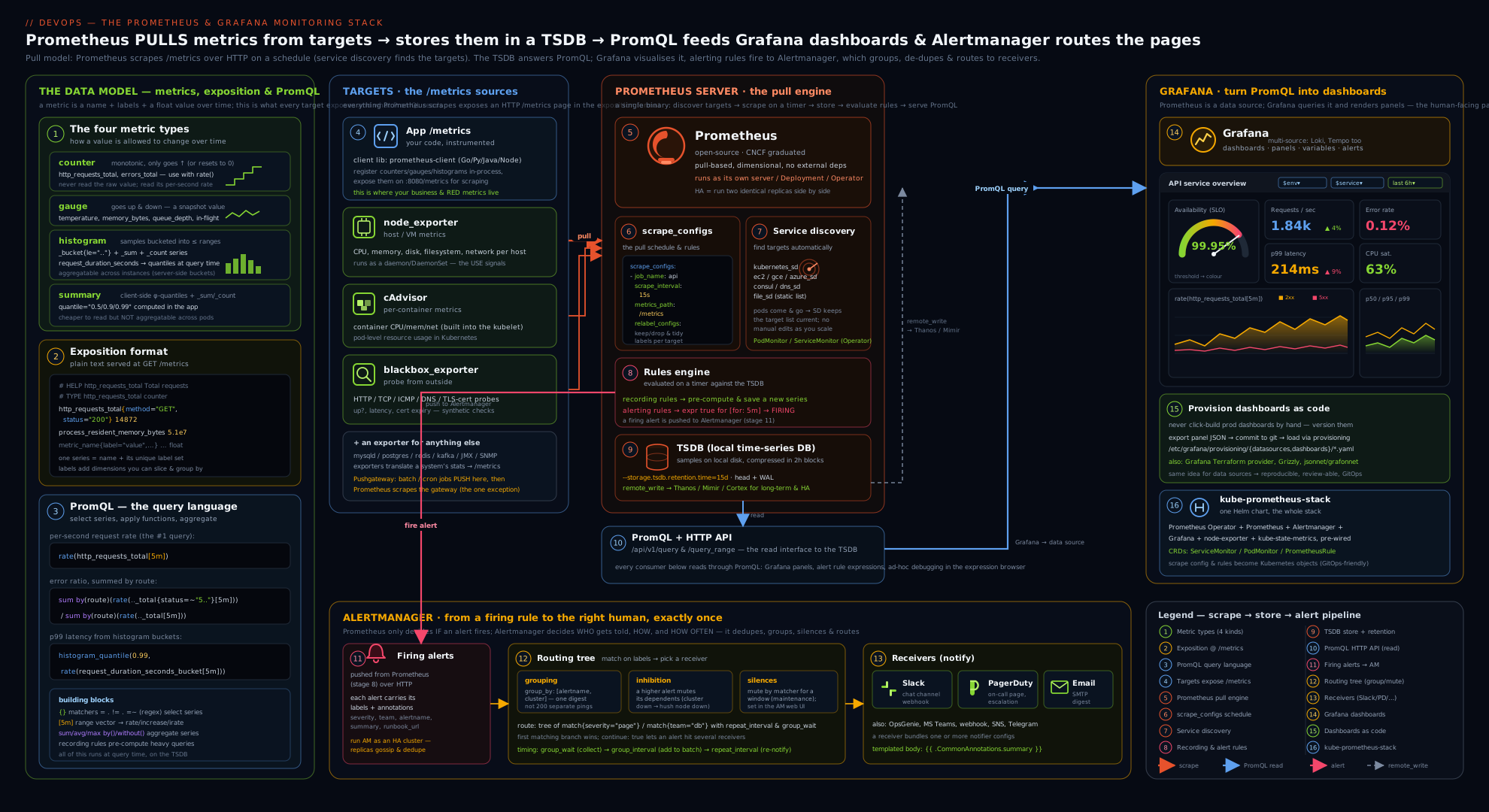
The diagram shows the full data flow: instrumented apps and exporters (node, cAdvisor, blackbox) expose /metrics; Prometheus pulls them on a schedule (with service discovery and relabeling deciding what and where), stores samples in its local TSDB and optionally remote-writes to Mimir/Thanos; the rule engine produces recording-rule series and fires alerting rules into Alertmanager (routing → grouping → inhibition/silences → Slack/PagerDuty/email); and Grafana queries Prometheus to render provisioned dashboards. Trace one arrow the whole way — app /metrics → scrape → TSDB → PromQL → Grafana panel, and the parallel branch TSDB → alerting rule → Alertmanager → page — and you have the entire mental model.
Common beginner mistakes
These are conceptual traps — wrong mental models rather than broken config. The troubleshooting table further down handles symptom → fix; this section is about how to think about the stack, which is where most beginners actually get stuck.
- “Prometheus pushes metrics to a central server.” No — Prometheus pulls. Your app does not send anything anywhere; it just holds a
/metricspage open, and Prometheus comes and reads it on a schedule. Right model: targets are passive meters, Prometheus is the active reader. (The one exception is the Pushgateway, and only for short-lived batch jobs.) - “I’ll just graph
http_requests_total.” A counter only ever climbs, so its graph is a meaningless, forever-rising line. You almost never want the total — you want the rate of change:rate(http_requests_total[5m])is “requests per second, right now”. The raw counter is just the raw material;rate()is the question you actually have. - “Alertmanager and Prometheus are the same thing.” They are two separate processes with a clean division of labour. Prometheus decides what is wrong (it evaluates alerting rules); Alertmanager decides what to do about it (dedupe, group, route, silence, notify). Prometheus never sends a Slack message — if notifications aren’t arriving, the fault is almost always on the Alertmanager side.
- “More labels = more useful metrics.” Every unique combination of label values is a separate stored series, so putting a user ID, request ID, email or raw URL in a label multiplies your series into the millions and can OOM the server. This is cardinality, and it is the number-one way people break Prometheus. Labels are for bounded dimensions (method, route template, status code), never unbounded identifiers.
- “I’ll compute p99 latency with a summary and average it across pods.” You cannot average percentiles — a p99 of p99s is nonsense. That is exactly why you use a histogram: you
sumits raw_bucketcounts across all pods first, then compute the quantile once withhistogram_quantile(). Summaries give you per-process quantiles you cannot aggregate. - “
rate(x[1m])on a 15s scrape is fine.” If the range barely spans one or two scrapes,rate()has too few points and returns empty or noisy results. Rule of thumb: the range should be at least 4× the scrape interval (so[1m]+ for a 15s scrape); better still, use Grafana’s$__rate_interval, which sizes it for you. - “I built a beautiful dashboard by clicking around.” Anything clicked by hand in Grafana vanishes when the container is recreated and can’t be code-reviewed. Treat dashboards and data sources as provisioned config in Git, exactly like
prometheus.yml. Clicking is fine to prototype; the source of truth is a file. - “
for:is how long before the alert notifies me.”for:is the pending period the condition must stay continuously true before the alert fires at all — the anti-flapping control that stops a 20-second blip from paging you. The pacing of notifications after firing is Alertmanager’s job (group_wait,repeat_interval). Two different clocks, two different systems.
Hands-on lab
We will stand up the complete stack with Docker Compose: an instrumented sample app, node-exporter, Prometheus scraping both, Alertmanager wired in, and Grafana with a provisioned data source. Everything is free and local. Allow about 15 minutes.
1. Project layout. Create a folder prom-lab/ with these files.
docker-compose.yml:
services:
  prometheus:
    image: prom/prometheus:v3.5.0          # current LTS line
    command:
      - "--config.file=/etc/prometheus/prometheus.yml"
      - "--storage.tsdb.retention.time=2d"
      - "--web.enable-lifecycle"            # enables POST /-/reload
    ports: ["9090:9090"]
    volumes:
      - ./prometheus.yml:/etc/prometheus/prometheus.yml:ro
      - ./rules.yml:/etc/prometheus/rules.yml:ro

  alertmanager:
    image: prom/alertmanager:v0.28.1
    command: ["--config.file=/etc/alertmanager/alertmanager.yml"]
    ports: ["9093:9093"]
    volumes:
      - ./alertmanager.yml:/etc/alertmanager/alertmanager.yml:ro

  node-exporter:
    image: prom/node-exporter:v1.9.1
    ports: ["9100:9100"]

  app:                                       # our instrumented Python app (built below)
    build: ./app
    ports: ["8000:8000"]

  grafana:
    image: grafana/grafana:12.0.0
    ports: ["3000:3000"]
    environment:
      GF_AUTH_ANONYMOUS_ENABLED: "true"
      GF_AUTH_ANONYMOUS_ORG_ROLE: "Admin"
    volumes:
      - ./grafana/provisioning:/etc/grafana/provisioning:ro
app/Dockerfile and app/app.py (the instrumented app from earlier):
# app/Dockerfile
FROM python:3.13-slim
RUN pip install --no-cache-dir prometheus_client
COPY app.py /app.py
CMD ["python", "/app.py"]
# app/app.py
from prometheus_client import Counter, Histogram, start_http_server
import random, time

REQS = Counter("http_requests_total", "Total HTTP requests", ["method","route","status"])
LAT  = Histogram("http_request_duration_seconds", "Request latency", ["route"],
                 buckets=[0.05,0.1,0.25,0.5,1,2.5,5])

def handle():
    route = random.choice(["/api/orders","/api/users"])
    with LAT.labels(route=route).time():
        time.sleep(random.expovariate(8))
        status = "500" if random.random() < 0.05 else "200"
        REQS.labels(method="GET", route=route, status=status).inc()

if __name__ == "__main__":
    start_http_server(8000)
    while True:
        handle()
prometheus.yml:
global:
  scrape_interval: 5s
  evaluation_interval: 5s
rule_files:
  - "rules.yml"
alerting:
  alertmanagers:
    - static_configs:
        - targets: ["alertmanager:9093"]
scrape_configs:
  - job_name: "prometheus"
    static_configs: [{ targets: ["localhost:9090"] }]
  - job_name: "node"
    static_configs: [{ targets: ["node-exporter:9100"] }]
  - job_name: "demo-app"
    static_configs: [{ targets: ["app:8000"] }]
rules.yml (a recording rule + a real alerting rule):
groups:
  - name: demo
    rules:
      - record: job:http_errors:ratio5m
        expr: |
          sum by (job) (rate(http_requests_total{status=~"5.."}[1m]))
            /
          sum by (job) (rate(http_requests_total[1m]))
      - alert: HighErrorRate
        expr: job:http_errors:ratio5m{job="demo-app"} > 0.02
        for: 1m
        labels: { severity: page }
        annotations:
          summary: "demo-app error ratio {{ $value | humanizePercentage }}"
          runbook: "https://runbooks.kloudvin.com/high-error-rate"
      - alert: TargetDown
        expr: up == 0
        for: 30s
        labels: { severity: page }
        annotations:
          summary: "Target {{ $labels.instance }} ({{ $labels.job }}) is down"
alertmanager.yml (uses a webhook receiver so you need no external account):
route:
  receiver: "log-webhook"
  group_by: ["alertname", "job"]
  group_wait: 10s
  group_interval: 1m
  repeat_interval: 1h
inhibit_rules:
  - source_matchers: ['alertname="TargetDown"']
    target_matchers: ['alertname="HighErrorRate"']
    equal: ["job"]            # if the app is DOWN, don't also alert on its error ratio
receivers:
  - name: "log-webhook"
    webhook_configs:
      - url: "http://app:8000/"   # any reachable URL; we just want to see routing work
        send_resolved: true
grafana/provisioning/datasources/prometheus.yml:
apiVersion: 1
datasources:
  - name: Prometheus
    type: prometheus
    access: proxy
    url: http://prometheus:9090
    isDefault: true
2. Start the stack.
docker compose up -d --build
docker compose ps          # five services should be "running"
3. Confirm scraping. Open http://localhost:9090/targets — prometheus, node, and demo-app should all be UP. Inspect the app’s raw metrics by hand to see the exposition format:
curl -s localhost:8000/metrics | grep -E "http_requests_total|http_request_duration_seconds_bucket" | head
You should see the _total counter series and the _bucket{le="..."} histogram lines exactly as described earlier.
4. Run PromQL. In the Prometheus UI (http://localhost:9090/graph), run each and switch to the Graph tab:
up                                                          # 1 per healthy target
sum by (status) (rate(http_requests_total[1m]))             # req/s split by 200 vs 500
job:http_errors:ratio5m                                     # your recording rule
histogram_quantile(0.95,
  sum by (le) (rate(http_request_duration_seconds_bucket[1m])))   # p95 latency
100 * (1 - avg(rate(node_cpu_seconds_total{mode="idle"}[1m])))    # host CPU utilisation %
Expected: up returns three 1s; the rate query shows two lines (200 and 500); the ratio hovers near 0.05 (our 5% error rate); p95 latency is a fraction of a second.
5. Watch an alert fire and route. The app’s ~5% error rate is above the 2% threshold, so within ~1 minute http://localhost:9090/alerts shows HighErrorRate go Pending → Firing. Open http://localhost:9093 (Alertmanager) and confirm the alert appears, grouped by alertname+job. Now test inhibition and grouping by killing the app:
docker compose stop app
TargetDown fires for demo-app; because of the inhibition rule, HighErrorRate for the same job is suppressed (you cannot have an error ratio for a target that is scraping no data) — verify in the Alertmanager UI that only TargetDown is active. Restart and watch both resolve:
docker compose start app
6. Create a silence. In the Alertmanager UI (http://localhost:9093 → Silences → New Silence), add a matcher job="node", a duration of 1h, a creator and comment, and save — any alert from the node job is now muted (audited, time-boxed). This is the maintenance-window workflow.
7. Grafana. Open http://localhost:3000 (anonymous admin). The Prometheus data source is already provisioned (Connections → Data sources → Prometheus, Test it). Build a panel: Dashboards → New → Add visualization → Prometheus, and enter the p95 query from step 4; set the panel unit to seconds and the visualisation to Time series. Add a second panel for job:http_errors:ratio5m with unit percent (0.0–1.0). You now have a RED-style overview reading the same recording rule your alert uses.
Validation checklist: three targets UP; curl shows the exposition format; the five PromQL queries return data; HighErrorRate fires and appears in Alertmanager; stopping the app fires TargetDown and inhibits HighErrorRate; a silence mutes the node job; Grafana renders both panels from the provisioned data source.
Cleanup.
docker compose down -v # stop and remove containers + volumes
Then delete the prom-lab/ folder if it was throwaway.
Cost note. Entirely free — every image is open-source and runs locally; nothing leaves your machine and no cloud account is needed. The only production “cost” levers are TSDB cardinality (bound your label values), scrape interval × number of series (storage and CPU), retention (retention.time/size), and, if you adopt it, remote-write egress and the long-term-storage backend — all of which you now know how to control.
Practice challenges
Six graded exercises against the lab stack (or any Prometheus). They escalate from “read one metric” to “diagnose a production incident”. Try each before opening its solution — the one-line why underneath is the point.
1. Beginner — is everything up? Write one PromQL expression that returns the number of targets currently scraped successfully, and one that lists any that are down.
<details> <summary>Show solution</summary>
count(up == 1)      # how many targets are healthy
up == 0             # the down ones (empty result = all healthy)
Why: up is the synthetic 1/0 liveness sample Prometheus writes for every target on every scrape, so “is it up?” needs no extra instrumentation.
</details>
2. Beginner — requests per second by status. The demo app emits http_requests_total{method,route,status}. Graph the per-second request rate broken out by status code, aggregated across everything else.
<details> <summary>Show solution</summary>
sum by (status) (rate(http_requests_total[1m]))
Why: rate() turns the ever-climbing counter into per-second change; sum by (status) collapses instances and routes but keeps the one label you want to compare.
</details>
3. Intermediate — the error ratio. Write the 5xx error ratio (fraction of requests that are 5xx) for the demo app as a single number between 0 and 1.
<details> <summary>Show solution</summary>
sum(rate(http_requests_total{status=~"5.."}[5m]))
  /
sum(rate(http_requests_total[5m]))
Why: rate the error subset and the total, then divide — with both sides sum’d to a single series, the binary / divides them cleanly into one ratio.
</details>
4. Intermediate — fleet p95 latency. From http_request_duration_seconds_bucket, compute the 95th-percentile latency across all instances. Get the order of operations right.
<details> <summary>Show solution</summary>
histogram_quantile(0.95,
  sum by (le) (rate(http_request_duration_seconds_bucket[5m])))
Why: you must rate() the buckets and sum by (le) across instances before histogram_quantile — summing buckets first is exactly why histograms aggregate correctly and summaries cannot.
</details>
5. Advanced — recording rule + alert. The p95 query is expensive to run on every dashboard refresh and alert evaluation. Write a recording rule that precomputes it per route, then an alerting rule that pages when any route’s p95 exceeds 1s for 10 minutes.
<details> <summary>Show solution</summary>
groups:
  - name: latency
    rules:
      - record: route:http_latency:p95_5m
        expr: |
          histogram_quantile(0.95,
            sum by (le, route) (rate(http_request_duration_seconds_bucket[5m])))
      - alert: HighLatencyP95
        expr: route:http_latency:p95_5m > 1
        for: 10m
        labels: { severity: page }
        annotations:
          summary: "p95 latency {{ $value | humanizeDuration }} on {{ $labels.route }}"
Why: the recording rule stores the heavy quantile as a cheap series on the evaluation_interval, so both the dashboard and the alert read the same precomputed value (level:metric:operation naming) instead of recomputing it.
</details>
6. Advanced — hunt the cardinality bomb. A colleague’s Prometheus is OOMing. Write the query that finds which metric names have the most series, then give the one-line config change that stops the worst offender at ingest.
<details> <summary>Show solution</summary>
topk(10, count by (__name__)({__name__=~".+"}))
Then drop the offender before it is stored, in that job’s metric_relabel_configs:
metric_relabel_configs:
  - source_labels: [__name__]
    regex: "the_offending_metric_name"
    action: drop
Why: cardinality = unique series = the product of all label-value combinations; metric_relabel_configs runs after the scrape but before the TSDB, so a drop there stops the offending series from ever being stored.
</details>
Common mistakes & troubleshooting
| Symptom | Likely cause | Fix |
|---|---|---|
Target shows DOWN on /targets |
Wrong __address__/port, network/DNS, scheme, or auth; check the Error column there |
curl the target’s /metrics from inside the network; fix host:port; in Compose use the service name, not localhost |
rate() returns empty or NaN |
Range shorter than ~2 scrape intervals, or you wrapped a gauge in rate() |
Use rate(...[≥4×interval]); only rate() counters; use $__rate_interval in Grafana |
| Graph of a counter only climbs | Plotting the raw counter | Always wrap counters in rate()/increase() |
| Fleet p99 looks wrong or won’t aggregate | Used a summary, or applied histogram_quantile before summing buckets |
Use a histogram; sum by (le) (rate(..._bucket[…])) then histogram_quantile |
| Prometheus OOMs / disk fills / slow queries | Cardinality explosion from an unbounded label (user id, raw URL, request id) | Find it with topk(10, count by (__name__)({__name__=~".+"})); drop in metric_relabel_configs; normalise routes |
| Alerts fire in Prometheus but no notification | Alertmanager unreachable, no matching route, or the receiver secret is wrong |
Check /alerts shows Firing; confirm alerting.alertmanagers target; check Alertmanager logs and routing tree |
| One incident sends dozens of messages | No/insufficient grouping | Set group_by on the shared labels; tune group_wait/group_interval |
| Paged for every service when the whole cluster is down | No inhibition | Add an inhibit_rules suppressing warning while critical fires, scoped with equal |
| Grafana panel empty but query works in Prometheus | Wrong data source URL (use the service name), or a $variable is unset/empty |
Test the data source; check the variable dropdown and the =~"$var" matcher |
| Dashboards/data sources vanish after a redeploy | Configured by hand instead of provisioned | Provision data sources and dashboards from files in Git |
Best practices
- Configure everything as code and in Git —
prometheus.yml, rules,alertmanager.yml, Grafana provisioning. The whole stack should be reproducible from a repo (this is whatkube-prometheus-stackdoes for you on K8s). - Use service discovery + relabeling, not hand-maintained target lists, for anything that scales; opt targets in by annotation/label and shape labels with
relabel_configs. - Bound cardinality ruthlessly. Never put unbounded values in labels; use
metric_relabel_configsto drop noisy metrics at ingest andsample_limitas a safety valve. - Prefer histograms for latency (aggregatable), choose buckets that straddle your SLO, and consider native histograms for resolution at lower series cost.
- Precompute with recording rules for any expensive expression you query repeatedly (dashboard panels, SLO ratios, burn-rate inputs); name them
level:metric:operation. - Set
for:on every alert to kill flapping; putseverity(andteam/service) labels on every alert for routing; link a runbook in the annotations. - Group and inhibit in Alertmanager so a single incident is one humane notification, not a storm; use silences for planned maintenance.
- Standardise dashboards on RED per service and template them with variables (and
$__rate_interval) so one dashboard serves many services; always set panel units. - Plan storage: keep modest local retention and remote-write to a scalable backend (Mimir/Thanos/managed) for long retention, HA, and a global view.
- Run Alertmanager in HA (a cluster of ≥2 with gossip) so a single node failing does not stop your pages.
Security notes
The monitoring stack is a high-value target and a frequent leak. Never expose Prometheus, Alertmanager, the Pushgateway or Grafana to the public internet — an open Prometheus /metrics or unauthenticated Grafana hands an attacker your entire internal topology, hostnames, versions and traffic patterns, and an open Pushgateway or Alertmanager lets them inject fake metrics or delete your alerts and create silences to mask an attack. Prometheus itself has only basic built-in auth and TLS (configured via --web.config.file); in practice you put it behind a reverse proxy / network policy / mesh mTLS and restrict it to your VPC. Treat receiver secrets as secrets — Slack webhook URLs and PagerDuty routing keys must come from a secret store or env vars (note the ${...} placeholders above), never be committed in alertmanager.yml. Scrape over TLS with auth for sensitive targets (scheme: https, tls_config, authorization). In Grafana, replace the lab’s anonymous-admin with real authentication (OAuth/SAML/LDAP), use least-privilege org roles and folder permissions, and prefer access: proxy data sources so backend credentials never reach the browser. Finally, remember monitoring is security detection: error spikes, traffic anomalies and saturation are often the first visible sign of an attack — route security-relevant alerts to the right team, and protect the monitoring plane so attackers cannot blind it.
Interview & exam questions
-
Why does Prometheus pull rather than push, and what is the one case where you push? Pull gives you target liveness for free (the
upmetric), avoids every app holding push credentials, keeps targets simple (just expose/metrics), and centralises discovery and rate control. The exception is short-lived batch jobs that finish before any scrape — those push their final result to the Pushgateway, which Prometheus then scrapes. The Pushgateway is only for batch results, not a general push channel. -
Walk me through what happens from a scrape to a stored sample. Prometheus’s retrieval component resolves targets (via static config or service discovery), runs
relabel_configsto decide whether/where to scrape, HTTP-GETs/metricseachscrape_interval, parses the exposition format, appliesmetric_relabel_configs, and appends the samples to the head block while writing them to the WAL for crash safety. Every ~2h the head flushes to an immutable on-disk block; compaction later merges blocks; retention deletes old ones. -
Counter vs gauge — and why never graph a raw counter? A counter only increases (and resets to 0 on restart); a gauge goes up and down. You never graph a counter directly because a monotonically rising line is meaningless — you graph its rate (
rate(x_total[5m])= per-second change).rate/increaseare counter-aware and correct for resets automatically. -
Histogram vs summary — and why can you compute a fleet-wide p99 from one but not the other? A histogram exposes raw cumulative
_bucket{le}counts; yousum by (le)those buckets across all instances and then applyhistogram_quantile(), giving a correct aggregate percentile. A summary computes quantiles inside each process and ships the results — and you cannot average percentiles, so summaries cannot produce a correct cluster-wide p99. Prefer histograms for latency. -
What is
relabel_configsversusmetric_relabel_configs? Both rewrite label sets with the same grammar, butrelabel_configsruns over a target’s labels before scraping — to keep/drop targets and build__address__/__metrics_path__from service-discovery meta-labels — whilemetric_relabel_configsruns over each sample after scraping, mainly to drop high-cardinality/noisy metrics before they hit the TSDB. -
You discover Kubernetes pods via SD but only want the annotated ones, on a custom port. How? Use
relabel_configs: akeepaction on__meta_kubernetes_pod_annotation_prometheus_io_scrapematching"true", then areplacethat rewrites__address__tohost:portusing theprometheus.io/portannotation, andreplacerules to promote__meta_kubernetes_namespace/podto real labels. -
What is cardinality, how does it blow up, and how do you fix it? Cardinality is the number of unique time series = the product of all label-value combinations. It explodes when you put an unbounded value (user id, request id, raw URL, timestamp) in a label, exhausting memory and slowing queries. Find offenders with
topk(10, count by (__name__)({__name__=~".+"})), drop them withmetric_relabel_configs/sample_limit, normalise routes (/orders/:id), and push per-request detail to logs/traces. -
Explain
for:,labelsandannotationson an alerting rule.for:is the pending duration the expression must stay true before the alert fires — the anti-flapping control.labelsare for machines (Alertmanager routes and groups onseverity/team).annotationsare for humans — the templatedsummary/description/runbookthat fill the notification (using$labels,$value). -
Alertmanager: what do grouping, inhibition and silences each do? Grouping (
group_by) batches related alerts into one notification so a multi-failure incident is not a message storm;group_wait/group_interval/repeat_intervalpace it. Inhibition suppresses lower-severity alerts while a related higher-severity one fires (scoped withequal) — e.g. don’t page on per-service warnings when the whole cluster is critical. A silence is a temporary, audited, label-matched mute created in the UI for planned maintenance. -
What is a recording rule and when do you use one? A recording rule precomputes an expression on a schedule and stores the result as a new series (named
level:metric:operation). Use it for expressions that are expensive and queried often — multi-instance histogram quantiles, SLO error-ratios, burn-rate inputs — so dashboards and alerts read a cheap precomputed series and every consumer uses the same definition. -
How does Prometheus do long-term and highly-available storage? The local TSDB is single-node and meant for short/medium retention. For long retention, a global view across many Prometheis, and HA, you use
remote_writeto a scalable backend — Thanos, Grafana Mimir, VictoriaMetrics, or a managed service (AMP/Azure/GCP). Typical pattern: short local retention as a buffer, remote-write everything to the durable backend. -
Prometheus + Alertmanager vs Grafana-managed alerting — when each? Prometheus + Alertmanager keeps rules in Git, evaluates against Prometheus only, and routes via Alertmanager (routing tree, inhibition, silences) — best for Prometheus-centric, GitOps, multi-Prometheus setups. Grafana-managed alerting evaluates against any Grafana data source and routes via contact points/notification policies — best for cross-data-source or dashboard-driven alerts. Keep one source of truth per alert.
-
What does the
upmetric tell you and where does it come from?upis a synthetic gauge Prometheus writes for every target on every scrape:1if the scrape succeeded,0if it failed. It is the free liveness signal the pull model gives you, andup == 0is the canonicalTargetDownalert.
Quick check
- What two things must be true for
rate(http_requests_total[5m])to be meaningful (vsrateof a gauge, or too short a range)? - You need a cluster-wide p95 latency from 8 pods. What metric type, and what is the exact order of operations in PromQL?
- What is the difference between
relabel_configsandmetric_relabel_configs? - In Alertmanager, which feature stops a whole-cluster-down
criticalalert from also paging you about every individualwarning? - Name two ways the local Prometheus TSDB’s limitations are addressed in production.
Answers
- The metric must be a counter (not a gauge), and the range must span at least ~2–4 scrape intervals so the window contains enough samples;
rateis counter-aware and corrects for resets. - A histogram: take
rate()of the_bucketseries,sum by (le)across the pods first, then applyhistogram_quantile(0.95, ...). Summing buckets before the quantile is why histograms aggregate across instances. relabel_configsrewrites/filters targets before scraping (keep/drop targets, build__address__from SD meta-labels);metric_relabel_configsrewrites/filters samples after scraping (mainly dropping high-cardinality metrics before storage).- Inhibition (an
inhibit_rulesentry suppressingseverity="warning"whileseverity="critical"fires, scoped withequal). - Remote-write to a scalable/durable backend (Thanos, Mimir, VictoriaMetrics, or a managed service) for long retention and a global view, and running Alertmanager (and Prometheus) in HA; bounding retention and cardinality also keeps the single node healthy.
Exercise
Extend the lab into a small but realistic monitoring setup:
- Add the blackbox exporter to the Compose stack and a
blackbox-httpscrape job that probeshttps://kloudvin.comand your local app’s/metrics, using the__param_targetrelabeling idiom. Graphprobe_successandprobe_duration_seconds. - Add a burn-rate alert for the demo app: a fast-burn rule (e.g. 14.4× the error budget over a 1h and a 5m window, against a 99% SLO) with
severity: page, reusing a recording rule for the error ratio. (Lean on the burn-rate maths from the observability-fundamentals lesson.) - Route by severity in Alertmanager: send
severity: pageto one receiver andseverity: ticketto another, withcontinueso pages are also recorded; add a second alerting rule atticketseverity to prove the routing. - Provision a dashboard as code: build a RED overview (rate, error ratio, p50/p95/p99) in Grafana, add a
$jobtemplate variable (label_values(http_requests_total, job)), export the JSON, and drop it intografana/provisioning/dashboards/so it loads automatically on the nextdocker compose up. - Trigger and observe: raise the app’s error rate, confirm the burn-rate alert fires, the page routes to the right receiver, and the dashboard’s error panel reacts; then create a silence for a maintenance window and confirm it mutes.
Capture in your notes: the blackbox relabeling block, the burn-rate expr, the Alertmanager routing tree, and a screenshot of the provisioned dashboard with the $job dropdown.
Certification mapping
| Exam / certification | Relevant objectives |
|---|---|
| Prometheus Certified Associate (PCA) | The whole exam: architecture & pull model, exposition format & metric types, instrumentation, prometheus.yml/scrape_configs/service discovery & relabeling, exporters, PromQL (selectors, rate, histogram_quantile, aggregation), recording & alerting rules, Alertmanager (routing/grouping/inhibition/silences), TSDB & remote-write, Grafana basics |
| AWS Certified DevOps Engineer – Professional (DOP-C02) | Monitoring & observability design; metrics/alerting; integrating Amazon Managed Service for Prometheus and Grafana; automated response to alerts |
| Microsoft Azure DevOps Engineer Expert (AZ-400) | Implement monitoring/observability; metrics, dashboards and alerting; Azure Monitor managed Prometheus + Azure Managed Grafana; defining and tracking KPIs/SLIs |
| Certified Kubernetes Administrator / Application Developer (CKA/CKAD) | Cluster monitoring fundamentals; understanding metrics pipelines (deeper Operator workflow is the dedicated K8s lesson) |
| Google Cloud Professional DevOps Engineer | SLI/SLO/alerting strategy; Cloud Monitoring (Managed Prometheus); building dashboards and reducing alert fatigue |
Glossary
- Pull / scrape model — Prometheus periodically HTTP-GETs each target’s
/metrics, rather than targets pushing. - Exporter — a bridge that exposes a system’s stats in Prometheus format (node_exporter, blackbox_exporter, cAdvisor).
- Pushgateway — a holding area for short-lived batch jobs to push final metrics so Prometheus can scrape them.
scrape_configs/ job / instance — the scrape job definitions; each job has ajoblabel, each target aninstancelabel.- Service discovery (SD) — dynamically finding targets (Kubernetes, EC2, file, DNS…), exposing
__meta_*labels. - Relabeling — rule pipeline that rewrites/filters labels:
relabel_configs(targets, pre-scrape) vsmetric_relabel_configs(samples, post-scrape). - TSDB / WAL / block / compaction — the local time-series store: write-ahead log for durability, immutable on-disk blocks, merged over time by compaction.
- Remote-write — streaming samples to an external long-term/HA backend (Thanos, Mimir, VictoriaMetrics, managed services).
- Counter / gauge / histogram / summary — the metric types: monotonic total / up-down snapshot / cumulative
_buckets for percentiles / client-side quantiles. - Exposition format — the plain-text
/metricswire format (# HELP,# TYPE, one sample per line). - PromQL — Prometheus’s query language; instant vector (current value per series) vs range vector (
[5m]window forrate()). rate/irate/increase— counter-aware per-second rate (avg) / instant rate / total increase over a window.histogram_quantile— computes a percentile from summed_bucketrates; the reason histograms aggregate across instances.- Recording rule — a precomputed, stored expression (
level:metric:operation) for expensive, frequently-queried PromQL. - Alerting rule — a PromQL expression with
for,labels,annotationsthat fires alerts to Alertmanager. - Alertmanager — the separate process that dedupes, groups, routes (routing tree), inhibits, silences and notifies (receivers).
- Routing tree / grouping / inhibition / silence — match alerts to receivers / batch related alerts / suppress lower-severity during higher / temporary manual mute.
- Receiver / contact point — a named notification destination (Slack, PagerDuty, email, webhook).
- Grafana data source / panel / dashboard / variable — a backend connection / a single visualisation+query / a grid of panels / a templating dropdown.
- Provisioning — declaring Grafana data sources and dashboards from config files so the stack is reproducible.
- kube-prometheus-stack — the Helm chart that installs Prometheus Operator + Prometheus + Alertmanager + Grafana + exporters with
ServiceMonitor/PodMonitor. - Golden signals / RED — the four golden signals (latency, traffic, errors, saturation) and the RED method (Rate, Errors, Duration) that give you a standard, comparable per-service dashboard and alert set.
- Cardinality — the number of unique time series (the product of all label-value combinations); explodes when an unbounded value goes into a label, and the number-one cause of Prometheus running out of memory.
up— the synthetic gauge Prometheus writes for every target on every scrape (1= scrape succeeded,0= failed); the pull model’s free liveness signal and the basis ofTargetDown.for(pending period) — how long an alerting rule’s expression must stay continuously true before it moves from Pending to Firing; the primary anti-flapping control (distinct from Alertmanager’s notification pacing).- Native / exponential histogram — a newer histogram type giving high resolution across a wide range with far fewer series than classic fixed
lebuckets. - Burn-rate alert — an alert on how fast an SLO’s error budget is being consumed (using fast and slow windows) rather than on a raw threshold.
- Exemplar — a sampled trace ID attached to a metric sample, letting a click on a latency spike jump straight to the matching trace (e.g. in Tempo).
$__rate_interval— a Grafana built-in variable that auto-sizes arate()window to the panel resolution and scrape interval; use it instead of a hard-coded[5m].honor_labels— a scrape option that keeps a target’s ownjob/instancelabels instead of overwriting them; settruefor the Pushgateway and federation.- Federation — one Prometheus scraping a selected, usually pre-aggregated, subset of another Prometheus’s series via the
/federateendpoint.
Next steps
You can now stand up, configure and operate the Prometheus and Grafana stack end to end — scraping with relabeling, instrumenting an app, querying with PromQL, alerting through Alertmanager, and visualising with provisioned Grafana dashboards. This closes the loop opened by Observability Fundamentals for DevOps (the theory these tools implement) and feeds directly into SRE & Incident Management (where these alerts become pages and these dashboards drive incident response). For the Kubernetes-native version of this stack — the Prometheus Operator, ServiceMonitor/PodMonitor and kube-state-metrics — see Kubernetes Monitoring, In Depth. Then continue the track with Deployment Strategies: Rolling, Blue/Green, Canary, Progressive Delivery & Rollback, where the SLO metrics you now collect become the automated gate that promotes or rolls back a release.