In a nutshell
BigQuery is a data warehouse where storage and compute are two separate bills, and you never touch a server. Picture a giant self-storage facility next door to a temp-worker agency. Your data is the boxes in storage: you pay a small monthly rent for the space, whether or not anyone ever opens them. A query is a job you hand to the agency: they dispatch a swarm of workers who fan out, open only the boxes — and only the drawers within a box — that your question needs, shout their partial answers to one another, hand you the total, and clock off. You pay for the workers either by how much they read (on-demand) or by keeping a fixed crew on retainer (slots). Nobody sizes a cluster; nobody waits for a machine to boot.
Two facts fall straight out of that picture and explain most of BigQuery. First, because your data is stored column by column (all the country values together, all the revenue values together), a query that names three columns opens three drawers, not the whole box — so SELECT * is the single most expensive habit you can have, because it opens every drawer of every box. Second, because the workers are billed by bytes read, the way you arrange the boxes — partitioning (one shelf per day) and clustering (sorting within a shelf) — is not tidiness for its own sake; it is literally the size of your invoice.
Level: Intermediate · Time: ~46 min · You’ll need: a GCP project with billing enabled, basic SQL, and the bq CLI from the Cloud SDK.
If you remember only one sentence: in BigQuery, storage is cheap and permanent, compute is elastic and metered, and columnar layout plus partition/cluster pruning is what stands between you and a surprise bill.
BigQuery is Google Cloud’s serverless, fully managed data warehouse — a system you can load with a few rows or a few petabytes and query with standard SQL, without ever provisioning, patching, or sizing a server. There is no cluster to spin up, no storage volume to attach, no vacuum job to schedule. You create a dataset, load a table, and run SELECT; Google supplies the storage, the compute, and the elasticity behind a single endpoint. That serverless promise is exactly what makes BigQuery feel magical the first week and expensive the first month: because the engine will happily throw thousands of CPUs at a query that scans a terabyte, a learner who does not understand how BigQuery stores data and how BigQuery charges for compute can run up a real bill with a single careless SELECT *.
This lesson is deliberately exhaustive. We start from the object model — projects → datasets → tables and views — and the columnar storage that underpins everything. We cover every table type (native, external, and BigLake), the two physical-layout levers that decide your bill and your latency (partitioning and clustering), and then the part interviewers and the certification exams probe hardest: the two pricing models — on-demand bytes-scanned versus capacity (slots) with editions and reservations — and the full set of cost controls that stop a single query from paging you about the invoice. From there we go through loading and streaming (including the Storage Write API), BigQuery ML, federation and external queries, the three layers of access control (dataset, column, and row) with CMEK, materialised views, and INFORMATION_SCHEMA. Every core operation comes with real bq CLI and SQL so you can do this by hand or wire it into code. By the end you should be able to whiteboard BigQuery from memory and answer the follow-ups.
Learning objectives
By the end of this lesson you will be able to:
- Explain BigQuery’s object hierarchy (project → dataset → table/view/routine) and its columnar, decoupled storage-and-compute architecture.
- Choose the right table type — native, external, or BigLake — and know the storage-format and governance trade-offs of each.
- Design partitioning and clustering correctly, predict how each prunes bytes, and know when to use one, the other, or both.
- Choose between on-demand and capacity (slots/editions) pricing, size reservations with autoscaling, and apply every cost control BigQuery offers.
- Load and stream data using the right method for the job, including the Storage Write API, and query data in place via federation.
- Build and evaluate a model with BigQuery ML, and secure data at the dataset, column, and row levels with CMEK.
- Use materialised views and
INFORMATION_SCHEMAto accelerate and observe your warehouse.
Prerequisites & where this fits
You need a Google Cloud project with billing enabled, basic SQL, and the gcloud/bq CLI from the earlier tooling lesson (the bq tool ships with the Cloud SDK). This is the Data deep-dive of the GCP Zero-to-Hero course and the analytics counterpart to the storage and database deep-dives: where Cloud SQL and Spanner serve operational (OLTP) traffic, BigQuery is the analytical (OLAP) warehouse that the rest of your data ecosystem — Pub/Sub, Dataflow, Looker, Vertex AI — reads from and writes to. If your bill or query latency is already a problem, treat the companion optimisation playbook Taming BigQuery Cost and Performance as the applied sequel to this lesson, and BigQuery Fine-Grained Security as the deep dive on column- and row-level access.
Core concepts
Serverless, with storage and compute fully decoupled. This is the single most important mental model in BigQuery. Your data sits in BigQuery’s managed columnar storage (replicated, encrypted, durable) and is billed by the byte-month, independently of any compute. When you run a query, BigQuery’s distributed execution engine — internally Dremel, running on a shared substrate called Borg, shuffling through an in-memory service and reading over the Jupiter petabit network — allocates compute on demand, runs your query, and releases the compute. You are billed for that compute separately from storage, on whichever pricing model you have chosen. Decoupling is why you can have a 5 PB table costing storage but $0 compute until someone queries it, and why ten analysts can hammer the same table without “sizing a cluster” for the busiest one.
The unit of compute is the slot. A slot is a virtual CPU-plus-memory unit of BigQuery processing power. Every query is broken into a tree of execution stages, and stages are run by slots in parallel. On on-demand pricing you do not see slots directly — you are billed by bytes scanned and BigQuery gives you a large shared pool (historically up to ~2,000 slots per project, best-effort). On capacity pricing you buy slots (in increments of 100) and your queries run within that allocation. Understanding slots is the key to understanding performance: a query that is “slow” is usually either scanning too many bytes (a storage-layout problem) or starved of slots (a capacity problem).
The object hierarchy. Resources nest as organisation → folder → project → dataset → table/view/routine/model. The project is the billing and quota boundary and the top-level container for BigQuery. A dataset is a logical container of tables and views that lives in one location (a region or multi-region) and is the unit at which you set a default location, default table expiration, default CMEK, and the primary IAM access grants. A table holds your data; a view is a saved query; a routine is a stored procedure, UDF, or table function; a model is a BigQuery ML model. A subtle but vital rule: a single query cannot join tables across two different locations — datasets in EU and us-central1 are physically separate, so plan locations up front.
Columnar storage (Capacitor) and why SELECT * is the cardinal sin. BigQuery stores each column of a table separately, in a compressed format called Capacitor. When you query, BigQuery reads only the columns your query references — so SELECT user_id FROM events on a 200-column table reads roughly 1/200th of the data of SELECT *. On the on-demand model you are billed for the bytes in the columns you read, so naming columns explicitly (and partition/cluster pruning, below) is not a style preference — it is the bill. Columnar storage is also why BigQuery is fantastic at aggregations over a few columns of enormous tables and comparatively poor at single-row point lookups (use Bigtable or Cloud SQL for those).
Editions. Capacity pricing is packaged as editions — Standard, Enterprise, and Enterprise Plus — each unlocking progressively more features (e.g., column-level security, CMEK, multi-statement transactions, and longer time-travel windows appear at higher tiers) at a higher per-slot-hour price. You attach an edition to a reservation of slots. We cover the matrix in the pricing section.
Projects, datasets, and tables: the object model
A dataset is created inside a project and pinned to a location that you cannot change afterwards (you can only copy/recreate elsewhere). Get the location right the first time. Datasets carry defaults that every table inherits unless overridden.
| Dataset setting | What it is | Choices / default | When to set it | Gotcha |
|---|---|---|---|---|
| Location | The region or multi-region where data physically lives | A region (us-central1, europe-west2, asia-south1…) or multi-region (US, EU); no default — you must choose |
Always, at creation; align with data-residency and with the apps that read it | Immutable; cross-location joins are impossible — you must copy data first |
| Default table expiration | TTL applied to new tables in the dataset | Off by default; e.g. 3600s, 30d |
Scratch/staging datasets so tables self-clean | Applies only to new tables created after you set it; existing tables keep their own expiry |
| Default partition expiration | TTL applied to partitions of new partitioned tables | Off by default | Rolling-window fact tables (keep 90 days, drop older partitions) | Per-partition, not per-table — a cheap way to bound storage |
| Default rounding mode | How NUMERIC/BIGNUMERIC values round |
ROUND_HALF_AWAY_FROM_ZERO (default) or ROUND_HALF_EVEN |
Financial data needing banker’s rounding | Set at dataset level so all tables are consistent |
| Default CMEK | Customer-managed encryption key for new tables | Google-managed by default; or a Cloud KMS key | Compliance requiring you to hold the key | The key must be in the same region as the dataset; grant the BigQuery service account cryptoKeyEncrypterDecrypter |
| Description / labels | Free-text + key:value metadata | Empty by default | Cost attribution and discovery | Labels propagate to billing export — use them for FinOps |
| Time travel window | How far back you can query historical data (FOR SYSTEM_TIME AS OF) |
7 days default; configurable 2–7 days | Shorten to cut storage cost; lengthen for safety | Shorter window slightly reduces storage charges |
Create a dataset and a table with bq:
# Create a dataset in the EU multi-region with a 7-day default table expiry
bq --location=EU mk \
  --dataset \
  --default_table_expiration 604800 \
  --description "Analytics staging" \
  my_project:analytics

# Create an empty native table with an explicit schema
bq mk --table \
  my_project:analytics.events \
  event_id:STRING,user_id:STRING,event_ts:TIMESTAMP,country:STRING,revenue:NUMERIC
Or with SQL (DDL), which is the modern, more expressive path:
CREATE SCHEMA IF NOT EXISTS `my_project.analytics`
  OPTIONS (location = 'EU', default_table_expiration_days = 7);

CREATE TABLE `my_project.analytics.events` (
  event_id  STRING,
  user_id   STRING,
  event_ts  TIMESTAMP,
  country    STRING,
  revenue   NUMERIC
);
Schema, modes, and nested data. Each column has a type (STRING, INT64, FLOAT64, NUMERIC/BIGNUMERIC, BOOL, BYTES, DATE, DATETIME, TIME, TIMESTAMP, GEOGRAPHY, JSON, INTERVAL, RANGE) and a mode: NULLABLE (default), REQUIRED, or REPEATED. A REPEATED column is an array; a RECORD/STRUCT column is a nested object. The combination — REPEATED RECORD — lets BigQuery model a one-to-many relationship inside a single row (e.g. an order with line items), which you query with UNNEST. Denormalising with nested/repeated fields is idiomatic BigQuery and usually beats classic star-schema joins at warehouse scale. Schema evolution is limited: you can add columns and relax a REQUIRED column to NULLABLE; you generally cannot rename, drop (except via DDL DROP COLUMN, which is supported), reorder, or change a column’s type in place — for the latter you recreate or use a CREATE TABLE AS SELECT with a cast.
Table types: native, external, and BigLake
Not every table physically lives in BigQuery storage. There are three families, and the distinction matters for performance, cost, and governance.
| Table type | Where data lives | Format | Performance | Cost model | Governance | Use when |
|---|---|---|---|---|---|---|
| Native (managed) | BigQuery’s own columnar storage (Capacitor) | Internal | Fastest; full feature set (partitioning, clustering, DML, time travel) | Storage billed by BigQuery; query billed by bytes/slots | Full (column/row security, CMEK) | The default for anything you query often |
| External (federated) | Outside BigQuery — Cloud Storage, Bigtable, Google Sheets, Cloud SQL (via connection) | Parquet, ORC, Avro, CSV, JSON, etc. | Slower (reads source each time; no caching of layout) | No BigQuery storage charge; query billed by bytes read | Limited — no fine-grained security on most | Ad-hoc query of data you don’t want to load; data already in a lake |
| BigLake | Cloud Storage (or other clouds via BigQuery Omni) | Open formats (Parquet, ORC, Avro) + Apache Iceberg | Near-native via metadata caching and manifest support | No BigQuery storage charge; query billed by bytes; metadata cache cost | Full fine-grained security (row/column) on lake data | A governed lakehouse — open files with BigQuery-grade access control |
Native tables are the workhorse: load once, then partitioning, clustering, DML (INSERT/UPDATE/MERGE/DELETE), time travel, and all security features apply.
External tables point BigQuery at data it does not own. You define a schema (or let BigQuery auto-detect) and BigQuery reads the source at query time. They are perfect for “query this CSV in a bucket once” or for joining a small reference Google Sheet into a report, but they pay for it: every query re-reads and re-parses the source, you cannot partition/cluster the underlying files the way you can a native table (though you can use Hive-style partitioning layouts in the path), and most fine-grained security does not apply. A useful middle ground is a partitioned external table over a Hive-partitioned bucket layout (/dt=2026-06-15/...), which lets BigQuery prune by the partition column without loading the data.
BigLake tables are the strategic answer to “I have a data lake of open-format files but I want BigQuery’s governance.” A BigLake table is an external table accessed through a connection (a service-account identity managed by BigQuery), which means BigQuery — not the caller — reads the files. That indirection is what unlocks row-level and column-level security on data that physically sits as Parquet in a bucket, plus metadata caching for near-native performance and support for Apache Iceberg (including, with BigLake managed tables, DML and streaming into Iceberg). With BigQuery Omni, BigLake can even query data sitting in Amazon S3 or Azure Blob Storage in place. If you are building a lakehouse on GCP, BigLake is the default; plain external tables are for the quick, ungoverned case.
Partitioning: time, ingestion-time, and integer-range
Partitioning physically divides a table into segments so that a query with a filter on the partition column reads only the relevant segments — partition pruning. This is the single biggest lever on on-demand cost and a major lever on slot consumption. A table can have one partitioning scheme.
| Partition type | Partition column | Granularity | Pruned by | Typical use |
|---|---|---|---|---|
| Time-unit column | A DATE, TIMESTAMP, or DATETIME column you choose |
Hour, day (default), month, or year | WHERE event_ts BETWEEN … |
Fact/event tables with a natural event time |
| Ingestion time | The pseudo-column _PARTITIONTIME (and _PARTITIONDATE) |
Hour, day, month, year | WHERE _PARTITIONTIME >= … |
Streaming/append loads where you partition by when data arrived |
| Integer range | An INT64 column, with start/end/interval |
Buckets of the range | WHERE customer_id BETWEEN … |
Sharding by a numeric key (customer_id, region_id) |
Key facts an exam will test:
- Limit: ~10,000 partitions per table. Daily partitioning therefore covers ~27 years — fine. Hourly partitioning hits the limit in ~14 months, so reserve hourly for short-retention tables.
require_partition_filterforces every query to include a filter on the partition column, so no one can accidentally scan the whole table. This is one of the most effective guardrails you can set.- Partition expiration (
partition_expiration_days) auto-deletes old partitions — a rolling window that bounds both storage and the blast radius of a full scan. - The
__NULL__partition holds rows whose partition value is null; the__UNPARTITIONED__partition temporarily holds freshly streamed rows before they are colocated.
CREATE TABLE `my_project.analytics.events_part`
PARTITION BY DATE(event_ts)
OPTIONS (
  require_partition_filter = TRUE,
  partition_expiration_days = 90
) AS
SELECT * FROM `my_project.analytics.events`;

-- This query prunes to a single day's partition:
SELECT country, SUM(revenue)
FROM `my_project.analytics.events_part`
WHERE DATE(event_ts) = '2026-06-15'   -- partition filter (required)
GROUP BY country;
Use the Query validator (the green tick in the console, or --dry_run) to confirm pruning is working — it shows “This query will process N” before you run it. A dry run that still reports the full table size means your filter is not pruning (a common cause: wrapping the partition column in a non-trivial function so BigQuery cannot match it to partition boundaries).
Clustering: when, how, and how it differs from partitioning
Clustering sorts the data within each partition (or within the whole table if it is unpartitioned) by up to four columns, in priority order. When a query filters or aggregates on the leading clustered column(s), BigQuery reads only the relevant sorted blocks — block pruning — and can also speed up GROUP BY/ORDER BY on those columns.
The distinction the certification loves:
- Partitioning gives you coarse, exact pruning on one column and surfaces cost estimates before you run (a dry run knows exactly how many partitions match).
- Clustering gives you fine-grained, best-effort pruning on up to four columns but the savings are not known in advance (BigQuery cannot predict block-level skips at planning time, so the dry-run estimate shows the full partition size; the actual bytes billed come down).
Rules of thumb:
- Use partitioning for the column you always filter by a range on — almost always time.
- Use clustering for the high-cardinality columns you filter or aggregate by equality —
user_id,country,product_sku. - Use both together for the common case:
PARTITION BY DATE(event_ts) CLUSTER BY country, user_id. - Clustering shines on high-cardinality columns. For a column with only a handful of values, partition by it (integer-range) or skip it.
- BigQuery automatically re-clusters in the background, free of charge, as you add data — you do not run a maintenance job.
CREATE TABLE `my_project.analytics.events_pc`
PARTITION BY DATE(event_ts)
CLUSTER BY country, user_id AS
SELECT * FROM `my_project.analytics.events`;
Pricing models: on-demand vs capacity (slots & editions)
This is the section that decides your bill, so treat it as load-bearing. BigQuery bills storage and compute separately, and compute has two models you choose between (you can even mix them across projects/reservations).
Storage pricing (same regardless of compute model):
| Storage type | What it is | Roughly | Notes |
|---|---|---|---|
| Active storage | Data in tables/partitions modified in the last 90 days | ~$0.02 / GB-month (region-dependent) | The default |
| Long-term storage | A table/partition not modified for 90 days | ~50% off automatically (~$0.01 / GB-month) | No action needed; same performance; the discount is per-partition |
| Physical (compressed) storage billing | Bill on compressed bytes instead of logical (uncompressed) bytes | Higher per-GB rate but on far fewer bytes | Opt in per dataset; usually cheaper for well-compressing data — but it then bills time-travel + fail-safe storage too |
Compute — Model 1: On-demand (bytes scanned). You pay per byte your queries read (~$6.25 per TiB scanned, region-dependent), with the first 1 TiB per month free. No commitment, no slot management; BigQuery gives you a large shared, best-effort slot pool. This is ideal for spiky, unpredictable, or low-volume usage. The risks: cost is proportional to bytes scanned (so layout discipline is everything), and you have no isolation — a noisy project shares the pool.
Compute — Model 2: Capacity (slots via editions + reservations). You buy slots and pay per slot-hour regardless of bytes scanned. You pick an edition (Standard/Enterprise/Enterprise Plus), create a reservation of a baseline number of slots, and optionally enable autoscaling up to a maximum. Slots can be purchased pay-as-you-go (per second, no commitment) or with 1-year or 3-year commitments for a discount. This model is ideal for steady, high-volume workloads, for cost predictability (you cap compute spend at the reservation ceiling), and for workload isolation (give ETL and BI their own reservations so neither starves the other).
The edition feature matrix (representative — confirm current details against pricing docs):
| Capability | Standard | Enterprise | Enterprise Plus |
|---|---|---|---|
| Pay-as-you-go slots | Yes | Yes | Yes |
| 1yr / 3yr commitments | — | Yes | Yes |
| Autoscaling reservations | Yes | Yes | Yes |
| Max time-travel window | 7 days | 7 days | longer |
| Column-level & row-level security | — | Yes | Yes |
| CMEK | — | Yes | Yes |
| Multi-statement transactions, BigQuery ML (advanced), VPC-SC integration | limited | Yes | Yes (+ compliance: assured workloads) |
How to choose — the decision table:
| Situation | Pick | Why |
|---|---|---|
| New project, unpredictable/low volume | On-demand | No commitment; first 1 TiB/month free; pay only for what you scan |
| Steady multi-TB/day, want a predictable bill | Capacity (commitment) | Cap compute spend; discount on committed slots |
| Need workload isolation (ETL vs BI vs ad-hoc) | Capacity with multiple reservations | Each workload gets guaranteed slots |
| Need column/row security or CMEK | Capacity, Enterprise+ | Those features require an edition |
| Bursty batch jobs a few hours a day | Capacity autoscaling, PAYG | Baseline 0, scale up only when jobs run, pay per second |
A common mature pattern is hybrid: keep ad-hoc analyst queries on on-demand (cheap when idle) while pinning the predictable ETL pipeline to a committed reservation.
Manage reservations with bq:
# Create an Enterprise edition reservation: 100 baseline slots, autoscale to 500
bq mk --reservation \
  --project_id=admin_project --location=US \
  --edition=ENTERPRISE \
  --slots=100 --autoscale_max_slots=500 \
  prod_reservation

# Assign a project's queries to that reservation
bq mk --reservation_assignment \
  --reservation_id=admin_project:US.prod_reservation \
  --job_type=QUERY \
  --assignee_id=my_data_project --assignee_type=PROJECT
Cost control: the guardrails that cap the bill
On the on-demand model, a single query can cost real money. BigQuery gives you layered guardrails — set them as defaults, not afterthoughts.
| Control | Scope | What it does |
|---|---|---|
| Maximum bytes billed | Per query / per job | Hard ceiling — the query fails instead of running if it would scan more than the limit (--maximum_bytes_billed or OPTIONS) |
require_partition_filter |
Per table | No query may scan the table without a partition filter |
| Custom quotas | Per project / per user / per day | Cap total bytes a project or a user can scan in a day |
| Reservations | Org-wide compute | On capacity, your bill cannot exceed the reservation ceiling |
| Dry run / query validator | Per query | Shows bytes-to-be-scanned before you run; budget gate in CI |
| Materialised views & BI Engine | Per query pattern | Serve repeated queries from precomputed/in-memory results, scanning far less |
| Long-term storage & partition expiry | Per table/partition | Automatically shrink storage cost |
| Budgets & alerts | Billing account | Email/Pub/Sub alert at thresholds (does not stop spend, but warns) |
# Fail any query that would scan more than 10 GB
bq query --use_legacy_sql=false \
  --maximum_bytes_billed=10000000000 \
  'SELECT country, SUM(revenue) FROM `my_project.analytics.events_part`
   WHERE DATE(event_ts) = "2026-06-15" GROUP BY country'
# Dry run: how many bytes will this scan? (no compute charged)
bq query --use_legacy_sql=false --dry_run \
  'SELECT * FROM `my_project.analytics.events_part`'
The query results cache is a free, automatic win: identical queries (same SQL, same underlying data, deterministic) are served from cache at no compute cost. Caching is disabled by non-deterministic functions (CURRENT_TIMESTAMP(), RAND()), by querying tables that have changed, and when you opt out. Writing cache-friendly SQL is a legitimate cost technique.
Loading and streaming data
There are many ways to get data into a native table; the right one depends on latency, volume, and cost.
| Method | Latency | Cost | Use when |
|---|---|---|---|
| Batch load job (from Cloud Storage or local file) | Minutes | Free (no compute charge for the load itself) | Bulk import of files; the default for ETL |
LOAD DATA / bq load |
Minutes | Free | Same as above, via SQL or CLI |
INSERT / MERGE (DML) |
Seconds–minutes | Billed as a query (bytes/slots) | Transforming and upserting within BigQuery |
Legacy streaming (tabledata.insertAll) |
Seconds | Per-GB streaming charge | Older real-time ingest (being superseded) |
| Storage Write API | Seconds | Cheaper per-GB than legacy streaming; some free allowance | The modern real-time + high-throughput path |
Query results to table (CREATE TABLE AS SELECT) |
Query time | Billed as a query | Materialising a transformation |
| BigQuery Data Transfer Service | Scheduled | Free transfer, query billed | Recurring loads from SaaS/other clouds/GCS |
Batch loads are free and the workhorse. Supported formats: Avro, Parquet, ORC (self-describing and fastest to load), plus CSV, JSON (newline-delimited), Datastore/Firestore exports. You control --source_format, --autodetect (schema inference), write disposition (WRITE_APPEND/WRITE_TRUNCATE/WRITE_EMPTY), --max_bad_records, and delimiters/skip-leading-rows for CSV.
# Batch load newline-delimited JSON from a bucket, append, auto-detect schema
bq load --source_format=NEWLINE_DELIMITED_JSON --autodetect \
  my_project:analytics.events \
  gs://my-bucket/events/2026-06-15/*.json
The Storage Write API is the modern, unified ingestion path and the one to learn. It is a high-throughput gRPC streaming API that supports exactly-once delivery (via stream offsets), at-least-once for maximum throughput, and buffered/pending streams for transactional commits. It is cheaper than the legacy insertAll streaming API, integrates natively with Dataflow, and is what you should reach for whenever you need rows queryable within seconds of arrival. The older tabledata.insertAll still works but new designs should default to the Storage Write API.
Time travel and the fail-safe window. BigQuery keeps changed/deleted data for the dataset’s time-travel window (2–7 days) so you can query or restore a table as it was (FOR SYSTEM_TIME AS OF), and beyond that a non-configurable 7-day fail-safe that Cloud Support can recover from. This is your safety net against a bad MERGE or an accidental DELETE.
BigQuery ML: models in SQL
BigQuery ML (BQML) lets you create and run machine-learning models using only SQL, inside the warehouse, with no data movement. You CREATE MODEL, BigQuery trains it (consuming slots/bytes like a query), and you score with ML.PREDICT. It democratises ML for analysts and is ideal when the data already lives in BigQuery.
Supported model families include linear & logistic regression, k-means clustering, matrix factorisation (recommenders), time-series forecasting (ARIMA_PLUS), boosted trees and random forests (via XGBoost), deep neural networks and wide-and-deep, AutoML Tables, PCA, and imported TensorFlow/ONNX models. Crucially, BQML also offers remote models over Vertex AI, including calls to generative/LLM endpoints (ML.GENERATE_TEXT, embeddings via ML.GENERATE_EMBEDDING) — so you can run generative AI over warehouse rows in SQL.
-- Train a logistic-regression churn model
CREATE OR REPLACE MODEL `my_project.analytics.churn_model`
OPTIONS (model_type = 'LOGISTIC_REG', input_label_cols = ['churned']) AS
SELECT tenure_months, monthly_spend, support_tickets, churned
FROM `my_project.analytics.customer_features`;

-- Evaluate, then predict
SELECT * FROM ML.EVALUATE(MODEL `my_project.analytics.churn_model`);

SELECT customer_id, predicted_churned, predicted_churned_probs
FROM ML.PREDICT(MODEL `my_project.analytics.churn_model`,
                (SELECT * FROM `my_project.analytics.scoring_set`));
Federation and external queries
Beyond external/BigLake tables, BigQuery can run federated queries against operational databases via the EXTERNAL_QUERY function and a BigQuery connection to Cloud SQL or AlloyDB (and Spanner). The query is pushed to the source database and results streamed back, letting you join live operational data with warehouse data without an ETL pipeline:
SELECT w.country, SUM(w.revenue) AS warehouse_rev, live.open_tickets
FROM `my_project.analytics.events_part` AS w
JOIN EXTERNAL_QUERY(
  'my_project.us.cloudsql_conn',
  'SELECT country, COUNT(*) AS open_tickets FROM tickets WHERE status = ''open'' GROUP BY country'
) AS live
USING (country)
WHERE DATE(w.event_ts) = '2026-06-15'
GROUP BY w.country, live.open_tickets;
Use federation for freshness and to avoid copying small reference data; for large analytical scans, load into native tables.
Security: dataset, column, and row access (with CMEK)
BigQuery secures data in layers; an exam expects you to know all three plus encryption.
IAM at project/dataset/table level (coarse-grained). Predefined roles map to intent: roles/bigquery.dataViewer (read data + metadata), dataEditor (read/write data), dataOwner (full control of a dataset), bigquery.jobUser (run jobs — needed in addition to data access to actually query), bigquery.user (run jobs + create datasets), and bigquery.admin. The classic gotcha: a user with dataViewer on a dataset but no jobUser in the project can see tables but cannot run a query — both are required. You can grant access at the dataset level (the primary boundary) and, increasingly, down to table/view level with IAM conditions.
Column-level security (CLS). Tag sensitive columns with policy tags from a Data Catalog taxonomy; only principals granted the Fine-Grained Reader role on a tag can read those columns. Layer dynamic data masking on top to return a masked value (hash, default, nullify, last-4) to lower-privileged readers instead of denying the column entirely.
Row-level security (RLS). Create row access policies so each principal sees only the rows they are entitled to — e.g. an EMEA analyst sees only region = 'EMEA':
CREATE ROW ACCESS POLICY emea_only
ON `my_project.analytics.events_part`
GRANT TO ('group:emea-analysts@example.com')
FILTER USING (country IN ('FR','DE','GB','ES','IT'));
Both CLS and RLS are Enterprise-edition features (or require the equivalent on on-demand). For the full treatment — taxonomies, masking routines, and authorised views — see BigQuery Fine-Grained Security.
Authorised views, datasets, and routines. An authorised view lets users query a curated view in one dataset without granting them access to the underlying tables in another — you author the view’s logic (selecting/aggregating only what they should see) and authorise the view (not the user) onto the source dataset. Authorised datasets and routines extend the same idea.
Encryption. Data is always encrypted at rest with Google-managed keys by default. For control, set a CMEK (Cloud KMS key) at the dataset (default) or table level; the key must be regionally co-located and the BigQuery service agent needs encrypt/decrypt rights. CMEK is an Enterprise-edition capability. Encryption in transit is automatic. For defence-in-depth around the perimeter, wrap BigQuery in VPC Service Controls to stop data exfiltration to projects outside your perimeter.
Materialised views and BI Engine
A materialised view (MV) is a precomputed, incrementally maintained result of a query over a base table. Unlike a logical view (which re-runs every time), an MV stores the aggregated result and BigQuery refreshes it automatically as the base table changes — and, critically, the optimiser will silently rewrite a query against the base table to read the MV when it can, so existing queries get faster without being changed (smart tuning). MVs are ideal for expensive, repeated aggregations (daily revenue by country). Constraints: they support a subset of SQL (aggregations, GROUP BY; limited joins), incur storage and refresh cost, and may serve slightly stale results between refreshes (you control max staleness). Compare with a plain scheduled query writing to a table (full control, manual freshness) and with BI Engine, an in-memory analysis layer you allocate (in GB) that caches hot data to serve dashboards (Looker Studio, Looker) at sub-second latency, scanning far fewer billed bytes.
CREATE MATERIALIZED VIEW `my_project.analytics.daily_rev`
PARTITION BY day AS
SELECT DATE(event_ts) AS day, country, SUM(revenue) AS revenue
FROM `my_project.analytics.events_part`
GROUP BY day, country;
INFORMATION_SCHEMA: observing the warehouse
BigQuery exposes its own metadata and telemetry through INFORMATION_SCHEMA views — your built-in observability and FinOps toolkit. Useful views:
INFORMATION_SCHEMA.JOBS/JOBS_BY_PROJECT— every query, bytes billed, slot-ms, who ran it, errors. The first stop for “what cost us money”.INFORMATION_SCHEMA.TABLE_STORAGE— logical vs physical bytes, active vs long-term, per table.INFORMATION_SCHEMA.PARTITIONS— rows and size per partition (find skew and empty partitions).INFORMATION_SCHEMA.RESERVATIONS/RESERVATION_CHANGES/ASSIGNMENTS— capacity allocation.INFORMATION_SCHEMA.COLUMNS,.TABLES,.VIEWS,.ROUTINES— the data dictionary.
-- Top 10 most expensive queries in the last 7 days
SELECT user_email,
       job_id,
       ROUND(total_bytes_billed / POW(1024,4), 3) AS tib_billed,
       query
FROM `region-EU`.INFORMATION_SCHEMA.JOBS_BY_PROJECT
WHERE creation_time > TIMESTAMP_SUB(CURRENT_TIMESTAMP(), INTERVAL 7 DAY)
  AND job_type = 'QUERY' AND state = 'DONE'
ORDER BY total_bytes_billed DESC
LIMIT 10;
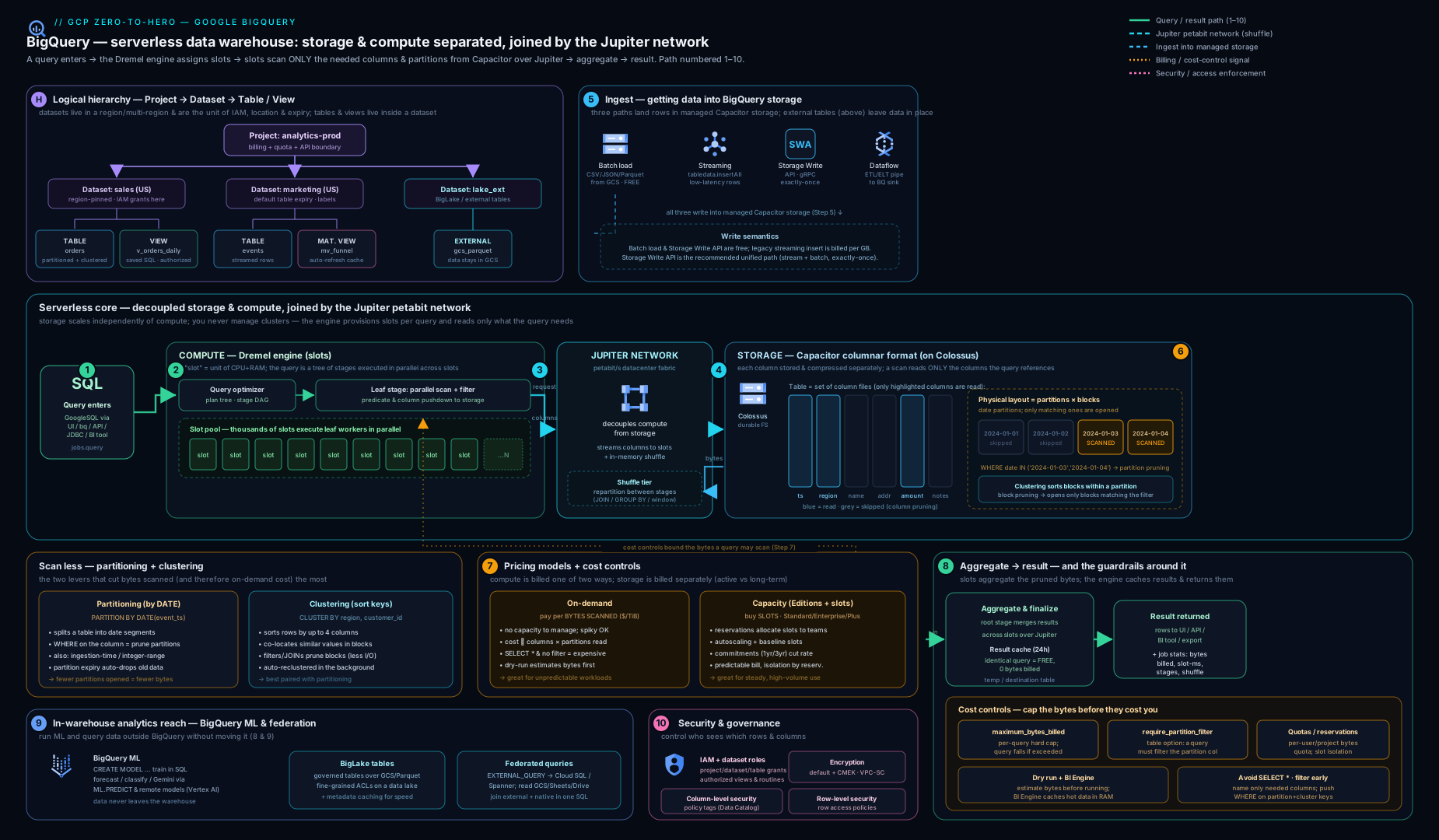
The diagram traces a query from the project and dataset boundary, through a partitioned-and-clustered native table in Capacitor columnar storage on Colossus, into the Dremel slot-based execution engine, and shows where each pricing model (on-demand bytes vs capacity slots) and each access-control layer applies.
Going deeper
The serverless facade hides a lot of machinery. Knowing what actually happens when you press Run turns “why is this slow/expensive?” from guesswork into diagnosis — and it is exactly the depth the Professional Data Engineer exam and a serious architecture interview probe.
The query lifecycle, end to end
BigQuery is really four Google systems wired together over a very fast network:
- Storage lives in Colossus. Your table’s Capacitor files sit in Colossus, Google’s cluster-level distributed file system (the successor to GFS). Colossus handles replication, durability, and the physical blocks; BigQuery never “attaches a disk” — it reads Capacitor blocks from Colossus over the network. This is the physical reason storage and compute are decoupled: the bytes are in Colossus, the CPUs are in Borg, and they meet over the wire.
- Compute runs on Borg as Dremel. The execution engine is Dremel, scheduled as jobs on Borg (Google’s cluster manager, the ancestor of Kubernetes). Dremel turns your SQL into a tree of execution stages and dispatches the work to slots.
- The Jupiter network is the secret sauce. Because storage and compute are on separate machines, every query reads its data over the network. Google’s Jupiter fabric delivers roughly petabit-per-second bisection bandwidth within a datacenter, which is what makes “read a terabyte from storage into compute on demand” fast enough to feel serverless. On most warehouses this separation would be the bottleneck; on Jupiter it is the design.
- Stages exchange data through an in-memory shuffle. Between stages — for example a
GROUP BYthat must gather every row with the same key onto the same worker — Dremel writes intermediate data to a distributed in-memory shuffle tier, spilling to disk only under pressure. AJOINorGROUP BYon a high-cardinality, skewed key is expensive precisely because it shuffles a lot of bytes.
Dremel’s execution tree and slots
Dremel models a query as a multi-level serving tree. Leaf stages (“leaves”) read data from Colossus and do the first pass (filters, partial aggregates); intermediate stages (“mixers”) combine partial results; the root returns the answer. Each stage is split into units of work run by slots in parallel — a slot is one worker picking up one unit at a time.
- A query’s
total_slot_ms(visible inINFORMATION_SCHEMA.JOBS) is the sum of milliseconds all slots spent on it. Average slots used =total_slot_ms / elapsed_ms. If that number sits pinned at your reservation size whileelapsed_msis high, you are slot-bound (allocate more or optimise). If bytes scanned is high but slots sit idle, you are I/O-bound (fix the layout). - On-demand queries draw from a large shared pool with fair scheduling across your project; a heavy query does not permanently starve a light one, but they do contend. Capacity reservations give a workload its own guaranteed slots so BI dashboards don’t queue behind an ETL monster.
- Queuing: each project/reservation has a limit on concurrently running queries; excess queries queue (you’ll see
PENDINGand a non-trivial wait in the job stats) rather than failing outright. Long queue times are a capacity signal, not a bug.
Capacitor and record shredding
Capacitor is not “CSV split by column.” It analyses the data and picks per-column encodings (dictionary, run-length, delta), and it may reorder rows within a block to lengthen runs and improve compression (this is invisible to you — row order in a BigQuery table is never guaranteed unless you ORDER BY). This is why the same logical data can shrink dramatically once loaded, and why physical (compressed) storage billing can be a big win for repetitive data.
Nested data uses the classic Dremel trick of record shredding: a REPEATED RECORD is flattened into columns plus definition and repetition levels that record where each value sits in the nesting, so BigQuery can reconstruct the structure without storing whole rows. The practical upshot: querying one field of a deeply nested struct still reads only that field’s column — nesting does not cost you the whole record, which is why denormalising with nested/repeated fields is idiomatic rather than wasteful.
Reservations, assignments, and autoscaling mechanics
Capacity is a three-level hierarchy: you buy capacity (an edition, optionally with a commitment) in an administration project, carve it into reservations, and attach assignments that map an organisation, folder, or project — and a job type (QUERY, PIPELINE, ML_EXTERNAL, BACKGROUND) — to a reservation.
- Autoscaling adds slots in increments of 100, scales up within seconds when demand appears, and scales back after the workload subsides (you are billed per second for scaled slots while allocated, with a short minimum). A reservation with baseline 0 + autoscale max N is the “pay only when jobs run” pattern; a non-zero baseline (ideally on a commitment) covers your steady floor at a discount.
- Idle slot sharing: within an edition, reservations in the same admin project can share each other’s idle baseline slots (toggle
ignore_idle_slots), so a quiet BI reservation lends capacity to a busy ETL one — free utilisation you leave on the table if you disable it. - Flat-rate is legacy. If you read older docs mentioning “flat-rate slots” and “flex slots,” that model is superseded by Editions; new commitments are per-edition. Map old→new: flat-rate annual → Enterprise 1-year commitment; flex slots → PAYG (pay-as-you-go) slots with autoscaling.
Storage billing: logical vs physical, and the hidden bytes
You choose the storage billing model per dataset, and it changes what you pay for:
| Logical (uncompressed) billing | Physical (compressed) billing | |
|---|---|---|
| Billed bytes | Uncompressed size of active + long-term data | Compressed size of active + long-term data plus time-travel and fail-safe bytes |
| Rate | Lower per-GB | ~2× higher per-GB |
| Wins when | Data compresses poorly, or you keep long time-travel / churn heavily | Data compresses well (typical) and you don’t rewrite constantly |
The trap: physical billing also bills your time-travel and fail-safe storage, which logical billing does not. For a table you rewrite constantly (heavy DML, so lots of time-travel bytes), physical can surprise you. Check the break-even with INFORMATION_SCHEMA.TABLE_STORAGE (it exposes total_logical_bytes and total_physical_bytes) before switching, and note that switching back to logical is rate-limited — measure first.
Reading the query plan for real diagnosis
The JOBS view carries per-stage timing, and the console’s Execution details tab renders it. Learn to read four numbers per stage:
- Wait ms — time slots spent waiting for a slot (high ⇒ slot-bound / contention).
- Read ms + bytes shuffled — I/O and shuffle volume (a high shuffle ⇒ a skewed or expensive join/aggregation).
- Compute ms — actual CPU (high ⇒ heavy expressions or UDFs).
- Write ms — writing results / shuffle out.
A classic pathology is data skew: one key holds most of the rows, so one slot does most of the work while the rest idle — you’ll see a large gap between the avg and max records processed for a stage. Fixes: filter earlier, pre-aggregate, or salt the hot key.
The 10,000-partition limit and its escape hatches
Because a table caps at ~10,000 partitions, some layouts need a rethink:
- Don’t partition by a high-cardinality key (e.g.
user_id) — you’ll blow the limit and create tiny, metadata-heavy partitions. Cluster by it instead; clustering has no such cap and gives pseudo-“partition” pruning on up to four columns. - Date-sharded tables (
events_20260615,events_20260616, …) are an anti-pattern carried over from legacy BigQuery. A wildcard query (events_*) works, but the per-table metadata overhead is worse than a single partitioned table. Migrate date-sharded tables to one ingestion-time or column partitioned table. - Need finer time buckets than daily but longer retention than hourly allows? Partition daily and cluster by an hour/finer column — you get daily pruning plus best-effort intra-day pruning without hitting the partition cap.
Edge cases and version caveats
- Streaming buffer vs time travel: rows freshly written via the Storage Write API (or legacy
insertAll) land in a streaming buffer and briefly sit in__UNPARTITIONED__; they are queryable within seconds but may not immediately benefit from partition pruning or be covered by a table copy/export until colocated. Design dashboards for eventual placement. - DML concurrency: BigQuery is a warehouse, not an OLTP store. Mutating DML (
UPDATE/DELETE/MERGE) on the same table runs with limited concurrency and queues; high-frequency row-level mutation is an anti-pattern — batch it, or stream with the Storage Write API andMERGEin windows. - Materialised-view rewrite is conditional: the optimiser only auto-substitutes an MV when the query’s grain matches and the MV is within its
max_staleness; joins and non-additive aggregates (e.g.COUNT(DISTINCT)without theAPPROXform) may not be supported. Confirm from the query plan that the MV was actually used. - BI Engine now accelerates SQL, not just dashboards: the BI Engine SQL interface transparently caches hot data for any query (not only Looker Studio), so a reservation of a few GB can slash billed bytes on repeated dashboard-style scans.
- GoogleSQL is the default; legacy SQL is frozen. Everything here is GoogleSQL (formerly “standard SQL”). Legacy SQL still runs for old jobs but gets no new features — always keep
--use_legacy_sql=false(the default in the console).
Hands-on lab
This lab uses the public dataset and your free tier (1 TiB scanned/month + 10 GB storage free) — total cost effectively $0 if you stay within the free allowance. You need a project with billing enabled and the Cloud SDK (bq).
1. Create a dataset (EU multi-region):
bq --location=EU mk --dataset --description "BigQuery lab" "$(gcloud config get-value project):bqlab"
2. Dry-run a query against a public dataset to see bytes-to-scan (no charge):
bq query --use_legacy_sql=false --dry_run \
  'SELECT name, SUM(number) AS births
   FROM `bigquery-public-data.usa_names.usa_1910_2013`
   WHERE state = "CA" GROUP BY name ORDER BY births DESC LIMIT 10'
Expected: a line like “Query successfully validated. … will process N bytes” — note N is small because only two columns are read (columnar storage in action).
3. Materialise a small, partitioned + clustered table into your dataset:
bq query --use_legacy_sql=false \
'CREATE TABLE `bqlab.names_by_state`
 PARTITION BY RANGE_BUCKET(year, GENERATE_ARRAY(1910, 2014, 10))
 CLUSTER BY state, name AS
 SELECT state, name, year, number
 FROM `bigquery-public-data.usa_names.usa_1910_2013`'
4. Confirm pruning works — run with and without a cluster-key filter and compare bytes billed via --dry_run:
bq query --use_legacy_sql=false --dry_run \
  'SELECT SUM(number) FROM `bqlab.names_by_state` WHERE state = "NY"'
5. Set a cost guardrail and prove it fails a runaway query:
bq query --use_legacy_sql=false --maximum_bytes_billed=1000000 \
  'SELECT * FROM `bigquery-public-data.usa_names.usa_1910_2013`'
# Expect: an error — "Query exceeded limit for bytes billed" — the guardrail worked.
6. Inspect your spend with INFORMATION_SCHEMA:
bq query --use_legacy_sql=false \
 'SELECT job_id, total_bytes_billed
  FROM `region-EU`.INFORMATION_SCHEMA.JOBS_BY_PROJECT
  WHERE job_type="QUERY" ORDER BY creation_time DESC LIMIT 5'
Validation: the dry run in step 2 reports a small byte count; the table in step 3 is created; step 5 fails by design; step 6 lists your recent jobs with bytes billed.
Cleanup: delete the whole dataset (and its tables) to leave nothing behind.
bq rm -r -f -d "$(gcloud config get-value project):bqlab"
Cost note: storage of the small lab table is a few KB (free tier covers 10 GB), and every query above was either a free dry run or scanned a few MB against your 1 TiB free monthly allowance — so the lab is effectively free. The only way to incur cost here is to drop the --dry_run/guardrails and SELECT * the full public table repeatedly.
Practice challenges
Work these in order — they escalate from beginner to advanced. Try each before opening the solution. No live runtime is assumed; every command is real and schema-correct, so you can run them in your own project. Replace my_project with your project ID.
Challenge 1 (beginner) — Create a dataset and a typed table. Create a dataset sales in the US multi-region with a 30-day default table expiration, then an empty table orders(order_id STRING, customer_id STRING, amount NUMERIC, ordered_at TIMESTAMP).
<details> <summary>Solution</summary>
bq --location=US mk --dataset --default_table_expiration 2592000 my_project:sales

bq mk --table my_project:sales.orders \
  order_id:STRING,customer_id:STRING,amount:NUMERIC,ordered_at:TIMESTAMP
Why: the dataset’s location and default expiration are set once at creation and inherited by every new table — you can’t change the location later. </details>
Challenge 2 (beginner) — Prove SELECT * is the cardinal sin, for free. Without spending anything, find how many bytes SELECT * versus SELECT name would scan on bigquery-public-data.usa_names.usa_1910_2013.
<details> <summary>Solution</summary>
bq query --use_legacy_sql=false --dry_run \
  'SELECT * FROM `bigquery-public-data.usa_names.usa_1910_2013`'

bq query --use_legacy_sql=false --dry_run \
  'SELECT name FROM `bigquery-public-data.usa_names.usa_1910_2013`'
Why: --dry_run is free and shows bytes-to-scan before you run — the single-column query reads a fraction of the bytes, because columnar storage bills you only for the columns you name.
</details>
Challenge 3 (intermediate) — Partition, cluster, and forbid unfiltered scans. Turn sales.orders into a table partitioned by day and clustered by customer that refuses queries without a partition filter and drops partitions after a year, then write a query that prunes to one day.
<details> <summary>Solution</summary>
CREATE TABLE `my_project.sales.orders_pc`
PARTITION BY DATE(ordered_at)
CLUSTER BY customer_id
OPTIONS (require_partition_filter = TRUE, partition_expiration_days = 365) AS
SELECT * FROM `my_project.sales.orders`;

SELECT SUM(amount)
FROM `my_project.sales.orders_pc`
WHERE DATE(ordered_at) = '2026-06-15'   -- required partition filter
  AND customer_id = 'C123';             -- leading cluster key
Why: partitioning gives exact pruning to one day (visible in a dry run), clustering gives best-effort pruning within the day by customer, and require_partition_filter blocks the accidental full scan.
</details>
Challenge 4 (intermediate) — Trip the cost guardrail. Make a query fail before it scans by capping bytes billed at 1 MB against the public names table, then name the two guardrails you’d set as org defaults.
<details> <summary>Solution</summary>
bq query --use_legacy_sql=false --maximum_bytes_billed=1000000 \
  'SELECT * FROM `bigquery-public-data.usa_names.usa_1910_2013`'
# -> Error: Query exceeded limit for bytes billed: 1000000. ...
Defaults: --maximum_bytes_billed (baked into your query template / org policy) and require_partition_filter = TRUE on every large table.
Why: maximum_bytes_billed makes an over-budget query fail instead of run, turning a runaway cost into a safe error before any bytes are scanned.
</details>
Challenge 5 (advanced) — Diagnose slot-bound vs I/O-bound, then fix it. An Enterprise reservation has 500 slots. A daily ETL job takes 40 minutes; its total_slot_ms / elapsed_ms sits at ~500 the whole time, and jobs show long PENDING waits. Is it slot-bound or I/O-bound, and what bq command gives it headroom to 1,500 slots?
<details> <summary>Solution</summary>
Diagnosis: average slots used equals the reservation ceiling (500) and queries queue (PENDING) ⇒ slot-bound — compute, not bytes, is the bottleneck.
bq update --reservation --location=US \
  --slots=500 --autoscale_max_slots=1500 \
  admin_project:US.etl_reservation
Why: when average slot usage is pinned at the reservation size and jobs wait in the queue, adding autoscaling headroom (or isolating ad-hoc queries in their own reservation) is the fix — optimising bytes scanned would not help. </details>
Challenge 6 (advanced) — Decide physical vs logical storage billing with data. For dataset sales, query INFORMATION_SCHEMA.TABLE_STORAGE to compare logical and physical bytes per table, and state the switch rule.
<details> <summary>Solution</summary>
SELECT table_name,
       ROUND(total_logical_bytes  / POW(1024,3), 2) AS logical_gib,
       ROUND(total_physical_bytes / POW(1024,3), 2) AS physical_gib,
       ROUND(total_logical_bytes / NULLIF(total_physical_bytes,0), 2) AS compression_x
FROM `my_project.sales.INFORMATION_SCHEMA.TABLE_STORAGE`
ORDER BY logical_gib DESC;
Rule: physical billing costs roughly 2× per GB but on the compressed bytes (and it also bills time-travel + fail-safe), so switch when compression_x is well above ~2 and the table isn’t churned by heavy DML.
Why: it’s a break-even — a higher rate on far fewer bytes beats a lower rate on many bytes, unless heavy rewrites inflate the time-travel storage that physical billing (but not logical) charges for. </details>
Common beginner mistakes
These are misconceptions, not error messages — the wrong mental model that produces the wrong instinct. (For symptom → cause → fix, see the troubleshooting table below.)
- “BigQuery is a database, so I’ll do point lookups and per-row updates.” It’s an OLAP columnar warehouse, not an OLTP store: a single-row lookup still scans a partition/block, and per-row DML is throttled. Right model — use BigQuery for aggregations over large scans; keep transactional lookups/updates on Cloud SQL, Spanner, or Bigtable, and batch your mutations.
- “
LIMITmakes my query cheap.” On-demand billing is by bytes scanned, andLIMITis applied after the scan —SELECT * FROM huge LIMIT 10still scans the whole table. Right model — cut cost by naming columns and adding partition/cluster filters;LIMITbounds the result, never the scan. - “More partitions means faster queries.” Over-partitioning (hourly, or by a high-cardinality key) creates tiny partitions, heavy metadata, and blows the ~10,000-partition cap. Right model — partition by the range you filter on (usually day) and cluster the high-cardinality columns.
- “Clustering isn’t working — the dry run shows the same bytes.” Cluster pruning is best-effort and invisible to the planner, so a dry run always shows the full partition size. Right model — check the actual
total_bytes_billedinINFORMATION_SCHEMA.JOBS, and make sure you filter the leading clustered column. - “I have
dataViewer, so I can run queries.” Viewing data and running a job are separate permissions. Right model — you also needroles/bigquery.jobUser(orbigquery.user) in the billing project; both are required to execute a query. - “Capacity (editions/flat-rate) is always cheaper than on-demand.” Capacity only wins above a break-even utilisation; an idle 100-slot baseline can cost more than paying per byte for spiky work. Right model — measure
total_bytes_billedagainst slot-hours, and consider hybrid (on-demand for ad-hoc, a committed reservation for steady ETL). - “A view will make my repeated query cheaper.” A logical view is just saved SQL — it re-runs and bills the full scan on every call. Right model — a materialised view (or BI Engine) is what precomputes/caches; a plain view saves typing, not bytes.
- “Streamed rows are immediately in long-term storage and immediately updatable.” Freshly streamed rows sit in a buffer, briefly unpruned and not immediately mutable. Right model — expect eventual placement; prefer batch loads where you can (they’re free and immediately partitioned).
Common mistakes & troubleshooting
| Symptom | Likely cause | Fix |
|---|---|---|
| Query scans the whole table despite a date filter | Partition column wrapped in a function, or no partitioning at all | Filter directly on the partition column; verify with --dry_run; add partitioning |
| Surprise large bill on on-demand | SELECT *, no partition/cluster pruning, no maximum_bytes_billed |
Name columns; partition + cluster; set max-bytes-billed and require_partition_filter |
| “User does not have permission to query” but they can see the table | Has dataViewer but no jobUser/user in the project |
Grant roles/bigquery.jobUser (running a query needs both data and job permissions) |
| Cannot join two tables — “not found in location” | Datasets in different locations (e.g. US vs EU) |
Copy one dataset to the other location; you cannot join across locations |
| Streaming rows not visible / can’t be updated immediately | Rows in the streaming buffer (__UNPARTITIONED__) |
Wait for colocation; design for eventual visibility; prefer Storage Write API |
| Clustering “isn’t helping” (dry run shows full size) | Cluster pruning is best-effort and invisible to dry run; or filtering a non-leading cluster column | Check actual bytes billed in JOBS; filter the leading clustered column(s) |
CREATE TABLE with CMEK fails |
KMS key in wrong region, or BigQuery service agent lacks key access | Co-locate key with dataset; grant roles/cloudkms.cryptoKeyEncrypterDecrypter to the BQ service account |
| Materialised view not used by the optimiser | Query shape outside MV’s supported rewrite, or MV stale beyond max staleness | Align the query/MV; check refresh; consider a scheduled query instead |
Best practices
- Partition by time, cluster by your hot equality columns, and set
require_partition_filter = TRUEon every large table. - Never
SELECT *in production — name the columns you need; columnar storage means columns are the bill. - Set
maximum_bytes_billedas a default (org policy / query template) so no single query can run away. - Choose the pricing model deliberately: on-demand for spiky/low volume, capacity (with commitments) for steady high volume; consider a hybrid split.
- Use the Storage Write API for real-time ingest; batch loads are free — prefer them for bulk.
- Let long-term storage and partition expiry shrink storage automatically; consider physical storage billing for well-compressing data.
- Use materialised views / BI Engine for repeated aggregations and dashboards.
- Label datasets and jobs and mine
INFORMATION_SCHEMA.JOBSfor FinOps; alert on the top spenders. - Co-locate datasets that need to be joined; plan locations up front.
Security notes
- Grant the least privilege:
dataViewer+jobUser, scoped to a dataset, beats project-wideeditor. - Apply column-level security (policy tags) and dynamic data masking to PII columns, and row-level access policies for tenant/region isolation — both Enterprise-edition features.
- Prefer authorised views/datasets/routines to expose curated data without granting access to base tables.
- Set CMEK where compliance requires you to hold the key; rotate keys in Cloud KMS.
- Wrap the warehouse in VPC Service Controls to prevent exfiltration across the perimeter, and route access privately.
- Keep time travel at 7 days for recoverability; remember the additional 7-day fail-safe via Support.
- Audit access via Cloud Audit Logs (admin-activity is on by default; enable data-access logs for read/query visibility) and review
JOBSfor anomalous scans.
Cost & sizing
The levers that move the BigQuery bill, in order of impact:
- Bytes scanned (on-demand) — partition + cluster pruning, naming columns, and the query cache cut this directly.
- Slot-hours (capacity) — your reservation baseline + autoscale max set the ceiling; commitments discount it; isolate workloads to avoid over-provisioning one big pool.
- Storage — active vs long-term (automatic 50% off after 90 days), logical vs physical (compressed) billing, and partition expiry.
- Streaming — legacy
insertAllis pricier per-GB than the Storage Write API; batch loads are free. - Materialised views / BI Engine — spend a little on precompute/cache to save a lot on repeated scans.
Sizing capacity: start with a small baseline (e.g. 100 slots) plus autoscaling, watch INFORMATION_SCHEMA.JOBS for slot contention and queue time, and only then buy a commitment for the steady baseline you actually use. For the applied tuning workflow end to end, see Taming BigQuery Cost and Performance.
Interview & exam questions
- Why is
SELECT *discouraged in BigQuery, beyond style? Because storage is columnar (Capacitor) and on-demand billing is by bytes read —*reads every column, multiplying the bytes scanned (and the cost) versus naming only the columns you need. - Partitioning vs clustering — when each, and how do their cost estimates differ? Partition (one column, usually time) for coarse, exact pruning known before you run (dry run shows it); cluster (up to four high-cardinality columns) for fine-grained, best-effort pruning whose savings appear only in actual bytes billed. Use both together.
- On-demand vs capacity (slots/editions) — how do you choose? On-demand (bytes scanned, first 1 TiB/month free) for spiky/low/unpredictable usage; capacity (buy slots per edition, optionally committed) for steady high volume, predictable bills, and workload isolation. Hybrid is common.
- What is a slot? A unit of BigQuery compute (vCPU + memory) that executes a stage of a query in parallel; queries are billed by bytes (on-demand) or constrained by your purchased slots (capacity).
- Native vs external vs BigLake tables? Native = data in BigQuery storage, full features. External = data read in place from GCS/Sheets/etc. each query, limited governance. BigLake = external open-format files accessed via a connection, giving near-native performance and row/column security (the governed lakehouse).
- A user can see tables but every query fails with a permission error — why? They have data access (
dataViewer) but notbigquery.jobUser(oruser); running a query needs both data and job permissions. - How do you stop one query from costing a fortune?
maximum_bytes_billed(fails over the cap),require_partition_filter, custom per-user/project daily quotas, dry-run gating in CI, and on capacity, the reservation ceiling. - What is the Storage Write API and why prefer it over
insertAll? A high-throughput gRPC streaming ingest API with exactly-once (offsets), at-least-once, and pending/buffered streams; it is cheaper and the modern default for real-time ingest. - How does BigQuery do machine learning without moving data? BigQuery ML —
CREATE MODEL/ML.PREDICTin SQL — trains and scores in the warehouse, supports regression/clustering/forecasting/boosted-trees/DNN and remote Vertex AI / generative models. - Explain the three layers of access control. Dataset/table IAM (coarse), column-level security via policy tags + masking, and row-level access policies (
FILTER USING); authorised views expose curated data without base-table access. - Why can’t you join a
USdataset with anEUdataset? Datasets are physically pinned to a location that is immutable; a query runs in one location, so you must copy data to a common location first. - What is a materialised view and how does it save money “for free”? A precomputed, incrementally refreshed query result; the optimiser transparently rewrites base-table queries to read the MV (smart tuning), so existing queries scan far fewer bytes without being changed.
- How do you tell a slow query is slot-bound rather than scanning too much? Compare average slots used (
total_slot_ms / elapsed_ms) against your reservation and look forPENDINGqueue time inJOBS: pinned at the ceiling with queueing ⇒ slot-bound (add capacity/isolate); high bytes with idle slots ⇒ I/O-bound (fix the layout). - What actually decouples storage and compute physically? Data lives as Capacitor files in Colossus; compute runs as Dremel on Borg; they meet over the Jupiter petabit network, with an in-memory shuffle between stages — so neither scales the other.
Quick check
- On the on-demand model, what determines the cost of a query?
- How many columns can you cluster by, and what kind of column suits clustering?
- Which permission, in addition to data access, is required to run a query?
- Which table type gives row/column security over open-format files in a bucket?
- What does
require_partition_filter = TRUEdo?
Answers
- The number of bytes scanned/billed (driven by the columns referenced and partition/cluster pruning); first 1 TiB/month is free.
- Up to four columns, in priority order; high-cardinality columns you filter/aggregate by equality.
roles/bigquery.jobUser(orbigquery.user) — you need both job and data permissions.- BigLake tables (external files accessed via a connection, with fine-grained security).
- Forces every query against the table to include a filter on the partition column, preventing accidental full-table scans.
Exercise
Take a wide event table you control (or bigquery-public-data.google_analytics_sample.ga_sessions_*). (1) Create a native copy partitioned by date and clustered by two high-cardinality columns, with require_partition_filter on and a 90-day partition expiry. (2) Write a query that prunes to one day and uses the cluster keys; confirm bytes-to-scan with --dry_run and compare against the unpartitioned original. (3) Add --maximum_bytes_billed and deliberately trip it. (4) Build a materialised view of a daily aggregate and confirm via INFORMATION_SCHEMA.JOBS that querying the base table now bills fewer bytes. (5) Apply a row access policy restricting one group to a subset of rows and verify the filter applies. Write up which lever saved the most bytes and why.
Certification mapping
- Associate Cloud Engineer (ACE): create datasets/tables, load data, run queries, understand on-demand vs flat-rate/capacity pricing at a high level, basic IAM roles (
dataViewer/jobUser). - Professional Data Engineer (PDE): the deep end — designing for partitioning/clustering and cost; choosing on-demand vs capacity/editions and sizing reservations; native vs external vs BigLake; batch vs Storage Write API ingest; BigQuery ML model selection; column/row security, CMEK, authorised views; materialised views and BI Engine; federation. Expect scenario questions trading off cost, latency, freshness, and governance.
Glossary
- Slot — a unit of BigQuery compute (vCPU + memory) that runs query stages in parallel.
- Slot-ms — the sum of milliseconds all slots spent on a job;
total_slot_ms / elapsed_msis the average slots a query used (your slot-bound vs I/O-bound signal). - Dataset — a location-pinned container of tables/views; the primary IAM and defaults boundary.
- Dremel — BigQuery’s distributed query engine; models a query as a multi-level serving tree of stages run by slots.
- Colossus — Google’s cluster-level distributed file system where Capacitor files physically live (the successor to GFS).
- Borg — Google’s cluster manager (the ancestor of Kubernetes) on which Dremel jobs are scheduled.
- Jupiter — Google’s datacenter network fabric (~petabit/s) that lets compute read storage fast enough for the storage/compute split to feel serverless.
- Shuffle — the in-memory (disk-spilling) tier where Dremel exchanges intermediate data between stages, e.g. for joins and
GROUP BY. - Capacitor — BigQuery’s compressed columnar on-disk storage format (per-column encodings; may reorder rows for compression).
- Record shredding — the Dremel technique of flattening nested/repeated fields into columns plus definition/repetition levels, so nesting is free to query.
- Partitioning — physically splitting a table by time/ingestion-time/integer range for exact pruning (one column).
- Partition pruning — skipping whole partitions a query’s partition filter doesn’t touch (exact, known at dry-run time).
- Clustering — sorting data within partitions by up to four columns for best-effort block pruning.
- Block pruning — skipping sorted blocks within a partition using the leading cluster column(s); best-effort, visible only in actual bytes billed.
- On-demand pricing — pay per byte scanned (first 1 TiB/month free).
- Capacity pricing / editions — buy slots (Standard/Enterprise/Enterprise Plus) via reservations, billed per slot-hour.
- Reservation — an allocation of slots (baseline + optional autoscale) assigned to projects/jobs.
- Autoscaling — adding/removing slots (in increments of 100) to a reservation as demand rises and falls, billed per second.
- Assignment — the mapping of an org/folder/project and a job type (
QUERY/PIPELINE/…) to a reservation. - Active vs long-term storage — data modified in the last 90 days (active) vs untouched for 90 days (automatically ~50% cheaper).
- Logical vs physical storage billing — bill on uncompressed bytes (logical) or compressed bytes plus time-travel/fail-safe (physical); a per-dataset choice.
- External table — a table whose data stays in GCS/Sheets/etc., read at query time.
- BigLake table — an external open-format table accessed via a connection, with native-grade performance and fine-grained security.
- Storage Write API — the modern high-throughput gRPC streaming ingestion API (exactly-once capable).
- Query results cache — free, automatic reuse of results for identical deterministic queries over unchanged data.
- Federation /
EXTERNAL_QUERY— pushing a query to Cloud SQL/AlloyDB/Spanner via a connection and joining live results with warehouse data. - BigQuery ML (BQML) — training and scoring ML models in SQL inside BigQuery, including remote Vertex AI/LLM models.
- Materialised view — an incrementally maintained, precomputed query result the optimiser can substitute automatically.
- BI Engine — an in-memory analysis layer (allocated in GB) that caches hot data to accelerate dashboards and repeated SQL, cutting billed bytes.
- Policy tag — a Data Catalog taxonomy tag applied to a column for column-level security (with optional dynamic data masking).
- Row access policy — a
FILTER USINGrule restricting which rows a principal can see (row-level security). - Authorised view — a view granted access to source tables so users query it without holding access to the base data.
- CMEK — customer-managed encryption key (Cloud KMS) controlling encryption at rest.
- Time travel / fail-safe — the 2–7-day window to query/restore past data, plus a 7-day Support-recoverable buffer.
- INFORMATION_SCHEMA — system views exposing metadata and job/cost telemetry.
Next steps
- Taming BigQuery Cost and Performance: Partitioning, Clustering, and Reservations — the applied optimisation playbook: take the levers from this lesson and tune a real, expensive warehouse down to a predictable bill.
- BigQuery Fine-Grained Security: Column-Level, Row-Level, and Data Masking — the full defence-in-depth treatment of policy tags, masking, row access policies, and authorised views.
- Google Cloud Pub/Sub, In Depth: Topics, Subscriptions, Delivery & Ordering (
gcp-pubsub-deep-dive-topics-subscriptions-delivery) — the next lesson: the messaging backbone that streams events into BigQuery via Pub/Sub-to-BigQuery subscriptions and the Storage Write API. </content> </invoke>