Sooner or later every workload on Google Cloud needs a front door. One virtual machine is a single point of failure; the moment you run two, something has to spread traffic across them, notice when one dies, and keep users from ever seeing the failure. That something is a load balancer. On most clouds a load balancer is a single box you put in a region. On Google Cloud it is something stranger and more powerful: for the flagship product, the load balancer is the network itself — a single anycast IP address announced from over a hundred Google edge locations worldwide, with no instance to size, patch, or scale.
That power comes with a price: choice. Google Cloud does not have one load balancer, it has a family, and picking the wrong member is the single most common networking mistake new architects make. Reach for a global product when you only serve one region and you over-pay and over-engineer; reach for a regional one when you have a global audience and you lose the anycast front door that makes GCP special; confuse a proxy load balancer with a passthrough one and you spend an afternoon wondering why the client IP your application logs is wrong.
This lesson is the map. By the end you will be able to look at any workload — a global web app, an internal microservice, a TCP game server, a Cloud Run container — and name the exact load balancer it needs and why. We will walk the whole family with a decision table, then take the flagship apart screw by screw: the chain of resources from forwarding rule to backend that every Google Cloud load balancer is built from, the health checks that keep it honest, session affinity, balancing modes, Cloud Armor at the edge, and the serverless network endpoint groups that let a load balancer point at Cloud Run and Cloud Functions. It maps to the Associate Cloud Engineer (ACE) and Professional Cloud Network Engineer (PCNE) exams.
In a nutshell
If you have ever phoned a big company and reached whichever agent happened to be free — without knowing or caring which building they sat in — you already understand a load balancer. It is the single point everyone contacts, quietly handing each caller to a healthy worker behind the scenes and skipping anyone who is off sick. On Google Cloud the flagship version is cleverer still: the “phone number” is one IP address answered from over a hundred cities at once (an anycast address), so a caller in Mumbai and a caller in São Paulo dial the same number yet each reaches the nearest open branch — and if a branch is overwhelmed or dark, the call slides to the next without anyone redialling.
The catch, and the reason this lesson exists, is that Google does not sell one front door. It sells a whole aisle of them, and they are not interchangeable. Some read your web request and route on the URL (Application, Layer 7); some just shovel packets fast and let the backend see the real caller (Network passthrough, Layer 4); some sit in one region, some span the globe; some face the internet, some are private to your VPC. Grab the wrong one and you either over-pay for a global product you did not need, or lose the worldwide front door that makes GCP special, or spend an afternoon puzzling over why every log line shows a Google IP instead of your users.
So the whole lesson turns on two questions you learn to ask on sight: what kind of traffic is this (a web request you want to route and inspect, or raw packets you want delivered fast and untouched?) and where does it live and who reaches it (global or one region; public or private?). Answer those two and the product very nearly picks itself. The rest — the chain of resources every load balancer is built from, health checks, session stickiness, certificates, Cloud CDN and Cloud Armor at the edge — is detail you bolt on after you have chosen. We will build a real one by hand, then go under the hood.
Level: Intermediate · Time: ~45 min · You’ll need: basic VPC / subnet / firewall familiarity, and (for the optional lab) a GCP project with billing enabled.
Learning objectives
By the end of this lesson you can:
- Explain the two axes that define every Google Cloud load balancer — traffic type (Application/L7 vs Network/L4) and deployment scope (global vs regional, external vs internal) — and use them to choose the right one.
- Name and place each member of the family: global and regional external Application LB, internal Application LB, external and internal passthrough Network LB, and the proxy Network LB.
- Distinguish a proxy load balancer from a passthrough one, and explain what that means for the client IP, TLS termination, and protocols.
- Assemble the building blocks every load balancer shares — forwarding rule → target proxy → URL map → backend service → backend (instance group or NEG) — and explain what each layer does.
- Configure health checks, balancing modes and capacity, and session affinity, and reason about their trade-offs.
- Attach Cloud Armor for WAF and DDoS protection, and use a serverless NEG to load-balance Cloud Run, Cloud Functions and App Engine.
Prerequisites & where this fits
You should be comfortable with a virtual private cloud (VPC), subnets and firewall rules — load balancers live inside a VPC and forward to backends in subnets, and a missing firewall rule for health-check probes is the classic reason a brand-new load balancer reports every backend as unhealthy. If those terms are hazy, read Google Cloud VPC, In Depth (gcp-vpc-deep-dive-subnets-routes-firewall-nat) first. A working knowledge of managed instance groups helps but is not required. This lesson sits in the Networking module of the Google Cloud Zero-to-Hero course, after VPC and before Google Kubernetes Engine. It is the conceptual companion to the hands-on build in Engineering the Global External Application Load Balancer on GCP (gcp-global-external-application-load-balancer-deep-dive): this lesson teaches you which load balancer to choose and how the pieces fit; that one walks you through wiring the flagship end to end with every tuning knob.
Core concepts: the two axes that define every load balancer
Before any product names, internalise the two questions that uniquely identify a Google Cloud load balancer. Every member of the family is just a point on this 2×2 (well, 2×3) grid.
Axis 1 — what kind of traffic? (the OSI layer). A load balancer either understands your application protocol or it does not.
- An Application Load Balancer (ALB) operates at Layer 7 (HTTP/HTTPS/HTTP2/gRPC). It terminates the connection, reads the request — host, path, headers, cookies — and makes routing decisions from it. Because it terminates TLS, it can do content-based routing, caching (Cloud CDN), rewriting, and WAF inspection. It is a proxy.
- A Network Load Balancer (NLB) operates at Layer 4 (TCP/UDP and other IP protocols). It does not read your application data. Within the NLB family there are two flavours: a passthrough NLB that routes packets without terminating the connection (the backend sees the original client IP and answers the client directly), and a proxy NLB that terminates the TCP/TLS connection and opens a new one to the backend (used for TCP/SSL offload without L7 routing).
The single most important consequence: a proxy load balancer hides the client IP (the backend sees Google’s IP unless you read the X-Forwarded-For header or enable the PROXY protocol), while a passthrough load balancer preserves it (the backend sees the real client). Architects who log the wrong field and see Google IPs everywhere have invariably forgotten this.
Axis 2 — where does it live and who can reach it? (scope and exposure).
- Global vs regional. A global load balancer has one anycast IP served from Google’s worldwide edge; a user in Mumbai and a user in São Paulo hit the same IP but are served from the nearest healthy backend. A regional load balancer lives in one region and its IP is anchored there. Global products require Premium Network Tier; regional products can run on Standard Tier (cheaper egress, regional reach).
- External vs internal. An external load balancer has a public-facing front end for internet clients. An internal load balancer has a private IP reachable only from inside your VPC (and connected networks) — it is how microservices call each other without traversing the internet.
Two terms you will meet throughout:
- A forwarding rule is the front end — the IP-address-plus-port the load balancer answers on. It is the entry point of the resource chain.
- A backend service is the brain — it groups your backends, owns the health check, and holds the policy (balancing mode, session affinity, timeouts, Cloud CDN, Cloud Armor). Everything interesting is configured here.
One more idea worth fixing early: Google Cloud load balancers are software-defined, not appliances. There is no instance to provision, no throughput SKU to pick for the flagship, and the global ALB scales to millions of queries per second without any pre-warming. You configure a graph of resources and Google’s edge fabric runs it.
The load balancer family: a decision table
Here is the whole family on one page. Read the traffic type and scope columns first; they determine the product, and everything else is detail.
| Load balancer | Layer / proxy | Scope | Exposure | Protocols | Frontend IP | Network Tier | Primary use case |
|---|---|---|---|---|---|---|---|
| Global external Application LB | L7 proxy | Global | External | HTTP, HTTPS, HTTP/2, gRPC | Global anycast | Premium | Internet-facing web apps & APIs with a global audience; Cloud CDN, advanced routing |
| Regional external Application LB | L7 proxy | Regional | External | HTTP, HTTPS, HTTP/2 | Regional | Standard or Premium | Internet-facing web app pinned to one region; data-residency or Standard-Tier cost |
| Internal Application LB | L7 proxy | Regional (or cross-region) | Internal | HTTP, HTTPS, HTTP/2, gRPC | Private (VPC) | n/a | L7 routing between internal microservices |
| External passthrough Network LB | L4 passthrough | Regional | External | TCP, UDP, ESP, ICMP, L3_DEFAULT | Regional | Standard or Premium | Internet-facing non-HTTP (game servers, custom TCP/UDP), source-IP preservation, very low overhead |
| Internal passthrough Network LB | L4 passthrough | Regional | Internal | TCP, UDP, ICMP, L3_DEFAULT | Private (VPC) | n/a | Internal L4 distribution; the only LB usable as a next-hop route; source-IP preserved |
| External proxy Network LB | L4 proxy | Global or regional | External | TCP, SSL (TLS) | Anycast (global) / regional | Premium / Standard | Internet-facing TCP with TLS offload but no L7 routing |
| Internal proxy Network LB | L4 proxy | Regional (or cross-region) | Internal | TCP, SSL | Private (VPC) | n/a | Internal TCP proxying / TLS offload between services |
How to read this in practice — the decision tree in words:
- Is your traffic HTTP/HTTPS/gRPC and do you want path/host routing, TLS termination, caching, or a WAF? Use an Application Load Balancer. Then: internet-facing and global audience → global external ALB; internet-facing but single region (or you need Standard Tier / data residency) → regional external ALB; service-to-service inside the VPC → internal ALB.
- Is it raw TCP/UDP (a game server, a database protocol, SMTP, syslog), or do you need the backend to see the real client IP, or do you need the lowest possible overhead? Use a passthrough Network LB — external for the internet, internal for inside the VPC. The internal passthrough NLB is also special: it is the only load balancer you can name as the next hop in a custom route, which is how you build network virtual appliance (firewall) chains.
- Is it TCP and you want TLS offload or a global anycast TCP front end but you do not need to inspect the application layer? Use a proxy Network LB.
A few clarifying notes that trip people up. The global external ALB is the modern, Envoy-based successor to the legacy “HTTP(S) Load Balancer”; you may still see the old name in documentation. There are two editions of the global external ALB — a global one and a classic one (the latter is the older control plane); new builds should use the global (non-classic) one for the full feature set. The regional Application and proxy LBs and the internal ALB all run on the same open-source Envoy data plane, which is why they share advanced traffic-management features. The passthrough Network LBs use Google’s Maglev data plane, which is why they are connectionless, preserve source IP, and add almost no latency.
The building blocks: from forwarding rule to backend
Every Google Cloud load balancer — whatever its layer or scope — is assembled from the same chain of resources. Learn the chain once and you understand all of them; the only differences are which pieces are global vs regional and whether a URL map exists (L7 only). This is also exactly what an exam will ask you to put in order.
| # | Resource | What it does | Scope | L7 only? |
|---|---|---|---|---|
| 1 | Forwarding rule | The front end: binds an IP address + port + protocol and points at a target proxy (L7/proxy) or backend service (passthrough). This is what clients connect to. | Global or regional | No |
| 2 | Target proxy | Terminates the connection. target-http(s)-proxy for ALB, target-tcp/ssl-proxy for proxy NLB. Holds the SSL certificate and SSL policy for HTTPS/SSL. References the URL map (L7) or backend service (proxy NLB). |
Global or regional | Proxy LBs only |
| 3 | URL map | The router: matches host, path, header and query parameters and sends each request to the right backend service. Also does redirects and header/path rewrites. | Global or regional | Yes (ALB) |
| 4 | Backend service | The brain: groups backends, owns the health check, and holds policy — protocol, balancing mode, session affinity, timeouts, connection draining, Cloud CDN, Cloud Armor, logging. | Global or regional | No |
| 5 | Backend | The actual endpoints behind the service: a managed/unmanaged instance group (MIG), a network endpoint group (NEG) — zonal, serverless, internet, hybrid, or Private Service Connect — or a Cloud Storage bucket (CDN origin). | Zonal/regional | No |
| — | Health check | Probes each backend and removes unhealthy ones from rotation. Attached to the backend service. | Global or regional | No |
Read the chain top to bottom as a request’s journey: a packet hits the forwarding rule (the IP:port), which hands it to the target proxy (which terminates TLS), which consults the URL map (which inspects the path and chooses a route), which points at a backend service (which applies policy and load-balances), which selects a healthy backend endpoint. For a passthrough Network LB the chain is shorter — forwarding rule → backend service → backend — because there is no proxy and no URL map; packets flow straight through.
Here is the chain built in gcloud for a global external Application LB in front of a managed instance group, so the abstractions become concrete. (The companion lesson, gcp-global-external-application-load-balancer-deep-dive, expands every flag below.)
# 5 + health check: a backend MIG already exists as "web-mig" in us-central1.
gcloud compute health-checks create http web-hc \
  --port=8080 --request-path=/healthz \
  --check-interval=5s --timeout=5s \
  --healthy-threshold=2 --unhealthy-threshold=3 \
  --global

# 4: backend service (global) — the brain.
gcloud compute backend-services create web-bes \
  --protocol=HTTP --port-name=http \
  --health-checks=web-hc \
  --global

# attach the MIG as a backend, with a balancing mode (see below).
gcloud compute backend-services add-backend web-bes \
  --instance-group=web-mig \
  --instance-group-region=us-central1 \
  --balancing-mode=UTILIZATION --max-utilization=0.8 \
  --global

# 3: URL map — send everything to web-bes for now.
gcloud compute url-maps create web-map --default-service=web-bes

# 2: target proxy (HTTP here; HTTPS would attach a certificate).
gcloud compute target-http-proxies create web-proxy --url-map=web-map

# 1: forwarding rule — reserve a global anycast IP, then bind :80.
gcloud compute addresses create web-ip --ip-version=IPV4 --global
gcloud compute forwarding-rules create web-fr \
  --address=web-ip --target-http-proxy=web-proxy \
  --ports=80 --global
Notice that --global appears on the health check, backend service, URL map, target proxy, address and forwarding rule. Consistency of scope is everything: mix a regional forwarding rule into this chain and you have silently built a regional ALB — a different product with no anycast. If gcloud complains that a resource “cannot be used” by another, a scope mismatch is the first thing to check.
Health checks: how the load balancer knows what is alive
A load balancer is only as good as its ability to stop sending traffic to a dead backend. That is the health check — a probe Google sends to each endpoint on an interval; pass enough times in a row and the backend is healthy and receives traffic, fail enough times and it is unhealthy and is pulled from rotation until it recovers.
| Setting | What it is | Choices / default | Notes |
|---|---|---|---|
| Protocol | How the probe is made | HTTP, HTTPS, HTTP/2, TCP, SSL, gRPC | Match it to your app. HTTP(S) checks can assert a path and an expected response. |
| Port | Where to probe | A fixed port, or use serving port, or a named port | A dedicated health-check port/path that checks dependencies (DB, cache) gives a truer signal than a static page. |
| Request path | The URL to hit (HTTP[S]) | default / |
Use a real /healthz that returns 200 only when the instance can actually serve. |
| Check interval | Seconds between probes | default 5s | Lower = faster detection, more probe traffic. |
| Timeout | How long to wait for a reply | default 5s | Must be ≤ interval. |
| Healthy threshold | Consecutive passes to mark healthy | default 2 | |
| Unhealthy threshold | Consecutive fails to mark unhealthy | default 2 | Higher avoids flapping on a transient blip. |
Two operational facts cause almost every “all my backends are unhealthy” support ticket:
- You must allow the probe source IPs in your firewall. Health-check probes come from fixed Google ranges, not from your clients. For most modern load balancers (global ALB, proxy LBs, internal LBs) the probes — and the proxied data plane — originate from
130.211.0.0/22and35.191.0.0/16. Add an ingress allow rule for those ranges to your backend port or the load balancer reports everything down even though the app is fine. (The legacy/passthrough NLB health checks also use35.191.0.0/16and209.85.152.0/22/209.85.204.0/22.) - A health check is a load-balancing health check, not the same thing as an MIG autohealing health check. The load-balancing one removes a sick backend from traffic; an autohealing health check on the managed instance group recreates the VM. You usually want both, and you usually want the autohealing one to be more lenient so a brief load-balancer blip does not trigger a full VM rebuild.
There is also a centralised vs distributed distinction for internal/regional Envoy-based load balancers: traditional health checks probe from Google’s central infrastructure, while distributed Envoy health checks probe from the Envoy proxies themselves — relevant at very large scale, but the central model is the default and is correct for most workloads.
Balancing mode and capacity: how traffic is spread
When a backend service has more than one backend, the balancing mode decides how a new request is assigned and, crucially, defines when a backend is considered “full” so traffic spills to the next region (for global LBs) or the next backend.
| Balancing mode | “Full” is measured by | Available on | Typical use |
|---|---|---|---|
| UTILIZATION | Average CPU utilisation of the instance group | Instance-group backends | General compute backends; cap with --max-utilization (e.g. 0.8). |
| RATE | Requests per second, per instance or per group | Instance groups & some NEGs | When you know the QPS a backend can take; cap with --max-rate / --max-rate-per-instance. |
| CONNECTION | Number of concurrent connections | TCP/SSL & passthrough backends | L4 load balancers where connections, not requests, are the unit. |
The companion levers:
--capacity-scaler(0.0–1.0) is a multiplier on the configured capacity, letting you drain a backend gradually (set it toward 0 to bleed traffic away before maintenance) without removing it.--max-utilization/--max-rate*/--max-connections*set the ceiling that, once reached, makes the global load balancer overflow to the next-closest region — this is how a global ALB does graceful regional overflow and failover.- Connection draining (
--connection-draining-timeout) lets in-flight requests finish when a backend is removed or scaled down, instead of being cut off.
For a global external ALB the practical pattern is: backends in two or more regions, each with a balancing mode and a sensible ceiling, so that normal traffic is served from the nearest region and a regional failure (or saturation) automatically overflows to the next — no DNS changes, no manual failover.
Session affinity: pinning a client to a backend
By default a load balancer treats every request independently and may send consecutive requests from the same user to different backends. Session affinity (“sticky sessions”) instead pins a client to the same backend, which matters for applications that keep per-user state in memory. It is configured on the backend service.
| Affinity type | Pins on | Layer | Notes |
|---|---|---|---|
| NONE | nothing (default) | any | Best distribution; use stateless backends + external session store. |
| CLIENT_IP | client IP (and protocol/port variants) | L4 / L7 | Coarse: clients behind one NAT share a backend; breaks if client IP changes. |
| GENERATED_COOKIE | a cookie the LB issues (GCLB) |
L7 only | Most precise for web apps; survives client-IP changes. |
| HEADER_FIELD | a named HTTP header | L7 only | Affinity keyed on, e.g., a tenant header. |
| HTTP_COOKIE | a cookie you name | L7 only | Like generated cookie but you control the name/TTL/path. |
The architectural caveat worth saying out loud: session affinity is a performance optimisation, not a correctness guarantee. Affinity can break when a backend becomes unhealthy, when capacity is exceeded, or when the backend set changes — so a robust design keeps session state in Memorystore or a database and treats stickiness as a nice-to-have, not a load-bearing assumption. Also note affinity and balancing mode can pull against each other: strong affinity can leave some backends hotter than others, undermining even distribution.
Cloud Armor: WAF and DDoS at the edge
For external Application and external proxy Network load balancers you can attach Cloud Armor, Google’s web application firewall and DDoS service, as a security policy on the backend service. Because the global external ALB terminates connections at Google’s edge, Cloud Armor inspects and filters traffic at the edge — before it ever reaches your backends or even your region.
What Cloud Armor gives you:
- Always-on volumetric DDoS protection for L3/L4 attacks against the load balancer’s anycast IP (this baseline is automatic for global external LBs).
- WAF rules including pre-configured rule sets based on the OWASP ModSecurity Core Rule Set (SQL injection, XSS, LFI/RFI, etc.), tunable by sensitivity.
- Custom rules in CEL-based rules language matching on IP/CIDR, geography (country), headers, cookies, paths, and more — to allow, deny (with a status code), throttle, or rate-limit.
- Rate limiting & throttling (e.g. N requests per minute per client) and ban actions for abusive clients.
- Adaptive Protection, which uses machine learning to detect and propose mitigations for L7 DDoS attacks automatically.
- Edge security policies and bot management (reCAPTCHA integration) on the global external ALB.
# A minimal Cloud Armor policy: deny one country, rate-limit the rest, attach it.
gcloud compute security-policies create web-armor --description="edge WAF"

gcloud compute security-policies rules create 1000 \
  --security-policy=web-armor \
  --expression="origin.region_code == 'XX'" \
  --action=deny-403

gcloud compute backend-services update web-bes \
  --security-policy=web-armor --global
The mental model: Cloud Armor attaches to the backend service, like Cloud CDN does, so policy is per-backend, not per-frontend — you can apply a strict WAF to your /admin backend and a looser one to static content. It is only available where there is an edge proxy to enforce it, i.e. external ALBs and external proxy NLBs, not the passthrough NLBs.
Serverless NEGs: load-balancing Cloud Run, Functions and App Engine
A load balancer does not only point at VMs. A network endpoint group (NEG) is a backend that is a set of endpoints rather than an instance group, and one of its most useful forms is the serverless NEG, which points the load balancer at a Cloud Run service, a Cloud Functions function, or an App Engine app. This is the supported way to put a custom domain, Cloud CDN, Cloud Armor, or path-based routing in front of serverless — capabilities the bare *.run.app URL does not give you.
NEG types worth knowing (this is exam fodder):
| NEG type | Endpoints are | Used by | Example |
|---|---|---|---|
Zonal NEG (GCE_VM_IP_PORT) |
IP:port of VMs/containers in a zone | ALB / proxy NLB | Fine-grained backends, GKE container-native LB |
| Serverless NEG | a Cloud Run / Functions / App Engine service | external & internal ALB | Custom domain + Cloud Armor in front of Cloud Run |
Internet NEG (INTERNET_FQDN_PORT / INTERNET_IP_PORT) |
an external FQDN or IP | global external ALB | Front an on-prem or third-party origin behind GCP CDN/Armor |
Hybrid connectivity NEG (NON_GCP_PRIVATE_IP_PORT) |
private IP:port reachable via VPN/Interconnect | ALB | Route to on-prem or another cloud over hybrid links |
| Private Service Connect NEG | a published PSC service | ALB | Reach a Google or partner service via PSC |
# Serverless NEG → Cloud Run service "api", wired into a global external ALB.
gcloud compute network-endpoint-groups create api-neg \
  --region=us-central1 \
  --network-endpoint-type=serverless \
  --cloud-run-service=api

gcloud compute backend-services create api-bes --global   # no health check needed for serverless
gcloud compute backend-services add-backend api-bes \
  --global --network-endpoint-group=api-neg \
  --network-endpoint-group-region=us-central1
# then reference api-bes from the URL map as the route for /api/*
Two gotchas: serverless NEGs do not use health checks (the serverless platform manages availability), and a serverless NEG is regional — to serve a Cloud Run service globally you add a serverless NEG per region to one global backend service. The internet and hybrid NEGs are how the same global front door — with its anycast IP, CDN, and Cloud Armor — can sit in front of workloads that are not even on GCP.
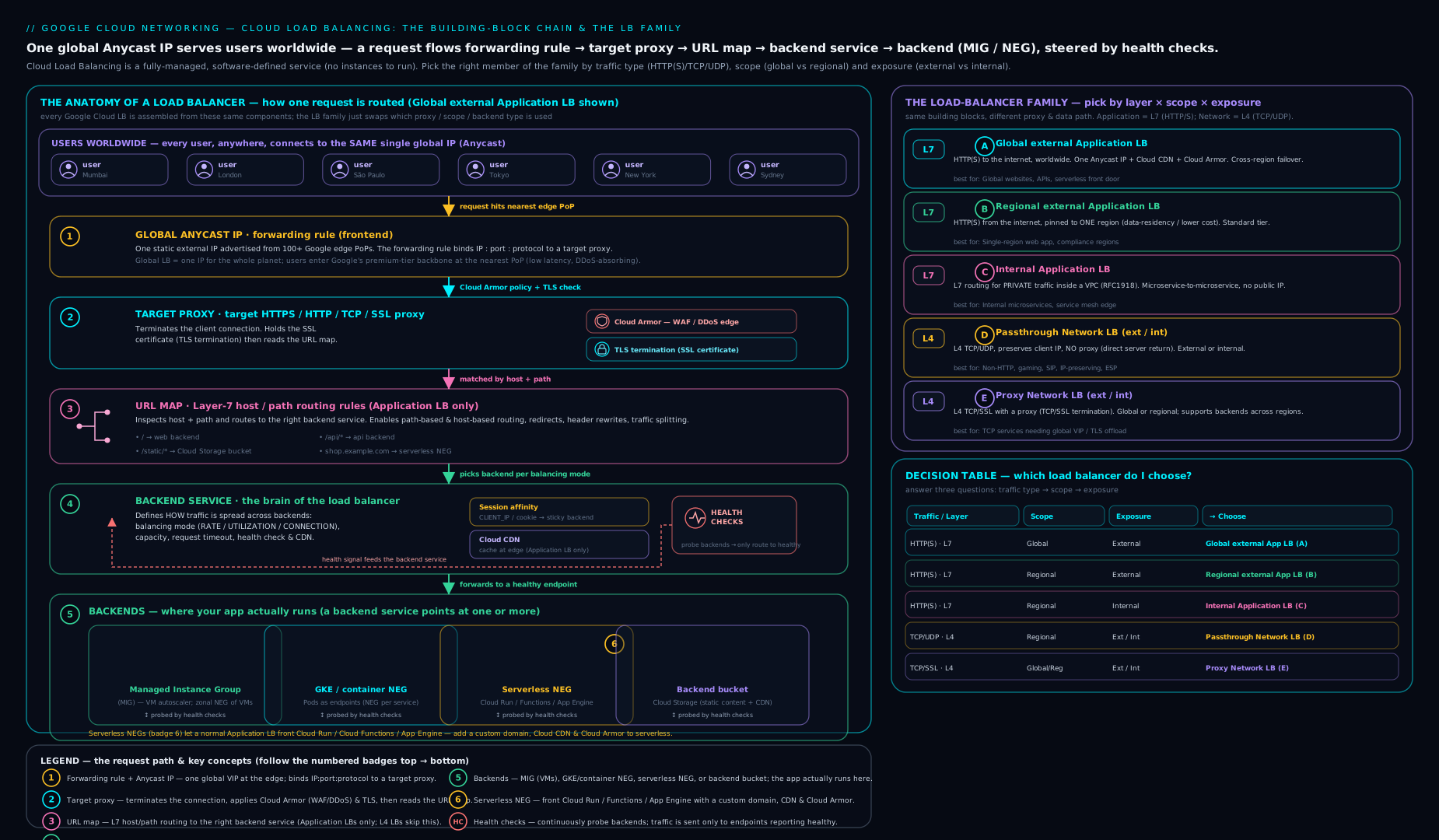
Read the diagram as a request’s life story, left to right: it enters at a forwarding rule (an IP:port), is terminated by a target proxy, routed by the URL map, handed to a backend service that applies health and policy, and finally lands on a backend or NEG — while the axes down the side (Application/L7 vs Network/L4, external vs internal, global vs regional) tell you which member of the family you are looking at and therefore which of those pieces are even present.
Going deeper
You can choose and build any load balancer with what is above. This section is for when you have to reason about production: why the flagship has no instance to size, the single flag that separates the modern load balancer from the legacy one, splitting traffic for a canary, recovering the true client IP, modern certificates and mTLS, how overflow capacity is actually computed, and the quota and cost mechanics that bite at scale.
What actually runs the data plane: GFE, Maglev, Envoy
The three data planes explain almost every behavioural difference in the family.
- Global external ALB → Google Front Ends (GFEs). Your connection is terminated by the GFE fleet — a globally distributed, two-tier proxy layer at the edge of Google’s network. A first-tier GFE absorbs the TCP/TLS connection at the location nearest the user; a second tier does the HTTP handling and forwards the request over Google’s private backbone to your backend’s region. This is why there is nothing to pre-warm and no instance to size: the capacity is Google’s edge, already running. TLS termination, Cloud CDN cache hits, and Cloud Armor enforcement all happen here — often thousands of kilometres from your backend.
- Passthrough NLBs → Maglev. Google’s software network load balancer (the 2016 Maglev paper) uses consistent hashing to map a packet’s 5-tuple to a backend and then forwards the packet unchanged. No connection is terminated, so the backend sees the original client IP and replies straight to the client — direct server return. Consistent hashing means adding or removing a backend reshuffles only a small fraction of flows, so existing connections mostly survive backend churn.
- Regional external ALB, internal ALB, proxy NLBs → Envoy. These run a Google-managed fleet of the open-source Envoy proxy inside your region. Because it is Envoy, they share its rich traffic-management vocabulary (below). And because the proxies run in your VPC and region rather than on the global edge, they need somewhere to live — a proxy-only subnet (next).
The one flag that splits modern from legacy: EXTERNAL_MANAGED vs EXTERNAL
Every load balancer carries a --load-balancing-scheme. It is the most consequential — and most misread — field in the whole subsystem, because it silently decides which product you built.
| Scheme | Data plane | Load balancer it produces |
|---|---|---|
EXTERNAL_MANAGED |
GFE (global) / Envoy (regional) | Modern external Application LB; modern external proxy NLB — full advanced traffic management |
EXTERNAL |
GFE (classic) / Maglev | Classic external Application LB; external passthrough NLB |
INTERNAL_MANAGED |
Envoy | Internal Application LB; internal proxy NLB |
INTERNAL |
Maglev | Internal passthrough NLB |
The “global vs classic” global external ALB you met in the family table is exactly this distinction under the hood: global = EXTERNAL_MANAGED, classic = EXTERNAL. New builds should choose EXTERNAL_MANAGED — it is the Envoy/GFE control plane with weighted splits, mirroring, header transforms and fault injection. Google is migrating classic (EXTERNAL) deployments to the managed scheme, and there is a supported migration path (export the config, flip the scheme), but it is not a no-op. When a feature such as weighted traffic splitting “just isn’t available,” a classic EXTERNAL scheme is almost always why.
The proxy-only subnet (the regional-Envoy gotcha)
Because regional and internal Envoy load balancers run their proxies in your VPC and region, you must create a proxy-only subnet there first — a subnet reserved for the managed Envoy fleet, never for your own VMs. One per region per VPC, shared by every regional Envoy LB in that region.
gcloud compute networks subnets create proxy-only-us-central1 \
  --purpose=REGIONAL_MANAGED_PROXY \
  --role=ACTIVE \
  --region=us-central1 \
  --network=default \
  --range=10.129.0.0/23
Forget it and the regional or internal ALB fails to create — its forwarding rule has nowhere to place proxies. Size it at least a /26; a /23 gives headroom for scale-out. Two things to remember: the global external ALB needs no proxy-only subnet (it lives on the GFEs at the edge, not in your subnet), and the cross-region internal ALB uses --purpose=GLOBAL_MANAGED_PROXY instead.
Advanced traffic management: canary, mirror, inject, retry
On the EXTERNAL_MANAGED / INTERNAL_MANAGED (Envoy/GFE) load balancers the URL map grows routeRules and routeActions that turn the load balancer into a traffic-shaping instrument — the classic LB routes, the modern one routes and shapes:
- Weighted traffic splitting — send 95% to stable, 5% to canary, purely by weight. The basis of progressive and blue-green rollouts without any DNS change:
# fragment under a path matcher in the URL map
routeAction:
  weightedBackendServices:
  - backendService: projects/YOUR_PROJECT_ID/global/backendServices/web-bes
    weight: 95
  - backendService: projects/YOUR_PROJECT_ID/global/backendServices/web-canary-bes
    weight: 5
Apply it with gcloud compute url-maps import web-map --source=web-map.yaml --global. (A classic EXTERNAL load balancer rejects weightedBackendServices — this needs EXTERNAL_MANAGED.)
- Traffic mirroring/shadowing — copy a percentage of live requests to a test backend and discard the responses, to smoke-test a new version against real traffic with zero user impact.
- Fault injection — deliberately inject delays or error statuses into a slice of traffic to test how clients and downstreams cope.
- Retries, timeouts, outlier detection, circuit breaking — a per-route retry policy, per-try timeout, and automatic ejection of a backend returning too many 5xx (outlier detection), all Envoy features surfaced on the route action / backend service.
- Header & path transforms and redirects — add or strip request/response headers, rewrite paths, force HTTP→HTTPS, apply CORS — all declared in the URL map.
Recovering the real client IP, precisely
Because a proxy load balancer terminates the connection, the backend’s socket sees a Google IP. Getting the true client back depends on the product:
- Global external ALB appends to
X-Forwarded-For, so the header reads<client-ip>, <global-forwarding-rule-ip>and the client IP is the second-to-last entry (never trust anything a client may have prepended). More robustly, set a custom request header with the built-in variable so your app reads a field the LB fully controls:
gcloud compute backend-services update web-bes --global \
  --custom-request-header='X-Client-IP:{client_ip_address}'
- Proxy Network LB carries no HTTP headers, so it uses the PROXY protocol (v1): a short text preamble prepended to the TCP stream carrying the original source IP and port. Enable it on the target proxy and parse it server-side.
- Passthrough NLB needs none of this — the backend already sees the real client IP. That is the entire point of a passthrough.
Modern certificates and mutual TLS
- Two ways to hold certs. Legacy
compute ssl-certificates(Google-managed or self-managed), attached to the target proxy with--ssl-certificates, is fine for a handful of domains. Certificate Manager is the modern, scalable path: certificate maps attached with--certificate-map, wildcard support, thousands of certs, DNS or load-balancer authorization — and it is the prerequisite for mTLS. - Mutual TLS (mTLS) on the global external ALB makes the load balancer verify the client’s certificate before the request ever reaches your backend. You configure a TrustConfig (your trusted CA roots) in Certificate Manager and a ServerTLSPolicy referenced by the target HTTPS proxy — zero-trust client-cert authentication at the edge, no backend code required.
- Regardless of the cert path, enforce a modern SSL policy (minimum TLS 1.2, RESTRICTED profile) on the target proxy and redirect HTTP→HTTPS in the URL map.
How overflow capacity is actually computed
The “graceful regional overflow” from the balancing-mode section is not magic — it is arithmetic:
- A backend’s effective capacity = its balancing-mode ceiling (
--max-rate-per-instance,--max-utilization, or--max-connections) × the number of healthy instances × the--capacity-scaler(0–1). - A global external ALB fills the closest region’s backends up to that effective capacity, then spills the surplus to the next-closest region — a “waterfall by region.” Set no ceiling and the region is never “full,” so it never overflows: the textbook “why won’t it fail over?” bug.
--capacity-scalertoward 0 drains a backend gradually (bleed traffic before maintenance) without removing it; connection draining lets in-flight requests finish when a backend leaves the pool.- This same LB-utilisation signal can drive MIG autoscaling (
--target-load-balancing-utilization): a filling group adds instances, which raises effective capacity, which the LB immediately consumes. See Regional managed instance groups (gcp-regional-managed-instance-groups-autohealing-canary).
Cross-region and global reach for internal services
- The internal passthrough NLB is regional, but global access (a flag on the forwarding rule) lets clients in other regions reach it — handy for a shared internal service consumed cross-region.
- The cross-region internal Application LB (
INTERNAL_MANAGED, global) gives you a single internal front end with backends in multiple regions and automatic regional failover for internal clients — the internal-facing sibling of the global external ALB. It uses aGLOBAL_MANAGED_PROXYproxy-only subnet in each participating region.
Quotas, limits and cost mechanics
- Structural limits shape big designs. A backend service caps how many backends (instance groups / NEGs) it holds; a URL map caps host rules and path matchers; there are per-project ceilings on forwarding rules, target proxies and backend services. At scale, consolidate with path-based routing rather than minting a forwarding rule per service, and raise the relevant quotas ahead of need instead of discovering them during a launch.
- Cost has four moving parts for the global external ALB: an hourly charge per forwarding rule (the first few are bundled, then per-rule), a per-GB data-processing charge, egress priced by Network Tier (the Premium backbone costs more than Standard), and add-ons — Cloud CDN (cache egress + cache-fill + lookups), Cloud Armor (per-policy + per-rule + per-request), and inter-region traffic whenever overflow crosses regions. A reserved global IP attached to nothing also bills. Stepping down to a regional/Standard-Tier LB trades the global front door for cheaper egress — the deliberate reason to do it. Model the trade-off in Billing & cost management (
gcp-billing-cost-management-deep-dive-budgets-export-discounts).
Hands-on lab: build a global external Application LB over a managed instance group
This lab builds the flagship — a global external ALB serving a simple web app from a managed instance group — using only the GCP Free Tier and $300 credit. You will create the backend, the full resource chain, validate that traffic flows, and tear it all down.
Prerequisites: a project with billing enabled, the Compute Engine API enabled, and Cloud Shell (which has gcloud pre-installed and authenticated). Set defaults:
gcloud config set project YOUR_PROJECT_ID
gcloud config set compute/region us-central1
gcloud config set compute/zone us-central1-a
gcloud services enable compute.googleapis.com
Step 1 — a backend that serves something. Create an instance template whose VMs run a tiny web server on port 80 and identify themselves, then a managed instance group of two.
gcloud compute instance-templates create web-tmpl \
  --machine-type=e2-small \
  --image-family=debian-12 --image-project=debian-cloud \
  --tags=lb-backend \
  --metadata=startup-script='#! /bin/bash
    apt-get update && apt-get install -y nginx
    HOST=$(hostname)
    echo "Served by ${HOST}" > /var/www/html/index.html
    echo OK > /var/www/html/healthz'

gcloud compute instance-groups managed create web-mig \
  --template=web-tmpl --size=2 --region=us-central1
gcloud compute instance-groups set-named-ports web-mig \
  --named-ports=http:80 --region=us-central1
Step 2 — allow health-check and proxy traffic. Without this, every backend shows UNHEALTHY.
gcloud compute firewall-rules create allow-lb-health \
  --network=default --direction=INGRESS --action=ALLOW \
  --rules=tcp:80 \
  --source-ranges=130.211.0.0/22,35.191.0.0/16 \
  --target-tags=lb-backend
Step 3 — the resource chain. Health check → backend service → URL map → proxy → forwarding rule, all --global.
gcloud compute health-checks create http web-hc \
  --port=80 --request-path=/healthz --global

gcloud compute backend-services create web-bes \
  --protocol=HTTP --port-name=http --health-checks=web-hc --global
gcloud compute backend-services add-backend web-bes \
  --instance-group=web-mig --instance-group-region=us-central1 \
  --balancing-mode=UTILIZATION --max-utilization=0.8 --global

gcloud compute url-maps create web-map --default-service=web-bes
gcloud compute target-http-proxies create web-proxy --url-map=web-map

gcloud compute addresses create web-ip --ip-version=IPV4 --global
gcloud compute forwarding-rules create web-fr \
  --address=web-ip --target-http-proxy=web-proxy --ports=80 --global
Step 4 — validate. Find the IP, wait for health, then curl it a few times.
gcloud compute addresses describe web-ip --global --format='value(address)'
# Backend health (wait until HEALTHY — can take a few minutes):
gcloud compute backend-services get-health web-bes --global

IP=$(gcloud compute addresses describe web-ip --global --format='value(address)')
for i in 1 2 3 4; do curl -s http://$IP/; done
Expected output: get-health eventually shows both instances HEALTHY. The curl loop returns Served by web-... and, across repeated calls, you should see both instance hostnames — proof the load balancer is distributing. (The first request after the IP goes live may take a minute or two to propagate across the edge; a 404/502 immediately after creation is normal — retry.)
Cleanup — delete in reverse order of creation (front to back), or the dependencies block deletion:
gcloud compute forwarding-rules delete web-fr --global -q
gcloud compute target-http-proxies delete web-proxy -q
gcloud compute url-maps delete web-map -q
gcloud compute backend-services delete web-bes --global -q
gcloud compute health-checks delete web-hc --global -q
gcloud compute addresses delete web-ip --global -q
gcloud compute firewall-rules delete allow-lb-health -q
gcloud compute instance-groups managed delete web-mig --region=us-central1 -q
gcloud compute instance-templates delete web-tmpl -q
Cost note: the global external ALB has a small hourly charge for the forwarding rule plus a per-GB data-processing charge, and the two e2-small VMs cost a few cents per hour. Running this lab for an hour costs well under a dollar and fits comfortably inside the $300 free credit — but the forwarding rule and the VMs bill while they exist, so do the cleanup. A reserved global IP that is not attached to a forwarding rule also incurs a small charge, which the cleanup releases.
Common mistakes & troubleshooting
| Symptom | Likely cause | Fix |
|---|---|---|
All backends report UNHEALTHY, app works when you SSH in |
Firewall does not allow the health-check ranges | Add ingress allow for 130.211.0.0/22 and 35.191.0.0/16 (plus 209.85.152.0/22, 209.85.204.0/22 for passthrough NLB) to the backend port |
| Accidentally built a regional LB; no global anycast | A regional forwarding rule / backend service slipped into the chain | Keep --global consistent across every resource; recreate the mismatched ones globally |
| Backend logs show Google IPs, not real client IPs | It is a proxy LB (ALB / proxy NLB) — client IP is hidden | Read X-Forwarded-For (ALB) or enable PROXY protocol (proxy NLB); or use a passthrough NLB if you must have the raw source IP |
502 Bad Gateway from a healthy-looking app |
Backend timeout exceeded, or app closed the keepalive before the LB’s timeout | Tune the backend-service --timeout; ensure the app’s keepalive ≥ the LB’s |
| HTTPS certificate “PROVISIONING” forever (managed cert) | DNS for the domain does not yet point at the LB IP | Point the A/AAAA record at the forwarding-rule IP; Google-managed certs validate via DNS and only go ACTIVE once it resolves |
| Sticky sessions sometimes break | Affinity is best-effort; backend went unhealthy / over capacity / set changed | Treat affinity as an optimisation; store session state in Memorystore or a DB |
| Serverless backend won’t attach / asks for a health check | Wrong NEG type, or expecting health checks on serverless | Use --network-endpoint-type=serverless; serverless backends need no health check |
| Traffic not overflowing to a second region on overload | No capacity ceiling set, so the LB never considers a region “full” | Set --max-utilization / --max-rate* so saturation triggers graceful overflow |
| Regional/internal Envoy LB fails to create | No proxy-only subnet in the region | Create one with --purpose=REGIONAL_MANAGED_PROXY --role=ACTIVE before building the LB |
weightedBackendServices rejected on import |
LB is the classic EXTERNAL scheme |
Rebuild on --load-balancing-scheme=EXTERNAL_MANAGED; weighted splitting is a managed-scheme feature |
Common beginner mistakes
These are misconceptions, not symptoms — the wrong mental model that produces the tickets in the table above. Fix the model and the symptoms stop appearing.
- “A load balancer is a box I have to size for throughput.” The flagship global external ALB has no instance, no throughput SKU, and nothing to pre-warm — it is Google’s edge fabric, scaling to millions of QPS on its own. Right model: you author a graph of resources (forwarding rule → … → backend) and Google runs it. (Regional/Envoy LBs do consume a proxy-only subnet, but you still never size a box.)
- “Global just means a regional load balancer with a worldwide IP.” Global means an anycast IP served from the edge, TLS terminated near the user, Cloud CDN/Armor at the edge, automatic cross-region overflow — and it requires Premium Network Tier. A regional LB with a public IP has none of that. Right model: global vs regional is an architecture decision about reach, tier and failover, not a cosmetic property of the IP.
- “The client IP in my backend logs is my user.” On any proxy LB (every Application LB, every proxy NLB) the backend’s socket sees a Google IP; the real user is in
X-Forwarded-For(second-to-last entry) or a custom header, or via the PROXY protocol on a proxy NLB. Only a passthrough NLB shows the raw client IP. Right model: proxy hides, passthrough preserves — decide which you need before you build. - “Cloud Armor and Cloud CDN attach to the IP / the front end.” They attach to the backend service, exactly like the health check, session affinity and timeouts. Right model: the backend service is the policy hub; the frontend (forwarding rule + proxy) is just the door. That is precisely why you can WAF
/adminstrictly and serve static content loosely — two backend services, two policies. - “Session affinity guarantees a user always hits the same backend.” Affinity is best-effort and breaks when a backend goes unhealthy, exceeds capacity, or the backend set changes. Right model: keep session state in Memorystore or a database and treat stickiness as a latency/cache optimisation, never as correctness.
- “Cloud Run already has a URL, so I don’t need a load balancer.” The bare
*.run.appURL gives you none of: a custom domain with a managed cert, Cloud CDN, Cloud Armor, path-based routing, or IAP. Right model: a serverless NEG on a global external ALB adds all of that — and needs no health check (the platform manages availability). One serverless NEG per region on one global backend service serves it worldwide. - “I’ll mix a regional and a global resource in the chain — same thing, more reach.” Scope must be consistent end to end; a single regional forwarding rule quietly turns your intended global ALB into a regional one (no anycast), and
gcloudrefuses to wire mismatched scopes together. Right model: pick global or regional up front and keep--global(or--region) identical across every resource.
Practice challenges
Six exercises from warm-up to production. Try each before opening the solution; the one-liner after each answer is the why that makes it stick. They build on the lab’s resources (web-mig, web-bes, web-map, web-ip).
Challenge 1 (Beginner) — commit to a scope. Reserve a global anycast IPv4 address named edge-ip, confirm it is global, and identify the single word in the command that decides which product you can build on it.
<details> <summary>Solution</summary>
gcloud compute addresses create edge-ip --ip-version=IPV4 --global
gcloud compute addresses describe edge-ip --global \
  --format='value(address,addressType)'
# A regional address would instead require --region and could NOT back a global forwarding rule.
--global is the deciding word: reserve it regionally (with --region) and you can only ever build a regional LB on it — scope is committed at the very first resource.
Why: every resource in the chain must share scope; the address is where you lock in global vs regional. </details>
Challenge 2 (Beginner) — make health checks pass. Write the one firewall rule that lets the lab’s health checks and proxied traffic reach web-mig on port 80, and name the two CIDRs — and why they are not your users’ IPs.
<details> <summary>Solution</summary>
gcloud compute firewall-rules create allow-lb-health \
  --network=default --direction=INGRESS --action=ALLOW \
  --rules=tcp:80 \
  --source-ranges=130.211.0.0/22,35.191.0.0/16 \
  --target-tags=lb-backend
130.211.0.0/22 and 35.191.0.0/16 are Google’s health-check and (for GFE/Envoy LBs) data-plane ranges — probes originate there, not from clients. Without this rule every backend reads UNHEALTHY even though the app is fine.
Why: the number-one “all backends unhealthy” cause is a missing allow for the probe ranges. </details>
Challenge 3 (Intermediate) — add HTTPS with a managed cert. Add an HTTPS front end with a Google-managed certificate for www.example.com to the lab’s existing web-map, reusing the web-ip address. What must be true in DNS for the certificate to reach ACTIVE?
<details> <summary>Solution</summary>
gcloud compute ssl-certificates create web-cert \
  --domains=www.example.com --global
gcloud compute target-https-proxies create web-https-proxy \
  --url-map=web-map --ssl-certificates=web-cert
gcloud compute forwarding-rules create web-fr-https \
  --address=web-ip --target-https-proxy=web-https-proxy \
  --ports=443 --global
The www.example.com A/AAAA record must resolve to web-ip’s address. A Google-managed cert stays PROVISIONING until DNS points at the LB, then validates and goes ACTIVE (can take up to ~60 minutes). The same global IP happily backs both the :80 and :443 forwarding rules.
Why: managed certs validate via the very DNS that sends users to the LB — no DNS, no cert. </details>
Challenge 4 (Intermediate) — put Cloud Run behind the flagship. Serve a Cloud Run service api behind the global external ALB on path /api/*, globally. Enumerate the exact resources and state the health-check caveat.
<details> <summary>Solution</summary>
# One serverless NEG per region for global serving:
gcloud compute network-endpoint-groups create api-neg \
  --region=us-central1 --network-endpoint-type=serverless \
  --cloud-run-service=api
- A serverless NEG per region pointing at the Cloud Run service.
- One global backend service (
api-bes) with each region’s NEG added — no health check (serverless platforms manage availability). - A URL map path matcher routing
/api/*toapi-bes, with the default stayingweb-bes; the existing target proxy + forwarding rule stay as they are.
Why: serverless NEGs are regional and health-check-free; global serving = one NEG per region on a single global backend service. </details>
Challenge 5 (Advanced) — a 5% canary, no DNS change. Shift 5% of traffic to a canary backend service web-canary-bes while 95% stays on web-bes, on the global external ALB. Give the URL-map fragment and state the one property the load balancer must have.
<details> <summary>Solution</summary>
Export the URL map, add a weighted route under the path matcher, and re-import:
# web-map.yaml (fragment under the path matcher)
routeRules:
- priority: 1
  matchRules:
  - prefixMatch: /
  routeAction:
    weightedBackendServices:
    - backendService: projects/YOUR_PROJECT_ID/global/backendServices/web-bes
      weight: 95
    - backendService: projects/YOUR_PROJECT_ID/global/backendServices/web-canary-bes
      weight: 5
gcloud compute url-maps import web-map --source=web-map.yaml --global
The LB must be the modern global external ALB (--load-balancing-scheme=EXTERNAL_MANAGED); the classic (EXTERNAL) scheme rejects weightedBackendServices.
Why: weighted splitting is advanced traffic management — an Envoy/EXTERNAL_MANAGED feature, not a classic-LB one.
</details>
Challenge 6 (Advanced) — stand up a regional internal ALB. Build a regional internal Application LB in us-central1. What must exist before the LB, what is the exact command, and why does creation fail without it?
<details> <summary>Solution</summary>
A proxy-only subnet for the region’s managed Envoy fleet must exist first:
gcloud compute networks subnets create proxy-only-us-central1 \
  --purpose=REGIONAL_MANAGED_PROXY --role=ACTIVE \
  --region=us-central1 --network=default --range=10.129.0.0/23
Then build the chain with --load-balancing-scheme=INTERNAL_MANAGED and --region=us-central1 on the (regional) backend service, URL map, target HTTP proxy and forwarding rule. Without the proxy-only subnet the region has nowhere to place the Envoy proxies, so the forwarding rule cannot be created.
Why: regional and internal Envoy LBs run their proxies inside your VPC/region; the global external ALB, living on GFEs, needs no such subnet. </details>
Best practices
- Choose the load balancer deliberately from the two axes (L7 vs L4, global vs regional, external vs internal) before you touch the console — the decision table above is your checklist. Most internet web apps want the global external ALB; most service-to-service calls want the internal ALB or passthrough NLB.
- Default to global + Premium Tier for internet-facing web workloads. The anycast front door, edge termination, Cloud CDN and Cloud Armor are the reasons to be on GCP; only step down to regional/Standard for deliberate cost or data-residency reasons.
- Put serverless behind a load balancer when you need a custom domain, CDN, WAF, or path routing — do not expose the bare
*.run.appURL for production. - Always provision a real health-check endpoint (
/healthz) that reflects whether the instance can truly serve (dependencies included), and allow the probe ranges in your firewall as part of the same change. - Set balancing-mode ceilings so global LBs overflow gracefully across regions instead of overloading the nearest one.
- Terminate TLS at the load balancer with Google-managed certificates where possible (auto-renewing), and front it with Cloud Armor including the OWASP CRS and rate limiting.
- Keep application state out of the instance; rely on affinity only as an optimisation so the loss of a backend never loses a user’s session.
- Enable load-balancer logging (and Cloud Armor logging) so you can debug 502s, latency and blocked requests after the fact.
Security notes
- Cloud Armor is the edge of your security perimeter for external L7/proxy LBs. Attach a security policy with the pre-configured OWASP rule set, geo/IP rules, and rate limiting; turn on Adaptive Protection for automated L7 DDoS defence.
- Use the load balancer, not public VM IPs. Give backends private IPs only and let the load balancer be the single public entry point — fewer attack surfaces, central WAF and logging. The same firewall rule that admits health checks should not admit the whole internet to the backend port.
- Terminate TLS centrally and enforce a modern SSL policy (minimum TLS 1.2, strong cipher profile) on the target proxy; redirect HTTP→HTTPS at the URL map. For client-certificate authentication, layer mTLS (Certificate Manager TrustConfig + ServerTLSPolicy) at the edge.
- Internal load balancers keep east-west traffic private; combined with VPC firewall rules and (for sensitive data) VPC Service Controls, microservice traffic never touches the internet.
- The internal passthrough NLB as a next hop lets you steer traffic through a fleet of network virtual appliances (next-gen firewalls/IDS) for inspection — the building block of a hub-and-spoke security architecture.
- Identity-Aware Proxy (IAP) can sit on the external ALB to require Google authentication before a request reaches the backend — application-level access control without a VPN. See Identity-Aware Proxy on GCP (
gcp-identity-aware-proxy-deep-dive-zero-trust-access).
Interview & exam questions
- What are the two questions that determine which Google Cloud load balancer to use? (a) Traffic type — Application/L7 (HTTP/S/gRPC, proxy) vs Network/L4 (TCP/UDP, passthrough or proxy); (b) scope/exposure — global vs regional, external vs internal. Those two axes uniquely identify the product.
- Explain the difference between a proxy and a passthrough load balancer, and why it matters. A proxy LB terminates the client connection and opens a new one to the backend, so the backend sees Google’s IP (real client in
X-Forwarded-Foror via PROXY protocol) and the LB can do TLS termination, L7 routing, CDN and WAF. A passthrough LB forwards packets without terminating, so the backend sees the original client IP and replies directly — lowest overhead, no L7 features. It matters for client-IP logging, TLS handling, and which features are available. - Put the resource chain of an Application Load Balancer in order. Forwarding rule → target (HTTP/S) proxy → URL map → backend service → backend (instance group or NEG); the health check attaches to the backend service. A passthrough NLB omits the proxy and URL map.
- A new global ALB shows all backends UNHEALTHY but the app responds over SSH. Why? The VPC firewall is not allowing the health-check/proxy source ranges
130.211.0.0/22and35.191.0.0/16to the backend port. Add an ingress allow rule for them. - When would you choose a regional external ALB over the global one? When the audience is in one region, when you need Standard Network Tier to cut egress cost, or when data-residency rules require traffic to stay in a region — at the cost of losing the global anycast front door.
- You need to load-balance a UDP game server and the backend must see the real player IP. Which LB? An external passthrough Network LB — L4, connectionless, preserves source IP, supports UDP. An ALB or proxy NLB would hide the client IP and not handle raw UDP.
- What is the only load balancer that can be a next hop in a route, and why does that matter? The internal passthrough Network LB. It enables steering traffic through network virtual appliances (firewalls/IDS), the basis of hub-and-spoke inspection architectures.
- How do you put a custom domain, Cloud CDN and Cloud Armor in front of a Cloud Run service? Create a serverless NEG pointing at the Cloud Run service, attach it to a backend service on a (global) external ALB, and route to it from the URL map. Serverless NEGs need no health check and are regional, so add one per region for global serving.
- What does the balancing mode do, and name the three modes. It defines how requests are assigned and when a backend is “full” (triggering overflow). Modes: UTILIZATION (CPU), RATE (requests/sec), CONNECTION (concurrent connections). Pair with
--max-*ceilings and--capacity-scaler. - Why is session affinity not a substitute for external session storage? Affinity is best-effort and can break when a backend becomes unhealthy, exceeds capacity, or the backend set changes — so per-user state must live in a shared store (Memorystore/DB); affinity is only an optimisation.
- Which load balancers can use Cloud Armor, and where does the policy attach? External Application LBs and external proxy Network LBs (there must be an edge proxy to enforce it); the security policy attaches to the backend service, so it is per-backend like Cloud CDN.
- What network tier do global load balancers require, and why? Premium Tier — global anycast and edge serving ride Google’s premium backbone; Standard Tier only supports regional load balancing.
- What is the difference between the
EXTERNAL_MANAGEDandEXTERNALload-balancing schemes?EXTERNAL_MANAGEDis the modern Envoy/GFE-based external Application (and proxy) LB with advanced traffic management (weighted splits, mirroring, fault injection);EXTERNALis the classic control plane (and the external passthrough NLB). The “global vs classic” global external ALB is exactly this distinction; new builds useEXTERNAL_MANAGED. - Why does a regional internal Application LB need a proxy-only subnet, but the global external ALB does not? Regional/internal Envoy LBs run their managed proxies inside your region, so they need a
REGIONAL_MANAGED_PROXYsubnet to live in; the global external ALB runs on Google Front Ends at the edge, outside your subnet, so it needs none.
Quick check
- Which two products are proxy Network Load Balancers, and what do they do that a passthrough NLB cannot?
- In the ALB resource chain, which resource owns the health check and the Cloud Armor policy?
- Your backend service has backends in two regions but never overflows when one is overloaded. What did you forget to configure?
- What NEG type fronts an on-prem origin behind GCP’s CDN and Cloud Armor?
- True or false: a Google-managed SSL certificate becomes ACTIVE before you point DNS at the load balancer IP.
- Which load-balancing scheme must a global external ALB use to support weighted traffic splitting, and what runs its data plane at the edge?
Answers
- The external and internal proxy Network LBs. They terminate the TCP/SSL connection (enabling TLS offload and, for the external one, a global anycast TCP front end), whereas a passthrough NLB never terminates and so preserves the client IP but offers no offload or L7 features.
- The backend service owns both the health check and the Cloud Armor security policy (as well as balancing mode, session affinity, timeouts, and Cloud CDN).
- A balancing-mode capacity ceiling (
--max-utilization,--max-rate*, or--max-connections*). Without a ceiling the LB never marks a region “full”, so it never overflows to the other region. - An internet NEG (
INTERNET_FQDN_PORTorINTERNET_IP_PORT) attached to a global external ALB. - False. A Google-managed cert stays in PROVISIONING until the domain’s DNS resolves to the forwarding-rule IP; only then does it validate and go ACTIVE.
EXTERNAL_MANAGED; its data plane is the Google Front End (GFE) fleet at the edge (Envoy for the regional managed variants). The classicEXTERNALscheme cannot do weighted splitting.
Exercise
Take a two-tier application: a public web front end and a private internal API the front end calls. Using the decision table, write down (a) which load balancer fronts the public web tier and why, including the network tier; (b) which load balancer the front end uses to reach the internal API and why; © the full resource chain you would create for the public LB; (d) where you would attach Cloud Armor and one rule you would add; and (e) if the API were re-platformed onto Cloud Run, exactly what changes in the internal LB’s backend (name the NEG type). Then sketch the gcloud commands for part © from memory and check them against the lab above.
Certification mapping
- Associate Cloud Engineer (ACE): “Set up load balancing” — choosing and configuring the right load balancer, backend services, instance-group and serverless backends, and health checks; understanding global vs regional and external vs internal.
- Professional Cloud Network Engineer (PCNE): the load-balancing domain in full — the entire LB family and selection criteria, the forwarding-rule-to-backend architecture, balancing modes and capacity, session affinity, Cloud Armor, hybrid/internet/PSC/serverless NEGs, and network tiers. This lesson plus its companion (
gcp-global-external-application-load-balancer-deep-dive) cover the core of that domain. - Also relevant to Professional Cloud Architect (PCA) for designing resilient, globally distributed front ends.
Glossary
- Application Load Balancer (ALB): an L7, HTTP(S)/gRPC, proxy load balancer that terminates connections and routes on host/path/headers.
- Network Load Balancer (NLB): an L4 (TCP/UDP) load balancer; either passthrough (preserves client IP, no termination) or proxy (terminates TCP/SSL).
- Proxy vs passthrough: a proxy terminates the connection (client IP hidden, L7/TLS features); a passthrough forwards packets (client IP preserved, lowest overhead).
- Forwarding rule: the load balancer’s front end — the IP:port:protocol clients connect to; points at a target proxy or backend service.
- Target proxy: terminates the connection for proxy LBs; holds the SSL certificate and SSL policy; references the URL map (ALB) or backend service (proxy NLB).
- URL map: the L7 router that matches host/path/header/query and selects a backend service; also handles redirects and rewrites.
- Backend service: the policy hub — health check, balancing mode, session affinity, timeouts, Cloud CDN, Cloud Armor, logging; groups the backends.
- Backend: the actual endpoints — a managed instance group (MIG) or a network endpoint group (NEG), or a Cloud Storage bucket.
- Network endpoint group (NEG): a backend made of endpoints rather than instances — zonal, serverless, internet, hybrid, or PSC.
- Health check: the probe that marks backends healthy/unhealthy; attached to the backend service; must be allowed through the firewall.
- Balancing mode: how traffic is assigned and when a backend is “full” — UTILIZATION, RATE, or CONNECTION.
- Session affinity: best-effort pinning of a client to a backend (CLIENT_IP, GENERATED_COOKIE, HEADER_FIELD, HTTP_COOKIE, or NONE).
- Anycast IP: one IP address announced from many edge locations so users hit the nearest one; the global external LB’s front door.
- Cloud Armor: Google’s WAF/DDoS service, attached as a security policy on the backend service of external L7/proxy LBs.
- Network Tier: Premium (global, Google backbone — required for global LBs) vs Standard (regional, cheaper egress).
- Maglev / Envoy: Google’s data planes — Maglev powers passthrough NLBs (connectionless, source-IP preserving); Envoy powers the regional/internal Application and proxy LBs.
- Google Front End (GFE): Google’s globally distributed, two-tier edge proxy fleet that terminates the global external ALB — where TLS, Cloud CDN and Cloud Armor happen, near the user.
- Load-balancing scheme: the field that fixes the product —
EXTERNAL_MANAGED(modern Envoy/GFE Application & proxy LB) vsEXTERNAL(classic), andINTERNAL_MANAGED(Envoy) vsINTERNAL(Maglev passthrough). - Proxy-only subnet: a subnet (
--purpose=REGIONAL_MANAGED_PROXY) reserved for the managed Envoy proxies of regional/internal LBs; required before those LBs, one per region per VPC. The global external ALB needs none. - Advanced traffic management: routeRules/routeActions on the
*_MANAGEDLBs — weighted splits (canary), mirroring, fault injection, retries, outlier detection, header/path transforms. - Certificate Manager: the modern, scalable way to hold TLS certs (certificate maps, wildcards, thousands of certs, mTLS), attached with
--certificate-map; contrast the legacycompute ssl-certificates. - mTLS (mutual TLS): the LB verifies the client’s certificate (via a Certificate Manager TrustConfig + ServerTLSPolicy) before traffic reaches the backend — client-cert authentication at the edge.
- Cloud CDN: Google’s content-delivery cache, toggled on the backend service, serving cache hits from the GFE edge.
- Capacity scaler: a 0–1 multiplier on a backend’s balancing-mode capacity; toward 0 it drains a backend without removing it.
- Direct server return: passthrough-NLB behaviour where the backend replies straight to the client rather than back through the LB, enabled by Maglev not terminating the connection.
- Identity-Aware Proxy (IAP): an authentication layer on the external ALB that requires Google sign-in before a request reaches the backend.
Next steps
You can now name and assemble any Google Cloud load balancer and know which one each workload needs. To turn the flagship into a production front end — every forwarding-rule, URL-map, balancing-mode, hybrid-NEG, Cloud CDN, Cloud Armor and mTLS knob, wired end to end — read Engineering the Global External Application Load Balancer on GCP (gcp-global-external-application-load-balancer-deep-dive). After that, the course moves into containers with Google Kubernetes Engine, In Depth: Autopilot vs Standard, Node Pools, Networking & Security (gke-deep-dive-autopilot-standard-node-pools-networking), where the GKE Gateway and Ingress controllers provision the very load balancers you have just learned, driven by Kubernetes manifests.