In a nutshell
Almost every app needs a relational database, and running one yourself — patching it, backing it up, keeping a standby ready for when a server dies, growing the disk before it fills — is a full-time job. Cloud SQL is Google renting you that database with all of that operational work done for you. You still get the real MySQL, PostgreSQL or SQL Server engine you already know and the same SQL you already write; Google just runs the machine, the disk, the backups and the failover machinery underneath.
Think of it as the difference between owning a house and renting a fully-serviced apartment. In the apartment you still arrange your own furniture (your schema) and live your life (your queries), but you never fix the boiler, re-wire the fuse box or patch the roof — the building manager does. The catch is that a handful of decisions — which engine, which edition, whether high availability is on, whether the front door opens onto the public street — are baked in when you sign the lease and are painful to change afterwards. This lesson walks every one of those decisions, slowly for the beginner and thoroughly for the architect.
The two ideas beginners most often tangle up: high availability (HA) is a standby generator — an identical database in the next room that switches on automatically, at the same address, if the power fails, losing nothing. A read replica is a photocopy of your ledger kept at a branch office — people can read from it, it is always a page or two behind, and in a real emergency you can promote it to become the new head-office ledger. Same-looking “second copy”, completely different jobs. Keep that pair straight and most of Cloud SQL falls into place.
Level: Intermediate · Time: ~44 min
Almost every application that does anything useful needs a relational database, and on Google Cloud the default answer is Cloud SQL — a fully managed service that runs the same MySQL, PostgreSQL and SQL Server engines you already know, while taking the operational pain (patching, backups, replication, failover, storage growth) off your plate. You bring your schema and your queries; Google runs the engine, the host, the disk and the high-availability machinery underneath.
The trouble with “fully managed” is that it hides a lot of decisions you still have to make, and a few of them are very hard to change after the fact. The engine and its major version, the edition, whether you turn on high availability at creation, whether you give the instance a public IP, and which encryption keys protect the data are choices that shape cost, performance, resilience and security for the life of the instance. Get them right up front and Cloud SQL is calm. Get them wrong and you are looking at a migration.
This lesson is the exhaustive version. We will walk every creation setting blade by blade, explain the load-bearing concepts in full — especially the difference between high availability and read replicas, which interviewers probe relentlessly and beginners routinely conflate — cover backups and point-in-time recovery, lay out every connectivity option with its trade-offs, explain customer-managed encryption, and finish with the decision that trips up architects: when Cloud SQL is the right tool and when you should reach for AlloyDB or Cloud Spanner instead. Commands are real gcloud sql against current Cloud SQL (2026), with the console blade names called out so you can follow along either way.
Learning objectives
By the end of this lesson you will be able to:
- Choose the right engine (MySQL, PostgreSQL, SQL Server), major version and edition (Enterprise vs Enterprise Plus) for a workload, and configure machine type and storage correctly.
- Explain precisely how regional high availability (a synchronous standby on a regional disk) differs from a read replica (an asynchronous, separately-served copy) — and when you need one, the other, or both.
- Configure automated backups, point-in-time recovery (PITR) and on-demand backups, and reason about retention, restore objectives and the difference between a backup restore and a PITR clone.
- Select and secure a connectivity model: public IP with authorised networks, private IP via Private Service Access (PSA), the Cloud SQL Auth Proxy, and IAM database authentication.
- Protect data with customer-managed encryption keys (CMEK) and apply maintenance windows, deny periods and database flags safely.
- Decide confidently between Cloud SQL, AlloyDB and Spanner for a given set of requirements.
Prerequisites & where this fits
You should be comfortable with the Google Cloud resource hierarchy (organisation, folders, projects) and basic IAM, have the gcloud CLI installed and initialised, and understand what a VPC and a subnet are — connectivity is half of running Cloud SQL well. Basic SQL and a working knowledge of one relational engine (MySQL or PostgreSQL) will make the engine sections concrete. This is the Databases lesson of the GCP Zero-to-Hero course, sitting after Cloud Storage (G4) and before the VPC deep dive (G6); it is the foundation for the Advanced production-operations companion, Cloud SQL in Production: HA, Read Replicas, PSC Connectivity, and Maintenance, which goes deeper on PSC topologies, failover storms and connection pooling.
Core concepts: the mental model
Before the settings, fix the vocabulary — most Cloud SQL confusion is vocabulary confusion.
- Instance. The fundamental unit: one managed database server running one engine, with its own machine type, storage, IP and configuration. An instance can hold many databases (schemas). You size, back up and replicate the instance, not the individual database.
- Engine & version. The database software — MySQL, PostgreSQL or SQL Server — and its major version (e.g. PostgreSQL 16, MySQL 8.0, SQL Server 2022). The engine is fixed for the life of the instance; the major version can be upgraded in place but never downgraded.
- Edition. A capability/performance tier — Enterprise or Enterprise Plus — that changes available machine shapes, performance features (a data cache), maximum backup retention and the maintenance experience. Set at creation; you can upgrade Enterprise → Enterprise Plus later, with a restart.
- Primary instance. The read-write instance. Everything writes here.
- Standby (HA). A hidden second instance in another zone of the same region that shares a regional disk with the primary via synchronous replication. It serves no traffic; it exists only to take over on failover. You never connect to it directly — the connection endpoint and private IP are preserved across failover.
- Read replica. A separate, independently-served, asynchronous copy of the primary — its own instance, its own connection IP — used to offload reads (and, when promoted, for disaster recovery or migration). It can live in the same region or a different one.
- High availability (HA). Resilience to a zone failure within one region, delivered by the standby. This is about uptime of the same dataset at the same endpoint.
- Connection name. The stable identifier
project:region:instanceused by the Auth Proxy and connectors regardless of the instance’s IP.
The single most important mental distinction in this lesson: HA is for availability of one logical database after a zone outage; a read replica is a second, queryable database for scaling reads or for DR. They look superficially similar (both are “a copy in another place”) and are completely different in mechanism, in what you connect to, and in what they protect against. We will return to this in its own section because it is the question.
Choosing the engine, version and edition
Engines
Cloud SQL offers three engines. The choice is usually dictated by your application or team, but the managed-feature surface differs, so it matters.
| Engine | Typical use | Notes on Cloud SQL support |
|---|---|---|
| PostgreSQL | New cloud-native apps, geospatial (PostGIS), JSON-heavy, anything wanting rich extensions | Broadest extension support; the usual default for greenfield. IAM auth, PITR, cross-region replicas all supported. |
| MySQL | LAMP-stack apps, WordPress, large existing MySQL estates | Mature, widely understood; supports IAM auth and replicas. Some replication nuances (GTID) are managed for you. |
| SQL Server | .NET applications, lift-and-shift from on-prem SQL Server | Licensed editions (Express/Web/Standard/Enterprise) priced into the machine; some features (e.g. cross-region replicas) have engine-specific limits. No IAM database auth — uses SQL Server authentication. |
The engine cannot be changed after creation. Moving from MySQL to PostgreSQL is a data migration (Database Migration Service or dump/restore), not a setting.
Major versions
Pick a current major version at creation. You can perform an in-place major version upgrade later (e.g. PostgreSQL 15 → 16) — Cloud SQL automates it, but it requires downtime and is irreversible, so test on a clone first. Minor versions (patches) are applied automatically during maintenance windows; you do not pick those.
Editions: Enterprise vs Enterprise Plus
This is a genuine fork, not marketing. It governs which machine shapes you can use, performance features, and how much you pay.
| Dimension | Enterprise | Enterprise Plus |
|---|---|---|
| Positioning | Standard managed databases, dev/test and most production | Performance- and availability-critical production |
| Machine shapes | Shared-core, standard, high-memory, and custom machine types | Performance-optimised machine families (more vCPU/memory headroom) |
| Data cache | Not available | Optional SSD-backed data cache that accelerates reads by caching data on local SSD |
| Max backup retention | Up to 365 automated backups | Longer retention ceiling (more automated backups) |
| Maintenance / failover | Standard | Reduced downtime for near-zero-downtime planned maintenance and faster failover |
| Cost | Lower | Higher per vCPU/GB; you pay for the performance and availability headroom |
Choose Enterprise for dev/test and the majority of line-of-business workloads. Choose Enterprise Plus when you need the data cache for read-heavy latency-sensitive workloads, the longer backup retention, or the reduced-downtime maintenance and faster failover for tier-1 systems. You can upgrade Enterprise → Enterprise Plus in place (a restart); plan it.
Two edition differences that are easy to miss and worth committing to memory, because they change your recovery and availability numbers: Enterprise Plus lets you retain PITR transaction logs for up to 35 days (Enterprise tops out at 7), and an Enterprise Plus HA instance carries a 99.99% availability SLA versus 99.95% for Enterprise HA. Both are consequences of the same performance/availability headroom you are paying for.
Machine type and storage
Machine type (the --tier)
The machine type sets vCPU and memory — the biggest single lever on both performance and cost. Cloud SQL exposes three ways to size, depending on edition:
| Shape style | Example tier | When |
|---|---|---|
| Shared-core | db-f1-micro, db-g1-small (legacy) / db-perf-optimized micros |
Dev/test and tiny workloads only — bursty, not for production; not eligible for the HA SLA. |
| Predefined standard / high-memory | db-n1-standard-4, db-n1-highmem-8 (and current-generation equivalents) |
Most production; pick a CPU:memory ratio (standard vs high-memory) to match the workload. |
| Custom (Enterprise) | db-custom-4-16384 (4 vCPU, 16 GB) |
When no predefined shape fits — set vCPU and memory independently within allowed ratios. |
| Performance-optimised (Enterprise Plus) | db-perf-optimized-N-8 |
Enterprise Plus instances; required to use the data cache. |
Memory matters more than people expect: the engine’s buffer pool / shared buffers live in RAM, so an under-memoried instance thrashes to disk. As a rule, size memory to hold your working set. You can change the machine type after creation — it requires a restart (a brief outage on a non-HA instance; on an HA instance the standby reduces the impact), so do it in a maintenance window.
Storage
| Setting | Choices | Default / guidance | Gotcha |
|---|---|---|---|
| Storage type | SSD (default) or HDD | SSD for anything latency-sensitive (almost everything). HDD only for large, sequential, cost-sensitive workloads. | Storage type is fixed after creation — you cannot switch SSD↔HDD in place. |
| Storage capacity | From 10 GB upward | Start modest; IOPS and throughput scale with size, so very small disks are also slow. | You can grow storage but never shrink it. |
| Automatic storage increases | On / Off | Turn on. Cloud SQL grows the disk automatically when it nears full, preventing the instance from going read-only / down. | Once grown, it cannot shrink — set a sane growth limit if you want a ceiling. |
The two storage gotchas — type is permanent and capacity only grows — are classic exam material. Always enable automatic storage increase in production: a full disk is one of the most common ways a Cloud SQL instance falls over.
High availability: the synchronous regional standby
This is the first half of the concept that matters most. A standard (non-HA) Cloud SQL instance is a single VM in a single zone. If that zone has an outage, your database is down until the zone recovers.
Regional high availability changes the topology. When you set the availability type to regional, Cloud SQL provisions a primary in one zone and a standby in another zone of the same region, with the data on a regional persistent disk that is replicated synchronously across both zones at the storage layer. Key properties:
- Synchronous, storage-level replication. Every committed write is on disk in both zones before the commit returns. Failover is therefore non-lossy — no committed transaction is lost (RPO ≈ 0).
- The standby serves no traffic. It is not a read replica. You cannot query it. Its only job is to take over the regional disk on failover.
- The endpoint is preserved. On failover, the standby attaches the regional disk and the connection name and private IP stay the same. Clients simply reconnect to the same endpoint — there is no DNS change and no manual promotion.
- Automatic failover. Cloud SQL health-checks the primary; if it is unhealthy for roughly a minute, failover triggers automatically. Typical failover completes in tens of seconds to a couple of minutes (faster on Enterprise Plus).
- SLA. HA instances carry a stronger uptime SLA (99.95%); single-zone instances do not.
- Cost. Roughly 2× compute (you pay for the standby) plus regional-disk pricing.
| Property | Single-zone | Regional HA |
|---|---|---|
| Failure domain tolerated | None | One zone in the region |
| Replication | None (one disk) | Synchronous, regional persistent disk |
| Failover | None | Automatic, endpoint preserved |
| Data loss on failover | Total until zone recovers | None (RPO ≈ 0) |
| Serves read traffic? | n/a | No — standby is passive |
| SLA | None | 99.95% |
| Cost | 1× compute + disk | ~2× compute + regional disk |
Enable HA at creation (or convert later — it requires a restart):
gcloud sql instances create pg-prod \
  --project=app-data-prj \
  --database-version=POSTGRES_16 \
  --edition=ENTERPRISE_PLUS \
  --tier=db-perf-optimized-N-8 \
  --region=us-central1 \
  --availability-type=REGIONAL \
  --storage-type=SSD \
  --storage-size=100 \
  --storage-auto-increase \
  --enable-point-in-time-recovery \
  --backup-start-time=03:00 \
  --retained-backups-count=14
The one thing HA does not protect against is a region failure (every zone is in one region) or a logical error such as a bad DELETE (it is faithfully replicated to the standby in milliseconds). For region loss you need a cross-region read replica; for logical errors you need backups and PITR. HA, replicas and backups are three different protections — you generally want all three.
Read replicas: asynchronous, separately-served copies
This is the second half. A read replica is a separate instance — its own machine type, its own IP, its own connection name — that receives changes from the primary asynchronously and serves read-only queries. It exists for three reasons:
- Scale reads. Point reporting, analytics and read-heavy traffic at replicas to keep load off the primary.
- Cross-region disaster recovery. A replica in another region is a warm copy you can promote to a standalone primary if the primary’s region is lost.
- Migration / version testing. Promote a replica to cut over, or use one to test an upgrade.
Key properties:
- Asynchronous. Replicas lag the primary by a replication delay (usually sub-second, but it grows under heavy write load or network latency). Reads off a replica are eventually consistent — do not read your own just-written data from a replica and expect it.
- Read-only. You cannot write to a replica while it is a replica. Writing requires promotion, which makes it an independent primary and breaks replication (irreversible).
- Independent endpoint. Each replica has its own IP/connection name. Your application must be told to send reads to the replica — Cloud SQL does not automatically split reads and writes for you.
- Cross-region. Replicas can be in a different region (the basis of DR). MySQL and PostgreSQL support cross-region replicas; SQL Server has engine-specific limits — check before designing.
- Cascading (engine-dependent). Some engines/configurations allow a replica of a replica.
- Replicas are not automatically HA. A replica is a single instance unless you separately make it highly available.
- No SLA / no automatic failover. A replica does not fail over automatically; promotion is a deliberate action.
Create an in-region read replica and a cross-region one for DR:
# In-region read replica to offload reporting
gcloud sql instances create pg-prod-replica-1 \
  --master-instance-name=pg-prod \
  --region=us-central1 \
  --tier=db-custom-4-16384

# Cross-region read replica for disaster recovery
gcloud sql instances create pg-prod-dr \
  --master-instance-name=pg-prod \
  --region=europe-west1 \
  --tier=db-custom-4-16384
Promote the DR replica if you lose the primary region (irreversible — it becomes a standalone primary):
gcloud sql instances promote-replica pg-prod-dr
HA vs read replica — the difference, stated plainly
This is the interview question. Memorise the contrast:
| Aspect | High availability (standby) | Read replica |
|---|---|---|
| What it protects against | A zone outage (same region) | Scaling reads; region outage (cross-region, via promotion) |
| Replication | Synchronous, storage-level | Asynchronous, log-based |
| Data loss on failure | None (RPO ≈ 0) | Up to the replication lag |
| Can you query it? | No — passive standby | Yes — read-only |
| Separate endpoint? | No — endpoint preserved on failover | Yes — its own IP/connection name |
| Failover | Automatic | Manual promotion (irreversible) |
| Same region only? | Yes (regional disk) | No — same or different region |
| Billing | ~2× compute (hidden standby) | Full price per replica instance |
A clean one-liner for the interview: “HA gives me the same database surviving a zone failure at the same endpoint with zero data loss; a read replica gives me a second, queryable database that lags the primary and can be promoted for read scaling or cross-region DR.” Most resilient production designs use HA for zone resilience + a cross-region replica for region DR + backups for logical recovery — they are complementary, not alternatives.
Backups and point-in-time recovery
HA and replicas protect against infrastructure failures; backups protect against logical disasters — a bad migration, a DROP TABLE, ransomware, a fat-fingered DELETE. They are non-negotiable.
Automated backups
Cloud SQL takes automated daily backups in a window you choose. These backups are incremental under the hood, stored redundantly and managed by Google.
| Setting | What it does | Guidance |
|---|---|---|
| Automated backups | Enable daily backups | On for any instance you care about (required for HA and for creating replicas). |
Backup window (--backup-start-time) |
The hour the daily backup begins (UTC) | Pick a low-traffic hour, e.g. 03:00. |
Retained backups (--retained-backups-count) |
How many automated backups to keep | Default 7; up to 365 (more on Enterprise Plus). Match your compliance window. |
| Backup location | Region(s) where backups are stored | Default is multi-region near the instance; can be customised for data-residency. |
Point-in-time recovery (PITR)
Automated daily backups alone only let you restore to a backup point. Point-in-time recovery layers transaction (write-ahead) log retention on top, letting you recover to any second within the retention window — essential for “undo the last 20 minutes” scenarios.
gcloud sql instances patch pg-prod \
  --enable-point-in-time-recovery \
  --retained-transaction-log-days=7
Crucially, PITR does not restore in place — it creates a new instance (a clone) at the chosen timestamp. That is by design: you recover the lost data into a fresh instance, verify it, then redirect the application or copy the rows back. PITR for PostgreSQL/MySQL uses retained transaction logs; the more log-days you retain the wider your recovery window (and the more storage you consume).
Recover to a moment just before a bad change:
gcloud sql instances clone pg-prod pg-prod-recovered \
  --point-in-time='2026-06-15T09:42:00.000Z'
On-demand backups
Take a manual backup before any risky operation — a major version upgrade, a large migration, a schema change:
gcloud sql backups create --instance=pg-prod \
  --description="pre-upgrade-2026-06-15"
On-demand backups are retained until you delete them (they are not subject to the automated retention count), so clean them up to control cost.
Restore vs clone vs export
Three different operations people confuse:
- Restore a backup (
gcloud sql backups restore) overwrites an existing target instance with a backup — destructive to that target. - Clone / PITR creates a new instance at a point in time — non-destructive, the safe choice for recovery and for spinning up test copies.
- Export (
gcloud sql export sql|csv) writes a logical dump to a Cloud Storage bucket — engine-portable, good for archival and cross-engine migration, but slower to restore than a managed backup.
A backup you have never restored is a hope, not a backup. Periodically clone to a point in time and verify your restore objective (RTO/RPO) is real.
Connectivity: every way to reach the instance
How clients reach Cloud SQL is the part beginners under-think and the part that causes the most production incidents (and security findings). There are several models; they are not mutually exclusive.
1. Public IP + authorised networks
The instance gets a public IPv4 address. By default nothing can connect — you must add authorised networks (allow-listed source CIDRs) and the client must use SSL/TLS. Simple to start with, but a public database is an attack surface, and home/office IPs change.
gcloud sql instances patch pg-prod \
  --authorized-networks=203.0.113.10/32
Use public IP only for quick tests or when paired with the Auth Proxy (below). For production, prefer private IP.
2. Private IP via Private Service Access (PSA)
The instance gets an internal IP inside your VPC and is not reachable from the internet at all. This is the production default. It works through Private Service Access: you allocate an internal IP range in your VPC for Google-managed services and establish a VPC peering to the Cloud SQL service producer network; Cloud SQL then places the instance’s private IP in that peered range.
One-time per-VPC setup, then create the instance with private IP:
# 1. Allocate an internal range for Google service producers
gcloud compute addresses create google-managed-services-app-vpc \
  --global --purpose=VPC_PEERING --prefix-length=20 \
  --network=app-vpc

# 2. Create the private connection (PSA peering)
gcloud services vpc-peerings connect \
  --service=servicenetworking.googleapis.com \
  --ranges=google-managed-services-app-vpc \
  --network=app-vpc

# 3. Create the instance on private IP (no public IP)
gcloud sql instances create pg-prod \
  --database-version=POSTGRES_16 \
  --region=us-central1 \
  --network=projects/app-data-prj/global/networks/app-vpc \
  --no-assign-ip \
  --tier=db-custom-4-16384
--no-assign-ip removes the public IP entirely. Reaching a private-IP instance from another VPC or on-prem requires routing (VPC peering with custom-route export, a Shared VPC, or PSC — covered in the production companion lesson). For multi-VPC, centralised access, Private Service Connect (PSC) is the modern alternative to PSA and is covered in the Advanced lesson; for a single application VPC, PSA private IP is the standard.
3. The Cloud SQL Auth Proxy
The Auth Proxy is a small local binary (or sidecar/connector library) that creates a secure, IAM-authorised tunnel to your instance. It is the recommended way to connect from anywhere — laptops, GKE pods, Cloud Run, Compute Engine — because it gives you three things at once:
- Encryption (mutual TLS) without you managing certificates.
- Authorisation via IAM — the caller must have the
roles/cloudsql.clientrole; no need to allow-list IP addresses. - A stable local endpoint — your app connects to
127.0.0.1:5432and the proxy handles the rest, using the connection name (project:region:instance) instead of an IP.
# Download once, then run pointing at the connection name
./cloud-sql-proxy app-data-prj:us-central1:pg-prod --port 5432
# App connects to 127.0.0.1:5432 as usual
The Auth Proxy works with both public and private IP instances and removes the need for authorised networks entirely — the security boundary becomes IAM, which is exactly where you want it. In GKE and Cloud Run it runs as a sidecar/integration and pairs naturally with Workload Identity so no keys are involved. The same machinery is available as language connector libraries (Java, Go, Python, Node.js) that embed the proxy logic directly into the client.
4. IAM database authentication
By default you authenticate to the database engine with a database username and password. IAM database authentication lets a Google identity (a user or a service account) log in to PostgreSQL or MySQL using a short-lived IAM access token instead of a password — no stored database passwords to leak or rotate.
# Enable IAM auth on the instance
gcloud sql instances patch pg-prod \
  --database-flags=cloudsql.iam_authentication=on

# Add a service account as an IAM database user
gcloud sql users create my-app@app-data-prj.iam \
  --instance=pg-prod --type=cloud_iam_service_account
The caller then connects (typically via the Auth Proxy/connector) using its IAM token; grant roles/cloudsql.instanceUser plus the engine-level GRANTs for what the user may touch. IAM auth is supported on MySQL and PostgreSQL; SQL Server uses SQL Server authentication and does not offer IAM database auth. Combining private IP + Auth Proxy + IAM auth + Workload Identity is the gold-standard, password-less, no-public-surface posture.
Connectivity at a glance
| Model | Reachable from | Auth boundary | Best for |
|---|---|---|---|
| Public IP + authorised networks | Internet (allow-listed CIDRs) | IP allow-list + SSL + DB password | Quick tests; legacy clients |
| Private IP (PSA) | Inside the VPC (and peered networks) | Network + DB password/IAM | Production single-VPC default |
| Auth Proxy / connectors | Anywhere with IAM | IAM (cloudsql.client) + mTLS |
Apps, GKE, Cloud Run, laptops |
| IAM database auth | (layered on the above) | IAM token instead of password | Password-less DB login |
Encryption: at rest, in transit, and CMEK
All Cloud SQL data is encrypted at rest by default with Google-managed keys — you do nothing. In transit, connections should always use TLS (the Auth Proxy and connectors enforce mutual TLS; for raw public-IP connections you can require SSL and even enforce client certificates).
For organisations that must control the key — for compliance, separation of duties, or the ability to revoke access cryptographically — Cloud SQL supports customer-managed encryption keys (CMEK) via Cloud KMS. With CMEK, the instance’s data is encrypted with a key you own and control in Cloud KMS; revoking or disabling the key renders the data inaccessible (a powerful and dangerous lever).
gcloud sql instances create pg-prod \
  --database-version=POSTGRES_16 \
  --region=us-central1 \
  --tier=db-custom-4-16384 \
  --disk-encryption-key=projects/sec-prj/locations/us-central1/keyRings/cloudsql/cryptoKeys/cloudsql-key
Two non-obvious rules: CMEK must be set at creation (you cannot wrap an existing instance’s storage after the fact), and the Cloud SQL service account must be granted the CryptoKey Encrypter/Decrypter role on the key, or creation fails. The KMS key must be in the same region as the instance. Treat CMEK key management as production-critical: lose or accidentally disable the key and you lose the database.
Maintenance windows, deny periods and database flags
Maintenance windows
Google patches the engine (minor versions) and the underlying host periodically. You control when by setting a maintenance window (day of week + hour). On HA and Enterprise Plus instances the disruption is minimised (near-zero-downtime maintenance); on single-zone instances expect a brief restart.
gcloud sql instances patch pg-prod \
  --maintenance-window-day=SUN \
  --maintenance-window-hour=4
You can also set maintenance timing (earlier vs later in the rollout schedule) and deny maintenance periods — date ranges (e.g. a holiday code-freeze, a Black-Friday window) during which Cloud SQL will not perform planned maintenance.
Database flags
Database flags are how you tune the engine — they map to the underlying MySQL/PostgreSQL/SQL Server configuration parameters (e.g. max_connections, log_min_duration_statement, shared_buffers-related settings, cloudsql.iam_authentication). Set them with --database-flags; some take effect live, others require a restart, and a subset of engine parameters is not exposed because Cloud SQL manages them. Always change flags in a maintenance window if a restart is implied, and test on a clone first.
After creation: what you can and cannot change
A quick reference for the operations that bite people:
| Change | Possible after creation? | Notes |
|---|---|---|
| Engine (MySQL↔Postgres↔SQL Server) | No | Data migration only. |
| Major version upgrade | Yes (in place) | Downtime; irreversible; test on a clone. |
| Major version downgrade | No | Restore an older backup / migrate. |
| Edition (Enterprise → Enterprise Plus) | Yes | Restart required. |
| Machine type (vCPU/RAM) | Yes | Restart; do it in a window. |
| Storage type (SSD↔HDD) | No | Permanent. |
| Storage capacity | Grow only | Never shrinks; enable auto-increase. |
| Enable/disable HA | Yes | Restart. |
| Add/remove read replicas | Yes | Promotion of a replica is irreversible. |
| Public IP on/off | Yes | Can add private IP; PSA peering is per-VPC one-time. |
| CMEK | No (must be set at creation) | Cannot wrap existing storage later. |
| Maintenance window / flags | Yes | Some flags need a restart. |
Embedded diagram
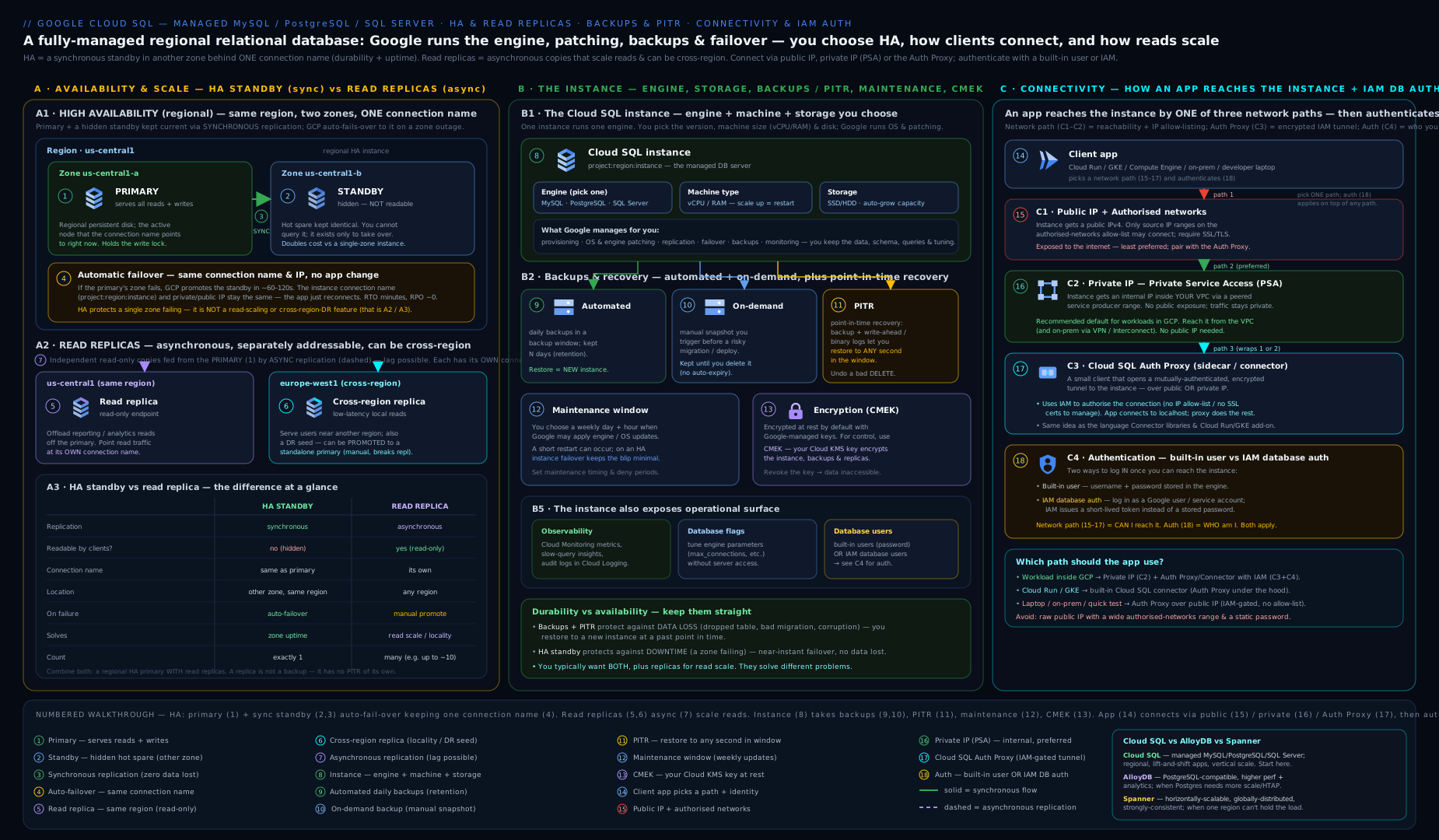
The diagram shows the whole picture in one frame: the regional primary + synchronous standby sharing a regional disk (HA — zone resilience, one preserved endpoint, RPO ≈ 0), an in-region read replica and a cross-region replica fed asynchronously and served read-only (read scaling and region DR via promotion), the backup/PITR layer underneath (logical recovery), and the four connectivity paths — public IP, private IP via PSA, the Auth Proxy, and IAM auth — converging on the primary. Keep this mental model: three independent protections (HA for zones, replicas for reads/regions, backups for logical errors) and a layered connectivity story where IAM, not an IP allow-list, is the boundary you want.
Going deeper
Everything above is enough to provision and reason about Cloud SQL. This section is for the reader who wants to know why it behaves the way it does — the internals that explain the edge cases, the scaling walls, and the design choices interviewers and incident reviews probe.
How the two “copies” actually work under the hood
The reason HA and read replicas feel similar but behave so differently is that they are built on two entirely different replication mechanisms:
- HA is block-level, storage-layer replication. The primary and standby share a regional persistent disk; every write is mirrored synchronously to the disk in the second zone before the commit is acknowledged. The standby’s database engine is not actively running your queries against that disk — it is a warm process waiting to attach. That is precisely why you cannot read from the standby: nothing is serving SQL there until failover. On failover, Cloud SQL detaches the regional disk from the dead primary and the standby engine starts against the already-current disk, which is why there is no data loss and no rebuild.
- A read replica is database-level log shipping. The replica is a fully independent instance with its own disk and its own running engine. The primary streams its transaction log — the binary log (binlog) in MySQL, the write-ahead log (WAL) via streaming replication in PostgreSQL — and the replica replays those records into its own copy. Because it is its own live engine, it can serve reads; because the stream is asynchronous, that copy is always slightly behind (the replication lag).
Hold those two pictures side by side and every property in the HA-vs-replica table stops being a fact to memorise and becomes an obvious consequence.
binlog / WAL: the shared substrate for PITR and replicas
The same transaction logs power both point-in-time recovery and read replicas, which is why the console couples them. Turning on automated backups and PITR enables binary logging (MySQL) or WAL archiving (PostgreSQL); that is the technical reason a read replica requires backups/PITR on the primary — without the log stream there is nothing to ship or replay.
- PITR is “base backup + log replay.” Cloud SQL takes the most recent automated backup before your target timestamp, then replays retained transaction logs up to that exact second into a brand-new instance. Wider recovery window = more retained log-days = more storage consumed.
- Retention differs by edition. Enterprise retains PITR logs for up to 7 days; Enterprise Plus up to 35 days (and stores them on disk for faster recovery). This is one of the concrete reasons a compliance-driven workload pushes you to Enterprise Plus.
- Engine plumbing is managed for you. MySQL replication identity (GTID) and PostgreSQL replication slots/timelines are handled by Cloud SQL — you do not configure them by hand, but knowing they exist explains error messages and lag behaviour.
Failover mechanics and the “failover storm”
Cloud SQL heartbeats the primary; if it is unresponsive for roughly a minute, automatic failover triggers. Because the regional disk is already byte-for-byte consistent, failover is essentially detach disk → start standby engine → drain and re-accept connections, with the connection name and private IP preserved. Enterprise failover completes in tens of seconds to a couple of minutes; Enterprise Plus targets sub-10-second failover thanks to a warmer standby and additional optimisations.
The operational trap is the failover storm: the moment the endpoint comes back, every client reconnects at once. That reconnection spike can slam straight into max_connections and produce a second, self-inflicted outage on top of the first. The mitigations are all client-side — a connection pooler, sane retry with exponential backoff and jitter, and pre-warmed pools — which is exactly why the next two subsections matter.
Connection limits and pooling — the wall almost everyone hits
Connections are not free. In PostgreSQL each connection is a backend process; in MySQL a thread — both consume memory (work areas, buffers) whether or not they are running a query. Cloud SQL sets a default max_connections proportional to the instance’s memory, and while you can raise it with a database flag, RAM is the real ceiling: push too high and the instance thrashes or OOMs.
Serverless compute is the classic offender. Cloud Run and Cloud Functions scale to many instances, and each instance opens its own pool — a thousand concurrent function instances holding even a handful of connections each will exhaust any Cloud SQL tier. The fix is a connection pooler that multiplexes many short-lived client connections onto a small, stable set of backend connections:
- Application- or sidecar-side pooling — a pooler such as PgBouncer as a sidecar, or a library pool (HikariCP,
pg), sized deliberately. - Cloud SQL managed connection pooling — a built-in, PgBouncer-based pooling layer for PostgreSQL that Cloud SQL runs for you, so serverless and microservice fleets don’t each hammer the engine directly.
Rule of thumb: size max_connections to what memory genuinely supports, put a pooler in front of anything that scales horizontally, and never let every serverless instance talk straight to the engine.
Private Service Access vs Private Service Connect
Both give the instance a private IP with no public surface, but the plumbing differs and it drives the design:
- PSA (Private Service Access) peers your VPC to Google’s service-producer network over an allocated internal range. It is simple and ideal for a single application VPC. Across many VPCs it inherits VPC-peering constraints — non-transitive routing and the need to avoid IP-range overlap.
- PSC (Private Service Connect) has the instance publish a service attachment; each consumer VPC creates its own PSC endpoint (a forwarding rule) with an IP from its own address space pointing at that attachment. No peering, no shared range, no overlap headaches — it scales cleanly across many VPCs and even organisations.
# Representative: enable PSC on a new instance (topologies + DNS are in the companion lesson)
gcloud sql instances create pg-prod \
  --database-version=POSTGRES_16 \
  --region=us-central1 \
  --tier=db-custom-4-16384 \
  --enable-private-service-connect \
  --allowed-psc-projects=consumer-prj-a,consumer-prj-b \
  --no-assign-ip
The full PSC topology — endpoints, DNS, and multi-VPC patterns — lives in Cloud SQL in Production; for a single VPC, PSA remains the simpler default.
The data cache (Enterprise Plus) in one paragraph
Enterprise Plus adds a local-SSD data cache that sits between the in-RAM buffer pool and the network-attached persistent disk. When a needed data block is not in RAM, Cloud SQL can serve it from fast local SSD instead of a slower round-trip to persistent disk — a large win for read-heavy, latency-sensitive workloads whose working set is bigger than RAM. The cache is ephemeral (rebuilt after a restart) and does little for write-bound workloads, so enable it for the read-latency case, not reflexively.
Near-zero-downtime maintenance
On an Enterprise Plus HA instance, planned maintenance is applied to the standby first, then a fast failover swings traffic onto the already-patched standby, so clients see a sub-second to single-digit-second blip rather than a full restart. Enterprise HA also patches standby-first, but the interruption is longer. Deny maintenance periods still apply on top — use them to keep patches out of your peak windows entirely.
Migrating in with Database Migration Service (DMS)
You rarely start empty. Database Migration Service handles both homogeneous migrations (MySQL → Cloud SQL for MySQL, PostgreSQL → Cloud SQL/AlloyDB for PostgreSQL) and heterogeneous ones (e.g. Oracle or SQL Server → PostgreSQL, with a schema/code conversion step). The pattern that keeps cutover downtime tiny is continuous migration:
- DMS takes an initial snapshot of the source into a Cloud SQL destination it provisions.
- It then streams ongoing changes via change data capture (CDC) — reading the source’s binlog (MySQL) or logical decoding/WAL (PostgreSQL) — keeping the destination continuously in sync.
- When you are ready, you promote the destination, which stops replication and makes it a standalone primary; you repoint the application. Downtime is just the cutover, not the whole copy.
The source reaches Cloud SQL over an IP allow-list, VPC peering, or a reverse-SSH tunnel; DMS manages the replication user and connectivity for you.
Engine-specific notes: PostgreSQL vs MySQL on Cloud SQL
The three engines are not interchangeable once you look past SELECT:
- PostgreSQL. Broadest extension surface — PostGIS (geospatial),
pg_stat_statements(query stats), pgvector (embeddings/AI), pgAudit (auditing) — enabled via flags andCREATE EXTENSION. Logical replication is available. You get the powerful but not-quite-superusercloudsqlsuperuserrole, so a few superuser-only operations are blocked by design. The IAM-auth flag iscloudsql.iam_authentication(dot); autovacuum tuning andwork_mem/max_connectionsare common flag targets. - MySQL. Replication is binlog-based with GTID managed for you. The dominant memory flag is
innodb_buffer_pool_size— size it to your working set. The IAM-auth flag iscloudsql_iam_authentication(underscore — different from Postgres). You get aroot-like account but not fullSUPER; a handful of operations and plugins are restricted because Cloud SQL manages them. - SQL Server. SQL Server authentication only — no IAM database auth. The Windows/SQL licence is priced into the machine, and cross-region replica support is more limited than MySQL/PostgreSQL, so validate DR options before committing an architecture.
Hands-on lab
We will create a small Cloud SQL for PostgreSQL instance, enable backups and PITR, add a read replica, take an on-demand backup, connect via the Auth Proxy, then clean everything up. Use a sandbox project and the $300 free trial credit (Cloud SQL is not in the Always Free tier — even small instances bill per hour, so do the cleanup).
0. Set context and enable the API.
gcloud config set project YOUR_SANDBOX_PROJECT
gcloud services enable sqladmin.googleapis.com
1. Create a small instance with backups + PITR. (We use a tiny shared-core tier and public IP to keep the lab cheap and simple; production would use private IP and a standard tier.)
gcloud sql instances create lab-pg \
  --database-version=POSTGRES_16 \
  --edition=ENTERPRISE \
  --tier=db-g1-small \
  --region=us-central1 \
  --storage-type=SSD \
  --storage-size=10 \
  --storage-auto-increase \
  --enable-point-in-time-recovery \
  --backup-start-time=03:00 \
  --retained-backups-count=7 \
  --root-password='ChangeMe_Lab_2026!'
Creation takes a few minutes. Expected: the instance reaches RUNNABLE.
2. Validate the configuration.
gcloud sql instances describe lab-pg \
  --format="yaml(databaseVersion, settings.tier, settings.availabilityType, \
  settings.backupConfiguration.enabled, \
  settings.backupConfiguration.pointInTimeRecoveryEnabled)"
Expected: POSTGRES_16, db-g1-small, availability ZONAL, backups enabled: true, PITR true.
3. Create a database and a user.
gcloud sql databases create appdb --instance=lab-pg
gcloud sql users create appuser --instance=lab-pg --password='AppUser_Lab_2026!'
4. Add an in-region read replica, then confirm it.
gcloud sql instances create lab-pg-replica \
  --master-instance-name=lab-pg \
  --region=us-central1 \
  --tier=db-g1-small

gcloud sql instances list --format="table(name, instanceType, region, state)"
Expected: two rows — lab-pg (CLOUD_SQL_INSTANCE) and lab-pg-replica (READ_REPLICA_INSTANCE).
5. Take an on-demand backup.
gcloud sql backups create --instance=lab-pg --description="lab-manual"
gcloud sql backups list --instance=lab-pg --format="table(id, type, status, windowStartTime)"
Expected: at least one ON_DEMAND backup with status SUCCESSFUL (and AUTOMATED ones over time).
6. Connect via the Auth Proxy (optional but recommended). In one terminal, run the proxy against the connection name; in another, connect with psql.
# Terminal A
./cloud-sql-proxy "$(gcloud sql instances describe lab-pg --format='value(connectionName)')" --port 5432
# Terminal B
psql "host=127.0.0.1 port=5432 user=appuser dbname=appdb"
Expected: a psql prompt — you are connected over the IAM-authorised, TLS tunnel without any authorised-networks entry.
7. Cleanup (do this — Cloud SQL bills per hour). Delete the replica first, then the primary.
gcloud sql instances delete lab-pg-replica --quiet
gcloud sql instances delete lab-pg --quiet
gcloud sql instances list   # expect: empty
Cost note. Two db-g1-small instances plus SSD storage for an hour of lab time is well within the free-trial credit (on the order of a few US cents to low tens of cents). The bill keeps running until the instances are deleted — stopping is not enough to stop storage charges, and on-demand backups persist until removed. Always run step 7.
Common mistakes & troubleshooting
| Symptom | Likely cause | Fix |
|---|---|---|
| “Read replica didn’t fail over when the zone died” | Confused a replica with HA; replicas have no automatic failover | Enable regional HA for zone resilience; replicas are for read scaling / manual DR promotion |
| Stale data from a replica | Replicas are asynchronous — replication lag | Read latency-critical / read-your-writes data from the primary; monitor replication lag |
| Cannot connect over public IP | No authorised network entry, or SSL not used | Add the client CIDR to authorised networks (or, better, use the Auth Proxy) |
| Cannot connect over private IP from another VPC | Private IP is only reachable inside the VPC / peered networks | Set up VPC peering with route export, Shared VPC, or PSC |
| Instance went read-only / down | Disk full | Enable automatic storage increase; you cannot shrink afterwards |
| CMEK instance fails to create | Cloud SQL service account lacks Encrypter/Decrypter on the key, or key in wrong region | Grant the role on the KMS key in the same region; CMEK must be set at creation |
| Unexpected bill after “stopping” | Stopped instances still incur storage (and IP) charges | Delete unused instances; clean up on-demand backups |
| Major upgrade broke the app | Upgraded in place without testing | Always upgrade a cloned instance first; on-demand backup beforehand |
FATAL: too many connections / errors after a failover |
Connection spike (serverless fan-out or a failover storm) exceeded max_connections |
Put a connection pooler in front; add retry with backoff+jitter; right-size max_connections to memory |
Common beginner mistakes
These are the conceptual traps — the wrong mental model, why it’s wrong, and the model to replace it with. (The table above is for symptoms; this is for understanding.)
- “Turning on HA gives me a second database to read from.” It does not — the standby is passive and unqueryable; it only exists to take over on failover. Right model: HA is automatic failover of the same endpoint. To serve reads, add a read replica.
- “A read replica protects me from a zone or region outage.” A replica does not fail over automatically, lags the primary, and must be manually promoted (irreversibly). Right model: HA = automatic zone resilience; a cross-region replica = manual DR. They are different tools.
- “PITR rewinds my instance to an earlier time.” PITR never touches the original — it spins up a new instance (clone) at the target timestamp. Right model: recover into a clone, verify, then repoint the app or copy the good rows back.
- “Backups protect me from a bad
DELETE, and so does HA.” HA replicates thatDELETEsynchronously in milliseconds — the standby has the same damage. Right model: only backups/PITR undo logical errors; HA and replicas faithfully copy them. - “Stopping the instance stops the bill.” Stopping pauses compute but storage and the reserved IP keep billing. Right model: to truly stop charges you delete the instance (and tidy up on-demand backups).
- “I’ll point the app at the replica and Cloud SQL will split reads and writes.” It will not — writes to a replica fail, and there is no automatic routing. Right model: read/write splitting is the application’s (or a pooler’s) job: writes → primary endpoint, reads → replica endpoint.
- “Public IP is fine because it has a password.” A public database is an internet-facing attack surface; passwords leak and get brute-forced. Right model: private IP + Auth Proxy + IAM so the boundary is IAM, not a guessable password on the open internet.
- “Every serverless instance can just open a database connection.” Thousands of Cloud Run/Functions instances will blow past
max_connectionsand OOM the engine. Right model: connections are a scarce, memory-bound resource — put a connection pooler in front of anything that scales horizontally.
Best practices
- Turn on HA, automated backups and PITR for anything you would miss. They protect against three different failures (zone, logical error, point-in-time) — use all three.
- Default to private IP; reach it with the Auth Proxy + IAM auth. No public surface, IAM as the boundary, no stored DB passwords. Pair with Workload Identity in GKE/Cloud Run.
- Enable automatic storage increase with a sane limit — a full disk is the most common self-inflicted outage.
- Right-size memory to the working set and pick standard vs high-memory shapes deliberately; under-memoried instances thrash.
- Use a cross-region read replica for DR, and rehearse promotion — an untested DR plan is a guess.
- Test restores and major upgrades on clones. Verify your RTO/RPO are real numbers, not aspirations.
- Control maintenance with a window and deny periods; on tier-1 systems use Enterprise Plus for near-zero-downtime maintenance and faster failover.
- Tag instances and route reads explicitly in the application — Cloud SQL does not split reads/writes for you.
- Put a connection pooler in front of horizontally-scaling clients (serverless, microservices) so a fan-out or a failover storm cannot exhaust
max_connections.
Security notes
- No public IP in production. Use private IP (PSA) or PSC; if a public IP is unavoidable, restrict authorised networks tightly and enforce SSL/client certs.
- Make IAM the boundary with the Auth Proxy and IAM database authentication (MySQL/PostgreSQL) so there are no long-lived DB passwords to leak; grant
roles/cloudsql.clientandroles/cloudsql.instanceUsernarrowly. - Least-privilege engine grants — IAM gets you logged in; engine-level
GRANTs decide what you can touch. Do not hand out superuser. - CMEK for regulated data, with key access separated from instance admins; understand that disabling the key disables the database.
- Audit access with Cloud Audit Logs (admin activity is on by default; consider data-access logs), and require TLS everywhere.
- Rotate and scope credentials; prefer service accounts + Workload Identity over user passwords for application access.
Cost & sizing
The levers that move the Cloud SQL bill, roughly in order of impact:
- Machine type (vCPU/RAM). The biggest line item. Right-size; don’t over-provision “to be safe”.
- Edition. Enterprise Plus costs more per unit — pay for it only where you need the data cache, longer retention, or faster maintenance/failover.
- High availability. ~2× compute for the standby. Worth it for production; skip for dev/test.
- Read replicas. Each replica is a full-price instance. Add for genuine read load or DR, not by default.
- Storage. SSD GB provisioned (and it only grows). Plus backup storage and transaction-log retention for PITR.
- Network egress. Cross-region replication and reads from other regions incur egress.
- Idle instances. Stopping does not stop storage/IP charges — delete what you don’t need; use sustained/committed-use discounts for steady production.
For dev/test, a small/shared-core single-zone instance with short backup retention is fine. For production, expect HA + standard tier + backups + PITR + (often) a cross-region replica, and use committed-use discounts on the steady baseline.
Practice challenges
Work these top to bottom — they escalate from a first instance to a production-grade, password-less topology. Try each before opening the solution.
1. (Beginner) Create a single-zone Enterprise PostgreSQL 16 instance in us-central1 with SSD, automatic storage increase, automated backups starting at 04:00 UTC, and 14 retained backups.
<details> <summary>Solution</summary>
gcloud sql instances create ex1-pg \
  --database-version=POSTGRES_16 \
  --edition=ENTERPRISE \
  --tier=db-custom-2-8192 \
  --region=us-central1 \
  --storage-type=SSD \
  --storage-auto-increase \
  --backup-start-time=04:00 \
  --retained-backups-count=14
Why: automated backups and auto-increase are the two settings you never want to discover are off after an incident; single-zone is the default (no --availability-type=REGIONAL).
</details>
2. (Beginner) Verify whether an existing instance has HA and PITR enabled, using a single describe with a format filter.
<details> <summary>Solution</summary>
gcloud sql instances describe ex1-pg \
  --format="yaml(settings.availabilityType, \
  settings.backupConfiguration.pointInTimeRecoveryEnabled)"
Why: availabilityType: ZONAL means no HA (REGIONAL means HA), and pointInTimeRecoveryEnabled: true/false tells you if you can rewind — reading these two fields is the fastest resilience audit of an instance.
</details>
3. (Intermediate) Convert the single-zone instance to regional HA, and state what happens to client connections and to the instance’s IP/connection name during the change.
<details> <summary>Solution</summary>
gcloud sql instances patch ex1-pg --availability-type=REGIONAL
Why: enabling HA requires a restart, so expect a brief connection interruption while the standby is provisioned — but the connection name and (private) IP are preserved, so no client reconfiguration is needed. From now on a zone failure fails over automatically with RPO ≈ 0. </details>
4. (Intermediate) Build DR: add an in-region read replica for reporting and a cross-region replica in europe-west1, then show the exact command you would run to fail over to the DR replica if the primary region were lost.
<details> <summary>Solution</summary>
gcloud sql instances create ex1-pg-rr \
  --master-instance-name=ex1-pg --region=us-central1 --tier=db-custom-2-8192

gcloud sql instances create ex1-pg-dr \
  --master-instance-name=ex1-pg --region=europe-west1 --tier=db-custom-2-8192

# On loss of us-central1 — promote the DR replica (irreversible):
gcloud sql instances promote-replica ex1-pg-dr
Why: the in-region replica offloads reads while the cross-region replica is a warm DR copy; promotion turns the DR replica into a standalone primary and breaks replication permanently, so it is a deliberate, one-way DR action — not an everyday operation. </details>
5. (Advanced) Recover from a bad DELETE that ran at 2026-06-15T09:42:00Z, without disturbing the live instance. Produce the exact command and say what it creates.
<details> <summary>Solution</summary>
gcloud sql instances clone ex1-pg ex1-pg-recovered \
  --point-in-time='2026-06-15T09:41:30.000Z'
Why: PITR requires that PITR/transaction-log retention was already enabled, and it produces a brand-new instance cloned to just before the bad change (note the timestamp is a few seconds earlier) — the live instance is untouched, so you verify the clone, then copy the good rows back or repoint the app. </details>
6. (Advanced) Design the gold-standard connection path for a GKE application: no public IP, no stored database password. List the four building blocks and the two IAM roles the workload needs, and name the instance flag that enables the password-less part.
<details> <summary>Solution</summary>
Four building blocks: private IP (PSA or PSC) + Cloud SQL Auth Proxy (as a sidecar/connector) + IAM database authentication + Workload Identity (so the pod’s Kubernetes SA maps to a Google service account with no keys).
Two IAM roles on that service account: roles/cloudsql.client (open the proxy tunnel) and roles/cloudsql.instanceUser (log in via IAM). Instance flag: cloudsql.iam_authentication=on (PostgreSQL; MySQL uses cloudsql_iam_authentication), plus register the service account as an IAM DB user and grant it least-privilege engine GRANTs.
Why: this stacks four independent protections so the security boundary is IAM, not a network allow-list or a leakable password — nothing long-lived to steal, and no internet-facing surface. </details>
Interview & exam questions
-
What is the difference between Cloud SQL high availability and a read replica? HA provisions a synchronous, passive standby in another zone of the same region sharing a regional disk; it fails over automatically, preserves the endpoint, and loses no committed data — it protects against a zone outage. A read replica is a separate, asynchronously-replicated, queryable instance with its own endpoint, used to scale reads or, when promoted (irreversible), for cross-region DR. HA is availability of the same DB; a replica is a second DB.
-
Does enabling HA give you a second instance you can read from? No. The standby is passive and unqueryable. To offload reads you need a read replica.
-
What does HA not protect against, and what does? It does not protect against a region failure (use a cross-region read replica + promotion) or a logical error like a bad
DELETE(use backups + PITR — the bad change is replicated synchronously to the standby). -
Explain point-in-time recovery and how it differs from restoring a backup. PITR uses retained transaction logs to recover to any second in the window and creates a new instance (clone) at that timestamp — non-destructive. Restoring a backup overwrites an existing target instance and only goes to backup points.
-
Walk me through the connectivity options and which you’d pick for production. Public IP + authorised networks (test only), private IP via PSA (production default, no internet exposure), the Auth Proxy (IAM-authorised mTLS tunnel from anywhere), and IAM database auth (token instead of password). Production: private IP + Auth Proxy + IAM auth + Workload Identity.
-
What is the Cloud SQL Auth Proxy and why use it? A local binary/sidecar/connector that opens a secure, IAM-authorised (mTLS) tunnel using the connection name, removing the need for authorised-network IP allow-lists or managed certificates. The security boundary becomes IAM (
roles/cloudsql.client). -
Which engines support IAM database authentication? MySQL and PostgreSQL. SQL Server uses SQL Server authentication and does not support IAM DB auth.
-
What can you not change after an instance is created? The engine, the storage type (SSD↔HDD), major-version downgrade, and CMEK (must be set at creation). Storage capacity can only grow.
-
What’s the difference between Enterprise and Enterprise Plus editions? Enterprise Plus adds performance-optimised machines, an SSD data cache, a longer backup-retention ceiling (and up to 35-day PITR log retention), and near-zero-downtime maintenance / faster failover (with a 99.99% HA SLA vs 99.95%), at higher cost. Enterprise covers dev/test and most production.
-
Why did the database go read-only, and how do you prevent it? The disk filled up. Enable automatic storage increase (with a limit). Note you cannot shrink the disk afterwards.
-
How do you do disaster recovery across regions with Cloud SQL? Maintain a cross-region read replica; on regional loss, promote it to a standalone primary (irreversible) and repoint the application. HA alone does not cross regions.
-
When would you choose Spanner or AlloyDB over Cloud SQL? Spanner when you need horizontal write scaling and strong consistency across regions/continents beyond a single primary’s limits. AlloyDB when you want PostgreSQL compatibility with much higher performance (especially analytical/HTAP and large datasets). Cloud SQL when a single-primary managed MySQL/PostgreSQL/SQL Server with vertical scaling is enough — which is most of the time.
-
Why does creating a read replica require automated backups/PITR on the primary? Because a replica is fed by the primary’s transaction log (binlog for MySQL, WAL for PostgreSQL) — the very same log stream that backups/PITR turn on. No log stream, nothing to replicate.
-
A thousand Cloud Run instances each open connections and the database starts throwing
too many connections. What’s happening and how do you fix it? Each serverless instance opens its own pool, so connection count fans out past the memory-boundmax_connections. Put a connection pooler (a PgBouncer sidecar or Cloud SQL managed connection pooling) between the fleet and the engine, and add retry with backoff.
Quick check
- Synchronous standby in another zone, automatic failover, endpoint preserved, no data loss — HA or read replica?
- A second instance you can run read-only queries against, with its own IP, that lags the primary — HA or read replica?
- True/false: stopping a Cloud SQL instance stops all charges.
- Which connectivity option makes IAM the authorisation boundary and needs no authorised-network entries?
- You need to undo a bad
DELETEthat ran 15 minutes ago. Which feature, and what does it produce?
Answers
- HA (synchronous standby, automatic failover, same endpoint, RPO ≈ 0).
- Read replica (asynchronous, separate endpoint, read-only).
- False — storage (and reserved IP) charges continue; you must delete the instance to stop them.
- The Cloud SQL Auth Proxy (and connector libraries), backed by
roles/cloudsql.client. - Point-in-time recovery (PITR) — it creates a new instance (clone) at the chosen timestamp; you then recover the rows from it.
Exercise
Design and partially build a production-grade Cloud SQL for PostgreSQL topology in a sandbox project:
- Create a VPC and set up Private Service Access (allocate a
/20range, create the peering). - Create an Enterprise PostgreSQL 16 instance on private IP only (
--no-assign-ip), with regional HA, automated backups, PITR, and automatic storage increase. - Add a cross-region read replica for DR.
- Enable IAM database authentication and add a service account as an IAM database user with least-privilege grants.
- Connect from a small VM (or Cloud Shell) using the Auth Proxy.
- Take an on-demand backup, then perform a PITR clone to a timestamp a few minutes in the past and verify the data.
- Promote the DR replica, observe it become standalone, then tear everything down and confirm the bill stops.
Write a short paragraph justifying each resilience choice (HA vs replica vs backup) and which failure each one addresses.
Certification mapping
- Associate Cloud Engineer (ACE): provisioning and managing Cloud SQL — engines, HA, replicas, backups/PITR, connectivity, and the public-vs-private/Auth-Proxy decisions appear directly.
- Professional Cloud Architect (PCA): choosing the right database (Cloud SQL vs AlloyDB vs Spanner), designing for resilience (HA + cross-region replica + backups), connectivity and CMEK for compliant architectures.
- Professional Cloud Database Engineer (PCDE): the deep end — replication, PITR, restore strategy, IAM auth, performance/edition tuning, and migration considerations.
- Professional Cloud Security Engineer (PCSE): private connectivity, IAM database auth, CMEK, and least-privilege access patterns.
Glossary
- Instance — one managed database server (one engine) holding many databases; the unit you size, back up and replicate.
- Edition — Enterprise or Enterprise Plus; controls machine shapes, the data cache, retention ceiling and maintenance experience.
- Availability type —
ZONAL(single zone) orREGIONAL(HA with a standby in a second zone). - High availability (HA) — synchronous, passive standby in another zone on a regional disk; automatic, lossless failover with the endpoint preserved; protects against a zone outage.
- Regional persistent disk — the block-storage device replicated synchronously across two zones that HA is built on; the standby attaches it on failover, which is why there is no data loss.
- Read replica — separate, asynchronously-replicated, read-only instance with its own endpoint; for read scaling or, via promotion, cross-region DR.
- Promotion — converting a read replica into an independent primary; irreversible, breaks replication.
- Cascading replica — a read replica of another read replica (engine-dependent); used to fan out reads or stage cross-region topologies without loading the primary further.
- Replication lag — how far behind the primary an asynchronous replica is; grows under heavy write load or network latency and is why replica reads are eventually consistent.
- Failover — the automatic switch from a failed primary to the HA standby; the regional disk is already current, so the endpoint and IP are preserved and no committed data is lost.
- Automated backup — scheduled daily backup managed by Cloud SQL.
- Point-in-time recovery (PITR) — recovery to any second in the retention window using transaction logs; produces a new instance.
- Binary log (binlog) / write-ahead log (WAL) — the MySQL / PostgreSQL transaction logs that record every change; the shared substrate that powers both PITR and read replicas.
- Connection name —
project:region:instance, the stable identifier used by the Auth Proxy/connectors. - Private Service Access (PSA) — VPC-peering mechanism that gives the instance a private IP inside your VPC.
- Private Service Connect (PSC) — private-connectivity model where the instance publishes a service attachment and each consumer VPC creates its own endpoint; scales across many VPCs without peering or IP-range overlap.
- Cloud SQL Auth Proxy — local binary/sidecar/connector providing an IAM-authorised, mTLS tunnel to the instance.
- IAM database authentication — logging in to MySQL/PostgreSQL with a short-lived IAM token instead of a password.
- Connection pooler — a layer (app-side, a PgBouncer sidecar, or Cloud SQL managed connection pooling) that multiplexes many client connections onto a few backend connections, preventing
max_connectionsexhaustion. - Data cache — Enterprise Plus local-SSD tier between RAM and persistent disk that accelerates reads for working sets larger than memory.
- Near-zero-downtime maintenance — Enterprise Plus HA maintenance that patches the standby then fast-fails-over, reducing the client-visible interruption to seconds or less.
- Database Migration Service (DMS) — managed migration service that uses change data capture (CDC) to keep a Cloud SQL destination in sync with a source until a low-downtime cutover (promotion).
- CMEK — customer-managed encryption key (in Cloud KMS) used to encrypt the instance’s data; must be set at creation.
- Maintenance window / deny period — when planned maintenance may run / date ranges when it may not.
Next steps
- Go to production: Cloud SQL in Production: HA, Read Replicas, PSC Connectivity, and Maintenance (
gcp-cloud-sql-ha-read-replicas-private-connectivity) — PSC multi-VPC topologies, failover storms, replication lag and connection pooling in depth. - Network it properly: the VPC deep dive (
gcp-vpc-deep-dive-subnets-routes-firewall-nat) — subnets, routes, firewall and the private-access plumbing your database depends on. - Compare the alternatives: for PostgreSQL-compatible high performance look at AlloyDB, and for globally-scaled strong consistency see Spanner schema design (
gcp-spanner-schema-design-interleaving-hotspot-avoidance).
Cloud SQL vs AlloyDB vs Spanner: choosing the right managed database
Cloud SQL is the default, but it is not the only managed relational option, and architects are expected to know when to move up. All three are managed and relational; they differ in scale model and consistency.
| Dimension | Cloud SQL | AlloyDB | Cloud Spanner |
|---|---|---|---|
| Engine / compatibility | MySQL, PostgreSQL, SQL Server | PostgreSQL-compatible | Proprietary (with a PostgreSQL interface); ANSI SQL |
| Scale model | Single primary, scale vertically; read replicas for reads | Single primary with very high performance; read pools | Horizontally scalable reads and writes |
| Consistency / distribution | Strong within the primary | Strong within the primary | Strong consistency, globally distributed |
| High availability | Regional standby (zone) + cross-region replica (DR) | Built-in high availability | Multi-region, 99.999% configurations |
| Best for | Most apps; lift-and-shift; standard OLTP | PostgreSQL apps needing more performance, HTAP/analytical acceleration, large datasets | Global scale, huge write throughput, no-compromise consistency (e.g. global inventory, financial ledgers) |
| Operational model | Pick instance size | Pick instance size (cluster) | Provision compute capacity (nodes/PUs); design schema to avoid hotspots |
| Relative cost | Lowest | Higher | Highest (for the scale/SLA it buys) |
How to decide:
- Start with Cloud SQL. If a single primary scaled vertically (plus read replicas) meets your throughput and your latency, and you want the lowest cost and a familiar engine, Cloud SQL is correct — which is true for the large majority of applications.
- Move to AlloyDB when you are on PostgreSQL and have outgrown Cloud SQL’s performance — large datasets, demanding read/write throughput, or mixed transactional/analytical (HTAP) workloads — but you still want a single logical primary and PostgreSQL compatibility.
- Move to Spanner when you need what a single primary fundamentally cannot give: horizontal write scaling with strong consistency across regions or the globe, and an availability SLA up to 99.999%. The cost is a different operational model (capacity provisioning and schema design to avoid hotspots), so adopt it for the requirement, not the hype.
The exam framing is consistent: single-primary vertical scaling → Cloud SQL; PostgreSQL needing more horsepower → AlloyDB; global, horizontally-scaled, strongly-consistent writes → Spanner.