In a nutshell
Your AKS cluster is running happily. Then one day Azure warns you the Kubernetes version is about to fall out of support, a security scan lights up with node CVEs, or you notice you now run twelve clusters and patching them by hand has become a second job. Day-2 operations is everything that happens after the cluster exists — and for AKS the biggest, scariest recurring chore is the upgrade. This lesson’s whole job is to make upgrades boring.
The single most important idea: an “upgrade” is really two separate jobs. One bumps the control plane — the managed brain Microsoft runs for you, the part that decides your cluster’s version number. It is fast, invisible to your apps, and cheap. The other reimages your worker nodes — the VMs your pods actually run on — onto the new version, one batch at a time, kicking pods off each node as it drains. That second job is the disruptive, hours-long one. Keeping them separate lets you take the cheap bump today and schedule the disruptive part for 2 a.m. on a Sunday.
Two mental pictures carry the entire lesson. First, picture refitting a fleet of ships while they stay at sea: you can’t dock them all at once, so you refit a few at a time, keep enough afloat to carry the cargo, and never touch more than you can afford to lose. That “few at a time, keep enough afloat” rule is exactly what max surge (how many nodes you refit per batch) and PodDisruptionBudgets (the minimum that must stay running) control. Second, when you run many clusters you don’t upgrade them all together — you roll the change through rings: dev first, watch it for an hour, then staging, then prod. That staged watch-and-wait rollout is what Azure Kubernetes Fleet Manager automates, and the “watch for an hour” pause is the safety mechanism.
Hold those two pictures and everything below — channels, maintenance windows, blue-green pools, removed APIs — is just detail hanging off them. A total beginner can follow the analogies; an SRE running thirty clusters will still find the surge math, the removed-API list, and the stuck-drain forensics they came for.
Level: Expert, with a beginner on-ramp · Time: ~70 min read + ~30 min optional lab · You’ll need: comfort with kubectl and az, and the idea that AKS runs the control plane while you own the node pools. No cluster is needed to read the lesson; the hands-on lab spins up a tiny, cheap one you delete at the end.
Standing up an AKS cluster is a solved problem. Keeping a fleet of clusters patched, on a supported Kubernetes version, and upgraded without paging anyone is where most platform teams quietly accumulate risk. A cluster you provisioned six months ago is already drifting: Azure Kubernetes Service supports a Kubernetes minor version for roughly twelve months from its GA on the platform, enforcing an N-2 window — you may run the latest minor and the two behind it. Miss that window and the cluster lands on a platform-supported tier (best-effort, no control-plane SLA) and is eventually force-upgraded on Microsoft’s timetable, not yours. Node images move faster still: Microsoft ships new images weekly carrying OS CVE fixes, kubelet patches, and containerd updates. A cluster that is “fine” is usually just one nobody has looked at.
This is the Day-2 runbook, and it treats the upgrade as what it actually is: not one button but a pipeline — control-plane bump, node-pool surge-and-drain under PodDisruptionBudgets, fleet-wide staged rollout, and verification — where a failure at any stage stalls or breaks everything downstream. You will learn to decouple the cheap control-plane upgrade from the expensive node reimaging, tune max surge and PDBs so a drain is invisible instead of an outage, bind every upgrade to a maintenance window so it never fires mid-business-day, stand up blue-green node pools for high-risk changes with a one-command rollback, and coordinate dozens of clusters through Azure Kubernetes Fleet Manager update runs with bake time between rings. Every operation gets both an az CLI invocation and a Bicep/JSON snippet, and because this is a reference you return to mid-change, the version skew rules, the channel matrix, the surge math, the removed-API list, and the failure modes are all laid out as scannable tables — read the prose once, then keep the tables open at change-window time.
By the end you will stop treating upgrades as scary. When the N-2 clock runs down you will know exactly which of the two upgrade operations to run, what each one disrupts, which knob gates the blast radius, and how to catch a bad node image in dev before it ever reaches prod. Knowing which move to make — and in what order — is what separates a boring, scheduled patch from a multi-hour, all-hands stall.
What problem this solves
AKS hides the control plane so you can kubectl apply and have a running cluster. That abstraction is a gift until version support lapses, and then it becomes a wall: a force-upgrade you did not schedule, on a date you did not choose, against workloads whose PDBs you never validated against real headroom. The platform will keep you “supported” only if you keep moving, and the cadence is relentless — a new minor roughly quarterly, a new node image weekly. The work is not whether to upgrade; it is making the upgrade boring, scheduled, surge-tuned, observable, and reversible.
What breaks without this discipline: a team auto-upgrades the Kubernetes version but leaves the node OS channel None, so they are patched on the API and exposed on the OS — open CVEs on every node, invisible because the cluster reports a healthy version. Or a node-pool upgrade hangs in Upgrading forever because a single-replica Deployment with minAvailable: 1 makes the eviction API refuse to drain, turning a clean rolling upgrade into a stuck operation that never finishes and never fails. Or a Fleet update run with zero bake time between dev and prod breaks every cluster at once — a slower way to take an outage, not a safer one. Each of these is perfectly diagnosable and entirely preventable; the failure is always procedural, not mysterious.
Who hits this: every team running more than one AKS cluster, and every team running one for more than a year. It bites hardest on platform teams managing a fleet (the coordination problem dwarfs the single-cluster runbook), on latency-sensitive workloads (where an over-aggressive surge or an unsatisfiable PDB is the difference between invisible and an incident), and on anyone who validated their disruption budgets against dev’s spare capacity instead of prod’s packed-to-the-zone reality. The fix is almost never “open a support ticket” — it is “decouple the operations, gate the blast radius, and bake between rings.”
To frame the whole field before the deep dive, here is every upgrade operation this runbook covers, the question it forces, and where it bites:
| Operation | What it changes | First question | Primary risk | Where you control it |
|---|---|---|---|---|
| Control-plane upgrade | API server, scheduler, controller-manager | Am I inside N-2? | Removed-API breakage | az aks upgrade --control-plane-only |
| Node-pool K8s upgrade | kubelet version; full reimage | Will the drain respect SLOs? | PDB stall / blast radius | az aks nodepool upgrade |
| Node-image upgrade | OS, containerd, kubelet patch (same K8s) | Are OS CVEs open? | Stale image left behind | --node-image-only / NodeImage channel |
| Auto-upgrade channels | Who pulls the trigger, and when | Is it bound to a window? | Mid-day reimage | --auto-upgrade-channel + maintenance config |
| Blue-green pool | A parallel pool on the new version | Is this change reversible? | Double capacity cost | az aks nodepool add + cordon/drain |
| Fleet update run | Many clusters, in ordered rings | Did dev bake before prod? | All clusters break together | az fleet updaterun + afterStageWaitInSeconds |
The job, then, is to make upgrades boring: scheduled, surge-tuned, observable, and reversible. Start by seeing the gap.
# What's available vs. what you're running
az aks get-upgrades \
  --resource-group rg-platform \
  --name aks-prod-eastus \
  --output table

# Per-node-pool view (control plane and pools can differ)
az aks nodepool get-upgrades \
  --resource-group rg-platform \
  --cluster-name aks-prod-eastus \
  --nodepool-name system \
  --output table
Treat
get-upgradesoutput as a service-level indicator. If the control plane is more than one minor behind the latest GA version, you are burning your N-2 budget and should already have a change ticket open.
Learning objectives
By the end of this article you can:
- Decouple a control-plane upgrade from a node-pool upgrade and explain why splitting them is the single most important Day-2 technique.
- Distinguish a node-image upgrade from a Kubernetes upgrade and automate each on its correct cadence with the right auto-upgrade channel.
- Tune max surge, PodDisruptionBudgets, drain timeout, and node soak so a node-pool upgrade is invisible rather than an outage — and recognise the unsatisfiable-PDB trap that hangs a drain forever.
- Bind every upgrade to a maintenance window (
aksManagedAutoUpgradeSchedule,aksManagedNodeOSUpgradeSchedule) withnotAllowedDatesfor change freezes. - Stand up a blue-green node pool for a high-risk upgrade and roll back with a single
kubectl uncordon. - Orchestrate fleet-scale rollouts with Azure Kubernetes Fleet Manager — update strategies, stages, groups, and bake time — so a regression caught in dev never reaches prod.
- Detect removed/deprecated APIs before an upgrade and run smoke tests that exercise a real user path, not just
kubectl get nodes. - Read the version-skew, channel, surge, and SKU reference tables and pick the right upgrade move for each situation.
Prerequisites & where this fits
You should already be comfortable provisioning an AKS cluster and running kubectl and az against it — node pools (system vs user mode), Deployments and ReplicaSets, and the basic shape of the control plane. You should know that AKS is a managed Kubernetes service where Microsoft runs the control plane and you own the node pools, and you should understand the difference between the Kubernetes (kubelet) version a node runs and the node image it boots from. Familiarity with PodDisruptionBudgets, cordon/drain, and Helm helps; comfort reading JSON and YAML is assumed.
This sits in the AKS in Production track as the Day-2 operations runbook. It assumes the managed-Kubernetes fundamentals from Understanding Managed Kubernetes: AKS vs EKS vs GKE and the production networking and observability baseline in Production AKS: Networking & Observability. It pairs tightly with Kubernetes Production Readiness: Day-2 Operations Checklist, since upgrades are the highest-stakes recurring Day-2 task, and with Azure Monitor: Managed Prometheus & Managed Grafana for AKS, because an upgrade you cannot observe is one you cannot safely roll back. The fleet-orchestration half complements Azure Arc-enabled Kubernetes: GitOps, Policy & Fleet Management; if you also run EKS, the same mechanics in another cloud are in EKS Cluster Upgrades: Version Lifecycle & Fleet Operations.
A quick map of who owns what during an upgrade, so you call the right person fast:
| Layer | What lives here | Who usually owns it | What it can stall / break |
|---|---|---|---|
| Control plane | API server, scheduler, etcd | Microsoft (managed) | Removed-API rejection on upgrade |
| Node pool | VMs, kubelet, OS image | Platform team | PDB stall, surge blast radius, image drift |
| Workload | Deployments, PDBs, probes | App / dev team | Unsatisfiable PDB hangs the drain |
| Maintenance config | Windows, freeze dates | Platform / change mgmt | Mid-day reimage if unset |
| Fleet | Update runs, strategies | Platform / SRE | All clusters break together with no bake |
| CI / policy | pluto/kubent, OPA Gatekeeper | DevOps / security | Removed API or bad PDB reaches prod |
Core concepts
Five mental models make every later decision obvious.
An upgrade is two operations, not one. A control-plane upgrade moves the managed API server, scheduler, and controller-manager — fast, Microsoft-managed, and the only part that gates the cluster’s reported version. A node-pool upgrade reimages every VM in a pool to the new kubelet version, one surge batch at a time, with cordon-and-drain. People conflate them at their peril. The control plane must be upgraded before or together with node pools, and node pools may trail the control plane by at most one minor version. Decoupling them lets you take the cheap, low-risk control-plane bump immediately and schedule the expensive, workload-disrupting node reimaging for a window.
Two cadences, two channels. The Kubernetes version changes roughly quarterly and touches the API surface (deprecations, behavior changes) — higher risk. The node image changes weekly and carries OS/kubelet/containerd patches at the same Kubernetes version — low risk, reimage only. These are governed by two independent auto-upgrade settings (the cluster channel and the node-OS channel) that people constantly confuse. Automate them separately; reserve a human for minor-version bumps that deserve release-note reading.
Surge and PDBs decide whether a drain is invisible or an outage. When a pool upgrades, AKS adds surge nodes, then cordons and drains existing nodes one batch at a time. Max surge sets the batch size (default one node — safe but glacial on a 100-node pool). PodDisruptionBudgets are what make the drain respect your SLOs: during drain, the eviction API honors PDBs, blocking eviction that would violate minAvailable until a replacement pod is Ready elsewhere. The sharp edge: a PDB that can never be satisfied (e.g. minAvailable: 100% on a single-replica Deployment, or an anti-affinity rule with no spare zone) stalls the drain indefinitely.
The maintenance window is your change-freeze enforcement. Auto-upgrade without a maintenance window means Azure can reimage your nodes whenever it likes. Planned Maintenance binds all upgrade activity to schedules you control, and notAllowedDates carves out change freezes (quarter-end, peak season) where no maintenance starts even inside the recurring window. Three named configs govern the three activity classes; unset them and you have ceded the timing decision to the platform.
The fleet is a coordination problem, not a bigger cluster. One cluster is a runbook; fifty clusters is choreography. Azure Kubernetes Fleet Manager marches an upgrade through ordered stages and groups — dev before staging before prod — with bake time (afterStageWaitInSeconds) between each. A failed stage halts the run, so a regression caught in dev never reaches prod. The bake time is the safety mechanism: zero wait is just a slower way to break everything simultaneously.
The vocabulary in one table
Before the deep sections, pin down every moving part. The glossary at the end repeats these for lookup; this table is the mental model side by side:
| Concept | One-line definition | Where it lives | Why it matters to an upgrade |
|---|---|---|---|
| Control plane | Managed API server / scheduler / etcd | Microsoft-managed | Gates the cluster’s reported version |
| Node pool | A group of identical VMs (kubelet + image) | Your subscription | Reimaged batch-by-batch on upgrade |
| N-2 support window | Latest minor + two behind it | Platform policy | Lapse → force-upgrade off your schedule |
| Max surge | Extra nodes added per upgrade batch | Per node pool | Sets batch size / blast radius |
| PodDisruptionBudget | Floor of pods that must stay up | Per workload | Gates / stalls the drain |
| Drain timeout | How long a node waits to evict | Per node pool | A stuck eviction fails loudly vs hangs |
| Node soak | Delay after a node is up before next batch | Per node pool | Lets a bad image surface in monitoring |
| Auto-upgrade channel | Who bumps the K8s version, and to what | Cluster setting | patch/stable/rapid/none |
| Node-OS channel | Who bumps the node image | Cluster setting | NodeImage/SecurityPatch/etc. |
| Maintenance window | When upgrades may run | Maintenance config | Change-freeze enforcement |
| Blue-green pool | A parallel pool on the new version | On the cluster | Reversible high-risk upgrades |
| Fleet Manager | Multi-cluster upgrade orchestrator | rg-fleet |
Staged, baked, fail-halts-run rollouts |
| Update run / strategy | The executed rollout / its definition | Fleet resource | Stage order + bake between rings |
Common beginner mistakes
These are misconceptions — wrong mental models that generate a whole class of problems — not the symptom→confirm→fix entries in the troubleshooting playbook later on. Each pairs the belief with the correction, so the right model sticks.
-
“I upgraded the cluster, so I’m fully patched.” Upgrading the Kubernetes version and patching the node OS are two independent tracks with two independent channels. Bump the version but leave the node-OS channel
Noneand every node still boots a stale image full of open OS CVEs — while the cluster cheerfully reports a healthy, current version. The right model: two cadences, two channels — you are patched only when both the K8s version and the node image are current. -
“A PodDisruptionBudget makes my app safer, so tighter is better.” A PDB does not keep pods alive; it only blocks voluntary evictions that would breach a floor. Set
minAvailableequal to the replica count (or100%, orminAvailable: 1on a single replica) and you have told the eviction API “you may never move a pod” — so the very first node drain hangs forever. The right model: a PDB is permission to disrupt down to a floor; the floor must leave headroom, or the drain can never start. (Getting replica counts right first is half the battle — see Deployments, ReplicaSets, Rollouts & Rollback.) -
“Max surge 100% is just the fast setting.” It is the no-blast-radius-control setting.
100%reimages the entire pool in a single batch, so a bad node image takes out every node before monitoring can react. The right model: surge is a dial between speed and safety; 33–50% in prod keeps a bad image contained to one batch you can still catch. -
“Auto-upgrade means I can stop thinking about upgrades.” Auto-upgrade with no maintenance window hands Azure the timing decision — it may reimage your nodes mid-business-day. And the
rapid/stablechannels pull minor bumps that can remove APIs your app depends on. The right model: automate the boring patches inside a window you control; keep a human on the minor-version bumps that deserve release-note reading. -
“The upgrade reported Succeeded, so the app is fine.” A control-plane upgrade can complete perfectly while your app breaks, because the new minor removed an API your manifests still declare. The status reflects the platform operation, not your workloads. The right model: “upgrade succeeded” ≠ “app works” — gate the upgrade on a removed-API scan (
pluto/kubent) and a smoke test on a real user path. -
“The control plane and node pools should always show the same version.” They legitimately differ: you take the control-plane bump first, and node pools are allowed to trail by one minor until you reimage them in a window. A tool that reads the pool version will lag the control-plane version by design. The right model: control plane leads, pools may trail by one minor — a version gap mid-upgrade is normal, not a bug.
-
“I validated my disruption budgets in dev, so prod is fine.” Dev usually has spare nodes and half-empty zones, so a drain always finds somewhere to reschedule and never blocks. Prod is packed to the zone, so the same PDB that sailed through dev stalls the drain. The right model: validate PDBs against real prod headroom, not dev’s spare capacity — this is the exact trap that silently stalls fleet rollouts.
Version skew and the N-2 support window
Before you touch anything, understand the rules that constrain what you can upgrade to and by how much. Kubernetes itself enforces a version-skew policy between components; AKS layers its support window on top. Violate either and the upgrade is rejected or unsupported.
The component skew rules that govern any single upgrade step:
| Component pair | Allowed skew | What this means in practice | Violation symptom |
|---|---|---|---|
| Node pool vs control plane | At most 1 minor behind | A pool on 1.30 needs the CP on 1.30 or 1.31, never 1.32 | Upgrade refused; “node pool too far behind” |
| Control plane minor jump | 1 minor at a time | 1.30 → 1.31 → 1.32, never 1.30 → 1.32 directly | get-upgrades won’t offer the skip |
| kubelet vs API server | Up to 3 minors older (upstream) | AKS tightens this to 1 via the rule above | N/A on AKS (CP-skew rule is stricter) |
| Two node pools to each other | Independent within the CP rule | Pools can sit on different minors, each ≤1 behind CP | Mixed-version pools are legal |
| Patch within a minor | Any patch, freely | 1.31.3 → 1.31.8 is always allowed | None |
The AKS support tiers — where a version lands as it ages, and what you lose:
| Tier | Which versions | Control-plane SLA | What you get | What you lose |
|---|---|---|---|---|
| GA / supported | Latest 3 minors (N, N-1, N-2) | Full uptime SLA (with SLA tier) | CVE patches, support, upgrades | Nothing |
| Platform support | One minor past N-2 | Best-effort only | Cluster keeps running | No K8s patches, no CVE fixes, limited support |
| Out of support | Older than platform support | None | — | Force-upgrade scheduled by Microsoft |
| Preview / alpha | Pre-GA minors | None | Early features | No support; not for prod |
| LTS (premium tier) | Designated minor, ~2 yr | Full (premium add-on) | Extended support window | Higher cost; specific minors only |
The upgrade-step math, so you can plan a multi-minor catch-up:
| Starting from | Target | Steps required | Why | Rough wall-clock |
|---|---|---|---|---|
| 1.31 (N-1) | 1.32 (N) | 1 hop | Single minor | CP minutes + node reimage |
| 1.30 (N-2) | 1.32 (N) | 2 hops | One minor at a time | Two full cycles |
| 1.29 (out of support) | 1.32 | 3 hops | Sequential minors | Long; do in a window |
| 1.31.3 | 1.31.8 | 1 hop (patch) | Same minor | Node reimage only, fast |
| Any | Same + new image | Node-image upgrade | No version change | Reimage only, lowest risk |
# See the upgrade path the platform will allow (it enforces one-minor hops)
az aks get-upgrades -g rg-platform -n aks-prod-eastus \
  --query "controlPlaneProfile.upgrades[].kubernetesVersion" -o tsv

# Confirm your current support state — how many minors behind GA you are
az aks show -g rg-platform -n aks-prod-eastus \
  --query "{current:currentKubernetesVersion, sku:sku.tier}" -o table
Upgrade anatomy: control plane vs node pools
An AKS upgrade is two distinct operations that people conflate at their peril:
- Control-plane upgrade — the managed API server, scheduler, and controller-manager. Fast, Microsoft-managed, and the only part that gates the cluster’s reported version.
- Node-pool upgrade — every VM in a pool is reimaged to the new Kubernetes (kubelet) version, one surge batch at a time, with cordon-and-drain.
The control plane must be upgraded before or together with node pools, and node pools may trail the control plane by at most one minor version. Decoupling them is the single most important Day-2 technique, because it lets you take the cheap, low-risk control-plane bump immediately and schedule the expensive, workload-disrupting node reimaging for a maintenance window.
# Upgrade ONLY the control plane (Kubernetes 1.31.x -> 1.32.x)
az aks upgrade \
  --resource-group rg-platform \
  --name aks-prod-eastus \
  --kubernetes-version 1.32.0 \
  --control-plane-only \
  --yes

# Later, in a maintenance window, bring each node pool up
az aks nodepool upgrade \
  --resource-group rg-platform \
  --cluster-name aks-prod-eastus \
  --nodepool-name system \
  --kubernetes-version 1.32.0
A bare az aks upgrade --kubernetes-version 1.32.0 (no --control-plane-only) upgrades the control plane and every node pool in one long-running operation. That is fine for non-prod; in production you almost always want to split them.
The two operations side by side — internalise this table and most upgrade decisions make themselves:
| Dimension | Control-plane upgrade | Node-pool upgrade |
|---|---|---|
| What moves | API server, scheduler, controller-manager | Every node’s kubelet + OS image |
| Who runs it | Microsoft (managed) | AKS, surge-batch by batch |
| Duration | Minutes | Minutes → hours (pool size × surge) |
| Workload disruption | None (control plane is HA) | Pods evicted as nodes drain |
| Gates the cluster version? | Yes | No (pools can trail by 1 minor) |
| Reversible? | No (roll forward only) | Blue-green pool gives a rollback |
| Right cadence | As soon as available, low-risk | Scheduled in a maintenance window |
| The flag | --control-plane-only |
--nodepool-name <pool> |
The CLI verbs you will actually use, and exactly what each touches:
| Command | Scope | Changes version? | Reimages nodes? | When to reach for it |
|---|---|---|---|---|
az aks upgrade --control-plane-only |
Control plane | Yes (CP) | No | Take the cheap bump now |
az aks upgrade (no flag) |
CP + all pools | Yes (CP + pools) | Yes (all) | Non-prod, or a full window |
az aks nodepool upgrade --kubernetes-version |
One pool | Yes (pool) | Yes (that pool) | Bring a pool to the CP version |
az aks nodepool upgrade --node-image-only |
One pool | No | Yes (that pool) | OS/CVE patch, same K8s |
az aks upgrade --node-image-only |
All pools | No | Yes (all) | Fleet-wide image refresh |
az aks nodepool get-upgrades |
One pool | — (read) | — | See what a pool can move to |
Node image vs Kubernetes upgrades
These are different cadences and you should automate them differently.
| Node-image upgrade | Kubernetes upgrade | |
|---|---|---|
| What changes | OS packages, containerd, kubelet patch, security fixes | Kubernetes minor/patch version (API surface) |
| Frequency | Weekly images from Microsoft | Per minor release (~quarterly upstream) |
| Risk | Low — same K8s version, reimage only | Higher — API deprecations, behavior changes |
| Recommended channel | NodeImage |
patch (auto) or manual minor bumps |
| Rollback | Re-pin to prior image is not supported; roll forward | Blue-green pool or roll forward |
| What it fixes | OS CVEs, kubelet/containerd bugs | New APIs, upstream features, behavior fixes |
A node-image-only upgrade keeps the Kubernetes version fixed and just reimages nodes onto the latest weekly image — this is how you stay on top of OS CVEs without touching the API surface.
# Patch OS/kubelet without changing the Kubernetes version
az aks nodepool upgrade \
  --resource-group rg-platform \
  --cluster-name aks-prod-eastus \
  --nodepool-name system \
  --node-image-only
Auto-upgrade channels
AKS has two independent auto-upgrade settings. Do not confuse them:
- Cluster auto-upgrade channel (
--auto-upgrade-channel) governs the Kubernetes version. - Node OS upgrade channel (
--node-os-upgrade-channel) governs the node image.
az aks update \
  --resource-group rg-platform \
  --name aks-prod-eastus \
  --auto-upgrade-channel patch \
  --node-os-upgrade-channel NodeImage
The cluster (Kubernetes-version) channel — every value, what it does, and the trade-off:
| Channel | What it does | Cadence | Best for | Risk / gotcha |
|---|---|---|---|---|
none |
No automatic K8s upgrades | Never | Strict manual control | You own the N-2 clock entirely |
patch |
Latest patch of your current minor | As patches ship | Production default | Stays on your minor; you still drive minor bumps |
stable |
Latest patch of N-1 (one minor behind newest) | Per minor + patch | Conservative auto-minor | Lags the newest minor by design |
rapid |
Latest supported patch of N (newest minor) | Aggressive | Dev / fast-moving | Pulls minor bumps automatically — read-notes risk |
node-image (legacy alias) |
Node image only | Weekly | Superseded by node-OS channel | Prefer the dedicated node-OS channel |
The node-OS (image) channel — every value:
| Node-OS channel | What it does | Reboot? | Best for | Gotcha |
|---|---|---|---|---|
None |
No automatic OS updates | — | You manage it explicitly | Leaves OS CVEs open if you forget |
Unmanaged |
OS’s own update mechanism handles it | Maybe | Legacy / special images | AKS doesn’t coordinate it; uneven |
SecurityPatch |
Azure applies OS security patches, live where possible | Sometimes | Patch CVEs without a full image swap | Not every fix is patchable live |
NodeImage |
Move to the latest weekly node image | Yes (reimage) | Production default | Reimages nodes; bind to a window |
My default for production: cluster channel patch and node OS channel NodeImage, both bound to a maintenance window (next section) so they never fire mid-business-day. Reserve manual control over the minor version bumps — those deserve a human reading the release notes.
resource aks 'Microsoft.ContainerService/managedClusters@2024-09-01' = {
  name: 'aks-prod-eastus'
  location: location
  properties: {
    autoUpgradeProfile: {
      upgradeChannel: 'patch'          // Kubernetes version channel
      nodeOSUpgradeChannel: 'NodeImage' // node image channel
    }
  }
}
A decision table for picking the channel pair by environment:
| Environment | Cluster channel | Node-OS channel | Bound to window? | Rationale |
|---|---|---|---|---|
| Production (regulated) | patch |
NodeImage |
Yes (both) | Auto-patch + auto-image, human owns minors, freeze-aware |
| Production (fast-moving SaaS) | stable |
NodeImage |
Yes | Accept auto-minor one behind newest |
| Staging / pre-prod | patch |
NodeImage |
Loose | Mirror prod, bake new images first |
| Dev / sandbox | rapid |
NodeImage |
No | Surface breakage early, cheaply |
| Pinned / compliance-locked | none |
SecurityPatch |
Yes | Manual K8s, but still patch CVEs |
Tuning the rollout: max surge, PDBs, and draining
When a node pool upgrades, AKS adds surge nodes, then cordons and drains existing nodes one batch at a time. Two knobs decide whether this is invisible or an outage.
Max surge controls batch size and is set per node pool. The default is one node (an absolute value), which is safe but glacial on a 100-node pool. Bump it to a percentage to parallelize.
# 33% surge: upgrade roughly a third of the pool per batch
az aks nodepool update \
  --resource-group rg-platform \
  --cluster-name aks-prod-eastus \
  --nodepool-name workloads \
  --max-surge 33%
Higher surge = faster upgrade but more transient capacity (and cost) and more simultaneous pod evictions. For latency-sensitive workloads I use
33%; for large batch/stateless pools50%is fine. Avoid100%in production — it doubles the pool and gives you no blast-radius control if a new node image is bad.
The surge spectrum — what each setting buys and costs, on a 30-node pool:
--max-surge |
Nodes per batch (≈) | Extra nodes provisioned | Batches | Blast radius if image is bad | Use for |
|---|---|---|---|---|---|
1 (default) |
1 | +1 | 30 | Tiny — one node | Tiny pools; ultra-cautious |
10% |
3 | +3 | 10 | Small | Cautious prod, large pools |
33% |
10 | +10 | 3 | Moderate | Latency-sensitive default |
50% |
15 | +15 | 2 | Half the pool per batch | Stateless / batch pools |
100% |
30 | +30 (doubles pool) | 1 | Whole pool at once | Avoid in prod; no blast control |
PodDisruptionBudgets are what make drains respect your SLOs. During drain, the eviction API honors PDBs; if evicting a pod would violate minAvailable, the drain blocks until the replacement pod is Ready elsewhere.
apiVersion: policy/v1
kind: PodDisruptionBudget
metadata:
  name: checkout-pdb
  namespace: payments
spec:
  minAvailable: 80%
  selector:
    matchLabels:
      app: checkout
There is a sharp edge here: a PDB that can never be satisfied (e.g. minAvailable: 100% on a single-replica Deployment) will stall the drain indefinitely, turning a clean rolling upgrade into a hung operation. The PDB field matrix — what each setting does and where it bites:
| PDB field | What it means | Safe value | Dangerous value | Failure mode of the dangerous value |
|---|---|---|---|---|
minAvailable (integer) |
At least N pods must stay up | 2 on a 4-replica app |
1 on a 1-replica app |
Eviction blocked → drain hangs |
minAvailable (percent) |
At least X% must stay up | 80% |
100% |
No pod may ever be evicted → hang |
maxUnavailable (integer) |
At most N may be down | 1 on a 4-replica app |
0 |
Equivalent to 100% available → hang |
maxUnavailable (percent) |
At most X% may be down | 25% |
0% |
Same trap as above |
selector |
Which pods the PDB covers | Matches the Deployment | Matches nothing / too broad | Silently protects the wrong pods |
| (replica count) | Pods behind the budget | 2+ with topology spread |
1 |
Single replica + any PDB = hang risk |
Rules I enforce via policy:
- Every production workload runs at least 2 replicas.
minAvailableis a percentage, never equal to the replica count.- Configure a node-pool drain timeout and soak time (the delay after a node comes up before the next batch starts) so a bad image surfaces in monitoring before the whole pool is gone.
az aks nodepool update \
  --resource-group rg-platform \
  --cluster-name aks-prod-eastus \
  --nodepool-name workloads \
  --max-surge 33% \
  --drain-timeout 30 \
  --node-soak-duration 5
The node-pool upgrade knobs in one place — defaults, ranges, and when to change each:
| Knob | What it does | Default | Range | When to change |
|---|---|---|---|---|
--max-surge |
Extra nodes per batch (abs or %) | 1 |
1…pool size, or 1–100% | Speed up large pools; cap blast radius |
--drain-timeout |
Minutes a node waits to evict before failing | 30 (platform) |
minutes | Lower so a stuck PDB fails loudly, not hangs |
--node-soak-duration |
Minutes after a node is Ready before next batch | 0 |
0–30 min | Raise so a bad image surfaces between batches |
--max-unavailable |
Nodes that may be unavailable per batch | unset | nodes or % | Pair with surge for tighter control |
PDB minAvailable |
Workload floor honored during drain | per workload | int or % | Set on every prod workload; never = replicas |
WEBSITE/probe readiness |
Gates when a replacement counts as “Ready” | your config | — | Honest readiness so drains don’t proceed early |
resource pool 'Microsoft.ContainerService/managedClusters/agentPools@2024-09-01' = {
  name: '${aks.name}/workloads'
  properties: {
    upgradeSettings: {
      maxSurge: '33%'
      drainTimeoutInMinutes: 30
      nodeSoakDurationInMinutes: 5
    }
  }
}
Maintenance windows and planned maintenance
Auto-upgrade without a maintenance window means Azure can reimage your nodes whenever it likes. Planned Maintenance binds all upgrade activity to schedules you control, which is how you keep upgrades inside a change-freeze policy.
There are three configurable schedules:
aksManagedAutoUpgradeSchedule— when cluster (Kubernetes) auto-upgrades may run.aksManagedNodeOSUpgradeSchedule— when node-image/OS upgrades may run.default— the legacy window for weekly AKS-initiated maintenance.
The three maintenance configs — what each governs and a sane starting schedule:
| Config name | Governs | Recommended schedule | Min window | Notes |
|---|---|---|---|---|
aksManagedAutoUpgradeSchedule |
Kubernetes auto-upgrades (cluster channel) | Weekly, Sun 02:00, 4h | 4 hours | Pair with the cluster channel |
aksManagedNodeOSUpgradeSchedule |
Node-image / OS upgrades (node-OS channel) | Daily/nightly 03:00, 4h | 4 hours | Images ship weekly; daily catches them |
default |
Legacy weekly AKS-initiated maintenance | Weekly off-hours | 4 hours | Superseded by the two named configs |
# Kubernetes auto-upgrades: Sundays 02:00, 4-hour window, US Eastern
az aks maintenanceconfiguration add \
  --resource-group rg-platform \
  --cluster-name aks-prod-eastus \
  --name aksManagedAutoUpgradeSchedule \
  --schedule-type Weekly \
  --day-of-week Sunday \
  --start-time 02:00 \
  --duration 4 \
  --utc-offset -05:00

# Node OS/image upgrades: nightly 03:00, 4-hour window
az aks maintenanceconfiguration add \
  --resource-group rg-platform \
  --cluster-name aks-prod-eastus \
  --name aksManagedNodeOSUpgradeSchedule \
  --schedule-type Daily \
  --interval-days 1 \
  --start-time 03:00 \
  --duration 4 \
  --utc-offset -05:00
The schedule fields you set, and their constraints:
| Field | What it controls | Values | Constraint |
|---|---|---|---|
--schedule-type |
Recurrence kind | Weekly, AbsoluteMonthly, RelativeMonthly, Daily |
Daily only for node-OS schedule |
--day-of-week |
Day for weekly schedules | Sunday…Saturday |
Weekly types only |
--start-time |
Window open time | HH:MM (24h) |
Local to --utc-offset |
--duration |
Window length in hours | integer ≥ 4 | Minimum 4 hours |
--utc-offset |
Timezone offset | ±HH:MM |
Make it match your change window |
--interval-weeks / --interval-days |
Recurrence interval | integer | Spread to every 2nd/4th week if needed |
notAllowedDates (config-file) |
Freeze ranges | array of start/end dates | Blocks even in-window starts |
For change freezes (quarter-end, peak shopping season), use the --config-file form, which supports notAllowedDates — date ranges where no maintenance may start even if it falls inside the recurring window.
{
  "maintenanceWindow": {
    "schedule": { "weekly": { "intervalWeeks": 1, "dayOfWeek": "Sunday" } },
    "durationHours": 4,
    "utcOffset": "-05:00",
    "startTime": "02:00",
    "notAllowedDates": [
      { "start": "2026-11-20", "end": "2026-12-02" }
    ]
  }
}
az aks maintenanceconfiguration add \
  --resource-group rg-platform \
  --cluster-name aks-prod-eastus \
  --name aksManagedAutoUpgradeSchedule \
  --config-file ./freeze-window.json
Blue-green at the node-pool level
For high-risk upgrades — a major OS family change, a kernel-sensitive workload, or a node SKU swap — in-place surge is not enough control. Stand up a parallel node pool on the new version, shift workloads, and keep the old pool as a rollback.
# 1. New pool on the target version (note the new name)
az aks nodepool add \
  --resource-group rg-platform \
  --cluster-name aks-prod-eastus \
  --name workloads2 \
  --kubernetes-version 1.32.0 \
  --node-count 5 \
  --mode User \
  --labels pool=workloads2

# 2. Cordon every node in the OLD pool so nothing new schedules there
kubectl cordon -l agentpool=workloads

# 3. Drain the old pool; PDBs gate the pace, pods reschedule onto workloads2
kubectl drain -l agentpool=workloads \
  --ignore-daemonsets \
  --delete-emptydir-data \
  --timeout=600s

# 4. Validate. If healthy, delete the old pool. If not, uncordon and roll back.
az aks nodepool delete \
  --resource-group rg-platform \
  --cluster-name aks-prod-eastus \
  --name workloads
The
agentpoollabel is applied automatically to every node by AKS, so-l agentpool=<name>reliably targets exactly one pool. Keep the old pool until smoke tests pass — deleting it is the point of no return.
This costs double capacity for the migration window, but converts a multi-hour, irreversible reimage into a controlled cutover with a one-command rollback (kubectl uncordon -l agentpool=workloads).
The two strategies head to head — pick by how much rollback control the change demands:
| Dimension | In-place surge upgrade | Blue-green node pool |
|---|---|---|
| Extra capacity | Surge % only (e.g. +33%) | Full second pool (≈ +100%) |
| Cost during migration | Modest, transient | Double, for the window |
| Rollback | None mid-upgrade (roll forward) | kubectl uncordon the old pool |
| Blast radius control | Surge % + soak | Total — validate before cutover |
| Operational complexity | One command | Add pool, cordon, drain, validate, delete |
| Best for | Routine K8s/image upgrades | OS-family swap, SKU change, kernel-sensitive |
| Point of no return | When all batches reimaged | When you delete the old pool |
The blue-green runbook as a checklist table:
| Step | Command | What it does | Rollback at this point |
|---|---|---|---|
| 1 | az aks nodepool add --name workloads2 ... |
New pool on target version | Delete workloads2 |
| 2 | kubectl cordon -l agentpool=workloads |
Stop scheduling on old pool | kubectl uncordon -l agentpool=workloads |
| 3 | kubectl drain -l agentpool=workloads ... |
Move pods to new pool, PDB-paced | Uncordon; pods stay where rescheduled |
| 4a (healthy) | az aks nodepool delete --name workloads |
Remove old pool | None — point of no return |
| 4b (unhealthy) | kubectl uncordon -l agentpool=workloads |
Restore old pool to rotation | This is the rollback |
Fleet-scale upgrades with Azure Kubernetes Fleet Manager
One cluster is a runbook; fifty clusters is a coordination problem. Azure Kubernetes Fleet Manager orchestrates upgrades across many AKS clusters with update runs that march through ordered stages and groups — dev before staging before prod, with bake time between each.
az extension add --name fleet

# Create a fleet (hub-less is fine for update orchestration only)
az fleet create \
  --resource-group rg-fleet \
  --name fleet-platform \
  --location eastus

# Join member clusters and assign each to an update group
az fleet member create \
  --resource-group rg-fleet \
  --fleet-name fleet-platform \
  --name aks-dev-eastus \
  --member-cluster-id "$DEV_CLUSTER_ID" \
  --update-group dev

az fleet member create \
  --resource-group rg-fleet \
  --fleet-name fleet-platform \
  --name aks-prod-eastus \
  --member-cluster-id "$PROD_CLUSTER_ID" \
  --update-group prod
The Fleet Manager object model — the nouns you compose into a rollout:
| Object | What it is | Created with | Holds |
|---|---|---|---|
| Fleet | The top-level container | az fleet create |
Members, strategies, runs |
| Member | A joined AKS cluster | az fleet member create |
Cluster id + update-group label |
| Update group | A label grouping members | --update-group on the member |
Clusters that upgrade together |
| Stage | An ordered ring of groups + bake | In the strategy definition | Groups + afterStageWaitInSeconds |
| Update strategy | The reusable stage order | az fleet updatestrategy create |
Ordered stages |
| Update run | One execution of a strategy | az fleet updaterun create |
Strategy ref + upgrade type |
An update strategy defines the stage order and the wait between stages; an update run executes it. Define the strategy once and reuse it.
# A strategy: dev first, soak 1 hour, then prod
az fleet updatestrategy create \
  --resource-group rg-fleet \
  --fleet-name fleet-platform \
  --name ring-rollout \
  --stages '[
    { "name": "dev",  "groups": [{ "name": "dev"  }], "afterStageWaitInSeconds": 3600 },
    { "name": "prod", "groups": [{ "name": "prod" }] }
  ]'

# An update run that targets the latest patch within each cluster's minor
az fleet updaterun create \
  --resource-group rg-fleet \
  --fleet-name fleet-platform \
  --name run-2026-05 \
  --update-strategy-name ring-rollout \
  --upgrade-type NodeImageOnly

az fleet updaterun start \
  --resource-group rg-fleet \
  --fleet-name fleet-platform \
  --name run-2026-05
--upgrade-type accepts the same conceptual split as a single cluster, applied fleet-wide:
--upgrade-type |
What it upgrades | Risk | Use for | Maps to single-cluster |
|---|---|---|---|---|
Full |
Kubernetes version + node image | Highest | Coordinated minor rollout | az aks upgrade (no flag) |
ControlPlaneOnly |
Control plane only | Low | Take the cheap bump fleet-wide | --control-plane-only |
NodeImageOnly |
Node image only | Lowest | Weekly CVE refresh across clusters | --node-image-only |
The afterStageWaitInSeconds between stages is your fleet-wide soak: dev takes the new image, you watch dashboards for an hour, and only then does prod proceed. A failed stage halts the run, so a regression caught in dev never reaches prod.
A sane multi-ring strategy and what each ring buys you:
| Stage (ring) | Groups | Bake (afterStageWaitInSeconds) |
Purpose | Halt-on-failure effect |
|---|---|---|---|---|
dev |
dev clusters | 3600 (1h) |
Catch obvious breakage cheaply | Stops before staging |
staging |
staging clusters | 14400 (4h) |
Soak under prod-like load | Stops before prod |
prod-canary |
one prod cluster | 7200 (2h) |
Real traffic, limited blast | Stops before full prod |
prod |
remaining prod | — (last stage) | Full rollout | Run completes |
Validating an upgrade
Upgrades fail in two ways: removed APIs and behavioral regressions. Check both — before and after.
Deprecated/removed API detection. Each Kubernetes minor removes APIs. AKS will warn (and can block) an upgrade if in-cluster objects or recent API traffic use APIs slated for removal in the target version. Surface these ahead of time:
# AKS-side: deprecation warnings reported by the control plane,
# including API usage seen in the last ~12h of audit logs
az aks get-upgrades \
  --resource-group rg-platform \
  --name aks-prod-eastus \
  --output table

# Cluster-side: look for deprecation warnings the API server is already emitting
kubectl get events -A --field-selector reason=Deprecated 2>/dev/null
Removed-API breakage is the most common cause of a “successful upgrade, broken app.” Run a static check (e.g.
plutoorkubent) against your manifests and Helm releases in CI, and gate the upgrade PR on it.
A reference of notable API removals to scan for before a minor bump — confirm against the release notes for your exact target, but these are the ones that bite teams most often:
| Removed API (old) | Replacement (current) | Removed around | What uses it | How to find it |
|---|---|---|---|---|
policy/v1beta1 PodDisruptionBudget |
policy/v1 |
1.25 | Old PDB manifests | kubent; kubectl get pdb -o yaml |
batch/v1beta1 CronJob |
batch/v1 |
1.25 | Legacy CronJobs | pluto detect-files |
networking.k8s.io/v1beta1 Ingress |
networking.k8s.io/v1 |
1.22 | Old Ingress objects | kubent; controller logs |
policy/v1beta1 PodSecurityPolicy |
Pod Security Admission | 1.25 | PSP (fully removed) | Replace with PSA labels |
autoscaling/v2beta2 HPA |
autoscaling/v2 |
1.26 | Old HPA manifests | pluto; kubectl get hpa -o yaml |
flowcontrol.apiserver.k8s.io/v1beta2 |
…/v1 |
1.29 | APF config | Cluster-internal; rare in user manifests |
*.k8s.io/v1beta1 CSR / certificates |
certificates.k8s.io/v1 |
1.22 | Old cert workflows | kubent |
Where each detection signal comes from, and what it catches:
| Signal | Source | Catches | Run it |
|---|---|---|---|
az aks get-upgrades warnings |
AKS control plane (audit ~12h) | APIs recently called in-cluster | Before the upgrade |
pluto detect-files |
Static scan of manifests/Helm | APIs declared in YAML/charts | In CI, on the PR |
kubent (kube-no-trouble) |
Live cluster + manifests | Both live objects and files | Pre-upgrade + CI |
kubectl get events reason=Deprecated |
API server warnings | Deprecation warnings already emitted | Spot check |
| Microsoft Defender for Cloud | Defender recommendations blade | Clusters on deprecated API versions | Continuous posture |
Smoke tests. After the control plane and at least one node pool are on the new version, run synthetic checks against real user paths, not just kubectl get nodes.
# Nodes Ready and on the expected version
kubectl get nodes -o wide

# No pods stuck after the reimage
kubectl get pods -A --field-selector=status.phase!=Running \
  | grep -v Completed || echo "all pods healthy"

# Hit a real ingress path end to end
curl -fsS https://api.kloudvin.example/healthz && echo OK
The post-upgrade validation matrix — what to check, the command, and the pass criterion:
| Check | Command | Pass criterion | Fails when |
|---|---|---|---|
| Control-plane version | az aks show --query currentKubernetesVersion |
Equals target | CP upgrade didn’t complete |
| Pool K8s version | az aks nodepool list --query "[].currentOrchestratorVersion" |
Equals target | Pool not yet upgraded |
| Pool node-image version | az aks nodepool list --query "[].nodeImageVersion" |
Latest weekly | Stale image, CVEs open |
| Nodes Ready | kubectl get nodes |
All Ready, right version |
Node stuck NotReady post-reimage |
| Pods healthy | kubectl get pods -A (non-Running) |
None stuck | Pod won’t reschedule (PDB/affinity) |
| Ingress path | curl -fsS https://.../healthz |
200 OK |
App regressed on the new version |
| Fleet run state | az fleet updaterun show --query status.state |
Completed |
A stage halted on failure |
Architecture at a glance
The diagram traces an upgrade as it actually flows, left to right, and pins each failure class onto the exact stage where it bites. Read it as a pipeline. On the left, the trigger and gates: an operator or CI job issues az aks upgrade (with a removed-API gate already green from pluto/kubent), and a maintenance window decides whether the work may even start now. The request moves to the control plane, where the managed API server bumps one minor (1.31 → 1.32) and runs its own API-removal checks against ~12 hours of audit logs. From there it fans into the node pools: a surge batch (max-surge 33%) adds capacity, a PDB/drain gate (minAvailable 80%, drain-timeout 30m) paces the eviction, and the node image carries the weekly OS CVE fixes. The fleet orchestration zone wraps many clusters: Fleet Manager runs an update run through ordered stages, and a stage gate holds dev for an hour of bake time before prod proceeds. On the right, verify — smoke tests and observability confirm nodes are Ready on the expected image — with a blue-green pool offering the kubectl uncordon rollback that arcs back to the node pools.
Notice the five numbered badges, each on the stage where a day-2 upgrade most often stalls or breaks: (1) removed-API breakage at the control-plane checks (a “successful” upgrade with a broken app); (2) a PDB stalling the drain when minAvailable equals the replica count and there is no headroom; (3) surge blast radius when 100% reimages the whole pool before a bad image shows in monitoring; (4) a stale node image left behind when the OS channel is None; and (5) a fleet stage that never bakes because afterStageWaitInSeconds is zero, so dev and prod break together. The whole method is in the legend: localise the symptom to a stage, read the cause, run the named confirm command, apply the fix. The first question on every stalled upgrade is “which stage is it stuck in — and is it hung or failing?” The badge you land on tells you which knob to reach for.
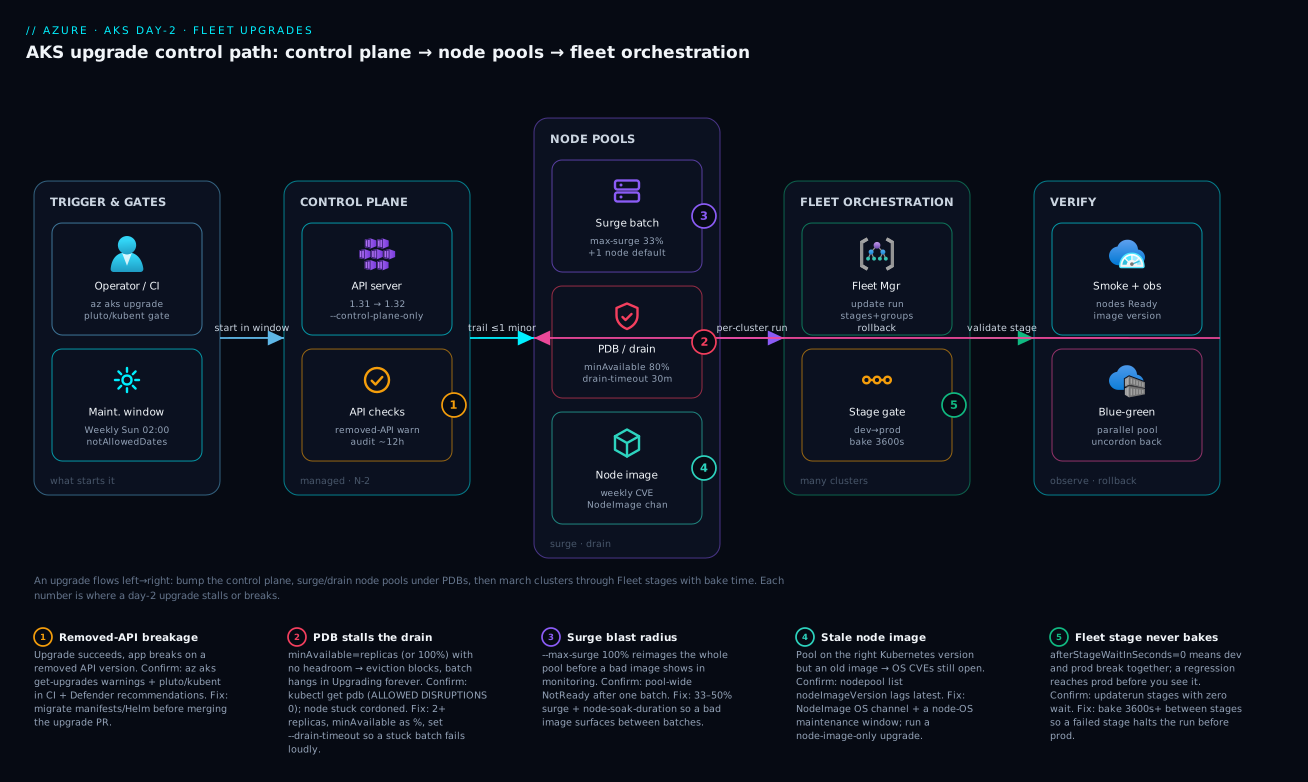
Going deeper
Three mechanics sit under the commands above. You can run every upgrade in this lesson without them, but knowing them is what lets you reason about why a rollout behaves the way it does — and reach for the newer knobs when the defaults fight you.
What a surge upgrade actually does, node by node. A node-pool upgrade is not “reimage the pool.” AKS walks a precise loop per batch: (1) add buffer nodes on the new version, sized to --max-surge; (2) cordon and drain that many old nodes at once, honoring PDBs; (3) optionally wait the soak duration so the new nodes prove themselves; (4) reimage the drained old nodes to the new version — and here is the non-obvious part: those freshly reimaged nodes become the buffer for the next batch; (5) repeat down the pool; (6) remove any leftover buffer at the end so the pool returns to its original size. This is why a surge upgrade needs quota for only max-surge extra nodes, not a whole second pool — the buffer is recycled. It also pins down what soak time is: the gap between step 3 and step 4, your window to catch a bad image in Grafana before it reimages the next batch.
The modern answer to the stuck drain: quarantine, don’t hang. The entire “unsatisfiable PDB hangs the drain forever” failure mode has a first-class fix now. --undrainable-node-behavior decides what happens when a node genuinely cannot be drained within --drain-timeout:
| Value | What happens to an undrainable node | Effect on the upgrade | Use when |
|---|---|---|---|
Schedule (default) |
The drain times out and the upgrade stops on that node | One stuck workload halts the whole operation until you fix it | You want a hard stop that forces the PDB to be fixed |
Cordon (recommended) |
AKS quarantines the node — cordons it and labels it kubernetes.azure.com/upgrade-status=Quarantined — and moves on |
The upgrade completes; you remediate the quarantined nodes by hand afterward | A single stubborn PDB shouldn’t block a fleet-wide rollout |
Pair Cordon with --max-blocked-nodes (a number or percent) to cap how many nodes may be quarantined before AKS decides too much is wrong and stops anyway. This is the fleet-scale seatbelt: one packed pool with a bad PDB gets set aside for a human instead of freezing the update run for everyone.
# Let a stubborn drain be quarantined and skipped — up to 2 nodes —
# instead of hanging the whole pool upgrade
az aks nodepool update \
  --resource-group rg-platform \
  --cluster-name aks-prod-eastus \
  --nodepool-name workloads \
  --undrainable-node-behavior Cordon \
  --max-blocked-nodes 2 \
  --drain-timeout 30
Upgrading without surge, when quota won’t give you buffer nodes. Surge needs spare vCPU quota for the extra nodes; if the region is at its limit (troubleshooting #10), you can flip to an in-place upgrade with --max-unavailable, which cordons and drains N existing nodes at a time without adding buffer. The trade-off is real: those N nodes’ pods must fit on the remaining nodes, so a packed pool sees more PDB pressure, not less. Two rules bite here — maxUnavailable defaults to 0 (so by default AKS must surge; one of the two has to be non-zero), and you cannot set --max-unavailable on a system node pool. Reach for it only when capacity, not caution, is the constraint.
# In-place upgrade: no surge nodes, drain 20% of the pool at a time
az aks nodepool upgrade \
  --resource-group rg-platform \
  --cluster-name aks-prod-eastus \
  --nodepool-name workloads \
  --max-surge 0 \
  --max-unavailable 20%
One last precision worth carrying: --drain-timeout accepts 5 minutes to 24 hours (default 30), and when it elapses with pods still running the upgrade stops rather than force-killing them — a subsequent upgrade call resumes where it left off. For legitimately long-running pods, also set terminationGracePeriodSeconds in the pod spec so a graceful drain has room to finish before the timeout counts against it.
Real-world scenario
Meridian Pay, a fictional but representative payments platform, ran 30+ AKS clusters across three regions under a single Fleet Manager. The platform team was six engineers; the workloads were latency-sensitive payment APIs with hard SLOs and a quarter-end change freeze. Their monthly AKS spend across the fleet was about ₹46 lakh, and their upgrade posture was, on paper, mature: cluster channel patch, node-OS channel NodeImage, a Fleet update strategy with dev-then-prod and an hour of bake time.
The incident began on a routine Tuesday. The team kicked off a Fleet update run with --upgrade-type Full to move the fleet from 1.31 to 1.32, dev first. The dev stage went green in forty minutes — nodes reimaged, pods rescheduled, smoke tests passed. After the hour of bake, prod began and stalled: every prod cluster’s node-pool upgrade hung in Upgrading, never finishing, never failing. The Fleet run sat blocked for hours with no error, just a status that would not advance. The on-call engineer’s first instinct — re-run the stage — did nothing, because the operation was not failed, it was stuck.
The cause was a PDB nobody connected to upgrades. A platform service — a Deployment of a regional rate-limiter — ran exactly 3 replicas behind an anti-affinity rule (one per zone) with minAvailable: 100%. In dev the pools had spare zones, so a replacement scheduled and the drain proceeded. Prod pools were packed to capacity in all three zones, so when AKS cordoned a node, the evicted rate-limiter pod had nowhere to land that satisfied anti-affinity, and minAvailable: 100% refused to drop below 3. The eviction API blocked indefinitely, and with it the whole batch. The diagnosis was one command: kubectl get pdb -n edge showed ALLOWED DISRUPTIONS: 0, and kubectl get nodes showed a node stuck SchedulingDisabled for over an hour.
The fix was twofold. Immediately, relax the budget so the drain could breathe:
kubectl patch pdb ratelimiter-pdb -n edge \
  --type merge -p '{"spec":{"minAvailable":"67%"}}'
That unblocked the in-flight batch within minutes. The durable fix was a node-pool --drain-timeout 30 so a stuck eviction surfaces as a failed batch — which halts the Fleet stage before prod — instead of an invisible hang, plus an OPA Gatekeeper policy rejecting any PDB whose minAvailable equals the workload’s replica count, applied fleet-wide via the GitOps pipeline. They also added a --node-soak-duration 5 so a bad image would surface in Grafana between batches, and a synthetic smoke test on a real payment path into the post-upgrade validation job. The next quarter’s 1.32 → 1.33 run completed across all 30 clusters with zero stalls. The lesson on the wall: “Validate PDBs against real prod headroom, not dev’s spare capacity — and make a stuck drain fail loudly, not silently.”
The incident as a timeline, because the order of moves is the lesson:
| Time | Symptom | Action taken | Effect | What it should have been |
|---|---|---|---|---|
| T+0 | Dev stage green | Bake 1h, then prod begins | — | (correct so far) |
| T+1h05 | Prod pools hang Upgrading |
Wait — maybe it’s slow | No progress | Ask: hung or failing? |
| T+1h40 | Still stuck, no error | Re-run the stage | Nothing (not failed) | Don’t re-run a stuck op |
| T+2h | Root cause hunt | kubectl get pdb -n edge → ALLOWED DISRUPTIONS 0 |
Cause found | This was the breakthrough |
| T+2h10 | Mitigated | kubectl patch pdb … minAvailable 67% |
Batch unblocks in minutes | Correct night-of fix |
| +1 day | Durable fix | --drain-timeout 30 + --node-soak 5 + Gatekeeper PDB policy |
Stuck drains now fail loudly | The actual fix is procedural |
| +1 quarter | Validated | 1.32 → 1.33 across 30 clusters | Zero stalls | Boring upgrade achieved |
Advantages and disadvantages
The managed-control-plane, surge-and-drain, fleet-orchestrated model both enables safe upgrades and hides sharp edges. Weigh it honestly:
| Advantages (why this model helps you) | Disadvantages (why it bites) |
|---|---|
| Microsoft runs the control-plane upgrade — fast, HA, no workload disruption | You can’t roll the control plane back; it’s forward-only |
| Decoupling CP from node pools lets you take the cheap bump now, schedule the costly one | Easy to forget the node pools entirely and run a stale image |
| Surge + PDB make a node-pool upgrade invisible when tuned right | An unsatisfiable PDB stalls the drain forever with no error |
| Auto-upgrade channels keep you patched without manual toil | Two independent channels are constantly confused; one left None = open CVEs |
Maintenance windows + notAllowedDates enforce change freezes |
Unset windows cede the timing decision to the platform |
| Fleet Manager bakes dev before prod; a failed stage halts the run | Zero bake time breaks every cluster at once — slower, not safer |
| Blue-green pools give a one-command rollback for high-risk changes | Double capacity cost for the migration window |
| N-2 support is a clear, predictable contract | Lapse it and you get a force-upgrade on Microsoft’s schedule, not yours |
The model is right for any team running AKS at scale that wants patched, supported clusters without hand-rolling upgrade tooling — and the built-in surge, channel, window, and fleet controls cover the vast majority of cases. It bites hardest on teams that validate PDBs against dev headroom, leave the node-OS channel None, or run a fleet with zero bake time. Every disadvantage is manageable — but only if you know it exists, which is the point of this runbook.
Hands-on lab
Reproduce a stalled node-pool upgrade caused by an unsatisfiable PDB, watch it hang, then fix it — all on a small, cheap cluster you delete at the end. Run in Cloud Shell (Bash).
Step 1 — Variables and resource group.
RG=rg-aks-day2-lab
LOC=eastus
AKS=aks-day2-$RANDOM
az group create -n $RG -l $LOC -o table
Step 2 — Create a small cluster one minor behind the latest (so you have something to upgrade to).
# Pick the second-newest GA version so an upgrade target exists
PREV=$(az aks get-versions -l $LOC --query "values[?isPreview==null].patchVersions | [1].keys(@) | [0]" -o tsv 2>/dev/null || echo 1.31.0)
az aks create -g $RG -n $AKS --node-count 2 --kubernetes-version "$PREV" \
  --node-vm-size Standard_B2s --generate-ssh-keys -o table
az aks get-credentials -g $RG -n $AKS --overwrite-existing
Expected: a cluster on $PREV, two nodes Ready.
Step 3 — Deploy a single-replica app with an unsatisfiable PDB (reproduce the trap).
kubectl create deployment doomed --image=nginx:1.27 --replicas=1
kubectl create poddisruptionbudget doomed-pdb --selector=app=doomed --min-available=1
kubectl get pdb doomed-pdb   # ALLOWED DISRUPTIONS should be 0 — the smoking gun
A 1-replica Deployment with minAvailable: 1 can never tolerate an eviction.
Step 4 — See what you can upgrade to, then start a node-pool upgrade.
az aks get-upgrades -g $RG -n $AKS -o table
TARGET=$(az aks get-upgrades -g $RG -n $AKS \
  --query "controlPlaneProfile.upgrades[-1].kubernetesVersion" -o tsv)

# Set a short drain timeout so the stuck drain FAILS instead of hanging forever
az aks nodepool update -g $RG --cluster-name $AKS --nodepool-name nodepool1 \
  --drain-timeout 5 2>/dev/null || true

# Kick the upgrade (run it; it will struggle to drain the doomed pod)
az aks upgrade -g $RG -n $AKS --kubernetes-version "$TARGET" --yes
Step 5 — Watch it stall on the eviction. In a second Cloud Shell tab:
watch -n 5 'kubectl get nodes; echo; kubectl get pdb doomed-pdb; echo; \
  kubectl get events --field-selector reason=EvictionBlocked -A 2>/dev/null | tail -5'
# A node goes SchedulingDisabled; the doomed pod won't evict (ALLOWED DISRUPTIONS 0)
Without the --drain-timeout, this hangs indefinitely; with it, the batch eventually fails — which is the point: a stuck drain should fail loudly.
Step 6 — Fix the PDB so the drain can proceed.
# Either scale the app to 2+ replicas, or relax the budget
kubectl scale deployment doomed --replicas=2
kubectl patch pdb doomed-pdb --type merge -p '{"spec":{"minAvailable":"50%"}}'
kubectl get pdb doomed-pdb   # ALLOWED DISRUPTIONS now > 0

# Re-run the upgrade; the drain now proceeds
az aks upgrade -g $RG -n $AKS --kubernetes-version "$TARGET" --yes
Step 7 — Verify the upgrade landed, including the node image.
az aks show -g $RG -n $AKS --query currentKubernetesVersion -o tsv
az aks nodepool list -g $RG --cluster-name $AKS \
  --query "[].{name:name, k8s:currentOrchestratorVersion, image:nodeImageVersion}" -o table
kubectl get nodes -o wide
Expected: control plane and pool on $TARGET, nodes Ready, a recent nodeImageVersion.
Validation checklist. You reproduced an upgrade stall purely from an unsatisfiable PDB, confirmed it with ALLOWED DISRUPTIONS: 0 and a SchedulingDisabled node, made it fail instead of hang with --drain-timeout, and fixed it by giving the workload headroom. No control-plane magic — exactly the point. The lab steps mapped to what each proves:
| Step | What you did | What it proves | Real-world analogue |
|---|---|---|---|
| 3 | 1-replica app + minAvailable: 1 PDB |
The unsatisfiable-PDB trap is real | Single-replica services in prod |
| 4 | --drain-timeout 5 then upgrade |
A stuck drain can be made to fail, not hang | Meridian Pay’s durable fix |
| 5 | Watch ALLOWED DISRUPTIONS 0 |
The exact confirming signal exists | The 2-minute diagnosis |
| 6 | Scale to 2 + relax PDB | The fix is workload headroom, not platform | The actual production fix |
| 7 | Check nodeImageVersion |
The field teams forget | Closing OS CVEs |
Cleanup (avoid lingering charges).
az group delete -n $RG --yes --no-wait
Cost note. Two Standard_B2s nodes plus a Free-tier control plane is a few rupees per hour; an hour of this lab is well under ₹100, and deleting the resource group stops everything.
Practice challenges
Six exercises escalating from “read the situation” to “design the fleet rollout.” Most need no cluster — they test whether you can pick the right move and write the exact command; where a cluster helps, use the throwaway one from the lab. Try each before opening the solution. Every solution ends with a one-line why.
Challenge 1 — Which upgrade is it? (beginner)
Goal: A security scan flags OS CVEs on your nodes, but the cluster is already on the latest supported Kubernetes minor and you must not touch the API surface. Name the operation and write the one-pool command. Done when: you can state whether the Kubernetes version changes, and your command reimages nodes without a version bump.
<details> <summary>Show solution</summary>
A node-image-only upgrade — reimages onto the latest weekly image at the same Kubernetes version.
az aks nodepool upgrade \
  --resource-group rg-platform \
  --cluster-name aks-prod-eastus \
  --nodepool-name system \
  --node-image-only
Why: OS CVEs live in the node image, not the API surface; --node-image-only closes them with the lowest-risk operation and no version change.
</details>
Challenge 2 — Split the operation (beginner)
Goal: You want to move a prod cluster from 1.31 to 1.32 but reimage the nodes only during Sunday’s window. Write the two commands and say which one you run now. Done when: the control plane goes to 1.32 immediately; node pools stay on 1.31 until the window.
<details> <summary>Show solution</summary>
# Now: cheap, non-disruptive control-plane bump
az aks upgrade -g rg-platform -n aks-prod-eastus \
  --kubernetes-version 1.32.0 --control-plane-only --yes

# Sunday: the disruptive node reimage
az aks nodepool upgrade -g rg-platform --cluster-name aks-prod-eastus \
  --nodepool-name system --kubernetes-version 1.32.0
Why: --control-plane-only decouples the two jobs; node pools may legitimately trail the control plane by one minor until you reimage them in the window.
</details>
Challenge 3 — Make the stuck drain fail loudly (intermediate)
Goal: A single-replica app with minAvailable: 1 keeps hanging your pool upgrades. Without changing the app yet, configure the pool so a stuck drain fails the batch instead of hanging forever — and name the exact signal that confirms the trap.
Done when: the pool has a bounded drain timeout, and you can state the kubectl field that reads 0.
<details> <summary>Show solution</summary>
az aks nodepool update -g rg-platform --cluster-name aks-prod-eastus \
  --nodepool-name workloads --drain-timeout 30
kubectl get pdb -A → ALLOWED DISRUPTIONS: 0 is the smoking gun; a node stuck SchedulingDisabled confirms it.
Why: --drain-timeout bounds the hang so a genuinely unsatisfiable PDB surfaces as a failed batch (which halts a Fleet stage) instead of an invisible stall. The durable fix is still 2+ replicas and a percentage minAvailable. (For an even softer landing, --undrainable-node-behavior Cordon quarantines the node and continues — see Going deeper.)
</details>
Challenge 4 — Pick the channel pair (intermediate)
Goal: For a regulated production cluster that must auto-close OS CVEs, auto-take patch releases, never auto-jump a minor, and never upgrade during a quarter-end freeze — name the two channels and the mechanism that enforces the freeze. Done when: you can state both channel values and the config that blocks in-window starts.
<details> <summary>Show solution</summary>
Cluster channel patch (latest patch of your current minor, no auto-minor) and node-OS channel NodeImage (weekly image). Bind both to maintenance windows, and add notAllowedDates ranges via the --config-file form to block upgrades during the freeze.
az aks update -g rg-platform -n aks-prod-eastus \
  --auto-upgrade-channel patch --node-os-upgrade-channel NodeImage
Why: patch keeps a human on minor bumps while automating the boring patches; NodeImage closes OS CVEs; notAllowedDates enforces the freeze even inside the recurring window.
</details>
Challenge 5 — Design a blue-green rollback (advanced)
Goal: A kernel-sensitive workload needs an OS-family change you must be able to undo instantly. Outline the blue-green sequence and give the single command that rolls back after you’ve drained onto the new pool but before deleting the old one. Done when: you can list add → cordon → drain → validate → (delete | rollback), and give the one-command rollback.
<details> <summary>Show solution</summary>
Add a parallel pool on the new version, kubectl cordon -l agentpool=<old>, kubectl drain -l agentpool=<old> --ignore-daemonsets --delete-emptydir-data, validate, then either delete the old pool (point of no return) or roll back:
kubectl uncordon -l agentpool=workloads
Why: until you delete the old pool it is only cordoned, so uncordon returns it to scheduling — a one-command rollback that in-place surge can’t give you. The cost is double capacity for the migration window.
</details>
Challenge 6 — Ring a fleet rollout (advanced)
Goal: Across 30 clusters, a NodeImage refresh must hit dev, bake one hour, then prod — and a regression in dev must never reach prod. Write the update-strategy stages and name the field that provides the safety. Done when: your strategy has an ordered dev→prod with a non-zero wait, and you can name the halt-on-failure behavior.
<details> <summary>Show solution</summary>
az fleet updatestrategy create -g rg-fleet --fleet-name fleet-platform \
  --name ring-rollout --stages '[
    { "name": "dev",  "groups": [{ "name": "dev"  }], "afterStageWaitInSeconds": 3600 },
    { "name": "prod", "groups": [{ "name": "prod" }] }
  ]'
Why: afterStageWaitInSeconds: 3600 is the bake time — dev soaks for an hour while you watch dashboards; a failed stage halts the run, so a regression caught in dev never proceeds to prod. Zero wait would break dev and prod together.
</details>
Common mistakes & troubleshooting
This is the playbook — the part you bookmark. First as a scannable table you can read mid-change, then the same entries with the full confirm-command detail underneath.
| # | Symptom | Root cause | Confirm (exact cmd / portal path) | Fix |
|---|---|---|---|---|
| 1 | Node-pool upgrade hangs in Upgrading, never finishes or fails |
Unsatisfiable PDB (minAvailable = replicas, or 100% with no headroom) |
kubectl get pdb -A shows ALLOWED DISRUPTIONS: 0; node SchedulingDisabled |
2+ replicas; minAvailable as %; --drain-timeout 30 so it fails loudly |
| 2 | “Successful upgrade,” app now broken (404s/CrashLoop) | Removed API the manifests still use | az aks get-upgrades warnings; pluto detect-files; kubent |
Migrate manifests/Helm to the current API; gate the PR |
| 3 | Whole pool NotReady right after one batch |
--max-surge 100% reimaged everything before a bad image showed |
kubectl get nodes all new + NotReady; no soak between batches |
33–50% surge + --node-soak-duration so a bad image surfaces |
| 4 | Cluster on the right K8s version but OS CVEs flagged | Node image stale; OS channel left None |
az aks nodepool list --query "[].nodeImageVersion" lags latest |
Set --node-os-upgrade-channel NodeImage; run --node-image-only |
| 5 | Fleet run stuck; one stage never advances | A member cluster’s drain hung → stage can’t complete | az fleet updaterun show --query status.state; inspect the member cluster |
Fix the member’s PDB/drain; --drain-timeout so the stage fails not hangs |
| 6 | Upgrade refused: “node pool version too far behind” | Node pool > 1 minor behind the control plane | az aks nodepool list --query "[].currentOrchestratorVersion" vs CP |
Upgrade the pool one minor at a time to catch up |
| 7 | get-upgrades offers no newer version |
Already on latest GA, or on a preview/unsupported minor | az aks show --query "{v:currentKubernetesVersion,sku:sku.tier}" |
Nothing to do, or move off preview to a GA minor |
| 8 | Auto-upgrade fired mid-business-day | No maintenance window bound to the channel | az aks maintenanceconfiguration list returns empty |
Add aksManagedAutoUpgradeSchedule + node-OS schedule |
| 9 | Upgrade ran during a change freeze | notAllowedDates not configured |
Activity log shows an upgrade in the freeze window | Use --config-file with notAllowedDates ranges |
| 10 | Pods stuck Pending during upgrade |
Surge nodes not provisioning (quota / SKU unavailable) | kubectl get events; az vm list-usage for the region quota |
Raise vCPU quota; smaller surge; alternate SKU |
| 11 | Drain blocked on a DaemonSet | Forgot --ignore-daemonsets (manual blue-green only) |
kubectl drain error names the DaemonSet pod |
Add --ignore-daemonsets (and --delete-emptydir-data) |
| 12 | Stateful pods lose data on reimage | emptyDir / local disk drained without persistence |
Data gone after node replaced; --delete-emptydir-data used |
Use PVCs / StatefulSets; never store state on the node |
| 13 | Upgrade slow to a crawl on a big pool | --max-surge left at default (1 node) |
One batch at a time on a 100-node pool | Raise to 33–50% (within capacity/quota) |
| 14 | Control plane upgraded but cluster “version” unchanged in a tool | Tool reads pool version, not CP version | az aks show --query currentKubernetesVersion (CP) |
Pools trail by 1 minor legitimately; upgrade pools in the window |
The expanded form, with the full reasoning for the entries that bite hardest:
1. Node-pool upgrade hangs in Upgrading, never finishing and never failing.
Root cause: An unsatisfiable PodDisruptionBudget — minAvailable equal to the replica count, a 100% budget, or an anti-affinity rule with no spare zone in a packed pool — so the eviction API refuses to drain and the batch blocks indefinitely.
Confirm: kubectl get pdb -A shows ALLOWED DISRUPTIONS: 0 for the offending PDB; kubectl get nodes shows a node stuck SchedulingDisabled for far longer than a batch should take.
Fix: Give the workload headroom — 2+ replicas, minAvailable as a percentage never equal to the replica count — and set --drain-timeout 30 on the pool so a genuinely stuck drain surfaces as a failed batch (which halts a Fleet stage) instead of an invisible hang.
2. The upgrade reports success but the application is now broken.
Root cause: The target minor removed an API your manifests or Helm charts still declare (e.g. policy/v1beta1 PDB, batch/v1beta1 CronJob, an old Ingress version), so those objects silently stop being served.
Confirm: az aks get-upgrades surfaces deprecation warnings for APIs called in the last ~12h; pluto detect-files and kubent scan your YAML and live objects for removed versions.
Fix: Migrate every object to the current API version before the upgrade and gate the upgrade PR on a green pluto/kubent run in CI.
3. A whole pool goes NotReady immediately after the first batch.
Root cause: --max-surge 100% reimaged the entire pool in one batch, so a bad node image (or an incompatible kernel module) took down every node before monitoring could catch it.
Confirm: kubectl get nodes shows all-new nodes, all NotReady, with no healthy old nodes left; the pool had no soak between batches.
Fix: Drop surge to 33–50% and set --node-soak-duration so a bad image surfaces in dashboards between batches; for truly risky images, use a blue-green pool you can abandon.
4. The cluster is on the right Kubernetes version but security flags open OS CVEs.
Root cause: The node image is stale — the Kubernetes version was upgraded (or auto-upgraded) but the node-OS channel was left None, so nodes never picked up the weekly image with OS fixes.
Confirm: az aks nodepool list --query "[].{name:name,image:nodeImageVersion}" shows an image version well behind the latest weekly.
Fix: Set --node-os-upgrade-channel NodeImage (bound to a window) and run a --node-image-only upgrade now to close the gap.
5. A Fleet update run is stuck and one stage never advances.
Root cause: A member cluster’s node-pool drain hung (usually a PDB, per #1), and because a stage only completes when all its members do, the whole stage — and the run — stalls.
Confirm: az fleet updaterun show --query status.state shows the run in progress on a stage that never completes; drilling into the member cluster reveals the hung pool.
Fix: Fix the member’s PDB/drain; set --drain-timeout on member pools so a stuck drain fails the stage (halting the run before prod) instead of hanging it forever.
6. The upgrade is refused with “node pool version too far behind.”
Root cause: A node pool is more than one minor behind the control plane (the AKS skew rule allows at most one), often because the CP was upgraded twice while the pool was left alone.
Confirm: Compare az aks nodepool list --query "[].currentOrchestratorVersion" against az aks show --query currentKubernetesVersion.
Fix: Upgrade the lagging pool one minor at a time until it is within one minor of the control plane.
10. Pods stuck Pending during the upgrade because surge nodes won’t provision.
Root cause: AKS tried to add surge nodes but hit a regional vCPU quota or SKU-unavailable condition, so the new capacity never appeared and evicted pods have nowhere to go.
Confirm: kubectl get events shows FailedScheduling; az vm list-usage -l <region> shows the vCPU family at its limit.
Fix: Request a quota increase for the node SKU’s vCPU family, lower --max-surge so fewer surge nodes are needed at once, or temporarily use an alternate available SKU for the pool.
Best practices
- Decouple the control plane from node pools. Take the cheap
--control-plane-onlybump as soon as it’s available; schedule the node reimaging for a maintenance window. This one habit removes most upgrade stress. - Set both auto-upgrade channels. Cluster channel
patchand node-OS channelNodeImage— leaving either atnone/Nonemeans you’re patched on one axis and exposed on the other. - Bind every channel to a maintenance window. Auto-upgrade without a window cedes the timing to Azure. Define
aksManagedAutoUpgradeScheduleandaksManagedNodeOSUpgradeSchedule, both ≥ 4 hours. - Configure
notAllowedDatesfor every known freeze. Quarter-end and peak season belong in the config, not in someone’s memory. - Tune surge to 33–50% in prod, never 100%. You want batch-by-batch blast-radius control so a bad image is caught before it rolls the whole pool. Pair with
--node-soak-duration. - Every prod workload: 2+ replicas and a satisfiable PDB.
minAvailableas a percentage, never equal to the replica count. Enforce it with an OPA Gatekeeper / Kyverno policy. - Set
--drain-timeoutso a stuck drain fails loudly. An invisible hang blocks a Fleet stage forever; a failed batch halts the run with a signal you can act on. - Gate the upgrade PR on a removed-API scan.
pluto/kubentin CI catches the “successful upgrade, broken app” class before it ships. - Smoke-test a real user path, not
kubectl get nodes. A healthy node count says nothing about whether checkout still works on the new version. - Bake between Fleet stages. Non-zero
afterStageWaitInSecondsbetween dev, staging, and prod — the bake time is the safety. - Always check
nodeImageVersionafter an upgrade. The version-correct-but-image-stale state is the one teams forget, and it leaves OS CVEs open. - Keep a standing change ticket while you’re below N-1. Force-upgrades are not graceful; never let the control plane fall more than one minor behind GA.
A quick decision table — match the situation to the move:
| If you need to… | Do this | Not this |
|---|---|---|
| Stay current with minimal risk now | --control-plane-only bump, schedule pools |
Full upgrade mid-day |
| Close OS CVEs without API risk | --node-image-only / NodeImage channel |
A full K8s minor bump |
| Upgrade a kernel-sensitive workload | Blue-green pool with rollback | In-place surge |
| Roll a fleet safely | Update strategy with bake time | A single run with zero wait |
| Catch removed APIs | pluto/kubent gate in CI |
Trusting “upgrade succeeded” |
| Prevent a hung drain | 2+ replicas, % PDB, --drain-timeout |
minAvailable: 1 on 1 replica |
Security notes
- Patching is security. The node-OS channel and node-image upgrades are how OS, kubelet, and containerd CVEs get closed. A cluster on a current Kubernetes version but a stale image is a security gap, not just an ops oversight — treat
nodeImageVersionlag as a vulnerability. - Stay inside the support window. Beyond N-2, the control plane stops receiving security patches; an out-of-support cluster accumulates unpatched CVEs in the API server itself. The N-2 clock is a security control.
- Least privilege for the upgrade pipeline. The identity that runs
az aks upgradeand Fleet runs needs Azure Kubernetes Service Contributor (or a scoped custom role), not Owner. The Fleet’s managed identity needs only the rights to upgrade its member clusters. - Policy-gate disruption budgets and APIs. An OPA Gatekeeper / Kyverno policy that rejects unsatisfiable PDBs and deprecated API versions is both an availability and a governance control — it stops a bad change before it reaches a cluster.
- Defender for Containers during upgrades. Microsoft Defender for Cloud flags clusters on deprecated Kubernetes APIs and unpatched images; wire its recommendations into the upgrade-readiness check so posture drives the schedule.
- Audit who triggered what. Upgrades and Fleet runs are control-plane operations — they belong in the activity log and your SIEM. An unexpected upgrade is a signal worth investigating.
- Don’t disable the node image’s security patches “temporarily.” A change-window pressure is never a reason to set the node-OS channel to
None; useSecurityPatchif a full reimage is too disruptive, but never leave CVEs open.
The security controls that also make upgrades safer — they pull in the same direction:
| Control | Mechanism | Secures against | Also prevents |
|---|---|---|---|
Node-OS channel NodeImage/SecurityPatch |
Auto OS/CVE patching | Unpatched node CVEs | “Forgot the image” CVE gap |
| Stay within N-2 | Support-window discipline | Unpatched API-server CVEs | Force-upgrade off your schedule |
| Scoped upgrade identity | AKS Contributor / custom role | Over-broad upgrade rights | Accidental destructive ops |
| Gatekeeper / Kyverno PDB+API policy | Admission control | Bad PDBs, removed APIs | Hung drains, broken upgrades |
| Defender for Containers | Posture recommendations | Deprecated APIs, stale images | Upgrading into known breakage |
| Activity-log / SIEM audit | Control-plane logging | Unauthorised upgrades | Untracked change |
Cost & sizing
The bill drivers for upgrades and how they interact with the fixes:
- Surge capacity is transient but real. A
33%surge on a 30-node pool runs ~10 extra nodes for the duration of the upgrade; a100%surge doubles the pool. You pay per node-hour for surge nodes only while batches run, so a faster surge costs less total time but more peak capacity — size it to your quota and budget, not the maximum. - Blue-green doubles capacity for the window. A parallel pool means paying for both pools until you delete the old one. For a high-risk upgrade that’s cheap insurance against an irreversible bad reimage, but don’t leave the old pool running past validation.
- The control-plane SLA tier has a cost. The Standard (paid) tier adds the control-plane uptime SLA and is the production default; the Free tier has no SLA. LTS (extended support) is a premium add-on for staying on a designated minor longer — useful when an upgrade is genuinely blocked, but priced accordingly.
- Fleet Manager’s update orchestration is low-cost. A hub-less fleet used only for update runs adds negligible spend; you mostly pay for the member clusters themselves, which you’d run anyway.
- The expensive failure is the un-upgraded cluster. A force-upgrade during business hours, or an outage from an unsatisfiable PDB stalling prod, costs far more than a scheduled window. The cheapest upgrade is the boring one.
A rough monthly picture for a mid-size fleet. The cost drivers and what each one buys you:
| Cost driver | What you pay for | Rough INR / month | What it fixes / enables | Watch-out |
|---|---|---|---|---|
| Control-plane SLA (Standard tier) | Uptime SLA per cluster | ~₹7,000–8,000 / cluster | Control-plane uptime guarantee | Free tier has no SLA |
| Surge nodes (transient) | Extra node-hours during upgrade | A few hundred per upgrade | Faster, batched node reimaging | Peaks against vCPU quota |
| Blue-green second pool | Double pool for the window | 1× pool cost, hours–days | Reversible high-risk upgrade | Delete old pool after validation |
| LTS (extended support) | Premium add-on | Premium over Standard | Stay on a minor ~2 years | Specific minors only; costlier |
| Fleet Manager (hub-less) | Orchestration | Negligible | Staged, baked fleet rollouts | You pay for members anyway |
| Defender for Containers | Per-vCPU posture/runtime | ~₹1,000–2,000 / node-ish | Deprecated-API + image flags | Scales with node count |
Interview & exam questions
1. Why decouple the control-plane upgrade from the node-pool upgrade in production? The control-plane upgrade is fast, Microsoft-managed, and causes no workload disruption, while the node-pool upgrade reimages every VM with cordon-and-drain and can take hours. Decoupling (--control-plane-only) lets you take the cheap, low-risk bump immediately to stay current, and schedule the expensive, disruptive node reimaging for a maintenance window. Node pools may trail the control plane by at most one minor version.
2. What is the AKS N-2 support window, and what happens if you miss it? AKS supports the latest Kubernetes minor and the two behind it (N, N-1, N-2) for roughly twelve months from GA. Past N-2 a version drops to platform support (best-effort, no control-plane SLA, no K8s patches), and eventually the cluster is force-upgraded by Microsoft on its schedule. Keep a standing change ticket whenever the control plane falls more than one minor behind GA.
3. A node-pool upgrade hangs in Upgrading and never finishes or fails. What’s the most likely cause and how do you confirm it? An unsatisfiable PodDisruptionBudget — minAvailable equal to the replica count, a 100% budget, or anti-affinity with no spare capacity — so the eviction API refuses to drain a node. Confirm with kubectl get pdb -A showing ALLOWED DISRUPTIONS: 0 and a node stuck SchedulingDisabled. Fix with 2+ replicas, a percentage minAvailable, and --drain-timeout so a stuck drain fails loudly instead of hanging.
4. Difference between a node-image upgrade and a Kubernetes upgrade? A node-image upgrade reimages nodes onto the latest weekly image (OS, containerd, kubelet patch) at the same Kubernetes version — low risk, reimage only, for closing OS CVEs. A Kubernetes upgrade changes the minor/patch version and the API surface (deprecations, behavior changes) — higher risk. They have different cadences (weekly vs ~quarterly) and different auto-upgrade channels (NodeImage vs patch/stable/rapid).
5. What do the two auto-upgrade channels control, and what’s a safe production pair? --auto-upgrade-channel governs the Kubernetes version (none/patch/stable/rapid); --node-os-upgrade-channel governs the node image (None/Unmanaged/SecurityPatch/NodeImage). A safe production default is cluster channel patch and node-OS channel NodeImage, both bound to a maintenance window, with a human owning minor-version bumps. Leaving either at none/None patches one axis and exposes the other.
6. How does max surge affect an upgrade, and why avoid 100% in production? Max surge sets the batch size — how many nodes are added and reimaged per batch. Higher surge is faster but provisions more transient capacity and evicts more pods at once. 100% reimages the whole pool in a single batch, removing your ability to catch a bad node image before it has rolled every node. Use 33–50% in prod with --node-soak-duration so a bad image surfaces between batches.
7. What is a maintenance window for, and how do you enforce a change freeze? Planned Maintenance binds auto-upgrade activity to schedules you control (aksManagedAutoUpgradeSchedule for Kubernetes, aksManagedNodeOSUpgradeSchedule for the node image), each at least four hours. For a change freeze, use the --config-file form with notAllowedDates — date ranges where no maintenance starts even if it falls inside the recurring window.
8. When would you use a blue-green node pool instead of an in-place surge upgrade? For high-risk changes — a major OS-family change, a kernel-sensitive workload, or a node SKU swap — where you want a real rollback. You stand up a parallel pool on the new version, cordon and drain the old one so pods reschedule, validate, and either delete the old pool (point of no return) or kubectl uncordon it to roll back. It costs double capacity for the window but converts an irreversible reimage into a controlled cutover.
9. How does Azure Kubernetes Fleet Manager prevent a regression from reaching prod? Fleet Manager runs an update run through ordered stages of groups (dev → staging → prod) with bake time (afterStageWaitInSeconds) between each. A failed stage halts the run, so a regression caught in dev never proceeds to prod. Zero bake time defeats the safety — it’s just a slower way to break every cluster at once.
10. After an upgrade reports success the app breaks. What’s the usual cause and how do you prevent it? The target minor removed an API the manifests/Helm charts still use (e.g. policy/v1beta1 PDB, batch/v1beta1 CronJob, an old Ingress version). Detect it ahead of time with az aks get-upgrades warnings (recent API usage), and gate the upgrade PR on pluto/kubent static scans in CI. Migrate every object to the current API version before upgrading.
11. You upgraded a cluster but security still flags open OS CVEs. Why? The node image is stale — the Kubernetes version moved but the node-OS channel was None, so nodes never picked up the weekly image with OS fixes. Confirm with az aks nodepool list --query "[].nodeImageVersion" lagging the latest. Fix by setting the node-OS channel to NodeImage and running a --node-image-only upgrade.
12. What does --drain-timeout buy you on a node pool? It bounds how long a node waits to evict pods before the batch fails. Without it, a stuck eviction (e.g. an unsatisfiable PDB) hangs the upgrade indefinitely with no error — and in a Fleet run, blocks the whole stage. With it, a genuinely stuck drain surfaces as a failed batch, which halts a Fleet stage before prod and gives you a signal to act on.
These map to CKA (cluster upgrades, the kubeadm/managed upgrade flow, PDBs and drains), AZ-104 / AZ-305 (AKS lifecycle and operations on Azure), and the AKS-specialty knowledge in the Azure Kubernetes learning paths. A compact cert-mapping for revision:
| Question theme | Primary cert | Objective area |
|---|---|---|
| Cluster upgrade flow, version skew | CKA | Cluster maintenance & upgrades |
| PDBs, cordon/drain, disruptions | CKA / CKAD | Workloads & scheduling; disruptions |
| AKS channels, windows, Fleet | AZ-104 / AZ-305 | Manage & operate AKS |
| Node images, CVEs, posture | AZ-500 | Secure compute; container security |
| Removed APIs, deprecations | CKA | API lifecycle; upgrade readiness |
Quick check
- You’re on Kubernetes 1.30 (N-2) and want to reach 1.32 (N). How many upgrade hops does AKS require, and why?
- A node-pool upgrade has been stuck in
Upgradingfor an hour with no error. What singlekubectlcommand confirms the most likely cause, and what does a healthy value look like? - True or false: setting
--max-surge 100%is the safest way to upgrade a production node pool quickly. - Your cluster reports Kubernetes 1.32 but a CVE scan flags open OS vulnerabilities on the nodes. What setting was almost certainly wrong, and how do you fix it?
- A Fleet update run completed dev but then broke prod with the same regression. What field in the update strategy would have caught it, and what does it do?
Answers
- Two hops — 1.30 → 1.31 → 1.32. AKS (and Kubernetes) only allow a one-minor jump at a time, so a multi-minor catch-up is sequential;
az aks get-upgradeswill not offer the skip. kubectl get pdb -A— look at ALLOWED DISRUPTIONS. A stuck drain almost always showsALLOWED DISRUPTIONS: 0on some PDB (an unsatisfiable budget); a healthy value is ≥ 1, meaning a pod can be evicted so the drain can proceed. (kubectl get nodeswill also show a nodeSchedulingDisabled.)- False.
100%reimages the entire pool in one batch, so a bad node image takes down every node before monitoring catches it — you lose all blast-radius control. Use 33–50% with--node-soak-durationso a bad image surfaces between batches. - The node-OS upgrade channel was left
None, so the node image went stale while the Kubernetes version advanced. Confirm withaz aks nodepool list --query "[].nodeImageVersion"lagging the latest; fix by setting--node-os-upgrade-channel NodeImageand running a--node-image-onlyupgrade. afterStageWaitInSeconds(bake time) between the dev and prod stages. It holds the run after dev so you can watch dashboards before prod proceeds; a failed stage halts the run, so a regression caught in dev never reaches prod. Zero bake means dev and prod break together.
Glossary
- Control plane — the managed API server, scheduler, etcd, and controller-manager that Microsoft runs and upgrades; it gates the cluster’s reported Kubernetes version.
- Node pool — a group of identical VMs (same SKU, kubelet version, and node image) that AKS reimages batch-by-batch during an upgrade.
- N-2 support window — AKS supports the latest Kubernetes minor and the two behind it (N, N-1, N-2); past N-2 a version loses its SLA and is eventually force-upgraded.
- Version skew — the allowed gap between components; on AKS a node pool may be at most one minor behind the control plane, and the control plane moves one minor at a time.
- Max surge — how many extra nodes AKS adds (and reimages) per upgrade batch, controlling both speed and blast radius.
- PodDisruptionBudget (PDB) — a floor (
minAvailable) or ceiling (maxUnavailable) on voluntary disruption; the eviction API honors it during a drain, and an unsatisfiable one stalls the drain forever. - Drain timeout — how long a node waits to evict pods before the batch fails; without it, a stuck eviction hangs the upgrade silently.
- Node soak — the delay after a node becomes Ready before the next batch starts, so a bad image surfaces in monitoring between batches.
- Auto-upgrade channel — the cluster setting (
none/patch/stable/rapid) that governs automatic Kubernetes-version upgrades. - Node-OS upgrade channel — the cluster setting (
None/Unmanaged/SecurityPatch/NodeImage) that governs automatic node-image/OS upgrades. - Node image — the OS + containerd + kubelet image a node boots from; Microsoft ships a new one weekly with security fixes.
- Maintenance window / Planned Maintenance — schedules (
aksManagedAutoUpgradeSchedule,aksManagedNodeOSUpgradeSchedule) that bind upgrade activity to times you control, withnotAllowedDatesfor freezes. - Blue-green node pool — a parallel pool on the target version that you drain workloads onto, keeping the old pool as a one-command (
kubectl uncordon) rollback. - Azure Kubernetes Fleet Manager — the multi-cluster orchestrator that marches an upgrade through ordered stages and groups with bake time between rings.
- Update run / update strategy — the execution of a fleet rollout / its reusable definition of stage order and bake time.
- Bake time (
afterStageWaitInSeconds) — the wait between Fleet stages during which you watch dashboards before the next ring proceeds; the run halts if a stage fails. - Removed API — an API version a Kubernetes minor deletes; objects still using it silently stop working, the top cause of a “successful upgrade, broken app.”
- Cordon — marking a node unschedulable so no new pods land on it (existing pods keep running); the first step before draining a node for reimaging.
- Drain / eviction API — evicting the pods off a cordoned node so it can be reimaged; the eviction API performs each removal and is where PodDisruptionBudgets are enforced, which is why an unsatisfiable PDB blocks a drain.
- Reimage — replacing a node’s disk with a fresh node image at the new version rather than patching it in place; how AKS applies both Kubernetes and node-image upgrades to a node.
- kubelet — the Kubernetes agent on every node that starts pods and reports their status; its version is the “Kubernetes version” a node pool runs, and a node-pool upgrade moves it.
- containerd — the container runtime on each node that pulls images and runs containers; it ships inside the node image, so node-image upgrades carry its patches.
- Quarantined node — under
--undrainable-node-behavior Cordon, a node AKS could not drain that it cordons, labelskubernetes.azure.com/upgrade-status=Quarantined, and skips so the upgrade can continue; you remediate it by hand afterward.
Next steps
You can now make any AKS upgrade boring — decoupled, surge-tuned, windowed, and reversible across a fleet. Build outward:
- Next: Kubernetes Production Readiness: Day-2 Operations Checklist — the full Day-2 surface beyond upgrades: backups, capacity, and incident readiness.
- Related: Production AKS: Networking & Observability — the dashboards and signals you watch during the bake window.
- Related: Azure Monitor: Managed Prometheus & Managed Grafana for AKS — wire the metrics that let you catch a bad node image between batches.
- Related: Azure Arc-enabled Kubernetes: GitOps, Policy & Fleet Management — extend policy and fleet management to clusters beyond AKS.
- Related: EKS Cluster Upgrades: Version Lifecycle & Fleet Operations — the same upgrade discipline on AWS, for multi-cloud teams.
- Related: Kubernetes Deployments, ReplicaSets, Rollouts & Rollback — get replica counts and rollout strategy right so your PDBs are always satisfiable.