In a nutshell
Level: Expert · Time: ~65 min
A GPU node pool is a group of Kubernetes worker machines that each carry a graphics card built for AI math (an NVIDIA GPU), and inference just means running an already-trained model to answer requests — you send it a prompt, it sends back text. Serving an open-weight model (Llama, Phi, Mistral) on AKS normally means hand-building three fiddly things: the GPU machines, the special drivers that let containers talk to the card, and the autoscaling that switches those very expensive machines off when nobody is using them. KAITO — the Kubernetes AI Toolchain Operator — is software you install into the cluster that does all three for you. You write a short YAML file that says “serve this model,” and KAITO creates the right GPU machine, lays a tested model image on it, and hands you a web endpoint that speaks the same API shape as OpenAI’s.
Why a beginner should care: GPUs are, by a wide margin, the most expensive thing you can run on Kubernetes — a single A100 machine left on all month costs more than a couple of lakh rupees. The whole game is getting a model to serve at all (past the two walls everyone hits first — GPU quota and drivers) and then not paying for it while it sits idle. KAITO gives you a declarative front door to both. Think of it like ordering a specialised rental car: you do not build the engine or fit the tyres, you fill in a form that says “I need a car that can carry this load,” and the service delivers a correctly-equipped one — and, crucially, drives itself back to the lot when you are done so the meter stops.
You do not need to have touched a GPU before. The rest of this lesson unpacks each moving part — SKU sizing, the one-driver rule, taints, the Workspace object, MIG vs time-slicing, and scale-to-zero — with tables you can keep open at incident time. Skim this box, then dive in.
Serving an open-weight model on AKS is where a lot of platform teams discover that “just add a GPU node pool” is three problems wearing a trenchcoat: capacity you cannot get, drivers that fight your container runtime, and a bill that keeps running at 3 a.m. because nothing scales to zero. KAITO — the Kubernetes AI Toolchain Operator — closes most of that gap by treating an inference deployment as a declarative Workspace object that provisions its own right-sized GPU nodes, lays down a validated model image, and exposes an OpenAI-compatible endpoint. You stop hand-rolling node pools, driver DaemonSets, and tensor-parallel flags, and start describing the model you want served.
This is the runbook for the whole path, end to end, and it is a reference as much as a tutorial. We treat GPU serving on AKS not as one happy-path deploy but as a chain of decisions, each with a fan-out of options and a failure mode if you get it wrong: pick the GPU SKU and win the per-family quota fight; choose exactly one driver source per pool; taint the pool and schedule with tolerations; install KAITO and read the Workspace CRD; deploy a preset and watch nodes get provisioned; raise utilization with MIG or time-slicing; and clamp cost with scale-to-zero, consolidation, and reservations. Every decision below is enumerated as a table — the option, the default, when to pick which, the trade-off, the limit, the gotcha — so you can read the prose once and keep the tables open at incident time. Everything is real and tested against AKS on Kubernetes 1.30+.
By the end you will stop guessing. When a workspace sits ResourceReady: False for ten minutes you will know whether it is a quota wall, an unavailable SKU in the region, or a driver clash, and confirm which with one command. When the model OOMs at load you will know whether to move up a SKU, cap the context window, or turn MIG off — not reflexively add replicas. And when the GPU bill arrives you will know exactly which idle hours you are paying for and which knob removes them.
What problem this solves
GPU inference is the most expensive compute most teams run, and AKS hides almost none of the sharp edges by default. A single Standard_NC24ads_A100_v4 node runs into the tens of thousands of rupees per month if it never scales down, and the failure modes are silent: a workspace that never goes ready looks identical whether the cause is a quota ticket nobody filed, a region that doesn’t stock the SKU, or two driver stacks fighting over kernel modules. The CUDA error you eventually see (no CUDA-capable device is detected, CUDA out of memory) is reported by the container, not by the platform, so the real cause — a probe on the wrong port, an instanceType a size too small for the preset, a DaemonSet pinning the node alive — sits one layer below where you are looking.
What breaks without this knowledge: an engineer scales out replicas to “fix” an OOM (every replica hits the same per-GPU memory ceiling and OOMs identically), or leaves a four-GPU node running 24×7 because the model spans all four cards and “can’t scale below one node,” or installs the GPU Operator on a pool that already has the managed driver and spends a day debugging a node that flaps Ready/NotReady. Meanwhile the actual fixes — request quota before writing YAML, pick one driver source, carve the GPU with MIG, set min-count=0 with a scheduled pre-warm — are all cheap and all sitting there undiscovered.
Who hits this: any platform or ML team standing up self-hosted inference on AKS. It bites hardest on first-time GPU deployers (the driver and quota walls), cost-sensitive teams running a model that only sees daytime traffic (the scale-to-zero and cold-start trade-off), multi-tenant serving where one noisy tenant starves a neighbour (the MIG-vs-time-slicing decision), and anyone serving a model larger than a single GPU’s VRAM (tensor-parallel sizing and capacity). The fix is almost never “buy a bigger GPU” — it is “right-size the model to the smallest SKU that holds it, raise utilization, and stop paying for idle.”
To frame the whole field before the deep dive, here is every decision class this article covers, the question it forces, and the one place to look first when it goes wrong:
| Decision class | The question it forces | First place to look | Most common single failure |
|---|---|---|---|
| GPU SKU & quota | Smallest VM family that holds weights + KV cache? | az vm list-usage / workspace status.conditions |
Per-family quota is 0 → ResourceReady: False |
| Driver source | Managed GPU image or GPU Operator? | kubectl get pods -n kube-system | grep nvidia |
Both installed → node flaps, no CUDA device |
| Scheduling | Does this pod tolerate the taint and request the GPU? | kubectl describe pod (Events) |
Missing toleration/nodeSelector → pod Pending |
| KAITO Workspace | Is the preset’s GPU footprint met by instanceType? |
kubectl describe workspace conditions |
instanceType too small → InferenceReady never true |
| Utilization (MIG/slice) | Isolation needed, or trusted bursty share? | node allocatable; vLLM /metrics |
Time-slice on a prod endpoint → noisy-neighbour OOM |
| Cost / scale-to-zero | Can the SLO absorb a 3–6 min cold start? | kubectl get nodes age; autoscaler profile |
Node pinned by a DaemonSet → never scales down |
Learning objectives
By the end of this article you can:
- Map any open-weight model to the smallest GPU SKU that holds its weights plus KV-cache headroom, and request the right per-family core quota before you deploy.
- Choose deliberately between the managed GPU image and the NVIDIA GPU Operator, and explain why running both on one pool breaks the node.
- Taint every GPU pool and schedule onto it correctly with
tolerations, anodeSelector, and an integernvidia.com/gpurequest — and know why the request is non-overcommittable. - Install the KAITO add-on, read the
WorkspaceCRD field by field, deploy a preset model, and followResourceReady → InferenceReadyto a working OpenAI-compatible endpoint. - Raise GPU utilization with MIG (hardware-isolated partitions) or time-slicing (shared CUDA context), and pick the right one for multi-tenant versus trusted-bursty workloads.
- Clamp cost with scale-to-zero, autoscaler consolidation, a scheduled pre-warm, Spot for eviction-tolerant work, and reservations — and reason about the cold-start trade-off each implies.
- Drive the diagnostics fluently:
status.conditions,default_docker.log-equivalent container logs,nvidia-smiin a pod,az vm list-usage, vLLM Prometheus metrics, and a Log Analytics OOM/driver query.
Prerequisites & where this fits
You should already be comfortable operating an AKS cluster: creating node pools with az aks nodepool add, reading kubectl output, understanding taints/tolerations and nodeSelector, and running az in Cloud Shell. You should know what a Deployment, Service, and DaemonSet are, and have a working mental model of cluster autoscaling (a pool scales between --min-count and --max-count based on pending pods). Familiarity with VRAM, fp16 weights, and the idea of a KV cache in transformer inference helps but isn’t required — we define them as we go.
This sits in the AI/ML on Kubernetes track and assumes the platform fundamentals around it. The managed-Kubernetes context comes from Managed Kubernetes Compared: AKS vs EKS vs GKE; the autoscaling mechanics are deepened in Kubernetes Autoscaling: HPA, KEDA & Karpenter; and the scheduling primitives this article leans on are covered in Kubernetes Scheduling: Affinity, Topology Spread & Preemption. For the AWS-side mirror of this same problem, see GPU Inference Platform for LLMs on EKS with Karpenter and the serving-layer view in Model Serving with KServe: Canary & GPU Autoscale.
A quick map of who owns what during a GPU-serving incident, so you escalate to the right person fast:
| Layer | What lives here | Who usually owns it | Failure classes it can cause |
|---|---|---|---|
| Subscription / quota | Per-family GPU core limits, region availability | Cloud platform / FinOps | ResourceReady: False; provisioning stall |
| Node pool / VM | SKU, taints, autoscaler min/max, Spot | AKS platform team | No GPU node; pod Pending; eviction |
| Driver / device plugin | CUDA driver, nvidia.com/gpu advertisement |
Platform (image) or you (operator) | no CUDA-capable device; node flapping |
| KAITO control plane | Workspace reconcile, provisioner, identity | Platform + ML | Stuck conditions; wrong instance type |
| Inference pod | vLLM/runtime, model weights, KV cache | ML / app team | CUDA OOM; slow TTFT; KV-bound throughput |
| Observability / cost | Metrics, scale-down timers, reservations | Platform + FinOps | Idle spend; cold-start latency; node pinning |
Core concepts
Six mental models make every later decision obvious.
The SKU is downstream of the model, not a free choice. A model’s weights occupy VRAM proportional to parameter count and precision: a 7B-class model in fp16 needs roughly 14–16 GB just for weights, plus headroom for the KV cache (the per-request attention state that grows with context length and concurrency). A 70B model in fp16 needs ~140 GB and forces you onto multi-GPU nodes with tensor parallelism (the model sharded across cards). You pick the smallest VM family that holds weights plus realistic KV-cache headroom — oversizing burns money, undersizing OOMs at load.
GPU capacity is gated by a per-family quota that defaults to zero. Azure meters GPUs as vCPU cores per VM family per region. Standard_NC24ads_A100_v4 and Standard_NC96ads_A100_v4 both draw from the standardNCADSA100v4Family bucket; T4 and H100 are separate buckets. The default in most subscriptions is 0, and a quota ticket can take hours to days. You request it before writing any YAML, with headroom for the autoscaler’s next node.
Exactly one driver source per pool. AKS gives you two supported ways to land the CUDA driver and Kubernetes device plugin: the managed GPU image (Microsoft installs and lifecycle-manages the driver) or the NVIDIA GPU Operator (you own the driver via Helm). Both load kernel modules. Run both on one node and it flaps Ready/NotReady forever. The contract that matters to the scheduler is the nvidia.com/gpu extended resource appearing on the node — whichever source you pick, that advertisement is what makes GPU scheduling work.
GPU pools are tainted; nothing without a GPU should ever land on one. A GPU node is the most expensive compute in the cluster, so you taint it (sku=gpu:NoSchedule) and require every GPU workload to both tolerate the taint and select the pool’s label, and request the resource. The nvidia.com/gpu request is integer and non-overcommittable by default — you cannot ask for 0.5. That single constraint is the entire reason MIG and time-slicing exist.
KAITO turns “serve this model” into a declarative object. A Workspace has two controllers behind it: the workspace controller reconciles the object into a Deployment + Service, and the gpu-provisioner (a node controller) creates the GPU nodes the workspace needs — on demand, with no node pool you pre-created. The three load-bearing fields are resource.instanceType (the VM to provision), resource.labelSelector (binds the inference pods to those nodes), and inference.preset.name (a curated, validated model image with the right runtime, GPU count, and serving args baked in). Presets encode the minimum GPU footprint; under-spec the instanceType and the workspace reports insufficient resource rather than OOM-crashing.
Scale-to-zero is latency, not magic. A GPU pool at min-count=0 releases its node when idle — but the first request after that pays for a cold node: 3–6 minutes of VM boot plus driver land plus a (large) image pull plus weight load into VRAM. It is not an error; it is a slow first request, fixed by ensuring a warm node exists when traffic arrives (a scheduled pre-warm, a warm Spot replica) — or accepted, if your SLO can absorb it.
The vocabulary in one table
Before the deep sections, pin down every moving part. The glossary at the end repeats these for lookup; this table is the mental model side by side:
| Concept | One-line definition | Where it lives | Why it matters to GPU serving |
|---|---|---|---|
| GPU SKU / VM family | The NC/ND VM type and its GPU(s) | Node pool spec | Determines VRAM, count, and quota bucket |
| Per-family quota | vCPU cores allowed for a VM family/region | Subscription | Defaults to 0 → provisioning stalls |
| VRAM | On-GPU memory for weights + KV cache | The GPU card | Sizes the SKU; exhaustion = CUDA OOM |
| KV cache | Per-request attention state | GPU VRAM | Grows with context × concurrency; OOM source |
| Tensor parallelism | One model sharded across GPUs | Inference runtime | Forces multi-GPU nodes for large models |
| Managed GPU image | AKS-installed, MS-managed driver | Node pool (--gpu-driver Install) |
One of two driver sources — never both |
| GPU Operator | NVIDIA Helm-managed driver stack | gpu-operator namespace |
The other driver source; enables MIG/slice |
nvidia.com/gpu |
Extended resource = whole GPU | Node allocatable |
Integer, non-overcommittable request |
| Taint / toleration | Repels pods unless they tolerate | Node pool / pod spec | Keeps non-GPU pods off costly nodes |
| KAITO Workspace | Declarative inference object (CRD) | kaito.sh/v1beta1 |
Provisions nodes + serves a preset |
| Preset | Curated, validated model image | inference.preset.name |
Bakes runtime, GPU count, serving args |
| MIG | Hardware GPU partitioning | A100/H100 via operator | Isolated multi-tenant instances |
| Time-slicing | Shared CUDA context, round-robin | Operator ConfigMap | Cheap sharing, no memory isolation |
| Scale-to-zero | Pool floor min-count=0 |
Cluster autoscaler / provisioner | Kills idle GPU cost; adds cold start |
Select GPU SKUs, request quota, and choose a capacity strategy
The SKU choice is downstream of the model. Map the model to the smallest VM family that holds it, then add KV-cache headroom for your real concurrency and context length. Here is the family-to-fit map you start from:
| VM family | GPU | VRAM/GPU | GPUs | Quota family bucket | Typical fit |
|---|---|---|---|---|---|
Standard_NC4as_T4_v3 |
T4 | 16 GB | 1 | standardNCASv3T4Family |
Quantized 7B, dev, small models |
Standard_NC8as_T4_v3 |
T4 | 16 GB | 1 | standardNCASv3T4Family |
Dev with more host RAM/CPU |
Standard_NC24ads_A100_v4 |
A100 80GB | 80 GB | 1 | standardNCADSA100v4Family |
7B–34B fp16; MIG candidate |
Standard_NC48ads_A100_v4 |
A100 80GB | 80 GB | 2 | standardNCADSA100v4Family |
34B fp16; 2-way tensor-parallel |
Standard_NC96ads_A100_v4 |
A100 80GB | 80 GB | 4 | standardNCADSA100v4Family |
70B fp16; 4-way tensor-parallel |
Standard_ND96asr_A100_v4 |
A100 40GB | 40 GB | 8 | standardNDASv4A100Family |
High-throughput multi-GPU |
Standard_ND96isr_H100_v5 |
H100 | 80 GB | 8 | standardNDISH100v5Family |
Large models, max throughput |
Translate parameter count and precision into a VRAM budget so you can size before you provision. The rule of thumb is ~2 bytes/parameter at fp16, ~1 byte at int8, ~0.5 byte at int4, plus a KV-cache reserve that scales with context and concurrency:
| Model size | fp16 weights | int8 weights | int4 weights | + KV headroom (rough) | Smallest sensible SKU (fp16) |
|---|---|---|---|---|---|
| 1.5B (embeddings) | ~3 GB | ~1.5 GB | ~1 GB | +1–2 GB | T4 16 GB (or a MIG slice) |
| 7B | ~14–16 GB | ~7–8 GB | ~4 GB | +2–6 GB | 1× A100 80GB (T4 if quantized) |
| 13B | ~26 GB | ~13 GB | ~7 GB | +3–8 GB | 1× A100 80GB |
| 34B | ~68 GB | ~34 GB | ~18 GB | +6–16 GB | 1× A100 80GB (tight) / 2× |
| 70B | ~140 GB | ~70 GB | ~35 GB | +10–30 GB | 4× A100 80GB (tensor-parallel) |
| 8×7B MoE | ~90 GB active set | ~45 GB | ~24 GB | +8–20 GB | 2–4× A100 80GB |
GPU cores are gated by a per-family quota that defaults to zero in most subscriptions. Check it and request increases before you write any YAML, because a quota ticket can take hours to days:
# What GPU quota do you actually have in this region/family?
az vm list-usage --location eastus2 -o table \
  | grep -iE "NCADS_A100|NCASv3_T4|NDASR_H100|NDIS_H100"

# Request more cores for the A100 v4 family (cores, not VMs)
az quota update \
  --resource-name standardNCADSA100v4Family \
  --scope "/subscriptions/<sub-id>/providers/Microsoft.Compute/locations/eastus2" \
  --limit-object value=96 limit-object-type=LimitValue
Quota is per region and per family. Plan headroom for the autoscaler: if a workspace needs two nodes and you only have quota for one, KAITO’s provisioning silently stalls with the node claim unfulfilled. Always quota at least one node above steady-state.
The quota and availability traps, and the exact signal each throws:
| Trap | What you observe | Confirm with | Fix |
|---|---|---|---|
| Family quota is 0 | Workspace ResourceReady: False, node never appears |
az vm list-usage shows limit 0 |
az quota update for the family; wait for approval |
| Quota too low for 2nd node | First node up, autoscaler can’t add the next | Usage = Limit; pending pod | Raise limit above steady-state + 1 node |
| SKU not in region | NodeClaim fails, condition cites availability | az vm list-skus -l <region> --size <sku> empty |
Pick a region that stocks the family |
| Zone restriction | Node only schedules in some zones | az vm list-skus ... --query [].restrictions |
Use an allowed zone or drop zone pinning |
| Spot capacity gone | Spot node evicted/never provisions | NodeClaim events; Spot eviction notice | Fall back to on-demand for that workload |
| Subscription core cap | Even family quota raised, total cores capped | az vm list-usage | grep "Total Regional" |
Raise the regional total vCPU quota too |
On-demand vs. Spot. Inference that backs a user-facing API belongs on on-demand capacity. Spot GPUs are 60–90% cheaper but get evicted with ~30 seconds’ notice — fine for batch scoring or async queues, ruinous for synchronous serving. A common split is on-demand for the steady-state replica and a Spot pool for burst, fronted by a queue that tolerates eviction. The capacity strategies side by side:
| Strategy | Cost vs on-demand | Eviction risk | Best for | Watch-out |
|---|---|---|---|---|
| On-demand | Baseline (1.0×) | None (barring platform) | Synchronous user-facing serving | Most expensive; right-size hard |
| Spot | 0.1–0.4× | ~30 s notice, anytime | Batch, async queues, re-indexing | Must tolerate sudden loss |
| On-demand + Spot burst | Blended | Burst tier only | Steady core + spiky load | Queue must absorb Spot churn |
| Reserved (1/3-yr) | 0.4–0.7× | None | Proven steady utilization | Locks spend; waste if idle |
| Savings plan | 0.4–0.7× | None | Steady but SKU-flexible | Commit $/hr, not capacity |
The driver decision: managed GPU image vs. NVIDIA device plugin
AKS gives you two supported ways to get CUDA drivers and the Kubernetes device plugin onto GPU nodes. Picking one and not mixing them is the difference between a clean node and an nvidia-smi: command not found page. The decision in one grid:
| Dimension | Managed GPU image (Option A) | NVIDIA GPU Operator (Option B) |
|---|---|---|
| Who owns the driver | Microsoft (lifecycle-managed) | You (Helm chart) |
| How it’s enabled | --gpu-driver Install (default on GPU SKUs) |
--gpu-driver None + helm install gpu-operator |
| Driver version control | Tied to node-image releases | Pin any supported version |
| MIG management | Limited / not exposed | Full (MIG manager) |
| Time-slicing | Not exposed | Yes (device-plugin config) |
| DCGM metrics | Not bundled | Bundled (dcgm-exporter) |
| Patch toil | None (node-image upgrades) | You own upgrades |
| Best for | Most teams; “just works” | MIG, time-slice, pinned versions, DCGM |
Option A — Managed GPU image (recommended default). AKS ships a node image with the NVIDIA driver and device plugin pre-installed and lifecycle-managed by Microsoft. You opt in per node pool; drivers are patched with node-image upgrades, so you do not own that toil.
# Create a GPU node pool using the AKS managed GPU image + driver
az aks nodepool add \
  --resource-group rg-ml \
  --cluster-name aks-inference \
  --name gpua100 \
  --node-vm-size Standard_NC24ads_A100_v4 \
  --node-count 0 \
  --enable-cluster-autoscaler --min-count 0 --max-count 4 \
  --node-taints sku=gpu:NoSchedule \
  --labels accelerator=nvidia gpu-sku=a100 \
  --gpu-driver Install
resource gpuPool 'Microsoft.ContainerService/managedClusters/agentPools@2024-09-01' = {
  parent: aks
  name: 'gpua100'
  properties: {
    vmSize: 'Standard_NC24ads_A100_v4'
    count: 0
    mode: 'User'
    enableAutoScaling: true
    minCount: 0
    maxCount: 4
    nodeTaints: [ 'sku=gpu:NoSchedule' ]
    nodeLabels: { accelerator: 'nvidia', 'gpu-sku': 'a100' }
    gpuProfile: { driver: 'Install' }   // managed driver; set 'None' to self-manage
  }
}
The --gpu-driver Install flag (default on GPU SKUs) requests the managed driver. Set it to None only when you intend to manage drivers yourself with the NVIDIA GPU Operator.
Option B — NVIDIA GPU Operator / device plugin (you own drivers). When you need a specific driver version, MIG-aware management, DCGM metrics, or features ahead of the AKS image, skip the managed driver and install the operator via Helm. This is the path most teams take once they need MIG or time-slicing knobs.
# Pool with NO managed driver; operator will manage it
az aks nodepool add \
  --resource-group rg-ml --cluster-name aks-inference \
  --name gpuop --node-vm-size Standard_NC24ads_A100_v4 \
  --node-count 0 --enable-cluster-autoscaler --min-count 0 --max-count 4 \
  --node-taints sku=gpu:NoSchedule --labels accelerator=nvidia \
  --gpu-driver None
helm repo add nvidia https://helm.ngc.nvidia.com/nvidia
helm repo update
helm install gpu-operator nvidia/gpu-operator \
  --namespace gpu-operator --create-namespace \
  --set operator.defaultRuntime=containerd \
  --set toolkit.env[0].name=CONTAINERD_CONFIG \
  --set toolkit.env[0].value=/etc/containerd/config.toml \
  --set-string daemonsets.tolerations[0].key=sku \
  --set-string daemonsets.tolerations[0].operator=Equal \
  --set-string daemonsets.tolerations[0].value=gpu \
  --set-string daemonsets.tolerations[0].effect=NoSchedule
Do not run the managed driver and the GPU Operator’s driver on the same node. They both try to load kernel modules and you get a node that flaps between
ReadyandNotReady. Pick A or B per pool.
The GPU Operator is not one DaemonSet — it is a stack, and knowing which component does what turns a vague “GPU not working” into a precise check:
| Operator component | What it does | Confirm it’s healthy with |
|---|---|---|
nvidia-driver-daemonset |
Loads the CUDA kernel driver | kubectl logs -n gpu-operator ds/nvidia-driver-daemonset |
nvidia-device-plugin |
Advertises nvidia.com/gpu to kubelet |
Node allocatable shows the resource |
nvidia-container-toolkit |
Wires containerd to expose GPUs | Pod can run nvidia-smi |
gpu-feature-discovery |
Labels nodes with GPU model/MIG | kubectl get node -o yaml | grep nvidia.com |
dcgm-exporter |
Prometheus GPU metrics | /metrics on the exporter port |
mig-manager |
Applies MIG layouts | nvidia.com/mig-* appears in allocatable |
Either way, the contract that matters to schedulers is the nvidia.com/gpu extended resource appearing on the node. Confirm it later in the Hands-on lab.
Taint GPU pools and schedule with tolerations and nodeSelectors
GPU nodes are expensive; nothing that does not need a GPU should ever land on one. The pattern is a taint on the pool plus matching tolerations and a nodeSelector on the workloads. The three controls that must all line up:
| Control | Lives on | What it does | If you omit it |
|---|---|---|---|
nodeTaints: sku=gpu:NoSchedule |
Node pool | Repels every pod without a matching toleration | Non-GPU pods land on costly GPU nodes |
tolerations (key sku) |
Pod spec | Lets this pod past the taint | Pod stays Pending (no node tolerates it) |
nodeSelector (e.g. gpu-sku: a100) |
Pod spec | Pins the pod to the right pool’s nodes | Pod may target a non-GPU or wrong-GPU node |
resources.limits.nvidia.com/gpu |
Pod spec | Reserves whole GPU(s) | Scheduler won’t place it on a GPU; no isolation |
The pool above carries sku=gpu:NoSchedule. A pod that wants the GPU must both tolerate the taint and select the label, and request the resource:
apiVersion: apps/v1
kind: Deployment
metadata:
  name: vllm-llama
spec:
  replicas: 1
  selector:
    matchLabels: { app: vllm-llama }
  template:
    metadata:
      labels: { app: vllm-llama }
    spec:
      nodeSelector:
        accelerator: nvidia
        gpu-sku: a100
      tolerations:
        - key: sku
          operator: Equal
          value: gpu
          effect: NoSchedule
      containers:
        - name: server
          image: vllm/vllm-openai:latest
          args: ["--model", "meta-llama/Llama-3.1-8B-Instruct"]
          resources:
            limits:
              nvidia.com/gpu: 1          # whole-GPU request
            requests:
              cpu: "4"
              memory: 24Gi
The nvidia.com/gpu limit is integer and non-overcommittable by default — you cannot request 0.5. That constraint is exactly what time-slicing and MIG exist to relax (see “Raise utilization”). KAITO writes these tolerations and selectors for you, but you will hand-author them for any non-KAITO sidecar.
NoSchedule is not the only taint effect, and choosing the wrong one either lets pods leak onto GPU nodes or evicts running inference. The effects and what they mean here:
| Taint effect | Behaviour for non-tolerating pods | Use on a GPU pool when |
|---|---|---|
NoSchedule |
New pods can’t schedule here | Default — keep non-GPU pods off |
PreferNoSchedule |
Scheduler avoids but may still place | Rarely — soft preference only |
NoExecute |
New blocked and running evicted | Draining a pool; forcing GPU-only hard |
A scheduling-failure quick reference — match the kubectl describe pod event to the cause:
| Symptom | describe pod / event signal |
Root cause | Fix |
|---|---|---|---|
| Pod Pending forever | node(s) had untolerated taint sku=gpu |
No toleration | Add the sku=gpu toleration |
| Pod Pending forever | node(s) didn't match node selector |
Wrong/absent nodeSelector |
Match the pool’s labels |
| Pod Pending forever | Insufficient nvidia.com/gpu |
All GPUs already reserved | Scale pool / use MIG / time-slice |
| Pod on a non-GPU node | Scheduled but nvidia-smi missing |
No GPU request → no GPU placement | Add limits.nvidia.com/gpu |
| Pod evicted unexpectedly | Taint ... NoExecute event |
Pool tainted NoExecute |
Use NoSchedule, or add toleration |
Install the KAITO operator and read the Workspace CRD
KAITO has two controllers: the workspace controller (reconciles Workspace objects into Deployments + Services) and the gpu-provisioner or Karpenter-based node controller (creates the GPU nodes a workspace needs). On AKS the cleanest install is the managed add-on, which wires identity and node provisioning for you. The two install paths compared:
| Aspect | Managed add-on (--enable-ai-toolchain-operator) |
Helm (self-managed) |
|---|---|---|
| Identity wiring | Federated identity created for you | You configure workload identity |
| Node provisioning | gpu-provisioner installed + permissioned | You install/permission it |
| Version control | Tracks the AKS release | Pin any chart version |
| Best for | AKS clusters, fastest path | Non-AKS, air-gapped, pinned versions |
| Upgrades | Managed with the cluster | You own chart upgrades |
# Enable the managed KAITO add-on (AI toolchain operator)
az aks update \
  --resource-group rg-ml --name aks-inference \
  --enable-ai-toolchain-operator

# The add-on creates the kube-system controllers and a federated identity.
kubectl get pods -n kube-system -l app.kubernetes.io/name=kaito
If you prefer Helm (self-managed, e.g. for non-AKS or pinned versions):
helm install kaito-workspace \
  oci://mcr.microsoft.com/aks/kaito/workspace \
  --namespace kaito-workspace --create-namespace
The Workspace CRD is the whole point. A minimal inference workspace looks like this:
apiVersion: kaito.sh/v1beta1
kind: Workspace
metadata:
  name: workspace-llama-3-1-8b
resource:
  instanceType: "Standard_NC24ads_A100_v4"
  labelSelector:
    matchLabels:
      apps: llama-3-1-8b
inference:
  preset:
    name: "llama-3.1-8b-instruct"
The Workspace fields, field by field — what each does, its default, and the gotcha:
| Field | What it sets | Required? | Default | Gotcha |
|---|---|---|---|---|
resource.instanceType |
GPU VM the provisioner creates | Yes | — | Too small for preset → never InferenceReady |
resource.count |
Number of GPU nodes | No | 1 | Multi-node needs quota for all nodes |
resource.labelSelector |
Tags nodes; binds inference pods | Yes | — | Must match the deployment’s selector |
resource.preferredNodes |
Reuse specific existing nodes | No | none | Skips provisioning if they fit |
inference.preset.name |
Curated model image | Yes (inference) | — | Must be a supported preset name |
inference.config |
Override serving args/resources | No | preset default | Wrong override can OOM or misroute |
inference.template |
Bring-your-own pod template | No | preset’s | You then own GPU count/args |
tuning |
Fine-tuning job (instead of inference) | No | — | Mutually exclusive with inference |
Three fields carry the weight. resource.instanceType is the GPU VM the provisioner will create. resource.labelSelector tags the nodes so the inference deployment binds to them. inference.preset.name references a curated, validated model image — KAITO maintains presets with the right runtime, GPU count, and serving args baked in, so you are not guessing tensor-parallel degree. A sample of the preset catalogue and the footprint each encodes:
| Preset family | Example preset | Min GPU footprint (typical) | Notes |
|---|---|---|---|
| Llama 3.1 | llama-3.1-8b-instruct |
1× A100 80GB | General chat/instruct |
| Llama 3.1 (large) | llama-3.1-70b-instruct |
4× A100 80GB (TP) | Tensor-parallel; multi-node |
| Phi-3 | phi-3-medium-4k-instruct |
1× A100 80GB | Small, fast, cheap |
| Mistral | mistral-7b-instruct |
1× A100 80GB | 7B general |
| Falcon | falcon-7b-instruct |
1× A100 80GB | 7B general |
| Qwen | qwen2.5-coder-7b-instruct |
1× A100 80GB | Code-tuned |
| Mixtral (MoE) | mixtral-8x7b-instruct |
2–4× A100 80GB | Mixture-of-experts |
Presets encode the minimum GPU footprint. If you set an
instanceTypetoo small for the preset, the workspace condition reports the resource as insufficient rather than OOM-crashing at load time. Readstatus.conditionsbefore assuming the model is wedged.
The Workspace status conditions you will actually read, and what each transition means:
| Condition | True means | False / stuck means | Where to dig |
|---|---|---|---|
ResourceReady |
GPU node(s) provisioned & joined | Quota wall, SKU unavailable, driver clash | az vm list-usage; NodeClaim events |
InferenceReady |
Model loaded, endpoint serving | Image pull slow, OOM, port/probe issue | Pod logs; nvidia-smi; events |
WorkspaceSucceeded |
Reconcile completed cleanly | Controller error, bad spec | kubectl describe workspace |
MachineReady/NodeClaim* |
Node claim fulfilled | Provisioner can’t get capacity | Provisioner logs in kube-system |
Deploy a preset workspace and watch nodes get provisioned
Apply the workspace and follow the reconcile. The interesting part is that you never created a node pool for this — the provisioner does it on demand.
kubectl apply -f workspace-llama.yaml

# Watch the workspace march through ResourceReady -> InferenceReady
kubectl get workspace workspace-llama-3-1-8b -w
NAME                     INSTANCE                    RESOURCEREADY   INFERENCEREADY   AGE
workspace-llama-3-1-8b   Standard_NC24ads_A100_v4    False           False            20s
workspace-llama-3-1-8b   Standard_NC24ads_A100_v4    True            False            5m
workspace-llama-3-1-8b   Standard_NC24ads_A100_v4    True            True             9m
Behind those two booleans: the provisioner files a node claim, Azure brings up the A100 VM (3–6 minutes is normal), the managed driver lands, the device plugin advertises nvidia.com/gpu, then the inference pod pulls the (large) model image and loads weights into VRAM. The first deploy is slow because of the image pull and cold node; subsequent scale-ups reuse the warm image cache on existing nodes. The timeline, phase by phase, so you know whether a slow deploy is normal or stuck:
| Phase | What’s happening | Typical duration | If it stalls here |
|---|---|---|---|
| NodeClaim filed | Provisioner requests a GPU VM | seconds | Quota/region wall (see SKU section) |
| VM boot + join | Azure boots VM, joins cluster | 2–4 min | Capacity or networking issue |
| Driver + device plugin | Driver loads, nvidia.com/gpu advertised |
30–90 s | Driver clash; check one source |
| Image pull | vLLM + weights image pulled | 1–5 min | Large image / cross-region ACR |
| Weight load | Model loaded into VRAM | 30 s–3 min | instanceType too small → OOM |
| Endpoint ready | Service answers /v1/models |
seconds | Port/probe mismatch |
KAITO exposes the model behind a ClusterIP Service with an OpenAI-compatible API. Smoke-test it from inside the cluster:
kubectl run curl --rm -it --image=curlimages/curl --restart=Never -- \
  curl -s http://workspace-llama-3-1-8b.default.svc.cluster.local:80/v1/completions \
  -H "Content-Type: application/json" \
  -d '{"model":"llama-3.1-8b-instruct","prompt":"AKS in one line:","max_tokens":32}'
The OpenAI-compatible routes the preset exposes, and what each is for:
| Route | Method | Purpose | Sanity check |
|---|---|---|---|
/v1/models |
GET | List served model id(s) | Fastest readiness probe |
/v1/completions |
POST | Text completion | prompt + max_tokens |
/v1/chat/completions |
POST | Chat-format messages | messages: [...] |
/v1/embeddings |
POST | Vectors (embedding presets) | Embedding model only |
/metrics |
GET | Prometheus serving metrics | vllm:* capacity signals |
/health |
GET | Liveness | 200 when the server is up |
Raise utilization with time-slicing and MIG
A single A100 80GB serving an 8B model leaves enormous capacity idle. Two mechanisms reclaim it; they are mutually exclusive on a given GPU. The decision first, because picking wrong on a production endpoint causes outages:
| Dimension | Time-slicing | MIG (Multi-Instance GPU) |
|---|---|---|
| Isolation | None — shared CUDA context | Hardware-isolated memory + compute |
| Noisy-neighbour risk | High (pods OOM each other) | None (partitioned) |
| Memory guarantee | No | Yes, per instance |
| Granularity | N replicas of whole GPU | Fixed profiles (e.g. 1g.10gb) |
| Supported GPUs | Most (incl. T4) | A100 / H100 only |
| Setup | Device-plugin ConfigMap | MIG manager + node label |
| Best for | Trusted, bursty, cost-sensitive dev | Multi-tenant serving with SLOs |
| Throughput per tenant | Variable under contention | Predictable |
Time-slicing lets multiple pods share one physical GPU by round-robining the CUDA context. There is no memory isolation — pods can OOM each other — so it suits dev, bursty low-traffic models, and CI. Configure it through the GPU Operator with a ConfigMap:
apiVersion: v1
kind: ConfigMap
metadata:
  name: time-slicing-config
  namespace: gpu-operator
data:
  a100: |-
    version: v1
    sharing:
      timeSlicing:
        resources:
          - name: nvidia.com/gpu
            replicas: 4          # 1 physical GPU advertised as 4
# Point the operator at the config and label the node pool
kubectl patch clusterpolicy/cluster-policy -n gpu-operator --type merge \
  -p '{"spec":{"devicePlugin":{"config":{"name":"time-slicing-config","default":"a100"}}}}'
After this, the node advertises 4× nvidia.com/gpu, so four pods each requesting one GPU schedule onto one card. Throughput per pod drops and tail latency rises under contention — measure it.
MIG (Multi-Instance GPU) is the production answer on A100/H100. It hardware-partitions one GPU into isolated instances with dedicated memory and compute, so a noisy tenant cannot starve a neighbour. The A100 80GB profiles and what fits in each:
| MIG profile | Instances/GPU | Memory/instance | Compute slices | Fits (rough) |
|---|---|---|---|---|
1g.10gb |
7 | 10 GB | 1/7 | Embeddings, small quantized models |
1g.20gb |
4 | 20 GB | 1/7 | Small models with more KV headroom |
2g.20gb |
3 | 20 GB | 2/7 | 7B quantized |
3g.40gb |
2 | 40 GB | 3/7 | 7B–13B fp16 |
4g.40gb |
1 (+ leftover) | 40 GB | 4/7 | 13B fp16 |
7g.80gb |
1 | 80 GB | 7/7 | Whole-GPU (no partitioning) |
Enable it via the operator’s MIG manager:
# Single MIG layout across the whole GPU (7 x 1g.10gb on A100)
kubectl label node <gpu-node> nvidia.com/mig.config=all-1g.10gb --overwrite
The node then advertises nvidia.com/mig-1g.10gb: 7 and pods request that resource instead of nvidia.com/gpu:
resources:
  limits:
    nvidia.com/mig-1g.10gb: 1
Rule of thumb: MIG for multi-tenant serving where isolation and predictable SLOs matter; time-slicing for trusted, bursty, cost-sensitive dev. Never time-slice a customer-facing inference endpoint — one bad request pattern degrades every co-tenant.
The utilization knobs and their effect on the bill and on isolation, summarized:
| Knob | Effect on utilization | Effect on isolation | Cost lever | When to reach for it |
|---|---|---|---|---|
| Whole-GPU (default) | One workload per card | Total | Highest $/workload | Single large model per GPU |
| Time-slice ×N | N workloads per card | None | Lowest $/workload | Trusted dev, bursty, CI |
MIG 3g.40gb |
2 isolated halves | Hardware | ~½ $/workload | Two medium tenants, SLOs |
MIG 1g.10gb |
7 isolated slices | Hardware | ~1/7 $/workload | Many small/embedding tenants |
| Quantization (int8/int4) | More fits per card | Orthogonal | Fewer GPUs total | Accuracy budget allows it |
Scale to zero, cost guardrails, and pool consolidation
The cluster autoscaler scales a GPU pool down to its --min-count, and for GPUs that floor must be 0. With KAITO’s provisioner, idle workspaces release their nodes automatically; for hand-rolled pools, set the floor explicitly and tune the scale-down timer so a node does not idle at A100 prices.
az aks nodepool update \
  --resource-group rg-ml --cluster-name aks-inference --name gpua100 \
  --update-cluster-autoscaler --min-count 0 --max-count 4
# Aggressive scale-down so idle GPU nodes die quickly
az aks update --resource-group rg-ml --name aks-inference \
  --cluster-autoscaler-profile \
    scale-down-unneeded-time=5m \
    scale-down-delay-after-add=5m \
    skip-nodes-with-system-pods=false
The autoscaler-profile settings that govern GPU scale-down, with sane starting values:
| Profile setting | What it controls | Default | GPU starting point | Why |
|---|---|---|---|---|
scale-down-unneeded-time |
Idle time before a node is removed | 10m | 5m | GPUs are costly; reclaim fast |
scale-down-delay-after-add |
Wait after a scale-up before scale-down | 10m | 5m | Avoid thrash on bursty load |
scale-down-utilization-threshold |
Below this util, node is “unneeded” | 0.5 | 0.5 | GPU util is bimodal; tune per load |
skip-nodes-with-system-pods |
Keep nodes with kube-system pods | true | false (GPU pool) | System pods shouldn’t pin GPU nodes |
scale-down-delay-after-delete |
Pause after a delete | scan interval | default | Stability |
max-graceful-termination-sec |
Grace before forced pod kill | 600 | lower for stateless | Long grace pins nodes alive |
Two cost traps to engineer around:
- Scale-to-zero adds cold-start latency. First request after a scale-down pays 3–6 minutes for node boot plus weight load. If your SLO cannot absorb that, keep one warm replica on a small Spot GPU and let on-demand handle burst, or use a
PodDisruptionBudgetplus a scheduled scale-up before peak. - DaemonSets pin nodes alive. Any DaemonSet without a GPU toleration that nonetheless lands on the node, or a long-grace-period pod, blocks scale-down. Audit with
kubectl get pods --field-selector spec.nodeName=<node>before blaming the autoscaler.
The cold-start mitigations, ranked by what they cost and what they cover:
| Technique | What it does | Cost | Covers | Watch-out |
|---|---|---|---|---|
| Pure scale-to-zero | Node dies when idle | Lowest (₹0 idle) | Cost | Full 3–6 min cold start on first hit |
| Scheduled pre-warm | CronJob scales up before peak | One node during window | Predictable daytime load | Wasted if traffic shifts |
| Warm Spot replica | Cheap always-on floor | 0.1–0.4× one node | Burst behind a warm core | Spot eviction during the spike |
Keep min-count=1 |
One node always up | Full price of one node | Any-time low latency | Most expensive; defeats scale-to-zero |
| PodDisruptionBudget | Prevents over-aggressive drain | ₹0 | Avoids accidental scale-in | Can block legit consolidation |
For steady, predictable load, an Azure Reservation or savings plan on the GPU family cuts 30–60% off on-demand, but only commit once utilization is proven — reserving idle A100s is the most expensive mistake in this stack. (For the deeper commitment-modelling pattern, see Terraform Module: Azure Capacity Reservation.) The cost levers ranked by typical savings and risk:
| Lever | Typical saving | Effort | Risk | Best when |
|---|---|---|---|---|
| Scale-to-zero | Up to ~70% of idle hours | Low | Cold-start latency | Daytime-only traffic |
| Right-size SKU to model | 20–50% | Medium | Under-size → OOM | Always (do this first) |
| MIG partitioning | Up to ~85% per small tenant | Medium | Profile mismatch | Many small tenants |
| Spot for batch/async | 60–90% | Low | Eviction | Re-indexing, scoring |
| Quantization | 30–60% (fewer GPUs) | Medium | Accuracy loss | Accuracy budget allows |
| Reservation / savings plan | 30–60% | Low | Locked spend | Proven steady utilization |
Architecture at a glance
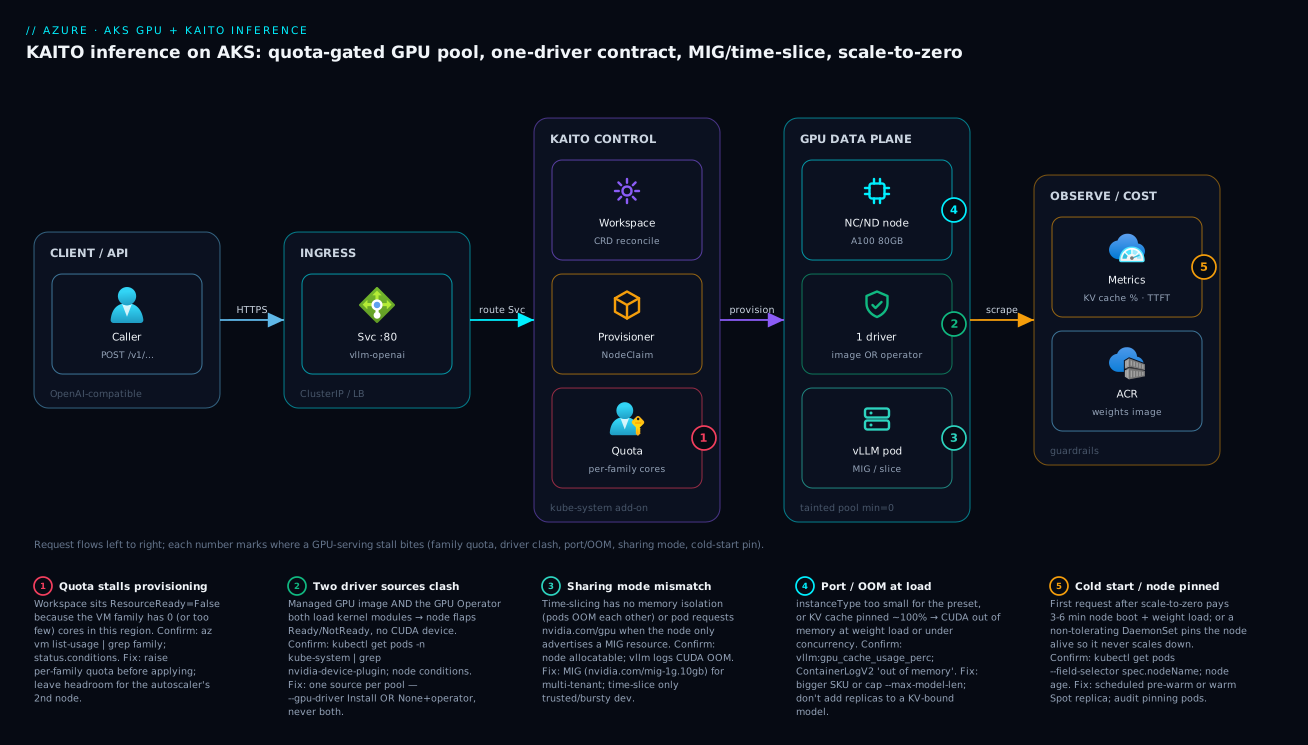
Read the diagram left to right as a request’s life, with the control and cost planes wrapped around it. A caller sends an OpenAI-compatible request to a ClusterIP/LoadBalancer Service on port 80, which routes to the vLLM pod. That pod only exists because the KAITO control plane in kube-system reconciled a Workspace: the workspace controller built the Deployment + Service, and the gpu-provisioner filed a NodeClaim — but the claim only succeeds if the per-family quota has cores to give, which is why quota is drawn as a gate, not an afterthought. Once the claim is fulfilled, the GPU data plane comes up: a tainted, scale-to-zero NC/ND node with an A100, exactly one driver source advertising nvidia.com/gpu, and the vLLM pod holding the model in VRAM — optionally carved by MIG or shared by time-slicing. Finally the observe/cost plane scrapes vLLM’s /metrics (KV-cache %, time-to-first-token) into Azure Monitor, and the weights image is pulled from a same-region ACR to keep cold starts short.
The five numbered badges sit on the exact hops where GPU serving stalls, and the legend narrates each as symptom · confirm · fix. Badge 1 is the quota gate on the provisioner — the most common “why won’t it deploy” cause. Badge 2 is the one-driver contract on the data plane (two sources → a flapping node). Badge 3 is the sharing-mode mismatch (time-slice OOM, or a pod requesting nvidia.com/gpu when only a MIG resource is advertised). Badge 4 is port/OOM at the pod (under-sized instanceType or a KV-bound model). Badge 5 is the cost/cold-start hop — a node pinned alive by a non-tolerating DaemonSet, or the 3–6 minute cold start after scale-to-zero. Follow the path, land on the badge that matches your symptom, run the named confirm, apply the fix.
Real-world scenario
Finlytics, a fintech platform team, ran an internal document-Q&A service on a 34B model behind a single, always-on Standard_NC96ads_A100_v4 pool (4× A100). The constraint was brutal economics: the service saw heavy traffic 08:00–18:00 on weekdays and near-zero otherwise, yet the four-GPU node ran 24×7 because the model spanned all four cards via tensor parallelism and could not scale below one node. Monthly GPU spend was dominated by ~110 idle hours a week — roughly ₹6–7 lakh/month, of which more than half was paying for nights and weekends serving nobody.
The first thing they got wrong was the diagnosis. When latency spiked at the 09:00 ramp, the on-call engineer’s reflex was to add replicas — which immediately failed, because the 34B model already consumed all four GPUs per replica and there was no second node (quota was capped at four A100 cores, and even raising it would have doubled spend). The second wrong move was treating the morning slowness as a model problem rather than a cold-node problem: the pool had quietly been left at min-count=1, so there was no scale-to-zero saving and the single node still cold-loaded weights after the overnight idle, so the first users every morning hit a 4-minute first request anyway. Worst of both worlds.
They restructured around three ideas. First, they decomposed the workload. The 34B summarizer genuinely needed multi-GPU, but the high-volume embedding model was a 1.5B that had been wastefully sharing the A100s. They carved the A100s into MIG 3g.40gb instances so the embedder ran in an isolated 40 GB partition with guaranteed memory, freeing whole cards and removing the noisy-neighbour contention that had been inflating summarizer tail latency. Second, they split traffic by tolerance: the synchronous “ask a question” path stayed on a guaranteed on-demand workspace, while overnight bulk re-indexing moved to a Spot GPU pool feeding an async queue, tolerating eviction at 60–90% lower cost. Third — the cost win — they put the summarizer workspace on cluster-autoscaler scale-to-zero (min-count=0) with a scheduled pre-warm at 07:45 so the first user of the day never hit a cold node, and the node died on its own after 18:00.
# Scheduled pre-warm: scale the GPU pool up before business hours,
# let the autoscaler take it back to zero after 18:00.
az aks nodepool update -g rg-ml --cluster-name aks-inference \
  --name gpua100 --update-cluster-autoscaler --min-count 0 --max-count 4

# CronJob bumps a warm replica at 07:45 weekdays (cluster-local time)
kubectl create cronjob prewarm --schedule="45 7 * * 1-5" \
  --image=bitnami/kubectl -- \
  kubectl scale deploy/vllm-summarizer --replicas=1
The result: the summarizer paid for GPUs only during business hours, the embedder stopped stealing A100 capacity, and the Spot pool absorbed re-indexing at a fraction of on-demand cost. Net GPU spend fell roughly 55% (to ~₹3 lakh/month) with no change to user-facing latency, because the pre-warm hid every cold start behind the morning ramp. The lesson on the wall: “A slow GPU service is a question — cold node, KV-bound, or noisy neighbour? — not a reason to add replicas.”
The restructure as a before/after ledger, because the order of moves is the lesson:
| Dimension | Before | After | Mechanism |
|---|---|---|---|
| Summarizer floor | min-count=1, 24×7 |
min-count=0 + 07:45 pre-warm |
Scale-to-zero + CronJob |
| Embedder placement | Sharing whole A100s | MIG 3g.40gb isolated |
GPU Operator MIG manager |
| Re-indexing | On-demand, always on | Spot pool + async queue | Spot + eviction-tolerant queue |
| Morning latency | 4 min cold start | Sub-second (pre-warmed) | Scheduled pre-warm |
| Tail latency | Inflated (noisy neighbour) | Predictable | Hardware isolation (MIG) |
| Monthly GPU spend | ~₹6–7 lakh | ~₹3 lakh | All of the above |
Advantages and disadvantages
The KAITO-on-AKS model — declarative inference objects that provision their own GPU nodes — both removes a huge amount of toil and introduces failure modes you must know about. Weigh it honestly:
| Advantages (why this model helps you) | Disadvantages (why it bites) |
|---|---|
A Workspace provisions right-sized GPU nodes on demand — no hand-rolled node pools |
Provisioning silently stalls on a quota wall you forgot to raise (ResourceReady: False) |
| Presets bake the runtime, GPU count, and tensor-parallel args — no guessing | Under-spec the instanceType and the model never goes ready; you must read conditions |
| Scale-to-zero releases idle GPU nodes automatically — the biggest cost lever | Scale-to-zero adds a 3–6 min cold start on the first request after idle |
| The managed GPU image removes driver toil entirely | Mixing it with the GPU Operator flaps the node — you must pick one source per pool |
| MIG gives hardware-isolated multi-tenant serving with predictable SLOs | MIG/time-slice are an operator concern, not a managed-image one — extra moving parts |
| OpenAI-compatible endpoint means clients don’t change | The CUDA error you see is the container’s, not the platform’s — diagnosis is one layer down |
| Spot pools cut batch/async cost 60–90% | Spot eviction (~30 s notice) is ruinous for synchronous serving |
The model is right for teams that want self-hosted open-weight inference without operating GPU plumbing by hand, and whose traffic is bursty enough that scale-to-zero pays for itself. It bites hardest on teams new to GPU quotas and drivers (the two walls before any model serves), latency-sensitive endpoints that can’t absorb a cold start (you trade away the biggest cost saving), and multi-tenant serving done naively (time-slicing a customer endpoint). Every disadvantage is manageable — quota ahead of time, one driver source, MIG for tenants, a pre-warm for latency — but only if you know it exists, which is the point of this article.
Hands-on lab
Stand up a GPU node pool, install KAITO, deploy a preset model, hit the OpenAI-compatible endpoint, then tear it all down. This costs real money while the A100 node is up — keep the run short and run the teardown. Run in Cloud Shell (Bash).
Cost warning: an
NC24ads_A100_v4node bills at roughly ₹250–350/hour on-demand. This lab should take well under an hour; delete the resource group the moment you’re done.
Step 1 — Variables and resource group.
RG=rg-kaito-lab
LOC=eastus2
AKS=aks-kaito-lab
az group create -n $RG -l $LOC -o table
Step 2 — Confirm GPU quota before you create anything.
az vm list-usage --location $LOC -o table | grep -iE "NCADS_A100"
# CurrentValue must be below Limit by at least 24 cores (one NC24ads node).
# If Limit is 0, raise it (and wait for approval) before continuing.
Expected: a row for standardNCADSA100v4Family with a non-zero Limit. If it’s 0, stop and file the quota request — nothing below will provision.
Step 3 — Create the AKS cluster with the KAITO add-on enabled.
az aks create -g $RG -n $AKS \
  --node-count 1 --node-vm-size Standard_D4s_v5 \
  --enable-ai-toolchain-operator --enable-oidc-issuer \
  --generate-ssh-keys -o table
az aks get-credentials -g $RG -n $AKS --overwrite-existing
Expected: a provisioningState: Succeeded cluster with a small system pool (no GPU yet — KAITO provisions GPU nodes on demand).
Step 4 — Verify the KAITO controllers are running.
kubectl get pods -n kube-system -l app.kubernetes.io/name=kaito
# Expect the workspace controller and gpu-provisioner pods in Running.
Step 5 — Apply a preset inference Workspace.
cat <<'EOF' | kubectl apply -f -
apiVersion: kaito.sh/v1beta1
kind: Workspace
metadata:
  name: workspace-phi-3
resource:
  instanceType: "Standard_NC24ads_A100_v4"
  labelSelector:
    matchLabels:
      apps: phi-3
inference:
  preset:
    name: "phi-3-medium-4k-instruct"
EOF
Step 6 — Watch it provision and become ready.
kubectl get workspace workspace-phi-3 -w
# False/False -> True/False (node up, ~5 min) -> True/True (model loaded, ~9 min)
If it sticks at ResourceReady: False, run kubectl describe workspace workspace-phi-3 and read the conditions — almost always quota or region availability.
Step 7 — Smoke-test the OpenAI-compatible endpoint.
kubectl run curl --rm -it --image=curlimages/curl --restart=Never -- \
  curl -s http://workspace-phi-3.default.svc.cluster.local:80/v1/completions \
  -H "Content-Type: application/json" \
  -d '{"model":"phi-3-medium-4k-instruct","prompt":"Define AKS:","max_tokens":24}'
Expected: a JSON completion with a choices[0].text field. You are now serving an open-weight model on a GPU node that didn’t exist ten minutes ago.
Step 8 — Confirm the GPU contract on the node.
kubectl get nodes -l accelerator=nvidia \
  -o jsonpath='{range .items[*]}{.metadata.name}{"\t"}{.status.allocatable.nvidia\.com/gpu}{"\n"}{end}'
Expected: the provisioned node listing 1 for nvidia.com/gpu.
Step 9 — Teardown (do this now).
az group delete -n $RG --yes --no-wait
Deleting the resource group removes the cluster, the KAITO-provisioned GPU node, and the workspace in one shot — stopping the GPU meter.
Practice challenges
Work these in order — each escalates from the last, beginner to advanced. Try to write the command or manifest yourself before opening the solution. They assume the cluster and KAITO add-on from the Hands-on lab; nothing here needs a live GPU except where noted.
Challenge 1 (beginner) — Read your quota before you deploy. In region eastus2, find out how many A100 v4 cores you are allowed and how many you are already using, then state whether you could provision one Standard_NC24ads_A100_v4 node (24 cores).
<details> <summary>Solution</summary>
az vm list-usage --location eastus2 -o table \
  | grep -iE "NCADS_A100"
Read the CurrentValue and Limit columns for standardNCADSA100v4Family. You can provision the node only if Limit − CurrentValue ≥ 24. If Limit is 0, file a quota request first — nothing will provision until it’s approved. Why: quota is the number-one cause of a workspace stuck ResourceReady: False, and it’s checkable in one command before any YAML.
</details>
Challenge 2 (beginner) — Make a pod land on the tainted GPU pool. The pool carries taint sku=gpu:NoSchedule and labels accelerator=nvidia,gpu-sku=a100. Write the three pod-spec fragments that let one pod schedule there and claim a whole GPU.
<details> <summary>Solution</summary>
spec:
  nodeSelector:
    accelerator: nvidia
    gpu-sku: a100
  tolerations:
    - key: sku
      operator: Equal
      value: gpu
      effect: NoSchedule
  containers:
    - name: server
      image: vllm/vllm-openai:latest
      resources:
        limits:
          nvidia.com/gpu: 1
All three must be present: the toleration gets you past the taint, the nodeSelector pins you to the right pool, and the nvidia.com/gpu limit reserves the card. Drop any one and the pod stays Pending or lands on the wrong node. Why: scheduling onto GPU nodes is an AND of three independent controls, not one.
</details>
Challenge 3 (intermediate) — Author a minimal Workspace. Write a Workspace that serves the phi-3-medium-4k-instruct preset on a single Standard_NC24ads_A100_v4, and name the two status booleans you’d watch, in order.
<details> <summary>Solution</summary>
apiVersion: kaito.sh/v1beta1
kind: Workspace
metadata:
  name: workspace-phi-3
resource:
  instanceType: "Standard_NC24ads_A100_v4"
  labelSelector:
    matchLabels:
      apps: phi-3
inference:
  preset:
    name: "phi-3-medium-4k-instruct"
Watch ResourceReady (the GPU node provisioned and joined) go True first, then InferenceReady (weights loaded, endpoint serving); kubectl get workspace workspace-phi-3 -w shows both. Why: the two booleans localise a stall — ResourceReady false is an infra/quota problem, InferenceReady false is a model/pod problem.
</details>
Challenge 4 (intermediate) — Size the SKU from the model. You must serve a 13B model in fp16. Compute a rough VRAM budget and pick the smallest sensible SKU from the family table. Would a single T4 (16 GB) work?
<details> <summary>Solution</summary>
13B × ~2 bytes/param at fp16 ≈ 26 GB for weights alone, plus KV-cache headroom (~3–8 GB) → ~30–34 GB. A T4’s 16 GB cannot hold it (you’d need int4 quantization down to ~7 GB to fit, at an accuracy cost). The smallest sensible fp16 choice is 1× A100 80GB (Standard_NC24ads_A100_v4). Why: the SKU is downstream of the model — weights-plus-KV must fit in one card’s VRAM, or you shard across cards.
</details>
Challenge 5 (advanced) — Advertise one A100 as four GPUs. Using the GPU Operator, configure time-slicing so one physical A100 is advertised as 4 schedulable nvidia.com/gpu. Then state the one workload type this must never front.
<details> <summary>Solution</summary>
apiVersion: v1
kind: ConfigMap
metadata:
  name: time-slicing-config
  namespace: gpu-operator
data:
  a100: |-
    version: v1
    sharing:
      timeSlicing:
        resources:
          - name: nvidia.com/gpu
            replicas: 4
kubectl patch clusterpolicy/cluster-policy -n gpu-operator --type merge \
  -p '{"spec":{"devicePlugin":{"config":{"name":"time-slicing-config","default":"a100"}}}}'
The node then advertises nvidia.com/gpu: 4. Never put this in front of a customer-facing / multi-tenant inference endpoint — time-slicing shares one CUDA context with no memory isolation, so one bad request pattern OOMs every co-tenant; use MIG there instead. Why: time-slicing buys utilization by giving up isolation, and that trade is only safe for trusted, bursty dev.
</details>
Challenge 6 (advanced) — Engineer scale-to-zero with a warm start. Configure the gpua100 pool to float between 0 and 4 nodes, make idle nodes die within ~5 minutes, and guarantee the first user at 08:00 on weekdays never hits a cold node.
<details> <summary>Solution</summary>
# Floor the pool at zero, cap at four
az aks nodepool update -g rg-ml --cluster-name aks-inference \
  --name gpua100 --update-cluster-autoscaler --min-count 0 --max-count 4

# Reclaim idle GPU nodes fast
az aks update -g rg-ml --name aks-inference \
  --cluster-autoscaler-profile \
    scale-down-unneeded-time=5m \
    scale-down-delay-after-add=5m \
    skip-nodes-with-system-pods=false

# Pre-warm a replica at 07:45 on weekdays so the 08:00 user hits a warm node
kubectl create cronjob prewarm --schedule="45 7 * * 1-5" \
  --image=bitnami/kubectl -- \
  kubectl scale deploy/vllm-summarizer --replicas=1
Scale-to-zero removes idle night/weekend spend; the CronJob hides the 3–6 min cold start behind the morning ramp; the autoscaler takes the node back after traffic drains. Why: the cost win (min-count=0) and the latency fix (pre-warm) are two separate knobs — you need both, not min-count=1.
</details>
Common beginner mistakes
These are mental-model errors, not symptoms — the wrong intuition a newcomer brings to GPU serving, and the correction. (For a symptom → confirm → fix table, use the troubleshooting playbook below.)
- “OOM means I need more replicas.” The reflex from stateless web apps is to scale out under load. GPU memory is a per-card ceiling: every replica needs its own GPU and hits the identical VRAM limit, so three replicas OOM three times. The right model: scale up (more VRAM per card) or reduce memory use (quantize, cap
--max-model-len) — scaling out only helps once each replica already fits. - “I’ll just add a GPU node pool” — written before checking quota. New GPU users write the YAML first and discover the per-family quota is
0only when the workspace hangsResourceReady: False. Quota is a subscription fact that defaults to zero and takes hours-to-days to raise. The right order is always: checkaz vm list-usage, raise the family quota with headroom, then deploy. - “More drivers can’t hurt — I’ll enable the managed image and install the GPU Operator.” Two driver sources both compile and load the NVIDIA kernel module and fight over it; the node flaps
Ready/NotReadyforever. There is exactly one driver source per pool — managed image or operator, never both. - “The GPU node is idle, so I’m not paying much.” A provisioned GPU VM bills by the hour it exists, not by requests served. An idle A100 at
min-count=1costs the same as a busy one. The right model: the only cheap GPU node is one that doesn’t exist — usemin-count=0and a pre-warm. - “
nvidia.com/gpu: 0.5will share the card.” The extended resource is integer and non-overcommittable — a fractional request is rejected. Sub-GPU sharing is a different mechanism entirely: MIG (requestnvidia.com/mig-1g.10gb) or time-slicing (advertise N whole-GPU replicas), configured on the node, not requested as a fraction. - “Scale-to-zero is broken — the first request took four minutes.” That’s not a failure; it’s a cold start. A zeroed pool must boot a VM, land the driver, pull a multi-GB image, and load weights into VRAM (3–6 min) before the first request. It’s expected latency, removed with a pre-warm — not a bug to debug.
- “The model is wedged” — read the conditions first. When a preset is under-sized (
instanceTypetoo small), KAITO reports the resource as insufficient instatus.conditionsrather than crash-looping. Beginners restart pods and re-apply YAML; the answer iskubectl describe workspaceand a bigger SKU.
Common mistakes & troubleshooting
The failure modes that actually page you, as a symptom → root cause → confirm → fix playbook. Scan for your symptom, then read the row:
| # | Symptom | Root cause | Confirm (exact command / path) | Fix |
|---|---|---|---|---|
| 1 | Workspace stuck ResourceReady: False |
Per-family quota is 0 / too low | az vm list-usage -l <region> | grep <family>; kubectl describe workspace |
Raise family quota; leave headroom for autoscaler |
| 2 | ResourceReady: False, condition cites availability |
SKU not stocked in region/zone | az vm list-skus -l <region> --size <sku> empty |
Choose a region/zone that has the family |
| 3 | no CUDA-capable device is detected |
Two driver sources, or device plugin down | kubectl get pods -n kube-system | grep nvidia-device-plugin |
One driver source per pool; restart plugin |
| 4 | Node flaps Ready/NotReady |
Managed image + GPU Operator both loading modules | kubectl describe node; driver DaemonSet logs |
Pick A or B; remove the second driver |
| 5 | CUDA out of memory at weight load |
instanceType too small for preset |
Pod logs; kubectl describe workspace conditions |
Move up a SKU, or quantize the model |
| 6 | CUDA out of memory only under load |
KV cache pinned ~100% | vllm:gpu_cache_usage_perc near 1.0 |
Cap --max-model-len; bigger VRAM; not more replicas |
| 7 | Pod Pending on a GPU node | Missing toleration / nodeSelector / request |
kubectl describe pod (Events) |
Add toleration + selector + nvidia.com/gpu |
| 8 | InferenceReady: False, pod CrashLoop |
Wrong port/probe, or bad inference.config |
kubectl logs <pod>; container start log |
Fix the override; match the served port |
| 9 | Node never scales down | Non-tolerating DaemonSet / long grace pins it | kubectl get pods --field-selector spec.nodeName=<node> |
Add GPU toleration to/evict the pinning pod |
| 10 | First request every morning is slow | Cold start after scale-to-zero | kubectl get nodes (node age ~minutes) |
Scheduled pre-warm or warm Spot replica |
| 11 | Throughput flat despite more replicas | Model is KV-bound, not replica-bound | vllm:num_requests_running vs cache % |
Turn MIG off / more VRAM / shorter context |
| 12 | Time-sliced pods randomly OOM | No memory isolation between co-tenants | Operator config shows timeSlicing; pod OOMKilled |
Switch to MIG for isolated memory |
| 13 | Spot inference drops mid-request | Spot eviction (~30 s notice) | Node eviction event; Spot scheduled-events | Move synchronous serving to on-demand |
| 14 | Image pull phase takes many minutes | Cross-region or cold ACR | NodeClaim/pull events; ACR region | Same-region ACR; keep weights image lean |
The error/limit reference — the exact strings and numbers you will hit, what each means, and the first move:
| Error / limit | Where it surfaces | Meaning | First move |
|---|---|---|---|
no CUDA-capable device is detected |
Pod logs | Driver/device-plugin not exposing the GPU | Check one-driver contract; restart plugin |
CUDA out of memory |
Pod logs | VRAM exhausted (weights or KV cache) | Bigger SKU / quantize / cap context |
Failed to initialize NVML |
Pod logs | Driver/runtime mismatch | Re-check driver source; node-image upgrade |
nvidia.com/gpu: Insufficient |
Scheduler events | No free whole GPU on any node | Scale pool / MIG / time-slice |
ResourceReady: False (sustained) |
Workspace status | Node claim unfulfilled | Quota / region / driver |
| Per-family quota default | Subscription | Often 0 cores | Raise before deploying |
nvidia.com/gpu granularity |
Node allocatable | Integer, non-overcommittable | Use MIG/time-slice for sub-GPU |
| Container start time (cold node) | Provision timeline | 3–6 min boot + pull + load | Pre-warm or accept latency |
| Spot eviction notice | Scheduled events | ~30 s before reclaim | Don’t put sync serving on Spot |
| MIG support | Hardware | A100/H100 only | T4 → time-slice instead |
A compact decision table for the most common “it’s stuck, now what”:
| If you see… | It’s probably… | Do this |
|---|---|---|
ResourceReady: False and node never appears |
Quota or region | az vm list-usage; raise family quota or change region |
Node up but nvidia-smi missing |
Driver/device-plugin or two-driver clash | Confirm one source; check device-plugin pod |
| Model OOMs at load, never under load | instanceType too small |
Move up a SKU or quantize |
| Model OOMs only under load | KV-bound | Cap --max-model-len; more VRAM; not replicas |
| Pod Pending on a healthy GPU node | Scheduling mismatch | Add toleration + nodeSelector + GPU request |
| GPU node won’t die when idle | A pod pins it | Find it via --field-selector spec.nodeName |
| Co-tenants OOM each other | Time-slicing in prod | Switch to MIG |
A couple of the worst offenders deserve prose, because the confirm step is non-obvious.
The two-driver clash (rows 3–4). This is the number-one first-GPU-deploy failure after quota. You enabled the managed GPU image on the pool (--gpu-driver Install) and installed the GPU Operator because a blog told you to. Both DaemonSets try to compile and load the NVIDIA kernel module; the node oscillates Ready/NotReady and pods see no CUDA-capable device. Confirm by listing driver-related pods in both kube-system and gpu-operator — you’ll see two driver sources. Fix by picking one: either --gpu-driver None on the pool and keep the operator, or uninstall the operator and keep the managed image. Never both on the same node.
KV-bound throughput (rows 6, 11). A model can be at 100% GPU memory while the compute sits idle, because the KV cache — attention state for in-flight requests — has filled VRAM. Adding replicas does nothing: each new replica needs its own card and you’re out of memory, or they contend for the same one. Confirm with vLLM’s own metric: if vllm:gpu_cache_usage_perc pins near 1.0 while vllm:num_requests_running is modest, you are KV-bound. The fix is less memory pressure — cap --max-model-len (shorter context), move to more VRAM, or stop time-slicing/MIG-splitting the card — not more replicas.
The Log Analytics query that surfaces driver/OOM patterns across all your inference pods at once:
// Driver / OOM failure patterns from container logs (Log Analytics)
ContainerLogV2
| where TimeGenerated > ago(1h)
| where LogMessage has_any ("CUDA out of memory",
                           "NVML", "no CUDA-capable device",
                           "Failed to initialize NVML")
| summarize count() by PodName, tostring(LogMessage)
| order by count_ desc
And the verify ladder — each step gates the next, so a failure tells you exactly which layer broke:
# 1. Node advertises the GPU resource (driver source working)
kubectl get nodes -l accelerator=nvidia \
  -o jsonpath='{range .items[*]}{.metadata.name}{"\t"}{.status.allocatable.nvidia\.com/gpu}{"\n"}{end}'

# 2. Driver actually loaded inside a pod on the node
kubectl run gpu-test --rm -it --restart=Never \
  --overrides='{"spec":{"nodeSelector":{"accelerator":"nvidia"},"tolerations":[{"key":"sku","operator":"Equal","value":"gpu","effect":"NoSchedule"}]}}' \
  --image=nvidia/cuda:12.4.1-base-ubuntu22.04 -- nvidia-smi

# 3. KAITO workspace fully ready
kubectl get workspace -o wide
kubectl describe workspace workspace-llama-3-1-8b | grep -A5 Conditions

# 4. Inference endpoint returns tokens (latency sanity)
time kubectl exec deploy/curl -- curl -s \
  http://workspace-llama-3-1-8b.default.svc.cluster.local/v1/models
Best practices
- Size the SKU to the model, not the other way around. Compute the fp16 (or quantized) VRAM budget plus realistic KV-cache headroom and pick the smallest family that holds it. Oversizing is the quietest way to double the bill.
- Raise per-family quota before you write YAML, with headroom for at least one extra autoscaler node. A quota ticket is hours-to-days; discovering it mid-deploy wastes that time under pressure.
- One driver source per pool — always. Managed GPU image or GPU Operator, never both on the same node. Standardize it in your pool-creation IaC so nobody re-adds the second.
- Taint every GPU pool (
sku=gpu:NoSchedule) and require matching tolerations +nodeSelector+ an integernvidia.com/gpurequest on every GPU workload. Nothing CPU-only should ever occupy a GPU node. - Prefer presets over hand-rolled serving. A KAITO preset encodes the validated GPU count and tensor-parallel degree; hand-authoring those is where teams ship subtly wrong configs.
- Set
min-count=0on GPU pools and tunescale-down-unneeded-timeaggressively (5m). Idle A100s are the single most expensive mistake in this stack. - Decide the cold-start trade-off explicitly — pure scale-to-zero, scheduled pre-warm, or a warm Spot replica — and document which SLO it serves. Don’t leave a pool at
min-count=1by accident. - Use MIG for multi-tenant serving, time-slicing only for trusted bursty dev. Never time-slice a customer-facing endpoint; one bad request pattern degrades every co-tenant.
- Keep the weights image lean and the ACR same-region. Image pull is part of every cold start and every scale-up; cross-region pulls add minutes and egress cost.
- Wire capacity metrics before launch —
vllm:gpu_cache_usage_perc,vllm:num_requests_running, time-to-first-token — so you can tell KV-bound from replica-bound, and a Log Analytics OOM/driver query so failures are visible across pods. - Put eviction-tolerant work on Spot, synchronous serving on on-demand, separated by a queue. Don’t let a 30-second Spot eviction take down a user-facing request.
- Commit to Reservations/savings plans only after utilization is proven. Reserve steady-state, never idle capacity.
Security notes
- Use workload identity, not static credentials. The KAITO provisioner and any pod pulling from ACR or Key Vault should authenticate via Microsoft Entra Workload ID (federated), so no long-lived secret sits in the cluster. Grant least privilege — pull from this registry, read this secret — not Contributor.
- Lock down the model image supply chain. Pull weights and runtime from a private ACR with image digest pinning and vulnerability scanning; an inference image is a large attack surface. See Azure Container Registry: Secure Supply Chain for the registry-side controls, and pair it with the cluster-side secret sync in AKS Secrets Store CSI: Key Vault Sync & Rotation.
- Isolate tenants in memory, not just by namespace. On a shared GPU, MIG gives hardware memory isolation between tenants; time-slicing does not. For multi-tenant serving with any data-sensitivity, MIG is a security control, not just a utilization one.
- Keep the inference endpoint private. The OpenAI-compatible Service should be
ClusterIPbehind your ingress/gateway with authentication, not a publicLoadBalancer. Don’t expose a raw model endpoint to the internet. - Restrict outbound from GPU nodes. Inference pods rarely need broad egress; constrain it with network policy so a compromised serving container can’t exfiltrate weights or data. The networking patterns are in Production AKS Networking & Observability.
- Scope the provisioner’s permissions. The gpu-provisioner creates VMs — give its identity exactly the compute/network rights it needs in the node resource group, nothing broader, so a compromise can’t spin arbitrary infrastructure.
- Audit who can apply a
Workspace. AWorkspaceprovisions expensive GPUs; gate it with RBAC so only the platform/ML team can create one, and reviewinference.config/templateoverrides like code.
Cost & sizing
The bill is dominated by GPU node-hours, and almost every other lever is downstream of how many GPU-hours you actually run. The drivers and how they interact with the fixes:
- GPU SKU and node-hours dominate. You pay per GPU VM per hour whether it serves one request or a million. Right-sizing the SKU to the model and running
min-count=0are the two biggest levers — in that order. - Scaling out multiplies cost; scaling up changes the per-node rate. Three replicas of a single-GPU model ≈ 3× the node cost. For an OOM, scaling out doesn’t help (each instance hits the same VRAM ceiling) — you scale up to more VRAM or quantize.
- Scale-to-zero is the headline saving for daytime-only traffic — up to ~70% of idle hours removed — at the cost of a 3–6 min cold start you hide with a pre-warm.
- MIG multiplies effective capacity for small tenants: seven
1g.10gbslices serve seven embedding tenants on one card at ~1/7 the per-tenant cost of dedicating cards. - Spot and reservations cut the rate (60–90% and 30–60% respectively) but with eviction risk and locked spend; use Spot for batch/async and reserve only proven steady load.
Rough INR/USD figures for the common GPU SKUs (on-demand, indicative — verify current pricing in your region):
| SKU | GPUs | Rough USD/hr | Rough INR/hr | Rough INR/month (24×7) | Right-sized for |
|---|---|---|---|---|---|
Standard_NC4as_T4_v3 |
1× T4 | ~$0.5 | ~₹45 | ~₹32,000 | Dev, quantized 7B |
Standard_NC24ads_A100_v4 |
1× A100 80GB | ~$3.7 | ~₹310 | ~₹2.2 lakh | 7B–34B fp16 |
Standard_NC48ads_A100_v4 |
2× A100 80GB | ~$7.3 | ~₹610 | ~₹4.4 lakh | 34B; 2-way TP |
Standard_NC96ads_A100_v4 |
4× A100 80GB | ~$14.7 | ~₹1,220 | ~₹8.8 lakh | 70B; 4-way TP |
Standard_ND96isr_H100_v5 |
8× H100 | ~$45+ | ~₹3,750+ | ~₹27 lakh+ | Large, high-throughput |
The same picture as “what each lever buys you,” with the watch-out:
| Lever | Rough saving | What it fixes | Watch-out |
|---|---|---|---|
min-count=0 + pre-warm |
Up to ~70% of idle | Idle night/weekend spend | Cold start without pre-warm |
| Right-size SKU | 20–50% | Oversized GPU | Under-size → OOM at load |
| MIG (small tenants) | Up to ~85%/tenant | Wasted whole cards | A100/H100 only |
| Quantization (int8/int4) | 30–60% | Too many GPUs | Accuracy budget |
| Spot (batch/async) | 60–90% | Expensive batch | Eviction mid-job |
| Reservation / savings plan | 30–60% | Steady on-demand premium | Locked spend if idle |
There is no meaningful free tier for GPU inference on AKS — the cheapest realistic path to “a model serving” is a single T4 for a small/quantized model at roughly ₹32,000/month if left on, far less with scale-to-zero. For anything 7B-and-up in fp16, an A100 is the floor, and scale-to-zero plus a pre-warm is what makes it affordable.
Interview & exam questions
1. A KAITO Workspace is stuck ResourceReady: False for ten minutes. What are the three most likely causes and how do you tell them apart? Quota, region availability, or a driver clash. Run az vm list-usage -l <region> | grep <family> — if the family limit is 0 or at its cap, it’s quota. az vm list-skus -l <region> --size <sku> empty means the SKU isn’t stocked there. If a node does come up but flaps Ready/NotReady, it’s two driver sources. kubectl describe workspace conditions usually name which.
2. Why does running both the managed GPU image and the NVIDIA GPU Operator on one node break it? Both lay down a driver DaemonSet that compiles and loads the NVIDIA kernel module. They conflict, the node oscillates Ready/NotReady, and pods see no CUDA-capable device. The fix is one source per pool: --gpu-driver Install (managed) or --gpu-driver None plus the operator — never both.
3. A model OOMs at weight load. Does scaling out fix it? What does? No — scaling out adds replicas that each need their own GPU and hit the same per-GPU VRAM ceiling, so they OOM identically. The fix is to scale up to a SKU with more VRAM, or quantize the model (int8/int4) so the weights fit. Memory is per-GPU; only more VRAM-per-GPU or less memory-use helps.
4. Distinguish MIG from time-slicing and say when you’d use each. MIG hardware-partitions a GPU into isolated instances with dedicated memory and compute (A100/H100 only) — use it for multi-tenant serving where one tenant must not starve another. Time-slicing round-robins a shared CUDA context with no memory isolation — use it only for trusted, bursty, cost-sensitive dev/CI. Never time-slice a customer-facing endpoint.
5. What is the nvidia.com/gpu request and why does it matter that it’s integer? It’s the extended resource the device plugin advertises per whole GPU; a pod requests it in resources.limits. It’s integer and non-overcommittable — you can’t ask for 0.5 — which is exactly why MIG (request nvidia.com/mig-1g.10gb) and time-slicing (advertise N replicas of nvidia.com/gpu) exist, to get sub-GPU allocation.
6. A GPU node won’t scale down even though it’s idle. What pins it and how do you find the culprit? A pod the autoscaler can’t evict — a DaemonSet without a GPU toleration that landed on it, a pod with a long terminationGracePeriodSeconds, or a kube-system pod when skip-nodes-with-system-pods=true. Find it with kubectl get pods --field-selector spec.nodeName=<node>, then add a GPU toleration to it, set skip-nodes-with-system-pods=false, or shorten the grace period.
7. Your inference throughput is flat despite adding replicas. What’s the likely cause and the real fix? The model is KV-bound, not replica-bound: the KV cache has filled VRAM. Confirm with vllm:gpu_cache_usage_perc near 1.0 while vllm:num_requests_running is modest. The fix is less memory pressure — cap --max-model-len, move to more VRAM, or stop splitting the card — not more replicas.
8. How do you serve a 70B fp16 model on AKS, and what constraint does that impose on scale-to-zero? A 70B fp16 model needs ~140 GB VRAM, so it requires a multi-GPU node (e.g. 4× A100 80GB, Standard_NC96ads_A100_v4) with tensor parallelism — the model is sharded across all four cards. The constraint: it can’t scale below one (four-GPU) node, so your scale-to-zero floor is one whole expensive node up or zero — there’s no partial scale-down, which makes a scheduled pre-warm and tight scale-down timers essential.
9. What does a KAITO preset give you that hand-rolling a vLLM Deployment doesn’t? A preset is a curated, validated model image with the correct runtime, GPU count, and serving args (including tensor-parallel degree) baked in, plus the tolerations and nodeSelector written for you, and it encodes the minimum GPU footprint so an under-sized instanceType reports insufficient resource instead of OOM-crashing. Hand-rolling means you own all of that and can ship a subtly wrong config.
10. A user reports the first request each morning takes minutes; the rest are fast. Cause and fixes? The GPU pool scaled to zero overnight, so the first request pays a cold start — VM boot, driver land, image pull, weight load (3–6 min). Fixes: a scheduled pre-warm (CronJob scales a replica up before business hours), a warm Spot replica as a cheap floor, or keeping min-count=1 (most expensive). The underlying work isn’t eliminated — you ensure a warm node has already paid it.
11. Where do per-family GPU quotas bite, and what’s the right pre-deploy step? Azure meters GPUs as vCPU cores per VM family per region, defaulting to 0 in most subscriptions; NC24ads and NC96ads share the standardNCADSA100v4Family bucket while T4/H100 are separate. The right step is to check az vm list-usage and raise the family quota — with headroom for the autoscaler’s next node — before writing any YAML, since the ticket can take hours to days.
12. Why is the CUDA error you see usually the container’s problem to diagnose, not the platform’s? Because AKS and KAITO hand you a working node and a running pod; the runtime (vLLM) is what actually loads weights and manages the KV cache, so CUDA out of memory or no CUDA-capable device is reported by the container one layer below the platform. You diagnose it by reading pod logs and nvidia-smi/vLLM metrics, then correcting the SKU, context length, driver source, or sharing mode.
These map to AZ-305 / AZ-104 (Azure compute, AKS, quotas, cost) and the CKA/CKAD scheduling and resource-management objectives (taints/tolerations, nodeSelector, extended resources, autoscaling). The GPU/AI-serving specifics align with Azure’s AI infrastructure guidance. A compact mapping for revision:
| Question theme | Primary cert | Objective area |
|---|---|---|
| GPU SKU sizing, quotas, cost | AZ-104 / AZ-305 | Compute, quotas, cost management |
Taints/tolerations, nodeSelector, extended resources |
CKA / CKAD | Scheduling & resource management |
| Cluster autoscaler, scale-to-zero | CKA | Cluster maintenance & scaling |
| KAITO Workspace / operator pattern | (AKS AI) | Operators & CRDs on AKS |
| MIG vs time-slicing isolation | (AKS AI) | GPU utilization & multi-tenancy |
| Workload identity, private ACR, network policy | AZ-500 | Secure compute & supply chain |
Quick check
- A
WorkspacesitsResourceReady: Falseand no GPU node ever appears. What is the single most likely cause and the one command that confirms it? - True or false: scaling out to more replicas is the correct fix for a model that OOMs at weight load.
- You need multi-tenant serving where one tenant must never starve another’s memory. MIG or time-slicing — and why?
- Your GPU node refuses to scale down even though it’s idle. Name two things that could be pinning it and the command to find the culprit.
- The first request each morning takes four minutes; the rest are sub-second. Why, and name two fixes.
Answers
- Per-family GPU quota is 0 (or below what the node needs). Confirm with
az vm list-usage -l <region> | grep <family>— if the limit is 0 or at its cap, the provisioner’s node claim can’t be fulfilled. Raise the family quota (with headroom for the autoscaler) and re-checkkubectl describe workspaceconditions. - False. Memory is a per-GPU ceiling; every scaled-out replica needs its own card and hits the same VRAM limit, OOMing identically. The fix is to scale up to more VRAM or quantize the model so the weights fit.
- MIG. It hardware-partitions the GPU into isolated instances with dedicated memory and compute, so a noisy tenant can’t starve a neighbour. Time-slicing shares one CUDA context with no memory isolation — pods can OOM each other — so it’s only safe for trusted, bursty dev.
- A DaemonSet without a GPU toleration that landed on the node, or a pod with a long
terminationGracePeriodSeconds(or akube-systempod whenskip-nodes-with-system-pods=true). Find it withkubectl get pods --field-selector spec.nodeName=<node>, then tolerate/evict it or setskip-nodes-with-system-pods=false. - The GPU pool scaled to zero overnight, so the first request pays the full cold start (node boot + driver + image pull + weight load, 3–6 min). Two fixes: a scheduled pre-warm (CronJob scales a replica up before business hours) or a warm Spot replica as a cheap floor; keeping
min-count=1also works but is the most expensive.
Glossary
- AKS (Azure Kubernetes Service) — Azure’s managed Kubernetes; you operate node pools and workloads, Azure operates the control plane.
- KAITO (Kubernetes AI Toolchain Operator) — an operator that turns a declarative
Workspaceinto provisioned GPU nodes plus a served, OpenAI-compatible model. - Workspace (CRD) — the
kaito.sh/v1beta1object describing the GPUinstanceType, nodelabelSelector, and the modelpresetto serve (or atuningjob). - Preset — a curated, validated model image (Llama, Phi, Mistral, Mixtral, Qwen, …) with the runtime, GPU count, and serving args baked in.
- gpu-provisioner — the KAITO node controller that files a NodeClaim and creates the GPU VM a workspace needs, on demand.
- NodeClaim — the object the provisioner files to request one new GPU VM; an unfulfilled claim (quota or region wall) is why
ResourceReadystaysFalse. - Cluster autoscaler — the AKS component that adds nodes when pods are Pending and removes nodes left unneeded, keeping a pool between its
--min-countand--max-count. - GPU SKU / VM family — an Azure NC/ND VM type (e.g.
Standard_NC24ads_A100_v4) and its GPU(s); GPUs are metered by vCPU cores per family per region. - Per-family quota — the cap on vCPU cores for a VM family in a region; defaults to 0 in most subscriptions and gates GPU provisioning.
- VRAM — on-GPU memory holding model weights plus the KV cache; exhaustion causes
CUDA out of memory. - KV cache — per-request attention state in transformer inference that grows with context length and concurrency; a common VRAM-exhaustion source.
- Tensor parallelism — sharding one model across multiple GPUs so a model larger than a single card’s VRAM can serve.
- Quantization — storing weights at lower precision (int8 ≈ 1 byte/param, int4 ≈ 0.5) to shrink VRAM use, trading some accuracy to fit a larger model on a smaller GPU.
- Managed GPU image — the AKS node image with the NVIDIA driver pre-installed and lifecycle-managed by Microsoft (
--gpu-driver Install). - NVIDIA GPU Operator — a Helm-managed driver/device-plugin/MIG/DCGM stack you own (
--gpu-driver None+ Helm); enables MIG and time-slicing. - DCGM (Data Center GPU Manager) — NVIDIA’s GPU telemetry stack; its
dcgm-exporter(bundled with the GPU Operator) surfaces GPU metrics to Prometheus. nvidia.com/gpu— the extended resource a node advertises per whole GPU; integer and non-overcommittable in a pod request.- Taint / toleration — a node taint (e.g.
sku=gpu:NoSchedule) repels pods unless they carry a matching toleration; keeps non-GPU pods off costly nodes. - MIG (Multi-Instance GPU) — hardware partitioning of an A100/H100 into isolated instances (profiles like
1g.10gb,3g.40gb) with dedicated memory and compute. - Time-slicing — advertising one physical GPU as N replicas so multiple pods share its CUDA context round-robin, with no memory isolation.
- Scale-to-zero — a GPU pool floor of
min-count=0; the node is released when idle, trading idle cost for a cold start on the next request. - Cold start (GPU) — the 3–6 minute first-request latency on a freshly provisioned node: VM boot, driver land, image pull, and weight load.
- Spot GPU — discounted (60–90%) GPU capacity that can be evicted with ~30 s notice; suited to batch/async, not synchronous serving.
- OpenAI-compatible API — an HTTP endpoint whose routes and JSON shapes match OpenAI’s (
/v1/chat/completions,/v1/completions, …), so existing OpenAI client code talks to your self-hosted model unchanged. - Time-to-first-token (TTFT) — latency from request arrival to the first generated token; a core serving-quality signal alongside KV-cache usage.
- ACR (Azure Container Registry) — Azure’s private container registry; a same-region ACR keeps the large weights-image pull fast during cold starts.
- Microsoft Entra Workload ID — federated pod identity that lets KAITO and inference pods authenticate to Azure services (ACR, Key Vault) without a long-lived secret in the cluster.
- vLLM — a high-throughput inference server (used by KAITO presets) exposing an OpenAI-compatible API and Prometheus metrics like
vllm:gpu_cache_usage_perc.
Next steps
You can now stand up right-sized, autoscaled GPU inference on AKS and diagnose the stalls. Build outward:
- Next: Kubernetes Autoscaling: HPA, KEDA & Karpenter — the autoscaling mechanics that drive GPU scale-to-zero and burst.
- Related: Model Serving with KServe: Canary & GPU Autoscale — an alternative serving stack with canary rollouts and GPU autoscale.
- Related: GPU Inference Platform for LLMs on EKS with Karpenter — the AWS mirror of this architecture, for multi-cloud teams.
- Related: Azure Monitor Managed Prometheus & Grafana for AKS — wire up the GPU and vLLM metrics this article relies on.
- Related: Kubernetes Cost Allocation & Right-sizing with Kubecost — attribute and trim the GPU spend per team and workload.
- Related: AKS Secrets Store CSI: Key Vault Sync & Rotation — get model/registry secrets into pods without static credentials.