In a nutshell
A pod running in your cluster often needs to reach an AWS service — read an S3 bucket, write to a queue, push metrics. AWS only lets it in if the pod can prove which identity it is, and that identity is an IAM role. So the whole question this lesson answers is: how does a specific pod get handed the credentials for a specific IAM role — safely, with no passwords baked into the container?
There are two mechanisms for that, and this lesson is about moving from the old one to the new one:
- IRSA (IAM Roles for Service Accounts) — the six-year-old approach. Think of it like a passport with a visa: each cluster runs its own passport office (an OIDC provider), the pod carries a signed token, and AWS checks that token against a rule written into the role that names that exact office and that exact service account. It works, but every new cluster is a new passport office you must register, and a role that trusts several clusters lists all of their offices by hand.
- EKS Pod Identity — the newer approach. Think of it like a building access-badge system: instead of every cluster proving itself to AWS separately, AWS trusts one badge issuer (
pods.eks.amazonaws.com) for all clusters, and which pod gets which role is recorded in a simple lookup entry on the EKS side called an association. Add a cluster, add an entry — you never touch the role’s trust rules again.
The migration mental model is one line: you are moving the “which service account may use this role” decision out of the IAM trust policy and into an EKS association. The reassuring part is that both mechanisms can run on the same role at the same time, so you flip one namespace, watch it work, and roll back with a single restart if it doesn’t. Nothing is destroyed until the very last step. The rest of this lesson is the careful, reversible way to do that at fleet scale.
Level: Advanced / Expert — but this nutshell and the practice section start from zero · Time: ~62 min read · After this you can: tell in one command whether a pod is on IRSA or Pod Identity, create an association, cut a namespace over reversibly, roll back in one command, and scope one role across many namespaces with session tags.
IRSA was the right answer for six years. You stood up an OIDC provider per cluster, annotated a service account with a role ARN, and the AWS SDK exchanged a projected token for credentials. It works. But every cluster you create is a new IAM identity provider, every role’s trust policy hard-codes a specific cluster’s OIDC issuer URL, and reusing one role across three clusters means a StringEquals condition that grows a line per cluster. EKS Pod Identity collapses that: one service principal (pods.eks.amazonaws.com), one trust policy, and the cluster/namespace/service-account binding managed entirely in the EKS API as an association resource. This is the migration I run for platform teams who have outgrown the OIDC sprawl — written to be incremental and fully reversible at every step.
The reason this migration is safe to attempt is that IRSA and Pod Identity coexist on the same role. A role can trust both sts:AssumeRoleWithWebIdentity (the OIDC federation IRSA uses) and sts:AssumeRole/sts:TagSession from pods.eks.amazonaws.com (Pod Identity) at the same time, and a pod’s effective credential source is decided at pod start by which environment variables EKS injects. So you can flip one namespace, watch CloudTrail, and roll back with a single kubectl rollout restart if anything looks wrong. Nothing is destructive until you deliberately retire the OIDC trust statement at the end.
By the end of this article you will know exactly which of the three moving parts — the Pod Identity Agent DaemonSet, the association resource, and the trust policy — is responsible for each failure you hit, and you will be able to read aws sts get-caller-identity from inside a pod and tell in one line whether the whole credential path is working. Because you will return to this mid-migration, the trust models, the session tags, the failure modes, the CLI flags and the cost deltas are all laid out as scannable tables — read the prose once, then keep the tables open during the rollout.
What problem this solves
IRSA’s trust anchor is an IAM OIDC identity provider that points at your cluster’s issuer URL. The role trust policy looks like this:
{
  "Effect": "Allow",
  "Principal": {
    "Federated": "arn:aws:iam::111122223333:oidc-provider/oidc.eks.us-east-1.amazonaws.com/id/EXAMPLED539D4633E53DE1B716D3041E"
  },
  "Action": "sts:AssumeRoleWithWebIdentity",
  "Condition": {
    "StringEquals": {
      "oidc.eks.us-east-1.amazonaws.com/id/EXAMPLED539D4633E53DE1B716D3041E:sub": "system:serviceaccount:payments:checkout",
      "oidc.eks.us-east-1.amazonaws.com/id/EXAMPLED539D4633E53DE1B716D3041E:aud": "sts.amazonaws.com"
    }
  }
}
Three structural problems show up at scale. Per-cluster identity providers: each cluster has a unique OIDC issuer, so a role meant to be shared across clusters needs every issuer registered as a provider and every sub/aud condition repeated — recreate a cluster and the issuer changes, breaking every role that trusted it. Coupled ownership: the IAM team owns OIDC providers while the platform team owns clusters, so standing up a new cluster requires an IAM change ticket before any workload can assume a role. Condition-key sprawl: multi-cluster, multi-namespace reuse turns the trust policy into a maintenance liability that few people fully understand.
Pod Identity replaces the federation anchor with a single AWS service principal, pods.eks.amazonaws.com, and moves the cluster/namespace/service-account binding out of IAM and into an EKS association resource. The result: the role trust policy is identical across every cluster and never edited per cluster, and creating a cluster is a platform-team operation with no IAM ticket.
Who hits this pain hardest: fleets of 5+ clusters (blue/green, per-tenant, per-region), teams that recycle clusters frequently (the issuer churns), and any role shared across clusters or accounts. To frame the whole field before the deep dive, here is what each mechanism costs you and where Pod Identity wins:
| Concern | IRSA (OIDC) | EKS Pod Identity | Why it matters at scale |
|---|---|---|---|
| Trust anchor | One OIDC provider per cluster | One service principal, all clusters | N clusters → N providers to register and trust |
| Where the SA binding lives | IAM trust-policy Condition |
EKS association (API resource) | Binding owned by platform team, not IAM |
| Reuse a role across clusters | New provider + sub condition each |
Same role, new association | Trust policy never grows per cluster |
| Recreate a cluster | Issuer changes → trust breaks | Association recreated, trust untouched | Cluster rebuild becomes a non-event |
| Credential exchange | SDK calls STS in every pod | EKS Auth assumes once per node/role | Fewer STS calls, less throttling at scale |
| Cross-namespace scoping | Hand-rolled per-namespace conditions | Built-in session tags | One role serves many namespaces safely |
| Cross-account access | SDK role-chaining hack in app config | First-class --target-role-arn |
No app-side config; auditable in EKS |
| Who must change to onboard a cluster | IAM team (provider) + platform | Platform team only | No cross-team ticket on the critical path |
Learning objectives
By the end of this article you can:
- Explain the three moving parts of Pod Identity — the agent DaemonSet, the association resource, and the trust policy — and which one each failure traces to.
- Compare the IRSA OIDC trust model against the Pod Identity service-principal trust model line by line, and state why
sts:TagSessionis mandatory. - Inventory every IRSA service account on a cluster and turn each into an association with the AWS CLI and with Terraform.
- Execute a per-namespace, fully reversible cutover using dual-trust roles and
kubectl rollout restart, and roll back in one command. - Configure cross-account access with
--target-role-arnand scoped access with--policy+--disable-session-tags, and know when each is appropriate. - Verify the migration end to end — from
list-pod-identity-associationsdown to an assumed-rolests get-caller-identityinside a pod andAssumeRoleForPodIdentityevents in CloudTrail. - Diagnose the common bring-up failures (
NO_PROXY, missing agent, missingsts:TagSession, SA-name mismatch, session-tag/policy clash) from their exact symptoms.
Prerequisites & where this fits
You should already understand IAM roles and trust policies (a role’s AssumeRolePolicyDocument versus its permission policies), STS assume-role mechanics, and the basics of Kubernetes service accounts and how a pod references one. You need an EKS cluster you can administer, the AWS CLI configured, kubectl context set, and (for the IaC paths) Terraform. Familiarity with how IRSA works today — the OIDC provider, the eks.amazonaws.com/role-arn annotation, and the projected token — is assumed, because this is a migration, not a from-scratch setup.
This sits in the EKS identity & security track. It builds directly on AWS IAM Fundamentals: Users, Groups, Roles, Policies & the Evaluation Logic and Kubernetes RBAC & Service Accounts, In Depth. It pairs with Running EKS at Scale: Pod Identity, Karpenter Autoscaling, and VPC CNI Networking for the fleet picture, and the cross-account patterns extend Secure Cross-Account Access: Assume-Role Patterns, External ID, Confused Deputy, and Session Policies. For the comparable mechanism on other clouds, see GKE Workload Identity Deep Dive.
A quick map of who owns what during the migration, so you route changes to the right team:
| Layer | What lives here | Who usually owns it | What it can break during migration |
|---|---|---|---|
| Service account (K8s) | The SA the pod uses, annotation (IRSA) | App / platform team | Pod uses wrong SA → no association match |
| Pod Identity Agent | DaemonSet on every node, link-local endpoint | Platform team | Missing/unhealthy → node role served instead |
| Association (EKS) | (cluster, namespace, SA) → role mapping |
Platform team | Wrong SA/role → AccessDenied or wrong identity |
| Role trust policy (IAM) | pods.eks.amazonaws.com + sts:TagSession |
IAM / security team | Missing TagSession → every assume denied |
| Role permission policy (IAM) | What the role can actually do | IAM / security team | Namespace-scoped conditions stop matching if tags off |
| Network / proxy | Egress proxy, NO_PROXY |
Platform / network | Link-local routed to proxy → credential fetch fails |
Core concepts
Five mental models make every later step and every failure obvious.
Pod Identity has exactly three moving parts. The Pod Identity Agent is a DaemonSet that serves credentials over a link-local endpoint on each node. The association is an EKS API resource that maps (cluster, namespace, service account) → IAM role. The trust policy on that role trusts the EKS service principal instead of an OIDC issuer. Every problem you will hit belongs to exactly one of these three — that is the diagnostic frame.
The credential source is decided at pod start, not at association time. Creating an association changes nothing about running pods. When a pod using an associated SA starts, EKS injects AWS_CONTAINER_CREDENTIALS_FULL_URI and AWS_CONTAINER_AUTHORIZATION_TOKEN_FILE. The SDK’s default credential provider chain reads them and fetches credentials from the agent. So the unit of cutover is a pod restart — which is exactly why a kubectl rollout restart is both the apply mechanism and the rollback mechanism.
The assume is “once per node per role”, not “once per pod”. With IRSA, every pod calls STS itself (AssumeRoleWithWebIdentity). With Pod Identity, the agent calls the EKS Auth API (AssumeRoleForPodIdentity) and caches credentials per node per role. On a node running twenty pods of the same role, that is one assume, not twenty — the scalability win, and the reason Pod Identity throttles STS far less at fleet scale.
Session tags are the scoping lever. Every Pod Identity assume attaches six session tags (cluster ARN/name, namespace, SA, pod name, pod UID). Because of that, sts:TagSession is required in the trust policy — without it the assume is denied. Those tags let one role serve many namespaces safely: scope the permission policy with aws:PrincipalTag/kubernetes-namespace and the same role assumed from analytics is denied what payments is allowed.
Dual-trust makes it reversible. A role can carry both the OIDC AssumeRoleWithWebIdentity statement and the pods.eks.amazonaws.com statement simultaneously. During cutover you keep both live; the pod picks Pod Identity because the container-credentials variables win in the SDK chain. Roll back by deleting the association and restarting — the pod falls back to the still-present IRSA annotation. Nothing is destroyed until you remove the OIDC statement at the very end.
The vocabulary in one table
Before the deep sections, pin down every moving part. The glossary repeats these for lookup; this table is the mental model side by side:
| Concept | One-line definition | Where it lives | Why it matters to the migration |
|---|---|---|---|
| OIDC provider | IAM identity provider for a cluster’s issuer | IAM (per cluster) | The IRSA anchor you are retiring |
| Service principal | pods.eks.amazonaws.com |
Role trust policy | The single Pod Identity anchor |
| Association | (cluster, ns, SA) → role mapping |
EKS API resource | Replaces the trust-policy Condition |
| Pod Identity Agent | DaemonSet serving creds on a node | kube-system |
No agent → node role served instead |
| Link-local endpoint | 169.254.170.23:80 / :2703 |
Each node | Where the SDK fetches credentials |
FULL_URI var |
AWS_CONTAINER_CREDENTIALS_FULL_URI |
Injected into every container | Presence ⇒ pod is on Pod Identity |
sts:TagSession |
Permission to attach session tags | Trust policy action | Missing ⇒ every assume denied |
| Session tag | kubernetes-namespace, etc. |
On the assumed session | The per-namespace scoping lever |
--target-role-arn |
Chains to a role in another account | Association field | First-class cross-account access |
| Dual-trust role | Trusts OIDC and pods.eks |
Role trust policy | Makes cutover reversible |
AssumeRoleForPodIdentity |
The EKS Auth assume call | CloudTrail event | Proof Pod Identity is being used |
Common beginner mistakes
These are conceptual traps — wrong mental models a beginner carries into the migration. They are different from the operational failures in the troubleshooting playbook further down: fix the model here and most of those operational mistakes never happen in the first place.
- “Creating the association migrates my running pods.” It does not. An association is only a lookup entry; the credential source is chosen when a pod starts. Existing pods keep whatever they had until you
kubectl rollout restartthem. Right model: the association is the plan, the restart is the cutover. - “I have to remove IRSA before Pod Identity will work.” You don’t, and you shouldn’t during a migration. One role can trust both the OIDC provider (IRSA) and
pods.eks.amazonaws.com(Pod Identity) at once, and when both sets of env vars are present the SDK prefers Pod Identity. Right model: keep IRSA live as your rollback net and retire it last, after a soak. - “
sts:TagSessionis only needed if I use tags.” Every Pod Identity assume is always tagged with six session tags, whether you reference them or not, so the trust policy must always allowsts:TagSession. Omit it and you get a blanketAccessDeniedthat looks like a permissions bug. Right model:sts:TagSessionis mandatory, full stop — bake it into your role module so it can’t be forgotten. - “Trusting a whole service principal makes it less secure than IRSA.” The trust statement is deliberately broad; the real gate is the association (which exact service account maps to which role) plus session-tag conditions in the permission policy. Right model: the binding didn’t disappear, it moved out of the trust policy into the association and the tags — so get those right.
- “
get-caller-identitysucceeded, so Pod Identity is working.” Success alone proves nothing — a failed credential fetch silently falls through to the node instance role, which also returns a perfectly valid identity. You must read the ARN shape:assumed-role/<your-role>/...is success; a node-role ARN means the path is broken. Right model: verify which identity, not just that a call worked. - “An association can use a wildcard or cover a whole namespace.” No — an association binds one exact
(cluster, namespace, service account)triple. There are no*wildcards; a typo in the SA name simply matches nothing and the pod gets the node role. Right model: one association per service account, every name spelled exactly.
How Pod Identity works: the agent and the credential path
There are three moving parts; here is each in the order the credential travels.
1 — The Pod Identity Agent. It runs as a DaemonSet (eks-pod-identity-agent), one pod per node, on the node’s hostNetwork. It listens on a link-local address, 169.254.170.23 (and [fd00:ec2::23] for IPv6), on ports 80 and 2703. Install it as a managed add-on; EKS Auto Mode clusters already have it.
2 — The association. An EKS resource mapping (cluster, namespace, service account) → IAM role. You create it with the EKS API; nothing in Kubernetes changes except that the pod must use that service account.
3 — Credential delivery. When a pod using an associated service account starts, EKS injects AWS_CONTAINER_CREDENTIALS_FULL_URI and AWS_CONTAINER_AUTHORIZATION_TOKEN_FILE into every container. The SDK’s default credential provider chain reads them and fetches credentials from the agent over the link-local endpoint. The agent calls the EKS Auth API (AssumeRoleForPodIdentity), which validates the association and returns temporary credentials — once per node per role.
Install the agent and confirm it is healthy:
aws eks create-addon \
  --cluster-name platform-prod \
  --addon-name eks-pod-identity-agent

kubectl get daemonset eks-pod-identity-agent -n kube-system
kubectl get pods -n kube-system -l app.kubernetes.io/name=eks-pod-identity-agent
resource "aws_eks_addon" "pod_identity_agent" {
  cluster_name = "platform-prod"
  addon_name   = "eks-pod-identity-agent"
}
If your cluster runs an HTTP proxy, add
169.254.170.23and[fd00:ec2::23]toNO_PROXYin your workloads, or the SDK’s credential request is routed to the proxy and fails. This is the single most common Pod Identity bring-up failure.
The three moving parts, what each is responsible for, and the one command that proves it is healthy:
| Moving part | Responsible for | Lives in | Confirm it’s healthy with | Failure if absent/wrong |
|---|---|---|---|---|
| Pod Identity Agent | Serving creds on the node | kube-system DaemonSet |
kubectl get ds eks-pod-identity-agent -n kube-system |
Node role served; pod gets node perms |
| Association | The SA→role binding | EKS API | aws eks list-pod-identity-associations |
No injection; pod uses IRSA or nothing |
| Trust policy | Allowing the assume + tags | IAM role | aws iam get-role --role-name <r> |
AccessDenied on AssumeRoleForPodIdentity |
| Injected env vars | Telling the SDK where to fetch | The container | kubectl exec ... env | grep AWS_CONTAINER |
SDK falls through to node role |
NO_PROXY |
Bypassing the proxy for link-local | Workload env | kubectl exec ... env | grep -i no_proxy |
Cred request hits proxy → fails |
The two link-local endpoints and ports the agent uses — pin these in firewall rules and NO_PROXY:
| Endpoint | Protocol / port | Family | Used for | Must be in NO_PROXY |
|---|---|---|---|---|
169.254.170.23 |
HTTP :80 |
IPv4 | SDK credential fetch | Yes |
169.254.170.23 |
TCP :2703 |
IPv4 | Agent internal | Yes (same IP) |
[fd00:ec2::23] |
HTTP :80 |
IPv6 | SDK credential fetch (IPv6) | Yes, if dual-stack |
169.254.169.254 |
HTTP :80 |
IPv4 | IMDS (not Pod Identity) | Separate concern (IMDSv2) |
The two environment variables EKS injects, and the IRSA ones they supersede — knowing which a pod carries tells you its credential source instantly:
| Variable | Injected by | Value (example) | Meaning |
|---|---|---|---|
AWS_CONTAINER_CREDENTIALS_FULL_URI |
Pod Identity | http://169.254.170.23/v1/credentials |
Pod is on Pod Identity |
AWS_CONTAINER_AUTHORIZATION_TOKEN_FILE |
Pod Identity | /var/run/secrets/pods.eks.amazonaws.com/... |
Token the agent validates |
AWS_WEB_IDENTITY_TOKEN_FILE |
IRSA | /var/run/secrets/eks.amazonaws.com/... |
Pod still has IRSA available |
AWS_ROLE_ARN |
IRSA | arn:aws:iam::...:role/... |
The IRSA role (from annotation) |
AWS_REGION / AWS_DEFAULT_REGION |
Either | us-east-1 |
Region for STS/EKS Auth |
Error and limit reference
The errors and messages you will actually see during a migration, what each really means, how to confirm it, and the fix. The non-obvious ones are the blanket AccessDenied (almost always the missing sts:TagSession) and the silent node-role fallthrough (the SDK never errors — it just uses the wrong identity):
| Signal / error | Where it surfaces | What it really means | How to confirm | Fix |
|---|---|---|---|---|
| Caller is the node role (no error) | sts get-caller-identity in pod |
SDK fell through to instance profile | ARN ends .../instance-profile or node role name |
Fix proxy/NO_PROXY, agent, or SA match |
AccessDenied on AssumeRoleForPodIdentity |
CloudTrail | Trust missing sts:TagSession (usually) |
CloudTrail event errorCode |
Add sts:TagSession to trust |
AccessDenied on the target call |
App logs / CloudTrail (account B) | Cross-account chain not trusted both ways | CloudTrail in B shows the denied assume | A allow sts:AssumeRole on B; B trusts A |
AccessDenied on a namespace-scoped action |
App logs | PrincipalTag condition not matching |
Worked before --disable-session-tags |
Restore tags or scope via --policy |
No AWS_CONTAINER_* vars in pod |
kubectl exec ... env |
Pod not restarted / no association | env | grep AWS_CONTAINER empty |
Create association + rollout restart |
DaemonSet 0/N ready |
kubectl get ds -n kube-system |
Agent not scheduled (taints/add-on) | kubectl describe ds eks-pod-identity-agent |
Install add-on; add tolerations |
ResourceInUseException |
create-pod-identity-association |
Association already exists for pair | list-pod-identity-associations |
Reuse/update existing; don’t duplicate |
ThrottlingException from STS |
CloudWatch / app retries | Per-pod IRSA assumes at scale | STS metric spikes during churn | Complete Pod Identity cutover |
| Old IRSA role in caller identity | sts get-caller-identity |
Annotation present, no PI var injected | No FULL_URI in env |
rollout restart to inject PI vars |
| Credentials expire mid-job | Long-running pod logs | SDK not refreshing from the endpoint | Check SDK version supports container creds | Upgrade SDK; it refreshes automatically |
The known limits and quotas worth pinning before you design a fleet rollout — real numbers where they are fixed, the mechanism where they are not:
| Limit / quota | Value | Scope | Why it matters |
|---|---|---|---|
| Agent pods per node | 1 (DaemonSet) | Per node | No scaling knob; size node headroom |
| Session tags injected per assume | 6 (fixed) | Per assume | All count toward the STS session-tag ceiling |
| Credential cache | Once per node per role | Per node | The scalability win over per-pod IRSA |
| Association binding granularity | Exact (cluster, ns, SA) |
Per association | One association per SA per cluster |
| Associations per account/cluster | No practical per-association charge | Per cluster | Design for clarity, not to minimize count |
| Eventual-consistency window | Seconds after create | Per association | Wait before rollout restart |
| Link-local ports | 80, 2703 |
Per node | Must be reachable + in NO_PROXY |
| Cross-account hops | 1 (--target-role-arn) |
Per association | A→B chain; not arbitrary depth |
The CLI surface
Every aws eks ... pod-identity and supporting command you will run, grouped by phase — keep this open as your command palette during the migration:
| Phase | Command | Purpose |
|---|---|---|
| Setup | aws eks create-addon --addon-name eks-pod-identity-agent |
Install the agent DaemonSet |
| Setup | kubectl get ds eks-pod-identity-agent -n kube-system |
Confirm the agent is ready on all nodes |
| Inventory | kubectl get sa -A -o json | jq ... |
List IRSA service accounts to migrate |
| Create | aws eks create-pod-identity-association ... |
Bind (ns, SA) → role |
| Create | aws eks create-pod-identity-association --target-role-arn ... |
Cross-account binding |
| Inspect | aws eks list-pod-identity-associations --cluster-name <c> |
List all associations on a cluster |
| Inspect | aws eks describe-pod-identity-association --association-id <id> |
Full detail of one association |
| Cutover | kubectl rollout restart deployment -n <ns> |
Switch pods to Pod Identity |
| Verify | kubectl exec ... -- aws sts get-caller-identity |
Prove the effective identity |
| Verify | aws cloudtrail lookup-events ... AssumeRoleForPodIdentity |
Confirm assumes + session tags |
| Update | aws eks update-pod-identity-association --association-id <id> ... |
Change role/target on an association |
| Rollback | aws eks delete-pod-identity-association --association-id <id> |
Remove the binding (falls back to IRSA) |
Trust and session tags: one policy, many namespaces
The role’s trust policy no longer references any OIDC issuer. It trusts the EKS service principal and grants two actions:
{
  "Version": "2012-10-17",
  "Statement": [
    {
      "Sid": "AllowEksPodIdentity",
      "Effect": "Allow",
      "Principal": { "Service": "pods.eks.amazonaws.com" },
      "Action": [ "sts:AssumeRole", "sts:TagSession" ]
    }
  ]
}
sts:TagSession is required, not optional. EKS Pod Identity attaches a set of session tags on every assume, and without sts:TagSession the assume is denied. The six tags EKS injects:
| Session tag key | Value | Transitive? | Typical use in a condition |
|---|---|---|---|
eks-cluster-arn |
Full ARN of the cluster | No | Restrict a role to one cluster |
eks-cluster-name |
Cluster name | No | Human-readable cluster scoping |
kubernetes-namespace |
Pod’s namespace | No | Per-namespace permission scoping |
kubernetes-service-account |
Service account name | No | Per-SA scoping within a namespace |
kubernetes-pod-name |
Pod name | No | Forensics / fine-grained audit |
kubernetes-pod-uid |
Pod UID | No | Unique per-pod correlation in logs |
These tags are the lever that lets one role serve many workloads safely. Scope the permission policy per namespace with aws:PrincipalTag:
{
  "Effect": "Allow",
  "Action": "s3:GetObject",
  "Resource": "arn:aws:s3:::tenant-data/*",
  "Condition": {
    "StringEquals": { "aws:PrincipalTag/kubernetes-namespace": "payments" }
  }
}
The same role assumed from a pod in analytics gets a different kubernetes-namespace tag and is denied. With IRSA you would have needed two roles and two trust conditions; here it is one role and a tag comparison. The trust policy is identical across all clusters — you never edit it per cluster, which is the operational point.
A cookbook of the session-tag conditions you will actually write in permission policies — copy the Condition shape for the scoping you need:
| Goal | Condition key | Operator | Example value | Effect |
|---|---|---|---|---|
| One namespace only | aws:PrincipalTag/kubernetes-namespace |
StringEquals |
payments |
Allow only from payments pods |
| One SA in a namespace | aws:PrincipalTag/kubernetes-service-account |
StringEquals |
checkout |
Allow only the checkout SA |
| A set of namespaces | aws:PrincipalTag/kubernetes-namespace |
StringEquals (list) |
["payments","ledger"] |
Allow from either namespace |
| One cluster only | aws:PrincipalTag/eks-cluster-name |
StringEquals |
platform-prod-use1 |
Pin a role to a single cluster |
| Namespace prefix (tenant) | aws:PrincipalTag/kubernetes-namespace |
StringLike |
tenant-a-* |
Allow any tenant-a- namespace |
| Path-scope S3 by namespace | s3:prefix + aws:PrincipalTag/... |
StringEquals |
key prefix == namespace | Each namespace reads its own prefix |
| Deny a namespace explicitly | aws:PrincipalTag/kubernetes-namespace |
StringEquals (in Deny) |
sandbox |
Hard-block a namespace regardless |
The two trust models, attribute by attribute — this is the heart of what changes:
| Attribute | IRSA trust policy | Pod Identity trust policy |
|---|---|---|
Principal |
Federated: OIDC provider ARN |
Service: pods.eks.amazonaws.com |
Action |
sts:AssumeRoleWithWebIdentity |
sts:AssumeRole + sts:TagSession |
Condition keys |
<issuer>:sub, <issuer>:aud |
none required (binding is the association) |
| Per-cluster edits | Yes — issuer is in the condition | No — identical everywhere |
| Who scopes the SA | The trust Condition |
The EKS association |
| Namespace scoping | Hand-rolled sub string match |
Built-in kubernetes-namespace tag |
| Breaks on cluster rebuild | Yes (issuer changes) | No |
The IAM actions involved, where each appears, and what omitting it does:
| Action | On which policy | Granted to | Effect if omitted |
|---|---|---|---|
sts:AssumeRole |
Role trust | pods.eks.amazonaws.com |
No assume at all → AccessDenied |
sts:TagSession |
Role trust | pods.eks.amazonaws.com |
Tagged assume denied → AccessDenied |
sts:AssumeRole |
Account-A pod role permission | The pod role | Cross-account chain to B fails |
sts:TagSession |
Account-B target trust (optional) | Account-A role | Tags don’t propagate cross-account |
eks:CreatePodIdentityAssociation |
IAM (operator) | Platform engineer/CI | Cannot create associations |
A subtle but important distinction — what scopes the binding versus what scopes the permissions:
| Layer | IRSA | Pod Identity | Owned by |
|---|---|---|---|
| Which SA may assume | Trust Condition sub |
Association (ns, SA) |
Platform (assoc) / IAM (trust) |
| What the role may do | Permission policy | Permission policy | IAM / security |
| Per-namespace limits | More roles or sub matches |
aws:PrincipalTag/... conditions |
IAM / security |
Step 1 — Map your IRSA service accounts to associations
Before changing anything, enumerate what you have. Every IRSA service account carries the eks.amazonaws.com/role-arn annotation:
kubectl get sa --all-namespaces -o json \
| jq -r '.items[]
  | select(.metadata.annotations["eks.amazonaws.com/role-arn"] != null)
  | [.metadata.namespace, .metadata.name,
     .metadata.annotations["eks.amazonaws.com/role-arn"]]
  | @tsv'
That gives you the exact (namespace, service account, role ARN) tuples to migrate. For each one you create an association — the role can stay the same; only its trust policy changes.
For a single service account:
aws eks create-pod-identity-association \
  --cluster-name platform-prod \
  --namespace payments \
  --service-account checkout \
  --role-arn arn:aws:iam::111122223333:role/payments-checkout
In practice you want this in IaC. Terraform:
resource "aws_eks_pod_identity_association" "checkout" {
  cluster_name    = "platform-prod"
  namespace       = "payments"
  service_account = "checkout"
  role_arn        = aws_iam_role.payments_checkout.arn
}

data "aws_iam_policy_document" "pod_identity_trust" {
  statement {
    effect  = "Allow"
    actions = ["sts:AssumeRole", "sts:TagSession"]
    principals {
      type        = "Service"
      identifiers = ["pods.eks.amazonaws.com"]
    }
  }
}
Update each migrated role’s assume_role_policy to include data.aws_iam_policy_document.pod_identity_trust.json. If you keep the OIDC AssumeRoleWithWebIdentity statement and add the pods.eks.amazonaws.com statement, the role works under both mechanisms simultaneously — exactly what you want during cutover. See Terraform Module: AWS IAM Role and Terraform Module: AWS EKS Cluster for hardened module patterns.
Do not delete the IRSA annotation in the same change that creates the association. Pod Identity and IRSA can coexist on a role; keeping both live gives you a clean rollback.
Build the inventory as a table per service account — this is your migration tracker. Columns map one-to-one to what you need for each association:
| Namespace | Service account | Current IRSA role | Risk tier | Cutover wave | Cross-account? |
|---|---|---|---|---|---|
kube-system |
cluster-autoscaler |
eks-cluster-autoscaler |
Low | Wave 1 | No |
observability |
telemetry-shipper |
telemetry-firehose |
Low | Wave 1 | Yes (central) |
internal-tools |
backstage |
backstage-readonly |
Low | Wave 1 | No |
data-pipeline |
ingest |
pod-id-ingest |
Medium | Wave 2 | Yes |
search |
indexer |
opensearch-writer |
Medium | Wave 2 | No |
payments |
checkout |
payments-checkout |
High | Wave 3 | No |
payments |
ledger |
payments-ledger |
High | Wave 3 | No |
The create-pod-identity-association arguments, what each does, and whether it is required:
| Argument | Required | What it sets | Notes / gotcha |
|---|---|---|---|
--cluster-name |
Yes | Which cluster the binding applies to | Per-cluster; reuse the role across clusters |
--namespace |
Yes | Pod namespace half of the binding | Must exactly match the pod’s namespace |
--service-account |
Yes | SA name half of the binding | Must exactly match (typos → no match) |
--role-arn |
Yes | The role the pod assumes (account A) | Trust must include pods.eks + TagSession |
--target-role-arn |
No | A role in another account to chain to | Enables native cross-account |
--disable-session-tags |
No | Turns off the six session tags | Required when using --policy |
--policy |
No | Inline session policy to further scope | Cannot combine with session tags |
--tags |
No | Tags on the association resource itself | For your own inventory/cost tags |
Step 2 — Incremental rollout: per-namespace cutover
The credential source a pod actually uses is decided at pod start. IRSA injects AWS_WEB_IDENTITY_TOKEN_FILE; Pod Identity injects AWS_CONTAINER_CREDENTIALS_FULL_URI. If both are present, the SDK’s default credential provider chain prefers the container credentials (Pod Identity) over web identity. So the cutover sequence per namespace is:
- Create the association for every service account in the namespace.
- Add the
pods.eks.amazonaws.comstatement to each role’s trust policy (keep the OIDC statement). - Roll the workloads so new pods pick up the injected variables:
kubectl rollout restart deployment -n payments
- Confirm the pods now carry Pod Identity variables and that AWS calls still succeed (see Verify). Watch CloudTrail for
AssumeRoleForPodIdentityevents from the namespace. - Only after a soak period, remove the
eks.amazonaws.com/role-arnannotation and the OIDC trust statement.
Pick a low-risk namespace first — internal tooling, not payments. Because the association is an EKS resource and not a pod mutation, creating it has zero effect until pods restart, so you control the blast radius entirely through rollout restart.
Associations are eventually consistent — allow several seconds after
create-pod-identity-associationbefore restarting workloads, and never create associations inside a hot, high-availability code path. Do it in setup/init flows.
The exact credential-provider precedence, so you can predict which source a pod uses at any point in the cutover:
| Pod has IRSA vars | Pod has Pod Identity vars | SDK uses | State in migration |
|---|---|---|---|
| Yes | No | IRSA (web identity) | Before cutover (baseline) |
| Yes | Yes | Pod Identity (container creds win) | During cutover (dual-trust) |
| No | Yes | Pod Identity | After annotation removed |
| No | No | Node instance role (or fails) | Misconfigured — agent/assoc missing |
The order of operations and why each step is sequenced where it is — get the order wrong and you either break traffic or lose your rollback:
| # | Step | Effect on running pods | Reversible by | Why this order |
|---|---|---|---|---|
| 1 | Install agent add-on | None | Remove add-on | Endpoint must exist before any cutover |
| 2 | Create association | None until restart | Delete association | Pre-stage binding with zero blast radius |
| 3 | Add pods.eks to trust (keep OIDC) |
None | Remove statement | Role must accept the assume before restart |
| 4 | rollout restart namespace |
Pods switch to Pod Identity | rollout restart after deleting assoc |
The actual cutover; controlled per namespace |
| 5 | Soak + watch CloudTrail | None | n/a | Prove it before removing the safety net |
| 6 | Remove SA annotation | New pods lose IRSA fallback | Re-add annotation + restart | Only after soak; this reduces reversibility |
| 7 | Remove OIDC trust statement | None to pods; OIDC now dead | Re-add statement | Final, deliberate; do last |
| 8 | Retire OIDC provider (when unused) | None | Recreate provider | Cleanup once no role uses it |
The rollout restart verbs you will use per workload type — not everything is a Deployment:
| Workload type | Restart command | Notes |
|---|---|---|
| Deployment | kubectl rollout restart deployment -n <ns> |
Rolling, respects surge/unavailable |
| StatefulSet | kubectl rollout restart statefulset -n <ns> |
Ordered; slower, watch readiness |
| DaemonSet | kubectl rollout restart daemonset -n <ns> |
One per node; e.g. telemetry shippers |
| CronJob | (next scheduled run picks it up) | New pods get the vars automatically |
| Bare Pod (no controller) | kubectl delete pod (it must be recreated) |
Anti-pattern; prefer a controller |
Step 3 — Cross-account and multi-cluster access patterns
Two patterns cover almost everything.
Multi-cluster, same role. This is where Pod Identity shines. Create the identical association in each cluster pointing at the same role; the trust policy needs no edits because no issuer is referenced. Same Terraform module, different cluster_name:
resource "aws_eks_pod_identity_association" "checkout" {
  for_each        = toset(["platform-prod-use1", "platform-prod-euw1"])
  cluster_name    = each.value
  namespace       = "payments"
  service_account = "checkout"
  role_arn        = aws_iam_role.payments_checkout.arn
}
Cross-account. The cluster is in account A; the workload needs a role in account B. Pod Identity supports this natively with --target-role-arn: the association’s role-arn (in account A) is assumed first, then it assumes the target role in account B, and the target’s credentials are injected into the pod.
aws eks create-pod-identity-association \
  --cluster-name platform-prod \
  --namespace data-pipeline \
  --service-account ingest \
  --role-arn arn:aws:iam::111122223333:role/pod-id-ingest \
  --target-role-arn arn:aws:iam::444455556666:role/cross-acct-ingest
The account-A role trusts pods.eks.amazonaws.com as above and must be allowed to sts:AssumeRole on the account-B role. The account-B target role’s trust policy then trusts the account-A role ARN. This replaces the IRSA “role chaining via SDK config” hack with a first-class flag, and the chain is auditable in EKS rather than buried in app config — the deeper assume-role hygiene (External ID, confused-deputy) is covered in Secure Cross-Account Access.
You can also attach a session policy that further restricts the injected credentials with --policy. When you use --policy you must pass --disable-session-tags, because a session policy and EKS session tags cannot be combined on the same assume:
aws eks create-pod-identity-association \
  --cluster-name platform-prod \
  --namespace data-pipeline \
  --service-account ingest \
  --role-arn arn:aws:iam::111122223333:role/pod-id-ingest \
  --disable-session-tags \
  --policy '{"Version":"2012-10-17","Statement":[{"Effect":"Allow","Action":"s3:GetObject","Resource":"arn:aws:s3:::ingest-bucket/*"}]}'
Be deliberate here: disabling session tags removes the kubernetes-namespace lever, so any namespace-scoped conditions on the role stop matching. Use --policy only when you intend to scope through the inline policy instead.
The access patterns side by side — pick the row that matches your topology:
| Pattern | Association shape | Trust on the assumed role | Scoping mechanism | When to use |
|---|---|---|---|---|
| Single cluster, one role per SA | role-arn only |
pods.eks + TagSession |
Permission policy | The default case |
| Multi-cluster, shared role | Same role-arn, N associations |
pods.eks + TagSession |
eks-cluster-arn tag |
Fleets, blue/green, per-region |
| One role, many namespaces | role-arn only |
pods.eks + TagSession |
kubernetes-namespace tag |
Tenant isolation on one role |
| Cross-account | role-arn (A) + --target-role-arn (B) |
A: pods.eks; B: trusts A’s ARN |
Target’s permission policy | Central account owns the data |
| Hard-scoped, no tags | role-arn + --policy + --disable-session-tags |
pods.eks + TagSession |
Inline session policy | Extra least-privilege per assoc |
What --policy and --disable-session-tags cost you — the trade-off you are accepting:
| You enable | You gain | You lose | Net advice |
|---|---|---|---|
| Session tags (default) | kubernetes-namespace scoping, rich audit |
Cannot use --policy on same assoc |
Keep for most workloads |
--policy (needs tags off) |
Per-association least-privilege ceiling | All namespace-tag conditions stop matching | Use for narrow, single-namespace roles |
--target-role-arn |
Native cross-account, auditable in EKS | One extra assume hop (negligible latency) | Preferred over SDK role-chaining |
Verify
Confirm the migration end to end, from association down to an actual signed AWS call.
List associations and confirm the binding:
aws eks list-pod-identity-associations --cluster-name platform-prod
aws eks describe-pod-identity-association \
  --cluster-name platform-prod --association-id a-abc123def456
Confirm the pod received Pod Identity variables (not IRSA’s):
kubectl exec -n payments deploy/checkout -- env | grep AWS_CONTAINER
# AWS_CONTAINER_CREDENTIALS_FULL_URI=http://169.254.170.23/v1/credentials
# AWS_CONTAINER_AUTHORIZATION_TOKEN_FILE=/var/run/secrets/pods.eks.amazonaws.com/serviceaccount/eks-pod-identity-token
Verify effective permissions from inside the pod — this is the only check that proves the whole path works:
kubectl exec -n payments deploy/checkout -- aws sts get-caller-identity
The returned Arn should be an assumed-role session of the associated role (an arn:aws:sts::...:assumed-role/... value), not the node instance role. If you see the node role, the agent is not serving credentials — check the proxy/NO_PROXY settings and that the pod’s service account name exactly matches the association.
Cross-check the source of truth in CloudTrail. Pod Identity assumes surface as AssumeRoleForPodIdentity calls by the EKS Auth service; the session tags appear in the event, letting you confirm the namespace and service account that triggered each assume — see AWS CloudTrail and Config: Audit and Compliance at Scale for wiring this into an org trail.
aws cloudtrail lookup-events \
  --lookup-attributes AttributeKey=EventName,AttributeValue=AssumeRoleForPodIdentity \
  --max-results 10
The verification checklist as a table — each check, the exact command, and the pass/fail you are looking for:
| # | Check | Command | Pass looks like | Fail looks like |
|---|---|---|---|---|
| 1 | Agent DaemonSet ready | kubectl get ds eks-pod-identity-agent -n kube-system |
DESIRED == READY on all nodes | 0 ready / not found |
| 2 | Association exists | aws eks list-pod-identity-associations --cluster-name <c> |
Row with your ns/SA/role | Empty / wrong SA |
| 3 | Pod has PI vars | kubectl exec ... env | grep AWS_CONTAINER |
FULL_URI present |
Only AWS_WEB_IDENTITY... |
| 4 | Effective identity | kubectl exec ... aws sts get-caller-identity |
assumed-role/<your-role>/... |
.../instance/... (node role) |
| 5 | Real API call | kubectl exec ... aws s3 ls s3://<bucket> |
Lists objects | AccessDenied |
| 6 | CloudTrail event | aws cloudtrail lookup-events ... AssumeRoleForPodIdentity |
Events with session tags | None / AccessDenied |
| 7 | No throttling | CloudWatch STS/EKS Auth metrics | Flat error rate | ThrottlingException spikes |
What the get-caller-identity ARN tells you in each state — read the ARN shape, not just success:
Arn you see |
Means | Action |
|---|---|---|
arn:aws:sts::A:assumed-role/payments-checkout/... |
Pod Identity working, expected role | Done — soak and proceed |
arn:aws:sts::A:assumed-role/<old-IRSA-role>/... |
IRSA still winning (annotation present, no PI var) | Check association + restart |
arn:aws:sts::B:assumed-role/cross-acct-ingest/... |
Cross-account chain working | Verify target permissions |
arn:aws:sts::A:assumed-role/<node-role>/... |
Agent not serving creds | Fix NO_PROXY / agent / SA name |
arn:aws:iam::A:user/... |
Not on a role at all | Wrong credential source entirely |
Architecture at a glance
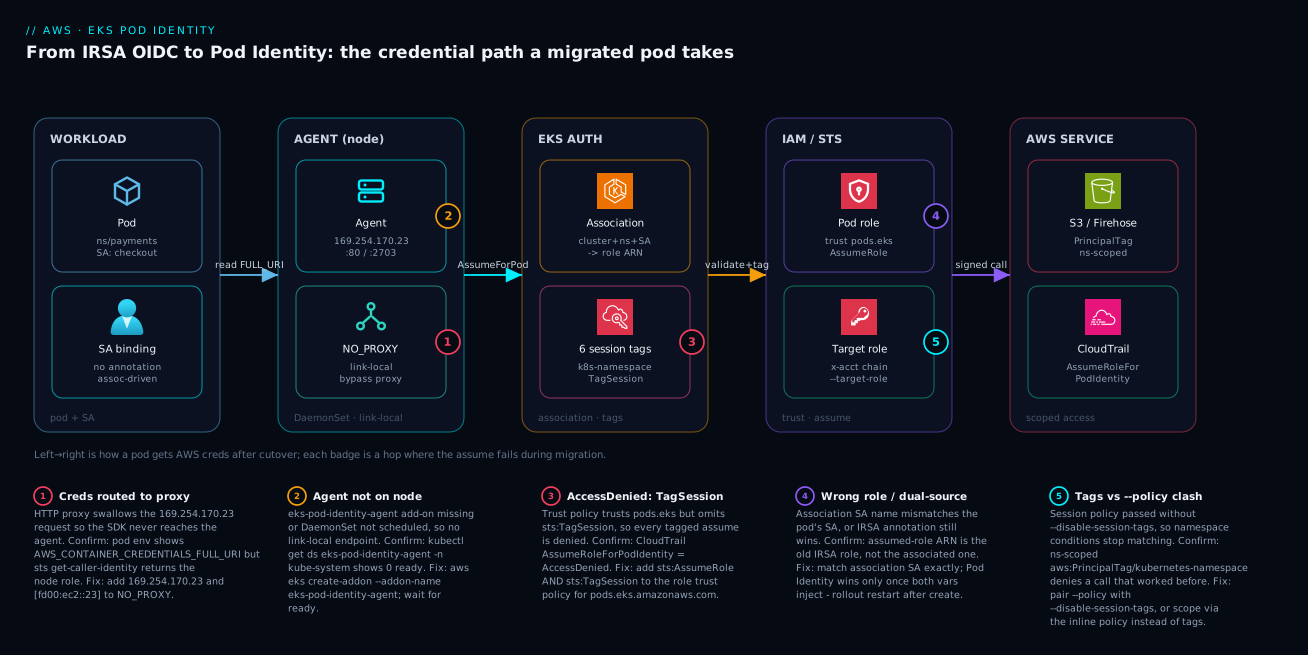
The diagram traces the credential path a migrated pod takes, left to right, and maps each migration failure to the exact hop where it bites. Read it as a pipeline. A pod in payments using SA checkout (no IRSA annotation once cutover completes) starts, and the SDK reads AWS_CONTAINER_CREDENTIALS_FULL_URI and asks the Pod Identity Agent — a DaemonSet on the node’s hostNetwork listening on the link-local 169.254.170.23:80/:2703. That request must bypass any HTTP proxy, which is why NO_PROXY carries the link-local address. The agent calls EKS Auth, which looks up the association (cluster, namespace, SA) → role, attaches the six session tags (including kubernetes-namespace), and performs the assume — which requires sts:TagSession on the role’s trust policy. STS returns credentials for the pod role (and, for cross-account, chains via --target-role-arn to a target role in account B), and the pod makes a signed call to S3 or Firehose, scoped by aws:PrincipalTag/kubernetes-namespace. Every assume is recorded in CloudTrail as AssumeRoleForPodIdentity with the tags attached.
The numbered badges are the five places this path breaks during a migration, and the legend narrates each as symptom → confirm → fix. Notice they cluster on the agent and trust hops: badge 1 is the proxy swallowing the link-local request (the single most common bring-up failure); badge 2 is the agent simply not on the node; badge 3 is the missing sts:TagSession that denies every tagged assume; badge 4 is a dual-source mix-up where the old IRSA role wins or the SA name mismatches; badge 5 is the session-tag-versus---policy clash that silently breaks namespace scoping. The diagnostic method is the same every time: read aws sts get-caller-identity from inside the pod, see which role (or the node role) you got, and that tells you which hop failed.
Real-world scenario
Northwind Pay, a fintech platform team, ran 11 EKS clusters across two regions for blue/green and tenant isolation. A shared “telemetry shipper” DaemonSet on every cluster needed firehose:PutRecordBatch to a central account. Under IRSA, that meant 11 OIDC providers registered as trusted in the central account’s role, and an 11-clause StringEquals block in the trust policy keyed on each cluster’s issuer URL. Every cluster rebuild changed an issuer and silently broke shipping until someone updated the trust policy — they had been paged for it twice, and the second incident lost 40 minutes of telemetry during a release.
The constraint: they could not coordinate an IAM change every time the platform team recycled a cluster, and security would not approve a wildcard trust. The team’s first instinct was to script the trust-policy update into the cluster-rebuild pipeline, but security rejected it — a pipeline with iam:UpdateAssumeRolePolicy on a cross-account role was a bigger risk than the problem. Pod Identity removed the need entirely.
The fix was Pod Identity with a single cross-account target role and one association per cluster, all generated from the same module. The central role’s trust policy stopped referencing any cluster at all:
resource "aws_eks_pod_identity_association" "telemetry" {
  for_each        = toset(var.cluster_names) # all 11
  cluster_name    = each.value
  namespace       = "observability"
  service_account = "telemetry-shipper"
  role_arn        = aws_iam_role.pod_id_telemetry.arn          # local per-account
  target_role_arn = "arn:aws:iam::999988887777:role/firehose-writer"
}
The firehose-writer role in the central account trusts only the per-account pod_id_telemetry role ARN — a single, static principal — and scopes writes to the namespace using aws:PrincipalTag/kubernetes-namespace. They ran the cutover one cluster at a time: created the association, added pods.eks to the local role’s trust (keeping OIDC), rollout restarted the DaemonSet, and watched CloudTrail for AssumeRoleForPodIdentity from observability before touching the next cluster. The whole fleet took three afternoons.
Cluster rebuilds became a non-event: the new cluster’s association is created by the same for_each, the trust policy never changes, and security reviews one static cross-account trust instead of an issuer list. The 11-clause condition block went to zero, the pipeline lost its dangerous IAM permission, and the telemetry-loss pages stopped. The lesson on the wall: “If your trust policy has a line per cluster, you are one rebuild away from an outage — move the binding out of IAM.”
The migration as a timeline, because the order of moves is the lesson:
| Stage | Action | Effect | Reversible by |
|---|---|---|---|
| Before | 11 OIDC providers + 11-clause trust | Pages on every rebuild | n/a (the problem) |
| Day 1 | Install agent add-on on all 11 | Endpoint ready; no pod change | Remove add-on |
| Day 1 | Add pods.eks to local roles (keep OIDC) |
Roles accept either assume | Remove statement |
| Day 2 | Create associations via for_each |
No effect until restart | Delete associations |
| Day 2 | rollout restart DaemonSet, cluster by cluster |
Shippers switch to Pod Identity | rollout restart after deleting assoc |
| Day 3 | Soak + CloudTrail confirms all 11 | Telemetry flowing on PI | n/a |
| +2 weeks | Remove SA annotations + OIDC trust | OIDC retired | Re-add (kept in git) |
| +2 weeks | Delete 11 OIDC providers | Sprawl gone | Recreate from IaC |
Advantages and disadvantages
Pod Identity is the right default for new clusters and the right destination for most IRSA fleets, but it is not free of trade-offs. Weigh it honestly:
| Advantages (why to migrate) | Disadvantages (what it costs / where it bites) |
|---|---|
| One trust policy across all clusters — never edited per cluster | Adds a DaemonSet to operate, patch, and monitor on every node |
| Cluster rebuild no longer breaks trust (no issuer in the policy) | A new failure mode: proxy/NO_PROXY swallowing the link-local request |
| Platform team onboards clusters with no IAM ticket | sts:TagSession is mandatory and easy to forget → silent AccessDenied |
Built-in kubernetes-namespace session tag → one role, many namespaces |
Session tags and --policy are mutually exclusive on an assume |
| Assume is once-per-node-per-role → far less STS throttling at scale | Older SDK versions may not read the container-credentials vars |
Native cross-account via --target-role-arn, auditable in EKS |
Cross-account adds an extra assume hop to reason about |
Fully reversible during cutover (dual-trust + rollout restart) |
Reversibility ends once you remove the annotation/OIDC statement |
| Associations are first-class API/IaC resources, easy to inventory | Eventually consistent — must wait before restarting workloads |
A head-to-head decision matrix — for each situation, which mechanism wins and why:
| Situation | Choose | Why |
|---|---|---|
| New (greenfield) cluster | Pod Identity | No OIDC provider to stand up; simpler from day one |
| Single long-lived cluster, static roles | Either (no urgency) | IRSA is set-and-forget; migrate opportunistically |
| 5+ clusters | Pod Identity | One trust policy beats N issuer registrations |
| Clusters recycled frequently | Pod Identity | Issuer churn breaks IRSA trust on every rebuild |
| Role shared across clusters | Pod Identity | Same role, new association — no trust edits |
| Role shared across accounts | Pod Identity | Native --target-role-arn, auditable in EKS |
| Many namespaces, one role | Pod Identity | kubernetes-namespace session tag scoping |
| Platform team must self-serve identity | Pod Identity | Association needs no IAM ticket |
| Very large fleet hitting STS throttling | Pod Identity | Once-per-node assume cuts STS calls |
| Air-gapped / no agent allowed on nodes | IRSA | Pod Identity requires the agent DaemonSet |
| SDK too old to read container creds | IRSA (until upgraded) | Pod Identity needs container-credentials support |
| Need zero added node components | IRSA | No DaemonSet; OIDC is control-plane only |
Pod Identity is the right choice when you run more than a handful of clusters, recycle clusters often, share roles across clusters or accounts, or want the platform team to own workload identity without IAM tickets. IRSA remains acceptable for a single, long-lived cluster with a small, static set of roles where the OIDC provider is set-and-forget — there is no urgency to migrate a stable single cluster, though new clusters should default to Pod Identity. The disadvantages are all operational and knowable: run the agent, remember sts:TagSession, and respect the session-tag/--policy rule, and none of them surprises you.
Hands-on lab
Migrate one service account from IRSA to Pod Identity end to end on an existing cluster, prove it in CloudTrail, then roll back — all using a low-cost S3-read role. Run in a shell with aws, kubectl, and jq. Assumes a cluster platform-prod with at least one IRSA service account; adjust names.
Step 1 — Environment and inventory.
CLUSTER=platform-prod
NS=internal-tools
SA=backstage
ACCOUNT=$(aws sts get-caller-identity --query Account --output text)

# Find the IRSA role this SA uses today
ROLE_ARN=$(kubectl get sa $SA -n $NS -o jsonpath='{.metadata.annotations.eks\.amazonaws\.com/role-arn}')
echo "Migrating $NS/$SA -> $ROLE_ARN"
Expected: the role ARN prints. If empty, that SA is not IRSA-backed — pick another.
Step 2 — Install the Pod Identity Agent add-on (idempotent).
aws eks create-addon --cluster-name $CLUSTER --addon-name eks-pod-identity-agent 2>/dev/null || true
kubectl rollout status daemonset eks-pod-identity-agent -n kube-system --timeout=120s
Expected: daemon set "eks-pod-identity-agent" successfully rolled out.
Step 3 — Add the Pod Identity trust statement to the existing role (keep OIDC).
ROLE_NAME=$(echo $ROLE_ARN | awk -F/ '{print $NF}')
# Append a pods.eks statement; in real life merge with the existing OIDC statement in IaC
cat > /tmp/pi-trust.json <<'EOF'
{ "Version":"2012-10-17","Statement":[
  {"Effect":"Allow","Principal":{"Service":"pods.eks.amazonaws.com"},
   "Action":["sts:AssumeRole","sts:TagSession"]} ]}
EOF
echo "Merge /tmp/pi-trust.json into $ROLE_NAME's trust policy (keep the OIDC statement)."
In production this is a reviewed Terraform change; for the lab, edit the role’s trust policy in the console to add the statement above alongside the existing OIDC one.
Step 4 — Create the association.
aws eks create-pod-identity-association \
  --cluster-name $CLUSTER --namespace $NS --service-account $SA \
  --role-arn $ROLE_ARN
aws eks list-pod-identity-associations --cluster-name $CLUSTER \
  --query "associations[?namespace=='$NS' && serviceAccount=='$SA']"
Expected: one association row with your namespace, SA, and role.
Step 5 — Roll the workload and verify the switch.
sleep 10   # associations are eventually consistent
kubectl rollout restart deployment -n $NS
kubectl rollout status deployment -n $NS --timeout=120s

POD=$(kubectl get pod -n $NS -l app=$SA -o jsonpath='{.items[0].metadata.name}')
kubectl exec -n $NS $POD -- env | grep AWS_CONTAINER
kubectl exec -n $NS $POD -- aws sts get-caller-identity
Expected: AWS_CONTAINER_CREDENTIALS_FULL_URI is present, and get-caller-identity returns arn:aws:sts::<account>:assumed-role/<role>/<session> — not the node role.
Step 6 — Confirm in CloudTrail.
aws cloudtrail lookup-events \
  --lookup-attributes AttributeKey=EventName,AttributeValue=AssumeRoleForPodIdentity \
  --max-results 5 --query "Events[].CloudTrailEvent" --output text | head
Expected: events from the EKS Auth service; the session tags include kubernetes-namespace=internal-tools.
Step 7 — Roll back (prove reversibility), then clean up.
ASSOC_ID=$(aws eks list-pod-identity-associations --cluster-name $CLUSTER \
  --query "associations[?namespace=='$NS' && serviceAccount=='$SA'].associationId" --output text)
aws eks delete-pod-identity-association --cluster-name $CLUSTER --association-id $ASSOC_ID
kubectl rollout restart deployment -n $NS   # falls back to IRSA (annotation still present)
kubectl exec -n $NS $(kubectl get pod -n $NS -l app=$SA -o jsonpath='{.items[0].metadata.name}') \
  -- aws sts get-caller-identity
Expected after rollback: get-caller-identity again shows the IRSA role via web identity — proving the migration is reversible. Leave the role trust as-is for re-runs, or remove the pods.eks statement to fully restore the original state.
Practice challenges
Work these top to bottom — they escalate from “read what’s already there” to “design cross-account access.” Try each before opening its solution; the one-line why matters more than the command. (No cluster handy? Reason through the answer, then check it — the commands are copy-paste real.)
Challenge 1 (Beginner) — Tell a pod’s credential source in one line. You inherit a cluster mid-migration. For a pod in namespace internal-tools, decide whether it is on IRSA or Pod Identity without reading any IAM.
<details> <summary>Solution</summary>
kubectl exec -n internal-tools deploy/backstage -- env | grep AWS_CONTAINER
If AWS_CONTAINER_CREDENTIALS_FULL_URI prints, the pod is on Pod Identity. If that is empty and env | grep AWS_WEB_IDENTITY shows a token file, it is still on IRSA. Why: the injected env vars are the credential source — the container-credentials URI is the one-line tell.
</details>
Challenge 2 (Beginner) — Inventory and count the IRSA service accounts. Produce a per-namespace count of how many service accounts still carry the IRSA eks.amazonaws.com/role-arn annotation, so you can size the migration into waves.
<details> <summary>Solution</summary>
kubectl get sa --all-namespaces -o json \
| jq -r '.items[]
    | select(.metadata.annotations["eks.amazonaws.com/role-arn"] != null)
    | .metadata.namespace' \
| sort | uniq -c
Why: the annotation is the definitive marker of an IRSA-backed SA; grouping by namespace turns a flat inventory into a wave plan (migrate low-risk namespaces first, payments last).
</details>
Challenge 3 (Intermediate) — Author a dual-trust policy. Write the statement that makes a role accept Pod Identity in addition to its existing IRSA trust, so the role is safe to cut over reversibly. The OIDC sts:AssumeRoleWithWebIdentity statement is already present — add the Pod Identity half.
<details> <summary>Solution</summary>
{
  "Sid": "AllowEksPodIdentity",
  "Effect": "Allow",
  "Principal": { "Service": "pods.eks.amazonaws.com" },
  "Action": ["sts:AssumeRole", "sts:TagSession"]
}
Append this to the role’s existing Statement array alongside the OIDC statement — do not replace it. Why: both statements live at once, the SDK prefers Pod Identity, and the untouched OIDC statement is your rollback. Dropping sts:TagSession here is the single most common silent failure.
</details>
Challenge 4 (Intermediate) — Create an association, then predict the pre-restart state. Create the association for payments/checkout → payments-checkout, list it to confirm, and state exactly what a currently running (not-yet-restarted) checkout pod sees.
<details> <summary>Solution</summary>
aws eks create-pod-identity-association \
  --cluster-name platform-prod \
  --namespace payments --service-account checkout \
  --role-arn arn:aws:iam::111122223333:role/payments-checkout

aws eks list-pod-identity-associations --cluster-name platform-prod \
  --query "associations[?namespace=='payments' && serviceAccount=='checkout']"
The running pod sees no change — it keeps using IRSA until it restarts, because credential selection happens at pod start. Why: creating an association has zero blast radius; the later kubectl rollout restart deployment -n payments is the actual cutover, which is also what makes it safe.
</details>
Challenge 5 (Advanced) — One role, two namespaces, different S3 access. payments and analytics pods both assume the same role but must each read only their own prefix (s3://tenant-data/payments/* vs .../analytics/*). Write the permission-policy statement that achieves this without a second role.
<details> <summary>Solution</summary>
{
  "Effect": "Allow",
  "Action": "s3:GetObject",
  "Resource": "arn:aws:s3:::tenant-data/${aws:PrincipalTag/kubernetes-namespace}/*"
}
Why: every Pod Identity assume carries the kubernetes-namespace session tag, and the policy variable ${aws:PrincipalTag/kubernetes-namespace} resolves to the calling pod’s namespace — so the same role reads only its own prefix, and fails closed if the tag is somehow absent. This is the session-tag lever, and it is exactly why you must not pass --disable-session-tags on this association.
</details>
Challenge 6 (Advanced) — Design cross-account write access. A pod (data-pipeline/ingest) in account A must write to a bucket owned by account B. Enumerate the three exact changes: the association, the account-A role, and the account-B role.
<details> <summary>Solution</summary>
- Association (account A) — bind the SA to a local role and chain to B with
--target-role-arn:aws eks create-pod-identity-association \ --cluster-name platform-prod --namespace data-pipeline --service-account ingest \ --role-arn arn:aws:iam::111122223333:role/pod-id-ingest \ --target-role-arn arn:aws:iam::444455556666:role/cross-acct-ingest - Account-A role (
pod-id-ingest) — its trust policy trustspods.eks.amazonaws.com(withsts:TagSession); its permission policy allowssts:AssumeRoleon the account-B role. - Account-B role (
cross-acct-ingest) — its trust policy trusts the single static principalarn:aws:iam::111122223333:role/pod-id-ingest; its permission policy grants the S3 writes.
Why: --target-role-arn turns cross-account into a first-class, EKS-auditable hop (A is assumed first, then A assumes B). Both directions of trust must line up or you get AccessDenied on the chained assume — and B now trusts one static ARN instead of an IRSA issuer list.
</details>
Common mistakes & troubleshooting
This is the section you will return to mid-migration. Eight real failure modes — each as symptom → root cause → how to confirm → fix. Scan the playbook table, then read the detail for the row that matches.
| # | Symptom | Root cause | Confirm (exact command) | Fix |
|---|---|---|---|---|
| 1 | Pod gets node role, not the associated role | Agent request routed to HTTP proxy | kubectl exec ... aws sts get-caller-identity → node role; env | grep -i proxy |
Add 169.254.170.23,[fd00:ec2::23] to NO_PROXY |
| 2 | Same as #1, no proxy in play | Agent DaemonSet missing/not ready | kubectl get ds eks-pod-identity-agent -n kube-system → 0 ready |
aws eks create-addon --addon-name eks-pod-identity-agent |
| 3 | AccessDenied on every call |
Trust policy omits sts:TagSession |
CloudTrail AssumeRoleForPodIdentity = AccessDenied |
Add sts:TagSession to the pods.eks trust statement |
| 4 | Pod still uses the old IRSA role | Pod not restarted after association | env | grep AWS_CONTAINER shows no FULL_URI |
kubectl rollout restart the workload |
| 5 | Association exists but no effect | SA name/namespace mismatch | aws eks describe-pod-identity-association ... vs pod’s SA |
Recreate association with exact (ns, SA) |
| 6 | Namespace-scoped call denied after adding --policy |
Session tags disabled, PrincipalTag no longer set |
Call worked before --policy; aws:PrincipalTag/... condition now fails |
Scope via the inline policy, or drop --policy |
| 7 | Cross-account call AccessDenied |
Account-A role can’t assume B, or B doesn’t trust A | CloudTrail in B shows no/AccessDenied assume |
Allow A sts:AssumeRole on B; B trusts A’s ARN |
| 8 | Intermittent ThrottlingException from STS at scale |
Still on IRSA per-pod assumes on huge fleet | CloudWatch STS ThrottlingException count rising |
Finish Pod Identity cutover (once-per-node assume) |
A faster triage table — start from what you observe and jump to the likely cause and first move:
| If you see… | It’s probably… | Do this first |
|---|---|---|
| Node-role ARN in the pod, proxy vars set | Proxy swallowing link-local | Add link-local to NO_PROXY |
Node-role ARN, no proxy, agent 0/N |
Agent not on node | Install/repair the add-on |
AccessDenied on every call, fresh setup |
Missing sts:TagSession |
Add sts:TagSession to trust |
No FULL_URI env var in the pod |
Pod not restarted | rollout restart the workload |
FULL_URI present but old role in caller |
Association SA mismatch | Recreate with exact (ns, SA) |
| Worked, then broke after tightening | --policy disabled session tags |
Scope via inline policy or restore tags |
| Cross-account call denied, local fine | One side of the chain untrusted | Fix A→B allow and B-trusts-A |
| STS throttling under scale events | IRSA per-pod assumes | Finish the Pod Identity cutover |
| Creds expire on a long job | SDK too old to refresh | Upgrade the AWS SDK |
1 — The proxy swallows the link-local request
The single most common bring-up failure. The SDK reads AWS_CONTAINER_CREDENTIALS_FULL_URI=http://169.254.170.23/... and issues an HTTP request — which your cluster-wide HTTP_PROXY/HTTPS_PROXY env then routes to the egress proxy, which has no idea what 169.254.170.23 is. The request fails, the SDK falls through to the node instance role, and your pod silently gets the node’s permissions.
Confirm. aws sts get-caller-identity inside the pod returns the node role’s assumed-role ARN, and env | grep -i proxy shows HTTP_PROXY/HTTPS_PROXY set without the link-local in NO_PROXY. Fix. Add both addresses to NO_PROXY everywhere proxy vars are set:
# In the workload's env (Deployment spec, ConfigMap, or base image)
NO_PROXY=169.254.170.23,[fd00:ec2::23],169.254.169.254,localhost,127.0.0.1,.svc,.cluster.local
2 — The agent is not on the node
If the eks-pod-identity-agent add-on was never installed (or the DaemonSet failed to schedule on some nodes), there is no link-local endpoint to answer, and you get the same node-role fallthrough as #1 — but without a proxy in the picture.
Confirm. kubectl get ds eks-pod-identity-agent -n kube-system shows 0 ready or not found; kubectl describe ds reveals scheduling problems (taints, node selectors). Fix. Install the add-on and wait for the DaemonSet to roll out on every node; if some nodes are tainted, ensure the agent tolerates them.
3 — Missing sts:TagSession denies every assume
You added pods.eks.amazonaws.com to the trust policy with sts:AssumeRole but forgot sts:TagSession. Because every Pod Identity assume is tagged, the assume is denied — and the error is a blanket AccessDenied, not “you forgot TagSession”, so it looks like a permissions problem on the permission policy.
Confirm. CloudTrail shows AssumeRoleForPodIdentity with errorCode: AccessDenied. Fix. Add sts:TagSession alongside sts:AssumeRole in the pods.eks trust statement. This is the most common “I set everything up and it still won’t work” cause.
4 — The pod was never restarted
Creating an association does nothing to running pods. If you create the association and check immediately, the still-running pod has only the IRSA variables and keeps using IRSA — or, if the annotation was already removed, gets the node role.
Confirm. kubectl exec ... env | grep AWS_CONTAINER returns nothing (no FULL_URI). Fix. kubectl rollout restart the workload; new pods get the injected variables. Remember associations are eventually consistent — wait several seconds after creating before restarting.
5 — Service-account name or namespace mismatch
The association binds an exact (namespace, service account) pair. A typo, a pod using a different SA than you assumed, or the wrong namespace means no association matches and the pod gets the node role.
Confirm. Compare aws eks describe-pod-identity-association output against the pod’s actual SA: kubectl get pod <p> -n <ns> -o jsonpath='{.spec.serviceAccountName}'. Fix. Recreate the association with the exact pair, or fix the pod spec to use the SA the association names.
6 — Session-tag scoping broke after adding --policy
You added --policy to tighten an association and (correctly) paired it with --disable-session-tags — but the role’s permission policy scopes access with aws:PrincipalTag/kubernetes-namespace. With tags disabled, that tag is no longer present, so the namespace condition never matches and the call is denied.
Confirm. The exact call worked before the --policy change; the role’s permission policy contains an aws:PrincipalTag/kubernetes-namespace condition. Fix. Either drop --policy and rely on session tags, or move the scoping into the inline --policy itself (it is already namespace-specific because it is attached to one association).
7 — Cross-account chain denied
With --target-role-arn, two trusts must line up: the account-A pod role must be allowed to sts:AssumeRole the account-B target, and the account-B target’s trust policy must trust the account-A role ARN. Miss either and you get AccessDenied on the chained assume.
Confirm. CloudTrail in account B shows either no assume or AccessDenied. Fix. Add an sts:AssumeRole allow on the B role to A’s permission policy, and add A’s role ARN as a trusted principal in B’s trust policy.
8 — STS throttling at fleet scale (the reason to finish migrating)
On a very large fleet still on IRSA, every pod assumes via STS independently; under churn (mass restarts, scale events) STS can throttle. This is not a Pod Identity bug — it is the IRSA model you are leaving.
Confirm. CloudWatch shows STS ThrottlingException climbing during scale events. Fix. Completing the Pod Identity cutover collapses per-pod assumes into once-per-node-per-role, sharply cutting STS call volume.
Best practices
- Default new clusters to Pod Identity. Don’t create new OIDC providers; for greenfield clusters, Pod Identity is the simpler, cheaper anchor from day one.
- Keep dual-trust during cutover. Always add
pods.eksalongside the OIDC statement and keep the SA annotation until after a soak — that is your rollback. - Always include
sts:TagSession. Make it part of your role-trust module so it can never be forgotten; it is mandatory, not optional. - Migrate by risk wave. Internal tooling first, payments last. Prove each wave in CloudTrail before the next.
- Treat associations as code. Manage them in Terraform with
for_eachover clusters; never hand-create in production. - Scope with session tags, not extra roles. One role plus
aws:PrincipalTag/kubernetes-namespacebeats a role-per-namespace sprawl. - Bake
NO_PROXYinto base images / cluster defaults. If you run a proxy, the link-local addresses belong in your standardNO_PROXYeverywhere. - Prefer
--target-role-arnover SDK role-chaining. Cross-account belongs in the association (auditable in EKS), not in app config. - Wait after creating associations. Respect eventual consistency; restart workloads only after a short pause, and never inside a hot path.
- Verify with
get-caller-identityfrom inside the pod. It is the only check that proves the whole path; automate it as a post-cutover smoke test. - Retire OIDC providers only when truly unused. Confirm no role still trusts an issuer before deleting the provider.
- Pin your SDK versions. Ensure they support container credentials; the AWS SDKs added this support — old pinned versions can silently fail to read the vars.
Security notes
- Least privilege still lives in the permission policy. Pod Identity changes the trust model, not authorization — scope each role to exactly what the workload needs, and use
aws:PrincipalTag/kubernetes-namespace/kubernetes-service-accountto tighten further. See Engineering Least-Privilege IAM at Scale. - The trust policy is now blanket — lean on tags and the association. Because the trust trusts the whole
pods.eksprincipal, the binding (which SA, which role) is enforced by the association and the session-tag conditions, not the trust condition. Get those right. - No standing keys anywhere. Like IRSA, Pod Identity issues short-lived STS credentials — there are no long-lived secrets in the pod. Never fall back to static keys in env vars “to get unblocked.”
- Cross-account: trust a single static principal. The target role should trust only the per-account pod-role ARN, not a list of issuers — a smaller, auditable trust surface than the IRSA equivalent.
- Audit every assume.
AssumeRoleForPodIdentityin CloudTrail carries the namespace/SA/pod tags — alert on assumes from unexpected namespaces orAccessDeniedspikes. - Lock down who can create associations.
eks:CreatePodIdentityAssociationis effectively “grant this SA an IAM role” — restrict it to the platform pipeline, and review association changes like IAM changes. - Mind
--disable-session-tags. Disabling tags removes a forensic and scoping signal; only do it where you deliberately scope via--policy, and document why. - Don’t widen the role to dodge a TagSession error. The fix for AccessDenied is
sts:TagSession, never a broader permission policy — broadening to “make it work” is how least privilege rots.
The security-relevant controls and how Pod Identity changes them versus IRSA:
| Control | IRSA | Pod Identity | Net effect |
|---|---|---|---|
| Standing credentials | None (STS) | None (STS) | Same — both keyless |
| Trust surface | Per-issuer, per-sub |
Whole pods.eks principal + association |
Broader trust, tighter binding elsewhere |
| Binding enforcement | Trust Condition |
Association + session tags | Moves to EKS/IAM tags |
| Cross-account trust | Issuer list or role-chain | Single static role ARN | Smaller, auditable surface |
| Audit signal | AssumeRoleWithWebIdentity |
AssumeRoleForPodIdentity + tags |
Richer (namespace/SA in event) |
| “Grant a pod a role” permission | Edit trust policy (IAM) | eks:CreatePodIdentityAssociation |
New permission to govern |
The AssumeRoleForPodIdentity CloudTrail fields worth alerting on, and the rule to write for each:
| CloudTrail field | What it tells you | Alert / detection rule |
|---|---|---|
eventName |
The assume call itself | Baseline volume; spike = mass restart/scale |
errorCode = AccessDenied |
A denied assume | Alert on any sustained AccessDenied (misconfig) |
requestParameters (session tags) |
namespace / SA / pod | Alert on assumes from unexpected namespaces |
resources (role ARN) |
Which role was assumed | Alert if a sensitive role is assumed unexpectedly |
sourceIPAddress |
EKS Auth service | Should be the service; anomalies are suspicious |
recipientAccountId |
Account the assume landed in | Cross-account assumes into B you didn’t expect |
userIdentity |
The EKS service principal | Confirms it’s Pod Identity, not a human/role |
eventTime clustering |
Timing of assumes | Bursts correlate with deploys/scale events |
Cost & sizing
Both IRSA and Pod Identity are free AWS features — you pay for neither the OIDC provider nor the associations nor the EKS Auth calls. The cost deltas are indirect and small, and Pod Identity is generally the cheaper, lower-toil option at fleet scale.
- Agent footprint. The
eks-pod-identity-agentDaemonSet runs one lightweight pod per node — a few millicores and tens of MB of memory. On a 100-node fleet this is negligible compute, but it is non-zero and worth accounting for in node sizing. - Fewer STS calls. Once-per-node-per-role assumes (versus per-pod under IRSA) cut STS call volume sharply on large, churny fleets — reducing throttling risk and the small amount of cross-AZ/API overhead, not a line-item saving but a scalability one.
- Operational toil is the real cost. The IRSA “page on every cluster rebuild” incidents have a real cost in engineer time and lost telemetry/SLA; Pod Identity removes that class of toil, which usually dwarfs the agent’s compute cost.
- No per-association charge. You can create thousands of associations across a fleet at no AWS cost — size your design for clarity, not to minimize associations.
A rough picture for a 50-node, 11-cluster fleet:
| Cost driver | IRSA | Pod Identity | Rough delta |
|---|---|---|---|
| AWS feature charge | ₹0 | ₹0 | None |
| Agent DaemonSet compute | n/a | ~50 nodes × few mCPU/tens MB | Tiny (absorb in node headroom) |
| STS call volume at scale | Per-pod assumes | Per-node/role assumes | Lower (fewer calls, less throttling) |
| OIDC provider management | 11 providers to track | 0 | Lower toil |
| Trust-policy maintenance | Per-cluster edits, rebuild pages | Zero per-cluster edits | Much lower toil |
| Incident cost (rebuild breakage) | Real (paged twice) | ~Zero | Removes a toil class |
Sizing guidance: the agent needs no tuning for typical fleets; ensure it tolerates any node taints so it schedules everywhere, and confirm your node groups have the few mCPU of headroom. There is no “scale the agent” knob — it is one pod per node by design.
Interview & exam questions
1. Why does IRSA become painful at fleet scale, and how does Pod Identity fix it? Each cluster has a unique OIDC issuer, so a shared role needs every issuer registered as a provider and a sub condition per cluster, and a cluster rebuild changes the issuer and breaks trust. Pod Identity replaces the per-cluster OIDC anchor with one service principal (pods.eks.amazonaws.com) and moves the SA binding into an EKS association, so the trust policy is identical across clusters and never edited per cluster.
2. What are the three moving parts of Pod Identity? The Pod Identity Agent DaemonSet (serves credentials over the node’s link-local 169.254.170.23), the association resource (maps (cluster, namespace, SA) → role), and the trust policy that trusts pods.eks.amazonaws.com. Every failure traces to exactly one of these.
3. Why is sts:TagSession required and what happens if you omit it? Every Pod Identity assume attaches six session tags, so the trust policy must allow sts:TagSession in addition to sts:AssumeRole. Omit it and every tagged assume is denied with a blanket AccessDenied — the most common “set up correctly but still broken” cause.
4. During cutover, both IRSA and Pod Identity variables are present in a pod. Which wins, and why does that matter? The SDK’s default credential provider chain prefers the container credentials (AWS_CONTAINER_CREDENTIALS_FULL_URI, Pod Identity) over web identity (AWS_WEB_IDENTITY_TOKEN_FILE, IRSA). That is what makes the cutover safe and reversible: keep both live, the pod uses Pod Identity, and deleting the association + restart drops back to IRSA.
5. How do you make one role serve many namespaces safely under Pod Identity? Use the kubernetes-namespace session tag: write one role whose permission policy scopes resources with aws:PrincipalTag/kubernetes-namespace. The same role assumed from another namespace gets a different tag value and is denied — no extra roles or trust conditions needed.
6. A migrated pod returns the node instance role from sts:get-caller-identity. Name three causes. (a) A proxy is swallowing the link-local request because 169.254.170.23 is not in NO_PROXY; (b) the eks-pod-identity-agent DaemonSet is missing or unhealthy on that node; © the association’s (namespace, SA) does not match the pod’s actual service account.
7. How does Pod Identity handle cross-account access, and how is it better than the IRSA approach? Natively, via --target-role-arn: the account-A association role is assumed first, then it assumes the account-B target, whose credentials are injected. The B role trusts a single static A-role ARN. This replaces IRSA’s SDK role-chaining hack with a first-class, EKS-auditable flag and a smaller trust surface.
8. When must you pass --disable-session-tags, and what is the consequence? When you attach an inline session policy with --policy, because session tags and a session policy cannot be combined on the same assume. The consequence is that the six session tags (including kubernetes-namespace) are gone, so any permission-policy conditions on aws:PrincipalTag/... stop matching — scope via the inline policy instead.
9. Why is the Pod Identity assume more scalable than IRSA’s? IRSA has every pod call STS itself (AssumeRoleWithWebIdentity), so STS call volume scales with pod count. Pod Identity has the agent call EKS Auth (AssumeRoleForPodIdentity) and cache credentials once per node per role, so a node running twenty pods of one role does one assume — far less STS pressure and throttling at scale.
10. What is the safe rollback if a namespace’s cutover goes wrong? Delete the association and kubectl rollout restart the workload; because you kept the IRSA annotation and OIDC trust statement during cutover, the pod falls back to IRSA. Reversibility holds right up until you deliberately remove the annotation and OIDC statement after a soak.
11. How do you confirm Pod Identity is actually being used, not just configured? Two checks: aws sts get-caller-identity from inside the pod must return arn:aws:sts::...:assumed-role/<your-role>/... (not the node role), and CloudTrail must show AssumeRoleForPodIdentity events carrying the expected kubernetes-namespace/kubernetes-service-account session tags.
12. What new IAM-equivalent permission does Pod Identity introduce that you must govern? eks:CreatePodIdentityAssociation — creating an association effectively grants a service account an IAM role, so it must be restricted to the platform pipeline and reviewed like an IAM trust change.
These map to the AWS Certified Security – Specialty (identity federation, least privilege, cross-account access) and the Certified Kubernetes Security Specialist (CKS) (workload identity, secrets-free credentials) domains. A compact cert-mapping for revision:
| Question theme | Primary cert | Domain area |
|---|---|---|
| OIDC vs service-principal trust | AWS Security Specialty | Identity & Access Management |
Session tags, PrincipalTag scoping |
AWS Security Specialty | Fine-grained authorization |
Cross-account --target-role-arn |
AWS Security Specialty | Cross-account access patterns |
| Workload identity (keyless creds) | CKS | Cluster hardening / supply chain |
| Reversible rollout, dual-trust | (architecture) | Migration & operational safety |
| CloudTrail audit of assumes | AWS Security Specialty | Logging & monitoring |
Quick check
- A migrated pod’s
aws sts get-caller-identityreturns the node instance role. Name the single most common cause and the exact fix. - You added
pods.eks.amazonaws.comto the role’s trust withsts:AssumeRoleand still getAccessDeniedon every call. What did you forget? - During cutover a pod has both IRSA and Pod Identity environment variables. Which credential source does the SDK use, and why is that the desired behaviour?
- You want one role to serve
paymentsandanalyticswith different S3 access. What Pod Identity feature makes this possible without two roles? - You attach
--policyto an association and a namespace-scoped call that used to work now returnsAccessDenied. What happened?
Answers
- An HTTP proxy is swallowing the link-local request to
169.254.170.23, so the SDK falls through to the node role. Fix: add169.254.170.23and[fd00:ec2::23]toNO_PROXYwherever proxy variables are set. sts:TagSession. Every Pod Identity assume is tagged, so the trust policy must allowsts:TagSessionalongsidests:AssumeRole; without it the tagged assume is denied with a blanketAccessDenied.- The SDK uses Pod Identity — the container-credentials variables (
AWS_CONTAINER_CREDENTIALS_FULL_URI) win over web identity in the default provider chain. This is desirable because it lets you keep IRSA live as a fallback, making the cutover reversible with a singlerollout restartafter deleting the association. - Session tags — specifically
kubernetes-namespace. Write one role and scope its permission policy withaws:PrincipalTag/kubernetes-namespace; the same role assumed from each namespace carries a different tag value and is allowed/denied accordingly. - Using
--policyrequires--disable-session-tags, so the six session tags are gone. The role’s permission policy scopes withaws:PrincipalTag/kubernetes-namespace, which no longer matches because the tag is absent. Scope via the inline policy instead, or drop--policyand rely on tags.
Glossary
- IRSA (IAM Roles for Service Accounts) — the OIDC-federation mechanism that lets a K8s service account assume an IAM role via a projected token and
sts:AssumeRoleWithWebIdentity. - EKS Pod Identity — the newer mechanism that binds a service account to an IAM role through an EKS association and a single service principal, with no per-cluster OIDC provider.
- OIDC provider — an IAM identity provider registered for a cluster’s issuer URL; the trust anchor for IRSA, one per cluster.
- Service principal (
pods.eks.amazonaws.com) — the single AWS principal a Pod Identity role’s trust policy trusts, identical across all clusters. - Association — an EKS API resource mapping
(cluster, namespace, service account) → IAM role; replaces the IRSA trust-policy condition. - Pod Identity Agent — the
eks-pod-identity-agentDaemonSet that serves credentials to pods over the node’s link-local endpoint. - Link-local endpoint —
169.254.170.23(IPv4) /[fd00:ec2::23](IPv6) on ports80/2703, where the SDK fetches Pod Identity credentials. - DaemonSet — a Kubernetes controller that runs exactly one copy of a pod on every (matching) node; the Pod Identity Agent ships as one so a credential endpoint exists on each node.
- STS (Security Token Service) — the AWS service that issues short-lived, auto-expiring credentials in response to assume-role calls; both IRSA and Pod Identity hand pods STS credentials, never long-lived keys.
- Node instance role — the IAM role attached to the EC2 worker node itself; the identity a pod silently falls back to when Pod Identity or IRSA fails to supply credentials — which is why you always verify the caller ARN.
- Projected service-account token — the short-lived, auto-rotated token Kubernetes mounts into a pod for its service account; IRSA exchanges this token with STS via
sts:AssumeRoleWithWebIdentity. sts:TagSession— the STS permission to attach session tags; mandatory in a Pod Identity trust policy because every assume is tagged.- Session tag — a key/value (e.g.
kubernetes-namespace) attached to the assumed session by EKS; the lever for per-namespace permission scoping. aws:PrincipalTag/...— a condition key that matches a session tag in a permission policy, used to scope one role across namespaces.AssumeRoleForPodIdentity— the EKS Auth API call (and CloudTrail event) that performs the Pod Identity assume; proof the mechanism is in use.--target-role-arn— the association field that chains the account-A role into a target role in account B for native cross-account access.--disable-session-tags— the flag that turns off the six session tags; required when using--policy, at the cost of tag-based scoping.- Dual-trust role — a role whose trust policy trusts both the OIDC issuer (IRSA) and
pods.eks(Pod Identity), enabling a reversible cutover. eks.amazonaws.com/role-arnannotation — the service-account annotation that wires IRSA; kept during cutover and removed only after soak.
Next steps
You can now migrate any cluster’s workload identity from IRSA to Pod Identity safely and reversibly. Build outward:
- Next: Running EKS at Scale: Pod Identity, Karpenter Autoscaling, and VPC CNI Networking — see Pod Identity in the full fleet picture alongside autoscaling and networking.
- Related: Secure Cross-Account Access: Assume-Role Patterns, External ID, Confused Deputy, and Session Policies — harden the cross-account chains
--target-role-arnbuilds. - Related: Engineering Least-Privilege IAM at Scale with Permission Boundaries and Access Analyzer — keep the permission policies tight as you consolidate roles.
- Related: EKS Cluster Upgrades: Version Lifecycle, Add-on Compatibility, and Fleet Operations — manage the
eks-pod-identity-agentadd-on across version upgrades. - Related: AWS CloudTrail and Config: Audit and Compliance at Scale — wire
AssumeRoleForPodIdentityevents into an org-wide audit trail.