In a nutshell
Automating a cloud CLI is like sending instructions to a vast warehouse you can only reach through a service window. AWS, Azure, and GCP are three different windows with three different clerks, and the job at each is the same: prove who you are, ask a precise question, take the answer in a form you can file, and don’t get thrown out for asking too fast.
Walk up to the window and five things have to go right. First you show ID, and the clerk confirms which account’s warehouse you’re allowed into — get this wrong and you’ll happily reorganise the wrong company’s shelves (that’s the preflight identity check, and the clerk only ever serves the first ID you present, which is the credential chain). Then you ask your question precisely, so the clerk fetches one shelf instead of wheeling out the whole warehouse (server-side filtering). The clerk hands back a manifest in a fixed machine format, never a hand-scrawled table whose columns shift (JSON output discipline). A huge inventory comes back one numbered box at a time, and you must keep asking “next box, please” or you’ll think the warehouse is half-empty (pagination). And if you fire questions faster than the clerk can serve them, you get “take a ticket, come back in a minute” — not a refusal, just backpressure (rate limiting / HTTP 429). You can send several runners to different windows at once, but send a hundred and security shuts the whole counter (bounded parallelism).
Here’s the mental model to hold onto: a cloud CLI call is a request to a machine you don’t own — one that can serve the wrong account, hand back the wrong format, hide half the answer, or tell you to slow down, all without raising an error you’d notice. A quick one-liner assumes none of that ever happens. A production call plans for every one of them. This lesson turns the naive aws ... | grep into the disciplined pipeline in the diagram below, and gives you a drop-in lib/cloud.sh that bakes the discipline in.
Level: Advanced · Time: ~34 min
Prerequisites: You should be comfortable running commands, reading $? exit codes, and piping JSON through jq. Strict mode from Defensive scripting: set -Eeuo pipefail underpins every script here; handling cloud credentials safely builds directly on Secrets handling: env vars, files, Vault, ephemeral; the retry/backoff and idempotency ideas are the cloud-API application of Network operations: curl, retry & backoff; and every JSON transform leans on Text processing with awk, jq & yq. None are strictly required, but they make everything here click.
After this lesson you will be able to:
- Write a preflight identity assert for AWS, Azure, and GCP that fail-fasts the instant the wrong account, subscription, or project is active.
- Explain the full credential resolution chain for each cloud and predict which source actually wins when several are present.
- Force JSON output everywhere and push selection server-side vs client-side deliberately — knowing which one actually reduces transfer and pagination.
- Paginate large listings three ways (AWS token loop,
--page-size/--max-items, gcloud--limit) without OOM-ing the runner or silently truncating results. - Wrap any cloud call in exponential-backoff-with-jitter retry that retries throttles but not validation errors, and configure AWS’s adaptive retry mode.
- Fan out mutating work with bounded concurrency (
xargs -P/ GNUparallel) tuned to per-region and per-subscription quotas.
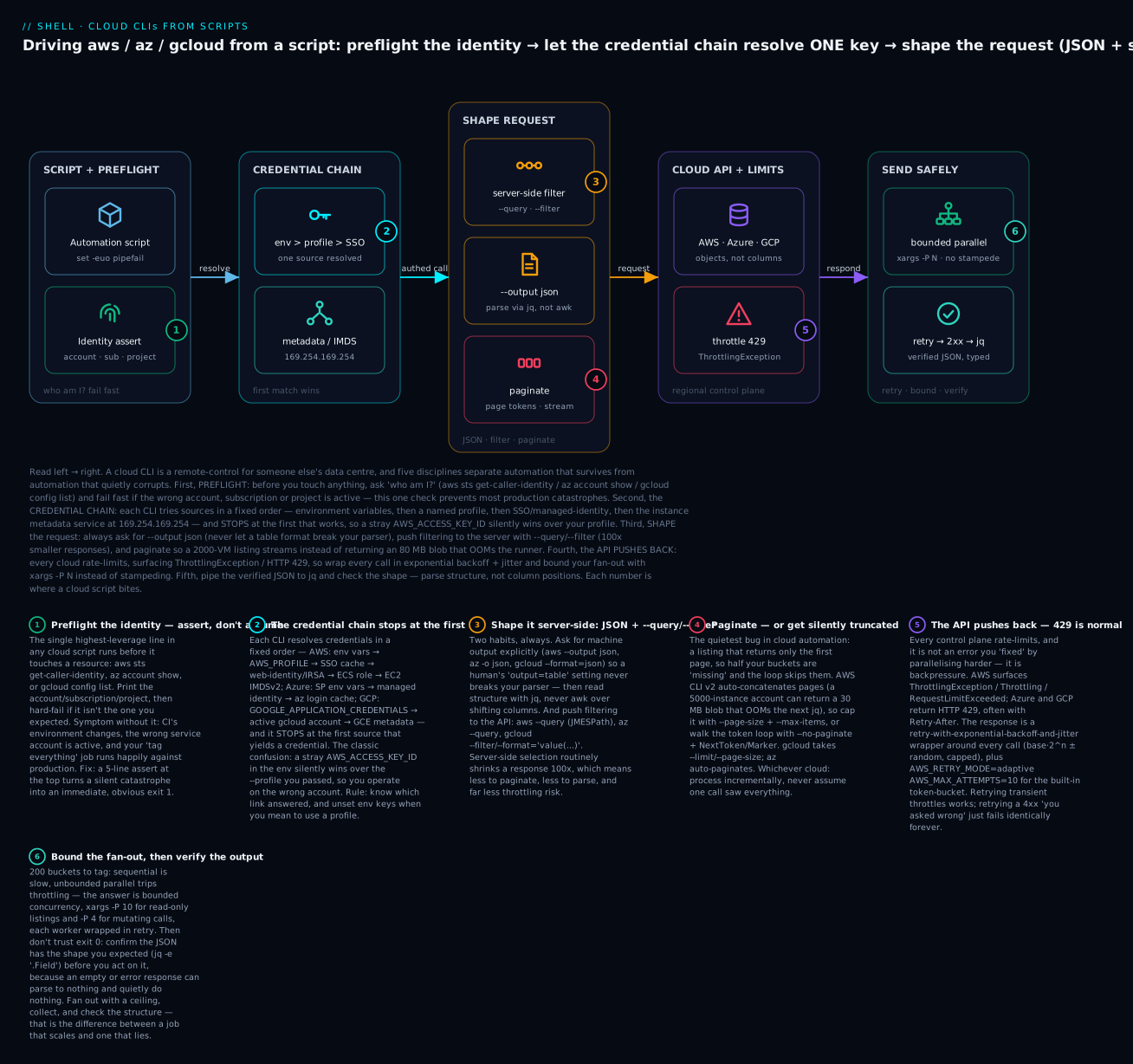
Read the diagram left → right. Before touching anything the script asks “who am I?” and fails fast on the wrong account; the credential chain then resolves exactly one source (and stops there); the request is shaped — JSON output, server-side filter, pagination — so the response is small and parseable; the API pushes back with ThrottlingException / 429 when you go too fast; and the script sends safely, wrapping calls in retry-with-backoff and bounding the fan-out, then pipes verified JSON to jq. Every section below is a detail of one of those five boxes.
Why Cloud CLI Automation From Shell Has a Specific Set of Failure Modes
Your CI script lists S3 buckets across 12 regions, tags each one, runs nightly. It worked for six months. Then one night it ran 47 minutes instead of 4, you got a ThrottlingException from AWS, the script half-finished, and the next morning half your buckets are tagged and the other half aren’t.
Or: a deploy script reads gcloud auth list to confirm the right service account is active, then calls gcloud compute instances list. CI changed its environment, the active account is now default-runner@.. instead of deploy@.., and the script lists the wrong project’s instances and continues happily.
Or: an az vm list returns 2000 VMs across subscriptions, you forget pagination, the response is 80 MB, your jq pipeline OOMs the runner.
Cloud CLI automation has six specific failure modes:
| Failure mode | Symptom | Cost |
|---|---|---|
| Wrong credential resolved | Script operates on wrong account/project | Wrong resource modified, or auth fails confusingly |
| Unpaginated listing | Truncated results, “missing” resources | Half-tagged buckets, half-deleted instances |
| Rate limit hit | Throttling / 429 errors mid-run |
Partial state, retries that re-do work |
| Wrong output format | Brittle parsers break on text/table output | Script fails with no clear error |
| Long-running session timeout | Token expires mid-paginate | “Unauthorized” 30 minutes into a 60-minute job |
| Region/zone defaulting | Script runs in default region; your resource is elsewhere | “Resource not found” in a region that has 0 of them |
This lesson is the cross-cloud pattern set. We treat AWS, Azure, and GCP as variations on the same problem, with a lib/cloud.sh that abstracts away the dialect differences.
The Credential Resolution Chain (All Three Clouds)
Every cloud CLI resolves credentials via a chain: it tries each source in order, stops at the first that yields valid credentials. Knowing the chain lets you reason about what credential is actually being used.
AWS credential chain
1. Environment vars: AWS_ACCESS_KEY_ID + AWS_SECRET_ACCESS_KEY (+ AWS_SESSION_TOKEN for STS)
2. AWS_PROFILE → ~/.aws/credentials [profile] section, plus ~/.aws/config
3. AWS_PROFILE with sso_session in ~/.aws/config → SSO cache in ~/.aws/sso/cache/*.json
4. AWS_WEB_IDENTITY_TOKEN_FILE + AWS_ROLE_ARN → STS AssumeRoleWithWebIdentity (IRSA, GitHub OIDC)
5. ECS task role (AWS_CONTAINER_CREDENTIALS_RELATIVE_URI)
6. EC2 IMDSv2 (instance metadata at http://169.254.169.254/latest/meta-data/iam/...)
The chain stops at the first source. If AWS_ACCESS_KEY_ID is set in your env, no other source is consulted, even if ~/.aws/credentials has different keys for the same profile. This is the most common confusion.
Azure credential chain (az CLI)
1. AZURE_CLIENT_ID + AZURE_CLIENT_SECRET + AZURE_TENANT_ID (service principal)
2. AZURE_CLIENT_ID + AZURE_USERNAME + AZURE_PASSWORD (resource owner password — discouraged)
3. Managed identity (when running in Azure VM/Functions/AKS)
4. ~/.azure/azureProfile.json (persisted login from `az login`)
az login writes a token cache to ~/.azure/. CI tokens expire (60–90 minutes); you must refresh or use a service principal directly.
GCP credential chain (gcloud)
1. GOOGLE_APPLICATION_CREDENTIALS → JSON key file path
2. gcloud config config-helper / active gcloud account
3. Compute metadata service (running on GCE/GKE)
For ADC (Application Default Credentials, used by SDKs): gcloud auth application-default login for humans; service-account key file for automation.
The “is the right credential active?” check
Always run a “who am I?” probe at the top of any script that uses cloud APIs:
# AWS
aws sts get-caller-identity --output json
# {
#   "UserId": "AIDAEXAMPLE",
#   "Account": "123456789012",
#   "Arn": "arn:aws:iam::123456789012:user/build-bot"
# }

# Azure
az account show -o json
# {
#   "id": "00000000-0000-0000-0000-000000000000",
#   "user": { "name": "build-bot@example.onmicrosoft.com", "type": "servicePrincipal" }
# }

# GCP
gcloud config list --format=json
# {
#   "core": {
#     "account": "build-bot@my-project.iam.gserviceaccount.com",
#     "project": "my-project"
#   }
# }
A 5-line preflight at the top of every cloud script:
preflight_aws() {
  local got_account got_arn want_account="${1:-}"
  read -r got_account got_arn < <(aws sts get-caller-identity --query '[Account,Arn]' --output text)
  echo "AWS account: $got_account, identity: $got_arn"
  if [[ -n "$want_account" && "$got_account" != "$want_account" ]]; then
    echo "ERROR: expected account $want_account, got $got_account" >&2
    exit 1
  fi
}

preflight_aws 123456789012   # fail-fast if wrong account is active
This is the single highest-leverage pattern in this lesson. Production catastrophes from “wrong account active” are entirely preventable.
Output Format Discipline: Always JSON for Automation
Every cloud CLI defaults to a human-readable format and offers JSON for automation:
| CLI | Default | JSON | Set globally |
|---|---|---|---|
aws |
JSON (most regions) or table | --output json |
export AWS_DEFAULT_OUTPUT=json or ~/.aws/config |
az |
JSON | -o json (default) |
az config set core.output=json |
gcloud |
YAML/text | --format=json |
gcloud config set core/format json |
Rule: always pass --output json (or equivalent) explicitly. Even if it’s the default, future versions or different operator profiles can change the default and your script will silently start emitting tables that break parsers.
# WRONG: relies on default; breaks if user has 'output=table' set.
aws ec2 describe-instances | grep i-

# RIGHT: explicit format, parse with jq.
aws ec2 describe-instances --output json \
  | jq -r '.Reservations[].Instances[].InstanceId'
Use server-side filtering when available
Both AWS (--query) and Azure (--query) accept JMESPath; gcloud uses --filter and --format. Server-side filtering is faster and avoids paginating data you’ll throw away.
# AWS: server-side filter for running instances in a VPC, project just IDs.
aws ec2 describe-instances \
  --filters "Name=instance-state-name,Values=running" "Name=vpc-id,Values=vpc-12345" \
  --query 'Reservations[].Instances[].InstanceId' \
  --output json

# Azure: same idea with --query.
az vm list --query "[?powerState=='VM running'].name" -o json

# GCP: --filter is GCE-style filter syntax; --format=value(...) for tab output.
gcloud compute instances list \
  --filter='status:RUNNING AND zone:us-central1-a' \
  --format='value(name)'
--query and --filter reduce the API response size (often 100x), reducing pagination, throttling risk, and parse time.
A precise nuance (expanded in “Going deeper” below): on AWS and Azure,
--queryis client-side JMESPath — the CLI downloads the full response first, then trims it, so--queryalone does not cut what you transfer or paginate. The--filtersargument (and gcloud’s--filter) is the part that is pushed to the server and actually shrinks the response. Reach for both:--filtersto cut the wire,--query/jqto cut what you parse.
Pagination: The Single Biggest Source of Silent Truncation
By default, all three CLIs paginate, but they paginate differently:
AWS pagination
aws CLI v2 automatically paginates and concatenates results into a single response — unless you pass --max-items or set pagination config. So aws ec2 describe-instances on a 5,000-instance account returns all 5,000 in one response (which can be 30+ MB). Two failure modes:
- Memory blowup in subsequent jq pipelines.
- Timeout if the API call takes >60s due to size.
To process incrementally:
# Paginate manually with --no-paginate + NextToken handling.
list_all_instances() {
  local token result_file=/tmp/instances.jsonl
  : > "$result_file"

  while :; do
    local out
    if [[ -z "${token:-}" ]]; then
      out=$(aws ec2 describe-instances --no-paginate --output json)
    else
      out=$(aws ec2 describe-instances --no-paginate --starting-token "$token" --output json)
    fi

    # Append IDs to the result file (process incrementally).
    jq -r '.Reservations[].Instances[].InstanceId' <<<"$out" >> "$result_file"

    token=$(jq -r '.NextToken // empty' <<<"$out")
    [[ -z "$token" ]] && break
  done
}
Or, use --max-items (per-request page size; CLI auto-paginates) for clarity:
# Smaller pages mean faster first-byte and bounded memory per page.
aws ec2 describe-instances --max-items 100 --output json \
  | jq -r '.Reservations[].Instances[].InstanceId'
Azure pagination
az CLI auto-paginates by default. To control:
# Disable auto-pagination (return only the first page + NextToken-equivalent).
az vm list --max-items 1000 -o json
Most az commands support --top for “max results” but the default is “all results.”
GCP pagination
gcloud paginates differently per command. gcloud compute instances list paginates by default; --limit N caps results; --page-size N controls page size.
gcloud compute instances list --limit 5000 --page-size 500 --format=json
For very large lists, gcloud also supports --uri for “just give me the URLs” — light and fast.
Retry and Backoff: The Must-Have Wrapper
Every cloud API rate-limits. AWS surfaces ThrottlingException, Throttling, RequestLimitExceeded. Azure uses HTTP 429 with Retry-After. GCP uses 429 with quota errors.
Always wrap cloud CLI calls in retry-with-backoff. The CLIs sometimes have built-in retry but the defaults are conservative; explicit retry gives you control and visibility.
# Generic retry with exponential backoff.
cloud_retry() {
  local max=${CLOUD_RETRY_MAX:-5}
  local base=${CLOUD_RETRY_BASE_MS:-500}
  local attempt=1 wait_ms

  while (( attempt <= max )); do
    if "$@"; then
      return 0
    fi
    local rc=$?
    if (( attempt == max )); then
      echo "cloud_retry: giving up after $max attempts" >&2
      return "$rc"
    fi
    # Exponential backoff with jitter: base * 2^(attempt-1) ± 25%.
    wait_ms=$(( base * (2 ** (attempt - 1)) ))
    wait_ms=$(( wait_ms + (RANDOM % (wait_ms / 2)) - (wait_ms / 4) ))
    echo "attempt $attempt failed (rc=$rc); retrying in ${wait_ms}ms" >&2
    sleep "$(awk "BEGIN { printf \"%.3f\", $wait_ms / 1000 }")"
    attempt=$(( attempt + 1 ))
  done
}

# Usage:
cloud_retry aws s3api put-bucket-tagging --bucket my-bucket --tagging file://tags.json
For AWS, you can also leverage built-in retry config:
# In ~/.aws/config or env:
export AWS_RETRY_MODE=adaptive       # legacy | standard | adaptive (recommended)
export AWS_MAX_ATTEMPTS=10
adaptive mode uses a token bucket that adjusts based on observed throttling — strictly better than fixed backoff for steady-state operation.
Bounded Parallelism: GNU parallel + xargs Patterns
You have 200 buckets to tag. Sequential = 200 × 200ms = 40s. Parallel with concurrency 10 = 4s. Parallel with no limit = throttled.
# WRONG: unbounded parallel; trips throttling.
aws s3api list-buckets --query 'Buckets[].Name' --output text \
  | tr '\t' '\n' \
  | xargs -P 0 -I {} aws s3api put-bucket-tagging --bucket {} --tagging file://tags.json

# RIGHT: bounded concurrency. -P 10 = 10 parallel workers.
aws s3api list-buckets --query 'Buckets[].Name' --output text \
  | tr '\t' '\n' \
  | xargs -P 10 -I {} cloud_retry aws s3api put-bucket-tagging --bucket {} --tagging file://tags.json
For more sophisticated patterns, GNU parallel:
# Process per-region with up to 5 parallel jobs, retry on failure.
aws ec2 describe-regions --query 'Regions[].RegionName' --output text \
  | tr '\t' '\n' \
  | parallel -j 5 --retries 3 'aws --region {} s3api list-buckets --query "Buckets[].Name" --output json'
--retries 3 retries on non-zero exit (basic; not throttle-aware). For throttle-aware retry, wrap your own retry function in the parallel command.
Concurrency limit by API quota
AWS rate limits per-region per-API. Roughly: list APIs 100 req/s, mutating APIs 5–20 req/s. Keeping -P 10 for read-only listings is safe; for mutating, use -P 4 and add retries.
Azure rate limits per-subscription with reads at ~12,000/hour and writes at ~1,200/hour. Bursts of 100+ in seconds will hit throttling.
GCP rate limits per-project per-API; quotas are visible in gcloud compute project-info describe. For most CLI operations, -P 8 with retries is a safe baseline.
A Drop-In Library: lib/cloud.sh
# lib/cloud.sh — cross-cloud helpers. Detects which CLI to use; wraps retry.

# ─── Configuration ─────────────────────────────────────────────────────────
: "${CLOUD_RETRY_MAX:=5}"
: "${CLOUD_RETRY_BASE_MS:=500}"
: "${CLOUD_PARALLEL:=8}"

# ─── Retry with exponential backoff + jitter ──────────────────────────────
cloud_retry() {
  local max="$CLOUD_RETRY_MAX" base="$CLOUD_RETRY_BASE_MS" attempt=1 wait_ms rc
  while (( attempt <= max )); do
    "$@" && return 0
    rc=$?
    (( attempt == max )) && return "$rc"
    wait_ms=$(( base * (2 ** (attempt - 1)) ))
    wait_ms=$(( wait_ms + (RANDOM % (wait_ms / 2)) - (wait_ms / 4) ))
    echo "[cloud_retry] attempt $attempt failed (rc=$rc); sleep ${wait_ms}ms" >&2
    sleep "$(awk "BEGIN { printf \"%.3f\", $wait_ms / 1000 }")"
    attempt=$(( attempt + 1 ))
  done
}

# ─── Identity preflight (call at top of every cloud script) ────────────────
aws_whoami() {
  aws sts get-caller-identity --query '[Account,Arn]' --output text
}

aws_assert_account() {
  local want="$1" got
  got=$(aws sts get-caller-identity --query 'Account' --output text)
  if [[ "$got" != "$want" ]]; then
    echo "AWS account mismatch: want=$want got=$got" >&2
    return 1
  fi
}

az_assert_subscription() {
  local want="$1" got
  got=$(az account show --query 'id' -o tsv)
  if [[ "$got" != "$want" ]]; then
    echo "Azure subscription mismatch: want=$want got=$got" >&2
    return 1
  fi
}

gcp_assert_project() {
  local want="$1" got
  got=$(gcloud config get-value project 2>/dev/null)
  if [[ "$got" != "$want" ]]; then
    echo "GCP project mismatch: want=$want got=$got" >&2
    return 1
  fi
}

# ─── Pagination wrappers ───────────────────────────────────────────────────

# AWS: paginated foreach. Calls $func once per page.
aws_paginate() {
  local cmd_func="$1"; shift
  local token=""
  while :; do
    local args=()
    [[ -n "$token" ]] && args+=("--starting-token" "$token")
    local out
    out=$(cloud_retry "$@" --no-paginate --output json "${args[@]}") || return 1
    "$cmd_func" "$out" || return 1
    token=$(jq -r '.NextToken // empty' <<<"$out")
    [[ -z "$token" ]] && break
  done
}

# ─── Bounded parallel apply ────────────────────────────────────────────────

# Read items from stdin, apply $cmd to each, max $CLOUD_PARALLEL concurrent.
cloud_parallel() {
  xargs -P "$CLOUD_PARALLEL" -I {} bash -c "$(declare -f cloud_retry); cloud_retry $* {}"
}

# ─── Multi-region foreach (AWS) ────────────────────────────────────────────
aws_foreach_region() {
  local cmd_func="$1"
  local regions
  regions=$(aws ec2 describe-regions \
    --query 'Regions[].RegionName' --output text)
  local region
  for region in $regions; do
    AWS_REGION="$region" "$cmd_func"
  done
}

# Parallel multi-region.
aws_foreach_region_parallel() {
  local cmd_func="$1"
  aws ec2 describe-regions --query 'Regions[].RegionName' --output text \
    | tr '\t' '\n' \
    | xargs -P "$CLOUD_PARALLEL" -I {} bash -c "AWS_REGION={} $(declare -f cloud_retry $cmd_func); $cmd_func"
}

# ─── Output validation ─────────────────────────────────────────────────────
require_jq() { command -v jq >/dev/null || { echo "jq required" >&2; exit 1; }; }

# Validate that JSON output has expected shape.
require_json_field() {
  local input="$1" field="$2"
  if ! jq -e "$field" <<<"$input" >/dev/null 2>&1; then
    echo "missing required field: $field" >&2
    return 1
  fi
}
Real-World Recipes
Recipe 1: Inventory all S3 buckets across all regions
. lib/cloud.sh
aws_assert_account 123456789012   # preflight

list_buckets_in_region() {
  local region="$AWS_REGION"
  aws --region "$region" s3api list-buckets --output json \
    | jq -r --arg r "$region" '.Buckets[] | "\($r)\t\(.Name)\t\(.CreationDate)"'
}

aws_foreach_region_parallel list_buckets_in_region | sort > all_buckets.tsv
echo "found $(wc -l < all_buckets.tsv) buckets"
Recipe 2: Tag all running EC2 instances missing a Owner tag
list_untagged_running() {
  aws ec2 describe-instances \
    --filters "Name=instance-state-name,Values=running" \
    --query 'Reservations[].Instances[?!not_null(Tags[?Key==`Owner`].Value | [0])].InstanceId' \
    --output text \
    | tr '\t' '\n'
}

tag_instance() {
  local id="$1"
  cloud_retry aws ec2 create-tags --resources "$id" \
    --tags Key=Owner,Value=unknown
  echo "tagged $id"
}
export -f cloud_retry tag_instance

list_untagged_running \
  | xargs -P 10 -I {} bash -c 'tag_instance {}'
The export -f pattern is needed so child shells (spawned by xargs) can see the function. Alternative: use parallel.
Recipe 3: Multi-cloud secret rotation (AWS Secrets Manager + Azure Key Vault)
rotate_aws_secret() {
  local name="$1"
  local new_value
  new_value=$(openssl rand -base64 32)
  cloud_retry aws secretsmanager update-secret \
    --secret-id "$name" \
    --secret-string "$new_value"
  echo "rotated AWS secret: $name"
}

rotate_az_secret() {
  local vault="$1" name="$2"
  local new_value
  new_value=$(openssl rand -base64 32)
  cloud_retry az keyvault secret set \
    --vault-name "$vault" --name "$name" --value "$new_value" \
    -o none
  echo "rotated Azure secret: $vault/$name"
}

rotate_aws_secret "myapp/db-password"
rotate_az_secret  "myapp-vault" "db-password"
Recipe 4: Cost-attribution: spend per tag for last month
# AWS Cost Explorer.
aws ce get-cost-and-usage \
  --time-period "Start=$(date -d 'first day of last month' +%F),End=$(date -d 'first day of this month' +%F)" \
  --granularity MONTHLY \
  --metrics BlendedCost \
  --group-by Type=TAG,Key=CostCenter \
  --output json \
  | jq -r '
    .ResultsByTime[].Groups[]
    | "\(.Keys[0])\t\(.Metrics.BlendedCost.Amount)\t\(.Metrics.BlendedCost.Unit)"
  ' \
  | sort -t$'\t' -k2 -n -r
Recipe 5: Drift check: declared vs actual VM count
# Fail CI if a Terraform-managed deployment has unexpected drift.
expected=$(terraform output -json instance_ids | jq -r '.[]' | sort)
actual=$(aws ec2 describe-instances \
  --filters "Name=tag:ManagedBy,Values=terraform" "Name=instance-state-name,Values=running" \
  --query 'Reservations[].Instances[].InstanceId' --output text \
  | tr '\t' '\n' | sort)

if ! diff <(echo "$expected") <(echo "$actual") >/dev/null; then
  echo "DRIFT detected:"
  diff <(echo "$expected") <(echo "$actual")
  exit 1
fi
Going deeper
The core sections give you patterns that work. This section explains the internals behind them — the distinctions that separate an engineer who copies a snippet from one who can debug it at 2 a.m. when a 40,000-object account behaves nothing like the 200-object one they tested on.
1. --query is client-side; --filters is server-side — and it changes everything
The single most misunderstood point about cloud CLIs. On AWS and Azure, --query (JMESPath) runs inside the CLI, on your machine, after the entire response has already been downloaded. It shrinks what you see and parse, but it does not reduce what crossed the network, what you paginated, or what counted against throttling.
aws ec2 describe-instances --query 'Reservations[].Instances[].InstanceId'
  │
  ├─ CLI makes API call(s), AUTO-PAGINATES the full 30 MB response  ← all of it transfers
  └─ THEN applies JMESPath locally to hand you just the IDs         ← client-side trim
Contrast with --filters, which is serialised into the API request and evaluated by AWS:
# --filters cuts the WIRE: the API returns only running instances.
# --query then trims those down to just IDs on the client.
aws ec2 describe-instances \
  --filters "Name=instance-state-name,Values=running" \  # server-side: reduces the response
  --query   'Reservations[].Instances[].InstanceId' \    # client-side: reduces what you parse
  --output json
Practical rule of thumb per cloud:
| Cloud | Server-side (cuts transfer + pagination) | Client-side (cuts only display) |
|---|---|---|
| AWS | --filters, service-specific params (--instance-ids, --bucket), s3api prefix |
--query (JMESPath), piping to jq |
| Azure | command scoping (--resource-group, --subscription), az graph query (KQL) |
--query (JMESPath) |
| GCP | --filter (gcloud pushes it server-side when the API supports it) |
--format rendering, --flatten |
Why it matters: if you’re being throttled or OOM-ing, adding a bigger --query won’t help — you must push the predicate server-side. gcloud is the friendliest here: --filter is server-side for most Compute/Storage APIs. AWS and Azure force you to learn which argument is the wire-level one per service.
2. Pagination internals: the token is not always called NextToken
Two different tokens live under the word “pagination,” and conflating them is a classic bug:
- Service-native token — what the API itself returns to say “there’s more.” Its field name varies by service: EC2 uses
NextToken; S3list-objects-v2usesNextContinuationTokenwith anIsTruncated: trueflag; older APIs (IAM, ELB classic) useMarker/NextMarker. A generic.NextToken // emptyloop silently stops after page 1 on S3 because the field is named differently. Always check the service’s response shape. - CLI-synthesised token — when you cap results with
--max-items, the AWS CLI itself invents an opaqueNextToken(base64, unrelated to the service token) and prints it so you can resume with--starting-token.
And the three AWS pagination flags do genuinely different things:
| Flag | What it controls | Effect |
|---|---|---|
--page-size N |
items per underlying API call | latency/memory tuning; total returned unchanged. Smaller = more calls, each cheaper |
--max-items N |
cap on total items the CLI returns | when it truncates, CLI emits an opaque NextToken for --starting-token |
--no-paginate |
make exactly one API call | surfaces the service-native token in the JSON for a manual loop |
So the earlier “process incrementally” pattern is really: --page-size to bound each call’s footprint, --max-items to bound the total, --no-paginate when you want to drive the token loop yourself. For S3, the correct manual loop keys off the right field:
# S3 uses NextContinuationToken, not NextToken.
token=""
while :; do
  out=$(aws s3api list-objects-v2 --bucket "$B" \
        ${token:+--starting-token "$token"} --output json)
  jq -r '.Contents[]?.Key' <<<"$out"
  token=$(jq -r '.NextToken // empty' <<<"$out")   # CLI surfaces it as NextToken with --starting-token
  [[ -z "$token" ]] && break
done
3. Jitter strategies: equal, full, and decorrelated
The cloud_retry in this lesson uses base·2^n ± 25% — a reasonable “equal jitter.” Under real contention (a thousand runners all throttled at once), AWS’s own research on backoff recommends decorrelated jitter, which de-synchronises retries far better and drains a throttle queue faster:
# Decorrelated jitter: next sleep is random between base and 3× the PREVIOUS sleep, capped.
retry_decorrelated() {
  local max=${CLOUD_RETRY_MAX:-6} base=${CLOUD_RETRY_BASE_MS:-500} cap=${CLOUD_RETRY_CAP_MS:-20000}
  local attempt=1 prev=$base sleep_ms lo hi span
  while (( attempt <= max )); do
    "$@" && return 0
    (( attempt == max )) && return 1
    lo=$base; hi=$(( prev * 3 )); span=$(( hi - lo + 1 ))
    sleep_ms=$(( lo + RANDOM % span ))
    (( sleep_ms > cap )) && sleep_ms=$cap
    prev=$sleep_ms
    sleep "$(awk "BEGIN{printf \"%.3f\", $sleep_ms/1000}")"
    attempt=$(( attempt + 1 ))
  done
}
Just as important: retry the right errors. Blindly retrying every non-zero exit will hammer a request that is permanently wrong (a 4xx validation error, an AccessDenied) and waste your whole retry budget before failing anyway. Classify first:
# Retry only transient throttles/5xx; stop immediately on client errors.
cloud_call() {
  local err rc
  err=$("$@" 2>&1 >/dev/null); rc=$?
  if (( rc != 0 )); then
    if grep -qiE 'ThrottlingException|Throttling|RequestLimitExceeded|TooManyRequests|429|Rate exceeded|ServiceUnavailable|5[0-9][0-9]' <<<"$err"; then
      return 42   # signal "transient — worth retrying"
    fi
    echo "permanent error, not retrying: $err" >&2
    return "$rc"
  fi
}
AWS’s built-in AWS_RETRY_MODE=adaptive implements a client-side token bucket: each request costs a token, throttles refill more slowly, so the CLI self-throttles before the API does. It’s strictly better than fixed backoff for steady-state batch jobs — but it’s per-process, so twenty parallel aws invocations each have their own bucket and can still collectively overwhelm a quota. That’s why bounded concurrency and adaptive retry are complementary, not redundant.
4. Quota math: per-region, per-account, per-subscription
Parallelising “by region” feels safe because AWS rate-limits per-region-per-API — but many limits are per-account across regions (STS, IAM, Route 53, Cost Explorer are global). Fan out 15 regions × -P 10 and you’ve got 150 concurrent calls hitting one global STS limit. The mental model:
- Read APIs are cheap (~100 req/s on AWS);
-P 10is safe. - Mutating APIs are expensive (5–20 req/s);
-P 4with retry. - Global services (STS, IAM, billing) share one account-wide bucket regardless of region — keep those sequential or single-digit even when the rest of your fan-out is wide.
xargs -P vs GNU parallel: xargs -P N is everywhere and dead simple, but it has no per-job retry, no job log, and interleaves output line-by-line (so two workers’ JSON can shred together). parallel adds --retries, --joblog (a TSV of every job’s exit code and runtime — invaluable for “which 3 of 200 buckets failed?”), --halt now,fail=1 to stop the fleet on first failure, and it buffers each job’s output so lines don’t interleave. When neither is available, a pure-bash semaphore bounds concurrency with a FIFO:
# Pure-bash bounded concurrency (no xargs/parallel): a FIFO as a token pool.
sem_init()  { local n=$1; mkfifo /tmp/sem.$$; exec 9<>/tmp/sem.$$; rm -f /tmp/sem.$$
              local i; for ((i=0;i<n;i++)); do echo >&9; done; }
sem_run()   { read -u 9; { "$@"; echo >&9; } & }   # take a token, run, return token
sem_init 8
for id in $ids; do sem_run tag_instance "$id"; done
wait
5. Auth at scale: OIDC beats long-lived keys, and tokens expire mid-job
The modern, keyless pattern for CI is OIDC federation: GitHub Actions (or GitLab, or any OIDC provider) hands the runner a short-lived signed token; AWS AssumeRoleWithWebIdentity (chain entry #4 above) exchanges it for temporary credentials — no static AWS_ACCESS_KEY_ID stored in a secret anywhere. GCP calls it Workload Identity Federation; Azure calls it workload identity federation for its SPs. If you’re still pasting long-lived keys into CI secrets, this is the upgrade that removes the single most-leaked credential class.
The flip side of short-lived creds: they expire. A 55-minute SSO token or a 1-hour STS session will die mid-pagination on a 40-minute list job, and you get a baffling ExpiredToken 30 minutes in. Mitigations: prefer service-principal / role sessions with a duration that comfortably exceeds the job; re-assert identity (or refresh) between phases of a long job; and for Azure, remember the footgun — az login writes one shared token cache to ~/.azure/, so two parallel scripts can race on refresh. Under parallelism, pass service-principal env vars (AZURE_CLIENT_ID/SECRET/TENANT_ID) so each process authenticates independently with no shared file.
6. --output text traps, set -o pipefail, and streaming huge JSON
--output text emits TAB-separated columns — convenient for read/cut, but a value containing a tab or newline (a resource description, a tag value) will corrupt the column layout silently. For anything you’ll parse programmatically, prefer --output json | jq and let jq handle the escaping. When you do use text, project a single field (--query '...[].Id') so there are no columns to misalign.
Two more disciplines make cloud pipelines honest:
set -o pipefail        # so `aws ... | jq ...` fails if AWS fails, not just if jq does
aws ec2 describe-instances --output json | jq -er '.Reservations[0].Instances[0].InstanceId'
#                                              ^ jq -e: exit non-zero if the result is null/false/empty
Without pipefail, a failing aws on the left of a pipe is masked by a happy jq on the right, and your script marches on with empty data. And for genuinely huge responses that you cannot page down, jq -c (compact, one object per line) or jq --stream processes the document incrementally instead of building the whole tree in memory — the difference between a 2 GB RSS spike and a constant few MB.
Footgun List
-
Default region is implicit. AWS has
AWS_REGION/AWS_DEFAULT_REGION/ profile region / fallback tous-east-1. Always set it explicitly:aws --region us-west-2 ...orexport AWS_REGION=us-west-2. -
AWS_PROFILEdoes not overrideAWS_ACCESS_KEY_ID. If the env vars are set, the profile is ignored. Common when CI sets keys for one account and youaws --profile otherthinking it switches. -
Output format is per-call, not session.
--output jsonon one call doesn’t apply to the next. SetAWS_DEFAULT_OUTPUT=jsonfor the session. -
jq -rstrips quotes from null — outputs the literal string “null”. Filter:jq -r '. // empty'produces empty for null. -
aws s3 lsis not the same asaws s3api list-objects-v2. The first uses the Recursive CLI, the second is the raw API. Different output formats, different pagination behavior. -
gcloud computeis regional/zonal. Without--zoneor--region, gcloud often errors or asks interactively. In scripts, always specify. -
az loginwrites credentials to a global file. Two scripts running concurrently can race on token refresh. Use service-principal env vars for parallel automation. -
AWS_PAGER=catdisables CLI v2’s auto-pager (which breaks scripts on TTY-detection). Set this in CI:export AWS_PAGER="". -
gcloud auth print-access-tokenreturns a token butgcloudmay not refresh it automatically; long-running scripts can have the token expire. -
Rate limits are per region for AWS and per subscription for Azure. Hitting throttling in one region doesn’t necessarily fail you in another, but if you parallelize across regions, you can hit per-account limits too.
-
aws s3 syncandgsutil rsyncdo their own retry logic that you can’t easily inspect. For reliable transfers at scale, prefer dedicated tools (or wrap with cloud_retry aroundaws s3 cpfor fine-grained control). -
Tagging APIs are eventually consistent. Tag a resource, immediately list-by-tag — the list may not include the freshly tagged resource for several seconds. Don’t rely on read-your-writes.
Common beginner mistakes
The Footgun List above is a catalogue of specific traps. This section is about the misconceptions underneath them — the wrong mental model that produces the bug in the first place.
-
“
--queryfilters server-side, so it saves me pagination and throttling.” No — on AWS and Azure,--queryruns client-side after the whole response is downloaded and paginated. Right model:--query/jqshrink what you parse; only--filters(AWS) and service scoping (or gcloud’s--filter) shrink what crosses the wire. If you’re throttled, push the predicate server-side; a fancier--querychanges nothing. -
“The CLI auto-paginates, so one call always gives me everything.” Sometimes — and that’s the danger. AWS v2 concatenates all pages into one (possibly 80 MB) blob that OOMs your next step; some commands don’t auto-paginate at all; and a hand-rolled
.NextTokenloop silently stops after page 1 on S3 (which usesNextContinuationToken). Right model: know each command’s default, cap large listings with--page-size/--max-items, and confirm you consumed the right continuation field. -
“If I’m getting throttled, I’ll add more retries / more parallelism.” Retrying harder without backoff is a thundering herd — you cause more throttling; more parallelism past the quota just means more retries redoing the same work, so the job gets slower. Right model: throttling is backpressure, not a bug to muscle through. Back off with jitter, bound concurrency to the API’s rate class, and only retry transient errors — never a
4xxthat will fail identically forever. -
“
aws --profile prodswitches me to the prod account.” Only if nothing earlier in the chain answered. A strayAWS_ACCESS_KEY_IDin the environment wins over any--profile, and the CLI won’t warn you. Right model: the credential chain resolves exactly one source and stops; the only reliable truth isaws sts get-caller-identity. Assert it, don’t assume it. -
“Exit code 0 means the operation did what I wanted.” A CLI can exit 0 having returned an empty list, and
jqover empty input happily produces nothing and exits 0 too — so a broken filter or a wrong region “succeeds” while doing nothing. Right model: verify the shape and count of the output (jq -e,wc -l, an expected-vs-actual check), and useset -o pipefailso a failedawson the left of a pipe isn’t masked by a happyjqon the right. -
“I’ll just grep/awk the human-readable output.” The default table/
textformat is for eyeballs; its columns shift when a status string changes width, locale changes number formatting, and embedded tabs corrupt the layout. Right model: ask for--output jsonexplicitly and select fields structurally withjq(or--query), so your parser survives the day AWS adds a column.
Practice challenges
Work these in order — each builds on the last, escalating from “prove the identity” to “a production multi-region fan-out.” Several use a saved JSON fixture so you can run them without any cloud credentials; the cloud-call solutions are schema-correct and their output is representative.
1. (Beginner) Preflight assert. Write a function assert_aws_account WANT that prints the active account and identity, and exits non-zero if the active account isn’t WANT. It must not modify anything.
<details> <summary>Solution</summary>
assert_aws_account() {
  local want="$1" got arn
  read -r got arn < <(aws sts get-caller-identity --query '[Account,Arn]' --output text)
  echo "active account=$got identity=$arn"
  [[ "$got" == "$want" ]] || { echo "WRONG ACCOUNT: want=$want got=$got" >&2; return 1; }
}
assert_aws_account 123456789012
Why: get-caller-identity is a free, read-only STS call and the only reliable source of “who am I really” — the fail-fast prevents every “ran against the wrong account” catastrophe.
</details>
2. (Beginner) JSON discipline. Take a listing command that someone wrote as aws ec2 describe-instances | grep i- and rewrite it so it (a) forces JSON explicitly and (b) extracts just the instance IDs, one per line, robustly.
<details> <summary>Solution</summary>
aws ec2 describe-instances --output json \
  | jq -r '.Reservations[].Instances[].InstanceId'
Why: grep i- matches any line containing “i-” (including AMI IDs ami-, subnet IDs, ARNs) and breaks the instant the output format changes; --output json | jq selects the field structurally and is immune to layout drift.
</details>
3. (Intermediate) Filter a saved fixture. Save this as instances.json, then print the IDs of instances that are running AND missing an Owner tag (expected: only i-aaa). No cloud needed.
cat > instances.json <<'JSON'
{ "Reservations": [ { "Instances": [
  { "InstanceId": "i-aaa", "State": {"Name": "running"}, "Tags": [{"Key":"Name","Value":"web"}] },
  { "InstanceId": "i-bbb", "State": {"Name": "running"}, "Tags": [{"Key":"Owner","Value":"vinod"}] },
  { "InstanceId": "i-ccc", "State": {"Name": "stopped"}, "Tags": [] }
] } ] }
JSON
<details> <summary>Solution</summary>
jq -r '
  .Reservations[].Instances[]
  | select(.State.Name == "running")
  | select( any(.Tags[]?; .Key == "Owner") | not )
  | .InstanceId
' instances.json
# → i-aaa   (representative; verified locally)
Why: any(.Tags[]?; .Key=="Owner") | not is the robust “no such tag” test — the ? guards the empty-Tags case so it doesn’t error, and doing the negation in jq is clearer (and portable) than the equivalent JMESPath --query.
</details>
4. (Intermediate) Paginate the right field. Write a token loop that lists all object keys in a large S3 bucket. The trap: S3 does not use NextToken the way EC2 does. Make it correct.
<details> <summary>Solution</summary>
list_all_keys() {
  local bucket="$1" token=""
  while :; do
    local out
    out=$(aws s3api list-objects-v2 --bucket "$bucket" \
          ${token:+--starting-token "$token"} --output json) || return 1
    jq -r '.Contents[]?.Key' <<<"$out"
    token=$(jq -r '.NextToken // empty' <<<"$out")   # CLI surfaces continuation as NextToken here
    [[ -z "$token" ]] && break
  done
}
list_all_keys my-bucket   # representative
Why: driving pagination through the CLI’s --starting-token/NextToken mechanism (rather than the raw service NextContinuationToken) is uniform across services, and .Contents[]? tolerates an empty bucket without erroring.
</details>
5. (Advanced) Retry only transient errors. Write smart_retry CMD... that retries on throttle/5xx errors with exponential backoff but stops immediately on client errors like AccessDenied or InvalidParameterValue. Prove the classifier with a couple of sample error strings.
<details> <summary>Solution</summary>
is_transient() { grep -qiE 'ThrottlingException|Throttling|RequestLimitExceeded|TooManyRequests|429|Rate exceeded|ServiceUnavailable|5[0-9][0-9]'; }

smart_retry() {
  local max=${CLOUD_RETRY_MAX:-5} base=500 attempt=1 err rc
  while (( attempt <= max )); do
    err=$("$@" 2>&1 >/dev/null); rc=$?
    (( rc == 0 )) && return 0
    if ! printf '%s' "$err" | is_transient; then
      echo "permanent error — not retrying: $err" >&2; return "$rc"
    fi
    (( attempt == max )) && { echo "gave up after $max: $err" >&2; return "$rc"; }
    sleep "$(awk "BEGIN{printf \"%.3f\", ($base*2^($attempt-1))/1000}")"
    attempt=$(( attempt + 1 ))
  done
}
# classifier check (representative):
printf '%s' 'error (ThrottlingException): Rate exceeded' | is_transient && echo retry   # → retry
printf '%s' 'error (AccessDenied): not authorized'       | is_transient || echo stop    # → stop
Why: retrying a 4xx (wrong request, no permission) can never succeed and just burns the retry budget while delaying the inevitable failure — classify by the error signature and only spend retries on faults that a wait can actually fix.
</details>
6. (Advanced) Bounded, logged, multi-region fan-out. Inventory bucket/resource names across every region with bounded concurrency, per-worker retry, a job log of successes/failures, and de-duplicated sorted output. Assume lib/cloud.sh is sourced.
<details> <summary>Solution</summary>
. lib/cloud.sh
aws_assert_account 123456789012 || exit 1

inv_region() {                          # runs per region
  local r="$1"
  cloud_retry aws --region "$r" ec2 describe-instances \
    --filters "Name=instance-state-name,Values=running" \
    --query 'Reservations[].Instances[].InstanceId' --output text \
    | tr '\t' '\n' | sed "s/^/$r\t/"
}
export -f inv_region cloud_retry

aws ec2 describe-regions --query 'Regions[].RegionName' --output text \
  | tr '\t' '\n' \
  | parallel -j 6 --retries 2 --joblog inv.log inv_region {} \
  | sort -u > inventory.tsv

echo "regions failed: $(awk 'NR>1 && $7!=0' inv.log | wc -l)"   # col 7 = exit code
Why: parallel -j 6 caps concurrency below the global-API danger zone, --joblog gives you a per-region exit-code audit (so you know which regions failed, not just that something did), and the per-worker cloud_retry absorbs transient throttles without a single failure aborting the whole sweep. Substitute xargs -P 6 + the pure-bash semaphore from “Going deeper” if parallel isn’t installed.
</details>
Quick-Reference Card
┌─ CREDENTIAL CHAIN PRIORITY ───────────────────────────────────────────┐
│  AWS:    env > profile > SSO > IRSA > ECS task > IMDSv2              │
│  Azure:  service-principal env > managed identity > az login cache   │
│  GCP:    GOOGLE_APPLICATION_CREDENTIALS > gcloud account > metadata  │
└────────────────────────────────────────────────────────────────────────┘

┌─ PREFLIGHT (RUN AT TOP OF EVERY CLOUD SCRIPT) ────────────────────────┐
│  aws sts get-caller-identity                                         │
│  az account show                                                     │
│  gcloud config list                                                  │
│  Assert account/subscription/project matches expected                │
└────────────────────────────────────────────────────────────────────────┘

┌─ OUTPUT FORMAT (ALWAYS EXPLICIT) ─────────────────────────────────────┐
│  aws ... --output json                                               │
│  az ... -o json                                                      │
│  gcloud ... --format=json   (or --format='value(field)' for tab)    │
│  Pipe to jq for transformations                                      │
└────────────────────────────────────────────────────────────────────────┘

┌─ SERVER-SIDE FILTERING ───────────────────────────────────────────────┐
│  aws --filters "Name=tag:Env,Values=prod"                            │
│  aws --query 'Reservations[].Instances[].[InstanceId,Tags]'          │
│  az --query "[?location=='eastus'].name"                             │
│  gcloud --filter='status:RUNNING' --format='value(name)'             │
└────────────────────────────────────────────────────────────────────────┘

┌─ PAGINATION ──────────────────────────────────────────────────────────┐
│  AWS:    --max-items N (auto-paginates) or --no-paginate + token loop│
│  Azure:  --max-items N (auto-paginates by default)                   │
│  GCP:    --limit N --page-size N                                     │
│  ALWAYS process incrementally; large unpaginated responses OOM       │
└────────────────────────────────────────────────────────────────────────┘

┌─ RETRY & BACKOFF ─────────────────────────────────────────────────────┐
│  AWS:    AWS_RETRY_MODE=adaptive AWS_MAX_ATTEMPTS=10                 │
│  Generic: cloud_retry wrapper with exponential + jitter              │
│  Always handle: ThrottlingException, 429, RequestLimitExceeded       │
└────────────────────────────────────────────────────────────────────────┘

┌─ PARALLELISM ─────────────────────────────────────────────────────────┐
│  Read-only listing:  -P 10 (xargs)                                   │
│  Mutating ops:       -P 4 with retry                                 │
│  Multi-region:       parallel -j 5 over regions                      │
│  Per-region: rate limits separate; parallelize by region for scale   │
└────────────────────────────────────────────────────────────────────────┘

┌─ CI-SAFE ENV ─────────────────────────────────────────────────────────┐
│  export AWS_PAGER=""               disable v2 pager (breaks no-TTY)  │
│  export AWS_DEFAULT_OUTPUT=json     consistent format                │
│  export AWS_REGION=us-west-2        explicit region                  │
│  export AWS_RETRY_MODE=adaptive     better throttle handling         │
│  unset AWS_PROFILE if using env keys (prevent profile interference)  │
└────────────────────────────────────────────────────────────────────────┘
Glossary
- Credential chain (default credential provider chain) — the ordered list of sources a CLI tries to find credentials (env vars → profile → SSO → metadata service). It stops at the first source that answers, which is why a stray env var can silently override a profile.
- Preflight / identity assert — a read-only “who am I?” check (
aws sts get-caller-identity,az account show,gcloud config list) run at the top of a script to fail fast if the wrong account/subscription/project is active. - JMESPath — the query language behind AWS
--queryand Azure--query. Runs client-side in the CLI after the response is downloaded; it trims what you see, not what you transfer. --filters(server-side filtering) — a predicate serialised into the API request and evaluated by the cloud, so the response comes back already reduced. This is the one that lowers transfer, pagination, and throttling — unlike--query.- Pagination — returning a large result set in pages. Auto-pagination (AWS v2,
az) concatenates all pages for you (risking huge responses); a token/marker loop fetches one page at a time and passes a continuation token (NextToken,NextContinuationToken,Marker) to get the next. --page-sizevs--max-items—--page-sizesets items per underlying API call (latency/memory tuning);--max-itemscaps the total returned and, on truncation, prints an opaque CLINextTokenfor--starting-token.- Throttling / rate limiting — the cloud rejecting requests you send too fast, surfaced as
ThrottlingException/RequestLimitExceeded(AWS) or HTTP 429 (Azure/GCP). It is backpressure, not a permanent failure — the correct response is backoff, not more retries. - Exponential backoff + jitter — waiting a doubling delay between retries (
base·2^n) plus a random component so many clients don’t retry in lockstep (the thundering herd). Decorrelated jitter (random(base, 3·prev)) de-synchronises even better under heavy contention. - Adaptive retry mode — AWS CLI/SDK retry strategy using a client-side token bucket that self-throttles based on observed throttling, smoothing steady-state batch load better than fixed backoff.
- Idempotency — a request that has the same effect whether applied once or many times, making it safe to retry. Tag/put operations are usually idempotent; blind “create” without a client token is not.
- Bounded concurrency — running at most N operations in parallel (
xargs -P N,parallel -j N, or a FIFO semaphore) so you go fast without exceeding the API’s rate class. - IMDS (Instance Metadata Service) — the link-local endpoint at
169.254.169.254from which a VM/instance fetches its attached role’s credentials (AWS IMDSv2 is the token-protected version); the last link in the credential chain when running on cloud compute. - OIDC federation (workload identity) — exchanging a short-lived, signed CI token for temporary cloud credentials (
AssumeRoleWithWebIdentity), removing the need to store long-lived access keys in CI secrets. - ADC (Application Default Credentials) — GCP’s convention where SDKs and tools discover credentials automatically (
GOOGLE_APPLICATION_CREDENTIALSfile, activegcloudaccount, or metadata service). pipefail— theset -o pipefailshell option that makes a pipeline fail if any stage fails, so a brokenawson the left isn’t masked by a happyjqon the right.
What’s Next
Cloud CLIs are the operator’s keyboard for the platform. The next layer wraps your shell scripts as proper Linux services, integrated with the system: timer-based scheduling, restart-on-failure, watchdogs, logging integration. The next lesson, Writing systemd Units That Wrap Shell Scripts Properly: Type, Restart, Hardening, Watchdogs, covers the Unit/Service/Timer file structure, choosing Type=simple vs oneshot vs notify, sandboxing with ProtectSystem and PrivateTmp, watchdog integration, and the difference between “the script ran” and “the service is healthy.”