In a nutshell
Compliance scanning sounds bureaucratic, but the core idea is simple and almost mechanical. A benchmark — CIS for general hardening, STIG for U.S. Department of Defense systems — is a long checklist: “the /etc/crontab file must be mode 600 and owned by root”, “IP forwarding must be off”, “the cramfs filesystem must be disabled”. Each line of that checklist becomes a tiny shell function that looks but never touches, and stamps one of three answers next to the reading it took: PASS, FAIL, or SKIP (not applicable). Staple all the answers together and you have an evidence bundle; seal it so nobody can quietly edit it, file it somewhere it can’t be deleted, and you have something an auditor will believe.
Analogy: think of a nightly self-inspection of a commercial kitchen, filed in a tamper-proof box. The benchmark is the health inspector’s clipboard. Each control is you walking up to one thing — the fridge thermometer, the hand-wash sink — reading it, and writing the actual number next to a tick or a cross (never nudging the fridge dial to make the number look good — that’s a different job, done by a different person, at a different time). You clip the night’s readings together, press a wax seal over them so a broken seal proves tampering (that’s the GPG signature), and drop the packet through a one-way slot into a locked box (that’s write-once storage). A year later an inspector opens the box, sees the seal intact, and trusts the readings — without needing you there to vouch for them. That last property, believable without you in the room, is the entire point of compliance-as-evidence, and it is exactly what a few hundred lines of disciplined shell can deliver.
The single most important distinction in this whole lesson: auditing and remediating are two different jobs. Auditing reads the system and records the truth; remediating changes the system to fix a failure. A checker that is also allowed to fix things can no longer be trusted to have told you the truth — so we keep them in separate functions, run the fixer only on purpose (behind --dry-run), and make the fixer idempotent so running it twice is the same as running it once.
Level: Advanced · Time: ~45 min
Prerequisites & what you’ll be able to do
This is a defensive/audit lesson that assumes comfort with a few earlier ones. You’ll want the strict-mode preamble set -Eeuo pipefail and the shellcheck habit from Defensive scripting, the check → delta → converge discipline from Idempotency & reconciliation (remediation is idempotency applied to compliance), and the key-handling instincts from Secrets handling (the GPG signing key is a secret you must not store on the scanned host). jq and gpg should be installed.
After this lesson you will be able to:
- Express a CIS/STIG control as a shell function that audits read-only and returns PASS/FAIL/SKIP with the actual measured value as evidence.
- Build an evidence bundle — collect → hash → timestamp → archive → optionally sign — in a machine-readable JSONL format an auditor (or a year-older you) can re-verify.
- Separate audit from remediate, and write idempotent remediation that is safe to re-run and gated behind a dry-run.
- Report the results as a rollup: a summary JSON with a compliance score, a CSV for GRC tooling, and a per-control Markdown table for a PR or wiki.
- Make the evidence tamper-evident with a detached GPG signature and a hash-chained log, stored write-once.
- Detect drift — which controls flipped PASS→FAIL since the last run — and alert on regressions.
- Know when shell is enough and when to reach for OpenSCAP/OSCAL, and how to convert your bundle into OSCAL Assessment Results.
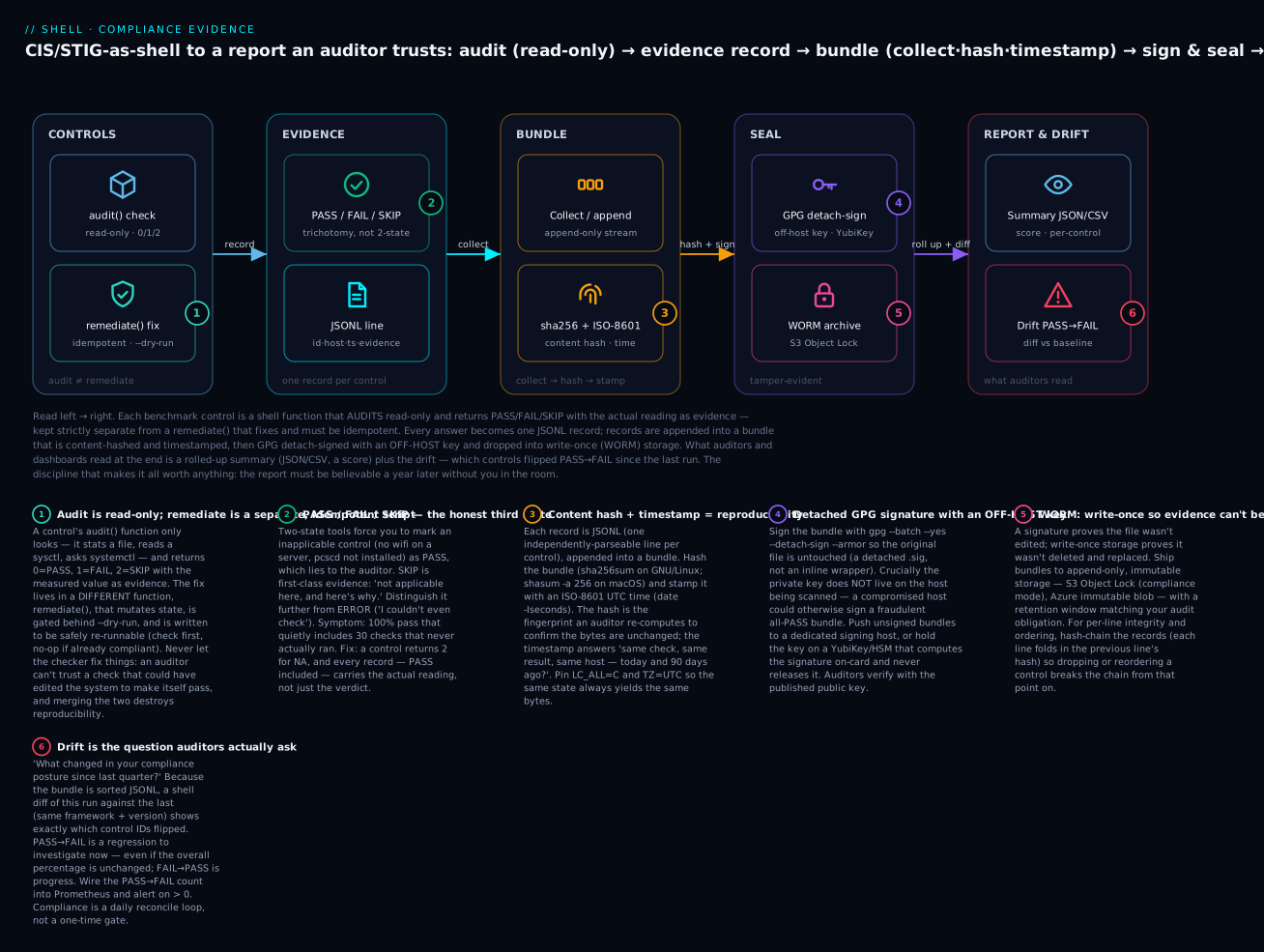
The whole lesson in one picture, read left → right. A benchmark control audits read-only (kept separate from an idempotent remediate) and records PASS/FAIL/SKIP with evidence; each answer is one JSONL line; the lines are collected, hashed and timestamped into a bundle; the bundle is GPG detach-signed with an off-host key and dropped into write-once (WORM) storage; and what auditors and dashboards read at the end is a summary + score plus the drift (which controls flipped since last run). Badges 1–6 are the six disciplines, in order.
What Auditors Actually Want (And Why Shell Is Surprisingly Good At It)
Auditors want three things, in order:
- Reproducibility — “Show me the same check producing the same result on the same host today and 90 days ago.”
- Tamper-evidence — “Prove the report wasn’t edited after generation.”
- Coverage — “Show me a control list with each control mapped to a specific check that ran.”
A shell script that runs CIS/STIG checks, dumps the results to a structured JSON file, signs that file with GPG, and stores the signature alongside it satisfies all three. This is what enterprise compliance tools do under the hood — but for many controls, a 200-line shell script is more transparent and easier to audit than a SaaS UI.
The four discipline patterns:
| Pattern | What it does | Why auditors care |
|---|---|---|
| Controls-as-tests | Each CIS/STIG control is a shell function with pass/fail/skip output | Maps directly to control catalog |
| Evidence bundle | JSON record per control: id, status, evidence, timestamp, host | Reproducible, machine-readable |
| Signed reports | GPG signature over the bundle | Tamper-evident |
| Drift detection | Diff today’s bundle vs. last week’s | “What changed since last audit?” |
This lesson teaches each pattern with shell scripts and a lib/compliance.sh you can source.
The Controls-As-Tests Model
A CIS control like “1.1.1.1: Ensure mounting of cramfs filesystems is disabled” maps to a shell function:
# Each control is a function returning 0=PASS, 1=FAIL, 2=SKIP/NA
control_1_1_1_1() {
  local title="Ensure mounting of cramfs filesystems is disabled"
  local description="The cramfs filesystem type is a compressed read-only Linux filesystem..."

  # Check 1: cramfs not loadable
  if modprobe -n -v cramfs 2>&1 | grep -q "install /bin/true"; then
    : # PASS
  else
    compliance_record "1.1.1.1" "$title" "FAIL" "modprobe cramfs is not blacklisted"
    return 1
  fi

  # Check 2: cramfs not currently loaded
  if lsmod | grep -q "^cramfs"; then
    compliance_record "1.1.1.1" "$title" "FAIL" "cramfs module currently loaded"
    return 1
  fi

  compliance_record "1.1.1.1" "$title" "PASS" "cramfs blacklisted and not loaded"
  return 0
}
The structure is rigid by design:
- One function per control — easy to audit, easy to disable individually.
- Three outcomes: PASS, FAIL, SKIP (where SKIP means “not applicable” — e.g., “USB controls don’t apply to this VM”).
- Evidence is always recorded — both for PASS and FAIL. Auditors need positive evidence, not just absence of failure.
- Title and description in the function body — auditor reading the script gets full context inline.
The PASS / FAIL / SKIP Trichotomy
Tools that only have PASS/FAIL force you to mark inapplicable checks as PASS, which lies to the auditor. SKIP is the third state:
control_2_1_1_pcsc() {
  # Skip if PC/SC daemon is not installed (not applicable to this OS)
  if ! command -v pcscd >/dev/null; then
    compliance_record "2.1.1" "PC/SC daemon" "SKIP" "pcscd not installed"
    return 2
  fi
  # ...real check
}
Skips are first-class evidence: the auditor sees “5 of 200 checks were SKIP because pcscd is not installed on this host” and accepts it.
Pillar 1: The Assertion Library
Most controls are variations of a few patterns:
- “File X has mode/owner/group Y.”
- “Sysctl X has value Y.”
- “Service X is enabled / disabled / masked.”
- “Package X is installed / not installed.”
- “Mount Y has option Z.”
Encoding these as helper functions makes the controls themselves trivially short:
assert_file_mode() {
  local path="$1" expected="$2"
  [[ -e "$path" ]] || return 2   # missing → SKIP
  local actual
  actual=$(stat -c '%a' "$path")
  if [[ "$actual" == "$expected" ]]; then
    return 0
  else
    printf 'expected=%s actual=%s\n' "$expected" "$actual"
    return 1
  fi
}

assert_file_owner() {
  local path="$1" expected="$2"
  [[ -e "$path" ]] || return 2
  local actual
  actual=$(stat -c '%U' "$path")
  [[ "$actual" == "$expected" ]] || { echo "owner=$actual expected=$expected"; return 1; }
  return 0
}

assert_sysctl() {
  local key="$1" expected="$2"
  local actual
  actual=$(sysctl -n "$key" 2>/dev/null) || return 2
  [[ "$actual" == "$expected" ]] || { echo "sysctl $key=$actual expected=$expected"; return 1; }
  return 0
}

assert_systemctl_enabled() {
  local unit="$1"
  systemctl is-enabled --quiet "$unit"
}

assert_systemctl_disabled() {
  local unit="$1"
  ! systemctl is-enabled --quiet "$unit" 2>/dev/null
}

assert_package_installed() {
  local pkg="$1"
  if command -v dpkg >/dev/null; then
    dpkg -l "$pkg" 2>/dev/null | grep -q "^ii"
  elif command -v rpm >/dev/null; then
    rpm -q "$pkg" >/dev/null
  else
    return 2
  fi
}

assert_package_not_installed() {
  ! assert_package_installed "$1"
}

assert_mount_option() {
  local mount_point="$1" option="$2"
  findmnt --noheadings --output=OPTIONS "$mount_point" 2>/dev/null \
    | tr ',' '\n' | grep -qx "$option"
}

assert_grep_in_file() {
  local pattern="$1" file="$2"
  [[ -f "$file" ]] || return 2
  grep -q "$pattern" "$file"
}
With these in place, controls become one-liners:
control_3_1_1_ip_forward() {
  if assert_sysctl "net.ipv4.ip_forward" "0"; then
    compliance_record "3.1.1" "Disable IP forwarding" "PASS" "ip_forward=0"
  else
    compliance_record "3.1.1" "Disable IP forwarding" "FAIL" "ip_forward not 0"
  fi
}

control_5_1_2_cron_perms() {
  if assert_file_mode "/etc/crontab" "600" && assert_file_owner "/etc/crontab" "root"; then
    compliance_record "5.1.2" "/etc/crontab perms" "PASS" "mode=600 owner=root"
  else
    compliance_record "5.1.2" "/etc/crontab perms" "FAIL" "perms incorrect"
  fi
}
The whole CIS Level 1 benchmark for Ubuntu 22.04 (~200 controls) fits in ~2000 lines of shell when expressed this way. Compare to OpenSCAP’s XCCDF/OVAL XML which is 50,000+ lines for the same coverage — vastly less readable, vastly harder to audit.
Pillar 2: The Evidence Bundle (Structured JSON Output)
An evidence bundle has a five-step lifecycle you’ll see referenced throughout the rest of this lesson: collect each control’s answer as one record, hash the finished file so its bytes are fingerprinted, timestamp it so “when” is provable, archive it to storage it can’t be silently rewritten, and optionally sign it so origin and integrity are cryptographically bound. This pillar covers collect; Pillar 3 covers sign; hashing, timestamping and archival are the finalize-and-ship steps (compliance_finalize and the S3 push, both below). Keeping the record format boring and line-oriented is what makes every later step — diff, sign, aggregate, convert to OSCAL — a one-liner.
Each control records a structured record. The bundle format is JSON Lines (JSONL): one record per control:
compliance_record() {
  local id="$1" title="$2" status="$3" evidence="$4"
  jq -nc \
    --arg ts "$(date -Iseconds)" \
    --arg host "$(hostname)" \
    --arg id "$id" \
    --arg title "$title" \
    --arg status "$status" \
    --arg evidence "$evidence" \
    --arg framework "$COMPLIANCE_FRAMEWORK" \
    --arg version "$COMPLIANCE_VERSION" \
    '{ts:$ts, host:$host, framework:$framework, version:$version, control_id:$id, title:$title, status:$status, evidence:$evidence}' \
    >> "$COMPLIANCE_BUNDLE"
}
Sample bundle line:
{"ts":"2026-06-22T14:00:00Z","host":"web-01","framework":"CIS-Ubuntu-2204","version":"v1.0.0","control_id":"3.1.1","title":"Disable IP forwarding","status":"PASS","evidence":"ip_forward=0"}
JSONL is the right format because:
- Each line is independently parseable (corruption of one line doesn’t kill the whole file).
- Streamable (large bundles can be processed line-by-line).
- Indexable by Loki / OpenSearch / CloudWatch / Splunk.
- Trivially diffable (next pillar).
Pillar 3: GPG-Signed Reports
The bundle is generated; now sign it so an auditor (or your future self) can prove it wasn’t edited:
compliance_sign_bundle() {
  local bundle="$1"
  local sig="${bundle}.sig"

  # Detached signature (preserves the bundle as-is)
  gpg --batch --yes --output "$sig" \
    --detach-sign --armor \
    --local-user "compliance@example.com" \
    "$bundle"

  # Also store the signing metadata
  cat > "${bundle}.meta" <<EOF
{
  "bundle": "$(basename "$bundle")",
  "sha256": "$(sha256sum "$bundle" | cut -d' ' -f1)",
  "signature": "$(basename "$sig")",
  "signer_keyid": "$(gpg --list-secret-keys --with-colons compliance@example.com | awk -F: '/^sec/ {print $5; exit}')",
  "signed_at": "$(date -Iseconds)",
  "host": "$(hostname)"
}
EOF
}

compliance_verify_bundle() {
  local bundle="$1"
  local sig="${bundle}.sig"

  gpg --batch --verify "$sig" "$bundle" 2>&1 \
    && echo "OK: $bundle signature verified" \
    || { echo "FAIL: signature mismatch"; return 1; }
}
The detached signature (.sig) is separate from the bundle (.jsonl). Auditors verify by:
- Have the public key (published, fingerprinted in your security policy).
gpg --verify bundle.jsonl.sig bundle.jsonl→ must show “Good signature from compliance@example.com.”- The signature’s timestamp is part of the GPG-signed payload — proves when it was signed.
Why Detached Over Inline
Inline GPG signatures (gpg --clearsign) modify the file by wrapping it in BEGIN PGP MESSAGE/END markers. Detached keeps the original bundle unchanged, which is critical for downstream tools that don’t grok PGP.
Hardware-Backed Signing With YubiKey
For higher assurance, the signing key lives on a hardware token:
gpg --card-status   # confirm YubiKey is detected
gpg --batch --yes --output "$sig" \
  --detach-sign --armor \
  --local-user "compliance-yubi@example.com" \
  "$bundle"
The YubiKey doesn’t release the private key; it computes the signature on-card. Even compromise of the compliance host can’t extract the key.
Pillar 4: Drift Detection — What Changed Since Last Run
Auditors love this question: “Show me what changed in your compliance posture since last quarter.”
A shell-only diff between two bundles is trivial because of the JSONL format:
compliance_drift() {
  local prev="$1" current="$2"

  # Sort by control_id for deterministic compare
  jq -c 'select(.status != "SKIP") | {id: .control_id, status, evidence}' "$prev" \
    | sort > /tmp/prev.sorted

  jq -c 'select(.status != "SKIP") | {id: .control_id, status, evidence}' "$current" \
    | sort > /tmp/current.sorted

  # Show only differences
  diff -u /tmp/prev.sorted /tmp/current.sorted
}
Run it weekly and feed the output into a “compliance drift” dashboard. The control IDs that flipped from PASS to FAIL get prioritized; the ones that flipped from FAIL to PASS celebrate progress.
Drift Alerting
Wire drift into Prometheus:
# Count of PASS→FAIL drifts in last 7 days
fail_drift=$(diff -u /var/compliance/last-week.jsonl /var/compliance/today.jsonl \
  | grep '^+.*"FAIL"' | grep -v '^+++' | wc -l)
pass_drift=$(diff -u /var/compliance/last-week.jsonl /var/compliance/today.jsonl \
  | grep '^+.*"PASS"' | grep -v '^+++' | wc -l)

cat > /var/lib/node_exporter/textfile_collector/compliance.prom.tmp <<EOF
# HELP compliance_drift_to_fail Controls newly failing this week
# TYPE compliance_drift_to_fail gauge
compliance_drift_to_fail{framework="CIS-Ubuntu-2204"} $fail_drift

# HELP compliance_drift_to_pass Controls newly passing this week
# TYPE compliance_drift_to_pass gauge
compliance_drift_to_pass{framework="CIS-Ubuntu-2204"} $pass_drift
EOF
mv /var/lib/node_exporter/textfile_collector/compliance.prom{.tmp,}
Alert on compliance_drift_to_fail > 0 — any new failure deserves investigation, even if total compliance percentage is unchanged.
Audit vs. Remediate: Separating The Read-Only Check From The Fix
Everything so far has been audit: read the system, decide PASS/FAIL/SKIP, record evidence. Not one assertion in lib/compliance.sh changes a byte of the host — stat, sysctl -n, systemctl is-enabled, findmnt, grep all read. That is deliberate, and it is the most important architectural decision in the whole design.
Why keep the fix out of the check? Four reasons, each one an auditor’s objection:
| Reason | If audit and remediate are the same function… |
|---|---|
| Trust | An auditor cannot believe a check that could have edited the system to make itself pass. Read-only is provable innocence. |
| Reproducibility | A check that mutates state changes the answer on the next run. “Same host, same result, 90 days apart” becomes impossible. |
| Blast radius | Auditing 200 controls is safe to run hourly on the whole fleet. Applying 200 fixes automatically is how you take down production on 200 hosts at once. |
| Privilege & cadence | Auditing can run as an unprivileged compliance user, read-only, continuously. Remediation needs write privilege, a change window, and usually human approval. |
So remediation lives in a separate function, a separate script, and usually a separate change-managed run. The shape:
# AUDIT: read-only, returns 0/1/2, never mutates. (This is what lib/compliance.sh runs.)
audit_3_1_1() {
  assert_sysctl "net.ipv4.ip_forward" "0"
}

# REMEDIATE: mutates, idempotent, dry-run-gated. Lives in a DIFFERENT file, run on purpose.
remediate_3_1_1() {
  # 1. Idempotent guard: if already compliant, do nothing and say so.
  if assert_sysctl "net.ipv4.ip_forward" "0"; then
    echo "3.1.1 already compliant — no action"
    return 0
  fi
  # 2. Dry-run gate: show the intended change without making it.
  if [[ "${DRY_RUN:-1}" == "1" ]]; then
    echo "WOULD set net.ipv4.ip_forward=0 (runtime + /etc/sysctl.d/60-compliance.conf)"
    return 0
  fi
  # 3. Apply at runtime AND persist across reboot.
  sysctl -w net.ipv4.ip_forward=0
  printf 'net.ipv4.ip_forward = 0\n' > /etc/sysctl.d/60-compliance.conf
  # 4. Re-audit to prove the fix actually worked.
  assert_sysctl "net.ipv4.ip_forward" "0"
}
Note DRY_RUN defaults to 1 — remediation is opt-in to danger. You must explicitly set DRY_RUN=0 before anything changes. This is the opposite of the audit path, which is always safe to run.
Idempotent Remediation Is Just Reconciliation
The check-first / no-op-if-compliant / apply-only-the-delta pattern is exactly the reconcile loop from the idempotency lesson, applied to compliance. Running remediate_3_1_1 on an already-compliant host is a silent no-op; running it ten times is identical to running it once; and it always ends by re-auditing so a fix that didn’t take (a read-only filesystem, an overriding config, a sysctl.d file with higher precedence) is caught immediately rather than reported as fixed. Idempotence is what makes remediation safe to bake into configuration management (Ansible, a systemd timer, cloud-init) without a fragile “have I already run this?” flag.
Remediation Is Itself Evidence
A fix that leaves no trace is an auditor’s nightmare: “who changed this host, when, and what was it before?” So remediation appends its own signed record — a remediation ledger — separate from the audit bundle:
remediation_record() {
  local id="$1" action="$2" before="$3" after="$4"
  jq -nc \
    --arg ts "$(date -Iseconds)" --arg host "$(hostname)" \
    --arg id "$id" --arg action "$action" \
    --arg before "$before" --arg after "$after" \
    --arg by "${SUDO_USER:-$USER}" \
    '{ts:$ts, host:$host, control_id:$id, action:$action, before:$before, after:$after, actor:$by}' \
    >> "$REMEDIATION_LEDGER"
}
Now the story is complete and defensible: the audit bundle proves the host was non-compliant at 02:00, the remediation ledger proves who fixed it and what the value was before and after at 02:15, and the next audit bundle proves it is compliant at 03:00 — three signed artifacts telling one coherent, tamper-evident story. The safe production pattern is staged, never blind: audit → report → human approves → remediate (with the ledger) → re-audit to prove closure. Auto-remediation without that loop is how a benchmark update silently reconfigures a fleet at 3 a.m.
The Drop-In lib/compliance.sh
# lib/compliance.sh — sourced helpers for compliance scan scripts.
#
# Required env (set by the calling script):
#   COMPLIANCE_FRAMEWORK — e.g., "CIS-Ubuntu-2204"
#   COMPLIANCE_VERSION   — e.g., "v1.0.0"
#
# Optional env:
#   COMPLIANCE_DIR       — default /var/compliance
#   COMPLIANCE_KEYID     — GPG key for signing

set -o errexit -o nounset -o pipefail

: "${COMPLIANCE_FRAMEWORK:?COMPLIANCE_FRAMEWORK must be set}"
: "${COMPLIANCE_VERSION:?COMPLIANCE_VERSION must be set}"
: "${COMPLIANCE_DIR:=/var/compliance}"
: "${COMPLIANCE_KEYID:=compliance@example.com}"

readonly COMPLIANCE_STAMP=$(date +%Y-%m-%dT%H%M%S)
readonly COMPLIANCE_BUNDLE="$COMPLIANCE_DIR/$(hostname)-$COMPLIANCE_FRAMEWORK-$COMPLIANCE_STAMP.jsonl"

mkdir -p "$COMPLIANCE_DIR"

compliance_log() {
  printf '[%s] [compliance] %s\n' "$(date -Iseconds)" "$*"
}

compliance_record() {
  local id="$1" title="$2" status="$3" evidence="$4"
  jq -nc \
    --arg ts "$(date -Iseconds)" \
    --arg host "$(hostname)" \
    --arg id "$id" \
    --arg title "$title" \
    --arg status "$status" \
    --arg evidence "$evidence" \
    --arg framework "$COMPLIANCE_FRAMEWORK" \
    --arg version "$COMPLIANCE_VERSION" \
    '{ts:$ts, host:$host, framework:$framework, version:$version, control_id:$id, title:$title, status:$status, evidence:$evidence}' \
    >> "$COMPLIANCE_BUNDLE"
}

# Assertion helpers — return 0=PASS, 1=FAIL, 2=SKIP/NA
assert_file_mode() {
  local path="$1" expected="$2"
  [[ -e "$path" ]] || return 2
  local actual
  actual=$(stat -c '%a' "$path")
  [[ "$actual" == "$expected" ]] || { printf 'mode=%s expected=%s\n' "$actual" "$expected"; return 1; }
}

assert_file_owner() {
  local path="$1" expected="$2"
  [[ -e "$path" ]] || return 2
  local actual; actual=$(stat -c '%U' "$path")
  [[ "$actual" == "$expected" ]] || { printf 'owner=%s expected=%s\n' "$actual" "$expected"; return 1; }
}

assert_file_group() {
  local path="$1" expected="$2"
  [[ -e "$path" ]] || return 2
  local actual; actual=$(stat -c '%G' "$path")
  [[ "$actual" == "$expected" ]] || { printf 'group=%s expected=%s\n' "$actual" "$expected"; return 1; }
}

assert_sysctl() {
  local key="$1" expected="$2"
  local actual; actual=$(sysctl -n "$key" 2>/dev/null) || return 2
  [[ "$actual" == "$expected" ]] || { printf '%s=%s expected=%s\n' "$key" "$actual" "$expected"; return 1; }
}

assert_systemctl_enabled() { systemctl is-enabled --quiet "$1"; }
assert_systemctl_disabled() { ! systemctl is-enabled --quiet "$1" 2>/dev/null; }
assert_systemctl_masked() { [[ "$(systemctl is-enabled "$1" 2>/dev/null)" == "masked" ]]; }

assert_package_installed() {
  local pkg="$1"
  if command -v dpkg >/dev/null; then
    dpkg -l "$pkg" 2>/dev/null | grep -q "^ii  $pkg"
  elif command -v rpm >/dev/null; then
    rpm -q "$pkg" >/dev/null 2>&1
  else
    return 2
  fi
}

assert_package_not_installed() {
  ! assert_package_installed "$1"
}

assert_mount_option() {
  local mp="$1" opt="$2"
  findmnt --noheadings --output=OPTIONS "$mp" 2>/dev/null \
    | tr ',' '\n' | grep -qx "$opt"
}

assert_grep_in_file() {
  local pattern="$1" file="$2"
  [[ -f "$file" ]] || return 2
  grep -q "$pattern" "$file"
}

assert_no_grep_in_file() {
  local pattern="$1" file="$2"
  [[ -f "$file" ]] || return 2
  ! grep -q "$pattern" "$file"
}

# Run a control function with auto-recording. Args: control_id, title, function_name
compliance_run_control() {
  local id="$1" title="$2" fn="$3"
  local out rc
  out=$("$fn" 2>&1) && rc=0 || rc=$?
  case $rc in
    0) compliance_record "$id" "$title" "PASS" "${out:-OK}" ;;
    1) compliance_record "$id" "$title" "FAIL" "${out:-FAIL}" ;;
    2) compliance_record "$id" "$title" "SKIP" "${out:-NA}" ;;
    *) compliance_record "$id" "$title" "FAIL" "rc=$rc out=$out" ;;
  esac
}

# Sign and bundle. Call once after all controls have run.
compliance_finalize() {
  local sig="${COMPLIANCE_BUNDLE}.sig"
  local meta="${COMPLIANCE_BUNDLE}.meta"

  if command -v gpg >/dev/null; then
    gpg --batch --yes --output "$sig" \
      --detach-sign --armor \
      --local-user "$COMPLIANCE_KEYID" \
      "$COMPLIANCE_BUNDLE" 2>/dev/null \
      && compliance_log "Signed: $sig"
  else
    compliance_log "WARN: gpg not present, skipping signature"
  fi

  cat > "$meta" <<EOF
{
  "bundle": "$(basename "$COMPLIANCE_BUNDLE")",
  "sha256": "$(sha256sum "$COMPLIANCE_BUNDLE" | cut -d' ' -f1)",
  "signature": "$(basename "$sig")",
  "framework": "$COMPLIANCE_FRAMEWORK",
  "version": "$COMPLIANCE_VERSION",
  "host": "$(hostname)",
  "stamp": "$COMPLIANCE_STAMP",
  "control_count": $(wc -l < "$COMPLIANCE_BUNDLE")
}
EOF

  # Summary
  local pass fail skip
  pass=$(grep -c '"PASS"' "$COMPLIANCE_BUNDLE" || true)
  fail=$(grep -c '"FAIL"' "$COMPLIANCE_BUNDLE" || true)
  skip=$(grep -c '"SKIP"' "$COMPLIANCE_BUNDLE" || true)
  compliance_log "SUMMARY: PASS=$pass FAIL=$fail SKIP=$skip bundle=$COMPLIANCE_BUNDLE"
}

# Drift between two bundles. Args: prev_bundle, current_bundle
compliance_drift() {
  local prev="$1" current="$2"
  jq -c 'select(.status != "SKIP") | {id: .control_id, status, evidence}' "$prev" \
    | sort > /tmp/prev.sorted
  jq -c 'select(.status != "SKIP") | {id: .control_id, status, evidence}' "$current" \
    | sort > /tmp/current.sorted
  diff -u /tmp/prev.sorted /tmp/current.sorted
}
Worked Example: Mini CIS Scan
#!/usr/bin/env bash
# cis-scan.sh — runs a subset of CIS Ubuntu 22.04 Level 1 controls
set -euo pipefail

COMPLIANCE_FRAMEWORK="CIS-Ubuntu-2204"
COMPLIANCE_VERSION="v1.0.0"
source /usr/local/lib/compliance.sh

# 1.1.1.1: cramfs disabled
control_1_1_1_1() {
  modprobe -n -v cramfs 2>&1 | grep -q "install /bin/true" \
    && ! lsmod | grep -q "^cramfs"
}
compliance_run_control "1.1.1.1" "Ensure cramfs filesystem is disabled" control_1_1_1_1

# 1.1.21: /tmp partition with nodev,nosuid,noexec
control_1_1_21() {
  assert_mount_option /tmp nodev \
    && assert_mount_option /tmp nosuid \
    && assert_mount_option /tmp noexec
}
compliance_run_control "1.1.21" "/tmp mount options" control_1_1_21

# 3.1.1: IP forwarding disabled
control_3_1_1() {
  assert_sysctl "net.ipv4.ip_forward" "0"
}
compliance_run_control "3.1.1" "IP forwarding disabled" control_3_1_1

# 5.1.1: cron daemon enabled
control_5_1_1() {
  assert_systemctl_enabled cron
}
compliance_run_control "5.1.1" "cron daemon enabled" control_5_1_1

# 5.1.2: /etc/crontab perms
control_5_1_2() {
  assert_file_mode /etc/crontab 600 \
    && assert_file_owner /etc/crontab root
}
compliance_run_control "5.1.2" "/etc/crontab permissions" control_5_1_2

# 6.2.1: /etc/passwd perms
control_6_2_1() {
  assert_file_mode /etc/passwd 644 \
    && assert_file_owner /etc/passwd root \
    && assert_file_group /etc/passwd root
}
compliance_run_control "6.2.1" "/etc/passwd permissions" control_6_2_1

# Finalize: sign and emit summary
compliance_finalize
Run output:
[2026-06-22T14:00:01Z] [compliance] Signed: /var/compliance/web-01-CIS-Ubuntu-2204-2026-06-22T140000.jsonl.sig
[2026-06-22T14:00:01Z] [compliance] SUMMARY: PASS=5 FAIL=1 SKIP=0 bundle=...
The bundle, signature, and metadata sit in /var/compliance/. Ship them daily to a centralized append-only S3 bucket (with Object Lock!) for audit retention.
Reporting: Turning The Bundle Into A Human Summary
The JSONL bundle is machine truth — perfect for diffing, signing and shipping, but no human wants to read 200 lines of JSON. Reporting is the rollup layer: the same bundle, projected into whatever the audience needs. Because the bundle is line-oriented JSON, every report is a short jq one-liner over it.
The summary object — counts and a compliance score — for a dashboard tile or a Slack post:
compliance_summary() {
  local bundle="$1"
  jq -s '{
    host:      .[0].host,
    framework: .[0].framework,
    version:   .[0].version,
    total:     length,
    pass:      (map(select(.status=="PASS")) | length),
    fail:      (map(select(.status=="FAIL")) | length),
    skip:      (map(select(.status=="SKIP")) | length),
    score_pct: (((map(select(.status=="PASS")) | length) * 100)
                 / (map(select(.status!="SKIP")) | length) | floor)
  }' "$bundle"
}
{"host":"web-01","framework":"CIS-Ubuntu-2204","version":"v1.0.0","total":200,"pass":181,"fail":14,"skip":5,"score_pct":92}
The score deliberately excludes SKIP from the denominator: PASS / (PASS + FAIL). Counting SKIP as pass inflates the number (you look more compliant than you are); counting it as fail deflates it (you get dinged for a control that doesn’t apply). The honest score is “of the controls that applied, what fraction passed.” (Representative counts above.)
CSV — for a spreadsheet, a GRC platform import, or a ticket attachment. @csv quotes and escapes every field for you:
compliance_csv() {
  local bundle="$1"
  echo '"control_id","status","title","evidence"'          # header row
  jq -r '[.control_id, .status, .title, .evidence] | @csv' "$bundle"
}
"control_id","status","title","evidence"
"3.1.1","FAIL","IP forwarding disabled","ip_forward=1 expected=0"
"5.1.2","PASS","/etc/crontab permissions","mode=600 owner=root"
Want only the failures, sorted, as a remediation worklist? Filter before projecting:
jq -r 'select(.status=="FAIL") | [.control_id, .title, .evidence] | @csv' "$bundle" \
  | sort -t, -k1,1
Markdown — a per-control table to paste into a PR description, a runbook, or a wiki:
compliance_markdown() {
  local bundle="$1"
  echo '| Control | Status | Title | Evidence |'
  echo '|---|---|---|---|'
  jq -r '"| \(.control_id) | \(.status) | \(.title) | \(.evidence) |"' "$bundle"
}
Make the scan’s exit code the FAIL count so CI can gate on it — zero failures exits 0 (green), any failure is non-zero (red):
# At the end of the scan, after compliance_finalize:
fail_count=$(grep -c '"status":"FAIL"' "$COMPLIANCE_BUNDLE" || true)
compliance_log "exit with fail_count=$fail_count"
exit "$(( fail_count > 255 ? 255 : fail_count ))"   # cap: Unix exit codes are 0–255
Portability note (this course targets Linux + GNU coreutils).
date -Isecondsandsha256sumare GNU; on macOS/BSD usedate -u +%Y-%m-%dT%H:%M:%SZandshasum -a 256.jqbehaves the same on both. If a bundle must be byte-identical across hosts, pinLC_ALL=CandTZ=UTCbefore generating it so locale and timezone can’t change the output.
Three audiences, three reports, one bundle — and none of the reports is the source of truth. The signed JSONL is the truth; every report is a disposable view you can regenerate at any time. That separation is why you never hand-edit a report: fix the scan, re-run, re-render.
Integrating With OpenSCAP And OSCAL
For more rigorous compliance frameworks (FedRAMP, DoD STIG with formal POA&M tracking), shell-only is insufficient. OpenSCAP and OSCAL are the formal frameworks:
- OpenSCAP runs SCAP content (XCCDF + OVAL XML files) and produces XML/HTML reports.
- OSCAL is NIST’s JSON/YAML format for catalogs, profiles, and assessment results.
The shell-script bundle from this lesson can be converted to OSCAL Assessment Results JSON:
# Convert lib/compliance.sh JSONL bundle to OSCAL AR
jq -s '
  {
    "assessment-results": {
      "uuid": "'"$(uuidgen)"'",
      "metadata": {
        "title": "Compliance scan: " + .[0].framework + " " + .[0].version,
        "last-modified": .[0].ts,
        "version": .[0].version
      },
      "results": [
        .[] | {
          "uuid": "'"$(uuidgen)"'",
          "title": .title,
          "status": (if .status == "PASS" then "satisfied" elif .status == "FAIL" then "not-satisfied" else "not-applicable" end),
          "subject-references": [{"subject-uuid": "'"$(hostname)"'", "type": "component"}],
          "remarks": .evidence
        }
      ]
    }
  }
' bundle.jsonl > oscal-ar.json
This makes shell-script results consumable by OSCAL-aware tools. For most internal compliance work, the JSONL bundle is sufficient; OSCAL is the upgrade for federal contracts.
When To Use OpenSCAP vs. Shell
| Need | Tool |
|---|---|
| Quick compliance check | Shell |
| Formal SCAP-validated content | OpenSCAP |
| Custom controls not in any catalog | Shell |
| Federal/DoD/HIPAA with auditor demands | OpenSCAP + OSCAL |
| Daily fleet drift detection | Shell |
| One-time pre-audit baseline | OpenSCAP |
The two are complementary: shell for daily ops, OpenSCAP for formal artifacts. Many shops run both.
Centralized Aggregation: Fleet-Wide Compliance Dashboard
A bundle on every host is useful but the fleet view is what management asks for. Push bundles to S3 and aggregate:
# On each host, after compliance_finalize
aws s3 cp "$COMPLIANCE_BUNDLE" \
  "s3://compliance-archive/$(hostname)/$(date +%Y/%m/%d)/" \
  --metadata "framework=$COMPLIANCE_FRAMEWORK,version=$COMPLIANCE_VERSION"

aws s3 cp "$COMPLIANCE_BUNDLE.sig" \
  "s3://compliance-archive/$(hostname)/$(date +%Y/%m/%d)/"
Aggregator script (runs centrally, weekly):
# Pull all today's bundles, summarize per control across fleet
aws s3 sync s3://compliance-archive/ /tmp/bundles/ \
  --exclude '*' --include "*$(date +%Y-%m-%d)*"

cat /tmp/bundles/**/*.jsonl \
  | jq -c '{control_id, status, host}' \
  | jq -s '
    group_by(.control_id) |
    map({
      control_id: .[0].control_id,
      total: length,
      pass: (map(select(.status == "PASS")) | length),
      fail: (map(select(.status == "FAIL")) | length),
      skip: (map(select(.status == "SKIP")) | length),
      failing_hosts: [map(select(.status == "FAIL")) | .[].host]
    })
  ' > /tmp/fleet-summary.json
Display this as a dashboard: control_id × pass percentage, with hover-to-see failing hosts. Engineers fix the lowest-percentage control first.
Going deeper
The four pillars plus audit/remediate and reporting are the working system. This section is the depth an auditor, a security engineer, or a future incident will eventually demand.
Tamper-Evident Logs: Hash-Chaining The Bundle
A detached GPG signature proves the finished file wasn’t edited after signing. It does not prove that a line wasn’t quietly dropped before signing, and it doesn’t help a live, append-only log that’s being written to throughout the scan. For per-record integrity and ordering, hash-chain the bundle: each line stores a hash that folds in the previous line’s hash, the way journald’s Forward Secure Sealing and a blockchain both work.
# Append a control record into a hash-chained log.
# State: $CHAIN_PREV holds the previous line's hash (seeded with a genesis string).
chain_append() {
  local line="$1" logfile="$2"
  local h
  h=$(printf '%s\n%s' "$CHAIN_PREV" "$line" | sha256sum | cut -d' ' -f1)
  printf '%s  %s\n' "$h" "$line" >> "$logfile"
  CHAIN_PREV="$h"
}

# Verify a chained log: recompute every link; the first mismatch is the tamper point.
chain_verify() {
  local logfile="$1" prev="GENESIS" ok=1
  while IFS= read -r logline; do
    local h line calc
    h=${logline%%  *}          # hash = text before the first double-space
    line=${logline#*  }        # record = text after it
    calc=$(printf '%s\n%s' "$prev" "$line" | sha256sum | cut -d' ' -f1)
    if [[ "$calc" != "$h" ]]; then
      echo "TAMPER at: $line"; ok=0; break
    fi
    prev="$h"
  done < "$logfile"
  [[ "$ok" == 1 ]] && echo "chain intact: $(wc -l < "$logfile") links verified"
}
Flip a single FAIL to PASS anywhere in the payload without recomputing the chain, and chain_verify fails at that exact line and every line after it — because each hash depends on all its predecessors. The chain gives you integrity + ordering per record; the GPG signature gives you origin + a whole-file seal + a trusted signing time. They’re complementary, and high-assurance setups use both. (Seed CHAIN_PREV with a per-run genesis value — e.g. the framework, version and stamp — so records from two different runs can’t be spliced together.)
WORM Storage And The Trust Boundary
A signature proves a file wasn’t edited; write-once storage proves it wasn’t deleted and replaced. Ship bundles to append-only, immutable storage — S3 Object Lock in compliance mode, Azure immutable blob, or an on-prem WORM appliance — with a retention window matching your audit obligation (often 1–7 years). The rule that makes this real: the identity that writes the evidence must not be able to delete or overwrite it. If the scanning host can rm last month’s bundle, “immutable” is a label, not a control.
The Signing-Host Topology
Footgun #4 (don’t store the signing key on the scanned host) is really an architecture decision. Three postures, increasing assurance:
| Posture | Where the key lives | Threat it stops |
|---|---|---|
| Local signing (weak) | Private key on every scanned host | Nothing — a compromised host forges an all-PASS bundle. |
| Central signer | Hosts upload unsigned bundles; one hardened signing host signs them | Host compromise can’t forge evidence; blast radius is one box. |
| Hardware-backed | Key on a YubiKey/HSM on the signer; signs on-card | Even signer compromise can’t extract the key. |
The flow for the strong version: scanned host → compliance_finalize (no signature) → push unsigned bundle to the signer → signer verifies provenance, signs, writes to WORM. The scanned host never holds signing material.
OpenSCAP Internals — And When The XML Earns Its Keep
oscap isn’t magic; it’s an interpreter for SCAP content, which is three XML languages working together: XCCDF (the checklist — controls, profiles, severities), OVAL (the machine-readable how to test each control), and CPE (applicability — “this control applies to Ubuntu 22.04”). A running scan looks like:
oscap xccdf eval \
  --profile xccdf_org.ssgproject.content_profile_cis_level1_server \
  --results   scan-results.xml \
  --report    scan-report.html \
  /usr/share/xml/scap/ssg/content/ssg-ubuntu2204-ds.xml
The value SCAP buys you is validated, versioned, vendor-signed content: the ComplianceAsCode/SSG project ships audited CIS and DISA STIG profiles for most major distros, so you’re not hand-writing 200 controls or trusting your own reading of the benchmark. The cost is XML verbosity (50,000+ lines for coverage your shell does in ~2,000) and real friction adding a control the catalog doesn’t have. The pragmatic split most shops land on: oscap for the formal, auditor-facing baseline; shell for the fast daily drift check and the custom controls no catalog covers — and convert the shell bundle to OSCAL Assessment Results (shown earlier) when a federal auditor wants it in NIST’s format.
Determinism, Time, And Reproducibility
The auditor’s headline demand — “same check, same result, today and 90 days ago” — only holds if the scan is deterministic. Three disciplines protect that:
- Pin the environment.
LC_ALL=CandTZ=UTCso locale and timezone never change sort order, number formatting, or timestamps. Sort controls by ID so bundle line order is stable. - Keep evidence deterministic. Record the measured value (
ip_forward=0), never a PID, a random tmp name, or a wall-clock duration — those differ every run and turn a clean drift diff into noise. - Trust the clock. A timestamp is only as good as the host’s clock; keep hosts NTP-synced. For high assurance, get an RFC-3161 timestamp-authority countersignature so a compromised host can’t backdate a bundle — GPG embeds a signing time, but the host sets it.
Performance At Fleet Scale
Every assertion forks a helper — stat, systemctl, findmnt, sysctl — so a 200-control scan is roughly 200–400 short-lived processes. On one host that’s a second or two; across 5,000 hosts it’s a scheduling and storage question, not a correctness one. Run once per host per day (a systemd timer with a randomized delay to avoid a thundering herd), not on every login. On the aggregation side, stream the bundles (jq -c line by line, group_by per control) rather than slurping the whole fleet into memory; the aggregation is O(hosts × controls) and JSONL is built to be processed a line at a time. The performance lesson’s “leave the shell for one awk/jq pass” instinct applies directly to the aggregator.
SKIP Is Not The Only Non-Answer
The trichotomy is a floor, not a ceiling. In rigorous frameworks you’ll want to distinguish:
- SKIP / not-applicable — the control genuinely doesn’t apply (no wifi on a server;
pcscdnot installed). Honest, expected. - ERROR / undetermined — the check itself broke (a tool missing, a permission denied, a timeout). This is not a pass and not a clean skip; it means “we don’t know,” and auditors treat unknowns as findings.
- NOT-RUN — the control exists in the benchmark but this profile didn’t execute it. A coverage gap, tracked separately.
compliance_run_control already maps an unexpected return code (*)) to FAIL rather than silently swallowing it — a good default, because “we couldn’t check” should never masquerade as “fine.”
The 8 Footguns
1. Treating false Return Code As The Same For All Failure Reasons
A control that returns 1 because of “value mismatch” vs. one that returns 1 because the file doesn’t exist are different. The first is a real failure; the second is “we can’t even check.” Fix: The PASS/FAIL/SKIP trichotomy. SKIP is for “can’t determine,” not “looks fine.”
2. Privileged Bundle Generation On Untrusted Hosts
If the compliance script runs as root and writes the bundle to a directory the local app can read, the local app can edit the bundle before it’s signed. Fix: Sign immediately after writing each line, or write to a directory only the compliance user can read; sign before flushing to shared paths.
3. Using set -e Without +e Around Assertions
set -e means a failing grep aborts the script — so your assert_grep_in_file aborts before compliance_record even runs. Fix: Wrap assertions in compliance_run_control (which captures rc explicitly) instead of relying on set -e to flow through.
4. Storing The GPG Private Key On The Host Being Scanned
If the host is compromised, the private key is too. The attacker can sign a fraudulent bundle saying everything is PASS. Fix: GPG key on a separate “compliance signing” host, scanned hosts upload unsigned bundles, signing host signs them. Or use YubiKey + dedicated signer.
5. Drift Compare With Different Frameworks Or Versions
Today you ran CIS v2.0; last week’s bundle was CIS v1.0. Many controls moved or were renumbered. The diff is noise. Fix: Always compare bundles with same framework and version strings; if you upgrade the framework, do a one-time baseline.
6. Bundle Path Includes Spaces Or Special Chars
Hostnames like “WEB 01” generate paths with spaces, which break aws s3 cp and unquoted shell expansions. Fix: Sanitize hostname when generating filenames: hostname=$(hostname | tr -c '[:alnum:].-' '_').
7. Forgetting --batch On gpg
Without --batch, GPG may prompt for passphrase, hanging the script. With --batch, it errors out cleanly if passphrase is missing. Fix: Always gpg --batch --yes .... Use a passphrase-less signing key (acceptable for a hardened compliance host) or a passphrase agent.
8. Not Including Evidence For PASS
A bundle where PASS records have empty evidence is half-useful — the auditor sees “PASS” but can’t verify what was checked. Fix: Every PASS record includes the actual measured value (ip_forward=0), not just OK.
Common beginner mistakes
These are the conceptual traps — the wrong mental model — distinct from the technical footguns above.
-
“A green score means we’re secure.” A compliance score is a floor, not a proof of safety. A benchmark is a baseline of known-good settings; passing all of CIS does not make a host un-hackable, and a single failed control (say, SSH root login enabled) can matter more than the other 199 passing. Read the failures, not just the percentage. Right model: compliance is necessary, not sufficient; the score is a starting line.
-
“PASS doesn’t need evidence — it passed.” A bundle where PASS records carry empty evidence is half-useless: the auditor sees the verdict but can’t verify what was measured. Right model: every record, PASS included, carries the actual reading (
mode=600 owner=root), because auditors need positive proof, not the absence of a complaint. -
“SKIP is basically a pass.” SKIP means not applicable or couldn’t determine — a deliberate, honest third state, not a soft pass. Folding it into PASS lies about your coverage. Right model: three outcomes, and “we couldn’t check” is never “it’s fine.”
-
“The check can fix it while it’s there.” Merging audit and remediate feels efficient and quietly destroys the two things auditors buy from you: trust (a checker that can mutate can’t be believed) and reproducibility (a mutating check changes its own answer). Right model: audit reads, remediate writes, and they are different functions run at different times.
-
“Signing the report makes it true.” A signature proves the bundle wasn’t edited after signing — provenance and integrity, not accuracy. A scan that checks the wrong thing, or a script rigged to always emit PASS, produces a perfectly-signed lie. Right model: the signature protects a correct scan; it can’t rescue a wrong one. Review the controls, then sign.
-
“We ran the scan, so we’re compliant.” Compliance is a moving target: a package update re-enables a service, someone edits
sysctl.conf, a new benchmark version adds controls. A one-time scan is stale within a day. Right model: compliance is a daily reconcile loop with drift detection, exactly like idempotent configuration management. -
“Store the signing key on the box so the scan is self-contained.” Convenient — and it means a single compromised host can sign a fraudulent all-PASS bundle for itself. Right model: the key lives off the scanned host (central signer or hardware token); scanned hosts produce evidence, they don’t get to notarize it.
-
“
set -ewill make a failing check abort loudly.” Underset -e, a failinggrepor assertion inside a control aborts the whole scan beforecompliance_recordruns — so a single FAIL silently kills the run instead of being recorded. Right model: run each control through a wrapper (compliance_run_control) that captures the return code explicitly, so FAIL is data, not a crash.
Practice challenges
Work these in order — each builds on the last. Assume lib/compliance.sh from this lesson is sourced and jq is available. A sample bundle line looks like {"control_id":"3.1.1","status":"FAIL","title":"IP forwarding disabled","evidence":"ip_forward=1 expected=0", ...}.
1. (Beginner) Write a control for /etc/shadow permissions. On Ubuntu, /etc/shadow should be mode 640, owner root, group shadow. Express it as a read-only audit control and record it.
<details> <summary>Solution</summary>
audit_6_1_3() {
  assert_file_mode  /etc/shadow 640 \
    && assert_file_owner /etc/shadow root \
    && assert_file_group /etc/shadow shadow
}
compliance_run_control "6.1.3" "/etc/shadow permissions" audit_6_1_3
The three assertions are &&-chained so any wrong attribute fails the control; compliance_run_control turns the return code into a PASS/FAIL/SKIP record with the mismatch as evidence. (On some distros the group is root and the mode 000 — check your benchmark version, and this is exactly why evidence beats a bare verdict.)
</details>
2. (Beginner) Emit a genuine SKIP. Write a control that SKIPs when ufw isn’t installed, and otherwise checks the firewall is active.
<details> <summary>Solution</summary>
audit_3_5_1() {
  command -v ufw >/dev/null || return 2       # not installed → SKIP (return 2)
  ufw status | grep -q "Status: active"        # installed → real PASS/FAIL check
}
compliance_run_control "3.5.1" "ufw firewall active" audit_3_5_1
Returning 2 records a SKIP with an honest reason; the auditor sees “not applicable — ufw absent” rather than a fake PASS. Marking an inapplicable control PASS is the single most common way a shell scan lies.
</details>
3. (Intermediate) Summarise a bundle. Given bundle.jsonl, print a one-object summary with pass, fail, skip and a score_pct that excludes SKIP from the denominator.
<details> <summary>Solution</summary>
jq -s '{
  pass: (map(select(.status=="PASS")) | length),
  fail: (map(select(.status=="FAIL")) | length),
  skip: (map(select(.status=="SKIP")) | length),
  score_pct: (((map(select(.status=="PASS")) | length) * 100)
               / (map(select(.status!="SKIP")) | length) | floor)
}' bundle.jsonl
-s (slurp) reads all lines into one array so you can count across records; the score is PASS / (PASS+FAIL) because inapplicable controls shouldn’t move the number in either direction.
</details>
4. (Intermediate) A failures-only CSV. Produce a CSV — header included — of only the FAILing controls, sorted by control_id, with columns id, title, evidence.
<details> <summary>Solution</summary>
{
  echo '"control_id","title","evidence"'
  jq -r 'select(.status=="FAIL") | [.control_id, .title, .evidence] | @csv' bundle.jsonl \
    | sort -t, -k1,1
}
select(.status=="FAIL") filters before projecting; @csv safely quotes and escapes each field; sort -t, -k1,1 orders by the first CSV column so the worklist is stable. @csv is why you don’t hand-roll comma-joining — it breaks the instant an evidence string contains a comma or quote.
</details>
5. (Advanced) Gate CI on the scan. Make a scan script exit with a status equal to its FAIL count (capped at 255) so a CI job fails when any control fails, and print a one-line summary first.
<details> <summary>Solution</summary>
compliance_finalize
fail=$(grep -c '"status":"FAIL"' "$COMPLIANCE_BUNDLE" || true)
pass=$(grep -c '"status":"PASS"' "$COMPLIANCE_BUNDLE" || true)
printf 'SUMMARY pass=%s fail=%s\n' "$pass" "$fail"
exit "$(( fail > 255 ? 255 : fail ))"
Unix exit codes are 0–255, so cap the count; || true stops grep -c’s “no matches → exit 1” from killing the script under set -e. CI reads the non-zero exit and marks the job red — no plugin required.
</details>
6. (Advanced) Tamper-evident chain. Append each bundle line into a hash-chained log where every line’s hash folds in the previous one’s, then write a verifier that names the first tampered line.
<details> <summary>Solution</summary>
# Build the chain
prev="GENESIS"
: > chained.log
while IFS= read -r line; do
  h=$(printf '%s\n%s' "$prev" "$line" | sha256sum | cut -d' ' -f1)
  printf '%s  %s\n' "$h" "$line" >> chained.log
  prev="$h"
done < bundle.jsonl

# Verify it
prev="GENESIS"
while IFS= read -r logline; do
  h=${logline%%  *}; line=${logline#*  }
  calc=$(printf '%s\n%s' "$prev" "$line" | sha256sum | cut -d' ' -f1)
  [[ "$calc" == "$h" ]] || { echo "TAMPER at: $line"; break; }
  prev="$h"
done < chained.log
Because each hash depends on every predecessor, editing, dropping, or reordering any line breaks verification from that point onward — the log is append-only-honest even before you add a GPG signature. (GNU sha256sum; on macOS use shasum -a 256.)
</details>
Quick-Reference Card
CONTROL STRUCTURE
  function control_X_Y_Z():
    return 0 if PASS, 1 if FAIL, 2 if SKIP
  compliance_run_control "X.Y.Z" "title" control_X_Y_Z

ASSERTION HELPERS
  assert_file_mode PATH MODE       (e.g., 600)
  assert_file_owner PATH USER
  assert_sysctl KEY VALUE
  assert_systemctl_enabled UNIT
  assert_systemctl_disabled UNIT
  assert_package_installed PKG
  assert_mount_option /tmp noexec
  assert_grep_in_file PATTERN FILE

AUDIT vs REMEDIATE
  audit_*()     read-only, returns 0/1/2, never mutates
  remediate_*() mutates, idempotent (check-first), DRY_RUN defaults to 1
  staged: audit → report → approve → remediate(+ledger) → re-audit

EVIDENCE BUNDLE
  Format: JSONL, one record per control
  Fields: ts, host, framework, version, control_id, title, status, evidence
  Lifecycle: collect → hash → timestamp → archive → sign
  Sign: gpg --batch --yes --detach-sign --armor
  Verify: gpg --verify bundle.sig bundle

REPORTING
  Summary: jq -s '{pass,fail,skip,score_pct}'  (score excludes SKIP)
  CSV:     jq -r '[...]|@csv'  (header + rows)
  Exit code = FAIL count (capped 255) so CI can gate

DRIFT
  jq sort prev/current → diff
  Alert on PASS→FAIL flips
  Track in Prometheus textfile collector

TAMPER-EVIDENCE
  GPG detached sig  → whole-file seal + origin + signed time
  Hash chain        → per-line integrity + ordering (each hash folds in prev)
  WORM / Object Lock → can't delete/overwrite (immutability)

INTEGRATION
  OSCAL: jq transform JSONL → AR JSON
  OpenSCAP: parallel — formal SCAP content (XCCDF + OVAL + CPE)
  Centralized S3 with Object Lock for audit retention

THREAT-MODEL
  Don't store signing key on scanned host
  Append-only storage for bundles (immutability)
  Sign immediately, before flush to shared paths
Glossary
- CIS Benchmark — the Center for Internet Security’s consensus hardening checklists for OSes, cloud and apps. Organized into Level 1 (safe baseline) and Level 2 (stricter, higher-impact) profiles.
- STIG — Security Technical Implementation Guide; DISA’s hardening standard for U.S. Department of Defense systems. Same idea as CIS, a different catalog and stricter framing.
- Control — one checklist item (“IP forwarding disabled”), expressed here as a single shell function that audits it.
- Profile — a named subset of controls from a benchmark (e.g. “CIS Level 1 Server”) that you actually run on a given host class.
- Audit — the read-only act of checking the system and recording the result; never mutates state.
- Remediate — the act of changing the system to fix a failed control; kept separate from audit, made idempotent, and run on purpose.
- Idempotent — safe to run repeatedly: running the remediation N times has the same effect as running it once (check-first, no-op if already compliant).
- Dry-run — a mode that prints the change it would make without making it (
DRY_RUN=1); the default for remediation. - PASS / FAIL / SKIP — the outcome trichotomy. PASS = compliant, FAIL = non-compliant, SKIP = not applicable / couldn’t determine.
- Evidence — the actual measured value recorded alongside the verdict (
mode=600 owner=root), so a reviewer can verify what was checked. - Evidence bundle — the collected set of per-control records for one scan of one host; the primary artifact an auditor consumes.
- JSONL (JSON Lines) — a file format of one JSON object per line; independently parseable, streamable, and diffable — ideal for evidence.
- Assertion helper — a small reusable function (
assert_file_mode,assert_sysctl) that encodes a common check so controls stay one-liners. - Detached signature — a GPG signature stored in a separate
.sigfile, leaving the original bundle byte-for-byte unchanged (vs. an inline/clearsign wrapper). - GPG — GNU Privacy Guard; the tool used here to sign bundles so tampering is detectable by anyone with the public key.
- YubiKey / HSM — hardware that holds a private key and signs on-device, never releasing the key even to a compromised host.
- SHA-256 — a cryptographic hash; a fixed-length fingerprint of a file’s bytes, used to detect any change.
- Hash chain — a log where each record stores a hash that folds in the previous record’s hash, so any edit, deletion, or reorder breaks the chain (tamper-evident ordering).
- WORM / Object Lock — Write-Once-Read-Many storage (e.g. S3 Object Lock) that prevents deletion or overwrite of evidence for a retention period.
- Drift — the change in compliance posture between two scans; the controls that flipped PASS↔FAIL since a baseline.
- OpenSCAP /
oscap— the reference open-source scanner that interprets SCAP content and emits formal XML/HTML/ARF results. - SCAP — Security Content Automation Protocol; the umbrella standard combining XCCDF (the checklist), OVAL (how to test), and CPE (applicability).
- SSG / ComplianceAsCode — the open project shipping validated CIS and STIG SCAP profiles for major distributions.
- OSCAL — NIST’s JSON/YAML format for compliance catalogs, profiles, and Assessment Results (AR); the upgrade path for federal contracts.
- POA&M — Plan of Action & Milestones; the formal tracking of known findings and their remediation timeline (FedRAMP/DoD).
- RFC-3161 TSA — a Timestamp Authority that countersigns a hash with a trusted time, so evidence can’t be backdated.
- Compliance score — PASS ÷ (PASS + FAIL), excluding SKIP; the fraction of applicable controls that passed.
- GRC — Governance, Risk & Compliance; the tooling and organizational function that consumes reports like these.
What’s Next
You can now produce signed, drift-tracked compliance evidence at fleet scale. The next dimension is forensics & incident response: when something has already gone wrong, the script that captures evidence — process state, memory, network connections, file artifacts — before it disappears, with chain-of-custody discipline that survives in court.
In the next lesson — Forensics & Incident Response: Triage Scripts, Ephemeral-Process Capture & Evidence Chain — we’ll build lib/forensics.sh covering the order-of-volatility capture (memory before disk before network before logs), hash-and-store discipline, the SHA-tree manifest that proves evidence integrity, the read-only mount pattern for examining a compromised host without altering it, and the five-step IR triage that ought to start within 60 seconds of “something is wrong.”