In a nutshell
Think of a filesystem as a filing cabinet. The inode is the real folder of documents, and stapled to it is a label saying who owns it, who’s allowed to read it, and how many index cards point at it. A path like /etc/app.json is just an index card in a drawer that reads “go to folder #5012” — the card is not the folder. A hard link is a second index card pointing at the exact same folder: shred one card and the folder (and the other card) are untouched. A symlink is a flimsier card that just says “go find the card labelled budget.txt” — if that card is gone, you’re chasing a dead reference.
And here’s the part that bites people at 2 a.m.: when you “save a file,” the clerk (the kernel) does not immediately file it. They scribble your changes on a scratch pad (the page cache, in RAM) and promise to copy them into the real folder later. fsync is you standing over the clerk saying “no — file it in the cabinet now, before you go home.” An atomic rename is swapping a whole finished folder into the drawer in one motion, so no one ever opens the drawer and finds a half-updated folder.
Get these four ideas — inode vs name, hard link vs symlink, page cache vs disk, atomic rename — and every “my config file went empty after a power cut” or “why does this only break on the staging box” mystery turns into an obvious, preventable bug. This lesson turns those ideas into a lib/fs.sh you can drop into any script.
Level: Intermediate → Advanced · Time: ~45 min
Prerequisites: You should be comfortable with basic file commands (cp, mv, ln, stat, chmod) and with redirection (>, >>, cat), which the I/O Redirection, File Descriptors & Heredocs lesson covers. If you’ve written scripts that copy or deploy files, the File Operations, rsync, find -print0 & Atomic Writes lesson is the natural companion — this lesson explains why the atomic-write pattern it teaches actually works.
After this lesson you will be able to:
- Explain the difference between a path, a dentry, and an inode, and predict what
cp,ln, andln -sdo to each. - Tell hard links from symlinks on sight, know which one can dangle, cross filesystems, or share permissions, and pick the right one for backups vs deploys.
- Write atomic, durable file updates that survive a power cut — temp file,
fsync,rename, directoryfsync— and know whenmvsilently stops being atomic. - Read every
statfield and handle the GNU vs BSD differences without guessing. - Reason about permissions, ownership, setuid/setgid/sticky bits, mount points, and bind mounts well enough to debug “why doesn’t my backup see this file?”
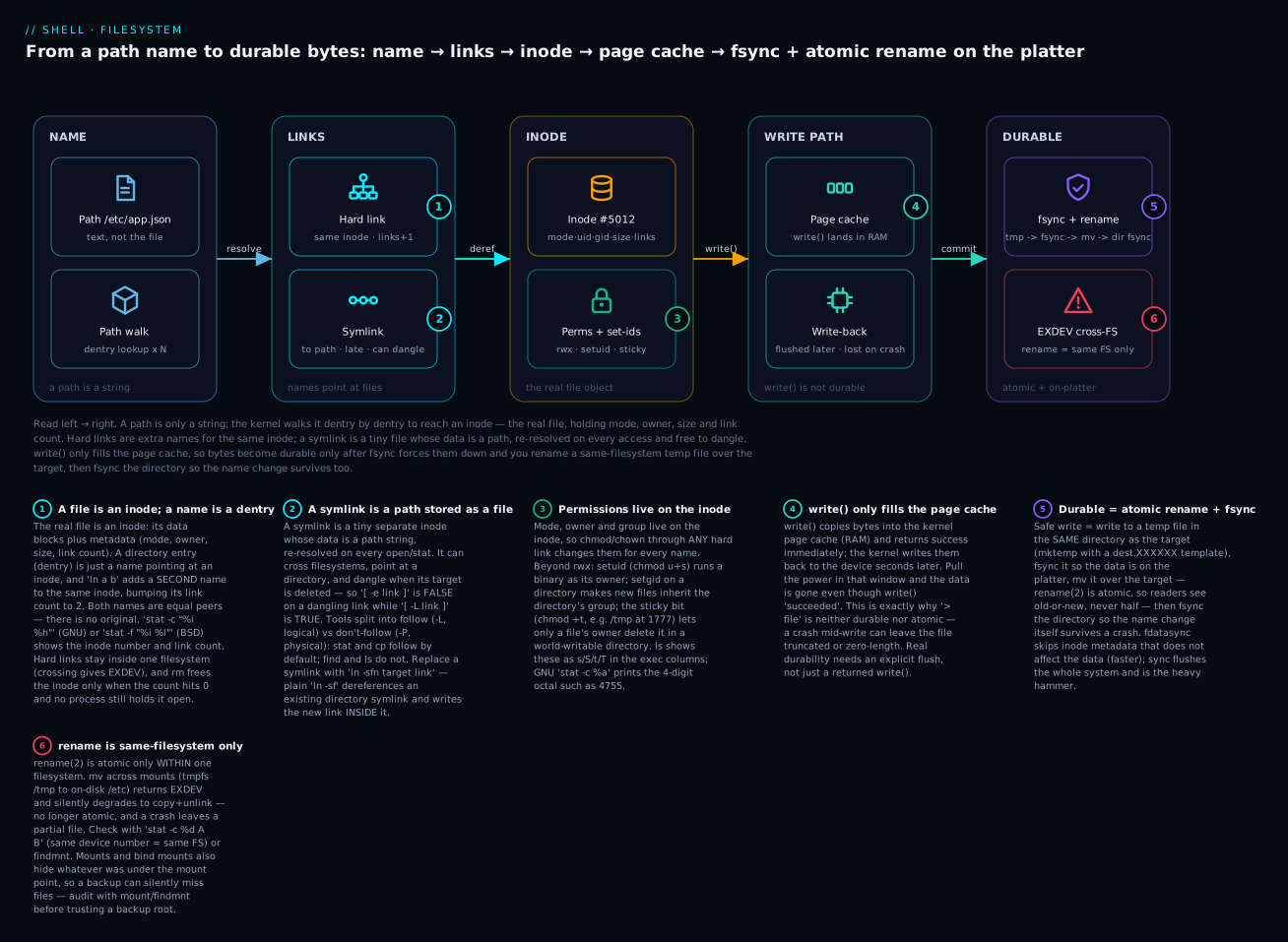
Read left → right: a path is just a string the kernel walks dentry-by-dentry to reach an inode (the real file — mode, owner, size, link count); a hard link is another name for that same inode while a symlink stores a path and can dangle; write() only fills the page cache, so bytes are durable only after fsync forces them down and you rename a same-filesystem temp file over the target, then fsync the directory.
Why Filesystem Semantics Matter: Five Bugs You Don’t See Until Production
Your script does:
echo "$content" > /etc/myapp/config.json
systemctl reload myapp
It works. It works thousands of times. Then one night the box loses power between line 1 and line 2, you reboot, and /etc/myapp/config.json is empty — not the old config, not the new config, empty. Your service crashes on startup, and you spend the night learning that > is not atomic, that the kernel buffered the write, that fsync exists, and that “the file is on disk” is much harder than it looks.
This lesson is the five rules of filesystem semantics that every script which writes to disk needs to know:
| Rule | Symptom when ignored | Real consequence |
|---|---|---|
> is not atomic |
Power loss leaves files truncated | Service starts with empty config, crashes |
mv across filesystems is not rename(2) |
EXDEV — crash mid-copy leaves partial state |
Atomic write strategy silently degrades to non-atomic copy |
Symlinks have two stat behaviors (-L vs -P) |
Test passes for files, fails for symlinks | “Why does this only break on the staging box?” — staging uses symlinked configs |
fsync only flushes the file you call it on |
“Disk full” reordering puts the rename before the data | Rename succeeds; data was never durable; reader sees garbage |
| Bind mounts hide files under their mount points | Backup picks up nothing; restore overwrites the wrong files | Quiet data loss with no error |
By the end of this lesson, you’ll have a lib/fs.sh with safe_write, safe_rename, safe_symlink, and is_same_filesystem — primitives that survive the failure modes most shell scripts trip on.
Ground Concepts: Inodes, Dentries, and the (filesystem, inode) Pair
Before we talk about hard links and atomicity, let’s anchor the model:
        ┌─────────────────────────────────────────────┐
        │                Filesystem                   │
        │                                             │
        │  ┌───────────────┐     ┌─────────────────┐  │
        │  │   Directory    │     │     Inode       │  │
        │  │   entries      │     │   (metadata)    │  │
        │  │               │     │                 │  │
        │  │  /etc/passwd  ├────►│ #5012           │  │
        │  │  /etc/shadow  ├────►│ #5013           │  │
        │  │  /etc/group   ├────►│ #5014           │  │
        │  │  /etc/aliases ├──┐  │                 │  │
        │  └───────────────┘  │  │  permissions    │  │
        │                     └─►│  owner/group    │  │
        │                        │  size, mtime    │  │
        │                        │  link count: 2  │  │
        │                        │  data blocks    │  │
        │                        └─────────────────┘  │
        └─────────────────────────────────────────────┘
A file is identified by the pair (filesystem, inode). The path you type (/etc/passwd) is just a directory entry (dentry) that points to an inode. Multiple dentries can point to the same inode — that’s a hard link. The file’s metadata (owner, mode, size, mtime, link count, data block list) lives in the inode, not the dentry.
Three operations and what they do to this picture:
cp src dst— reads inode A’s data, allocates inode B, writes the data to B, creates a dentrydstpointing to B. New inode, new data.ln src dst— creates a dentrydstpointing to inode A. No new inode. Link count of A increments to 2. This is a hard link.srcanddstare equally “the file” — there’s no concept of “the original.”ln -s src dst— creates a dentrydstpointing to a new tiny inode (the symlink), whose data is the string “src”. Following the symlink is a string-resolution operation done at every access. Dangling symlinks point to nothing valid.
Why this matters for shell scripts:
# Tale of two backups.
ln file.txt copy.txt        # hard link: 1 inode, 2 dentries.  rm file.txt → copy.txt still valid.
ln -s file.txt link.txt     # symlink: 2 inodes (1 file + 1 link). rm file.txt → link.txt is dangling.
stat reveals it:
$ stat -c '%i %h %s %F' file.txt copy.txt link.txt
5012 2 100 regular file
5012 2 100 regular file
5018 1   8 symbolic link
%i is the inode number; %h is the hard-link count; %s is the size. The hard link shares everything. The symlink is its own file whose contents are 8 bytes (the path string file.txt).
Path Resolution: How a Name Becomes an Inode
We keep saying “the path is just a string.” Here is what the kernel actually does with that string — the step every open, stat, and cd runs, called path resolution or a path walk (the classic namei operation).
The kernel resolves a path one component at a time:
- Pick a starting inode:
/for an absolute path, the process’s current working directory for a relative one. - Look up the next component (e.g.
etc) in the current directory’s entries. That lookup returns the next inode. - If that component is a symlink, expand it — substitute its target path and keep walking from there.
- Repeat until the last component. Check the caller’s permission to traverse each directory along the way (that’s the
x“execute” bit on directories).
open("/etc/myapp/config.json")
  /        → inode of root      (need x on /)
  etc      → inode of /etc      (need x on /etc)
  myapp    → inode of /etc/myapp (need x on /etc/myapp)
  config.json → final inode      (then check r/w as requested)
A few consequences that trip up scripts:
- The dentry cache (dcache). Resolving
/etc/myapp/config.jsonon every call would be slow, so the kernel caches name→inode lookups. It even caches negative dentries — “this name does not exist here” — which is why a missing file is reported quickly. You cannot see this cache from the shell, but it explains whystaton a nonexistent path in a hot loop is cheap. - Symlink chains have a limit. Each symlink encountered restarts the walk from its target. A chain that’s too long, or a loop, aborts with
ELOOP— “Too many levels of symbolic links” (Linux caps the chain atMAXSYMLINKS, typically 40; macOS/BSD around 32). Reproduce it in two lines:ln -s loopb loopa ln -s loopa loopb cat loopa # cat: loopa: Too many levels of symbolic links - A trailing slash forces “must be a directory.”
open("/etc/myapp/")fails withENOTDIRifmyappis a regular file.cp file dir/behaves differently fromcp file dirfor the same reason. .and..are real entries. Every directory contains a.dentry (itself) and a..dentry (its parent). At a mount point,..crosses back up to the parent filesystem — which is how you cancd ..out of a mounted volume.
To canonicalize a path — resolve every symlink and .. down to one true absolute path — use realpath or GNU readlink -f:
readlink s.txt        # → a.txt         (just the immediate target string)
readlink -f s.txt     # → /var/data/a.txt   (GNU: resolve the WHOLE chain, absolute)
realpath  s.txt       # → /var/data/a.txt   (portable canonicalizer on modern systems)
Portability caveat: GNU readlink has -f (all components resolved, last may be missing), -e (all must exist), and -m (no existence requirement). Historic BSD/macOS readlink had no -f at all — reach for realpath, which exists on both modern macOS and GNU coreutils, when you need one command that works everywhere. Plain readlink link (no flags) just prints the one-hop target on both.
Hard Links: Two Names, One Inode
Hard links are powerful and surprising. Every file you create is technically already a “hard link” — the filename in the directory is the first link to the inode. ln src dst adds a second link.
What hard links can do that copies can’t
# Atomic content swap by manipulating directory entries (no copy).
ln /etc/myapp/config.json.new /etc/myapp/config.json.tmp
mv  /etc/myapp/config.json.tmp /etc/myapp/config.json   # atomic on same FS

# Snapshot-style backups (rsync --link-dest): unchanged files share data blocks.
rsync -aH --link-dest=/backup/yesterday /data/ /backup/today/
# /backup/yesterday/file and /backup/today/file are TWO dentries pointing to ONE inode.
# Storage cost: ~size of changed files only.
The 7 hard-link rules every script must respect
-
Hard links cannot cross filesystems. Try it:
ln /tmp/a /mnt/usb/a→EXDEV: Invalid cross-device link. Inodes are per-filesystem; you cannot reference an inode on another filesystem from a directory on this one. Most cross-mount errors in shell scripts are this. -
Hard links to directories are forbidden (on Linux/most Unix; macOS HFS+ allows them but it’s a footgun — directory cycles break
find). Symlinks for dirs only. -
rmdecrements the link count. The inode is freed when count hits 0 and no process has it open. Hence:exec 3>>/var/log/myapp.log # process holds inode open via fd 3 rm /var/log/myapp.log # link count → 0, but inode persists for fd 3 holders # df shows space NOT freed until fd 3 is closed (process exits or fd closes)This is why
duanddfdisagree after deleting open log files. Uselsof +L1to find unlinked-but-open inodes. -
mvof a hard link doesn’t break the link. Both dentries still point to the inode;mv src newnamejust renames one dentry. The other dentry (if any) is unaffected. -
Editors break hard links via “save-as-new.”
vim,emacs, and many config-management tools default to write a new file and rename over (the safe-write pattern). The new file is a new inode. Your hard-linked twin still points at the old, unchanged inode. Use:set backupcopy=yesin vim to preserve hard links. -
Permissions live on the inode, not the dentry. Change perms via any link and all links see the new perms — there’s only one inode.
-
stat -c %htells you how many links exist.find / -inum NUMBERfinds them all (slow; scans the whole filesystem).
Recipe: hard-link snapshot backup
# Backup that costs ~delta size, not full size, by hard-linking unchanged files.
backup_dir() {
  local src="$1" dest_root="$2"
  local today yesterday
  today="$dest_root/$(date -u +%F)"
  yesterday=$(find "$dest_root" -maxdepth 1 -type d -name '20*' | sort | tail -n1)

  if [[ -n "$yesterday" && -d "$yesterday" ]]; then
    rsync -aH --delete --link-dest="$yesterday" "$src/" "$today/"
  else
    rsync -a "$src/" "$today/"
  fi
}
backup_dir /var/lib/myapp /backup
du -sh /backup/2025-01-08 /backup/2025-01-09 shows each “full backup” — but du -sh /backup shows the actual disk used (much smaller). Hard links make this storage trick possible without filesystem-level snapshots — the foundation a full backup-retention policy builds on.
Symlinks: Strings That Resolve at Access Time
A symlink’s contents are the path it points to. Resolution happens at every access (open, stat, readdir of a directory containing it), not when the symlink is created.
The -L vs -P distinction (the biggest stat footgun)
Most stat-like tools have two modes: follow the symlink (-L, “logical”) or operate on the symlink itself (-P, “physical”). Shell scripts that don’t choose explicitly inherit the default — and the default differs across tools:
| Tool | Default | Follow flag | Don’t-follow flag |
|---|---|---|---|
ls |
physical (don’t follow target type) | -L |
(default) |
stat |
follow | (default) | -L (BSD) / --no-dereference (GNU) |
cp |
follow | -L |
-P |
find |
physical (don’t descend) | -L |
-P (default) |
tar |
follow source | -h |
(default) |
rsync |
physical | --copy-links -L |
(default) |
[ -e PATH ] |
follow | (always follows) | use [ -L PATH ] for “is symlink” |
This produces classic bugs:
# Bug: report says "missing" but the link is there, just dangling.
[[ -e /etc/myapp/config.json ]] || echo missing
# This returns "missing" if config.json is a SYMLINK pointing to a deleted file.
# Fix: explicit choice.
[[ -L /etc/myapp/config.json || -e /etc/myapp/config.json ]] || echo missing
# Bug: "size" of a 4 GB file shows as 27 bytes because we statted the symlink.
size=$(stat -c %s /etc/myapp/data.bin)
# Fix:
size=$(stat -L -c %s /etc/myapp/data.bin)   # follow
# or, if you really want symlink size:
size=$(stat -c %s /etc/myapp/data.bin)
# Bug: backup misses files in symlinked dirs.
find /etc -type f -name '*.conf'    # default -P; doesn't descend symlinked dirs
# Fix:
find -L /etc -type f -name '*.conf'  # logical; follows symlinks
# Caveat: -L can loop on cyclic symlinks; find detects but it's slow.
ln -sf vs ln -sfn — the directory-link footgun
# You think this updates the symlink:
ln -sf /opt/app/v2 /opt/app/current

# What actually happens if /opt/app/current is a SYMLINK pointing to /opt/app/v1:
# - ln -sf "follows" the existing link
# - It treats /opt/app/current as the directory /opt/app/v1
# - It creates /opt/app/v1/v2 as a symlink (NOT what you wanted)

# The fix: -n means "don't dereference an existing symlink-to-dir; treat it as a file"
ln -sfn /opt/app/v2 /opt/app/current
This is not folklore — reproduce it in four lines and watch the wrong link appear inside the directory:
mkdir -p v1 v2 ; ln -s v1 current   # current → v1 (a directory)
ln -sf v2 current                   # WITHOUT -n
readlink current                    # → v1   (unchanged! current still points at v1)
ls -l v1                            # → v2 -> v2   (a stray link got created inside v1)
Always ln -sfn when updating a symlink that may already exist and may point at a directory. This is the canonical “blue-green deploy” pattern: current is a symlink, releases live in releases/v1/, releases/v2/, and you flip with ln -sfn.
Atomic deploy via symlink swap
deploy_symlink_swap() {
  local release="$1"   # e.g. /opt/app/releases/v2
  local current=/opt/app/current
  local tmp_link=/opt/app/current.new

  [[ -d "$release" ]] || { echo "release missing: $release"; return 1; }

  ln -sfn "$release" "$tmp_link"   # create new symlink at sibling path
  mv -T  "$tmp_link" "$current"     # rename: atomic on same FS
  # Now /opt/app/current points at $release.
}
mv -T (GNU; --no-target-directory) ensures mv replaces the link rather than moving the new link into the dir. On BSD/macOS, use mv -fn carefully or stage in the same parent and rename. The key property: a reader doing open("/opt/app/current/binary", O_RDONLY) either sees v1’s binary (resolved before the swap) or v2’s (resolved after) — never a half-state.
Atomic Renames: When mv Is Atomic and When It Is Not
The atomic-rename pattern is the foundation of every “safe write” in Unix:
tmp=$(mktemp /etc/myapp/config.json.XXXXXX)
printf '%s' "$content" >"$tmp"
mv "$tmp" /etc/myapp/config.json
This works because rename(2) (the syscall behind mv for same-FS targets) is atomic: from any observer’s perspective, the destination is either the old file or the new file, never both, never partial.
But there are three caveats most scripts miss:
Caveat 1: rename(2) is atomic only on the same filesystem
mktemp /tmp/foo.XXXXXX           # /tmp may be tmpfs, separate FS from /etc
mv /tmp/foo.XXXXXX /etc/myapp/config.json
# Under the hood: mv calls rename(); rename returns EXDEV (cross-device);
# mv FALLS BACK TO copy + unlink, which is NOT atomic.
If /tmp is tmpfs (RAM) and /etc is on disk, mv will copy then unlink. A crash mid-copy leaves the destination half-written. The atomic-rename guarantee is gone, silently.
The fix: always create the temp file in the same directory as the destination.
dest=/etc/myapp/config.json
tmp=$(mktemp "${dest}.XXXXXX")    # same directory → same FS → rename(2) is atomic
printf '%s' "$content" >"$tmp"
chmod 644 "$tmp"
mv "$tmp" "$dest"
mktemp defaults to /tmp if you don’t give it a path template. Never use bare mktemp for files you’ll move into specific directories.
Detect cross-FS dynamically:
is_same_filesystem() {
  local a="$1" b="$2"
  local fa fb
  fa=$(stat -c %d "$a" 2>/dev/null || stat -f %d "$a")
  fb=$(stat -c %d "$b" 2>/dev/null || stat -f %d "$b")
  [[ "$fa" == "$fb" ]]
}

if ! is_same_filesystem "$tmp" "$(dirname "$dest")"; then
  echo "warning: cross-FS rename will not be atomic" >&2
fi
Caveat 2: rename(2) is atomic for the directory entry, not the data
Atomicity means “from a directory-listing perspective, dest is old or new, never partial.” It does not mean “the new file’s data is safely on disk.” After rename, the dentry points to the new inode, but the inode’s data blocks may still be in the kernel’s writeback cache. If the power dies before the kernel flushes, you can have:
destexists, points to a new inode- The new inode has zeros or partial data because the writeback never happened
- Reboot: dest is corrupt
The fix: fsync the data file before the rename, and fsync the directory after.
# Bash doesn't have fsync directly; use python or sync.
fsync_file() {
  python3 -c "import os, sys; fd=os.open(sys.argv[1], os.O_RDONLY); os.fsync(fd)" "$1"
}

tmp=$(mktemp "${dest}.XXXXXX")
printf '%s' "$content" >"$tmp"
fsync_file "$tmp"          # ensure data is on disk
mv "$tmp" "$dest"          # atomic rename (same FS)
fsync_file "$(dirname "$dest")"   # ensure dentry change is on disk
sync (the command) flushes all dirty data on the system, which is a heavy hammer. Per-file fsync is cheaper. The trade-off: fsync adds latency (often 5–50 ms on rotational disks, <1 ms on NVMe). For configs and credentials, that latency is worth it.
fdatasync is a related call that flushes data but skips inode metadata that doesn’t affect data (like atime). For data-only durability it’s faster; for “the file is the right size and has the right perms,” use fsync.
Caveat 3: Some tools work around rename atomicity unsafely
cp -f on most platforms unlinks the target then writes. Window of badness: a reader between unlink and the new file’s first byte sees ENOENT. install -m is the same — it copies bytes then sets perms; if the script crashes between, you have a perms-wrong file. rsync --inplace actively rewrites the destination in place, breaking atomicity. truncate followed by writes is never atomic.
Use mv of a sibling temp file unless you have a specific reason otherwise.
fsync, fdatasync, sync: What Actually Goes to Disk
The Linux/Unix write path:
        write(fd, buf, n)                fsync(fd)              power off
            │                                │                       │
            ▼                                ▼                       ▼
    ┌─────────────┐    ┌──────────────┐   ┌─────────────┐    ┌─────────────┐
    │ user buffer │ →  │ page cache   │ → │ disk cache  │ →  │   platter   │
    │  (libc)     │    │ (kernel RAM) │   │ (drive RAM) │    │   (durable) │
    └─────────────┘    └──────────────┘   └─────────────┘    └─────────────┘
                              │                  │                 │
                              │                  │                 │
                       fsync flushes      drive's "write barrier" │
                       page→disk cache    flushes cache→platter   │
                       (with FUA flag,    (depends on OS+drive    │
                       both in one go)    cooperation)            │
write(2) only puts data in the kernel page cache. The kernel decides when to write it down. fsync(2) forces the page cache → disk path and a write barrier to the drive. Without fsync, you can power-cycle and find that the last 5–30 seconds of writes never made it.
The 4 fsync facts shell scripts get wrong
-
sync(command) returns when the request is sent, not when data is durable on slow media. On many older Linux versions,syncreturned after queuing; modern kernels block until durable, but rotational drives with their own caches can still lie. For specific files, preferfsyncover globalsync. -
You must fsync the directory after creating, renaming, or deleting files. The directory’s contents (dentries) are themselves data that the kernel caches. Renaming
tmp → destmodifies the directory inode; that change is in cache until youfsyncthe directory. Without it: power loss can leave the data on disk but the rename undone. -
NFS and some network filesystems weaken
fsync.O_SYNCandfsyncare forwarded to the server, but the client cache may still hold writes.commitsemantics (NFSv4) help, but if you’re writing scripts that need durability over NFS, design for “best effort” and use checksums + reads to verify. -
fsyncis per-file-descriptor.fsync(fd_a)does not flush data written viafd_bto a different file. Each file you care about needs its own fsync. (Some kernels withdirty_writeback_centisecstweaks fsync everything together, but you can’t rely on it.)
A shell-callable durable-write helper
# Requires python3 (almost universally available); usable on all distros.

durable_write() {
  local dest="$1"
  local content
  content=$(cat)            # read stdin

  local dir tmp
  dir=$(dirname "$dest")
  tmp=$(mktemp "${dest}.XXXXXX")

  trap 'rm -f "$tmp"' EXIT

  # Write data.
  printf '%s' "$content" >"$tmp"

  # fsync the data file.
  python3 - "$tmp" <<'PY'
import os, sys
fd = os.open(sys.argv[1], os.O_RDONLY)
try:
    os.fsync(fd)
finally:
    os.close(fd)
PY

  # Atomic rename (same FS).
  mv "$tmp" "$dest"
  trap - EXIT

  # fsync the directory (dentry change).
  python3 - "$dir" <<'PY'
import os, sys
fd = os.open(sys.argv[1], os.O_RDONLY)
try:
    os.fsync(fd)
finally:
    os.close(fd)
PY
}

# Usage:
echo '{"port":8080}' | durable_write /etc/myapp/config.json
After this returns, config.json exists, has the right content, and the dentry change is on disk. A power loss now leaves either the old config.json or the new one — never an empty or partial file, never a missing file.
Permissions, Ownership, and the Special Bits
Permissions and ownership live on the inode — which is why the earlier rule holds: chmod/chown through any hard link changes them for every name. Here is the full model.
The 12 mode bits
A file’s mode is 12 bits: 9 permission bits (read/write/execute for user, group, other) plus 3 special bits (setuid, setgid, sticky).
  special      user      group     other
   ┌─┬─┬─┐   ┌─┬─┬─┐   ┌─┬─┬─┐   ┌─┬─┬─┐
   │u│g│t│   │r│w│x│   │r│w│x│   │r│w│x│
   └─┴─┴─┘   └─┴─┴─┘   └─┴─┴─┘   └─┴─┴─┘
    4 2 1     4 2 1     4 2 1     4 2 1
    setuid    owner     group     everyone
    setgid
    sticky
Octal math: read = 4, write = 2, execute = 1, summed per column. chmod 644 = rw-r--r--. The special bits are the leading (4th) octal digit: setuid = 4, setgid = 2, sticky = 1 — so chmod 4755 sets setuid + rwxr-xr-x. The symbolic forms are chmod u+s (setuid), chmod g+s (setgid), chmod +t (sticky).
What the special bits actually do
| Bit | On a file | On a directory |
|---|---|---|
setuid (u+s, 4000) |
Process runs with the file owner’s effective UID (e.g. /usr/bin/passwd runs as root). Linux ignores it on scripts — binaries only. |
(no standard effect) |
setgid (g+s, 2000) |
Process runs with the file group’s effective GID. | New files/subdirs inherit the directory’s group — the classic shared-project-directory trick. |
sticky (+t, 1000) |
(legacy “keep in swap”; ignored today) | Only a file’s owner (or root) may rename/delete it, even if the dir is world-writable. This is why /tmp is mode 1777. |
How ls -l displays them (verified on a live box): the special bit replaces the x in its column — lowercase if x is also set, uppercase if it is not.
-rwsr-xr-x   setuid, owner-exec set     (chmod 4755)
-rwxr-sr-x   setgid, group-exec set     (chmod 2755)
drwxrwxrwt   sticky directory           (chmod 1777, like /tmp)
-rwSr--r--   setuid WITHOUT owner-exec  (capital S = usually a mistake)
Ownership, symlinks, and umask
- Ownership is a UID and GID on the inode.
chown user:group file,chgrp group file. Only root can give a file away to another user. - Symlink permissions are ignored. A symlink’s own mode is almost always
lrwxrwxrwx; what governs access is the target’s perms.chmod/chownfollow to the target by default; to act on the link itself usechmod -h/ GNUchown -h(orlchown). umasksubtracts default permission bits from newly created files. Aumask 022yields644files and755directories (from the 666/777 bases). Set a stricterumask 077in scripts that write secrets so new files are600.
Reading perms with stat (GNU vs BSD)
# GNU coreutils (Linux — the course target):
stat -c '%a %A %U %G' file      # → 4755 -rwsr-xr-x root root
#         │  │  │  └ group name
#         │  │  └ owner name
#         │  └ symbolic mode
#         └ 4-digit octal, INCLUDING special bits

# BSD/macOS:
stat -f '%Lp %Sp %Su %Sg' file  # → 755 -rwsr-xr-x root wheel
#         │
#         └ %Lp is only the LOW 3 octal digits (special bits stripped!)
#           use %Mp for the special-bit digit, or %p for the raw mode
Portability trap: GNU
stat -c %aincludes the special bits (4755); BSDstat -f %Lpgives only the low three (755). And, as the next section shows,%ameans “octal permissions” in GNU but “access time” in BSD — the single most confusingstatdivergence.
Reading the Inode: Every stat Field
stat is your window into the inode. The format specifiers differ between GNU (-c) and BSD/macOS (-f), and a few overlap with different meanings. Here is the map for the fields shell scripts actually use:
| What you want | GNU stat -c |
BSD stat -f |
Notes |
|---|---|---|---|
| File name | %n |
%N |
|
| Inode number | %i |
%i |
Same on both |
| Hard-link count | %h |
%l |
Lowercase L on BSD |
| Size (bytes) | %s |
%z |
Apparent size |
| Blocks allocated (512B) | %b |
%b |
For sparse-file detection |
| I/O block size | %o |
%k |
|
| Human file type | %F |
%HT |
“regular file”, “directory”, “symbolic link” |
| Octal permissions | %a |
%Lp (low 3) / %Mp (special) |
GNU %a includes special bits |
| Symbolic permissions | %A |
%Sp |
-rwxr-xr-x |
| Owner uid / name | %u / %U |
%u / %Su |
|
| Group gid / name | %g / %G |
%g / %Sg |
|
| Device number (which FS) | %d |
%d |
Same number ⇒ same filesystem |
| Access time (epoch) | %X |
%a |
⚠ BSD %a = atime, NOT perms |
| Modify time (epoch) | %Y |
%m |
Data last changed |
| Change time (epoch) | %Z |
%c |
Inode last changed (perms, links…) |
| Birth/creation time | %W |
%B |
0/unknown on older filesystems |
| Symlink target | %N (name -> target) |
%Y |
Worked example — the same three files, both dialects (output representative):
# GNU (Linux):
$ stat -c '%i %h %s %A %U:%G %n' a.txt b.txt s.txt
5012 2 3 -rw-r--r-- root:root a.txt
5012 2 3 -rw-r--r-- root:root b.txt        # same inode 5012, link count 2
5018 1 5 lrwxrwxrwx root:root s.txt        # its own inode, 5-byte target string

# BSD/macOS:
$ stat -f '%i %l %z %Sp %Su:%Sg %N' a.txt b.txt s.txt
81513322 2 3 -rw-r--r-- vinod:staff a.txt
81513322 2 3 -rw-r--r-- vinod:staff b.txt   # same inode, link count 2
81513325 1 5 lrwxr-xr-x vinod:staff s.txt
The three timestamps confuse everyone, so pin them down: atime = last read, mtime = last time the data changed, ctime = last time the inode changed (a chmod, chown, rename, or new hard link bumps ctime but not mtime). There is no “creation time” on classic Unix filesystems — %W/%B (birth time) only exists on newer ones (ext4, XFS, APFS, btrfs) and reads as 0 or “-” elsewhere.
Mount Namespaces, Bind Mounts, and “Why Doesn’t My Backup See This?”
A mount stitches one filesystem (e.g. /dev/sda1) into the directory tree at a specific path (/var/lib/postgresql). A bind mount stitches an existing directory into another path: mount --bind /var/lib/postgresql /backup-source/postgresql. Now both paths show the same files; both paths are equally “real.”
This becomes a footgun when:
The “hidden under the mount” trap
# Original state.
ls /opt/app
# config.json  data/

# Someone mounts a new filesystem on /opt/app/data.
mount /dev/sdb1 /opt/app/data

# Now /opt/app/data shows the contents of /dev/sdb1.
# The old /opt/app/data/* contents are STILL THERE on the underlying filesystem,
# but you cannot see them through this path.

# Backups of /opt/app see:
#  - /opt/app/config.json (from underlying FS)
#  - /opt/app/data/* (from /dev/sdb1)
# But NOT the old /opt/app/data/* files (hidden under the mount).

# Disaster: someone unmounts /dev/sdb1, the old data reappears, the new data is "gone."
Detection: mount | grep /opt/app lists active mounts. findmnt /opt/app is GNU-only but readable. df shows mount-point-to-device mappings.
Defense:
- Don’t bind-mount or mount over a directory that is part of a backup root.
- If you do, document and check with
findmnt --target <path>in your backup script.
Detecting filesystem boundaries with stat
# Two paths on the same filesystem return the same %d (device number).
stat -c %d /etc /etc/myapp     # same → 64769
stat -c %d /etc /tmp           # different → 64769 vs 25 (tmpfs)

# Use this to decide whether `mv` will be atomic:
is_same_fs() { [[ "$(stat -c %d "$1")" == "$(stat -c %d "$2")" ]]; }

is_same_fs /etc /tmp           # exit 1 (different)
is_same_fs /etc /etc/myapp     # exit 0 (same)
Many scripts ship with mv /tmp/foo /etc/foo and the user only finds out it was non-atomic when a crash leaves /etc/foo half-written. is_same_fs makes this checkable.
Putting It Together: lib/fs.sh Drop-In
# lib/fs.sh — durable, atomic-aware filesystem helpers.

# ─── Detection ─────────────────────────────────────────────────────────────
fs_dev() {
  if stat -c %d "$1" 2>/dev/null; then return; fi  # GNU
  stat -f %d "$1"                                    # BSD
}

is_same_fs() { [[ "$(fs_dev "$1")" == "$(fs_dev "$2")" ]]; }

# ─── fsync via python (portable) ───────────────────────────────────────────
fs_fsync() {
  if command -v python3 &>/dev/null; then
    python3 - "$1" <<'PY'
import os, sys
fd = os.open(sys.argv[1], os.O_RDONLY)
try: os.fsync(fd)
finally: os.close(fd)
PY
  elif command -v python &>/dev/null; then
    python - "$1" <<'PY'
import os, sys
fd = os.open(sys.argv[1], os.O_RDONLY)
try: os.fsync(fd)
finally: os.close(fd)
PY
  else
    sync   # heavy fallback: flushes everything
  fi
}

# ─── Safe write: atomic + durable ──────────────────────────────────────────
fs_safe_write() {
  local dest="$1" mode="${2:-0644}"
  local dir tmp
  dir=$(dirname "$dest")
  tmp=$(mktemp "${dest}.XXXXXX")
  trap 'rm -f "$tmp"' EXIT

  cat >"$tmp"                      # stdin → tmp
  chmod "$mode" "$tmp"
  fs_fsync "$tmp"                  # data on disk
  mv "$tmp" "$dest"                # atomic rename (same FS)
  fs_fsync "$dir"                  # dentry change on disk

  trap - EXIT
}

# ─── Safe symlink: atomic, no-clobber-non-link ─────────────────────────────
fs_safe_symlink() {
  local target="$1" link="$2"
  if [[ -L "$link" ]]; then
    [[ "$(readlink "$link")" == "$target" ]] && return 0
  elif [[ -e "$link" ]]; then
    echo "fs_safe_symlink: $link exists and is not a symlink; refusing" >&2
    return 1
  fi
  local tmp="${link}.tmp.$$"
  ln -sfn "$target" "$tmp"
  mv -T "$tmp" "$link" 2>/dev/null || mv "$tmp" "$link"
  fs_fsync "$(dirname "$link")"
}

# ─── Safe rename across possibly-different filesystems ────────────────────
fs_safe_rename() {
  local src="$1" dest="$2"
  if is_same_fs "$src" "$(dirname "$dest")"; then
    mv "$src" "$dest"
    fs_fsync "$(dirname "$dest")"
  else
    # Cross-FS: copy + verify + delete + fsync.
    local tmp; tmp=$(mktemp "${dest}.XXXXXX")
    cp "$src" "$tmp"
    fs_fsync "$tmp"
    mv "$tmp" "$dest"          # atomic within dest's FS
    fs_fsync "$(dirname "$dest")"
    rm -f "$src"
  fi
}

# ─── Hard-link to dest, fall back to cp on EXDEV ──────────────────────────
fs_link_or_copy() {
  local src="$1" dest="$2"
  if ln "$src" "$dest" 2>/dev/null; then return 0; fi
  cp -p "$src" "$dest"
  fs_fsync "$dest"
}

# ─── Inode + link-count diagnostics ───────────────────────────────────────
fs_inode_info() {
  local p="$1"
  printf 'path:  %s\n' "$p"
  printf 'inode: %s\n' "$(stat -c %i "$p" 2>/dev/null || stat -f %i "$p")"
  printf 'links: %s\n' "$(stat -c %h "$p" 2>/dev/null || stat -f %l "$p")"
  printf 'fs id: %s\n' "$(fs_dev "$p")"
  if [[ -L "$p" ]]; then
    printf 'symlink target: %s\n' "$(readlink "$p")"
  fi
}
Real-World Recipes
Recipe 1: Safe config update with rollback on validation failure
. /opt/myapp/lib/fs.sh

update_config() {
  local dest="$1" validator="$2"     # validator: command that exits 0 if config is valid
  local content
  content=$(cat)

  # Stage in same dir for atomic rename.
  local tmp
  tmp=$(mktemp "${dest}.XXXXXX")
  printf '%s' "$content" >"$tmp"

  # Validate the staged file BEFORE swapping in.
  if ! "$validator" "$tmp"; then
    echo "config validation failed; not deploying" >&2
    rm -f "$tmp"
    return 1
  fi

  # Backup current.
  if [[ -f "$dest" ]]; then
    fs_link_or_copy "$dest" "${dest}.prev"
  fi

  fs_fsync "$tmp"
  mv "$tmp" "$dest"
  fs_fsync "$(dirname "$dest")"
}

# Usage:
echo "$new_nginx_config" | update_config /etc/nginx/nginx.conf "nginx -t -c"
# nginx -t exits non-zero on syntax error; we never write a broken config.
Recipe 2: Detect cross-mount before mv
deploy_artifact() {
  local src="$1" dest="$2"
  if ! is_same_fs "$src" "$(dirname "$dest")"; then
    echo "warning: $src and $dest are on different filesystems" >&2
    echo "         atomic rename is not possible; using copy+verify" >&2
  fi
  fs_safe_rename "$src" "$dest"
}

deploy_artifact /tmp/build/myapp.tar /opt/myapp/releases/myapp.tar
# Detects /tmp = tmpfs vs /opt = root FS; falls back to copy+fsync+rename.
Recipe 3: Find and clean up dangling symlinks
# Find symlinks whose target doesn't exist.
find /etc -type l -exec sh -c '[ ! -e "$1" ] && echo "$1"' _ {} \;
# A more efficient single-pass version using -xtype:
find /etc -xtype l   # GNU only: matches links to non-existent targets

# Clean them up safely (with audit log):
find /etc -xtype l -print -exec rm {} \; >/var/log/dangling-cleanup.log
-xtype l resolves the symlink and matches if it still resolves to a symlink — which only happens when the chain ends in a missing target. It’s the cleanest way to find dangling links on GNU find.
Recipe 4: Audit hard-link counts to find shared inodes
# Find files with multiple hard links — useful for detecting accidental sharing.
find /etc -type f -links +1 -exec stat -c '%i  %h  %n' {} \; | sort

# Output example:
# 5012  2  /etc/passwd
# 5012  2  /etc/passwd-
# (these two share an inode; editor backups did this)
If you discover this in /etc/passwd, it’s because vipw or some legacy tool used ln for backups. A future useradd that opens /etc/passwd for write may write through to passwd- too if the editor doesn’t break the link. Hence the rule: editors should write a temp file and rename, never modify in place.
Going Deeper
Everything above is enough to write correct scripts. This section is for the reader who wants to know why the guarantees hold, where they leak, and what the modern kernel offers beyond the shell.
Journaling and data-ordering modes — why rename-after-write mostly survives
On ext4 (the common Linux default) the mount option data=ordered guarantees the kernel flushes a file’s data blocks before the metadata that references them. That ordering is precisely why the “write temp, rename over target” pattern usually survives a crash even without a perfect fsync: you cannot end up with the new name pointing at blocks that were never written. But it is a best-effort side effect, not a contract — data=writeback (faster) can expose stale/garbage bytes after a crash, data=journal (slowest) journals the data too, and XFS and btrfs make different promises. Never let “it worked on my ext4 laptop” stand in for an explicit fsync.
Create-then-link: O_TMPFILE and linkat
The temp-file-plus-rename dance has one wart: for a moment a partially written named file exists on disk (config.json.a8Xk2). Linux 3.11+ removes even that window with O_TMPFILE: open an unnamed inode in the target directory, write and fsync it, then atomically give it a name with linkat via /proc/self/fd. No shell builtin does this, but you can reach it through Python (output representative):
python3 - <<'PY'
import os
d = '/etc/myapp'
fd = os.open(d, os.O_TMPFILE | os.O_WRONLY, 0o644)  # unnamed inode in that dir
os.write(fd, b'{"port":8080}')
os.fsync(fd)
os.link(f'/proc/self/fd/{fd}', d + '/config.json')  # first time it EVER has a name
os.close(fd)
PY
Until os.link runs, no path can reach a half-written file. Requires Linux and a filesystem that supports O_TMPFILE (ext4, XFS, btrfs, tmpfs).
renameat2: exchange and no-replace
rename(2) clobbers the destination. Linux’s renameat2(2) adds flags: RENAME_EXCHANGE atomically swaps two paths (perfect for flipping a current symlink or two data directories with zero window), and RENAME_NOREPLACE fails if the destination exists (an atomic “create only if absent”). Recent GNU coreutils expose the first as mv --exchange; otherwise it’s a syscall. Neither is portable off Linux.
The fsync error problem (“fsyncgate”)
A hard lesson from 2018: on Linux, if background writeback failed with EIO (say a USB drive yanked out), some kernels cleared the page’s dirty flag, so a later fsync returned success while the data was actually lost — and because errors were tracked per-open-file, a second process’s fsync might never see the failure at all. PostgreSQL was badly bitten. Post-4.13 kernels report the error to every fd open at failure time, but the takeaway for scripts stands: check fsync’s return code, and on EIO treat the file as lost rather than blindly retrying.
Reflinks vs hard links: copy-on-write clones
cp --reflink=auto src dst on btrfs/XFS (and APFS’s cp -c on macOS) makes an instant, space-shared copy — but unlike a hard link, the two files are independent: they share blocks only until one is written, then copy-on-write splits them. Use a reflink when you want a cheap independent copy; use a hard link when you want the same file under two names. They are not interchangeable.
Sparse files: %s size vs %b blocks
A file can have holes — regions that read back as zeros but occupy no blocks. That’s why apparent size (stat -c %s, ls -l) and allocated blocks (stat -c %b, du) diverge:
truncate -s 1G big     # 1 GiB apparent size, ~0 blocks allocated
ls -lh big             # 1.0G   (apparent)
du -h  big             # 0      (actually on disk)
cp --sparse=always preserves holes; a naive cat big > copy fills them in and balloons a sparse VM image to full size. When du and ls disagree, sparseness (or the open-but-unlinked-fd case from earlier) is usually why.
atime, relatime, noatime
Historically every read updated a file’s access time — a write on every read, brutal for busy servers. Modern Linux mounts default to relatime, which only bumps atime if it’s older than mtime/ctime or more than 24 h stale. noatime disables it entirely for maximum throughput. Relevant here because atime updates are inode-metadata writes that add to the fsync/writeback load you’re trying to reason about.
Symlink TOCTOU: the security angle
Because a name is resolved to an inode at access time, an attacker who can write in a directory you operate on can swap a symlink between your check and your use (time-of-check to time-of-use). The classic exploit: your root script does [ -O /tmp/x ] && cat > /tmp/x, and between the test and the write the attacker points /tmp/x at /etc/passwd. Defenses: open with O_NOFOLLOW, operate on file descriptors (openat) rather than re-resolving paths, create work areas with mktemp -d in a directory only you own, and never trust predictable names in world-writable dirs — the sticky bit on /tmp helps but is not sufficient. The Security: Injection, Quoting & Input Validation lesson goes deeper on hardening.
fsync performance and batching
fsync serialises against the drive’s durability path, so a script that writes 10,000 small files and fsyncs each one is I/O-bound on flushes, not bytes. Batch: write all the files, then fsync once at the end (or fsync the directory once after a batch of renames). At the system level, dirty_ratio and dirty_background_ratio (via sysctl) tune how aggressively the kernel writes back — territory the /proc, /sys & sysctl lesson covers. For genuinely throwaway data (CI scratch, test fixtures) eatmydata stubs out fsync entirely to trade durability for speed — never on real state.
Common Beginner Mistakes
These are misconceptions, not just symptoms — each one is a wrong mental model that produces a whole family of bugs.
-
“A file is its name.” No — the name is a dentry; the file is the inode. Deleting or renaming a name is not the same as deleting the file if another hard link or an open file descriptor still references the inode. Right model: names point at files; files outlive names.
-
“Hard links and symlinks are basically the same thing.” They’re opposites in the ways that matter. A hard link is another equal name for the same inode (same filesystem only, survives target deletion, shares permissions). A symlink is a separate little file containing a path (can dangle, can cross filesystems, has its own inode and its own — ignored — permissions).
-
“
> filesaves the file safely.”>truncates the file to zero first, then streams new bytes into the page cache. A crash mid-write can leave it truncated or empty. Right model: an in-place overwrite is never atomic — write a temp file, fsync, and rename. -
“
mvis always atomic.” Only within one filesystem. Across a mount boundarymvgetsEXDEVand silently becomes copy-then-unlink, which a crash can interrupt. Right model: atomic rename needs the temp file in the same directory as the destination. -
“If I
fsyncthe file, the change is durable.” Not the name change. The rename lives in the directory’s data, which is also cached — you mustfsyncthe parent directory too, or a crash can lose the rename while keeping the data. -
“
staton a symlink tells me about the file.” By defaultstatfollows the link, so you learn about the target; add-L/--no-dereferenceand you learn about the 8-byte link itself. Neither is “wrong” — the bug is not choosing. Right model: decide follow vs no-follow explicitly, every time. -
“
ln -sfupdates a symlink.” If the existing link points at a directory,ln -sfdereferences it and creates the new link inside that directory. Right model: useln -sfnto replace a symlink-to-dir in place. -
“
rmfrees the disk space.” Not while a process still holds the file open — the inode (and its blocks) survive until the last descriptor closes. Right model:dfwon’t drop until the fd closes; find the culprit withlsof +L1and restart or signal it.
Footgun List
mvcross-filesystem silently degrades to copy+unlink. Always create temp files in the same directory as the destination.>is not atomic. A crash mid-write truncates the file. Use temp + rename.fsyncof the file isn’t enough. Also fsync the parent directory after rename, or the dentry change can be lost.ln -sffollows existing dir symlinks. Useln -sfnto replace a symlink instead of writing into it.statfollows symlinks by default;[ -e ]follows;[ -L ]doesn’t. Choose explicitly.finddefaults to physical (-P). Add-Lto follow symlinks, but be aware of cycles.cpfollows symlinks by default;cp -Pdoesn’t. Backups can balloon if you copy through symlinks unintentionally.rmof an open file doesn’t free space until the fd closes. Common with running services that hold log files; restart or close the fd to actually free.- Bind mounts hide files under the mount point. Backups and audits must check
mountoutput. - NFS, S3FS, FUSE filesystems may not honor
fsyncstrictly. Verify durability claims with the specific FS before assuming the rename pattern works. tmpfsis RAM-backed; everything in/tmpis gone on reboot on most distros. Don’t put state markers, build artifacts you need post-reboot, or anything not transient there.- Hard links in different directories make file ownership ambiguous. “Whose file is this?” is unanswerable; both paths own it equally. Document carefully or avoid for shared files.
Practice Challenges
Work these in a scratch directory (cd "$(mktemp -d)"). They escalate from “prove you understand inodes” to “build a crash-safe deploy.” Try each before opening the solution.
Challenge 1 — Prove two names share one inode (beginner)
Create a file, hard-link it, and show — in one command — that both names have the same inode number and a link count of 2.
<details> <summary>Solution</summary>
echo hi > a.txt
ln a.txt b.txt
stat -c '%i %h %n' a.txt b.txt      # GNU
# 5012 2 a.txt
# 5012 2 b.txt
stat -f '%i %l %N' a.txt b.txt      # BSD/macOS equivalent
Why: identical %i proves they are one inode; %h/%l = 2 proves two dentries reference it. A hard link is bookkeeping in the directory, not a copy of the data.
</details>
Challenge 2 — Report “dangling”, not “missing” (beginner)
Write a test that classifies a path as ok, dangling (a symlink whose target is gone), or missing. Plain [ -e ] cannot tell the last two apart.
<details> <summary>Solution</summary>
classify() {
  if [ -L "$1" ] && [ ! -e "$1" ]; then echo dangling
  elif [ -e "$1" ];                  then echo ok
  else                                    echo missing
  fi
}
ln -s /no/such/target broken
classify broken     # dangling
Why: [ -e ] follows the link and reports false for a missing target, hiding the difference. [ -L ] inspects the link itself, so combining them separates “the link is dangling” from “there is nothing here at all.”
</details>
Challenge 3 — Atomic, durable config write (intermediate)
Write safe_write DEST that reads content from stdin and lands it at DEST so that a power cut leaves either the old file or the new one — never an empty or partial file.
<details> <summary>Solution</summary>
safe_write() {
  local dest="$1" dir tmp
  dir=$(dirname "$dest")
  tmp=$(mktemp "${dest}.XXXXXX")          # SAME directory ⇒ same FS
  trap 'rm -f "$tmp"' EXIT
  cat >"$tmp"
  python3 -c 'import os,sys;fd=os.open(sys.argv[1],os.O_RDONLY);os.fsync(fd);os.close(fd)' "$tmp"
  mv "$tmp" "$dest"                        # atomic rename
  python3 -c 'import os,sys;fd=os.open(sys.argv[1],os.O_RDONLY);os.fsync(fd);os.close(fd)' "$dir"
  trap - EXIT
}
echo '{"port":8080}' | safe_write ./config.json
Why: the four-step temp → fsync-file → rename → fsync-dir sequence is the whole durability contract. Same-directory mktemp keeps the rename atomic; the directory fsync makes the name change survive, not just the data.
</details>
Challenge 4 — Warn before a non-atomic mv (intermediate)
Write will_be_atomic SRC DEST that succeeds (exit 0) only if mv SRC DEST would be a true rename(2) — i.e. SRC and DEST’s directory are on the same filesystem.
<details> <summary>Solution</summary>
fs_dev() { stat -c %d "$1" 2>/dev/null || stat -f %d "$1"; }
will_be_atomic() {
  [ "$(fs_dev "$1")" = "$(fs_dev "$(dirname "$2")")" ]
}
will_be_atomic /tmp/build.tar /etc/app/build.tar \
  || echo "cross-FS: mv will copy+unlink, not atomic" >&2
Why: the device number (%d) is per-filesystem, so equal device numbers guarantee rename(2) applies. Comparing SRC against DEST’s directory (not DEST itself, which may not exist yet) is the correct test.
</details>
Challenge 5 — Crash-safe blue/green symlink flip (advanced)
Point current at a release directory such that current is never left dangling and the script is safe to re-run (idempotent). Flipping from v1 to v2 and running twice must both end with current → v2.
<details> <summary>Solution</summary>
flip() {
  local release="$1" link="${2:-current}"
  [ -d "$release" ] || { echo "no such release: $release" >&2; return 1; }
  # Idempotent: already pointing there? done.
  [ "$(readlink "$link" 2>/dev/null)" = "$release" ] && return 0
  ln -sfn "$release" "${link}.new"     # -n: don't write INTO an existing dir symlink
  mv -T "${link}.new" "$link"          # atomic replace (GNU -T)
}
mkdir -p v1 v2 ; ln -sfn v1 current
flip v2 ; flip v2                       # both leave: current -> v2
Why: ln -sfn builds the new link at a sibling path (never touching current), and mv -T swaps it in atomically, so a reader always resolves to a valid release. The readlink guard makes re-runs a no-op. Plain ln -sf here would create v1/v2 inside the old target — the footgun this challenge exists to defeat.
</details>
Challenge 6 — Audit shared inodes and dangling links (advanced)
In a tree, list (a) every file with more than one hard link (accidental sharing) and (b) every dangling symlink — with a fallback that works on BSD find, which lacks GNU’s -printf/-xtype.
<details> <summary>Solution</summary>
root=${1:-.}

# (a) files sharing an inode — GNU fast path, then portable fallback
find "$root" -type f -links +1 -printf '%i\t%p\n' 2>/dev/null | sort -n \
  || find "$root" -type f -links +1 -exec stat -f '%i%t%N' {} \;   # BSD

# (b) dangling symlinks — GNU -xtype, else test each link's target
find "$root" -xtype l 2>/dev/null \
  || find "$root" -type l -exec sh -c 'for l; do [ -e "$l" ] || printf "%s\n" "$l"; done' _ {} +
Why: -links +1 selects inodes referenced by more than one name; -xtype l matches a symlink only when the chain ends unresolved. The || ... fallbacks keep the audit working where GNU-only predicates are absent — exactly the portability discipline this lesson preaches. -exec … {} + batches arguments for speed.
</details>
Glossary
- Inode — the on-disk object that is a file: its data blocks plus metadata (mode, owner, size, timestamps, link count). Identified by an inode number, unique within one filesystem.
- Dentry (directory entry) — a name inside a directory that points at an inode. A path is a chain of dentries. Multiple dentries can point at one inode.
- Hard link — an additional dentry for an existing inode;
ln src dst. Same filesystem only; increments the link count; all links are equal peers. - Symlink (soft link) — a small separate file whose data is a path string;
ln -s target link. Resolved at every access; can cross filesystems and can dangle. - Link count — how many hard links (dentries) reference an inode (
stat %h/%l). The inode is freed when it reaches 0 and no process holds it open. - Dangling symlink — a symlink whose target no longer exists.
[ -e ]is false,[ -L ]is true. - Path resolution / path walk (namei) — the kernel turning a path string into an inode, one component at a time, following symlinks and checking traverse (
x) permission. - Negative dentry — a cached “this name does not exist here” result, which makes repeated lookups of a missing file cheap.
- ELOOP — “Too many levels of symbolic links”: a symlink chain that is too long or circular.
- Page cache — kernel RAM holding file data after
write()and before write-back; makes I/O fast but means a returnedwrite()is not yet durable. - Write-back / dirty page — data sitting in the page cache that has not yet been flushed to the device. Lost on power failure until flushed.
- fsync — force a single file’s data and metadata from the page cache down to durable storage (
fsync(fd)). - fdatasync — like fsync but skips inode metadata that does not affect the data (faster; safe when size/perms haven’t changed).
- sync — flush all dirty data system-wide; the heavy hammer.
- Durability — the property that data survives a crash/power loss once an operation reports success. Requires an explicit flush.
- Atomicity — the property that an operation is observed as either fully done or not at all, never half.
rename(2)gives the name atomicity. - rename(2) — the syscall behind
mvon the same filesystem; atomically replaces the destination name. - EXDEV — “Invalid cross-device link”: you tried to
lnorrenameacross filesystems.mvdegrades to copy+unlink. - Device number (
%d) — an identifier per mounted filesystem; equal values on two paths mean they share a filesystem (so a rename between them is atomic). - Mount / mount point — where a filesystem is stitched into the directory tree; the point where
%dchanges. - Bind mount — exposing an existing directory subtree at a second path (
mount --bind); both paths are equally real. - Mount namespace — a per-process view of the mount table (used by containers); a path can resolve differently in different processes.
- tmpfs — a RAM-backed filesystem (often
/tmp,/run); fast but wiped on reboot. - Mode / permission bits — the 9 rwx bits plus 3 special bits stored in the inode.
- setuid / setgid — special bits making a binary run as the file’s owner / group; setgid on a directory makes new files inherit its group.
- Sticky bit — on a world-writable directory (e.g.
/tmp, mode 1777), restricts deletion of a file to its owner. - umask — the mask subtracted from default permissions on newly created files/directories.
- Ownership (uid/gid) — the owner and group recorded on the inode; changed with
chown/chgrp. - TOCTOU — time-of-check to time-of-use: a race where a path’s target changes between your test and your use; the root of many symlink attacks.
- Reflink / CoW copy — a copy that shares blocks until written (
cp --reflink, APFS clones); independent files, unlike hard links. - Sparse file — a file with holes that read as zeros but occupy no blocks; apparent size (
%s) exceeds allocated blocks (%b). - Journaling — a filesystem technique (ext4/XFS) that records intended changes so a crash can be recovered consistently;
data=orderedalso constrains flush ordering. - atime / relatime — the file access timestamp and the modern policy that only updates it lazily to avoid a write on every read.
- O_TMPFILE — a Linux
openflag that creates an unnamed inode you can laterlinkatinto place, giving a name only once the file is fully written.
Quick-Reference Card
┌─ HARD LINK vs SYMLINK ────────────────────────────────────────────────┐
│  ln src dst           hard link (same inode, link count + 1)         │
│  ln -s src dst        symlink (new inode whose data is the path)     │
│  ln -sfn src link     replace existing symlink (idempotent)          │
│  hard links: same FS only, same inode, perms shared                  │
│  symlinks: cross-FS ok, dangling possible, resolved at access        │
└────────────────────────────────────────────────────────────────────────┘

┌─ ATOMIC WRITE PATTERN ────────────────────────────────────────────────┐
│  tmp=$(mktemp "${dest}.XXXXXX")    # SAME DIRECTORY as dest!         │
│  cat >"$tmp"                                                          │
│  fsync "$tmp"                       # data durable                   │
│  mv "$tmp" "$dest"                  # atomic on same FS               │
│  fsync "$(dirname "$dest")"         # dentry change durable          │
└────────────────────────────────────────────────────────────────────────┘

┌─ STAT / TEST FOLLOW BEHAVIOR ─────────────────────────────────────────┐
│  [ -e PATH ]      follows symlinks (no -L variant)                    │
│  [ -L PATH ]      true iff PATH is a symlink                         │
│  stat -c %s       follows                                            │
│  stat -L -c %s    explicit follow (some BSD systems flip default)    │
│  ls               doesn't follow (lists symlink type)                │
│  cp -P            doesn't follow (preserves symlinks)                │
│  find -L          follows                                            │
│  find -xtype l    GNU-only: dangling symlinks                        │
└────────────────────────────────────────────────────────────────────────┘

┌─ FSYNC SEMANTICS ─────────────────────────────────────────────────────┐
│  fsync(fd)        flushes data + metadata of THIS file               │
│  fdatasync(fd)    flushes data + size-relevant metadata only         │
│  sync             flushes everything (heavy)                         │
│  Always fsync the directory after rename                             │
│  NFS / S3FS / FUSE may not honor fsync strictly                      │
└────────────────────────────────────────────────────────────────────────┘

┌─ PERMISSIONS / SPECIAL BITS ──────────────────────────────────────────┐
│  chmod 4755 f     setuid  (run as owner)     ls: -rwsr-xr-x          │
│  chmod 2755 d     setgid  (dir: inherit grp) ls: -rwxr-sr-x          │
│  chmod 1777 d     sticky  (only owner rm's)  ls: drwxrwxrwt          │
│  GNU stat -c %a   4-digit octal incl. specials (4755)               │
│  BSD stat -f %Lp  low 3 octal only (755); %Mp = special digit        │
│  perms live on the INODE → change via any hard link affects all      │
└────────────────────────────────────────────────────────────────────────┘

┌─ DETECTION COMMANDS ──────────────────────────────────────────────────┐
│  stat -c %d PATH                  filesystem id (same FS = same #)   │
│  findmnt --target PATH            mount info for path (GNU)          │
│  lsof +L1                         unlinked-but-open inodes           │
│  find / -inum N                   all dentries pointing to inode N   │
│  readlink -f PATH                 resolve symlinks fully (GNU)       │
│  realpath PATH                    canonical absolute path (portable) │
└────────────────────────────────────────────────────────────────────────┘
What’s Next
Filesystem semantics give you durable, atomic writes. The next layer down is the kernel itself: /proc, /sys, and sysctl — the live introspection and tuning interface that turns a shell script from “user-space code” into “control-plane operator.” The next lesson, /proc, /sys & sysctl: Kernel Introspection and Tuning From a Shell Script, walks through reading process state from /proc/$pid/, tuning runtime kernel parameters via /proc/sys and sysctl (including the dirty_ratio write-back knobs this lesson mentioned), and writing safe sysctl-management scripts that survive reboots.