In a nutshell
Every other language keeps code and data in separate boxes: a string stays a string until you deliberately run it. Shell inverts that. The moment you write an unquoted variable, the shell re-reads its contents — splitting it into words, expanding * into filenames, and (via eval, $(...), or `...`) sometimes running it as commands. In shell, data is code unless you actively stop it from being code. There is no “prepared statement”; the only wall between a value and an executed command is a pair of double quotes and the habit of validating input.
Analogy: think of a bouncer at a club. A safe language checks IDs at the door and shows everyone to their seat — guests can’t wander into the kitchen. Shell is a club with no door by default: whatever a guest scrawls on their name tag gets read aloud over the PA and acted on. Your job as the script author is to build the door yourself — an allowlist that only lets known-good input in (case), quotes that keep a name tag as text and not an instruction ("$var"), a -- that stops a filename from pretending to be a command flag, and a locked-down room (set -f, pinned PATH/IFS, mktemp, dropped privileges) so that even if something slips past the door, it can’t reach the kitchen.
Get three habits into muscle memory and you have closed the overwhelming majority of shell-injection classes: quote every expansion, validate every input against an allowlist, and never eval untrusted data. Everything else in this lesson is reinforcement and edge cases around those three.
Level: Advanced · Time: ~40 min
Prerequisites & what you’ll be able to do
You’ll get the most from this if you’ve already met quoting, parameter expansion, and IFS (see Variables, quoting & parameter expansion) and the strict-mode preamble set -Eeuo pipefail (see Defensive scripting). Familiarity with file descriptors and heredocs (I/O redirection & FDs) helps with the TOCTOU section.
After this lesson you will be able to:
- Spot the injection sink in any script — an unquoted
$var, afor x in $(...), aneval, abash -c "$VAR", a name fed toat/cron— and name which class it is. - Quote and
---terminate every command so filenames and arguments can never become code or flags. - Write allowlist validators (
case/[[ =~ ]]) that accept known-good input and reject everything else, including path-traversal and control characters. - Harden the environment by pinning
PATH,IFS, and locale, unsetting attacker-controlled variables, and disabling globbing withset -f. - Handle files race-free with
mktemp, file descriptors, and canonicalization before authorization checks. - Build shell’s “prepared statement” — command arrays and
printf -v/%q— so you never serialize untrusted data back into a command string. - Gate it all in CI with
shellcheckso regressions are caught before they merge.
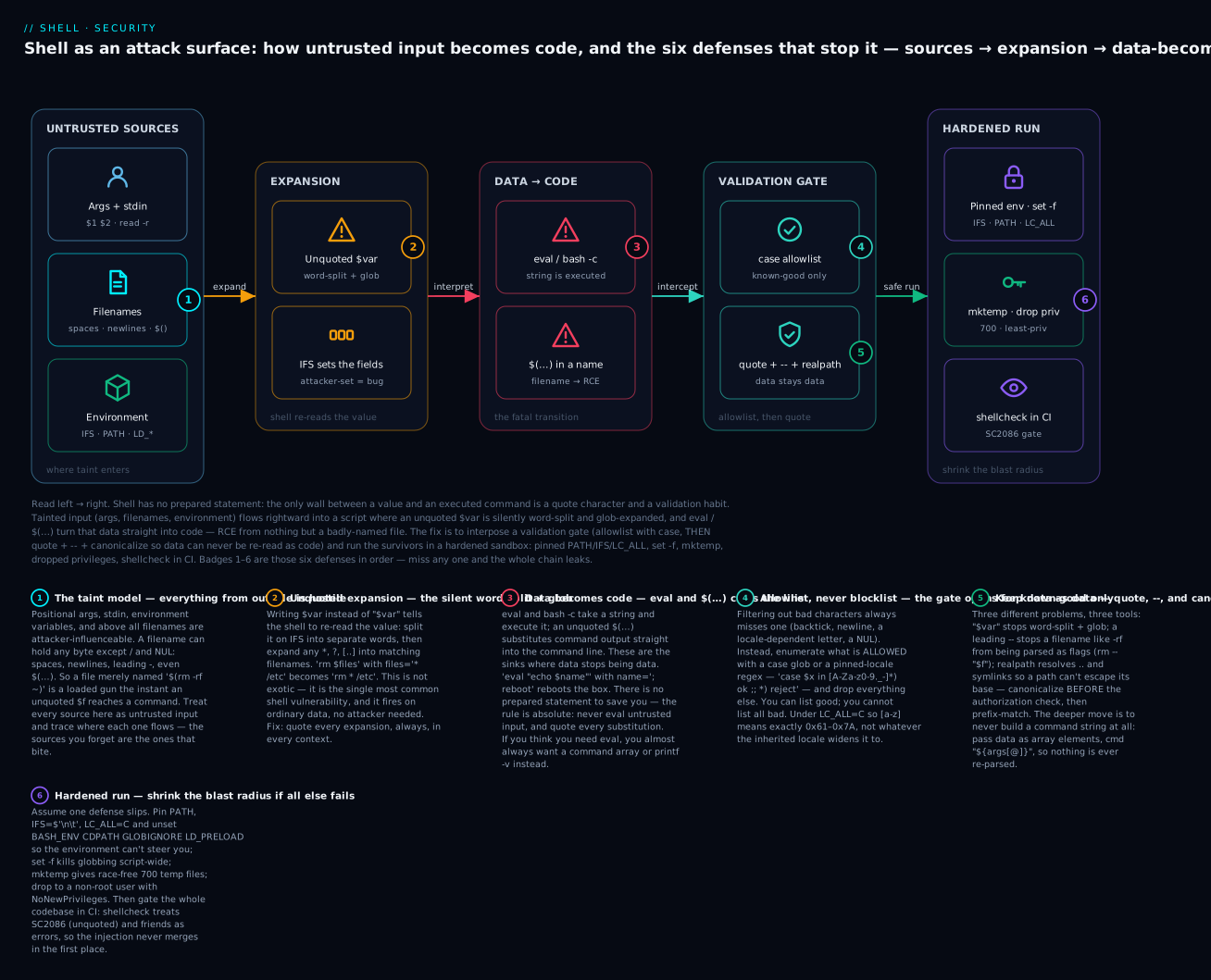
The whole lesson in one picture. Tainted input (args, filenames, environment) flows left → right into a shell script, where unquoted expansion and eval/$() silently turn data into code — unless you interpose a validation gate (allowlist, then quote + -- + canonicalize) and run the survivors in a hardened sandbox (pinned env, set -f, mktemp, dropped privileges, shellcheck in CI). Badges 1–6 are the six defenses, in order.
Shell is uniquely vulnerable. Every other major language has a clear separation between code and data — strings stay strings unless you specifically run them as code. In shell, the rules are inverted: every variable expansion is potentially executable code, and putting a value into a command is implicitly running it through a tokenizer, glob expander, and word splitter.
This means the same defensive habits that prevent SQL injection in your web app — parameterized queries, escape functions, whitelisting — must be applied with even more discipline in shell, because shell has no built-in safe interface. There is no “prepared statement” in bash. The only safety is your quoting discipline.
This lesson is the security side of shell:
- The injection vectors:
eval,$(), unquoted variables,bash -c, signals. - IFS attacks — when
IFS=itself is an injection vector. - TOCTOU (time-of-check, time-of-use) bugs and symlink races.
- Environment-variable attacks (Shellshock-style).
- Input validation patterns: regex whitelists, allowlists for filenames, canonicalization.
- Hardening:
set -f,IFS=$'\n\t',--separators,read -r. - Detection in CI: shellcheck rules that catch security issues.
If you write any shell that handles user input, processes filenames from untrusted sources, runs as root, or runs in a container that crosses trust boundaries — this is required reading.
1. The model — why shell is so injection-prone
Consider the difference between Python and shell:
# Python: explicit data → code conversion
import subprocess
user_input = "; rm -rf /"
subprocess.run(["echo", user_input])     # Safe: argv list, no shell
# Shell: implicit data → code conversion
user_input="; rm -rf /"
echo $user_input                          # Word-splits and globs $user_input
                                          # Quoting saves you:
echo "$user_input"                        # Treated as one argument
In shell, the boundary between data and code is the quote character. Inside "$var", $var is data. Outside quotes, $var becomes a sequence of arguments that may include glob patterns. Every unquoted variable is a potential injection vector.
That’s the model. Most shell security boils down to: did you remember to quote? did you validate the input? did you use the right primitive?
2. Command injection — the canonical vulnerability
2.1 Through eval
# DANGEROUS:
read -p "What's your name? " name
eval "echo Hello, $name"
If the user types ; rm -rf /; echo, the eval runs echo Hello, ; rm -rf /; echo. Game over.
Rule: never eval user input. If you must do dynamic evaluation, validate the input against a strict whitelist first:
read -r -p "What's your name? " name
case $name in
  [A-Za-z][A-Za-z0-9_-]*)
    eval "echo Hello, $name"
    ;;
  *)
    echo "Invalid name" >&2
    exit 1
    ;;
esac
Better yet: don’t use eval at all. The same effect:
read -r name
printf 'Hello, %s\n' "$name"
2.2 Through unquoted command substitution
# DANGEROUS — file contents fed unquoted to a command:
filenames=$(cat user-supplied-list.txt)
rm $filenames                             # Word-splits, globs
If user-supplied-list.txt contains:
file1.txt
* /important
Then rm $filenames becomes rm file1.txt * /important and removes everything in the current directory. The * glob-expands.
Fix: never use for x in $(...). Use while read:
while IFS= read -r filename; do
  rm -- "$filename"        # Quoted, with -- to stop flag-parsing
done < user-supplied-list.txt
while read reads one line at a time and quoting "$filename" keeps it as a single value. -- stops rm from interpreting filenames starting with - as flags.
2.3 Through bash -c "..."
# DANGEROUS:
ssh remote "rm -rf $TARGET"
If $TARGET is /tmp; reboot, the remote runs rm -rf /tmp; reboot.
Fix: parameterize via the remote shell’s positional args:
ssh remote 'rm -rf -- "$1"' bash "$TARGET"
That sends a literal command (no $TARGET expansion locally) and passes $TARGET as the first positional arg to the remote bash, which is then quoted on the remote side. The injection vector is closed.
2.4 Through cron and at
# DANGEROUS — same eval pattern in a different wrapper:
echo "rm -rf $(cat target.txt)" | at now + 1 hour
at accepts a shell command. Anything in target.txt is now code.
Fix: prepare the file path with validation, then pass via env var the at job reads:
target=$(cat target.txt)
case $target in
  /tmp/*) ;;            # Whitelist: only paths under /tmp
  *) exit 1 ;;
esac
TARGET=$target at now + 1 hour <<'EOF'
[ -n "${TARGET:-}" ] && rm -rf -- "$TARGET"
EOF
The <<'EOF' (single-quoted heredoc) prevents expansion in the script body — $TARGET remains literal until at executes.
2.5 Through filenames
This is the most insidious. Filenames can contain any character except / and NUL. That includes spaces, newlines, semicolons, tabs, even unicode.
# Attacker creates a file:
touch -- '$(rm -rf /tmp/important)'

# Your script:
for f in *; do
  echo "Processing $f..."          # OK, $f is quoted
  cmd $f                           # DANGEROUS, unquoted
done
When $f is $(rm -rf /tmp/important) and unquoted, it’s command-substituted. A file with a malicious name becomes RCE.
Fix: always quote $f:
for f in *; do
  cmd -- "$f"
done
The -- and quoting protect against both glob-expansion and command substitution.
2.6 The -e flag injection on echo / printf
Some commands interpret data as flags if it starts with -:
# Attacker creates "-rf important_dir/":
filename="-rf important_dir/"
rm $filename                       # rm interprets -rf as flags!
Even rm "$filename" is unsafe because rm sees -rf important_dir/ as a flag set.
Fix: use -- to terminate flag-parsing:
rm -- "$filename"
After --, rm treats every remaining argument as a filename. Always use -- when filenames could come from untrusted sources. rm, mv, cp, chmod, chown all support it. Some programs (dd, older find) don’t — for those, prefix the filename with ./ to disambiguate:
rm "./$filename" # path starts with ./, can't be a flag
3. Quoting — the day-to-day discipline
The single most important security habit: quote every variable expansion, every command substitution, in every context.
3.1 The five rules
# 1. Quote every $var:
echo "$var"
[[ "$var" == "expected" ]]
cmd "$var"

# 2. Quote every $(command):
result="$(curl -s "$URL")"

# 3. Quote inside heredocs (or use 'EOF' to disable expansion):
cat <<'EOF'                        # No expansion
$var stays literal here
EOF

# 4. Use [[ ]] over [ ] in bash (no word-splitting issues):
[[ -f $file ]]                     # OK in [[ ]]
[ -f "$file" ]                     # Required in [ ]

# 5. Use -- to separate flags from values:
rm -- "$file"
git checkout -- "$path"
mv -- "$old" "$new"
3.2 The contexts where quotes are mandatory
| Context | Why |
|---|---|
cmd $var |
Word-splits and globs. Always: cmd "$var" |
[ "$x" = "$y" ] |
[ ] requires quoting; unquoted = syntax errors with empty/special values |
for x in $list |
Word-splits. Use array: for x in "${list[@]}" |
case $var in ... esac |
Word-splits. Use: case "$var" in ... esac (or just case $var in — case is special) |
IFS= read -r x |
The -r is required to prevent backslash interpretation |
${var} |
Quote anyway: "${var}" |
case $var in is a special exception — it doesn’t word-split — but for consistency and grep-ability, quote it anyway: case "$var" in.
3.3 The places quotes don’t help
# Quoting doesn't save you from -e injection:
filename="-rf /"
echo "$filename"                   # Echos "-rf /" — fine
rm "$filename"                     # rm sees -rf /, deletes everything
The fix is --, not quoting. Quoting protects against word-splitting and glob expansion; -- protects against flag-injection. You need both.
# Quoting doesn't save you from eval:
input='"; rm -rf /"'
eval "echo $input"                 # Even with quotes around the eval arg, the inner is interpreted
Eval is a different problem; no amount of outer-quoting saves you. Validate or avoid.
3.4 The -- rule for every dangerous command
Memorize this list — these commands accept paths and have flags that take action:
rm -- "$path"
mv -- "$src" "$dst"
cp -- "$src" "$dst"
chmod -- "$mode" "$path"
chown -- "$user" "$path"
git checkout -- "$path"
ln -- "$src" "$dst"
ls -- "$path"
cat -- "$path"
Some commands don’t support -- (looking at you, dd). For those, prefix with ./:
file="./$untrusted_name"
dd if="$file" of=output
3.5 Finding unquoted variables — shellcheck rules
shellcheck is your first line of defense. Specifically, these rules:
- SC2086: “Double quote to prevent globbing and word splitting.” — fires on every unquoted
$var. - SC2068: “Double quote array expansions.” — fires on
${array[@]}without quotes. - SC2155: “Declare and assign separately to avoid masking return values.” — fires on
local var=$(cmd)(loses error code). - SC2046: “Quote this to prevent word splitting.” — fires on
$(cmd)in a context that word-splits. - SC2059: “Don’t use variables in the printf format string.”
Run shellcheck in CI and treat all SC2xxx codes as errors. Use # shellcheck disable=SC2086 only with a justifying comment.
4. IFS attacks — when the field separator is the vulnerability
IFS (Internal Field Separator) controls how shell word-splits unquoted variables. If you don’t control IFS, an attacker who can set it (via environment variables or via piped input) can influence how your script parses things.
4.1 The basic IFS exploit
#!/usr/bin/env bash
# Naïve script that reads /etc/passwd-like format:
while read -r line; do
  fields=($line)                   # ← word-splits on $IFS
  echo "User: ${fields[0]}, Shell: ${fields[6]}"
done < /etc/passwd
If your environment has been polluted with IFS=: (which is correct for /etc/passwd), it works. If not, it breaks.
But the security issue: the script behaviour depends on outside IFS. If an attacker can run your script with a custom IFS, they can change parsing.
4.2 The defense: pin IFS at the top of every script
#!/usr/bin/env bash
set -Eeuo pipefail
IFS=$'\n\t'                        # Newline and tab only
This is the strict-mode line from L13. It’s a security control, not just a bug fix.
4.3 IFS for parsing fields safely
When you legitimately need to split on a specific character, set IFS for that one read:
while IFS=':' read -r username password uid gid name home shell; do
  echo "$username -> $shell"
done < /etc/passwd
IFS=':' is set only for the duration of the read builtin, then reverts. No global state pollution.
4.4 The IFS injection through env vars
# DANGEROUS: scripts that don't pin IFS inherit attacker's IFS.
$ IFS='/' ./vulnerable-script.sh /etc/passwd
If the script does for x in $path, it’ll split on / instead of whitespace. With a clever payload, an attacker can sometimes get arbitrary command execution.
Fix: IFS=$'\n\t' at the top, every script, every time.
5. TOCTOU — time-of-check, time-of-use races
Suppose you check a file’s properties, then act on it. Between check and action, the file changes. This is the canonical race-condition class.
5.1 The vulnerable pattern
# Check that file is owned by current user:
if [[ $(stat -c %U "$f") = $USER ]]; then
  cat "$f"                         # ← race: file could be replaced between check and read
fi
An attacker (or another process) can replace "$f" with a symlink to /etc/shadow between the stat and the cat. The check passes for the file the user owns, but the read goes to whatever "$f" points to now.
5.2 The defense: open the file once
Use file descriptors. Once the file is open, the descriptor refers to that exact inode regardless of what happens to the path:
exec 3<"$f"                        # Open file descriptor 3 for reading
# Now check via /proc/self/fd/3 (Linux) or use stat -L /dev/fd/3:
if [[ $(stat -L -c %U /dev/fd/3) = $USER ]]; then
  cat <&3                          # Read from the descriptor, not the path
fi
exec 3<&-                          # Close fd 3
This pattern is uglier but eliminates the race: the file is referenced by inode, not by path.
5.3 The “use a tempdir owned by you” defense
For staging operations:
# Create a tempdir under /tmp that ONLY you can write to:
TMPDIR=$(mktemp -d -t myscript.XXXXXX)
chmod 700 "$TMPDIR"
trap 'rm -rf "$TMPDIR"' EXIT

# Now do all work inside $TMPDIR. Other users can't replace files there.
cp -- "$input" "$TMPDIR/staged"
process "$TMPDIR/staged"
mktemp -d creates a dir with a random name (unguessable) and 700 perms (only you). Symlink attacks against it are infeasible because attackers can’t even read the dir.
5.4 Symlink races — the historic /tmp bug
# DON'T:
echo "data" > /tmp/myscript.tmp
mv /tmp/myscript.tmp /var/lib/myscript/data
If /tmp/myscript.tmp is a fixed name in a world-writable dir, an attacker can pre-create a symlink: ln -s /etc/shadow /tmp/myscript.tmp. Your script then writes to /etc/shadow. (Modern Linux has the protected_symlinks sysctl, which mitigates this in /tmp specifically — but rely on it at your peril; not all distros enable it.)
Always use mktemp for temp files:
tmpfile=$(mktemp -t myscript.XXXXXX)
trap 'rm -f "$tmpfile"' EXIT
echo "data" > "$tmpfile"
mv -- "$tmpfile" /var/lib/myscript/data
mktemp creates a file with O_EXCL (atomic; fails if it already exists) and a random name. Race-free.
6. Input validation — whitelist, never blacklist
The cardinal rule: list what’s allowed; reject everything else. Trying to filter out bad characters always misses some.
6.1 The pattern
validate_username() {
  local input=$1
  case $input in
    [a-z][a-z0-9_-]*) return 0 ;;        # Allowlist: lowercase letter then [a-z0-9_-]
    *) return 1 ;;
  esac
}

if ! validate_username "$user"; then
  echo "Invalid username: $user" >&2
  exit 1
fi
The case statement uses POSIX glob patterns to whitelist. Anything not matching is rejected.
6.2 Common validations
# Numeric:
case $n in
  ''|*[!0-9]*) echo "not a number"; exit 1 ;;
esac
# OR (shorter, bash):
[[ $n =~ ^[0-9]+$ ]] || { echo "not a number"; exit 1; }

# Hostname (RFC 1123):
[[ $host =~ ^[a-zA-Z0-9]([a-zA-Z0-9-]{0,61}[a-zA-Z0-9])?(\.[a-zA-Z0-9]([a-zA-Z0-9-]{0,61}[a-zA-Z0-9])?)*$ ]]

# IPv4:
ipv4_octets='25[0-5]|2[0-4][0-9]|[01]?[0-9][0-9]?'
[[ $ip =~ ^($ipv4_octets)\.($ipv4_octets)\.($ipv4_octets)\.($ipv4_octets)$ ]]

# Email (simplified — full RFC 5322 is ~6KB regex):
[[ $email =~ ^[A-Za-z0-9._-]+@[A-Za-z0-9-]+(\.[A-Za-z0-9-]+)+$ ]]

# Path under a base dir (no traversal):
case $path in
  /var/lib/myapp/*)
    case $path in
      *..*) echo "no traversal"; exit 1 ;;     # Reject .. anywhere
    esac
    ;;
  *) echo "outside allowed dir"; exit 1 ;;
esac

# Filename (no shell-special chars):
case $filename in
  *[\;\&\|\`\$\<\>\(\)\\\'\"]*)
    echo "invalid chars"; exit 1 ;;
  ../*|*/..|*/../*)
    echo "traversal"; exit 1 ;;
esac
6.3 Path canonicalization
When you accept a path from a user, canonicalize it before validating, otherwise tricks like ../etc/passwd slip through:
# Canonicalize:
canon=$(realpath -- "$path" 2>/dev/null) || { echo "bad path"; exit 1; }

# Now check that canon is under your allowed prefix:
case $canon in
  /var/lib/myapp/*) ;;
  *) echo "outside allowed dir"; exit 1 ;;
esac

# Use $canon, not $path, for further operations:
process "$canon"
realpath -f resolves all .., symlinks, and weird path forms. Always canonicalize before authorization checks.
6.4 Null bytes — the embedded surprise
POSIX paths can’t contain NUL (\0), but environment variables and stdin can. Some validators that look for .. miss \0-padded versions:
"file\0../etc/passwd"
In bash, read truncates at \0 by default, so this rarely bites. But if you handle binary input via IFS= read -r -d '', validate against null bytes explicitly.
7. Environment-variable attacks
7.1 The Shellshock class
CVE-2014-6271: bash parsed function definitions out of environment variables. An attacker who could set env vars (via HTTP headers in CGI, for example) could execute arbitrary code:
HTTP_HEADER="() { :;}; rm -rf /"
When bash inherited that env, it parsed the function definition and ran the trailing command. Modern bash patches this, but the concept — env vars influence shell behaviour — is general.
7.2 The defense: pin your environment
At the top of every script:
#!/usr/bin/env bash
set -Eeuo pipefail
IFS=$'\n\t'

# Pin PATH to known directories:
PATH=/usr/local/sbin:/usr/local/bin:/usr/sbin:/usr/bin:/sbin:/bin
export PATH

# Unset variables that could change behaviour:
unset BASH_ENV ENV CDPATH GLOBIGNORE
unset LD_PRELOAD LD_LIBRARY_PATH
unset IFS                          # Reset to default (then we set it again above)

IFS=$'\n\t'                        # Re-set after unset

# Pin locale:
LC_ALL=C
export LC_ALL
The unset section removes attacker-controlled variables that could influence:
BASH_ENV/ENV— files bash sources at startup.CDPATH— affectscd.GLOBIGNORE— affects glob expansion.LD_PRELOAD,LD_LIBRARY_PATH— affect dynamic linking of binaries you call.
For scripts that run setuid or in a privilege boundary, this hardening is critical.
7.3 The bash -p flag — privileged mode
#!/usr/bin/env bash -p
bash -p (privileged mode) is automatically enabled when bash detects setuid/setgid execution. It:
- Doesn’t read user’s
~/.bashrc. - Ignores
BASH_ENV,ENV,SHELLOPTS. - Uses a clean environment.
If your script runs setuid (rarely a good idea) or is invoked via sudo, ensure -p is in effect.
8. The set -f (noglob) defense
Globbing is a feature, but it’s also an attack vector. If a variable’s contents are inserted into a command and contain *, the shell expands them:
$ args="* /etc/passwd"
$ ls $args             # ← lists everything in cwd, then /etc/passwd
If you don’t want globbing for a section of your script:
set -f                 # Disable globbing
process_user_input "$arg1" "$arg2"
set +f                 # Re-enable
Or as a discipline: disable globbing for the whole script and only enable it where you want it:
#!/usr/bin/env bash
set -Eeuo pipefail -f             # Note the -f added
IFS=$'\n\t'

# In a controlled section where you want globs:
matching_files() (
  set +f                          # Subshell: doesn't affect outer
  for f in /var/log/*.log; do
    printf '%s\n' "$f"
  done
)
set -f with IFS=$'\n\t' is the maximally-defensive baseline. Combined with quoting, it eliminates virtually all “data became code” risks.
9. Locking down eval — when you really need dynamic execution
Sometimes you legitimately need eval (dynamic variable names, computed function calls). The discipline:
9.1 Validate the input before eval
# Set a variable named ATTR_$key to $value:
set_attr() {
  local key=$1 value=$2
  case $key in
    [A-Za-z_][A-Za-z0-9_]*) ;;       # Whitelist: identifier characters only
    *) echo "Invalid key: $key" >&2; return 1 ;;
  esac
  eval "ATTR_$key=\$value"           # $value is left as a literal expansion
}
The whitelist on $key prevents injection. The \$value (escaped $) means the eval’s bash parses it as a variable reference, not interpolating its content into the command string. So even if $value contains ; rm -rf /, it’s stored as a literal string in ATTR_foo.
9.2 Prefer printf -v
For setting variables dynamically, printf -v is safer than eval:
varname="ATTR_$key"
printf -v "$varname" '%s' "$value"   # No code injection
printf -v writes to a variable named by $varname. It doesn’t re-parse content. Use it whenever you can.
9.3 Prefer associative arrays
In bash 4+, just use an associative array — no eval needed:
declare -A attrs
attrs[$key]=$value
echo "${attrs[$key]}"
Validate $key if it comes from user input (to prevent the key being something weird), but no eval.
10. Other defensive patterns
10.1 read -r always, never plain read
# DANGEROUS:
read line                        # Backslash-escapes are interpreted

# CORRECT:
read -r line                     # Treats backslashes literally
-r is not a perf flag — it’s a correctness flag. Without it, a value of Hello\nWorld becomes “HelloWorld” (the \n is interpreted as a newline-escape, then… it’s complicated). Always -r.
10.2 IFS= read -r when reading lines
# DANGEROUS — IFS strips leading/trailing whitespace from $line:
read -r line

# CORRECT — line preserves all whitespace:
IFS= read -r line
IFS= for the duration of one read disables word-splitting. Together with -r, the line is captured exactly as-is.
10.3 Safe find
# DANGEROUS — output of find is space/newline split:
for f in $(find . -name '*.tmp'); do rm "$f"; done

# CORRECT — null-delimited:
find . -name '*.tmp' -print0 | xargs -0 rm --
# OR:
find . -name '*.tmp' -delete         # find deletes directly, no shell parsing
-print0 and -0 use NUL as the separator, immune to filename weirdness. -delete does the deletion in find itself, no shell loop needed.
10.4 git config is a hidden code-execution vector
Some git invocations execute code from git config:
# In a malicious repo's .git/config:
[core]
    sshCommand = "rm -rf ~"
When you git pull such a repo, sshCommand is invoked. Don’t run git operations on untrusted repositories without safe.directory configured.
git -c protocol.file.allow=user and safe.directory settings (modern git) mitigate the worst of this. Audit your CI for git operations on untrusted refs.
11. CI rules — locking security in
11.1 shellcheck severity policy
Add a .shellcheckrc to enforce strictness:
# .shellcheckrc
disable=SC2153             # Variable names that look similar (annoying false-positives)
enable=all                  # Enable optional rules including security ones
external-sources=true
shell=bash
severity=warning
Treat all SC20xx and SC10xx codes as errors in CI.
11.2 The “no eval” lint
If your codebase doesn’t need eval, ban it:
# Pre-commit hook:
if grep -nP '\beval\s' bin/* lib/*.sh; then
  echo "ERROR: eval is forbidden. See SECURITY.md."
  exit 1
fi
Same for bash -c "$VAR" patterns where the variable could contain user input.
11.3 Static taint analysis
For high-stakes shell (anything with privileged execution, secrets, or user input), tools like shellharden automatically rewrite shell to add quotes:
shellharden --transform script.sh
It’s not foolproof (a tool can’t fully analyse intent), but it catches most of the SC2086 class automatically.
11.4 Run as least privilege
# In systemd unit or Dockerfile:
User=myapp
NoNewPrivileges=true
PrivateTmp=true
ReadOnlyPaths=/etc /usr
ReadWritePaths=/var/lib/myapp
If your script doesn’t need root, don’t run it as root. If it does need privilege, use the smallest possible set of capabilities (AmbientCapabilities=CAP_NET_BIND_SERVICE).
12. A vulnerability walk-through — fixing a real script
12.1 The vulnerable script
#!/bin/bash
# update-user.sh USER NEW_SHELL
# Updates a user's login shell.

USER=$1
SHELL=$2

if id $USER > /dev/null; then
  echo "Updating $USER's shell to $SHELL"
  usermod -s $SHELL $USER
fi
Vulnerabilities:
$USERand$SHELLare unquoted everywhere.- No input validation.
id $USERis exploitable:USER='alice; reboot'.usermod -s $SHELL $USER— same problem.$SHELLhappens to be a reserved name (the login shell of the running user). The script clobbers it.
12.2 The hardened script
#!/usr/bin/env bash
set -Eeuo pipefail -f
IFS=$'\n\t'

PATH=/usr/local/sbin:/usr/local/bin:/usr/sbin:/usr/bin:/sbin:/bin
export PATH

# Argument validation:
[[ $# -eq 2 ]] || { echo "usage: $0 USER SHELL_PATH" >&2; exit 1; }

target_user=$1
new_shell=$2

# Whitelist user (POSIX usernames):
case $target_user in
  [a-z_][a-z0-9_-]*) ;;
  *) echo "Invalid username: $target_user" >&2; exit 1 ;;
esac

# Whitelist shell — must be in /etc/shells:
if ! grep -Fxq -- "$new_shell" /etc/shells; then
  echo "Shell not allowed: $new_shell" >&2
  exit 1
fi

# Verify user exists:
if ! id -- "$target_user" >/dev/null 2>&1; then
  echo "User does not exist: $target_user" >&2
  exit 1
fi

echo "Updating $target_user's shell to $new_shell"
usermod -s "$new_shell" -- "$target_user"
What changed:
- Strict mode + IFS pinning + PATH pinning at the top.
- Renamed
USER/SHELLtotarget_user/new_shellto avoid clobbering reserved names. - Argument count check.
- Whitelist regex on username (RFC-style).
- Whitelist on shell via
/etc/shells(the canonical list of allowed shells). id -- "$target_user"quoted and---separated.usermod -s "$new_shell" -- "$target_user"quoted,---separated.
The vulnerable version is a CVE waiting to happen. The hardened version validates everything and quotes everything. Same logic, ~3x more lines, eliminated injection.
Going deeper
The core sections gave you the reflexes. This section is for the reader who already quotes everything and wants the harder truths: how to build a real safe interface, where allowlists silently leak, how untrusted output attacks you, and where the operating system draws lines the shell cannot.
The array is shell’s prepared statement
Everything so far has been about defusing a command string. The deeper fix is to never build a command string from data at all. Bash arrays let you construct an argument vector element by element; each element is handed to execve() as one literal argument, with no re-parsing, no word-splitting, no globbing, and no eval step in between. This is the shell equivalent of a parameterized query.
# WRONG — data concatenated into a string, then re-parsed:
cmd="rsync -a $src $dst"
$cmd                       # word-splits, globs, and any metachar in $src runs

# RIGHT — data as array elements, never re-parsed:
rsync_args=(-a --delete)
rsync_args+=(-- "$src" "$dst")
rsync "${rsync_args[@]}"    # each element is exactly one argv slot
Build flags conditionally without ever touching a string:
find_args=(. -type f)
[[ -n ${pattern:-} ]] && find_args+=(-name "$pattern")
[[ ${prune:-no} == yes ]] && find_args+=(-prune)
find "${find_args[@]}"
"${array[@]}" (quoted, @, not *) is the only correct expansion — it yields one word per element even when elements contain spaces or newlines. Verified locally on bash 3.2 with globbing disabled:
$ args=(-l "my file.txt" "*.conf"); set -f
$ printf 'ARG: [%s]\n' "${args[@]}"
ARG: [-l]
ARG: [my file.txt]
ARG: [*.conf]                 # the glob stayed literal
If you find yourself reaching for eval to “build a command dynamically”, reach for an array instead. The large majority of real-world eval uses are just array construction in disguise.
When you must serialize: printf %q and ${var@Q}
Sometimes you genuinely need to turn data back into shell text — logging a command for reproducibility, generating a script, passing a command through ssh or sudo bash -c. Never hand-roll the quoting. Bash can emit a re-ingestible quoted form:
danger='; rm -rf / #'
printf '%q\n' "$danger"        # \;\ rm\ -rf\ /\ #   (safe to paste back)

# bash 4.4+ only — the @Q parameter transformation:
printf '%s\n' "${danger@Q}"    # '; rm -rf / #'      (bad substitution on bash 3.2)
%q is portable back to bash 3.2 (verified here); ${var@Q} is cleaner but needs bash 4.4+, so guard it or prefer %q in code that must run on old hosts (macOS ships bash 3.2, where ${var@Q} errors with bad substitution). To build a remote command safely:
# Serialize each arg with %q, then run literally on the remote side:
remote_cmd=$(printf '%q ' rm -rf -- "$dir")
ssh host "$remote_cmd"         # $dir is already quoted for the remote shell
Even better, skip serialization entirely and let the remote shell quote for you, as §2.3 showed: ssh host 'rm -rf -- "$1"' _ "$dir".
The [a-z] allowlist trap — locale and collation
Your case allowlist [a-z][a-z0-9_-]* looks airtight. It isn’t, unless you pin the locale. Character ranges like [a-z] are resolved by the current collation order (LC_COLLATE), and in many UTF-8 locales [a-z] matches more than the 26 ASCII letters — accented characters, and in some locales uppercase letters interleave into the range. An attacker who controls LC_ALL/LC_COLLATE (both inherited environment variables) can widen your allowlist.
# Fragile — range meaning depends on the inherited locale:
case $name in [a-z]*) ok ;; esac

# Robust — force byte-wise C collation for the whole script:
export LC_ALL=C
case $name in [a-z]*) ok ;; esac         # now [a-z] is exactly 0x61–0x7A
Pinning LC_ALL=C (part of the environment-hardening preamble in §7.2) is therefore a security control, not just a way to get stable sort output. Verified on this host: under LC_ALL=C, [a-z]* matches abc and rejects Zoo.
The same lesson applies to bash’s =~ regex operator, with an extra twist: quoting the right-hand side changes its meaning. An unquoted RHS is a regular expression; a quoted RHS is a literal string.
[[ $v =~ ^a.b$ ]]      # . is "any char"  → matches "axb"  (verified)
[[ $v =~ "a.b" ]]      # . is a literal dot → matches only "a.b"
So store regexes in a variable and use it unquoted, and never interpolate untrusted data into the pattern:
re='^[A-Za-z][A-Za-z0-9_-]*$'
[[ $user =~ $re ]] || { echo "bad" >&2; exit 1; }   # captures land in ${BASH_REMATCH[@]}
Untrusted output attacks you back — terminal-escape & log injection
Injection isn’t only about input you execute; it’s also about bytes you print. Filenames and log lines can contain ANSI escape sequences and control characters. When your script does echo "Processing $f" and $f contains \e]0;…\a or cursor-movement codes, printing it to a terminal can rewrite the title bar, hide text, or (with some terminal emulators, historically) trigger actions. Worse, an attacker can craft a filename that, when it lands in a log a human later cats, forges log lines or hides the real ones.
Defensive printing:
# DON'T pipe raw untrusted bytes to a terminal:
printf '%s\n' "$f"                 # control chars pass straight through

# DO render non-printables visibly when the audience is a human/terminal:
printf '%q\n' "$f"                 # $'evil\ttab\abell'  — escapes control chars
cat -v file                        # caret / M- notation instead of raw bytes
ls -b                              # GNU ls: non-graphic chars as \nnn (BSD ls differs: -B/-q)
LC_ALL=C sed -n l <<<"$f"          # sed 'l' shows escapes unambiguously
Verified here: a filename built from printf 'evil\ttab\x07bell' renders safely as $'evil\ttab\abell' via %q instead of ringing the bell and mangling the line. Rule of thumb: data destined for a human-readable terminal or log is untrusted output — sanitize it the same way you’d validate input.
env -i, declare -r, and the limits of hardening
§7 unset the known-dangerous variables. For a genuinely clean slate, start the child with no environment and add back only what you need:
env -i PATH=/usr/bin:/bin HOME=/root LC_ALL=C /path/to/child.sh
Lock invariants so later code (or a sourced file) can’t quietly change them:
readonly PATH=/usr/local/sbin:/usr/local/bin:/usr/sbin:/usr/bin:/sbin:/bin
readonly IFS=$'\n\t'               # attempts to reassign now error out
rbash / bash -r (restricted shell) blocks cd, changing PATH, /-containing command names, and output redirection — useful as defense in depth for a constrained menu script, but not a security boundary on its own (well-known escapes exist; anything that can launch a program which itself spawns a shell escapes). Treat restricted shell as a speed bump, and enforce the real boundary at the OS level (below).
Where the shell ends and the kernel begins
Some races and protections live below the shell:
fs.protected_symlinks,fs.protected_hardlinks,fs.protected_fifos,fs.protected_regular(Linux sysctls, on by default on modern distros) block the classic world-writable-/tmpfollow-through attacks — but don’t rely on them; still usemktemp. The shell has noO_NOFOLLOW/O_EXCLof its own, which is exactly whymktemp(which opens withO_EXCL) and per-file descriptors matter.noexecon/tmpstops a dropped script from being executed in place; combine withPrivateTmp=truein systemd so each service gets its own/tmp.ulimit, seccomp, and Linux capabilities shrink the blast radius if injection does happen.NoNewPrivileges=true(§11.4) prevents a re-exec from gaining privileges via setuid binaries — the OS-level analogue ofbash -p.
Portability caveats, kept honest: realpath and its -m/-e flags, stat -c, find -printf, grep -P, mapfile/readarray, ${var@Q}, and associative arrays (declare -A) are GNU / bash-4+ features. On this macOS/BSD build host, realpath rejects GNU long options, stat uses -f, and bash is 3.2 — so ${var@Q} and declare -A are unavailable here. Teach and ship the GNU forms for your Linux targets, but when a script must also run on a Mac laptop or Alpine/BusyBox, detect the tool (command -v) or prefer the POSIX subset: case over =~, printf %q over ${var@Q}, and readlink -f where realpath is missing.
13. Quick reference card
The checklist
☐ #!/usr/bin/env bash, then `set -Eeuo pipefail -f`
☐ IFS=$'\n\t' immediately after
☐ Pin PATH at the top
☐ unset BASH_ENV ENV CDPATH GLOBIGNORE LD_PRELOAD LD_LIBRARY_PATH
☐ Quote every $var: "$var", "$@", "${arr[@]}"
☐ Use [[ ]] in bash scripts; [ "$x" = "$y" ] in POSIX
☐ Use -- to separate flags from values: rm -- "$file"
☐ Never `eval` user input. If unavoidable, whitelist first.
☐ Use printf -v instead of eval for dynamic vars
☐ Use mktemp for temp files; mktemp -d for temp dirs
☐ Use -print0 / -d '' for filename iteration
☐ Validate input with case allowlists, never blacklists
☐ Canonicalize paths with realpath before authorization checks
☐ shellcheck in CI; treat all SC2xxx as errors
The 7 commandments of shell security
- Quote everything. Every variable expansion, every command substitution, every parameter.
- Validate input with whitelists. Reject anything not matching expected patterns.
- Use
--to terminate flag-parsing in every command that accepts paths from variables. - Pin the environment:
PATH,IFS,LC_ALL, unset attacker-controlled vars. - Don’t
evaluser input. Use parameter expansion,printf -v, or associative arrays. - Use
mktempfor temp files. Never use predictable names in/tmp. - Run shellcheck in CI. It catches the most common 80% of vulnerabilities for free.
Memorize these patterns
# Pin environment:
set -Eeuo pipefail -f
IFS=$'\n\t'
PATH=/usr/local/sbin:/usr/local/bin:/usr/sbin:/usr/bin:/sbin:/bin
export PATH
unset BASH_ENV ENV CDPATH GLOBIGNORE LD_PRELOAD LD_LIBRARY_PATH

# Validate:
case $input in
  [A-Za-z][A-Za-z0-9_-]*) ;;
  *) exit 1 ;;
esac

# Safe filename iteration:
find /path -type f -print0 | while IFS= read -r -d '' f; do
  process -- "$f"
done

# Safe temp file:
tmp=$(mktemp -t myscript.XXXXXX)
trap 'rm -f -- "$tmp"' EXIT

# Safe dynamic variable:
printf -v "VAR_$validated_key" '%s' "$value"
Practice challenges
Six graded exercises, beginner → advanced. Each is runnable on any Linux box (or macOS with the noted caveats). Try it before opening the solution. Work in a throwaway directory: d=$(mktemp -d) && cd "$d".
Challenge 1 — Make an unsafe loop safe (beginner)
A script deletes files listed in targets.txt:
for f in $(cat targets.txt); do rm $f; done
Create a filename with a space (touch "my report.txt"; echo "my report.txt" > targets.txt) and show the loop breaks (it tries to rm "my" and rm "report.txt"). Then rewrite it so a filename with spaces, and one starting with -, are both handled safely.
<details> <summary>Solution</summary>
while IFS= read -r f; do
  rm -- "$f"
done < targets.txt
Why: while IFS= read -r takes one whole line at a time (no word-splitting, no glob), "$f" keeps it a single argument, and -- stops a name like -rf from being read as flags. for f in $(cat …) fails all three.
</details>
Challenge 2 — Numeric allowlist (beginner)
Write a function is_uint that returns success only if its argument is a non-empty string of ASCII digits (no signs, no spaces, no leading +). It must reject "", "1 2", "-3", "0x10", and "1_000".
<details> <summary>Solution</summary>
is_uint() { case $1 in ''|*[!0-9]*) return 1 ;; *) return 0 ;; esac; }
# bash-only equivalent:  [[ $1 =~ ^[0-9]+$ ]]
Why: the case glob ''|*[!0-9]* rejects empty and anything containing a non-digit — an allowlist expressed by excluding the complement, and it’s POSIX so it runs in dash/BusyBox too. Under LC_ALL=C, [0-9] is unambiguously the ten ASCII digits.
</details>
Challenge 3 — Replace eval with printf -v (intermediate)
This sets a dynamic variable but is injectable:
key=$1; value=$2
eval "config_$key=\"$value\""
Show the injection (./s 'x=1; reboot #' foo), then rewrite it with validation + printf -v so no input can execute.
<details> <summary>Solution</summary>
key=$1; value=$2
case $key in [A-Za-z_][A-Za-z0-9_]*) ;; *) echo "bad key" >&2; exit 1 ;; esac
printf -v "config_$key" '%s' "$value"
Why: the case allowlist forces key to be a valid identifier (closing injection via the name), and printf -v assigns to that variable without re-parsing the value — verified: a value of $(reboot) is stored as the literal text $(reboot), never run.
</details>
Challenge 4 — Race-free temp file (intermediate)
Rewrite this to be symlink-race-safe and self-cleaning:
echo "$payload" > /tmp/build.out
mv /tmp/build.out /var/lib/app/data
<details> <summary>Solution</summary>
tmp=$(mktemp -t build.XXXXXX) || exit 1
trap 'rm -f -- "$tmp"' EXIT
printf '%s\n' "$payload" > "$tmp"
mv -- "$tmp" /var/lib/app/data
Why: mktemp creates an unpredictable name with O_EXCL (an attacker can’t pre-plant a symlink at it — verified here the dir/file is mode 700/600), the EXIT trap guarantees cleanup on any exit path, and printf (not echo) prints $payload verbatim even if it begins with -n or contains \t.
</details>
Challenge 5 — Path-traversal-proof file reader (advanced)
Write serve <name> that reads <name> from a fixed base dir /srv/files, but refuses any input that escapes the base (e.g. ../../etc/passwd, an absolute path, or a symlink pointing outside). Canonicalize before deciding.
<details> <summary>Solution</summary>
base=/srv/files
serve() {
  local name=$1 canon
  case $name in *[!A-Za-z0-9._-]*|'') echo "bad name" >&2; return 1 ;; esac   # no slashes at all
  canon=$(realpath -- "$base/$name" 2>/dev/null) || { echo "no such file" >&2; return 1; }
  case $canon/ in "$base"/*) ;; *) echo "escapes base" >&2; return 1 ;; esac    # must stay under base
  cat -- "$canon"
}
Why: two gates. The allowlist forbids / and .. outright (defense one), then realpath resolves symlinks and .. so the final location is checked against the base with a trailing-slash prefix match (defense two). Canonicalizing before the authorization check is what defeats ../ and symlink escapes. On BSD/macOS use realpath without --, or readlink -f; the logic is identical.
</details>
Challenge 6 — Audit a script with shellcheck and fix every finding (advanced)
Save this as deploy.sh, run shellcheck deploy.sh, and fix it until it passes clean — then explain what each fix prevented:
#!/bin/bash
DIR=$1
FILES=`ls $DIR`
for f in $FILES; do
  cp $DIR/$f /backup/$f
done
<details> <summary>Solution</summary>
#!/usr/bin/env bash
set -Eeuo pipefail
IFS=$'\n\t'
dir=${1:?usage: deploy.sh DIR}
find "$dir" -maxdepth 1 -type f -print0 |
while IFS= read -r -d '' f; do
  cp -- "$f" /backup/
done
Why: shellcheck flags SC2006 (backtick → $(...)), SC2035/SC2086 (unquoted $DIR, $f word-split + glob), and SC2045 (don’t parse ls). The fix drops ls for a NUL-delimited find loop, quotes and ---terminates every path, adds the strict-mode + IFS preamble, and demands the argument with ${1:?}. Result: filenames with spaces, newlines, globs, or a leading - are all handled, and no injection sink remains.
</details>
Common beginner mistakes
-
“I quoted it, so it’s safe.” Quoting stops word-splitting and globbing, but not flag-injection or
eval.rm "$file"still deletes everything when$fileis-rf /— you also needrm -- "$file". And no amount of quoting around anevalargument makes the inner content data. Right model: quoting,--, and not-eval solve three different problems; you need all three. -
Blocklisting bad characters instead of allowlisting good ones. “I’ll just strip
;and&” always loses — you’ll forget`,$(), newline,|, glob chars, or a locale-dependent letter. Right model: define the small set of characters the input is allowed to contain (case $x in [A-Za-z0-9._-]*)) and reject everything else. You can enumerate good; you cannot enumerate bad. -
Thinking filenames are “just text”. A filename can contain spaces, newlines,
$(...), a leading-, and ANSI escapes.for f in $(ls)or an unquoted$fturns a maliciously-named file into word-splitting, glob expansion, or outright command execution. Right model: iterate withfind -print0 | while IFS= read -r -d '', quote"$f", and---terminate. -
Using
for x in $(command)to loop over lines. Command substitution is word-split onIFSand glob-expanded, so a line with a space becomes two iterations and a line with*explodes into filenames. Right model:while IFS= read -r line; do …; done < file(or< <(command)). -
Trusting the inherited environment.
IFS,PATH,CDPATH,GLOBIGNORE,LC_ALL,LD_PRELOADall change how your script behaves and all come from the (attacker-influenceable) environment. Right model: pinPATH,IFS, andLC_ALL, andunsetthe dangerous ones at the top — treat the environment as untrusted input, because it is. -
Predictable temp files.
> /tmp/myscript.$$or a fixed/tmp/outinvites a symlink race. Right model:mktemp/mktemp -d(random name,O_EXCL,700) plus atrap … EXITto clean up. -
echo "$userdata"for untrusted content.echomangles values that look like flags (-n,-e) or contain backslashes, and passes control characters straight to your terminal. Right model:printf '%s\n' "$userdata"for faithful output, andprintf '%q\n'when a human will read possibly-hostile bytes. -
Assuming
set -ecatches injection. Strict mode stops the script on errors; it does nothing about a perfectly-successfulrm -rf /that ran because you didn’t quote. Right model:set -Eeuo pipefailis table stakes, not the security control — quoting, validation, and--are.
Glossary
- Injection sink — a place where data crosses into being executed:
eval,bash -c, an unquoted$(...), an unquoted variable in command position, or a name fed toat/cron. The security-review question is always “what are the sinks, and what reaches them?” - Word-splitting — the shell’s step of chopping an unquoted expansion into separate words at each character in
IFS(default: space, tab, newline). Quoting ("$var") suppresses it. - Glob expansion (pathname expansion) — the shell replacing unquoted
*,?,[…]with matching filenames. Disabled byset -f(noglob); suppressed by quoting. IFS(Internal Field Separator) — the variable that word-splitting andreadsplit on. Pin it (IFS=$'\n\t') so behaviour never depends on the inherited environment.eval— a builtin that takes a string and runs it as shell code. The single most dangerous primitive; never give it untrusted data.- Command substitution —
$(...)/`...`: runs a command and substitutes its output. Dangerous when the output is unquoted (word-split + glob) or when the command text itself comes from data. - Allowlist (whitelist) — validation that accepts only inputs matching an explicit known-good pattern and rejects all else. The opposite, blocklist / blacklist, tries to enumerate bad input and always misses cases.
--(end-of-options) — a conventional argument telling a command “everything after this is an operand, not a flag”, so a filename like-rfcan’t act as options. Supported by most coreutils; for the few that lack it, prefix paths with./.- TOCTOU (time-of-check to time-of-use) — a race where a resource changes between the moment you validate it and the moment you use it (e.g. a path swapped for a symlink). Defeated by operating on an open file descriptor or an unguessable
mktemplocation. - Canonicalization — resolving a path to its real, absolute form (
realpath/readlink -f), eliminating..,., and symlinks, so an authorization check can’t be fooled by an alternate spelling of the same (or a different) file. - Path traversal — using
../(or an absolute path, or a symlink) to escape an intended base directory. Blocked by allowlisting the name plus canonicalizing and re-checking the prefix. mktemp— creates a temp file/dir with a random name usingO_EXCL(atomic, fails if it exists) and restrictive permissions — the race-free way to stage work.printf -v/%q—printf -v nameassigns to a variable without re-parsing (a safe alternative toevalfor dynamic names);%qprints a value in a form safe to paste back into the shell.- Command array — building an argument vector as a bash array (
args=(…); cmd "${args[@]}") so each element reaches the program as one literal argv slot with no re-parsing — shell’s closest thing to a prepared statement. - Shellshock (CVE-2014-6271) — a bash bug where specially-crafted environment variables carrying function definitions were executed on startup; the lasting lesson is that the environment is untrusted input.
- Restricted shell (
rbash/bash -r) — a mode that blockscd,PATHchanges,/-paths and redirection. A speed bump, not a security boundary — enforce real limits at the OS level. shellcheck— the static analyzer that flags unquoted expansions (SC2086),lsparsing (SC2045), backticks (SC2006), and dozens of other footguns. Run it in CI and treat findings as errors.- Privileged mode (
bash -p) — bash’s setuid-safe mode: it ignoresBASH_ENV/ENV/ user rc files and refuses to drop to the caller’s environment. The OS analogue isNoNewPrivileges=true.
14. Wrap-up
Shell scripts are uniquely exposed because shell’s core abstraction is text-as-code. Every variable expansion is a parse, every external command is an interpretation, every pipe is a context shift. There is no parameterized-query equivalent — only quoting discipline.
The defense is simple in concept, exhausting in practice:
- Always quote.
- Always validate.
- Never eval user input.
- Always
--. - Always pin the environment.
Combined with shellcheck in CI and the strict-mode preamble we’ve reinforced throughout this course, these habits make your shell scripts as secure as they can be. They’re not bulletproof — shell will never be a memory-safe language — but they reduce the attack surface to the same level as any well-written CGI script: small but non-zero.
For high-stakes scripts (running as root, processing untrusted input, in containers crossing trust boundaries), apply the full hardening: set -f, unset of attacker-controlled vars, canonicalization before auth, whitelist regex on every input, -- everywhere. The cost is a longer preamble; the benefit is closing virtually every shell-injection class.
Next: L26 — secrets handling (Secrets: env vars, files, vault, ephemeral). We’ll cover env-vars-vs-files, vault integration, ephemeral credentials, and the no_log discipline that keeps secrets out of journalctl, ps output, and shell history.