In a nutshell
Infrastructure as Code (IaC) means you write down the servers, networks, and databases you want in plain text files, and a tool builds them for you — instead of clicking around a cloud web console and hoping you remember what you did six months from now. This lesson is about the three ideas that make that trick actually work: state, drift, and idempotency. Understand these three and the rest of Terraform is mostly detail.
Here is the one analogy to hold onto. Imagine you are a park ranger, and you keep a map of every trail, bridge, and sign in your park:
- State is the map. It records what you have built and where each thing is. The map is not the park itself — it is your written memory of the park. Lose the map and you no longer know which bridges are yours to maintain and which the next crew put up.
- Drift is the territory changing while the map stays the same. A storm knocks down a sign; a visitor cuts an unofficial trail. Now the map and the ground disagree, nobody wrote it down, and nobody knows — until someone walks the route and notices.
- Idempotency is “safe to walk the route again.” You follow your map from the gate to the lake, fixing anything that does not match. If everything already matches, you change nothing. Walk it ten times and the park ends up identical to walking it once — you never accidentally build a second lake just because you set out twice.
Everything else in this lesson — plan and apply, remote state, locking, modules, secrets — exists to keep the map trustworthy, to catch the territory drifting away from it, and to make every run safe to repeat.
Level: Beginner · Time: ~37 min
Before you start, it helps to know: what a cloud resource is (a virtual machine, a database, a load balancer), the basics of version control with Git (a commit, a branch, a pull request), and that “the console” means a cloud provider’s point-and-click web UI. No Terraform experience is assumed — every term is defined the first time it appears, and there is a glossary at the end.
After this lesson you will be able to:
- Explain declarative vs imperative and why Terraform describes a destination, not a route.
- Say what the state file stores, why losing it is the worst thing that can happen to a Terraform project, and why it can quietly contain secrets.
- Read a
terraform planand know which symbols (+,~,-,-/+) should make you nervous. - Define idempotency and explain why a second
applywith no code changes does nothing at all. - Describe what drift is, three ways it happens, how to detect it on a schedule, and the two valid ways to fix it.
- Explain why remote state, state locking, and keeping secrets out of code are non-negotiable the moment more than one person touches the infrastructure.
A 600-bed regional hospital group runs a patient-portal and telehealth platform across two cloud regions, and the platform team is four engineers. Last quarter, two unrelated incidents landed in the same retrospective. First: an on-call engineer fixed a Friday-night outage by widening a database firewall rule by hand in the console — and forgot to tell anyone, so the next automated deployment quietly reverted it and paged the whole team at 2 a.m. Second: two engineers ran the same deployment script ten minutes apart, both believing it had failed the first time, and ended up with two load balancers billing in parallel for a week before finance noticed. Neither failure was exotic. Both are exactly what Infrastructure as Code — and three specific concepts inside it: state, idempotency, and drift — exist to prevent. This article walks a junior engineer through those concepts using Terraform as the running example, the way they actually show up on a real platform that happens to be under HIPAA.
The stakes here are ordinary and high at once. Regulation (HIPAA) means every change to infrastructure that touches patient data needs an audit trail — who changed what, when, and why. Reliability means the telehealth service cannot be down during clinic hours. A tiny team means nobody can afford to hand-build environments or remember which console toggle they flipped six months ago. Infrastructure as Code answers all three: you describe the infrastructure you want in version-controlled files, a tool makes reality match that description, and the files become the audit trail, the documentation, and the recovery plan all at once.
Declarative vs imperative: describe the destination, not the route
The first fork in the road is how you tell the computer what to do, and it is the concept everything else rests on.
An imperative approach is a list of steps: “create a VM, then attach a disk, then open port 443, then install the agent.” It is a recipe. The problem is that a recipe assumes a known starting state. Run it twice and you get two VMs — exactly the duplicate-load-balancer incident above. Run it against a half-built environment and step three fails because step two never finished, and now you are debugging a recipe that is half-applied.
A declarative approach describes the end state you want — “there should be one VM of this size, with this disk, with port 443 open” — and lets the tool figure out the steps to get there from wherever reality currently is. Terraform is declarative. So is Ansible in its resource-module form (Ansible can also run imperative shell steps, which is why teams reach for it to configure inside a machine, while Terraform provisions the machine and the cloud around it). The hospital team uses Terraform to stand up networks, databases, and clusters, and Ansible to harden the OS image and install the telehealth agent once the box exists — a common and healthy division of labor.
The declarative mindset is the thing to internalize first. You never write “create” or “delete” in Terraform. You write what should exist, and Terraform computes the difference between that and what does exist. Which raises the obvious question: how does Terraform know what already exists? That is what state is for.
State: Terraform’s memory of the world
When Terraform creates a load balancer, the cloud hands back an ID — something like lb-0a3f91. Terraform has to remember that this specific load balancer is the one your aws_lb.portal block refers to, or next time it runs it will have no idea whether to create a new one, leave yours alone, or change it. That memory is the state file (terraform.tfstate): a JSON map from the resources you declared in code to the real resource IDs in the cloud, plus their last-known attributes.
State is the most important and most dangerous concept in Terraform, and it is where most junior-engineer pain comes from. Three rules matter.
Rule 1: State is the source of truth for the mapping, not your code. Your code says “I want a load balancer.” State says “and that one, lb-0a3f91, is it.” If state is lost, Terraform forgets it owns lb-0a3f91 and, on the next apply, tries to create a brand new load balancer — the duplicate problem again, this time self-inflicted. Losing state is the single worst thing that can happen to a Terraform project.
Rule 2: State must live in remote, shared, locked storage — never on a laptop. With four engineers, if each keeps state on their own machine, they each have a different idea of reality and overwrite each other’s infrastructure. The fix is remote state: the state file lives in a shared backend that everyone reads and writes. On AWS that is an S3 bucket (often with a DynamoDB table for locking); on Azure, a Storage Account blob with native blob leasing; on GCP, a GCS bucket. The hospital runs primarily on AWS, so:
terraform {
  backend "s3" {
    bucket         = "hospital-tfstate-prod"
    key            = "patient-portal/terraform.tfstate"
    region         = "ap-south-1"
    dynamodb_table = "hospital-tf-locks"   # state locking
    encrypt        = true                  # SSE at rest; PHI-adjacent metadata
  }
}
Rule 3: State must be locked during writes. This is what would have prevented the duplicate-load-balancer incident directly. When one engineer runs apply, Terraform takes a lock (a row in the DynamoDB table) so that a second apply waits instead of racing. The moment the team turned on locking, “we both ran it at once” stopped being possible — the second run simply blocks with Error acquiring the state lock until the first finishes. Locking is not optional on a team; it is the difference between a shared tool and a footgun.
State also contains a subtle hazard worth flagging early to any junior: state can hold secrets. A database resource’s state includes its connection details; an initial password set through Terraform lands in the state file in plaintext. That is the entire reason the state backend above is encrypted and access-controlled, and a major reason the team keeps real secrets out of Terraform and in Vault — covered below.
The plan/apply lifecycle: see the change before you make it
Here is the loop a Terraform engineer lives in, and it is the safest habit in all of IaC.
| Command | What it does | When the hospital team runs it |
|---|---|---|
terraform plan |
Compares desired state (code) to actual state (state file + live cloud) and prints the diff — what it would add, change, or destroy — without touching anything | On every pull request, automatically, as a required review |
terraform apply |
Executes that diff to make reality match the code, then updates state | Only after a human approves the plan, via the CI pipeline |
terraform destroy |
Removes everything in state (used for ephemeral environments) | Tearing down a short-lived test environment nightly |
The discipline is: never apply without reading the plan. A plan that says 1 to add, 0 to change, 0 to destroy is reassuring. A plan that says 0 to add, 1 to change, 2 to destroy when you only meant to tweak a tag is Terraform telling you that you are about to delete two things you forgot about — before you do it. For a HIPAA platform, “the database will be destroyed” appearing in a plan is the guardrail that keeps a careless one-line edit from taking down patient records. The -/+ symbol in a plan (destroy then create) is the one to fear most: it means a resource will be replaced, which for a database means downtime and possibly data loss unless you have a snapshot.
This is why the team gates every apply behind code review of the plan. Which brings us to where this lifecycle actually runs.
Architecture overview
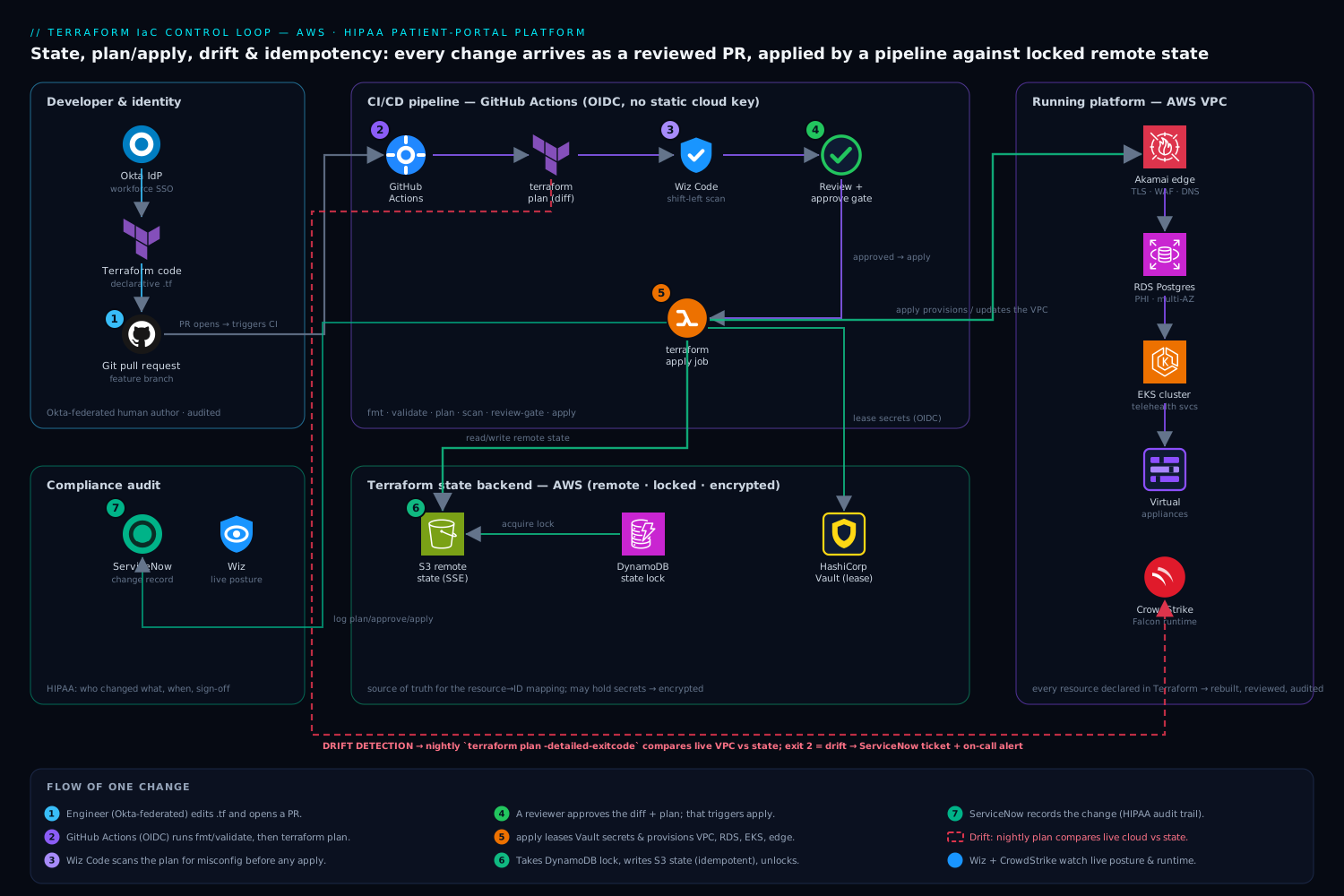
The platform team never runs apply from a laptop against production. Everything flows through a pipeline so that the plan is reviewed, the apply is logged, and the credentials are short-lived. Following the control flow of a single change:
- An engineer edits the Terraform code in a feature branch and opens a pull request. Their identity is Okta federated into the cloud (Okta is the workforce IdP, brokered so cloud IAM sees a first-class role) and into the Git platform — so the author of every infrastructure change is an audited human, not a shared account.
- The pull request triggers GitHub Actions (the team’s CI), which runs
terraform fmt -check,terraform validate, and thenterraform plan. Critically, the runner authenticates to AWS via OIDC — a short-lived token minted for that job — so there is no long-lived cloud key stored in CI to leak. The plan output is posted back as a comment on the PR. - Wiz Code scans the Terraform in the PR for misconfigurations before anything is applied — a database resource declared with public access, an S3 bucket without encryption, an over-broad security group. Catching “this rule exposes the patient database to the internet” at plan time, as a failing check, is infinitely cheaper than catching it in production. This is “shift-left” security in its most literal form: the IaC is the place a misconfiguration is born, so it is the place to kill it.
- A second engineer reviews both the code diff and the plan, then approves. Approval triggers the apply job. The apply runner pulls any real secrets it needs — third-party API tokens, the database’s bootstrap password — from HashiCorp Vault using a short-lived, OIDC-authenticated lease, so secrets are injected at apply time and never written into the repo or the state-backend by hand.
- The apply job acquires the state lock (DynamoDB), runs
terraform applyagainst the remote state in S3, updates state, and releases the lock. The change is now live and the state file reflects it. - Every plan, approval, and apply is recorded as a ServiceNow change record (the apply pipeline opens or updates a change ticket automatically), giving compliance the HIPAA audit trail of who changed which infrastructure, when, and with whose sign-off — without an engineer hand-filling a form.
Around this control loop sits the running platform that the code describes — the VPC, the load balancers (Akamai sits at the edge for TLS, global DNS, WAF and bot protection in front of the portal), the managed database holding patient records, the Kubernetes cluster running the telehealth services, the Moodle instance the hospital uses for staff clinical training, and assorted virtual appliances (a third-party firewall appliance, a fax gateway that still matters in healthcare) — every one of them declared in Terraform so it can be rebuilt, reviewed, and audited the same way.
Idempotency: run it again, get the same answer
Idempotency is the property that running the same operation many times produces the same result as running it once. It is the concept that directly cures the “we both ran it and got two load balancers” failure, and it is a direct consequence of being declarative plus having state.
Because Terraform declares an end state and remembers (in state) what it already built, a second apply with no code changes does nothing — it computes the diff, sees the world already matches, and reports No changes. Your infrastructure matches the configuration. Compare that to the imperative shell script, which would blindly create a second load balancer because it has no memory of the first. Idempotency is what makes Terraform safe to re-run, and “safe to re-run” is what makes it safe to put in a pipeline that might retry, in two engineers’ hands at once, or in a disaster-recovery rebuild.
A short illustration. This Terraform block is idempotent — apply it ten times, end up with exactly one bucket:
resource "aws_db_instance" "patient_records" {
  identifier        = "patient-records-prod"
  engine            = "postgres"
  instance_class    = "db.r6g.large"
  allocated_storage = 200
  storage_encrypted = true            # required for PHI at rest
  multi_az          = true            # HA for clinic hours
}
The imperative equivalent — aws rds create-db-instance ... in a bash script — is not idempotent: the second run errors with “DB instance already exists,” and a naive script that ignores the error or retries can do real damage. The lesson for a junior engineer: prefer the declarative resource over the imperative CLI call precisely because the declarative one is idempotent for free. (Ansible earns its keep the same way — its well-written modules are idempotent, checking “is this package already installed?” before acting, which is why an Ansible playbook is safe to re-run across the fleet while a raw shell script is not.)
Drift: when reality stops matching the code
Drift is what happened in the hospital’s first incident — the on-call engineer who widened a firewall rule by hand. Drift is any divergence between what the code (and state) say should exist and what actually exists in the cloud, caused by a change made outside of Terraform: a console click, a CLI command, another tool, or even the cloud provider auto-modifying something.
Drift is dangerous for two opposite reasons. If Terraform doesn’t know about the manual change, the next apply will revert it — which is what re-broke the firewall rule and paged everyone, because Terraform faithfully restored the world to match the code. But the manual change might have been an important emergency fix, so silently reverting it is its own incident. Conversely, drift can hide a security regression: someone widens a security group in the console, Terraform doesn’t notice until the next run, and for days the patient database is more exposed than the reviewed code says it should be.
The cure is drift detection: regularly comparing real infrastructure against state and flagging the differences. The simplest form is terraform plan run on a schedule against unchanged code — any diff it reports is drift, because the code didn’t change but reality apparently did.
# Nightly drift check in GitHub Actions; non-empty plan == drift == alert
terraform plan -detailed-exitcode -lock-timeout=5m
# exit 0 = no drift, 2 = drift detected, 1 = error
The hospital team runs exactly this nightly. Exit code 2 (drift detected) opens a ServiceNow ticket and posts to the on-call channel, so the firewall-rule scenario now surfaces the next morning as “production has drifted from code — reconcile it” rather than as a 2 a.m. surprise during the next unrelated deploy. The remediation is a human decision: either codify the manual change (update Terraform to match the emergency fix and keep it) or revert it (let the next apply restore the intended state) — but now it is a deliberate choice, not an accident. Defense-in-depth layers two more detectors on top: Wiz continuously monitors the live cloud posture and alerts on dangerous drift like a newly public resource regardless of Terraform’s schedule, and CrowdStrike Falcon runtime sensors on the cluster nodes and virtual appliances catch threats inside the running workloads that no IaC tool would ever see — because drift detection secures the shape of the infrastructure, not what an attacker does once they are on a box.
| Concept | The failure it prevents | The mechanism |
|---|---|---|
| Declarative | Half-applied recipes, “create vs. update?” guesswork | Describe end state; tool computes steps |
| State (remote + encrypted) | Forgetting what you own → duplicate or orphaned resources; leaked secrets | Shared, locked, encrypted source-of-truth mapping |
| Locking | Two engineers racing → duplicates / corrupted state | One writer at a time (DynamoDB / blob lease) |
| Plan/apply | Surprise deletions of production resources | Review the diff before executing it |
| Idempotency | Re-running creates duplicates | Declarative + state → second run is a no-op |
| Drift detection | Silent reverts; hidden security regressions | Scheduled compare of reality vs. state |
Modules: write it once, stamp it everywhere
The hospital has two regions (primary and DR) and three environments (dev, staging, prod). They are not going to copy-paste the same 400 lines of VPC, database, and cluster code six times — that way, the copies drift apart and a fix applied to one is forgotten in the others. The answer is modules: a parameterized, reusable bundle of Terraform that you call with different inputs.
module "telehealth_env" {
  source      = "git::https://github.com/hospital/tf-modules.git//telehealth?ref=v2.4.0"
  environment = "prod"
  region      = "ap-south-1"
  db_size     = "db.r6g.large"   # prod gets bigger; dev passes db.t3.medium
  multi_az    = true             # off in dev to save money
}
Two junior-relevant points. First, pin the module version (ref=v2.4.0, never a floating branch) so that prod’s infrastructure doesn’t silently change because someone merged to the module’s main branch — the same “don’t let it drift on its own” discipline as pinning anything else. Second, modules are how you guarantee dev, staging, and prod are structurally identical (differing only by the inputs you chose to vary, like size and HA), which is what makes “it worked in staging” actually mean something. Modules turn the team’s hard-won correct architecture into a stamp they can press repeatedly and audit once.
Secrets: the one thing that must never be in the code
This is the rule a junior engineer must learn before they ever touch a real repo, and the hospital learned it the hard way once already: never put a secret in your Terraform code or commit it to Git. A database password hardcoded in a .tf file — or worse, in terraform.tfvars checked into the repo — is now in the Git history forever, readable by anyone who ever clones it, and rotating it means rotating it everywhere it leaked. Git history is unforgiving; a secret committed once is a secret compromised.
The pattern the team uses: real secrets live in HashiCorp Vault, and Terraform reads them at apply time via the Vault provider, so the secret flows through memory but is never written into code. Even then, be aware that a secret read into Terraform can land in the state file — which is the final reason the S3 state backend is encrypted, access-controlled, and treated as sensitive as the database itself.
data "vault_kv_secret_v2" "db" {
  mount = "secret"
  name  = "patient-portal/db"
}

# Used to set the initial password; rotated by Vault thereafter, never in Git
resource "aws_db_instance" "patient_records" {
  # ...as above...
  password = data.vault_kv_secret_v2.db.data["bootstrap_password"]
}
The CI runner gets its own short-lived Vault token via OIDC, scoped to exactly the secrets that apply needs — so even the pipeline never holds a long-lived credential. This is the same shift the platform team made everywhere: no static keys, federate or lease everything, and keep the blast radius of any one leak as small as possible.
Operating it day to day
A few habits separate a Terraform setup that survives contact with a real on-call rotation from one that becomes a liability.
Observability of the infrastructure, not just the apply. The code describes the desired shape; you still need to watch the running result. The hospital sends platform and application telemetry to Dynatrace (with Datadog used by one team for its database dashboards), so when an apply changes a load balancer or scales the cluster, the team can see the effect on latency and error rates immediately — and can correlate a metrics regression back to the exact Terraform change and ServiceNow record that caused it. IaC gives you the change record; the monitoring tells you whether the change was good.
Scaling the team, not just the infra. With remote state, locking, modules, and a plan-reviewed pipeline, the four-person team can let a fifth engineer contribute on day one: they open a PR, CI runs the plan, Wiz Code scans it, a teammate reviews the diff, and the pipeline applies it — the system enforces the safety rules so no single person has to remember them. That is the real payoff of these concepts: they are not Terraform trivia, they are how a tiny team operates a regulated platform without heroics.
Explicit tradeoffs
IaC is not free, and a junior should know the costs going in. There is a real learning curve — state, locking, providers, and modules are genuinely more to learn than clicking in a console, and the first few weeks are slower, not faster. The state file is a new thing that can break in new ways (a corrupted or lost state is a worse afternoon than any console mistake), which is the price of the memory that makes idempotency possible. And IaC only protects you if it is the only way changes are made — the moment someone “just quickly” fixes something in the console, drift begins, and the discipline of routing every change through the pipeline is a cultural cost, not a technical one.
The alternatives, and when they win. For a genuine one-time, throwaway experiment, clicking in the console is faster and fine — IaC pays off when an environment must be repeated, reviewed, or recovered, which is almost always but not literally always. Imperative scripting still wins for orchestrating actions inside a machine or for one-shot data migrations, which is why Ansible and shell live alongside Terraform rather than being replaced by it. And managed “click-ops with export” features that generate IaC from existing resources are a reasonable on-ramp for a team adopting Terraform against infrastructure they built by hand — but they generate code that needs cleanup, and they do not retroactively give you the review discipline that is the actual point.
The shape of the win
For the hospital’s four-person platform team, the payoff is not “we use Terraform now.” It is that the two incidents that opened this article cannot happen the same way again: state locking means two engineers can never race into duplicate load balancers, and nightly drift detection means a hand-edited firewall rule surfaces as a reviewed ticket the next morning instead of a 2 a.m. page during an unrelated deploy. Underneath that, every infrastructure change to a HIPAA platform now arrives as a reviewed pull request, with a plan a human approved, secrets pulled from Vault instead of hardcoded, a Wiz Code scan that rejects an exposed database before it exists, and a ServiceNow record an auditor can read. The concepts — declarative, state, plan/apply, idempotency, drift, modules, secrets — are not academic. Each one is a specific 2 a.m. page that a junior engineer will never have to take, because the system was built to make the dangerous thing impossible rather than merely discouraged.
Going deeper
The narrative above is the mental model. This section is the engine room — the mechanics an experienced engineer needs, and the vocabulary that lets you reason about any declarative IaC tool, not only Terraform. Everything here is version-agnostic unless a version is called out; the Terraform baseline is 1.5+.
Desired state vs imperative, precisely
An imperative system executes instructions in order, and the final state of the world is a side effect of those instructions: create_vm(); attach_disk(); open_port(443). The system holds no independent notion of “what should exist” — only “what I was told to run.” A declarative system instead stores a description of the desired end state and owns a reconciler whose entire job is to drive actual state toward that desired state. Terraform, Kubernetes, Crossplane, and AWS CloudFormation are all declarative in exactly this sense; a Bash script full of cloud-CLI calls is imperative.
The distinction is not cosmetic. Because a declarative tool holds the desired state as data, it can diff that data against reality and show you the plan before touching anything. An imperative script cannot show a meaningful diff — it can only list the commands it is about to run, never their net effect on the world. That is why “preview the change” is a first-class feature in every declarative IaC tool and an afterthought in imperative ones. It is also why declarative tools are naturally idempotent and imperative ones are not: the declarative tool re-evaluates “what should exist” every run, while the script blindly re-runs its steps.
The state file as the source of truth
State is a JSON document that maps each resource address in your code (aws_db_instance.patient_records) to the real object in the cloud (its provider, its ID such as patient-records-prod, and a snapshot of its attributes at last refresh). Concretely, a single resource’s state entry stores:
| What state stores | Why Terraform needs it |
|---|---|
| The resource address → real resource ID mapping | So the next run knows that specific object is the one your code owns, rather than creating a new one |
| Last-known attribute values | To compute a fast diff and to feed attributes into other resources without re-reading everything |
| Resource dependencies | To order create/update/destroy correctly, and to walk destroys in reverse |
| Provider + schema version | So the right provider and state-upgrade logic are used |
| Sensitive attribute values (passwords, keys, certs) | Because whatever an attribute contains is stored verbatim — which is why secrets can end up in state |
That last row is the one juniors miss. State is not a redacted summary; it is a faithful record of resource attributes, so an initial database password, a generated private key, or a token read from a secrets manager can all land in terraform.tfstate in plaintext. This is not a Terraform bug — it is the direct cost of the memory that makes idempotency possible. The consequences: the state backend must be encrypted at rest, access-controlled as tightly as the database it describes, and never emailed, pasted into a ticket, or committed to Git. Treat the state file as a secret in its own right.
Because state is the source of truth for the mapping, corrupting or losing it is the worst thing that can happen to a Terraform project — worse than a bad apply, which a plan would have caught. Lose state and Terraform forgets it owns anything; the next apply tries to recreate the whole world (duplicates, name collisions, or an outage). Hence: remote backend, versioning turned on, and a locking mechanism so two runs can never write it at once.
The reconciliation loop: refresh → plan → apply
Every declarative tool runs some version of the same loop. In Terraform it is three moves:
- Refresh — for each resource in state, ask the provider “what does this look like right now?” and update the in-memory state to match reality. This is the step that notices drift: if the console-edited firewall rule differs from state, refresh is where the difference enters the picture. Modern Terraform refreshes as part of
plan; the standaloneterraform refreshcommand is deprecated in favour ofterraform apply -refresh-only, which lets you review and approve state-only updates. - Plan — diff the desired state (your code) against the refreshed state (reality). The output is a set of actions — create, update in place, replace, destroy — plus a summary line like
Plan: 1 to add, 0 to change, 0 to destroy. Nothing has changed yet; a plan is pure reading. - Apply — execute the planned actions against the cloud APIs in dependency order, then write the new reality back into state. If you
applya saved plan file, Terraform executes exactly that plan and refuses if the world has shifted underneath it.
Read the loop as reality in → desired compared → reality out. The reason a second apply with unchanged code does nothing is that after step 1 the refreshed reality already equals the desired state, so step 2 produces an empty plan and step 3 has nothing to do. That is idempotency, mechanically.
Idempotency mechanics
Formally, an operation is idempotent when applying it twice yields the same result as applying it once: f(f(x)) = f(x). Terraform gets this from two properties working together — it is declarative (it re-derives “what should exist” every run) and it has state (it remembers what it already built). Put them together and a re-run refreshes, sees the world already matches, and reports No changes. Your infrastructure matches the configuration.
Two things sharpen the concept:
- Convergence. Each apply moves the world toward desired state and then stops. It is not “do nothing”; it is “do exactly the remaining difference, then be a no-op.” Change the code and the next apply performs that one change — once — after which re-runs are no-ops again. Idempotency is about repeating the same input, not about freezing the infrastructure forever.
- Escape hatches that break it. Not everything in Terraform is idempotent. Impure functions like
timestamp()oruuid()produce a new value every run and cause a perpetual diff (the plan is never empty). Provisioners (local-exec,remote-exec) run imperative commands and are not re-checked for idempotency — Terraform only tracks whether they ran, not whether their effect is still correct.null_resource/terraform_datawithtriggersre-run on cue by design. When a plan is never clean, suspect one of these before you suspect drift.
The declarative dependency graph: implicit vs explicit
You never sequence steps in Terraform; you express relationships, and Terraform builds a DAG (directed acyclic graph) from them, then creates independent branches in parallel and walks the graph in reverse on destroy.
- Implicit dependencies come from references. If a subnet’s config contains
vpc_id = aws_vpc.main.id, Terraform infers the subnet depends on the VPC and creates the VPC first — no annotation needed. Implicit dependencies are precise (they point at the exact attribute) and are the strongly preferred form. - Explicit dependencies use
depends_onfor ordering the graph cannot see from references — for example, an application that must not start until an IAM policy exists, even though the app resource never references that policy. Reach fordepends_ononly when there is a real hidden ordering; over-using it serialises work that could have run in parallel and hides the true data flow.
resource "aws_iam_role_policy" "portal" {
  # ...grants the portal permission to read the records bucket...
}

resource "aws_instance" "portal" {
  # ...no attribute of the policy is referenced here, but the app
  # will fail at boot if the policy is not in place first...
  depends_on = [aws_iam_role_policy.portal]
}
Because ordering falls out of the graph, “declarative” is what buys you correct create/update/destroy sequencing for free — the thing an imperative script has to get right by hand every time.
Immutable replacement vs in-place update
Not every change can be made in place. Whether Terraform updates a resource or replaces it depends on the cloud API: some attributes are mutable (change a tag, resize a disk) and some are not (an instance’s AMI, a resource’s immutable name). The plan symbols tell you which:
| Symbol | Meaning | What to watch for |
|---|---|---|
+ |
Create a new resource | Expected for genuinely new things |
~ |
Update in place | Usually safe; no downtime |
- |
Destroy | Never a surprise on a stateful resource |
-/+ |
Destroy then create (replace) | The dangerous one: downtime, and data loss on databases unless snapshotted |
<= |
Read a data source | Read-only; harmless |
When a replacement is unavoidable but you cannot take downtime, lifecycle { create_before_destroy = true } builds the new resource before removing the old (it shows as +/-). For resources that must never be destroyed by an errant plan — a production database — lifecycle { prevent_destroy = true } turns a stray -/+ into a hard error instead of an outage. And when you are only renaming or refactoring in code (not actually replacing infrastructure), a moved block tells Terraform “these are the same object under a new address” so it updates state instead of destroying and recreating.
Mutable vs immutable infrastructure
A level up from a single resource, this is a philosophy about whole servers:
- Mutable (“pets”). You SSH into a running server and patch it in place. Over months each server accumulates hand-edits nobody recorded — a snowflake — and drift is the natural state of things.
- Immutable (“cattle”). You never modify a running server. To change it you bake a fresh image (with a tool such as Packer), then replace the old instances with new ones. Nothing lives long enough to drift.
Terraform leans immutable for compute — change a launch template or AMI and instances are replaced, not patched — and this is a big reason IaC shops drift less: if servers are rebuilt rather than edited, there is no in-place change for drift to sneak into. Immutability turns “reconcile the differences” into “roll forward to a known-good build.”
Push vs pull reconciliation
Who runs the reconciler, and how often?
- Push. An operator or CI runner executes the tool, which pushes the computed changes to the cloud APIs and then exits. Terraform, CloudFormation, and Ansible are push-based. Reconciliation happens when you run it — which is precisely why drift requires a scheduled plan to catch, since nothing is watching between runs.
- Pull. Agents running inside (or beside) the target continuously fetch desired state and reconcile locally, forever. Kubernetes controllers, Crossplane, and GitOps engines like Argo CD and Flux are pull-based: they close drift continuously and self-heal a hand-edit within seconds, at the cost of an always-running control plane to operate.
Neither is “better.” Push gives you a crisp change event and a simple mental model; pull gives you continuous self-healing. Many mature platforms combine them — Terraform (push) to provision the cluster and its cloud dependencies, a GitOps controller (pull) to keep what runs inside the cluster reconciled.
Why IaC at all — the three-word answer
Strip away the tooling and IaC earns its keep for three reasons, and it is worth being able to name them:
- Repeatability. A module stamps dev, staging, and prod as structurally identical environments that differ only by the inputs you chose to vary. “It worked in staging” finally means something, because staging is not a lookalike — it is the same code with smaller numbers.
- Review. Every change arrives as a diff a second human approves, with a plan attached, producing an audit trail for free. Infrastructure changes become as reviewable as application code — and for a regulated platform, the pull request is the compliance record.
- Disaster recovery. The repository plus the state file can rebuild the entire platform in a new region. The code is simultaneously the documentation, the runbook, and the recovery plan — none of which drift apart, because they are the same artifact.
Everything in this course is, ultimately, in service of those three properties. When you are unsure whether some IaC practice is worth the ceremony, ask which of repeatability, review, and recovery it protects.
Practice challenges
Work these in order — they escalate from reading a plan to importing live infrastructure. Try each before opening the solution. No cloud account is required; these are pen-and-paper reasoning and manifest-reading exercises.
1. Read the plan (beginner). A plan ends with Plan: 0 to add, 1 to change, 2 to destroy while you only meant to add a tag. Which symbol next to each resource would you scan for, and should you apply this on a Friday afternoon?
<details> <summary>Solution</summary>
Scan the per-resource lines for - (destroy) and especially -/+ (replace). Two destroys you did not intend means the plan does not match your mental model — stop and investigate; do not apply, Friday or otherwise. A one-tag edit should read 0 to add, 1 to change, 0 to destroy.
Why: the summary line and the symbols are Terraform warning you before execution; the whole point of plan is to catch surprise destroys while they are still free to cancel. </details>
2. Spot the non-idempotent resource (beginner–intermediate). Every nightly plan reports a change even though nobody edited the code. The suspect block sets an attribute to "deployed-${timestamp()}". Why is the plan never empty, and how do you make it idempotent?
<details> <summary>Solution</summary>
timestamp() returns a new value on every evaluation, so the desired state literally differs each run and the diff can never be empty — a perpetual diff. Fixes: remove the impure function; compute the value once outside Terraform and pass it as a variable; or, if the value genuinely should not force updates, add lifecycle { ignore_changes = [that_attribute] }.
Why: idempotency requires the same input each run. An impure function changes the input every time, so Terraform correctly (and annoyingly) sees a change. </details>
3. Cause drift, then detect it (intermediate). A teammate widens a security group in the console. Nobody touches the code. What does the next ordinary terraform plan show, and what single command — schedulable in CI — turns “drift” into an automated signal? Which exit code means “drift found”?
<details> <summary>Solution</summary>
During plan, refresh reads the real security group, sees it is wider than state, and the plan proposes to revert it back to the code’s narrower rule (~ update in place). To automate detection, schedule terraform plan -detailed-exitcode. Exit code 0 = no drift, 2 = drift detected, 1 = error — so a nightly job alerts whenever it sees 2.
Why: drift is any gap between code/state and reality; a scheduled plan against unchanged code surfaces exactly that gap, and -detailed-exitcode makes it machine-readable for an alert.
</details>
4. Remediate drift two ways (intermediate). That widened firewall rule turns out to have been a legitimate emergency fix during an incident. Give the two valid remediations and what you would do for each.
<details> <summary>Solution</summary>
- Codify it — update the Terraform to match the emergency change (widen the rule in code), commit, and let apply keep it. Choose this when the manual change was correct and should stay.
- Revert it — leave the code as-is and let the next
applyrestore the narrower reviewed rule. Choose this when the manual change was a mistake or a temporary hack.
Either way it is now a deliberate, reviewed decision, not a silent 2 a.m. surprise.
Why: drift remediation is a human choice between “reality was right, fix the code” and “code was right, fix reality” — the tool cannot know which; it can only make the gap visible. </details>
5. Implicit vs explicit dependency (advanced). Resource B must be created after resource A, but B’s configuration never references any attribute of A. Write the dependency, and explain when you would instead prefer an implicit one.
<details> <summary>Solution</summary>
Use depends_on = [A_resource_address] on B, because the graph cannot infer the ordering from a reference that does not exist. Prefer an implicit dependency whenever B can legitimately consume an attribute of A — e.g. reference A.id in one of B’s fields — because references are precise (they pin the exact attribute) and self-documenting, while depends_on is a blunt “just go after this.”
Why: Terraform orders work from the dependency graph; references build that graph accurately and in parallel, whereas depends_on is the manual override you use only for orderings references cannot express.
</details>
6. Import live infrastructure without recreating it (advanced). A database was built by hand months ago and must now be managed by Terraform. If you just write the resource block and apply, what happens — and what is the correct 1.5+ workflow to avoid it?
<details> <summary>Solution</summary>
Writing the block and applying makes Terraform try to create a new database — it has no state entry for the existing one — which either duplicates it or fails on a name collision. Instead, bring it under management with a config-driven import block (Terraform 1.5+):
import {
  to = aws_db_instance.patient_records
  id = "patient-records-prod"   # the real resource identifier
}
Run terraform plan (optionally -generate-config-out=generated.tf to scaffold the matching resource block), reconcile the generated config with the live settings until the plan is clean, then terraform apply to write the existing object into state. No resource is created or destroyed.
Why: import populates state’s mapping so Terraform recognises the object it already has, instead of assuming anything not in state must be built from scratch. </details>
Common beginner mistakes
These are misconceptions, not typos — each one is a wrong mental model that leads a beginner to a bad decision. The fix is to replace the model.
-
“Idempotent means nothing ever changes.” Wrong. Idempotent means re-running the same configuration is a no-op; it says nothing about what happens when you change the configuration. Edit the code and apply, and Terraform will make exactly that change — once. Right model: idempotency is about repeating identical input, not about freezing the world.
-
“State is just a cache — I can delete it and Terraform will rebuild it.” Dangerously wrong. State is the source of truth for the mapping between your code and real resource IDs. Delete it and Terraform forgets it owns anything; the next apply tries to create duplicates or collides on names. Right model: state is authoritative memory. Back it up, version it, lock it, and never hand-delete it. If it is truly lost, you rebuild it with
terraform import, not by re-applying. -
“I’ll just fix it quickly in the console, it’s only one click.” That one click is where drift is born. Now code and reality disagree, and the next apply either reverts your fix (surprise incident) or you have to remember to codify it. Right model: every change goes through code, or you are knowingly signing up for a reconciliation conversation later.
-
“The plan is long, but it probably just adds my thing — I’ll apply.” A plan is only safe if you read it. Destroys and
-/+replacements hide in the middle of a hundred lines; the summary line (N to add, N to change, N to destroy) is there so you never have to. Right model: read the summary, and grep the body fordestroyand-/+, every single apply. -
“Secrets in
terraform.tfvarsare fine — it’s not the main code.” If that file is committed, the secret is in Git history forever, readable by anyone who ever clones the repo. And even a secret referenced from a vault can land in the state file. Right model: secrets live in a dedicated secrets manager, are read at apply time, and the state backend is treated as sensitive as the database it describes. -
“Terraform runs my code.” Subtly wrong, and the root of much confusion. Terraform applies the diff between your code and the refreshed state — not your file line by line. If state is wrong, the apply is wrong even though the code is perfect. Right model: think in diffs (desired vs actual), not in “execute my file.”
Glossary
| Term | Plain-language meaning |
|---|---|
| Infrastructure as Code (IaC) | Describing servers, networks, and services in version-controlled text files that a tool turns into real infrastructure. |
| Declarative | You describe the desired end state; the tool figures out the steps. Terraform’s model. |
| Imperative | You list the steps yourself and the result is a side effect of running them. A shell script’s model. |
| Resource | One managed thing — a VM, a database, a firewall rule — declared as a block in code. |
| Provider | The plugin that teaches Terraform how to talk to a specific platform’s API (AWS, Azure, GCP, Vault, and so on). |
| Data source | A read-only lookup of something Terraform does not manage, so you can reference its attributes. Shown as <= in a plan. |
| State / state file | Terraform’s JSON memory mapping each code resource to its real cloud object and last-known attributes. The map, not the territory. |
| Remote state | State stored in a shared, locked backend (S3, Azure Blob, GCS, Terraform Cloud) rather than on a laptop, so a team shares one truth. |
| Backend | Where and how state is stored and locked. |
| State locking | A mutex that lets only one apply write state at a time, so two runs cannot corrupt it or race into duplicates. |
| Plan | A dry run that diffs desired state against refreshed reality and prints what it would do. Changes nothing. |
| Apply | Executes the plan’s actions and writes the new reality back into state. |
| Destroy | Removes the resources tracked in state — used for tearing down ephemeral environments. |
| Refresh | Reading each managed resource’s current real state so the plan diffs against reality, not a stale snapshot. Where drift is noticed. |
| Drift | Any gap between what code/state say should exist and what actually exists, caused by a change made outside Terraform. |
| Drift detection | Regularly comparing reality to state (e.g. a scheduled plan -detailed-exitcode) and alerting on the difference. |
| Idempotency | Running the same operation many times has the same effect as running it once — a second apply with unchanged code is a no-op. |
| Reconciliation | The tool’s core loop of driving actual state toward desired state. |
| Convergence | Each apply moves the world toward desired state and then stops; repeated applies stay put. |
| Perpetual diff | A plan that is never empty, usually caused by an impure value (timestamp(), uuid()) or a provisioner. |
| Dependency graph (DAG) | The ordering Terraform builds from resource references so it creates, updates, and destroys things in the right sequence and in parallel where safe. |
| Implicit dependency | Ordering inferred automatically because one resource references another’s attribute. Preferred. |
Explicit dependency (depends_on) |
A manually declared ordering for dependencies the graph cannot see from references. |
In-place update (~) |
Changing a resource without recreating it. |
Replacement (-/+) |
Destroying then recreating a resource because an attribute cannot change in place — risks downtime and data loss. |
create_before_destroy |
A lifecycle rule that builds the new resource before removing the old, to avoid downtime on replacement. |
prevent_destroy |
A lifecycle rule that turns an accidental destroy of a protected resource into a hard error. |
| Immutable infrastructure | Servers are never patched in place; you bake a new image and replace them (“cattle”). |
| Mutable infrastructure | Servers are edited in place over time and accumulate undocumented changes (“pets”, “snowflakes”). |
| Push model | An operator or CI runs the tool, which pushes changes and exits (Terraform, CloudFormation, Ansible). |
| Pull model | Agents inside the target continuously fetch desired state and self-heal (Kubernetes, Crossplane, Argo CD, Flux). |
| Module | A parameterized, reusable bundle of Terraform you call with different inputs to stamp identical environments. |
| Secrets in state | The hazard that sensitive attribute values are stored verbatim in state — the reason the backend must be encrypted and access-controlled. |
| Blast radius | How much can break or be exposed if one change, credential, or resource goes wrong — kept small on purpose. |
import |
Bringing an existing, hand-built resource under Terraform management by writing it into state without recreating it. |
moved block |
A refactoring directive telling Terraform two addresses are the same object, so a rename updates state instead of replacing infrastructure. |