Two questions decide whether anything you build on AWS is secure: who is allowed to do this? and is the data locked down? The first is IAM — the identity and permission engine that gates every single API call in the account. The second, for the most common data store on the planet, is S3 — and the difference between a private, encrypted, versioned bucket and the next headline breach is about fifteen lines of Terraform that most people never write. This lesson teaches both halves and the place they meet: an EC2 workload that assumes an IAM role, carries it via an instance profile, and reads objects from a KMS-encrypted bucket whose own policy and Block Public Access settings lock everyone else out.
We treat IAM and S3 as one story because in real infrastructure they are inseparable. An IAM role with s3:GetObject is useless if the bucket denies it; a perfectly hardened bucket is useless if the role can’t reach it; and an object encrypted with a customer KMS key stays unreadable until the caller also holds kms:Decrypt — the single most-missed permission in all of AWS. You will learn to reason about the whole chain: identity-based policy on the role, resource-based policy on the bucket, the KMS key policy behind the encryption, and the trust policy that lets EC2 become the role in the first place. Then you will build every piece with Terraform and prove it works with the aws CLI.
This is a relentlessly hands-on lesson. It assumes you already know core Terraform — HCL, resources, variables, for_each, state, the plan/apply loop — from the course’s foundation tier, and that you can already authenticate the AWS provider and point Terraform at a remote S3/DynamoDB backend, which the Terraform on AWS: getting started, provider authentication & the S3/DynamoDB backend lesson sets up. Here we take that starting point and build the identity-and-storage core that almost every later AWS lesson reuses.
In a nutshell
Level: Senior · Time: ~72 min
Picture a large office building with a badge system. IAM is that badge system for your AWS account — the thing at every door that decides who is allowed to do this? before any action happens. In this analogy the pieces line up cleanly: an IAM role is a job title, not a person — “warehouse picker”, “night-shift electrician” — and a policy is the set of doors that title is allowed to open. Nobody is born wearing a badge; the trust policy is the rule at the badge desk that says which people — or which machines — are even allowed to clip on this particular badge, which is exactly what lets an EC2 instance “become” a role. An instance profile is just the lanyard that physically carries one badge onto the machine. And because AWS is deny-by-default, a badge only ever adds doors it can open; you never start with everything and take doors away.
S3 bucket policies are a second lock on the room itself. Your badge (the IAM policy) might say “this title may open storage rooms”, but the sensitive room can carry its own lock that re-checks your badge at the door — and can also refuse anyone who didn’t arrive through the secure entrance (that is the TLS-only rule). Block Public Access is the building-wide rule that no room may ever be propped open to the street, overriding any door left unlocked by mistake. And the encryption key (KMS) is a safe bolted inside the room whose combination is managed separately: holding the room key does not open the safe — you need kms:Decrypt as well as s3:GetObject, which is the single most-forgotten permission in all of AWS.
Get these two systems right once — a least-privilege badge and a hardened, self-locking, self-encrypting room — and you have the template almost every AWS-with-Terraform project copies forever after. Get them wrong and you have the next headline breach. Everything below is that build, in Terraform, proven with the aws CLI.
Before you start you should be comfortable with core Terraform (HCL, resources, variables, for_each, state, the plan/apply loop) and able to authenticate the AWS provider — the getting-started lesson covers that. You do not need prior IAM expertise; this lesson builds the mental model from scratch.
After this lesson you will be able to:
- Reason like AWS’s authorization engine — walk the deny-by-default, explicit-deny-wins evaluation and predict any
AccessDeniedbefore you hit it. - Write policies the idiomatic way with the
aws_iam_policy_documentdata source instead of brittle heredoc JSON. - Build an assumable role with a correct EC2 trust policy, attach a least-privilege permission policy, and hand it to a machine via an instance profile.
- Stand up a hardened S3 bucket using the modern split resources — versioning, SSE-KMS, all four Block Public Access flags,
BucketOwnerEnforced, lifecycle, and a TLS-only bucket policy. - Debug the classic traps — the missing
kms:Decrypt, theListBucket-versus-GetObjectARN split, and the cross-account “both must allow” rule.
What you’ll build
The scenario is the one every application team hits in week one: you have an EC2-hosted service that needs to read configuration files, model artifacts, or user uploads from S3, and you must do it without baking an access key into the AMI, without making the bucket public, and without granting the box more than the one read it actually needs. That is the canonical AWS pattern — workload identity via an instance profile, least-privilege via a scoped IAM policy, and a bucket hardened by default — and getting it right once gives you a template you will copy into every service afterwards.
Concretely, by the end you will have produced a small root module — versions.tf, providers.tf, variables.tf, main.tf, outputs.tf — that creates, in one terraform apply: a customer-managed KMS key (with rotation) for encryption; a private S3 bucket whose name is globally unique, with versioning on, SSE-KMS default encryption, all four Block Public Access flags on, ACLs disabled (BucketOwnerEnforced), a lifecycle rule that tiers objects to Infrequent Access then Glacier and expires old versions, and a bucket policy that denies any non-TLS request and explicitly allows just the app role; an IAM role whose trust policy lets EC2 assume it; a least-privilege identity policy — built with aws_iam_policy_document — granting exactly s3:GetObject, s3:ListBucket, and kms:Decrypt; and an instance profile that hands that role to an EC2 instance. Then you will init, plan, apply, verify each control with the aws CLI, and destroy cleanly — with the two destroy traps (a non-empty versioned bucket, and a KMS key that only schedules deletion) called out.
Why Terraform for identity and storage rather than the console, a pile of aws commands, or CloudFormation? Because IAM and S3 are exactly where click-ops rots: a bucket made “temporarily” public in the console three years ago is still public; an IAM policy pasted by hand drifts from its twin in the next account; nobody can diff what’s live against what was intended. Terraform gives you a declarative, reviewed, plan-before-apply description of every policy statement and every bucket flag, with a state file that detects drift and a module system that makes the pattern reusable across accounts. Here is the honest comparison for this task — provisioning and continuously governing IAM identities and S3 buckets:
| Approach | Declarative? | Idempotent | Plan preview | Drift detection | Policy as reviewed code | Best for |
|---|---|---|---|---|---|---|
| AWS Console | No (click-ops) | No | No | None | No | Learning, one-off inspection |
aws CLI scripts |
No (imperative) | Rarely | No | None | No | Glue, quick fixes, bootstrap |
| CloudFormation | Yes (JSON/YAML) | Yes | Change sets | Drift detection (manual) | Yes (AWS-only) | AWS-only shops, StackSets |
| CDK | Imperative → CFN | Yes | cdk diff |
Via CloudFormation | Yes (in a real language) | Teams wanting a programming language |
Terraform (aws) |
Yes (HCL) | Yes | terraform plan |
plan / refresh |
Yes, multi-cloud | Repeatable, reviewable, portable IaC |
The architecture you are wiring has five stages left to right — Terraform authors the policy, the role carries it, EC2 wears the role, S3 stores the data, and KMS encrypts it — and the diagram below is the mental model to keep open for the rest of the lesson.
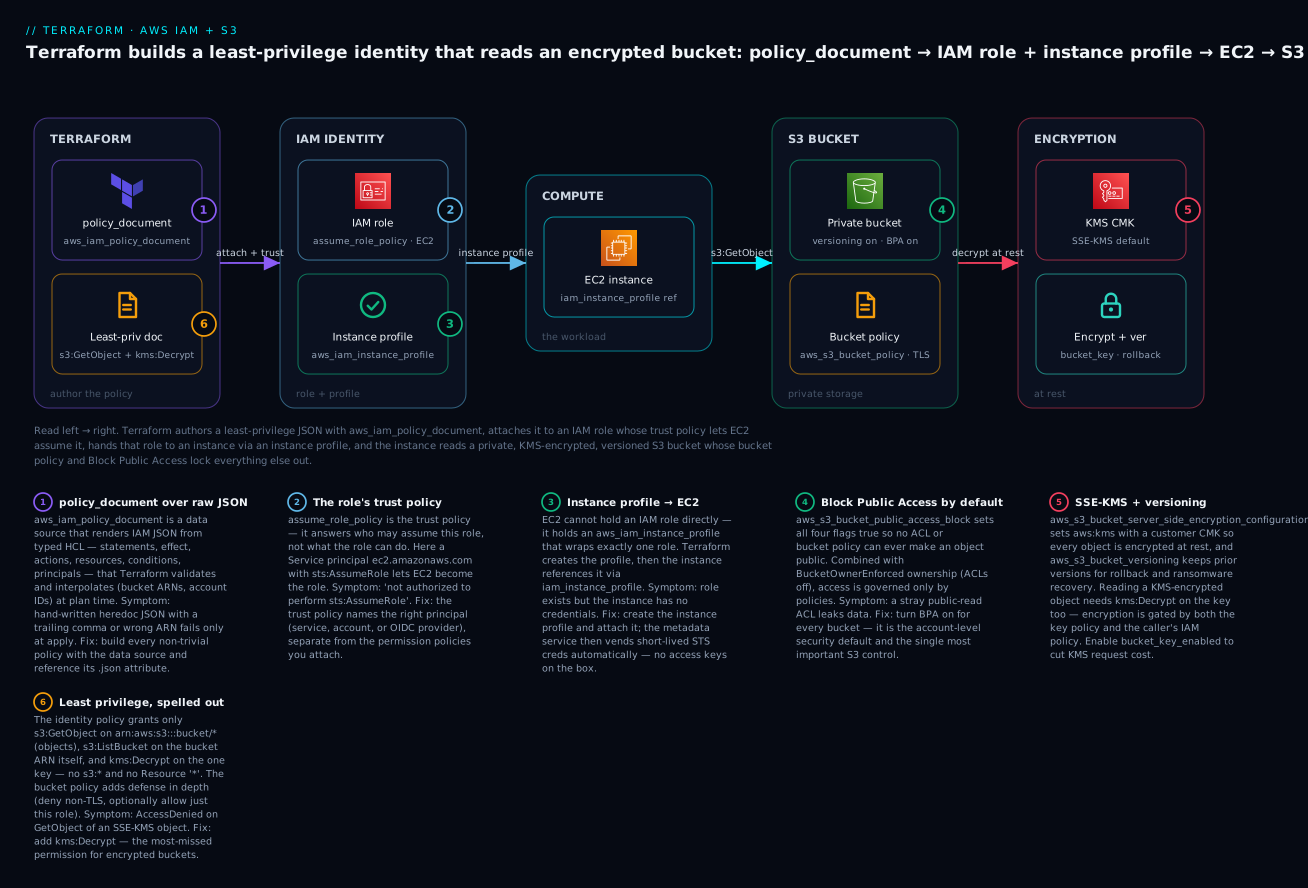
Reading it left to right: Terraform renders a least-privilege JSON with aws_iam_policy_document, attaches it to an IAM role whose trust policy admits the EC2 service, wraps the role in an instance profile handed to an EC2 instance, which then reads a private, versioned, Block-Public-Access-locked S3 bucket — every object encrypted with a KMS CMK and every request forced onto TLS by the bucket policy. The six badges mark the decisions that trip people up: building policies with the data source instead of raw JSON, the role’s trust policy, the instance-profile-to-EC2 hop, Block Public Access as the default, SSE-KMS plus versioning, and least privilege spelled out (including the kms:Decrypt that everyone forgets). Each is a section below.
The IAM model: identities, policies and how a request is evaluated
Before any HCL, you have to be able to reason about IAM the way AWS’s authorization engine does, because every “AccessDenied” you will ever debug is the engine telling you it followed its rules and you didn’t. IAM has exactly two kinds of thing — principals (who is calling) and policies (what is allowed) — and a small, deterministic algorithm that combines them.
A principal is an identity that makes a request: an IAM user, an IAM role session (the temporary credentials you get after assuming a role), the account root, or an AWS service acting on your behalf (like ec2.amazonaws.com). A policy is a JSON document of statements, each of which says Allow or Deny some Actions on some Resources, optionally for some Principals and under some Conditions. The crucial split is where the policy is attached, because that determines its type:
| Policy type | Attached to | Answers | Terraform resource | Example |
|---|---|---|---|---|
| Identity-based (managed) | User, group, role | “What can this identity do?” | aws_iam_policy + _attachment |
Reusable S3ReadOnly policy on many roles |
| Identity-based (inline) | One user/group/role | “What can only this identity do?” | aws_iam_role_policy |
A one-off grant that lives and dies with the role |
| Resource-based | The resource itself | “Who may touch this resource?” | aws_s3_bucket_policy, KMS key policy, aws_sqs_queue_policy |
A bucket policy naming a cross-account role |
| Trust policy | A role (special resource-based) | “Who may assume this role?” | assume_role_policy on aws_iam_role |
Let EC2 or an OIDC provider become the role |
| Permissions boundary | User or role (a ceiling) | “What is the most this identity could ever do?” | permissions_boundary arg |
Cap what a delegated admin can grant |
| Service control policy (SCP) | An Organizations OU/account | “What is allowed anywhere in this account?” | aws_organizations_policy |
Org-wide guardrail: deny leaving a region |
The whole IAM surface, expressed as Terraform resources, is worth pinning up front — this is the IAM resource map you will reach for constantly:
| Terraform resource | AWS object | What it is | Notes / gotchas |
|---|---|---|---|
aws_iam_user |
IAM user | A long-lived human/service identity | Prefer roles + SSO; users mean long-lived keys |
aws_iam_group |
IAM group | A bucket of users sharing policies | Groups can’t be principals; they only hold users |
aws_iam_access_key |
Access key | Long-lived secret for a user | ⚠️ Avoid; rotate if unavoidable; never for workloads |
aws_iam_role |
IAM role | An assumable identity with a trust policy | The workhorse — for services, cross-account, federation |
aws_iam_policy |
Customer-managed policy | A standalone, reusable, versioned policy | Attach to many identities; ARN-referenced |
aws_iam_role_policy |
Inline role policy | A policy embedded in one role | No separate ARN; deleted with the role |
aws_iam_role_policy_attachment |
Attachment link | Binds a managed policy ARN to a role | Use for both customer and AWS-managed policies |
aws_iam_role_policies_exclusive |
Attachment guard | Declares the full set of inline policies | Detects/removes out-of-band policies (drift) |
aws_iam_instance_profile |
Instance profile | Container that lets EC2 hold a role | One role per profile; EC2 references the profile |
aws_iam_openid_connect_provider |
OIDC provider | Trust anchor for federated tokens | Basis of GitHub-Actions OIDC and EKS IRSA |
data.aws_iam_policy_document |
(none — renders JSON) | The idiomatic policy builder | Not a resource; a data source that emits .json |
How a request is actually evaluated
When a principal calls an API, AWS gathers every policy that could apply — the identity-based policies on the caller, any resource-based policy on the target, the permissions boundary, any session policy, and any SCP — and runs a fixed decision:
| Step | Rule | Outcome |
|---|---|---|
| 1 | Explicit Deny in any applicable policy |
Denied — an explicit deny always wins, full stop |
| 2 | SCP does not allow the action | Denied (org guardrail) |
| 3 | Permissions boundary does not allow it | Denied (ceiling) |
| 4 | No policy contains an explicit Allow |
Denied (implicit deny — the default) |
| 5 | An explicit Allow exists and nothing denies |
Allowed |
Two consequences shape every policy you write. First, everything is denied by default — IAM is deny-by-default, so a policy only ever adds permissions; you never need to “allow everything then subtract.” Second, an explicit Deny is absolute — you cannot override it with an Allow anywhere, which is exactly why the aws:SecureTransport deny in a bucket policy is bulletproof. There is one important asymmetry between identity- and resource-based policies for same-account access: if the caller and the resource are in the same account, an Allow in either the identity policy or the resource policy is sufficient. For cross-account access, you need an Allow in both — the identity policy in the caller’s account and the resource policy in the resource’s account. That single rule explains most cross-account S3 and KMS puzzles.
Writing policies the idiomatic way: aws_iam_policy_document
An IAM policy is JSON, and you can produce that JSON three ways in Terraform. Only one of them is the right default. Here they are, worst to best:
# 1) Heredoc raw JSON — brittle: no validation, manual escaping, string interpolation
resource "aws_iam_policy" "bad" {
  name   = "read-bucket"
  policy = <<-EOT
    {
      "Version": "2012-10-17",
      "Statement": [{
        "Effect": "Allow",
        "Action": "s3:GetObject",
        "Resource": "${aws_s3_bucket.app.arn}/*"
      }]
    }
  EOT
}

# 2) jsonencode() — HCL-native, no escaping, but still a hand-built object you must get right
resource "aws_iam_policy" "ok" {
  name = "read-bucket"
  policy = jsonencode({
    Version = "2012-10-17"
    Statement = [{
      Effect   = "Allow"
      Action   = "s3:GetObject"
      Resource = "${aws_s3_bucket.app.arn}/*"
    }]
  })
}

# 3) aws_iam_policy_document data source — validated, typed, composable (the idiomatic way)
data "aws_iam_policy_document" "good" {
  statement {
    sid       = "ReadObjects"
    effect    = "Allow"
    actions   = ["s3:GetObject"]
    resources = ["${aws_s3_bucket.app.arn}/*"]
  }
}
resource "aws_iam_policy" "good" {
  name   = "read-bucket"
  policy = data.aws_iam_policy_document.good.json
}
The three approaches, weighed:
| Approach | Validation | Escaping | Composability | Version pinned | When to use |
|---|---|---|---|---|---|
| Heredoc JSON | None — errors surface only at apply |
Manual (quotes, commas) | None | You must hard-code "2012-10-17" |
Never, except pasting a policy verbatim once |
jsonencode() |
HCL syntax only, not IAM semantics | Automatic | Low (it’s one object) | You set Version yourself |
Tiny trust policies; quick snippets |
aws_iam_policy_document |
HCL + structural IAM checks | Automatic | High — source_policy_documents, override_policy_documents, for_each on statements |
Adds Version automatically |
Default for every non-trivial policy |
Why the data source wins in practice: it lets Terraform interpolate real ARNs and account IDs as first-class values (no string-concatenation bugs), it can merge documents (source_policy_documents to layer a base policy, override_policy_documents to patch statements by sid), and you can generate statements with dynamic "statement" blocks. The document’s arguments map one-to-one onto IAM’s JSON, which is exactly why it’s easy to read:
aws_iam_policy_document element |
IAM JSON key | Meaning | Notes |
|---|---|---|---|
statement { } (repeatable) |
Statement[] |
One permission rule | Repeat the block per rule |
sid |
Sid |
Statement label | Unique within a policy; handy for overrides |
effect |
Effect |
"Allow" or "Deny" |
Defaults to Allow if omitted |
actions / not_actions |
Action / NotAction |
API actions this covers | e.g. ["s3:GetObject","s3:ListBucket"] |
resources / not_resources |
Resource / NotResource |
ARNs the actions apply to | Object ARNs need the /* suffix |
principals { } / not_principals { } |
Principal |
Who (resource-based & trust only) | type = AWS / Service / Federated + identifiers |
condition { } |
Condition |
When it applies | test, variable, values |
Conditions are where least-privilege gets surgical, and a handful of operators cover most real policies:
| Condition operator | Common key | What it constrains | Example use |
|---|---|---|---|
Bool |
aws:SecureTransport |
Request over TLS or not | Deny plaintext access to a bucket |
StringEquals |
s3:x-amz-server-side-encryption |
Exact string match | Force SSE-KMS on PutObject |
StringLike |
s3:prefix |
Wildcard match | Restrict ListBucket to one prefix |
ArnLike |
aws:SourceArn |
ARN pattern | Scope a service principal to one source |
IpAddress |
aws:SourceIp |
CIDR match | Office-IP-only access |
StringEquals |
aws:PrincipalOrgID |
Caller’s Org | Allow only identities in your Organization |
DateGreaterThan |
aws:CurrentTime |
Time window | Time-boxed break-glass access |
IAM roles, trust policies and instance profiles
A role is an identity nobody logs into — it has no password and no long-lived keys. Instead it has a trust policy (assume_role_policy) that names who may assume it, and when they do, AWS STS hands them temporary credentials that expire in an hour or so. This is the beating heart of secure AWS: EC2 instances, Lambda functions, EKS pods, CI pipelines, and cross-account access all work by assuming a role and getting short-lived creds — no secrets at rest.
The trust policy is separate from and orthogonal to the permission policies. A role has exactly one trust policy answering who can become me, and zero-or-more permission policies (managed and/or inline) answering what I can do once assumed. The trust policy’s principals block is what varies by use case:
| Use case | Principal type |
identifiers |
Trust policy action | Notes |
|---|---|---|---|---|
| EC2 instance | Service |
ec2.amazonaws.com |
sts:AssumeRole |
Delivered to the box via an instance profile |
| Lambda function | Service |
lambda.amazonaws.com |
sts:AssumeRole |
Set as the function’s role |
| ECS task | Service |
ecs-tasks.amazonaws.com |
sts:AssumeRole |
Task role vs execution role |
| Cross-account | AWS |
arn:aws:iam::<acct>:root or a role ARN |
sts:AssumeRole |
Pair with an Allow in the other account |
| GitHub Actions (OIDC) | Federated |
The OIDC provider ARN | sts:AssumeRoleWithWebIdentity |
Condition on sub/aud claims; no stored secret |
| EKS pods (IRSA) | Federated |
The cluster OIDC provider ARN | sts:AssumeRoleWithWebIdentity |
Condition on the ServiceAccount subject |
Two of those — GitHub-Actions OIDC and EKS IRSA (IAM Roles for Service Accounts) — deserve a note because they are the modern way to give CI and Kubernetes AWS access without any secret at rest: an external OIDC identity provider issues a short-lived token, and the trust policy accepts it if a Condition matches the token’s sub claim. IRSA in particular is a whole topic of its own — the OIDC provider, the ServiceAccount annotation, the pod-identity webhook — and this course covers it in a dedicated EKS lesson; here we focus on the EC2 case, which is the simplest trust policy of all.
Here is the EC2 trust policy, built with the data source and wired to a role:
data "aws_iam_policy_document" "ec2_trust" {
  statement {
    sid     = "EC2AssumeRole"
    effect  = "Allow"
    actions = ["sts:AssumeRole"]
    principals {
      type        = "Service"
      identifiers = ["ec2.amazonaws.com"]
    }
  }
}

resource "aws_iam_role" "app" {
  name               = "kloudvin-dev-app"
  assume_role_policy = data.aws_iam_policy_document.ec2_trust.json  # the TRUST policy
}
Attaching permissions: managed vs inline
Once the role exists, you grant it permissions. There are two shapes, and choosing correctly matters for reuse and for drift:
| Method | Terraform | Reusable across identities? | Drift behaviour | Use when |
|---|---|---|---|---|
| Managed policy + attachment | aws_iam_policy then aws_iam_role_policy_attachment |
Yes — one policy ARN, many roles | Attachment is its own resource; extra attachments aren’t removed unless you use ..._exclusive |
The permission set is shared or you want to version it |
| Inline policy | aws_iam_role_policy |
No — lives inside one role | Deleted with the role; tightly coupled | A one-off grant that should never outlive the role |
| AWS-managed policy | aws_iam_role_policy_attachment to an AWS ARN |
Yes (AWS owns it) | You don’t control its contents | Rarely — most are too broad; prefer your own |
The rule of thumb: customer-managed policy + attachment for anything reusable or reviewed on its own; inline only for a grant so specific it should die with the role. Reach for AWS-managed policies (arn:aws:iam::aws:policy/...) sparingly — AmazonS3FullAccess is the opposite of least privilege.
Instance profiles: how EC2 wears a role
Here is the subtlety that confuses everyone: EC2 cannot reference an IAM role directly. It references an instance profile, which is a thin container holding exactly one role. Terraform makes the profile explicit (the console hides it by auto-creating one behind the scenes):
resource "aws_iam_instance_profile" "app" {
  name = "kloudvin-dev-app"
  role = aws_iam_role.app.name   # wraps exactly one role
}

# ... and the EC2 instance references the PROFILE, not the role:
# resource "aws_instance" "app" {
#   iam_instance_profile = aws_iam_instance_profile.app.name
#   ...
# }
| Concept | What it is | Why it matters |
|---|---|---|
| Instance profile | Container wrapping one IAM role | The only thing EC2 can attach; console auto-creates it, Terraform makes it explicit |
| One-role limit | A profile holds exactly one role | To change the role, change the profile’s role |
| Credential delivery | Metadata service (IMDS) vends temp creds | The AWS SDK on the box finds them automatically — no keys in code |
| IMDSv2 | Session-token-protected metadata | Enforce http_tokens = "required" on the instance to block SSRF creds theft |
Once the profile is attached, any AWS SDK on that instance discovers the role’s temporary credentials via the Instance Metadata Service and refreshes them automatically. No access key ever touches the box — which is the entire point.
Users, groups, access keys — and why to avoid them
You can create aws_iam_user + aws_iam_access_key, but for workloads you almost never should. Long-lived access keys are the number-one source of AWS credential leaks (committed to git, baked into images, pasted into Slack). The modern posture:
| Identity | Credential | Lifetime | Use for | Instead prefer |
|---|---|---|---|---|
| IAM user + access key | Long-lived secret | Until rotated (often never) | Legacy break-glass only | IAM Identity Center (SSO) for humans |
| IAM role (service) | STS temp creds | ~1 hour, auto-refreshed | EC2/Lambda/ECS workloads | This — always |
| IAM role (OIDC) | Federated STS token | Minutes | CI pipelines, EKS pods | This — no secret at rest |
| Root user | Everything | Forever | Almost nothing | Lock it, MFA it, never automate it |
And a permissions boundary is the guardrail that lets you delegate safely: it is a managed policy set as a ceiling on a role or user, so even if someone attaches AdministratorAccess, the effective permission is the intersection of the identity policy and the boundary. You attach one with the permissions_boundary argument on aws_iam_role/aws_iam_user, and it is how platform teams let application teams create their own roles without being able to escalate.
S3 buckets and the modern split resources
Now the storage half. The single most important thing to know about S3 in Terraform is that the aws_s3_bucket resource changed shape in AWS provider v4 (2022), and every tutorial written before then is wrong today. The old resource was a monolith: versioning, encryption, lifecycle, logging, ACLs, CORS, and website config were all arguments inside aws_s3_bucket. The new model splits every one of those into its own resource. This is the change that breaks people migrating old code, and the thing to internalize before writing a single bucket.
| Configuration | ❌ Old (pre-v4, monolithic argument) | ✅ New (v4+, separate resource) |
|---|---|---|
| Versioning | versioning { enabled = true } block |
aws_s3_bucket_versioning |
| Encryption | server_side_encryption_configuration { } block |
aws_s3_bucket_server_side_encryption_configuration |
| Public access block | (separate resource, unchanged) | aws_s3_bucket_public_access_block |
| Bucket policy | (separate resource, unchanged) | aws_s3_bucket_policy |
| Lifecycle | lifecycle_rule { } block |
aws_s3_bucket_lifecycle_configuration |
| Object ownership / ACLs | acl = "private" argument |
aws_s3_bucket_ownership_controls + aws_s3_bucket_acl |
| Access logging | logging { } block |
aws_s3_bucket_logging |
| Static website | website { } block |
aws_s3_bucket_website_configuration |
| CORS | cors_rule { } block |
aws_s3_bucket_cors_configuration |
| Replication | replication_configuration { } block |
aws_s3_bucket_replication_configuration |
Why the split is actually better, once you get past the surprise: each concern is now independently planned, import-able, and for_each-able; teams can own different resources; and a change to a lifecycle rule no longer re-reads the entire bucket. The bucket resource itself becomes almost empty — just the name and a couple of top-level settings:
resource "aws_s3_bucket" "app" {
  bucket        = local.bucket_name  # globally unique across ALL of AWS
  force_destroy = true               # ⚠️ dev-only: lets destroy empty the bucket
}
Two arguments carry weight here. bucket must be globally unique across every AWS account on earth and DNS-compatible (3–63 chars, lowercase, no underscores) — pick a naming scheme that won’t collide (we suffix with the account ID below). force_destroy controls whether terraform destroy will empty the bucket first; leave it false in production so Terraform refuses to nuke data, set it true in throwaway demos so you can tear down cleanly. The split resources you attach to it, each doing one job:
| Split resource | Configures | Key argument(s) | Why you want it |
|---|---|---|---|
aws_s3_bucket_versioning |
Object version history | versioning_configuration { status = "Enabled" } |
Rollback, accidental-delete and ransomware recovery |
aws_s3_bucket_server_side_encryption_configuration |
Default encryption | sse_algorithm, kms_master_key_id, bucket_key_enabled |
Encrypt at rest; SSE-KMS for auditable, controllable keys |
aws_s3_bucket_public_access_block |
The public-access firewall | four block_* / *_public_* booleans |
The single most important S3 security control |
aws_s3_bucket_ownership_controls |
ACL behaviour | object_ownership |
BucketOwnerEnforced disables ACLs entirely |
aws_s3_bucket_policy |
Resource-based policy | policy (JSON) |
TLS-only, cross-account, service access |
aws_s3_bucket_lifecycle_configuration |
Tiering & expiry | rule { transition / expiration } |
Cut cost by moving cold data to IA/Glacier |
aws_s3_bucket_logging |
Server access logs | target_bucket, target_prefix |
Audit trail of who read what |
Encryption: SSE-S3 vs SSE-KMS
S3 can encrypt every object at rest, and it always should. The choice is which key:
| Mode | sse_algorithm |
Key owner | Auditable / revocable | Cost | Use when |
|---|---|---|---|---|---|
| SSE-S3 | AES256 |
AWS-managed | No per-request audit | Free | Baseline; low-sensitivity data |
| SSE-KMS (AWS-managed key) | aws:kms (no key id) |
AWS-managed CMK aws/s3 |
Some (CloudTrail) | KMS request charges | Better than S3 with little effort |
| SSE-KMS (customer key) | aws:kms + kms_master_key_id |
You | Yes — key policy, rotation, revoke | KMS request charges | Sensitive data; compliance — our choice |
| DSSE-KMS | aws:kms:dsse |
You | Yes (double layer) | Higher | Regulatory double-encryption mandates |
| SSE-C | (customer-provided key) | You, off-AWS | You hold the key | Free (S3 side) | You must keep keys entirely outside AWS |
We use SSE-KMS with a customer-managed key because it gives an auditable kms:Decrypt trail in CloudTrail and lets you revoke access by editing the key policy — powerful, but it introduces the trap the whole lesson circles back to: reading a KMS-encrypted object requires kms:Decrypt on the key in addition to s3:GetObject. Two gates, not one. And always set bucket_key_enabled = true: an S3 Bucket Key caches a data key so S3 doesn’t call KMS on every single object, cutting KMS request costs by up to 99% on hot buckets.
Lifecycle: tier cold data down, expire old versions
A lifecycle configuration moves objects to cheaper storage classes as they age and deletes them when they’re spent. On a versioned bucket you also manage the noncurrent (old) versions, or they accumulate forever and quietly cost money:
| Storage class | Retrieval | ~Relative cost | Typical transition | Min duration |
|---|---|---|---|---|
| S3 Standard | Instant | 1.0× | Day 0 (default) | — |
| Standard-IA | Instant | ~0.55× | After 30 days | 30 days |
| One Zone-IA | Instant | ~0.44× | Non-critical, reproducible | 30 days |
| Glacier Instant Retrieval | Instant | ~0.25× | Archive, rare but fast reads | 90 days |
| Glacier Flexible Retrieval | Minutes–hours | ~0.15× | Archive after 90 days | 90 days |
| Glacier Deep Archive | Hours | ~0.04× | Compliance cold store | 180 days |
The lifecycle resource maps those into rules. Note the two footguns baked into the resource: each rule requires a filter {} (empty means “whole bucket”) in provider v5, and if you set noncurrent_version_* actions you should add a depends_on on the versioning resource so ordering is deterministic:
resource "aws_s3_bucket_lifecycle_configuration" "app" {
  bucket     = aws_s3_bucket.app.id
  depends_on = [aws_s3_bucket_versioning.app]

  rule {
    id     = "archive-and-expire"
    status = "Enabled"
    filter {}                                   # whole bucket; a required block in v5

    transition {
      days          = 30
      storage_class = "STANDARD_IA"
    }
    transition {
      days          = 90
      storage_class = "GLACIER"
    }
    expiration {
      days = 365                                # expire current versions after a year
    }

    noncurrent_version_transition {
      noncurrent_days = 30
      storage_class   = "STANDARD_IA"
    }
    noncurrent_version_expiration {
      noncurrent_days = 90                      # purge old versions after 90 days
    }
  }
}
Block Public Access and disabling ACLs
Block Public Access (BPA) is the seatbelt. It is four independent booleans that, when all true, make it impossible for any ACL or bucket policy to expose the bucket — even if someone later writes a public policy by mistake, BPA overrides it:
| Flag | Blocks | Effect when true |
|---|---|---|
block_public_acls |
New public ACLs | Rejects PUTs that set a public ACL |
ignore_public_acls |
Existing public ACLs | Ignores any public ACL already present |
block_public_policy |
New public bucket policies | Rejects a bucket policy that grants public access |
restrict_public_buckets |
Cross-account + anonymous via policy | Only the bucket owner & AWS services can use a public policy |
Set all four to true on every bucket unless you are deliberately hosting a public website (and even then, front it with CloudFront + OAC instead). Pair BPA with aws_s3_bucket_ownership_controls set to BucketOwnerEnforced, which disables ACLs entirely — the modern default — so access is governed only by IAM and bucket policies, never by the legacy per-object ACL system that caused a decade of leaks.
Bucket policy vs IAM policy — which governs access?
Both can grant access to a bucket, and knowing which to use is a senior-level distinction:
| Identity (IAM) policy | Bucket (resource) policy | |
|---|---|---|
| Attached to | The role/user | The bucket |
| Answers | “What can this identity reach?” | “Who may touch this bucket?” |
| Same-account access | Sufficient on its own | Sufficient on its own |
| Cross-account access | Needed in caller’s account | Also needed in bucket’s account |
| Best for | Per-workload permissions | TLS-only, cross-account, org-wide, service grants |
| Public/anonymous | Can’t (no principal) | The only place to express it (behind BPA) |
Our demo uses both, deliberately: the identity policy on the role grants the read (sufficient for same-account), and the bucket policy adds two defense-in-depth statements — a blanket Deny on any non-TLS request, and an explicit Allow naming just the app role (which becomes load-bearing the day another account needs in). That layering is the pattern you want in production.
Hands-on: build it with Terraform
Time to build the whole thing end to end. Create a directory and these five files. ⚠️ This provisions real resources. KMS keys and S3 have costs (small here — see the cost section) and you will destroy at the end. Authenticate the AWS provider first (the getting-started lesson covers aws configure, SSO, and the remote backend).
Here is what each file owns:
| File | Contents |
|---|---|
versions.tf |
Terraform + AWS provider version pins (and, in real projects, the S3 backend) |
providers.tf |
The aws provider block with region and default tags |
variables.tf |
Inputs: region, project, environment, optional permissions boundary |
main.tf |
KMS key, S3 bucket + all split resources, IAM role/policy/profile, bucket policy |
outputs.tf |
Bucket name/ARN, role ARN, instance-profile name, KMS key ARN |
versions.tf
terraform {
  required_version = ">= 1.6"

  required_providers {
    aws = {
      source  = "hashicorp/aws"
      version = "~> 5.60"   # allow 5.x, refuse 6.0; pin tighter in prod
    }
  }

  # In a real project, state lives in S3 with a DynamoDB lock (see the getting-started lesson):
  # backend "s3" {
  #   bucket         = "kloudvin-tfstate"
  #   key            = "aws/iam-s3/terraform.tfstate"
  #   region         = "ap-south-1"
  #   dynamodb_table = "kloudvin-tflock"
  #   encrypt        = true
  # }
}
providers.tf
provider "aws" {
  region = var.region

  default_tags {
    tags = {
      Project     = var.project
      Environment = var.environment
      ManagedBy   = "Terraform"
    }
  }
}
variables.tf
variable "region" {
  type        = string
  description = "AWS region to deploy into."
  default     = "ap-south-1"
}

variable "project" {
  type        = string
  description = "Project prefix for names and tags."
  default     = "kloudvin"
}

variable "environment" {
  type        = string
  description = "Environment (dev/stg/prod)."
  default     = "dev"
}

variable "permissions_boundary_arn" {
  type        = string
  description = "Optional permissions-boundary policy ARN to cap the role."
  default     = null
}
main.tf
data "aws_caller_identity" "current" {}
data "aws_partition" "current" {}

locals {
  name        = "${var.project}-${var.environment}"
  # Bucket names are GLOBAL: suffix with the account id for uniqueness.
  bucket_name = "${var.project}-${var.environment}-${data.aws_caller_identity.current.account_id}"
  account_arn = "arn:${data.aws_partition.current.partition}:iam::${data.aws_caller_identity.current.account_id}:root"
}

# ─────────────────────────── KMS key for SSE-KMS ───────────────────────────
# Default key policy: give the account root full control so IAM policies can
# delegate. Restricting this too far is the #1 way to lock yourself out of a key.
data "aws_iam_policy_document" "kms" {
  statement {
    sid       = "EnableIAMUserPermissions"
    effect    = "Allow"
    actions   = ["kms:*"]
    resources = ["*"]
    principals {
      type        = "AWS"
      identifiers = [local.account_arn]
    }
  }
}

resource "aws_kms_key" "s3" {
  description             = "SSE-KMS CMK for ${local.bucket_name}"
  deletion_window_in_days = 7      # ⚠️ deletion is SCHEDULED, min 7 days
  enable_key_rotation     = true   # annual automatic rotation
  policy                  = data.aws_iam_policy_document.kms.json
}

resource "aws_kms_alias" "s3" {
  name          = "alias/${local.name}-s3"
  target_key_id = aws_kms_key.s3.key_id
}

# ─────────────────────────── S3 bucket + hardening ─────────────────────────
resource "aws_s3_bucket" "app" {
  bucket        = local.bucket_name
  force_destroy = true   # ⚠️ dev-only: empties the (versioned) bucket on destroy
}

resource "aws_s3_bucket_ownership_controls" "app" {
  bucket = aws_s3_bucket.app.id
  rule { object_ownership = "BucketOwnerEnforced" }  # ACLs off — modern default
}

resource "aws_s3_bucket_public_access_block" "app" {
  bucket                  = aws_s3_bucket.app.id
  block_public_acls       = true
  block_public_policy     = true
  ignore_public_acls      = true
  restrict_public_buckets = true
}

resource "aws_s3_bucket_versioning" "app" {
  bucket = aws_s3_bucket.app.id
  versioning_configuration { status = "Enabled" }
}

resource "aws_s3_bucket_server_side_encryption_configuration" "app" {
  bucket = aws_s3_bucket.app.id
  rule {
    apply_server_side_encryption_by_default {
      sse_algorithm     = "aws:kms"
      kms_master_key_id = aws_kms_key.s3.arn
    }
    bucket_key_enabled = true   # cache data key → far fewer KMS calls
  }
}

resource "aws_s3_bucket_lifecycle_configuration" "app" {
  bucket     = aws_s3_bucket.app.id
  depends_on = [aws_s3_bucket_versioning.app]

  rule {
    id     = "archive-and-expire"
    status = "Enabled"
    filter {}

    transition {
      days          = 30
      storage_class = "STANDARD_IA"
    }
    transition {
      days          = 90
      storage_class = "GLACIER"
    }
    expiration {
      days = 365
    }
    noncurrent_version_transition {
      noncurrent_days = 30
      storage_class   = "STANDARD_IA"
    }
    noncurrent_version_expiration {
      noncurrent_days = 90
    }
  }
}

# ─────────────────────────── IAM role (EC2 trust) ──────────────────────────
data "aws_iam_policy_document" "ec2_trust" {
  statement {
    sid     = "EC2AssumeRole"
    effect  = "Allow"
    actions = ["sts:AssumeRole"]
    principals {
      type        = "Service"
      identifiers = ["ec2.amazonaws.com"]
    }
  }
}

resource "aws_iam_role" "app" {
  name                 = "${local.name}-app"
  assume_role_policy   = data.aws_iam_policy_document.ec2_trust.json
  permissions_boundary = var.permissions_boundary_arn
}

# ──────────────────── Least-privilege identity policy ──────────────────────
data "aws_iam_policy_document" "app_s3_read" {
  statement {
    sid       = "ReadObjects"
    effect    = "Allow"
    actions   = ["s3:GetObject"]
    resources = ["${aws_s3_bucket.app.arn}/*"]   # objects → /* suffix
  }
  statement {
    sid       = "ListBucketOnly"
    effect    = "Allow"
    actions   = ["s3:ListBucket"]
    resources = [aws_s3_bucket.app.arn]          # the bucket itself, no /*
  }
  statement {
    sid       = "DecryptWithCMK"
    effect    = "Allow"
    actions   = ["kms:Decrypt"]
    resources = [aws_kms_key.s3.arn]             # the MOST-forgotten statement
  }
}

resource "aws_iam_policy" "app_s3_read" {
  name   = "${local.name}-s3-read"
  policy = data.aws_iam_policy_document.app_s3_read.json
}

resource "aws_iam_role_policy_attachment" "app_s3_read" {
  role       = aws_iam_role.app.name
  policy_arn = aws_iam_policy.app_s3_read.arn
}

# ─────────────────────────── Instance profile ──────────────────────────────
resource "aws_iam_instance_profile" "app" {
  name = "${local.name}-app"
  role = aws_iam_role.app.name
}

# ─────────────── Bucket policy: TLS-only + explicit role allow ──────────────
data "aws_iam_policy_document" "bucket" {
  statement {
    sid       = "DenyInsecureTransport"
    effect    = "Deny"
    actions   = ["s3:*"]
    resources = [aws_s3_bucket.app.arn, "${aws_s3_bucket.app.arn}/*"]
    principals {
      type        = "AWS"
      identifiers = ["*"]
    }
    condition {
      test     = "Bool"
      variable = "aws:SecureTransport"
      values   = ["false"]
    }
  }

  statement {
    sid       = "AllowAppRoleRead"
    effect    = "Allow"
    actions   = ["s3:GetObject", "s3:ListBucket"]
    resources = [aws_s3_bucket.app.arn, "${aws_s3_bucket.app.arn}/*"]
    principals {
      type        = "AWS"
      identifiers = [aws_iam_role.app.arn]
    }
  }
}

resource "aws_s3_bucket_policy" "app" {
  bucket     = aws_s3_bucket.app.id
  policy     = data.aws_iam_policy_document.bucket.json
  depends_on = [aws_s3_bucket_public_access_block.app]  # BPA must land first
}
outputs.tf
output "bucket_name" {
  description = "The globally unique bucket name."
  value       = aws_s3_bucket.app.id
}

output "bucket_arn" {
  value = aws_s3_bucket.app.arn
}

output "role_arn" {
  value = aws_iam_role.app.arn
}

output "instance_profile_name" {
  description = "Attach this to an EC2 instance via iam_instance_profile."
  value       = aws_iam_instance_profile.app.name
}

output "kms_key_arn" {
  value = aws_kms_key.s3.arn
}
Step 1 — terraform init
terraform init
You should see the AWS provider download and Terraform has been successfully initialized! If you uncommented the S3 backend, you’ll also see it configure remote state.
Step 2 — terraform plan
terraform plan
Terraform prints a diff. Read the summary line — you should see 13 resources to add (the KMS key + alias, the bucket + six split resources, the role + policy + attachment + instance profile, and the bucket policy) and nothing to change or destroy:
Plan: 13 to add, 0 to change, 0 to destroy.

Changes to Outputs:
  + bucket_arn            = (known after apply)
  + bucket_name           = "kloudvin-dev-123456789012"
  + instance_profile_name = "kloudvin-dev-app"
  + kms_key_arn           = (known after apply)
  + role_arn              = (known after apply)
Notice bucket_name is known now (we built it from the account id) while ARNs are (known after apply). Read the plan for the bucket policy and confirm the Deny on aws:SecureTransport is present.
Step 3 — terraform apply
terraform apply # review, then type: yes
⚠️ This creates billable resources. Watch the ordering Terraform derives from the dependency graph: the KMS key first (the encryption config needs its ARN), the bucket, then the split resources, the role and its policy in parallel, and finally the bucket policy (after BPA). On success:
Apply complete! Resources: 13 added, 0 changed, 0 destroyed.

Outputs:
bucket_arn            = "arn:aws:s3:::kloudvin-dev-123456789012"
bucket_name           = "kloudvin-dev-123456789012"
instance_profile_name = "kloudvin-dev-app"
kms_key_arn           = "arn:aws:kms:ap-south-1:123456789012:key/8f1c…"
role_arn              = "arn:aws:iam::123456789012:role/kloudvin-dev-app"
Step 4 — verify every control with the aws CLI
Don’t trust; verify. Each command below confirms one of the controls you declared:
BUCKET=$(terraform output -raw bucket_name)

# Versioning is Enabled
aws s3api get-bucket-versioning --bucket "$BUCKET"
# → { "Status": "Enabled" }

# Default encryption is SSE-KMS with our key
aws s3api get-bucket-encryption --bucket "$BUCKET" \
  --query 'ServerSideEncryptionConfiguration.Rules[0].ApplyServerSideEncryptionByDefault'
# → { "SSEAlgorithm": "aws:kms", "KMSMasterKeyID": "arn:aws:kms:...:key/8f1c..." }

# All four Block Public Access flags are true
aws s3api get-public-access-block --bucket "$BUCKET" \
  --query 'PublicAccessBlockConfiguration'
# → all four true

# The lifecycle rule exists
aws s3api get-bucket-lifecycle-configuration --bucket "$BUCKET" \
  --query 'Rules[0].[ID,Status]'
# → [ "archive-and-expire", "Enabled" ]

# The instance profile wraps the role
aws iam get-instance-profile --instance-profile-name "$(terraform output -raw instance_profile_name)" \
  --query 'InstanceProfile.Roles[0].RoleName'
# → "kloudvin-dev-app"
Now prove the encryption is real by round-tripping an object (your own admin creds can write; the app role only reads):
echo "hello kloudvin" > demo.txt
aws s3 cp demo.txt "s3://$BUCKET/demo.txt"

aws s3api head-object --bucket "$BUCKET" --key demo.txt \
  --query '[ServerSideEncryption, SSEKMSKeyId]'
# → [ "aws:kms", "arn:aws:kms:...:key/8f1c..." ]   ← encrypted with our CMK
Finally, prove least privilege without launching an instance, using the policy simulator — the app role may GetObject but not PutObject or DeleteObject:
ROLE=$(terraform output -raw role_arn)
aws iam simulate-principal-policy --policy-source-arn "$ROLE" \
  --action-names s3:GetObject s3:PutObject s3:DeleteObject \
  --resource-arns "$(terraform output -raw bucket_arn)/demo.txt" \
  --query 'EvaluationResults[].[EvalActionName,EvalDecision]' --output table
# → GetObject   allowed
#   PutObject   implicitDeny
#   DeleteObject implicitDeny
That is the whole thesis in one command: the role can do exactly the one thing it needs, and nothing else. On a real EC2 instance carrying this instance profile, the AWS SDK would find these credentials via IMDS automatically and the same GetObject would succeed with no keys anywhere on the box — launching that instance (with a security group and key pair) is the subject of the Terraform on AWS: security groups, EC2 & key pairs lesson.
Step 5 — terraform destroy (⚠️ empty the bucket first)
terraform destroy # review, then type: yes
Because we set force_destroy = true, Terraform empties the (versioned) bucket — deleting every object version and delete marker — before removing it. Without force_destroy, destroy fails with BucketNotEmpty and you must purge it manually first:
# Manual purge for a versioned bucket when force_destroy = false:
aws s3api delete-objects --bucket "$BUCKET" --delete "$(aws s3api list-object-versions \
  --bucket "$BUCKET" --query '{Objects: Versions[].{Key:Key,VersionId:VersionId}}' --output json)"
# repeat the same for DeleteMarkers[]  →  then re-run terraform destroy
One more surprise in the output: the KMS key is not deleted immediately — it enters pending deletion for deletion_window_in_days (7 here; 7–30 allowed). This is a safety feature so you can’t instantly destroy data you can no longer decrypt. If you tore down by mistake, aws kms cancel-key-deletion --key-id <id> brings it back within the window.
Variables, outputs and making it reusable
The demo is already parameterised by region, project, and environment. The natural next step is to turn “one bucket + one role” into a repeatable pattern — either many buckets in one config with for_each, or a reusable module.
To manage several buckets from one map, drive aws_s3_bucket (and each split resource) with for_each:
variable "buckets" {
  description = "Map of logical name → settings."
  type = map(object({
    versioning = bool
    expire_days = number
  }))
  default = {
    uploads  = { versioning = true,  expire_days = 365 }
    logs     = { versioning = false, expire_days = 90 }
  }
}

resource "aws_s3_bucket" "this" {
  for_each = var.buckets
  bucket   = "${var.project}-${var.environment}-${each.key}-${data.aws_caller_identity.current.account_id}"
}

resource "aws_s3_bucket_versioning" "this" {
  for_each = { for k, v in var.buckets : k => v if v.versioning }
  bucket   = aws_s3_bucket.this[each.key].id
  versioning_configuration { status = "Enabled" }
}
Two idioms to notice: you reference the parent by key (aws_s3_bucket.this[each.key].id), and you can filter the map (if v.versioning) so the versioning resource only exists for buckets that want it. The same for_each pattern extends to encryption, BPA, and lifecycle.
For production, you often shouldn’t roll your own at all — the community modules are battle-tested and encode exactly the hardening we did by hand:
| Need | Registry module | What it gives you |
|---|---|---|
| Hardened S3 bucket | terraform-aws-modules/s3-bucket/aws |
Every split resource behind one call: versioning, SSE, BPA, lifecycle, policy, logging, ownership |
| Assumable IAM role | terraform-aws-modules/iam/aws//modules/iam-assumable-role |
Role + trust policy + attachments with sane inputs |
| OIDC/IRSA role | terraform-aws-modules/iam/aws//modules/iam-role-for-service-accounts-eks |
The federated trust for EKS pods |
| Standalone policy | terraform-aws-modules/iam/aws//modules/iam-policy |
A managed policy from a document |
When to use a module vs roll your own:
| Roll your own (this lesson) | Registry module | |
|---|---|---|
| Understanding | You see every resource | Abstracted behind inputs |
| Boilerplate | More | Much less |
| Edge cases | You handle them | Usually pre-handled |
| Version risk | You pin the provider | You also pin the module |
| Best for | Learning; unusual requirements | Production; standard hardening at scale |
The honest guidance: build it by hand once (which you just did) so you understand every knob, then adopt terraform-aws-modules/s3-bucket for real fleets so you’re not re-deriving Block Public Access in twenty repos.
Going deeper
Everything above is the happy path. Four facets separate a lesson-grade config from one that survives a security review: hardening trust against the confused deputy, composing policy documents, making attachments authoritative, and getting cross-account KMS right.
The confused deputy: aws:SourceArn, aws:SourceAccount and ExternalId
The trust policies above name a service like ec2.amazonaws.com, and for EC2 that is enough. But some AWS services assume your role on behalf of another resource — EventBridge, SNS, CloudWatch Logs, S3 event notifications, a cross-account partner. That opens the confused-deputy problem: the service is a deputy with legitimate access that could be tricked into wielding it against a resource it shouldn’t. The fix is to pin the trust to the exact caller with aws:SourceArn and aws:SourceAccount:
data "aws_iam_policy_document" "svc_trust" {
  statement {
    effect  = "Allow"
    actions = ["sts:AssumeRole"]
    principals {
      type        = "Service"
      identifiers = ["events.amazonaws.com"]   # e.g. EventBridge
    }
    condition {
      test     = "StringEquals"
      variable = "aws:SourceAccount"
      values   = [data.aws_caller_identity.current.account_id]
    }
    condition {
      test     = "ArnLike"
      variable = "aws:SourceArn"
      values   = ["arn:aws:events:*:${data.aws_caller_identity.current.account_id}:rule/*"]
    }
  }
}
For a third-party cross-account role — a SaaS vendor assuming into your account — the equivalent guard is a shared secret called an external ID, checked with sts:ExternalId:
condition {
  test     = "StringEquals"
  variable = "sts:ExternalId"
  values   = ["a-unique-per-customer-id"]   # the vendor supplies this; never a guessable value
}
Without the external ID, any other customer of that vendor who learns your role ARN could ask the vendor to assume it. It is the one trust-policy hardening every cross-account integration needs.
Composing documents: source_policy_documents and override_policy_documents
The lesson used one aws_iam_policy_document per policy, but the data source’s real power is composition. source_policy_documents concatenates statements from a base document; override_policy_documents replaces statements that share a sid. That lets a platform team ship a base guardrail and let app teams layer on top without copy-paste:
data "aws_iam_policy_document" "base" {
  statement {
    sid       = "DenyOutsideRegion"
    effect    = "Deny"
    actions   = ["*"]
    resources = ["*"]
    condition {
      test     = "StringNotEquals"
      variable = "aws:RequestedRegion"
      values   = ["ap-south-1"]
    }
  }
}

data "aws_iam_policy_document" "app" {
  source_policy_documents = [data.aws_iam_policy_document.base.json]  # inherit the guardrail
  statement {
    sid       = "ReadObjects"
    actions   = ["s3:GetObject"]
    resources = ["${aws_s3_bucket.app.arn}/*"]
  }
}
One caveat worth internalising: the data source renders syntactically valid JSON, but it does not validate IAM semantics. It will happily emit actions = ["s3:GetObjectt"] (a typo that silently grants nothing), actions = ["s3:*"] (wildly over-broad), or a statement that matches no real resource. It is a JSON builder, not a linter — pair it with terraform plan, the policy simulator, and a scanner like tfsec or Checkov to catch the semantics it can’t.
Attachments are non-authoritative — make them exclusive
Here is a drift trap that bites teams in production: aws_iam_role_policy_attachment is non-authoritative. It ensures your managed policy is attached, but it does not remove attachments made out-of-band. If someone attaches AdministratorAccess in the console, terraform plan shows no drift — your attachment is still there, and Terraform never saw the extra one.
Provider 5.x (from v5.53) added exclusive resources that declare the complete set and remove anything else:
# Authoritatively declare the FULL set of managed policies on the role.
resource "aws_iam_role_policy_attachments_exclusive" "app" {
  role_name   = aws_iam_role.app.name
  policy_arns = [aws_iam_policy.app_s3_read.arn]   # anything else attached is REMOVED on apply
}
The parallel aws_iam_role_policies_exclusive does the same for inline role policies, and aws_iam_user_policy_attachments_exclusive for users. Reach for them where the whole point is no one may add permissions we didn’t declare — but respect the sharp edge: they will happily strip an attachment another legitimate tool added, so they belong only on roles Terraform fully owns.
Cross-account, KMS, and aws:PrincipalOrgID
Recall the same-account/cross-account asymmetry: same account, an Allow in either the identity or the resource policy suffices; cross-account, you need an Allow in both — the caller’s identity policy and the resource policy in the target account. That is why a cross-account bucket read needs an aws_s3_bucket_policy statement naming the external role and an identity policy back in the caller’s account.
Two production refinements ride on top of that rule:
- KMS is doubly-gated across accounts too. A cross-account reader of an SSE-KMS object needs
kms:Decryptgranted both in their own IAM policy and in your key policy (or a KMS grant). Scope the key-policy grant with akms:ViaServicecondition (s3.ap-south-1.amazonaws.com) so the far account can decrypt through S3 but cannot call KMS directly for anything else. aws:PrincipalOrgIDreplaces a wall of account IDs. Instead of listing every account ARN in a bucket policy, allow the whole AWS Organization in one condition:
condition {
  test     = "StringEquals"
  variable = "aws:PrincipalOrgID"
  values   = ["o-xxxxxxxxxx"]   # your Organization id
}
Now any principal in your org is allowed and everyone else denied — and the policy stops churning every time you add an account.
Common mistakes and troubleshooting
IAM and S3 generate a specific, recognizable set of failures. This table is the one to keep open mid-incident:
| Symptom | Likely cause | Fix |
|---|---|---|
AccessDenied on s3:GetObject of an encrypted object |
Role has s3:GetObject but not kms:Decrypt on the CMK |
Add a kms:Decrypt statement on the key ARN (our DecryptWithCMK) |
AccessDenied on s3:ListBucket |
Listing is a bucket action; you granted only object (/*) perms |
Add s3:ListBucket on the bucket ARN without /* |
is not authorized to perform: sts:AssumeRole |
Trust policy names the wrong principal | Fix assume_role_policy — service ec2.amazonaws.com, or the right account/OIDC provider |
BucketAlreadyExists / BucketAlreadyOwnedByYou |
Bucket names are global; someone (maybe you) took it | Choose a unique name — suffix with account id / random id |
BucketNotEmpty on destroy |
Bucket (esp. versioned) still holds objects/versions | Set force_destroy = true, or purge versions + delete markers first |
Bucket policy apply → AccessDenied / policy rejected |
block_public_policy sees the policy as public, or order wrong |
Ensure the policy isn’t public; depends_on the BPA resource |
KMS AccessDenied even though IAM allows it |
Restrictive key policy doesn’t allow the principal | KMS is doubly-gated: fix the key policy and the IAM policy |
| Can’t delete/administer the KMS key | Key policy removed the account-root kms:* statement |
You may be locked out — open a support case; always keep the root statement |
Error acquiring the state lock |
A prior run crashed holding the DynamoDB lock | Confirm no live apply, then terraform force-unlock <ID> |
Old tutorial’s versioning { } block errors |
You’re on provider v4+ where it’s a separate resource | Move to aws_s3_bucket_versioning etc. (the split) |
MalformedPolicy: Policy document should not specify a resource |
You put resources in a trust policy |
Trust policies have no Resource; only principals + sts:AssumeRole |
| Objects readable by a colleague you didn’t grant | A leftover public ACL, or ACLs still enabled | Set BucketOwnerEnforced (ACLs off) + all four BPA flags |
The nastiest three deserve prose. The kms:Decrypt trap is the single most common S3 support puzzle: the object is encrypted with a customer key, s3:GetObject succeeds at the S3 layer, but S3 then calls KMS on the caller’s behalf to unwrap the data key, and that call is denied because the role’s policy never mentioned the key. The symptom is a confusing AccessDenied on GetObject even though your S3 permissions are obviously correct. Always grant kms:Decrypt (and kms:GenerateDataKey if the workload writes encrypted objects) on the exact key ARN. The trust-vs-permission confusion is next: people put their s3:GetObject grant in the assume_role_policy and wonder why nothing works — the trust policy only answers who may assume the role and only ever contains sts:AssumeRole* with principals; permissions go in attached policies. The KMS lockout is the scariest: a well-meaning “least privilege” edit to a key policy that removes the account-root kms:* statement can make the key unmanageable and its data unrecoverable, because the key policy is the root of trust for the key — always keep the EnableIAMUserPermissions statement granting the account root kms:*.
Common beginner mistakes
These are the misconceptions — wrong mental models — that produce the failures in the troubleshooting table above. Fix the model and the symptom never appears.
“The trust policy is where I grant the role its permissions.” The single most common IAM confusion. assume_role_policy answers only who may assume the role — it holds sts:AssumeRole and a principal, never a Resource and never s3:*. Permissions live in separately attached policies. Right model: the trust policy is the door to become the badge; the permission policies are the doors the badge then opens. Put a Resource in a trust policy and you get MalformedPolicy.
“s3:GetObject is enough to read the object.” Only for unencrypted or SSE-S3 objects. With SSE-KMS the caller also needs kms:Decrypt on the key, because S3 calls KMS on your behalf to unwrap the data key — and that call is denied even though GetObject itself succeeded. Right model: the object is in the room and in a safe; you need the room key and the safe combination. This is the most-forgotten permission in AWS.
“A bucket ARN and an object ARN are the same thing.” They are not, and mixing them is a close second for confusing denials. Bucket-level actions (s3:ListBucket) take the bucket ARN with no /*; object-level actions (s3:GetObject, s3:PutObject) take the bucket ARN with /*. Put /* on ListBucket, or drop it from GetObject, and you get an AccessDenied that looks like a policy engine bug but is really an ARN-shape bug.
“Block Public Access encrypts or fully secures my bucket.” BPA only prevents public exposure through ACLs and policies. It says nothing about encryption, and nothing about which principals inside your own account may read the data. A private bucket with a wide-open identity policy (s3:* on *) is still wide open internally. Right model: BPA is the “no door to the street” rule — not the lock on the room, and not the safe inside it.
“I’ll grant AmazonS3FullAccess (or Resource: \"*\") now and tighten it later.” Permissions rot in the wrong direction. The broad grant ships, works, and is never revisited — because tightening it later risks breaking something in production that no one wants to own. Start least-privilege: name the exact actions and exact ARNs, and widen only when a real AccessDenied proves you must. aws iam simulate-principal-policy tells you what will be denied before you deploy.
“force_destroy = true is a harmless convenience.” It tells terraform destroy to silently delete every object — and every version — in the bucket before removing it. Wonderful in a throwaway lab, catastrophic on a bucket holding real data. Leave it false everywhere but a demo, so Terraform refuses to nuke data and fails loudly with BucketNotEmpty instead of quietly erasing it.
“Attaching a managed policy in Terraform means only that policy is attached.” aws_iam_role_policy_attachment is non-authoritative — someone can attach three more policies in the console and terraform plan shows no drift, because your one attachment is still present. If “exactly these policies and no others” is the requirement, that is what aws_iam_role_policy_attachments_exclusive is for.
Cost, cleanup and production notes
Left running, this stack costs very little, but the pieces are worth knowing so nothing surprises you:
| Resource | Charge model | Rough cost (ap-south-1) | Notes |
|---|---|---|---|
| IAM (role, policy, profile, users, groups) | Free | ₹0 | IAM itself is never billed |
| S3 storage | Per GB-month by class | ~$0.025/GB (Standard) | IA/Glacier far cheaper; you pay per version on versioned buckets |
| S3 requests | Per 1,000 requests | fractions of a cent | GET/PUT/LIST priced separately |
| KMS customer key | Per key-month + per request | ~$1/key-month + $0.03/10k requests | bucket_key_enabled slashes request count |
| KMS key deletion | Free, but scheduled | ₹0 | Pending-deletion window 7–30 days |
| Data transfer out | Per GB egress | varies | Free within region to most AWS services |
The dominant cost is the KMS key (~$1/month) and, over time, accumulated object versions on a versioned bucket — which is exactly why the lifecycle rule’s noncurrent_version_expiration matters. To clean up completely: terraform destroy (with force_destroy = true the bucket empties itself), then remember the KMS key sits in pending-deletion for the window — that’s expected and free.
Five production-hardening notes to carry forward:
| Area | Do this | Why |
|---|---|---|
| State | Remote S3 backend + DynamoDB lock, encrypt = true |
IAM/S3 state contains ARNs and policy text; never local |
| Least privilege | Scope actions and resources; never s3:* or Resource "*" |
The whole point; use the policy simulator to verify |
| Tagging | default_tags for owner/cost-center/env |
Attribution, cost allocation, and policy-by-tag |
| Drift & guardrails | Scan plans with tfsec/Checkov; aws_..._exclusive for attachments |
Catch a public bucket or over-broad policy before apply |
| KMS hygiene | enable_key_rotation = true, keep the root key-policy statement |
Auto-rotation for compliance; never lock yourself out |
Practice challenges
Six exercises, escalating from a one-line policy tweak to a cross-account, multi-bucket refactor. Each builds on the demo module you just wrote. Try each before expanding the solution, and where you can, prove your answer with aws iam simulate-principal-policy instead of launching anything.
1. (Beginner) Scope ListBucket to a single prefix. The app should only list objects under config/, not the whole bucket. Add a condition to the ListBucketOnly statement in app_s3_read.
<details> <summary>Show solution</summary>
statement {
  sid       = "ListBucketOnly"
  effect    = "Allow"
  actions   = ["s3:ListBucket"]
  resources = [aws_s3_bucket.app.arn]        # bucket ARN, no /*
  condition {
    test     = "StringLike"
    variable = "s3:prefix"
    values   = ["config/*"]
  }
}
Why: s3:prefix is a bucket-level condition key evaluated on the ListBucket action. Without it, ListBucket reveals every key in the bucket; with it, a caller listing logs/ gets AccessDenied. Object reads still need the separate /* resource on s3:GetObject.
</details>
2. (Beginner) Convert a heredoc policy to the data source. You inherit a policy written as raw heredoc JSON granting s3:GetObject on arn:aws:s3:::legacy-bucket/*. Rewrite it idiomatically.
<details> <summary>Show solution</summary>
data "aws_iam_policy_document" "legacy_read" {
  statement {
    sid       = "ReadLegacy"
    effect    = "Allow"
    actions   = ["s3:GetObject"]
    resources = ["arn:aws:s3:::legacy-bucket/*"]
  }
}

resource "aws_iam_policy" "legacy_read" {
  name   = "legacy-read"
  policy = data.aws_iam_policy_document.legacy_read.json
}
Why: the data source adds "Version": "2012-10-17" for you, escapes nothing by hand, and lets you swap the hard-coded ARN for aws_s3_bucket.x.arn the moment the bucket is Terraform-managed — no string-concatenation bugs.
</details>
3. (Intermediate) Add a write path that forces SSE-KMS. Let the role upload objects, but make it impossible to store an unencrypted one. You need both a permission and a guardrail.
<details> <summary>Show solution</summary>
Grant the write actions on the identity policy — note writes need kms:GenerateDataKey, not kms:Decrypt:
statement {
  sid       = "WriteObjects"
  effect    = "Allow"
  actions   = ["s3:PutObject", "kms:GenerateDataKey"]
  resources = ["${aws_s3_bucket.app.arn}/*", aws_kms_key.s3.arn]
}
Then add a Deny to the bucket policy so even an over-broad identity can’t write plaintext:
statement {
  sid       = "DenyWrongEncryption"
  effect    = "Deny"
  actions   = ["s3:PutObject"]
  resources = ["${aws_s3_bucket.app.arn}/*"]
  principals { type = "AWS", identifiers = ["*"] }
  condition {
    test     = "StringNotEquals"
    variable = "s3:x-amz-server-side-encryption"
    values   = ["aws:kms"]
  }
}
Why: s3:PutObject is the write; SSE-KMS calls kms:GenerateDataKey (not Decrypt) on the way in. The Deny makes a wrong-algorithm PUT impossible regardless of the identity policy — an explicit deny always wins. Add a companion Null-test statement (s3:x-amz-server-side-encryption is true) to also reject uploads that omit the header entirely.
</details>
4. (Intermediate) Re-target the trust from EC2 to Lambda. The same permissions now belong to a Lambda function, not an instance. Change the trust and name everything else that changes.
<details> <summary>Show solution</summary>
principals {
  type        = "Service"
  identifiers = ["lambda.amazonaws.com"]   # was ec2.amazonaws.com
}
You also delete the aws_iam_instance_profile — instance profiles are an EC2-only concept. A Lambda references the role by ARN directly (aws_lambda_function.role = aws_iam_role.app.arn). The permission policy and its attachment are unchanged; only who may assume and how the role reaches the compute differ.
Why: the trust policy is the only thing that binds a role to a service. Everything downstream — the permissions — is orthogonal, which is the whole trust-vs-permission split in one edit. </details>
5. (Advanced) Cross-account read, restricted to your Org. A role in account B, arn:aws:iam::ACCT_B:role/reader, must read the bucket — but only if it belongs to your AWS Organization. Which policies change, and where?
<details> <summary>Show solution</summary>
Three edits in two accounts. In your account, add to the bucket policy:
statement {
  sid       = "AllowOrgReader"
  effect    = "Allow"
  actions   = ["s3:GetObject", "s3:ListBucket"]
  resources = [aws_s3_bucket.app.arn, "${aws_s3_bucket.app.arn}/*"]
  principals { type = "AWS", identifiers = ["arn:aws:iam::ACCT_B:role/reader"] }
  condition {
    test     = "StringEquals"
    variable = "aws:PrincipalOrgID"
    values   = ["o-xxxxxxxxxx"]
  }
}
Add kms:Decrypt for that same principal to the KMS key policy (SSE-KMS is doubly-gated across accounts). Finally, in account B, the reader role needs its own identity Allow for the same actions.
Why: cross-account access requires an Allow in both accounts; the encrypted object adds the key policy as a third gate; and aws:PrincipalOrgID bounds the grant to your org so a leaked role ARN outside it is still denied.
</details>
6. (Advanced) Turn one bucket+role into a for_each fleet with a shared base. Manage N buckets, each with its own read role, all inheriting a common “deny outside region” base policy, with attachments made authoritative.
<details> <summary>Show solution</summary>
resource "aws_s3_bucket" "this" {
  for_each = var.buckets
  bucket   = "${var.project}-${var.environment}-${each.key}-${data.aws_caller_identity.current.account_id}"
}

resource "aws_iam_role" "reader" {
  for_each           = var.buckets
  name               = "${var.project}-${each.key}-reader"
  assume_role_policy = data.aws_iam_policy_document.ec2_trust.json
}

data "aws_iam_policy_document" "reader" {
  for_each                = var.buckets
  source_policy_documents = [data.aws_iam_policy_document.base.json]   # shared guardrail
  statement {
    actions   = ["s3:GetObject"]
    resources = ["${aws_s3_bucket.this[each.key].arn}/*"]
  }
}

resource "aws_iam_policy" "reader" {
  for_each = var.buckets
  name     = "${var.project}-${each.key}-reader"
  policy   = data.aws_iam_policy_document.reader[each.key].json
}

resource "aws_iam_role_policy_attachments_exclusive" "reader" {
  for_each    = var.buckets
  role_name   = aws_iam_role.reader[each.key].name
  policy_arns = [aws_iam_policy.reader[each.key].arn]
}
Why: for_each keeps each resource address stable and keyed by name (unlike count, where deleting one item renumbers the rest); source_policy_documents layers the region guardrail without copy-pasting it N times; and the ..._exclusive resource guarantees no one quietly adds a policy you didn’t declare.
</details>
Cheat-sheet
The resources for this topic, at a glance:
| Resource / data source | Purpose |
|---|---|
data.aws_iam_policy_document |
Build IAM/bucket/trust/key JSON idiomatically |
aws_iam_role + assume_role_policy |
An assumable identity + its trust policy |
aws_iam_policy + aws_iam_role_policy_attachment |
Reusable managed policy, attached |
aws_iam_role_policy |
Inline policy that dies with the role |
aws_iam_instance_profile |
The container EC2 attaches to hold a role |
aws_iam_user / _group / _access_key |
Long-lived identities — avoid for workloads |
aws_s3_bucket (+ force_destroy) |
The bucket shell (name + destroy behaviour) |
aws_s3_bucket_versioning |
Turn on version history |
aws_s3_bucket_server_side_encryption_configuration |
SSE-S3 / SSE-KMS default encryption |
aws_s3_bucket_public_access_block |
The four public-access firewall flags |
aws_s3_bucket_ownership_controls |
BucketOwnerEnforced disables ACLs |
aws_s3_bucket_policy |
Resource-based policy (TLS-only, cross-account) |
aws_s3_bucket_lifecycle_configuration |
Tier to IA/Glacier + expire versions |
aws_kms_key / aws_kms_alias |
Customer CMK for SSE-KMS + a friendly alias |
Commands you’ll live in:
| Command | Does |
|---|---|
terraform init / plan / apply / destroy |
The core loop |
aws s3api get-bucket-versioning|-encryption|-lifecycle-configuration |
Verify each S3 control |
aws s3api get-public-access-block |
Confirm BPA flags |
aws s3api head-object |
Confirm an object’s SSE-KMS encryption |
aws iam get-instance-profile |
Confirm the profile wraps the role |
aws iam simulate-principal-policy |
Prove least privilege without a workload |
aws kms cancel-key-deletion |
Rescue a key from pending deletion |
terraform force-unlock <ID> |
Clear a stuck state lock |
Glossary
- Principal — the identity making a request: an IAM user, an assumed-role session, an AWS service (like
ec2.amazonaws.com), or the account root. - IAM role — an assumable identity with no password and no long-lived keys; you become it and receive temporary credentials.
- Trust policy (
assume_role_policy) — the policy on a role that says who may assume it; containssts:AssumeRoleand a principal, never aResource. - Permission / identity policy — a policy attached to a user, group, or role saying what that identity may do once it is acting.
- Resource-based policy — a policy attached to the resource itself (bucket, KMS key, queue) saying who may touch it; the only place to grant anonymous or cross-account access directly.
- Managed policy — a standalone, reusable, versioned policy (
aws_iam_policy) attached by ARN to many identities. - Inline policy — a policy embedded in one identity (
aws_iam_role_policy) with no ARN of its own; it is deleted when the identity is. - Instance profile — the container that carries exactly one role onto an EC2 instance (
aws_iam_instance_profile); EC2 cannot reference a role directly. - STS / temporary credentials — the short-lived (≈1 hour) access key, secret, and session token that STS issues when a role is assumed.
- Permissions boundary — a managed policy set as a ceiling; effective permissions are the intersection of the identity policy and the boundary.
- SCP (Service Control Policy) — an AWS Organizations guardrail capping what any identity in an account or OU may do, no matter what its policies say.
aws_iam_policy_document— a Terraform data source that renders IAM JSON from typed HCL blocks; the idiomatic policy builder (it renders JSON, it does not lint semantics).- SSE-KMS — server-side encryption where S3 encrypts each object with a KMS key; reading needs
kms:Decrypt, writing needskms:GenerateDataKey. - CMK / customer-managed key — a KMS key you own, with its own key policy, rotation, and audit trail (versus the AWS-managed
aws/s3key). - KMS key policy — the resource-based policy on a KMS key and the root of trust for it; always keep the account-root
kms:*statement or you can lock yourself out. - Block Public Access (BPA) — four booleans that make it impossible for any ACL or policy to expose a bucket publicly; it overrides everything else.
BucketOwnerEnforced— an object-ownership setting that disables ACLs entirely, so access is governed only by IAM and bucket policies.- Bucket policy — the resource-based policy on an S3 bucket (
aws_s3_bucket_policy); the place for TLS-only, cross-account, and org-wide grants. - Bucket key (
bucket_key_enabled) — an S3 feature that caches a data key so S3 calls KMS far less often, cutting SSE-KMS request cost by up to 99%. force_destroy— a bucket argument that letsterraform destroyempty the bucket (all object versions) first; dev-only, off in production.- Split resources — the post-provider-v4 model where versioning, encryption, lifecycle, ACLs, and logging are separate resources instead of blocks inside
aws_s3_bucket. - Confused deputy — an attack where a service is tricked into using its legitimate access against a resource it shouldn’t; prevented with
aws:SourceArn/aws:SourceAccountor an external ID. aws:PrincipalOrgID— a condition key that allows any principal in your AWS Organization without listing individual account IDs.- IMDS / IMDSv2 — the Instance Metadata Service that vends a role’s temporary credentials to code on an EC2 box; IMDSv2 requires a session token to block SSRF credential theft.
Interview and exam questions
1. What is the difference between an identity-based and a resource-based policy? An identity-based policy is attached to a principal (user/group/role) and says what that identity can do; a resource-based policy is attached to the resource (bucket, KMS key, queue) and says who may touch it. For same-account access, an Allow in either is enough; for cross-account you need both.
2. Walk through IAM’s evaluation logic. Gather all applicable policies (identity, resource, boundary, session, SCP). An explicit Deny anywhere wins. Otherwise the action must be allowed by any SCP and the permissions boundary, and there must be an explicit Allow — with no Allow, the implicit deny applies. Deny-by-default; explicit-deny-always-wins.
3. Why use aws_iam_policy_document instead of a heredoc or jsonencode()? It validates structure, interpolates real ARNs/account-ids as typed values (no string-concat bugs), adds Version automatically, and composes documents via source_policy_documents/override_policy_documents and dynamic statements. Heredoc has no validation; jsonencode is fine for tiny docs but doesn’t compose.
4. What is a trust policy and how does it differ from a permission policy? The trust policy (assume_role_policy) answers who may assume this role — it contains sts:AssumeRole* and principals, never a Resource. Permission policies (attached separately) answer what the role can do once assumed. They are orthogonal.
5. Why can’t EC2 use an IAM role directly, and what bridges the gap? EC2 attaches an instance profile, a container that holds exactly one role. The console hides it by auto-creating one; in Terraform you create aws_iam_instance_profile explicitly and set iam_instance_profile on the instance. IMDS then vends the role’s temporary credentials.
6. A role has s3:GetObject but gets AccessDenied reading an object. Why? The bucket uses SSE-KMS with a customer key and the role lacks kms:Decrypt on that key. S3 must call KMS to unwrap the data key; that call is denied. Add kms:Decrypt (and kms:GenerateDataKey for writes) on the key ARN.
7. What are the four Block Public Access flags and why does BPA override a bucket policy? block_public_acls, ignore_public_acls, block_public_policy, restrict_public_buckets. BPA is evaluated as an overriding control: even a public-granting bucket policy or ACL is neutralized when the flags are on, which is why it’s the definitive S3 safety net.
8. Explain the S3 “split resources” change and why it matters for Terraform. Since AWS provider v4, configuration that used to be arguments inside aws_s3_bucket (versioning, encryption, lifecycle, ACL, logging, CORS, website, replication) moved into separate resources (aws_s3_bucket_versioning, etc.). Old tutorials break on v4+; you must use the split resources, which also plan and import independently.
9. How do you safely let a delegated team create roles without privilege escalation? Attach a permissions boundary — a managed policy set as a ceiling via permissions_boundary. Effective permissions become the intersection of the identity policy and the boundary, so even attaching AdministratorAccess can’t exceed the boundary.
10. (Terraform Associate 003) You add aws_s3_bucket_versioning to a bucket already managed by aws_s3_bucket and plan shows the bucket unchanged. Is that expected? Yes — in the split model the versioning is a distinct resource that references the bucket by id; adding it plans one new resource and leaves the bucket resource itself untouched. (On very old code you’d instead be removing an inline versioning block.)
11. (Terraform Associate 003) terraform destroy fails with BucketNotEmpty. What are your options? Either set force_destroy = true on the aws_s3_bucket so Terraform empties it (including all versions and delete markers) before deletion, or manually purge objects, versions, and delete markers with aws s3api delete-objects and re-run destroy.
12. Why does destroying a KMS key not delete it immediately? KMS schedules key deletion for a mandatory 7–30 day window (deletion_window_in_days) so you can’t instantly and irreversibly lose the ability to decrypt data. Within the window, aws kms cancel-key-deletion reverses it.
Key takeaways
- IAM is deny-by-default and explicit-deny-always-wins. Every AccessDenied is the engine following that rule; a policy only ever adds Allows, and a
Deny(like the TLS-only bucket statement) is absolute. - Build policies with
aws_iam_policy_document. It validates, interpolates real ARNs, composes, and addsVersion— the idiomatic default over heredoc JSON orjsonencode(). - Roles carry permissions; trust policies decide who may assume them; instance profiles hand a role to EC2. Keep the three concepts distinct and most IAM confusion evaporates.
- Reading an SSE-KMS object needs
kms:Decryptas well ass3:GetObject. Two gates — the bucket and the key — and the KMS one is the most-forgotten permission in AWS. - Use S3’s split resources and harden by default: versioning on, SSE-KMS with
bucket_key_enabled, all four Block Public Access flags true,BucketOwnerEnforced(ACLs off), a lifecycle rule that expires old versions, and a bucket policy that denies non-TLS traffic. force_destroyfor demos, not production; production buckets should refuse to delete data, and KMS keys only ever schedule deletion behind a 7–30 day window.- Verify, don’t trust:
aws s3api get-bucket-*for the controls andaws iam simulate-principal-policyto prove the role can do exactly one thing and nothing more.