Every resource you will ever run on AWS — an EC2 instance, an EKS node, an RDS database, a Lambda in a VPC, an ALB — lives inside a Virtual Private Cloud (VPC). The VPC is your own logically-isolated slice of the AWS network: you own the address space, you decide which subnets are reachable from the internet and which are not, where traffic egresses, and how packets are filtered on the way. Get the VPC right and everything above it is straightforward; get it wrong and you spend the next quarter renumbering subnets on a running estate — the single least enjoyable operation in cloud, because subnet CIDRs are immutable and instances have to be recreated to move. This lesson builds the network layer the way a platform team actually builds it: as Terraform, so the address plan, the routing, the internet edge and the NAT are all reviewed in a pull request and reproduced identically in dev, staging and prod.
You will build a small but genuinely production-shaped three-tier VPC across two Availability Zones: a 10.0.0.0/16 VPC; public subnets (for the load balancer and the NAT gateways), private subnets (for application compute), and database subnets (isolated, no egress) — each tier fanned across two AZs from a single for_each block with CIDRs carved by cidrsubnet(); an Internet Gateway and a public route table that sends 0.0.0.0/0 to it; NAT Gateways (one per AZ for high availability, or a single shared one when you are optimising the bill) with per-AZ private route tables; a free S3 gateway VPC endpoint; and the DNS and flow-log settings a real VPC needs. We finish with a complete init → plan → apply → verify → destroy walkthrough and a troubleshooting table for the errors — and the surprise NAT bill — you will actually hit.
This lesson assumes you can already run the Terraform loop and have the AWS provider authenticated with a remote backend. If that is not yet true, read Terraform on AWS: Getting Started, Provider Authentication & S3/DynamoDB Backend first — it sets up the aws provider, the S3 + DynamoDB state backend, and the credential flow this lesson depends on. The for_each and count patterns used heavily here are covered in depth in Resources & Meta-Arguments: count, for_each, lifecycle. And once the network exists, Terraform on AWS: Security Groups, EC2 & Key Pairs drops compute into the very subnets you build here.
In a nutshell
Think of a VPC as your own fenced plot of land inside a giant AWS datacentre. The fence is the VPC’s address range (10.0.0.0/16) — nothing from the outside is inside your plot unless you build a door for it. Inside the fence you divide the land into parcels (subnets), each in a different building (Availability Zone) so one building catching fire doesn’t take you down. The front gate to the public street is the Internet Gateway — traffic goes both ways through it. Some parcels have no gate of their own but still need to send deliveries out (download patches, call an API): they use a one-way service exit, the NAT Gateway, which lets them out but never lets strangers walk in. And every parcel has road signs — the route tables — that tell each packet “internet traffic goes to the front gate,” “internet traffic goes to the service exit,” or “there is no way out of here at all” (an isolated database parcel). That is the entire mental model: fence, parcels, gates, and signs. Everything in this lesson is just how you draw that plan in Terraform so it is reviewed in a pull request and rebuilt identically in every environment.
The one idea to hold onto before anything else: on AWS a subnet is “public” or “private” purely because of its road signs, not a checkbox. A public subnet is simply one whose route table has a 0.0.0.0/0 sign pointing at the front gate. Change the sign and the same parcel flips from public to private. Get comfortable with that and the whole lesson clicks.
Level: Senior — with a beginner on-ramp · Time: ~61 min
Before you start, you should be comfortable with:
- Running the core Terraform loop (
init → plan → apply → destroy) and reading a plan — set up in Terraform on AWS: Getting Started, Provider Authentication & S3/DynamoDB Backend. - The
for_eachandcountmeta-arguments and why keys matter — Resources & Meta-Arguments: count, for_each, lifecycle. - Basic IPv4/CIDR notation (what
/16vs/24means) — this lesson re-teaches the arithmetic, so a rough idea is enough.
After this lesson you will be able to:
- Plan a non-overlapping address space and carve subnets deterministically with
cidrsubnet()instead of hand-counting CIDRs. - Build a production-shaped three-tier VPC (public / private / database) across multiple AZs from
for_eachblocks, entirely in Terraform. - Explain — and wire — exactly what makes a subnet public, how a NAT Gateway gives private subnets outbound-only internet, and why each private subnet gets its own route table.
- Choose between one-NAT-per-AZ (HA) and a single shared NAT (cost), and cut the NAT bill with free S3/DynamoDB gateway endpoints.
- Reach for the right subnet-edge control (security group vs network ACL), handle IPv6 with an egress-only gateway, and decide between rolling your own module and
terraform-aws-modules/vpc/aws.
What you’ll build
The scenario is the one every organisation reaches within its first week on AWS: a VPC with a clear public/private split and redundancy across Availability Zones, so a single hardware fault or one AZ going dark does not take the application down. Public-facing entry points (a load balancer, the NAT gateways) sit in public subnets that have a route to the internet; application servers sit in private subnets that can reach out to the internet for patches and API calls but cannot be reached in; and the database sits in database subnets with no internet route at all. This is AWS’s own reference network — the shape the well-known community VPC module produces, the shape the Well-Architected Framework assumes — and it is small enough to stand up in one terraform apply yet complete enough to teach every core networking resource.
Concretely, the demo provisions, in us-east-1 across two AZs: one VPC (10.0.0.0/16, DNS enabled); six subnets — two public (10.0.0.0/24, 10.0.1.0/24), two private (10.0.8.0/24, 10.0.9.0/24), two database (10.0.16.0/24, 10.0.17.0/24) — all carved with cidrsubnet() and created from one for_each per tier over data.aws_availability_zones; one Internet Gateway; one public route table (0.0.0.0/0 → IGW) associated to both public subnets; two NAT Gateways (one per AZ, each with an Elastic IP) living in the public subnets; two private route tables (each 0.0.0.0/0 → its own AZ’s NAT) associated to the private subnets; one isolated database route table (local routes only); and a free S3 gateway VPC endpoint wired into the route tables. Verification uses aws ec2 describe-vpcs, aws ec2 describe-subnets, aws ec2 describe-nat-gateways and aws ec2 describe-route-tables; cleanup is a single terraform destroy.
Why Terraform rather than the console, the aws CLI, or CloudFormation? Because a network is the one layer where drift is dangerous and reproducibility is mandatory. A subnet added by hand in the console breaks the next apply; a 0.0.0.0/0 route someone added to a private route table during an incident and forgot to revert is a silent hole that turns a “private” subnet public. Terraform makes the whole topology a reviewed artifact and refuses to forget. The table below frames the trade-off.
| Tool | How you express the network | Reproducible across envs? | Drift handling | Best for |
|---|---|---|---|---|
| AWS Console | Click through the VPC wizard | No — manual, unversioned | None; changes are invisible | Learning, one-off inspection |
aws CLI / scripts |
Imperative aws ec2 create-* |
Partly (if scripted) | You write your own diffing | Quick fixes, glue automation |
| CloudFormation | Declarative YAML/JSON, AWS-native | Yes | Drift detection; not auto-corrected | AWS-only shops, Service Catalog tie-in |
Terraform (aws) |
Declarative HCL, multi-cloud | Yes — same code, per-env vars | plan shows drift; apply reconciles |
Platform teams, multi-cloud, PR review |
Here is the component map you will end the lesson with — every resource, the Terraform type that models it, and the one thing to remember about each.
| Component | Terraform resource | Address / key detail | One-line gotcha |
|---|---|---|---|
| VPC | aws_vpc |
cidr_block = "10.0.0.0/16" |
Set enable_dns_hostnames = true for public DNS + endpoints |
| AZ discovery | data.aws_availability_zones |
filter opt-in-not-required |
Never hard-code AZ names; regions differ |
| Public subnets | aws_subnet (via for_each) |
10.0.0.0/24, 10.0.1.0/24 |
map_public_ip_on_launch = true here only |
| Private subnets | aws_subnet (via for_each) |
10.0.8.0/24, 10.0.9.0/24 |
No auto public IP; egress via NAT |
| Database subnets | aws_subnet (via for_each) |
10.0.16.0/24, 10.0.17.0/24 |
No internet route at all |
| Internet Gateway | aws_internet_gateway |
one per VPC | Attaching it does nothing without a route |
| Public route table | aws_route_table + aws_route |
0.0.0.0/0 → IGW |
One shared table for all public subnets is fine |
| NAT Gateways | aws_nat_gateway + aws_eip |
one per AZ | Must live in a public subnet; costs money |
| Private route tables | aws_route_table + aws_route |
0.0.0.0/0 → NAT |
One per AZ so each routes to its own NAT |
| Associations | aws_route_table_association |
subnet ↔ route table | Unassociated subnets fall back to the main table |
| S3 endpoint | aws_vpc_endpoint (Gateway) |
com.amazonaws.<region>.s3 |
Free; adds a prefix-list route to the tables |
| Flow logs | aws_flow_log |
→ CloudWatch or S3 | CloudWatch needs an IAM role; S3 does not |
Plan the address space: CIDR sizing & cidrsubnet()
Before a single resource, you plan addresses — because in AWS, a subnet’s cidr_block is immutable once created (you can add secondary CIDRs to a VPC, but you cannot resize a subnet), and the VPC’s primary CIDR is fixed for life. The address plan is the one decision you cannot cheaply undo.
A VPC owns one or more IPv4 CIDR blocks. AWS accepts any of the RFC 1918 private ranges (10.0.0.0/8, 172.16.0.0/12, 192.168.0.0/16) and allows VPC sizes from /16 (65,536 addresses) down to /28 (16 addresses). The near-universal convention is a /16 per VPC — it gives you room for 256 /24 subnets, which is plenty of headroom for a decade of growth without ever renumbering. Like Azure, AWS reserves five addresses in every subnet, but for different roles.
Reserved IP in a subnet (e.g. 10.0.0.0/24) |
AWS use |
|---|---|
10.0.0.0 |
Network address |
10.0.0.1 |
VPC router (default gateway) |
10.0.0.2 |
AWS DNS (the .2 resolver — base of VPC + 2) |
10.0.0.3 |
Reserved for future use |
10.0.0.255 |
Network broadcast (not supported, still reserved) |
So a /24 gives you 251 usable IPs, not 254. That matters most for EKS (pods consume subnet IPs via the VPC CNI) and for large Auto Scaling Groups; size the subnet to the peak instance/pod count plus headroom.
| CIDR prefix | Total addresses | AWS-reserved | Usable | Typical use |
|---|---|---|---|---|
/28 |
16 | 5 | 11 | Tiny — a NAT/endpoint subnet |
/27 |
32 | 5 | 27 | Bastion, small management tier |
/26 |
64 | 5 | 59 | Small app tier |
/24 |
256 | 5 | 251 | Standard app/data subnet |
/22 |
1024 | 5 | 1019 | EKS node subnet (needs pod headroom) |
/20 |
4096 | 5 | 4091 | Large EKS / big ASG |
/16 |
65536 | 5 per subnet | — | Whole VPC address space |
The 3-tier subnet layout
The rule that governs everything downstream: subnet CIDRs must fall inside the VPC’s cidr_block, must not overlap each other, and — for any VPCs you intend to peer or connect via Transit Gateway — the whole VPCs must not overlap either. Plan the estate’s supernet once. The demo carves the /16 into /24s, leaving numeric gaps between tiers so each tier has room to grow into a /20 later without colliding.
| Tier | AZ us-east-1a |
AZ us-east-1b |
Route to internet? | Hosts |
|---|---|---|---|---|
| Public | 10.0.0.0/24 |
10.0.1.0/24 |
In & out (via IGW) | ALB, NAT gateways, bastion |
| Private | 10.0.8.0/24 |
10.0.9.0/24 |
Out only (via NAT) | EC2 app servers, EKS nodes, Lambda |
| Database | 10.0.16.0/24 |
10.0.17.0/24 |
None (local only) | RDS, ElastiCache, isolated data |
The tier gaps (.0, .8, .16) are deliberate: reserving 8 /24s per tier means the public tier could grow to 10.0.0.0/21, private to 10.0.8.0/21, database to 10.0.16.0/21 — all non-overlapping — the day you need bigger subnets, with no renumbering. This is exactly the discipline cidrsubnet() automates.
cidrsubnet(): carve CIDRs, never hand-count
Hard-coding CIDR strings is where address-plan bugs are born — a fat-fingered 10.0.10.0/24 that overlaps a neighbour surfaces only at apply time as InvalidSubnet.Conflict. Terraform’s built-in cidrsubnet(prefix, newbits, netnum) computes subnets deterministically from the VPC CIDR: newbits is how many bits to add to the prefix length, and netnum selects which of the resulting sub-blocks you want.
cidrsubnet("10.0.0.0/16", 8, 0) extends /16 by 8 bits to /24 and takes block 0 → 10.0.0.0/24. The table below is the exact carve the demo uses; read netnum as “which /24 inside the /16”.
| Call | newbits |
netnum |
Result | Tier / AZ |
|---|---|---|---|---|
cidrsubnet("10.0.0.0/16", 8, 0) |
8 | 0 | 10.0.0.0/24 |
Public / AZ-a |
cidrsubnet("10.0.0.0/16", 8, 1) |
8 | 1 | 10.0.1.0/24 |
Public / AZ-b |
cidrsubnet("10.0.0.0/16", 8, 8) |
8 | 8 | 10.0.8.0/24 |
Private / AZ-a |
cidrsubnet("10.0.0.0/16", 8, 9) |
8 | 9 | 10.0.9.0/24 |
Private / AZ-b |
cidrsubnet("10.0.0.0/16", 8, 16) |
8 | 16 | 10.0.16.0/24 |
Database / AZ-a |
cidrsubnet("10.0.0.0/16", 8, 17) |
8 | 17 | 10.0.17.0/24 |
Database / AZ-b |
Because the netnum is computed from the AZ index plus a per-tier offset, adding a third AZ is a one-number change (az_count = 3) and the CIDRs fall out automatically, guaranteed non-overlapping. That is the whole point: let the function own the arithmetic, and CIDR-overlap errors stop happening.
The VPC: aws_vpc
The VPC is the top-level container. Its one required argument is cidr_block; the two you must consciously set are the DNS toggles, because their defaults surprise people.
resource "aws_vpc" "main" {
  cidr_block           = var.vpc_cidr          # "10.0.0.0/16"
  instance_tenancy     = "default"

  enable_dns_support   = true                  # default true  — the .2 resolver works
  enable_dns_hostnames = true                  # default FALSE — set true for public DNS + interface endpoints

  tags = {
    Name = "${var.name}-vpc"
  }
}
enable_dns_support (on by default) is what makes the 10.0.0.2 resolver answer inside the VPC — leave it on. enable_dns_hostnames is off by default, and that default bites: without it, instances with public IPs get no public DNS name, and interface VPC endpoints cannot use private DNS. For any real VPC, set it to true.
| Argument | Type | Required | Notes |
|---|---|---|---|
cidr_block |
string | yes* | Primary IPv4 CIDR, e.g. 10.0.0.0/16 (immutable) |
enable_dns_support |
bool | no | Default true; the .2 DNS resolver |
enable_dns_hostnames |
bool | no | Default false; set true for public DNS + endpoint private DNS |
instance_tenancy |
string | no | default (shared) or dedicated (pricey — avoid unless required) |
assign_generated_ipv6_cidr_block |
bool | no | Get an AWS-provided /56 IPv6 block |
ipv4_ipam_pool_id |
string | no | Allocate the CIDR from an IPAM pool instead of cidr_block |
tags |
map(string) | no | Name shows in the console; add cost/owner tags |
*Either cidr_block or an IPAM pool must supply the primary CIDR.
The two DNS attributes are worth pinning down because they gate features you will reach for immediately (public DNS names, private-DNS interface endpoints):
| Attribute | Default | What it enables | Set it when |
|---|---|---|---|
enable_dns_support |
true |
The VPC .2 DNS resolver answers queries |
Always leave on |
enable_dns_hostnames |
false |
Public DNS names for public-IP instances; private DNS for interface endpoints | Always, for a real VPC |
Subnets across AZs: aws_subnet, the AZ data source & for_each
A subnet is a slice of the VPC bound to exactly one Availability Zone. That AZ binding is the whole reason we fan subnets out: to survive an AZ failure you need at least one subnet per tier in each of two (ideally three) AZs, and a load balancer or ASG spread across them.
Never hard-code AZ names. us-east-1 exposes six AZs; ca-central-1 exposes three; and — the subtle one — us-east-1a in your account is not necessarily the same physical datacentre as us-east-1a in mine (AWS randomises the letter-to-hardware mapping per account to spread load). Discover AZs at plan time with a data source, and filter out opt-in regions (Local Zones, Wavelength) that would otherwise sneak into the list:
data "aws_availability_zones" "available" {
  state = "available"

  filter {
    name   = "opt-in-status"
    values = ["opt-in-not-required"]
  }
}

locals {
  # Take the first N AZs the region offers (N = var.az_count).
  azs = slice(data.aws_availability_zones.available.names, 0, var.az_count)

  # Carve each tier as a map of AZ-name => CIDR, computed with cidrsubnet().
  public_subnets   = { for i, az in local.azs : az => cidrsubnet(var.vpc_cidr, 8, i) }
  private_subnets  = { for i, az in local.azs : az => cidrsubnet(var.vpc_cidr, 8, i + 8) }
  database_subnets = { for i, az in local.azs : az => cidrsubnet(var.vpc_cidr, 8, i + 16) }
}
Each local.*_subnets is a map keyed by AZ name ({"us-east-1a" = "10.0.0.0/24", "us-east-1b" = "10.0.1.0/24"}). Feeding that map to for_each gives one subnet per AZ, keyed by a stable string — which is the entire reason to prefer for_each over count here.
resource "aws_subnet" "public" {
  for_each = local.public_subnets

  vpc_id                  = aws_vpc.main.id
  cidr_block              = each.value
  availability_zone       = each.key
  map_public_ip_on_launch = true          # public tier: auto-assign a public IP

  tags = { Name = "${var.name}-public-${each.key}", Tier = "public" }
}

resource "aws_subnet" "private" {
  for_each = local.private_subnets

  vpc_id            = aws_vpc.main.id
  cidr_block        = each.value
  availability_zone = each.key            # no map_public_ip_on_launch → stays private

  tags = { Name = "${var.name}-private-${each.key}", Tier = "private" }
}

resource "aws_subnet" "database" {
  for_each = local.database_subnets

  vpc_id            = aws_vpc.main.id
  cidr_block        = each.value
  availability_zone = each.key

  tags = { Name = "${var.name}-db-${each.key}", Tier = "database" }
}
The single distinguishing argument is map_public_ip_on_launch — set it true only on the public tier so instances launched there receive a public IPv4 automatically. Leave it off (the default) everywhere else; a private/database instance must never get a public IP.
| Argument | Type | Notes |
|---|---|---|
vpc_id |
string | Parent VPC |
cidr_block |
string | The subnet’s slice; must be inside the VPC CIDR, no overlap |
availability_zone |
string | e.g. us-east-1a; or use availability_zone_id (use1-az1) for cross-account stability |
map_public_ip_on_launch |
bool | true only on the public tier; default false |
assign_ipv6_address_on_creation |
bool | Auto-assign IPv6 if the VPC has an IPv6 block |
ipv6_cidr_block |
string | The subnet’s IPv6 /64 |
tags |
map(string) | Tier tags make route-table wiring and cost reports easy |
A note on availability_zone vs availability_zone_id: the name (us-east-1a) is account-scoped and randomised; the ID (use1-az1) is stable and identical across accounts. For a single-account demo, names are fine. For multi-account architectures where two accounts must land in the same physical AZ (to avoid cross-AZ data charges between them), pin availability_zone_id.
Why for_each over count for subnets
You could write count = var.az_count and index AZs with data.aws_availability_zones.available.names[count.index]. Don’t — for the same reason the Azure lesson avoids it. count keys resources by numeric index, so removing the first AZ from the middle of the list shifts every later index down and Terraform force-replaces every subnet after the gap. for_each keys by the AZ name string, a stable identity: dropping one AZ deletes exactly that subnet and touches nothing else. The mechanics — and when count is the right tool — are covered in Resources & Meta-Arguments: count, for_each, lifecycle.
| Meta-argument | Keys resources by | Add/remove one AZ | Verdict for subnets |
|---|---|---|---|
count = N |
numeric index ([0], [1]) |
Index shift → force-replaces later subnets | Avoid for named, per-AZ sets |
for_each = map |
map key (["us-east-1a"]) |
Adds/deletes exactly that subnet | Use this |
The Internet Gateway & the public route table
An Internet Gateway (IGW) is the VPC’s door to the public internet — a horizontally-scaled, fully-managed, free-to-attach component (you pay only for data transfer, and only the normal egress rate). One IGW attaches to one VPC. But attaching it does nothing on its own: a subnet is “public” only when a route table associated with it sends 0.0.0.0/0 to that IGW. That is the definition of a public subnet on AWS — not a flag, but a route.
resource "aws_internet_gateway" "igw" {
  vpc_id = aws_vpc.main.id
  tags   = { Name = "${var.name}-igw" }
}

# ONE public route table, shared by all public subnets (they all egress the same way)
resource "aws_route_table" "public" {
  vpc_id = aws_vpc.main.id
  tags   = { Name = "${var.name}-rt-public" }
}

resource "aws_route" "public_internet" {
  route_table_id         = aws_route_table.public.id
  destination_cidr_block = "0.0.0.0/0"
  gateway_id             = aws_internet_gateway.igw.id
}

# Associate every public subnet with that one table
resource "aws_route_table_association" "public" {
  for_each       = aws_subnet.public
  subnet_id      = each.value.id
  route_table_id = aws_route_table.public.id
}
Two modelling choices worth calling out. First, the internet route is a separate aws_route resource, not an inline route {} block inside the route table. You can declare routes inline, but — exactly like Azure’s inline-vs-standalone NSG rules — mixing inline route blocks with standalone aws_route resources on the same table makes every plan flap (the table thinks it owns the full route set; the standalone route looks like an extra). Pick one model per table; this lesson uses standalone aws_route throughout so the VPC endpoint and the NAT route can attach cleanly. Second, all public subnets share one route table — they route identically (out via the IGW), so one table is correct and cheaper to reason about. Private subnets, as you will see, do not share, because each must route to the NAT in its own AZ.
Here is the routing plan for the whole VPC — the reference table to keep. Read each route table top-to-bottom as AWS evaluates it (most-specific prefix wins; the local route is implicit and always present):
| Route table | Associated subnets | Destination | Target | Result |
|---|---|---|---|---|
| Public (shared) | both public subnets | 10.0.0.0/16 |
local |
Intra-VPC (implicit) |
0.0.0.0/0 |
IGW | Direct internet, in & out | ||
pl-63a5400a (S3) |
S3 gateway VPCe | S3 over the backbone (free) | ||
| Private-a | private subnet AZ-a | 10.0.0.0/16 |
local |
Intra-VPC |
0.0.0.0/0 |
NAT-a | Egress only, via AZ-a NAT | ||
| Private-b | private subnet AZ-b | 0.0.0.0/0 |
NAT-b | Egress only, via AZ-b NAT |
| Database (shared) | both database subnets | 10.0.0.0/16 |
local |
No 0.0.0.0/0 — fully isolated |
| Resource / argument | Belongs to | Notes |
|---|---|---|
aws_internet_gateway.vpc_id |
IGW | One IGW per VPC; free to attach |
aws_route_table.vpc_id |
route table | A table belongs to the VPC, not a subnet |
aws_route.route_table_id |
route | Which table this route lives in |
aws_route.destination_cidr_block |
route | The prefix this route matches (0.0.0.0/0 = default) |
aws_route.gateway_id |
route | Target for IGW routes (also nat_gateway_id, transit_gateway_id, vpc_peering_connection_id) |
aws_route_table_association.subnet_id |
association | The subnet to bind |
aws_route_table_association.route_table_id |
association | The table to bind it to |
The unassociated-subnet trap: a subnet with no explicit aws_route_table_association silently falls back to the VPC’s main route table. If that main table happens to have an internet route, a subnet you think is private is quietly public — and vice versa. Always associate every subnet explicitly (as the demo does) so nothing depends on the main table’s contents.
NAT Gateways: private egress, HA vs cost
Private-subnet instances often still need to reach out — to download OS patches, call a third-party API, pull from a public container registry — without being reachable in. A NAT Gateway provides exactly that: outbound-only internet for private subnets. The mechanics that trip people up:
- A NAT Gateway lives in a public subnet. It needs a route to the IGW to function, so it sits in a public subnet and carries an Elastic IP. Putting a NAT in a private subnet is the number-one “why is there no internet from my private subnet?” cause — it simply cannot reach the internet itself.
- Traffic flows: private subnet → (private route table
0.0.0.0/0) → NAT in the public subnet → IGW → internet. The private route table points at the NAT, never the IGW. - NAT is zonal. A NAT Gateway lives in one AZ. If that AZ fails, every private subnet routing through it loses egress. For true HA you deploy one NAT per AZ and point each AZ’s private subnets at their local NAT.
locals {
  # One NAT per AZ (HA), or a single shared NAT in the first AZ (cheap).
  nat_azs = var.single_nat_gateway ? slice(local.azs, 0, 1) : local.azs
}

resource "aws_eip" "nat" {
  for_each = toset(local.nat_azs)
  domain   = "vpc"                        # replaces the deprecated `vpc = true`
  tags     = { Name = "${var.name}-eip-nat-${each.key}" }
}

resource "aws_nat_gateway" "nat" {
  for_each      = toset(local.nat_azs)
  allocation_id = aws_eip.nat[each.key].id
  subnet_id     = aws_subnet.public[each.key].id   # NAT lives in the PUBLIC subnet
  tags          = { Name = "${var.name}-nat-${each.key}" }

  # Ensure the IGW exists first — a NAT with no internet path is useless
  depends_on = [aws_internet_gateway.igw]
}

# One private route table PER AZ, each pointing at its own AZ's NAT
resource "aws_route_table" "private" {
  for_each = aws_subnet.private
  vpc_id   = aws_vpc.main.id
  tags     = { Name = "${var.name}-rt-private-${each.key}" }
}

resource "aws_route" "private_nat" {
  for_each               = aws_route_table.private
  route_table_id         = each.value.id
  destination_cidr_block = "0.0.0.0/0"
  # Own-AZ NAT when HA; the single shared NAT when single_nat_gateway = true
  nat_gateway_id = aws_nat_gateway.nat[
    var.single_nat_gateway ? local.nat_azs[0] : each.key
  ].id
}

resource "aws_route_table_association" "private" {
  for_each       = aws_subnet.private
  subnet_id      = each.value.id
  route_table_id = aws_route_table.private[each.key].id
}
Two details make this correct and idiomatic. domain = "vpc" is the current EIP argument (the old vpc = true boolean is deprecated in AWS provider v5). And depends_on = [aws_internet_gateway.igw] is the documented NAT best practice — a NAT created before its IGW route exists can briefly fail to provision. The single_nat_gateway toggle drives the classic cost/HA decision: when true, nat_azs collapses to one AZ, one NAT and one EIP are created, and every private route table points at that single NAT.
One NAT per AZ vs one shared NAT ⚠️
This is the most expensive decision in the whole VPC, and it is worth understanding before you apply. A NAT Gateway is not free and not cheap: it bills per-hour whether or not any traffic flows, plus a per-GB data-processing charge on top of normal egress. One-per-AZ doubles (or triples) that hourly cost but removes the single point of failure and eliminates cross-AZ data charges for egress.
| Dimension | One NAT per AZ (HA) | One shared NAT (cost) |
|---|---|---|
| Availability | Survives an AZ failure | AZ with the NAT fails → all private egress dies |
| Hourly cost (2 AZs) | ~2× the NAT hourly rate | ~1× |
| Cross-AZ data charge | None (egress stays in-AZ) | Private traffic in the other AZ crosses AZ to reach the NAT (extra per-GB) |
| Blast radius | Isolated per AZ | Whole VPC’s private egress |
single_nat_gateway |
false |
true |
| Use when | Production, real traffic | Dev/test, cost-sensitive, low egress |
The honest guidance: one NAT per AZ in production, one shared NAT in dev/test. The community VPC module exposes exactly this as single_nat_gateway and one_nat_gateway_per_az, because it is the single knob teams toggle most. Set the demo to single_nat_gateway = true while learning to halve the bill; flip it to false when you model production.
| Resource / argument | Belongs to | Notes |
|---|---|---|
aws_eip.domain |
EIP | "vpc"; the deprecated vpc = true still parses but warns |
aws_nat_gateway.allocation_id |
NAT | The EIP’s allocation ID |
aws_nat_gateway.subnet_id |
NAT | Must be a public subnet |
aws_nat_gateway.connectivity_type |
NAT | public (default) or private (NAT with no internet — for on-prem-only egress) |
aws_nat_gateway.depends_on |
NAT | Depend on the IGW so the internet path exists first |
aws_route.nat_gateway_id |
route | Target a NAT (vs gateway_id for the IGW) |
VPC endpoints: gateway (free) & interface (paid)
By default, a private instance reaching an AWS service like S3 or DynamoDB goes out through the NAT, over the internet, and back — paying NAT data-processing charges to talk to a service that lives inside AWS. VPC endpoints fix that: they keep the traffic on the AWS backbone, private, and — for the two gateway-type services — free. There are two kinds, and the difference is money and mechanism.
A Gateway endpoint (S3 and DynamoDB only) is a route-table entry: you attach it to route tables and AWS injects a managed prefix-list route so s3/dynamodb-bound traffic goes straight to the service. It costs nothing and processes no data charges. There is no reason not to create the S3 gateway endpoint in every VPC.
resource "aws_vpc_endpoint" "s3" {
  vpc_id            = aws_vpc.main.id
  service_name      = "com.amazonaws.${var.region}.s3"
  vpc_endpoint_type = "Gateway"

  # Attach to every route table whose subnets talk to S3
  route_table_ids = concat(
    [aws_route_table.public.id],
    [for rt in aws_route_table.private : rt.id],
    [aws_route_table.database.id],
  )

  tags = { Name = "${var.name}-vpce-s3" }
}
An Interface endpoint (almost every other service — SSM, ECR, Secrets Manager, CloudWatch, KMS…) is a different animal: it puts an Elastic Network Interface with a private IP inside your subnets, fronted by a security group, and (with private_dns_enabled) rewrites the service’s DNS to that private IP. It is powerful — it removes the NAT hop and the internet exposure entirely — but it bills per-hour per-AZ plus per-GB processed, so you add them deliberately, for the services that justify it (ECR + SSM are the usual first two, to let private nodes pull images and be managed without a NAT at all).
resource "aws_vpc_endpoint" "ssm" {
  vpc_id              = aws_vpc.main.id
  service_name        = "com.amazonaws.${var.region}.ssm"
  vpc_endpoint_type   = "Interface"
  subnet_ids          = [for s in aws_subnet.private : s.id]
  security_group_ids  = [aws_security_group.endpoints.id]
  private_dns_enabled = true               # needs enable_dns_hostnames on the VPC
  tags                = { Name = "${var.name}-vpce-ssm" }
}
| Aspect | Gateway endpoint | Interface endpoint |
|---|---|---|
| Services | S3, DynamoDB only | Almost all others (SSM, ECR, KMS, SecretsMgr, CloudWatch…) |
| Mechanism | Route-table prefix-list route | ENI + private IP in your subnets + SG |
| Cost | Free | Per-hour per-AZ + per-GB processed |
| DNS change | None | private_dns_enabled rewrites the service hostname |
| Terraform args | route_table_ids |
subnet_ids, security_group_ids, private_dns_enabled |
| Replaces the NAT hop? | For S3/DynamoDB, yes (and free) | Yes, for that service (but you pay) |
| Create it when | Always (S3 at minimum) | The service is hot and you want to drop the NAT / stay private |
Common service_name |
Type | Why you’d add it |
|---|---|---|
com.amazonaws.<region>.s3 |
Gateway | Free S3 access off the NAT — always |
com.amazonaws.<region>.dynamodb |
Gateway | Free DynamoDB access — always if you use it |
com.amazonaws.<region>.ecr.dkr + .ecr.api |
Interface | Private nodes pull container images without a NAT |
com.amazonaws.<region>.ssm (+ ssmmessages, ec2messages) |
Interface | Session Manager / patching with no bastion, no NAT |
com.amazonaws.<region>.secretsmanager |
Interface | Fetch secrets privately |
com.amazonaws.<region>.logs |
Interface | Ship CloudWatch Logs privately |
The design pattern worth internalising: gateway endpoints are free wins — always add S3 (and DynamoDB if used). Interface endpoints are a deliberate trade — they let a subnet with no NAT still reach the AWS control plane (a genuinely private, cheaper-at-scale design), but each one has an hourly floor, so add them per-service as traffic justifies.
DNS resolution & VPC Flow Logs
Two operational features round out a real VPC. DNS you already handled on the VPC (enable_dns_support + enable_dns_hostnames) — those two toggles are what make the .2 resolver work and give instances and interface endpoints usable names.
VPC Flow Logs capture metadata about IP traffic (source, destination, ports, bytes, ACCEPT/REJECT) — indispensable for security forensics, debugging “why can’t A reach B”, and detecting exfiltration. Logs go to CloudWatch Logs, S3, or Kinesis Data Firehose. The one gotcha: CloudWatch delivery requires an IAM role the flow-log service assumes; S3 delivery does not (you grant via a bucket policy instead), which makes S3 the lighter-weight choice for high-volume, cheap, queryable-with-Athena logs.
# --- Flow logs to CloudWatch (needs an IAM role) ---
resource "aws_cloudwatch_log_group" "flow" {
  name              = "/vpc/${var.name}/flow-logs"
  retention_in_days = 14
}

resource "aws_iam_role" "flow" {
  name = "${var.name}-vpc-flow-log-role"
  assume_role_policy = jsonencode({
    Version = "2012-10-17"
    Statement = [{
      Effect    = "Allow"
      Principal = { Service = "vpc-flow-logs.amazonaws.com" }
      Action    = "sts:AssumeRole"
    }]
  })
}

resource "aws_iam_role_policy" "flow" {
  role = aws_iam_role.flow.id
  policy = jsonencode({
    Version = "2012-10-17"
    Statement = [{
      Effect   = "Allow"
      Action   = ["logs:CreateLogStream", "logs:PutLogEvents", "logs:DescribeLogGroups", "logs:DescribeLogStreams"]
      Resource = "*"
    }]
  })
}

resource "aws_flow_log" "vpc" {
  vpc_id               = aws_vpc.main.id
  traffic_type         = "ALL"                 # ACCEPT | REJECT | ALL
  log_destination_type = "cloud-watch-logs"
  log_destination      = aws_cloudwatch_log_group.flow.arn
  iam_role_arn         = aws_iam_role.flow.arn
}
For the cheaper S3 path, drop the role and log group and point at a bucket ARN instead — no IAM role needed:
resource "aws_flow_log" "vpc_s3" {
  vpc_id               = aws_vpc.main.id
  traffic_type         = "ALL"
  log_destination_type = "s3"
  log_destination      = aws_s3_bucket.flow.arn
  # optional: Parquet + hourly partitions for cheap Athena queries
  destination_options {
    file_format        = "parquet"
    per_hour_partition = true
  }
}
| Destination | log_destination_type |
IAM role needed? | Best for |
|---|---|---|---|
| CloudWatch Logs | cloud-watch-logs |
Yes (assume vpc-flow-logs.amazonaws.com) |
Live alerting, Logs Insights queries |
| S3 | s3 |
No (bucket policy) | High volume, cheap retention, Athena/Parquet |
| Kinesis Data Firehose | kinesis-data-firehose |
Yes | Streaming to a SIEM / partner |
aws_flow_log argument |
Notes |
|---|---|
vpc_id / subnet_id / eni_id |
Log a whole VPC, one subnet, or one ENI (choose one) |
traffic_type |
ACCEPT, REJECT, or ALL |
log_destination_type |
cloud-watch-logs (default), s3, kinesis-data-firehose |
log_destination |
The log group ARN, bucket ARN, or Firehose ARN |
iam_role_arn |
Required only for CloudWatch / Firehose |
max_aggregation_interval |
60 or 600 seconds (600 = fewer, cheaper records) |
destination_options |
S3 only: file_format = "parquet", per_hour_partition |
Flow logs are not in the minimal hands-on demo below (to keep the apply lean and free), but this is the exact block to paste in when you need traffic visibility — and it is one boolean in the community module (enable_flow_log = true).
Hands-on: build it with Terraform
Now assemble everything into a working configuration and run it end to end. ⚠️ This one is NOT free. The VPC, subnets, IGW, route tables and the S3 gateway endpoint are free — but the NAT Gateways cost real money the moment they exist (roughly ₹2,700–2,900/month each just to sit there, plus data). With single_nat_gateway = true you run one NAT; with it false (the HA default) you run two. Do the whole walkthrough, verify, and destroy promptly — a NAT you forget about is the classic “why is my AWS bill ₹6,000 higher this month?” surprise.
Layout:
aws-vpc/
├── versions.tf      # Terraform + provider pins, S3 backend
├── providers.tf     # aws provider + default_tags
├── variables.tf     # region, CIDR, az_count, single_nat_gateway
├── main.tf          # the whole VPC
└── outputs.tf       # IDs downstream lessons consume
versions.tf — pin Terraform and the provider, and configure the remote backend (the S3 bucket + DynamoDB lock table created in the getting-started lesson):
terraform {
  required_version = ">= 1.6.0"

  required_providers {
    aws = {
      source  = "hashicorp/aws"
      version = "~> 5.0"
    }
  }

  backend "s3" {
    bucket         = "kv-tfstate-2026"       # your unique bucket
    key            = "network/vpc.tfstate"
    region         = "us-east-1"
    dynamodb_table = "tf-locks"              # or use_lockfile = true on TF 1.10+ (S3-native lock)
    encrypt        = true
  }
}
On Terraform ≥ 1.10 the S3 backend supports native locking with
use_lockfile = true, letting you drop the DynamoDB table entirely. This lesson keeps DynamoDB to match the getting-started backend, but the S3-native lock is the modern default.
providers.tf — set the region and, importantly, default_tags so every resource is tagged without repeating yourself:
provider "aws" {
  region = var.region

  default_tags {
    tags = {
      Project   = "kloudvin-tf-course"
      ManagedBy = "terraform"
      Env       = "demo"
    }
  }
}
variables.tf — parameterise region, CIDR, AZ count and the NAT knob:
variable "region" {
  type    = string
  default = "us-east-1"
}

variable "name" {
  type    = string
  default = "kv"
  description = "Name prefix for all resources."
}

variable "vpc_cidr" {
  type    = string
  default = "10.0.0.0/16"
}

variable "az_count" {
  type    = number
  default = 2
  description = "How many AZs to span. 2 for the demo; 3 for prod."
}

variable "single_nat_gateway" {
  type    = bool
  default = true                # true = one shared NAT (cheap). false = one per AZ (HA).
  description = "One shared NAT to save cost, or one per AZ for HA."
}
main.tf — the whole topology (VPC, subnets, IGW, routing, NAT, S3 endpoint). This is every block from the sections above assembled in order:
data "aws_availability_zones" "available" {
  state = "available"
  filter {
    name   = "opt-in-status"
    values = ["opt-in-not-required"]
  }
}

locals {
  azs              = slice(data.aws_availability_zones.available.names, 0, var.az_count)
  public_subnets   = { for i, az in local.azs : az => cidrsubnet(var.vpc_cidr, 8, i) }
  private_subnets  = { for i, az in local.azs : az => cidrsubnet(var.vpc_cidr, 8, i + 8) }
  database_subnets = { for i, az in local.azs : az => cidrsubnet(var.vpc_cidr, 8, i + 16) }
  nat_azs          = var.single_nat_gateway ? slice(local.azs, 0, 1) : local.azs
}

# ---- VPC ----
resource "aws_vpc" "main" {
  cidr_block           = var.vpc_cidr
  enable_dns_support   = true
  enable_dns_hostnames = true
  tags                 = { Name = "${var.name}-vpc" }
}

# ---- Subnets (3 tiers × N AZs, for_each) ----
resource "aws_subnet" "public" {
  for_each                = local.public_subnets
  vpc_id                  = aws_vpc.main.id
  cidr_block              = each.value
  availability_zone       = each.key
  map_public_ip_on_launch = true
  tags                    = { Name = "${var.name}-public-${each.key}", Tier = "public" }
}

resource "aws_subnet" "private" {
  for_each          = local.private_subnets
  vpc_id            = aws_vpc.main.id
  cidr_block        = each.value
  availability_zone = each.key
  tags              = { Name = "${var.name}-private-${each.key}", Tier = "private" }
}

resource "aws_subnet" "database" {
  for_each          = local.database_subnets
  vpc_id            = aws_vpc.main.id
  cidr_block        = each.value
  availability_zone = each.key
  tags              = { Name = "${var.name}-db-${each.key}", Tier = "database" }
}

# ---- Internet Gateway + public route table ----
resource "aws_internet_gateway" "igw" {
  vpc_id = aws_vpc.main.id
  tags   = { Name = "${var.name}-igw" }
}

resource "aws_route_table" "public" {
  vpc_id = aws_vpc.main.id
  tags   = { Name = "${var.name}-rt-public" }
}

resource "aws_route" "public_internet" {
  route_table_id         = aws_route_table.public.id
  destination_cidr_block = "0.0.0.0/0"
  gateway_id             = aws_internet_gateway.igw.id
}

resource "aws_route_table_association" "public" {
  for_each       = aws_subnet.public
  subnet_id      = each.value.id
  route_table_id = aws_route_table.public.id
}

# ---- NAT (per-AZ or single) + private route tables ----
resource "aws_eip" "nat" {
  for_each = toset(local.nat_azs)
  domain   = "vpc"
  tags     = { Name = "${var.name}-eip-nat-${each.key}" }
}

resource "aws_nat_gateway" "nat" {
  for_each      = toset(local.nat_azs)
  allocation_id = aws_eip.nat[each.key].id
  subnet_id     = aws_subnet.public[each.key].id
  tags          = { Name = "${var.name}-nat-${each.key}" }
  depends_on    = [aws_internet_gateway.igw]
}

resource "aws_route_table" "private" {
  for_each = aws_subnet.private
  vpc_id   = aws_vpc.main.id
  tags     = { Name = "${var.name}-rt-private-${each.key}" }
}

resource "aws_route" "private_nat" {
  for_each               = aws_route_table.private
  route_table_id         = each.value.id
  destination_cidr_block = "0.0.0.0/0"
  nat_gateway_id         = aws_nat_gateway.nat[var.single_nat_gateway ? local.nat_azs[0] : each.key].id
}

resource "aws_route_table_association" "private" {
  for_each       = aws_subnet.private
  subnet_id      = each.value.id
  route_table_id = aws_route_table.private[each.key].id
}

# ---- Isolated database route table (local routes only) ----
resource "aws_route_table" "database" {
  vpc_id = aws_vpc.main.id
  tags   = { Name = "${var.name}-rt-database" }
}

resource "aws_route_table_association" "database" {
  for_each       = aws_subnet.database
  subnet_id      = each.value.id
  route_table_id = aws_route_table.database.id
}

# ---- Free S3 gateway endpoint, wired into every route table ----
resource "aws_vpc_endpoint" "s3" {
  vpc_id            = aws_vpc.main.id
  service_name      = "com.amazonaws.${var.region}.s3"
  vpc_endpoint_type = "Gateway"
  route_table_ids = concat(
    [aws_route_table.public.id],
    [for rt in aws_route_table.private : rt.id],
    [aws_route_table.database.id],
  )
  tags = { Name = "${var.name}-vpce-s3" }
}
outputs.tf — surface the IDs downstream resources (EC2, RDS, ALB) will need. Note the subnet outputs are maps keyed by AZ, so later lessons place instances by AZ name, not fragile index:
output "vpc_id" {
  value = aws_vpc.main.id
}

output "public_subnet_ids" {
  description = "Map of AZ => public subnet id."
  value       = { for az, s in aws_subnet.public : az => s.id }
}

output "private_subnet_ids" {
  description = "Map of AZ => private subnet id (put app servers here)."
  value       = { for az, s in aws_subnet.private : az => s.id }
}

output "database_subnet_ids" {
  value = { for az, s in aws_subnet.database : az => s.id }
}

output "nat_public_ips" {
  description = "Elastic IPs of the NAT gateways (allow-list these on partner APIs)."
  value       = { for az, e in aws_eip.nat : az => e.public_ip }
}
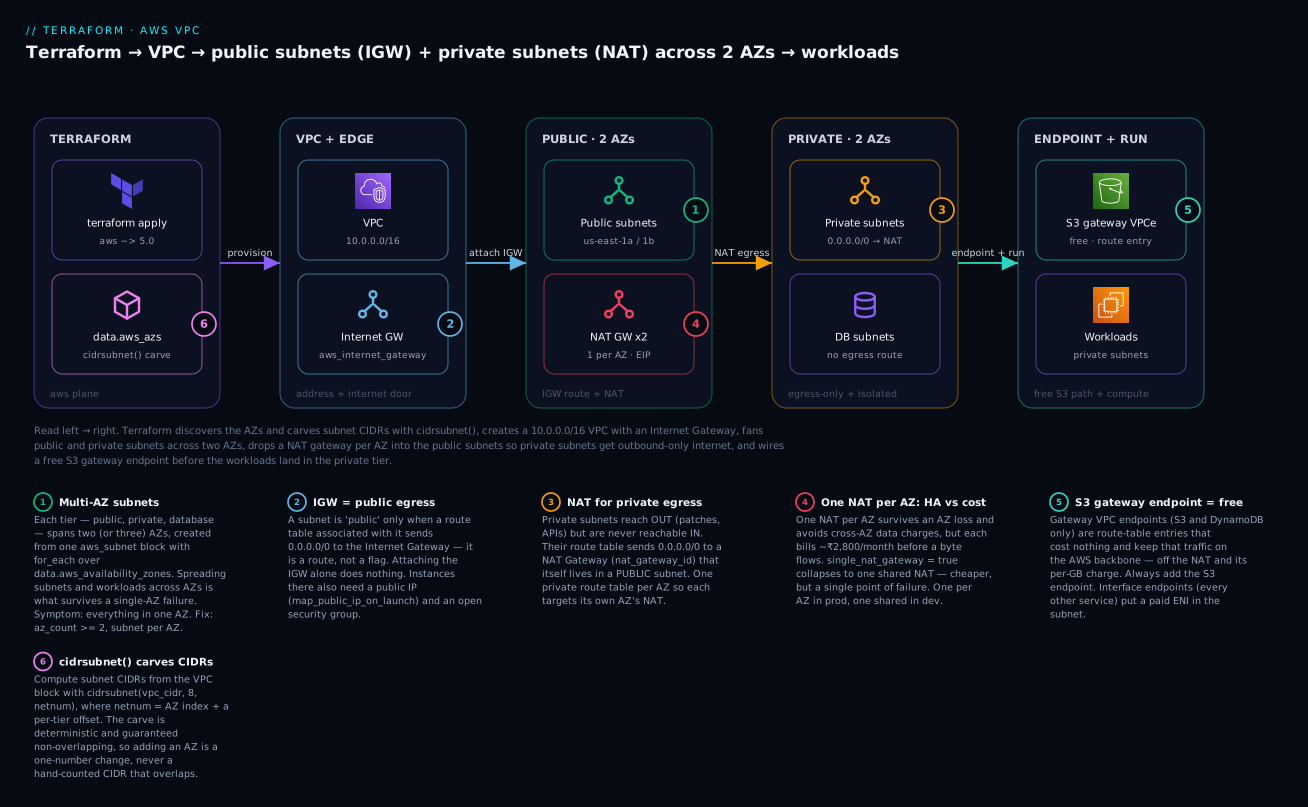
The diagram below is what this configuration builds — read it left to right: Terraform discovers the AZs and carves subnet CIDRs with cidrsubnet(), creates the VPC and attaches an Internet Gateway, fans public and private subnets across two AZs, places a NAT per AZ in the public subnets so private subnets get egress, and wires a free S3 gateway endpoint into the route tables before the workloads land in the private tier.
Step 1 — terraform init
export AWS_PROFILE="kloudvin"     # or use env creds / an assumed role
terraform init
You should see the S3 backend initialise and the aws provider download:
Initializing the backend...
Successfully configured the backend "s3"! Terraform will automatically
use this backend unless the backend configuration changes.
Initializing provider plugins...
- Installing hashicorp/aws v5.x.x...
Terraform has been successfully initialized!
Step 2 — terraform plan
terraform plan -out=tfplan
Representative tail — note the subnets fanned per AZ (["us-east-1a"], ["us-east-1b"]) and, with single_nat_gateway = true, one NAT/EIP but two private route tables:
  # aws_vpc.main will be created
  # aws_subnet.public["us-east-1a"] will be created
  # aws_subnet.public["us-east-1b"] will be created
  # aws_subnet.private["us-east-1a"] will be created
  # aws_subnet.private["us-east-1b"] will be created
  # aws_subnet.database["us-east-1a"] will be created
  # aws_subnet.database["us-east-1b"] will be created
  # aws_internet_gateway.igw will be created
  # aws_nat_gateway.nat["us-east-1a"] will be created
  ...
Plan: 24 to add, 0 to change, 0 to destroy.
The resource count depends on the NAT mode. With one shared NAT it is 24; flip single_nat_gateway = false and it becomes 26 (a second EIP, NAT, and the second private route still count the same — the delta is the extra EIP + NAT).
| # | Resources | Count (shared NAT) |
|---|---|---|
| VPC | aws_vpc |
1 |
| Subnets | aws_subnet (2 public + 2 private + 2 db) |
6 |
| IGW | aws_internet_gateway |
1 |
| Route tables | public 1 + private 2 + database 1 | 4 |
| Routes | public→IGW 1 + private→NAT 2 | 3 |
| Associations | public 2 + private 2 + db 2 | 6 |
| EIP + NAT | 1 + 1 (shared) | 2 |
| S3 endpoint | aws_vpc_endpoint |
1 |
| Total | 24 |
Step 3 — terraform apply
terraform apply tfplan
Terraform resolves the dependency graph automatically — the VPC before its subnets, the IGW before the NAT (via depends_on), the NAT before the private route, each subnet before its association — because every child references the parent’s .id. The NAT Gateway is the slow one: it takes 1–2 minutes to provision. Expect Apply complete! Resources: 24 added, 0 changed, 0 destroyed. and your outputs printed.
Step 4 — verify with aws
Confirm the real cloud state, not just Terraform’s word. Capture the VPC ID from the output first:
VPC_ID=$(terraform output -raw vpc_id)

# The VPC and its DNS settings
aws ec2 describe-vpcs --vpc-ids "$VPC_ID" \
  --query "Vpcs[].{id:VpcId,cidr:CidrBlock,tenancy:InstanceTenancy}" --output table

# Every subnet: CIDR, AZ, and whether it auto-assigns a public IP
aws ec2 describe-subnets --filters "Name=vpc-id,Values=$VPC_ID" \
  --query "Subnets[].{id:SubnetId,cidr:CidrBlock,az:AvailabilityZone,public:MapPublicIpOnLaunch}" \
  --output table

# NAT gateways: state should be 'available', in a PUBLIC subnet
aws ec2 describe-nat-gateways --filter "Name=vpc-id,Values=$VPC_ID" \
  --query "NatGateways[].{id:NatGatewayId,state:State,subnet:SubnetId}" --output table

# Route tables and their routes — confirm public→igw, private→nat
aws ec2 describe-route-tables --filters "Name=vpc-id,Values=$VPC_ID" \
  --query "RouteTables[].{id:RouteTableId,routes:Routes[].{dst:DestinationCidrBlock,gw:GatewayId,nat:NatGatewayId}}" \
  --output json
The describe-subnets output is the money shot: you should see six subnets, two per AZ per naming convention, with public: True only on the two public subnets. If a private or database subnet shows True, you set map_public_ip_on_launch in the wrong place. And in describe-route-tables, the public table must show 0.0.0.0/0 → an igw-… target, each private table 0.0.0.0/0 → a nat-… target, and the database table no 0.0.0.0/0 route at all.
Step 5 — terraform destroy (⚠️ cleanup)
terraform destroy
Do this promptly — the NAT gateway(s) bill by the hour until destroyed. Terraform removes resources in reverse-dependency order: the S3 endpoint and associations first, then routes, NAT gateways, EIPs, subnets, the IGW, and finally the VPC. Expect Destroy complete! Resources: 24 destroyed. If destroy stalls with DependencyViolation on the subnet or VPC, something outside this config is still attached (a leftover instance, an RDS subnet group, a Lambda ENI, an interface endpoint) — see the troubleshooting section; find and remove the occupant, then re-run.
Variables, outputs & making it reusable — build vs reuse
The demo is already parameterised (region, CIDR, AZ count, the NAT knob). The natural next step is to lift it into a reusable module so every environment calls the same code with different inputs — a vpc module whose interface is essentially the variables above, returning the subnet-ID maps as outputs. A caller then writes:
module "vpc" {
  source             = "./modules/vpc"
  name               = "prod"
  vpc_cidr           = "10.20.0.0/16"
  az_count           = 3
  single_nat_gateway = false          # HA in prod
}
But before you write that module, ask the question every senior engineer asks: should you build your own, or use the community module? The terraform-aws-modules/vpc/aws module is one of the most-downloaded modules in the registry — battle-tested, maintained, and it produces exactly the topology this lesson builds (and much more) from a compact input set:
module "vpc" {
  source  = "terraform-aws-modules/vpc/aws"
  version = "~> 5.0"

  name = "kv-vpc"
  cidr = "10.0.0.0/16"

  azs              = ["us-east-1a", "us-east-1b"]
  public_subnets   = ["10.0.0.0/24", "10.0.1.0/24"]
  private_subnets  = ["10.0.8.0/24", "10.0.9.0/24"]
  database_subnets = ["10.0.16.0/24", "10.0.17.0/24"]

  enable_nat_gateway     = true
  single_nat_gateway     = true          # flip to false + one_nat_gateway_per_az = true for HA
  one_nat_gateway_per_az = false

  enable_dns_hostnames = true
  enable_dns_support   = true

  # Flow logs in one switch
  enable_flow_log                      = true
  create_flow_log_cloudwatch_log_group = true
  create_flow_log_cloudwatch_iam_role  = true

  tags = { Project = "kloudvin-tf-course", Env = "demo" }
}
That single block produces the VPC, all subnets, the IGW, the NAT gateway(s), all route tables and associations, and flow logs — the entire lesson, plus a database subnet group and dozens of options you did not have to write. (In module v5 the S3/DynamoDB gateway endpoints moved to a separate terraform-aws-modules/vpc/aws//modules/vpc-endpoints submodule; you call that alongside for the endpoints.)
So when do you roll your own? The honest decision table:
| Approach | Use when | Trade-off |
|---|---|---|
terraform-aws-modules/vpc/aws |
Standard topology, want speed + maintenance for free | Less control; you must read its (large) input surface and pin the version |
| Thin roll-your-own module | Opinionated naming / routing / endpoint conventions the generic module fights | You own and maintain it — but it is exactly your shape, and you understand every resource |
| No module (root only) | One environment, or learning (this lesson) | Copy-paste across envs; drifts over time |
The pedagogically honest answer: build it once by hand (as you just did) to understand every resource, then use the community module in production — because you will now read its inputs and outputs fluently, and you will know exactly what single_nat_gateway = true costs you. Rolling your own thin module is justified only when your conventions (naming, tagging, per-tier endpoint policies) are opinionated enough that bending the generic module costs more than owning a small one.
The key module inputs, mapped to what you built by hand:
| Community-module input | Your hand-built equivalent |
|---|---|
cidr |
aws_vpc.cidr_block |
azs, public_subnets, private_subnets, database_subnets |
the for_each + cidrsubnet() locals |
enable_nat_gateway |
creating aws_nat_gateway at all |
single_nat_gateway / one_nat_gateway_per_az |
the nat_azs local |
enable_dns_hostnames |
aws_vpc.enable_dns_hostnames |
enable_flow_log (+ the create-role/log-group flags) |
the aws_flow_log + IAM role block |
map_public_ip_on_launch |
the same arg on aws_subnet.public |
Common mistakes and troubleshooting
VPC errors in the aws provider are usually one of a dozen recognisable shapes. Match the symptom, apply the fix.
| Symptom / error | Cause | Fix |
|---|---|---|
| No internet from a private subnet | Private route table has no 0.0.0.0/0 → NAT route, or the subnet isn’t associated to it |
Add the aws_route (nat_gateway_id) and the aws_route_table_association |
| Still no internet from private | The NAT is in a private subnet (can’t reach the IGW itself) | Put the NAT’s subnet_id on a public subnet; ensure that subnet’s table routes to the IGW |
| Surprise NAT bill (₹5–6k/month) | Two NAT gateways left running, or high data-processing volume | Use single_nat_gateway = true in non-prod; add an S3/DynamoDB endpoint to keep that traffic off the NAT; destroy when idle |
Error: InvalidSubnet.Range / .Conflict |
Subnet CIDR outside the VPC block, or two subnets overlap | Carve with cidrsubnet(); keep subnets inside vpc_cidr, non-overlapping |
| AZ mismatch — subnets land in unexpected AZs | Hard-coded AZ names, or the account’s letter→hardware map differs | Use data.aws_availability_zones; pin availability_zone_id for cross-account sameness |
Error: InvalidParameterValue: Elastic IP … not valid for NAT |
EIP not in the VPC domain, or wrong allocation_id |
Set domain = "vpc" on aws_eip; pass its .id as allocation_id |
DependencyViolation on destroy (subnet/VPC won’t delete) |
A leftover ENI occupies the subnet — an instance, RDS, Lambda-in-VPC, or an interface endpoint outside this config | Delete the occupant first (aws ec2 describe-network-interfaces --filters Name=subnet-id,…), then destroy |
| Public-IP instance has no public DNS name / endpoint private DNS fails | enable_dns_hostnames = false (the default) |
Set enable_dns_hostnames = true on the VPC |
| Route table plan flaps: a route added then removed every apply | Inline route {} blocks and standalone aws_route on the same table |
Pick one model; if standalone, the table must have zero inline route blocks |
Error: creating Route: RouteAlreadyExists |
Two resources define the same destination_cidr_block on one table |
One route per destination per table; remove the duplicate |
| Instance in a “public” subnet can’t be reached | Subnet has no 0.0.0.0/0 → IGW route, or instance has no public IP / open SG |
Associate the public route table; set map_public_ip_on_launch; open the security group |
UnauthorizedOperation creating the VPC |
The identity lacks EC2/VPC permissions | Grant AmazonVPCFullAccess (or scoped equivalents); check the assumed role |
The four you will actually hit deserve prose. “No internet from a private subnet” is the number-one VPC support question, and it is always one of three things: the private route table is missing the 0.0.0.0/0 → NAT route, the subnet was never associated to that table (so it silently uses the main table, which has no NAT route), or — the sneaky one — the NAT gateway itself is sitting in a private subnet and therefore can’t reach the internet to do its job. Check the NAT’s subnet_id is a public subnet whose table routes to the IGW; that fixes it 90% of the time. The surprise NAT bill is the number-one cost incident: NAT gateways bill by the hour whether or not traffic flows, so two of them running idle across a forgotten dev account is ~₹5,500/month for nothing — set single_nat_gateway = true in non-prod, add the free S3/DynamoDB gateway endpoints so that (often large) traffic never touches the NAT, and destroy environments you are not using. AZ mismatch bites when you hard-code us-east-1a: not only does that break in a region that names AZs differently, it can also, in a multi-account setup, land two accounts’ “same” subnet in physically different datacentres (because the letter is randomised per account) — use the data source, and pin availability_zone_id when two accounts must share a physical AZ. And DependencyViolation on destroy means Terraform tried to delete a subnet or the VPC while an ENI it doesn’t manage is still plugged in — a leftover EC2 instance, an RDS instance, a Lambda’s VPC ENI, or an interface endpoint created outside this config; find the ENI (aws ec2 describe-network-interfaces --filters Name=subnet-id,Values=<subnet>), remove its owner, then destroy.
Cost, cleanup & production notes
Cost. Most of this VPC is free; the NAT gateways are not, and they dominate the bill.
| Resource | Cost while running (approx, us-east-1) |
|---|---|
| VPC, subnets, route tables, associations | Free |
| Internet Gateway | Free to attach (normal data-transfer rates apply) |
| S3 / DynamoDB gateway endpoint | Free — no hourly, no data charge |
| NAT Gateway | ~$0.045/hr ≈ $33/mo ≈ ₹2,800/mo each, plus ~$0.045/GB processed |
| Elastic IP (attached to a running NAT) | Free while attached; idle/unattached EIPs now bill (~$0.005/hr) |
| Interface endpoint | ~$0.01/hr/AZ + ~$0.01/GB — per endpoint, per AZ |
| Flow logs | The destination’s cost (CloudWatch ingest or S3 storage) |
So the free primitives cost ₹0, but each NAT gateway is ~₹2,800/month before a single byte flows, and the HA (one-per-AZ) demo runs two ≈ ₹5,600/month. That is the entire reason single_nat_gateway exists and the entire reason to destroy promptly. Two levers cut it hard: run one shared NAT in non-prod, and put S3/DynamoDB traffic through the free gateway endpoints so it never incurs NAT data charges.
Cleanup is terraform destroy. Unlike the free Azure networking demo, here you have a real, ticking meter — do not leave a NAT running overnight “to finish tomorrow.”
Production hardening notes:
- Remote state, always. A VPC is shared infrastructure; its state must be remote (S3 backend) with locking (DynamoDB or the S3-native lock) so two engineers can’t
applyconcurrently — set up in the getting-started lesson. - Least privilege. The pipeline identity needs scoped VPC/EC2 permissions, not
AdministratorAccess. GrantAmazonVPCFullAccessor a tighter custom policy on the networking account. - Tag everything via
default_tagson the provider (as the demo does) so every subnet, route table and NAT is queryable byProject/Env/ownerin Cost Explorer — NAT spend especially. - Three AZs in production. The demo uses two; production web tiers should span three (
az_count = 3) so you survive an AZ failure with capacity to spare. Thecidrsubnet()carve makes this a one-number change. - Add the free gateway endpoints and watch drift. Always create the S3 (and DynamoDB) gateway endpoint — free money off the NAT bill. Run
terraform planon a schedule so a console-added route to a private table surfaces as drift before it becomes a silent security hole.
Going deeper
You have built the standard topology. Here are the facets a senior engineer reaches for once the basics are muscle memory — the four egress mechanisms (not just the NAT gateway), the two filters at the subnet edge (network ACLs vs security groups), organisation-scale addressing with IPAM, the route-table association rules that surprise people, and IPv6, which quietly changes the egress story entirely.
The four ways out: IGW, NAT gateway, NAT instance & egress-only IGW
This lesson used two egress devices — the Internet Gateway (for public, two-way) and the NAT Gateway (for private, outbound-only). There are actually four mechanisms, and knowing all four (and when the older/cheaper ones still make sense) is a common interview separator.
| Mechanism | Terraform resource | Direction | IP version | Cost shape | Use it when |
|---|---|---|---|---|---|
| Internet Gateway | aws_internet_gateway |
In and out | IPv4 + IPv6 | Free to attach | A subnet must be reachable from the internet (public tier) |
| NAT Gateway | aws_nat_gateway |
Out only | IPv4 | ~$0.045/hr + per-GB, managed & HA-within-AZ | Private IPv4 egress, production — you want AWS to run it |
| NAT instance | aws_instance (self-run) |
Out only | IPv4 | An EC2 instance’s cost (can be a $3/mo t4g.nano) |
Tiny dev/test egress where a $33/mo NAT gateway is overkill |
| Egress-only IGW | aws_egress_only_internet_gateway |
Out only | IPv6 only | Free | Private IPv6 egress — there is no NAT for IPv6 |
The NAT instance is the pre-2015 way: an ordinary EC2 instance doing the NAT in software. It is dramatically cheaper for trivial traffic (a t4g.nano is a few dollars a month vs ~₹2,800 for a managed NAT gateway) but you own the patching, the HA (it is a single instance — if it dies, egress dies), and the bandwidth ceiling (capped by the instance size). The one non-obvious Terraform detail: a NAT instance must have its source/destination check disabled, or AWS drops the forwarded packets.
resource "aws_instance" "nat" {
  ami                    = data.aws_ami.nat.id     # an AL2023 / fck-nat image
  instance_type          = "t4g.nano"
  subnet_id              = aws_subnet.public["us-east-1a"].id
  vpc_security_group_ids = [aws_security_group.nat.id]
  source_dest_check      = false                   # REQUIRED — it forwards others' traffic
  tags                   = { Name = "${var.name}-nat-instance" }
}

# A private route table then targets the instance's ENI, not a nat_gateway_id:
resource "aws_route" "private_nat_instance" {
  route_table_id         = aws_route_table.private["us-east-1a"].id
  destination_cidr_block = "0.0.0.0/0"
  network_interface_id   = aws_instance.nat.primary_network_interface_id
}
The egress-only Internet Gateway exists because IPv6 addresses are globally routable — there is no such thing as a “private” IPv6 address needing translation, so there is no NAT for IPv6. To give an IPv6 subnet outbound-only internet (out yes, unsolicited inbound no) you use an egress-only IGW and a ::/0 route pointed at it. It is free, which is a pleasant contrast to the IPv4 NAT bill — one of the quiet arguments for going dual-stack. More on that below.
Network ACLs vs security groups: the two filters at the subnet edge
Beginners reach for a security group to “lock down a subnet” and are surprised it doesn’t attach to a subnet at all. There are two packet filters in a VPC and they operate at different layers:
| Security group | Network ACL (NACL) | |
|---|---|---|
| Attaches to | An ENI / instance | A subnet |
| Stateful? | Stateful — return traffic auto-allowed | Stateless — you must allow the return path explicitly |
| Default posture | Deny all inbound, allow all outbound | Default NACL allows all; a custom one denies all until you add rules |
| Rules | All rules evaluated; allow-only (no deny) | Numbered, evaluated low → high, first match wins; allow and deny |
| Terraform | aws_security_group (+ aws_vpc_security_group_ingress_rule) |
aws_network_acl (+ aws_network_acl_rule) |
| Typical role | Primary control — 99% of filtering | A coarse subnet-wide backstop (e.g. block a bad CIDR) |
The one that bites: because a NACL is stateless, if you write a custom NACL that allows inbound 443 you must also allow outbound ephemeral ports (1024–65535) for the reply, or the response never leaves. Security groups never have this problem because they remember the connection. In practice most teams leave the default (allow-all) NACL in place and do all real filtering with security groups; a custom NACL earns its keep as a blunt subnet-level backstop — for example, guaranteeing a database subnet can never talk to the internet regardless of any security-group mistake:
resource "aws_network_acl" "db" {
  vpc_id     = aws_vpc.main.id
  subnet_ids = [for s in aws_subnet.database : s.id]
  tags       = { Name = "${var.name}-nacl-db" }
}

# Allow all traffic to/from inside the VPC only; nothing to the internet.
resource "aws_network_acl_rule" "db_in_vpc" {
  network_acl_id = aws_network_acl.db.id
  rule_number    = 100
  egress         = false
  protocol       = "-1"
  rule_action    = "allow"
  cidr_block     = var.vpc_cidr           # 10.0.0.0/16 — intra-VPC only
}

resource "aws_network_acl_rule" "db_out_vpc" {
  network_acl_id = aws_network_acl.db.id
  rule_number    = 100
  egress         = true
  protocol       = "-1"
  rule_action    = "allow"
  cidr_block     = var.vpc_cidr
}
An implicit * deny sits at the bottom of every NACL, so anything not matching 10.0.0.0/16 is dropped — a hard guarantee the database tier stays offline. (To manage the auto-created default NACL rather than create a new one, adopt it with aws_default_network_acl, exactly as aws_default_route_table adopts the main route table below.)
Route-table association precedence & the main route table
The lesson’s “unassociated-subnet trap” has a fuller story worth knowing. Every VPC is born with a main route table (Terraform did not create it; AWS did). Association follows a strict precedence:
- If a subnet has an explicit
aws_route_table_association, that table wins. - If it does not, the subnet silently uses the VPC’s main route table.
So the main table is the default for every unassociated subnet — which is exactly why leaving it with a 0.0.0.0/0 → IGW route is dangerous (any forgotten subnet becomes public). Terraform gives you three tools to control it:
| Resource | What it does |
|---|---|
aws_route_table_association (subnet) |
Explicitly bind a subnet to a table — always do this for every subnet |
aws_main_route_table_association |
Point the VPC’s main table at a table you manage (make the default safe) |
aws_default_route_table |
Adopt the AWS-created main table into state and manage its routes directly |
The pattern for a safe default is to make the main route table the isolated one (local routes only), so any subnet you forget to associate is private-by-default rather than public-by-default:
resource "aws_main_route_table_association" "safe_default" {
  vpc_id         = aws_vpc.main.id
  route_table_id = aws_route_table.database.id   # local-only; forgotten subnets stay isolated
}
There is also a lesser-known edge (gateway) association: aws_route_table_association accepts a gateway_id instead of a subnet_id, which attaches a route table to the IGW or virtual private gateway itself for ingress routing — the mechanism behind middlebox/inspection architectures where inbound traffic is forced through a firewall appliance before reaching your subnets. You rarely need it, but recognising gateway_id on an association is what separates “I’ve built a VPC” from “I understand VPC routing.”
IPAM: addressing at organisation scale
cidrsubnet() solves overlaps within one VPC. It does nothing to stop VPC A in account 1 and VPC B in account 2 both claiming 10.0.0.0/16 — a collision that only surfaces the day you try to peer them or attach both to a Transit Gateway, at which point renumbering a live estate is the worst job in cloud. AWS IPAM (IP Address Manager) is the fix: a central, hierarchical pool of address space that hands out non-overlapping CIDRs across every account and region, with utilisation monitoring built in.
resource "aws_vpc_ipam" "org" {
  operating_regions { region_name = var.region }
}

resource "aws_vpc_ipam_pool" "ipv4" {
  address_family = "ipv4"
  ipam_scope_id  = aws_vpc_ipam.org.private_default_scope_id
  locale         = var.region
}

resource "aws_vpc_ipam_pool_cidr" "supernet" {
  ipam_pool_id = aws_vpc_ipam_pool.ipv4.id
  cidr         = "10.0.0.0/8"          # the whole org supernet lives here
}

# A VPC then requests a size and IPAM allocates a non-overlapping block:
resource "aws_vpc" "from_ipam" {
  ipv4_ipam_pool_id   = aws_vpc_ipam_pool.ipv4.id
  ipv4_netmask_length = 16              # "give me a /16" — no hard-coded cidr_block
  tags                = { Name = "${var.name}-vpc-ipam" }
}
Note the VPC declares ipv4_netmask_length (a size) instead of a cidr_block (a specific range) — IPAM picks the actual block and guarantees it does not overlap anything else it manages. For a single VPC this is overkill; for a platform team owning dozens of accounts it is the difference between a governed address plan and a spreadsheet that is always out of date.
IPv6, dual-stack & secondary CIDRs
The lesson built an IPv4 VPC. Real networks increasingly go dual-stack, and IPv6 changes the egress model in one important way: there is no NAT (so no NAT bill for IPv6 traffic). You attach an AWS-provided /56, carve /64s per subnet, and use the egress-only IGW from the top of this section for private outbound.
resource "aws_vpc" "main" {
  cidr_block                       = var.vpc_cidr
  assign_generated_ipv6_cidr_block = true          # AWS hands you a /56
  enable_dns_hostnames             = true
}

resource "aws_egress_only_internet_gateway" "eigw" {
  vpc_id = aws_vpc.main.id
}

resource "aws_subnet" "private6" {
  for_each          = local.private_subnets
  vpc_id            = aws_vpc.main.id
  cidr_block        = each.value
  availability_zone = each.key
  # carve a /64 out of the VPC's /56, indexed like the IPv4 subnets
  ipv6_cidr_block   = cidrsubnet(aws_vpc.main.ipv6_cidr_block, 8, index(keys(local.private_subnets), each.key) + 8)
}

resource "aws_route" "private6_egress" {
  for_each                    = aws_route_table.private
  route_table_id              = each.value.id
  destination_ipv6_cidr_block = "::/0"
  egress_only_gateway_id      = aws_egress_only_internet_gateway.eigw.id
}
Two more scale levers worth naming. First, secondary CIDRs: a VPC’s primary CIDR is immutable, but you can bolt on additional IPv4 blocks with aws_vpc_ipv4_cidr_block_association when a /16 finally fills up (common on large EKS estates where pods burn subnet IPs) — new subnets then carve from the secondary block. Second, prefix delegation on the EKS VPC CNI, which lets each ENI hand out a /28 of IPs at once instead of single addresses, multiplying pod density per node without enlarging the subnet. Both are the “we outgrew the original plan” tools; IPAM plus a generous /16 up front is how you avoid needing them.
Cheat-sheet
The resources and their load-bearing arguments:
| Resource | Key arguments | Remember |
|---|---|---|
aws_vpc |
cidr_block, enable_dns_hostnames, enable_dns_support |
Hostnames default false — set it true |
aws_subnet |
cidr_block, availability_zone, map_public_ip_on_launch |
Public-IP flag only on the public tier; for_each over a map |
data.aws_availability_zones |
state, filter opt-in-status |
Never hard-code AZ names |
aws_internet_gateway |
vpc_id |
Free; useless without a 0.0.0.0/0 route |
aws_route_table |
vpc_id |
Public shares one; private is one per AZ |
aws_route |
destination_cidr_block, gateway_id / nat_gateway_id |
Standalone; don’t also use inline route {} |
aws_route_table_association |
subnet_id, route_table_id |
Unassociated subnets use the main table |
aws_eip |
domain = "vpc" |
vpc = true is deprecated |
aws_nat_gateway |
allocation_id, subnet_id, depends_on = [igw] |
Lives in a public subnet; costs money |
aws_vpc_endpoint |
service_name, vpc_endpoint_type, route_table_ids / subnet_ids |
Gateway = free (S3/DDB); Interface = paid |
aws_flow_log |
traffic_type, log_destination_type, iam_role_arn |
CloudWatch needs a role; S3 doesn’t |
Commands:
| Command | Purpose |
|---|---|
terraform init |
Init S3 backend + download aws |
terraform plan -out=tfplan |
Preview; save the plan |
terraform apply tfplan |
Apply the saved plan |
terraform state list |
See aws_subnet.public["us-east-1a"] etc. |
aws ec2 describe-vpcs --vpc-ids <id> |
Verify the VPC + CIDR |
aws ec2 describe-subnets --filters Name=vpc-id,Values=<id> -o table |
Verify subnets + MapPublicIpOnLaunch |
aws ec2 describe-nat-gateways --filter Name=vpc-id,Values=<id> |
Verify NAT state = available |
aws ec2 describe-route-tables --filters Name=vpc-id,Values=<id> |
Verify public→IGW, private→NAT |
terraform destroy |
Tear it down (stop the NAT meter) |
Practice challenges
Work these against the demo config above. They climb from “read the CIDR” to “re-architect the egress.” Try each before opening the solution.
1 (Beginner) — Predict the CIDR and usable count. Without running anything, what does cidrsubnet("10.0.0.0/16", 8, 20) return, and how many usable host IPs does that subnet have?
<details> <summary>Solution</summary>
10.0.20.0/24. It extends the /16 by 8 bits to /24 and takes block 20 (.20.0). A /24 has 256 addresses; AWS reserves 5 in every subnet, so 251 are usable.
Why: netnum is just “which block” — and remembering AWS’s 5-reserved rule (not 2, as some expect) is what keeps you from over-provisioning EKS subnets.
</details>
2 (Beginner) — Make a private subnet public. You have aws_subnet.private["us-east-1a"]. Name the two Terraform resources you must add to make it behave like a public subnet, and write the route.
<details> <summary>Solution</summary>
You need an aws_route with 0.0.0.0/0 → the IGW, in a route table, and an aws_route_table_association binding the subnet to that table:
resource "aws_route" "make_public" {
  route_table_id         = aws_route_table.public.id
  destination_cidr_block = "0.0.0.0/0"
  gateway_id             = aws_internet_gateway.igw.id
}
resource "aws_route_table_association" "make_public" {
  subnet_id      = aws_subnet.private["us-east-1a"].id
  route_table_id = aws_route_table.public.id
}
Why: “public” is a route + association, never a flag on the subnet — this is the single most important idea in the lesson. (For instances to be reachable inbound they’d also need a public IP and an open SG.) </details>
3 (Intermediate) — Predict the HA plan delta. With single_nat_gateway = true the plan shows 24 to add. You flip it to false. Exactly which resources appear, and what is the new total?
<details> <summary>Solution</summary>
With two AZs, flipping to false adds a second Elastic IP and a second NAT Gateway (the per-AZ private route tables, routes, and associations already exist for both AZs). Total goes 24 → 26, and each private route now targets its own AZ’s NAT instead of both pointing at the single one.
Why: nat_azs expands from one AZ to all AZs, so only the EIP+NAT pair multiplies — this is precisely the ~₹2,800/month-per-extra-NAT cost/HA trade the single_nat_gateway knob exists to make explicit.
</details>
4 (Intermediate) — Add a free DynamoDB gateway endpoint. Your app hits DynamoDB from private subnets, paying NAT data charges. Add the free gateway endpoint wired into the private route tables.
<details> <summary>Solution</summary>
resource "aws_vpc_endpoint" "dynamodb" {
  vpc_id            = aws_vpc.main.id
  service_name      = "com.amazonaws.${var.region}.dynamodb"
  vpc_endpoint_type = "Gateway"
  route_table_ids   = [for rt in aws_route_table.private : rt.id]
  tags              = { Name = "${var.name}-vpce-ddb" }
}
Why: DynamoDB (like S3) is a gateway endpoint — a free route-table entry, no ENI, no hourly charge. Adding it keeps that traffic on the AWS backbone and off the metered NAT, which for a chatty app can be the biggest single line-item saving in the VPC. </details>
5 (Advanced) — Go dual-stack with free IPv6 egress. Give the private tier IPv6 with outbound-only internet, without adding a single rupee of NAT cost. List the three pieces.
<details> <summary>Solution</summary>
assign_generated_ipv6_cidr_block = trueon theaws_vpc(an AWS/56).- An
aws_egress_only_internet_gatewayfor the VPC. - A
::/0route on each private route table viaegress_only_gateway_id(plus anipv6_cidr_block/64on each subnet, carved withcidrsubnet(aws_vpc.main.ipv6_cidr_block, 8, n)).
resource "aws_egress_only_internet_gateway" "eigw" { vpc_id = aws_vpc.main.id }

resource "aws_route" "v6_egress" {
  for_each                    = aws_route_table.private
  route_table_id              = each.value.id
  destination_ipv6_cidr_block = "::/0"
  egress_only_gateway_id      = aws_egress_only_internet_gateway.eigw.id
}
Why: IPv6 addresses are globally routable, so there is no NAT for IPv6 — the egress-only IGW is the outbound-only equivalent and it is free. This is one of the strongest cost arguments for dual-stack. </details>
6 (Advanced) — Hard-isolate the database subnet with a NACL. Route tables already keep the database tier off the internet, but a mistaken security-group rule could still open it. Add a subnet-level backstop that permits only intra-VPC traffic, so the tier can never reach the internet regardless of any SG change.
<details> <summary>Solution</summary>
Attach a custom aws_network_acl to the database subnets that allows only 10.0.0.0/16 in and out; the implicit bottom-of-list deny drops everything else:
resource "aws_network_acl" "db" {
  vpc_id     = aws_vpc.main.id
  subnet_ids = [for s in aws_subnet.database : s.id]
}
resource "aws_network_acl_rule" "db_ingress" {
  network_acl_id = aws_network_acl.db.id
  rule_number = 100
  egress = false
  protocol = "-1"
  rule_action = "allow"
  cidr_block = var.vpc_cidr
}
resource "aws_network_acl_rule" "db_egress" {
  network_acl_id = aws_network_acl.db.id
  rule_number = 100
  egress = true
  protocol = "-1"
  rule_action = "allow"
  cidr_block = var.vpc_cidr
}
Why: A NACL is stateless and subnet-level, so it is a coarse backstop that a security-group typo can’t override — defence in depth for the data tier. (Because it’s stateless, if you narrowed the rules to specific ports you’d also have to allow the ephemeral-port return path; -1/all-protocols sidesteps that here.)
</details>
Common beginner mistakes
These are misconceptions, not error messages — the wrong mental model that leads to the errors in the troubleshooting table. Fix the model and the errors stop appearing.
-
“I attached an Internet Gateway, so my subnets have internet.” The IGW is only a door in the fence — it changes nothing until a route table sends
0.0.0.0/0to it. Right model: public access = an IGW plus a route plus an association. Attaching the IGW alone is inert. -
“
map_public_ip_on_launch = truemakes the subnet public.” That flag only hands each instance a public IP address; without the IGW route in the subnet’s table, that public IP is a dead end — the packet has a return address but no road out. Right model: the route makes the subnet public; the public IP just makes an instance reachable once the road exists. -
“I’ll put a security group on the subnet to lock it down.” Security groups attach to ENIs/instances, never to subnets. The subnet-level filter is a network ACL, and it’s stateless. Right model: SG = stateful, per-instance, your primary control; NACL = stateless, per-subnet, a coarse backstop.
-
“I’ll just resize the subnet later when I need more IPs.” Subnet (and VPC primary) CIDRs are immutable — you cannot grow a
/24into a/23. Right model: plan generously up front (a/16VPC), leave numeric gaps between tiers, and if you truly outgrow it, add a secondary CIDR or a new subnet — never a resize. -
“One NAT gateway is fine for production; two is wasteful.” A single shared NAT is a single point of failure: if its AZ goes dark, every private subnet in the VPC loses egress at once, and cross-AZ traffic to reach it costs extra per-GB. Right model: one NAT per AZ in prod (HA + no cross-AZ charge); one shared NAT only in dev/test to save money.
-
“
us-east-1ais the same datacentre for everyone.” AWS randomises the AZ letter-to-hardware mapping per account, so yourus-east-1amay be myus-east-1c. Right model: never hard-code AZ names — discover them withdata.aws_availability_zones; pin the stableavailability_zone_id(use1-az1) only when two accounts must share a physical AZ. -
“IPv6 needs a NAT gateway for private egress too.” IPv6 addresses are globally routable — there is no NAT for IPv6. Right model: IPv6 private egress uses an egress-only Internet Gateway (outbound-only, and free), never a NAT.
-
“An unassociated subnet has no routing.” It silently inherits the VPC’s main route table — so a subnet you think is isolated may be public if the main table has an internet route. Right model: associate every subnet explicitly, and make the main table the isolated (local-only) one so any oversight fails private, not public.
Interview and exam questions
1. What actually makes a subnet “public” on AWS?
Not a flag on the subnet — a route. A subnet is public when a route table associated with it sends 0.0.0.0/0 to an Internet Gateway. (For instances there to be reachable, they also need a public IP — via map_public_ip_on_launch or an Elastic IP — and an open security group.) Remove the IGW route and the same subnet becomes private.
2. Why must a NAT Gateway live in a public subnet, and where does the private route point?
The NAT itself needs outbound internet to do its job, so it must sit in a subnet with a 0.0.0.0/0 → IGW route (a public subnet) and carry an Elastic IP. The private subnet’s route table then sends 0.0.0.0/0 to the NAT (nat_gateway_id), not the IGW. Traffic flows private → NAT (public subnet) → IGW → internet, and return traffic comes back the same way — but nothing can initiate a connection inward.
3. One NAT per AZ vs one shared NAT — what’s the trade-off?
One NAT per AZ costs more (each bills ~₹2,800/month) but survives an AZ failure and avoids cross-AZ data charges (each AZ’s private traffic egresses locally). One shared NAT halves the hourly cost but is a single point of failure — if its AZ dies, all private egress dies — and traffic from the other AZ crosses AZ (extra per-GB) to reach it. Rule of thumb: one per AZ in prod, one shared in dev/test (the module’s single_nat_gateway).
4. Why for_each over a map instead of count for the subnets?
count keys resources by numeric index, so removing an AZ from the middle of the list shifts every later index and Terraform force-replaces those subnets. for_each over a map keyed by AZ name uses stable string identities — adding or removing one AZ affects exactly that subnet and nothing else. Keying by a stable identity is the whole reason.
5. What does cidrsubnet("10.0.0.0/16", 8, 9) return, and why compute CIDRs this way?
10.0.9.0/24. It extends the /16 by 8 bits to /24 and selects block number 9. Computing subnets with cidrsubnet() from the VPC CIDR (netnum = AZ index + a per-tier offset) makes the carve deterministic and guaranteed non-overlapping, so adding an AZ is a one-number change instead of hand-counting CIDR strings and risking an overlap error.
6. Gateway endpoint vs interface endpoint — the one-line distinction and the cost? A gateway endpoint (S3 and DynamoDB only) is a route-table entry and is free. An interface endpoint (almost every other service) is an ENI with a private IP inside your subnets, fronted by a security group, and bills per-hour per-AZ plus per-GB. Always add the S3 gateway endpoint (free win off the NAT bill); add interface endpoints deliberately per service.
7. Your private instances have no internet access. Walk through the diagnosis.
Check, in order: (a) does the private subnet’s route table have 0.0.0.0/0 → a NAT? (b) is the subnet actually associated to that table, or silently using the main table? © is the NAT available and sitting in a public subnet whose table routes to the IGW? (d) does the security group / NACL allow outbound? The most common single cause is the NAT being placed in a private subnet, or the missing route/association.
8. Why set enable_dns_hostnames = true, given enable_dns_support is already on?
enable_dns_support (default on) makes the .2 resolver answer queries inside the VPC. enable_dns_hostnames (default off) is separately required for public-IP instances to get a public DNS name and for interface VPC endpoints to use private DNS. Leaving it off is a classic “my endpoint’s private DNS doesn’t resolve” bug.
9. (Associate-style) True/False: attaching an Internet Gateway to a VPC gives all subnets internet access.
False. The IGW only provides a path; a subnet gets internet access only when a route table associated with it sends 0.0.0.0/0 to that IGW (and, for inbound reachability, the instance needs a public IP and an open SG). Attaching the IGW alone changes nothing.
10. terraform destroy fails with DependencyViolation on the VPC. Why, and how do you fix it?
Something Terraform doesn’t manage still occupies the VPC — a leftover EC2 instance, an RDS instance, a Lambda’s VPC ENI, or an interface endpoint created outside this config. The ENI keeps the subnet (and thus the VPC) from deleting. List ENIs in the subnet (aws ec2 describe-network-interfaces --filters Name=subnet-id,Values=<id>), delete the owning resource, then re-run destroy.
11. Why is each private subnet given its own route table, but all public subnets share one? Public subnets all egress the same way (to the one IGW), so one shared table is correct and simpler. Private subnets in an HA design each route to the NAT in their own AZ — different targets per AZ — so each needs its own route table. Sharing one private table would force all AZs through one NAT, reintroducing the single point of failure and cross-AZ charges.
12. (Associate-style) You add a third AZ by setting az_count = 3. What changes, and does anything get force-replaced?
The AZ data source returns three names, slice takes three, and the for_each maps gain a third key each — Terraform adds one subnet per tier, one more private route table + route + association, and (if HA) a third NAT + EIP. Because for_each keys on stable AZ-name strings, the existing two AZs’ resources are not touched or replaced — only the new AZ’s resources are added.
Key takeaways
- Plan addresses first, carve with
cidrsubnet(). VPC and subnet CIDRs are effectively immutable; AWS reserves 5 IPs per subnet; overlaps fail at apply. Compute CIDRs from the VPC block so adding an AZ never risks an overlap. - “Public” is a route, not a flag. A subnet is public only when its route table sends
0.0.0.0/0to an Internet Gateway; private subnets egress via a NAT Gateway that itself lives in a public subnet. - Use
for_eachover an AZ-keyed map, notcount— stable keys mean adding or removing an AZ never renumbers the others (the mechanics are in the meta-arguments lesson). - NAT is the cost and the HA decision. One per AZ is HA but ~₹2,800/month each; one shared is cheap but a single point of failure. Toggle it per environment, and keep S3/DynamoDB traffic on the free gateway endpoints.
enable_dns_hostnamesdefaults to false — set ittrue, or public DNS names and interface-endpoint private DNS silently don’t work.- Associate every subnet explicitly, or it silently falls back to the main route table; private route tables are one per AZ so each targets its own NAT.
- Build it by hand once to learn it, then use
terraform-aws-modules/vpc/awsin production — you’ll now read its inputs fluently and know exactly what each knob costs. - This demo has a ticking meter (the NAT). Verify with
aws ec2 describe-subnets, thendestroypromptly — and drop compute into these subnets next with Terraform on AWS: Security Groups, EC2 & Key Pairs.
Glossary
- VPC (Virtual Private Cloud) — your logically-isolated slice of the AWS network, defined by one or more CIDR blocks; every subnet, gateway and route table lives inside one. The “fenced plot.”
- CIDR block — an IP range in prefix notation (
10.0.0.0/16). The number after the slash is how many bits are fixed; a smaller number means a bigger range. The VPC’s primary CIDR is immutable. - Subnet — a slice of the VPC’s address space bound to exactly one Availability Zone. Its
cidr_blockmust sit inside the VPC and not overlap another subnet, and it is immutable once created. - Availability Zone (AZ) — an isolated datacentre (or cluster of them) within a region. Spreading subnets across AZs is what makes a VPC survive a single-AZ failure.
- AZ ID — the stable identifier for a physical AZ (
use1-az1), identical across accounts — unlike the AZ name (us-east-1a), which AWS randomises per account. - Internet Gateway (IGW) — the VPC’s two-way door to the public internet; free to attach, but inert until a route table points
0.0.0.0/0at it. One per VPC. - NAT Gateway — a managed device in a public subnet that gives private subnets outbound-only IPv4 internet. Bills per-hour plus per-GB; the VPC’s main cost.
- NAT instance — the older, self-managed alternative: an EC2 instance doing NAT in software (
source_dest_check = false). Cheaper for trivial traffic, but you own its HA and patching. - Egress-only Internet Gateway — the IPv6 equivalent of a NAT gateway: outbound-only IPv6 internet, and free (IPv6 has no NAT).
- Elastic IP (EIP) — a static public IPv4 address you allocate and attach (e.g. to a NAT gateway). Free while attached to a running resource; idle EIPs now bill.
- Route table — the “road signs” for a set of subnets: a list of destination-CIDR → target rules. AWS matches the most-specific prefix. The
localroute (intra-VPC) is always implicit. - Main route table — the default table AWS creates with the VPC; any subnet without an explicit association silently uses it. Make it the isolated one so oversights fail private.
- Route table association — the binding between a subnet (or, for edge routing, a gateway) and a route table. Explicit associations override the main-table fallback.
map_public_ip_on_launch— a subnet flag that auto-assigns a public IPv4 to instances launched in it. Set it only on the public tier; it does not by itself make a subnet public.- Public / private / database subnet — not resource types, just route-table conventions: public has a
0.0.0.0/0→ IGW route, private has0.0.0.0/0→ NAT, database has no default route. - VPC endpoint — a private path from your VPC to an AWS service, off the internet/NAT. Gateway type (S3, DynamoDB only) is a free route-table entry; Interface type (most services) is a paid ENI.
- PrivateLink — the technology behind interface endpoints: an ENI with a private IP in your subnet fronting an AWS (or third-party) service, so traffic never leaves the AWS backbone.
- Prefix list — a named, managed set of CIDRs (e.g. the S3 service’s ranges) that a gateway-endpoint route references, so you don’t hard-code the service’s addresses.
- Security group (SG) — a stateful firewall attached to an ENI/instance; return traffic is auto-allowed. The primary filtering control in a VPC.
- Network ACL (NACL) — a stateless, subnet-level firewall with numbered allow/deny rules evaluated low→high. A coarse backstop; you must allow return traffic explicitly.
- VPC Flow Logs — capture of IP-traffic metadata (src, dst, ports, bytes, ACCEPT/REJECT) to CloudWatch, S3, or Firehose. CloudWatch needs an IAM role; S3 does not.
cidrsubnet(prefix, newbits, netnum)— the Terraform function that carves a sub-CIDR deterministically: addnewbitsto the prefix length, take blocknetnum. Replaces error-prone hand-counting.- IPAM (IP Address Manager) — AWS’s central, hierarchical address-pool service that hands out non-overlapping CIDRs across many accounts/regions and monitors utilisation.
- Secondary CIDR — an additional IPv4 block bolted onto a VPC (
aws_vpc_ipv4_cidr_block_association) when the primary fills up; the primary CIDR itself can never be resized. - ENI (Elastic Network Interface) — a virtual NIC with a private IP that lives in a subnet. A lingering ENI (from an instance, RDS, Lambda-in-VPC, or interface endpoint) is what causes
DependencyViolationon destroy. DependencyViolation— the error when Terraform tries to delete a subnet or VPC that still has an ENI plugged in by a resource outside this config; remove the occupant, then destroy.