In a nutshell
A provider is the device driver between Terraform and a cloud’s API. Just as your operating system ships knowing nothing about your specific printer and loads a driver to translate “print this page” into the signals that model understands, the Terraform binary ships knowing nothing about AWS or Azure and loads a provider plugin to translate resource "aws_s3_bucket" "x" {} into real HTTPS calls. Terraform is the engine that decides what to do; the provider is the driver that knows how to talk to one particular API.
The lock file (.terraform.lock.hcl) is a pinned bill of materials. Like a parts list that records the exact make, model, and serial number of every component that went into a build, it records the exact provider versions and their cryptographic checksums, so every terraform init — yours tomorrow, a teammate’s, or CI’s — installs byte-for-byte the identical plugins. Change a part deliberately and the bill changes; nothing swaps itself out behind your back.
Everything in this lesson hangs off those two ideas: you declare which drivers you need (required_providers), pin how new they may get (version constraints and the ~> rule), configure each one (the provider block — region, credentials, tags), run more than one at once (alias, for multi-region/multi-account), hand them to reusable modules (configuration_aliases + providers = {}), and commit the bill of materials so builds are reproducible.
Level: Intermediate · Time: ~33 min
New to Terraform? Read the survey lesson terraform-fundamentals-hcl-providers-state-workflow first, then treat this as the deep dive it points to; the analogy above is all you need to start. Already write Terraform daily? Skip to Going deeper for plugin protocol 5 vs 6, provider-defined functions, and locking the lock file down in CI. By the end you can declare and pin any provider, configure and alias it, wire providers into modules, and reason about the lock file line by line.
Every resource you will ever write in Terraform — an S3 bucket, an Azure virtual network, a Kubernetes deployment, a GitHub repository, a PagerDuty schedule — is created by a provider. The Terraform binary itself knows nothing about AWS or Azure; it is a language interpreter and a planning engine. The actual job of translating resource "aws_s3_bucket" "x" {} into HTTPS calls against s3.amazonaws.com is done by a separate plugin, the AWS provider, which Terraform downloads and runs as a child process. This plugin architecture is the single most important structural fact about Terraform, and it explains almost everything that confuses newcomers: why you have to run terraform init before anything works, why a lock file appears in your directory, why upgrading a provider can break a plan that worked yesterday, and why the same .tf file can manage two AWS accounts at once.
This lesson is the complete reference for that layer. We will cover what a provider is at the process level; how the required_providers block names and constrains providers; every version-constraint operator with the pessimistic ~> rule worked out by hand; the provider configuration block and its authentication, region, default_tags, and assume_role arguments; how to run multiple instances of one provider using alias and pass them into modules; and the dependency lock file, .terraform.lock.hcl, in full — what the hashes mean, how -upgrade behaves, why platforms matter, and why it belongs in version control. Throughout, OpenTofu — the open-source fork created when HashiCorp relicensed Terraform under the BUSL in 2023 — behaves identically: same required_providers, same constraint syntax, same lock file (.terraform.lock.hcl), with its own registry default that we will note where it matters.
Learning objectives
By the end of this lesson you will be able to:
- Explain what a provider is as a process and how Terraform discovers, installs, and launches it.
- Write a
required_providersblock with correct source addresses (hostname/namespace/type) and understand the local-name versus source-address distinction. - Apply every version-constraint operator (
=,!=,>,>=,<,<=,~>) and predict exactly which versions the pessimistic~>constraint allows. - Configure a
providerblock’s authentication,region/endpoints,default_tags, andassume_role, and know which settings belong in code versus environment. - Run multiple provider instances with
alias, target individual resources at a non-default instance, and pass providers into child modules via theprovidersargument. - Read, regenerate, and reason about the
.terraform.lock.hclfile — itsversion,constraints, andhashes, the-upgradeflag, and multi-platform hashes — and explain why it is committed. - Distinguish providers from provisioners, and the public Registry from a private registry or network mirror.
Prerequisites & where this fits
You should be comfortable writing basic HCL — resource and variable blocks, strings and maps — and have run the init → plan → apply → destroy loop at least once. If those are new, read terraform-fundamentals-hcl-providers-state-workflow first; that lesson introduces providers at a survey level, and this one is the deep dive it points to. This is lesson TD3 in the Terraform Foundation track, sitting between the HCL syntax deep dive (TD2) and the resources/meta-arguments deep dive (TD4). The provider layer is foundational because nothing else in Terraform runs until providers are resolved, and the version and lock-file discipline you learn here is what keeps a team’s apply reproducible. Everything maps to the HashiCorp Certified: Terraform Associate objectives on providers, the registry, and the dependency lock file.
Core concepts
A provider is a plugin that maps Terraform’s data model to a real API. Concretely, it is a compiled Go binary (named like terraform-provider-aws_v5.40.0) that speaks a gRPC protocol to the Terraform core over a local socket. Terraform core builds a dependency graph and decides what to do; for each resource it hands the provider the current state and desired config, and the provider decides how — which API calls to make, in what order, how to map errors back. A provider ships three kinds of things: resources (aws_instance), which Terraform creates, updates, and destroys; data sources (aws_ami), which it only reads; and provider configuration (the provider "aws" {} block) that sets credentials and defaults shared by all of that provider’s resources.
Source address versus local name. Since Terraform 0.13, every provider has a global source address of the form hostname/namespace/type — for AWS that is registry.terraform.io/hashicorp/aws. The hostname defaults to the public registry and is usually omitted, the namespace is the publishing organisation (hashicorp, microsoft, integrations), and the type is the provider’s short name (aws, azurerm, google). Inside your configuration you refer to the provider by a local name — the label on the required_providers entry and the first label of every resource (aws_instance → local name aws). Usually the local name equals the type, but they are distinct, which is what lets you give a provider an unambiguous local name when two providers share a type (rare, but real — for example two different http providers from different namespaces).
Why init exists. Because providers are external binaries, Terraform must download them before it can plan. terraform init reads required_providers, resolves each constraint against the registry, picks the newest allowed version, downloads it into .terraform/providers/, verifies its checksum against (or records it into) the lock file, and writes the selection to .terraform.lock.hcl. Until init succeeds, plan and apply will refuse to run.
Provider versions are independent of Terraform’s version. Terraform the CLI is on its own release train (1.9, 1.10, …); the AWS provider is on its own (5.x); azurerm on its own (4.x). You pin them separately, and a given provider declares which Terraform versions it supports. Never confuse a provider version (~> 5.0) with the required_version for the Terraform CLI.
What a provider is, end to end
Walk one resource through the stack to make the plugin model concrete. You write:
resource "aws_s3_bucket" "logs" {
  bucket = "acme-app-logs-prod"
}
On terraform apply, Terraform core parses this, places it in the graph, and sees the resource type prefix aws_, which maps via your required_providers to the AWS provider plugin. Core launches terraform-provider-aws as a subprocess and opens a gRPC channel. It asks the plugin to plan the bucket: the plugin compares desired config to prior state (empty, so it is a create) and returns a planned action. After you approve, core asks the plugin to apply; the plugin calls the S3 CreateBucket API using the credentials from its provider "aws" configuration, waits for consistency, reads the result back, and returns the new attributes (ARN, region, etc.), which core writes to state. When the run ends, core shuts the plugin subprocess down.
Three consequences follow. First, a provider’s behaviour is entirely versioned in the plugin, not in Terraform — upgrading the AWS provider can add arguments, change defaults, or deprecate resources without any change to your Terraform CLI. Second, errors you see (“InvalidAccessKeyId”, “BucketAlreadyExists”) come from the cloud API surfaced through the provider, not from Terraform itself. Third, because the plugin is a separate binary keyed by version and platform, reproducibility requires recording exactly which binary you used — which is the lock file’s whole job.
required_providers: declaring what you depend on
Provider requirements live inside the terraform settings block, in a nested required_providers block. Each entry maps a local name (the key) to an object with a source and an optional version constraint:
terraform {
  required_version = ">= 1.9.0"

  required_providers {
    aws = {
      source  = "hashicorp/aws"
      version = "~> 5.40"
    }
    azurerm = {
      source  = "hashicorp/azurerm"
      version = "~> 4.0"
    }
    random = {
      source  = "hashicorp/random"
      version = ">= 3.5.0, < 4.0.0"
    }
  }
}
The source of "hashicorp/aws" is shorthand for the full address registry.terraform.io/hashicorp/aws; you only spell the hostname when using a non-default registry. The key (aws, azurerm, random) is the local name you use everywhere else. Always declare a source explicitly: relying on the legacy implicit hashicorp/<name> lookup is deprecated and breaks for any provider not in the hashicorp namespace.
The fields of a required_providers entry
| Field | Required? | What it is | Example |
|---|---|---|---|
| (key) | yes | Local name — the label used as the resource prefix and in provider/alias references |
aws |
source |
yes (in practice) | Global source address [hostname/]namespace/type; hostname defaults to the registry |
"hashicorp/aws" |
version |
recommended | Version constraint string limiting which provider releases are acceptable | "~> 5.40" |
configuration_aliases |
no | Declares alias names a module expects to receive from its caller (module side of multi-provider) | [aws.us_east_1] |
configuration_aliases only appears inside reusable modules and is covered under aliases below. For root modules you will use the key, source, and version.
Why pin the version at all?
If you omit version, init takes the newest release that exists, records it in the lock file, and pins it there until you run -upgrade. So the lock file protects you from silent drift even without a constraint — but a version constraint in code is still essential, because it (a) documents the intended major line, (b) bounds what -upgrade may select, and © protects collaborators who initialise a new checkout where the lock file resolves but a teammate later regenerates it. The community norm is to pin to a major line with ~> (e.g. ~> 5.40) so patch and minor updates flow but breaking majors do not.
Version constraints: every operator and the pessimistic rule
A version constraint is a comma-separated list of conditions; a candidate version must satisfy all of them. Terraform (and OpenTofu) uses semantic versioning, MAJOR.MINOR.PATCH, and only ever selects stable releases for a constraint — pre-releases like 5.0.0-beta1 are never matched unless you pin that exact string with =.
| Operator | Meaning | Example | Matches | Does not match |
|---|---|---|---|---|
= (or bare version) |
Exactly this version | = 5.40.0 |
5.40.0 only |
5.40.1, 5.39.0 |
!= |
Any version except this | != 5.40.0 |
5.39.9, 5.40.1 |
5.40.0 |
> |
Strictly greater | > 5.40.0 |
5.40.1, 6.0.0 |
5.40.0, 5.39.0 |
>= |
Greater than or equal | >= 5.40.0 |
5.40.0, 6.2.1 |
5.39.9 |
< |
Strictly less | < 6.0.0 |
5.99.0 |
6.0.0 |
<= |
Less than or equal | <= 5.40.0 |
5.40.0, 5.39.0 |
5.40.1 |
~> |
Pessimistic — allow the rightmost component to increase, hold the rest | see below | see below | see below |
The pessimistic ~> operator, worked out
~> is the one people get wrong, so be precise. The rule: allow only the right-most version component you specified to increment; everything to its left is fixed.
~> 5.40.0allows>= 5.40.0and< 5.41.0. So5.40.1,5.40.99are allowed;5.41.0and6.0.0are not. (Three components → only PATCH may move.)~> 5.40allows>= 5.40.0and< 6.0.0. So5.41.0,5.99.7are allowed;6.0.0is not. (Two components → MINOR and PATCH may move, MAJOR is pinned.)~> 5is accepted and allows>= 5.0.0and< 6.0.0— equivalent to “any 5.x”.
The practical guidance: for a provider you want stable, write ~> 5.40 (or ~> 5.0) to ride minor and patch updates within a major line but never auto-cross a major boundary, since providers reserve breaking changes for majors. Use ~> 5.40.0 only when you want to freeze the minor and accept patches alone — useful when a specific minor introduced a bug you are waiting to be fixed in the next minor.
Combining constraints
Conditions are ANDed, so you can build a window:
version = ">= 5.30.0, < 5.45.0"   # a bounded range
version = ">= 3.5.0, != 3.6.0"    # exclude one bad release
version = "~> 5.40, != 5.40.3"    # pessimistic, minus a known-broken patch
A useful subtlety: when multiple modules in one configuration declare a constraint on the same provider, Terraform intersects all of them and must find a single version that satisfies every module plus the root. If module A wants ~> 4.0 and module B wants ~> 5.0, init fails with “no available releases match” — there is no version that is both 4.x and 5.x. This is why module authors should use permissive lower-bound constraints (>= 5.0) rather than tight pessimistic pins, leaving the upper bound and the exact selection to the root module and its lock file.
What init does with the constraint
terraform init collects every constraint on a provider (root plus all modules), intersects them, asks the registry for the list of available versions, discards anything that does not satisfy the intersection, and selects the newest remaining version — unless a lock file already pins an acceptable version, in which case it keeps that. -upgrade tells it to ignore the lock-file pin and re-select the newest allowed version, then rewrite the lock. We return to this under the lock file.
The provider configuration block
A provider block configures one provider’s shared settings — credentials, region, endpoints, behavioural toggles. The block label is the local name from required_providers:
provider "aws" {
  region = "ap-south-1"

  default_tags {
    tags = {
      Environment = "prod"
      ManagedBy   = "terraform"
      CostCentre  = "platform"
    }
  }
}
You may have at most one default (unaliased) block per provider, and it is optional — many providers work with zero configuration if everything comes from environment variables. The arguments inside the block are entirely defined by the provider, so consult its registry docs; the table below covers the cross-cutting and AWS-specific essentials, with the AWS provider as the worked example because it is the one most teams meet first.
Common provider "aws" arguments
| Argument | What it does | Typical source | Notes / gotcha |
|---|---|---|---|
region |
The default AWS region for all AWS resources using this config | code or AWS_REGION env |
No default — must be set somewhere or plan errors |
profile |
Named profile in ~/.aws/credentials to use |
code or AWS_PROFILE env |
Convenient locally; avoid hard-coding in shared code |
access_key / secret_key |
Static long-lived credentials | avoid in code | Use env/SSO/role instead; never commit these |
assume_role (block) |
Assume an IAM role before making calls | code | The standard cross-account pattern — see below |
default_tags (block) |
Tags merged onto every taggable resource | code | DRY tagging; resource-level tags are merged on top |
ignore_tags (block) |
Tag keys/prefixes Terraform should not manage | code | Stops fighting tags set by other tools |
endpoints (block) |
Override service API endpoints | code | For LocalStack, GovCloud, or testing |
skip_credentials_validation |
Skip the STS pre-flight check | code | Speeds up LocalStack/offline runs |
retry_mode / max_retries |
SDK retry behaviour | code | Tune for rate-limited environments |
Where credentials should come from. The golden rule is that credentials do not belong in .tf files. Providers resolve them from a chain — for AWS that is environment variables (AWS_ACCESS_KEY_ID, AWS_SECRET_ACCESS_KEY, AWS_SESSION_TOKEN), shared config/SSO (AWS_PROFILE), then the instance/container/IRSA role if running on AWS, then OIDC web-identity in CI. In CI specifically, the modern pattern is OIDC federation (GitHub Actions or GitLab assumes an IAM role via short-lived web-identity tokens) so no static secret is stored at all. Keep region and default_tags in code; keep identity out of code.
default_tags in depth
default_tags applies a tag map to every resource the provider supports tagging on. Resource-level tags are merged on top of the defaults (resource wins on key collisions). This is the cleanest way to enforce organisation-wide tagging without repeating yourself on every resource. Two gotchas: tags applied via default_tags still show in the plan diff on first apply (expected), and a handful of resources have historically had quirks where a tag set both by default_tags and inline causes a perpetual diff — current AWS provider versions handle this, but if you see a never-settling tag, suspect a collision and use ignore_tags or move the tag to one place.
assume_role: the cross-account pattern
For multi-account AWS, you almost never put credentials per account. Instead you authenticate once (as a CI role or your SSO identity) and have each provider assume a role in the target account:
provider "aws" {
  alias  = "workload_prod"
  region = "ap-south-1"

  assume_role {
    role_arn     = "arn:aws:iam::222233334444:role/terraform-deploy"
    session_name = "terraform-ci"
    external_id  = "acme-prod"        # optional shared secret
  }
}
The base identity needs sts:AssumeRole permission on the target role, and the target role’s trust policy must permit that principal. The external_id is an optional shared secret that mitigates the “confused deputy” problem when a third party assumes roles on your behalf. This block composes naturally with alias (next section) so one configuration can manage many accounts. Azure (azurerm) and Google (google) have analogous mechanisms — service principals/OIDC and impersonation respectively — but the shape is the same: configure identity in the provider block, prefer federation over static keys.
Multiple provider instances with alias
By default you get one configuration per provider, and every resource of that type uses it. But real systems need more: deploy into two AWS regions, manage a hub account and a spoke account, or talk to two Kubernetes clusters. The mechanism is the alias argument, which creates an additional, named instance of a provider alongside (or instead of) the default.
# Default instance — Mumbai
provider "aws" {
  region = "ap-south-1"
}

# Aliased instance — N. Virginia (needed for ACM certs used by CloudFront, etc.)
provider "aws" {
  alias  = "us_east_1"
  region = "us-east-1"
}
You now have two AWS configurations: the default (referenced implicitly) and aws.us_east_1. To send a specific resource to the aliased instance, set its provider meta-argument to the reference (no quotes — it is an expression, localname.alias):
resource "aws_acm_certificate" "cdn" {
  provider          = aws.us_east_1   # created in us-east-1
  domain_name       = "cdn.acme.io"
  validation_method = "DNS"
}

resource "aws_s3_bucket" "assets" {
  bucket = "acme-assets-mumbai"       # uses the default, ap-south-1
}
Rules and patterns for aliases
| Rule | Detail |
|---|---|
| Reference form | provider = aws.us_east_1 — bare reference, not a string |
| Default instance | The single unaliased block; resources use it unless they set provider |
| Selecting the alias | Set the resource/module-instance provider (or providers) argument |
| Multi-region | One aliased block per region; common for global services pinned to us-east-1 |
| Multi-account | One aliased block per account, each with its own assume_role |
| Data sources | Can also be aliased: provider = aws.us_east_1 on a data block |
for_each over providers |
Not supported — you cannot dynamically generate provider instances from a collection; declare them statically |
That last row is a frequent interview “gotcha”: you cannot loop a provider with for_each/count. The set of provider configurations is fixed when the configuration is parsed, before the resource graph is built, so dynamic instantiation is impossible. For “the same stack across N accounts” you instead instantiate the module N times, or use a workspace/Terragrunt layer per account. (Terraform 1.5+ added for_each on modules; you still pass each module instance its provider explicitly.)
Passing providers into modules
Child modules need to know which provider instance to use, and there are two ways the wiring happens.
Implicit (default) passing. If a module uses only the default instances and you do not say otherwise, the child inherits the calling module’s default providers automatically. This covers the common case where a module just creates AWS resources in your one region.
Explicit passing with providers = {}. When a module needs a non-default instance — say it creates resources in two regions, or in a specific account — the module declares the alias names it expects via configuration_aliases, and the caller supplies them with a providers map.
Module side (e.g. modules/replicated-bucket/providers.tf):
terraform {
  required_providers {
    aws = {
      source                = "hashicorp/aws"
      version               = ">= 5.0"
      configuration_aliases = [aws.primary, aws.replica]
    }
  }
}

resource "aws_s3_bucket" "primary" {
  provider = aws.primary
  bucket   = var.name
}

resource "aws_s3_bucket" "replica" {
  provider = aws.replica
  bucket   = "${var.name}-replica"
}
Caller side:
provider "aws" {
  alias  = "mumbai"
  region = "ap-south-1"
}
provider "aws" {
  alias  = "singapore"
  region = "ap-southeast-1"
}

module "bucket" {
  source = "./modules/replicated-bucket"
  name   = "acme-data"

  providers = {
    aws.primary = aws.mumbai
    aws.replica = aws.singapore
  }
}
The keys on the left of the providers map are the names the module expects (aws.primary); the values on the right are the instances the caller has (aws.mumbai). This indirection is what makes a module reusable: the module never hard-codes a region or account, and each caller maps its own instances onto the module’s expected slots. The mapping for the default provider uses the bare local name: aws = aws.mumbai. Note that provider configurations are not modular state — a child module cannot define its own provider block with credentials and have it be a clean boundary; provider configs always flow from the root. Declaring full provider blocks inside reusable modules is discouraged for exactly this reason (it makes the module impossible to call with a different identity and blocks its removal); use configuration_aliases and let the root own configuration.
Embed the provider-architecture diagram here to anchor the mental model:
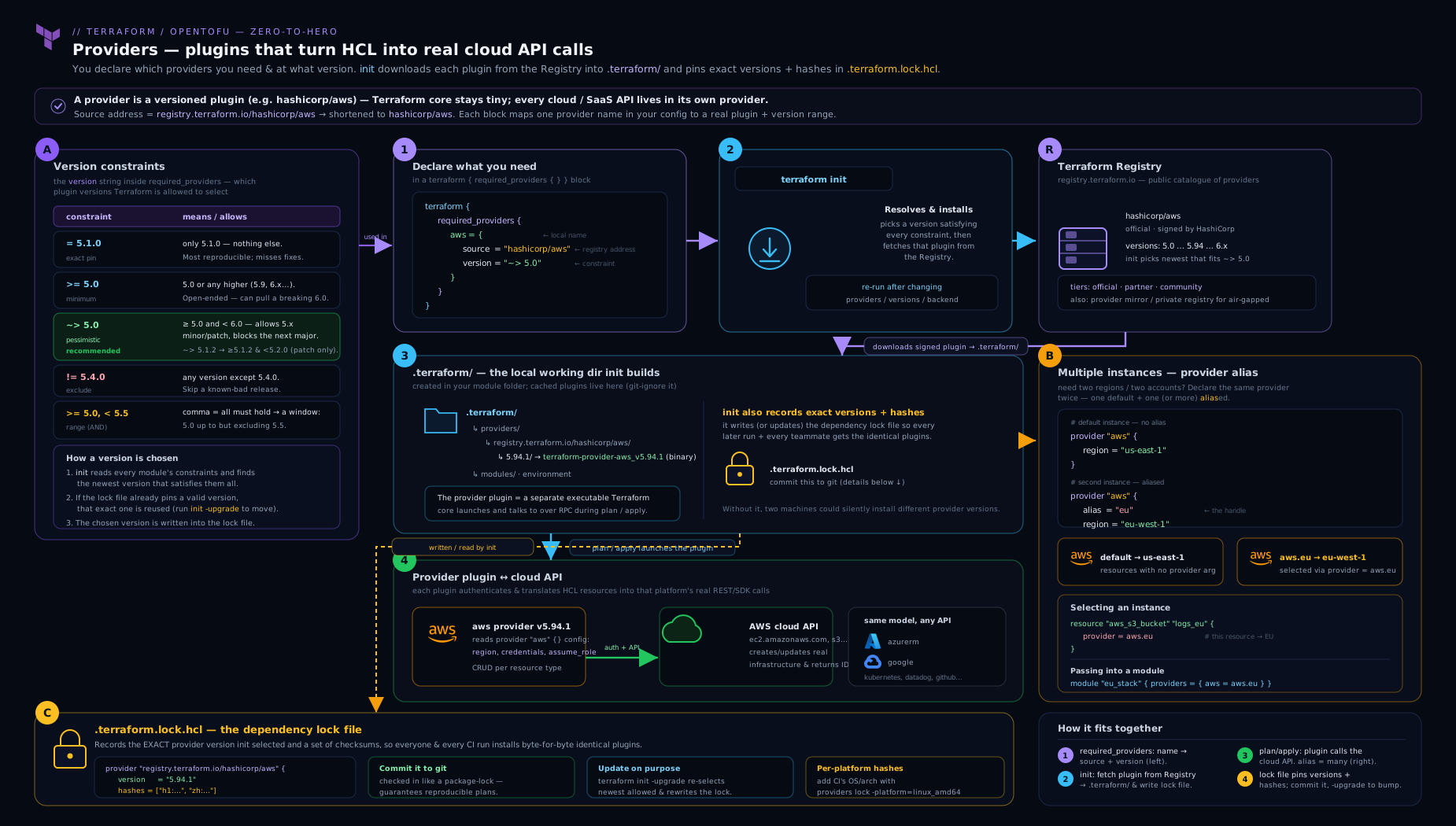
The diagram traces a required_providers entry from its source address through the registry to a downloaded, checksum-verified plugin binary, then shows one provider running as two aliased instances feeding different resources, with the lock file pinning the exact version and hashes.
The dependency lock file: .terraform.lock.hcl
When you run terraform init, Terraform writes (or updates) a file called .terraform.lock.hcl in your working directory. This is the dependency lock file, introduced in Terraform 0.14 and used identically by OpenTofu. Its job is to record the exact provider versions and their cryptographic checksums that this configuration was last initialised with, so that every subsequent init — yours tomorrow, a teammate’s, or CI’s — installs byte-for-byte the same plugins. It is the provider equivalent of package-lock.json or Gemfile.lock.
A typical entry:
# This file is maintained automatically by "terraform init".
# Manual edits may be lost in future updates.

provider "registry.terraform.io/hashicorp/aws" {
  version     = "5.40.0"
  constraints = "~> 5.40"
  hashes = [
    "h1:abc123...=",                       # the "h1" zip hash
    "zh:0011aa...",                        # per-platform release hashes (zh:)
    "zh:2233bb...",
    # ... one zh: line per platform in the release
  ]
}
Anatomy of a lock entry
| Element | Meaning |
|---|---|
| Block label | The provider’s full source address |
version |
The exact version init selected and locked |
constraints |
The human-readable constraint(s) from your config (informational; the version is authoritative) |
hashes |
The set of checksums Terraform will accept for this provider on install |
h1: hash |
Hash of the extracted provider package (Terraform’s modern scheme), platform-independent |
zh: hashes |
“Zip hashes” from the registry’s signed release — one per platform the release was built for |
How the lock file is used on init
- Lock file present, version satisfies constraints:
initinstalls that exact version (no network re-selection of version), verifies the downloaded plugin’s checksum against thehashes, and proceeds. If the checksum does not match any listed hash,initfails — this is the supply-chain integrity guarantee. - Lock file present, but the locked version violates a constraint you tightened:
initerrors and tells you to run-upgrade. - No lock file (fresh checkout that never committed one):
initselects the newest version allowed by constraints, downloads it, and writes a new lock file. - New provider added to config:
initresolves and locks the new provider, leaving existing entries untouched.
terraform init -upgrade
-upgrade is the only normal way to move a locked version. It tells init to ignore the currently locked versions, re-evaluate every constraint against the registry, select the newest allowed version for each provider, download it, and rewrite .terraform.lock.hcl with the new versions and hashes. You then review the lock-file diff in your pull request — it shows precisely which providers moved and to what — run plan, and commit. Without -upgrade, init will never silently bump a provider; this is the property that makes Terraform reproducible across a team.
Platforms and terraform providers lock
The hashes list is platform-aware because provider binaries are platform-specific (a macOS arm64 build differs from a Linux amd64 build). A subtle failure: you init on a Mac, the lock file records only darwin_arm64 hashes for the h1 scheme, you commit it, and CI on linux_amd64 then fails with “the local package does not match any of the checksums” because the Linux hash was never recorded. The fix is to pre-populate hashes for every platform your team and CI use with:
terraform providers lock \
  -platform=linux_amd64 \
  -platform=darwin_arm64 \
  -platform=darwin_amd64 \
  -platform=windows_amd64
This downloads each provider for each named platform and writes all their hashes into the lock file, so the same committed lock works everywhere. Run it whenever you add a provider or change versions, and commit the result. (OpenTofu has the same tofu providers lock command.)
Why you commit .terraform.lock.hcl
Commit it. Always. It is the record that makes “it worked on my machine” reproducible, it pins the supply chain via checksums, and its diff in code review is your audit trail of provider upgrades. The only artefact you do not commit is the .terraform/ directory (the downloaded binaries and cached state config) — that is ignored, regenerated by init, and listed in every Terraform .gitignore. The distinction trips people up constantly: .terraform/ is ignored; .terraform.lock.hcl is committed.
Installation, mirrors, and dev_overrides
By default providers come from the registry over the internet, cached per user under a plugin cache directory and per project under .terraform/providers/. For locked-down or air-gapped environments you change where providers are fetched from using the CLI configuration file (~/.terraformrc on Linux/macOS, terraform.rc on Windows) and a provider_installation block.
| Mechanism | What it does | When to use |
|---|---|---|
Plugin cache dir (plugin_cache_dir) |
Shares one download cache across all projects | Save bandwidth/disk; faster init |
filesystem_mirror |
Installs providers from a local directory tree | Air-gapped or vendored providers |
network_mirror |
Installs from an internal HTTPS mirror server | Enterprise: one controlled source, faster, auditable |
direct |
The normal registry path | Default |
dev_overrides |
Points a provider at a local build directory, bypassing version and checksum checks | Only when developing a provider |
dev_overrides deserves a warning. It is placed in the CLI config and makes Terraform use a locally compiled provider binary instead of a downloaded one, skipping the lock file and init entirely for that provider. It exists for people writing providers, who need to test an unreleased build. It is emphatically not for normal infrastructure work — if dev_overrides is set, init even prints a warning that the configuration is in development mode. Never leave it in a CI or shared environment.
For enterprises, a network_mirror or filesystem_mirror is the right answer: it gives you one vetted source of providers, works offline, and the lock-file checksums still apply, preserving integrity.
The Registry: public and private
The public Terraform Registry (registry.terraform.io) hosts thousands of providers (and modules) — official ones in the hashicorp namespace, partner-verified ones, and community ones. Each provider page documents every resource, data source, and configuration argument with examples; it is the canonical reference you should keep open while writing config. OpenTofu ships its own default registry but can also consume the public one and supports the same address scheme.
A private registry serves your organisation’s internal providers and modules under your own hostname, and is offered by Terraform Cloud/Enterprise, Spacelift, Scalr, and others. The only change in your code is the source address gains your hostname: source = "app.terraform.io/acme/internal-foo/aws". Private registries let you publish internal providers (rare) and, much more commonly, internal modules with versioning and access control. Authentication to a private registry uses a credentials block in the CLI config or terraform login.
Provider versus provisioner
These sound alike and are completely different — a classic exam trap.
| Provider | Provisioner | |
|---|---|---|
| What it is | A plugin that manages a category of resources via an API | A last-resort step that runs a script during create/destroy |
| Examples | aws, azurerm, kubernetes |
local-exec, remote-exec, file |
| Idempotent? | Yes — full CRUD with planning | No — runs imperatively, breaks the plan model |
| Configured by | required_providers + provider block |
A provisioner block inside a resource |
| HashiCorp’s stance | The foundation of Terraform | “A last resort” — avoid where possible |
A provider is how Terraform manages real infrastructure declaratively. A provisioner is an escape hatch for running arbitrary commands (bootstrap a VM, call a script) that has no place in the plan/state model and should be replaced by user_data/cloud-init, configuration management, or a native resource wherever you can. Provisioners get their own deep dive in TD7; mention them here only so you never conflate the two words.
Hands-on lab
This lab uses only providers that need no cloud account or credentials — random and local, both from HashiCorp — so it costs nothing and runs entirely on your machine. You will declare providers with constraints, see the lock file appear, add an aliased provider, and exercise -upgrade and multi-platform locking. You need the Terraform (or OpenTofu) CLI 1.9+ installed; everything else is local.
1. Create the project
mkdir tf-providers-lab && cd tf-providers-lab
Create main.tf:
terraform {
  required_version = ">= 1.9.0"

  required_providers {
    random = {
      source  = "hashicorp/random"
      version = "~> 3.5"
    }
    local = {
      source  = "hashicorp/local"
      version = "~> 2.4"
    }
  }
}

provider "random" {}

provider "local" {}

resource "random_pet" "name" {
  length = 2
}

resource "local_file" "greeting" {
  filename = "${path.module}/hello.txt"
  content  = "Hello from ${random_pet.name.id}\n"
}

output "pet_name" {
  value = random_pet.name.id
}
2. Initialise and inspect the lock file
terraform init
Expected output (abridged):
Initializing provider plugins...
- Finding hashicorp/random versions matching "~> 3.5"...
- Finding hashicorp/local versions matching "~> 2.4"...
- Installing hashicorp/random v3.6.x...
- Installing hashicorp/local v2.5.x...
Terraform has created a lock file .terraform.lock.hcl to record the provider
selections it made above.
Now look at what was created:
cat .terraform.lock.hcl
ls .terraform/providers/registry.terraform.io/hashicorp/
You will see two provider blocks in the lock file, each with a pinned version, your constraints, and a hashes list; and the downloaded binaries under .terraform/providers/. Confirm the version init selected satisfies your ~> constraint (e.g. a 3.6.x for ~> 3.5, a 3.7.0 would also be allowed but not 4.0.0).
3. Apply and validate
terraform apply -auto-approve
Validate that both providers did their work:
terraform output pet_name      # prints the generated pet name
cat hello.txt                  # prints "Hello from <pet name>"
terraform providers            # prints the provider dependency tree
The terraform providers command prints the resolved provider requirements for the configuration and any modules — a quick way to confirm what you actually depend on.
4. Add an aliased provider
Aliases work with any provider; demonstrate it with random. Add to main.tf:
provider "random" {
  alias = "alt"
}

resource "random_pet" "alt_name" {
  provider = random.alt
  length   = 3
}

output "alt_pet_name" {
  value = random_pet.alt_name.id
}
Then:
terraform apply -auto-approve
terraform output alt_pet_name
You now have two random instances (default and random.alt) and a resource explicitly bound to the alias — the same mechanism you would use for multi-region AWS, just without needing credentials.
5. Exercise -upgrade and multi-platform locking
Tighten the constraint to allow a newer minor, then upgrade:
terraform init -upgrade
Inspect the lock-file diff (if this directory is a git repo, git diff .terraform.lock.hcl) to see the version and hashes change. Finally, record hashes for other platforms so the lock would work in CI:
terraform providers lock -platform=linux_amd64 -platform=darwin_arm64
cat .terraform.lock.hcl   # each provider now lists more hashes
Validation checklist
.terraform.lock.hclexists and contains a block per provider with a pinnedversion.terraform output pet_nameandcat hello.txtshow a matching generated name.terraform output alt_pet_namereturns a value from the aliased instance.- After
terraform providers lock, thehasheslists are longer (multiple platforms).
Cleanup
terraform destroy -auto-approve
cd .. && rm -rf tf-providers-lab
Cost note
Zero cost. The random and local providers make no network calls to any cloud and create no billable resources — local_file writes a file on disk and random_pet generates a string in state. Nothing here touches a paid API, so there is nothing to forget and be billed for. (When you repeat these patterns with aws/azurerm, the providers are still free; only the resources they create cost money — so always destroy.)
Going deeper
Everything so far is what every Terraform user needs. This section is for when you build providers yourself, debug a plugin-compatibility error, or harden the lock file inside a CI pipeline — the internals underneath the mental model.
Plugin protocol 5 vs 6, and how a provider is built
The gRPC contract between Terraform core and a provider is itself versioned, and two versions are in the field. Protocol 5 is spoken by providers built on the older terraform-plugin-sdk v2 (“SDKv2”). Protocol 6 (Terraform 0.15+/1.0+) is spoken by providers built on the newer terraform-plugin-framework; it adds richer type support the old SDK cannot express — nested attributes, and optional/computed inside object attributes — which is why the framework is the future direction.
You almost never choose the protocol; the provider author does when they pick an SDK. It surfaces to you in exactly two ways. First, a very old CLI (< 0.15) loading a protocol-6-only provider fails at init with an incompatibility message — a non-issue on this course’s 1.5+ baseline, but the reason such an error points at a CLI upgrade, not at your config. Second, large providers (AWS, Google) are mid-migration and serve some resources from SDKv2 and some from the framework in one binary, stitched together with terraform-plugin-mux (“muxing”) and the tf5to6server/tf6to5server upgrade shims. Muxing is precisely what lets the AWS provider adopt the framework resource-by-resource instead of a big-bang rewrite. Takeaway: protocol version is a provider-build detail you read about, never a field you set.
Provider-defined functions (Terraform 1.8+)
Since Terraform 1.8 (and OpenTofu 1.7), providers can ship their own functions, not just resources and data sources. You call them through a three-part namespace, provider::<local_name>::<function>(...):
# Terraform 1.8+ / OpenTofu 1.7+  — the AWS provider ships ARN helpers
output "role_resource" {
  value = provider::aws::arn_parse("arn:aws:iam::111122223333:role/deploy").resource
  # => "role/deploy"
}
These are built on the plugin framework (protocol 6), which is why they arrived alongside its maturity. They evaluate during plan like any built-in function — no API call, no resource — and are gated to 1.8+/1.7+; on an older CLI the very same expression errors with “function … does not exist” because the runtime has no such feature, even though the syntax parses. You discover a provider’s functions on its registry page under a Functions section, right beside its resources and data sources.
The lock file in CI: -lockfile=readonly, plugin cache, and a clean-lock gate
The body showed how to populate the lock for multiple platforms; production pipelines also need to enforce it so no run can silently drift it. Three levers:
terraform init -lockfile=readonly—initrefuses to modify.terraform.lock.hcl. If the config needs a change the lock does not have (a newly added provider, or a locked version now outside your constraints),initfails instead of quietly rewriting. Run this in CI so the committed lock is authoritative.- A clean-lock gate — additionally (or instead) run a normal
terraform initand thengit diff --exit-code .terraform.lock.hcl. A non-zero exit means someone changed a constraint without committing the regenerated lock; fail the build on it. TF_PLUGIN_CACHE_DIR(orplugin_cache_dirin the CLI config) — point every CI job at one shared provider cache so repeatedinits reuse downloaded binaries instead of refetching. The lock’s checksums still verify each cached plugin, so caching costs you no integrity.
Keep the actual upgrade — terraform init -upgrade plus terraform providers lock -platform=... — in a separate, human-triggered maintenance job that opens a PR with the lock diff for review. The main pipeline should verify the lock, never move it.
Introspecting what you depend on
Two read-only commands round out terraform providers from the lab. terraform version prints the CLI version and, once a working directory is initialised, every provider version currently selected — the fastest way to answer “what am I actually running?”. terraform providers schema -json dumps the full schema — every resource, data source, function, and provider-configuration argument — of all configured providers as JSON; it is how editors, documentation generators, and policy tools (Checkov, conftest) learn a provider’s shape without hard-coding it.
Common beginner mistakes
Distinct from the symptom→cause→fix troubleshooting table below (which is for when something already broke), these are the conceptual misunderstandings that send beginners down the wrong path in the first place — the misconception, then the mental model that replaces it.
- “The provider version and the Terraform version are the same thing.” They are separate release trains.
required_versionpins the CLI (1.9, 1.10, …); a provider’sversionpins that plugin (AWS 5.x,azurerm4.x). Right model: Terraform is the engine, each provider is an independently versioned driver — you pin them separately. - “The lock file is a build artifact like
.terraform/, so I’ll gitignore it.” Exactly backwards, and the single most common mistake. Right model:.terraform/is regenerated cache you ignore;.terraform.lock.hclis the committed bill of materials that makes builds reproducible. - “
~> 5.40and~> 5.40.0mean the same thing.” They differ by one component and one ceiling.~> 5.40allows< 6.0.0(minors move);~> 5.40.0allows only< 5.41.0(patches only). Right model:~>frees the rightmost number you wrote and freezes everything to its left. - “I’ll
for_eachmy provider blocks to loop over accounts.” Providers are fixed at parse time, before the graph exists, so they cannot be generated from a collection. Right model: declare eachaliasstatically, or instantiate a module N times (modulefor_eachis allowed) and pass each its provider. - “My reusable module should carry its own
providerblock with credentials.” That welds an identity into the module and blocks its removal. Right model: the module declaresconfiguration_aliasesand the root owns everyproviderblock, mapping instances in withproviders = {}. - “No
versionconstraint means I always get the newest release.” Only the firstinitdoes; after that the lock pins whatever it chose until you run-upgrade. Right model: the lock, not the absence of a constraint, decides the version on every subsequentinit.
Practice challenges
Six graded exercises, beginner to advanced. Try each before opening the solution; the one-line why is the point, not just the answer.
1. Pin a provider to its major line (beginner). The random provider is on 3.7.x. Write the required_providers entry that accepts new 3.x minors and patches but never 4.0.0.
<details><summary>Show solution</summary>
random = {
  source  = "hashicorp/random"
  version = "~> 3.0"   # >= 3.0.0, < 4.0.0
}
Why: a two-component ~> pins the major and lets minor + patch flow — the standard root-module pin that dodges breaking majors.
</details>
2. Predict the pessimistic ceiling (beginner). Given version = "~> 4.16.0", which of 4.16.9, 4.17.0, 5.0.0 can init select?
<details><summary>Show solution</summary>
Only 4.16.9. ~> 4.16.0 means >= 4.16.0, < 4.17.0.
Why: three components → only the PATCH may increment; both 4.17.0 and 5.0.0 cross a component that ~> holds fixed.
</details>
3. Fix a CI checksum mismatch (intermediate). Local apply works; CI on Linux fails with “the local package … does not match any of the checksums.” Give the command and say what to commit.
<details><summary>Show solution</summary>
terraform providers lock \
  -platform=linux_amd64 -platform=darwin_arm64 -platform=darwin_amd64
Then commit the updated .terraform.lock.hcl.
Why: the lock held only your platform’s hashes; this records Linux’s (and others’) so CI can verify the binary it downloads.
</details>
4. Wire a two-region module (intermediate). A module must create resources in a primary and a replica region. Show the module-side declaration and the caller-side wiring.
<details><summary>Show solution</summary>
Module:
terraform {
  required_providers {
    aws = {
      source                = "hashicorp/aws"
      version               = ">= 5.0"
      configuration_aliases = [aws.primary, aws.replica]
    }
  }
}
Caller:
module "replicated" {
  source = "./modules/replicated"
  providers = {
    aws.primary = aws.mumbai
    aws.replica = aws.singapore
  }
}
Why: the module declares the alias slots it expects; the caller maps its own instances onto them, keeping the module region-agnostic and reusable.
</details>
5. Reject an uncommitted lock change in CI (advanced). Your pipeline must fail if someone bumps a constraint but forgets to regenerate and commit the lock. Give a way.
<details><summary>Show solution</summary>
terraform init -lockfile=readonly     # fails if the lock would need to change
# or, after a normal init:
git diff --exit-code .terraform.lock.hcl
Why: readonly refuses to rewrite the lock, and the git diff gate exits non-zero on any uncommitted change — either keeps the committed lock authoritative and drift-proof.
</details>
6. Call a provider-defined function (advanced). You write provider::aws::arn_parse(...) and it errors “function does not exist” on the runner. Diagnose and fix, and note the version gate.
<details><summary>Show solution</summary>
Provider-defined functions require Terraform 1.8+ (or OpenTofu 1.7+) and a provider that ships them. Upgrade the CLI; the provider::<name>::<fn>() namespace then resolves.
Why: provider functions are built on the plugin framework and gated to 1.8 — an older CLI parses the call but has no such feature, so it reports the function as missing rather than as a syntax error.
</details>
Common mistakes & troubleshooting
| Symptom | Likely cause | Fix |
|---|---|---|
Failed to query available provider packages / “no available releases match” |
Constraints across root + modules cannot be satisfied together (e.g. ~> 4.0 and ~> 5.0) |
Relax module constraints to a lower bound (>= 5.0); intersect must be non-empty |
the local package ... does not match any of the checksums in CI |
Lock file recorded only your platform’s hashes | Run terraform providers lock -platform=linux_amd64 ... and commit |
| Provider silently upgraded and broke the plan | Someone re-ran init -upgrade (or there was no lock file) |
Commit .terraform.lock.hcl; only upgrade deliberately and review the diff |
Invalid provider configuration / module wants an alias you did not pass |
Module declares configuration_aliases not satisfied by the caller |
Add the providers = { aws.x = aws.y } map to the module block |
Duplicate provider configuration |
Two unaliased blocks for the same provider | Keep one default block; give the others an alias |
Credentials error (InvalidAccessKeyId, NoCredentialProviders) |
No identity available to the provider | Set env/profile/role; never hard-code keys in .tf |
| Constraint “works locally, fails on teammate’s fresh clone” | Lock file not committed, so they resolve a different version | Commit the lock file |
dev_overrides warning on every command |
A dev_overrides block left in ~/.terraformrc |
Remove it unless you are actively building a provider |
Best practices
- Always pin with
~>to a major line (~> 5.40or~> 5.0) in root modules; use permissive>=lower bounds in reusable modules so they compose. - Commit
.terraform.lock.hcl; never commit.terraform/. Add the lock file to git and.terraform/to.gitignore. - Pre-lock all platforms your team and CI use with
terraform providers lock -platform=...so the committed lock works everywhere. - Upgrade providers deliberately via
init -upgrade, review the lock-file diff in the PR, runplan, then merge — never let upgrades happen by accident. - Keep identity out of code. Put
regionanddefault_tagsin the provider block; resolve credentials from environment, SSO, instance roles, or OIDC. - Use
configuration_aliases+providers = {}to pass non-default instances into modules; avoid fullproviderblocks inside reusable modules. - Use
default_tagsto enforce organisation tagging once instead of repeating tags on every resource. - For air-gapped or regulated environments, run a
network_mirror/filesystem_mirror; the lock-file checksums still protect integrity.
Security notes
The provider layer is a real part of your supply chain, so treat it like one. The lock file’s checksums are your defence against a tampered or substituted provider binary — committing it and pre-locking platforms means every init verifies that the plugin it runs is exactly the one you vetted; a mismatch fails closed. Prefer official and partner-verified providers from known namespaces over unaudited community ones for anything that touches production credentials, since a provider runs as code on your machine with your cloud permissions. Never place static long-lived credentials in .tf files or the state they leak into; use short-lived federation (OIDC), instance/IRSA roles, or at minimum environment variables and SSO, and scope the role each provider assumes to least privilege. Be cautious with endpoints overrides and skip_*_validation toggles — they are great for LocalStack and testing but, left on against real clouds, can mask misconfiguration or redirect calls. Finally, remember that dev_overrides disables version and checksum enforcement for a provider; it must never appear in CI or shared configuration.
Interview & exam questions
1. What is a Terraform provider, mechanically? A separate plugin binary (a Go program) that Terraform core launches as a subprocess and talks to over gRPC. Core decides what to do via the dependency graph; the provider translates each resource action into real API calls. Providers ship resources, data sources, and provider configuration.
2. Explain the ~> operator. What does ~> 1.2 allow versus ~> 1.2.3?
~> (pessimistic) lets only the rightmost specified component increment. ~> 1.2 means >= 1.2.0, < 2.0.0 (minor and patch may move). ~> 1.2.3 means >= 1.2.3, < 1.3.0 (only patch may move). Neither crosses the boundary one level up.
3. What is the difference between a provider’s source address and its local name?
The source address is the global identifier [hostname/]namespace/type (e.g. registry.terraform.io/hashicorp/aws) used to fetch it. The local name is the key in required_providers and the prefix on resources (aws_instance), used to refer to it within your config. They usually match but are independent.
4. How do you manage two AWS regions in one configuration?
Declare two provider "aws" blocks: a default and one with alias = "us_east_1" and its own region. Point specific resources at the alias with provider = aws.us_east_1. The default is used by anything that does not set provider.
5. Can you create provider instances dynamically with for_each or count?
No. Provider configurations are fixed at parse time, before the resource graph is built, so they cannot be generated from a collection. For N accounts/regions you instantiate modules N times and pass each its provider explicitly.
6. How do you pass a non-default provider into a module?
The module declares the alias it expects via configuration_aliases in its required_providers; the caller supplies it with a providers = { aws.expected = aws.actual } map on the module block. The default provider maps as aws = aws.actual.
7. What is .terraform.lock.hcl, and do you commit it?
The dependency lock file. It records the exact provider versions and their checksums chosen at the last init, so every future init installs identical, integrity-verified plugins. Yes — commit it (and .gitignore the .terraform/ directory).
8. Your lock works locally but CI fails with a checksum mismatch. Why and how do you fix it?
The lock recorded only your platform’s hashes; CI runs on a different platform whose hash is absent. Run terraform providers lock -platform=linux_amd64 -platform=darwin_arm64 ... to add every needed platform’s hashes, then commit.
9. How do you upgrade a provider safely?
Run terraform init -upgrade, which re-selects the newest version allowed by your constraints and rewrites the lock file. Review the lock-file diff, run plan, and merge. Plain init never bumps a locked version.
10. Two modules constrain the same provider to ~> 4.0 and ~> 5.0. What happens?
init intersects all constraints and finds no version that is simultaneously 4.x and 5.x, so it fails. Module authors should use lower-bound constraints (>= 5.0) and let the root + lock file pick the exact version.
11. Provider versus provisioner — what’s the difference?
A provider is the declarative plugin that manages resources via an API (the foundation of Terraform). A provisioner is an imperative last-resort step (local-exec, remote-exec) run during create/destroy that breaks idempotency and should be avoided in favour of user_data/config management/native resources.
12. What is dev_overrides and when do you use it?
A CLI-config block that points a provider at a locally built binary, bypassing version and checksum checks (and init) for that provider. It is only for people developing a provider; it must never be left in CI or shared environments.
Quick check
- Which constraint allows
5.41.0but not6.0.0:~> 5.40.0or~> 5.40? - True or false: you commit
.terraform/but ignore.terraform.lock.hcl. - What argument on a
providerblock creates an additional named instance? - Which command re-selects the newest allowed provider versions and rewrites the lock file?
- What does a module use to declare that it expects an aliased provider from its caller?
Answers
~> 5.40(it allows>= 5.40.0, < 6.0.0).~> 5.40.0would stop at< 5.41.0.- False. It is the reverse: ignore
.terraform/, commit.terraform.lock.hcl. alias.terraform init -upgrade.configuration_aliases(inside itsrequired_providersblock).
Exercise
Build a two-account, two-region skeleton without any cloud credentials by simulating it with random/local, then convert it on paper to AWS. (a) Declare a default random provider and two aliased instances random.acct_a and random.acct_b. (b) Write a small local module modules/named-thing that takes a provider via configuration_aliases = [random.target] and creates one random_pet. © Instantiate the module twice from the root, passing random.acct_a to one and random.acct_b to the other via the providers map. (d) init, apply, and confirm two differently-named pets. (e) In comments, rewrite the provider blocks as aws with assume_role for two account IDs and region for two regions — describing exactly what IAM trust each role would need. This rehearses the real multi-account module-wiring pattern end to end.
Certification mapping
This lesson maps directly to the HashiCorp Certified: Terraform Associate (003) objectives. Specifically: “Understand Terraform’s plugin-based architecture” and the provider model (this whole lesson); “Use multiple providers” and “Configure providers” (the provider block, alias, passing providers into modules); the version constraint syntax and the difference between Terraform and provider versions; the public and private registries and how source addresses resolve; and the dependency lock file — what it is, what it contains, the -upgrade flag, and why it is committed, which the exam tests explicitly. The provider-versus-provisioner distinction also appears. OpenTofu’s certification-equivalent material is identical in this area.
Glossary
- Provider — a plugin (Go binary) that maps Terraform resources/data sources to a real API.
- Source address — a provider’s global identifier,
[hostname/]namespace/type, e.g.registry.terraform.io/hashicorp/aws. - Local name — the
required_providerskey and resource prefix used to refer to a provider within a configuration. required_providers— the block insideterraform {}that declares each provider’ssourceandversion.- Version constraint — a comma-separated set of conditions (
=,!=,>,>=,<,<=,~>) limiting acceptable provider releases. - Pessimistic constraint (
~>) — allows only the rightmost specified version component to increment. providerblock — configures a provider’s shared settings (credentials,region,default_tags,assume_role).alias— creates an additional, named instance of a provider for multi-region/multi-account use.configuration_aliases— a module-side declaration of the aliased providers it expects to be passed.providersargument — the caller-side map on amoduleblock that supplies provider instances to a module.default_tags— provider-block tags merged onto every taggable resource.assume_role— provider-block mechanism to assume an IAM role (cross-account AWS pattern).- Dependency lock file (
.terraform.lock.hcl) — records exact provider versions and checksums for reproducible, integrity-verified installs; committed to version control. h1:/zh:hashes — checksum schemes in the lock file (extracted-package and per-platform zip hashes).-upgrade—initflag that re-selects the newest allowed versions and rewrites the lock file.-lockfile=readonly—initmode that refuses to modify.terraform.lock.hcl, failing instead; used in CI to enforce a committed lock.- Plugin cache (
TF_PLUGIN_CACHE_DIR/plugin_cache_dir) — a shared local cache of downloaded provider binaries that speeds repeatedinits without weakening checksum verification. - Plugin protocol (5 / 6) — the versioned gRPC contract between Terraform core and a provider; SDKv2 speaks protocol 5, the plugin framework speaks protocol 6.
- terraform-plugin-framework — the modern SDK for building providers (protocol 6), supporting nested attributes and provider-defined functions.
- SDKv2 (terraform-plugin-sdk) — the older SDK for building providers (protocol 5).
- Muxing (terraform-plugin-mux) — serving protocol-5 and protocol-6 resources from a single provider binary during migration.
- Provider-defined function — a function shipped by a provider, called as
provider::<local_name>::<fn>()(Terraform 1.8+ / OpenTofu 1.7+). terraform providers schema -json— command that dumps every configured provider’s full schema (resources, data sources, functions, config) as JSON.- Network/filesystem mirror — alternative provider install sources for air-gapped or enterprise use.
dev_overrides— CLI-config setting that points a provider at a local build, bypassing version/checksum checks; for provider developers only.- Registry — the service hosting providers and modules; public (
registry.terraform.io) or private (your hostname). - Provisioner — an imperative last-resort step (
local-exec/remote-exec) run during create/destroy; not a provider.
Next steps
You now understand the provider layer end to end — declaration, versioning, configuration, aliasing, and locking. Next, dig into how Terraform actually manages the resources those providers create: read terraform-resources-meta-arguments-count-foreach-lifecycle for count, for_each, depends_on, and the full lifecycle block. If you want the broader survey that frames all of this, revisit terraform-fundamentals-hcl-providers-state-workflow. And when you reach reusable design, terraform-module-sources-composition-registry-consumption builds directly on the provider-passing patterns introduced here.