The Create Host Pool blade asks one question that everything else hangs off — Host pool type: Personal or Pooled — and the tooltip does not tell you which one your users actually need. Pick wrong and you find out months later: you chose Personal for a 400-seat call centre and now pay for 400 always-on VMs idling at 4% CPU all night, or you chose Pooled for a team of developers and the heavy IDE, the local database, and yesterday’s registry tweak all vanished when they signed back in this morning. This single radio button is the most consequential decision in an AVD design, and it is nearly impossible to change after users are live without rebuilding the pool.
This is the decision framework I wish every first-timer had. Treat the choice not as a feature checkbox but as a question about who owns the desktop and how many people share a machine. A personal host pool gives each user their own dedicated VM that persists across sign-outs — one box per person. A pooled host pool is a shared farm: many users land on whichever host has spare capacity, get a roaming profile, and release the machine at log-off. Everything downstream — cost, sizing, FSLogix, image management, autoscale, even how you patch — follows from that one fork. You will learn to place a workload on the right side of it, then size the pooled side with a repeatable users-per-host method instead of guessing.
By the end, given a workload — its app weight, persistence needs, hours, and headcount — you will know in under a minute whether it wants Personal or Pooled, which VM SKU and how many users fit on one host, and the handful of settings (load-balancing algorithm, max session limit, FSLogix profile container, assignment type) that make the model behave. This pairs with the broader Azure Virtual Desktop Architecture Explained: Control Plane, Host Pools, Workspaces, and Session Hosts in Plain English; here we zoom into the one decision that overview leaves you to make.
What problem this solves
The pain is almost always discovered after go-live, when the decision is expensive to undo. Two failure stories repeat across every organisation that skips this framework.
The first is over-provisioning with Personal. A team reads “personal desktop = like a real PC” and assigns one VM per user because it feels safe. For a 300-person workforce that is 300 VMs, billed whenever powered on, most 90% idle. The same 300 users on pooled hosts might fit on 30–40 shared VMs, because not everyone is active at once and a light desktop packs many sessions per machine. The Personal design can cost five to ten times more, unnoticed until the finance review.
The second is persistence loss with Pooled. A team picks Pooled because it is cheaper, then puts power users on it — developers who install tools, keep large local state, and expect their machine to be theirs. Pooled hands every session a roaming FSLogix profile and a fresh OS disk; anything written outside the container is gone at sign-out. The helpdesk drowns in “my software disappeared” tickets, and the real fix is not a setting — those users needed Personal all along.
Who hits this: anyone designing AVD for more than a handful of users, hardest where the workforce is mixed — both task workers (light, transient, perfect for pooled) and power users (heavy, persistent, needs personal) forced into one pool. The right answer is frequently both models, in separate host pools, assigned by user type. Here is the one-screen summary of the two models and the third option people forget:
| Model | Who owns the machine | Persistence | Best for | Cost shape |
|---|---|---|---|---|
| Personal host pool | One user, one dedicated VM | Full — everything survives sign-out | Power users, devs, persistent state, GPU, licensed installs | High — one VM per user, billed when on |
| Pooled host pool | Shared; user gets whatever host has room | Profile only (FSLogix); OS state resets | Task/knowledge workers, transient sessions, large headcount | Low — many users per VM, density-driven |
| Windows 365 (Cloud PC) | One user, fixed monthly per-seat | Full — persistent Cloud PC | Simple 1:1 needs without VDI sizing overhead | Flat per-user/month, predictable |
That third row matters because Personal AVD and Windows 365 solve a similar problem differently; if your only reason for Personal is “each user needs their own machine,” compare the trade-offs in Windows 365 Cloud PC vs Azure Virtual Desktop: Cost, Control, and Use-Case Trade-offs Compared before you build.
Learning objectives
By the end of this article you can:
- Explain the difference between a personal and a pooled host pool in terms of ownership, persistence, and density — and say which one a workload needs.
- Choose the correct assignment type for personal pools (Automatic vs Direct) and load-balancing algorithm for pooled pools (Breadth- vs Depth-first).
- Set and reason about the max session limit, and explain how it interacts with the load-balancing algorithm.
- Apply a repeatable users-per-host sizing method to pick a VM SKU and host count instead of guessing.
- Explain why FSLogix profile containers are mandatory for pooled but optional for personal, and where the data lives.
- Map your workforce to the right mix — often both models in separate pools assigned by persona.
- Stand up a small pooled host pool with
azCLI and Bicep, set and inspect the session limit and load balancing, and tear it down. - Trace the “wrong model” symptoms (data-loss complaints, idle-cost blowouts, one host overloaded while others sit empty) back to a host-pool setting.
Prerequisites & where this fits
You should already understand the AVD object model: a host pool is a set of identical session host VMs you own; an application group publishes a desktop or RemoteApps from it; a workspace is what users see; and the control plane (broker, gateway, web client) is Microsoft-managed and free. If those words are new, read Azure Virtual Desktop Architecture Explained: Control Plane, Host Pools, Workspaces, and Session Hosts in Plain English first. You should also be comfortable running az in Cloud Shell and know the basics of Windows VM SKUs (vCPU and RAM per size).
This sits at the very front of an AVD design — the first decision, made before you create the pool, because the type is fixed at creation and the SKU and count follow from it. It draws in several owners early: the architect and app owners settle Personal vs Pooled per persona; capacity planning sizes the SKU and users-per-host; storage owns the FSLogix tier; identity confirms the licensing entitlement; and operations owns the autoscale schedule. Once you have made the call, the build is the same flow covered in Deploy Your First AVD Pooled Host Pool End to End: Host Pool, App Group, Workspace, and User Assignment.
Core concepts
Four mental models make every later decision obvious. Hold these and the radio button answers itself.
Ownership is the whole question. The single distinction is who the VM belongs to. A personal desktop is owned by one named user; the broker always sends them back to the same VM, which keeps their installed software, files on the OS disk, and machine-level tweaks. A pooled desktop is owned by no one; the broker hands each user any host with capacity, they work in a roaming profile, and at sign-out the host is free for the next person. “One box per person, forever” versus “grab a free box, give it back” is the fork — everything else is a consequence of it.
Density is what makes pooled cheap. Because a pooled host is shared, one VM serves many concurrent users — a light desktop might carry 8–16 sessions, a heavy one only 2–4. That ratio, users per host, collapses cost: 200 task workers at 10 per host need ~20 VMs plus headroom, not 200. Personal has no density — always 1 user : 1 VM — so its cost scales linearly with headcount and is dominated by power-on hours. “Pooled is cheaper” is density doing the work.
Persistence in pooled lives only in the profile. On a personal VM everything persists because the VM is yours. On a pooled VM the OS disk is disposable — it resets to the image, and any host could serve you next time — so user state must be externalised. That is FSLogix: it stores the Windows profile (desktop, documents, app settings, Outlook cache, OneDrive state) in a profile container — a VHDX on an SMB file share — and mounts it at logon so the environment “follows” the user onto whatever host they land on. FSLogix is therefore mandatory for pooled and merely optional for personal. What does not go in the container — machine-wide installs, services, HKLM registry, large data outside the profile — does not roam, which is exactly why heavy/persistent users belong on personal.
The model is fixed at creation; the sizing is tunable. You choose Personal or Pooled at creation and cannot flip an existing pool — changing your mind means a new pool and a user migration. By contrast the things inside a pooled pool — VM SKU, host count, max session limit, load-balancing algorithm, autoscale — are all adjustable later. Get the model right up front (the irreversible part) and refine sizing with telemetry once users are on. Pin the vocabulary before the deep sections:
| Term | One-line definition | Applies to | Why it matters to the choice |
|---|---|---|---|
| Host pool | A set of identical session-host VMs | Both | The unit whose type you are choosing |
| Session host | One Windows VM in the pool | Both | What you size and count |
| Personal pool | 1 user : 1 dedicated, persistent VM | Personal | Full persistence, no density |
| Pooled pool | Many users share hosts; profile roams | Pooled | Density cuts cost; OS state resets |
| Assignment type | How users map to personal VMs (Auto/Direct) | Personal | Who gets which dedicated box |
| Load balancing | How the broker spreads sessions (Breadth/Depth) | Pooled | Even spread vs pack-then-fill |
| Max session limit | Cap on concurrent sessions per host | Pooled | The density ceiling per VM |
| FSLogix profile container | User profile as a VHDX on SMB | Pooled (req), Personal (opt) | Makes roaming state possible |
| Users per host | Concurrent sessions a VM can carry | Pooled | The sizing lever |
| Scaling plan / autoscale | Powers hosts on/off by schedule/load | Both | Stops paying for idle VMs |
Personal host pools, end to end
A personal host pool is the closest AVD gets to “give each person a real PC in the cloud.” Each user maps to one dedicated session host the broker always routes them back to, so the machine accumulates their state like a physical laptop.
Assignment type: Automatic vs Direct
The only configuration unique to personal pools is how users bind to a VM, set by the personal desktop assignment type:
| Assignment type | How the binding happens | When to use | Gotcha |
|---|---|---|---|
| Automatic | First time a user connects, the broker assigns the next available host and pins it permanently | Most cases; you do not care which user lands on which VM | You need at least as many hosts as users before they all connect |
| Direct | An admin explicitly assigns user → specific host ahead of time | Pre-staging, named-machine compliance, hardware-pinned licensing | More admin overhead; you manage the map yourself |
Set it at pool creation and assign directly with the AVD CLI extension:
# Create a PERSONAL host pool with automatic assignment
az desktopvirtualization hostpool create \
  --name hp-personal-eng --resource-group rg-avd-prod --location centralindia \
  --host-pool-type Personal \
  --personal-desktop-assignment-type Automatic \
  --load-balancer-type Persistent

# OR pin a specific user to a specific session host (Direct assignment)
az desktopvirtualization session-host update \
  --host-pool-name hp-personal-eng --resource-group rg-avd-prod \
  --name "vm-eng-03.contoso.com" \
  --assigned-user "asha@contoso.com"
Note the load balancer reads Persistent for personal — it is not balancing anything, just always returning the user to their assigned host. That mapping sticks until you explicitly reassign or unassign it.
Persistence, patching, and the cost of “one box per person”
Because each VM is owned, everything survives sign-out: installed apps, machine-wide changes, files on C:, even a reboot. That is the feature. It also means you patch every machine individually (via Intune / Azure Update Manager), cannot casually reimage a host without destroying that user’s data, and carry the full image footprint times the headcount — each VM needing patch/AV/monitoring like a real endpoint.
The cost lever for personal is not density (there is none) — it is power state. A personal VM only needs to run when its owner is working, so a scaling plan that deallocates idle VMs and starts them on connection keeps a 9-to-5 user’s VM off ~16 hours a day. Without it, personal AVD is a fleet of always-on VMs and the bill reflects it.
A workload forces personal whenever state must persist machine-wide: users who install their own software or hold admin rights (installs vanish at sign-out on pooled); large persistent local data (a disposable pooled OS disk resets it); GPU or specialised drivers (hard to share a GPU host across many sessions); per-device-licensed software (roaming to any host breaks the licence); long-running local processes or a stateful dev environment (a shared host reclaims the state — “my environment disappeared”). If any of these is true for a persona, it belongs on personal.
Pooled host pools, end to end
A pooled host pool is a shared farm. The point is density: pack as many users as comfortably fit onto each VM, roam their profiles with FSLogix, and run far fewer machines than you have people. Two settings — the load-balancing algorithm and the max session limit — govern that sharing, and they work together.
Load-balancing algorithm: Breadth-first vs Depth-first
When a user connects, the broker picks which host to send them to. The load-balancing algorithm decides the strategy:
| Algorithm | How it places new sessions | Effect | Best for |
|---|---|---|---|
| Breadth-first | Spreads each new session onto the least-loaded host | Even load; better single-session performance | Most production pools; performance-sensitive users |
| Depth-first | Fills one host up to its max session limit before using the next | Packs users tight; leaves whole hosts idle to power down | Cost-saving with autoscale; tolerant workloads |
Breadth-first is the usual default for steady performance; depth-first deliberately crowds early hosts so later ones stay empty for autoscale to deallocate, trading per-user headroom for a lower bill — the classic cost-optimised combo. Set it at creation or change it any time:
# Create a POOLED host pool, breadth-first, cap 12 sessions/host
az desktopvirtualization hostpool create \
  --name hp-pooled-office --resource-group rg-avd-prod --location centralindia \
  --host-pool-type Pooled \
  --load-balancer-type BreadthFirst \
  --max-session-limit 12

# Switch an existing pool to depth-first later (reversible)
az desktopvirtualization hostpool update \
  --name hp-pooled-office --resource-group rg-avd-prod \
  --load-balancer-type DepthFirst
Max session limit: the density ceiling
The max session limit caps how many concurrent sessions a single host accepts — the per-host ceiling that stops a machine being oversubscribed into the ground. Once a host hits the limit the broker sends new users elsewhere (or, under depth-first, starts filling the next host). Crucially this is a policy cap, not a guarantee: setting it to 20 does not make 20 sessions perform well; it just stops the 21st landing. Set it too high and the broker stacks past comfort (CPU/RAM pressure, sluggish sessions); too low and hosts refuse users they could serve (wasted capacity, more hosts than needed). You derive the number from sizing (next section), not optimism.
FSLogix: mandatory, not optional
On a pooled pool a user could land on a different host every day, so their profile cannot live on the OS disk — it has to roam. FSLogix profile containers make this work: the Windows profile is stored as a VHDX on a shared SMB file share (typically Azure Files or Azure NetApp Files), mounted at logon and unmounted at logoff, so the user’s desktop, documents, app settings, and Outlook/OneDrive caches follow them onto whichever host they get. Skip FSLogix and you ship a broken experience: a fresh profile every login, settings lost each time, the cache re-downloading endlessly. The storage choice is a real design point:
| Profile storage | Throughput / scale | When to choose | Trade-off |
|---|---|---|---|
| Azure Files (Standard) | Modest IOPS, lowest cost | Small pools, light profiles, budget-first | Logon storms can hit IOPS limits |
| Azure Files (Premium) | High IOPS/throughput (SSD) | Most production pooled pools | Costs more; size for the IOPS you need |
| Azure NetApp Files | Very high, low latency | Large/dense pools, demanding logons | Premium price; minimum capacity pool |
| OS disk (no FSLogix) | N/A | Never for pooled | Profiles do not roam — broken UX |
A second nuance worth knowing early: the profile container grows with the user’s data (mail cache, OneDrive files), so you cap the VHDX size and watch share capacity — a runaway profile or a full share is a top cause of logon failures.
Sizing a pooled deployment: the users-per-host method
This is where most first designs go wrong: people pick a VM SKU and host count by feel. Use a repeatable method instead — figure out how many concurrent users you must serve, how many fit on one VM of a chosen SKU, divide, then add headroom.
Step 1 — Find peak concurrency, not headcount. Size for the most users signed in at the same time, always less than the total. 300 entitled, 60% active at peak → concurrency ~180, not 300.
Step 2 — Classify the workload weight. How heavy a desktop each user runs sets how many fit per core. Microsoft publishes guideline categories; treat them as a starting point and validate with a pilot:
| Workload type | Example users | Rough sessions per physical core | Typical RAM per user |
|---|---|---|---|
| Light | Data entry, single LOB app, kiosk | ~6 | ~1–2 GB |
| Medium | Office apps, light multitasking, line workers | ~4 | ~2 GB |
| Heavy | Many apps, large spreadsheets, content work | ~2 | ~2–4 GB |
| Power | Dev tools, design, GPU, big data sets | ~1 (or Personal) | ~4+ GB |
Step 3 — Pick a SKU and compute users-per-host. Multiply usable cores by the per-core figure, then sanity-check against RAM (sessions × per-user RAM must fit memory). A D8s_v5 (8 vCPU / 32 GB) on a medium workload: 8 × 4 is a high-teens count by CPU, but 32 GB ÷ 2 GB ≈ 16 by RAM — so RAM binds at ~16, and you set the limit a notch below (e.g. 14) for headroom. Always take the lower of the two numbers.
Step 4 — Divide and add headroom. Host count = concurrency ÷ users-per-host, then add N+1 (at least one spare) so a host going down for patching or failure does not push the rest over their limit. A worked example for 180 concurrent medium users at 14 per host:
| Quantity | Value | How derived |
|---|---|---|
| Entitled users | 300 | Headcount |
| Peak concurrency | 180 | 60% active at peak |
| SKU | D8s_v5 (8 vCPU / 32 GB) |
Medium workload fit |
| Users per host | 14 | min(CPU-bound, RAM-bound) − headroom |
| Hosts for load | 13 | ceil(180 ÷ 14) |
| Hosts with N+1 | 14 | +1 spare for patch/failure |
Common SKU choices and the ballpark medium-workload density (validate with a pilot — these are planning starting points, not guarantees):
| VM SKU | vCPU / RAM | Ballpark medium users/host | Typical pooled use |
|---|---|---|---|
D4s_v5 |
4 / 16 GB | ~6–8 | Small pools, lighter density |
D8s_v5 |
8 / 32 GB | ~12–16 | The common workhorse |
D16s_v5 |
16 / 64 GB | ~24–32 | Larger, denser pools |
E8s_v5 (mem-optimised) |
8 / 64 GB | RAM-heavy desktops | When RAM binds before CPU |
NV-series (GPU) |
varies | low (GPU-bound) | Graphics/CAD — often Personal |
Two rules that save real money: never size purely on CPU (RAM frequently binds first for medium/heavy desktops), and never skip the pilot — measure actual CPU, RAM, and logon times under load before locking the limit. The spreadsheet number is a hypothesis; the pilot is the test.
Architecture at a glance
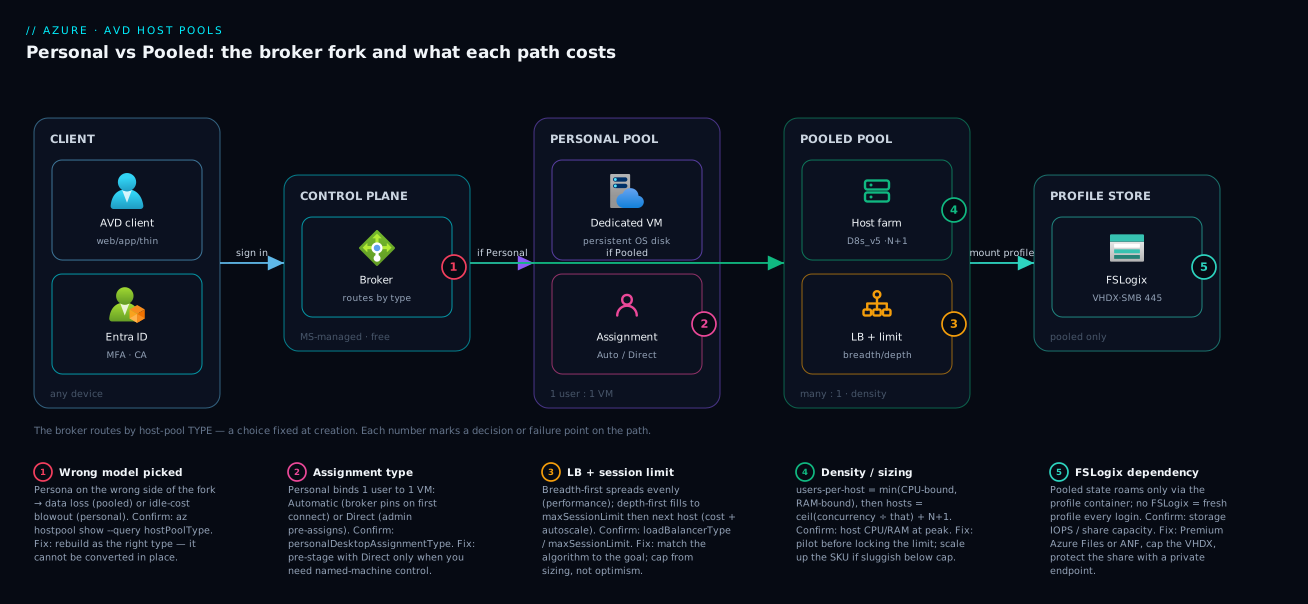
Follow a single connection through both models, left to right, and the difference becomes physical. A user opens the AVD client, which authenticates against Entra ID and reaches the Microsoft-managed control plane — the broker and gateway you never deploy. The broker consults the host pool to choose a destination, and this is the exact hop where the two models diverge. For a personal pool it looks up the user’s assigned host and routes them to that one dedicated VM, whose OS disk holds everything they ever installed or saved. For a pooled pool it applies the load-balancing algorithm (breadth- or depth-first) against the max session limit to pick whichever shared host has room, and the session lands there with a roaming FSLogix profile mounted from an Azure Files SMB share — so the environment follows the user even though the host underneath is interchangeable.
The diagram lays this out: client and Entra on the left, the managed broker in the middle, then the fork into a Personal column (1:1 dedicated, persistent VMs) and a Pooled column (a shared farm sized by users-per-host, fed by an FSLogix profile tier). The numbered badges mark the decisions and failure points; read the legend as where the choice is made, what it controls, and what breaks if you get it wrong.
Real-world scenario
Northwind Logistics runs a national parcel operation with two very different user sets on one AVD estate, and their first design forced everyone into a single model — exactly how this goes wrong.
The workforce: 420 depot operators who use one tracking app and a browser for an eight-hour shift then sign out; and 35 platform engineers who run local containers and databases inside heavy IDEs all day. The first architect, wanting “simplicity,” put everyone on a personal pool — one D8s_v5 per person, 455 VMs. The operators’ VMs sat at single-digit CPU all shift and were billed around the clock with no scaling plan; finance escalated within the first cycle. Worse, the operators did not need persistence — they had no local state worth keeping — so 420 dedicated VMs were buying a feature nobody used.
The redesign split the estate by persona into two pools. The 420 operators moved to a pooled pool: a light/medium workload at ~12 users per D8s_v5, peak concurrency ~70% (≈294), needing ~25 hosts plus N+1 — 26 VMs instead of 420, with breadth-first balancing, FSLogix on Premium Azure Files, and a scaling plan powering most hosts off overnight. The 35 engineers stayed personal — they genuinely needed persistent, installable machines — now with a personal scaling plan that deallocated each VM outside working hours, cutting idle compute by roughly two-thirds.
The outcome: the operator footprint dropped from 420 always-on VMs to ~26 density-packed hosts that powered down at night, while the engineers kept the persistence their work required. The lesson is this article’s thesis — the model is per persona, not per company. A mixed workforce almost always wants both models in separate pools, and that difference was Northwind’s single largest platform line item.
Advantages and disadvantages
Neither model is “better” — each is right for a different workload. The trade-off, side by side:
| Dimension | Personal | Pooled |
|---|---|---|
| Persistence | Full — survives sign-out, reboot | Profile only; OS state resets |
| Cost driver | VM count × power-on hours | Density (users/host) |
| Cost at scale | High (1 VM per user) | Low (many users per VM) |
| User experience | Like a personal PC | Shared; consistent if sized right |
| Installs / admin rights | Yes, persist | Lost at sign-out |
| FSLogix | Optional | Mandatory |
| Image / patch effort | Per-machine, like endpoints | One golden image, reimage freely |
| Right-sizing complexity | Low (1:1) | Higher (sizing + density) |
| GPU / specialised hardware | Natural fit | Awkward to share |
| Reversibility | Pick at creation; cannot convert | Pick at creation; cannot convert |
When each matters: choose personal when persistence or installability is non-negotiable — developers, GPU/CAD users, anyone with per-device licensing or large local state; the cost is acceptable because the work requires it, controlled by a scaling plan. Choose pooled when users are interchangeable and transient — task workers on a known app set who keep data in the profile or cloud apps; density is what makes a 400-person VDI affordable. And the meta-answer: when the workforce contains both, the right design is both models in separate pools, not a compromise that serves neither.
Hands-on lab
Stand up a small pooled host pool, set and inspect its load-balancing algorithm and max session limit, then tear it down — all in Cloud Shell (Bash). This covers the host-pool object and its settings (the focus of this article); adding session hosts, an app group, and a workspace is the full flow in the deploy-first walkthrough linked at the end.
Step 1 — Variables and resource group.
RG=rg-avd-lab
LOC=centralindia
HP=hp-pooled-lab
az group create -n $RG -l $LOC -o table
Step 2 — Ensure the AVD CLI extension is present.
az extension add --name desktopvirtualization --upgrade
Step 3 — Create a POOLED host pool, breadth-first, cap 10 sessions/host.
az desktopvirtualization hostpool create \
  --name $HP --resource-group $RG --location $LOC \
  --host-pool-type Pooled \
  --load-balancer-type BreadthFirst \
  --max-session-limit 10 \
  --preferred-app-group-type Desktop -o table
Expected: a host-pool row with hostPoolType = Pooled, loadBalancerType = BreadthFirst, maxSessionLimit = 10.
Step 4 — Verify the two settings that govern sharing.
az desktopvirtualization hostpool show -n $HP -g $RG \
  --query "{type:hostPoolType, lb:loadBalancerType, maxSessions:maxSessionLimit}" -o table
Step 5 — Flip to depth-first and lower the cap, then re-check (these are tunable).
az desktopvirtualization hostpool update -n $HP -g $RG \
  --load-balancer-type DepthFirst --max-session-limit 8
az desktopvirtualization hostpool show -n $HP -g $RG \
  --query "{lb:loadBalancerType, maxSessions:maxSessionLimit}" -o table
Expected: loadBalancerType now DepthFirst, maxSessionLimit now 8 — proving the model is fixed but the sizing knobs are not.
Step 6 — (Personal contrast) create a personal pool to see the different settings.
az desktopvirtualization hostpool create \
  --name hp-personal-lab --resource-group $RG --location $LOC \
  --host-pool-type Personal \
  --personal-desktop-assignment-type Automatic \
  --load-balancer-type Persistent -o table
Notice there is no maxSessionLimit to set and the load balancer is Persistent — the settings are the model difference.
The same pooled pool as Bicep, so you manage the model and its knobs as code:
resource pool 'Microsoft.DesktopVirtualization/hostPools@2024-04-03' = {
  name: 'hp-pooled-lab'
  location: 'centralindia'
  properties: {
    hostPoolType: 'Pooled'
    loadBalancerType: 'BreadthFirst'   // or 'DepthFirst' for tight packing
    maxSessionLimit: 10                // the per-host density ceiling
    preferredAppGroupType: 'Desktop'
    startVMOnConnect: true             // pairs with a scaling plan to save idle cost
  }
}
Validation checklist. You created a pooled pool and confirmed its two governing settings (step 4 proves they are real and inspectable), changed the algorithm and cap live (step 5 proves sizing knobs are tunable post-creation), and created a personal pool whose settings differ by nature — no session limit, persistent routing (step 6 proves the difference is the model, not a toggle).
Cleanup (avoid lingering charges).
az group delete -n $RG --yes --no-wait
Cost note. Host-pool objects are free — you pay for session-host VMs and profile storage, neither of which this lab creates. Creating and deleting empty host pools costs nothing; the resource-group delete is just tidiness.
Common mistakes & troubleshooting
Most AVD “problems” in the first month are really wrong-model or wrong-sizing decisions surfacing as symptoms. Trace the symptom back to the setting:
| # | Symptom | Root cause | Confirm (exact cmd / portal path) | Fix |
|---|---|---|---|---|
| 1 | “My installed software / files disappeared after sign-out” | Heavy/persistent user on a pooled pool | az desktopvirtualization hostpool show --query hostPoolType = Pooled |
Move that persona to a personal pool (rebuild + migrate) |
| 2 | Compute bill far higher than expected | Personal for transient users, or no scaling plan | Count running VMs vs concurrency; check for a scaling plan | Pooled for task workers; add a scaling plan to power off idle |
| 3 | One host pinned/slow while others sit empty | Depth-first load balancing (intended) or limit too high | --query loadBalancerType; per-host session counts |
Switch to breadth-first for even spread; lower the cap |
| 4 | New users rejected though hosts look free | Max session limit reached on candidate hosts | --query maxSessionLimit; session counts per host |
Add hosts (N+1); raise the limit only if the VM has real headroom |
| 5 | Sessions sluggish even below the session cap | SKU undersized; RAM/CPU bound below the limit | Host CPU/RAM metrics in Azure Monitor at peak | Scale up the SKU or lower the cap; re-pilot the density |
| 6 | Pooled users get a fresh profile every login | FSLogix not configured (or misconfigured) | Check FSLogix registry/config on the host; share mount | Configure an FSLogix profile container on SMB; verify share access |
| 7 | Slow logons / logon failures at shift start | Profile-storage IOPS or a full share (logon storm) | Storage metrics (IOPS, throttling); share used capacity | Premium Azure Files / ANF; cap VHDX size; grow the share |
| 8 | Personal user always lands on a different VM | Created as pooled by mistake (no persistence) | --query hostPoolType returns Pooled, not Personal |
Rebuild as Personal; you cannot convert in place |
| 9 | Personal VMs billed 24×7 | No personal scaling plan to deallocate idle hosts | No scaling plan attached; VMs always running | Attach a personal scaling plan; enable start-VM-on-connect |
| 10 | “Can we just switch this pool to the other type?” | Host-pool type is fixed at creation | There is no convert option in CLI/portal | Create a new pool of the right type and migrate users |
The two that cause the most damage are #1 (persistent user on pooled — perceived as data loss, actually a model mismatch) and #10 (expecting to convert a pool). Both trace to one truth: choose the model deliberately up front, because the only “fix” later is a rebuild.
Best practices
- Choose the model per persona, not per company. Map every group to Personal or Pooled by its persistence and density needs; a mixed workforce almost always wants both, in separate pools.
- Default task and knowledge workers to Pooled. Interchangeable users on a known app set with no machine-wide state make pooled dramatically cheaper.
- Reserve Personal for genuine persistence/installability — developers, GPU/CAD users, per-device-licensed apps — and control cost with a scaling plan.
- Size pooled on concurrency, not headcount, and take the lower of CPU- and RAM-bound density. RAM frequently binds first for medium/heavy desktops.
- Always pilot before locking the max session limit. Measure real CPU, RAM, and logon times under load.
- Add N+1 host headroom so patching or a failure does not push the rest past their limits.
- Make FSLogix non-negotiable for pooled — Premium Azure Files (or ANF for dense pools), capped VHDX size.
- Pick load balancing to match the goal: breadth-first for performance, depth-first + autoscale for cost.
- Attach a scaling plan to both model types — pooled powers off spare hosts, personal deallocates idle owned VMs.
- Manage the host pool as code (Bicep) and review the model like any irreversible architectural decision before applying it.
Security notes
The host-pool type changes the security surface, so factor it into the design rather than bolting it on:
- Identity is the front door for both. Users authenticate via Entra ID; enforce MFA through Conditional Access on the AVD app for every pool. The control plane is Microsoft-managed, but the entitlement (who reaches a desktop) is yours.
- Pooled multiplies the blast radius of a shared host. Many users share one VM, so lock it down: restrict local admin, apply app control / AppLocker, keep the golden image patched — a compromise on one host can affect every session on it. Reimaging from a clean image is a feature here.
- Protect the FSLogix profile share. Profile VHDXs hold users’ working data: put the SMB share behind a private endpoint, restrict access to the session-host identities, and enable encryption at rest.
- Personal VMs are real endpoints. Each persists state, so patch, protect, and disk-encrypt it like a physical laptop; enrol them in endpoint management and Update Manager.
- Least privilege on AVD management. Use Azure RBAC (Desktop Virtualization User for connect, admin roles for build) so operators get only the scope they need; do not hand pool-creation rights to everyone.
- Scope assignment to groups, not sprawling individual grants, so access is auditable and revocable.
Cost & sizing
The bill is driven by three things — session-host compute, profile storage, and power-on hours — and the model decides which dominates. For personal, cost is VM count × power-on hours with no density to amortise it; the lever is a scaling plan that deallocates idle owned VMs out-of-hours. For pooled, cost is density-driven — more users per host means fewer hosts, and depth-first + autoscale powers spare hosts off entirely. To pull each line down: pilot the density and carry only N+1 hosts on a lean SKU; attach a scaling plan so VMs are off out-of-hours; right-size profile-storage IOPS and cap the VHDX; and put a 1-/3-year Reservation or savings plan on the steady baseline once you confirm the licensing entitlement.
Rough planning figures (validate against the Azure pricing calculator; INR illustrative): a D8s_v5 runs ~₹9–11/hour pay-as-you-go, so an always-on host is ~₹6,500–8,000/month, while the same host powered down ~16 hours a day is closer to ₹2,500–3,500/month — that single difference, a scaling plan, usually beats any SKU change. Across models for 300 users, 300 always-on personal VMs versus ~26 density-packed pooled hosts that power down overnight is frequently a 5–10× difference. For deeper cost control, see Azure FinOps and Cost Management: Controlling Cloud Spend at Scale.
There is no free tier for AVD session hosts — you pay standard VM and storage rates — but the AVD service itself (broker, gateway, web client) is free, and eligible Windows / Microsoft 365 licences cover the user-access right, so the controllable cost is entirely the compute and storage you size here.
Interview & exam questions
Common questions for AVD design discussions and the AZ-140 (Azure Virtual Desktop Specialty) exam, with model answers.
1. What is the core difference between a personal and a pooled host pool? Ownership and persistence. Personal assigns each user a dedicated VM that persists all state across sign-outs (1:1, no density); pooled shares hosts among many users who get a roaming FSLogix profile and a disposable OS disk. Pooled’s value is density.
2. When would you choose personal over pooled? When persistence or installability is required: users who install software, hold large local state, need GPU/specialised drivers, or run per-device-licensed apps. The 1:1 cost is justified because the work needs the persistence; control it with a scaling plan.
3. Explain breadth-first vs depth-first load balancing. Breadth-first spreads each new session onto the least-loaded host (even load, better per-user performance). Depth-first fills one host to its session limit before using the next, packing users tightly so spare hosts stay idle and can be powered off — the cost-optimised choice with autoscale.
4. What does the max session limit control, and what does it not guarantee? It caps concurrent sessions per host; the broker stops sending users once it is reached. It is a policy ceiling, not a performance guarantee — setting it high does not make crowded sessions fast. Derive it from sizing, then validate with a pilot.
5. Why is FSLogix mandatory for pooled but optional for personal? On pooled a user may land on any host, so the profile must roam — FSLogix stores it as a VHDX on an SMB share, mounted at logon. On personal the user always returns to the same VM, so the profile can live on the OS disk.
6. Can you convert an existing host pool from pooled to personal? No — the host-pool type is fixed at creation. Changing the model means building a new pool of the correct type and migrating users, which is why the choice must be deliberate up front.
7. How do you size the number of session hosts for a pooled pool? Find peak concurrency (not headcount), classify the workload weight, compute users-per-host as the lower of the CPU- and RAM-bound figures for the SKU, divide concurrency by that, then add N+1. Validate the density with a pilot before locking the limit.
8. A pooled deployment performs poorly even below the session cap. Why? The VM SKU is undersized — CPU or RAM binds below the configured limit. Confirm with host CPU/RAM metrics at peak; fix by scaling up the SKU or lowering the session limit, then re-piloting.
9. How do you stop personal AVD from costing a fortune? Attach a personal scaling plan that deallocates idle owned VMs outside working hours and starts them on connection, so each VM is off when its owner is not working. Without it, personal is a fleet of always-on VMs billed around the clock.
10. A user complains their software vanished after signing out. What happened?
They are on a pooled pool, where the OS disk is disposable and only the FSLogix profile roams — machine-wide installs do not persist. The fix is not a setting; that persona needs a personal pool. Confirm with hostPoolType.
11. How does load balancing interact with autoscale for cost savings? Depth-first concentrates sessions on as few hosts as possible, leaving whole hosts empty; autoscale then deallocates those idle hosts, so you pay only for machines carrying load. Breadth-first prioritises performance and saves less.
12. Where does pooled user state physically live, and what are the storage options? In an FSLogix profile container — a VHDX on an SMB share, typically Azure Files (Standard or Premium) or Azure NetApp Files. Premium/ANF suit dense pools or logon storms; Standard suits small, light pools. Protect the share with a private endpoint and encryption.
Quick check
- In one sentence, what is the difference between a personal and a pooled host pool?
- Which load-balancing algorithm packs users onto as few hosts as possible to save cost?
- Why is FSLogix mandatory for pooled but optional for personal?
- You have 300 entitled users, 60% active at peak, fitting 15 per host. How many hosts (with N+1)?
- Can you convert a pooled host pool to personal in place?
Answers
- Ownership and persistence: personal gives each user a dedicated VM whose state persists across sign-outs (1:1, no density); pooled shares hosts among many users with a roaming FSLogix profile and a disposable OS disk (density-driven).
- Depth-first — it fills each host to its max session limit before using the next, leaving spare hosts idle to power off (pair it with autoscale).
- Because a pooled user can land on any host, their profile must roam — FSLogix stores it as a VHDX on shared SMB storage. On personal the user always returns to the same VM, so the profile can sit on the OS disk.
- Concurrency = 300 × 0.60 = 180; load hosts = ceil(180 ÷ 15) = 12; with N+1 = 13 hosts.
- No — host-pool type is fixed at creation. You must build a new personal pool and migrate the users.
Glossary
- Host pool — A set of identical session-host VMs you own; its type (Personal or Pooled) is the decision this article is about and is fixed at creation.
- Personal host pool — Each user is assigned one dedicated, persistent VM (1:1, no density).
- Pooled host pool — Many users share session hosts, getting a roaming profile and a disposable OS disk; value comes from density.
- Assignment type — For personal pools, how users bind to VMs: Automatic (broker assigns on first connect) or Direct (admin pre-assigns).
- Load-balancing algorithm — For pooled pools, how the broker places sessions: Breadth-first (even spread) or Depth-first (fill-then-next).
- Max session limit — The cap on concurrent sessions a single pooled host accepts; a per-host density ceiling, not a performance guarantee.
- Users per host — Concurrent sessions a host can comfortably carry; the pooled sizing lever, derived as min(CPU-bound, RAM-bound).
- FSLogix profile container — The Windows profile stored as a VHDX on an SMB share and mounted at logon; mandatory for pooled, optional for personal.
- Peak concurrency — The maximum users signed in at once; what you size pooled pools against (always less than headcount).
- Scaling plan — An AVD schedule that powers hosts on/off (pooled) or deallocates idle owned VMs (personal) to cut idle cost.
- N+1 headroom — At least one spare host beyond the load requirement so patching or a failure does not push the rest over their limits.
Next steps
- Build the pool you just chose: Deploy Your First AVD Pooled Host Pool End to End: Host Pool, App Group, Workspace, and User Assignment.
- Get the full mental model: Azure Virtual Desktop Architecture Explained: Control Plane, Host Pools, Workspaces, and Session Hosts in Plain English.
- Compare Personal against the per-seat alternative: Windows 365 Cloud PC vs Azure Virtual Desktop: Cost, Control, and Use-Case Trade-offs Compared.
- Control the spend this decision drives: Azure FinOps and Cost Management: Controlling Cloud Spend at Scale.
- Place hosts and profile storage on the network: Azure Virtual Network, Subnets and NSGs: Networking Fundamentals.