Configuration sprawl is a quiet production risk. The moment you have more than one service, more than one environment, and more than one secret, appsettings.json and the App Service application-settings blade stop scaling: values drift between environments, a rollout requires a redeploy just to flip a flag, and connection strings end up pasted into seven places where six of them go stale. Azure App Configuration centralizes the lot — typed key-values, feature flags, and Key Vault references — behind a single endpoint with labels for environment separation, dynamic refresh so apps pick up changes without a restart, and immutable snapshots so a config release is as reviewable and rollback-able as a code release. This guide walks the production-grade setup end to end, and because you will return to it mid-incident, every moving part — every setting, content type, error, limit and SKU difference — is laid out as a scannable table beside the prose and the az/Bicep/CLI that drives it.
A quick mental model before the steps, because getting it wrong is the single most common architectural mistake here: App Configuration is not a secret store. It holds non-secret values directly and holds pointers (Key Vault references) to secrets. Key Vault stays the system of record for anything sensitive — the secret material never lands in App Configuration’s storage. Get that boundary right and everything downstream — RBAC, refresh, rotation, blast-radius — falls into place. Get it wrong and you have leaked secrets in a store with weaker controls than the vault you were trying to avoid.
By the end you will stop treating configuration as an afterthought wired by hand in a portal blade. You will design a key namespace and label scheme that maps cleanly onto IConfiguration, flip features for a percentage of users without a deploy, resolve secrets through managed identity with zero secret material on the wire, freeze a known-good config as a named artifact you can roll back to in one line, and lock the data plane to your VNet behind a private endpoint with a geo-replica for failover. And when refresh silently doesn’t fire or a Key Vault reference resolves to an empty string at 02:00, you will know the exact az command and content type that tells you why.
What problem this solves
Without a central configuration plane, configuration lives in N places and rots independently. A timeout that should be 30 in prod is 300 in staging because someone fixed staging and forgot prod. A feature you “turned off” is still on in three of eight pods because the deploy that disabled it only reached five. A connection string rotated in Key Vault still works in code because the value was copied into an app setting months ago and the app setting never got the memo. Each of these is a separate incident waiting for its trigger, and the common root is that configuration was duplicated, not referenced, and changing it required a deploy.
What breaks specifically: rollouts couple to deploys (you can’t flip a flag without shipping a build, so flags aren’t real), secrets leak (they get pasted into config files and CI variables instead of referenced), environments drift (no single source of truth, so diffs are impossible), and incidents are unanswerable (“what config was live at 14:00?” has no answer because the live values were mutated in place with no history). App Configuration attacks all four: one endpoint as the source of truth, dynamic refresh so flips don’t need deploys, Key Vault references so secrets stay in the vault, and snapshots so every release is a named, immutable artifact.
Who hits this: any team past the toy stage — more than one service, more than one environment, more than one secret. It bites hardest on teams doing progressive delivery (you need real feature flags, see Progressive Delivery with Feature Flags), teams under compliance pressure (secrets must stay in the vault with audit), and teams running multi-region apps (config must be local and survive a regional outage). The fix is almost never “another appsettings file” — it’s “one plane, referenced not copied, refreshed not redeployed.”
To frame the whole field before the deep dive, here is every capability this article covers, the pain it removes, and the one decision that defines whether you use it well:
| Capability | Pain it removes | The decision that defines it | First place to verify |
|---|---|---|---|
| Key-values + labels | Env drift, duplicated config files | One store + labels vs store-per-env | az appconfig kv list --label <env> |
| Dynamic refresh (sentinel) | Redeploy-to-change-config | Sentinel key + refreshAll vs per-key polling |
IOptionsMonitor.CurrentValue changes live |
| Feature flags + filters | Flips coupled to deploys | Percentage vs Targeting vs TimeWindow | az appconfig feature show filters |
| Key Vault references | Secrets pasted into config | Versioned (pinned) vs unversioned (latest) | content type keyvaultref+json |
| Immutable snapshots | “What was live?” is unanswerable | Live keys (refresh) vs pinned snapshot (frozen) | az appconfig snapshot show |
| Private endpoint + geo-replica | Public data plane, single-region risk | Public off + replica for failover | publicNetworkAccess = Disabled |
Learning objectives
By the end of this article you can:
- Design an App Configuration store layout — key namespaces, labels, and per-environment separation — that maps directly onto
IConfigurationandIOptions<T>binding. - Implement dynamic refresh with a sentinel key and
refreshAll: trueso a batch of changes goes live atomically without a restart, and wire the middleware (or a timer in a worker) so refresh actually fires. - Roll out features with Percentage, Targeting (sticky per-user) and TimeWindow filters via
az appconfig featureandMicrosoft.FeatureManagement— never by hand-editing the raw flag JSON. - Resolve secrets through Key Vault references with a managed identity and
Key Vault Secrets User, and reason about the versioned-vs-unversioned trade-off for deterministic releases. - Freeze a known-good configuration as an immutable snapshot, pin an instance to it, and execute a one-line rollback to the previous snapshot.
- Lock the data plane with a private endpoint on
privatelink.azconfig.io, add a geo-replica for SDK failover, and treat config as code through import/export with CI drift detection. - Wire the full .NET / ASP.NET Core bootstrap (Key Vault, feature flags, sentinel refresh, typed options) and diagnose the canonical failures — refresh not firing, a Key Vault reference resolving to empty,
IOptions<T>never updating — with exact commands.
Prerequisites & where this fits
You should already understand the basics of an Azure web app and how IConfiguration works in .NET: configuration is layered (files, environment variables, providers) and the last provider to set a key wins. You should know how to run az in Cloud Shell, read JSON output, and what a managed identity is at a high level — App Configuration resolves Key Vault references as the app’s identity, so identity is load-bearing here. Familiarity with RBAC (control-plane vs data-plane roles) will save you the most common access error in the whole topic.
This sits in the platform/configuration layer, upstream of your application code and downstream of your identity and secret design. It assumes Azure Key Vault: Secrets, Keys & Certificates (the vault is the system of record for secrets that App Configuration only points to) and pairs tightly with Entra Managed Identities Deep Dive, because the identity that reads the store and dereferences the vault is the crux of every access path. For locking the data plane you’ll lean on Azure Private Link & Private DNS for PaaS, and the feature-flag half connects directly to Progressive Delivery with Feature Flags. It also intersects Pipeline Secrets Management — App Configuration is where config-as-code lands in your pipeline.
A quick map of who owns what across the configuration plane, so an access or refresh problem reaches the right person fast:
| Layer | What lives here | Who usually owns it | What it can break |
|---|---|---|---|
| Key Vault | Secret material (system of record) | Security / platform | KV reference resolves empty → app crash |
| App Configuration store | Key-values, flags, KV references | Platform / app team | Wrong label/key read; refresh not firing |
| Managed identity + RBAC | Data-plane access to store + vault | Identity / platform | 403 reading store; empty secret value |
| Private endpoint + DNS | Network path to the store | Network team | Name resolves to public IP → timeout |
| App SDK bootstrap | Connect, refresh, KV, flags wiring |
App / dev team | IOptions<T> never refreshes; no middleware |
| Pipeline (import/export) | Config-as-code, sentinel bump | DevOps / release | Drift; non-atomic refresh; stale snapshot |
Core concepts
Six mental models make every later decision obvious.
App Configuration is a key-value store with two separation axes. Every entry is a key-value (optionally with a content type and a label). You separate concerns on two orthogonal axes: key namespaces — hierarchical prefixes like OrderService: using the colon as separator — and labels — variants of the same key, almost always the environment (dev/staging/prod). The colon matters: OrderService:MaxConcurrentBatches maps directly onto IConfiguration["OrderService:MaxConcurrentBatches"] and onto the MaxConcurrentBatches property of a bound OrderServiceOptions.
It stores values and pointers, never secrets directly. A normal key holds its value in the store. A Key Vault reference is a key whose value is a JSON pointer ({"uri":"https://...vault.azure.net/secrets/..."}) with a special content type. The SDK dereferences it at load time using the app’s managed identity; the secret value never lands in App Configuration’s storage. This is the boundary: non-secret → store directly; secret → reference the vault.
Refresh is pull-based and you have to wire it. Nothing pushes a change to your app. The SDK polls — but polling every key is wasteful and races, so the correct pattern is a single watched sentinel key you bump last after writing a batch. The SDK only issues a conditional GET (an ETag check) on the sentinel; when its ETag changes, refreshAll: true reloads the entire registered key set atomically. And refresh is driven — app.UseAzureAppConfiguration() (or a timer in a worker) has to actually call the refresher, or nothing happens no matter how many keys you change.
Feature flags are reserved key-values with a management layer on top. A flag is a key under the reserved .appconfig.featureflag/ namespace with content type ...ff+json. You never hand-edit that JSON — you manage flags through az appconfig feature and consume them through Microsoft.FeatureManagement. Filters (Percentage, Targeting, TimeWindow) decide who and when; Targeting is sticky because it hashes the user id against the percentage, so a user lands on the same side every request.
Snapshots are immutable, point-in-time bundles. A snapshot captures the key-values matching a filter at a moment, names it, and freezes it — it can only be archived, never edited. This converts “what config was live at 14:00?” from unanswerable into a named artifact and gives a one-line rollback target. The trade-off: an instance pinned to a snapshot is frozen by design and gets no dynamic refresh.
The data plane is separately secured from the control plane. Creating, deleting and configuring the store is control plane (Contributor). Reading and writing keys is data plane (App Configuration Data Reader / Data Owner). Contributor does not grant data access — the single most common “but I have permission!” error in the whole topic. Lock the data plane to your network with a private endpoint on privatelink.azconfig.io, and add a geo-replica (a read/write copy in a second region with its own endpoint) for SDK failover.
The vocabulary in one table
Before the deep sections, pin down every moving part. The glossary at the end repeats these for lookup; this table is the mental model side by side:
| Concept | One-line definition | Where it lives | Why it matters |
|---|---|---|---|
| Key-value | One config entry (key, value, label, content type) | In the store | The unit of everything |
| Key namespace | Hierarchical prefix (OrderService:) |
Key naming | Maps to IConfiguration sections |
| Label | Variant of the same key (usually env) | On each key-value | Environment separation (a soft boundary) |
| Sentinel key | One watched key you bump last | A normal key | Triggers atomic batch refresh |
refreshAll |
Reload all registered keys on sentinel change | Refresh registration | Atomic batch semantics |
| Feature flag | Key under .appconfig.featureflag/ |
Reserved namespace | Decouples flips from deploys |
| Filter | Percentage / Targeting / TimeWindow rule | On a flag | Who and when the flag is on |
| Key Vault reference | Key whose value points to a vault secret | Key + content type | Secrets stay in the vault |
| Content type | MIME-like tag identifying special keys | On the key-value | Tells the SDK how to treat the value |
| Snapshot | Immutable named bundle of key-values | In the store | Rollback target; frozen config |
| Geo-replica | Read/write copy in another region | Separate endpoint | Failover; local reads |
| Data-plane RBAC | Data Reader/Data Owner roles |
On the store scope | Read/write keys (not Contributor) |
1. Store design: keys, labels, and per-environment separation
Create the store and decide its separation strategy before you write a single key. App Configuration gives you the two axes above — key namespaces and labels — and the first real decision is one-store-with-labels versus store-per-environment.
az appconfig create \
  --name appcs-platform-prod \
  --resource-group rg-platform-config \
  --location eastus \
  --sku Standard \
  --enable-purge-protection true \
  --assign-identity '[system]'
The Standard SKU is the one you want in production: it unlocks geo-replication, private endpoints, snapshots, and a much higher request quota than Free. The Developer/Free tier is for prototypes only. Here is the SKU difference laid out, because picking Free and discovering it has no private endpoint three weeks later is a painful surprise:
| Capability | Free (Developer) | Standard | Why it matters |
|---|---|---|---|
| Stores per subscription per region | 1 | unlimited (within quota) | Free caps you at one |
| Keys / total storage | ~10 MB | ~1 GB | Free runs out fast at scale |
| Requests / day | ~1,000 | effectively high (per-replica quota) | Free throttles a real app |
| Geo-replication (replicas) | No | Yes | No failover on Free |
| Private endpoints | No | Yes | Can’t lock the data plane on Free |
| Snapshots | No | Yes | No immutable releases on Free |
| Soft-delete retention | Limited | 1–90 days configurable | Recovery window |
| Customer-managed key (CMK) | No | Yes | Encryption with your own key |
| Disable local auth (RBAC-only) | Limited | Yes | Hardened, keyless access |
| SLA | None | Yes (99.9%+) | Free is best-effort |
The separation decision: one store with environment labels versus a store per environment. The honest answer is store-per-environment for prod isolation, labels-per-environment for dev/test/staging where blast radius is lower.
| Strategy | Pros | Cons | Use when |
|---|---|---|---|
Labels per environment (dev/staging/prod) in one store |
Cheap, easy diffing, single import target | Shared RBAC plane, prod and dev in one resource | Lower environments, small teams |
| Store per environment | Hard isolation, separate RBAC, separate failure domain | More resources, duplicated bootstrap | Production isolation, regulated workloads |
| Hybrid (one store for dev/staging, dedicated prod store) | Cheap below prod, hard prod isolation | Two bootstraps to maintain | The pragmatic default for most teams |
A pragmatic hybrid that I have shipped repeatedly: a single store for dev/staging using labels, and a dedicated production store with its own private endpoint and locked-down RBAC. Whatever you choose, key naming stays consistent so the same code reads both.
# Hierarchical keys, environment expressed as a label
az appconfig kv set \
  --name appcs-platform-prod \
  --key "OrderService:MaxConcurrentBatches" \
  --value "16" \
  --label prod \
  --yes

az appconfig kv set \
  --name appcs-platform-prod \
  --key "OrderService:MaxConcurrentBatches" \
  --value "4" \
  --label dev \
  --yes
A consistent key-naming convention is what lets one codebase read every environment. The scheme I standardize on:
| Segment | Example | Rule | Maps to |
|---|---|---|---|
| Service / bounded context | OrderService: |
One root per service | IConfiguration section root |
| Section | OrderService:Db: |
Group related settings | Nested options class |
| Leaf key | OrderService:Db:Timeout |
Singular, typed value | OrderServiceDbOptions.Timeout |
| Label | (separate axis) | Environment only — not in the key | Selected at load by env |
| Shared/global | Common: or null-label |
Cross-service defaults | A shared options root |
| Reserved (flags) | .appconfig.featureflag/ |
Never set by hand | Managed via az appconfig feature |
| Reserved (KV ref) | content type, not a prefix | Set via set-keyvault |
Dereferenced by the SDK |
| Sentinel | Sentinel (your convention) |
One per label | Bumped last to trigger refresh |
Use the colon (:) as the hierarchy separator — the .NET configuration system maps OrderService:MaxConcurrentBatches directly onto IConfiguration["OrderService:MaxConcurrentBatches"] and onto the MaxConcurrentBatches property of a bound OrderServiceOptions. Assign App Configuration Data RBAC roles, not just control-plane roles. The roles, and exactly what each does:
| Role | Plane | Grants | Assign to |
|---|---|---|---|
| App Configuration Data Reader | Data | Read key-values, list, watch | Apps / runtime identities |
| App Configuration Data Owner | Data | Read + write + delete keys, snapshots | Release pipelines |
| Contributor | Control | Create/configure/delete the store | Infra automation — NOT data access |
| Owner | Control | Full control of the resource | Subscription admins |
| Reader | Control | View resource metadata | Auditors (no key data) |
The management-plane Contributor role does not grant data access — assign App Configuration Data Reader to apps and App Configuration Data Owner to pipelines.
# Grant an app's identity DATA read (not Contributor)
az role assignment create \
  --assignee "$APP_IDENTITY_OBJECT_ID" \
  --role "App Configuration Data Reader" \
  --scope "$(az appconfig show -n appcs-platform-prod -g rg-platform-config --query id -o tsv)"
The az appconfig command surface you’ll live in, grouped by what it touches:
| Command group | Key commands | Touches |
|---|---|---|
az appconfig create/update/show |
Create, configure, inspect the store | Control plane |
az appconfig kv set/show/list/delete |
Read/write/list key-values | Data plane |
az appconfig kv set-keyvault |
Create a Key Vault reference | Data plane |
az appconfig kv import/export |
Config-as-code in/out | Data plane |
az appconfig feature ... |
Manage flags + filters | Data plane (reserved ns) |
az appconfig snapshot ... |
Create/list/archive snapshots | Data plane |
az appconfig replica ... |
Create/list geo-replicas | Control plane |
az appconfig credential ... |
List/regenerate access keys | Control plane (prefer RBAC) |
// Data-plane read for the app's managed identity (App Configuration Data Reader)
resource dataReader 'Microsoft.Authorization/roleAssignments@2022-04-01' = {
  name: guid(store.id, appIdentity.id, 'appcs-data-reader')
  scope: store
  properties: {
    roleDefinitionId: subscriptionResourceId('Microsoft.Authorization/roleDefinitions',
      '516239f1-63e1-4d78-a4de-a74fb236a071') // App Configuration Data Reader
    principalId: appIdentity.properties.principalId
    principalType: 'ServicePrincipal'
  }
}
2. Dynamic configuration refresh and sentinel-key cache invalidation
The headline feature: change a value in the portal or pipeline and have running apps pick it up without a restart. The naive approach — polling every individual key — is wasteful and races (a half-applied batch can be read mid-write). The correct pattern is a sentinel key: a single watched key whose value you bump last after writing a batch of changes. The SDK polls only the sentinel; when its ETag changes, it reloads the whole registered key set atomically.
# Update several real keys...
az appconfig kv set -n appcs-platform-prod --key "OrderService:RetryCount" --value "5" --label prod --yes
az appconfig kv set -n appcs-platform-prod --key "OrderService:Timeout"    --value "30" --label prod --yes

# ...then bump the sentinel LAST to trigger a coherent refresh
az appconfig kv set -n appcs-platform-prod --key "Sentinel" --value "v42" --label prod --yes
The two refresh strategies compared — this is why the sentinel pattern is the default:
| Strategy | How it works | Requests issued | Atomicity | Verdict |
|---|---|---|---|---|
| Watch every key | Register + poll each key | One conditional GET per watched key per interval | Per-key (can read a half-written batch) | Wasteful; races; avoid at scale |
| Sentinel key | Watch one key; bump it last | One conditional GET per interval | Whole batch reloads atomically | The production default |
| Pinned snapshot | No watching; frozen bundle | Zero | N/A (frozen) | For config you want frozen |
In ASP.NET Core, wire refresh with a cache expiration so you do not hammer the service. The SDK only issues a conditional GET (an ETag check) on the sentinel after the cache window elapses, so a 30-second window is cheap.
builder.Configuration.AddAzureAppConfiguration(options =>
{
    options.Connect(
            new Uri(builder.Configuration["AppConfig:Endpoint"]!),
            new DefaultAzureCredential())
        .Select(KeyFilter.Any, LabelFilter.Null)        // unlabeled defaults first
        .Select(KeyFilter.Any, builder.Environment.EnvironmentName) // env overrides win
        .ConfigureRefresh(refresh =>
        {
            refresh.Register("Sentinel", refreshAll: true)
                   .SetRefreshInterval(TimeSpan.FromSeconds(30));
        });
});
The refresh knobs you actually set, with defaults and the trade-off on each:
| Setting / call | What it controls | Default | When to change | Trade-off |
|---|---|---|---|---|
Register("Sentinel", refreshAll: true) |
Which key to watch; reload-all on change | none (must register) | Always, for sentinel pattern | refreshAll:false reloads only that one key |
SetRefreshInterval(t) |
Min time between sentinel checks | 30 s | Lower for faster flips; higher to cut requests | <30 s costs more requests; >5 min feels stale |
Select(KeyFilter, LabelFilter) |
Which keys/labels load | none (must select) | Order matters — see below | Wrong order → defaults override env |
ConfigureRefresh vs UseFeatureFlags refresh |
Two separate refresh registrations | independent | Flags refresh on their own interval | Forgetting flag refresh → stale flags |
app.UseAzureAppConfiguration() |
Drives the refresh per request | not added by default | Always, in a web app | Missing → refresh never fires |
Two subtleties that trip people up. First, the order of Select matters: load the null-label defaults, then the environment label, so environment values override defaults for matching keys. Second, refreshAll: true on the sentinel means a single sentinel change reloads every key, giving you the atomic batch semantics you want. Without it, only the sentinel itself reloads.
The Select precedence, made explicit — the last matching Select wins per key:
| Load order (Select calls) | Effect | Result for a key present in both |
|---|---|---|
(Any, Null) then (Any, "prod") |
Defaults first, prod overrides | prod value wins (correct) |
(Any, "prod") then (Any, Null) |
Prod first, null overrides | null/default value wins (the bug) |
(Any, "prod") only |
Explicit label only | Only prod keys load (no inheritance) |
("OrderService:*", "prod") |
Key-prefix + label filter | Only that service’s prod keys |
Refresh is not automatic — something has to call the middleware. In a web app, add it to the request pipeline:
app.UseAzureAppConfiguration(); // checks the sentinel per request, refreshes when due
For a worker service or background job with no HTTP pipeline, inject IConfigurationRefresherProvider and call TryRefreshAsync() on a timer yourself.
// Worker with no HTTP pipeline: drive refresh on a timer
public class RefreshLoop(IConfigurationRefresherProvider provider) : BackgroundService
{
    protected override async Task ExecuteAsync(CancellationToken ct)
    {
        var refresher = provider.Refreshers.First();
        while (!ct.IsCancellationRequested)
        {
            await refresher.TryRefreshAsync(ct);   // no-op until the interval elapses
            await Task.Delay(TimeSpan.FromSeconds(30), ct);
        }
    }
}
3. Feature flags with percentage, targeting, and time-window filters
Feature flags in App Configuration are key-values under the reserved .appconfig.featureflag/ namespace, but you manage them through dedicated commands and the Microsoft.FeatureManagement library — never hand-edit the raw JSON. The three filters you actually use in production are Percentage (gradual rollout), Targeting (named users/groups plus a rollout percentage), and TimeWindow (scheduled enablement).
The filters side by side, so you reach for the right one:
| Filter | Decides | Sticky per user? | Typical use | Key parameters |
|---|---|---|---|---|
| (none — flag on/off) | Everyone or no one | N/A | Kill switch, simple toggle | enabled: true/false |
| Microsoft.Percentage | Random % of evaluations | No (re-rolls per eval) | Coarse load testing | Value (0–100) |
| Microsoft.Targeting | % of users + named groups/users | Yes (hashes user id) | Gradual user rollout, beta cohort | Audience.Users, Groups, DefaultRolloutPercentage |
| Microsoft.TimeWindow | On between Start/End | N/A (time-based) | Scheduled launch, seasonal banner | Start, End (RFC 1123) |
| Custom filter | Your logic | Your design | Region, tenant, claim | implement IFeatureFilter |
# Create a flag, disabled by default, scoped to prod
az appconfig feature set \
  --name appcs-platform-prod \
  --feature CheckoutV2 \
  --label prod \
  --yes

# Add a targeting filter: 100% of the "beta" group, 25% of everyone else
az appconfig feature filter add \
  --name appcs-platform-prod \
  --feature CheckoutV2 \
  --label prod \
  --filter-name Microsoft.Targeting \
  --filter-parameters \
    'Audience={"Groups":[{"Name":"beta","RolloutPercentage":100}],"DefaultRolloutPercentage":25}' \
  --yes
The Targeting Audience parameters, enumerated — each layer overrides the more general one:
| Parameter | Meaning | Precedence | Example |
|---|---|---|---|
Users |
Named user ids always in/out | Highest (explicit) | ["alice@x.com"] |
Groups[].Name + RolloutPercentage |
% within a named group | Middle | beta at 100% |
DefaultRolloutPercentage |
% of everyone not matched above | Lowest | 25% |
Exclusion.Users / Exclusion.Groups |
Hard opt-outs | Overrides all inclusions | block a known-bad tenant |
Targeting is sticky: the same user (identified by a TargetingContext.UserId) consistently lands on the same side of the rollout because evaluation hashes the user id against the percentage — no flapping between requests. Wire it up in code by registering feature management and a targeting context accessor:
builder.Services.AddFeatureManagement()
    .WithTargeting<HttpContextTargetingContextAccessor>();
// Gate code paths declaratively
if (await _featureManager.IsEnabledAsync("CheckoutV2"))
{
    return await _checkoutV2.PlaceOrderAsync(cart);
}
return await _checkoutLegacy.PlaceOrderAsync(cart);
The HttpContextTargetingContextAccessor (you implement ITargetingContextAccessor) pulls the user id and groups from the authenticated principal so targeting decisions are per-user. For MVC actions you can also decorate with [FeatureGate("CheckoutV2")] to short-circuit the action when the flag is off. The consumption surfaces compared:
| Consumption API | Where it fits | Behavior when off | Notes |
|---|---|---|---|
IFeatureManager.IsEnabledAsync("X") |
Anywhere (services, handlers) | You branch manually | Most flexible |
[FeatureGate("X")] on action/controller |
MVC / API endpoints | Returns 404 (or configured) | Declarative; whole endpoint |
<feature name="X"> tag helper |
Razor views | Markup omitted | UI-level gating |
IVariantFeatureManager |
Variant feature flags | Returns a variant, not bool | A/B and config variants |
IFeatureManager.GetFeatureNamesAsync() |
Enumerate all flags | n/a | Diagnostics / admin views |
Feature-flag changes refresh through a separate registration from data keys. Call
UseFeatureFlags()insideAddAzureAppConfigurationand set itsSetRefreshIntervalso flag flips propagate to running instances without a sentinel bump on the data keys.
A scheduled rollout uses the time-window filter — no human awake at 02:00 to flip it:
az appconfig feature filter add \
  --name appcs-platform-prod \
  --feature HolidayBanner \
  --label prod \
  --filter-name Microsoft.TimeWindow \
  --filter-parameters Start='Mon, 01 Dec 2025 00:00:00 GMT' End='Sat, 27 Dec 2025 00:00:00 GMT' \
  --yes
The az appconfig feature subcommands you’ll actually use:
| Command | Does | Note |
|---|---|---|
feature set |
Create/update a flag (enabled state) | Scoped by --label |
feature show |
Read a flag + its filters | Confirm filter params here |
feature list |
List flags (optionally by label) | Inventory |
feature enable / disable |
Toggle the flag on/off | Kill switch |
feature filter add / delete |
Add/remove a filter | Percentage/Targeting/TimeWindow |
feature filter show |
Inspect one filter’s params | Debug a rollout |
4. Key Vault references and managed-identity secret resolution
App Configuration never stores secret material. Instead you store a Key Vault reference — a key whose value is a JSON pointer to a Key Vault secret URI — and the SDK resolves it at load time using the app’s managed identity. The secret value never lands in App Configuration’s storage.
az appconfig kv set-keyvault \
  --name appcs-platform-prod \
  --key "OrderService:Db:ConnectionString" \
  --label prod \
  --secret-identifier "https://kv-platform-prod.vault.azure.net/secrets/orders-db-conn" \
  --yes
That reference is just a key-value with a special content type. Content types are how the SDK knows whether a value is plain text, a Key Vault pointer, or a feature flag — getting one wrong is a silent failure:
| Content type | Meaning | Set by | If wrong |
|---|---|---|---|
(empty) or text/plain |
Plain value | az appconfig kv set |
Treated as literal text |
application/vnd.microsoft.appconfig.keyvaultref+json |
Key Vault reference | az appconfig kv set-keyvault |
Pointer stored as plain text → app gets JSON, not secret |
application/vnd.microsoft.appconfig.ff+json |
Feature flag | az appconfig feature set |
Flag not recognized by FeatureManagement |
application/json |
JSON value (object/array) | --content-type flag |
Bound as a structured config section |
application/x-yaml |
YAML payload (import edge cases) | import tooling | Parsed per importer |
application/vnd.microsoft.appconfig.snapshot+json |
Snapshot metadata | snapshot APIs | Internal |
For the SDK to dereference it, you must register a Key Vault credential and grant the identity Key Vault Secrets User on the vault:
builder.Configuration.AddAzureAppConfiguration(options =>
{
    var credential = new DefaultAzureCredential();
    options.Connect(new Uri(endpoint), credential)
           .ConfigureKeyVault(kv => kv.SetCredential(credential));   // resolves KV references
});
# The app identity needs read on the vault's secrets, data-plane RBAC
az role assignment create \
  --assignee "$APP_IDENTITY_OBJECT_ID" \
  --role "Key Vault Secrets User" \
  --scope "/subscriptions/$SUB/resourceGroups/rg-platform-config/providers/Microsoft.KeyVault/vaults/kv-platform-prod"
Pin the reference to a specific secret version in the URI when you need deterministic rollouts (the value will not change under you when someone rotates the secret); leave the version off when you want the app to always resolve the current version. The trade-off in full:
| Aspect | Versioned (pinned URI) | Unversioned (latest) |
|---|---|---|
| URI shape | .../secrets/name/<version> |
.../secrets/name |
| On vault rotation | No change until you re-point | Picked up on next refresh |
| Determinism | High (frozen) | Lower (can shift under you) |
| Best for | Tightly controlled releases | Auto-rotating credentials |
| Risk | Stale secret if you forget to bump | Behavior change with no App Config edit |
| Rollback | Re-point to old version | Re-enable old secret version |
There is a real trade-off: unversioned references mean a Key Vault rotation can change behavior on the next config refresh without a config change in App Configuration, so for tightly controlled releases, version-pin and bump the reference deliberately.
Every distinct way a Key Vault reference fails to resolve, and the one check that proves each — this is the table you open at 02:00 when a connection string is mysteriously empty:
| Failure mode | What the app sees | How to confirm | Fix |
|---|---|---|---|
| No managed identity enabled | Empty value → crash | az webapp identity show returns null |
Enable identity |
Identity lacks Key Vault Secrets User |
Empty/denied → crash | az role assignment list --assignee <principalId> empty |
Grant the RBAC role |
ConfigureKeyVault not registered in SDK |
Reference returned as raw JSON pointer | App reads JSON string instead of secret | Add .ConfigureKeyVault(...) |
| Vault firewall blocks the app | Resolution times out → empty | Vault networking = “selected networks” only | Allow trusted services / app subnet |
| Secret deleted or disabled | Empty value → crash | Secret missing/disabled in vault | Restore/enable the secret |
Wrong secret-identifier (typo / stale version) |
Empty value → crash | kv show content type but bad URI |
Correct the URI |
| Wrong content type on the key | App gets the pointer JSON literally | kv show --query contentType ≠ keyvaultref+json |
Re-set via set-keyvault |
5. Immutable snapshots and safe configuration releases with rollback
A snapshot is an immutable, point-in-time, named bundle of key-values selected by a filter. Once created it cannot be modified — only archived. This turns “what config was live at 14:00 when the incident started?” from an unanswerable question into a named artifact, and gives you a one-line rollback target.
az appconfig snapshot create \
  --name appcs-platform-prod \
  --snapshot-name "orders-2026-06-08-rel-118" \
  --filters '[{"key":"OrderService:*","label":"prod"}]' \
  --retention-period 7776000   # 90 days, in seconds
The snapshot lifecycle and what each state means for your apps:
| State | Meaning | Can read it? | Can pin to it? | How you get here |
|---|---|---|---|---|
| Provisioning | Being created from the filter | No | No | snapshot create (briefly) |
| Ready | Immutable, queryable bundle | Yes | Yes | After create completes |
| Archived | Soft-removed, retention clock ticking | Yes (until retention ends) | Yes (until purged) | snapshot archive |
| Expired/purged | Gone after retention | No | No | Retention period elapses |
The release pattern: write the new desired state to the live keys, validate, snapshot it as the new “known good”, and keep the previous snapshot as the rollback target. Because snapshots are immutable, a rollback is “re-apply the values from snapshot N-1”, not “hope you remember what they were”. You can load a snapshot directly in the SDK, which pins an instance to that exact bundle:
options.Connect(new Uri(endpoint), credential)
       .SelectSnapshot("orders-2026-06-08-rel-118");
# List and archive snapshots as part of release hygiene
az appconfig snapshot list --name appcs-platform-prod -o table
az appconfig snapshot archive --name appcs-platform-prod --snapshot-name "orders-2026-06-01-rel-115"
Live keys versus a pinned snapshot — the central trade-off of this section, because they are opposite tools:
| Dimension | Live keys (sentinel refresh) | Pinned snapshot |
|---|---|---|
| Dynamic refresh | Yes (picks up changes) | No (frozen by design) |
| Blast radius of a bad edit | Affects all live readers | Pinned instances unaffected |
| Rollback | Re-apply previous values | Re-pin to previous snapshot |
| Best for | Flags, fast-moving tuning | Connection-string-grade config per release |
| Auditability | History via revisions | Named immutable artifact |
| Cost | Counts as keys | Counts toward storage |
Snapshots also bound your blast radius: a fat-fingered key edit on the live store does not affect any instance pinned to a snapshot. The trade-off is that pinned instances do not get dynamic refresh — they are frozen by design. Most teams run live keys with sentinel refresh for fast-moving flags and reserve snapshots for the connection-string-grade config they want frozen per release. App Configuration also keeps key-value revisions automatically (a history of every change), which complements snapshots:
| Mechanism | Granularity | Mutable? | Use for |
|---|---|---|---|
| Snapshot | Whole filtered bundle | No (immutable) | Release artifact, rollback target |
| Key-value revision | Per-key history | History is read-only | Auditing a single key’s changes |
| Soft-delete | Whole store | Recoverable in window | Recover an accidentally deleted store |
6. Private endpoint, geo-replication, and high-availability patterns
For production, lock the data plane to your network and disable public access. A private endpoint projects the store into your VNet over Private Link; pair it with a private DNS zone so the public hostname resolves to the private IP.
az appconfig update \
  --name appcs-platform-prod \
  --resource-group rg-platform-config \
  --enable-public-network false

az network private-endpoint create \
  --name pe-appcs-prod \
  --resource-group rg-platform-config \
  --vnet-name vnet-platform \
  --subnet snet-privatelink \
  --private-connection-resource-id "$(az appconfig show -n appcs-platform-prod -g rg-platform-config --query id -o tsv)" \
  --group-id configurationStores \
  --connection-name appcs-prod-conn
The networking facts you must get exactly right — a single wrong value here means name resolution silently returns the public IP and the app times out:
| Item | Value for App Configuration | Note |
|---|---|---|
| Private endpoint group-id (sub-resource) | configurationStores |
Wrong group-id → endpoint won’t attach |
| Private DNS zone | privatelink.azconfig.io |
Link it to the VNet |
| Public hostname | <name>.azconfig.io |
Resolves to private IP once DNS linked |
| Replica hostname | <name>-<replica>.azconfig.io |
Each replica has its own endpoint |
publicNetworkAccess when locked |
Disabled |
Verify after --enable-public-network false |
| Required outbound from app | 443 to the private IP | Over the VNet, not the internet |
The private DNS zone for App Configuration is privatelink.azconfig.io. Link it to the VNet and create the A record (the portal/CLI private-endpoint DNS integration does this for you when you pass --private-dns-zone).
Geo-replication gives you data-plane resilience. A replica is a read/write copy of the store in a second region with its own dedicated endpoint, and it counts toward your effective request quota. The .NET SDK has built-in failover: pass multiple endpoints and it routes to a healthy replica automatically.
az appconfig replica create \
  --name appcs-platform-prod \
  --resource-group rg-platform-config \
  --location westus2 \
  --replica-name westus2
// Primary plus replica; the SDK fails over automatically
options.Connect(
    new[]
    {
        new Uri("https://appcs-platform-prod.azconfig.io"),
        new Uri("https://appcs-platform-prod-westus2.azconfig.io")
    },
    new DefaultAzureCredential());
What geo-replication does and does not buy you, so expectations match reality:
| Property | Geo-replica behavior | Implication |
|---|---|---|
| Replica type | Read/write copy, own endpoint | Local reads in that region |
| Consistency | Eventually consistent across replicas | Brief lag after a write |
| Quota | Each replica adds request quota | Scales read throughput |
| SDK failover | Automatic across passed endpoints | Survives a regional endpoint outage |
| Cost | Per-replica monthly + requests | Budget per replica |
| SKU requirement | Standard only | Not on Free |
App Configuration reads are served from local copies, so a regional outage in the primary degrades to the replica without a redeploy. Geo-replication is a Standard-SKU feature; budget for it on anything customer-facing.
7. Import/export pipelines and config-as-code from Git
Treat configuration as code. Keep the desired state in Git, review it in PRs, and let the pipeline import it into the store. App Configuration imports from a file (JSON/YAML/properties), from another store, or from an App Service settings export.
# Import a YAML file of key-values for the staging label, with a content-type
az appconfig kv import \
  --name appcs-platform-prod \
  --source file \
  --path ./config/staging.yaml \
  --format yaml \
  --label staging \
  --content-type "application/json" \
  --yes
The import/export sources and what survives the round-trip:
| Source / target | --source / --destination |
Formats | Preserves |
|---|---|---|---|
| File | file |
JSON, YAML, properties | KV refs + flags with --export-as-reference |
| Another App Config store | appconfig |
n/a | Keys, labels, content types |
| App Service settings | appservice |
n/a | App-setting keys |
| Export to file | --destination file |
JSON/YAML/properties | Round-trips for drift diff |
In a pipeline, gate the import on a PR merge and bump the sentinel afterward so the change goes live coherently:
# azure-pipelines.yml (excerpt)
- task: AzureCLI@2
  displayName: Publish config to App Configuration
  inputs:
    azureSubscription: sc-platform-prod
    scriptType: bash
    scriptLocation: inlineScript
    inlineScript: |
      az appconfig kv import \
        --name appcs-platform-prod \
        --source file --path $(Build.SourcesDirectory)/config/prod.yaml \
        --format yaml --label prod --yes
      # bump sentinel last so running apps refresh atomically
      az appconfig kv set -n appcs-platform-prod --key Sentinel \
        --value "$(Build.BuildId)" --label prod --yes
Export the running state back to a file for drift detection — diff the export against Git in CI and fail the build if someone made an out-of-band portal edit. The --export-as-reference and content-type flags preserve Key Vault references and feature flags through a round-trip, so config-as-code survives import/export cycles intact. A config-as-code pipeline has a handful of required gates:
| Gate | Why | Command / check |
|---|---|---|
| PR review on the config file | Config is code; review it | Branch policy on config/*.yaml |
| Import only on merge | No ad-hoc writes to prod | az appconfig kv import in release stage |
| Sentinel bump last | Atomic refresh | kv set --key Sentinel after import |
| Drift check (export + diff) | Catch portal edits | kv export then diff vs Git; fail on delta |
Identity = Data Owner only on pipeline |
Humans can’t write prod | RBAC scoped to the SP |
8. SDK integration for .NET and ASP.NET Core with health checks
Pulling the pieces together, the production bootstrap loads from App Configuration, resolves Key Vault references, enables feature flags, registers sentinel refresh, and binds typed options. Add the Microsoft.Extensions.Configuration.AzureAppConfiguration and Microsoft.Azure.AppConfiguration.AspNetCore packages plus Microsoft.FeatureManagement.AspNetCore.
The package set and what each gives you:
| NuGet package | Provides | Required for |
|---|---|---|
Microsoft.Extensions.Configuration.AzureAppConfiguration |
Core provider: AddAzureAppConfiguration, Connect, Select, KV refs |
Reading config at all |
Microsoft.Azure.AppConfiguration.AspNetCore |
Refresh middleware (UseAzureAppConfiguration) |
Dynamic refresh in web apps |
Microsoft.FeatureManagement.AspNetCore |
AddFeatureManagement, [FeatureGate], tag helper |
Feature flags |
Azure.Identity |
DefaultAzureCredential (managed identity) |
Identity for store + vault |
Azure.Security.KeyVault.Secrets |
Pulled transitively for KV refs | Secret resolution |
var builder = WebApplication.CreateBuilder(args);
var credential = new DefaultAzureCredential();

builder.Configuration.AddAzureAppConfiguration(options =>
{
    options.Connect(new Uri(builder.Configuration["AppConfig:Endpoint"]!), credential)
           .Select(KeyFilter.Any, LabelFilter.Null)
           .Select(KeyFilter.Any, builder.Environment.EnvironmentName)
           .ConfigureKeyVault(kv => kv.SetCredential(credential))
           .ConfigureRefresh(r => r.Register("Sentinel", refreshAll: true)
                                    .SetRefreshInterval(TimeSpan.FromSeconds(30)))
           .UseFeatureFlags(ff => ff.SetRefreshInterval(TimeSpan.FromSeconds(30)));
});

builder.Services.AddAzureAppConfiguration();   // registers the refresher/middleware services
builder.Services.AddFeatureManagement()
       .WithTargeting<HttpContextTargetingContextAccessor>();

// Strongly-typed options bound to the OrderService: namespace
builder.Services.Configure<OrderServiceOptions>(
    builder.Configuration.GetSection("OrderService"));

var app = builder.Build();
app.UseAzureAppConfiguration();   // drives sentinel-based refresh per request
app.MapHealthChecks("/healthz");
app.Run();
For health checks, the package AspNetCore.HealthChecks.AzureKeyVault covers the vault dependency; for App Configuration itself, a lightweight readiness check that reads the sentinel key confirms the data plane is reachable. Crucially, fail fast at startup if config cannot load — the default behavior throws if the store is unreachable during the initial load, which is what you want: a pod that cannot read its config should not pass readiness and take traffic.
The single most consequential code choice in this whole article is which options interface you inject — get it wrong and refresh “doesn’t work” even though everything else is perfect:
| Interface | Refreshes? | Lifetime / behavior | Use when |
|---|---|---|---|
IOptions<T> |
No | Singleton snapshot captured at startup | Truly static config only |
IOptionsSnapshot<T> |
Yes, per request (scoped) | Recomputed each request scope | Per-request reads in web apps |
IOptionsMonitor<T> |
Yes, on every .CurrentValue |
Singleton that re-reads + raises OnChange |
Singletons, background services, the default choice |
Use IOptionsMonitor<OrderServiceOptions>, not IOptions<T>, anywhere you want refreshed values. IOptions<T> is a singleton snapshot captured at startup and will never see a refresh; IOptionsMonitor<T>.CurrentValue re-reads on each access and reflects sentinel-driven updates.
DefaultAzureCredential is what makes the same code authenticate locally and in Azure — but knowing its resolution order explains the classic “works on my machine, 403 in Azure” failure (locally it used your az login; in Azure there was no managed identity to fall back to):
| Order | Credential tried | Where it works | Note |
|---|---|---|---|
| 1 | Environment variables | CI / explicit SP | AZURE_CLIENT_ID/SECRET/TENANT |
| 2 | Workload Identity (federated) | AKS / federated creds | Secretless in Kubernetes |
| 3 | Managed Identity | App Service / VM / Functions | The prod path — needs identity enabled |
| 4 | Azure CLI (az login) |
Local dev | Why it “works locally” |
| 5 | Azure PowerShell / VS / VS Code | Local dev | IDE-signed-in identity |
Architecture at a glance
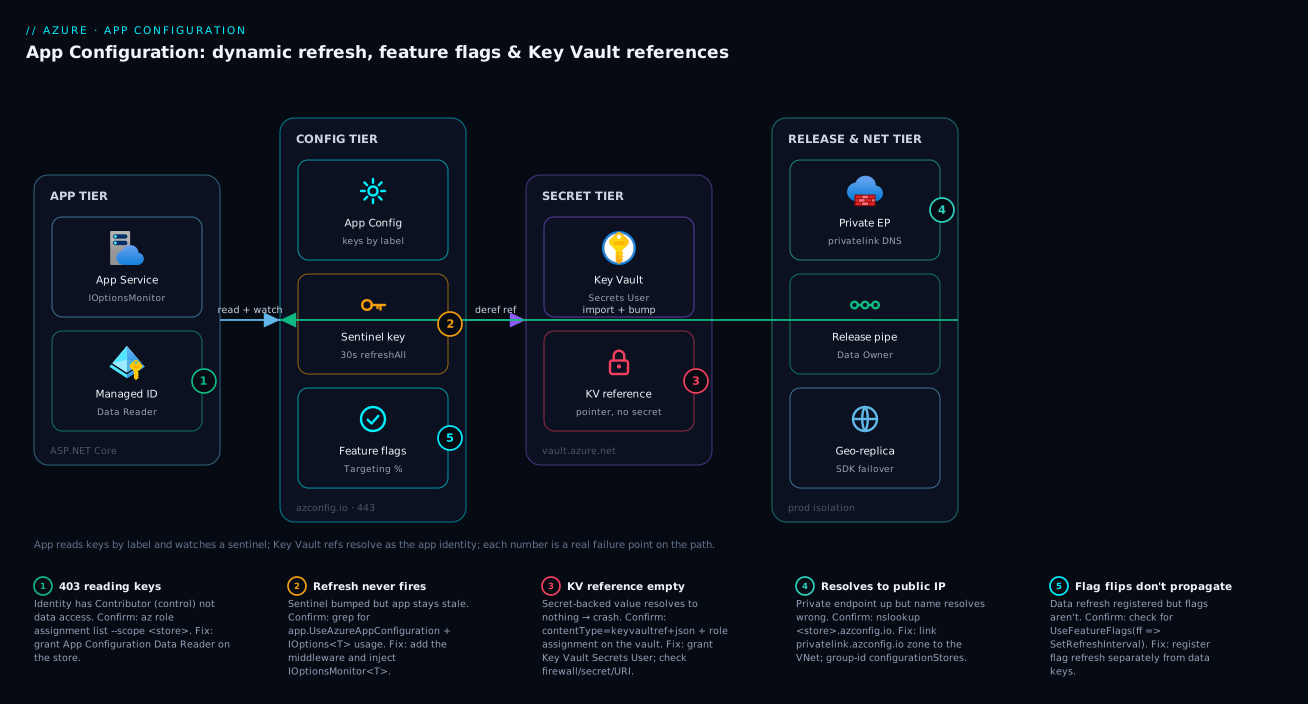
The diagram traces a request through the configuration plane exactly as it flows at runtime, left to right, and marks the failure points where this topic actually bites. Start at the app tier: an ASP.NET Core app on App Service carries a managed identity and runs the App Configuration provider. At startup (and on each refresh) it reaches the control/config tier — the App Configuration store itself, where it Selects keys by label and watches the sentinel key on a 30-second interval. Two things fan out from the store. First, any Key Vault reference key triggers a hop to the secret tier: the provider dereferences the pointer against Key Vault as the app’s identity, and the secret value flows back without ever being stored in App Configuration. Second, feature flags load from the same store on their own refresh registration and feed Microsoft.FeatureManagement.
Around that runtime path sits the network and release tier: in production the store is reached over a private endpoint on privatelink.azconfig.io with public access disabled, a geo-replica in a second region backs SDK failover, and a release pipeline (the only identity with Data Owner) imports config-as-code and bumps the sentinel last so refresh is atomic. The numbered badges mark the five places this breaks in practice: a 403 when the identity has only Contributor (not Data Reader); refresh silently never firing because the middleware was never added; a Key Vault reference resolving to an empty string; an instance frozen because it was pinned to a snapshot; and name resolution returning the public IP because the private DNS zone wasn’t linked. Read the badge, run the named check, apply the fix.
Real-world scenario
Lumio Retail runs a payments platform: eight .NET services across dev, staging, and prod, deployed to App Service in Central India, with a four-engineer platform team. Early on they ran a single shared App Configuration store across all three environments using labels, apps reading values via IOptionsMonitor with sentinel refresh on a 30-second window. Monthly spend on the config plane was trivial — about ₹400 — and it worked beautifully right up until it didn’t.
During a routine rollout, an engineer used the portal to update the prod Payments:Gateway:Timeout key but, working fast, edited it under the null label instead of the prod label. Because their bootstrap loaded null-label defaults and then the prod label, the correct prod value still won — so nothing broke in prod. But the dev cluster, which read the null label as its baseline, suddenly inherited the production timeout (300) in place of its own (30) and integration tests started timing out and failing. The on-call got paged at 23:00 for what looked like a dev-only test flake and burned an hour before noticing the value had changed in a store nobody thought they’d touched.
The constraint was real: they could not give up labels (cost and tooling were built around a single store for lower environments), but they needed prod config edits to be impossible to fat-finger into the wrong scope, and they needed dev to stop silently inheriting stray null-label writes. The deeper realization — the one on the incident review — was that label-based separation is a soft boundary: anyone with data-write access can edit any label, and inheritance means a write to the wrong label silently bleeds into another environment.
The fix had three parts. First, they carved production into its own store with a private endpoint and App Configuration Data Owner granted only to the release pipeline’s identity — humans lost write access to prod entirely, so portal edits could not target it. Second, in the lower-environment store they stopped relying on null-label inheritance: every environment got an explicit label and the bootstrap selected only that label, so a stray null-label write affected nobody.
// Lower-environment bootstrap: explicit label only, no null-label inheritance
options.Connect(new Uri(endpoint), credential)
       .Select(KeyFilter.Any, builder.Environment.EnvironmentName);  // e.g. "dev" — no LabelFilter.Null
Third, the pipeline snapshotted prod on every release for a clean rollback target, and a CI drift check exported the live store and failed the build on any out-of-band edit. The next quarter ran zero config-misroute incidents; the prod store cost about ₹1,200/month with its private endpoint and a geo-replica, which the team considered cheap insurance against a payments outage.
The incident as a timeline, because the order of moves is the lesson:
| Time | Symptom | Action taken | Effect | What it should have been |
|---|---|---|---|---|
| 23:00 | Dev integration tests timing out | (alert fires) | — | Ask: did a config value change? |
| 23:10 | Tests still failing | Re-run the pipeline | No change | Don’t retry blind |
| 23:25 | Suspect code | Diff the last deploy | Code unchanged | Check the config store, not the repo |
| 23:50 | Found it | kv list shows Timeout edited under null label |
Root cause: misrouted write | This was the breakthrough |
| 00:10 | Mitigated | Re-set the null-label key; dev recovers | Tests pass | Correct night-of fix |
| +1 week | Fixed | Prod own store + explicit labels + drift check | No inheritance, no human prod writes | The actual fix is isolation, not convention |
Advantages and disadvantages
Centralizing configuration behind one plane both removes a whole class of drift-and-leak problems and introduces a new dependency you must operate. Weigh it honestly:
| Advantages (why this model helps you) | Disadvantages (why it bites) |
|---|---|
| One source of truth ends env drift and duplicated config files | A new runtime dependency: if the store is unreachable at boot, the app fails fast (by design, but it is a dependency) |
| Dynamic refresh flips values/flags without a redeploy | Refresh must be wired (middleware + IOptionsMonitor); silent no-op if you forget |
| Key Vault references keep secrets in the vault, never in config | A failed reference resolves to empty, not an error — looks like a random crash, not “access denied” |
| Snapshots make every release a named, immutable rollback target | Pinned instances get no refresh — a freeze you must remember you chose |
| Labels give cheap per-environment separation in one store | Labels are a soft boundary — any data-writer can edit any label; inheritance bleeds across envs |
| Geo-replication + SDK failover survive a regional outage | Standard-SKU + per-replica cost; eventual consistency lag after writes |
| Config-as-code with import/export enables PR review and drift detection | Two write paths (pipeline + portal) drift unless you actively forbid the portal |
The model is right for any multi-service, multi-environment system that wants flags and centralized config without a redeploy per change. It is overkill for a single app with a handful of static settings (an app-settings blade is fine). It bites hardest on teams that treat it as a secret store (don’t — reference the vault), teams that forget to wire refresh and conclude “it doesn’t work”, and teams that rely on labels as a hard isolation boundary for production (use a separate store + RBAC instead).
Hands-on lab
Stand up a store, prove dynamic refresh end to end (the behavioral test that matters), add a feature flag and a Key Vault reference, snapshot it, then tear it all down. Free-tier-friendly where possible (the store uses Free; Key Vault and the app are pay-per-use but negligible for an hour). Run in Cloud Shell (Bash).
Step 1 — Variables and resource group.
RG=rg-appcs-lab
LOC=centralindia
STORE=appcs-lab-$RANDOM     # globally-unique
KV=kv-lab-$RANDOM           # globally-unique
az group create -n $RG -l $LOC -o table
Step 2 — Create the store (Free SKU for the lab) and capture its endpoint.
az appconfig create -n $STORE -g $RG -l $LOC --sku Free -o table
ENDPOINT=$(az appconfig show -n $STORE -g $RG --query endpoint -o tsv)
echo $ENDPOINT   # https://<store>.azconfig.io
Expected: a store row, then an https://...azconfig.io endpoint.
Step 3 — Write a couple of keys and a sentinel.
az appconfig kv set -n $STORE --key "OrderService:Timeout"   --value "30" --label dev --yes
az appconfig kv set -n $STORE --key "OrderService:RetryCount" --value "3" --label dev --yes
az appconfig kv set -n $STORE --key "Sentinel"               --value "v1" --label dev --yes
az appconfig kv list -n $STORE --label dev -o table
Expected: three keys listed under label dev.
Step 4 — Add a feature flag with a percentage filter.
az appconfig feature set -n $STORE --feature CheckoutV2 --label dev --yes
az appconfig feature filter add -n $STORE --feature CheckoutV2 --label dev \
  --filter-name Microsoft.Percentage --filter-parameters Value=50 --yes
az appconfig feature show -n $STORE --feature CheckoutV2 --label dev -o json
Expected: the flag JSON shows a Microsoft.Percentage filter at 50.
Step 5 — Add a Key Vault reference (proves the secret never enters the store).
az keyvault create -n $KV -g $RG -l $LOC -o table
az keyvault secret set --vault-name $KV --name orders-db-conn --value "Server=...;Pwd=lab" -o none
SECRET_ID=$(az keyvault secret show --vault-name $KV --name orders-db-conn --query id -o tsv)

az appconfig kv set-keyvault -n $STORE --key "OrderService:Db:ConnectionString" \
  --label dev --secret-identifier "$SECRET_ID" --yes

# Prove it's a REFERENCE, not the secret value:
az appconfig kv show -n $STORE --key "OrderService:Db:ConnectionString" --label dev \
  --query "{value:value, contentType:contentType}" -o json
Expected: contentType is application/vnd.microsoft.appconfig.keyvaultref+json and value is a JSON pointer (a URI), not the connection string.
Step 6 — Snapshot the current state as a rollback target.
az appconfig snapshot create -n $STORE \
  --snapshot-name "lab-rel-1" \
  --filters '[{"key":"OrderService:*","label":"dev"}]'
az appconfig snapshot show -n $STORE --snapshot-name "lab-rel-1" \
  --query "{name:name, status:status, items:itemsCount}" -o json
Expected: a Ready snapshot with itemsCount ≥ 3.
Step 7 — Prove dynamic refresh behaviorally (the definitive test). Change a value, bump the sentinel, and confirm the change is visible without recreating anything:
az appconfig kv set -n $STORE --key "OrderService:Timeout" --value "90" --label dev --yes
az appconfig kv set -n $STORE --key "Sentinel"            --value "v2" --label dev --yes
az appconfig kv show -n $STORE --key "OrderService:Timeout" --label dev --query value -o tsv
# expect: 90  — and a running app with sentinel refresh would see this within 30s, no restart
Step 8 — Teardown.
az group delete -n $RG --yes --no-wait
A purge-protected store may sit in soft-delete; for a lab, Free SKU without purge protection deletes cleanly with the group.
Common mistakes & troubleshooting
This is the section you keep open mid-incident. App Configuration failures are rarely loud — a misrouted write, an empty secret, a refresh that silently never fires. Each row is symptom → root cause → confirm (exact command) → fix.
| # | Symptom | Root cause | Confirm (exact command / path) | Fix |
|---|---|---|---|---|
| 1 | 403/Forbidden reading any key |
Identity has Contributor (control) not Data Reader (data) |
az role assignment list --assignee <principalId> --scope <store-id> -o table |
Grant App Configuration Data Reader on the store |
| 2 | Config changes never appear in a running app | app.UseAzureAppConfiguration() missing from pipeline |
Grep startup for UseAzureAppConfiguration |
Add the middleware (or a timer in a worker) |
| 3 | Values change in store but app keeps old value | Injecting IOptions<T> (startup snapshot) |
Search code for IOptions< on the options class |
Switch to IOptionsMonitor<T> |
| 4 | Only the sentinel changes; other keys stay stale | refreshAll: false on the sentinel registration |
Inspect Register("Sentinel", ...) call |
Set refreshAll: true |
| 5 | Secret-backed setting is empty → app crashes at boot | Key Vault reference failed to resolve | az appconfig kv show ... --query contentType then az role assignment list on the vault |
Grant Key Vault Secrets User; check identity/firewall/secret |
| 6 | App reads a JSON pointer string instead of the secret | ConfigureKeyVault not registered in the SDK |
Check AddAzureAppConfiguration for .ConfigureKeyVault( |
Add .ConfigureKeyVault(kv => kv.SetCredential(...)) |
| 7 | Wrong environment’s value loads | Select order wrong, or null-label inheritance |
az appconfig kv list --label <env> vs null |
Select null first then env (override), or env-only (no inheritance) |
| 8 | Feature flag flips don’t propagate | Flag refresh not registered (separate from data) | Check for UseFeatureFlags(ff => ff.SetRefreshInterval(...)) |
Register flag refresh interval |
| 9 | Store hostname resolves to a public IP | Private DNS zone not linked to the VNet | nslookup <store>.azconfig.io returns public IP |
Link privatelink.azconfig.io zone to the VNet |
| 10 | Private endpoint won’t attach | Wrong group-id | --group-id value used at creation |
Use configurationStores |
| 11 | Pinned instance never picks up config changes | Instance loaded a snapshot (frozen by design) | Code uses .SelectSnapshot(...) |
Switch to live keys + sentinel if you want refresh |
| 12 | A new portal edit silently breaks another env | Stray write to the null label that other envs inherit | az appconfig kv list --key <key> --all (all labels) |
Re-set under the correct label; remove null-label inheritance |
| 13 | App boots fine locally, 403 in Azure | DefaultAzureCredential used dev login locally; no managed identity in Azure |
az webapp identity show returns null |
Enable managed identity; assign data role |
| 14 | Throttling / 429 under load |
Exceeded request quota (often Free SKU) | App Insights dependency 429s to azconfig.io |
Move to Standard; add a replica; raise refresh interval |
| 15 | Imported config has wrong types | Import content-type not set; everything is a string | kv show --query contentType |
Re-import with --content-type application/json for JSON values |
| 16 | Half a batch applied, app read mid-write | Sentinel bumped before all keys written, or per-key watch | Compare write timestamps in revision history | Bump sentinel last; use refreshAll not per-key watch |
| 17 | Rollback unclear after a bad release | No snapshot taken for the previous release | az appconfig snapshot list — gap before incident |
Snapshot every release; re-apply snapshot N-1 |
| 18 | Replica writes not visible in primary region | Eventual-consistency lag across replicas | kv show on each endpoint |
Wait for convergence; don’t read-after-write across replicas |
| 19 | [FeatureGate] endpoint returns 404 unexpectedly |
Flag is off (or targeting excludes the user) | az appconfig feature show filters + user’s groups |
Enable flag / adjust targeting audience |
| 20 | Local-auth key still works after disabling RBAC drift | Connection-string access key left enabled | az appconfig credential list |
Disable local auth; require Entra RBAC only |
The error/status reference you scan first when the SDK throws or returns the wrong thing:
| Code / signal | Meaning | Likely cause | How to confirm | Fix |
|---|---|---|---|---|
| 403 Forbidden | Data-plane access denied | Contributor not Data Reader; or private-network block |
az role assignment list; check publicNetworkAccess |
Grant data role; allow the network path |
| 404 on a key | Key/label not found | Wrong label, typo, or wrong store | az appconfig kv list --label <env> |
Use the right key+label |
| 429 Too Many Requests | Request quota exceeded | Free SKU or aggressive refresh | App Insights 429s to azconfig.io |
Standard SKU; replica; longer interval |
| Empty value (no error) | KV reference didn’t resolve | Identity/RBAC/firewall/secret/URI | content type + role assignment list on vault |
Fix the reference (table in §4) |
| Raw JSON pointer in value | KV ref not dereferenced | ConfigureKeyVault missing |
Inspect SDK bootstrap | Register ConfigureKeyVault |
KeyVaultReferenceException |
SDK failed to dereference | Vault denied/unreachable | Exception detail + vault networking | Grant Key Vault Secrets User; open firewall |
| Stale value forever | Refresh not firing | Missing middleware or IOptions<T> |
Grep for UseAzureAppConfiguration / IOptions< |
Add middleware; use IOptionsMonitor |
RequestFailedException at boot |
Store unreachable at startup | DNS / endpoint / network | nslookup; endpoint value |
Fix DNS/endpoint; this is fail-fast by design |
Best practices
- Treat App Configuration as a config store, never a secret store. Non-secret values go in directly; every secret is a Key Vault reference. The vault stays the system of record with its own audit and rotation.
- Use data-plane RBAC, not
Contributor.App Configuration Data Readerfor apps,App Configuration Data Ownerfor pipelines.Contributormanages the resource, not the keys. - Adopt the sentinel pattern with
refreshAll: true. Bump the sentinel last after a batch so refresh is atomic; never poll every key. - Always wire the refresh driver.
app.UseAzureAppConfiguration()in web apps, a timer +TryRefreshAsync()in workers. Without it, refresh is a silent no-op. - Inject
IOptionsMonitor<T>anywhere you want refreshed values; reserveIOptions<T>for genuinely static config. - Keep keys consistently namespaced (
Service:Section:Key) so the same code binds every environment and options classes map cleanly. - Isolate production with a separate store + RBAC, not just a label. Labels are a soft boundary; humans shouldn’t have write access to prod at all — let the pipeline own it.
- Select explicit labels; avoid accidental null-label inheritance unless you deliberately want shared defaults, and even then, know that a stray null-label write bleeds across environments.
- Manage feature flags through
az appconfig featureandMicrosoft.FeatureManagement— never hand-edit the reserved flag JSON — and wireUseFeatureFlagsrefresh separately from data keys. - Snapshot every release with a retention period and keep the previous snapshot as a one-line rollback target.
- Lock the data plane with a private endpoint on
privatelink.azconfig.ioand disable public access in production; add a geo-replica and pass both endpoints to the SDK for failover. - Run config as code: Git + PR review + pipeline import + CI drift detection (export and diff), with the sentinel bumped last.
- Fail fast on startup if config cannot load, and gate readiness on it — a pod that can’t read its config should not take traffic.
Security notes
App Configuration sits on the path between your app and your secrets, so its security posture matters as much as the vault’s. The least-privilege model and the boundaries:
| Concern | Default / risk | Hardening |
|---|---|---|
| Secret storage | Tempting to store secrets directly | Never — use Key Vault references; secret material stays in the vault |
| Data-plane access | Contributor grants control, not data (good) but is over-broad |
Assign Data Reader/Data Owner scoped to the store |
| Identity for resolution | Resolves KV refs as the app’s identity | Give the app identity Key Vault Secrets User, nothing more |
| Network exposure | Public endpoint by default | Private endpoint + --enable-public-network false in prod |
| Human write access to prod | Anyone with Data Owner can edit prod keys |
Separate prod store; only the pipeline SP gets Data Owner |
| Audit | Edits are mutable in place | Snapshots (immutable artifacts) + revisions + Activity Log |
| Encryption at rest | Microsoft-managed key by default | Optionally customer-managed key (CMK) via Key Vault |
| Local access keys | Connection-string keys can be enabled | Prefer Microsoft Entra (RBAC) only; disable access keys |
| Soft-delete / purge | Deleted store recoverable in window | Enable purge protection to block hard delete |
The disable-local-auth posture is worth calling out: connection-string-based access keys bypass Entra RBAC entirely, so for a hardened store, disable them and require managed-identity/RBAC for every caller. The same identity that reads the store dereferences the vault, so the app’s managed identity is the single most important principal to scope tightly — App Configuration Data Reader on the store and Key Vault Secrets User on the vault, and nothing broader. For the deeper identity model see Entra Managed Identities Deep Dive, and for the vault side Azure Key Vault: Secrets, Keys & Certificates.
Cost & sizing
App Configuration is one of the cheaper Azure services, but the cost drivers are specific and the Free/Standard gap is about capability, not just price.
| Cost driver | Free (Developer) | Standard | Notes |
|---|---|---|---|
| Daily price | Free | ~$1.20/store/day (region-dependent) | ~₹2,800–3,000/month per store |
| Included requests | ~1,000/day | ~200,000/day per replica (then per-request) | Refresh is cheap (conditional GETs) |
| Extra requests | n/a (hard cap) | small per-10,000 charge | Tune refresh interval to control |
| Geo-replica | Not available | Priced like an extra store | Each replica adds quota + cost |
| Storage | ~10 MB | ~1 GB | Keys + snapshots count |
| Private endpoint | Not available | PE hourly + data processing | Standard networking cost |
What drives the bill in practice and how to right-size:
| Lever | Effect on cost | Guidance |
|---|---|---|
| SKU choice | Free is ₹0 but caps everything | Free for dev/prototype; Standard for anything real |
| Refresh interval | Shorter = more conditional GETs | 30 s is cheap; don’t go sub-second |
| Number of replicas | Each ~ one store’s price | One replica for failover; more only for read scale |
| Snapshot retention | Storage over time | 30–90 days typical; archive old ones |
| Request pattern | Conditional GETs are cheap; full reloads less so | Sentinel pattern minimizes full reloads |
| Number of stores | Each store bills independently | Consolidate dev/staging; isolate only prod |
| Private endpoint | Hourly + per-GB processing | One PE per prod store; share the subnet |
| CMK encryption | Adds a Key Vault dependency cost | Only where compliance requires it |
Rough sizing: a typical production setup — one Standard prod store + one geo-replica + a private endpoint — lands around ₹6,000–8,000/month, dwarfed by the compute it configures. The Free SKU (₹0) genuinely covers dev and prototyping. The pitfall is Free in production: the ~1,000-requests/day cap throttles a real app fast, so the moment you have steady traffic, move to Standard. For the broader cost discipline see Azure FinOps & Cost Management at Scale.
Interview & exam questions
1. Why is App Configuration not a secret store, and how do secrets fit?
It stores non-secret values and references to secrets. Secrets live in Key Vault; you store a Key Vault reference (a key whose value is a pointer with content type keyvaultref+json), and the SDK dereferences it at load time using the app’s managed identity. The secret material never lands in App Configuration’s storage. (AZ-204, AZ-400.)
2. What is a sentinel key and why use one?
A single watched key you bump last after writing a batch of changes. The SDK polls only the sentinel; when its ETag changes, refreshAll: true reloads the entire registered key set atomically. It avoids polling every key (wasteful, races) and gives coherent batch semantics. (AZ-204.)
3. Why does the order of Select calls matter?
Configuration is last-write-wins per key. Loading (Any, Null) then (Any, env) makes environment values override defaults; reversing the order makes the null-label defaults win, which is a classic bug where prod silently reads the wrong value. (AZ-204.)
4. IOptions<T> vs IOptionsMonitor<T> — which sees dynamic refresh?
IOptionsMonitor<T>.CurrentValue re-reads on each access and reflects refreshed values; IOptions<T> is a startup snapshot and never updates. Use IOptionsMonitor<T> anywhere you want refresh; IOptionsSnapshot<T> works per-request in web apps. (AZ-204.)
5. What RBAC role does an app need to read keys, and why isn’t Contributor enough?
App Configuration Data Reader (data plane). Contributor is control-plane — it can create/configure/delete the store but grants no access to read the keys. This control-vs-data split is the most common access mistake. (AZ-500, AZ-204.)
6. How do Percentage and Targeting feature filters differ? Percentage enables a feature for a random share of evaluations (not sticky — re-rolls per call). Targeting hashes the user id against the percentage so a user lands on the same side every request (sticky), and supports named users/groups with their own percentages and exclusions. (AZ-204.)
7. What does a snapshot give you that live keys don’t? An immutable, named, point-in-time bundle — a rollback target and an answer to “what config was live at 14:00?”. The trade-off: an instance pinned to a snapshot gets no dynamic refresh; it’s frozen by design. (AZ-204.)
8. How do you make a Key Vault reference deterministic across a release? Pin the secret version in the URI. An unversioned reference resolves to the latest version, so a Key Vault rotation can change app behavior on the next refresh with no App Configuration change. Versioned references freeze the value until you deliberately re-point. (AZ-204, AZ-500.)
9. A connection string from a Key Vault reference is empty and the app crashes — name three causes.
No managed identity enabled; the identity lacks Key Vault Secrets User; the vault firewall blocks the app; the secret is deleted/disabled; the URI is wrong; or ConfigureKeyVault wasn’t registered (the last returns the raw pointer, not empty). The reference resolves to nothing rather than throwing “denied”, so it looks like a random startup crash. (AZ-204.)
10. How do you lock the data plane and survive a regional outage?
Create a private endpoint (sub-resource configurationStores) with privatelink.azconfig.io DNS and set --enable-public-network false. For resilience, add a geo-replica in a second region and pass both endpoints to Connect(...) so the SDK fails over automatically. (AZ-204, AZ-305.)
11. How does feature-flag refresh differ from data-key refresh?
It’s a separate registration: UseFeatureFlags(ff => ff.SetRefreshInterval(...)). A sentinel bump on data keys does not refresh flags, and vice versa — you must register both. (AZ-204.)
12. Why isn’t a label a sufficient production isolation boundary? Labels are a soft boundary: any principal with data-write access can edit any label, and null-label inheritance can bleed a stray write across environments. Hard isolation for prod requires a separate store with RBAC scoped to it, ideally with humans having no write access at all. (AZ-500, AZ-305.)
Quick check
- You change a key in the store and bump the sentinel, but a running app never sees the new value. Name the two most likely code causes.
- What content type marks a key as a Key Vault reference, and what does the value contain?
- Which RBAC role does a pipeline need to write keys and snapshots, and is it control-plane or data-plane?
- A user keeps flipping between the old and new checkout on every request. Which feature filter were they almost certainly using, and which should they use instead?
- You pinned an instance to a snapshot for a stable release, but now config changes “don’t work” on it. Why — and is it a bug?
Answers
- Missing
app.UseAzureAppConfiguration()(the middleware that drives refresh) and/or injectingIOptions<T>instead ofIOptionsMonitor<T>(a startup snapshot that never updates). Both produce “refresh doesn’t work” with everything else correct. - Content type
application/vnd.microsoft.appconfig.keyvaultref+json; the value is a JSON pointer to the Key Vault secret URI (not the secret itself). - App Configuration Data Owner — a data-plane role.
Contributor(control plane) manages the resource but cannot write keys. - They were using Microsoft.Percentage (re-rolls per evaluation, not sticky). They should use Microsoft.Targeting, which hashes the user id so each user lands on the same side consistently.
- Because a snapshot-pinned instance is frozen by design — it gets no dynamic refresh. It is not a bug; if you want refresh, load live keys with a sentinel instead of
.SelectSnapshot(...).
Glossary
- App Configuration store — the managed service resource holding key-values, feature flags, and Key Vault references behind an
azconfig.ioendpoint. - Key-value — a single configuration entry: a key, a value, an optional label, and an optional content type.
- Label — an orthogonal variant of the same key, almost always the environment (
dev/staging/prod); a soft separation boundary. - Key namespace — a hierarchical key prefix using
:as the separator (OrderService:Db:Timeout) that maps toIConfigurationsections. - Sentinel key — a single watched key bumped last after a batch so the SDK reloads everything atomically.
refreshAll— the flag on a sentinel registration that reloads all registered keys on change (vs only the sentinel itself).- Feature flag — a key under the reserved
.appconfig.featureflag/namespace, managed viaaz appconfig featureand consumed viaMicrosoft.FeatureManagement. - Filter — a rule on a flag: Percentage (random share), Targeting (sticky per-user, with groups), or TimeWindow (scheduled).
- Targeting — a sticky filter that hashes the user id against the rollout percentage so each user is consistently in or out.
- Key Vault reference — a key whose value is a pointer to a Key Vault secret, dereferenced at load time by the app’s identity; the secret never enters the store.
- Content type — a MIME-like tag on a key-value that tells the SDK how to treat the value (plain, KV reference, feature flag, JSON).
- Snapshot — an immutable, named, point-in-time bundle of key-values; a rollback target and the answer to “what was live?”.
- Geo-replica — a read/write copy of the store in another region with its own endpoint, enabling SDK failover and local reads.
- Data-plane RBAC —
App Configuration Data Reader/Data Owner, granting access to the keys (distinct from control-planeContributor). IOptionsMonitor<T>— the .NET options interface whoseCurrentValuereflects dynamic refresh (unlikeIOptions<T>).
Next steps
- Azure Key Vault: Secrets, Keys & Certificates — the system of record that App Configuration references for every secret.
- Entra Managed Identities Deep Dive — the identity that reads the store and dereferences the vault.
- Azure Private Link & Private DNS for PaaS — locking the data plane behind
privatelink.azconfig.io. - Progressive Delivery with Feature Flags — using App Configuration flags for canary and gradual rollout.
- Pipeline Secrets Management — where config-as-code and secret handling meet in your CI/CD.