Quick take: an Azure region is not a single datacenter. It is a metro-scale set of physically separated facilities, and within most regions those facilities are grouped into three independent Availability Zones — each with its own power, cooling and network. Almost every resilience decision you will ever make in Azure reduces to one question: which zones, and which region pair, does this workload actually live in? Get that wrong and a cooling fault in one building takes your “highly available” app down for hours.
A small fintech I reviewed deployed its entire production stack — VMs, a single SQL instance, an unzoned load balancer — into one Azure region because, in their words, “the 99.9% SLA looked fine.” Eighteen months in, a power-distribution fault took a single datacenter offline. Their VM, their database and their public endpoint were all physically in that one building. The “region” was up. Their service was down for four hours. The post-incident review found that moving two VMs and the database into a second zone — a change costing a few thousand rupees a month and an afternoon of work — would have turned a four-hour outage into a thirty-second retry blip. They had bought a region and assumed they had bought resilience. Those are different purchases.
This article is the mental model and the reference table set that stops that mistake. We treat regions, Availability Zones, paired regions, fault domains and update domains not as trivia but as the placement primitives that every SLA, every DR runbook and every compliance boundary is built on. You will learn what each one physically is, the exact uptime SLA each placement buys, how a zonal resource differs from a zone-redundant one differs from a regional (non-zonal) one, the az CLI and Bicep to deploy each, and — because resilience fails in production in specific, diagnosable ways — a symptom→cause→confirm→fix playbook for the failures that actually page you. By the end you will stop confusing “deployed in a region” with “survives a region’s failures,” and you will be able to defend every placement decision in an AZ-104, AZ-305 or architecture review.
What problem this solves
Cloud abstracts the hardware, but the hardware still fails — and it fails at every scale. A single disk dies. A top-of-rack switch reboots. A power-distribution unit trips and darkens a whole datacenter hall. A fibre cut isolates a building. A fire, a flood or a regional power-grid failure takes out an entire metro. A capacity crunch or a bad platform deployment can degrade a whole region. Each of these is a different blast radius, and Azure gives you a different placement primitive to survive each one. Regions, zones, fault domains, update domains and region pairs exist precisely so you can choose your blast radius without ever managing a datacenter yourself.
What breaks without this knowledge is predictable and expensive. Teams deploy single-instance workloads and inherit a single server’s reliability while believing they have the cloud’s. They deploy two VMs and assume Azure spread them across failure boundaries — it did not, unless they asked. They pick a region for latency and discover months later it has no Availability Zones, so their “zone-redundant” intent silently became single-fault-domain reality. They build DR into a region of their own choosing instead of the Azure-designated pair, and lose the platform’s guarantee that the two regions never take a planned update at the same time. They confuse zone redundancy (survives a datacenter loss) with backup (survives deletion, corruption and ransomware) — and learn the difference during a bad incident.
Who hits this: everyone who runs anything in production. It bites hardest on cost-sensitive teams who run single instances to save money, on teams who chose a region purely for latency or data-residency without checking its zone support, on anyone whose “HA” design was never tested with an actual zone-down game day, and on architects who must defend an availability target to an auditor or an exam. The fix is almost never “buy a bigger SKU.” It is “place the workload across the right failure boundaries, and prove it.”
To frame the whole field before the deep dive, here is every failure blast radius this article covers, the Azure primitive that contains it, and the one design move that survives it:
| Blast radius | What physically fails | Azure primitive that contains it | The design move that survives it | If you skip it |
|---|---|---|---|---|
| Single server / rack | Host, PDU, ToR switch | Fault domain (within a zone) | ≥2 instances in an availability set or VMSS | A host reboot = full outage |
| Planned host update | Hypervisor patch, host reboot | Update domain | Spread across update domains (automatic in sets/VMSS) | One update wave drops all capacity |
| A whole datacenter | Power, cooling, building network | Availability Zone | Spread instances/data across ≥2 zones | A datacenter loss = full outage |
| A whole region / metro | Grid failure, flood, region-wide platform issue | Paired region (or any 2nd region) | Replicate + fail over to a second region | A region event = total loss, no DR |
| Data deletion / corruption / ransomware | Logical, not physical | Backup / soft-delete / immutability (not zones) | Versioned, isolated, immutable backups | Zones replicate the corruption faithfully |
Learning objectives
By the end of this article you can:
- Define an Azure region, Availability Zone, fault domain, update domain and paired region precisely, and explain the distinct blast radius each one contains.
- Distinguish a zonal resource (pinned to one zone), a zone-redundant resource (spread across zones automatically) and a regional / non-zonal resource (no zone guarantee) — and name which Azure services support which.
- State the exact composite SLA a single VM, a multi-zone VM set, a zone-redundant PaaS service and a multi-region design each buy, and compute a multi-tier composite availability.
- Choose a region using the four real constraints — zone support, service availability, data residency and latency — instead of latency alone, and verify each with
az. - Deploy zonal and zone-redundant resources with both
azCLI and Bicep, and confirm their actual placement withaz ... --query zones. - Decide when Availability Zones suffice and when you must add a second region, and design the load-balancing / replication that makes failover real.
- Run a resilience playbook: map a paging symptom (a 50% capacity drop, a stuck failover, a “zone-redundant” service that wasn’t) to its root cause, the exact command to confirm, and the fix.
- Avoid the classic traps: assuming two VMs are spread, treating zones as backup, building DR in the wrong region, and choosing a zoneless region by accident.
Prerequisites & where this fits
You should be comfortable creating a resource in Azure — a VM, a storage account — via the portal or az CLI, reading JSON output from az, and the idea that resources live in a subscription inside a resource group that is itself tied to a region. You should know what an SLA is (a percentage of uptime the provider commits to, with a service-credit penalty if missed) and roughly what a load balancer does (spreads traffic across several backends and stops sending to unhealthy ones). No prior resilience or DR experience is assumed — this is a Beginner article that goes deep.
This sits at the very foundation of the resiliency and architecture track: every other resilience topic builds on the placement primitives defined here. The compute mechanics that consume zones live in Azure VM Availability & Resilience Deep Dive and the broader global-infrastructure picture in Azure Global Infrastructure: Regions, Zones, Fault & Update Domains. Once you need to survive a region loss, Azure Front Door & Traffic Manager for global failover and Azure Site Recovery zone-to-zone and region failover runbooks are the next stops. The reliability theory behind all of it is in the Well-Architected Reliability pillar deep dive, and you validate the whole thing with Azure Chaos Studio fault injection.
A quick map of who owns and confirms each placement decision, so the right person is in the room when you design it:
| Decision | What it sets | Who usually owns it | Where it is confirmed | Failure it prevents |
|---|---|---|---|---|
| Region choice | Latency, residency, zone support | Architect + compliance | az account list-locations |
Wrong residency, no zones available |
| Zone placement (zonal) | Which zone a resource pins to | Platform / IaC team | az vm show --query zones |
All eggs in one datacenter |
| Zone redundancy (PaaS) | Auto-spread across zones | App + platform | Service config / SKU | Datacenter loss takes the tier down |
| Region pair / DR target | The 2nd-region failover home | Architect + DR owner | Azure pairing table | DR into a non-coordinated region |
| Fault/update domain count | Spread within a zone | Platform (often default) | az vm availability-set show |
One rack/update wave drops all |
| Backup & immutability | Recovery from logical loss | Backup / security team | Recovery Services vault | Zones faithfully replicate corruption |
Core concepts
Six mental models make every later decision obvious. Read them once; the tables that follow enumerate the specifics.
A region is a metro, not a machine. An Azure region is a set of datacenters deployed within a latency-defined perimeter (Azure targets round-trip latency under roughly 2 milliseconds between zones in a region) and connected by a dedicated, high-throughput, low-latency network. “East US,” “Central India,” “West Europe” are regions. You deploy resources into a region; the region is the largest blast radius a single deployment normally spans. There are 60+ regions worldwide, and they are not interchangeable: they differ in which services they offer, whether they have Availability Zones, what their data-residency geography is, and their latency to your users.
An Availability Zone is a physically separate datacenter, and you usually get three. An Availability Zone (AZ) is one or more datacenters within a region that have independent power, cooling and physical networking, and are far enough apart that a single physical event (a fire, a flood, a power fault) is extremely unlikely to hit more than one — yet close enough that the inter-zone latency stays low enough for synchronous replication. Regions that support zones expose three of them, addressed as 1, 2 and 3. Critically, those numbers are per-subscription logical mappings: your Zone 1 and another subscription’s Zone 1 may be different physical datacenters, which is why Azure spreads load and why you should never assume cross-subscription zone alignment.
Within a zone, fault and update domains spread you further. A fault domain (FD) is a set of hardware — racks — sharing a single power source and network switch; resources in different fault domains will not all fail to one rack-level fault. An update domain (UD) is a group the platform reboots together during planned maintenance; resources in different update domains are never patched simultaneously, so a maintenance wave never takes all your capacity at once. Availability sets give you fault and update domains within a single zone (typically up to 3 FDs and 20 UDs); Availability Zones give you separation across datacenters. They compose: a VM scale set across three zones gives you both.
Placement comes in three flavours, and the difference is the whole game. A zonal (zone-pinned) resource lives in exactly one zone you choose — fast intra-zone latency, but it dies if that zone dies, so you deploy several across zones yourself. A zone-redundant resource is one Azure automatically spreads across all three zones for you — you ask for it (a SKU, a flag) and the platform handles placement and failover. A regional or non-zonal resource has no zone guarantee — Azure puts it somewhere in the region and may move it, which is fine for stateless or already-replicated things but is a hidden single point of failure if you assumed otherwise. Knowing which of the three a given resource is — and which a given Azure service even supports — is the single most load-bearing fact in this article.
Paired regions are Azure’s pre-arranged DR partner. Most regions have a designated paired region in the same geography (so data-residency rules still hold): East US ↔ West US, Central India ↔ South India, North Europe ↔ West Europe, and so on. Pairing buys you platform guarantees you cannot get from an arbitrary second region: sequential platform updates (Azure never updates both halves of a pair at the same time), prioritised regional recovery (a region in a pair is prioritised for restoration after a broad outage), and it is the default target for geo-redundant storage (GRS). Newer regions ship as availability-zone regions without a classic pair — Microsoft’s direction is zones-first — so always verify your region’s pairing status rather than assuming.
Zones are not backup, and an SLA is not resilience. Two truths people learn the hard way. First, zone redundancy protects against the physical loss of a datacenter; it does nothing against the logical loss of your data — a bad migration, an accidental DROP TABLE, a ransomware encryption event. Zone-redundant storage will replicate your corruption to all three zones perfectly. You still need versioned, isolated, immutable backups. Second, an SLA is a refund policy, not an availability guarantee — Azure pays you a service credit if it misses the number; it does not keep your app up. Your composite availability is the product of every tier’s SLA and your own design, and it is almost always lower than the headline number of any single service.
The vocabulary in one table
Before the deep sections, pin every moving part side by side. The glossary repeats these for lookup; this is the mental model in one view:
| Term | One-line definition | Blast radius it addresses | Scope |
|---|---|---|---|
| Region | A metro-scale set of datacenters with low inter-DC latency | Below a whole-region event | Geographic |
| Availability Zone (AZ) | Physically separate DC(s) in a region; independent power/cooling/net | Loss of one datacenter | Within a region |
| Zone (1/2/3) | A per-subscription logical handle for an AZ | — | Per subscription |
| Fault domain (FD) | Hardware sharing power + network (a rack group) | Loss of one rack | Within a zone |
| Update domain (UD) | A group patched/rebooted together | One maintenance wave | Within a set/VMSS |
| Availability set | FD + UD spread within a single zone | Rack + update, one DC | Within a zone |
| Zonal resource | Pinned to exactly one zone you pick | — (you replicate) | One zone |
| Zone-redundant | Azure auto-spreads across all 3 zones | Loss of one zone, handled | All zones in region |
| Regional / non-zonal | No zone guarantee; placed anywhere in region | None by itself | Region |
| Paired region | Azure’s coordinated DR partner region | Loss of the whole region | Cross-region |
| Geography | A data-residency boundary containing ≥1 region | Compliance, not physical | Sovereign |
| GRS / GZRS | Storage replicated to the paired region | Region loss (storage) | Cross-region |
| RPO / RTO | Data-loss window / recovery time targets | Measures of a DR design | Per workload |
Regions, geographies and sovereignty
A region is the unit you deploy into; a geography is the compliance boundary one or more regions sit inside. Geographies (United States, Europe, India, etc.) exist so that data-residency and sovereignty commitments hold — data replicated for resilience stays within the geography, which is why paired regions are always in the same geography. On top of the standard public geographies, Azure runs sovereign clouds — Azure Government (US), Azure China (operated by 21Vianet), and others — which are physically and logically isolated and have their own region names and feature availability.
Regions are not uniform. They differ along four axes that actually drive a design decision, and latency is only one of them. The single most common region-selection mistake is choosing for latency and discovering later that the region has no Availability Zones or lacks a service you need.
The four region-selection constraints
| Constraint | Why it matters | How to check | Common failure if ignored |
|---|---|---|---|
| Availability Zone support | No zones → no intra-region datacenter resilience | az account list-locations (zone metadata); region docs |
“Zone-redundant” intent silently becomes single-DC |
| Service availability | Not every service/SKU is in every region | az vm list-skus -l <region>; product-by-region page |
Deployment fails or a tier is missing in DR |
| Data residency / geography | Legal/regulatory data-location rules | Azure geography map; compliance docs | Compliance breach; illegal cross-border replication |
| Latency to users | User-perceived performance | Latency test from your user base | Slow app even though everything “works” |
Region types and what each gives you
| Region type | Availability Zones | Has a classic pair? | Typical use | Note |
|---|---|---|---|---|
| Standard (zonal, paired) | Yes (3) | Yes | Most production workloads | The mainstream choice |
| Availability-zone region (no classic pair) | Yes (3) | No (zones-first model) | Newer regions | Use zones for HA; pick any 2nd region for DR |
| Region without zones | No | Often yes | Edge geographies, some older regions | Single-DC blast radius; pair for DR only |
| Sovereign (Gov/China) | Region-dependent | Region-dependent | Regulated/sovereign workloads | Separate cloud, separate endpoints |
| Edge / extension (e.g. Azure Stack/Edge Zones) | No (single site) | No | Ultra-low latency at the edge | Treat as one fault domain |
Representative regions and their pairs
Concrete examples make the geography model stick. These are illustrative of the public-cloud pairing model (always confirm live with the CLI, since pairings and zone status evolve):
| Geography | Example region | Typical paired region | Zones |
|---|---|---|---|
| India | Central India | South India | Yes |
| United States | East US | West US | Yes |
| United States | East US 2 | Central US | Yes |
| Europe | North Europe | West Europe | Yes |
| Europe | West Europe | North Europe | Yes |
| UK | UK South | UK West | Yes |
| Southeast Asia | Southeast Asia | East Asia | Yes |
| Australia | Australia East | Australia Southeast | Yes |
Listing and verifying regions with the CLI
Never trust memory for which region has what. Confirm it:
# List every region available to your subscription, with display names
az account list-locations \
  --query "sort_by([].{name:name, display:displayName, geo:metadata.geographyGroup}, &name)" \
  --output table

# Does a specific region expose Availability Zones for a SKU you need?
# (zone-capable SKUs report their zones; empty means no zonal support for it there)
az vm list-skus --location centralindia --size Standard_D --all \
  --query "[?resourceType=='virtualMachines'].{sku:name, zones:locationInfo[0].zones}" \
  --output table

# Confirm a service/SKU even exists in your candidate region before committing
az vm list-skus --location centralindia --output table | grep Standard_D4s_v5
A quick comparison of the region scopes you will reason about:
| Scope | Spans | Survives | Latency profile | You pay cross-scope egress? |
|---|---|---|---|---|
| Single zone | One datacenter | Nothing above a host fault | Lowest (intra-DC) | No |
| Multi-zone (in-region) | 2–3 datacenters | One datacenter loss | Very low (<~2 ms inter-zone) | Sometimes (inter-zone data) |
| Paired regions | Two metros, same geo | A whole-region loss | Tens of ms (cross-region) | Yes (cross-region egress) |
| Multi-geo | Two geographies | Geo-level + compliance split | High (continental) | Yes (and residency rules apply) |
Availability Zones in depth
An Availability Zone is the primitive that turns “I’m in a region” into “I survive a datacenter.” Three facts govern everything you do with zones.
Zones are physically independent. Each zone is a distinct datacenter (or set of datacenters) with its own power feed, cooling and network spine. A power-distribution fault, a cooling failure or a localised fire in one zone does not propagate to another. This is the entire value proposition: a blast radius the size of a building, contained.
Zone numbers are logical, per subscription. When you pin a resource to “zone 2,” Azure maps that logical number to a physical zone for your subscription. Two different subscriptions’ “zone 1” need not be the same building — this is deliberate, so the platform can balance load across physical zones and so that a per-subscription mapping doesn’t create correlated hotspots. The practical consequence: do not assume zone alignment across subscriptions; if you need two subscriptions’ resources co-located or anti-located, you cannot rely on the zone number alone.
Inter-zone latency is low but non-zero. Round-trips between zones are typically a small number of milliseconds — low enough for synchronous replication (so zone-redundant databases can commit to multiple zones without unacceptable latency) but not zero. Chatty cross-zone traffic adds up, and inter-zone data transfer can be billed. Architect data-plane locality (keep a request’s hot path within a zone where you can) while keeping the durability copy across zones.
Zonal vs zone-redundant vs regional — the central distinction
This table is the heart of the article. Internalise it:
| Aspect | Zonal (zone-pinned) | Zone-redundant | Regional (non-zonal) |
|---|---|---|---|
| Where it lives | Exactly one zone you choose | Spread across all 3 zones | Anywhere in the region (Azure’s choice) |
| Survives one zone loss? | No (that instance dies) | Yes, automatically | No guarantee |
| Who handles placement | You (deploy N across zones) | Azure | Azure (may move it) |
| Latency | Lowest (single DC) | Slightly higher (cross-zone sync) | Unspecified |
| Typical example | A VM in zone 1; a zonal public IP | Zone-redundant Standard LB, ZRS storage, zone-redundant SQL | A basic resource with no zone option |
| You must do | Build the multi-zone topology yourself | Pick the SKU/flag | Nothing (but know the risk) |
| Cost shape | N× instances you run | Often a higher SKU/redundancy tier | Cheapest |
| Failure mode if misunderstood | “I have 2 VMs but both in zone 1” | “I thought basic SKU was ZR” | “I assumed it was zone-safe” |
How common resource categories behave
| Resource category | Zonal option? | Zone-redundant option? | Notes |
|---|---|---|---|
| Virtual machine | Yes (pin to a zone) | Via VMSS across zones | A single VM is a single point of failure |
| VM scale set (VMSS) | Yes (single zone) | Yes (spread across zones) | The standard way to span zones for IaaS |
| Managed disk | Zonal (must match its VM’s zone) | ZRS disks (zone-redundant) available for some types | ZRS disk can attach to a VM in any zone |
| Public IP / Load Balancer (Standard) | Zonal | Zone-redundant | Basic LB/IP are not zone-redundant — Standard is |
| Storage account | — | ZRS / GZRS (zone-redundant) | LRS is single-DC; ZRS spreads across 3 zones |
| Azure SQL Database | — | Zone-redundant (Premium/Business Critical, Hyperscale, some GP) | A flag on supported tiers |
| App Service | — | Zone-redundant (PremiumV2/V3 with ≥ the required instances) | Requires zone redundancy enabled + min instances |
| AKS | Node pools across zones | Control plane regional; nodes zonal | Spread system + user node pools across zones |
| Cosmos DB | — | Zone redundancy per region (a flag) | Plus multi-region for region loss |
| Application Gateway v2 | Zonal (pin) | Across zones (--zones 1 2 3) |
v2 only; v1 has no zone support |
| Event Hubs / Service Bus | — | Zone-redundant in zone regions | Often on by default in a zone region |
| Cache for Redis | — | Enterprise/Premium zone redundancy | Lower tiers are single-zone |
| Firewall | Zonal (pin) | Across zones (--zones 1 2 3) |
Spread for the inspection path’s HA |
Enabling zone redundancy on common PaaS services
Zone redundancy is not one switch — each service exposes it differently (a SKU, a flag, a minimum instance count). This table is the enablement cheat sheet:
| Service | How zone redundancy is enabled | Minimum requirement | Confirm with |
|---|---|---|---|
| Storage account | Create/convert to Standard_ZRS or GZRS SKU |
Supported region | az storage account show --query sku.name |
| Azure SQL Database | --zone-redundant true on a supported tier |
Premium/Business Critical/Hyperscale/eligible GP | az sql db show --query zoneRedundant |
| App Service plan | Enable zone redundancy at plan creation | PremiumV2/V3, ≥ required instance count | Plan properties (zoneRedundant) |
| VM scale set | Deploy with --zones 1 2 3 |
Zone-capable region + SKU | az vmss show --query zones |
| Standard Load Balancer | Use a zone-redundant frontend IP config | Standard SKU | az network lb show --query sku.name |
| Public IP | Standard SKU, no pinned zone | Standard SKU | az network public-ip show --query sku.name |
| Cosmos DB | Enable per-region zone redundancy flag | Supported region | Account region config |
| Cache for Redis | Enterprise/Premium zone redundancy option | Eligible tier | Cache properties |
| Event Hubs / Service Bus | Zone-redundant by default in zone regions | Standard/Premium in a zone region | Namespace properties |
| Application Gateway v2 | Deploy across zones (--zones 1 2 3) |
v2 SKU, zone region | Gateway zones property |
Deploying zonal and zone-redundant resources
A zonal VM — you pick the zone, and you would deploy more across 1, 2, 3:
# Two VMs, one in each of two zones, sharing nothing physical
az vm create -g rg-app -n vm-app-z1 --image Ubuntu2204 --zone 1 \
  --size Standard_D2s_v5 --vnet-name vnet-app --subnet snet-app
az vm create -g rg-app -n vm-app-z2 --image Ubuntu2204 --zone 2 \
  --size Standard_D2s_v5 --vnet-name vnet-app --subnet snet-app

# CONFIRM the placement actually took — this query is the whole point
az vm show -g rg-app -n vm-app-z1 --query zones -o tsv   # -> 1
az vm show -g rg-app -n vm-app-z2 --query zones -o tsv   # -> 2
A zone-redundant Standard Load Balancer + a VMSS spread across zones, in Bicep:
// Standard LB with a ZONE-REDUNDANT frontend (no zones: [] -> regional;
// omit 'zones' on a Standard public IP and it is zone-redundant by default).
resource pip 'Microsoft.Network/publicIPAddresses@2023-09-01' = {
  name: 'pip-app'
  location: location
  sku: { name: 'Standard' }          // Standard = zone-redundant frontend
  properties: { publicIPAllocationMethod: 'Static' }
}

// VMSS spread across all three zones -> instances land in zones 1,2,3
resource vmss 'Microsoft.Compute/virtualMachineScaleSets@2023-09-01' = {
  name: 'vmss-app'
  location: location
  zones: [ '1', '2', '3' ]           // the platform spreads instances across them
  sku: { name: 'Standard_D2s_v5', tier: 'Standard', capacity: 3 }
  properties: {
    orchestrationMode: 'Uniform'
    platformFaultDomainCount: 1       // 1 FD per zone is required for zonal VMSS
    upgradePolicy: { mode: 'Automatic' }
    // ... networkProfile binding to the LB backend pool ...
  }
}
A zone-redundant storage account — note this is a redundancy SKU, not a per-resource zone flag:
# ZRS: three synchronous copies across three zones in the region
az storage account create -g rg-app -n stappzrs01 -l centralindia \
  --sku Standard_ZRS --kind StorageV2

# GZRS: ZRS in the primary region + async copy to the paired region (region DR too)
az storage account create -g rg-app -n stappgzrs01 -l centralindia \
  --sku Standard_GZRS --kind StorageV2
Confirming zone placement and zone-redundancy — the verification table
The number-one resilience bug is believing a resource is spread when it isn’t. Here is how to confirm each, by type:
| Resource | Command to confirm placement | What a healthy answer looks like |
|---|---|---|
| VM | az vm show -g RG -n NAME --query zones -o tsv |
1 (or 2/3) — non-empty |
| VMSS spread | az vmss show -g RG -n NAME --query zones -o tsv |
1 2 3 (all three) |
| Public IP | az network public-ip show -g RG -n NAME --query "{sku:sku.name,zones:zones}" |
Standard, zones null = zone-redundant |
| Load Balancer | az network lb show -g RG -n NAME --query sku.name -o tsv |
Standard (Basic is not ZR) |
| Storage redundancy | az storage account show -g RG -n NAME --query sku.name -o tsv |
Standard_ZRS/Standard_GZRS |
| Managed disk | az disk show -g RG -n NAME --query "{sku:sku.name,zones:zones}" |
Premium_ZRS (ZR) or a zone for zonal |
| SQL zone-redundancy | az sql db show -g RG -s SRV -n DB --query zoneRedundant |
true |
| AKS node zones | az aks nodepool show -g RG --cluster-name C -n np --query availabilityZones |
["1","2","3"] |
Fault domains and update domains
Inside a single datacenter (one zone), Azure still has internal failure boundaries — and you can spread across them with an availability set. This is the older, intra-zone resilience primitive, and it is still relevant: it protects against rack-level faults and update reboots without requiring multiple zones (useful in regions that have no zones, or alongside zones for an extra layer).
A fault domain groups hardware that shares a power source and network switch — a rack, essentially. A update domain groups instances the platform reboots together during planned maintenance. An availability set distributes its VMs across both, so neither a single rack fault nor a single maintenance wave takes all your instances at once.
Fault vs update domains side by side
| Property | Fault domain (FD) | Update domain (UD) |
|---|---|---|
| Protects against | Unplanned hardware fault (rack power/switch) | Planned maintenance reboot |
| Grouping basis | Shared power + network (a rack group) | A maintenance batch |
| Typical max in an availability set | Up to 3 | Up to 20 |
| Who triggers the event | The hardware (failure) | Azure (scheduled update) |
| Your control | Set FD count on the availability set | Set UD count; Azure paces reboots |
| Relationship to zones | Within one zone | Within one zone / set |
Availability set vs Availability Zone — when to use which
| Dimension | Availability set (FD/UD) | Availability Zone |
|---|---|---|
| Separation | Racks within one datacenter | Separate datacenters |
| Survives a datacenter loss? | No | Yes |
| Survives a rack / update wave? | Yes | Yes (and more) |
| VM SLA (multi-instance) | ~99.95% | ~99.99% (across zones) |
| Inter-instance latency | Lowest | Very low (cross-zone) |
| Available in zoneless regions? | Yes | No |
| Combine with the other? | — | VMSS across zones gives both |
| Best for | Intra-DC HA, zoneless regions | True datacenter-loss resilience |
Fault and update domain limits and behaviour
| Property | Typical value / behaviour | Why it’s set this way |
|---|---|---|
| Max fault domains (availability set) | Up to 3 (region-dependent) | Matches rack-group power/network boundaries |
| Max update domains (availability set) | Up to 20 (default often 5) | Lets Azure pace reboots in small batches |
| Update domains rebooted at once | One at a time | Keeps the rest of your capacity serving |
| FD/UD assignment | Round-robin as VMs are added | Even spread without manual placement |
| Single VM in a set | Still only one FD/UD — no HA | One instance can’t be “spread” |
| Changing FD/UD count later | Set at creation; not editable in place | Plan the topology up front |
| Zone vs set on one VM | Mutually exclusive | They’re alternative in-region HA models |
Creating an availability set
# 3 fault domains, 5 update domains; VMs placed into it get spread automatically
az vm availability-set create -g rg-app -n avset-app \
  --platform-fault-domain-count 3 --platform-update-domain-count 5

az vm create -g rg-app -n vm-app-1 --availability-set avset-app \
  --image Ubuntu2204 --size Standard_D2s_v5
az vm create -g rg-app -n vm-app-2 --availability-set avset-app \
  --image Ubuntu2204 --size Standard_D2s_v5

# CONFIRM the FD/UD topology
az vm availability-set show -g rg-app -n avset-app \
  --query "{fd:platformFaultDomainCount, ud:platformUpdateDomainCount, vms:length(virtualMachines)}"
A note that catches people: a VM can be in an availability set or pinned to a zone, not both — they are alternative intra-region resilience models (a VMSS across zones is how you get both behaviours together). And a single VM with Premium SSD / Ultra disk carries a single-instance VM SLA (~99.9%); only multi-instance across an availability set or zones lifts you to 99.95% / 99.99%.
SLAs, composite availability and what each placement buys
An SLA is a number Azure commits to per service, backed by a service-credit refund if missed. It is not a guarantee your app stays up, and your real availability is the composite of every tier on the critical path multiplied together — plus the resilience your own design adds. The headline number of any single service is a ceiling you rarely reach.
Representative VM SLA tiers (the canonical example)
| Deployment | Representative SLA | Allowed downtime / year (approx.) | What it protects against |
|---|---|---|---|
| Single VM, Premium/Ultra disks | 99.9% | ~8.76 h | Disk-level; not host/DC loss |
| Multi-VM in an availability set | 99.95% | ~4.38 h | Rack + update reboot, one DC |
| Multi-VM across ≥2 Availability Zones | 99.99% | ~52.6 min | A whole datacenter loss |
| Multi-region active/active or active/passive | Higher (design-dependent) | Minutes (design-dependent) | A whole-region loss |
The “nines” cheat sheet
| Availability | Downtime / year | Downtime / month | Downtime / day | Practical meaning |
|---|---|---|---|---|
| 99% (“two nines”) | ~3.65 days | ~7.3 h | ~14.4 min | Hobby / dev only |
| 99.9% (“three nines”) | ~8.76 h | ~43.8 min | ~1.44 min | Single decent instance |
| 99.95% | ~4.38 h | ~21.9 min | ~43 s | Availability set tier |
| 99.99% (“four nines”) | ~52.6 min | ~4.38 min | ~8.6 s | Multi-zone tier |
| 99.999% (“five nines”) | ~5.26 min | ~26 s | ~0.86 s | Multi-region + serious engineering |
Composite availability — multiply the chain
If a request must pass through a 99.99% front door, a 99.99% app tier and a 99.99% database, the composite is 0.9999³ ≈ 0.9997 — about 99.97%, worse than any single tier. Redundancy at a tier raises that tier’s effective number; a serial dependency lowers the whole. This is why adding a second region (parallel paths) can lift composite availability even when each region is “only” four-nines.
| Pattern | Math shape | Effect on composite | When to use |
|---|---|---|---|
| Serial dependencies | Multiply the tier SLAs | Lowers it below any single tier | Unavoidable for a request’s critical path |
| Redundant instances in a tier | 1 − (1−a)ⁿ |
Raises that tier toward 1 | Within a zone / across zones |
| Parallel regions (failover) | 1 − (1−a)² for two regions |
Raises composite sharply | Region-loss survival |
| Adding an optional cache | Don’t put it on the hard-dependency path | Neutral if bypassable | Performance, not the SLA path |
SLA reality-check table
| Belief | Reality | Why it bites |
|---|---|---|
| “99.99% SLA = my app is up 99.99%” | It’s a refund policy, not your composite | Your design and serial chain set real uptime |
| “One service’s SLA covers the stack” | Each tier multiplies | A 99.9% dependency caps you near 99.9% |
| “Credits make me whole” | Credits are a fraction of that service’s spend | They don’t cover your lost revenue |
| “Single VM is fine, it has an SLA” | Single VM ≈ 99.9% and excludes DC loss | A zone event is not even in scope |
Paired regions and multi-region DR
Zones survive a datacenter loss. They do not survive the loss of a whole region — a metro-wide grid failure, a natural disaster, or a region-scope platform problem. For that you need a second region, and Azure gives most regions a designated paired region with platform guarantees an arbitrary second region cannot match.
What pairing actually buys you
| Pairing guarantee | What it means | Why it matters |
|---|---|---|
| Sequential platform updates | Azure never updates both halves of a pair simultaneously | A bad platform rollout can’t hit both regions at once |
| Prioritised recovery | Paired regions are prioritised for restoration after a broad outage | Faster recovery during a large event |
| Same geography | The pair sits in the same data-residency geography | GRS replication stays legal/compliant |
| Physical isolation | Pairs are hundreds of km apart (where geography allows) | A single disaster won’t hit both |
| GRS default target | Geo-redundant storage replicates to the pair | DR for storage with no manual region choice |
Storage redundancy options mapped to blast radius
Storage is the clearest place to see the region/zone trade-offs, because each SKU is an explicit choice:
| SKU | Copies | Spread | Survives a datacenter loss? | Survives a region loss? | Read from secondary? |
|---|---|---|---|---|---|
| LRS | 3 | One datacenter | No | No | No |
| ZRS | 3 | Three zones, one region | Yes | No | No |
| GRS | 6 | LRS local + LRS in the paired region | No (local is single-DC) | Yes (after failover) | No |
| RA-GRS | 6 | Same as GRS | No | Yes | Yes (read-only secondary) |
| GZRS | 6 | ZRS local + LRS in the pair | Yes | Yes | No |
| RA-GZRS | 6 | ZRS local + LRS in the pair | Yes | Yes | Yes (read-only secondary) |
Multi-region topologies
| Topology | Description | RTO / RPO shape | Cost | Best for |
|---|---|---|---|---|
| Active / passive (cold) | Secondary built only on disaster | Hours / hours | Lowest | Tolerant workloads, tight budgets |
| Active / passive (warm) | Secondary running at reduced scale, data replicating | Minutes / seconds–minutes | Medium | Most business apps |
| Active / active | Both regions serve traffic; global LB splits | Seconds / near-zero | Highest | Mission-critical, global users |
| Pilot light | Core (DB) replicating; compute scaled to ~zero | Tens of min / minutes | Low–medium | Cost-sensitive DR with real data |
RPO and RTO defined
| Metric | Question it answers | Driven by | Lower = |
|---|---|---|---|
| RPO (Recovery Point Objective) | How much data can I afford to lose? | Replication frequency/mode (sync vs async) | More cost, tighter replication |
| RTO (Recovery Time Objective) | How long can recovery take? | Automation, warm vs cold standby | More cost, more standby capacity |
The components that make a region failover work
A multi-region design is a set of cooperating pieces; missing any one turns “DR” into a folder of unused resources. This table is the checklist:
| Component | Role in failover | Without it |
|---|---|---|
| Global front end (Front Door / Traffic Manager) | Detects a sick region and shifts traffic | Clients keep hitting the dead region |
| Health probes (deep, dependency-aware) | Decide when to fail over | Traffic routes to a broken-but-responding app |
| Data replication (async cross-region) | Keeps the secondary’s data current | Failover lands on stale/empty data |
| Secondary compute (warm/pilot-light/active) | Serves traffic after the shift | Nothing to route to |
| Site Recovery / runbook (for IaaS) | Orchestrates VM failover + boot order | Manual, slow, error-prone recovery |
| Secrets/keys replicated (Key Vault) | App can authenticate in the 2nd region | App fails to start despite being “up” |
| Tested runbook + game day | Proves the whole chain works | An untested failover is just hope |
Failover that is actually real
A second region only helps if traffic can move to it. Use a global front end — Azure Front Door & Traffic Manager — with health probes that drain a failed region, and replicate data with the right RPO (synchronous within a region for zones; asynchronous across regions, because cross-region latency forbids cheap synchronous commits). For VMs, Azure Site Recovery orchestrates the failover runbook.
# Discover your region's pair (geography + paired region metadata)
az account list-locations \
  --query "[?name=='centralindia'].{region:name, geo:metadata.geographyGroup, paired:metadata.pairedRegion[0].name}" \
  --output table

# Trigger a customer-initiated storage account failover to the paired region (GRS/GZRS)
az storage account failover --name stappgzrs01 --resource-group rg-app
Decision table — what to reach for
When you know the requirement, this table tells you the placement primitive. It is the article in one lookup:
| If you need to… | It’s probably… | Do this |
|---|---|---|
| Survive a single host/rack fault | Fault-domain spread | Availability set (≥2 VMs) or VMSS |
| Survive a planned maintenance reboot | Update-domain spread | Availability set / VMSS (automatic) |
| Survive a whole datacenter loss | Availability Zones | Spread compute + data across zones |
| Survive a whole region loss | A second region | Replicate + global LB failover |
| Hit ~99.99% in one region | Multi-zone | VMSS + ZR LB + ZR SQL + ZRS |
| Recover from accidental deletion | Backup, not zones | Soft delete + point-in-time restore |
| Recover from ransomware | Immutable backup, not zones | Immutable, isolated, versioned backups |
| Keep data in-country | Geography / region choice | Pick an in-geo region; GZRS stays in-geo |
| Minimise inter-zone bill | Locality | Keep hot path intra-zone; durability crosses |
| Get coordinated DR for free | Paired region | Use the Azure-designated pair |
| Lowest latency, accept the risk | Single zone (zonal) | Pin to one zone deliberately |
| Let Azure own placement | Zone-redundant PaaS | Pick a ZR SKU/flag (ZRS, ZR SQL, etc.) |
Architecture at a glance
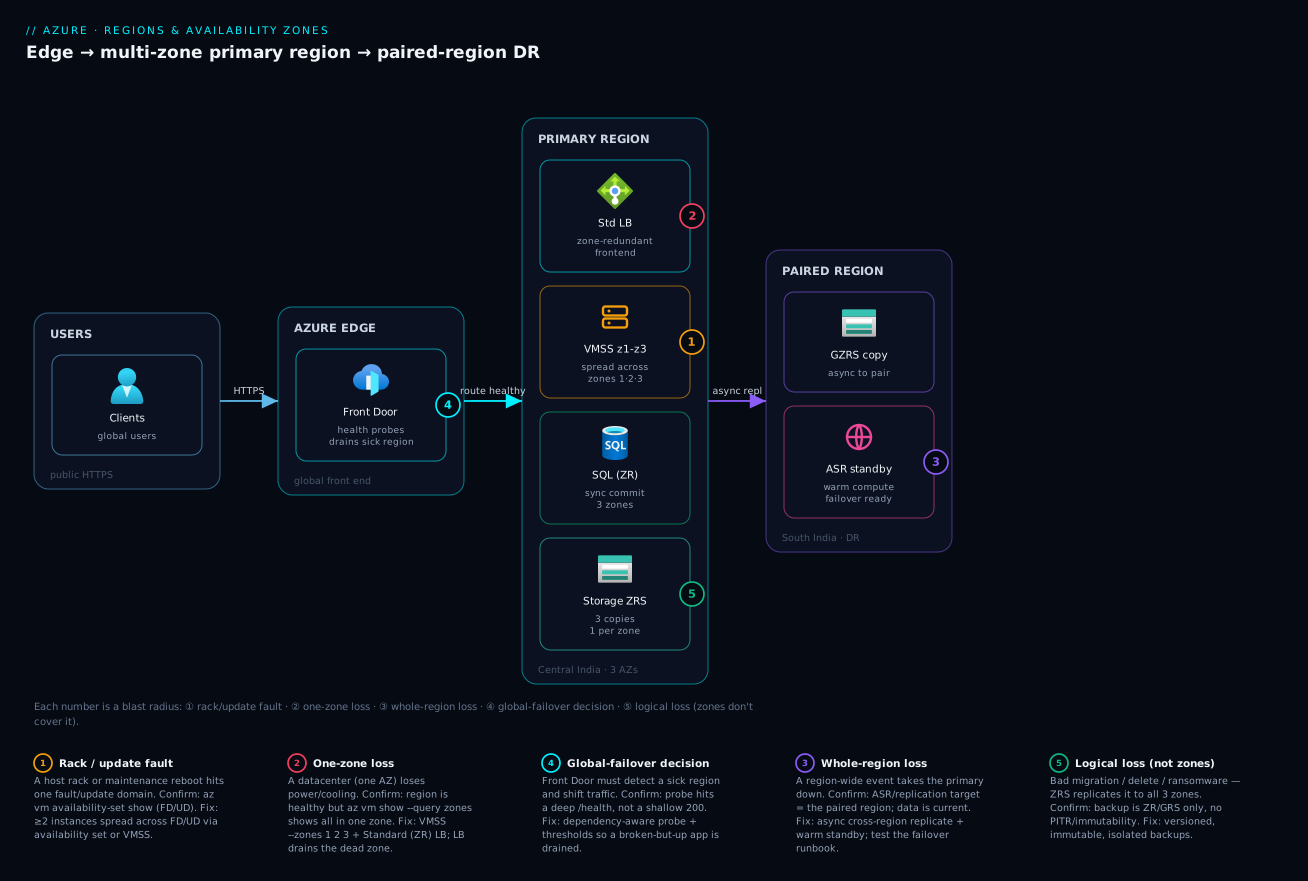
The diagram below walks the full resilience stack from the outside in, left to right, so you can see exactly where each primitive sits and where each failure class bites. On the far left, users arrive at a global front end — Azure Front Door with health probes — whose only job during a disaster is to stop sending traffic to a region that is failing health checks and shift it to the healthy one. That is your defence against a whole-region loss.
The centre of the diagram is the primary region (here, Central India), drawn as a region container holding three Availability Zones. The application tier is a VM scale set spread across zones 1, 2 and 3, fronted by a zone-redundant Standard Load Balancer; behind it sits zone-redundant SQL (synchronous commits across zones) and ZRS storage (three synchronous copies, one per zone). Because every stateful and stateless component is spread across all three zones, the loss of any single datacenter — badge ② — is absorbed automatically: the load balancer drains the dead zone, the surviving zones keep serving, and you experience a brief retry rather than an outage. Inside one zone you also see the fault-domain / update-domain split — badge ① — the rack-and-maintenance boundary an availability set protects, the smallest blast radius on the picture. On the right, the paired region (South India) receives asynchronous GZRS replication and Azure Site Recovery state, standing by to take over — badge ③ — when an entire region is lost. The numbered badges map each failure boundary to the exact hop where it lands; the legend narrates each one as what fails · how you confirm it · how you recover.
Real-world scenario
MediTrack Diagnostics, a fictional but very typical pathology-lab SaaS, ran its clinician portal and results API on three D-series VMs and a single Business-Critical Azure SQL database, all in Central India. The team believed they were “highly available” — they had three app VMs, after all. They had a single region, a single SQL instance with zone redundancy not enabled, and, as it turned out, all three VMs in the same zone because they had been created without a --zone flag and Azure had happened to place them together. Their availability target, written into a hospital contract, was 99.95%.
At 19:40 on a weekday a power-distribution fault took a single Central India datacenter offline. Because all three app VMs and the SQL primary were physically in that building, the portal went dark and results stopped flowing to three hospitals mid-shift. The Azure status page showed Central India as available — the region was fine; one zone was not. The on-call engineer’s first instinct, restart the VMs, did nothing: the host was gone, not the guest. They spent ninety minutes confirming, escalating and waiting before the datacenter recovered. Total user-visible outage: roughly two hours. The contractual 99.95% (about 4.4 hours/year) was blown in one evening, and a penalty clause triggered.
The remediation, costed and delivered over the following sprint, was textbook and cheap relative to the penalty. They converted the three VMs to a VM scale set spread across zones 1, 2 and 3 behind a zone-redundant Standard Load Balancer, replacing the Basic LB they had (Basic is not zone-redundant — a subtle trap). They enabled zone redundancy on the SQL database (a single flag on Business Critical), so commits now land synchronously across three zones and the database survives a datacenter loss with no data loss. They moved blob data from LRS to ZRS, and added GZRS so a region loss is also covered. They added Azure Front Door with health probes and stood up a warm standby in South India (the paired region) with Azure Site Recovery for the VMs and active geo-replication for SQL, lifting their design from single-region/single-zone to multi-zone with a real DR target. Finally — the discipline that proves it — they scheduled a quarterly Chaos Studio game day that shuts down a zone on purpose and watches the load balancer drain it.
The numbers tell the story. Before: one zone, ~99.9% aspirational but really single-DC; a four-hour event was always possible and one happened. After: four-nines within the region (a datacenter loss is now a sub-minute retry), plus region-loss DR with an RPO of seconds and an RTO of minutes. The marginal cost — a higher LB SKU, ZRS/GZRS over LRS, zone-redundant SQL, and a warm secondary — came to a few tens of thousands of rupees a month, against a contractual penalty that dwarfed it and a reputational hit with three hospitals that did not have a price.
Advantages and disadvantages
| Advantages | Disadvantages |
|---|---|
| Survive a whole-datacenter loss without leaving the region | Running redundant capacity across zones costs more |
| ~99.99% in-region SLA with multi-zone deployment | Inter-zone data transfer can be billed |
| Low inter-zone latency enables synchronous replication | Not every region has zones; not every service is zone-redundant |
| Zone-redundant PaaS hides placement/failover from you | Zone-redundant SKUs/tiers are pricier than basic |
| Paired regions add coordinated, compliant region-level DR | Cross-region replication adds RPO lag and egress cost |
| Logical separation of blast radii you can reason about | Complexity: more moving parts to design, test and bill |
| Zones + sets compose for layered resilience | Easy to believe you’re spread when you aren’t (the core trap) |
Zones matter the moment a workload’s downtime has a real cost — revenue, contractual penalties, safety — and the cost of a datacenter-loss event exceeds the modest premium of spreading across zones. They matter less for genuinely stateless, easily re-deployable, or dev/test workloads where a few hours of downtime is acceptable. A second region matters when even a whole-region event is intolerable, or when compliance or latency demands geographic presence — but it roughly multiplies cost and complexity, so reserve full active/active for the workloads that truly warrant it and use warm/pilot-light patterns for the rest.
Hands-on lab
This lab deploys a genuinely zone-resilient web tier — a VM scale set across three zones behind a zone-redundant load balancer — confirms the placement, then tears it down. It is free-tier-friendly if you delete promptly; the VMSS instances incur compute cost while running, so do the teardown.
1. Set variables and pick a zone-capable region.
RG=rg-az-lab; LOC=centralindia
az group create -n $RG -l $LOC
# Sanity-check the region exposes zones for your SKU
az vm list-skus -l $LOC --size Standard_B --all \
  --query "[?name=='Standard_B2s'].locationInfo[0].zones" -o tsv   # expect: 1 2 3
2. Create a zone-redundant public IP + Standard Load Balancer.
az network public-ip create -g $RG -n pip-lab --sku Standard --allocation-method Static
az network lb create -g $RG -n lb-lab --sku Standard \
  --public-ip-address pip-lab --frontend-ip-name fe --backend-pool-name be
az network lb probe create -g $RG --lb-name lb-lab -n p80 --protocol Http --port 80 --path /
az network lb rule create -g $RG --lb-name lb-lab -n http \
  --protocol Tcp --frontend-port 80 --backend-port 80 \
  --frontend-ip-name fe --backend-pool-name be --probe-name p80
3. Create a VM scale set spread across all three zones.
az vmss create -g $RG -n vmss-lab --image Ubuntu2204 \
  --vm-sku Standard_B2s --instance-count 3 --zones 1 2 3 \
  --lb lb-lab --backend-pool-name be --upgrade-policy-mode automatic \
  --custom-data cloud-init.txt   # installs nginx so the probe passes
4. CONFIRM the resilience actually exists. This is the step the MediTrack team skipped.
# The VMSS reports all three zones — the proof of spread
az vmss show -g $RG -n vmss-lab --query zones -o tsv          # -> 1 2 3
# The LB is Standard (zone-redundant frontend), not Basic
az network lb show -g $RG -n lb-lab --query sku.name -o tsv   # -> Standard
# The public IP is Standard with no pinned zone => zone-redundant
az network public-ip show -g $RG -n pip-lab \
  --query "{sku:sku.name, zones:zones}"                       # Standard, zones null
# Hit the endpoint
curl -s http://$(az network public-ip show -g $RG -n pip-lab --query ipAddress -o tsv)
Expected: 1 2 3, Standard, a null/absent zones, and an nginx welcome page. You now have a tier that survives the loss of any one zone.
5. (Optional) Simulate a zone impact. Cordon one zone’s instances by scaling that zone’s capacity or stopping an instance, and watch the LB probe drain it while the endpoint stays up — the cheap version of a Chaos Studio zone-down experiment.
6. Teardown — do this to stop the bill.
az group delete -n $RG --yes --no-wait
| Lab step | Command focus | What it proves |
|---|---|---|
| 1 | az vm list-skus ... zones |
Region/SKU actually supports zones |
| 2 | lb create --sku Standard |
Zone-redundant frontend exists |
| 3 | vmss create --zones 1 2 3 |
Compute is spread across datacenters |
| 4 | --query zones / sku.name |
The spread is real, not assumed |
| 5 | drain one zone | Failover behaviour observed |
| 6 | group delete |
No surprise charges |
Common mistakes & troubleshooting
Resilience fails in production in specific, diagnosable ways. This is the playbook: match the symptom you’re paging on to its root cause, run the confirm command/path, apply the fix. Keep this table open during an incident.
| # | Symptom | Root cause | Confirm (exact command / portal path) | Fix |
|---|---|---|---|---|
| 1 | Full outage, but Azure shows the region healthy | All instances in one zone; that zone had an event | az vm show -g RG -n NAME --query zones on each — all same value |
Spread across zones (VMSS --zones 1 2 3) |
| 2 | “I have 2+ VMs” yet both died together | VMs created without --zone; Azure co-located them |
--query zones returns empty / identical |
Recreate zonal across zones, or use an availability set / VMSS |
| 3 | LB didn’t survive a zone loss | Basic Load Balancer (not zone-redundant) | az network lb show --query sku.name → Basic |
Migrate to Standard LB + Standard public IP |
| 4 | “Zone-redundant” storage wasn’t | Account is LRS (single-DC), not ZRS | az storage account show --query sku.name → Standard_LRS |
Change SKU to Standard_ZRS/GZRS |
| 5 | SQL went down with the datacenter | Zone redundancy not enabled on the DB | az sql db show --query zoneRedundant → false |
Set --zone-redundant true (supported tiers) |
| 6 | Deployment failed: zone not supported | Region has no zones, or SKU not zonal there | az vm list-skus -l REGION ... zones empty |
Pick a zone-capable region/SKU; or use availability sets |
| 7 | Disk won’t attach to a VM in another zone | Zonal disk pinned to a different zone | az disk show --query zones ≠ VM’s zone |
Use a ZRS disk, or place VM in the disk’s zone |
| 8 | DR failover did nothing / target empty | DR built in a non-replicated / wrong region | Check ASR/replication target region vs the pair | Replicate to the paired (or chosen) region; test it |
| 9 | Cross-region “sync” replication is laggy/failing | Synchronous commit attempted across regions | Replication mode shows async-required latency | Use async cross-region; sync only within a region |
| 10 | Restored data is also corrupted | Zones replicated the logical corruption | Backup is ZR/GRS only, no point-in-time/immutability | Add versioned, immutable, isolated backups |
| 11 | Front Door kept routing to a dead region | Health probe path returns 200 on a broken app | Probe config vs a deep health endpoint | Probe a dependency-aware /health; tune thresholds |
| 12 | Composite uptime far below the SLA you expected | Serial single-instance dependency in the chain | Map the request path; find the un-redundant tier | Make that tier multi-instance / multi-zone |
| 13 | Inter-zone egress bill spiked | Chatty cross-zone data-plane traffic | Cost analysis: inter-zone data transfer line | Keep hot path intra-zone; only durability copy crosses |
| 14 | Two subscriptions’ “zone 1” weren’t aligned | Zone numbers are per-subscription logical maps | They simply differ physically by design | Don’t rely on zone number across subscriptions |
| 15 | New region deploy of DR template fails on zones | Target region has no Availability Zones | az vm list-skus -l DR_REGION ... zones empty |
Use a zone-capable DR region, or availability sets there |
A few of these deserve the longer treatment because they are the ones that recur.
Mistake: assuming multiple instances are spread
The single most common resilience failure. You deploy two or three VMs to “be highly available,” but unless you pinned them to different zones (or put them in an availability set / VMSS), Azure may place them on the same rack or in the same zone. Confirm with az vm show --query zones on each — if they’re empty or identical, you have N copies of a single failure domain, not redundancy.
for v in vm-a vm-b vm-c; do
  printf "%s -> zone " "$v"; az vm show -g rg-app -n "$v" --query "zones[0]" -o tsv
done
# Empty or all the same? You are not spread. Recreate across zones or use a VMSS.
Mistake: Basic Load Balancer (or Basic public IP) in front of a zonal tier
A Basic Load Balancer and Basic public IP are not zone-redundant — they are a single-zone front end that can vanish with one datacenter, taking your “multi-zone” backends offline because nothing can reach them. Only Standard SKU load balancers and public IPs offer a zone-redundant frontend.
az network lb show -g rg-app -n lb-app --query sku.name -o tsv         # must be Standard
az network public-ip show -g rg-app -n pip-app --query sku.name -o tsv # must be Standard
Mistake: treating zones as backup
Zone redundancy faithfully replicates everything, including your mistakes. A bad migration, a DELETE without a WHERE, or a ransomware encryption pass propagates to all three zone copies. Zones are physical-loss protection, not logical-loss protection. You still need point-in-time restore, soft delete, and immutable backups in an isolated location.
| Threat | Zones (ZRS) help? | What actually helps |
|---|---|---|
| Datacenter power/cooling loss | Yes | Zones (that’s their job) |
| Whole-region disaster | No | GRS/GZRS + a second region |
| Accidental deletion | No | Soft delete + backup |
| Data corruption / bad deploy | No | Point-in-time restore / versioning |
| Ransomware encryption | No | Immutable, isolated, air-gapped backups |
| Schema/migration mistake | No | Point-in-time restore to before the change |
| Operator fat-finger config push | No | Versioned IaC + rollback, change control |
Best practices
- Default to three zones for production. Spread compute (VMSS
--zones 1 2 3) and choose zone-redundant SKUs for stateful and front-end services. Treat single-zone as a deliberate, justified exception, not a default. - Verify placement; never assume it. After every deploy, run the
--query zones/sku.namechecks. “I have three VMs” is not evidence;1 2 3is. - Use Standard, not Basic, for load balancers and public IPs. Basic is single-zone and is being retired; Standard gives you the zone-redundant frontend your backends depend on.
- Pick the region for residency, zone support and service availability first, latency second. Confirm with
az account list-locationsandaz vm list-skusbefore committing a workload or a DR target. - Prefer zone-redundant PaaS over hand-rolled zonal HA where it exists. ZRS, zone-redundant SQL/App Service/Cosmos let Azure own placement and failover — less to get wrong.
- Match replication mode to distance. Synchronous within a region (zones); asynchronous across regions. Don’t attempt cheap synchronous cross-region commits — latency forbids it.
- Use the Azure-paired region for DR unless you have a specific reason not to — you get sequential updates, prioritised recovery and same-geography compliance for free.
- Separate resilience from recovery. Zones for datacenter loss; a second region for region loss; immutable backups for logical loss. Never collapse the three.
- Right-size DR to the workload. Active/active for mission-critical; warm or pilot-light for most; cold only where hours of RTO are genuinely acceptable.
- Define and track RPO/RTO per workload, and make sure your replication frequency and standby capacity actually meet them.
- Game-day your zones and your failover. Use Chaos Studio to take a zone down on purpose and watch the LB drain it; an untested failover is a hope, not a plan.
- Mind inter-zone and cross-region data transfer in the design and the budget — keep hot paths local, let only durability copies cross boundaries.
Security notes
Resilience and security intersect more than people expect. Immutable, isolated backups are now a security control as much as a resilience one — they are the last line of defence against ransomware, which zone redundancy does nothing to stop because it replicates the encryption faithfully; pair zones with backup immutability and multi-user authorization. Keep DR within the correct geography so that replication for resilience never violates data-residency or sovereignty obligations — a GRS account replicating outside the legal boundary is a compliance incident waiting to happen, which is exactly why paired regions stay in-geography. Use managed identities, not stored credentials, for the components that perform failover (Site Recovery, storage failover automation) so a DR runbook can’t leak a secret. Apply least privilege to who can trigger a storage account failover or an ASR failover — it is a high-impact operation and should be RBAC-gated and, ideally, behind change control. Finally, ensure your secrets and keys are themselves replicated/recoverable across the resilience boundary: a perfectly failed-over app that can’t reach its Key Vault because the vault was single-region is a self-inflicted outage — see Key Vault secrets, keys and certificates.
Cost & sizing
Resilience is a spectrum and so is its bill. The drivers are: how many redundant instances you run (zones multiply compute), the redundancy SKU you pick for storage and PaaS (ZRS/GZRS and zone-redundant tiers cost more than single-zone equivalents), inter-zone and cross-region data transfer, and the standby capacity of your DR posture.
What drives the bill, and how to right-size
| Cost driver | Cheaper end | Pricier end | Right-sizing move |
|---|---|---|---|
| Compute redundancy | 1 instance (no HA) | N across zones + DR region | Match instance count to the SLA you owe |
| Storage redundancy | LRS | RA-GZRS | ZRS for in-region HA; GZRS only if region-DR needed |
| Database tier | Single, no ZR | Business Critical + ZR + geo-replica | Enable ZR on a tier that supports it; geo-replica only for DR |
| DR posture | Cold standby | Active/active | Warm/pilot-light covers most business apps |
| Data transfer | Intra-zone | Cross-region egress | Keep hot path local; minimise chatty cross-boundary calls |
| Load balancer | (Basic, retiring) | Standard | Standard is required for zones; price it in |
Free-tier and low-cost notes
| Item | Free / low-cost reality |
|---|---|
| Availability Zones feature | No charge for using zones; you pay for the resources you place in them |
| ZRS vs LRS | ZRS costs more than LRS per GB; the premium buys datacenter-loss durability |
| Inter-zone data transfer | May be billed — model it for chatty workloads |
| Cross-region replication (GRS/GZRS) | Adds storage + egress for the secondary copy |
| Lab in this article | A few rupees if you run the VMSS briefly and delete promptly |
A practical rule of thumb in INR terms: moving a small production web tier from single-zone to three-zone typically adds the cost of the extra instances plus the ZRS/GZRS premium and a Standard LB — often a few thousand to a few tens of thousands of rupees a month for a modest workload. Set that against the cost of the outage it prevents (contractual penalties, lost transactions, reputation) and for anything with real users it is almost always the cheaper side of the trade.
Interview & exam questions
1. What is the difference between an Azure region and an Availability Zone? A region is a metro-scale set of datacenters with low inter-DC latency that you deploy into. An Availability Zone is one or more physically separate datacenters within a region, each with independent power, cooling and networking. Regions that support zones expose three of them. (AZ-104, AZ-305, SAA-equivalent.)
2. Distinguish zonal, zone-redundant and regional resources. Zonal is pinned to one zone you choose (you deploy several across zones yourself). Zone-redundant is automatically spread across all three zones by Azure. Regional/non-zonal has no zone guarantee — Azure places it anywhere in the region. The distinction determines whether a single datacenter loss takes the resource down.
3. Two VMs are deployed for HA but both go down in a datacenter event. Why?
They were almost certainly created without a zone assignment (or not in an availability set), so Azure co-located them in the same failure domain. Confirm with az vm show --query zones; fix by spreading across zones (VMSS) or using an availability set.
4. What SLA does a single VM, a multi-VM availability set, and a multi-zone deployment carry? Roughly 99.9% (single VM with premium/ultra disk), 99.95% (multi-VM availability set), and 99.99% (multi-VM across ≥2 zones). Single-VM excludes datacenter-loss scenarios entirely.
5. What is a paired region and what does pairing guarantee? A paired region is Azure’s designated DR partner in the same geography. Pairing guarantees sequential platform updates (both halves are never updated simultaneously), prioritised recovery after a broad outage, same-geography residency, and it is the default GRS replication target.
6. Compare LRS, ZRS, GRS and GZRS. LRS = 3 copies in one datacenter (no DC-loss protection). ZRS = 3 copies across three zones (survives a DC loss). GRS = LRS locally + an async LRS copy in the paired region (survives a region loss after failover). GZRS = ZRS locally + an async copy in the pair (survives both). RA- variants add read access to the secondary.
7. Why isn’t zone redundancy a substitute for backup? Zone redundancy replicates physical durability, including any logical corruption — a bad migration, an accidental delete, or ransomware encryption is faithfully copied to all zone replicas. Backups (point-in-time, soft delete, immutable) are what recover from logical loss.
8. What is the difference between a fault domain and an update domain? A fault domain groups hardware sharing power and network (a rack), protecting against unplanned hardware faults. An update domain groups instances rebooted together during planned maintenance, ensuring a maintenance wave never takes all your capacity at once.
9. How do you compute composite availability across a request’s tiers?
Multiply the SLAs of every serial dependency on the critical path; the composite is lower than any single tier. Redundancy within a tier raises that tier (1−(1−a)ⁿ); parallel regions raise the whole composite. Adding a non-bypassable single-instance dependency caps you at its SLA.
10. When do Availability Zones suffice, and when do you need a second region? Zones suffice when you must survive a datacenter loss within a region — most production HA. You need a second region when even a whole-region event is intolerable, or when compliance/latency demands geographic presence. Region DR roughly multiplies cost and complexity.
11. How do you choose a region beyond latency?
Check Availability Zone support, the availability of the specific services/SKUs you need, and the data-residency geography — then latency. Verify with az account list-locations and az vm list-skus. A latency-optimal region with no zones can silently undermine an HA design.
12. What does RPO vs RTO mean and what drives each? RPO is how much data you can afford to lose, driven by replication frequency/mode (sync vs async). RTO is how long recovery may take, driven by automation and warm-vs-cold standby. Tighter targets cost more (more replication, more standby capacity).
Quick check
- A region is up but your whole app is down. What is the single most likely placement mistake, and the one command to confirm it?
- Which load balancer SKU gives a zone-redundant frontend — Basic or Standard?
- Your storage account is
Standard_LRS. Does it survive the loss of one datacenter? What SKU would? - You need to survive the loss of an entire region. Do Availability Zones alone suffice? What do you add?
- Why is a 99.99% SLA on your database not the same as your app being available 99.99% of the time?
Answers
- All instances are in a single zone (created without
--zoneor not spread). Confirm withaz vm show -g RG -n NAME --query zoneson each — empty or identical means no spread. - Standard. Basic is single-zone and is being retired; only Standard offers a zone-redundant frontend.
- No — LRS keeps all three copies in one datacenter. ZRS (or GZRS) spreads three copies across three zones and survives a datacenter loss.
- No — zones survive a datacenter loss, not a region loss. Add a second region (ideally the paired region) with replication and a global front end (Front Door/Traffic Manager) for failover.
- Your real availability is the composite of every serial tier multiplied together, plus your own design; a single 99.99% tier in a serial chain with other dependencies yields a lower composite, and the SLA is only a refund policy, not an uptime guarantee.
Glossary
| Term | Definition |
|---|---|
| Region | A metro-scale set of Azure datacenters with low inter-datacenter latency that you deploy resources into. |
| Availability Zone (AZ) | One or more physically separate datacenters within a region, with independent power, cooling and networking. |
| Zone (1/2/3) | A per-subscription logical handle that Azure maps to a physical Availability Zone. |
| Fault domain (FD) | A group of hardware (a rack) sharing power and network; resources in different FDs don’t all fail to one rack fault. |
| Update domain (UD) | A group of instances rebooted together during planned maintenance. |
| Availability set | An intra-zone construct that spreads VMs across fault and update domains. |
| Zonal resource | A resource pinned to exactly one zone you choose. |
| Zone-redundant resource | A resource Azure automatically spreads across all three zones. |
| Regional / non-zonal resource | A resource with no zone guarantee, placed anywhere in the region. |
| Paired region | Azure’s designated DR partner region in the same geography, with coordinated updates and recovery. |
| Geography | A data-residency boundary containing one or more regions; replication for resilience stays within it. |
| LRS / ZRS / GRS / GZRS | Storage redundancy SKUs: local, zone-redundant, geo-redundant, and geo-zone-redundant. |
| RPO | Recovery Point Objective — the maximum acceptable data loss, set by replication frequency/mode. |
| RTO | Recovery Time Objective — the maximum acceptable recovery time, set by automation and standby posture. |
| SLA | A provider’s committed uptime percentage, backed by a service-credit refund if missed — not a guarantee of uptime. |
| Composite availability | The product of every serial tier’s availability on a request’s critical path, plus the design’s redundancy. |
Next steps
- Azure VM Availability & Resilience Deep Dive — how compute consumes zones, sets, and scale sets in practice.
- Azure Front Door & Traffic Manager for global failover — the global front end that makes region failover real.
- Azure Site Recovery: zone-to-zone and region failover runbooks — orchestrating the VM-level failover you designed here.
- Well-Architected Reliability pillar deep dive — the reliability theory and targets behind these placement choices.
- Azure Chaos Studio fault injection — prove your zone and region resilience with a real game day.