Quick take: App Service is the fastest path for web apps and APIs, Container Apps is the sweet spot for event-driven microservices that should scale to zero, and AKS is for teams that genuinely need full Kubernetes control — and most teams reaching for AKS don’t.
A product team needed to host a new internal API. They defaulted to Azure Kubernetes Service (AKS) because it was “the enterprise choice.” Six months later they were managing node-pool upgrades, ingress controllers, cert-manager, pod security and a Prometheus stack — for a service that received a few thousand requests a day and had exactly one container. They should have started with Azure Container Apps, or honestly with Azure App Service, and spent those six months on the product instead. This is the single most expensive mistake in Azure compute, and it is a decision mistake, not a technical one: the three platforms are all good; the question is which one’s abstraction matches the control you actually need.
This article is the decision framework. Azure gives you three first-class ways to run an application that listens on a port — App Service (managed PaaS: you bring code or one container, Azure runs the VMs, patching and scaling), Container Apps (serverless containers on a hidden Kubernetes substrate with KEDA event-scaling, Dapr sidecars, revisions and scale-to-zero), and AKS (the full Kubernetes API, where you own the nodes, the network plugin, the upgrades and the security). They sit on a single axis — how much of the platform you operate — and picking the wrong point on that axis costs you either flexibility you needed or months of operations you didn’t. We will place every workload on that axis by the dimensions that actually decide it: control surface, scaling model, networking and isolation, identity, deployment and rollback, observability, cost shape, and the ops burden your team can sustainably carry.
By the end you will stop defaulting. When the next service needs a home you will know — in minutes, from a table — whether it belongs on App Service, Container Apps or AKS, what each will cost you to run and to operate, where each one’s abstraction leaks (the WEBSITES_PORT probe, the scale-to-zero cold start, the ImagePullBackOff), and how to confirm the fit before you commit a year of your team’s time to a platform. Because this is a reference you will return to, every dimension is laid out as a scannable matrix — read the prose once, then keep the comparison grids open when the architecture review starts.
What problem this solves
Azure offers at least seven ways to run code (Functions, App Service, Container Apps, AKS, Container Instances, Service Fabric, VMs). For application workloads — something that serves HTTP or processes a queue — three of them cover the overwhelming majority of cases. The pain this article removes is choosing wrong, which manifests in two opposite, equally costly ways.
Over-buying control is the AKS story above: you take on a Kubernetes cluster — node images, Kubernetes version upgrades every few months, ingress, CNI, RBAC, secrets, observability, autoscaler tuning — to run a workload that needed none of it. The bill is partly Azure’s (you pay for nodes 24×7 whether or not they’re busy) and mostly your team’s (an engineer-month a quarter on cluster operations that produces no product). It breaks when the one person who understood the cluster leaves.
Under-buying flexibility is the opposite: you put a sprawling microservice mesh with sidecars, custom routing and per-service scaling onto App Service, then fight the platform — no native service-to-service mesh, one container per app, scaling tied to the whole plan, no scale-to-zero — until you’ve rebuilt half of Kubernetes out of app settings and Logic Apps. It breaks when the workload outgrows the abstraction and the migration is now a rewrite.
Who hits this: every team standing up a new service, every architect drawing a target-state diagram, every platform team writing a “paved road.” It bites hardest on teams that pick by prestige (“real engineers use Kubernetes”) or by familiarity (“we’ve always used App Service”) instead of by fit. The correct method is boring and reliable: enumerate what the workload actually requires, find the highest-abstraction platform that satisfies all of it, and step down only for a requirement the higher platform genuinely cannot meet.
To frame the whole field before the deep dive, here is the one-line identity of each platform, the workload it’s built for, and the first disqualifier that pushes you off it:
| Platform | One-line identity | Built for | Operate (you own) | First disqualifier (push off it) |
|---|---|---|---|---|
| App Service | Managed PaaS for web apps & APIs | Sites, REST/gRPC APIs, simple web jobs | Almost nothing (app + config) | Many small services talking to each other; scale-to-zero; sidecars |
| Container Apps | Serverless containers on hidden K8s | Event-driven microservices, background jobs | Containers + revisions + scale rules | Custom CNI, DaemonSets, GPUs, raw Kubernetes API, operators |
| AKS | Full managed Kubernetes | Anything; complex/portable workloads | Nodes, upgrades, ingress, CNI, security | Nothing technical — but the ops burden disqualifies small teams |
The decision is not “which is best” (none is); it is “which abstraction is the right size for this workload and this team.”
Learning objectives
By the end of this article you can:
- Place any application workload on the App Service → Container Apps → AKS abstraction axis by listing its real requirements and matching them to the highest-abstraction platform that satisfies them.
- Name the scaling model of each platform precisely — plan-level autoscale (App Service), KEDA event-driven scale-to-zero (Container Apps), and Cluster Autoscaler + HPA/KEDA (AKS) — and pick by traffic shape.
- Compare the networking and isolation story of each: VNet integration vs private endpoints vs a managed environment vs your own CNI, and what each means for private inbound and outbound.
- Map deployment and rollback on each: App Service slots, Container Apps revisions with traffic-splitting, and AKS Deployments with rolling updates / Argo / Flux.
- Reason about cost shape — always-on plan VMs (App Service), per-vCPU-second consumption that goes to zero (Container Apps), and 24×7 node + control-plane cost (AKS) — and estimate rough INR/USD for a real workload.
- Diagnose the classic abstraction leaks on each platform —
WEBSITES_PORTprobe failures, scale-to-zero cold starts,ImagePullBackOff, Key Vault reference crash loops — with the exactaz/kubectlcommand to confirm and fix. - Run a free-tier-friendly lab that deploys the same container to all three and observe the differences in effort, scaling and cost first-hand.
- Defend the choice in an architecture review and in an AZ-204 / AZ-305 exam context.
Prerequisites & where this fits
You should be comfortable with the idea of a container (an image you build, push to a registry, and run), with HTTP and ports, and with running az in Cloud Shell. Helpful but not required: a passing familiarity with Kubernetes vocabulary (pod, deployment, ingress, node) — we define the parts that matter. You do not need to be a Kubernetes operator; in fact, the central thesis is that most teams should not have to be.
This article is the front door of the Azure compute track — the decision that sits upstream of every platform-specific deep dive. Once you’ve chosen App Service, the operational reality is in Troubleshooting Azure App Service: 502/503, Cold Starts & Restart Loops. All three platforms pull images from a registry — Azure Container Registry: Secure Supply Chain — and resolve secrets from Azure Key Vault via managed identity. If the workload is purely event-driven with no long-running process, Azure Functions: Serverless Patterns is the fourth option to weigh. The network these live in is built in Azure Virtual Network: Subnets & NSGs, fronted by Application Gateway with WAF, and observed through Azure Monitor & Application Insights. The bill is governed in Azure FinOps & Cost Management.
A quick map of which decision dimension each platform team usually owns, so the architecture review involves the right people:
| Dimension | What it decides | Who usually owns it | Which platform it tends to favour |
|---|---|---|---|
| Control surface | How much of the runtime you can shape | App architect | More control → AKS |
| Scaling model | Cost-at-idle vs latency-at-spike | App + platform | Scale-to-zero → Container Apps / Functions |
| Networking / isolation | Private inbound, egress control | Network team | Strict isolation → AKS / ASE |
| Identity & secrets | How the app authenticates | Security team | All support managed identity |
| Deployment / rollback | Blast radius of a release | DevOps | Traffic-split → Container Apps / AKS |
| Ops burden | Engineer-time per quarter | The on-call team | Less ops → App Service |
| Cost shape | Fixed vs consumption vs node-fleet | FinOps | Bursty/idle → Container Apps |
Core concepts
Five mental models make every later comparison fall out almost mechanically.
There is one axis, and it is “how much you operate.” App Service hides the VM, the OS, the patching, the load balancer, the scaling mechanics, and Kubernetes entirely — you bring code or one container and a handful of settings. Container Apps hides the Kubernetes control plane, the nodes, the ingress controller and the autoscaler machinery, but exposes the concepts (replicas, revisions, scale rules, sidecars). AKS hides almost nothing above the managed control plane: you own the nodes, the network plugin, ingress, upgrades, RBAC and observability. Everything else in this article is a consequence of where a workload sits on this axis.
Scaling model is a cost decision before it’s a performance decision. App Service scales the plan — you add instances (VMs) and every app on the plan shares them; the plan VMs are billed whether busy or idle, and the smallest you scale to is one instance (no scale-to-zero). Container Apps scales replicas with KEDA, driven by HTTP concurrency or an event source (queue length, Kafka lag, cron), and can scale to zero replicas — you pay per vCPU-second and per request, nothing at idle, at the price of a cold start on the first request after idle. AKS scales pods (HPA/KEDA) within a node pool that the Cluster Autoscaler grows and shrinks — but nodes take minutes to join and you pay for them 24×7 unless you actively scale node pools down. “Goes to zero” vs “always costs something” is the sharpest line between the three.
Networking and isolation come in three flavours. App Service is public-by-default with VNet integration for outbound and private endpoints for inbound — you bolt privacy on. Container Apps live inside a Container Apps Environment that you can deploy into your own VNet (internal or external ingress), giving the whole environment a private boundary. AKS gives you a real subnet of pods with your choice of CNI (Azure CNI / Overlay / kubenet), private clusters, network policy and your own ingress — the most control and the most to configure. If “the workload must be reachable only from inside the VNet” is a hard requirement, all three can do it, but the effort and the blast-radius differ a lot.
Deployment safety is built-in but shaped differently. App Service ships deployment slots: a staging copy you warm and swap into production near-instantly, with the old version one swap away for rollback. Container Apps ship revisions: every config/image change creates an immutable revision, and you can run multiple revisions at once and split traffic between them (canary/blue-green natively). AKS ships Deployments with rolling updates and kubectl rollout undo, plus whatever GitOps (Argo CD, Flux) or progressive-delivery (Argo Rollouts, Flagger) you install. The richer the traffic-splitting you need, the further right you go — App Service’s swap is binary, Container Apps’ split is percentage-based, AKS is anything you build.
The platform you pick determines who you page at 02:14. On App Service, a 502 is the platform’s front end complaining and Microsoft owns the substrate — you debug your app and config. On Container Apps, you debug your container, revision and scale rules, but the Kubernetes underneath is Microsoft’s. On AKS, a node that won’t schedule, a CNI that ran out of IPs, an ingress controller that crashed, a cert that expired, a Kubernetes upgrade that broke an API — those are yours. Choosing AKS is choosing to be the Kubernetes operator. That is a real, recurring, person-shaped cost, and it belongs in the decision.
The vocabulary in one table
Before the deep sections, pin down every moving part. The glossary at the end repeats these for lookup; this table is the mental model side by side:
| Concept | One-line definition | Which platform | Why it matters to the choice |
|---|---|---|---|
| App Service plan | The rented VM workers (SKU + count) | App Service | Always-billed capacity; no scale-to-zero |
| Web app (site) | One app running on a plan | App Service | The deploy unit; one container each |
| Deployment slot | A swappable copy of the app | App Service | Near-instant swap + rollback |
| Container Apps Environment | The secure boundary replicas run in | Container Apps | VNet, Log Analytics, Dapr scope |
| Revision | An immutable snapshot of an app version | Container Apps | Canary / blue-green by traffic split |
| KEDA | Event-driven autoscaler | Container Apps / AKS | Scale on queue/Kafka/cron, to zero |
| Dapr | Sidecar for service-to-service, state, pub/sub | Container Apps / AKS | Microservice plumbing without code |
| Node pool | A group of identical VMs (nodes) | AKS | You size, upgrade and pay for these |
| Pod | One or more containers scheduled together | AKS | The schedulable unit |
| HPA | Horizontal Pod Autoscaler (CPU/mem/custom) | AKS | In-cluster pod scaling |
| Cluster Autoscaler | Adds/removes nodes for pending pods | AKS | Node-level elasticity (minutes) |
| CNI | The pod networking plugin | AKS | Azure CNI vs Overlay vs kubenet |
| Managed identity | Passwordless Azure auth for the app | All three | Pull from ACR, read Key Vault |
The whole decision in one master grid
If you read only one table in this article, read this one — every dimension, all three platforms, side by side. The deep sections that follow are this grid expanded one row at a time:
| Dimension | App Service | Container Apps | AKS |
|---|---|---|---|
| Abstraction level | Highest (code/container) | Medium (containers + K8s concepts) | Lowest (full Kubernetes) |
| Best workload | Web apps, REST/gRPC APIs | Event-driven microservices | Anything complex / portable |
| Deploy unit | Web app (1 container) | Container app (multi-container) | Deployment / Pod (any) |
| Scaling unit | Plan instances (VMs) | Replicas (KEDA) | Pods + nodes |
| Scale to zero | No | Yes | Pods yes; nodes slow |
| Sidecars / Dapr | No | Yes (Dapr built-in) | Yes (any) |
| GPU / DaemonSet / raw API | No | No (GPU today) | Yes |
| Ingress | Platform front end | Envoy (built-in) | You install |
| Private inbound | Private Endpoint | Internal environment | Private cluster |
| Rollout / rollback | Slot swap | Revision traffic split | Rolling + rollout undo |
| Identity / secrets | MI + KV refs | MI + KV refs | Workload Identity + CSI |
| OS / K8s patching | Microsoft | Microsoft | You |
| Cost shape | Plan (always on) | Consumption (to zero) | Nodes (24×7) |
| Ops burden | None | Low | High (operator-grade) |
| Cert focus | AZ-204 | AZ-204 | AZ-305 |
The reading method for everything below: take your workload’s hard requirements, find the leftmost column whose every relevant row is satisfied, and stop there. You step right only when a row reads No for your current pick and Yes for the next one.
Dimension 1 — Control surface and runtime model
The first cut is how much of the runtime you can shape. This determines whether a requirement is “a checkbox” or “impossible,” and it’s where the AKS-by-default mistake originates: people reach for full control before checking whether they need any.
What each platform lets you touch
App Service runs your app on a managed worker — you cannot choose the OS image of the host, install a daemon next to your app, run a privileged sidecar, or mount arbitrary volumes; you get one application container (or a code stack) per web app, plus the platform’s injected environment. Container Apps run one or more containers per app (a main container plus sidecars like Dapr or a log shipper), give you Kubernetes concepts without the API, and let you scale and split traffic — but you cannot run DaemonSets, attach GPUs (at time of writing), install operators/CRDs, or reach the Kubernetes API. AKS gives you the whole API: any pod spec, init containers, sidecars, DaemonSets, GPUs, node taints/affinity, custom schedulers, operators, service meshes, anything.
The control surface, capability by capability:
| Capability | App Service | Container Apps | AKS |
|---|---|---|---|
| Bring your own container | Yes (one) | Yes (multi-container) | Yes (any) |
| Bring code (no container) | Yes (Win/Linux stacks) | No (image only) | No (image only) |
| Sidecar containers | No | Yes | Yes |
| DaemonSets (per-node) | No | No | Yes |
| Init containers | No | Yes | Yes |
| GPU workloads | Limited (specific SKUs) | No (today) | Yes (GPU node pools) |
| Custom OS / node image | No | No | Yes (node image, AKS-managed base) |
| Privileged / host access | No | No | Yes (where allowed) |
| Kubernetes API access | No | No | Yes (full) |
| Operators / CRDs | No | No | Yes |
| Service mesh (Istio/Linkerd) | No | Dapr only | Yes (incl. managed Istio add-on) |
| Persistent volumes | Limited (/home, Azure Files) |
Azure Files mounts | Full (PV/PVC, CSI drivers) |
The runtime models, end to end
Each platform’s runtime has a distinct shape, default, and the moment its abstraction leaks:
| Aspect | App Service | Container Apps | AKS |
|---|---|---|---|
| Unit of deployment | Web app | Container app (revision) | Deployment / Pod |
| Containers per unit | 1 | 1 main + N sidecars | Any |
| Underlying compute | Managed VM fleet (plan) | Hidden K8s (managed) | Your node pools |
| Who patches the OS | Microsoft | Microsoft | You (node image upgrades) |
| Who upgrades Kubernetes | N/A (none) | Microsoft | You (cluster + node) |
| Default networking | Public | Public or internal env | Cluster network (CNI) |
| Where the abstraction leaks | WEBSITES_PORT, SNAT |
Cold start, no raw K8s | Everything is yours |
| Min cluster knowledge | None | Concepts only | Operator-grade |
The reading rule: if your “must-have” list contains a row that is No for App Service but Yes for Container Apps, step to Container Apps; if it’s No for Container Apps but Yes for AKS (DaemonSets, GPUs today, raw API, operators), step to AKS — and only then. Most internal APIs and web apps don’t hit a single AKS-only row.
Dimension 2 — Scaling model and traffic shape
Scaling is where the platforms differ most, and where cost is decided. The question is not “can it scale” (all three can) but “what does it cost at idle, and how fast does it react to a spike.”
Three scaling engines
App Service scales the plan: you add or remove instances (whole VMs) manually or with autoscale rules on CPU/memory/queue/schedule. The floor is one instance — there is no scale-to-zero — and a new instance is warm in tens of seconds to a couple of minutes. Container Apps scale replicas via KEDA: an HTTP scaler reacts to concurrent requests, or you attach an event scaler (Service Bus queue length, Storage queue, Kafka lag, cron, custom). minReplicas: 0 lets the app go to zero when idle (you pay nothing), reactivating on the next event with a cold start; minReplicas: 1 keeps one warm. AKS scales pods with the Horizontal Pod Autoscaler (CPU/memory/custom metrics) or KEDA, and scales nodes with the Cluster Autoscaler when pods can’t be scheduled — node scale-up takes minutes because a VM must boot and join.
The scaling models side by side:
| Property | App Service | Container Apps | AKS |
|---|---|---|---|
| What scales | Plan instances (VMs) | Replicas (containers) | Pods + nodes |
| Engine | Autoscale rules | KEDA (HTTP + events) | HPA / KEDA + Cluster Autoscaler |
| Scale to zero | No (floor = 1) | Yes (minReplicas: 0) |
Pods yes; nodes via autoscaler (slow) |
| Scale-out reaction | Seconds–minutes (instance) | Seconds (replica) | Seconds (pod) / minutes (node) |
| Event-driven scaling | Limited (queue rule) | Native (KEDA scalers) | Via KEDA add-on |
| Pre-warmed buffer | Premium v3 pre-warmed | minReplicas keeps warm | Over-provision / pause pods |
| Max scale | Plan instance ceiling per SKU | Up to env limits (100s replicas) | Cluster/quota-bounded (very high) |
| Cost at idle | Full plan cost | Zero (at 0 replicas) | Node cost (24×7) unless scaled down |
Matching the engine to the traffic shape
Traffic shape should pick the platform, not prestige. The mapping:
| Traffic shape | Best fit | Why | Watch out for |
|---|---|---|---|
| Steady, predictable web traffic | App Service | Always-on plan is cheap & simple | Over-provisioning during quiet hours |
| Spiky but always > 0 | App Service (autoscale) or Container Apps | Autoscale rides the spike | App Service min = 1 instance cost |
| Bursty with long idle gaps | Container Apps | Scale-to-zero = pay nothing at idle | Cold start on first request after idle |
| Queue / event driven | Container Apps (KEDA) | Scales on queue depth, to zero | Tune polling + max replicas |
| Very high, sustained, many services | AKS | Bin-packing density on owned nodes | You operate the autoscaler |
| Needs GPU bursts | AKS (GPU node pool) | Only AKS schedules GPUs (today) | GPU nodes are expensive at idle |
The KEDA scale rule that defines a Container App, in Bicep — note minReplicas: 0:
resource queueWorker 'Microsoft.App/containerApps@2024-03-01' = {
  name: 'order-worker'
  location: location
  properties: {
    managedEnvironmentId: env.id
    configuration: {
      activeRevisionsMode: 'Single'
    }
    template: {
      containers: [ { name: 'worker', image: '${acr}/order-worker:1.4.2' } ]
      scale: {
        minReplicas: 0          // scale to zero when the queue is empty
        maxReplicas: 30
        rules: [ {
          name: 'sb-queue'
          custom: {
            type: 'azure-servicebus'
            metadata: { queueName: 'orders', messageCount: '20' }  // 1 replica per 20 msgs
            auth: [ { secretRef: 'sb-conn', triggerParameter: 'connection' } ]
          }
        } ]
      }
    }
  }
}
The same idea on App Service is an autoscale rule on the plan (floor of one instance), and on AKS it’s a ScaledObject (KEDA) or an HPA plus a Cluster Autoscaler that adds nodes. The Container Apps version is the only one that costs nothing while the queue is empty.
Dimension 3 — Networking, ingress and isolation
“Make it private” is a requirement that sounds the same on all three platforms and is implemented very differently. Get this dimension wrong and you either expose something you shouldn’t or spend a sprint building network plumbing the platform offered out of the box.
Inbound, outbound and the private boundary
App Service is public by default; you make it private with private endpoints (inbound) and VNet integration + optional NAT Gateway (outbound), and you front it with Application Gateway or Front Door for WAF and routing. Container Apps run inside a Container Apps Environment that you can deploy into your own VNet with internal ingress (private IP only) or external (public) — the boundary is the environment, not each app, and Envoy is the built-in ingress with automatic TLS and traffic-splitting. AKS gives you a subnet of pods (Azure CNI) or an overlay, a private cluster option (API server on a private IP), your choice of ingress controller (NGINX, AGIC/Application Gateway, the managed web-app-routing add-on), and NetworkPolicy for east-west control — maximum power, maximum configuration.
The networking story, side by side:
| Networking aspect | App Service | Container Apps | AKS |
|---|---|---|---|
| Default exposure | Public | Public or internal (env choice) | Cluster network; LB/ingress you define |
| Private inbound | Private Endpoint | Internal environment + private DNS | Private cluster + internal LB/ingress |
| Outbound control | VNet integration + NAT GW | VNet-injected env + NAT GW | Subnet egress / UDR / firewall |
| Built-in ingress | Platform front end (ARR) | Envoy (TLS, traffic split) | You install (NGINX/AGIC/managed) |
| WAF | Front Door / App GW (external) | Front Door / App GW (external) | AGIC / Front Door / App GW |
| Per-app vs per-boundary | Per app | Per environment | Per cluster (namespaces inside) |
| East-west policy | None native | Dapr / env-level | NetworkPolicy (Calico/Cilium) |
| Static outbound IP | NAT GW | NAT GW on env subnet | NAT GW / LB outbound rules |
IP planning — the AKS surprise
The leak nobody plans for is IP exhaustion on AKS with Azure CNI, where every pod gets a real VNet IP and a /24 subnet runs out fast. The platforms differ sharply in how many addresses they consume:
| Platform / mode | IP consumption | Typical gotcha | Mitigation |
|---|---|---|---|
| App Service (VNet integration) | A few IPs in a delegated subnet | Subnet too small for scale-out | Size the integration subnet generously |
| App Service (private endpoint) | One IP per endpoint | Forgetting private DNS zone | Link the privatelink zone to the VNet |
| Container Apps (env in VNet) | A subnet block per environment (/23+ recommended) |
Under-sizing the env subnet | Reserve a /23 or larger up front |
| AKS — Azure CNI | One VNet IP per pod | /24 exhausts at ~250 pods |
Use a large subnet, or… |
| AKS — Azure CNI Overlay | Pods on an overlay; nodes use VNet IPs | Overlay not on by default | Prefer Overlay for IP efficiency |
| AKS — kubenet | Nodes get IPs; pods NAT’d | Legacy; UDR overhead | Migrate to Overlay |
If your VNet is IP-constrained (common in enterprises with tight CIDR allocation from a landing zone), Azure CNI Overlay on AKS or staying on Container Apps avoids the per-pod address tax entirely. Confirm AKS network mode before you build:
az aks show -n aks-prod -g rg-prod \
  --query "{plugin:networkProfile.networkPlugin, mode:networkProfile.networkPluginMode, podCidr:networkProfile.podCidr}" -o json
# networkPluginMode = 'overlay' means pods don't consume VNet IPs
Dimension 4 — Identity, secrets and image pull
All three platforms support managed identity, and the pattern is identical everywhere: the workload authenticates to Azure with no secret, pulls its image from ACR with AcrPull, and reads secrets from Key Vault with Key Vault Secrets User. The mechanics and the failure modes differ, and image-pull plus secret-resolution are the most common shared incidents across all three.
The identity model on each
| Identity feature | App Service | Container Apps | AKS |
|---|---|---|---|
| System-assigned MI | Yes | Yes | Yes (kubelet + control plane) |
| User-assigned MI | Yes | Yes | Yes |
| Pull image from ACR via MI | AcrPull on the app’s MI | AcrPull on the app’s MI | AcrPull on the kubelet identity |
| Read Key Vault via MI | Key Vault references / SDK | Key Vault secret refs / SDK | Workload Identity (federated) |
| Per-pod / per-app identity | Per app | Per app | Workload Identity per service account |
| Secret store | App settings + KV refs | Secrets + KV refs | K8s Secrets / CSI Secret Store / Workload Identity |
| Recommended pattern | MI + Key Vault references | MI + secret references | Workload Identity + CSI Secret Store |
On AKS the modern, correct pattern is Microsoft Entra Workload Identity — a federated credential that maps a Kubernetes ServiceAccount to an Entra identity, so each pod gets least-privilege Azure access without a cluster-wide secret. The older AAD Pod Identity is deprecated; don’t build on it.
Grant the access — the same role, three ways
Image pull is one role assignment, but on the right principal. App Service and Container Apps grant AcrPull to the app’s managed identity; AKS grants it to the kubelet identity (or attaches the registry at create time).
# App Service / Container Apps: grant AcrPull to the app's managed identity
PRINCIPAL=$(az webapp identity show -n app-prod -g rg-prod --query principalId -o tsv)
az role assignment create --assignee "$PRINCIPAL" --role AcrPull \
  --scope $(az acr show -n acrprod --query id -o tsv)

# AKS: attach the registry (wires AcrPull on the kubelet identity automatically)
az aks update -n aks-prod -g rg-prod --attach-acr acrprod
The secret-resolution and image-pull failure modes, and the one check that proves each — this is the shared 02:14 table:
| Symptom | Platform(s) | Root cause | Confirm (exact command) | Fix |
|---|---|---|---|---|
| 502 right after deploy, image never ran | App Service | MI lacks AcrPull on private ACR | az role assignment list --assignee <principal> --scope <acr id> |
Grant AcrPull to the app MI |
ImagePullBackOff |
AKS / Container Apps | Wrong AcrPull principal / no attach | kubectl describe pod → Events |
az aks update --attach-acr; check kubelet identity |
| Empty config value → crash loop | All three | Key Vault reference unresolved | App: Environment variables blade (red); AKS: pod logs | Grant Key Vault Secrets User to the MI |
403 resolving secret |
All three | Vault firewall blocks the workload | Key Vault → Networking (selected networks) | Allow the subnet / trusted services |
| Pod has no Azure access | AKS | Workload Identity not federated | kubectl describe sa <sa> (annotation missing) |
Create federated credential; annotate SA |
| Pull works in dev, fails in prod | All three | Private ACR, no private endpoint/route | nslookup <acr>.azurecr.io from the workload |
Add ACR private endpoint + DNS |
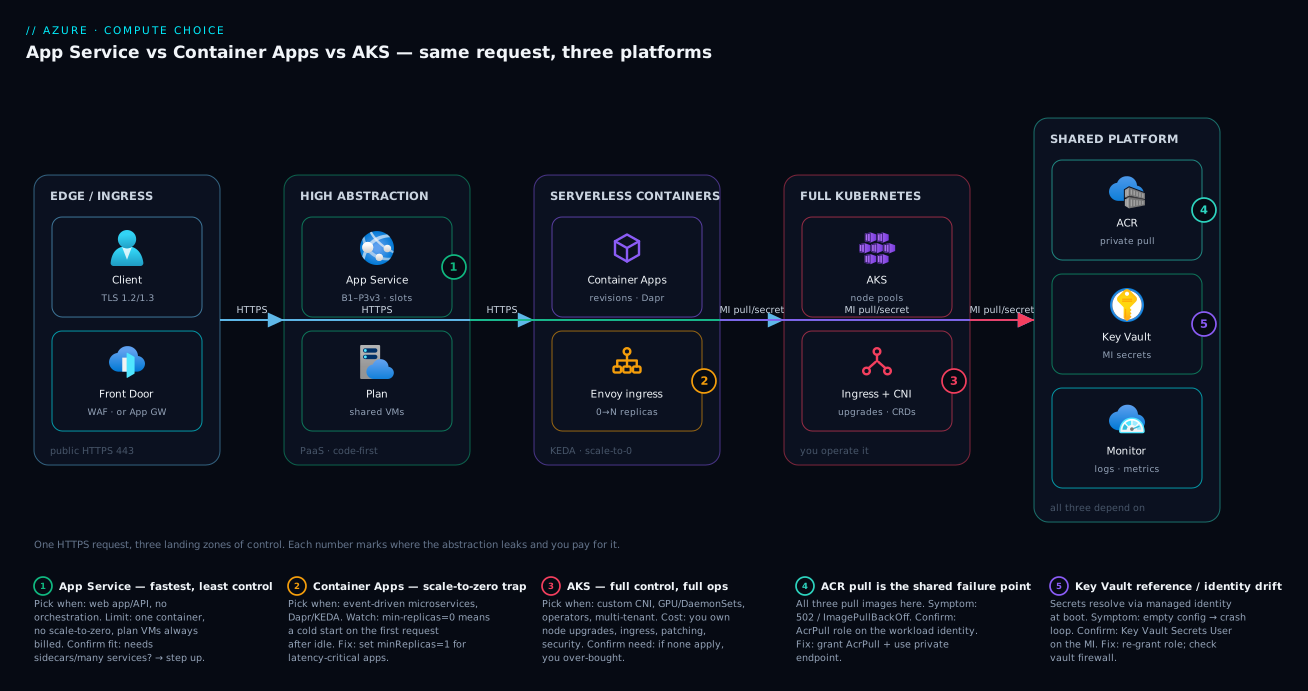
This table is why badges 4 and 5 sit on the shared platform zone of the diagram: ACR pull and Key Vault resolution are the failure points common to all three platforms, so getting identity right pays off no matter which compute you chose.
Dimension 5 — Deployment, revisions and rollback
How you ship and un-ship a release differs enough to change your incident posture. The richer the traffic control you need, the further right on the axis you go.
The three deployment models
App Service uses deployment slots: deploy to staging, warm it, and swap — the swap is near-instant and atomic, and rollback is one more swap back. It’s binary: 100% old or 100% new (slot-based canary requires routing a fixed % of traffic to the slot). Container Apps use revisions: every change to image or config mints a new immutable revision, you can run multiple revisions simultaneously, and you split traffic by percentage (e.g. 90/10 canary, then 50/50, then 100). AKS uses Deployments with rolling updates (maxSurge/maxUnavailable) and kubectl rollout undo for instant rollback, plus any GitOps/progressive-delivery you install.
| Deployment aspect | App Service | Container Apps | AKS |
|---|---|---|---|
| Mechanism | Slots + swap | Revisions + traffic split | Deployments + rolling update |
| Canary / % traffic | Slot traffic-% routing | Native per-revision % | Service mesh / Argo Rollouts / Flagger |
| Blue-green | Two slots, swap | Two revisions, flip 0/100 | Two Deployments / mesh |
| Rollback | Swap back (instant) | Shift traffic to prior revision | kubectl rollout undo |
| Atomicity | Atomic swap | Atomic revision activation | Pod-by-pod (rolling) |
| Warm-up before live | WEBSITE_SWAP_WARMUP_PING_PATH |
minReplicas keeps warm | readiness probes gate traffic |
| GitOps native | No (pipeline) | No (pipeline / ARM) | Yes (Argo CD / Flux) |
| Rollback unit | Whole app | Per revision | Per Deployment |
The commands you actually run
# App Service — deploy to staging, then swap into production
az webapp deployment slot swap -n app-prod -g rg-prod --slot staging --target-slot production

# Container Apps — 90/10 canary across two revisions, then go to 100%
az containerapp ingress traffic set -n app-prod -g rg-prod \
  --revision-weight app-prod--v1=90 app-prod--v2=10
az containerapp ingress traffic set -n app-prod -g rg-prod \
  --revision-weight app-prod--v2=100

# AKS — roll out a new image, watch it, roll back if it goes bad
kubectl set image deployment/app app=acrprod.azurecr.io/app:1.5.0
kubectl rollout status deployment/app
kubectl rollout undo deployment/app   # instant revert to the prior ReplicaSet
The decision table — pick by the rollout sophistication the workload demands:
| If you need… | Smallest platform that does it cleanly |
|---|---|
| One-shot deploy with instant rollback | App Service (swap) |
| Percentage canary with no extra tooling | Container Apps (revision traffic split) |
| Blue-green with a single flip | Container Apps or App Service |
| Header/cookie-based canary, mesh routing | AKS (+ Istio/Linkerd) |
| GitOps reconcile from a repo | AKS (Argo CD / Flux) |
| Progressive delivery with auto-rollback on SLO | AKS (Flagger / Argo Rollouts) |
Limits, quotas and the numbers that bite
Picking a platform on capability is half the job; the other half is knowing the real ceilings before you hit them in production. These are the limits people meet the hard way (figures are representative defaults — always confirm current values in the Azure docs for your region/SKU, as they move).
| Limit / quota | App Service | Container Apps | AKS |
|---|---|---|---|
| Containers per deploy unit | 1 | 1 main + sidecars | Any (pod spec) |
| Max instances/replicas | SKU-bound per plan (e.g. P-series up to ~30) | Up to ~300 replicas/app (env-bound) | Pods bound by node capacity/quota (very high) |
| Max vCPU per instance/replica | Up to 8 (P3v3) / more on Isolated | Up to ~4 vCPU per replica | Node-SKU dependent (very high) |
| Max memory per instance/replica | ~32 GB (P3v3) | Up to ~8 GiB per replica | Node-SKU dependent |
| Scale to zero | No (floor 1) | Yes (0 replicas) | Pods yes; nodes via autoscaler min |
| Outbound SNAT ports | ~128 pre-allocated/instance (NAT GW to expand) | Env-managed; NAT GW on subnet | Subnet/LB outbound rules; NAT GW |
| Request timeout (platform) | ~230 s idle LB timeout | Configurable on ingress | Your ingress controller’s setting |
| Max app size / artifact | Plan disk (GBs) | Image-size bound | Image/node-disk bound |
| Cold-start exposure | Idle unload if Always On off | First request after scale-to-zero | New-node join (minutes) |
| Subnet IP appetite | A few (integration subnet) | /23+ per environment |
1 VNet IP/pod (Azure CNI) |
And the operational ceilings — the ones that turn into incidents rather than capacity planning:
| Operational limit | App Service | Container Apps | AKS |
|---|---|---|---|
| Deployment slots | 0 (Free) / 5 (Std) / 20 (Prem) | Revisions (not slots) — many | N/A (Deployments) |
| Kubernetes version upgrades | None | Microsoft-managed | You, on Microsoft’s support window |
| Node-image patch cadence | N/A | N/A | You (auto-upgrade channels help) |
| Max environments/clusters per region | Many plans | Env quota per subscription | Cluster quota per subscription |
| Concurrent revisions/active versions | 2 slots in a swap | Up to ~100 active revisions | Unlimited (ReplicaSets) |
| Health-probe model | healthCheckPath + max-ping-failures |
Liveness/readiness/startup probes | Full K8s probes |
| Built-in WAF | No (front with App GW/Front Door) | No (front with App GW/Front Door) | No (AGIC/Front Door) |
The pattern in both tables: App Service trades flexibility for zero ceilings to manage; AKS trades no platform ceilings for every ceiling being yours to operate; Container Apps sits in between with generous serverless limits and no cluster to run.
Architecture at a glance
The diagram traces a single HTTPS request and shows the three platforms as parallel landing zones of decreasing abstraction, plus the shared platform services that all three depend on. Read it left to right. A client hits the edge — Front Door or Application Gateway with WAF on port 443. From there the request can land in any of three tiers. The high-abstraction tier is App Service on an App Service plan (a fleet of shared VMs, B1 through P3v3, with deployment slots) — badge 1 marks it as the fastest path with the least control. The serverless-containers tier is Container Apps behind Envoy ingress, scaling 0→N replicas with KEDA and revisions — badge 2 marks the scale-to-zero cold-start trap. The full-Kubernetes tier is AKS with its own ingress and CNI, node pools and upgrades you own — badge 3 marks the full-control / full-ops trade.
Now follow the curved arrows down to the shared platform zone on the right: every tier pulls its image from ACR over a private path, resolves secrets from Key Vault via managed identity, and streams logs and metrics to Azure Monitor. Badge 4 sits on ACR because the image pull is the failure point common to all three (502 / ImagePullBackOff when the workload identity lacks AcrPull), and badge 5 sits on Key Vault because a failed secret reference crash-loops the app on any platform. The lesson the picture teaches: the compute tier you choose changes your ingress, scaling and ops burden enormously, but the identity-and-supply-chain layer underneath is identical — get that right once and it pays off whichever box you landed in. The legend narrates each number as when to pick it · the limit · how to confirm.
Real-world scenario
Meridian Logistics runs a freight-tracking platform on Azure out of Central India, with a four-engineer platform team and a hard mandate to keep total compute under ₹2,00,000/month. They had three workloads landing in the same quarter and — having read the AKS-by-default warning the hard way on a previous project — they ran each through the decision framework instead of defaulting.
Workload A: the customer portal and public API. A .NET 8 web app plus a REST API, steady traffic around 300 requests/second with a predictable business-hours curve, no sidecars, no service mesh, one container each. The framework was unambiguous: highest-abstraction platform that meets the requirements is App Service. They put both on a single P1v3 plan with autoscale (min 2, max 6) and deployment slots for zero-downtime releases, fronted by Application Gateway with WAF. Effort to stand up: an afternoon. Monthly cost: about ₹55,000. Ops burden: effectively zero beyond app code.
Workload B: order and event processing. A set of small microservices reacting to Service Bus queues and a nightly batch — bursty, with long idle gaps overnight and on weekends. App Service would bill a plan 24×7 for work that happens in bursts; AKS would mean operating a cluster for a handful of small services. The framework pointed squarely at Container Apps: KEDA scaling on queue depth with minReplicas: 0, so the services cost nothing when the queues are empty, and Dapr for service-to-service calls and pub/sub without writing the plumbing. Revisions gave them percentage canaries for the risky order-pricing service. Effort: two days including Dapr wiring. Monthly cost: about ₹22,000 (and zero on quiet weekends — the line in the bill where the curve flattens to nothing was the moment the team believed in scale-to-zero).
Workload C: a real-time ETA model. A GPU-served inference service with a custom CNI requirement (it had to sit in a tightly-controlled subnet with NetworkPolicy and talk to an on-prem system over ExpressRoute), DaemonSet-based node monitoring, and a Triton inference server. Every one of those is an AKS-only row. So workload C — and only workload C — went on AKS, with a GPU node pool (scaled to zero off-hours via the cluster autoscaler minimum), Azure CNI Overlay to avoid IP exhaustion, Workload Identity for least-privilege Azure access, and the managed NGINX ingress add-on. Effort: two weeks including the cluster, ingress, observability and a GitOps pipeline. Monthly cost: about ₹85,000 (GPU-dominated), and a standing ~3 engineer-days/quarter on cluster operations they consciously accepted because the workload genuinely required it.
The outcome: ₹1,62,000/month total, under budget, with each workload on the platform that fit it — and crucially, the team only paid the Kubernetes-operations tax on the one workload that needed it, not all three. The counterfactual they avoided: had they followed the old instinct and put all three on AKS “for consistency,” they’d have run three sets of ingress and scaling config, paid for nodes 24×7 for the bursty workload (killing the scale-to-zero savings), and tripled the operations burden — for a portal and a queue-worker that needed none of it. The principle they wrote on the wall: “Consistency is a platform team’s value, not a compute SKU. Standardise the pipeline and the identity model; let each workload land on the abstraction it needs.”
The three workloads as a decision record:
| Workload | Key requirement | Platform | Why not higher | Why not lower | ₹/month |
|---|---|---|---|---|---|
| Portal + API | Steady web/API, one container | App Service | — | No need for K8s/serverless complexity | 55,000 |
| Order processing | Bursty, queue-driven, idle gaps | Container Apps | App Service can’t scale to zero | No need to operate a cluster | 22,000 |
| ETA inference | GPU + custom CNI + DaemonSet | AKS | Container Apps lacks GPU/CNI/DaemonSet | — (this is the floor) | 85,000 |
Advantages and disadvantages
Each platform’s strengths are the direct flip side of its weaknesses — the abstraction that helps you is the same abstraction that constrains you. Weigh them honestly per platform.
App Service:
| Advantages | Disadvantages |
|---|---|
| Fastest path to production; deploy code or a container in minutes | One container per app; no sidecars or service mesh |
| Zero infrastructure ops — Microsoft patches and runs the fleet | No scale-to-zero; plan VMs billed even when idle |
| Built-in slots, autoscale, TLS, custom domains, easy CI/CD | Scaling is plan-wide, not per-service; coarse for microservices |
| Mature, huge ecosystem, well-understood failure modes | Less flexible for custom runtimes / unusual networking |
Container Apps:
| Advantages | Disadvantages |
|---|---|
| Serverless containers — scale to zero, pay per use | Cold start on the first request after idle (minReplicas 0) |
| KEDA event-scaling + Dapr microservice plumbing built in | No raw Kubernetes API, DaemonSets, GPUs (today), operators |
| Revisions = native canary / blue-green by traffic split | Newer; smaller ecosystem than AKS; some K8s features hidden |
| Multi-container apps, VNet environment, Envoy ingress free | Less control than AKS when you genuinely need it |
AKS:
| Advantages | Disadvantages |
|---|---|
| Full Kubernetes — any workload pattern, portable, no ceiling | You operate it: node upgrades, ingress, CNI, RBAC, security |
| GPUs, DaemonSets, operators, service mesh, custom schedulers | Steep skills bar; an engineer-month/quarter of cluster ops |
| Dense bin-packing on owned nodes (cost-efficient at scale) | Pay for nodes 24×7 unless you actively scale pools down |
| GitOps, progressive delivery, the entire CNCF ecosystem | Easy to over-buy: most workloads don’t need any of this |
When each set of trade-offs matters: App Service’s “no scale-to-zero” is irrelevant for steady traffic and fatal for bursty-idle workloads — which is exactly the gap Container Apps fills. Container Apps’ “no raw Kubernetes” is irrelevant for 90% of microservices and a hard wall for the 10% that need GPUs, DaemonSets or operators — which is exactly where AKS earns its operations cost. The disadvantages are not bugs; they are the price of the abstraction, and the whole skill is buying the cheapest abstraction that clears your requirements.
Hands-on lab
Deploy the same public container to all three platforms, hit each, and observe the differences in effort, scaling and teardown — all free-tier-friendly. Run in Cloud Shell (Bash). We use a tiny public image (mcr.microsoft.com/azuredocs/aci-helloworld) so no registry auth is needed.
Step 1 — Variables and resource group.
RG=rg-compute-lab
LOC=centralindia
IMG=mcr.microsoft.com/azuredocs/aci-helloworld:latest
SUFFIX=$RANDOM
az group create -n $RG -l $LOC -o table
Step 2 — App Service (highest abstraction). Create a Linux B1 plan and a web app from the image.
az appservice plan create -n plan-lab-$SUFFIX -g $RG --is-linux --sku B1 -o table
az webapp create -n app-lab-$SUFFIX -g $RG -p plan-lab-$SUFFIX \
  --deployment-container-image-name $IMG -o table
# The sample listens on 80, so no WEBSITES_PORT needed here
echo "App Service: https://app-lab-$SUFFIX.azurewebsites.net"
Expected: a web app you can browse to in ~1 minute. Note: the plan VM is now billing whether or not anyone visits — there is no scale-to-zero.
Step 3 — Container Apps (serverless, scale-to-zero). Create an environment and a container app with min-replicas 0.
az containerapp env create -n cae-lab-$SUFFIX -g $RG -l $LOC -o table
az containerapp create -n ca-lab-$SUFFIX -g $RG --environment cae-lab-$SUFFIX \
  --image $IMG --target-port 80 --ingress external \
  --min-replicas 0 --max-replicas 5 -o table
FQDN=$(az containerapp show -n ca-lab-$SUFFIX -g $RG --query properties.configuration.ingress.fqdn -o tsv)
echo "Container Apps: https://$FQDN"
Expected: a public URL. Leave it idle a few minutes, then check the replica count — it should drop to 0 (costing nothing); your first request after that pays a short cold start.
az containerapp replica list -n ca-lab-$SUFFIX -g $RG -o table # may be empty when idle = scaled to zero
Step 4 — AKS (full Kubernetes). Create a tiny one-node cluster and deploy the image as a Deployment + LoadBalancer Service. This is the “feel the operations” step.
az aks create -n aks-lab-$SUFFIX -g $RG --node-count 1 --node-vm-size Standard_B2s \
  --generate-ssh-keys --network-plugin azure --network-plugin-mode overlay -o table
az aks get-credentials -n aks-lab-$SUFFIX -g $RG
kubectl create deployment hello --image=$IMG
kubectl expose deployment hello --type=LoadBalancer --port=80 --target-port=80
kubectl get service hello -w   # wait for EXTERNAL-IP, then Ctrl-C
Expected: notice how much more happened — a cluster, a node, kubeconfig, a Deployment, a Service, and a wait for a public IP. That extra effort is the AKS tax made tangible; it buys control you didn’t need for a hello-world.
Step 5 — Observe the scaling difference. App Service is pinned at 1 instance (billing). Container Apps idles to 0 (free at idle). AKS keeps the node running 24×7 (billing) until you scale the pool down. That single contrast is the whole article in three commands.
Step 6 — Teardown (do this — AKS nodes and the plan bill hourly).
az group delete -n $RG --yes --no-wait
Deleting the resource group removes all three platforms, the cluster, the plan and the environment in one shot.
Common mistakes & troubleshooting
The differentiator. These are the real failure modes that bite when you’ve chosen — or mis-chosen — a platform. Each is symptom → root cause → how to confirm (exact command/path) → fix. Scan the matrix, then read the detail.
| # | Symptom | Root cause | Confirm (exact cmd / path) | Fix |
|---|---|---|---|---|
| 1 | Chose AKS, drowning in ops | Over-bought control for a simple app | List AKS-only needs; if none, you over-bought | Migrate web/API to App Service; queues to Container Apps |
| 2 | App Service can’t scale to zero | Wrong platform for bursty-idle | Plan billed at idle in cost analysis | Move the bursty workload to Container Apps |
| 3 | Container Apps slow first request | minReplicas: 0 cold start |
az containerapp replica list empty at idle |
Set minReplicas: 1 for latency-critical apps |
| 4 | 502 after deploy, image never ran |
App MI lacks AcrPull on private ACR | az role assignment list --assignee <p> --scope <acr> |
Grant AcrPull to the app’s MI |
| 5 | ImagePullBackOff on AKS |
Cluster not attached to ACR | kubectl describe pod → Events |
az aks update --attach-acr <acr> |
| 6 | Container 502 on App Service | App listens on a non-80 port, WEBSITES_PORT unset |
default_docker.log: “didn’t respond on port 80” |
Set WEBSITES_PORT=<real port>; bind 0.0.0.0 |
| 7 | App crash-loops on boot | Key Vault reference unresolved | Environment variables blade (red) / pod logs | Grant Key Vault Secrets User; check vault firewall |
| 8 | AKS pods stuck Pending |
Node IPs / pool too small; no schedulable node | kubectl describe pod (Insufficient cpu/IPs) |
Enable cluster autoscaler; use CNI Overlay |
| 9 | Container Apps revision won’t take traffic | New revision unhealthy or 0% weight | az containerapp revision list -o table |
Fix probe; ingress traffic set weight |
| 10 | AKS upgrade broke the app | Deprecated Kubernetes API removed | kubectl get apiservices; upgrade notes |
Update manifests to current API versions |
| 11 | SNAT/outbound failures under load | New connection per request, finite SNAT | App Service SNAT detector / NAT GW metrics | Reuse connections; add NAT Gateway |
| 12 | “Private” app still public | Ingress external / no private endpoint | az ... show ingress/exposure fields |
Internal ingress (CA) / private endpoint (App Svc) / private cluster (AKS) |
Mistake 1 — Choosing AKS by default (the cardinal sin)
The pattern from the intro: a cluster stood up for a workload with zero AKS-only requirements. The cost is an engineer-month a quarter and a single-point-of-failure in whoever understands the cluster. Confirm by listing the workload’s actual needs against the AKS-only rows (DaemonSets, GPUs today, raw API, operators, custom CNI). If none apply, you over-bought. Fix: move web apps and APIs to App Service, queue/event workers to Container Apps, and decommission the cluster — or at minimum stop putting new simple workloads on it.
The disqualifier checklist — you need AKS only if you can tick at least one:
| AKS-only requirement | Why the others can’t | Common false alarm |
|---|---|---|
| DaemonSets (agent on every node) | No node concept above AKS | “We need logging” → use the platform’s built-in logs |
| GPU scheduling | Container Apps has no GPU today | “ML inference” → may fit Container Apps CPU |
| Raw Kubernetes API / operators / CRDs | Hidden in Container Apps | “We use Helm” → Helm targets K8s; not a reason alone |
| Custom CNI / NetworkPolicy east-west | Not exposed above AKS | “Private app” → internal ingress / PE suffices |
| Service mesh (Istio/Linkerd) | Container Apps offers Dapr only | “Service-to-service” → Dapr covers most of it |
| Bin-packing many services on owned nodes for cost | Per-app billing above AKS | Only true at significant scale |
Mistake 3 — The scale-to-zero cold-start trap
Container Apps with minReplicas: 0 cost nothing at idle but pay a cold start (image already cached, but the replica must spin up) on the first request after the app has scaled to zero. For a latency-critical synchronous API this is a real user-visible delay. Confirm: az containerapp replica list returns empty when idle. Fix: for latency-sensitive apps set minReplicas: 1 (one always-warm replica — a small fixed cost, far less than an App Service plan), and reserve minReplicas: 0 for async/event workers where a few hundred ms of activation is invisible.
| Workload on Container Apps | minReplicas |
Rationale |
|---|---|---|
| Latency-critical synchronous API | 1 (or more) | Never serve a cold start to a user |
| Internal API with relaxed SLA | 0–1 | Slight cold start acceptable; save at idle |
| Queue / event worker | 0 | Activation latency invisible; maximise savings |
| Cron / scheduled batch | 0 | Idle 99% of the time; pay only when it runs |
Mistake 6 — The WEBSITES_PORT 502 (App Service containers)
A custom container that listens on 3000/8080 returns 502 forever on App Service, because the front end probes port 80 by default. Confirm: default_docker.log shows “didn’t respond to HTTP pings on port: 80, failing site start.” Fix: set WEBSITES_PORT to the real port and ensure the app binds 0.0.0.0. This and the full App Service 502/503 playbook live in the App Service troubleshooting deep dive.
Mistake 8 — AKS pods stuck Pending
A pod that can’t be scheduled sits Pending — usually no node with enough CPU/memory, or Azure CNI ran out of subnet IPs. Confirm: kubectl describe pod <pod> shows Insufficient cpu/memory or a CNI IP-allocation error. Fix: enable the Cluster Autoscaler so pending pods trigger a new node, right-size requests/limits, and use Azure CNI Overlay to stop pods consuming VNet IPs.
az aks nodepool update -n nodepool1 -g rg-prod --cluster-name aks-prod \
  --enable-cluster-autoscaler --min-count 1 --max-count 6
Mistake 10 — A Kubernetes upgrade breaks your app
Kubernetes deprecates and removes APIs across versions; an AKS upgrade can break manifests that reference a removed API (a class of failure App Service and Container Apps users never see, because there’s no cluster version to upgrade). Confirm: the upgrade pre-check / kubectl warnings flag deprecated APIs; the app’s controllers stop reconciling. Fix: update manifests to current API versions before upgrading, test in a non-prod cluster, and stay within Microsoft’s supported version window. This recurring tax is part of the true cost of choosing AKS.
When you chose wrong — the migration paths
Discovering you mis-chose is common and recoverable; the move is usually up the abstraction axis (less to operate), and because all three run containers, the image rarely changes — only the platform wrapper and the networking/identity wiring do.
| From → To | Why you’d move | What carries over | What you rebuild | Effort |
|---|---|---|---|---|
| AKS → Container Apps | Over-bought; no AKS-only need | Image, env vars, secrets pattern | Ingress, scale rules, Dapr config | Days |
| AKS → App Service | Single simple web/API on a cluster | Image | Slots, autoscale, app settings | Days |
| Container Apps → App Service | Steady traffic, one container | Image, MI pattern | Plan + slots + autoscale | Hours–days |
| App Service → Container Apps | Needs scale-to-zero or sidecars | Image, KV refs, MI | Environment, KEDA rules, ingress | Days |
| App Service → AKS | Hit an AKS-only requirement | Image | Whole cluster + ingress + ops | Weeks |
| Container Apps → AKS | Hit GPU/CNI/DaemonSet wall | Image, manifests-ish | Cluster, autoscaler, security | Weeks |
The asymmetry is the lesson: moving up (toward App Service) is days because you delete operational machinery; moving down (toward AKS) is weeks because you build it. That asymmetry is itself an argument for starting high and stepping down only when forced.
Best practices
- Start at the highest abstraction that meets the requirements, step down only for a hard blocker. App Service first; Container Apps when you need serverless containers or microservice plumbing; AKS only when a genuine AKS-only requirement appears.
- Let traffic shape pick the scaling model. Steady → App Service; bursty-with-idle → Container Apps (scale-to-zero); sustained high density → AKS. Don’t pay for idle plan VMs or idle nodes you could scale to zero.
- Standardise the pipeline and identity model, not the compute SKU. A platform team’s value is one paved road for CI/CD, ACR, managed identity and observability — across platforms — not forcing every workload onto one runtime.
- Use managed identity everywhere; never put a secret in config. AcrPull for image pull, Key Vault Secrets User for secrets, Workload Identity on AKS. Same pattern on all three.
- Make rollback a one-liner before you need it. App Service: a swap back. Container Apps: shift traffic to the prior revision. AKS:
kubectl rollout undo. Rehearse it. - Front public workloads with WAF. Front Door or Application Gateway on all three; never expose an app’s raw ingress to the internet without it.
- Right-size before you scale out. A bigger SKU/node fixes OOM; more instances fixes throughput. Scaling the wrong axis wastes money and masks bugs (SNAT, memory leaks).
- Keep production and non-production separate. Separate plans (App Service), environments (Container Apps), or clusters/node pools/namespaces (AKS) — never share a noisy-neighbour plane.
- On AKS, budget the operations explicitly. Plan node-image and Kubernetes upgrades on a cadence, adopt GitOps, and assign an owner. An un-owned cluster is a future incident.
- Set
minReplicas: 1for latency-critical Container Apps. Reserve scale-to-zero for async/event workloads where activation latency is invisible. - Plan IP space up front. Reserve a generous subnet for App Service integration and Container Apps environments; prefer Azure CNI Overlay on AKS to avoid per-pod IP exhaustion.
- Monitor cost per request, not just total. Serverless can be more expensive than a plan at steady high load; a plan can be wasteful at low/bursty load. Re-evaluate as traffic evolves via FinOps cost management.
The same rules as a per-platform do/don’t grid you can put in a runbook:
| Practice area | App Service — do | Container Apps — do | AKS — do |
|---|---|---|---|
| Scaling | Autoscale min ≥ 2 for HA | minReplicas 1 for latency-critical | Cluster Autoscaler + sane node min |
| Release | Slot-swap with warm-up | Revision % canary | Rolling update + readiness gates |
| Identity | MI + Key Vault references | MI + secret references | Workload Identity per ServiceAccount |
| Networking | Private endpoint + VNet integration | Internal env in your VNet | CNI Overlay + private cluster |
| Cost | Right-size SKU, scale in off-hours | Let it scale to zero where safe | Scale node pools down off-hours |
| Don’t | Pack 30 apps on one plan | Use minReplicas 0 for sync APIs | Run an un-owned cluster |
| Observability | App Insights + health check | App Insights + Log Analytics | Container Insights + Prometheus |
Security notes
- Least-privilege identity per workload. Give each app its own managed identity with only the roles it needs (AcrPull on the specific registry, Key Vault Secrets User on the specific vault). On AKS use Workload Identity so each pod — not the whole cluster — gets scoped Azure access; never grant cluster-wide credentials.
- Private inbound where it belongs. Internal-only Container Apps environments, App Service private endpoints, or AKS private clusters keep management and sensitive apps off the public internet; pair with private endpoints and private DNS.
- Control egress. Route outbound through a NAT Gateway and/or Azure Firewall (VNet integration on App Service, VNet-injected Container Apps environment, AKS subnet with UDR) so a compromised workload can’t exfiltrate freely.
- Secrets in Key Vault, resolved at runtime. Use Key Vault references (App Service / Container Apps) or CSI Secret Store (AKS) — not plaintext app settings or baked-into-image secrets; rotate via Key Vault.
- Trusted images only. Pull from a private ACR with content trust / scanning; on AKS add admission control (Azure Policy for AKS / Gatekeeper) to block unsigned or vulnerable images.
- East-west segmentation on AKS. Default-deny NetworkPolicy and namespace isolation so a breached pod can’t reach the whole cluster — a control the higher abstractions don’t expose because they don’t expose the network.
- TLS end to end. WAF terminates and re-encrypts at the edge; keep HTTPS to the backend on all three. See Application Gateway end-to-end TLS.
- Patch posture differs — know who owns it. Microsoft patches App Service and Container Apps substrates; on AKS you own node-image and Kubernetes upgrades. An unpatched cluster is your liability, not Azure’s.
The security model by platform:
| Security control | App Service | Container Apps | AKS |
|---|---|---|---|
| Workload identity | System/User MI | System/User MI | Workload Identity (per-SA) |
| Private inbound | Private Endpoint | Internal environment | Private cluster + internal LB |
| Egress control | VNet + NAT GW | VNet-injected env + NAT GW | Subnet UDR / Azure Firewall |
| Secret store | KV references | KV references | CSI Secret Store / Workload Identity |
| Image admission control | Platform-trusted | Platform-trusted | Azure Policy / Gatekeeper |
| East-west segmentation | None native | Env-scoped | NetworkPolicy |
| OS/runtime patching | Microsoft | Microsoft | You (node + K8s) |
Cost & sizing
Cost shape differs more than cost level. App Service bills the plan (instances × SKU/hour) whether busy or idle — predictable, but you pay for the quiet hours. Container Apps bill consumption: per vCPU-second and memory-GiB-second of active replicas plus per request, dropping to zero at zero replicas (a generous monthly free grant covers light workloads) — cheapest for bursty/idle, can exceed a plan at sustained high load. AKS bills the node pool (VMs 24×7 unless scaled down) plus an optional Uptime SLA for the control plane — densest and cheapest per workload at scale, most wasteful when nodes sit idle.
What drives each bill, and how to right-size:
| Platform | Primary cost driver | Goes to zero? | Right-size by | Wasteful when |
|---|---|---|---|---|
| App Service | Plan instances × SKU/hr | No (floor 1) | SKU + autoscale min/max | Idle plan during quiet hours |
| Container Apps | vCPU-s + GiB-s + requests | Yes (0 replicas) | minReplicas + scale rules | Sustained high steady load |
| AKS | Node-pool VMs (24×7) + SLA | Nodes via autoscaler (slow) | Node size/count + autoscaler min | Idle nodes; over-provisioned pool |
Rough monthly figures for a single always-available web/API workload (illustrative, Central India, INR; verify with the Azure pricing calculator):
| Scenario | App Service | Container Apps | AKS |
|---|---|---|---|
| Tiny dev/test | B1 ≈ ₹1,000 | ≈ ₹0 at idle (free grant) | 1× B2s node ≈ ₹3,000 + cluster mgmt |
| Small steady prod (1–2 vCPU) | P1v3 ≈ ₹12–15k | ≈ ₹10–18k (depends on duty cycle) | 2× D2s + SLA ≈ ₹14–20k + ops |
| Bursty with long idle | P1v3 ≈ ₹12–15k (paying for idle) | ≈ ₹3–8k (scale-to-zero wins) | nodes 24×7 ≈ ₹14k+ (idle waste) |
| Sustained high (many vCPU) | scale-out plan (linear) | consumption can exceed a plan | dense nodes cheapest at scale |
Two free-tier facts: Container Apps include a monthly free grant of vCPU-seconds, memory-seconds and requests that covers small workloads at ₹0; AKS makes the control plane free (the cluster management) on the Free tier — you pay only for nodes — while the Uptime SLA for the API server is a paid add-on for production. The total-cost-of-ownership rule that the dollars hide: AKS’s Azure bill can look competitive, but its operations bill (engineer-time on upgrades, ingress, CNI, security) is real and recurring — fold it in before declaring AKS “cheaper.”
The levers that actually move each bill, ranked by impact, plus the one mistake that inflates it:
| Platform | Biggest cost lever | Second lever | Quiet-hours saving | Cost mistake to avoid |
|---|---|---|---|---|
| App Service | Plan SKU (B1→P3v3) | Autoscale min instances | Scale in / smaller SKU off-hours | Idle plan running 24×7 at prod SKU |
| Container Apps | Duty cycle (active replica-seconds) | minReplicas (1 vs 0) | Free at 0 replicas | minReplicas 1 on a rarely-used app |
| AKS | Node size × count | Spot node pools | Scale node pool to 0 off-hours | Over-provisioned pool sitting idle |
And the total-cost-of-ownership view that finance forgets — Azure bill plus the human bill:
| Cost component | App Service | Container Apps | AKS |
|---|---|---|---|
| Compute (Azure) | Plan (always-on) | Consumption (to zero) | Nodes (24×7) |
| Control plane (Azure) | Included | Included | Free tier (SLA paid) |
| Ops engineer-time | ~0 | Low | High (upgrades, ingress, CNI) |
| Incident surface | App + config | App + revision + scale | App + cluster + node + network |
| Hidden tax | Paying for idle | Cold-start tuning | Kubernetes upgrades |
Interview & exam questions
Q1. When would you choose App Service over Container Apps? When the workload is a web app or API that fits one container, has steady (not bursty-idle) traffic, needs no sidecars/service mesh/scale-to-zero, and you want the absolute fastest path with the least operations. App Service’s slots, autoscale and managed runtime cover it with no Kubernetes concepts. (AZ-204/AZ-305)
Q2. What does Container Apps give you that App Service doesn’t? Multi-container apps (sidecars), KEDA event-driven scaling including scale-to-zero, Dapr for service-to-service/state/pub-sub, and revisions with percentage traffic-splitting for native canary/blue-green. It’s the serverless-microservices middle ground. (AZ-204)
Q3. When is AKS genuinely the right choice? Only when a hard AKS-only requirement exists: GPUs (today), DaemonSets, custom CNI/NetworkPolicy, raw Kubernetes API/operators/CRDs, a service mesh, or dense bin-packing of many services on owned nodes at scale. Absent those, AKS over-buys control and adds an operations burden. (AZ-305)
Q4. Which platform can scale to zero, and what’s the catch? Container Apps (and Functions) via minReplicas: 0/consumption. The catch is a cold start on the first request after idle — fine for async/event workers, not for latency-critical synchronous APIs (set minReplicas: 1 for those). (AZ-204)
Q5. Explain the scaling model of each platform. App Service scales plan instances (whole VMs, floor of 1) via autoscale rules. Container Apps scale replicas via KEDA on HTTP concurrency or events, to zero. AKS scales pods (HPA/KEDA) within node pools that the Cluster Autoscaler grows/shrinks — pods in seconds, nodes in minutes. (AZ-305)
Q6. How do you do a canary release on each? App Service: route a traffic % to a staging slot, then swap. Container Apps: split traffic across revisions by percentage natively. AKS: a service mesh or progressive-delivery tool (Argo Rollouts/Flagger). Container Apps is the easiest native canary. (AZ-204)
Q7. How does image pull work, and what’s the common failure? Each platform pulls from ACR using a managed identity with the AcrPull role — on the app’s MI (App Service/Container Apps) or the kubelet identity (AKS). The common failure is a missing AcrPull assignment → 502 / ImagePullBackOff; fix by granting the role or --attach-acr. (AZ-204)
Q8. What is the operational cost of AKS that the other two avoid? You own node-image and Kubernetes version upgrades, ingress, CNI, RBAC, secrets, observability and the autoscaler — recurring engineer-time and a real source of incidents (e.g. an upgrade removing a deprecated API). App Service and Container Apps hide all of this. (AZ-305)
Q9. How do you make each platform private (internal-only)? App Service: private endpoint (inbound) + VNet integration (outbound). Container Apps: deploy the environment with internal ingress in your VNet. AKS: a private cluster with an internal load balancer/ingress. (AZ-305)
Q10. A bursty queue-worker idle 90% of the time — where does it go and why? Container Apps with KEDA scaling on queue depth and minReplicas: 0: it costs nothing while the queue is empty and scales out on demand. App Service would bill a plan 24×7; AKS would mean operating a cluster for a small worker. (AZ-204)
Q11. Why is “we’ll standardise on AKS for everything” usually wrong? It forces simple web/API and bursty workloads onto a platform whose control they don’t need, paying for nodes 24×7 and tripling operations burden. Standardise the pipeline and identity model across platforms, not the compute SKU. (AZ-305)
Q12. Where does Azure Functions fit relative to these three? Functions is the event-driven, per-execution serverless option for short, stateless work (triggers, bindings); Container Apps is its container-native, longer-running cousin; App Service hosts full web apps; AKS hosts anything. For pure event glue, prefer Functions; for containerised microservices, Container Apps. (AZ-204)
The exam-relevant one-liners as a quick-revision table — the answer the cert wants for each prompt:
| Exam prompt | Correct answer | Cert |
|---|---|---|
| Fastest to host a web app/API | App Service | AZ-204 |
| Serverless containers, scale-to-zero | Container Apps | AZ-204 |
| Event-driven microservices with Dapr | Container Apps | AZ-204 |
| Needs GPUs / DaemonSets / custom CNI | AKS | AZ-305 |
| Native percentage canary, no extra tools | Container Apps (revisions) | AZ-204 |
| Per-pod least-privilege Azure identity | AKS Workload Identity | AZ-305 |
| Pull private image (role required) | AcrPull on the workload identity | AZ-204 |
| Pure short event glue | Azure Functions | AZ-204 |
| Standardise across teams without forcing one SKU | Pipeline + identity, not compute | AZ-305 |
Signals that should change your platform choice
A choice made at design time should be revisited when reality contradicts the assumptions behind it. Keep this watch-list; each row is a trigger to re-open the decision:
| Signal you observe | What it suggests | Re-evaluate toward |
|---|---|---|
| Plan billed near-idle most of the day | Wrong cost shape for the traffic | Container Apps (scale-to-zero) |
| Building “Kubernetes-lite” out of app settings | Outgrew App Service | Container Apps or AKS |
| One engineer is the only person who understands the cluster | AKS ops risk | App Service / Container Apps for simple parts |
| Cold starts hurting a user-facing API | minReplicas 0 misused | Container Apps minReplicas 1, or App Service |
| Need a GPU / DaemonSet / operator appeared | Hit an AKS-only wall | AKS (for that workload only) |
| Spending an engineer-month/quarter on cluster upkeep for simple apps | Over-bought control | Migrate simple workloads up the axis |
| Sustained, high, dense multi-service load | Serverless cost overtaking nodes | AKS bin-packing |
Quick check
- Which of the three platforms can scale to zero, and what is the cost of doing so?
- Name one requirement that forces AKS and cannot be met by App Service or Container Apps.
- On which platform is a release rolled back with
kubectl rollout undo? - What App Service setting fixes a custom container returning 502 because it listens on port 8080?
- Which Azure role must a workload’s managed identity hold to pull a private image from ACR?
Answers
- Container Apps (and Functions) via
minReplicas: 0/ consumption. The cost is a cold start on the first request after the app has scaled to zero — acceptable for async/event work, problematic for latency-critical synchronous APIs. - Any AKS-only capability: GPU scheduling, DaemonSets, custom CNI/NetworkPolicy, raw Kubernetes API/operators/CRDs, or a service mesh. If none of these apply, AKS is over-buying.
- AKS —
kubectl rollout undo deployment/<name>reverts to the prior ReplicaSet. (App Service rolls back via a slot swap; Container Apps by shifting traffic to the prior revision.) WEBSITES_PORT=8080(and the app must bind0.0.0.0, not loopback). App Service probes port 80 by default; declaring the real port fixes the 502.- AcrPull — on the app’s managed identity (App Service / Container Apps) or the kubelet identity (AKS, typically wired by
az aks update --attach-acr).
Glossary
- App Service — Managed PaaS that runs web apps, APIs and web jobs on a Microsoft-operated VM fleet; you bring code or one container.
- App Service plan — The set of VM workers (an SKU like B1/P1v3, plus an instance count) you rent; apps on the same plan share its capacity. No scale-to-zero.
- Deployment slot — A swappable copy of an App Service app (e.g. staging) you warm and swap into production for near-zero-downtime releases and instant rollback.
- Container Apps — Serverless containers on a managed Kubernetes substrate, with KEDA scaling (including scale-to-zero), Dapr, revisions and Envoy ingress — Kubernetes concepts without the API.
- Container Apps Environment — The secure boundary (optionally VNet-injected) that a group of container apps share, scoping networking, logging and Dapr.
- Revision — An immutable snapshot of a Container App version; multiple can run at once with traffic split between them for canary/blue-green.
- AKS (Azure Kubernetes Service) — Managed Kubernetes where Microsoft runs the control plane but you own the node pools, upgrades, ingress, CNI and security.
- Node pool — A group of identical VMs (nodes) in an AKS cluster that you size, upgrade and pay for; pods are scheduled onto them.
- Pod — The smallest schedulable unit in Kubernetes: one or more containers that share a network/storage context.
- KEDA — Kubernetes Event-Driven Autoscaling; scales replicas on event sources (queue length, Kafka lag, cron, custom), enabling scale-to-zero. Built into Container Apps.
- Dapr — Distributed Application Runtime; a sidecar providing service-to-service invocation, state, pub/sub and bindings so microservice plumbing isn’t hand-coded.
- HPA — Horizontal Pod Autoscaler; scales pod count on CPU/memory/custom metrics within an AKS cluster.
- Cluster Autoscaler — Adds or removes nodes when pods can’t be scheduled or nodes sit idle; node scale-up takes minutes (a VM must boot and join).
- CNI — Container Network Interface; the AKS pod-networking plugin (Azure CNI / Azure CNI Overlay / kubenet) that decides whether pods consume real VNet IPs.
- Workload Identity — Microsoft Entra federated credential mapping a Kubernetes ServiceAccount to an Entra identity, giving each AKS pod least-privilege Azure access without a cluster-wide secret.
- AcrPull — The Azure RBAC role a workload’s managed identity needs to pull images from a private Azure Container Registry.
Next steps
- Once you’ve chosen App Service, master its operations and failure modes in Troubleshooting Azure App Service: 502/503, Cold Starts & Restart Loops.
- If your workload is pure event glue, weigh the fourth option in Azure Functions: Serverless Patterns.
- Secure the image supply chain all three share in Azure Container Registry: Secure Supply Chain.
- Wire passwordless secrets and certs with Azure Key Vault: Secrets, Keys & Certificates.
- Observe whichever platform you pick through Azure Monitor & Application Insights, and govern the bill with Azure FinOps & Cost Management.