Your SOC lead walks over on a Monday with a number from the last audit: of roughly 1,800 Linux hosts across three clouds and four Kubernetes clusters, endpoint-detection coverage sits at 61%. The CrowdStrike Falcon sensor was deployed by hand two years ago, drifted as fleets churned, and the gaps are exactly where an attacker would want them — short-lived autoscaled nodes, a forgotten staging cluster, the bastion someone rebuilt last quarter. Worse, three of the reporting hosts are stuck in Reduced Functionality Mode because a kernel upgrade outran the kernel-module sensor, so they look covered in the console but are running blind. The mandate is blunt: get Falcon runtime protection onto every Linux host and every Kubernetes node, make coverage self-healing as nodes come and go, keep sensors out of RFM, and prove it with a detection you can watch fire. This guide is the runbook to do exactly that.
CrowdStrike Falcon is an EDR (endpoint detection and response) platform: a lightweight sensor runs on each host, streams process, file, network, and DNS telemetry to the Falcon cloud over a single outbound TLS connection, and the cloud applies behavioral detection, machine learning, and threat intelligence to surface and block attacks. The sensor is not an agent you script around — it is a kernel-adjacent piece of software with two distinct backends on Linux (kernel module or user-mode/eBPF), a lifecycle governed by sensor update policies, and a very specific failure mode (RFM) when its host’s kernel is unsupported. On Kubernetes, “install the sensor” is genuinely three different products depending on what you want to protect: the node sensor (a privileged DaemonSet that watches the whole node the way it watches a VM), the Falcon Container sensor (a sidecar injected into each workload pod for environments where you cannot run a privileged DaemonSet), and the Kubernetes Protection Agent (KPA) plus its Image Assessment admission controller (cluster-posture and pre-admission image scanning — a different job entirely). Getting this right means knowing which of those you need, and the DaemonSet is the natural fit for the node-sensor job: exactly one sensor pod per node, automatically scheduled onto every node that joins, so coverage tracks the fleet instead of lagging it.
By the end you will be able to mint scoped Falcon API credentials and store the secret safely, pull the right sensor build for a distro, install and register it on a VM with falconctl, force the eBPF backend so a kernel upgrade never drops the host into RFM, deploy the node sensor as a Helm DaemonSet that tolerates every taint, choose between the DaemonSet and the Falcon Container sidecar with eyes open, wire up the KPA and the Image Assessment admission controller, stage sensor versions through canary → n-1 → pinned rings, run an air-gapped install, and verify — with real detections, not “Helm succeeded” — that every host is present, healthy, and not in RFM.
What problem this solves
Endpoint telemetry is only as good as its coverage, and coverage on a churning Linux/Kubernetes estate decays the moment you stop actively maintaining it. A VM gets rebuilt and nobody reruns the install; an autoscaling group doubles overnight and the new nodes have no sensor; a team spins up a cluster in a new region and forgets the security baseline. Each gap is invisible in the Falcon console — you cannot see a host that was never enrolled — so the fleet slowly rots to 60-something percent while everyone believes it is at 100. The first job is a deployment mechanism that is self-healing: a DaemonSet that schedules onto every new node automatically, and a scheduled config-management run that enrolls every new VM, so coverage tracks the fleet without human memory in the loop.
The second, subtler problem is the sensor’s relationship to the Linux kernel. The original Falcon sensor for Linux is a kernel module — it hooks the kernel directly, which is powerful but means the module must match the running kernel. On a fleet that auto-patches kernels (which is every responsible fleet), a kernel the module doesn’t yet support drops the sensor into Reduced Functionality Mode (RFM): the sensor loads, checks in, and appears healthy in the console, but it is not doing full prevention or full telemetry — it has fallen back to a degraded state. RFM is the single most dangerous thing about a Linux EDR rollout precisely because it is silent. The modern answer is the user-mode/eBPF backend, which uses the kernel’s stable eBPF interface instead of a version-locked module, so it survives kernel upgrades without dropping into RFM. Getting the backend choice right — and verifying the RFM state, not assuming it — is half of what separates a real rollout from a checkbox one.
Who hits this: any platform or security team running Linux at scale, especially on Kubernetes where nodes are cattle and the fleet size changes hourly. It bites hardest on teams that treat the sensor as “just another package” — they discover, usually during an incident, that a third of their hosts were in RFM, or that the DaemonSet silently skipped every tainted control-plane node, or that a floated :latest image tag pushed a bad sensor build across the entire estate at once. This guide’s job is to make the sensor an operated system with staged versions, verified backends, and independent coverage checks — not a one-off script that drifts.
To frame the whole field before the deep dive, here is every Falcon component that touches a Linux/Kubernetes estate, what it protects, and how it is delivered:
| Component | What it protects | Delivery on Linux/K8s | Runtime shape | When you need it |
|---|---|---|---|---|
| Falcon sensor for Linux (node sensor) | The host / node OS — processes, files, network | falcon-sensor package (VM) or DaemonSet (K8s) |
One privileged sensor per host/node | Always — the baseline runtime EDR |
| Falcon Container sensor | An individual workload pod | Sidecar injected per pod (or built into the image) | One sensor per protected pod | When you cannot run a privileged node DaemonSet (e.g. managed/serverless nodes) |
| Kubernetes Protection Agent (KPA) | Cluster posture + inventory | A Deployment (Helm chart) per cluster | One agentless collector per cluster | For CSPM/inventory of the cluster itself |
| Image Assessment admission controller | Images at deploy time | ValidatingWebhookConfiguration + KPA |
Admission webhook | To block/flag vulnerable images pre-admission |
| Falcon Operator | Lifecycle of the above on K8s | An operator you install once per cluster | Reconciling controller | To manage sensors/KPA declaratively instead of raw Helm |
| Sensor update policy | Which build each host runs | Falcon cloud (console/API) | Cloud-side policy | Always — controls version and rollout |
Learning objectives
By the end of this article you can:
- Explain the Falcon sensor architecture on Linux — the kernel-module vs user-mode/eBPF backends, what each hooks, and why eBPF is the kernel-upgrade-safe default.
- Install and register the sensor on a Linux VM using the
falcon-sensorpackage, set the CID, force the backend, add sensor grouping tags, and configure a proxy — all withfalconctl. - Choose correctly between the node sensor DaemonSet and the Falcon Container sidecar, and deploy the DaemonSet with the official Helm chart so it tolerates every taint and lands one sensor per node.
- Stand up the Falcon Operator, the Kubernetes Protection Agent (KPA), and the Image Assessment admission controller, and connect the cluster to your Falcon cloud/registry.
- Stage sensor versions safely with sensor update policies and host groups (canary →
n-1→ pinned rings), and enable uninstall protection. - Perform an air-gapped install (pull the installer and image, mirror to a private registry, register offline) where hosts have no route to the internet.
- Verify coverage the right way: confirm the sensor is present, the service is active, the host is in the correct group and policy, the RFM state is
false, and a real detection appears in the console. - Diagnose sensor-health failures — RFM,
ImagePullBackOff, wrong cloud/CID, missing pull token, skipped tainted nodes, and a sensor that installed but never checks in.
Prerequisites & where this fits
You should be comfortable at a Linux shell (systemctl, package managers, reading service logs), fluent enough with Kubernetes to read a DaemonSet’s status and understand taints/tolerations, and able to run kubectl and helm against a cluster where you hold cluster-admin. You do not need prior CrowdStrike experience — this guide builds the sensor mental model from scratch — but you should understand what an EDR is (a host agent + a cloud brain) and why runtime visibility matters. Familiarity with OAuth2 client-credentials flow helps, because the Falcon API is how you script everything the console does by hand.
Concretely, you need:
- A CrowdStrike Falcon subscription with the Falcon Sensor for Linux entitlement, and access to the Falcon console (
falcon.crowdstrike.comor your cloud’s variant such asfalcon.us-2.crowdstrike.com). Note your cloud region —us-1,us-2,eu-1, orus-gov-1— because it appears in the API host, the registry path, and must match your CID. - An API client created under Support and resources → API clients and keys with, at minimum: Sensor Download (Read), Sensor update policies (Read/Write), Host groups (Read/Write), and — if you will script the container/KPA registration — Falcon Images Download (Read) and Kubernetes Protection Agent (Read/Write). Record the
client_id,client_secret, and your CID (Customer ID, a 32-hex string plus a-XXchecksum). - A Linux admin host with
kubectl(v1.28+),helm(v3.14+),jq, andcurl, and a config-management tool (this guide shows Ansible with the maintainedcrowdstrike.falconcollection) for the VM fleet. - Outbound HTTPS (TCP 443) from hosts and nodes to the Falcon cloud (
ts01-b.cloudsink.netand the regional API/registry hosts). No inbound ports are required — the sensor initiates a single persistent outbound connection. - Linux targets on a supported distro/kernel: RHEL/Rocky/Alma 8–9, Ubuntu 20.04–24.04, Amazon Linux 2/2023, SLES 15, with a kernel new enough for the eBPF backend (broadly 5.x+, and specific minimums per distro that the release notes enumerate).
This sits in the runtime security track. It pairs with cloud-posture and image-scanning work — Configure CrowdStrike Falcon Cloud Security (CSPM) on AWS is the agentless cloud-posture side of the same platform, and Deploy Harbor registry on Kubernetes with Trivy, replication & signing is where your images live before Falcon assesses them. It leans on secrets and delivery plumbing covered in Set up External Secrets Operator with Vault & AWS Secrets in Kubernetes and Deploy Argo CD with SSO, RBAC & ApplicationSets across clusters. For the independent-coverage cross-check, Roll out Wiz CSPM across an AWS Organization gives you a second opinion that does not depend on Falcon agreeing it is healthy.
Core concepts
Six mental models make every later step obvious.
The sensor is a kernel-adjacent process, not a userland agent. To see every process exec, file open, and socket on the host, the Falcon sensor hooks the kernel. On Linux it does this one of two ways: the kernel module loads a .ko compiled/matched to the running kernel, or the user-mode sensor attaches eBPF programs to the kernel’s stable tracing interfaces. Both give the sensor host-wide visibility; the difference is entirely in their relationship to the kernel version. This is why the sensor must run privileged (on Kubernetes, the DaemonSet needs host access) and why you cannot just run it as an unprivileged pod.
The CID is what ties a sensor to your tenant. The Customer ID (CID) is your tenant’s identifier-with-checksum. A sensor with no CID is installed but not registered — it will not check in. falconctl -s --cid=<CID> is the step that binds the sensor to your Falcon cloud; get the CID wrong (or use a us-1 CID against a us-2 cloud) and the sensor never appears in the console.
RFM is silent degradation, and it is the whole game on Linux. Reduced Functionality Mode is the state a sensor enters when it loads but cannot get full kernel support for the running kernel — typically because a kernel-module sensor met an unsupported kernel after a patch. In RFM the sensor still checks in and looks “green,” but prevention and telemetry are reduced. Because it is invisible from a glance, you must query it: falconctl -g --rfm-state on a VM, and the console’s sensor-health/RFM report for the fleet. The eBPF backend is far less prone to RFM because it does not depend on a version-matched module.
On Kubernetes, “the sensor” is three different products. The node sensor (DaemonSet) protects the node — it is the VM sensor, scheduled one-per-node. The Falcon Container sensor protects a pod — a sidecar injected into each workload, for when you cannot run a privileged node DaemonSet (managed control planes, serverless/Fargate-style nodes, or hard multi-tenant policy). The Kubernetes Protection Agent (KPA) does neither runtime job — it collects cluster posture and inventory and hosts the Image Assessment admission controller. You often run the node sensor and the KPA together; you run the Falcon Container sensor instead of the node sensor where the node DaemonSet isn’t viable.
Sensor update policies decouple “installed” from “which version.” The sensor build a host runs is not decided at install time — it is decided by the sensor update policy bound to the host’s host group in the Falcon cloud. This is the mechanism that lets you stage upgrades: a canary group takes the latest build, production is pinned to n-1 (one release behind latest, battle-tested), and sensitive hosts are frozen to a specific build. Skip this and every host tracks latest, so a bad sensor release can ripple across the whole estate at once.
The whole thing is one outbound connection. The sensor opens a single persistent TLS connection (443) to the Falcon cloud and does everything over it — telemetry up, policy and detections down. There are no inbound ports, no console-to-host callbacks. This is why a proxy or air-gapped setup is fundamentally about that one egress path: give the sensor a route (or a proxy, or a mirrored registry + offline registration) to the cloud and it works; block it and the sensor goes silent.
The vocabulary in one table
Pin down every moving part before the deep sections; the glossary repeats these for lookup.
| Term | One-line definition | Where it lives | Why it matters here |
|---|---|---|---|
| Sensor | The host agent streaming telemetry to the cloud | On each host/node | The thing you deploy and keep healthy |
| CID | Customer ID + checksum identifying your tenant | Set via falconctl -s --cid |
Wrong/missing → sensor never registers |
| Backend | Kernel module vs user-mode/eBPF | falconctl -s --backend |
eBPF survives kernel upgrades; module can hit RFM |
| RFM | Reduced Functionality Mode — degraded, silent | Per-sensor state | Looks healthy but isn’t; must be queried |
| falconctl | The sensor’s local CLI | /opt/CrowdStrike/falconctl |
Set CID, backend, tags, proxy; read RFM |
| Node sensor | Sensor that protects the whole node | DaemonSet (one per node) | The baseline K8s runtime EDR |
| Falcon Container sensor | Sidecar sensor that protects one pod | Injected per workload pod | For when a node DaemonSet isn’t viable |
| KPA | Kubernetes Protection Agent | A Deployment per cluster | Cluster posture + hosts admission controller |
| Image Assessment | Pre-admission image vuln scanning | Admission webhook via KPA | Block/flag vulnerable images at deploy |
| Falcon Operator | Declarative lifecycle for K8s components | An operator per cluster | Manage sensors/KPA as CRDs |
| Sensor update policy | Which build a group runs + how it upgrades | Falcon cloud | Staged rollout; prevents fleet-wide bad build |
| Host group | A dynamic/static set of hosts | Falcon cloud | Binds policy to hosts by tag |
| Sensor grouping tags | Tags set on the sensor for grouping | falconctl -s --tags / Helm |
Drive dynamic host groups |
| Pull token | Credential to pull the sensor image | Falcon cloud → registry | Missing → ImagePullBackOff |
| Maintenance token | Token to lift uninstall protection | Falcon cloud | Required to uninstall a protected sensor |
The Linux sensor: kernel module vs user-mode/eBPF
Everything on Linux starts with the backend choice, because it decides your RFM exposure. The sensor needs kernel-level visibility; the two ways it gets there behave very differently on a patching fleet.
The kernel-module backend loads a kernel module that hooks syscalls and kernel events directly. It is the original mechanism and gives deep visibility, but the module is tied to the kernel it was built for. When a host boots a new kernel the sensor doesn’t yet support, the module can’t fully load and the sensor falls back to RFM — running, checking in, but degraded — until CrowdStrike ships support for that kernel and the host updates its sensor. On a fleet with unattended kernel upgrades, this is a recurring, silent coverage hole.
The user-mode/eBPF backend attaches eBPF programs to the kernel’s stable tracing hooks instead of loading a version-matched module. Because eBPF is a stable kernel interface, the same sensor works across kernel upgrades without a matching module, so it is far less prone to RFM. This is the recommended default on any modern kernel, and the only sane choice on a fleet that auto-patches. The trade-off is that eBPF requires a recent-enough kernel (broadly 5.x+, with per-distro minimums) and, historically, some very deep visibility features landed in the kernel module first — but for the overwhelming majority of fleets the RFM resilience wins decisively.
You set the backend with falconctl at install time (or change it and restart). The two backends, side by side:
| Aspect | Kernel-module backend | User-mode / eBPF backend |
|---|---|---|
| How it hooks the kernel | Loads a version-matched .ko module |
Attaches eBPF programs to stable hooks |
| Kernel-upgrade behavior | Can drop into RFM on an unsupported kernel | Survives kernel upgrades; RFM-resistant |
| Minimum kernel | Wide (older kernels supported) | Recent (broadly 5.x+, per-distro minimum) |
| Best for | Legacy/frozen-kernel hosts | Modern, auto-patching fleets (default) |
| Set with | falconctl -s --backend=kernel |
falconctl -s --backend=bpf |
| Verify with | falconctl -g --backend |
falconctl -g --backend |
| RFM risk | Higher | Much lower |
A decision table for which backend to pick per host class:
| Host class | Kernel behavior | Choose | Why |
|---|---|---|---|
| Autoscaled K8s nodes (immutable AMIs, frequent kernel bumps) | Kernel changes with every image | eBPF | Never wait for module support; no RFM |
| General prod VMs on patch schedules | Kernels patched monthly | eBPF | Patch Tuesday won’t blind the sensor |
| Frozen-kernel appliance / regulated host | Kernel pinned indefinitely | Kernel module (if a feature needs it) | Stable kernel removes the RFM risk |
| Very old distro / kernel < eBPF minimum | Too old for eBPF | Kernel module | eBPF unavailable |
| Everything else | — | eBPF | Safe default |
Installing and registering the sensor on a Linux VM
For standalone hosts — bastions, build agents, databases, virtual appliances — the sensor is a system package you install, register with your CID, and configure with falconctl. The three moves are: install the package, set the CID, and start the service. Backend, tags, and proxy are configured in the same falconctl -s step.
Install the package (the file you pull from the API in the lab; here assume it’s local):
# RHEL / Rocky / Alma
sudo dnf install -y ./falcon-sensor-7.20.0-17306.el9.x86_64.rpm
# Debian / Ubuntu
sudo apt-get install -y ./falcon-sensor_7.20.0-17306_amd64.deb
Installing the package does not register the sensor. Registration is the falconctl step that writes your CID and options, and only then do you start the service:
# Register with your CID, force the eBPF backend, add grouping tags
sudo /opt/CrowdStrike/falconctl -s \
  --cid=1234567890ABCDEF1234567890ABCDEF-9A \
  --backend=bpf \
  --tags="env/prod,fleet/linux-vm,team/platform"

# Start (and enable on boot)
sudo systemctl enable --now falcon-sensor
falconctl is the sensor’s local control surface. The options you’ll actually use, what each does, and how to read it back:
falconctl -s option |
What it sets | Read back with -g |
Notes |
|---|---|---|---|
--cid=<CID> |
Binds the sensor to your tenant | -g --cid |
Required; -g returns a masked/last-chars value |
--backend=bpf | kernel |
Sensor backend | -g --backend |
bpf = eBPF (default choice) |
--tags="a/b,c/d" |
Sensor grouping tags | -g --tags |
Drive dynamic host groups |
--aph=<host> --app=<port> |
Proxy host + port | -g --aph --app |
For egress via a forward proxy |
--apd=[TRUE|FALSE] |
Disable/enable proxy use | -g --apd |
--apd=FALSE enables proxy |
--provisioning-token=<t> |
Installation token | — | If your tenant requires a provisioning token |
--rfm-state (read-only) |
— | -g --rfm-state |
false = full functionality (what you want) |
--version (read-only) |
— | -g --version |
Confirms the running build |
A few sharp edges that trip first-time installers:
| Gotcha | Symptom | Fix |
|---|---|---|
| Forgot to set the CID | Sensor installed, never appears in console | falconctl -s --cid=<CID> then restart |
| Wrong cloud for the CID | Never registers; TLS to wrong region | Match CID region to the cloud you pull from |
| Set options after starting | Options don’t take effect | falconctl -s ... then systemctl restart falcon-sensor |
| Provisioning token required but omitted | Registration rejected | Add --provisioning-token=<token> |
| Reading CID expecting the full value | -g --cid shows masked value |
Expected — it never prints the full CID |
Proxy and connectivity
The sensor needs exactly one thing on the network: outbound 443 to the Falcon cloud. If your hosts egress through a forward proxy, tell the sensor about it with falconctl:
# Route the sensor's connection through a forward proxy
sudo /opt/CrowdStrike/falconctl -s --aph=proxy.corp.local --app=8080 --apd=FALSE
sudo systemctl restart falcon-sensor
Note the double-negative: --apd is “app disable proxy,” so --apd=FALSE enables proxy use. Verify the sensor is actually talking to the cloud after any network change:
sudo /opt/CrowdStrike/falconctl -g --aph --app --apd
sudo systemctl status falcon-sensor        # active (running)
# The sensor's own connectivity check
sudo /opt/CrowdStrike/falconctl -g --rfm-state --version
Rolling to a VM fleet with Ansible
Doing the above by hand on 1,800 hosts is how you end up at 61%. CrowdStrike publishes a maintained Ansible collection (crowdstrike.falcon) that downloads, installs, and registers the sensor idempotently — drive it from your CI/CD (e.g. Jenkins on a schedule so newly-built hosts enroll within a day):
# falcon-linux.yml — ansible-playbook -i inventory/linux falcon-linux.yml
- name: Install and register Falcon sensor on the Linux fleet
  hosts: linux_servers
  become: true
  vars:
    # Leased at runtime from your secrets store; exported as env by the CI job
    falcon_client_id: "{{ lookup('env', 'FALCON_CLIENT_ID') }}"
    falcon_client_secret: "{{ lookup('env', 'FALCON_CLIENT_SECRET') }}"
    falcon_cid: "{{ lookup('env', 'FALCON_CID') }}"
    falcon_cloud: "us-2"
  roles:
    - role: crowdstrike.falcon.falcon_install     # downloads + installs the right build
    - role: crowdstrike.falcon.falcon_configure   # writes CID, backend, tags; starts svc
  post_tasks:
    - name: Force the eBPF backend (kernel-upgrade safe)
      ansible.builtin.command: /opt/CrowdStrike/falconctl -s --backend=bpf
      notify: restart falcon
    - name: Assert the sensor is NOT in RFM
      ansible.builtin.command: /opt/CrowdStrike/falconctl -g --rfm-state
      register: rfm
      changed_when: false
      failed_when: "'false' not in rfm.stdout"
  handlers:
    - name: restart falcon
      ansible.builtin.service: { name: falcon-sensor, state: restarted }
Roll it in a canary batch first — Ansible’s serial and --limit keep a bad build from hitting everything at once:
# Canary: 20 hosts at a time, abort the batch on more than one failure
ansible-playbook -i inventory/linux falcon-linux.yml \
  --limit 'linux_servers:&canary' --forks 20 -e "ansible_serial=20"
The --tags values are sensor grouping tags; step Sensor update policies below turns them into dynamic host groups so policy follows the tag, not a hand-maintained list.
Kubernetes: node sensor DaemonSet vs Falcon Container sidecar
On Kubernetes the first real decision is what you are protecting and therefore which sensor to deploy. There are two runtime options, and they are not interchangeable.
The node sensor is the VM sensor, scheduled as a DaemonSet — one privileged sensor pod per node, watching the whole node (every container on it, plus the node OS) exactly the way the VM sensor watches a host. This is the default and the most efficient: one sensor covers all workloads on the node, new nodes are covered the instant kubelet registers them, and it is the closest analogue to host EDR. It requires the ability to run a privileged DaemonSet with host access — which you have on self-managed nodes and standard managed node pools (EKS/AKS/GKE with normal nodes).
The Falcon Container sensor protects a single pod by running as a sidecar injected into that pod (or built into the image). You reach for it when you cannot run a privileged node DaemonSet: serverless/managed nodes where you don’t control the host (EKS Fargate, some managed control-plane models), or hard multi-tenant policy that forbids privileged DaemonSets. The cost is one sensor per protected pod (higher overhead, injection plumbing) and it protects only the pods you inject — not the node itself.
The comparison that drives the choice:
| Dimension | Node sensor (DaemonSet) | Falcon Container sensor (sidecar) |
|---|---|---|
| Unit of protection | The whole node (all pods + node OS) | One workload pod |
| Deployment shape | One privileged DaemonSet pod per node | One sensor sidecar per protected pod |
| Requires host/privileged access | Yes | No (runs inside the pod) |
| Best for | Self-managed & standard managed nodes | Serverless/Fargate; no-privileged-DaemonSet policy |
| Overhead | Low (one sensor per node) | Higher (one sensor per pod) |
| New workloads covered | Automatically (node already covered) | Only where injection is configured |
| Node-level visibility | Yes | No — pod-scoped only |
| Injection needed | No | Yes (admission/mutating webhook or image build) |
A quick decision table:
| Your environment | Use | Why |
|---|---|---|
| EKS/AKS/GKE with standard node pools | Node sensor DaemonSet | Privileged DaemonSet allowed; one sensor covers the node |
| Self-managed Kubernetes on VMs | Node sensor DaemonSet | Full host access; simplest and cheapest |
| EKS on Fargate (no node you own) | Falcon Container sidecar | No node to run a DaemonSet on |
| Policy forbids privileged DaemonSets | Falcon Container sidecar | Runs unprivileged inside the pod |
| Mixed (some Fargate, some node pools) | Both | DaemonSet on node pools, sidecar on Fargate |
This guide centers the node sensor DaemonSet because it fits the vast majority of clusters; the Falcon Container sidecar is called out where it changes the plan.
Deploying the node sensor DaemonSet with Helm
There are two supported ways to deploy the node sensor: the official Helm chart directly, or the Falcon Operator managing it declaratively via a CRD. Start with Helm because it makes every value explicit; the Operator is covered next for teams who want declarative lifecycle.
Two prerequisites: a pull token so nodes can pull the sensor image from CrowdStrike’s registry, and the chart repo.
# Add the CrowdStrike Helm repo
helm repo add crowdstrike https://crowdstrike.github.io/falcon-helm
helm repo update

# Namespace + image pull secret (pull token from your secrets store)
kubectl create namespace falcon-system
kubectl create secret docker-registry crowdstrike-falcon-pull \
  --namespace falcon-system \
  --docker-server="registry.crowdstrike.com" \
  --docker-username="<falcon-pull-token-user>" \
  --docker-password="${FALCON_PULL_TOKEN}"
Define the release values explicitly — pin the image by tag (never float :latest), set the CID, choose the eBPF backend, add grouping tags, and tolerate every taint so control-plane and dedicated node pools are covered too:
# falcon-node-values.yaml
node:
  enabled: true
  daemonset:
    # Tolerate every taint so control-plane / dedicated nodes are covered
    tolerations:
      - operator: Exists
    updateStrategy:
      type: RollingUpdate
      rollingUpdate:
        maxUnavailable: 1
  image:
    repository: registry.crowdstrike.com/falcon-sensor/us-2/release/falcon-sensor
    tag: "7.20.0-17306-1.falcon-linux.Release.US-2"   # pin — do NOT float :latest
    pullSecret: crowdstrike-falcon-pull
  backend: bpf            # user-mode/eBPF; survives node kernel upgrades
falcon:
  cid: "1234567890ABCDEF1234567890ABCDEF-9A"
  tags: "env/prod,fleet/k8s,cluster/prod-eu-1"
container:
  enabled: false          # this release is the NODE sensor, not the container sensor
Install (or upgrade) with --atomic so a bad values file rolls back automatically instead of leaving you half-deployed:
helm upgrade --install falcon-sensor crowdstrike/falcon-sensor \
  --namespace falcon-system \
  --values falcon-node-values.yaml \
  --atomic --timeout 5m
The Helm values you’ll actually set, what they control, and the gotcha for each:
| Value | Controls | Default | Set to | Gotcha |
|---|---|---|---|---|
node.enabled |
Deploy the node DaemonSet | true |
true |
Set false and you disable the sensor entirely |
container.enabled |
Deploy the container sidecar sensor | false |
false (for node sensor) |
Don’t enable both in one release |
node.backend |
eBPF vs kernel module | bpf |
bpf |
Kernel module on autoscaled nodes → RFM |
node.image.tag |
The sensor build | latest available | a pinned tag | Floating :latest pushes bad builds fleet-wide |
node.image.repository |
Registry + region path | region-specific | your cloud’s region path | us-1 path with us-2 CID fails to pull |
node.image.pullSecret |
Pull credential | — | your pull secret name | Missing/expired → ImagePullBackOff |
node.daemonset.tolerations |
Which tainted nodes to cover | none | [{operator: Exists}] |
Without it, tainted nodes are silently skipped |
falcon.cid |
Tenant binding | — | your CID w/ checksum | Wrong/missing → sensor never registers |
falcon.tags |
Sensor grouping tags | — | your tag set | Drive dynamic host groups & policy |
node.daemonset.updateStrategy |
How upgrades roll | RollingUpdate | RollingUpdate, maxUnavailable: 1 |
OnDelete won’t auto-upgrade pods |
Repeat per cluster, changing only falcon.tags and the region in the image path. In production, do not run helm by hand for every cluster — commit falcon-node-values.yaml to the cluster’s GitOps repo and let Argo CD reconcile it (see Making it self-healing), so if anyone deletes the DaemonSet it comes straight back.
The Falcon Operator and declarative lifecycle
Running raw Helm per cluster works, but many teams prefer the Falcon Operator — a controller you install once per cluster that manages the sensors and KPA declaratively through Custom Resources. Instead of a helm upgrade, you apply a FalconNodeSensor (or FalconContainer, FalconAdmission, FalconDeployment) CR and the operator reconciles the underlying DaemonSet/Deployment, handles upgrades, and keeps them healthy.
Install the operator, then declare the node sensor:
# Install the Falcon Operator (OLM or the release manifest)
kubectl apply -f https://github.com/CrowdStrike/falcon-operator/releases/latest/download/falcon-operator.yaml
kubectl -n falcon-operator rollout status deploy/falcon-operator-controller-manager
# falcon-node-sensor.yaml — the operator reconciles a DaemonSet from this
apiVersion: falcon.crowdstrike.com/v1alpha1
kind: FalconNodeSensor
metadata:
  name: falcon-node-sensor
spec:
  falcon_api:
    cid: "1234567890ABCDEF1234567890ABCDEF-9A"
    cloud_region: us-2
    client_id: "<from-secret>"
    client_secret: "<from-secret>"
  node:
    backend: bpf
    tolerations:
      - operator: Exists
  falcon:
    tags:
      - "env/prod"
      - "fleet/k8s"
      - "cluster/prod-eu-1"
kubectl apply -f falcon-node-sensor.yaml
kubectl get falconnodesensor
kubectl -n falcon-system get daemonset    # the operator created this
When to use the operator vs plain Helm:
| Approach | Pros | Cons | Use when |
|---|---|---|---|
| Helm chart | Explicit values; easy GitOps; no extra controller | You drive upgrades (via policy + chart bumps) | You already run Argo CD/Flux and want full control |
| Falcon Operator | Declarative CRs; can auto-discover CID/version from API; manages all Falcon K8s pieces together | One more controller to run and upgrade | You want one declarative surface for node sensor + KPA + admission |
The operator can pull the CID and latest supported sensor version from the Falcon API itself (given API creds in a secret), which is convenient — but the same discipline applies: govern which version through sensor update policies, don’t just take latest everywhere.
Kubernetes Protection Agent (KPA) and Image Assessment
The node sensor protects the node at runtime. It does not give you cluster posture (misconfigurations, RBAC risks, inventory) or pre-admission image scanning. That is the job of the Kubernetes Protection Agent (KPA) and the Image Assessment admission controller — a different install, often run alongside the node sensor.
The KPA is a Deployment (one per cluster) that connects the cluster to Falcon’s Cloud Security, streaming Kubernetes inventory and posture. It is installed with its own Helm chart and needs API credentials plus your CID and cluster name:
helm repo add kpagent-helm https://registry.crowdstrike.com/kpagent-helm
helm repo update

helm upgrade --install falcon-kac kpagent-helm/cs-k8s-protection-agent \
  --namespace falcon-kubernetes-protection --create-namespace \
  --set crowdstrikeConfig.clientID="${FALCON_CLIENT_ID}" \
  --set crowdstrikeConfig.clientSecret="${FALCON_CLIENT_SECRET}" \
  --set crowdstrikeConfig.clusterName="prod-eu-1" \
  --set crowdstrikeConfig.env="us-2" \
  --set crowdstrikeConfig.cid="1234567890ABCDEF1234567890ABCDEF-9A"
Image Assessment is the admission-control piece: a ValidatingWebhookConfiguration that intercepts pod creation and checks the image against CrowdStrike’s assessment (known vulnerabilities, detections) before the workload is admitted — so a vulnerable image can be flagged or blocked at deploy time rather than discovered at runtime. It is deployed via the Falcon Admission Controller (Helm chart or the operator’s FalconAdmission CR) and, like all admission webhooks, must be configured with care: a Fail failure policy that can’t reach the webhook will block all deployments, so most teams start in Ignore/audit mode and tighten to Fail/block once it’s proven.
The three cluster-side jobs, kept straight:
| Job | Component | Kind | What it answers |
|---|---|---|---|
| Runtime EDR on the node | Node sensor | DaemonSet | “Is anything malicious running on this node right now?” |
| Runtime EDR in a pod (no node access) | Falcon Container sensor | Sidecar | “Is anything malicious running in this pod?” |
| Cluster posture + inventory | KPA | Deployment | “Is this cluster misconfigured / what’s in it?” |
| Block vulnerable images at deploy | Image Assessment | Admission webhook | “Should this image be allowed to run?” |
Admission-controller failure-policy trade-off — get this wrong and you take the whole cluster offline:
failurePolicy |
If the webhook is unreachable | Security posture | When to use |
|---|---|---|---|
Ignore (audit) |
Admission proceeds (image allowed) | Weaker — bad images can slip through during an outage | Rollout/soak; anything where availability > blocking |
Fail (block) |
Admission is denied (nothing deploys) | Stronger — no image bypasses the check | Once proven; with HA webhook + tight namespaceSelector |
A safe default is Ignore with a scoped namespaceSelector (exclude kube-system and the Falcon namespaces) while you validate, then move critical namespaces to Fail.
Sensor update policies, host groups, and rollout rings
This is the step teams skip and regret. Sensor update policies decide which sensor build each host group runs and how it upgrades. Without them, every host tracks the latest build and a bad sensor release can ripple across the fleet at once. Define groups by tag, then bind a staged policy to each.
Create a dynamic host group keyed off the grouping tags you set in the VM and Helm steps, then create a policy pinned to n-1:
export FALCON_CLOUD="us-2"
TOKEN=$(curl -s -X POST "https://api.${FALCON_CLOUD}.crowdstrike.com/oauth2/token" \
  -H "Content-Type: application/x-www-form-urlencoded" \
  -d "client_id=${FALCON_CLIENT_ID}&client_secret=${FALCON_CLIENT_SECRET}" \
  | jq -r '.access_token')

# Dynamic host group from the grouping tag
GROUP_ID=$(curl -s -X POST "https://api.${FALCON_CLOUD}.crowdstrike.com/devices/entities/host-groups/v1" \
  -H "Authorization: Bearer ${TOKEN}" -H "Content-Type: application/json" \
  -d '{"resources":[{
        "name":"linux-prod",
        "group_type":"dynamic",
        "assignment_rule":"tags:'\''SensorGroupingTags/fleet/linux-vm'\''"
      }]}' | jq -r '.resources[0].id')

# Sensor update policy pinned to n-1 with uninstall protection
curl -s -X POST "https://api.${FALCON_CLOUD}.crowdstrike.com/policy/entities/sensor-update/v2" \
  -H "Authorization: Bearer ${TOKEN}" -H "Content-Type: application/json" \
  -d '{"resources":[{
        "name":"linux-prod-n-minus-1",
        "platform_name":"Linux",
        "settings":{"build":"n-1|tagged","uninstall_protection":"ENABLED"}
      }]}' | jq -r '.resources[0].id'
Run three rings, promoting a build only after it soaks:
| Ring | Host group | Policy build | Purpose | Promote when |
|---|---|---|---|---|
| Canary / early-access | canary (a slice of non-critical hosts) |
latest |
Catch regressions on a small blast radius | Immediately gets new builds |
| Production | linux-prod, k8s-prod |
n-1 (one behind latest) |
Battle-tested build for the bulk | Canary soaked ~1 week, no regressions |
| Critical / frozen | appliances, regulated |
pinned specific build | Change-controlled, sensitive hosts | Only on an approved change |
The policy settings that matter:
| Setting | Values | Effect | Recommendation |
|---|---|---|---|
build |
latest, n-1, n-2, specific tagged build |
Which sensor version the group runs | n-1 for prod; specific for critical |
uninstall_protection |
ENABLED / DISABLED |
Whether a maintenance token is needed to uninstall | ENABLED in prod |
| Auto-update / scheduling | on/off + maintenance window | When upgrades apply | Schedule outside peak; stage via rings |
| Platform | Linux / Windows / Mac | Scope of the policy | One per platform |
Uninstall protection is worth enabling everywhere in production: it requires a per-host maintenance token from the console to uninstall the sensor, so a compromised host cannot silently remove its own EDR. The trade-off is that legitimate uninstalls (and the Helm/Ansible teardown) must first fetch and pass that token — plan for it.
Air-gapped and proxy-restricted installs
Some hosts have no route to the internet at all — regulated environments, isolated OT/industrial networks, or clusters behind a strict egress firewall. The sensor still works air-gapped, but you shift the “reach the internet” steps to a mirror you control. There are three flavors, in increasing isolation:
| Scenario | Egress to Falcon cloud | Approach |
|---|---|---|
| Direct | Allowed on 443 | Standard install; sensor connects directly |
| Proxy | Only via a forward proxy | falconctl --aph/--app/--apd (VM) or proxy env on the DaemonSet |
| Air-gapped | None | Mirror installer + image to a private registry; register offline; sensor still needs a route to the cloud for telemetry, or a Falcon proxy/relay where offered |
For the proxy case on Kubernetes, set the proxy environment on the sensor pods (via the chart’s env/extra values) and ensure the image can be pulled — either through the proxy or from a mirrored registry. For air-gapped image delivery, pull the sensor image once from a host that can reach CrowdStrike’s registry, then push it to your internal registry and point the Helm values at the mirror:
# On a connected host: pull, retag, and push the sensor image to your registry
docker login registry.crowdstrike.com -u "<pull-token-user>" -p "${FALCON_PULL_TOKEN}"
docker pull registry.crowdstrike.com/falcon-sensor/us-2/release/falcon-sensor:7.20.0-17306-1.falcon-linux.Release.US-2
docker tag  registry.crowdstrike.com/falcon-sensor/us-2/release/falcon-sensor:7.20.0-17306-1.falcon-linux.Release.US-2 \
            registry.internal.corp/security/falcon-sensor:7.20.0-17306
docker push registry.internal.corp/security/falcon-sensor:7.20.0-17306
Then in falcon-node-values.yaml, set node.image.repository: registry.internal.corp/security/falcon-sensor and the mirrored tag. For VM installers in an air-gapped estate, mirror the .rpm/.deb to your internal package repo and install from there; registration with falconctl -s --cid=... is entirely local and needs no internet. What air-gapping cannot remove is the sensor’s need to reach the Falcon cloud to send telemetry and receive detections — that path must exist (directly, via proxy, or via a CrowdStrike-provided relay where your deployment offers one), or the sensor collects nothing useful.
The air-gapped checklist:
| Step | Connected environment | Air-gapped environment |
|---|---|---|
| Get the installer | Pull from Sensor Download API | Mirror .rpm/.deb to internal repo |
| Get the K8s image | Pull from registry.crowdstrike.com |
Mirror image to internal registry |
| Register the sensor | falconctl -s --cid (local) |
falconctl -s --cid (local — same) |
| Pull secret | Points at CrowdStrike registry | Points at internal registry |
| Telemetry path | Direct 443 | Proxy/relay to the cloud (must exist) |
| Updates | Sensor update policy pulls builds | Mirror new builds; bump the pinned tag |
Architecture at a glance
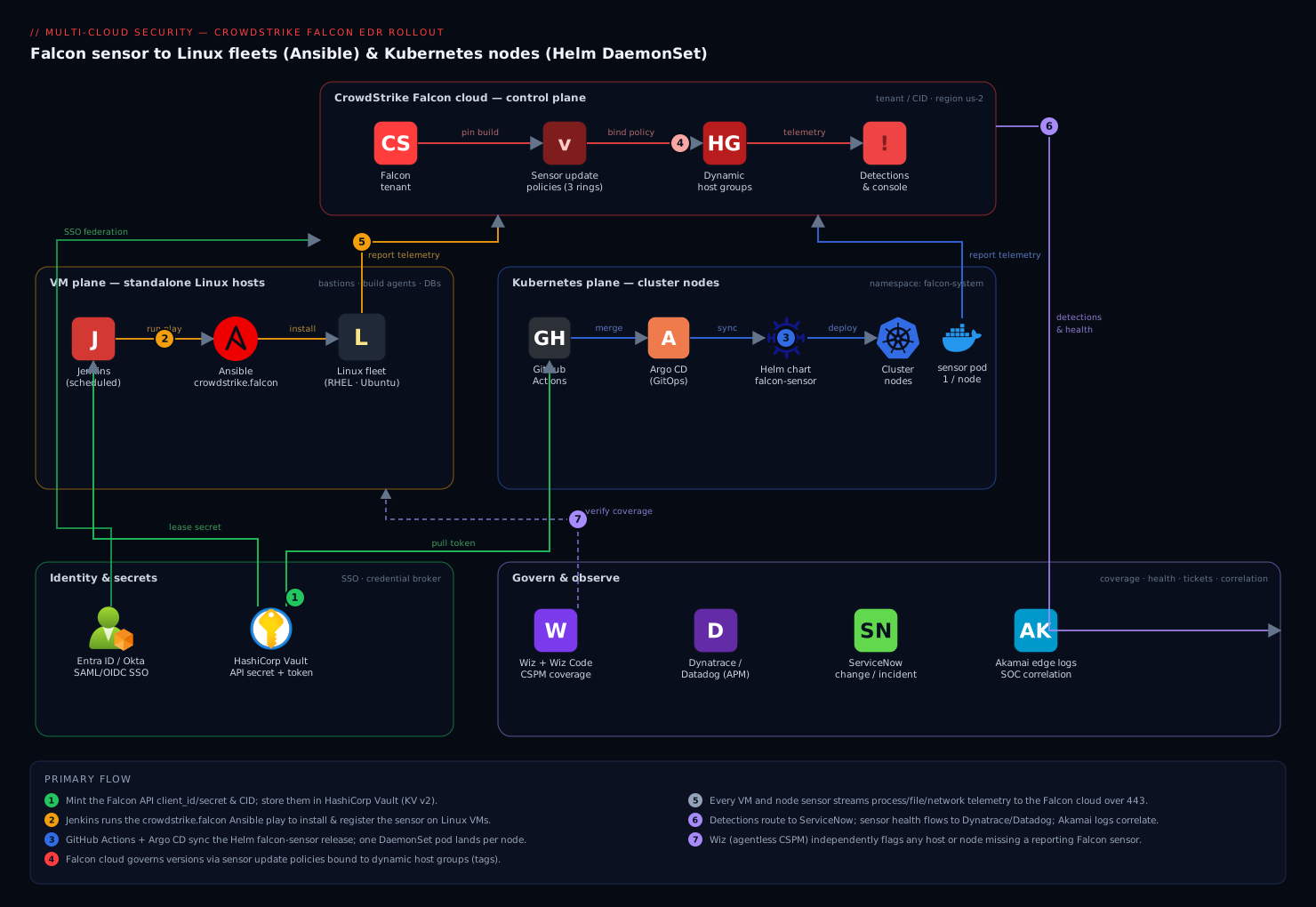
Two delivery planes share one control plane in the Falcon cloud. The VM plane covers standalone Linux hosts — bastions, build agents, databases, virtual appliances — where the sensor is installed as a system package, registered with your CID, and driven by Ansible (crowdstrike.falcon) so a scheduled run idempotently enrolls every host. The Kubernetes plane covers cluster nodes, where the node sensor runs as a privileged DaemonSet managed by the official falcon-sensor Helm chart (or the Falcon Operator) in the falcon-system namespace, so one sensor pod lands on every node and new nodes are covered the moment kubelet registers them. Both planes report telemetry into the same Falcon tenant / CID in region us-2, where sensor update policies bind builds to host groups (three rings) and detections flow back down.
Around that core sit the operating-model integrations the diagram lays out. Identity & secrets: engineer console access federates through Entra ID / Okta over SAML/OIDC (so there are no local Falcon passwords), and HashiCorp Vault holds the Falcon API client secret and the pull token, leased to CI rather than baked into manifests. Govern & observe: Wiz + Wiz Code provides an agentless CSPM cross-check that flags any host or node missing a sensor and scans the Helm/Ansible IaC in pull requests; Dynatrace / Datadog ingests sensor and node health so a silent sensor pages someone; ServiceNow receives a change request per fleet-wide rollout and an incident when a detection fires; and the SOC correlates Falcon detections against Akamai edge logs during an investigation. GitOps closes the loop — GitHub Actions and Argo CD reconcile the Helm release (self-healing if the DaemonSet is deleted) and Jenkins runs the Ansible play on a schedule. Trace the primary flow left to right: install on the VM plane and deploy on the Kubernetes plane, both report to the Falcon tenant, policy binds builds by ring, detections come back, and the governance tools verify coverage, gate changes, and route tickets.
Real-world scenario
Meridian Freight runs logistics software across three clouds: about 1,400 Linux VMs (RHEL 9 and Ubuntu 22.04) and four Kubernetes clusters — two EKS with standard node pools, one EKS partly on Fargate, and one self-managed cluster on-prem behind a strict egress firewall. The platform team is six engineers; the security team is three. Falcon had been rolled out ad hoc: a shell script for VMs, a hand-run Helm install on two clusters, nothing on the Fargate cluster or the air-gapped one. The last audit put coverage at 63%, and a spot-check found 31 hosts in RFM — all kernel-module sensors on Ubuntu boxes that had auto-patched their kernels past what the module supported.
The rebuild took two sprints. Sprint one, the VM plane: they wrote the crowdstrike.falcon Ansible play, forced --backend=bpf on every host, added an RFM assertion (failed_when: 'false' not in rfm.stdout) so the play fails loudly on any host that comes up degraded, and wired it into Jenkins on a nightly schedule against fresh inventory. Rolling the eBPF backend cleared all 31 RFM hosts within a day — the eBPF sensor didn’t care about the patched kernels. They moved VM registration secrets into Vault, leased to the Jenkins job.
Sprint two, the clusters. The two standard EKS clusters and the on-prem one got the node sensor DaemonSet with tolerations: [{operator: Exists}] — which immediately surfaced a hidden gap: the previous hand-run install had no tolerations, so it had been silently skipping the tainted control-plane and GPU node pools. The node-count check (kubectl get nodes | wc -l vs numberReady) went from “looks fine” to “we were missing 9 nodes.” The Fargate cluster couldn’t run a DaemonSet at all, so its critical namespaces got the Falcon Container sidecar via injection instead. The on-prem air-gapped cluster got the sensor image mirrored to their internal Harbor registry and the Helm values repointed there; the pull secret pointed at Harbor, and the sensor reached the Falcon cloud through the one permitted proxy. They added the KPA to all four clusters for posture, and put Image Assessment in Ignore/audit mode to start.
The payoff was measurable. Coverage went from 63% to 99.4% (the 0.6% being genuinely decommissioned hosts the dynamic groups then retired). RFM dropped to zero. Two weeks later, Wiz — the independent cross-check — flagged three nodes in a newly-created dev cluster with no Falcon sensor; because the DaemonSet was in the GitOps repo, adding one directory and one Argo CD Application covered them, and the alert closed itself. The lesson the security lead wrote up: “‘The install succeeded’ is not coverage. Coverage is: pod Ready, service active, host in group, RFM false, and a detection you actually watched fire — verified by something other than the tool reporting on itself.”
The rollout as a timeline, because the order is the lesson:
| Phase | Action | Result | Watch-out it exposed |
|---|---|---|---|
| Baseline | Audit coverage + RFM | 63% covered, 31 in RFM | Kernel-module RFM was silent |
| Sprint 1 | Ansible + --backend=bpf + RFM assert |
RFM → 0; VM coverage self-healing | Play must fail on RFM, not warn |
| Sprint 2a | Node DaemonSet w/ tolerations: Exists |
Found 9 missing tainted nodes | Hand install had no tolerations |
| Sprint 2b | Falcon Container sidecar on Fargate | Fargate pods covered | DaemonSet impossible on Fargate |
| Sprint 2c | Air-gapped: mirror image to Harbor | On-prem cluster covered via proxy | Telemetry path must still exist |
| Steady state | KPA + Image Assessment (audit) | Posture + image gating | Started Ignore to avoid blocking deploys |
| +2 weeks | Wiz flags 3 uncovered dev nodes | GitOps Application covers them |
Independent check caught the gap |
Advantages and disadvantages
The sensor-per-host-plus-cloud-brain model, delivered as a DaemonSet, both gives you self-healing coverage and imposes some sharp constraints. Weigh it honestly:
| Advantages | Disadvantages |
|---|---|
| DaemonSet auto-covers new nodes — coverage tracks the fleet without human memory | The sensor must run privileged with host access — a supply-chain and blast-radius concern |
| eBPF backend survives kernel upgrades — no RFM churn on patching fleets | RFM is silent — a kernel-module sensor can look healthy while degraded; you must query it |
Sensor update policies stage rollouts — canary → n-1 → pinned, so a bad build isn’t fleet-wide |
Skipping policies (tracking latest) lets one bad release ripple across everything at once |
| One outbound connection, no inbound ports — simple firewalling | Air-gapped/proxy setups add real plumbing (mirrored image, relay path) |
falconctl + Ansible make VM rollout idempotent — 1,800 hosts, one play |
The port/backend/CID/cloud contract is unforgiving — a mismatch fails silently |
| KPA + Image Assessment add posture and pre-admission scanning — beyond runtime | Admission controller with Fail policy can block all deploys if the webhook is unreachable |
| Uninstall protection stops a foothold removing its own EDR | Legitimate uninstalls now require fetching a maintenance token first |
| Independent from the workload — one node sensor covers all pods | The node DaemonSet can’t run where you don’t own the node (Fargate) — needs the sidecar |
The model is right for the overwhelming majority of Linux and Kubernetes estates: you get self-healing, low-overhead, host-wide EDR with staged upgrades. It bites hardest on teams that deploy with defaults and never verify — kernel-module sensors that silently drift into RFM, DaemonSets with no tolerations skipping tainted nodes, floated image tags that push a bad build everywhere, and admission controllers set to Fail before they’re proven. Every one of those disadvantages is manageable — but only if you know it exists, which is the point of this article.
Hands-on lab
Deploy the node sensor DaemonSet to a throwaway cluster, watch it land one sensor per node, deliberately hit and fix the two classic failures (missing pull secret → ImagePullBackOff, and missing tolerations → skipped tainted node), verify the sensor’s RFM state, then tear it all down. A kind or minikube cluster (or any dev cluster where you hold cluster-admin) works; you need a valid CID and pull token from your Falcon tenant.
Step 1 — Variables.
export FALCON_CID="1234567890ABCDEF1234567890ABCDEF-9A"   # your real CID
export FALCON_PULL_TOKEN="<your-pull-token>"
export FALCON_REGION="us-2"
export NS=falcon-system
Step 2 — Add the repo and create the namespace.
helm repo add crowdstrike https://crowdstrike.github.io/falcon-helm
helm repo update
kubectl create namespace "$NS"
Expected: namespace/falcon-system created.
Step 3 — Reproduce ImagePullBackOff (skip the pull secret on purpose). Install pointing at a pull secret that doesn’t exist yet:
cat > /tmp/falcon-node-values.yaml <<'YAML'
node:
  enabled: true
  backend: bpf
  daemonset:
    tolerations: []          # deliberately empty for step 6
  image:
    repository: registry.crowdstrike.com/falcon-sensor/us-2/release/falcon-sensor
    tag: "7.20.0-17306-1.falcon-linux.Release.US-2"
    pullSecret: crowdstrike-falcon-pull   # does NOT exist yet
container:
  enabled: false
YAML
sed -i '' "s/<CID>/$FALCON_CID/" /tmp/falcon-node-values.yaml 2>/dev/null || true

helm upgrade --install falcon-sensor crowdstrike/falcon-sensor \
  -n "$NS" -f /tmp/falcon-node-values.yaml --set falcon.cid="$FALCON_CID"

kubectl -n "$NS" get pods -w   # Ctrl-C after you see the state
Expected: the sensor pods land in ImagePullBackOff / ErrImagePull — because the pull secret is missing. Confirm the exact reason:
kubectl -n "$NS" describe pod -l app.kubernetes.io/name=falcon-sensor | grep -A2 -i "failed to pull\|ImagePull"
Step 4 — Fix it: create the pull secret and let it recover.
kubectl create secret docker-registry crowdstrike-falcon-pull -n "$NS" \
  --docker-server="registry.crowdstrike.com" \
  --docker-username="<falcon-pull-token-user>" \
  --docker-password="$FALCON_PULL_TOKEN"

kubectl -n "$NS" delete pod -l app.kubernetes.io/name=falcon-sensor   # force re-pull
kubectl -n "$NS" rollout status daemonset -l app.kubernetes.io/name=falcon-sensor
Expected: pods pull the image and go Running/Ready. That is the number-one Kubernetes sensor failure fixed.
Step 5 — Verify one sensor per node.
# Desired should equal Ready, and both should equal your node count
kubectl -n "$NS" get daemonset -l app.kubernetes.io/name=falcon-sensor \
  -o custom-columns='NAME:.metadata.name,DESIRED:.status.desiredNumberScheduled,READY:.status.numberReady'
kubectl get nodes --no-headers | wc -l
Expected: DESIRED == READY == <node count>. If DESIRED is less than your node count, a taint is being skipped — which the next step demonstrates.
Step 6 — Reproduce and fix the skipped-tainted-node gap. Taint a node, watch the DaemonSet skip it, then fix with a toleration:
NODE=$(kubectl get nodes -o jsonpath='{.items[0].metadata.name}')
kubectl taint nodes "$NODE" dedicated=security:NoSchedule --overwrite

# DESIRED drops below node count — the tainted node is uncovered
kubectl -n "$NS" get daemonset -l app.kubernetes.io/name=falcon-sensor \
  -o custom-columns='DESIRED:.status.desiredNumberScheduled,READY:.status.numberReady'

# Fix: tolerate every taint
helm upgrade falcon-sensor crowdstrike/falcon-sensor -n "$NS" \
  -f /tmp/falcon-node-values.yaml --set falcon.cid="$FALCON_CID" \
  --set 'node.daemonset.tolerations[0].operator=Exists' --reuse-values

kubectl -n "$NS" rollout status daemonset -l app.kubernetes.io/name=falcon-sensor
Expected: after the toleration, DESIRED returns to the full node count and the tainted node gets a sensor. This is exactly the silent gap that leaves control-plane and dedicated pools unprotected in the field.
Step 7 — Verify the sensor is healthy and not in RFM. Exec into a sensor pod (or check on a node) and read the RFM state:
POD=$(kubectl -n "$NS" get pod -l app.kubernetes.io/name=falcon-sensor -o jsonpath='{.items[0].metadata.name}')
kubectl -n "$NS" exec "$POD" -- /opt/CrowdStrike/falconctl -g --rfm-state --backend --version 2>/dev/null \
  || echo "If falconctl isn't in the pod, check RFM in the Falcon console's sensor-health report"
Expected: rfm-state=false, backend=bpf. false is what you want — full functionality. Then confirm the host appears in the Falcon console (Host management), in the right host group, bound to the expected sensor update policy.
Validation checklist. You deployed the node sensor DaemonSet, hit and fixed ImagePullBackOff (missing pull secret), proved one-sensor-per-node, reproduced and fixed the skipped-tainted-node gap with a toleration, and verified rfm-state=false. What each step proved:
| Step | What you did | What it proves | Field analogue |
|---|---|---|---|
| 3 | Install with no pull secret | Missing/expired token → ImagePullBackOff |
The most common K8s sensor failure |
| 4 | Create the pull secret | The one fix for ImagePullBackOff |
Rotating an expired pull token |
| 5 | Compare DESIRED/READY to node count | Coverage = every node, not “release succeeded” | The node-count coverage check |
| 6 | Taint → skip → tolerate | No tolerations = silent gaps on tainted pools | Uncovered control-plane/GPU nodes |
| 7 | Read --rfm-state |
Health is RFM-false, not just “pod Running” | Catching silent degradation |
Teardown.
kubectl taint nodes "$NODE" dedicated=security:NoSchedule- 2>/dev/null || true
helm uninstall falcon-sensor -n "$NS"
kubectl delete namespace "$NS"
If you enabled uninstall protection on a VM during testing, falconctl/the package manager will refuse to uninstall until you pass the maintenance token from the console — that refusal is by design.
Common mistakes & troubleshooting
This is the playbook you bookmark. First as a scannable table, then the detail on the ones that bite hardest.
| # | Symptom | Root cause | Confirm (exact command / console path) | Fix |
|---|---|---|---|---|
| 1 | Sensor pod stuck ImagePullBackOff / ErrImagePull |
Missing/expired pull secret, or wrong registry region path | kubectl -n falcon-system describe pod <pod> → “failed to pull image” |
Recreate crowdstrike-falcon-pull from a fresh token; match region path |
| 2 | DaemonSet DESIRED < node count |
No/insufficient tolerations; tainted nodes skipped | kubectl -n falcon-system get ds vs kubectl get nodes | wc -l |
Add tolerations: [{operator: Exists}]; upgrade the release |
| 3 | Host in RFM (degraded but “green”) | Kernel-module sensor met an unsupported kernel | falconctl -g --rfm-state returns true; console RFM report |
Switch to --backend=bpf and restart; or update sensor build |
| 4 | Sensor installed on VM, never appears in console | CID not set, wrong cloud, or blocked egress | falconctl -g --cid; falconctl -g --rfm-state; test 443 egress |
falconctl -s --cid=<CID>; match region; open 443 to the cloud |
| 5 | Everything upgraded to a bad build at once | No sensor update policy; all hosts track latest |
Console → sensor update policies (none/latest everywhere) |
Create rings; pin prod to n-1; roll back the policy |
| 6 | All deployments suddenly blocked cluster-wide | Image Assessment webhook Fail policy + webhook unreachable |
kubectl get validatingwebhookconfiguration; KPA pod not Ready |
Set failurePolicy: Ignore (or fix/HA the webhook); scope namespaceSelector |
| 7 | eBPF backend won’t load / sensor won’t start | Kernel below the eBPF minimum for the distro | uname -r; sensor log shows eBPF unsupported |
Use kernel-module backend on that host, or upgrade the kernel |
| 8 | falconctl refuses to uninstall |
Uninstall protection is enabled | Console → host → get maintenance token | Pass the maintenance token to the uninstall |
| 9 | Sensor pod CrashLoopBackOff right after install |
Bad CID/region mismatch, or missing host privileges | kubectl -n falcon-system logs <pod>; check CID/region values |
Correct CID/region; ensure privileged/host access allowed |
| 10 | New autoscaled nodes have no sensor for a while | DaemonSet not present before the node, or NodeSelector excludes it | kubectl -n falcon-system get pods -o wide per node |
Ensure DaemonSet has no restrictive nodeSelector; GitOps self-heal |
| 11 | Proxy’d host silent; direct hosts fine | Proxy not configured on the sensor | falconctl -g --aph --app --apd |
falconctl -s --aph=<host> --app=<port> --apd=FALSE; restart |
| 12 | KPA installed but no cluster posture in console | Wrong cluster name/CID/region on the KPA, or API scope missing | KPA pod logs; console cluster inventory empty | Fix clusterName/cid/env; grant KPA API scope |
| 13 | Detection test produced nothing in the console | Sensor in RFM, or telemetry egress blocked | falconctl -g --rfm-state; check 443/proxy path |
Clear RFM (eBPF); open the telemetry path |
| 14 | Coverage looks 100% but Wiz flags uncovered hosts | Stale/decommissioned hosts still counted, or genuinely missing sensors | Wiz coverage rule; compare to Falcon host list | Enroll the missing hosts; retire stale ones from dynamic groups |
The expanded reasoning for the entries that bite hardest:
1. Sensor pod stuck in ImagePullBackOff. The DaemonSet’s pull secret is missing, expired, or points at the wrong registry region.
Confirm: kubectl -n falcon-system describe pod <pod> shows Failed to pull image ...: unauthorized or not found.
Fix: Recreate the crowdstrike-falcon-pull secret from a fresh pull token, and make sure node.image.repository uses your cloud’s region path (a us-1 path with a us-2 CID fails). Delete the pods to force a re-pull.
3. A host is in RFM — degraded but showing “green.” The kernel-module sensor met a kernel it doesn’t support (usually after an unattended kernel upgrade) and fell back to Reduced Functionality Mode: it checks in and looks healthy, but prevention and telemetry are reduced.
Confirm: On the host, sudo /opt/CrowdStrike/falconctl -g --rfm-state returns true; fleet-wide, the console’s sensor-health / RFM report lists them.
Fix: Switch that host (and ideally the fleet) to the eBPF backend — falconctl -s --backend=bpf and restart — which is RFM-resistant across kernel upgrades. If you must stay on the kernel module, update to a sensor build that supports the running kernel. Add an RFM assertion to your config-management run so this fails loudly next time.
5. A bad sensor build hit the whole fleet at once. With no sensor update policy, every host tracks latest, so a regressive release deploys everywhere simultaneously.
Confirm: Console → sensor update policies shows none, or all set to latest.
Fix: Create the three rings, pin production to n-1, and — for immediate relief — repoint the affected policy to the previous build; hosts downgrade on their next check-in with no redeploy.
6. All deployments cluster-wide are suddenly blocked. The Image Assessment admission webhook is set to failurePolicy: Fail, and the webhook (KPA) is unreachable — so the API server denies every pod create because it can’t consult the webhook.
Confirm: kubectl get validatingwebhookconfiguration shows the Falcon admission config with failurePolicy: Fail; the KPA/admission pod is not Ready.
Fix: Temporarily set failurePolicy: Ignore (or fix the webhook and run it HA), and scope the namespaceSelector to exclude kube-system and the Falcon namespaces so admission control can never deadlock the platform.
8. falconctl refuses to uninstall. Uninstall protection is enabled — the sensor won’t remove itself without a maintenance token, by design, so a compromised host can’t blind its own EDR.
Confirm: The uninstall errors asking for a maintenance token.
Fix: Fetch the per-host maintenance token from the console (Host management → the host → maintenance token) and pass it to the uninstall (the crowdstrike.falcon.falcon_uninstall role accepts it as a variable).
Best practices
- Default to the eBPF backend everywhere.
--backend=bpfon VMs,node.backend: bpfin Helm. It survives kernel upgrades and keeps hosts out of RFM. Only fall back to the kernel module on hosts too old for eBPF or with a legitimately frozen kernel. - Assert RFM in your rollout, don’t just hope. Add an explicit
falconctl -g --rfm-statecheck that fails the play/pipeline on anything butfalse. RFM is silent; make it loud. - Tolerate every taint on the node DaemonSet.
tolerations: [{operator: Exists}]so control-plane, GPU, and dedicated pools are covered. Then verify with the node-count check — DESIRED must equal your node count. - Never float the image tag. Pin
node.image.tagand govern versions through sensor update policies (canary →n-1→ pinned). A floated:latestpushes a bad build fleet-wide at once. - Match cloud region across CID, API host, and registry path. A
us-1CID with aus-2registry path fails to pull or register. SetFALCON_CLOUD/cloud_regionconsistently. - Enable uninstall protection in production so a foothold can’t remove its own sensor — and store the maintenance-token retrieval in your teardown runbook so legitimate removals still work.
- Run the KPA for posture and Image Assessment for pre-admission scanning, but start admission in
Ignore/audit with a scopednamespaceSelector, and only move critical namespaces toFailonce the webhook is proven and HA. - Make coverage self-healing. DaemonSet inside a cluster; GitOps (Argo CD
selfHeal: true) across clusters; a scheduled Ansible run for the VM plane so fresh hosts enroll within a day. - Verify coverage independently. Let an agentless tool (Wiz) flag any host/node without a reporting sensor — a second opinion that doesn’t depend on Falcon agreeing it’s healthy.
- Keep secrets out of manifests. The API client secret and pull token belong in Vault (or a secrets operator), leased to CI — never committed, never a hand-authored Kubernetes Secret.
- Set explicit resource requests/limits on the sensor pods on large clusters so they schedule predictably and don’t contend with workloads.
- Verify with a real detection, not “Helm succeeded.” Coverage is real only when pod Ready, service active, host in the right group and policy,
rfm-state=false, and a detection you watched fire — all five true.
Security notes
The node sensor runs privileged by necessity — it needs host-level visibility into processes, files, and network — so treat its supply chain accordingly. Pin the sensor image by tag (ideally by digest), mirror it into a registry you control for air-gapped and audited environments, restrict who can edit the Helm values via repo CODEOWNERS, and let Wiz Code block a pull request that would weaken the sensor (for example flipping node.enabled to false or container.enabled on a node release). Keep the Falcon API client secret and the pull token in HashiCorp Vault, leased to CI, never in a committed manifest.
Govern console access through Entra ID / Okta SSO over SAML/OIDC with MFA, mapping IdP groups to Falcon roles (analyst vs administrator), so there is no standalone Falcon credential to phish and offboarding in the IdP removes Falcon access. Enable uninstall protection so a compromised host cannot blind your EDR by removing it — and note the corollary: your teardown path now requires a maintenance token, so keep that retrieval documented. Scope the API client to the minimum: Sensor Download (Read) and Sensor update policies (Read/Write) for the rollout, Host groups (Read/Write) for grouping, and the KPA/Images scopes only if you script those — don’t mint an all-scopes key. For the Image Assessment admission controller, remember it is a security and an availability control: a Fail policy on an unreachable webhook denies all deployments, so scope its namespaceSelector to never include the platform namespaces. Finally, route detections to ServiceNow for an auditable incident trail, and give the SOC the Akamai edge logs to correlate against Falcon detections during an investigation.
Cost & sizing
Falcon is licensed per endpoint/host (and the Kubernetes/container and cloud-security modules have their own per-unit metering), so cost scales with the number of hosts and protected units reporting — not with telemetry volume. There is no per-GB charge for the core EDR sensor’s telemetry, which makes decommissioning discipline the real cost lever: a sensor still reporting from a host you deleted is a license you keep paying for. Let the dynamic host groups and the Wiz reconciliation retire stale hosts promptly, and keep the host count clean so the bill follows coverage rather than drift.
On compute footprint, the node sensor is a small per-node overhead (a fraction of a core and modest memory), but on very large clusters set explicit resource requests/limits in the Helm values so the sensor pods schedule predictably and don’t contend with workloads. The Falcon Container sidecar is materially heavier at scale because it is one sensor per pod rather than one per node — a cluster with thousands of pods on Fargate pays far more sensor overhead (and license units) than the same workloads on node pools with a DaemonSet, which is another reason to prefer the node sensor wherever you own the node. The KPA is a single lightweight Deployment per cluster — negligible.
The cost drivers, what each buys, and the watch-out:
| Cost driver | What you pay for | Rough scale | What it buys | Watch-out |
|---|---|---|---|---|
| Per-host EDR license | Each reporting host/node | Linear with host count | Runtime EDR everywhere | Stale/decommissioned hosts still bill |
| Container sensor units | Each protected pod (sidecar) | Linear with protected pods | Pod-level EDR where no DaemonSet | Far pricier than node sensor at pod scale |
| Kubernetes/cloud-security module | KPA + Image Assessment | Per cluster / per image | Posture + pre-admission scanning | Metered separately from EDR |
| Node sensor compute | CPU/memory per node | Fraction of a core per node | Host-wide coverage cheaply | Set requests/limits on big clusters |
| Sidecar compute | CPU/memory per pod | Per protected pod | Coverage without host access | Multiplies with pod count |
The sizing rule: use the node sensor wherever you own the node (cheapest per unit of coverage), reserve the sidecar for the places you genuinely can’t (Fargate, no-privileged-DaemonSet policy), keep the host list clean so licenses track reality, and set resource requests on large clusters so the sensor never contends with workloads.
Interview & exam questions
1. What is the difference between the kernel-module and user-mode/eBPF Falcon backends on Linux, and which should you default to? The kernel module hooks the kernel with a version-matched .ko, so a kernel it doesn’t support drops the sensor into RFM; the eBPF backend attaches to the kernel’s stable eBPF interface and survives kernel upgrades without a matching module. Default to eBPF on any modern kernel — it’s RFM-resistant on patching fleets — falling back to the module only for hosts too old for eBPF or with a frozen kernel.
2. What is Reduced Functionality Mode (RFM), why is it dangerous, and how do you detect it? RFM is a degraded state a sensor enters when it can’t get full kernel support (typically a kernel-module sensor on an unsupported kernel): it still checks in and looks “green” but prevention and telemetry are reduced. It’s dangerous precisely because it’s silent — you must query it with falconctl -g --rfm-state (want false) or the console’s RFM report. The fix is usually the eBPF backend.
3. When would you deploy the Falcon Container sidecar instead of the node sensor DaemonSet? When you can’t run a privileged node DaemonSet — serverless/managed nodes where you don’t own the host (EKS Fargate) or a policy that forbids privileged DaemonSets. The sidecar protects one pod each (higher overhead), while the node sensor protects the whole node with one privileged pod; prefer the DaemonSet wherever you own the node.
4. What does the Kubernetes Protection Agent (KPA) do, and how is it different from the node sensor? The KPA is a per-cluster Deployment that collects cluster posture and inventory and hosts the Image Assessment admission controller — it does not do runtime EDR. The node sensor does runtime EDR on the node. You typically run both: the node sensor for runtime, the KPA for posture and pre-admission image scanning.
5. Your node sensor DaemonSet shows DESIRED less than your node count. What’s wrong and how do you fix it? Tainted nodes (control-plane, GPU, dedicated pools) are being skipped because the DaemonSet lacks matching tolerations. Confirm by comparing kubectl get ds DESIRED to kubectl get nodes | wc -l. Fix by adding tolerations: [{operator: Exists}] so it schedules onto every node, then re-verify the counts match.
6. Why do sensor update policies matter, and what is a sensible ring strategy? They decouple “installed” from “which version,” binding a build to a host group so you control rollout. Without them every host tracks latest and a bad build hits everything at once. A sensible strategy: a canary group on latest, production pinned to n-1, and critical/frozen hosts pinned to a specific build — promoting only after a soak.
7. A brand-new Kubernetes cluster’s sensor pods are stuck in ImagePullBackOff. Most likely cause and fix? A missing or expired pull secret, or a registry region mismatch. Confirm with kubectl describe pod (it shows the pull failure). Fix by recreating the crowdstrike-falcon-pull secret from a fresh pull token and ensuring the image repository uses your cloud’s region path.
8. How do you register a Falcon sensor on a Linux VM, and what’s the step people forget? Install the falcon-sensor package, then register with falconctl -s --cid=<CID> (plus --backend=bpf and grouping tags), then systemctl enable --now falcon-sensor. The forgotten step is registration: installing the package alone does not register the sensor, so it never appears in the console until you set the CID.
9. What breaks if the Image Assessment admission controller uses failurePolicy: Fail and the webhook is down? The API server can’t consult the webhook, so it denies every pod creation — no deployments anywhere until the webhook recovers. Mitigate by running the webhook HA, scoping namespaceSelector to exclude platform namespaces, and starting in Ignore/audit mode until proven.
10. How do you install Falcon in an air-gapped cluster? Mirror the sensor image to an internal registry (and installers to an internal package repo) from a connected host, point the Helm pullSecret/repository at the mirror, and register locally with falconctl -s --cid. The one thing you can’t remove is a path for the sensor to reach the Falcon cloud for telemetry/detections — that must exist via direct egress, a proxy, or a CrowdStrike relay.
11. What is uninstall protection and what’s the operational cost of enabling it? It requires a per-host maintenance token from the console to uninstall the sensor, so a compromised host can’t silently remove its own EDR. The cost is that legitimate uninstalls (and your Helm/Ansible teardown) must first fetch and pass that token — so document token retrieval in the teardown runbook.
12. Why verify coverage with an independent tool like Wiz rather than trusting the Falcon console? Because a tool reporting on itself can’t tell you about hosts it never saw — an unenrolled host is simply absent from the Falcon console, invisible. An agentless CSPM cross-check flags any host/node without a reporting sensor, giving a second opinion that doesn’t depend on Falcon agreeing it’s healthy.
These map to vendor and platform tracks: the CrowdStrike CCFA/CCFH (Falcon administrator/hunter) material for sensor deployment, policies, and RFM; the CKS (Certified Kubernetes Security Specialist) objectives for admission control, DaemonSet privileges, and runtime security; and general cloud-security curricula for the EDR-plus-CSPM model.
| Question theme | Primary track | Objective area |
|---|---|---|
| eBPF vs kernel module, RFM | CrowdStrike CCFA/CCFH | Linux sensor deployment & health |
| Node sensor vs container sidecar vs KPA | CrowdStrike CCFA | Kubernetes protection options |
| Sensor update policies & host groups | CrowdStrike CCFA | Sensor lifecycle & policy |
| DaemonSet tolerations, privileged pods | CKS | Cluster hardening; runtime security |
| Image Assessment admission control | CKS | Admission controllers; supply chain |
| Air-gapped/proxy install, CID/region | CrowdStrike CCFA | Connectivity & deployment |
Quick check
- A host shows up green in the Falcon console but you suspect it isn’t fully protected after a kernel patch. What single command on the host confirms it, and what value do you want to see?
- Your node sensor DaemonSet’s
DESIREDis 3 but the cluster has 5 nodes. What’s the most likely cause and the fix? - You need runtime EDR on workloads running on EKS Fargate, where you don’t own the node. Node sensor DaemonSet or Falcon Container sidecar — and why?
- What does the KPA do that the node sensor does not?
- Every host in your fleet just upgraded to a regressive sensor build simultaneously. What mechanism was missing, and how do you get immediate relief?
Answers
sudo /opt/CrowdStrike/falconctl -g --rfm-state— you want it to returnfalse(full functionality).truemeans the sensor is in Reduced Functionality Mode — running and checking in, but degraded, typically because a kernel-module sensor met an unsupported kernel. Fix by switching to the eBPF backend.- Tainted nodes (control-plane/dedicated/GPU pools) are being skipped because the DaemonSet lacks matching tolerations. Fix by adding
tolerations: [{operator: Exists}]and upgrading the release, then confirmDESIREDreturns to the node count. - Falcon Container sidecar. On Fargate you don’t own the node, so you can’t run a privileged node DaemonSet; the sidecar runs inside each protected pod. The trade-off is one sensor per pod (higher overhead) versus one per node.
- The KPA collects cluster posture and inventory and hosts the Image Assessment admission controller (pre-admission image scanning). The node sensor does runtime EDR on the node; the KPA does not — you typically run both.
- Sensor update policies (rings) were missing, so every host tracked
latest. Immediate relief: repoint the affected policy to the previous build (orn-1) — hosts downgrade on their next check-in, no redeploy. Then set up canary →n-1→ pinned rings so it can’t recur.
Glossary
- Sensor (Falcon sensor for Linux) — the host agent that streams process/file/network telemetry to the Falcon cloud over one outbound TLS connection; the node sensor is this agent scheduled one-per-node.
- CID (Customer ID) — your tenant’s identifier plus checksum; set with
falconctl -s --cidto register a sensor. Wrong/missing → the sensor never checks in. - Backend — how the sensor hooks the kernel: kernel module (version-matched
.ko, RFM-prone) or user-mode/eBPF (stable interface, RFM-resistant, the default). - eBPF — the kernel’s stable in-kernel tracing/execution interface the user-mode sensor attaches to; why the eBPF backend survives kernel upgrades.
- RFM (Reduced Functionality Mode) — a degraded state where the sensor checks in but prevention/telemetry are reduced (usually a kernel-module sensor on an unsupported kernel); silent, so you must query
--rfm-state. - falconctl — the sensor’s local CLI (
/opt/CrowdStrike/falconctl): set the CID, backend, tags, and proxy; read the RFM state, version, and settings. - Node sensor — the Falcon sensor scheduled as a privileged DaemonSet, one per node, protecting the whole node (all pods + node OS).
- Falcon Container sensor — a sidecar sensor injected into a workload pod, for environments where a privileged node DaemonSet isn’t viable (e.g. Fargate); protects one pod each.
- KPA (Kubernetes Protection Agent) — a per-cluster Deployment that collects cluster posture/inventory and hosts the Image Assessment admission controller; not a runtime sensor.
- Image Assessment — the admission controller (ValidatingWebhook) that checks images for vulnerabilities/detections before a pod is admitted, so bad images can be flagged or blocked at deploy time.
- Falcon Operator — a controller you install per cluster to manage Falcon components (node sensor, container sensor, KPA, admission) declaratively via Custom Resources.
- Sensor update policy — the Falcon-cloud policy that binds a sensor build to a host group and governs how it upgrades (e.g.
latest,n-1, or a pinned build). - Host group — a dynamic (tag-based) or static set of hosts in Falcon, the unit a sensor update policy is bound to.
- Sensor grouping tags — tags set on the sensor (
falconctl -s --tagsor Helmfalcon.tags) that drive dynamic host-group membership so policy follows the tag. - Pull token — the credential used to pull the sensor image from CrowdStrike’s registry; a missing/expired token causes
ImagePullBackOff. - Maintenance token — the per-host token from the console required to uninstall a sensor when uninstall protection is enabled.
- Uninstall protection — a policy setting requiring a maintenance token to uninstall the sensor, preventing a compromised host from removing its own EDR.
Next steps
You can now roll Falcon onto Linux and Kubernetes with the right backend, the right sensor for each environment, staged versions, and verified coverage. Build outward:
- Next: Configure CrowdStrike Falcon Cloud Security (CSPM) on AWS — the agentless cloud-posture side of the same platform, complementing the runtime sensor.
- Related: Roll out Wiz CSPM across an AWS Organization — the independent coverage cross-check that flags any host or node without a sensor.
- Related: Integrate Wiz Code with GitHub Actions for IaC & container gates — catch a change that would weaken the sensor at pull-request time.
- Related: Set up External Secrets Operator with Vault & AWS Secrets in Kubernetes — deliver the Falcon API secret and pull token to clusters without hand-authored Secrets.
- Related: Deploy Argo CD with SSO, RBAC & ApplicationSets across clusters — make the DaemonSet self-healing across every cluster via GitOps.
- Related: Deploy Harbor registry on Kubernetes with Trivy, replication & signing — the private registry that hosts mirrored sensor images for air-gapped installs and holds the images Falcon assesses.