Open the Microsoft Entra admin center and you find two blades that look like they do the same thing: App registrations and Enterprise applications. Both list “applications,” both have an Object ID and an Application (client) ID, and your app appears in both. So which one do you edit? Which do you delete when cleaning up? Why did granting an “API permission” in one place do nothing until someone clicked “Grant admin consent” in the other? This is the single most common source of identity confusion on Azure, and it costs teams hours — usually when sign-in just broke and the on-call engineer deletes the wrong object trying to fix it.
The confusion is real but the model is clean — two distinct objects in two distinct roles. An App Registration is the application object: the global definition of your app — its identity, reply URLs, secrets and certificates, and the permissions it wants — and there is exactly one of it, in one tenant. An Enterprise Application is a service principal: a local representation of an app inside a specific tenant — the thing that gets assigned users, gets granted consent, signs in, and shows up in the sign-in logs. The registration is the blueprint; the service principal is the installed instance. One registration can have many service principals — one in every tenant that uses the app.
By the end you will never confuse the two again — which blade owns which setting, why a multi-tenant app has one registration and N enterprise apps, what “grant admin consent” actually does, and which object you must never delete. You will read the az ad app versus az ad sp split fluently and walk into the AZ-104, SC-300 or AZ-500 exam knowing the answer they always ask: the relationship between an application object and a service principal.
What problem this solves
Every application that talks to Entra ID — to sign users in, call Microsoft Graph, or authenticate as itself to another API — needs an identity in the directory: a record, a way to verify it (a secret or certificate), and a policy for what it may do and who may use it. That is what these two objects provide, split across two responsibilities: defining the app once and governing the app in each tenant that uses it.
Without the split, predictable things break. Someone deletes the “Enterprise application” to remove a user’s access and instead nukes the service principal every sign-in depends on — now nobody can log in, and the registration still sits there looking fine. Someone adds an API permission on the App registration and is baffled that calls still 403, because nobody granted admin consent on the Enterprise application side. A vendor says “just add our app from the gallery” and an engineer hunts for an App Registration that doesn’t exist in their tenant — because a gallery app gives you a service principal only.
Who hits this: everyone doing identity on Azure — developers registering their first app, admins onboarding a SaaS tool, platform engineers wiring a CI/CD service principal, security teams auditing app consent. It is the foundation under OAuth, SSO, managed identities and app-only API access. The one-line contrast to hold in your head:
| Question | App Registration | Enterprise Application |
|---|---|---|
| What kind of object is it? | Application object (the definition) | Service principal (the local instance) |
| How many exist? | Exactly one, in the home tenant | One per tenant that uses the app |
| What’s its job? | Define identity, secrets, permissions wanted | Sign in, hold consent, get users assigned |
| Which blade? | Entra admin center → App registrations | Entra admin center → Enterprise applications |
| Graph entity | application |
servicePrincipal |
az command |
az ad app |
az ad sp |
| Delete it and… | The app definition is gone everywhere | Sign-in / consent for this tenant breaks |
Learning objectives
By the end of this article you can:
- Define an App Registration as the application object and an Enterprise Application as the service principal, and explain in one sentence how they relate.
- Explain why a multi-tenant app has one application object and many service principals, and trace where each lives.
- Identify which settings live on the registration (reply URLs, secrets, exposed scopes, requested permissions) versus the service principal (user assignment, consent state, SSO config, visibility).
- Describe what happens during user consent versus admin consent, and why granting a permission on the registration alone does nothing.
- Distinguish the four flavours of service principal — Application, Managed Identity, Legacy, and gallery/non-gallery — and when each appears.
- Read and use the CLI split:
az ad appfor the registration,az ad spfor the service principal, and the Microsoft Graph equivalents. - Avoid the classic failure modes: deleting the wrong object, editing the wrong blade, missing admin consent, and orphaned or duplicated service principals.
Prerequisites & where this fits
You should know what Microsoft Entra ID (formerly Azure Active Directory) is: Azure’s cloud identity directory, holding users, groups and the apps they sign into, scoped to a tenant (one organisation’s directory instance). If that’s fuzzy, read Microsoft Entra ID fundamentals: tenants, users, groups, RBAC first. Helpful but not required: a passing familiarity with OAuth 2.0 and the idea that an app proves itself with a client ID + secret/certificate.
This sits at the very base of the Identity track — the conceptual rock under how the registration authenticates with OIDC and federated credentials, what ends up in the token, pure service-principal SAML SSO, and the managed-identity special case. Once you understand this split, all of those make immediate sense. Anything that authenticates to Entra ID — a web app, a daemon, a SaaS tool, a Terraform pipeline — has an identity that is always an application object, a service principal, or both.
Core concepts
Five mental models make every later decision obvious.
The registration is the global blueprint; the service principal is a local instance of it. Creating an App Registration writes an application object in your tenant — a single definition: the Application (client) ID (a GUID, the same in every tenant forever), reply URLs, credentials, the API permissions it requests, the scopes it exposes. To actually use the app in a tenant, Entra needs a service principal — a per-tenant object saying “this app is present here, these users may use it, this is its consent, this is how it signs in.” In the home tenant a registration auto-creates one; in other tenants, one is created the first time someone signs in or consents. One blueprint, many installed instances.
The Application (client) ID is shared; the Object IDs are not. The Application (client) ID is a property of the application object, copied onto every service principal — so the registration and all its service principals share one client ID. But each object also has its own Object ID (the directory’s primary key for that row): the application object has one, each service principal a different one. “Same Application ID, different Object ID” is exactly how you tell a registration from its service principal in logs and Graph.
Settings split by responsibility. Anything about defining the app lives on the registration: reply URIs, secrets and certificates, the scopes it exposes, the permissions it requests. Anything about operating the app in this tenant lives on the Enterprise application: users and groups assigned, the consent granted, SSO, Conditional Access. If you can’t find a setting, ask “is this about the app itself, or this tenant’s use of it?” — that names the blade.
Consent is the bridge, and it lives on the service principal. The registration only lists the permissions an app wants; wanting is not having. Consent — a user agreeing for themselves, or an admin for the whole tenant — grants those permissions, recorded against the service principal. So adding an API permission on the registration changes nothing until consent is granted (a whole section below). The registration is the request; the service-principal consent is the approval.
A service principal can exist without a registration. A SaaS gallery app or a managed identity gives you a service principal with no App Registration you can edit — the registration lives in the vendor’s tenant, or (for managed identities) doesn’t exist. So “no registration, just an enterprise app” is normal; the reverse — a registration with no service principal — is an app nobody can sign into yet, a blueprint with nothing installed.
In Microsoft Graph terms, the application object is the application entity and the service principal is the servicePrincipal entity — and in the CLI, az ad app versus az ad sp. Hold those two pairs and the rest of the article is just detail; the Glossary at the end pins down every term for lookup.
The application object: what an App Registration really is
An App Registration creates and edits the application object — the one authoritative, tenant-owned definition of your app. Think of it as the manufacturer’s spec sheet for a device model: one spec, listing the model number (the client ID), what it does, and how to verify a genuine one (its credentials). Every unit shipped (every service principal) references this spec. What lives here — and the gotcha for each:
| Setting (on the registration) | What it controls | Where in the portal | Gotcha |
|---|---|---|---|
| Application (client) ID | The app’s public identifier (GUID) | Overview | Read-only; never changes; copied to every SP |
| Object ID | Directory key of the application object | Overview | Different from the SP’s Object ID |
| Supported account types | Single-tenant vs multi-tenant vs personal | Authentication | Drives where service principals can be created |
| Redirect / reply URIs | Where tokens may be returned | Authentication | Must match the request exactly or sign-in fails |
| Client secrets | Password credentials for confidential clients | Certificates & secrets | Expire; rotate before expiry or auth breaks |
| Certificates | Cert credentials (preferred over secrets) | Certificates & secrets | More secure; no secret in config |
| Federated credentials | Trust an external IdP token instead of a secret | Certificates & secrets | The secretless path for CI/CD and workloads |
| API permissions (requested) | APIs/scopes the app wants | API permissions | Requesting ≠ having; needs consent on the SP |
| Expose an API | Scopes/app roles this app publishes | Expose an API | Defines your API surface for callers |
| App roles | Roles this app defines for users/apps | App roles | Surfaced in tokens after assignment |
| Token configuration | Optional claims added to issued tokens | Token configuration | Shapes what’s inside the JWT |
| Owners | Who may edit the registration | Owners | Least-privilege: limit who can add secrets |
Two distinctions matter most. First, “API permissions” is a wish list, not a grant — the actual grant happens via consent on the service principal (next section). Second, “supported account types” decides the app’s reach — single-tenant means only your tenant can host a service principal; multi-tenant means any tenant can, once someone consents — the difference between an internal app and a SaaS product. The registration’s credentials are covered in App registration with OIDC and federated credentials.
The service principal: what an Enterprise Application really is
The Enterprise applications blade shows service principals — the per-tenant instances. If the registration is the spec sheet, the service principal is the device installed in your building: its own serial number (Object ID), an on/off switch, an access list (assigned users), and a record of what it may do here (consent). The same model (same client ID) installs in many buildings; each installation is a separate service principal.
What lives on the service principal — found under Enterprise applications, not on the registration:
| Setting (on the service principal) | What it controls | Where in the portal | Why it’s here, not on the registration |
|---|---|---|---|
| Object ID | Directory key of this service principal | Overview / Properties | Unique per tenant; not the app’s Object ID |
| Enabled for users to sign in | Whether anyone can sign into the app here | Properties | A per-tenant on/off switch |
| Assignment required? | Restrict access to assigned users/groups | Properties | Tenant-local access policy |
| Users and groups | Who may use the app (and with which role) | Users and groups | Assignment is per-tenant, not global |
| Permissions / consent | What’s been admin/user consented here | Permissions | Consent is granted in this tenant |
| Single sign-on (SAML/OIDC) | How users authenticate to the app | Single sign-on | SSO config is the tenant’s relationship |
| Provisioning (SCIM) | Auto user provisioning into the app | Provisioning | The tenant’s user lifecycle into the app |
| Conditional Access | Policies targeting this app | (via CA blade) | Policy applies to this tenant’s usage |
| Visibility (hidden to users) | Show/hide on the My Apps portal | Properties | A tenant UX choice |
The headline settings beginners hunt for — Users and groups and Consent — live only here, the most common “why isn’t it on the other blade?” moment. They’re inherently per-tenant facts the shared registration can’t hold.
Service principals come in several kinds. The type tells you where the SP came from and what registration backs it:
SP type (servicePrincipalType) |
Where it comes from | Has an App Registration? | Typical example |
|---|---|---|---|
| Application | Backed by an application object | Yes — in some tenant | Your own app; a SaaS vendor’s app |
| Managed Identity | Azure creates it for a resource | No (Azure-managed) | A VM/App Service system-assigned identity |
| Legacy | Created before app objects existed | No | Old apps from classic Azure AD |
| SocialIdp | Built-in social identity provider | No | B2C/External ID provider plumbing |
Within the Application type, the SP’s origin tells you where its registration lives: your own registered app (registration in this tenant), a gallery or non-gallery SAML/OIDC app you added (registration in the vendor’s tenant), or a multi-tenant app someone consented to (registration in the publisher’s tenant). That is why the Enterprise applications blade is full of things you never “registered” — Microsoft’s first-party apps, SaaS tools, managed identities — most with no registration you can edit, because it lives elsewhere (or, for managed identities, doesn’t exist).
How they relate: one app object, many service principals
The relationship is one-to-many: one application object (the parent definition), many service principals (child instances) — one per tenant that uses the app, each linked back by the shared Application (client) ID. Walk the scenarios and it becomes concrete:
| Scenario | Application objects | Service principals | Where each lives |
|---|---|---|---|
| Single-tenant app (internal LOB app) | 1 | 1 | Both in your tenant |
| Multi-tenant app used by 50 customers | 1 | 51 | 1 app object + 1 SP in publisher tenant; 1 SP in each of 50 customer tenants |
| SaaS gallery app you onboard | 0 (in your tenant) | 1 | App object in vendor tenant; SP in your tenant |
| Managed identity | 0 | 1 | SP only, Azure-managed, in your tenant |
For a single-tenant app, registration and service principal both live in your tenant, and creating the registration auto-creates the service principal — which is why your own app appears under both blades as two different objects (different Object IDs), not two copies of one.
For a multi-tenant app you publish, there is still exactly one application object, in your tenant. Every customer who signs in or consents gets a service principal in their own tenant — fifty customers means one app object and fifty-one service principals. When a customer’s admin “removes the app,” they delete their service principal; your application object and the other forty-nine customers are untouched. This is the mechanism behind “Sign in with…” and SaaS onboarding.
The practical consequence: edit the definition once (the registration), govern its use per tenant (each service principal). Rotate a secret on the registration and it affects the app everywhere; grant consent on a service principal and it affects only that tenant.
Consent: why granting a permission needs two steps
The number-one “it didn’t work” moment. Requesting a permission and being granted it are two different acts on two different objects:
| Step | What you do | Object it writes to | Effect |
|---|---|---|---|
| 1. Request | Add an API permission on the App Registration | application (requiredResourceAccess) |
The app now asks for the scope; still has nothing |
| 2. Consent | A user or admin grants the permission | servicePrincipal (oauth2PermissionGrant / appRoleAssignment) |
The app now holds the permission in this tenant |
The kind of consent depends on the permission type:
| Permission type | What it represents | Consent needed | Recorded as |
|---|---|---|---|
| Delegated | App acts as the signed-in user | User consent (or admin for the org) | oauth2PermissionGrant on the SP |
| Application | App acts as itself (no user, daemon) | Admin consent only | appRoleAssignment on the SP |
| High-privilege delegated | E.g. read all mailboxes | Admin consent required | oauth2PermissionGrant (admin) |
Two rules fall out. First, application permissions always require admin consent — there’s no user to consent for a daemon. Second, “Grant admin consent” sits on the registration’s API-permissions view but writes the grant to the service principal — the button is on one blade, the result lands on the other. That’s why the registration alone never grants anything. Governing who can consent is its own discipline — see OAuth consent governance and app-permission hardening.
Architecture at a glance
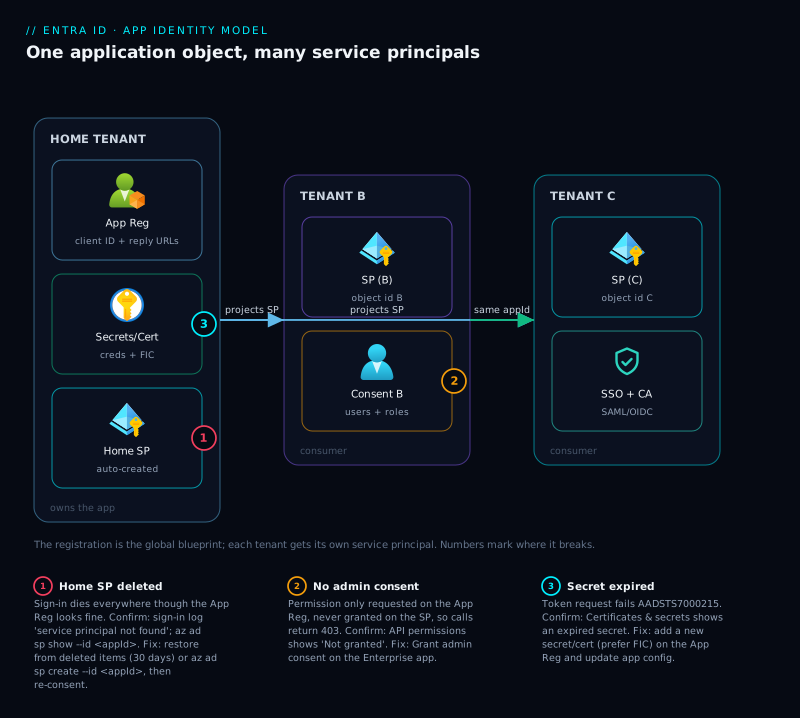
Read the diagram left to right. On the left sits the home tenant that owns the app. Inside it, the App Registration is the application object — the single global definition holding the Application (client) ID, reply URLs, secrets/certs, requested permissions and exposed scopes — beside the app’s own service principal, auto-created when the app was registered. These two share a client ID but have different Object IDs.
Follow the arrows rightward to the one-to-many fan-out: the same application object projects a service principal into each other tenant — Tenant B and Tenant C — where that tenant does its governing (user/group assignment, the consent that turns requested permissions into real ones, SSO / Conditional Access). The numbered badges mark the three failure points: deleting the home service principal (sign-in dies everywhere), a missing admin-consent grant on a tenant’s service principal (403), and an expired secret on the registration (AADSTS7000215). The legend narrates each as symptom, confirm, fix. The shape to keep: one blueprint feeding many installed instances, with credentials anchored to the blueprint and consent anchored to each instance.
Real-world scenario
Northwind Foods runs an internal expense-approval web app on Azure and uses a SaaS expense tool (“ClaimPilot”) onboarded from the Entra gallery. The identity admin is a one-person team, Priya, supporting ~1,200 users in a single tenant. The trouble started, as it usually does, with a cleanup task.
A quarterly access review flagged “an unused application” — the internal app’s Enterprise application entry, which Priya didn’t recognise by its Object ID (it differed from the registration’s, the only thing she’d bookmarked). Reading it as a stray duplicate, she deleted it. Within minutes the help desk lit up: nobody could sign in. The App Registration sat there untouched, looking perfectly healthy — which sent her down the wrong path for twenty minutes. She rotated the secret (no effect), checked reply URLs (fine), then saw the sign-in error: “The service principal named … was not found in the tenant.” She had deleted the object every sign-in resolves against.
The recovery was instructive. The deleted SP was in soft-deleted items and restorable — but not knowing that, she “re-created” it with az ad sp create --id <appId>. That made a fresh SP — new Object ID, but no consent and no user assignments, since those lived on the deleted one. Sign-in returned, but users hit the consent prompt again and Graph calls 403’d until she re-granted admin consent. Restoring from deleted items (within 30 days) would have preserved consent and assignments — the cleaner fix.
Meanwhile a developer told to “update ClaimPilot’s reply URL” hunted under App registrations and couldn’t find it — because ClaimPilot is a gallery app whose application object lives in the vendor’s tenant; Northwind has only a service principal, and its SSO reply URL is configured on the enterprise app’s Single sign-on page. Ten minutes lost looking for a blade that, by design, doesn’t exist there.
The fixes were process. Priya wrote two wiki rules: never delete under Enterprise applications without confirming it isn’t a managed identity, first-party app, or the SP of a registration you own — if in doubt, disable sign-in instead; and settings about the app itself live on the registration, settings about our use of it on the enterprise app — and SaaS/gallery apps have no registration at all. The lesson on the wall: “Same Application ID, different Object ID — two objects. Delete the wrong one and sign-in dies while the other sits there looking fine.”
Advantages and disadvantages
The two-object model is more moving parts than a single “app” record — a deliberate trade. Weigh it honestly:
| Advantages (why the split is good) | Disadvantages (why it confuses) |
|---|---|
| One definition (registration) works across unlimited tenants — the basis of SaaS and multi-tenant apps | Two objects with the same Application ID look like duplicates; people delete the wrong one |
| Each tenant governs its own use (users, consent, CA) without touching the app’s global definition | Settings are split across two blades; beginners can’t find “Users and groups” on the registration |
| Consent is per-tenant, so one customer’s grant never leaks to another | “Add a permission” on the registration does nothing until consent on the SP — a constant gotcha |
| SaaS/gallery apps and managed identities work with only a service principal — no registration needed in your tenant | “No registration, just an enterprise app” surprises people hunting for a registration that’s elsewhere |
| Credentials live once on the registration; rotating a secret updates the app everywhere at once | Rotating on the wrong blade (there are no secrets on the SP for your own app) wastes time |
| Deleting your service principal in one tenant doesn’t affect other tenants’ instances | Deleting the home service principal breaks sign-in while the registration looks healthy |
The model is right because applications genuinely have two facets: a global identity (defined once, verified everywhere) and a local relationship with each directory (governed per tenant). Collapsing them would make multi-tenant SaaS, per-tenant consent and managed identities impossible. The cost is a learning curve — the one this article flattens once you internalise “registration = definition, enterprise app = instance.”
Hands-on lab
Create a registration, observe the shared Application ID and different Object IDs, then delete and re-create the service principal to feel what breaks. Free-tier-friendly — only Entra directory objects. Run in Cloud Shell (Bash); you need permission to register apps (or the Application Administrator role).
Step 1 — Create an App Registration (the application object).
APP_NAME="lab-app-$RANDOM"
az ad app create --display-name "$APP_NAME" \
  --query "{displayName:displayName, appId:appId, objectId:id}" -o json
Expected: a displayName, an appId (the client ID GUID), and an objectId (the application object’s Object ID). Note both IDs.
Step 2 — Look for a service principal (there isn’t one yet).
APP_ID=$(az ad app list --display-name "$APP_NAME" --query "[0].appId" -o tsv)
az ad sp list --filter "appId eq '$APP_ID'" --query "[].id" -o table
Expected: empty. The CLI does not auto-create the service principal — only the portal does. The CLI/Graph separates the two, which is the whole point.
Step 3 — Create the service principal (the Enterprise application).
az ad sp create --id "$APP_ID" \
  --query "{appId:appId, spObjectId:id, spType:servicePrincipalType}" -o json
Expected: same appId as the registration, a different Object ID, servicePrincipalType: Application. This is what now appears under Enterprise applications.
Step 4 — Prove it: same Application ID, different Object IDs.
az ad app show --id "$APP_ID" --query appId -o tsv   # client ID (shared)
az ad app show --id "$APP_ID" --query id    -o tsv   # application OBJECT id
az ad sp  show --id "$APP_ID" --query id    -o tsv   # service principal OBJECT id
Expected: line 1 is one GUID; lines 2 and 3 are two different GUIDs. One shared client ID, two distinct Object IDs — that is the distinction.
Step 5 — Delete the service principal; the registration survives.
az ad sp delete --id "$APP_ID"
az ad sp  list --filter "appId eq '$APP_ID'" --query "[].id" -o table   # empty
az ad app show --id "$APP_ID" --query appId -o tsv                      # still there
Expected: the service principal is gone, but the registration is untouched. In a real tenant this is the exact state that breaks sign-in while the registration “looks fine” — the precise trap from the scenario above.
Step 6 — Re-create the service principal (note: consent/assignments would be gone).
az ad sp create --id "$APP_ID" --query "{spObjectId:id}" -o json
# New Object ID; any prior consent or user assignments do NOT come back this way.
Step 7 — Teardown (delete both objects).
az ad sp delete --id "$APP_ID"      # delete the service principal
az ad app delete --id "$APP_ID"     # delete the application object
echo "Cleaned up $APP_NAME ($APP_ID)"
Deleting the application object removes the app definition entirely. Order doesn’t strictly matter, but deleting the registration is the “remove everything” move; deleting only the SP leaves the blueprint behind.
Common mistakes & troubleshooting
The failure modes are remarkably consistent. Match your symptom and apply the fix:
| # | Symptom | Root cause | How to confirm | Fix |
|---|---|---|---|---|
| 1 | Sign-in suddenly fails: “service principal … not found” | The Enterprise application (SP) was deleted; registration still exists | Sign-in logs error string; az ad sp show --id <appId> returns not-found |
Restore from deleted items (within 30 days) to keep consent; else az ad sp create --id <appId> and re-grant consent |
| 2 | Added an API permission but calls still 403 |
Permission only requested on the registration; never consented on the SP | API permissions page shows “Not granted”; no oauth2PermissionGrant/appRoleAssignment on the SP |
Click Grant admin consent, or have an admin consent |
| 3 | Can’t find “Users and groups” / “Consent” on the registration | Those settings live on the Enterprise application, not the registration | They’re absent from App registrations by design | Go to Enterprise applications → the same app |
| 4 | A SaaS app has no App Registration in your tenant | It’s a gallery / multi-tenant app; the registration is in the vendor’s tenant | Only a service principal exists (az ad sp show, no az ad app) |
Configure it under Enterprise applications (SSO, users, consent) |
| 5 | Rotated the secret but auth still fails | Secret rotated on the wrong place, or app still using the old secret value | Check secret list on the registration; confirm the app’s config picked up the new value | Rotate on the registration; update the app’s secret reference; restart the app |
| 6 | Two entries with the same Application ID — looks like a duplicate | It’s the registration + its service principal, two objects by design | Compare Object IDs — they differ; same appId |
Don’t delete either as a “dupe”; they’re a pair |
| 7 | App works in home tenant, fails for a customer | The customer tenant has no service principal yet (multi-tenant app) | Get-MgServicePrincipal/az ad sp in that tenant returns nothing |
Have an admin in that tenant consent (creates the SP) |
| 8 | Managed identity has no registration to edit | Managed identities are SP-only, Azure-managed | servicePrincipalType: ManagedIdentity; no application object |
Manage it via the Azure resource and RBAC, not Entra app blades |
| 9 | Token request fails AADSTS7000215 (invalid client secret) |
Client secret expired on the registration | Certificates & secrets shows an expired secret; error in token response | Create a new secret/cert on the registration; update config |
| 10 | “Need admin approval” prompt blocks users on first sign-in | The app requests permissions requiring admin consent, not yet granted | Consent prompt names the publisher and scopes | Admin grants consent on the enterprise app, or pre-consents |
The highest-value habit: when something breaks, first ask “is this the application object or a service principal?” Errors mentioning consent, assignment, “not found in tenant” or SSO are service-principal problems; errors mentioning secret/certificate, reply URL or requested permissions are registration problems.
Best practices
- Manage your own apps from the registration; govern usage from the enterprise app — URLs, secrets and requested permissions on the registration; users and consent on the enterprise app.
- Never delete an Enterprise application without checking what it is. Confirm there’s no matching registration you own and it isn’t a managed identity or first-party app; when unsure, disable sign-in instead — instantly reversible.
- Prefer certificates or federated credentials over client secrets — secrets expire and leak; federated credentials remove the secret entirely for CI/CD. See App registration with OIDC and federated credentials.
- Set “Assignment required” and assign explicitly for internal apps, so apps aren’t open to the whole tenant by default.
- Govern admin consent — restrict who can consent, require approval for risky scopes, review existing grants. See OAuth consent governance.
- Limit registration owners — an owner can add a secret and impersonate the app; treat ownership as privileged.
- Use managed identities instead of registrations where you can — a managed identity is a service principal with no secret to manage, strictly better than a registration + secret for Azure-to-Azure auth.
- Track which tenant owns each registration — vendor’s for a SaaS app you consume, yours for a multi-tenant app you publish.
- Treat app config as code — define registrations and role assignments in Bicep/Terraform/Graph so they’re reviewed and reproducible.
- Document the Application ID, both Object IDs, and the home tenant for every important app, so the next engineer never confuses the pair.
Security notes
The split has real security weight. The registration’s credentials are the app’s keys to the kingdom — anyone with a valid secret or certificate can authenticate as the application and exercise every permission it holds. Guard them: prefer certificates and federated credentials over secrets, keep secrets out of source control (use Key Vault references — see Azure Key Vault: secrets, keys and certificates), set short expiries, and limit registration owners ruthlessly, since an owner can mint a new secret at will.
On the service-principal side, the risk is excess consent. An app granted high-privilege application permissions (e.g. Mail.Read as itself) is a standing capability running without any user — a prime target for “illicit consent grant” attacks that trick admins into consenting to malicious apps. Mitigate by restricting who may consent, requiring admin approval for sensitive scopes, reviewing existing grants, and constraining service principals with Conditional Access. Depth lives in OAuth consent governance and app-permission hardening.
Least privilege applies to both objects: request only the scopes the app needs on the registration, and grant only those via consent on the service principal. A disabled-but-not-deleted service principal is a safe holding state during investigations — reversible, and it preserves consent and assignments.
Cost & sizing
There is no direct charge for App Registrations or Enterprise Applications — they are directory objects in Microsoft Entra ID, free to create, edit and delete on every tier including the Free tier. You can operate thousands of apps without an identity bill from these objects. What can carry cost or limits:
| Factor | Cost / limit | Notes |
|---|---|---|
| App registrations & service principals | Free | No per-object charge on any Entra tier |
| Directory object count | Tenant object quotas apply (large) | Default ~50,000 objects on Free; raises with a verified domain/paid tier |
| Owned objects per user | Limited (default ~250 created objects per user) | A single account can’t create unlimited apps |
| Conditional Access targeting apps | Requires Entra ID P1 | CA itself is the paid feature, not the app object |
| Identity Protection / risk-based app policies | Requires Entra ID P2 | For risk-based consent/sign-in controls |
| Workload Identities Premium | Per-workload add-on | CA on service principals, risk detection, access reviews for workload identities |
| Secret/cert storage in Key Vault | Key Vault pricing | If you store app secrets/certs in Key Vault (recommended) |
Sizing is about hygiene, not money: keep registrations and service principals to what you use, delete or disable stale ones to shrink the consent/credential attack surface, and remember managed identities add SP objects automatically. Expect no charge from these objects; any identity spend comes from Entra ID P1/P2 licensing (roughly ₹500–₹750 / ~$6–$9 per user/month at list) bought for features like Conditional Access, not for the apps themselves.
Interview & exam questions
Q1. What is the difference between an App Registration and an Enterprise Application? An App Registration creates the application object — the single global definition of an app (client ID, credentials, permissions), owned by one tenant. An Enterprise Application is a service principal — a per-tenant instance of that app holding user assignments, consent and SSO config. One application object can have many service principals. (AZ-104, SC-300)
Q2. What is a service principal, and how does it relate to an application object? A service principal is the local identity an application has within a specific tenant — it signs in, holds consent, and is assigned to users. The application object is the global blueprint; the service principal is an instance of it. They share the Application (client) ID but have different Object IDs. (SC-300, AZ-500)
Q3. A multi-tenant app is used by 30 customer organisations. How many application objects and service principals exist? One application object (in the publisher’s tenant) and 31 service principals — one in the publisher’s tenant plus one created in each of the 30 customer tenants when they consent/sign in. (SC-300)
Q4. You added an API permission on the App Registration but the app still gets 403. Why? Adding the permission only requests it on the application object; the app holds it only once consent is granted, recorded on the service principal. Click Grant admin consent (or have a user consent for delegated scopes). (AZ-104, SC-300)
Q5. You deleted an Enterprise Application and now sign-in is broken, but the App Registration still exists. What happened and how do you recover?
You deleted the service principal that sign-in resolves against; the registration is unaffected, which is why it looks fine. Recover by restoring the SP from deleted items within 30 days (preserves consent and assignments), or re-create it with az ad sp create --id <appId> and re-grant consent. (AZ-500, SC-300)
Q6. Why does a SaaS gallery app have no App Registration in your tenant? Because the application object lives in the vendor’s tenant; consuming the app only creates a service principal in yours. You configure SSO, assignment and consent on the Enterprise application — there’s no registration to edit on your side. (SC-300)
Q7. Where do client secrets and certificates live — the registration or the enterprise app? On the registration (the application object), because they prove the app’s global identity when requesting tokens. Your own app’s service principal has no secrets; rotate credentials on the registration. (AZ-104)
Q8. What is the difference between delegated and application permissions, and which needs admin consent? Delegated permissions let the app act as the signed-in user (user consent suffices, except high-privilege scopes). Application permissions let it act as itself with no user (a daemon) and always require admin consent. (SC-300, AZ-500)
Q9. How do you tell an application object from a service principal when reading IDs?
They share the Application (client) ID but each has a distinct Object ID. In Microsoft Graph the application object is the application entity and the service principal is the servicePrincipal entity; in the CLI it’s az ad app versus az ad sp. (AZ-104)
Q10. What is a managed identity in terms of these objects? A managed identity is a service principal that Azure creates and fully manages for an Azure resource, with no App Registration and no secret for you to handle. You grant it RBAC like any principal and manage it through the Azure resource, not the Entra app blades. (AZ-500, SC-300)
Quick check
- Which object is the global definition of an app, and which is the per-tenant instance?
- The App Registration and its Enterprise Application share which identifier, and differ in which one?
- You add an API permission on the registration but the app still gets 403. What’s the missing step, and on which object does it land?
- A SaaS gallery app appears under Enterprise applications but has no App Registration in your tenant. Why?
- You need to remove one user’s access to an internal app. Which blade do you use — and which object must you be careful not to delete?
Answers
- The App Registration (application object) is the global definition; the Enterprise Application (service principal) is the per-tenant instance. One registration, many service principals.
- They share the Application (client) ID; they differ in their Object ID.
- The missing step is consent (user or admin), recorded on the service principal, not the registration. Requesting isn’t holding.
- Its application object lives in the vendor’s tenant; consuming the app only creates a service principal in yours.
- Use Enterprise applications → Users and groups to remove the assignment. Do not delete the Enterprise application itself, or you break sign-in for everyone while the registration still looks healthy.
Glossary
- Microsoft Entra ID — Azure’s cloud identity directory (formerly Azure Active Directory), holding users, groups and apps within a tenant.
- App Registration — The blade that creates and edits an application object; the global definition of an app.
- Application object — The single, tenant-owned master record of an app: client ID, credentials, requested permissions, exposed scopes. Graph entity:
application. - Enterprise Application — The blade that lists service principals; the per-tenant instance of an app.
- Service principal — The local identity an app has in a tenant: it signs in, holds consent, and is assigned to users. Graph entity:
servicePrincipal. - Application (client) ID — The app’s public GUID, identical across the application object and all its service principals.
- Object ID — The directory’s primary key for a single object; the application object and each service principal each have their own, all different.
- Home tenant — The tenant that owns the application object (where the app was registered).
- Consent — A user’s or admin’s approval that turns a requested permission into a granted one; recorded on the service principal.
- Admin consent — Tenant-wide consent by an administrator; mandatory for application permissions and high-privilege delegated scopes.
- Managed identity — A service principal Azure creates and manages for a resource, with no registration or secret for you to handle.
- Gallery app — A pre-integrated SaaS app added as a service principal only; its registration lives in the vendor’s tenant.
- Multi-tenant app — An app whose single application object can have service principals created in any tenant that consents to it.
Next steps
- How the registration authenticates: App registration with OIDC, confidential clients and federated credentials.
- What ends up inside the token: Entra ID token claims, app roles and the on-behalf-of flow.
- The service principal in its pure form for SaaS SSO: SAML SSO with a custom enterprise app and claims mapping.
- The registration-free identity Azure manages for you: Managed identities deep dive: user-assigned, FIC and RBAC.
- Govern what apps may do across your tenant: OAuth consent governance and app-permission hardening.