A 200-engineer platform team is bleeding money on a row of permanently-on Jenkins agent VMs that idle at 8% utilization overnight and still buckle at 9am when every squad pushes at once. Worse, the agents have drifted: one has JDK 17, another JDK 21, a third has a stale Trivy binary, and “works on the build server” has stopped meaning anything. The fix is to stop treating build capacity as a fleet of pets and start treating it as ephemeral pods. The Jenkins Kubernetes plugin asks the cluster for a fresh agent pod the moment a job needs one, runs the build inside per-job container templates pinned to exact tool versions, and deletes the pod the instant the build finishes. You pay only for the seconds a build actually runs, every build starts from an identical image, and the controller’s entire configuration lives in version control as code.
This is an implementation guide, and the centerpiece is a hands-on lab you can run end to end. We deploy a long-lived Jenkins controller with Helm, wire up the Kubernetes cloud and reusable pod templates with JCasC (Jenkins Configuration as Code), write a real declarative pipeline using agent { kubernetes { yaml ... } } with Maven, Kaniko and Trivy containers sharing a workspace, then tune scaling, caching and concurrency, lock the whole thing down with RBAC and a dedicated service account, and finish on the three failures that consume most of a beginner’s first week — agents that never connect, image pulls that throttle every build, and pods that get OOM-killed at the worst possible moment.
By the end you will understand the agent connection model well enough to debug it from kubectl describe pod alone, know exactly which JCasC keys make agents genuinely ephemeral (and which quietly leave zombie pods stranding your node pool), and be able to hand a developer a five-line podTemplate that gives their pipeline precisely the toolchain it needs and nothing else. The mental shift is small but total: the controller schedules and renders a UI; the cluster is the build farm.
What problem this solves
Static Jenkins agents are a triple tax. First, cost: a VM agent bills 24/7 whether it builds or sleeps, and capacity is a fixed ceiling — too small and the 9am queue stretches to forty minutes, too large and you pay for idle metal all night. Second, drift: every agent is a long-lived mutable host that accumulates manually-installed tools, cached dependencies, leftover Docker layers and half-applied patches, until two agents that should be identical produce different build results and nobody can say why. Third, blast radius: a shared agent runs every team’s build in the same workspace tree under the same user, so one job’s leaked credential, poisoned dependency or rm -rf is everyone’s problem.
Ephemeral agent pods dissolve all three. Capacity becomes elastic — pods are created on demand and the cluster autoscaler adds nodes under load and reclaims them after, so you pay per build-second instead of per VM-hour. Drift becomes impossible — each build runs in a fresh pod built from immutable, version-pinned container images, so “works on the build server” is true by construction because the build server is a brand-new pod every time. Blast radius shrinks to one build — a pod is isolated by namespace, service account, RBAC and (with a NetworkPolicy) network, and it is deleted seconds after the build ends, so a compromised dependency has minutes of access to a scoped identity, not standing access to a shared host.
Who hits this: any team running Jenkins at more than a trivial scale, especially after a migration to Kubernetes for the apps themselves leaves the CI farm as the last fleet of pets. It bites hardest on teams with spiky load (a monorepo where a merge triggers fifty jobs), heterogeneous toolchains (Java here, Node there, Go elsewhere, plus image builds and security scans), and compliance pressure (auditors who want to know exactly what ran, as what identity, with what access). The cure is the model this guide builds: one stateless controller, throwaway pods, and configuration as code.
Learning objectives
By the end of this article you can:
- Deploy a production-shaped Jenkins controller on Kubernetes with the official Helm chart, with a persistent
$JENKINS_HOME, pinned plugins, and the controller holding zero build capacity of its own. - Explain the agent connection model — how the Kubernetes plugin creates a pod, how the
jnlp/inbound-agent container phones home over WebSocket on port 50000, and whatjenkinsUrl,jenkinsTunnelanddirectConnectionactually control. - Declare the Kubernetes cloud and pod templates entirely in JCasC, choosing the right values for
containerCapStr,podRetention,idleMinutes,connectTimeout,readTimeoutandyamlMergeStrategy— and naming the gotchas that strand pods or break connections. - Write declarative and scripted pipelines with
agent { kubernetes { yaml ... } }, run steps in the rightcontainer(), share the workspace across containers, and request CPU/memory, volumes and node selectors per build. - Tune scaling, concurrency and caching — the container cap, per-job concurrency, persistent vs ephemeral dependency caches, and a same-region registry / pull-through cache so cold starts are seconds, not minutes.
- Secure the platform with a least-privilege RBAC model (a namespaced
Role, a scoped service account, nocluster-admin), runtime secrets, non-root pods, and aNetworkPolicythat confines agents. - Diagnose the three classic failures — agent won’t connect, image pull failure, and resource-limit/OOM kills — from
kubectloutput, and apply the exact fix.
Prerequisites & where this fits
You should already be comfortable with core Kubernetes objects — Pod, Deployment/StatefulSet, Service, Namespace, ServiceAccount, Role/RoleBinding — and able to read kubectl get/describe/logs output. You should know what a container image and registry are, have used Jenkins at least as a user (you know what a job, a build and a Jenkinsfile are), and be able to read YAML and a little Groovy. Helm 3 familiarity helps but the lab walks every command.
You need a working Kubernetes cluster (1.28+ — EKS, AKS, GKE, k3d, kind or minikube all work for the lab), a kubectl context with cluster-admin for the initial install, Helm 3.12+, a default StorageClass for the controller’s persistent home, and outbound access to pull the Jenkins and tool images. The lab is built to run on a local kind/minikube cluster at zero cloud cost; the production notes call out where a managed cluster (and a cluster autoscaler / Karpenter on a Spot node pool) changes the picture.
This sits in the CI/CD platform-engineering track. Upstream of it are the pipeline fundamentals in The CI/CD Pipeline Explained and the registry mechanics in Container Artifact & Registry Management. It pairs naturally with GitOps with Argo CD and Flux (which can keep this very controller’s Helm release and JCasC in sync with Git), Deploy Harbor on Kubernetes with Trivy, Replication and Signing for the registry the agents pull from, and Pipeline Secrets Management for the runtime-secret story. Downstream, the same container toolchain underpins Progressive Delivery: Canary, Blue-Green and GitOps.
A quick map of who owns which layer, so you escalate to the right person during an incident:
| Layer | What lives here | Who usually owns it | Failures it causes |
|---|---|---|---|
| Cluster / node pool | Nodes, autoscaler, StorageClass, CNI | Platform / SRE | Pods Pending (no capacity), PVC won’t bind |
jenkins namespace |
Controller StatefulSet, PVC, Services, SA |
Jenkins admin | Controller down, JCasC won’t load |
jenkins-agents namespace |
Ephemeral agent pods, agent SA, RBAC | Jenkins admin + Platform | Agents won’t connect, RBAC denied, OOM |
| Kubernetes plugin + cloud config | How the controller talks to the API | Jenkins admin | No agents scheduled, wrong namespace |
| Pod templates / Jenkinsfile | Containers, resources, volumes per job | App / dev team | Wrong image, step in wrong container, OOM |
| Registry | Agent + tool images | Platform / dev | ImagePullBackOff, slow cold starts |
| IdP / secrets backend | OIDC login, runtime build secrets | Identity / Security | Can’t log in, secret resolves empty |
Core concepts
Six mental models make every later step obvious.
The controller is a scheduler and a UI — nothing more. The Jenkins controller runs as a single long-lived pod (a StatefulSet, so it keeps a stable identity and its persistent volume across restarts) with $JENKINS_HOME on a PVC holding jobs, build history, plugins and credentials. It holds no build executors of its own in this model. When a pipeline needs to run, it asks for an agent, and the controller delegates the actual work to a freshly-created pod. Treat the controller like a database: precious, stateful, backed up, and not where you run untrusted build code.
An agent is a pod the plugin creates, then deletes. The Kubernetes plugin registers a “cloud” — a connection to the Kubernetes API. When a job requests a label the cloud can satisfy, the plugin calls the API to create a pod (from a pod template or inline YAML) in the agents namespace. That pod runs the build; when the build ends the plugin deletes the pod. There is no warm pool to manage, no agent to patch, no SSH key to rotate. The pod is the agent and it lives exactly as long as the build (plus its configured retention).
Every agent pod has a jnlp container that phones home. Inside each agent pod the plugin injects a container conventionally named jnlp, running the jenkins/inbound-agent image. On startup it dials back to the controller (over a WebSocket on the agent port, 50000 by default, or HTTP/WebSocket through the controller URL) using a one-time secret the plugin generated, and registers as an executor. This is the single most important thing to understand: the connection is agent → controller (outbound from the pod), not controller → agent. If the pod can’t reach the controller’s Service, the agent shows Running in Kubernetes but never appears in Jenkins and the build hangs in the queue.
Your tool containers are siblings of jnlp, sharing the workspace. A pod template declares one or more tool containers — maven, node, kaniko, trivy, whatever the job needs — alongside the injected jnlp. All containers in the pod share the workspace volume (an emptyDir the plugin mounts at the same path in each), so a step that compiles in the maven container produces an artifact the trivy container can scan. Pipeline steps choose which container to run in with container('maven') { sh '...' }. The classic mistake is naming one of your own containers jnlp, which replaces the agent and breaks the build.
Ephemerality is a configuration choice, not a default. Pods are not automatically deleted the way you’d hope unless you set the retention policy correctly. podRetention controls when a finished pod is removed: never (delete immediately — the production default you want), onFailure (keep failed pods “for debugging” — quietly fills your node pool), or always (keep everything — almost never right). idleMinutes keeps an agent warm for reuse after a build; 0 means “delete as soon as idle.” Get these wrong and you accumulate zombie pods that the autoscaler dutifully keeps nodes alive for.
The container cap is your blast-radius and your bill ceiling. containerCapStr is the maximum number of concurrent agent pods this cloud will create. Without it, a flood of queued jobs tries to schedule hundreds of pods at once and exhausts the cluster (or your cloud bill). It is the throttle that converts “infinite elastic capacity” into “elastic, but bounded by what I can afford and the cluster can hold.”
The vocabulary in one table
Pin down every moving part before the deep sections; the glossary repeats these for lookup.
| Term | One-line definition | Where it lives | Why it matters |
|---|---|---|---|
| Controller | Long-lived Jenkins pod: scheduler + UI | jenkins ns (StatefulSet) |
Holds state; never runs build code |
| Kubernetes cloud | The plugin’s connection to the K8s API | JCasC jenkins.clouds |
Defines where/how agents are created |
| Pod template | Reusable spec for an agent pod | JCasC templates or inline yaml |
Declares containers, resources, SA |
| Agent pod | The ephemeral build pod | jenkins-agents ns |
Created per build, then deleted |
jnlp container |
Injected inbound-agent that connects back | Inside every agent pod | The actual Jenkins agent process |
| Tool container | maven/node/kaniko/… |
Inside the agent pod | Where your build steps run |
jenkinsUrl |
Controller HTTP URL the agent reaches | Cloud config | Agent registration target |
jenkinsTunnel |
host:50000 agent port endpoint |
Cloud config | JNLP/WebSocket connect target |
containerCapStr |
Max concurrent agent pods | Cloud config | Cluster/cost blast-radius limit |
podRetention |
When to delete a finished pod | Cloud / template | never = genuinely ephemeral |
idleMinutes |
Keep agent warm after build | Template | 0 = delete when idle |
| JCasC | Configuration-as-code for Jenkins | ConfigMap / Helm values | Reproducible controller config |
| Workspace volume | Shared emptyDir across containers |
The agent pod | Lets steps hand off artifacts |
| Service account (agent) | Identity the agent pod runs as | jenkins-agents ns |
Scopes what a build can do |
The agent connection model — how a pod becomes an executor
Before configuring anything, internalize the request flow, because every “agent won’t connect” bug is a break somewhere along it. The sequence when a pipeline requests a Kubernetes agent:
| Step | What happens | Where it can break |
|---|---|---|
| 1 | Pipeline hits agent { kubernetes { ... } }; controller queues the build needing a label |
Label typo → no cloud matches → stuck in queue |
| 2 | Kubernetes plugin picks a matching cloud + pod template (or inline YAML) | Wrong cloud name/label → no match |
| 3 | Plugin calls the K8s API to create the pod in the agents namespace | Controller SA lacks create pods → RBAC denied |
| 4 | Scheduler places the pod on a node | No capacity / bad nodeSelector → Pending |
| 5 | Kubelet pulls images for jnlp + tool containers |
Bad image / no creds → ImagePullBackOff |
| 6 | jnlp container starts, reads the secret + controller URL from env |
— |
| 7 | jnlp dials the controller: WebSocket via jenkinsUrl, or TCP via jenkinsTunnel:50000 |
Wrong tunnel/URL, NetworkPolicy, agent port disabled → never registers |
| 8 | Controller authenticates the secret, agent comes online, build runs | — |
| 9 | Build ends; plugin deletes the pod per podRetention |
onFailure/always → zombie pods linger |
The two connection styles you must choose between, set by directConnection:
| Mode | directConnection |
How the agent connects | When to use | Gotcha |
|---|---|---|---|---|
| Through controller (default) | false |
Agent → controller Service over WebSocket (jenkinsUrl) or TCP jenkinsTunnel:50000 |
Almost always; works behind a single controller Service | jenkinsTunnel must point at the agent Service/port (50000), not the UI port (8080) |
| Direct | true |
Controller-supplied address; agent connects directly | Special networking; rarely needed | Requires reachable direct address; fragile across namespaces |
Two Services the Helm chart creates, and what each is for:
| Service | Port | Purpose | Used by |
|---|---|---|---|
jenkins |
8080 | The web UI + HTTP API | Humans, jenkinsUrl, WebSocket agents |
jenkins-agent |
50000 | The inbound-agent (JNLP/TCP) port | jenkinsTunnel for TCP-mode agents |
The single most common connection bug is pointing jenkinsTunnel at jenkins:8080 (the UI) instead of jenkins-agent:50000 (the agent port). The pod starts, the jnlp container runs, and it tries to speak the agent protocol to the HTTP port — which silently fails, so the pod looks healthy in kubectl get pods while the build hangs forever. With modern Jenkins you can avoid TCP entirely by enabling WebSocket agents, which tunnel the agent protocol over the same 8080 HTTP(S) endpoint — simpler through ingress and firewalls, and the recommendation for new setups.
Step 1 — Namespaces and the agent service account
Isolate the precious controller from the throwaway agents. The agents get their own namespace and a tightly-scoped service account; they must never be able to mutate the controller.
kubectl create namespace jenkins
kubectl create namespace jenkins-agents

# Service account the agent pods run as (least privilege; see Security notes)
kubectl -n jenkins-agents create serviceaccount jenkins-agent
Grant the controller’s service account permission to manage pods in the agents namespace only — a namespaced Role and RoleBinding, never a cluster-wide ClusterRoleBinding. The controller needs to create, watch, delete and exec into agent pods (exec is how the plugin runs steps inside containers):
# agent-rbac.yaml
apiVersion: rbac.authorization.k8s.io/v1
kind: Role
metadata:
  name: jenkins-agent-manager
  namespace: jenkins-agents
rules:
  - apiGroups: [""]
    resources: ["pods", "pods/exec", "pods/log"]
    verbs: ["get", "list", "watch", "create", "delete"]
  - apiGroups: [""]
    resources: ["pods/portforward"]
    verbs: ["create"]
  - apiGroups: [""]
    resources: ["secrets"]
    verbs: ["get"]            # only if a template references a Secret
---
apiVersion: rbac.authorization.k8s.io/v1
kind: RoleBinding
metadata:
  name: jenkins-controller-manages-agents
  namespace: jenkins-agents
subjects:
  - kind: ServiceAccount
    name: jenkins                 # created by the Helm chart in step 2
    namespace: jenkins
roleRef:
  kind: Role
  name: jenkins-agent-manager
  apiGroup: rbac.authorization.k8s.io
kubectl apply -f agent-rbac.yaml
Exactly which verbs the plugin needs, and what breaks without each:
| Resource / verb | Why the plugin needs it | Symptom if missing |
|---|---|---|
pods · create |
Spawn the agent pod | Agents never appear; queue stalls; Forbidden in controller log |
pods · delete |
Remove the pod after the build | Zombie pods accumulate |
pods · get/list/watch |
Track pod lifecycle/status | Plugin can’t tell when the agent is ready |
pods/exec · create |
Run sh steps inside containers |
Steps hang / fail to start |
pods/log · get |
Stream container logs to the build | No container output in console |
secrets · get |
Read a Secret a template references | Volume/env from Secret fails |
Step 2 — Install the Jenkins controller with Helm
Use the official chart. The points that matter: pin the agents to the right namespace, give the controller a persistent home, expose only ClusterIP (front it with an ingress, never a raw LoadBalancer), and install the plugins you need — the Kubernetes plugin, JCasC, and Pipeline.
helm repo add jenkins https://charts.jenkins.io
helm repo update
# values.yaml  (in production: managed by Terraform / synced by Argo CD)
controller:
  image:
    tag: "2.452.3-lts-jdk17"      # pin an LTS line, not :latest
  installPlugins:
    - kubernetes:4253.v7700d91739e8
    - configuration-as-code:1810.v9b_c30a_249a_4c
    - workflow-aggregator:600.vb_57cdd26fdd7   # Pipeline
    - git:5.2.2
    - credentials-binding:681.vf91669a_32e45
  serviceType: ClusterIP          # exposed via Ingress, not LoadBalancer
  installLatestPlugins: false     # reproducible: pin, don't auto-upgrade
  resources:
    requests: { cpu: "1",   memory: "2Gi" }
    limits:   { cpu: "2",   memory: "4Gi" }
  JCasC:
    defaultConfig: true
    configScripts:
      jenkins-casc: |
        # filled in step 3
persistence:
  enabled: true
  storageClass: "standard"        # gp3 on EKS, managed-csi on AKS, standard locally
  size: "20Gi"
agent:
  enabled: false                  # we declare agents in JCasC, not chart defaults
serviceAccount:
  create: true
  name: jenkins                   # matches the RoleBinding subject in step 1
The chart values most relevant to this setup, with the trade-off of each:
| Value | What it controls | Recommended | Trade-off / gotcha |
|---|---|---|---|
controller.image.tag |
Jenkins version | A pinned LTS (*-lts-jdkNN) |
latest is not reproducible; breaks on surprise upgrades |
controller.installPlugins |
Plugins baked in at boot | Explicit pinned versions | Unpinned → version drift; missing one → JCasC fails |
controller.serviceType |
How the controller is exposed | ClusterIP + Ingress |
LoadBalancer puts the UI on a public IP |
controller.JCasC.configScripts |
Inline JCasC config | Your cloud + templates | Large configs better as a separate ConfigMap |
persistence.enabled / size |
The PVC for $JENKINS_HOME |
true, 20–50Gi |
false → you lose all jobs/history on restart |
agent.enabled |
Chart’s default agent pod template | false |
Leave the cloud/templates to JCasC for clarity |
serviceAccount.name |
Controller SA name | jenkins |
Must equal the RBAC RoleBinding subject |
Install it:
helm upgrade --install jenkins jenkins/jenkins \
  --namespace jenkins \
  --values values.yaml \
  --wait --timeout 10m
Fetch the initial admin password (you’ll keep local auth for the lab; production swaps this for OIDC):
kubectl -n jenkins exec -it sts/jenkins -c jenkins -- \
  cat /run/secrets/additional/chart-admin-password
Confirm the controller is up and both Services exist:
kubectl -n jenkins get pods,pvc,svc
# Expect: pod jenkins-0 Running 2/2; PVC Bound; svc jenkins (8080) + jenkins-agent (50000)
Step 3 — Configure the cloud and pod templates with JCasC
This is the heart of the setup. Everything below goes in the JCasC.configScripts.jenkins-casc block from step 2 (or a separate ConfigMap the chart mounts). JCasC declares the Kubernetes cloud — how the controller talks to the API and where agents land — plus one or more reusable pod templates.
jenkins:
  clouds:
    - kubernetes:
        name: "k8s"
        serverUrl: "https://kubernetes.default.svc"
        namespace: "jenkins-agents"              # agents land here
        jenkinsUrl: "http://jenkins.jenkins.svc.cluster.local:8080"
        jenkinsTunnel: "jenkins-agent.jenkins.svc.cluster.local:50000"
        directConnection: false                  # connect via the controller Service
        webSocket: true                          # tunnel agent protocol over 8080 (recommended)
        containerCapStr: "20"                    # hard ceiling on concurrent agent pods
        connectTimeout: 100                      # seconds to wait for the API
        readTimeout: 200
        maxRequestsPerHostStr: "32"
        podRetention: "never"                    # delete the pod when the build ends
        templates:
          - name: "base"
            label: "k8s-base"
            namespace: "jenkins-agents"
            serviceAccount: "jenkins-agent"
            idleMinutes: 0                        # do not keep idle agents warm
            instanceCap: 10
            yamlMergeStrategy: "merge"
            containers:
              - name: "jnlp"                      # the injected inbound agent
                image: "jenkins/inbound-agent:3261.v9c670a_4748a_9-1"
                resourceRequestCpu: "500m"
                resourceRequestMemory: "512Mi"
                resourceLimitCpu: "1"
                resourceLimitMemory: "1Gi"
unclassified:
  location:
    url: "http://jenkins.example.com/"           # external URL for links/emails
The cloud-level keys, end to end — this is the reference you’ll come back to:
| Key | What it does | Default / typical | When to change | Gotcha |
|---|---|---|---|---|
name |
Cloud identifier; pipelines target it implicitly via labels | kubernetes |
Multiple clusters → unique names | Must be unique per cloud |
serverUrl |
K8s API endpoint | https://kubernetes.default.svc |
Out-of-cluster controller → real API URL | In-cluster: leave the default |
namespace |
Where agent pods are created | controller’s ns | Always set to jenkins-agents |
Must match the RBAC Role namespace |
jenkinsUrl |
Controller HTTP URL agents reach | derived | Set explicitly to the in-cluster Service | Wrong host → agent can’t register |
jenkinsTunnel |
host:50000 agent-port endpoint |
— | TCP-mode agents | Point at jenkins-agent:50000, not 8080 |
webSocket |
Tunnel agent protocol over HTTP(S) 8080 | false |
Set true for new setups (simpler through ingress) |
With true, jenkinsTunnel is unused |
directConnection |
Agent connects directly vs via controller | false |
Leave false |
true is fragile cross-namespace |
containerCapStr |
Max concurrent agent pods (whole cloud) | unlimited | Always set a real ceiling | Unset → a job flood can exhaust the cluster |
connectTimeout |
Seconds to wait connecting to the API | 5 | Raise on busy/slow clusters | Too low → spurious failures under load |
readTimeout |
Seconds to wait reading from the API | 15 | Raise under heavy churn | — |
maxRequestsPerHostStr |
API client connection pool size | 32 | Raise at very high concurrency | Too low throttles pod creation |
podRetention |
When to delete a finished pod | never |
onFailure only for short debugging |
onFailure/always strand pods |
The pod-template-level keys you’ll set most:
| Key | What it does | Recommended | Gotcha |
|---|---|---|---|
name |
Template identifier | descriptive (base, maven) |
— |
label |
Label a pipeline requests (agent { label 'k8s-base' }) |
unique per template | Typo → no match → stuck queue |
namespace |
Override cloud namespace for this template | jenkins-agents |
Must have RBAC there |
serviceAccount |
SA the pod runs as | jenkins-agent |
Wrong SA → wrong permissions/secrets |
idleMinutes |
Keep the agent warm for reuse after a build | 0 (ephemeral) |
>0 keeps pods alive → cost |
instanceCap |
Max pods from this template | per-team budget | Separate from the cloud-wide cap |
yamlMergeStrategy |
How inline pipeline YAML merges with the template | merge |
override discards the template |
podRetention |
Per-template retention override | inherit cloud | Same zombie-pod risk |
activeDeadlineSeconds |
Hard kill the pod after N seconds | optional | Backstop against runaway builds |
A few choices teams get wrong, called out explicitly:
podRetention: neverandidleMinutes: 0are what make agents genuinely ephemeral. TheonFailureretention keeps failed pods around “for debugging” and quietly fills your node pool — enable it only temporarily and clean up after.containerCapStris your blast-radius limit. Without it, a flood of queued jobs tries to schedule hundreds of pods and exhausts the cluster.jenkinsTunnelmust point at the50000agent-port Service (jenkins-agent), or agents connect to the UI port and silently fail to register. WithwebSocket: truethis concern disappears — the agent tunnels over 8080.yamlMergeStrategy: mergelets a pipeline add containers/resources on top of the base template;overridethrows the base template away entirely, which surprises people who expected theirserviceAccountto carry through.
Apply by upgrading the release, then reload config without a full restart:
helm upgrade jenkins jenkins/jenkins -n jenkins --values values.yaml --wait
# The chart's sidecar reloads JCasC on a ConfigMap change; or force it:
kubectl -n jenkins exec sts/jenkins -c jenkins -- \
  curl -s -X POST localhost:8080/reload-configuration-as-code/ \
  --user "admin:$ADMIN_PWD"
Confirm the cloud registered:
kubectl -n jenkins logs sts/jenkins -c jenkins | grep -i "Configuration as Code"
# Expect a line confirming JCasC applied with no errors
Step 4 — Pod templates: containers, resources, volumes, selectors
There are two ways to define an agent pod, and you’ll use both. JCasC pod templates (step 3) are central, reusable building blocks the platform team owns — a base template every team inherits. Inline pipeline YAML (agent { kubernetes { yaml ... } }) lets a single pipeline declare exactly the containers it needs, merged onto the base. Here is how each pod element is expressed.
Containers and the jnlp injection
Every agent pod has the injected jnlp container plus your tool containers. Your tool containers almost always need a long-running command so the container stays up while the plugin execs steps into it — command: ["cat"] + tty: true, or command: ["sleep"] + args: ["infinity"]. Without it the container’s default entrypoint runs, exits, and your container('maven') block has nothing to exec into.
containers:
  - name: maven                              # NOT "jnlp" — that replaces the agent
    image: maven:3.9.6-eclipse-temurin-17
    command: ["cat"]                         # keep-alive so steps can exec in
    tty: true
The keep-alive idiom by container type:
| Container | Keep-alive command | Why |
|---|---|---|
maven / node / python |
command: ["cat"], tty: true |
Interactive shell stays up for sh steps |
kaniko |
command: ["sleep"], args: ["infinity"] |
Kaniko’s entrypoint would run and exit |
docker:dind (avoid) |
runs as a daemon | Needs privileged — prefer Kaniko/Buildkit |
jnlp (injected) |
(the plugin sets it) | Don’t override unless you know exactly why |
Resource requests and limits
Every container should request CPU/memory so the scheduler can bin-pack, and limit them so one build can’t starve a node. Under-request and pods pile onto one node and thrash; over-request and you strand capacity and pay for nodes you barely use.
resources:
  requests: { cpu: "1",   memory: "1Gi" }     # scheduler reserves this
  limits:   { cpu: "2",   memory: "2Gi" }     # hard ceiling; memory over = OOM-killed
How requests vs limits behave for each resource — this directly explains the OOM failures later:
| Resource | Request means | Limit means | Over the limit → |
|---|---|---|---|
| CPU | Guaranteed share; scheduler reserves it | Throttle ceiling | Throttled (build slows, not killed) |
| Memory | Reserved for scheduling | Hard cap | OOM-killed (pod dies, exit 137) |
ephemeral-storage |
Reserved scratch space | Disk cap | Pod evicted when exceeded |
Volumes and the shared workspace
The plugin mounts the workspace as an emptyDir into every container at the same path, automatically — that is how maven builds and trivy scans the same files. You add volumes for caches, Docker config, or persistent state:
volumes:
  - name: m2-cache
    persistentVolumeClaim:
      claimName: maven-cache        # a real PVC, shared, for ~/.m2 (see Caching)
  - name: docker-config
    secret:
      secretName: registry-creds    # mounted into kaniko at /kaniko/.docker
The volume types you’ll reach for, and when:
| Volume type | Use for | Lifetime | Note |
|---|---|---|---|
emptyDir |
Workspace (auto), scratch | Pod | Gone when the pod dies — that’s the point |
emptyDir + medium: Memory |
Fast tmp (tmpfs) | Pod | Counts against the pod’s memory limit |
persistentVolumeClaim |
Dependency cache (~/.m2, npm) |
Survives pods | ReadWriteMany if multiple agents share |
secret |
Registry creds, signing keys | Pod | Prefer runtime injection over baking in |
configMap |
Settings files, CA bundles | Pod | Read-only config |
hostPath (avoid) |
Node-local data | Node | Security risk; ties pod to a node |
Node selectors, tolerations and affinity
Pin agents to a dedicated, often Spot/Preemptible, node pool so builds don’t compete with production workloads and you get the discount. The pod template carries the selector/tolerations:
nodeSelector:
  workload: ci                     # node pool labeled for CI
tolerations:
  - key: "dedicated"
    operator: "Equal"
    value: "ci"
    effect: "NoSchedule"           # tolerate the taint on the CI pool
The placement controls and what each achieves:
| Control | Effect | Use for |
|---|---|---|
nodeSelector |
Pod only schedules on nodes with the label | Steer agents to a CI/Spot pool |
tolerations |
Pod tolerates a node taint | Land on a tainted dedicated pool |
nodeAffinity |
Soft/hard placement rules | Prefer Spot, fall back to on-demand |
podAntiAffinity |
Spread pods across nodes | Avoid stacking builds on one node |
priorityClassName |
Scheduling priority / preemption | Let prod preempt CI under pressure |
Step 5 — A real multi-container declarative pipeline
Now use it. A pipeline declares its own pod inline so each job gets exactly the tool containers it needs — a Maven build, a Kaniko image build with no Docker daemon, and a Trivy scan, all in one ephemeral pod sharing the workspace.
// Jenkinsfile
pipeline {
  agent {
    kubernetes {
      yaml '''
        apiVersion: v1
        kind: Pod
        spec:
          serviceAccountName: jenkins-agent
          securityContext:
            runAsNonRoot: true
            runAsUser: 1000
            fsGroup: 1000
          containers:
            - name: maven
              image: maven:3.9.6-eclipse-temurin-17
              command: ["cat"]
              tty: true
              resources:
                requests: { cpu: "1", memory: "1Gi" }
                limits:   { cpu: "2", memory: "2Gi" }
              volumeMounts:
                - name: m2-cache
                  mountPath: /root/.m2
            - name: kaniko
              image: gcr.io/kaniko-project/executor:v1.23.2-debug
              command: ["sleep"]
              args: ["infinity"]
              resources:
                requests: { cpu: "1", memory: "1Gi" }
                limits:   { cpu: "2", memory: "3Gi" }
              volumeMounts:
                - name: docker-config
                  mountPath: /kaniko/.docker
            - name: trivy
              image: aquasec/trivy:0.53.0
              command: ["cat"]
              tty: true
          volumes:
            - name: m2-cache
              persistentVolumeClaim:
                claimName: maven-cache
            - name: docker-config
              secret:
                secretName: registry-creds
      '''
    }
  }
  options {
    timeout(time: 30, unit: 'MINUTES')        // cap the build
    disableConcurrentBuilds()                  // one build per branch at a time
  }
  stages {
    stage('Build & test') {
      steps {
        container('maven') {
          sh 'mvn -B -ntp clean verify'
        }
      }
      post {
        always { junit 'target/surefire-reports/*.xml' }
      }
    }
    stage('Image build (no daemon)') {
      steps {
        container('kaniko') {
          sh '''/kaniko/executor \
            --context=`pwd` \
            --dockerfile=Dockerfile \
            --destination=ghcr.io/acme/app:${BUILD_NUMBER} \
            --cache=true --cache-repo=ghcr.io/acme/app/cache'''
        }
      }
    }
    stage('Scan') {
      steps {
        container('trivy') {
          sh 'trivy image --exit-code 1 --severity HIGH,CRITICAL ghcr.io/acme/app:${BUILD_NUMBER}'
        }
      }
    }
  }
}
The mechanics worth calling out:
- Step → container routing. Every
shruns inside whatevercontainer('name')wraps it. Steps outside anycontainer{}block run injnlp, which has only basic tools — a frequent surprise whenmvn: not foundappears because thecontainer('maven')wrapper was missing. - Shared workspace, automatic. The plugin checks out the repo once into the workspace
emptyDirand mounts it in every container at the same path, somaven’starget/is visible tokanikoand the image is visible totrivy— no manual volume wiring. - No Docker socket. Kaniko builds the image in userspace from the Dockerfile, so you never mount the host’s Docker socket (a node-escape risk). Registry creds come from a mounted Secret at
/kaniko/.docker(production: inject at runtime from a secrets backend — see Pipeline Secrets Management). optionsare guardrails.timeoutkills a hung build (and its pod);disableConcurrentBuilds()stops two runs of the same branch racing on the same cache.
A scripted-pipeline variant of the same idea, for jobs that need imperative logic:
podTemplate(yaml: readTrusted('build-pod.yaml')) {
  node(POD_LABEL) {                            // POD_LABEL is set by podTemplate
    stage('Build') {
      container('maven') { sh 'mvn -B -ntp clean verify' }
    }
  }
}
Declarative vs scripted vs JCasC template — pick by who owns it:
| Approach | Defined where | Owned by | Best for |
|---|---|---|---|
JCasC templates |
Controller config | Platform team | Org-wide base pods every job inherits |
Declarative agent { kubernetes { yaml } } |
Jenkinsfile | App team | Per-pipeline toolchain; readable |
Scripted podTemplate { node {} } |
Jenkinsfile | App team | Imperative/dynamic pod logic |
Step 6 — Scaling, concurrency and caching
Ephemeral agents are elastic, but elasticity needs limits and caching or it gets slow and expensive.
Concurrency and the caps that bound it
Three independent caps control how many pods can run at once; the effective limit is the smallest of them plus what the cluster can actually schedule:
| Cap | Scope | Set in | Effect |
|---|---|---|---|
containerCapStr |
Whole cloud | Cloud config | Max agent pods across all jobs |
instanceCap |
One pod template | Template | Max pods from this template |
| Executors per agent | One pod | jnlp container env / template |
Usually 1 (one build per pod) |
| Cluster capacity | Nodes | Autoscaler / node pool | Pods Pending if exceeded |
Keep one executor per agent pod (the default and the point — a pod is a build). Raise concurrency by letting the cloud create more pods, not by stacking executors on one pod, so isolation holds. Bound per-team spend with instanceCap on each team’s template while containerCapStr protects the cluster overall.
Autoscaling the nodes underneath
The plugin creates pods; it does not create nodes. When pods go Pending for lack of capacity, a cluster autoscaler (or Karpenter on EKS) must add nodes, and reclaim them when the pods vanish. The build-burst lifecycle:
| Phase | What the plugin does | What the autoscaler does |
|---|---|---|
| Idle | No agent pods | Scales the CI pool toward its minimum |
| Push storm | Creates N pods (up to the caps) | Sees Pending pods → adds nodes |
| Builds running | Pods on nodes, executing | Holds the nodes |
| Builds done | Deletes pods (podRetention: never) |
Nodes empty → scales back down |
This is why podRetention: never and idleMinutes: 0 matter for cost: lingering pods keep nodes alive and defeat scale-down.
Caching — the difference between 30-second and 5-minute builds
A fresh pod has an empty dependency cache and must pull images. Two caches to address:
| Cache | Without it | With it | How |
|---|---|---|---|
Dependency cache (~/.m2, npm, Go) |
Every build re-downloads all deps | Warm cache, fast resolve | Shared ReadWriteMany PVC mounted into the tool container |
| Container image layers | Cold docker pull per build (minutes) |
Layers cached on node / nearby | Same-region registry + pull-through cache; pre-pull DaemonSet |
| Build/image build cache | Kaniko rebuilds every layer | Reuses unchanged layers | Kaniko --cache=true --cache-repo=... |
A shared Maven cache PVC, mounted in step 5, removes the dominant cost of Java builds. Be careful with ReadWriteMany semantics and concurrent writers — use a cache that tolerates concurrency (or per-branch caches) so two builds don’t corrupt a shared ~/.m2. For images, a same-region registry (or a registry mirror / pull-through cache) plus a small base image turns a 90-second pull into a few seconds; a pre-pull DaemonSet warms the node’s image cache for your hottest tool images.
The caching trade-offs:
| Technique | Speeds up | Cost | Risk |
|---|---|---|---|
| Shared dependency PVC | Dependency resolution | PVC storage | Concurrent-write corruption if misused |
| Per-branch cache | Resolution, safely | More storage | Cold for new branches |
| Same-region registry | Image pulls | Registry hosting | Cross-region egress if mis-sited |
| Pull-through cache / mirror | Image pulls | Cache infra | Staleness if not refreshed |
| Pre-pull DaemonSet | Image pulls (hot images) | Idle node memory/disk | Maintaining the image list |
| Kaniko layer cache | Image builds | Cache-repo storage | Cache poisoning if shared widely |
Architecture at a glance
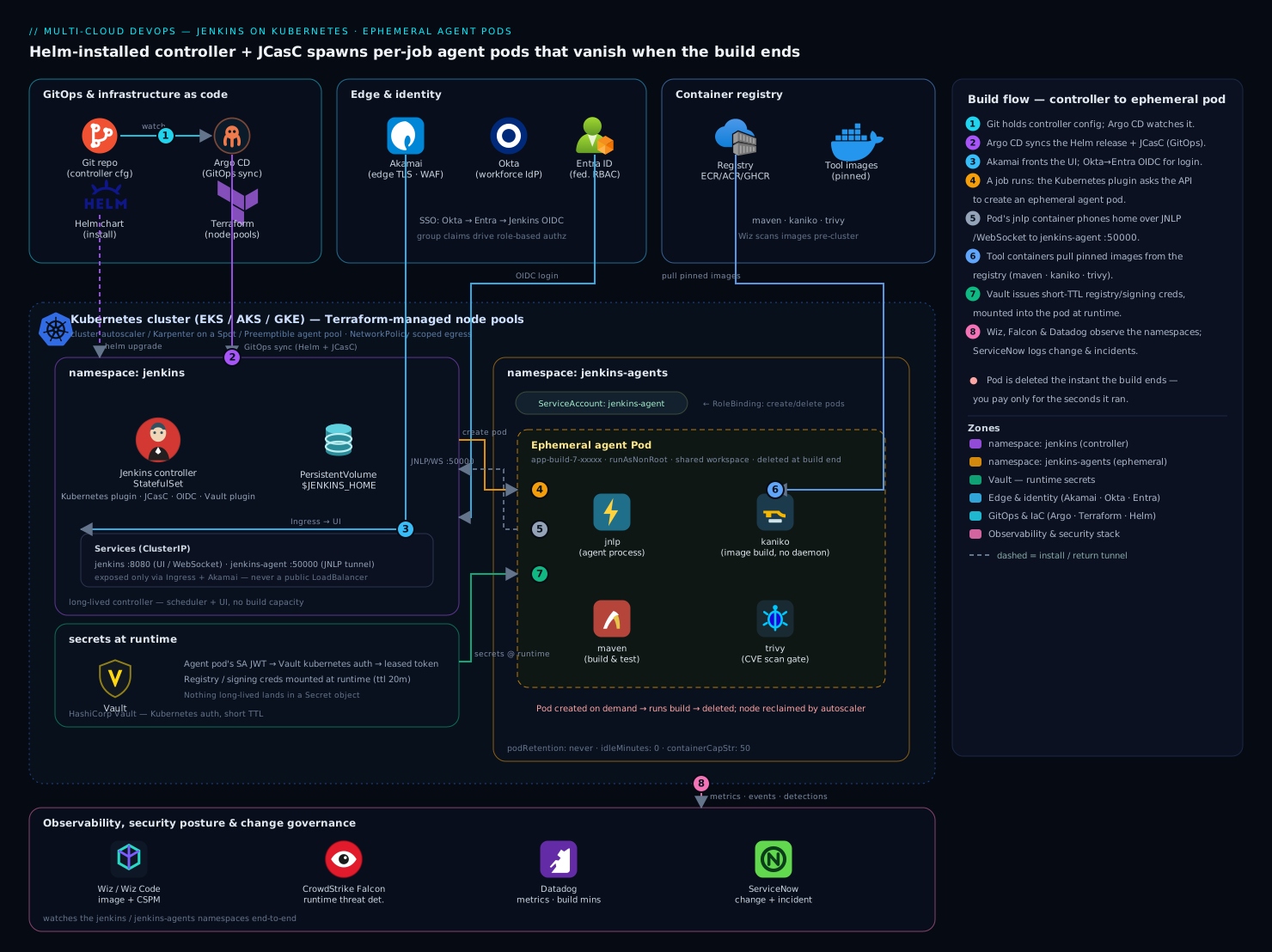
The shape is deliberately simple, and that is the point. A single long-lived Jenkins controller runs as a StatefulSet in the jenkins namespace, with its $JENKINS_HOME on a persistent volume so jobs, build history and credentials survive a pod restart. The controller holds no build capacity of its own — it is a scheduler and a UI exposed over a ClusterIP Service (jenkins:8080) behind an ingress, with a second Service (jenkins-agent:50000) for inbound agents. When a pipeline requests an agent, the Kubernetes plugin calls the Kubernetes API and creates an ephemeral agent pod in the separate jenkins-agents namespace, scoped by a namespaced RBAC Role so the controller can create/delete pods there and nowhere else. That pod contains the injected jnlp container (which phones home to the controller over WebSocket/JNLP) plus one or more per-job tool containers — maven, kaniko, trivy, whatever the pipeline’s pod spec declares. The build steps run inside those containers, all sharing one workspace volume; when the pipeline ends, the plugin deletes the pod, and the cluster autoscaler reclaims the now-empty node. Trace the diagram left to right: controller and its PVC and Services on the left; the API call and RBAC boundary in the middle; the throwaway agent pod with its labeled containers, node selector, runtime secrets and shared workspace on the right; and the registry, secrets backend and observability stack feeding in around the edges.
Real-world scenario
Meridian Retail runs a 60-service e-commerce monorepo on AKS with a 22-person platform team. Their old CI was eight Standard_D8s_v5 Jenkins agent VMs — about ₹2.6 lakh/month — sized for the 9am merge storm and idle by 11am. Builds were flaky: agent #3 had a JDK patch the others lacked, so one service’s tests passed there and failed elsewhere, and an afternoon was regularly lost to “re-run on a different agent.” A security audit flagged the worst part: every build ran as the same Linux user on a shared host with a long-lived Docker socket and a service principal that could read the production key vault — one poisoned npm dependency from a very bad day.
They moved to the model in this guide. The controller went onto a 2-vCPU/4-GiB pod via Helm, JCasC-configured and synced from Git by Argo CD. The eight VMs were deleted; agents became pods on a Spot node pool labeled workload: ci, with the cluster autoscaler scaling 0→18 nodes during the storm and back to 1 by mid-morning. Each team got a base pod template plus inline containers in their Jenkinsfile; image builds switched from the Docker socket to Kaniko, killing the node-escape path. The agent service account was scoped to nothing in production — build secrets are leased at runtime from the secrets backend with a 20-minute TTL, bound to exactly the jenkins-agent SA in jenkins-agents.
The first week surfaced two real bugs, both in this guide’s troubleshooting section. Agents hung in the queue because jenkinsTunnel pointed at jenkins:8080; switching to webSocket: true fixed it in one line. Then Java builds got OOM-killed at the integration-test stage — the maven container’s 1 GiB limit was below the JVM’s actual footprint, so the pod died with exit 137; raising the limit to 3 GiB and setting -XX:MaxRAMPercentage=75 cured it.
The outcome after a month: CI cost fell to about ₹78,000/month (a ~70% cut), because they paid for build-seconds on Spot instead of eight always-on VMs. The flaky-agent class of failure disappeared entirely — every build runs the same pinned images, so “re-run on another agent” stopped being a thing. And the audit finding closed: builds run non-root, with no Docker socket, under a scoped identity that holds short-lived secrets and is deleted minutes after the build ends. The platform lead’s summary: “We stopped patching build servers. There are no build servers.”
Advantages and disadvantages
| Advantages | Disadvantages |
|---|---|
| Pay per build-second, not per VM-hour (big cost cut on spiky load) | Cold-start latency: pod schedule + image pull before the build starts |
| Zero agent drift — every build runs a fresh, pinned image | A Kubernetes cluster to run and understand (steeper than VM agents) |
| Elastic capacity via the cluster autoscaler; no fixed ceiling | More moving parts: cloud config, pod templates, RBAC, networking |
| Strong isolation — namespace, SA, RBAC, NetworkPolicy, then deleted | New failure modes (Pending, ImagePullBackOff, OOM) to learn |
| Config-as-code (JCasC) — reproducible, reviewable controller | Caching needs deliberate design or builds are slow |
| No Docker socket needed (Kaniko/Buildkit) — smaller attack surface | Debugging a deleted pod is harder (logs must be shipped) |
| Toolchain identical across teams and reusable across CI systems | The controller is still a stateful single point — needs backup/HA care |
When each side matters: the advantages dominate for teams with bursty load, many toolchains, or compliance pressure — exactly where static agents hurt most. The disadvantages matter most for tiny teams with steady, light, single-language load and no existing Kubernetes footprint, where a couple of static agents may genuinely be simpler. The cold-start cost is the one users feel; it is the thing caching and a same-region registry exist to minimize, and it is why you keep base images small.
Hands-on lab
Stand up a Jenkins controller on a local cluster, configure the Kubernetes cloud and a pod template with JCasC, run a multi-container pipeline that spawns an ephemeral pod, watch the pod appear and vanish, then tear it all down. This runs at zero cloud cost on kind (or minikube/k3d). Allow ~30 minutes.
Step 1 — Create a local cluster.
kind create cluster --name jenkins-lab
kubectl cluster-info --context kind-jenkins-lab
Expected: cluster info prints; kubectl get nodes shows one Ready control-plane node.
Step 2 — Namespaces and the agent service account.
kubectl create namespace jenkins
kubectl create namespace jenkins-agents
kubectl -n jenkins-agents create serviceaccount jenkins-agent
Step 3 — Apply the agent RBAC (controller can manage pods only in jenkins-agents).
cat <<'EOF' | kubectl apply -f -
apiVersion: rbac.authorization.k8s.io/v1
kind: Role
metadata: { name: jenkins-agent-manager, namespace: jenkins-agents }
rules:
  - apiGroups: [""]
    resources: ["pods", "pods/exec", "pods/log"]
    verbs: ["get", "list", "watch", "create", "delete"]
---
apiVersion: rbac.authorization.k8s.io/v1
kind: RoleBinding
metadata: { name: jenkins-controller-manages-agents, namespace: jenkins-agents }
subjects: [{ kind: ServiceAccount, name: jenkins, namespace: jenkins }]
roleRef: { kind: Role, name: jenkins-agent-manager, apiGroup: rbac.authorization.k8s.io }
EOF
Expected: role.../jenkins-agent-manager created and rolebinding.../... created.
Step 4 — Write values.yaml with the cloud + a base pod template in JCasC.
cat > values.yaml <<'EOF'
controller:
  installPlugins:
    - kubernetes:4253.v7700d91739e8
    - configuration-as-code:1810.v9b_c30a_249a_4c
    - workflow-aggregator:600.vb_57cdd26fdd7
    - git:5.2.2
  JCasC:
    defaultConfig: true
    configScripts:
      k8s-cloud: |
        jenkins:
          clouds:
            - kubernetes:
                name: "k8s"
                serverUrl: "https://kubernetes.default.svc"
                namespace: "jenkins-agents"
                jenkinsUrl: "http://jenkins.jenkins.svc.cluster.local:8080"
                webSocket: true
                containerCapStr: "5"
                podRetention: "never"
                templates:
                  - name: "base"
                    label: "k8s-base"
                    namespace: "jenkins-agents"
                    serviceAccount: "jenkins-agent"
                    idleMinutes: 0
                    containers:
                      - name: "jnlp"
                        image: "jenkins/inbound-agent:3261.v9c670a_4748a_9-1"
persistence:
  enabled: true
  size: "8Gi"
agent:
  enabled: false
serviceAccount:
  create: true
  name: jenkins
EOF
Step 5 — Install the controller with Helm.
helm repo add jenkins https://charts.jenkins.io && helm repo update
helm upgrade --install jenkins jenkins/jenkins \
  -n jenkins --values values.yaml --wait --timeout 10m
Expected: the release deploys; kubectl -n jenkins get pods shows jenkins-0 going Running 2/2.
Step 6 — Get the admin password and open the UI.
ADMIN_PWD=$(kubectl -n jenkins exec sts/jenkins -c jenkins -- \
  cat /run/secrets/additional/chart-admin-password)
echo "admin / $ADMIN_PWD"
kubectl -n jenkins port-forward svc/jenkins 8080:8080 >/dev/null 2>&1 &
# Browse http://localhost:8080 and log in as admin
Step 7 — Confirm JCasC applied and the cloud is registered.
kubectl -n jenkins logs sts/jenkins -c jenkins | grep -i "Configuration as Code"
# Expect a successful-apply line, no JCasC errors
In the UI, Manage Jenkins → Clouds should list a cloud named k8s.
Step 8 — Create a Pipeline job with an inline multi-container pod. In the UI: New Item → Pipeline → OK, then paste this script (it uses a public sample so no registry is needed):
pipeline {
  agent {
    kubernetes {
      yaml '''
        apiVersion: v1
        kind: Pod
        spec:
          serviceAccountName: jenkins-agent
          securityContext: { runAsNonRoot: true, runAsUser: 1000 }
          containers:
            - name: maven
              image: maven:3.9.6-eclipse-temurin-17
              command: ["cat"]
              tty: true
              resources:
                requests: { cpu: "500m", memory: "512Mi" }
                limits:   { cpu: "1",   memory: "1Gi" }
      '''
    }
  }
  stages {
    stage('Prove the pod') {
      steps {
        container('maven') {
          sh 'echo "running in: $(hostname)"; mvn -v; nproc; free -m'
        }
      }
    }
  }
}
Step 9 — In a second terminal, watch agents come and go, then build.
kubectl -n jenkins-agents get pods -w
# In the UI, click "Build Now" on the job
Expected: a pod named like k8s-base-xxxxx-yyyyy goes Pending → Running → Completed/Terminating within the build, then disappears. The build console shows the Maven version, CPU count and memory of the throwaway pod.
Step 10 — Confirm zero idle agents remain.
kubectl -n jenkins-agents get pods --no-headers | wc -l
# Expect: 0 between builds — agents are genuinely ephemeral
Validation checklist. You deployed a controller with no executors of its own, declared a Kubernetes cloud and pod template entirely in JCasC, ran a build inside a pod that was created on demand and deleted when it finished, and proved no agent lingers idle. The steps mapped to what each proves:
| Step | What you did | What it proves |
|---|---|---|
| 3 | Namespaced RBAC | Controller manages agents only in jenkins-agents |
| 5 | Helm install | One stateless controller, persistent home |
| 7 | JCasC applied | The cloud/template is config-as-code, reproducible |
| 9 | Watch + build | Pods are created on demand and run the build |
| 10 | wc -l = 0 |
podRetention: never + idleMinutes: 0 = ephemeral |
Teardown.
kubectl -n jenkins-agents delete pods --all      # kill any in-flight agents first
helm uninstall jenkins -n jenkins
kubectl delete namespace jenkins jenkins-agents  # deletes the PVC/JENKINS_HOME too
kind delete cluster --name jenkins-lab           # removes the whole local cluster
Cost note. On kind/minikube this lab is free — it runs on your laptop. On a managed cluster, an hour on a couple of small Spot nodes is well under ₹50, and the teardown removes everything.
Common mistakes & troubleshooting
The three failures below — agent won’t connect, image pull failure, resource-limit/OOM kills — are where most of a beginner’s first week goes. First the scannable table, then the full reasoning for each.
| # | Symptom | Root cause | Confirm (exact command) | Fix |
|---|---|---|---|---|
| 1 | Build stuck “waiting for executor”; no pod created | Label mismatch, or controller SA can’t create pods |
kubectl -n jenkins logs sts/jenkins -c jenkins | grep -i forbidden; check the job label vs template label |
Match the label; apply the agent RBAC Role/RoleBinding |
| 2 | Pod Running in K8s but agent never appears in Jenkins; build hangs |
jenkinsTunnel/jenkinsUrl wrong; agent can’t reach controller; agent port disabled |
kubectl -n jenkins-agents logs <pod> -c jnlp (connection-refused/timeout) |
Set webSocket: true, or point jenkinsTunnel at jenkins-agent:50000; open NetworkPolicy |
| 3 | Pod stuck Pending |
No node capacity, or unschedulable nodeSelector/taint |
kubectl -n jenkins-agents describe pod <pod> → Events (FailedScheduling) |
Add capacity/autoscaler; fix selector; add toleration |
| 4 | ImagePullBackOff / ErrImagePull |
Wrong image name/tag, or no registry credentials | kubectl -n jenkins-agents describe pod <pod> → Events (pull access denied / not found) |
Fix the image ref; add an imagePullSecret to the SA/pod |
| 5 | Pod dies mid-build, exit code 137; restarts | OOM-killed — memory usage exceeded the container limit | kubectl -n jenkins-agents describe pod <pod> → Last State: Terminated, Reason: OOMKilled |
Raise the memory limit; cap JVM/Node heap to the limit |
| 6 | mvn: not found / kaniko: not found |
Step ran outside container() (so in jnlp), which lacks the tool |
The console shows the command running on the agent, not the tool container | Wrap the sh in container('maven') { ... } |
| 7 | Pods never get deleted; node pool fills | podRetention left at onFailure/always, or a finalizer |
kubectl -n jenkins-agents get pods shows Completed pods lingering |
Set podRetention: never; delete stuck pods |
| 8 | Whole agent replaced; build behaves oddly | A tool container was named jnlp, overriding the injected agent |
The pod has only one container, named jnlp, that isn’t the inbound-agent |
Rename the tool container (maven/node/…) |
| 9 | Container exits immediately; step has nothing to exec into | Tool container has no keep-alive command | kubectl -n jenkins-agents describe pod <pod> shows the container Completed early |
Add command: ["cat"], tty: true (or sleep infinity) |
| 10 | JCasC won’t apply; controller errors on boot | A referenced plugin isn’t installed, or a YAML/key typo | kubectl -n jenkins logs sts/jenkins -c jenkins | grep -i "casc|configuration as code" |
Add the plugin to installPlugins; fix the JCasC key |
Failure 1 — Agent won’t connect (the big one)
This is two distinct problems that look identical from the queue: no pod is created versus a pod is created but never registers. Diagnose by looking first at Kubernetes.
No pod is created. The plugin either found no cloud/template matching the requested label, or the controller’s service account lacks permission to create pods. Confirm:
# Did the job's label match a template label?  (job label vs template 'label')
# Then check for an RBAC denial in the controller log:
kubectl -n jenkins logs sts/jenkins -c jenkins | grep -i "forbidden\|cannot create"
# A line like: pods is forbidden: User "system:serviceaccount:jenkins:jenkins"
#   cannot create resource "pods" in API group "" in the namespace "jenkins-agents"
Fix: make the pipeline’s label match the template’s label, and apply the namespaced Role/RoleBinding from step 1 so the jenkins SA can create pods in jenkins-agents.
A pod is created but never registers. The pod shows Running but the agent never comes online and the build hangs. The connection is agent → controller, so read the jnlp container’s logs:
POD=$(kubectl -n jenkins-agents get pods -o name | head -1)
kubectl -n jenkins-agents logs $POD -c jnlp
# Telltales:
#   "Connection refused" / "Failed to connect to ..."  -> wrong tunnel/URL or blocked
#   "WebSocket close 1006"                              -> URL reachable but handshake failed
The usual causes, in order of likelihood:
| Cause | How to confirm | Fix |
|---|---|---|
jenkinsTunnel points at 8080 (UI), not 50000 |
jnlp log: connection-refused on the agent protocol |
Set webSocket: true (recommended), or point jenkinsTunnel at jenkins-agent:50000 |
jenkinsUrl host wrong / unreachable |
jnlp log: name resolution / connect timeout |
Set jenkinsUrl to the in-cluster Service FQDN |
| TCP agent port disabled on the controller | Manage Jenkins → Security → Agents shows port off | Enable a fixed agent port (or use webSocket: true) |
NetworkPolicy blocks pod→controller |
Temporarily relax policy → connects | Allow egress from jenkins-agents to the controller |
| Clock skew / very short timeouts under load | Intermittent failures under burst | Raise connectTimeout/readTimeout |
For new setups the cleanest fix is webSocket: true: the agent tunnels over the same HTTPS endpoint as the UI, so there is no separate 50000 port to misconfigure and it traverses ingress and firewalls cleanly.
Failure 2 — Image pull failure (ImagePullBackOff)
The pod is scheduled but the kubelet can’t pull an image. kubectl get pods shows ImagePullBackOff or ErrImagePull. Always read the Events:
kubectl -n jenkins-agents describe pod <pod> | sed -n '/Events:/,$p'
Map the Event message to the cause:
| Event message | Cause | Fix |
|---|---|---|
manifest ... not found / not found: name unknown |
Wrong image name or tag (typo, deleted tag) | Correct the image reference; pin a real, immutable tag/digest |
pull access denied / unauthorized |
Private registry, no credentials | Add an imagePullSecret to the agent SA or the pod |
dial tcp ... i/o timeout |
Registry unreachable from nodes (network/DNS) | Fix node egress/DNS; use a same-region or mirrored registry |
toomanyrequests (Docker Hub rate limit) |
Anonymous Hub pulls throttled | Authenticate to Hub, or pull from your own registry/mirror |
To pull from a private registry, create a docker-registry Secret and attach it to the agent service account so every agent pod inherits it:
kubectl -n jenkins-agents create secret docker-registry regcred \
  --docker-server=ghcr.io --docker-username=<user> --docker-password=<token>
kubectl -n jenkins-agents patch serviceaccount jenkins-agent \
  -p '{"imagePullSecrets":[{"name":"regcred"}]}'
Beyond fixing the error, image pulls are the dominant cold-start cost: keep base images small, prefer a same-region registry, and consider a pull-through cache or a pre-pull DaemonSet for your hottest tool images so a build waits seconds, not minutes.
Failure 3 — Resource-limit / OOM kills
A build runs, then the pod dies and restarts, or the build fails with a non-obvious error. The signature is exit code 137 and OOMKilled:
kubectl -n jenkins-agents describe pod <pod> | grep -A3 "Last State"
# Last State:  Terminated
#   Reason:    OOMKilled
#   Exit Code: 137
What’s happening: the container’s memory usage crossed its limits.memory, so the kernel OOM-killer terminated it. CPU over-limit only throttles (the build slows); memory over-limit kills. The two common root causes and their fixes:
| Root cause | Confirm | Fix |
|---|---|---|
| Limit simply too low for the workload | Working set near the limit before the kill | Raise limits.memory (and the request, to schedule it) |
| Runtime ignores the cgroup limit (JVM/Node heap > limit) | JVM defaults its heap to a fraction of node RAM, not the limit | Cap the heap to the container: -XX:MaxRAMPercentage=75 (JVM), --max-old-space-size (Node) |
For Java the second cause is the classic trap. Set the JVM to respect the container:
- name: maven
  image: maven:3.9.6-eclipse-temurin-17
  command: ["cat"]
  tty: true
  env:
    - { name: MAVEN_OPTS, value: "-XX:MaxRAMPercentage=75 -XX:+UseContainerSupport" }
  resources:
    requests: { cpu: "1", memory: "2Gi" }
    limits:   { cpu: "2", memory: "3Gi" }
A reusable rule of thumb for sizing each container’s limit:
| Workload | Memory request | Memory limit | Note |
|---|---|---|---|
| Maven/Gradle (Java) | 1–2 Gi | 2–4 Gi | Cap JVM heap to ~75% of the limit |
| Node/npm build | 512Mi–1Gi | 1–2 Gi | --max-old-space-size to ~75% of limit |
| Kaniko image build | 1 Gi | 2–4 Gi | Large images/contexts need more |
| Trivy scan | 256–512Mi | 512Mi–1Gi | DB download spikes memory briefly |
jnlp (agent) |
256–512Mi | 512Mi–1Gi | The agent itself is light |
Because the pod is deleted after the build, ship logs/metrics out (the controller already captures console output; for OOM forensics, watch the events or scrape pod metrics) so you can diagnose a kill that happened on a pod that no longer exists.
Best practices
- Keep the controller stateless and precious. No build executors on the controller (
agent.enabled: false, zero built-in executors). Back up$JENKINS_HOME(the PVC), and treat the controller like a database, not a worker. - Make agents genuinely ephemeral.
podRetention: neverandidleMinutes: 0. ReserveonFailureretention for short, deliberate debugging and clean up after. - Always set
containerCapStrand per-templateinstanceCap. They are your cluster blast-radius and cost ceilings; “unlimited” is a job-flood outage waiting to happen. - Prefer
webSocket: truefor agent connections. It removes the 50000-port footgun and traverses ingress/firewalls cleanly. - One executor per agent pod. Scale by creating more pods, not stacking builds on one pod — that’s what preserves isolation.
- Never name a tool container
jnlp, and always give tool containers a keep-alive command (cat/sleep infinity). - Configure everything as code (JCasC) and store it in Git, reviewed in PRs; sync it with Argo CD so the controller is reproducible and drift-free.
- Pin images and plugin versions. Pinned, small, same-region images make builds fast and reproducible;
installLatestPlugins: falseplus explicit versions stops surprise breakage. - Right-size resources per container and cap runtime heaps to the limit so the scheduler bin-packs and nothing OOMs.
- Run agents on a dedicated Spot/Preemptible node pool with the cluster autoscaler/Karpenter, steered by
nodeSelector/tolerations — builds are interruptible and idempotent, so the discount is real. - Design caching deliberately — a shared (or per-branch) dependency PVC plus a same-region/mirrored registry — so a fresh pod isn’t a slow pod.
- Build images without the Docker socket (Kaniko/Buildkit rootless) so a poisoned build can’t escape to the node.
Security notes
- Least-privilege RBAC, namespaced. The controller gets a
Role/RoleBindingto manage pods only injenkins-agents— never aClusterRole/cluster-admin. The agent service account itself should grant the build nothing in the cluster beyond what it truly needs; default to no permissions. - A dedicated agent service account, scoped to the build’s real needs. Don’t reuse the controller SA for agents. If a build must reach a cloud service, bind that access to the
jenkins-agentSA specifically (workload identity / IRSA / a short-TTL secrets lease), so the grant dies with the pod. - Run pods non-root with a restricted
securityContext(runAsNonRoot: true, drop all capabilities, read-only root filesystem where the toolchain allows) — see Software Supply Chain: SBOM, VEX & Admission Verification for enforcing this at admission. - Never mount the host Docker socket. Use Kaniko or rootless Buildkit so a compromised build can’t reach the node’s container runtime.
- Keep the controller off the public internet.
ClusterIP+ ingress with TLS and (ideally) a WAF; the UI is never a rawLoadBalancer. Disable Jenkins local auth in production and gate logins through OIDC so onboarding/offboarding happens in the IdP — see Deploy Okta SAML/OIDC for kubectl OIDC Login for the federation pattern. - Inject build secrets at runtime with short TTLs, bound to the agent SA, rather than baking them into images or long-lived
Secretobjects — see Pipeline Secrets Management and External Secrets Operator with Vault. - Apply a
NetworkPolicyso agent pods can reach only the registry, the secrets backend and the controller — not each other or the wider cluster. - Scan images and watch runtime. Gate on a scanner in-pipeline (Trivy here) and back it with registry/posture scanning (Deploy Harbor with Trivy, Replication and Signing) and runtime detection on the node pool (Deploy Falco for Runtime Threat Detection).
A minimal NetworkPolicy that default-denies and then allows only egress to DNS and the controller (extend it for your registry/secrets backend CIDRs):
apiVersion: networking.k8s.io/v1
kind: NetworkPolicy
metadata:
  name: agents-restrict-egress
  namespace: jenkins-agents
spec:
  podSelector: {}                    # all agent pods
  policyTypes: [Egress]
  egress:
    - to:                            # DNS
        - namespaceSelector: {}
      ports: [{ protocol: UDP, port: 53 }, { protocol: TCP, port: 53 }]
    - to:                            # the controller
        - namespaceSelector:
            matchLabels: { kubernetes.io/metadata.name: jenkins }
      ports: [{ protocol: TCP, port: 8080 }, { protocol: TCP, port: 50000 }]
Cost & sizing
This design pays for itself on spiky load: permanently-on agents bill 24/7 regardless of load; ephemeral pods bill only for the seconds a build runs. What drives the bill and how to control it:
| Cost driver | What you pay for | How to control it | Rough figure |
|---|---|---|---|
| Controller node/pod | 1 small node-share, always on | Modest SKU (2 vCPU/4 GiB); it just schedules | ~₹3,000–6,000/mo |
$JENKINS_HOME PVC |
20–50 Gi persistent disk | Right-size; prune old build artifacts | ~₹200–600/mo |
| Agent compute | Build-seconds × pod size | Spot node pool + autoscaler; right-size limits | The big variable — pay per build |
| Image pulls / egress | Cross-region/registry egress | Same-region registry, mirror, pre-pull | Small if co-located |
| Cache storage | Dependency-cache PVC(s) | Share or per-branch; cap size | ~₹200–800/mo |
| Registry | Hosting agent + app images | Own registry or managed | Varies |
Sizing rules that matter most:
- Run agents on Spot/Preemptible. Builds are interruptible and idempotent, so a 60–80% discount is realistic; the autoscaler adds nodes under load and reclaims them after.
- Right-size each container’s request/limit so the scheduler bin-packs tightly. Over-requesting strands capacity and inflates the node count; under-requesting causes node thrash and OOMs.
- Keep
idleMinutes: 0andpodRetention: neverso nothing idles and nodes scale back down promptly — lingering pods are the silent cost leak. - Cache to cut build-seconds. Faster builds are cheaper builds: a warm dependency cache and a same-region registry shave the per-build time you pay for.
- Feed per-team build minutes into chargeback (label pods by team; scrape the metrics) so each squad owns its spend.
The combined effect for a Meridian-shaped team: the always-on VM bill goes to near zero, peak capacity becomes elastic instead of a fixed ceiling, and every build runs on an identical, version-pinned toolchain — the “works on the build server” problem solved by construction, at a fraction of the cost.
Interview & exam questions
1. In the Kubernetes-plugin model, what does the Jenkins controller actually do during a build? It schedules and renders the UI; it holds no build capacity of its own. When a pipeline requests an agent, the plugin calls the Kubernetes API to create an ephemeral pod, the build runs inside that pod’s containers, and the plugin deletes the pod when the build ends. The controller is a stateful scheduler, not a worker.
2. Which direction is the agent↔controller connection, and why does it matter? The connection is initiated agent → controller (outbound from the pod, to the controller’s Service over WebSocket/JNLP on 50000 or HTTP 8080). It matters because a pod can be Running in Kubernetes yet never register if it can’t reach the controller — so “agent won’t connect” is diagnosed from the jnlp container’s logs and the controller URL/tunnel, not from controller→agent reachability.
3. What makes an agent pod genuinely ephemeral, and what quietly breaks it? podRetention: never (delete the pod when the build ends) and idleMinutes: 0 (don’t keep it warm). The default-looking onFailure retention keeps failed pods “for debugging,” which strands pods and keeps autoscaler nodes alive — a silent cost and capacity leak.
4. What is containerCapStr and why set it? It’s the maximum number of concurrent agent pods the cloud will create. Without it, a flood of queued jobs tries to schedule hundreds of pods at once and exhausts the cluster (or your bill). It converts unbounded elasticity into bounded, affordable elasticity; instanceCap does the same per template.
5. A build hangs with “waiting for executor” and no pod is created. What two things do you check? First, label matching — the pipeline’s requested label must match a pod template’s label. Second, RBAC — the controller’s service account must have create pods in the agents namespace; a pods is forbidden line in the controller log means the Role/RoleBinding is missing or mis-scoped.
6. A pod is Running but the agent never appears in Jenkins. Most likely cause? A connection misconfiguration: jenkinsTunnel pointing at the UI port (8080) instead of the agent port (jenkins-agent:50000), a wrong/unreachable jenkinsUrl, a NetworkPolicy blocking egress, or the TCP agent port being disabled. Read the jnlp container logs for connection-refused/timeout; the cleanest fix for new setups is webSocket: true.
7. Why must tool containers carry a keep-alive command, and what happens if one is named jnlp? A tool container’s default entrypoint runs and exits, leaving nothing for the plugin to exec build steps into — so you give it command: ["cat"], tty: true (or sleep infinity) to stay up. Naming a tool container jnlp replaces the injected inbound-agent, breaking the agent connection entirely.
8. A Java build’s pod dies mid-build with exit code 137. Diagnosis and fix? It was OOM-killed — memory usage exceeded the container’s limits.memory (kubectl describe pod shows Reason: OOMKilled). Fix by raising the limit, and crucially cap the JVM heap to the container with -XX:MaxRAMPercentage (the JVM otherwise sizes its heap to node RAM, not the cgroup limit). CPU over-limit only throttles; memory over-limit kills.
9. You see ImagePullBackOff on an agent pod. How do you find the cause? kubectl -n jenkins-agents describe pod <pod> and read the Events: not found means a wrong image/tag; pull access denied/unauthorized means missing registry credentials (add an imagePullSecret to the agent SA); toomanyrequests means Docker Hub rate-limiting (authenticate or use your own registry/mirror).
10. The plugin creates pods but they sit Pending. Whose job is it to fix, and how? That’s a scheduling/capacity problem, not a Jenkins one. kubectl describe pod shows FailedScheduling — no node matches the resources/nodeSelector/taints. The fix is on the cluster side: a cluster autoscaler/Karpenter to add nodes, or correcting the selector/toleration so the pod can land on the CI node pool.
11. How do you keep ephemeral builds from being slow? Address the two cold-start costs: dependency download (share a ~/.m2/npm cache via a PVC, or per-branch caches) and image pull (small base images, a same-region registry or pull-through cache/mirror, a pre-pull DaemonSet for hot images, and Kaniko layer caching for image builds).
12. Why is this model more secure than shared static agents? Each build runs in a fresh pod isolated by namespace, a scoped service account, namespaced RBAC and a NetworkPolicy, as a non-root user with no Docker socket (Kaniko/Buildkit), holding only short-TTL runtime secrets — and the pod is deleted minutes after the build. A poisoned dependency gets minutes of access to a scoped, throwaway identity instead of standing access to a shared host.
These map to the CKA/CKAD (RBAC, pods, scheduling, resources/limits, NetworkPolicy) and to general DevOps/CI-CD platform interviews. A compact mapping:
| Question theme | Maps to |
|---|---|
| Controller role, agent lifecycle, ephemerality | DevOps platform design; CKAD (pod lifecycle) |
| RBAC, service accounts, least privilege | CKA/CKAD (authorization); security review |
Scheduling: Pending, selectors, autoscaler |
CKA (scheduling); cluster operations |
| Resources, limits, OOM | CKAD (resources); SRE reliability |
| NetworkPolicy, non-root, no Docker socket | CKS-adjacent; supply-chain security |
Quick check
- In this model, how many build executors does the Jenkins controller run, and where do builds actually execute?
- Which two JCasC/template settings make agent pods genuinely ephemeral, and which retention value secretly strands pods?
- A pod shows
Runninginkubectlbut the agent never appears in Jenkins and the build hangs. Which container’s logs do you read, and what’s the cleanest one-setting fix for new clusters? - A pod dies mid-build with exit code 137. What happened, and besides raising the memory limit, what must you do for a JVM build?
- Name the single setting that bounds how many agent pods the cloud will create at once, and say why it matters.
Answers
- Zero of its own — the controller schedules and serves the UI. Builds execute inside ephemeral agent pods the Kubernetes plugin creates on demand (and deletes when the build ends).
podRetention: neverandidleMinutes: 0make them ephemeral.onFailureretention quietly keeps failed pods around “for debugging,” stranding pods and keeping autoscaler nodes alive.- Read the
jnlpcontainer’s logs (kubectl -n jenkins-agents logs <pod> -c jnlp) — the connection is agent→controller. The cleanest fix for new setups iswebSocket: true, which tunnels the agent over the 8080 HTTPS endpoint and removes the 50000-port misconfiguration. - The pod was OOM-killed — memory exceeded
limits.memory. For a JVM build you must also cap the heap to the container (e.g.-XX:MaxRAMPercentage=75), because the JVM otherwise sizes its heap to node RAM, not the cgroup limit, and OOMs again at the same limit. containerCapStr— the maximum concurrent agent pods. Without it, a flood of queued jobs tries to schedule hundreds of pods and exhausts the cluster or the bill; it’s the throttle that makes elastic capacity bounded.
Glossary
- Controller — the long-lived Jenkins pod (
StatefulSet) that schedules builds and serves the UI; holds state on a PVC, runs no build code in this model. - Kubernetes plugin — the Jenkins plugin that registers a “cloud” and creates/deletes agent pods via the Kubernetes API.
- Kubernetes cloud — the plugin’s configured connection to a cluster’s API (
serverUrl,namespace, caps, retention); where agents are created. - Pod template — a reusable spec for an agent pod (containers, resources, service account, selectors), declared in JCasC or inline in a pipeline.
- Agent pod — the ephemeral pod that runs one build, then is deleted.
jnlpcontainer — the inbound-agent container the plugin injects into every agent pod; it connects back to the controller and is the Jenkins agent. Don’t override or rename a tool container tojnlp.- Tool container — a container in the agent pod (
maven,kaniko,trivy, …) where build steps run viacontainer('name') { ... }; needs a keep-alive command. jenkinsUrl— the controller’s HTTP URL the agent uses to register (the in-cluster Service FQDN).jenkinsTunnel— thehost:50000agent-port endpoint for TCP-mode agents; must point at thejenkins-agentService, not the UI port.webSocket: true— tunnels the agent protocol over the 8080 HTTP(S) endpoint, removing the separate 50000 port; recommended for new setups.containerCapStr— the max number of concurrent agent pods the cloud will create (cluster/cost blast-radius limit).instanceCap— the max pods a single pod template will create (per-team/per-template limit).podRetention— when a finished pod is deleted:never(production default),onFailure, oralways.idleMinutes— how long an agent stays warm for reuse after a build;0= delete when idle.yamlMergeStrategy— how inline pipeline YAML combines with the base template:merge(add on top) oroverride(replace).- JCasC (Configuration as Code) — Jenkins config expressed as YAML, applied at boot (and reloadable), making the controller reproducible.
- Workspace volume — the shared
emptyDirthe plugin mounts at the same path in every container so steps hand off artifacts. - Kaniko — a tool that builds container images in userspace from a Dockerfile, with no Docker daemon or host socket.
- OOMKilled / exit 137 — the kernel terminated a container that exceeded its memory limit; the signature of a too-low limit or an uncapped runtime heap.
- Cluster autoscaler / Karpenter — adds nodes when pods are
Pendingand reclaims them when pods vanish; the plugin creates pods but never nodes.
Next steps
You can now stand up a stateless Jenkins controller, give pipelines ephemeral pods with exactly the toolchain they need, and debug the agents/images/limits that bite first. Build outward:
- Next: GitOps with Argo CD and Flux — keep this controller’s Helm release and JCasC in sync with Git so the platform is reproducible and drift-free.
- Related: Deploy Harbor on Kubernetes with Trivy, Replication and Signing — the same-region, scanning, signing registry your agents should pull from.
- Related: Pipeline Secrets Management and External Secrets Operator with Vault — inject build secrets at runtime instead of baking them in.
- Related: Deploy KEDA for Event-Driven Autoscaling — autoscale workloads (and the patterns behind elastic CI capacity) on queue depth.
- Related: Progressive Delivery: Canary, Blue-Green and GitOps and Argo Rollouts with Datadog Metric Analysis — what the images your pipeline builds flow into next.
- Related: Shift-Left Testing & Quality Gates — the test/scan gates that belong in these ephemeral-pod pipelines.