In a nutshell
Automation breaks. Networks blip, disks fill, a service is already stopped, a command exits non-zero for a perfectly good reason. This lesson is about staying in control when that happens — teaching Ansible what “failure” and “change” actually mean for your tasks, and what it should do when it hits one: stop, keep going, roll back, retry, or abort the whole fleet.
Think of a trapeze act. The stunt itself — the risky sequence you attempt — is your block. The safety net strung underneath is rescue: it only matters if someone falls, and when it catches them, the show goes on. The crew who lower the lights and sweep the ring after the act, triumph or tumble, are always: cleanup that happens no matter what. failed_when and changed_when are you, as the judge, deciding what actually counts as a fall versus a harmless wobble, and what counts as a brand-new trick versus the same old routine. ignore_errors is looking away when someone stumbles — occasionally fine, usually a bad idea. And the fleet controls (any_errors_fatal, max_fail_percentage) are the ringmaster calling the whole show off when too many acts go wrong.
Everything below makes that mental model precise: the exact keywords, when each one runs, and the traps that catch beginners. If you internalise one thing, make it the two-axis grid in Core concepts — which state (changed / failed / unreachable) by what scope (task / block / play / fleet). The rest of the lesson simply hangs off it.
Level: Intermediate · Time: ~35 min
By default, Ansible is brutally unforgiving — and that is exactly what you want most of the time. The moment a task fails on a host, Ansible stops running tasks on that host, marks it failed in the play recap, and moves on with whatever hosts are still healthy. There is no try keyword, no exception object you catch by name, no half-finished rollback that runs automatically. A failed ansible.builtin.command is a hard stop. This “fail fast, fail loud” default is the right behaviour for the simple case: if step three breaks, you do not want step four to run on a broken machine and make things worse. But real automation is rarely the simple case. A health check that returns exit code 1 is not a failure — it is information. A grep that finds nothing exits non-zero but changed nothing. A deployment that fails halfway through needs to roll back, not just stop. A rolling upgrade across forty web servers must abort the whole fleet if more than a handful fall over, not plough on regardless. None of that is possible with the bare default — you have to tell Ansible what “failure” and “change” actually mean for your tasks, and what to do when they happen.
This lesson is the complete toolkit for that. We cover blocks (grouping tasks so you can apply when, become, tags and error handling to many tasks at once) together with their rescue and always clauses, which give you genuine try/catch/finally semantics including the ansible_failed_task and ansible_failed_result variables that tell you what broke. We cover ignore_errors (keep going despite a failure) and its sharper cousin failed_when (redefine what failure means with an expression), and the symmetrical changed_when that controls the all-important changed state — including the indispensable changed_when: false for read-only commands that keeps your runs honestly idempotent. We cover the fleet-wide controls any_errors_fatal and max_fail_percentage that decide when one host’s failure should abort everyone, force_handlers (and --force-handlers) for flushing notified handlers even after a failure, and the ansible.builtin.assert and ansible.builtin.fail modules for writing explicit guard clauses and deliberate, well-messaged failures. Finally we pin down the crucial difference between a host that failed and one that is unreachable, because they are handled by completely different mechanisms. This builds directly on conditionals, loops, handlers and tags — when, register and handlers all reappear here — and on variables, facts and register, because every failed_when/changed_when expression is built from registered results and facts.
Learning objectives
By the end of this lesson you will be able to:
- Group tasks with a block and apply a single
when,become,tagsorvarsto all of them, and reason about how block-level keywords combine with task-level ones. - Write
rescueandalwaysclauses to implement try/catch/finally — recover from failures, run guaranteed cleanup, and inspectansible_failed_taskandansible_failed_result. - Use
ignore_errorsto continue past a failure, and know exactly why it does not catch unreachable hosts. - Redefine failure with
failed_when(single expression, list-as-AND,or, combining withrc/stdout/stderr) and never let a benign non-zero exit fail your play again. - Control the changed state with
changed_when— most importantlychanged_when: falsefor read-only commands — so--checkand reporting stay truthful. - Decide when one host’s failure should stop the whole fleet using
any_errors_fatalandmax_fail_percentage, and explain how each differs. - Guarantee handlers run after a failure with
force_handlers/--force-handlers, and flush them on demand withmeta: flush_handlers. - Write defensive guard clauses with
ansible.builtin.assertand deliberate failures withansible.builtin.fail, and tell failed apart from unreachable.
Prerequisites & where this fits
You should already be comfortable writing a basic playbook with plays, tasks and become (covered in playbooks, plays, tasks and become), and — crucially — with three things from the conditionals, loops, handlers and tags lesson: the when conditional, register for capturing a task’s result, and handlers with notify. Almost every error-handling construct here is an expression over a registered result (result.rc, result.stdout, result.failed) or a fact, so the variables and facts lesson is assumed too. This lesson sits in the Playbooks module of the Ansible Zero-to-Hero course, immediately after templating and before roles and collections — because once you can write resilient tasks, packaging them into reusable roles is the natural next step. The lab needs only your control node, localhost, and one or two throwaway containers or VMs; everything costs ₹0.
Core concepts: what “failure” and “change” actually mean
Before any of the keywords make sense, you have to internalise Ansible’s execution and status model, because every error-handling tool is just a way of bending it.
When Ansible runs a play, it executes task by task across all targeted hosts — task 1 on every host, then task 2 on every host, and so on (this is the default linear strategy). For each (task, host) pair the module returns a JSON result, and Ansible classifies it into one of a handful of states you see in the play recap:
| Status | Meaning | Default consequence |
|---|---|---|
| ok | The task ran and the target was already in the desired state (no change made) | Continue |
| changed | The task ran and modified the target | Continue; fires any notify handlers |
| skipped | The task’s when evaluated false (or it was skipped by tags) |
Continue |
| failed | The module reported failure (or failed_when was true) |
Stop tasks on that host; host marked failed |
| unreachable | Ansible could not even connect to the host (SSH/WinRM/auth/timeout) | Stop on that host; host marked unreachable |
| rescued | A task in a block failed but a rescue handled it |
Continue (the block is considered handled) |
| ignored | A task failed but had ignore_errors: true |
Continue (counts in the ignored column) |
Two distinctions in that table are the entire foundation of this lesson. First, changed is a status, not a side effect — Ansible decides “changed” from the module’s return value, and you can override that decision with changed_when. This matters enormously because changed is what triggers handlers and what --check mode reports; a module that lies about changing (like command, which has no idea whether your script changed anything) will mis-fire handlers and make every run look “dirty” unless you correct it. Second, failed and unreachable are different states handled by different machinery. ignore_errors, failed_when and rescue all deal with failed; none of them catch unreachable. A host you cannot connect to is handled by ignore_unreachable, max_fail_percentage and any_errors_fatal — never by ignore_errors. Conflating the two is the single most common error-handling mistake, and we will return to it.
The mental model for the keywords, then, is a grid of two axes — what state are we redefining or reacting to (changed vs failed vs unreachable) and at what scope (one task, a group of tasks via a block, a whole play, or the whole fleet):
| Tool | Axis | Scope | One-line job |
|---|---|---|---|
changed_when |
redefines changed | task (or block) | Decide whether a task counts as having changed anything |
failed_when |
redefines failed | task (or block) | Decide whether a task counts as having failed |
ignore_errors |
reacts to failed | task (or block) | Continue on this host despite the failure |
ignore_unreachable |
reacts to unreachable | task (or block) | Continue on this host despite a connection failure |
block / rescue / always |
reacts to failed | group of tasks | try / catch / finally for several tasks |
any_errors_fatal |
reacts to failed/unreachable | play (fleet) | If any host fails, abort the play for all hosts |
max_fail_percentage |
reacts to failed/unreachable | play (fleet) | Abort the play once more than N% of hosts have failed |
force_handlers / --force-handlers |
reacts to failed | play | Run notified handlers even after the play fails |
assert / fail (modules) |
produces failed | task | Deliberately fail with a clear message / precondition check |
Keep that grid in your head and the rest of this lesson is just the detail.
Blocks: grouping tasks
A block is a logical grouping of tasks under a single block: key. On its own it does nothing magical — its first job is simply to let you apply one task-level keyword to many tasks at once instead of repeating it on each. Anything you can put on a task you can put on a block, and it cascades down to every task inside (a task can still override it).
- name: Install and configure nginx (one block, one become, one when, one tag)
  block:
    - name: Install nginx
      ansible.builtin.package:
        name: nginx
        state: present

    - name: Deploy site config
      ansible.builtin.template:
        src: site.conf.j2
        dest: /etc/nginx/conf.d/site.conf

    - name: Ensure nginx is running
      ansible.builtin.service:
        name: nginx
        state: started
        enabled: true
  become: true                       # applies to ALL three tasks
  when: ansible_facts['os_family'] == "RedHat"   # gates ALL three
  tags: [nginx]                      # tags ALL three
Without the block you would repeat become: true, the when:, and the tag on each of the three tasks. The block hoists them once. The keywords that are commonly applied at block level:
| Block keyword | Effect on the block’s tasks | Note |
|---|---|---|
when |
A condition added to every task | It is AND-ed with each task’s own when, not replaced; the condition is re-evaluated per task |
become / become_user / become_method |
Privilege escalation for every task | A task can override (e.g. one task become: false) |
tags |
Tags applied to every task | Selecting the tag runs the whole block |
vars |
Variables scoped to the block | Visible to all tasks in the block (and rescue/always) |
environment |
Env vars for every task | Merged with play/task environment |
ignore_errors |
Each task may fail without stopping the host | Applied per task inside the block |
no_log |
Suppress logging for every task | Good for a block full of secret-handling tasks |
delegate_to / run_once / check_mode / diag* |
The usual task keywords | All cascade |
Two subtleties trip people up. First, a block-level when is not evaluated once for the whole block — it is attached to each task and evaluated when that task runs, so if a variable changes mid-block, later tasks see the new value. Second, a block is not a loop and you cannot loop: a block in classic playbooks; to repeat a group of tasks you use ansible.builtin.include_tasks with a loop on the include, not a loop on a block. With that established, the real power of blocks appears when you bolt rescue and always onto them.
rescue and always: try / catch / finally
A block can be followed by a rescue: section and/or an always: section. Together they give Ansible the only structured error-handling construct it has, and the mapping to a language you already know is exact:
| Ansible | Programming analogue | When it runs |
|---|---|---|
block: |
try {} |
Always attempted first, top to bottom |
rescue: |
catch {} |
Only if a task in block: fails |
always: |
finally {} |
Always — whether the block succeeded, failed, or was rescued |
- name: Deploy with rollback
  block:
    - name: Put app in maintenance mode
      ansible.builtin.command: /opt/app/maintenance on
      changed_when: true

    - name: Deploy the new release
      ansible.builtin.command: /opt/app/deploy --version "{{ app_version }}"
      changed_when: true
      # If this throws, control jumps straight to rescue:

  rescue:
    - name: Show what failed
      ansible.builtin.debug:
        msg: "Deploy failed at '{{ ansible_failed_task.name }}': {{ ansible_failed_result.msg | default('see above') }}"

    - name: Roll back to the previous release
      ansible.builtin.command: /opt/app/deploy --rollback
      changed_when: true

  always:
    - name: Always leave maintenance mode
      ansible.builtin.command: /opt/app/maintenance off
      changed_when: true
The semantics, precisely:
- The
block:runs top to bottom. The moment any task fails, the remaining tasks in the block are skipped and execution jumps torescue:. - The
rescue:runs only on failure. Inside it, two special variables are available:ansible_failed_task— the task object that failed (useansible_failed_task.namefor its name, and itsactionfor the module).ansible_failed_result— the full result dict of the failed task (soansible_failed_result.rc,.stdout,.msg,.stderr, etc.).
- If the
rescue:completes without failing, the host is considered rescued — the failure is cleared, the host is not marked failed, and the play continues to the next block/task as if nothing went wrong. (You will see it in therescuedrecap column.) - If a task inside the
rescue:itself fails, the host does fail for real — a rescue is not a second safety net for itself. - The
always:runs no matter what — after a clean block, after a rescue, even after a rescue that itself failed, and even (with care) after some fatal conditions. It is your guaranteed cleanup: stop maintenance mode, remove a lock file, tear down a temp resource.
A few important details that distinguish Ansible’s rescue from a real try/catch:
rescuecatches failed, not unreachable. If the host becomes unreachable mid-block (e.g. you rebooted it),rescuedoes not run for that host — unreachable is outside the block mechanism entirely. Useansible.builtin.wait_for_connection/ reboot handling, not rescue, for that.- You can nest blocks, and an inner block’s failure propagates to the inner rescue first; only if there is no inner rescue (or the inner rescue also fails) does it bubble to an outer rescue. This lets you scope recovery tightly.
alwaysdoes not “swallow” the failure the wayrescuedoes. If the block fails and there is norescue(onlyalways), thealwaysruns and then the host still fails.alwaysis finally-semantics, not catch-semantics.- Handlers notified inside a block behave normally — they are queued and run at the end of the play (or at a
flush_handlers), subject to the usual “only on change” rule and toforce_handlersif the play later fails.
This block + rescue + always pattern is the canonical way to make a deployment self-healing: do the risky thing in block, roll back in rescue, and clean up unconditionally in always.
ignore_errors: keep going despite a failure
The bluntest tool is ignore_errors: true. Put it on a task and a failure of that task does not stop the host — Ansible logs it (in the ignored recap column and with a ...ignoring note) and carries straight on to the next task.
- name: Try to stop the old service (may not exist yet — that's fine)
  ansible.builtin.service:
    name: legacy-daemon
    state: stopped
  ignore_errors: true
Use it sparingly and deliberately. It is appropriate when a failure genuinely does not matter (stopping a service that may not be installed), or when you want to register the result and decide later:
- name: Check whether the app is already deployed
  ansible.builtin.command: /opt/app/status
  register: app_status
  ignore_errors: true          # a non-zero exit just means "not deployed"

- name: Deploy only if not already deployed
  ansible.builtin.command: /opt/app/deploy
  changed_when: true
  when: app_status.failed       # we *use* the failure as data
Critical caveats:
ignore_errorsdoes NOT ignore unreachable hosts. This is the number-one trap. If the failure was a connection failure (host down, SSH refused, auth error),ignore_errorshas no effect — the host is still marked unreachable and skipped. To survive that you needignore_unreachable: true(a separate keyword, task- or play-level).ignore_errorsdoes not run whenwhenis false — a skipped task can’t be “ignored” because it never ran.- A better tool is usually
failed_when: rather than letting a task fail and then ignoring it, redefine what counts as failure so it never fails in the first place.ignore_errorshides a real failure;failed_whensays the thing was never a failure. The next section is almost always the right answer when you reach forignore_errorson acommand/shell/uritask.
failed_when: redefining what “failure” means
failed_when takes a condition (or a list of conditions); when it evaluates true, the task is marked failed — regardless of what the module actually returned. This lets you say, precisely, “this is what failure means for this task,” which is far better than ignoring a failure after the fact.
The classic case is a command/shell whose non-zero exit is not really a failure, or whose zero exit hides a failure in its output:
# A grep that finds nothing exits 1, but that is NOT a failure for us:
- name: Check whether the feature flag is present
  ansible.builtin.command: grep -q "feature_x" /etc/app/flags
  register: flag_check
  failed_when: false            # never fail on this task; we read .rc ourselves
  changed_when: false           # and it changes nothing

# Fail only when the output actually contains an error string,
# even though the tool always exits 0:
- name: Run the deploy tool (always exits 0, reports errors in stdout)
  ansible.builtin.command: /opt/app/deploy
  register: deploy
  changed_when: "'Deployed' in deploy.stdout"
  failed_when: "'ERROR' in deploy.stdout or 'FATAL' in deploy.stdout"

# Fail on a specific return code but tolerate another:
- name: Apply config (rc 0 = applied, rc 2 = no-op, anything else = error)
  ansible.builtin.command: /opt/app/apply
  register: apply
  changed_when: apply.rc == 0
  failed_when: apply.rc not in [0, 2]
The rules for failed_when:
| Form | Meaning |
|---|---|
failed_when: <expr> |
Task fails iff <expr> is true |
failed_when: false |
Task never fails (you handle .rc/.stdout yourself) — the modern replacement for ignore_errors on read-only checks |
failed_when: true |
Task always fails (rare; usually you want the fail module for a clear message) |
failed_when: [a, b, c] |
A list is AND-ed — the task fails only if all conditions are true |
failed_when: "a or b" |
Use explicit or for OR logic in a single string |
Three things to get right. First, failed_when is evaluated after the module runs, so it has access to the registered result implicitly — but in practice you almost always register: the task and reference fields like result.rc, result.stdout, result.stderr, result.rc. (Within the failed_when of the same task you can reference the result keys directly, e.g. failed_when: rc != 0 for a command, but registering and being explicit is clearer.) Second, a list of conditions is AND, not OR — failed_when: ["rc != 0", "'WARN' not in stderr"] means “fail only if the command failed and there was no WARN,” which is probably not what a beginner expects; use a single or/and string when you want different logic. Third, failed_when overrides the module’s own verdict completely — if you write failed_when: false, even a module that genuinely errored is reported ok, so reserve failed_when: false for tasks where you take responsibility for interpreting the result.
changed_when: controlling the changed state
changed_when is the symmetrical twin of failed_when, and arguably more important for everyday correctness. It controls whether a task is reported as changed — and changed is what fires handlers and what --check/--diff and the play recap report. The headline use is the read-only command:
# A command that only READS something must never report "changed":
- name: Get the current app version
  ansible.builtin.command: /opt/app/version
  register: current_version
  changed_when: false           # reading is not changing — keep the run idempotent
Why this matters so much: modules like ansible.builtin.command, ansible.builtin.shell, ansible.builtin.raw and ansible.builtin.script have no idea whether what they ran changed anything, so they default to reporting changed every single time they execute. Left uncorrected, that does three harmful things: (1) every run looks “dirty” so you can never trust a clean run to mean “nothing changed”; (2) any handler notified by that task fires on every run, not just when something actually changed; and (3) --check mode becomes meaningless because the command always claims it would change. The fix is a changed_when that reflects real change — false for pure reads, or an expression for commands that sometimes change:
# Reflect real change from the command's own output / exit code:
- name: Add a user to a group (the tool prints "added" or "already a member")
  ansible.builtin.command: /usr/local/bin/grant-access alice
  register: grant
  changed_when: "'added' in grant.stdout"

# A command whose rc encodes change: 0 = changed, 1 = already done
- name: Enable feature (rc 0 changed, rc 1 no-op)
  ansible.builtin.command: /opt/app/enable feature_x
  register: enable
  changed_when: enable.rc == 0
  failed_when: enable.rc not in [0, 1]
The rules mirror failed_when:
| Form | Meaning |
|---|---|
changed_when: false |
Task never reports changed (read-only commands, idempotent checks) |
changed_when: true |
Task always reports changed (e.g. a deploy command that genuinely always acts) |
changed_when: <expr> |
Reported changed iff <expr> is true |
changed_when: [a, b] |
A list is AND-ed — changed only if all are true |
Two finer points. First, changed_when runs after the module, so you reference registered fields (result.rc, result.stdout) exactly as with failed_when. Second, the relationship to handlers is the whole point: a handler fires only when the notifying task reports changed, so changed_when is how you make a “restart nginx” handler fire only when the config actually changed and not on every run. Combined with idempotent modules, disciplined changed_when on your command/shell tasks is what makes the difference between a playbook that is genuinely idempotent and one that merely looks like it runs cleanly. (Looping note: when a task has a loop, changed_when/failed_when are evaluated per item, and the registered .results list carries each item’s verdict; the task as a whole is changed/failed if any item is.)
any_errors_fatal: one failure stops the whole fleet
Everything so far has been per host — a failure stops that host, others continue. any_errors_fatal: true changes the blast radius to the whole play: if any host fails (or becomes unreachable) on a task, Ansible finishes that task on the hosts already in flight for the current batch, then aborts the entire play for every host. It is a play-level (or block-level) keyword.
- name: Database migration — all or nothing
  hosts: db_primaries
  any_errors_fatal: true
  tasks:
    - name: Run schema migration
      ansible.builtin.command: /opt/db/migrate
      changed_when: true
    # If migration fails on ANY primary, the play stops for ALL of them
When to reach for it: tightly-coupled operations where a partial success is worse than no change at all — a coordinated schema migration, a config change that must land everywhere or nowhere, a step where one straggler would leave the cluster in a split-brain state. The semantics to remember:
- It triggers on failed or unreachable — both count.
- With
serial(batching),any_errors_fatalaborts after the current batch completes the failing task — so the unit of “all or nothing” is the batch, which is exactly what you want for canary-style rollouts (fail the batch, stop before the next one). - You can set it at block level to scope the all-or-nothing to a critical group of tasks rather than the whole play.
- It is the binary version of the next keyword:
any_errors_fatal: trueis conceptuallymax_fail_percentage: 0(any failure is too many) — though they are configured separately andmax_fail_percentagegives you the dial in between.
max_fail_percentage: abort once too many hosts have failed
max_fail_percentage is the tolerance dial. You set a number from 0–100 at the play (or batch) level; Ansible aborts the play as soon as more than that percentage of hosts have failed. It is the right tool for a rolling upgrade across a fleet where you can tolerate some casualties but not a meltdown.
- name: Rolling web tier upgrade — bail if more than 30% fail
  hosts: webservers
  serial: 5                      # 5 hosts at a time
  max_fail_percentage: 30        # abort once >30% of the batch has failed
  tasks:
    - name: Upgrade the app
      ansible.builtin.package:
        name: myapp
        state: latest
The behaviour, precisely:
- The percentage is evaluated per batch when you use
serial, and across the whole host list when you do not. Withserial: 5andmax_fail_percentage: 30, more than 1.5 → i.e. 2 or more failures in a batch of 5 trips it. - The comparison is strictly greater than:
max_fail_percentage: 30aborts when failures exceed 30%, so exactly 30% is still tolerated.max_fail_percentage: 0means “abort on the very first failure” — equivalent in spirit toany_errors_fatal. - It counts failed and unreachable hosts alike.
- When the threshold trips, Ansible stops launching the next batch/tasks — hosts that already succeeded are left in their done state; it does not roll them back.
Use max_fail_percentage for graceful fleet rollouts (“a couple of duds are fine, a wave of failures means stop and investigate”) and any_errors_fatal for atomic operations (“any failure at all means abort”).
force_handlers: running handlers even after a failure
Recall that handlers run at the end of the play (or at an explicit flush). That creates a sharp problem: if the play fails before reaching the end, notified handlers never run — so a config change that notified “restart nginx” can leave the service un-restarted because a later, unrelated task failed and the play aborted before the handler flush.
There are three ways to deal with this:
| Mechanism | Scope | Effect |
|---|---|---|
force_handlers: true |
play (or in ansible.cfg: [defaults] force_handlers = True) |
Run all notified handlers at the end even if the play failed |
--force-handlers |
command line | Same, applied to the whole run |
meta: flush_handlers |
a task position | Immediately run all currently-notified handlers right now, not at play end |
- name: Configure and (reliably) restart
  hosts: web
  force_handlers: true           # even if a later task fails, run notified handlers
  handlers:
    - name: restart nginx
      ansible.builtin.service:
        name: nginx
        state: restarted
  tasks:
    - name: Update config
      ansible.builtin.template:
        src: nginx.conf.j2
        dest: /etc/nginx/nginx.conf
      notify: restart nginx

    - name: A risky later task that might fail
      ansible.builtin.command: /opt/app/postcheck
      changed_when: false
      # Even if THIS fails, force_handlers ensures "restart nginx" still runs
meta: flush_handlers is the surgical version — drop it at a point in your task list to force every queued handler to run there and then (commonly right after a block of config changes, so the restart happens before you proceed to verification):
    - name: Push all config files
      ansible.builtin.template: { src: "{{ item }}.j2", dest: "/etc/app/{{ item }}" }
      loop: [app.conf, db.conf]
      notify: restart app

    - name: Apply queued restarts now, before we health-check
      ansible.builtin.meta: flush_handlers

    - name: Health check (handler has already restarted the service)
      ansible.builtin.uri:
        url: http://localhost:8080/health
Note that force_handlers only runs handlers that were actually notified (i.e. by a task that reported changed) — it does not run every handler unconditionally. It simply removes the “but the play failed first” obstacle.
assert and fail: deliberate failures and guard clauses
Sometimes you want to fail — on purpose, early, with a clear message — when a precondition is not met. Two modules exist for this, and they pair beautifully with everything above.
ansible.builtin.fail stops the current host with a custom message. It is an unconditional failure, usually gated by a when::
- name: Refuse to run against production by accident
  ansible.builtin.fail:
    msg: "This playbook must not target the prod environment. Aborting."
  when: target_env == "prod"
fail option |
What it does | Default |
|---|---|---|
msg |
The failure message shown in the output | "Failed as requested from task" |
ansible.builtin.assert is the guard-clause module: it checks one or more conditions and fails unless they are all true. It is the idiomatic way to validate inputs at the top of a play or role.
- name: Validate required inputs before doing anything
  ansible.builtin.assert:
    that:
      - app_version is defined
      - app_version is version('1.0.0', '>=')
      - target_port | int > 1024
    quiet: true
    fail_msg: "Invalid inputs: need app_version >= 1.0.0 and target_port > 1024 (got version={{ app_version | default('unset') }}, port={{ target_port | default('unset') }})"
    success_msg: "Inputs validated."
assert option |
What it does | Default |
|---|---|---|
that |
A condition or list of conditions — all must be true (AND) or the task fails | required |
fail_msg (alias msg) |
Message shown when an assertion fails | a generic “assertion failed” line |
success_msg |
Message shown when all assertions pass | none (silent unless -v) |
quiet |
Suppress the verbose per-condition listing on success | false |
assert versus fail, decided simply: use assert to validate conditions that should be true (preconditions, input validation — “I assert X holds”); use fail to deliberately stop when you have already decided, via a when:, that you must (a guard you compute elsewhere, or a “not implemented for this OS” branch). Both produce a normal failed state, so they interact with rescue, ignore_errors, failed_when and the fleet controls exactly like any other failure — e.g. you can wrap an assert in a block whose rescue posts a helpful notification, or let any_errors_fatal turn a single failed assertion into a fleet-wide stop. A common, robust pattern is an assert guard at the very top of a role so that a misconfiguration fails loudly and immediately with a precise message, instead of erroring obscurely ten tasks later.
failed vs unreachable: the distinction that catches everyone
This deserves its own section because misunderstanding it breaks more error handling than anything else.
- A host is failed when Ansible connected fine but a module returned failure (a non-zero command, a
failed_when, anassert, afail, a module error). Failed is handled by:ignore_errors,failed_when,block/rescue,max_fail_percentage,any_errors_fatal. - A host is unreachable when Ansible could not connect or run anything at all — SSH refused, host down, authentication failed, connection timed out, the remote Python is missing, or a mid-play reboot killed the connection. Unreachable is handled by a different set:
ignore_unreachable(continue despite it),max_fail_percentageandany_errors_fatal(which both count unreachable hosts), and connection-resilience modules likeansible.builtin.wait_for_connectionand therebootmodule.
| Concern | Handles failed? | Handles unreachable? |
|---|---|---|
ignore_errors |
Yes | No |
ignore_unreachable |
No | Yes |
failed_when |
Yes (redefines it) | No |
block / rescue |
Yes | No |
max_fail_percentage |
Yes (counts) | Yes (counts) |
any_errors_fatal |
Yes (counts) | Yes (counts) |
The practical upshot: if you wrap a task in a rescue expecting to handle a rebooting host coming back, you will be surprised — the reboot makes the host unreachable, which rescue does not catch. The right tools there are the reboot module (which handles the disconnect/reconnect for you) or ansible.builtin.wait_for_connection. And if you ignore_errors: true on a task against a host that is simply down, the host stays unreachable regardless — you needed ignore_unreachable: true. Internalise the two-column table above and an entire class of “but I told it to ignore the error!” confusion disappears.
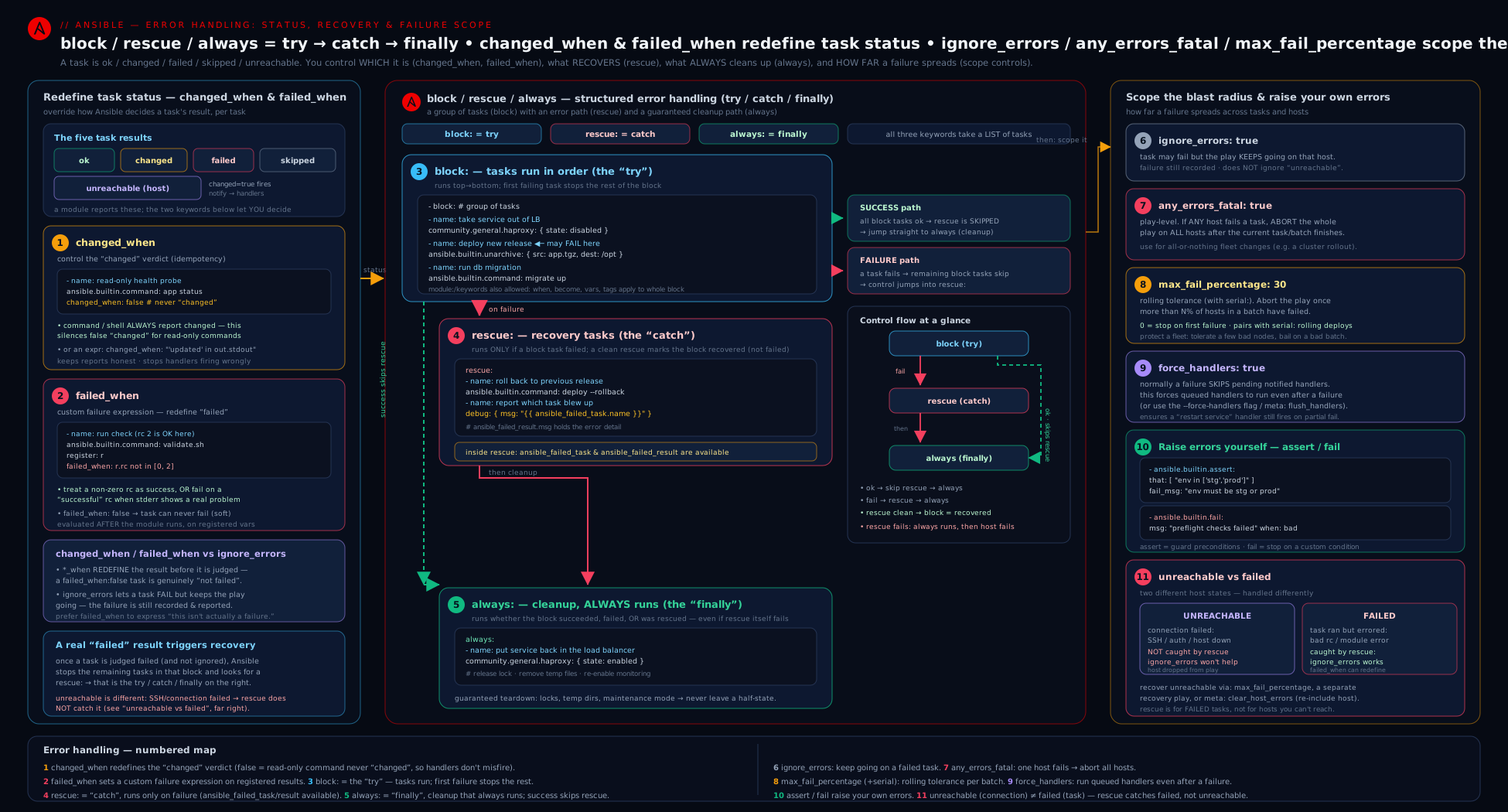
The diagram traces a task from execution through state classification (changed/failed/unreachable, each redefinable or catchable by a different keyword) into the block/rescue/always control flow and out to the fleet-level abort decisions, making the two-axis model — which state by what scope — visible at a glance.
Hands-on lab: build a resilient playbook on localhost
This lab needs only your control node and localhost — no remote hosts, no cloud, ₹0. You will exercise every construct: changed_when: false, failed_when, ignore_errors, a block/rescue/always, assert, fail, and force_handlers. (If you have a throwaway container or VM from earlier lessons, point hosts: at it instead of localhost to see it across the wire — the behaviour is identical.)
Step 1 — create the playbook. Save this as error-handling-lab.yml:
---
- name: Error-handling lab
  hosts: localhost
  connection: local
  gather_facts: true
  force_handlers: true
  vars:
    app_version: "2.1.0"
    simulate_failure: false        # flip to true to see rescue fire
  handlers:
    - name: notify done
      ansible.builtin.debug:
        msg: "Handler ran because something actually changed."

  tasks:
    # 1) Guard clause: validate inputs up front
    - name: Validate inputs
      ansible.builtin.assert:
        that:
          - app_version is defined
          - app_version is version('2.0.0', '>=')
        fail_msg: "app_version must be >= 2.0.0 (got {{ app_version | default('unset') }})"
        success_msg: "Inputs OK."
        quiet: true

    # 2) Read-only command — must NOT report changed
    - name: Read the kernel version (read-only)
      ansible.builtin.command: uname -r
      register: kernel
      changed_when: false

    - name: Show kernel
      ansible.builtin.debug:
        var: kernel.stdout

    # 3) A command whose non-zero exit is NOT a failure
    - name: Look for a string that isn't there (grep exits 1)
      ansible.builtin.command: grep -q "definitely-not-present" /etc/hostname
      register: grep_result
      failed_when: false           # never fail; we'll read .rc
      changed_when: false

    - name: Report what grep found
      ansible.builtin.debug:
        msg: "grep exit code was {{ grep_result.rc }} (1 = not found, which is fine)"

    # 4) block / rescue / always with the magic failure variables
    - name: Risky operation with rollback
      block:
        - name: Create a marker file (changes the system)
          ansible.builtin.copy:
            dest: /tmp/lab-marker
            content: "deployed {{ app_version }}\n"
            mode: "0644"
          notify: notify done

        - name: Simulate a failure if asked
          ansible.builtin.command: /bin/false
          changed_when: false
          when: simulate_failure | bool

      rescue:
        - name: Report the failure with the magic vars
          ansible.builtin.debug:
            msg: >-
              Caught failure in '{{ ansible_failed_task.name }}'
              (rc={{ ansible_failed_result.rc | default('n/a') }}). Rolling back.

        - name: Roll back (remove the marker)
          ansible.builtin.file:
            path: /tmp/lab-marker
            state: absent

      always:
        - name: This always runs (finally)
          ansible.builtin.debug:
            msg: "Cleanup/always block executed."

    # 5) ignore_errors used deliberately
    - name: Try to remove a file that may not exist
      ansible.builtin.command: rm /tmp/does-not-exist-{{ 9999 | random }}
      ignore_errors: true
      changed_when: true
Step 2 — run it the happy path. A read-only run first, then for real:
ansible-playbook error-handling-lab.yml --check     # syntax/dry-run feel
ansible-playbook error-handling-lab.yml
Expected output (happy path). The recap should show no failed hosts. The uname and grep tasks must report ok (not changed) — proving your changed_when: false works. The grep task does not fail despite grep exiting 1 — proving failed_when: false. The marker file is created (changed) and the handler runs (“Handler ran because something actually changed.”). The always debug runs. The final rm task fails but is ignored (you will see ...ignoring and an ignored=1 in the recap):
PLAY RECAP *********************************************************************
localhost : ok=10  changed=2  unreachable=0  failed=0  skipped=0  rescued=0  ignored=1
Step 3 — trigger the rescue path. Re-run with the failure simulated:
ansible-playbook error-handling-lab.yml -e simulate_failure=true
Now the /bin/false task fails, control jumps to rescue, the debug prints Caught failure in 'Simulate a failure if asked' (rc=1). Rolling back. using ansible_failed_task and ansible_failed_result, the marker is removed, and always still runs. Crucially the host is reported rescued=1, not failed — the play succeeds overall:
localhost : ok=... changed=... rescued=1 failed=0 ignored=1
Step 4 — trigger the assert guard. Prove the guard clause stops a bad run immediately:
ansible-playbook error-handling-lab.yml -e app_version=1.5.0
The very first task fails with your fail_msg (“app_version must be >= 2.0.0 (got 1.5.0)”) and nothing else runs — exactly what a precondition guard should do.
Validation checklist:
- Happy-path recap shows
failed=0and theuname/greptasks are ok, not changed (idempotency proven). - The handler fired only because the
copytask changed something (run twice — on the second run the marker already exists, the copy is ok, and the handler does not fire). simulate_failure=trueyieldsrescued=1, not a failed host, and the rollback removed the marker.- The bad-version run fails on task 1 and skips the rest.
Cleanup:
rm -f /tmp/lab-marker error-handling-lab.yml
Cost note: ₹0 — everything ran against localhost with the local connection; no remote hosts, no cloud resources, nothing to bill.
Going deeper
The keywords above cover 95% of day-to-day error handling. This section is the other 5% — the internals and edge cases that separate someone who uses rescue from someone who can debug it under pressure.
failed_when and changed_when are implicit Jinja2 conditionals
Both keywords are evaluated exactly like when: — as a bare Jinja2 expression, with no {{ }}. Wrapping the whole thing in braces (failed_when: "{{ rc != 0 }}") forces a string round-trip that can silently misbehave; write the raw expression. Three consequences follow:
- Evaluation happens after the module returns, so the result keys are in scope. Within the same task you can reference bare keys —
failed_when: rc != 0,changed_when: "'added' in stdout"— but registering the task and being explicit (deploy.rc) reads better and survives refactoring. - Undefined variables raise, just as in
when:. If a key might be missing (a module that didn’t populatestdout), guard it:failed_when: deploy.rc | default(0) != 0. This is the single most common cause of “but myfailed_whenerrored instead of failing.” - Strings are truthy.
failed_when: "some prose"is always true because a non-empty string is truthy — a classic way to make anassert/failed_whensilently always-fire or never-fire. Write real tests (port | int > 1024), and if a value should be treated as boolean, pipe it:some_var | bool.
Test the result, don’t poke at .failed
After a task that you register: and let fail (via ignore_errors or a rescue), the idiomatic way to branch is the Jinja status tests, not raw dict keys:
- name: Probe the service
  ansible.builtin.command: /opt/app/status
  register: probe
  ignore_errors: true
  changed_when: false

- name: Deploy only if the probe reported failure
  ansible.builtin.command: /opt/app/deploy
  changed_when: true
  when: probe is failed          # clearer than: when: probe.failed
| Test | True when the registered task… |
|---|---|
result is failed |
failed (even if ignore_errors swallowed the stop) |
result is succeeded / is success |
did not fail |
result is changed |
reported changed |
result is skipped |
was skipped by when/tags/check mode |
result is not changed |
ran but changed nothing |
Note the crucial subtlety: ignore_errors: true does not make a task succeed — it only removes the stop. The registered result still carries failed: true, so when: probe is failed works perfectly afterward. That is exactly the “use the failure as data” pattern from the ignore_errors section, expressed the modern way.
until / retries / delay: transient failures deserve a retry, not a rollback
Not every failure is permanent. A service that is still starting, an API returning 503, a lock held for a second — these want a retry, not a rescue. The until loop retries a task until a condition holds:
- name: Wait for the health endpoint to go green
  ansible.builtin.uri:
    url: http://localhost:8080/health
    status_code: 200
  register: health
  until: health.status == 200
  retries: 5                    # default is 3 if omitted
  delay: 10                     # seconds between attempts (default 5)
  # after 5 failed attempts the task fails for real -> rescue/ignore_errors apply
The registered result gains an .attempts key (how many tries it took). until composes with everything else: the task only enters failed state — and therefore only triggers rescue, ignore_errors, or the fleet gates — after the retries are exhausted. Reach for until before rescue whenever the failure is plausibly transient.
Error handling under check mode (--check)
--check (dry-run) interacts with error handling in ways that surprise people:
command/shell/scriptare skipped in check mode by default (they cannot promise they won’t change anything), so a read you depend on returns nothing. Force it to run withcheck_mode: falseon that task — combined withchanged_when: false, it becomes a safe, check-mode-friendly read.check_mode: truedoes the opposite: it pins a task to dry-run even on a real run — handy for a genuinely destructive task you never want executed accidentally.assert/failguards do run under--check(they only read), so your preconditions still protect a dry run — exactly what you want.
- name: Read current version (runs even under --check)
  ansible.builtin.command: /opt/app/version
  register: current
  check_mode: false            # do not skip this in --check
  changed_when: false          # and it changes nothing
The check mode, --diff and debugging lesson goes further; the point here is that check_mode: is itself an error-handling lever.
meta: actions that bend control flow
Beyond flush_handlers, several meta: actions manipulate the failed/normal state directly:
meta: action |
Effect |
|---|---|
clear_host_errors |
Un-fail every host that has failed so far — they rejoin subsequent tasks/plays (use with care; you are overriding Ansible’s memory of the failure) |
end_host |
Cleanly end the play for the current host only, without marking it failed — ideal for “not applicable on this host” branches |
end_play |
End the play for all hosts, without failing them |
end_batch |
End the current serial batch and move to the next |
flush_handlers |
Run notified handlers immediately (covered above) |
meta: end_host is the clean alternative to fail when a host simply has nothing to do: fail marks it failed (and can trip fleet gates), whereas end_host bows it out gracefully.
- name: This playbook only applies to RHEL — bow out cleanly elsewhere
  ansible.builtin.meta: end_host
  when: ansible_facts['os_family'] != "RedHat"
Failure propagates across plays, not just tasks
A host that fails (or goes unreachable) is added to Ansible’s failed-hosts list and is silently dropped from every later play in the same run — a subtlety that explains many “why did play 3 skip that host?” mysteries. meta: clear_host_errors is the escape hatch that puts them back. If retry_files_enabled is on in ansible.cfg, Ansible also writes a <playbook>.retry file listing the failed hosts, so you can re-run with --limit @site.retry.
serial, strategy, and where the fleet gates actually fire
any_errors_fatal and max_fail_percentage are evaluated at synchronization points — the end of each task across the current batch under the default linear strategy. Two implications for the experienced reader:
- The batch is the unit. With
serial: [1, 5, "30%"](a canary ramp) andmax_fail_percentage: 25, the 25% is computed against each batch’s size, and the strictly-greater-than comparison rounds accordingly: >25% of a 4-host batch means 2 or more failures. Pair with delegation, run_once, serial and rolling strategies for the batching detail. strategy: freeloosens the guarantee. Underfree, hosts advance independently rather than in lock-step, so there is no clean per-task barrier;any_errors_fatalstill aborts, but the tidy “finish the batch’s current task, then stop” behaviour oflinearno longer applies. Keep fleet-wide gates on the defaultlinearstrategy.
Nested rescues and deliberate re-raising
Blocks nest, and failure bubbles outward one level at a time: an inner block’s failure runs the inner rescue first; only if there is no inner rescue — or the inner rescue itself fails — does it reach an outer rescue. Each level’s always still runs. Two production patterns fall out of this:
- Scoped recovery: wrap just the risky sub-step in its own block/rescue so its recovery doesn’t swallow unrelated failures.
- Log-then-fail (re-raise): sometimes you want a rescue to record context and still fail the host. End the rescue with an explicit
ansible.builtin.fail— because a task insiderescuethat fails re-fails the host for real:
  rescue:
    - name: Record what broke (to a file, a webhook, wherever)
      ansible.builtin.debug:
        msg: "Failed at {{ ansible_failed_task.name }} — see runbook."
    - name: Re-raise — we logged it, but this host must still fail
      ansible.builtin.fail:
        msg: "Unrecoverable failure in {{ ansible_failed_task.name }}."
Finally, an attribution gotcha: with delegate_to, a failure of the delegated action is attributed to the original host (the one the task is iterating for), not the delegate — so your rescue and fleet counts reason about the inventory host, which is usually what you want.
Practice challenges
Six graded exercises, beginner to advanced. Try each before opening the solution. All run against localhost with connection: local, so they cost ₹0.
1. (Beginner) Silence a read-only command. Write a task that runs id -un (prints the current user), captures the result, and is reported ok, never changed, on every run.
<details> <summary>Solution</summary>
- name: Read the current user (read-only)
  ansible.builtin.command: id -un
  register: whoami_result
  changed_when: false
Why: command reports changed every run because it cannot know it changed nothing; changed_when: false states the truth and keeps the run idempotent.
</details>
2. (Beginner) Turn a benign non-zero exit into data. grep -q a string in /etc/hostname. A miss (exit 1) must not fail the play; capture the exit code for a later task to read.
<details> <summary>Solution</summary>
- name: Look for a marker (absence is fine)
  ansible.builtin.command: grep -q "marker" /etc/hostname
  register: marker
  failed_when: false
  changed_when: false
Why: failed_when: false redefines the task so a non-zero grep is never a failure — honest, and better than letting it fail then ignore_errors. You read marker.rc yourself.
</details>
3. (Intermediate) try / catch / finally. Create /tmp/challenge, then run a command that fails. On failure, remove the file and print which task broke; either way, print “done”.
<details> <summary>Solution</summary>
- name: Risky change with rollback
  block:
    - name: Make the change
      ansible.builtin.copy:
        dest: /tmp/challenge
        content: "work in progress\n"
        mode: "0644"
    - name: A step that fails
      ansible.builtin.command: /bin/false
      changed_when: false
  rescue:
    - name: Roll back
      ansible.builtin.file:
        path: /tmp/challenge
        state: absent
    - name: Report
      ansible.builtin.debug:
        msg: "Rolled back after {{ ansible_failed_task.name }}."
  always:
    - name: Finally
      ansible.builtin.debug:
        msg: "done"
Why: rescue clears the failure (the host ends rescued, not failed) and always guarantees the “done” message whether or not the block failed.
</details>
4. (Intermediate) Retry a flaky check. Poll http://localhost:8080/health up to 5 times, 3 seconds apart, and only proceed once it returns HTTP 200.
<details> <summary>Solution</summary>
- name: Wait for health to go green
  ansible.builtin.uri:
    url: http://localhost:8080/health
    status_code: 200
  register: health
  until: health.status == 200
  retries: 5
  delay: 3
Why: until retries a transient failure instead of rescuing or aborting on the first attempt; the task only truly fails after the 5th miss, and health.attempts records how many tries it took.
</details>
5. (Advanced) A fleet gate for a rolling upgrade. Upgrade myapp four hosts at a time, aborting the whole rollout once more than 25% of a batch has failed.
<details> <summary>Solution</summary>
- name: Rolling upgrade with a tolerance dial
  hosts: webservers
  serial: 4
  max_fail_percentage: 25
  tasks:
    - name: Upgrade the app
      ansible.builtin.package:
        name: myapp
        state: latest
Why: max_fail_percentage is strictly greater-than, so >25% of a 4-host batch means 2 or more failures trip the abort — one dud per batch is tolerated, a wave is not.
</details>
6. (Advanced) A check-mode-safe read behind a guard. At the top of a play, assert that release_version is defined and >= 2.0.0. Then read /opt/app/version in a way that still runs under ansible-playbook --check and never reports changed.
<details> <summary>Solution</summary>
- name: Validate inputs
  ansible.builtin.assert:
    that:
      - release_version is defined
      - release_version is version('2.0.0', '>=')
    fail_msg: "release_version must be defined and >= 2.0.0."
    quiet: true

- name: Read current version (even under --check)
  ansible.builtin.command: /opt/app/version
  register: current
  check_mode: false
  changed_when: false
Why: command is skipped in check mode by default, so a dependent read needs check_mode: false to run; changed_when: false keeps it honest, and the assert guard still fires under --check because it only reads.
</details>
Common beginner mistakes
These are mental-model errors — not symptoms to look up (that is the troubleshooting table below) but wrong ideas that produce a whole class of bugs. Fix the model and the bugs stop.
-
“
ignore_errors: truefixes the problem.” It does not — it only removes the stop. The task still failed; its registered result still hasfailed: true; it is counted in theignoredcolumn; and it does nothing for an unreachable host. The right model:ignore_errorssays “keep going,” not “this succeeded.” When a non-zero exit is not really a failure, preferfailed_whenso the task is honest rather than ignored. -
“
changed_when: falsealso stops the task failing.” No —changed_whencontrols only the changed verdict; failure is a separate axis, governed byfailed_whenand the module’s own return. A task withchanged_when: falsecan still fail hard. To neutralise both you needchanged_when: falseandfailed_when: false(and then you take responsibility for reading.rc). -
“
rescueis a catch-all safety net.” It catches failed, and only failed. A host that reboots or drops its SSH connection becomes unreachable, whichrescue,ignore_errorsandfailed_whenall ignore — useignore_unreachable, therebootmodule, orwait_for_connection. Templating and syntax errors also happen beforerescuecan help. -
“A list in
failed_when/assert.thatmeans OR.” It means AND — every condition must be true.failed_when: ["rc != 0", "'x' in stdout"]fails only when both hold, which is rarely what was intended. For OR, use one string with an explicitor. -
“
alwayswill clean up and swallow the failure.”alwaysisfinally, notcatch. With analwaysbut norescue, the cleanup runs and then the host still fails. Only arescuethat completes successfully clears the failure (marking the host rescued). -
“My handler will definitely run.” Handlers run at the end of the play and only if a notifying task reported changed. A failure earlier in the play aborts before the flush, so the restart never happens — unless you set
force_handlers: trueor callmeta: flush_handlersbefore the risky step. -
“
failed_when/changed_whenneed{{ }}.” They are implicit Jinja conditionals, exactly likewhen:. Write the bare expression (failed_when: deploy.rc != 0); wrapping it in braces stringifies the result and can produce a condition that is always true (any non-empty string is truthy).
Common mistakes & troubleshooting
| Symptom | Likely cause | Fix |
|---|---|---|
ignore_errors: true had no effect; host still skipped |
The failure was unreachable, not failed (host down / SSH refused) | Use ignore_unreachable: true — ignore_errors only covers failed |
Every run shows a command/shell task as changed |
command/shell always reports changed; you didn’t set changed_when |
Add changed_when: false (read-only) or an expression reflecting real change |
| A handler (“restart nginx”) fired on a run where nothing changed | The notifying task reported changed every time (likely a bare command) |
Fix the notifying task’s changed_when so it’s changed only on real change |
A grep/test/diff task fails the play on a normal non-zero exit |
Non-zero exit = failure by default | Add failed_when: false and read .rc yourself, or failed_when: with the real error condition |
rescue didn’t run when the host rebooted mid-play |
A reboot makes the host unreachable, which rescue does not catch |
Use the ansible.builtin.reboot module or wait_for_connection, not rescue |
| Notified handler never ran because a later task failed | Handlers run at play end; the play aborted first | Set force_handlers: true (or --force-handlers), or meta: flush_handlers earlier |
failed_when: ["rc != 0", "'x' in stdout"] behaves unexpectedly |
A list of conditions is AND-ed, not OR | Use a single string with explicit or: failed_when: "rc != 0 or 'x' in stdout" |
always ran but the host still failed |
always is finally, not catch — it doesn’t clear the failure |
Add a rescue: to actually handle (clear) the failure |
| Whole fleet kept going when one critical migration host failed | Default is per-host; no fleet control set | Add any_errors_fatal: true (or max_fail_percentage: 0) to the play |
| Rolling upgrade ploughed on through many failures | No max_fail_percentage set |
Add max_fail_percentage: <N> (with serial: for batches) |
assert passes when it shouldn’t |
A condition is a string that’s always truthy (e.g. quoted wrong) so it doesn’t evaluate as a test | Write real expressions in that: (e.g. `port |
Best practices
- Default to
changed_whenon everycommand/shell/raw/scripttask. If it reads,changed_when: false; if it sometimes changes, an expression. This single habit is most of what makes a playbook genuinely idempotent and stops handlers mis-firing. - Prefer
failed_whenoverignore_errors.ignore_errorshides a real failure after the fact;failed_whenstates what failure means so the task is honest. Reserveignore_errorsfor genuinely-don’t-care cleanup. - Use
block/rescue/alwaysfor anything with a rollback or cleanup — do the risky thing inblock, recover inrescue, clean up unconditionally inalways. It is the only structured error handling Ansible has; use it deliberately. - Put an
assertguard at the top of every role and risky play. Validate inputs loudly and early with a precisefail_msg, so a misconfiguration fails on line one, not obscurely ten tasks deep. - Pick the right fleet control:
any_errors_fatalfor atomic operations (any failure ⇒ abort),max_fail_percentagefor graceful rollouts (some casualties tolerated), and combinemax_fail_percentagewithserialfor canary-style batches. - Turn on
force_handlers(or usemeta: flush_handlersbefore a verification step) whenever a failure later in the play must not leave a notified restart un-run. - Always reference
ansible_failed_task.nameandansible_failed_resultin yourrescueso the logs say what broke — future-you debugging at 3 a.m. will thank you. - Keep the failed/unreachable distinction front of mind when choosing a keyword; reach for the right column (errors vs unreachable) deliberately.
Security notes
assert/failmessages anddebugofansible_failed_resultcan leak secrets. A failed task’s result may contain command output, tokens or connection strings; printingansible_failed_resultwholesale in arescuecan spray it into logs and CI output. Print specific, non-sensitive fields, and wrap secret-handling tasks (and their rescues) inno_log: true.no_loginteracts with error handling: a task withno_log: truethat fails will hide its output — good for secrets, but it can make debugging hard, so log a sanitised message in the rescue rather than the raw result.- Never use
ignore_errors/failed_when: falseto paper over a failing security control. Suppressing the failure of a “is the firewall up?” or “did the patch apply?” check turns a guardrail into theatre. If something must hold, let it fail — that’s whatassertis for. - Guard destructive playbooks with
assert/failon the target. Awhen: target_env == 'prod'+fail(or anassertthat the inventory group is the intended one) is a cheap, effective blast-radius guard against “ran the teardown against prod by mistake.” - Be careful that
force_handlersdoesn’t run a restart on a half-configured host. If the play failed because the config is bad, forcing the restart handler may bounce the service into the broken config. Order matters — sometimes you want the failure to stop short of the restart.
Interview & exam questions
1. Explain the semantics of block, rescue and always.
block: runs first (the try). If any task in it fails, the remaining block tasks are skipped and rescue: runs (the catch). always: runs unconditionally afterward (the finally) — whether the block succeeded, failed, or was rescued. If rescue: completes without failing, the host is marked rescued and the failure is cleared; if a task in rescue: fails, the host fails for real. always: does not clear a failure — it’s finally-semantics, not catch.
2. What are ansible_failed_task and ansible_failed_result, and where are they available?
Inside a rescue: block. ansible_failed_task is the task object that failed (e.g. ansible_failed_task.name); ansible_failed_result is the failed task’s full result dict (.rc, .stdout, .stderr, .msg). They let your rescue report and react to what broke.
3. Why does a command task always show “changed”, and how do you fix it?
command/shell/raw/script have no way to know whether they changed anything, so they default to changed every run. Fix it with changed_when: — false for read-only commands, or an expression over the registered result (changed_when: "'added' in result.stdout") for commands that sometimes change. This also stops handlers from mis-firing.
4. What’s the difference between ignore_errors and failed_when?
ignore_errors: true lets a task fail but continues anyway (it’s logged as ignored). failed_when: redefines what counts as failure so the task may never fail in the first place. failed_when is almost always better — it makes the task honest rather than hiding a real failure. failed_when: false is the clean replacement for ignore_errors on read-only checks where you interpret .rc yourself.
5. A host reboots mid-play and your rescue doesn’t catch it — why?
A reboot makes the host unreachable, and rescue (like ignore_errors, failed_when, blocks) only handles failed, not unreachable. Use the ansible.builtin.reboot module (which manages the disconnect/reconnect) or wait_for_connection; for merely tolerating unreachable hosts use ignore_unreachable: true.
6. Compare any_errors_fatal and max_fail_percentage.
Both decide when one host’s failure should abort the whole play, and both count failed and unreachable hosts. any_errors_fatal: true aborts if any host fails (atomic — all or nothing). max_fail_percentage: N aborts once more than N% of hosts (per batch, with serial) have failed (graceful tolerance). any_errors_fatal: true ≈ max_fail_percentage: 0.
7. When and why would you use force_handlers?
Handlers normally run at the end of the play, so if a later task fails the play aborts and notified handlers never run — leaving, say, a config change un-restarted. force_handlers: true (play-level), --force-handlers (CLI), or meta: flush_handlers (run them now) ensure notified handlers still execute despite a failure.
8. assert vs the fail module — when each?
Use assert to validate conditions that should be true — preconditions/input validation via that: (all conditions AND-ed) with fail_msg/success_msg. Use fail to deliberately stop with a msg, normally gated by a when: you computed elsewhere (a guard, an unsupported-OS branch). Both produce a normal failed state.
9. In failed_when: [a, b], are the conditions OR-ed or AND-ed?
AND-ed — the task fails only if all conditions are true. This surprises people who expect OR. For OR, use a single string with explicit or: failed_when: "a or b". The same AND-for-lists rule applies to changed_when and to assert’s that.
10. How do changed_when/failed_when behave with a loop?
They are evaluated per item. Each item’s verdict lands in the registered .results list; the task as a whole is reported changed/failed if any item is changed/failed. So you can have a loop where some items changed and some didn’t, and the per-item changed/failed flags reflect each.
11. What is the practical difference between always and force_handlers for cleanup?
always runs cleanup tasks within a block regardless of that block’s outcome (scoped, runs at that point). force_handlers ensures notified handlers (which run at play end) still fire even if the play failed. Use always for immediate, scoped cleanup; force_handlers for end-of-play handler reliability.
12. Give a robust pattern for a deployment that must roll back on failure and always release a lock.
A block that acquires the lock and performs the deploy; a rescue that logs ansible_failed_task/ansible_failed_result and runs the rollback; an always that releases the lock unconditionally. Add force_handlers so a notified “restart” still runs, and wrap the play (or block) in any_errors_fatal/max_fail_percentage if a partial fleet success is unacceptable.
Quick check
- In
block/rescue/always, which section runs only on failure, and which runs always? - What single keyword stops a read-only
ansible.builtin.commandfrom being reported as “changed”? - Does
ignore_errors: truemake a play continue past an unreachable host? - Is a list of conditions in
failed_whentreated as AND or OR? - Which keyword aborts the whole play as soon as any host fails?
Answers
rescue:runs only on failure;always:runs unconditionally (try/catch/finally —block/rescue/always).changed_when: false.- No.
ignore_errorsonly covers failed; for unreachable you needignore_unreachable: true. - AND — the task fails only if all conditions are true. (Same for
changed_whenandassert’sthat.) any_errors_fatal: true(equivalentlymax_fail_percentage: 0).
Exercise
Turn a fragile deploy into a resilient one. Starting from a play that (a) reads the current version with ansible.builtin.command, (b) writes a config file, and © restarts a service, do the following:
- Add an
assertguard at the top validating that arelease_versionvariable is defined and>= 2.0.0, with a precisefail_msg. - Wrap the version-read command so it reports neither changed nor failed inappropriately (
changed_when: false, and a sensiblefailed_when). - Put the config-write + service-action inside a
blockwith arescuethat, usingansible_failed_task/ansible_failed_result, restores a backup of the config and analwaysthat removes a/tmp/deploy.lockfile. - Make the service restart a handler notified by the config-write, and set
force_handlers: trueso the restart still happens if a later verification task fails. - Add a final
urihealth check whosefailed_whentrips on a non-200 status, and configure the play withserial: 2andmax_fail_percentage: 50so a rollout aborts if more than half a batch fails.
Success criteria: a bad release_version fails immediately on the assert; the version read is reported ok, never changed; a forced failure inside the block triggers the rollback in rescue, leaves the host rescued (not failed), and the lock is removed by always; the restart handler fires only on a real config change and still runs despite a later failure; and a fleet run aborts once more than 50% of a batch fails.
Certification mapping
- Red Hat RHCE (EX294) — this lesson maps directly onto the exam objectives “Use conditionals to control play execution,” “Configure error handling,” and “Create and use templates to create customised configuration files.” Specifically: blocks with
rescue/always,ignore_errors,failed_whenandchanged_whenare explicit error-handling skills the exam expects you to apply correctly under time pressure, and idempotentcommand/shellusage (viachanged_when) is tested implicitly throughout. Pair it with conditionals, loops, handlers and tags for thewhen/handler objectives. - Red Hat RHCSA-adjacent automation — the disciplined idempotency (
changed_when: false) and guard clauses (assert/fail) reinforce safe, repeatable system administration. - General DevOps/CI interviews — the failed-vs-unreachable distinction,
block/rescue/alwayssemantics, andany_errors_fatalvsmax_fail_percentageare classic Ansible interview probes; this lesson is direct preparation for them.
Glossary
- Block — a group of tasks under a
block:key; lets you applywhen/become/tags/error handling to many tasks at once. - rescue — the section that runs only when a task in the block fails; Ansible’s
catch. - always — the section that runs unconditionally after the block (and any rescue); Ansible’s
finally. - rescued — a recap state meaning a block failed but its
rescuehandled it, so the host did not fail. ansible_failed_task— inside arescue, the task object that failed (.name,.action).ansible_failed_result— inside arescue, the failed task’s full result dict (.rc,.stdout,.msg).ignore_errors— keep running on a host despite a failed task (does not cover unreachable).ignore_unreachable— keep running despite a host being unreachable (a connection failure).failed_when— an expression that redefines what counts as a task failure (false= never fail).changed_when— an expression that redefines whether a task is reported as changed (false= never changed).any_errors_fatal— play/block keyword: if any host fails or is unreachable, abort the play for all hosts.max_fail_percentage— play/batch keyword: abort once more than N% of hosts have failed/unreachable.force_handlers— run notified handlers even if the play later fails (also--force-handlers).meta: flush_handlers— immediately run all currently-notified handlers at that point in the task list.assert— module that fails unless all conditions inthat:are true; the guard-clause module.fail— module that deliberately fails the host with a custommsg, usually gated bywhen:.- failed — a host where a module returned failure (connection was fine).
- unreachable — a host Ansible could not connect to or run anything on at all.
until/retries/delay— retry a task until a condition is true (or attempts run out); the result gains an.attemptscount.check_mode— per-task control over dry-run:check_mode: falseforces a task to run even under--check;check_mode: truepins it to dry-run always.meta: clear_host_errors— un-fail hosts that have failed so far, letting them rejoin later tasks/plays.meta: end_host— cleanly end the play for the current host without marking it failed.is failed/is succeeded/is changed— Jinja tests over a registered result; the idiomatic form of.failed/.changed.serial— run a play in batches (a number, percentage, or ramp list); the unit against whichmax_fail_percentageis measured.strategy— how tasks are scheduled across hosts (lineardefault,free,host_pinned); fleet gates rely onlinear’s per-task barrier.- failed-hosts list — Ansible’s record of failed/unreachable hosts, which are dropped from later plays in the same run.
Next steps
You can now write playbooks that fail honestly, recover gracefully, and abort safely. From here:
- Package these patterns into reusable units with Ansible roles and collections — putting an
assertguard in a role’s first task andblock/rescuein itsmain.ymlis exactly how production roles are built. - Revisit conditionals, loops, handlers and tags with fresh eyes —
force_handlersandmeta: flush_handlersmake a lot more sense once you’ve hit a failure that skipped a restart. - Strengthen your expressions by going deeper on Jinja2 templating, filters and tests — every
failed_when/changed_when/assertcondition is a Jinja2 test, anddefault,version()and the comparison tests make them robust. - Reinforce the data side with variables, facts, register and set_fact, since every error-handling expression is built from a registered result or a fact.