In a nutshell
A role is a tidy, reusable folder of Ansible automation for one job — “be a web server”, “harden SSH”, “install our app”. Instead of copy-pasting the same tasks into every playbook, you put them in a role once and call it by name. Because the folders inside a role have fixed names (tasks/, templates/, defaults/, and so on), Ansible always knows where to look — you never wire anything up by hand.
Think of a role like a recipe card in a shared box: the ingredients (files), the steps (tasks), the “adjust this to taste” notes (defaults/), and the “don’t change this” rules (vars/) each have their own spot on the card. Anyone can pull the card and cook the dish without reading your mind. A collection is then the cookbook that ships a whole set of recipe cards (roles) plus new kitchen tools (modules and plugins), versioned and downloadable from Ansible Galaxy — the public library of cookbooks.
You will meet three ways to “cook a recipe” (run a role): the roles: list, import_role, and include_role; a way to say “this recipe needs that one first” (dependencies in meta/main.yml); and a shopping list (requirements.yml) that fetches every role and collection your project needs so a teammate or CI runner gets the exact same set. Don’t try to memorise it all now — the rest of the lesson builds each piece up slowly, and there’s a free localhost-only lab to make it concrete.
Level: Intermediate · Time: ~45 min
Up to now you have written plays — long lists of tasks, handlers, and variables in a single file. That works for one machine and one job, but it does not scale: you cannot share it, you cannot version it, you copy-paste the same “install and configure nginx” block into every project, and the playbook becomes a thousand-line wall nobody wants to read. Roles are Ansible’s answer. A role is a self-contained, reusable unit of automation — a fixed directory layout that holds the tasks, handlers, templates, files, variables, defaults, and metadata for one logical job (“be a web server”, “harden SSH”, “deploy our app”). Drop a role into any playbook with one line and Ansible knows where everything lives because the directory structure is a contract.
Collections are the next layer up. A collection is a distributable bundle — namespace.collection — that can contain many roles, plus modules, plugins, and documentation, all versioned and installable from Ansible Galaxy (the public hub) or a private Automation Hub. Since Ansible 2.10 almost every module you use actually lives in a collection and is addressed by its FQCN (fully-qualified collection name, like ansible.builtin.copy or community.general.ufw). Roles are how you organise your automation; collections are how the whole ecosystem ships everyone’s automation — and requirements.yml is the manifest that pulls both into your project reproducibly.
This lesson is the exhaustive version. By the end you will know every directory in a role and the main.yml auto-loading rules; the three ways to invoke a role (the roles: keyword, ansible.builtin.import_role, and ansible.builtin.include_role) and exactly how static import differs from dynamic include; how to pass role parameters and run a non-default entry point with tasks_from; how role dependencies work in meta/main.yml and what allow_duplicates does; the variable precedence rules that decide whether defaults/ or vars/ wins; how to use Ansible Galaxy (ansible-galaxy role install, ansible-galaxy collection install, ansible-galaxy init); what a collection is, the FQCN, the collections: keyword, and collections_path; and how to write a requirements.yml that installs roles and collections from Galaxy, git, and URLs with pinned versions. Every option gets the same treatment — what it is · the choices · the default · when to use it · the trade-off · the gotcha — and every operation comes with a real command. Everything reflects current ansible-core 2.17+ / Ansible 10+ (2026).
Learning objectives
By the end of this lesson you can:
- Lay out a role in the standard directory structure and explain the auto-loading rule for each
main.yml. - Invoke a role three ways — the
roles:keyword,import_role(static), andinclude_role(dynamic) — and choose correctly between them. - Pass role parameters, run an alternate entry point with
tasks_from, and apply tags/conditions to a role. - Declare role dependencies in
meta/main.yml, control re-runs withallow_duplicates, and order dependent roles correctly. - Reason about role variable precedence — why
defaults/main.ymlis overridable butvars/main.ymlis not. - Use Ansible Galaxy to scaffold (
init), install, and list roles and collections. - Address modules by FQCN, use the
collections:keyword, setcollections_path, and pin everything in arequirements.yml(Galaxy, git, URL, versions).
Prerequisites & where this fits
You should already be comfortable writing a playbook — a play with hosts, become, tasks, handlers, and vars — and using variables and facts (especially the precedence idea) and notify/handlers. If register, when, loop, or import_tasks/include_tasks are fuzzy, skim the earlier playbook and variables lessons first. In the Ansible Zero-to-Hero programme this is the lesson that turns “a playbook on my laptop” into “shareable, versioned, dependency-managed automation a whole team can reuse.” It follows the error-handling lesson (your roles should be resilient) and leads into Ansible Vault (roles need secrets) and the deeper idempotent collections with Molecule testing (proving a role is correct in CI). Think of a role as the noun — the reusable thing — and a playbook as the sentence that arranges several nouns into a deployment.
Core concepts
A role is a directory whose name is the role name and whose subdirectories have fixed, reserved names. Ansible does not need a config file inside a role telling it what is what — the location of a file is its meaning. Put tasks in tasks/main.yml and they are the role’s tasks; put a file in templates/ and ansible.builtin.template finds it by bare filename. This convention-over-configuration design is the whole point: any role looks like any other role, so you can read and reuse strangers’ roles instantly.
A collection is a higher-level package identified by namespace.collection (for example ansible.builtin, community.general, amazon.aws, or your own kloudvin.platform). A collection can ship modules, plugins, roles, and playbooks together, versioned with semantic versioning, and is installed into a collections path as a directory tree ansible_collections/<namespace>/<collection>/. The crucial consequence is the FQCN: every module, role, or plugin is addressed as namespace.collection.name. ansible.builtin.copy means the copy module from the builtin collection in the ansible namespace; community.general.ufw means the ufw module from community.general. Using FQCNs everywhere removes ambiguity (two collections can both define a firewall module) and is now best practice and what the linters enforce.
Ansible Galaxy (galaxy.ansible.com) is the public registry for both standalone roles (the older, role-only distribution model) and collections (the modern bundle). The ansible-galaxy CLI talks to Galaxy (or a private server) to search, install, and scaffold roles and collections. A requirements.yml file lists the roles and collections your project depends on — with their sources (Galaxy, a git URL, a tarball URL) and versions — so ansible-galaxy install -r requirements.yml reproduces the exact dependency set on any machine or CI runner.
Keep these distinctions clear, because the rest of the lesson is built on them: role (a directory of automation), standalone role vs collection (two distribution formats), FQCN (namespace.collection.name addressing), roles: vs import_role vs include_role (three ways to run a role, static vs dynamic), and requirements.yml (the dependency manifest).
The role directory structure: every directory
A role is found by name under a roles path (covered later) and has this fixed layout. Scaffold the skeleton with ansible-galaxy init <role-name>, which creates exactly these directories:
roles/
└── webserver/                 # the role name
    ├── tasks/
    │   └── main.yml           # the role's tasks (the default entry point)
    ├── handlers/
    │   └── main.yml           # handlers the tasks can notify
    ├── templates/
    │   └── nginx.conf.j2      # Jinja2 templates (found by bare name)
    ├── files/
    │   └── index.html         # static files to copy (found by bare name)
    ├── vars/
    │   └── main.yml           # high-precedence role variables
    ├── defaults/
    │   └── main.yml           # lowest-precedence, overridable variables
    ├── meta/
    │   └── main.yml           # role metadata, dependencies, galaxy_info
    ├── library/               # role-local custom modules (optional)
    ├── module_utils/          # shared Python for those modules (optional)
    ├── lookup_plugins/        # role-local plugins (optional, any plugin type)
    └── README.md              # documentation
Each directory has a precise job, a precise auto-loading behaviour, and a precise precedence position. This is the table to memorise.
| Directory | main.yml auto-loaded? |
What it holds | How tasks reference it | Notes / gotcha |
|---|---|---|---|---|
tasks/ |
Yes — tasks/main.yml is the default entry point run when the role is invoked |
The list of tasks | n/a (this is the tasks) | Other files here (e.g. tasks/install.yml) are run only via tasks_from or import_tasks/include_tasks. |
handlers/ |
Yes — handlers/main.yml is loaded automatically |
Handlers (notified by tasks) | notify: "Restart nginx" |
Handler names are global within the play; notify by name. |
templates/ |
n/a (not a YAML file) | .j2 Jinja2 templates |
ansible.builtin.template: src: nginx.conf.j2 — bare filename, no path |
Ansible searches templates/ automatically; templates can be referenced by bare name from inside the role. |
files/ |
n/a | Static files & scripts | ansible.builtin.copy: src: index.html — bare filename |
Same magic search: copy/script look in files/ first. |
vars/ |
Yes — vars/main.yml loaded automatically |
Role variables (high precedence) | referenced like any var: {{ my_var }} |
High in precedence — not meant to be overridden by the caller. Put internal constants here. |
defaults/ |
Yes — defaults/main.yml loaded automatically |
Default variables (lowest precedence) | {{ my_var }} |
Lowest precedence of all named vars — the role’s public, overridable API. Put every tunable here. |
meta/ |
Yes — meta/main.yml loaded automatically |
Dependencies, galaxy_info, supported platforms, allow_duplicates |
n/a | Also where argument_specs.yml (typed input validation) lives. |
library/ |
n/a | Role-local custom modules | callable by name within the role | Lets a role ship a module without a full collection. |
module_utils/ |
n/a | Shared Python imported by those modules | Python import | For deduplicating code across the role’s modules. |
<type>_plugins/ |
n/a | Role-local plugins (filter_plugins/, lookup_plugins/, vars_plugins/, …) |
by plugin name | Auto-loaded when the role is used; one dir per plugin type. |
Three rules tie this together:
main.ymlis the entry point in every directory that holds YAML.tasks/main.yml,handlers/main.yml,vars/main.yml,defaults/main.yml, andmeta/main.ymlare loaded automatically when the role runs — you never name them explicitly. A role with onlytasks/main.ymlis a perfectly valid role; every other directory is optional.templates/andfiles/enable bare-name references. Inside a role,ansible.builtin.template: src: app.conf.j2resolves toroles/<role>/templates/app.conf.j2automatically, andcopy: src: logo.pngresolves toroles/<role>/files/logo.png. This relative search path is one of the biggest ergonomic wins of roles — no long paths.defaults/is lowest precedence;vars/is high precedence. This single fact is the most-tested role concept (full table below): variables a caller should be able to override go indefaults/; values the role author wants to protect go invars/.
You do not need every directory. The minimal useful role is just tasks/main.yml. As the role grows you add defaults/ (its tunables), handlers/ (its restarts), templates//files/ (its content), and meta/main.yml (its dependencies and Galaxy metadata).
Using a role: the roles: keyword vs import_role vs include_role
There are three ways to run a role, and the difference between them is the difference between static and dynamic — exactly the same distinction as import_tasks (static) versus include_tasks (dynamic). Getting this right is core RHCE material.
| Method | Static or dynamic? | Where it runs | Accepts parameters? | when/loop behaviour |
Tags behaviour |
|---|---|---|---|---|---|
roles: keyword |
Static (pre-processed before the play runs) | Runs before tasks: (the role’s tasks come first), in roles: order |
Yes (inline params) | A when on the entry applies to every task in the role |
Tags are added to all the role’s tasks at parse time |
ansible.builtin.import_role |
Static (imported at parse time) | Wherever the task sits in tasks: |
Yes (via vars:) |
when/loop apply to each task individually (cannot loop the whole role) |
Inherited statically by all tasks |
ansible.builtin.include_role |
Dynamic (resolved at runtime) | Wherever the task sits, at run time | Yes (via vars:) |
when/loop apply to the include as a unit — you can loop a dynamic role include |
Tags must be on the include_role task itself; inner tags are not exposed to --tags |
The roles: keyword
The classic, declarative form. List the roles a play applies; Ansible runs each role’s tasks/main.yml before the play’s own tasks: section, in the order listed (after running their dependencies):
- name: Configure web tier
  hosts: web
  become: true
  roles:
    - common                       # shorthand: just the role name
    - role: webserver              # long form, lets you add options
      vars:
        webserver_port: 8080       # a role parameter
      tags: [web]
      when: ansible_os_family == "RedHat"
    - geerlingguy.nginx            # a Galaxy role by full name
Key facts about roles:: it is static (the roles are merged into the play at parse time, before any task runs), the roles run before anything in tasks:, and a when: on a role entry is copied onto every task the role contains. There is also a pre_tasks / roles / tasks / post_tasks ordering for a play — pre_tasks run first, then roles, then tasks, then post_tasks; handlers notified by pre_tasks/roles flush between sections.
import_role (static)
ansible.builtin.import_role pulls a role in at a specific point in your tasks: list, and does it statically (parsed up front, like roles:):
tasks:
  - name: Do some setup first
    ansible.builtin.debug:
      msg: "preparing"

  - name: Now bring in the webserver role at this exact point
    ansible.builtin.import_role:
      name: webserver
    vars:
      webserver_port: 8080         # role parameters go under vars:

  - name: Continue afterwards
    ansible.builtin.service:
      name: nginx
      state: started
Because it is static, import_role:
- is parsed before the play runs, so the role’s tasks are visible to
--list-tasks,--start-at-task, and--tagsas individual tasks; - cannot be looped as a whole (a
looponimport_roleerrors — the import happens once at parse time); - a
when:on theimport_roleis applied to each task individually inside the role (not to the role as one gate).
Use import_role when you want the role’s tasks woven into a precise position and fully visible to task-level CLI controls.
include_role (dynamic)
ansible.builtin.include_role brings a role in at run time — the role is resolved when execution reaches the task, not at parse time:
tasks:
  - name: Conditionally include the role only on RHEL
    ansible.builtin.include_role:
      name: webserver
    vars:
      webserver_port: 8080
    when: ansible_os_family == "RedHat"   # gates the WHOLE include as one unit

  - name: Apply a role once per item (loops work with include_role!)
    ansible.builtin.include_role:
      name: create_vhost
    loop: "{{ vhosts }}"
    loop_control:
      loop_var: vhost
Because it is dynamic, include_role:
- is resolved at run time, so its inner tasks are not visible to
--list-tasksahead of time and--start-at-taskcannot jump inside it; - can be looped — the entire role runs once per loop item (impossible with
import_role); - a
when:(orloop) applies to the include as a single unit; - requires tags on the
include_roletask itself;--tagswill not match tags defined only inside the dynamically-included role (a classic gotcha).
The mental model is identical to tasks: import = static = “paste it in at parse time” (visible, no looping the unit); include = dynamic = “decide at run time” (loopable, conditional as a unit, but opaque to pre-run listing). Prefer import_role/the roles: keyword for the common case; reach for include_role when you genuinely need to loop a role or include it conditionally as a unit.
Role parameters and tasks_from
You pass variables into a role as role parameters. With the roles: long form and with import_role/include_role you put them under vars::
- ansible.builtin.include_role:
    name: webserver
    tasks_from: install      # run tasks/install.yml instead of tasks/main.yml
    handlers_from: extra     # (optional) load handlers/extra.yml too
    vars_from: rhel          # (optional) load vars/rhel.yml
    defaults_from: minimal   # (optional) load defaults/minimal.yml
  vars:
    webserver_port: 8443
tasks_from is the important one: a role can have multiple entry points. Instead of one giant tasks/main.yml, you split work into tasks/install.yml, tasks/configure.yml, tasks/upgrade.yml, and call a specific one with tasks_from: upgrade. This is how mature roles (and most Galaxy “collection roles”) expose several operations from one role without a separate role per operation. The matching handlers_from, vars_from, and defaults_from let you load alternate handler/var/default files alongside the chosen task file. All of these work with both import_role and include_role.
Role dependencies and allow_duplicates
A role can declare that it depends on other roles in its meta/main.yml. Those dependency roles run before the depending role’s tasks/main.yml, automatically:
# roles/webserver/meta/main.yml
---
galaxy_info:
  author: Vinod H
  description: Install and configure nginx
  license: MIT
  min_ansible_version: "2.16"
  platforms:
    - name: EL
      versions: ["9"]
    - name: Ubuntu
      versions: ["jammy", "noble"]
  galaxy_tags: [web, nginx]

dependencies:
  - role: common                       # run the common role first
  - role: firewall                     # then firewall
    vars:
      firewall_allowed_tcp_ports: [80, 443]   # pass params to the dependency
The meta/main.yml keys you care about:
| Key | What it does | Notes |
|---|---|---|
dependencies |
A list of roles that must run before this role’s tasks | Each entry is a role name or {role: x, vars: {...}}; dependencies of dependencies resolve recursively. |
galaxy_info |
Metadata for Galaxy: author, description, license, min_ansible_version, platforms, galaxy_tags |
Required to publish a standalone role; platforms drives Galaxy search filters. |
allow_duplicates |
Whether the role may run more than once in a single play | Default false — a role with the same parameters is deduplicated (runs once). Set true to allow repeated runs. |
The allow_duplicates behaviour is the subtle, exam-favourite part. By default, if the same role is pulled in twice with identical parameters during one play (commonly because two roles both depend on common), Ansible runs it only once — it deduplicates. That is what you want for a base/common role: it should not run five times just because five roles depend on it. But sometimes a role is meant to run repeatedly (e.g. a create_user role you want to invoke per user via dependencies with different params). Two facts:
- A role invoked with different parameters is not treated as a duplicate — it runs again. Deduplication only skips a role when the name and parameters match a previous run.
- To force a role to run again even with the same parameters, set
allow_duplicates: truein that role’smeta/main.yml.
# roles/create_user/meta/main.yml
---
allow_duplicates: true     # let this role run multiple times in one play
Dependency ordering rule to remember: dependencies run before the role that needs them, and a shared dependency runs once (first time it is encountered) unless params differ or allow_duplicates: true.
Role variable precedence: defaults vs vars
Roles introduce two of the most important rungs on Ansible’s ~22-level variable-precedence ladder, and the gap between them is the single most common interview probe about roles. Both defaults/main.yml and vars/main.yml are auto-loaded, but they sit at opposite ends of precedence.
| Rung (low → high, abridged) | Source | Overridable by the caller? |
|---|---|---|
| Lowest | role defaults/main.yml |
Yes — by almost anything: inventory vars, group_vars, host_vars, play vars, role params, set_fact, -e. |
| … | inventory group_vars / host_vars, play vars, set_fact, registered vars |
— |
| Higher | role vars/main.yml |
Only by block/task vars and extra-vars (-e). |
| Higher still | block vars → task vars | — |
| Highest | extra-vars (-e / --extra-vars) |
Beats everything, including vars/. |
The practical rules that follow:
- Put every tunable in
defaults/main.yml. This is the role’s public API — the knobs a user is expected to override (webserver_port,app_version,nginx_worker_processes). Because defaults are the lowest precedence, a caller can override them from group_vars, the play, a role parameter, or-ewithout editing the role. - Put internal constants in
vars/main.yml. Values the role author controls and does not want a casual caller to clobber — package names per OS, internal file paths, lookup maps. Becausevars/is high precedence, it is hard (only block/task vars or-e) to override, which is exactly the protection you want. - Role parameters (passed via
roles: … vars:orimport_role/include_rolevars:) sit abovedefaults/and above inventory/group/host vars — so a parameter you pass at call time beats the role’s default and beats group_vars. This is why parameters are the clean way to customise a role per-invocation. -eextra-vars beats everything, includingvars/main.yml. Use it for one-off CI overrides; never rely on it for normal configuration.
A useful way to remember it: defaults/ = “suggestions you can ignore”; vars/ = “house rules”; -e = “the boss said so”.
Ansible Galaxy: roles and collections
Ansible Galaxy is the public hub at galaxy.ansible.com, and ansible-galaxy is the CLI that installs from it (or from a private Galaxy NG / Automation Hub you configure). It deals in two distribution formats — older standalone roles and modern collections — and the CLI has a subcommand group for each (ansible-galaxy role … and ansible-galaxy collection …).
Standalone roles vs collections
| Standalone role | Collection | |
|---|---|---|
| Unit | One role | A bundle of many roles + modules + plugins + playbooks |
| Identifier | namespace.rolename (e.g. geerlingguy.nginx) |
namespace.collection (e.g. community.general) |
| Installed into | roles_path (default ~/.ansible/roles, /etc/ansible/roles) |
collections_path as ansible_collections/<ns>/<coll>/ |
| Versioning | git tags (Galaxy resolves) | semantic versioning in galaxy.yml |
| Modern? | Legacy but still supported and widely used | The current standard — modules now ship only in collections |
| Install command | ansible-galaxy role install |
ansible-galaxy collection install |
Collections are the strategic direction (a collection can contain roles), but standalone roles remain extremely common on Galaxy (geerlingguy’s roles, for instance), so you must handle both.
Scaffolding with ansible-galaxy init
Create the empty skeleton for a new role or collection:
# Scaffold a standalone role (creates the full directory tree shown earlier)
ansible-galaxy role init webserver
ansible-galaxy init webserver            # 'role' is the default; same thing

# Scaffold a collection (namespace.collection layout with galaxy.yml, plugins/, roles/)
ansible-galaxy collection init kloudvin.platform
role init produces every directory from the structure table (with stub main.yml files and a meta/main.yml containing galaxy_info). collection init produces galaxy.yml (the collection manifest), plugins/, roles/, docs/, and meta/runtime.yml.
Installing roles
# Install one role from Galaxy
ansible-galaxy role install geerlingguy.nginx

# Pin a version (Galaxy resolves to a git tag/release)
ansible-galaxy role install geerlingguy.nginx,3.1.4

# Install into a specific path (not the default roles_path)
ansible-galaxy role install geerlingguy.nginx -p ./roles

# Force-reinstall / overwrite an existing role
ansible-galaxy role install geerlingguy.nginx --force

# List and remove installed roles
ansible-galaxy role list
ansible-galaxy role remove geerlingguy.nginx
Installing collections
# Install a collection from Galaxy (latest)
ansible-galaxy collection install community.general

# Pin a version
ansible-galaxy collection install community.general:==8.6.0

# Install into the project (recommended for repeatable projects)
ansible-galaxy collection install community.general -p ./collections

# Force, and list what is installed (and where)
ansible-galaxy collection install community.general --force
ansible-galaxy collection list
| Common flag | Applies to | Effect |
|---|---|---|
-r requirements.yml |
both | Install everything listed in a requirements file (the reproducible way). |
-p PATH |
both | Install into PATH instead of the default roles/collections path. |
--force / -f |
both | Re-download and overwrite an already-installed version. |
--force-with-deps |
collections | Force-reinstall the collection and its dependencies. |
,VERSION (roles) / :VERSION (collections) |
both | Pin a version on the command line. |
-s SERVER |
both | Use a specific Galaxy server (e.g. private Automation Hub). |
Collections, the FQCN, and the collections: keyword
Since Ansible 2.10, the monolithic module set was split into collections. ansible-core ships only the ansible.builtin collection (the truly core modules: copy, file, template, service, package, debug, setup, …). Everything else — cloud modules, community.general, ansible.posix, amazon.aws, azure.azcollection — lives in separately-installed collections. This is why FQCN matters.
FQCN — always say namespace.collection.name
tasks:
  - name: Copy a file (core module — fully qualified)
    ansible.builtin.copy:
      src: app.conf
      dest: /etc/app.conf

  - name: Manage a firewall rule (community module — fully qualified)
    community.general.ufw:
      rule: allow
      port: "443"
      proto: tcp

  - name: Use a role from a collection by its FQCN
    ansible.builtin.include_role:
      name: kloudvin.platform.nginx
Why FQCN is best practice (and linter-enforced): two collections can each define a module called firewall or a role called nginx; the FQCN removes the ambiguity and makes the playbook self-documenting about where each module comes from. Roles inside a collection are addressed the same way: namespace.collection.rolename.
The collections: keyword (the search-path shortcut)
If you do not want to type the namespace on every task, the collections: keyword sets a search order of collections for unqualified names within that play or role:
- name: Web tier
  hosts: web
  collections:
    - community.general          # search here for unqualified module/role names
    - ansible.posix
  tasks:
    - name: "'ufw' resolves to community.general.ufw via the search list"
      ufw:
        rule: allow
        port: "80"
The collections: keyword can be set at play level and inside a role (in meta/main.yml as collections:). Two important caveats:
- It only affects unqualified names;
ansible.builtinis always searched as a fallback so core modules keep working. - It is a convenience for backward compatibility, but the modern recommendation is to use FQCNs explicitly rather than rely on
collections:— explicit FQCNs are unambiguous and whatansible-lint’s production profile expects. Knowcollections:exists (it appears in older playbooks and in exam questions), but reach for FQCNs.
collections_path — where collections are installed and found
Ansible looks for collections in the collections path, configured in ansible.cfg (or ANSIBLE_COLLECTIONS_PATH):
# ansible.cfg
[defaults]
collections_path = ./collections:~/.ansible/collections:/usr/share/ansible/collections
roles_path       = ./roles:~/.ansible/roles:/etc/ansible/roles
| Setting | Default search order | Project-local recommendation |
|---|---|---|
collections_path |
~/.ansible/collections → /usr/share/ansible/collections |
Put ./collections first and install there with -p ./collections so the project is self-contained and CI-reproducible. |
roles_path |
~/.ansible/roles → /etc/ansible/roles (and the playbook’s adjacent roles/) |
Put ./roles first; a roles/ directory next to your playbook is auto-searched even without config. |
Within any of these paths, a collection physically lives at ansible_collections/<namespace>/<collection>/. This layout is also why CI checks a collection repo out into ansible_collections/<ns>/<name>/ — Ansible only resolves namespace.collection.* references when the tree sits at that path.
requirements.yml: the dependency manifest
requirements.yml is how you declare exactly which roles and collections a project needs, from where, and at which version — so any teammate or CI runner reproduces the same set with one command. It has two top-level keys: roles: and collections:.
# requirements.yml
---
roles:
  # 1. A standalone role from Galaxy, pinned to a version
  - name: geerlingguy.nginx
    version: "3.1.4"

  # 2. A role from a git repository (any git host), pinned to a tag/branch/commit
  - src: https://github.com/kloudvin/ansible-role-hardening.git
    scm: git
    version: "v2.3.0"          # a tag, branch, or commit SHA
    name: hardening            # the local name to install it as

  # 3. A role from a tarball URL
  - src: https://example.com/roles/monitoring-1.0.tar.gz
    name: monitoring

collections:
  # 4. A collection from Galaxy with a version range (gets patches, not majors)
  - name: community.general
    version: ">=8.0.0,<9.0.0"

  # 5. A collection from Galaxy pinned exactly
  - name: ansible.posix
    version: "1.5.4"

  # 6. A collection straight from git
  - name: https://github.com/kloudvin/platform-collection.git
    type: git
    version: main

  # 7. A collection from a built tarball
  - name: ./build/kloudvin-platform-1.4.0.tar.gz
    type: file
The fields, per source type:
| Key | Applies to | Meaning | Notes |
|---|---|---|---|
name |
roles & collections | The Galaxy name (ns.role / ns.collection) or the local install name |
For roles from git, name is what it installs as. |
src |
roles | The source: a Galaxy name, a git URL, or a tarball URL | If it is a git/HTTP URL, set scm. |
scm |
roles | git (or hg) when src is a repo URL |
Defaults to assuming a Galaxy name if omitted. |
version |
both | A tag, branch, commit SHA, exact version, or a range (>=8.0.0,<9.0.0) |
Pin in production for reproducibility; ranges with a major ceiling get fixes but no breaking changes. |
type |
collections | galaxy (default), git, file, url, dir, subdirs |
The collection equivalent of a role’s scm/src distinction. |
Install everything in the file:
# Install BOTH roles and collections from the same file
ansible-galaxy install -r requirements.yml

# Or restrict to one type
ansible-galaxy role install -r requirements.yml
ansible-galaxy collection install -r requirements.yml

# Project-local, the reproducible pattern:
ansible-galaxy collection install -r requirements.yml -p ./collections
ansible-galaxy role install -r requirements.yml -p ./roles
Two facts that matter for exams and for real CI:
ansible-galaxy install -r requirements.yml(norole/collectionsubcommand) installs both sections — the convenient one-shot.- A collection’s own dependencies (declared in its
galaxy.yml) are resolved and installed automatically; you do not list a collection’s transitive collection-deps yourself.
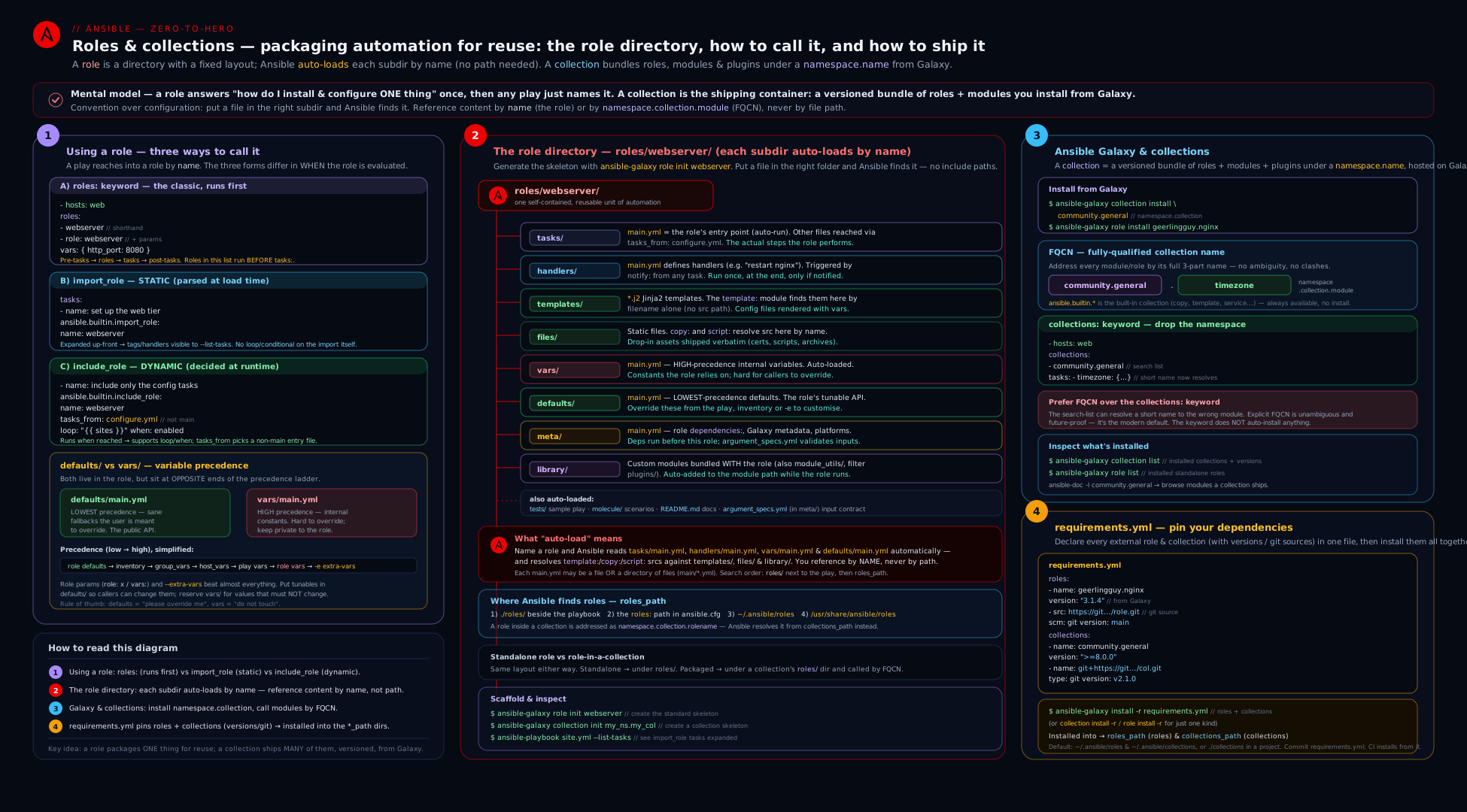
The diagram shows one project’s resolution flow: a requirements.yml pulls roles (from Galaxy and git) and collections (from Galaxy) into roles/ and ansible_collections/; a play invokes a role via the roles: keyword, import_role (static), or include_role (dynamic, loopable); the role’s meta/main.yml runs its dependencies first; defaults/ sits below caller overrides while vars/ sits above them; and every module/role is addressed by its FQCN resolved against collections_path.
Hands-on lab
This lab builds a real role from scratch on your control node + localhost (no cloud, no cost), wires up a dependency, proves the static-vs-dynamic difference, installs a Galaxy role and a collection via requirements.yml, and cleans up. It uses only ansible-galaxy and ansible-playbook against localhost — ₹0. If you want a “real” target, an optional step uses a throwaway container; otherwise everything runs on the connection-local host.
0. Set up a project directory and a local-only inventory.
mkdir -p ~/ansible-roles-lab/roles && cd ~/ansible-roles-lab
cat > ansible.cfg <<'EOF'
[defaults]
inventory       = ./inventory.ini
roles_path      = ./roles:~/.ansible/roles
collections_path = ./collections:~/.ansible/collections
stdout_callback = default
EOF
cat > inventory.ini <<'EOF'
[local]
localhost ansible_connection=local
EOF
1. Scaffold a role with ansible-galaxy init.
ansible-galaxy role init roles/greeting
ls -R roles/greeting
Expected: the full directory tree — tasks/ handlers/ templates/ files/ vars/ defaults/ meta/ each with a stub main.yml, plus README.md. This is the structure from the table, generated for you.
2. Give the role tunables (defaults), constants (vars), a template, and tasks.
cat > roles/greeting/defaults/main.yml <<'EOF'
---
greeting_name: "world"          # overridable: the role's public API
greeting_file: "/tmp/greeting.txt"
EOF

cat > roles/greeting/vars/main.yml <<'EOF'
---
greeting_internal_prefix: "MANAGED-BY-ANSIBLE"   # house rule, not for casual override
EOF

cat > roles/greeting/templates/greeting.j2 <<'EOF'
{{ greeting_internal_prefix }}: Hello, {{ greeting_name }}!
EOF

cat > roles/greeting/tasks/main.yml <<'EOF'
---
- name: Render the greeting file
  ansible.builtin.template:
    src: greeting.j2            # bare name: found in templates/ automatically
    dest: "{{ greeting_file }}"
    mode: "0644"
  notify: Show greeting

- name: Also provide an alternate entry point (tasks_from target)
  ansible.builtin.debug:
    msg: "main.yml ran"
EOF

cat > roles/greeting/tasks/cleanup.yml <<'EOF'
---
- name: Remove the greeting file (alternate entry point)
  ansible.builtin.file:
    path: "{{ greeting_file }}"
    state: absent
EOF

cat > roles/greeting/handlers/main.yml <<'EOF'
---
- name: Show greeting
  ansible.builtin.command: "cat {{ greeting_file }}"
  changed_when: false
EOF
3. Run the role three ways in one playbook to feel static vs dynamic.
cat > site.yml <<'EOF'
---
- name: Demonstrate role invocation
  hosts: local
  gather_facts: false

  roles:
    - role: greeting                 # (a) roles: keyword — runs FIRST, before tasks:
      vars:
        greeting_name: "from roles-keyword"

  tasks:
    - name: (b) Static import at this exact point
      ansible.builtin.import_role:
        name: greeting
      vars:
        greeting_name: "from import_role"

    - name: (c) Dynamic include, looped (impossible with import_role)
      ansible.builtin.include_role:
        name: greeting
      vars:
        greeting_name: "{{ item }}"
      loop:
        - "loop-A"
        - "loop-B"

    - name: (d) Call the ALTERNATE entry point via tasks_from
      ansible.builtin.include_role:
        name: greeting
        tasks_from: cleanup
EOF

ansible-playbook site.yml
Expected: the roles: greeting runs before the tasks: (note its output appears first in the recap order), import_role runs at its position, the looped include_role runs twice (A then B), and the final include runs cleanup.yml (deleting the file). Validate the precedence/override behaviour:
# defaults/ value overridden by a role parameter:
ansible-playbook site.yml --tags never 2>/dev/null; cat /tmp/greeting.txt 2>/dev/null
# Override via extra-vars beats BOTH default and parameter for that run:
ansible-playbook site.yml -e greeting_name="from-extra-vars"
Expected: with -e, the rendered greeting says from-extra-vars — proving -e outranks the role parameter and the default.
4. Add a dependency and prove allow_duplicates.
ansible-galaxy role init roles/common
cat > roles/common/tasks/main.yml <<'EOF'
---
- name: Common base task
  ansible.builtin.debug:
    msg: "common ran"
EOF

# greeting now depends on common:
cat > roles/greeting/meta/main.yml <<'EOF'
---
dependencies:
  - role: common
EOF

# Invoke greeting twice; 'common' should run only ONCE (dedup):
cat > deps.yml <<'EOF'
---
- hosts: local
  gather_facts: false
  roles:
    - greeting
    - greeting
EOF
ansible-playbook deps.yml | grep -c "common ran"
Expected: 1 — the shared dependency common is deduplicated even though greeting is listed twice. Now allow duplicates on common:
printf -- "---\nallow_duplicates: true\n" > roles/common/meta/main.yml
ansible-playbook deps.yml | grep -c "common ran"
Expected: 2 — with allow_duplicates: true, the dependency runs each time.
5. Install a Galaxy role and a collection via requirements.yml. (Needs internet; skip if offline.)
cat > requirements.yml <<'EOF'
---
roles:
  - name: geerlingguy.git          # a small, well-known standalone role
    version: "3.0.0"
collections:
  - name: community.general
    version: ">=8.0.0,<9.0.0"
EOF

ansible-galaxy install -r requirements.yml -p ./roles    # roles -> ./roles
ansible-galaxy collection install -r requirements.yml -p ./collections
ansible-galaxy role list
ansible-galaxy collection list | head
Expected: geerlingguy.git appears under ./roles, and community.general (a >=8,<9 version) under ./collections/ansible_collections/community/general.
6. Use a collection module by FQCN to confirm resolution from the local collections_path:
ansible localhost -m community.general.timezone -a "name=UTC" --check
Expected: a check-mode result (no change made) — proving Ansible resolved community.general.timezone from your project-local collections path.
Cleanup (remove everything the lab created):
ansible-playbook -e greeting_file=/tmp/greeting.txt -i inventory.ini \
  -m ansible.builtin.file -a "path=/tmp/greeting.txt state=absent" all 2>/dev/null
rm -rf ~/ansible-roles-lab
Expected: the lab directory (roles, installed Galaxy content, the /tmp/greeting.txt) is gone.
Cost note: ₹0. Everything ran against localhost with the local connection — no managed nodes, no cloud, no containers required. The only network usage is the optional ansible-galaxy install in steps 5–6 (a few MB of downloads). Deleting ~/ansible-roles-lab returns the machine to its prior state.
Going deeper
The lesson so far gets you through RHCE-grade role and collection work. This section is for when you are writing roles other people depend on, shipping collections, or hardening a pipeline — the internals and edge cases that decide whether a role is merely “works on my machine” or genuinely reusable.
dependencies (meta) vs import_role/include_role — and the dedup surprise
You now have four ways to make role B run before role A: list both under roles:, import_role B inside A’s tasks, include_role B inside A’s tasks, or declare B in A’s meta/main.yml dependencies. They are not interchangeable, and the deciding factors are deduplication and coupling.
| Mechanism | When B runs | Deduplicated? | Coupling |
|---|---|---|---|
meta dependencies |
Automatically, before A’s tasks/main.yml, every time A is used |
Yes — same role + same params runs once per play (unless allow_duplicates) |
Tightest: A always drags B along, everywhere A is used |
roles: keyword |
Before the play’s tasks:, in listed order (after each role’s own deps) |
Yes — same dedup rule as dependencies | Loose: the play, not the role, chooses |
import_role |
At its position in tasks:, statically |
No — runs every time it is reached | Loose: called explicitly where you want it |
include_role |
At its position, dynamically at run time | No — runs every time (and can be looped) | Loosest: fully run-time decision |
Two facts that trip up experienced users:
import_roleandinclude_roledo NOT deduplicate. The “a shared role runs only once” behaviour applies toroles:andmetadependencies only. If youimport_role: commonfrom three different roles,commonruns three times. Dedup is a property of the dependency/roles:graph, not of roles in general.metadependencies are the tightest coupling. Because the dependency is baked into the role’s metadata, the role can never be used without its dependency — great for a genuine prerequisite (awebserverthat cannot function withoutcommon), wrong for an optional or environment-specific one. For “sometimes A also wants B” prefer an explicitimport_role/include_rolein A’s tasks, or let the playbook compose them. Rule of thumb: meta dependencies for hard prerequisites; explicit include/import for composition.
Variable scope: why include_role vars can “vanish”
How far a role’s defaults/ and vars/ leak into the rest of the play differs by invocation method — a subtle source of “the variable is set inside the role but undefined right after it.”
- With the
roles:keyword andimport_role(both static), a role’sdefaultsandvarsare exposed to the whole play — they behave as ordinary play-scoped vars once the role is imported. - With
include_role(dynamic), the role’sdefaults/varsare scoped to that include by default and are not visible to later tasks in the play. To expose them, setpublic: trueon theinclude_role:
- name: Include a role and expose its variables to the rest of the play
  ansible.builtin.include_role:
    name: webserver
    public: true          # defaults/ and vars/ from the role stay in scope afterwards
(import_role has no public: option because, being static, it always exposes them.) A related nuance: a value **register**ed inside a dynamically-included role does persist (registered vars are host facts), but the role’s defaults/vars do not unless public: true. When a value set “inside a role” is mysteriously undefined a few tasks later, this scoping rule — not a typo — is usually why.
Typed input validation with meta/argument_specs.yml
A reusable role should fail fast with a clear message when a caller passes a bad or missing parameter — not deep inside a task with a cryptic Jinja error. Ansible’s built-in role argument validation does this: put an argument_specs.yml in meta/, and Ansible validates the parameters against it before the role’s tasks run.
# roles/webserver/meta/argument_specs.yml
---
argument_specs:
  main:                                  # matches tasks/main.yml (the entry point)
    short_description: Configure the nginx web tier
    options:
      webserver_port:
        type: int
        default: 80
        description: TCP port nginx listens on.
      webserver_server_name:
        type: str
        required: true                   # no sensible default → force the caller to set it
        description: The server_name / vhost.
      webserver_ssl:
        type: bool
        default: false
      webserver_upstreams:
        type: list
        elements: str
        default: []
  install:                               # a SECOND spec for tasks/install.yml (tasks_from: install)
    short_description: Install nginx only
    options:
      webserver_version:
        type: str
        default: latest
What you get:
- Fail-fast validation — a missing
requiredoption or a wrongtype(e.g. a string where anintis expected) aborts the role before any task runs, with a precise message naming the bad option. - One spec per entry point — the top-level keys (
main,install, …) map totasks/<name>.yml, so eachtasks_fromtarget validates its own inputs. - Free documentation —
ansible-doc -t role -land Automation Hub render the spec, so the role’s public API is self-describing. This is the modern replacement for hand-rolledassertblocks at the top oftasks/main.yml.
Roles, idempotency, and check mode
A role is just a bag of tasks, so a role is exactly as idempotent as the tasks inside it — wrapping tasks in a role grants no magic idempotency. The same discipline applies: prefer declarative modules over command/shell, and where you must shell out, set changed_when:/failed_when: so the role reports change honestly.
--check(dry run) and--diffwork through roles unchanged:ansible-playbook site.yml --check --diffruns every role’s tasks in check mode. A role is “check-mode safe” only if each task supports check mode (mostansible.builtin.*modules do); acommandtask withoutcheck_mode:orchanged_when:will reportchangedon every check run and can break--checkgating.- Handlers still flush at the usual points in check mode’s simulated form; a role that relies on a handler to reach a correct end-state should be tested with
--checkso the simulated result is meaningful. ansible-lintrun against a role (or the collection that ships it) catches the common idempotency smells — bare module names,commandwhere a module exists, missingchanged_when— and itsproductionprofile is what Galaxy/Automation Hub quality gates expect. Treatansible-lint roles/webserveras part of “is this role done?” — the lint, idempotence & CI lesson goes deep on the rules.
Collections at scale: meta/runtime.yml, signing, and execution environments
Three collection-level topics matter once you publish or consume collections seriously:
meta/runtime.ymlis the collection’s own contract. It declaresrequires_ansible(a constraint like">=2.16.0"that blocks install/use on too-oldansible-core) andplugin_routing— the redirects that let a module be renamed or moved to another collection without breaking playbooks that used the old name.action_groups(used bymodule_defaults) are also declared here. When a deprecated module still “just works” under its old FQCN, aplugin_routingredirect in some collection’sruntime.ymlis why.- Signed collections & verification. Collections from Automation Hub can be GPG-signed;
ansible-galaxy collection verify community.general(optionally with--keyring) checks an installed collection’s contents against its signature and itsFILES.jsonchecksums. In a locked-down pipeline you install with signature verification enabled so tampered or corrupted content is rejected — the supply-chain counterpart to pinning versions inrequirements.yml. - Execution Environments (EE). In Ansible Automation Platform, collections are not installed ad hoc on a control node; they are baked into a container image built by
ansible-builderfrom anexecution-environment.ymlthat points at yourrequirements.yml(collections) and arequirements.txt(their Python deps). The running image is a reproducible, versioned bundle ofansible-core+ collections + dependencies — the samerequirements.ymlyou write today is the input. This is the EX374/AAP direction the role/collection model leads to; see building collections & execution environments.
Practice challenges
Work these on localhost (cost ₹0) — extend the lab project or a scratch directory. Each has a solution and a one-line reason.
1. (Beginner) Scaffold and name the auto-loaded files. Create a role cache with ansible-galaxy, then say which main.yml files Ansible loads automatically when the role runs.
<details> <summary>Solution</summary>
ansible-galaxy role init cache
Auto-loaded: tasks/main.yml, handlers/main.yml, vars/main.yml, defaults/main.yml, meta/main.yml. (templates//files/ are searched by bare name, not “loaded”.)
Why: main.yml is the reserved entry point in every YAML-bearing role directory — location is meaning, no wiring required.
</details>
2. (Beginner) Put each variable in the right file. Users must be able to override cache_port (default 6379); the OS-specific package name cache_pkg must NOT be casually overridable. Which file does each belong in?
<details> <summary>Solution</summary>
cache_port → defaults/main.yml (lowest precedence, the role’s public API). cache_pkg → vars/main.yml (high precedence, beaten only by block/task vars and -e).
Why: defaults/ is “suggestions you can ignore”; vars/ is “house rules” — precedence encodes who is allowed to change what.
</details>
3. (Intermediate) Run a role once per item. You have a role create_vhost and a list vhosts: [blog, shop, api]. Invoke it once per vhost.
<details> <summary>Solution</summary>
- name: One vhost per item
  ansible.builtin.include_role:
    name: create_vhost
  loop: "{{ vhosts }}"
  loop_control:
    loop_var: vhost
Why: only include_role (dynamic) can be looped as a unit — import_role/roles: are static and error on loop.
</details>
4. (Intermediate) Prove dependency dedup, then defeat it. Make role app depend on common in meta/main.yml; list app twice in a play and show common runs once. Then make common run both times without editing the play.
<details> <summary>Solution</summary>
# roles/app/meta/main.yml
dependencies:
  - role: common
Listing app twice → common runs once (dedup). Then in roles/common/meta/main.yml:
allow_duplicates: true
→ common now runs twice.
Why: meta dependencies (and roles:) deduplicate identical-param runs; allow_duplicates: true opts a role out of that dedup.
</details>
5. (Advanced) Fail fast on a missing parameter. Add typed validation so webserver_server_name is required and a run without it aborts before any task, with a clear message.
<details> <summary>Solution</summary>
# roles/webserver/meta/argument_specs.yml
---
argument_specs:
  main:
    options:
      webserver_server_name:
        type: str
        required: true
      webserver_port:
        type: int
        default: 80
Running the role without webserver_server_name now fails at validation with missing required arguments: webserver_server_name — before any task executes.
Why: meta/argument_specs.yml validates parameters against the main (entry-point) spec before tasks/main.yml runs — fail-fast, self-documenting, no hand-written assert.
</details>
6. (Advanced) Pin, install project-local, resolve by FQCN. Write a requirements.yml with community.general pinned to the 8.x line and a role from a git tag, install both into ./collections and ./roles, then confirm a community.general module resolves from the project path in check mode.
<details> <summary>Solution</summary>
# requirements.yml
---
roles:
  - src: https://github.com/kloudvin/ansible-role-hardening.git
    scm: git
    version: "v2.3.0"
    name: hardening
collections:
  - name: community.general
    version: ">=8.0.0,<9.0.0"
ansible-galaxy role install -r requirements.yml -p ./roles
ansible-galaxy collection install -r requirements.yml -p ./collections
ansible localhost -m community.general.timezone -a "name=UTC" --check
Why: the version range with a major ceiling takes 8.x fixes but never a breaking 9.0; installing with -p plus a matching collections_path makes resolution reproducible and project-local.
</details>
Common beginner mistakes
These are conceptual traps — wrong mental models, not runtime errors (those are in the troubleshooting table below). Fixing the model prevents the error.
- “A role needs a config file listing what’s inside.” No — the directory layout is the contract. Ansible knows
tasks/main.ymlis the tasks andtemplates/holds templates purely from location. There is nothing to register; put files in the right folders and they are found. - “
vars/is where users change settings.” Backwards.vars/main.ymlis high precedence — hard to override on purpose. The knobs a caller should turn go indefaults/main.yml(lowest precedence). If a group_vars value “won’t take”, you almost certainly put the variable invars/when it belonged indefaults/. - “
import_roleandinclude_roleare the same.” They are static vs dynamic. Onlyinclude_rolecan be looped and gated as one unit; onlyimport_role/roles:expose inner tasks to--list-tasks,--start-at-task, and--tags. Choosing wrong shows up as “my loop errors” or “--tagsskips the role.” - “I’ll give the template its full path.” Inside a role, reference templates and files by bare name (
src: nginx.conf.j2,src: index.html). Ansible searches the role’stemplates/andfiles/automatically; a hard path usually breaks the moment the role moves. - “A shared dependency runs once per role that needs it.” By default it runs once total — Ansible deduplicates identical-param dependency/
roles:runs. It repeats only with different parameters orallow_duplicates: true. (And note:import_role/include_roledo not dedup — they always run.) - “
requirements.ymlinstalls itself when I run the play.” It does not.ansible-galaxy install -r requirements.ymlis a separate step (locally and in CI) that hydratesroles/andansible_collections/; the playbook run never fetches dependencies for you. - “Once a collection is installed I can call its modules by short name.” Only if the name is unqualified and on a
collections:search list — and even then it is discouraged. Use the FQCN (community.general.ufw), and make sure the collection sits on yourcollections_path(project-local-p ./collectionsis safest).
Common mistakes & troubleshooting
| Symptom | Likely cause | Fix |
|---|---|---|
ERROR! the role 'webserver' was not found |
Role not on the roles_path (typo, or not installed, or wrong dir name) |
Confirm roles/webserver/ exists or ansible-galaxy role install it; check roles_path in ansible.cfg. |
| Template/file “not found” though it is in the role | Referenced with a path instead of a bare name, or file is outside templates//files/ |
Use the bare filename (src: app.conf.j2); Ansible searches the role’s templates//files/ automatically. |
Variable I set in vars/main.yml “won’t override” from group_vars |
vars/ is high precedence; group_vars cannot beat it |
Move the tunable to defaults/main.yml (lowest precedence) so callers can override it. |
--tags web skips tasks inside an include_role |
include_role is dynamic; inner tags aren’t exposed to --tags |
Put the tag on the include_role task itself, or use import_role (static) so inner tasks inherit tags. |
loop on import_role errors |
import_role is static and cannot be looped as a unit |
Use include_role with loop: to run a role per item. |
| A shared dependency role runs many times unexpectedly | The role has allow_duplicates: true, or it’s invoked with different parameters each time |
Remove allow_duplicates (default dedups identical-param runs); or accept it if different params genuinely need separate runs. |
couldn't resolve module/action 'ufw' |
Collection not installed, or name not qualified and not on the collections: search list |
ansible-galaxy collection install community.general; reference it as community.general.ufw (FQCN). |
| FQCN works locally but “collection not found” in CI | Repo/collection not laid out at ansible_collections/<ns>/<name>/, or collections_path wrong |
Install with -p ./collections (creates the right tree) and set collections_path to include ./collections. |
Best practices
- One role = one job. A role should do one logical thing (“be a web server”, “harden SSH”). Compose deployments by listing several focused roles, not by writing one mega-role.
- Put every tunable in
defaults/, every constant invars/. Defaults are your role’s overridable public API;vars/holds values you do not want callers to clobber. This split is the most important habit for reusable roles. - Prefer FQCNs everywhere (
ansible.builtin.copy,community.general.ufw) over bare names or thecollections:keyword. It is unambiguous, self-documenting, and whatansible-lint’s production profile enforces. - Default to
roles:/import_role(static); useinclude_roleonly when you must loop or conditionally include a whole role. Static keeps tasks visible to--list-tasks,--start-at-task, and--tags. - Pin versions in
requirements.yml— exact versions (or a>=x,<x+1range) for collections and git tags/SHAs for roles — so installs are reproducible across machines and CI. - Install project-local (
-p ./roles,-p ./collections) and commit therequirements.yml, not the downloaded content. CI runsansible-galaxy install -r requirements.ymlto hydrate. - Use
tasks_fromfor multi-operation roles (install/configure/upgrade) instead of cloning a role per operation. - Document the role in
README.mdand validate inputs withmeta/argument_specs.ymlso bad parameters fail fast with a clear error.
Security notes
- Vet third-party Galaxy content before you run it. A role or collection executes with whatever privileges your play has (often
become: true). Read the tasks, pin a specific version (never float onmain), and prefer well-maintained, widely-used roles/collections over unknown ones. - Pin by version, not by
latest/main. An unpinned dependency means a future upstream change runs on your hosts without review — both a stability and a supply-chain risk. Version pins inrequirements.ymlare a security control. - Never bake secrets into
defaults/orvars/. Role variables live in plain-text YAML in the repo. Keep secrets in Ansible Vault (or an external secret manager) and pass them in, so a published or shared role never carries credentials. - Mind
allow_duplicatesand dependency side effects. A dependency that creates users, opens firewall ports, or writes config runs automatically before the role — review the full dependency tree (ansible-galaxy role list, read eachmeta/main.yml) so nothing privileged runs unseen. - Use a private Galaxy/Automation Hub for internal collections and authenticate with a token in
ansible.cfg’s[galaxy_server.*]section — keep that token out of the repo and out of CI logs. - Keep custom modules in
library//collections reviewed. Role-local modules run arbitrary code on targets; treat them with the same scrutiny as any other code you execute as root.
Interview & exam questions
- What are the standard directories in a role and which
main.ymlfiles are auto-loaded?tasks/,handlers/,templates/,files/,vars/,defaults/,meta/(plus optionallibrary/,module_utils/,<type>_plugins/). The auto-loadedmain.ymlfiles are intasks/,handlers/,vars/,defaults/, andmeta/—tasks/main.ymlis the default entry point.templates/andfiles/enable bare-name lookups. roles:keyword vsimport_rolevsinclude_role— what’s the difference?roles:andimport_roleare static (parsed before the play runs);roles:runs roles beforetasks:,import_roleruns at its position.include_roleis dynamic (resolved at run time): it can be looped and gated as a whole withwhen, but its inner tasks aren’t visible to--list-tasks/--start-at-taskand inner tags aren’t matched by--tags.- Which can you
loop, and which exposes inner tasks to--start-at-task? You canlooponlyinclude_role(dynamic).import_role/roles:(static) expose inner tasks to--list-tasks,--start-at-task, and--tags. - Where do you put a variable a user should be able to override, and one they shouldn’t? Overridable →
defaults/main.yml(lowest precedence). Protected →vars/main.yml(high precedence, beaten only by block/task vars and-e). - A role appears as a dependency of three other roles. How many times does it run, and how do you change that? Once — Ansible deduplicates a dependency run with the same parameters. It runs again if invoked with different parameters, or every time if the role sets
allow_duplicates: trueinmeta/main.yml. - What is
tasks_fromfor? It runs a non-default entry point —tasks/<name>.ymlinstead oftasks/main.yml— so one role can expose multiple operations (install/configure/upgrade).handlers_from,vars_from, anddefaults_fromload matching alternate files. - What is an FQCN and why use it? Fully-Qualified Collection Name —
namespace.collection.name(e.g.ansible.builtin.copy,community.general.ufw). It removes ambiguity when two collections define the same module/role name, is self-documenting, and is enforced byansible-lint’s production profile. - Standalone role vs collection — how do they differ and where is each installed? A standalone role is one role (
ns.role) installed underroles_path. A collection (ns.collection) bundles many roles plus modules, plugins, playbooks, is semantically versioned, and installs undercollections_pathasansible_collections/<ns>/<coll>/. - What does the
collections:keyword do, and should you rely on it? It sets a search list of collections for unqualified names in a play/role, soufwcan resolve tocommunity.general.ufw. It’s a backward-compatibility convenience; the modern recommendation is to use explicit FQCNs instead.ansible.builtinis always searched as a fallback. - Show the two sections of a
requirements.ymland how to install both. Top-levelroles:andcollections:. Roles can come from Galaxy (name/version), git (src+scm: git+version), or a tarball URL; collections from Galaxy (name/version), git/url/file (type:). Install both at once withansible-galaxy install -r requirements.yml(or the per-type subcommands). - How do you pin a collection to get bug fixes but never a breaking change? Use a version range with a major ceiling, e.g.
version: ">=8.0.0,<9.0.0", so installs pick up 8.x patches/minors but never jump to 9.0. - Where does
-e(extra-vars) sit relative to a role’svars/anddefaults/, and why care?-eis the highest precedence — it beats bothvars/anddefaults/. That makes it perfect for one-off CI overrides but dangerous to rely on for normal config, because it silently overrides everything else.
Quick check
- Which two role directories’
main.ymlfiles sit at opposite ends of variable precedence, and which is overridable? - You need to run a role once per item in a list — which invocation method must you use?
- By default, how many times does a role listed as a dependency of two different roles run in one play?
- What is the FQCN for the core
copymodule, and which collection ships it? - Name the two top-level keys in a
requirements.ymland the single command that installs both.
Answers
defaults/main.yml(lowest precedence — overridable) andvars/main.yml(high precedence — not casually overridable). Tunables go indefaults/.ansible.builtin.include_rolewith aloop:— only the dynamic include can be looped as a unit (import_role/roles:cannot).- Once — Ansible deduplicates a dependency with identical parameters unless it sets
allow_duplicates: trueor is invoked with different parameters. ansible.builtin.copy— it ships in theansible.builtincollection (the core set bundled withansible-core).roles:andcollections:; install both withansible-galaxy install -r requirements.yml.
Exercise
Build a small, production-shaped role layout entirely on localhost (cost ₹0). (a) ansible-galaxy role init a role called apache with a defaults/main.yml exposing apache_port (default 80) and apache_docroot, a vars/main.yml holding an OS-specific package name, a templates/index.html.j2 using ansible_managed, and a tasks/main.yml that renders the page and notifies a handler. (b) Add a second role baseline that just debugs a message, and make apache depend on it via meta/main.yml; then list apache twice in a play and prove baseline runs only once, then flip allow_duplicates: true and prove it runs twice. © Add a tasks/uninstall.yml to apache and invoke it with include_role: { tasks_from: uninstall }. (d) Write a requirements.yml that pulls one Galaxy collection pinned to a >=x,<x+1 range and one standalone role from a git URL pinned to a tag, and install both project-locally with one command. (e) Run the play once with the default apache_port, then once with -e apache_port=8080, and confirm the rendered page changes — explaining in one sentence why -e won over the defaults/ value. (f) Clean up the project directory. In two sentences, explain why apache_port belongs in defaults/ (not vars/) and why you used include_role (not import_role) for the uninstall-by-tasks_from step only if you needed to loop or conditionally run it.
Certification mapping
- RHCE (EX294) — “Create and use roles”: this is a direct, heavily weighted objective. Expect to create a role with the standard directory structure, place variables correctly in
defaults/vsvars/, use templates/files by bare name, declare dependencies inmeta/main.yml, and use roles in a playbook (theroles:keyword andimport_role/include_role). Practisingansible-galaxy role initand a clean defaults-vs-vars split is essential. - RHCE (EX294) — “Download roles from Ansible Galaxy / content collections and use them”: installing roles and collections (
ansible-galaxy install,ansible-galaxy collection install), writing arequirements.yml, and using modules by FQCN map directly to exam tasks; knowcollections_path/roles_pathand project-local installs. - RHCE (EX294) — “Use provided documentation to look up specific information”:
ansible-galaxy collection list,ansible-doc -l, and locating a collection’s roles/modules support this objective when you must discover what an installed collection provides. - Beyond RHCE: the role/collection model underpins the EX374 (Automation Platform/AAP) curriculum — Automation Hub, signed collections, and execution environments all build on exactly these concepts.
Glossary
- Role — a self-contained, reusable unit of automation in a fixed directory layout (
tasks/,handlers/,templates/,files/,vars/,defaults/,meta/, …). tasks/main.yml— a role’s default entry point, run automatically when the role is invoked.defaults/main.yml— the role’s lowest-precedence variables; its overridable public API.vars/main.yml— the role’s high-precedence variables; internal constants not meant for casual override.meta/main.yml— role metadata: dependencies,galaxy_info, supportedplatforms, andallow_duplicates.roles:keyword — the play-level list of roles, run statically beforetasks:.import_role— static role inclusion at a specific task position (visible to--list-tasks/--tags, not loopable).include_role— dynamic role inclusion at run time (loopable, conditional as a unit, opaque to pre-run listing).tasks_from— run an alternate entry point (tasks/<name>.yml) instead ofmain.yml; pairs withhandlers_from/vars_from/defaults_from.- Role parameter — a variable passed into a role at call time (via
vars:); higher precedence than the role’s defaults and inventory vars. allow_duplicates—meta/main.ymlflag (defaultfalse) allowing a role to run more than once with the same parameters in one play.- Collection — a distributable bundle
namespace.collectionof roles, modules, plugins, and playbooks; semantically versioned. - FQCN — Fully-Qualified Collection Name,
namespace.collection.name(e.g.ansible.builtin.copy); the unambiguous way to address modules/roles/plugins. ansible.builtin— the core collection bundled withansible-core(copy, file, template, service, package, debug, setup, …).collections:keyword — a search list of collections for unqualified names in a play/role; a backward-compat convenience (prefer FQCNs).- Ansible Galaxy — the public hub (galaxy.ansible.com) and the
ansible-galaxyCLI for searching, installing, and scaffolding roles and collections. collections_path/roles_path— config settings (inansible.cfg) for where Ansible installs and searches collections (asansible_collections/<ns>/<coll>/) and roles.requirements.yml— the dependency manifest listingroles:andcollections:with sources (Galaxy/git/url/file) and versions, installed viaansible-galaxy install -r.- Standalone role — the older, role-only distribution format (
namespace.rolename, e.g.geerlingguy.nginx), installed underroles_path; contrast with a collection that bundles many roles plus modules/plugins. - Role deduplication — Ansible runs a role invoked via
roles:/metadependencies only once per play for identical parameters;import_role/include_roleare not deduplicated. meta/argument_specs.yml— typed validation of a role’s parameters (per entry point), checked before the role’s tasks run; also documents the role’s public API.public:— aninclude_roleoption (defaultfalse); whentrue, the role’sdefaults/varsstay in scope for the rest of the play (staticimport_rolealways exposes them).meta/runtime.yml— a collection’s runtime contract:requires_ansible,plugin_routing(redirects), andaction_groups.requires_ansible— aruntime.ymlconstraint (e.g.">=2.16.0") that blocks installing/using a collection on too-oldansible-core.plugin_routing—runtime.ymlredirects that keep an old module/plugin FQCN working after it is renamed or moved to another collection.- Signed collection /
ansible-galaxy collection verify— GPG-signed collection content (Automation Hub) and the command that checks an installed collection against its signature andFILES.jsonchecksums. - Execution Environment (EE) — a container image bundling
ansible-core+ collections + Python deps; the reproducible runtime used by Ansible Automation Platform. ansible-builder— the tool that builds an Execution Environment image fromexecution-environment.yml(which references yourrequirements.yml).ansible-lint— the linter that flags idempotency/style problems (bare names,commandmisuse, missingchanged_when); itsproductionprofile is the Galaxy/Hub quality bar.
Next steps
You can now structure, parameterise, depend on, distribute, and install roles and collections end to end — the directory contract, the three invocation methods (static vs dynamic), tasks_from, dependencies and allow_duplicates, the defaults-vs-vars precedence rules, Ansible Galaxy, the FQCN and collections: keyword, collections_path, and a reproducible requirements.yml. The natural next move is secrets: roles need passwords and keys, and you must never commit them — read Ansible Vault, In Depth to encrypt variables and files, manage vault IDs, and integrate Vault with group_vars/host_vars and CI. To then prove your roles are genuinely correct and idempotent across distros, study engineering idempotent Ansible collections with Molecule testing, which takes the collection you can now build and wraps it in a create → converge → idempotence → verify test matrix in CI.