In a nutshell
Before you run a playbook against real servers you’d love to ask two simple questions: “if I run this, what will actually change?” and “show me exactly what each file will look like afterwards.” Ansible answers both without touching anything — and that is where this lesson starts. Check mode (--check) is a dry run: Ansible walks the whole play and reports what it would do, exactly like clicking Print Preview before you commit paper and ink. --diff is track-changes for your files — it shows the precise +/- lines a task would add or remove, the same red/green you see in a git diff or a Word document with revisions turned on.
The rest of the lesson is the wider diagnostic toolkit you reach for when a play misbehaves: the ansible.builtin.debug module to print what a variable actually holds, the -v/-vv/-vvv verbosity dials to watch Ansible work, an interactive debugger that pauses a failing task so you can fix a value and retry it on the spot, and ansible-console — a live REPL for poking at your servers. A useful mental picture is a mechanic’s diagnostic bay: check mode is the visual walk-around, --diff is the before/after photo, debug is the multimeter, verbosity is the stethoscope on the running engine, and the interactive debugger is putting the car on the lift with the engine still running so you can adjust one thing and see if it fixes the fault.
You do not need to memorise all of it today. A complete beginner gets enormous value from just the first habit — always run --check --diff before you run for real — and grows into the deeper rungs (the debugger, ansible-console, reading a traceback) as the problems that need them show up. Almost everything here is read-only or reversible, so it is safe to experiment.
Level: Advanced (with a beginner-friendly on-ramp) · Time: ~34 min
Every Ansible practitioner eventually hits the same wall: a playbook that runs but does the wrong thing, a task that reports “changed” on every single run, a variable that is somehow empty when you swear you set it, a module that silently does nothing, or a play that hangs for ninety seconds before dying with a wall of red Python traceback. Writing the playbook is the easy half. Diagnosing it — working out what Ansible actually saw, what it actually did, what value a variable actually held at the moment a task ran, and whether your “fix” will do what you think before you unleash it on production — is the skill that separates someone who uses Ansible from someone who can be trusted to run it against a fleet. The good news is that Ansible ships with a genuinely excellent, multi-layered toolkit for exactly this, and almost nobody learns all of it. Most people know -vvv and stop there.
This lesson is that toolkit, in full. We start with check mode — --check, the dry run that tells you what would change without changing it — and we go all the way into the part everyone gets burned by: the fact that ansible.builtin.command and ansible.builtin.shell lie in check mode (they skip entirely, so anything downstream that depends on their result breaks), how check_mode: true/false forces a task one way or the other regardless of the run mode, what supports_check_mode means in a module, and how check mode interacts with when, register, and handlers. We pair it with --diff, which prints a unified diff of every file a task would change (or did change), and the crucial no_log/--diff interaction that can leak secrets. Then the inspection workhorse: the ansible.builtin.debug module — var: versus msg:, the gotcha with quoting, and the verbosity: threshold that hides debug output until you ask for it. We cover the verbosity ladder -v through -vvvv (and -vvvvv) — exactly what each level adds, where connection-level SSH debugging appears, and the separate ANSIBLE_DEBUG switch. We then sit down inside the interactive playbook debugger — strategy: debug, the debugger: keyword and its on_failed/always/never/on_unreachable/on_skipped/on_ready values, breakpoints, and every command at the (debug) prompt: p, task, task_vars, host, update_task, redo, continue, quit. We use register + debug to inspect any module’s return structure, drive a play with the execution-control flags (--start-at-task, --step, --list-tasks, --list-hosts, --list-tags), open the interactive ansible-console REPL for ad-hoc poking at a live inventory, and finally learn to read an Ansible traceback so a Python stack trace stops being scary. This builds directly on playbooks, plays, tasks and become — you need to know what a task and a play recap are — and leans heavily on error handling: blocks, rescue, changed_when/failed_when, because the debugger fires on failed tasks and changed_when/failed_when are exactly what check mode and --diff make you reason about.
Everything targets ansible-core 2.17+ / Ansible 10+ (the 2026 baseline) and uses FQCN (fully-qualified collection names such as ansible.builtin.debug) throughout. The whole lab runs against localhost and a throwaway container or two for ₹0.
Learning objectives
By the end of this lesson you will be able to:
- Run a dry run with
--check, force individual tasks withcheck_mode: true/false, and explain precisely whycommand/shell“lie” in check mode and how to make a play check-mode-safe. - Preview and audit file changes with
--diff, read a unified diff in Ansible output, control it per task withdiff: true/false, and avoid leaking secrets through theno_log/--diffinteraction. - Use the
ansible.builtin.debugmodule fluently —var:versusmsg:, the quoting rules, and theverbosity:threshold that gates output behind-vlevels. - Choose the right verbosity level (
-v…-vvvvv) for the job and know exactly what each level reveals, where connection/SSH debug lives, and when to reach forANSIBLE_DEBUG. - Drop into the interactive playbook debugger via
strategy: debugor thedebugger:keyword, and use every prompt command (p,task,task_vars,host,update_task,redo,continue,quit) to inspect and fix-and-retry a failing task live. - Inspect any module’s output with
register+ansible.builtin.debug, and drive a play surgically with--start-at-task,--step,--list-tasks,--list-hosts, and--list-tags. - Use
ansible-consoleas an interactive REPL against a real inventory, and read an Ansible traceback to locate the actual cause of a crash.
Prerequisites & where this fits
You should already be able to write and run a basic playbook with plays, tasks and become (from playbooks, plays, tasks and become) and interpret the play recap line (ok / changed / unreachable / failed / skipped / rescued / ignored). You should be comfortable with register for capturing a task result and with when, changed_when and failed_when from conditionals, loops, handlers and tags and error handling: blocks, rescue, changed_when/failed_when — because check mode, --diff and the debugger are all about what a task does and why, which is precisely what those keywords define. This lesson sits in the Testing module of the Ansible Zero-to-Hero course, immediately after linting & testing: ansible-lint, yamllint, idempotence & CI — linting catches problems statically; this lesson is how you diagnose them at run time. The next lesson, writing custom Ansible modules in Python, is where supports_check_mode and module.check_mode (which you meet here as a consumer) become things you implement. The lab needs only your control node, localhost, and a container or VM — total cost ₹0.
Core concepts: the five layers of Ansible diagnosis
Ansible debugging is not one tool; it is a ladder of increasingly invasive techniques, and the skill is choosing the lowest rung that answers your question. Reaching for the interactive debugger when a --diff would have told you the answer wastes your time; squinting at -vvvv output when a single ansible.builtin.debug of one variable would do is masochism. Here is the whole ladder, from least to most invasive:
| Layer | Tool | Answers the question | Changes the system? | Stops execution? |
|---|---|---|---|---|
| 1. Predict | --check (check mode) |
“What would this play change?” | No (that’s the point) | No |
| 2. Preview content | --diff |
“How would each file change, line by line?” | Only if not combined with --check |
No |
| 3. Inspect data | ansible.builtin.debug + register |
“What value does this variable / return hold right now?” | No | No |
| 4. Trace execution | -v … -vvvv, ANSIBLE_DEBUG |
“What is Ansible / the connection / the module actually doing?” | No | No |
| 5. Step & fix live | playbook debugger, --step, --start-at-task |
“Let me pause, look around, change a value, and retry this exact task.” | Depends on what you do | Yes |
Two ideas underpin all of it. First, Ansible’s whole model is declarative and idempotent, which is what makes prediction (check mode) and content preview (--diff) possible at all: a well-written module is supposed to read current state, compare it to desired state, and report whether it would change anything — so it can answer that question without doing the change. Second, the layers compose: --check --diff together is the single most valuable everyday combination (“what would change, and exactly how”), register + debug + -vv together is how you reverse-engineer an unfamiliar module’s output, and the debugger plus --start-at-task lets you jump straight to a failing task and poke at it. Keep the ladder in mind; the rest of this lesson is each rung in exhaustive detail.
Check mode: the dry run (--check)
Check mode is Ansible’s dry run. You add --check (short form -C) to ansible-playbook (or ansible for ad-hoc) and Ansible runs the play as if for real but instructs every module not to make changes — instead each module reports whether it would have changed anything. The play recap’s changed count then tells you the size of the drift between current and desired state, and --diff (next section) shows you the detail.
ansible-playbook -i inventory site.yml --check
# or the short form
ansible-playbook -i inventory site.yml -C
# the single most useful everyday invocation — predict AND preview:
ansible-playbook -i inventory site.yml --check --diff
How a module behaves in check mode depends on whether it supports check mode. Every module advertises this via its supports_check_mode flag (you can see it in ansible-doc <module> or in the module’s argument_spec). The behaviour splits cleanly:
| Module supports check mode? | Behaviour under --check |
Examples |
|---|---|---|
| Yes | Reads state, computes the delta, reports changed: true/false without changing anything |
copy, template, file, package, service, lineinfile, user, git, most well-written modules |
| No | The task is skipped entirely and reported with skipped (a warning may note it can’t run in check mode) |
command, shell, raw, script, and some third-party modules |
That second row is the whole reason check mode trips people up, and it has its own section below. First, the controls.
check_mode: — forcing a task one way regardless of the run
The play-/block-/task-level check_mode: keyword lets you override the global run mode for an individual task. It takes a boolean (templatable):
check_mode: value |
Effect |
|---|---|
check_mode: true |
This task always runs in check mode — never changes anything — even on a normal (non---check) run. Use it to make a task permanently “preview only”. |
check_mode: false |
This task always runs for real — even when the whole play is run with --check. The classic escape hatch for a read-only command you need to actually execute during a dry run. |
| (unset) | The task follows the global mode: real on a normal run, dry on --check. |
The most important practical use is check_mode: false on a read-only command so that a dry run still gathers the information later tasks depend on:
- name: Read the currently deployed version (must run even in --check)
  ansible.builtin.command: cat /opt/app/VERSION
  register: current_version
  check_mode: false            # actually run this, even under --check
  changed_when: false          # reading a file changes nothing

- name: Show what we found
  ansible.builtin.debug:
    var: current_version.stdout
Without check_mode: false, that command would be skipped under --check, current_version would be undefined/skipped, and every downstream task referencing current_version.stdout would fail or misbehave — making your dry run useless. Pairing check_mode: false with changed_when: false is the canonical “read-only fact-gathering command” idiom.
Version note. In ansible-core there was historically a separate
ANSIBLE_CHECK_MODE_MARKERSsetting and the olderalways_runkeyword (deprecated and removed long ago —always_run: trueis the ancient equivalent ofcheck_mode: false). On 2.17+ usecheck_mode:exclusively.
The “lies in check mode” caveat (command/shell/raw/script)
Because command, shell, raw and script cannot know whether the command they run would change anything, they declare supports_check_mode: false and are skipped under --check. This produces three classic failure modes:
- Downstream tasks break. A
commandregisters a result that a laterwhen:or--diffdepends on; under check mode it’s skipped, the registered variable is a “skipped” result, and the later task explodes or evaluates wrongly. Fix:check_mode: falseon the read-only command (above). - Check mode under-reports changes. A
command: systemctl restart appwould change the system on a real run, but in check mode it’s skipped and contributes zero to the “changed” count — so your dry run lies by omission (it shows fewer changes than reality). There is no general fix beyond awareness: a clean--checkdoes not guarantee a clean real run whencommand/shellare involved. Prefer real modules (ansible.builtin.service,ansible.builtin.package) which do support check mode and report honestly. changed_whenstill applies, but only if the task runs. If you force the command withcheck_mode: false, thenchanged_when/failed_whenare evaluated as normal; if it’s skipped, they’re irrelevant.
The general principle: check mode is only as honest as your modules are check-mode-aware. A play built from copy/template/file/package/service/lineinfile gives a trustworthy dry run; a play full of shell gives a misleading one. This is one of the strongest arguments for using real modules over command/shell wherever a module exists.
Check mode and the rest of the play
A few interactions worth pinning down:
when:is evaluated normally in check mode (it’s just a condition), so conditional logic is exercised — provided the variables it depends on are populated, which is exactly whycheck_mode: falseon fact-gathering commands matters.- Handlers are notified in check mode if their triggering task reports
changed, and they run in check mode too (so anotify: restart nginxshows the handler as “would change” rather than actually restarting). They are not silently dropped. registerstill captures a result in check mode, but for a check-mode run the result carries no real side effects; many modules add a top-levelchangedreflecting the would-be change.- Fact gathering (
ansible.builtin.setup) runs normally — gathering facts reads state, it doesn’t change anything, so it is safe and active in check mode. - Roles, includes, imports all honour check mode;
import_*(static) andinclude_*(dynamic) both run, andcheck_mode:on aninclude_taskscascades to the included tasks.
--diff: previewing the exact change
Where --check answers “would this change?”, --diff answers “how, exactly?” — it prints a unified diff (the same +/- format as git diff) of any file a task creates or modifies. It works for template, copy, lineinfile, blockinfile, file (mode/owner changes), replace, and many others, and it works with or without --check:
# Preview the change without applying it (audit before you act):
ansible-playbook site.yml --check --diff

# Apply the change AND show exactly what changed (audit after the fact):
ansible-playbook site.yml --diff
That second form — --diff on a real run — is genuinely under-used: it gives you a permanent, line-by-line record in your run log of every file Ansible touched and how, which is invaluable for change review and incident forensics. Typical output for a template task:
TASK [Deploy nginx config] *****************************************************
--- before: /etc/nginx/conf.d/site.conf
+++ after: /etc/nginx/conf.d/site.conf (content)
@@ -1,4 +1,4 @@
 server {
-    listen 80;
+    listen 8080;
     server_name example.com;
 }
changed: [web1]
Controlling --diff per task: the diff: keyword
You don’t have to take diff globally or not at all. The task-/block-/play-level diff: keyword overrides it locally:
| Setting | Effect |
|---|---|
--diff (CLI) |
Turn diff on for the whole run |
diff: true (task) |
Always show diff for this task, even without --diff on the CLI |
diff: false (task) |
Suppress diff for this task, even when --diff is on the CLI |
DIFF_ALWAYS=True / [diff] always = True in ansible.cfg |
Make --diff the permanent default for every run |
diff: false on a task is the targeted way to keep one noisy or sensitive file out of an otherwise diff-on run.
The no_log / --diff interaction (a real secret-leak risk)
Here is the security gotcha that bites teams: --diff prints file content. If a task writes a file containing secrets (a password file, a .env, a TLS key, a rendered template with a token in it), then running with --diff will happily print those secrets — old and new — to your terminal and into any CI log that captures the run. Two defences, and you should use both where it matters:
- Set
no_log: trueon the task. Withno_log: true, Ansible suppresses the task’s output including its diff, so secrets don’t leak even under--diff. This is the primary fix. - Or set
diff: falseon that specific task to suppress just the diff while leaving other output visible.
- name: Write the application secret file
  ansible.builtin.template:
    src: app-secrets.env.j2
    dest: /opt/app/.env
    mode: "0600"
  no_log: true          # suppresses output AND the diff — no secret leak under --diff
The interaction cuts both ways: no_log: true also hides legitimate diff output, so a task you’ve marked no_log will show (output suppressed due to no_log) rather than its diff even when you want to see it during debugging. The correct move when actively debugging a no_log task is to temporarily remove no_log (or set no_log: false) on a throwaway branch — never in committed code. (For more on no_log and Vault, see Vault: secrets, encryption & vault IDs.)
The ansible.builtin.debug module: print anything
The single most-used debugging tool is the ansible.builtin.debug module. It does nothing to the system — it just prints — and it is how you make Ansible tell you what a variable holds, what a registered result looks like, or simply that execution reached a certain point. It has exactly two mutually-exclusive ways to say what to print, plus a verbosity gate:
| Parameter | What it does | Example |
|---|---|---|
msg: |
Prints a string (which may contain Jinja2 templating). Default is "Hello world!" if neither is given. |
msg: "Deploying version {{ app_version }} to {{ inventory_hostname }}" |
var: |
Prints the value of a variable, given its name (not templated — you pass the name, not {{ ... }}). Renders structured data (dicts/lists) nicely. |
var: result or var: ansible_facts['default_ipv4']['address'] |
verbosity: |
An integer threshold; the message only prints when the run’s -v level is ≥ this number. Default 0 (always print). |
verbosity: 2 → only shows with -vv or higher |
The var: vs msg: distinction is the number-one beginner confusion, so be precise:
# var: takes the NAME of the variable (no curly braces). Best for inspecting data.
- name: Show the whole registered result, pretty-printed
  ansible.builtin.debug:
    var: command_result

# msg: takes a STRING; use {{ }} to interpolate. Best for human-readable messages.
- name: Show a friendly message
  ansible.builtin.debug:
    msg: "The command exited with rc={{ command_result.rc }}"
Three sharp edges:
- Don’t double-template
var:. Writingvar: "{{ result }}"is wrong-ish:varalready expects a name, and wrapping it in{{ }}makes Ansible template it to its value and then try to use that value as a variable name — usually producing"VARIABLE IS NOT DEFINED!"or odd results. Usevar: result(bare). Converselymsg:needs the{{ }}. - A bare integer/boolean in
var:can be mis-read.var: 12345is treated as a number, not a variable name; quote variable names that look like numbers. In practice this is rare because variable names aren’t usually numeric. debugreportsok, neverchanged. It’s a pure print, so it never affects your changed count — good, because you can sprinkle it liberally without polluting idempotence checks.
The verbosity: threshold — debug you can leave in the code
The killer feature is verbosity:. By setting verbosity: 2, a debug task stays silent on a normal run and only prints when someone runs with -vv or higher. This lets you commit permanent diagnostic breadcrumbs into roles and playbooks that don’t clutter normal output but light up the moment you add verbosity:
- name: (diag) Dump the full facts dict — only visible at -vvv+
  ansible.builtin.debug:
    var: ansible_facts
    verbosity: 3
Run normally → nothing. Run with -vvv → the full facts dump appears. This is the professional pattern: rather than adding and deleting debug tasks while firefighting, leave gated ones in place. The threshold is ≥: verbosity: 2 shows at -vv, -vvv, -vvvv; verbosity: 0 (the default) always shows.
Related printing/inspection modules
debug has a couple of cousins worth knowing:
| Module | Use |
|---|---|
ansible.builtin.debug |
Print a variable or message (the default tool). |
ansible.builtin.assert |
Validate a condition and fail with a message if it’s false — a “debug that stops the play if reality is wrong” (covered in error handling). |
ansible.builtin.fail |
Deliberately stop with a msg: — useful as a guard while bisecting a play. |
ansible.builtin.var (via set_fact + debug) |
Compute an intermediate value to inspect it. |
ansible.builtin.command: true + register + debug |
Capture and inspect arbitrary command output during diagnosis. |
register + debug: reverse-engineering any module’s output
Most “why didn’t that work?” questions are really “what did that module actually return?” Every module returns a JSON dict; register captures it into a variable, and ansible.builtin.debug: var: pretty-prints it so you can see the exact keys to reference. This is the universal technique for learning an unfamiliar module’s return shape:
- name: Run something and capture everything it returns
  ansible.builtin.command: id
  register: id_result
  changed_when: false

- name: Inspect the ENTIRE return structure
  ansible.builtin.debug:
    var: id_result
Output reveals the standard keys you can then use — rc, stdout, stdout_lines, stderr, stderr_lines, cmd, start, end, delta, changed, failed, plus module-specific keys:
TASK [Inspect the ENTIRE return structure] *************************************
ok: [localhost] => {
    "id_result": {
        "changed": false,
        "cmd": ["id"],
        "rc": 0,
        "stdout": "uid=1000(vinod) gid=1000(vinod) groups=1000(vinod)",
        "stdout_lines": ["uid=1000(vinod) gid=1000(vinod) groups=1000(vinod)"],
        "stderr": "",
        ...
    }
}
Two pro habits: register results you’re unsure about and debug: var: them once to learn the shape, then reference the specific key (id_result.stdout). And for looped tasks, remember the result lands under .results (a list, one entry per item) — ansible.builtin.debug: var: loop_result.results shows the per-item structure, which is essential for debugging loop behaviour.
Verbosity: -v through -vvvvv
The -v flag stacks: more vs, more detail. Knowing what each level adds means you ask for the right amount instead of drowning in -vvvv when -v would do. The levels (cumulative — each includes everything below it):
| Flag | Name | What it adds (on top of the previous level) |
|---|---|---|
| (none) | normal | Per-task status (ok/changed/failed) and the play recap only. |
-v |
verbose | The full return value of each task is printed (the JSON dict you’d otherwise have to register + debug). Also shows which hosts a task ran on. |
-vv |
more verbose | Task path information — the file and line number each task comes from (priceless when a task is buried in an included role and you can’t find it). Also more detail on includes/handlers. |
-vvv |
connection | Connection details — the actual SSH command Ansible builds and runs, the remote temp-dir creation, the module transfer, the become invocation. This is where you debug connectivity and transport problems. |
-vvvv |
connection debug | Adds the connection plugin’s own debug output and passes extra verbosity to the connection (e.g. SSH). You see low-level handshake/auth detail. Also surfaces plugin/callback debug. |
-vvvvv |
maximum | Even more SSH/transport debug (effectively ssh -vvv-level noise); rarely needed outside deep transport debugging. |
A few practical notes:
-vvvis the connectivity sweet spot. “Host unreachable”, “permission denied”, “sudo: a password is required”, timeouts — these almost always reveal their cause at-vvv, where you can see the exact SSH command and the remote’s response.-vreplaces mostdebugtasks. If you just want every task’s return value,-vprints it for all tasks at once — often faster than addingregister+debugto one task.- Verbosity affects
debug: verbosity:tasks. As covered above, gated debug tasks (verbosity: N) light up at the matching-vlevel — so-vvvboth shows connection detail and triggers yourverbosity: 3breadcrumbs. - You can set it without flags via
ANSIBLE_VERBOSITY=3(env) orverbosity = 3under[defaults]inansible.cfg— handy for a debugging session where you want it permanently on.
ANSIBLE_DEBUG: the developer-grade firehose
Separate from -v entirely is the ANSIBLE_DEBUG=1 (or True) environment variable. Where -v shows task and connection detail, ANSIBLE_DEBUG turns on Ansible’s internal Python debug logging — plugin loading, the module-execution wrapper, worker process internals, the whole machinery. It is overwhelming and aimed at people developing Ansible itself or chasing a genuinely weird core bug, not everyday playbook debugging:
ANSIBLE_DEBUG=1 ansible-playbook site.yml -vvv 2>debug.log
# then grep debug.log — it's far too much to read live
Reach for ANSIBLE_DEBUG only when -vvvv hasn’t explained something and you suspect Ansible’s internals (plugin discovery, module loading, the executor). Pair it with ANSIBLE_LOG_PATH=/path/to/ansible.log to capture everything to a file you can search, since the volume is unmanageable on a terminal. (log_path under [defaults] does the same.)
The interactive playbook debugger
This is the rung most people never climb, and it is transformative: a (debug) prompt that pauses the play at a task, lets you inspect every variable in scope, edit the task’s arguments or variables in place, and re-run that exact task — all without restarting the play. It turns the brutal write-run-fail-edit-rerun loop into an interactive session.
Turning the debugger on
There are three ways to enable it, in increasing precision:
| Mechanism | Scope | When the debugger triggers |
|---|---|---|
strategy: debug (play-level) |
The whole play | On any task that fails in that play. |
debugger: keyword (play / role / block / task) |
Wherever you put it | According to the keyword’s value (see table below) — overrides the strategy. |
ANSIBLE_ENABLE_TASK_DEBUGGER=True (env) / enable_task_debugger = True in ansible.cfg [defaults] |
Global | On any failed task across all plays (equivalent to strategy: debug everywhere). |
The debugger: keyword is the precise control and takes one of these values:
debugger: value |
The debugger activates… |
|---|---|
on_failed |
when the task fails (the most common — like strategy: debug but scoped). |
on_unreachable |
when the host becomes unreachable. |
on_skipped |
when the task is skipped (its when was false) — useful for “why is this being skipped?”. |
on_ready |
before the task runs — a deliberate breakpoint to inspect state ahead of execution. |
always |
every time the task is evaluated (failed, ok, skipped — always pauses). |
never |
never — explicitly disable the debugger for this task even if the strategy or env var would enable it. |
debugger: never on a task is how you exempt a known-noisy task from a play you’re otherwise running under strategy: debug. Note the precedence (most specific wins): task debugger: > block > role > play debugger: > strategy: debug > the ANSIBLE_ENABLE_TASK_DEBUGGER global.
- name: Configure the database tier
  hosts: db
  strategy: debug          # drop into (debug) on ANY failed task in this play
  tasks:
    - name: A task we want to inspect before it even runs
      ansible.builtin.template:
        src: my.cnf.j2
        dest: /etc/my.cnf
      debugger: on_ready    # pause BEFORE this runs, regardless of the strategy

    - name: A noisy task we never want to debug
      ansible.builtin.command: /usr/local/bin/healthcheck
      debugger: never
Every command at the (debug) prompt
When the debugger fires you get a (debug)> prompt. The complete command set:
| Command | Aliases | What it does |
|---|---|---|
p <expr> |
print |
Print an expression evaluated in the task’s context. The workhorse — see the sub-commands below. |
task |
p task |
Show / inspect the current task object itself (its name, the module, its raw args). p task.args shows the module arguments dict. |
task_vars |
p task_vars |
Show / inspect all variables available to this task (the full merged variable scope — facts, vars, registered results, everything). p task_vars['inventory_hostname'] drills in. |
host |
p host |
Show the current host the task is running against. p host.name gives the hostname. |
result |
p result._result |
Inspect the result of the (failed) task — p result._result is the full return dict; p result._result['msg'] is the error message. |
update_task |
u |
Re-template the task after you’ve changed a variable — recreates the task object so your edits to task.args / vars take effect on the next redo. |
redo |
r |
Re-run the current task with whatever edits you’ve made (to args or vars). The heart of fix-and-retry. |
continue |
c |
Continue the play — accept the current result and move on to the next task. |
quit |
q |
Quit — abort the play entirely (like Ctrl-D). |
help |
h |
List the available commands. |
The objects you can poke with p (and assign to, to change behaviour) are:
| Object at the prompt | What it is | You can… |
|---|---|---|
task |
the current task | read task.args (the module args), and assign to them, e.g. task.args['dest'] = '/tmp/x' |
task.args |
the module’s argument dict | edit individual args before a redo |
task_vars |
the full variable scope for this host | read any variable; assign to fix a bad value, e.g. task_vars['app_port'] = 8080 |
host |
the host object | read host.name, host.vars |
result._result |
the failed task’s return dict | read rc, stdout, stderr, msg to see why it failed |
The fix-and-retry loop — a worked session
The signature workflow: a task fails because a variable was wrong, you fix the variable at the prompt, update_task to re-template, redo to re-run, and it passes — without restarting the play:
TASK [Create the app directory] ***********************************************
fatal: [web1]: FAILED! => {"changed": false, "msg": "There was an issue
creating /srv/ as requested: [Errno 13] Permission denied: '/srv/myapp'"}

Debugger invoked
(debug)> p result._result['msg']
'There was an issue creating /srv/myapp as requested: [Errno 13] Permission denied'

(debug)> p task.args
{'path': '/srv/myapp', 'state': 'directory', 'owner': 'app'}

(debug)> p task_vars['ansible_user']
'deploy'                           # ah — we're not root, hence permission denied

(debug)> task.args['path'] = '/tmp/myapp'    # change the target to a writable path
(debug)> update_task                          # re-template the task with the edit
(debug)> redo                                 # re-run it
changed: [web1]                               # success!

(debug)> continue                             # carry on with the play
That session diagnosed the failure (permission denied), inspected the offending args and the running user, edited the task, and retried it — the kind of thing that would otherwise mean killing the play, editing the file, and starting over. Edits made at the prompt are not written back to your playbook (they’re for that run only) — once you understand the fix, you make the real change in the file.
A caution.
strategy: debugmakes a play interactive, so never enable it in CI or any non-interactive context — the play will hang forever at the first failure waiting for input. Use it locally, while developing, and remove it (or rely on the scopeddebugger:keyword) before committing.
Execution-control flags: drive the play surgically
Several ansible-playbook flags don’t show you information so much as let you control which parts run, which is itself a powerful debugging technique — bisecting a long play, resuming after a fixed failure, or confirming what would run before running it.
| Flag | What it does | Debugging use |
|---|---|---|
--list-tasks |
Prints the tasks that would run (respecting tags/when where statically knowable) without running anything. |
See the execution plan; find the exact task name to use with --start-at-task. |
--list-hosts |
Prints the hosts the play would target, without running. | Confirm your --limit/inventory pattern selects the hosts you think it does. |
--list-tags |
Prints all tags defined across the play. | Discover what --tags/--skip-tags values are available. |
--start-at-task "NAME" |
Skip every task before the one named NAME and start there. |
Resume a long play right after the point you just fixed, instead of re-running from the top. |
--step |
Prompt before every task — (N)o / (y)es / (c)ontinue — so you approve each task interactively. |
Walk a play one task at a time to see exactly where it goes wrong. |
--tags / --skip-tags |
Run only / skip tagged tasks. | Isolate one subsystem’s tasks to debug them alone. |
--limit "host" |
Restrict the run to a subset of hosts. | Reproduce a problem on the one host that’s misbehaving. |
-C / --check, -D / --diff |
Dry run / show diffs (above). | Predict and preview. |
--start-at-task deserves emphasis: when a 40-task play fails at task 30 and you fix task 30, you do not want to re-run tasks 1–29 (which may be slow, or may not be safely re-runnable mid-state). --start-at-task "the task that failed" jumps straight there. And --step is a poor-man’s debugger that needs no strategy: debug — it pauses before each task and asks whether to run it, so you can watch a play unfold and abort the instant something looks wrong.
# See the plan without running:
ansible-playbook site.yml --list-tasks --list-hosts

# Resume right after a fixed failure:
ansible-playbook site.yml --start-at-task "Deploy nginx config"

# Walk every task interactively:
ansible-playbook site.yml --step
ansible-console: the interactive REPL
ansible-console is Ansible’s interactive shell — a REPL where you type module invocations and they run immediately against a chosen host pattern, with results printed right back. It’s perfect for exploratory debugging: poking at a live fleet, checking facts, testing a module’s arguments, or running quick remediation, all without writing a playbook or a long ansible one-liner.
ansible-console -i inventory
# you land at a prompt that shows your context:
vinod@all (3)[f:5]$
#       ^pattern ^host-count ^forks
The prompt tells you the current host pattern (all), the number of hosts it matches (3), and the current forks (5). At the prompt you type a module name followed by its arguments in the familiar key=value ad-hoc form — no -m, no module flag, just the module and args:
vinod@all (3)[f:5]$ ping
web1 | SUCCESS => {"changed": false, "ping": "pong"}
web2 | SUCCESS => {"changed": false, "ping": "pong"}
db1  | SUCCESS => {"changed": false, "ping": "pong"}

vinod@all (3)[f:5]$ command uptime
web1 | CHANGED | rc=0 >>
 14:32:01 up 7 days,  3:11,  1 user,  load average: 0.04, 0.03, 0.00
...

vinod@all (3)[f:5]$ setup filter=ansible_distribution*
web1 | SUCCESS => { "ansible_facts": { "ansible_distribution": "Ubuntu", ... } }
The built-in console commands (typed as words at the prompt) let you change context on the fly:
| Console command | Effect |
|---|---|
cd <pattern> |
Change the host pattern — cd web targets the web group; cd web1 a single host; cd all resets. The prompt updates to show the new pattern and host count. |
list |
List the hosts currently matched by the pattern. |
forks <n> |
Set the number of parallel forks for subsequent commands. |
become / become_user <u> |
Toggle privilege escalation / set the become user for subsequent commands. |
remote_user <u> |
Change the connecting user. |
verbosity <n> |
Set the verbosity (0–4) for subsequent module runs. |
serial <n> |
Set batch size for subsequent runs. |
help / ? |
List console commands, or help <module> for a module’s docs. |
<module> <args> |
Run a module against the current pattern (the main use). |
| Tab | Tab-completion of module names — discoverability built in. |
exit / Ctrl-D |
Leave the console. |
You can also pass the usual flags when launching it — ansible-console -i inventory web --become --forks 10 starts already scoped to the web group with become on and ten forks. ansible-console is the fastest way to answer “what does module X do with args Y on host Z right now?” interactively, and a superb teaching/learning tool because tab-completion exposes every available module.
Reading an Ansible traceback
Sooner or later a task crashes with a Python traceback rather than a clean FAILED! message — typically a bug in a module, a malformed return, or a connection plugin error. They look alarming but are readable once you know the shape. A traceback usually appears when you add -vvv (Ansible shows the remote module’s stderr) or when a module raises an unhandled exception:
An exception occurred during task execution. To see the full traceback, use -vvv.
The error was: KeyError: 'address'
fatal: [web1]: FAILED! => {"changed": false,
  "module_stderr": "Traceback (most recent call last):\n
    File \"/home/vinod/.ansible/tmp/.../AnsiballZ_mymodule.py\", line 102, in <module>\n
    ...\n  File \".../mymodule.py\", line 47, in main\n
    ip = facts['default_ipv4']['address']\nKeyError: 'address'\n",
  "module_stdout": "", "msg": "MODULE FAILURE\nSee stdout/stderr for the exact error",
  "rc": 1}
How to read it, top-down:
The error was:— the exception type and message (KeyError: 'address'). This is usually all you need: something tried to read a dict key'address'that wasn’t there.module_stderr— contains the full traceback. Read it bottom-up: the last line is the exception; the line just above it (ip = facts['default_ipv4']['address']) is the exact line of code that raised it, with the file and line number (mymodule.py, line 47, in main).AnsiballZ_<module>.py— Ansible wraps each module into a self-contained “AnsiballZ” Python file and ships it to the target; seeing this in the path confirms the crash was inside a module on the remote host, not in Ansible core on the controller.MODULE FAILUREinmsg— Ansible’s generic “the module didn’t return clean JSON” signal; the real story is always inmodule_stderr.module_stdout— if a module accidentallyprint()s to stdout (corrupting the JSON Ansible expects), the stray output shows here. A common cause of “MODULE FAILURE” with an otherwise-fine module.
The drill: run with -vvv to get the full module_stderr, read the traceback bottom-up to find the offending line and exception, and note whether the path contains AnsiballZ (remote module crash) or points at controller-side Ansible code (a core/plugin issue). For the latter, ANSIBLE_DEBUG=1 plus ANSIBLE_LOG_PATH captures the controller-side detail. When the crash is in your own module, this is exactly the loop the custom modules lesson teaches you to short-circuit by running the module standalone.
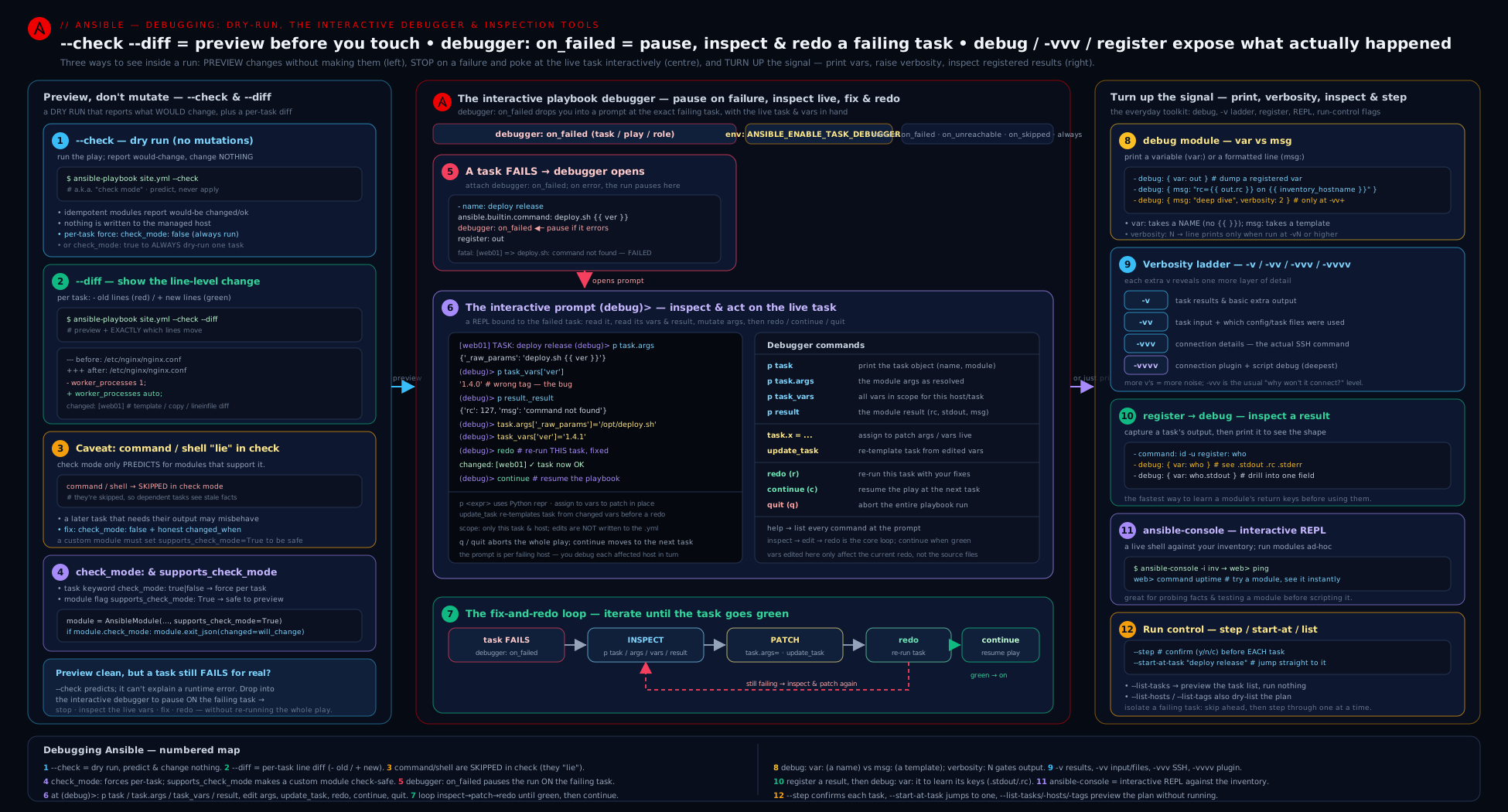
The diagram lays out the five-rung diagnostic ladder — predict with --check, preview with --diff, inspect with debug/register, trace with -v levels, and step-and-fix live with the debugger — alongside the ansible-console REPL and how a traceback is read bottom-up.
Going deeper
The core sections walked every rung of the ladder. This one is for the details that separate someone who uses these tools from someone who understands why they behave as they do: the magic variable behind check mode, the classic cascade failure it causes, the “fail fast” guards that turn a mysterious crash into a precise one, and the callback plugins that reframe Ansible’s output for diagnosis.
The ansible_check_mode magic variable
Everything --check does is exposed to your play through a single magic variable: ansible_check_mode is true for the duration of a check-mode run and false otherwise. It is the mechanism behind check mode, and you can branch on it explicitly:
- name: Run a genuinely destructive step for real only (never in a dry run)
  ansible.builtin.command: /usr/local/bin/migrate-db --apply
  when: not ansible_check_mode          # skipped entirely under --check
  changed_when: true

- name: Tell the operator which mode this is
  ansible.builtin.debug:
    msg: "Running in {{ 'CHECK (dry-run)' if ansible_check_mode else 'LIVE' }} mode"
when: not ansible_check_mode is the clean, declarative complement to check_mode: false. Note the asymmetry: check_mode: false forces a task to run for real even under --check, whereas when: not ansible_check_mode makes a task not run at all under --check — exactly what you want for an irreversible operation a dry run should never even attempt.
The classic check-mode cascade failure (when + a registered command)
This is the single most common way a previously-working play explodes the first time someone adds --check, and it falls straight out of the “lies in check mode” caveat. A command/shell task registers a result, and a later task keys off that result with when::
- name: Is the service active?  (command → SKIPPED under --check)
  ansible.builtin.command: systemctl is-active myapp
  register: svc
  changed_when: false
  failed_when: false

- name: React to the answer  (EXPLODES under --check)
  ansible.builtin.debug:
    msg: "service is already up"
  when: svc.rc == 0
On a normal run this is fine. Under --check the first task is skipped (because command can’t run in check mode), so svc is not a command result — it is a skip result like {"changed": false, "skipped": true, "skip_reason": "..."} with no rc key. The when: svc.rc == 0 then fails with “dict object has no attribute ‘rc’”. Three correct fixes, best first:
| Fix | How | When to use |
|---|---|---|
| Make the command honest in check mode | check_mode: false (+ changed_when: false) on the read-only command |
The command is genuinely read-only — the canonical fix |
| Skip-guard the consumer | when: svc is not skipped and svc.rc == 0 |
You can’t or won’t force the command to run |
| Default the missing key | `when: svc.rc | default(1) == 0` |
The Jinja test form svc is not skipped reads better than a default() and states the intent exactly. The lesson: any when: that dereferences a registered command/shell result is a check-mode landmine unless the registering task is forced to run or the consumer is skip-guarded.
assert and fail: turn a mystery into a precise, early failure
A whole class of “why did this break three tasks later?” problems disappears if you fail fast, loudly, at the point the assumption is violated. Two builtin modules do this, and both are diagnostic tools as much as control-flow ones:
| Module | Purpose | Key args |
|---|---|---|
ansible.builtin.assert |
Stop the play unless every condition in that: is true — a runtime sanity check |
that: (list), fail_msg:, success_msg:, quiet: true |
ansible.builtin.fail |
Unconditionally stop with a message (usually gated by when:) — a manual guard / bisection point |
msg:, when: |
- name: Sanity-check assumptions before the risky part
  ansible.builtin.assert:
    that:
      - app_port is defined
      - app_port | int > 1024
      - "deploy_env in ['staging', 'prod']"
    fail_msg: "Bad inputs: app_port={{ app_port | default('UNDEF') }}, env={{ deploy_env | default('UNDEF') }}"
    success_msg: "Inputs look sane — proceeding"
    quiet: true           # don't echo each individual 'that' condition

- name: Refuse to touch prod without an explicit confirmation flag
  ansible.builtin.fail:
    msg: "Re-run with -e confirm_prod=yes to proceed against production"
  when: deploy_env == 'prod' and confirm_prod | default('no') != 'yes'
Both report ok/failed and never changed, so they cost nothing to leave in place. Putting assert at the top of a role makes the role’s contract explicit — a missing variable fails immediately with a readable message instead of a KeyError traceback forty tasks later. (Deeper treatment is in error handling: blocks, rescue, changed_when/failed_when.)
Callback plugins: reformat the output for diagnosis
Ansible’s on-screen output is produced by a stdout callback plugin, and swapping it changes how much you can actually read — above all of tracebacks and multi-line command output. Set it with stdout_callback under [defaults] in ansible.cfg, or the ANSIBLE_STDOUT_CALLBACK environment variable:
| Callback | Set with | What it gives you |
|---|---|---|
default |
(the default) | The familiar compact output. |
debug |
ANSIBLE_STDOUT_CALLBACK=debug |
Expands stdout/stderr/msg into readable multi-line blocks instead of the escaped single-line form — the fastest way to read command output or a traceback. |
community.general.yaml |
ANSIBLE_STDOUT_CALLBACK=community.general.yaml |
Renders every result as indented YAML — structured data (facts, registered dicts) becomes legible at a glance. |
oneline / minimal |
ANSIBLE_STDOUT_CALLBACK=oneline |
Terse, one line per result — good for scanning a large fleet. |
Separately, aggregate callbacks run alongside the stdout callback and answer “why is this play slow?”. Enable them with callbacks_enabled under [defaults] (or the ANSIBLE_CALLBACKS_ENABLED env var):
# ansible.cfg
[defaults]
callbacks_enabled = profile_tasks, timer
community.general.profile_tasks prints a per-task wall-clock time plus a sorted “slowest first” summary at the end; timer prints total run time; profile_roles aggregates by role. Representative tail of a profile_tasks run:
Monday 20 July 2026  14:32:10 +0530 (0:00:04.212)       0:00:18.664 **********
===============================================================================
Deploy nginx config -------------------------------------------------- 4.21s
Install base packages ------------------------------------------------ 3.02s
Gathering Facts ------------------------------------------------------ 1.88s
Render app config ---------------------------------------------------- 0.44s
That summary is how you find the one task making a twelve-minute play slow, instead of guessing. (profile_tasks ships in the community.general collection, which is bundled in the ansible package.)
Keep the remote module to debug it standalone
When the traceback drill points at a crash inside an AnsiballZ_<module>.py on the target, you can stop Ansible from deleting that generated file: run with ANSIBLE_KEEP_REMOTE_FILES=1, then on the target run python <path>/AnsiballZ_<module>.py explain to dump the exact arguments Ansible passed, or execute it directly to reproduce the crash in isolation. It is the bridge from “a module blew up somewhere” to “I can run just that module, with just those args, under a Python debugger” — the loop the custom modules lesson is built around.
Hands-on lab: diagnose a deliberately broken playbook (₹0)
You will create a small playbook with three planted problems, then use each tool in this lesson to find and understand them. Everything runs against localhost plus one container; no cloud, no cost.
Step 0 — control node and a target
You need ansible-core 2.17+ on your machine (the control node) and one throwaway target. A container is simplest:
ansible --version          # confirm 2.17 or newer
# optional managed node — a disposable container reachable over SSH or via the local connection:
docker run -d --name lab-node --rm python:3.12-slim sleep infinity
For a pure-localhost run you don’t even need the container — localhost with connection: local is enough to exercise every tool here.
Step 1 — an inventory and a deliberately broken playbook
mkdir -p ~/ansible-debug-lab && cd ~/ansible-debug-lab
printf 'localhost ansible_connection=local\n' > inventory.ini
Create broken.yml:
---
- name: Debugging lab — three planted problems
  hosts: localhost
  gather_facts: true
  vars:
    target_dir: /tmp/debug-lab
    app_version: "1.0.0"
  tasks:
    # Problem 1: a read-only command that will be SKIPPED under --check
    - name: Read the OS release file
      ansible.builtin.command: cat /etc/os-release
      register: os_release
      changed_when: false          # correct
      # (intentionally MISSING check_mode: false — we'll discover the --check skip)

    # A debug we can gate behind verbosity
    - name: (diag) Show the captured os-release — only at -vv+
      ansible.builtin.debug:
        var: os_release.stdout_lines
        verbosity: 2

    # Problem 2: a template task we want to --diff before applying
    - name: Create the lab directory
      ansible.builtin.file:
        path: "{{ target_dir }}"
        state: directory
        mode: "0755"

    - name: Render a config file (watch this with --diff)
      ansible.builtin.copy:
        dest: "{{ target_dir }}/app.conf"
        content: |
          version = {{ app_version }}
          listen = 8080
        mode: "0644"

    # Problem 3: a task that fails because of a typo'd variable — for the debugger
    - name: Write a file using an UNDEFINED variable (will fail)
      ansible.builtin.copy:
        dest: "{{ target_dir }}/owner.txt"
        content: "owner is {{ app_onwer }}"   # typo: app_onwer is undefined
        mode: "0644"
      debugger: on_failed                       # drop into the debugger when it fails
Step 2 — predict with check mode and diff
ansible-playbook -i inventory.ini broken.yml --check --diff
Observe two things. First, the “Read the OS release file” task is reported skipping (because command doesn’t support check mode and you left check_mode: false off) — this is the “lies in check mode” caveat live. Second, when the play reaches the failing task it errors on the undefined app_onwer; that’s expected — the planted Problem 3. The --diff would have shown the app.conf content had the play got that far. Fix Problem 1 by adding check_mode: false to the OS-release task, then re-run --check --diff and confirm the task now runs under check mode and downstream is happy up to the planted failure.
Step 3 — inspect with verbosity and debug
# Normal run: the (diag) debug stays silent
ansible-playbook -i inventory.ini broken.yml 2>&1 | head -30 || true
# -vv: the gated debug task now prints the os-release lines, and you see task file:line
ansible-playbook -i inventory.ini broken.yml -vv 2>&1 | sed -n '1,40p' || true
Confirm the verbosity: 2 debug task is invisible without -vv and visible with it. With -vvv you’d additionally see the local-connection command construction.
Step 4 — step into the debugger and fix-and-retry live
The failing task has debugger: on_failed, so a normal run drops you into the prompt at the failure:
ansible-playbook -i inventory.ini broken.yml
At the (debug)> prompt, diagnose and fix without leaving the run:
(debug)> p result._result['msg']            # see the "app_onwer is undefined" error
(debug)> p task.args                         # inspect the content arg with the typo
(debug)> task.args['content'] = 'owner is admin'   # supply a literal to get past it
(debug)> update_task                          # re-template
(debug)> redo                                 # re-run — now it succeeds
(debug)> continue                             # finish the play
Then make the real fix in the file (correct app_onwer to a defined variable, e.g. app_owner, and define it in vars:), and re-run to confirm a clean pass.
Step 5 — explore with ansible-console
ansible-console -i inventory.ini
At the console prompt, try:
localhost (1)[f:5]$ ping
localhost (1)[f:5]$ setup filter=ansible_distribution
localhost (1)[f:5]$ command cat /tmp/debug-lab/app.conf
localhost (1)[f:5]$ exit
You’ve now exercised check mode, --diff, gated debug, the verbosity ladder, the interactive debugger’s fix-and-retry, and the console REPL.
Validation
# A clean real run should report 0 failed and a changed app.conf the first time:
ansible-playbook -i inventory.ini broken.yml --diff
# Run it a SECOND time — changed should drop to 0 for the idempotent tasks:
ansible-playbook -i inventory.ini broken.yml --diff | tail -5
cat /tmp/debug-lab/app.conf      # confirm rendered content
A truthful dry run (--check --diff) on the fixed playbook should now show the same set of changes a real run produces (because every task uses a check-mode-aware module after you fixed Problem 1).
Cleanup
rm -rf /tmp/debug-lab ~/ansible-debug-lab
docker rm -f lab-node 2>/dev/null || true
Cost note
Everything ran on localhost and an optional local container. Total cost: ₹0.
Common mistakes & troubleshooting
| Symptom | Cause | Fix |
|---|---|---|
A command/shell task is skipped under --check and downstream tasks then fail |
Those modules don’t support check mode, so they’re skipped, leaving registered vars unset | Add check_mode: false (and usually changed_when: false) to read-only commands so they run in check mode too |
--check shows a clean run but the real run makes lots of changes |
command/shell changes are invisible to check mode (skipped, contribute 0 to changed) |
Don’t trust --check when command/shell are present; prefer real modules that support check mode |
ansible.builtin.debug: var: prints “VARIABLE IS NOT DEFINED!” for a variable you set |
You wrapped the name in {{ }} (var: "{{ foo }}") — var: expects the bare name |
Use var: foo (no braces). Use {{ }} only with msg: |
A secret leaked into the terminal / CI log during a --diff run |
--diff prints file content, including secrets, for any file a task writes |
Set no_log: true on the secret-writing task (suppresses output and diff); or diff: false on that task |
A gated debug task (verbosity: 3) never prints |
You’re running below that -v level |
Run with -vvv (or higher); the threshold is ≥ |
| The play hangs forever in CI at the first failure | strategy: debug (or enable_task_debugger) is on, and CI has no TTY to answer the (debug) prompt |
Remove strategy: debug for non-interactive runs; use the scoped debugger: keyword only, and never enable it in CI |
At the debugger, you edited task.args but redo ran the old values |
You skipped update_task, which re-templates the task with your edits |
Run update_task before redo after changing args or vars |
| A module dies with “MODULE FAILURE / module_stderr” | The remote module raised an exception or printed stray stdout that corrupted its JSON | Run with -vvv, read module_stderr bottom-up for the real exception and line number |
-vvvv is an unreadable wall and still doesn’t explain a weird internal error |
You need Ansible’s internal debug, not connection debug | Use ANSIBLE_DEBUG=1 with ANSIBLE_LOG_PATH=... and grep the log file |
Common beginner mistakes
These are misconceptions rather than symptoms — the wrong mental model that produces a whole family of bugs. Fix the model and the bugs stop (this is deliberately distinct from the symptom→cause→fix table above).
-
“A clean
--checkmeans a clean real run.” No. Check mode is only as truthful as your modules are check-mode-aware.command/shell/raw/scriptare skipped under--checkand contribute zero to the changed count, so a dry run full ofshellcan look spotless and then change the world for real. Right model: treat--checkas “accurate for idempotent modules, blind tocommand/shell.” Prefer real modules, and force read-only commands withcheck_mode: falseso they participate honestly. -
“
--diffis safe to run anywhere — it only shows changes.” No.--diffprints file content, so any task that writes a password file, a.env, or a rendered secret template will splash those secrets across your terminal and into CI logs. Right model:--diffoutput is sensitive. Mark secret-writing tasksno_log: true(which also suppresses their diff) and never paste raw--difflogs into a ticket or chat. -
“
command/shellhonour check mode like every other module.” No. They cannot — a module can only support check mode if it can compute the change without doing it, and an arbitrary shell command can’t. They declaresupports_check_mode: falseand skip. Right model: if you need a shell task to run during a dry run it must be genuinely read-only and markedcheck_mode: false; if it changes state, there is no honest way to preview it in check mode — use a real module instead. -
“
debug: var: {{ my_var }}prints my variable.” No.var:takes the bare name; wrapping it in{{ }}templates it to its value first and then treats that as a variable name — usually yieldingVARIABLE IS NOT DEFINED!. Right model:var: my_var(no braces) to inspect data;msg: "{{ my_var }}"(braces) to print a message. The two parameters are opposites in how they take their input. -
“More
vs is always better, so I’ll just always use-vvvv.” No.-vvvvburies the signal you wanted (the task return value) under connection-plugin and SSH handshake noise. Right model: climb the ladder deliberately —-vfor return values,-vvfor task file:line,-vvvfor connectivity problems,-vvvv+ only for transport/auth debugging. -
“The debugger’s edits fix my playbook.” No. Edits you make at the
(debug)prompt (task.args[...] = ...,task_vars[...] = ...) apply to that run only — they are never written back to the file. Right model: the debugger is for diagnosing and confirming a fix live; once you know the fix you still have to make the real change in the playbook (and never leavestrategy: debugin anything CI runs — it blocks forever waiting for input). -
“
registerunder--checkgives me the command’s real output.” No. If the registered task was skipped in check mode, the registered variable is a skip result with nostdout/rc— the root of the classicwhen:cascade failure in Going deeper. Right model: a registeredcommand/shellresult is only real if the task actually ran; force it withcheck_mode: falseor skip-guard every consumer.
Best practices
- Always dry-run-then-diff before a production change:
ansible-playbook site.yml --check --diffis the seatbelt. Read the would-be changes; only then drop--check. - Run real changes with
--difftoo, so your run log holds a permanent, line-by-line record of every file touched — invaluable for change review and incident forensics. - Make plays check-mode-safe: add
check_mode: false+changed_when: falseto read-onlycommand/shelltasks, and prefer real modules (service,package,lineinfile) overcommand/shellprecisely so check mode and--diffstay honest. - Leave gated debug breadcrumbs in roles (
ansible.builtin.debug: var: ...withverbosity: 2) rather than adding/deleting debug tasks while firefighting — they’re silent normally and light up with-vv. - Use
register+debug: var:once to learn an unfamiliar module’s return shape, then reference the specific key — don’t guess at.stdoutvs.results. - Climb the verbosity ladder deliberately:
-vfor return values,-vvfor task file:line,-vvvfor connectivity/transport problems. Don’t default to-vvvv. - Keep the interactive debugger local:
strategy: debuganddebugger: alwaysare development tools — never commit them into anything CI runs, because they block on input. - Reach for
--start-at-taskto resume long plays after a fix instead of re-running everything, and--stepto walk an unfamiliar play one approved task at a time. - Keep
ansible-consolein your toolkit for exploratory “what does this module do here right now?” questions — far faster than writing a throwaway playbook.
Security notes
--diffcan leak secrets. It prints file content; any task that writes credentials, keys, tokens or rendered secret templates will expose them under--diff(and into CI logs). Mark such tasksno_log: true(which also suppresses their diff) and treat--diffoutput as sensitive.no_log: trueis your friend and a debugging obstacle. It hides output (good for secrets) but also hides legitimate diagnostics; when actively debugging ano_logtask, removeno_logtemporarily and locally only — never commit ano_log: falsethat exposes a secret.- Verbose output is sensitive.
-vvvprints the SSH command line and may surface usernames, hostnames, key paths andbecomedetail;-vprints full task return values that can include secret-bearing module output. Don’t paste raw verbose logs into tickets/chat without scrubbing, and avoid high verbosity in shared CI logs. ANSIBLE_DEBUGandANSIBLE_LOG_PATHwrite a lot to disk — including potentially sensitive command/connection detail. Protect the log file’s permissions and delete it after the debugging session.- The interactive debugger exposes everything.
task_varsat the(debug)prompt dumps the entire variable scope, including any decrypted Vault values in memory. Only use it on machines and screens you control, and never screen-share a debugger session against production. - Check mode is not a security control.
--checkreduces blast radius for idempotent modules, butcommand/shellskip silently (so a “safe” dry run can hide a destructive real run) — never rely on--checkalone to prove a change is safe.
Interview & exam questions
1. What does --check do, and what is the single biggest caveat?
--check is a dry run: modules report whether they would change anything without making changes, so the “changed” count predicts drift. The biggest caveat is that command/shell/raw/script don’t support check mode and are skipped entirely — so they contribute nothing to the changed count, downstream tasks that depend on their registered output break, and a clean --check does not guarantee a clean real run.
2. How do you make a read-only command run during a --check dry run?
Set check_mode: false on the task (force it to run for real even under --check), and pair it with changed_when: false because reading something changes nothing. This is the canonical fact-gathering-command idiom that keeps dry runs useful.
3. Explain check_mode: true versus check_mode: false on a task.
check_mode: true forces the task to run in check mode always, even on a normal (non---check) run — a permanently “preview only” task. check_mode: false forces it to run for real always, even under --check. Unset, the task follows the global run mode.
4. What does --diff show, and what’s the dangerous interaction to be aware of?
--diff prints a unified (git-style) diff of every file a task creates or modifies — line by line. The danger is that it prints file content, so any task writing secrets will leak them to the terminal and CI logs; guard such tasks with no_log: true (which suppresses the diff) or diff: false.
5. In ansible.builtin.debug, when do you use var: versus msg:?
Use var: to print the value of a variable — you pass the bare name (no {{ }}), and it pretty-prints structured data; ideal for inspecting registered results. Use msg: to print a string, using {{ }} to interpolate; ideal for human-readable messages. Wrapping a name in {{ }} under var: is the classic mistake that yields “VARIABLE IS NOT DEFINED!”.
6. What is the verbosity: parameter on debug, and why is it useful?
It’s an integer threshold; the debug message only prints when the run’s -v level is ≥ that number (default 0 = always). It lets you leave permanent diagnostic tasks in roles/playbooks that stay silent on normal runs and light up only when someone adds -vv/-vvv — so you stop adding and deleting debug tasks while firefighting.
7. Walk through what each verbosity level adds: -v, -vv, -vvv, -vvvv.
-v adds each task’s full return value (and which hosts ran). -vv adds task file:line path info (find tasks buried in roles). -vvv adds connection detail — the actual SSH command, temp-dir/module transfer, become — the level for connectivity problems. -vvvv adds the connection plugin’s own debug and passes extra verbosity to SSH (low-level handshake/auth). Each level is cumulative.
8. What is the playbook debugger, how do you enable it, and name the key commands.
It’s an interactive (debug) prompt that pauses a play at a task so you can inspect and edit variables and re-run the task live. Enable it with strategy: debug (fires on any failed task in the play), the debugger: keyword (on_failed/on_ready/always/never/on_skipped/on_unreachable, scoped and higher-precedence), or ANSIBLE_ENABLE_TASK_DEBUGGER=True. Key commands: p <expr> (print), task/task.args, task_vars, host, result._result, update_task (re-template after edits), redo (re-run), continue, quit.
9. Describe the debugger fix-and-retry loop and the one command people forget.
Inspect the failure (p result._result['msg']), inspect the args/vars (p task.args, p task_vars[...]), assign a corrected value (task.args['x'] = ... or task_vars['y'] = ...), run update_task to re-template the task with the edit, then redo to re-run it, then continue. The forgotten command is update_task — without it, redo runs the old, un-re-templated values.
10. What is ansible-console and when would you use it?
An interactive REPL where you type module invocations (ping, command uptime, setup filter=...) that run immediately against a host pattern, with cd <pattern> to change scope, become/forks/verbosity to change context, and tab-completion of module names. Use it for exploratory debugging — “what does this module do on this host right now?” — without writing a playbook.
11. How do you read an Ansible traceback / “MODULE FAILURE”?
Run with -vvv to get the full module_stderr, then read the traceback bottom-up: the last line is the exception (KeyError: 'address'), the line above it is the exact code line and file:line that raised it. AnsiballZ_<module>.py in the path means the crash was inside a module on the remote host. Stray module_stdout usually means a module print()ed and corrupted its JSON.
12. What’s the difference between -vvv and ANSIBLE_DEBUG=1?
-vvv shows task and connection detail (SSH command, transfer, become) — the everyday level for connectivity issues. ANSIBLE_DEBUG=1 turns on Ansible’s internal Python debug logging (plugin loading, executor, workers) — a developer-grade firehose for chasing core/plugin bugs, best captured to a file via ANSIBLE_LOG_PATH and grepped, not read live.
13. Why must strategy: debug never be used in CI?
It makes the play interactive — it blocks at a (debug) prompt waiting for keyboard input on any failed task. In CI there’s no TTY to answer, so the job hangs indefinitely. Use the scoped debugger: keyword for local development and keep it out of anything non-interactive.
14. You fixed task #30 of a 40-task play; how do you avoid re-running 1–29?
Use --start-at-task "NAME of task 30" to skip straight to it. Combine with --limit to target only the affected host. For exploratory control, --step prompts before each task so you can approve them one at a time.
Quick check
- Which two task keywords do you add to a read-only
commandso it both runs under--checkand never reports “changed”? - In
ansible.builtin.debug, do you pass a variable’s name with or without{{ }}when usingvar:? - Which verbosity level first shows the actual SSH command and connection detail?
- At the
(debug)prompt, which command must you run after editingtask.argsand beforeredo? - Name the security risk of running a playbook that writes a secret file with
--diff.
Answers
check_mode: false(run it even under--check) andchanged_when: false(reading changes nothing).- Without
{{ }}—var:takes the bare variable name (e.g.var: result). Braces are only formsg:. -vvv(connection level: the SSH command, temp-dir/module transfer, andbecome).update_task— it re-templates the task with your edits soredoruns the new values.--diffprints file content, so the secret leaks to the terminal and CI logs; guard the task withno_log: true(ordiff: false).
Practice challenges
Six graded challenges, beginner to advanced. Try each before opening the solution. Everything runs against localhost for ₹0.
1 (Beginner) — Predict and preview in one command. You are about to run site.yml against production. Write the single invocation that shows what would change and the exact line-by-line file changes, without altering anything.
<details><summary>Solution</summary>
ansible-playbook -i inventory site.yml --check --diff
Why: --check makes every module report its would-be change without applying it; --diff adds the unified +/- content preview. Together they are the standard “seatbelt” before a real run.
</details>
2 (Beginner) — Make a read-only command honest under --check. A task ansible.builtin.command: cat /opt/app/VERSION (registered as ver) is skipped under --check, breaking a later task that reads ver.stdout. Fix the task so it runs even in a dry run and never reports “changed”.
<details><summary>Solution</summary>
- name: Read the deployed version (runs even under --check)
  ansible.builtin.command: cat /opt/app/VERSION
  register: ver
  check_mode: false      # run for real even in a dry run
  changed_when: false    # reading changes nothing
Why: check_mode: false opts the task out of the dry run so its registered output is populated; changed_when: false keeps a pure read from inflating the changed count.
</details>
3 (Intermediate) — var: versus msg:. You registered id_result from a command. Write two debug tasks: one that pretty-prints the entire return structure, and one that prints just the message exit code was N using the return code.
<details><summary>Solution</summary>
- name: Whole structure — pretty-print the registered result
  ansible.builtin.debug:
    var: id_result          # var: takes the BARE name (no braces)

- name: A crafted message from the return code
  ansible.builtin.debug:
    msg: "exit code was {{ id_result.rc }}"   # msg: needs the {{ }}
Why: var: takes an unbraced variable name and renders structured data; msg: takes a string and needs {{ }} to interpolate. Swapping them is the number-one debug mistake.
</details>
4 (Intermediate) — A breadcrumb that only shows when asked. Add a diagnostic task that dumps ansible_facts['default_ipv4'] but stays silent on a normal run and appears only at -vvv or higher. Give the command that reveals it.
<details><summary>Solution</summary>
- name: (diag) default IPv4 — visible only at -vvv+
  ansible.builtin.debug:
    var: ansible_facts['default_ipv4']
    verbosity: 3
ansible-playbook -i inventory site.yml -vvv
Why: verbosity: 3 gates the output behind a -v level of ≥ 3, so you can commit permanent breadcrumbs that never clutter normal output but light up on demand.
</details>
5 (Advanced) — Defuse the check-mode cascade landmine. This play works normally but crashes under --check with “dict object has no attribute ‘rc’”. Give two independent fixes.
- name: Is nginx active?
  ansible.builtin.command: systemctl is-active nginx
  register: ng
  changed_when: false
  failed_when: false
- name: Note it
  ansible.builtin.debug:
    msg: "nginx is up"
  when: ng.rc == 0
<details><summary>Solution</summary>
# Fix A — force the read-only command to run under --check (best):
- name: Is nginx active?
  ansible.builtin.command: systemctl is-active nginx
  register: ng
  check_mode: false
  changed_when: false
  failed_when: false

# Fix B — skip-guard the consumer so a skip result can't be dereferenced:
- name: Note it
  ansible.builtin.debug:
    msg: "nginx is up"
  when: ng is not skipped and ng.rc == 0
Why: under --check the command is skipped, so ng is a skip result with no rc; either force the command to run (check_mode: false) or guard the consumer against the skip (ng is not skipped).
</details>
6 (Advanced) — Find the one slow task. A twelve-minute play “feels slow” but you don’t know which task is the culprit. Configure Ansible to print a sorted list of the slowest tasks after every run, without editing the playbook.
<details><summary>Solution</summary>
# ansible.cfg
[defaults]
callbacks_enabled = profile_tasks, timer
# or, without editing ansible.cfg:
ANSIBLE_CALLBACKS_ENABLED=profile_tasks,timer ansible-playbook -i inventory site.yml
Why: the community.general.profile_tasks aggregate callback times every task and prints a sorted “slowest first” summary, turning “the play is slow” into “this task is slow” with no guesswork.
</details>
Exercise
Take a playbook you already have (or the lab’s broken.yml) and harden it for debuggability and safe change management:
- Add
check_mode: false+changed_when: falseto every read-onlycommand/shelltask, then prove with--checkthat the task now runs (not skips) under a dry run and that downstream tasks see its registered output. - Run the play with
--check --diffand capture the predicted changes; then run it for real with--diffand confirm the actual changes match the prediction (they should, once every changing task uses a check-mode-aware module). - Add a gated
ansible.builtin.debugtask (verbosity: 2) that dumps a registered result, and demonstrate it is silent on a normal run and visible with-vv. - Identify the most secret-sensitive file your play writes, mark its task
no_log: true, and confirm that a--diffrun shows the diff suppressed for that task while still showing diffs for others. - Deliberately break one task (a typo’d variable), add
debugger: on_failed, and use the(debug)prompt to inspect the error (p result._result['msg']), fix the value (task_vars[...]/task.args[...]),update_task,redo, andcontinue— then make the real fix in the file. - Use
--list-tasksto print the plan, then--start-at-taskto resume the play from the previously-failing task without re-running the ones before it.
Success criteria: a --check --diff dry run is truthful (its changes equal the real run’s); read-only commands run in check mode; the gated debug appears only at -vv; the secret task’s diff is suppressed under --diff; you fixed a failing task live in the debugger and resumed with --start-at-task.
Certification mapping
- Red Hat RHCE (EX294) — this lesson maps directly onto the exam workflow. You are expected to run playbooks with
--checkand--diffto verify behaviour before and after changes, to make tasks behave correctly in check mode (check_mode,changed_whenforcommand/shell), and to troubleshoot playbooks under time pressure — where-v/-vvv,ansible.builtin.debugwithregister, and reading a failure message quickly are exactly the skills tested. The execution-control flags (--start-at-task,--step,--list-tasks,--limit,--tags) are explicitly listed exam tooling for running and re-running plays efficiently. Pair this with error handling (thechanged_when/failed_whenthat check mode and--diffmake you reason about) and playbooks & become (the flags reference). - Red Hat EX374 (Automation with Ansible Automation Platform) — diagnostic fluency (verbosity,
--diff, the debugger, reading tracebacks) underpins authoring and troubleshooting content destined for execution environments and the controller, where you can’t always attach a debugger and must rely on verbose logs. - General DevOps / SRE interviews — “how do you safely preview an Ansible change?” (
--check --diff), “why does mycommandshow changed every run / get skipped in check mode?” (the caveat), and “how do you debug a failing task without restarting the whole play?” (the debugger /--start-at-task) are classic probes this lesson answers directly.
Glossary
- Check mode (
--check,-C) — a dry run: modules report whether they would change anything without making changes. check_mode:— a task/block/play keyword forcing a task into check mode (true) or real execution (false) regardless of the run’s global mode.supports_check_mode— a module flag declaring whether it can run in check mode; iffalse, the task is skipped under--check.- The “lies in check mode” caveat —
command/shell/raw/scriptdon’t support check mode, so they’re skipped, contribute 0 to the changed count, and can break downstream tasks. --diff(-D) — prints a unified (git-style) diff of every file a task creates or modifies; works with or without--check.diff:— a task/block/play keyword forcing diff on (true) or off (false) for that scope regardless of the CLI flag.no_log: true— suppresses a task’s output (and its diff), preventing secret leaks; also hides legitimate diagnostics.ansible.builtin.debug— the print module:var:(bare variable name) ormsg:(a templated string), with an optionalverbosity:threshold.verbosity:(on debug) — an integer; the debug prints only when the run’s-vlevel is ≥ this number.- Verbosity levels (
-v…-vvvvv) — cumulative:-vtask return values,-vvtask file:line,-vvvconnection/SSH detail,-vvvvconnection-plugin debug,-vvvvvmaximum transport noise. ANSIBLE_DEBUG— env var enabling Ansible’s internal Python debug logging (plugin loading, executor, workers) — a developer firehose, separate from-v.ANSIBLE_LOG_PATH/log_path— write all Ansible output to a file; essential when capturing high verbosity orANSIBLE_DEBUG.- Playbook debugger — an interactive
(debug)prompt that pauses a play at a task to inspect/edit variables and re-run it live. strategy: debug— a play strategy that drops into the debugger on any failed task.debugger:keyword — scoped control of the debugger:on_failed,on_unreachable,on_skipped,on_ready,always,never.update_task— debugger command that re-templates the current task after you edit its args/vars (run it beforeredo).redo— debugger command that re-runs the current task with your edits;continueaccepts and moves on;quitaborts the play.task_vars— at the debugger prompt, the full merged variable scope available to the current task.ansible-console— an interactive REPL that runs module invocations against a host pattern, withcd,become,forks, and tab-completion.--start-at-task "NAME"— skip every task beforeNAMEand start there (resume after a fix).--step— prompt before every task (yes/no/continue) to walk a play interactively.--list-tasks/--list-hosts/--list-tags— print the execution plan / targeted hosts / available tags without running.- AnsiballZ — the self-contained Python wrapper Ansible builds per module and ships to the target; seeing
AnsiballZ_<module>.pyin a traceback means a remote module crash. - MODULE FAILURE — Ansible’s signal that a module didn’t return clean JSON; the real cause is in
module_stderr(read bottom-up). ansible_check_mode— a magic variable,truewhile a play runs under--check; branch onwhen: not ansible_check_modeto skip a task during a dry run.- Check-mode cascade failure — a
when:that dereferences a registeredcommand/shellresult (e.g.svc.rc) crashes under--checkbecause the skipped task’s result has no such key; fix withcheck_mode: falseor anis not skippedguard. ansible.builtin.assert— validates that every condition inthat:is true, failing withfail_msg:otherwise; a runtime sanity check that makes a role’s contract explicit.ansible.builtin.fail— unconditionally stops the play with amsg:(usually gated bywhen:); a manual guard or bisection point.- Stdout callback plugin (
stdout_callback/ANSIBLE_STDOUT_CALLBACK) — the plugin that formats on-screen output;debugexpands multi-line output/tracebacks,community.general.yamlrenders results as readable YAML. - Aggregate callback (
callbacks_enabled) — a callback that runs alongside the stdout one;community.general.profile_taskstimes each task and prints a slowest-first summary,timerprints total run time. ANSIBLE_KEEP_REMOTE_FILES— env var that keeps the generatedAnsiballZ_<module>.pyon the target so you can run it standalone (python AnsiballZ_...py explain) to debug a module crash in isolation.
Next steps
You can now predict, preview, inspect, trace, and step-debug any playbook. From here:
- Learn to write the modules whose check-mode and traceback behaviour you’ve been consuming — writing custom Ansible modules in Python is where
supports_check_mode,module.check_mode, andmodule.exit_json/fail_jsonbecome things you implement, and where running a module standalone short-circuits the traceback loop. - Revisit error handling: blocks, rescue, changed_when/failed_when —
changed_when/failed_whenare exactly what make check mode and--difftruthful, and the debugger fires on the failed state those keywords define. - Tie diagnosis back into your quality gates with linting & testing: ansible-lint, yamllint, idempotence & CI — the idempotence test (run twice → 0 changed) is the static cousin of the
--check --diffdiscipline you practised here. - For deeper fact and variable inspection, re-read variables, facts, register & set_fact — every
debug: var:and everytask_varslookup at the debugger prompt is a window onto the variable precedence rules covered there.