In a nutshell
Ansible feels instant in the lab and glacial in production, and the difference is almost never your tasks — it is how Ansible talks to hosts. This lesson is the complete set of dials that close that gap: parallelism (forks), connection reuse (SSH multiplexing and pipelining), how and when facts are gathered and cached, backgrounding long jobs with async, choosing a scheduling strategy, and measuring it all with profiling callbacks.
Think of stock Ansible as a delivery driver who, for every single parcel, drives to your street, parks, switches off the engine, drops one box at the door, and drives all the way back to the depot — then repeats the entire trip for the next box. Tuning teaches that driver to keep the engine running between houses (SSH multiplexing), carry a stack of boxes in one trip instead of one-per-run (pipelining), send more vans out at once (forks), and stop re-surveying the whole neighbourhood every morning when nothing has moved (fact caching). The parcels delivered are identical; the time collapses.
Nothing here rewrites your roles — every lever lives in ansible.cfg, in inventory, or in a play keyword. The discipline that ties them together is profile → change one lever → profile again, so you tune with numbers instead of hunches.
Level: Advanced · Time: ~35 min
The first time you run a tidy ten-task playbook against three lab machines, Ansible feels instant. The first time you run that same playbook against three hundred production machines, it feels like watching paint dry — and the reason is almost never your tasks. It is the plumbing: how many hosts Ansible talks to at once, how many times it opens an SSH connection, how many forks-and-execs each module costs, and how much time every single play burns up front gathering facts you may not even use. Ansible’s defaults are deliberately conservative and beginner-safe; they are emphatically not tuned for scale. The good news is that the same engine that crawls with stock settings will fly once you pull the right levers, and none of those levers require rewriting a line of your roles.
This lesson is the exhaustive tour of those levers. We start with forks — the parallelism dial that decides how many hosts Ansible drives simultaneously — and how to size it sanely. We then go deep on the single biggest free win in Ansible: SSH connection reuse via OpenSSH’s ControlMaster/ControlPersist multiplexing, and pipelining, which collapses the several round-trips each task normally makes into roughly one (plus the requiretty caveat that bites people who turn it on blind). We cover fact gathering end to end — implicit versus explicit, turning it off, gather_subset, gather_timeout — and then fact caching with the jsonfile, redis, and memcached plugins so a fleet gathers facts once and reuses them for hours. We cover async + poll for long-running tasks and the fire-and-forget poll: 0 + ansible.builtin.async_status pattern; the free strategy for letting fast hosts race ahead; cutting work with loops and loop-level when; profiling with the profile_tasks and timer callbacks so you measure instead of guess; the Mitogen strategy plugin that can halve wall-clock time; and the connection plugins (ssh, paramiko, smart) underneath it all. Everything targets current Ansible (ansible-core 2.17+ / Ansible 10+, 2026) and uses FQCN — ansible.builtin.async_status, ansible.builtin.setup — throughout. We finish with a free, local before/after benchmark so you can see the numbers move.
Learning objectives
After working through this lesson you will be able to:
- Size and set
forksfor your control node and fleet, and explain how forks interacts withserialand the chosen strategy. - Configure SSH multiplexing (
ControlMaster,ControlPersist,ControlPath) and pipelining, explain exactly what each saves, and handle therequirettycaveat that breaks pipelining on hardened hosts. - Decide when facts are gathered — implicit vs explicit,
gather_facts: false,gather_subset,gather_timeout— and stop paying for facts you do not use. - Stand up fact caching with the
jsonfile,redis, ormemcachedcache plugins (andfact_caching_timeout) so a fleet gathers facts once and reuses them. - Run long tasks with
async+poll, and use the fire-and-forgetpoll: 0pattern withansible.builtin.async_statusto start work on every host and collect results later. - Choose a strategy (
linear,free,host_pinned,debug) and know whenfreehelps and when it hurts. - Profile a run with the
profile_tasks,profile_roles, andtimercallbacks (viaANSIBLE_CALLBACKS_ENABLED) to find the real bottleneck before tuning. - Install and enable the Mitogen strategy plugin, understand what it changes, and know its compatibility limits.
- Pick the right connection plugin (
ssh,paramiko,smart,local) for the job.
Prerequisites & where this fits
You should already be fluent with the run-time machinery this lesson tunes: playbooks made of plays and tasks, facts (the ansible.builtin.setup module, ansible_facts, custom facts), register for capturing results, and inventory with group_vars/host_vars. The previous lesson, Ansible Delegation, Strategies & Rolling Updates, In Depth, introduced serial, throttle, and the linear/free/host_pinned strategies in the context of control; this lesson revisits forks and free from the angle of speed and adds the connection-layer levers that make the biggest difference at scale. You will also lean on what you learned about variables and facts in Ansible Variables & Facts, In Depth, because fact gathering and caching are the same ansible_facts you already use, just timed and stored differently. This is the Execution module of the Advanced tier of the Ansible Zero-to-Hero ladder. The material maps to the RHCE (EX294) performance objectives — pipelining, forks, fact caching, and async are exactly the production-readiness skills the exam expects. Everything you need is ansible-core plus a couple of local containers or VMs; the lab runs for free.
Core concepts
Three ideas explain why Ansible is slow by default, and every lever in this lesson follows from them. Fix these in your head first.
Ansible’s work is dominated by connection overhead, not task logic. Most modules do very little real work — install a package, template a file, restart a service — but getting to the point of doing that work is expensive. For each task, on each host, vanilla Ansible: opens (or reuses) an SSH connection, creates a temporary directory on the target, copies the module (a Python file) into it, executes it with the right interpreter, captures the JSON it prints on stdout, and cleans up. The round-trips across the network — not the package install — are where the seconds go. Every performance lever in Ansible is ultimately about doing fewer round-trips, reusing connections, or doing more hosts at once. Hold that and the whole lesson coheres.
Ansible is push-based and serial-per-host by default, parallel-across-hosts by forks. Within a single host, tasks run top to bottom, one at a time (that is what makes a playbook readable and predictable). Across hosts, Ansible runs the same task on up to forks hosts simultaneously, then moves to the next task — that is the default linear strategy. So your two scaling dimensions are: how many hosts run in parallel (forks), and how cheap each host’s per-task overhead is (connection reuse, pipelining). The strategy decides how the per-host streams are scheduled relative to one another (linear keeps them in lockstep; free lets each host sprint).
The control node is the bottleneck you forget about. Every fork is a process on your control machine, and each one runs Python, holds an SSH connection, and uses memory and a file descriptor. Setting forks = 500 on a 2-vCPU laptop does not make Ansible 100× faster than forks = 5; it makes the control node thrash. Sizing forks is therefore a control-node capacity question, not a “bigger is better” knob. We will size it concretely below.
A vocabulary note you will see throughout: a connection plugin is the transport Ansible uses to reach a host (ssh, paramiko, local, winrm, …); a strategy plugin decides task scheduling across hosts (linear, free, host_pinned, debug, and the third-party mitogen_linear); a callback plugin reacts to run events and is how profiling output is produced. All three are plugins that run on the control node, and all three are tuning surfaces.
Forks: the parallelism dial
forks is the maximum number of hosts Ansible communicates with at the same time. It defaults to 5 — meaning even if your play targets 200 hosts, Ansible drives them 5 at a time for each task under the default linear strategy. This single setting is the most common reason a large run feels slow, and the easiest to fix.
You set it in three places (later overrides earlier):
| Where | How | Scope |
|---|---|---|
ansible.cfg |
forks = 50 under [defaults] |
Project/global default |
| Environment | ANSIBLE_FORKS=50 ansible-playbook … |
Per-invocation |
| Command line | ansible-playbook -f 50 site.yml (also --forks) |
Per-invocation, wins |
How forks interacts with the strategy. Under linear (default), Ansible runs task N on up to forks hosts, waits for all of them, then starts task N+1 on the next batch — the play advances task-by-task and the slowest host in each batch sets the pace. Under free, forks still caps concurrency, but hosts no longer wait for each other between tasks; a fast host can be ten tasks ahead of a slow one. So forks is the concurrency ceiling regardless of strategy; the strategy decides whether hosts move in lockstep beneath that ceiling.
How forks interacts with serial. serial (rolling-update batch size, covered in the previous lesson) is a different cap. serial: 10 means Ansible runs the whole play against 10 hosts, finishes, then the next 10. forks then governs concurrency within that batch of 10. The effective parallelism is min(forks, serial, hosts-remaining). If serial: 10 and forks: 50, you get at most 10 hosts at once (the batch is the binding limit); if serial: 100 and forks: 25, you get 25 at once. A classic mistake is bumping forks to 100 for a rolling update and seeing no change because serial is pinning you to 10.
Sizing forks. There is no universal number; size it from the control node’s capacity, because each fork is a Python process holding an SSH connection.
| Control node | Sensible starting forks |
Reasoning |
|---|---|---|
| Laptop / 2 vCPU, 8 GB | 10–25 | Modest CPU; SSH + Python per fork add up |
| CI runner / 4 vCPU, 16 GB | 25–50 | Common sweet spot for mid fleets |
| Dedicated control / 8–16 vCPU, 32 GB+ | 50–100+ | Can drive hundreds of hosts in waves |
| AWX/AAP execution node | tune per node + forks in job template |
Container resources cap it |
Rules of thumb: each fork costs roughly tens of MB of RAM and one file descriptor pair; CPU matters because the control node runs Jinja2 templating, JSON parsing, and connection setup for every fork. Watch top/htop on the control node during a big run — if it pegs CPU or starts swapping, you set forks too high. Also raise the OS open-files limit (ulimit -n) before pushing forks into the hundreds, or you will hit “too many open files”. Finally, more forks only helps if you actually have many hosts and your tasks are not serialised by a downstream bottleneck (a single shared database, an artifact server, a delegate_to chokepoint).
SSH connection reuse: ControlMaster & ControlPersist (multiplexing)
Here is the biggest, cheapest win at scale, and it is pure OpenSSH. Every TCP+SSH handshake — key exchange, authentication, channel setup — costs real milliseconds, often 100–500 ms each. A playbook with 30 tasks against a host, without connection reuse, can pay that handshake dozens of times on that one host. Multiplexing opens the SSH connection once and reuses it for every subsequent task.
OpenSSH implements this with three options that Ansible’s ssh connection plugin sets for you:
| OpenSSH option | What it does | Ansible’s effective default |
|---|---|---|
ControlMaster |
Lets the first connection become a master that later sessions reuse over one TCP connection | auto |
ControlPersist |
Keeps the master connection open in the background for N seconds after the last session closes, ready to be reused | 60s |
ControlPath |
Filesystem path to the control socket that identifies a reusable connection (per user@host:port) | %(directory)s/%%h-%%r (under the control dir) |
You configure these through Ansible, not by hand-editing ~/.ssh/config, via ssh_args in ansible.cfg:
[ssh_connection]
ssh_args = -o ControlMaster=auto -o ControlPersist=60s
control_path_dir = ~/.ansible/cp
What each value means in practice:
ControlMaster=auto— the first SSH connection to a host opens a master; every later task to the same host rides that one socket.autois the right choice (it also tolerates a missing master gracefully). The alternatives areyes(force master),no(never multiplex), andask.ControlPersist=60s— after the last task on a host finishes, OpenSSH keeps the master alive for 60 seconds. The benefit: if you re-run the playbook (or a handler fires later), the warm connection is reused with zero handshake. Bump it (ControlPersist=300sor30m) if you run the same playbook repeatedly during development. Setting it too high just leaves idle sockets around; setting it tono/0disables persistence (you still multiplex within one run, but not across runs).ControlPath— the socket path. The classic gotcha: the default path includes%h(host),%p(port),%r(remote user), and the path string has a 108-character limit on Linux sockets. Long hostnames or deep home directories blow past it and you see “unix_listener: path too long”, multiplexing silently fails, and every task pays a fresh handshake. The fix is a shortcontrol_path_dir(e.g.~/.ansible/cp) so the full socket path stays under the limit.
How to confirm it is working. Run with -vvvv and look for ControlMaster / auto / mux lines, or check for live sockets while a play runs:
ls -la ~/.ansible/cp/
# entries like:  <hash>  -> a live control socket = multiplexing is on
The payoff: connection reuse alone can cut a multi-task run’s wall-clock time by half or more on high-latency links, because you stop paying the handshake on every task. It is on by default — your job is mainly to keep ControlPath short and tune ControlPersist to your workflow.
Pipelining: the single biggest per-task win
Multiplexing reuses the connection; pipelining reduces the number of operations per task over that connection. This is the lever that surprises people with how much it helps.
What a task costs without pipelining. For each task, Ansible normally: (1) creates a temporary directory on the target via an SSH call, (2) copies the module file into it via SFTP/SCP (another transfer), (3) executes the module via SSH, then (4) removes the temp dir. That is several round-trips per task per host.
What pipelining does. With pipelining enabled, Ansible pipes the module’s Python code straight into the interpreter’s stdin over the already-open SSH session, executing it without first writing the module to a temp file on disk. It collapses those several round-trips into roughly one execution call. Combined with multiplexing, the per-task overhead drops dramatically — frequently a 2× or better speedup on connection-heavy playbooks, and the more tasks/hosts you have, the bigger the absolute saving.
Enable it in ansible.cfg:
[ssh_connection]
pipelining = True
Or per-invocation: ANSIBLE_PIPELINING=True ansible-playbook site.yml.
The requiretty caveat — read this before you enable it. Pipelining feeds the module to Python via stdin without allocating a pseudo-terminal (no -tt). On targets where sudo is configured with requiretty in /etc/sudoers (or a sudoers.d drop-in), commands run through sudo demand a TTY and will fail when pipelining is on, with errors like “sudo: sorry, you must have a tty to run sudo”. This is the one thing that breaks people who flip pipelining on across a fleet without checking. Two resolutions:
- Disable
requirettyon the targets (preferred for managed fleets). RemoveDefaults requiretty, or scope it:Defaults:ansible_user !requiretty. Modern RHEL/Ubuntu do not shiprequirettyon by default, so most current systems are fine — but older or hardened images often do. - If you cannot touch sudoers, leave pipelining off for those hosts (you still keep the multiplexing win).
A second, smaller caveat: pipelining requires that the remote sudo/become can read from stdin, which the default sudo become plugin handles; some exotic become methods do not pipeline. In practice, on a modern fleet, pipelining = True is the first setting you should add to ansible.cfg — verify requiretty is off, then enjoy the win.
| Lever | What it reuses/saves | Default | The catch |
|---|---|---|---|
ControlMaster/ControlPersist |
Reuses one SSH connection across tasks (and runs) | on (auto, 60s) |
ControlPath 108-char limit → keep dir short |
pipelining |
Removes the per-task temp-file copy; ~1 round-trip/task | off | breaks under sudoers requiretty |
forks |
More hosts in parallel | 5 | bounded by control-node CPU/RAM/fds |
Fact gathering: stop paying for facts you do not use
Before a play’s first task, Ansible runs an implicit ansible.builtin.setup against every host to collect facts — OS family, network interfaces, memory, mounts, hardware, and more. On a single host that costs a fraction of a second. Across a large fleet, or on hosts where setup is slow (lots of mounts, slow lsblk, network probes), fact gathering can be a meaningful slice of total run time — and you pay it every play, every run, whether or not your tasks read a single fact.
The levers:
| Lever | Where | Effect |
|---|---|---|
gather_facts: false |
Play keyword | Skip the implicit setup entirely for this play |
gathering = smart / explicit / implicit |
ansible.cfg [defaults] |
Global policy for when facts are gathered |
gather_subset: |
Play module_defaults or the setup task |
Collect only some fact subsets |
gather_timeout: |
Same | Per-fact-collection timeout (default 10s) |
fact_caching (+ timeout) |
ansible.cfg |
Reuse facts across runs (next section) |
gathering policy — set in ansible.cfg:
implicit(historical default) — gather facts at the start of every play unlessgather_facts: false.explicit— never gather automatically; you must add agather_facts: trueplay keyword or an explicitansible.builtin.setuptask. Good for fleets where most plays do not need facts.smart(recommended) — gather facts for a host only if they are not already cached. Combined with fact caching (below),smartmeans the first run gathers and caches; later runs within the cache window skip gathering entirely. This is the setting you want for production.
Turning it off per play. If a play only runs a couple of commands and never touches ansible_facts, set gather_facts: false and save the entire setup cost:
- name: Quick service bounce (no facts needed)
  hosts: web
  gather_facts: false
  tasks:
    - name: Restart nginx
      ansible.builtin.service:
        name: nginx
        state: restarted
If you discover mid-play that you do need a fact, gather on demand:
    - name: Gather just what I need
      ansible.builtin.setup:
        gather_subset:
          - "!all"
          - "!min"
          - network
gather_subset — collect only what you use. The setup module organises facts into subsets. You pass a list; prefix with ! to exclude. The meta-subsets are all (everything), min (a small mandatory core, always included unless you say !min), and the individual categories below.
| Subset | Covers (examples) |
|---|---|
min |
ansible_fqdn, ansible_distribution, basic identity (cheap, near-always wanted) |
hardware |
CPU, memory, devices, mounts — often the slowest (probes lsblk, /proc) |
network |
Interfaces, IPs, default route |
virtual |
Hypervisor/container detection |
facter / ohai |
Pull facts from Puppet’s facter / Chef’s ohai if installed |
all |
Everything (the default if you specify nothing) |
The big lever is excluding hardware: gather_subset: ["!hardware"] (or the tighter ["!all", "!min", "network"]) can noticeably speed gathering on fleets where you only need OS family and IPs. Set it globally with module_defaults so every play benefits:
- hosts: all
  module_defaults:
    ansible.builtin.setup:
      gather_subset:
        - "!hardware"
gather_timeout — the per-collection timeout, default 10 seconds. Raise it (gather_timeout: 30) when a host has many disks/mounts and hardware facts legitimately take longer than 10s and you see “timed out waiting for … facts”; otherwise leave it. It is set on the setup module (or via DEFAULT_GATHER_TIMEOUT).
Fact caching: gather once, reuse for hours
Skipping facts is great when you do not need them. Fact caching is for when you do need them but do not want to re-gather on every run. With caching on, the first run gathers facts and persists them; subsequent runs (within the cache’s lifetime) read facts from the cache instead of touching the host — and with gathering = smart, gathering is skipped entirely. On a 300-host fleet that you converge every 15 minutes, this turns “re-probe 300 hosts every time” into “probe once an hour.”
Caching is provided by cache plugins, selected with fact_caching in ansible.cfg (or ANSIBLE_CACHE_PLUGIN):
| Cache plugin | Backend | Best for | Key settings |
|---|---|---|---|
memory |
Process RAM (default) | Single run only — not persisted across runs | none |
jsonfile |
JSON files on the control node | Simple, single-controller, no extra services | fact_caching_connection = directory |
yaml |
YAML files on disk | Human-readable on-disk cache | fact_caching_connection = directory |
redis |
Redis server | Shared cache across many controllers/AWX nodes | fact_caching_connection = host:port:db (+ keyprefix) |
memcached |
memcached server | Shared, fast, ephemeral cross-controller cache | fact_caching_connection = host:port |
pickle |
Pickled files on disk | On-disk binary cache | fact_caching_connection = directory |
The default is memory, which caches facts only for the duration of a single ansible-playbook run — useful so a second play in the same run reuses the first play’s facts, but gone the moment the process exits. To get cross-run reuse you must choose a persistent plugin.
jsonfile — the zero-dependency choice:
[defaults]
gathering = smart
fact_caching = jsonfile
fact_caching_connection = /tmp/ansible_fact_cache
fact_caching_timeout = 7200
That writes one JSON file per host under the directory and treats cached facts as valid for 7200 seconds (2 hours); after that they are considered stale and re-gathered. fact_caching_timeout = 0 means never expire (cache forever until you delete it) — handy but dangerous, because a host that changes IPs will keep reporting the old one until you flush. There is no automatic invalidation on host change; the timeout is your only freshness guarantee, so pick it to match how often your fleet legitimately changes.
redis — the shared choice for multiple controllers or AWX/AAP:
[defaults]
gathering = smart
fact_caching = redis
fact_caching_connection = 127.0.0.1:6379:0
fact_caching_timeout = 3600
fact_caching_prefix = ansible_facts_
Now every controller (or every AWX execution node) reads and writes the same fact cache, so a host gathered by one controller is instantly available to the next. memcached works the same way with host:port. These need the matching Python client (redis / python-memcached) installed on the controller.
A subtle but important benefit: hostvars across the fleet without gathering. Because cached facts live outside any single play, a play that targets web can read hostvars['db01'].ansible_default_ipv4.address even though this run never connected to db01 — as long as db01’s facts are in the cache from an earlier run. That makes cross-host templating (load-balancer configs, /etc/hosts generation) both possible and fast. This is the same cacheable: true mechanism you saw with ansible.builtin.set_fact: cacheable set_facts are persisted into the same store.
A security note carried from the variables lesson: a jsonfile/yaml cache is plaintext on the control node. If facts ever include anything sensitive, protect the cache directory and set a sane timeout — see Security notes below.
async & poll: long-running and fire-and-forget tasks
By default Ansible runs a task synchronously: it starts the module on the host and blocks, holding the connection open, until the module returns. Two problems follow. First, a genuinely long task (a 20-minute package compile, a big database dump) can exceed the SSH/become timeout and the connection dies. Second, while one host runs a 10-minute task, that fork is tied up and cannot do useful work elsewhere.
async + poll solve both. async: N tells Ansible “this task may run up to N seconds; start it in the background on the target and let me check on it.” poll: M tells Ansible “check whether it finished every M seconds.”
- name: Long database backup (up to 30 min), checked every 15s
  ansible.builtin.command: /usr/local/bin/full_backup.sh
  async: 1800      # max runtime in seconds
  poll: 15         # check every 15s; Ansible blocks here until done or timeout
With poll > 0, Ansible still waits for the task on that host — but it survives long runtimes (no connection timeout, because it polls a status file rather than holding the original exec open) and you get a clean failure if it exceeds async. Use this for tasks that are long but that you need to complete before the next task.
The fire-and-forget pattern: poll: 0. Set poll: 0 and Ansible starts the task on every host and immediately moves on — it does not wait. This is the key to parallelising slow, independent work across a fleet: kick the long job off on all hosts at once, do other things, then come back and collect results with ansible.builtin.async_status using the job id the task registered.
- name: Kick off a long upgrade on every host, do NOT wait
  ansible.builtin.command: /usr/local/bin/upgrade.sh
  async: 3600        # allow up to 1 hour
  poll: 0            # fire and forget — returns immediately with a job id
  register: upgrade_job

# ... do other useful work here while upgrades run in the background ...

- name: Wait for all the upgrades to finish
  ansible.builtin.async_status:
    jid: "{{ upgrade_job.ansible_job_id }}"
  register: upgrade_result
  until: upgrade_result.finished      # poll until the job reports finished
  retries: 60                         # up to 60 attempts ...
  delay: 60                           # ... 60s apart = wait up to 1 hour
async_status reports finished (1/0), failed, rc, stdout, etc. — exactly as if the task had run synchronously, but you collected it on your schedule. The until/retries/delay loop is how you wait for completion.
The poll: 0 cleanup gotcha. When poll: 0 is used, Ansible deliberately does not clean up the async job’s status file on the target afterwards (it cannot know when you are done with it). For truly one-shot fire-and-forget tasks you never poll (e.g. kick off something and genuinely walk away), set async to a value and never call async_status; for everything else, the async_status loop both waits and lets Ansible reap the job. Two more notes: a task with async must be a module that supports backgrounding (most command/shell/package/long-running modules do); and async + poll: 0 on a host that disconnects mid-job means you lose the result, so it suits idempotent, restartable work.
| Mode | Setting | Behaviour | Use for |
|---|---|---|---|
| Synchronous | (default) | Block until task returns; hold connection | Normal short tasks |
| Async, polled | async: N, poll: M>0 |
Background on host; poll status every M s; wait | Long tasks you must finish before continuing |
| Fire-and-forget | async: N, poll: 0 |
Start on all hosts, return immediately; collect later via async_status |
Slow independent work parallelised across the fleet |
The free strategy (and why default is linear)
The strategy decides how per-host task streams are scheduled. The default, linear, runs each task on all (up-to-forks) hosts and waits for every host to finish that task before starting the next — the play advances in lockstep, and the slowest host in each step sets the pace. That predictability is great for rolling updates and ordered changes, but it means one sluggish host stalls everyone.
The free strategy removes the per-task barrier: each host races through the play as fast as it individually can, never waiting for others. A fast host may be at task 20 while a slow one is still at task 5. On a heterogeneous fleet — mixed hardware, varying latency, some hosts with more work — free can dramatically cut total wall-clock time because no host idles waiting for a laggard.
- hosts: all
  strategy: free
  tasks:
    - ...
Or globally: [defaults] strategy = free.
When free hurts. Because hosts are out of step, free breaks anything that assumes order across hosts: you cannot rely on host A finishing task 3 before host B starts task 4. Handlers still flush at the end of the play per host, but cross-host coordination (e.g. “configure all DB replicas, then promote one”) is unsafe under free. And run_once/serial semantics are designed around linear. Rule: use free for independent, parallel-safe work where speed matters; keep linear for ordered or coordinated rollouts.
| Strategy | Scheduling | Best for | Avoid when |
|---|---|---|---|
linear (default) |
Lockstep: all hosts finish task N before task N+1 | Ordered changes, rolling updates, debugging | A few slow hosts stall a big fleet |
free |
Each host runs the play as fast as it can | Heterogeneous fleets, independent work, max throughput | Cross-host ordering matters |
host_pinned |
Like linear but pins hosts to workers; a host completes the play before a new one starts | Keeping per-host work on one worker (resource locality) | You need strict task-level lockstep |
debug |
Linear, but drops into the interactive debugger on failure | Step-through debugging | Production/automation |
(The previous lesson covers serial/throttle/order and the rolling-update pattern in depth; here the point is simply that free is a speed tool.)
Reducing the work itself: loops vs many tasks
The fastest task is the one you do not run. Beyond the connection layer, you can cut real work in the play:
-
Use one looped task, not many near-identical tasks. Installing ten packages as ten
ansible.builtin.packagetasks pays the full per-task overhead ten times. A single task with a list does it in one module invocation:# SLOW: ten round-trips - ansible.builtin.package: { name: git, state: present } - ansible.builtin.package: { name: vim, state: present } # ... eight more ... # FAST: one round-trip — the package module installs the whole list at once - name: Install all packages in one go ansible.builtin.package: name: [git, vim, curl, htop, jq, tmux, tree, unzip, rsync, lsof] state: presentPackage,
apt,dnf, andyummodules all accept a list of names — passing the list lets the underlying package manager resolve dependencies once and is far faster than one task per package. The same idea applies touser,lineinfile(preferblockinfile/templatefor many lines), and others. -
Put
whenon the loop body, not around a hand-unrolled set of tasks — but be aware:whenon a looped task is evaluated per item, so the loop still iterates; if you can skip the whole task with a single host-level condition, that is cheaper than filtering inside the loop. For large lists, filter the list itself (loop: "{{ pkgs | select(...) | list }}") so you never iterate items you will skip. -
Skip fact gathering when a play does not need it (above), and gather a subset when it needs only part.
-
Avoid
command/shellwhere a module exists — not just for idempotence, but because re-running a shell command every time (when a module would no-op) is wasted work; pair unavoidable checks withchanged_when: false. -
Template once, not line-by-line. Twenty
lineinfiletasks against one file is twenty passes; oneansible.builtin.templaterenders the whole file in a single task.
Profiling: measure before you tune
Do not guess where the time goes — measure. Ansible ships callback plugins that print timing, and turning them on is a one-line change. The key one is profile_tasks, which prints the wall-clock time of every task and a sorted “slowest tasks” summary at the end.
Enable callbacks in ansible.cfg:
[defaults]
callbacks_enabled = profile_tasks, profile_roles, timer
(Older docs call this callback_whitelist; modern ansible-core uses callbacks_enabled. The env var is ANSIBLE_CALLBACKS_ENABLED.)
| Callback | What it reports |
|---|---|
timer |
Total playbook wall-clock time at the end (the headline number) |
profile_tasks |
Per-task duration during the run and a sorted top-N slowest-tasks table at the end |
profile_roles |
Time aggregated per role — which role is the hog |
cgroup_perf_recap |
CPU/memory/PID usage per task via cgroups (resource profiling, needs setup) |
A typical profile_tasks tail looks like:
=============================================================
Gathering Facts -------------------------------------- 8.42s
install packages ------------------------------------- 5.10s
render nginx.conf ------------------------------------ 0.31s
...
Playbook run took 0 days, 0 hours, 0 minutes, 23 seconds
That immediately tells you the truth most people get wrong by intuition: “Gathering Facts” is frequently the single most expensive line. If it is, the fix is gather_subset/caching, not more forks. If a command task dominates, the fix is on the target, not in Ansible. Always profile first, change one lever, profile again — the lab below does exactly this so you see the numbers move.
For a one-off run without editing config: ANSIBLE_CALLBACKS_ENABLED=profile_tasks,timer ansible-playbook site.yml.
Mitogen: the strategy plugin that can halve your runtime
Mitogen for Ansible is a third-party strategy plugin that replaces Ansible’s default execution model with a far more efficient one. Vanilla Ansible, even with pipelining, still forks-and-execs a fresh Python interpreter for many operations and shuttles data over SSH for each. Mitogen instead bootstraps a single long-lived Python process on each target and runs modules inside it as in-process function calls, reusing the interpreter and connection aggressively and routing everything over one persistent channel. The result on connection/CPU-bound playbooks is commonly a 1.5×–7× wall-clock improvement, with markedly less CPU on the control node.
Install and enable it:
python3 -m pip install mitogen # provides the ansible_mitogen package
[defaults]
strategy_plugins = /path/to/ansible_mitogen/plugins/strategy
strategy = mitogen_linear
strategy_plugins points Ansible at Mitogen’s plugin directory (find it with python3 -c "import ansible_mitogen, os; print(os.path.dirname(ansible_mitogen.__file__))" then /plugins/strategy). The strategies it adds are mitogen_linear (the lockstep default — start here), mitogen_free, and mitogen_host_pinned, mirroring the built-ins. You can also set it per-invocation with ANSIBLE_STRATEGY=mitogen_linear.
Trade-offs and limits — important:
- Compatibility lags ansible-core. Mitogen is maintained independently and frequently does not support the very latest ansible-core immediately. Always check the Mitogen release notes against your
ansible-coreversion before relying on it; an unsupported pairing produces obscure failures. - It changes execution semantics subtly. Because modules run in a shared in-process interpreter, occasional modules or custom modules that assume a fresh process, leak global state, or do exotic things can misbehave. Test your full playbook under Mitogen before trusting it in production.
- Not a drop-in for every connection type. It is strongest over SSH to Linux; some connection plugins and become methods are unsupported.
- It is not part of ansible-core or RHCE’s required toolset — treat it as a powerful optimisation you reach for once you have exhausted forks/pipelining/caching and still need more, and you can validate it.
When it works, Mitogen is the largest single lever after pipelining. When it does not, you fall back to a well-tuned stock setup — which is why the order of optimisation is: pipelining + multiplexing → forks → fact caching/subset → profiling-guided fixes → then consider Mitogen.
Connection plugins: ssh vs paramiko vs smart vs local
Underneath every remote task is a connection plugin — the transport. Picking the right one matters for both speed and capability.
| Connection plugin | Transport | Multiplexing | Pipelining | When to use |
|---|---|---|---|---|
ssh |
Native OpenSSH binary (/usr/bin/ssh) |
Yes (ControlMaster) | Yes | The default and the fast path — use it for Linux/Unix at scale |
paramiko |
Pure-Python SSH library | No (no ControlPersist) | Limited | Fallback when no ssh binary / for --ask-pass edge cases; slower |
smart |
Picks ssh if it supports ControlPersist, else paramiko |
inherits | inherits | Legacy auto-detect; today effectively ssh everywhere |
local |
Runs on the control node, no SSH | n/a | n/a | localhost, delegate_to: localhost, connection: local |
winrm / psrp / ssh (Windows) |
WinRM / PowerShell Remoting / SSH | n/a | n/a | Windows targets |
Set it with connection in ansible.cfg ([defaults] transport = ssh), the ansible_connection inventory var, or -c ssh on the command line.
The practical guidance: use ssh (the native binary). It is the only plugin that gives you OpenSSH multiplexing and pipelining — the two biggest levers in this lesson. paramiko exists for environments without an ssh binary or where you need pure-Python password auth without sshpass, but it cannot multiplex and is slower; only fall back to it deliberately. smart (a historical default) auto-selects between them and, on any modern system, resolves to ssh — so you lose nothing by setting ssh explicitly. Use local for the control node itself.
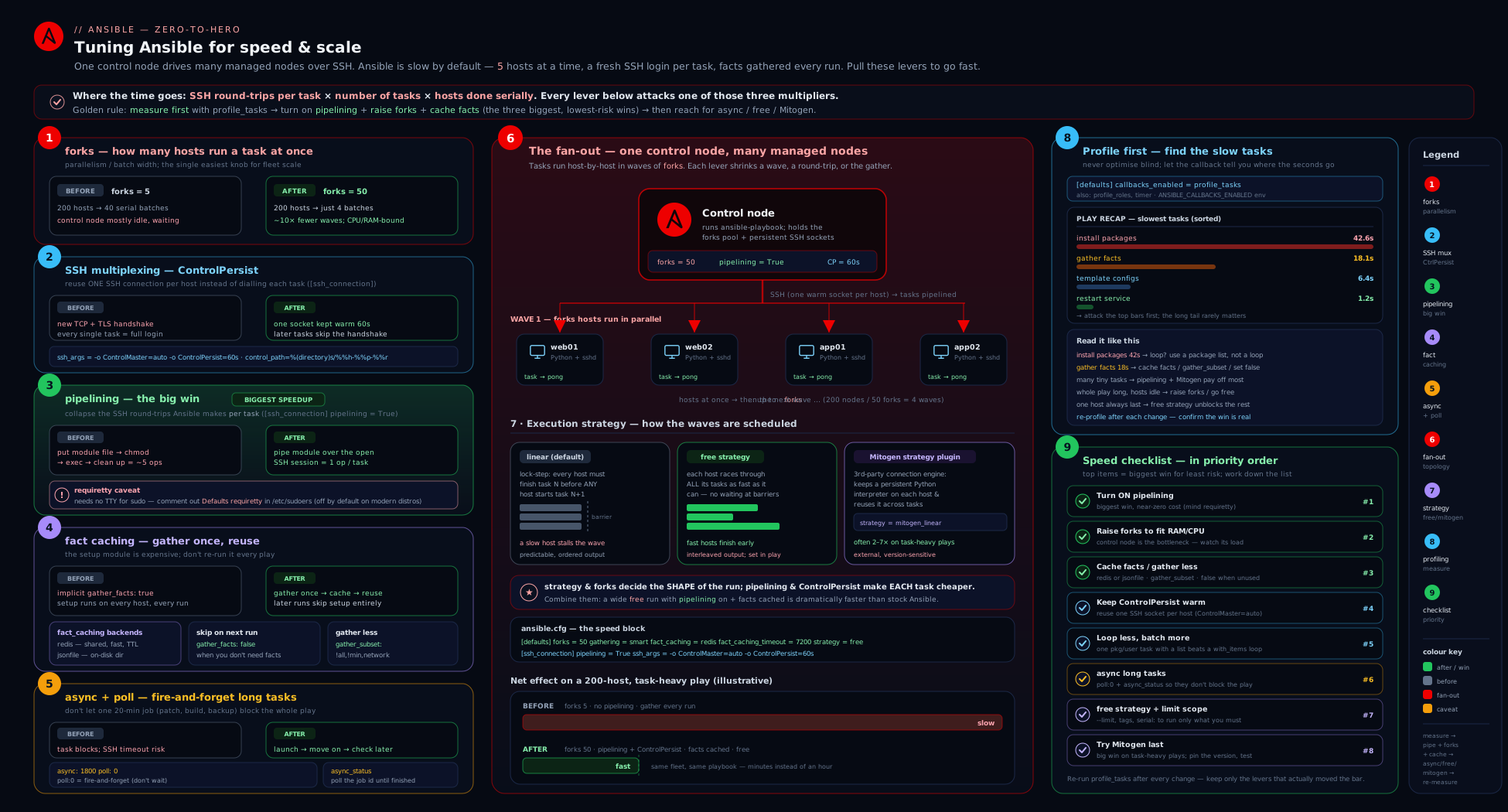
The diagram traces a single run through every lever — from forks deciding how many hosts go at once, through the connection-layer wins (multiplexing + pipelining), fact gathering and caching, async backgrounding, strategy scheduling, profiling, and finally Mitogen’s in-process model — so you can see exactly where each setting bites.
Going deeper
You have met every lever. This section is what sits underneath them — the wire-level anatomy, the sharp edges, and a handful of genuinely-free wins the defaults hide.
What actually crosses the wire: AnsiballZ and the interpreter-discovery round-trip
The core-concepts section said each task “copies the module and executes it.” The reality is more specific, and the specifics are where two more wins hide. Ansible does not ship your module file verbatim; for most modules it assembles an AnsiballZ wrapper — a self-contained Python zip bundling the module plus its module_utils dependencies, base64-encoded inside a small bootstrap named AnsiballZ_<module>.py. Without pipelining, that wrapper is written to ~/.ansible/tmp/ansible-tmp-*/ on the target, executed, and deleted; with pipelining it is streamed straight into the remote python3 on stdin and never touches disk. Set ANSIBLE_KEEP_REMOTE_FILES=1 for one run to stop the cleanup and read exactly what got shipped — illuminating once, but never leave it on (it litters targets and can retain sensitive args).
The hidden cost the tour skipped is interpreter discovery. On the first module call to a host, ansible-core runs a small probe to decide which Python to use, and that probe is an extra round-trip (it is also the source of the familiar “interpreter discovery” warning). Tell Ansible the answer and you skip the probe entirely:
[defaults]
interpreter_python = auto_silent
Better still, when you know the path, pin it per host or group in inventory — ansible_python_interpreter=/usr/bin/python3 — which removes both the discovery round-trip and the deprecation noise. It is a small per-host saving, but it stacks cleanly on top of pipelining and costs nothing.
The ssh_args trap: setting it replaces the multiplexing defaults
The multiplexing section showed ssh_args = -o ControlMaster=auto -o ControlPersist=60s. Here is the trap that silently undoes it: ssh_args wholly replaces ansible-core’s built-in SSH arguments — it does not merge with them. The day you add, say, a cipher or a jump host by editing ssh_args and forget to re-include the ControlMaster/ControlPersist options, multiplexing turns off and every task quietly goes back to paying a fresh handshake. Nothing errors; the run just gets slower.
The safe way to add SSH options without clobbering the defaults is the append-style vars, which are concatenated onto every ssh/scp/sftp invocation rather than replacing anything:
ansible_ssh_common_args— appended to all SSH-family calls (the right place for-o ProxyJump=bastionor-o ProxyCommand=...).ansible_ssh_extra_args— the same idea, typically set per host/group.
Reserve ssh_args for when you deliberately want to define the whole set — and then always carry ControlMaster/ControlPersist along. Two options worth adding for flaky links: -o ServerAliveInterval=15 -o ServerAliveCountMax=3 (detect a dead master promptly) and the reconnection_retries setting in [ssh_connection].
The worker-fork model: why big forks × big vars is what really OOMs
“Each fork is a process” is true but incomplete. Under the linear strategy, ansible-core’s task-queue manager forks a WorkerProcess per host per task (up to forks concurrently), and each worker is an os.fork() of the main controller process — so it inherits a copy of the entire in-memory dataset: all inventory, every host’s hostvars, all gathered facts, all vars. On a large fleet with fat fact sets and heavy group_vars, it is that per-worker memory footprint — multiplied by forks — that actually pushes a control node into swap, far more often than the SSH sockets do.
Two consequences fall out of this that pure “add more forks” advice misses:
- Trimming facts and vars (subset gathering, and
inject_facts_as_vars = falsebelow) cuts per-fork memory, not only gather time — so it directly raises theforksyou can safely run. - The real ceiling for
forksis roughlyusable_control_RAM / per_fork_footprint, which you can only find by watchinghtopduring a real run. A fleet carrying 50 MB of vars per host tolerates far fewer forks than a lean one on identical hardware.
free uses the same worker pool; it simply keeps up to forks hosts in flight continuously instead of draining a full batch before the next task — which is why it helps most on heterogeneous fleets.
smart gathering’s subset trap, and where async state really lives
Two sharp edges the earlier sections imply but do not spell out:
gathering = smartcaches whatever subset it gathered first, and never reconciles. If an early play runs withgather_subset: ["!hardware"]and populates the cache, a later play that needsansible_mountsfinds facts already cached, decides “nothing to gather”, and proceeds — so the hardware fact is simply absent and your template dies with an undefined-variable error, not a helpful “facts missing” message.smartonly decides cached or not; it does not notice that the cached set is narrower than what this play needs. On fleets that mix fact needs, gather a superset once, or force a refresh with an explicitansible.builtin.setup(wider subset) ormeta: clear_factsfollowed by a re-gather.- A backgrounded job’s status file lives in
~/.ansible_async/<job_id>on the target. That is the fileansible.builtin.async_statusreads, and it is exactly what thepoll: 0“no cleanup” gotcha leaves behind. When the become-user’s home is not writable, relocate it with theansible_async_dirconnection var.async_statusitself re-reads that file on its own internal interval; youruntil/retries/delayloop is layered on top of that.
Two more work-cutters worth knowing: meta: end_host stops the play early on a host that is already in the desired state (skip the remaining tasks rather than evaluate a when on each), and meta: clear_facts drops in-memory facts mid-run when you deliberately want to re-gather — but note it does not purge a persistent fact cache, only the current run’s memory.
Cheap wins people leave on the table
A cluster of small levers that individually save little and together add up on big fleets:
| Hidden lever | Setting | What it buys |
|---|---|---|
| Skip interpreter discovery | interpreter_python = auto_silent, or pin ansible_python_interpreter |
Removes a per-host probe round-trip and the warning |
| Don’t clobber multiplexing | add options via ansible_ssh_common_args, never by overwriting ssh_args |
Keeps ControlMaster/ControlPersist on |
| Shrink per-fork memory | inject_facts_as_vars = false in [defaults] |
Smaller var namespace per worker → higher safe forks |
| Quieter, faster runs | profile at normal verbosity; reserve -vvvv for one host |
Verbose logging serialises big result dicts per task per host |
| Inspect what ships | ANSIBLE_KEEP_REMOTE_FILES=1 (debug only) |
See the actual AnsiballZ payload left on a target |
inject_facts_as_vars = false deserves a word: it stops ansible-core copying every ansible_facts.X into a top-level ansible_X variable, which shrinks the namespace each worker forks with (less memory, faster templating) at the cost of forcing ansible_facts.distribution over the older ansible_distribution spelling — a real win on huge fleets, but a compatibility change, so adopt it deliberately.
Hold the whole lesson as one ordered checklist: pin the interpreter + pipelining + multiplexing → right-size forks from control-node RAM → smart gathering + subset + a persistent cache → profile and fix the top line → async the long tails → and only then reach for Mitogen, validated against your ansible-core.
Hands-on lab: a before/after benchmark
We will build a small, deliberately connection-heavy playbook, run it with stock defaults, then turn on the big levers and re-run, watching the wall-clock time drop. This costs ₹0 — it runs against local containers (or VMs). All commands use FQCN.
1. Set up a few free targets
Spin up three lightweight containers as SSH targets (Podman or Docker; adjust the image to taste). If you already have a few VMs or localhost plus containers, use those instead.
mkdir -p ~/ansible-perf-lab && cd ~/ansible-perf-lab

for n in 1 2 3; do
  podman run -d --name perf$n -p 220$n:22 \
    docker.io/rastasheep/ubuntu-sshd:18.04 >/dev/null 2>&1 \
  || docker run -d --name perf$n -p 220$n:22 \
    docker.io/rastasheep/ubuntu-sshd:18.04
done
That image listens on SSH with root / root. Create an inventory:
cat > inventory.ini <<'EOF'
[perf]
perf1 ansible_host=127.0.0.1 ansible_port=2201
perf2 ansible_host=127.0.0.1 ansible_port=2202
perf3 ansible_host=127.0.0.1 ansible_port=2203

[perf:vars]
ansible_user=root
ansible_ssh_pass=root
ansible_ssh_common_args=-o StrictHostKeyChecking=no -o UserKnownHostsFile=/dev/null
EOF
(sshpass is needed for ansible_ssh_pass; install it via your package manager, or swap to key auth.)
2. A connection-heavy playbook
The point is many small tasks so connection overhead dominates — exactly where tuning shows.
cat > bench.yml <<'EOF'
---
- name: Connection-heavy benchmark
  hosts: perf
  gather_facts: true
  tasks:
    - name: Touch a series of files (lots of small round-trips)
      ansible.builtin.file:
        path: "/tmp/perf_{{ item }}"
        state: touch
        mode: "0644"
      loop: "{{ range(1, 21) | list }}"

    - name: A few command checks
      ansible.builtin.command: "echo check {{ item }}"
      changed_when: false
      loop: "{{ range(1, 6) | list }}"
EOF
3. Run #1 — stock defaults, with profiling
Use a config that turns on only profiling so we get honest numbers, with everything else at defaults (pipelining off, forks 5):
cat > ansible.cfg <<'EOF'
[defaults]
inventory = inventory.ini
host_key_checking = False
callbacks_enabled = profile_tasks, timer
EOF

ANSIBLE_PIPELINING=False ansible-playbook bench.yml
Note the Playbook run took ... line and the profile_tasks table — especially how much Gathering Facts and the looped file/command tasks cost. This is your baseline.
4. Run #2 — turn on the levers
Now enable pipelining, raise forks, add multiplexing with a persistent master, and switch to the free strategy:
cat > ansible.cfg <<'EOF'
[defaults]
inventory = inventory.ini
host_key_checking = False
forks = 25
strategy = free
gathering = smart
fact_caching = jsonfile
fact_caching_connection = /tmp/ansible_fact_cache
fact_caching_timeout = 7200
callbacks_enabled = profile_tasks, timer

[ssh_connection]
pipelining = True
ssh_args = -o ControlMaster=auto -o ControlPersist=120s
control_path_dir = ~/.ansible/cp
EOF

ansible-playbook bench.yml
Compare the new Playbook run took ... line to the baseline. On a connection-heavy run you should see a clear drop — pipelining removes per-task temp-file copies, multiplexing reuses the connection, and free lets the three hosts finish independently.
5. Run #3 — prove fact caching
Run a third time immediately. Because gathering = smart + jsonfile caching is on and the facts are fresh (within 7200s), fact gathering is skipped entirely:
ansible-playbook bench.yml
ls -la /tmp/ansible_fact_cache/      # one JSON file per host = cached facts
In the profile_tasks output, Gathering Facts should now be near-instant (or absent), shaving the setup cost off every subsequent run. That is the production win for fleets you converge repeatedly.
6. (Optional) Confirm multiplexing and try async
While a run is in flight, list the live control sockets, then add a fire-and-forget task:
ls -la ~/.ansible/cp/ # live sockets during a run = multiplexing working
cat >> bench.yml <<'EOF'

    - name: Fire-and-forget a slow job on every host
      ansible.builtin.command: "sleep 10"
      async: 60
      poll: 0
      register: slow

    - name: Collect the slow jobs
      ansible.builtin.async_status:
        jid: "{{ slow.ansible_job_id }}"
      register: slow_done
      until: slow_done.finished
      retries: 30
      delay: 2
EOF

ansible-playbook bench.yml
The sleep 10 runs on all three hosts in parallel in the background; total added time is ~10s, not 30s, because they ran concurrently and you collected them afterwards.
Validation
- Baseline vs tuned
Playbook run tooknumbers differ (tuned is faster). - After run #2/#3,
/tmp/ansible_fact_cache/contains a JSON file per host. - During a run,
~/.ansible/cp/shows live control sockets. - The async section completes in roughly the single-task time, not the sum.
Cleanup
for n in 1 2 3; do podman rm -f perf$n 2>/dev/null || docker rm -f perf$n; done
rm -rf ~/ansible-perf-lab /tmp/ansible_fact_cache ~/.ansible/cp
Cost note
₹0. Everything runs in local containers (or VMs) on your own machine — no cloud resources, no managed nodes billed.
Common mistakes & troubleshooting
| Symptom | Likely cause | Fix |
|---|---|---|
Big fleet still slow after raising forks |
serial is the binding cap, or downstream chokepoint (one DB, delegate_to) |
Effective parallelism is min(forks, serial, hosts); raise/remove serial; remove the chokepoint |
| Control node thrashes / OOM / “too many open files” at high forks | Forks exceed control-node CPU/RAM/fd limits | Lower forks; raise ulimit -n; size from control-node capacity, not host count |
sudo: you must have a tty to run sudo after enabling pipelining |
Targets have Defaults requiretty in sudoers |
Remove/scope requiretty, or leave pipelining off for those hosts |
unix_listener: path too long / multiplexing silently off |
ControlPath exceeds the 108-char socket limit |
Set a short control_path_dir (e.g. ~/.ansible/cp) |
| Facts re-gathered on every run despite caching | Using default memory cache, or gathering = implicit |
Set a persistent plugin (jsonfile/redis) and gathering = smart |
| Cached facts are stale (old IP/hostname) | fact_caching_timeout too high or 0 (never expire); no auto-invalidation |
Lower the timeout; delete the cache dir to force a refresh |
| Long task fails with a connection/timeout error | Synchronous task exceeded SSH/become timeout | Wrap it in async: N with poll (or poll: 0 + async_status) |
free rollout breaks ordering / coordination |
free removes the per-task barrier between hosts |
Use linear for ordered/coordinated work; free only for independent tasks |
| Mitogen fails with obscure errors | Mitogen version doesn’t support your ansible-core |
Match versions per Mitogen release notes; test full playbook; else fall back to stock |
Common beginner mistakes
These are misconceptions, not symptoms — the wrong mental model that leads people to tune the wrong knob. (The symptom → cause → fix table above is for when something is already broken.)
| What beginners assume | The right mental model |
|---|---|
“Raising forks always makes the run faster.” |
forks is a ceiling, bounded by control-node CPU/RAM and by serial and any downstream chokepoint. Effective parallelism is min(forks, serial, hosts); past the sweet spot the control node thrashes and gets slower. |
| “Pipelining is on by default.” | Multiplexing is on by default; pipelining is off. Enabling it (after confirming requiretty is gone) is the first and biggest per-task win. |
“async makes the task itself run faster.” |
It does not change the task’s runtime — it stops Ansible blocking on it. poll: 0 parallelises long, independent work across the fleet; the job still takes as long as it takes. |
“free is just a faster linear, so use it everywhere.” |
free removes the cross-host barrier and breaks any ordered or coordinated rollout. It is a speed tool for independent work only; keep linear for anything with cross-host ordering. |
| “Fact caching refreshes automatically when a host changes.” | There is no auto-invalidation. Only fact_caching_timeout expiry (or a manual flush) refreshes; a host that changed IP keeps reporting the stale one until then. |
“Gathering everything is safest, so leave it at all.” |
hardware is often the single slowest line. Gather the subset you actually use (!hardware is a common safe win), and gather nothing when the play reads no facts. |
“Setting ssh_args adds my option to Ansible’s defaults.” |
ssh_args replaces them. Forgetting ControlMaster/ControlPersist there silently kills multiplexing — add options via ansible_ssh_common_args instead. |
| “Mitogen is a safe drop-in for a guaranteed multi-× speedup.” | It is version-sensitive and subtly changes execution semantics. Match it to your ansible-core, test the whole playbook, and keep a tuned stock setup as the fallback. |
Best practices
- Add
pipelining = Truefirst — verifyrequirettyis off on your fleet, then enjoy the single biggest per-task win for free. - Keep
control_path_dirshort so multiplexing never silently breaks on the 108-char socket limit; raiseControlPersistif you re-run playbooks often. - Size
forksfrom the control node, not the host count; watchhtopduring a big run and back off if it pegs CPU or swaps. - Profile before you tune and after every change with
profile_tasks+timer; change one lever at a time so you know what moved the needle. - Use
gathering = smart+ a persistent fact cache (jsonfilefor one controller,redis/memcachedfor many) on any fleet you converge repeatedly. - Gather only the subset you use (
gather_subset: ["!hardware"]is a common, safe win) and set it viamodule_defaultsso every play benefits. - Reach for
async/poll: 0+async_statusto parallelise long, independent work across the fleet instead of letting one slow host hold a fork. - Pick
freefor independent work,linearfor ordered rollouts — speed versus coordination is the trade. - Collapse work: one looped
ansible.builtin.packageover a list, onetemplateover manylineinfiles, modules overcommand/shell. - Treat Mitogen as a validated optimisation, not a default — it is the biggest lever after pipelining when its version matches yours and your playbook passes under it.
Security notes
- Fact caches can leak. A
jsonfile/yamlcache is plaintext on the control node; if facts (orcacheable: trueset_factvalues) include internal IP maps, tokens, or anything sensitive, restrict the cache directory’s permissions and set a sanefact_caching_timeout. Aredis/memcachedcache should be on a trusted network with auth enabled — an open Redis is a data-leak waiting to happen. - Pipelining and become. Disabling
requirettyto enable pipelining slightly relaxes a hardening control; do it deliberately and scope it to the automation user (Defaults:ansible_user !requiretty) rather than globally where you can. ControlPersistleaves warm connections. A longControlPersistkeeps authenticated sockets open in the background after a run; on a shared control node, another user with access to your control socket directory could ride them. Keepcontrol_path_dirin your own home with tight permissions, and do not setControlPersistabsurdly high on shared machines.asyncstatus files persist withpoll: 0. Fire-and-forget jobs leave their result files on the target (Ansible cannot reap them); if a job’s stdout contains secrets, those files linger — pair such tasks withno_log: trueand clean the job files up, or avoidpoll: 0for sensitive output.- Higher forks widen blast radius. Driving 100 hosts at once means a bad change hits 100 hosts at once; combine aggressive
forkswithserial/max_fail_percentage(previous lesson) on anything that mutates production. - Mitogen runs a long-lived interpreter on targets. It bootstraps a persistent Python process per host; understand and trust the channel, and prefer it on networks you control.
Interview & exam questions
-
What does
forkscontrol, and what is its default? The maximum number of hosts Ansible communicates with simultaneously; default 5. Underlinearit is the batch size per task; it is the concurrency ceiling under any strategy. -
A colleague set
forks: 100for a rolling update but sees no speedup. Why?serialis almost certainly capping the batch. Effective parallelism ismin(forks, serial, hosts-remaining); withserial: 10you get at most 10 hosts at once regardless of forks. -
Explain pipelining and the one thing that breaks it. Pipelining pipes the module’s Python straight into the remote interpreter over the open SSH session instead of copying it to a temp file first, collapsing several round-trips into ~one — a major per-task speedup. It breaks when sudoers has
requiretty, because pipelining allocates no TTY andsudothen refuses; the fix is to remove/scoperequiretty(or leave pipelining off there). -
What is SSH multiplexing and how does Ansible use it? OpenSSH
ControlMasteropens one connection that subsequent sessions reuse, andControlPersistkeeps it warm for N seconds after the last use (even across runs). Ansible’ssshplugin enablesControlMaster=auto+ControlPersist=60sby default, eliminating the handshake on every task. The gotcha is theControlPath108-char socket limit — keepcontrol_path_dirshort. -
Default fact gathering is costing you on a 300-host fleet. List the levers.
gather_facts: falsewhere facts are unused;gather_subset(e.g.!hardware) to collect less;gather_timeoutif collection legitimately exceeds 10s; andgathering = smart+ a persistent fact cache (jsonfile/redis) so facts are gathered once and reused. -
What does
gathering = smartdo, and why pair it with caching? It gathers facts for a host only if they are not already cached. With a persistent cache, the first run gathers and stores; later runs within the cache window skip gathering entirely — turning per-run probing into occasional probing. -
Compare the
memory,jsonfile, andrediscache plugins.memory(default) caches only within a single run — not persisted.jsonfilewrites one JSON file per host to disk on the controller — simple, single-controller.redis(andmemcached) is a shared network cache so many controllers/AWX nodes share one fact store. Set freshness withfact_caching_timeout. -
You must run a 30-minute backup that exceeds the SSH timeout. How? Wrap it in
async: 1800withpoll: 15(or another interval): Ansible backgrounds it on the host and polls a status file rather than holding the exec open, surviving the long runtime and failing cleanly pastasync. -
What is the fire-and-forget pattern and which module collects the result?
async: Nwithpoll: 0starts the task on every host and returns immediately without waiting; you collect results later withansible.builtin.async_statususing the registeredansible_job_id, typically in anuntil: result.finished/retries/delayloop. It parallelises slow, independent work across the fleet. -
linearvsfreestrategy — when each?linear(default) keeps hosts in lockstep (all finish task N before task N+1) — use it for ordered/coordinated rollouts; the slowest host paces each step.freelets each host run the play as fast as it can — use it for independent work on heterogeneous fleets to cut wall-clock time, but never when cross-host ordering matters. -
How do you find the real bottleneck before tuning? Enable the
profile_tasksandtimercallbacks (callbacks_enabled = profile_tasks, timer, orANSIBLE_CALLBACKS_ENABLED).timergives total wall-clock;profile_tasksgives per-task timing and a sorted slowest-tasks table — which very often reveals that “Gathering Facts” is the most expensive line, pointing you at subset/caching rather than forks. -
What is Mitogen and what are its risks? A third-party strategy plugin (
mitogen_linear/_free/_host_pinned) that runs modules in a persistent in-process interpreter per host with one reused channel, commonly 1.5×–7× faster with less control-node CPU. Risks: it lags ansible-core compatibility, subtly changes execution semantics (test your full playbook), and does not support every connection/become combination — treat it as a validated optimisation, not a default. -
Which connection plugin gives you both multiplexing and pipelining, and what is the alternative for? The native
sshplugin (the default fast path).paramikois a pure-Python fallback for environments without ansshbinary or for certain password-auth cases — it cannot multiplex and is slower.smartauto-selects and resolves tosshon modern systems.
Quick check
- Your play targets 200 hosts with
forks: 50andserial: 10. How many hosts run a given task at once, at most? - True or false: pipelining is on by default in ansible-core.
- You enable pipelining and
sudotasks start failing with a TTY error. What sudoers setting is the culprit? - Which
gatheringvalue gathers facts only when they are not already cached? - You want a long task to start on every host and not block the play, collecting results later. Which two settings do you use, and which module reaps the result?
Answers
- 10. Effective parallelism is
min(forks, serial, hosts)=min(50, 10, 200)= 10;serialis the binding cap. - False. Multiplexing (
ControlMaster) is on by default, butpipeliningis off by default — you enable it inansible.cfg. Defaults requirettyin/etc/sudoers. Pipelining allocates no TTY, sosudowithrequirettyrefuses; remove or scope it.smart(gathering = smart) — gather only if not cached; pair it with a persistent fact cache for the full benefit.async: Nwithpoll: 0(fire-and-forget), thenansible.builtin.async_status(withuntil: result.finished/retries/delay) to collect the result.
Exercise
Take a real (or sample) playbook of yours that targets at least three hosts and do a measured tuning pass:
- Baseline. Add
callbacks_enabled = profile_tasks, timeronly, run it, and record the total time and the top three slowest tasks. Note specifically what “Gathering Facts” costs. - Connection layer. Enable
pipelining = True(confirmrequirettyis off), setssh_argswithControlPersist=120sand a shortcontrol_path_dir, and raiseforksto a sensible value for your control node. Re-run and compare. - Facts. Switch to
gathering = smartwith ajsonfilecache (fact_caching_timeout = 3600); addgather_subset: ["!hardware"]viamodule_defaults. Run twice and confirm the second run skips gathering. - Async. Convert your longest task to
async/poll: 0+ansible.builtin.async_status, and verify the play no longer blocks on it. - Strategy. If your tasks are order-independent, try
strategy: freeand compare wall-clock againstlinear. - Write up the before/after
timernumbers and which lever moved the needle most. (Optional stretch: install Mitogen, run undermitogen_linear, and compare — but only if its version matches your ansible-core.)
The goal is the discipline: profile → change one lever → profile again, and end with numbers, not vibes.
Practice challenges
Six graded exercises, beginner to advanced. Try each before opening the solution; every answer ends with the one-line reason it works. You can reason them all out from config and play snippets — no managed nodes required.
1. Turn on the two connection-layer wins (beginner). Write the ansible.cfg stanza that enables pipelining, keeps a multiplexed SSH master warm for five minutes across re-runs, and keeps the control socket path short enough never to hit the 108-char limit.
<details> <summary>Solution</summary>
[ssh_connection]
pipelining = True
ssh_args = -o ControlMaster=auto -o ControlPersist=300s
control_path_dir = ~/.ansible/cp
Why: pipelining collapses the per-task temp-file round-trips; ControlPersist=300s reuses the warm connection across re-runs; a short control_path_dir keeps the socket path under the Linux 108-char limit so multiplexing never silently fails.
</details>
2. Stop paying for facts you don’t use (beginner). A play only restarts a service and never reads a fact. Make it skip gathering, and add the one task that pulls only network facts if a later task needs them.
<details> <summary>Solution</summary>
- name: Quick restart, no facts needed
  hosts: web
  gather_facts: false
  tasks:
    - name: Restart nginx
      ansible.builtin.service:
        name: nginx
        state: restarted

    - name: Later — pull only the cheap network subset on demand
      ansible.builtin.setup:
        gather_subset:
          - "!all"
          - "!min"
          - network
Why: gather_facts: false skips the implicit setup cost entirely; the on-demand setup with !all/!min plus network collects only interfaces and IPs, avoiding the slow hardware probe.
</details>
3. Gather once, reuse for an hour, no extra services (intermediate). Write the ansible.cfg [defaults] that gathers each host’s facts once and reuses them across runs for an hour, using no server process.
<details> <summary>Solution</summary>
[defaults]
gathering = smart
fact_caching = jsonfile
fact_caching_connection = /var/tmp/ansible_facts
fact_caching_timeout = 3600
Why: smart gathers only when facts aren’t already cached, and a persistent plugin makes that stick — jsonfile writes one file per host and needs no Redis/memcached, so the first run caches and every run within 3600s skips gathering.
</details>
4. Fire-and-forget across the whole fleet (intermediate). Convert a 20-minute upgrade command so it starts on every host without blocking the play, then collect every host’s result, allowing up to an hour to finish.
<details> <summary>Solution</summary>
- name: Kick off the upgrade everywhere, don't wait
  ansible.builtin.command: /usr/local/bin/upgrade.sh
  async: 3600
  poll: 0
  register: upgrade

- name: Collect each host's result on our schedule
  ansible.builtin.async_status:
    jid: "{{ upgrade.ansible_job_id }}"
  register: upgrade_result
  until: upgrade_result.finished
  retries: 60
  delay: 60
Why: poll: 0 launches the job on all hosts at once and returns immediately; async_status then reaps each job by its ansible_job_id, and retries: 60 × delay: 60 waits up to the full hour async allows.
</details>
5. Add a bastion without killing multiplexing (advanced). You must route all SSH through bastion.example.com, but the last engineer did it by overwriting ssh_args and the fleet got slower. Show the safe way and say why theirs regressed.
<details> <summary>Solution</summary>
# group_vars/all.yml
ansible_ssh_common_args: "-o ProxyJump=bastion.example.com"
# ansible.cfg — leave the multiplexing defaults intact
[ssh_connection]
ssh_args = -o ControlMaster=auto -o ControlPersist=120s
control_path_dir = ~/.ansible/cp
Why: ansible_ssh_common_args is appended to every SSH call, so the ProxyJump adds to — rather than replaces — the multiplexing options. Putting the ProxyJump into ssh_args overwrote the built-in ControlMaster/ControlPersist, turning multiplexing off and re-introducing a handshake per task.
</details>
6. Kill the discovery round-trip and fit 50 forks in RAM (advanced). On a 500-host fleet, profiling shows a per-host interpreter-discovery step and the control node swapping at forks = 50. Give two configuration changes — one for each problem — and explain the memory one.
<details> <summary>Solution</summary>
# ansible.cfg
[defaults]
interpreter_python = auto_silent
inject_facts_as_vars = false
# or pin the interpreter precisely in inventory / group_vars:
# ansible_python_interpreter=/usr/bin/python3
Why: pinning the interpreter (or auto_silent) removes the per-host discovery probe round-trip; inject_facts_as_vars = false stops every ansible_facts.X being copied to a top-level ansible_X, shrinking the var namespace each WorkerProcess fork copies — lower per-fork memory means 50 concurrent forks fit without swapping.
</details>
Certification mapping
- RHCE (EX294): Performance and production-readiness sit across several objectives. Configuring
ansible.cfgfor the environment —forks,pipelining,[ssh_connection]tuning — is part of “use the ansible.cfg” expectations; you should be able to set these from memory under time pressure.async/pollmaps directly to “run tasks asynchronously,” and the fire-and-forget +async_statuspattern is a known exam idiom for long-running tasks. Fact handling —gather_facts,gather_subset, and fact caching — overlaps the facts objectives and is a realistic production-config task. Knowing thelinear/freestrategies and howforks/serialinteract rounds out the run-control material the exam probes. - The connection layer (multiplexing, pipelining, the
requirettycaveat) and profiling (profile_tasks/timer) are not always called out explicitly but are exactly the “make this fleet fast and reliable” reasoning interviewers and graders look for — know them cold.
Glossary
forks— maximum number of hosts Ansible drives in parallel; default 5; the concurrency ceiling under any strategy.- Strategy plugin — decides how per-host task streams are scheduled (
linear,free,host_pinned,debug,mitogen_*). linear— default strategy: every host finishes task N before any starts task N+1 (lockstep); slowest host paces each step.free— strategy where each host runs the whole play as fast as it can, never waiting for others.host_pinned— strategy that completes a host’s play on one worker before bringing in a new host.- Connection plugin — the transport to a host (
ssh,paramiko,smart,local,winrm). - Multiplexing — OpenSSH
ControlMaster/ControlPersistreusing one SSH connection across many sessions/tasks (and runs). ControlPath— filesystem socket path identifying a reusable SSH master; subject to a 108-char limit on Linux.ControlPersist— seconds OpenSSH keeps a master connection warm after its last use.- Pipelining — feeding a module’s code into the remote interpreter over the open session instead of copying a temp file first; ~1 round-trip per task. Off by default; breaks under
requiretty. requiretty— sudoers setting demanding a TTY forsudo; conflicts with pipelining.- Fact gathering — running
ansible.builtin.setupto collect host facts (ansible_facts) before tasks. gather_subset— which fact categories to collect (min,hardware,network,virtual,all;!excludes).gather_timeout— per-fact-collection timeout; default 10s.gathering— global policy:implicit(always),explicit(never auto),smart(only if not cached).- Cache plugin — backend storing facts (
memory,jsonfile,yaml,redis,memcached,pickle). fact_caching_timeout— seconds cached facts stay valid;0= never expire (no auto-invalidation).async— maximum seconds a backgrounded task may run.poll— how often Ansible checks a backgrounded task;poll: 0= fire-and-forget.ansible.builtin.async_status— module that checks/collects a backgrounded job by itsansible_job_id.- Callback plugin — reacts to run events;
profile_tasks/profile_roles/timerproduce profiling output. callbacks_enabled—ansible.cfgsetting (envANSIBLE_CALLBACKS_ENABLED) that turns non-stdout callbacks on.- Mitogen — third-party strategy plugin running modules in a persistent remote interpreter for large speedups; version-sensitive.
- AnsiballZ — the self-contained Python zip ansible-core assembles per module (module +
module_utils), base64-bootstrapped asAnsiballZ_<module>.py; streamed over stdin under pipelining, written to a temp dir without it. - Interpreter discovery — ansible-core’s first-contact probe to choose the remote
python; an extra round-trip you can skip by pinningansible_python_interpreteror settinginterpreter_python = auto_silent. interpreter_python—[defaults]policy for remote Python selection;auto_silentpicks without warning and avoids re-probing.ansible_ssh_common_args— SSH options appended to every ssh/scp/sftp call (the safe way to add a ProxyJump), unlikessh_args, which replaces the built-in defaults.WorkerProcess— the per-host-per-task fork thelinear/freestrategies spawn (up toforks); anos.fork()copy of the controller’s in-memory data, so its footprint scales with your vars/facts.inject_facts_as_vars— whetheransible_facts.Xis also injected as a top-levelansible_X;falseshrinks the per-fork namespace (memory/speed) at a compatibility cost.ansible_async_dir— connection var for where a backgrounded job’s status file lives on the target (default~/.ansible_async); read byansible.builtin.async_status.metatask — control task (clear_facts,end_host,flush_handlers,refresh_inventory) that manipulates run state;end_host/clear_factscan cut work but do not purge a persistent fact cache.ANSIBLE_KEEP_REMOTE_FILES— env flag that stops temp-file cleanup so you can inspect the shipped AnsiballZ payload; debugging only, never leave on.
Next steps
You can now make Ansible fast: parallelise with forks, eliminate connection cost with multiplexing + pipelining, stop re-gathering with gathering = smart + a fact cache, background long work with async/poll and ansible.builtin.async_status, choose free for independent work, and — crucially — profile with profile_tasks/timer so every change is measured, with Mitogen as the heavy lever once the basics are exhausted. The next lesson, Dynamic Inventory for AWS, Azure & Secrets, takes you from a fast static fleet to a fast dynamic one — generating inventory from cloud APIs so the hosts you tune here are discovered automatically. To revisit the control-side companions of these levers — serial, throttle, order, and the linear/free/host_pinned strategies used for coordination rather than raw speed — return to Ansible Delegation, Strategies & Rolling Updates, In Depth. And to refresh where the facts you are caching actually come from, see Ansible Variables & Facts, In Depth.