In a nutshell
Plain Ansible runs every task, on every host, every time. That is rarely what you want. Flow control is the small set of keywords that let a playbook make decisions instead of blindly marching through the list:
when— run a task only if a condition is true (skip it otherwise).loop— run the same task once per item in a list.- handlers (
notify) — run a task only because another task actually changed something, once, at the end of the play. tags— run only the slice of the playbook you care about right now.
Picture a building crew working from one instruction sheet. when is “only the electricians do step 4” — everyone else skips it. loop is “paint each of these ten rooms” — one instruction, applied ten times. A handler is “if you actually moved furniture, vacuum the room once when you’re finished” — it fires only on real change, and only once no matter how many things you moved. Tags are “today, just do the kitchen” — you run part of the plan without touching the rest.
Master these four and your playbooks stop being glorified shell scripts and start behaving like real configuration management: safe to re-run, quick to target, and reacting only to what actually changed.
Level: Intermediate · Time: ~35 min
A playbook that runs every task on every host every time is a shell script with extra steps. The thing that turns Ansible from a remote-command runner into a configuration-management tool is flow control: the ability to run a task only when it makes sense (when), to run it once per item in a list (loop), to run a task only because something else changed (handlers via notify), and to run only the part of a playbook you care about right now (tags). These four features are what an RHCE exam probes relentlessly and what separates a playbook that limps along from one you trust against 400 production hosts. This lesson covers all four exhaustively — every keyword, every option, every gotcha — at the same depth as a certification study guide, but starting from first principles so you can follow even if when is new to you.
By the end you will know exactly when a handler fires (and the three ways it can fail to), why loop replaced with_items, how loop_control renames and labels and paces a loop, how a list of when conditions is silently an AND, and precisely what always and never tags do that no other tag does.
Learning objectives
- Write
whenconditionals in every form — bare variable expressions,and/or/not, theis defined/is failed/is changedtests, comparing facts and registered results, and the list-of-conditions-is-AND shorthand — and know howwheninteracts with loops and facts. - Loop over lists, dictionaries (
dict2items), and nested data with the modernloopkeyword, translate any legacywith_*to itslookup/loopequivalent, and control a loop with everyloop_controloption (loop_var,label,index_var,pause,extended). - Build retry loops with
until/retries/delayand understandregisterinside a loop (results). - Use handlers correctly:
notify, the “runs at end of play, once, only on change” rules,meta: flush_handlers,listentopics, handler ordering, andforce_handlers/--force-handlers. - Apply tags at task, block, play, and role level; run and exclude with
--tags/--skip-tags; and use the four special tagsalways,never,tagged, andallcorrectly.
Prerequisites & where this fits
You should already be comfortable with the playbook anatomy — plays, tasks, modules, become — and with variables and facts (registering task output, referencing ansible_facts, the register keyword). If those are shaky, read the preceding lesson, Ansible Variables & Facts, In Depth, first, because conditionals and loops live or die on referencing variables correctly. This is lesson B2 in the Intermediate tier of the KloudVin Ansible Zero-to-Hero course, in the Playbooks module. Everything here is ansible.builtin and ships with ansible-core (2.17+ assumed, Ansible 10+ in 2026) — no collections to install. The next lesson, Ansible Jinja2 Templating, In Depth, builds directly on the expression syntax you meet here, because a when: clause is a Jinja2 expression.
Core concepts
Four mental models carry this entire lesson:
whenis a Jinja2 expression evaluated to true/false, without the{{ }}. Inside awhen:you write the bare expression —ansible_facts['os_family'] == "RedHat", not{{ ansible_facts['os_family'] == "RedHat" }}. Ansible wraps it in{{ }}for you. This is the single most common source of confusion, so internalise it now:when= no braces; almost everywhere else = braces.- A loop runs the same task once per item, with
item(or a name you choose) holding the current value. The module is invoked N times. Idempotency still applies per item — aloopofansible.builtin.packageinstalls ten packages and reportschangedonly for the ones that were actually missing. - A handler is a task that only runs if another task notifies it and that other task reported
changed. Handlers run once each, at the end of the play, in the order they are defined (not the order they were notified). This deferral is the whole point: restart the service once after all ten config-file edits, not ten times. - A tag is a label you attach to tasks/blocks/plays/roles so you can run or skip subsets.
--tags xruns only tasks taggedx(plus anything taggedalways);--skip-tags xruns everything exceptx. Two tags are magic:always(runs unless explicitly skipped) andnever(runs only when explicitly requested).
Keep those four sentences in your head and the rest is detail.
when: conditionals in depth
when is a task-level (or block-level) keyword that decides whether a task runs on a given host. It is evaluated per host, after facts are gathered, using that host’s variables and facts. If it evaluates false, the task is skipped for that host (you see skipping: [host] and it counts in the skipped= recap), and any register for that task records a result with skipped: true.
The cardinal rule: no {{ }} around the whole expression
# CORRECT — bare expression
- name: Install Apache on RHEL-family hosts
  ansible.builtin.package:
    name: httpd
    state: present
  when: ansible_facts['os_family'] == "RedHat"

# WRONG — double-templating; works by luck sometimes, fails on bare vars
- name: Don't do this
  ansible.builtin.package:
    name: httpd
    state: present
  when: "{{ ansible_facts['os_family'] == 'RedHat' }}"
You do still use {{ }} for a value embedded in a larger string inside when (rare), but for the expression as a whole, never. Wrapping a bare variable in braces — when: "{{ my_bool }}" — produces a deprecation warning and can mis-evaluate truthiness.
Testing variables, facts, and registered results
A when expression can reference anything in scope: play vars, host/group vars, facts (ansible_facts[...] or the older ansible_* top-level names), magic vars (inventory_hostname, groups, hostvars), and registered results from earlier tasks.
- name: Capture whether the config file exists
  ansible.builtin.stat:
    path: /etc/myapp/config.ini
  register: cfg

- name: Seed a default config only if none exists
  ansible.builtin.copy:
    src: default-config.ini
    dest: /etc/myapp/config.ini
  when: not cfg.stat.exists
stat always “succeeds” and returns stat.exists, so when: not cfg.stat.exists is the idiomatic “create-if-absent” guard.
Boolean operators and grouping
You have the full Python/Jinja2 boolean vocabulary: and, or, not, and parentheses for grouping. Comparison operators are ==, !=, <, >, <=, >=, and membership with in / not in.
when: ansible_facts['distribution'] == "Ubuntu" and ansible_facts['distribution_major_version'] | int >= 22

when: (env == "prod" or env == "staging") and not maintenance_mode

when: "'webservers' in group_names"        # is this host in the webservers group?

when: ansible_facts['memtotal_mb'] | int > 4096
Two things bite people here. First, numeric comparisons need | int (or | float) — facts and vars are often strings ("22" not 22), and "9" > "10" is true as a string comparison. Always cast: ... | int >= 22. Second, when a value contains a quote or starts with something YAML wants to interpret, quote the whole when string and use the inner quotes for the literal, as in the 'webservers' in group_names example.
The list-of-conditions = AND shorthand
If you give when a YAML list, every item must be true — it is an implicit AND. This is the cleanest way to write multi-condition guards and is heavily tested:
- name: Restart only on prod RHEL hosts that aren't frozen
  ansible.builtin.service:
    name: httpd
    state: restarted
  when:
    - ansible_facts['os_family'] == "RedHat"
    - env == "prod"
    - not change_freeze | default(false)
That is equivalent to joining the three with and. There is no implicit OR list — for OR you must write or inline (or invert the logic with not (... and ...)).
Jinja2 tests: is defined, is failed, is changed, and friends
Ansible ships Jinja2 tests (used with is / is not) that are indispensable in when. The most important:
| Test | True when… | Typical use |
|---|---|---|
is defined / is not defined |
the variable exists / doesn’t | when: my_var is defined guard before using a var |
is none |
the value is None/null |
distinguish “set to null” from “undefined” |
is succeeded / is success |
a registered result succeeded | gate a follow-up step on success |
is failed / is failure |
a registered task failed (usually with ignore_errors) |
run recovery only on failure |
is changed / is change |
a registered task reported changed | trigger work only when something actually changed |
is skipped |
a registered task was skipped (its own when was false) |
branch on a skipped predecessor |
is match / is search / is regex |
string matches a regex (anchored / anywhere / custom) | pattern-test a fact |
is version(...) |
version comparison, e.g. is version('2.0','>=') |
compare software versions properly |
is in |
membership (Jinja2 2.10+) | when: item is in allowed_list |
The register + is failed/is changed combination is the backbone of error handling and handler-free conditionals:
- name: Try the graceful reload
  ansible.builtin.command: systemctl reload myapp
  register: reload_result
  ignore_errors: true

- name: Fall back to a full restart if reload failed
  ansible.builtin.service:
    name: myapp
    state: restarted
  when: reload_result is failed
Note the difference between is not defined and is none: is not defined means the name was never set; is none means it was set to null. Use var | default(...) to collapse both into a usable default. And prefer the tests is defined/is failed over the older string forms is defined/failed — the is test syntax is current and clearer than result.failed.
when together with loop: per-item evaluation
When a task has both when and a loop, the when is re-evaluated for every item, and item is in scope inside the condition. Items that fail the test are skipped individually:
- name: Create only the users flagged active
  ansible.builtin.user:
    name: "{{ item.name }}"
    state: present
  loop:
    - { name: "alice", active: true }
    - { name: "bob",   active: false }
  when: item.active
A subtle exam point: if you reference a registered result’s .stdout (a single value) in a when on a loop, the condition is still evaluated per item — but the registered var only has the single (last) value, not per-item. To branch per item on a previous loop’s results, loop over that result’s .results list (see the loop section). Also remember: when is evaluated before the loop is expanded for the task as a whole only in the sense of variable scope — practically, treat it as “checked for each item”.
when on blocks, roles, and includes
when applied to a block is inherited by every task in the block (each task still evaluates it, and a task’s own when is ANDed with the block’s). when on include_role/include_tasks (dynamic includes) gates the inclusion and is applied to every included task. when on import_tasks/import_role (static imports) is added to every imported task’s own when at parse time — so if imported tasks have their own conditions, they are ANDed. This distinction (include = gate at runtime; import = condition pushed onto each child) is a classic gotcha.
| Construct | What when does |
|---|---|
| task | run/skip this task on this host |
| block | condition inherited by (ANDed onto) every task in the block |
include_tasks / include_role (dynamic) |
evaluated once at runtime to decide whether to include |
import_tasks / import_role (static) |
pushed down and ANDed onto every imported task’s when |
Combining when with facts you must gather first
when runs after gather_facts (default on), so ansible_facts is populated. If you set gather_facts: false for speed, any when that references a fact will treat it as undefined and likely error or skip. Either gather facts, gather a subset (gather_subset), or guard with is defined.
Loops in depth: loop, with_*, and loop_control
A loop runs one task repeatedly, once per item, with the current value bound to item by default. Ansible has two loop syntaxes: the modern loop keyword and the legacy with_<lookup> family. Since Ansible 2.5, loop is the recommended form; with_* still works and you will meet it in older code, so you must read both.
loop: the modern way
loop takes a list. The list can be inline, a variable, or the output of a filter/lookup.
- name: Install a set of packages (one task, many items)
  ansible.builtin.package:
    name: "{{ item }}"
    state: present
  loop:
    - git
    - curl
    - vim

- name: Same, from a variable
  ansible.builtin.package:
    name: "{{ item }}"
    state: present
  loop: "{{ package_list }}"
A performance note worth knowing: many modules (package, dnf, apt, yum, user for some ops) accept a list directly in their name: argument, which is far faster than looping because it is one transaction. Prefer name: "{{ package_list }}" over loop when the module supports a list — loop only when it doesn’t.
Looping over a list of dictionaries
The list items can be dicts; reference fields with item.field:
- name: Create users with their groups
  ansible.builtin.user:
    name: "{{ item.name }}"
    groups: "{{ item.groups }}"
    state: present
  loop:
    - { name: "alice", groups: "wheel" }
    - { name: "bob",   groups: "developers" }
Looping over a dictionary with dict2items
loop needs a list, so to iterate a dictionary you convert it with the dict2items filter, which yields a list of { key, value } pairs:
- name: Set sysctl values from a dict
  ansible.posix.sysctl:
    name: "{{ item.key }}"
    value: "{{ item.value }}"
    state: present
  loop: "{{ tuning | dict2items }}"
  # tuning: { net.ipv4.ip_forward: 1, vm.swappiness: 10 }
The reverse, items2dict, rebuilds a dict from such a list. For nested loops (a list of dicts each containing a list), use the subelements filter or the product/flatten filters rather than nesting loop (Ansible does not support a literal nested loop on one task).
loop_control: shaping the loop
loop_control is a dictionary of sub-keys that change loop behaviour without changing what you iterate. This is exam-favourite territory — know every key.
loop_control key |
What it does | Example / notes |
|---|---|---|
loop_var |
renames the per-item variable from item to a name you choose |
Essential for nested includes so an outer and inner loop don’t both use item |
label |
controls what is printed for each iteration in task output | label: "{{ item.name }}" hides huge dicts / secrets from the console |
index_var |
binds the current 0-based index to a variable | index_var: idx → use {{ idx }}; add 1 for human counts |
pause |
seconds to wait between iterations | pause: 3 to rate-limit API calls or rolling actions |
extended |
exposes ansible_loop with rich metadata |
gives .index, .index0, .first, .last, .length, .revindex, .allitems, .previtem, .nextitem |
extended_allitems |
with extended, controls whether ansible_loop.allitems is populated |
set false to save memory on huge loops |
- name: Roll through app servers, one at a time, with readable labels
  ansible.builtin.uri:
    url: "https://{{ item.host }}/health"
  loop: "{{ app_servers }}"
  loop_control:
    loop_var: server          # 'item' would clash if this were inside an include
    label: "{{ item.host }}"  # print just the host, not the whole dict
    index_var: i              # 0,1,2,...
    pause: 5                  # 5s between each, a poor-man's rolling check
    extended: true           # gives ansible_loop.first / .last / .length
With extended: true, ansible_loop.first and ansible_loop.last let you do “only on the first/last item” logic inside a loop — handy for printing a header once or a summary at the end.
loop_var and nested includes is the single most important loop_control use. If an include_tasks is itself in a loop and the included file also loops, both default to item and the inner clobbers the outer. Rename the outer with loop_var (e.g. loop_var: outer_item) to keep them distinct.
register inside a loop: the .results list
When you register a task that loops, the registered variable’s top-level fields are mostly meaningless; the per-iteration data lives in .results, a list with one entry per item. Each entry has that iteration’s item, rc, stdout, changed, failed, etc.
- name: Check several URLs
  ansible.builtin.uri:
    url: "{{ item }}"
    status_code: 200
  loop:
    - https://a.example.com
    - https://b.example.com
  register: url_checks

- name: Report any that were not 200
  ansible.builtin.debug:
    msg: "DOWN: {{ item.item }} returned {{ item.status }}"
  loop: "{{ url_checks.results }}"
  when: item.status != 200
Note item.item in the second loop: the outer item is a result entry, and .item inside it is the original value that produced that result. This pattern — loop over .results, branch with when — is how you act per item on a previous loop’s outcome.
until / retries / delay: the retry loop
A different kind of loop: retry one task until a condition is met. until is a when-style expression; the task repeats up to retries times with delay seconds between attempts. The task is considered failed if it never satisfies until.
- name: Wait for the app to report healthy
  ansible.builtin.uri:
    url: http://localhost:8080/health
    status_code: 200
  register: health
  until: health.status == 200
  retries: 12          # up to 12 attempts...
  delay: 5             # ...5 seconds apart (so ~1 minute max)
  # default retries=3, delay=5 if omitted
Defaults are retries: 3 and delay: 5. The registered result gains an attempts field telling you how many tries it took. until cannot be combined with loop/with_* on the same task — it is the loop. Prefer until/retries over the dedicated wait_for/wait_for_connection modules when you are polling an application-level condition rather than a port or the SSH connection.
The legacy with_* family and the lookup mapping
Before loop, every loop used with_<plugin>, where the suffix is a lookup plugin name. They still work, but the docs (and RHCE-era best practice) steer you to loop for the common cases. The crucial knowledge is the translation table: every with_* maps to a loop: expression, usually via a filter or lookup.
| Legacy | Iterates over | Modern loop equivalent |
|---|---|---|
with_items |
a (flattened-one-level) list | loop: "{{ mylist }}" (use | flatten(levels=1) if you relied on flattening) |
with_list |
a list, without flattening | loop: "{{ mylist }}" |
with_dict |
a dict → {key,value} |
loop: "{{ mydict | dict2items }}" |
with_fileglob |
files matching a glob | loop: "{{ query('fileglob', '/path/*.conf') }}" |
with_together |
parallel lists (zip) | loop: "{{ list_a | zip(list_b) | list }}" |
with_sequence |
a numeric sequence | loop: "{{ range(1, 11) | list }}" (or keep with_sequence) |
with_subelements |
a list + a sub-list per element | loop: "{{ parent | subelements('children') }}" |
with_nested |
cartesian product of lists | loop: "{{ list_a | product(list_b) | list }}" |
with_flattened |
deeply nested lists, flattened | loop: "{{ nested | flatten }}" |
with_first_found |
first existing file in a list | loop: "{{ query('first_found', candidates) }}" |
with_random_choice |
one random element | loop: "{{ [ mylist | random ] }}" (or | random directly) |
with_indexed_items |
list with index | loop + loop_control.index_var |
with_lines |
lines of a command’s output | loop: "{{ query('lines', 'cmd') }}" |
The mechanical rule: with_X: foo is loop: "{{ lookup('X', foo) }}" for most plugins — but lookup() returns a comma-joined string by default, whereas query() (alias q()) returns a proper list, which is what loop wants. So in practice the safe conversion is loop: "{{ query('X', foo) }}". The simple value-list cases (with_items, with_list) just become loop: "{{ var }}". Don’t mass-migrate working with_* for its own sake; do use loop for new code and convert when touching old code.
One behavioural difference to flag: with_items flattens one level of nested lists; loop does not. If you had a list-of-lists and relied on with_items flattening it, add | flatten(levels=1) when moving to loop.
Handlers in depth: notify, when they run, listen, and flush_handlers
A handler is a task defined under a play’s handlers: section (or in a role’s handlers/main.yml) that runs only when notified by a task that reported changed. Handlers are how you do “if (and only if) I changed the config, restart the service” — and do it once, at the right time.
The rules — memorise these
- A handler runs only if a task
notifys it. No notify, no run. - It runs only if the notifying task reported
changed: true. If the task wasok(idempotent no-op) orskipped, the notification is not sent. This “only on change” behaviour is the entire point. - It runs at the END of the play, after all tasks in the play complete — not at the point of notification.
- It runs once, no matter how many tasks notified it. Ten config edits that all
notify: restart httpd→ one restart. - Handlers run in the order they are defined in the
handlers:section, not the order they were notified. (This trips everyone up at least once.) - By default, if any task in the play fails, pending handlers do NOT run (the play aborts before the handler flush) — unless you use
force_handlers(below).
- name: Configure and (re)start nginx
  hosts: webservers
  become: true
  tasks:
    - name: Deploy nginx.conf
      ansible.builtin.template:
        src: nginx.conf.j2
        dest: /etc/nginx/nginx.conf
      notify: Restart nginx        # fires only if this template task CHANGED the file

    - name: Deploy a virtual host
      ansible.builtin.template:
        src: site.conf.j2
        dest: /etc/nginx/conf.d/site.conf
      notify: Restart nginx        # notifies the SAME handler again — still one restart

  handlers:
    - name: Restart nginx
      ansible.builtin.service:
        name: nginx
        state: restarted
If neither template changed anything, the handler never runs — exactly what you want on a re-run.
Notifying multiple handlers
A task can notify several handlers with a list:
- name: Update the app config
  ansible.builtin.template:
    src: app.conf.j2
    dest: /etc/app/app.conf
  notify:
    - Reload app
    - Bump metrics counter
Both run (in definition order) at the end of the play, once each, if the task changed.
listen: topic-based notification
A handler can subscribe to a topic with listen, and a task notifies the topic rather than a specific handler name. Every handler listening to that topic runs. This decouples the notifier from the handler names and is the clean way to fan one event out to several actions:
  handlers:
    - name: Restart nginx
      ansible.builtin.service: { name: nginx, state: restarted }
      listen: "reload web stack"

    - name: Flush the CDN cache
      ansible.builtin.command: /usr/local/bin/purge-cdn
      listen: "reload web stack"
    - name: Change something web-related
      ansible.builtin.template: { src: x.j2, dest: /etc/nginx/x }
      notify: "reload web stack"     # triggers BOTH handlers above
Key facts about listen: a task notifying a topic triggers all handlers listening on it; a handler can have both a name and a listen (you can notify it by either); and multiple handlers can share a topic. This is the preferred pattern in roles, because a role can expose stable topics (e.g. "restart web services") without callers needing to know individual handler names.
meta: flush_handlers — run pending handlers now
Sometimes you cannot wait until the end of the play — e.g. you change a config, must restart the service, then run a task that depends on the service being up. meta: flush_handlers forces all currently pending (notified) handlers to run immediately at that point:
    - name: Write the new listen port
      ansible.builtin.lineinfile:
        path: /etc/app/app.conf
        regexp: '^port='
        line: 'port=9000'
      notify: Restart app

    - name: Apply the restart right now, not at play end
      ansible.builtin.meta: flush_handlers

    - name: Now hit the app on its new port (needs it already restarted)
      ansible.builtin.uri:
        url: http://localhost:9000/health
        status_code: 200
      register: h
      until: h.status == 200
      retries: 10
      delay: 3
After a flush, those handlers have run and won’t run again at play end unless re-notified. meta: tasks like flush_handlers always run (they ignore when-skips in the usual sense — a when on a meta task is honoured, but meta itself isn’t a module on a target). Other useful meta values nearby: clear_host_errors, end_play, end_host, noop — but flush_handlers is the one tied to handlers.
force_handlers and --force-handlers: run handlers even after a failure
By rule 6, a play failure normally skips pending handlers. If you need the handler to run even when a later task fails (e.g. you changed config and must restart regardless), set force_handlers: true on the play, or pass --force-handlers on the command line, or set force_handlers = True in ansible.cfg. With it on, notified handlers run for hosts that haven’t failed, even though the play is failing.
- name: Resilient config push
  hosts: webservers
  become: true
  force_handlers: true     # restart even if a later task blows up
  tasks: ...
  handlers: ...
Be deliberate: forcing handlers can mean restarting a service into a half-configured state, so it is a conscious resilience trade-off, not a default.
Handler edge cases and gotchas
| Behaviour | Detail |
|---|---|
| Run condition | only if a notifying task reported changed (not ok, not skipped) |
| Timing | end of play (or at flush_handlers), not at notify time |
| Count | once per handler regardless of how many notifies |
| Order | definition order in handlers:, not notification order |
| Notify a missing handler | by default an error (The requested handler 'X' was not found); a typo in the name silently never runs only if error_on_missing_handler=false |
| Failure | pending handlers skipped unless force_handlers/--force-handlers |
when on a handler |
yes — a handler can have its own when, evaluated when it would run |
| Loops in handlers | yes — handlers can loop like any task |
| Handler names | must be unique within their scope to be notify-able by name; use listen to avoid name coupling |
| Re-notify after flush | a handler that ran at flush_handlers runs again at play end only if notified again afterwards |
--check mode |
handlers are notified on would-change and “run” in check mode (reported, not executed) |
A frequently-missed point: the notify name must exactly match the handler’s name (case- and space-sensitive). A mismatch raises “handler not found” by default — which is actually helpful, because it catches typos. Set error_on_missing_handler = false only if you intentionally notify handlers that may not be defined.
Tags in depth: selecting and skipping parts of a play
Tags are labels you attach to tasks, blocks, plays, or roles so you can run or skip subsets with --tags / --skip-tags. On a big playbook, tags turn a 20-minute full run into a 30-second “just the nginx config” run.
Adding tags at every level
- name: Web tier
  hosts: webservers
  tags: web                      # PLAY-level: applied to every task in the play
  tasks:
    - name: Install packages
      ansible.builtin.package:
        name: [nginx, certbot]
        state: present
      tags:
        - packages               # TASK-level: this task carries 'packages' (and 'web')

    - name: Configuration block
      tags: config               # BLOCK-level: inherited by both tasks below
      block:
        - name: Main config
          ansible.builtin.template: { src: nginx.conf.j2, dest: /etc/nginx/nginx.conf }
        - name: TLS config
          ansible.builtin.template: { src: tls.conf.j2, dest: /etc/nginx/conf.d/tls.conf }

  roles:
    - role: monitoring
      tags: observability        # ROLE-level: applied to every task the role contributes
Tags are additive and inherited downward: a task gets its own tags plus any from its enclosing block, play, and role. So in the example, the “Main config” task effectively carries config and web. There is no way to remove an inherited tag from a child — inheritance is one-way.
Running and skipping by tag
| Command | Runs |
|---|---|
ansible-playbook site.yml --tags config |
only tasks tagged config (plus any tagged always) |
ansible-playbook site.yml --tags "config,packages" |
tasks tagged config or packages (plus always) |
ansible-playbook site.yml --skip-tags config |
everything except tasks tagged config |
ansible-playbook site.yml --tags web --skip-tags config |
web-tagged tasks but not the config ones among them |
ansible-playbook site.yml (no tag flags) |
everything except tasks tagged only never |
--tags and --skip-tags accept comma-separated lists (or --tags=a --tags=b). --tags is OR across the listed tags (a task runs if it has any of them). When you supply --tags, tasks without a matching tag are skipped — except always.
The four special tags
This is the part exams love. Four tag names have built-in meaning:
| Special tag | Meaning |
|---|---|
always |
The task runs on every invocation, regardless of --tags, unless you explicitly --skip-tags always. Use for must-always-run setup (gather a fact, sanity check, set a var the rest depends on). |
never |
The task runs only when its tag (or never itself) is explicitly requested with --tags. Otherwise it is always skipped. Use for dangerous/expensive tasks (a destructive cleanup, a full reindex) you want opt-in. |
tagged |
A selector you pass on the CLI: --tags tagged runs every task that has any tag at all (and skips untagged tasks). The inverse is --skip-tags tagged. |
all |
The default selector: --tags all runs everything (the implicit behaviour with no --tags). Rarely typed, but it is what “no --tags” means. |
    - name: Always validate the inventory has a db host
      ansible.builtin.assert:
        that: groups['db'] | length > 0
      tags: always              # runs even under --tags config

    - name: Wipe and rebuild the search index (dangerous)
      ansible.builtin.command: /usr/local/bin/reindex --force
      tags: never               # runs ONLY if you pass --tags reindex (or --tags never)

    - name: This same task can also be opted into by a friendly name
      ansible.builtin.command: /usr/local/bin/reindex --force
      tags:
        - never
        - reindex               # so `--tags reindex` triggers it; a bare run skips it
The never + a friendly tag combination is the standard idiom for an opt-in task: it is skipped by default, and you trigger it deliberately with --tags reindex. Note that --tags always is implied on every run, and the only way to suppress an always task is --skip-tags always.
Listing tags and dry-running selection
ansible-playbook site.yml --list-tags— print every tag used (great before choosing).ansible-playbook site.yml --list-tasks— print the tasks (and their tags) that would run, honouring any--tags/--skip-tagsyou also pass. Use this to confirm a selection before running for real.- Tags also work with
--start-at-taskand--stepfor surgical control, and onimport_*/include_*: a tag on a staticimport_tasksis pushed onto every imported task; a tag on a dynamicinclude_tasksgates the include itself (same import-vs-include distinction aswhen).
Tag inheritance with imports vs includes
Mirroring when: with import_role/import_tasks (static, parse-time) the tag is applied to every child task, so --tags x on the parent reaches the children. With include_role/include_tasks (dynamic, runtime) the tag is on the include statement, so to run the included tasks you must select the include’s tag — the children’s own tags aren’t visible to --list-tags until the include runs. If you want a role’s internal tags to be selectable from the CLI, import it (or pass apply: { tags: [...] } on a dynamic include to push tags onto the included tasks).
Diagram
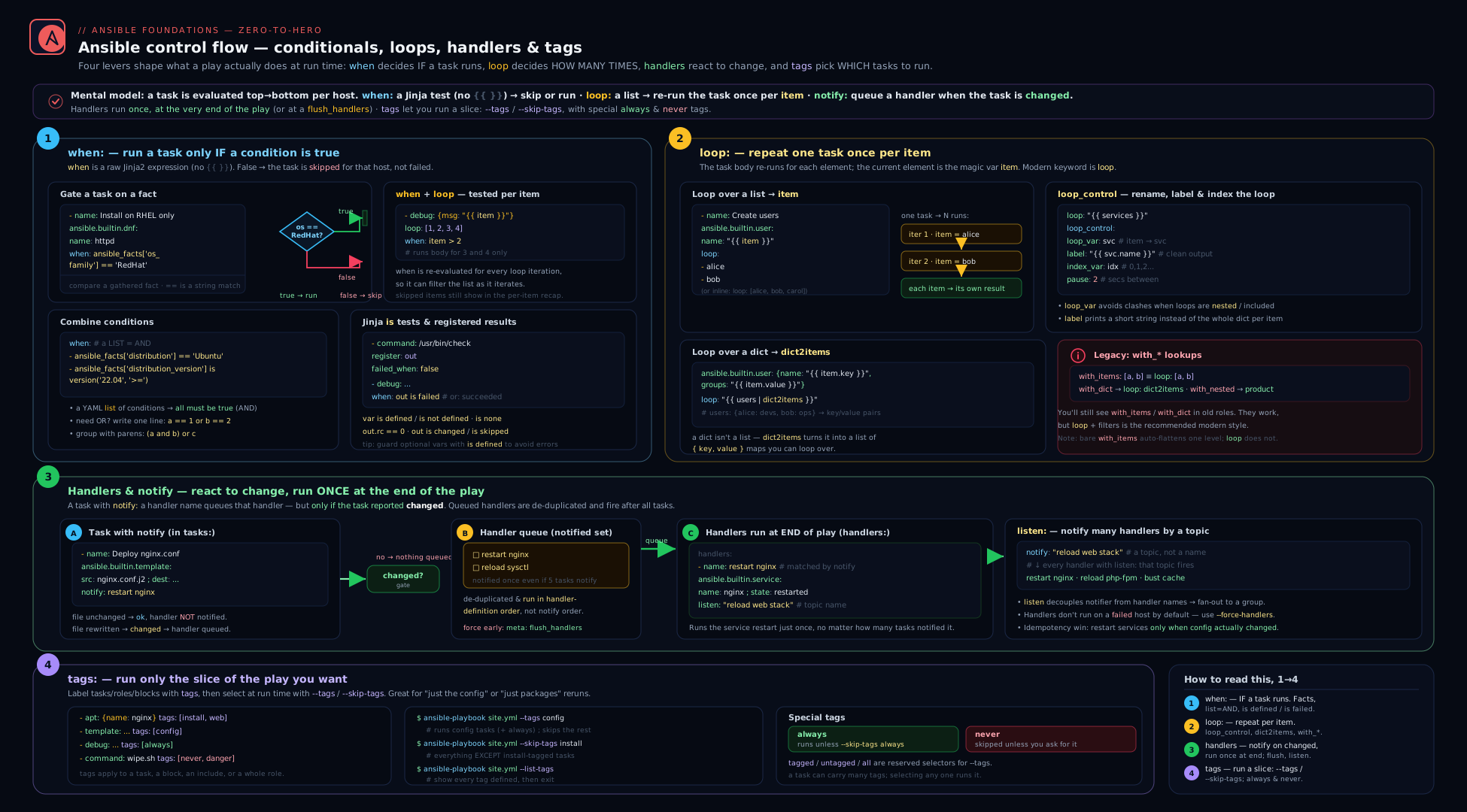
The diagram traces one play through all four mechanisms: a task’s when decides run-vs-skip per host; a loop fans the task across items (with loop_control renaming/labelling/pacing each); a changed task fires a notify that is queued and flushed once at the end of the play (or early via flush_handlers); and the --tags/--skip-tags selector on the left gates which tasks are even considered — with always always in and never out unless named.
Hands-on lab
You will exercise all four features on localhost plus a couple of throwaway containers — no cloud, no cost. You need ansible-core and either Docker or Podman. We will use the community.docker collection only to create the practice containers; the flow-control features themselves are pure ansible.builtin.
Step 0 — set up
# Confirm ansible-core
ansible --version            # expect 2.17 or newer

# Install the docker collection used only to spin up practice hosts
ansible-galaxy collection install community.docker

# A tiny inventory: localhost + two containers we will create
mkdir -p ~/ansible-b2 && cd ~/ansible-b2
Create inventory.ini:
[local]
localhost ansible_connection=local

[demo]
node1 ansible_connection=community.docker.docker
node2 ansible_connection=community.docker.docker
Step 1 — create the practice containers
Create setup.yml:
- name: Spin up two practice containers
  hosts: localhost
  connection: local
  gather_facts: false
  tasks:
    - name: Run lightweight containers we can target
      community.docker.docker_container:
        name: "{{ item }}"
        image: python:3.12-slim     # has python so Ansible modules work
        command: sleep infinity
        state: started
      loop:
        - node1
        - node2
ansible-playbook setup.yml
# Expect: changed for each container (or ok on a re-run — idempotent)
Step 2 — the flow-control playbook
Create flow.yml. It uses when, loop + loop_control, a handler with notify/listen/flush_handlers, and tags including always and never.
- name: Demonstrate when / loop / handlers / tags
  hosts: demo
  gather_facts: true
  vars:
    packages:
      - { name: "curl",  wanted: true }
      - { name: "git",   wanted: true }
      - { name: "nano",  wanted: false }   # will be skipped by 'when'
  tasks:
    - name: ALWAYS announce which host we are on
      ansible.builtin.debug:
        msg: "Configuring {{ inventory_hostname }} ({{ ansible_facts['distribution'] }})"
      tags: always

    - name: Install only the wanted packages (loop + per-item when + labels)
      ansible.builtin.apt:
        name: "{{ item.name }}"
        state: present
        update_cache: true
      loop: "{{ packages }}"
      when: item.wanted
      loop_control:
        label: "{{ item.name }}"      # console shows just the name
        index_var: idx
      register: pkg_results
      notify: Note config changed     # fires only if any install actually changed
      tags: packages

    - name: Show how many packages were processed
      ansible.builtin.debug:
        msg: "Processed {{ pkg_results.results | length }} package item(s)"
      tags: packages

    - name: Write a marker file (will notify two handlers via a topic)
      ansible.builtin.copy:
        dest: /tmp/configured.txt
        content: "configured at {{ ansible_date_time.iso8601 | default('now') }}\n"
      notify: "post-config"           # topic; both listeners fire on change
      tags: config

    - name: Flush handlers now so the verify step sees their effect
      ansible.builtin.meta: flush_handlers
      tags: config

    - name: Verify the marker exists (proves handler-driven ordering)
      ansible.builtin.command: cat /tmp/configured.txt
      register: marker
      changed_when: false
      tags: config

    - name: DANGEROUS task that only runs when explicitly requested
      ansible.builtin.command: "rm -f /tmp/configured.txt"
      tags:
        - never
        - wipe                        # opt-in only via --tags wipe

  handlers:
    - name: Note config changed
      ansible.builtin.debug:
        msg: "A package install changed something on {{ inventory_hostname }}"

    - name: Echo the post-config topic A
      ansible.builtin.debug:
        msg: "post-config handler A ran"
      listen: "post-config"

    - name: Echo the post-config topic B
      ansible.builtin.debug:
        msg: "post-config handler B ran"
      listen: "post-config"
Step 3 — run it and read the output
ansible-playbook -i inventory.ini flow.yml
Expected observations:
- The
nanoitem showsskipping: [node1] => (item=nano)— proof that per-itemwhenworks. - On the first run, the package installs report
changed, so theNote config changedhandler runs; the marker-file copy ischanged, so bothpost-configlisteners run — and because offlush_handlers, they run before the verify step, not at play end. - On a second run, packages are already present (
ok), the marker file is unchanged (ok), so no handlers run at all — the “only on change” rule in action.
Now exercise tags:
# Only the config-tagged tasks (plus the 'always' debug):
ansible-playbook -i inventory.ini flow.yml --tags config
# You'll see the ALWAYS task run even though you only asked for 'config'.

# Everything except packages:
ansible-playbook -i inventory.ini flow.yml --skip-tags packages

# List what tags exist, and what would run for a selection:
ansible-playbook -i inventory.ini flow.yml --list-tags
ansible-playbook -i inventory.ini flow.yml --tags config --list-tasks

# The 'never' task is normally invisible; opt in explicitly:
ansible-playbook -i inventory.ini flow.yml --tags wipe
# Now (and only now) the rm runs.
Validation
# After a --tags config run, the marker should exist on both nodes:
ansible -i inventory.ini demo -m ansible.builtin.command -a "cat /tmp/configured.txt"

# After a --tags wipe run, it should be gone:
ansible -i inventory.ini demo -m ansible.builtin.stat -a "path=/tmp/configured.txt" \
  | grep -E '"exists": (true|false)'
Cleanup
cat > teardown.yml <<'YAML'
- hosts: localhost
  connection: local
  gather_facts: false
  tasks:
    - name: Remove practice containers
      community.docker.docker_container:
        name: "{{ item }}"
        state: absent
      loop: [node1, node2]
YAML
ansible-playbook teardown.yml
rm -rf ~/ansible-b2
Cost note
₹0. Everything runs on localhost and two local containers using a public base image. No cloud resources are created, so there is nothing to bill and nothing left running after teardown.
Going deeper
The four keywords are simple to use and surprisingly deep underneath. This section is for the reader who wants to know why they behave as they do — the machinery, the config toggles, and the edge cases that surface at scale.
How when is actually evaluated
A when: value is neither a normal string nor a {{ }} template — it is handed to Ansible’s conditional evaluator, which wraps your bare expression in an implicit {% if <expr> %}...{% endif %} and evaluates it with the same Jinja2 templar that renders everything else, against that host’s variables and facts. The result is then coerced to a real boolean.
That coercion is the source of the classic “the string "False" is truthy” trap. It is governed by the conditional_bare_variables setting (env ANSIBLE_CONDITIONAL_BARE_VARS). Since ansible-core 2.12 its default is false, which means a bare variable in when: is evaluated as an expression — so when: some_flag where some_flag is the string "false" correctly comes out falsey through boolean coercion. Under the old true behaviour a bare variable was treated more literally and any non-empty string was truthy. Rely on the modern default, but never depend on a naked string being interpreted for you — pass real booleans (YAML true/false) or cast explicitly with | bool.
Two internals worth holding:
- Short-circuiting saves you. Jinja2 evaluates
and/orleft-to-right and stops early, sowhen: myvar is defined and myvar == 'prod'never touchesmyvarwhen it is undefined — the idiomatic guard. Order matters: put theis definedtest first. | intis about the data, not the expression. Numeric literals you type in the expression are already integers; the cast is needed because the fact or variable arrives as a string ("22").ansible_facts['distribution_major_version'] | int >= 22casts the datum, not the literal. Native-Jinja mode (DEFAULT_JINJA2_NATIVE) changes what{{ }}returns elsewhere but does not remove the need to cast string facts insidewhen.
Loop internals: loop is a realised list, with_* is a lookup
loop takes an already-materialised list and iterates it — nothing more. The legacy with_<plugin> forms are sugar that call the lookup plugin named by the suffix and iterate its output; with_items: x is essentially loop: "{{ lookup('items', x, wantlist=True) }}", which is why with_items flattens one level (the items lookup does) and plain loop does not. Each item is itself run through the templar, so items may contain {{ }} that resolves per iteration.
loop_control.extended: true is the most under-used switch. It populates an ansible_loop object on each iteration with far more than first/last:
ansible_loop field |
Value |
|---|---|
index / index0 |
1-based / 0-based position |
revindex / revindex0 |
position counting from the end |
first / last |
booleans marking the edges |
length |
total item count |
previtem / nextitem |
the adjacent items (undefined on the first/last edge — guard with first/last before touching them) |
allitems |
the whole list (suppress with extended_allitems: false on huge loops to save memory) |
Every registered per-iteration result also carries ansible_loop_var, a string naming the loop variable in force ("item" by default, or whatever loop_var set). That lets a generic downstream task find “the current item” without hard-coding item.
The shape of a registered looped result
Registering a looped task gives you an object whose top level aggregates and whose .results list holds the per-item detail:
.results— one entry per item, each a full task result plusitem(the original value, or the renamedloop_var) andansible_loop_var..changed—trueif any iteration changed..failed—trueif any iteration failed (and was not ignored/rescued)..skipped—trueonly if every iteration was skipped (e.g. a per-itemwhenwas false for all)..msg— usually a roll-up like"All items completed".
The powerful move is filtering .results with Jinja rather than looping again to inspect it. To pull the items that did not return 200:
- name: List the URLs that were not healthy
  ansible.builtin.debug:
    msg: "{{ url_checks.results | rejectattr('status', 'equalto', 200)
             | map(attribute='item') | list }}"
selectattr/rejectattr + map(attribute=...) turns a loop result into exactly the slice you need, with no second loop.
Handler internals: per-host queues and failure semantics
Notifications are tracked per host, not globally per play. When a task changes on host A but is ok on host B, only host A queues the handler, and at flush time the handler runs on A alone. This is why “restart on change” scales correctly across a fleet — unchanged hosts are never restarted.
A few sharp edges:
- A handler can itself fail. If it does, that host is marked failed like any task;
force_handlersdoes not protect a host from its own failing handler — it only ensures other pending handlers still run after an earlier task failed. - Flush is per-host and idempotent within a run.
meta: flush_handlersruns each host’s currently-pending handlers once; a handler already flushed runs again only if re-notified afterwards. - Dynamic includes and handler visibility. A handler must be defined (statically reachable) to be notifiable. Handlers pulled in only through a dynamic
include_tasksthat has not run yet cannot be notified — prefer defining handlers inhandlers/main.yml(roles), where they are always available. listenruns every subscriber, in definition order. One task notifying a topic that three handlers listen to fires all three, once each — de-duplicated per handler, exactly like named notifies.--start-at-taskand--checkchange the picture. Starting mid-play skips the tasks (and notifications) before the start point; in check mode handlers are reported as notified but not executed.
Tag resolution: how the run set is computed
Ansible builds, for every task, its complete tag set — the task’s own tags plus every tag inherited from the enclosing block, play, role, and any static import_*. Then it filters:
- Start from the tasks selected by
--tags(defaultall). - Remove anything matched by
--skip-tags. Skip always wins — a task carrying both a selected tag and a skipped tag is skipped. always-tagged tasks are added back unless--skip-tags always(or the task is also caught by a--skip-tagson one of its other tags).never-tagged tasks are removed unlessnever, or one of their other tags, was named in--tags.
Three selectors beyond the ones in the table above are useful on the CLI: untagged runs only tasks with no tag at all (the mirror of tagged), while tagged and all behave as described. meta tasks such as flush_handlers are not filtered out by tag selection — they always run — which is why you can tag the tasks around a meta: flush_handlers without accidentally disabling the flush.
The import-vs-include rule has a parse-time cause: import_role/import_tasks are expanded before the run, so their children’s tags are known and --list-tags shows them; include_role/include_tasks are resolved at runtime, so only the tag on the include statement is visible up front. Push tags onto dynamically-included children with apply: { tags: [...] } when you need them selectable.
Common beginner mistakes
These are conceptual traps — wrong mental models rather than broken syntax. Each pairs the misbelief with the model that should replace it. (For symptom → cause → fix lookups, see the troubleshooting table below.)
- “I wrap the
whenexpression in{{ }}like everywhere else.” No —whenis the one place you write a bare expression; Ansible templates it for you. Braces around the whole thing trigger a deprecation warning and can mis-evaluate booleans. Right model:when= no braces;{{ }}only for a value you interpolate inside a larger string. - “Handlers run the moment I notify them.” They do not.
notifyonly queues the handler; it runs at the end of the play (or at ameta: flush_handlers). Right model: notifying is posting a reminder, not pressing the button. If a later task needs the effect now, flush explicitly. - “A handler runs every time it’s notified.” It runs once per play no matter how many tasks notify it, and only if a notifying task actually changed. Right model: the handler is de-duplicated and change-gated — that is the whole reason it exists.
- “The loop variable is always
item.” Only by default. Inside nested loops or includes you must rename it withloop_control.loop_var, or the inner loop clobbers the outer’sitem. Right model:itemis a default name, not a law. - “Numbers in facts compare like numbers.” Facts and vars are usually strings, and
"9" > "10"istrueas a string comparison. Right model: cast every fact you compare numerically with| int(or| float). - “A list under
whenis an OR.” It is an AND — every condition must be true. There is no implicit-OR list; writeorinline for that. Right model: stacking conditions narrows, it never widens. - “
--tags fooruns everything taggedfoo, including inside my role.” Not if the role came in via a dynamicinclude_role— the children’s tags are invisible until the include runs. Right model:import_roleto expose child tags, or push them withapply: { tags: [...] }. - “
never-tagged tasks are disabled / dead code.” They are opt-in, not disabled — they run the instant you name their tag (ornever) in--tags. Right model:nevermeans “only when I explicitly ask,” the standard guard for dangerous tasks.
Common mistakes & troubleshooting
| Symptom | Likely cause | Fix |
|---|---|---|
when always true / a string like "false" is truthy |
wrapped the expression in {{ }}, or compared a string to a number |
drop the braces; cast with | int/| bool |
'dict object' has no attribute 'X' in when/loop |
referenced a var/field that may be undefined | guard with is defined or use | default(...) |
| Numeric comparison gives wrong result | facts/vars are strings ("10" < "9") |
... | int (or | float) on both sides |
| Handler never runs | notifying task reported ok (idempotent), not changed |
that’s correct behaviour; to force, fix the task or use changed_when deliberately |
The requested handler 'X' was not found |
notify name doesn’t exactly match handler name |
match case/spacing exactly, or use listen topics |
| Handler runs in the “wrong” order | handlers run in definition order, not notify order | reorder the handlers: section, or split into topics |
| Pending handlers skipped after a failure | a later task failed; handlers are skipped by default | set force_handlers: true or pass --force-handlers |
| Restart happened too late | you needed it mid-play | insert ansible.builtin.meta: flush_handlers |
--tags x runs nothing |
no task carries tag x, or tags are only on a dynamic include’s children |
--list-tags; import the role/tasks (or use apply: { tags: }) to expose child tags |
| A task you didn’t select still ran | it is tagged always |
that’s intended; suppress with --skip-tags always |
never-tagged task ran unexpectedly |
you passed --tags all or its own tag |
only request its tag when you mean it |
Inner loop overwrites outer item |
nested loop/include both use default item |
set loop_control.loop_var on the outer loop |
| Looping a module that takes a list is slow | one network round-trip per item | pass the list straight to name: instead of loop |
Best practices
- Cast types in
when. Treat every fact/var as a string until proven otherwise:... | int,... | bool. It eliminates a whole class of silent logic bugs. - Prefer the list-of-conditions form for multi-condition
when(implicit AND) — it reads better than a longandchain and diffs cleanly. - Use module-native list arguments over
loopwhere supported (package,dnf,apt,user); loop only when the module can’t take a list. It is faster and more idempotent. - Always set
loop_control.labelwhen looping over dicts or anything containing secrets — it keeps console output readable and keeps credentials out of logs. - Set
loop_varwhenever a loop wraps an include or could nest. Make it a habit even for top-level loops in roles. - Let handlers do “act only on change.” Don’t replace handlers with
when: result is changedfollow-up tasks unless you specifically need immediate, ordered, or unconditional execution. - Notify topics (
listen) in roles, names in plays. Roles should expose stable topics so callers don’t depend on internal handler names. - Use
flush_handlerssparingly and deliberately — only when a later task truly depends on the handler’s effect within the same play. - Tag every play and role at the top level (
tags: web) and tag logical groups of tasks (packages,config) so operators can run slices. Reserveneverfor dangerous/expensive opt-in actions andalwaysfor invariant setup/validation. --list-tasksbefore a real run when using--tags/--skip-tagson an unfamiliar playbook — confirm the selection does what you think.
Security notes
- Hide secrets in loop output with
label. Aloopover a list of user dicts containing passwords will print every password to the console (and to AWX/CI logs) unless you setloop_control.labelto a non-sensitive field. Combine withno_log: trueon the task to suppress per-item argument logging entirely. no_log: trueand loops.no_logsuppresses the task’s arguments/results in output; on a looped task it suppresses every iteration. Use it on any task handling credentials, even when looping, because a single leaked iteration is a breach.never-tagged destructive tasks are a guardrail. Taggingrm/drop/wipe operationsnevermeans they cannot run by accident from a full playbook run — they require an explicit, auditable--tags. Treat that as a safety control, not just convenience.- Be careful forcing handlers.
force_handlerscan restart a service into a partially-applied configuration after a failure; ensure the handler (e.g. a restart) is safe to run against an incompletely-configured host, or you may turn a failed run into an outage. - Conditionals must fail safe. A
whenthat references an undefined var can evaluate in surprising ways; guard security-relevant gates (e.g. “apply firewall rules when env is prod”) withis definedand explicit defaults so a missing variable never silently disables a control.
Interview & exam questions
- Do you wrap a
whenexpression in{{ }}? No.whentakes a bare Jinja2 expression; Ansible templates it implicitly. Wrapping the whole thing in{{ }}is wrong, triggers a deprecation warning, and can mis-evaluate bare booleans. (You may still use{{ }}for a value embedded inside a larger string within the expression, but not for the expression as a whole.) - What does a list of conditions under
whenmean? Logical AND — every item must be true. It is shorthand for joining them withand. There is no implicit-OR list; for OR you writeorinline. - When exactly does a handler run? Only when (a) a task notifies it and (b) that task reported changed; it runs once, at the end of the play (or at a
meta: flush_handlers), in the order handlers are defined — not the order they were notified. - Two tasks both
notify: restart nginx, both change. How many restarts? One. Handlers are de-duplicated and run once per play regardless of how many notifications they receive — which is the whole reason handlers exist. - A handler is defined but never runs even though you expected a change. Why might that be? The notifying task likely reported
ok(idempotent no-op) orskipped, so no notification was sent; or the notify name doesn’t exactly match the handler name; or the play failed before the handler flush (andforce_handlersis off). - What does
meta: flush_handlersdo and when do you need it? It runs all currently-pending handlers immediately at that point in the play, instead of waiting until the end — needed when a subsequent task depends on the handler’s effect (e.g. restart the service, then health-check it within the same play). - Explain
listenversusnotifyby name. A handler can subscribe to a topic withlisten; a task notifies the topic, and all handlers listening on it run. This decouples notifiers from handler names — the preferred pattern in roles, which expose stable topics rather than internal names. - What is the difference between
alwaysandnevertags?always-tagged tasks run on every invocation regardless of--tags, unless you--skip-tags always.never-tagged tasks never run unless you explicitly request their tag (ornever) via--tags— the standard idiom for opt-in dangerous/expensive tasks. - How do
loopandwith_itemsdiffer behaviourally?loopis the current recommended keyword and does not flatten nested lists;with_itemsflattens one level. Functionally mostwith_*map to aloopover aquery('<plugin>', ...)expression;with_items/with_listsimply becomeloop: "{{ var }}". Add| flatten(levels=1)if you relied onwith_itemsflattening. - How do you loop over a dictionary?
loopneeds a list, so convert withdict2items:loop: "{{ mydict | dict2items }}", then referenceitem.keyanditem.value.items2dictis the reverse. - What does
loop_controlgive you? Per-loop controls:loop_var(renameitem, essential for nested includes),label(what prints per iteration — hide big/secret data),index_var(0-based index),pause(seconds between iterations), andextended(exposesansible_loopwith.first/.last/.length/.index/etc.). - How do
until/retries/delaywork, and how does that differ fromloop? They retry a single task until theuntilexpression is true, up toretriesattempts (default 3)delayseconds apart (default 5); the result gains anattemptscount. It is a retry loop, not an iteration loop, and cannot be combined withloopon the same task. - You register a looped task — where are the per-item results? In the registered variable’s
.resultslist, one entry per item, each carrying that iteration’sitem,rc,stdout,changed, etc. To act per item, loop over.resultsand referenceitem.itemfor the original value. - A role’s internal tags aren’t selectable from
--tags. Why, and how do you fix it? The role was pulled in with a dynamicinclude_role, so its child tasks’ tags live behind the include and aren’t visible at parse time. Useimport_role(static, pushes tags onto every child) or passapply: { tags: [...] }on the dynamic include.
Quick check
- True or false: you should write
when: "{{ x == 'prod' }}". - In what order do handlers run — the order they were notified, or the order they are defined?
- Which
loop_controlkey do you set to stop a nested loop/include from clobbering the outeritem? - What command-line flag makes notified handlers run even though a later task failed?
- Which special tag makes a task run on every invocation regardless of
--tags, and which makes it run only when explicitly named?
Answers
- False.
whentakes a bare expression:when: x == 'prod'. Wrapping it in{{ }}is wrong (deprecation warning, possible mis-evaluation). - Definition order — the order handlers appear in the
handlers:section, not the order tasks notified them. loop_var(set it on the outer loop, e.g.loop_var: outer_item).--force-handlers(orforce_handlers: trueon the play, orforce_handlers = Trueinansible.cfg).alwaysruns on every invocation (unless--skip-tags always);neverruns only when its tag (ornever) is explicitly requested via--tags.
Practice challenges
Six exercises, escalating from beginner to advanced. Try each before opening the solution. Every solution is real, schema-correct ansible-core (2.17+) using FQCN — none of it was executed here, so treat the output notes as representative.
1. Beginner — a cast conditional. Write a single task that installs chrony with ansible.builtin.package, but only on hosts in the RedHat family running major version 9 or newer.
<details> <summary>Solution</summary>
- name: Install chrony on RHEL 9+
  ansible.builtin.package:
    name: chrony
    state: present
  when:
    - ansible_facts['os_family'] == "RedHat"
    - ansible_facts['distribution_major_version'] | int >= 9
Why: the list-of-conditions is an implicit AND, and | int casts the string fact so the numeric comparison is real, not lexical.
</details>
2. Beginner — a labelled loop. Create the users alice, bob, and carol in one task, printing only the username per iteration (not the whole record).
<details> <summary>Solution</summary>
- name: Create the team accounts
  ansible.builtin.user:
    name: "{{ item.name }}"
    state: present
  loop:
    - { name: "alice" }
    - { name: "bob" }
    - { name: "carol" }
  loop_control:
    label: "{{ item.name }}"
Why: label controls only what the console prints per iteration, keeping output readable (and secrets out of logs) without changing what is looped.
</details>
3. Intermediate — modernise a legacy loop. Rewrite this without with_dict:
- ansible.posix.sysctl:
    name: "{{ item.key }}"
    value: "{{ item.value }}"
    state: present
  with_dict: "{{ sysctls }}"
<details> <summary>Solution</summary>
- name: Apply sysctl tuning
  ansible.posix.sysctl:
    name: "{{ item.key }}"
    value: "{{ item.value }}"
    state: present
  loop: "{{ sysctls | dict2items }}"
Why: loop needs a list, so a dict is converted with dict2items into {key,value} pairs — the modern equivalent of with_dict.
</details>
4. Intermediate — change-gated handler with an early flush. Deploy a config with ansible.builtin.template, reload the service only if the file changed, then health-check the service — all within the same play, in the right order.
<details> <summary>Solution</summary>
  tasks:
    - name: Deploy app config
      ansible.builtin.template:
        src: app.conf.j2
        dest: /etc/app/app.conf
      notify: Reload app

    - name: Run any pending handlers now
      ansible.builtin.meta: flush_handlers

    - name: Confirm the app is healthy on its new config
      ansible.builtin.uri:
        url: http://localhost:8080/health
        status_code: 200
      register: h
      until: h.status == 200
      retries: 10
      delay: 3

  handlers:
    - name: Reload app
      ansible.builtin.service:
        name: app
        state: reloaded
Why: the handler fires only on a changed template, and flush_handlers forces the reload before the health check instead of at play end.
</details>
5. Advanced — act on loop results without a second loop. You registered a looped ansible.builtin.uri as checks (each result has .status and .item). Produce, in one debug, the list of URLs that did not return 200.
<details> <summary>Solution</summary>
- name: Report unhealthy URLs
  ansible.builtin.debug:
    msg: >-
      {{ checks.results
         | rejectattr('status', 'equalto', 200)
         | map(attribute='item') | list }}
Why: filtering .results with rejectattr + map(attribute='item') extracts exactly the failing originals — no second loop, and item here is the original value that produced each result.
</details>
6. Advanced — tag a playbook for safe, sliceable runs. In a play, tag the package install packages, the config block config, add an always assertion that app_users | length > 0, and add a destructive purge of /etc/nginx/conf.d that must never run unless explicitly requested. Then give the three commands to (i) run only the config slice, (ii) list what a --tags config run would execute, and (iii) trigger the destructive task on purpose.
<details> <summary>Solution</summary>
  tasks:
    - name: Inventory sanity
      ansible.builtin.assert:
        that: app_users | length > 0
      tags: always

    - name: Install packages
      ansible.builtin.package:
        name: [nginx, chrony]
        state: present
      tags: packages

    - name: Configuration
      tags: config
      block:
        - name: Main config
          ansible.builtin.template:
            src: nginx.conf.j2
            dest: /etc/nginx/nginx.conf

    - name: Purge config dir (opt-in only)
      ansible.builtin.file:
        path: /etc/nginx/conf.d
        state: absent
      tags:
        - never
        - purge
ansible-playbook site.yml --tags config                # (i) only the config slice (+ always)
ansible-playbook site.yml --tags config --list-tasks   # (ii) preview the selection
ansible-playbook site.yml --tags purge                 # (iii) run the destructive task deliberately
Why: always guarantees the assertion regardless of --tags; never + a friendly purge tag makes the destructive task opt-in; --list-tasks previews a selection before you commit to it.
</details>
Exercise
Write a single playbook webserver.yml for hosts: webservers that demonstrates all four mechanisms together. (a) Use a dict variable vhosts mapping site name → server-name, and a loop over dict2items to template one config file per vhost into /etc/nginx/conf.d/{{ item.key }}.conf, using loop_control.label: "{{ item.key }}". (b) Make every templating task notify a single topic reload nginx via listen, with two handlers on that topic: one that runs nginx -t (config test, changed_when: false) and one that reloads the service — and ensure the test runs before the reload by ordering. © Add a when so the whole vhost block only runs on hosts where ansible_facts['os_family'] == "RedHat", expressed as a list-of-conditions that also checks a deploy_vhosts | default(true) flag. (d) Tag the install step packages, the vhost block config, and add an always-tagged assert that vhosts | length > 0. (e) Add a never-tagged task (also tagged purge) that deletes all files in /etc/nginx/conf.d/. Then write the three commands that (i) run only the config part, (ii) list which tasks would run for --tags config, and (iii) explicitly trigger the purge. In two sentences, explain why nginx -t must be ordered before the reload handler and why the purge is tagged never.
Certification mapping
- RHCE (EX294): This lesson maps to several published objectives directly. “Use conditionals to control play execution” is the
whensection. “Configure error handling” overlaps viaregister+is failed/is changedandforce_handlers. “Create playbooks … using loops” is theloop/with_*/loop_controlmaterial. Handlers (notify/listen/flush_handlers) and tag-based selection (--tags/--skip-tags,always/never) are explicitly exercised in exam tasks where you must make a service restart only on change and make parts of a playbook independently runnable. Expect the exam to require: awhenwith a fact comparison, a loop creating multiple users/files, a handler that restarts a service only on change, and correct tagging so a grader can run a slice. Practise writing these fast and correctly under time pressure. - The retry pattern (
until/retries/delay) and the import-vs-include tag/whendistinction are frequently tested edges — know them cold.
Glossary
when— task/block keyword holding a bare Jinja2 boolean expression; the task runs on a host only if it evaluates true.- Conditional list (AND) — a YAML list under
when; all items must be true (implicitand). - Test (
is) — Jinja2 predicate used in conditions:is defined,is failed,is changed,is match,is version, etc. loop— modern keyword to run a task once per item in a list; current value isitemby default.with_*— legacy loop family named after a lookup plugin (with_items,with_dict, …); maps toloop+query('<plugin>', …).loop_control— sub-keys shaping a loop:loop_var,label,index_var,pause,extended.dict2items/items2dict— filters converting a dict to a list of{key,value}pairs and back, for looping.until/retries/delay— retry-loop keywords: repeat a task until a condition holds, up to N attempts, with a wait between..results— the per-iteration result list on a registered looped task; each entry has that item’sitem,rc,changed, etc.- Handler — a task under
handlers:that runs only when notified by a changed task, once, at end of play, in definition order. notify— task keyword listing handler names (or topics) to trigger if the task changed.listen— handler keyword subscribing it to a topic; notifying the topic runs all subscribed handlers.meta: flush_handlers— special task that runs all pending handlers immediately rather than at play end.force_handlers/--force-handlers— run notified handlers even when the play later fails.- Tag — a label on a task/block/play/role; selected with
--tags, excluded with--skip-tags; inherited downward, additive. always(tag) — runs on every invocation unless--skip-tags always.never(tag) — runs only when its tag (ornever) is explicitly requested.tagged/all(tags) — CLI selectors:tagged= any tagged task;all= everything (the default).conditional_bare_variables— config (envANSIBLE_CONDITIONAL_BARE_VARS) governing how a bare variable inwhenis evaluated; defaultfalsesince ansible-core 2.12 (evaluated as an expression, not treated as a literal string).- Short-circuit evaluation — Jinja2 evaluates
and/orleft-to-right and stops early, which is what makeswhen: v is defined and v == 'x'safe against an undefinedv. loop_var—loop_controlkey that renames the per-item variable fromitem; essential to stop a nested loop/include from clobbering the outeritem.index_var—loop_controlkey binding the current 0-based iteration index to a variable.label(loop_control) — display-only string shown per iteration; changes console output, not the data — used to hide large or secret item contents.ansible_loop— rich per-iteration object exposed byloop_control.extended: true:.index/.index0,.first/.last,.length,.revindex,.previtem/.nextitem,.allitems.ansible_loop_var— string present on each looped result naming the loop variable in force ("item"by default).selectattr/rejectattr— Jinja2 filters that keep/drop list items by an attribute test; combined withmap(attribute=...)they slice a registered.resultslist without a second loop.untagged(tag selector) — CLI selector (--tags untagged) matching only tasks that carry no tag; the mirror oftagged.apply(dynamic include) —apply: { tags: [...] }oninclude_*pushes tags (and other keywords) onto the included tasks so they are selectable from--tags.import_*vsinclude_*— static (parse-time) imports push tags/whenonto every child and are visible to--list-tags; dynamic includes gate at runtime and keep the tag/whenon the include statement.
Next steps
You can now control whether a task runs (when), how many times (loop/with_* with loop_control, plus until retries), when side-effects fire (handlers via notify/listen/flush_handlers/force_handlers), and which parts of a playbook execute (tags, including always/never). The next lesson, Ansible Jinja2 Templating, In Depth, goes deep on the expression language underneath all of this — the same {{ }}/{% %} syntax, the filters (default, map, select, dict2items, combine) and tests you used in when and loop, plus the template module for generating config files. After that, Ansible Error Handling, In Depth builds on conditionals and handlers with blocks, rescue/always, failed_when, changed_when, and any_errors_fatal for genuinely resilient playbooks. To revisit where the variables in your conditions come from, return to Ansible Variables & Facts, In Depth.