In a nutshell
Imagine you own a dozen identical holiday cottages and you want every one set up the same way — same locks, same welcome pack, heating set to 21°C. One option is to hire a live-in caretaker for each cottage who checks a rulebook every half hour. That works, but now you have twelve caretakers to hire, pay, upgrade and replace when one quits. The other option is to keep one trusted contractor who has a written checklist and a key to every cottage, and to send them out whenever you want the cottages brought up to spec. Ansible is that contractor.
That single picture holds the three ideas this whole lesson is built on:
- Agentless — you don’t station any Ansible software permanently inside the machines you manage. The contractor just needs a key (SSH) to let themselves in; there is no live-in caretaker (an agent) to install and maintain in every house.
- Push — you decide when work happens and send the contractor out from one place (the control node). The cottages don’t wake up on their own timer and pull instructions from a central office.
- Idempotent — the checklist describes the end state (“the front door should be blue”), not the action (“paint the door”). If a door is already blue, the contractor leaves it; hand them the same checklist ten times and every cottage ends up identical, because they never repaint what already matches.
So Ansible reads your written description of how a server should look, compares it with how the server actually looks, and changes only the difference. If you have ever SSH-ed into ten servers to run the same three commands by hand, Ansible turns those keystrokes into a checklist you write once, keep in Git, and apply to ten — or ten thousand — machines with a single command. The rest of this lesson takes that model apart piece by piece: the two kinds of machine involved, how a task actually travels to a server and runs there, why “agentless” does not mean “no requirements,” and what makes a second run safe.
Level: Beginner · Time: ~35 min
If you have ever configured a fleet of servers by SSH-ing into each one and running the same commands by hand, you already know the three problems Ansible exists to solve. The first is drift: server number seven got a slightly different package version because you were interrupted, and now “all the web servers are identical” is a hopeful fiction. The second is scale: what works for three machines is unbearable for three hundred, and impossible for three thousand. The third is memory: six months later nobody can say why a setting is the way it is, because the configuration lives only in the muscle memory of whoever last touched the box. Ansible answers all three by letting you describe the desired state of your machines in plain-text YAML files, keep those files in Git like any other code, and push that state out to as many machines as you like, repeatably and safely. That is configuration management, and Ansible is the tool that made it approachable for everyone — not just specialists.
This lesson is the on-ramp for the whole Ansible track. By the end you will understand what Ansible is and why it specifically won the configuration-management category; you will know its architecture cold — the difference between the control node and the managed nodes, what “agentless” really means, and how the connection works over SSH for Linux and WinRM for Windows; you will understand the push model and how it differs from the pull model used by Puppet and Chef; you will internalise idempotency — the single most important property in the tool — and the changed versus ok result model that flows from it; you will meet the six building blocks (inventory, modules, plugins, playbooks, roles, collections) and the FQCN naming scheme that ties them together; and you will be able to place Ansible precisely against Terraform, Puppet, Chef and Salt so you know when to reach for which. We are working with current Ansible throughout — ansible-core 2.17+ (the 2026 line) and the broader Ansible 10+ package — using the real ansible and ansible-playbook commands and real YAML.
Learning objectives
After working through this lesson you will be able to:
- Explain what Ansible is, what configuration management means, and the specific reasons Ansible became the de-facto standard.
- Describe Ansible’s architecture end to end: the control node, the managed nodes, the transport (SSH/WinRM), and the role of Python on the targets.
- Explain what agentless means and why it matters, and articulate the push model versus the pull model of Puppet and Chef.
- Define idempotency, explain why declaring desired state makes re-runs safe, and read the ok / changed / failed / skipped / unreachable result model.
- Identify and describe the six building blocks — inventory, modules, plugins, playbooks, roles, collections — and use FQCN (
namespace.collection.module) correctly. - Distinguish
ansible(the package) fromansible-corefrom Ansible Automation Platform (AAP), and explain Ansible’s “declarative-ish” position between declarative and imperative. - Compare Ansible with Terraform, Puppet, Chef and Salt, and state the control-node requirements for running it.
Prerequisites
You need almost nothing to start. A working knowledge of the Linux command line, comfort with SSH (you should know what an SSH key pair is), and a text editor are enough. A basic familiarity with YAML helps but is not assumed — we keep the YAML in this lesson minimal and explain it as it appears. No prior Ansible, no programming background, and no configuration-management experience are required; every term is defined as it shows up. This is the first stop in the Ansible Zero-to-Hero ladder. If you have read the course’s Infrastructure as Code: Core Concepts lesson you will recognise idempotency and drift at a higher level; here we ground them in actual Ansible behaviour. Everything that follows in the track — installation and ansible.cfg, inventory, ad-hoc commands, playbooks, roles and Vault — builds directly on the mental models below. This lesson, and the whole track, maps to the Red Hat Certified Engineer (RHCE) EX294 exam.
What Ansible is, and why it won
Ansible is an open-source automation engine. Its most common job is configuration management — bringing servers to a known, declared state (packages installed, services running, files in place, users created) and keeping them there — but the same engine also does application deployment, orchestration (coordinating multi-tier rollouts and rolling restarts), provisioning (creating cloud resources via cloud modules), and ad-hoc administration (one-off commands across many hosts). You describe what you want in YAML, and Ansible makes the machines match.
Configuration management as a discipline is about eliminating snowflake servers — machines that have drifted into being subtly, undocumentedly unique. The cure is to treat the definition of a server the way you treat application source code: written in files, version-controlled, reviewed in pull requests, and applied by a tool rather than by hand. The payoff is reproducibility (stamp out identical machines on demand), auditability (every change is a reviewable diff with an author and timestamp), and recoverability (the files are the rebuild plan).
Ansible was created by Michael DeHaan in 2012, acquired by Red Hat in 2015, and has been the most widely adopted tool in its category for years. The reasons compounded:
| Reason | What it means in practice |
|---|---|
| Agentless | Nothing to install, run, or patch on the machines you manage. If a host has SSH and Python, Ansible can manage it today — no daemon, no certificate dance, no bootstrap problem. |
| Low barrier to entry | Playbooks are YAML, not a bespoke programming language. A new engineer can read a playbook on day one and roughly understand it; Puppet’s and Chef’s DSLs have a steeper climb. |
| Push model | You run Ansible from one place and it reaches out to the targets. There is no central server the nodes must check in with, and no “is the agent healthy?” failure mode. |
| Huge module & collection ecosystem | Thousands of modules for Linux, Windows, network gear, every major cloud, databases and SaaS — most distributed as versioned collections on Ansible Galaxy and Automation Hub. |
| Idempotent by design | Modules converge to a desired state, so running a playbook repeatedly is safe — the core property that makes automation trustworthy. |
| Backed by Red Hat, with an enterprise tier | A clear path from the free CLI to Ansible Automation Platform for teams that need RBAC, a web UI, scheduling and auditing. Strong jobs market and certification (RHCE). |
A note on names and versions you must know in 2026: the engine itself is ansible-core (the binaries and the small set of built-in modules), currently on the 2.17+ line. The thing most people pip install as ansible is a larger “batteries-included” package — ansible-core plus a curated bundle of ~70 popular collections — at version 10+ (the version numbers of the two diverged years ago; Ansible 10 ships ansible-core 2.17). At the top sits Ansible Automation Platform (AAP), Red Hat’s commercial product. We will pin these down precisely later in the lesson.
The architecture: control node and managed nodes
Ansible’s architecture is refreshingly small. There are exactly two kinds of machine, and only one of them has Ansible installed.
The control node is the machine where Ansible itself lives and runs — your laptop, a jump host, a CI runner, or an AAP server. It holds the inventory, the playbooks, the roles and collections, and the ansible/ansible-playbook binaries. This is the only machine that needs Ansible installed.
The managed nodes (also called “hosts” or “targets”) are the machines Ansible configures. They run nothing belonging to Ansible — no agent, no daemon, no persistent process. A managed node needs only two things: a way for the control node to log in (SSH for Linux/Unix, WinRM or SSH for Windows) and, for Linux targets, a Python interpreter so Ansible can execute its modules there. That is the whole footprint.
Here is the sequence of what actually happens when you run a task against a Linux host — internalise this, because almost every behaviour and failure mode in Ansible follows from it:
- On the control node, Ansible reads your play, works out the target hosts from the inventory, and gathers the variables that apply.
- For each task, Ansible takes the named module (a small program, usually Python) and, with your arguments baked in, transfers it to the managed node over the connection (SSH by default).
- The module runs on the managed node using that node’s Python interpreter. It does the work — or, crucially, checks whether the work is already done and does nothing if so — and prints a JSON result to standard output.
- Ansible on the control node reads that JSON back over the connection, decides whether the task reported ok, changed, or failed, removes the temporary module file from the target, and moves to the next task.
Two consequences are worth stating now. First, the real work happens on the target, not on the control node — the control node is an orchestrator that ships code and reads results. Second, because each module is copied, run, and cleaned up per task, there is no long-lived state on the target between runs; the desired state lives entirely in your files on the control node.
| Component | Where it runs | What it is / does | Must Ansible be installed there? |
|---|---|---|---|
| Control node | Your laptop / jump host / CI / AAP | Runs ansible/ansible-playbook; holds inventory, playbooks, roles, collections; orchestrates everything. |
Yes |
| Managed node | Each target server / device | Gets modules pushed to it, executes them, returns JSON. Runs no Ansible agent. | No |
| Inventory | Read on the control node | The list of managed nodes and their groups/variables. | n/a |
| Connection plugin | Control node initiates | The transport: ssh (Linux default), winrm/psrp (Windows), local, docker, etc. |
n/a |
| Module | Copied to and executed on the managed node | The unit of work (install a package, copy a file). Returns JSON. | n/a |
| Python on target | Managed node (Linux/Unix) | Interpreter that runs the pushed modules. (Windows uses PowerShell modules instead.) | Python, yes; Ansible, no |
Agentless: what it means and why it matters
“Agentless” is the headline word in every Ansible introduction, and it means precisely this: you do not install or run any Ansible software on the machines you manage. Compare that with the agent-based model of classic Puppet and Chef, where every managed machine runs a daemon (puppet-agent, chef-client) that must be installed, configured with certificates, kept running, upgraded, and monitored for health.
Being agentless buys you several things:
- No bootstrap problem. With agent-based tools you face a chicken-and-egg: to manage a fresh machine you must first get the agent onto it (often via … some other automation). Ansible can manage a brand-new box the moment it has SSH and Python, which on virtually every Linux distribution is out of the box.
- A smaller attack surface and less to patch. There is no extra long-running service on every host to secure and update — one fewer daemon listening, one fewer thing with a CVE.
- No “is the agent alive?” failure class. An agent that has crashed, or whose certificate expired, silently stops applying config and you find out during an incident. Ansible’s connection either works at run time or fails loudly, immediately, in front of you.
- Reuse of existing access. Ansible rides on the SSH (or WinRM) access your team already manages — the same keys, the same bastion, the same audited paths.
What “agentless” does not mean: it does not mean “no dependencies on the target.” Linux targets still need a Python interpreter (Ansible discovers it automatically — /usr/bin/python3 on modern distributions). Windows targets need PowerShell and a configured WinRM (or SSH) listener. And the control node, of course, does need Ansible installed. The distinction is that these are either already present (Python on Linux) or are standard OS features (PowerShell/WinRM on Windows) — not a piece of Ansible-specific software you must deploy and maintain.
The transports: SSH and WinRM
Ansible reaches managed nodes through connection plugins. The two you must know:
| Target | Default connection | Transport detail | Auth options | What runs there |
|---|---|---|---|---|
| Linux / Unix | ssh |
OpenSSH (the same ssh you use by hand), default port 22 |
SSH keys (recommended), password, agent forwarding, certificates | Python modules |
| Windows | winrm (or psrp, or ssh) |
WinRM (Windows Remote Management) over HTTP 5985 / HTTPS 5986; psrp is a newer PowerShell Remoting transport |
NTLM, Kerberos, CredSSP, basic, certificate | PowerShell modules |
| Local control node itself | local |
No network — runs directly on the control node | n/a | Whatever the module needs |
| Containers / k8s / network gear | docker, kubectl, network_cli, httpapi, … |
Specialised plugins per platform | per plugin | per platform |
For Linux you should always prefer SSH key-based authentication over passwords, and you will typically pair it with privilege escalation (become, which uses sudo by default) so you can connect as an unprivileged user and elevate only where needed. For Windows, WinRM over HTTPS with Kerberos is the production-grade choice. The later installation lesson sets these up step by step.
The push model versus pull
Ansible uses a push model: an operator (or a pipeline) runs Ansible on the control node, and Ansible pushes the configuration out to the targets right now. You decide when changes happen; nothing runs on a schedule unless you arrange it.
Classic Puppet and Chef default to a pull model: each managed node runs an agent that, on a timer (typically every 30 minutes), pulls its catalogue from a central server (a Puppet master / Chef server) and applies it locally. The node is responsible for keeping itself in line.
Neither is universally “better” — they trade off differently:
| Dimension | Push (Ansible) | Pull (Puppet/Chef default) |
|---|---|---|
| Who initiates | The operator/pipeline, from the control node | The node’s agent, on a schedule |
| When changes apply | Exactly when you run it — immediate, intentional | Within the next check-in interval (eventual) |
| Central server | None required | A master/server the nodes depend on |
| Continuous drift correction | Only when you run (you can schedule it, e.g. via cron/AAP) | Automatic and continuous by design |
| Bootstrap | Trivial — SSH + Python is enough | Must get the agent onto the node first |
| Scale ceiling | Bounded by forks and control-node resources; very high with AAP/pull-mode |
Scales by adding server capacity; nodes self-serve |
| Failure visibility | Immediate and in your face | Logged centrally; a silent agent can hide |
Two important nuances. First, Ansible can do pull-style operation with ansible-pull, where each node clones a Git repo and runs a playbook against itself on a schedule — useful for large, ephemeral or immutable fleets. Second, Ansible Automation Platform adds scheduling, so even in the standard push model you can have changes applied on a cadence with central logging — giving you the continuous-drift-correction benefit without a per-node agent.
Idempotency: the property that makes it safe
Idempotency is the single most important idea in Ansible. An operation is idempotent if applying it once or applying it many times produces the same result — the second and subsequent runs make no further changes because the desired state is already in place.
This flows directly from Ansible being declarative-ish: you describe the desired state (“the package nginx should be present”, “the service nginx should be started and enabled”, “this config file should have these contents”), and each module checks the current state first and only acts if reality differs from the declaration. Run the playbook against a fresh server and it installs, copies, and starts things — lots of changed. Run the very same playbook again a minute later and, if nothing has drifted, it makes no changes at all — everything reports ok. That property is what lets you run a playbook in production with confidence: it is not a script that blindly re-does work and risks breaking things; it is a reconciliation to a goal.
Contrast two ways of opening a port in a config file. The non-idempotent way is ansible.builtin.shell: echo "Listen 8080" >> /etc/httpd/conf/httpd.conf — run it three times and the line appears three times. The idempotent way is ansible.builtin.lineinfile, which ensures the line is present exactly once: run it any number of times and the file ends up identical. Most Ansible modules are written to be idempotent like this; the handful that cannot be (command, shell, raw) are exactly the ones you must use with care, because Ansible cannot know whether their effect is already in place.
This is what the changed-versus-ok result model communicates on every run:
| Result | Symbol/colour | Meaning |
|---|---|---|
| ok | green | The module ran and found reality already matched the desired state — no change made. |
| changed | yellow | The module made a change to bring reality into line with the desired state. |
| failed | red | The task errored (e.g. package not found, permission denied). By default the host stops here. |
| skipped | cyan | The task was not run because its when condition was false. |
| unreachable | red | Ansible could not connect to the host at all (SSH refused, host down) — distinct from a task failure. |
Every playbook ends with a play recap tallying these per host, e.g. host1 : ok=7 changed=2 unreachable=0 failed=0 skipped=1. The mark of a healthy, converged system is a run where everything is ok and changed=0 — proof that the machine already matches your declared state. Watching changed drop to zero on the second run is how you know a playbook is idempotent. (A small caveat: a few read-only commands report changed even though they alter nothing, because Ansible can’t tell; you fix that cosmetically with changed_when: false, covered in the error-handling lesson.)
The building blocks: inventory, modules, plugins, playbooks, roles, collections
Six concepts make up everything you will write and use in Ansible. Here they are top to bottom; each gets its own deep-dive lesson later, but you need the map now.
| Building block | What it is | Example | Deep-dive lesson |
|---|---|---|---|
| Inventory | The list of managed nodes, organised into groups, with variables attached to hosts and groups. Static (INI/YAML files) or dynamic (a plugin that queries the cloud). | web01, web02 in a [web] group |
Ansible Inventory, In Depth |
| Module | A small, usually idempotent program that does one unit of work on a target and returns JSON. The verbs of Ansible. | ansible.builtin.copy, ansible.builtin.service |
Ad-Hoc Commands & Modules |
| Plugin | Code that extends the Ansible engine itself (not the work done on targets): connection, lookup, filter, callback, inventory, become, cache plugins, and more. | ssh connection plugin, to_json filter |
woven throughout |
| Playbook | A YAML file of one or more plays; each play maps a group of hosts to an ordered list of tasks (each task calls a module). The script of desired state. | site.yml |
Playbooks, In Depth |
| Role | A standardised, reusable directory bundling tasks, handlers, templates, files, variables and defaults so a unit of configuration (e.g. “nginx”) can be shared and parameterised. | roles/nginx/ |
Roles & Collections |
| Collection | The modern distribution format: a versioned package bundling modules, plugins, roles and playbooks under a namespace.name, installed from Ansible Galaxy or Automation Hub. |
community.general, amazon.aws |
Roles & Collections |
A quick word on plugins versus modules, because newcomers blur them: a module runs on the managed node to change the world there and returns JSON (it is the work). A plugin runs on the control node and extends Ansible’s own behaviour — how it connects (connection plugins), how it transforms data in templates (filter plugins like default, to_yaml), how it fetches values (lookup plugins like file, env), how it formats output (callback plugins), how it discovers hosts (inventory plugins), and how it escalates privilege (become plugins). Modules are what Ansible does to your servers; plugins are how Ansible itself works.
FQCN: namespace.collection.module
Since collections became the standard distribution unit, every module, plugin and role has a Fully Qualified Collection Name (FQCN) of the form namespace.collection.module. The built-in modules that ship inside ansible-core live in the ansible.builtin collection, so the ping module’s FQCN is ansible.builtin.ping, the copy module is ansible.builtin.copy, and so on. Modules from other collections follow the same pattern: community.general.timezone, amazon.aws.ec2_instance, ansible.posix.firewalld, community.docker.docker_container.
| FQCN | namespace | collection | module | Ships in |
|---|---|---|---|---|
ansible.builtin.ping |
ansible | builtin | ping | ansible-core |
ansible.builtin.copy |
ansible | builtin | copy | ansible-core |
community.general.timezone |
community | general | timezone | community.general collection |
amazon.aws.ec2_instance |
amazon | aws | ec2_instance | amazon.aws collection |
ansible.posix.firewalld |
ansible | posix | firewalld | ansible.posix collection |
You will see older playbooks and tutorials use the short name (copy, service, ping) without the namespace. That still resolves for built-ins, but using the full FQCN everywhere is the current best practice and is expected in the RHCE exam and in this course. It removes ambiguity (two collections could define a user module), it documents exactly which collection a task depends on, and it future-proofs your playbooks against name collisions. We use FQCN throughout this entire track.
ansible vs ansible-core vs AAP
These three names trip up nearly everyone, so let us be exact.
| Name | What it is | Install with | Contains | Who it’s for |
|---|---|---|---|---|
ansible-core |
The engine: the ansible, ansible-playbook, ansible-galaxy, ansible-doc, ansible-config, ansible-vault and related binaries, plus the ansible.builtin collection only. Currently 2.17+ (2026). |
pip install ansible-core |
The CLI tools + built-in modules/plugins | Minimalists; CI images; when you manage collections yourself |
ansible (the community package) |
A batteries-included bundle: ansible-core plus a curated set of ~70 widely used collections (community.general, ansible.posix, amazon.aws, and more), versioned 10+ (Ansible 10 = ansible-core 2.17). |
pip install ansible |
Engine + many collections | Most people getting started; workstations |
| Ansible Automation Platform (AAP) | Red Hat’s commercial product. Adds a web UI and API (the old “Tower”/AWX lineage as automation controller), RBAC, scheduling, credential management, job logging/auditing, execution environments (containerised runtimes), private Automation Hub, and Event-Driven Ansible. | A subscription/product, not pip | The whole engine plus enterprise control plane | Teams/enterprises needing governance, self-service and scale |
The mental model: ansible-core is the engine, ansible is the engine plus a sensible toolbox of collections, and AAP is the engine wrapped in an enterprise control plane. For learning and for this course, installing the ansible package (or ansible-core and adding collections as you need them) is exactly right. AWX is the free, upstream, community version of the automation controller if you want to explore the platform layer without a subscription.
Declarative-ish: where Ansible sits between declarative and imperative
You will hear Ansible called “declarative”, and you will also hear pedants object that it is “really procedural”. Both have a point, which is why “declarative-ish” is the honest label.
- Declarative at the task level: a well-written task states a desired end state (“
nginxshould bestate: startedandenabled: true”), and the module figures out whether to act. You are not writing “if running, do nothing, else start it” — the module does that for you. This is what gives you idempotency. - Imperative/procedural at the playbook level: a playbook is an ordered list of tasks executed top to bottom. You control the sequence explicitly — task 2 runs after task 1 — which is the opposite of a purely declarative tool like Terraform that builds a dependency graph and decides the order itself.
So Ansible blends both: declarative goals inside an imperatively ordered list of steps. This is a genuine strength for configuration management and orchestration, where order frequently matters (install the package before templating its config before starting the service, and restart the service only after the config changed). The trade-off is that the burden of getting the order right — and of choosing idempotent modules over raw shell — sits with you, the author.
Ansible vs Terraform vs Puppet/Chef/Salt
Knowing where Ansible fits among its neighbours is a classic interview topic and a real architectural decision. The headline distinction is configuration management (what’s inside a server) versus provisioning/Infrastructure as Code (the servers and cloud resources themselves). Ansible can do both, but it is strongest at the former; Terraform is purpose-built for the latter.
| Tool | Primary job | Model | Agent? | Language | State file? | Sweet spot |
|---|---|---|---|---|---|---|
| Ansible | Configuration management, app deployment, orchestration, ad-hoc ops (also provisions) | Push, declarative-ish (procedural order, idempotent tasks) | No (agentless) | YAML | No (queries live state each run) | Configuring & orchestrating existing servers; multi-step rollouts; “do this across N hosts now” |
| Terraform | Provisioning / IaC — create & manage cloud/infra resources | Pull/plan, declarative (graph-based, computes order) | No | HCL | Yes (the source of truth for mappings) | Standing up VMs, networks, databases, DNS across clouds |
| Puppet | Configuration management (continuous enforcement) | Pull, declarative (DSL describes desired state) | Yes (puppet-agent) | Puppet DSL (Ruby-based) | Server-side catalogue | Large, long-lived fleets needing constant drift correction |
| Chef | Configuration management (continuous enforcement) | Pull, imperative-ish (Ruby “recipes”) | Yes (chef-client) | Ruby DSL | Server-side | Teams comfortable in Ruby wanting programmatic config |
| Salt | Configuration management + remote execution at scale | Both push & pull (fast ZeroMQ message bus; agent salt-minion or agentless salt-ssh) |
Optional (usually yes) | YAML + Jinja | Minion-side | Very large fleets needing fast, event-driven remote execution |
The practical guidance experienced teams follow:
- Use Terraform (or your cloud’s native IaC) to create the infrastructure, and Ansible to configure what’s on it. They compose cleanly: Terraform builds the VMs and outputs their IPs; Ansible reads those (via dynamic inventory) and installs and configures the software. This pairing is so common it is a pattern in its own right.
- Choose Ansible over Puppet/Chef when you value the agentless model, want a low learning curve (YAML over a DSL), and prefer push with on-demand control — which is most teams today, and why Ansible overtook them.
- Consider Salt when you need very fast remote execution across enormous fleets with an event-driven bus, and you are comfortable running minions.
- Remember Ansible can provision too (it has rich cloud modules), so for smaller estates you might use Ansible alone end to end — but for serious infrastructure lifecycle management, Terraform’s state model and plan/graph are the better fit, which is exactly the decision the course’s Terraform vs Terragrunt vs Ansible vs Pulumi lesson walks through.
For the full decision framework on picking between these for provisioning and configuration across many environments, see Terraform vs Terragrunt vs Ansible vs Pulumi: Which IaC Tool, When?.
Control-node requirements
Because everything runs from the control node, it is worth knowing exactly what it needs — and its one notable limitation.
| Requirement | Detail |
|---|---|
| Operating system | A POSIX system: Linux (any major distro), macOS, or WSL on Windows. Ansible’s control node is not supported natively on Windows — use WSL or a Linux VM. (Windows is fully supported as a managed node.) |
| Python | The control node needs Python 3 (modern ansible-core requires a reasonably recent Python 3.x; check the version matrix for your ansible-core release). pip/pipx/a virtual environment is the usual install path. |
| Network access to targets | Outbound SSH (22) to Linux hosts and/or WinRM (5985/5986) to Windows hosts — directly or via a bastion. |
| Credentials | SSH keys (or passwords) for Linux; WinRM credentials for Windows; and a privilege-escalation method (sudo, etc.) where root-level changes are needed. |
| Ansible installed | ansible-core or the ansible package — only here, never on the targets. |
The headline takeaway: the control node is the only thing you install and maintain Ansible on, and it must be POSIX (Linux/macOS/WSL), not native Windows. The next lesson sets one up properly.
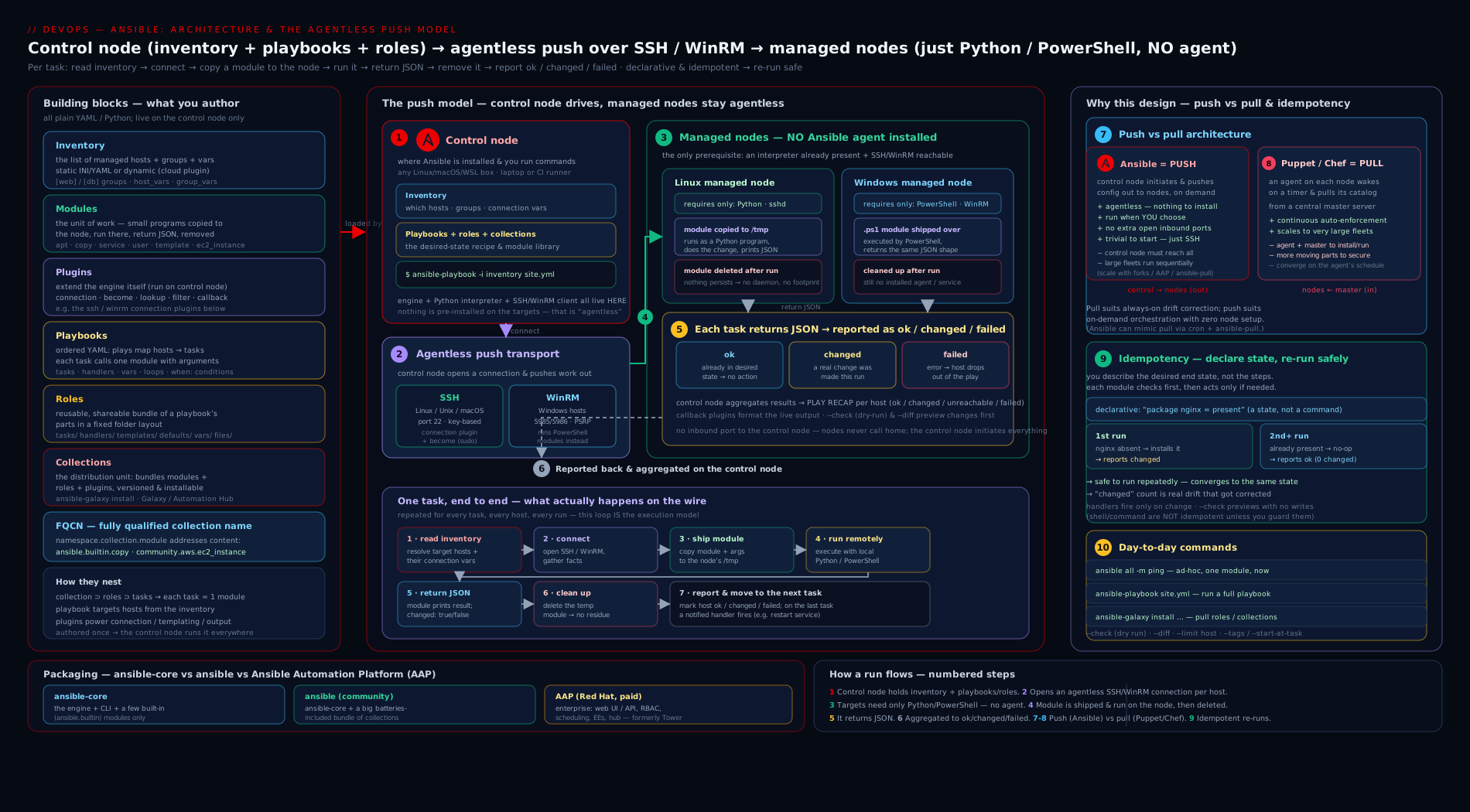
The diagram shows the control node holding your inventory, playbooks and collections, pushing a module over SSH to each Linux managed node (and over WinRM to a Windows one), the module executing on the target’s own Python/PowerShell, and the JSON result flowing back so Ansible can mark the task ok, changed or failed — the whole agentless push loop on one page.
Going deeper
The sections above give you the working mental model. This one opens the hood for the reader who wants to know how the push loop is actually implemented — the machinery behind “Ansible pushes a module, it runs, and JSON comes back.” None of it is required to write good playbooks, but it explains most of Ansible’s performance behaviour and a surprising number of its error messages.
How a module really gets there: AnsiballZ
When the four-step execution model earlier said Ansible “transfers the module to the managed node,” it skipped over a neat piece of engineering called AnsiballZ. A Python module is rarely one self-contained file — it imports shared helpers from ansible.module_utils. So for each task Ansible assembles, on the control node, a single self-contained ZIP of the module plus every module_utils dependency it needs, wraps it in a small Python bootstrap, and base64-encodes the whole bundle. That wrapper is what travels to the target. There it is written under a temporary directory (~/.ansible/tmp/ by default), the wrapper unpacks the archive in memory, runs the module, prints the JSON result to stdout, and the temp file is cleaned up. This is exactly why you can run ansible.builtin.copy against a host that has never heard of Ansible: everything the module needs rides along for that one execution and leaves nothing behind.
Three consequences fall out of this design:
- The target needs a Python interpreter but not an Ansible installation — the module code is delivered per task and discarded.
- A read-only
~/.ansible/tmp, a full disk, or anoexecmount on the remote temp path is a classic cause of obscure module failures that surface as permission or interpreter errors. - Windows does not use AnsiballZ at all — PowerShell modules are assembled and executed through the WinRM/PowerShell pipeline instead.
SSH transport internals: ControlPersist and pipelining
Opening a brand-new SSH connection for every task against every host would be painfully slow. Ansible leans on two optimisations, and knowing them explains a lot of real-world behaviour:
| Optimisation | What it does | Why it matters |
|---|---|---|
| ControlPersist / connection multiplexing | OpenSSH holds one authenticated master socket open per host and runs later tasks over it instead of re-authenticating each time. Ansible sets this in its default SSH args. | It is the single biggest reason runs are not glacial — per-task connection setup nearly vanishes after the first task. |
| Pipelining | Rather than copying the AnsiballZ file to the target and then executing it (two operations), Ansible feeds the module to the remote Python over the existing SSH session’s stdin — fewer round trips per task. | Off by default; enabling it is one of the easiest speed wins. It requires requiretty to be disabled in the target’s sudoers, which is the usual reason it ships off. |
Both live in ansible.cfg under [ssh_connection] (ssh_args, control_path, pipelining); the configuration lesson covers that file in full, and the performance-tuning lesson pushes these settings hard.
Idempotency, mechanically: how a module decides changed
“The module checks current state and acts only if reality differs” is true, but the mechanism is worth seeing precisely. Every module returns a JSON dict, and one key in it is changed — a boolean. The module’s author writes the logic that sets it, usually by capturing the resource’s state before and after and comparing. Ansible on the control node reads that boolean and colours the line yellow (changed) or green (ok). Several levers let you steer it:
| Mechanism | What it controls | Typical use |
|---|---|---|
changed_when |
Replaces the module’s own idea of “changed” with an expression you supply. | Force a read-only ansible.builtin.command to report ok with changed_when: false. |
failed_when |
Replaces what counts as failure. | Treat a specific return code or output string as success — or as failure. |
check_mode / --check |
Runs a module in predict-only mode. Capable modules report what would change without touching anything. | Dry runs and drift detection, especially paired with --diff to see the textual delta. |
creates / removes |
Makes command/shell skip conditionally. |
creates: /opt/app/bin runs the command only when that path is missing — poor-man’s idempotency for tools that have none. |
Two caveats the RHCE loves: not every module supports check mode (a bare command is simply skipped under --check unless it can predict its effect), and changed_when: false is a cosmetic fix — it silences the yellow, it does not make a genuinely non-idempotent command safe to run twice. The error-handling and check-mode lessons each go deeper.
Fact gathering: the invisible first task
Before your tasks run, most plays execute one you did not write: the implicit ansible.builtin.setup task, which collects facts — hundreds of data points about each host (OS family, IP addresses, memory, mounts, virtualization, and more) exposed as ansible_* variables. That is what gather_facts: true (the default) triggers, and it is why the recap often shows one more ok than you have tasks. Facts are powerful — a single play can branch on ansible_facts['os_family'] to install apt versus dnf packages — but they are not free:
- On a large or slow fleet, gathering full facts on every run adds real time. Narrow it with
gather_subset(e.g.!all,!min,network), skip it withgather_facts: falsewhen a play needs no facts, or amortise it with fact caching (a cache plugin such asjsonfileorredis) so facts persist between runs. - Beyond the built-in facts, you can define custom facts by dropping
*.factfiles in/etc/ansible/facts.d/on a target; they surface underansible_local.
Scaling the push model: forks, strategy and serial
The one-line “bounded by forks and control-node resources” from the comparison table unpacks into the levers that decide how a run behaves across hundreds of hosts:
| Lever | Default | Effect |
|---|---|---|
forks |
5 | How many hosts Ansible talks to in parallel. The control node forks one worker per host up to this number, so 500 hosts at forks: 5 are processed 5 wide at a time. Raising it (say forks: 50) speeds large runs but consumes control-node CPU, memory and file descriptors — the practical scale ceiling. |
strategy |
linear |
linear waits for every host to finish a task before any host starts the next (lock-step). free lets each host race ahead through the play independently; host_pinned is a middle ground. |
serial |
off (all at once) | Splits a play into waves — serial: "25%" rolls it out to a quarter of the hosts at a time, the basis of rolling updates (drain, deploy, verify, then the next batch). |
throttle / run_once |
— | A per-task parallelism cap, and “execute on one host only” for coordination points like a single database migration. |
At genuinely large scale the answer is architectural rather than a bigger forks: ansible-pull inverts the model so each node updates itself from Git on a schedule (no single control node fanning out to thousands), and AAP adds execution environments (containerised, dependency-pinned runtimes) plus an automation mesh to spread execution across the network. The honest limit of the push model is that one control node fanning out to N hosts is ultimately bounded by that node’s resources; these tools move the bottleneck. The delegation/serial and performance-tuning lessons build all of this out.
Hands-on lab
We will do this entirely free using only your own machine plus a couple of throwaway containers as managed nodes — no cloud account, no cost. You need Linux or macOS (or WSL) with Ansible and Docker installed. (Installing Ansible properly is the next lesson; if you do not have it yet, pipx install ansible or pip install ansible will do for this lab.)
The goal is to see the architecture and idempotency with your own eyes: a control node (your machine), managed nodes (containers), the agentless SSH push, and the same playbook reporting changed the first time and ok the second.
1. Confirm the control node. Run ansible --version. Expected: a banner showing ansible [core 2.17.x] (or newer), the config file path, and the Python version. This machine is your control node.
2. Stand up two managed nodes as containers. We use a small image that has SSH and Python. In a terminal:
# Two Ubuntu containers with SSH running, mapped to host ports 2221 and 2222
for n in 1 2; do
  docker run -d --name node$n -p 222$n:22 \
    rastasheep/ubuntu-sshd:18.04
done
These containers each run an SSH server (user root, password root on this public test image) and ship Python — i.e. they are valid managed nodes with no Ansible installed on them.
3. Write a tiny inventory. Create inventory.ini:
[web]
node1 ansible_host=127.0.0.1 ansible_port=2221
node2 ansible_host=127.0.0.1 ansible_port=2222

[web:vars]
ansible_user=root
ansible_password=root
ansible_ssh_common_args=-o StrictHostKeyChecking=no
ansible_python_interpreter=/usr/bin/python3
This declares a group web with two hosts and the connection variables for reaching them. (Passwords inline are only acceptable here because these are disposable local containers — real systems use SSH keys and Vault, covered later.)
4. Prove the agentless connection. Run an ad-hoc ping (the ansible.builtin.ping module is not an ICMP ping — it confirms Ansible can connect and run Python on the target):
ansible web -i inventory.ini -m ansible.builtin.ping
Expected output, per host:
node1 | SUCCESS => {
    "ansible_facts": {"discovered_interpreter_python": "/usr/bin/python3"},
    "changed": false,
    "ping": "pong"
}
node2 | SUCCESS => { ... "ping": "pong" }
"ping": "pong" from both proves the full loop: SSH connection, module pushed and run on the target’s Python, JSON returned. Note "changed": false — ping changes nothing.
5. Write a small idempotent playbook. Create site.yml:
---
- name: Configure web nodes
  hosts: web
  become: true
  tasks:
    - name: Ensure the curl package is present
      ansible.builtin.package:
        name: curl
        state: present

    - name: Drop a managed marker file
      ansible.builtin.copy:
        content: "Managed by Ansible on {{ inventory_hostname }}\n"
        dest: /etc/kloudvin.txt
        mode: "0644"
Every module here is referenced by its FQCN (ansible.builtin.package, ansible.builtin.copy) and declares a desired state (state: present; a file with this exact content) — so it is idempotent.
6. Run it the first time (watch for changed).
ansible-playbook -i inventory.ini site.yml
Expected: both tasks report changed (yellow) on both hosts — curl gets installed, the file gets created — and a play recap like:
PLAY RECAP *********************************************************
node1 : ok=3  changed=2  unreachable=0  failed=0  skipped=0
node2 : ok=3  changed=2  unreachable=0  failed=0  skipped=0
(ok=3 includes the implicit fact-gathering task.)
7. Run the exact same playbook again (watch changed drop to zero).
ansible-playbook -i inventory.ini site.yml
Expected: every task now reports ok (green) and the recap shows changed=0:
node1 : ok=3  changed=0  unreachable=0  failed=0  skipped=0
node2 : ok=3  changed=0  unreachable=0  failed=0  skipped=0
This is idempotency made visible — the desired state already matched reality, so Ansible did nothing. This is the single most important thing to feel in this lesson.
8. (Optional) Preview-only mode. Run ansible-playbook -i inventory.ini site.yml --check --diff. --check is a dry run that predicts changes without making them, and --diff shows the textual difference for file changes — your safety net before touching anything real.
Validation. You have a control node (your machine) managing two agentless nodes (containers) over SSH, a successful ping/pong, and a playbook that proved idempotent by going from changed=2 to changed=0 on a second run — the whole architecture exercised end to end.
Cleanup. Remove the containers and the lab files:
docker rm -f node1 node2
rm -f inventory.ini site.yml
Cost note. This lab runs entirely on your own machine with local containers — it provisions no cloud resources and costs ₹0.
Common mistakes & troubleshooting
| Symptom | Cause | Fix |
|---|---|---|
UNREACHABLE! ... Failed to connect to the host via ssh |
Wrong host/port/user, SSH not running on the target, or firewall blocking 22 | Verify you can ssh to the host by hand first; check ansible_host/ansible_port/ansible_user; confirm the SSH service is up. Unreachable ≠ a task failure. |
/usr/bin/python: not found or interpreter warnings |
The target’s Python isn’t where Ansible looked | Set ansible_python_interpreter=/usr/bin/python3 (host/group var). Modern ansible-core auto-discovers, but minimal images may need this. |
Permission denied when a task needs root |
You connected as a non-root user without privilege escalation | Add become: true to the play/task (uses sudo by default); pass --ask-become-pass if sudo needs a password. |
Running ansible on Windows fails to install/run |
The control node isn’t supported natively on Windows | Use WSL or a Linux VM as the control node; Windows is fine as a managed node via WinRM. |
A shell/command task always shows changed |
command/shell/raw can’t know if their effect already exists, so they assume a change |
Prefer an idempotent module (lineinfile, copy, package); for genuinely read-only commands set changed_when: false. |
couldn't resolve module/action 'community.general.x' |
The collection providing that FQCN isn’t installed | Install it: ansible-galaxy collection install community.general (and list with ansible-galaxy collection list). |
| Inventory “host not found” / empty host list | Wrong inventory path, or you didn’t pass -i, or the pattern matched nothing |
Pass -i inventory.ini; verify with ansible-inventory -i inventory.ini --list. |
| Host-key prompt hangs an automated run | First-time SSH host-key verification is interactive | For throwaway labs, -o StrictHostKeyChecking=no; for real hosts, pre-populate known_hosts (never disable verification in production). |
Common beginner mistakes
These are misconceptions about how Ansible works, distinct from the connection-and-config errors in the troubleshooting table above. Each one is a wrong mental model that quietly produces wrong expectations.
| The misconception | The reality (the right mental model) |
|---|---|
| “Idempotent means Ansible never changes anything — a playbook is basically read-only.” | Idempotency is about the end state, not about doing nothing. The first run against a fresh host changes plenty — that is the point. Idempotent means running it again converges to the same state and makes no further changes, so changed=0 on the second run is success, not evidence of a do-nothing tool. |
| “Agentless means the managed nodes have no requirements at all.” | Agentless means no Ansible-owned software or daemon on the target. Linux targets still need a Python interpreter; Windows needs PowerShell + a WinRM/SSH listener. The win is that these are standard OS features, not something of Ansible’s that you install and maintain. |
| “I have to install Ansible on every server I want to manage.” | Only the control node has Ansible. For each task the module is pushed, run, and deleted on the target (see AnsiballZ). A managed node that has never heard of Ansible can be configured the moment it has SSH + Python. |
“ansible.builtin.ping sends an ICMP ping to check the host is up.” |
It is not ICMP. It confirms Ansible can connect and run Python on the target and get JSON back, returning "ping": "pong". A host can answer a network ping yet fail ansible.builtin.ping (no Python, bad credentials). |
“ansible-core already includes every collection I will need.” |
ansible-core ships only ansible.builtin. Anything like community.general, amazon.aws or community.docker is a separate collection you install — or you use the batteries-included ansible package. |
| “It’s YAML and declarative, so task order doesn’t matter — Ansible works out dependencies like Terraform.” | Only individual tasks are declarative. A playbook runs top to bottom in the order you wrote it (it is “declarative-ish”). You are responsible for sequencing — package before template before service — because Ansible does not build a dependency graph. |
| “A changed (yellow) result means something went wrong.” | Yellow changed is normal and expected — it means the module did work to reach the desired state. Red failed is the problem colour. A first run is supposed to be full of yellow. |
“ansible.builtin.shell/command are fine to use everywhere.” |
They are the non-idempotent escape hatch: Ansible cannot know whether their effect already exists, so they report changed every run and may repeat work unsafely. Prefer a real module (copy, package, lineinfile); if you must shell out, guard it with creates/removes or changed_when. |
| “The control node can run on Windows.” | The control node must be POSIX — Linux, macOS, or WSL. Native Windows is unsupported as a control node. Windows is fully supported as a managed node over WinRM. |
| “Push means Ansible continuously enforces state the way Puppet does.” | Push applies only when you run it; there is no background enforcement by default. For continuous drift correction you schedule the run (cron, CI, or AAP) or invert to ansible-pull — the enforcement is something you arrange, not something automatic. |
Best practices
- Use FQCN everywhere (
ansible.builtin.copy, notcopy). It is unambiguous, self-documenting about dependencies, future-proof against name collisions, and expected by the RHCE exam. - Prefer idempotent modules over
shell/command. Reach forpackage,service,copy,template,lineinfilebefore raw commands; if you must shell out, make it idempotent withcreates/removes/changed_when. - Treat the second run as the test. A correct playbook reports
changed=0on a re-run against an unchanged host. If it keeps reporting changed, a task isn’t truly idempotent — fix it. - Connect as a normal user and escalate with
becomeonly where needed, rather than logging in as root. Pair with SSH keys, not passwords. - Keep the control node POSIX and version-pinned. Install in a virtual environment or with pipx so the Ansible version is explicit and reproducible across machines and CI.
- Pin your collections. Declare them (with versions) in a
requirements.ymlso every control node and pipeline resolves the same modules — the dependency-management lesson covers this. - Use
--check --diffas a dry run before applying anything to real systems, so you see what would change first. - Right tool for the layer: provision infrastructure with Terraform/native IaC, configure it with Ansible — don’t force one tool to do both badly.
Security notes
Because Ansible is agentless and rides on SSH/WinRM, its security is your remote-access security — which is mostly good news (no extra daemon to harden) but puts the weight on credentials and connection hygiene.
- Use SSH key-based authentication, not passwords, for Linux targets, and protect the private keys (passphrase + an agent, or a hardware/HSM-backed key). For Windows, prefer WinRM over HTTPS with Kerberos over basic auth.
- Never put real secrets in plaintext — not in inventory, not in playbooks, not in vars files committed to Git. Use Ansible Vault to encrypt secrets at rest (its own lesson) or pull them from an external secrets manager at run time.
- Escalate least-privilege. Connect as an unprivileged user and use
become(sudo) only for the tasks that need it; scope sudo rights tightly on the targets. - Keep host-key verification on for real systems. Disabling
StrictHostKeyChecking(as we did for throwaway containers) removes protection against man-in-the-middle attacks — fine for a local lab, never for production. - Lock down the control node. It holds your inventory, playbooks, keys and Vault passwords — it is a high-value target. Restrict who can log in, and for teams move to AAP/AWX where credentials are stored centrally, injected at run time, and never exposed to operators.
- Audit and review. Keep playbooks in Git with pull-request review, and (in AAP) use centralised job logging so every change to every host is attributable.
Interview & exam questions
1. What is Ansible, and what problem does it solve? Ansible is an open-source automation engine used mainly for configuration management — bringing servers to a declared state and keeping them there — as well as deployment, orchestration and ad-hoc administration. It solves drift (machines becoming inconsistent), scale (managing many hosts at once), and lack of auditability, by letting you describe desired state in version-controlled YAML and push it to targets repeatably.
2. Explain Ansible’s architecture. There are two roles: the control node, where Ansible is installed and runs (holding inventory, playbooks, roles/collections), and the managed nodes, the targets, which run no Ansible agent. For each task, the control node pushes a module over SSH (Linux) or WinRM (Windows); the module executes on the target’s own Python (or PowerShell), returns JSON, and Ansible reads the result and cleans up. The real work happens on the target; the control node orchestrates.
3. What does “agentless” mean, and why is it an advantage? It means nothing belonging to Ansible runs on the managed nodes — no daemon to install, patch, secure or monitor. Advantages: no bootstrap problem (SSH + Python is enough), smaller attack surface, no “is the agent alive?” failure mode, and reuse of existing SSH access. The trade-off is a dependency on Python (Linux) or PowerShell/WinRM (Windows) being present, but those are standard, not Ansible-specific software.
4. Push vs pull — where does Ansible sit, and what’s the difference?
Ansible defaults to push: an operator/pipeline runs it from the control node and changes apply immediately, with no central server the nodes depend on. Puppet/Chef default to pull: each node’s agent fetches and applies its catalogue from a central server on a schedule, giving continuous drift correction but requiring an agent and a server. Ansible can do pull-style work with ansible-pull, and AAP adds scheduling.
5. Define idempotency and explain how Ansible achieves it. Idempotency means running an operation once or many times yields the same result — re-runs make no further changes. Ansible achieves it because most modules are declarative: they check current state and act only if reality differs from the desired state you declared. So a playbook reports many changed on a fresh host and changed=0 on a converged one.
6. What do ok, changed, failed, skipped and unreachable mean in a play recap?
ok = ran and reality already matched (no change); changed = a change was made to reach the desired state; failed = the task errored (the host stops by default); skipped = a when condition was false so it didn’t run; unreachable = Ansible couldn’t connect at all (distinct from a task failure). A healthy converged run is all ok with changed=0.
7. What is FQCN and why use it?
Fully Qualified Collection Name — namespace.collection.module, e.g. ansible.builtin.copy or community.general.timezone. Built-ins live in ansible.builtin. Using FQCN removes ambiguity between collections that might define the same module name, documents which collection a task depends on, future-proofs against collisions, and is the current best practice and RHCE expectation.
8. Distinguish ansible, ansible-core, and AAP.
ansible-core is the engine (the CLI binaries plus the ansible.builtin collection), on the 2.17+ line. The ansible package is ansible-core plus a curated bundle of ~70 collections (version 10+). Ansible Automation Platform is Red Hat’s commercial product adding a web UI/API (automation controller), RBAC, scheduling, credential management, execution environments, private Automation Hub and Event-Driven Ansible. AWX is the free upstream of the controller.
9. Is Ansible declarative or imperative? “Declarative-ish.” Individual tasks are declarative (they state a desired end state and the module decides whether to act, giving idempotency), but a playbook is an imperatively ordered, top-to-bottom list of tasks where you control the sequence. So it blends declarative goals inside procedural ordering.
10. When would you choose Ansible over Terraform, and how do they work together? Choose Ansible to configure what’s inside servers and to orchestrate multi-step operations; choose Terraform to provision the infrastructure itself (it has a state file and a dependency graph for resource lifecycle). They compose: Terraform creates the VMs and outputs IPs, Ansible (via dynamic inventory) configures the software on them. Ansible can provision too, but Terraform’s state/plan model is the better fit for serious infrastructure lifecycle.
11. What is a module versus a plugin? A module runs on the managed node to do a unit of work and returns JSON (it’s the work Ansible performs on your servers). A plugin runs on the control node and extends Ansible’s own behaviour — connection, lookup, filter, callback, inventory, become and cache plugins. Modules change your servers; plugins change how Ansible works.
12. What are the control-node requirements, and can it run on Windows? The control node needs a POSIX OS (Linux, macOS, or WSL), Python 3, network access to the targets (SSH 22 and/or WinRM 5985/5986), credentials, and Ansible installed (only here). It cannot run natively on Windows — use WSL or a Linux VM. Windows is fully supported as a managed node.
Quick check
- On which machine(s) is Ansible itself installed — the control node, the managed nodes, or both?
- Ansible’s default connection to a Linux host uses which transport, and to a Windows host?
- You run the same playbook twice; the second recap shows
changed=0. What property does that demonstrate? - What is the FQCN of the built-in module that copies a file, and which collection does it live in?
- True or false:
ansible-coreincludes all the community collections you will ever need.
Answers
- Only the control node. Managed nodes run no Ansible agent — that’s the agentless model. They need SSH/WinRM access and (for Linux) Python.
- SSH (port 22) for Linux; WinRM (5985/5986), or alternatively SSH/
psrp, for Windows. - Idempotency — reality already matched the declared desired state, so Ansible made no changes. The second run being all ok with changed=0 is how you prove a playbook is idempotent.
ansible.builtin.copy, which lives in theansible.builtincollection that ships insideansible-core.- False.
ansible-coreships onlyansible.builtin. Theansiblepackage adds a curated bundle, and you install any others withansible-galaxy collection install.
Exercise
Cement the architecture and idempotency in your own words and hands.
- Reproduce the lab, but add a third task to
site.ymlusingansible.builtin.serviceto ensure a service (e.g.cron) isstate: startedandenabled: true. Run the playbook, note the result of the new task, then run it a second time and confirm it flips from changed to ok. - Deliberately break idempotency: add a task using
ansible.builtin.shellto append a line to a file (echo "test" >> /tmp/notes.txt). Run the playbook three times and inspect/tmp/notes.txtinside a container (docker exec node1 cat /tmp/notes.txt). How many lines are there, and why? Now rewrite it withansible.builtin.lineinfileand repeat — what’s different? - Run
ansible web -i inventory.ini -m ansible.builtin.setupand skim the output. These are facts — automatically gathered data about each managed node. Find the host’s OS family and default IPv4 address in the JSON. - Write three or four sentences explaining, to a colleague who has only used Bash scripts, why the
lineinfileversion is safer to run repeatedly than theshellversion — using the words desired state, idempotent, and changed.
This shell-versus-module contrast is one of the most common interview discriminators for Ansible, and feeling it first-hand is worth more than reading about it.
Practice challenges
Work these top to bottom — they escalate from a first ad-hoc command to fleet-scale behaviour. Each has a worked solution; try it before you open it.
Challenge 1 (beginner) — Prove the agentless loop. Using an inventory file inventory.ini, run a single ad-hoc command that confirms Ansible can connect to every host in the web group and run Python there.
<details> <summary>Solution</summary>
ansible web -i inventory.ini -m ansible.builtin.ping
Each host should answer "ping": "pong". Why: ansible.builtin.ping is not an ICMP ping — a pong proves the full agentless loop (SSH connection + a module executed by the target’s Python + JSON returned), which is the one thing worth verifying before you write any playbook.
</details>
Challenge 2 (beginner) — Silence a false changed. A task runs ansible.builtin.command: uptime and reports changed on every run, cluttering the recap. uptime changes nothing. Make the task report ok instead.
<details> <summary>Solution</summary>
- name: Show uptime (read-only, so never a change)
  ansible.builtin.command: uptime
  changed_when: false
Why: command/shell cannot know whether their effect already exists, so they assume changed. changed_when: false tells Ansible the truth for a genuinely read-only command — a cosmetic fix that is correct here precisely because the command mutates nothing.
</details>
Challenge 3 (intermediate) — Write something idempotent from scratch. Write a play targeting the web group that guarantees the nginx package is installed and its service is running and enabled at boot. Use FQCN and desired-state modules so a second run reports changed=0.
<details> <summary>Solution</summary>
---
- name: Ensure nginx is installed, started and enabled
  hosts: web
  become: true
  tasks:
    - name: Install the nginx package
      ansible.builtin.package:
        name: nginx
        state: present

    - name: Start and enable the nginx service
      ansible.builtin.service:
        name: nginx
        state: started
        enabled: true
Why: each task declares an end state (present, started, enabled: true) rather than an action, so the modules act on the first run and do nothing on the second — the definition of idempotency, and why the re-run shows changed=0.
</details>
Challenge 4 (intermediate) — Preview before you touch production. You want to know exactly what site.yml would change across the fleet, including file-content diffs, without altering a single host. What do you run?
<details> <summary>Solution</summary>
ansible-playbook -i inventory.ini site.yml --check --diff
Why: --check runs every (check-mode-capable) module in predict-only mode; --diff prints the before/after text for file changes. Together they are your safety net — you exercise the play’s logic and see the delta with zero mutations. (Bare command/shell tasks are skipped in check mode because they cannot predict their effect.)
</details>
Challenge 5 (advanced) — Make a 300-host run fast and safe. A run over 300 hosts is slow, and you also want to avoid touching every server at once. Configure Ansible to (a) talk to more hosts in parallel and (b) roll the play out to 20% of the hosts at a time.
<details> <summary>Solution</summary>
Raise parallelism with forks (CLI -f, or forks = 50 in ansible.cfg) and batch the play with serial:
ansible-playbook -i inventory.ini site.yml -f 50
- name: Rolling configuration in waves of 20%
  hosts: web
  serial: "20%"
  become: true
  tasks:
    - name: ...your real tasks here...
      ansible.builtin.debug:
        msg: "configuring {{ inventory_hostname }}"
Why: forks widens how many hosts run in parallel (the default is only 5), while serial batches the play into waves so a bad change hits at most a fifth of the fleet — the two independent levers behind fast, safe rolling updates.
</details>
Challenge 6 (advanced) — Stay idempotent across different distros. One inventory holds both RHEL hosts (package httpd) and Debian/Ubuntu hosts (package apache2). Write a single idempotent play that installs the right package on each, using a fact rather than two separate plays.
<details> <summary>Solution</summary>
---
- name: Install Apache across mixed distros, idempotently
  hosts: web
  become: true
  vars:
    apache_pkg:
      RedHat: httpd
      Debian: apache2
  tasks:
    - name: Ensure Apache is installed (correct name per OS family)
      ansible.builtin.package:
        name: "{{ apache_pkg[ansible_facts['os_family']] }}"
        state: present
Why: the gathered fact ansible_facts['os_family'] (RedHat or Debian) indexes a variable map to pick the package name, so one declarative, idempotent task covers both families — facts are what let a single play adapt to each host without losing idempotency.
</details>
Certification mapping
This lesson maps to the Red Hat Certified Engineer (RHCE) EX294 exam — Red Hat Certified Engineer in Red Hat Enterprise Linux, the target credential for the whole Ansible track. EX294 is a hands-on, practical exam (you automate tasks on live systems with Ansible, no multiple choice). This lesson grounds the foundational objectives it assumes throughout: understand core components of Ansible (the control node/managed-node architecture, inventory, modules, plugins, playbooks, roles, collections), understand the agentless and idempotent execution model (which underpins why the graders re-run your playbooks and expect them not to fail or needlessly change), and the use of FQCN and core terminology that the rest of the exam (and this course) takes for granted. The concrete skills the exam tests — writing inventories, running ad-hoc commands and playbooks, using become, variables, conditionals, loops, templates, roles and Vault — are each built in the lessons that follow.
Glossary
- Ansible — An open-source, agentless automation engine for configuration management, deployment, orchestration and ad-hoc administration.
- Configuration management — The practice of defining and enforcing the desired state of servers (packages, services, files, users) as code, eliminating drift and snowflake servers.
- Control node — The machine where Ansible is installed and runs, holding inventory, playbooks, roles and collections. The only machine with Ansible on it; must be POSIX (Linux/macOS/WSL).
- Managed node — A target machine Ansible configures. Runs no Ansible agent; needs SSH/WinRM access and (on Linux) Python.
- Agentless — Running automation with no software of the tool’s own installed or running on the managed nodes.
- Push model — The operator/pipeline initiates the run from the control node and changes apply immediately (Ansible’s default), versus the pull model where node agents fetch config on a schedule (Puppet/Chef).
- Idempotency — The property that applying an operation once or many times yields the same result; re-runs make no further changes because desired state already matches.
- ok / changed / failed / skipped / unreachable — The per-task result states: no change needed / a change was made / errored / not run (condition false) / could not connect.
- Inventory — The list of managed nodes, organised into groups with variables; static (INI/YAML) or dynamic (queried from a source).
- Module — A small, usually idempotent program executed on the managed node that does one unit of work and returns JSON.
- Plugin — Code that extends the Ansible engine itself (connection, lookup, filter, callback, inventory, become, cache), running on the control node.
- Playbook — A YAML file of one or more plays, each mapping hosts to an ordered list of tasks.
- Play — A single mapping of a group of hosts to a set of tasks (plus settings like
become,gather_facts). - Task — One step in a play that invokes a module with arguments.
- Role — A standardised, reusable directory bundling tasks, handlers, templates, files, vars and defaults for a unit of configuration.
- Collection — The modern versioned distribution format bundling modules, plugins, roles and playbooks under a
namespace.name; installed from Galaxy or Automation Hub. - FQCN — Fully Qualified Collection Name:
namespace.collection.module(e.g.ansible.builtin.copy); the unambiguous, recommended way to reference content. - ansible-core — The Ansible engine: the CLI binaries plus the
ansible.builtincollection (2.17+ in 2026). - ansible (package) —
ansible-coreplus a curated bundle of ~70 collections (version 10+). - Ansible Automation Platform (AAP) — Red Hat’s commercial product adding a web UI/API (automation controller), RBAC, scheduling, credentials, execution environments and Event-Driven Ansible; AWX is its free upstream.
- become — Ansible’s privilege-escalation mechanism (sudo by default) to run tasks as another user, typically root.
- Facts — Data automatically discovered about a managed node (OS, network, hardware) by the setup module, available as
ansible_*variables. - WinRM — Windows Remote Management, the default transport Ansible uses to manage Windows nodes (HTTP 5985 / HTTPS 5986).
- AnsiballZ — The mechanism by which Ansible bundles a Python module and its
module_utilsdependencies into a single base64-encoded ZIP, ships it to the target for one execution, runs it, and removes it — the reason targets need Python but not Ansible. - ControlPersist (connection multiplexing) — An OpenSSH feature Ansible uses to keep one authenticated SSH master socket open per host and reuse it across tasks, avoiding a fresh login per task.
- Pipelining — An SSH-connection optimisation that executes a module over the existing session’s stdin instead of copying a file then running it, cutting round trips; off by default (needs
requirettydisabled in sudoers). - check mode (
--check) — A predict-only run: check-mode-capable modules report what would change without making changes. Often paired with--diff. changed_when/failed_when— Task keywords that override a module’s own determination of changed / failed with an expression you supply.gather_facts/ setup — The implicitansible.builtin.setuptask (on by default) that collects facts before your tasks run; can be narrowed withgather_subsetor turned off withgather_facts: false.- Fact caching — Storing gathered facts between runs (via a cache plugin such as
jsonfileorredis) so large fleets need not re-gather every run. forks— The number of hosts Ansible configures in parallel (default 5); the main knob for run parallelism and a practical control-node scale limit.- Strategy — The plugin that decides task scheduling across hosts:
linear(lock-step, the default),free(each host races ahead), orhost_pinned. serial— A play keyword that runs the play in batches (e.g."25%"), the basis of rolling updates.ansible-pull— A pull-mode workflow in which each managed node clones a Git repo and runs a playbook against itself on a schedule, inverting the default push model for very large or ephemeral fleets.- Execution environment — A containerised, dependency-pinned Ansible runtime (used by AAP and
ansible-navigator) that makes runs reproducible across machines.
Next steps
You now understand what Ansible is and why it won, its agentless control-node/managed-node architecture, the push model versus pull, idempotency and the changed-vs-ok result model, the six building blocks and FQCN, the ansible/ansible-core/AAP distinction, and where Ansible sits among Terraform, Puppet, Chef and Salt. The natural next move is to get a control node working on your own machine and make a real connection. Continue with Installing & Configuring Ansible: the Control Node, ansible.cfg & Your First Connection, which installs Ansible properly (pip vs distro vs ansible vs ansible-core, pipx and virtual environments), sets up SSH keys and the managed-node requirements, walks the ansible.cfg configuration search order and every key setting, and runs your first ansible all -m ansible.builtin.ping against real hosts.