In a nutshell
Installing Ansible is really just installing one Python program on one computer — the machine you sit at, called the control node. There is nothing to install on the servers you want to manage; Ansible reaches out to them over SSH, exactly the way you already log in by hand. So “setting up Ansible” is three small jobs: put the program on your laptop, tell it how to log into your servers (an SSH key), and write a tiny settings file, ansible.cfg, that answers Ansible’s standing questions — where’s my list of servers? who do I log in as? how many at once?
Picture the control node as the conductor of an orchestra, and ansible.cfg as the conductor’s rehearsal notes clipped to the music stand. The musicians (your servers) don’t have to learn anything special or carry any gadget — they just have to watch the baton (accept an SSH connection). The conductor keeps one set of notes (“this many players, this tempo, get louder here”) and every performance follows them identically. The part beginners trip over is which notes the conductor reads: if there’s a page already on the stand (./ansible.cfg in your project folder) it is used and the copy at home (~/.ansible.cfg) is ignored entirely — Ansible never blends two sets of notes together. Internalise that one idea and most of the “but I changed the setting and nothing happened!” confusion evaporates.
Your very first real command will be ansible all -m ansible.builtin.ping, and a reply of "pong" is the whole point of this lesson: it proves the conductor can reach a musician, hand them a task, and get an answer back. Every later lesson is built on that single green light.
Level: Beginner-friendly (the course tags it Junior) · Time: ~35–40 min to read, more with the container lab · You’ll need: Linux/macOS/WSL2, Python 3.10+, and basic comfort at a shell.
In the previous lesson you learned what Ansible is — an agentless, push-based, idempotent configuration-management and automation engine that drives managed nodes from a single control node over SSH (Linux) or WinRM (Windows). This lesson makes it real on your own machine. By the end you will have Ansible installed the right way (there are five common ways and only some of them are good ideas), a control node that can reach a target over SSH and escalate to root, and — most importantly for an exam or a real job — a complete, working mental model of ansible.cfg: where Ansible looks for it, the exact order of precedence, the settings that matter, how to inspect every available setting with ansible-config, and how ANSIBLE_* environment variables override the lot.
This is deliberately exhaustive. Configuration is where most beginners lose hours: a playbook that “works on my laptop” but not in CI, an SSH host-key prompt that hangs an automation run, a roles_path that silently can’t find a role, an inventory that Ansible “can’t see” because it picked up the wrong config file. Every one of those is an ansible.cfg or environment-variable question, and the RHCE exam (EX294) probes them directly. So we go slowly through what each setting is · its choices · its default · when to change it · the gotcha, with reference tables you can come back to.
By the end you will be able to install Ansible cleanly in an isolated environment, explain and control its configuration end to end, connect to a managed node, and run your first ad-hoc command — the foundation everything else in the course builds on.
Learning objectives
By the end of this lesson you can:
- Choose the right installation method for your situation —
pipx, avenv, distro packages, or a container — and explain the difference between theansiblepackage andansible-core. - Set up a control node: generate and distribute an SSH key, satisfy the managed-node requirements (Python, an SSH account,
sudo/becomerights), and verify connectivity. - Recite and apply the
ansible.cfgsearch order (ANSIBLE_CONFIG→./ansible.cfg→~/.ansible.cfg→/etc/ansible/ansible.cfg) and explain why “first match wins, whole file” matters. - Configure the key settings —
inventory,remote_user,private_key_file,host_key_checking,forks,become,roles_path,collections_path,gathering,pipelining,stdout_callback— and know each one’s default and trade-off. - Use
ansible-config list/dump/viewto discover every setting and its current effective value, and override any setting with anANSIBLE_*environment variable. - Run your first
ansible all -m pingand read output at every verbosity level from-vto-vvvv.
Prerequisites & where this fits
You should already understand Ansible’s architecture from the previous lesson — the Ansible fundamentals: architecture, the agentless push model & idempotency — specifically the control-node/managed-node split, the agentless SSH model, and what a module and FQCN are. You will need a Linux or macOS machine (or WSL2 on Windows) with Python 3.10+ and basic comfort at a shell: editing a text file, running commands, and using ssh. No prior Ansible installation is assumed; we install it from scratch. This is the second lesson of the Foundation module of the Ansible Zero-to-Hero course, and it is the practical anchor: every later lesson assumes you have a working control node and understands where configuration comes from. The next lesson, Ansible inventory, in depth, builds directly on the inventory file you configure here.
Core concepts
Before we install anything, fix four mental models. They explain why the setup is shaped the way it is.
Ansible runs from exactly one place, and it is just Python. The control node is wherever you run the ansible/ansible-playbook commands. It is a normal Python application — there is no daemon, no service, nothing listening on a port. When you run a play, the control node opens an SSH connection to each managed node, copies over small Python module files (and any needed payload), executes them on the target, collects the JSON they print, and deletes them. This is why the control node must be Linux/macOS/WSL (it shells out to OpenSSH) but the targets can be anything with SSH and Python — and why “installing Ansible” only ever means installing it on the control node, never on the targets.
ansible-core is the engine; ansible is the engine plus a battery of collections. This is the single most important packaging fact and a frequent interview question. ansible-core (formerly ansible-base) is the minimal runtime: the CLI tools, the execution engine, and one built-in collection, ansible.builtin (ping, copy, file, command, etc.). ansible — sometimes called the “community package” or “batteries-included” build — is ansible-core plus a curated bundle of ~70 community collections (community.general, ansible.posix, community.docker, community.crypto, and many more). On the RHCE exam and in many shops you install ansible-core and then pull exactly the collections you need with ansible-galaxy; for a learning laptop the all-in-one ansible package is the path of least friction.
Configuration is layered, and the layers have a strict order. Ansible’s behaviour is governed by settings that can come from (in increasing priority) a config file, an ANSIBLE_* environment variable, a playbook keyword, or a command-line flag. Within the config-file layer there is a further search order across four locations, and crucially only one config file is ever used — the first one found, in full. There is no merging of ansible.cfg files. Internalise this now; it prevents the classic “I edited /etc/ansible/ansible.cfg but nothing changed” confusion (you had a ./ansible.cfg shadowing it).
Idempotency starts at connection, not at the module. Even the act of connecting and gathering facts should be repeatable and side-effect free. The settings you choose here — host_key_checking, gathering, pipelining — directly affect whether your first run behaves identically to your hundredth, and whether it is fast or slow. Configuration is not an afterthought; it is part of making automation deterministic.
Key terms used throughout: control node (where Ansible runs), managed node / target (what it configures), become (privilege escalation, usually to root via sudo), inventory (the list of managed nodes), FQCN (fully-qualified collection name, e.g. ansible.builtin.ping), and idempotent (safe to re-run; reports changed only when it actually changes something).
Installing Ansible: every path, and which to pick
There is no single “correct” installer — there are several, each with a different trade-off between isolation, currency (how new a version you get), and convenience. Ansible is a Python package, so most of these are Python-packaging tools. Here is the full landscape.
| Method | Command (control node) | What you get | Isolation | Currency | When to use it | Gotcha |
|---|---|---|---|---|---|---|
| pipx (recommended) | pipx install ansible (or ansible-core) |
Latest from PyPI, in its own venv, on your PATH |
Excellent — own venv per app | Latest | Day-to-day use on a workstation | Inject extra Python libs with pipx inject ansible <lib> (e.g. pywinrm, boto3) |
| venv + pip | python3 -m venv ~/.venvs/ansible && source ~/.venvs/ansible/bin/activate && pip install ansible |
Latest from PyPI inside an activated virtualenv | Excellent — fully self-contained | Latest | Reproducible/project-pinned installs, CI | You must activate the venv (or call its absolute path) every time |
| pip --user | python3 -m pip install --user ansible |
Latest, into ~/.local |
Poor — shares your user site-packages | Latest | Quick personal install when pipx is unavailable | Can clash with OS-managed Python; PEP 668 may block it on modern distros (--break-system-packages is a smell — prefer pipx/venv) |
| distro package | sudo dnf install ansible / sudo apt install ansible |
Whatever the distro ships (often ansible-core + some collections) |
Good — managed by the OS | Lags — often months behind | Servers where you want the OS to patch it; RHEL/Fedora exam realism | Older version; on RHEL the ansible-core package is the EX294-relevant one |
| container image | podman run --rm -it quay.io/ansible/ansible-runner (or build an execution environment) |
A pinned, reproducible Ansible + dependencies in an image | Total — nothing on the host | Pinned to the image | CI/CD, AAP, “works everywhere” reproducibility | You manage the image and mount your project/SSH keys in |
ansible vs ansible-core at install time. With pip/pipx you literally choose by name: pip install ansible gives you the big bundle; pip install ansible-core gives you just the engine. You can always check which you have:
ansible --version
# ansible [core 2.17.x]   <- the engine version
#   config file = /home/you/ansible-lab/ansible.cfg
#   ...
#   python version = 3.12.x
#   jinja version = 3.1.x

# Is the big community bundle present? Then this differs from core:
pip show ansible 2>/dev/null | grep -i version   # community package version, e.g. 10.x
Note the two version numbers: the community ansible package uses a separate, larger version line (Ansible 10, 11, …) that bundles a specific ansible-core (2.17, 2.18, …). When someone says “Ansible 10” they mean the community bundle; “ansible-core 2.17” is the engine. For this course we target ansible-core 2.17+ / Ansible 10+ (current in 2026).
Recommended for this course: use pipx on a workstation (clean, isolated, latest), or the distro ansible-core package if you are practising on RHEL/Fedora for the exam. Avoid pip install --user and never sudo pip install system-wide — that route fights your OS package manager and is the source of countless broken Python environments.
Where the files land (install paths). Knowing where things are installed saves you when command not found strikes or when you need to clean up. The locations depend entirely on the method:
| Method | The CLIs (ansible, ansible-playbook, …) |
The Python package | Bundled collections live in |
|---|---|---|---|
| pipx | ~/.local/bin/ (pipx puts shims here; ensure it is on PATH via pipx ensurepath) |
~/.local/pipx/venvs/ansible/lib/python3.x/site-packages/ |
inside that venv’s site-packages/ansible_collections/ |
| venv + pip | <venv>/bin/ (only on PATH when activated) |
<venv>/lib/python3.x/site-packages/ |
<venv>/lib/python3.x/site-packages/ansible_collections/ |
| pip --user | ~/.local/bin/ |
~/.local/lib/python3.x/site-packages/ |
~/.local/lib/.../ansible_collections/ |
| distro (RHEL/Deb) | /usr/bin/ |
/usr/lib/python3.x/site-packages/ |
/usr/share/ansible/collections/ansible_collections/ and /usr/lib/.../ansible_collections/ |
You can always ask Ansible itself rather than guessing. ansible --version prints the config file in use, the module/collection search paths, the ansible python module location, and the executable location — read it whenever something is “not found”:
ansible --version
# ansible [core 2.17.5]
#   config file = /home/you/ansible-lab/ansible.cfg
#   configured module search path = ['/home/you/.ansible/plugins/modules', '/usr/share/ansible/plugins/modules']
#   ansible python module location = /home/you/.local/pipx/venvs/ansible/lib/python3.12/site-packages/ansible
#   ansible collection location = /home/you/.ansible/collections:/usr/share/ansible/collections
#   executable location = /home/you/.local/bin/ansible
#   python version = 3.12.3
#   jinja version = 3.1.4
#   libyaml = True
That libyaml = True line matters for performance: it means the fast C-based YAML parser is present. If it says False, install your distro’s libyaml/PyYAML with the C extension.
Setting up the control node
With Ansible installed, the control node needs three things to actually reach a target: an SSH identity, network reachability to the managed node, and an account on the target it can log in as and escalate from.
1 — Generate an SSH key (if you do not already have one). Ansible uses your normal OpenSSH client, so it uses your normal keys. Create an Ed25519 key (modern, fast, short):
ssh-keygen -t ed25519 -C "ansible-control@$(hostname)" -f ~/.ssh/id_ed25519
# Accept the default path; set a passphrase (recommended) — you can cache it with ssh-agent.
If you set a passphrase, load it once per session so Ansible isn’t prompted on every host:
eval "$(ssh-agent -s)"
ssh-add ~/.ssh/id_ed25519
2 — Distribute the public key to each managed node. The cleanest way is ssh-copy-id, which appends your public key to the target’s ~/.ssh/authorized_keys:
ssh-copy-id -i ~/.ssh/id_ed25519.pub deploy@managed-node-1
# You'll enter the target account's password ONCE; key-based auth works thereafter.
Verify before involving Ansible at all — if plain SSH doesn’t work, Ansible never will:
ssh deploy@managed-node-1 'whoami && python3 --version'
3 — Satisfy the managed-node requirements. A target needs only three things, none of them an Ansible agent:
- An SSH server reachable from the control node (port 22 by default; override per host with
ansible_port). - A Python interpreter (
python3) — Ansible copies and runs Python module code. Modern distros ship it; if a target has it in a non-standard place, point Ansible at it withansible_python_interpreter. The special valueansible_python_interpreter=auto(the default) lets Ansible discover it. - A login account, plus — for tasks that need root (installing packages, editing
/etc) — the ability tobecomea privileged user. In practice that means the account is insudoers. For unattended automation, configure passwordless sudo on the target:
# On the managed node, as root — let 'deploy' run anything via sudo without a password:
echo 'deploy ALL=(ALL) NOPASSWD:ALL' | sudo tee /etc/sudoers.d/deploy
sudo chmod 0440 /etc/sudoers.d/deploy
If you don’t want passwordless sudo, that is fine — you’ll pass --ask-become-pass (-K) when you run plays, and Ansible will prompt for the sudo password. We cover become in full in the playbooks lesson; for now know that it is how the control node gets root on the target, and that it is configured both in ansible.cfg and per-task.
ansible.cfg in depth: the configuration file
Almost everything about how Ansible behaves is governed by ansible.cfg, an INI-style file divided into sections ([defaults], [privilege_escalation], [ssh_connection], …). You will rarely set more than a dozen options, but understanding the file — and especially which file Ansible reads — is the difference between automation that behaves and automation that surprises you.
The config-file search order (memorise this)
When any Ansible command starts, it looks for a configuration file in a fixed order and uses the first one it finds — in its entirety. It does not merge multiple files. The order is:
| # | Source | Path / how it’s set | Notes |
|---|---|---|---|
| 1 | ANSIBLE_CONFIG environment variable |
Whatever path you set it to | Highest priority. If set and the file exists, this file wins, full stop. Great for CI: export ANSIBLE_CONFIG=/ci/ansible.cfg. |
| 2 | ansible.cfg in the current directory |
./ansible.cfg |
The most common in practice — keep one per project. Security note: Ansible ignores a world-writable ./ansible.cfg (a deliberate protection against running untrusted config from a shared/temp dir). |
| 3 | ~/.ansible.cfg |
In your home directory (note the leading dot) | Your personal, per-user defaults across all projects. |
| 4 | /etc/ansible/ansible.cfg |
System-wide | The global fallback, often created by the distro package. Lowest priority. |
First match wins. So if you are sitting in a project directory that contains ./ansible.cfg, that file is used and ~/.ansible.cfg and /etc/ansible/ansible.cfg are completely ignored — even for settings the project file doesn’t mention (those fall back to the built-in defaults, not to the other files). This catches everyone once: you set something in /etc/ansible/ansible.cfg, run Ansible from a project folder that has its own ansible.cfg, and your global setting appears to do nothing.
How to know which file is actually in use — never guess, just ask:
ansible --version | grep "config file"
#   config file = /home/you/ansible-lab/ansible.cfg

# Or, definitively, with ansible-config:
ansible-config dump --only-changed
# Shows every setting that differs from the default and WHERE it came from (the source).
A standard, well-formed starter ansible.cfg for a project looks like this:
[defaults]
inventory          = ./inventory.ini
remote_user        = deploy
private_key_file   = ~/.ssh/id_ed25519
host_key_checking  = False
forks              = 20
roles_path         = ./roles:~/.ansible/roles
collections_path   = ./collections:~/.ansible/collections
gathering          = smart
stdout_callback    = yaml
nocows             = True

[privilege_escalation]
become             = False
become_method      = sudo
become_user        = root
become_ask_pass    = False

[ssh_connection]
pipelining         = True
ssh_args           = -o ControlMaster=auto -o ControlPersist=60s
The key settings reference table
These are the settings you will actually touch, grouped by the section they live in. For each: what it does, its default, and when to change it. (There are hundreds of settings in total — list them all with ansible-config list, covered below — but this is the working set.)
| Setting | Section | Default | What it does · when to change it |
|---|---|---|---|
inventory |
[defaults] |
/etc/ansible/hosts |
Path(s) to your inventory of managed nodes. Almost always override to a project-local file or directory so you don’t depend on the global one. Can be a comma-separated list or a directory. |
remote_user |
[defaults] |
the current local user | Which account Ansible logs into the target as over SSH. Set to your deploy account (e.g. deploy). Overridable per-host with ansible_user and per-run with -u. |
private_key_file |
[defaults] |
none (uses SSH defaults/agent) | Path to the SSH private key for auth. Handy in CI where there is no agent. Per-run override: --private-key. |
host_key_checking |
[defaults] |
True |
Whether SSH verifies the target’s host key against known_hosts. True is safe but prompts/fails on first contact with a new host — which hangs unattended runs. Set False only for throwaway lab hosts; in production prefer pre-seeding known_hosts. (Equivalent env var: ANSIBLE_HOST_KEY_CHECKING.) |
forks |
[defaults] |
5 |
How many managed nodes Ansible configures in parallel. Raise (20–50+) for large fleets to finish faster; mind the control node’s CPU/RAM and target-side load. Per-run override: -f/--forks. |
become |
[privilege_escalation] |
False |
Escalate privilege (to root) by default for every task. Usually left False and enabled per-play/per-task with become: true so you only escalate where needed. |
become_method |
[privilege_escalation] |
sudo |
How to escalate: sudo, su, doas, pbrun, pfexec, dzdo, ksu, runas (Windows). Change only for non-sudo environments. |
become_user |
[privilege_escalation] |
root |
Which user to become. Change to run tasks as, say, a service account rather than root. |
become_ask_pass |
[privilege_escalation] |
False |
Prompt for the escalation password. Equivalent to --ask-become-pass/-K on the CLI. Set True if your sudo isn’t passwordless. |
roles_path |
[defaults] |
~/.ansible/roles:/usr/share/ansible/roles:/etc/ansible/roles |
Colon-separated search path for roles. Add ./roles so Ansible finds project-local roles. Roles installed by ansible-galaxy land here. |
collections_path (a.k.a. collections_paths) |
[defaults] |
~/.ansible/collections:/usr/share/ansible/collections |
Colon-separated search path for collections (the FQCN modules). Add ./collections for project-local installs. |
gathering |
[defaults] |
implicit |
Fact-gathering policy: implicit (gather at the start of every play unless told not to), explicit (never gather unless gather_facts: true), or smart (gather once per host, then reuse from cache — faster). Use smart to speed up multi-play runs. |
pipelining |
[ssh_connection] |
False |
Reduce the number of SSH operations per task (run module code without writing a temp file first). A big speed-up, but requires requiretty to be disabled in the target’s sudoers (it usually is on modern distros). Safe and recommended in most environments. |
stdout_callback |
[defaults] |
default |
Which output/callback plugin formats playbook output. default is the classic line-per-task; yaml is far more readable for humans (multi-line, structured); minimal, oneline, json (for machines), dense, debug also exist. List them with ansible-doc -t callback -l. |
forks-adjacent: timeout |
[defaults] |
10 (seconds) |
SSH connection timeout. Raise on slow/distant hosts. |
callbacks_enabled |
[defaults] |
(empty) | Enable extra callbacks like profile_tasks (per-task timing) or timer (total run time) — invaluable for finding slow tasks. |
deprecation_warnings |
[defaults] |
True |
Show deprecation notices. Leave on while learning; some teams quiet it in CI. |
interpreter_python |
[defaults] |
auto |
How Ansible picks the target’s Python. auto discovers it; set to an explicit path to silence discovery on odd systems. |
nocows / cow_selection |
[defaults] |
nocows=False |
The (in)famous cowsay banners. Set nocows = True for clean output. Purely cosmetic. |
A few of these deserve emphasis because they bite beginners hardest:
host_key_checking. On the very first connection to a host, SSH wants to record its key. Interactively you’d answer “yes”; in automation that prompt either hangs or errors with “Host key verification failed.” The lab-grade fix ishost_key_checking = False; the production-grade fix is to pre-populateknown_hosts(e.g.ssh-keyscan -H host >> ~/.ssh/known_hosts) and leave checking on.forks. The default of 5 means on a 100-host fleet Ansible works 5 at a time — slow. Bumping to 25–50 can turn a 30-minute run into a few minutes, at the cost of more sockets and memory on the control node.pipelining. Almost free performance oncerequirettyis off in sudoers. Many “why is Ansible slow” complaints are answered bypipelining = True.gathering = smart. If you have several plays against the same hosts,smartgathers facts once instead of per-play.
Inspecting and overriding: ansible-config
You do not have to memorise hundreds of options or read source code — Ansible ships a tool, ansible-config, that introspects every setting, its default, its documentation, the environment variable that overrides it, and the ansible.cfg key. It has three subcommands you must know for both work and the exam:
| Command | What it shows | Typical use |
|---|---|---|
ansible-config list |
Every configuration setting Ansible knows about, with its description, type, default, the ini section/key, and the env var that overrides it. |
“What is this setting called and how do I set it?” Pipe to grep: ansible-config list | grep -A8 -i host_key. |
ansible-config dump |
The current effective value of every setting as Ansible sees it right now (after reading your ansible.cfg + env). |
“What are my settings actually resolved to?” Add --only-changed to show only what differs from the default and where it came from — the single best debugging command. |
ansible-config view |
The raw contents of the ansible.cfg file currently in use. |
“Which file am I editing, and what’s in it?” Confirms the search-order winner. |
Examples you will run constantly:
# Discover a setting (name, default, env var, ini key, docs):
ansible-config list | grep -A 10 -i "HOST_KEY_CHECKING"

# What does Ansible think my settings are, and which did I change (and from where)?
ansible-config dump --only-changed
#   ANSIBLE_FORKS(/home/you/ansible-lab/ansible.cfg) = 20
#   DEFAULT_HOST_KEY_CHECKING(/home/you/ansible-lab/ansible.cfg) = False
#   DEFAULT_STDOUT_CALLBACK(/home/you/ansible-lab/ansible.cfg) = yaml
#   ...the (path) in parentheses is the SOURCE — config file, env var, or default.

# Show the actual file being used:
ansible-config view

# List just the names of available callback plugins (e.g. for stdout_callback):
ansible-config list --type callback   # (or: ansible-doc -t callback -l)
ansible-config dump --only-changed is the one to internalise. When a setting “isn’t working”, run it: it tells you the resolved value and its source in parentheses, so you immediately see whether your project ansible.cfg, an env var, or a stray global file is in control.
ANSIBLE_* environment-variable overrides
Every ansible.cfg setting has a matching environment variable that overrides the config file (env beats file; CLI flags beat env). The naming is predictable: take the setting, upper-case it, and prefix ANSIBLE_ — host_key_checking → ANSIBLE_HOST_KEY_CHECKING, forks → ANSIBLE_FORKS, stdout_callback → ANSIBLE_STDOUT_CALLBACK. (A handful have legacy names; ansible-config list shows the exact env var for each, so when in doubt, look it up there.)
Why this matters: environment variables are how you adapt behaviour without editing files — perfect for CI/CD, one-off runs, and containers. Common ones:
| Environment variable | Equivalent ansible.cfg setting |
Typical use |
|---|---|---|
ANSIBLE_CONFIG |
(selects the config file itself) | Point Ansible at a specific ansible.cfg regardless of search order — the CI staple. |
ANSIBLE_INVENTORY |
inventory |
Override the inventory path for one run. |
ANSIBLE_HOST_KEY_CHECKING |
host_key_checking |
False for ephemeral CI hosts so first-contact doesn’t fail the pipeline. |
ANSIBLE_REMOTE_USER |
remote_user |
Switch login user without touching files. |
ANSIBLE_PRIVATE_KEY_FILE |
private_key_file |
Inject the SSH key path in CI. |
ANSIBLE_FORKS |
forks |
Tune parallelism per environment. |
ANSIBLE_ROLES_PATH |
roles_path |
Point at a CI-provisioned roles directory. |
ANSIBLE_STDOUT_CALLBACK |
stdout_callback |
yaml for readable local output, minimal/json in CI. |
ANSIBLE_PIPELINING |
pipelining |
Enable the speed-up where you can’t edit the file. |
ANSIBLE_BECOME_ASK_PASS |
become_ask_pass |
Force the become-password prompt. |
# Example: a fully file-free invocation (everything via env) — great for CI:
ANSIBLE_HOST_KEY_CHECKING=False \
ANSIBLE_INVENTORY=./inventory.ini \
ANSIBLE_STDOUT_CALLBACK=yaml \
ansible all -m ansible.builtin.ping
The full precedence chain, lowest to highest: built-in default → config file (ansible.cfg) → environment variable (ANSIBLE_*) → playbook/role keyword → command-line flag. When two layers disagree, the higher one wins. (Variable precedence — a separate, longer story about play and inventory variables — is its own lesson later; this chain is specifically about configuration settings.)
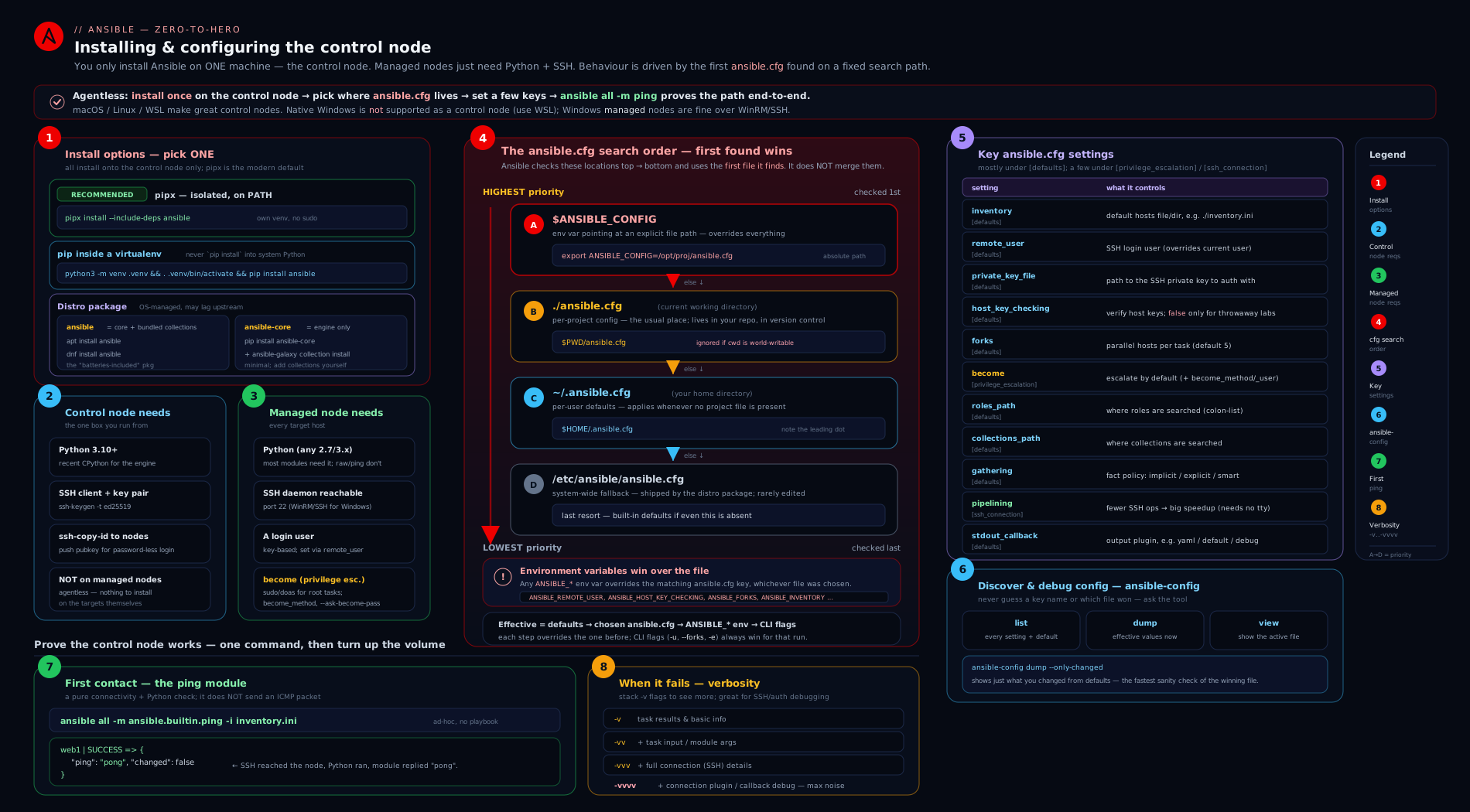
The diagram traces a single run end to end: how an installation method puts the CLIs on your PATH, how Ansible resolves which ansible.cfg to read (and how env vars and flags layer on top), and how the resolved settings drive the SSH-plus-become connection out to each managed node.
Your first connection: ansible all -m ping
With Ansible installed, a control node set up, and an ansible.cfg in place, you can make first contact. The canonical smoke test is the ping module — and note, this is not ICMP/network ping. ansible.builtin.ping connects over SSH, runs a tiny Python module on the target, and returns pong if (and only if) SSH worked and a usable Python interpreter was found. It is the truest “is my whole pipeline working” check there is.
First, a minimal inventory (./inventory.ini) listing one or more managed nodes:
[web]
managed-node-1 ansible_host=192.0.2.11

[all:vars]
ansible_user=deploy
Then the command — all is the built-in pattern meaning “every host in the inventory”:
ansible all -m ansible.builtin.ping
Expected output (with stdout_callback = yaml):
managed-node-1 | SUCCESS => {
    "ansible_facts": {
        "discovered_interpreter_python": "/usr/bin/python3.12"
    },
    "changed": false,
    "ping": "pong"
}
"ping": "pong" and SUCCESS mean end-to-end success: SSH auth worked, Python was found, the module ran. changed: false reminds you that ping is idempotent and read-only — it never alters the target.
If you need to escalate (some checks want root), add -b (become) and, if sudo needs a password, -K:
ansible all -m ansible.builtin.ping -b -K
# BECOME password: ********
Other useful first commands, all idempotent and safe:
ansible all -m ansible.builtin.setup            # dump all gathered facts (huge JSON)
ansible all -m ansible.builtin.command -a "uptime"   # run a command, see output
ansible all --list-hosts                        # what hosts would 'all' match? (no connection)
Verbosity: reading what Ansible is doing (-v to -vvvv)
When a connection fails — and early on it will — turn up verbosity. Each added v reveals more of the machinery. This is the single most useful debugging skill in Ansible.
| Flag | Level | What it adds |
|---|---|---|
| (none) | 0 | Just the result line per host (SUCCESS/FAILED/UNREACHABLE) and the play recap. |
-v |
1 | The full return data (the JSON each module sends back) and basic extra info. |
-vv |
2 | Adds task/path details — which task file and line, plugin loading hints. |
-vvv |
3 | Adds connection details — the exact SSH command line Ansible runs (the gold mine for “why won’t it connect”; you can copy that SSH command and run it yourself). |
-vvvv |
4 | Adds connection plugin debugging and SSH’s own debug (-vvv passed to ssh), the script transfer, become handshakes — everything. Noisy but complete. |
# When ping fails, escalate verbosity until you see the SSH command and the real error:
ansible all -m ansible.builtin.ping -vvv
# Look for:  SSH: EXEC ssh -o ... deploy@192.0.2.11 ...
# Copy that, run it manually, and the genuine SSH error (auth? host key? no route?) appears.
A note on UNREACHABLE vs FAILED: UNREACHABLE means Ansible could not even connect/run the module (SSH refused, host-key prompt, no Python) — a connection/setup problem. FAILED means it connected and ran the module, but the module reported an error — a task problem. The distinction tells you whether to fix your setup (this lesson) or your task (later lessons).
Hands-on lab: a free control node + two managed nodes
This lab uses only your own machine plus two throwaway containers as managed nodes — no cloud, no cost. You’ll install Ansible in an isolated environment, write an ansible.cfg, prove the config search order, and run your first ping against localhost and the containers.
Prerequisites: a Linux/macOS machine (or WSL2) with Python 3.10+ and either Podman or Docker installed. Everything below is free and local.
Step 1 — Install Ansible with pipx (isolated, latest).
python3 -m pip install --user pipx       # if you don't have pipx
python3 -m pipx ensurepath               # add ~/.local/bin to PATH (open a new shell after)
pipx install ansible                      # the batteries-included community package
ansible --version                         # confirm: core 2.17+ , and note the 'config file' line
Step 2 — Create a project directory and prove the search order.
mkdir -p ~/ansible-lab && cd ~/ansible-lab

# Create a project-local config; this should WIN over ~/.ansible.cfg and /etc/ansible/ansible.cfg:
cat > ansible.cfg <<'EOF'
[defaults]
inventory         = ./inventory.ini
host_key_checking = False
stdout_callback   = yaml
nocows            = True
forks             = 20
gathering         = smart

[ssh_connection]
pipelining        = True
EOF

# Confirm THIS file is the one in use, and see resolved settings + their source:
ansible-config view                 # prints the file above
ansible-config dump --only-changed  # each line ends with the source path in (parentheses)
You should see your ~/ansible-lab/ansible.cfg named as the config file, and settings like DEFAULT_FORKS(...ansible-lab/ansible.cfg) = 20. Now prove ANSIBLE_CONFIG overrides even that:
echo -e "[defaults]\nforks = 99" > /tmp/other.cfg
ANSIBLE_CONFIG=/tmp/other.cfg ansible-config dump --only-changed | grep FORKS
#   DEFAULT_FORKS(/tmp/other.cfg) = 99      <- env-selected file wins
Step 3 — Launch two managed-node containers (free, local). We use lightweight images that have python3 and an SSH server. (Using Podman; substitute docker if that’s what you have.)
# Pull and run two long-lived containers; install sshd + python + a deploy user with our key.
mkdir -p ./keys && ssh-keygen -t ed25519 -N '' -f ./keys/lab_ed25519   # passwordless lab key

for n in 1 2; do
  podman run -d --name node$n -p 220$n:22 docker.io/library/ubuntu:24.04 sleep infinity
  podman exec node$n bash -lc '
    apt-get update -qq && apt-get install -y -qq openssh-server python3 sudo >/dev/null
    useradd -m -s /bin/bash deploy && mkdir -p /home/deploy/.ssh
    echo "deploy ALL=(ALL) NOPASSWD:ALL" > /etc/sudoers.d/deploy
    mkdir -p /run/sshd && /usr/sbin/sshd'
  podman exec -i node$n bash -lc 'cat >> /home/deploy/.ssh/authorized_keys && chown -R deploy:deploy /home/deploy/.ssh && chmod 700 /home/deploy/.ssh && chmod 600 /home/deploy/.ssh/authorized_keys' < ./keys/lab_ed25519.pub
done
Step 4 — Write the inventory (~/ansible-lab/inventory.ini) including localhost and the two containers:
[local]
localhost ansible_connection=local

[containers]
node1 ansible_host=127.0.0.1 ansible_port=2201
node2 ansible_host=127.0.0.1 ansible_port=2202

[containers:vars]
ansible_user=deploy
ansible_ssh_private_key_file=./keys/lab_ed25519
Note ansible_connection=local for localhost — Ansible runs there directly without SSH, the simplest possible managed node.
Step 5 — First connection.
ansible all -m ansible.builtin.ping
Expected (abridged):
localhost | SUCCESS => { "changed": false, "ping": "pong" }
node1 | SUCCESS => { "changed": false, "ping": "pong", "ansible_facts": { "discovered_interpreter_python": "/usr/bin/python3" } }
node2 | SUCCESS => { "changed": false, "ping": "pong", ... }
Step 6 — Validation. Confirm become and verbosity work:
ansible containers -m ansible.builtin.command -a "id" -b      # should show uid=0(root)
ansible containers -m ansible.builtin.ping -vvv | grep -m1 "SSH: EXEC"   # see the real SSH command
ansible all --list-hosts                                       # localhost + node1 + node2
If every host returns pong and id shows uid=0(root) under -b, your control node, configuration, SSH keys and become are all correct — you have a working Ansible setup.
Step 7 — Cleanup.
podman rm -f node1 node2
cd ~ && rm -rf ~/ansible-lab
# Optional: remove Ansible itself
pipx uninstall ansible
Cost note: ₹0. Everything ran locally — pipx and the container images are free, and the containers were removed. No cloud resources were created, so there is nothing to be billed for.
Going deeper
You can drive Ansible for years with only what’s above. But the moment you need to debug a slow run, silence a spurious warning, or explain to an interviewer what actually happens between “run the play” and “pong”, you need the internals. None of this is required for a first ping — it’s the layer beneath it.
What actually crosses the wire: AnsiballZ, the temp dir, and pipelining
When you run ansible all -m ansible.builtin.ping, Ansible does not ship a .py file and a separate arguments file and stitch them together on the target. It assembles the module, its arguments, and the little bits of Ansible library code the module imports into a single self-contained, self-extracting Python script — the AnsiballZ wrapper (you’ll see filenames like AnsiballZ_ping.py at -vvvv). The default flow per task is:
- Create a temporary directory on the target, e.g.
~/.ansible/tmp/ansible-tmp-<timestamp>-<random>/. - Transfer the AnsiballZ wrapper into it (via SFTP or SCP — see the
PUTline at-vvv). - Execute it with the discovered Python interpreter (the
EXECline), capturing the single JSON document it prints on stdout. - Delete the temp directory.
That’s several SSH round trips per task. pipelining = True collapses them: instead of writing the wrapper to a temp file, Ansible feeds it to the remote Python over the already-open SSH session’s stdin, so there’s no SFTP step and no temp file for most modules. That is why it’s such a cheap speed-up — and also why it needs requiretty off in the target’s sudoers: piping a script into sudo python3 has no controlling TTY, and old sudo defaults refused that. At -vvv you can watch the difference:
# representative -vvv fragment (pipelining OFF):
SSH: EXEC ssh -o ... mkdir -p "~/.ansible/tmp/ansible-tmp-..." && echo ...
PUT /home/you/.ansible/tmp/.../AnsiballZ_ping.py TO /home/deploy/.ansible/tmp/.../AnsiballZ_ping.py
SSH: EXEC ssh -o ... /usr/bin/python3 /home/deploy/.ansible/tmp/.../AnsiballZ_ping.py && sleep 0
SSH connection reuse: ControlMaster, ControlPersist, and the control socket
The sample ansible.cfg earlier set ssh_args = -o ControlMaster=auto -o ControlPersist=60s. That line is doing quiet, heavy lifting. Normally every SSH invocation pays for a full TCP handshake plus a cryptographic key exchange plus authentication. On a play with 30 tasks against 50 hosts that’s 1,500 handshakes. SSH multiplexing opens the connection to a host once (the master), then routes every later task for that host through the same channel via a control socket — a small file Ansible keeps under ~/.ansible/cp/. ControlPersist=60s keeps the master alive for 60 seconds after the last use, so back-to-back plays reuse it too. Combined with pipelining, this is the difference between an Ansible that feels sluggish and one that feels instant.
One edge case worth knowing: UNIX socket paths have a hard length limit (~104 characters). Ansible deliberately hashes the control-socket name to a short string under ~/.ansible/cp/ to stay under it; if you override control_path to something long and descriptive, you can hit "unix_listener … too long for Unix domain socket". The fix is to leave the default control path alone (or set a short control_path_dir).
Python interpreter discovery: auto, auto_silent, auto_legacy
interpreter_python = auto (the default) is why you sometimes see discovered_interpreter_python in ping output. Because a target might have Python at /usr/bin/python3, /usr/bin/python3.12, /usr/libexec/platform-python (RHEL), or somewhere odd, Ansible consults a built-in table keyed by the OS/distro facts and picks the interpreter that distro is known to ship, warning you if it has to fall back to a generic guess. The variants:
| Value | Behaviour |
|---|---|
auto (default) |
Use the distro-appropriate interpreter from the built-in map; warn if it falls back to a guess. |
auto_silent |
Same discovery, but suppress the fallback warning — the usual choice once you trust your fleet. |
auto_legacy / auto_legacy_silent |
Prefer /usr/bin/python if it exists (older behaviour), else discover. |
Setting an explicit ansible_python_interpreter=/usr/bin/python3.12 as a host/group var skips discovery altogether — one fewer round trip and zero ambiguity. That’s the production move for a homogeneous fleet.
Check mode and diff: a dry run before you touch anything
Two flags let you see what a run would do without doing it — indispensable once you graduate from ping to modules that change state:
--checkruns every task in check mode (a “dry run”): a well-written module reports whether it would change something and turns yellow/green accordingly, but makes no change.--diffprints the before/after of any file/line a module would alter (forcopy,template,lineinfile, …).
Read-only modules like ansible.builtin.ping and ansible.builtin.setup behave identically under --check (there’s nothing to withhold), so they’re safe to demo it against. A tiny play makes the idea concrete:
---
- name: Demonstrate check mode (dry run)
  hosts: all
  become: true
  tasks:
    - name: A package task — under --check this is REPORTED, not applied
      ansible.builtin.package:
        name: htop
        state: present
    - name: A read-only task — runs identically in check mode
      ansible.builtin.ping:
ansible-playbook demo.yml --check --diff # shows what WOULD change; changes nothing
Not every module supports check mode (some can’t predict their effect); those either run for real or report skipped. You can also force a single task’s behaviour with the task keyword check_mode: false (always run it, even during a --check) or check_mode: true (never let it change anything).
How changed is decided (idempotency at the reporting layer)
Ansible’s yellow changed versus green ok is not magic — it is a decision each module makes and puts in its returned JSON. A well-written module inspects the current state first and only acts (and reports changed: true) when reality doesn’t match the requested state; on the second run everything already matches, so it reports changed: false. That is idempotency, made visible. ansible.builtin.ping hard-codes changed: false because it never mutates anything. The notable exceptions are ansible.builtin.command and ansible.builtin.shell: Ansible can’t know whether uptime “changed” the system, so they always report changed — which is why this pair diverges:
ansible all -m ansible.builtin.command -a "uptime"   # => CHANGED (yellow): command can't self-assess
ansible all -m ansible.builtin.ping                  # => ok, changed: false: read-only by design
In a playbook you tame a read-only command with changed_when: false so it stops crying wolf. Keep this model in mind: yellow means “I altered state this run”, and a run that trends toward all-green on repeat is the signature of correct, idempotent automation.
A few configuration edge-cases the docs bury
- Generate a documented
ansible.cfginstead of copying one off the web.ansible-config init --disabled -t all > ansible.cfg.samplewrites a fully-commented template of every setting (all commented out), matched to your installed version. Copy the lines you need into a real file — no guessing at option names or stale defaults. ANSIBLE_CONFIGpointing at a missing file is silently ignored. If the path inANSIBLE_CONFIGdoesn’t exist, Ansible doesn’t error — it falls through to./ansible.cfg → ~/.ansible.cfg → /etc/ansible/ansible.cfg. A typo’d path is a classic “why is my CI config not applied?”../ansible.cfgis current-directory only — Ansible does NOT walk up parent folders the waygitfinds.git. Invoke Ansible from a sub-directory of your project and the projectansible.cfgone level up is not found. Run from the project root, or setANSIBLE_CONFIG.- Config is read exactly once, at process start. Editing
ansible.cfgwhile a long play is running has no effect on that run. - Ad-hoc
ansibleignoresstdout_callbackunless you opt in.ansible-playbookhonoursstdout_callback = yamlby default, but the ad-hocansiblebinary only loads stdout callbacks whenbin_ansible_callbacks = True([defaults], envANSIBLE_LOAD_CALLBACK_PLUGINS). Set it if you want the same readable YAML from one-off commands.
Common mistakes & troubleshooting
| Symptom | Likely cause | Fix |
|---|---|---|
Edited /etc/ansible/ansible.cfg (or ~/.ansible.cfg) but nothing changed |
A higher-priority file is shadowing it — usually a ./ansible.cfg in your current directory |
Run ansible --version / ansible-config view to see the file actually in use; edit that one, or set ANSIBLE_CONFIG |
Your project’s ansible.cfg is ignored |
The file (or its directory) is world-writable, so Ansible refuses it for safety | chmod 644 ansible.cfg (and ensure the dir isn’t world-writable); re-check with ansible-config view |
| Run hangs or fails with “Host key verification failed” | First contact with a host whose key isn’t in known_hosts, with host_key_checking = True |
Lab: set host_key_checking = False. Prod: pre-seed with ssh-keyscan -H host >> ~/.ssh/known_hosts and keep checking on |
UNREACHABLE with “Permission denied (publickey,password)” |
Wrong remote_user, key not on the target, or agent not loaded |
Verify with plain ssh user@host; run ssh-add; check ansible_user/remote_user and private_key_file |
| Tasks needing root fail with “sudo: a password is required” | become is on but sudo isn’t passwordless and you didn’t supply a password |
Add -K/--ask-become-pass, or configure NOPASSWD sudo on the target |
| “/usr/bin/python: not found” or interpreter warnings | Target’s Python is elsewhere or missing | Set ansible_python_interpreter=/usr/bin/python3 (host/group var) or install Python on the target; auto discovery is the default |
command not found: ansible after install |
The install location isn’t on PATH (classic with pipx/venv) |
pipx ensurepath and open a new shell, or source the venv; check with which ansible |
pip install ansible fails with “externally-managed-environment” |
PEP 668 protection on a modern distro’s system Python | Don’t fight it — use pipx or a venv instead of pip --user/system pip |
| Plays are slow against many hosts | Default forks = 5 and no pipelining |
Raise forks, set pipelining = True (ensure requiretty is off in sudoers), use gathering = smart |
Common beginner mistakes
The troubleshooting table above pairs a symptom with a fix. This section is the layer beneath it: the misconceptions that produce those symptoms — the wrong belief first, then the mental model that replaces it.
- “I need to install Ansible on every server I want to manage.” No. Ansible is agentless: it installs only on the control node and reaches targets over the SSH and Python they already have. This is the number-one wrong instinct people carry over from agent-based tools like Puppet or Chef. Nothing runs on the managed node except the short-lived module Ansible pushes and then deletes.
- “
ansible.cfgfiles stack and merge, like.gitconfigor CSS.” No. The first file found in the search order is used in its entirety and the rest are ignored — even settings the winning file doesn’t mention fall back to built-in defaults, not to the next file down. A./ansible.cfgwith one line makes your carefully-tuned~/.ansible.cfgcompletely invisible. - “
ansible.builtin.pingis a network ping — it checks the host is up.” No. It opens an SSH session and runs a Python module. A box can answer ICMPpingall day and still come backUNREACHABLEto Ansible because SSH auth failed or there’s no usable Python.pongproves the whole pipeline, which is exactly why it’s the smoke test. - “
ansibleandansible-coreare two names for the same thing.” No.ansible-coreis the engine plus onlyansible.builtin; theansiblepackage is core plus ~70 collections. If acommunity.general.*oransible.posix.*module reports “couldn’t resolve module/action”, you almost certainly installedansible-corealone and haven’t runansible-galaxy collection installfor it. - “Ansible searches parent directories for
ansible.cfg, like git finds.git.” No. It looks in the current working directory only. Runansiblefrom a sub-folder and theansible.cfgsitting one level up is not used — which silently reverts you to global or default settings. Run from the project root or setANSIBLE_CONFIG. - “
become: truemeans Ansible logs in as root.” No. Ansible logs in as your ordinaryremote_userover SSH, then escalates on the target with sudo (become_userdefaults to root).remote_userandbecome_userare different knobs; SSH-as-root is a separate thing and usually disabled by policy. Confusing the two is why “but I set become!” runs still can’t write to/etc. - “A yellow
changedmeans something went wrong.” No. Yellowchangedmeans Ansible altered state on this run — entirely expected the first time. Greenokmeans the target already matched the desired state. Red is failure. Re-running idempotent tasks should trend toward all-green; that’s the goal, not an error to chase.
Best practices
- Install with isolation. Prefer pipx (workstation) or a venv (reproducible/CI), or a pinned container/execution environment for pipelines. Never
sudo pip installinto system Python; it breaks your OS package manager. - One
ansible.cfgper project, committed to git. Keep configuration with the code it governs. This makes runs reproducible and makes the search order work for you (the project file wins when you’re in the project). - Override the inventory to a project-local path. Don’t rely on
/etc/ansible/hosts; setinventory = ./inventory.ini(or a directory) in your projectansible.cfg. - Keep
host_key_checking = Truein production. Pre-seedknown_hostsrather than disabling verification; only relax it for ephemeral lab hosts. - Use
becomenarrowly. Leavebecome = Falseglobally and enable it per-play/per-task where root is genuinely needed — least privilege by default. - Make output readable and measurable.
stdout_callback = yamlfor humans; enableprofile_tasks/timercallbacks to find slow tasks. - Tune for your fleet. Raise
forksand enablepipeliningfor speed; usegathering = smartto avoid redundant fact-gathering. - Always use FQCN (
ansible.builtin.ping, not bareping). It is explicit, future-proof, and what the exam expects. - Verify with
ansible-config dump --only-changedwhenever behaviour surprises you — it shows the resolved value and its source.
Security notes
- The control node is a high-value target. It holds SSH private keys (and often vault passwords) that can reach every managed node. Protect it like a jump host: restrict who can log in, keep it patched, and avoid storing plaintext secrets on it.
- Protect SSH private keys. Use a passphrase plus
ssh-agent; setchmod 600on keys; never commit them to git (the lab key above lived in a throwaway directory we deleted). Prefer per-environment keys over one universal key. - Passwordless sudo is a deliberate trade-off.
NOPASSWD:ALLis convenient for automation but widens blast radius — scope it (e.g.NOPASSWDonly for specific commands) where the threat model demands it, or use--ask-become-passfor interactive runs. host_key_checking = Falseremoves a real protection — it disables defence against man-in-the-middle on first contact. It is acceptable for disposable lab hosts, not for production. Pre-seedknown_hostsinstead.- Beware world-writable config. Ansible ignores a world-writable
./ansible.cfgprecisely because a malicious file in a shared/temp directory could otherwise hijack your run (e.g. pointroles_pathat attacker code). Keep config files644and owned by you. - Never put secrets in
ansible.cfgor inventory in plaintext. Vault passwords, tokens and the like belong in Ansible Vault or an external secret manager (a later lesson), referenced — not embedded.
Interview & exam questions
-
What is the difference between
ansibleandansible-core?ansible-coreis the minimal engine (CLI tools, execution engine, and the single built-inansible.builtincollection).ansibleis the community/“batteries-included” package:ansible-coreplus a curated bundle of ~70 community collections. They version separately (community Ansible 10/11… bundles a specific ansible-core 2.17/2.18…). On RHEL/EX294 you typically work withansible-coreand add collections viaansible-galaxy. -
State the
ansible.cfgsearch order and the key rule.ANSIBLE_CONFIG(env var) →./ansible.cfg(current directory) →~/.ansible.cfg(home) →/etc/ansible/ansible.cfg(system). The rule: the first file found is used in full; files are never merged. Settings the chosen file omits fall back to built-in defaults, not to other files. -
You changed a setting in
/etc/ansible/ansible.cfgand nothing happened. Why? A higher-priority file shadowed it — almost certainly a./ansible.cfgin your working directory (orANSIBLE_CONFIGis set). Confirm withansible --versionoransible-config view, which name the file actually in use. -
What does
host_key_checkingdo, what’s the default, and when do you change it? It controls whether SSH verifies the target’s host key againstknown_hosts. DefaultTrue. With it on, first contact with an unknown host prompts/fails — which hangs unattended runs. SetFalsefor throwaway lab hosts; in production keep it on and pre-seedknown_hosts(e.g.ssh-keyscan). -
What is
forks, its default, and why raise it? The number of managed nodes configured in parallel; default5. Raise it (20–50+) to finish large fleets faster, bounded by control-node CPU/RAM and target-side load. Override per-run with-f. -
Explain the configuration precedence chain. Lowest to highest: built-in default →
ansible.cfg→ANSIBLE_*environment variable → playbook/role keyword → command-line flag. Higher layers override lower ones. -
Which command shows every setting’s current resolved value and where it came from?
ansible-config dump --only-changed— each non-default line ends with its source in parentheses (config file path, env var, or default).ansible-config listshows all settings with defaults and env vars;ansible-config viewprints the active file. -
Is the
pingmodule an ICMP ping? No.ansible.builtin.pingconnects over the configured transport (SSH), runs a tiny Python module on the target, and returnspongonly if the connection and a usable Python interpreter both work. It’s an end-to-end pipeline check, not a network ping; it is idempotent and read-only (changed: false). -
What does
pipeliningdo and what’s its prerequisite? It reduces the number of SSH operations per task by executing module code without first writing a temp file — a notable speed-up. DefaultFalse. Prerequisite:requirettymust be disabled in the target’s sudoers (it usually is on modern systems). -
How would you override the inventory and disable host-key checking for a single CI run without editing any file? Use environment variables:
ANSIBLE_INVENTORY=./inventory.ini ANSIBLE_HOST_KEY_CHECKING=False ansible all -m ansible.builtin.ping. (Or pointANSIBLE_CONFIGat a CI-specificansible.cfg.) -
What’s the difference between
UNREACHABLEandFAILED?UNREACHABLEmeans Ansible couldn’t connect or run the module at all (SSH refused, host-key prompt, no Python) — a setup/connection problem.FAILEDmeans it connected and the module ran but reported an error — a task problem. -
What does each verbosity level add, and which one shows the SSH command?
-vadds module return data;-vvadds task/path detail;-vvvadds the exact SSH command line (use it to reproduce connection errors manually);-vvvvadds connection-plugin and SSH debug.-vvvis the one for connection troubleshooting.
Quick check
- List the four locations Ansible searches for
ansible.cfg, in priority order. - True or false: if Ansible finds
./ansible.cfg, it still merges in settings from/etc/ansible/ansible.cfg. - Which
ansible-configsubcommand shows the resolved value of every changed setting and its source? - What is the default value of
forks, and what does it control? - Why is
ansible.builtin.pingreturning"pong"a stronger signal than a networkpingsucceeding?
Answers
ANSIBLE_CONFIG(env var) →./ansible.cfg(current dir) →~/.ansible.cfg(home) →/etc/ansible/ansible.cfg(system). First found wins.- False. Only the first file found is used, in full; files are never merged. Omitted settings fall back to built-in defaults.
ansible-config dump --only-changed— each line ends with the source (config path, env var, or default) in parentheses.- Default
5; it controls how many managed nodes Ansible configures in parallel. - Because
ping/pongproves the whole pipeline — SSH authentication succeeded and a usable Python interpreter was found and ran a module — whereas a networkpingonly proves IP reachability, not that Ansible can actually do work on the host.
Exercise
On your own machine: (1) Install ansible-core (not the full bundle) into a venv and confirm with ansible --version that the engine is 2.17+ and note its executable location. (2) Create a project directory with an ansible.cfg that sets inventory = ./inventory.ini, forks = 30, stdout_callback = yaml, and host_key_checking = False; verify with ansible-config dump --only-changed that all four appear with your project file as their source. (3) Without editing the file, override forks to 10 for a single command using ANSIBLE_FORKS, and prove via ansible-config dump --only-changed that the source is now the environment, not the file. (4) Add localhost ansible_connection=local to the inventory and run ansible all -m ansible.builtin.ping, then re-run it at -vvv and identify the line that would contain the SSH command for a remote host. Write down, in one sentence each, what changed between steps 2 and 3 and why.
Practice challenges
Work these in order — each builds on the last, and every solution is a real command you can run once you have the lab from earlier standing. Reveal the answer only after you’ve attempted it.
1. (Beginner) Which config file is winning? From any directory, find out which ansible.cfg Ansible would actually read, and print only the settings that differ from the defaults.
<details> <summary>Solution</summary>
ansible --version | grep "config file"   # names the file in use
ansible-config dump --only-changed        # every non-default setting + its source in (parentheses)
Why: these two commands answer “which file, and what did it actually change?” — the end of almost every “my setting isn’t working” mystery. </details>
2. (Beginner) Write and verify a minimal project config. In a fresh directory, create an ansible.cfg that points inventory at ./inventory.ini, logs in as deploy, and turns off host-key checking. Prove all three took effect and came from your file.
<details> <summary>Solution</summary>
# ./ansible.cfg
[defaults]
inventory         = ./inventory.ini
remote_user       = deploy
host_key_checking = False
ansible-config dump --only-changed
#   DEFAULT_HOST_KEY_CHECKING(/…/ansible.cfg) = False
#   DEFAULT_REMOTE_USER(/…/ansible.cfg) = deploy
#   DEFAULT_INVENTORY? -> shown as the resolved inventory source   (representative)
Why: this is the core “configure, then confirm the source” loop you’ll repeat on every project. </details>
3. (Intermediate) Override a setting for one run, without editing the file. Make a single invocation use forks = 30, and prove the value came from the environment, not from ansible.cfg.
<details> <summary>Solution</summary>
ANSIBLE_FORKS=30 ansible-config dump --only-changed | grep -i forks
#   DEFAULT_FORKS(env: ANSIBLE_FORKS) = 30      <- source is the env var, not the file
Why: environment variables beat the config file, which is exactly how CI/CD tunes behaviour per-pipeline without touching committed files. </details>
4. (Intermediate) Make ANSIBLE_CONFIG win over a local file. With a ./ansible.cfg present in your current directory, force Ansible to use a different config file entirely and prove it.
<details> <summary>Solution</summary>
printf '[defaults]\nforks = 50\n' > /tmp/ci.cfg
ANSIBLE_CONFIG=/tmp/ci.cfg ansible-config view          # prints /tmp/ci.cfg, not ./ansible.cfg
ANSIBLE_CONFIG=/tmp/ci.cfg ansible-config dump --only-changed | grep -i forks
#   DEFAULT_FORKS(/tmp/ci.cfg) = 50
Why: ANSIBLE_CONFIG sits at the very top of the search order — the standard way a CI job pins an exact config regardless of the working directory.
</details>
5. (Advanced) Fix “Host key verification failed” without weakening security. A first-contact run against managed-node-1 fails with a host-key error, but policy forbids host_key_checking = False. Make the run succeed while keeping verification on.
<details> <summary>Solution</summary>
ssh-keyscan -H managed-node-1 >> ~/.ssh/known_hosts   # pre-seed the target's key
ansible managed-node-1 -m ansible.builtin.ping         # host_key_checking stays True
Why: pre-seeding known_hosts makes first contact non-interactive without disabling man-in-the-middle protection — the production-correct answer, and a classic exam distinction.
</details>
6. (Advanced) Get readable YAML from an ad-hoc command — and know why it needs an extra switch. stdout_callback = yaml gives ansible-playbook nicely formatted output, but your ad-hoc ansible … -m ping still prints the terse default. Make the ad-hoc command emit the same YAML.
<details> <summary>Solution</summary>
# ./ansible.cfg
[defaults]
stdout_callback       = yaml
bin_ansible_callbacks = True      # env equivalent: ANSIBLE_LOAD_CALLBACK_PLUGINS=True
ansible all -m ansible.builtin.ping # now formatted by the yaml callback
Why: ansible-playbook loads stdout callbacks unconditionally, but the ad-hoc ansible binary only does so when bin_ansible_callbacks is enabled — a subtlety that trips up anyone wondering why the same setting behaves differently between the two tools.
</details>
Certification mapping
This lesson maps directly to the Red Hat Certified Engineer (RHCE) EX294 objectives under “Install and configure an Ansible control node” and “Configure Ansible managed nodes”: installing required packages, creating and editing ansible.cfg (including inventory, remote_user, become, host_key_checking), creating a static inventory, configuring SSH key-based authentication and privilege escalation for managed nodes, and verifying connectivity with ad-hoc commands such as ping. The ansible-config introspection tools and ANSIBLE_* overrides are exactly the configuration fluency the exam expects. (The same skills underpin the Red Hat Ansible Automation Platform foundation and any Ansible-focused DevOps interview.)
Glossary
- Control node — the machine where Ansible itself runs (must be Linux/macOS/WSL). Holds the CLIs, inventory, playbooks and keys.
- Managed node / target — a host Ansible configures; needs only SSH and Python, never an agent.
- ansible-core — the minimal Ansible engine plus the
ansible.builtincollection. - ansible (community package) —
ansible-coreplus a large curated bundle of community collections. ansible.cfg— the INI configuration file governing Ansible’s behaviour; resolved via a fixed four-location search order.ANSIBLE_CONFIG— environment variable that selects a specificansible.cfg, overriding the normal search order.ansible-config— the tool tolistall settings,dumptheir resolved values, andviewthe active file.become— privilege escalation on the target (usually to root via sudo); configured inansible.cfgand per-task.host_key_checking— whether SSH verifies a target’s host key againstknown_hosts; defaultTrue.forks— number of hosts configured in parallel; default5.pipelining— an SSH optimisation that cuts operations per task; needsrequirettydisabled in sudoers.gathering— fact-collection policy:implicit(default),explicit, orsmart.stdout_callback— the plugin that formats playbook output (default,yaml,minimal,json, …).- FQCN — fully-qualified collection name, e.g.
ansible.builtin.ping. - pipx — installs Python CLI apps each in their own isolated venv, on your
PATH. - venv (virtual environment) — a self-contained Python environment;
pip installinside it can’t disturb system Python. The reproducible, PEP 668-friendly way to install Ansible. - AnsiballZ — the self-contained, self-extracting Python wrapper Ansible builds per task (module + args + library code) and ships to the target to execute, then deletes.
- known_hosts — the SSH file recording the host keys you’ve accepted;
host_key_checkingverifies against it. Pre-seed withssh-keyscan -H host >> ~/.ssh/known_hosts. - SSH multiplexing (ControlMaster / ControlPersist) — opening one SSH connection per host and reusing it (via a control socket under
~/.ansible/cp/) for every task, skipping repeated handshakes — a major speed-up. - Interpreter discovery (
auto) — how Ansible chooses the target’s Python from a built-in distro map; variantsauto,auto_silent,auto_legacy. Override withansible_python_interpreter. - Check mode (
--check) — a dry run: modules report what they would change without changing it.--diffadds the before/after detail. changed(status) — the yellow result meaning a module altered state on this run; greenokmeans already-in-desired-state, red means failed. Idempotent runs trend toward all-green on repeat.bin_ansible_callbacks— the setting ([defaults], envANSIBLE_LOAD_CALLBACK_PLUGINS) that lets the ad-hocansiblecommand honourstdout_callback;ansible-playbookhonours it unconditionally.- Idempotent — safe to re-run; reports changed only when it actually changes something.
Next steps
You now have a working, properly configured control node and have made first contact with a managed node — the foundation for everything else. Next, go deep on the thing your ansible.cfg’s inventory setting points at: Ansible inventory, in depth: static INI & YAML, groups, host/group vars & patterns, where you’ll learn to describe whole fleets — ranges, nested groups, connection variables, and the patterns that drive --limit. If you want to revisit the bigger picture first, return to Ansible fundamentals: architecture, the agentless push model & idempotency.